 Entrar

The Sandbox Fights Back: Joe Security Launches Adaptive Detonation
4 de Novembro de 2026, 07:24
Reinach, Switzerland, 4th November 2026, CyberNewswire


Group-IB exposes CyberDakait Android malware. The Indian CyberDakait Android malware campaign uses 7 trojans to infect 17,960 phones and steal 7.6M SMS.
Related Posts:
The post CyberDakait Deploys Seven Android Trojan Families Against 17,960 Indian Banking Devices appeared first on Daily CyberSecurity.


GhostBat-RAT-Infection-Chain-1536x595[/caption]
ThreatFabric uncovers the Hirudo banking trojan. The Android Hirudo banking trojan replaces real banking apps with patched copies to steal funds.
Related Posts:
The post Hirudo Android Banking Trojan Replaces Genuine Banking Apps With Patched Copies appeared first on Daily CyberSecurity.

ThreatFabric researchers detailed a new Android banking trojan called Hirudo that takes a genuinely different approach to defeating banking security. Instead of throwing a fake login screen over the real app, it uninstalls the real app and puts a modified copy in its place.
“What sets it apart is the lengths its operators go to once a bank is in their sights: rather than overlaying a fake screen on top of the genuine banking app, Hirudo attempts to replace the banking app itself with a modified copy that quietly disables the bank’s own security checks from the inside.” reads the analysis published by ThreatFabric.
Eight Indonesian banking apps from seven banks already have specially designed replacements ready. The malware’s credential-stealing code also targets users in Indonesia, China, India, Mexico, Morocco, and Thailand.
Hirudo is delivered as a second app hidden inside a convincing dropper. The dropper looks like a legitimate shopping app, short drama platform, or adult video service. It loads real content through a WebView to make the app look genuine. If it detects a banking app on the device and finds that Hirudo is not yet installed, it displays a fake in-app update prompt.
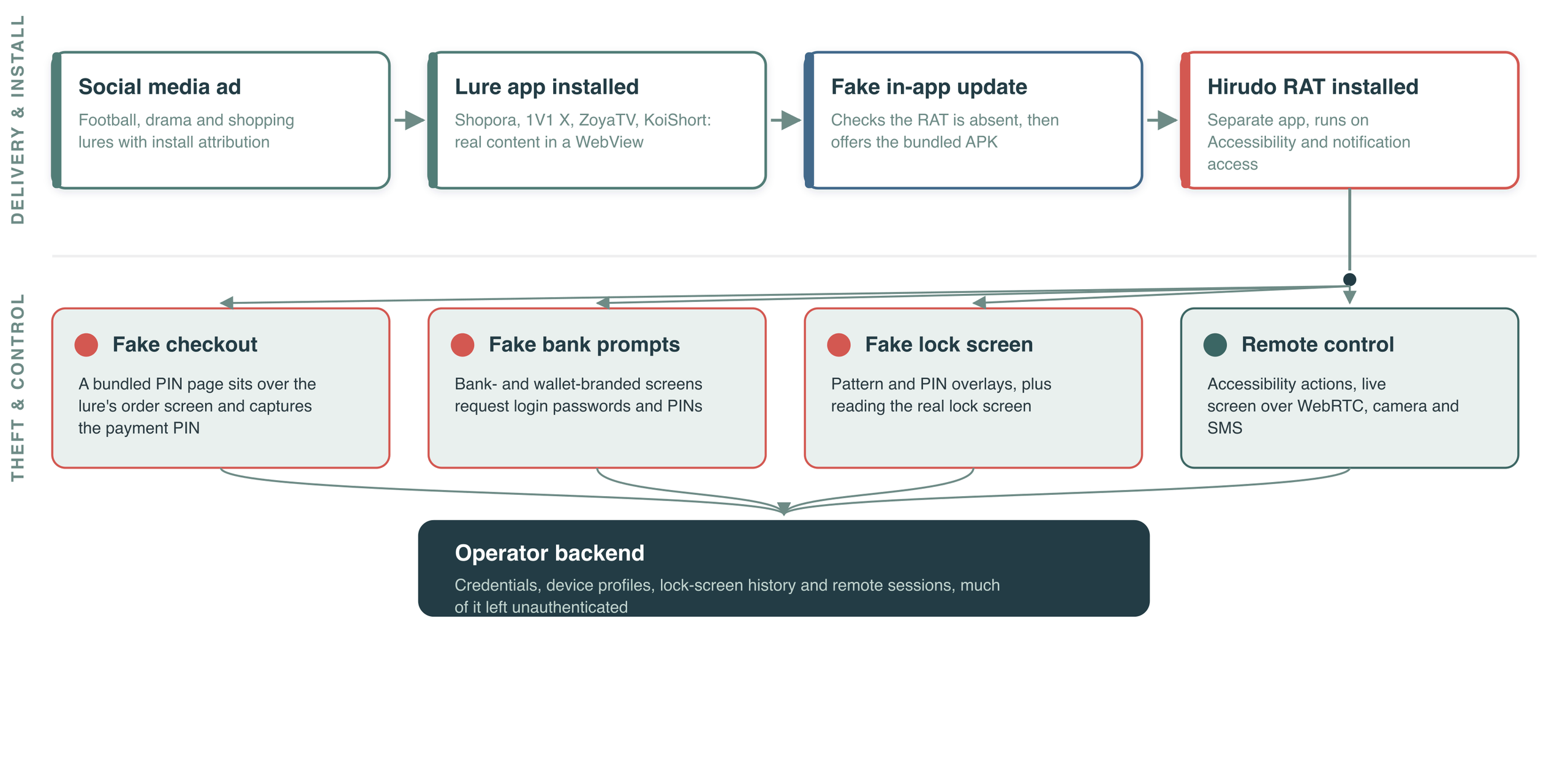
One dropper analysed by researchers goes a step further. During installation, it creates a deliberately broken VPN connection that cuts off the device’s internet access while Hirudo is installed. This does not fully bypass Google Play Protect, but ThreatFabric believes the technique is designed to weaken online reputation checks and code analysis while the malicious APK is being installed. Hirudo is then installed as a separate app from the dropper. Before it can carry out its malicious activities, it must obtain its own Accessibility and notification permissions.
When the payload detects a target banking app, it checks the app’s signing certificate against a stored reference, then shows a fake update prompt and immediately opens Android’s uninstaller without waiting for the user to tap confirm. It downloads the patched replacement in parallel.
“Hirudo keeps a registry of 42 financial apps, but only eight Indonesian apps, across seven banks, have dedicated replacement downloads. For these, the RAT detects the installed banking app through Accessibility, checks its signing certificate against a stored reference, then shows a fake “update” prompt.” reads the analysis. “It opens Android’s uninstaller for the genuine app without waiting for the user to tap, and downloads the bank-specific replacement in parallel.”
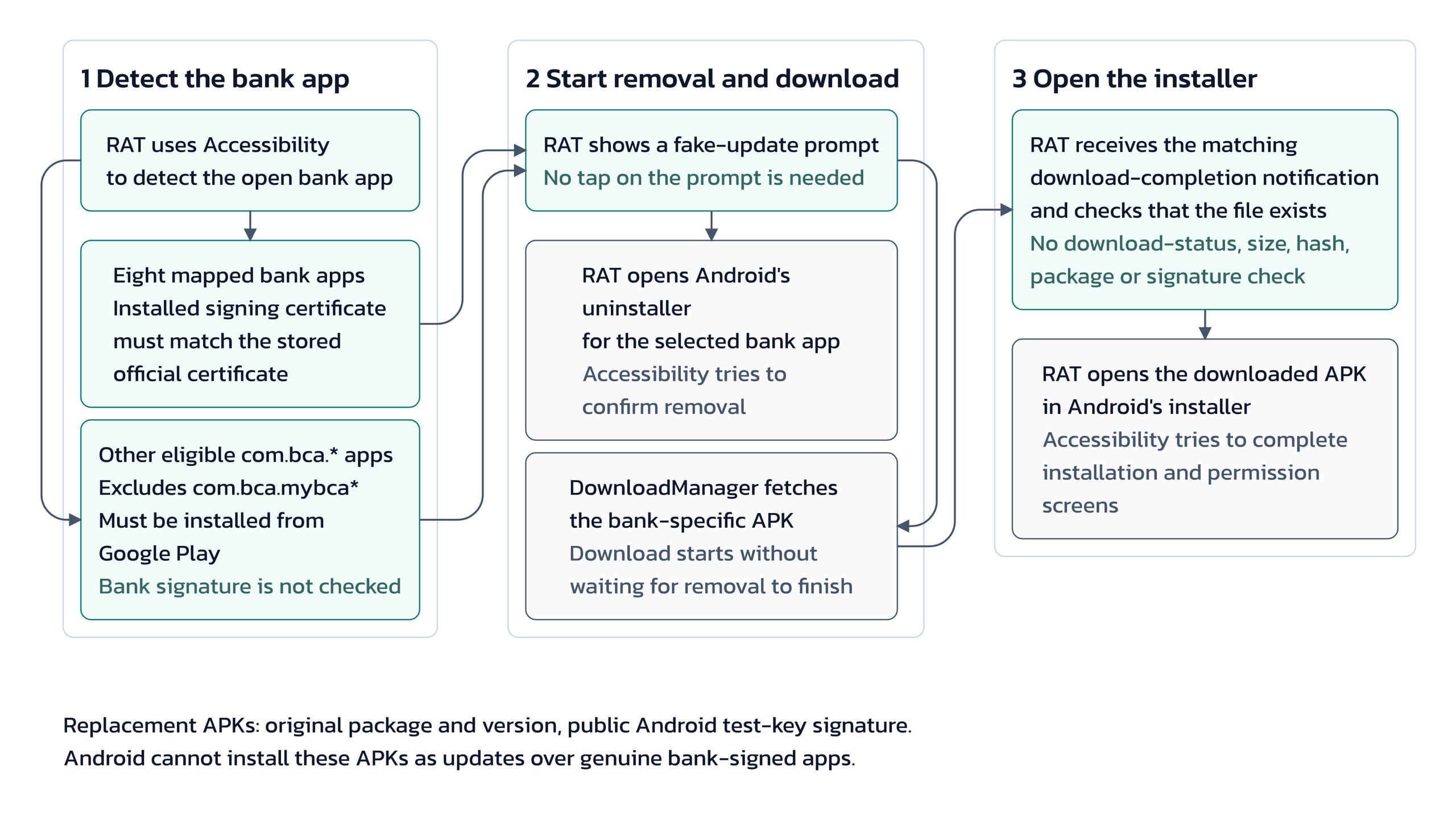
The replacement keeps the original package name and version number, but it’s signed with a public test key rather than the bank’s real certificate. Android won’t install it as an update over a properly signed app, which is why the original has to go first. That requirement is a real constraint: the victim can interrupt it. But if they don’t, what follows is clever enough to matter.
The bank’s original code remains almost unchanged. Only one line is added to the app’s Application class. This line loads a built-in hooking engine when the app starts. The engine uses two open-source frameworks: YAHFA to modify Java methods and Dobby to modify native functions. It activates only when it finds a trigger file created by the RAT on the device. Without this file, the modified banking app appears harmless.
Once activated, the engine runs inside the banking app and controls how it responds to security checks. If the app asks for its signing certificate, the engine returns the genuine one. If it checks which accessibility services are enabled, the engine returns an empty list. It also removes the flag that blocks screenshots, allowing the attacker to view and record the banking screen remotely.
Play Integrity checks are sent over plain HTTP to a server controlled by the operator, which returns an acceptable result. Researchers highlight two important points. First, the keybox used for attestation has been leaked publicly, and at least two of its certificates are already on Google’s revocation list. Second, a valid Play Integrity response does not prove that the app has not been tampered with. In this case, the response was relayed through the operator’s server rather than generated through a genuine integrity check.
The lures don’t spread through side-loaded APKs from shady forums. They’re served from Amazon CloudFront, tied to campaign tracking through OpenInstall attribution, and linked to Meta Pixel IDs connecting specific branding to specific campaign groups. Some download routes were still live through late September and into October 2026. The operator APK-processing panel, which rebuilds dropper and payload APKs into finished lures and patched banking apps, was reachable without authentication, with cloud storage buckets and credentials left exposed, a significant operational security failure that helped ThreatFabric map the operation.
Records from August 2026 included thousands of credential entries split across campaign groups, device records, lock-screen history, and financial profiles with monthly income and risk score fields. Operators annotated records they considered “phished,” which signals a workflow built to convert stolen data into actual fraud rather than just collect it.
ThreatFabric’s conclusion on the defensive side is worth reading directly: “once an app can be replaced, its locally produced signals — signature, accessibility list, integrity verdict — must be treated as attacker-influenced and verified server-side.” A valid Play Integrity verdict from a relayed request is not a green light. A clean accessibility list from a patched app is not evidence there’s no controlling service running. The signals the app produces locally are no longer trustworthy, and any bank relying on them as blockers rather than inputs to server-side risk scoring is running on assumptions this trojan was designed to exploit.
“Hirudo marks a deliberate escalation in how Android bankers approach hardened applications. By moving its tampering inside the target app, the operation shifts the contest from the device to the application’s own integrity checks, and from a bespoke patch to a reusable engine that can be retargeted at other apps and regions.” concludes the report. “The defensive conclusion is consistent across every capability we examined: signals produced locally by an app that may have been replaced cannot be trusted on their own.”
Follow me on Twitter: @securityaffairs and Facebook and Mastodon
(SecurityAffairs – hacking, Android malware)
Group-IB found the RemControl Android banking trojan, a new malware using AI phishing overlays and fake TVTap apps to steal banking PINs and credentials.
Related Posts:
The post RemControl Android Banking Trojan Steals Bank PINs appeared first on Daily CyberSecurity.
The SideCopy APT campaign deploys custom RATs. Learn how the SideCopy APT campaign malware exploits mshta to target academic and government networks.
Related Posts:
The post SideCopy APT Campaign Targets Academic Institutions appeared first on Daily CyberSecurity.
Learn how Brazilian KREMLIN banking malware steals credentials using fake browser extensions. Elastic Security Labs details the KREMLIN banking malware.
Related Posts:
The post KREMLIN Banking Malware Targets Brazilian Banks appeared first on Daily CyberSecurity.
RedHook malware uses fake banking and government apps to steal data and control Android phones, with attacks confirmed in Vietnam and Indonesia so far.
The post Fake Bank Apps Let Scammers Control Android Phones in Southeast Asia appeared first on TechRepublic.

How do hackers hack phones? In several ways. But also, there are several ways you can prevent it from happening to you. The thing is that our phones are like little treasure chests. They’re loaded with plenty of personal data, and we use them to shop, bank, and take care of other personal and financial matters—all of which are of high value to identity thieves. However, you can protect yourself and your phone by knowing what to look out for and by taking a few simple steps. Let’s break it down by first understanding what phone hacking is, taking a look at some common attacks, and learning how you can prevent it.
Phone hacking refers to any method where an unauthorized third party gains access to your smartphone and its data. This isn’t just one single technique; it covers a wide range of cybercrimes. A phone hack can happen through software vulnerabilities, like the spyware campaigns throughout the years that could monitor calls and messages. It can also occur over unsecured networks, such as a hacker intercepting your data on public Wi-Fi. Sometimes, it’s as simple as physical access, where someone installs tracking software on an unattended device.
Hackers have multiple avenues of attacking your phone. Among these common methods are using malicious apps disguised as legitimate software, exploiting the vulnerabilities of unsecure public Wi-Fi networks, or deploying sophisticated zero-click exploits that require no interaction from you at all. The most common method, however, remains social engineering, where they trick you into giving them access. Let’s further explore these common hacking techniques below.
Whether hackers sneak it onto your phone by physically accessing your phone or by tricking you into installing it via a phony app, a sketchy website, or a phishing attack, hacking software can create problems for you in a couple of ways:
Some possible signs of hacking software on your phone include:
In all, hacking software can eat up system resources, create conflicts with other apps, and use your data or internet connection to pass your personal information into the hands of hackers.
This classic form of attack has been leveled at our computers for years. Phishing is where hackers impersonate a company or trusted individual to get access to your accounts or personal info or both. These attacks take many forms such as emails, texts, instant messages, and so forth, some of which can look really legitimate. Common to them are links to bogus sites that attempt to trick you into handing over personal info or that install malware to wreak havoc on your device or likewise steal information. Learning to spot a phishing attack is one way to keep yourself from falling victim to one.
Professional hackers can use dedicated technologies that search for vulnerable mobile devices with an open Bluetooth connection. Hackers can pull off these attacks when they are within range of your phone, up to 30 feet away, usually in a populated area. When hackers make a Bluetooth connection to your phone, they might access your data and info, yet that data and info must be downloaded while the phone is within range. This is a more sophisticated attack given the effort and technology involved.
In August of 2019, then CEO of Twitter had his phone hacked by SIM card swapping scam. In this type of scam, a hacker contacts your phone provider, pretends to be you, then asks for a replacement SIM card. Once the provider sends the new SIM to the hacker, the old SIM card is deactivated, and your phone number will be effectively stolen. This enables the hacker to take control of your phone calls, messages, among others. The task of impersonating someone else seems difficult, yet it happened to the CEO of a major tech company, underscoring the importance of protecting your personal info and identity online to prevent hackers from pulling off this and other crimes.
While a phone call itself cannot typically install malware on your device, it is a primary tool for social engineering, known as vishing or voice phishing. A hacker might call, impersonating your bank or tech support company, and trick you into revealing sensitive information like passwords or financial details. They might also try to convince you to install a malicious app. Another common tactic is the “one-ring” scam, where they hang up hoping you’ll call back a premium-rate number. To stay safe, be wary of unsolicited calls, never provide personal data, block suspicious numbers, and check that your call forwarding isn’t enabled.
Generally, a phone that is powered off is a difficult target for remote hackers. However, modern smartphones aren’t always truly off. Features like Apple’s Find My network can operate in a low-power mode, keeping certain radios active. Furthermore, if a device has been previously compromised with sophisticated firmware-level malware, it could activate upon startup. The more common risk involves data that was already stolen before the phone was turned off or if the device is physically stolen. While it’s an uncommon scenario, the only sure way to take a device offline and completely sever all power is by removing the battery, where possible.
Hacking a phone’s camera is referred to as camfecting, usually done through malware or spyware hidden within a rogue application. Once installed, these apps can gain unauthorized permission to access your camera and record video or capture images without your knowledge. Occasionally, vulnerabilities in a phone’s operating system (OS) have been discovered that could allow for this, though these are rare and usually patched quickly. Protect yourself by regularly reviewing app permissions in your phone’s settings—for both iOS and Android—and revoking camera access for any app that doesn’t absolutely need it. Always keep your OS and apps updated to the latest versions.
This is a long-standing debate with no simple answer. iPhones are generally considered more secure due to Apple’s walled garden approach: a closed ecosystem, a strict vetting process for the App Store, and timely security updates for all supported devices. Android’s open-source nature offers more flexibility but also creates a more fragmented ecosystem, where security updates can be delayed depending on the device manufacturer. However, both platforms use powerful security features like application sandboxing.
The most important factor is not the brand but your behavior. A user who practices good digital hygiene—using strong passwords, avoiding suspicious links, and vetting apps—is well-protected on any platform.
Detecting a phone hack early can save you from significant trouble. Watch for key red flags: your battery draining much faster than usual, unexpected spikes in your mobile data usage, a persistently hot device even when idle, or a sudden barrage of pop-up ads. You might also notice apps you don’t remember installing or find that your phone is running unusually slow. To check, go into your settings to review your battery and data usage reports for any strange activity. The most effective step you can take is to install a comprehensive security app, like McAfee® Mobile Security, to run an immediate scan and detect any threats.
Discovering that your phone has been hacked can be alarming, but acting quickly can help you regain control and protect your personal information. Here are the urgent steps to take so you can remove the hacker, secure your accounts, and prevent future intrusions.
While there are several ways a hacker can get into your phone and steal personal and critical information, here are a few tips to keep that from happening:
Your smartphone is central to your life, so protecting it is essential. Ultimately, your proactive security habits are your strongest defense against mobile hacking. Make a habit of keeping your operating system and apps updated, be cautious about the links you click and the networks you join, and use a comprehensive security solution like McAfee® Mobile Security.
By staying vigilant and informed, you can enjoy all the benefits of your mobile device with confidence and peace of mind. Stay tuned to McAfee for the latest on how to protect your digital world from emerging threats.
The post How Do Hackers Hack Phones and How Can I Prevent It? appeared first on McAfee Blog.
