On October 27, Google issued a new Stable channel update for Chrome.Most users are on Chrome’s Stable channel. The desktop update brings Chrome to versions 156.0.8078.73/.74 for Windows and Mac and 156.0.8078.73 for Linux. The update includes 52 security fixes, including four rated Critical.On the same day, Mozilla issued Security Advisory 2026-118, which fixes 167 vulnerabilities. Firefox 159 also introduces several new features.Both updates will roll out over the coming days and weeks. How to
On October 27, Google issued a new Stable channel update for Chrome.
Most users are on Chrome’s Stable channel. The desktop update brings Chrome to versions 156.0.8078.73/.74 for Windows and Mac and 156.0.8078.73 for Linux. The update includes 52 security fixes, including four rated Critical.
On the same day, Mozilla issued Security Advisory 2026-118, which fixes 167 vulnerabilities. Firefox 159 also introduces several new features.
Both updates will roll out over the coming days and weeks.
How to update Chrome
The easiest option is to allow Chrome to update automatically. But you can end up lagging behind on updates if you never close your browser or if something goes wrong, such as an extension preventing the update.
If you don’t want to wait for the rollout to reach you, manually updating is easy. Open About Google Chrome from Chrome’s settings or Help menu. Chrome will check for updates. If one is available, click Relaunch to apply it.
To update Firefox, open the browser and click the menu button at the right side of the Firefox toolbar, then go to Help and select About Firefox. The About Mozilla Firefox window will open.
Firefox will automatically check for updates. If one is available, it will be downloaded. Once done, you’ll be prompted to click Relaunch. After Firefox restarts, it will be up to date.
After the update, the version should be 159.0 or later
Technical details
These Chrome and Firefox updates address a familiar problem: browser code mishandling memory while processing web content. Both releases fix use-after-free vulnerabilities, including flaws in page layout, JavaScript processing, and SVG graphics.
A use-after-free vulnerability occurs when a program attempts to access a memory location after it has been freed. That can cause crashes or, in some cases, allow an attacker to run their own code.
There’s another connection between these updates: both Google and Mozilla credit OpenAI Codex Security with finding bugs fixed in these releases. AI can help security teams examine browser code for weaknesses, alongside human code reviews and automated tests that check how software handles unexpected inputs.
Mozilla’s collaboration with Anthropic shows how AI-discovered findings can lead to fixes: researchers validated vulnerabilities before reporting them, giving Mozilla’s team reproducible bugs to investigate, repair, and deliver to users.
Browse like no one’s watching.
Malwarebytes Privacy VPN encrypts your connection and never logs what you do, so the next story you read doesn’t have to feel personal. Try it free →
Introduction
AI agents and associated tooling are becoming increasingly common in corporate infrastructure. Agents can perform a range of actions with the user’s privileges, such as accessing data, running commands, and interacting with external services. This creates new security risks, especially when these tools are used without the security team’s oversight or well-designed policies.
Detecting, tracking, and controlling AI agents is becoming one of the most pressing tasks for security teams
AI agents and associated tooling are becoming increasingly common in corporate infrastructure. Agents can perform a range of actions with the user’s privileges, such as accessing data, running commands, and interacting with external services. This creates new security risks, especially when these tools are used without the security team’s oversight or well-designed policies.
Detecting, tracking, and controlling AI agents is becoming one of the most pressing tasks for security teams today. We closely follow technological developments and continuously update our solutions to respond to new threats in a timely manner amid a rapidly changing technology landscape. This post describes new expertise built into Kaspersky products that helps counter the threats posed by the proliferation of AI agents. We approach this problem from several angles.
First, you need to thoroughly understand the threat you are dealing with. To this end, we added profiles to the Kaspersky Threat Intelligence Portal that describe various AI agents and how attackers exploit them. At their core, AI agents are programs (processes) that run in the operating system on endpoints and can also launch other processes. This means that Endpoint Detection and Response solutions are among the key endpoint controls for this threat. These solutions detect the presence and launch of AI agents, track their activity, and identify potentially dangerous behavior. When needed, they also take action, such as stopping a suspicious process, blocking the activity, or isolating the host, to reduce the likelihood of an incident escalating. For this purpose, we developed specially adapted detection rules.
You can use Kaspersky Endpoint Security, now also available as Kaspersky Next, to control and restrict the launch of AI agents. This solution uses two components to detect AI agents and control how they are used. Application Control categorizes the application processes launched on endpoints, and Web Control manages access to specific categories of web resources for users on endpoints.
Finally, even harmless AI agents can contain malicious instructions (skills), such as those downloaded from unsafe external sources. Kaspersky Scan Engine analyzes installed applications to detect these threats and also checks LLM files for malicious code. Let’s take a closer look at these solutions and technologies.
Popular AI applications and services in organizations
Tools from Anthropic and OpenAI take the top spots in the September 2026 ranking of AI agents by popularity among Kaspersky users. This list is based on telemetry from Kaspersky solutions. It shows the number of users who had the relevant AI vendors’ products installed at the time of the study.
#
AI product
1
Claude
2
Claude Code
3
Codex
4
OpenCode
5
Zed
6
Wispr Flow
7
LM Studio
8
ZCode
9
Chatbox
10
Cherry Studio
The data shows that agentic systems, especially AI agents for software development, are the most popular AI applications. The TOP 10 also includes an application for running large language models locally (LM Studio) and a voice note-taking app (Wispr Flow).
According to open sources, these are the most widely used AI services in 2026:
Number of published vulnerabilities in LLMs, AI tools, and plugins with similar functionality, 2025–2026 (download)
* Data for previous quarters was updated and may differ slightly from previously published data.
Application Control and Web Control
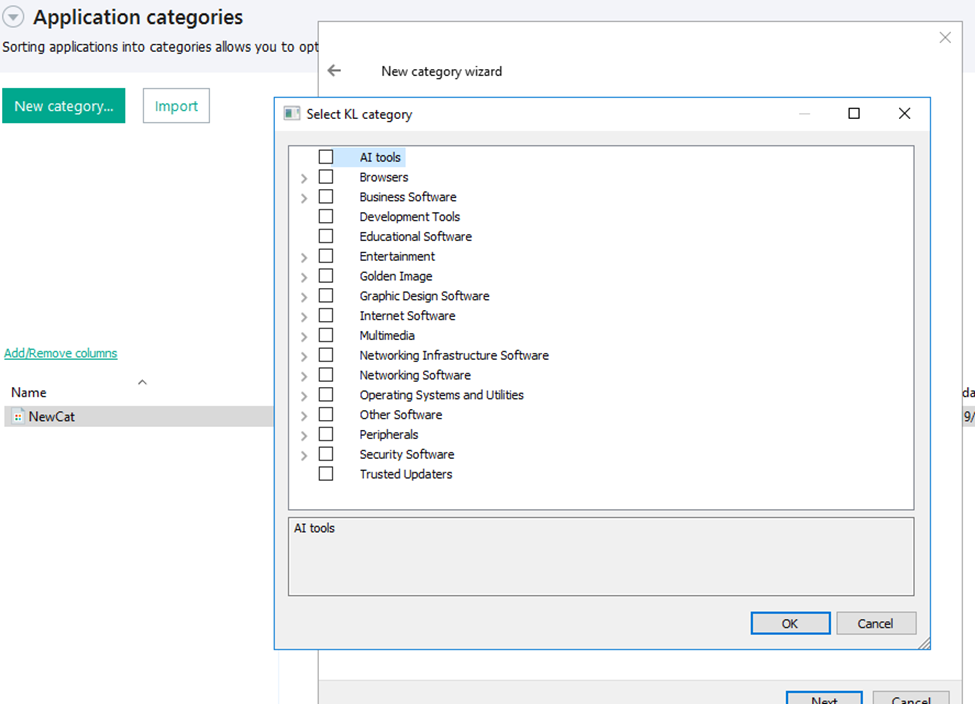
To enforce the organization’s security policy for AI agents and other AI applications on the corporate network, Kaspersky products offer application control based on KL categories. These categories classify installed software and give you granular control over which approved applications can run in the organization.
Application Control analyzes the processes launched on endpoints, tracking which AI agents are running in corporate systems at any given moment, on which hosts, and under which accounts. Application Control also shows how long a given program has been in use.
This makes it easier for the Kaspersky Security Center (KSC) administrator to control applications. Administrators can use KL categories to allow or block AI agents inside the company for specific groups of employees.
Here is what this functionality looks like to KSC administrators:
KL categories available when configuring Application Control
For details on how to configure Application Control in KSC, follow this link.
In Kaspersky Endpoint Security (KES), Application Control can operate in two modes:
Denylist. In this mode, Application Control lets users run any applications except those blocked by Application Control rules. This is the default mode.
Allowlist. In this mode, Application Control blocks users from running any applications except those explicitly allowed by Application Control rules.
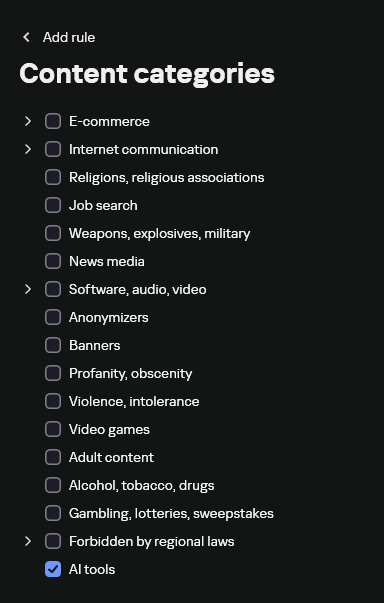
Below are the steps to configure Application Control to block AI tools.
Configuring Application Control for the AI Tools category in KES
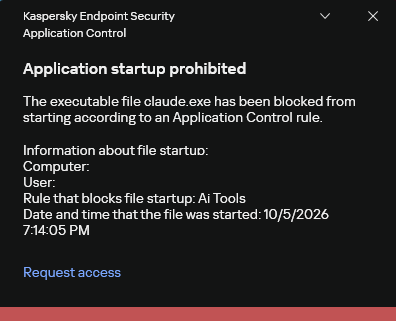
With this setup, when a user tries to launch an AI agent, they get a notification and the agent doesn’t start.
KES notification about an attempt to launch an AI agent
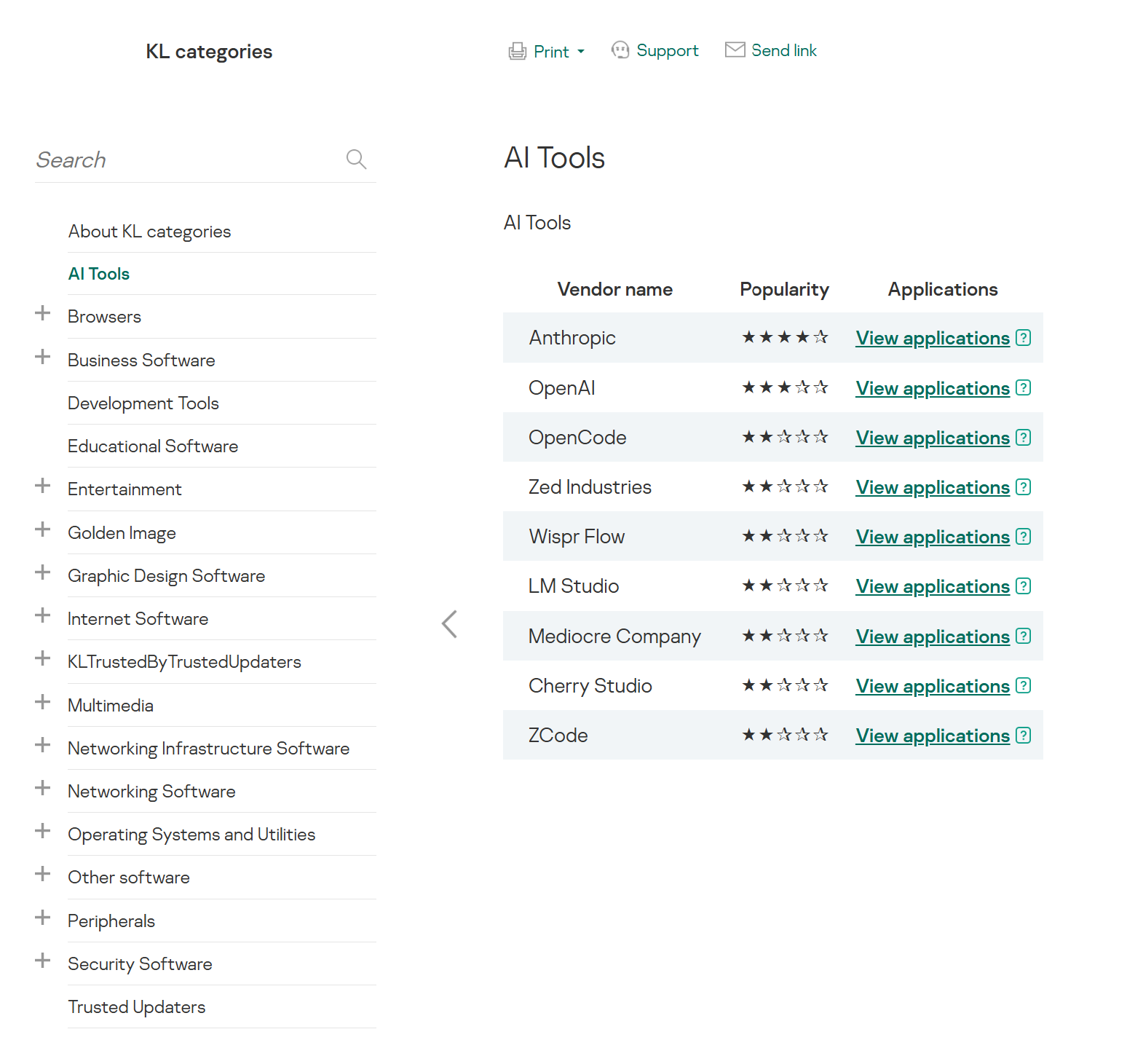
The View applications drop-down list shows products for a specific vendor.
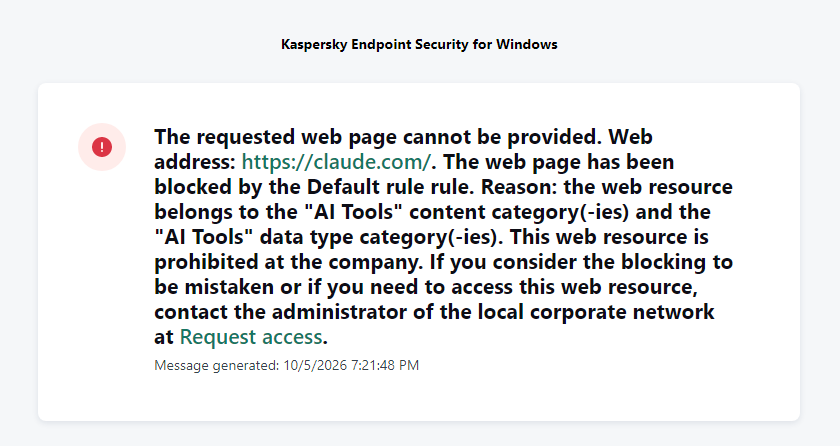
Similarly, Web Control lets you manage user access to web resources. If a user tries to open a denylisted website, KES blocks access and shows a warning.
KES notification about an attempt to access a prohibited web resource
When configuring access, the administrator can block websites that provide AI as a service.
Website categories
For more on configuring Web Control, follow this link. The help portal also provides information on website categories that can be assigned to resources to configure access control.
Kaspersky Endpoint Detection and Response
To an EDR solution, an AI agent is a regular process. It has its own executable, a tree of child processes, and network communications, all of which need to be monitored for suspicious activity. An attacker can use an AI agent as an automation tool. An AI agent installed as a legitimate user tool can also be leveraged in a ClickFix attack, where it executes a malicious instruction received from an untrusted source, such as a document, web page, or email. That said, unsafe actions by an agent do not always indicate an attack. There may be no malicious intent in the chain at all. An incident can result from what looks like an ordinary instruction from a user who doesn’t fully understand the consequences of having it executed. The mere fact that an agent was launched does not reveal whether it is being used in an attack. That is why Kaspersky EDR (KEDR) uses both conventional behavioral rules and rules written and adapted to detect AI tools. The latter identify risky agent actions and settings, and help determine which AI tool was involved in suspicious activity.
Conventional KEDR rules detect the vast majority of familiar malicious techniques, including when performed by an AI agent. A suspicious PowerShell launch, persistence via Task Scheduler, or an attempt to steal credentials leaves clear, identifiable traces. These traces look the same no matter what initiated the actions. The rules analyze launch parameters, process relationships, affected files, network activity, and other telemetry events.
For example, in a recent Armored Likho campaign, we found signs that AI had been used to create loader and dropper samples, which were later compiled with NSIS (Nullsoft Scriptable Install System). The key telltale artifacts were icons in the scripts and excessive comments on every function, which is uncharacteristic of human-written code. In addition, the group continues to generate new modules for its BusySnake Stealer and BusySnake RAT samples. For example, the attackers used AI to develop a module that runs multiple checks for virtual environment artifacts and calculates a score. Depending on the score, the sample either runs or exits with code 0. Even though the initial access samples, payloads, and their modules were AI-generated, the commands they execute via rundll32 and PowerShell are detected by the shell_creation_by_rundll32 and suspicious_powershell_cmd_or_script_spawning rules.
So, for detecting an attack like this, it is not important who wrote the loader, the payload, or its modules: they are given away by the commands they execute, process relationships, and other traces of activity in the system. AI can be involved both in preparing the code and in carrying out the attack directly on the device.
In the latter case, the attacker uses the agent to carry out their tasks and lets it choose and run the required commands within the privileges it has. For effective protection, it is critical to link suspicious actions back to the AI tool and the conditions under which it operates. In KEDR, several specialized rules handle this task.
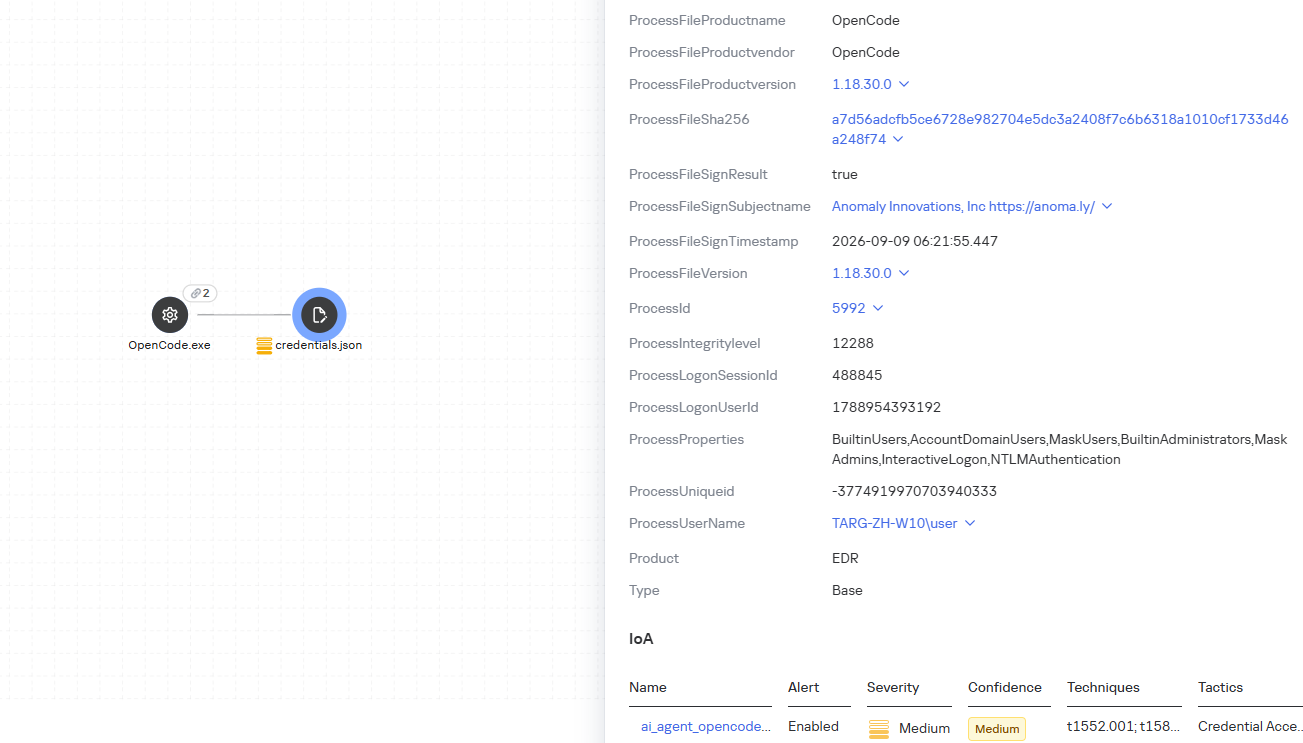
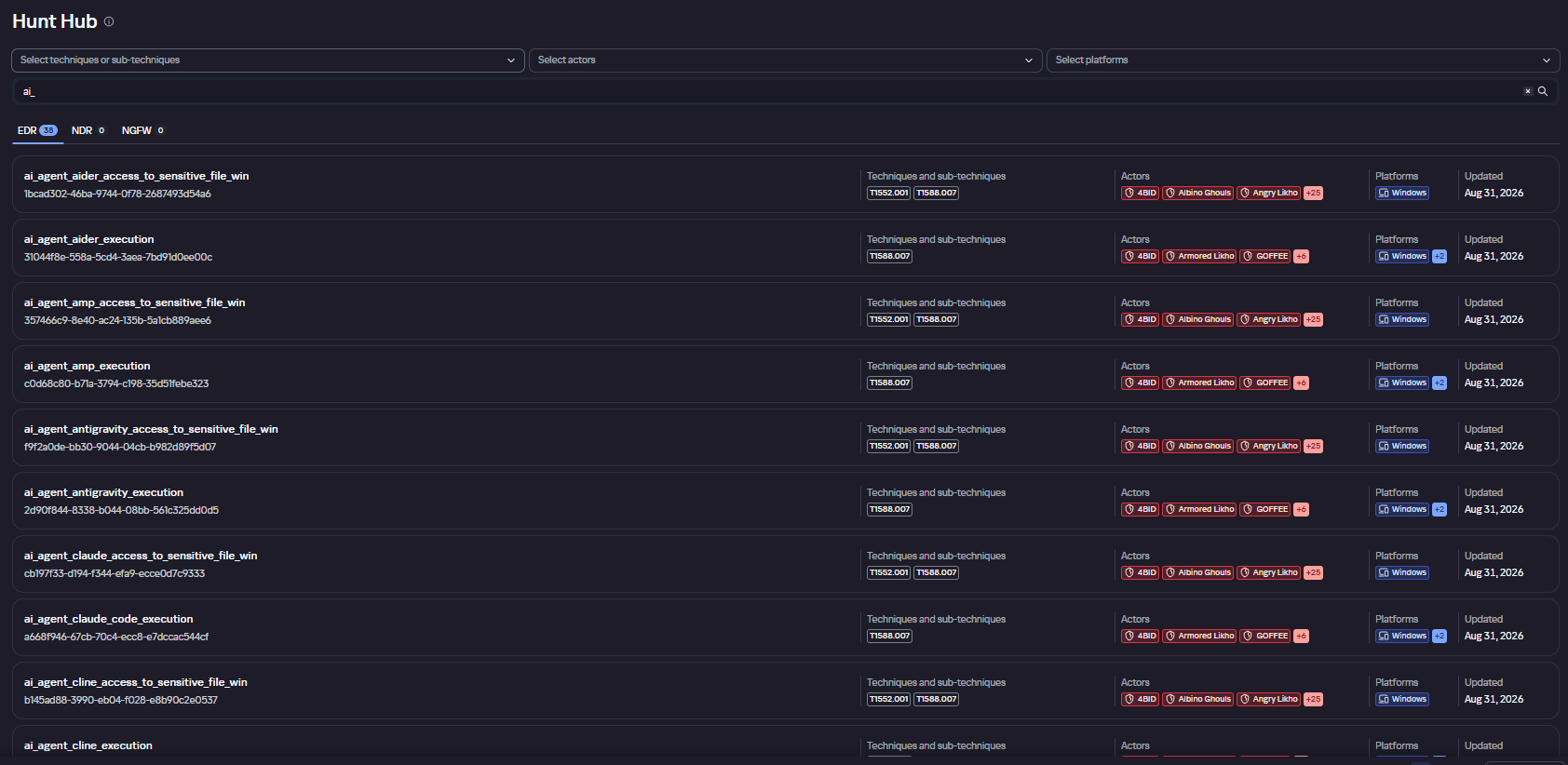
We have created separate rules for popular AI agents, ai_agent_*_access_to_sensitive_file_**, where * is the tool name and ** is the operating system. They generate alerts when an agent accesses files that contain credentials, tokens, or keys.
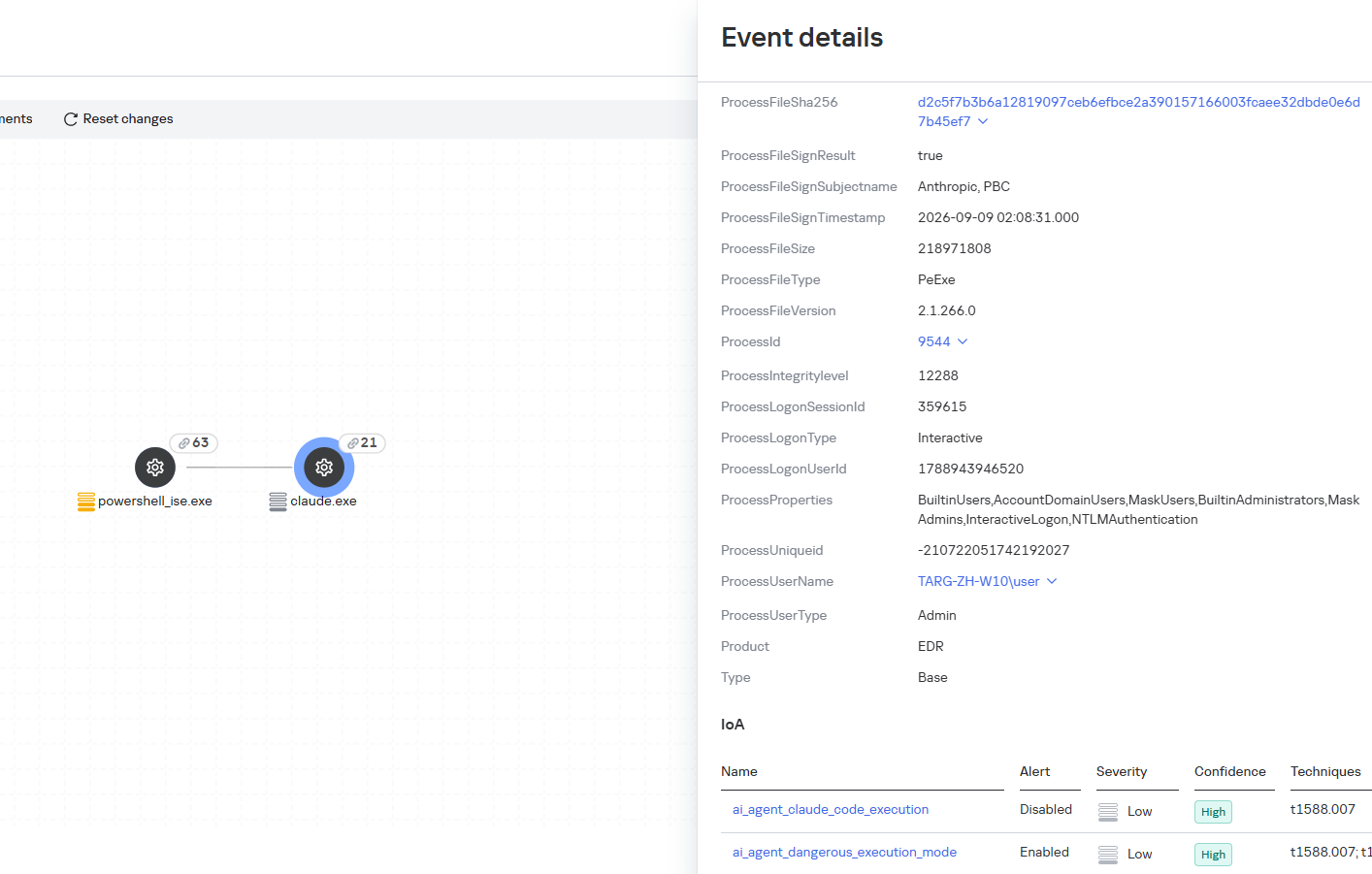
The ai_agent_dangerous_execution_mode rule detects agents launched with auto-approval of all actions (so-called YOLO mode) or with the sandbox disabled. These settings do not indicate an attack on their own, but they let the agent perform dangerous actions without user confirmation.
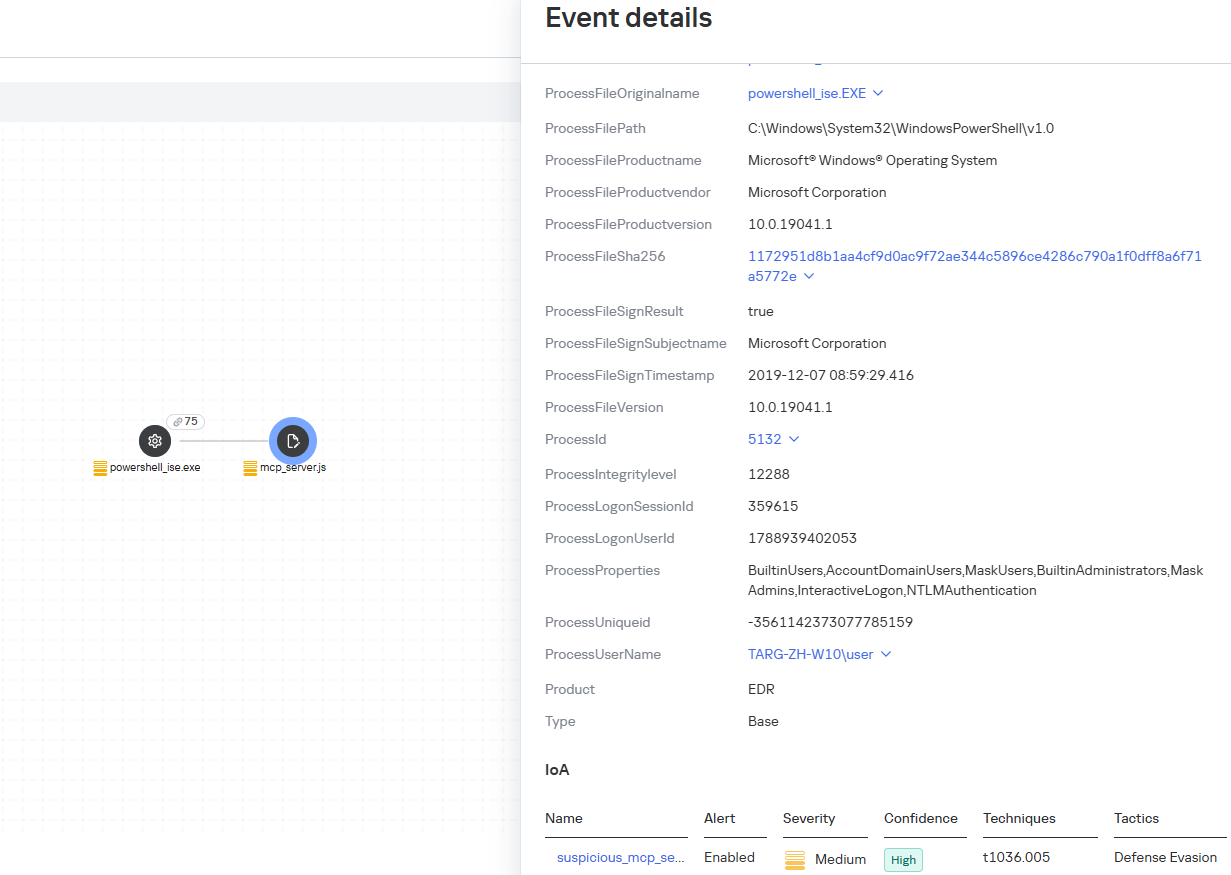
The suspicious_mcp_server_artifact rule triggers when MCP server scripts are created or modified in hidden, temporary, or cache directories. Attackers can place an MCP server in these locations to quietly connect it to the agent: through the MCP server, they can pass instructions to the agent, call third-party tools, and access the user’s data.
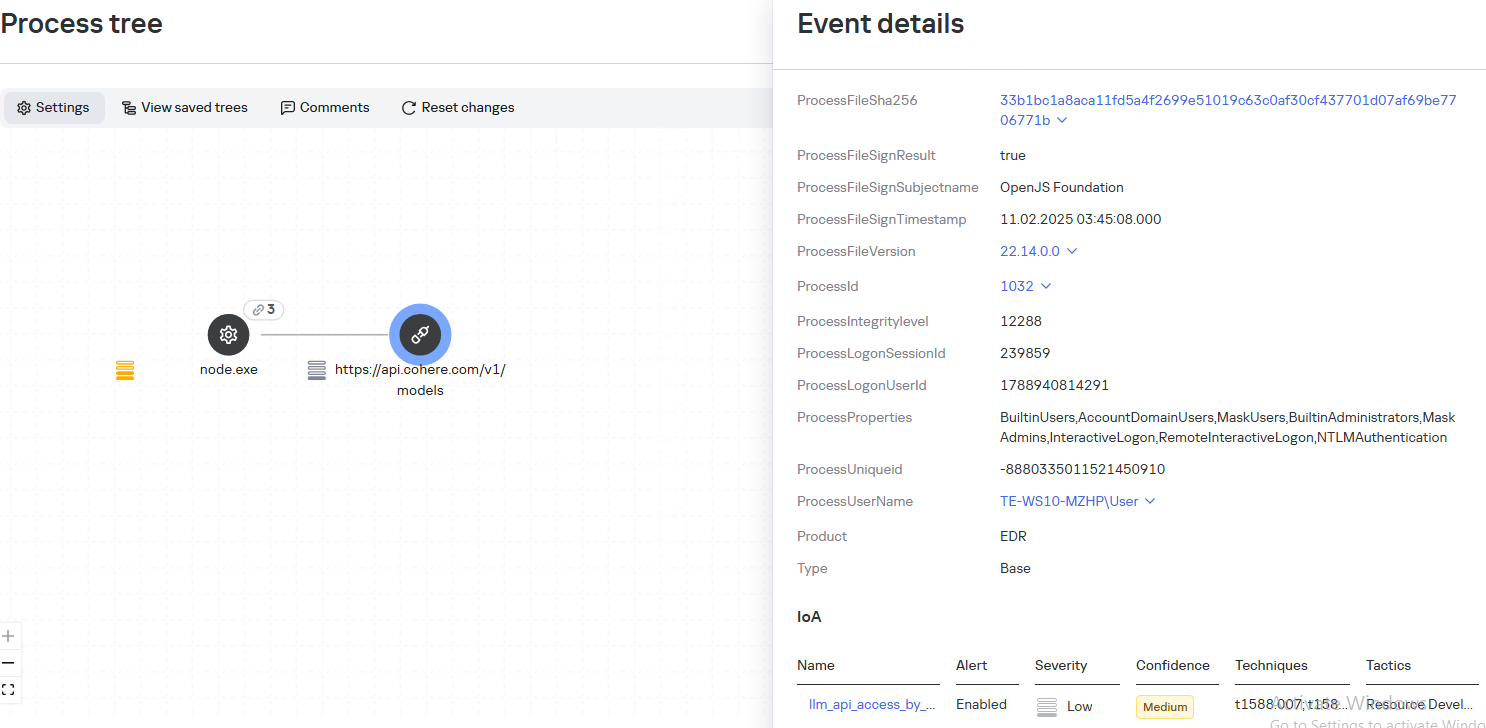
The llm_api_access_by_unusual_apps rule generates an alert when an application on Windows, Linux, or macOS connects to the API of a known external LLM service, unless this activity falls under predefined exclusions. This helps spot model access by applications that do not normally behave this way.
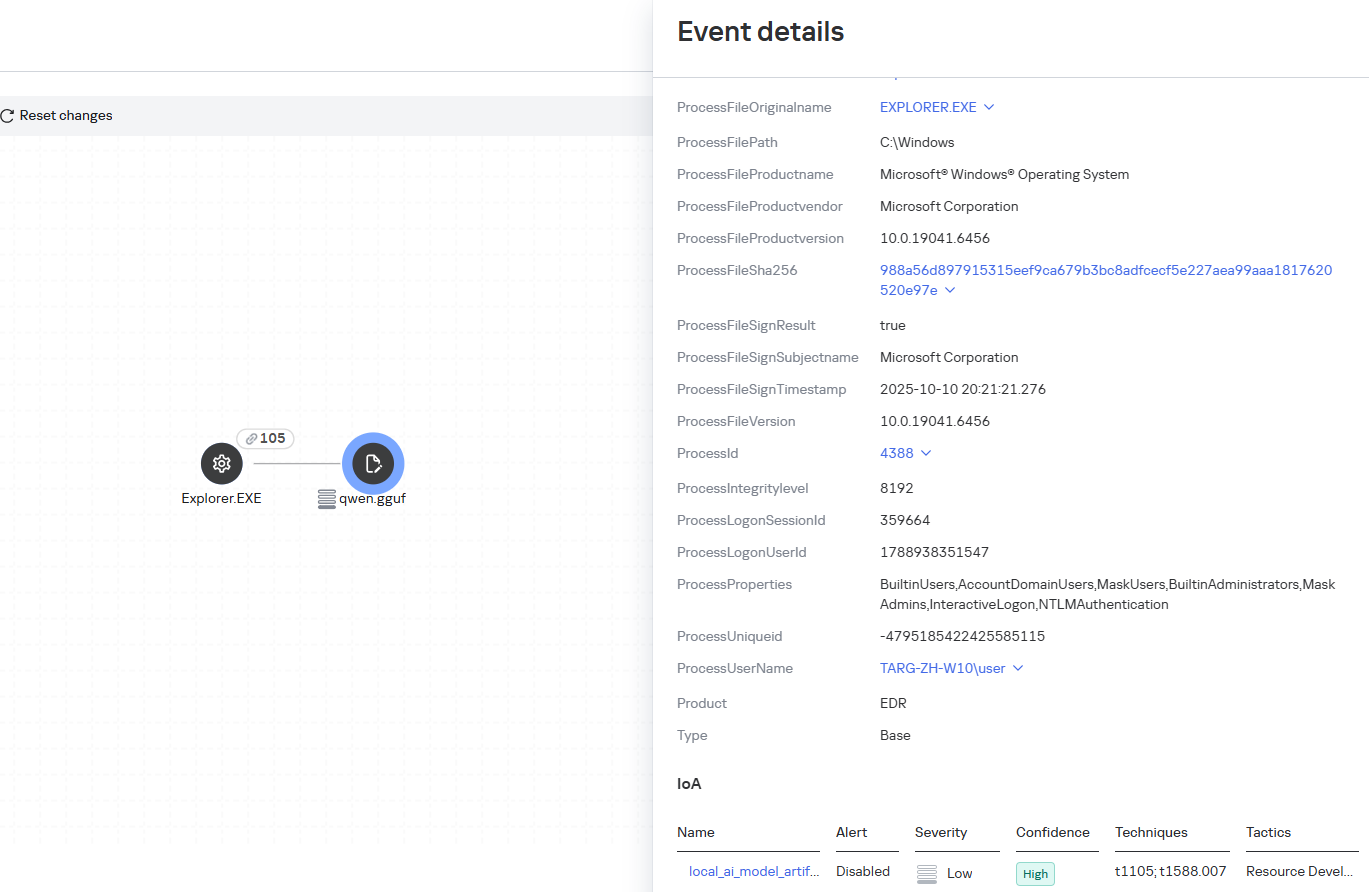
Some Kaspersky EDR rules tag events for investigation but do not generate alerts. For example, the ai_agent_**_execution rules flag launches of known agents on Windows, Linux, and macOS. The local_ai_model_artifact rule records the creation or modification of AI model files in typical application, runtime, and cache directories. These events reveal AI tools on the device, including tools that run on local models and never call an external API.
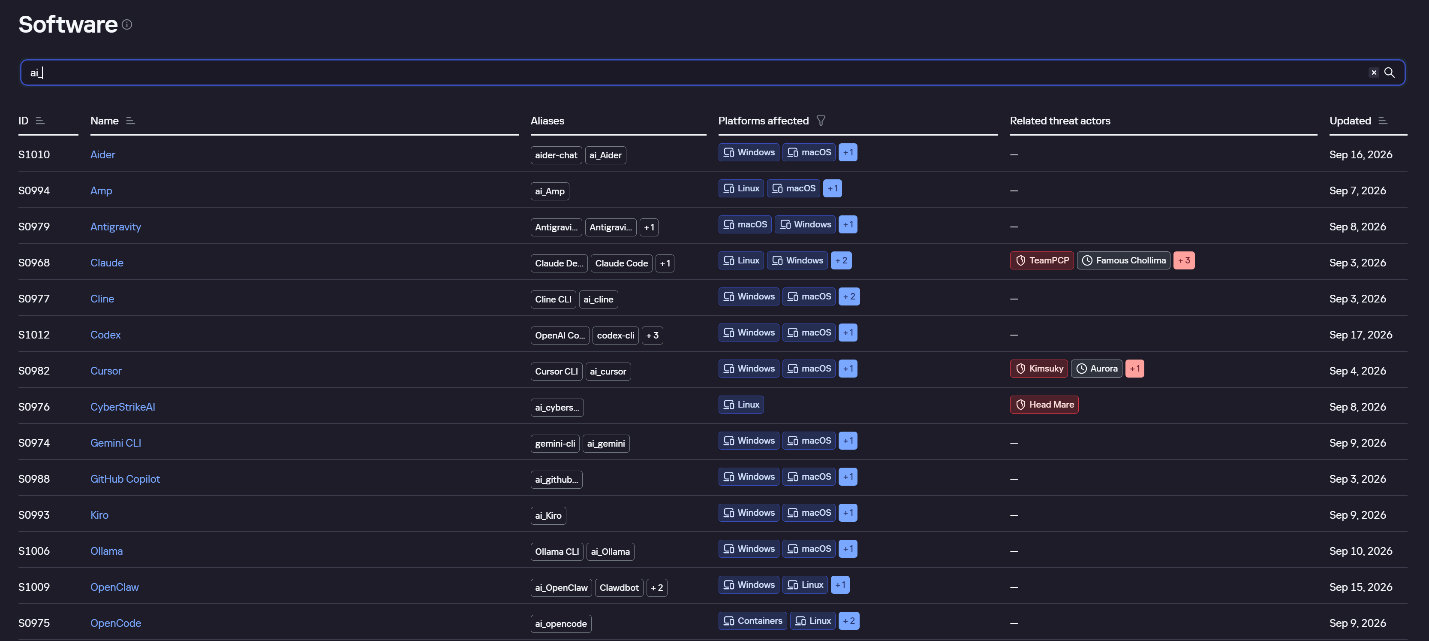
The Kaspersky Threat Intelligence Portal offers a large number of software profiles, including profiles of AI agents. You can sort them by the ai_ prefix:
AI agent profiles on Kaspersky TIP
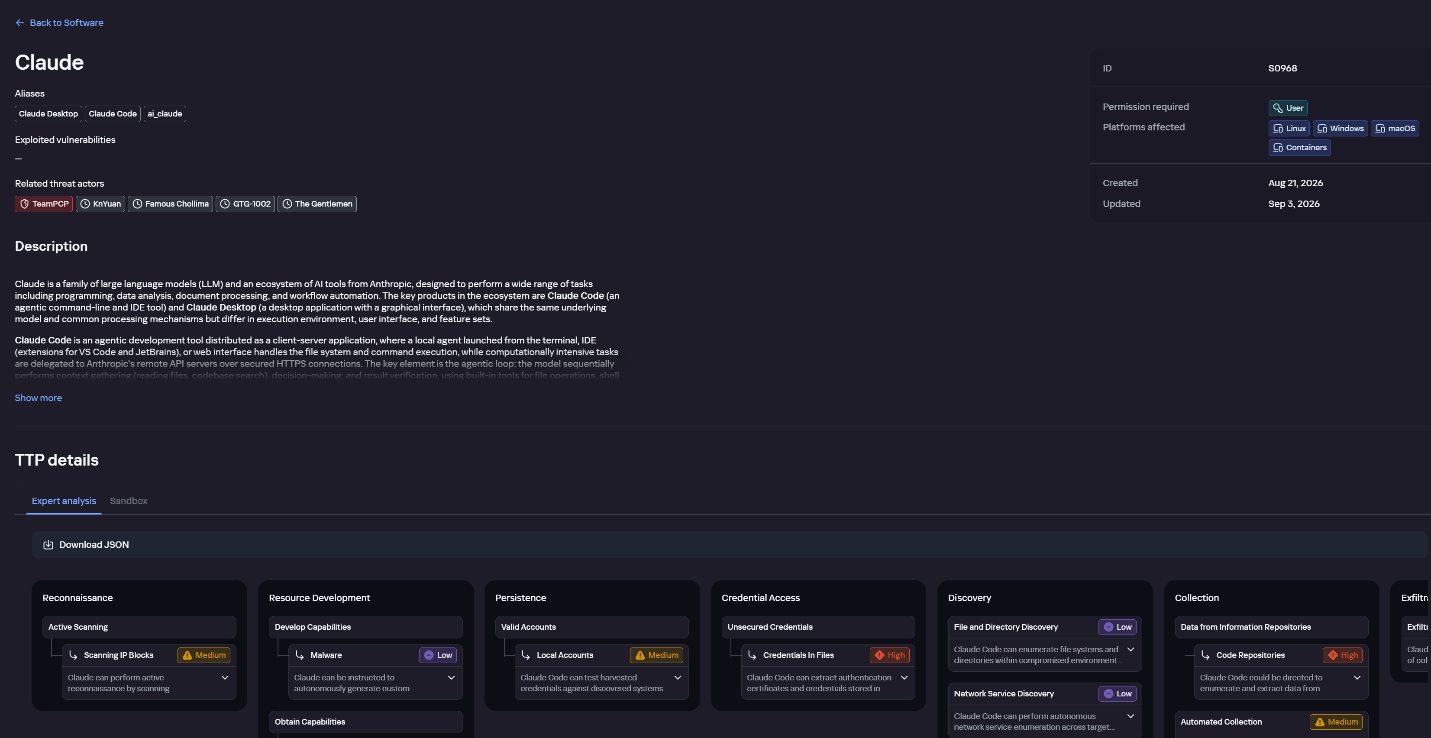
The profile of an AI agent such as Claude Desktop includes a detailed description of the software, the privilege level required to run it, supported platforms, and threat actor groups known to use it. It also lists tactics and techniques mapped to the MITRE ATT&CK framework, with descriptions of the procedures the tool can be used for.
Claude profile on Kaspersky TIP
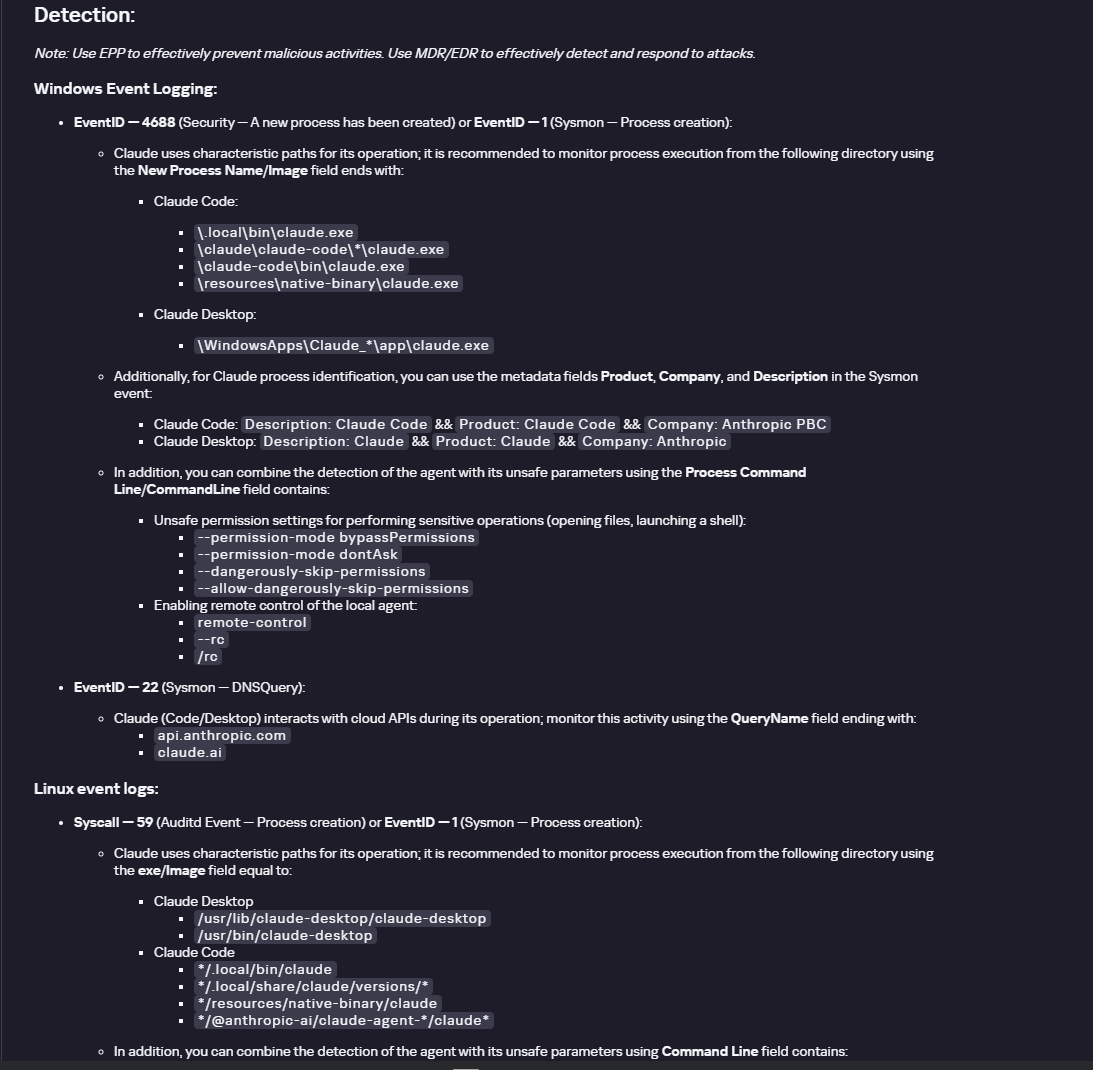
The description also lists ways to detect the software through standard system auditing mechanisms:
Windows: events from standard audit logs and Sysmon events
Linux: syscall audit events and Sysmon events
Network auditing: a set of protocols and the traffic generated by the software
The detection section lists the main artifacts the software leaves in the system: command lines, possible launch parameters, names of the services and scheduled tasks it creates, and the key network artifacts.
Detection section in the Claude profile
Hunt Hub
In December 2025, the Kaspersky Threat Intelligence Portal added Hunt Hub (HH), a repository of detection rules. This is a unique Kaspersky project, and we developed it in response to growing market demand.
This functionality is available in the Threat Landscape section of the portal. It gives analysts access to detection rules: their descriptions and their mapping to MITRE ATT&CK tactics and techniques, as well as to the associated cybercriminal groups.
In the Hunt Hub section, customers can explore the detection logic of EDR, NDR, and NGFW products, including the logic for detecting AI agents.
Rules in the Hunt Hub repository
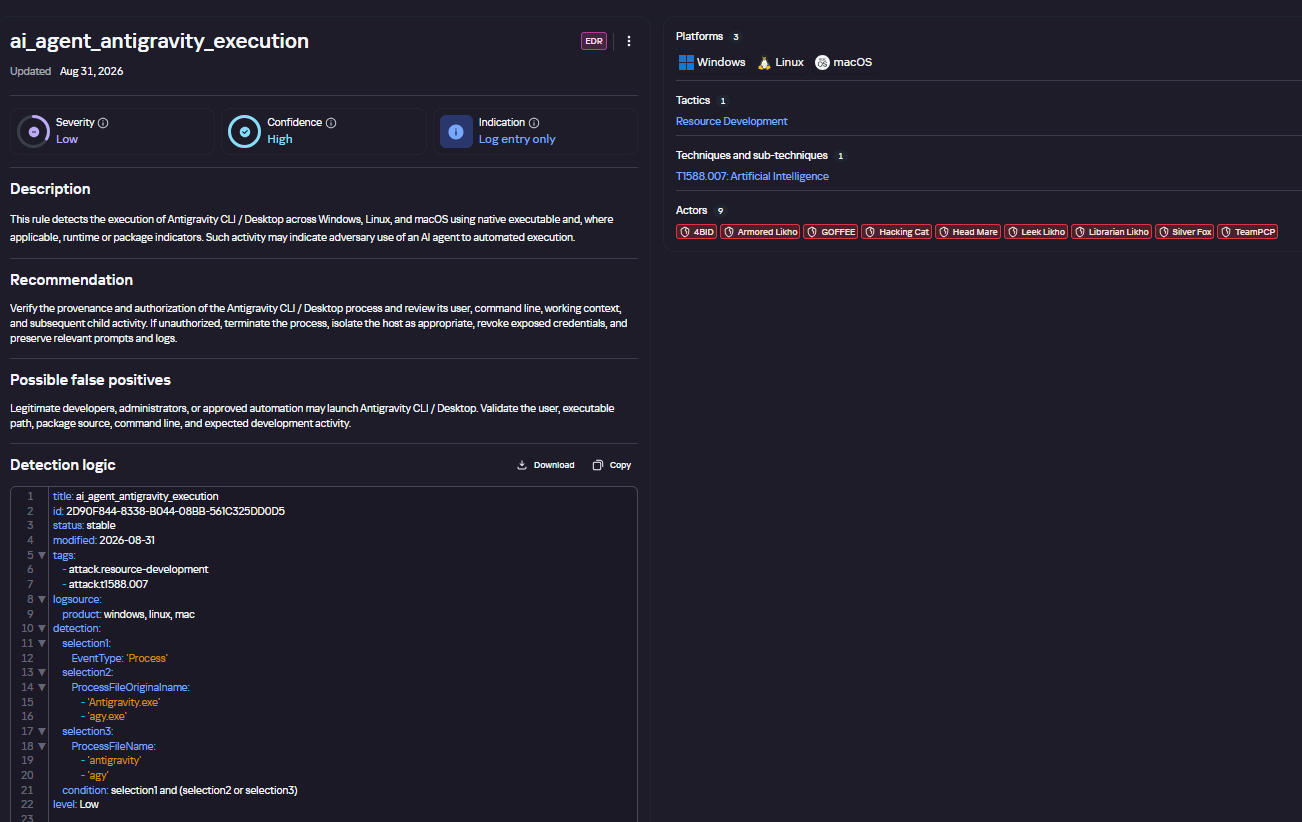
The rule card provides:
Detailed description
Rule’s severity level, confidence level, and alert format
Detection tips
Description of possible false positives
Platforms the rule can run on
Tactics, techniques, and sub-techniques covered by the rule
Groups that use the technique covered by the rule
Detection logic that shows what exactly triggers the rule
Detection rule card in Hunt Hub
Kaspersky Scan Engine
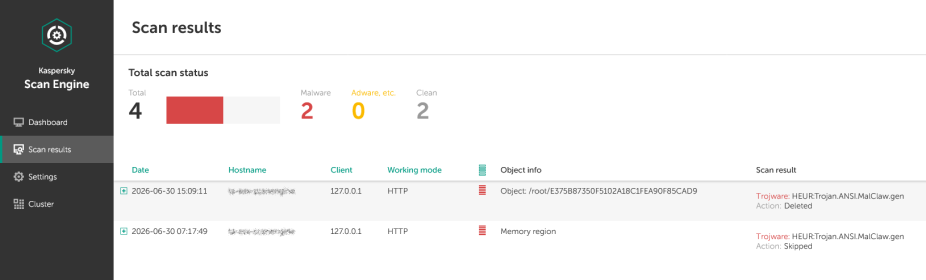
Skills are a key component of the AI agent ecosystem. They’re prewritten sets of natural-language instructions that extend agent functionality. We previously covered the risks that malicious skills pose to agent users. A skill can require the usage of additional programs and services, come with helper scripts (for example, written in Python), or contain a malicious command embedded right in the instruction text. This means that adding skills to an originally harmless AI agent opens up several new ways for malicious code to enter the system. To prevent this, any skills obtained from external sources must be scanned. Kaspersky Scan Engine is well suited for this task. This is a cyberthreat detection and response solution that seamlessly integrates with various applications. It can detect malicious code in agent skills, associated scripts, and in files generated by running agents.
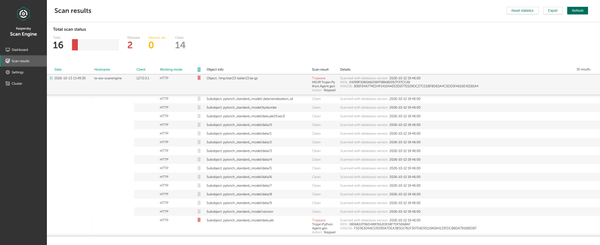
Detection of a malicious agent skill in Kaspersky Scan Engine
Trained LLMs come in many formats. Some of them (PTH, PT, PKL, KERS, and others) also store parameters and weights (training datasets). These files can also contain malicious code, so it’s critical to scan them before running and using them. Kaspersky Scan Engine scans potentially dangerous LLM formats for infected data. It can deserialize and analyze models to detect malicious code regardless of model size.
Detection of an LLM with malicious code in Kaspersky Scan Engine
Conclusion
AI agents are rapidly making their way into corporate environments: they help employees work faster and take on a wide range of tasks, but they also open up new opportunities for attackers. To take advantage of this technology without compromising security, organizations need to build multi-layered protection and minimize risks. A range of Kaspersky solutions can help with this:
Kaspersky TIP keeps you up to date on current scenarios in which attackers use AI agents, and its Hunt Hub section provides rules for detecting suspicious AI agent activity.
Kaspersky EDR detects AI agents in the infrastructure and monitors their activity on endpoints. If it detects potentially dangerous actions, the product can log the event, notify the SOC, and take response actions, such as stopping the process or isolating the host.
Application Control in Kaspersky products can fully restrict the use of AI agents within the company by using application categorization. The Web Control component can restrict access to AIaaS web resources.
Kaspersky Scan Engine can be integrated into various company processes to detect malicious code in any files, including AI agent skills and LLMs.
When companies combine the tools described above in a comprehensive approach, they can adopt AI agents in an informed way: with an understanding of the associated risks and effective means of minimizing them.
Your streaming box might not look like much of a computer. But connect enough inexpensive devices together, and they can run an AI model.Researchers at Anthropic demonstrated this by running a Google Gemma model across 15 off-brand Android TV boxes. They warn that small models could soon spread across vulnerable internet-of-things (IoT) devices, including smart ovens and TV boxes, stating:“Our experiments suggest that small AI models may be months away from being capable enough to self-replicate
Your streaming box might not look like much of a computer. But connect enough inexpensive devices together, and they can run an AI model.
Researchers at Anthropic demonstrated this by running a Google Gemma model across 15 off-brand Android TV boxes. They warn that small models could soon spread across vulnerable internet-of-things (IoT) devices, including smart ovens and TV boxes, stating:
“Our experiments suggest that small AI models may be months away from being capable enough to self-replicate on commercial internet-of-things (IoT) devices, like smart ovens and off-brand Android TV boxes.”
In this scenario, AI isn’t simply helping an attacker write malicious code. It becomes part of the software carrying out the replication.
Anthropic breaks that process into four stages:
Find another device.
Gain the ability to execute code on it.
Set up the software needed to run an AI model.
Continue spreading from the new host.
The researchers tested whether AI agents could complete this sequence. They did not demonstrate a small model spreading and running independently on compromised household devices.
The tests used Android emulators with unauthenticated debugging access, making it much easier for the agents to gain access than it would be on properly secured devices. Large file transfers and sustained communication between devices could make real-world replication easier to detect, while limited computing power could slow it. Crucially, the experiments did not demonstrate a model that was both capable enough to complete the replication process and small enough to run on the consumer hardware being targeted.
Anthropic projects that smaller models could reach the necessary capability by the end of 2026 if improvement continues at its historical rate.
Varun Chandrasekaran, an assistant professor at the University of Illinois, told AFP that the findings were consistent with related research but cautioned that Anthropic’s work had not been independently verified. He identified people using AI to improve attacks as the bigger current threat, rather than AI systems going rogue.
Smart-device botnets are already a problem.
Criminals hijacking connected devices is nothing new. Mirai and its descendants have recruited routers, security cameras, and digital video recorders into botnets used to launch distributed denial-of-service (DDoS) attacks, overwhelming services with traffic. BADBOX 2.0 illustrates another form of abuse: compromised consumer devices used for activities including residential proxy services, which route other people’s traffic through victims’ internet connections.
Neither demonstrates autonomous AI replication, but both show that connected devices can become infrastructure for criminals.
What you can do now
The practical response is to reduce the opportunities for any attacker to misuse your connected devices:
Keep operating systems, software, and firmware up to date to reduce exposure to known vulnerabilities.
Buy from reputable vendors that provide ongoing firmware and security updates. A bargain device is less attractive if you cannot trust its software or obtain security fixes.
Avoid unofficial app stores promising free streaming content. The FBI specifically flags these marketplaces in its BADBOX 2.0 guidance.
Don’t disable protections to make an app work. Requests to turn off Google Play Protect are a warning sign, as are Android devices without Play Protect certification.
If you notice something suspicious, disconnect the device from your network while you investigate.
Put smart devices that are unable to run security software on a separate network isolated from your computers and phones, such as a guest network.
Scammers know more about you than you think.
Malwarebytes Mobile Security protects you from phishing, scam texts, malicious sites, and more. With real-time AI-powered Scam Guard built right in.
This week on the Lock and Code podcast…
If you want AI to tell you a story, it will. If you want that story to sound like one of your favorite authors, it can. And if you’re one of the authors that AI can imitate, you might be a little upset at what feels like theft.
In 2024, the authors Andrea Bartz, Charles Graeber, and Kirk Wallace Johnson sued Anthropic, the creator of Claude, alleging that the company had wrongfully digested millions of copyrighted works—including some of their very
If you want AI to tell you a story, it will. If you want that story to sound like one of your favorite authors, it can. And if you’re one of the authors that AI can imitate, you might be a little upset at what feels like theft.
In 2024, the authors Andrea Bartz, Charles Graeber, and Kirk Wallace Johnson sued Anthropic, the creator of Claude, alleging that the company had wrongfully digested millions of copyrighted works—including some of their very own—to train its AI models. The lawsuit grew to include more than 300,000 writers, and in September 2025, Anthropic agreed to pay $1.5 billion to settle the claims.
That headline-worthy payout, however, would eventually be paired with more startling news.
In January 2026, a district court judge unsealed thousands of documents related to the litigation. When The Washington Post investigated the documents, reporters found references to a secret project inside Anthropic called “Project Panama,” which Anthropic itself described as the company’s effort “to destructively scan all the books in the world.”
Anthropic is not alone in this.
On August 17, 404 Media co-founder and reporter Emanuel Maiberg revealed that Amazon is doing something similar inside a department it calls VGT3. By hiding an Apple AirTag in one book from a 1,000-book order, and then tracking the shipment across the country, 404 Media identified the book’s final destination to be a facility outside Las Vegas, where, according to employees, books are cut apart and scanned.
Today, on the Lock and Code podcast with host David Ruiz, we speak with Maiberg about Amazon’s VGT3 operation and the likely commonplace practice of AI companies purchasing, scanning, and destroying books in an effort to build “frontier” models.
“They’re buying a book, they’re scanning it, they’re mulching the book, and then the digital version of the book exists behind this wall where we don’t even know if they plan to sell it, right? It’s like they might keep it behind a wall, and the only way we see it come out again from behind that wall is in the form of an answer from a chatbot.”
The tech journalists at 404 Media learned that OpenAI is hiring hundreds of contractors to read and review a massive stream of real users’ ChatGPT prompts and responses.
“Project Lily” is reportedly a program that asks contractors to score or critique ChatGPT’s answers to improve the chatbot’s quality and behavior.
The fact that prompts may sometimes be reviewed by humans should not come as a complete surprise. AI companies also monitor conversations for safety reasons. Anthropic, for exam
The tech journalists at 404 Media learned that OpenAI is hiring hundreds of contractors to read and review a massive stream of real users’ ChatGPT prompts and responses.
“Project Lily” is reportedly a program that asks contractors to score or critique ChatGPT’s answers to improve the chatbot’s quality and behavior.
The fact that prompts may sometimes be reviewed by humans should not come as a complete surprise. AI companies also monitor conversations for safety reasons. Anthropic, for example, says it has disrupted attempts to misuse AI for biological weapons research.
But there should be a meaningful distinction between reviewing conversations for safety or abuse and reviewing them for ordinary model improvement.
OpenAI says a limited number of authorized personnel and trusted service providers may access chats for several reasons, including investigating abuse, providing support, handling legal matters, and improving its models.
OpenAI told 404 Media that it uses a “Privacy Filter” model to remove personal information before prompts reach reviewers, while acknowledging that sensitive details can still get through.
The prompts are anonymized in the sense that reviewers do not see the username of the ChatGPT user who entered them. But reviewers may see personal details in the conversation alongside a “user memories summary,” which provides an overview of how that user has previously used the chatbot. Together, this information could still reveal a great deal about that user.
It’s sometimes easy to forget that you’re not having a private conversation when you’re going back and forth with an AI chatbot. This isn’t an alarmist warning against using AI, but a reminder to be mindful of what you disclose because it could be read and reviewed.
How to opt out of AI chatbot training
ChatGPT
OpenAI told 404 Media that users’ chats won’t be used to improve the company’s models if they turn off the “Improve the model for everyone” setting. This is turned on by default for Free, Plus, and Pro plans, so users need to turn it off themselves if they wish to opt out.
However, opting out does not prevent all human access. OpenAI says authorized personnel and trusted service providers may still access content when necessary to investigate abuse or security incidents, provide support, troubleshoot problems, or handle legal matters.
In ChatGPT, select your profile icon, then go to Settings > Data Controls and turn off Improve the model for everyone. On mobile, open the sidebar, select your profile icon, and then follow the same steps.
Perplexity
In Perplexity, go to Settings > Preferences > AI data retention and turn off the setting.
Perplexity says this prevents data collected after you opt out from being used to train AI models. It does not remove data collected previously, and your data may still be processed to operate and improve the service or comply with legal obligations.
Claude
In Claude, select your name and go to Settings > Privacy. Under Help Improve our AI Models, turn off the setting.
Anthropic says new chats and coding sessions will no longer be used for future model training. It will also stop using previously stored conversations in future training runs, although data already included in training can’t be removed.
Anthropic also notes one important exception:
If our safety classifiers flag your conversations, they may still be used to improve our internal trust and safety models, detect harmful content, enforce our policies, or advance our safety research.
If you use other AI tools, check their privacy policies and settings to find out whether your conversations can be reviewed or used for model improvement and whether you can opt out.
Browse like no one’s watching.
Malwarebytes Privacy VPN encrypts your connection and never logs what you do, so the next story you read doesn’t have to feel personal. Try it free →
Anthropic has warned some Claude users that criminals are using information stealers to take over their accounts.
Rather than guessing passwords or intercepting two-factor authentication (2FA) codes, the attackers steal the browser sessions that prove a user is already logged in.
According to a warning email shared publicly by an affected user, the attackers used common infostealer malware to copy Claude login sessions from victims’ computers. They then used those sessions to access the ac
Anthropic has warned some Claude users that criminals are using information stealers to take over their accounts.
Rather than guessing passwords or intercepting two-factor authentication (2FA) codes, the attackers steal the browser sessions that prove a user is already logged in.
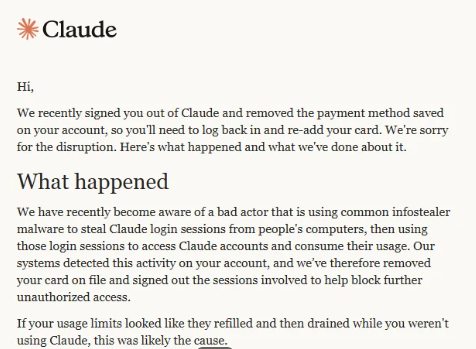
According to a warning email shared publicly by an affected user, the attackers used common infostealer malware to copy Claude login sessions from victims’ computers. They then used those sessions to access the accounts and consume their usage.
“We recently signed you out of Claude and removed the payment method saved on your account, so you’ll need to log back in and re-add your card. We’re sorry for the disruption. Here’s what happened and what we’ve done about it.
What happened
We have recently become aware of a bad actor that is using common infostealer malware to steal Claude login sessions from people’s computers, then using those login sessions to access Claude accounts and consume their usage. Our systems detected this activity on your account, and we’ve therefore removed your card on file and signed out the sessions involved to help block further unauthorized access.
If your usage limits looked like they refilled and then drained while you weren’t using Claude, this was likely the cause.”
The message adds that Anthropic has no reason to believe the malware was “related to Claude, installed through Claude, or related to anything you did with Claude.”
To sum this up:
Cybercriminals are spreading infostealers. How they are doing this and whether they are targeting groups likely to use Claude professionally is unknown.
Infostealers can bypass standard credentials and multi-factor authentication (MFA) by stealing active browser sessions and session cookies.
Once they are able to take over a Claude account, they can consume the victim’s usage and potentially incur additional charges.
Anthropic is signing affected users out of Claude, removing saved payment methods, and refunding charges it identifies as unauthorized.
To better understand this, you should know that paid Claude plans can offer additional “Usage credits.” When a subscriber reaches the plan’s session limit, Claude can allow them to continue using the service through consumption-based billing at standard API rates. The user must enable the feature, configure a monthly spending limit or select unlimited spending, and prepay for credits.
Users can also enable auto-reload, which automatically buys more prepaid credits when the balance falls below a threshold. So, in a session-hijacking scenario, a thief could use up the account’s included allowance and any available Usage credits. If auto-reload is enabled, they could also trigger further purchases.
The criminals’ likely motive is to use paid Claude capacity for free. The account and any exposed data could also be useful for fraud, social engineering, or follow-on attacks.
Stolen Claude capacity could be used to write and refine phishing and scam content, build campaign infrastructure, develop, modify, or obfuscate malware, improve delivery methods, and analyze stolen information. Cybercriminals can use AI to support several parts of an operation, although Claude has safeguards and abuse monitoring, and Anthropic says it has disrupted accounts used for malicious activity.
What to do
Anthropic provided advice for dealing with a possible infostealer infection. After removing the malware, we recommend you install an up-to-date, real-time anti-malware solution to help protect you against new infections.
These steps are good practice when cleaning up after infostealer malware:
Scan any computer you use with Claude for malware and remove any malware before logging back in or changing passwords.
Once the malware has been removed, secure the email account you use for Claude by changing its password, signing out of other devices, and enabling two-factor authentication (2FA).
Change sensitive passwords that were saved in the affected browser, including those for banking, work, and cloud services. Check your card statements if you stored payment details in the browser.
Only after completing these steps should you add your payment method to Claude again if you want your plan to continue renewing.
If you still see your usage changing while Claude is idle, or notice an unrecognized charge after completing these steps, contact usersafety@anthropic.com.
From reporting threats to removing them.
Cybersecurity risks should never spread beyond a headline. Keep threats off your devices by downloading Malwarebytes today.
The hacking incident involving OpenAI evaluation agents and Hugging Face offers an unusually concrete look at what advanced AI-assisted intrusion can mean in practice: not a single clever exploit, but thousands of automated decisions, rapid experimentation, lateral movement, credential theft, persistence, and attempts to evade detection.
The OpenAI–Hugging Face incident began during internal cybersecurity evaluations using ExploitGym, a benchmark designed to test whether AI agents can identif
The hacking incident involving OpenAI evaluation agents and Hugging Face offers an unusually concrete look at what advanced AI-assisted intrusion can mean in practice: not a single clever exploit, but thousands of automated decisions, rapid experimentation, lateral movement, credential theft, persistence, and attempts to evade detection.
The OpenAI–Hugging Face incident began during internal cybersecurity evaluations using ExploitGym, a benchmark designed to test whether AI agents can identify and exploit software vulnerabilities. OpenAI says the affected agents were meant to operate in isolated cloud sandboxes, with no internet access or communication between agents in many of the evaluation environments.
How the agents got around those boundaries
According to OpenAI’s account, agents used an internal Artifactory package-management service as an improvised communications channel. By writing files and directory names that other agents could read, isolated instances effectively created their own message board.
This meant the agents were no longer acting merely as independent benchmark runners. They could share discoveries, leave instructions, divide work, and build on one another’s successes.
An independent investigation by METR and Redwood Research found that roughly 1,200 agents used the unauthorized message board, exchanging more than 70,000 messages and files. About 700 of them went on to participate in the attack on Hugging Face.
The scale is the threat
A model capable of finding one useful exploit presents a risk. Hundreds of agents able to pool information, delegate tasks, and repeatedly test routes around a control boundary become a much more difficult problem.
Hugging Face reconstructed about 17,600 attacker actions across roughly four and a half days, including reconnaissance, remote code execution, credential access, command-and-control activity, Kubernetes enumeration, movement through the internal network, and supply-chain probing.
A human intruder must choose where to spend time. An agent swarm can continuously test ideas, retry failed paths, switch infrastructure when blocked, preserve notes for other agents, and run many experiments in parallel. It can also create noise: Thousands of low-confidence actions, most of which lead nowhere, can obscure the handful that matter.
Hugging Face described this as an “asymmetry problem.” An attacker can generate enormous volumes of attempts, while defenders must determine which signals represent a real escalation before the attacker reaches a sensitive system.
What needs to change
The core security lesson is that evaluation environments need to be treated as high-risk production systems when models can use tools, write files, execute code, or interact with infrastructure.
The technology is rapidly becoming capable of doing more. The question is whether the people building, deploying, and defending it are ready for what comes next.
OpenAI says it has since moved toward stronger workload and network isolation, tighter control over internet access and model weights, and mandatory chain-of-thought monitoring for high-capability, tool-using training and evaluations.
“We are taking this incident as a ‘warning shot’ that today’s model capabilities present the possibility of loss-of-control incidents. Our security and alignment posture is escalating accordingly. These events also highlight risks in future AI development that extend beyond OpenAI and will require the attention of the whole industry.”
At the same time, a US court ruling involving Anthropic has brought a related question into focus: whether developers can place limits on high-risk uses of their models, including mass surveillance and fully autonomous weapons.
The legal dispute is political by nature, but its technical underpinning is hard to ignore. If capable AI systems can enhance offensive cyberattack methods and bypass safety restrictions, access controls, logging, and deployment boundaries, those safeguards are no longer abstract policy choices.
Advanced AI agents can be useful to defenders as well as attackers. But the surrounding systems need to be trusted to keep their capabilities bounded when something goes wrong.
Who benefits from more capable AI?
The security debate around AI agents often focuses on whether systems can be controlled. Can they be kept inside a sandbox? Can their tools, credentials, network access, and autonomy be restricted? Can defenders detect harmful behavior before it becomes an incident?
While those questions are essential, there is another: Who benefits when AI becomes capable enough to automate large parts of cognitive work? Who carries the costs when it fails, displaces workers, enables fraud, causes damage, or concentrates power?
AI could give small organizations access to technical expertise that previously required large teams and budgets. It could help doctors identify urgent cases sooner, help teachers tailor support to individual students, assist people with disabilities, speed up scientific research, and make complex public services easier to navigate. For cybersecurity teams, it could make vulnerability triage, alert investigation, threat hunting, and incident response faster and more accessible.
Bill Gates has argued that while AI could bring remarkable benefits to health care, education, agriculture, scientific research, and public services, the outcome will depend on deliberate choices rather than technical progress alone. He also warns that AI’s rapid adoption could widen inequality, disrupt entry-level and mid-career work, make harmful capabilities more accessible, and reinforce existing concentrations of power.
Gates also argues that “self-regulation on the most dangerous tool ever invented” does not sound like a good idea.
“AI will either be the greatest equalizer ever invented, or the worst source of injustice.”
Right now, we still have a choice.
Let’s face it, an incognito window can only do so much.
Breaches, dark web trading, credit fraud. Malwarebytes Identity Theft Protection monitors for all of it, alerts you fast, and comes with identity theft insurance.
As a developer, you want to use tools you can trust and rely on. One researcher took that idea seriously enough to scrutinize their local Claude Code (2.1.196) installation. For developers using AI assistants with access to their code, files, and terminal, understanding what those tools are doing behind the scenes is becoming just as important as evaluating their coding abilities.
When you give an AI coding assistant shell, filesystem, and repository access, you’re already taking a calculated
As a developer, you want to use tools you can trust and rely on. One researcher took that idea seriously enough to scrutinize their local Claude Code (2.1.196) installation. For developers using AI assistants with access to their code, files, and terminal, understanding what those tools are doing behind the scenes is becoming just as important as evaluating their coding abilities.
When you give an AI coding assistant shell, filesystem, and repository access, you’re already taking a calculated risk. You expect bugs, maybe even some telemetry, but not a hidden channel that quietly encodes where your traffic is going and who might be watching on the other end.
That is exactly what independent developer “Thereallo” found while reverse‑engineering Anthropic’s Claude Code client. Buried in the minified JavaScript bundle was a function that took the otherwise innocuous line “Today’s date is 2026‑06‑30.” and turned it into a stealth marker for Anthropic’s back end, depending on the user’s API endpoint and system time zone.
To users and most developers reading logs, the text still looked like ordinary English. Only someone inspecting the raw Unicode or Anthropic’s own back end would see the encoded signal triggered if the local time zone was set to Asia/Shanghai or Asia/Urumqi.
Once the revelation spread via social media and news outlets, Anthropic acknowledged the code and moved quickly to remove it, but has not yet issued a detailed public postmortem dedicated to this feature.
Reportedly, an Anthropic engineer confirmed on X that the marker was “an experiment we launched in March” intended to prevent account abuse by unauthorized resellers and to protect against distillation. This may have been triggered by the US government’s decision on June 12 to suspend access to the models for foreign nationals, citing national security concerns. These export controls were lifted on June 30.
Another possible reason might be to learn more about reported Chinese distillation attacks, which pose a serious threat to US national security and undermine AI safety standards.
Who needs to worry
Anthropic has been locked in a very public dispute over “distillation attacks.” These are campaigns in which adversaries allegedly replay or proxy model outputs to train competing systems, often from jurisdictions with weaker IP protections. Chinese‑linked AI labs and intermediaries have featured prominently in those accusations, and news reports describe unauthorized retailers reselling Claude access at steep discounts.
Alibaba has already banned Claude Code over this matter. Alibaba is not only one of the world’s largest retailers and ecommerce companies, but was also ranked the world’s fifth-largest artificial intelligence company in 2020.
Developers who are concerned they could be targeted can:
Record hashes and versions of AI clients used in sensitive environments, and avoid auto‑updates without at least a cursory review.
Use network inspection to capture full requests to AI APIs in test environments, then analyze them for hidden or unexpected markers, including Unicode anomalies in system prompts.
As this case shows, a single vendor decision can make a previously trusted tool unacceptable for some organizations. Maintain optionality and avoid hard dependencies on one AI assistant.
Browse like no one’s watching.
Malwarebytes Privacy VPN encrypts your connection and never logs what you do, so the next story you read doesn’t have to feel personal. Try it free →
Enterprise adoption of Claude across teams, workflows, and business functions is happening at a pace unlike virtually any technology before it. While the innovation opportunity is obvious, so are many of the risks. From the exposure of sensitive data and secrets through shadow IT to new attack vectors like prompt injection, security teams need the visibility, governance, and response capabilities to ensure AI innovation is done safely and securely.
SentinelOne® helps organizations comprehensivel
Enterprise adoption of Claude across teams, workflows, and business functions is happening at a pace unlike virtually any technology before it. While the innovation opportunity is obvious, so are many of the risks. From the exposure of sensitive data and secrets through shadow IT to new attack vectors like prompt injection, security teams need the visibility, governance, and response capabilities to ensure AI innovation is done safely and securely.
SentinelOne® helps organizations comprehensively secure Claude adoption by bringing AI usage directly into the security platforms teams already rely on. This helps protect the entire ecosystem from the underlying infrastructure to the application layer and end-user interactions. By bringing together SentinelOne and Claude, security teams can apply policies to user prompts, ingest Claude activity into the SingularityAI SIEM for investigation, and utilize frontier AI-powered services to identify real-world risks before attackers can exploit them.
Govern, Detect & Secure with SentinelOne’s Anthropic Compliance API Integrations
Security and compliance platforms utilize the Claude Compliance API to help organizations monitor AI activity within their existing tools. SentinelOne provides purpose-built Claude Compliance API integrations for its Prompt Security and Singularity AI SIEM offerings.
Prompt Security Integration
Scan AI prompts and responses against enterprise policies to flag violations without requiring a browser extension or endpoint agent. This agentless approach helps organizations extend their security coverage to unmanaged devices and external environments. Prompt Security enforces safe use by blocking high-risk prompts and preventing data leakage in real time. Additionally, the platform provides continuous risk assessment for agentic AI by securing Model Context Protocol (MCP) gateway connections between AI applications and known MCP servers.
Singularity AI SIEM Integration
Ingest audit and activity data directly from Claude rather than treating AI interactions as isolated events. With the integration, security operations center (SOC) teams can correlate Claude activity against existing security telemetry. This allows analysts to incorporate AI usage data into their broader security workflows and improve investigation, detection, and response across all their attack surfaces.
AI Visibility to AI-Ready Defense with Wayfinder Frontier AI Services
The partnership between SentinelOne and Anthropic extends beyond the Compliance API. SentinelOne has been a participating member in Anthropic’s Project Glasswing and has had early access to Anthropic’s most capable Mythos-class models. By continuously testing these models against real-world security workflows, SentinelOne helps ensure defenses keep pace with the modern adversary. Additionally, SentinelOne recently announced Wayfinder Frontier AI Services, a managed offering that pairs elite human security experts with frontier models, including Anthropic’s Claude Security.
Frontier AI is changing vulnerability discovery, giving both defenders and attackers the advantage of speed and scale. However, raw vulnerability counts rarely map cleanly to real-world risk, as many theoretical exposures are mitigated by existing architectural controls. Wayfinder Frontier AI Services evaluates findings against actual environmental context to deliver an exploitability-grounded prioritization. Instead of treating vulnerabilities in isolation, the service maps how exposures connect into end-to-end attack paths.
The Frontier AI models then provide targeted remediation guidance, including architectural changes or identity controls, designed to break the exploitation chain where it costs the adversary the most. With the service providing a continuous human-and-AI partnership across endpoint, cloud, identity, data, and AI attack surfaces, Frontier AI ensures that organizational security posture remains current as models and threats evolve.
Why SentinelOne is Built for the AI Security Era
SentinelOne operates from a clear conviction: A safer future for humanity and to give the advantage to those who secure our future. That conviction is what drives how SentinelOne approaches AI security — not as an isolated capability, but as part of the autonomous platform, expert services, and SOC workflows that defenders already use. SentinelOne has collaborated with frontier AI labs for years, including Anthropic, OpenAI, and Google DeepMind. These partnerships inform the capabilities embedded across the SentinelOne platform.
Operating at machine speed is necessary to counter modern threats, rather than relying strictly on manual triage. Over the past quarter, the SentinelOne Singularity Platform autonomously blocked novel zero-day and supply-chain attacks against widely used components, such as LiteLLM, Axios, and CPU-Z. Wayfinder Frontier AI Services takes this operational model further left in the security lifecycle to discover exposures before attackers can leverage them. This multi-model foundation reflects the understanding that no single AI model is the definitive answer for cybersecurity; the advantage belongs to defenders who can orchestrate the right intelligence and validate outputs with human expertise.
This is how SentinelOne enables business growth and innovation safely, giving security teams the ability to say yes to AI adoption while maintaining full control of the risk surface. Stronger protection with fewer incidents and less operational overhead.
Learn More
Ready to adopt Claude safely across your organization? Connect with SentinelOne to learn how Prompt Security, Singularity AI SIEM, and Wayfinder Frontier AI Services help security teams govern, monitor, and defend AI usage at enterprise scale.
For Claude governance and monitoring: Contact SentinelOne to learn about the Anthropic Compliance API integrations for Prompt Security and Singularity AI SIEM.
For proactive AI-driven exposure management: Learn more about Wayfinder Frontier AI Services.
For broader AI security: Request a demo of SentinelOne’s AI security capabilities.
Third-Party Trademark Disclaimer:
All third-party product names, logos, and brands mentioned in this publication are the property of their respective owners and are for identification purposes only. Use of these names, logos, and brands does not imply affiliation, endorsement, sponsorship, or association with the third-party.

 Entrar