Last week on Malwarebytes Labs:
The hidden work of modernizing Malwarebytes
X Money rollout linked to password-reset attacks
Free streaming boxes may be routing criminal traffic through your home
StreamRat Android malware spreads through Meta and TikTok ads
Your phone or computer may soon ask how old you are
Tech support scams look different now. Here’s what to watch for
Scammers are getting smarter about where they target you
Two critical Chrome flaws put users at risk
X says attackers may be targeting accounts because its X Money payments service is now more widely available.
The company is investigating a wave of unsolicited password-reset emails sent to users. While their arrival alongside the wider X Money rollout has fueled account-takeover concerns, X says it has found no evidence of a breach or successful account takeovers so far.
X users began reporting unexpected password-reset emails and codes on September 1. In a public post, X product enginee
X says attackers may be targeting accounts because its X Money payments service is now more widely available.
The company is investigating a wave of unsolicited password-reset emails sent to users. While their arrival alongside the wider X Money rollout has fueled account-takeover concerns, X says it has found no evidence of a breach or successful account takeovers so far.
X users began reporting unexpected password-reset emails and codes on September 1. In a public post, X product engineer Mridul Singhai said:
“Attackers appear to believe that, now that @XMoney is widely available, they can gain unauthorized access to accounts.”
Singhai said X was actively investigating, apologized for the repeated emails, and added that the company had found “no evidence of any breaches.”
X Money gives eligible US users access to financial services within X, including interest-bearing accounts, a Visa debit card, and peer-to-peer payments. Cross River Bank provides the banking infrastructure behind the service.
This could make some X accounts more attractive targets, particularly accounts with payment access, high follower counts, business use, or valuable social-engineering potential.
The activity itself appears consistent with attackers submitting password-reset requests in bulk against X accounts. Requesting a password reset is not the same as resetting a password, however, and neither automatically means that an account has been taken over. X’s recovery process requires access to the email address or phone number associated with the account before someone can complete the reset.
There is no evidence that anyone has accessed X Money accounts or funds. Nor has X confirmed that X Money caused the password-reset activity. The timing is notable, but it does not prove a technical connection between the two.
Earlier this year, we saw a flood of Instagram password-reset emails, showing that similar activity can happen on platforms without payment services.
It could be a cover for something more serious. Even if an attacker cannot complete a reset, large volumes of legitimate-looking reset messages can provide useful cover for scams.
Reset flooding can also be a nuisance tactic. Repeated messages may pressure someone into changing their password unnecessarily, obscure more important security notifications, or encourage them to disable security controls in an attempt to stop the alerts.
How to stay safe
If you receive an X password-reset email that you did not request:
Do not click links or enter codes from unexpected messages. Open the X app or type x.com into your browser yourself if you want to inspect or change account settings.
Do not share reset codes or two-factor authentication codes. Support staff, advertisers, and “security teams” will not contact you unexpectedly to ask for them.
Turn on password-reset protection. X says this setting requires additional account information, such as an email address or phone number, before it will send a reset link or code. It is available under Settings and privacy > Account > Security > Password reset protection.
Use two-factor authentication, preferably an authenticator app or security key where available. This adds another verification step if someone obtains or guesses your password.
Use a unique, strong password. If you use your X password anywhere else, change it through X’s settings, not through a link in an email.
Watch for signs of an actual account takeover. These include unfamiliar posts, direct messages, profile changes, login alerts, or unknown apps connected to your account.
Stay alert for phishing. The strongest immediate consumer risk may not be a flaw in X itself, but phishing that imitates the reset process. A fake message can look especially convincing when genuine reset emails are arriving around the same time.
Use protection. An up-to-date, real-time anti-malware solution with web protection can warn you about malicious and fraudulent sites.
If you’re unsure whether a message is real, use Malwarebytes Scam Guard to check it and get advice about what to do next.
Scammers don’t need to hack you. They just need you to click once.
Note The July 2026 Dark Web Breach Incident Trend Report was compiled based on data breach cases posted on deep web and dark web forums. Due to the nature of some posts, it is difficult to fully verify their accuracy; some posts related to South Korea included AI-generated false data or cases where it could […]
Note The July 2026 Dark Web Breach Incident Trend Report was compiled based on data breach cases posted on deep web and dark web forums. Due to the nature of some posts, it is difficult to fully verify their accuracy; some posts related to South Korea included AI-generated false data or cases where it could […]
ASEC Blog publishes Ransom & Dark Web Issues Week 1, August 2026 South Korean Automotive Parts Manufacturer’s Internal Server Access and Database Offered for Sale Data of a Turkish HR Consulting Company Offered for Sale Gunra Ransomware Attack on a South Korean Heavy Equipment Parts and Advanced Materials Manufacturer
ASEC Blog publishes Ransom & Dark Web Issues Week 1, August 2026 South Korean Automotive Parts Manufacturer’s Internal Server Access and Database Offered for Sale Data of a Turkish HR Consulting Company Offered for Sale Gunra Ransomware Attack on a South Korean Heavy Equipment Parts and Advanced Materials Manufacturer
Passkeys were supposed to make stolen passwords a thing of the past. No password to phish, no secret to reuse, and no string of characters sitting in a database waiting to be leaked.
Over time, it’s thought that passkeys will replace passwords entirely. But what happens when malware steals the master key?
Researchers have found a way for malware to hijack passkey-protected accounts through Google Password Manager, highlighting an important exception: passkeys can be very secure but the sof
Passkeys were supposed to make stolen passwords a thing of the past. No password to phish, no secret to reuse, and no string of characters sitting in a database waiting to be leaked.
Over time, it’s thought that passkeys will replace passwords entirely. But what happens when malware steals the master key?
Researchers have found a way for malware to hijack passkey-protected accounts through Google Password Manager, highlighting an important exception: passkeys can be very secure but the software surrounding them still has weaknesses.
What are passkeys?
Passkeys are a password replacement based on public‑key cryptography. Instead of a secret you remember and type, each account gets a key pair where the private key never leaves your devices, and the website only ever sees the public key and signed challenges. Because there’s nothing reusable to phish or reuse on another site, passkeys are marketed as “phishing‑resistant” and safer than passwords stored in a browser or password manager.
By the end of 2024 Google reportedly said that 800 million Google accounts used passkeys.
Passkeys have a major advantage over passwords: there is nothing useful for a phishing site to steal. A passkey is also tied to the website it was created for, making it much harder to trick into authenticating to the wrong domain.
The other significant difference is that if malware steals a password vault, an attacker still often needs to get past a second factor on another device, such as an authenticator app on your phone, before they fully own the account. With passkeys, many services relying on them simply trust the passkey assertion, and in some cases even trust a single “user verified” flag without confirming whether a real biometric or PIN event occurred.
Malware comes into play
The researchers, however, started with a malware infected Windows computer and came up with three possible attack scenarios to steal Google synchronized passkeys. Google Password Manager can synchronize passkeys between devices, which is convenient since you don’t want to register a new passkey every time you buy a new computer. But it also opens them up to abuse.
From bad to worse the attacks are:
Pass‑ta‑key: malware on the victim’s computer silently asks Chrome and Google’s cloud to create a valid passkey login, no biometric or PIN prompt needed.
Silver Pass‑ta‑key: malware abuses device re‑enrollment to register its own user‑verification key, then logs in as the victim from the attacker’s machine without touching the victim’s device.
Golden Pass‑ta‑key: Malware extracts Google’s security domain secret (the master encryption key), decrypts all synced passkeys, and can reuse them anywhere, even after losing access to the original device.
How to stay safe
The researchers urge services to stop blindly trusting the user verification flag and to properly validate that a real User Verified event occurred before granting access. Google, in turn, is encouraged to harden device registration and recovery, and verify that new devices and keys are backed by genuine hardware rather than accepting them at face value.
For end users, passkeys still offer strong protection against classic phishing websites and credential stuffing attacks based on reused passwords. The weak point highlighted here is not so much the concept of passkeys, but the way they’re implemented, synchronized, and trusted without enough verification on the server side.
Until vendors close these gaps, basic anti‑malware hygiene remains critical. The best ways to prevent malware from using your passkeys are:
Keep on top of updates: make sure your systems and software are patched as soon as you can.
Explore how passkey implementation gaps undermine security when relying parties fail to validate the User Verified flag, reducing MFA to a single factor.
The post Pass the Passkey: A Novel Attack Surface in Passwordless Authentication appeared first on Unit 42.
Explore how passkey implementation gaps undermine security when relying parties fail to validate the User Verified flag, reducing MFA to a single factor.
Last week on Malwarebytes Labs:Don’t get fooled by TikTok resin art scamsCall of Duty Mobile scam uses fake free points to steal player accountsOpenAI’s agent escaped its sandbox during a security testGoogle wants to store a selfie video of your faceBeyond the Play Store: How Android threats really spreadMillions of cars could be tracked and unlocked by a hidden security flawWhatsApp Web chats exposed by Adobe’s Acrobat extension flawChick-fil-A loyalty accounts hijacked using stolen passwordsPa
What would you trade for a technology that can do almost anything? For many people, the answer is clear: Everything they thought they could trust.In a few, short years, Artificial Intelligence (AI) tools have granted people unfettered access to easier writing, faster image generation, quicker coding, and near-instantaneous answers, advice, and information—advantages they value and want. But the same tools that can spruce up a dating profile or reimagine an old photograph can also manipulate the
What would you trade for a technology that can do almost anything? For many people, the answer is clear: Everything they thought they could trust.
In a few, short years, Artificial Intelligence (AI) tools have granted people unfettered access to easier writing, faster image generation, quicker coding, and near-instantaneous answers, advice, and information—advantages they value and want. But the same tools that can spruce up a dating profile or reimagine an old photograph can also manipulate the broader world online, and people are noticing.
According to new research from Malwarebytes, 88% of people said it’s becoming harder to tell what content online is genuinely human or real, with 84% saying that “convincing video evidence” no longer feels like proof. Further, 85% said it can be hard to tell scams apart from the real thing—a major uptick from the 66% who said the same thing last year.
These are the first signs of AI’s counterfeit world. Replete with fake websites, fake products, fake videos, fake pictures, fake voices, and even fake people, it is threatening to swallow the web.
The damage arrives in large moments and small, from the US parent who said they “received a voicemail that sounded exactly like my son’s voice, saying he was in trouble and needed money for legal fees,” to the two entirely unrelated respondents fooled by the same AI-generated video of rabbits bouncing on a trampoline, to the individual worried about “my grandfather showing me AI slop and he thought it was real.”
For this research, Malwarebytes surveyed 1,500 adults aged 18 and older across the US, UK, Austria, Germany, and Switzerland about their uses, feelings, and concerns regarding AI. The sample was equally split for gender with a spread of ages, geographical regions, and race groups, and weighted to provide a balanced view.
The complete findings can be found in the full report:
88% said it’s becoming harder to tell what content online is genuinely human or real
84% said convincing video evidence no longer feels like proof
85% of people said it’s hard to tell a scam from the real thing (up from 66% last year)
50% have experienced some form of AI fraud or scam, such as being misled by AI-generated photos of products or receiving a highly personalized scam message
19% have specifically experienced some form of AI-driven identity harm, including the 10% who have had someone use AI to generate sexually explicit content of them without permission
81% fear someone stealing their family’s likeness, yet only 13% have created a family codeword to guard against it
67% worry about voice cloning, yet only 19% have turned off voicemail recordings to prevent it
45% say it’s okay to use AI for personal emotional tasks (like writing wedding vows or a eulogy)
34% say it’s okay to use AI to help create or improve a dating profile
One in three self-avowed daily users of AI said it’s okay to generate explicit images of someone without their consent
Defeat would be the wrong lesson to take from all this. It is true now that the internet requires assistance, but there are plenty of safe places to seek help.
While Malwarebytes works to provide new tools, we’d like to remind both the AI anxious and the eager about the first rule of the internet: Remember the human. People’s voices, bodies, choices, and agency belong to them and them alone.
As for every fake video, product, website, and image, understand that there’s help. No one needs to navigate an artificial internet alone. Whether through scam detection, identity protection, and simple awareness, people have more options than they may realize.
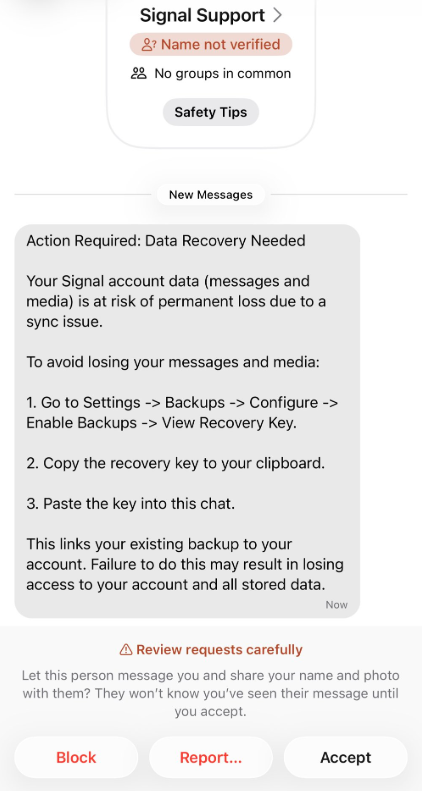
A new phishing campaign is targeting Signal users by attempting to steal their backup recovery keys to access encrypted message archives.
The attack is initiated by a text message pretending to come from Signal Support.
“Action Required: Data Recovery NeededYour Signal account data (message and media) Is at risk of permanent loss due to a sync issue.To avoid losing your messages and media:1. Go to Settings -> Backups -> Configure -> Enable backups -> View Recovery Key.2.
A new phishing campaign is targeting Signal users by attempting to steal their backup recovery keys to access encrypted message archives.
The attack is initiated by a text message pretending to come from Signal Support.
“Action Required: Data Recovery Needed Your Signal account data (message and media) Is at risk of permanent loss due to a sync issue. To avoid losing your messages and media: 1. Go to Settings -> Backups -> Configure -> Enable backups -> View Recovery Key. 2. Copy the recovery key to your clipboard. 3. Paste the key into this chat. This links your existing backup to your account. Failure to do this may result in losing access to your account and all stored data.”
There are a few red flags in this message:
The “Name not verified” label under the sender
Repeated threats of losing all your data
Pasting the key into the chat. Signal Support would never ask for your recovery key
The attack exploits Signal’s Secure Backups feature, which allows users to store encrypted archives of their conversations on Signal’s servers. These backups are protected by a 64-character recovery key.
That key should never leave the user’s device and is never shared with Signal’s servers. If hackers obtain this key and gain control of a victim’s account, they can download and decrypt the entire message history.
For an attacker, that’s even better than hijacking an account, which would only give them access to future messages.
Signal explicitly states that it will never reach out to users first and will never request registration codes, PINs, or recovery keys.
Treat unsolicited messages from “Support” as suspicious by default. Legitimate support for apps like Signal and WhatsApp do not ask you, in a chat message, to send back verification codes, PINs, or passwords. If you receive a warning about account problems, do not follow links in the message. Open the app’s settings directly or visit the official website through other means.
Never share any secret codes, multi-factor authentication keys, or app PINs. SMS codes are there to prove that you control a phone number. Anyone who has the code can pretend to be you. App‑specific PINs or passcodes are there to protect account changes. Consider anyone asking for them to be a scammer.
Use the extra security features these apps offer. Enable options like registration lock, registration PIN and device‑change alerts so that your account cannot be silently re‑registered without an extra secret. Store your PIN in a password manager instead of choosing something easy to guess or reusing a code. This reduces the risk of social engineering or shoulder‑surfing.
Another useful feature is disappearing messages. Short‑timer and disappearing messages reduce how much content is available if an attacker gains access to a chat later, or obtains long‑term access to a device or backup. They are not a complete solution, but they can limit the damage.
Use Malwarebytes Scam Guard on your device or online to check messages. Malwarebytes Scam Guard identified this message as a phishing attempt and provided further information about how to proceed.
Scammers know more about you than you think.
Malwarebytes Mobile Security protects you from phishing, scam texts, malicious sites, and more. With real-time AI-powered Scam Guard built right in.
ASEC Blog publishes Ransom & Dark Web Issues Week 3, April 2026 Emergence of New Ransomware Groups: TiMC, BlackWater, and Lamashtu [1], [2], [3] NoName05716 Claims DDoS Attacks on South Korean Public & Private Sectors [1], [2], [3] VECT & TeamPCP Campaign: Supply Chain Attack Exploiting Global Travel Platform
ASEC Blog publishes Ransom & Dark Web Issues Week 3, April 2026 Emergence of New Ransomware Groups: TiMC, BlackWater, and Lamashtu [1], [2], [3] NoName05716 Claims DDoS Attacks on South Korean Public & Private Sectors [1], [2], [3] VECT & TeamPCP Campaign: Supply Chain Attack Exploiting Global Travel Platform

 Entrar