❌

Visualização normal

Antes de ontemCyber Threat Intel
  • ✇Malwarebytes
  • Chrome and Firefox updates fix serious security flaws. Install now
    On October 27, Google issued a new Stable channel update for Chrome.Most users are on Chrome’s Stable channel. The desktop update brings Chrome to versions 156.0.8078.73/.74 for Windows and Mac and 156.0.8078.73 for Linux. The update includes 52 security fixes, including four rated Critical.On the same day, Mozilla issued Security Advisory 2026-118, which fixes 167 vulnerabilities. Firefox 159 also introduces several new features.Both updates will roll out over the coming days and weeks. How to
     

Chrome and Firefox updates fix serious security flaws. Install now

28 de Outubro de 2026, 08:13

On October 27, Google issued a new Stable channel update for Chrome.

Most users are on Chrome’s Stable channel. The desktop update brings Chrome to versions 156.0.8078.73/.74 for Windows and Mac and 156.0.8078.73 for Linux. The update includes 52 security fixes, including four rated Critical.

On the same day, Mozilla issued Security Advisory 2026-118, which fixes 167 vulnerabilities. Firefox 159 also introduces several new features.

Both updates will roll out over the coming days and weeks.

How to update Chrome

The easiest option is to allow Chrome to update automatically. But you can end up lagging behind on updates if you never close your browser or if something goes wrong, such as an extension preventing the update.

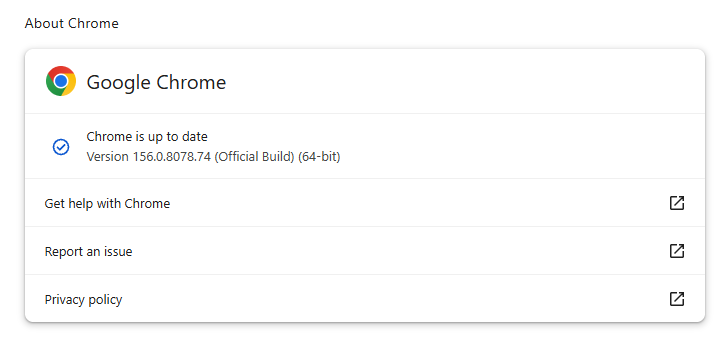
If you don’t want to wait for the rollout to reach you, manually updating is easy. Open About Google Chrome from Chrome’s settings or Help menu. Chrome will check for updates. If one is available, click Relaunch to apply it.

Chrome version 156.0.8078.74 is up to date

You can find an explanation of the version numbering system and step-by-step instructions in our guide: How to update Chrome on every operating system.

How to update Firefox

To update Firefox, open the browser and click the menu button at the right side of the Firefox toolbar, then go to Help and select About Firefox. The About Mozilla Firefox window will open.

Firefox will automatically check for updates. If one is available, it will be downloaded. Once done, you’ll be prompted to click Relaunch. After Firefox restarts, it will be up to date.

After the update, the version should be 159.0 or later

Technical details

These Chrome and Firefox updates address a familiar problem: browser code mishandling memory while processing web content. Both releases fix use-after-free vulnerabilities, including flaws in page layout, JavaScript processing, and SVG graphics.

A use-after-free vulnerability occurs when a program attempts to access a memory location after it has been freed. That can cause crashes or, in some cases, allow an attacker to run their own code.

There’s another connection between these updates: both Google and Mozilla credit OpenAI Codex Security with finding bugs fixed in these releases. AI can help security teams examine browser code for weaknesses, alongside human code reviews and automated tests that check how software handles unexpected inputs.

Mozilla’s collaboration with Anthropic shows how AI-discovered findings can lead to fixes: researchers validated vulnerabilities before reporting them, giving Mozilla’s team reproducible bugs to investigate, repair, and deliver to users.


Browse like no one’s watching. 

Malwarebytes Privacy VPN encrypts your connection and never logs what you do, so the next story you read doesn’t have to feel personal. Try it free → 

  • ✇Malwarebytes
  • Security updates available for Adobe, Chrome, Firefox, VMWare, and Zoom
    Security updates are not just for enterprises with a dedicated security team and a change-management calendar. For consumers and small businesses, they are one of the simplest ways to shut down known attack paths before criminals get a chance to use them. That matters because attackers love these flaws. because browser bugs, code execution issues, authentication bypasses, and privilege-escalation problems can be turned into a foothold, a data theft opportunity, or a full system compromise if
     

Security updates available for Adobe, Chrome, Firefox, VMWare, and Zoom

16 de Julho de 2026, 07:47

Security updates are not just for enterprises with a dedicated security team and a change-management calendar. For consumers and small businesses, they are one of the simplest ways to shut down known attack paths before criminals get a chance to use them.

That matters because attackers love these flaws. because browser bugs, code execution issues, authentication bypasses, and privilege-escalation problems can be turned into a foothold, a data theft opportunity, or a full system compromise if left unpatched.

If you only do one thing after reading a security advisory, make it this: update the affected software promptly, restart when required, and verify the version afterward.

Adobe

Adobe released a large batch of security updates covering ColdFusion, Commerce/Magento Open Source, and Experience Manager. The ColdFusion bulletin alone includes multiple critical flaws that could lead to arbitrary code execution.

The updates and instructions can be found on the pages we linked to.

Chrome

Google patched 15 security flaws in Chrome, including two critical use-after-free bugs in Ozone. The fixes are in Chrome 150.0.7871.124/.125, depending on platform.

You can find an explanation of the version numbering system and step-by-step instructions in our guide to how to update Chrome on every operating system.

Firefox

Mozilla fixed two critical Firefox flaws in Firefox 152.0.6, and it says public exploit code exists for both issues. One affects JavaScript/WebAssembly and the other involves DOM navigation and site isolation, which makes this more than routine housekeeping.

Users should update Firefox to version 152.0.6 as soon as possible. For most users this can simply be done by restarting the browser. If you see the “What’s new” tab, the update is complete.

VMWare

Broadcom released a fix for a critical authentication bypass in VMware Avi Load Balancer, tracked as CVE-2026-47865. The issue could allow a network-accessible attacker to reach the Avi Control Plane, which makes it especially important in environments that expose management services or rely on load balancers at the edge.

Updates and the instructions to apply them can be found in the Security Advisory.

Zoom

Zoom Security Bulletin ZSB-26014 covers a critical issue in Zoom Workplace for Windows, described as improper input validation. The public record identifies the issue as CVE-2026-53412.

For users, the action item is to update Zoom Workplace for Windows to the vendor-fixed release as soon as it is available in your environment. For small businesses, that means updating not just the app on employee laptops, but also any centralized deployment package so the old build doesn’t come right back on the next install cycle.


CNET Editors' Choice Award 2026

“One of the best cybersecurity suites on the planet.” 

According to CNET. Read their review →


❌
❌