Unit 42 is aware of possible 0-day activity against NetScaler devices. Citrix reports CVE-2026-88771, CVE-2026-88772 have been exploited in the wild.
The post Threat Brief: NetScaler Zero Days CVE-2026-88771 and CVE-2026-88772 Exploited in the Wild (Updated September 30) appeared first on Unit 42.
In this article
Who is Storm-2570?Storm-2570 attack chain: From initial foothold to impactWhat Storm-2570 activity means for defendersMitigation and protection guidanceMicrosoft Defender detectionsHunting queries
Activity associated with Storm-2570, a ransomware affiliate linked to multiple ransomware payloads, illustrates how tracking and responding to ransomware attacks by payload alone can obscure the affiliates carrying out intrusions and the recurring
Activity associated with Storm-2570, a ransomware affiliate linked to multiple ransomware payloads, illustrates how tracking and responding to ransomware attacks by payload alone can obscure the affiliates carrying out intrusions and the recurring behaviors that defenders can use to detect and disrupt them. Microsoft Threat Intelligence has observed Storm-2570 using consistent post-compromise tools and techniques across deployments involving Qilin, DragonForce, Anubis, and BERT ransomware. Across multiple investigations, Storm-2570 has maintained largely uniform tradecraft, infrastructure overlaps, and repeated use of the same remote access and cloud exfiltration tooling despite operating across multiple ransomware ecosystems.
These findings reinforce the value of examining threat actor behavior across the attack chain rather than treating each ransomware payload as an isolated activity set. Recurring remote access, credential access, lateral movement, security tampering, and data exfiltration activity can help defenders connect related intrusions and respond before ransomware deployment, even when the final payload changes.
In this blog post, we delve into the attack techniques attributed to Storm-2570. While Storm-2570’s methodology aligns with the tactics, techniques, and procedures (TTPs) of many tracked ransomware actors, analysis of their post-compromise tactics provides essential insights into how organizations can harden and defend against ransomware threat actors, informing opportunities to disrupt attackers even if they have gained initial access to a network. At the end of this blog, we also provide a comprehensive recommendation section with detection details.
Who is Storm-2570?
Storm-2570 is a ransomware affiliate that Microsoft Threat Intelligence has tracked since April 2025. We assess that Storm-2570 has operated across multiple ransomware as a service (RaaS) ecosystems, including Qilin, DragonForce, Anubis, and BERT.
To date, Microsoft Threat Intelligence has observed Storm-2570 in multiple investigated intrusions affecting organizations in United States, Canada, United Kingdom, Spain, Netherlands, and Puerto Rico, including healthcare and public health, education, government agencies and services, financial services, energy, consumer retail, Information technology (IT), food and agriculture, consumer services, commercial facilities, non-government organization (NGO), chemicals, critical manufacturing, and transportation.
Unlike actors that consistently support a single ransomware operation, Storm-2570 appears to be a cross-ecosystem threat actor that works with multiple ransomware groups and shifts between operations as opportunities arise, giving the threat actor the flexibility to use and deploy multiple families and improve opportunities for payouts. As a result, organizations could encounter the same actor, tools, and intrusion methods despite different ransomware payloads being deployed.
Figure 1. Storm-2570’s RaaS deployment timeline
Storm-2570 attack chain: From initial foothold to impact
While the method through which Storm-2570 gains initial access remains unconfirmed, observed intrusion chains indicate subsequent use of remote management tooling and hands-on-keyboard activity to progress toward credential access, lateral movement, exfiltration, and ransomware deployment.
Across incidents, Microsoft has observed the use of commodity tools in the pre-ransom attack stage even when the ransomware payload changed. These tools include:
Remote monitoring and management (RMM) tools, including Atera, MeshAgent, ScreenConnect, Splashtop, Remotely_Agent, and NinjaRMM
Discovery and lateral movement tools, including NetScan, Nmap, PsExec, Impacket, NetExec, and Remote Desktop Protocol (RDP) batch scripts
Data collection and exfiltration tools, including s5cmd and Rclone
These tools enable remote administration, command execution, persistence, and tunneling or proxy access.
Figure 2. Storm-2570 attack chain
Frequent use of remote management tooling across the attack chain
MeshAgent, a remote device management software, stands out as one of Storm-2570’s most frequently observed remote access and execution tools across multiple intrusions. Rather than appearing as a one-off utility, MeshAgent repeatedly shows up at key points in Storm-2570 attack chains, often after the actor has gained access and is preparing to expand control, run commands, deploy additional tooling, or move toward ransomware impact. In several cases, Storm-2570 used MeshAgent along with MeshCentral as an operational bridge between initial hands-on-keyboard activity and later-stage actions, such as account manipulation, discovery, credential access, security tampering, and ransomware deployment.
Many intrusions tracked by Microsoft have shown Storm-2570 tailoring MeshAgent deployments to the compromised environment. The actor renames MeshAgent-related binaries or services with victim-themed names, likely to make the tool appear more legitimate in the environment. For example, Storm-2570 renames the variant of the meshagent64 RMM tool to include the name of the compromised organization, such as meshagent64-[organization name].exe and uses Base64-encoding to obfuscate the commands being executed. In one such intrusion, MeshAgent was used alongside NinjaRMM before the activity progressed to ntdsutil for credential dumping, network scanning, and Qilin deployment.
Storm-2570 uses a diverse set of remote access tools rather than relying on a single capability. The threat actor rotates among commercially available RMM platforms, remote desktop components, and tunneling utilities, often deploying multiple tools during the same intrusion. For example, Storm-2570 uses Atera to install agents and execute interactive commands, while ngrok and Cloudflared.exe expose RDP services or establish persistent outbound tunnels. Storm-2570 uses AteraAgent to issue commands and to further download and install Splashtop Streamer in compromised environments. Splashtop appears to be the interactive remote control component delivered through Atera, giving the threat actor hands-on keyboard access. The actor also uses tools such as ScreenConnect for command execution and account or domain reconnaissance and installs Remotely_Agent as a persistent remote management service.
Use of tunneling utilities for persistent remote access
Storm-2570 also pairs remote access tooling with tunneling utilities such as Cloudflared.exe to create resilient outbound access paths. In one intrusion, Storm-2570 installed MeshAgent and later created a persistent Cloudflare Tunnel service on the victim host. The tunnel was configured to run automatically as a service under LocalSystem, allowing the threat actor to maintain an encrypted outbound channel from inside the network. This type of tunnel can help bypass inbound firewall restrictions and provide covert remote access for follow-on activity.
Discovery and credential access
Post-compromise, Storm-2570 routinely conducts internal network discovery using tools such as NetScan, SoftPerfect Network Scanner Portable, and Nmap, alongside native discovery commands and file-searching activity. These activities are used to identify reachable hosts and services, map internal networks and remote systems, and locate systems, network shares, and files that may facilitate data collection, credential access, or encryption operations.
For credential access and harvesting, Storm-2570 uses tools like Mimikatz, LaZagne, and pypykatz. Storm-2570 also uses ntdsutil in intrusions for NTDS.dit credential dumping, a credential theft technique against Active Directory domain credentials. The ntdsutil command usage pattern is consistent with creating an Install From Media (IFM) copy of Active Directory database material. In an intrusion context, attackers can use this to obtain NTDS.dit and related registry hives for offline extraction of password hashes and credential material.
The command uses the legitimate Windows ntdsutil.exe to activate the NTDS Active Directory instance and create a full IFM backup in C:\Windows\Temp\<XXXXXXXXX>.
Storm-2570 uses this command to dump or stage Active Directory database NTDS.dit and supporting registry hive material, then copy it off-host and potentially extract domain credential hashes offline, indicating that the actor has high-privilege access to a victim’s domain controller:
Defense evasion
After acquiring privileged credentials, Storm-2570 uses defense evasion tactics preceding ransomware deployment, including antivirus tampering and the modification of Microsoft Defender settings and Defender exclusions. In multiple observed intrusions, Storm-2570 disabled real-time monitoring, added Defender exclusions for C:\PerfLogs to weaken endpoint detections, and modified registry values under Microsoft Defender service keys to further impair protections.
These tactics are consistent across Storm-2570 ransomware intrusions involving Qilin, DragonForce, and Anubis deployment, including cases where the actor used registry changes to alter DisableAntiSpyware, DisableRealtimeMonitoring, and WinDefend service behavior.
Lateral movement and deployment preparation
Storm-2570 moves into lateral movement and deployment preparation phase typically by using a mix of legitimate administrative tooling, offensive frameworks, and remote execution utilities.
Across multiple investigated intrusions, Storm-2570 was observed leveraging PsExec, Impacket, NetExec, RDP batch scripts, and admin shares to reach additional systems, execute commands remotely, and stage tooling across the environment. The actor uses these capabilities to facilitate data exfiltration and prepare victim networks for ransomware deployment. These tools frequently appear alongside earlier discovery activity, credential access, and remote access tooling such as MeshAgent, and often precede the use of s5cmd for exfiltration or ransomware payload execution.
PsExec is one of the most consistent lateral movement and deployment tools used by Storm-2570. The actor frequently uses PsExec, sometimes with host lists such as @ip.txt, to move laterally and install renamed MeshAgent binaries across compromised environments. Storm-2570 utilizes MeshAgent during the lateral movement phase in several intrusions as a remote access tool deployed onto newly compromised systems.
The following are examples of PsExec commands with host lists @ip.txt:
Storm-2570 also uses RDP and RDP-enabling scripts as part of this phase. If RDP is not allowed in the environment, Storm-2570 needs admin privileges to modify the policy and enable it. In several intrusions, rdp.bat script appeared with PsExec, including cases where PsExec ran rdp.bat across hosts using @ip.txt.
The RDP batch script (rdp.bat) enables inbound Remote Desktop access by modifying Terminal Server settings and adding a firewall rule to allow TCP port 3389, as observed in the command below:
Additionally, the threat actor uses ngrok to expose TCP 3389 (default port for RDP), after which PsExec-related activity and security tampering appears. These examples show Storm-2570 combining RDP access, tunneling, and remote execution to sustain hands-on-keyboard control and reach additional systems.
Storm-2570’s use of Impacket and NetExec over Server Message Block (SMB) further supports their lateral movement pattern. Impacket is a collection of open-source Python classes designed for working with network protocols, and is popular with adversaries due to its ease of use and wide range of capabilities. Microsoft Defender for Endpoint has a dedicated attack surface reduction rule to defend against lateral movement techniques used by Impacket; protecting lateral movement pathways can also mitigate Impacket.
The following NetExec SMB command is used to conduct credential theft and reconnaissance against internal Windows hosts:
Data collection and exfiltration
Storm-2570 frequently performs data theft using cloud and file-transfer utilities that are capable of moving large volumes of data quickly from compromised environments to a remote attacker-owned cloud resource. Microsoft has observed Storm-2570 using s5cmd or Rclone to stage and exfiltrate data, often after the actor has already completed discovery, credential access, lateral movement, and remote access setup. Tools like Rclone provide data synchronization capabilities, moving newly created or updated files to cloud resources in real-time to enable continuous exfiltration throughout all stages of the attack without needing attacker interaction.
Most commonly, Storm-2570 relies on s5cmd, a command-line utility designed for managing Amazon S3 and compatible object storage services, for S3-based exfiltration. In multiple intrusions, the actor staged s5cmd.exe alongside a credentials file and used it to copy documents, spreadsheets, images, databases, mail-related files, archives, and other business-relevant file types to S3 buckets. Storm-2570 identifies high-value drives and network shares, stages s5cmd.exe and a credentials file, and then executes run copy (cp) operations with extension filters to transfer selected data to attacker-controlled S3 buckets. To interact with the destination S3 bucket, s5cmd requires credentials for authentication and the credentials file stores the AWS access keys for authentication to the S3 bucket.
The following is an example of s5cmd data exfiltration command lines:
Overall, Storm-2570’s exfiltration tradecraft shows a strong preference for tools that blend into legitimate administrative or cloud-transfer workflows, allowing double-extortion operations: first collecting sensitive data through cloud-transfer tooling, then deploying ransomware.
What Storm-2570 activity means for defenders
Storm-2570 illustrates common human-operated ransomware attacks and how modern ransomware affiliates increasingly operate independently of a single ransomware brand. Ransomware affiliates’ use of common tools, intrusion methods, and operational patterns remain remarkably consistent. Although Storm-2570’s techniques are not novel, recognizing the patterns used by ransomware affiliates can be important for defenders to know to improve prevention, detection, and incident response.
Mitigation and protection guidance
To defend against Storm-2570 TTPs and similar activity, Microsoft recommends the following mitigation measures:
Follow the defending against ransomware guidance in Microsoft’s ransomware as a service blog post which details how to build credential hygiene as well as how to limit lateral movement using the principle of least privilege.
Turn on tenant-wide tamper protection features to prevent attackers from stopping security services or using antivirus exclusions. Without tamper protection, attackers could simply turn off Microsoft Defender Antivirus without the need to acquire higher privileges.
If there is an issue with a device during roll out of various antivirus features, the device can be placed in Troubleshooting mode to turn off Tamper Protection temporarily without impacting the wider organizational security policy.
For approved RMM systems used in your environment, enforce security settings where possible to implement MFA. If an unapproved RMM installation is discovered in your network, reset passwords for accounts used to install the RMM services. If a System-level account was used to install the software, further investigation may be warranted.
Configure automatic attack disruption in Microsoft Defender XDR. Automatic attack disruption is designed to contain attacks in progress, limit the impact on an organization’s assets, and provide more time for security teams to remediate the attack fully.
Microsoft Defender XDR customers can turn on attack surface reduction rules to prevent common attack techniques used in ransomware attacks:
Block process creations originating from PSExec and WMI commands (Some organizations might experience compatibility issues with this rule on certain server systems but should deploy it to other systems to prevent lateral movement originating from PsExec and WMI.)
Microsoft Defender customers can refer to the list of applicable detections below. Microsoft Defender coordinates detection, prevention, investigation, and response across endpoints, identities, email, apps to provide integrated protection against attacks like the threat discussed in this blog.
Tactic
Observed activity
Microsoft Defender coverage
Execution
Storm-2570 delivers tools such as PsExec, Impacket, NetExec, and RDP batch scripts, to carry out post-compromise activity
Storm-2570 has used tools like Mimikatz, LaZagne, and pypykatz for credential access and harvesting and NTDS.dit for credential dumping
Microsoft Defender Antivirus – HackTool:Win32/Mimikatz – HackTool:Win64/Mimikatz – HackTool:Linux/LaZagne – HackTool:Win32/LaZagne – HackTool:Win64/LaZagne Microsoft Defender for Endpoint – Exposed credentials at risk of compromise – Compromised account credentials – Process memory dump
Exfiltration
Storm-2570 uses Rclone and s5cmd for data theft
Microsoft Defender for Endpoint – Potential human-operated malicious activity – Renaming of legitimate tools for possible data exfiltration – Possible data exfiltration – Hidden dual-use tool launch attempt
Impact
Storm-2570 deploys Anubis, DragonForce, Qilin, and BERT ransomware
Microsoft Defender for Endpoint – Possible ransomware activity based on a known malicious extension – Possible compromised user account delivering ransomware-related files – Potentially compromised assets exhibiting ransomware-like behavior – Ransomware behavior detected in the file system – File dropped and launched from remote location
Microsoft Security Copilot
Microsoft Security Copilot is embedded in Microsoft Defender and provides security teams with AI-powered capabilities to summarize incidents, analyze files and scripts, summarize identities, use guided responses, and generate device summaries, hunting queries, and incident reports.
Security Copilot is also available as a standalone experience where customers can perform specific security-related tasks, such as incident investigation, user analysis, and vulnerability impact assessment. In addition, Security Copilot offers developer scenarios that allow customers to build, test, publish, and integrate AI agents and plugins to meet unique security needs.
Threat intelligence reports
Microsoft Defender XDR customers can use the following threat analytics reports in the Defender portal (requires license for at least one Defender XDR product) to get the most up-to-date information about the threat actor, malicious activity, and techniques discussed in this blog. These reports provide the intelligence, protection information, and recommended actions to prevent, mitigate, or respond to associated threats found in customer environments.
Microsoft Security Copilot customers can also use the Microsoft Security Copilot integration in Microsoft Defender Threat Intelligence, either in the Security Copilot standalone portal or in the embedded experience in the Microsoft Defender portal to get more information about this threat actor.
Hunting queries
Microsoft Sentinel
Microsoft Sentinel customers can run the following advanced hunting queries to find related activity in their networks:
Hunt for PsExec-based remote execution and deployment
DeviceProcessEvents
| where Timestamp > ago(30d)
| where FileName in~ ("psexec.exe", "psexec64.exe")
    or ProcessCommandLine has_any ("psexec.exe", "psexec64.exe")
| where ProcessCommandLine has_any ("@ip.txt", "-accepteula", "\\")
| project Timestamp, DeviceName, AccountName, FileName, ProcessCommandLine,
          InitiatingProcessFileName, InitiatingProcessCommandLine,
          SHA256, DeviceId, ReportId
| order by Timestamp desc
Hunt for renamed MeshAgent binaries and services
let MeshAgentTerms = dynamic(["meshagent", "meshagent64", "meshcentral"]);
union isfuzzy=true
(
    DeviceProcessEvents
    | where Timestamp > ago(30d)
    | where FileName has_any (MeshAgentTerms)
        or ProcessCommandLine has_any (MeshAgentTerms)
        or InitiatingProcessCommandLine has_any (MeshAgentTerms)
    | project Timestamp, DeviceName, ActionType, FileName, FolderPath,
              ProcessCommandLine, InitiatingProcessFileName,
              InitiatingProcessCommandLine, SHA256,
              RegistryKey="", RegistryValueName="", SourceTable="DeviceProcessEvents"
),
(
    DeviceFileEvents
    | where Timestamp > ago(30d)
    | where FileName has_any (MeshAgentTerms)
        or FolderPath has_any (MeshAgentTerms)
        or InitiatingProcessCommandLine has_any (MeshAgentTerms)
    | project Timestamp, DeviceName, ActionType, FileName, FolderPath,
              ProcessCommandLine="", InitiatingProcessFileName,
              InitiatingProcessCommandLine, SHA256,
              RegistryKey="", RegistryValueName="", SourceTable="DeviceFileEvents"
),
(
    DeviceRegistryEvents
    | where Timestamp > ago(30d)
    | where RegistryKey has_any (MeshAgentTerms)
        or RegistryValueName has_any (MeshAgentTerms)
        or RegistryValueData has_any (MeshAgentTerms)
        or InitiatingProcessCommandLine has_any (MeshAgentTerms)
    | project Timestamp, DeviceName, ActionType, FileName="", FolderPath="",
              ProcessCommandLine="", InitiatingProcessFileName,
              InitiatingProcessCommandLine, SHA256="",
              RegistryKey, RegistryValueName, SourceTable="DeviceRegistryEvents"
)
| order by Timestamp desc
To hear stories and insights from the Microsoft Threat Intelligence community about the ever-evolving threat landscape, listen to the Microsoft Threat Intelligence podcast.
The UK Home Office has once again demanded Apple allows it access to encrypted iCloud data.
The Guardian reports that the Home Office issued a Technical Capability Notice to Apple, this time targeting only British users. A Technical Capability Notice is a formal government order that compels tech and telecommunications companies to build or maintain specific technical functions—such as intercepting data or removing encryption protections—so law enforcement can access communications.
In the
The UK Home Office has once again demanded Apple allows it access to encrypted iCloud data.
The Guardian reports that the Home Office issued a Technical Capability Notice to Apple, this time targeting only British users. A Technical Capability Notice is a formal government order that compels tech and telecommunications companies to build or maintain specific technical functions—such as intercepting data or removing encryption protections—so law enforcement can access communications.
In the last round of this ongoing battle, the UK secretly ordered Apple to provide blanket access to protected iCloud backups around the world. Advanced Data Protection (ADP) is Apple’s opt‑in end‑to‑end encryption for iCloud backups, which even Apple itself cannot read. Apple argued that weakening or removing ADP would expose users to data breaches and other threats, and instead chose in January 2025 to withdraw ADP for UK customers rather than build a backdoor, while leaving it available elsewhere.
So, instead of working to keep citizens safe and secure, the Home Office just ended up removing an option for them.
Apple has responded by lodging a complaint with the Investigatory Powers Tribunal (IPT), seeking to challenge the scope and lawfulness of the government’s powers to issue such notices under the Investigatory Powers Act. The Tribunal is an independent court that has the power to investigate claims that the UK intelligence services have acted unlawfully.
Privacy International and Liberty have parallel complaints at the IPT challenging Technical Capability Notices more broadly, including their secrecy and necessity, and have asked for Apple’s claim to be heard in public given its wide public-interest implications.
I feel the fear of leaving an intentional backdoor is justified. If it exists, there is a chance that (AI-assisted) criminals will find and exploit it.
Weighing the importance of the right to privacy and the ability to investigate cases including terrorism and child sexual abuse is not easy. Apple’s ADP is used by many and as soon as criminals would know it’s no longer safe for them to use, they’d move to other platforms. Platforms where no legislative power will be able to gain access.
But, given the danger of a backdoor becoming available for criminals, we think in this case privacy should prevail. Let us know how you feel in the comments.
Browse like no one’s watching.
Malwarebytes Privacy VPN encrypts your connection and never logs what you do, so the next story you read doesn’t have to feel personal. Try it free →
A scam is spreading through WhatsApp with the goal of taking over victims’ accounts entirely.
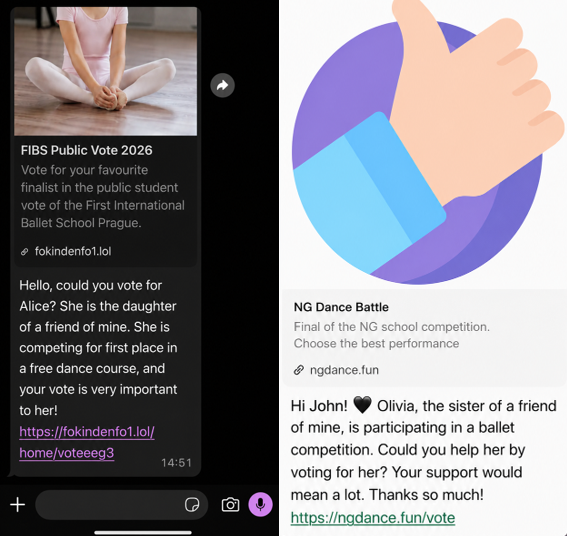
It starts with a message that feels harmless and familiar. Someone—often a contact whose account has already been compromised—asks you to support a friend or relative of theirs by voting in an online contest. The theme varies: a ballet performance, a dog competition, a school event. The wording is casual, sometimes urgent, and designed to get a quick click.
We spotted the scam showing up in o
A scam is spreading through WhatsApp with the goal of taking over victims’ accounts entirely.
It starts with a message that feels harmless and familiar. Someone—often a contact whose account has already been compromised—asks you to support a friend or relative of theirs by voting in an online contest. The theme varies: a ballet performance, a dog competition, a school event. The wording is casual, sometimes urgent, and designed to get a quick click.
We spotted the scam showing up in our anonymized Scam Guard submissions. WhatsApp is popular with cybercriminals, and the third most common channel where we see scams delivered, behind websites and email.
At first glance, nothing seems out of the ordinary. But the link doesn’t lead to a real voting page. Instead, it redirects to a page that appears to be related to WhatsApp, often involving the legitimate wa.me domain, where the real attack begins.
This scam works because it combines trust and curiosity. If the message comes from someone you know, you’re far less likely to question it and far more likely to follow through to do them a small favor.
In some versions of the scam, the link redirects you into a flow that abuses WhatsApp’s legitimate “Linked devices” feature.
Depending on your device, you may see what looks like a WhatsApp page prompting you to continue, verify, or connect. In some cases, the victim is guided through steps that resemble setting up WhatsApp Web or linking a new device.
The goal is to trick you into authorizing a new linked session that gives the attacker access to your WhatsApp account.
A typical flow looks like this:
You tap the “vote” link.
A page opens that appears to be related to WhatsApp.
You’re prompted to complete a connection or verification step.
That action links your WhatsApp account to a device controlled by the attacker.
Some versions of this scam take a less direct route. Instead of sending victims to a fake voting page, the message or the landing page instructs victims to open WhatsApp, go to “Connected Devices,” and enter a code supplied by the scammer.
These scammers aren’t trying to steal your password. Instead, they’re tricking you into giving them access to your account yourself.
How WhatsApp’s Linked devices feature works
WhatsApp allows you to use your account on multiple devices, including a web browser or desktop app, through its Linked devices feature.
Normally, this works by:
Opening WhatsApp on your phone.
Scanning a QR code displayed on another device.
Approving the connection.
Once linked, that secondary device can:
Read your messages.
Send messages as you.
Access your ongoing conversations in near real time.
But if you follow those steps, you could be giving an attacker access to your messages, contacts, and ongoing conversations.
This is a legitimate and widely used feature, especially for WhatsApp Web. But in this scam, attackers abuse it to gain the same level of access without your informed consent.
Once a scammer links their device to your WhatsApp account, they can continue accessing your conversations until that device is removed.
From there, they can:
Send messages pretending to be you, including forwarding the same scam to your contacts.
Ask friends or family for money or sensitive information.
Read your chats and harvest personal information.
Because this doesn’t involve a traditional login, there are no obvious signs like password reset emails or failed login alerts. The attacker’s device simply appears as another linked session on your account.
Unless you check your linked devices, the compromise can go unnoticed for quite some time.
How to stay safe
Scams like this rely on quick reactions and misplaced trust. A few simple precautions can make a big difference:
Be cautious with unexpected “vote” or “support” requests, even if they come from someone you know.
Don’t click unexpected links, especially if you’re immediately asked to verify, connect, or link your WhatsApp account.
Never follow instructions to link devices or scan QR codes unless you initiated the action yourself.
Regularly review your linked devices in WhatsApp (Settings > Linked devices) and log out of any you don’t recognize.
If a message feels off, verify it with the sender through another channel before acting.
Malwarebytes Scam Guard can also help spot scams like this. It’s included with the Malwarebytes Mobile Security app for Android and iPhone.
If you suspect your account has already been compromised, immediately log out of all linked devices and warn your contacts so they don’t fall for follow-up scams.
Indicators of Compromise (IOCs)
These domains are typically short-lived and quickly replaced. However, they may help you recognize similar scams if you encounter them:
ASEC Blog publishes Ransom & Dark Web Issues Week 2, May 2026 Coinbase Claims Data Leak of South Korean Medical Ultrasound Equipment Manufacturer Emergence of New Data Extortion Group ‘Leak Bazaar’ Hasan’s BreachForums and TeamPCP Host Large-Scale Supply Chain Attack Competition Using Shaid-Hulud Worm
ASEC Blog publishes Ransom & Dark Web Issues Week 2, May 2026 Coinbase Claims Data Leak of South Korean Medical Ultrasound Equipment Manufacturer Emergence of New Data Extortion Group ‘Leak Bazaar’ Hasan’s BreachForums and TeamPCP Host Large-Scale Supply Chain Attack Competition Using Shaid-Hulud Worm

 Entrar