❌

Visualização normal

Antes de ontemCyber Threat Intel

Stopping Node2Shell: How SentinelOne Protects Customers From Brotli-Based Remote Code Execution

30 de Outubro de 2026, 12:06

Executive Summary

On October 21, 2026, the Node.js project released security updates that fix CVE-2026-111497, an out-of-bounds write in the Brotli decoder bundled with the runtime. Vendors have labeled the vulnerability Node2Shell, Brotli2Shell, Broccoli2Shell, and HTTP2Shell, because the flaw sits in Google's Brotli library and reaches software well beyond Node.js. Any application that decompresses attacker-controlled data with a vulnerable Brotli library could be at risk. Google, as the CVE Numbering Authority, scored it 9.2 under CVSS v4.0, and Node.js rates it high.

CISA added CVE-2026-111497 to its Known Exploited Vulnerabilities (KEV) catalog on October 27, 2026, with a November 10, 2026 deadline for federal civilian agencies. The public telemetry we reviewed shows exploitation attempts against honeypot sensors, and researchers have demonstrated code execution in lab environments. As of October 29, 2026, we are not aware of a public report of a confirmed compromise of a production system.

This report details Node2Shell's mechanism, affected versions, and observed activity, and outlines how SentinelOne customers and partners can strengthen their defenses.

Key Highlights

  • One flaw, many patches. Node.js, Google Brotli, Bun, .NET, Python, Envoy, Istio, and PHP for Windows each shipped their own fix. Updating one does not update the others.

  • Attempts are confirmed. Production compromise is not. ELLIO and Previdian have each recorded an exploitation attempt against their honeypot sensors. Previdian notes that such observations do not show the target was vulnerable or that the attempt succeeded.

  • A default Node.js server is not exposed by itself. Something must hand attacker-controlled Brotli data to the decoder. Node.js names direct node:zlib use. Express 5 request bodies and built-in fetch() responses reach the same decoder, and Imperva reproduced both in the lab.

  • A failed exploit still costs you. The Node.js advisory lists a crash as an outcome, and Sysdig reports that crashes have been easy to reproduce. Repeated crashes are a denial of service against any service that decodes attacker-influenced Brotli.

  • The fix was visible for nearly eight months before release. Google committed it on February 27, 2026, with no release and no advisory. End-of-life Node.js 20, 23, and 25 are not expected to receive a fix.

Organizations should take the following steps immediately:

  • Upgrade Node.js to 22.23.4, 24.22.1, or 26.12.1, then restart processes and rebuild container images.

  • Inventory every other runtime and library that embeds the Brotli decoder, and patch internet-facing services first.

  • Where patching must wait, reject inbound requests that carry Content-Encoding: br at the proxy or load balancer.

What is Node2Shell

Node2Shell is a memory corruption flaw in the Brotli decoder, the code that expands Brotli-compressed data. A Brotli stream signals switches between block types. When a stream declares only one block type, a switch is invalid and the decoder should reject it. The vulnerable decoder instead reported the invalid switch as a request for more input. The caller supplied more bytes, and the decoder kept appending them to an eight-byte internal buffer and wrote past its end, according to the Node.js advisory.

Node.js lists the outcomes as a crash, disclosure of process memory, or remote code execution, and the CVE record describes the attacker as unauthenticated. Imperva demonstrated code execution on the official Node.js 24.22.0 arm64 image. Microsoft describes the .NET impact as information disclosure, denial of service, or elevation of privilege.

Node2Shell at a Glance

Attribute

Detail

CVE

CVE-2026-111497, also called Brotli2Shell, Broccoli2Shell, and HTTP2Shell

Weakness

Unchecked return value (CWE-252) leading to an out-of-bounds write (CWE-787). No authentication required.

Severity

CVSS v4.0 9.2 (Google, CNA). Node.js: high.

Affected Component

Google Brotli 1.0.3 through 1.0.9, 1.1.0, and 1.2.0, bundled or linked by many products

How Attacker-Controlled Brotli Reaches the Decoder

Path

Condition

Inbound request bodies

Routes that use express.json(), express.urlencoded(), express.text(), or express.raw() in Express 5 or body-parser 2 decompress bodies sent with Content-Encoding: br by default. Any client can send one.

Outbound responses

Built-in fetch() decodes Brotli automatically, so a malicious or compromised server can target the client.

Direct calls

Applications that pass untrusted input to zlib.brotliDecompress() or zlib.createBrotliDecompress().

Disclosure Timeline

Date (2026)

Event

February 27

Google commits the upstream fix with no release and no advisory.

October 21

Node.js discloses CVE-2026-111497. Google releases Brotli 1.0.10, 1.1.1, and 1.2.1.

October 22

Imperva demonstrates code execution on arm64. CVE record is published.

October 25

Microsoft releases out-of-band .NET security updates.

October 27

CISA adds the CVE to the KEV catalog.

Exploitation in the Wild

Exploitation attempts have been recorded, but a successful attack on a production system has not been publicly reported as of October 29, 2026. CISA added CVE-2026-111497 to its KEV catalog on October 27, 2026, with a November 10, 2026 deadline for federal civilian agencies under BOD 26-04.

The public telemetry comes from honeypots. Two threat intelligence providers each recorded an attempt: ELLIO saw a request built for Node.js 24.22.0 on x86-64 on October 26, and Previdian saw one from a U.S.-based address on October 27. Previdian notes that such observations do not show the target was vulnerable or that the attempt succeeded.

Researchers have reproduced code execution only in lab testing. Imperva ran code on the official Node.js 24.22.0 arm64 image through fetch() and Express 5 request bodies, needed multiple attempts, and did not test every Node.js build. Public proof-of-concept code appeared within hours of the October 21 release, according to Sysdig, so organizations should expect further attempts, particularly against internet-facing Express 5 services.

Observed Indicators

Type

Indicator

IP Address

94[.]154[.]43[.]7

SHA-256

7fcbdaaecd4419e2930927844f3b772668204737a4e7602a2290c991c93c5c4b

Behavior

A Node.js process that starts or becomes a shell

Patch Status

Node.js has fixed every supported release line: 22.x, 24.x, and 26.x. It will not patch end-of-life lines, which the project says are always affected when a security release occurs. Organizations running Node.js 20, 23, or 25 have no patch to apply and must upgrade to a supported line.

Product

Affected Version

Fixed Version

Node.js

22.x before 22.23.4, 24.x before 24.22.1, 26.x before 26.12.1

22.23.4, 24.22.1, 26.12.1

Node.js 20, 23, 25

All versions

No fix. Move to a supported line

Google Brotli

1.0.3 through 1.0.9, 1.1.0, 1.2.0

1.0.10, 1.1.1, 1.2.1

Bun

1.0.21 through 1.4.3

1.4.4

Microsoft .NET

8 before 8.0.33, 9 before 9.0.22, 10 before 10.0.14, 11 before RC3. Exposed only where Brotli decompression is in use. .NET Framework is not affected.

8.0.33, 9.0.22, 10.0.14, 11 RC3

PHP for Windows

Builds that bundle Brotli 1.0.3 through 1.2.0

8.2.35-1, 8.3.36-1, 8.4.27-1, 8.5.12-1

Python Brotli, brotlicffi

Bundled Brotli 1.0.3 through 1.2.0 (brotlicffi up to 1.2.0.2)

Brotli 1.2.1, brotlicffi 1.2.1.0

Envoy Proxy

1.36.11, 1.37.7, 1.38.5, and 1.39.2

1.36.12, 1.37.8, 1.38.6, 1.39.3, 1.40.0

Istio

1.29.x before 1.29.9, 1.30.x before 1.30.6, 1.31.x before 1.31.2

1.29.9, 1.30.6, 1.31.2

Recommended Mitigations

Patch, Restart, and Rebuild

  • Upgrade to a fixed Node.js release, update every Dockerfile that pins an older tag, and restart or redeploy every workload.
  • Confirm patch status from the Node.js release version running in each workload, not a bundled library version string, which may not reflect a backported fix.

Find Every Copy of the Decoder

  • Inventory Bun, .NET, Python Brotli, Envoy, Istio, PHP for Windows, and statically built executables, including staging, CI, build images, and developer machines.
  • Where Node.js links the system Brotli library, as it does on Debian, check your distribution’s advisory for the Node.js package as well as brotli. Debian’s tracker lists both.
  • PHP for Windows fixed the flaw with rebuilt packages that keep the same PHP version number, so php -v looks the same before and after. Check the -1 build suffix or the SHA-256 on the download page.
  • Move off Node.js 20, 23, and 25 on a defined date.

Reduce Exposure Until Patching Finishes

  • Reject requests with Content-Encoding: br at the WAF or proxy, or set the body-parser inflate option to false so compressed bodies return HTTP 415. The second option also rejects gzip and deflate bodies, so test client traffic first.
  • Restrict server-side fetches to trusted destinations. Link previews, webhooks, and crawlers send attacker-influenced URLs into fetch(), and removing br from Accept-Encoding does not stop a hostile server from replying with Brotli.
  • Enable a vendor WAF rule as a stopgap where one exists. It does not replace the upgrade.

Limit the Blast Radius

  • Run Node.js services as a non-root user and limit outbound connections from Node.js hosts. Docker runs containers as root by default, and the official node image provides a node user (uid 1000) that you must select with USER or -u.

Watch for Failed Attempts

  • Alert on repeated worker crashes after requests with Content-Encoding: br. Where core dumps are enabled, restrict who can read them and shorten retention, because a core file can hold memory contents from other users’ sessions.

How SentinelOne Protects You

Node2Shell exploits the Brotli decoder inside the Node.js process. Patching Node.js and every other copy of the Brotli decoder remains the primary control. SentinelOne provides detection and visibility into post-exploitation behavior while that work is underway.

The Singularity agent builds a storyline of process activity on a host, including the Node.js services targeted by Node2Shell. These processes have a predictable life: they answer requests, call APIs, and read files. They do not normally start /bin/sh, run reconnaissance commands, download executables into /tmp, or open connections to arbitrary hosts. Behavioral detection looks for that deviation from normal behavior. 

Detection in Singularity AI SIEM

Platform detection content looks at what happens on the host after exploitation, not at the request body. 

Attacker Step

Telemetry

Visible Indicators

Code execution in the service

Process creation

Shell processes whose lineage or prior image is node, nodejs, or bun, including an in-place exec, followed by enumeration utilities (id, whoami, uname, hostname) or sensitive file reads

Tooling download

Process creation, File creation

Downloaders (curl, wget, interpreters) fetching to world-writable paths, and executables written and then run from /tmp

Files written by the service

File creation

A Node.js service account writing new executables or scripts outside its normal application paths

Shell and C2

Process creation, IP Connect

Shell processes with a socket as standard input or output, socket-redirection patterns (/dev/tcp, nc, socat), and unexpected outbound connections from Node.js service accounts

Novel child process

First-seen analytics

A Node.js process that starts or becomes a shell or image it has never run in that environment

Correlation rules tie these together. A request to the service, or an outbound fetch to an untrusted host, followed by a process spawn or file drop from the same Node.js process is the shape of a successful chain. 

Visibility at the Edge

Sysdig reports that the crash is easy to reproduce, which makes repeated worker crashes and restarts a useful early signal. Web server, WAF, and CDN logs may show requests with Content-Encoding: br followed by bursts of HTTP 5xx responses and unexplained worker restarts. Singularity AI SIEM can ingest those sources alongside endpoint data if you forward them. 

Hunt with Purple AI While You Patch

Patching is the only complete fix. While that work runs, analysts can ask Purple AI questions such as:

  • Show me shell processes whose parent or prior image was node, nodejs, or bun since October 21.
  • Show me new executable files written by the Node.js service account since October 21.
  • Show me outbound connections from the Node.js service account to destinations we have never seen.
  • Show me hosts with a spike in 500 responses followed by a Node.js process restart.

The last question depends on web server logs being ingested. 

Confirm Agent Saturation on Node.js Hosts

Confirm the agent is deployed, healthy, and in protect mode on every server and container host that runs Node.js, Bun, or another service that decompresses Brotli. Start with internet-facing Express 5 services and services that fetch external URLs.

Disclaimer

Information contained herein is current as of October 29, 2026, and is subject to change as patch releases and threat activity evolve. Recipients should not rely solely on this report for security decisions and should consult with their security teams and SentinelOne account representatives for current guidance.

  • ✇ASEC BLOG
  • The Weak Link Identified by AI: October 2026, When the Outer Contact Point Collapsed ATCP
    Security Blind Spots Identified by AI The large-scale data breaches disclosed in quick succession in South Korea and Japan in October 2026 mostly originated not from internal core systems, but from peripheral entry points such as externally exposed web services, app backend APIs, and outsourced SaaS (services provided by third-party vendors via the cloud, such […]
     

The Weak Link Identified by AI: October 2026, When the Outer Contact Point Collapsed

Por:ATCP
27 de Outubro de 2026, 12:00
Security Blind Spots Identified by AI The large-scale data breaches disclosed in quick succession in South Korea and Japan in October 2026 mostly originated not from internal core systems, but from peripheral entry points such as externally exposed web services, app backend APIs, and outsourced SaaS (services provided by third-party vendors via the cloud, such […]
  • ✇ASEC BLOG
  • September 2026 Threat Trend Report on Ransomware ATCP
    Purpose and Scope This report summarizes the quantity of new ransomware samples collected, the number of compromised systems, and statistics on targeted businesses during the month of September 2026, as well as major Korean & global ransomware issues. The analysis is based on data collected through ATIP (AhnLab Threat Intelligence Platform) and AhnLab Smart Defense, […]
     

September 2026 Threat Trend Report on Ransomware

Por:ATCP
11 de Outubro de 2026, 12:00
Purpose and Scope This report summarizes the quantity of new ransomware samples collected, the number of compromised systems, and statistics on targeted businesses during the month of September 2026, as well as major Korean & global ransomware issues. The analysis is based on data collected through ATIP (AhnLab Threat Intelligence Platform) and AhnLab Smart Defense, […]
  • ✇Fox-IT International blog
  • Releasing the Cobalt Strike Beacon Corpus Fox-SRT
    Authors: Yun Zheng Hu Introduction Today Fox-IT is publicly releasing its full Cobalt Strike Beacon Corpus, containing 56,843 raw beacons and their parsed configurations, from 190,182 sightings collected from 30,604 unique IP addresses running a Team Server (the Cobalt Strike command-and-control server that beacons connect back to) between 4 July 2018 and 29 September 2026, over eight years of beacon data. The corpus is available on Hugging Face: https://huggingface.co/datasets/fox-srt/cob
     

Releasing the Cobalt Strike Beacon Corpus

13 de Outubro de 2026, 11:26

Authors: Yun Zheng Hu

Introduction

Today Fox-IT is publicly releasing its full Cobalt Strike Beacon Corpus, containing 56,843 raw beacons and their parsed configurations, from 190,182 sightings collected from 30,604 unique IP addresses running a Team Server (the Cobalt Strike command-and-control server that beacons connect back to) between 4 July 2018 and 29 September 2026, over eight years of beacon data. The corpus is available on Hugging Face: https://huggingface.co/datasets/fox-srt/cobaltstrike-beacon-corpus

Back in March 2022 we published Mining Data from Cobalt Strike Beacons. That post covered 128,340 beacon sightings collected from July 2018 to February 2022, and it introduced our Python project dissect.cobaltstrike for parsing them.

Since then, public scanning for Team Servers has become routine, and Cobalt Strike has shipped versions 4.6 through 4.13. Researchers have regularly asked us for an updated dataset. And here it is, a large, consistent, long-running dataset for the infosec community to build on. The corpus includes the raw beacon payloads, not just our parsed output, so anyone can reproduce our results or improve on them.

We also see publishing this corpus as an act of preservation. C2 infrastructure is short-lived, as the median Team Server is reachable for just 14 days, and the beacons it serves vanish with it. Eight years of collection captures things that can no longer be observed today, like the waves of cracked 4.0 builds or the adoption of leaked versions. By publishing the raw beacons alongside the parsed data, we keep that record available for anyone to study, long after the servers themselves are gone.

What’s in the corpus

The corpus is published on Hugging Face as two Parquet files:

FileSizeRowsContents
beacons.parquet52 MB190,182Every sighting of a beacon, with collection metadata, network context and the parsed beacon configuration.
payloads.parquet9.7 GB56,843The raw beacon payloads, wrapped in CaRT as an extra safety layer so the samples are neutered until you deliberately unpack them.

All beacons were downloaded directly from internet-facing Team Servers, mostly on TCP ports 80 and 443 (HTTP and HTTPS) and UDP port 53 (DNS), with a small number on other ports. We deliberately didn’t include samples from other sources such as VirusTotal, so the corpus reflects the Cobalt Strike landscape as it was visible on the internet.

How we collected it

The collection method matches our 2022 post. We fingerprint likely Team Servers on the internet, then request a beacon payload from each one using a URI that passes Cobalt Strike’s checksum8 check. Every beacon that comes back is parsed with dissect.cobaltstrike, which decodes the configuration block. The result is stored as a sighting.

  • Discovery: candidate hosts from our own internet-wide scanning. As in 2022, we’re keeping our fingerprints private so they stay effective; writing your own is left as an exercise for the reader.
  • Download: x86 beacons over HTTP(S) and DNS.
  • DNS: for DNS listeners we’re not publishing that fingerprint either, but it’s not rocket science. The beacon is fetched as a series of TXT record lookups sent over UDP port 53 directly to the Team Server’s DNS listener.
  • Parse: Use dissect.cobaltstrike to parse the beacon and export the configuration
  • Enrich: TLS certificate data captured at collection time (where available) and GeoIP/ASN via historical GeoIP databases.

Note that there might be some small gaps in the collection due to automation issues that we did not catch in time.

Getting started

Most research only needs the beacons.parquet dataset. The payloads.parquet dataset containing raw beacon payloads is only required if you want to re-parse the beacons or look into the ones that failed parsing.

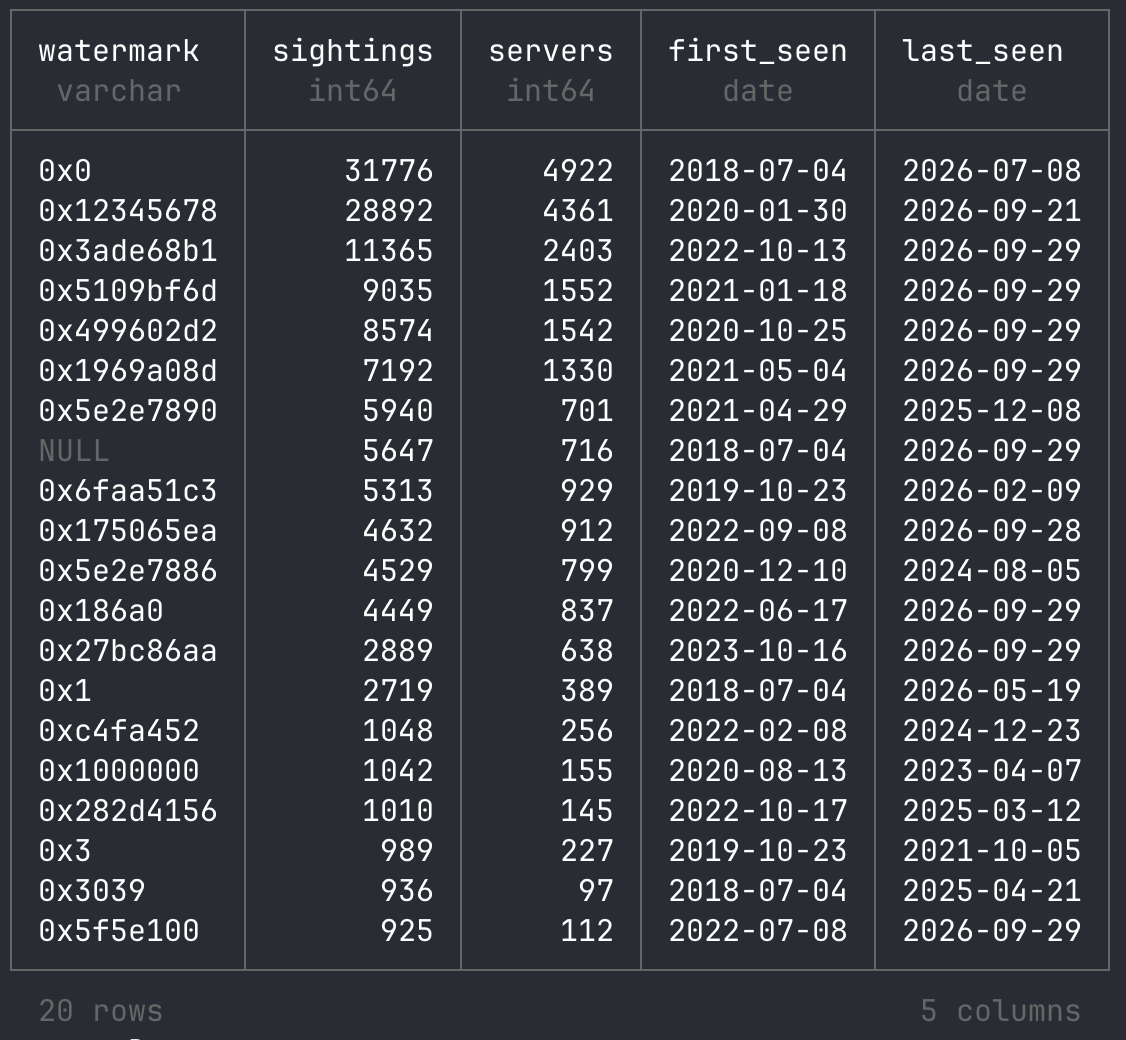
I’m a big fan of DuckDB (and SQLite), and over time I’ve become fond of SQL for querying data as well. DuckDB is very fast, and AI assistants are very good at writing SQL queries. These days, that beats hand-writing pandas code and the matching matplotlib charts. That’s why I recommend exploring the data with DuckDB, for example in a Jupyter notebook.

An example of using DuckDB to query the dataset on Hugging Face directly:

SELECT watermark,
       count(*)                          AS sightings,
       count(DISTINCT collected_from_ip) AS servers,
       min(collected_on)                 AS first_seen,
       max(collected_on)                 AS last_seen
FROM 'hf://datasets/fox-srt/cobaltstrike-beacon-corpus/data/beacons.parquet'
GROUP BY watermark
ORDER BY sightings DESC
LIMIT 20;

Take a look at our Jupyter notebook in the Hugging Face repository as a starting point. It contains every query and chart from the sections below, so you can rerun them or adapt them to your own research questions.

A first look at the data

Here are a few quick results to show what the corpus can answer. They’re a starting point, not a full analysis. As with our 2022 post, we invite researchers to explore the data; see also “Research ideas” below.

Old versions never die

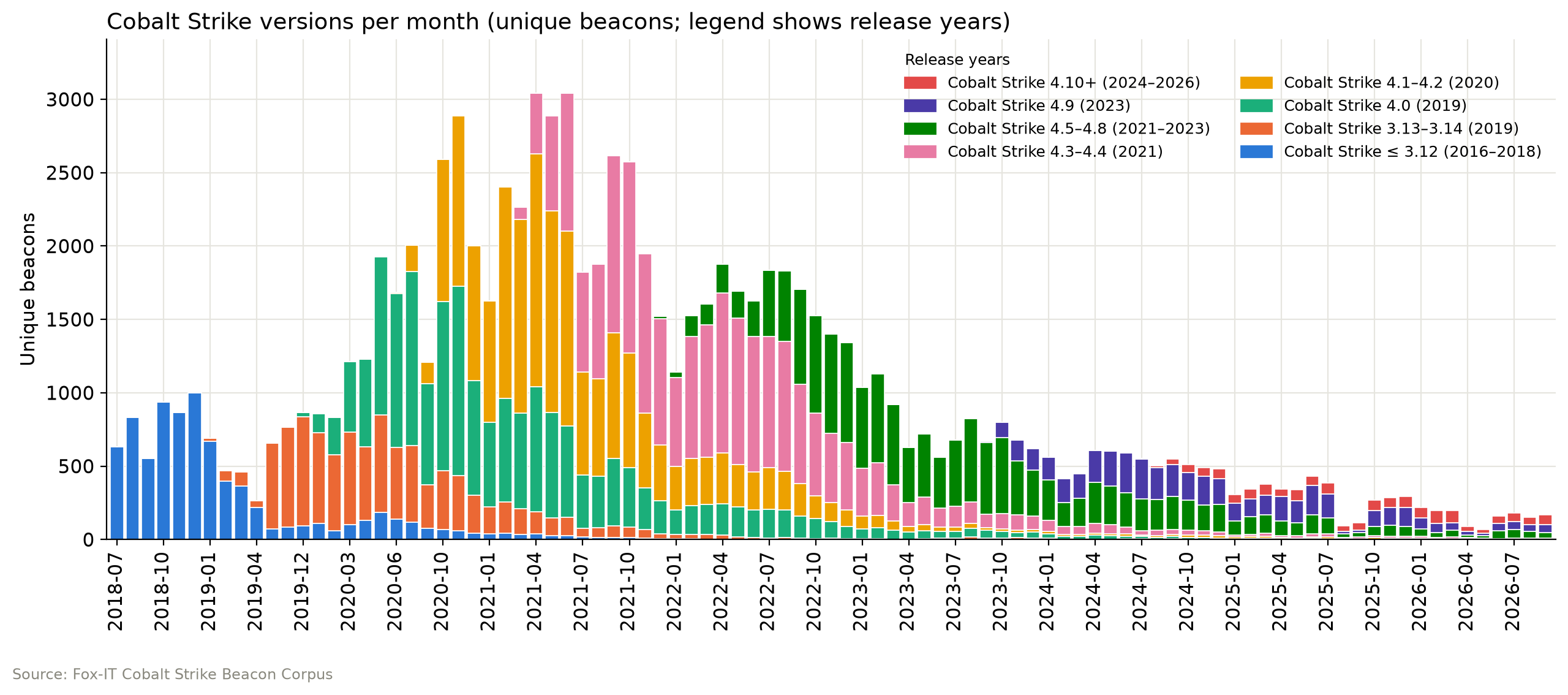
Each Cobalt Strike release takes over from the last, but old versions linger. Cobalt Strike 4.0 dominated most of 2020, 4.1–4.2 drove the early 2021 peak of about 3,000 beacons a month, 4.3–4.4 led from mid-2021 through 2022, and 4.5–4.8 took over in 2023. Since 2024, 4.9 and 4.5–4.8 have shared the lead, while 4.10+ remains a small share. Volume has since dropped to around 200 beacons a month, partly because fewer servers stage their beacon, which brings us to the next graph.

No beacon for you

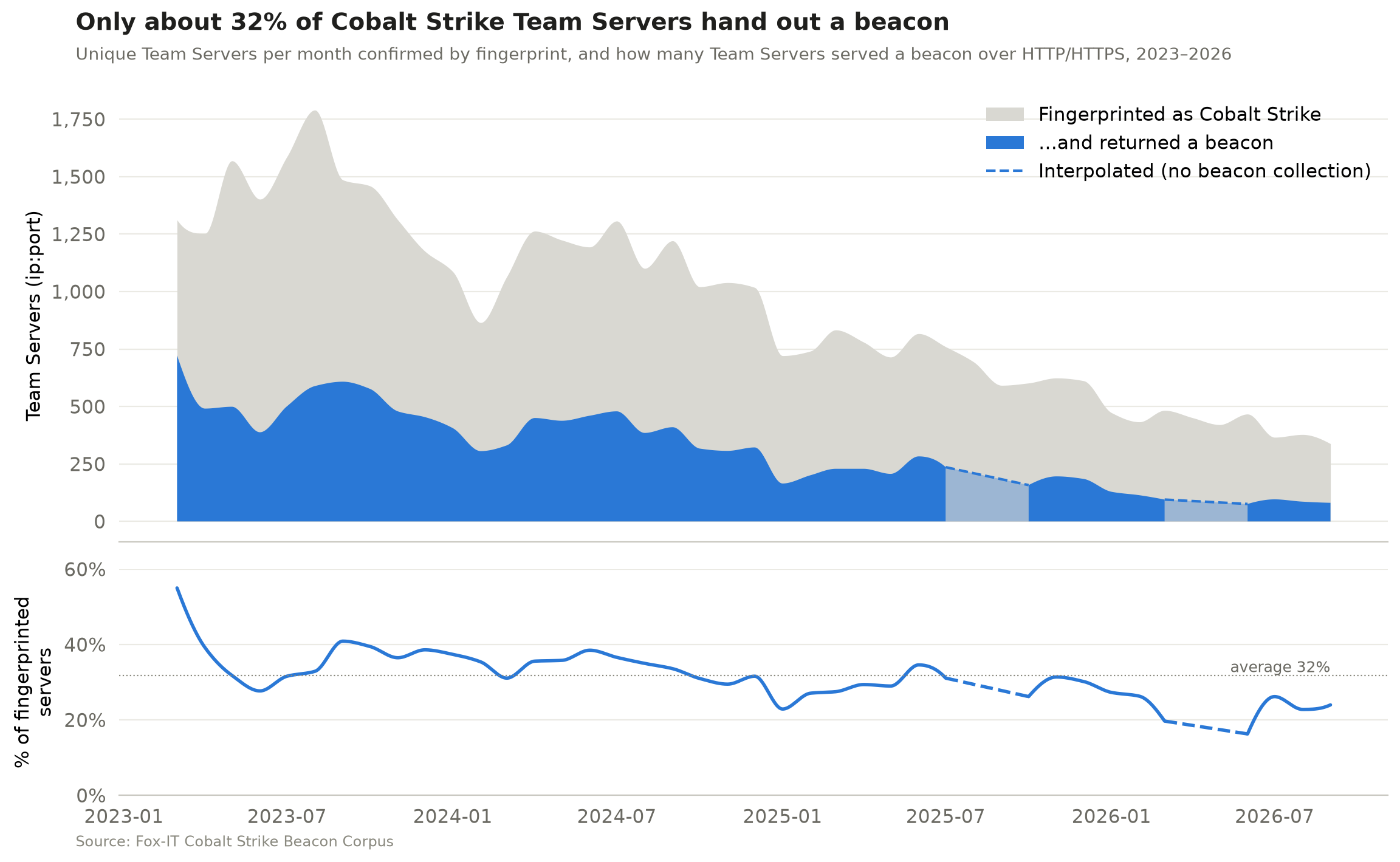
Our collection relies on beacon staging, meaning a Team Server can serve its beacon as a downloadable payload to anyone who requests the right URI or DNS record. Operators can turn this off (the host_stage option in the Malleable C2 profile), and disabling it is common OPSEC advice. To measure how much this affects our beacon collection, we counted two numbers per month:

  1. The unique Team Servers (ip:port) confirmed by our high-confidence HTTP fingerprint
  2. The unique Team Servers (ip:port) that handed out a beacon over HTTP(S)

These are monthly totals, not a server-by-server match. On average, the Team Servers that handed out a beacon were only about 32% of those we fingerprinted, and that share has drifted down from around 40% in 2023 to 20–25% in 2026. In other words, because not every server hands out a beacon, the corpus shows only part of the Cobalt Strike landscape, and that part is getting smaller. Disabled beacon staging is the most likely reason, but not the only one. Servers can go offline between fingerprinting and download or block our scanners, and our fingerprint doesn’t catch every Team Server.

The dashed sections mark months when beacon collection wasn’t running, because of an automation error that went unnoticed for a while.

The short life of a Cobalt Strike Team Server

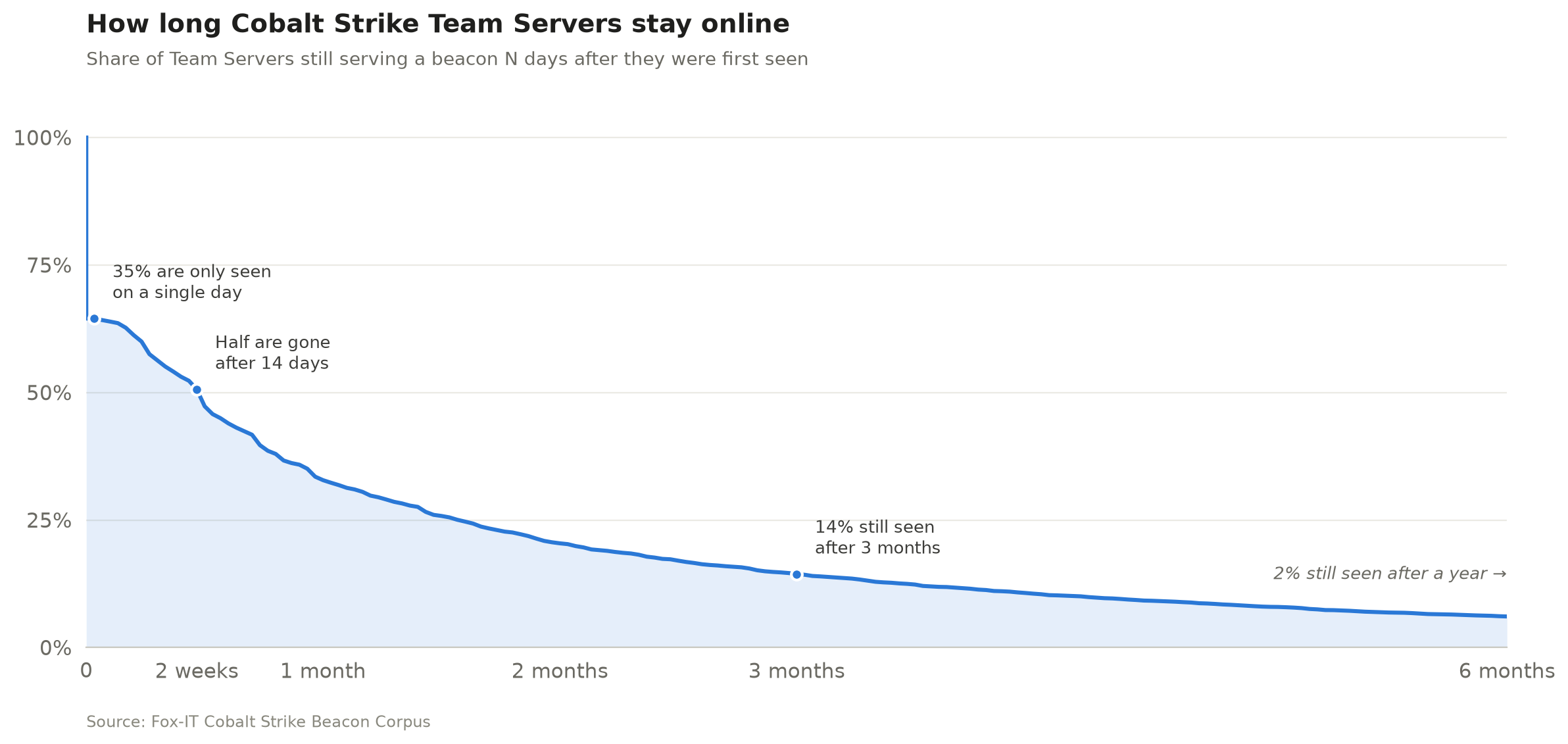
The median Team Server was reachable for 14 days. 35% were seen on a single day only, just 14% were still serving a beacon after three months, and only 2% after a year.

We identify a Team Server by its public key and C2 domains from the beacon configuration (or its IP address when the configuration contains no domains), so a server that moves to a new IP is still counted once. This allows us to measure how long a Team Server typically stays online. Identifying servers by public key alone or by ip:port gives almost the same result, a median lifetime of 14–15 days. These are first-to-last-sighting spans, so a server may have been online before our first and after our last sighting. Servers still active in the last 30 days are left out.

It’s always DNS

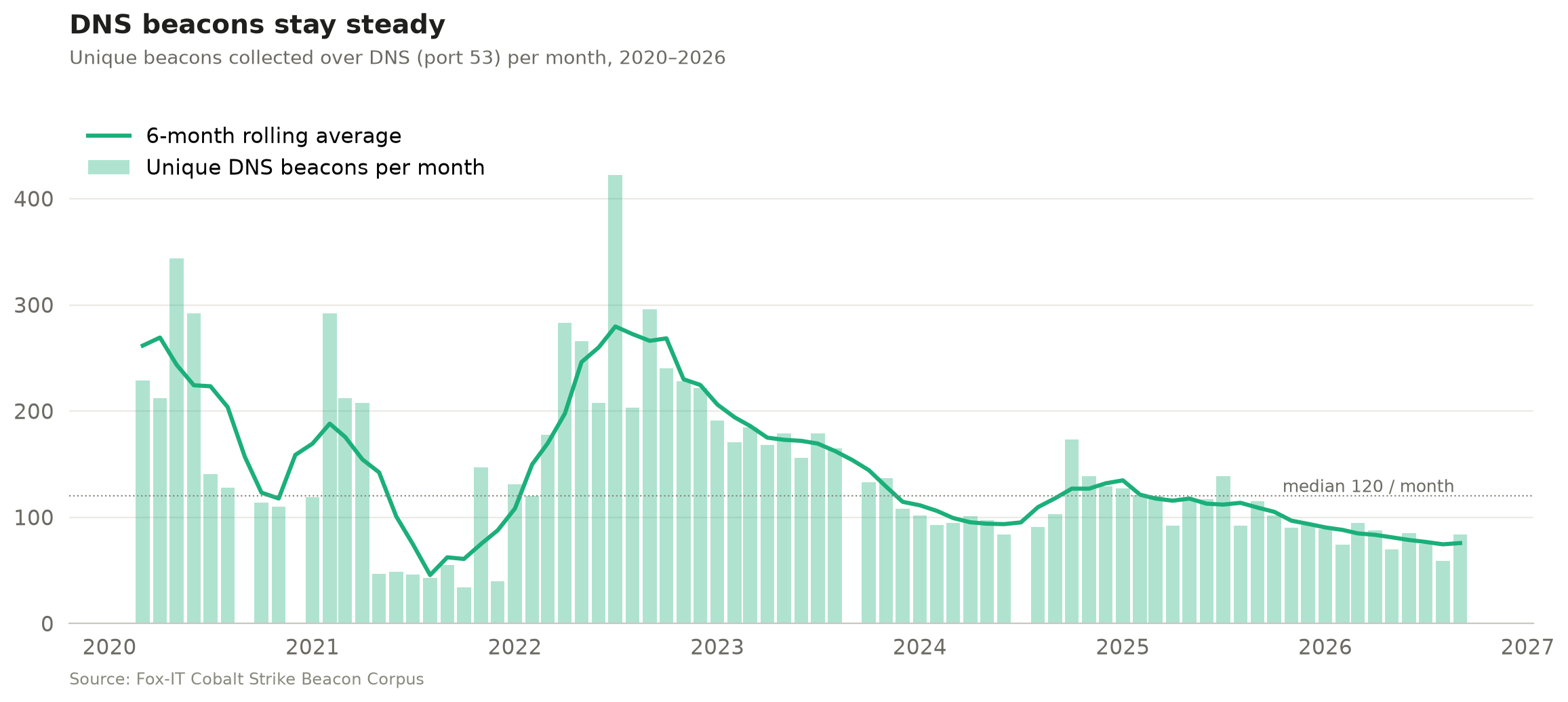
Most public scanning focuses only on HTTP(S) beacons, but we’ve also collected DNS beacons since 2020 (apart from the months when our automation broke). DNS beacons have declined much less steeply than HTTP(S) ones, perhaps because they get far less attention in public research and OPSEC advice, so fewer operators think to lock them down. After a peak in 2022, they have mostly hovered around 100 a month since 2024, with a median of 120 over the whole period.

Parse me if you can

The corpus also includes 128 unique beacons (0.23%) that we downloaded but couldn’t parse. Note that the corpus doesn’t contain HTML pages or other responses that were unlikely to be a beacon. We excluded those before publishing. At first glance, most are beacons with custom modifications that dissect.cobaltstrike can’t parse yet. And some payloads from the early years aren’t Cobalt Strike at all, but Metasploit Meterpreter payloads. We’ve deliberately left them in for researchers to analyse. You can find all unparsed beacons with: WHERE config_json IS NULL

The unparsed count used to be higher, but we managed to bring that down. We noticed some operators customised their beacon configs, for example by shuffling the order of the configuration settings or changing their type values, which broke our parser (and probably most others). The corpus helped us find these cases, so we made the config scanning of dissect.cobaltstrike independent of layout and added many other features and fixes along the way. See the dissect.cobaltstrike v1.3.0 release notes.

Research ideas

Some other research questions that could be answered using the corpus:

  • Clustering: Group operators by config features (watermark, SPAWNTO/PROCINJ hash, C2 profile, certificate, sleep/jitter, specific beacon modifications)
  • Classification: Separate red team from criminal infrastructure. Build and publish labelled subsets.
  • Infrastructure: Top hosting providers that are hosting a Cobalt Strike Team Server.
  • Certificates: Pivot on x509 reuse across servers and time or find how many are running the default Cobalt Strike keystore certificate.
  • Benchmarks: Use the corpus as a shared test set for config extractors and ML models.
  • Parser failures: 128 beacons can’t be parsed by dissect.cobaltstrike. Figure out why.

Over to you

Eight years of Cobalt Strike beacons are now one download away on Hugging Face. Run your own queries, pick up one of the research ideas above or come up with your own, dig into the beacons we couldn’t parse, and share what you find.

Before you start, read the Limitations section on the dataset card. The raw payloads are real Cobalt Strike beacons, so handle them like any other malware sample.

  • ✇ASEC BLOG
  • September 2026 Dark Web Breach Incident Trend Report ATCP
    Note The September 2026 Dark Web Breach Incident Trend Report focuses on data breach cases and the sale of initial access credentials posted on the deep web and dark web forums. The report explicitly states that the accuracy of some of its content cannot be fully verified due to the nature of the sources. Major […]
     

September 2026 Dark Web Breach Incident Trend Report

Por:ATCP
11 de Outubro de 2026, 12:00
Note The September 2026 Dark Web Breach Incident Trend Report focuses on data breach cases and the sale of initial access credentials posted on the deep web and dark web forums. The report explicitly states that the accuracy of some of its content cannot be fully verified due to the nature of the sources. Major […]
  • ✇ASEC BLOG
  • August 2026 Threat Trend Report on Ransomware ATCP
    Purpose and Scope This report summarizes statistics on new ransomware samples, affected systems, and statistics on targeted businesses collected during the month of August 2026, as well as major Korean & Global ransomware issues. Statistics on targeted businesses were compiled based on the time when publicly available information from ransomware groups’ DLS (Dedicated Leak Sites, […]
     

August 2026 Threat Trend Report on Ransomware

Por:ATCP
22 de Setembro de 2026, 12:00
Purpose and Scope This report summarizes statistics on new ransomware samples, affected systems, and statistics on targeted businesses collected during the month of August 2026, as well as major Korean & Global ransomware issues. Statistics on targeted businesses were compiled based on the time when publicly available information from ransomware groups’ DLS (Dedicated Leak Sites, […]
  • ✇GitHub Security Lab Archives - The GitHub Blog
  • AI-powered fuzzing with the GitHub Security Lab Taskflow Agent Antonio Morales
    If you’re new to fuzzing and want to learn the fundamentals first, check out our Fuzzing 101 course at gh.io/fuzzing101. Continuous fuzzing is not a magic solution that solves all your problems . Even projects that have been enrolled in OSS-Fuzz for years can still hide critical bugs, and the reason is almost always the same: someone needs to keep an eye on coverage, write new harnesses for the code that nobody is reaching, and triage the crashes that come out the other end. In other words,
     

AI-powered fuzzing with the GitHub Security Lab Taskflow Agent

If you’re new to fuzzing and want to learn the fundamentals first, check out our Fuzzing 101 course at gh.io/fuzzing101.

Continuous fuzzing is not a magic solution that solves all your problems . Even projects that have been enrolled in OSS-Fuzz for years can still hide critical bugs, and the reason is almost always the same: someone needs to keep an eye on coverage, write new harnesses for the code that nobody is reaching, and triage the crashes that come out the other end. In other words, fuzzing still needs a human in the loop.

So the natural question I kept asking myself was: how much of that human work can we actually hand over to an LLM agent?

That is what led me to build the Fuzzing Taskflow, an autonomous fuzzing pipeline for C/C++ projects. You only need to point it at a GitHub repository, and it does the rest: it identifies the suitable entrypoints, analyzes the build system, writes the harnesses, runs AFL++, reads the coverage reports, improves the harnesses, triages every crash, and writes a vulnerability report for each unique bug, all without a human babysitting it.

The Fuzzing Taskflow is built on top of the GitHub Security Lab Taskflow Agent, our framework for writing LLM-driven security automation, so the pipeline is expressed as a set of taskflows that an agent runs end to end.

In this post, I’ll walk you through how it works and the design decisions behind it. Let’s get going!

How to run it

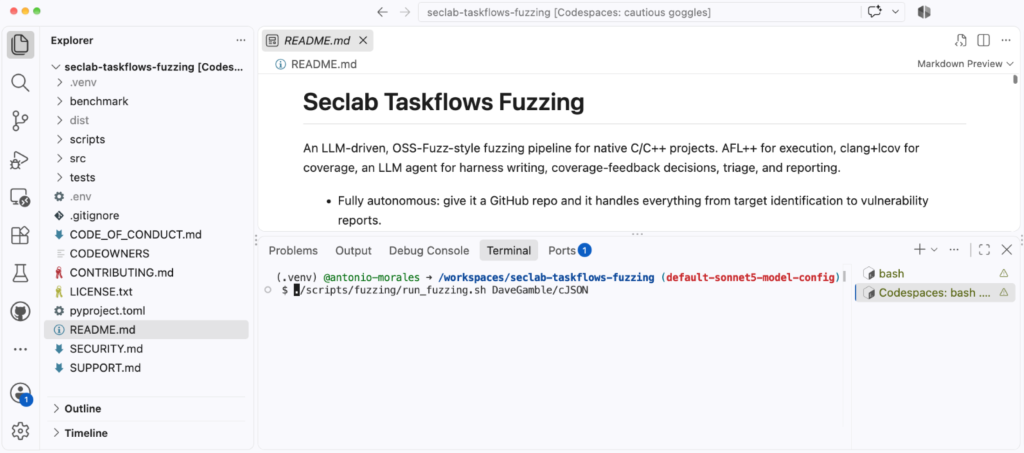
The simplest way to run it’s just to go to https://github.com/GitHubSecurityLab/seclab-taskflows-fuzzing and start a codespace.

Then, run the script like this:

./scripts/fuzzing/run_fuzzing.sh PROJECT

So, for example:

./scripts/fuzzing/run_fuzzing.sh tukaani-project/xz

That’s it. The argument is just a GitHub owner/repo slug. Then, the agent, takes care of all the preliminary steps on its own:

  • Installing software such as AFL
  • Cloning the repository
  • Identifying the most relevant functions in the code
  • Creating fuzz targets for those functions

If you just want a quick smoke test before committing to a long campaign, point it at something small:

./scripts/fuzzing/run_fuzzing.sh DaveGamble/cJSON

A word of warning before you run it: this taskflow runs afl-fuzz, clang, and arbitrary build commands chosen by the LLM directly on the host, with no container in between. A prompt-injected agent could, in principle, do anything your user can. So please run it only inside a disposable environment (e.g., a Codespace or a throwaway VM), without elevated privileges.

Screenshot of Seclab Taskflows Fuzzing.

Model selection

Some frontier models impose security guardrails on their outputs. For the fuzzing task flow, we use Claude Sonnet 5 by default because it passed all of our internal tests without issues. You can choose a different model by modifying the following file: src/seclab_taskflows_fuzzing/configs/model_config.yaml.

The architecture in one minute

Before getting into the interesting parts, it helps to know how the pieces fit together. There are three layers:

  • A shell driver (run_fuzzing.sh) that chains the pipeline stages together.
  • A set of taskflow YAMLs, one per stage, which are essentially the prompts that tell the LLM agent what to do at each step.
  • A set of MCP tools that the agent calls to actually do the work: run AFL, compile a harness, store a crash, read a coverage report, and so on.

The design rule I cared about most is a clean separation of responsibility: the LLM agent owns the decisions, and the MCP tools own the execution. The agent decides what to fuzz, what harness to write, and what coverage gap to chase next. The tools just expose primitives like run_afl_for or compile_harness. The agent never calls AFL or clang directly; it composes the pipeline out of these building blocks. All the state lives in a SQLite database (fuzz_context.db), so the stages never hand data to each other in memory, only through the database.

One small but important detail: each harness is built twice. AFL’s edge instrumentation is great for guiding the fuzzer but useless for human-readable coverage reports. So every harness becomes both a .afl binary (built with afl-clang-lto -fsanitize=address,undefined) and a .cov binary (built with clang -fprofile-instr-generate -fcoverage-mapping). The .afl binary does the fuzzing; the .cov binary replays AFL’s queue afterwards to produce real source-line and branch coverage.

The coverage-feedback loop

This is the heart of the whole pipeline, and it’s the part that most directly automates the manual workflow I described at the start.

If you have ever tried to improve fuzzing coverage by hand, you’ll know that it’s an iterative process that looks like this:

Three bubbles that say: Run the fuzzers, Check the coverage, and Improve the fuzzers. They are connected by three arrows in a circular flow.

The “check the coverage” step used to be completed by me, manually reading an LCOV report looking for uncovered branches. The “improve the coverage” step was also completed by me, this time, writing a new harness or crafting a new input. The Fuzzing Taskflow hands both of those steps to the agent.

Each iteration, for each harness, the agent runs AFL for a time budget, replays the queue against the .cov binary to get a real coverage report, and then reads the list of uncovered branches. Based on what it finds, it picks one of a handful of actions:

  • Add a new seed crafted to reach an uncovered branch
  • Edit the harness source to call an additional API
  • Auto-enrich the AFL dictionary with the magic constants a guard is comparing against
  • Simply skip the gap if it’s a cold error path or vendor code that isn’t worth chasing

The time budgets double every iteration:

30s → 60s → 120s → 240s → 480s → 960s (≈ 32 min/target)

The idea is to spend cheap, short rounds early (when there’s lots of low-hanging coverage to grab) and longer rounds later (when the fuzzer needs more time to break through a hard guard).

And just like in my manual workflow, I need an answer to the question: when do we stop? Here, the loop uses plateau detection: once two consecutive iterations each gain less than a configurable threshold (1% absolute line coverage by default), the loop decides it has hit diminishing returns and moves on. This keeps the agent from burning hours of compute squeezing out the last fraction of a percent.

Structure-aware fuzzing

AFL’s default byte-level mutators (bit flips, arithmetic, block splicing) do a great job on binary formats but struggle with structured, text-based inputs. The classic solution is to hand-write custom mutators for each format, which is tedious work. This time I want the pipeline to do that work for me, so it ships four complementary mechanisms for producing structure-aware inputs.

1. Per-format dictionaries and custom mutators. For targets whose input format is recognized (JSON, XML, regex, PNG, length-prefixed binary TLV), the taskflow ships pre-built AFL dictionaries and LLVMFuzzerCustomMutator C files. The JSON mutator does token splicing and balanced-bracket duplication; the XML one knows about tags, entities, and billion-laughs tokens; the regex one carries real ReDoS patterns. Each mutator delegates half of its mutations back to AFL’s default byte mutator, so we keep the engine’s randomization instead of fighting it.

2. A source level dictionary. For formats the pipeline doesn’t recognize, it generates a custom mutator on the fly by scanning the target’s own .c/.h files. It extracts string literals and 32-bit numeric constants (from #define, case, and enum), filters out the noise, and uses them as splice tokens. The intuition is simple: the most interesting magic values that a parser checks for are usually written down somewhere in its own source.

3. A dynamically generated AFL dictionary with coverage-driven enrichment. The same source-token set is also emitted as an AFL classic dictionary before iteration 1 (numeric constants in both endiannesses, so the fuzzer can satisfy a memcmp against a 4-byte magic regardless of host byte order). Then, after every coverage step, the pipeline looks at the guards near the uncovered lines (strncmp, memcmp, case 0xN, == ‘X’) and appends any new tokens it finds. The dictionary literally grows toward the code the fuzzer can’t yet reach.

4. A corpus-splice operator. The smart mutator can also load files from a corpus directory and splice random sub-regions of them into the input, a recombination-style operator that AFL’s stock havoc doesn’t do well.

Evolving corpus

One of the things that quietly kills fuzzing efficiency is throwing away progress. If every run starts from the original seeds, you re-pay the cost of rediscovering the same paths over and over.

To avoid that, every harness gets a stable corpus directory that survives across iterations and across entire campaigns:

<workspace>/corpus/harness_<id>/

At the end of each iteration, AFL’s queue is merged into this directory and run through afl-cmin to keep its size bounded. The effect is that yesterday’s interesting inputs carry into today’s run, and the inputs you found in last week’s campaign carry into this one. If you stop and restart a campaign, you lose nothing.

Triage and vulnerability reports

Finding a crash is only half the job. As anyone who has done root-cause analysis knows, triaging is often the most tedious part of the whole process. This is the other place where the agent shines.

After the fuzzing loop finishes, three stages run automatically. First, every crash is minimized with afl-tmin, replayed under ASan to capture a stack trace, and deduplicated by a stack-top hash (the top normalized frames, with templates, inline namespaces, and LTO suffixes stripped so semantically identical crashes collapse together). Second, previously known crashes are replayed against the current binary to see whether an upstream fix has resolved them. Third, the agent reads the harness source and the crashing function, walks the call chain back from the public API, and writes a per-crash markdown report.

Each report assigns one of the following verdicts:

  • vulnerability
  • library_hardening
  • harness_bug
  • OOM
  • timeout
  • assertion_failure
  • duplicate

The distinction between a real vulnerability (reachable and exploitable through a public API) and a mere harness_bug (the bug is in our own harness, not the library) is exactly the kind of judgment call that used to require me to sit down and trace the code by hand. Every report includes a root-cause analysis with file:line references, a reachability argument, an exploitability assessment, a suggested fix as a unified diff and a regression-test sketch.

Just as clarification: the suggested patches are marked “review required” for a reason. The agent’s analysis is limited by the model’s understanding of the target code, and it does get things wrong. Treat the verdicts as a very well-prepared starting point for a human, not as final result.

Live dashboard

Running an autonomous campaign and not being able to see what it’s doing is uncomfortable, so the pipeline publishes everything to a live HTML dashboard. It auto-starts in the background as soon as you launch a campaign, on port 8765. In a Codespace that port is auto-forwarded, so you can open it in any browser and watch the campaign progress in real time on the dashboard.

Screenshot of the fuzzing dashboard.

The page shows amongst others:

  • a per-harness “running” pulse
  • a coverage-trend table with inline sparklines
  • a crash heatmap
  • an iteration timeline

Conclusion

I started this project motivated by the limitations that any security researcher knows well: fuzzing works, but it doesn’t scale without human attention, and that human attention is the bottleneck. The Fuzzing Taskflow is my attempt to push that bottleneck back by handing the repetitive parts (writing harnesses, reading coverage, chasing gaps, triaging crashes) to an LLM agent, while keeping a clean separation between the agent’s judgment and the tools that do the real work.

If you’re the maintainer of C/C++ project, then please give it a try. If your project has never been fuzzed before, then this tool will help you to get started quickly. Or if your project has been fuzzed before, then this tool might help to find new bugs by increasing your fuzzing coverage.

The source code is open source, so please create an issue if you encounter any bugs. Contributions are also welcome!

The post AI-powered fuzzing with the GitHub Security Lab Taskflow Agent appeared first on The GitHub Blog.

  • ✇Securelist
  • NightEagle targets Russian companies Stanislav Larinsky · Kaspersky Security Services
    Over the past year, our Global Emergency Response Team (GERT) has investigated several incidents involving the NightEagle group (also tracked as APT-Q-95). This group has been active since at least 2023 and originally focused on organizations in Asia. We have now identified attacks by the group targeting businesses in Russia. This post examines both known and new tools NightEagle used in its latest campaign. Initial access In most incidents, the attackers used compromised valid credentials to ga
     

NightEagle targets Russian companies

16 de Setembro de 2026, 07:00

Over the past year, our Global Emergency Response Team (GERT) has investigated several incidents involving the NightEagle group (also tracked as APT-Q-95). This group has been active since at least 2023 and originally focused on organizations in Asia. We have now identified attacks by the group targeting businesses in Russia. This post examines both known and new tools NightEagle used in its latest campaign.

Initial access

In most incidents, the attackers used compromised valid credentials to gain access to corporate VPNs. VPN connections originated from IP addresses in the Russian segment linked to Cloudflare WARP tunnels, as well as from IP addresses associated with European virtual infrastructure providers.

GhostContainer on Microsoft Exchange

Both during the initial access stage and as the attack progressed, the attackers deployed the GhostContainer backdoor on Microsoft Exchange servers. It incorporates components from several open-source projects, including the Neo-reGeorg tunnel, an exploit for the CVE-2020-0688 vulnerability, and the GhostWebShell class from the ysoserial utility. All of these components are publicly available on GitHub.

We were unable to determine the exact method the attackers used to deliver the backdoor to Microsoft Exchange servers. We believe with a high degree of confidence that they applied a technique already familiar to us: extracting the cryptographic keys used by Microsoft Exchange from the ASP.NET configuration, overwriting the VIEWSTATE framework parameter, and injecting a payload into it, which then launched the GhostContainer backdoor in memory.

The backdoor is a .NET assembly containing three classes that implement its core functionality:

  • Stub: processes C2 commands delivered to the infected system through the x-owa-urlpostdata headers and evades detection by the Antimalware Scan Interface (AMSI) and Windows Event Log mechanisms by overwriting addresses in amsi.dll and ntdll.dll.
  • App_Web_843e75cf5b63: accepts the fakePath and fakePageName parameters and creates virtual paths that redirect requests to the App_Web_8c9b251fb5b3 class.
  • App_Web_8c9b251fb5b3: implements network traffic redirection (proxying) and socket forwarding functionality.

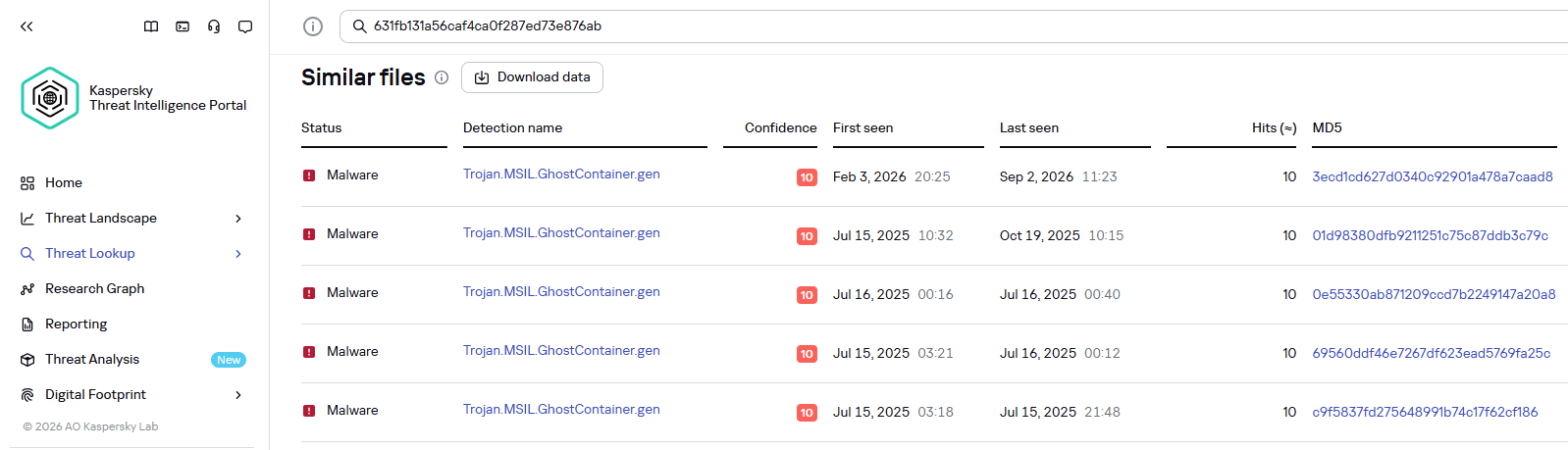
Kaspersky products detect the GhostContainer backdoor as Trojan.MSIL.GhostContainer.gen.

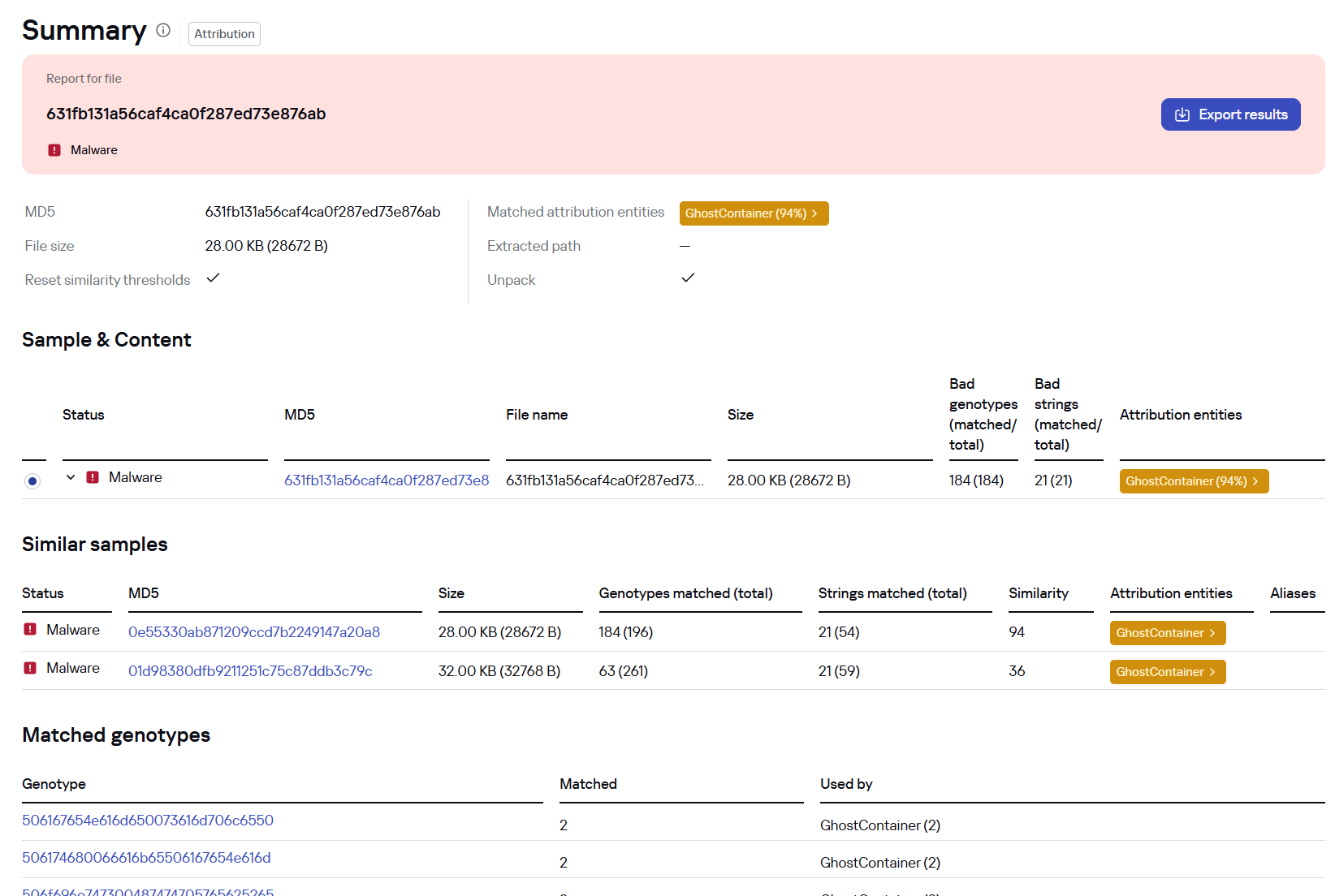
GhostContainer samples identified by the Similarity technology from Kaspersky Threat Analysis

GhostContainer samples identified by the Similarity technology from Kaspersky Threat Analysis

Traffic redirection

Once the attackers gain sufficient privileges during an attack, they leverage RDP to move laterally within the internal network segment. To do this, they download and run tools for tunneling and redirecting network traffic.

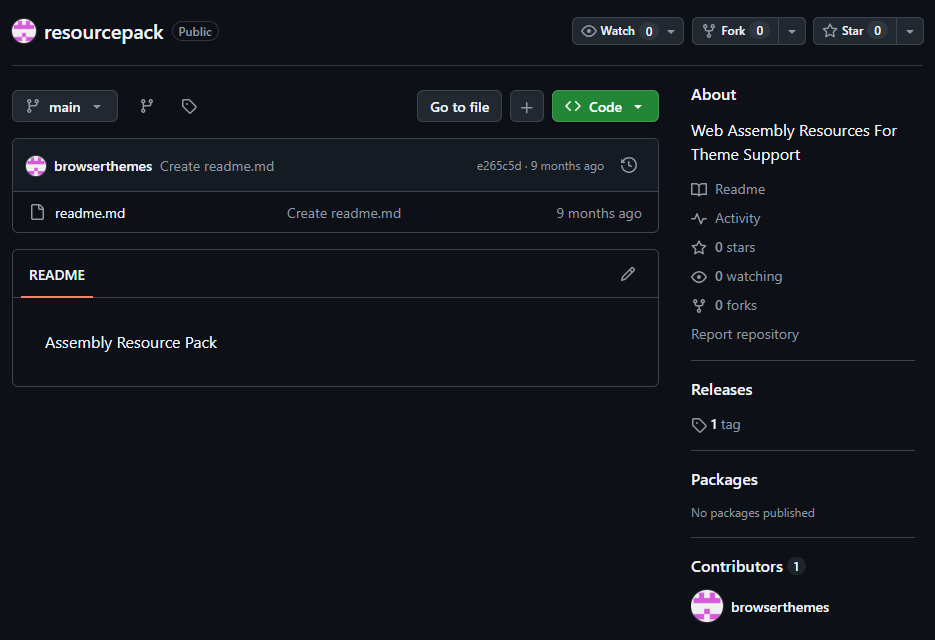
The attackers used GitHub repositories to host their archived tools. The names of the repositories and archives were disguised to look legitimate:

  • https://github[.]com/mirror-js/mirror-js/refs/heads/main/js/js-webpack.zip
  • https://github[.]com/mirror-js/mirror-js/refs/heads/main/js/jsonp-pack.zip
  • https://github[.]com/browserthemes/resourcepack/releases/download/main/resource-pack.zip
One of the repositories used for storing network tools

One of the repositories used for storing network tools

The files contained within the archives were also given names mimicking known legitimate software, though unrelated to the archive names:

  • adobe_32.exe;
  • AdobeSync.exe;
  • trueconf.exe;
  • 1cbroker.exe;
  • 1c-office-plugin.exe;
  • trueconf-broker.exe.

Across the incidents we investigated, we found two tools that the attackers combined for traffic tunneling.

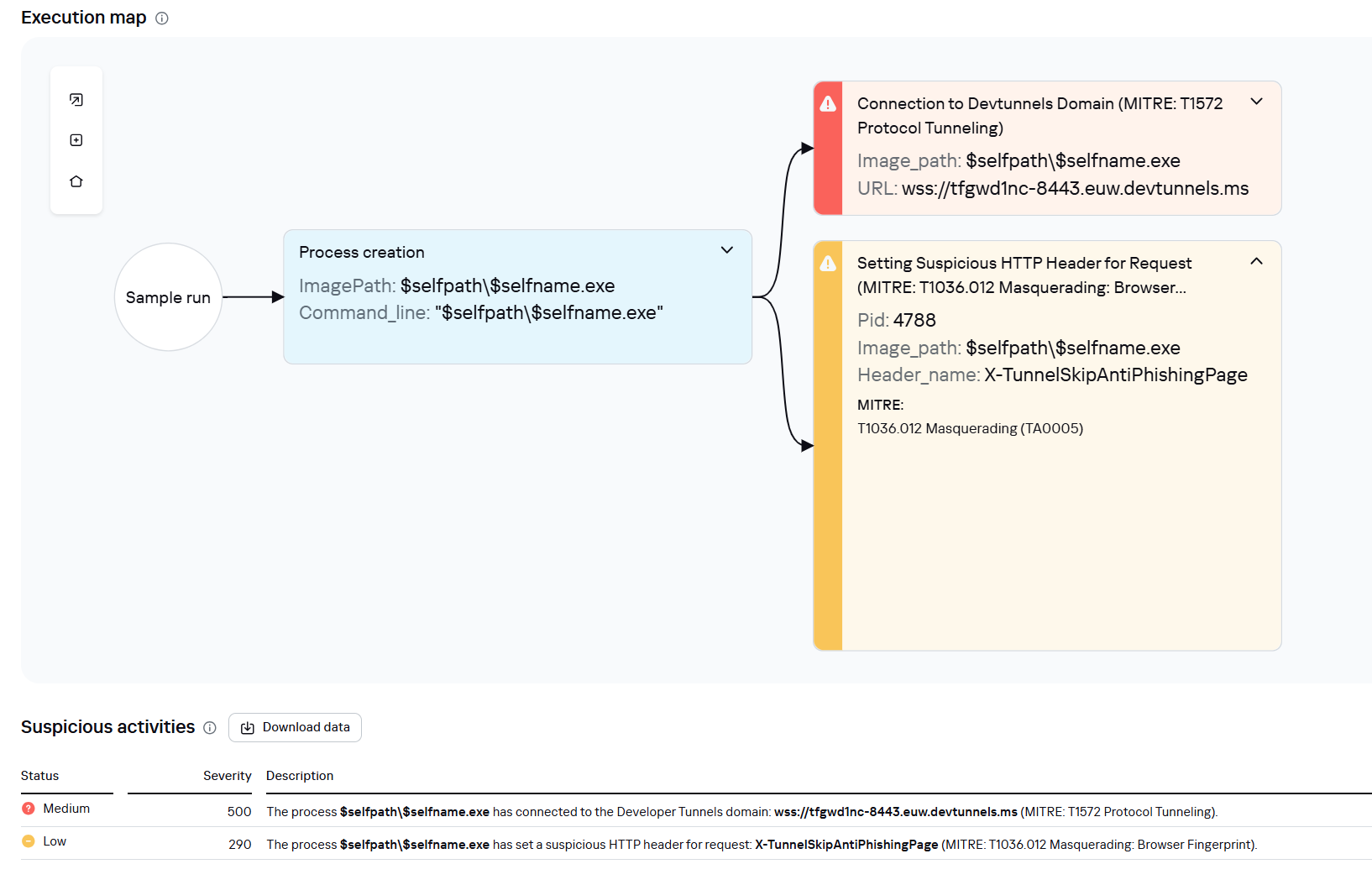
  1. Microsoft dev tunnels
    This is a legitimate Microsoft mechanism that allows local web services to be published for internet access on *.*.devtunnels.ms domains. The attackers used this tunneling capability to expose port 3389 (RDP) on the compromised system.

    Execution graph of adobe_32.exe in Kaspersky Research Sandbox

    Execution graph of adobe_32.exe in Kaspersky Research Sandbox

  2. rdp2tcp
    This is a publicly available tool for tunneling TCP traffic over an established RDP connection. It includes a server component that runs on the target system and a client component that runs on the attacker’s side.

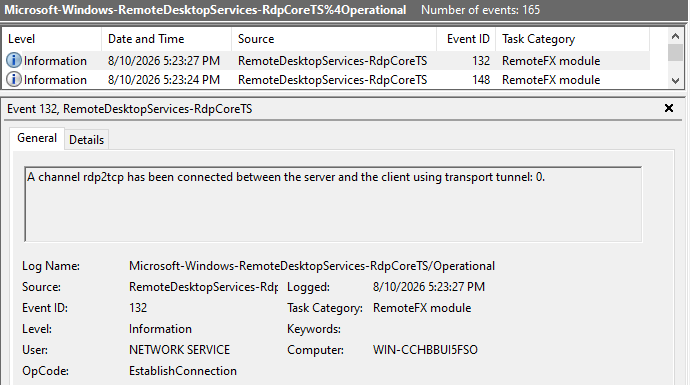
    When virtual channels are opened and closed, corresponding events with IDs 132 (channel opened) and 148 (channel closed) are logged in the Microsoft-Windows-RemoteDesktopServices-RdpCoreTS/Operational.evtx Windows log. These events contain the names of the channels (such as XPSRD, cliprdr, Microsoft::Windows::RDS::DisplayControl, and others) used by the RemoteFX module, which extends the capabilities of the RDP protocol.

    When the rdp2tcp tool is used, events with IDs 132 and 148 will contain the channel name rdp2tcp or other random alphanumeric combinations chosen by the attackers.

    Creation event for a channel named rdp2tcp (server component startup)

    Creation event for a channel named rdp2tcp (server component startup)

The combination of Microsoft dev tunnels and rdp2tcp allows the attackers to maintain network access by using legitimate services without opening additional suspicious ports.

The attackers also used the atexec utility from the Impacket toolkit to create scheduled tasks on target systems. These tasks enabled network port forwarding through standard Windows functionality:

netsh interface portproxy add v4tov4 listenport=443 connectaddress=10.0.12.101 connectport=445

Lateral movement

To obtain elevated privileges and move laterally through the network, NightEagle exploited various vulnerabilities in Active Directory. The attackers used previously established tunnels to connect to internal infrastructure systems.

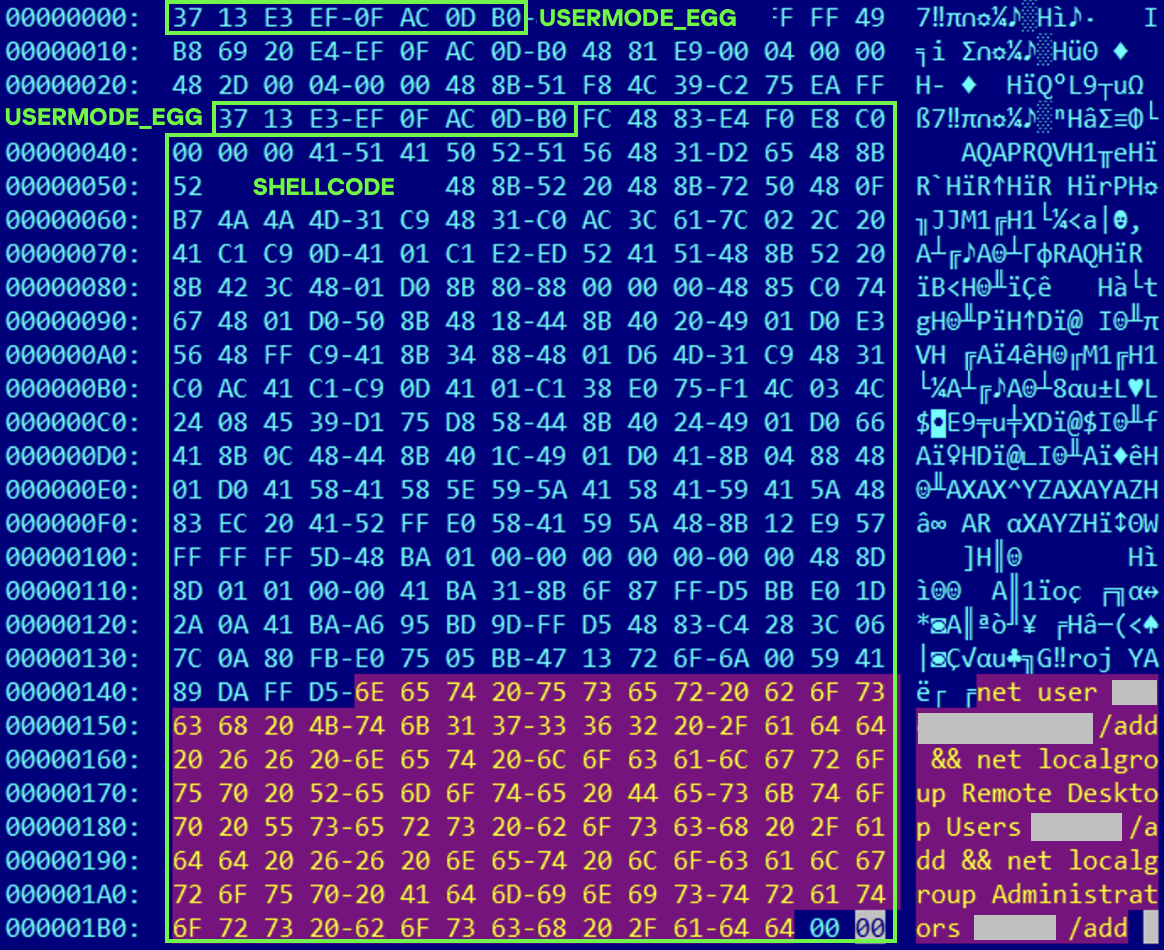
In one incident, they exploited a well-known RDP implementation vulnerability, CVE-2019-0708 (BlueKeep). They used the vulnerable mechanism to create a local account on the system and add it to the Administrators and Remote Desktop Users groups.

Contents of a system memory dump showing artifacts of the CVE-2019-0708 exploit

Contents of a system memory dump showing artifacts of the CVE-2019-0708 exploit

The attackers also requested Kerberos tickets with a non-standard combination of flags (Forwardable, Proxiable, Renewable) and attempted to replicate the Domain-Password object from the Active Directory database to impersonate the domain controller (a technique known as DCSync) after obtaining an account with sufficient privileges.

Through these methods, the attackers establish persistence in the infrastructure, obtain password hashes for domain accounts, use long-lived Kerberos tickets to gain legitimate access to target resources, and ultimately compromise domain controllers and the victim’s entire Active Directory infrastructure.

Takeaways

To expand the geographic scope of its targets, NightEagle is updating its methods and adopting new techniques for persistence and lateral movement. Despite the group’s efforts to stay hidden, timely detection of anomalies combined with a comprehensive approach to infrastructure protection can significantly hinder the attackers from achieving their goals. Since the attackers rely on known legitimate tools and infrastructure vulnerabilities, well-configured monitoring can help detect NightEagle’s presence on the network.

Detection by Kaspersky solutions

Kaspersky solutions reliably identify the malicious activity described above at various stages of the attack. We showed examples above of how Kaspersky Threat Analysis detects samples of the GhostContainer backdoor and the tunneling utility. This toolkit also includes the analytical solution Kaspersky Threat Attribution Engine (KTAE), which helps SOC analysts and incident responders determine which APT groups malware can be attributed to. The solution uses a proprietary comparison method that measures the similarity between analyzed samples of suspicious files and known malicious samples in Kaspersky’s collection.

The backdoor we discovered showed similarity to previously analyzed GhostContainer samples and a connection to the NightEagle APT group:

Backdoor analysis with KTAE

Backdoor analysis with KTAE

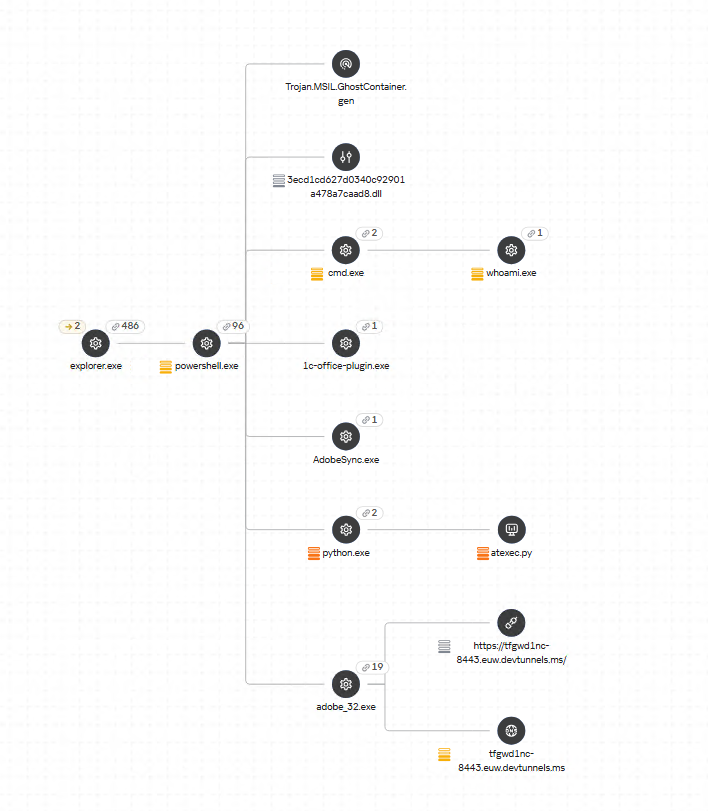
However, detection scenarios for this kind of attacks are not limited to file analysis. Deploying a backdoor on a target host produces numerous characteristic artifacts, which allow Kaspersky Endpoint Detection and Response Expert to alert users to anomalies in the infrastructure in a timely manner.

This malicious activity is detected by the following rules, available in the repository:

Process tree in KEDR Expert

Process tree in KEDR Expert

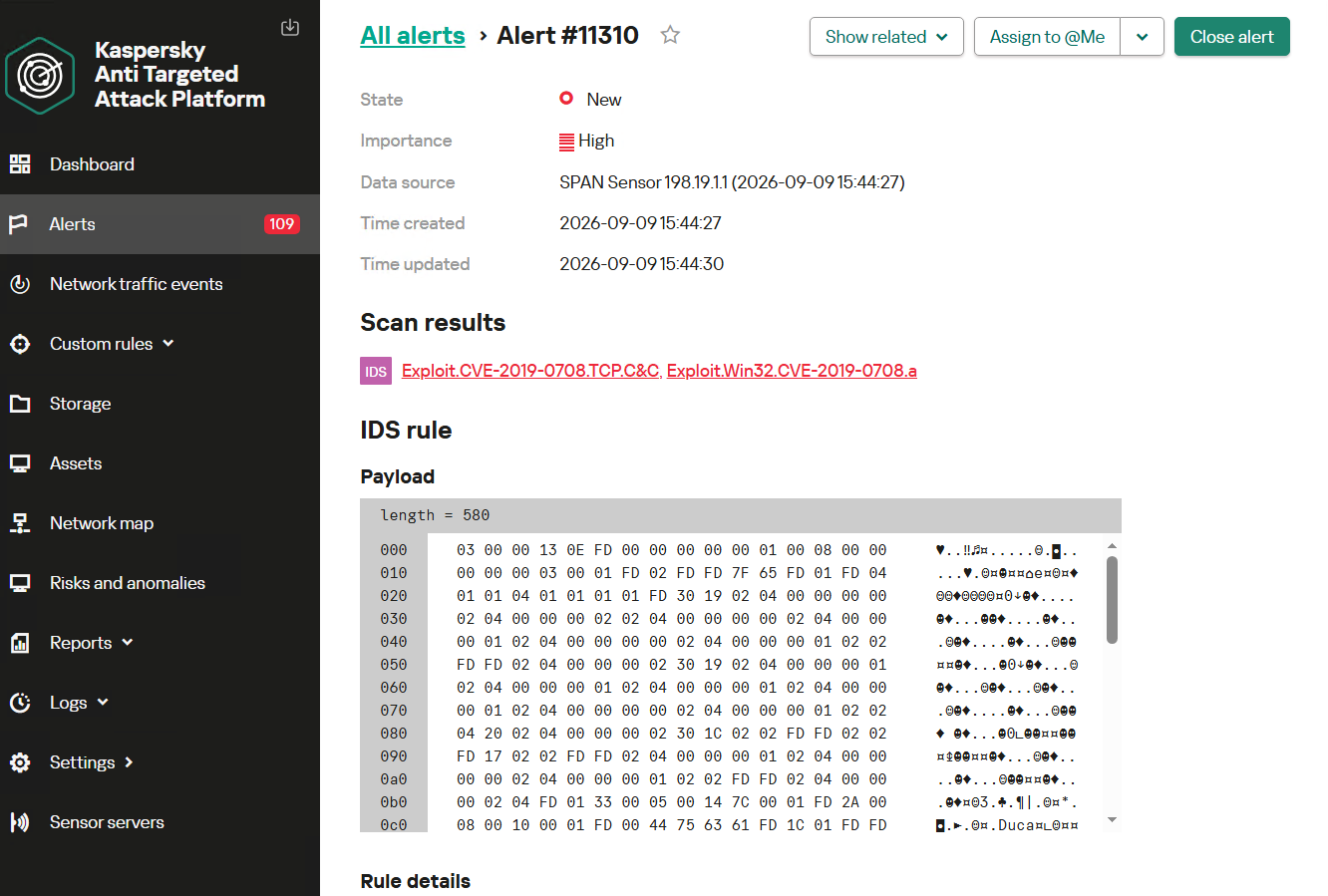
Kaspersky Anti Targeted Attack (KATA) detects this malicious activity in network traffic. For example, the Exploit.CVE-2019-0708.TCP.C&C signature allows detecting attempts to exploit the CVE-2019-0708 (BlueKeep) vulnerability.

Alert card for the BlueKeep vulnerability exploitation

Alert card for the BlueKeep vulnerability exploitation

Beyond this activity, KATA also detects other NightEagle actions in network traffic, such as the following:

  • Traffic redirection and tunneling variations
  • Attacks on Active Directory (DCSync, attempts to compromise AD CS, and others)
  • Lateral movement across the network

Indicators of compromise

1dcafb7f8448683281106b06dd22409a AdobeSync.exe
1f3034b706c78b35d8e34044e68c693a adobe_32.exe
3ecd1cd627d0340c92901a478a7caad8
631fb131a56caf4ca0f287ed73e876ab
App_Web_Container_1.dll
4aa9fb1bf9223dfcdac920759bc7a3c7 1c-office-plugin.exe, 1cbroker.exe, trueconf.exe
https://github[.]com/mirror-js/mirror-js
https://github[.]com/browserthemes/resourcepack

  • ✇ASEC BLOG
  • July 2026 Ransomware Trend Report ATCP
    Purpose and Scope The July 2026 Threat Trend Report on Ransomware summarizes major Korean & global ransomware issues based on statistics regarding the quantity of new ransomware samples, the number of compromised systems, and statistics on targeted businesses. Statistics on targeted businesses were compiled based on information published on DLS (Dedicated Leak Sites, also referred […]
     

July 2026 Ransomware Trend Report

Por:ATCP
23 de Agosto de 2026, 12:00
Purpose and Scope The July 2026 Threat Trend Report on Ransomware summarizes major Korean & global ransomware issues based on statistics regarding the quantity of new ransomware samples, the number of compromised systems, and statistics on targeted businesses. Statistics on targeted businesses were compiled based on information published on DLS (Dedicated Leak Sites, also referred […]
  • ✇ASEC BLOG
  • Ransom & Dark Web Issues Week 2, August 2026 ATCP
    ASEC Blog publishes Ransom & Dark Web Issues Week 2, August 2026.           DragonForce Ransomware Attack on a South Korean Online Education Company Qilin Ransomware Attack on a South Korean Motor and Robotics Manufacturer ShinyHunters Claims Data Leak from a U.S. Digital Healthcare Company
     

Ransom & Dark Web Issues Week 2, August 2026

Por:ATCP
12 de Agosto de 2026, 12:00
ASEC Blog publishes Ransom & Dark Web Issues Week 2, August 2026.           DragonForce Ransomware Attack on a South Korean Online Education Company Qilin Ransomware Attack on a South Korean Motor and Robotics Manufacturer ShinyHunters Claims Data Leak from a U.S. Digital Healthcare Company
  • ✇Securelist
  • An analysis of incidents at Brazilian educational institutions Cristian Souza · Kaspersky Security Services
    Introduction Because of the amount of data that can be obtained and the high impact that successful attacks may have, educational institutions are frequent targets of cybercriminals. Both public and private schools and universities rely on software for managing personally identifiable information (PII) that is often insecure or insufficiently tested against known vulnerabilities. In addition, machines used by multiple people without accountability can be vulnerable to insider threats. The comple
     

An analysis of incidents at Brazilian educational institutions

3 de Agosto de 2026, 10:00

Introduction

Because of the amount of data that can be obtained and the high impact that successful attacks may have, educational institutions are frequent targets of cybercriminals. Both public and private schools and universities rely on software for managing personally identifiable information (PII) that is often insecure or insufficiently tested against known vulnerabilities. In addition, machines used by multiple people without accountability can be vulnerable to insider threats.

The complexity of academic environments amplifies this risk. Unlike corporate networks, educational institutions have to provide a network that supports students, professors, researchers, administrative staff, third-party contractors, and visitors. Each of these groups has different security requirements and access control levels, making it difficult to enforce consistent security policies. A security breach can have severe consequences since it may expose vast amounts of sensitive information, such as social security numbers (CPF in Brazil), addresses, phone numbers, and even parents’ names. Armed with this information, attackers can attempt phishing attacks and impersonate the victims in SIM swapping attacks, a common practice in Brazil.

In this article, we provide details about attacks on educational institutions in Brazil observed by our Global Emergency Response Team (GERT) since 2025. We share general statistics, common threats, initial access vectors, and the impact of such violations. Additionally, we present some interesting cases encountered by our team and the identified TTPs. Finally, we offer recommendations to help institutions protect themselves against future attacks.

Key findings and statistics

Our dataset encompasses incident response cases from January 2025 to June 2026. As the chart below shows, the majority of attacks targeted institutions in São Paulo state, Brazil’s most populous state and a significant center of economic and financial activity. We also had cases in Rio de Janeiro and Pernambuco.

Geographical distribution of incident response requests at educational institutions (download)

Of the customers who requested incident response, 60% were private institutions and 40% were public institutions.

Private and public institutions (download)

The most frequent reasons for requesting IR services were related to suspicious endpoint activities, encrypted files, and the presence of suspicious files.

Incident response request reasons (download)

High-severity incidents accounted for 40% of the total cases, while the remaining 60% were medium severity.

Distribution of incidents by severity (download)

The high-severity incidents were mainly related to ransomware attacks. Interestingly, private institutions were the most targeted by ransomware, while incidents in public institutions were mostly related to suspicious endpoint activity and privilege escalation attempts. The most common ransomware families found in our dataset were DragonForce and LockBit 3, whose builder was leaked back in 2022. By using the leaked LockBit builder with a valid privileged account, attackers can build variants capable of disabling defenses and erasing logs.

The most common initial access vectors included the use of valid accounts, exploitation of public-facing applications, and insiders.

Initial access vectors (download)

For privilege escalation, the attackers often relied on Potato variants (GodPotato, SweetPotato, and BadPotato).

We also observed attackers using tools like AnyDesk for remote access, PsExec for lateral movement within compromised infrastructures, and AV-killer malware to terminate the system’s defenses. The latter was mainly used in ransomware-related incidents.

These data reveal an interesting pattern in the threat landscape affecting educational institutions in the region. Many incidents were not caused by highly sophisticated techniques but rather by the abuse of common weaknesses such as valid accounts, exposed applications, and inadequate patch management, as well as the use of publicly available tools that are well-known to the adversaries. The prevalence of ransomware in private institutions suggests a stronger financial motivation, likely because attackers assume these organizations are more capable of paying for data recovery than public schools and universities.

Most attacks were discovered promptly and lasted from a few minutes to a couple of hours. However, technical incident response activities averaged 9.6 hours. This indicates that the impact caused by an incident often extends beyond the timeframe of the active attack, requiring extensive triage and analysis by the forensic investigators to fully restore operations.

One interesting fact is that we are still observing the use of Windows 10 in the infrastructures of educational institutions, even after Microsoft’s official end-of-support date of October 2025. In addition, we found that some customer organizations were using Windows Server 2016 without security patches and fixes. Using outdated and unsupported operating systems increases the attack surface of an infrastructure because attackers can exploit publicly available vulnerabilities to access vulnerable systems and expand their presence in the network. In addition, legacy operating systems may be incompatible with modern evidence collection tools, necessitating extra time and alternative procedures for forensic acquisition.

Obsolete systems in organizations (download)

Interesting cases

Case 01 – Leaked LockBit builder

In one case, we identified the use of a custom version of LockBit that was generated using the leaked builder. The ransomware was delivered to the organization’s infrastructure via a valid account that had been leaked. It encrypted the organization’s internal systems, including file servers and databases that stored student profiles and other data. There was no evidence of data exfiltration from the affected machines.

During our analysis of the LockBit sample, we were able to extract its configuration. Interestingly, it was configured without the impersonation and spreading options. This meant the attacker had to perform manual lateral movement to deploy the malware across the network.

"config": {
    "settings": {
      "impersonation": false,
      "local_disks": true,
      "network_shares": true,
      "kill_processes": true,
      "kill_services": true,
      "set_wallpaper": true,
      "self_destruct": true,
      "kill_defender": true,
      "wipe_freespace": true,
      "psexec_netspread": false,
      "gpo_netspread": false,
…

Further analysis revealed that the attacker used PsExec for lateral movement. By analyzing the Update Sequence Number (USN) Journal, we were able to identify .KEY files associated with PsExec that showed us the previously compromised machines used by the attacker.

After gaining access to the target machines, the adversaries deployed a batch script to disable the system’s defenses. Our analysis of this artifact showed that they had the administrative credentials to disable the EDR in place. In addition, the script enabled RDP, which gave the attackers remote access to the target. The listing below shows an excerpt of the script:

reg add "HKLM\SYSTEM\CurrentControlSet\Control\Terminal Server" /v fDenyTSConnections /t REG_DWORD /d 0 /f
netsh advfirewall firewall add rule name="allow RemoteDesktop" dir=in protocol=TCP localport=3389 action=allow
reg add "HKLM\SOFTWARE\Policies\Microsoft\Windows Defender" /v DisableRealtimeMonitoring /t REG_DWORD /d 1 /f
reg add "HKLM\SOFTWARE\Policies\Microsoft\Windows Defender\Real-Time Protection" /v DisableBehaviorMonitoring /t REG_DWORD /d 1 /f
reg add "HKLM\SOFTWARE\Policies\Microsoft\Windows Defender\Real-Time Protection" /v DisableOnRealTimeProtection /t REG_DWORD /d 1 /f
reg add "HKLM\SOFTWARE\Policies\Microsoft\Windows Defender\Real-Time Protection" /v DisableIOAVProtection /t REG_DWORD /d 1 /f
reg add "HKLM\SOFTWARE\Policies\Microsoft\Windows Defender\Real-Time Protection" /v DisableScriptScanning /t REG_DWORD /d 1 /f
reg add "HKLM\SOFTWARE\Policies\Microsoft\Windows Defender\Spynet" /v SpyNetReporting /t REG_DWORD /d 0 /f
reg add "HKLM\SOFTWARE\Policies\Microsoft\Windows Defender\Spynet" /v SubmitSamplesConsent /t REG_DWORD /d 2 /f
reg add "HKLM\SOFTWARE\Microsoft\Windows\CurrentVersion\Run" /v "SecurityHealth" /t REG_SZ /d "" /f
reg delete "HKLM\SOFTWARE\Microsoft\Windows\CurrentVersion\Explorer\MyComputer\NameSpace\{UUID}" /f
reg add "HKLM\SOFTWARE\Policies\Microsoft\Windows Defender" /v ServiceKeepAlive /t REG_DWORD /d 0 /f
sc stop WinDefend
sc config WinDefend start= disabled

Finally, by cross-checking the Prefetch files, we were able to identify the precise dates of PsExecSvc.exe and LBB.exe (LockBit) execution. This revealed that the attacker established the initial connection to the analyzed machine around 5:30am UTC and ran LBB.exe for the last time at 10am UTC on the same day, resulting in an activity window of approximately four hours and thirty minutes. We were able to identify the extent of the compromise and the additional machines that required network isolation for further forensic analysis, containment, and remediation.

Case 02 – DragonForce deployed via AnyDesk

In another incident, we identified a compromised user account that the adversaries used to install the AnyDesk software to enable remote access. Although the attacker erased the system logs after encrypting the victim’s files, we were able to identify the ransomware execution event via the Prefetch and Amcache.hve files, which provided us with the SHA-1 hash of the sample.

Once we obtained the SHA-1 of the malicious artifact (named by the attacker as 1.EXE), we were able to confirm that it was a DragonForce variant. Even though the lack of evidence made the analysis more difficult, this case shows that forensic investigators must be prepared to identify information that the attackers missed or left untouched.

Case 03 – Python keylogger used by an insider

The third incident illustrates how a series of bad practices enabled an insider to collect passwords from other users inside the infrastructure. First, the customer contacted us stating that a machine was exhibiting strange behavior: files containing passwords were being created. We started with triage collection on one of the affected machines.

Evidence from the Program Compatibility Assistant (PCA) showed the execution of two suspicious files, Windows Host Widgets.exe and Windows Host Widgets_.exe, both located in the C:\Users\<user>\.vscode\dlo directory, where <user> represents a user account shared by everyone who uses the machine. The same artifacts were identified within the Amcache.hve file, and multiple executions were also confirmed by analyzing the Prefetch files. Another interesting source of evidence, UserAssist, confirmed that the threat actor also executed both EXE files by double-clicking on them.

MFT analysis showed that multiple log files named cacheX.txt were created in the previously mentioned directory, where X was a number that increased with each malware execution. We then analyzed the EXE files to confirm their behavior. Luckily, both proved to be the same Python script, which we could easily decompile.

As shown in the listing below, the script contains methods and strings with Portuguese names. It is capable of hiding the log files from view in Explorer. The developer also set a procedure to identify when the Caps Lock key was pressed, in order to record the correct passwords.

def get_base_path():
    ...

def encontrar_proximo_nome(base='cache'):
    ...

def set_file_hidden(filepath):
    ...
    ctypes.windll.kernel32.SetFileAttributesW(str(filepath), FILE_ATTRIBUTE_HIDDEN)
    ...

with open(log_file, 'a', encoding='utf-8') as f:
    f.write(f'\n\n--- Registro iniciado em {datetime.datetime.now()} ---\n')
set_file_hidden(log_file)
...

def is_capslock_on():
    return bool(ctypes.windll.user32.GetKeyState(20) & 1)

...

def on_press(key):
    ...

def on_release(key):
    ...

def main():
    with keyboard.Listener(on_press=on_press, on_release=on_release) as listener:
        listener.join()

if __name__ == '__main__':
    main()

This simple script did not implement any persistence or automated data exfiltration mechanisms. Therefore, the insider likely had to manually retrieve the generated log files containing the text typed by the victims. By revisiting the previously collected evidence, we identified USB connections around the same time as the script’s executions. This suggests that removable media was probably used to collect the generated keylogging logs from the environment. As a result of the investigation, the customer changed the passwords of all affected accounts. However, without additional evidence or footage, it was not possible to conclusively attribute the activities to a specific individual and take the appropriate disciplinary and legal measures.

Conclusions and recommendations

The incidents highlighted in this article demonstrate that Brazilian educational institutions face a diverse set of threats, ranging from ransomware operations to insider activity. In many cases, the attackers relied on valid credentials, exposed services, remote access tools, poor patch management, and insufficient endpoint hardening rather than advanced malware or new techniques. Based on these findings, educational institutions should prioritize controls that reduce the likelihood of account compromise and the impact of ransomware deployment. They should also improve forensic visibility after an incident.

Institutions should enforce the use of multi-factor authentication (MFA) for all publicly accessible services, especially VPNs, remote access portals, and email accounts. Since valid accounts were one of the most common initial access vectors observed in our dataset, MFA can significantly reduce the likelihood that stolen or reused credentials alone will compromise the entire environment. We also recommend periodically reviewing privileged accounts, removing unnecessary administrative permissions, and avoiding shared accounts, especially on machines accessed by multiple users, since this makes accountability extremely difficult.

Each user should have their own account, following the principle of least privilege to prevent unauthorized software execution. Additionally, it is advisable to restrict and monitor the use of remote access tools such as AnyDesk or TeamViewer. Unexpected installations or executions of these tools should be treated as high-priority alerts.

To minimize the impact of ransomware, educational institutions should improve their backup and recovery strategy. Backups should be isolated from the primary environment (preferably in more than one location) and tested regularly. Centralized logging, extended EDR telemetry retention, and proper time synchronization across hosts can also improve the ability to reconstruct an attack timeline and implement the necessary response measures.

The use of outdated systems increases the attack surface, so we recommend that organizations adopt an effective update and patch management policy. It is also important to raise security awareness, since users must understand the risks associated with credential sharing, unknown executables, and unauthorized software.

From a digital forensics and incident response (DFIR) perspective, the reviewed incidents demonstrate that effective incident response activities require correlating multiple forensic artifacts in order to reconstruct the attacker’s actions. Investigators should be aware of how to find information even when logs are missing. Many other artifacts are preserved and can be used for this purpose, such as Amcache, PCA, Prefetch, UserAssist, MFT, and USN Journal. The attackers may fail to erase all traces of their activity, so taking a broad forensic approach is of the utmost importance for determining the scope of the compromise and supporting containment and remediation actions.

Observed TTPs

The table below shows the observed TTPs in our dataset, including cases not detailed in this post.

Tactic Technique ID
Resource Development Compromise Accounts T1586
Collection Input Capture: Keylogging T1056.001
Execution System Services: Service Execution T1569.002
Execution Hijack Execution Flow: DLL T1574.001
Privilege Escalation Exploitation for Privilege Escalation T1068
Lateral Movement Remote Services: Remote Desktop Protocol T1021.001
Command and Control Remote Access Tools T1219
Exfiltration Exfiltration over Physical Medium: Exfiltration over USB T1052.001
Impact Data Encrypted for Impact T1486

  • ✇ASEC BLOG
  • June 2026 Ransomware Trend Report ATCP
    Purpose and Scope This report summarizes the quantity of ransomware samples collected, the number of affected systems, statistics on targeted businesses, and major Korean & global issues during the month of June 2026. Statistics on targeted businesses were compiled based on information posted on DLS (Dedicated Leak Sites) operated by ransomware groups, which publish details […]
     

June 2026 Ransomware Trend Report

Por:ATCP
15 de Julho de 2026, 12:00
Purpose and Scope This report summarizes the quantity of ransomware samples collected, the number of affected systems, statistics on targeted businesses, and major Korean & global issues during the month of June 2026. Statistics on targeted businesses were compiled based on information posted on DLS (Dedicated Leak Sites) operated by ransomware groups, which publish details […]
  • ✇ASEC BLOG
  • Ransom & Dark Web Issues Week 3, July 2026 ATCP
    ASEC Blog publishes Ransom & Dark Web Issues Week 3, July 2026           DragonForce Ransomware Attack on a Saudi Arabian Chemical Manufacturer AiLock Ransomware Attack on Japan’s Largest Taxi and Limousine Operator Cyberattack on Japan’s Largest Frozen Food Company Disrupts the Wider Food Supply Chain
     

Ransom & Dark Web Issues Week 3, July 2026

Por:ATCP
15 de Julho de 2026, 12:00
ASEC Blog publishes Ransom & Dark Web Issues Week 3, July 2026           DragonForce Ransomware Attack on a Saudi Arabian Chemical Manufacturer AiLock Ransomware Attack on Japan’s Largest Taxi and Limousine Operator Cyberattack on Japan’s Largest Frozen Food Company Disrupts the Wider Food Supply Chain
  • ✇ASEC BLOG
  • Statistical Report on Malware Targeting Windows Database Servers in Q2 2026 ATCP
    Contents The AhnLab SEcurity intelligence Center (ASEC) analyzed attack logs from the second quarter of 2026 targeting MS-SQL server and MySQL server installations on Windows. This report summarizes the damage status, attack status, and the classification of the malware and tools used in the attacks. Purpose and Scope The targets are MS-SQL servers and MySQL […]
     

Statistical Report on Malware Targeting Windows Database Servers in Q2 2026

Por:ATCP
2 de Julho de 2026, 12:00
Contents The AhnLab SEcurity intelligence Center (ASEC) analyzed attack logs from the second quarter of 2026 targeting MS-SQL server and MySQL server installations on Windows. This report summarizes the damage status, attack status, and the classification of the malware and tools used in the attacks. Purpose and Scope The targets are MS-SQL servers and MySQL […]

6 security settings every GitHub maintainer should enable this week

At GitHub Security Lab, we spend a lot of our week talking to maintainers. Some find the settings page dense and the docs sprawl. Most maintainers we talk to weren’t hired to be security engineers. While this is true, ignoring a project’s security settings completely will lead into leaving a lot in the table in terms of automation and scalability, leading into a poor security posture, and before you realize it to vulnerabilities that pile up, exposing your users.

Here’s the short version. Six settings, free to use, updated in less than half an hour. We’ve bundled them into a guided flow called Protect Your Project so you can do them in one pass, and we walk through each tool you’ll use below.

1. Add a SECURITY.md file

This is the lightest-lift setting on the list and the one that makes everything else easier.

A SECURITY.md file tells the people who find bugs in your project where to send them. Without one, your options for a well-meaning reporter are a public issue (now a public exploit) or your personal email (if they can find it).

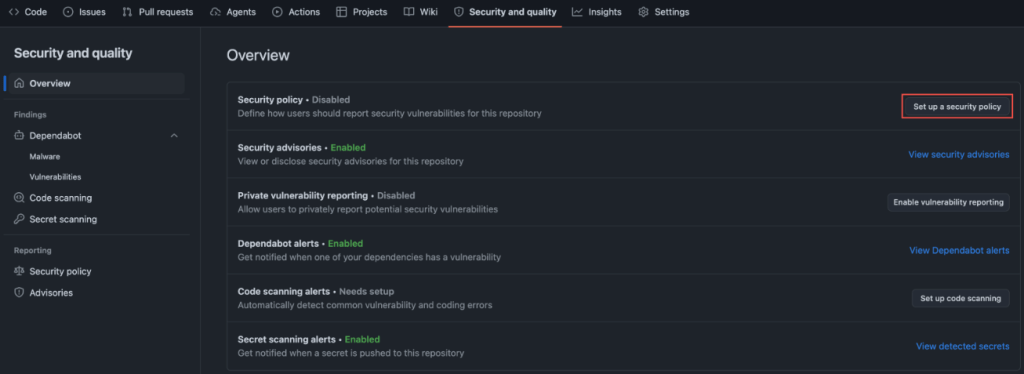
Screenshot of GitHub settings. Security and quality > Set up a security policy are highlighted.

You don’t need to write much. We suggest adding a communication means such as an email so that those reporting vulnerabilities can reach you directly without posting about them publicly. Then, you can state what bugs are in scope, alongside anything else a reporter should have in mind when contacting you. For reference, we point maintainers to the the systemd project’s security policy that we consider a complete example. It sets clear expectations about reproducers and doesn’t assume you have a 24/7 response team when you don’t. Borrow the structure, change the contact details, commit it.

Ten minutes, tops.

2. Turn on private vulnerability reporting

SECURITY.md tells reporters where to go. Private vulnerability reporting (PVR) gives them a private place to make their report.

Once enabled, a researcher can file a confidential advisory on your repo. You triage it out of the public eye and disclose on your timeline. The setup is one checkbox in Settings → Security.

Screenshot of GitHub settings. Security and quality > Enable vulnerability reporting is highlighted.

If you only do one thing tonight, do these first two together. They are free, and are the fastest signal to your community that you take this seriously.

3. Turn on secret scanning, with push protection

This is the one with the most embarrassing failure mode.

GitGuardian’s State of Secrets Sprawl 2026 found 28.65 million new secrets leaked on public GitHub in 2025, a 34% jump over the prior year and the largest single-year increase on record. AI-assisted commits are leaking secrets at roughly twice the baseline rate. The average cost of a data breach now sits at $4.44 million globally ($10.22 million in the US) per IBM’s 2025 Cost of a Data Breach Report.

Secret scanning catches keys and tokens that slip into your repo by blocking them locally before they’re pushed to your repository. It doesn’t matter if your repo is public or private, because once secrets leave your local development, then they are available to anyone with access to your repo.

Screenshot of GitHub settings. Security and quality > View detected secrets is highlighted.

4. Turn on Dependabot and dependency review

Your project isn’t just your code. It’s the dozens (often hundreds) of packages your code pulls in.

Looking at WordPress, for example: this search for reviewed, critical-severity advisories mentioning WordPress returns a long list of plugins with known vulnerabilities. If you’re running a WordPress site, Dependabot helps ensure none of these plugins are sitting in your dependencies.

Dependabot alerts you when a package you depend on has a known vulnerability. Dependency review shows you, inside a pull request, exactly what’s being added or upgraded and whether any of it has an open advisory. Together they turn an opaque package.json diff into a two-minute review.

Screenshot of GitHub settings. Security and quality > View Dependabot alerts is highlighted.

5. Turn on code scanning

Code scanning runs static analysis on your repo and flags the patterns that lead to real bugs. SQL injection. Command injection. Dangerous deserialization. The usual cast.

Code scanning with CodeQL can detect unsafe GitHub Actions workflows. CodeQL is the engine, and we built code scanning. We made it free for open source in 2019, and it now ships as a one-click default setup in your Security and Quality tab.

This is the setting most maintainers skip because it sounds like it needs configuration. It doesn’t. Default setup picks the right query pack for your language and runs on every pull request.

Screenshot of GitHub settings. Security and quality > Set up code scanning is highlighted.

6. Turn on branch protection on your default branch

This is the simplest, least-flashy setting, but it will yield the biggest impact starting as soon as you turn it on. This is about requiring a pull request before merging to main with minimum one approval.

This catches the worst-case scenario: a compromised credential, a confused contributor, or a tired version of you pushing straight to production. It’s also what makes the other five settings actually bite, because now Dependabot alerts and code scanning findings block a merge instead of sitting in a tab you never open.

In conclusion

These six settings will not make your project unhackable. Nothing will.

What they will do is close the easy doors, the ones being walked through right now by people scripting through public repos at scale.

Turn these on, and your project will be meaningfully harder to attack than it was this morning. So will every project that depends on it.

The post 6 security settings every GitHub maintainer should enable this week appeared first on The GitHub Blog.

  • ✇ASEC BLOG
  • May 2026 Threat Trend Report on Ransomware ATCP
    Purpose and Scope This report summarizes the quantity of new ransomware samples collected during the month of May 2026, the number of affected systems, statistics on targeted businesses, and major Korean & Global ransomware issues. Statistics on samples and affected systems are based on AhnLab’s detection names, while statistics on targeted businesses are aggregated based […]
     

May 2026 Threat Trend Report on Ransomware

Por:ATCP
18 de Junho de 2026, 12:00
Purpose and Scope This report summarizes the quantity of new ransomware samples collected during the month of May 2026, the number of affected systems, statistics on targeted businesses, and major Korean & Global ransomware issues. Statistics on samples and affected systems are based on AhnLab’s detection names, while statistics on targeted businesses are aggregated based […]

Pickle in the Middle – Hijacking Vertex AI Model Uploads for Cross-Tenant RCE

16 de Junho de 2026, 07:00

Unit 42 discovered a Vertex AI Python SDK vulnerability that allows remote code execution via bucket squatting. Read the article for more.

The post Pickle in the Middle – Hijacking Vertex AI Model Uploads for Cross-Tenant RCE appeared first on Unit 42.

  • ✇ASEC BLOG
  • May 2026 Dark Web Issue Trend Report ATCP
    Notes the May 2026 Dark Web Issue Trend Report summarizes the Major Issues that occurred on the deep web and dark web. it stated that due to the nature of the sources, some of the information cannot be fully verified for factual accuracy. Major Issues Hasan’s BreachForums experienced a moderator split, with HasanBroker being ousted […]
     

May 2026 Dark Web Issue Trend Report

Por:ATCP
8 de Junho de 2026, 12:00
Notes the May 2026 Dark Web Issue Trend Report summarizes the Major Issues that occurred on the deep web and dark web. it stated that due to the nature of the sources, some of the information cannot be fully verified for factual accuracy. Major Issues Hasan’s BreachForums experienced a moderator split, with HasanBroker being ousted […]
  • ✇ASEC BLOG
  • April 2026 Dark Web Breach Incident Trend Report ATCP
    Notes the April 2026 Dark Web Breach Incident Trend Report is compiled from data breach cases posted on the deep web and dark web forums. some information is included in cases where it is difficult to fully verify the factuality of the information due to the nature of the source. Major Issues data breaches and […]
     

April 2026 Dark Web Breach Incident Trend Report

Por:ATCP
10 de Maio de 2026, 12:00
Notes the April 2026 Dark Web Breach Incident Trend Report is compiled from data breach cases posted on the deep web and dark web forums. some information is included in cases where it is difficult to fully verify the factuality of the information due to the nature of the source. Major Issues data breaches and […]

Frontier AI and the Future of Defense: Your Top Questions Answered

23 de Abril de 2026, 17:45

What are the next steps for security leaders in this new age of frontier AI? We answer the top 10 questions customers are asking.

The post Frontier AI and the Future of Defense: Your Top Questions Answered appeared first on Unit 42.

❌
❌