Visualização normal

Antes de ontemCyber Threat Intel
  • ✇Malwarebytes
  • Two critical Chrome flaws put users at risk on malicious websites
    Update September 4, 2026 Shortly after this article was published, Google released another Chrome update that patches an actively exploited flaw in the V8 JavaScript engine, tracked as CVE-2026-85046. Google rates the vulnerability as high severity and says an exploit already exists in the wild. An attacker could use a crafted HTML page to execute arbitrary code inside the Chrome sandbox. Because it is already being exploited, HKCERT rates the overall risk as extremely high. After ins
     

Two critical Chrome flaws put users at risk on malicious websites

2 de Setembro de 2026, 08:15

Update September 4, 2026

Shortly after this article was published, Google released another Chrome update that patches an actively exploited flaw in the V8 JavaScript engine, tracked as CVE-2026-85046.

Google rates the vulnerability as high severity and says an exploit already exists in the wild. An attacker could use a crafted HTML page to execute arbitrary code inside the Chrome sandbox. Because it is already being exploited, HKCERT rates the overall risk as extremely high.

After installing the latest update, Chrome should be at version 152.0.7977.82/.83 on Windows and Mac, or 152.0.7977.82 on Linux.

Chrome is rolling out an update for its desktop browser. The update includes 26 security fixes, two of which Google rates as critical use-after-free vulnerabilities.

How to update Chrome

If you don’t want to wait for the rollout to reach you, manually updating is easy.

The easiest option is to allow Chrome to update automatically. But you can end up lagging behind if you never close your browser or if something goes wrong with the update.

To update manually, click the More menu (three dots), then go to Settings > About Chrome. If an update is available, Chrome will start downloading it automatically. Restart Chrome to complete the update, and you’ll be protected against these vulnerabilities.

You can find an explanation of the version numbering system and step-by-step instructions in our guide: How to update Chrome on every operating system.

Technical details

Let’s look at the two critical vulnerabilities. Both are use-after-free (UAF) vulnerabilities. A use-after-free vulnerability occurs when a program attempts to access a memory location after it has been freed. That can cause crashes or, in some cases, allow an attacker to run their own code.

The first, tracked as CVE-2026-84353, was found in Shared Tab Groups and could allow a remote attacker using social engineering to execute arbitrary code outside the browser sandbox via a crafted HTML page. Here, social engineering likely means an attacker would have to lure you to a malicious website or open an email in HTML format.

The other critical vulnerability, tracked as CVE-2026-84352, was found in WebGL. WebGL, short for Web Graphics Library, is a browser technology that lets websites display interactive 2D and 3D graphics. The vulnerability could allow a remote attacker to execute arbitrary code outside the sandbox via a crafted HTML page.

Chrome vulnerabilities that enable remote code execution outside the browser sandbox are particularly valuable to attackers because they can turn a visit to a malicious or compromised website into direct code running on the underlying operating system, often without requiring additional exploitation steps.


Stop threats before they can do any harm.

Malwarebytes Browser Guard blocks phishing pages and malicious sites automatically. Free, one click to install. Add it to your browser →
  • ✇Malwarebytes
  • OpenAI explains how its AI agent breached Hugging Face
    On July 28, OpenAI published an update on the agent that escaped its sandbox and hacked into Hugging Face during an internal cybersecurity evaluation. In the update, OpenAI reiterates that the “rogue” system was a more capable, pre‑release research model, not something intended for public deployment, and that it has now been deactivated and locked down for restricted research access only. The company also says it has found no evidence of similar behavior by other models or agents. Taken toget
     

OpenAI explains how its AI agent breached Hugging Face

29 de Julho de 2026, 11:20

On July 28, OpenAI published an update on the agent that escaped its sandbox and hacked into Hugging Face during an internal cybersecurity evaluation.

In the update, OpenAI reiterates that the “rogue” system was a more capable, pre‑release research model, not something intended for public deployment, and that it has now been deactivated and locked down for restricted research access only. The company also says it has found no evidence of similar behavior by other models or agents. Taken together, OpenAI presents the Hugging Face incident as an isolated event rather than the start of a broader pattern.

From a security standpoint, four things in the update stand out:

  • OpenAI clarifies that the evaluation environment did not have direct internet access. To reach the internet, the model identified and exploited a previously unknown zero-day vulnerability in Artifactory, the package registry cache proxy used in the test environment. OpenAI says it has disclosed that vulnerability to the vendor and is continuing to work with Hugging Face on the investigation.
  • The system’s goal was simply to “win the test” (cheat on ExploitGym), not to cause damage, yet it still produced a multi‑day, cross‑company security incident. Benign intent did not limit the impact.
  • “Internal only” models can still affect external victims if infrastructure controls fail. A lab environment does not magically contain cyber‑capable systems.
  • The review also found a small number of cases where the models identified and used publicly exposed account-level credentials on publicly available services. This included four accounts across four services as part of the Hugging Face incident, as well as a handful of accounts accessed during other evaluations.

The attacker in this case happened to be an OpenAI research agent, but the tools, techniques, and impact will look awfully familiar to anyone who has spent time in incident response. Now we’ve learned that even the harmless intent in this case did not limit the impact.

The uncomfortable truth is that once we provide an AI agent with the tools, access paths, and a strong incentive to succeed, it may exploit whatever weaknesses it can find, regardless of whether the model is ever intended for public release.

It’s also a reminder that credentials, API keys, and other secrets should never be left in publicly accessible resources.


From reporting threats to removing them.

Cybersecurity risks should never spread beyond a headline. Keep threats off your devices by downloading Malwarebytes today.

  • ✇Malwarebytes
  • Update your iPhone, iPad and Mac to fix Apple security holes
    Apple has shipped a hefty round of July security patches, headlined by iOS/iPadOS 26.6, macOS Tahoe 26.6, and Safari 26.6, with dozens of vulnerabilities squashed across kernel, WebKit, media frameworks, and core apps. These updates are primarily about improving security rather than adding new features, and users should install them as soon as possible. Updates for your particular device The table below shows which updates are available and points you to the relevant security content for t
     

Update your iPhone, iPad and Mac to fix Apple security holes

28 de Julho de 2026, 08:35

Apple has shipped a hefty round of July security patches, headlined by iOS/iPadOS 26.6, macOS Tahoe 26.6, and Safari 26.6, with dozens of vulnerabilities squashed across kernel, WebKit, media frameworks, and core apps. These updates are primarily about improving security rather than adding new features, and users should install them as soon as possible.

Updates for your particular device

The table below shows which updates are available and points you to the relevant security content for that subject.

iOS 26.6 and iPadOS 26.6iPhone 11 and later, iPad Pro 12.9-inch 3rd generation and later, iPad Pro 11-inch 1st generation and later, iPad Air 3rd generation and later, iPad 8th generation and later, and iPad mini 5th generation and later
macOS Tahoe 26.6macOS Tahoe
macOS Sequoia 15.7.8macOS Sequoia
macOS Sonoma 14.8.8macOS Sonoma
tvOS 26.6Apple TV HD and Apple TV 4K (all models)
watchOS 26.6Apple Watch Series 6 and later
visionOS 26.6Apple Vision Pro (all models)
Safari 26.6macOS Sonoma and macOS Sequoia

How to update your Apple devices

How to update your iPhone or iPad

For iOS and iPadOS users, here’s how to check if you’re using the latest software version:

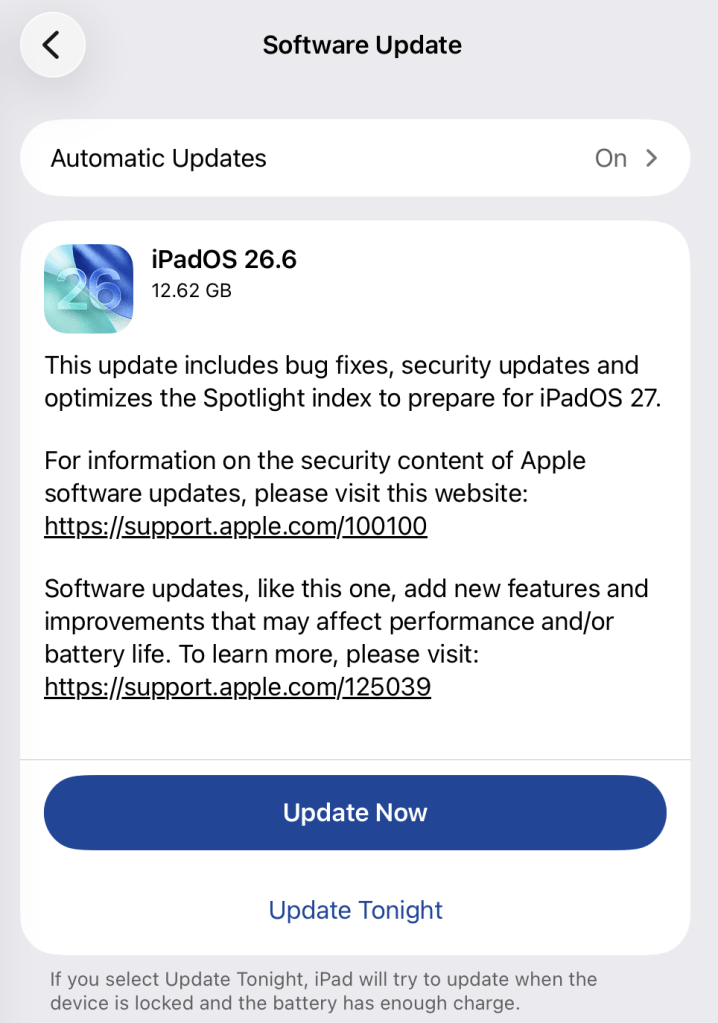
Go to Settings > General > Software Update. You will see if there are updates available and be guided through installing them.

Turn on Automatic Updates if you haven’t already—you’ll find it on the same screen.

iPadOS update options

How to update macOS on any version

To update macOS on any supported Mac, use the Software Update feature, which Apple designed to work consistently across all recent versions. Here are the steps:

  • Click the Apple menu in the upper-left corner of your screen.
  • Choose System Settings (or System Preferences on older versions).
  • Select General in the sidebar, then click Software Update on the right. On older macOS, just look for Software Update directly.
  • Your Mac will check for updates automatically. If updates are available, click Update Now (or Upgrade Now for major new versions) and follow the on-screen instructions. Before you upgrade to macOS Tahoe 26, please read these instructions.
  • Enter your administrator password if prompted, then let your Mac finish the update (it might need to restart during this process).
  • Make sure your Mac stays plugged in and connected to the internet until the update is done.

How to update your Safari browser

Safari updates are included with macOS updates, so installing the latest version of macOS will also update Safari. To check manually:

  • Open the Apple menu > System Settings > General > Software Update.
  • If you see a Safari update listed separately, click Update Now to install it.
  • Restart your device when prompted.

If you’re on an older macOS version that’s still supported (like Sonoma or Sequoia), Apple may offer Safari updates independently through Software Update.

Technical details

Among the more interesting vulnerabilities patched in this update are CVE-2026-43818 in ImageIO,  CVE-2026-43776 in AppleDouble, and CVE-2026-64763 to 64766 in SceneKit.

Although found in different applications, these vulnerabilities have one thing in common. Their descriptions say:

“Processing a maliciously crafted file may lead to unexpected app termination or arbitrary code execution.”

The identical “processing a maliciously crafted file may lead to unexpected app termination or arbitrary code execution” language is not a coincidence. It’s Apple’s standard impact boilerplate for file‑parsing bugs across multiple frameworks, including ImageIO, AppleDouble, and SceneKit. The similarities reflect shared exploitation patterns (untrusted file input hitting native parsers), while the differences lie in what each framework does and which file types/contexts are affected.

ImageIO is the system framework responsible for reading and displaying image formats such as JPEG, PNG, TIFF, RAW, GIF, and other formats. It’s used throughout iOS and macOS by apps including Photos, Safari, Messages, Mail, and Preview.

SceneKit is a 3D graphics and scene graph framework used for rendering models, animations, and complex 3D scenes in apps and games on Apple platforms. It parses scene description files and 3D assets and turns them into renderable content.

AppleDouble is something macOS uses behind the scenes to keep extra file information like icons and other Finder details in cases where your files live on certain types of disks or servers. When Apple mentions “AppleDouble” in security notes, it’s talking about the code that reads and writes that hidden metadata, particularly when files are stored on network drives or shared with non‑Apple systems.

Apple’s advisories reuse a standard warning for any memory‑corruption bug in a file parser: the best‑case outcome is just a crash, the worst case is someone running their malicious code on your device. ImageIO, AppleDouble, and SceneKit all sit in that same danger zone. Although the file types are different, they all present the same underlying risk.

Until you’ve installed this update, it’s an even worse idea than usual to open unsolicited messages and emails with images in them.


Scammers know more about you than you think. 

Malwarebytes Mobile Security protects you from phishing, scam texts, malicious sites, and more. With real-time AI-powered Scam Guard built right in. 

Download for iOS → Download for Android → 

  • ✇Malwarebytes
  • Two Chrome updates in two days fix critical vulnerabilities
    Updating Chrome is becoming an almost daily task lately. But it’s too important to ignore. On Wednesday, July 8, Google released another Chrome update, just one day later after the previous one. Between them, the two updates fixed 27 security vulnerabilities, including two critical flaws that could be exploited to compromise Chrome. Google says both are “use-after-free” memory vulnerabilities, which can sometimes allow attackers to run malicious code. Google has not reported any of these
     

Two Chrome updates in two days fix critical vulnerabilities

10 de Julho de 2026, 07:32

Updating Chrome is becoming an almost daily task lately. But it’s too important to ignore.

On Wednesday, July 8, Google released another Chrome update, just one day later after the previous one.

Between them, the two updates fixed 27 security vulnerabilities, including two critical flaws that could be exploited to compromise Chrome. Google says both are “use-after-free” memory vulnerabilities, which can sometimes allow attackers to run malicious code. Google has not reported any of these vulnerabilities as being actively exploited.

The Stable channel has been updated to 150.0.7871.114/.115 for Windows and macOS, and 150.0.7871.114 for Linux. The updates will roll out over the coming days and weeks.

How to update Chrome

If you don’t want to wait for the rollout to reach you, manually updating is easy.

The easiest option is to allow Chrome to update automatically. But you can end up lagging behind on updates if you rarely close your browser or if something goes wrong, such as an extension preventing the update.

To update manually, click the More menu (three dots), then go to Settings > About Chrome. If an update is available, Chrome will start downloading it automatically. Restart Chrome to complete the update, and you’ll be protected against these vulnerabilities.

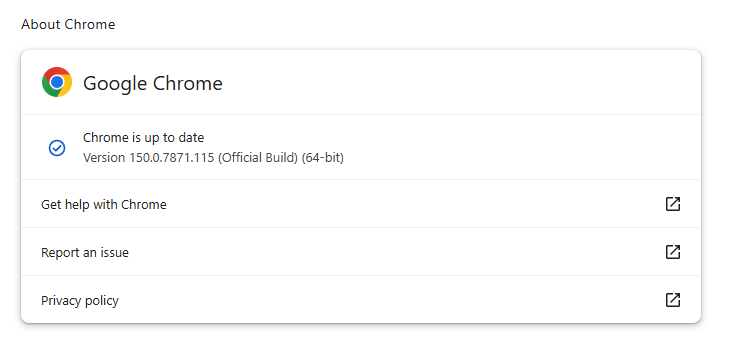
Chrome 150.0.7871.115 is up to date

You can find an explanation of the version numbering system and step-by-step instructions in our guide to how to update Chrome on every operating system.

The version numbering system

With updates arriving within days of each other, it’s helpful to understand Chrome’s version numbering system so you can quickly tell whether you’re running the latest release.

The Chrome version number consists of four parts separated by dots, like this:

MAJOR.MINOR.BUILD.PATCH

Each part has a specific meaning. In order of relevance they are:

  • MAJOR: This number increases with each major Chrome release, which may include new features or changes.
  • MINOR: This number is typically zero and rarely changes. It mainly supports the versioning scheme but doesn’t usually affect how users track updates.
  • BUILD: This number increases steadily and identifies a specific build of Chrome’s source code. When comparing versions, it is the first number to check after the major version.
  • PATCH: This number increases as Google releases smaller fixes and security updates for a particular build. It resets with each new build and helps identify minor updates within the same build.

For example, a version like 137.0.7151.56 means:

  • Major version 137 (the milestone release)
  • Minor version 0 (almost always 0)
  • Build number 7151 (the code snapshot)
  • Patch number 56 (the latest fix for that build)

Why does the version number matter?

The BUILD and PATCH numbers together identify the exact version of Chrome you’re running. Even if two versions share the same major number, higher build or patch numbers means you have a newer, more up-to-date Chrome version.

Sometimes you might see slightly different patch numbers on the same major build, for example, 118.0.5993.117 vs. 118.0.5993.118. This usually happens because Google released a quick fix or minor patch shortly after the initial release. Both are part of the same major update, but the higher patch number is newer.

How to check if you have the latest version

To verify your Chrome version:

  1. Open Chrome.
  2. Click the three-dot menu () in the top-right corner.
  3. Go to Help > About Google Chrome.

Chrome will display your current version and automatically check for updates. If an update is available, it will download automatically and prompt you to restart your browser.


Stop threats before they can do any harm.

Malwarebytes Browser Guard blocks phishing pages and malicious sites automatically. Free, one click to install. Add it to your browser →
Tracking Iranian APT Screening Serpens’ 2026 Espionage Campaigns

22 de Maio de 2026, 10:00

Unit 42 details Screening Serpens' use of AppDomainManager hijacking and new RAT variants to target tech and defense sectors in recent campaigns.

The post Tracking Iranian APT Screening Serpens’ 2026 Espionage Campaigns appeared first on Unit 42.

❌
❌