Visualização normal

Antes de ontemMalwarebytes
  • ✇Malwarebytes
  • Travelers targeted when logging into hotel Wi-Fi networks
    Microsoft has warned that hotel, conference, and other hospitality Wi-Fi networks are being actively abused by a Russian group to target travelers worldwide. The campaign, dubbed “CaptiveCrunch” turns a routine Wi-Fi login moment into an opportunity to compromise corporate accounts and devices. From the user’s perspective, nothing looks out of the ordinary: they connect to hotel Wi-Fi, get the usual captive portal prompt, and perhaps see a familiar‑looking message about needing to update some
     

Travelers targeted when logging into hotel Wi-Fi networks

4 de Agosto de 2026, 09:05

Microsoft has warned that hotel, conference, and other hospitality Wi-Fi networks are being actively abused by a Russian group to target travelers worldwide. The campaign, dubbed “CaptiveCrunch” turns a routine Wi-Fi login moment into an opportunity to compromise corporate accounts and devices.

From the user’s perspective, nothing looks out of the ordinary: they connect to hotel Wi-Fi, get the usual captive portal prompt, and perhaps see a familiar‑looking message about needing to update something before they can browse. However, behind the scenes, the allegedly state-linked group position themselves in the network path and manipulate DNS (Domain Name System) and HTTP traffic from captive‑portal Wi-Fi.

From there, several things can happen:

  • Logins are stolen: The user’s browser session is redirected to attacker‑controlled phishing pages, like fake Microsoft login prompts, where credentials, device codes, or OAuth tokens are harvested.
  • Malware is downloaded: The user is presented with fake update or ClickFix dialogs that download malware. In these cases, usually a remote access trojan (RAT) plus an infostealer.
  • A machine-in-the-middle attack (MitM) where traffic is quietly proxied through attacker infrastructure, putting the user in a position for further credential theft.

Reportedly, one of the main malware strains used in these attacks is called CornFlake,  a remote access trojan (RAT) that can capture webcam images, microphone audio, and keystrokes.

The infostealer was identified as ChocoShell, a fileless Powershell-based information stealer which primarily goes after browser session cookies, saved passwords, Microsoft 365 Single Sign-On (SSO) tokens, and Wi-Fi credentials from compromised systems.

Microsoft lists a set of fake dialogs that may appear once you connect to compromised Wi‑Fi:

  • winupdate: A bogus Windows Update window with “Working on updates… Don’t turn off your computer.”
  • defender: A fake Windows Security virus scan.
  • directx: “DirectX End‑User Runtime Web Installer.”
  • vcredist: A Microsoft Visual C++ redistributable installer.
  • sysopt: A disk optimization utility.
  • netfix: A Windows Network Diagnostics ‘fix’ tool.
  • browser: A browser update prompt.
  • pdfview: A document/PDF viewer installer.

How to stay safe

Malwarebytes has long warned about the safety of public Wi-Fi. Here’s how you can stay safe while traveling:

  • Use your own phone’s hotspot instead of using the public Wi‑Fi. A mobile connection, especially with an eSIM and a reputable carrier, significantly reduces the likelihood of an attack compared to an unknown hotel network.
  • If you’re forced to use public Wi‑Fi, use a VPN with an active Kill Switch: Complete the authentication on the hotel portal first, then launch your VPN before opening any website or app. The Kill Switch feature will instantly block all internet traffic if the VPN disconnects even for a second, preventing cybercriminals from injecting malicious code out in the open. While CaptiveCrunch operates around captive portals and pre‑VPN flows, a VPN still reduces other risks and limits passive data collection once you’re online.
  • Always inspect the certificate of any public Wi‑Fi login or ‘security’ portal that asks for more than a room number or basic credentials. These aren’t always a straight‑up giveaway, but sometimes they can be an obvious clue: mismatched hostnames, untrusted issuers, or plain HTTP are red flags that should stop you from proceeding.
  • Many captive portals ask for an email address for registration or marketing. Even in benign cases, there is little value in handing over your real inbox. If you must provide an address, consider giving a fake one or a throwaway alias that is unrelated to your primary accounts.
  • If you are asked to download software, a certificate, a browser update, or a fix tool in order to connect, stop. You should never have to download anything just to log into Wi‑Fi.
  • Don’t rush to follow instructions on a webpage or prompt, especially if it asks you to run commands on your device or copy-paste code. Be cautious of pages urging immediate action: sophisticated ClickFix pages add countdowns, user counters, or other pressure tactics to make you act quickly.
  • Secure your devices. Use an up-to-date, real-time anti-malware solution with a web protection component.
  • Avoid entering Microsoft 365, Google Workspace, or other high‑value credentials directly into any page reached via captive portal redirection. If you need to check corporate mail, follow known URLs rather than clicking through prompts.

And last but not least, update your browser, operating systems, and other important software before you travel. That reduces the chance of getting legitimate update requests while you’re away.


From reporting threats to removing them.

Cybersecurity risks should never spread beyond a headline. Keep threats off your devices by downloading Malwarebytes today.
  • ✇Malwarebytes
  • A week in security (June 29 – July 5)
    Last week on Malwarebytes Labs: Verified X ad spreads Mac malware, while ConsentFix steals Microsoft accounts Apple’s Hide My Email doesn’t hide it very well Fake Google and Cloudflare verification pages spread multiple malware families WinRAR flaw could allow attackers to take control of your computer Fake Perplexity Chrome extension spies on your searches BioShocking: when “gaming” AI agents is no longer a game Chrome needs another whopper update to fix 382 security bugs
     
  • ✇Malwarebytes
  • Verified X ad spreads Mac malware, while ConsentFix steals Microsoft accounts
    Cybercriminals are finding new ways to trick people into compromising their own devices and accounts. One campaign used a sponsored ad on X to target Mac users, while another technique, dubbed ConsentFix, steals Microsoft 365 accounts without installing malware. Verified X account used in Mac ClickFix attack Researchers have discovered a ClickFix-style attack running as a sponsored advertisement on X. The ad was posted from a verified account, adding an extra layer of credibility to the sc
     

Verified X ad spreads Mac malware, while ConsentFix steals Microsoft accounts

3 de Julho de 2026, 10:30

Cybercriminals are finding new ways to trick people into compromising their own devices and accounts. One campaign used a sponsored ad on X to target Mac users, while another technique, dubbed ConsentFix, steals Microsoft 365 accounts without installing malware.

Verified X account used in Mac ClickFix attack

Researchers have discovered a ClickFix-style attack running as a sponsored advertisement on X. The ad was posted from a verified account, adding an extra layer of credibility to the scam.

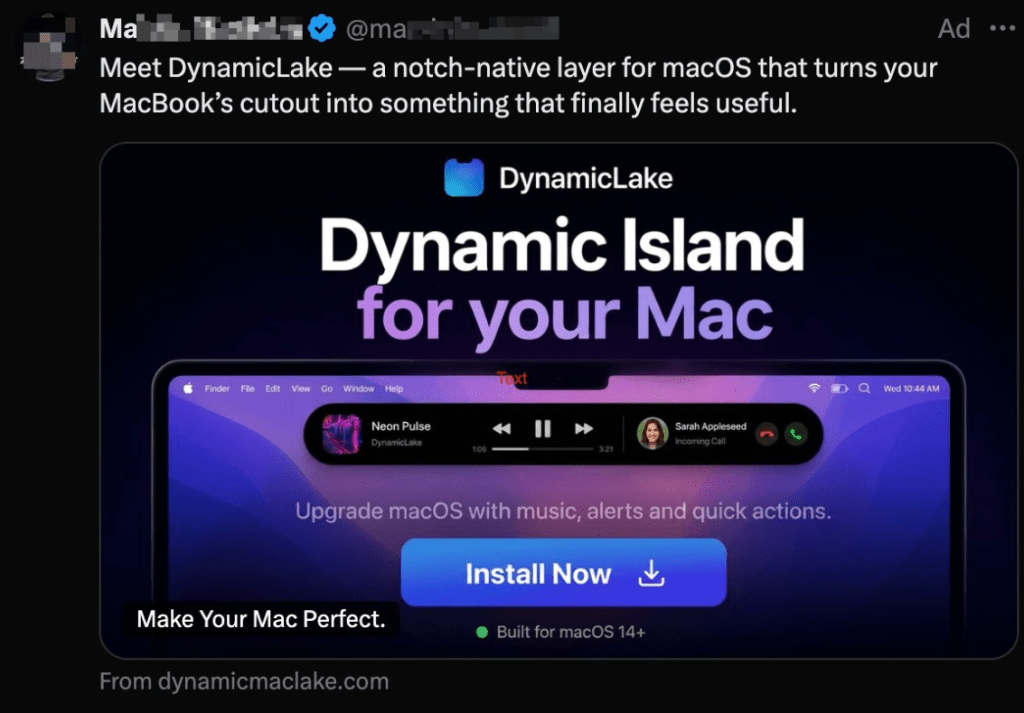
ClickFix campaigns use convincing lures—historically fake “human verification” screens, and now a fake download for DynamicLake, a legitimate macOS utility that turns your MacBook’s notch into an unofficial but functional version of Apple’s Dynamic Island. This type of attack requires the user to paste a command from the clipboard, making it depend heavily on user interaction.

Fake ad for DynamicLake

Image courtesy of Jamf

In reality, people who clicked the link were redirected to the lookalike domain dynamicmacisland[.]com, where they were instructed to open Terminal and paste installation commands that silently installed malware.

The campaign combines three worrying trends: ClickFix-style social engineering using Terminal commands, lookalike domains that mimic trusted Mac apps, and paid advertising infrastructure used to scale attacks to a large audience.

The malware reportedly delivers several variants of the Atomic Stealer infostealer.  

This pattern mirrors previous cases where Google Ads promoted fake software installers, including malicious sponsored listings that delivered malware when users searched for trusted developer tools. The lesson is clear: paid placement and verification badges are no guarantee of safety, especially when attackers deliberately design campaigns to evade automated screening.

The campaign abused X’s advertising platform, with the malicious ad appearing under a verified account. The researchers reported the advertisement to X and contacted the account owner. The ad appears to have since been removed.

ConsentFix steals accounts instead of installing malware

Windows users are also being warned about the next generation of ClickFix attacks, called ConsentFix.

ConsentFix is different because ,where ClickFix turns you into the installer, ConsentFix turns you into the identity provider. Instead of tricking you into running malware, it uses social engineering to get you to hand over your cloud login tokens through the browser without ever asking you to run malware or type your password.

“It can start with something as mundane as dragging a link into your browser. Three seconds later, a threat actor has the tokens needed to take over your Microsoft 365 account, and you never did anything that traditional security awareness training would flag.”

For example, a phishing email may arrive containing a link, often hosted on trusted platforms such as Dropbox. Sometimes it’s protected with a password, which also makes it harder for security tools to inspect.

If the target clicks on the link, they’ll see what looks like a standard Microsoft sign-in page and be asked to complete the process by dragging a localhost callback link into the browser.

How the ConsentFix trap looks

That’s when the trap closes. Without realizing it, the victim hands over session tokens to the attacker, giving them access to email and other Microsoft 365 services without needing a password or completing multi-factor authentication (MFA).

The method has reportedly been shared on a Russian cybercrime forum, making it easy enough for less experienced cybercriminals to steal Microsoft 365 accounts.

How to stay safe

The best protection is knowing these attacks exist and recognizing what they look like. So keep reading our blog. But there’s more you can do:

  • Don’t trust links that arrive unexpectedly—whether by email, text message, social media, or even through verified accounts or sponsored search results.
  • Think things through before following instructions that seem unusual or that you don’t fully understand.
  • When filling out credentials, always check the address in the browser bar. Is that the one you expected? If not, stop.
  • Use an up-to-date, real-time anti-malware solution with web protection.

Pro tip: Did you know the free Malwarebytes Browser Guard browser extension protects you against malicious websites and ClickFix attacks? It also blocks ads and trackers, so that’s a bonus.


Stop threats before they can do any harm.

Malwarebytes Browser Guard blocks phishing pages and malicious sites automatically. Free, one click to install. Add it to your browser →

  • ✇Malwarebytes
  • Free Spotify Premium hacks on social media are spreading infostealers
    Short-form video platforms like TikTok and Instagram Reels have become the latest way cybercriminals spread malware. We’ve already seen attackers move away from traditional phishing emails and toward tactics that trick people into installing malware themselves. Now they’re being lured with slick social media videos that promise free Spotify Premium, free Windows activation, or free Microsoft Office, but instead leave people with infostealers on their Windows devices. Researchers at Reversi
     

Free Spotify Premium hacks on social media are spreading infostealers

10 de Junho de 2026, 13:27

Short-form video platforms like TikTok and Instagram Reels have become the latest way cybercriminals spread malware.

We’ve already seen attackers move away from traditional phishing emails and toward tactics that trick people into installing malware themselves. Now they’re being lured with slick social media videos that promise free Spotify Premium, free Windows activation, or free Microsoft Office, but instead leave people with infostealers on their Windows devices.

Researchers at ReversingLabs uncovered two active campaigns that use short videos to trick users into running dangerous PowerShell commands or visiting malicious download sites. Similar campaigns have been reported by other researchers and national cybersecurity agencies, suggesting a growing trend: Cybercriminals are learning how to use social media algorithms just as effectively as marketers.

In true social media fashion, the videos on platforms like TikTok and Instagram Reels claim to solve a problem you didn’t know you had. The catch is that following the instructions delivers malware to your device.

How the scam works

The first campaign looks deceptively professional.

Accounts with names like “windows.tips” or “windows.insights” use Windows-style branding and post polished tutorial videos that resemble genuine tech support content. The videos are tagged with Windows and Office-related keywords so they appear alongside legitimate troubleshooting and tips content.

The videos promise to unlock Spotify Premium, Microsoft Office, or Windows for free. Viewers are then guided through step-by-step instructions that include opening Powershell, a legitimate Windows admin tool, and pasting in commands. Those commands download and run malware, much like the ClickFix scams we’ve covered before.

The malware was identified as Vidar, an infostealer designed to steal sensitive informtion from infected devices. Vidar commonly targets:

  • Saved browser passwords
  • Autofill data
  • Browser cookies
  • Cryptocurrency wallets
  • Two-factor authentication (2FA) data
  • TOR browser data

The stolen information is then sent back to servers controlled by the attackers.

How to stay safe

Research into similar TikTok-based attacks shows these scripts commonly add exclusions to Windows Defender, making it harder for security software to detect future malicious activity.

Fortunately, there are  a few simple ways to protect yourself:  

  • Only download software from official vendor websites.  
  • Be skeptical of “free”, cracked, or unofficial versions of paid software. 
  • Don’t follow instructions on a webpage without thinking them through, especially if the page asks you to run commands on your device or copy and paste code. Many ClickFix pages use countdowns, fake user counters, or other pressure tactics to make you act quickly.
  • Check that downloaded files match what you expected to download.
  • Verify a file’s publisher and digital signature before you run it. On Windows, you can usually check this by right-clicking the file, selecting Properties > Digital Signatures. Keep in mind that a valid signature does not guarantee a file is safe, but missing or suspicious signatures are often a red flag. 
  • Use a real-time, up-to-date anti-malware solution to block malware like infostealers before it runs.

Pro tip: If you’re unsure whether a video, message, or website is legitimate, you can ask Malwarebytes Scam Guard about it. It can help identify suspicious content and advise you on what to do next.

Image courtesy of ReversingLabs


We don’t just report on threats—we remove them

Cybersecurity risks should never spread beyond a headline. Keep threats off your devices by downloading Malwarebytes today.

  • ✇Malwarebytes
  • 700+ education and tech websites hijacked in huge ClickFix malware campaign
    Attackers are abusing a critical Ghost Content Management System (CMS) vulnerability to hijack more than 700 legitimate websites and inject a fake Cloudflare verification step that tricks visitors into running a Windows command that installs malware. These social engineering campaigns—where website visitors are tricked into running malicious commands on their systems—are commonly known as “ClickFix” attacks. In this case, cybercriminals turned websites belonging to trusted organizations, incl
     

700+ education and tech websites hijacked in huge ClickFix malware campaign

26 de Maio de 2026, 07:46

Attackers are abusing a critical Ghost Content Management System (CMS) vulnerability to hijack more than 700 legitimate websites and inject a fake Cloudflare verification step that tricks visitors into running a Windows command that installs malware.

These social engineering campaigns—where website visitors are tricked into running malicious commands on their systems—are commonly known as “ClickFix” attacks. In this case, cybercriminals turned websites belonging to trusted organizations, including universities and tech companies, into delivery platforms for the malware campaign.

More than 700 Ghost‑powered websites were compromised through a known SQL injection vulnerability tracked as CVE‑2026‑26980. The attackers used this bug to steal administrative API keys and silently inject malicious JavaScript into posts and pages across affected sites.

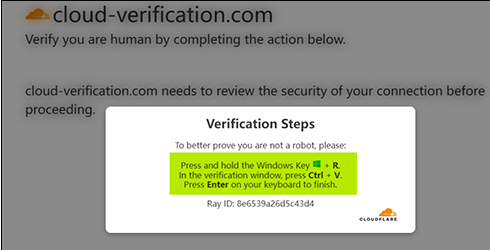
Researchers found that the injected script loads a second‑stage ClickFix flow, presenting visitors with a fake Cloudflare or CAPTCHA verification dialog.

Example of fake Cloudflare verification

Instead of a normal checkbox, the page instructs users to copy‑paste a command into the Windows Run dialog or PowerShell, effectively tricking them into installing malware on their own systems.

Details for website managers

At the heart of this campaign is a critical SQL injection bug in Ghost’s Content API. The researchers noted:

“Without any authentication, an attacker can directly read the database contents through this vulnerability, including the Admin API Key used to call the Ghost Admin API.”

The vulnerability affects Ghost versions 3.24.0 through 6.19.0 and can be exploited without logging in.

A patched version is now available and should be installed as soon as possible. Not just because of the ClickFix campaign; once attackers steal an Admin API key, they can edit, delete, or create posts, inject scripts, hijack themes, and tamper with user‑facing content in other ways.

How to stay safe

This campaign is likely to be particularly effective because the instructions are framed as harmless technical steps such as “verify you’re human,” “fix your connection,” or “continue to the site.” Worse still, the content appears on websites users already trust.

With ClickFix running rampant—and it doesn’t look like it’s going away anytime soon—it’s important to be aware, careful, and protected.

  • Slow down. Don’t follow instructions on a webpage without thinking them through, especially if the page asks you to run commands on your device or copy-paste code. Attackers rely on urgency to bypass critical thinking, and many ClickFix pages use countdowns, fake user counters, or other pressure tactics to make you act quickly.
  • Avoid running commands or scripts from untrusted sources. Never run code or commands copied from websites, emails, or messages unless you trust the source and understand the action’s purpose. If a website tells you to execute a command or perform a technical action, check official documentation or contact support before proceeding.
  • Be cautious when copy-pasting commands. Attackers often disguise malicious payloads inside clipboard text. Typing commands manually instead of copy-pasting them can reduce the risk of unknowingly running hidden malicious payloads.
  • Secure your devices. Use an up-to-date, real-time anti-malware solution with a web protection component.
  • Stay informed about evolving attack techniques. Cybercriminals constantly adapt their methods, and awareness remains one of your best defenses, so keep reading our blog!

Pro tip: Did you know the free Malwarebytes Browser Guard extension warns you when a website tries to copy something to your clipboard?


Stop threats before they can do any harm.

Malwarebytes Browser Guard blocks phishing pages and malicious sites automatically. Free, one click to install. Add it to your browser →

❌
❌