Visualização normal

Antes de ontemMalwarebytes
  • ✇Malwarebytes
  • What happens to your data when you die? (Lock and Code S07E17)
    This week on the Lock and Code podcast… You will die. Your data will not. The afterlife of our information is a recent phenomenon, and some of the companies with the most to sort through are still just figuring it out. As far back as 2007, Facebook was forced to reckon with mass grief when users asked the company to maintain the profile pages of the 32 victims killed by a school shooter at Virginia Tech that year. Those pages became de facto memorials for loved ones to fill with comment
     

What happens to your data when you die? (Lock and Code S07E17)

24 de Agosto de 2026, 11:35

This week on the Lock and Code podcast…

You will die. Your data will not.

The afterlife of our information is a recent phenomenon, and some of the companies with the most to sort through are still just figuring it out.

As far back as 2007, Facebook was forced to reckon with mass grief when users asked the company to maintain the profile pages of the 32 victims killed by a school shooter at Virginia Tech that year. Those pages became de facto memorials for loved ones to fill with comments, and today, memorialization has become a full-fledged feature on both Facebook and Instagram. Platforms like YouTube, Pinterest, and LinkedIn—launched with likely zero strategy for a user’s death—now have procedures for next-of-kin to request that a deceased person’s account be deactivated.

Now, think about all the other ways your data can linger after death.

Every year, people accumulate more and digital stuff—email addresses, social media profiles, contact lists, domain names, subscription services, online banking accounts, and the phones, laptops, and tablets that hold it all—and every year, as that digital stuff accumulates, it compounds into ever more problems for someone else to sort out. Here, a small industry of digital estate planners have cropped up, helping families retrieve and preserve anything valuable, no matter how digital, from Spotify playlists, to poignant social media posts that mattered, to the photos stored on a phone.

And where retrieval fails, artificial intelligence has offered an attempt at comfort. The chatbot service Replika launched in 2015 after its founder uploaded a dead friend’s text messages. HereAfter AI reportedly let users upload voice recordings to power a chatbot that sounded and spoke like the deceased. Film studios have pursued the same idea for entertainment, seeking to portray deceased actors in future films.

Surprisingly, almost none of this activity is governed by law, said Tamara Kneese, author of the 2023 book “Death Glitch: How Techno-Solutionism Fails Us in This Life and Beyond.”

“By and large, there is not a great legal mechanism for protecting the privacy rights of the dead,” said Kneese. “It may not be just that a grieving loved one decides to use a bunch of your data from all of your podcasts to create a chatbot to simulate interacting with you after you’re dead, but it may be that a company chooses, in some way, to use an aspect of your personality, of your demeanor, of your voice, of your likeness after your death without anyone really being aware.”

Today, on the Lock and Code podcast with host David Ruiz, we speak with Kneese—Senior Research Scientist at Partnership on AI—about who owns a person’s data after they die, why every platform has invented its own private policy for the dead, and how the technology built to keep the dead close can vanish just as suddenly as they did.

Or worse yet, as Kneese warned for those relying heavily on certain technologies in grief:

“The company gets sold to someone else or disappears, goes bankrupt, and you no longer have that outlet or place for interaction when you’re mourning another time.”

Tune in today to listen to the full conversation.

Show notes and credits:

Intro Music: “Spellbound” by Kevin MacLeod (incompetech.com)
Licensed under Creative Commons: By Attribution 4.0 License
http://creativecommons.org/licenses/by/4.0/
Outro Music: “Good God” by Wowa (unminus.com)


Further reading:

Fartein Hauan Nilsen, “Caring for the Algorithm: Care, Love, and the Relational Personhood of Chatbots,” Somatosphere, February 26, 2026

Fartein Hauan Nilsen, “Therapeutic ideology and AI personhood: an anthropological inquiry into AI companionship,” a chapter from “Handbook on Anthropology and Artificial Intelligence,” Edward Elgar Publishing, July 21, 2026

University of Birmingham, “New Model Rules mark meaningful step towards digital inheritance laws,” July 16, 2026

Edina Harbinja, “Governing Digital Immortality: Artificial Intelligence, Deadbots and the Law,” Edward Elgar Publishing, to be published September 2026

Lilian Edwards and Edina Harbinja, “Protecting Post-Mortem Privacy: Reconsidering the Privacy Interests of the Deceased in a Digital World,” May 2013, revised November 2013

Lilian Edwards, Edina Harbinja, and Marisa McVey, “Governing Ghostbots,” Computer Law & Security Review, November 2023

SAG-AFTRA, “SAG-AFTRA Statement on Today’s Passing of California Assembly Bill 1836,” August 31, 2024


Listen up—Malwarebytes doesn’t just talk cybersecurity, we provide it.

Protect yourself from online attacks that threaten your identity, your files, your system, and your financial well-being with our exclusive offer for Malwarebytes Premium for Lock and Code listeners.
  • ✇Malwarebytes
  • AI chat bots are sliding into League of Legends friend requests
    Lina K., a co-worker, recently shared a firsthand account of how bots are adding League of Legends players via the Riot client friends list immediately after a match ends, striking up a flirty conversation, and eventually pushing an OnlyFans link. The pattern lines up with a wave of complaints that have piled up on Reddit and Facebook gaming communities over the past several months, and it fits into a broader trend of AI-assisted social engineering that has moved from dating apps straight into g
     

AI chat bots are sliding into League of Legends friend requests

7 de Agosto de 2026, 18:26

Lina K., a co-worker, recently shared a firsthand account of how bots are adding League of Legends players via the Riot client friends list immediately after a match ends, striking up a flirty conversation, and eventually pushing an OnlyFans link. The pattern lines up with a wave of complaints that have piled up on Reddit and Facebook gaming communities over the past several months, and it fits into a broader trend of AI-assisted social engineering that has moved from dating apps straight into game clients.

The pattern

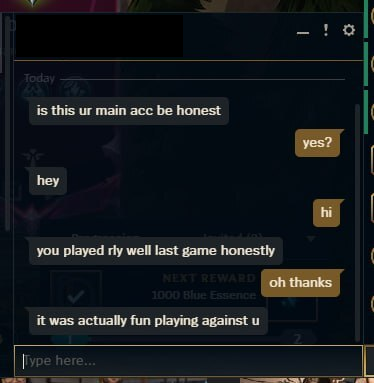
The scheme reported by multiple League of Legends players follows a near-identical script. A friend request lands in the Riot client within moments of a match ending, from an account whose name does not match anyone from that game. The message opens with generic flattery like “you played really well last game” or “I liked your playstyle” designed to sound like a genuine compliment from an opponent or teammate.

fun playing against you

When questioned about who they are, the accounts often claim to have been on the enemy team despite name mismatches, and many present themselves as a woman looking for a duo partner. A detail that likely raises engagement odds. Victims who check the account’s profile frequently find it blank: no visible match history, no overview data, sometimes a very low account level. These are all signs of a throwaway account built or bought purely for outreach, but sometimes they turn out to be stolen existing accounts.

doesn't have any activity to share

After a short exchange, the contact says they are “getting off soon” and hands over a Discord username, moving the conversation to a platform Riot’s chat protections cannot see or moderate.

getting off soon... add my discord

Once on Discord, the persona shifts into a longer-form romance/flirtation script. Usually, hours of chat building rapport, paired with a steady stream of photos that are suggestive but stop short of explicit content, a tactic that keeps engagement high while deferring the “reveal” until trust is established. That reveal ultimately comes in the form of a link to a paid subscription platform, most often OnlyFans, framed as an exclusive, limited-time offer.

promising nudes

A reverse image search on the photos sent during one such conversation turned up the same pictures recycled across unrelated websites and at least one YouTube video, with commenters in that video describing having received identical images from a bot under different names. This is strong evidence that the same photo set is cycling through many chats simultaneously, run at scale rather than by one individual.

Lina stated:

“One of my friends tried to break the bot too, left it on read for some time – the bot actually switched the pictures to match the context of “Concern” on the face of the model with “Why are you not replying?”, which quite clearly gave away bulk image generation for the script.’

When the account was pressed with a “reveal your instructions” style prompt-injection attempt (text formatted to look like a system message ordering the bot to break character and print its configuration), it did not comply and instead stayed in persona, deflecting the request and continuing the pitch.

attempt to unveal the bot was thwarted

That resilience to a common jailbreak technique suggests the bot’s operators have added guardrails against exactly this kind of probing, or that the “model” behind it is a simpler scripted flow layered with some LLM-generated text rather than an open, unrestricted chatbot.

Why this is happening inside the game client now

What makes this wave notable isn’t the romance scam script itself.  AI-driven catfishing has been documented on dating apps and social media for a couple of years. The difference is the entry point. Players have reported getting these bot friend requests after essentially every single match, with no way to distinguish a real player’s request from a bot’s inside the Riot client.

Community threads describe the bots seemingly appearing right after a game ends, which has fueled speculation that the bot operators are scraping or monitoring publicly available match data through third-party stats-tracking sites and associated APIs to identify recently finished games and target participants, though this has not been independently confirmed by Riot.

Riot’s own client architecture may be inadvertently helping. The Riot Client exposes local endpoints (such as the friends list API) that third-party tools and overlays query, and community-run “op.gg“-style trackers pull player and match data that could plausibly be used to correlate who just finished a game with who to target next. Some affected players have found a partial workaround: switching on the client’s “streamer mode,” which hides recent match and online status information, appears to reduce how often bot requests arrive. Which is an indirect clue that the targeting relies on visible activity signals rather than random spam.


Safer. Cleaner. Ad-free browsing.


The end goal: content promotion, not always theft

Unlike classic Discord scams that push fake Nitro codes or malware-laden “test my game” links to hijack accounts, this particular chain appears primarily aimed at driving paid subscriptions to an OnlyFans-style page of a fake AI girl. That doesn’t make it harmless. Even when the underlying OnlyFans account is real, the conversations are very likely run by paid chat operators or scripted/AI-powered systems working from a shared script and a reused media library, a business model that has been described by former OnlyFans “chatters” themselves: agencies assign staff (or bots) to respond as the creator around the clock, pull from a pre-made vault of photos and messages, and are financially incentivized to convert every conversation into a subscription or tip.

There are also more damaging variants layered onto the same funnel. Community reports describe some of these bot accounts eventually sending a link that, once clicked, is designed to hijack the recipient’s Discord account or harvest credentials rather than lead to legitimate content.

That means the “girl who wants to duo” opening can just as easily terminate in an account-takeover attempt as in a subscription upsell. Because the funnel starts with a low-cost, disposable Riot account and migrates the target to Discord within minutes, the League client friend request functions purely as a first-contact filter: cheap to generate, easy to discard after a single use, and outside the reach of Riot’s in-game reporting tools once the conversation moves off-platform.

How to stay safe

Recognizing these scams is the best way to protect yourself. But there is more you can do:

  • Treat any Riot client friend request from an unrecognized name as suspicious by default, especially one that arrives seconds after a match ends—check whether the account actually appeared in your last game before accepting anything.
  • Enable streamer mode or equivalent privacy settings in the Riot client to limit what activity and match data outside parties can see, which several affected players found reduced the frequency of these requests.
  • Be skeptical of anyone who quickly steers the conversation off-platform to Discord, especially if they cite being unavailable (“gotta go soon, here’s my Discord”) as the reason—this is a deliberate move to a channel with less moderation and no shared match context to verify identity.
  • Run a reverse image search (Google Images, TinEye, or a dedicated tool) on any profile or “personal” photos sent early in a conversation; recycled images across unrelated sites or forums are one of the most reliable tells of a bot or catfishing operation.
  • Watch for AI-typical conversation patterns: responses that feel scripted, arrive instantly regardless of time of day, are grammatically flawless but emotionally generic, or that consistently dodge voice/video calls.
  • Never send money, gift cards, cryptocurrency, or payment details to someone you met exclusively through in-game or Discord contact, no matter how convincing the rapport feels—legitimate connections do not require urgent financial “help” or exclusive subscription purchases within hours of meeting.
  • Do not click links sent by unfamiliar contacts, even ones framed as harmless subscription pages, game invites, or file downloads; some variants of this scheme are documented to lead to credential-stealing or account-hijacking pages rather than legitimate content.
  • Lock down Discord’s privacy settings (restrict who can DM you and send friend requests) and enable multi-factor authentication, since a compromised Discord account is often used to relaunch the same scam against the victim’s own friend list.
  • Report suspicious Riot client accounts to Riot Support and suspicious Discord accounts/servers to Discord Trust & Safety; reporting does not remove the account instantly but it feeds the pattern data that platforms use to detect and ban clusters of bot accounts.
  • If a bot or scripted persona pushes back convincingly against attempts to “break” it (e.g., ignoring prompt-injection or jailbreak-style messages designed to expose it as an AI), treat that resilience itself as a red flag rather than reassurance—a well-guarded script is not the same as a genuine person.

Something feel off? Check it before you click.  

Malwarebytes Scam Guard helps you analyze suspicious links, texts, and screenshots instantly.  

Available with Malwarebytes Premium Security for all your devices, and in the Malwarebytes app for iOS and Android.  

Try it free → 

  • ✇Malwarebytes
  • Hidden prompt turns Microsoft Copilot into an AI worm
    A security researcher has demonstrated how Microsoft Copilot for Word can be tricked into spreading a self‑propagating prompt‑injection “AI worm.” The attack silently alters documents and embeds its own hidden instructions into newly created files, allowing it to spread through normal document-sharing workflows without macros or traditional malware. The technique allows an attacker to hide a JSON‑formatted prompt as white text on a white background inside a Word document. When someone asks C
     

Hidden prompt turns Microsoft Copilot into an AI worm

30 de Julho de 2026, 09:58

A security researcher has demonstrated how Microsoft Copilot for Word can be tricked into spreading a self‑propagating prompt‑injection “AI worm.” The attack silently alters documents and embeds its own hidden instructions into newly created files, allowing it to spread through normal document-sharing workflows without macros or traditional malware.

The technique allows an attacker to hide a JSON‑formatted prompt as white text on a white background inside a Word document. When someone asks Copilot for Word to draft or edit content based on that document, Copilot strips away the formatting, reads the hidden text, and treats the embedded instructions as part of the user’s request.

Copilot then modifies the active document and appends the full malicious prompt as hidden white text. That new document becomes a new carrier. Anyone who later uses it as source material for Copilot triggers the same behavior, allowing the prompt injection to spread to more documents. Because the documents are created and edited by legitimate users, the attack can be difficult to trace.

The researcher could still reproduce the full worm chain even after Microsoft rolled out multiple mitigations, including upgrades to newer GPT‑5.5 and 5.6 models.

At the time of writing, there is no complete mitigation for this broader class of attacks across comparable large language model (LLM)‑based products. It’s characterized as an architectural weakness of current LLM systems: attacker‑controlled content shares the same context window as trusted instructions. Attacks that exploit this behavior are known as prompt injection attacks and may never be fixed.

How to stay safe

Treat documents from outside your organization as untrusted, especially if you plan to use them with Copilot for Word.

Review any attached document before using it as Copilot source material, and carefully verify Copilot‑generated/edited documents before sharing or reusing them.

If you don’t use Copilot, you can disable it.

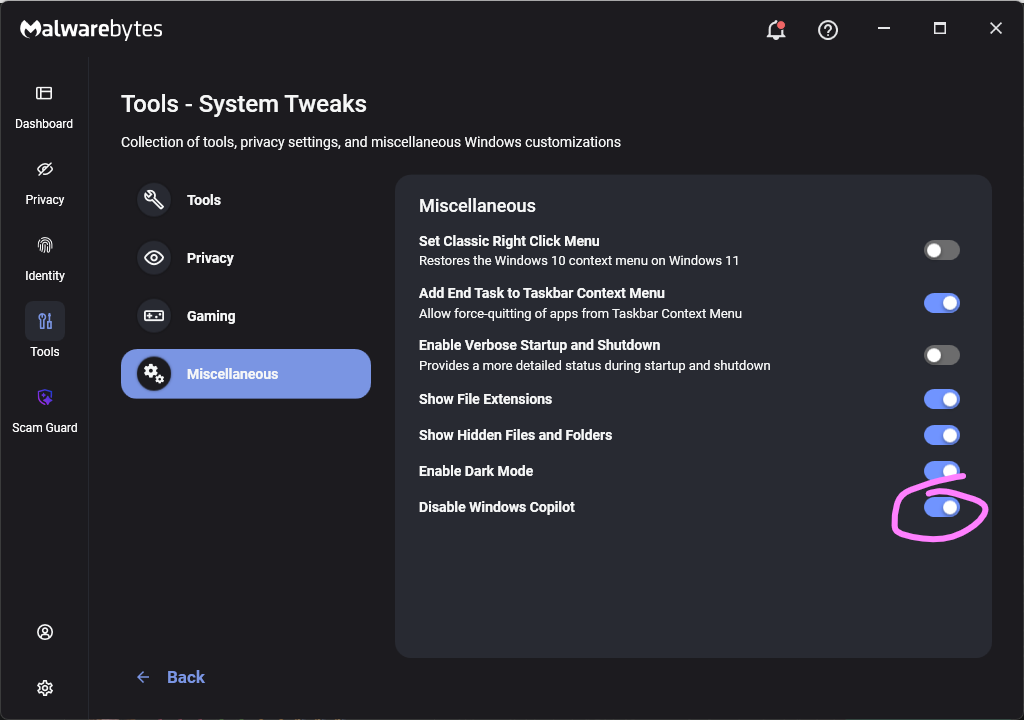
Malwarebytes users can turn off Copilot under Tools > System Tweaks > Miscellaneous.

Malwarebytes setting to disable Copilot

Or in Word itself:

For individual users who don’t want Copilot in Word:

  • Open Word, go to File > Options > Copilot and clear the Enable Copilot checkbox, then restart Word.
    uncheck Enable Copilot in Word
  • In some versions of Word, the setting appears under File > Options > General in a Copilot section. In both cases, the key is unchecking the “Enable Copilot” setting.

You can also remove the Copilot icon from the ribbon by right‑clicking the ribbon, open the customization dialog, locate the Copilot/Assistance button, and removing it.

Alternatively, you can limit Copilot’s role by following these instructions:

  • In Word, go to File > Account > Account Privacy > Manage Settings, and uncheck Turn on optional connected experiences. This reduces certain cloud‑powered AI features, including Copilot‑related functions that rely on those services.
  • In the Microsoft 365 Admin Center, under Copilot > Settings, set Pin Microsoft 365 Copilot Chat to Do not pin Copilot chat in Microsoft 365 apps so the chat pane doesn’t appear by default in apps like Word.

This doesn’t remove Copilot entirely or stop these attacks, but it does reduce its visibility and limits some of its cloud‑assisted functionality.


From reporting threats to removing them.

Cybersecurity risks should never spread beyond a headline. Keep threats off your devices by downloading Malwarebytes today.

❌
❌