❌

Visualização normal

Antes de ontemMalwarebytes
  • ✇Malwarebytes
  • Infostealers are hijacking Claude accounts at users’ expense
    Anthropic has warned some Claude users that criminals are using information stealers to take over their accounts. Rather than guessing passwords or intercepting two-factor authentication (2FA) codes, the attackers steal the browser sessions that prove a user is already logged in. According to a warning email shared publicly by an affected user, the attackers used common infostealer malware to copy Claude login sessions from victims’ computers. They then used those sessions to access the ac
     

Infostealers are hijacking Claude accounts at users’ expense

1 de Setembro de 2026, 07:08

Anthropic has warned some Claude users that criminals are using information stealers to take over their accounts.

Rather than guessing passwords or intercepting two-factor authentication (2FA) codes, the attackers steal the browser sessions that prove a user is already logged in.

According to a warning email shared publicly by an affected user, the attackers used common infostealer malware to copy Claude login sessions from victims’ computers. They then used those sessions to access the accounts and consume their usage.

Warning from Anthropic

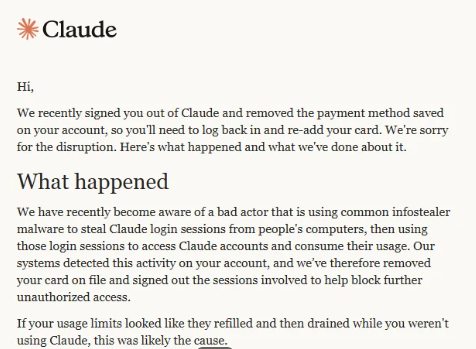
“We recently signed you out of Claude and removed the payment method saved on your account, so you’ll need to log back in and re-add your card. We’re sorry for the disruption. Here’s what happened and what we’ve done about it.

What happened

We have recently become aware of a bad actor that is using common infostealer malware to steal Claude login sessions from people’s computers, then using those login sessions to access Claude accounts and consume their usage. Our systems detected this activity on your account, and we’ve therefore removed your card on file and signed out the sessions involved to help block further unauthorized access.

If your usage limits looked like they refilled and then drained while you weren’t using Claude, this was likely the cause.”

The message adds that Anthropic has no reason to believe the malware was “related to Claude, installed through Claude, or related to anything you did with Claude.”  

To sum this up:

  • Cybercriminals are spreading infostealers. How they are doing this and whether they are targeting groups likely to use Claude professionally is unknown.
  • Infostealers can bypass standard credentials and multi-factor authentication (MFA) by stealing active browser sessions and session cookies.
  • Once they are able to take over a Claude account, they can consume the victim’s usage and potentially incur additional charges.
  • Anthropic is signing affected users out of Claude, removing saved payment methods, and refunding charges it identifies as unauthorized.

To better understand this, you should know that paid Claude plans can offer additional “Usage credits.” When a subscriber reaches the plan’s session limit, Claude can allow them to continue using the service through consumption-based billing at standard API rates. The user must enable the feature, configure a monthly spending limit or select unlimited spending, and prepay for credits.

Users can also enable auto-reload, which automatically buys more prepaid credits when the balance falls below a threshold. So, in a session-hijacking scenario, a thief could use up the account’s included allowance and any available Usage credits. If auto-reload is enabled, they could also trigger further purchases.

The criminals’ likely motive is to use paid Claude capacity for free. The account and any exposed data could also be useful for fraud, social engineering, or follow-on attacks.

Stolen Claude capacity could be used to write and refine phishing and scam content, build campaign infrastructure, develop, modify, or obfuscate malware, improve delivery methods, and analyze stolen information. Cybercriminals can use AI to support several parts of an operation, although Claude has safeguards and abuse monitoring, and Anthropic says it has disrupted accounts used for malicious activity.

What to do

Anthropic provided advice for dealing with a possible infostealer infection. After removing the malware, we recommend you install an up-to-date, real-time anti-malware solution to help protect you against new infections.

These steps are good practice when cleaning up after infostealer malware:

  1. Scan any computer you use with Claude for malware and remove any malware before logging back in or changing passwords.
  2. Once the malware has been removed, secure the email account you use for Claude by changing its password, signing out of other devices, and enabling two-factor authentication (2FA).
  3. Change sensitive passwords that were saved in the affected browser, including those for banking, work, and cloud services. Check your card statements if you stored payment details in the browser.
  4. Only after completing these steps should you add your payment method to Claude again if you want your plan to continue renewing.

If you still see your usage changing while Claude is idle, or notice an unrecognized charge after completing these steps, contact usersafety@anthropic.com.


From reporting threats to removing them.

Cybersecurity risks should never spread beyond a headline. Keep threats off your devices by downloading Malwarebytes today.
  • ✇Malwarebytes
  • This fake Apple app can unlock your Mac’s password vault
    CrashStealer is a new macOS infostealer that masquerades as Apple’s CrashReporter component, uses an Apple‑notarized installer to slip past Gatekeeper, tricks users into handing over their password, and then systematically loots browsers, password managers, crypto wallets, and Keychain secrets before exfiltrating them in AES‑encrypted bundles. Researchers have been following the development of CrashStealer since May 2026. It impersonates Apple’s CrashReporter component by taking the name Cras
     

This fake Apple app can unlock your Mac’s password vault

15 de Julho de 2026, 05:42

CrashStealer is a new macOS infostealer that masquerades as Apple’s CrashReporter component, uses an Apple‑notarized installer to slip past Gatekeeper, tricks users into handing over their password, and then systematically loots browsers, password managers, crypto wallets, and Keychain secrets before exfiltrating them in AES‑encrypted bundles.

Researchers have been following the development of CrashStealer since May 2026. It impersonates Apple’s CrashReporter component by taking the name CrashReporter.app. It also creates a LaunchAgent named com.apple.crashreporter.helper and uses the legitimate tool’s icon and metadata to look as trustworthy as possible.

Gatekeeper, basically macOS’s bouncer at the door, checks whether an app looks safe before letting it run. By using a notarized installer—one that Apple has scanned and stamped as acceptable—Gatekeeper is more likely to let it through without raising alarms. Getting notarized doesn’t mean Apple intentionally approved the malware. It means the installer passed Apple’s automated checks, and the attackers abused that trust.

The notarized installer, called “Werkbit Setup” is distributed from a fake software site registered in late June and gated behind a meeting PIN (Personal Identification Number), suggesting a targeted, invitation‑only campaign.

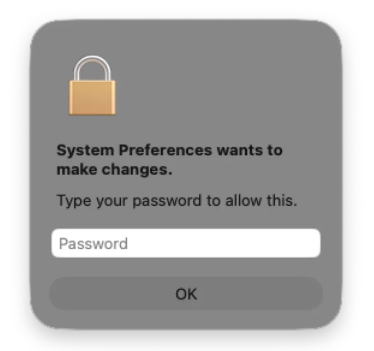
When launched, the malware displays a fake macOS password prompt that users will expect to see when running a legitimate system operation requiring administrator privileges. In reality, the malware uses that password to unlock the user’s Keychain, which stores passwords and other sensitive data in macOS’s encrypted password vault.

Malicious password prompt, image courtesy of Jamf Labs
Image courtesy of Jamf Labs

The malware then steals browser credentials and cookies, cryptocurrency wallet extensions, password manager data, and small files from common user directories. The stolen data is encrypted and sent to a command and control (C2) server.

CrashStealer is a reminder that macOS is firmly in the sights of credential‑stealing operations. Notarization and Gatekeeper reduce many classes of risk, but they do not remove the need for layered defenses, cautious user behavior, and ongoing threat monitoring.

How to stay safe

There are a few things you can do to protection yourself from CrashStealer and other infostealers.

  • Be skeptical of “CrashReporter” downloads. Apple’s crash‑reporting tools ship with macOS, so you should never need to download a separate CrashReporter app from a third‑party site.
  • Treat PIN‑gated installers with caution. If a meeting invite or collaboration tool requires you to download software from an unfamiliar domain and enter a private PIN to unlock the installer, verify the request with the organizer through a separate trusted channel.
  • Treat a password request that appears immediately after launching a new or unfamiliar app—especially one claiming to be a system component—as a red flag.
  • Use reputable security software that supports macOS. Keep it, and macOS itself, up to date.
  • Separate your risk. Avoid keeping high‑value crypto wallets, password vaults, and everyday browsing credentials on the same machine and user profile wherever possible.

Malwarebytes detects CrashStealer as MacOS.Stealer.Crash.


We don’t just report on threats—we remove them

Cybersecurity risks should never spread beyond a headline. Keep threats off your devices by downloading Malwarebytes today.

❌
❌