Visualização normal

Antes de ontemMalwarebytes
  • ✇Malwarebytes
  • Update your Mac: Screen Sharing vulnerability exploited in the wild
    The Dutch National Cyber Security Centre (NCSC) issued a warning after being notified of several incidents where a vulnerability in Apple’s Screen Sharing feature was exploited to install Monero cryptominers. The vulnerability, tracked as CVE-2026-65400, was patched by Apple on August 6. It is an authentication-bypass flaw in macOS Screen Sharing that can let an attacker on the network connect without valid credentials. macOS’s built-in Screen Sharing service is a remote-control feature co
     

Update your Mac: Screen Sharing vulnerability exploited in the wild

17 de Agosto de 2026, 07:56

The Dutch National Cyber Security Centre (NCSC) issued a warning after being notified of several incidents where a vulnerability in Apple’s Screen Sharing feature was exploited to install Monero cryptominers.

The vulnerability, tracked as CVE-2026-65400, was patched by Apple on August 6. It is an authentication-bypass flaw in macOS Screen Sharing that can let an attacker on the network connect without valid credentials.

macOS’s built-in Screen Sharing service is a remote-control feature commonly associated with port 5900. Successful exploitation can allow a remote attacker on a reachable network to authenticate to the service without legitimate credentials.

Apple said the bug was fixed through “improved state management,” which suggests an authentication-flow or session-state validation failure rather than a cryptographic break.

The patch was issued for macOS Tahoe 26.6.1, Sequoia 15.7.9, and Sonoma 14.8.9. Practical exposure requires Screen Sharing to be enabled, so the highest-risk systems are those where port 5900 is internet-accessible, typically through a router port-forward, public IP assignment, or hosting-provider setup. Hosts reachable only from an internal network are still potentially exposed, but attackers would have to gain a position on that network.

An attacker could view and control the Mac remotely because that is the function Screen Sharing provides. NCSC says active cases involved attackers gaining root access and installing cryptomining software, specifically for Monero mining.

The criminals likely chose Monero mining because it does not depend on heavily specialized, application-specific integrated circuits (ASICs), but can be done with any CPU or GPU.

Cryptomining isn’t necessarily the worst an attacker could do. With a root-level compromise an attacker could enable persistence, data theft, credential and key harvesting, deployment of additional malware, and lateral movement.

How to stay safe

Install the update

The best way to protect your Mac is to install the update.

To update macOS on any supported Mac, use the Software Update feature, which Apple designed to work consistently across all recent versions. Here are the steps:

  • Click the Apple menu in the upper-left corner of your screen.
  • Choose System Settings (or System Preferences on older versions).
  • Select General in the sidebar, then click Software Update on the right. On older macOS, just look for Software Update directly.
  • Your Mac will check for updates automatically. If updates are available, click Update Now (or Upgrade Now for major new versions) and follow the on-screen instructions. Before you upgrade to macOS Tahoe 26, please read these instructions.
  • Enter your administrator password if prompted, then let your Mac finish the update (it might need to restart during this process).
  • Make sure your Mac stays plugged in and connected to the internet until the update is done.

Make sure Screen Sharing is disabled

If you can’t update immediately, check whether Screen Sharing is enabled and turn it off if you don’t use it.

  1.  Click the Apple menu in the top-left corner of the screen.
  2. Select System Settings.
  3. In the left sidebar, click General.
  4. Click Sharing on the right; you may need to scroll down.
  5. Find Screen Sharing:
    • If the switch is off/grey, it is disabled.
    • If the switch is on/colored, click it to switch it off.

Also check Remote Management on that same Sharing page. It provides another remote-control route and should be off unless the owner knowingly uses it for work or IT support.


Macs need protection too

Malwarebytes Premium Security for Mac stops threats and protects your Mac and personal files from hackers and cybercriminals.
  • ✇Malwarebytes
  • Apple now uses iPhone alerts for targets of mercenary spyware
    Apple has expanded its threat-notification system for targets of mercenary spyware. Apple now shows a warning directly on an iPhone’s Lock Screen and in Settings when it believes the device owner has been targeted by mercenary spyware. The new on-device alert is meant to make a high-risk warning harder to overlook and complements notifications by email and through the user’s Apple Account page. In the explanation, Apple states: “Apple threat notifications are high-confidence alerts tha
     

Apple now uses iPhone alerts for targets of mercenary spyware

14 de Agosto de 2026, 09:46

Apple has expanded its threat-notification system for targets of mercenary spyware.

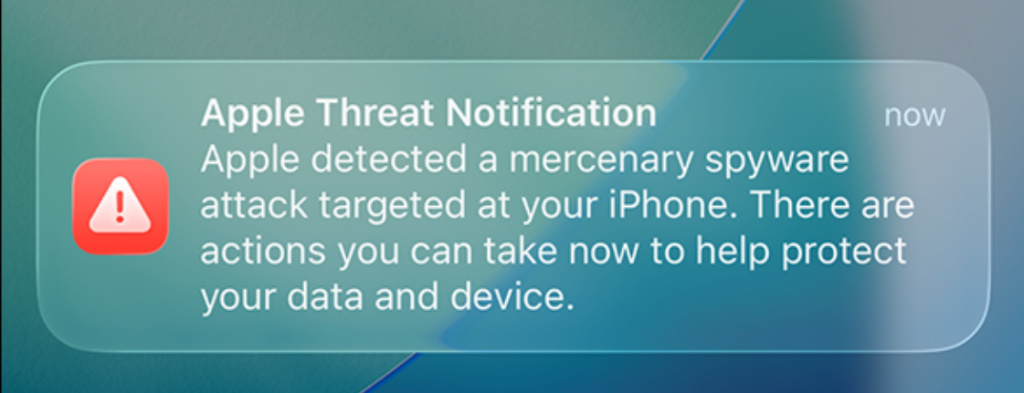
Apple now shows a warning directly on an iPhone’s Lock Screen and in Settings when it believes the device owner has been targeted by mercenary spyware. The new on-device alert is meant to make a high-risk warning harder to overlook and complements notifications by email and through the user’s Apple Account page.

In the explanation, Apple states:

“Apple threat notifications are high-confidence alerts that a user has been individually targeted by a mercenary spyware attack, and should be taken very seriously.”

Apple Threat Notification

“Apple Threat Notification
Apple detected a mercenary spyware attack targeted at your iPhone. There are actions you can take now to help protect your data and device.”

Apple says its threat notifications are intended for people individually targeted by mercenary spyware attacks, which are highly sophisticated campaigns usually associated with commercial surveillance vendors and their government customers. Apple says it has notified targets in over 150 countries since the launch of the program in 2021, while the latest round of notifications reached people in 110 countries.

Mercenary spyware campaigns are usually not aimed at the average iPhone owner—at least at first. The initial targets are often people selected for who they are, what they know, or the work they do. But it would be a mistake to view this as someone else’s problem.

Attack techniques developed for narrowly targeted operations have a habit of spreading. Exploits can be reused, sold onward, reverse engineered, copied by other surveillance vendors, or adapted by criminal groups. A vulnerability initially valuable because it compromises a small number of carefully chosen devices may become much more dangerous once public disclosure, patch analysis, or exploit sharing makes them available for more widespread campaigns.

How to stay safe

Apple advises users to:

  • Update your devices to the latest software, which includes the latest security fixes.
  • Protect your devices with a passcode, Touch ID, or Face ID.
  • Use two-factor authentication and a strong password for your Apple Account.
  • Turn on Stolen Device Protection.
  • Install apps from the App Store.
  • Use strong and unique passwords, and passkeys where available.
  • Don’t open links or attachments from unknown senders.

We’d like to add:

  • Potential targets of mercenary spyware should consider applying Apple’s Lockdown Mode.
  • Check if an Apple Threat Notification is real. Scammers will undoubtedly try and mimic them. You can verify a notification by signing in to your Apple account. A genuine Threat Notification will always be clearly listed there.
  • If you receive an Apple Threat Notification, Apple recommends seeking expert help, such as the Digital Security Helpline from Access Now.

Scammers know more about you than you think. 

Malwarebytes Mobile Security protects you from phishing, scam texts, malicious sites, and more. With real-time AI-powered Scam Guard built right in. 

Download for iOS → Download for Android → 

  • ✇Malwarebytes
  • Amazon and Apple impersonated in “$149.99 unauthorized charge” scam
    If you’ve spent any time browsing lately, you may have run into a full-screen popup warning you that your Apple ID or Amazon account was just used for a mysterious $149.99 purchase. It looks urgent. It looks official. And if you look at two examples side by side, it becomes obvious that it’s neither. Below are two popups pulled from real pages—one dressed up as Apple Support, one as Amazon. Same con, two costumes Below, one popup is skinned as Apple Support, the other as Amazon. Swap th
     

Amazon and Apple impersonated in “$149.99 unauthorized charge” scam

6 de Agosto de 2026, 07:55

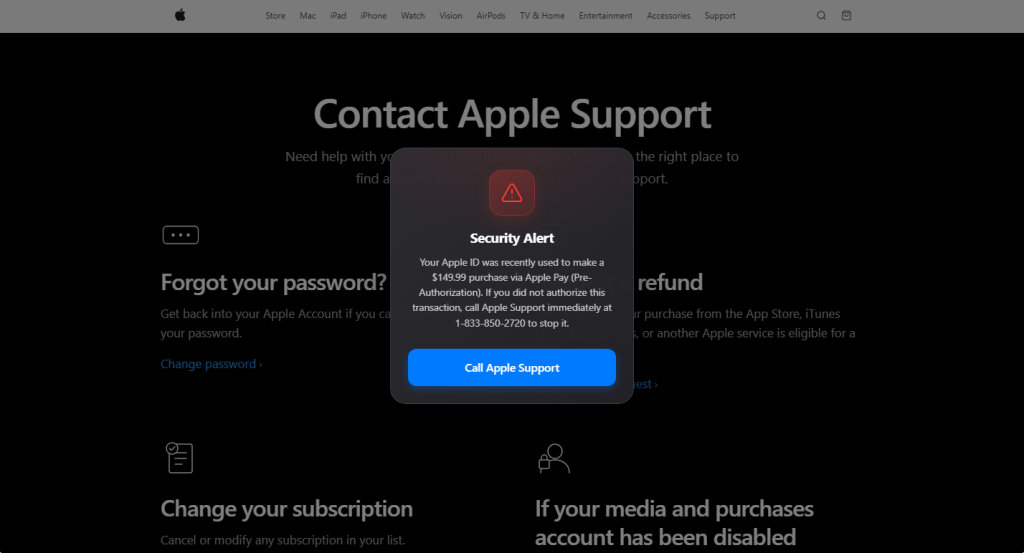
If you’ve spent any time browsing lately, you may have run into a full-screen popup warning you that your Apple ID or Amazon account was just used for a mysterious $149.99 purchase. It looks urgent. It looks official. And if you look at two examples side by side, it becomes obvious that it’s neither.

Below are two popups pulled from real pages—one dressed up as Apple Support, one as Amazon.

Same con, two costumes

Below, one popup is skinned as Apple Support, the other as Amazon. Swap the logo and color palette and the structure is identical: a warning icon, a claim that a $149.99 purchase was just made “via Pre-Authorization,” and a phone number to call immediately. That phone number is exactly the same in both.

Fake Apple alert

Fake Amazon alert

That reused phone number is the tell. If you only see one popup, running the number through a lookup tool like Malwarebytes Scam Number Check is usually enough to expose it—a real Apple or Amazon line won’t come back flagged, but a scam number typically does, often tied to complaints about several unrelated companies at once.

Why the copy is built the way it is

Every element in these popups is doing specific psychological work:

  • A believable, moderate dollar amount. $149.99 is high enough to alarm you, low enough to sound like a real subscription or product charge rather than an obvious lie.
  • “Pre-Authorization” jargon. This is real payment terminology (used for things like hotel holds or gas station charges), borrowed here to sound technically credible to someone who doesn’t handle payments professionally.
  • Manufactured urgency. “Call immediately,” “Immediate Action Required,” “no hold times”—all are designed to get you dialing before you stop to verify anything.
  • Visual authority. Red warning triangles, brand-matching fonts and layouts, and a full-screen modal that blocks the rest of the page all borrow the visual language of legitimate security alerts.
  • A single, frictionless call to action. One button, one phone number. The popup wants exactly one thing from you: to pick up the phone.

If you do call, the number connects to a live scammer posing as support staff, whose actual goal is to get remote access to your device, walk you through “verifying” your identity in a way that hands over real account or payment info, or push you toward paying a fake fee—often via gift cards or a wire transfer.

How to tell if it’s fake

A few checks work regardless of which brand is being impersonated:

  1. Real companies don’t alert you this way. Apple and Amazon notify you about account activity through email, in-app notifications, or your account’s activity log—never through an unexpected popup while you’re browsing.
  2. No legitimate company tells you to call a phone number to stop a charge. Disputing a charge happens through your bank, your card issuer, or the company’s actual account dashboard—not a hotline dictated by a popup.
  3. Check where the popup is actually served from. These often ride in on malicious ads, compromised sites, or browser redirects—the underlying page may be spoofed or injected, not the real apple.com or amazon.com support page it appears to sit on top of.
  4. A popup you can’t easily close is a red flag on its own. Legitimate sites don’t need to trap you behind a full-screen modal to relay account information.
  5. If in doubt, go direct. Close the tab (force-close via task manager if needed) and navigate to the company’s site yourself, or call the number printed on your card or official account page—never the one in the popup.
  6. Check the number before you dial it. Run it through Malwarebytes Scam Number Check to see if it’s already been flagged as a scam line.
  7. Block it before it loads. A browser extension like Malwarebytes Browser Guard catches both known malicious pages and unknown ones showing scam-like behavior, so these popups often get stopped before they ever render.

Don’t judge a scam by its logo

The brand on screen—Apple, Amazon, or whoever’s next—is the least important part of this scam. What actually matters is the pattern underneath: an unexpected popup, a suspiciously specific dollar amount, urgent language, and a phone number that wants you to call before you think. Once you recognize that pattern, it doesn’t matter which company’s name is stamped on top of it.

  • ✇Malwarebytes
  • Apple battles it out again with the UK over encrypted iCloud access
    The UK Home Office has once again demanded Apple allows it access to encrypted iCloud data. The Guardian reports that the Home Office issued a Technical Capability Notice to Apple, this time targeting only British users. A Technical Capability Notice is a formal government order that compels tech and telecommunications companies to build or maintain specific technical functions—such as intercepting data or removing encryption protections—so law enforcement can access communications. In the
     

Apple battles it out again with the UK over encrypted iCloud access

4 de Agosto de 2026, 17:30

The UK Home Office has once again demanded Apple allows it access to encrypted iCloud data.

The Guardian reports that the Home Office issued a Technical Capability Notice to Apple, this time targeting only British users. A Technical Capability Notice is a formal government order that compels tech and telecommunications companies to build or maintain specific technical functions—such as intercepting data or removing encryption protections—so law enforcement can access communications.

In the last round of this ongoing battle, the UK secretly ordered Apple to provide blanket access to protected iCloud backups around the world. Advanced Data Protection (ADP) is Apple’s opt‑in end‑to‑end encryption for iCloud backups, which even Apple itself cannot read. Apple argued that weakening or removing ADP would expose users to data breaches and other threats, and instead chose in January 2025 to withdraw ADP for UK customers rather than build a backdoor, while leaving it available elsewhere.

So, instead of working to keep citizens safe and secure, the Home Office just ended up removing an option for them.

Apple has responded by lodging a complaint with the Investigatory Powers Tribunal (IPT), seeking to challenge the scope and lawfulness of the government’s powers to issue such notices under the Investigatory Powers Act. The Tribunal is an independent court that has the power to investigate claims that the UK intelligence services have acted unlawfully.

Privacy International and Liberty have parallel complaints at the IPT challenging Technical Capability Notices more broadly, including their secrecy and necessity, and have asked for Apple’s claim to be heard in public given its wide public-interest implications.

I feel the fear of leaving an intentional backdoor is justified. If it exists, there is a chance that (AI-assisted) criminals will find and exploit it.

Weighing the importance of the right to privacy and the ability to investigate cases including terrorism and child sexual abuse is not easy. Apple’s ADP is used by many and as soon as criminals would know it’s no longer safe for them to use, they’d move to other platforms. Platforms where no legislative power will be able to gain access.

Reddit r/privacy users have been discussing alternatives for a year.

But, given the danger of a backdoor becoming available for criminals, we think in this case privacy should prevail. Let us know how you feel in the comments.


Browse like no one’s watching. 

Malwarebytes Privacy VPN encrypts your connection and never logs what you do, so the next story you read doesn’t have to feel personal. Try it free → 

  • ✇Malwarebytes
  • A week in security (July 27 – August 2)
    Last week on Malwarebytes Labs:Fake Fortnite rewards are stealing players’ accountsFake Flash Player installs AtlasRATMalwarebytes for Windows, now available on the Microsoft StoreHims & Hers sued over alleged health data privacy failuresHidden prompt turns Microsoft Copilot into an AI wormApple accused of letting fake crypto app steal $1.8 millionBuying TikTok views or followers? Here’s what you’re really gettingAI robocalls: Why caller ID is still lying to youOpenAI explains how its AI age
     
  • ✇Malwarebytes
  • Update your iPhone, iPad and Mac to fix Apple security holes
    Apple has shipped a hefty round of July security patches, headlined by iOS/iPadOS 26.6, macOS Tahoe 26.6, and Safari 26.6, with dozens of vulnerabilities squashed across kernel, WebKit, media frameworks, and core apps. These updates are primarily about improving security rather than adding new features, and users should install them as soon as possible. Updates for your particular device The table below shows which updates are available and points you to the relevant security content for t
     

Update your iPhone, iPad and Mac to fix Apple security holes

28 de Julho de 2026, 08:35

Apple has shipped a hefty round of July security patches, headlined by iOS/iPadOS 26.6, macOS Tahoe 26.6, and Safari 26.6, with dozens of vulnerabilities squashed across kernel, WebKit, media frameworks, and core apps. These updates are primarily about improving security rather than adding new features, and users should install them as soon as possible.

Updates for your particular device

The table below shows which updates are available and points you to the relevant security content for that subject.

iOS 26.6 and iPadOS 26.6iPhone 11 and later, iPad Pro 12.9-inch 3rd generation and later, iPad Pro 11-inch 1st generation and later, iPad Air 3rd generation and later, iPad 8th generation and later, and iPad mini 5th generation and later
macOS Tahoe 26.6macOS Tahoe
macOS Sequoia 15.7.8macOS Sequoia
macOS Sonoma 14.8.8macOS Sonoma
tvOS 26.6Apple TV HD and Apple TV 4K (all models)
watchOS 26.6Apple Watch Series 6 and later
visionOS 26.6Apple Vision Pro (all models)
Safari 26.6macOS Sonoma and macOS Sequoia

How to update your Apple devices

How to update your iPhone or iPad

For iOS and iPadOS users, here’s how to check if you’re using the latest software version:

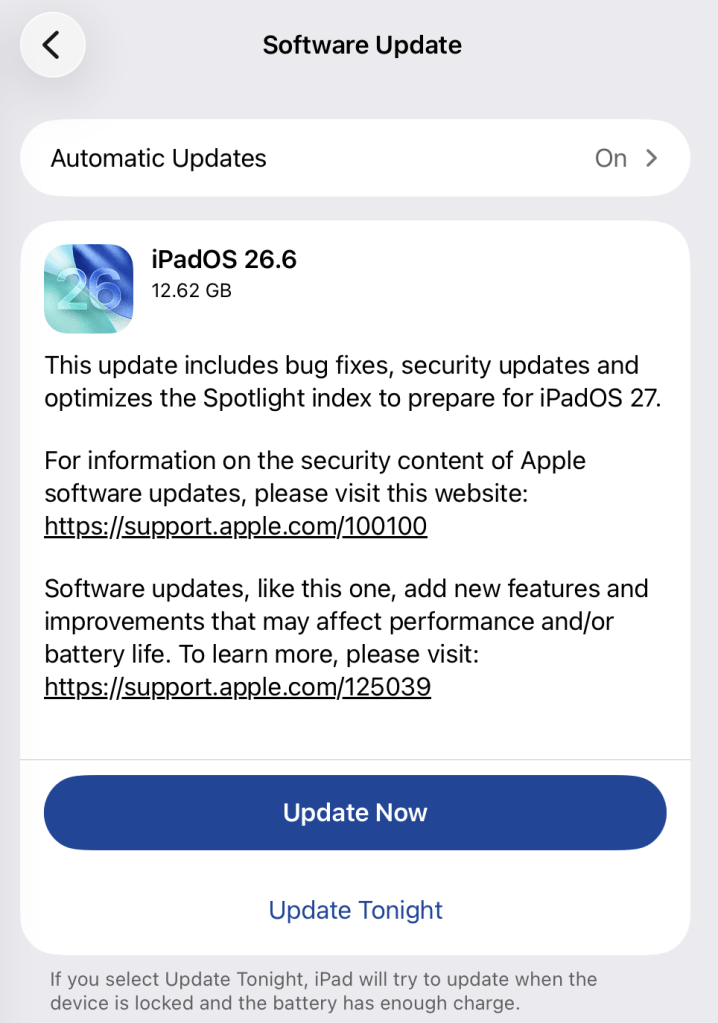
Go to Settings > General > Software Update. You will see if there are updates available and be guided through installing them.

Turn on Automatic Updates if you haven’t already—you’ll find it on the same screen.

iPadOS update options

How to update macOS on any version

To update macOS on any supported Mac, use the Software Update feature, which Apple designed to work consistently across all recent versions. Here are the steps:

  • Click the Apple menu in the upper-left corner of your screen.
  • Choose System Settings (or System Preferences on older versions).
  • Select General in the sidebar, then click Software Update on the right. On older macOS, just look for Software Update directly.
  • Your Mac will check for updates automatically. If updates are available, click Update Now (or Upgrade Now for major new versions) and follow the on-screen instructions. Before you upgrade to macOS Tahoe 26, please read these instructions.
  • Enter your administrator password if prompted, then let your Mac finish the update (it might need to restart during this process).
  • Make sure your Mac stays plugged in and connected to the internet until the update is done.

How to update your Safari browser

Safari updates are included with macOS updates, so installing the latest version of macOS will also update Safari. To check manually:

  • Open the Apple menu > System Settings > General > Software Update.
  • If you see a Safari update listed separately, click Update Now to install it.
  • Restart your device when prompted.

If you’re on an older macOS version that’s still supported (like Sonoma or Sequoia), Apple may offer Safari updates independently through Software Update.

Technical details

Among the more interesting vulnerabilities patched in this update are CVE-2026-43818 in ImageIO,  CVE-2026-43776 in AppleDouble, and CVE-2026-64763 to 64766 in SceneKit.

Although found in different applications, these vulnerabilities have one thing in common. Their descriptions say:

“Processing a maliciously crafted file may lead to unexpected app termination or arbitrary code execution.”

The identical “processing a maliciously crafted file may lead to unexpected app termination or arbitrary code execution” language is not a coincidence. It’s Apple’s standard impact boilerplate for file‑parsing bugs across multiple frameworks, including ImageIO, AppleDouble, and SceneKit. The similarities reflect shared exploitation patterns (untrusted file input hitting native parsers), while the differences lie in what each framework does and which file types/contexts are affected.

ImageIO is the system framework responsible for reading and displaying image formats such as JPEG, PNG, TIFF, RAW, GIF, and other formats. It’s used throughout iOS and macOS by apps including Photos, Safari, Messages, Mail, and Preview.

SceneKit is a 3D graphics and scene graph framework used for rendering models, animations, and complex 3D scenes in apps and games on Apple platforms. It parses scene description files and 3D assets and turns them into renderable content.

AppleDouble is something macOS uses behind the scenes to keep extra file information like icons and other Finder details in cases where your files live on certain types of disks or servers. When Apple mentions “AppleDouble” in security notes, it’s talking about the code that reads and writes that hidden metadata, particularly when files are stored on network drives or shared with non‑Apple systems.

Apple’s advisories reuse a standard warning for any memory‑corruption bug in a file parser: the best‑case outcome is just a crash, the worst case is someone running their malicious code on your device. ImageIO, AppleDouble, and SceneKit all sit in that same danger zone. Although the file types are different, they all present the same underlying risk.

Until you’ve installed this update, it’s an even worse idea than usual to open unsolicited messages and emails with images in them.


Scammers know more about you than you think. 

Malwarebytes Mobile Security protects you from phishing, scam texts, malicious sites, and more. With real-time AI-powered Scam Guard built right in. 

Download for iOS → Download for Android → 

  • ✇Malwarebytes
  • Apple’s Hide My Email doesn’t hide it very well
    404 Media reports that a researcher has found a vulnerability in Apple’s Hide My Email feature that could allow someone to discover a person’s real email address. That’s especially concerning because protecting your real email address is exactly what the feature is designed to do. 404 Media did not publish technical details of the vulnerability to avoid helping attackers exploit it, but said it independently verified that the issue works. Hide My Email generates: “Unique, random email
     

Apple’s Hide My Email doesn’t hide it very well

2 de Julho de 2026, 13:22

404 Media reports that a researcher has found a vulnerability in Apple’s Hide My Email feature that could allow someone to discover a person’s real email address.

That’s especially concerning because protecting your real email address is exactly what the feature is designed to do. 404 Media did not publish technical details of the vulnerability to avoid helping attackers exploit it, but said it independently verified that the issue works.

Hide My Email generates:

“Unique, random email addresses that automatically forward to your personal email inbox. Each address is unique to you. You can read and respond directly to emails sent to these addresses and your personal email address is kept private.”

Instead of giving a website or app your real email address when you sign up, you can give it one of these randomly generated addresses. Messages are forwarded to your normal inbox, but the sender shouldn’t be able to see your real email address. At least, that’s how it’s supposed to work.

Tyler Murphy, co-founder of EasyOptOuts, discovered and reported the issue to Apple in June 2025. More than a year later, he says the vulnerability still hasn’t been fixed.

When Murphy reached out to Apple again in May, he received the following response:

“We are still investigating this issue. To avoid placing our customers at risk, we would appreciate you not disclosing this information until our investigation is complete. We appreciate your assistance in helping us to maintain and improve the security of our products.”

Murphy suggested Apple should stop promoting the feature until it could be fixed. Apple reportedly told him it expected to address the issue in a security update in the coming weeks. When that failed to happen, Murphy decided to reach out to 404 Media.

Instead, we learned a few weeks ago that Apple plans to make the Hide My Email less useful for some users. In a note to developers, the company said it will move anonymously generated email addresses to the @private.icloud.com domain. Effectively, this makes it easier for apps and websites to recognize that an email address was created with Hide My Email and potentially refuse to accept it during the sign-up process.

What you can do

Using a different email address for every website or service is still good privacy practice. It makes it easier to identify which company exposed your address in a data breach, and you can simply stop using a compromised alias without changing your main email address.

However, until Apple fixes the issue, you shouldn’t rely on the Hide My Email feature as the only way to keep your real email address private.

Meanwhile, keep an eye open for Apple’s promised security update.


Browse like no one’s watching. 

Malwarebytes Privacy VPN encrypts your connection and never logs what you do, so the next story you read doesn’t have to feel personal. Try it free → 

  • ✇Malwarebytes
  • Update time: Apple releases security patches for iOS, MacOS Tahoe, Safari
    Apple has released security updates for more than two dozen security vulnerabilities across iPhone, iPad, and Mac. The updates for iOS/iPadOS, MacOS Tahoe, and Safari were issued after testing on iOS 26.6 and iPadOS 26.6 betas. What stands out in the update is that a lot of the vulnerabilities were found in WebKit, the browser engine that powers Safari as well as every browser on iPhone, including Chrome, Firefox, and Edge. It also looks like several of the issues Apple has addressed can b
     

Update time: Apple releases security patches for iOS, MacOS Tahoe, Safari

30 de Junho de 2026, 11:35

Apple has released security updates for more than two dozen security vulnerabilities across iPhone, iPad, and Mac.

The updates for iOS/iPadOS, MacOS Tahoe, and Safari were issued after testing on iOS 26.6 and iPadOS 26.6 betas.

What stands out in the update is that a lot of the vulnerabilities were found in WebKit, the browser engine that powers Safari as well as every browser on iPhone, including Chrome, Firefox, and Edge. It also looks like several of the issues Apple has addressed can be chained together to steal data or run malicious code with little or no user interaction.

Updates for your particular device

The table below shows which updates are available and points you to the relevant security content for that subject.

Name and linkAvailable for
iOS 26.5.2 and iPadOS 26.5.2iPhone 11 and later, iPad Pro 12.9-inch 3rd generation and later, iPad Pro 11-inch 1st generation and later, iPad Air 3rd generation and later, iPad 8th generation and later, and iPad mini 5th generation and later
macOS Tahoe 26.5.2macOS Tahoe
Safari 26.5.2macOS Sonoma and macOS Sequoia

How to update your Apple devices

How to update your iPhone or iPad

For iOS and iPadOS users, here’s how to check if you’re using the latest software version:

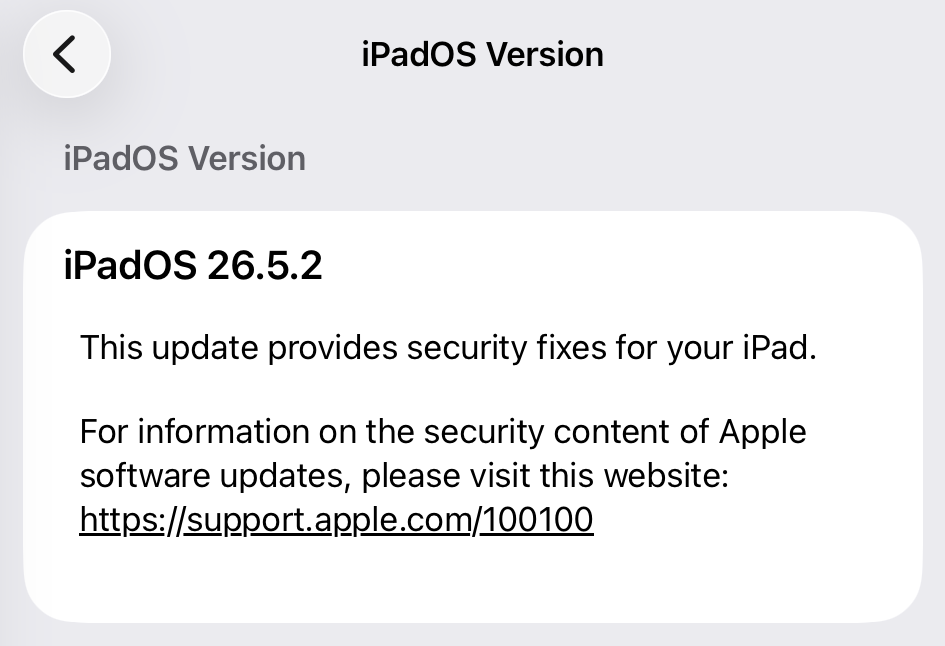
Go to Settings > General > Software Update. You will see if there are updates available and be guided through installing them.

Turn on Automatic Updates if you haven’t already—you’ll find it on the same screen.

update

How to update macOS on any version

To update macOS on any supported Mac, use the Software Update feature, which Apple designed to work consistently across all recent versions. Here are the steps:

  • Click the Apple menu in the upper-left corner of your screen.
  • Choose System Settings (or System Preferences on older versions).
  • Select General in the sidebar, then click Software Update on the right. On older macOS, just look for Software Update directly.
  • Your Mac will check for updates automatically. If updates are available, click Update Now (or Upgrade Now for major new versions) and follow the on-screen instructions. Before you upgrade to macOS Tahoe 26, please read these instructions.
  • Enter your administrator password if prompted, then let your Mac finish the update (it might need to restart during this process).
  • Make sure your Mac stays plugged in and connected to the internet until the update is done.

How to update your Safari browser

Safari updates are included with macOS updates, so installing the latest version of macOS will also update Safari. To check manually:

  • Open the Apple menu > System Settings > General > Software Update.
  • If you see a Safari update listed separately, click Update Now to install it.
  • Restart your device when prompted.

If you’re on an older macOS version that’s still supported (like Sonoma or Sequoia), Apple may offer Safari updates independently through Software Update.

Technical details

On iPhone and iPad, every browser—Safari, Chrome, Firefox, Edge—is forced to use Apple’s WebKit engine, which is exactly where most of the 26.5.2 fixes land. Apple and independent write‑ups describe a chain of WebKit issues, including use‑after‑free bugs, memory corruption, and cross‑origin logic errors that could be triggered simply by loading a malicious page. In several cases, the impact ranges from crashing your browser to corrupting memory or leaking data from other sites you have open in different tabs.

And there are some other browser related issues. Apple also notes fixes in Web Extensions and permission handling that could have allowed browser extensions or sites to access more data than intended. Plus some that are scattered across related libraries and frameworks such as libxslt, and WebRTC.

Libxslt is an open-source C library used to perform transformations on XML documents. It enables developers to convert raw XML data into other formats, such as HTML, plain text, or other XML structures.

WebRTC (Web Real-Time Communication) is an open-source technology that allows web browsers and mobile apps to communicate directly with each other.

None of the patched vulnerabilities are known to be exploited in the wild, but that doesn’t mean you can relax. One thing to consider when you are scheduling this update is that, due to the beta testing, the details of these vulnerabilities have been public knowledge for a while, so the race to come up with an exploit has already started.


Scammers know more about you than you think. 

Malwarebytes Mobile Security protects you from phishing, scam texts, malicious sites, and more. With real-time AI-powered Scam Guard built right in. 

Download for iOS → Download for Android → 

  • ✇Malwarebytes
  • Apple patches Beats Studio Buds flaw that could turn earbuds into a wiretap
    Apple has patched a Bluetooth flaw in Beats Studio Buds that could potentially turn your earbuds into a nearby wiretap. When you buy a pair of Bluetooth earbuds, you expect them to play your music and your calls—not someone else’s. But a vulnerability in Apple’s Beats Studio Buds shows how that trust can be abused, turning everyday audio gear into a potential eavesdropping tool for anyone close enough and skilled enough to exploit it. The vulnerability is tracked as CVE-2025-20701. Researc
     

Apple patches Beats Studio Buds flaw that could turn earbuds into a wiretap

19 de Junho de 2026, 08:47

Apple has patched a Bluetooth flaw in Beats Studio Buds that could potentially turn your earbuds into a nearby wiretap.

When you buy a pair of Bluetooth earbuds, you expect them to play your music and your calls—not someone else’s. But a vulnerability in Apple’s Beats Studio Buds shows how that trust can be abused, turning everyday audio gear into a potential eavesdropping tool for anyone close enough and skilled enough to exploit it.

The vulnerability is tracked as CVE-2025-20701. Researchers disclosed flaws in Airoha system-on-a-chip (SoCs) devices at a security conference in Germany in 2025. Because Airoha chips are used in a wide range of audio products, the issue affected multiple devices, including Beats Studio Buds.

The researchers also showed how the vulnerability could be combined with flaws they found in the same Airoha component. By chaining these flaws, attackers could:

  • Eavesdrop via headphone microphones.
  • Extract pairing keys.
  • Impersonate trusted headphones.
  • Compromise the user’s phone, enabling call hijacking, contact extraction, triggering voice assistants, and more.

The good news is that these attacks are not easy to pull off. Exploitation is complex, and the attacker must be within Bluetooth range of the target device.

Basically, CVE-2025-20701 is a flaw in the authentication process and affects devices that are not yet paired and are actively looking for something to connect to. In a normal scenario, your headphones and your phone go through a pairing process that establishes keys and trust before any sensitive operations—like using the microphone—are allowed.

In this case, devices in pairing mode did not properly verify who they were talking to. That opened a window where any nearby attacker could pose as a legitimate partner and connect to the earbuds before the user completes the pairing process.

As Apple describes it:

“An attacker within Bluetooth range may be able to listen through the microphone of a device which is not yet paired and actively seeking pair requests.”

How to stay safe

To address this vulnerability, Apple shipped Beats Firmware Update 1B211, which rolls out automatically once the earbuds are near and connected to an iPhone, iPad, or Mac.

For the average user, the need for physical proximity, specialized hardware and software, and some patience means opportunistic criminals are more likely to stick with phishing and credential stuffing than stalking Bluetooth signals in public spaces.

But for a motivated attacker targeting a high-profile individual, this is exactly the kind of bug they’d use.

There is no “Update now” button, but if you own Beats Studio Buds and use them with an iPhone, iPad, or Mac, you should automatically receive the update when:

  • The earbuds are paired with your Apple device
  • They are in their charging case, with the lid closed
  • The case and buds have sufficient charge, and the Apple device is nearby with Bluetooth enabled

To check whether you’re protected:

  • On iOS or iPadOS, go to Settings > Bluetooth
  • Tap the info icon next to your Beats Studio Buds
  • Look at the firmware or version number. It should read 1B211 if the security update has been applied. If it says anything else, your earbuds may not have received the update yet. If you see an older version, keep the earbuds in their case near your iPhone, iPad, or Mac for a while to give them time to update. This can take some time and may happen silently in the background, so checking again later is worth the effort.

Scammers know more about you than you think. 

Malwarebytes Mobile Security protects you from phishing, scam texts, malicious sites, and more. With real-time AI-powered Scam Guard built right in. 

Download for iOS → Download for Android → 

❌
❌