Visualização normal

Antes de ontemMalwarebytes
  • ✇Malwarebytes
  • ShieldBreak bypasses Microsoft’s patch for earlier Defender flaw
    Microsoft Defender’s latest patch bypass shows a familiar problem. A newly disclosed Microsoft Defender flaw called ShieldBreak shows that fixing one attack path doesn’t always close every route to the same result. Microsoft has assigned ShieldBreak the identifier CVE-2026-69414 and confirmed it is an elevation of privilege (EoP) vulnerability in the Microsoft Malware Protection Engine. Microsoft says it is still working on a security update. If that sounds somehow familiar, you’re pro
     

ShieldBreak bypasses Microsoft’s patch for earlier Defender flaw

17 de Agosto de 2026, 10:34

Microsoft Defender’s latest patch bypass shows a familiar problem.

A newly disclosed Microsoft Defender flaw called ShieldBreak shows that fixing one attack path doesn’t always close every route to the same result.

Microsoft has assigned ShieldBreak the identifier CVE-2026-69414 and confirmed it is an elevation of privilege (EoP) vulnerability in the Microsoft Malware Protection Engine. Microsoft says it is still working on a security update.

If that sounds somehow familiar, you’re probably thinking of RoguePlanet, another vulnerability in Defender that Microsoft acknowledged on June 16 and patched on July 8.

A short timeline

At the time, the published exploit for RoguePlanet was described as depending on a race condition, meaning it was not guaranteed to work the same way on every machine. That was one reason the vulnerability was concerning but still somewhat limited from a practical point of view.

Microsoft’s July fix should have closed the door on that problem. But security fixes do not always eliminate a weakness at the root of the problem. Sometimes they block one known attack path, while a researcher later finds a different route to reach the same end result.

That appears to be what happened here. ShieldBreak has been described as a patch bypass because it reportedly sidesteps the earlier RoguePlanet fix, although it uses a different exploitation method rather than simply repeating the original attack.

In August, the same researcher disclosed ShieldBreak, and Microsoft responded by publishing a new advisory for CVE-2026-69414.

The advisory says the issue has been publicly disclosed, proof-of-concept (PoC) exploit code exists, exploitation is considered more likely, and no official fix is available yet. Microsoft says it is working on one.

How to stay safe

Until Microsoft releases a fix, the most important protection is preventing untrusted code from running on your computer in the first place. ShieldBreak is a local privilege escalation issue, so an attacker first needs some level of access to the machine.

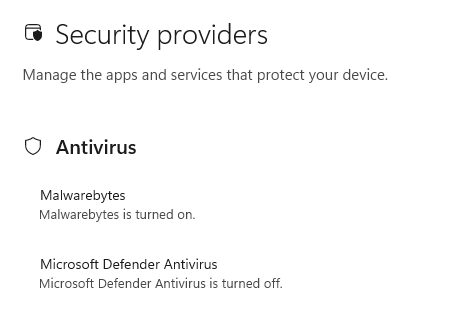
Based on the best public reporting available right now, ShieldBreak appears to require Microsoft Defender to be enabled in order to work. Public testing indicates that the exploit does not succeed when Defender is off or when another product is registered as the active antivirus provider.

You're safe if Defender is turned off

So, narrowly speaking, disabling Defender appears to stop this specific ShieldBreak chain from working. However, that is not a good safety recommendation for most people. Turning off your antivirus removes an important layer of protection and could leave your computer exposed to other attacks.

For home users, all that means:

  • Install Microsoft’s security updates as soon as they become available.
  • Be very careful with downloads, email attachments, cracked software, and “fix” tools from random websites.
  • Keep backups of important files somewhere not directly connected to the PC.
  • Use an up-to-date, real-time anti-malware solution to alert you about and remove threats from your computer.

CNET Editors' Choice Award 2026

“One of the best cybersecurity suites on the planet.” 

According to CNET. Read their review


  • ✇Malwarebytes
  • Kali365 phishing kit bypasses MFA and steals Microsoft logins
    When the Federal Bureau of Investigation (FBI) publishes a dedicated public service announcement about a new phishing kit, it’s worth paying attention to. The agency is now warning about “Kali365,” a phishing‑as‑a‑service (PhaaS) platform that helps even low‑skilled attackers hijack Microsoft 365 accounts by stealing access tokens instead of passwords. Although early reporting focuses on attacks against organizations, the underlying technique works just as easily against individual Microso
     

Kali365 phishing kit bypasses MFA and steals Microsoft logins

27 de Maio de 2026, 08:41

When the Federal Bureau of Investigation (FBI) publishes a dedicated public service announcement about a new phishing kit, it’s worth paying attention to.

The agency is now warning about “Kali365,” a phishing‑as‑a‑service (PhaaS) platform that helps even low‑skilled attackers hijack Microsoft 365 accounts by stealing access tokens instead of passwords.

Although early reporting focuses on attacks against organizations, the underlying technique works just as easily against individual Microsoft 365 users who are tricked into entering a short code on a real Microsoft website. In other words, this is not just a business or IT department problem. It could affect anyone with an Outlook, OneDrive, or Microsoft 365 subscription.

For cybercriminals using the kit, it offers three clear advantages:

  • It bypasses multi‑factor authentication (MFA) by stealing access tokens, so extra codes or apps no longer help once the token is compromised.
  • Kali365 provides ongoing access. The attackers can keep using Outlook, Teams, and OneDrive without repeatedly logging in, as long as the stolen refresh token remains valid.
  • Little technical skill needed. Cybercriminals can subscribe to Kali365 and immediately run token‑stealing campaigns at scale.

What does the attack look like?

Victims receive a phishing message that looks like it comes from a cloud service or collaboration tool, such as a document‑sharing notification or Teams invite. The message includes a short “device code” and instructions like: “Go to Microsoft’s verification page and enter this code to view the document.”


Scam or legit? Scam Guard knows.


Unlike many phishing emails, this one sends you to a real Microsoft URL used for device sign‑in flows. To the user, the page looks familiar and completely legitimate, which lowers suspicion.

Victims then see the standard Microsoft sign‑in and consent screens and may think they are simply completing a normal security check. They never see a fake page, never type their password into a suspicious form, and may even see their organization’s branding.

But what they don’t realize is that they have handed access to the attacker.

Once the victim approves the request, the attacker’s device receives OAuth access and refresh tokens tied to the victim’s Microsoft 365 account. These tokens are what Microsoft uses to “remember” that you have already logged in, and they can be reused to access Outlook, OneDrive, Teams, and other Microsoft services without entering a password again.

With valid refresh tokens, attackers can maintain long‑term access until the tokens are revoked or expire, often blending in with normal account activity.

That access can allow cybercriminals to:

  • Read Outlook emails, including password reset messages
  • Access files stored in OneDrive or SharePoint
  • Send phishing emails to coworkers, customers, friends, or family from the victim’s account

How to protect yourself

Once in Outlook, attackers can not only read your messages but also send convincing new ones from your address, using your identity to compromise additional accounts and contacts.

Some tips to steer clear of this one:

  • Never enter a code at a Microsoft login page just because an email or message tells you to. You should only do this when you initiated the sign‑in yourself on your own device.
  • Slow down and read the prompts. Rushing through login approvals without reading them carefully can be costly.
  • Be suspicious of unexpected document shares, Teams invites, or login requests, even if they use legitimate Microsoft pages.
  • Review which devices are logged in under your account at https://account.microsoft.com/devices/. If you see unfamiliar devices or sign‑ins, remove them, change your Microsoft account password, and review your security settings.

Pro tip: Malwarebytes Scam Guard can help you figure out if a message is a scam.


Let’s face it, an incognito window can only do so much. 
 
Breaches, dark web trading, credit fraud. Malwarebytes Identity Theft Protection monitors for all of it, alerts you fast, and comes with identity theft insurance. 

  • ✇Malwarebytes
  • Microsoft Defender vulnerabilities are being exploited in the wild
    Two Microsoft Defender vulnerabilities are being actively exploited in the wild. On May 20, 2026, the Cybersecurity and Infrastructure Security Agency (CISA) added a notable set of actively exploited vulnerabilities to its Known Exploited Vulnerabilities (KEV) catalog. The KEV catalog tracks vulnerabilities known to be exploited in the wild and sets patch deadlines for Federal Civilian Executive Branch (FCEB) agencies. Five of the added vulnerabilities are quite old by vulnerability standa
     

Microsoft Defender vulnerabilities are being exploited in the wild

21 de Maio de 2026, 14:36

Two Microsoft Defender vulnerabilities are being actively exploited in the wild.

On May 20, 2026, the Cybersecurity and Infrastructure Security Agency (CISA) added a notable set of actively exploited vulnerabilities to its Known Exploited Vulnerabilities (KEV) catalog. The KEV catalog tracks vulnerabilities known to be exploited in the wild and sets patch deadlines for Federal Civilian Executive Branch (FCEB) agencies.

Five of the added vulnerabilities are quite old by vulnerability standards. Patches were released in 2008, 2009, and 2010. But the Microsoft Defender vulnerabilities are from this year. Those two are:

  • CVE‑2026‑41091 (CVSS score 7.8 out of 10): a Microsoft Defender elevation of privilege vulnerability. A local attacker who already has some access to a machine can abuse Defender to gain SYSTEM‑level permissions, effectively giving them full control over Windows.
  • CVE‑2026‑45498 (CVSS score 4.0 out of 10): a Microsoft Defender denial‑of‑service vulnerability. Here, an attacker can interfere with Defender in a way that disrupts its normal operation. If attackers can crash or disable your antivirus engine on demand, they can create a safer environment for their malware to run undetected.

You should take patching these vulnerabilities seriously if:

  • You rely on Microsoft Defender as your primary endpoint protection
  • You manage Windows systems in a business, school, or local government environment
  • You have shared machines, terminal servers, or any environment where multiple users log on to the same system

As you’d expect from us, we don’t advise relying on Windows Defender alone. There are better options available, and they are not mutually exclusive.

How to patch

Security products are software, and software has bugs. When those bugs end up in a list of known exploited vulnerabilities, ignoring them is like leaving your front door open because “the alarm will catch anyone coming in.” 

Make sure Windows Update is enabled and set to receive updates for Microsoft products. Defender platform updates are often delivered alongside regular cumulative updates.

Also check that recent Microsoft Defender security intelligence and platform updates are installed.

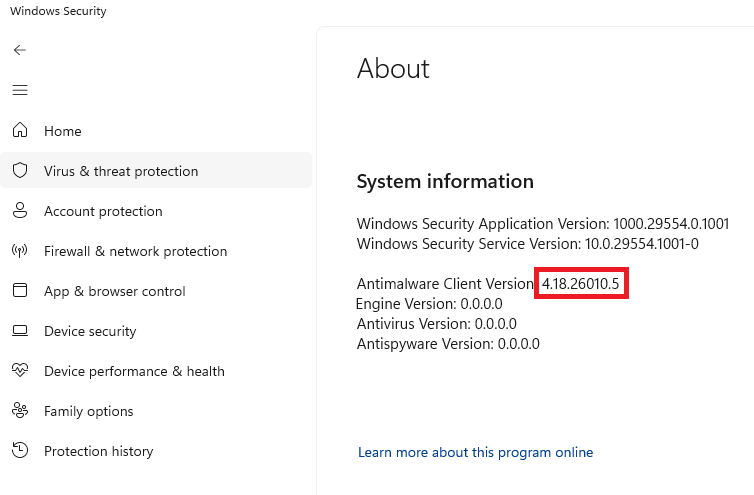
The first version of the Microsoft Defender Antimalware Platform with these vulnerabilities addressed is 4.18.26040.7.

You can usually find that version number in Windows Security:

  1. Open Start and search for Windows Security
  2. Go to Virus & threat protection
  3. Click Settings or the gear icon
  4. Open About
Windows Defender version number

Even with auto-update enabled, I didn’t receive this patch immediately. Defender platform updates can lag behind definitions or only appear when a cumulative Windows update lands. Microsoft typically releases updates for the Microsoft Defender Antimalware Platform once a month, or as needed to protect against new threats. 

So, I’ll have to wait. Good thing I’m protected.


We don’t just report on threats—we remove them

Cybersecurity risks should never spread beyond a headline. Keep threats off your devices by downloading Malwarebytes today.

  • ✇Malwarebytes
  • Fake malware-signing service Fox Tempest dismantled by Microsoft
    Microsoft says it dismantled a malware-signing-as-a-service (MSaaS) called Fox Tempest, which helped cybercriminals make malware appear legitimate. The service let customers submit malicious files to be digitally signed with short-lived Microsoft-issued certificates, making the malware look legitimate and more likely to bypass security checks. Fox Tempest’s service was built around a customer-facing signing workflow where cybercriminals could upload malicious binaries to a portal, have th
     

Fake malware-signing service Fox Tempest dismantled by Microsoft

20 de Maio de 2026, 12:33

Microsoft says it dismantled a malware-signing-as-a-service (MSaaS) called Fox Tempest, which helped cybercriminals make malware appear legitimate.

The service let customers submit malicious files to be digitally signed with short-lived Microsoft-issued certificates, making the malware look legitimate and more likely to bypass security checks.

Fox Tempest’s service was built around a customer-facing signing workflow where cybercriminals could upload malicious binaries to a portal, have them signed with certificates valid for only 72 hours, and then receive files that appeared to come from a trusted software source.

Microsoft explicitly says this approach allowed malware to evade security controls and bypass defenses that would otherwise flag suspicious unsigned code. Many security tools treat signed binaries as more trustworthy than unsigned ones, especially in environments that rely on allow-lists and publisher reputation. Fox Tempest abused that assumption by using fraudulently obtained certificates to make malware blend in as legitimate software, increasing the likelihood of execution and successful delivery.

A trusted-looking certificate can help malware get past initial scrutiny, especially when paired with social engineering, paid ads, SEO poisoning, or fake download pages. In this campaign, the signing layer helped malicious installers masquerade as products like AnyDesk, Teams, PuTTY, and Webex, which is exactly the kind of abuse that can slip through control frameworks built around reputation and trust.

The fraudulent certificates were used to spread ransomware and infostealers. The effects of these malware campaigns were broad, with attacks affecting healthcare, education, government, and financial services across multiple countries.

How to stay safe

Microsoft’s disclosure shows how cybercrime has evolved beyond “malware authors” into a service economy where one group specializes in producing trust and others monetize it.

For defenders, the strongest lesson is not to treat code signing as a standalone security control. 

For consumers:

  • Remember to only download software from the official vendor site, the Microsoft Store, or another source you already trust. Avoid download buttons on links sent via social media posts, direct messages or email.
  • Be skeptical of “sponsored” search results and advertisements for popular apps.
  • Use an up-to-date, real-time anti-malware solution that looks for malicious behavior rather than just signatures.
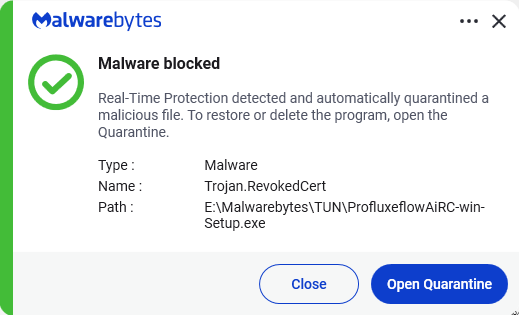
Malwarebytes detects Trojan.RevokedCert


We don’t just report on threats—we remove them

Cybersecurity risks should never spread beyond a headline. Keep threats off your devices by downloading Malwarebytes today.

❌
❌