❌

Visualização normal

Antes de ontemMalwarebytes
  • ✇Malwarebytes
  • AI worms could spread across your smart devices, Anthropic warns
    Your streaming box might not look like much of a computer. But connect enough inexpensive devices together, and they can run an AI model.Researchers at Anthropic demonstrated this by running a Google Gemma model across 15 off-brand Android TV boxes. They warn that small models could soon spread across vulnerable internet-of-things (IoT) devices, including smart ovens and TV boxes, stating:“Our experiments suggest that small AI models may be months away from being capable enough to self-replicate
     

AI worms could spread across your smart devices, Anthropic warns

14 de Outubro de 2026, 13:36

Your streaming box might not look like much of a computer. But connect enough inexpensive devices together, and they can run an AI model.

Researchers at Anthropic demonstrated this by running a Google Gemma model across 15 off-brand Android TV boxes. They warn that small models could soon spread across vulnerable internet-of-things (IoT) devices, including smart ovens and TV boxes, stating:

“Our experiments suggest that small AI models may be months away from being capable enough to self-replicate on commercial internet-of-things (IoT) devices, like smart ovens and off-brand Android TV boxes.”

In this scenario, AI isn’t simply helping an attacker write malicious code. It becomes part of the software carrying out the replication.

Anthropic breaks that process into four stages:

  1. Find another device.
  2. Gain the ability to execute code on it.
  3. Set up the software needed to run an AI model.
  4. Continue spreading from the new host.

The researchers tested whether AI agents could complete this sequence. They did not demonstrate a small model spreading and running independently on compromised household devices.

The tests used Android emulators with unauthenticated debugging access, making it much easier for the agents to gain access than it would be on properly secured devices. Large file transfers and sustained communication between devices could make real-world replication easier to detect, while limited computing power could slow it. Crucially, the experiments did not demonstrate a model that was both capable enough to complete the replication process and small enough to run on the consumer hardware being targeted.

Anthropic projects that smaller models could reach the necessary capability by the end of 2026 if improvement continues at its historical rate.

Varun Chandrasekaran, an assistant professor at the University of Illinois, told AFP that the findings were consistent with related research but cautioned that Anthropic’s work had not been independently verified. He identified people using AI to improve attacks as the bigger current threat, rather than AI systems going rogue.

Smart-device botnets are already a problem.

Criminals hijacking connected devices is nothing new. Mirai and its descendants have recruited routers, security cameras, and digital video recorders into botnets used to launch distributed denial-of-service (DDoS) attacks, overwhelming services with traffic. BADBOX 2.0 illustrates another form of abuse: compromised consumer devices used for activities including residential proxy services, which route other people’s traffic through victims’ internet connections.

Neither demonstrates autonomous AI replication, but both show that connected devices can become infrastructure for criminals.

What you can do now

The practical response is to reduce the opportunities for any attacker to misuse your connected devices:

  • Keep operating systems, software, and firmware up to date to reduce exposure to known vulnerabilities.
  • Buy from reputable vendors that provide ongoing firmware and security updates. A bargain device is less attractive if you cannot trust its software or obtain security fixes.
  • Avoid unofficial app stores promising free streaming content. The FBI specifically flags these marketplaces in its BADBOX 2.0 guidance.
  • Don’t disable protections to make an app work. Requests to turn off Google Play Protect are a warning sign, as are Android devices without Play Protect certification.
  • If you notice something suspicious, disconnect the device from your network while you investigate.
  • Put smart devices that are unable to run security software on a separate network isolated from your computers and phones, such as a guest network.

Scammers know more about you than you think. 

Malwarebytes Mobile Security protects you from phishing, scam texts, malicious sites, and more. With real-time AI-powered Scam Guard built right in. 

.wp-block-kadence-advancedbtn.kb-btns97520_6de029-2f{gap:var(--global-kb-gap-xs, 0.5rem );justify-content:flex-start;align-items:center;}.kt-btns97520_6de029-2f .kt-button{font-weight:normal;font-style:normal;}.kt-btns97520_6de029-2f .kt-btn-wrap-0{margin-right:5px;}.wp-block-kadence-advancedbtn.kt-btns97520_6de029-2f .kt-btn-wrap-0 .kt-button{color:#555555;border-color:#555555;}.wp-block-kadence-advancedbtn.kt-btns97520_6de029-2f .kt-btn-wrap-0 .kt-button:hover, .wp-block-kadence-advancedbtn.kt-btns97520_6de029-2f .kt-btn-wrap-0 .kt-button:focus{color:#ffffff;border-color:#444444;}.wp-block-kadence-advancedbtn.kt-btns97520_6de029-2f .kt-btn-wrap-0 .kt-button::before{display:none;}.wp-block-kadence-advancedbtn.kt-btns97520_6de029-2f .kt-btn-wrap-0 .kt-button:hover, .wp-block-kadence-advancedbtn.kt-btns97520_6de029-2f .kt-btn-wrap-0 .kt-button:focus{background:#444444;}
ul.menu .wp-block-kadence-advancedbtn .kb-btn97520_074a67-a8.kb-button{width:initial;}.wp-block-kadence-advancedbtn .kb-btn97520_074a67-a8.kb-button{color:var(--color-neutral-10);background:var(--color-brand-blue-60);border-top-left-radius:40px;border-top-right-radius:40px;border-bottom-right-radius:40px;border-bottom-left-radius:40px;padding:var(--kb-btn-padding);margin:var(--kb-btn-margin);box-shadow:1px 1px 2px 0px rgba(0, 0, 0, 0.2);}.wp-block-kadence-advancedbtn .kb-btn97520_074a67-a8.kb-button:hover, .wp-block-kadence-advancedbtn .kb-btn97520_074a67-a8.kb-button:focus{box-shadow:0px 4px 0px 0px var(--color-brand-blue-90);}Try it now
  • ✇Malwarebytes
  • Hidden prompt turns Microsoft Copilot into an AI worm
    A security researcher has demonstrated how Microsoft Copilot for Word can be tricked into spreading a self‑propagating prompt‑injection “AI worm.” The attack silently alters documents and embeds its own hidden instructions into newly created files, allowing it to spread through normal document-sharing workflows without macros or traditional malware. The technique allows an attacker to hide a JSON‑formatted prompt as white text on a white background inside a Word document. When someone asks C
     

Hidden prompt turns Microsoft Copilot into an AI worm

30 de Julho de 2026, 09:58

A security researcher has demonstrated how Microsoft Copilot for Word can be tricked into spreading a self‑propagating prompt‑injection “AI worm.” The attack silently alters documents and embeds its own hidden instructions into newly created files, allowing it to spread through normal document-sharing workflows without macros or traditional malware.

The technique allows an attacker to hide a JSON‑formatted prompt as white text on a white background inside a Word document. When someone asks Copilot for Word to draft or edit content based on that document, Copilot strips away the formatting, reads the hidden text, and treats the embedded instructions as part of the user’s request.

Copilot then modifies the active document and appends the full malicious prompt as hidden white text. That new document becomes a new carrier. Anyone who later uses it as source material for Copilot triggers the same behavior, allowing the prompt injection to spread to more documents. Because the documents are created and edited by legitimate users, the attack can be difficult to trace.

The researcher could still reproduce the full worm chain even after Microsoft rolled out multiple mitigations, including upgrades to newer GPT‑5.5 and 5.6 models.

At the time of writing, there is no complete mitigation for this broader class of attacks across comparable large language model (LLM)‑based products. It’s characterized as an architectural weakness of current LLM systems: attacker‑controlled content shares the same context window as trusted instructions. Attacks that exploit this behavior are known as prompt injection attacks and may never be fixed.

How to stay safe

Treat documents from outside your organization as untrusted, especially if you plan to use them with Copilot for Word.

Review any attached document before using it as Copilot source material, and carefully verify Copilot‑generated/edited documents before sharing or reusing them.

If you don’t use Copilot, you can disable it.

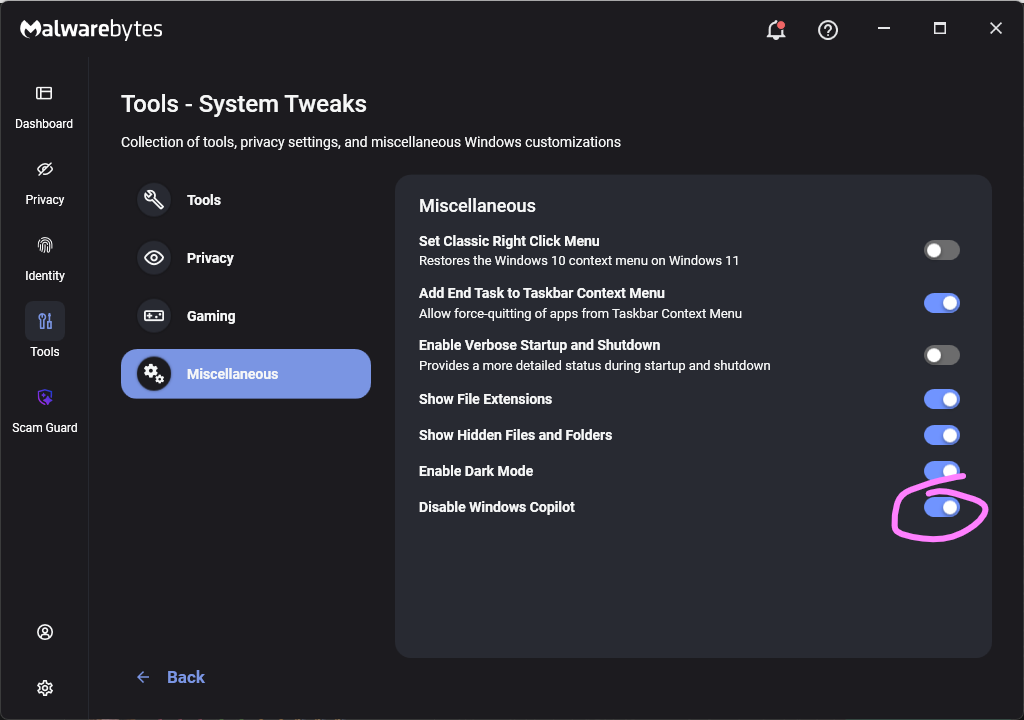
Malwarebytes users can turn off Copilot under Tools > System Tweaks > Miscellaneous.

Malwarebytes setting to disable Copilot

Or in Word itself:

For individual users who don’t want Copilot in Word:

  • Open Word, go to File > Options > Copilot and clear the Enable Copilot checkbox, then restart Word.
    uncheck Enable Copilot in Word
  • In some versions of Word, the setting appears under File > Options > General in a Copilot section. In both cases, the key is unchecking the “Enable Copilot” setting.

You can also remove the Copilot icon from the ribbon by right‑clicking the ribbon, open the customization dialog, locate the Copilot/Assistance button, and removing it.

Alternatively, you can limit Copilot’s role by following these instructions:

  • In Word, go to File > Account > Account Privacy > Manage Settings, and uncheck Turn on optional connected experiences. This reduces certain cloud‑powered AI features, including Copilot‑related functions that rely on those services.
  • In the Microsoft 365 Admin Center, under Copilot > Settings, set Pin Microsoft 365 Copilot Chat to Do not pin Copilot chat in Microsoft 365 apps so the chat pane doesn’t appear by default in apps like Word.

This doesn’t remove Copilot entirely or stop these attacks, but it does reduce its visibility and limits some of its cloud‑assisted functionality.


From reporting threats to removing them.

Cybersecurity risks should never spread beyond a headline. Keep threats off your devices by downloading Malwarebytes today.

❌
❌