Introduction
Incidents in virtual environments can begin with a software vulnerability, human error, a configuration weakness, or several of these factors at once. The investigation is rarely limited to the workload. Hypervisors, container runtimes, management consoles, monitoring platforms, identity systems, virtual networks, datastores, backups, and automation accounts all influence what an attacker can reach.
Kaspersky GERT recently investigated two more ransomware cases on ESXi and Proxmox e
Incidents in virtual environments can begin with a software vulnerability, human error, a configuration weakness, or several of these factors at once. The investigation is rarely limited to the workload. Hypervisors, container runtimes, management consoles, monitoring platforms, identity systems, virtual networks, datastores, backups, and automation accounts all influence what an attacker can reach.
Kaspersky GERT recently investigated two more ransomware cases on ESXi and Proxmox environments in which weak access controls, insufficient network separation, exposed administrative services, and poor management of privileged credentials contributed to the impact. A monitoring system that could reach the virtualization layer also exposed a reusable root credential. Once the attacker controlled that route, ordinary administrative access was enough to affect several hosts. No VM escape was required.
The incidents show why patching and secure configuration must be managed together. A fully patched hypervisor can still be compromised through a shared password, an overprivileged monitoring account, an open SSH path, or an administrator interface reachable from a general server network. NIST guidance places secure configuration baselines, restricted administrative access, current patches, and monitoring across all layers within the same set of sound security practices.
In this article, we’re going to describe both incidents with additional focus on common unsafe practices that were exploited, leading to compromise, as well as remediation tactics. We’ll also discuss the broader scope of threats targeting virtual environments for a better understanding of possible protection strategies.
The connected system defenders must protect
A business virtual environment is not just Hyper-V, VMware, or Docker but rather a connected stack. Management consoles, orchestration tools, monitoring platforms, and automation accounts sit above hypervisors and container engines. Registries, image stores, virtual switches, datastores, and backup systems connect the layers. Applications and business services run at the bottom, while much of the administrative power sits near the top.
The important boundaries extend beyond guest to host. They include workload to management plane, monitoring system to hypervisor, registry to deployment, administrator workstation to console, management plane to storage, and one virtual network segment to another. An attacker only needs one usable route. The possibility of compromise may lie in one stolen or insecurely placed administrator credential rather than in a complex escape exploit. In the GERT case, the compromise route passed through the monitoring platform and included a valid virtualization platform credential.
Case #1: From network monitoring to ESXi encryption
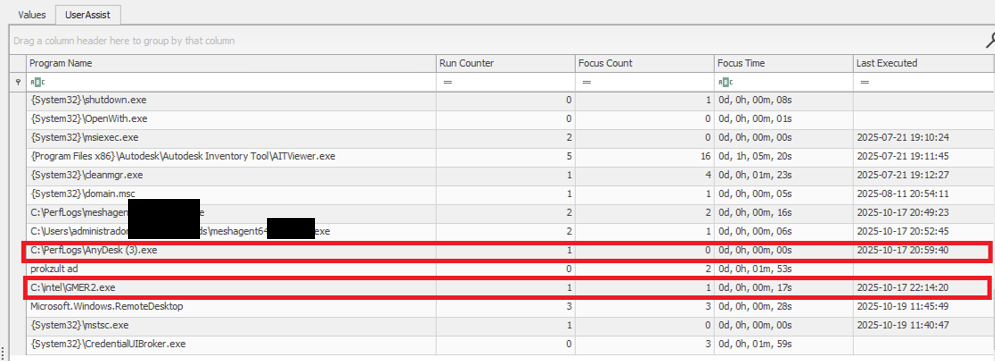
The investigation began with evidence of BlackNevas ransomware activity on a Windows system in a virtualized domain controller segment. UserAssist artifacts recorded execution of the AnyDesk RMM tool and GMER binaries. The environment also used PRTG Network Monitor to monitor its virtual infrastructure.
UserAssist artifacts
The available evidence showed that the PRTG deployment had broad access to the ESXi hosts and that the same root password was reused across several nodes. After obtaining access to the monitoring environment, the attacker used the ESXi credential to connect over SSH to the hosts that shared the same password. This design joined monitoring, credential storage, and direct administration into one attack path.
PRTG supports storing VMware credentials at the device or inherited group level. That feature is operationally useful, but a monitoring server becomes privileged infrastructure when it holds credentials that can administer the systems it observes. The security question is therefore not whether monitoring needs access, but whether the identity, privileges, storage method, and permitted network path are limited to the monitoring task.
The threat actor gained root access to the ESXi environment and used the esxcli command to bypass the system restriction by disabling the execInstalledOnly policy to execute the encryption binary and also perform anti-forensic log deletion. Let’s look closely at the timeline of the initial host compromise.
ESXi (192.168.*.*) timeline
2025-10-18 Connection attempts from IP address 192.168.*.*.
2025-10-19 During an SSH session by root from IP 192.168.*.*, the file esx is uploaded to the system.
2025-10-19 User "root" attempts to execute the binary esx with the error "Execution of non-installed file prevented".
	chmod 777 esx
	./esx /log
2025-10-19 User "root" deactivates the execInstalledOnly option.
	esxcli system settings advanced set -o
	/User/execInstalledOnly -i 0
2025-10-19 User "root" executes the malware esx.
2025-10-19 New connection attempts from IP 192.168.*.*.
Now, at the same time, the following activities ensued on a different host with the same password for the root user:
ESXi (172.16.*.*) timeline
2025-10-19 SSH connection by user "root" from IP 172.16.*.*.
2025-10-19 User "root" executes the malware esx and clears the logs.
	chmod a+x esx && chmod 777 esx
	./esx /selftest
	nohup ./esx /p /vmfs/ /depth 5 /log /wipe
	./esx /depth 5 /log /wipe
Case #2: Credential notes impacting the whole Proxmox environment
GERT responded to a ransomware incident by The Gentlemen group, in which the threat actor gained access to Proxmox using information collected during the dwell time between initial access and visible impact. On a compromised system administrator workstation, the actor discovered administrative credentials and access details stored in notes in plain text. These records provided the information needed to log in to Proxmox using the root account.
The actor then activated the VNC web socket through the compromised root account, gaining extensive control over the Proxmox environment. This access was subsequently used to download and execute ransomware within the cluster, which resulted in the encryption of the entire virtual environment. Below are the log records showing the root account being used to access other hosts via a VNC web socket.
This incident is a clear example of the risks of storing privileged credentials in unsecured notes or other easily accessible files. Once the administrator workstation was compromised, the saved credentials allowed the actor to move from a single endpoint into the virtualization management layer. Because the credentials belonged to a highly privileged root account, one poor credential handling practice significantly increased the scope and impact of the attack. Privileged credentials should instead be stored in an approved password manager or privileged access management system, protected with multifactor authentication and rotated immediately if an administrator workstation is suspected of being compromised.
Why the misconfiguration caused broad impact
Both cases exhibited unsafe misconfiguration practices whose exploitation led to a bigger impact on the host system. Next, we will break down each misconfiguration to see how it enabled further compromise and what should be done to avoid it.
Monitoring inherited excessive privilege
In Case 1, the monitoring platform could do more than collect health and performance data. It held or could use credentials with enough privilege to reach ESXi directly. A compromise of the monitoring system therefore became a compromise of the management plane. Monitoring identities should be dedicated to the task and given only the permissions required by the deployed sensors.
Credential reuse
Password reuse converted one recovered secret into farm-wide access. System administration should use named identities through the central management plane. Each host should have unique credentials and proper password storage hygiene. Password strength alone does not limit the impact of theft, but where the credential can be used and where it is stored do.
Direct root access bypassed central control
Direct SSH access allowed the actor to authenticate as root, upload a binary, and change a security setting without first passing through vCenter role controls. Broadcom, the parent company of VMware, recommends managing vSphere through vCenter, disabling SSH during normal operation, and using Lockdown Mode where suitable. Required service accounts should be explicit exceptions rather than members of a broad administrator group.
Lack of enhanced security settings
The initial execution attempt was blocked by execInstalledOnly, but the attacker had enough privilege to disable this policy. Broadcom documents enforcement options that combine execInstalledOnly with UEFI Secure Boot and TPM-backed configuration protection. These controls must be enabled, tested, and monitored for change. A setting that can be silently disabled by the same credential used for daily administration provides limited resistance after account compromise.
Unsafe credential storage
Case 2 demonstrated the possibility of compromise lying in privileged credential exposure. The mitigation strategy involves not only securing the administrative credential storage but also general hardening practices of secret handling, such as privilege management and regular access audits.
How to close this attack path
In this section, we share remediation advice on how to mitigate such attacks, and detect and prevent them from going further. We recommend the following actions:
Separate monitoring from administration. Create a dedicated monitoring identity for each platform and restrict it to the smallest set of objects and actions that the monitoring sensors require. Do not use ESXi root or another emergency account for routine polling. Prevent monitoring servers from starting interactive administrator sessions unless a separately approved support workflow requires it. The same principle applies beyond VMware.
Replace stored root passwords. Locate every copy of hypervisor, management, storage, and backup credentials in monitoring tools, scripts, scheduled tasks, connection managers, and service configurations. Replace static passwords with vault retrieval, brokered identities, or limited API tokens where the platform supports them. Record every retrieval and rotate the secret after emergency use or compromise.
Restrict direct host access. Route normal ESXi administration through vCenter and enable an appropriate Lockdown Mode after testing monitoring, backup, and recovery dependencies. Keep ESXi Shell and SSH stopped by default. When support work requires SSH, enable it for a defined period, restrict the source, and alert on service activation, root login, and changes to the exception list of users who are allowed to connect via SSH.
Use a specialized security solution. In our portfolio, Kaspersky Cloud Workload Security (KCWS) is perfectly suited to address virtual environment risks, offering a powerful combination of two products: Kaspersky Hybrid Cloud Security (KHCS) and Kaspersky Container Security (KCS). Kaspersky Hybrid Cloud Security is specifically built to secure virtualized infrastructures, private data centers, and hybrid clouds. A patented Light Agent architecture minimizes resource impact without compromising performance, while comprehensive infrastructure visualization through a unified console gives administrators complete visibility and control over the entire hybrid network. Kaspersky Container Security covers every stage of a containerized app’s lifecycle, from development to operation. Among other capabilities, the solution allows for detecting misconfigurations using a dedicated scanner for images, file systems, and repositories that contain IaC files (such as Terraform, CloudFormation, Azure ARM templates, Helm charts, and Dockerfiles).
Treat configuration changes as security events. Alert when execInstalledOnly, Secure Boot enforcement, Lockdown Mode, SSH, local accounts, exception users, firewall rules, or remote logging settings change. Baseline the expected state and test whether the security team can detect an unauthorized change. A secure configuration set once does not mean that the control remains active on the host.
Isolate the management network. Place hypervisor, monitoring, backup, storage, and cluster administration on restricted management networks. Permit only the exact source and destination services required. Administrative workstations should enter through hardened jump hosts with named identities and multifactor authentication.
Protect logs, backups, and recovery. Forward ESXi, vCenter, Proxmox monitoring, identity, and network logs to protected storage that a compromised administrator cannot erase. Backup platforms should use separate identities, restricted management paths, and recovery copies outside ordinary administrative reach.
Configuration checks for monitored virtualization
Below are recommended checks to run when enabling virtualization monitoring. The safest state depends on the platform and monitoring method, but each control should be tested.
Control area
Safer state
Verification
Monitoring identity
Dedicated service account or token with only required read and polling rights
Review assigned roles and test every sensor without root or global administrator access
Credential storage
No recoverable host root password on a monitoring or general-purpose server
Review tool configurations, scripts, scheduled tasks, and connection stores for embedded credentials, access tokens, or other secrets
Network path
Monitoring reaches only required polling services while administration uses a jump host
Test management ports from monitoring server, user segments and untrusted network segments
Direct host access
Lockdown Mode where suitable with SSH and ESXi Shell stopped by default
Attempt direct client API and SSH access to host using a routine account
Configuration integrity
Secure Boot and execInstalledOnly enforcement enabled where supported and tested
Change a test setting through the approved process and confirm an alert is generated
Evidence
Host, management, identity, monitoring, firewall, and PAM logs stored remotely
Generate successful and failed logins and verify source, account, host, time, and action
The wider attack surface
Closing the monitoring and credential routes does not secure the environment by itself. Virtualization also relies on isolation boundaries, trusted images, management APIs, virtual networks, storage, and backups. Each layer requires a different control and leaves evidence in a different place.
VM and container escapes
In a VM escape, code inside a guest reaches past the VM boundary and affects the host or another guest. The weakness may be in a virtual device, an integration feature, a hypercall interface, or another component that translates guest requests for the host. If the escape works, control of one VM may lead to control of the physical server and every workload on it. VMware CVE-2025-22224 showed this risk: an attacker with administrator rights inside a VM could execute code as the VMX process on the host, and Broadcom reported exploitation in the wild.
A container escape can reach a similar result, but the starting point is different. Linux containers share the host kernel, so their isolation model differs from that of a VM. Namespaces limit what processes can see, cgroups control resource use, and capabilities split root privileges into smaller parts. A kernel or runtime bug can break this isolation. Copy Fail (CVE-2026-31431) is a good example of a kernel flaw. Code already running in a container could use a Linux AF_ALG crypto socket to change pages in the shared Linux kernel page cache. Because the host and other containers may read the same cached pages, the effect did not have to stay inside one container. The fix is a kernel update; Docker Engine 29.4.3 also tightened its default security profiles to reduce exposure on hosts that had not yet been patched.
Unsafe settings can also break the boundary. Privileged mode, excessive capabilities, writable host mounts, or access to the Docker socket may remove isolation without any software exploit. For instance, runc CVE-2024-21626 involved leaked file descriptors that could expose the host filesystem to a malicious image or container process.
This difference changes the investigation. A VM can often be treated like a separate computer with its own kernel, memory, and disk. A container is a group of host processes placed inside namespaces. If investigators collect only the container filesystem, they may leave the most useful process, socket, and control-plane evidence on the host.
Images and templates
A compromised golden VM image or container base image can spread through normal automation. Common weaknesses include unofficial public images, mutable tags, overprivileged build tokens, recoverable secrets in older layers, and stale templates that restore vulnerable software or forgotten accounts. Scanning might help, but it does not establish who built the artifact or whether the exact image tested and approved was the one ultimately deployed to production. Use controlled builders, provenance records, signature checks, and planned rebuilds from trusted sources.
Management tools and APIs
A stolen vCenter identity, exposed Docker API, overpowered Portainer role, or compromised backup console may give an attacker an easier route than an escape exploit. Portainer advisory GHSA-7fw3-x4r2-g7wc showed how a proxy validated one bind-mount representation but missed an equivalent API form, allowing an authenticated non-administrator with container creation privileges to reach host paths. The runtime performed a valid request after authorization had already failed in the management layer.
Administrative file-copy operations also deserve attention. Docker fixed archive and mount-handling flaws in CVE-2026-41567, CVE-2026-41568, and CVE-2026-42306. These cases required particular conditions and operator or API activity. They are a reminder to patch the daemon and record who initiated copy operations, which container was involved, the source and destination paths, and the result.
Virtual networks, storage, and backups
East-west traffic between virtual workloads may stay inside one host and bypass a physical sensor. Management, migration, storage, and workload traffic should use separate zones with filtering between them. Snapshot and memory files may contain credentials, while weak datastore permissions can expose whole virtual disks. Backup systems need broad access to recover services, which also makes them valuable to an attacker who wants to delete recovery points or reach several hosts.
Attack surface examples by layer
To sum up, the described attack vectors might be mitigated as follows:
Attack surface
Initial access
Possible impact
Primary control
Credentials and configuration
Password recovered from monitoring or an overprivileged account
Direct control of several hypervisor nodes
Unique vaulted credentials, segmented access, and configuration monitoring
VM escape
Administrative access or code execution privileges inside a guest plus a hypervisor flaw
Host process or neighboring workload compromise
Patch the hypervisor and reduce risky virtual devices and guest privilege
Malicious container affecting kernel or runtime
Code in a container or a malicious image
Host filesystem, kernel, or shared cache impact
Patch kernel and runtime, and remove privileged settings
Images and templates
Compromised build input registry or golden image
Repeated deployment of the compromise
Immutable digests, controlled builds, provenance, and verification
Management API
Stolen identity exposing endpoint or authorization gap
Fleet-wide administrative actions
MFA, least privilege, network restrictions, and complete API validation
Networks, storage, and backups
Flat network or broad datastore and access through backups
Lateral movement, data theft, encryption, and recovery loss
Segmentation, least privilege, protected backups, and traffic monitoring
Conclusion
GERT cases that we presented in this article did not require an attacker to break the VM boundary. The attack path was created by an overprivileged monitoring relationship, an insecure password storage approach, a recoverable and reused root credential, broad management-network reachability, and direct SSH administration. Each element was legitimate on its own, but together they allowed one compromise to reach virtualization hosts and their workloads.
Misconfiguration should therefore receive the same operational attention as vulnerability management. Teams need to know where privileged credentials exist, which systems can use them, which network paths make them effective, and which logs will show their use. Escape flaws, unsafe images, API weaknesses, virtual network exposure, and attacks on storage or backups remain serious, but closing the known administrative route should come first.
Executive summary
In April 2026, we at Kaspersky’s Global Emergency Response Team (GERT) responded to a security incident at a manufacturing organization in the Middle East. The threat actor obtained domain admin-equivalent control of the organization’s Active Directory environment and authored a malicious Group Policy Object (GPO) named PAYLOAD, linking it at the domain root. Through that single object, the actor delivered ransom notes, hijacked the desktop wallpaper and lock screen, enforced a
In April 2026, we at Kaspersky’s Global Emergency Response Team (GERT) responded to a security incident at a manufacturing organization in the Middle East. The threat actor obtained domain admin-equivalent control of the organization’s Active Directory environment and authored a malicious Group Policy Object (GPO) named PAYLOAD, linking it at the domain root. Through that single object, the actor delivered ransom notes, hijacked the desktop wallpaper and lock screen, enforced a logon banner, and disabled the local administrator account across every domain-joined Windows workstation — all without dropping a ransomware binary or encrypting any data. The only ransomware we found in this incident was PAYLOAD sample targeting ESXi on Linux servers. Besides that, data exfiltration was observed originating from the file servers and several additional systems, and was later published on the dark web.
Living-off-the-land abuse of trusted AD infrastructure. Group Policy is a signed, allowlisted, SYSTEM-privileged distribution channel that the majority of endpoint detection and response tools is designed not to inspect. By delivering impact through GPO rather than through malware, the actor sidestepped the entire file- and process-based detection stack.
Encryptionless extortion. Industry telemetry shows extortion-only incidents grow significantly year-on-year. PAYLOAD fits this model; the leverage is operational disruption and the threat of escalation rather than cryptographic denial of data.
We confirmed that no files were encrypted on Windows machines, no malicious binaries were resident on disk, no endpoint persistence was established, and no malicious processes were running at the time of analysis. The entire attack lived inside Active Directory itself. The defensive implication is stark: an organization whose detection strategy depends on catching a ransomware executable would have seen nothing until the first endpoint rebooted and the ransom wallpaper appeared.
In this article, we will describe the GPO attack chain and provide operational advice on how to detect such threats, including detailed remediation recommendations.
Group Policy as an attack surface
Attacks through group policies are nothing new. They can inflict significant, domain-wide damage with multiple malicious capabilities. A Group Policy Object (GPO) is essentially a combination of a Group Policy Container (GPC) in Active Directory and a Group Policy Template (GPT) in SYSVOL. The Group Policy scope depends on whether the GPC is linked to the directory tree at the domain, site, or organization unit (OU) level. A link at the domain root means the policy applies to every computer and user object beneath it. Thus, a GPO compromised at the domain root can affect all in-scope domain users and computers, potentially granting an attacker complete control over the corporate network. What makes GPO abuse even more dangerous is that group policies are processed in a trusted, high-privilege environment, ensuring persistence because endpoint cleanup is not enough to remove them.
We have already discussed GPO architecture and ways it can be compromised in greater detail in an earlier blog post. Other public threat intelligence has also repeatedly documented this technique in ransomware operations. Microsoft observed Ryuk operators distributing ransomware through Group Policy, SYSVOL startup items, and PsExec. LockBit affiliates have been documented modifying SYSVOL Group Policy files, including ScheduledTasks.xml, to support ransomware execution and propagation. BlackCat/ALPHV operators have also abused GPOs to create scheduled tasks and deploy ransomware.
Another notable example of GPO abuse is PAYLOAD ransomware, which weaponizes GPO Preferences and policy settings for pure impact rather than as a launcher for an encryptor. Let’s take a closer look at this attack, which is detailed further below.
Attack timeline
During the April 2026 investigation, we managed to reconstruct the attack timeline as outlined below:
Date
Event
11 April
Initial access. Threat actor authenticates to the FortiGate SSL VPN using a valid but compromised domain credential.
13 April
GPO authored. Malicious GPO, PAYLOAD ({C897F2C7-C2AC-4E6F-BF48-58036FF29E79}) created and linked at the domain root, configuring ransom notes, wallpaper, lock screen, logon banner, and administrator account disablement.
13 April
SYSVOL staging. The payload.jpg and hello.txt files written to \\DC.THECOMPANY.local\sysvol\THECOMPANY.local\.
13 April
Second GPO. GPO named win Firewall Off ({22099AD2-E062-4F56-B574-5099BBA4E7A6}) linked at the domain root, disabling Windows Firewall on all profiles.
13 April
Dormancy. GPO cached on endpoints but computer configuration not yet applied — no endpoint had rebooted since the policy update.
13 April
Data exfiltration. Data exfiltration was observed originating from the file servers and several additional systems.
14 April
Detonation. Most of the endpoints begin rebooting; computer configuration policies apply. Ransom wallpaper, logon banner, and notes appear. Operational disruption begins.
15 April
Response. Kaspersky GERT engaged. Forensic triage of affected workstations and the domain controller initiated.
16 April
Assessment. GERT confirms no file encryption, no resident malware, no endpoint persistence.
Next, we will discuss each of these stages in more detail and share the findings from our incident response activities.
Incident overview
Initial access
The entry vector was a compromised valid account (MITRE ATT&CK T1078) used to authenticate through the organization’s FortiGate SSL VPN — an external remote service (T1133). Insufficient logging on the FortiGate appliance prevented us from reconstructing how the credential was originally compromised.
Three hypotheses were considered plausible in the context of the attack, in no particular order:
Password spraying or credential stuffing against the SSL VPN portal.
Phishing-led credential harvesting.
Purchase of pre-compromised credentials from an initial access broker (IAB).
Once on the internal network, the actor operated with the compromised security principal’s privileges. Because the account was able to create and link a GPO at the domain root, it held either domain admin privileges or a delegated equivalent (e.g., membership of Group Policy Creator Owners combined with link rights on the domain object).
FortiGate SSL VPN authentication logs and ESXi/virtualization privilege escalation logs were insufficient to reconstruct the lateral movement and privilege escalation chain between initial VPN access and the GPO write privilege level. The most common real-world routes to GPO control — DCSync, Kerberoasting of privileged service accounts, and Pass-the-Hash/Pass-the-Ticket — could not be confirmed or ruled out.
Execution
Rather than deploying an encryptor, the actor abused the victim’s Active Directory policy infrastructure, resulting in malicious GPOs being configured and linked at the domain root to deliver the observed impact across domain-joined systems. The two GPOs below constitute the entire offensive toolkit observed.
The PAYLOAD GPO
We performed a Resultant Set of Policy (RSOP) analysis, which helped us list all policy settings on the affected workstations. From these results, we reconstructed the following changes delivered by PAYLOAD:
Drop SYSVOL\hello.txt to the desktop and root directories C:\ and D:\ as a read-only README-payload.txt by tampering with the “Group Policy Files” client-side extension (CSE).
Modify the HKLM\SOFTWARE\Microsoft\Windows\CurrentVersion\Policies\System\ registry key, changing the legalnoticecaption value to "Welcome to Payload!" and the legalnoticetext to the ransom note text through the “Group Policy Registry” CSE.
Set payload.jpg located in the targeted domain controller’s SYSVOL as the lock screen image by altering the personalization policy, and as the wallpaper by altering the desktop policy at the user level.
Revoke administrator rights for the administrator account (locking the account) by editing the Security Settings CSE in the GptTmpl.inf file.
Settings changed by PAYLOAD GPO
This activity was enabled entirely through a legitimate group policy mechanism, meaning there is no malware code for security solutions to look for because the malicious logic is contained within the policy configuration.
The win Firewall Off GPO
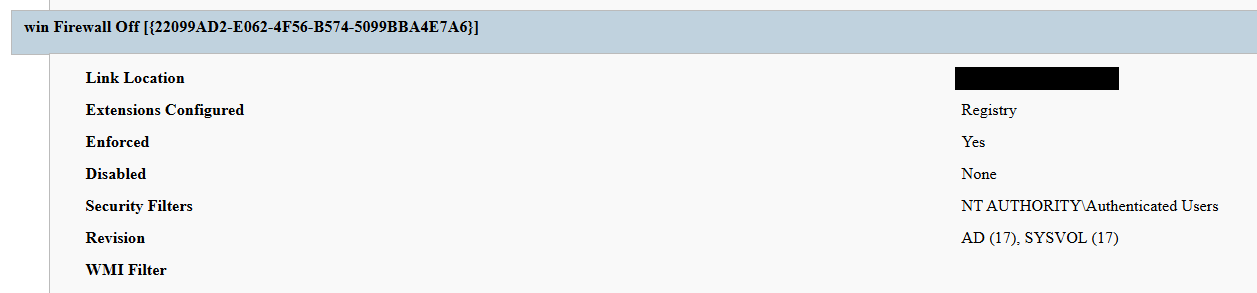
A second domain-root-linked GPO, named “win Firewall Off”, disabled Windows Firewall across the domain, private and public profiles on all endpoints (T1562.004). Deployed independently of PAYLOAD, this object degraded host defenses and ensured the actor retained unimpeded network reach to endpoints for any follow-on activity.
Settings changed by win Firewall Off GPO
The one-day delay detonation
The most forensically instructive detail is the one-day gap between GPO creation (13 April) and visible impact (14 April). Analysis of Master File Table (MFT) timestamps and the Group Policy History registry key confirmed the policy was written to SYSVOL and cached on endpoints on 13 April. However, computer configuration settings (wallpaper and lock screen machine policy, security settings, firewall disabling) only apply upon reboot or policy refresh — and no endpoint had rebooted in the interim. The attack therefore remained dormant in the GPO cache for one day before detonating en masse when machines were restarted in accordance with standard procedures.
We have to point out here that this delayed policy application is characteristic of GPO-based operations and has two potential consequences for defenders. Firstly, it may grant the actor a quiet window for exfiltration, persistence, or further staging between weaponization and impact. Secondly, it can be used to sever the temporal link between the cause (a GPO-creation event in the directory log) and the effect (mass user-visible disruption occurring at a later time), complicating timeline reconstruction unless directory service auditing is in place.
Forensic findings
Initial incident response engagement revealed a number of findings associated with the attack that we share below.
No file encryption
A full review of the MFT on affected workstations found no files bearing a .payload extension characteristic to PAYLOAD ransomware and no evidence of bulk renaming or encryption I/O patterns. The attackers’ objectives were operational disruption and extortion via visual impact and access denial.
No endpoint persistence
All standard persistence locations were clean:
Scheduled tasks — no malicious tasks
Run/RunOnce keys — clean
Startup folders (user and system) — clean
Services — no malicious service installed
WMI event subscriptions — none
Boot sector/MBR — unmodified
The attack’s persistence mechanism is the GPO link itself on the domain controller, with no endpoint-resident component.
No active malicious processes
Live process and memory analysis revealed no injected threads, process hollowing or anomalous outbound connections.
Registry timeline analysis
Group Policy History, Shadow and State registry keys on the workstation recorded the application of PAYLOAD on 13 April:
HKLM\…\Group Policy\History\{35378EAC-683F-11D2-A89A-00C04FBBCFA2}\1
HKLM\…\Group Policy\Shadow\{827D319E-6EAC-11D2-A4EA-00C04F79F83A}\0
HKLM\…\Group Policy\State\Machine\GPO-List\7
HKCU\…\Group Policy\History\{7150F9BF-48AD-4da4-A49C-29EF4A8369BA}\1
HKCU\…\Group Policy\State\S-1-5-21-…\Loopback-GPO-List\5
The presence of the “Loopback-GPO-List” entry indicates the GPO was processed in loopback mode, ensuring the user configuration (wallpaper) applied regardless of which user logged on to the machine.
SYSVOL artifacts
Two files were staged on the domain controller’s SYSVOL share and served to endpoints through the Files Group Policy Preference CSE:
payload.jpg — the ransom image used for both wallpaper and lock screen.
hello.txt — the ransom note, distributed to desktops and drive roots as README-payload.txt.
Detection engineering
Because no malicious binary or process exists, the detection logic should focus on the directory service and SYSVOL indicators. Below are the highest-value telemetry sources for identifying the described malicious activity.
Directory service change auditing (DS Access)
Enable Advanced Audit Policy → DS Access → Audit Directory Service Changes on all domain controllers and set up alerts for the following events:
Event ID
Meaning
Hunt focus
5137
A directory service object was created
The account that created new groupPolicyContainer objects must be an authorized GPO administrator
5136
A directory service object was modified
Changes to gPLink on the domain root or sensitive organizational units; changes to gPCMachineExtensionNames/gPCUserExtensionNames/gPCFileSysPath/versionNumber for all GPOs
5141
A directory service object was deleted
GPO deletions (relevant for tamper detection and remediation assessment)
A gPLink modification at the domain root by a non-standard account is one of the most telling indicators of this attack class.
SYSVOL file integrity monitoring
Monitor \\DC.THECOMPANY.local\sysvol\THECOMPANY.local\Policies\ for unexpected files, particularly image files, text files, scripts, ScheduledTasks.xml, and modified registry.pol/GptTmpl.inf files that were created by sources other than legitimate replication.
Endpoint policy application telemetry
On endpoints, GPO application is logged in the Group Policy Operational log (Microsoft-Windows-GroupPolicy/Operational) and reflected in the History and Shadow registry keys shown above. A sudden domain-wide change to the applied policy set is a strong post-detonation signal.
Missing 5136 events
If the contents of a GPO’s SYSVOL change without a corresponding 5136 event, this can indicate direct SYSVOL/template editing (e.g., via open-source tools such as PowerView or SharpGPOAbuse) that bypasses the normal Group Policy Management Console (GPMC) modification path. While we recommend treating the absence of expected audit events as suspicious, it should be noted that this can be caused by misconfigured auditing.
Anti-forensics and recovery-inhibition capabilities
Confirmed PAYLOAD family capabilities
The Windows endpoint attack described in this report was implemented through malicious Group Policy Objects and did not involve a recovered ransomware executable, resident endpoint malware, confirmed file encryption or active malicious processes at the time of the forensic examination. However, PAYLOAD cryptomalware for Windows does exist, and other sources, including public analysis of its samples, reveal further malicious capabilities of this ransomware that could be used by security teams to enrich detection logic and security policies.
The behaviors documented in this section must therefore be interpreted as family-level capabilities identified through the public reverse engineering of PAYLOAD ransomware samples. They were not confirmed as having executed during the GPO-based incident unless corresponding evidence was identified in the host, memory, process, event-log, or hypervisor.
Windows Event Log clearing
Public reverse engineering of the PAYLOAD Windows variant reveals an optional event log clearing capability (T1685.005, formerly T1070.001). The ransomware dynamically resolves Windows Event Log APIs, enumerates available event log channels, and clears individual channels.
Implementation artifacts include:
Runtime loading of wevtapi.dll
EvtOpenChannelEnum
EvtNextChannelPath
EvtClearLog
Enumeration of Security, System, Application, and PowerShell logs, and operational channels
A command-line option controlling whether log clearing is performed
Clearing event logs reduces the availability of records related to process execution, authentication, PowerShell, service control, and system changes. However, it does not necessarily remove events that were already forwarded to a SIEM, Windows Event Collector, EDR backend, or protected log archive.
Forensic indicators
Windows Security Event ID 1102
Event logging shutdown or failure events
Sudden reductions in event record identifiers
Multiple event channels restarting from low record numbers
Gaps between endpoint and centrally forwarded telemetry
Execution of utilities or APIs associated with log management
Direct access to EVTX files (Windows Event Log files) under the Windows event log directory
We should note that these indicators can’t be interpreted on their own. For instance, Event ID 1102 should be correlated with a number of aggravating factors, such as:
Event ID 4688 or Sysmon Event ID 1 for process creation
Event ID 4624 for the associated administrative logon
EDR process trees
PowerShell operational logging
Windows Event Forwarding records
Privileged access management activity
At the same time, the absence of Event ID 1102 does not prove that log clearing did not occur. Direct deletion, truncation, service impairment, or an incomplete audit configuration may produce different evidence.
Security process and service termination
PAYLOAD analysis reveals that the Windows ransomware variant contains logic that targets security processes and services (T1685 and T1489). This capability is intended to stop security products, backup software, database services, and applications that may lock files targeted for encryption.
Process and service termination serves several objectives:
Reduce endpoint detection and response visibility.
Release file handles so data can be modified.
Interrupt backup and recovery services.
Prevent databases and enterprise applications from protecting active data.
Reduce interference with encryption operations.
Forensic indicators
Security agent services changing from running to stopped
Event ID 7036 service state changes
Event ID 7040 service start type changes
Event ID 4688 or Sysmon Event ID 1 for service control utilities
Sysmon Event ID 5 for terminated processes
EDR health degradation affecting many endpoints
Repeated termination attempts against security or backup processes
Execution of dedicated process killing utilities
VSS deletion, backup and recovery suppression
Public PAYLOAD sample analysis reports the deletion of Windows Volume Shadow Copies before encryption (T1490). This behavior removes local restore points and reduces the victim’s ability to recover files without external backups.
Recovery inhibition is broader than VSS deletion and may include multiple other malicious techniques, including the following:
Deleting shadow copies, backup catalogs, and hypervisor snapshots
Disabling recovery services
Modifying boot recovery settings
Compromising backup management platforms
Deleting or encrypting backup repositories
In the PAYLOAD Windows sample that is proven to perform encryption, VSS deletion is confirmed to have taken place before encryption. A broader compromise of the backup platform was not established in the investigated incident.
Forensic indicators
Execution of shadow copy management utilities
Backup catalog deletion attempts
Recovery configuration changes
Backup service termination
Mass snapshot deletions
Backup administrator logons outside normal maintenance windows
Backup retention or immutability changes
Backup jobs failing immediately before disruptive activity
Ecosystem-relevant ransomware techniques
Above, we discussed the techniques specific to PAYLOAD ransomware. In this section, we’ll review other common ransomware techniques, such as BYOVD abuse and ESXi policy weakening, that remain relevant risks in the ransomware ecosystem. However, these techniques should not be attributed to this incident without supporting driver load, process, memory, ESXi, vCenter, or backup platform telemetry. We describe these techniques below as they may prove useful in other ransomware-related forensic investigations.
The examples used in this section are therefore ecosystem-relevant: they are commonly observed in ransomware operations but not conclusively attributed to the analyzed PAYLOAD samples.
ETW suppression and in-memory patching
Event Tracing for Windows (ETW) is a kernel-supported tracing architecture used by Windows components, diagnostic utilities, security products, and endpoint monitoring systems.
Although we didn’t encounter this technique in our case, some ransomware families can patch ETW-related functions inside the ransomware process (T1685, formerly T1562.001). The reported routine changes the memory protection of code pages, overwrites the beginning of selected ETW functions so they return without producing events, restores the original protection, and refreshes the instruction cache.
Reported target functions include EtwEventWrite, EtwEventWriteFull, EtwEventWriteTransfer, and EtwRegister.
This modification applies to the process-local mapping of ntdll.dll. It does not disable ETW globally across Windows, but it can reduce the telemetry generated by the modified process.
Forensic indicators
Writable or recently modified executable pages within ntdll.dll
Memory protection changes affecting ETW function addresses
In-memory code differing from the corresponding clean DLL on disk
EDR memory tampering alerts
Unexpected calls to memory protection APIs followed by telemetry silence
Process execution visible in network or filesystem telemetry but absent from expected ETW-derived sources
Inconsistent telemetry between EDR, Sysmon, Windows Event Logs, and network monitoring
It should be noted that telemetry gaps are not conclusive evidence of ETW patching. Other factors include agent upgrades, network outages, endpoint shutdowns, SIEM ingestion failures, collector backpressure, and filtering or licensing changes.
Memory acquisition is the strongest validation source when process-local ETW patching is suspected.
Vulnerable signed driver abuse, BYOVD
Bring Your Own Vulnerable Driver (BYOVD) involves introducing or abusing a legitimately signed but vulnerable kernel driver (T1068 and T1685). The attacker exploits the driver’s exposed functionality to gain kernel-level capabilities, modify protected memory, terminate security processes, remove security callbacks, or bypass operating system security controls.
BYOVD is highly relevant to contemporary ransomware operations. However, the reviewed public PAYLOAD analyses do not provide sufficient evidence to conclude that BYOVD is an intrinsic PAYLOAD capability.
It should therefore be presented as an ecosystem-relevant technique rather than a confirmed PAYLOAD feature.
Forensic indicators
Unexpected .sys files written to user-writable or temporary directories
New kernel driver services
Sysmon Event ID 6
Driver hashes matching Microsoft or community vulnerable driver blocklists
Invalid, revoked, expired, or unusual driver signatures
Driver load followed by EDR termination
New privileged processes immediately following driver loading
Code Integrity or Defender alerts
Service creation events referencing driver files
ESXi security policy weakening
Ransomware operators are increasingly targeting ESXi and vCenter because compromising the virtualization layer provides access to many business-critical virtual machines.
Public research typically describes operators performing the following activities (T1685, T1490 and T1489):
Enabling SSH on ESXi hosts
Changing root passwords
Disabling execInstalledOnly
Modifying lockdown mode exceptions
Stopping virtual machines
Deleting snapshots and backups
Changing host firewall policies
Copying custom ransomware binaries to hypervisors
On the target organization’s Linux servers we saw an ESXi PAYLOAD variant, which makes this behavior operationally relevant. Nevertheless, the reviewed evidence does not indicate that PAYLOAD operators used any of these policy-weakening actions in the investigated incident.
Forensic indicators
Unexpected ESXi SSH enablement
Changes to execInstalledOnly
Secure Boot enforcement changes
Lockdown mode configuration changes
Root password changes
New or unusual administrator accounts
Bulk VM shutdown activity
Bulk snapshot deletion
New binaries in datastore or temporary paths
vCenter tasks originating from unexpected accounts or systems
Missing or disabled remote syslog forwarding
Remediation
To contain the described threat and limit possible damage, several remediation steps should be taken. Below, we recommend a four-phase remediation approach for containing this threat and restoring the affected environment.
Phase 1 — domain controller actions (to be performed first)
When dealing with PAYLOAD GPO, the first priority of the remediation plan should be to remove the source GPOs. Until this is done, endpoint cleanup is ineffective because the next policy refresh re-infects cleaned machines.
The immediate domain controller actions to be taken are:
Delete PAYLOAD GPO. Remove {C897F2C7-C2AC-4E6F-BF48-58036FF29E79} via GPMC.
Delete or revert win Firewall Off GPO. Remove {22099AD2-E062-4F56-B574-5099BBA4E7A6}.
Clean SYSVOL. Delete jpg and hello.txt from \\DC.THECOMPANY.local\sysvol\THECOMPANY.local\.
Rotate credentials. Reset the compromised account; audit all privileged accounts and group memberships for unauthorized changes; rotate krbtgt twice if domain admin compromise is confirmed.
Force refresh. Perform gpupdate /force across endpoints after deletion; re-enable local administrator and firewall via clean policy.
Phase 2 — Active Directory and GPO hardening
Adopt the AD tiered administration model and confine domain admins to Tier 0 with no interactive logon to workstations and member servers.
Separate GPO creation from GPO linking rights, and grant both only to a dedicated, audited administrator role.
Enable GPO change auditing (Event IDs 5136, 5137, 5141) and forward to a SIEM.
Monitor SYSVOL with file integrity tooling.
Phase 3 — credential and access hardening
Enforce phishing-resistant MFA on all VPN and remote access entry points.
Deploy Windows LAPS to generate unique, rotated local administrator passwords.
PAYLOAD demonstrates a maturing tactic of turning the victim’s own trusted infrastructure into a weapon. By weaponizing Group Policy, the actor achieved a domain-wide impact without a single malicious binary on any endpoint, evaded file- and process-based detection entirely, and caused organization-wide disruption within seconds of the first reboot.
The absence of encryption is the most strategically significant finding and is consistent with the 2026 trend toward encryptionless extortion. At Kaspersky GERT, we assess with moderate confidence that the missing encryption reflects one of two scenarios: (1) a deliberate decision to stay below the irreversible data destruction threshold while preserving the option of a follow-on encryption phase, or (2) an operation interrupted before full execution.
The absence of encrypted files must not be mistaken for the absence of a serious compromise — the most critical impact lies in the actor gaining domain admin-level control. This incident proves that a threat actor with domain admin access and a working knowledge of group policy internals can inflict domain-wide disruption equivalent to a ransomware attack without writing a single malicious file to any endpoint.
Detection strategies anchored solely in file- or process-based indicators are blind to this attack class. Effective controls include directory service change auditing, SYSVOL integrity monitoring, and privileged access governance, which allow for GPO protection.
Detection by Kaspersky solutions
Kaspersky security solutions effectively detect the described malicious activity at various stages of the attack. Possible detection scenarios are listed below.
To protect organizations that use our Kaspersky SIEM system, we have prepared a package of correlation rules designed to help detect this type of malicious activity. The rules are now available for customers to download from the SIEM repository; the package name is: [OOTB] Group policy hijacked: PAYLOAD ransomware – ENG.
The “Group policy hijacked: PAYLOAD ransomware” package contains rules that detect suspicious file creation or modification in the SYSVOL shared folder on a domain controller, as well as changes to critical attributes and settings of domain group policies. Some rules may require adjustment if they trigger in response to legitimate activity, such as synchronization between domain controllers or the configuration of a new group policy.
To ensure the detection rules function correctly, verify that events from Windows systems are being received in full, including events with the following identifiers: Sysmon: 11, Security — 4663, 5136, 4657.
We also recommend applying the following rules available in the repository to detect all attack stages.
Detection of Windows Event Log clearing to cover up traces of an attack: R050_03_Windows Event Log was cleared
Detection of suspicious access to the LSASS process, which may indicate attempts to dump credentials: R262_Suspicious access to the LSASS process
Detection of the Volume Shadow Copy service being started, which is used to create shadow copies before deleting them: R231_20_Running the Volume Shadow Copy service
Detection of shadow copy deletion: R321_Shadow copy deletion
Detection of Windows Defender disablement: R076_01_Windows Defender Antivirus was disabled
Detection of attempts to disable or modify the system firewall: R240_03_Disabling system firewall via the registry
Detection of a service installation from a non-system folder, which may indicate malware persistence techniques: R281_01_Installation of a service from a non-system folder
For the rules in this list to function correctly, it is necessary to configure Security event auditing for event IDs 4663, 5136, 4657, 7036, and 1102.
In addition to the SIEM system, when audit settings are configured correctly, the process of creating, modifying, and deleting GPOs generates a large number of characteristic artifacts on the domain controller, enabling Kaspersky Endpoint Detection and Response Expert to promptly alert the user to anomalies in the infrastructure.
The creation of a new GPO is covered by the gpo_creation rule, which triggers in response to the corresponding event in the infrastructure. Changes to existing policies are detected by the following rules:
The setting_the_gpcfilesyspath_attribute rule detects the use of the gPCFileSysPath attribute of a Group Policy Object, which specifies the path to the GPO’s contents in SYSVOL.
In the next major version update of Kaspersky EDR Expert, a new event type, GPO, will be introduced, allowing users to track changes to Group Policy Objects.
For information security officers, GPO events will serve as an additional source of context when investigating activity in Active Directory and will help detect changes that could affect the configuration, access rights, and security of endpoints before a potentially malicious policy is deployed.
MITRE ATT&CK mapping
Tactic
Technique
Observed behavior
Initial Access
T1078 — Valid Accounts
Compromised domain credential used for VPN authentication
Initial Access
T1133 — External Remote Services
FortiGate SSL VPN used as entry point
Privilege Escalation
T1078.002 — Domain Accounts
Account held domain-level GPO create/link rights
Privilege Escalation/Defense Impairment
T1484.001 — Group Policy Modification
Malicious PAYLOAD GPO created and linked at domain root; re-applies on every refresh/reboot; uses trusted channel to evade EDR
Defense Impairment
T1686 — Disable or Modify System Firewall
win Firewall Off GPO disables Windows Firewall on all profiles
Impact
T1491.001 — Internal Defacement
Wallpaper and lock screen replaced with ransom image
Impact
T1531 — Account Access Removal
Local Administrator account disabled via GPO Security Settings
Collection
T1005 — Data from Local System
Data exfiltration was observed originating from the file servers
Command and Control
T1071 — Application Layer Protocol
No live C2 confirmed; delivery achieved entirely via GPO
Indicators of compromise
GPOs
PAYLOAD ransomware GPO: {C897F2C7-C2AC-4E6F-BF48-58036FF29E79}
win Firewall Off GPO: {22099AD2-E062-4F56-B574-5099BBA4E7A6}
File names and MD5 hashes
payload.jpg: Ransom wallpaper and lock screen image (SYSVOL)
hello.txt: Ransom note source (SYSVOL)
README-payload.txt: Ransom note dropped to desktops and drive roots
killer.exe (0108656A3E1ADE6CA4F21B084F5E1208): process killer tool
kill.exe (BEA5E267F24D7DA59F6821BFFDBFF293): process killer tool
Introduction
Because of the amount of data that can be obtained and the high impact that successful attacks may have, educational institutions are frequent targets of cybercriminals. Both public and private schools and universities rely on software for managing personally identifiable information (PII) that is often insecure or insufficiently tested against known vulnerabilities. In addition, machines used by multiple people without accountability can be vulnerable to insider threats.
The comple
Because of the amount of data that can be obtained and the high impact that successful attacks may have, educational institutions are frequent targets of cybercriminals. Both public and private schools and universities rely on software for managing personally identifiable information (PII) that is often insecure or insufficiently tested against known vulnerabilities. In addition, machines used by multiple people without accountability can be vulnerable to insider threats.
The complexity of academic environments amplifies this risk. Unlike corporate networks, educational institutions have to provide a network that supports students, professors, researchers, administrative staff, third-party contractors, and visitors. Each of these groups has different security requirements and access control levels, making it difficult to enforce consistent security policies. A security breach can have severe consequences since it may expose vast amounts of sensitive information, such as social security numbers (CPF in Brazil), addresses, phone numbers, and even parents’ names. Armed with this information, attackers can attempt phishing attacks and impersonate the victims in SIM swapping attacks, a common practice in Brazil.
In this article, we provide details about attacks on educational institutions in Brazil observed by our Global Emergency Response Team (GERT) since 2025. We share general statistics, common threats, initial access vectors, and the impact of such violations. Additionally, we present some interesting cases encountered by our team and the identified TTPs. Finally, we offer recommendations to help institutions protect themselves against future attacks.
Key findings and statistics
Our dataset encompasses incident response cases from January 2025 to June 2026. As the chart below shows, the majority of attacks targeted institutions in São Paulo state, Brazil’s most populous state and a significant center of economic and financial activity. We also had cases in Rio de Janeiro and Pernambuco.
Geographical distribution of incident response requests at educational institutions (download)
Of the customers who requested incident response, 60% were private institutions and 40% were public institutions.
The most frequent reasons for requesting IR services were related to suspicious endpoint activities, encrypted files, and the presence of suspicious files.
The high-severity incidents were mainly related to ransomware attacks. Interestingly, private institutions were the most targeted by ransomware, while incidents in public institutions were mostly related to suspicious endpoint activity and privilege escalation attempts. The most common ransomware families found in our dataset were DragonForce and LockBit 3, whose builder was leaked back in 2022. By using the leaked LockBit builder with a valid privileged account, attackers can build variants capable of disabling defenses and erasing logs.
The most common initial access vectors included the use of valid accounts, exploitation of public-facing applications, and insiders.
For privilege escalation, the attackers often relied on Potato variants (GodPotato, SweetPotato, and BadPotato).
We also observed attackers using tools like AnyDesk for remote access, PsExec for lateral movement within compromised infrastructures, and AV-killer malware to terminate the system’s defenses. The latter was mainly used in ransomware-related incidents.
These data reveal an interesting pattern in the threat landscape affecting educational institutions in the region. Many incidents were not caused by highly sophisticated techniques but rather by the abuse of common weaknesses such as valid accounts, exposed applications, and inadequate patch management, as well as the use of publicly available tools that are well-known to the adversaries. The prevalence of ransomware in private institutions suggests a stronger financial motivation, likely because attackers assume these organizations are more capable of paying for data recovery than public schools and universities.
Most attacks were discovered promptly and lasted from a few minutes to a couple of hours. However, technical incident response activities averaged 9.6 hours. This indicates that the impact caused by an incident often extends beyond the timeframe of the active attack, requiring extensive triage and analysis by the forensic investigators to fully restore operations.
One interesting fact is that we are still observing the use of Windows 10 in the infrastructures of educational institutions, even after Microsoft’s official end-of-support date of October 2025. In addition, we found that some customer organizations were using Windows Server 2016 without security patches and fixes. Using outdated and unsupported operating systems increases the attack surface of an infrastructure because attackers can exploit publicly available vulnerabilities to access vulnerable systems and expand their presence in the network. In addition, legacy operating systems may be incompatible with modern evidence collection tools, necessitating extra time and alternative procedures for forensic acquisition.
In one case, we identified the use of a custom version of LockBit that was generated using the leaked builder. The ransomware was delivered to the organization’s infrastructure via a valid account that had been leaked. It encrypted the organization’s internal systems, including file servers and databases that stored student profiles and other data. There was no evidence of data exfiltration from the affected machines.
During our analysis of the LockBit sample, we were able to extract its configuration. Interestingly, it was configured without the impersonation and spreading options. This meant the attacker had to perform manual lateral movement to deploy the malware across the network.
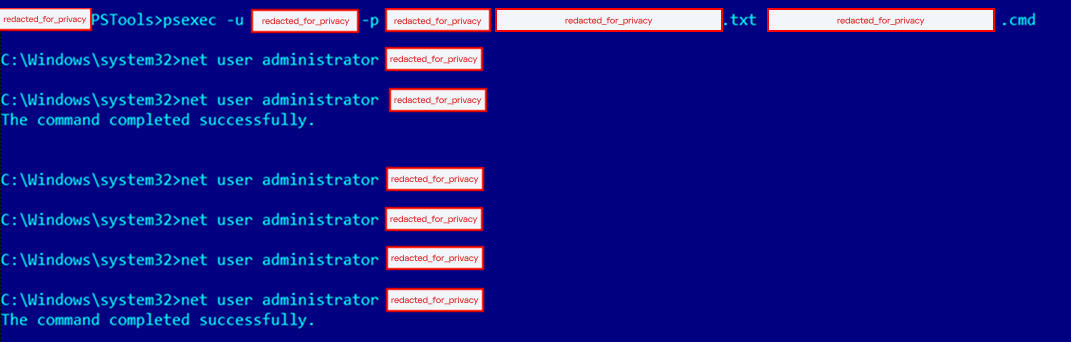
Further analysis revealed that the attacker used PsExec for lateral movement. By analyzing the Update Sequence Number (USN) Journal, we were able to identify .KEY files associated with PsExec that showed us the previously compromised machines used by the attacker.
After gaining access to the target machines, the adversaries deployed a batch script to disable the system’s defenses. Our analysis of this artifact showed that they had the administrative credentials to disable the EDR in place. In addition, the script enabled RDP, which gave the attackers remote access to the target. The listing below shows an excerpt of the script:
Finally, by cross-checking the Prefetch files, we were able to identify the precise dates of PsExecSvc.exe and LBB.exe (LockBit) execution. This revealed that the attacker established the initial connection to the analyzed machine around 5:30am UTC and ran LBB.exe for the last time at 10am UTC on the same day, resulting in an activity window of approximately four hours and thirty minutes. We were able to identify the extent of the compromise and the additional machines that required network isolation for further forensic analysis, containment, and remediation.
Case 02 – DragonForce deployed via AnyDesk
In another incident, we identified a compromised user account that the adversaries used to install the AnyDesk software to enable remote access. Although the attacker erased the system logs after encrypting the victim’s files, we were able to identify the ransomware execution event via the Prefetch and Amcache.hve files, which provided us with the SHA-1 hash of the sample.
Once we obtained the SHA-1 of the malicious artifact (named by the attacker as 1.EXE), we were able to confirm that it was a DragonForce variant. Even though the lack of evidence made the analysis more difficult, this case shows that forensic investigators must be prepared to identify information that the attackers missed or left untouched.
Case 03 – Python keylogger used by an insider
The third incident illustrates how a series of bad practices enabled an insider to collect passwords from other users inside the infrastructure. First, the customer contacted us stating that a machine was exhibiting strange behavior: files containing passwords were being created. We started with triage collection on one of the affected machines.
Evidence from the Program Compatibility Assistant (PCA) showed the execution of two suspicious files, Windows Host Widgets.exe and Windows Host Widgets_.exe, both located in the C:\Users\<user>\.vscode\dlo directory, where <user> represents a user account shared by everyone who uses the machine. The same artifacts were identified within the Amcache.hve file, and multiple executions were also confirmed by analyzing the Prefetch files. Another interesting source of evidence, UserAssist, confirmed that the threat actor also executed both EXE files by double-clicking on them.
MFT analysis showed that multiple log files named cacheX.txt were created in the previously mentioned directory, where X was a number that increased with each malware execution. We then analyzed the EXE files to confirm their behavior. Luckily, both proved to be the same Python script, which we could easily decompile.
As shown in the listing below, the script contains methods and strings with Portuguese names. It is capable of hiding the log files from view in Explorer. The developer also set a procedure to identify when the Caps Lock key was pressed, in order to record the correct passwords.
def get_base_path():
    ...

def encontrar_proximo_nome(base='cache'):
    ...

def set_file_hidden(filepath):
    ...
    ctypes.windll.kernel32.SetFileAttributesW(str(filepath), FILE_ATTRIBUTE_HIDDEN)
    ...

with open(log_file, 'a', encoding='utf-8') as f:
    f.write(f'\n\n--- Registro iniciado em {datetime.datetime.now()} ---\n')
set_file_hidden(log_file)
...

def is_capslock_on():
    return bool(ctypes.windll.user32.GetKeyState(20) & 1)

...

def on_press(key):
    ...

def on_release(key):
    ...

def main():
    with keyboard.Listener(on_press=on_press, on_release=on_release) as listener:
        listener.join()

if __name__ == '__main__':
    main()
This simple script did not implement any persistence or automated data exfiltration mechanisms. Therefore, the insider likely had to manually retrieve the generated log files containing the text typed by the victims. By revisiting the previously collected evidence, we identified USB connections around the same time as the script’s executions. This suggests that removable media was probably used to collect the generated keylogging logs from the environment. As a result of the investigation, the customer changed the passwords of all affected accounts. However, without additional evidence or footage, it was not possible to conclusively attribute the activities to a specific individual and take the appropriate disciplinary and legal measures.
Conclusions and recommendations
The incidents highlighted in this article demonstrate that Brazilian educational institutions face a diverse set of threats, ranging from ransomware operations to insider activity. In many cases, the attackers relied on valid credentials, exposed services, remote access tools, poor patch management, and insufficient endpoint hardening rather than advanced malware or new techniques. Based on these findings, educational institutions should prioritize controls that reduce the likelihood of account compromise and the impact of ransomware deployment. They should also improve forensic visibility after an incident.
Institutions should enforce the use of multi-factor authentication (MFA) for all publicly accessible services, especially VPNs, remote access portals, and email accounts. Since valid accounts were one of the most common initial access vectors observed in our dataset, MFA can significantly reduce the likelihood that stolen or reused credentials alone will compromise the entire environment. We also recommend periodically reviewing privileged accounts, removing unnecessary administrative permissions, and avoiding shared accounts, especially on machines accessed by multiple users, since this makes accountability extremely difficult.
Each user should have their own account, following the principle of least privilege to prevent unauthorized software execution. Additionally, it is advisable to restrict and monitor the use of remote access tools such as AnyDesk or TeamViewer. Unexpected installations or executions of these tools should be treated as high-priority alerts.
To minimize the impact of ransomware, educational institutions should improve their backup and recovery strategy. Backups should be isolated from the primary environment (preferably in more than one location) and tested regularly. Centralized logging, extended EDR telemetry retention, and proper time synchronization across hosts can also improve the ability to reconstruct an attack timeline and implement the necessary response measures.
The use of outdated systems increases the attack surface, so we recommend that organizations adopt an effective update and patch management policy. It is also important to raise security awareness, since users must understand the risks associated with credential sharing, unknown executables, and unauthorized software.
From a digital forensics and incident response (DFIR) perspective, the reviewed incidents demonstrate that effective incident response activities require correlating multiple forensic artifacts in order to reconstruct the attacker’s actions. Investigators should be aware of how to find information even when logs are missing. Many other artifacts are preserved and can be used for this purpose, such as Amcache, PCA, Prefetch, UserAssist, MFT, and USN Journal. The attackers may fail to erase all traces of their activity, so taking a broad forensic approach is of the utmost importance for determining the scope of the compromise and supporting containment and remediation actions.
Observed TTPs
The table below shows the observed TTPs in our dataset, including cases not detailed in this post.
The following analysis presents the key findings from Kaspersky Compromise Assessment engagements performed in 2025. A compromise assessment is an independent, expert-driven service that examines whether a target network has been compromised. The service combines threat intelligence analysis (including darknet sources), tool-aided endpoint scanning, a systematic review of security event logs and network traffic, and, when necessary, an initial incident response and digital forensic investigation
The following analysis presents the key findings from Kaspersky Compromise Assessment engagements performed in 2025. A compromise assessment is an independent, expert-driven service that examines whether a target network has been compromised. The service combines threat intelligence analysis (including darknet sources), tool-aided endpoint scanning, a systematic review of security event logs and network traffic, and, when necessary, an initial incident response and digital forensic investigation.
This report focuses on missed incidents – threats that remained undetected for weeks, months, or even years.
Key trends observed during compromise assessment engagements
Proactive compromise assessment decreases the number of missed high-severity incidents. The highest proportions of high-severity incidents were revealed in organizations that requested our compromise assessment service after containing a known incident. The lowest proportions of high-severity incidents were observed in organizations that conducted regular audits. Of all the incidents discovered, 20% were found manually, while enterprises missed 60% because of the absence of high-confidence alerts from the tools in place.
Nearly a third of discovered incidents took over three months to detect. The longer a threat persisted in the target environment, the greater the likelihood that an incident would be severe. 30.8% of all discovered incidents and 52% of high-severity compromises had historical activity spanning over three months. The oldest incident discovered in 2025 had gone undetected for four years.
Malicious files often remain in backups and are restored after incident response activities. 40% of all discovered web shells resided in backups and went unnoticed until a proper compromise assessment was conducted.
Threat actors rely on remote management tools and LoLBins. These types of tools were found in all compromise assessment engagements that resulted in an incident detection.
Monitoring tools and controls are not self-sufficient; operational maturity makes the difference. Monitoring tools must be configured and adapted to the changing threat landscape. Furthermore, human analysts need to review low-confidence alerts. A lack of continuous monitoring and threat hunting activities increased the likelihood of high- and medium-severity incidents to 84–86%. At the same time, high‑severity incidents were rare among organizations with in-house capabilities to reverse-engineer malware.
Communication issues lead to missed incidents. Nearly a third of the compromise assessments revealed communication issues that impacted incident response activities.
The incident response playbook is not set in stone. For incident response to be efficient and effective, playbooks must be updated as new artifacts are discovered. Treating the incident response plan as a living document reduces the risk of missing threats.
About the Kaspersky Compromise Assessment service
Our global compromise assessment portfolio spans several regions. In 2025, around 71% of the incidents we identified affected our customers in the META region, while the APAC and CIS regions accounted for the remaining 29%.
Geographic distribution of incidents identified during Kaspersky Compromise Assessment projects in 2025 (download)
Our service was requested by organizations from a diverse set of sectors. The government sector accounted for around 29% of incidents, followed by the education (19%) and financial (17%) sectors.
Distribution of economy sector incidents identified during Kaspersky Compromise Assessment projects in 2025 (download)
Detection logic families
Our compromise assessments operate on a continuously updated catalogue of indicators of attack (IoAs). Because the raw set of IoAs is too granular for high-level reporting, we map them to a concise set of detection logic families. The statistics indicate that three detection families dominate the incident mix:
Credentials from dumps: 12.4% of all incidents;
Specific living-off-the-land (LOTL) tools: 11.2 %;
Specific malware families: 11.2 %.
These three detection logic families represent high-fidelity indicators of attack that reliably signal infrastructure compromises ranging from dormant, disk-based malware to persistent and multi-stage attacks.
Distribution of detection logic families (download)
Reasons for requesting Kaspersky Compromise Assessment services
Analysis of our compromise assessment engagements that took place in 2025 reveals a clear correlation between the stated purpose of the engagement and the risk profile of the findings. General audits dominate the portfolio with 56% of requests, followed by authority reporting engagements (19%), post-incident checkups (17%), and acquisitions (9%).
Statistics on the reasons behind CA project requests (download)
When the findings are classified by severity, the post-incident checkup category exhibits the highest proportion of high-severity incidents (40.7%). The full breakdown is shown below.
Incident severity breakdown by service engagement reason
Incident severity (%)
High
Medium
Low
Reason for service
Acquiring new company
28.6
42.8
28.6
General audit
27.7
36.7
35.6
Report to an authority
30
46.7
23.3
Checkup after a cybersecurity incident
40.7
25.9
33.4
Post-incident checkups are frequently initiated after an initial incident response (IR) effort. The elevated share of high-severity findings suggests that IR activities, which are typically limited to containing a known incident, do not provide a complete view of the broader environment. Consequently, other threats may remain undetected until a full compromise assessment is performed.
Merger and acquisition-related assessments are proactive assessments performed when a company acquires another entity. This involves the target’s network being scanned for hidden threats before the two environments are merged. These assessments demonstrate a balanced distribution of severity: 28.6% low-severity, 42.8% medium-severity, and 28.6 % high-severity. This reflects the mixed risk posture of target environments of acquisitions, which are often evaluated for both known vulnerabilities and hidden malicious activity. Similarly, other proactive approaches like general audit assessments or assessments driven by the need to regularly submit a compliance report to a regulatory authority, share almost the same ratio. This indicates that regular, proactive and compliance-oriented assessments tend to reveal substantive issues earlier in the attack lifecycle, reducing the likelihood that they will evolve into high-severity incidents.
Organizations that conduct regular audits have the highest rate of low-severity findings (36%) and the lowest rate of high-severity issues (28%). We can assume with medium confidence that continuous, proactive compromise assessments are more effective at limiting the emergence of high-severity compromises than reactive, incident-driven evaluations. The data collected in 2025 are consistent with this hypothesis. Integrating regular, third-party compromise assessments into governance processes can therefore reduce the probability of unexpected high-severity findings and improve overall risk posture.
The following case study illustrates the impact of relying on a reactive rather than proactive approach. It describes a persistent threat that remained dormant on a client’s network and was only discovered after a comprehensive compromise assessment was performed following initial IR activity.
Case study: Dormant threat uncovered only by a compromise assessment
A midsize enterprise suffered a high-severity intrusion that was contained and remediated by the IR team within the defined scope of the initial alert. Following containment, the organization requested a check to determine if any additional footholds existed elsewhere in the network. To address this need, the organization engaged Kaspersky’s Compromise Assessment (CA) service, which performed a full forensic review of the environment beyond the scope of the initial incident.
Compromise assessment experts collected forensic metadata, historical security event logs, and Active Directory configuration data from the entire infrastructure. Threat hunting queries were executed against the aggregated telemetry, focusing on persistence mechanisms, lateral movement artifacts, and anomalous process activity. As a result, a number of severe threats were detected and reported; for example, malicious persistence:
A cron job that recreates a web shell
A critical Linux system (web server) had a cron job that automated fetched a copy of a PHP web shell from a public GitHub repository and placed it in an online directory. Even if the file was removed by security personnel, the cron job would simply download it again, giving the attacker a persistent remote code execution point on the web server.
A live reverse shell
On a server hosting a published web application, the process list showed a bash reverse shell.It was run by a user with the username “apache,” which was the account used to run the web application. This may indicate that the attacker exploited a vulnerability in the web application to gain remote code execution, allowing them to establish a reliable command and control channel that bypassed the firewall because it was initiated from inside the network.
ClipBanker data stealer persisting via Windows registry
A ClipBanker variant was detected on a user’s workstation machine maintaining persistence by adding itself to the registry key HKU\S-1-5-21-[REDACTED]-500\Software\Microsoft\Windows\CurrentVersion\Run\9Er6IIp.
This was done after adding the malware’s folder to Windows Defender exclusions and applying hidden and system attributes to the file to hide it from regular users.
Malicious WMI event consumer with deceptive alias
A malicious WMI event consumer was detected that downloads and executes a PowerShell script. It created the alias “Kaspersky” for “Invoke-Expression” in an attempt to blend in as legitimate activity in the hope that a quick glance at the script would not raise suspicion. Kaspersky’s Cyber Threat Intelligence confirmed that the downloaded script (no longer reachable) was a weaponized payload used to spread the infection further.
The IR containment was rapid, focused and effective in addressing the specific incident that triggered the alert. However, the broad-scope compromise assessment revealed multiple backdoors across the environment, each using a different persistence technique: cron jobs, scheduled registry runs, and WMI subscriptions. The infected hosts were outside the original IR scope, so they remained unseen until a comprehensive hunt was conducted.
Incident response excels at stopping the bleeding and ensuring business continuity after a known incident. A compromise assessment provides a health check that determines whether any other wounds exist. By pairing timely IR with regular, full network compromise assessments, the organization had both the reactive agility to contain incidents and the proactive visibility to eradicate malicious persistence wherever it was hiding. The investigation uncovered additional undetected footholds, providing a clearer view of the environment and reducing the likelihood of a repeat incident.
Missed long-term incidents
The statistics on the mean time to detect (MTTD) incidents identified during compromise assessment projects are concerning. Many incidents go unnoticed for extended periods. For example, in 2025 we identified an incident that was approximately four years old!
Such prolonged detection times can lead to severe consequences, as 30.8% of incidents have historical activity spanning over three months. These incidents can range from dormant malware to persistent threats, highlighting the need for robust detection and response mechanisms.
Severity distribution of incidents by MTTD (download)
The relationship between detection latency and incident severity was analyzed by grouping findings according to their MTTD:
For incidents detected within the first month, severity is more or less evenly distributed among the low, medium and high categories.
However, as the MTTD increases, the severity of incidents shifts towards higher severity. Notably, a high proportion of incidents that took between 30–60 days to be detected are medium-severity incidents (78.57%), while those detected between 60–90 days are predominantly high-severity (71.43%).
Among incidents detected after 90 days, a significant proportion are also high-severity incidents (52%).
Overall, 52% of high-severity incidents are only identified after 90 days of going undetected. This represents a concrete risk: the longer an incident goes undetected, the higher the probability of severe compromise. Organizations that integrate continuous detection, threat hunting activities, and regular compromise assessments can reduce MTTD, limit threat escalation, and lower their overall risk profile.
The following case study highlights the importance of timely detection and response to prevent incidents from escalating into high-severity events.
Case study: Four-year-old crypto mining activity on domain controllers
In May 2025, our compromise assessment experts identified three domain controllers on a customer network that were infected with malicious files. The files had remained hidden for almost four years. They were created in the C:\Windows\Fonts\Mysql directory, abusing its unique characteristic whereby only font files in this directory are visible to regular users. Files with the names nei.bat, dl1host.exe, bat.bat, cmd.bat, and a spoofed svchost.exe were found there. These files were created in June and July of 2021.
Kaspersky Threat Intelligence confirmed that these files are part of a crypto-mining campaign called NSABuffMiner, which spreads via the SMB protocol by exploiting the EternalBlue (MS17-010) vulnerability. A patch was released for this vulnerability in March 2017, four years before the initial compromise. This was more than enough time to patch the systems. This underscores the importance of implementing effective patch management operations and staying informed through threat intelligence news feeds.
Based on the organization’s request, the malicious files were collected along with a forensic image for analysis and revealed the following:
bat.bat and cmd.bat generate random IPs and scan them with a lightweight port scanner renamed taskhost.exe to locate live hosts with SMB port 445 and NetBIOS port 139 open and looking for vulnerable machines.
Discovered vulnerable IPs are handed to helper scripts named bat, poab.bat, load.bat, and loab.bat that execute the malware mance.exe, Eter.exe, and puls.exe to inject the malicious DLLs Eternalblue2.dll and Doublepulsar2.dll into lsass.exe and explorer.exe, enabling lateral movement.
Persistence is then established by creating scheduled tasks to execute the propagation and infection scripts, and services are created to execute the crypto miner, with the names MicrosoftMysql, MicrosoftFonts, and MicrosoftMSSql. Other scheduled tasks were also observed with the names At1 and At2 and created for the same purpose.
After successfully compromising the machine and installing the persistence mechanisms, a cleanup task is performed to delete temporary files and dropped malware.
Because of the lack of proper monitoring and threat hunting procedures, the organization was unaware that a mining operation had been hijacking their resources for four years, running on their domain controllers.
Unintentional malware preservation
An issue that is frequently discovered during compromise assessment activities is that of web shells remaining or being restored on target systems. Based on data collected during 2025 compromise assessment engagements, 64% of web shell incidents were classified as high-severity findings, 7% as low-severity (possibly legitimate files, but potentially compromised), and 29% as medium-severity findings requiring eradication.
Web shell incident distribution by severity (download)
One way web shells persist is through infected backups. The distribution of discovered incidents in our projects shows that 60% of the web shells were located on active systems, while 40% were stored in backups. Restoring such backups can reintroduce the threat long after the initial infection.
Another common issue is asset inventory gaps, which were observed in 25% of engagements. This resulted in untracked devices, particularly cloud-only Linux web servers that are not joined to Active Directory, evading routine scans.
An attacker can plant a web shell on such a cloud server, and that server never appears in the inventory, though is still regularly backed up. As a result, the web shell may persist on the cloud server for a long time. If it is occasionally deleted, the backup server later restores the infected files, exposing the web shell to third parties again. This demonstrates that without a complete and up-to-date asset inventory, detection capabilities are significantly impaired.
One case was observed in which the web shell was located on an internal file server (not a web server) within a .rar archive at the following path: D:\backup\[redacted_for_privacy].rar/wwwroot/<…>/[redacted_for_privacy].aspx
During the investigation, the server administrators indicated that the folder had been copied from a different server that was offline at the time of the assessment. Because of poor asset inventory, the company’s security team did not detect the infection of this server. As a result of the backup procedure, the web shell was copied to the internal file server. Forensic analysis of the offline server revealed that the adversary had introduced a backdoor to the majority of the Windows servers in the environment, configuring the local administrator account with an identical password.
The technique involved using PsExec to execute a .cmd script across all the servers listed in a .txt file; the script altered the local administrator password to a common value:
Legitimate, yet suspicious: LoLBins and remote management tools
In 2025, nonstandard remote management (RM) utilities were observed in all compromise assessment engagements. Living-off-the-land binaries (LoLBins) were also present in every engagement. These findings highlight the ongoing challenge for security operations centers (SOCs) that must distinguish between legitimate administrative use and malicious abuse.
The observed remote management utilities span both proprietary platforms, such as TeamViewer and AnyDesk, and freely available tools, including PsExec, VNC servers, and open-source RM frameworks. These binaries are used daily in many environments for troubleshooting, software deployment, or remote support. However, the same capabilities – creating a new local admin account, copying files to a remote share, or launching a network port scan for diagnostics – are also typical of attacker post-exploitation activity. Our analysts frequently encounter cases where a legitimate sysadmin action resembles a lateral movement step. This makes the mere fact that “a remote management tool was executed” insufficient to classify it as an incident. Instead, the incident must be judged against an organization-specific baseline of expected usage. Establishing that baseline requires a deep, contextual understanding of who is authorized to run the tool, from which endpoints, and under which circumstances – a resource-intensive process on a case-by-case basis.
LoLBins, binaries that are part of the operating system or commonly installed utilities (such as certutil, bitsadmin, regsvr32, and wmic), were also present in every assessment. While these files are trusted system components, threat intelligence confirms they are often repurposed for lateral movement, data exfiltration, and persistence. The graph below shows the severity distribution for incidents involving riskware or a LoLBin binary. The relatively high share of medium- (40%) and high-severity (31%) findings underscores that misuse of legitimate utilities is often the vector that enables a compromise to progress beyond the initial foothold.
Severity distribution of incidents involving riskware or LoLBin involvement (2025) (download)
To address the potential use of LoLBins and remote management tools by attackers, we recommend a multi-layered approach that goes beyond static deny lists:
Formalize a policy that enumerates the remote management tools authorized for use. The policy must be coupled with a requirement to forward software operational logs to a central log management platform (SIEM or dedicated log collector). Continuous monitoring of these logs enables a SOC to detect deviations from authorized usage patterns.
Periodically perform a software inventory audit to identify unauthorized remote management tools. Consider collecting data from the following registry keys on all hosts:
Enrich the hashes (MD5/SHA-256) of every executed binary with a functional category, such as “Remote Access”, “Golden Image”, or “Security Software.” Correlating the category with the execution path makes it possible to hunt for instances where a “Remote Access” binary runs from a non-standard location, such as %TEMP% or a user’s Downloads folder.
Deploy detection rules that capture known LoLBin abuse patterns, such as certutil -decode, bitsadmin -transfer, regsvr32 -i <dll>, wmic process call create. These rules should be continuously baselined against the organization’s normal activity. The baseline is derived from a period of verified legitimate use and refreshed whenever new legitimate use cases emerge. Alerts are generated only when observed behavior diverges from the established norm, thereby reducing noise while preserving sensitivity to genuine abuse.
Impact of not having continuous monitoring and proactive threat hunting
Analyses of recent compromise assessment projects reveal a systematic blind spot in organizations that follow the security-by-purchase model to defend their networks. Without continuous human monitoring or a dedicated threat hunting program, the severity profile of detected incidents becomes heavily skewed toward a higher impact:
Incident severity breakdown, where 24/7 monitoring or threat hunting is absent
Control type
Low-severity
Medium/high-severity
No continuous monitoring
14%
86%
No threat hunting
16%
84%
Often, the problem is not a lack of tools, but rather a lack of operational use of those tools. Many enterprises deploy next-generation security solutions and then let them run in “set-and-forget” mode, or they rely exclusively on an alert-driven workflow. The following issues are common in such organizations:
Alert fatigue: high false positive rates drown analysts in noise, forcing them to triage superficial indicators rather than conduct deep, contextual investigations.
Fragmented analyst assignment: without a dedicated hunting team, the same analyst may be tasked with dozens of unrelated alerts, limiting the time available for the hypothesis-driven exploration required to uncover stealthy footholds.
The practical consequence is that adversaries retain an extended dwell time, enabling continued lateral movement and data exfiltration before the organization becomes aware of the breach. This pattern represents a measurable risk exposure that translates directly into business impact. As the following example illustrates, merely purchasing security controls does not guarantee detection; continuous monitoring, regular alert validation, and structured threat hunting are essential to reduce dwell time and limit business impact.
Case study: Secure by design without continuous monitoring
The enterprise invested in security controls and assumed that the environment was secure by design. However, security controls require proper configuration, continuous tuning, and active monitoring to be effective. The tools had been installed, but no one was ensuring that the security controls were configured effectively, there was no analyst reviewing the alerts they produced, and no schedule existed to review the collected logs.
The organization opted for Kaspersky’s Compromise Assessment service. Historical security logs were collected and investigated as part of the assessment procedures. The goal was simple: to determine what had really been going on in the network over the previous few months.
Log analysis revealed clear evidence of malicious activity. Activities related to Impacket behavior were discovered that led to the deployment of Cobalt Strike and Mimikatz on several critical servers, including the domain controllers. These activities were three months old at the time of detection, and the enterprise was unaware of them because there was no effective 24/7 monitoring in place.
Impacket is a collection of Python scripts for network protocols and low-level network packet manipulation. Attackers can abuse it to move laterally into the network. The following are examples of its artifacts detected in the network:
The attacker used Impacket to execute a PowerShell command that downloaded an executable from a command-and-control server. This server was found to be associated with Cobalt Strike. Cobalt Strike is a post-exploitation tool that provides capabilities for remote command execution and lateral movement within a compromised network. The execution was set up via a scheduled task that attempted to masquerade as a legitimate Google Chrome update task.
The timeline assessment confirmed the presence of a Mimikatz binary and a memory dump associated with the same incident on the compromised system, confirming that a credential theft operation had indeed taken place.
The organization was completely unaware of the breach. The activity had gone undetected for three months because the deployed controls were never monitored. Upon learning of the findings, a full-scale incident response was initiated to eradicate the footholds, rotate credentials, and harden the security of the environment.
Security controls are not self-sufficient. Deploying a firewall or an EDR solution does not automatically protect you. Without proper configuration, baseline tuning, and, most critically, continuous log monitoring and threat hunting, those controls become merely decorative. Always-on monitoring, either performed internally or delegated to an external managed security service, can turn weeks-old compromises into minutes-old alerts by correlating events, hunting for anomalous use of penetration testing or hacking tools, and escalating suspicious activity.
Incident response action statistics
An analysis of historical compromise assessment projects reveals a persistent discrepancy between the best practices described in incident response playbooks and the operational realities of executing them in unprepared, often legacy-affected environments. The figure below shows how frequently each response action was required during the initial response phase of a compromise assessment.
Incident response actions required after compromise assessment (download)
The distribution highlights three frequently observed patterns:
Forensic analysis accounts for the majority of cases, with around 59% requiring at least one forensic package collection and analysis.
Remote eradication, i.e., file or registry key removal, was reported in 39% of cases.
Plans evolve as the investigation proceeds; 39% of engagements required a mid-engagement plan update, reflecting the iterative nature of incident response.
Why forensic collection is the default entry point
Forensic package collection and analysis was the most frequent response action, occurring in 59% of cases. The prevalence of forensic package collection can be explained by two observable factors in CA engagements: (1) the targeted organization’s limited historical visibility and (2) the fact that a substantial proportion of incidents were older than 90 days at the start of the assessment. In many cases, native logs had already been rotated or purged, forcing investigators to rely on residual artifacts (e.g., MFT entries, registry hives, filesystem timestamps) to reconstruct timelines.
Our observations suggest that remote forensic package collection is effectively a prerequisite rather than an optional convenience. The graph below summarizes the reported ability to collect forensic packages, categorized by incident severity level. It highlights that, in a significant proportion of high-severity cases, the affected organization lacked this capability.
The organization’s ability to collect forensic data by incident severity (download)
Containment: The remove files/registry keys paradox
Response execution and eradication actions, such as file or registry key removal (reported in 39% of cases), were also common. However, they highlighted a notable gap in execution practices. While many organizations reported having EDR capabilities for remote removal, execution was often delegated to IT teams or MSPs via ticketing systems. This can introduce delays and reduce the precision of the removal process. Malware removal is a surgical process, particularly in multi-stage, fileless, or persistence-heavy scenarios. Capability alone is insufficient without expertise, sequencing, and planning, especially when artifacts may exist in shadow copies, backups, hidden paths, or downloader chains.
Communication failures: An additional operational overhead
A notable organizational finding emerged regarding communication. In 32% of projects, internal communication issues at the assessed organization materially impacted response execution. Below are the typical blockers:
Unclear action confirmation – system administrators could not quickly confirm whether a suspicious file was legitimate.
Delayed owner validation – ticket escalations stalled while waiting for system owners to respond.
Compromised communication channels – email accounts or ticketing portals may already be under the attacker’s control in the event of a suspected domain compromise.
Staff turnover – loss of knowledge about historical configuration baselines.
These findings suggest that regular tabletop exercises are required to test not only technical playbooks, but also human and communication workflows, as well as operational level agreements that govern and facilitate communication between different teams, and standard operating procedures for proper documentation.
The iterative nature of response plan updates
The need to update response plans based on new analytical input arose in 39% of cases, emphasizing the inherently iterative nature of incident response. Early-stage plans cannot realistically account for all variables. Examples of the most commonly observed causes for updating the response plan are listed below:
Reverse engineering results that reveal previously unknown command-and-control (C2) servers or behaviors.
Forensic discoveries, such as hidden scheduled tasks, shadow-copy artifacts, or dormant DLLs.
Traffic analysis outcomes that expose additional lateral movement paths.
Human constraints – unavailable system owners, changes in management processes, or supervisor approval.
Based on our experience, teams that treat the IR plan as a living document – incorporating each new artifact, reprioritizing actions, and reissuing the playbook before the next containment step – reduce the risk of missed eradication steps. Conversely, strict adherence to an initial, evidence-limited plan can increase the risk of overlooking persistent footholds.
Distinguishing real attacker artifacts from penetration testing leftovers
Finally, distinguishing attacker activity from penetration testing artifacts remained a recurring challenge (12% of cases). Compromise assessments frequently uncover remnants of legitimate testing tools, which can create uncertainty about whether a detected artifact originated from a malicious intrusion or a legitimate penetration test. Contributing factors:
Poorly documented penetration test report and artifact cleanup.
Overlapping toolsets (e.g., SharpHound) used by both red team operators and adversaries.
Running compromise assessments and active penetration testing projects simultaneously, which degrades analyst focus and increases false positive rates. Although correlating findings with penetration testing reports is essential, compromise assessments are human-driven investigative processes, and confusing analysts with overlapping “legitimate” attack signals leads to misinterpretation and weaker outcomes.
Incident response maturity and its effect on severity
Our data show a correlation between the presence of internal digital forensics or malware reverse engineering capabilities and the distribution of incident severity categories. Across the 2025 compromise assessment engagements, the distribution of low-, medium- and high-severity findings differed markedly between organizations that possessed these capabilities and those that did not. The data below illustrate this correlation and provide a basis for assessing the business value of expanding internal response skill sets.
Incident severity split for cases requiring digital forensics, based on an organization’s capabilities (download)
Organizations capable of analyzing digital forensic artifacts independently experienced half as many high-severity incidents and a higher proportion of low- and medium-severity cases.
Incident severity split for cases requiring malware analysis, based on an organization’s capabilities (download)
The presence of a dedicated reverse engineering resource correlates with a total absence of high-severity cases in our sample set; the majority of incidents were rated as medium severity, with a significant proportion of low-severity outcomes.
The analysis of this correlation indicates, with medium confidence, that the observed shifts are unlikely to be caused solely by sample size effects. Rather, they are more likely to reflect a genuine operational phenomenon: internal digital forensics and malware analysis capabilities contribute not only to SOC processes, but also to cyber-resilience in general.
Case study: In-memory LionTail infection on critical Windows servers
During a compromise assessment, a persistent in-memory threat was identified on several critical servers. The activity was attributed to the LionTail framework, a sophisticated set of custom loaders and memory-resident shellcode implants. LionTail takes advantage of undocumented Windows HTTP.sys driver behaviors to covertly deliver and retrieve payloads via inbound HTTP traffic, effectively blending malicious activity into legitimate network flows.
Several observed variants are attributed to the Scarred Manticore actor, which generates a unique implant per compromised host and performs data exfiltration while carefully masking command-and-control communications within normal-looking traffic.
Detection was achieved through static memory signatures discovered within the scrcons.exe process. Although scrcons.exe is a legitimate WMI host binary located under C:\Windows\System32\wbem, it is frequently abused to host injected payloads, making it an attractive target for stealthy in-memory operations.
The response plan comprised a number of actions, the most critical of which are highlighted below:
Collection of volatile memory dumps for in-depth analysis.
Acquisition of full forensic disk images from affected systems.
Detailed analysis of the collected artifacts and subsequent updates to the incident response plan.
Executing these actions proved challenging for the organization because of its limited digital forensics and reverse engineering capabilities. In incidents dominated by fileless memory-resident threats, these capabilities are not optional – they are essential. Without them, organizations risk losing critical evidence, misjudging the scope of the compromise, or failing to fully eradicate advanced implants that leave minimal traces on disk.
While our specialists were able to complete the investigation and contain the breach, the case revealed a readiness gap. It demonstrated the operational risk of depending on external assistance during high‑impact incidents and reinforced the necessity of in‑house forensic and reverse‑engineering maturity to achieve timely, confident and comprehensive incident handling.
Solving the root cause problems
Upon completion of a compromise assessment engagement, the focus shifts from incident response to a consulting phase. The final workshop focuses on preventing recurrence of incidents by identifying underlying deficiencies that allowed them to go unnoticed. The recommendations are actionable and tailored to the environment. For the purpose of this report, they have been grouped into a limited set of high-level categories.
Root-cause category
Share of incidents
Typical findings
Insufficient detection fidelity
60.7%
• No high-confidence alerts were generated by the EPP/EDR or related log sources.
• In 9.4% of cases, the product was mis-configured or out of date or malfunctioning.
Missing alert-driven monitoring
35.9%
• Alerts that could have indicated compromise were generated, but an incident was not declared.
• Signals with high uncertainty (e.g., heuristic web shell detections) required analyst validation.
Deficient vulnerability and configuration management
28.2%
• Evident misconfigurations (e.g., disabled audit logging, over-permissive service accounts).
• Known vulnerabilities left unpatched or unmitigated.
Lack of structured threat hunting processes
27.4%
• Low-fidelity alerts were never reexamined after initial dismissal.
• High-volume telemetry remained unchecked due to staffing constraints.
Inadequate security awareness programs
25.6%
• Credential leaks from personal devices of employees or contractors accounted for 27.2% of incidents where inadequate security awareness was identified.
• Social engineering attempts were successful because of insufficient user training.
Absence of documented policies/processes
23.9%
• No formal incident response playbooks, change management procedures or data handling guidelines were available.
Common observations on root causes
The detection health check was the most frequent corrective action. In more than half of the cases where alerts were missing, a simple verification of sensor health and rule relevance was recommended to fill the gap. Without such validation, immediate attribution of the failure to the product capability could not be made.
Human analysis is still essential for low-confidence alerts. Automated pipelines alone cannot compensate for rules prone to false positives (e.g., generic web shell heuristics). Embedding a manual triage step was recommended to reduce the dwell time for incidents.
Process hygiene (vulnerability management, threat hunting, security policies) accounts for a substantial proportion of the root causes. Even mature organizations exhibited gaps in routine activities that could be mitigated with disciplined workflows. The absence of documented policies/processes was the root cause of 23.9% of cases.
A modern example of a policy gap is the use of generative AI development tools that operate without clear data handling rules. During one project, we identified a macOS workstation that executed the Claude Code (Anthropic) command-line assistant as a VS Code extension. The tool automatically captured filesystem snapshots to enrich its language model prompts. These snapshots included full directory listings and absolute paths to several Excel workbooks containing internal confidential data:
ls -lh /Users/[REDACTED]/Documents/[REDACTED].xlsx /Users/[REDACTED]/Documents/[REDACTED].xlsx /Users/[REDACTED]/Documents/[REDACTED].xlsx .. [REDACTED]
The organization was advised to conduct awareness sessions for employees on the risk of exposing confidential internal data to generative AI tools, and to develop a policy governing the use of such tools with confidential information.
Lack of detections: Causes and impacts
Compromise assessment engagements repeatedly show that insufficient detection fidelity is a significant contributing factor to high-severity incidents. In cases where the target organization’s detection coverage was rated low, 52% of incidents were classified as high severity and 15% as low severity. This suggests a correlation: limited visibility appears to increase the proportion of incidents that evolve into high-severity compromises.
Incident severity distribution when detection coverage was insufficient (download)
A common assumption is that engaging a managed security service provider (MSSP) improves detection maturity. The data, however, show a more nuanced picture. Even when an MSSP is engaged, 26.5% of incidents related to low detection coverage remain unidentified, and roughly 50% of MSSP-supported projects have basic Windows audit gaps (e.g., missing event log collection or disabled audit policies).
These findings suggest that outsourcing alone does not guarantee effective detection; active governance and continuous validation are required. Detection should be treated as an evolving capability that requires continuous testing, measurement, and refinement, irrespective of whether it is managed internally or by a third party.
Statistics of missed incidents due to lack of detection capability with or without MSSP (download)
The analysis of root causes of missed detections reveals several recurring themes. In many environments, the technology is present but poorly operationalized. The main issues are:
Absence of endpoint protection platform (EPP) health check – nearly 50% of incidents escalated to high severity in engagements where the EPP health check was weak or absent. This reflects the classic “installed-but-not-enforced” risk, where agents are present but not tuned, updated, or validated.
Threat intelligence gaps – when there was no functional threat intelligence feed or platform, about half of the incidents reached high severity. Without curated indicators of compromise and contextual enrichment, analysts rely on generic alerts and may overlook known malicious behaviors.
The underlying issue is an alert-driven, set-and-forget mindset: organizations assume that deployed tools will automatically protect them, even though the tools are not continuously tuned, validated, or enriched with threat intelligence.
Incident severity breakdown where there was no EPP health check or threat intelligence
Missing control
High-severity
Medium-severity
Low-severity
EPP health check
48.3%
36.7%
15%
Threat intelligence feed
50%
40%
10%
Detection failures are rarely caused by a single missing control; they emerge from weak configuration, insufficient telemetry, and an absence of regular checks of controls and processes to ensure they are functional, especially in outsourced models. A hybrid monitoring approach that combines internal ownership with external MDR or MSSP support consistently proves to be the most resilient model when roles, expectations, and performance metrics are clearly defined. Detection must be treated as a living function, not a procurement outcome.
The following example illustrates the real-world consequences of control gaps by walking through a severe incident that persisted undetected for months simply because the organization lacked the necessary detection capabilities and security tools.
Case study: In-memory PurpleFox infection evades conventional endpoint protection
During a compromise assessment engagement, memory was scanned on the target hosts using the threat hunting rule set. Two hidden objects were identified:
PurpleFox rootkit code injected into legitimate svchost.exe processes on several critical servers.
PurpleFox drops specially crafted DLLs and forces svchost.exe to load them. From there, it installs a kernel-mode driver that gives the attacker persistent and stealthy execution capabilities, as well as the ability to pull additional payloads. This results in the loading of the XMRig miner.
The deployed EPP solution monitored file creation, registry modifications and network connections. However, its memory inspection module was disabled. Additionally, the signature set applied at the time of the assessment was not up to date. As a result, no alerts were generated for the injected DLLs or the miner’s shellcode. The compromise assessment team identified this detection gap during the memory analysis phase and documented the missing in-memory inspection capability in the final report.
The organization’s security operations were outsourced to an MSSP, which collected the logs and forwarded them to the SIEM solution. Because the logs never contained alerts for in-memory activity, PurpleFox activity was not identified.
Insufficient vulnerability management: A catalyst for high-severity compromises
In the 2025 compromise assessment engagements, more than half of the threats identified and linked to insufficient vulnerability management practices or missing patches were classified as high severity. The most frequently observed consequences were the deployment of web shells that enabled persistent remote code execution and the exploitation of misconfigured Active Directory instances.
Severity distribution of incidents due to improper vulnerability management (download)
The root causes of missing patches are multifaceted. They include inadequate asset inventory management (25% of projects) and the absence of formal vulnerability management processes (41% of projects). Moreover, 86% of organizations that claimed to have a vulnerability management program still exhibited exploited misconfigurations during compromise assessment engagements. These findings suggest that robust patch management, comprehensive asset inventory practices, and structured vulnerability management processes are critical for preventing high-severity incidents.
Case study: How overly permissive GPO-based software distribution goes wrong
During multiple compromise assessment engagements, a high-impact misconfiguration was consistently observed: a Group Policy Object (GPO) was used to point to an executable in a shared folder and run it on every workstation via a scheduled task. The access control list (ACL) on the share was set to “Everyone – Full Control”.
Given that any authenticated domain user can write to the share, an attacker who compromises a single low-privilege account can replace the legitimate binary with a malicious payload. The next scheduled task run propagates the payload automatically to all endpoints that receive the GPO. This provides:
Elevated execution context: the scheduled task typically runs under the SYSTEM or local administrator account.
Automatic lateral movement: the malicious binary propagates without requiring additional network exploitation.
Privilege escalation: a compromised low-privilege account can lead to domain administrator code execution.
Vulnerability management procedures that include systematic GPO and share permission audits would have flagged the writeable ACL as a high-severity finding, enabling remediation before exploitation. Remediation typically involves restricting the share permissions to “Authenticated Users” with read-only access and limiting modifications to certain privileged accounts. Incorporating these checks into the baseline security controls reduces the attack surface, demonstrating the tangible risk reduction achievable through disciplined vulnerability assessment and penetration testing (VAPT) practices.
Conclusion
In 2025, Kaspersky Compromise Assessment helped organizations reveal a persistent detection gap: 30.8% of all incidents and 52% of high-severity compromises had historical activity spanning over three months. Of all the incidents discovered, 20% were found manually, while 60% were missed by enterprises because of the absence of high-confidence alerts from existing tools. The oldest missed incident identified by the Kaspersky Compromise Assessment team in 2025 was four years old.
Post-incident checkups produced the highest percentage of high-severity findings, while regular proactive audits, compliance-driven audits, and audits performed before merging two networks tended to reveal issues earlier. This indicates that purely reactive investigations often miss hidden persistence. The top high-level recommendations for immediate improvement in 2025 for all projects were:
Run a comprehensive detection engine health check within 30 days of project closure, prioritizing telemetry integrity and rule relevance.
Introduce a Tier 1 alert validation team that reviews all low-confidence events on a defined schedule.
Ensure robust 24/7 monitoring augmented with threat hunting capabilities focused on baselining, low-fidelity alerts, and emerging adversary techniques.
Reevaluate the vulnerability management pipeline to ensure continuous patching and audit log activation across all critical assets.
Update security awareness curricula to address credential leakage from personal devices and reinforce secure BYOD practices.
Ensure periodic tabletop exercises are run to test technical playbooks and sharpen the team’s skills and communication workflows.
Establish operational-level agreements to govern and facilitate communication between different teams and standard operating procedures used for proper documentation.
Addressing the root cause categories systematically will reduce the likelihood of future blind spots and improve the overall security posture of the engaged organizations.

 Entrar