❌

Visualização normal

Hoje — 10 de Novembro de 2026Microsoft Security Blog
  • ✇Microsoft Security Blog
  • FORGE Lab uses agentic tools to identify memory safety issues in Rust Yechan Bae and FORGE Lab
    In this article How we found and validated the bugsPattern 1: Trusting code not to panicPattern 2: Trusting user-provided implementations to be correctPattern 3: Trusting the underlying systemWhy Rust still matters and advancing vulnerability discovery with AIRust's high bar is hard to meet but worth keeping Microsoft’s FORGE Lab found several memory safety issues in Rust’s standard library (std and core), including cases where code written entirely in safe
     

FORGE Lab uses agentic tools to identify memory safety issues in Rust

9 de Novembro de 2026, 17:17

Microsoft’s FORGE Lab found several memory safety issues in Rust’s standard library (std and core), including cases where code written entirely in safe Rust can trigger undefined behavior. The research used Hyenas, FORGE’s frontier research version of codename MDASH, an AI-powered vulnerability-scanning system. The findings reveal three recurring patterns of misplaced trust in unsafe code: trusting code not to panic, trusting user-provided implementations to be correct, and trusting the underlying system.

Rust’s safety guarantees are precisely what make these findings interesting. Its rich type system and ownership model rule out whole classes of memory-safety issues, but much of the standard library relies on unsafe code underneath its safe APIs. When that code breaks its safety contract, even safe Rust can encounter behavior the language is designed to prevent.

Rust’s memory-safety guarantees are increasingly important as the language becomes part of software that billions of people rely on every day. Billions of people are estimated to interact with Rust-based software or operating systems daily, often without knowing it. Microsoft made Rust a Tier-1 internal language alongside C++, C#, and TypeScript, GitHub rewrote the Copilot agent runtime in Rust, and Bun, Android, the Linux kernel, and Cloudflare are moving code to it as well. Much of this software relies on Rust’s foundational libraries, core and std, and the safety guarantees of the APIs they provide. Bugs in those libraries can have consequences well beyond the code where they originate.

Unsafe Rust has been a long-running interest for us. Our team includes the people behind Rudra, a static analyzer that looked for memory-safety bugs across the Rust ecosystem in 2021. We also write many of our own tools in Rust, so its safety is more than a research topic for us. This year, we took a closer look at the standard library to see what kinds of mistakes still show up in its unsafe code today.

In this post, we share some of the bugs we reported to the Rust issue tracker. We use them to discuss what Rust does and doesn’t guarantee, why writing correct unsafe Rust is so difficult, and why Rust’s safety model still matters even though its memory safety isn’t perfect.

How we found and validated the bugs

At Microsoft FORGE Lab, we study vulnerabilities in complex software, including the Rust standard library. Our team combines years of experience in vulnerability research with AI-assisted tools that help us investigate code and find bugs that are difficult to uncover through traditional analysis alone.

Some of the bugs in this post were found with help from Hyenas, our research version of codename MDASH. Our researchers investigated the underlying code, reproduced the bugs, assessed their potential security impact, and worked with Rust maintainers to report and fix them.

This post focuses on soundness bugs in the standard library’s unsafe code. Bugs in the compiler itself, such as miscompilations and holes in the type system, are a different topic that we don’t cover here.

A note on open issues

At publication, two of the issues reported by our team remain open. The article also references related issues reported by others and fixes that are still under review. The Rust maintainers triaged and responded to our reports quickly, and we believe maintainers and the contributors working on these issues are doing their best and making the right tradeoffs among the many bugs they handle.

If you’re interested in an open issue, please comment only when you have something genuinely new to contribute, such as new information or an affected real-world use case.

Patterns of Rust’s Safety Bugs

At the lowest level, Rust uses unsafe blocks to work with raw pointers and interact directly with the operating system. Much of the standard library, including Vec and String, is built from small unsafe pieces wrapped in safe APIs. Inside an unsafe block, the programmer takes responsibility for the guarantees the compiler can’t check, and that responsibility extends to the safe API built around it. That API must be sound: no matter how safe code uses it, it must be impossible to trigger undefined behavior.

Upholding that promise is harder than it looks. Consider a function that returns the byte at idx from any type that can be viewed as a byte slice, skipping the redundant bounds check after doing its own:

pub fn get<​S: AsRef<​[u8]>>(s: &S, idx: usize) -> Option<​u8> {
    if idx < s.as_ref().len() {
        Some(unsafe { *s.as_ref().get_unchecked(idx) })
    } else {
        None
    }
}

The hard part of unsafe Rust is knowing what you can trust. The function above looks correct, but it assumes that two calls to as_ref return the same slice. Because S is chosen by the caller, a safe AsRef implementation can return a long slice the first time and an empty one the second, and get reads out of bounds. Unsafe code must be careful with every call it makes, and the bugs we found fall into three patterns of misplaced trust: trusting code not to panic, trusting user-provided implementations to be correct, and trusting the underlying system.

Pattern 1: Trusting code not to panic

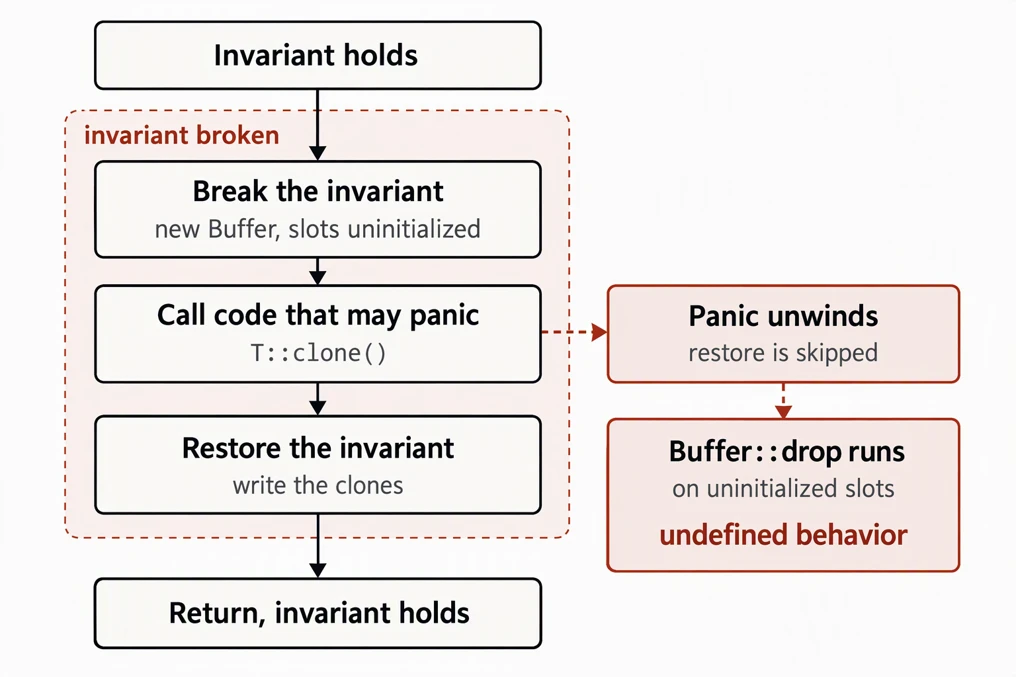
Unsafe code often breaks an invariant for a moment and restores it afterward; for example, it may allocate an uninitialized buffer and fill it directly, avoiding redundant writes to zero the memory first. That’s fine as long as the function runs to the end. But many operations in Rust can panic, from out-of-bounds indexing to calls into user-provided code, and by default a panic unwinds: it leaves the function early while still running destructors. Unwinding inside that window becomes an invisible exit that exposes the broken invariant to code that trusts it. Bugs of this kind are called panic safety bugs.

Figure 1 — Panic Safety.

MapWindows::clone (issue #156501)

We identified a panic safety issue in MapWindows::clone. The nightly API Iterator::map_windows yields overlapping windows of N items. It keeps the current window in a Buffer whose destructor drops the N items starting at start. In Rust 1.97.0, library/core/src/iter/adapters/map_windows.rs defines it as:

struct Buffer<​T, const N: usize> {
    // Invariant: `self.buffer[self.start..self.start + N]` is initialized,
    // with all other elements being uninitialized. This also
    // implies that `self.start <= N`.
    buffer: [[MaybeUninit<​T>; N]; 2],
    start: usize,
}

Buffer::clone, in the same file, built the new buffer first and filled it afterward:

impl<​T: Clone, const N: usize> Clone for Buffer<​T, N> {
    fn clone(&self) -> Self {
        let mut buffer = Buffer {
            buffer: [[const { MaybeUninit::uninit() }; N], [const { MaybeUninit::uninit() }; N]],
            start: self.start,
        };
        buffer.as_uninit_array_mut().write(self.as_array_ref().clone());
        buffer
    }
}

After buffer is constructed, it breaks its own invariant: its slots are uninitialized, but its destructor is already armed. The self.as_array_ref().clone() call runs the user's T::clone before the slots are written. If that call panics, unwinding drops buffer and runs drop_in_place on N uninitialized values. Our proof of concept uses only safe code: an element type whose clone always panics, which causes a crash when the destructor accesses uninitialized memory. The fix holds the new buffer in ManuallyDrop until it is fully written, so unwinding leaks the half-built buffer instead of dropping it.

The general lesson is to treat every call to code you don’t control, such as clone, drop, comparisons, closures, and iterator methods, as a possible early exit. Either finish the work that may panic before breaking an invariant, or make the broken state safe to unwind through: hold it in ManuallyDrop, or use a guard whose destructor restores the invariant, like Vec’s internal SetLenOnDrop. The Rustonomicon covers this under exception safety.

Allocators must not unwind

The recently stabilized Allocator API shows how hard panic safety is to get right. With std, an allocation failure aborts the process by default instead of unwinding, so much of the standard library's unsafe code assumes allocation never unwinds. Custom allocators can break that assumption. While the API was being stabilized, we reported one place in BTreeMap::insert that becomes unsound when an allocator unwinds, and others reported more (#159334, #159368, #159370). Fixing them one by one would mean auditing everything that allocates, so the stabilization, shipping in Rust 1.100 on November 12, instead requires implementors never to unwind from the trait's methods or from drop. The proposal notes that "unwinding out of many allocation-related methods was found to be a pervasive source of unsoundness."

Pattern 2: Trusting user-provided implementations to be correct

Unsafe code often calls into code its caller provides: a comparator, a trait implementation, a closure. That code is safe, but safe doesn’t mean correct, and it can return inconsistent or plainly wrong answers. The question is who is responsible when it does. In C++, it’s the caller. std::sort requires its comparator to be a strict weak ordering, and breaking that rule is undefined behavior. With libstdc++, sorting equal elements with <= reads past the end of the vector:

std::vector<​int> v(100, 42);
// Bug: `<=` is not a strict weak ordering, since cmp(a, a) is true.
std::sort(v.begin(), v.end(), [](int a, int b) { return a <= b; });
// AddressSanitizer: heap-buffer-overflow in std::__introsort_loop

The same comparator passed to Rust's sort_by is only a logic error. The sort may panic or leave the slice in an unspecified order, but it never causes undefined behavior. The responsibility sits with the unsafe code. The comparator is safe code supplied by the caller, so the unsafe code inside the sort must stay sound no matter what it returns. The same goes for every safe trait a user can implement: comparisons can be inconsistent, an ExactSizeIterator can report a length that doesn't match the items it yields, and Borrow can return a different value on each call.

str::replace with a custom Pattern (#156491)

Another of our bug reports shows how easy this trust is to miss: str::replace with a custom Pattern can create a non-UTF-8 String. String search APIs accept any type that implements the nightly Pattern trait, and a pattern can describe itself through as_utf8_pattern. str::replace uses that description to take a fast path when replacing one ASCII byte with another. In Rust 1.96.0, the fast path in library/alloc/src/str.rs looked like this:

pub fn replace<​P: Pattern>(&self, from: P, to: &str) -> String {
    // Fast path for replacing a single ASCII character with another.
    if let Some(from_byte) = match from.as_utf8_pattern() {
        Some(Utf8Pattern::StringPattern([from_byte])) => Some(*from_byte),
        Some(Utf8Pattern::CharPattern(c)) => c.as_ascii().map(|ascii_char| ascii_char.to_u8()),
        _ => None,
    } {
        if let [to_byte] = to.as_bytes() {
            return unsafe { replace_ascii(self.as_bytes(), from_byte, *to_byte) };
        }
    }

replace_ascii, in the same file, then rewrites the bytes:

unsafe fn replace_ascii(utf8_bytes: &[u8], from: u8, to: u8) -> String {
    let result: Vec<​u8> = utf8_bytes.iter().map(|b| if *b == from { to } else { *b }).collect();
    // SAFETY: We replaced ascii with ascii on valid utf8 strings.
    unsafe { String::from_utf8_unchecked(result) }
}

The CharPattern branch checks that the character is ASCII, but the StringPattern branch assumes a one-byte string pattern must be ASCII. That holds for &str patterns, but StringPattern stored &[u8], and as_utf8_pattern is a safe method any Pattern can implement. In our proof of concept, a custom pattern reports the single byte 0x80, which only appears inside multibyte UTF-8 sequences:

impl Pattern for NonAsciiBytePattern {
    // ...
    fn as_utf8_pattern(&self) -> Option<​Utf8Pattern<​'_>> {
        static NEEDLE: [u8; 1] = [0x80];
        Some(Utf8Pattern::StringPattern(&NEEDLE))
    }
}

// "\u{d000}" is [ed, 80, 80]; the result is [ed, 3f, 3f], which is not UTF-8.
let corrupted = "\u{d000}".replace(NonAsciiBytePattern, "?");

str::replace rewrites the continuation bytes and returns a String that isn't valid UTF-8, and later string operations that rely on UTF-8 reach undefined behavior. The fix changed StringPattern to hold &str instead of &[u8], so the type itself now guarantees UTF-8.

When unsafe code depends on a property of a user-provided implementation, don’t take it on faith. Call the implementation once and keep the result, validate what it returns, or encode the property in a type that safe code can’t forge, as this fix did. If none of those work, make the trait unsafe so implementors explicitly promise to uphold it.

More examples

join shows how easy it is to fix this kind of bug only partway. In 2020, we reported that it trusted Borrow::borrow to return the same string on each call (CVE-2020-36323), and the fix handled strings that shrink between calls. In April 2026, the same function needed another fix: join borrows the first element twice, and if it grows on the second call, the remaining-length calculation underflows into a heap overflow. The earlier fix had never covered that path.

Others reported similar problems in the Pattern API this year. A safe Pattern can hand back a valid searcher built for a different string, and consumers such as strip_prefix_of apply its ranges to the original string unchecked, reading out of bounds (#158265). The same problem turned up in split_once (#165076) after a report that the Searcher contract doesn't spell out what str::split relies on (#164904). Both bugs are still open.

Pattern 3: Trusting the underlying system

The first two patterns stay inside Rust code. The third sits at the boundary with the operating system, where unsafe code trusts process-wide state such as signal stacks, memory mappings, and the environment, which other threads, C libraries, or the kernel can touch at any time. These bugs have been hard to find automatically, because a static analyzer would need to model all of that surrounding behavior. AI agents change the picture: they understand enough about the environment the code runs in to make this area practical to search. We started exploring it and found some interesting bugs.

process::exit and the main thread’s signal stack (#161018)

When a thread overflows its stack, Rust prints a clear message and aborts instead of crashing with a bare segmentation fault:

thread 'main' (3307186) has overflowed its stack
fatal runtime error: stack overflow, aborting

This relies on a few pieces of process-wide state. Each thread’s stack ends in a guard page, an inaccessible region just past the stack’s limit: pthread reserves one for every spawned thread, and on Linux the kernel’s own stack guard plays that role for the main thread. Touching it raises SIGSEGV, and Rust registers a handler for that signal. The handler can’t run on the stack that just overflowed, so Rust also gives each thread an alternate signal stack, a small separate mapping with a guard page of its own, which the kernel switches to when it delivers the signal. The handler checks that the faulting address is inside the guard page, prints the message, and aborts.

Figure 2 — Stack Overflow.

We found that calling process::exit from a child thread tears down the main thread’s alternate stack while the main thread is still running. process::exit runs the runtime’s cleanup before calling libc’s exit, and in Rust 1.98.0 that cleanup ends in library/std/src/sys/pal/unix/stack_overflow.rs:

pub unsafe fn cleanup() {
    if cfg!(panic = "immediate-abort") {
        return;
    }
    // FIXME: I probably cause more bugs than I'm worth!
    // see https://github.com/rust-lang/rust/issues/111272
    unsafe { drop_handler(MAIN_ALTSTACK.load(Ordering::Relaxed)) };
}

The cleanup function passes MAIN_ALTSTACK, the main thread’s alternate stack, to drop_handler:

// SAFETY: we warned the caller this disables the alternate signal stack!
unsafe { sigaltstack(&disabling_stack, ptr::null_mut()) };
// SAFETY: We know from `get_stackp` that the alternate stack we installed is part of
// a mapping that started one page earlier, so walk back a page and unmap from there.
unsafe { munmap(data.sub(page_size), sigstack_size + page_size) };

The call to sigaltstack disables the alternate stack of the calling thread, but the subsequent call to munmap unmaps the main thread’s. The code assumes it runs on the main thread, which isn’t true when a child thread calls process::exit. The main thread keeps running until libc’s exit finishes, with its signal stack registration still pointing at unmapped memory. If it overflows its stack in that window, the kernel can’t deliver the signal, and our proof of concept dies with a plain segmentation fault instead of Rust’s message. The bug dates back to 2015, and the fix stops cleaning up the main thread’s alternate stack altogether.

We also checked whether this could become a security issue. In theory, it could lead to code execution: if a writable mapping landed at the old alternate stack’s address, the kernel would deliver the main thread’s next signal onto it, and another thread could overwrite the handler’s frame, such as its return address, while it runs. In practice, the conditions are very tight. Everything has to happen in the brief window before libc’s exit finishes, the new mapping must have exactly the right size to reuse that address, and overwriting the frame takes a second race inside a short handler. For issue #161018, our testing found no reliable exploitation path under the conditions examined, and we assessed practical exploitation as unlikely. This assessment does not automatically apply to the other issues discussed. The issue has more details in its security impact analysis.

CommandExt::exec and the global environment (#156951)

Our other report involves the process environment. On Unix, CommandExt::exec replaces the current process with a new program. When the command has its own environment variables, exec points the process-global environ at a new array, calls execvp, and restores environ if execvp fails. In Rust 1.99.0, Command::exec takes the environment lock in library/std/src/sys/process/unix/unix.rs:

let _lock = sys::env::env_read_lock();

let Err(e) = self.do_exec(theirs, envp.as_ref());

Command::do_exec, in the same file, then swaps the environment:

    _reset = Some(Reset(*sys::env::environ()));
    *sys::env::environ() = envp.as_ptr();
}

libc::execvp(self.get_program_cstr().as_ptr(), self.get_argv().as_ptr());
Err(io::Error::last_os_error())

Command::exec takes only the read side of the environment lock, yet do_exec writes the process-global environ. Before the write, do_exec saves the old value so it can be restored if execvp fails. Writing environ under a read lock lets other threads in. A thread calling env::var takes the same read lock and can see variables meant only for the new program, and two failed exec calls racing each other can leave environ pointing at a freed array that a later env::vars_os() reads. Both proofs of concept use only safe Rust. A 2018 fix held an exclusive lock here, but when the environment lock became a read-write lock in 2021, exec kept the read side. A fix that avoids touching environ by calling execve directly is in review.

The environment has caused trouble before. After a discussion that began in 2015, the 2024 edition marked env::set_var as unsafe, because C functions on most Unix platforms read the environment without going through Rust's lock.

process::exit and thread-local destructors (#164243)

Getting this boundary right is hard, and more problems are still open. While exploring this area, we independently ran into a double free in safe code that process::exit can cause through thread-local destructors. It was reported by someone else (#164243), but it’s worth mentioning here. libc’s exit first runs the calling thread’s thread-local destructors, as C++ requires, and Rust registers its destructors the same way. If a destructor calls process::exit while a thread local is being replaced, libc drops that thread local a second time. A proposed fix switches process::exit to POSIX _exit, which ends the process without running these handlers.

Why Rust still matters and advancing vulnerability discovery with AI

Every unsafe block rests on assumptions about the code around it. The bugs in this post came from three kinds of misplaced trust:

  • that code won't panic at the wrong moment,
  • that a caller-provided implementation behaves correctly, and
  • that the process-wide state Rust shares with the operating system and the C library stays the way the code expects.

Familiar patterns are still difficult (Patterns 1 and 2)

The first two patterns are well studied. Rudra looked for both in 2021, and the standard library was already fixing panic safety bugs in 2015 (CVE-2015-20001). They remain challenging to avoid because any call inside unsafe code might unwind or run code the caller supplied.

What we saw this year was mixed. On the positive side, the nightly process is working. Many reports were caught while the affected APIs were still unstable, and several were fixed by changing the design before stabilization. StringPattern now holds &str instead of &[u8], and Allocator was stabilized with a rule that implementors must not unwind. At the same time, bugs in these patterns still reach stable releases, and their fixes aren't always complete. join was fixed in 2020 and needed another fix in 2026 for a path the first fix had missed.

System boundary bugs are now within reach (Pattern 3)

The third pattern is different. Its bugs live where Rust meets the layers below it: the kernel, through system calls such as sigaltstack and munmap, and the C library, through process-wide state such as environ and the cleanup that libc's exit runs. Getting them right takes knowledge that lives outside Rust's type system, which has made these bugs difficult to find with traditional static analysis. That may also be why they last so long. The process::exit signal stack bug was in the standard library for nearly 11 years, and exec has written environ under a read lock since 2021. Unlike our reports in the first two patterns, both affect stable Rust.

Language models already know a great deal about how these interfaces behave, so agentic scanners can check unsafe code against the system it runs on, not just the language. We think this boundary is one of the most promising places for agentic security research, in Rust and beyond.

Rust's high bar is hard to meet but worth keeping

Rust holds its safe APIs to a stricter standard than C and C++. Safe code must never be able to cause undefined behavior, no matter how it uses an API. In C++, a comparator that breaks std::sort's ordering requirement causes undefined behavior, while Rust's sort must stay memory-safe with any Ord implementation. POSIX doesn't guarantee that setenv is safe to call while another thread reads the environment. That makes memory safety bugs in Rust hard to compare one-to-one with bugs in other languages.

For the same reason, a soundness bug in the standard library isn't automatically a vulnerability in the programs that use it. Each bug in this post needs an unusual setup to trigger, such as a panic at exactly the wrong moment, a deliberately misbehaving implementation, or calling process::exit from a child thread. It becomes a serious vulnerability only if a real program reaches the API in that way.

Rust's safety standard is strict and difficult to meet, but it's also useful. It gives an unambiguous answer to what counts as a soundness bug, so problems can be fixed and prevented once in the library, instead of in every program that uses it. Rust's safety model strikes the right balance between control, safety, and performance for systems programming, which is why so many projects choose it.

Beyond the lab

At Microsoft FORGE Lab, we're exploring how technology such as codename MDASH can help researchers find bugs like the ones in this post at greater scale. Rust's standard library is one of several foundational open source projects where we're applying this approach.

This research also extends beyond the lab. It helps inform the development of codename MDASH, which brings agentic vulnerability discovery into Microsoft Defender. These findings can also serve as inputs to Microsoft Perception, our new multi-agent security system, where specialized agents work together across broader security workflows. For example, the Web App Pen Test Agent can use codename MDASH findings to help prioritize testing, validate exploitability against live applications, and produce actionable vulnerabilities that downstream agents can use to prioritize and support remediation. This connects AI-powered code analysis with real-world security validation and response, helping security teams move from identifying potential vulnerabilities to understanding and addressing actual risk.

Our goal isn’t to simply find more bugs, it's to identify meaningful issues, turn those findings into actionable research, and improve the safety of foundational software that developers and organizations depend on.

The post FORGE Lab uses agentic tools to identify memory safety issues in Rust appeared first on Microsoft Security Blog.

Antes de ontemMicrosoft Security Blog
  • ✇Microsoft Security Blog
  • ARTEX abuse expands as cybercriminals target financial sector Microsoft Threat Intelligence
    In this article Mitigation and protection guidanceMicrosoft Defender detectionsHunting queriesIndicators of compromise In October 2026, the financially motivated threat actor Storm-3358 began targeting organizations in the financial sector using the agentic AI offensive framework ARTEX. The threat actor that Microsoft Threat Intelligence tracks as Storm-3358 is a Cambodia-based intrusion cluster that primarily targets financial organizations in Southeast As
     

ARTEX abuse expands as cybercriminals target financial sector

In October 2026, the financially motivated threat actor Storm-3358 began targeting organizations in the financial sector using the agentic AI offensive framework ARTEX. The threat actor that Microsoft Threat Intelligence tracks as Storm-3358 is a Cambodia-based intrusion cluster that primarily targets financial organizations in Southeast Asia, in addition to a smaller number of large financial organizations globally.

Microsoft has observed Storm-3358 use ARTEX in combination with conventional automated tools to scan systems connected to the public internet, exploit security flaws including anonymous file upload and server-side request forgery (SSRF), and install open-source remote access trojans (RATs). Storm-3358 has used the WISP, vshell, and AdaptixC2 RATs for persistence and lateral movement. Microsoft has observed ARTEX agents using utilities like netcat and curl to download these RATs to compromised systems, as shown in Figure 1.

Figure 1. Example commands that ARTEX agents used to download RATs to compromised systems.

In recent ARTEX-related attacks, threat actors have used ARTEX agents to scan and exploit vulnerabilities in web applications, use web shells for persistence on compromised web servers, compromise credentials from public sources and compromised systems, and use compromised cloud identities for persistence and data exfiltration. ARTEX agents can also perform brute-force password attacks, password spraying, API enumeration and abuse, and database dumping. Agentic tools like ARTEX can leverage compromised credentials and systems at machine speed to move laterally, escalate privileges, and exfiltrate data.

This activity illustrates an ongoing trend of threat actors accelerating all stages of the attack chain with agentic AI penetration testing frameworks, including ARTEX. As these capabilities evolve, defenders must similarly use AI to investigate and respond across large environments.

While threat actors regularly use proxies and virtual private networks (VPNs) to change the source IP address of malicious traffic and bypass static detections, Microsoft is providing indicators of compromise (IOCs) to help defenders detect related activity.

Mitigation and protection guidance

Microsoft’s research into threats involving agentic frameworks informs security detections and investigative context across its products. The capabilities available to customers depend on the source of the activity and the products and protections deployed in their environment.

Several behavioral signals can help organizations determine that they are being targeted by threat actors using agentic AI. Agentic AI frameworks scanning a target send a wide variety of requests in a brief time and retry variations on the same technique or move on to next-stage actions at machine speed. Agentic AI frameworks use existing penetration testing tools. For example, ARTEX by default uses Nmap, curl, wget, Python HTTP clients, Norma SDK WebFetch, and headless Chromium through Playwright, among others. These tools may send network traffic with distinctive characteristics, such as default user agent strings. While blocking network traffic with these characteristics will not stop an attack by an AI agent, which will quickly change them, identifying them can alert defenders to the activity.

Defensive honeypots, decoys, tarpits, and fake wins can pull autonomous AI attacks away from legitimate targets. Honeypots and decoy surfaces such as Microsoft Sentinel Deception give the agent attractive but worthless targets to pursue. Tarpits consume the agent’s time and budget. Fake wins present convincing evidence that the agent’s objective is complete, which can cause it to stop on a false success. In Microsoft’s testing, these controls helped reduce the attack traffic reaching real assets and produced high-confidence, attribution-quality signal.

For additional information on the evolution of threat actors’ use of ARTEX please see Microsoft’s recent blogs: AI-driven, large-scale nation-state campaign using ARTEX enables supply chain compromise and Threat actors use agentic AI tooling to find and abuse exposed secrets.

Microsoft’s continuous research into threat actors leveraging agentic frameworks integrates directly into the following products:

Identity and sign-in activity — Microsoft Entra ID Protection

Microsoft analyzes sign-in activity and other signals to identify potential identity risk. Customers can investigate risk detections and risky sign-ins, and configure Conditional Access policies that use sign-in or user risk to require multifactor authentication or block access when specified conditions are met. Identity and sign-in activity from known threat actor infrastructure, including from agentic frameworks like ARTEX, generate Verified threat actor IP risk detections delivered at high risk. See:

Endpoint activity — Microsoft Defender for Endpoint

Endpoint alerts help security teams identify and investigate suspicious activity on devices. Indicators of compromise can support detection and, when configured, blocking. Customers can review related alerts in the Microsoft Defender portal. See:

Activity across security domains — Microsoft Defender portal

The portal brings together alerts and incidents from Microsoft security solutions and provides relevant threat intelligence to support investigation, threat hunting, and response. This helps customers assess suspicious activity in the context of their own environment. See:

Security Dashboard for AI

Threat actor misuse of AI accelerates risk across enterprise environments by amplifying existing threats such as exploitation of vulnerabilities, phishing, malware threats, and insider activity. To help organizations stay ahead of AI-enabled threat activity, Microsoft has introduced the Security Dashboard for AI. The dashboard provides users with a unified view of AI security posture by aggregating security, identity, and data risk across Microsoft Defender, Microsoft Entra, and Microsoft Purview. See:

Microsoft Defender detections

Microsoft Defender customers can refer to the list of applicable detections below. Microsoft Defender coordinates detection, prevention, investigation, and response across endpoints, identities, email, apps to provide integrated protection against attacks like the threat discussed in this blog. These alerts may trigger on unrelated activity. Customers should investigate to determine if the alert is related to the activity outlined in this blog.

Tactic Microsoft Defender coverage
ExecutionMicrosoft Defender for Endpoint
– Process launched in the background
– Suspicious file dropped and launched
– Suspicious file or content ingress
– Hidden file executed
– Suspicious process executed by network service
– Suspicious piped command launched
– Suspicious process launched by service
– Suspicious process launched from a world-writable directory
– Suspicious script launched
– Suspicious shell execution from PHP application
– Suspicious shell command execution
CollectionMicrosoft Defender for Endpoint
– Enumeration of files with sensitive data
– Suspicious file copy operations
– Suspicious process collected data from local system
Credential accessMicrosoft Defender for Endpoint
– Suspicious access of sensitive files
Defense evasionMicrosoft Defender for Endpoint
– Executable permission added to file or directory
– Obfuscation or deobfuscation activity
– Possible time based evasion
– Suspicious decoding of encoded content into script
– Suspicious file and directory permission modification
– Suspicious file or information obfuscation detected
– Suspicious path deletion
DiscoveryMicrosoft Defender for Endpoint
– Suspicious port scan activity
Command and control (C2)Microsoft Defender for Endpoint
– Possible reverse shell
– Suspicious connection to remote service
– Suspicious curl behavior

Microsoft Defender for Cloud
– Publicly accessible storage containers have been exposed
– Azure Resource Manager operation from suspicious IP address
Lateral movementMicrosoft Defender for Endpoint
– Remote Desktop session
PersistenceMicrosoft Defender for Endpoint
– Possible Web Server compromise activity
– Suspicious cron job creation

Microsoft Security Copilot

Microsoft Security Copilot is embedded in Microsoft Defender and provides security teams with AI-powered capabilities to summarize incidents, analyze files and scripts, summarize identities, use guided responses, and generate device summaries, hunting queries, and incident reports.

Customers can also deploy AI agents, including the following Microsoft Security Copilot agents, to perform security tasks efficiently:

Security Copilot is also available as a standalone experience where customers can perform specific security-related tasks, such as incident investigation, user analysis, and vulnerability impact assessment. In addition, Security Copilot offers developer scenarios that allow customers to build, test, publish, and integrate AI agents and plugins to meet unique security needs.

Threat intelligence reports

Microsoft Defender XDR customers can use the following threat analytics reports in the Defender portal (requires license for at least one Defender XDR product) to get the most up-to-date information about the activity and techniques discussed in this blog. These reports provide intelligence, protection information, and recommended actions to prevent, mitigate, or respond to associated threats found in customer environments.

Microsoft Security Copilot customers can also use the Microsoft Security Copilot integration in Microsoft Defender Threat Intelligence, either in the Security Copilot standalone portal or in the embedded experience in the Microsoft Defender portal to get more information about this threat.

Hunting queries

Microsoft Defender XDR

Microsoft Defender XDR customers can run the following advanced hunting query to find related activity in their networks:

Download of new files using curl

Threat actors might use tools such as curl to download additional files, communicate with C2 infrastructure, or exfiltrate data. This query looks for new files being downloaded using curl. curl also has legitimate uses, so files and hosts should be reviewed to identify potentially malicious activity.

let known_files = DeviceNetworkEvents
    | where TimeGenerated between (ago(7d)..ago(1d))
    | where InitiatingProcessFileName has "curl"
    | extend url = extract("http[s]?:\\/\\/(?:[a-zA-Z]|[0-9]|[$-_@.&+]|[!*\\(\\),]|(?:%[0-9a-fA-F][0-9a-fA-F]))+", 0,InitiatingProcessCommandLine)
    | extend ip = extract("(\\b25[0-5]|\\b2[0-4][0-9]|\\b[01]?[0-9][0-9]?)(\\.(25[0-5]|2[0-4][0-9]|[01]?[0-9][0-9]?)){3}[^ ]*", 0, InitiatingProcessCommandLine)
    | extend remote_file = iif(isnotempty(url), url, ip)
    | union (SecurityEvent
    | where TimeGenerated between (ago(7d)..ago(1d))
    | where EventID == 4688
    | where CommandLine has "curl"
    | extend url = extract("http[s]?:\\/\\/(?:[a-zA-Z]|[0-9]|[$-_@.&+]|[!*\\(\\),]|(?:%[0-9a-fA-F][0-9a-fA-F]))+", 0,CommandLine)
    | extend ip = extract("(\\b25[0-5]|\\b2[0-4][0-9]|\\b[01]?[0-9][0-9]?)(\\.(25[0-5]|2[0-4][0-9]|[01]?[0-9][0-9]?)){3}[^ ]*", 0, CommandLine)
    | extend remote_file = iif(isnotempty(url), url, ip))
    | summarize by remote_file;
    DeviceNetworkEvents
    | where TimeGenerated > ago(1d)
    | where InitiatingProcessFileName has "curl"
    | extend url = extract("http[s]?:\\/\\/(?:[a-zA-Z]|[0-9]|[$-_@.&+]|[!*\\(\\),]|(?:%[0-9a-fA-F][0-9a-fA-F]))+", 0,InitiatingProcessCommandLine)
    | extend ip = extract("(\\b25[0-5]|\\b2[0-4][0-9]|\\b[01]?[0-9][0-9]?)(\\.(25[0-5]|2[0-4][0-9]|[01]?[0-9][0-9]?)){3}[^ ]*", 0, InitiatingProcessCommandLine)
    | extend remote_file = iif(isnotempty(url), url, ip)
    | union (SecurityEvent
    | where EventID == 4688
    | where CommandLine has "curl"
    | extend url = extract("http[s]?:\\/\\/(?:[a-zA-Z]|[0-9]|[$-_@.&+]|[!*\\(\\),]|(?:%[0-9a-fA-F][0-9a-fA-F]))+", 0,CommandLine)
    | extend ip = extract("(\\b25[0-5]|\\b2[0-4][0-9]|\\b[01]?[0-9][0-9]?)(\\.(25[0-5]|2[0-4][0-9]|[01]?[0-9][0-9]?)){3}[^ ]*", 0, CommandLine)
    | extend remote_file = iif(isnotempty(url), url, ip))
    | where remote_file !in (known_files)

Microsoft Sentinel

Microsoft Sentinel customers can run the following advanced hunting query to find related activity in their networks:

Detect network IP indicators of compromise using ASIM

The following query checks IP address across data sources in the past 30 days supported by ASIM network session parser.

let lookback = 30d; let 
ioc_ip_addr = dynamic(["199.19.95.66", "199.19.95.67", "199.19.95.68", "91.92.240.238", "85.11.168.45", "178.15.54.129", "31.77.229.35", "85.11.167.52"]); 
_Im_NetworkSession(starttime=todatetime(ago(lookback)), endtime=now()) 
| where DstIpAddr in (ioc_ip_addr) 
| summarize FirstSeen=min(TimeGenerated), LastSeen=max(TimeGenerated), EventCount=count() by SrcIpAddr, DstIpAddr, DstDomain, Dvc, EventProduct, EventVendor

Indicators of compromise

Note: Threat actors regularly use proxies and virtual private networks (VPNs) to change the source IP address of malicious traffic and bypass static detections. Microsoft is providing the following sample indicators of compromise (IOCs) to help defenders detect related activity.

IndicatorTypeDescriptionFirst seenLast seen
199.19.95[.]66IP addressWISP C2 node2026-11-02Active as of 2026-11-06
199.19.95[.]67IP addressWISP C2 node2026-11-02Active as of 2026-11-06
199.19.95[.]68IP addressWISP C2 node2026-11-02Active as of 2026-11-06
91.92.240[.]238IP addressARTEX server2026-11-04Active as of 2026-11-06
85.11.168[.]45IP addressARTEX server2026-11-04Active as of 2026-11-06
85.11.167[.]52IP addressC2 server2026-11-04Active as of 2026-11-06
178.16.54[.]129IP addressARTEX server2026-10-19Active as of 2026-11-06
31.77.229[.]35IP addressARTEX server2026-10-28Active as of 2026-11-06

Learn more

For the latest security research from the Microsoft Threat Intelligence community, check out the Microsoft Threat Intelligence Blog.

To get notified about new publications and to join discussions on social media, follow us on LinkedIn, X (formerly Twitter), and Bluesky.

To hear stories and insights from the Microsoft Threat Intelligence community about the ever-evolving threat landscape, listen to the Microsoft Threat Intelligence podcast.

The post ARTEX abuse expands as cybercriminals target financial sector appeared first on Microsoft Security Blog.

Threat actors use agentic AI tooling to find and abuse exposed secrets

Microsoft Threat Intelligence has observed threat actors using an agentic AI offensive framework to search public GitHub repositories for exposed secrets, including credentials, application credentials, and AI inference-related API keys across multiple applications and cloud services. These threat actors can then use the secrets for further malicious activity against the compromised organization.

Searching open code repositories for exposed credentials, secrets, keys, and other authentication material is a well-documented technique that has historically been limited by the time required for human operators to find code repositories, review the data in the repositories, and leverage authentication material for further action. However, agentic tooling like ARTEX allows threat actors to not only scan for secrets across multiple repositories at a quicker pace but also use the agents to analyze the output and conduct follow-on attacks, cutting down on the need for the threat actor to have hands-on-keyboard interactions throughout the attack chain. In at least one case, Microsoft observed an AI agent advance from scanning GitHub for secrets to exfiltrating data from Azure Key Vault in just five minutes.

Microsoft has also investigated follow-on activity involving the misuse of valid application credentials. As early as October 28, 2026, Microsoft began observing successful service principal sign-ins from the IP address 199.19.77[.]84 involving multiple application IDs across some impacted customers, including cases where a multitenant application credential was compromised at the source (vendor-owned application) and used to access multiple downstream tenants. The threat actor used the compromised credentials for cloud resource discovery, and credential and data exfiltration, including from Azure Key Vaults and Storage Accounts, and abuse of Azure AI services consistent with the activity described above. Additionally, Microsoft observed malicious activity originating from two IP addresses potentially associated with this campaign. We identified malicious operations from 65.87.223[.]26, including indications of vulnerability exploitation by embedded shell commands in a user agent and attempts to obtain App Service authentication tokens. A similar campaign involving the same IPs addressed was also reported by Todyl. Separately, Microsoft observed reconnaissance operations from 157.22.126[.]128 targeting AI workloads deployed by victims on Azure AI services.

Microsoft encourages organizations to scan their code in GitHub and determine where any secrets are present. In addition to removing the secrets from the code base, affected organizations should immediately rotate any exposed keys or credentials. GitHub monitors public repositories by automatically scanning for secrets. In addition to scanning their own repositories, organizations can enable public monitoring through GitHub to detect secrets leaked in secondary public repositories across GitHub. This extends secret scanning beyond the repositories an enterprise owns to follow potential secret exposure across the platform. GitHub Advanced Security for Azure DevOps scans for credentials and other sensitive content in source code. Push protection can also block supported secrets before they’re pushed. Organizations need either GitHub Advanced Security for Azure DevOps or, for organizations using the standalone experience, GitHub Secret Protection for Azure DevOps enabled.

Secrets are exposed in public repositories when code containing the secret is committed to GitHub. Developers might store secrets in configuration files, scripts, or other code to quickly operationalize the OAuth application or avoid configuring more modern authentication flows. Organizations can reduce exposure by protecting workload identities and secrets, enforcing least privilege, safeguarding recovery resources, and enabling relevant Microsoft Defender for Cloud protections. Publicly exposed credentials remain usable until revoked or rotated; removing the original disclosure alone does not remediate the exposure. Microsoft recommends that developers migrate OAuth applications away from secret-based authentication. While storing long-lived application client secrets in code is a common practice, using managed identities for application authentication eliminates the possibility of secret exposure in code, manual processes associated with secret management, and barriers to securely scaling applications.

This activity illustrates an ongoing trend of threat actors accelerating all stages of the attack chain with agentic AI penetration testing frameworks, including ARTEX. As these capabilities evolve, defenders must similarly use AI to investigate and respond across large environments.

From exposed secrets to cloud compromise

Starting in August 2026, Microsoft observed threat actors using an agentic AI offensive framework to submit large volumes of queries to GitHub for secrets. The queries submitted by the AI framework often included the name of a target organization, keywords for secrets, a keyword linked to cloud services, or a keyword linked to another AI service provider. Organizations that find their secrets exposed in public repositories must assume that the exposed secrets and associated applications are compromised.

Follow-on actions

Credential abuse via Entra ID

In one follow-on attack that began as early as October 28, 2026, an agentic framework used valid leaked or stolen application credentials to access Microsoft Entra ID tenants of certain organizations and connected Azure and Microsoft 365 resources. The sign-ins primarily came from two IP addresses: 199.19.77[.]84 and 199.19.77[.]18. The latter IP address is a Tor exit node, which might be associated with unrelated malicious activity, including from unrelated sources. The agent successfully conducted service principal sign-ins on dozens of associated applications across multiple tenants.. Service principals are the identities that applications use to authenticate and give direct, programmatic access to whatever the application is authorized to reach.

The threat actor targeted operations that return credentials, including storage account keys, App Service settings, connection strings and publishing credentials, AI and machine learning (ML) connections and datastores, and Azure Kubernetes Service (AKS) user credentials. The compromised applications subsequently accessed SharePoint and OneDrive in the targeted organization tenants, including file downloads and mailbox-item access. In some tenants, the threat actor sent Microsoft Graph API requests, which were mostly searches to find content of interest. The threat actor enumerated subscriptions, resource groups, permissions, AI model deployments, and service configurations in Azure to map the environment.

Additionally, the threat actor attempted to validate stolen Azure resources, including compromised Azure AI services, as identified using Defender for Cloud’s AI threat protection. Observed activity suggests that the threat actor might have attempted to abuse some of these compromised AI resources to facilitate their broader attack activity.

Figure 1. Tactics, techniques, and procedures (TTPs) observed across the credential abuse attack chain

Cloud API adjustments indicative of adaptive behavior

Additionally in this attack the agent’s operations on a victim’s Azure Resource Manager (ARM) instance originating from 199.19.77[.]84 demonstrated sequences consistent with adaptive troubleshooting, where failed cloud API requests were followed by changes to HTTP methods or API versions and subsequent HTTP 200 responses:

  • A batch of ARM requests attempting to enumerate secret metadata across multiple Azure Key Vault resources returned HTTP 400 (Bad Request). These requests specified a version associated with Key Vault’s data-plane APIs against ARM (control-plane) APIs. Approximately 28 seconds after the first failed response, a batch rerun began against the same vault resource paths using the ARM API version 2023-07-01 and returned HTTP 200.
  • A GET request to enumerate an Azure SQL server’s firewall rules specified an outdated API version and returned HTTP 400. Approximately 60 seconds after that request, a matching GET began using a supported version and subsequently returned HTTP 200. The URL changed only in its api-version parameter.
  • An ARM POST request to an Application Insights query endpoint returned HTTP 400 because an outdated API version was specified. Approximately 80 seconds after the failed request, another POST began against the same endpoint, specifying a supported API version, and subsequently returned HTTP 200.

OAuth application abuse

In multiple cases, Microsoft observed the same agentic AI tools subsequently obtain a token for a single-tenant OAuth application in the same target organization, then use the compromised OAuth application to enumerate other cloud resources within the organization. In some cases, the agents exfiltrated secrets from the organization’s Azure Key Vault. The agents once authenticated have also searched Azure DevOps for secrets. Until the secrets are revoked or rotated, they can allow a threat actor to maintain persistence in the organization, compromise additional identities, or hijack resources. In one observed case, an AI agent progressed from searching for the client secrets in GitHub to exfiltrating data from Azure Key Vault in five minutes.

The agents also used the compromised OAuth application to use the Run Command, which runs scripts in Azure VMs. With access to this functionality on a VM, a threat actor can access unsecured credentials and other stored data, compromise associated workload identities, or run code that provides persistence or lateral movement.

During this activity, the AI agents repeatedly demonstrated a focus on credentials that provide access to AI services, such as API keys for major AI service providers and OAuth applications with access to Foundry Tools (previously known as Azure Cognitive Services). Multiple public reports have documented threat actors using agentic AI tools to compromise credentials for AI services, sometimes to run the same agentic AI workflow.

Mitigating application credential abuse activity

Microsoft recommends the following mitigation steps to contain, detect, and investigate this threat.

Containment

  • Block 199.19.77[.]84/32 as a named location in a Conditional Access policy targeting workload identities, assigned directly to service principals, and in a user-scoped block policy to cover replayed sessions. Note that workload identity policies require Workload ID Premium licensing and cover only single-tenant apps registered in your tenant. Block the exact IP rather than the whole ASN.
  • For affected users, revoke Entra sessions, Azure DevOps PATs and SSH keys.
  • For any affected application, remove all client secrets, certificates and federated credentials, including those added by the threat actor and disable the service principal if needed. Tokens already issued remain valid until expiry.
  • Rotate everything stored in any Key Vault the affected application could read, and any credentials found in accessed documents.
  • MSPs: Review Partner Center access, GDAP relationships, and customer tenants, and notify affected customers per your agreements.

Detection and hunting

  • Review Entra service principal and non-interactive sign-in logs for 199.19.77[.]84 and 199.19.77[.]18 including failed attempts. Sign-in errors AADSTS7000215 (invalid secret) or AADSTS7000222 (expired secret) indicate someone holds a credential for your app; a failure followed by a success is urgent.
  • Review Azure Activity, Key Vault and Storage diagnostics, Entra audit, Azure DevOps audit and Microsoft 365 unified audit logs for the address, including secret reads, blob and file downloads, and changes to apps, permissions or pipelines.
  • In Azure DevOps auditing, review PAT creation and first use, federated service connections, pipeline runs and edits, and unfamiliar user agents. Enable auditing if it is off.
  • Look for behavior as well as the IP: one address authenticating to three or more service principals with mixed success, or one app requesting tokens across Azure Resource Manager, Key Vault, Storage and Graph in a short window. Search as far back as retention allows.

Defending against agentic AI attacks

Threat actors can and do change the source IP address, user agent strings, and other fingerprints left by the agentic AI penetration testing tools they use. This can make identifying and blocking malicious network traffic early difficult for defenders.

Several behavioral signals can help organizations determine that they are being targeted by threat actors using agentic AI. Agentic AI frameworks scanning a target send a wide variety of requests in a brief time and retry variations on the same technique or move on to next-stage actions at machine speed. Agentic AI frameworks use existing penetration testing tools. For example, ARTEX by default uses Nmap, curl, wget, Python HTTP clients, Norma SDK WebFetch, and headless Chromium through Playwright, among others. These tools may send network traffic with distinctive characteristics, such as default user agent strings. While blocking network traffic with these characteristics will not stop an attack by an AI agent, which will quickly change them, identifying them can alert defenders to the activity.

Defensive honeypots, decoys, tarpits, and fake wins can pull autonomous AI attacks away from legitimate targets. Honeypots and decoy surfaces such as Microsoft Sentinel Deception give the agent attractive but worthless targets to pursue. Tarpits consume the agent’s time and budget. Fake wins present convincing evidence that the agent’s objective is complete, which can cause it to stop on a false success. In Microsoft’s testing, these controls helped reduce the attack traffic reaching real assets and produced high-confidence, attribution-quality signal.

Microsoft recommends the following mitigations to reduce the impact of this threat.

  • Protect and continuously assess application credentials and secrets. Avoid storing service principal credentials, storage keys, connection strings, and other secrets in source code, configuration files, public repositories, issues, or other locations where they might be inadvertently exposed. To find credentials in source code, consider using tools like GitHub Advanced Security or other OWASP source code analysis tools.
  • Rotate compromised or exposed credentials immediately and establish credential lifecycle practices. Treat credentials that have been publicly exposed as compromised, even if the original location has subsequently been edited or deleted. Removing the content does not invalidate the credential or eliminate copies retained in edit history, caches, archives, logs, or other systems. Immediately revoke or rotate the affected credentials and investigate their historical use. Where supported, organizations should favor mechanisms that reduce reliance on long-lived credentials. Learn more about protecting secrets with Defender for Cloud.
  • Configure restrictions on how applications can be configured, such as restricting new user-provided app passwords and enforcing a max lifetime range for a password secret.
  • Enable appropriate Microsoft Defender for Cloud plans for critical Azure workloads. Consider enabling workload protections relevant to the resources in your environment, including Defender for Resource Manager, Defender for Storage, Defender for Key Vault, Defender for App Service, and Defender for Databases. Learn more in the Microsoft Defender for Cloud overview.
  • Apply least privilege to service principals and other workload identities. Review the Azure role-based access control (RBAC) permissions assigned to service principals and restrict their privileges to the resources and operations required by their applications. Learn more about best practices for Azure RBAC.
  • Protect backup and recovery infrastructure as part of resilience. Restrict access to backup and recovery resources and closely monitor attempts to modify or remove their protection controls. Learn more about Azure Backup security best practices.

Hardening OAuth applications against compromise involves managing the permissions of the applications in your organization and securing application secrets. To triage applications in your environment, enforce security policies with new applications as they are created, and address existing applications over time beginning with the most recent ones.

Microsoft detections

Microsoft Defender and Microsoft Sentinel customers can refer to the list of applicable detections below. Microsoft Defender coordinates detection, prevention, investigation, and response across endpoints, identities, email, and apps to provide integrated protection against attacks like the threat discussed in this blog.

Tactic Observed activity Microsoft Defender and Sentinel coverage
Initial accessMultiple identity-protection alerts identified authentication attempts from anonymized or high-risk infrastructure. This pattern can indicate attempted access through proxy, VPN, or previously reported malicious network sources.Microsoft Entra ID Protection
– Anonymous IP address
Initial accessAttack-analysis detections identified OAuth application activity consistent with compromise. This type of detection is useful when evaluating whether an app identity, rather than only a user identity, may have been abused.Microsoft Defender XDR
– Potentially compromised OAuth application identified through attack activity analysis
Initial access, DiscoveryUnattributed network indicators related to ARTEX use are flagged by Microsoft Threat Intelligence research and surfaced across multiple alerts. Suspected ARTEX use can include activity beyond the GitHub repository scanning activity discussed in this blog.Microsoft Sentinel
– Abnormal Deny Rate for Source IP
– Abnormal Port to Protocol
– Inbound Network Attack detected
– Malformed user agent
– Password spray attack against Azure AD application

Microsoft Defender XDR
– Account compromised following a password-spray attack
– Anomalous OAuth device code authentication activity
– Multiple Service Principal Sign-ins from Single IP
– Graph API activity from a Microsoft threat intelligence IP address

Microsoft Defender for Cloud Apps
– Activities from suspicious user agents
– Multiple failed login attempts
– Multiple failed user log on attempts to an app
– OAuth application activity from an uncommonly visited ISP
– Suspicious OAuth app registration

Microsoft Defender for Cloud
– Key vault unusual access denied – user/application accessing high volume of denied key vaults
– Access from an unusual location to a sensitive blob container
– Azure Resource Manager operation from suspicious IP address

Microsoft Entra ID Protection
– Atypical travelMalicious IP addressPassword Spray
– Verified threat actor IP
Credential accessIdentity-protection detections observed password spray behavior. This indicates repeated authentication attempts across accounts or tenants using a common source pattern.Microsoft Entra ID Protection
– Password spray

Microsoft Defender for Identity
– Suspicious service principal sign-in following credential addition
Credential accessAzure Key Vault accessMicrosoft Defender for Cloud (Defender for Key Vault)
– Unusual operation pattern in a key vault
– High volume of operations in a key vault
– Unusual application accessed a key vault
– Suspicious secret listing and query in a key vault
– Unusual access to the key vault from a suspicious IP (Non-Microsoft or External)
Command and controlSuspicious Microsoft Graph API usage was observed from campaign infrastructure. The activity involved Graph requests that can support discovery, collection, or follow-on cloud operations. Microsoft Defender for Identity
– Suspicious Entra Graph API query observed

Advanced hunting queries

The following hunting queries are related to the October 28 Entra ID service principal sign-in activity.

Find successful and failed application sign-ins from the suspicious IP addresses

let startTime = datetime(2026-10-28T00:00:00Z);
let endTime = now();
EntraIdSpnSignInEvents
| where Timestamp between (startTime .. endTime)
| where IPAddress in ("199.19.77.84")
| project Timestamp, TenantId, Application, ApplicationId, ServicePrincipalName, ServicePrincipalId, ResourceDisplayName, ResourceId, ResourceTenantId, IPAddress, ErrorCode, UserAgent, CorrelationId, RequestId
| order by Timestamp asc

Find Microsoft Graph API requests from the two IP addresses, including searches and response status

let startTime = datetime(2026-10-28T00:00:00Z);
let endTime = now();
GraphAPIAuditEvents
| where Timestamp between (startTime .. endTime)
| where IpAddress in ("199.19.77.84")
| project Timestamp, TenantId, ApplicationId, ServicePrincipalId, AccountObjectId, IpAddress,
          RequestMethod, RequestUri, ResponseStatusCode, ResponseSize, Scopes, EntityType,
          TargetWorkload, UniqueTokenIdentifier, ClientRequestId, OperationId, RequestId
| order by Timestamp asc

Find available Microsoft 365 and Microsoft Azure cloud activity details from the suspicious IP addresses

let startTime = datetime(2026-10-28T00:00:00Z);
let endTime = now();
CloudAppEvents
| where Timestamp between (startTime .. endTime)
| where IPAddress in ("199.19.77.84")
| project Timestamp, Application, CloudAppId = ApplicationId, ActionType, ActivityType,
          AccountType, AccountDisplayName, AccountId, AccountObjectId, IPAddress, UserAgent,
          ObjectName, ObjectType, ObjectId, ActivityObjects, ReportId, RawEventData
| order by Timestamp asc

CloudAuditEvents table to identify suspicious controlplane operations

CloudAuditEvents
| where IPAddress has_any  ('199.19.77.84','65.87.223.26')

CloudStorageEvents table to identify possible exfiltration from Storage Accounts.

CloudStorageAggregatedEvents
| where IPAddress in   ('199.19.77.84','65.87.223.26')
| where SuccessfulOperationsCount > 0   

Microsoft Security Copilot

Microsoft Security Copilot is embedded in Microsoft Defender and provides security teams with AI-powered capabilities to summarize incidents, analyze files and scripts, summarize identities, use guided responses, and generate device summaries, hunting queries, and incident reports.

Customers can also deploy AI agents, including the following Microsoft Security Copilot agents, to perform security tasks efficiently:

Security Copilot is also available as a standalone experience where customers can perform specific security-related tasks, such as incident investigation, user analysis, and vulnerability impact assessment. In addition, Security Copilot offers developer scenarios that allow customers to build, test, publish, and integrate AI agents and plugins to meet unique security needs.

Threat intelligence reports

Microsoft Defender XDR customers can use threat analytics reports in the Defender portal (requires license for at least one Defender XDR product) to get the most up-to-date information about the activity and techniques discussed in this blog. These reports provide intelligence, protection information, and recommended actions to prevent, mitigate, or respond to associated threats found in customer environments.

Microsoft Security Copilot customers can also use the Microsoft Security Copilot integration in Microsoft Defender Threat Intelligence, either in the Security Copilot standalone portal or in the embedded experience in the Microsoft Defender portal to get more information about this threat.

Learn more

For the latest security research from the Microsoft Threat Intelligence community, check out the Microsoft Threat Intelligence Blog.

To get notified about new publications and to join discussions on social media, follow us on LinkedIn, X (formerly Twitter), and Bluesky.

To hear stories and insights from the Microsoft Threat Intelligence community about the ever-evolving threat landscape, listen to the Microsoft Threat Intelligence podcast.

The post Threat actors use agentic AI tooling to find and abuse exposed secrets appeared first on Microsoft Security Blog.

  • ✇Microsoft Security Blog
  • New investments to reduce on-premises security risk Paul Lorimer
    On-premises servers can be essential to business operations, but they are increasingly attractive targets to attackers. AI can help less-skilled actors analyze software, develop malicious tools, and repeat attack workflows at greater speed and scale, shortening the window between exposure and exploitation. Organizations need to strengthen security faster without disrupting the critical workloads they rely on. Today, we’re announcing a new on-premises security initiative, initially focused on s
     

New investments to reduce on-premises security risk

5 de Novembro de 2026, 14:10

On-premises servers can be essential to business operations, but they are increasingly attractive targets to attackers. AI can help less-skilled actors analyze software, develop malicious tools, and repeat attack workflows at greater speed and scale, shortening the window between exposure and exploitation. Organizations need to strengthen security faster without disrupting the critical workloads they rely on.

Today, we’re announcing a new on-premises security initiative, initially focused on server workloads. The initiative brings together guidance, migration, and product investments to help customers understand and prioritize risk, reduce their on-premises footprint wherever possible, and strengthen critical workloads that need to remain. Guidance for the initiative will soon be available through Secure Now, which also includes our AI readiness checklist in Microsoft Security Exposure Management and guidance for strengthening foundational security.

Understand Identify the most important on-premises risks and prioritize actions customers can take now. Reduce Move workloads to Microsoft 365 where possible to take advantage of cloud-based security, resilience, and continuous innovation. Secure Strengthen critical workloads that need to remain on-premises and reduce the manual work required to keep them secure.

This approach starts with understanding where to focus—and extends to making supported on-premises products more secure by default.

Modernize where you can, and strengthen the security of what must remain.

Making supported on-premises workloads more secure by default

Within the Secure pillar of the on-premises security initiative, we’re also hardening the products themselves through On-Premises Baseline Security Mode, starting with supported Exchange Server, SharePoint Server, and Skype for Business Server workloads.

On-Premises Baseline Security Mode

On-Premises Baseline Security Mode is designed to make the default security posture stronger—reducing the number of recommended security settings administrators must configure and maintain manually. For supported on-premises server workloads, it starts with a validated and tested secure-by-default configuration from initial deployment, while preserving administrator control. Building on protections available today, it progressively establishes and maintains more of the recommended security posture through the products themselves, adapting the baseline as threats and Microsoft security guidance evolve.

The result is less manual effort and a stronger security posture maintained increasingly through the products themselves. We’re advancing this work across three areas: Patch, Configure, and Protect.

Figure 1: On-Premises Baseline Security Mode builds on capabilities available today across Patch, Configure, and Protect, with greater automation and stronger defaults coming over time.

Patch: close known vulnerabilities faster

The need is clear in our deployment data: many Exchange Server deployments are not running the current security update, including a substantial share on unsupported versions. Closing this protection gap requires both releasing fixes faster and helping customers apply them sooner.

Today. Since September 2026, Microsoft has released not only Critical but also Important security updates outside the traditional Patch Tuesday schedule when faster action is needed, helping customers address known vulnerabilities sooner.

Next. In Q1 calendar year 2027, we’re targeting automatic application of security updates after a fixed period following release in connected SharePoint Server, Exchange Server, and Skype for Business Server environments.

Release fixes faster, then help those fixes reach servers faster.

Configure: make the safer posture easier to maintain

Security requires more than current software. Configuration and permissions can drift over time, creating gaps between the intended security posture and the environment administrators are operating. Customers need a clearer way to identify those gaps, establish recommended settings, and maintain them as environments evolve.

Today. Tenant Configuration Management can help customers assess supported SharePoint, Exchange, and Skype for Business Server environments and identify where permissions are broader than intended.

Next. In Q1 2027, we plan to introduce hardened default configurations for SharePoint Server, Exchange Server, and Skype for Business Server, moving from identifying configuration risk toward establishing Microsoft-recommended security settings by default. We also plan to identify configuration drift so administrators can see when environments move away from that baseline.

Make the safer configuration easier to establish and harder to unintentionally lose.

Protect: reduce exposure when threats can’t wait for a patch

Some threats emerge before a permanent security update is available and fully deployed. During that window, customers need mitigations that can reduce exposure quickly without replacing the underlying security update.

Today. Emergency Mitigation Service can automatically apply interim mitigations for certain emerging vulnerabilities, helping reduce exposure while a permanent security update is prepared and deployed. Mitigation addresses the immediate risk; the security update addresses the underlying vulnerability.

Next. In December 2026, we plan to introduce Emergency Mitigation Service 2.0 for Exchange Server and Skype for Business Server, enabling it by default and expanding the security mitigations it can apply. In January 2027, we are planning to extend Emergency Mitigation Service 2.0 to cover SharePoint Server.

When threats move faster, protection needs to move faster too.

Act today, prepare for what comes next

Taken together, these investments represent an important shift: from providing customers with security guidance and tools toward building the recommended security posture into the products themselves.

Microsoft continues to recommend moving workloads to Microsoft 365 wherever possible. Start by identifying which workloads can move and which must remain on-premises. For those that remain, move to supported releases, assess exposure, apply current security updates, and enable available protections.

The Exchange Server, SharePoint Server, and Skype for Business Server teams will publish additional guidance on available protections, upcoming capabilities, and actions customers can take now. We also plan to bring practitioner-focused on-premises guidance to Secure Now to help organizations assess their environment, identify critical actions, and prioritize the steps they can take.

Join us at Microsoft Ignite for Secure your on-prem estate (BRK215) to explore the initiative, upcoming investments, and steps you can take now.

Modernize where you can. Strengthen the security of what must remain.

The post New investments to reduce on-premises security risk appeared first on Microsoft Security Blog.

  • ✇Microsoft Security Blog
  • ​​​​What’s new in Microsoft Security: November 2026 Alym Rayani
    Endpoint administrators need to keep elevated access accountable at scale. Security teams also need a clearer view of expert-led protection and a simpler way to deploy SQL Server protection in Azure Government. As AI agents gain access to business data and tools, organizations need ways to limit their authority and adapt protection as risk changes. This month’s Microsoft Intune and Microsoft Defender updates introduce capabilities across these areas, alongside new Secure AI capabilities for agen
     

​​​​What’s new in Microsoft Security: November 2026

5 de Novembro de 2026, 14:00

Endpoint administrators need to keep elevated access accountable at scale. Security teams also need a clearer view of expert-led protection and a simpler way to deploy SQL Server protection in Azure Government. As AI agents gain access to business data and tools, organizations need ways to limit their authority and adapt protection as risk changes. This month’s Microsoft Intune and Microsoft Defender updates introduce capabilities across these areas, alongside new Secure AI capabilities for agent access. A recent Secure Now update in Microsoft Security Exposure Management also connects information on recent threats to focused initiatives for reducing exposure.

Here’s what’s new:

Limit agent authority to the task with Dynamic Permissions

Give agents task-scoped authority and adapt access as risk changes

As agents gain access to business data and tools, organizations need ways to manage what each agent is allowed to do. Dynamic Permissions provides an agent its own permissions and authority, scoped to its current task and for only as long as the task requires. As the agent works, Dynamic Agent Risk assesses whether the agent’s authority aligns with changing behavior and context. Dynamic Conditional Access can then respond proportionately by narrowing permissions, restricting access to resources, or requiring human approval for higher-impact actions. Together, these capabilities are designed to help organizations tailor agent authority before an agent acts and adjust access as risk changes. See how security can respond when an agent steps outside its task.

Dynamic Agent Risk combines signals from identity, data, endpoints, cloud, network, runtime, and the agent’s own activity to assess risk in real time.

Contain local AI agents with Microsoft Execution Containers

Apply least-privilege boundaries to help limit access on Windows

Microsoft Execution Containers (MXC), now generally available, gives organizations an operating system-enforced containment layer for AI agents, designed to limit what an agent can access. Rather than relying on the agent to behave within intended boundaries, MXC applies least-privilege controls across files, networks, processes, and user interactions, with additional isolation options for higher-risk scenarios. Organizations can tune and validate policies before enforcing them broadly, while upcoming integration with Microsoft Intune, Microsoft Entra, and Microsoft Agent 365 is intended to extend governance and attribution across the enterprise. Discover more about this policy-driven containment for AI agents.

Scale least privilege with Microsoft Intune Endpoint Privilege Management

Expand least-privilege scenarios with new system settings support and simpler tenant onboarding

Microsoft Intune Endpoint Privilege Management continues to expand the tasks standard users can complete without broad administrator rights. With new system settings support, standard users can change IPv4, IPv6, and DNS server values on their device’s network adapters through Endpoint Privilege Management, while administrators determine how those changes are elevated. For user-confirmed changes, administrators can require a business justification, Windows authentication, or both before the change is applied. Along with tenant onboarding updates, these improvements support organizations as they get started with and expand their use of Endpoint Privilege Management. Explore how to get started with system settings support in Endpoint Privilege Management.

Elevation system setting in the Microsoft Intune admin center.

Simplify security operations with Defender Experts

See what Defender Experts are investigating in a consolidated experience

As threats move faster and security environments grow more complex, security teams need to quickly understand what matters and when to act. New Microsoft Defender Experts MDR experiences in the Microsoft Defender portal bring ongoing expert work into focus with a consolidated overview page with updated navigation and visibility into hunts. Teams can review active and completed hunts, see findings from Defender Experts, and identify items that may require follow-up. Learn more about the new Defender Experts MDR experiences.

Dedicated Defender Experts entry points on the Microsoft Defender portal homepage and left navigation.

Extend protection and discover local agents with Microsoft Defender

Simplify deployment and expand SQL protection

The enhanced agent for Defender for SQL Servers on machines is now generally available for resource- and subscription-level enablement in Azure Government cloud. The enhanced agent uses existing SQL infrastructure, eliminating the need to deploy the Azure Monitor Agent for this scenario. Security teams can spend less time on deployment and extend protection across their SQL Server environments. Learn more about the enhanced agent and how to get started.

Discover local AI agents and their configured MCPs on Windows and macOS

On endpoints, Microsoft Defender is extending discovery capabilities for supported local AI agents and their configured model context protocols (MCPs) across Windows and macOS. Now generally available, Defender discovers more than 50 supported local AI agents by observing their activity and brings the agent, device, account, and configured MCP context together to help security teams understand local AI agent activity in their environment. Learn more about local agents.

Improve security posture with Microsoft Security Exposure Management

Prioritize foundational security controls with Secure Now

AI-enabled attacks can take advantage of familiar weaknesses, including excessive permissions, unprotected authentication flows, and exposed systems. Secure Now now pairs information about recent threats with focused initiatives across security domains. Security teams can use that context to identify foundational controls that need attention, review the recommended actions, and prioritize work intended to reduce exposure. The update helps connect information about observed attack patterns with security improvements teams can consider in their own environments.

Learn how to address agentic AI’s security challenges

From agentic inventory and observability to stopping AI runtime threats

An inventory is only the starting point for managing Al agent risk. Organizations also need to consider ownership, limits on what agents can access, how risk is reassessed as agents operate, and protections against emerging threats. “Don’t Leave AI Exposed” provides security professionals, IT administrators, and developers with actionable guidance on managing risk across the agent lifecycle. Download the guide for considerations spanning agent inventory, ownership, access, monitoring, and runtime protection.

Stay in the Loop

Security teams need a clear account of what is changing across the portfolio and where those changes can strengthen their operations. In the Loop brings together the latest Microsoft Security updates and their implications for your security strategy. Explore earlier editions and check back for the next drop.

See Microsoft Security innovations in action at Microsoft Ignite, November 17-20, 2026, in San Francisco or online.

To learn more about Microsoft Security solutions, visit our website. Bookmark the Security blog to keep up with our expert coverage on security matters. Also, follow us on LinkedIn (Microsoft Security) and X (@MSFTSecurity) for the latest news and updates on cybersecurity.

The post ​​​​What’s new in Microsoft Security: November 2026 appeared first on Microsoft Security Blog.

Email threat landscape: Q3 2026 trends and insights

Microsoft Threat Intelligence detected approximately 7.3 billion email-based phishing threats from July through September, including a sharp increase to nearly 3 billion in September alone, up 41% from August. Yet the increase did not extend across the techniques that had driven threat actor activity earlier in the year. QR code phishing remained far below its early-year peak, while CAPTCHA-gated phishing reversed several months of decline, driven in part by renewed use of SVG attachments.

Line graph showing the number of phishing emails sent over several months, showing a steady decline in Q3 until a sharp increase in September.
Figure 1. Monthly detected email threat volume (January – September 2026)

The quarter also highlighted how sender identity and security exceptions can shape the outcome of detected threats. Microsoft detected approximately 129 million malicious messages spoofing the sender domains of tracked business services. Many were delivered because organization- or user-configured exceptions overrode security protections, even after the messages failed authentication checks and were identified as malicious, showing how overly broad exceptions intended to preserve legitimate workflows can also expose them to impersonation. In Microsoft Teams, attackers increasingly used ordinary personal names rather than explicit help desk identities while continuing to use live interactions for social engineering. Across malicious attachment activity more broadly, credential theft remained the dominant objective in Q3.

Two campaigns observed during the quarter illustrate the range of activity behind these trends. An August campaign targeting legal organizations used personalized salary review documents and QR codes to lead recipients into device code phishing, despite the broader decline in QR code attacks. In September, purchase order and payroll lures used disguised archives to deliver Agent Tesla, malware commonly used to collect credentials and other information. Together, the campaigns show how familiar business requests remained effective lures across distinct attack paths.

The effects of the March disruption of the Tycoon2FA phishing-as-a-service (PhaaS) platform also remained evident. By July, Microsoft detected approximately 21,000 phishing messages linked to the platform, down 99.8% from 8.9 million in February, the last full month before the operation.

A decreasing number of phishing emails from January to July, starting at 10 million and dropping to nearly zero.
Figure 2. Tycoon2FA-linked phishing email volume (January 2026 – July 2026)

This blog provides a view of email threat activity across Q3 2026, examining shifts in phishing techniques, malicious payloads, business contact impersonation (BCI), and Teams-based threats. We also highlight spoofed business-service sender domains and two campaigns that show how attackers used familiar work requests to make malicious messages appear credible. Together with recommendations, Microsoft Defender detections, and hunting queries, these findings can help defenders assess where existing protections may be weakened and investigate activity across email and collaboration platforms.

Spoofed sender domains

Requests to sign a document, review an invoice, or respond to a survey are routine business communications. Attackers exploit that familiarity by spoofing the sender domains of the legitimate services that deliver them. Rather than relying only on a misleading display name or a lookalike domain, these messages claim the service’s actual domain as their sender identity.

Microsoft detected approximately 129 million malicious messages spoofing the business-service domains tracked in this analysis during Q3. Activity had remained consistently high since at least May, at roughly 41 million to 46 million messages a month. DocuSign was the most frequently spoofed brand in September, accounting for 29% of that month’s total. Adobe, SurveyMonkey, and Barracuda also saw increases toward the end of the quarter, even as overall spoofing volume remained broadly steady.

A downward trend in phishing emails from 46 million in June to closer to 42 million in September.
Figure 3. Malicious messages spoofing tracked business-service sender domains (May – September 2026)

The more consequential finding was how security exceptions affected these messages after detection. Despite failing email authentication checks and being identified as malicious, many were associated with tenant- or user-level overrides. In September, overrides applied to 63% of messages with a recorded security outcome, with tenant-level overrides accounting for most of them.

The figures do not establish that recipients opened the messages or that accounts were compromised. They do show why exception policies deserve attention alongside detection coverage. An organization may create an exception to avoid interrupting a legitimate business workflow, but an overly broad exception can also weaken protection against messages impersonating that workflow. Familiar branding is not a substitute for an authenticated sender.

QR code phishing attacks

QR code phishing ended Q3 far below the levels seen during its early-year surge. Microsoft detected approximately 12.1 million attacks over the quarter, down 67% from Q2. The decline continued through September despite the broader increase in email threats, leaving monthly QR code volume 86% below its March peak.

A downward trend in phishing email occurrences, with counts decreasing from 19 million in March to less than 4 million by September.
Figure 4. Monthly QR code phishing volume (January – September 2026)

Much of the volume reduction came from the attachments that had supported that earlier growth:

  • PDF attachments remained the most common delivery format in Q3, accounting for 78% of QR code attacks in July and August before dropping to 61% in September. Nonetheless, the volume of PDFs carrying malicious QR codes fell by roughly 65% by the end of the quarter.
  • DOC/DOCX attachments accounted for 14% of QR code attacks in July and August before rising to 20% in September. Word document delivery volume similarly contracted in Q3, falling 39% between July and September following a sharp drop at the start of the quarter.
  • Email-embedded QR codes increased from 5% of attacks in July to 12% in September. After dropping to near-zero in Q2, the volume of malicious QR codes embedded in email bodies more than tripled by the end of Q3, although the method remained a smaller delivery category than attachments.
A line graph showing the   percentage of documents processed through various methods, with PDFs remaining the top method throughout Q3 followed by DOC attachments, email-embedded URLs, and other delivery methods.
Figure 5. QR code phishing delivery method share by month (January – September 2026)

The distinction between delivery methods matters for inspection coverage, but not for the recipient’s experience: either attachment or embedded formats can move a user from a message on a managed device to a phishing page on a personal phone. The reduction in volume has not changed that underlying challenge.

CAPTCHA-gated phishing tactics

CAPTCHA-gated phishing began to recover while QR code attacks continued to fall. By September, Microsoft detected 3.1 million CAPTCHA-gated attacks, nearly twice the volume seen at July’s low. Activity remained well below its March peak, but the recovery ended several months of sustained decline.

A declining trend in phishing emails, depicting over 12 million in March, dropping to 2 million in July, and closer to 4 million by September.
Figure 6. CAPTCHA-gated phishing volume (January – September 2026)

The increase in CAPTCHA-gated phishing attacks was not confined to a single attachment format as delivery methods shifted throughout Q3, though SVG attachments were central to the initial recovery.

  • SVG attachment volume increased sixfold in August, accounting for almost half of September’s total CAPTCHA-gated phishing attacks. Up from 17% of attacks in July, SVGs represented 65% of CAPTCHA-gated phishing attacks in August, remained elevated at 49% in September, and were the leading delivery method at the quarter end.
  • Email-embedded URLs accounted for 49% of attacks in July before falling to 19% in August as SVG activity surged. URL-delivered attacks more than doubled in September, reclaiming 30% of attacks.
  • PDF attachments declined from 22% of attacks in July to 12% in August, remaining at 12% in September.
  • HTML attachments declined from 9% of attacks in July to 2% in August, then more than tripled in volume in September to account for 6% of attacks.
  • DOC/DOCX attachments remained comparatively uncommon throughout Q3, representing only 1% of attacks each month.
A bar chart illustrating the percentage distribution of different document formats, with SVG attachments on top for Q3, generally followed by URL, PDF, HTML, and DOC or Other distribution methods by the end of the quarter.
Figure 7. CAPTCHA-gated phishing distribution method share by month (April – September 2026)

Malicious payloads

The dominant risk from malicious attachments continued to be credential theft, not malware installation. Approximately 94-96% of payload-based attacks during Q3 directed recipients toward a phishing site or presented a fraudulent sign-in page locally. An attachment did not need to install software to put an account at risk.

HTML and PDF attachments remained the two most common malicious payload types during Q3, together accounting for approximately 56–62% of payload-based attacks each month, while the more significant change was the return of SVG files:

A pie chart representing the distribution of various file types: 29% HTML and PDF, 4% DOCX, 16% SVG, 4% ZIP/GZIP, 3% RAR, 15% other
Figure 8. Malicious payloads by type
  • HTML attachments accounted for nearly two-thirds of malicious payloads and remained relatively steady across the quarter. HTML files ranked first in July at 32% of attacks before declining to 26% in August and recovering to 29% in September.
  • PDF attachments accounted for 27–30% of attacks and were the leading payload type in August and September. Volume remained comparatively stable, declining only 2% between July and September.
  • SVG attachments increased from 13% of attacks in July to 20% in August, when volume reached 10.1 million—the highest monthly volume in more than a year. Volume then fell 34% in September, although SVGs still represented 13% of attacks and remained roughly 50% higher than the monthly average for the first half of 2026.
  • DOC/DOCX attachments declined from approximately 5% of attacks in July and August to less than 3% in September, falling 76% below its monthly average volume for the first half of 2026.
  • ZIP/GZIP attachments declined from 5% of attacks in July to 3% in August before recovering slightly to 4% in September. Raw volume remained 24% below July.

The reduced use of Word documents alongside the renewed use of SVG files left a different mix of attachment threats, though credential theft remained the dominant objective.

A line graph depicting a trend in the number of file types, with HTML on top followed closely by PDFs, then SVG files, and DOC, ZIP, and other files all hovering around 2 million by the end of the quarter.
Figure 9. Malicious payload file type distribution by month (June – September 2026)

CAPTCHA-gated phishing accounted for only part of the malicious SVG activity. The resurgence was therefore broader than the use of SVG files to deliver that particular technique.

Business contact impersonation

Microsoft defines business contact impersonation (BCI) as a text-based attack targeting enterprise users that impersonates a trusted entity for the purpose of persuading a recipient into initiating a fraudulent financial transaction or sending the attacker sensitive documents.

BCI volume declined throughout Q3, totaling approximately 6.2 million attacks. That was substantially below Q2, although the comparison is influenced by the unusually large spike in April. By September, monthly activity had fallen to its lowest level since at least July 2025.

A downward trend that peaked at 9 million attacks in April before dropping sharply down to between 2-3 million for all of the third quarter.
Figure 10. Monthly BCI attack volume (January – September 2026)

The reduction in overall volume also concealed differences among financial lures. Generic messages continued to dominate initial BCI contact during Q3, but explicit task and financial requests gained share as overall attack volume declined:

  • Generic outreach messages, such as “Are you at your desk?”, accounted for 82% of attacks in July and August before declining to 79% in September. Raw volume fell 14% across the quarter, reinforcing that operators still overwhelmingly favored establishing contact before introducing a fraudulent request.
  • Generic task requests represented 8–10% of attacks during Q3, increasing from 9% in July to 10% in September despite a 9% decline in raw volume.

Within the smaller subset of explicit financial requests:

  • Payroll update requests were the most common financial lure, accounting for 6% of attacks in July and August and 7% in September. Raw volume remained broadly stable at approximately 126,000–130,000 attacks per month.
  • Invoice payment requests recovered from June’s low. Volume increased 34% in July, 25% in August, and 89% in September, more than tripling between June and September. Their share reached 3% in September, its highest level since March.
  • Gift card requests remained at 2% of attacks each month, while raw volume declined 9% from July to September.
Pie chart depicting BEI lures; 81% generic outreach contacts, 9% generic task requests, 2% payroll updates, 2% gift card requests, 6% invoice payments, and less than 1% for other types.
Figure 11. Initial BCI email content by type (Q3 2026)

The decline in BCI overall did not extend equally to the requests reaching payment and payroll staff.

Microsoft Teams threats

Microsoft observed approximately 141,000 malicious Teams call attempts during Q3. Activity peaked in July before declining 31% by September, although September volume remained 38% above the monthly average for the first half of 2026. Teams-based attacks continued to use live interactions across chat, voice, screen sharing, and remote-support tools to facilitate remote access, credential theft, and hands-on-keyboard compromise.

A trend line of call attempts, displaying a peak of over 50,000 attempts in July to about 35,000 by September.
Figure 12. Monthly observed malicious Microsoft Teams calls (January – September 2026)

Attackers increasingly moved away from display names that explicitly announced an IT- or tech-related support role. Ordinary personal-name display names rose from 46% of the observed July sample to 88% in September, while explicit help desk identities fell from 17% to 2%.

Bar chart comparing call impersonation types in Q3, with username impersonations rising from 46% in July to 88% by September, IT support impersonations ultimately decreasing from 17% to 10% after a spike in August, Help desk impersonations dropped from 17% to 2%, and Other impersonations dropped from 20% to virtually 0 by September.
Figure 13. Malicious Teams call impersonation comparison (Q3 2026)

This shift does not necessarily mean attackers abandoned IT support stories. A personal name can accompany a claim to work for the help desk, while the underlying account address retains technical or service-related wording. More targeted attempts also used domains resembling the intended victim organization’s domain, emphasizing that the visible name is only one part of the impersonation.

Voice phishing attempts peaked in July and then receded, but September volume remained above the levels observed early in 2026. Calls were concentrated during recipients’ weekday working hours, when a live response was more likely. These attempts included unanswered, rejected, and short-lived calls, partly reflecting Microsoft’s expanding visibility and ongoing efforts to strengthen protective measures against social engineering abuse. Attemps should not be interpreted as successful attacker interactions.

Notable phishing campaigns

The following campaigns were observed during the quarter and highlight notable credential phishing, BCI, and malware delivery activity. For analysis of a separate Teams-based IT-support impersonation campaign observed in August, see Impersonating IT support: Threat actors turn remote session into enterprise-wide access.

Salary review lure delivers personalized QR code attachment for device code credential capture targeting legal organizations

On August 19, 2026, Microsoft Defender Research observed a phishing campaign targeting more than 10,000 users across more than 4,800 organizations, almost exclusively located in the United States. While most phishing attacks typically don’t focus on a single vertical, this campaign targeted the professional services sector, specifically law firms and legal organizations. Messages in this campaign were sent out over a 13-hour period between 13:27 UTC on August 19, 2026, and 2:59 UTC on August 20, 2026.

Pie chart depicting 72.1% of campaign targets were professional services, 22.5% were technology and software, and 5.4% were other.
Figure 14. Intended campaign targets by industry

Emails in this campaign were sent with the subject line “Salary Review” from smtp[@]wekash[.]net via Amazon Simple Email Service. The email body carried no visible text and the sole payload was a Word document attachment named Your-Q3-Compensation-Summary.docx.

A notification regarding a revised compensation package for an employee, emphasizing the employee's exceptional performance and requesting confidentiality.
Figure 15. Sample of the campaign document attachment

The Word document impersonated the recipient’s own organization, displaying company branding and addressing the recipient by name. The message claimed that the recipient’s compensation had been revised following a Q2 performance review and that updated details were ready for review. A QR code in the document carried an instruction to scan it to access the revised details. This approach moved the phishing URL out of the email body and into an image, bypassing email gateway controls that scan text-based links but do not decode QR code images.

Scanning the QR code would have directed users to an attacker-controlled phishing page impersonating a Microsoft OneDrive sign-in portal hosted on the domain splace[.]co[.]za. The page presented an alphanumeric code and instructed recipients to copy it and proceed to the Microsoft sign-in portal.

Screenshot of a phishing landing page depicting a sign in pop up asking the user to copy the code and then click Next
Figure 16. Sample phishing landing page

The phishing page used a device code phishing technique, which works by making an authentication request to Microsoft’s device authentication service before the recipient arrived, receiving a user code in return, and embedding that code into the page. When a recipient copied the code and proceeded, the page redirected them to the legitimate Microsoft device authentication portal at microsoft.com/devicelogin, where they entered the code and signed in. Completing that sign in would have transferred a valid session token to the attacker. The token granted persistent access to the recipient’s Microsoft 365 account without ever exposing the password and without re-triggering multifactor authentication (MFA). A countdown timer on the page signaled that each code had a limited validity window, pressing recipients to act quickly.

Spanish-language purchase order and payroll campaign leads to Agent Tesla malware

On September 21, 2026, Microsoft Defender Research observed a phishing campaign targeting more than 56,000 users across more than 8,100 organizations. The campaign primarily targeted users in Spanish-speaking countries, with Colombia accounting for the largest share of intended recipients (15%), followed by the United States (12%), Mexico (12%), Chile (11%), and Spain (8%). Like most large-scale phishing attacks, this campaign did not focus on a single vertical, but instead targeted a broad range of industries, most notably retail and consumer goods (27%), manufacturing and agriculture (19%), and financial services (13%). Messages in this campaign were sent out over an almost nine-hour period between 14:57 UTC and 23:35 UTC on September 21, 2026.

Figure 17. Timeline of campaign message volume

Two lure variations were observed throughout the duration of the campaign: a purchase order theme, which was used in 63% of messages, and a payroll theme, which was used in the remaining 37%. Both variations were sent from the address contacto06[@]carloxmextos[.]org. Sender Policy Framework (SPF), DomainKeys Identified Mail (DKIM), and Domain-based Message Authentication, Reporting, and Conformance (DMARC) all passed for that domain, so the messages did not depend on simple address forgery. The actor changed the display name to resemble a sales or human resources identity associated with the recipient’s organization. That combination gave the messages technically valid authentication while using the visible sender identity and familiar business context to support the impersonation.

The purchase order lure variation used the reply-style subject “Re: solicitud de cotización”. Its body said, “Buen Dia”, claimed that a purchase order was attached, and asked the recipient to confirm receipt before closing with the lowercase “saludos”. The abrupt wording, inconsistent capitalization, and copied professional signature made the message look like a short continuation of an existing commercial exchange while avoiding details that a recipient could easily challenge.

The attached file, Nuevo orden de compra – 21092026.pdf.uu, was a RAR archive despite its uncommon .uu ending and PDF-like name. Inside it was Nuevo orden de compra – 21092026.pdf.js, a JavaScript downloader whose second extension exposed the executable script type only after extraction. If run, the script fetched a file named Lincoln.ps1 from a campaign-controlled object in Firebase Storage, and that PowerShell payload led to Agent Tesla malware. The nested archive and misleading extensions separated the visible business document theme from the code that executed, while the cloud-hosted download gave the actor a remotely accessible staging point.

Screenshot of a Spanish-language email with the subject “Re: solicitud de cotización.” The sender is shown as a sales-themed display name with the address contacto06@carloxmextos.org; the recipient and signature are redacted. The message says an order is attached and asks the recipient to confirm receipt. The attachment is labeled “Nuevo orden de compra - 21092026.pdf.uu.”
Figure 18. Redacted rendering of the purchase order lure email

The payroll-themed lure used the subject “Nomina 21.09.2026”. It addressed the recipient by name, said the September 21 payroll list was attached, and signed off as a human resources manager. The date-specific payroll pretext created an immediate work-related reason to open the file, while the personalized greeting made a bulk message appear locally relevant.

The payroll lure’s attachment, Nomina 21.09.2026.xml.001, was also a RAR archive. Extraction produced Nomina 21.09.2026.xml.exe, an Agent Tesla executable disguised with an XML-themed double extension. Unlike the purchase order delivery chain, this branch did not require a separate downloader in the supplied evidence, but both paths used the same sender infrastructure, attachment camouflage, date, and malware family. Agent Tesla is commonly used to collect credentials and other information from an infected host, so the shared final payload suggested that credential and information theft were the campaign’s likely objective.

Screenshot of a Spanish-language email from an HR-themed display name at contacto06@carloxmextos.org to a redacted recipient. The subject is “Nomina 21.09.2026.” The message says a payroll document for September 21, 2026, is attached and is signed “Gerente de Recursos Humanos.” The attachment is labeled “Nomina 21.09.2026.xml.001.”
Figure 19. Redacted rendering of the payroll lure email

Defending against email and collaboration threats

Microsoft recommends the following mitigations to reduce the impact of this threat. Check the recommendations card for the deployment status of monitored mitigations.

  • Microsoft helps organizations reduce the risk of phishing and social engineering in Teams through user awareness and layered, built-in protections. Users should exercise caution with external connection requests and messages, including verifying a sender’s identity and requests before acting on them. Administrators can also block external Teams users and specify which users in their organization are permitted to chat or meet with people outside the enterprise. These flexible controls help organizations manage risk for employees in sensitive roles and departments. Teams will also be introducing AI-powered phishing detection that uses conversation context to identify phishing and social engineering in higher-risk messaging scenarios, particularly first-contact chats with external users. Together, these measures help organizations collaborate more securely in Teams.
  • Review the recommended settings for Exchange Online Protection and Microsoft Defender for Office 365 to ensure your organization has established essential defenses and knows how to monitor and respond to threat activity.
  • Invest in user awareness training and phishing simulations. Attack simulation training in Microsoft Defender for Office 365, which also includes simulating phishing messages in Microsoft Teams, is one approach to running realistic attack scenarios in your organization.
  • Enable Zero-hour auto purge (ZAP) in Defender for Office 365 to quarantine sent mail in response to newly acquired threat intelligence and retroactively neutralize malicious phishing, spam, or malware messages that have already been delivered to mailboxes.
  • Responders can also manually check for and purge unwanted emails containing URLs and/or Subject fields that are similar, but not identical, to those of known bad messages. Investigate malicious email that was delivered in Microsoft 365 and use Threat Explorer to find and delete phishing emails.
  • Turn on Safe Links and Safe Attachments in Microsoft Defender for Office 365.
  • Enable network protection in Microsoft Defender for Endpoint.
  • Encourage users to use Microsoft Edge and other web browsers that support Microsoft Defender SmartScreen, which identifies and blocks malicious websites, including phishing sites, scam sites, and sites that host malware.
  • Enable passwordless authentication methods (for example, Windows Hello, FIDO keys, or Microsoft Authenticator) for accounts that support passwordless. For accounts that still require passwords, use authenticator apps like Microsoft Authenticator for MFA. Refer to this article for the different authentication methods and features.
  • Configure automatic attack disruption in Microsoft Defender XDR. Automatic attack disruption is designed to contain attacks in progress, limit the impact on an organization’s assets, and provide more time for security teams to remediate the attack fully.

Microsoft Defender detections

Microsoft Defender customers can refer to the list of applicable detections below. Microsoft Defender coordinates detection, prevention, investigation, and response across endpoints, identities, email, and apps to provide integrated protection against attacks like the threat discussed in this blog.

Microsoft Defender for Endpoint

The following alert might indicate threat activity associated with this threat. The alert, however, can be triggered by unrelated threat activity.

  • Suspicious activity likely indicative of a connection to an adversary-in-the-middle (AiTM) phishing site

Microsoft Defender for Office 365

The following alerts might indicate threat activity associated with this threat. These alerts, however, can be triggered by unrelated threat activity.

  • A potentially malicious URL click was detected
  • A user clicked through to a potentially malicious URL
  • Suspicious email sending patterns detected
  • Email messages containing malicious URL removed after delivery
  • Email messages removed after delivery
  • Email reported by user as malware or phish

Microsoft Security Copilot

Microsoft Security Copilot is embedded in Microsoft Defender and provides security teams with AI-powered capabilities to summarize incidents, analyze files and scripts, summarize identities, use guided responses, and generate device summaries, hunting queries, and incident reports.

Customers can also deploy AI agents, including the following Microsoft Security Copilot agents, to perform security tasks efficiently:

Security Copilot is also available as a standalone experience where customers can perform specific security-related tasks, such as incident investigation, user analysis, and vulnerability impact assessment. In addition, Security Copilot offers developer scenarios that allow customers to build, test, publish, and integrate AI agents and plugins to meet unique security needs.

Threat intelligence reports

Microsoft Defender XDR customers can use the following threat analytics reports in the Defender portal (requires license for at least one Defender XDR product) to get the most up-to-date information about the activity and techniques discussed in this blog. These reports provide intelligence, protection information, and recommended actions to prevent, mitigate, or respond to associated threats found in customer environments.

Microsoft Security Copilot customers can also use the Microsoft Security Copilot integration in Microsoft Defender Threat Intelligence, either in the Security Copilot standalone portal or in the embedded experience in the Microsoft Defender portal to get more information about this threat actor.

Hunting queries

Microsoft Defender XDR

Microsoft Defender XDR customers can run the following advanced hunting queries to find related activity in their networks:

Salary review campaign emails by sender address

The following query identifies emails associated with the August 19 campaign using a message’s sending email address.

EmailEvents
| where SenderMailFromAddress == “smtp@wekash.net”

Spanish-language purchase order and payroll campaign emails by sender address

The following query identifies emails associated with the September 21 campaign using a message’s sending email address.

EmailEvents 
| where SenderMailFromAddress == "contacto06@carloxmextos.org"

Indicators of compromise (IOCs)

IndicatorTypeDescriptionFirst seenLast seen
wekash[.]net Domain Sender domain used to distribute campaign emails via Amazon SES 2026-08-19 2026-08-20
smtp@wekash[.]net Email address Sender email address observed in campaign messages 2026-08-19 2026-08-20
Your-Q3-Compensation-Summary.docx File name Word document attachment carrying the compensation lure and QR code 2026-08-19 2026-08-20
splace[.]co[.]za Domain Domain hosting phishing content 2026-08-19 2026-08-20
https://splace[.]co[.]za/0987643345678908765421234567890987654320987654321223456787654/onedrive/ URL URL hosting phishing content 2026-08-19 2026-08-20
carloxmextos[.]org Domain Authenticated domain used to send both campaign variations 2026-09-21 2026-09-21
contacto06@carloxmextos[.]org Email address Sender address used for both observed lure variations 2026-09-21 2026-09-21
Nuevo orden de compra – 21092026.pdf.uu File name RAR attachment used in the purchase order variation 2026-09-21 2026-09-21
Nuevo orden de compra – 21092026.pdf.js File name JavaScript downloader contained in the purchase order archive 2026-09-21 2026-09-21
Lincoln.ps1 File name PowerShell payload downloaded by the purchase order branch 2026-09-21 2026-09-21
Nomina 21.09.2026.xml.001 File name RAR attachment used in the payroll variation 2026-09-21 2026-09-21
Nomina 21.09.2026.xml.exe File name Agent Tesla executable contained in the payroll archive 2026-09-21 2026-09-21
BEDD2297739632DA8EE470367295FE976E55BE74D628DCAEE7FA98121EE530F1 SHA-256 SHA-256 of the purchase order RAR attachment 2026-09-21 2026-09-21
CE832350C165522DB03DB040CA07917976D1A91F97E7016EA36DCC6B53E0EB13 SHA-256 SHA-256 of the JavaScript downloader 2026-09-21 2026-09-21
F8B49891D15A578E4DE28FECF99D0D78DB6B2C3DA81CD51C931B8D128E60C187 SHA-256 SHA-256 of the PowerShell payload associated with Agent Tesla delivery 2026-09-21 2026-09-21
C438B9A3BB67E2C10EFF0D01513422DC17DCE7C5508303A680E46F3DCEC886EF SHA-256 SHA-256 of the payroll RAR attachment 2026-09-21 2026-09-21
72966B30BBD87E42C683D2AC7A42BB62021FC14389D508551432FFD70D62F33A SHA-256 SHA-256 of the Agent Tesla executable from the payroll variation 2026-09-21 2026-09-21

Learn more

For the latest security research from the Microsoft Threat Intelligence community, check out the Microsoft Threat Intelligence Blog.

To get notified about new publications and to join discussions on social media, follow us on LinkedIn, X (formerly Twitter), and Bluesky.

To hear stories and insights from the Microsoft Threat Intelligence community about the ever-evolving threat landscape, listen to the Microsoft Threat Intelligence podcast.

The post Email threat landscape: Q3 2026 trends and insights appeared first on Microsoft Security Blog.
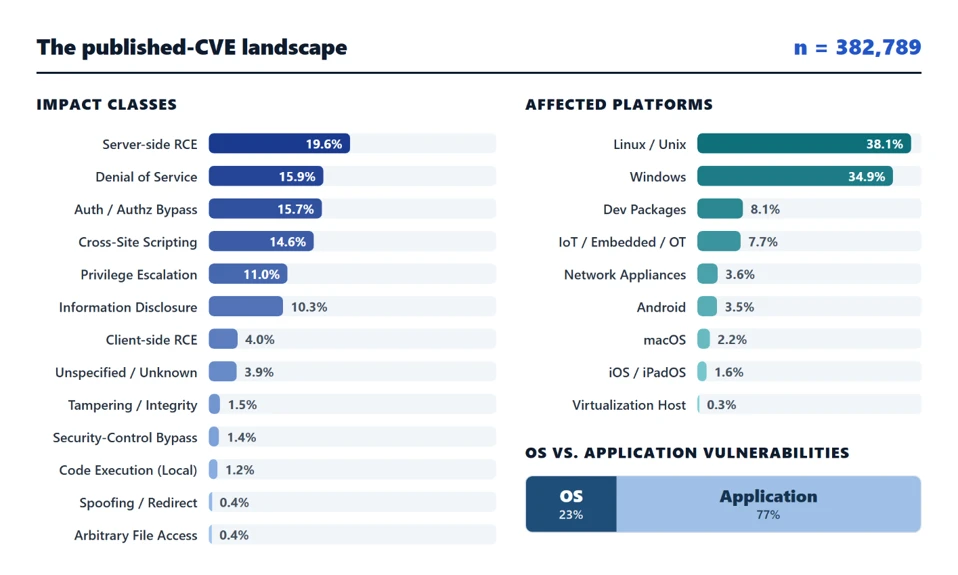
Fake-download campaign uses trojanized installers to deliver monetization payloads

Microsoft Threat Intelligence has identified an evolving fake-download campaign targeting users searching for cracked commercial software, free games, activators, plugins, and unofficial utilities. The campaign uses trojanized Inno Setup-style installers to distribute multiple monetized software payloads, referred to by the delivery system as “offers”, during a single installation session.

Our investigation found that the installers use a per-offer callback and status-tracking model to manage delivery and record installation outcomes. We confirmed three downstream monetization branches that transformed affected devices into monetized assets, including by routing third-party internet traffic through the device, enrolling it in a distributed-computing platform, or installing additional utility-style software, often without users’ informed knowledge or consent. These products and components may have legitimate uses, but their silent installation through deceptive software bundles without informed user consent introduces security and privacy risks.

Organizations can reduce their exposure to this activity by preventing the use of untrusted software sources, enabling potentially unwanted application protection, and monitoring for unexpected software installations and persistence mechanisms.

This blog details the campaign’s execution model and confirmed outcomes and provides mitigation guidance, Microsoft Defender protection information, advanced hunting queries, MITRE ATT&CK mappings, and indicators of compromise to help defenders identify, investigate, and respond to related activity.

Attack chain overview

The fake-download campaign follows a four-stage attack chain that progresses from deceptive lures through Inno-based staging, offer-controlled payload delivery, and installation of one or more monetization branches:

  1. Initial access via fake download lures – Users run fake installers promoted as cracked commercial software, free games, activators, plugins, executors, or unofficial utilities.
  1. Inno wrapper execution and temporary runner staging – The installer launches an Inno Setup-style temporary runner under %TEMP%\is-*.tmp\, which starts recurring eld*.exe, set_*.exe, or other numbered stages.
  1. Offer execution callback and payload delivery – The runner contacts rotating infrastructure using a repeatable d=inno and r=offer_execution callback pattern. Offer, affiliate, download-network, placement, and session values coordinate downstream payload selection and correlate activity within the installer session.
  1. Final payload installation and monetization – Staged payloads use unattended installation switches to install one or more confirmed campaign branches: WorldProxyPool for proxy and network-resource monetization; CharityEngine and Berkeley Open Infrastructure for Network Computing (BOINC) for compute-resource monetization; or Advanced Windows (AW) Manager and Windows Manager for adware-style utility monetization. WorldProxyPool also creates recurring SYSTEM scheduled tasks for agent startup, watchdog execution, and updater activity.

Attack Chain

Figure 1. Overview of the attack chain.

Initial access via fake download lures

The campaign begins when users download and run fake installers promoted as cracked software, game installers, executors, activators, plugins, utilities, or driver and mobile-unlock tools. Observed lures include cracked audio plugins, PC games, Roblox executors, auto-clickers, driver tools, and fake utility installers.

Example lures: Echo Client; FabFilter Total Bundle; Navicat Premium crack; Cue Club; auto-clicker; Deadpool Apunka Games; Command & Conquer: Red Alert 2; TFT Unlock Tool; and clownfishvoicechanger.

Dark-themed Auto Clicker promotional webpage with product screenshots, feature descriptions, and repeated gold download buttons, illustrating the polished software-download pages used as campaign lures.
Figure 2. Example utility download lure.

Inno wrapper execution and temporary runner staging

Across the investigated activity, user-launched lures spawned Inno Setup-style temporary runners under %TEMP%\is-*.tmp\ and then launched one or more numbered eld*.exe stages. Arguments such as /SL5, /SPAWNWND, and /FIRSTWND, together with the temporary path and numbered stage names, provide more durable indicators than the original lure filename.

The depth of the execution chain and its downstream outcome varied by installer session. One Echo Client example progressed through multiple numbered stages and reached several monetization branches, while other observed lures exposed fewer numbered stages or downstream components.

The table below uses the Echo Client activity as a representative example of the wrapper-to-stage sequence; individual installer sessions may launch different combinations of numbered stages.

Step Process Command-line / path signal Role
1 Echo Client.exe Launched from %USERPROFILE%\Downloads\Echo Client\ User-launched lure
2 Echo Client.tmp %TEMP%\is-*.tmp\… with /SL5=… Inno temporary runner
3 Echo Client.exe /SPAWNWND=… /FIRSTWND=… Inno child process / window handoff
4 Echo Client.tmp /SL5=… /SPAWNWND=… /FIRSTWND=… Temporary runner continues execution
5 eld*.exe eld0.exe, eld1.exe, eld3.exe, eld4.exe, and eld5.exe under %TEMP%\is-*.tmp\ Numbered staged payloads

Table 1. Inno wrapper execution and temporary runner staging.

Offer execution callback and payload delivery

After staging, the Inno temporary runner contacted rotating callback infrastructure using randomized URL paths but a repeatable query-string structure:

http:///?sis=&fz=&d=inno&r=offer_execution&ko=no&o=&a=&dn=&spot=&t=&cr= 

Failed or blocked offers used r=offer_execution_fail and sometimes included local error text, including messages that the operation did not complete because the file contained a virus or potentially unwanted software. These callbacks are useful campaign-attribution and sequencing markers, but they are not always the earliest prevention point. In some endpoint detection and response (EDR) traces, child payloads launched before or around the r=offer_execution callback.

The campaign used offer IDs, affiliate IDs, download-network IDs, and placement values to select or report downstream payload attempts. Observed offer and download-network combinations included o=1712 / dn=507, o=1720 / dn=536, o=1727 / dn=564, o=1729 / dn=566, o=331 / dn=244, o=1674 / dn=440, o=1675 / dn=441, o=1681 / dn=447, and o=1730 / dn=567. Different offers could succeed or fail independently within the same installer session, so a failed first offer did not necessarily mean that the full bundle stopped.

Parameter Observed use Assessment
d Often set to inno Installer or delivery-family marker
sis Stable within an installer session Session-correlation value
a Stable across related requests Affiliate, campaign, or distribution-partner identifier
o Changes by offer Offer identifier
dn / on Changes with the offer or retrieval path Download-network or offer-network field; exact meaning unconfirmed
spot Increments through the session Offer placement, slot, or execution order
paw Present across offer requests Request, package, or session-correlation value; exact meaning unconfirmed
fz Present in outcome callbacks Delivered package size or file-size field
t Present in outcome callbacks Timing, token, or request value; exact meaning unconfirmed
r offer_execution or offer_execution_fail Per-offer execution result
msg Present on failed offers Error text from the local download or installation attempt
ko / cr Boolean-like or short values Server-side control or result flags; exact meaning unconfirmed

Table 2. Assessments are based on observed telemetry correlations, not confirmed server-side definitions.

Offer / download-network pair Semantic meaning
o=1712 / dn=507 Primary first-stage offer commonly attempted at the start of the installer flow.
o=1720 / dn=536 Offer branch associated with CharityEngine/BOINC distributed-compute monetization.
o=1727 / dn=564 Offer branch associated with WorldProxyPool proxyware monetization.
o=1729 / dn=566 Recurring follow-on offer branch in the installer flow.
o=331 / dn=244 Secondary offer branch observed in the multi-offer sequence.
o=1674 / dn=440 Later campaign offer branch.
o=1675 / dn=441 Low-volume offer branch.
o=1681 / dn=447 Additional offer branch in the campaign’s installer rotation.
o=1730 / dn=567 Later high-volume offer branch.

Table 3. Offer and download-network pairs and their semantic roles in the installer flow.

The campaign rotated callback domains frequently while preserving the same d=inno and offer-execution callback structure across recurring lure categories. Individual domains are therefore short-lived infrastructure indicators; the durable hunting signal is the combination of the callback pattern, Inno temporary execution, staged filenames, and related installer-session activity. The full observed domain set is provided in the IOC section.

Final payload installation and monetization

After offer callback and payload delivery, the campaign launched downstream installers or components using unattended installation switches such as /qn, /S, /quiet, and /norestart. This stage converted the fake-download execution chain into installed software and recurring execution across three monetization branches: proxy and network-resource monetization, compute-resource monetization, and adware-style utility monetization.

Branch Primary behavior Representative artifacts
A. WorldProxyPool Proxy agent installation and scheduled-task setup sdk-agent.exe; sdk-agent.updater.exe; watchdog.ps1; WorldProxyPoolAgent task
B. CharityEngine / BOINC Distributed-compute software installation boinc.exe; charityengine.exe; ce11.exe; VirtualBox-7.2.8-r173730.msi
C. AW Manager / Windows Manager Utility and updater-style software installation Windows Manager – Postback Johan.msi; AdvancedWindowsManager.exe; Windows Updater.exe

Table 4. Summary of the three monetization branches and representative artifacts.

Proxy and network-resource monetization — WorldProxyPool

In the WorldProxyPool branch, a staged eld4.exe payload created three SYSTEM-level scheduled tasks for components under C:\Program Files\WorldProxyPool\. WorldProxyPoolAgent configured sdk-agent.exe to run at system startup with highest privileges; WorldProxyPoolWatchdog configured a hidden, noninteractive PowerShell watchdog script to run every five minutes; and WorldProxyPoolUpdater configured sdk-agent.updater.exe update to run hourly. The installer also started the agent task immediately with schtasks.exe /Run. Subsequent task launches were brokered by the Windows Task Scheduler service (svchost.exe -k netsvcs -p -s Schedule), causing sdk-agent.exe and the watchdog script to execute in the service context. This persistence mechanism supports recurring proxy-agent, watchdog, and updater activity, consistent with network-resource monetization.

Scheduled task Purpose
WorldProxyPoolAgent Runs sdk-agent.exe at system startup as SYSTEM with highest privileges; the installer also started it immediately with schtasks.exe /Run.
WorldProxyPoolWatchdog Runs a hidden, noninteractive PowerShell watchdog script every five minutes as SYSTEM with highest privileges.
WorldProxyPoolUpdater Runs sdk-agent.updater.exe update hourly as SYSTEM with highest privileges.

Table 5. WorldProxyPool scheduled tasks created during the proxyware installation chain

Process tree showing eld4.exe creating three SYSTEM-level WorldProxyPool scheduled tasks: an agent that runs at startup, a hidden PowerShell watchdog that runs every five minutes, and an updater that runs hourly. The agent is started immediately through Windows Task Scheduler.
Figure 3. WorldProxyPool installation and persistence. eld4.exe created SYSTEM-level startup, five-minute watchdog, and hourly updater tasks.

Compute-resource monetization — CharityEngine and BOINC

In the CharityEngine and BOINC branch, the offer payload installed distributed-compute software and supporting components under C:\Program Files\BOINC\ and C:\ProgramData\BOINC\. Observed components included ce-installer_7.14.2_vbox-7.2.8.exe, ce_7.14.2_windows_x86_64.exe, charityengine.exe, boinc.exe, boinctray.exe, boinc.scr, boincscr.exe, wrapper_2022110901_windows_x86_64.exe, ce11.exe, and VirtualBox-7.2.8-r173730.msi. They covered BOINC launch, compute-wrapper execution, GPU or compute-capability checks, CharityEngine project communication, and VirtualBox installation.

Process tree tracing eld1.exe through CharityEngine, VirtualBox, and BOINC installation. The chain installs supporting components, launches charityengine.exe and boinc.exe, checks GPU capabilities, and runs a compute wrapper that starts cell.exe.
Figure 4. CharityEngine/BOINC compute-monetization branch.

Adware-style utility monetization: AdvancedWindowsManager / Windows Manager

The same Inno offer-execution infrastructure delivered an AW Manager or Windows Manager branch. In one observed process tree, the Inno runner spawned eld3.exe, launched Windows Manager – Postback Johan.msi, and installed AdvancedWindowsManager.exe and Windows Updater.exe under paths resembling %APPDATA%\AW Manager\Windows Manager 1.0.0\ or C:\Program Files (x86)\AW Manager\Windows Manager\.

Process tree showing a command-driven AW Manager/Windows Manager installation under the user’s AppData directory. cmd.exe launches msiexec.exe, starts Windows Manager with an autostart option, and runs taskkill.exe against AdvancedWindowsManager processes.
Figure 5. AW Manager / Windows Manager utility-install branch.

Mitigation and protection guidance

Microsoft recommends the following actions to reduce exposure to this campaign and detect related activity:

Preventive controls

  • Avoid untrusted software sources. Do not download cracked software, key generators, unofficial game installers, or software activation tools, which are common delivery mechanisms for malware, potentially unwanted applications, and monetization campaigns.
  • Enable cloud-delivered protection. Verify that Microsoft Defender Antivirus cloud-delivered protection is enabled to improve detection of emerging malware and potentially unwanted applications. See: Configure cloud-delivered protection
  • Keep tamper protection enabled. Use tamper protection to help prevent unauthorized changes to Microsoft Defender security settings. See: Learn about tamper protection.
  • Enable reputation-based protection. Configure reputation-based protection to help block known malicious and untrusted applications and downloads. See: Configure reputation-based protection.
  • Consider Attack Surface Reduction (ASR) protections. Evaluate ASR rules, including rules that block executable files unless they meet prevalence, age, or trusted-list criteria. See: Review Attack Surface Reduction rules.

Investigation actions

  • Investigate execution from Inno temporary directories. Review activity from paths such as %TEMP%\is-*.tmp\, particularly when staged executables such as eld*.exe, set_*.exe, FirstFast[1].exe, or SecondRunner[1].exe are observed.
  • Correlate Inno callback activity. Monitor outbound requests containing d=inno together with r=offer_execution or r=offer_execution_fail, and review related process, file, and network activity across the complete installer session.
  • Review unexpected scheduled tasks. Investigate newly created scheduled tasks, particularly tasks running with SYSTEM privileges or recurring watchdog and updater functions. See: Audit scheduled task creation events.

Microsoft Defender XDR detections

Microsoft Defender detects and blocks campaign-linked payloads through cloud protection, machine-learning classifications, network inspection, and behavior monitoring. Relevant observed detections include remote-thread injection, scheduled-task launch, and suspicious outbound HTTP activity.

Customers with provisioned access can also use Microsoft Security Copilot in Microsoft Defender to investigate and respond to incidents, hunt for threats, and protect their organization with relevant threat intelligence.

Tactic Observed activity Microsoft Defender coverage
Initial access and execution Users execute fake cracked-software installers, including files presented as Navicat Premium or FabFilter bundles, from Downloads, archive-extraction folders, or Inno extraction paths. The installers launch temporary payloads from %TEMP%\is-*.tmp\. Microsoft Defender Antivirus
– Trojan:Win64/OfferLoader.DA!MTB
– Trojan:Win64/OfferLoader.DB!MTB

Microsoft Defender for Endpoint
– A suspicious file was observed
– An active ‘Wacatac’ malware was detected
– ‘Kepavll’ malware was prevented
Command and control / campaign tracking Outbound callbacks use a stable Inno offer-execution URL contract: d=inno with r=offer_execution or r=offer_execution_fail. Each callback reports an individual offer result. Correlating these callbacks with process, file, network, persistence, and installation events provides visibility across the multi-offer session. Microsoft Defender Antivirus
– Behavior:Win32/SuspInnoOffer.A!mapsi

Microsoft Defender for Endpoint
– Suspicious ‘SuspInnoOffer’ behavior was blocked
Staging and payload delivery The installer chain drops multiple staged files from Inno temporary directories, commonly named eld*.exe, set_*.exe, FirstFast[1].exe, and SecondRunner[1].exe. Microsoft Defender Antivirus
– Trojan:Win64/OfferLoader.DA!MTB
– Trojan:Win64/OfferLoader.DB!MTB

Microsoft Defender for Endpoint
– A suspicious file was observed
– An active ‘Wacatac’ malware was detected
– An active ‘Egairtigado’ malware was blocked
– ‘Kepavll’ malware was prevented
Persistence In the investigated Navicat chain, WorldProxyPool created SYSTEM scheduled tasks with highest privileges: WorldProxyPoolAgent at startup, WorldProxyPoolWatchdog every five minutes through hidden noninteractive PowerShell, and WorldProxyPoolUpdater hourly. It also wrote uninstall metadata under the WorldProxyPool registry key. Microsoft Defender for Endpoint
– Suspicious scheduled task activity
– Suspicious Scheduled Task Process Launched
– Suspicious Task Scheduler activity
Resource hijacking / monetization Two monetization paths were confirmed. The Navicat chain installed WorldProxyPool proxyware. The FabFilter chain silently installed CharityEngine/BOINC, VirtualBox, and Visual C++ components, launched BOINC workloads, and contacted CharityEngine infrastructure. Microsoft Defender Antivirus
– Adware:Win32/Clover
– Trojan:Win64/OfferLoader.DA!MTB
– Trojan:Win64/OfferLoader.DB!MTB

Microsoft Defender for Endpoint
– An active ‘Clover’ malware was detected
– An active ‘Wacatac’ malware was detected
Defense evasion and suspicious behavior Several staged payloads are associated with defense-evasion, execution, persistence, remote-thread, and other suspicious behaviors. Microsoft Defender Antivirus
– Trojan:Win32/OffLoader.A

Microsoft Defender for Endpoint
– Suspicious ‘SuspEtherRpcConn’ behavior was blocked
– Suspicious ‘SuspSmsScanConn’ behavior was blocked

Microsoft Security Copilot  

Security Copilot customers can use the standalone experience to create their own prompts or run prebuilt promptbooks to automate investigation and response tasks related to this campaign. Useful promptbooks include:

  • Incident investigation
  • Microsoft User analysis
  • Threat actor profile
  • Threat Intelligence 360 report based on MDTI intelligence
  • Vulnerability impact assessment.

Some promptbooks require access to Microsoft Defender XDR, Microsoft Sentinel, or related Microsoft security plugins.

For this campaign, analysts can prompt Security Copilot to summarize and correlate available incident evidence, subject to connected data and permissions.

Threat intelligence reports

Microsoft customers can use Microsoft Defender XDR Threat analytics and related Microsoft threat intelligence reporting to track this rotating, multi-offer fake-download campaign and review updates on its Inno callbacks, offer outcomes, staged payloads, infrastructure, and proxyware or distributed-compute results.

The reporting helps analysts correlate offer callbacks and endpoint activity from the same installer session, identify devices with associated monetization stages, and assess the overall bundle outcome. It also provides investigation context, protection guidance, relevant indicators, and recommended response actions.

Advanced hunting

 Microsoft Defender XDR customers can run the following advanced hunting queries to find related activity in their networks.

Inno offer-execution callbacks

DeviceNetworkEvents 
| where RemoteUrl has "d=inno" 
| where RemoteUrl has_any ("r=offer_execution", "r=offer_execution_fail") 
| project Timestamp, DeviceName, RemoteUrl, InitiatingProcessFileName 

Payload execution from Inno temporary directories

DeviceProcessEvents 
| where FolderPath has @"\AppData\Local\Temp\is-" 
| where FileName matches regex @"(?i)^(eld[0-9]+|set_[0-9]+|FirstFast(?:\[1\])?|SecondRunner(?:\[1\])?)\.exe$" 
| project Timestamp, DeviceName, FileName, FolderPath, InitiatingProcessFileName, SHA256 

Outbound connections to observed campaign infrastructure

DeviceNetworkEvents 
| where RemoteUrl has_any ("orbittrack.cfd", "prairielink.cfd", "willowbox.xyz", "stonestation.cfd", "foldlodge.xyz", "friendsanchor.xyz", "fallport.cfd", "wishcourt.cfd", "cratebase.cfd", "belieftrack.cfd", "beliefdesk.xyz", "companyharbor.xyz", "signalpane.cfd", "inkact.xyz", "wishgrove.cfd") 
| project Timestamp, DeviceName, RemoteUrl, RemotePort, InitiatingProcessFileName 

Hunting note: Treat each callback as an individual offer result. Group events by device, time window, and available session or affiliate fields, then correlate the callbacks with Inno temporary execution, staged filenames, scheduled-task creation, and monetization-software activity. Domain-only matches are leads, not confirmation. Validate the queries against the current Microsoft Defender XDR schema before publication.

MITRE ATT&CK Techniques observed

The following MITRE ATT&CK mappings reflect behaviors observed in the investigated activity. Mappings are limited to evidence described in this report.

Execution

Persistence

Defense evasion

  • T1036 Masquerading | Installers are presented with names and branding associated with cracked commercial software or unofficial software bundles to encourage execution.

Command and control

  • T1105 Ingress Tool Transfer | The campaign retrieves staged executables and supporting components from threat actor-controlled, cloud-storage, and content delivery network (CDN)-hosted locations.

Impact

  • T1496 Resource Hijacking | The campaign installs CharityEngine/BOINC for distributed computing and WorldProxyPool for proxyware monetization, abusing victim compute and network resources through deceptive bundled installation.

For standard industry documentation about these techniques, refer to the MITRE ATT&CK framework.

Indicators of compromise (IOC)

The following indicators of compromise (IOCs) were observed during investigation of this campaign and can assist defenders in identifying related activity and conducting threat-hunting efforts.

Indicator Type Component
beliefdesk[.]xyz Domain Offer-execution callback infrastructure.
companyharbor[.]xyz Domain Offer-execution callback infrastructure.
signalpane[.]cfd Domain Offer-execution callback infrastructure.
inkact[.]xyz Domain Offer-execution callback infrastructure.
wishgrove[.]cfd Domain Offer-execution callback infrastructure.
%TEMP%\is-*.tmp\eld*.exe File path Recurring staged payload naming and path pattern.
C:\Program Files\WorldProxyPool\sdk-agent.exe File path WorldProxyPool proxyware component.
WorldProxyPoolAgent / WorldProxyPoolWatchdog / WorldProxyPoolUpdater Scheduled task SYSTEM-level persistence created in the investigated chain.
006510ce1da2b7410376f0788c19e55616eb4bcc30072d25b7d0871dc32aa11c SHA-256 Inno second-stage runner
21306fc5716f95e252388f920314b42f1c8bcc7df67cb4d39da30217b96f4044 SHA-256 Earlier Inno loader
72750d32b440e9f2b6d05ff3d218a561a75d3d75fb976b461fa59897674a7f70 SHA-256 Earlier Inno second-stage runner
ab2c2dd37fdcfe1e7620a57f98c80bd063258bea145adc0cc6a0f8b1e24c6a8f SHA-256 Inno eld0 / first-stage payload
452a210bba4c8d08f7cb7733a816d7220a7fa570a469aea0a997cfc8b594b6a0 SHA-256 Inno eld0 / eld1 first-stage payload
523fb81fae0c7beba7b5171243cc0dee7a4d04ae0483be9172eef2394a5a2152 SHA-256 Inno eld0 first-stage payload
55cd3d36fdcc58016a64398357b2c9724a060da9f0d09266e537a61ec9552e4f SHA-256 Later Inno eld2-eld5 payload

Learn More

For the latest security research from the Microsoft Threat Intelligence community, check out the Microsoft Threat Intelligence Blog.

To get notified about new publications and to join discussions on social media, follow us on LinkedIn, X (formerly Twitter), and Bluesky.

To hear stories and insights from the Microsoft Threat Intelligence community about the ever-evolving threat landscape, listen to the Microsoft Threat Intelligence podcast.

Review our documentation to learn more about our real-time protection capabilities and see how to enable them within your organization.  

The post Fake-download campaign uses trojanized installers to deliver monetization payloads appeared first on Microsoft Security Blog.
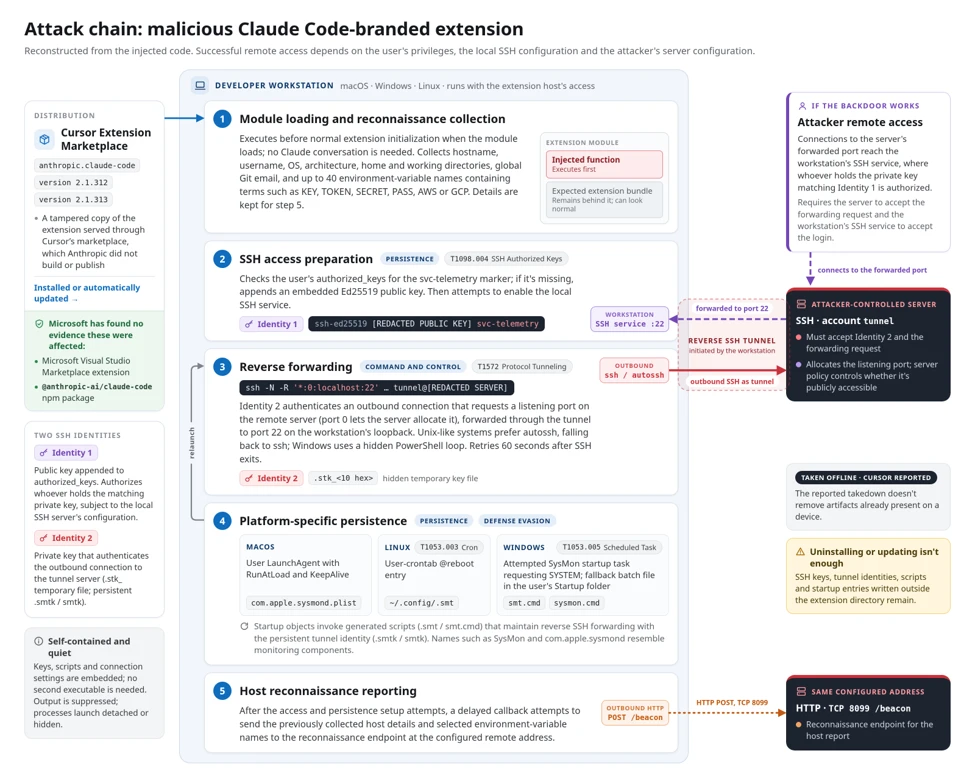
What exploited vulnerabilities have in common: A data-driven analysis of real-world attacks

The vulnerability landscape continues to expand. From 1999 through September 2026, approximately 383,000 software vulnerabilities had been disclosed across platforms and technologies, yet only about 2,000 CVEs (roughly 0.5%) have been linked to real-world exploitation.

Those vulnerabilities follow clear patterns. Threat actors disproportionately target flaws that enable system takeover, particularly remote code execution, privilege escalation, and authentication bypass. AI-assisted vulnerability discovery and exploit development could further shorten the window defenders have to respond.

Patching remains essential, but remediation can take weeks or months on critical systems, and some legacy or unsupported systems cannot be patched. Defenders therefore need to concentrate protection where it can have the greatest impact, considering both the likelihood of exploitation and the potential blast radius of a successful attack.

Classifying the vulnerability landscape

To make this large vulnerability population actionable, we analyzed each CVE across two dimensions: impact class and affected platform.

Impact class captures the outcome a threat actor could achieve by exploiting a vulnerability. Each CVE is assigned to the most consequential impact it directly enables. For example, when a vulnerability can bypass authentication and directly enable remote code execution (RCE), we classify it as RCE. This approach helps distinguish the underlying type of vulnerability from the security impact an attacker could achieve.

  • Server-side RCE: Remote code execution on a network-exposed service without user interaction.
  • Client-side RCE: Remote code execution that requires a user to open or run malicious content.
  • Local code execution: Code or command execution requiring local access or an existing foothold.
  • Local privilege escalation: Elevation from lower-level access to SYSTEM or root privileges.
  • Authentication or authorization bypass: Circumvention of authentication or access controls.
  • Security-control bypass: Circumvention of protections such as sandboxing, secure boot, or SmartScreen.
  • Information disclosure: Exposure of sensitive data or secrets.
  • Tampering or integrity: Unauthorized modification of data or system state.
  • Denial of service: Disruption of system or service availability.
  • Cross-site scripting (XSS): Script execution within a victim’s browser context.
  • Arbitrary file access: Unauthorized access to or placement of files.
  • Spoofing or redirect: Spoofing, redirection, or other forms of UI deception.

We also classified vulnerabilities by the platforms they affect, including Windows, Linux/Unix, mobile, network appliances, IoT/OT, virtualization hosts, and developer packages. A CVE can span multiple platforms. Developer packages are treated as a separate category because they are often cross-platform and represent a significant share of the overall vulnerability population.

Most CVEs in the analysis affect application code, including servers, web applications, browsers, productivity software, libraries, and firmware tooling, while a smaller share affects OS and system code such as kernels, drivers, and firmware.

This analysis covers CVEs published through September 2026 using Microsoft’s catalog of tracked vulnerabilities. Each CVE is counted once in the impact analysis and across each relevant platform in the platform analysis.

Infographic of 382,789 published CVEs: 77% affect applications and 23% operating systems; leading impacts include server-side remote code execution, denial of service, and authentication bypass. Linux/Unix and Windows are the most affected platforms.
Figure 1 – The full published-CVE population as of September 2026, broken down by impact class and affected platform, and an OS vs. application split. Breadth dominates – many impact classes spread across many platforms, with about 77% of CVEs in application code and 23% in OS/system code.

Vulnerabilities exploited in the wild

The subset of vulnerabilities exploited in the wild is much smaller than the overall CVE population, and looks very different from it. Fewer than 1 in 200 published CVEs are ever used in a real attack, and those that do get used are overwhelmingly concentrated in the takeover classes that maximize threat actor impact and exposure.

The difference becomes clear when we look at impact. Exploitation is heavily concentrated in vulnerabilities that give attackers greater control over a system. Server-side RCE rises from 20% of published CVEs to 37% of exploited CVEs, local privilege escalation from 11% to 18%, and client-side RCE from 4% to 13%. By comparison, XSS falls from 15% to 4% and denial of service from 16% to 7%. OS vulnerabilities show a similar shift, increasing from 23% of the overall CVE population to 41% of exploited vulnerabilities.

These patterns are consistent with threat actors favoring vulnerabilities that can provide meaningful access and control. Remote code execution and privilege escalation can create footholds that support subsequent stages of an attack, while vulnerabilities that primarily cause a crash or limited script execution may offer less utility for broader compromise.

Importantly, a vulnerability’s stated classification does not always reflect what an attacker can reliably achieve in practice. For example, some vulnerabilities described as enabling RCE may ultimately result only in denial of service under real-world conditions. Understanding the demonstrated impact and exploitability of a vulnerability is therefore critical to effective prioritization.

Infographic of 2,056 exploited-in-the-wild CVEs: server-side remote code execution is the leading impact, Windows the most affected platform, and vulnerabilities split 59% application to 41% operating system.
Figure 2 – The 2,056 exploited-in-the-wild CVEs distribution, compared against the full published population: ghost lines mark each class and platform’s share of all ~380K published CVEs, and badges show the shift in percentage points. Takeover classes and OS code rise, while high-volume XSS and DoS fall.

Where defenders should focus

Patching is slow, while exploitation is fast

Patching is slow, and far slower on critical systems than others. Across platforms, servers are the critical assets and the slowest to patch. Microsoft Security Exposure Management data from 2026 shows that the median vulnerability is patched in about two weeks on Windows workstations but in more than a month on Windows Servers. It stretches to 10+ weeks on Linux Servers and for applications running on MacOS, and beyond a year on network appliances. That gap is the threat actor’s window, widest on the critical systems that stay exposed the longest.

Exploitation runs on the opposite clock: the most impactful vulnerabilities are weaponized in days, increasingly on or before disclosure. According to VulnCheck, 29% of the exploits in 2025 were launched within 1 day of CVE publication. According to CISA, the mean time from CVE publication to CISA KEV catalog fell from 89 days for CVEs that were published in 2024 to 57 days for CVEs that were published in 2025. 2026 CVE publications up to September already have that number dropping to 20 days, with a median of only 3 days since publication. Industry research suggests that advances in AI are a significant factor in the time reduction required to develop exploits, further increasing pressure on defenders to respond quickly.

Impact, exposure and where to focus

Two things determine a vulnerability’s value to a threat actor: impact and exposure. Impact is what successful exploitation provides, such as remote code execution or privilege escalation. Exposure is an asset’s position in the environment and the opportunities it creates for further compromise. An asset’s exposure is shaped by the identities, privileges, and connections available from it.

Servers often use service accounts, application identities, or cloud-managed identities with permissions beyond their operational needs. Compromising such a system can provide access to additional resources, sensitive data, administrative privileges, or trusted network paths. Together, impact and exposure determine the blast radius: a vulnerability that enables full control of a highly exposed system can enable widespread on-premises or cloud compromise.

Threat actors do not exploit at random: they go after the vulnerabilities that give the highest impact and exposure: full control of a system and the privileged identities and critical assets it has access to. As defenders, focusing on these vulnerabilities first can deliver the highest return on remediation investment.

Takeover vulnerabilities like remote code execution, authentication bypass and local privilege escalation lead here. They drive the broadest exposure and the largest blast radius, account for 78% of real-world exploited vulnerabilities, and stopping their exploitation interrupts attacks at the earliest stage, before compromise can propagate across the environment.

Next in line

A second slice deserves attention where context makes it severe: denial of service against availability-critical assets is recoverable in general, but can be mission-ending in parts of your environment where uptime is everything; disclosure of credentials or secrets can be minor as an insulated incident, but it feeds the same privileged-identity path mentioned above.

Stacked bar chart of 1,239 exploited remote-takeover CVEs by platform and code layer. Server-side RCE is the largest class, led by Windows and Linux/Unix; bars distinguish application from OS/system vulnerabilities.
Figure 3 – The three remote-takeover classes analyzed across 1,239 exploited CVEs), each drilled down by affected platform and split into OS vs Application code. Bar length is the CVE count per platform; the dark segment is OS/system, the light segment is application.

How Microsoft Security helps defenders act

Threat actors do not begin with a vulnerability list. They begin by looking for a reachable way in. Microsoft Defender External Attack Surface Management approaches the environment from that same outside-in perspective, continuously discovering internet-facing infrastructure, including previously unknown or unmonitored assets, shadow IT, and third-party dependencies. This gives defenders an opportunity to remove unnecessary exposure before a reachable vulnerability becomes an entry point.

Once the reachable assets are known, the next question is which weaknesses deserve immediate attention. Defenders need a way to prioritize exposure beyond CVSS alone. Microsoft Defender Vulnerability Management addresses this challenge through Exposure Score and prioritized security recommendations.

Prioritization incorporates threat and exploitability signals, breach likelihood, internet exposure, and asset criticality, helping teams focus remediation on vulnerabilities that create the greatest actual exposure.

An initial foothold is only part of the risk. Attack Path Analysis connects assets and threat actor techniques into end-to-end routes from an entry point to a critical asset. Microsoft Security Exposure Management Attack Path Analysis provides a cross-workload view spanning endpoints, cloud, and hybrid environments, using vulnerability context from MDVM, endpoint data from Defender for Endpoint, and cloud asset data from Defender for Cloud. Within cloud environments, Defender CSPM Attack Path Analysis adds detailed context about internet exposure, vulnerabilities, network connections, identities, and permissions across Azure, AWS, and Google Cloud.

Together, these experiences show how an exposed workload could become a path through a privileged identity to sensitive data or another critical resource, helping defenders identify where to break the path before the initial compromise expands.

Patching remains essential, but it is not the only defensive action available. Microsoft Security helps defenders discover the doors threat actors can see, prioritize the weaknesses they are most likely to exploit, understand where a compromise could lead, and identify opportunities to break attack paths before compromise spreads to critical assets.

References

Sources cited or linked in the submitted draft:

Learn More

For the latest security research from the Microsoft Threat Intelligence community, check out the Microsoft Threat Intelligence Blog.

To get notified about new publications and to join discussions on social media, follow us on LinkedIn, X (formerly Twitter), and Bluesky.

To hear stories and insights from the Microsoft Threat Intelligence community about the ever-evolving threat landscape, listen to the Microsoft Threat Intelligence podcast.

Review our documentation to learn more about our real-time protection capabilities and see how to enable them within your organization.  

The post What exploited vulnerabilities have in common: A data-driven analysis of real-world attacks appeared first on Microsoft Security Blog.
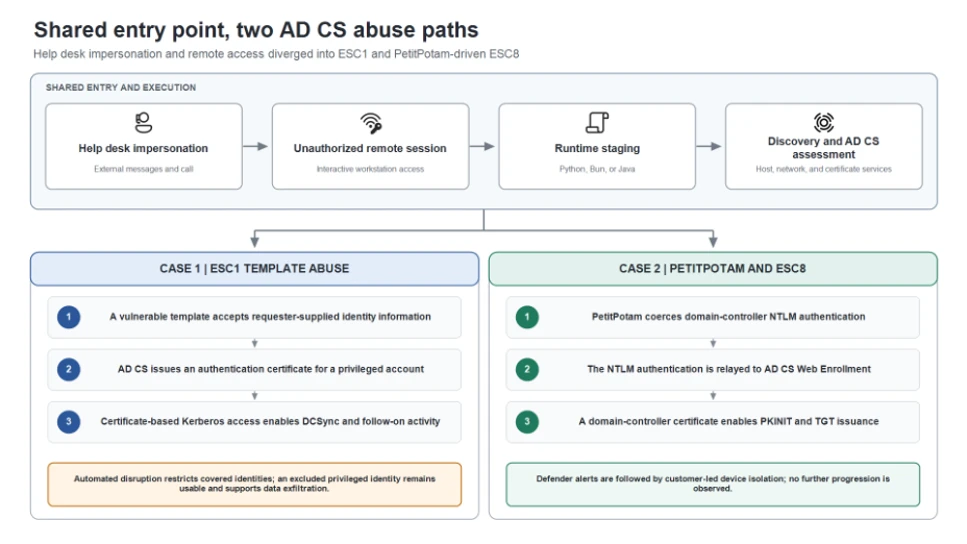
Inside a malicious Claude Code-branded extension and its persistent SSH backdoor

30 de Outubro de 2026, 22:02

On October 29, 2026, Cursor reported that a tampered copy of Claude Code extension (anthropic.claude-code, versions 2.1.313 and 2.1.312) was available and served in the Cursor extension marketplace for a few hours to attempt a supply-chain attack on Cursor users. Cursor reports that it was live from about 2:27 AM to 1:35 PM Pacific Daylight Time (PDT). We have confirmed that the malicious packages found on Cursor marketplace were never published nor distributed from Microsoft Visual Studio Marketplace and from npm @anthropic-ai/claude-code, which were not affected by this incident. Anthropic confirmed to Microsoft that their systems were not compromised and they did not develop the malicious package posted in Cursor marketplace. At this time, all evidence suggests that the incident is limited to Cursor marketplace.

Microsoft Threat Intelligence analyzed the injected JavaScript embedded in the malicious extension package. The injected loader runs when the extension module loads and attempts to add an attacker-controlled Secure Shell (SSH) key, enable the local SSH service, establish reverse SSH forwarding, configure persistence, and report host details. Successful remote access depends on host privileges, SSH configuration, and the attacker’s server configuration; however, the loader may still write keys and persistence artifacts even when tunnel access fails.

Organizations should identify systems that installed or automatically updated to this version from the Cursor marketplace, preserve evidence, remove confirmed malicious artifacts, review endpoint and network telemetry, and rotate credentials or revoke sessions when investigation indicates exposure. Microsoft customers can use the detections and hunting guidance in this post after the listed coverage and query validation gates are complete.

Attack chain overview

A malicious artifact associated with the Cursor Marketplace incident included a JavaScript function that executed before the extension’s expected code. When the module loads, this function can use Node.js APIs to collect host information, modify files, and execute operating-system commands. The following sections describe capabilities and attempted actions based on our analysis of the injected code.

Attack chain

The loader first collects host reconnaissance. It then attempts to install an SSH key, enable SSH, create a reverse tunnel, and configure persistence. A delayed callback subsequently attempts to send host details. The following sequence reflects code execution order; it does not prove that every step succeeded on every host.

  1. Module loading and reconnaissance collection. The injected function executes before normal extension initialization and collects host and user information.
  2. SSH access preparation. The loader appends an embedded public key and attempts to enable the local SSH service.
  3. Reverse forwarding. An embedded tunnel identity authenticates an outbound connection that requests forwarding to the workstation’s SSH port.
  4. Platform-specific persistence. Scripts and startup configuration are written to relaunch the connection.
  5. Host reconnaissance reporting. After the access and persistence setup attempts, a delayed callback attempts to transmit the previously collected host details and selected environment-variable names.
Five-step attack chain showing host reconnaissance, SSH key installation, reverse tunneling, cross-platform persistence, and delayed reporting to attacker infrastructure.
Figure 1. Attack chain reconstructed from the injected code.

The loader uses embedded components and built-in system tools to establish persistent access without downloading another executable. It suppresses command output and silently catches errors to conceal failures and malicious activity, while the extension continues functioning normally to avoid alerting users.

Host reconnaissance collection

The loader collects the hostname, username, operating system, architecture, home directory, working directory, and global Git email. It also looks for environment-variable names containing terms such as KEY, TOKEN, SECRET, PASS, AWS, or GCP, keeping up to forty matches.

The callback sends matching environment-variable names, not values. This reveals potentially sensitive configuration categories but does not demonstrate theft of the secrets stored in those variables.

Collection occurs during module loading. The collected details are retained for the delayed reporting callback described after the persistence stage.

SSH authorization and tunnel identities

The loader uses two SSH identities with distinct roles. One public key authorizes access to the workstation’s user account, while a separate private key authenticates the outbound connection to the tunnel server. First, the loader checks the user’s authorized_keys file for the comment svc-telemetry. If the marker is missing, it appends an embedded Ed25519 public key. That creates an authorization entry for whoever holds the corresponding private key, subject to the local SSH server’s configuration.

Next, it decodes a separate private key for the outbound connection. The initial copy is written to a hidden temporary file named .stk_ followed by ten hexadecimal characters derived from the hostname and home directory. SSH receives that file through its -i option and connects using the remote account tunnel.

The public-key material is redacted but the format is similar to the following:

ssh-ed25519 [REDACTED PUBLIC KEY] svc-telemetry

Protocol Tunneling (T1572): reverse SSH forwarding

The tunneling SSH process is launched with the command line containing the following arguments:

-N -R '*:0:localhost:22'

It requests a listening port on the remote SSH server and forwards connections through the tunnel to port 22 on the victim’s loopback interface. The remote port value 0 asks the server to allocate a port; it does not change the local target from port 22. The -N option tells SSH not to run a command on the tunnel server.

This design starts with an outbound connection from the workstation rather than waiting for a direct inbound connection to it. The loader disables ordinary host-key checking, bypasses the normal known-hosts file, sets keepalives, and avoids interactive prompts. On Unix-like systems it prefers autossh, falling back to ssh; on Windows it uses a hidden PowerShell loop. The loops wait sixty seconds after SSH exits before retrying.

Terminal command configuring outbound reverse SSH forwarding to the workstation’s local SSH service on port 22.
Figure 2. Terminal-style SSH command configuring an outbound reverse tunnel from a server-assigned remote port to the workstation’s local SSH service on port 22. Host-key verification is disabled, and the identity-file path is redacted.

A running SSH process does not necessarily mean the attacker gained access. Both the attacker’s server and the victim’s workstation must allow the connection, and server settings determine whether the tunnel is publicly reachable. Cursor reports that errors and administrator-permission requirements blocked SSH access on most macOS and Windows hosts. However, the malware could still attempt to plant its SSH key, establish persistence, and report host information.

Platform-specific startup persistence

The loader writes platform-specific scripts and startup configuration outside the extension directory. The following table summarizes these mechanisms and their associated artifacts. The code attempts to configure persistence, but the presence of an artifact alone does not establish that the startup mechanism ran successfully.

PlatformStartup mechanismKey artifacts
macOSUser LaunchAgent with RunAtLoad and KeepAlive~/Library/LaunchAgents/com.apple.sysmond.plist, ~/.config/.smt,

~/.config/.smtk
LinuxUser-crontab @reboot entry~/.config/.smt, ~/.config/.smtk
WindowsAttempted SysMon scheduled task requesting SYSTEM execution%USERPROFILE%\.config\smt.cmd, %USERPROFILE%\.config\smtk
Windows fallbackBatch file in the user’s Startup folder%APPDATA%\Microsoft\Windows\Start Menu\Programs\Startup\sysmon.cmd

On Unix-like systems, the .smt script reconstructs the persistent .smtk identity when it runs, then starts its own SSH retry loop. On Windows, the loader writes the identity and batch script directly.

The startup objects use names such as SysMon and com.apple.sysmond, which resemble monitoring components. Behind these names, their configured actions invoke the generated scripts that maintain reverse SSH forwarding.

Mitigation and protection guidance

Immediate actions

Run advanced hunting queries below to identify affected systems and investigate systems where users installed or automatically updated anthropic.claude-code version 2.1.313 and 2.1.312 through the Cursor Extension Marketplace. Review extension-installation records and correlate endpoint, network, file, process, and authentication telemetry with the published indicators. Preserve the extension package, modified SSH authorization files, generated keys and scripts, and startup configuration before cleanup. Isolate devices with evidence of loader execution or backdoor installation.

Remediation actions

After evidence collection, check the affected user’s ~/.ssh/authorized_keys on macOS and Linux for the attacker-controlled key labeled svc-telemetry. On Windows, check both %USERPROFILE%\.ssh\authorized_keys and C:\ProgramData\ssh\administrators_authorized_keys, where present. Confirm the key against the fingerprint in Indicators of Compromise before removing the exact unauthorized entry. Preserve unrelated SSH keys and legitimate remote-development configuration. A missing marker alone should not replace review of the installation, process, network, and persistence evidence.

Remove the trojanized extension and confirmed malicious persistence after evidence collection. Inspect each startup object’s configured action before removal; names alone are not sufficient to distinguish malicious objects from legitimate monitoring software.

  • macOS: Unload and remove the malicious user LaunchAgent at ~/Library/LaunchAgents/com.apple.sysmond.plist and remove its associated ~/.config/.smt script and ~/.config/.smtk identity.
  • Linux: Remove the malicious user-crontab @reboot entry referencing ~/.config/.smt, preserving unrelated entries, and remove the associated script and ~/.config/.smtk identity.
  • Windows: Remove the malicious SysMon scheduled task, the Startup-folder sysmon.cmd fallback, and associated %USERPROFILE%\.config\smt.cmd and %USERPROFILE%\.config\smtk files.
  • All applicable platforms: Stop confirmed malicious SSH and retry processes and remove their temporary .stk_ identity files after collection.

Cursor published platform-specific checks and remediation scripts in its security notice. Review the scripts and execution requirements before use, then verify that no listed artifacts remain. Cleanup does not replace investigation of device activity during the exposure window.

Removing or updating the extension does not remove artifacts written outside its installation directory. Remove confirmed unauthorized SSH keys, tunnel identities, scripts, and startup entries separately. Cursor’s reported server takedown does not remove artifacts already present on a device.

Follow-up Investigation and recovery

Review telemetry after the extension loaded for SSH key acceptance, tunnel processes, local SSH sessions, command execution, and file activity. Rotate credentials and revoke sessions from a known-clean device when telemetry indicates credential access or when device trust cannot be restored. Rebuild the device when required by the investigation and verify that the tunnel and startup artifacts do not return after login or restart.

To reduce the risk of malicious extensions and extension-based supply chain attacks, organizations using Cursor should apply the relevant controls in Cursor’s security-hardening guidance, including restricting extensions to approved publishers and configuring an extension installation cooldown to delay installation of newly published versions. These measures can help limit exposure to malicious releases.

Microsoft Defender XDR detections

Microsoft Defender XDR customers can refer to the list of applicable detections below. Microsoft Defender XDR coordinates detection, prevention, investigation, and response across endpoints, identities, email, and apps to provide integrated protection against attacks like the threat discussed in this blog.

Customers with provisioned access can also use Microsoft Security Copilot in Microsoft Defender to investigate and respond to incidents, hunt for threats, and protect their organization with relevant threat intelligence.

TacticObserved activityMicrosoft Defender coverage
ExecutionExecution of suspicious shell scripts to support backdoor activity.Microsoft Defender for Endpoint
– Suspicious activity originating from a code editor

Microsoft Defender Antivirus
– Trojan:MacOS/SmtShellMal.A
– Trojan:JS/CredTheft.MS!MTB
PersistenceAddition of SSH authorized keys or loading of macOS LaunchAgents to maintain unauthorized access and Scheduled Task on windows.Microsoft Defender for Endpoint
– Suspicious addition of an SSH key
– Suspicious launchctl tool activity
– Suspicious scheduled task
Defense EvasionUse of a macOS launch configuration that impersonates a legitimate Apple system service.Microsoft Defender for Endpoint
– Suspicious Plist modifications

Microsoft Defender Antivirus
– Trojan:MacOS/MalPlistSysmond.A
Command and ControlUse of SSH reverse tunnels to enable backdoor access to a compromised device.Microsoft Defender for Endpoint
– Suspicious SSH tunneling activity

Microsoft Defender Antivirus
– HackTool:MacOS/RevAnthShell.A

Threat intelligence reports

Microsoft customers can use the following reports in Microsoft products to get the most up-to-date information about the threat actor, malicious activity, and techniques discussed in this blog. These reports provide intelligence, protection information, and recommended actions to prevent, mitigate, or respond to associated threats found in customer environments.

Microsoft Defender XDR Threat analytics

Activity Profile: Malicious Claude Code branded extension v2.1.313 contains a persistent SSH backdoor

Advanced hunting queries

The following queries use the Microsoft Defender XDR advanced hunting schema and the time range selected in the portal. A result is an investigative lead, not proof of compromise.

Connections to the reported infrastructure

Find network events involving the reported IP address during the last 30 days, including the process responsible for each connection.

DeviceNetworkEvents
 | where Timestamp > ago(30d)
 | where RemoteIP == "134.209.82.225"
     or RemoteUrl has "134.209.82.225"
 | project Timestamp,
           DeviceName,
           InitiatingProcessFileName,
           InitiatingProcessCommandLine,
           RemoteIP,
           RemotePort,
           RemoteUrl

Reported malicious file and persistence artifacts

Find file events matching the reported SHA-256 hash, artifact filenames, or filename prefix during the last 30 days. Filename matches are hunting leads and require investigation.

DeviceFileEvents
 | where Timestamp > ago(30d)
 | where SHA256 == "ecb58cb29078d9646ad1dcdbe51526f2d9cfea06be5fb2ab183e8ecc3ab6bf15"
     or FileName in~ (
         ".smt",
         ".smtk",
         "smt.cmd",
         "smtk",
         "sysmon.cmd",
         "com.apple.sysmond.plist"
     )
     or FileName startswith ".stk_"
 | project Timestamp,
           DeviceName,
           ActionType,
           FolderPath,
           FileName,
           SHA256,
           InitiatingProcessFileName,
           InitiatingProcessCommandLine

SHA-256 values might not be populated for every file event. The filename and prefix conditions provide additional hunting leads.

Possible Windows scheduled-task persistence

Find scheduled-task creation events whose additional fields contain both reported terms, SysMon and smt, during the last 30 days.

DeviceEvents
 | where Timestamp > ago(30d)
 | where ActionType == "ScheduledTaskCreated"
 | where AdditionalFields has "SysMon"
     and AdditionalFields has "smt"
 | project Timestamp,
           DeviceName,
           AccountName,
           AdditionalFields,
           InitiatingProcessFileName,
           InitiatingProcessCommandLine

Possible macOS LaunchAgent persistence

Find plist-property modification events whose FolderPath matches the reported com.apple.sysmond.plist artifact.

DeviceEvents
 | where ActionType == "PlistPropertyModified"
 | where FolderPath has "com.apple.sysmond.plist"

MITRE ATT&CK techniques

The following mappings describe behaviors implemented or attempted by the analyzed loader, not confirmed execution on every affected host. They do not establish attribution to a particular threat actor.

TechniqueCode behavior
T1098.004 – SSH Authorized KeysAdds an embedded public key to the user’s authorization file.
T1572 – Protocol TunnelingRequests reverse SSH forwarding to the workstation’s local SSH service.
T1053.003 – CronAttempts a Linux user-crontab @reboot entry.
T1053.005 – Scheduled TaskAttempts a Windows startup task requesting SYSTEM execution.

Indicators of compromise (IOCs)

The following indicators are associated with the publicly analyzed JavaScript sample. The remote address is defanged. Contextual strings and paths require behavioral correlation and should not be treated as conclusive evidence of compromise on their own.

IndicatorTypeDescription
134.209.82[.]225IP addressConfigured remote SSH and HTTP destination
hxxp://134[.]209[.]82[.]225:8099/beaconURLReconnaissance endpoint; correlate with the configured address
svc-telemetryKey commentInstalled authorization-key marker; verify the key material
SHA256:0Z6R+DF64Do2nwQic8a7kkfDLNNk4IiK+2U2Rci4htkSSH key fingerprintInstalled authorization-key fingerprint
.stk_[0-9a-f]{10}Filename patternTemporary tunnel identity; pattern rather than literal filename
ecb58cb29078d9646ad1dcdbe51526f2d9cfea06be5fb2ab183e8ecc3ab6bf15SHA256JavaScript entry point; not a Visual Studio extension (VSIX) package hash
7e0a52885fadee05544a9e99eb18c792bec05900a5e1a66d68f8383decb0e278SHA256Decoded tunnel private-key file
~/Library/LaunchAgents/com.apple.sysmond.plistFilepathmacOS persistence artifact; inspect its launch action

References

Learn More

For the latest security research from the Microsoft Threat Intelligence community, check out the Microsoft Threat Intelligence Blog.

To get notified about new publications and to join discussions on social media, follow us on LinkedIn, X (formerly Twitter), and Bluesky.

To hear stories and insights from the Microsoft Threat Intelligence community about the ever-evolving threat landscape, listen to the Microsoft Threat Intelligence podcast.

Review our documentation to learn more about our real-time protection capabilities and see how to enable them within your organization.  

The post Inside a malicious Claude Code-branded extension and its persistent SSH backdoor appeared first on Microsoft Security Blog.

From help desk impersonation to AD CS abuse: Investigating ESC1 and ESC8 intrusion paths

Microsoft Threat Intelligence investigated two human-operated intrusions in which threat actors used Microsoft Teams messages and calls to impersonate IT or help desk personnel and socially engineer users into granting interactive remote access, primarily through Quick Assist. Once connected, the threat actors staged portable Python, Bun, or Java runtimes, performed host and network discovery, and assessed Active Directory Certificate Services (AD CS) for certificate-based authentication paths.

Although the incidents began with the same social-engineering and remote-access pattern, they diverged at the certificate layer. In Case 1, the threat actor abused an Enterprise CA Security Configuration 1 (ESC1) -vulnerable certificate template to obtain authentication certificates for privileged accounts and performed DCSync. In Case 2, the threat actor used PetitPotam, a technique that causes a Windows server to authenticate to an attacker-controlled system. The attacker relayed the domain controller’s New Technology (NT) LAN Manager (NTLM) authentication to AD CS Web Enrollment (ESC8), obtained a certificate for the domain-controller account, and used it for certificate-based Kerberos authentication (PKINIT – Public Key Cryptography for Initial Authentication).

This intrusion pattern is high impact because a user-approved remote session can become certificate-backed access to privileged identities and domain infrastructure. In Case 1, Microsoft Defender attack disruption restricted covered identities and blocked substantial follow-on activity, but a privileged identity excluded from automated containment remained usable and later supported data exfiltration. In Case 2, Defender generated ESC8-related alerts, after which the customer isolated the associated workstation and no further progression was observed. The activity did not exploit a vulnerability in Microsoft Teams; instead, it relied on social engineering and insecure or overly permissive AD CS configurations.

In this blog, we analyze the shared attack chain, the ESC1 and ESC8 certificate-abuse paths, and the different response outcomes. We also provide investigation methods, mitigation recommendations, Microsoft Defender detection guidance, and advanced hunting queries to help defenders identify and interrupt this access path. The activity described here is not attributed to a specific threat actor.

Activity overview

Risk to enterprise environments

  • AD CS can turn a certificate request into a durable authentication path. An attacker who obtains an authentication certificate for a privileged user or machine account can use that certificate independently of the initially compromised password. Resetting the user’s password or reimaging the first workstation does not revoke an issued certificate or invalidate Kerberos tickets that have already been issued.
  • Two AD CS abuse techniques are central to these incidents:
  • ESC1 – certificate template abuse: A low-privileged requester abuses a misconfigured authentication-capable template that permits requester-supplied identity information and broad enrollment, allowing the requester to obtain a certificate for a privileged account.
  • ESC8 – NTLM relay to Web Enrollment: An attacker relays a user or machine account’s NTLM authentication to an AD CS web enrollment endpoint that lacks relay protections, then requests a certificate as the relayed identity.
  • Attackers can use Microsoft Teams to impersonate IT support personnel and persuade users to approve a remote session, gaining hands-on-keyboard access without a conventional malware attachment.
  • Portable or renamed runtimes such as Python, Bun, and Java can execute attacker-controlled scripts from user-writable locations while retaining legitimate file metadata.
  • Automated disruption is most effective when every compromised identity and device remains eligible for containment; exclusions can preserve the attacker’s path.

Attack chain overview

Both incidents followed the same initial sequence: help desk impersonation through Teams, a user-approved Quick Assist or other remote-support session, archive transfer and extraction, portable runtime execution, and host and AD CS discovery. The certificate technique and response outcome then split into two distinct branches.

Diagram showing the shared attack chain with Teams help desk impersonation, remote access, runtime execution, and AD CS discovery, branching into ESC1 certificate-template abuse and ESC8 NTLM relay, with different containment outcomes.
Figure 1. Both incidents followed a shared entry and execution pattern before diverging into two AD CS abuse paths. Case 1 used an ESC1-vulnerable certificate template to obtain certificates for privileged identities. Case 2 used PetitPotam to coerce domain-controller authentication and relay it to AD CS Web Enrollment through ESC8. The response outcomes differed based on containment coverage and removal of the active execution point.

Shared initial access and execution pattern

Teams helpdesk impersonation and remote access

Both incidents began with Teams phishing messages and calls that impersonated support personnel. The social engineering persuaded a user to establish an attacker-controlled remote session, primarily by guiding the user to open Quick Assist and provide the connection code. This gave the attacker hands-on-keyboard access to the workstation. Across the broader activity, organization-themed onmicrosoft.com tenant names and support-oriented display names were used to make the external contact appear familiar.

Microsoft Teams call interface showing an external caller with “External” and “Scam suspected” warnings, illustrating visible signals of a support-impersonation attempt.
Figure 2. Example Teams call displaying External and Scam suspected indicators. These labels are important user-facing signals during support impersonation attempts.

The remote session was the decisive transition in the attack. Immediately after the user granted control through Quick Assist, the attacker used the session to place an archive in the victim’s Downloads folder. Commands launched during the session created a KB-prefixed staging directory under the user’s profile, extracted the archive into that directory, and started the included payload with a portable Python, JavaScript, or Java runtime. The payload then performed host and network discovery and began assessing AD CS.

Portable runtime staging and execution variants

The runtime and packaging varied between deployments, but the execution pattern remained consistent: an archive was placed on the device during the remote session, extracted into a newly created user-profile directory, and used to launch attacker-controlled code. In one JavaScript variant, a renamed executable retained version metadata identifying it as the Bun runtime and launched the staged loader. A separate variant used a staged Java runtime to launch a Java source file.

Sanitized command showing a renamed Bun runtime launched from an update-themed, user-writable staging directory to execute an attacker-controlled script after remote access.
Figure 3. Sanitized Bun staging command. The update-themed path, renamed runtime, script operand, and remote-session context form the useful investigation pattern.

File names alone are weak indicators. The actionable pattern is a portable runtime launched from a newly created, user-writable staging directory after an unauthorized remote session, followed by script execution, discovery commands, or connections to identity infrastructure.

Sanitized command showing a portable Java runtime launched from a user-writable staging directory to execute an attacker-controlled Java source file.
Figure 4. Sanitized Java staging variant. The campaign could substitute runtime and packaging choices while keeping the broader access pattern.

The Java variant confirms that runtime choice can change between deployments. The AD CS behavior in each incident should be validated through the initiating process, account, device, and certificate records rather than assumed from the presence of Bun or Java alone.

Host discovery and AD CS assessment

The staged components queried Windows version information, network configuration, and running processes. These commands are common in administration, but they become high-value signals when it is launched by a renamed runtime from an uncommon location and follow an unexpected remote-support session.

Sanitized command output showing Windows version, network-configuration, and running-process discovery initiated by a staged runtime after an unauthorized remote session.
Figure 5. Host-discovery commands from the first draft. Their value comes from the initiating staged runtime, user-writable path, and preceding unauthorized remote session.

The compromised workstation also connected to domain infrastructure using LDAPS and SMB.

From this shared workstation foothold, the incidents followed different certificate-abuse paths. In Case 1, the attacker exploited an ESC1-vulnerable certificate template. In Case 2, the attacker used PetitPotam to coerce domain-controller authentication and relay it to AD CS Web Enrollment through ESC8.

Case 1: ESC1 abuse and the cost of an identity exclusion

ESC1 certificate requests expand privilege

The first Teams-phishing wave targeted three user accounts and compromised one workstation. From the shared foothold described above, the attacker examined AD CS for a privilege-escalation path.

Diagram showing Teams help desk impersonation leading to remote access and ESC1 certificate abuse. Defender restricted most compromised identities, but an excluded privileged account remained available and was later used for data exfiltration.
Figure 6. Case 1: Help desk impersonation led to ESC1 certificate abuse. Attack disruption restricted most compromised identities, but an excluded privileged account remained usable and later supported data exfiltration.

The attacker found a certificate template vulnerable to ESC1. ESC1 describes a template configuration in which a requester can supply identity information in the certificate request and obtain a certificate that supports authentication. When broad enrollment rights and weak issuance controls are combined with that setting, a low-privileged account can request a certificate representing a privileged identity.

In the first wave, the attacker obtained certificates for three highly privileged accounts. Microsoft Defender attack disruption targeted the initially compromised user and those three certificate-compromised identities. Remote logons and Server Message Block (SMB) access were restricted and active sessions were disconnected. One privileged account was excluded from automated response, so containment did not apply to that identity.

Renewed phishing and ESC1 privilege expansion

About 90 minutes after the first disrupted session, the attacker launched a larger Teams-phishing wave targeting 16 users and compromised another workstation. The attacker again abused the ESC1-vulnerable template, this time obtaining certificates for eight additional privileged accounts.

Attack disruption targeted the newly compromised user and the eight certificate-compromised identities. More than 1,000 subsequent SMB file-access attempts and additional logon attempts were blocked, limiting the attacker’s ability to reuse those accounts for lateral movement.

DCSync, the excluded account, and data theft

Within seconds of obtaining one privileged certificate, the attacker authenticated to a domain controller and performed DCSync while containment was taking effect. Attack disruption limited additional replication and follow-on use, but the operation had already begun.

The privileged account excluded during the first disruption remained available. The attacker continued to use it for network and remote-interactive logons, reached a file server, and launched a renamed copy of Rclone using the filename SearchApp.exe. The command recursively copied data from a file-server share to an external Secure File Transfer Protocol (SFTP) destination, used 20 concurrent transfers, selected files up to three years old, and excluded several executable, database, virtual-disk, media, temporary, and log file types.

Sanitized Rclone command recursively copying files from a file-server share to an external SFTP destination using 20 concurrent transfers, an age filter, and file-type exclusions.
Figure 7. Sanitized Rclone command used to copy data from a file-server share to an external SFTP destination.

The incident demonstrates that partial identity containment can reduce attack activity while still leaving a viable privileged route.

Case 2: PetitPotam and ESC8 turn a workstation into a domain-controller identity

PetitPotam coerces domain-controller authentication

The ESC1 path used in the first case was not available in this environment. Instead, the attacker used PetitPotam to send requests over the Encrypting File System Remote Protocol (EFSRPC), causing the domain controller to authenticate to an attacker-controlled system using its machine account. The attacker then relayed that NTLM authentication to AD CS Web Enrollment without knowing the domain controller’s password.

Diagram showing Teams help desk impersonation leading to remote access, PetitPotam authentication coercion, NTLM relay to AD CS Web Enrollment, certificate-based Kerberos authentication, and customer-led workstation isolation.
Figure 8. Case 2: Help desk impersonation led to PetitPotam authentication coercion, ESC8 relay to AD CS, certificate-based Kerberos authentication, and customer-led device isolation.

NTLM relay reaches AD CS Web Enrollment

The attacker relayed the domain controller’s NTLM authentication to AD CS Web Enrollment. This technique is known as ESC8. It targets an enrollment web endpoint that accepts NTLM without sufficient relay protection, allowing the attacker to submit a certificate request as the relayed account.

The AD CS server authenticated the domain-controller machine account even though the connection originated from another device. That identity-to-source mismatch is a strong investigation pivot: correlate the machine account, source device, Web Enrollment request, Certification Authority (CA) issuance record, and subsequent Kerberos activity.

After authenticating to Web Enrollment as the domain controller, the attacker requested and retrieved a certificate using the Domain Controller template. The important service paths are the certificate submission and retrieval endpoints under /certsrv; isolated URL access is not malicious by itself and must be correlated with the authenticated identity, source device, process, and CA request.

Sanitized view of AD CS Web Enrollment activity involving certificate submission and retrieval through /certsrv, used during ESC8 certificate issuance for a relayed domain-controller identity.
Figure 9. Sanitized view of AD CS Web Enrollment activity involving certificate submission and retrieval through /certsrv, used during ESC8 certificate issuance for a relayed domain-controller identity.

Certificate-based Kerberos authentication

The attacker used the newly issued domain-controller certificate for Kerberos PKINIT and obtained a ticket-granting ticket (TGT) for the domain controller. This step converted a relayed NTLM authentication into a certificate-backed Kerberos identity.

PKINIT success is the response threshold: responders should investigate the requesting device, authenticated account, issued certificate, active Kerberos sessions, and any service-ticket use. Certificate revocation and Kerberos ticket review are separate containment actions.

Customer-led device isolation and observed outcome

Microsoft Defender generated ESC8-related alerts, after which the customer isolated the workstation associated with the certificate-enrollment and Kerberos activity. The documented containment action in this case was customer-led device isolation. No further attack progression was observed following isolation.

Why the response outcomes differed

In Case 1, an exclusion left a compromised privileged account available to the attacker despite disruption of other identities. In Case 2, customer-led device isolation followed Defender alerts, and no further attack progression was observed.

Response elementCase 1: ESC1Case 2: ESC8
Response mechanismMicrosoft Defender automated attack disruption targeting compromised identities.Microsoft Defender alerts followed by customer-led device isolation.
Measured effectCovered identities were restricted; more than 1,000 SMB attempts and additional logons were blocked; further DCSync activity was limited.The workstation associated with certificate enrollment and Kerberos activity was isolated.
Containment follow-upOne privileged account was excluded from automated response and remained available to the attacker.No further progression was observed after isolation;
Observed outcomeThe excluded identity was later used for file-server access and data exfiltration.No subsequent attack progression was documented after customer isolation.

Actionable investigation methods

The most useful artifacts are not individual commands or ports in isolation. Investigators should reconstruct the chain across collaboration, endpoint, identity, and certificate systems.

  • Teams and remote access: identify the external tenant, user interaction, call or chat timing, remote-session start, approved remote monitoring and management (RMM) process, and child processes created during the session.
  • Runtime staging: inspect newly created KB-prefixed or application-like folders, archive extraction, runtime metadata, script operands, parent-child relationships, and subsequent network activity.
  • Directory interaction: use network data to identify LDAPS and SMB connections, then use endpoint and directory logs to determine what the initiating process did. TLS intentionally hides LDAP query content from passive network inspection.
  • ESC1: review certificate request and issuance events, requester identity, subject and Subject Alternative Names (SAN) values, template name, enrollment permissions, and the first authentication performed with the issued certificate.
  • PetitPotam and ESC8: correlate EFSRPC activity, outbound authentication by the domain controller, the device that relayed the authentication, Web Enrollment access, CA request and issuance records, and PKINIT from the originating workstation.
  • Disruption and containment: enumerate every compromised identity and device, review exclusions before and during response, revoke unauthorized certificates, and assess active Kerberos tickets separately

Reduce support impersonation and unauthorized remote access

  • Require users to verify unsolicited support requests through a known internal channel before joining a call, sharing a screen, or starting a remote-control session.
  • Encourage users to pay attention to warnings in incoming messages and calls when impersonation is detected.
  • Review Teams external-access and federation policies. Limit external domains to business requirements and investigate newly observed organization-themed or helpdesk-themed tenants in context.
  • Restrict remote-support software to approved products, operators, and workflows. Alert when approved RMM tools extract archives, create interpreters, or launch scripts from user-writable paths.

Constrain runtime-based execution

  • Use App Control for Business or equivalent application control to restrict unapproved portable runtimes and script execution from user-writable locations.
  • Evaluate file identity through signer, original filename, product metadata, path, parent process, and behavior. A renamed executable can retain legitimate version information.
  • Test relevant attack surface reduction rules and endpoint protection policies. Do not assume controls for Windows script hosts automatically cover JavaScript executed through Bun or source files launched through Java.

Harden AD CS against ESC1 and ESC8

  • Follow Microsoft’s secure configuration guidance for mitigating NTLM relay against AD CS: https://support.microsoft.com/help/5005413
  • Review authentication-capable templates for requester-supplied subject information, broad enrollment permissions, weak issuance requirements, and excessive certificate purpose. Remove unnecessary enrollment rights and require approval where appropriate.
  • Inventory AD CS Web Enrollment and Certificate Enrollment Web Service endpoints. Remove endpoints that are not required.
  • Require HTTPS and enforce Extended Protection for Authentication (EPA) on enrollment web endpoints. HTTPS protects confidentiality; EPA provides the channel binding needed to resist NTLM relay.
  • Disable NTLM on enrollment services where operationally feasible and validate Kerberos-only authentication before broad enforcement.
  • Use Defender for Identity AD CS security posture assessments to identify ESC1-related template exposure and insecure enrollment Internet Information Services (IIS) endpoints associated with ESC8: https://learn.microsoft.com/defender-for-identity/security-posture-assessments/certificates

Enable certificate auditing and prepare certificate-aware response

  • Enable the Certification Services advanced audit subcategory for success and failure, and configure the Certification Authority audit filter to record request and issuance activity.
  • Preserve CA security events, CA database records, IIS or Web Enrollment logs, endpoint process lineage, identity alerts, and Teams interaction records.
  • If an unauthorized certificate was issued, identify its serial number and thumbprint, revoke it, publish updated revocation information, and confirm that relying systems can obtain the update.
  • Review certificate-based Kerberos activity and active tickets. Revoking a certificate does not retroactively invalidate TGTs or service tickets that were already issued.
  • Treat containment exclusions as incident decisions. If an account or device cannot be automatically contained, assign a compensating manual action and verify completion.

Microsoft Defender XDR detections and disruption

Microsoft Defender XDR can connect collaboration, endpoint, identity, certificate, and Kerberos signals. Alert names and availability depend on product configuration and enabled sensors.

TacticObserved activityMicrosoft Defender coverage
Initial accessExternal Teams contact impersonates IT support and initiates a remote session.Microsoft Defender for Cloud Applications / Office 365
– Microsoft Teams chat initiated by a suspicious external user
– IT Support Teams Voice phishing following mail bombing activity – A user clicked through to a potentially malicious URL.
– A potentially malicious URL click was detected.
– Suspicious Teams Chat likely involved in remote management and dangerous commands
– Possible Teams phishing affecting more than two users

Microsoft Defender for Endpoint
– Possible initial access from an emerging threat
ExecutionBun, or Java runs staged scripts from user-writable paths.Microsoft Defender for Endpoint
– Possible initial access from an emerging threat
– Suspicious JavaScript process
DiscoveryStaged runtimes query host configuration and interact with domain infrastructure.Microsoft Defender for Identity
– Possible Active Directory Certificate Services enumeration
– Suspicious Active Directory Certificate Services (AD CS) certificate request
Credential accessESC1 certificate requests target privileged identities.Microsoft Defender for Endpoint
– Suspicious Domain Controller authentication to Active Directory Certificate Services server

Microsoft Defender for Identity
– Suspicious Active Directory Certificate Services (AD CS) misconfigured certificate template abuse (ESC1)
Credential accessDomain-controller NTLM authentication reaches AD CS from another device.Microsoft Defender for Endpoint
– Possible NTLM relay attack
Credential accessESC8 Web Enrollment issues a machine certificate after NTLM relay.Microsoft Defender for Endpoint
– Suspicious Active Directory Certificate Services (AD CS) machine certificate issuance abuse (ESC8)
Credential accessPKINIT succeeds and a TGT is issued.Microsoft Defender for Identity
– Suspicious certificate usage over Kerberos protocol (PKINIT)
– Suspected suspicious Kerberos ticket request
Impact preventionCompromised identities or devices are restricted during an active incident.Microsoft Defender for Endpoint
– Possible source of DCSync attack

Microsoft Defender for Identity
– Suspected DCSync attack (replication of directory services)

Microsoft Security Copilot

Security Copilot can help analysts summarize the Teams-to-remote-access sequence, review staged runtime behavior, correlate certificate alerts with affected identities, and prepare containment tasks. Useful prompts should ask for the initiating device, remote-session context, certificate request, issued identity, PKINIT activity, and any response exclusions. Results depend on connected plugins, permissions, and the evidence available to the incident.

Threat intelligence reports

Microsoft customers can use Microsoft Defender XDR Threat Analytics to review relevant reports, related incidents, impacted assets, and recommended actions. Search for Teams support impersonation, portable Bun or Java runtimes, AD CS certificate abuse, NTLM relay, ESC1, ESC8, and certificate-based Kerberos authentication. Campaign-specific report.

Advanced hunting

Use these queries to investigate related activity. Tune time windows and filters for your environment. Matches require investigation.

Teams external contact and available impersonation signals

Use these queries as investigation starting points. Validate field availability and expected values in your tenant, tune for legitimate activity, and correlate matches with incidents rather than treating a single result as proof of compromise.

Teams external contact and available impersonation signals

Find external Teams chats and available impersonation signals.

CloudAppEvents
| where Timestamp > ago(7d)
| where Application == "Microsoft Teams"
| where
    (ActionType == "ChatCreated" and IsExternalUser == true)
    or ActionType in~ (
        "TeamsImpersonationDetected",
        "SecurityRiskInCallDetected")
| order by Timestamp desc

Bun or Java execution from KB-prefixed staging paths

Find Bun or Java running scripts from KB-prefixed AppData folders.

DeviceProcessEvents
| where Timestamp > ago(7d)
| where ProcessVersionInfoOriginalFileName =~ "bun.exe"
    or FileName in~ ("bun.exe", "java.exe", "javaw.exe")
| where ProcessCommandLine contains ".js"
    or ProcessCommandLine contains ".java"
| where FolderPath matches regex
    @"(?i)\\AppData\\Roaming\\KB[0-9]+\\"
| order by Timestamp desc

Network activity initiated by the staged runtime

Find network connections initiated by the staged runtime.

DeviceNetworkEvents
| where Timestamp > ago(7d)
| where InitiatingProcessVersionInfoOriginalFileName =~ "bun.exe"
    or InitiatingProcessFileName in~ (
        "bun.exe", "java.exe", "javaw.exe")
| where RemotePort in (80, 445, 636, 88)
| where InitiatingProcessFolderPath matches regex
    @"(?i)\\AppData\\Roaming\\KB[0-9]+\\"
| order by Timestamp desc

Enrollment, relay, and PKINIT alerts with their evidence

Find relay, AD CS, and PKINIT alerts with their related evidence.

AlertInfo
| where Timestamp > ago(7d)
| where
    Title contains "NTLM relay"
    or Title contains "Certificate Services"
    or Title contains "PKINIT"
    or Title contains "Kerberos ticket request"
| join kind=inner (
    AlertEvidence
    | where Timestamp > ago(7d)
) on AlertId

MITRE ATT&CK techniques observed

This threat has exhibited use of the following attack techniques. For standard industry documentation, refer to the MITRE ATT&CK framework.

Initial Access

Command and Control

Execution

Defense Evasion

  • T1036 Masquerading | The activity used update-themed staging and a renamed Bun executable.

Discovery

Credential Access

  • T1557 Adversary-in-the-Middle | Certificate authority telemetry showed a domain-controller identity authenticating from another device, supporting NTLM relay; no name-resolution poisoning was established.
  • T1649 Steal or Forge Authentication Certificates | The activity involved abusive machine-certificate issuance through Certificate Services Web Enrollment and subsequent certificate-based authentication.

Indicators of compromise (IOC)

IndicatorTypeRole
85b6c424117494d3056e88689dbc94c75e9afdb187a339714043aec0da109f17SHA-256Initial Access Java Script
f326201269f1ee2f803ae435317507263bb6e0dbfdeb70bd1bb5446e2e46f001SHA-256Initial Access python script
06c5c14f043aee3bcc5843b5f50909623d5c9a6239a7c1fba9cddad4111469e7SHA-256Initial Access python script

References

Learn More

For the latest security research from the Microsoft Threat Intelligence community, check out the Microsoft Threat Intelligence Blog.

To get notified about new publications and to join discussions on social media, follow us on LinkedIn, X (formerly Twitter), and Bluesky.

To hear stories and insights from the Microsoft Threat Intelligence community about the ever-evolving threat landscape, listen to the Microsoft Threat Intelligence podcast.

Review our documentation to learn more about our real-time protection capabilities and see how to enable them within your organization.  

The post From help desk impersonation to AD CS abuse: Investigating ESC1 and ESC8 intrusion paths appeared first on Microsoft Security Blog.

  • ✇Microsoft Security Blog
  • Tracking AI adoption in North Korean threat actor tradecraft Microsoft Threat Intelligence
    In this article Stages of AI adoption by North Korean threat actorsAI use across North Korean threat operationsAI-assisted targeting and reconnaissanceAI-assisted social engineering and identity deceptionAI-assisted software and tooling developmentAI-assisted operational scaling and analysisMitigation and protection guidanceMicrosoft Defender detections As Microsoft Threat Intelligence continues to track how threat actors operationalize AI to increase the s
     

Tracking AI adoption in North Korean threat actor tradecraft

As Microsoft Threat Intelligence continues to track how threat actors operationalize AI to increase the speed, efficiency, and complexity of attacks, we’ve identified North Korean threat actors expanding their use of AI with varying levels of adoption. Threat actors use AI as a force multiplier across their operations, particularly to accelerate and scale established workflows.

Recent activities illustrate this AI-enabled acceleration and scaling: Jade Sleet launched campaigns through three front companies in a single week, Onyx Sleet generated dozens of tailored lures in minutes, Coral Sleet rapidly built a new capability to trojanize private source code repositories, and Diamond Sleet used AI to enhance tailored targeting workflows, including persona development and front company creation. Further, Onyx Sleet and Pearl Sleet are leveraging the open-source agentic AI penetration testing framework ARTEX to conduct operations, further indicating North Korea’s willingness to quickly adopt new AI technologies for their operations.

The Democratic People’s Republic of Korea operates under extensive international sanctions and uses cyber operations and other illicit mechanisms to evade these restrictions and advance state objectives. Within this operating environment, North Korean threat actors have adopted new technologies that help sustain or advance existing operations. AI adoption by North Korean threat actors therefore largely supports existing goals and targeting priorities rather than representing a shift in actor motivations. North Korean threat actors conduct cyber operations primarily to generate revenue for the regime, collect strategic intelligence, and, in some cases, pursue politically motivated disruptive or destructive objectives. Across these objectives, North Korean threat actor tradecraft remains grounded in social engineering, malware delivery, and the abuse of legitimate tools. These operations commonly target cryptocurrency and financial organizations, information technology companies and software supply chains, government entities, and education-related organizations. Despite threat actors’ adoption of AI, Microsoft Threat Intelligence assesses that AI-enabled operations remain human-directed and have not become fully autonomous.

Microsoft Threat Intelligence assesses the overall adoption of AI across North Korean threat actors as high, with threat actors such as Jade Sleet, Coral Sleet, and Jasper Sleet demonstrating an established use of AI across all operational workflows, alongside increasing adoption across the broader North Korean threat actor set. This blog breaks down how North Korean threat actors are utilizing AI across their operations, reflecting a broader trend of threat actors incorporating AI into their attack chains. We also provide mitigation guidance and Microsoft Defender detections to help organizations defend against these threats.

Stages of AI adoption by North Korean threat actors

North Korean threat actors are increasingly integrating generative and agentic AI platforms into their operations, but the rate and maturity of adoption vary. Based on identified AI use, Microsoft Threat Intelligence assesses high-impact North Korean threat actors across four stages of adoption: emerging, expanding, accelerating, and operationalized. Across these actors, AI use spans research, content generation, development, malware and tooling, infrastructure, and broader operational activities.

Diagram showing stages of AI adoption among North Korean threat actors, including Emerging, Expanding, Accelerating, and Operationalize. Jade Sleet, Coral Sleet, Jasper Sleet are in Operationalized stage.
Mapping high-impact North Korean threat actors by stages of AI adoption

Operationalized: Threat actors at this stage have embedded AI into routine operational workflows, using it as an established part of their existing processes. Microsoft Threat Intelligence assesses that the North Korean threat actors Jade Sleet, Coral Sleet, and Jasper Sleet have operationalized AI across their entire operations, which frequently encompass identity-based attacks built on deceptive social engineering. These attacks can be accelerated with AI capabilities that tailor lures or personas to the intended audience.

Accelerating: Threat actors at this stage demonstrate rapid adoption of AI across multiple operational functions. Microsoft Threat Intelligence assesses that Diamond Sleet, Onyx Sleet, Pearl Sleet, and Sapphire Sleet are at the accelerating stage of AI adoption.

Expanding: Threat actors at this stage are expanding their use of AI across selected operational activities, but adoption is not yet embedded across broader workflows. Microsoft Threat Intelligence assesses that Emerald Sleet is at the expanding stage of AI adoption. While evidence suggests Emerald Sleet has incorporated AI into some workflows, Microsoft Threat Intelligence has not identified the same level of adoption and impact as other North Korean threat actors.

Emerging: Threat actors at this stage demonstrate limited or experimental use of AI. At this time, Microsoft Threat Intelligence has not assessed any North Korean threat actors as operating at the emerging stage.

AI use across North Korean threat operations

Microsoft Threat Intelligence has identified North Korean threat actors using AI platforms to support a range of operational activities, from reconnaissance to developing social engineering content, maintaining fraudulent identities, supporting tool development, and scaling repetitive operational tasks. Current evidence indicates that these actors primarily use AI to enhance existing tradecraft and operator productivity rather than to enable autonomous operations. Microsoft Threat Intelligence has identified North Korean threat actors leveraging the following AI-enabled tactics as part of their threat operations.

AI-assisted targeting and reconnaissance

Based on industry reporting and changes in targeting activity in 2026, North Korean threat actors are scaling reconnaissance capabilities by using generative AI platforms, including gathering information on target organizations prior to launching social engineering operations. Microsoft Threat Intelligence has identified that these actors:

  • Research organizations and employees, then use information from this research to craft highly bespoke and convincing lures, target-specific infrastructure, and job applications
  • Research wallets, exchanges, and decentralized finance (DeFi) and blockchain workflows, accelerating the development of domain knowledge needed to support targeted operations
  • Explore vulnerabilities, APIs, security products, and cloud services, leading to a demonstrated change in the speed and sophistication of threat activity against specific technologies
  • Research software development roles, job requirements, and technology organizations to support job searching, resume development, and persona alignment, resulting in rapid tailored persona or lure creation, application to newly posted job roles, or spear-phishing operations

For example, between June 8 and June 12, 2026, Microsoft Threat Intelligence identified Jade Sleet conducting job-themed targeting against individuals across various organizations, including those involved in cybersecurity, AI, blockchain, and talent recruitment companies. The actor leveraged tailored domains, social media profiles, and industry-specific knowledge to pose as recruiters for a spoofed AI-powered blockchain intelligence company, using software engineer-themed opportunities to initiate contact and schedule interviews with individuals who engaged with the outreach. Within this short time frame, Jade Sleet conducted similar job-themed targeting using two additional front companies, supported by comparable infrastructure and relevant domain knowledge. Microsoft Threat Intelligence assesses that the pace and breadth of this activity demonstrate how Jade Sleet is using generative AI to accelerate operational workflows, including rapidly developing target- and industry-specific knowledge, tailoring reconnaissance and targeting, and scaling outreach to target individuals.

Jasper Sleet also continues to leverage generative AI platforms to build fake digital personas. The actor’s suspected use of generative and agentic AI-assisted resume workflows demonstrates an improvement in the speed, scale, and relevance of persona preparation over the past year. Identified application activity indicates that the actor has invested in repeatable tooling to support employment-themed operations, ultimately helping the actor scale application activity and interact more credibly with the hiring processes of impacted organizations.

Since August 2026, Microsoft Threat Intelligence has observed Diamond Sleet returning to targeting the oil and gas sector for the first time since 2023, expanding their focus on communications and internet policy-related organizations, and continuing to target defense-related organizations. Further, Diamond Sleet has created fake communications technology companies, complete with supporting websites and tailored personas, to target telecommunications companies under the guise of legitimate business partnerships. These shifts have occurred alongside Diamond Sleet’s increased use of generative AI platforms to support reconnaissance and technical development, suggesting that AI could be improving the efficiency of existing operational workflows.

AI-assisted social engineering and identity deception

Several North Korean threat actors leverage job-themed social engineering techniques to gain access to target environments. For example, Sapphire Sleet, Jade Sleet, and Coral Sleet use employment- and interview-themed social engineering to target users and organizations, while Jasper Sleet uses fraudulent identities to obtain legitimate remote employment. These actors leverage AI to improve the process of creating convincing lures, aid in the development of fake personas, and evade detection when interacting with targets. Specifically, these actors use AI to:

  • Produce tailored phishing, recruiter, and investment lures
  • Create job-themed payload-delivery content and malicious repository lures
  • Translate content and adjust tone to support foreign-language impersonation and more natural communications
  • Build resumes, biographies, and realistic interview responses
  • Support coding assessments, job-related tasks, and the management of multiple worker personas
  • Enhance profile images and other identity artifacts
  • Alter profile images, video, voice, and backgrounds
  • Sustain recruiter, developer, investor, and other social identities across interactions and platforms

Microsoft Threat Intelligence has identified over 100 PDF lure files attributed to Onyx Sleet that were created in August and September 2026 with target-specific details. Metadata indicated that the actor created dozens of files at a time in rapid succession within minutes, highly likely to be the output of an AI platform. This automation supports the actor’s high-volume phishing campaigns against South Korean users and could make disruption and detection efforts more difficult given the rapid regeneration or modification of additional lures.

Microsoft Threat Intelligence has also identified possible synthetic media generation, focused on AI-created voice and video, by Emerald Sleet. While we have not been able to determine the full operational impact of such tooling, it is highly likely that synthetic media creation is valued by multiple North Korean threat actors, as it significantly enhances existing social engineering capabilities.

AI-assisted software and tooling development

Microsoft Threat Intelligence has identified evidence indicating that North Korean threat actors are leveraging AI-enabled software and tools to assist in malware development. These tools include AI-assisted development platforms, such as Cursor, which have likely enabled Jade Sleet, Coral Sleet, Pearl Sleet, and Sapphire Sleet to:

  • Generate, convert, debug, and refactor code
  • Assist with scripts, commands, persistence mechanisms, and obfuscation
  • Troubleshoot errors and help operators diagnose tool behavior
  • Support the adaptation or reimplementation of functionality across languages, libraries, and environments

Additionally, AI-enabled development cycles further allow threat actors to circumvent detection and blocking efforts, as AI platforms streamline retooling, helping enable threat actors to rapidly pivot in reaction to defensive measures.

For example, Microsoft Threat Intelligence has identified evidence indicating that Sapphire Sleet, who has conducted several supply chain attacks, likely incorporated AI during the August 2026 Rust software compromise. The activity spanned from initial stages targeting Rust developers to development and deployment of malware. Notably, Sapphire Sleet’s malware in this campaign was a marked improvement compared with other attributed campaigns, as the malware used dynamic .NET compilation during post-exploitation, most likely for defense evasion.

And, since April 2026, Coral Sleet has operationalized a workflow to trojanize private GitHub repositories, integrating them into their existing malware chain. This new capability, its breadth and scale, and its rapid implementation were highly likely engineered using an AI-enabled development platform.

AI-assisted operational scaling and analysis

North Korean threat actors are leveraging AI platforms to scale and manage diverse operations. For example, Jasper Sleet’s AI tooling helps maintain consistent communication and performance across multiple fraudulent worker personas. We have also seen evidence of AI use for automating repetitive tasks, summarizing collected information from victim organizations, and accelerating post-compromise decision making while human operators likely continue to direct intent and objectives. This operational adoption extends to emerging agentic AI technologies. Since late October 2026, Microsoft Threat Intelligence has identified Onyx Sleet and Pearl Sleet leveraging open-source agentic AI penetration testing ARTEX in operations, highlighting how North Korean threat actors are adopting new AI technologies as they become available.

Mitigation and protection guidance

Threat actor misuse of AI accelerates risk across enterprise environments by amplifying existing threats such as phishing, malware threats, and insider activity. To help organizations stay ahead of AI-enabled threat activity, Microsoft has introduced the Security Dashboard for AI. The dashboard provides users with a unified view of AI security posture by aggregating security, identity, and data risk across Microsoft Defender, Microsoft Entra, and Microsoft Purview. This allows organizations to understand what AI assets exist in their environment, recognize emerging risk patterns, and prioritize governance and security across AI agents, applications, and platforms. To learn more about the Microsoft Security Dashboard for AI see: Assess your organization’s AI risk with Microsoft Security Dashboard for AI.

Additionally, Microsoft Agent 365 serves as a control plane for AI agents in enterprise environments, allowing users to manage, govern, and secure AI agents and workflows while monitoring emerging risks of agentic AI use. Agent 365 supports a growing ecosystem of agents, including Microsoft agents, broader ecosystems of agents such as Adobe and Databricks, and open-source agents published on GitHub.

As the AI-enabled operations conducted by North Korean threat actors vary across tactics, techniques, and procedures (TTPs), the following guidance can help organizations harden their networks against multiple classes of threats.

Vulnerability and exposure management

  • Use Microsoft Defender Vulnerability Management to identify, assess, remediate, and track vulnerabilities across critical assets. Use the exposure score to reduce your vulnerability exposure and the Microsoft Secure Score to identify and remediate security misconfigurations in your environment.
  • Use a perimeter scanning tool like Microsoft Defender External Attack Surface Management to understand your organization’s digital footprint and potential attack surface. Targeting web-facing vulnerabilities continues to be one of the most effective attack methods for initial access.
  • Ensure any web-facing systems are isolated from the public internet with a secure network boundary and access them with a virtual private network (VPN). If certain servers must be accessible on the public internet, position them behind a web application firewall (WAF), reverse proxy, or perimeter network (also known as a DMZ), which can reduce the risk of vulnerability exploitation in some cases.
  • Consider automating patching where possible. Windows Update client policies offer automated patching, which can greatly reduce the amount of time IT admins must spend identifying, configuring, and deploying updates.
  • To help manage infrastructure distributed across cloud, on-premises, and hybrid networks, use a centralized patching solution like Azure Update Manager.

Protecting against social engineering and phishing

  • Educate users about protecting personal and business information on social media, filtering unsolicited communication, identifying lures in spear-phishing emails and watering holes, and reporting reconnaissance attempts and other suspicious activity.
  • Educate users about preventing malware infections, such as ignoring or deleting unsolicited and unexpected emails or attachments sent through instant messaging applications or social networks.
  • Review the recommended settings for Exchange Online Protection and Microsoft Defender for Office 365 to ensure your organization has established essential defenses and knows how to monitor and respond to threat activity.
  • Invest in user awareness training and phishing simulations. Attack simulation training in Microsoft Defender for Office 365, which also includes simulating phishing messages in Microsoft Teams, is one approach to running realistic attack scenarios in your organization.
  • Enable Zero-hour auto purge (ZAP) in Defender for Office 365 to quarantine sent mail in response to newly acquired threat intelligence and retroactively neutralize malicious phishing, spam, or malware messages that have already been delivered to mailboxes.
  • Responders could also manually check for and purge unwanted emails containing URLs and/or Subject fields that are similar, but not identical, to those of known bad messages.
  • Investigate malicious email that was delivered in Microsoft 365 and use Threat Explorer to find and delete phishing emails.
  • Turn on Safe Links and Safe Attachments in Microsoft Defender for Office 365.
  • Only allow device code flow where necessary. Microsoft recommends blocking device code flow wherever possible. Where necessary, configure Microsoft Entra ID’s device code flow in your Conditional Access policies.

Vetting potential employees

  • Exercise greater scrutiny for employees of staffing companies, since this is the easiest avenue for North Korean workers to infiltrate target companies.
  • Check to make sure a potential employee’s social media/professional accounts are not highly similar to the accounts of other individuals. In addition, check that a contact phone number listed on a potential employee’s account is unique and not also used by other accounts.
  • Scrutinize resumes and background checks for consistency of names, addresses, and dates. Consider contacting references by phone or video-teleconference rather than email only.
  • Search whether a potential employee is employed at multiple companies using the same persona.
  • Ensure the potential employee is seen on camera during multiple video telecommunication sessions. If the potential employee reports video and/or microphone issues that prohibit participation, this should be considered a red flag.
  • Confirm the potential employee has a digital footprint. This includes a real phone number (not VOIP), a residential address, and social media accounts.

Defending against malware

Microsoft Defender detections

Microsoft Defender customers can refer to the list of applicable detections below. Microsoft Defender coordinates detection, prevention, investigation, and response across endpoints, identities, email, and apps to provide integrated protection against attacks like the threat discussed in this blog.

Tactic Observed activity Microsoft Defender coverage
Actor-specific alertsKnown threat actor activityMicrosoft Defender for Endpoint
– Emerald Sleet threat actor activity
– Diamond Sleet Actor activity detected
– Onyx Sleet activity group
– Pearl Sleet actor activity detected
– Sapphire Sleet actor activity
– Jade Sleet threat actor activity detected
– Coral Sleet activity
ReconnaissanceAI-assisted research of target organizationsMicrosoft Defender for Cloud
– Possible AI Tools Reconnaissance Detected
– Possible Secret Reconnaissance Detected
Initial accessSign-in activity; phishing Microsoft Defender XDR
– Sign-in activity by a suspected North Korean entity Jasper Sleet

Microsoft Entra ID Protection
– Atypical travelImpossible travel
– Microsoft Entra threat intelligence (sign-in)

Microsoft Defender for Office 365
– A potentially malicious URL click was detected
– A user clicked through to a potentially malicious URL
– Suspicious email sending patterns detected
– Email messages containing malicious URL removed after delivery
– Email messages removed after delivery
– Email reported by user as malware or phish
ExecutionBackdoors observed in Sapphire Sleet Rust software compromiseMicrosoft Defender Antivirus
– Trojan:Linux/ProcmacSteal
– Trojan:PowerShell/ProcmacSteal
– Trojan:MacOS/ProcmacSteal
– Trojan:Cargo/ProcmacSteal

Microsoft Security Copilot

Microsoft Security Copilot is embedded in Microsoft Defender and provides security teams with AI-powered capabilities to summarize incidents, analyze files and scripts, summarize identities, use guided responses, and generate device summaries, hunting queries, and incident reports.

Customers can also deploy AI agents, including the following Microsoft Security Copilot agents, to perform security tasks efficiently:

Security Copilot is also available as a standalone experience where customers can perform specific security-related tasks, such as incident investigation, user analysis, and vulnerability impact assessment. In addition, Security Copilot offers developer scenarios that allow customers to build, test, publish, and integrate AI agents and plugins to meet unique security needs.

Threat intelligence reports

Microsoft Defender XDR customers can use the following threat analytics reports in the Defender portal (requires license for at least one Defender XDR product) to get the most up-to-date information about the activity and techniques discussed in this blog. These reports provide intelligence, protection information, and recommended actions to prevent, mitigate, or respond to associated threats found in customer environments.

Microsoft Security Copilot customers can also use the Microsoft Security Copilot integration in Microsoft Defender Threat Intelligence, either in the Security Copilot standalone portal or in the embedded experience in the Microsoft Defender portal to get more information about this threat.

Learn more

For the latest security research from the Microsoft Threat Intelligence community, check out the Microsoft Threat Intelligence Blog.

To get notified about new publications and to join discussions on social media, follow us on LinkedIn, X (formerly Twitter), and Bluesky.

To hear stories and insights from the Microsoft Threat Intelligence community about the ever-evolving threat landscape, listen to the Microsoft Threat Intelligence podcast.

The post Tracking AI adoption in North Korean threat actor tradecraft appeared first on Microsoft Security Blog.

IDC MarketScape names Microsoft a Leader in the 2026 Worldwide Modern Endpoint Security for Enterprises Vendor Assessment

29 de Outubro de 2026, 13:00

Today, we’re proud to share thatMicrosoft has been named a Leader in the 2026 IDC MarketScape for Worldwide Modern Endpoint Security for Enterprises (Doc #US54123526, September 2026). The IDC Marketscape calls out three strengths that we believe matter most in endpoint security today:

  • Autonomous attack disruption and predictive shielding contain ransomware and identity attacks in minutes, at a meaningful scale.
  • Agentic AI through Security Copilot is now generally available, with measured gains in alert accuracy and analyst time saved.
  • The company offers broad native cross-platform coverage plus sovereign cloud and data residency options for regulated and multinational customers.
Graphic that shows IDC has named Microsoft a Leader in the 2026 IDC MarketScape for Worldwide Modern Endpoint Security for Enterprises

IDC MarketScape vendor analysis model is designed to provide an overview of the competitive fitness of technology and suppliers in a given market. The research methodology utilizes a rigorous scoring methodology based on both qualitative and quantitative criteria that results in a single graphical illustration of each supplier’s position within a given market. The Capabilities score measures supplier product, go-to-market and business execution in the short-term. The Strategy score measures alignment of supplier strategies with customer requirements in a 3-5-year timeframe. Supplier market share is represented by the size of the icons.

The most critical moment in any attack is when it moves from access to action. That’s when ransomware detonates, stolen credentials are put to work, and, increasingly, a manipulated AI agent turns a user’s own data and tools against them. And threat actors are now using teams of AI agents to execute attacks faster and more relentlessly. Between 2025 and 2026, Microsoft Security researchers observed a more than 15% increase in ransomware detonations against enterprises.1 When an attacker can move from first foothold to encryption in minutes, protection on the endpoint must act at the same speed, without waiting for a person to connect the dots.

Protection that acts while the attack is still unfolding

The IDC MarketScape highlights that “Automatic attack disruption contains compromised devices, users, and IP addresses in near real time, and predictive shielding proactively hardens likely next attacker moves.” Built into Microsoft Defender, attack disruption uses AI and signals from the endpoint and across identities, email, and cloud to recognize multistage attacks, such as ransomware, as they happen. It then automatically contains the affected devices and users to stop the attacker from moving laterally. Against attacks that move in minutes, protection has to work autonomously, while the attack is still in progress and before it can spread.

QNET, a global direct-selling company, saw this firsthand. Defender identified an active ransomware attack, isolated the compromised device, and stopped the second-stage payload within 128 seconds of the first high-severity alert.

A foundation built for agentic security

Stopping an attack like QNET’s in seconds starts with the right foundation. Attack disruption succeeds because Defender can see activity across endpoints, identities, email, and cloud, understand what that activity means, and act on it natively. The IDC MarketScape highlights that “the Defender portal unifies incident and alert queues, graph-based incident views, and advanced hunting, correlating signals from endpoint, identity, email, SaaS, and cloud sources into a single incident.”

That foundation depends on three layers working as one. Signals and sensors give the system awareness across the entire environment. Context turns those signals into understanding: what is happening, what is exposed, how an attacker could move, and what matters most. Actuators, like attack disruption, turn that understanding into protective action. To protect against the latest AI-based threats, these layers need to work in unison.

That’s why, on September 23, 2026, we announced the integrated security operations center (ISOC) in Microsoft Defender. ISOC brings security information and event management (SIEM) and Defender’s threat protection together, giving people and agents shared signals, shared context, and shared controls to see, understand, and act across the environment as one. On top of that foundation, we continue to strengthen what Defender can see:

  • Richer endpoint signals: Defender provides more than 200 native event types for threat hunting. Custom data collection extends that visibility by letting security teams collect specialized telemetry to support tailored detections and advanced hunting.
  • Comprehensive signals across your environment: Microsoft Sentinel now provides more than 500 connectors to ingest security-relevant data from across your organization’s digital estate. This breadth gives defenders the context to connect activity across otherwise fragmented systems, detect threats that no single signal would reveal, and investigate and respond with greater confidence.

Agentic AI built into the flow of work

With signals, context, and actuators working as one in Microsoft Defender, agents have what they need to be effective: the visibility to see what’s happening, the context to understand it, and the controls to act on it. IDC notes that AI is deeply embedded across the Defender platform, with agentic AI now generally available and delivering “measured gains in alert accuracy and analyst time saved.”

One platform to see, understand, and protect local AI agents

The same visibility, context, and controls that make agents effective for defenders also make it possible to secure the agents employees use every day. Developers and knowledge workers now run local agents, from coding assistants to agentic development environments, with access to data, credentials, tools, and Model Context Protocol (MCP) servers. IDC advises buyers to ask how vendors secure AI on the endpoint, including visibility into local models and agent activity. With Defender, security teams can see those agents, understand their reach, and protect them as they operate.

  • See every local agent: Discovery of local agents and their configured MCP servers is available on Windows and macOS, covering more than 50 supported agents and MCP servers, including claw-based agents such as OpenClaw.
  • Understand their reach: The exposure graph in Defender maps each agent’s blast radius across devices, identities, and MCP connections, and teams can investigate agent activity in advanced hunting alongside data from endpoints, identities, email, and cloud.
  • Protect agents as they operate: Runtime protection, in preview on Windows, stops malicious instructions, such as prompt injection hidden in a file or web page, before an agent acts on them, and raises an alert with agent and session context.

In a threat landscape being reshaped by AI, Microsoft Defender will continue to deliver leading endpoint security for any platform with a focus on reducing exposure, disrupting active attacks in your environment, and strengthening resilience across the entire organization.

To see where security operations are headed next, join Rob Lefferts at Microsoft Ignite for the session: The Alert Is Dead. The Blueprint for the Agentic SOC.

Microsoft named a Leader by IDC

Read the 2026 IDC MarketScape to learn why IDC named Microsoft a Leader in Worldwide Modern Endpoint Security for Enterprises.

To learn more about Microsoft Security solutions, visit our website. Bookmark the Security blog to keep up with our expert coverage on security matters. Follow us on LinkedIn (Microsoft Security) and X (@MSFTSecurity) for the latest news and updates on cybersecurity.


1Microsoft 2026 Digital Defense Report

The post IDC MarketScape names Microsoft a Leader in the 2026 Worldwide Modern Endpoint Security for Enterprises Vendor Assessment appeared first on Microsoft Security Blog.

Inside the LiteLLM 1.107.0 supply chain compromise: Credential theft through Python startup hooks

On October 21, 2026, a compromised LiteLLM 1.107.0 release was published to the Python Package Index (PyPI) and distributed through official container images. The malicious package added files that Python could execute during normal interpreter initialization. An application did not need to import LiteLLM for the payload to run: starting Python in an affected environment could be enough.

Microsoft analyzed two execution paths in the affected wheels: a credential collector launched through a path extension, and a Unix-oriented loader persisted through site-specific configuration. The collector targeted authentication material across developer tools, AI applications, cloud environments, browsers, and infrastructure. A separate database module attempted to read selected credential and model-configuration records from the LiteLLM proxy.

Endpoint observations on Windows and macOS matched the recovered collector’s discovery, encryption, and outbound-connection behavior. In one Windows example, a routine Python invocation to install an unrelated dependency activated the collector. This distinction matters for response: investigators should not start Python or pip inside a suspect environment to determine whether the malicious package is present.

This blog explains the startup mechanisms, the credentials the payload could reach, and the evidence defenders can use to investigate exposure. It also provides Microsoft Defender detection information, advanced hunting queries, and recovery guidance. Removing the package or a release tag is not sufficient recovery. Organizations must address the affected Python environment, any surviving processes, and credentials accessible to the compromised identity.

Attack overview

LiteLLM is commonly deployed as a gateway between applications and model providers. In that position it may have access to model-provider API keys, database connection strings, workload identities, routing configuration, and tenant policy data. The same package is also used on developer workstations, build agents, test systems, and containers, which widened the set of environments that could be exposed by the compromised release.

According to LiteLLM maintainers, stolen developer GitHub credentials were used to alter the release workflow and redirect it to the lookalike repository Berri-AI/litellm rather than the legitimate BerriAI/litellm repository. A credential associated with another developer account was then used to satisfy a production approval step. Microsoft has not independently determined how the attacker first accessed the upstream environment or obtained those credentials.

The compromised package used Python startup mechanisms to execute malicious code automatically, meaning exposure was not limited to systems actively using a LiteLLM gateway. Developer workstations, continuous integration and continuous delivery/deployment (CI/CD) agents, test environments, containers, and other systems that started Python with the affected package installed could also execute the payload. The malicious code supported credential collection and, on Unix-based systems, retrieval and execution of additional Python code.

Diagram showing compromised LiteLLM 1.107.0 installing Python startup files that automatically launch a credential collector. Stolen developer, cloud, browser, SSH, environment, and LiteLLM database data is encrypted and sent to an attacker-controlled endpoint. An optional Unix path can retrieve and execute additional Python code; this activity was not confirmed.
Figure 1: Compromised LiteLLM 1.107.0 execution flow.

1. Compromised package distribution

The compromised LiteLLM 1.107.0 release delivered malicious Python startup files to environments where the package was installed.

2. Automatic payload execution

Python startup processing launched the credential collector without requiring the application to actively use LiteLLM gateway functionality.

3. Credential and sensitive-data collection

The collector targeted developer credentials, cloud credentials, browser data, SSH material, environment variables, and LiteLLM database data accessible to the affected process.

4. Encryption and exfiltration

Collected data was encrypted and transmitted to an attacker-controlled endpoint.

5. Conditional retrieval and execution of additional code

On Unix-based systems, the payload supported retrieving and executing additional Python code, although this activity was not confirmed.

Technical details

Compromised package distribution and automatic payload execution

The compromised wheel packaged cook.pth, cook.py, and sitecustomize.py under litellm-1.107.0.data/purelib/. During installation, these files were relocated into the Python environment’s library directory, outside the normal litellm application directory. This placement enabled execution through Python’s normal site initialization, which processes executable import statements in .pth files and later attempts to import the sitecustomize module.

The first execution path began with the single executable line in cook.pth: “import cook”. This loaded cook.py, whose wrapper Base64-decoded and zlib-decompressed an embedded Python program before executing the recovered source. The program identified itself as PRIVCOLLECT and performed credential collection in a daemon thread.

Python code checks the PRIVCOLLECT_ACTIVE flag, then launches the credential collector in a daemon thread or synchronously.
Figure 2. The executable .pth line imports cook, and the recovered collector starts a daemon thread after checking its inherited environment flag.

Before starting the thread, the collector checked the inherited PRIVCOLLECT_ACTIVE environment variable. A nonempty value caused it to return; otherwise, it set the flag, limiting duplicate collection in descendant processes. After an upload returned HTTP 200, it attempted to write /tmp/.pc_once_72129118c59f5636c0bb. These duplicate-suppression gates were not containment controls: startup alone did not prove collection or upload completed, because a short-lived process could exit before the thread finished, while write failures or temporary-storage changes could leave the marker absent.

Python code decodes and executes an embedded Base64- and zlib-encoded payload. The recovered Linux collector configuration specifies an upload endpoint and RSA key, and enables asynchronous collection of system, browser, SSH, shell-history, and cloud-credential data.
Figure 3. Encode Cook.py file and decoded PRIVCOLLECT credential Stealer configuration.

A second startup mechanism used sitecustomize.py, providing a separate Unix-oriented execution path with an embedded collector and functionality to retrieve and execute additional Python code from a remote host. Remote retrieval and execution through this path were not confirmed.

Together, these mechanisms extended potential exposure beyond active LiteLLM deployments: simply starting Python in an affected environment could activate the malicious code, even when LiteLLM itself was never imported. Because the startup files resided outside the litellm application directory, removing only the application files could leave the malicious startup components behind.

Credential and sensitive-data collection

The recovered collector was designed to gather sensitive authentication material across developer tools, AI applications, cloud environments, browsers, and infrastructure. It runs multiple collection modules sequentially with independent error handling, allowing collection to continue even when individual targets are unavailable or inaccessible.

TargetRecovered collection behavior
Developer and AI toolsReads selected authentication and configuration files for AI assistants, integrated development environments (IDEs) , GitHub Copilot, VS Code, and MCP integrations. Collects fixed paths and top-level JSON files in selected tool directories under a collection budget.
Source control and package ecosystemsSearches Git credentials, package-manager configuration, selected dotenv files, and private-key extensions. Shallow directory walks and file-size limits constrain these searches.
Cloud and workload credentialsReads AWS, Azure CLI, and Google Cloud configuration or credential caches; Kubernetes service-account files; Docker configuration; and mounted secrets. It also attempts AWS and GCP metadata credential retrieval.
Browsers and user historiesAccesses Chromium-family and Firefox credential-related data and browsing history, plus shell, database-client, and interactive-tool histories. Password decryption is platform- and format-dependent.
Process environmentsCollects its own environment and, on Linux, other process environments readable through procfs. This can expose secrets beyond variables explicitly configured for the LiteLLM process.
Private keys and infrastructureTargets readable Secure Shell (SSH) material and selected GNU Privacy Guard (GPG), Transport Layor Security (TLS), CI/CD, Vault, and infrastructure-tool configuration. A target appearing in the code does not establish successful access.
LiteLLM proxy dataWhen its prerequisites are satisfied, starts a Python child using Prisma to read selected fields from two proxy database tables, with a 500-row limit for each query

Encryption and exfiltration

After collection, the payload serializes module results and host metadata as JSON. Each run generates a 32-byte AES key and a 16-byte initialization vector. AES-256-CBC encrypts the collection document; an embedded 4,096-bit RSA public key wraps the AES key using OAEP. The OpenSSL path tries SHA-256 and then SHA-1 for OAEP, and the resulting metadata records the selected digest.

Python code encrypts collected data with AES, wraps the key with RSA, packages the results in a gzip archive, and uploads it.
Figure 4. The collector generates a fresh AES key and IV, wraps the key with RSA, and packages the encrypted collection in a gzip tar archive before attempting upload. Selected code excerpts are wrapped for readability.

The collector places three members in a gzip-compressed tar archive: data.bin, containing the initialization vector (IV) and encrypted collection; key.bin, containing the wrapped AES key; and hdr.json, containing plaintext envelope metadata. It then attempts an HTTP POST to hxxp://www[.]litellm[.]dev/healthcheck, using application/octet-stream, a fixed browser-like User-Agent, and a body checksum in an X-SHA256 header. The upload routine retries and treats only HTTP 200 as success.

The OpenSSL backend creates temporary directories beginning with .pc_e_, stages input and output files and removes them after use.

Conditional retrieval and execution of additional code

In addition to the credential collector, the compromised package contained a separate Unix-oriented loader in sitecustomize.py, designed to retrieve and execute additional Python code. When Python starts, the loader takes an exclusive lock on /tmp/remote_code_loader.lock so that only one instance runs per host and detaches into the background. Each cycle reads a GitHub-hosted domain.txt file, which acts as a mutable pointer to an attacker-controlled server.

Figure 5. The remote-loader path checks the pointer and DNS before retrieving code, then compiles and executes the response without a content-signature check.

If a valid server address is returned and successfully resolved, the loader is designed to request /codepy from that server, compile the returned content, and execute it as Python code within the affected environment. This gives the attacker a mechanism to change the second-stage payload without publishing another compromised LiteLLM package. This loader is separate from the credential collector delivered directly in the compromised package.

At the time the cited researchers examined domain.txt, it was empty and no second-stage retrieval or execution was confirmed. Because the file could be changed, the loader remained a re-armable remote-code execution mechanism.

Mitigation and protection guidance

Microsoft recommends the following actions for organizations that installed, mirrored, or built images with LiteLLM 1.107.0:

  • Find and contain every affected copy. Identify LiteLLM 1.107.0 across installed environments, uv and pip caches, internal package mirrors, lock files, build outputs, and container images. Scope mutable container tags and the relevant exposure windows once validated and compare artifacts with the customer-ready hashes in the indicators of compromise section. For background, see secure software supply chain practices and Docker image digests. Digests are preferable to mutable tags because they identify immutable image content.
  • Prevent Python execution and investigate from outside the environment. Isolate affected developer workstations, build agents, test systems, containers, and AI gateway hosts. Where operationally safe, stop running Python processes and prevent automation from restarting them. Do not run python, pip, or other commands that invoke the affected interpreter during evidence collection; inspect the environment with trusted tools from a known-clean system. Python normally processes site configuration, including executable import lines in .pth files, during initialization.
  • Rebuild from verified artifacts. Confirm that cook.pth, cook.py, and sitecustomize.py were removed from the environment library path. Rebuilding is more reliable than assuming that deleting the litellm directory cleaned the top-level startup files.
  • Rotate reachable credentials from a known-clean machine. Include model-provider keys, cloud and workload credentials, CI/CD secrets, source-control and registry tokens, SSH and GPG keys, AI coding-tool tokens, and browser sessions available to the affected identity. On proxy hosts, include stored provider credentials and DATABASE_URL. Revoke affected identity sessions rather than assuming password or key rotation immediately invalidates every active token or application session. See revoke user access in Microsoft Entra ID.
  • Correlate before declaring compromise. Combine file hashes, Python process ancestry, .pc_e_ cryptographic staging, network destination, workload identity, and subsequent cloud or identity use. Do not use package presence or a generic filename as the sole verdict.
  • Restrict outbound access. Developer workstations, build agents, test systems, containers, and AI gateway hosts should not have unrestricted outbound HTTP access unless required. Route outbound traffic through managed egress controls, deny unnecessary destinations, and allowlist required services. See control outbound internet access from Azure.
  • Enable Microsoft Defender for Endpoint protections. Onboard supported developer workstations, build agents, and AI gateway servers to Microsoft Defender for Endpoint, and enable Microsoft Defender Antivirus real-time and cloud-delivered protection where supported. See configure always-on protection and configure cloud protection.

Microsoft Defender XDR detections

As of October 22, 2026, the following Microsoft Defender Antivirus signatures and Microsoft Defender for Endpoint alerts were available for activity associated with the compromised LiteLLM 1.107.0 release. Detection names and availability may change as protection is updated.

Tactic Observed activity Microsoft Defender coverage
Initial Access / ExecutionMalicious components associated with the compromised package are detected and blocked; related suspicious script and network activity is identified across endpoints and cloud workloads.Microsoft Defender Antivirus
– Trojan:PyPI/Stealer.SA
– Trojan:PyPI/LiteLlmSupplyChain.A
– Trojan:PyPI/LiteLlmSupplyChain.B
– Backdoor:PyPI/LiteLlmSupplyChain.C

Microsoft Defender for Endpoint
– Suspicious script launched
– Suspicious network connection observed
Command and Control / Credential AccessCredential-like data is staged by Python and followed by network activity to a public destination, including malicious-domain lookups and OpenSSL activity associated with the compromise.Microsoft Defender for Endpoint
– Possible theft of passwords and other sensitive web browser information
– Suspicious OpenSSL command launch

Microsoft Defender for Cloud
Microsoft Defender for Cloud triggers below detections for related activity in Azure App Service and Kubernetes workloads:

– OpenSSL activity associated with possible LiteLLM compromise detected
– DNS lookup of a known malicious domain
Vulnerability ManagementDevices vulnerable to this security issue are surfaced for remediation.Microsoft Defender Vulnerability Management
– Endpoints exposure tab in the Microsoft Defender portal: TVM-2026-0003

Threat intelligence reports

Microsoft customers can use the following reports in Microsoft products to get the most up-to-date information about the threat actor, malicious activity, and techniques discussed in this blog. This report provides intelligence, protection information, and recommended actions to prevent, mitigate, or respond to associated threats found in customer environments.

Microsoft Defender XDR Threat analytics

Inside the LiteLLM 1.107.0 supply chain compromise: Credential theft through Python startup hooks

Advanced hunting

These queries support investigation of the stages discussed above. Select the appropriate lookback in Defender XDR and correlate results with environment, process and identity evidence. They are investigation leads, not standalone verdicts.

Connections to the collector domain

Normalize URL/hostname observations before matching the campaign domain. The query rejects suffix lookalikes such as www[.]litellm[.]dev[.]example; a match still needs process and workload context.

DeviceNetworkEvents
| extend UrlForParsing = iff(RemoteUrl contains "://",
    RemoteUrl, strcat("http://", RemoteUrl))
| extend RemoteHost = trim_end(@"\.",
    tolower(tostring(parse_url(UrlForParsing).Host)))
| where RemoteHost in ("www.litellm.dev", "litellm.dev")
| project Timestamp, DeviceId, DeviceName, ActionType,
    RemoteUrl, RemoteIP, RemotePort, InitiatingProcessFileName,
    InitiatingProcessId, InitiatingProcessCreationTime, ReportId

Known startup-file hashes

The four hashes cover LF and CRLF variants. A missing SHA-256 field limits this hunt; a generic filename is not an equivalent match.

DeviceFileEvents
| where SHA256 in~ (
    "9dd0a3926f96a37eb86cf1ee2310d9be93139cc4ebef3ef9e2efe9531390be25",
    "03ac2a8b752605d1d7710979c17ff18b03dd978203ba23ba97fd8ce3d6f897ea",
    "34bef04fe88ac9d0aae0475630b1738681d15b94f233ac8aa46eacf5968305fa",
    "b6122440d0d9cb1eb1ade9933f49214da8c31288de7710c076c2680dfa528465",
    "7f191632e7320705d154b85204f1ae546b543acbd7e8861229b76f5042b92bdb",
    "84dc8c82c0a4a4a62552ef826b49fcc86d1a5c4a5d0f2c06665723f93d129d7d")
| project Timestamp, DeviceId, DeviceName, ActionType,
    FileName, FolderPath, SHA256, InitiatingProcessFileName,
    InitiatingProcessId, InitiatingProcessCreationTime, ReportId

Inline database-collection program

Look for the sensitive table/field pair together with the query API, serialization and complete output-suppression pattern. Legitimate exports may overlap. The recovered parent’s /proc prerequisite limits its applicability; raw arguments are omitted because they can contain a database secret.

DeviceProcessEvents
| where FileName startswith "python" or FileName startswith "platform-python"
| where strlen(ProcessCommandLine) <= 4096
| where ProcessCommandLine contains_cs "-c "
| where (ProcessCommandLine contains_cs "LiteLLM_CredentialsTable"
        and ProcessCommandLine contains_cs "credential_values")
    or (ProcessCommandLine contains_cs "LiteLLM_ProxyModelTable"
        and ProcessCommandLine contains_cs "litellm_params")
| where ProcessCommandLine contains_cs "query_raw"
| where ProcessCommandLine contains_cs "json.dumps("
    or ProcessCommandLine contains_cs "json.dump("
| where ProcessCommandLine contains_cs "os.devnull"
    and ProcessCommandLine contains_cs "os.dup2"
| project Timestamp, DeviceId, DeviceName, FileName,
    ProcessId, ProcessCreationTime, InitiatingProcessFileName,
    InitiatingProcessId, InitiatingProcessCreationTime, ReportId

Collector-like encryption staging

The staging prefix plus encryption operation identifies a behavioral lead, not an upload or a uniquely malicious OpenSSL invocation. Alternate backends are outside this query, and key-bearing arguments are not projected.

DeviceProcessEvents
| where FileName in~ ("openssl", "openssl.exe")
| where ProcessCommandLine contains_cs ".pc_e_"
| where (ProcessCommandLine contains_cs " enc "
        and ProcessCommandLine contains_cs "-aes-256-cbc")
    or ProcessCommandLine contains_cs " pkeyutl "
    or ProcessCommandLine contains_cs " rsautl "
| extend CryptoOperation = iff(
    ProcessCommandLine contains_cs " enc ", "AES packaging", "RSA wrapping")
| project Timestamp, DeviceId, DeviceName, FileName, CryptoOperation,
    ProcessId, ProcessCreationTime, InitiatingProcessFileName,
    InitiatingProcessId, InitiatingProcessCreationTime, ReportId

Vulnerability/Posture Check | Is the device potentially exposed to the affected Litellm?

Use this query to identify devices potentially exposed to TVM-2026-0003. A match indicates potential exposure, not confirmed exploitation or compromise.

DeviceTvmSoftwareVulnerabilities
| where CveId == "TVM-2026-0003"

CloudProcessEvents query to detect encryption before exfiltration

Identifies OpenSSL public-key encryption using /tmp/.pc_ staging paths, consistent with key wrapping before potential exfiltration.

CloudProcessEvents
| where ProcessName == 'openssl' and ProcessCurrentWorkingDirectory has_any ('/runner/','/app','/tmp/')
    and ProcessCommandLine has_all ('pkeyutl','-encrypt','-pubin') and ProcessCommandLine contains '/tmp/.pc_'

MITRE ATT&CK techniques observed

Microsoft mapped the following techniques based on observed activity and analysis of the recovered malicious components; individual entries note where behavior was not confirmed. For standard industry documentation, refer to the MITRE ATT&CK framework.

Initial Access

Persistence

Execution

Defense Evasion

Credential Access

Discovery

Collection

Command and Control

Indicators of compromise

URLs are defanged. Use precise roles and context rather than blocking shared infrastructure indiscriminately.

IndicatorTypeRole
www[.]litellm[.]devDomainExfiltration Domain
hxxp://www[.]litellm[.]dev/healthcheckURLExfiltration URL
hxxps://raw[.]githubusercontent[.]com/letters9813/pythonclient-test/main/domain.txtURLC2 dead-drop URL
9dd0a3926f96a37eb86cf1ee2310d9be93139cc4ebef3ef9e2efe9531390be25SHA-256cook.py, variant
03ac2a8b752605d1d7710979c17ff18b03dd978203ba23ba97fd8ce3d6f897eaSHA-256cook.py, Windows wheel variant
34bef04fe88ac9d0aae0475630b1738681d15b94f233ac8aa46eacf5968305faSHA-256sitecustomize.py, variant
b6122440d0d9cb1eb1ade9933f49214da8c31288de7710c076c2680dfa528465SHA-256sitecustomize.py, Windows wheel variant
7f191632e7320705d154b85204f1ae546b543acbd7e8861229b76f5042b92bdbSHA-256cook.pth
84dc8c82c0a4a4a62552ef826b49fcc86d1a5c4a5d0f2c06665723f93d129d7dSHA-256cook.pth, variant
/tmp/remote_code_loader.lockfileLock file created by the background loader.
/tmp/.pc_once_72129118c59f5636c0bbfileMarker written after stolen data was sent.
7598727f209d717041db37f7dca271d3a7d328a279890e0e1d55375729aeb86dSHA-256litellm-1.107.0-cp310-abi3-macosx_10_12_x86_64.whl
0aaf7ba346d41ef2f40390436738b001180d5a1c03aa093f121078a9969d9a1aSHA-256litellm-1.107.0-cp310-abi3-macosx_11_0_arm64.whl
668169d35b87bf51324080390b1b1c5ab12bd335cfe5f1a99e3689abd5e02ae6SHA-256litellm-1.107.0-cp310-abi3-manylinux_2_28_aarch64.whl
462d0c9f67ca522d9e0e4acd245e90b36ce0d5353604a66bb7c43a1ec4a6fcf7SHA-256litellm-1.107.0-cp310-abi3-manylinux_2_28_x86_64.whl
c2e32d0ce2548aa662c18bf5001911a79fe5b30cf8357132275add02fdcde054SHA-256litellm-1.107.0-cp310-abi3-musllinux_1_2_aarch64.whl
1bbce8caa94f01c0aaa0b7ddae51553a8a32e1ce53d96d44fe583272aff7ad00SHA-256litellm-1.107.0-cp310-abi3-musllinux_1_2_x86_64.whl
12d4ccc5c6f8d35cf4f2cf233b7f3e418e863e657d81ff5f5fc9e210005b9484SHA-256litellm-1.107.0-cp310-abi3-win_amd64.whl

References

Learn More

For the latest security research from the Microsoft Threat Intelligence community, check out the Microsoft Threat Intelligence Blog.

To get notified about new publications and to join discussions on social media, follow us on LinkedIn, X (formerly Twitter), and Bluesky.

To hear stories and insights from the Microsoft Threat Intelligence community about the ever-evolving threat landscape, listen to the Microsoft Threat Intelligence podcast.

Review our documentation to learn more about our real-time protection capabilities and see how to enable them within your organization.  

The post Inside the LiteLLM 1.107.0 supply chain compromise: Credential theft through Python startup hooks appeared first on Microsoft Security Blog.

AI-driven, large-scale nation-state campaign using ARTEX enables supply chain compromise

As early as September 2026, Storm-0940, a China-state aligned actor, used the agentic AI penetration testing framework ARTEX to automate attacks targeting hundreds of organizations globally across a broad range of industries. Several of these Storm-0940 ARTEX-driven attacks have resulted in the actor obtaining privileged access to an organization’s cloud infrastructure – including multiple instances where the time from initial targeting to privileged access was less than 3 hours. Microsoft assesses that Storm-0940 was responsible for the recently disclosed ConnectWise supply chain compromise of a multi-tenant application.

This activity demonstrates how threat actors are integrating agentic AI into existing offensive security workflows and allows them to scale their operations exponentially. Agents are not constrained by factors affecting humans – they can work around the clock, on weekends, and on holidays and attempt multiple breach paths simultaneously enabling significantly reduced time from selecting a target to achieving objectives, increasing the speed and impact of complex attacks like supply chain compromises.

Storm-0940’s use of ARTEX accelerated the speed of compromised application abuse to authenticate to Microsoft 365 customer environments through applications that had already been granted access. This allowed the threat actor to operate without requiring an interactive user sign-in. In multiple affected environments, Microsoft observed AI-accelerated follow-on activity through Microsoft Graph, including reconnaissance, application credential changes, and attempts to modify privileges that could enable expanded or persistent access. The activity conducted by the threat actor through the usage of ARTEX framework did not result from a compromise of or a vulnerability in Microsoft corporate systems, products, or services.

Although Microsoft identified Storm-0940-initiated authentication and follow-on activity in multiple customer environments, the presence of an affected application or successful threat actor authentication does not necessarily indicate that customer data was accessed or exfiltrated. Microsoft Defender XDR provides detections and hunting queries for suspicious Microsoft Graph activity and activity associated with known threat infrastructure. Customers should review service principal sign-ins, investigate unexpected application credential or privilege changes, and follow ConnectWise’s published containment guidance while preserving relevant evidence for investigation. For a full list of detections please see the detections section.

What’s happening

Storm-0940 is a China-state aligned actor (with no known industry aliases) that has been active since 2021 and targets organizations across multiple industries for data theft. The actor has historically gained initial access using password spraying and exploitation of internet-facing applications, before using compromised accounts to move through targeted environments. In cloud environments, the actor has also established persistence by adding credentials to existing OAuth applications, allowing continued access to Microsoft 365 resources. The actor has used these applications to access and exfiltrate email and other data through Microsoft Graph.

As early as September 2026, Storm-0940 used the agentic AI penetration testing framework ARTEX to automate attacks targeting hundreds of organizations globally across a broad range of industries. These include aerospace and defense, automotive, chemicals, energy, financial services, government, legal, manufacturing, media, military, semiconductor, software, technology, and think tanks and non-profits. During the ConnectWise supply chain compromise, Storm-0940 used ARTEX to accelerate scanning and reconnaissance, password spraying, and OAuth application abuse at downstream victims.

Several of these Storm-0940 ARTEX-driven attacks have resulted in the actor obtaining privileged access to an organization’s cloud infrastructure – including multiple instances where the time from initial targeting to privileged access was less than 3 hours. When automated with AI, these activities generate a large volume of traffic and log data that may generate alerts. However, the speed of the activity allows very little time for Defenders to respond to those alerts and remediate the actor’s access in a coordinated fashion. Storm-0940’s activity illustrates how a threat actor with a broad target set can use an agentic AI tool and privileged authentication material to quickly attempt to compromise many organizations. While the majority of the targeting wasn’t successful, Storm-0940 achieved privileged cloud persistence at many organizations in a brief time.

What is ARTEX?

ARTEX is an open-source penetration testing framework that can use any AI model to automate a variety of offensive security workflows. The ARTEX framework is a multi-agent LLM system written in GO with a Next.js frontend. While the UI and generated output default to English, the framework can be switched to Korean, Mandarin, Spanish, or Japanese. ARTEX is a system of LLM-driven agents that run an autonomous penetration test from reconnaissance through data exfiltration with little needed human interaction. The agents then accumulate the discovered assets and vulnerabilities into a graph during the penetration test. In October 2026, public reporting noted that the ARTEX framework was being used by threat actors, such as the personal data breaches targeting Korean financial institutions. Microsoft Threat Intelligence has identified threat actors across multiple geographic regions leveraging the ARTEX framework.

ConnectWise published an initial advisory on October 16, 2026, and subsequently expanded its disclosures and containment guidance. The advisory details ConnectWise’s investigation of attempted unauthorized access associated with Cloud Backup. Following the unauthorized access, Storm-0940 used ARTEX to attempt to sign-in to more than 2,250 tenants. While OAuth application abuse is a typical part of Storm-0940’s toolset, in this case the actor used ARTEX to accelerate the activity to machine speed.

Infographic showing Storm-0940’s high-speed cyberattack: 151,000+ failed sign-ins, reaching 2,250+ tenants and affecting 327 accounts across eight organizations, with over 2,900 attempts per minute and over 200 sign-ins in under 4 minutes using 4 application credentials.
Figure 1. Scale and speed of a subset of Storm-0940’s automated ARTEX campaign on downstream tenants, including tenant reach and rapid sign-ins.

Password Spraying

Between October 10 and 14, 2026, Storm-0940 infrastructure at 144.172.64[.]99 conducted an automated cross-tenant password-spray campaign targeting 327 accounts across eight organizations to gain access to Microsoft 365 and Exchange Online. During this large campaign, Microsoft telemetry captured 151,000+ failed logon events, with activity peaking on October 11 at 2,900 failures per minute and concentrating more than 111,000 failures into a single day. The campaign blended broad, low-rate account spraying with sustained, high-volume authentication attempts against selected identities; 48 accounts received more than 1,000 failures, and lockout responses represented nearly 98% of all activity. Despite the scale, no successful authentication, token issuance, Graph call, or directory change was observed.

Downstream customer access

On October 15, immediately after this notable activity, public reports of the compromise of the popular cloud backup application ConnectWise started to surface with direct references to indicators of compromise matching the same network range observed for the earlier password-spray campaign (144.172.64.x). An advisory from the affected cloud backup vendor posted on October 16 shared later additional indicators with one IP address matching exactly the 144.172.64[.]99 infrastructure responsible for the earlier password-spray campaign.

Additionally, after acquiring control of the identities of multiple ConnectWise cloud applications, the AI agents operating on behalf of the threat actor continued to use the same IP range to authenticate to customer environments using the illicit access acquired through these stolen app credentials, effectively taking advantage of the already established trust by these apps within a tenant. In some of these environments, the AI agents (on behalf of the threat actor) progressed beyond authentication to Microsoft Graph and directory operations, including reconnaissance, application credential modifications to establish persistence, and changes involving identities, groups, and privileged roles. Microsoft identified multiple customer environments with evidence of follow-on activity, highlighting how a compromised third-party application with high privileges could provide access beyond its originally intended purpose.

The application credential modification made by Storm-0940’s associated agents in the targeted victims’ environments can lead to persistence through other identities, credentials, and cloud services. These changes can remain active as a backdoor even after the original compromised application is mediated. Organizations should examine service principal sign-ins alongside subsequent Microsoft Graph activity, directory changes, and resource access, correlating suspicious events with authorized administrative activity. The presence of an affected application, or even successful authentication, does not necessarily indicate unauthorized data access or data exfiltration.

Mitigation and protection guidance

Microsoft recommends the following mitigations to reduce the impact of this threat. Check the recommendations card for the deployment status of monitored mitigations.

Immediate actions

  • Keep affected ConnectWise application connections disabled until ConnectWise provides formal restoration instructions.
  • Do not delete enterprise applications as the first response. Preserve configuration and evidence before making irreversible changes.
  • Inventory all four application IDs listed in this profile and record the local service-principal Object ID in each tenant.
  • Review every Microsoft 365 tenant where the affected applications are currently or were previously installed or authorized, even if the integration is no longer in use. Search by application ID rather than display name.
  • Preserve available Microsoft Entra sign-in and audit records, Microsoft Purview Audit records, SIEM data, and previously configured Microsoft Graph telemetry. Do not delay urgent containment while waiting for exports.
  • Review activity starting from at least October 15, 2026. Where records are available, extend service-principal sign-in review to October 1 and investigate earlier related activity, including failed authentications and volume anomalies.
  • Review successful and failed service-principal sign-ins separately. Investigate unfamiliar sources and activity outside expected vendor infrastructure; do not limit review to the published IPs.
  • Review Microsoft Entra audit records for application or service-principal credential additions; new applications, service principals, or owners; app-role assignments and consent grants; privileged role assignments; and changes to users, groups, authentication methods, or Conditional Access. On confirmed suspicious activity, revoke unnecessary permissions and rotate credentials.
  • Review Microsoft 365 audit records to look for reconnaissance activities like listing directories, permissions, and approvals coming from unusual IPs.
  • Review Microsoft 365 audit records for unusual mail or file access, downloads, forwarding, inbox or transport rules, delegated mailbox permissions, and related resource activity.
  • Preserve evidence, then have an appropriately authorized responder remove confirmed unauthorized credentials, grants, owners, assignments, and identities.

Additional recommendations

  • Threat actor misuse of AI accelerates risk across enterprise environments by amplifying existing threats such as exploitation of vulnerabilities, phishing, malware threats, and insider activity. To help organizations stay ahead of AI-enabled threat activity, Microsoft has introduced the Security Dashboard for AI. The dashboard provides users with a unified view of AI security posture by aggregating security, identity, and data risk across Microsoft Defender, Microsoft Entra, and Microsoft Purview. This allows organizations to understand what AI assets exist in their environment, recognize emerging risk patterns, and prioritize governance and security across AI agents, applications, and platforms. To learn more about the Microsoft Security Dashboard for AI see: Assess your organization’s AI risk with Microsoft Security Dashboard for AI (Preview).
  • Enable threat protection for AI services in Microsoft Defender for Cloud to identify threats to generative AI applications in real time and for assistance in responding to security issues.
  • Apply least privilege to multi-tenant application permissions and consent grants.
  • Monitor credential additions, privilege assignments, and anomalous app-only activity, especially to applications with high privileged permissions and scopes.
  • Verify that vendor credential rotation and any tenant-level remediation eliminated remaining unauthorized access.

Assess the operational effect on backup and restore workflows and follow current ConnectWise restoration guidance.

Microsoft Defender XDR detections

Microsoft Defender XDR customers can refer to the list of applicable detections below. Microsoft Defender XDR coordinates detection, prevention, investigation, and response across endpoints, identities, email, and apps to provide integrated protection against attacks like the threat discussed in this blog.

Customers with provisioned access can also use Microsoft Security Copilot in Microsoft Defender to investigate and respond to incidents, hunt for threats, and protect their organization with relevant threat intelligence.

Tactic Observed activity Microsoft Defender coverage (Alert title)

Discovery
Unusual behavior attributes were observed from Graph API activity originating from associated ConnectWise Application.Unusual Microsoft Graph activity associated with Compromised ConnectWise Application
Privilege Escalation Persistence

Initial Access/Valid Accounts
An application assigned itself to a high privilege role through an Add member to a roles operation. No prior self-assignment to that role was observed for the same application in the preceding seven days.Application self-assigned Global Administrator role
DiscoveryGraph API activity for the user originated from an active, production Microsoft Threat Intelligence Center IP indicator.Graph API activity from a Microsoft threat intelligence IP address
Valid Accounts

A user sign-in from a nation-state threat actor infrastructure has been detected from this account. A threat actor might have compromised the user account to gain unauthorized access and conducted other malicious activities in your system. Investigate promptly to mitigate security risks. Suspicious sign-in from verified nation-state threat actor infrastructure
Steal Application Access Token

A sign-in was observed from a known threat actor IP address. We recommend promptly investigating this alert, as a threat actor might already be using the stolen credentials to move laterally in the network. Malicious sign-in from known threat actor IP address

Microsoft Defender for Cloud Apps detections

Tactic Observed activityMicrosoft Defender coverage (Alert title)
PersistenceAn application or service principal was granted a highly privileged app role.Suspicious addition of app role assignments to service principal
Collection High-volume mailbox access by an OAuth app after a suspicious role grant.Suspicious mail access activity by OAuth application following role assignment
CollectionA suspicious OAuth app that was added recently started accessing the Teams Messages folder using an email client.Newly added OAuth application accessing Teams Messages folder via email client
Credential Access An OAuth application activity from an uncommonly visited ISP has been observed, indicating potential suspicious behavior.OAuth application activity from an uncommonly visited ISP
ExfiltrationOAuth applications seen performing extensive Microsoft Graph SharePoint enumeration activities shortly after application creation or modification eventsSuspicious OAuth application created from a risky user context performing graph SharePoint enumeration
Privilege Escalation Risky permissions that enable user to act as other entities or escalate to Global Admin provided to Service PrincipalHigh-privilege application roles assigned to a service principal
Persistence A service principal added an application role assignment to itselfSuspicious addition of application role assignments by service principal to itself

Microsoft Defender for Cloud (Microsoft Defender for Key Vault)

Tactic Observed activity Microsoft Defender coverage (Alert title)
PersistenceThe threat actor compromised a multi-tenant application that Azure customers had granted access to their environments. Using that application’s trusted access and existing permissions, the actor reached downstream customer environments. There, they enumerated cloud resources and read secrets at scale across multiple Azure Key Vaults. Key enumeration and a key-unwrapping operation were also observed.KV_AccountVolumeAccessDeniedAnomaly

Microsoft Security Copilot

Security Copilot customers can use the standalone experience to create their own prompts or run the following prebuilt promptbooks to automate incident response or investigation tasks related to this threat:

  • Incident investigation
  • Threat actor profile
  • Threat Intelligence 360 report based on MDTI article

Note that some promptbooks require access to plugins for Microsoft products such as Microsoft Defender XDR or Microsoft Sentinel.

Threat intelligence reports

Microsoft customers can use the following reports in Microsoft products to get the most up-to-date information about the threat actor, malicious activity, and techniques discussed in this blog. These reports provide intelligence, protection information, and recommended actions to prevent, mitigate, or respond to associated threats found in customer environments.

Microsoft Defender XDR Threat analytics

Activity Profile: AI-driven, large-scale nation-state campaign using ARTEX enables supply chain compromise

Indicators of compromise (IOC)

IndicatorTypeDescription
144.172.64[.]128IPThese IPs were seen performing Sign-ins and Graph API activity in customer environments of ConnectWise apps.
144.172.64[.]99IP
144.172.64[.]60IP
187.15.88[.]186 187.15.90[.]217 187.15.89[.]186 IPThese IPs were seen accessing the Graph API via the compromised apps. However, since they are VPN IPs, it is transient and relevant for investigation on October 15 and 16 in context with compromised applications.
Python-urllib/3.12User AgentThese user agents were seen performing Sign-ins and Graph API activity on customer environments using ConnectWise apps.
python-requests/2.31.0User Agent
python-requests/2.34.2User Agent
curl/7.88.1User Agent
azure-toolkit/1.0User Agent

Advanced hunting

NOTE: The following sample queries let you search for a week’s worth of events. To explore up to 30 days’ worth of raw data to inspect events in your network and locate potential indicators related to this campaign for more than a week, go to the Advanced Hunting page > Query tab, select the calendar dropdown menu to update your query to hunt for the Last 30 days.

Microsoft Defender XDR advanced hunting

1- OAuthAppInfo → Is the affected app present, enabled, and what permissions does it hold?

Start with OAuthAppInfo to determine whether any of the affected ConnectWise applications are present in the tenant and understand the access they have been granted. The query identifies the application and its tenant-specific service principal, whether it is enabled, its privilege level, consent information, and the individual permissions assigned to it.

This establishes the customer’s potential exposure and gives investigators the ServicePrincipalId needed for further hunting. A match does not mean the application was abused, only that it is present and potentially had access, so the next step is to determine whether the service principal was actually used. Run query

let ConnectWiseApps = dynamic([
    "506e08f9-6e9a-4da4-942b-a099a03644ae", // ConnectWise Cloud Backup
    "24205314-2b89-4e07-a2a4-579e898a5640", // ConnectWise - MS Teams
    "0de14c77-b9b0-4137-9360-34878a929827" // ConnectWise - MS Graph 
]);
OAuthAppInfo
| where OAuthAppId in (ConnectWiseApps)
| mv-expand Permission = Permissions
| extend
    PermissionName = tostring(Permission.PermissionName),
    TargetApp = tostring(Permission.TargetAppDisplayName),
    TargetAppId = tostring(Permission.TargetAppId),
    PermissionType = tostring(Permission.PermissionType),
    PermissionPrivilegeLevel = tostring(Permission.PrivilegeLevel),
    UsageStatus = tostring(Permission.UsageStatus)
| project
    AppName,
    OAuthAppId,
    ServicePrincipalId,
    AppStatus,
    PrivilegeLevel,
    IsAdminConsented,
    PermissionName,
    PermissionType,
    PermissionPrivilegeLevel,
    TargetApp,
    TargetAppId,
    UsageStatus
| order by AppName asc, PermissionPrivilegeLevel desc

2 – EntraIdSpnSignInEvents + GraphAPIAuditEvents → Did the service principal authenticate, and what Microsoft Graph activity followed?

Use this query to investigate service-principal sign-ins and Microsoft Graph API activity associated with the identified ConnectWise applications and suspicious IP addresses, starting October 13, 2026.

The query combines both event types into a chronological view, helping defenders identify suspicious authentication and related Graph operations, including potential credential changes, privilege modifications, and unusual resource access. Remove the IP filter for broader hunting. Results require further correlation, as authentication alone does not establish compromise. Run query

let Apps = dynamic([
    "506e08f9-6e9a-4da4-942b-a099a03644ae",
    "24205314-2b89-4e07-a2a4-579e898a5640",
    "0de14c77-b9b0-4137-9360-34878a929827"   
]);
let IPs = dynamic(["144.172.64.60", "144.172.64.99", "144.172.64.128"]);
union kind=outer
    (EntraIdSpnSignInEvents
     | extend EventType = "Sign-in"),
    (GraphAPIAuditEvents
     | extend EventType = "Graph API", IPAddress = IpAddress)
| where Timestamp >= datetime(2026-10-13)
| where ApplicationId in (Apps)
| where IPAddress in (IPs) // Comment out for broader hunting
| project-away IpAddress
| order by Timestamp asc

3 – Bulk Key Vault secret reads by a single identity across multiple vaults

Run query

CloudKeyVaultEvents
| where Timestamp > ago(14d)
| where ActivityName == "SecretGet" and HttpStatusCode == 200
| summarize SecretGets = count(), VaultCount = dcount(AzureResourceId),
   IPs = make_set(IPAddress, 20)
   by bin(Timestamp, 15m), AccountObjectId, AccountTenantId
| where SecretGets >= 20 and VaultCount >= 3

4 – Key Vault, Storage and ARM activity from the IOC IPs

Run query

let IPs = dynamic(["144.172.64.128","144.172.64.60","144.172.64.99"]);
union
 (CloudKeyVaultEvents | where IPAddress in (IPs) | extend Source = "KeyVault", Operation = ActivityName),
 (CloudStorageAggregatedEvents | where IPAddress in (IPs) | extend Source = "Storage", Operation = tostring(OperationNamesList)),
 (CloudAuditEvents | where IPAddress in (IPs) | extend Source = "ARM", Operation = OperationName)
| where Timestamp > ago(30d)
| project Timestamp, Source, IPAddress, Operation, AzureResourceId
| order by Timestamp asc

Sentinel hunting queries

1-SigninLogs → Did a service principal authenticate, from where, and against what resource?

Use SigninLogs to determine whether an affected application identity actually authenticated. This moves the investigation from potential exposure to observed authentication, allowing defenders to examine the application and service principal alongside the source IP address, geographic information, authentication result, and resource being accessed. Investigators should evaluate these sign-ins against the application’s expected activity and look for unusual source infrastructure, resources, or authentication patterns before pivoting into subsequent Graph activity. Run query

let IPIndicators = dynamic([
    "144.172.64.60",  // IP Indicator
    "144.172.64.99",  // IP Indicator
    "144.172.64.128"  // IP Indicator
]);
let ConnectWiseApps = dynamic([
    "506e08f9-6e9a-4da4-942b-a099a03644ae", // ConnectWise Cloud Backup
    "24205314-2b89-4e07-a2a4-579e898a5640", // ConnectWise - MS Teams
    "0de14c77-b9b0-4137-9360-34878a929827" // ConnectWise - MS Graph 
]);
SigninLogs
| where TimeGenerated >= datetime(2026-10-13)
| where AppId in (ConnectWiseApps)
//| where IPAddress in (IPIndicators) // Comment out to review all activity from these applications
| project
    TimeGenerated,
    AppId,
    ServicePrincipalName,
    ResourceDisplayName,
    ResourceId,
    IPAddress,
    CorrelationId
| order by TimeGenerated asc

2 – MicrosoftGraphActivityLogs → What observable Graph API activity followed?

Use MicrosoftGraphActivityLogs to investigate observable Microsoft Graph activity following authentication. This query allows defenders to pivot on the affected ApplicationId or tenant-specific ServicePrincipalId and examine details such as the request URI, HTTP method, response status, scopes, source IP address, and target workload. This helps establish what Graph activity occurred after the service principal authenticated and provides additional context around the resources the application attempted to access.

Importantly, the absence of results should not be treated as confirmation that no access occurred; Graph API telemetry should be considered alongside the application permissions and service principal authentication activity identified in the previous hunting steps. Run query

let IPIndicators = dynamic([
    "144.172.64.60",  // IP Indicator
    "144.172.64.99",  // IP Indicator
    "144.172.64.128"  // IP Indicator
]);
let ConnectWiseApps = dynamic([
    "506e08f9-6e9a-4da4-942b-a099a03644ae", // ConnectWise Cloud Backup
    "24205314-2b89-4e07-a2a4-579e898a5640", // ConnectWise - MS Teams
    "0de14c77-b9b0-4137-9360-34878a929827" // ConnectWise - MS Graph 
]);
MicrosoftGraphActivityLogs 
| where TimeGenerated >= datetime(2026-10-13)
| where AppId in (ConnectWiseApps)
| where IPAddress in (IPIndicators) // Comment out to review all Graph activity from these applications
| project
    TimeGenerated,
    AppId,
    IPAddress,
    RequestMethod,
    RequestUri,
    ResponseStatusCode,
    Scopes,
    ClientRequestId,
    OperationId,
    RequestId
| order by TimeGenerated asc

MITRE ATT&CK Techniques observed

This threat has exhibited use of the following attack techniques. For standard industry documentation about these techniques, refer to the MITRE ATT&CK framework.

Reconnaissance

Initial Access

Privilege Escalation

Credential Access

Discovery

References

Learn more

The post AI-driven, large-scale nation-state campaign using ARTEX enables supply chain compromise appeared first on Microsoft Security Blog.

  • ✇Microsoft Security Blog
  • Agents are your newest insiders. Security must move at their speed.  Nadim Abdo
    Agents are rapidly becoming part of how work gets done. They can support a range of activities from writing code and researching products to analyzing revenue, processing expenses, and acting across the systems that run the business. To be most useful, they often need access to company data, applications, tools, and other agents. That access is what makes agents more capable. With that capability can come insider risk. This does not mean agents are inherently malicious. It means they are capa
     

Agents are your newest insiders. Security must move at their speed. 

19 de Outubro de 2026, 10:00

Agents are rapidly becoming part of how work gets done. They can support a range of activities from writing code and researching products to analyzing revenue, processing expenses, and acting across the systems that run the business. To be most useful, they often need access to company data, applications, tools, and other agents. That access is what makes agents more capable. With that capability can come insider risk.

This does not mean agents are inherently malicious. It means they are capable tools that can be granted access to important systems by users. They can make mistakes, be manipulated, or be compromised. Their models can produce variable outputs, their context can change, and their plans can evolve as they work. An agent that operates as intended when a task begins may respond differently as context or inputs change. Depending on how they are designed and deployed, agents can operate continuously, at machine speed and scale.

Satya Nadella, Chairman and Chief Executive Officer of Microsoft, recently described the trust architecture this new era requires: we must separate the supply of intelligence from the authority over it. We should not ask a model to be its own security authority. The controls that determine what it can access, what actions it can take, and whether it should continue operating must sit outside the model, where the model cannot bypass or tamper with them.

“The most trustworthy agentic system will not be the one with the model we trust most. It will be the one designed that enables us to trust the model least.”

Satya Nadella

Project Perception—Securing your agentic insider

We introduced Project Perception and the Microsoft cyber stack to help organizations defend with agents. Today, we are extending Perception to secure the agentic insider. Guardian Agents help security teams operate continuously, at machine speed and scale, while sensors, context, and actuators across the cyber stack help understand changing agent risk and continuously adapt protection in response. Project Perception and Microsoft Agent 365 share signals, context, and a unified registry giving IT and security teams a consistent view of agents and risk, with the controls each needs.

Illustration showing AI agents protected through layered identity, permissions, data, endpoint, network, cloud, and runtime controls to continuously assess and contain risk.

This builds on a simple security principle: surround non-deterministic intelligence with deterministic controls, independent evidence, and containment boundaries. Assume an agent can fail or be compromised. Observe it continuously. Minimize and tailor its authority before it acts. And continuously adjust that authority as risk changes.

This requires protection across identity, permissions, data, endpoints, network, cloud, and runtime. The system has four continuous responsibilities:

  • Know which agents exist, who owns them, why they exist, and what they are doing.
  • Contain what each agent can access and do before it acts.
  • Protect the data, tools, runtime, resources, and systems in the agent’s path.
  • Adapt protection continuously as behavior, context, and risk change.

These are not four products or sequential phases. They operate together. Evidence changes risk. Risk changes policy. Policy changes what the agent is allowed to do. Consider an expense-approval agent. It may need to read expense submissions, check policy, and approve routine reimbursements, but it should not inherit every permission of the employee who sponsors it. Its identity, runtime, access paths, and task-scoped authority should be explicit from the start. If it later encounters a prompt injection or attempts an action outside that task, the system should respond proportionately: preserve safe reads while blocking writes, narrow the resources it can reach, require provable human approval for a consequential step, or isolate and stop the agent when the risk warrants it. This is what continuous containment looks like in practice.

Know every agent and give it an accountable identity

You cannot secure what you cannot see. Agents can be created through Microsoft platforms, integrated through partner platforms and software development kits (SDKs), or introduced locally without a central deployment process. Microsoft Security uses native integrations, connectors, and sensors across the cyber stack to discover more of the agent estate.

We are expanding discovery to 35 additional types of local agents, bringing the total to 60 supported local agents, including Claude Code, OpenAI Codex, and GitHub Copilot. Organizations can bring these agents into a unified registry, regardless of how they were discovered, to understand ownership, activity, and risk.

Discovery tells you that an agent exists. Identity gives security and governance systems a durable anchor for controlling it.

Every agent should have a first-class identity distinct from the person using or sponsoring it. We are extending Microsoft Entra Agent ID with identity types for additional agent patterns, including local and previously unknown agents discovered through security sensors. This means an agent can become a policy target even when it was not originally integrated with Microsoft Security. Agent identity anchors attribution, ownership, lifecycle, risk, permissions, authorization, and policy, so the enterprise can distinguish what a person did from what an agent did on that person’s behalf.

Contain what the agent can do before it acts

Being able to find and identify an agent is necessary, but it is just the start. We need to understand the potential impact the agent can have in the enterprise environment. The next step is to bound the agent across its runtime, its paths to tools and resources, and the authority it can exercise.

Contain the runtime

The model and harness should execute inside a controlled environment rather than inherit fully-privileged access to the device. Sandboxes such as Microsoft Execution Container (MXC) provide policy-controlled access to resources the agent needs to complete its task. They also create an enforcement boundary where security controls and observability can operate outside the agent’s reach. If the agent or harness is compromised, it should not be able to disable the controls watching it.

Control the action space

An agent should not be free to call any tool, API, Model Context Protocol (MCP) server, resource, or other agent it can find. Local and network and data controls must mediate those paths, observe the calls, and enforce enterprise policy. Controlling the destination alone is not enough. Security must also understand the content flowing into and out of the agent, including its sensitivity, provenance, and whether untrusted data may be influencing the agent’s behavior.

Start with no permissions, or least privilege

We have spent decades applying Zero Trust and least privilege to people. Agents make those principles even more important. An agent should not automatically inherit all the standing access of its user. It should begin with no authority and receive only what it needs for the approved task, for only as long as the task requires.

To enable this, we are introducing Dynamic Permissions. Organization-wide policy sets the outer boundary, including preventing an agent from obtaining authority its user does not have. Permissions can then be scoped to the task, made time-bound, and contracted or removed as the task changes or completes. Higher-impact actions can require verified human approval.

The employee retains the employee’s access. The agent receives its own identity, permissions and its own authority scoped to its current task and for the duration of the task only.

Adapt protection as agent risk changes

Least privilege reduces exposure, but it does not eliminate risk. An expense-approval agent may begin a task with the right access and then encounter a prompt injection in an external document. Its configuration has not changed, but its behavior and risk have.

For human users, a delay between detection and response may be manageable. For an agent operating at machine speed, it can be the difference between containment and impact. The security system must be able to understand what changed and act before a person can manually investigate every signal.

That is why we are introducing Dynamic Agent Risk and Dynamic Conditional Access for agents.

Dynamic Agent Risk

Dynamic Agent Risk combines signals from identity, data, endpoints, cloud, network, runtime, and the agent’s own activity. It considers how securely the agent is configured, what resources it can reach, the potential impact if something goes wrong, and whether its actions are drifting from the user’s or organization’s intent.

The result is not a one-time score assigned at onboarding. It is a continuously updated understanding of the agent’s current risk and whether its current authority still matches that risk. The question is not simply whether the agent should run or stop. It is what the agent should be allowed to read, change, invoke, or approve at that moment.

Diagram titled “Dynamic Agent Risk” showing signals from Microsoft Sentinel, Entra, Intune, Purview, Global Secure Access, and Defender feeding into context analysis, which produces a dynamic risk score for real-time detection of intent and task drift.

Dynamic Conditional Access

Dynamic Conditional Access extends Microsoft Entra Conditional Access for agents so a change in risk can drive coordinated action across multiple enforcement points. The response is graduated, not binary. Policy can reduce permissions, preserve reads while blocking writes, narrow the data and resources the agent can reach, restrict network paths, shorten or revoke time-bound access, or require provable human approval before a consequential action proceeds. At the highest levels of risk, it can isolate the runtime or stop execution entirely.

Return to the expense agent. It begins with narrowly scoped permission to review and approve expenses within policy. When it encounters untrusted content and attempts an unrelated action, new evidence raises its Dynamic Agent Risk. Policy responds proportionately: it can preserve read access while removing the ability to approve or write, block access to sensitive resources, and require cryptographically provable human approval for a high-impact step. If the risk continues to rise, the system can isolate the runtime or stop execution. The employee remains productive. The agent is constrained without treating every risk change as a kill-switch event.

Secure agentic systems at scale with Guardian Agents

As organizations deploy thousands or hundreds of thousands of agents, manually triaging every alert and coordinating every response will not scale. Securing agents must itself become agentic, while remaining inside boundaries people set.

That is why we are introducing new Playbooks and a team of Guardian Agents in Project Perception. People define policy, approval boundaries, and delegation rules. Playbooks define the desired security outcome and coordinate protective actions. Guardian Agents carry out the work at machine speed, adapting as agent activity, risk, security context, and organizational policy change.

Guardian Agents can help teams understand why risk changed, investigate the relevant evidence, recommend or apply containment, and use what they learn to harden policy. This is not about outsourcing judgment. People retain control over objectives and consequential decisions. The system carries the continuous work that does not scale through manual operations.

Agents will only be adopted at scale if they can be trusted at scale. At Microsoft, we are already operating in a world of hundreds of thousands of agents. As Customer Zero, we have learned that securing agents requires continuous visibility into agent activity, proactive protection of access and data, and adaptive protection that keeps pace with evolving threats. Those lessons directly inform the innovations we are delivering to help every organization adopt agents with confidence.”

—Terrell Cox, Corporate Vice President (CVP) and Deputy Chief Information Security Officer (CISO), Customer Security, Microsoft

Extending containment to the model

As model transparency increases, it creates a new source of security evidence. Chain-of-thought and other model-level signals can help identify intent drift, understand whether untrusted information is influencing reasoning, and detect when an agent’s planned actions are diverging from the task it was given.

We are bringing this deeper evidence into Dynamic Agent Risk, together with signals from across the cyber stack. This builds on Satya Nadella’s principle: increase transparency into the model while keeping security decisions and enforcement independent of it.

Greater model transparency gives security systems deeper evidence to detect suspicious behavior and inform Dynamic Agent Risk. But the core security principle does not change: the model cannot be its own security boundary. Independent systems must observe every layer, including the model itself, and ultimately determine and enforce what the system is allowed to do.

These are not separate pillars. They make the same containment architecture stronger: better evidence, stronger assurance, more accurate risk, and more effective protection.

Confidence to move faster

Organizations are adopting agents to serve customers better, solve problems faster, and give people more time for the work that matters most. The goal is not to make every model perfectly predictable before it can be useful. The goal is to build systems that remain secure even when the model is not.

That requires a clear division of responsibility. Models supply intelligence. People and organizations retain authority. Independent controls establish identity, limit privilege, protect data, preserve evidence, and contain unsafe action. Security continuously reassesses risk and adapts protection as the agent works.

You should not have to choose
between innovation and safety.

That is what we are working toward: an agentic world where organizations can put intelligence to work with confidence because security can observe it, govern it, and contain it at the same speed.

Learn more here and join us at Microsoft Ignite.

To learn more about Microsoft Security solutions, visit our website. Bookmark the Security blog to keep up with our expert coverage on security matters. Also, follow us on LinkedIn (Microsoft Security) and X (@MSFTSecurity) for the latest news and updates on cybersecurity.

The post Agents are your newest insiders. Security must move at their speed.  appeared first on Microsoft Security Blog.
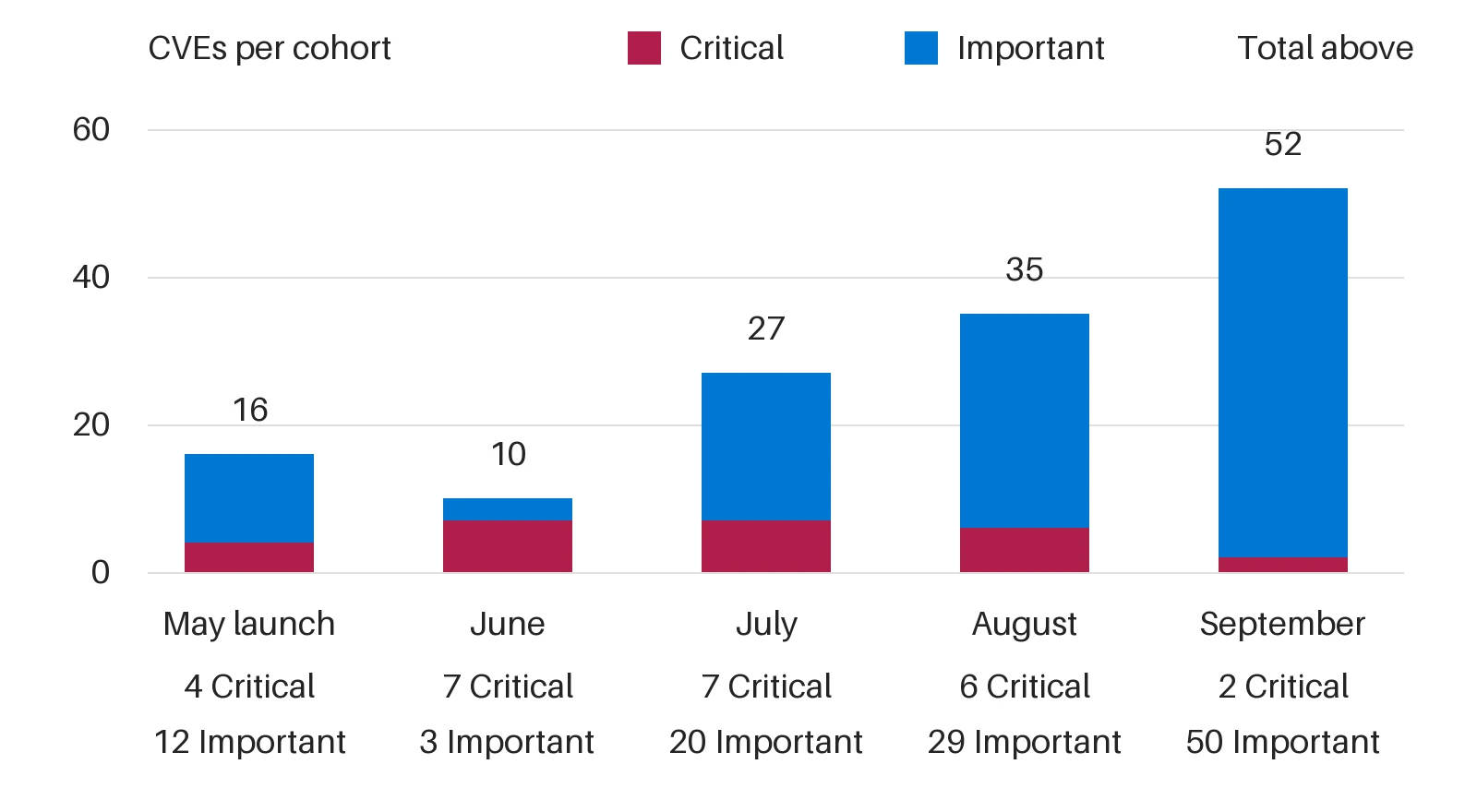
The hidden network: Inside the phishing infrastructure ecosystem powering global cybercrime

Over the past year, Microsoft uncovered a Chinese-language cybercriminal ecosystem, an interconnected network of phishing kit operators, developers, and an illicit marketplace selling tools and infrastructure for large-scale phishing, enabling cybercriminal operations worldwide.

Threat actors purchased and used these tools and infrastructure, including phishing kits and access to compromised or fraudulent Microsoft or Google cloud environments and related credentials, to target organizations across the healthcare, financial services, wholesale distribution, and information technology (IT) sectors in Japan, the United States, Australia, and India. In collaboration with law enforcement agencies and other partners worldwide, Microsoft’s Digital Crimes Unit (DCU) facilitated a disruption of the ecosystem’s primary developers and infrastructure.

Microsoft’s research into one phishing kit unraveled a larger ecosystem, including the phishing kit developers, an infrastructure dealer, and the threat actors who buy from both. In this blog, we examine several phishing kits marketed and sold through YAM Store, an underground marketplace tracked by Microsoft as Storm-3119. We share our analysis of the technical aspects of this Chinese-language phishing kit ecosystem, the shared infrastructure, provisioning methods, and downstream activity by threat actors using these tools.

Map showing the countries affected by  Storm-3119 and Storm-2990-related activity, with the United States and Japan being the most affected.
Figure 1: Heat map of most impacted countries by combined Storm-3119 and Storm-2990-related activity.

Uncovering the shadow world of a phishing kit ecosystem

Microsoft, alongside industry partner Resecurity, identified three phishing kits sold through the YAM Store that make up this Chinese-language cybercriminal network: CoGUI (also known as NX or FA), Haozi (also known as Phoenix), and Iron Man System. Microsoft tracks the cluster of activity and the developers behind all three phishing kits as Storm-2990. Since January 2026, the threat actors behind these kits have been responsible for facilitating the sending of over one billion phishing emails and SMS messages to over 75 thousand organizations worldwide.

Microsoft assesses with high confidence that these phishing kits were developed by Chinese-speaking threat actors, and, despite their distinct branding and separate Telegram-based sales channels, exhibit highly similar capabilities and functionality. The phishing kits provide phishing templates impersonating legitimate brands and organizations (including government, financial, and logistics) worldwide, and enable criminal actors to facilitate high-volume phishing and credential stealing operations. The similarity in their infrastructure and overlap in activity suggest either shared development origins, code reuse, or close collaboration among their developers.

These phishing kits have been advertised through YAM Store, first CoGUI and Haozi, followed by Iron Man System starting in June 2026. YAM Store and affiliated phishing kit companies accepted payments through cryptocurrency, including USDT and Ethereum, adding another layer to conceal illicit activity. The scale and proliferation of this ecosystem demonstrate how readily available criminal infrastructure can lower the barrier to entry, enabling less skilled cybercriminals to target organizations at scale and contribute to fraud losses.

By mapping the relationship between YAM Store and these phishing kits, we provide insight into the commercial infrastructure that supports modern phishing operations.

Diagram showing the relationship of YAM Store (Storm-3119) and the phishing kits tracked as Storm-2990.
Figure 2. YAM Store (Storm-3119) sells fraudulently acquired infrastructure to CoGUI, Haozi, and Iron Man System, all interconnected phishing kit operators, who then provide these services to other threat actors.

Storm-3119: YAM Store, the power broker

YAM Store is an initial access broker (IAB) that sells infrastructure using compromised or fraudulently obtained environments in providers like Microsoft and Google. The marketplace offers a variety of infrastructure based on age, subscription type, and environment types such as education (.edu) or non-profit (.org).

Diagram showing the procurement and downstream activity related to YAM Store
Figure 3: YAM Store procurement and downstream activity chain

The YAM Store marketplace provides cybercriminals with a platform to purchase fraudulently acquired Microsoft and Google domains associated with legitimate, expired, or previously used organization numbers, allowing actors to use seemingly legitimate infrastructure and obtain workspaces at relatively low cost. Storm-3119 uses automation to identify expired environment or organization names and leverages legitimate customer information associated with them to help circumvent existing detections.

Screenshot of YAM Store interface and Telegram
Figure 4. YAM Store interface and Telegram contact

Anatomy of YAM Store operations: How Storm-3119 acquires, controls, and monetizes infrastructure

During this investigation, Microsoft uncovered a five-stage attack pipeline often used in Storm-3119’s operations. YAM Store functions as an access broker, an intermediary that hijacks Microsoft 365 and Azure for Education tenants and resells the stolen accounts, licenses, and storage as a service to downstream operations, including the phishing kits tracked as Storm-2990. The pipeline below describes the supply side of that business: how the actor acquires, controls, and monetizes compromised environments.

Stage 1 – Reconnaissance: Storm-3119 conducts automated reconnaissance of target environments. The actor uses Flask, a lightweight Python web framework, to covertly identify and profile cloud-enabled organizations. The tooling is designed to discover Microsoft 365 tenants, assess enrollment opportunities, gather licensing and Azure cloud information, and perform these activities anonymously through Tor infrastructure.

Stage 2 – Environment takeover and app-only admin panels: Once a viable environment is identified, the threat actor centralizes associated information in an actor-controlled platform used to administer compromised Microsoft 365 environments. This platform is a separate set of administrative panels (implemented in PHP, Java/Spring, and Cloudflare Workers) that lets the operator maintain, monetize, and expand access using stolen application credentials. Leveraging the compromised environment’s client secret through an application-only authentication flow, the panel performs full directory control: it resets passwords silently (without forcing a change at next sign-in), assigns education licenses, and grants privileged attributes that the actor can later monetize. Because this access is application-level rather than tied to a single user session, the resulting persistence is more durable, more scalable, and harder to detect.

Stage 3 – Storage and resource abuse: With the stolen privileged credentials, the threat actor signs in to a compromised Global Administrator account and self-provisions the PnP Management Shell service principal, which represents the actor’s application inside the compromised tenant. Through this service principal, the threat actor grants themselves broad Microsoft Graph permissions, including read and write access to directory data and AppCatalog.ReadWrite.All, along with full control over the SharePoint API. The actor then abuses the compromised tenant’s SharePoint and OneDrive as bulk hosting and converts the hijacked storage into a sellable product.

Stage 4 – Phishing and DNS infrastructure support: The threat actor maintains dedicated infrastructure to support and manage phishing operations on behalf of their customers. A custom DNS management platform enables centralized control of phishing domains, SSL certificates, and domain-routing configurations through Cloudflare.

Stage 5 – Storefront and monetization: Storm-3119 resells the hijacked accounts, licenses, and storage through an automated storefront, operating as the access broker that supplies these resources to downstream operations. Payment is accepted through Alipay, WeChat Pay, and USDT (TRC20), and the storefront supports a sub-reseller tier. Telegram is used for order notifications and buyer contact rather than as the primary sales channel.

In addition to targeting existing tenants, Storm-3119 also separately creates fraudulent organizations and supporting web presence to establish tenants on Microsoft’s platform, likely using AI-generated content and forged documentation to make the fabricated entities appear legitimate. In one case, the actor created an environment, likely using AI, named “Jewish Choice” under the guise of a nonprofit organization and associated it with jewishchoice[.]org, a domain registered only within the past several months that did not appear to represent a legitimate organization. This activity indicates that Storm-3119 likely established the website and associated domain to lend credibility to the fabricated nonprofit identity and facilitate tenant creation.

Screenshot of website for a fake non-profit
Figure 5: YAM Store created the fake non-profit “Jewish Choice” to sell to criminal actors with a [.]org top-level domain to appear as a legitimate organization in phishing emails.

Storm-2990: The Iron Man System phishing kit

YAM Store sells its illicitly acquired infrastructure, as well as the prominent phishing kits tracked as Storm-2990, to other threat actors. The platforms are commercially licensed phishing-as-a-service (PaaS) products. They are designed to impersonate organizations across several industry verticals to steal information, including sign-in credentials (usernames, passwords) and financial data (credit card information), used to gain access to network environments.

Iron Man System’s customers purchase a subscription that provides access to the kit’s license server, with the domain hard-coded into the kit. This restriction adds a layer of obfuscation by limiting site access to paying customers. The kits allow attackers to steal money by abusing the stolen credit card information.

Screenshot of Iron Man System sign-in
Figure 6. Iron Man System admin sign-in

The Iron Man System phishing kit contains over 2,335 templates tailored to over 139 countries including Australia, Japan, India, and the United States, with the United States accounting for the most phishing templates. The phishing lures used by Iron Man System mimic various trusted brands and organizations, such as local government including authorities associated with traffic and parking fees, law enforcement, healthcare, finance, transportation, and retail. These lures are designed to trick targets into providing sensitive information. Most phishing lures used in the United States are transportation or government-related.

Screenshot of SMS phishing impersonating traffic authorities in the Philippines
Figure 7. Phishing lure impersonating traffic authorities in the Philippines
Screenshot of phishing email impersonating Amazon
Figure 8. Phishing lure impersonating Amazon shipping services
Screenshot of a Japanese-language phishnig lure
Figure 9. Phishing lure impersonating a Japanese financial service provider. It warns the target that a routine security check determined that the target’s account requires re-authentication. The email provides instructions for the target to visit the ‘official’ website and follow instructions to authenticate to the portal
Screenshot of SMS phishing impersonating Australia Post
Figure 10. Sample lure impersonating Australia Post
Screenshot of phishing email impersonating Medicare
Figure 11. Sample lure impersonating Medicare

The phishing kits are capable of the following advanced evasion techniques to varying degrees:

  • Geofencing, a technique used to restrict access to configured countries only, so only users from specific countries can access the phishing content from their web browser
  • Fake CAPTCHA gates, used to prevent or block automated browsing from threat research tools by making the user click a box or execute an action
  • IP address block list and allow list, used to block or allow IP addresses to prevent threat researcher interaction
  • Anti-detection configuration related tosettings to evade security researcher detection
  • Telegram bot configuration,including bot tokens and chat IDs for real-time phishing that enables credential exfiltration. It allows the kit operator to receive automatic notifications on their Telegram account when a target takes action on a phishing lure, including entering credentials, credit card data submission, and verification codes.

After the target provides the sensitive information (sign-in details, credit card info), the phishing kit collects it using a WebSocket, offering customers real-time victim interaction through Telegram notifications during credential harvesting. This confirms that the kit supports live, interactive phishing where the operator monitors each victim’s progress and manually controls what the victim sees next, a hallmark of sophisticated PaaS platforms. The attacker then harvests the information to use in follow-on fraudulent financial activities.

The Iron Man System phishing kit panel is predominately hosted on China-based hosting providers, with a smaller number of panels found on hosting providers in other countries. The fully featured, multi-tenant phishing kit uses the GoFrame application development framework, an open-source Go framework with roots in the Chinese developer ecosystem.

Downstream activity from Storm-2990 phishing kits

Microsoft observed downstream activity by threat actors using infrastructure affiliated with the Storm-2990 phishing kits. In analyzed cases, the actors used similar common phishing techniques, such as urgency in the message and attaching malicious links that redirect to actor-controlled infrastructure that allows these downstream threat actors to perform the following activities:

  • Credential stealing: The actors use phishing pages that impersonate legitimate services to trick targets into providing credentials or other authentication information, enabling downstream actors to access compromised accounts.
  • Device code phishing: In some cases, the actors abuse the device code authentication flow to trick victims into authenticating to legitimate applications, allowing downstream actors to obtain authentication tokens and access compromised accounts.
  • Financial fraud: The end goal for the downstream actors is to use stolen payment data to make fraudulent purchases of high-end goods or fraudulent transactions on legitimate financial platforms.

The threat actors using the phishing kits conduct phishing campaigns at scale whether it is a missing toll payment or a traffic citation. The following screenshots show email or SMS phishing lures used in Storm-2990 phishing kits.

Screenshots of phishing landing pages
Figure 12: Sample of landing pages impersonating mainstream tech, streaming and brokerage services around the world. The templates are tailored to specific countries using trusted local or international brand names and local language.

Mitigation and protection guidance

This interconnected network of Chinese-language phishing kit operators and developers operates as an enabling ecosystem, providing infrastructure and services that facilitate criminal activity rather than functioning as a standalone malware tool. Microsoft assesses that the ecosystem is not limited to the abuse of Microsoft services and extends to other providers.

While Microsoft notes that the identified organizations impacted by attacks stemming from Storm-3119 or Storm-2990 operations include financial, healthcare, and IT companies, the activity conducted by threat actors using these tools are common attacks that could affect any organization.

Most of the activity that stems from this phishing kit ecosystem consists of social engineering, phishing operations, and account and storage takeovers. Microsoft recommends the following to mitigate the impact of Storm-3119 and Storm-2990-related threats.

  • In nearly all the cases observed by Microsoft, the phishing lures used by the Storm-2990 operators followed prescriptive scam red flags, including urgency, time-sensitive tasks such as clicking a provided link with official branding. Users should verify with the purported sender of the message or email, even when the task involves signing in to a known, secure account not provided by the link or calling the purported organization or company directly.
  • Educate users about protecting personal and business information in social media, filtering unsolicited communication, identifying lures in spear-phishing emails and watering holes, and reporting reconnaissance attempts and other suspicious activities.
  • Educate users about common phishing techniques. Sign-in prompts should clearly identify the application being authenticated to. As of 2021, Microsoft Azure interactions prompt the user to confirm (Cancel or Continue) that they are signing in to the app they expect, which is an option frequently missing from phishing sign-ins.
  • Review our recommended settings for Exchange Online Protection and Microsoft Defender for Office 365 to ensure your organization has established essential defenses and knows how to monitor and respond to threat activity.
  • Configure the Microsoft Defender for Office 365 Safe Links policy to apply to internal recipients.

Hardening credentials and cloud identities is also necessary to defend against phishing attacks, which seek to gain valid credentials and access tokens. As an initial step, use passwordless solutions like passkeys and implement multifactor authentication (MFA) throughout your environment:

  • Invoke the principles of least privilege and Zero Trust to significantly slow down threat actors who might have been able to gain initial access and buy time for defenders to respond. Since Storm-3119 operators have been observed obtaining Global Administrator access, implementing these principles can help lock down Global Administrator roles and who has access to specific resources.
  • Use the Microsoft Authenticator app for passkeys and MFA, and complement MFA with Conditional Access policies, where sign-in requests are evaluated using additional identity-driven signals.
  • Conditional Access policies can also be scoped to strengthen privileged accounts with phishing-resistant MFA.
  • Your passkey and MFA policy can be further secured by only allowing MFA and passkey registrations from trusted locations and devices.
  • Enable network protection to prevent applications or users from accessing malicious domains and other malicious content on the internet.

Microsoft Defender detections

Microsoft Defender customers can refer to the list of applicable detections below. Microsoft Defender coordinates detection, prevention, investigation, and response across endpoints, identities, email, and apps to provide integrated protection against attacks like the threat discussed in this blog.

The coverage below applies to the downstream activity detected by Microsoft that was identified using Storm-2990 infrastructure.

Tactic Observed activity Microsoft Defender coverage
Initial accessStorm-2990-affiliated threat actors sign in to compromised accounts. Phishing campaigns use emails with malicious links. Microsoft Entra ID Protection
– Atypical travel
– Malicious IP address
– Unfamiliar sign-in properties

Microsoft Defender for Office 365
– A potentially malicious URL click was detected
– Email messages containing malicious URL removed after delivery
– Email reported by user as malware or phish

Microsoft Defender for Cloud
– Communication with suspicious domain identified by threat intel
Credential accessStorm-2990 facilitates high-volume phishing and credential stealing operations.Microsoft Entra ID Protection
– Password Spray

Microsoft Defender for Endpoint
– Potential phishing web site
– Suspicious activity linked to an emerging threat actor detected
– Suspicious connection blocked by network protection

Microsoft Defender for Identity
– User identity risk elevated based on defender risk assessment
– User exhibiting spike in distinct application resource access combinations
– User sign-in from shared client infrastructure exhibiting anomalous activity

Microsoft Defender XDR
– Account compromise through anomalous password spray or credential compromise
– Authentication from password-spraying infrastructure
– Potential user account compromise identified through attack analysis

Microsoft Security Copilot

Microsoft Security Copilot is embedded in Microsoft Defender and provides security teams with AI-powered capabilities to summarize incidents, analyze files and scripts, summarize identities, use guided responses, and generate device summaries, hunting queries, and incident reports.

Customers can also deploy AI agents, including the following Microsoft Security Copilot agents, to perform security tasks efficiently:

Security Copilot is also available as a standalone experience where customers can perform specific security-related tasks, such as incident investigation, user analysis, and vulnerability impact assessment. In addition, Security Copilot offers developer scenarios that allow customers to build, test, publish, and integrate AI agents and plugins to meet unique security needs.

Threat intelligence reports

Microsoft Defender XDR customers can use the following threat analytics reports in the Defender portal (requires license for at least one Defender XDR product) to get the most up-to-date information about the activity and techniques discussed in this blog. These reports provide intelligence, protection information, and recommended actions to prevent, mitigate, or respond to associated threats found in customer environments.

Microsoft Security Copilot customers can also use the Microsoft Security Copilot integration in Microsoft Defender Threat Intelligence, either in the Security Copilot standalone portal or in the embedded experience in the Microsoft Defender portal to get more information about the activity discussed in this blog.

Hunting queries

Microsoft Defender XDR

Microsoft Defender XDR customers can run the following advanced hunting queries to find generic activity that may have some overlap with Storm-2990-related activity. Note that these queries are not specific to Storm-2990:

Hunt for suspicious device code authentication

The following query identifies risky sign-ins using the device-code authentication flow that could indicate device-code phishing and subsequent unauthorized account access.

EntraIdSignInEvents
| where Timestamp > ago(30d)
| where AuthenticationProtocol =~ "deviceCode"
| where RiskLevelDuringSignIn in~ ("medium", "high")
or RiskLevelAggregated in~ ("medium", "high")
or RiskEventTypes_V2 != "[]"
| project Timestamp, AccountUpn, IPAddress, Country, Application, ResourceDisplayName,
AuthenticationProtocol, RiskLevelDuringSignIn, RiskLevelAggregated,
RiskEventTypes_V2, SessionId
| order by Timestamp desc

Hunt for potentially compromised accounts using multiple risk signals

The following query identifies accounts exhibiting risky authentication activity across multiple IP addresses or countries that may indicate credential compromise following phishing.

EntraIdSignInEvents
| where Timestamp > ago(30d)
| where RiskLevelDuringSignIn in~ ("medium", "high")
    or RiskLevelAggregated in~ ("medium", "high")
    or RiskEventTypes_V2 != "[]"
| summarize FirstSeen = min(Timestamp), LastSeen = max(Timestamp),
            IPAddresses = make_set(IPAddress, 20), Countries = make_set(Country, 20),
            Applications = make_set(Application, 20), RiskEvents = make_set(RiskEventTypes_V2, 20),
            SignInCount = count() by AccountUpn
| where array_length(IPAddresses) > 1 or array_length(Countries) > 1
| order by LastSeen desc

Hunt for phishing clicks followed by Defender alerts

The following query correlates email URL clicks with subsequent Defender alerts for the same user to identify potential phishing-related account compromise.

let Lookback = 30d;
let PhishClicks =
    UrlClickEvents
    | where Timestamp > ago(Lookback)
    | project ClickTime = Timestamp, AccountUpn, Url, ClickAction = ActionType;
let IdentityAlerts =
    AlertEvidence
    | where Timestamp > ago(Lookback)
    | where EntityType =~ "User"
    | project AlertTime = Timestamp, AccountUpn, AlertId, Title, Severity, DetectionSource;
PhishClicks
| join kind=inner IdentityAlerts on AccountUpn
| where AlertTime between (ClickTime .. ClickTime + 24h)
| project ClickTime, AlertTime, AccountUpn, Url, ClickAction, AlertId, Title, Severity, DetectionSource
| order by ClickTime desc

Hunt for phishing URL clicks followed by suspicious sign-ins

The following query identifies users who clicked URLs in email and subsequently generated risky sign-in activity, which may help identify credential compromise following phishing.

let Lookback = 30d;
let PhishClicks =
    UrlClickEvents
    | where Timestamp > ago(Lookback)
    | where ActionType in~ ("ClickAllowed", "ClickBlocked")
    | project ClickTime = Timestamp, AccountUpn, Url, Workload, ClickAction = ActionType;
let SuspiciousSignins =
    EntraIdSignInEvents
    | where Timestamp > ago(Lookback)
    | where RiskLevelDuringSignIn =~ "high"
        or RiskLevelAggregated =~ "high"
        or RiskEventTypes_V2 != "[]"
    | project SignInTime = Timestamp, AccountUpn, IPAddress, Country, Application,
              RiskLevelDuringSignIn, RiskLevelAggregated, RiskEventTypes_V2;
PhishClicks
| join kind=inner SuspiciousSignins on AccountUpn
| where SignInTime between (ClickTime .. ClickTime + 24h)
| project ClickTime, SignInTime, AccountUpn, Url, IPAddress, Country, Application,
          RiskLevelDuringSignIn, RiskEventTypes_V2
| order by ClickTime desc

Microsoft Sentinel

Microsoft Sentinel customers can use the TI Mapping analytics (a series of analytics all prefixed with ‘TI map’) to automatically match the malicious activity mentioned in this blog post with data in their workspace. If the TI Map analytics are not currently deployed, customers can install the Threat Intelligence solution from the Microsoft Sentinel Content Hub to have the analytics rule deployed in their Sentinel workspace.

References

Learn more

For the latest security research from the Microsoft Threat Intelligence community, check out the Microsoft Threat Intelligence Blog.

To get notified about new publications and to join discussions on social media, follow us on LinkedIn, X (formerly Twitter), and Bluesky.

To hear stories and insights from the Microsoft Threat Intelligence community about the ever-evolving threat landscape, listen to the Microsoft Threat Intelligence podcast.

The post The hidden network: Inside the phishing infrastructure ecosystem powering global cybercrime appeared first on Microsoft Security Blog.

Post-quantum authentication: Why organizations should start testing certificate ecosystems now

Post-quantum cryptography (PQC) planning often focuses on protecting encrypted data, but authentication systems must also evolve. Certificates, trust anchors, PKI services, applications, devices, and hardware security modules may all be affected by new algorithms and larger certificate chains.

Microsoft’s Post-Quantum Cryptography (PQC) Transport Layer Security (TLS) Pilot Program helps eligible certificate authorities evaluate interoperability and operational readiness in controlled environments. Organizations should begin now by inventorying certificate dependencies, assessing vendor roadmaps, identifying long-lived infrastructure, and creating non-production test environments. Early testing can surface compatibility and process gaps before post-quantum authentication is required at scale.

By the end of this article, security leaders, public key infrastructure (PKI) administrators, and architects will understand the key certificate dependencies, migration risks, and practical first steps for post-quantum authentication readiness.

Why post-quantum authentication presents a different challenge

Much of the current PQC readiness discussion focuses on confidentiality and the ‘harvest now, decrypt later’ risk, in which adversaries collect encrypted data today with the expectation that future quantum computers could decrypt it.

Authentication introduces a different set of challenges.

While confidentiality protections primarily focus on safeguarding encrypted communications, authentication depends on a broad ecosystem of technologies and trust relationships. Certificates and private keys must be issued, distributed, stored, validated, renewed, and managed across diverse environments and vendors. Changes to cryptographic algorithms can therefore have implications that extend beyond cryptographic correctness into operational processes, interoperability, and infrastructure readiness.

Organizations frequently understand where TLS protects their communications. Fewer organizations have a complete inventory of every system that issues, validates, stores, distributes, or depends on certificates.

As the industry moves toward post-quantum authentication, security teams will need greater visibility into those dependencies.

Why organizations should begin preparing now

The transition to post-quantum authentication is unlikely to be a single technology upgrade.

Enterprise environments often contain decades of accumulated infrastructure, including internally managed PKI deployments, embedded devices, operational technology, security appliances, custom applications, third-party services, and hardware-backed trust systems. Some of these technologies may have long deployment lifecycles, fixed cryptographic assumptions, or operational constraints that are not immediately visible until testing begins.

The challenge facing organizations is not that post-quantum standards are unavailable. Rather, it is understanding how proposed post-quantum certificate hierarchies interact with the systems and processes already deployed across their environments.

Testing helps answer questions such as:

  • Can existing applications correctly process and validate post-quantum certificates?
  • How do larger post-quantum certificates and certificate chains affect handshake size, performance, storage, transmission, and inspection limits?
  • Do enterprise PKI workflows require changes to accommodate new algorithms?
  • Are network monitoring, inspection, or certificate-management systems prepared for post-quantum authentication?
  • Are hardware security modules and other cryptographic infrastructure components ready to support future certificate requirements?
  • What hidden dependencies exist within supply chains, vendors, and third-party services?

In many cases, organizations may not yet know which of these questions are most relevant to their environments. Identifying those unknowns is one of the primary reasons ecosystem testing is important today.

Microsoft’s perspective on readiness

Post-quantum authentication readiness requires validating how certificate chains, platforms, and operational processes behave together.

The goal is not simply to determine whether a certificate can be issued or validated. The goal is to identify interoperability, compatibility, performance, and operational challenges before post-quantum authentication must be deployed at scale.

Organizations should view post-quantum readiness as a multi-year planning effort rather than a future migration project. Security leaders who begin inventorying dependencies, assessing vendor readiness, and testing interoperability now will be better positioned to make informed decisions as standards, platform support, and industry requirements continue to evolve.

Testing the future certificate ecosystem

To help the ecosystem gain practical experience with post-quantum authentication, Microsoft launched the PQC TLS Pilot Program on August 27, 2026.

The pilot enables approved certificate authorities in good standing with the Microsoft Trusted Root Program to evaluate PQC TLS roots and certificate issuance using quantum-resilient Module-Lattice-Based Digital Signal Algorithm, ML-DSA-87.

The program is intended to create a controlled environment where participants can evaluate interoperability, compatibility, performance, and operational considerations associated with post-quantum certificate hierarchies.

Certificates issued through the pilot are not publicly trusted and are intended solely for interoperability and ecosystem-readiness testing in closed environments, custom applications, and enterprise testbeds. They must not be used for production trust scenarios or public-facing websites. ML-DSA support remains limited and evolving during the pilot and should not be relied upon for production use.

According to the Microsoft Trusted Root Program Annoucement, the August 2026 release added seven pilot roots operated by ComSign, DigiCert, HARICA, IdenTrust Services, Sectigo, Shanghai Electronic Certification Authority, and SSL.com.

The pilot will continue with rolling admissions through the end of 2026, providing additional opportunities for eligible certificate authorities participating in the Microsoft Trusted Root Program to join. Organizations that participate in the Microsoft Trusted Root Program and are interested in evaluating post-quantum authentication readiness should review the PQC TLS Pilot Program requirements and application process through the https://aka.ms/rootcert. The pilot provides eligible certificate authorities with an opportunity to test interoperability, operational processes, and ecosystem readiness ahead of broader post-quantum authentication adoption.

The objective is not to validate a predetermined outcome. It is to help the certificate ecosystem discover where modernization, testing, and operational improvements may be required before post-quantum authentication can be adopted broadly.

Expanding end-to-end testing

On supported and appropriately configured Windows 11 systems, ML-DSA certificates can be evaluated in the pilot’s controlled, non-production testing scenarios. Support begins with the July 28, 2026 updates: KB5101681 (OS Build 28000.2608) for 26H1 and KB5101684 (OS Builds 26200.8973 and 26100.8973) for 25H2.

ML-DSA certificates can also be used with Secure Channel (Schannel) in supported scenarios. Confirm the applicable Windows and Schannel platform requirements before testing.

Together, Microsoft platform support and the PQC TLS Pilot Program provide a controlled way to identify application incompatibilities, certificate-size constraints, performance effects, and operational workflow gaps before they affect production environments.

What organizations can do today

Organizations do not need to wait for broad industry adoption to begin preparing for post-quantum authentication.

Security leaders, PKI administrators, and architects can begin by:

1. Inventory certificate-dependent systems. Identify applications, services, devices, appliances, and infrastructure that depend on certificates for authentication, trust establishment, or lifecycle management.

2. Map trust relationships.

Document both public and private PKI environments, including internal certificate hierarchies, trust anchors, device authentication systems, and externally managed certificates.

3. Assess vendor readiness.

Engage certificate providers, PKI vendors, hardware security module (HSM) providers, software vendors, and platform providers to understand their post-quantum roadmaps and testing capabilities.

4. Identify long-lived infrastructure.

Pay particular attention to systems with lengthy upgrade cycles, including embedded devices, appliances, operational technology environments, and security infrastructure.

5. Develop a safe testing strategy.

Establish non-production environments where post-quantum certificate hierarchies can be evaluated for interoperability, performance, and operational impacts.

6. Build a multi-year transition roadmap.

Treat post-quantum authentication readiness as a program rather than a project. Assign owners, sequence dependencies, and use test results to prioritize modernization work before future requirements emerge.

Organizations interested in testing should consult their certificate provider about whether it participates in the pilot and whether it offers testing opportunities appropriate for their environment.

If your certificate provider participates in the Microsoft Trusted Root Program but is not currently part of the pilot, consider encouraging them to participate through the program’s admissions process.

Looking ahead

Post-quantum authentication will require coordinated changes across certificate authorities, platforms, software, hardware, and enterprise environments. Organizations that begin testing trust infrastructure and certificate dependencies now will be better positioned to reduce future migration risk and strengthen readiness for a quantum-resistant future.

Learn more

The post Post-quantum authentication: Why organizations should start testing certificate ecosystems now appeared first on Microsoft Security Blog.
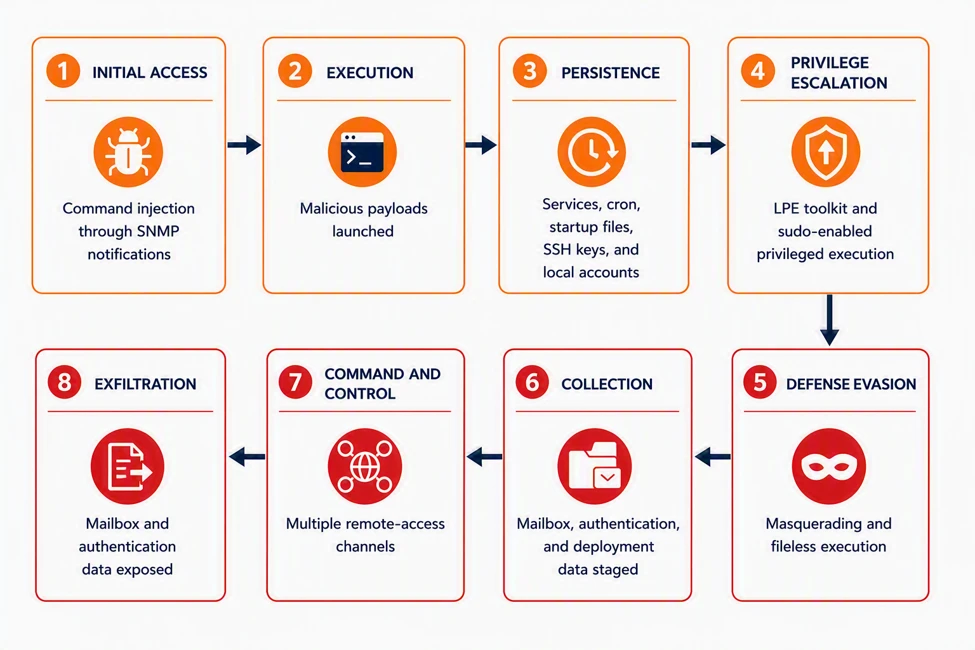
  • ✇Microsoft Security Blog
  • 3 lessons from frontier AI vulnerability research Taesoo Kim
    In this article Shift 1. From frontier capability to scaleShift 2. From token consumption to reasoning economicsShift 3. Validation and remediation as a continuous learning loopTransferring security research to help open source projectsOpen-source vulnerability reporting snapshotMeasured costs of automated validationFORGE OSS Bug Hunt Party: Human coordination at scale (Hackathon)Akrites: Coordinated effort to remediate vulnerabilitiesWhat’s next for FORGE Lab?
     

3 lessons from frontier AI vulnerability research

7 de Outubro de 2026, 13:00

The mission of Microsoft Security’s Frontier Offensive Research & Generative Exploitation (FORGE) Lab is to advance the frontier of autonomous security engineering. We’re building a team that enables AI-native vulnerability research at Microsoft, pushing the boundaries of finding and fixing zero-day vulnerabilities. Four principles guide that work: autonomy over labor, defense through offense, building ecosystems over individual examples, and understanding over findings. This post reflects those principles in practice across Windows, the Linux kernel, and widely used open-source projects.

From May 2026 through September 2026, FORGE helped discover Windows vulnerabilities assigned 140 common vulnerabilities and exposures (CVEs), including 52 addressed in September 2026’s security release alone. The work reaches well beyond Windows. FORGE members submitted 155 internally validated reports across 23 open-source projects, including the Linux kernel. And through Akrites, a Linux Foundation initiative that coordinates confidential remediation and disclosure for vulnerabilities in critical open-source software, one of our Linux reports became the first Akrites submission to result in a patch merged into the Linux kernel.

These results demonstrate that agentic discovery can operate at meaningful volume, but they also expose the next constraint. Finding a difficult vulnerability proves an agent’s frontier capability. Repeatedly converting such findings into security updates requires a different kind of system—one that can move credible work through validation, remediation, and release. Discovery creates security value only when validation and remediation can keep pace. For security leaders, the question is no longer only whether AI can find vulnerabilities, but whether an organization can validate and fix them as fast as they are found.

Three lessons follow, each marking a shift in how we approach vulnerability research:

  1. From frontier capability to scale.
  2. From token consumption to reasoning economics.
  3. From isolated discovery to coordinated validation and remediation.

The scarce resource is not always model intelligence. It can be a working build and deployment, a reproducible trigger, or even an engineer’s time.

At FORGE Lab, we use the multi-model agentic scanning harness, codename MDASH, to organize this work. Our May 2026 introduction detailed its design, while the June 2026 update covered pipeline improvements and benchmark analysis. Here, we focus on what those experiences teach us about operating vulnerability research at scale—across Windows and open-source projects.

Stacked bar chart titled “CVEs per cohort” shows Critical and Important  vulnerabilities by month from May launch through September. Totals are 16 CVEs in May (4 critical and 23 important), 10 in June (7 critical, 3 important), 27 in July (7 critical, 20 important), 35 in August (6 critical, 29 important), and  52 in September (2 Critical and 50 Important).
140 CVEs addressed through Microsoft Patch Tuesday since May 2026. Monthly totals reflect announcement and servicing cohorts, not discovery dates or scan throughput. Source: Microsoft FORGE Lab study, May 2026 to September 2026.

Shift 1. From frontier capability to scale

The frontier question is whether a system can find a bug that demands deep reasoning, as we explored in our early work on the CyberGym benchmark. The scale question is whether it can repeat that result across targets without rebuilding every environment, investigation, and review process from scratch. Better models still matter, especially for difficult or unfamiliar bug classes. But once discovery becomes repeatable, model capability is only one constraint on useful output.

Adding auditors can increase candidate volume without increasing the rate of validated findings or shipped fixes. If reports arrive faster than reviewers—in our case, Microsoft Security Response Center (MSRC)—can resolve them, the immediate result is a growing queue. A larger search budget can even reduce useful throughput when duplicate or poorly supported reports consume attention that stronger findings need.

The unit to optimize, therefore, is neither the scan nor the report. It is a reproducible finding that advances with enough evidence for the next stage to act. Reusable preparation, deduplication, and review capacity are therefore core components of the research system.

As agentic systems produce more candidates, the bottleneck shifts from discovery to determining which reports are real, reachable, and security-relevant. Project-specific automated provers—such as proof of vulnerability (PoV)/proof of concept (PoC) generators, harness builders, and trigger-input finders—turn plausible reports into reproducible evidence that engineers and maintainers can act on. By finding crashing inputs, confirming reachable execution paths, and producing regression-ready triggers within each project’s build and test environment, these tools can help reduce human triage, accelerate remediation, and make vulnerability research sustainable at scale. For example, by leveraging deterministic algorithms such as abstract syntax tree (AST), one of our internal projects reduced about 45% duplicate findings across multiple scans of the same code which reduced the load on the PoC generator and subsequently human triage effort.

More candidates do not create more throughput when the review queue grows faster than fixes ship.

Shift 2. From token consumption to reasoning economics

At scale, every repeated orientation, speculative branch, and redundant debate carries a cost. But minimizing tokens alone is the wrong objective. A short, ambiguous report may be cheap to generate yet expensive to investigate; a longer analysis that establishes the missing execution path may reduce total system cost.

The key question is where the next unit of reasoning will change a decision. If an index can identify callers, asking a frontier model to rediscover them wastes capacity. If the uncertainty is whether two lifetime conditions can coexist across callbacks, deeper reasoning may be warranted. If the question is whether an input triggers the failure, an executable check can provide evidence that more prose cannot.

MDASH combines frontier and distilled models, specialized auditors, and code-analysis tools, enabling work to be allocated by task. That flexibility does not guarantee optimal allocation. Routing routine work to cheaper models, reusing verified context, and escalating unresolved questions to stronger reasoning are hypotheses to test—not efficiency gains to assume.

A useful allocation policy starts by identifying what remains unknown: a caller, a build configuration, a reproducer, or a causal explanation. The next action should close that specific evidence gap. Repeating a review without adding evidence spends more tokens while preserving the same uncertainty. Early filtering can also discard real bugs, so any savings must be measured against coverage and missed findings.

Scan outcomes can also become training data. At scale, vulnerability scanning should become a training loop, not only a discovery pipeline. Each MDASH run produces signals that can improve future models: true-positive and false-positive verdicts, duplicate findings, failed reachability claims, reviewer feedback, verifier results, severity assessments, patch outcomes, and regression-test evidence. Capturing those signals with the code context and causal argument behind each candidate creates the dataset needed for reinforcement learning and fine-tuning specialized cyber models. The goal is for future models to learn not just what a vulnerability looks like, but which findings survive validation, which explanations help humans and provers act, and which patterns lead to useful remediation.

Spend reasoning to remove uncertainty, not simply to produce more analysis.

Shift 3. Validation and remediation as a continuous learning loop

Validation and remediation are not downstream cleanup; they are part of the discovery loop. Each candidate should move through automated verification, human review, patch development, and regression testing, with every stage returning evidence to the system. A reproducible trigger strengthens the report, guides the fix, and can seed a regression test. A failed validation is also useful when it records why: an unreachable path, missing precondition, incorrect build configuration, insufficient attacker control, duplicate report, or incomplete causal explanation.

That evidence is how the system improves. Project-specific provers, harnesses, and trigger generators accumulate operational knowledge about how each target builds, runs, fails, and accepts fixes. Remediation outcomes show the discovery pipeline which evidence changed a decision, which assumptions failed, and which bug patterns warrant more or less attention. The objective is to make every investigation leave reusable capacity behind: a validated trigger, clearer invariant, better harness, stronger regression test, or routing rule that prevents the same mistake.

Human attention remains essential, but it should concentrate where judgment has the highest leverage: assessing security impact, reviewing patches, and determining whether a change restores the component’s intended invariant. Automation can handle the repeatable work of establishing reachability, reproducing behavior, and preserving evidence. Over time, this loop converts individual findings into system knowledge—raising the quality of future discovery while shortening the path from credible report to shipped fix.

A reproducible defect is not yet a serviced fix. To shorten the path from discovery to remediation, MDASH needs to operate as part of the engineering loop: continuously scanning code, connecting findings to the builds and artifacts produced by continuous integration and continuous delivery (CI/CD), and feeding validation results back into development, as described in the Windows team’s blog post. Broad analysis can identify suspicious code paths, but component-specific proving needs the right binaries, symbols, configurations, harnesses, and runtime conditions to reproduce a candidate defect against the version that matters for customers and releases. Each handoff should be both owned and machine-usable: research supplies the candidate claim, causal path, and uncertainty; proving supplies execution evidence from the relevant build artifact; component teams assess the violated invariant, repair strategy, compatibility risk, and related variants; and servicing connects the approved change to release validation. A failed reproduction, rejected finding, incomplete patch, or regression result should feed back into MDASH as structured evidence, not simply move a ticket into another queue. The goal is not to remove human code review or release validation, but to automate the repeatable work around them—finding candidates, selecting artifacts, reproducing behavior, preserving evidence, suggesting related paths, and returning what was learned to the next scan.

The goal is to build an organization-wide system that automates repeatable work while preserving clear engineering accountability.

Transferring security research to help open source projects

In open source, all three constraints apply at once. Each project has its own setup costs, mix of analysis and execution work, and maintainer workflows and review capacity. Within Windows, vulnerability research connects to established component owners and servicing infrastructure. Across open-source projects, reusable methods can reduce repeated setup, but they cannot replace the technical and human context required to move a finding toward a fix.

Open-source vulnerability reporting snapshot

Over three months, FORGE members audited open-source projects spanning kernels, runtimes, networking libraries, container technologies, and media parsers. The team submitted 155 internally validated reports across 23 projects. At the time of writing, 93 reports across 14 projects or project families had documented maintainer acknowledgement or acceptance: apple/container, apple/containerization, curl, Escargot, FFmpeg, Hyperlight, Linux, llama.cpp, Node.js, PyRIT, Rust, SQLite, vLLM, etc.

Since the reports are at different stages of that process, only subsets are publicly disclosed today, such as curl’s CVE-2026-9545 and CVE-2026-13608, Node.js’s CVE-2026-56848, and Linux kernel CVE-2026-64563. Our public CVE index lists the CVEs currently cleared for disclosure, and you can find all our public channel Linux kernel reports through lore.kernel.org query.

Measured costs of automated validation

MDASH surfaced thousands of suspicious locations in the Linux kernel, and our validation agents produced supporting evidences for 627 findings. The figures below summarize automated validation costs for a subset of these efforts. Across 182 confirmed crash findings, generating a PoC averaged $3.61 in model cost and 21.5 minutes. For six selected cases, using automatic exploit generation (AEG) to test local privilege-escalation potential averaged $8.56 and 25.4 minutes.

Paired horizontal bar charts compare average model cost in USD and average completion time in minutes for two security-testing tasks. Blue bars show crash PoC generation (182 confirmed findings) at $3.61 and 21.5 minutes, versus local privilege-escalation testing (6 selected cases) at $8.56 and 25.4 minutes.
Average model and time cost for Linux kernel automated validation. Per-case averages reflect all attempts for successful cases using GPT-5.5. Source: Microsoft FORGE Lab Linux kernel automated validation study, 2026.

These evaluations used GPT-5.5, without extensive task-specific tuning of either the model or the harness. These averages include all attempts associated with the successful cases shown, but exclude initial screening, candidates that failed or were filtered out, and human investigation and patch preparation. Within those limits, the results still strongly indicate that automated validation can produce useful results at practical cost and latency, even at Linux-kernel scale. Tighter co-design of models and agent harnesses could improve both validation yield and efficiency. If costs fell by another order of magnitude, for example, 10x or even 50x, the range of findings that could be economically validated would expand substantially, further reshaping vulnerability research.

FORGE OSS Bug Hunt Party: Human coordination at scale (Hackathon)

Looking back to those efforts, technical evidence was only part of the job. Getting it fixed also required understanding and respecting each project’s context and workflow: some required a patch while others did not; some preferred private disclosure while others used public channels; and maintainers sometimes differed on whether an issue crossed a security boundary. In practice, this meant adapting to each project’s submission requirements, working with maintainers to reproduce the issue, and, where applicable, refining and retesting a proposed fix. As AI-assisted discovery increases report volume, open-source security research can scale only if research teams absorb the resulting complexity rather than pass it on to maintainers.

Scaling this work also requires more developers who understand the full security workflow. At Microsoft’s annual Hackathon, we hosted the FORGE Open Source Software (OSS) Bug Hunt Party (Project Sunshine) as a forum where developers across Microsoft could exchange security research practices and gain hands-on experience with vulnerability investigation, validation, and responsible reporting. With MDASH and supporting guidance, 50 participants produced 39 reports across six projects, including Microsoft’s open-source Hyperlight project, Linux, vLLM, Gemini CLI, and llama.cpp. Those 39 reports are included in the 155-report snapshot above. Project Sunshine has continued beyond the Hackathon as a forum for open-source security collaboration within Microsoft.

Akrites: Coordinated effort to remediate vulnerabilities

Akrites is a Linux Foundation initiative that coordinates confidential remediation and disclosure for vulnerabilities in critical open-source software. FORGE has submitted nine Linux findings with internally assessed common vulnerability scoring system (CVSS) scores above 7.0. Together with submissions from other participants, including Google, these cases helped test and refine Akrites’ early Coordinated Vulnerability Disclosure (CVD) workflow. One of those reports was the first Akrites submission to result in a patch merged into the Linux kernel. FORGE will keep contributing to those responsible disclosure efforts.

The work also showed that a systematic approach is not just a larger scan. It is a repeatable path from a finding to an upstream fix and coordinated disclosure. Each case needs reproducible evidence, a clear causal explanation, a severity assessment, and an understanding of which downstream projects may be affected. The right owners and collaborators can then be brought in at the right time and on a need-to-know basis.

What’s next for FORGE Lab?

In a matter of months, FORGE Lab has helped discover Windows vulnerabilities and assigned 140 CVEs, including 52 in September 2026’s security release. Beyond Windows, FORGE submitted 155 internally validated reports across 23 open-source projects—93 of which had documented maintainer acknowledgement or acceptance at the time of writing—and one of our Linux reports became the first Akrites submission to result in a patch merged into the Linux kernel. Our Linux kernel results also indicate that automated validation can work at practical cost, with proofs of concept averaging $3.61 in model cost and 21.5 minutes per successful case. The lesson behind those numbers: once agents can find difficult bugs, progress depends on the system around them, how it scales, where it spends reasoning, and how quickly it turns discoveries into validated fixes.

These three lessons are becoming foundational guidelines for FORGE’s next phase of research:

  1. Moving from frontier capability to scale means measuring the full pipeline, not just the number of findings: candidate arrivals, duplicates, rejected reports, validated defects, queue age, unresolved cases, and time through each stage.
  2. Moving from token consumption to reasoning economics means evaluating model and execution cost alongside human review time, and asking whether each additional pass removes uncertainty, improves coverage, or produces independently validated findings.
  3. Moving from isolated discovery to continuous validation and remediation means tracking reproduction success, patch rework, regression evidence, and elapsed time from validated defect to approved fix and release.

For security leaders evaluating AI-powered vulnerability discovery, these are useful measures too: count validated fixes, not just findings, and weigh model cost alongside the human review time it takes to act on them.

The next advance won’t come from a better model alone. It will come from research systems that combine frontier capability, systems engineering, and reasoning economics, focusing machine reasoning and human attention on turning credible findings into validated fixes.

Our team is growing. Check out our open positions at FORGE Lab.

Further reading:

To learn more about Microsoft Security solutions, visit our website. Bookmark the Security blog to keep up with our expert coverage on security matters. Also, follow us on LinkedIn (Microsoft Security) and X (@MSFTSecurity) for the latest news and updates on cybersecurity.

The post 3 lessons from frontier AI vulnerability research appeared first on Microsoft Security Blog.

​​Secure what’s next: Your guide to Microsoft Security at Microsoft Ignite 2026

30 de Setembro de 2026, 16:31

In the agentic era, the stakes are higher: AI agents now act with real access to your identities, your data, and your cloud, so every adoption decision is a trust decision. That is why security is a through line at Microsoft Ignite 2026, from a Security Pre-Day before the event opens to a security segment in the keynote, and four security themes across all four days.

Join us in San Francisco from November 17 to 20, 2026, or online. See the Microsoft Security roadmap first, get hands-on with new agentic security solutions, and connect directly with the experts, partners, and peers who can help you make it real. This year we spotlight our AI-first, end-to-end security platform designed to protect identities, devices, data, applications, clouds, infrastructure, and the AI agents now working alongside your teams.

Why you should attend Microsoft Ignite

  • Understand where Microsoft is placing its bets. See what is being announced, what is shipping next, and what it means for your architecture, your security operations center (SOC), and your governance model.
  • Build skills you can use immediately. Technical breakouts run from level 200 to level 400, paired with instructor-led labs and onsite certifications, so you leave with implementation guidance rather than slideware.
  • Pressure-test your plans with the people who built it. Bring your real architecture, deployment, and roadmap questions to Microsoft engineers, MVPs, and the product teams behind these tools.
  • See the proof, not the promise. Customer stories, live demos, and partner solutions show what is already working in production today.
  • Connect with the people who make it real. Expert meetups, connection pods, table talks, and evening events put you alongside security practitioners, leaders, Microsoft partners, and peers working the same problems.

Make the most of your time at Microsoft Ignite

Whether you join us in San Francisco or online, you will have access to a full slate of experiences designed to help you connect, learn, and grow as a security professional. Here is what is in store.

Start a day early at the Security Pre-Day

On Monday, November 16, 2026, from 1:00 PM PT to 5:00 PM PT, the Security Pre-Day gives you four hours with Microsoft Security leaders and external industry voices before the main event begins. Expect presentations paired with interactive roundtables and ask-me-anythings (AMAs) with our security experts, built for security decision makers and practitioners alike.

Select the Security Pre-Day option during Microsoft Ignite registration.

Hear the news first in the keynote and Innovation Session

The opening keynote runs Tuesday, November 17, 2026, from 10:00 AM PT to 12:00 PM PT at Chase Center and sets the direction for the week with Satya Nadella, Microsoft CEO, and Judson Althoff.

Later in the week, the Security Innovation Session goes deeper on the security news with executive-led demos.

Where the security community comes together

Microsoft Ignite is where the security community gathers. Beyond the sessions, you will find expert meetups, connection pods, and evening experiences created for security professionals and leaders.

Two women networking at Microsoft Ignite 2025.

Secure the Night

You are invited to Secure the Night on Tuesday, November 17, 2026, an evening bringing the security community together to connect, celebrate, and have some fun. Join fellow customers and Microsoft Security leaders for a night designed to make meaningful connections.

Interested in attending? Fill out the interest form to be notified when registration goes live.

Security and Agent 365 Neighborhood at Microsoft Hub

Bring your hardest questions to the people who build and defend with these products every day. Microsoft engineers, MVPs, and partners staff the Hub throughout the week. Experience hands-on demo, participate in community conversations and happy hours with industry experts. Also check out our Security Insider podcast recorded real time.

Partners and the Microsoft Intelligent Security Association

Microsoft Intelligent Security Association (MISA) members have a full week ahead at Microsoft Ignite. Beyond the partner-focused security sessions running throughout the event, the MISA Demo Station returns to the Expert Meetup Hub from November 17 to 19, 2026, where 15 of our MISA members will demo their solutions with customers on the show floor. Attendees can also catch five MISA partners (AdaQuest, Capgemini, Huntress, IBM, and Inforcer) live in theater sessions, sharing fresh security insights and solutions that are shaping the industry.

An infographic with the MISA Theater sessions at Ignite 2026

Thank you to our MISA partners Ascent Solutions, Avertium, BlueVoyant, Devicie, Huntress, Illumio, Mphasis, and RSM who are sponsoring the Microsoft Secure the Night party, each hosting an interactive activation on the party floor, and the week wraps with an exclusive MISA Happy Hour on November 19, 2026—a chance for MISA partners to network with fellow members and select Microsoft Security stakeholders. For information on registration for the MISA Happy Hour, please reach out to your dedicated MISA representative.

Schedule graphic for MISA Demo Station at Microsoft booth during Microsoft Ignite 2026, November 17–19, showing Expo Hall hours and daily sponsor sessions. Three gray tables list Tuesday, Wednesday, and Thursday time slots with topics including RSM, Aventium, Device, Illumio, Vision, Entrust, and ForScout Technologies over a yellow-blue gradient background.

Explore the Security sessions at Microsoft Ignite 2026

A photo of a security session stage from Microsoft Ignite 2025.

Below are the four themes shaping this year’s Security track, along with a few sessions you will not want to miss. You can view the full catalog here and filter by topic, format, and role to plan your week.

Here is an overview of the Security tracks with some highlights of our top sessions.

Defend with AI

Security operations are being rebuilt around agents. This track covers what changes when AI can not only analyze but act, and how the SOC’s operating model, data foundation, and response playbooks have to evolve to keep pace.

Sessions to watch for

  • The Alert Is Dead. The Blueprint for the Agentic SOC, which maps what replaces alert-centric operations end to end.
  • The Agentic SOC Reality Check: Market Hype vs. AI Models vs. Automation, a real-time architectural breakdown with no slides and no canned speeches.
  • Winning the Race Against Time with Autonomous Protection, on how AI is changing the economics of cyberattacks and how to compress your response window.
  • Turn signal into real-time protections with Project Perception, a hands-on lab in agentic security.

Also in this track: threat intelligence at AI speed, AI-powered endpoint vulnerability discovery and remediation, attack disruption, finding and fixing code vulnerabilities with codename MDASH, and building the security data foundation the agentic SOC runs on.

Secure AI

Your organization is already shipping agents. This track is about seeing them, governing them, and protecting them from code to runtime, across the identities they use and the data they touch.

Sessions to watch for

  • When AI acts, security has to answer: Microsoft Security for AI, the platform view of securing agentic AI.
  • Inside look: Microsoft Security as customer zero for Agent 365, covering what we learned running it ourselves.
  • Local agents are here. Can you find and secure them?, paired with a companion lab on end-to-end threat protection for local agents.
  • AI Agents Are Scaling. Are Your Access Controls Ready?, a peer discussion on identity for non-human actors.

Also in this track: prioritizing and remediating your riskiest agents, a Zero Trust approach to securing AI runtime with Microsoft Defender, data protection and governance for agents with Microsoft Purview, securing Microsoft 365 Copilot and Cowork, and turning AI security research into deployable defenses.

Get Ready for AI

Before you scale AI, the fundamentals have to hold: identity, device and app trust, data hygiene, exposure management, and Zero Trust. This track is the practitioner’s path to an AI-ready security foundation.

Sessions to watch for

  • Build secure foundations to scale AI across your organization, the anchor session for this track.
  • Identity Knows What Your SOC Doesn’t: Stop Threats Faster Together, on closing the gap between identity and security operations.
  • Can’t Phish a Passkey. But Can You Prove Who’s Behind It? and SMS MFA Is Dead. What Comes Next?, a pair on the state of phishing-resistant authentication.
  • Zero Trust for AI workshop, a hands-on lab with a companion lightning talk, Apply Zero Trust for AI: the practitioner’s shortlist.
  • Insights from Microsoft’s journey to prepare its data for AI adoption, on what it actually took internally.

Also in this track: reducing exposure across your digital estate, a single policy model for humans and agents, protecting cloud and container applications from code to runtime, getting privileged access right, and getting more out of the E5 you already own.

Secure Data

Data is the substrate AI runs on, and the thing cyberattackers are after. This track is about discovering, classifying, and protecting sensitive data across clouds, devices, AI apps, and agents.

Sessions to watch for

  • Microsoft Purview: Build the Trusted Data Foundation for AI, the place to start.
  • Strengthen and Manage Data Security Posture with Microsoft Purview, on data security posture management in practice.
  • Deploy Copilot with confidence: Find and protect exposed sensitive data, a hands-on lab to run before you turn Copilot loose.
  • Microsoft Purview AMA: Preparing Your Data for Secure AI, where you can bring your questions to the product team.

Also in this track: closing exfiltration gaps with data loss prevention, and turning global regulatory requirements into operating controls.

Choose the session format that fits how you learn

  • Breakout sessions run 45 minutes at level 200 to 400, led by experts with live demos and real architecture. They are the technical core of the Security track.
  • Theater sessions are 25 minutes of fast, demo-driven content in the Hub, designed to show rather than tell.
  • Lightning talks are 15 minutes in intimate mini-theaters, built for curiosity, questions, and quick insight.
  • Table talks are 45-minute, small-group technical discussions on real-world challenges and trade-offs, moderated by Microsoft subject matter experts.
  • Hands-on labs are 75 minutes, instructor-led and proctor-supported, in a live environment. RSVP is required and labs fill fast.

Build your schedule

Do not miss your chance to be part of Microsoft Ignite. Explore the full session catalog, filter by topic, format, and role to plan your week, and register today to connect with the global security community and get hands-on with the latest innovations.

To learn more about Microsoft Security solutions, visit our website. Bookmark the Security blog to keep up with our expert coverage on security matters. Also, follow us on LinkedIn (Microsoft Security) and X (@MSFTSecurity) for the latest news and updates on cybersecurity.

The post ​​Secure what’s next: Your guide to Microsoft Security at Microsoft Ignite 2026 appeared first on Microsoft Security Blog.

Unauthenticated command injection on internet-facing mail servers: tracking CVE-2026-73570

Microsoft Threat Intelligence identified and tracked exploitation of CVE-2026-73570, an unauthenticated OS command injection vulnerability in the Zimbra Collaboration Suite SNMP notification path. Exploitation can be triggered by a specially crafted email against internet-facing Zimbra servers when the optional zimbra-snmp package is installed and SNMP notifications are enabled, without requiring authentication or user interaction.

Following successful exploitation, observed activity included deployment of JSP web shells and reverse shells, privilege escalation, persistent remote-access tooling, and memory-backed execution. Threat actors also accessed email and collected authentication and mailbox data, with archive creation and subsequent transfer activity observed. The activity included both automated payload delivery and hands-on-keyboard operations on compromised mail servers. Microsoft observed affected organizations in more than one region and industry. Based on the environments investigated, exploitation was not limited to a single sector or geographic area. The diagram combines behaviors observed across multiple confirmed compromises; no single host necessarily exhibited every stage.

From remediation to public disclosure

CVE-2026-73570 is an unauthenticated OS command-injection vulnerability in the Zimbra Collaboration Suite SNMP notification path. An attacker can send a specially crafted SMTP request that introduces untrusted input into SNMP notification processing. If the input is not sufficiently sanitized, embedded shell commands can execute with the privileges of the zimbra service account. Exploitation requires the optional zimbra-snmp package to be installed and SNMP notifications to be enabled.

Zimbra version 10.1.20, released July 20, 2026, contains the relevant remediation. CVE-2026-73570 was publicly disclosed on August 13, 2026. Microsoft telemetry identified activity targeting the same injection path during the interval between those events.

Attack chain overview

Figure 1. CVE-2026-73570 attack chain, mapped to MITRE ATT&CK tactics and composited across all confirmed compromises.

Pre-disclosure reconnaissance and pre-exploitation probing

Between July 28 and August 7, after a fix became available on July 20 but before public disclosure on August 13, Microsoft observed two distinct out-of-band scanning tools probing the vulnerable injection point. The activity used the same swatchdog-to-snmptrap execution path later observed during exploitation.

The operators first validated command execution using lightweight out-of-band probes to unique subdomains hosted on public interaction and collaborator services, including oast[.]fun, oast[.]online, dnslog[.]pp[.]ua, requestrepo[.]com, and campaign-associated infrastructure under bypass[.]eu[.]org. The probes included HTTP requests and DNS, ICMP, and in-band identity checks, using commands such as curl, wget, ping, nslookup, and id. HTTP requests used the CVE-specific ZB73570 User-Agent, while DNS and ICMP requests used randomized callback subdomains.

The probes were designed to confirm execution without delivering a payload by performing local identity checks or dropping a small system fingerprint script, demonstrating both command execution and external access to the server’s webroot.

Figure 2. Out-of-band command-execution validation using HTTP, DNS, and ICMP callbacks to unique collaborator subdomains.

Initial access

CVE-2026-73570 allows a crafted SMTP request containing shell metacharacters to reach Zimbra’s SNMP notification processing. When a service-state change triggers health monitoring, swatchdog incorporates the attacker-controlled value into a snmptrap shell invocation, enabling command execution.

Figure 3. CVE-2026-73570 command-injection sequence that changes webroot permissions, reconstructs encoded fragments, and deploys a JSP webshell.
Figure 4. JSP webshell artifacts placement across Zimbra application and servlet-work directories.
Figure 5. Remote content retrieved with wget or curl and piped to a shell for execution.

Exploitation of the Zimbra vulnerability provided attackers with direct command execution as the zimbra service account. In observed cases, attackers used this access to deploy JSP webshells by changing webroot permissions, reconstructing an encoded and compressed payload from staged fragments, and writing the decoded payload to publicly accessible application directories. The staging fragments were then removed, leaving the webshell available for subsequent HTTP-based access.

Attackers also used the initial command execution to download and execute content directly through wget or curl, launch background processes, and establish interactive reverse shells. Other execution chains used cron, systemd, or memfd_create to maintain recurring or memory-backed execution.

Multiple JSP webshells were deployed across Jetty and mailboxd application paths, including additional copies on peer mailbox nodes. This provided alternative access paths across different Zimbra configurations and reduced reliance on a single webshell. In some cases, attackers temporarily enabled write access to a public directory to deploy the webshell and then restored the directory permissions, limiting the visibility of the change during basic permission checks.

Reconnaissance — Cluster mapping and environment discovery
The actor first mapped the Zimbra deployment using zmprov to identify mailbox and MTA nodes. This provided an overview of the server roles within the environment and helped identify systems of interest for subsequent activity.

The actor also checked for the presence of the Zimbra SSH identity, likely to determine whether existing administrative trust could enable movement between Zimbra hosts. In parallel, DNS-based callbacks were used to transmit environment details, including mailbox-server counts and other host-specific information.

Figure 6. Cluster-aware reconnaissance using Zimbra provisioning commands to enumerate mailbox and MTA nodes and test administrative SSH trust.

Application and host persistence

Microsoft observed a privilege-escalation technique that abused Zimbra’s legitimate, sudo-authorized service helpers and the interaction between zmmailboxdmgr, its writable log directory, the sudo PAM configuration, pam_exec, and zmstat-fd.

The attacker first verified that the server exposed the required Zimbra helpers and that the mailbox manager’s log directory was writable. They then backed up /etc/pam.d/sudo, replaced the legitimate zmmailboxd.out log with a symlink to the PAM configuration, and invoked the privileged zmmailboxdmgr process. This caused the PAM file to become owned by the zimbra service account, allowing the attacker to modify it.

The attacker added a pam_exec session hook that invoked a local script, then triggered a sudo session through the legitimate zmstat-fd helper. The hook executed as root and created a NOPASSWD: ALL entry for the zimbra account, providing unrestricted sudo access. The attacker subsequently restored the original PAM content and removed temporary files and other staging artifacts, while retaining the newly created sudoers entry.

The resulting root access was confirmed through subsequent passwordless sudo operations, including system configuration and file ownership changes. The controller also contained fallback paths involving Postfix, a Java agent, zmstat-fd, and nginx; however, the observed child processes indicate that the mailbox-manager/PAM path was the escalation technique successfully exercised on this server.

Figure 7. Privilege-escalation sequence using a writable Zimbra log path, zmstat-fd, pam_exec, and a sudoers entry for the zimbra account.

A second persistence mechanism was established through a systemd service named zimlog.service. The name was consistent with a Zimbra logging component, but the payload was manually installed in /etc/systemd/system/, outside the Zimbra application directories. The service file was moved from /tmp into the system-wide systemd directory using sudo and assigned to the Zimbra service account. Its timestamps were then modified to match existing systemd services, including rsync.service and sshd.service. The service was enabled with systemctl enable, establishing execution at system boot, and its status was subsequently checked.

Figure 8. Disguised zimlog.service systemd unit installed for host persistence and timestomped to resemble an older file.

Zimbra service credential and authentication-key collection

The actor targeted Zimbra’s centralized service and authentication secrets rather than individual mailbox passwords. The zmlocalconfig -s command exposed credentials used by LDAP, MySQL, Postfix, Amavis, and replication services. The actor then used the recovered credentials for authenticated LDAP queries that retrieved high-value attributes, including zimbraPreAuthKey, zimbraAuthTokenKey, and zimbraTwoFactorAuthSecret. Portions of the collected data were compressed into hidden archives.

Figure 9. Zimbra credential and authentication-secret discovery, including service credentials, token material, and preauthentication keys.

The combined zmlocalconfig -s and authenticated ldapsearch sequence was observed across multiple compromised Zimbra servers. A separate credential-dumping malware family observed in another affected environment extended this tactic by collecting Zimbra configuration credentials and authentication material through an automated backdoor.

Lateral movement across the Zimbra cluster

The observed activity used Zimbra’s existing SSH identity at /opt/zimbra/.ssh/zimbra_identity to access other trusted nodes in the cluster. SSH was invoked in noninteractive mode with host-key verification disabled, enabling automated connections between peer systems. rsync was then used to move staged payload fragments, helper scripts, and JSP webshells between nodes. The transfer workflow included validation of the received fragments and removal of source files after transfer, supporting payload reconstruction on the destination while reducing artifacts left on the originating system.

This activity enabled the same tooling and webshells to be deployed across multiple Zimbra nodes, extending access beyond the initially compromised host.

Figure 10. Lateral movement across trusted Zimbra cluster nodes using the existing zimbra SSH identity and rsync-based artifact transfer.

Command and control

The actor used HTTP and HTTPS callbacks to validate command execution, retrieve payloads, and return command output. DNS-label callbacks provided an additional channel for execution confirmation and limited host-data transfer. The observed activity established a reverse shell using standard Linux utilities. A named pipe at /tmp/s was used to connect an interactive /bin/sh session to openssl s_client, which maintained an encrypted connection to a remote endpoint. This allowed commands received over the connection to be passed to the shell and their output returned through the same channel.

Figure 11. Command-and-control activity using an OpenSSL-encrypted reverse shell to attacker-controlled infrastructure.

Remote-access agents and Zimbra Implants

In one campaign, the attackers used a multi-stage payload chain beginning with agent2.sh, a lightweight shell downloader that retrieved Stage 1 malware from a dynamic DNS domain and staged it within Zimbra’s log-directory structure. The same chain was observed across multiple hosts in separate environments. The downloaded zimdown2 Go binary acted as an installer for the final zimclient2 remote-access agent. It retrieved and verified the agent using its SHA-256 hash, supported multiple download methods, and reported installation status over a separate WebSocket channel. It also selected writable installation paths and runtime-generated filenames based on the host environment.

The final zimclient2 payload was a full remote-access agent providing interactive shell access, bidirectional file operations, and SOCKS5 proxying. It supported WebSocket, TLS, and raw TCP transports, providing resilient remote access and potential network pivoting through compromised Zimbra servers. Evidence identified several persistence mechanisms associated with the payload, including systemd services, OpenRC, cron, shell startup files, SSH authorized keys, and local account creation:

Persistence mechanismEvidence
SystemdUnit files, daemon-reload, enable, and start
OpenRC/etc/init.d/ scripts, rc-update, rc-service
Cron/etc/cron.d/, crontab, @reboot, and scheduled entries
Shell startup/etc/profile, /etc/bashrc, .bash_profile, .zprofile
SSH keys.ssh/authorized_keys creation or modification
Local accountsuseradd, adduser, and password-setting activity

Zimbra Credential and Mailbox Exfiltration-Attempt Implant

The observed activity also included Zimbra-specific payloads. In one case, a Go executable contained the embedded module path zimbra-exfil/client-dump, indicating that it was specifically designed to operate against Zimbra Collaboration Suite installations. The payload was intended to run under the Zimbra service account, which has broad read access across the Zimbra installation.

Figure 12. zimbra-exfil client-dump binary workflow for reading localconfig.xml and extracting Zimbra service-account credentials.

Upon execution, the binary reads /opt/zimbra/conf/localconfig.xml – Zimbra’s primary configuration file and extracts a defined set of service account credentials including mysql_root_password, zimbra_mysql_password, ldap_root_password, zimbra_ldap_password, ldap_postfix_password, ldap_amavis_password, ldap_nginx_password, ldap_replication_password, and ldap_bes_searcher_password.

These values are then populated to construct pre-formatted MySQL and LDAP connection strings to the local Zimbra MySQL instance via Unix socket and exports full table contents from mailbox, mailbox_metadata, mobile_devices, and out_of_office, along with all tables under the zimbra.* namespace.

Figure 13. Automated export of Zimbra mailbox, metadata, mobile-device, out-of-office, and related database content using recovered credentials.

A dedicated function, identified in analysis as dumpSecrets, handles collection from both the local filesystem and the LDAP directory service. From the filesystem, the binary stages SSL certificate and private key files and Postfix LDAP configuration files. From the LDAP directory, the binary performs authenticated queries targeting specific attributes of significant sensitivity. The zimbraAuthTokenKey attribute, retrieved from cn=config,cn=zimbra, is the key material Zimbra uses to sign user session tokens across the platform; access to this value enables session token generation for arbitrary accounts without requiring account credentials. The pre-authentication key allows construction of pre-authenticated login URLs for any user account. The full collection breakdown is as follows:

Figure 14. Credential, certificate, LDAP secret, mail-rule, and configuration artifacts collected and staged by the Zimbra exfiltration-attempt implant.

Collected files are staged in a timestamped working directory under /tmp/zimbra_dump_YYYYMMDD_HHMMSS/, compressed into a ZIP archive, and

prepared for attempted transfer to a remote endpoint whose address is supplied as a hex-encoded command-line argument.

Collection and exfiltration attempt

On one compromised Zimbra server, the actor archived recent mailbox-backup content into /opt/zimbra/final.tar.gz. The actor then downloaded AzCopy from hxxps://aka[.]ms/downloadazcopy-v10-linux and invoked it with an operator-supplied Azure Blob SAS URL targeting wsweb03[.]blob[.]core[.]windows[.]net/log/windows.log. This activity shows mailbox-data collection, local archive staging, and an exfiltration attempt using cloud-storage tooling; available evidence does not confirm that the transfer completed successfully.

Figure 15. Mailbox-backup collection staged as /opt/zimbra/final.tar.gz and transferred with AzCopy to Azure Blob.

Mitigation and protection guidance

Microsoft Defender surfaced malicious activity across every observed attack path. A tactical detector built for the SNMP command-injection pattern recognized every confirmed exploitation event while operating in evaluation mode. Independently of that detector, Microsoft Defender Antivirus detected and quarantined Chopper, GodzillaWebShell, CoinMiner, Looptik, SuspGoLang, and Dirtelti payloads, and behavioral protection alerted on suspicious permission changes, background execution, dropped-and-launched files, anonymous memfd_create execution, and reverse-shell activity.

Endpoint detection and response telemetry preserved the process lineage, network connections, and file activity used to reconstruct the attack paths, and Advanced Hunting pivots across process lineage, command-and-control infrastructure, file hashes, and the S3-hosted dropper URL expanded a ten-day seed query into a fleet-wide hunt across the full advanced hunting retention window, identifying additional affected hosts.

Patch and reduce exposure

  • Patch immediately. Upgrade all Zimbra Collaboration Suite instances to version 10.1.20 or later, which remediates CVE-2026-73570.
  • Mitigate where patching must wait. Uninstall the optional zimbra-snmp package, disable SNMP notifications, and restrict SNMP and SMTP access to trusted hosts only.

2. Scope and contain

  • Treat reverse-shell alerts on internet-facing mail servers as priority incidents. A confirmed reverse-shell connection indicates attacker access even when no payload is quarantined, making rapid scoping, containment, and credential review essential.
  • Do not rely solely on named-malware detections. Several of the most consequential outcomes in this campaign, including full mail-store staging for an exfiltration attempt, involved no malware family at all, only a plain interactive shell.

3. Rotate secrets and review persistence

  • Rotate Zimbra authentication secrets and inspect system services. Rotate all domain zimbraPreAuthKey values and review systemd units for unexpected ownership, enablement, or timestamp changes, including units that resemble Zimbra or operating-system logging components.
  • Hunt for redundant webshell persistence. Inspect active Zimbra application directories and servlet work directories across every mailbox node for unexpected JSP files, generated *_jsp.java or compiled servlet artifacts, and recent permission changes on publicly served directories. Do not assume that removing one known JSP eliminates access.
  • Limit the blast radius of mail-server service accounts. Where feasible, confine them with namespace, seccomp, or AppArmor controls to reduce the impact of any future command-injection-class vulnerability in the mail stack.

4. Deploy and verify Microsoft Defender protections

  • Enable Microsoft Defender for Endpoint protections on Linux servers. Real-time protection, behavior monitoring, and endpoint detection and response telemetry work together to quarantine malicious payloads, surface suspicious behaviors, preserve evidence for investigation, and support proactive hunting.

5. Hunt for related activity

  • Look for the injection signature itself. A legitimate snmptrap invocation immediately followed by shell metacharacters and a wget or curl call, wrapped in a trailing ‘#’ comment that swallows the remaining legitimate arguments.
  • Hunt beyond the advanced hunting window. Microsoft Defender XDR advanced hunting retains 30 days of raw event data, which no longer covers the pre-disclosure reconnaissance and early exploitation described here. For activity older than that window, search the second-stage infrastructure listed in the appendix in Microsoft Sentinel or archived logs, and pivot every recovered indicator across the entire device fleet rather than only the hosts that triggered an initial alert.
TacticObserved activityMicrosoft Defender coverage
Initial AccessExploitation of an unauthenticated command-injection vulnerability in a Zimbra service-monitoring component (CVE-2026-73570), enabling remote command execution without credentials.Microsoft Defender for Endpoint
Exploit:Linux/SnmpTrapCmdInject.A
Possible CVE-2026-73570 vulnerability exploitation
ExecutionA second-stage payload is retrieved over HTTP using standard download utilities with fallbacks, then launched as a detached background process.Microsoft Defender for Endpoint
Trojan:Linux/ShellDropper.AA
HackTool:Linux/SuspFetchExecFallback.A

Suspicious command execution via Java application Suspicious file dropped and launched Process launched in the background Suspicious piped command launched
PersistenceWrite access is granted to a Zimbra web-application directory, and a base64/gzip-encoded payload is decoded directly into a .jsp file inside it.Microsoft Defender for Endpoint
Exploit:Linux/SnmpTrapJspDrop.A
Privilege EscalationA symbolic link is created into the system’s PAM configuration directory (/etc/pam.d/) in conjunction with the Zimbra mailbox process (zmmailboxd).Microsoft Defender for Endpoint
HackTool:Linux/ZimbraPLE.A

Suspicious execution of elevated process Possible post-exploitation activity on a Zimbra mail server
Defense EvasionThe payload checks for specific legitimate processes before proceeding, disguises itself under trusted system component names, removes staging artifacts, and terminates competing malicious processes.Microsoft Defender for Endpoint
Trojan:Linux/FakeSysResolved.AA
HackTool:Linux/SuspKworkerMasqStage.A
Trojan:Linux/SuspKworkerImplant.B Trojan:Linux/FakeChronydMiner.A

Suspicious file or information obfuscation detected Suspicious anonymous process created using memfd_create Suspicious timestamp modification
Credential AccessA dropped JSP tool reads Zimbra’s local config file for LDAP/admin credentials and self-deletes afterward; companion tools invoke Zimbra’s zmlocalconfig utility and craft ldapsearch queries against admin accounts and Zimbra-specific password/auth-token attributes.Microsoft Defender for Endpoint
Backdoor:Java/ConfigCredDumper.A
HackTool:Linux/ZimbraLeakSecreat.A
HackTool:Linux/ZimbraSuspLDAP.A

Enumeration of files with sensitive data Possible post-exploitation activity on a Zimbra mail server
Command and ControlBackdoor components communicate over web-based channels disguised as mail-server traffic on dynamically-resolved domains, with a follow-on stage using separate infrastructure.Microsoft Defender for Endpoint
Backdoor:Linux/FakeZimDownloader.A
Backdoor:Linux/FakeZimClient.A

Possible reverse shell Suspicious communication with a remote target Suspicious file or content ingress

Microsoft Security Copilot

Microsoft Security Copilot is embedded in Microsoft Defender and provides security teams with AI-powered capabilities to summarize incidents, analyze files and scripts, summarize identities, use guided responses, and generate device summaries, hunting queries, and incident reports.

Security Copilot customers can also use the standalone experience to create their own prompts or run prebuilt promptbooks to automate investigation and response tasks related to this activity:

  • Incident investigation: correlate the snmptrap injection, dropper execution, privilege escalation, persistence, and outbound C2 signals on an affected mail server into a single timeline.
  • Script and file analysis: summarize the behavior of recovered dropper scripts and stripped Go binaries, including the downloader fallbacks, masquerade filenames, and persistence mechanisms they select at runtime.
  • Device summary: assess whether a mail server that triggered a reverse-shell or memfd_create alert shows further staging, persistence, or beacon activity.
  • Vulnerability impact assessment: identify internet-facing Zimbra Collaboration Suite hosts still running a version earlier than 10.1.20.

Microsoft Defender XDR

Microsoft Defender XDR customers can run the following behavior-based queries to identify confirmed exploitation and post-exploitation activity associated with CVE-2026-73570 on Linux Zimbra servers. The queries intentionally avoid incomplete static IOC lists and use public Device* tables. Tune results for approved Zimbra maintenance and administrative activity.

The queries cover the confirmed SNMP command-injection boundary, suspicious Zimbra web-shell writes and Java-launched native shells, memory-backed execution, persistence and privilege-escalation artifacts, DNS callbacks, and collection or cloud-transfer activity. A command, file operation, or connection must be interpreted according to the evidence it actually provides; it does not automatically prove every downstream outcome.

Advanced hunting queries

Confirmed shell-mediated Zimbra SNMP command injection

This query identifies the high-confidence exploitation boundary where Perl running a generated Zimbra swatchdog script creates a Unix shell containing the SNMP command and shell grammar inside the service value. A match confirms shell-mediated command execution; nested payload outcomes require separate evidence.

let lookback = 30d;
 DeviceProcessEvents
 | where Timestamp > ago(lookback)
 | where FileName in~ ("sh", "bash", "dash")
 | where InitiatingProcessFileName =~ "perl"
 | where InitiatingProcessCommandLine contains ".swatchdog_script"
 | extend Cmd = tolower(ProcessCommandLine)
 | where Cmd contains "snmptrap"
 | where Cmd matches regex @"(^|\s)-c(\s|$)"
 | where Cmd matches regex @"::zmservicename\s+s\s+.*[;&|<>`$].*\s+\S+-mib::zmservicestatus"
 | project Timestamp, DeviceId, DeviceName, AccountName, FileName, FolderPath,
           ProcessCommandLine, ProcessId, ProcessCreationTime,
           InitiatingProcessFileName, InitiatingProcessFolderPath,
           InitiatingProcessCommandLine, InitiatingProcessId,
           InitiatingProcessCreationTime, SHA1, SHA256, ReportId
 | order by Timestamp desc;

Suspicious JSP writes in Zimbra webroots

This query identifies JSP or generated JSP-source writes in Zimbra web application and servlet-work directories when the initiating process is associated with shell execution, transfer, decoding, Java, jspawnhelper, Perl, or the SNMP injection path. Review each result to distinguish deployment from later activation.

let lookback = 30d;
 DeviceFileEvents
 | where Timestamp > ago(lookback)
 | where FileName endswith ".jsp" or FileName endswith "_jsp.java"
 | where FolderPath contains "/jetty_base/webapps/"
     or FolderPath contains "/jetty/webapps/"
     or FolderPath contains "/mailboxd/webapps/"
     or FolderPath contains "/work/zimbra/jsp/"
 | where InitiatingProcessFileName in~
     ("sh", "bash", "dash", "curl", "wget", "tee", "base64",
      "rsync", "java", "jspawnhelper", "perl")
     or InitiatingProcessCommandLine contains "snmptrap"
     or InitiatingProcessCommandLine contains "Runtime.getRuntime().exec"
 | project Timestamp, DeviceId, DeviceName, ActionType, FolderPath, FileName,
           SHA1, SHA256, InitiatingProcessAccountName,
           InitiatingProcessFileName, InitiatingProcessFolderPath,
           InitiatingProcessCommandLine, ReportId
 | order by Timestamp desc;

Zimbra Java or jspawnhelper launching native shells

This query finds native shells, FIFO creation, and OpenSSL execution launched by Zimbra Java or jspawnhelper context. These events can reveal web-shell or application-mediated native command execution, including reverse-shell behavior.

let lookback = 30d;
 DeviceProcessEvents
 | where Timestamp > ago(lookback)
 | where FileName in~ ("sh", "bash", "dash", "mkfifo", "openssl")
 | where InitiatingProcessFileName in~ ("java", "jspawnhelper")
     or InitiatingProcessFolderPath contains "/opt/zimbra/"
 | where ProcessCommandLine contains " -c "
     or ProcessCommandLine contains " -i"
     or ProcessCommandLine contains "mkfifo"
     or ProcessCommandLine contains "s_client"
 | project Timestamp, DeviceId, DeviceName, AccountName, FileName, FolderPath,
           ProcessCommandLine, ProcessId, ProcessCreationTime,
           InitiatingProcessFileName, InitiatingProcessFolderPath,
           InitiatingProcessCommandLine, InitiatingProcessId,
           InitiatingProcessCreationTime, ReportId
 | order by Timestamp desc;

Campaign-context anonymous memory-backed execution

This query finds anonymous memfd or file-descriptor-backed process execution only when Zimbra exploit ancestry or known campaign process context is present. It identifies memory-backed execution behavior, not the exact syscall or process injection.

let lookback = 30d;
 DeviceProcessEvents
 | where Timestamp > ago(lookback)
 | extend FullPath = strcat(FolderPath, "/", FileName)
 | where FileName startswith "memfd:"
     or FullPath contains "/memfd:"
     or FullPath startswith "/proc/self/fd/"
     or ProcessCommandLine contains "/proc/self/fd/"
 | where InitiatingProcessCommandLine contains ".swatchdog_script"
     or InitiatingProcessCommandLine contains "snmptrap"
     or ProcessCommandLine has_any
         (".kworker_sys", ".lpe_core", "softwaretech", "ksmd",
          "/tmp/init", "/dev/shm/systemd-resolved",
          "chronyd-helper.service", "syslog_init.service")
     or InitiatingProcessCommandLine has_any
         (".kworker_sys", ".lpe_core", "softwaretech", "ksmd",
          "/tmp/init", "/dev/shm/systemd-resolved")
 | project Timestamp, DeviceId, DeviceName, AccountName, FileName, FolderPath,
           ProcessCommandLine, ProcessId, ProcessCreationTime,
           InitiatingProcessFileName, InitiatingProcessFolderPath,
           InitiatingProcessCommandLine, InitiatingProcessId,
           InitiatingProcessCreationTime, SHA1, SHA256, ReportId
 | order by Timestamp desc;

Zimbra persistence and privilege-escalation artifacts

This query combines process and file evidence for the systemd units, pre-authentication changes, PAM/sudo manipulation, and related artifacts observed in the investigation. Commands and file events must be correlated with runtime evidence before claiming durable persistence or successful privilege escalation.

let lookback = 30d;
 union
 (
     DeviceProcessEvents
     | where Timestamp > ago(lookback)
     | where ProcessCommandLine contains "zimlog.service"
         or ProcessCommandLine contains "chronyd-helper.service"
         or ProcessCommandLine contains "syslog_init.service"
         or ProcessCommandLine contains "zimbraPreAuthKey"
         or ProcessCommandLine contains "pam_exec"
         or ProcessCommandLine contains "zmstat-fd"
         or ProcessCommandLine contains "/etc/sudoers.d/81_metric"
     | project Timestamp, DeviceId, DeviceName, EvidenceType="Process",
               ActionType, FileName, FolderPath, ProcessCommandLine,
               InitiatingProcessFileName, InitiatingProcessCommandLine, ReportId
 ),
 (
     DeviceFileEvents
     | where Timestamp > ago(lookback)
     | where FileName in~
         ("zimlog.service", "chronyd-helper.service", "syslog_init.service", "81_metric")
         or FolderPath == "/etc/pam.d"
         or FolderPath == "/etc/sudoers.d"
     | project Timestamp, DeviceId, DeviceName, EvidenceType="File",
               ActionType, FileName, FolderPath,
               ProcessCommandLine=InitiatingProcessCommandLine,
               InitiatingProcessFileName, InitiatingProcessCommandLine, ReportId
 )
 | order by Timestamp desc;

DNS and out-of-band callbacks from the Zimbra injection path

This query finds nslookup, dig, host, or ping callback commands executed through the confirmed Zimbra swatchdog and SNMP shell lineage. It remains useful when callback domains rotate because it detects the behavior rather than a static domain list.

let lookback = 30d;
 DeviceProcessEvents
 | where Timestamp > ago(lookback)
 | where FileName in~ ("sh", "bash", "dash")
 | where InitiatingProcessFileName =~ "perl"
 | where InitiatingProcessCommandLine contains ".swatchdog_script"
 | extend Cmd = tolower(ProcessCommandLine)
 | where Cmd contains "snmptrap"
 | where Cmd matches regex @"(^|\s)-c(\s|$)"
 | where Cmd has_any ("nslookup", "dig", "host", "ping")
 | where Cmd contains "zmservicename" and Cmd contains "zmservicestatus"
 | project Timestamp, DeviceId, DeviceName, AccountName, FileName, FolderPath,
           ProcessCommandLine, ProcessId, ProcessCreationTime,
           InitiatingProcessFileName, InitiatingProcessFolderPath,
           InitiatingProcessCommandLine, InitiatingProcessId,
           InitiatingProcessCreationTime, ReportId
 | order by Timestamp desc;

Zimbra collection, archive staging, and cloud-transfer invocation

This query identifies Zimbra LDAP export, archive creation and staging, and AzCopy invocation associated with collection activity. Archive creation and transfer invocation do not by themselves prove that exfiltration completed.

let lookback = 30d;
 DeviceProcessEvents
 | where Timestamp > ago(lookback)
 | where FileName in~
     ("zmslapcat", "slapcat", "tar", "gzip", "find", "wget",
      "curl", "azcopy", "bash", "sh", "nohup")
 | where ProcessCommandLine contains "zmslapcat"
     or ProcessCommandLine contains "/opt/zimbra/backup/"
     or ProcessCommandLine contains "/opt/zimbra/final.tar.gz"
     or ProcessCommandLine contains "downloadazcopy-v10-linux"
     or ProcessCommandLine contains "azcopy copy"
     or ProcessCommandLine contains "HISTFILE=/dev/null"
 | project Timestamp, DeviceId, DeviceName, AccountName, FileName, FolderPath,
           ProcessCommandLine, ProcessId, ProcessCreationTime, SHA1, SHA256,
           InitiatingProcessFileName, InitiatingProcessFolderPath,
           InitiatingProcessCommandLine, InitiatingProcessId,
           InitiatingProcessCreationTime, ReportId
 | order by Timestamp desc;

MITRE ATT&CK techniques observed

TacticTechniqueObserved activity
ReconnaissanceT1595.002 Active Scanning: Vulnerability ScanningCanary subdomains in ping and nslookup callbacks; no payload.
Initial AccessT1190 Exploit Public-Facing ApplicationCrafted SMTP request into SNMP notification processing, running as the zimbra account.
ExecutionT1059.004 Command and Scripting Interpreter: Unix Shellperl to dash or bash; de.sh, agent2.sh, and aliyun_update.tar.gz piped into a shell.
ExecutionT1105 Ingress Tool Transfercurl, wget, python3, python, perl, and /dev/tcp download fallbacks.
Privilege EscalationT1068 Exploitation for Privilege EscalationGitHub LPE toolkit staged as .lpe_core in tmpfs; quarantined as Looptik.
PersistenceT1053.003 Scheduled Task/Job: CronCrontab ‘* * * * *’ and ‘@reboot’ entries relaunching .kworker_sys.
PersistenceT1543.002 Create or Modify System Process: Systemd Servicezimlog.service installed, enabled, assigned to the Zimbra account, and timestomped on one server; a separate payload installed chronyd-helper.service as a root service.
PersistenceT1505.003 Server Software Component: Web ShellMultiple JSP webshells deployed across Zimbra application paths and propagated to peer mailbox nodes to provide redundant HTTP-accessible command execution.
Defense EvasionT1036.005 Masquerading: Match Legitimate Name or Locationsystemd-resolved, _chronyd, .kworker_sys, and a mail archive saved as .ico.
Defense EvasionT1620 Reflective Code LoadingXOR-decoded ELF run from memfd_create via /proc/self/fd.
DiscoveryT1083 File and Directory DiscoveryTen operator directory listings; droppers probing writable, executable staging paths.
Command and ControlT1071.001 Application Layer Protocol: Web ProtocolsWebSocket tasking at psk1zim[.]abrdns[.]com/agentws, with TLS and raw TCP fallbacks.
Command and ControlT1102.001 Web Service: Dead Drop ResolverEncrypted commands polled from a Base mainnet contract over public JSON-RPC.
CollectionT1560.001 Archive Collected Data: Archive via Utilitytar zcvf of the full Zimbra mail store, run twice.
CollectionT1074.001 Data Staged: Local Data StagingArchive written as five.ico into the public Zimbra web directory.
ImpactT1496 Resource HijackingMiner staged as .kworker_sys; rival miners killed and pools sinkholed via /etc/hosts.

Indicators of compromise

Network indicators

IndicatorTypeRole
117.107.25[.]243:7071IPv4 (C2)Dropper C2, serving de.sh
192.255.193[.]111:9004IPv4 (C2)Miner C2, serving the build_amd64 cryptominer staged as .kworker_sys
transzimbra[.]linkpc[.]netDynamic-DNS domainDropper C2, serving agent.sh/agent2.sh/zimdown2
psk1zim[.]abrdns[.]com/agentwsDynamic-DNS domainzimclient2 WebSocket (port 80, /agentws) and raw TCP (8080) command channel
tls[.]psk1zim[.]abrdns[.]comDomain (C2)zimclient2 TLS command channel (port 443)
wslogzimbra[.]linkpc[.]net/wsstatWebSocket URLzimdown2 installer status reporting; separate from payload hosting
mexico-cashpay-test.s3.dualstack.mx-central-1.amazonaws[.]com/pakistan/2026/aliyun_update.tar.gzS3-hosted URLTarball dropper; confirmed executed on one host, retried elsewhere
45.32.30[.]235:8081IPv4:port (C2)Reverse shell; earliest confirmed C2 in this campaign
45.32.30[.]235:8080IPv4:port (C2)Same C2 IP, different port; interactive session + mail-store staging
193.42.40[.]135:443IPv4:port (C2)Organization-wide reverse-shell/recon wave
3.209.137[.]175:443IPv4:port (C2)Secondary C2, rotated-infrastructure event
github[.]com/<redacted>/lpe-toolkitPublic GitHub releaseLegitimate public tool repurposed as an attacker privilege-escalation payload
0x25bdA7Feb3553995AD68a9A8Ed8c731b73a71586Base contract addressCommand channel for the memfd-executed stage; block on JSON-RPC bodies rather than the public RPC providers

File hashes (SHA-256)

IndicatorTypeRole
dee5af1c0f76b45d28bafd6e60c07bb8e391d98addf81ef8f13d073acdb3c48aSHA-256de.sh
aea991f694911e321b0ab97534f2ad0291c392c0a43dabff664c563618bd036dSHA-256build_amd64
6ab7de2509038edf580aef6229c1c3db17f4da8f2d7d940818faf617d1938244SHA-256agent2.sh
bf28f38122bf20d5fac969cc414daa6a890cdea872d389ca93d2092b6b7773cfSHA-256zimdown2
b594a42b8f1c6f090327bb9a3361c2d3515537fb7ac8da6b9061b9a3f330e159SHA-256Zimclient2
65A7576C389326B6CDF9C993D0BE6E5D50FED9655D1CDF2A3A50F2C21C8EC435SHA-256‘Looptik’ hacktool (GitHub-hosted LPE toolkit)
22EF852F6EBC39EE71235B90648B4B200B385C47D25C79545986493F8C70DB69SHA-256Loader staged as ‘systemd-resolved’; installs /usr/sbin/_chronyd and decodes the in-memory stage 2
518FE65DD349180191D9B258AB24876AAED6613CD657D0B626D1FC24E03A22B6SHA-256Decoded in-memory stage 2; Base-chain command agent

References

Learn More

For the latest security research from the Microsoft Threat Intelligence community, check out the Microsoft Threat Intelligence Blog.

To get notified about new publications and to join discussions on social media, follow us on LinkedIn, X (formerly Twitter), and Bluesky.

To hear stories and insights from the Microsoft Threat Intelligence community about the ever-evolving threat landscape, listen to the Microsoft Threat Intelligence podcast.

Review our documentation to learn more about our real-time protection capabilities and see how to enable them within your organization.  

The post Unauthenticated command injection on internet-facing mail servers: tracking CVE-2026-73570 appeared first on Microsoft Security Blog.

❌
❌