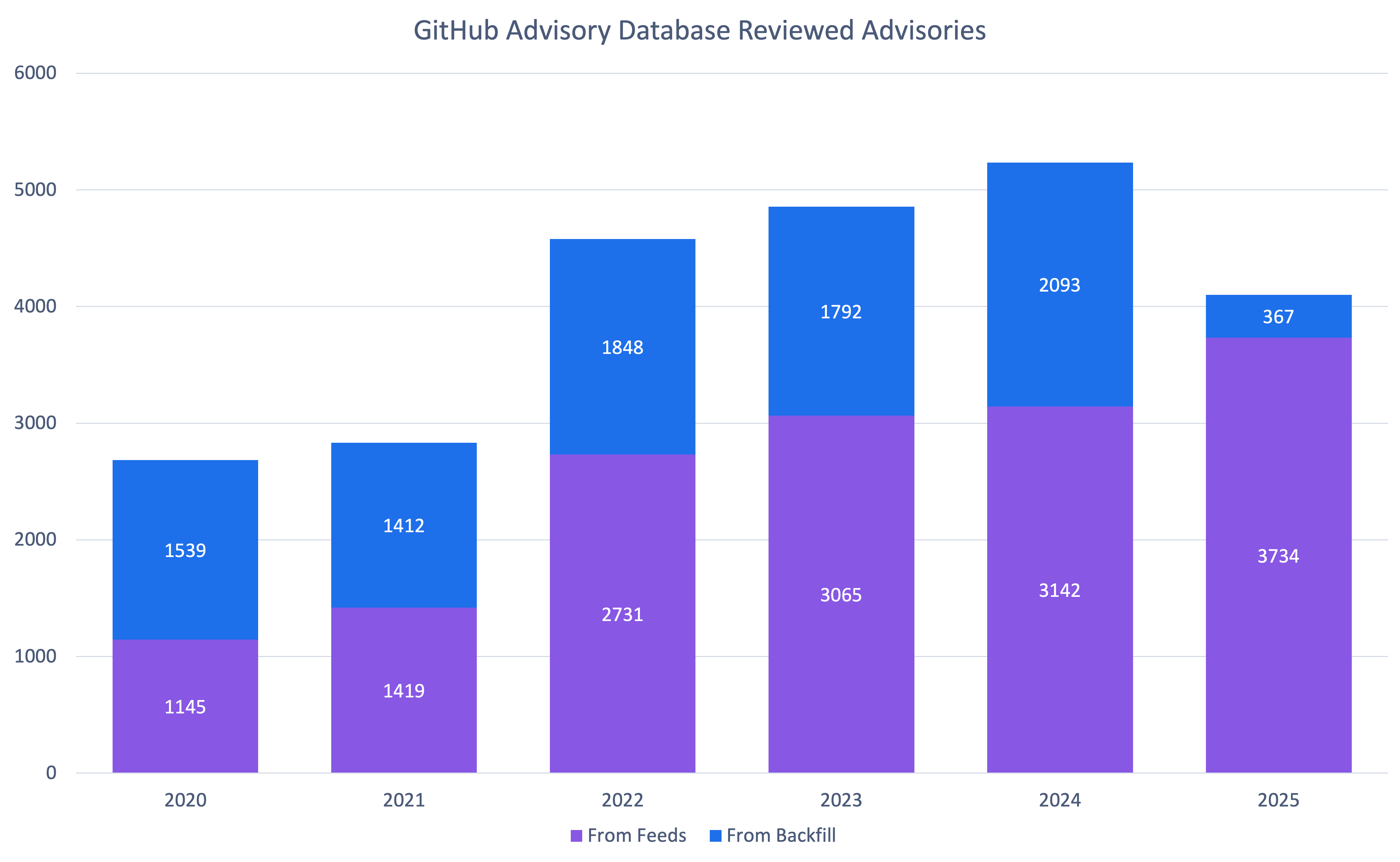
GitHub published 4,101 reviewed advisories in 2025. This is the fewest number of reviewed advisories since 2021. Does this mean open source is shipping more secure code? Let’s dig into the data to find out.
GitHub reviewed advisories
Fewer advisories reviewed doesn’t mean fewer vulnerabilities were reported. The drop is because GitHub reviewed far fewer older vulnerabilities. When you look only at newly reported vulnerabilities from our sources, GitHub actually reviewed 19% more advisori
GitHub published 4,101 reviewed advisories in 2025. This is the fewest number of reviewed advisories since 2021. Does this mean open source is shipping more secure code? Let’s dig into the data to find out.
GitHub reviewed advisories
Fewer advisories reviewed doesn’t mean fewer vulnerabilities were reported. The drop is because GitHub reviewed far fewer older vulnerabilities. When you look only at newly reported vulnerabilities from our sources, GitHub actually reviewed 19% more advisories year over year.
So why the change? Quite frankly, we are running out of unreviewed vulnerabilities that are older than the Advisory Database. At the same time, the number of newly reported vulnerabilities hasn’t dropped.
It’s also worth clarifying that “unreviewed” in the database can be misleading: most advisories marked unreviewed have already been looked at by a curator and found not to affect any package in a supported ecosystem, so they may never be fully reviewed.
This means that you should be receiving fewer brand-new Dependabot alerts about old vulnerabilities.
Note: If you find an unreviewed advisory that affects a supported package, please let us know so we can get it reviewed!
How vulnerabilities were distributed across ecosystems in 2025
The distribution of ecosystems in advisories reviewed in 2025 is similar to the overall distribution in the database, with the exception of Go. Go is overrepresented in 2025 advisories by 6%. This is largely due to dedicated campaigns to re-examine potentially missing advisories found through an internal review for packages where we had inconsistent coverage.
How the types of vulnerabilities changed in 2025
Rank
Common Weakness Enumeration (CWE)
Number of 2025 Advisories*
Change in Rank from 2024
Change in Rank from the Overall Database
1
CWE-79
672
+0
+0
2
CWE-22
214
+2
+1
3
CWE-863
169
+9
+8
4
CWE-20
154
+1
+1
5
CWE-200
145
-2
-1
6
CWE-400
144
+4
+0
7
CWE-770
136
+7
+10
8
CWE-502
134
+5
+1
9
CWE-94
119
-3
-1
10
CWE-918
103
+5
+8
* An advisory may have more than CWE. For example, an advisory might have both CWE-400 and CWE-770. It would then count for both.
As usual, cross-site scripting (CWE-79) is by far the most common vulnerability type. However, there are significant changes in the following areas. Resource exhaustion (CWE-400 and CWE-770), unsafe deserialization (CWE-502), and server-side request forgery (CWE-918) were unusually common in 2025. CWE-863 (“Incorrect Authorization”) saw a significant jump, but that is largely due to reclassification away from CWE-284 (“Improper Access Control”) and CWE-285 (“Improper Authorization”), which are higher level CWEs that the CWE program discourages using.
One of the biggest quality improvements in 2025 was more specific, more consistent CWE tagging. Advisories without any CWE dropped 85% (from 452 in 2024 to 65 in 2025). CWE-20 (“Improper Input Validation”) is still common, but in prior years it was often the only CWE listed on an advisory.
In 2025, advisories far more often list CWE-20 plus one or more additional CWEs that describe the concrete failure mode. This added specificity makes the data more actionable for triage, prioritization, and remediation.
Together, they can give you a head start on your risk assessment process.
As you can see, when considering impact, most vulnerabilities skew moderate to high of the impact range. Low-impact vulnerabilities are likely more common than the CVSS data suggests but are often not considered worth the time and effort for researchers and maintainers to report. The EPSS scores for moderate to high impact vulnerabilities support this decision.
So should you trust the EPSS or CVSS scores? To judge that, let’s look at how they match up to vulnerabilities in CISA’s Known Exploited Vulnerabilities Catalog. The exploited vulnerabilities are at least scored moderate, and most are critical or high. While CVSS has more of the exploited vulnerabilities as critical, it also has far more vulnerabilities in the range in general. Combining the two can help you prioritize which vulnerabilities to address to prevent exploitation.
npm malware advisories
2025 was a huge year for npm malware advisories. Due to large malware campaigns, such as SHA1-Hulud, GitHub saw a 69% increase in published malware advisories compared to 2024. This is the most malware advisories GitHub has published since our initial release of historical malware when we added support in 2022.
You can receive Dependabot alerts when your repositories depend on npm packages with known malicious versions. When you enable malware alerting, Dependabot matches your npm dependencies against malware advisories in the GitHub Advisory Database.
GitHub CVE Numbering Authority (CNA)
CVE publications
2025 was a big year for the GitHub, Inc. CNA. We saw a 35% increase in published CVE records, outpacing the overall CVE Project’s increase of 21%.
In fact, we saw 10 to 16% growth every quarter. If this trend continues, GitHub will publish over 50% more CVEs in 2026.
You can help make that a reality by requesting a CVE from us the next time you publish a repository security advisory about a vulnerability!
Organizations using GitHub’s CNA
Every year, GitHub sees more organizations use its CNA services. 2025 is no exception with a 20% increase in new organizations requesting CVE IDs.
Unlike reviewed global advisories, which are always mapped to packages in ecosystems we support, any maintainer on GitHub can request a CVE, even if they don’t publish that package to a supported ecosystem. In fact, 2025 is the first year that GitHub has published more CVEs from organizations that do not use a supported ecosystem than those that do.
We would like to thank all 987 organizations that published CVEs with us in 2025 and highlight the top 10 most prolific organizations.
Top 10 organizations using the GitHub CNA
Organization
Number of 2025 CVEs
LabReDeS (WeGIA)*
130
XWiki
40
Frappe
28
Discourse
27
Enalean
27
FreeScout*
27
DataEase
26
Nextcloud
25
GLPI
24
DNN Software*
23
* Organizations that published CVEs through GitHub for the first time in 2025
Onward to 2026
The data from 2025 shows incredible growth:
4,101 reviewed advisories
7,197 malware advisories
2,903 CVEs published
679 new organizations using our CNA services.
These numbers represent real security improvements for millions of developers.
You can be part of this in 2026. Here’s how:
1. Use our CNA services
Publishing CVEs shouldn’t be complicated. Request a CVE directly from your repository security advisory, and we’ll take care of curating and publishing it for you. It’s free, it’s fast, and it helps the entire ecosystem understand and respond to vulnerabilities.
2. Improve advisory accuracy
Found an unreviewed advisory affecting a supported package? See incorrect severity scores or missing affected versions? Suggest edits. Your edits will be reviewed by the Advisory Database team and ultimately, will help make the database more accurate for everyone. In 2025, 675 contributions from the community improved the quality of this data for the entire software industry!
3. Protect your projects
The most direct impact you can have is protecting your own code. Enable Dependabot to automatically receive security updates and explore GitHub Advanced Security for comprehensive protection.
For the last few months, we’ve been using the GitHub Security Lab Taskflow Agent along with a new set of auditing taskflows that specialize in finding web security vulnerabilities. They also turn out to be very successful at finding high-impact vulnerabilities in open source projects.
As security researchers, we’re used to losing time on possible vulnerabilities that turn out to be unexploitable, but with these new taskflows, we can now spend more of our time on manually verifying the resul
For the last few months, we’ve been using the GitHub Security Lab Taskflow Agent along with a new set of auditing taskflows that specialize in finding web security vulnerabilities. They also turn out to be very successful at finding high-impact vulnerabilities in open source projects.
As security researchers, we’re used to losing time on possible vulnerabilities that turn out to be unexploitable, but with these new taskflows, we can now spend more of our time on manually verifying the results and sending out reports. Furthermore, the severity of the vulnerabilities that we’re reporting is uniformly high. Many of them are authorization bypasses or information disclosure vulnerabilities that allow one user to login as somebody else or to access the private data of another user.
We’ll also explain how the taskflows work, so you can learn how to write your own. The security community moves faster when it shares knowledge, which is why we’ve made the framework open source and easy to run on your own project. The more teams using and contributing to it, the faster we collectively eliminate vulnerabilities.
How to run the taskflows on your own project
Want to get started right away? The taskflows are open source and easy to run yourself! Please note: A GitHub Copilot license is required, and the prompts will use premium model requests. (Note that running the taskflows can result in many tool calls, which can easily consume a large amount of quota.)
Wait a few minutes for the codespace to initialize.
In the terminal, run ./scripts/audit/run_audit.sh myorg/myrepo
It might take an hour or two to finish on a medium-sized repository. When it finishes, it’ll open an SQLite viewer with the results. Open the “audit_results” table and look for rows with a check-mark in the “has_vulnerability” column.
Tip: Due to the non-deterministic nature of LLMs, it is worthwhile to perform multiple runs of these audit taskflows on the same codebase. In certain cases, a second run can lead to entirely different results. In addition to this, you might perform those two runs using different models (e.g., the first using GPT 5.2 and the second using Claude Opus 4.6).
The taskflows also work on private repos, but you’ll need to modify the codespace configuration to do so because it won’t allow access to your private repos by default.
Introduction to taskflows
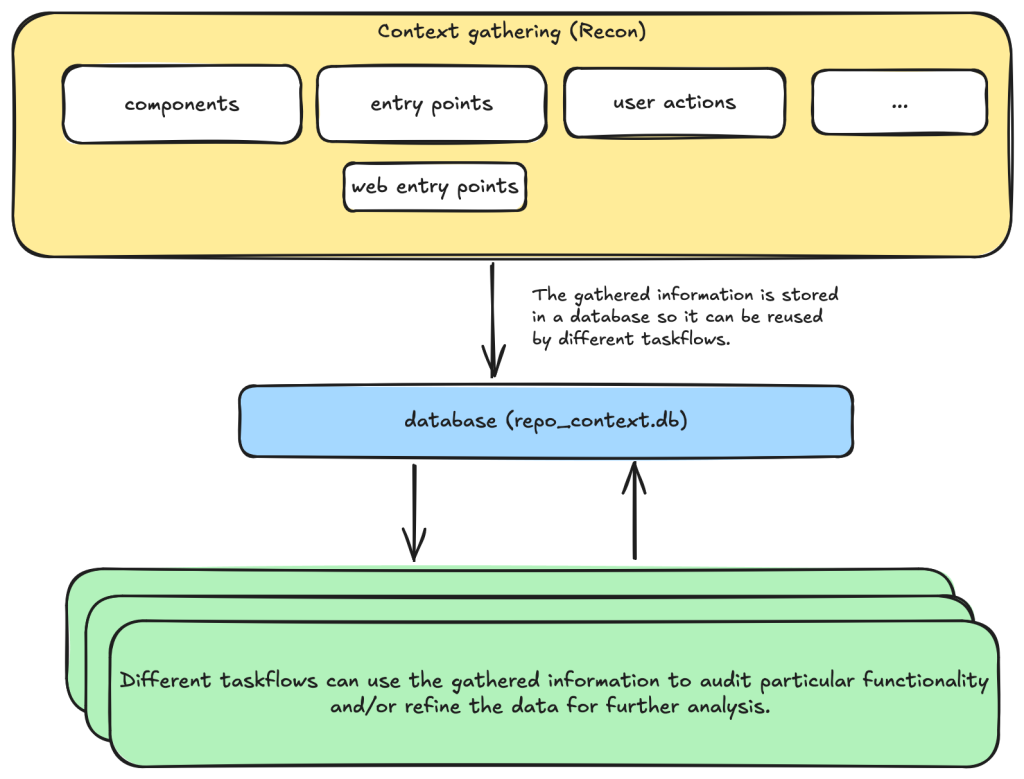
Taskflows are YAML files that describe a series of tasks that we want to do with an LLM. With them, we can write prompts to complete different tasks and have tasks that depend on each other. The seclab-taskflow-agent framework takes care of running the tasks sequentially and passing the results from one task to the next.
For example, when auditing a repository, we first divide the repository into different components according to their functionalities. Then, for each component, we may want to collect some information such as entry points where it takes untrusted input from, intended privilege, and purposes of the component, etc. These results are then stored in a database to provide the context for subsequent tasks.
Based on the context data, we can then create different auditing tasks. Currently, we have a task that suggests some generic issues for each component and another task that carefully audits each suggested issue. However, it’s also possible to create other tasks, such as tasks with specific focus on a certain type of issue.
These become a list of tasks we specify in a taskflow file.
We use tasks instead of one big prompt because LLMs have limited context windows, and complex, multi-step tasks are often not completed properly. For example, some steps can be left out. Even though some LLMs have larger context windows, we find that taskflows are still useful in providing a way for us to control and debug the tasks, as well as for accomplishing bigger and more complex projects.
The seclab-taskflow-agent can also run the same task across many components asynchronously (like a for loop). During audits, we often reuse the same prompt and task for every component, varying only the details. The seclab-taskflow-agent lets us define templated prompts, iterate through components, and substitute component-specific details as it runs.
Taskflows for general security code audits
After using seclab-taskflow-agent to triage CodeQL alerts, we decided we didn’t want to restrict ourselves to specific types of vulnerabilities and started to explore using the framework for more general security auditing. The main challenge in giving LLMs more freedom is the possibility of hallucinations and an increase in false positives. After all, the success with triaging CodeQL alerts was partly due to the fact that we gave the LLM a very strict and well-defined set of instructions and criteria, so the results could be verified at each stage to see if the instructions were followed.
So our goal here was to find a good way to allow the LLM the freedom to look for different types of vulnerabilities while keeping hallucinations under control.
We’re going to show how we used agent taskflows to discover high-impact vulnerabilities with high true positive rate using just taskflow design and prompt engineering.
General taskflow design
To minimize hallucinations and false positives at the taskflow design level, our taskflow starts with a threat modelling stage, where a repository is divided into different components based on functionalities and various information, such as entry points, and the intended use of each component is collected. This information helps us to determine the security boundary of each component and how much exposure it has to untrusted input.
The information collected through the threat modelling stage is then used to determine the security boundary of each component and to decide what should be considered a security issue. For example, a command injection in a CLI tool with functionality designed to execute any user input script may be a bug but not a security vulnerability, as an attacker able to inject a command using the CLI tool can already execute any script.
At the level of prompts, the intended use and security boundary that is discovered is then used in the prompts to provide strict guidelines as to whether an issue found should be considered a vulnerability or not.
You need to take into account of the intention and threat model of the component in component notes to determine if an issue is a valid security issue or if it is an intended functionality. You can fetch entry points, web entry points and user actions to help you determine the intended usage of the component.
Asking an LLM something as vague as looking for any type of vulnerability anywhere in the code base would give poor results with many hallucinated issues. Ideally, we’d like to simulate the triage environment where we have some potential issues as the starting point of analysis and ask the LLM to apply rigorous criteria to determine whether the potential issue is valid or not.
To bootstrap this process, we break the auditing task into two steps.
First, we ask the LLM to go through each component of the repository and suggest types of vulnerabilities that are more likely to appear in the component.
These suggestions are then passed to another task, where they will be audited according to rigorous criteria.
In this setup, the suggestions from the first step act as some inaccurate vulnerability alerts flagged by an “external tool,” while the second step serves as a triage step. While this may look like a self-validating process—by breaking it down into two steps, each with a fresh context and different prompts—the second step is able to provide an accurate assessment of suggestions.
We’ll now go through these tasks in detail.
Threat modeling stage
When triaging alerts flagged by automatic code scanning tools, we found that a large proportion of false positives is the result of improper threat modeling. Most static analysis tools do not take into account the intended usage and security boundary of the source code and often give results that have no security implications. For example, in a reverse proxy application, many SSRF (server-side request forgery) vulnerabilities flagged by automated tools are likely to fall within the intended use of the application, while some web services used, for example, in continuous integration pipelines are designed to execute arbitrary code and scripts within a sandboxed environment. Remote code execution vulnerabilities in these applications without a sandboxed escape are generally not considered a security risk.
Given these caveats, it pays to first go through the source code to get an understanding of the functionalities and intended purpose of code. We divide this process into the following tasks:
Identify applications: A GitHub repository is an imperfect boundary for auditing: It may be a single component within a larger system or contain multiple components, so it’s worth identifying and auditing each component separately to match distinct security boundaries and keep scope manageable. We do this with the identify_applications taskflow, which asks the LLM to inspect the repository’s source code and documentation and divide it into components by functionality.
Identify entry points: We identify how each entry point is exposed to untrusted inputs to better gauge risk and anticipate likely vulnerabilities. Because “untrusted input” varies significantly between libraries and applications, we provide separate guidelines for each case.
Identify web entry points: This is an extra step to gather further information about entry points in the application and append information that is specific to web application entry points such as noting the HTTP method and paths that are required to access a certain endpoint.
Identify user actions: We have the LLM review the code and identify what functionality a user can access under normal operation. This clarifies the user’s baseline privileges, helps assess whether vulnerabilities could enable privilege gains, and informs the component’s security boundary and threat model, with separate instructions depending on whether the component is a library or an application.
At each of the above steps, information gathered about the repository is stored in a database. This includes components in the repository, their entry points, web entry points, and intended usage. This information is then available for use in the next stage.
Issue suggestion stage
At this stage, we instruct the LLM to suggest some types of vulnerabilities, or a general area of high security risk for each component based on the information about the entry point and intended use of the component gathered from the previous step. In particular, we put emphasis on the intended usage of the component and its risk from untrusted input:
Base your decision on:
- Is this component likely to take untrusted user input? For example, remote web request or IPC, RPC calls?
- What is the intended purpose of this component and its functionality? Does it allow high privileged action?
Is it intended to provide such functionalities for all user? Or is there complex access control logic involved?
- The component itself may also have its own `README.md` (or a subdirectory of it may have a `README.md`). Take a look at those files to help understand the functionality of the component.
We also explicitly instruct the LLM to not suggest issues that are of low severity or are generally considered non-security issues.
However, you should still take care not to include issues that are of low severity or requires unrealistic attack scenario such as misconfiguration or an already compromised system.
In general, we keep this stage relatively free of restrictions and allow the LLM freedom to explore and suggest different types of vulnerabilities and potential security issues. The idea is to have a reasonable set of focus areas and vulnerability types for the actual auditing task to use as a starting point.
One problem we ran into was that the LLM would sometimes start auditing the issues that it suggested, which would defeat the purpose of the brainstorming phase. To prevent this, we instructed the LLM to not audit the issues.
Issue audit stage
This is the final stage of the taskflows. Once we’ve gathered all the information we need about the repository and have suggested some types of vulnerabilities and security risks to focus on, the taskflow goes through each suggested issue and audits them by going through the source code. At this stage, the task starts with fresh context to scrutinize the issues suggested from the previous stage. The suggestions are considered to be unvalidated, and this taskflow is instructed to verify these issues:
The issues suggested have not been properly verified and are only suggested because they are common issues in these types of application. Your task is to audit the source code to check if this type of issues is present.
To avoid the LLM coming up with issues that are non-security related in the context of the component, we once again emphasize that intended usage must be taken into consideration.
You need to take into account of the intention and threat model of the component in component notes to determine if an issue is a valid security issue or if it is an intended functionality.
To avoid the LLM hallucinating issues that are unrealistic, we also instruct it to provide a concrete and realistic attack scenario and to only consider issues that stem from errors in the source code:
Do not consider scenarios where authentication is bypassed via stolen credential etc. We only consider situations that are achievable from within the source code itself.
...
If you believe there is a vulnerability, then you must include a realistic attack scenario, with details of all the file and line included, and also what an attacker can gain by exploiting the vulnerability. Only consider the issue a vulnerability if an attacker can gain privilege by performing an action that is not intended by the component.
To further reduce hallucinations, we also instruct the LLM to provide concrete evidence from the source code, with file path and line information:
Keep a record of the audit notes, be sure to include all relevant file path and line number. Just stating an end point, e.g. `IDOR in user update/delete endpoints (PUT /user/:id)` is not sufficient. I need to have the file and line number.
Finally, we also instruct the LLM that it is possible that there is no vulnerability in the component and that it should not make things up:
Remember, the issues suggested are only speculation and there may not be a vulnerability at all and it is ok to conclude that there is no security issue.
The emphasis of this stage is to provide accurate results while following strict guidelines—and to provide concrete evidence of the findings. With all these strict instructions in place, the LLM indeed rejects many unrealistic and unexploitable suggestions with very few hallucinations.
The first prototype was designed with hallucination prevention as a priority, which raised a question: Would it become too conservative, rejecting most vulnerability candidates and failing to surface real issues?
The answer is clear after we ran the taskflow on a few repositories.
Three examples of vulnerabilities found by the taskflows
In this section, we’ll show three examples of vulnerabilities that were found by the taskflows and that have already been disclosed. In total, we have found and reported over 80 vulnerabilities so far. We publish all disclosed vulnerabilities on our advisories page.
Privilege escalation in Outline (CVE-2025-64487)
Our information-gathering taskflows are optimized toward web applications, which is why we first pointed our audit taskflows to a collaborative web application called Outline.
Outline is a multi-user collaboration suite with properties we were especially interested in:
Documents have owners and different visibility, with permissions per users and teams.
Access rules like that are hard to analyze with a Static Application Security Testing (SAST) tool, since they use custom access mechanisms and existing SAST tools typically don’t know what actions a normal “user” should be able to perform.
Such permission schemes are often also hard to analyze for humans by only reading the source code (if you didn’t create the scheme yourself, that is).
And success: Our taskflows found a bug in the authorization logic on the very first run!
The notes in the audit results read like this:
Audit target: Improper membership management authorization in component server (backend API) of outline/outline (component id 2).

Summary conclusion: A real privilege escalation vulnerability exists. The document group membership modification endpoints (documents.add_group, documents.remove_group) authorize with the weaker \"update\" permission instead of the stronger \"manageUsers\" permission that is required for user membership changes. Because \"update\" can be satisfied by having only a ReadWrite membership on the document, a non‑admin document collaborator can grant (or revoke) group memberships – including granting Admin permission – thereby escalating their own privileges (if they are in the added group) and those of other group members. This allows actions (manageUsers, archive, delete, etc.) that were not intended for a mere ReadWrite collaborator.
Reading the TypeScript-based source code and verifying this finding on a test instance revealed that it was exploitable exactly as described. In addition, the described steps to exploit this vulnerability were on point:
Prerequisites:
- Attacker is a normal team member (not admin), not a guest, with direct ReadWrite membership on Document D (or via a group that grants ReadWrite) but NOT Admin.
- Attacker is a member of an existing group G in the same team (they do not need to be an admin of G; group read access is sufficient per group policy).

Steps:
1. Attacker calls POST documents.add_group (server/routes/api/documents/documents.ts lines 1875-1926) with body:
   {
     "id": "<document-D-id>",
     "groupId": "<group-G-id>",
     "permission": "admin"
   }
2. Authorization path:
   - Line 1896: authorize(user, "update", document) succeeds because attacker has ReadWrite membership (document.ts lines 96-99 allow update).
   - Line 1897: authorize(user, "read", group) succeeds for any non-guest same-team user (group.ts lines 27-33).
   No \"manageUsers\" check occurs.
3. Code creates or updates GroupMembership with permission Admin (lines 1899-1919).
4. Because attacker is a member of group G, their effective document permission (via groupMembership) now includes DocumentPermission.Admin.
5. With Admin membership, attacker now satisfies includesMembership(Admin) used in:
   - manageUsers (document.ts lines 123-134) enabling adding/removing arbitrary users via documents.add_user / documents.remove_user (lines 1747-1827, 1830-1872).
   - archive/unarchive/delete (document.ts archive policy lines 241-252; delete lines 198-208) enabling content integrity impact.
   - duplicate, move, other admin-like abilities (e.g., duplicate policy lines 136-153; move lines 155-170) beyond original ReadWrite scope.
Using these instructions, a low-privileged user could add arbitrary groups to a document that the user was only allowed to update (the user not being in the possession of the “manageUsers” permission that was typically required for such changes).
In this sample, the group “Support” was added to the document by the low-privileged user named “gg.”
The Outline project fixed this and another issue we reported within three days! (Repo advisory)
The shopping cartocalypse (CVE-2025-15033, CVE-2026-25758)
We didn’t realize what systematic issues we’d uncover in the cart logic of ecommerce applications until we pointed our taskflows at the first online shop in our list. In the PHP-based WooCommerce project, the taskflows promptly found a way for normally signed-in shop users to view all guest orders—including personally identifiable information (including names, addresses, and phone numbers). After we reported this, Automattic (the company behind WooCommerce) quickly released an update (CVE-2025-15033) and accompanying blog post.
Intrigued by that vulnerability, we’ve added additional ecommerce applications to our list of applications to be audited by our agent. And sure enough, we found more vulnerabilities. The popular Ruby-based Spree commerce application contained two similar vulnerabilities (CVE-2026-25758 and CVE-2026-25757). The more critical one allowed unauthenticated users to simply enumerate the addresses (and phone numbers) of all guest orders by more or less incrementing a sequential number.
In this screenshot, the attacker “test66” linked their session to an existing address of a guest user, thus being able to view the full address and phone number.
Our bug-hunting spree didn’t stop with Spree. Our taskflows uncovered similar issues in two additional ecommerce applications.
These authorization logic bugs had been undiscovered for years.
Signing in to Rocket.Chat using any password (CVE-2026-28514)
(This is not what passwordless authentication should look like!)
Every so often you can’t believe your eyes. This finding reported by our taskflows in Rocket.Chat was one of those moments.
When your agent comes back with a note like this:
VULNERABILITY: password authentication bypass in account-service allows logging in as any user with a password set.
You might find it hard to believe at first.
When you then continue reading the output:
Root cause:
- ee/apps/account-service/src/lib/utils.ts:60-61: `validatePassword` returns `Promise<boolean>` (bcrypt.compare(...)).
- ee/apps/account-service/src/lib/loginViaUsername.ts:18-21: `const valid = user.services?.password?.bcrypt && validatePassword(password, user.services.password.bcrypt);` but does NOT `await` the Promise; since a Promise is truthy, `if (!valid) return false;` is never triggered when bcrypt hash exists.
- ee/apps/account-service/src/lib/loginViaUsername.ts:23-35: proceeds to mint a new login token and saves it, returning `{ uid, token, hashedToken, tokenExpires }`.
It might make more sense, but you’re still not convinced.
It turns out the suspected finding is in the micro-services based setup of Rocket.Chat. In that particular setup, Rocket.Chat exposes its user account service via its DDP Streamer service.
Rocket.Chat’s microservices deployment Copyright Rocket.Chat. (This architecture diagram is from Rocket.Chat’s documentation.)
Once our Rocket.Chat test setup was working properly, we had to write proof of concept code to exploit this potential vulnerability. The notes of the agent already contained the JSON construct that we could use to connect to the endpoint using Meteor’s DDP protocol.
We connected to the WebSocket endpoint for the DDP streamer service, and yes: It was truly possible to login into the exposed Rocket.Chat DDP service using any password. Once signed in, it was also possible to perform other operations such as connecting to arbitrary chat channels and listening on them for messages sent to those channels.
Here we received the message “HELLO WORLD!!!” while listening on the “General” channel.
The technical details of this issue are interesting (and scary as well). Rocket.Chat, primarily a TypeScript-based web application, uses bcrypt to store local user passwords. The bcrypt.compare function (used to compare a password against its stored hash) returns a Promise—a fact that is reflected in Rocket.Chat’s own validatePassword function, which returns Promise<boolean>:
This led to the result of validatePassword being ANDed with true. Since a returned Promise is always “truthy” speaking in JavaScript terms, the boolean valid subsequently was always true when a user had a bcrypt password set.
Severity aside, it’s fascinating that the LLM was able to pick up this rather subtle bug, follow it through multiple files, and arrive at the correct conclusion.
What we learned
After running the taskflows over 40 repositories—mostly multi-user web applications—the LLM suggested 1,003 issues (potential vulnerabilities).
After the audit stage, 139 were marked as having vulnerabilities, meaning that the LLM decided they were exploitable After deduplicating the issues—duplicates happen because each repository is run a couple of times on average and the results are aggregated—we end up with 91 vulnerabilities, which we decided to manually inspect before reporting.
We rejected 20 (22%) results as FP: False Positives that we couldn’t reproduce manually.
We rejected 52 (57%) results as low severity: Issues that have very limited potential impact (e.g., blind SSRF with only a HTTP status code returned, issues that require malicious admin during installation stage, etc.).
We kept only 19 (21%) results that we considered vulnerabilities impactful enough to report, all serious vulnerabilities with the majority having a high or critical severity (e.g., vulnerabilities that can be triggered without specific requirements with impact to confidentiality or integrity, such as disclosure of personal data, overwriting of system settings, account takeover, etc.).
This data was collected using gpt-5.x as the model for code analysis and audit tasks.
Note that we have run the taskflows on more repositories since this data was collected, so this table does not represent all the data we’ve collected and all vulnerabilities we’ve reported.
If we divide the findings into two rough categories—logical issues (IDOR, authentication, security misconfiguration, business logic issues, sensitive data exposure) and technical issues (XSS, CSRF, path traversal, SSRF, command injection, remote code execution, template injection, file upload issues, insecure deserialization, open redirect, SQL injection, XXE, memory safety)—we get 439 logical issues and 501 technical issues. Although more technical issues were suggested, the difference isn’t significant because some broad categories (such as remote code execution and file upload issues) can also involve logical issues depending on the attacker scenario.
There are only three suggested issues that concern memory safety. This isn’t too surprising, given the majority of the repositories tested are written in memory-safe languages. But we also suspect that the current taskflows may not be very efficient in finding memory-safety issues, especially when comparing to other automated tools such as fuzzers. This is an interesting area that can be improved by creating more specific taskflows and making more tools, like fuzzers, available to the LLM.
This data led us to the following observations.
LLMs are particularly good at finding logic bugs
What stands out from the data is the 25% rate of “Business logic issue” and the large amount of IDOR issues. In fact, the total number of IDOR issues flagged as vulnerable is more than the next two categories combined (XSS and CSRF). Overall, we get the impression that the LLM does an excellent job of understanding the code space and following the control flow, while taking into account the access control model and intended usage of the application, which is more or less what we’d expect from LLMs that excel in tasks like code reviews. This also makes it great for finding logic bugs that are difficult to find with traditional tools.
LLMs are good at rejecting low-severity issues and false positives
Curiously, none of the false positives are what we’d consider to be hallucinations. All the reports, including the false positives, have sound evidence backing them up, and we were able to follow through the report to locate the endpoints and apply the suggested payload. Many of the false positives are due to more complex circumstances beyond what is available in the code, such as browser mitigations for XSS issues mentioned above or what we would consider as genuine mistakes that a human auditor is also likely to make. For example, when multiple layers of authentications are in place, the LLM could sometimes miss out some of the checks, resulting in false positives.
We have since tested more repositories with more vulnerabilities reported, but the ratio between vulnerabilities and repositories remains roughly the same.
To demonstrate the extensibility of taskflows and how extra information can be incorporated into the taskflows, we created a new taskflow to run after the audit stage, which incorporates our new-found knowledge to filter out low-severity vulnerabilities. We found that the taskflow can filter out roughly 50% of the low-severity vulnerabilities with a couple of borderline vulnerabilities that we reported also getting marked as low severity. The taskflow and the prompt can be adjusted to fit the user’s own preference, but for us, we’re happy to make it more inclusive so we don’t miss out on anything impactful.
LLMs are good at threat modeling
The LLM performs well in threat modeling in general. During the experiment, we tested it on a number of applications with different threat models, such as desktop applications, multi-tenant web applications, applications that are designed to run code in sandbox environments (code injection by design), and reverse proxy applications (applications where SSRF-like behavior is intended). The taskflow is able to take into account the intended usage of these applications and make sound decisions. The taskflow struggles most with threat modelling of desktop applications, as it is often unclear whether other processes running on the user’s desktop should be considered trusted or not.
We’ve also observed some remarkable reasoning by the LLM that excludes issues with no privilege gains. For example, in one case, the LLM noticed that while there are inconsistencies in access control, the issue does not give the attacker any advantages over a manual copy and paste action:
Security impact assessment:

A user possessing only read access to a document (no update rights) can duplicate it provided they also have updateDocument rights on the destination collection. This allows creation of a new editable copy of content they could already read. This does NOT grant additional access to other documents nor bypass protections on the original; any user with read access could manually copy-paste the content into a new document they are permitted to create (creation generally allowed for non-guest, non-viewer members in ReadWrite collections per createDocument collection policy)
We’ve also seen some more sophisticated techniques that were used in the reasoning. For example, in one application that is running scripts in a sandboxed nodejs environment, the LLM suggested the following technique to escape the sandbox:
In Node’s vm, passing any outer-realm function into a contextified sandbox leaks that function’s outer-realm Function constructor through the `constructor` property. From inside the sandbox:
  const F = console.log.constructor; // outer-realm Function
  const hostProcess = F('return process')(); // host process object
  // Bypass module allowlist via host dynamic import
  const cp = await F('return import("node:child_process")')();
  const out = cp.execSync('id').toString();
  return [{ json: { out } }];

The presence of host functions (console.log, timers, require, RPC methods) is sufficient to obtain the host Function constructor and escape the sandbox. The allowlist in require-resolver is bypassed by constructing host-realm functions and using dynamic import of built-in modules (e.g., node:child_process), which does not go through the sandbox’s custom require.
While the result turns out to be a false positive due to other mitigating factors, it demonstrates the LLM’s technical knowledge.
Get involved!
The taskflows we used to find these vulnerabilities are open source and easy to run on your own project, so we hope you’ll give them a try! We also want to encourage you to write your own taskflows. The results showcased in this blog post are just small examples of what’s possible. There are other types of vulnerabilities to find, and there are other security-related problems, like triaging SAST results or building development setups, which we think taskflows can help with. Let us know what you’re building by starting a discussion on our repo!
DjVuLibre version 3.5.29 was released today. It fixes CVE-2025-53367 (GHSL-2025-055), an out-of-bounds (OOB) write in the MMRDecoder::scanruns method. The vulnerability could be exploited to gain code execution on a Linux Desktop system when the user tries to open a crafted document.
DjVu is a document file format that can be used for similar purposes to PDF. It is supported by Evince and Papers, the default document viewers on many Linux distributions. In fact, even when a DjVu file is give
DjVuLibre version 3.5.29 was released today. It fixes CVE-2025-53367 (GHSL-2025-055), an out-of-bounds (OOB) write in the MMRDecoder::scanruns method. The vulnerability could be exploited to gain code execution on a Linux Desktop system when the user tries to open a crafted document.
DjVu is a document file format that can be used for similar purposes to PDF. It is supported by Evince and Papers, the default document viewers on many Linux distributions. In fact, even when a DjVu file is given a filename with a .pdf extension, Evince/Papers will automatically detect that it is a DjVu document and run DjVuLibre to decode it.
Antonio found this vulnerability while researching the Evince document reader. He found the bug with fuzzing.
Kev has developed a proof of concept exploit for the vulnerability, as demoed in this video.
The POC works on a fully up-to-date Ubuntu 25.04 (x86_64) with all the standard security protections enabled. To explain what’s happening in the video:
Kev clicks on a malicious DjVu document in his ~/Downloads directory.
The file is named poc.pdf, but it’s actually in DjVu format.
The default document viewer (/usr/bin/papers) loads the document, detects that it’s in DjVu format, and uses DjVuLibre to decode it.
The file exploits the OOB write vulnerability and triggers a call to system("google-chrome https://www.youtube.com/…").
Rick Astley appears.
Although the POC is able to bypass ASLR, it’s somewhat unreliable: it’ll work 10 times in a row and then suddenly stop working for several minutes. But this is only a first version, and we believe it’s possible to create an exploit that’s significantly more reliable.
You may be wondering: why Astley, and not a calculator? That’s because /usr/bin/papers runs under an AppArmor profile. The profile prohibits you from starting an arbitrary process but makes an exception for google-chrome. So it was easier to play a YouTube video than pop a calc. But the AppArmor profile is not particularly restrictive. For example, it lets you write arbitrary files to the user’s home directory, except for the really obvious one like ~/.bashrc. So it wouldn’t prevent a determined attacker from gaining code execution.
Vulnerability Details
The MMRDecoder::scanruns method is affected by an OOB-write vulnerability, because it doesn’t check that the xr pointer stays within the bounds of the allocated buffer.
During the decoding process, run-length encoded data is written into two buffers: lineruns and prevruns:
//libdjvu/MMRDecoder.h
class DJVUAPI MMRDecoder : public GPEnabled
{
...
public:

  unsigned short *lineruns;
...
  unsigned short *prevruns;
...
}
The variables named pr and xr point to the current locations in those buffers.
scanruns does not check that those pointers remain within the bounds of the allocated buffers.
This can lead to writes beyond the allocated memory, resulting in a heap corruption condition. An out-of-bounds read with pr is also possible for the same reason.
We will publish the source code of our proof of concept exploit in a couple of weeks’ time in the GitHub Security Lab repository.
Acknowledgements
We would like to thank Léon Bottou and Bill Riemers for responding incredibly quickly and releasing a fix less than two days after we first contacted them!
Timeline
2025-07-01: Reported via email to the authors: Léon Bottou, Bill Riemers, Yann LeCun.
2025-07-01: Responses received from Bill Riemers and Léon Bottou.
The GitHub Advisory Database (Advisory DB) is a vital resource for developers, providing a comprehensive list of known security vulnerabilities and malware affecting open source packages. This post analyzes trends in the Advisory DB, highlighting the growth in reviewed advisories, ecosystem coverage, and source contributions in 2024. We’ll delve into how GitHub provides actionable data to secure software projects.
Advisories
The GitHub Advisory Database contains a list of known security v
The GitHub Advisory Database (Advisory DB) is a vital resource for developers, providing a comprehensive list of known security vulnerabilities and malware affecting open source packages. This post analyzes trends in the Advisory DB, highlighting the growth in reviewed advisories, ecosystem coverage, and source contributions in 2024. We’ll delve into how GitHub provides actionable data to secure software projects.
Advisories
The GitHub Advisory Database contains a list of known security vulnerabilities and malware, grouped in three categories:
GitHub-reviewed advisories: Manually reviewed advisories in software packages that GitHub supports.
Unreviewed advisories: These are automatically pulled from the National Vulnerability Database (NVD) and are either in the process of being reviewed, do not affect a supported package, or do not discuss a valid vulnerability.
Malware advisories: These are specific to malware threats identified by the npm security team.
Reviewed advisories
GitHub-reviewed advisories are security vulnerabilities that have been mapped to packages in ecosystems we support. We carefully review each advisory for validity and ensure that they have a full description, and contain both ecosystem and package information.
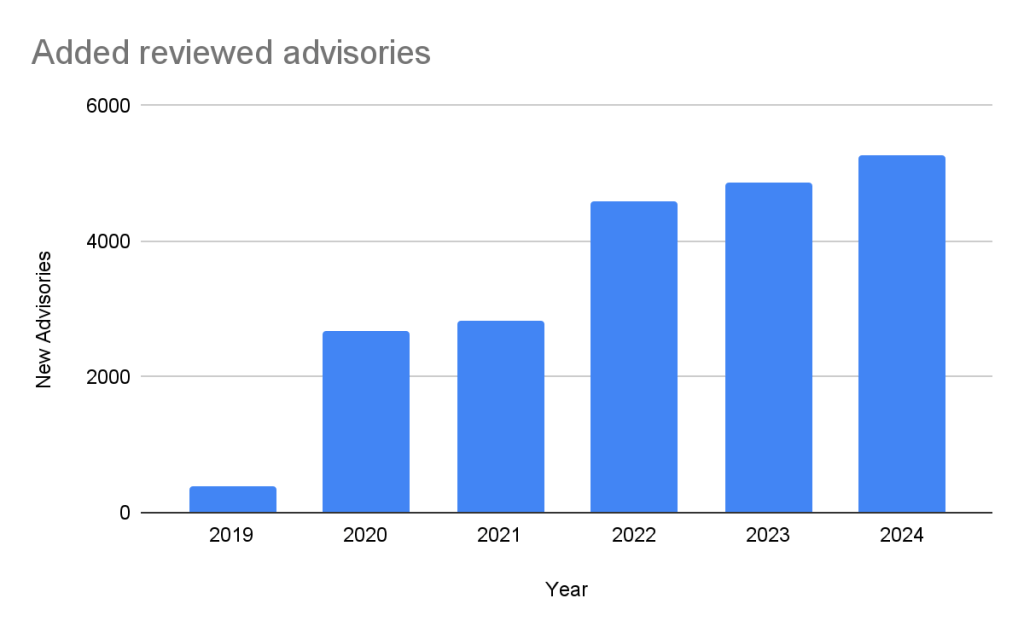
Every year, GitHub increases the number of advisories we publish. We have been able to do this due to the increase in advisories coming from our sources (see Sources section below), expanding our ecosystem coverage (also described below), and review campaigns of advisories published before we started the database.
In the past five years, the database has gone from fewer than 400 reviewed advisories to over 20,000 reviewed advisories in October of 2024.
Unreviewed advisories
Unreviewed advisories are security vulnerabilities that we publish automatically into the GitHub Advisory Database directly from the National Vulnerability Database feed. The name is a bit of a misnomer as many of these advisories have actually been reviewed by a GitHub analyst. The reason why they fall into this category is because they are not found in a package in one of the supported ecosystems or are not discussing a valid vulnerability, and all have been reviewed by analysts other than someone from the GitHub Security Lab. Even though most of these advisories will never turn into a reviewed advisory, we still publish them so that you do not have to look in multiple databases at once.
Malware
Malware advisories relate to vulnerabilities caused by malware, and are security advisories that GitHub publishes automatically into the GitHub Advisory Database directly from information provided by the npm security team. Malware advisories are currently exclusive to the npm ecosystem. GitHub doesn’t edit or accept community contributions on these advisories.
Ecosystem coverage
GitHub-reviewed advisories include security vulnerabilities that have been mapped to packages in ecosystems we support. Generally, we name our supported ecosystems after the software programming language’s associated package registry. We review advisories if they are for a vulnerability in a package that comes from a supported registry.
Vulnerabilities in Maven and Composer packages are nearly half of the advisories in the database. npm, pip, and Go make up much of the rest, while the other ecosystems have a much smaller footprint.
This has not always been the case. When the database was initially launched, NPM advisories dominated the database, but as we have expanded our coverage and added support for new ecosystems, the distribution mix has changed.
Sources: Where do the advisories come from?
We add advisories to the GitHub Advisory Database from the following sources:
NVD: This is a huge source of vulnerabilities covering all types of software. We publish all NVD advisories but only review those relevant to our supported ecosystems, which reduces noise for our users.
GitHub Repository Advisories: The second largest source is made up of advisories published through GitHub’s repository security advisory feature. Similar to NVD, these aren’t restricted to our supported ecosystems. However, we provide better coverage of the repository advisories because they focus exclusively on open source software.
Community Contributions: These are reports from the community that are almost exclusively requesting updates to existing advisories.
Other Specialized Sources: Sources like PyPA Advisories (for Python) and Go Vulncheck (for Go) that focus on specific ecosystems. Because they only cover packages within our supported ecosystems, most of their advisories are relevant to us and get reviewed.
If you add up the number of reviewed advisories from each source, you will find that total is more than the total reviewed advisories. This is because each source can publish an advisory for the same vulnerability. In fact, over half of our advisories have more than one source.
Of the advisories with a single source, nearly all of them come from NVD/CVE. This justifies NVD/CVE as a source, even though it is by far the noisiest.
2024 saw a significant increase (39%) in the number of advisories imported from our sources. This is for the most part caused by an increase in the number of CVE records published.
CVE Numbering Authority
In addition to publishing advisories in the GitHub Advisory Database, we are also a CVE Numbering Authority (CNA) for any repository on GitHub. This means that we issue CVE IDs for vulnerabilities reported to us by maintainers, and we publish the vulnerabilities to the CVE database once the corresponding repository advisory is published.
GitHub published over 2,000 CVE records in 2024, making us the fifth-largest CNA in the CVE Program.
The GitHub CNA is open to all repositories on GitHub, not just ones in a supported ecosystem.
Advisory prioritization
Given the constant deluge of reported vulnerabilities, you’ll want tools that can help you prioritize your remediation efforts. To that end, GitHub provides additional data in the advisory to allow readers to prioritize their vulnerabilities. In particular, there are:
Severity Rating/CVSS: A low to critical rating for how severe the vulnerability is likely to be, along with a corresponding CVSS score and vector.
CWE: CWE identifiers provide a programmatic method for determining the type of vulnerability.
EPSS: The Exploit Prediction Scoring System, or EPSS, is a system devised by the global Forum of Incident Response and Security Teams (FIRST) for quantifying the likelihood a vulnerability will be attacked in the next 30 days.
Using these ratings, half of all vulnerabilities (15% are Critical and 35% are High) warrant immediate or near-term attention. By focusing remediation efforts on these, you can significantly reduce risk exposure while managing workload more efficiently.
The CVSS specification says the base score we provide, “reflects the severity of a vulnerability according to its intrinsic characteristics which are constant over time and assumes the reasonable worst-case impact across different deployed environments.” However, the worst-case scenario for your deployment may not be the same as CVSS’s. After all, a crash in a word processor is not as severe as a crash in a server. In order to give more context to your prioritization, GitHub allows you to filter alerts based on the type of vulnerability or weakness using CWE identifiers. So you have the capability to never see another regular expression denial of service (CWE-1333) vulnerability again or always see SQL injection (CWE-89) vulnerabilities.
Still drowning in vulnerabilities? Try using EPSS to focus on vulnerabilities likely to be attacked in the next 30 days. EPSS uses data from a variety of sources to create a probability of whether exploitation attempts will be seen in the next 30 days for a given vulnerability. As you can see from the chart below, if you focus on vulnerabilities with EPSS scores of 10% or higher (approx. 7% of all vulnerabilities in the Advisory DB), you can cover nearly all of the vulnerabilities that are likely to see exploit activity.
EPSS probability
Vulnerabilities in range
Percentage of overall vulnerabilities
Expected vulnerabilities in range attacked within the next 30 days
Percentage of total attacked vulnerabilities
High ( >= 10%)
1440
7.17%
741
85.96%
Moderate ( >= 1%, < 10%)
2687
13.37%
84
9.74%
Low ( >= 0.1%, < 1%)
10264
51.09%
35
4.06%
Very Low ( < 0.1%)
5701
28.37%
2
0.23%
Important caveats to remember when using EPSS:
Low probability events occur.
EPSS does not tell you whether a vulnerability is exploited; it only claims how likely it is.
EPSS scores are updated daily and will change as new information comes in, so a low-probability vulnerability today may become high probability tomorrow.
For more details on how to use CVSS and EPSS for prioritization, see our blog on prioritizing Dependabot alerts.
Actionable data
The GitHub Advisory DB isn’t just a repository of vulnerabilities. It powers tools that help developers secure their projects. Services like Dependabot use the Advisory DB to:
Identify vulnerabilities: It checks if your projects use any software packages with known vulnerabilities.
Suggest fixes: It recommends updated versions of packages that fix those vulnerabilities when available.
Reduce noise: You’ll only get notified about vulnerabilities that affect the version of the package you are using.
Take this with you
The GitHub Advisory Database is a powerful resource for tracking open source software vulnerabilities, with over 22,000 reviewed advisories to date. By focusing on popular package registries, GitHub allows you to definitively connect vulnerabilities to the packages you are using. Additional data such as CVSS and EPSS scores help you properly prioritize your mitigation efforts.
GitHub’s role as a CVE Numbering Authority extends beyond the Advisory Database, ensuring that thousands of vulnerabilities each year reach the broader CVE community. Want to ensure your vulnerability fix reaches your users? Create a GitHub security advisory in your repository to take advantage of both the GitHub Advisory Database and GitHub’s CNA services.
Ever come across a Common Vulnerabilities and Exposures (CVE) ID affecting software you use or maintain and thought the information could be better?
CVE IDs are a widely-used system for tracking software vulnerabilities. When a vulnerable dependency affects your software, you can create a repository security advisory to alert others. But if you want your insight to reach the most upstream data source possible, you’ll need to contact the CVE Numbering Authority (CNA) that issued the vulnerabili
CVE IDs are a widely-used system for tracking software vulnerabilities. When a vulnerable dependency affects your software, you can create a repository security advisory to alert others. But if you want your insight to reach the most upstream data source possible, you’ll need to contact the CVE Numbering Authority (CNA) that issued the vulnerability’s CVE ID.
GitHub, as part of a community of over 400 CNAs, can help in cases when GitHub issued the CVE (such as with this community contribution). And with just a few key details, you can identify the right CNA and reach out with the necessary context. This guide shows you how.
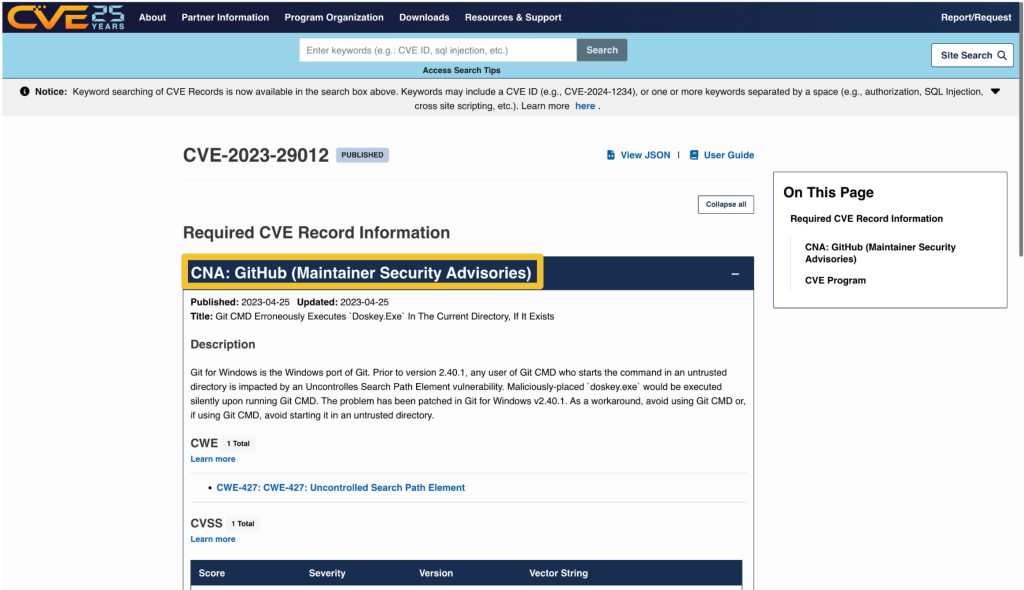
Every CVE record contains an entry that includes the name of the CNA that issued the CVE ID. The CNA is responsible for updating the CVE record after its initial publication, so any requests should be directed to them.
On cve.org, the CNA is listed as the first piece of information under the “Required CVE Record Information” header. The information is also available on the right side of the page.
On nvd.nist.gov, information about the issuing CNA is available in the “QUICK INFO” box. The issuing CNA is called “Source”.
After identifying the CNA from the CVE record, locate their official contact information to request updates or changes. That information is available on the CNA partners website at https://www.cve.org/PartnerInformation/ListofPartners.
Search for the CNA’s name in the search bar. Some organizations may have more than one CNA, so make sure that the CVE you want corresponds to the correct CNA.
The left column, under “Partner,” has the name of the CNA that links to a profile page with its scope and contact information.
Most CNAs have an email address for CVE-related communications. Click the link under “Step 2: Contact” that says Email to find the CNA’s email address.
The most notable exception to the general preference for email communication among CNAs is the MITRE Corporation, the world’s most prolific CVE Numbering Authority. MITRE uses a webform at https://cveform.mitre.org/ for submitting requests to create, update, dispute, or reject CVEs.
The information you want to add, remove, or change within the CVE record
Why you want to change the information
Supporting evidence, usually in the form of a reference link
Including publicly available reference links is important, as they justify the changes. Examples of reference links include:
A publicly available vulnerability report, advisory, or proof-of-concept
A fix commit or release notes that describe a patch
An issue in the affected repository in which the maintainer discusses the vulnerability in their software with the community
A community contribution pull request that suggests a change to the CVE’s corresponding GitHub Security Advisory
When submitting changes, keep in mind that the CNA isn’t your only audience. Clear context around disclosure decisions and vulnerability details helps the broader developer and security community understand the risks and make informed decisions about mitigation.
“3.2.4.1 Subject to their respective CNA Scope Definitions, CNAs MUST respond in a timely manner to CVE ID assignment requests submitted through the CNA’s public POC.
3.2.4.2 CNAs SHOULD document their expected response times, including those for the public POC.”
The CNA rules establish firm timelines for assignment of CVE IDs to vulnerabilities that are already public knowledge. For CVE ID assignment or record publication in particular, section 4.2 and section 4.5 of the CVE CNA rules establish 72 hours as the time limit in which CNAs should issue CVE IDs or publish CVE records for publicly-known vulnerabilities. However, no such guidance exists for changing a CVE record.
If the CNA doesn’t respond or you cannot reach an agreement about the content of the CVE record, the next step is to engage in the dispute process.
The CVE Program Policy and Procedure for Disputing a CVE Record provides details on how you may go about disputing a CVE record and escalating a dispute. The details of that process are beyond the scope of this post. However, if you end up disputing a CVE record, it’s good to know who the root or top-level root of the CNA is that reviews the dispute.
When viewing a CNA’s partner page linked from https://www.cve.org/PartnerInformation/ListofPartners, you can find the CNA’s root under the column “Top-Level Root.” For most CNAs, their root is the Top-Level Root, MITRE.

 Entrar