 Entrar
Apple Unveils End-to-End Encryption for iPhone-to-Android RCS Messaging
5 de Maio de 2026, 04:06
The post Apple Unveils End-to-End Encryption for iPhone-to-Android RCS Messaging appeared first on Daily CyberSecurity.


A US agent claimed WhatsApp encryption is fake, alleging Meta accesses all unencrypted messages, but Commerce Department abruptly shut the probe, leaving leaders questioning if consumer apps are safe for sensitive business decisions.
In early 2026, a remarkable exchange unfolded inside the U.S. Commerce Department that has since sparked debate across cybersecurity, privacy, and corporate governance circles. A special agent from the Bureau of Industry and Security (BIS) sent an email asserting something astonishing: Meta’s WhatsApp, despite its public claims of end-to-end encryption, allows the company to access and store all user messages, including texts, photos, audio, and video, in unencrypted form. Just months later, the investigation was abruptly terminated.
“After roughly 10 months of collecting documents and conducting interviews, the agent circulated a Jan. 16 email to more than a dozen officials across federal agencies outlining preliminary conclusions.” reported TechSpot. “According to records reviewed by Bloomberg and corroborated by recipients, the agent asserted that Meta’s systems allow access to message content in ways that conflict with how WhatsApp’s encryption has been publicly described.”
After a 10-month probe internally dubbed “Operation Sourced Encryption,” the BIS agent circulated a January 16 email to over a dozen federal officials.
“There is no limit to the type of WhatsApp message that can be viewed by Meta. Meta can and does view and store all the text messages, photographs, audio and video recordings in an unencrypted format.” reads the email the agent wrote.
The email also described a “tiered permissions system” in place since at least 2019, granting access not only to Meta employees but also to contractors and “a significant number of foreign/overseas workers in India.”
The email also suggested the conduct could involve “civil and criminal violations that span several federal jurisdictions,” though he did not specify which laws. Importantly, this was not a formal accusation, it was a preliminary conclusion from an internal investigation that would soon be scrubbed from existence.
However Shortly after the email circulated, senior leadership at BIS shut down the inquiry.
“The [agency] is not investigating WhatsApp or Meta for violations of export laws,” said a spokesperson for the agency, Lauren Weber Holley.
Meta strongly denied the claims.
Meta says that only chat participants can read or hear messages on WhatsApp—not even the company itself. It has also defended this stance in court, including a 2021 case against India’s traceability rules.
Not everyone agrees with the agent’s claims. Former Meta security chief Alex Stamos said they are “almost certainly false.” He noted that any backdoor would have to exist in widely inspected app code, making it easy for researchers to find. He also argued Meta wouldn’t share such powerful access with contractors.
“A widespread backdoor would be easily found by security researchers,” Stamos said. “Also, a backdoor in WhatsApp would be a massive signals intelligence tool. There’s no way Meta would provide that capability to Accenture contractors if they had it.” said Stamos.
Still, two individuals interviewed by the agent claimed broad access to WhatsApp messages while performing content moderation work under contract with Accenture, which did not respond to comment requests.
The investigation’s closure leaves key questions unanswered, including what evidence was found and whether WhatsApp’s encryption will be further examined, keeping uncertainty high.
Follow me on Twitter: @securityaffairs and Facebook and Mastodon
(SecurityAffairs – hacking, WhatsApp)
Introduction to BYOE Against the backdrop of organizations undergoing massive adoption of cloud services, it is critical to protect information from unauthorized access. The fact remains that most of the cloud service providers provide that most cloud services deliver strong encryption as a built-in feature, much of that worry arises when such service providers alsoRead More
The post What is Bring Your Own Encryption (BYOE)? appeared first on EncryptedFence by Certera - Web & Cyber Security Blog.
The post What is Bring Your Own Encryption (BYOE)? appeared first on Security Boulevard.

Unit 42 research reveals AirSnitch attacks bypass WPA2/3 Wi-Fi encryption and client isolation, exposing critical infrastructure vulnerabilities.
The post When Wi-Fi Encryption Fails: Protecting Your Enterprise from AirSnitch Attacks appeared first on Unit 42.

NTT Research launches Scale Academy to turn AI and security research into real products, debuting SaltGrain, a zero-trust data security platform.
The post NTT Research Launches Scale Academy to Bring Lab Technology to Market appeared first on TechRepublic.
DigiCert G1 Retirement 2026: A Turning Point in Web PKI Evolution Mozilla and Google Chrome will revoke the G1 root certificates of DigiCert on April 15, 2026. When the certificate you are using TLS chains to one of those roots, the browsers immediately do not trust it. A security warning is shown to your users.Read More
The post DigiCert G1 Root Removal 2026: What It Means, Risks & Action Plan for Your TLS Infrastructure appeared first on EncryptedFence by Certera - Web & Cyber Security Blog.
The post DigiCert G1 Root Removal 2026: What It Means, Risks & Action Plan for Your TLS Infrastructure appeared first on Security Boulevard.
WhatsApp is testing usernames that could let users chat without sharing phone numbers, adding a new privacy layer now rolling out to some beta users.
The post WhatsApp New Update Lets You Chat Without Sharing Your Phone Number appeared first on TechRepublic.
Google has brought end-to-end encrypted Gmail to Android and iOS for eligible Workspace users, extending secure mobile email without extra apps.
The post Google Rolls Out End-to-End Encryption to Eligible Gmail Users on Mobile appeared first on TechRepublic.

JanelaRAT is a malware family that takes its name from the Portuguese word “janela” which means “window”. JanelaRAT looks for financial and cryptocurrency data from specific banks and financial institutions in the Latin America region.
JanelaRAT is a modified variant of BX RAT that has targeted users since June 2023. One of the key differences between these Trojans is that JanelaRAT uses a custom title bar detection mechanism to identify desired websites in victims’ browsers and perform malicious actions.
The threat actors behind JanelaRAT campaigns continuously update the infection chain and malware versions by adding new features.
Kaspersky solutions detect this threat as Trojan.Script.Generic and Backdoor.MSIL.Agent.gen.
JanelaRAT campaigns involve a multi-stage infection chain. It starts with emails mimicking the delivery of pending invoices to trick victims into downloading a PDF file by clicking a malicious link. Then the victims are redirected to a malicious website from which a compressed file is downloaded.
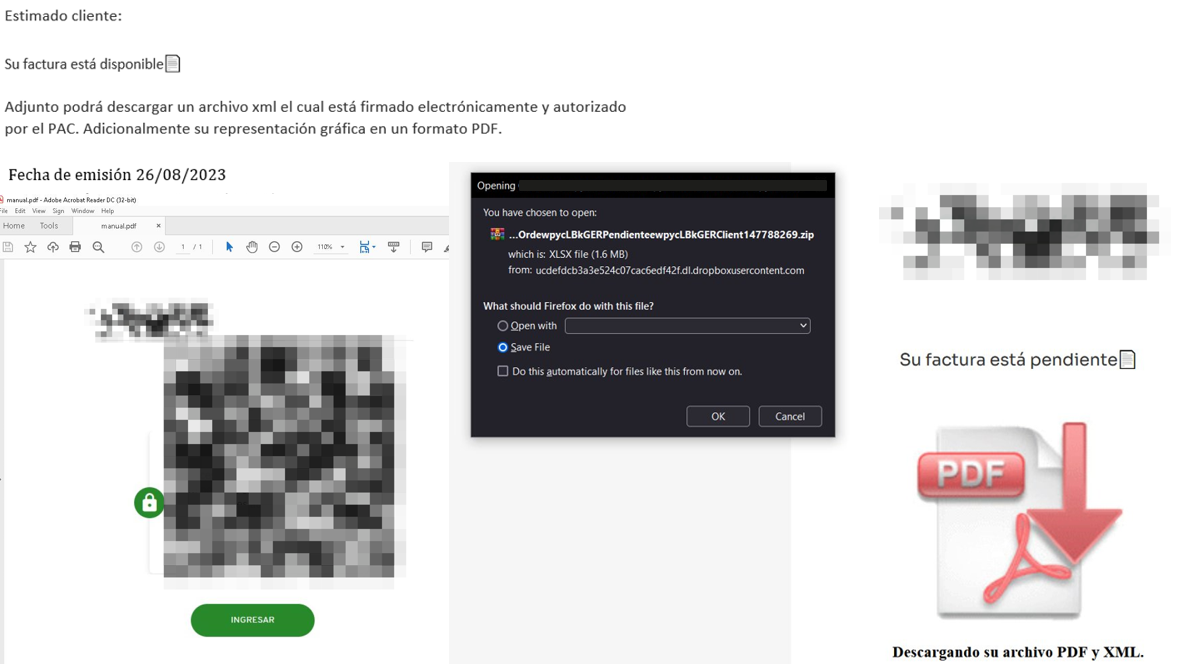
Malicious email used in JanelaRAT campaigns
Throughout our monitoring of these malware campaigns, the compressed files have typically contained VBScripts, XML files, other ZIP archives, and BAT files. They ultimately lead to downloading a ZIP archive that contains components for DLL sideloading and executing JanelaRAT as the final payload.
However, we have observed variations in the infection chains depending on the delivered version of the malware. The latest observed campaign evolved by integrating MSI files to deliver a legitimate PE32 executable and a DLL, which is then sideloaded by the executable. This DLL is actually JanelaRAT, delivered as the final payload.
Based on our analysis of previous JanelaRAT intrusions, the updates in the infection chain represent threat actors’ attempts to streamline the process, with a reduced number of malware installation steps. We’ve observed a logical sequence in how components, such as MSI files, have been incorporated and adapted over time. Moreover, we have observed the use of auxiliary files — additional components that aid in the infection — such as configuration files that have been changing over time, showing how the threat actors have adapted these infections in an effort to avoid detection.
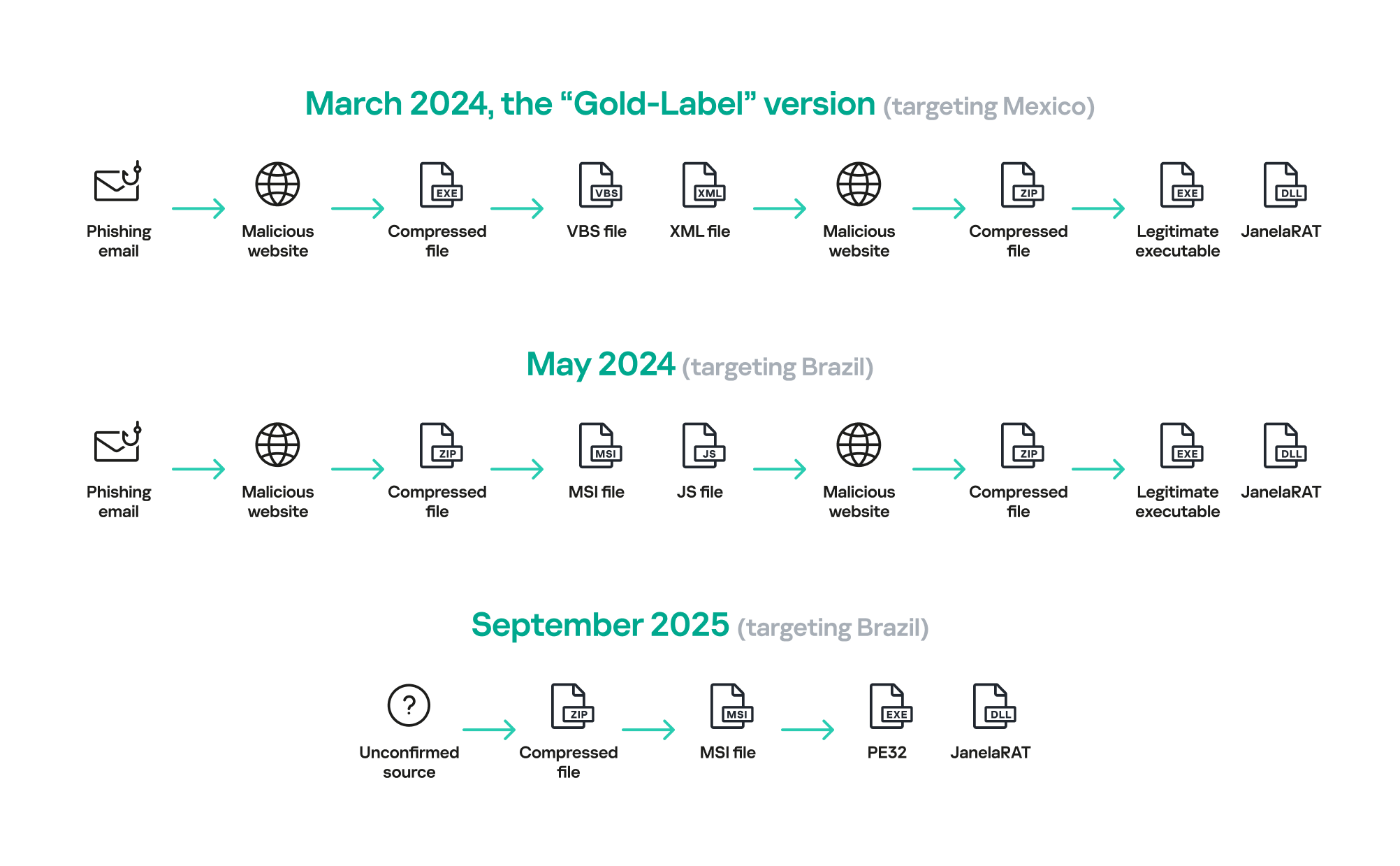
JanelaRAT infection flow evolution
The MSI file acts as an initial dropper designed to install the final implant and establish persistence on the system. It obfuscates file paths and names with the objective to hinder analysis. This code is designed to create several ActiveX objects to manipulate the file system and execute malicious commands.
Among the actions taken, the MSI defines paths based on environment variables for hosting binaries, creating a startup shortcut, and storing a first-run indicator file. The dropper file checks for the existence of the latter and for a specific path, and if either is missing, it creates them. If the file exists, the MSI file redirects the user to an external website as a decoy, showing that everything is “normal”.
The MSI dropper places two files at a specified path: the legitimate executable nevasca.exe and the PixelPaint.dll library, renaming them with obfuscated combinations of random strings before relocating. An LNK shortcut is created in the user’s Startup folder, pointing to the renamed nevasca.exe executable, ensuring persistence. Finally, the nevasca.exe file is executed, which in turn loads the PixelPaint.dll file that is JanelaRAT.
In this case, we analyzed JanelaRAT version 33, which was masqueraded as a legitimate pixel art app. Similar to other malware versions, it was protected with Eazfuscator, a common .NET obfuscation tool. We have also seen previous JanelaRAT samples that used the ConfuserEx obfuscator or its custom builds. The malware uses Control Flow Flattening method and renames classes and variables to make the code unreadable without deobfuscation.
JanelaRAT monitors the victim’s activity, intercepts sensitive banking interactions, and establishes an interactive C2 channel to report changes to the threat actor. While screen monitoring is also present, the core functionality focuses on financial fraud and real-time manipulation of the victim’s machine. The malware collects system information, including OS version, processor architecture (32-bit, 64-bit, or unknown), username, and machine name. The Trojan evaluates the current user’s privilege level and assigns different nicknames for administrators, users, guests, and an additional one for any other role.
The malware then retrieves the current date and constructs a beacon to register the victim on the C2 server, along with the malware version. To prevent multiple instances, the malware creates the mutex and exits if it already exists.
All JanelaRAT samples utilize encrypted strings for sending information to the C2 and obfuscating embedded data. The encryption algorithm remains consistent across campaigns, combining base64 encoding with Rijndael (AES). The encryption key is derived from the MD5 hash of a 4-digit number and the IV is composed of the first 16 bytes of the decoded base64 data.
After initialization, JanelaRAT establishes a TCP socket, configuring callbacks for connection events and message handling. It registers all known message types, executing specific system tasks based on the received message.
Following socket initialization, the malware launches two background routines:
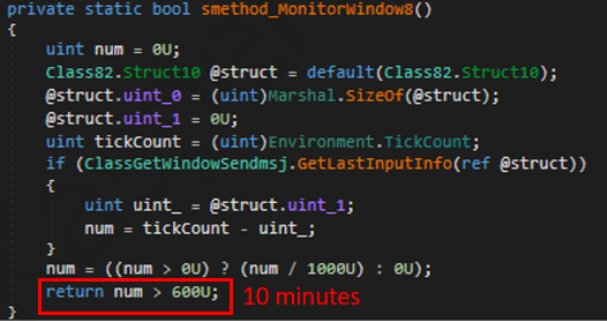
Timer that looks for 10 minutes of inactivity
PixelPaint.dll file once again. The routine then builds and executes periodic HTTP requests to the C2, reporting the malware’s version and the victim machine’s security environment. It loops continuously as long as a specific local file does not exist, ensuring repeated telemetry transmission. The file was not observed being extracted or created by the malware itself; rather, it appears to be placed on the system by the threat actor during other post-exploitation activities. Based on previous incidents, this file likely contains instructions for establishing persistence.
This JanelaRAT version constructs a second C2 URL for beaconing, using several decrypted strings and following a pattern that uses different parameters to report information about new victims:
<C2Domain>?VS=<malwareversion>&PL=<profilelevel>&AN=<presenceofbankingsoftware>
We have observed constant changes in the parameters across campaigns. A new parameter “AN” was introduced in this version. It is used to detect the presence of a specific process associated with banking security software. If such software is found on the victim’s device, the malware notifies the threat actor.
| Parameter | Description |
| VS | JanelaRAT version |
| PL | OFF by default |
| AN | Yes or No depending on whether banking security software process exists |
This subroutine creates a timer to enable an active system monitoring cycle. During this cycle, the malware obtains the title of the active window and checks if it matches entries of interest using a hardcoded but obfuscated list of financial institutions. Although the threat actors behind JanelaRAT primarily focus on one country as a target, the list of financial institutions is constantly updated.
If a title bar matches one of the listed targets, the malware waits 12 seconds before establishing a dedicated communication channel to the C2. This channel is used to execute malicious tasks, including taking screenshots, monitoring keyboard and mouse input, displaying messages to the user, injecting keystrokes or simulating mouse input, and forcing system shutdown.
To perform these actions, the malware uses a dedicated C2 handler that interprets incoming commands from the C2. Notably, 33v supports live banking session hijacking, not just credential theft.
| Action Performed | Description |
| Capture desktop image | Send compressed screenshots to the C2 |
| Specific screenshots | Crop specific screen regions and exfiltrate images |
| Overlay windows | Display images in full-screen mode, limit user interactions, and mimic bank dialogs to harvest credentials |
| Keylogging | Keystroke capture |
| Simulate keyboard | Inject keys such as DOWN, UP, and TAB to navigate or trigger new elements |
| Track mouse input | Move the cursor, simulate clicks, and report the cursor position |
| Display message | Show message boxes (custom title, text, buttons, or icons) |
| System shutdown | Execute a forced shutdown sequence |
| Command execution | Run CMD or PowerShell scripts/commands |
| Task Manager manipulation |
Launch Task Manager, find its window, and hide it to prevent discovery by the user |
| Check for banking security software process | Detect the presence of anti-fraud systems |
| Beaconing | Send host information (malware version, profile, presence of banking software) |
| Toggle internal modes | Enable and disable modes such as screenshot flow, key injection, or overlay visibility |
| Anti-analysis | Detect sandbox or automation tools |
Unlike other versions, this variant rotates its C2 server daily. Once a title bar matches the one in the list, the software dynamically constructs the C2 channel domain by concatenating an obfuscated string, the current date, and a suffix domain related to a legitimate dynamic DNS (DDNS) service. This communication is established using port 443, but not TLS.
This version of JanelaRAT implements a decoy overlay system designed to capture banking credentials and bypass multi-factor authentication. When a target banking window is detected, the malware requests further instructions from the C2 server. The C2 responds with a command identifier and a Base64-encoded image, which is then displayed as a full-screen overlay window mimicking legitimate banking or system interfaces. The malware ensures the fake window completely covers the screen and limits the victim’s interaction with the system.
The malware blocks the victim’s interaction by displaying modal dialogs. Each modal dialog corresponds to a specific operation, such as password capture, token/MFA capture, fake loading screen, fake Windows update full-screen modal and more. The malware resizes the overlay, scans multiple screens, and loads deceptive elements to distract the user or temporarily hide legitimate application windows.
Among other fake elements, the malware displays fake Windows update notifications, often accompanied by messages in Brazilian Portuguese, such as:
When a message command is received from the operator, the malware constructs a custom message box based on parameters sent from the server. These parameters include the message title, text content, button type (e.g., OK, Yes/No), and icon type (e.g., Warning, Error). The malware then creates a maximized message box positioned at the top of the screen, ensuring it captures user focus and blocks the visibility of other windows, mimicking a system or security alert.
An obfuscated acknowledgement string is sent back to the C2 to confirm successful execution of this task.
In addition to the conditional behavior based on whether the process of banking security software is detected, the malware includes anti-analysis routines and computer environment checks, such as sandbox detection through the Magnifier and MagnifierWindow components. These components are used to determine if accessibility tools are active on the infected computer indicating a possible malware analysis environment.
The malware establishes persistence by writing a command script into the Windows Startup directory. This script forces the execution chain to run at each user logon enabling malicious activity without triggering privilege escalation prompts. The script is executed silently to evade user awareness.
This method is either an alternative or a supplement to the persistence method previously described in the subroutines responsible for periodic HTTP beaconing section.
Consistent with previous intrusions and campaigns, the primary targets of the threat actors distributing JanelaRAT are banking users in Latin America, with specific focus on users of financial institutions in Brazil and Mexico.
According to our telemetry, in 2025 we detected 14,739 attacks in Brazil and 11,695 in Mexico related to JanelaRAT.
JanelaRAT remains an active and evolving threat, with intrusions exhibiting consistent characteristics despite ongoing modifications. We have tracked the evolution of JanelaRAT infections for some time, observing variations in both the malware itself and its infection chain, including targeted variants for specific countries.
This variant represents a significant advancement in the actor’s capabilities, combining multiple communication channels, comprehensive victim monitoring, interactive overlays, input injection, and robust remote control features. The malware is specifically designed to minimize user visibility and adapt its behavior upon detection of anti-fraud software.
To mitigate the risk of communication with the C2 infrastructure utilizing similar evasive techniques, we recommend that defenders block dynamic DNS services at the corporate perimeter or internal DNS resolvers. This will disrupt the communication channels used by JanelaRAT and similar threats.
808c87015194c51d74356854dfb10d9e MSI Dropper
d7a68749635604d6d7297e4fa2530eb6 JanelaRAT
ciderurginsx[.]com Primary C2

Google has made a big step forward by extending end-to-end encryption to Android and iOS devices for Gmail client-side encryption (CSE) users, says an expert.
“All in all, this is a welcome update, especially in light of recent concerns surrounding WhatsApp’s encryption methods,” said Gartner analyst Avivah Litan. “Google’s approach offers verifiable customer-managed keys and ensures the provider does not have access to encrypted content.”
This, she said, addresses allegations raised in the January 2026 lawsuit against Meta regarding their internal access to customer encrypted message data.
Meta has reportedly said the claims are false, and that WhatsApp messages remain protected by default. The suit’s allegations have not been proven in court.
Litan noted that Google’s encryption update is only for organizations subscribing to its Enterprise Plus with Assured Controls edition. Messages and attachments are encrypted directly on-device, with encryption keys managed externally by the customer.
“For CSOs in regulated industries, this development is significant, as it supports secure mobile communication, compliance with regulations such as HIPAA [the U.S. Health Insurance Portability and Accountability Act] and GDPR [the European General Data Protection Regulation], and reduces the risk of plaintext data exposure on mobile devices,” she said. “External recipients retain the ability to reply via a web portal.”
However, Litan added, the capability remains opt-in, requires premium licensing and administrative configuration, and disables several Gmail functions, including AI features and comprehensive search, on encrypted content. But, she pointed out, the limitations are consistent with those in Gmail web and desktop implementations.
It’s also a capability that Microsoft doesn’t provide. A Microsoft spokesperson said in an email that the company doesn’t currently offer end-to-end Outlook encryption on mobile, although messages can be digitally signed and encrypted.
In its April 9 announcement, Google said Workspace users can compose and read end-to-end encrypted messages natively within the Gmail app on Android and iOS without the need to download extra apps or use mail portals. Users with a Gmail E2EE license can send an encrypted message to any recipient, regardless of their email address. If the recipient uses the Gmail app, the encrypted message will be delivered as a normal message thread to their inbox, but if not, they can seamlessly and securely read and reply in their own native browser. This, Google said, ensures that all users have a simple and secure interface, regardless of their email service or device.
Google Workspace admins will need to enable the Android and iOS clients in the CSE admin interface to give users access to the new capability. This can be done in the Admin Console.
End users also need to be taught the new process: To add client-side encryption to any message, they must click the lock icon and select ‘additional encryption’. Then they can compose a message and add attachments as they normally do.
Forrester Research Senior Analyst Andrew Cornwall noted the biggest benefit for enterprises is that Workspace admins or Google can disable the ability to take screenshots and screen recordings when users read an encrypted message in the Gmail app. That will prevent Android and iOS recipients from forwarding a message as an image, he said, noting that Google can also disable screenshots in Android Chrome for business users and presumably will do this when Android users with email programs other than Gmail open a message in a browser.
From a user’s perspective, he added, this encryption gives Gmail an advantage over third-party email programs like Outlook and Thunderbird, which won’t automatically decrypt messages that have been encrypted using Google’s encryption mechanism. Unlike some encryption methods, Gmail doesn’t require the exchange of a key in advance, so users will be more likely to use it.
However, he pointed out, Google’s client-side encryption doesn’t encrypt headers or message senders, so an attacker with access to the device can still get some potentially sensitive information even with encryption enabled.
“If you’re planning to use Gmail to commit financial crimes or plan a revolution,” he added, “you should know that Google controls the display and often the keyboard on devices they build. Even if emails are encrypted on device, your messages may still be available while being read or composed.”
And while end-to-end encryption (E2EE) is considered by experts to be an excellent protection against the hijacking of data in transit, it won’t protect data on compromised devices, stolen and hacked devices, or in unencrypted backups.
David Shipley, CEO of security awareness provider Beauceron Security, noted the extension of Gmail end to end encryption to mobile platforms will help organizations ensure compliance with privacy concerns. “On the downside,” he added, “this is going to be a powerful tool for criminals. If they spin up a Google Workspace tenant and send encrypted messages to end users who aren’t on Gmail, in those cases, users will get a link to a new portal to read the sent message which will not be intercepted by a lot of security tools like email filters.”
This article originally appeared on Computerworld.

With over 15,000 satellites in orbit, hackers are using unencrypted signals to bypass terrestrial defenses. Learn why space-based cybersecurity is no longer science fiction.
The post They’re Here! Is Your Mainframe Ready for Cyberthreats From Outer Space? appeared first on Security Boulevard.
