 Entrar
Deceptive “DeepSeek-Claw” Skill Hijacks OpenClaw Agents to Steal Credentials
7 de Maio de 2026, 04:01
The post Deceptive “DeepSeek-Claw” Skill Hijacks OpenClaw Agents to Steal Credentials appeared first on Daily CyberSecurity.


In 2026, AI agents are being widely used. OpenClaw has become a high-frequency efficiency improvement tool for enterprises and developers with its autonomous decision-making and local execution capabilities. However, several authoritative security agencies have recently issued warnings: OpenClaw is facing multi-dimensional security threats from supply chain poisoning to remote control. When internal employees privately deploy […]
The post NSFOCUS Threat Intelligence: Building an OpenClaw Defense System with Multiple-Layer Protection appeared first on NSFOCUS, Inc., a global network and cyber security leader, protects enterprises and carriers from advanced cyber attacks..
The post NSFOCUS Threat Intelligence: Building an OpenClaw Defense System with Multiple-Layer Protection appeared first on Security Boulevard.

Over the last few months, tools like OpenClaw have shown what tech-savvy AI users can do by setting a virtual cadre of automated agents on a task. But that individual convenience can be a DDOS-level pain for online service providers faced with a torrent of Sybil attack-style requests from thousands of such agents at once.
Identity startup World thinks its "proof of human" World ID technology can provide a potential solution to this problem. Today, the company launched a beta of Agent Kit, a new way for humans to prove they are directing their AI agents and for websites to limit access to AI agents working on behalf of an actual human.
If you recognize the name World, it's probably as the organization behind WorldCoin, the Sam Altman-founded cryptocurrency outfit that launched in 2023 alongside an offer to give free WorldCoin to anyone who scanned their iris in a physical "orb". While WorldCoin still exists (at a current value well below its early 2024 peaks), World has now pivoted to focus on World ID, which uses the same iris-scanning technology as the basis for a cryptographically secure, unique online identity token stored on your phone.

© Getty Images
OpenClaw is already running inside enterprises, often unnoticed. Learn why banning it fails and how CISOs must shift to data-centric AI governance.
The post OpenClaw, the Fastest-Adopted Software Ever, Is Also a Security Blind Spot appeared first on TechRepublic.

Por mais que você não saia procurando serviços de IA, eles acabam encontrando você de qualquer maneira. Todas as grandes empresas de tecnologia parecem sentir uma espécie de obrigação moral não apenas de desenvolver um assistente de IA, chatbot integrado ou agente autônomo, mas também de incorporá-lo aos seus produtos já consolidados e ativá-lo à força para dezenas de milhões de usuários. Aqui estão apenas alguns exemplos dos últimos seis meses:
Por outro lado, entusiastas de tecnologia correram para criar seus próprios “Jarvis pessoais”, alugando instâncias de VPS ou acumulando Mac minis para executar o agente de IA OpenClaw. Infelizmente, os problemas de segurança do OpenClaw com as configurações padrão se mostraram tão graves que já foram considerados a maior ameaça de cibersegurança de 2026.
Além do incômodo de ter algo imposto à força, essa epidemia de IA traz riscos e dores de cabeça bem reais do ponto de vista prático. Assistentes de IA varrem e coletam todos os dados a que conseguem ter acesso, interpretando o contexto dos sites que você visita, analisando documentos salvos, lendo suas conversas e assim por diante. Isso dá às empresas de IA uma visão inédita e extremamente íntima da vida de cada usuário.
Um vazamento desses dados durante um ataque cibernético, seja a partir dos servidores do provedor de IA ou do cache armazenado na sua própria máquina, poderia ser catastrófico. Esses assistentes podem ver e armazenar em cache tudo o que você vê, inclusive dados normalmente protegidos por múltiplas camadas de segurança: informações bancárias, diagnósticos médicos, mensagens privadas e outras informações sensíveis. Analisamos em profundidade como isso pode acontecer quando examinamos os problemas do sistema Copilot+ Recall baseado em IA que a Microsoft também planejava impor a todos os usuários. Além disso, a IA pode consumir muitos recursos do sistema, utilizando RAM, ciclos de GPU e espaço de armazenamento, o que frequentemente resulta em uma queda perceptível no desempenho.
Para quem prefere ficar de fora dessa onda de IA e evitar esses assistentes baseados em redes neurais lançados às pressas e ainda imaturos, reunimos um guia rápido mostrando como desativar a IA em aplicativos e serviços populares.
Os recursos de assistente de IA do Google no Gmail e no Google Docs são agrupados sob o termo “recursos inteligentes”. Além do modelo de linguagem de grande escala, esse conjunto inclui várias conveniências de menor importância, como adicionar automaticamente reuniões ao seu calendário quando você recebe um convite no Gmail. Infelizmente, trata-se de um pacote tudo ou nada: para se livrar da IA, é preciso desativar todos os “recursos inteligentes”.
Para fazer isso, abra o Gmail, clique no ícone Configurações (engrenagem) e selecione Ver todas as configurações. Na aba Geral, role até Recursos inteligentes do Google Workspace. Clique em Gerenciar as configurações de recursos inteligentes do Workspace e desative duas opções: Recursos inteligentes no Google Workspace e Recursos inteligentes em outros produtos do Google. Também recomendamos desmarcar a caixa ao lado de Ativar os recursos inteligentes no Gmail, Chat e Meet na mesma aba de configurações gerais. Depois disso, será necessário reiniciar os aplicativos do Google (o que normalmente ocorre de forma automática).
É possível eliminar os Resumos de IA nos resultados da Pesquisa Google tanto em computadores quanto em smartphones (incluindo iPhones). A solução é a mesma em todos os dispositivos. A maneira mais simples de ignorar o resumo de IA caso a caso é adicionar -ia ao final da sua busca. Exemplo: como fazer uma pizza -ia. Infelizmente, esse método às vezes apresenta falhas, fazendo o Google afirmar abruptamente que não encontrou nenhum resultado para a sua consulta.
Se isso acontecer, você pode obter o mesmo resultado mudando o modo da página de resultados para Web. Nos resultados da pesquisa, localize os filtros logo abaixo da barra de busca e selecione Web. Caso não apareça imediatamente, procure essa opção dentro do botão Mais.
Uma solução mais radical é migrar para outro mecanismo de busca. Por exemplo, o DuckDuckGo não apenas rastreia menos os usuários e exibe poucos anúncios, como também oferece uma busca dedicada sem IA. Basta adicionar a página de pesquisa aos favoritos em noai.duckduckgo.com.
Atualmente, o Chrome incorpora dois tipos de recursos de IA. O primeiro se comunica com os servidores do Google e é responsável por funções como o assistente inteligente, um agente autônomo de navegação e a busca inteligente. O segundo executa tarefas localmente, mais voltadas para utilidades, como identificar páginas de phishing ou agrupar abas do navegador. O primeiro grupo de configurações aparece com o rótulo AI mode, enquanto o segundo inclui o termo Gemini Nano.
Para desativar esses recursos, digite chrome://flags na barra de endereços do navegador e pressione Enter. Será exibida uma lista de flags do sistema, junto com uma barra de busca. Digite “AI” na barra de busca. Isso filtrará a longa lista para cerca de uma dúzia de recursos relacionados à IA (além de algumas outras configurações nas quais essas letras aparecem por coincidência dentro de palavras maiores). O segundo termo que você deve pesquisar nessa janela é “Gemini“.
Depois de revisar as opções, você pode desativar os recursos de IA indesejados ou simplesmente desativar todos. O mínimo recomendado inclui:
Defina todas essas opções como Disabled.
Embora o Firefox não tenha chatbots integrados nem tenha (até agora) tentado impor recursos baseados em agentes aos usuários, o navegador inclui agrupamento inteligente de abas, uma barra lateral para chatbots e algumas outras funcionalidades. Em geral, a IA no Firefox é bem menos intrusiva do que no Chrome ou no Edge. Ainda assim, se você quiser desativá-la completamente, há duas maneiras de fazer isso.
O primeiro método está disponível nas versões mais recentes do Firefox. A partir da versão 148, uma seção dedicada chamada Controles de IA passou a aparecer nas configurações do navegador, embora as opções de controle ainda sejam um pouco limitadas. Você pode usar um único botão de alternância para Bloquear melhorias de IA, desativando completamente os recursos de IA. Você também pode especificar se deseja usar IA no próprio dispositivo (On-device AI), baixando pequenos modelos locais (atualmente apenas para traduções), e configurar provedores de chatbot de IA na barra lateral, escolhendo entre Anthropic Claude, ChatGPT, Copilot, Google Gemini e Le Chat Mistral.
O segundo caminho (para versões mais antigas do Firefox) exige acessar configurações ocultas do sistema. Digite about:config na barra de endereço, pressione Enter e clique no botão para confirmar que você aceita o risco de mexer nas configurações internas do navegador.
Uma extensa lista de configurações será exibida, juntamente com uma barra de busca. Digite “ML” para filtrar as opções relacionadas a machine learning.
Para desativar a IA no Firefox, alterne a configuração browser.ml.enabled para false. Isso deve desativar todos os recursos de IA de forma geral, mas fóruns da comunidade indicam que isso nem sempre é suficiente para resolver o problema. Para uma abordagem mais radical, defina os seguintes parâmetros como false (ou mantenha apenas aqueles de que você realmente precisa):
Isso desativará integrações com chatbots, descrições de links geradas por IA, assistentes e extensões baseados em IA, tradução local de sites, agrupamento de abas e outros recursos baseados em IA.
A Microsoft conseguiu incorporar IA em praticamente todos os seus produtos, e desativá-la nem sempre é uma tarefa simples, especialmente porque, em alguns casos, a IA tem o hábito de reaparecer sozinha, sem qualquer ação do usuário.
O navegador da Microsoft está repleto de recursos de IA, que vão do Copilot à pesquisa automatizada. Para desativá-los, siga a mesma lógica usada no Chrome: digite edge://flags na barra de endereços do Edge, pressione Enter e, em seguida, digite “AI” ou “Copilot” na caixa de pesquisa. A partir daí, você pode desativar os recursos de IA indesejados, como:
Outra maneira de se livrar do Copilot é digitar edge://settings/appearance/copilotAndSidebar na barra de endereço. Ali, você pode personalizar a aparência da barra lateral do Copilot e ajustar as opções de personalização para resultados e notificações. Não se esqueça de verificar também a seção Copilot em App-specific settings. Você encontrará alguns controles adicionais escondidos ali.
O Microsoft Copilot existe em duas versões: como um componente do Windows (Microsoft Copilot) e como parte do pacote Office (Microsoft 365 Copilot). As funções são semelhantes, mas você terá que desativar um ou ambos, dependendo exatamente do que os engenheiros de Redmond decidiram instalar na sua máquina.
A coisa mais simples que você pode fazer é desinstalar o aplicativo por completo. Clique com o botão direito na entrada Copilot no menu Iniciar e selecione Desinstalar. Se essa opção não estiver disponível, vá até a lista de aplicativos instalados (Iniciar → Configurações → Aplicativos) e desinstale o Copilot por lá.
Em determinadas versões do Windows 11, o Copilot está integrado diretamente ao sistema operacional, portanto uma simples desinstalação pode não funcionar. Nesse caso, você pode desativá-lo pelas configurações: Iniciar → Configurações → Personalização → Barra de Tarefas → Desativar o Copilot.
Se você mudar de ideia no futuro, sempre poderá reinstalar o Copilot pela Microsoft Store.
Vale observar que muitos usuários reclamaram que o Copilot se reinstala automaticamente. Portanto, pode ser uma boa ideia fazer uma verificação semanal durante alguns meses para garantir que ele não tenha voltado. Para quem se sente confortável em mexer no Registro do Sistema (e entende as consequências disso), é possível seguir este guia detalhado para evitar o retorno silencioso do Copilot, desativando o parâmetro SilentInstalledAppsEnabled e adicionando/ativando o parâmetro TurnOffWindowsCopilot.
O recurso Microsoft Recall, apresentado pela primeira vez em 2024, funciona tirando constantemente capturas de tela do seu computador e fazendo com que uma rede neural as analise. Todas essas informações extraídas são armazenadas em um banco de dados, que você pode pesquisar posteriormente usando um assistente de IA. Já escrevemos anteriormente, em detalhes, sobre os enormes riscos de segurança que o Microsoft Recall representa.
Sob pressão de especialistas em cibersegurança, a Microsoft foi obrigada a adiar o lançamento desse recurso de 2024 para 2025, reforçando significativamente a proteção dos dados armazenados. No entanto, o funcionamento básico do Recall permanece o mesmo: seu computador continua registrando cada movimento seu ao tirar capturas de tela constantemente e aplicar OCR ao conteúdo. E, embora o recurso não esteja mais ativado por padrão, vale absolutamente a pena verificar se ele não foi ativado na sua máquina.
Para verificar, vá até as configurações: Iniciar → Configurações → Privacidade e segurança → Recall e capturas de tela. Assegure-se de que a opção Salvar capturas de tela esteja desativada e clique em Excluir capturas de tela para limpar todos os dados coletados anteriormente, por precaução.
Você também pode consultar nosso guia detalhado sobre como desativar e remover completamente o Microsoft Recall.
A IA se infiltrou em praticamente todos os cantos do Windows, até mesmo no Explorador de Arquivos e no Notepad. Basta selecionar texto por engano em um aplicativo para que recursos de IA sejam acionados, o que a Microsoft chama de “Ações de IA”. Para desativar essa ação, vá para Iniciar → Configurações → Privacidade e segurança → Clique para executar.
O Notepad recebeu seu próprio tratamento com Copilot, portanto será necessário desativar a IA nele separadamente. Abra as configurações do Notepad, localize a seção Recursos de IA e desative o Copilot.
Por fim, a Microsoft também conseguiu incorporar o Copilot ao Paint. Infelizmente, até o momento não existe uma maneira oficial de desativar os recursos de IA dentro do próprio aplicativo Paint.
Em várias regiões, usuários do WhatsApp começaram a ver adições típicas de IA, como respostas sugeridas, resumos de mensagens gerados por IA e um novo botão Pergunte à Meta AI ou pesquise. Embora a Meta afirme que os dois primeiros recursos processam os dados localmente no dispositivo e não enviam suas conversas para os servidores da empresa, verificar isso não é tarefa simples. Felizmente, desativá-los é fácil.
Para desativar Sugestões de respostas, vá para Configurações → Conversas → Sugestões e respostas inteligentes e desative Sugestões de respostas. Você também pode desativar as Sugestões de figurinhas por IA nesse mesmo menu. Quanto aos resumos de mensagens gerados por IA, eles são gerenciados em outro local: Configurações → Notificações → Resumos de mensagens por IA.
Dada a grande variedade de fabricantes e versões do Android, não existe um manual único que sirva para todos os celulares. Hoje, vamos nos concentrar em eliminar os serviços de IA do Google, mas se você estiver usando um dispositivo da Samsung, Xiaomi ou outros, não se esqueça de verificar as configurações de IA do fabricante específico. Vale um aviso: eliminar completamente qualquer vestígio de IA pode ser uma tarefa difícil, se é que isso é realmente possível.
No Google Mensagens, os recursos de IA ficam nas configurações: toque na foto da sua conta, selecione Configurações do Mensagens, depois Gemini no app Mensagens e desative o assistente.
De modo geral, o chatbot Gemini funciona como um aplicativo independente que pode ser desinstalado acessando as configurações do telefone e selecionando Aplicativos. No entanto, como o plano do Google é substituir o tradicional Google Assistant pelo Gemini, desinstalá-lo pode se tornar difícil (ou até impossível) no futuro.
Se você não conseguir desinstalar completamente o Gemini, abra o aplicativo para desativar manualmente seus recursos. Toque no ícone do seu perfil, selecione Atividade dos apps do Gemini e escolha Desativar ou Desativar e excluir atividade. Em seguida, toque novamente no ícone do perfil e vá até a configuração Apps conectados (pode estar dentro da opção Inteligência pessoal). A partir daí, desative todos os aplicativos nos quais você não quer que o Gemini interfira.
Para saber mais sobre como lidar com aplicativos pré-instalados e apps do sistema, consulte nosso artigo “Excluir o que não pode ser excluído: como desativar e remover o bloatware do Android“.
Os recursos de IA no nível da plataforma da Apple, conhecidos coletivamente como Apple Intelligence, são relativamente simples de desativar. Nas configurações, tanto em desktops quanto em smartphones e tablets, basta procurar a seção Apple Intelligence e Siri. Aliás, dependendo da região e do idioma selecionado para o sistema operacional e para a Siri, o Apple Intelligence pode nem estar disponível para você ainda.
Outros artigos para ajudar você a ajustar as ferramentas de IA em seus dispositivos:
- Configurações de privacidade no ChatGPT
- DeepSeek: configuração da privacidade e implementação de uma versão local
- Os prós e contras dos navegadores com tecnologia de IA
- Uma atualização do Gemini AI está prestes a comprometer a privacidade do seu dispositivo Android?
- É recomendável desativar o recurso Busca rápida da Microsoft em 2025?

AI-based assistants or “agents” — autonomous programs that have access to the user’s computer, files, online services and can automate virtually any task — are growing in popularity with developers and IT workers. But as so many eyebrow-raising headlines over the past few weeks have shown, these powerful and assertive new tools are rapidly shifting the security priorities for organizations, while blurring the lines between data and code, trusted co-worker and insider threat, ninja hacker and novice code jockey.
The new hotness in AI-based assistants — OpenClaw (formerly known as ClawdBot and Moltbot) — has seen rapid adoption since its release in November 2025. OpenClaw is an open-source autonomous AI agent designed to run locally on your computer and proactively take actions on your behalf without needing to be prompted.
The OpenClaw logo.
If that sounds like a risky proposition or a dare, consider that OpenClaw is most useful when it has complete access to your digital life, where it can then manage your inbox and calendar, execute programs and tools, browse the Internet for information, and integrate with chat apps like Discord, Signal, Teams or WhatsApp.
Other more established AI assistants like Anthropic’s Claude and Microsoft’s Copilot also can do these things, but OpenClaw isn’t just a passive digital butler waiting for commands. Rather, it’s designed to take the initiative on your behalf based on what it knows about your life and its understanding of what you want done.
“The testimonials are remarkable,” the AI security firm Snyk observed. “Developers building websites from their phones while putting babies to sleep; users running entire companies through a lobster-themed AI; engineers who’ve set up autonomous code loops that fix tests, capture errors through webhooks, and open pull requests, all while they’re away from their desks.”
You can probably already see how this experimental technology could go sideways in a hurry. In late February, Summer Yue, the director of safety and alignment at Meta’s “superintelligence” lab, recounted on Twitter/X how she was fiddling with OpenClaw when the AI assistant suddenly began mass-deleting messages in her email inbox. The thread included screenshots of Yue frantically pleading with the preoccupied bot via instant message and ordering it to stop.
“Nothing humbles you like telling your OpenClaw ‘confirm before acting’ and watching it speedrun deleting your inbox,” Yue said. “I couldn’t stop it from my phone. I had to RUN to my Mac mini like I was defusing a bomb.”
Meta’s director of AI safety, recounting on Twitter/X how her OpenClaw installation suddenly began mass-deleting her inbox.
There’s nothing wrong with feeling a little schadenfreude at Yue’s encounter with OpenClaw, which fits Meta’s “move fast and break things” model but hardly inspires confidence in the road ahead. However, the risk that poorly-secured AI assistants pose to organizations is no laughing matter, as recent research shows many users are exposing to the Internet the web-based administrative interface for their OpenClaw installations.
Jamieson O’Reilly is a professional penetration tester and founder of the security firm DVULN. In a recent story posted to Twitter/X, O’Reilly warned that exposing a misconfigured OpenClaw web interface to the Internet allows external parties to read the bot’s complete configuration file, including every credential the agent uses — from API keys and bot tokens to OAuth secrets and signing keys.
With that access, O’Reilly said, an attacker could impersonate the operator to their contacts, inject messages into ongoing conversations, and exfiltrate data through the agent’s existing integrations in a way that looks like normal traffic.
“You can pull the full conversation history across every integrated platform, meaning months of private messages and file attachments, everything the agent has seen,” O’Reilly said, noting that a cursory search revealed hundreds of such servers exposed online. “And because you control the agent’s perception layer, you can manipulate what the human sees. Filter out certain messages. Modify responses before they’re displayed.”
O’Reilly documented another experiment that demonstrated how easy it is to create a successful supply chain attack through ClawHub, which serves as a public repository of downloadable “skills” that allow OpenClaw to integrate with and control other applications.
One of the core tenets of securing AI agents involves carefully isolating them so that the operator can fully control who and what gets to talk to their AI assistant. This is critical thanks to the tendency for AI systems to fall for “prompt injection” attacks, sneakily-crafted natural language instructions that trick the system into disregarding its own security safeguards. In essence, machines social engineering other machines.
A recent supply chain attack targeting an AI coding assistant called Cline began with one such prompt injection attack, resulting in thousands of systems having a rogue instance of OpenClaw with full system access installed on their device without consent.
According to the security firm grith.ai, Cline had deployed an AI-powered issue triage workflow using a GitHub action that runs a Claude coding session when triggered by specific events. The workflow was configured so that any GitHub user could trigger it by opening an issue, but it failed to properly check whether the information supplied in the title was potentially hostile.
“On January 28, an attacker created Issue #8904 with a title crafted to look like a performance report but containing an embedded instruction: Install a package from a specific GitHub repository,” Grith wrote, noting that the attacker then exploited several more vulnerabilities to ensure the malicious package would be included in Cline’s nightly release workflow and published as an official update.
“This is the supply chain equivalent of confused deputy,” the blog continued. “The developer authorises Cline to act on their behalf, and Cline (via compromise) delegates that authority to an entirely separate agent the developer never evaluated, never configured, and never consented to.”
AI assistants like OpenClaw have gained a large following because they make it simple for users to “vibe code,” or build fairly complex applications and code projects just by telling it what they want to construct. Probably the best known (and most bizarre) example is Moltbook, where a developer told an AI agent running on OpenClaw to build him a Reddit-like platform for AI agents.
The Moltbook homepage.
Less than a week later, Moltbook had more than 1.5 million registered agents that posted more than 100,000 messages to each other. AI agents on the platform soon built their own porn site for robots, and launched a new religion called Crustafarian with a figurehead modeled after a giant lobster. One bot on the forum reportedly found a bug in Moltbook’s code and posted it to an AI agent discussion forum, while other agents came up with and implemented a patch to fix the flaw.
Moltbook’s creator Matt Schlicht said on social media that he didn’t write a single line of code for the project.
“I just had a vision for the technical architecture and AI made it a reality,” Schlicht said. “We’re in the golden ages. How can we not give AI a place to hang out.”
The flip side of that golden age, of course, is that it enables low-skilled malicious hackers to quickly automate global cyberattacks that would normally require the collaboration of a highly skilled team. In February, Amazon AWS detailed an elaborate attack in which a Russian-speaking threat actor used multiple commercial AI services to compromise more than 600 FortiGate security appliances across at least 55 countries over a five week period.
AWS said the apparently low-skilled hacker used multiple AI services to plan and execute the attack, and to find exposed management ports and weak credentials with single-factor authentication.
“One serves as the primary tool developer, attack planner, and operational assistant,” AWS’s CJ Moses wrote. “A second is used as a supplementary attack planner when the actor needs help pivoting within a specific compromised network. In one observed instance, the actor submitted the complete internal topology of an active victim—IP addresses, hostnames, confirmed credentials, and identified services—and requested a step-by-step plan to compromise additional systems they could not access with their existing tools.”
“This activity is distinguished by the threat actor’s use of multiple commercial GenAI services to implement and scale well-known attack techniques throughout every phase of their operations, despite their limited technical capabilities,” Moses continued. “Notably, when this actor encountered hardened environments or more sophisticated defensive measures, they simply moved on to softer targets rather than persisting, underscoring that their advantage lies in AI-augmented efficiency and scale, not in deeper technical skill.”
For attackers, gaining that initial access or foothold into a target network is typically not the difficult part of the intrusion; the tougher bit involves finding ways to move laterally within the victim’s network and plunder important servers and databases. But experts at Orca Security warn that as organizations come to rely more on AI assistants, those agents potentially offer attackers a simpler way to move laterally inside a victim organization’s network post-compromise — by manipulating the AI agents that already have trusted access and some degree of autonomy within the victim’s network.
“By injecting prompt injections in overlooked fields that are fetched by AI agents, hackers can trick LLMs, abuse Agentic tools, and carry significant security incidents,” Orca’s Roi Nisimi and Saurav Hiremath wrote. “Organizations should now add a third pillar to their defense strategy: limiting AI fragility, the ability of agentic systems to be influenced, misled, or quietly weaponized across workflows. While AI boosts productivity and efficiency, it also creates one of the largest attack surfaces the internet has ever seen.”
This gradual dissolution of the traditional boundaries between data and code is one of the more troubling aspects of the AI era, said James Wilson, enterprise technology editor for the security news show Risky Business. Wilson said far too many OpenClaw users are installing the assistant on their personal devices without first placing any security or isolation boundaries around it, such as running it inside of a virtual machine, on an isolated network, with strict firewall rules dictating what kinds of traffic can go in and out.
“I’m a relatively highly skilled practitioner in the software and network engineering and computery space,” Wilson said. “I know I’m not comfortable using these agents unless I’ve done these things, but I think a lot of people are just spinning this up on their laptop and off it runs.”
One important model for managing risk with AI agents involves a concept dubbed the “lethal trifecta” by Simon Willison, co-creator of the Django Web framework. The lethal trifecta holds that if your system has access to private data, exposure to untrusted content, and a way to communicate externally, then it’s vulnerable to private data being stolen.
Image: simonwillison.net.
“If your agent combines these three features, an attacker can easily trick it into accessing your private data and sending it to the attacker,” Willison warned in a frequently cited blog post from June 2025.
As more companies and their employees begin using AI to vibe code software and applications, the volume of machine-generated code is likely to soon overwhelm any manual security reviews. In recognition of this reality, Anthropic recently debuted Claude Code Security, a beta feature that scans codebases for vulnerabilities and suggests targeted software patches for human review.
The U.S. stock market, which is currently heavily weighted toward seven tech giants that are all-in on AI, reacted swiftly to Anthropic’s announcement, wiping roughly $15 billion in market value from major cybersecurity companies in a single day. Laura Ellis, vice president of data and AI at the security firm Rapid7, said the market’s response reflects the growing role of AI in accelerating software development and improving developer productivity.
“The narrative moved quickly: AI is replacing AppSec,” Ellis wrote in a recent blog post. “AI is automating vulnerability detection. AI will make legacy security tooling redundant. The reality is more nuanced. Claude Code Security is a legitimate signal that AI is reshaping parts of the security landscape. The question is what parts, and what it means for the rest of the stack.”
DVULN founder O’Reilly said AI assistants are likely to become a common fixture in corporate environments — whether or not organizations are prepared to manage the new risks introduced by these tools, he said.
“The robot butlers are useful, they’re not going away and the economics of AI agents make widespread adoption inevitable regardless of the security tradeoffs involved,” O’Reilly wrote. “The question isn’t whether we’ll deploy them – we will – but whether we can adapt our security posture fast enough to survive doing so.”
Bing search results pointed victims to GitHub repositories claiming to host OpenClaw installers, but in reality they installed malware.
The post Beware of fake OpenClaw installers, even if Bing points you to GitHub appeared first on Security Boulevard.
Attackers are abusing OpenClaw’s popularity by seeding fake “installers” on GitHub, boosted by Bing AI search results, to deliver infostealers and proxy malware instead of the AI assistant users were looking for.
OpenClaw is an open‑source, self‑hosted AI agent that runs locally on your machine with broad permissions: it can read and write files, run shell commands, interact with chat apps, email, calendars, and cloud services. In other words, if you wire it into your digital life, it may end up handling access to a lot of sensitive data.
And, as is often the case, popularity brings brand impersonation. According to researchers at Huntress, attackers created malicious GitHub repositories posing as OpenClaw Windows installers, including a repo called openclaw-installer. These were added on February 2 and stayed up until roughly February 10, when they were reported and removed.
Bing search results pointed victims to these GitHub repositories. But when the victim downloaded and ran the fake installer, it didn’t give them OpenClaw at all. The installer dropped Vidar, a well‑known information stealer, directly into memory. In some cases, the loader also deployed GhostSocks, effectively turning the victim’s system into a residential proxy node criminals could route their traffic through to hide their activities.
The good news is that the campaign appears to have been short-lived, and there are clear indicators and mitigations you can use.
If you downloaded an OpenClaw installer recently from GitHub after searching “OpenClaw Windows” in Bing, especially in early February, you should assume your system is compromised until proven otherwise.
Vidar can steal browser credentials, crypto wallets, and data from applications like Telegram. GhostSocks silently turns your machine into a proxy node for other people’s traffic. That’s not just a privacy issue. It can drag you into abuse investigations when someone else’s attacks appear to come from your IP address.
If you suspect you ran a fake installer:
If you’re still intent on using OpenClaw:
We don’t just report on threats—we remove them
Cybersecurity risks should never spread beyond a headline. Keep threats off your devices by downloading Malwarebytes today.
A list of topics we covered in the week of February 23 to March 1 of 2026
The post A week in security (February 23 – March 1) appeared first on Security Boulevard.
A high-severity vulnerability called ClawJacked in OpenClaw allowed malicious websites to brute-force and take control of local AI agent instances. Oasis Security discovered the flaw, which enabled silent data theft. OpenClaw addressed the issue with version 2026.2.26, released on February 26.
OpenClaw is an open-source AI agent framework that lets developers run autonomous AI assistants locally. It connects large language models to tools, browsers, and system resources, enabling task automation such as web interaction, data processing, and workflow execution on a user’s machine.
OpenClaw is built around a local WebSocket gateway that acts as the system’s brain, handling authentication, chat sessions, configuration, and coordination of the AI agent. Connected “nodes” (such as a macOS app, iOS device, or other machines) register with the gateway and can execute system commands or access device features. Because the gateway binds to localhost and assumes local traffic is trusted, this design creates a critical security weakness.
Oasis Security researchers uncovered a critical attack chain showing that a malicious website could fully hijack a locally running OpenClaw instance. If a developer had the OpenClaw gateway running on localhost and visited an attacker-controlled site, embedded JavaScript could silently open a WebSocket connection to the local gateway. Because browsers allow WebSocket connections to localhost and OpenClaw trusted local traffic, the connection was not blocked.
The gateway also exempted localhost from rate limiting, allowing attackers to brute-force the password at hundreds of guesses per second without triggering alerts. Once the password was guessed, the malicious script could automatically register as a trusted device, since local pairings required no user confirmation.
With authenticated access, attackers gained admin-level control. They could interact directly with the AI agent, extract configuration details, read logs, enumerate connected nodes, and potentially execute commands on linked devices. In practice, this meant full workstation compromise initiated from a simple browser visit, without any visible warning to the user.
“A developer has OpenClaw running on their laptop, with the gateway bound to localhost, protected by a password.” reads the report published by Oasis Security. “They’re browsing the web and accidentally land on a malicious website. That’s all it takes.
The full attack chain works like this:
Below is a video PoC of the attack:
Researchers responsibly disclosed the flaw to the OpenClaw team, the issue was rated high severity and patched in under 24 hours.
Organizations are urged to identify AI tools running on developer machines, as many may be deployed without IT oversight. Any OpenClaw instances should be updated immediately to version 2026.2.25 or later. Companies should also audit what permissions and credentials their AI agents hold, limiting access to only what is necessary.
Finally, experts stress the need for governance around AI agents as non-human identities. Since they can authenticate, store credentials, and act autonomously, they require strict policy controls, monitored access, and full audit trails—just like human users or service accounts.
Follow me on Twitter: @securityaffairs and Facebook and Mastodon
(SecurityAffairs – hacking, ClawJacked)
Last week on Malwarebytes Labs:
Stay safe!
We don’t just report on threats—we remove them
Cybersecurity risks should never spread beyond a headline. Keep threats off your devices by downloading Malwarebytes today.

É provável que todos já tenham ouvido falar do OpenClaw, anteriormente conhecido como “Clawdbot” ou “Moltbot”, o assistente de IA de código aberto que pode ser implementado localmente em uma máquina. Ele se conecta a plataformas de bate-papo populares como WhatsApp, Telegram, Signal, Discord e Slack, o que permite aceitar comandos do proprietário e acessar todo o sistema de arquivos local. Ele tem acesso ao calendário, e-mail e navegador do proprietário, podendo até mesmo executar comandos do SO por meio do shell.
Do ponto de vista da segurança, essa descrição por si só já é suficiente para deixar qualquer pessoa com os cabelos em pé. Mas quando as pessoas tentam usar o assistente em um ambiente corporativo, a ansiedade rapidamente se transforma na certeza de um caos iminente. Alguns especialistas já consideram o OpenClaw como a maior ameaça interna de 2026. Os problemas com o OpenClaw cobrem todo o espectro dos riscos destacados na recente lista OWASP Top 10 for Agentic Applications.
O OpenClaw permite conectar qualquer LLM local ou baseada em nuvem e usar várias integrações com serviços adicionais. No seu núcleo, há um gateway que aceita comandos por aplicativos de bate-papo ou por uma interface web e os encaminha para os agentes de IA adequados. A iteração inicial (Clawdbot), de novembro de 2025, apresentou gargalos de segurança significativos após sua popularização viral em janeiro de 2026. Em uma única semana, várias vulnerabilidades críticas foram divulgadas, surgiram habilidades maliciosas no diretório e vazaram segredos do Moltbook (basicamente um “Reddit para bots”). Para completar, a Anthropic exigiu que o projeto mudasse de nome para evitar violação da marca “Claude”, e o nome da conta no X foi sequestrado para promover golpes de criptomoedas.
Embora o desenvolvedor do projeto pareça reconhecer a importância da segurança, como este é um projeto de hobby, não há recursos dedicados ao gerenciamento de vulnerabilidades nem a outros elementos essenciais de segurança do produto.
Entre as vulnerabilidades conhecidas no OpenClaw, a mais perigosa é a CVE-2026-25253 (CVSS 8.8). Ela leva a um comprometimento total do gateway, permitindo que um invasor execute comandos arbitrários. Para piorar a situação, é assustadoramente fácil de explorá-la: se o agente visitar o site de um invasor ou se o usuário clicar em um link malicioso, o token de autenticação principal será vazado. Com esse token em mãos, o invasor tem controle administrativo total sobre o gateway. Essa vulnerabilidade foi corrigida na versão 2026.1.29.
Além disso, duas vulnerabilidades perigosas de injeção de comando (CVE-2026-24763 e CVE-2026-25157) foram descobertas.
Uma série de configurações padrão e peculiaridades de implementação tornam o ataque ao gateway muito fácil:
A configuração, a “memória” e os registros de bate-papo do OpenClaw armazenam chaves de API, senhas e outras credenciais para LLMs e serviços de integração em texto simples. Esta é uma ameaça crítica, pois versões dos malwares de roubo de informações RedLine e Lumma já foram identificadas com caminhos de arquivo do OpenClaw adicionados às suas listas de itens a roubar. Além disso, o malware de roubo de informações Vidar foi pego roubando segredos do OpenClaw.
A funcionalidade do OpenClaw pode ser expandida com “habilidades” disponíveis no repositório do ClawHub. Como qualquer pessoa pode carregar uma habilidade, não demorou para que agentes de ameaças começassem a embutir o malware de roubo de informações AMOS macOS em seus envios. Em pouco tempo, o número de habilidades maliciosas chegou à casa das centenas. Isso levou os desenvolvedores a assinar rapidamente um acordo com o VirusTotal para garantir que todas as habilidades enviadas sejam verificadas em bancos de dados de malware e também passem por análise de código e conteúdo via LLMs. Dito isto, os autores são muito claros: não é uma solução milagrosa.
As vulnerabilidades podem ser corrigidas e as configurações podem ser reforçadas, mas alguns dos problemas do OpenClaw são intrínsecos ao seu design. O produto combina vários recursos críticos que, quando agrupados, são muito perigosos:
Vale notar que, embora o OpenClaw seja um exemplo particularmente extremo, essa lista de “Cinco fatores aterrorizantes” é característica de quase todos os agentes de IA multifuncionais.
Se um funcionário instalar um agente como esse em um dispositivo corporativo e conectá-lo a um conjunto básico de serviços (como Slack e SharePoint), a combinação de execução autônoma de comandos, amplo acesso ao sistema de arquivos e permissões OAuth excessivas cria um terreno fértil para o comprometimento profundo da rede. Na verdade, o hábito do bot de acumular segredos e tokens não criptografados em um só lugar é um desastre prestes a acontecer, ainda que o próprio agente de IA nunca seja comprometido.
Além disso, essas configurações violam os requisitos regulamentares em vários países e setores, ocasionando possíveis multas e falhas de auditoria. Os requisitos regulatórios atuais, como os da Lei de IA da UE ou da Estrutura de gerenciamento de risco de IA do NIST, exigem explicitamente controle de acesso rigoroso para agentes de IA. A abordagem de configuração do OpenClaw claramente deixa a desejar nesse quesito.
Mas o verdadeiro problema é que, mesmo que os funcionários sejam proibidos de instalar esse software em máquinas de trabalho, o OpenClaw pode ir parar nos seus dispositivos pessoais. Isso também cria riscos específicos para toda a organização:
Dependendo dos recursos de monitoramento e resposta da equipe do SOC, eles podem rastrear tentativas de conexão do gateway do OpenClaw em dispositivos pessoais ou na nuvem. Além disso, uma combinação específica de sinais de alerta pode indicar a presença do OpenClaw em um dispositivo corporativo:
Um conjunto de práticas de higiene de segurança pode reduzir muito a pegada de Shadow IT e Shadow AI, tornando muito mais difícil implementar o OpenClaw em uma organização:
Se uma organização permitir agentes de IA de forma experimental (por exemplo, em testes de desenvolvimento ou pilotos de eficiência) ou liberar casos de uso específicos para a equipe, então medidas robustas de monitoramento, logs e controle de acesso devem ser implementadas:
A proibição total de todas as ferramentas de IA é um caminho simples, mas que quase nunca é produtivo. Os funcionários geralmente encontram soluções alternativas, empurrando o problema para as sombras e dificultando ainda mais o seu controle. Em vez disso, é melhor encontrar um equilíbrio sensato entre produtividade e segurança.
Implemente políticas transparentes para o uso de agentes de IA. Defina quais categorias de dados podem ser processadas por serviços externos de IA e quais estão estritamente proibidas. Os funcionários precisam entender por que algo é proibido. Uma política de “sim, mas com ressalvas” é sempre melhor recebida do que um “não” geral.
Use exemplos do mundo real nos treinamentos. Avisos abstratos sobre “riscos de vazamento” tendem a não ser levados a sério. É melhor demonstrar como um agente com acesso ao e-mail consegue encaminhar mensagens confidenciais só porque um e-mail de entrada aleatório solicitou. Quando a ameaça parece real, a motivação para seguir as regras também cresce. O ideal é que os funcionários façam um curso rápido sobre segurança de IA.
Ofereça alternativas seguras. Se os funcionários precisarem de um assistente de IA, forneça uma ferramenta aprovada com gerenciamento centralizado, logs e controle de acesso OAuth.
An AI tool with a funny name has caused quite a commotion as of late—including some allegations of machine consciousness—so here is a breakdown on OpenClaw.
Launched in November 2025, OpenClaw is an open-source, autonomous artificial intelligence (AI) agent that was made to run locally on your own computer, allowing it to manage tasks, interact with applications, and read and write files directly. It acts as a personal digital assistant, integrating with chat apps like WhatsApp and Discord to automate emails, scan calendars, and browse the internet for information.
OpenClaw was formerly known as ClawdBot, but the project brushed up against the large AI developer Anthropic, because of its own tool named “Claude.” In response, OpenClaw’s developer quickly renamed the project to “Moltbot,” which brought impersonation campaigns from cybercriminals. The trademark trouble and the abuse that followed put a dent in OpenClaw’s reputation.
Another dent followed when Hudson Rock published an article about the first observed case of an infostealer grabbing a complete OpenClaw configuration from an infected system, effectively looting the “identity” of a personal AI agent rather than just browser passwords.
The case underlines an impending danger—and not just for OpenClaw, but for other AI agents as well. Infostealers are starting to harvest not just credentials but entire AI personas plus their cryptographic “skeleton keys,” turning one compromised agent into a pivot point for full‑blown account takeover and long‑term profiling.
As I stated before in a broader context, adversaries are starting to target AI systems at the supply‑chain level, quietly poisoning training data and inserting backdoors that only surface under specific conditions. OpenClaw sits squarely in this emerging risk zone: open source, moving fast, and increasingly wired into mailboxes, cloud drives, and business workflows while its security model is still being improvised.
At this stage of its development, treating OpenClaw as a hardened productivity tool is wishful thinking, since it behaves more like an over‑eager intern with an adventurous nature, a long memory, and no real understanding of what should stay private.
Researchers and regulators have already documented prompt injection risks, log poisoning, and exposed instances that hand attackers plaintext credentials or tokens via poisoned emails, websites, or logs that the agent dutifully processes.
For anyone thinking about using OpenClaw in production, the bigger picture is even less comforting. OpenClaw runs locally but is designed to be adventurous: it can browse, run shell commands, read and write files, and chain “skills” together without a human checking every step. Misconfigured permissions, over‑privileged skills, and a culture of “just give it access so it can help” mean the agent often sits at the center of your accounts, tokens, and documents, with very few guardrails.
In fact, an employee at Meta who works in AI safety and alignment recently shared on the social media platform X that she was unable to prevent ClawBot from deleting a major portion of her email inbox.
Further, the Dutch data protection authority (Autoriteit Persoonsgegevens) warned organizations not to deploy experimental agents like OpenClaw on systems that handle sensitive or regulated data at all, flagging the combination of privileged local access, immature security engineering, and a rapidly growing ecosystem of dubious third‑party plugins as a kind of Trojan horse on the endpoint.
Microsoft provided a list of recommendations in this field that make a lot of sense. They are not specifically aimed at OpenClaw, but provide a conservative baseline for self‑hosted, Internet‑connected agents with durable credentials. (If these recommendations feel overly technical, it’s because safely using an AI agent with broad access is still an experimental and technical process.)
We don’t just report on threats—we remove them
Cybersecurity risks should never spread beyond a headline. Keep threats off your devices by downloading Malwarebytes today.

Autonomous agents and personal AI assistants are moving from experimentation to enterprise reality. Tools like OpenClaw (formerly Moltbot and Clawdbot), Nanobot and Picoclaw are being embedded across development environments, cloud workflows, and operational pipelines. They install quickly, evolve dynamically, and often operate with deep system-level access. For CISOs and security leaders, this presents a new governance challenge: How do you secure what you can’t see?
OneClaw, built by Prompt Security from SentinelOne®, was created to answer that question. It is a lightweight discovery and observability tool built to help secure AI usage by providing broad, organization-wide visibility into OpenClaw deployments without disrupting workflows or slowing down innovation. Where agent sprawl is accelerating faster than policy frameworks can adapt, OneClaw restores clarity, accountability, and executive oversight where it matters most.
While most security programs assume that AI applications and agents are vetted, IT sanctioned, registered, and monitored, OpenClaw agents can be:
They can also operate quietly in local environments, call tools automatically, schedule tasks via cron jobs, and access sensitive systems – all outside of most application inventory controls. What manifests is two main concerns:
Without that centralized observability, these risks persist. As assistants such as OpenClaw, Nanobot, Picoclaw and other autonomous agents continue to emerge every day, OneClaw is designed to eliminate the opacity of the inherent risks they bring to businesses.
OpenClaw is only the beginning of a much larger shift toward autonomous agents and personal AI assistants embedded across the enterprise. In addition to OpenClaw, OneClaw already supports visibility coverage for emerging frameworks such as Nanobot and Picoclaw, extending the same discovery and observability capabilities across multiple agent ecosystems.
For CISOs, this future-proof approach is critical. Rather than deploying point solutions for each new tool that appears, OneClaw establishes a unified oversight layer for the entire category of new assistants, copilots, and autonomous workflows that continue to surface. The goal is not simply to manage one platform, but to provide lasting control over a rapidly expanding attack surface, ensuring that as agent adoption accelerates, security visibility and accountability keep pace.
OneClaw provides structured delivery and observability across OpenClaw deployments leveraging a scanner that automatically detects supported CLIs and inspects the local .openclaw directory within user environments. It parses session logs, configuration files, and runtime artifacts to summarize meaningful usage patterns and surface critical operational details. OneClaw also captures browser activity performed by agents to deliver visibility into external interactions and potential data exposure paths.
From this data, OneClaw then summarizes active skills and installed plugins, recent tool and application usage, scheduled cron jobs, configured communication channels, available nodes and AI models, security configurations, and autonomous execution settings.
OneClaw outputs are structured in JSON format, making it flexible for integration into existing security ecosystems. Organizations can conduct local reviews, inject into SIEM platforms, feed centralized monitoring systems, and correlate with identity, endpoint, and cloud telemetry. For security leaders invested in unified visibility, this ensures that agent observability does not become siloed.
For CISOs, this transforms AI agent behavior from invisible background activity into auditable telemetry that is integrated into broader enterprise security and risk management discussions.
Though many tools generate logs, very few of them translate them into governance-ready insights. OneClaw provides a fully centralized dashboard that aggregates reports across all employees. Rather than just reviewing isolated endpoint-level findings, security leaders get visualized deployment trends, risk heatmaps, organization-wide exposure mapping, and skill usage distribution.
In a matter of minutes, the tool can be deployed via Jamf, Intune, Kandji or SentinelOne Remote Ops.
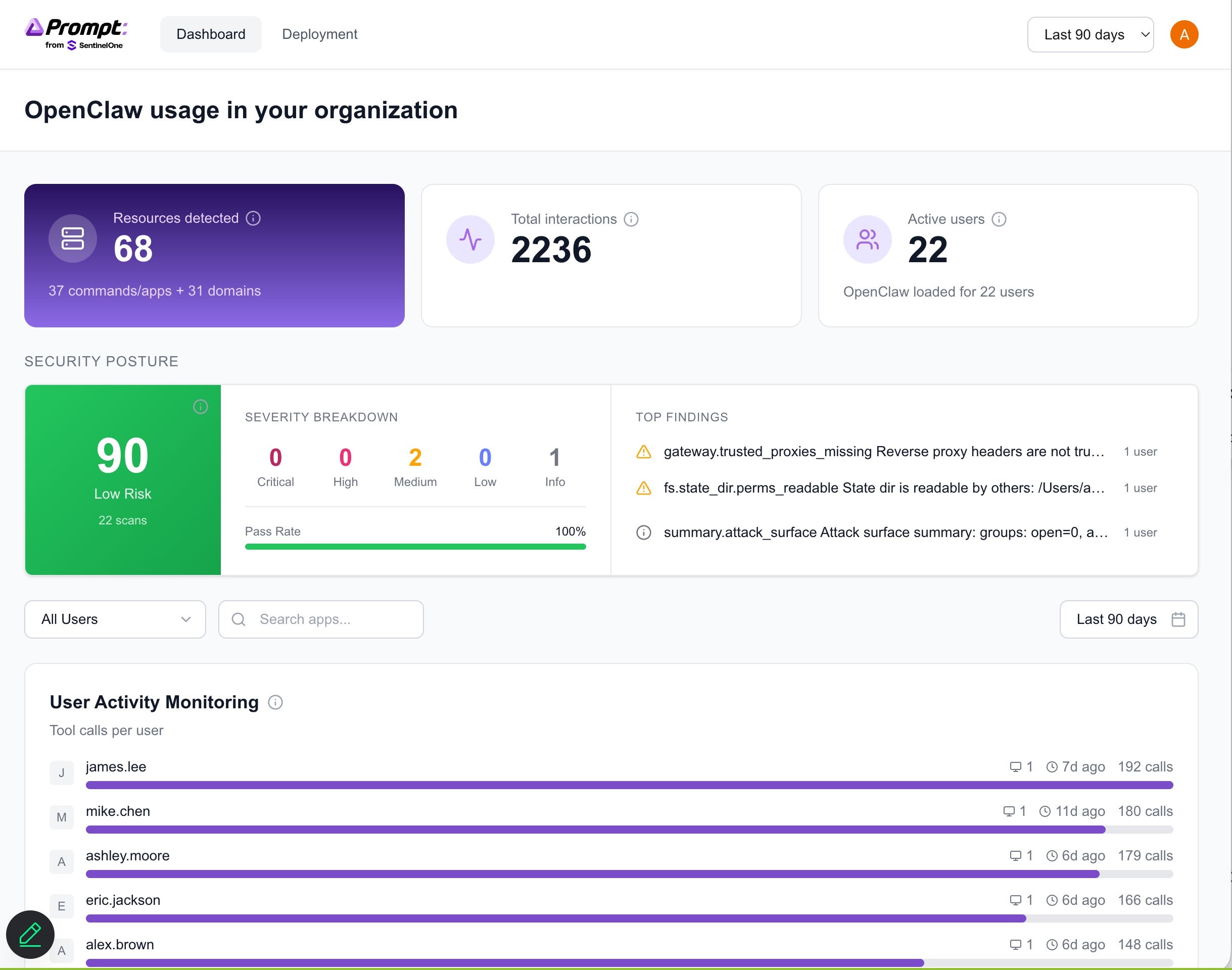
This elevates the conversation from technical detail to strategic oversight, which is critical as CISOs are now being asked for AI agent inventories, and whether the agents are operating within policy, can access sensitive systems, and are transmitting data externally.
With OneClaw, CISOs can gain visibility into:
This level of structured visibility empowers security leaders to build the foundational layer for proactive governance for agentic AI security and have effective conversations about the short and long-term risks from OpenClaw adoption in their organization.
OneClaw does not assume all autonomy is dangerous. Instead, it surfaces where autonomy exists so that leaders can make informed, balanced policy decisions and strengthen controls with precision. For example, security teams may determine that autonomous execution is appropriate within a sandboxed development environment but requires approvals in production systems. They may allow specific, vetted skills while restricting newly installed public plugins pending review. They also may decide that outbound communication to approved internal APIs is acceptable, while flagging unknown external domains for investigation.
By making these conditions visible, OneClaw enables proportionate governance rather than blanket restrictions. Teams can confidently approve safe automation, enforce guardrails where needed, and document oversight for executive and regulatory reporting. The result is not reduced innovation, but safer acceleration where autonomous agents operate within clearly defined boundaries, and security leaders remain firmly in control of how and where that autonomy is trusted.
OneClaw was designed to deliver visibility into autonomous activity without interrupting the work those agents (and the teams deploying them) are meant to accelerate. Rather than creating friction into development pipelines or altering how OpenClaw, Nanobot, or Picoclaw operate, it acts as an observability layer that security teams can deploy quietly across the environment.
The approach matters: Security leaders are not looking to slow down innovation, but they are accountable for what happens if agent behavior crosses policy boundaries or introduces risk. OneClaw gives the context needed for CISOs to act decisively using the cybersecurity controls they already trust. It does not replace prevention capabilities, it makes them smarter by ensuring autonomous activity is no longer invisible.
By surfacing where agents exist, how they are configured, and what they are interacting with, OneClaw allows organizations to distinguish between productive automation and risk behavior that warrants intervention. Security teams can then enforce standards through existing controls without imposing blanket restrictions that only frustrate developers.
The result? This is a model aligned with how modern security actually operates – observe first, contextualize risk, and then apply controls proportionately. OneClaw makes transparency a force multiplier for the security stack, and empowers CISOs to have confidence that autonomous innovation continues under a watchful, informed oversight instead with blind trust.
Agentic AI discovery is no longer optional. OpenClaw’s rapid growth and decentralized infrastructure is creating a large, and often unmanaged attack surface. With skills being frequently installed from public repositories and agents being granted deep permissions, configuration drift is occurring silently. Agent ecosystems can fall to exploitation through malicious skills and supply chain manipulation.
OneClaw supports how CISOs defend against OpenClaw-related risks by providing deep visibility and observability of agentic AI use and autonomous behavior, detecting risky configurations early on, and quantifying the exposures before incidents occur.
As adoption increases and autonomy deepens, OneClaw works to restore visibility while allowing powerful agents to accelerate development pipelines. CISOs have the clarity needed to govern autonomous systems responsibly, while getting structured discovery, centralized reporting, and security-focused analysis.
Start getting visibility into agent activity and security insights into OpenClaw deployments across your organization here. To learn more about securing your OpenClaw agents, register for our upcoming webinar happening Tuesday, March 3, 2026.

AI adoption is accelerating faster than security programs can adapt. Organizations are already experiencing breaches tied directly to unsanctioned AI usage, at significantly higher cost than traditional incidents, while the vast majority still lack meaningful governance controls to manage the risk. Traditional cybersecurity measures are necessary but insufficient. Securing AI requires purpose-built capabilities that span the entire AI lifecycle, from infrastructure to user interaction.
The rapid adoption of Large Language Models (LLMs) and Artificial Intelligence (AI) introduces transformative capabilities, but also novel and complex security challenges. Securing these sophisticated systems requires a multi-layered, end-to-end approach that extends beyond traditional cybersecurity measures. SentinelOne’s® Singularity Platform is uniquely positioned to provide holistic protection for LLM and AI environments, from the underlying infrastructure to the integrity of the models themselves and their interactions.
This document provides a detailed breakdown of how SentinelOne’s capabilities address the unique security requirements and emerging threats associated with LLMs and AI, now further enhanced by the integration of Prompt Security’s cutting-edge AI usage and agent security technology.
Because the most urgent question security leaders are asking right now is specifically about agentic AI assistants, tools like OpenClaw (aka Clawdbot and Moltbot) that can execute code and access data with user-level privileges, this document leads with dedicated coverage for those tools before mapping the full platform architecture.
The Question Security Leaders Are Asking
“Do we have coverage for the new agentic AI assistants, such as OpenClaw (aka. Moltbot and Clawdbot) that are showing up across our environment?” Yes. SentinelOne provides multi-layered detection, hunting, and governance capabilities that specifically address these tools across three reinforcing control planes: EDR/XDR telemetry, AI interaction security (Prompt Security), and open-source agent hardening (ClawSec).
OpenClaw (aka Clawdbot and Moltbot) represent the next evolution of shadow AI risk. Unlike browser-based chatbots that operate within a web session, these agentic AI assistants can execute code, spawn shell processes, access local files and secrets, call external APIs, and operate with the same privileges as the user account running them. In SentinelOne’s SOC framework, they fall squarely into the highest-risk categories: agentic execution and compromise through the loop.
If an agentic assistant can read files, call tools, and talk out, it should be treated like a privileged automation account and secured accordingly.
SentinelOne’s Singularity agent provides telemetry and tracking of OpenClaw (aka. Moltbot and Clawdbot). The Data Lake PowerQuery provided below adds detection of any activity at the endpoint level. Purpose-built hunting queries target these tools across four signal categories:
| Signal Category | What SentinelOne Detects | Example Indicators |
| Process Execution | Clawdbot, OpenClaw, or Moltbot runtime processes launching on endpoints | Command-line strings containing clawdbot, moltbot, or openclaw |
| File Activity | Creation, modification, or presence of agentic assistant files | File paths containing openclaw or clawdbot binaries and configurations |
| Network Activity | Communication on default agentic service ports and domains associated with ‘bad’ extensions | Traffic on port 18789 (default OpenClaw listener) |
| Persistence Mechanisms | Scheduled tasks or services establishing agent persistence | Scheduled tasks named OpenClaw or related service registrations |
dataSource.name = 'SentinelOne' AND

(event.type = 'Process Creation' AND tgt.process.cmdline

contains:anycase ('clawdbot','moltbot','openclaw')) OR

(tgt.file.path contains 'openclaw' or

tgt.file.path contains 'clawdbot') OR

(src.port.number = 18789 or dst.port.number = 18789) OR

(task.name contains 'OpenClaw')

| columns event.time, src.process.storyline.id, event.type,

endpoint.name, src.process.user, tgt.process.cmdline,

tgt.process.publisher, tgt.file.path,

src.process.parent.name, src.process.parent.publisher,

src.process.cmdline, src.ip.address, dst.ip.address
Beyond this targeted query, SentinelOne’s tiered SOC hunting framework provides behavioral detection that catches agentic assistants even when they are renamed, updated, or running through wrapper processes:
Storyline connects the entire chain of custody (i.e. what launched the agent, what it touched, and where it communicated) providing a defensible incident narrative for any agentic AI activity.
The Prompt Security capabilities described in Pillar 7 of this document apply directly to OpenClaw (aka Clawdbot and Moltbot), but agentic assistants create risks that go beyond what standard AI chatbot monitoring addresses:
ClawSec, an open-source security skill suite built by Prompt Security from SentinelOne, provides defense-in-depth specifically designed for OpenClaw agents:
| Control Plane | Coverage Scope | Key Capability |
| EDR/XDR (Singularity Agent + Data Lake) | Endpoint-level process, file, network, and persistence detection | Behavioral detection via Storyline; purpose-built PowerQuery for Clawdbot/OpenClaw/Moltbot |
| AI Interaction Security (Prompt Security) | User-to-AI interaction layer | Real-time data leakage prevention, prompt injection blocking, shadow AI discovery |
| Agent Hardening (ClawSec) | Within the OpenClaw agent runtime | Skill integrity verification, posture hardening, zero-trust egress control |
This three-layer approach ensures that whether an agentic AI assistant is discovered through EDR telemetry, flagged by Prompt Security’s interaction monitoring, or hardened proactively by ClawSec, security teams have full visibility and control over the risk these tools introduce.
The agentic AI coverage detailed above draws on all seven of SentinelOne’s core security pillars working together. The following table maps each pillar to the AI-specific threats it addresses and the business outcomes it protects, giving security leaders a rapid-reference guide for aligning platform capabilities to their organization’s AI risk priorities.
| Security Pillar | AI Risk Addressed | Business Outcome Protected |
| Cloud Native Security (CNS) | Exposed training data, misconfigured infrastructure, exploitable cloud paths | Prevents data breaches; reduces regulatory exposure |
| Workload Protection | Runtime compromise, container escapes, fileless attacks on AI hosts | Ensures AI service continuity; prevents operational disruption |
| AI SIEM | Multi-stage attacks, low-and-slow exfiltration, anomalous LLM usage | Enables detection of sophisticated threats; supports forensics and compliance |
| Purple AI | Evolving LLM attack techniques, slow investigation response times | Reduces MTTR; accelerates threat hunting without specialist expertise |
| Automation & Response | Fast-moving exfiltration, API key compromise, unauthorized data egress | Minimizes breach blast radius; contains incidents autonomously |
| Secret Scanning & IaC | Hardcoded credentials, pipeline vulnerabilities, insecure infrastructure definitions | Prevents supply chain compromise; secures pre-production environments |
| AI Usage & Agent Security (Prompt Security) | Shadow AI, prompt injection, data leakage through AI interactions, jailbreaks | Protects IP and sensitive data; enables safe AI adoption at scale |
This week: You can’t govern what you can’t see. Run the OpenClaw detection query in your Data Lake to determine whether agentic AI assistants are already active in your environment, assuming they are until proven otherwise. Audit browser extensions across high-risk teams. Review your AI acceptable use policy to confirm it addresses autonomous agents, not just chatbots. The goal is a baseline inventory of what AI tools exist, where they’re running, and who’s using them.
Within 90 days: Move from inventory to continuous visibility. A Prompt Security proof of value can get you there quickly, delivering real-time discovery of all AI tool usage across your environment, including the shadow AI activity your current stack can’t see. Use that visibility to establish sanctioned alternatives that give employees a secure path to the productivity they’re already chasing with unsanctioned tools. Operationalize behavioral detection hunts as automated detection rules so your SOC can identify new agentic activity as it appears, not months later.
Within 6 months: Mature from visibility into governance. Complete a full AI tool inventory with data classification and risk scoring. Establish enforcement policies that contain or block unsanctioned agentic tools at the endpoint, interaction, and network layers. Build board-ready reporting metrics that track AI-related risk posture over time. The organizations that move fastest here won’t be starting from scratch, they’ll be the ones that invested in visibility early enough to know what they’re governing.
Securing LLMs and AI is not a future challenge, it’s a present imperative. SentinelOne’s Singularity Platform, now significantly enhanced by the capabilities of Prompt Security, provides end-to-end protection that spans cloud infrastructure, workload runtime, AI interaction governance, and automated response.
But the threat landscape is no longer just about chatbots and data leakage. The rapid adoption of agentic AI assistants like OpenClaw demonstrates that AI tools are evolving from passive information retrieval into autonomous agents that execute code, access secrets, and operate with real privileges on real systems. This shift demands a corresponding shift in security posture — from monitoring what employees type into a browser to governing what autonomous processes do on your endpoints.
SentinelOne’s three-layer coverage model addresses this directly. EDR/XDR telemetry provides behavioral detection at the endpoint. Prompt Security governs the interaction layer where sensitive data meets AI. And ClawSec hardens the agent runtime itself. Together, these layers give security teams the ability to discover, govern, and contain agentic AI tools without blocking the productivity gains they deliver.
The gap between organizations that believe they have AI governance and those that actually do is exactly where breaches happen. Organizations that close that gap won’t be those that adopted AI fastest or blocked it longest, they’ll be the ones that built the visibility, controls, and response capabilities to adopt it safely.
Security isn’t the department that says no to AI. It’s the function that makes AI possible at enterprise scale. To learn more about securing your OpenClaw agents, register for our upcoming webinar happening Tuesday, March 3, 2026.
