A new banking trojan known as TCLBANKER has been quietly making rounds, and its delivery method is as clever as it is concerning. Attackers are using a trojanized version of a legitimate, digitally signed installer to slip malware onto victims’ machines without raising immediate suspicion.
The campaign, tracked as REF3076, bundles a malicious MSI installer inside a ZIP file and exploits the trust people place in recognizable software names.
The infection begins when a victim runs what app
A new banking trojan known as TCLBANKER has been quietly making rounds, and its delivery method is as clever as it is concerning. Attackers are using a trojanized version of a legitimate, digitally signed installer to slip malware onto victims’ machines without raising immediate suspicion.
The campaign, tracked as REF3076, bundles a malicious MSI installer inside a ZIP file and exploits the trust people place in recognizable software names.
The infection begins when a victim runs what appears to be a legitimate Logitech application installer. Inside the package, threat actors have weaponized the Logi AI Prompt Builder, abusing a technique called DLL sideloading to sneak a malicious file into the process. Once the application starts, it automatically loads the harmful DLL without the user ever knowing anything went wrong.
Analysts at Elastic Security Labs identified this new Brazilian banking trojan, assessing it to be a significant evolution of an older malware family known as MAVERICK and SORVEPOTEL. The campaign appears to be in its early stages, with developer artifacts and an incomplete phishing page suggesting the attackers are still actively building out their infrastructure.
File directory contents showing a malicious DLL (Source – Elastic)
TCLBANKER primarily targets users in Brazil, specifically those who visit banking, fintech, and cryptocurrency websites. The trojan monitors the victim’s browser in real time, watching for visits to any of 59 targeted financial domains.
Hackers Abuse Signed Logitech Installer
When a match is found, it opens a live connection to the attacker’s command server and puts the operator in full control.
The scope of potential damage goes well beyond simple credential theft. The malware can display fake full-screen overlays that look like real banking interfaces, freeze the apparent desktop to confuse victims, and kill the Task Manager to prevent users from ending the malicious process. It is a coordinated operation designed to make fraud feel seamless from the attacker’s side.
Targeted process names decrypted by TCLBANKER (Source – Elastic)
The attackers took care to make the infection chain look as normal as possible. The malicious ZIP file contains an MSI installer that mimics the legitimate Logi AI Prompt Builder, a real Flutter-based application.
When installed, the trojanized package drops a fake DLL called screen_retriever_plugin.dll, which masquerades as a genuine Flutter plugin and gets loaded automatically at startup.
The loader inside this DLL is packed with tricks to avoid detection. It checks whether the system is running inside a sandbox or virtual machine, verifies that the user’s default language is Brazilian Portuguese, and even measures timing to catch emulation frameworks that speed up sleep calls.
Register task for persistence (Source – Elastic)
If anything seems off, the malware simply stops running without leaving obvious traces. This environment-gating approach means the payload only decrypts itself on real, qualifying machines.
Self-Spreading Worm Modules Amplify the Threat
What makes TCLBANKER particularly dangerous is not just what it does on a single machine, but how far it can spread from there. The malware comes with two worm modules designed to send itself to the victim’s contacts using channels those contacts already trust.
The first hijacks the victim’s active WhatsApp Web session in the browser, silently messaging Brazilian contacts with a link to download the malware. The second abuses Microsoft Outlook through automation, sending phishing emails directly from the victim’s own email account.
Because these messages come from real, known senders, they are far harder for security filters to catch. The Outlook bot first harvests the victim’s contact list, then sends targeted emails that look completely authentic.
Elastic researchers noted that all command and file-serving infrastructure runs on Cloudflare Workers under a single account, making it easy for operators to rotate infrastructure quickly when needed.
Being cautious about ZIP files or MSI installers received through messaging apps or email, even from known contacts, is critical given this trojan’s self-spreading behavior. Monitoring for unusual scheduled tasks, unexpected DLL loads alongside legitimate software, and suspicious outbound connections can also help flag infections early.
TCLBanker initial ZIP file (XXL_21042026-181516.zip)
Domain
campanha1-api.ef971a42[.]workers.dev
TCLBanker C2
Domain
mxtestacionamentos[.]com
TCLBanker C2
Domain
documents.ef971a42.workers[.]dev
TCLBanker file server
Domain
arquivos-omie[.]com
TCLBanker phishing page (under development)
Domain
documentos-online[.]com
TCLBanker phishing page (under development)
Domain
afonsoferragista[.]com
TCLBanker phishing page (under development)
Domain
doccompartilhe[.]com
TCLBanker phishing page (under development)
Domain
recebamais[.]com
TCLBanker phishing page (under development)
Note:IP addresses and domains are intentionally defanged (e.g., [.]) to prevent accidental resolution or hyperlinking. Re-fang only within controlled threat intelligence platforms such as MISP, VirusTotal, or your SIEM.
Follow us on Google News, LinkedIn, and X to Get More Instant Updates, Set CSN as a Preferred Source in Google.
A sophisticated new malware framework called PCPJack has been found actively targeting cloud environments across the internet, hunting for exposed services and stripping away credentials at scale.
The worm zeroes in on Docker, Kubernetes, Redis, and MongoDB deployments, turning misconfigured or vulnerable systems into footholds for credential theft and financial fraud. What sets it apart from most cloud-targeting malware is its unusual decision to skip cryptocurrency mining entirely, suggest
A sophisticated new malware framework called PCPJack has been found actively targeting cloud environments across the internet, hunting for exposed services and stripping away credentials at scale.
The worm zeroes in on Docker, Kubernetes, Redis, and MongoDB deployments, turning misconfigured or vulnerable systems into footholds for credential theft and financial fraud. What sets it apart from most cloud-targeting malware is its unusual decision to skip cryptocurrency mining entirely, suggesting the operators are focused on a different kind of profit.
PCPJack starts its infection chain with a shell script called bootstrap.sh, which runs quietly on Linux-based cloud systems. That script prepares the environment, installs Python, downloads six specialized modules, sets up persistence, and launches the main orchestrator.
One of its first actions is to scan for and actively remove all traces of a rival threat group called TeamPCP, essentially taking over compromised machines that someone else had already infected, making it unusually competitive among cloud threat actors.
Researchers at SentinelOne identified PCPJack as a credential theft framework with worm-like spreading capabilities. According to SentinelOne security researcher Alex Delamotte, the toolset “harvests credentials from cloud, container, developer, productivity, and financial services, then exfiltrates the data through attacker-controlled infrastructure while attempting to spread to additional hosts.”
The research team believes the actor behind PCPJack may be a former TeamPCP member who left the group and started their own separate operation, given the technical overlap found between both campaigns.
The malware collects an unusually wide range of secrets, including SSH keys, Slack tokens, WordPress database credentials, OpenAI and Anthropic API keys, cloud provider tokens, and cryptocurrency wallet files.
Telegram commands in monitor.py (Source – SentinelOne)
It then encrypts all stolen data using X25519 ECDH and ChaCha20-Poly1305 before sending it to a Telegram channel, broken into small chunks to comply with message size limits. The attacker even tracks whether their cleanup of TeamPCP infections was successful, signaling deliberate and targeted competitive intent rather than opportunistic attack behavior.
PCPJack’s Worm-Like Propagation and CVE Exploitation
PCPJack spreads by actively scanning external cloud infrastructure for exposed services including Docker, Kubernetes, Redis, MongoDB, and RayML. The worm downloads hostname data from Common Crawl parquet files and uses them as scanning targets, letting it discover new victims without hardcoding any addresses directly into the code.
This design allows the attacker to cover up to 104 million potential entries during each cycle without requiring centralised coordination.
The worm exploits five publicly known vulnerabilities to break into new systems. These include CVE-2025-29927, an authentication bypass in Next.js middleware; CVE-2025-55182, a server-side deserialization flaw in React and Next.js known as “React2Shell”; CVE-2026-1357, an unauthenticated file upload vulnerability in WPVivid Backup; CVE-2025-9501, a PHP injection flaw in W3 Total Cache; and CVE-2025-48703, a shell injection issue in CentOS Web Panel.
Sliver Backdoor and Enterprise-Wide Credential Targeting
SentinelOne’s analysis also uncovered a Sliver-based backdoor on the attacker’s staging server, compiled in three variants to support x86_64, x86, and ARM system architectures. This backdoor grants the operator persistent remote access even after initial exploitation ends.
The binaries are saved locally as update.bin, update-386.bin, and update-arm.bin, designed to blend in with legitimate system maintenance file names to avoid immediately raising suspicion.
crypto_util.py main function checking credential encryption (Source – SentinelOne)
Beyond cloud infrastructure, PCPJack also targets messaging platforms, financial services, and enterprise productivity tools. The malware scans for credentials tied to services like Discord, DigitalOcean, Grafana Cloud, Google API, HashiCorp Vault, and 1Password, expanding potential damage far beyond a single environment. This wide reach points toward extortion, spam campaigns, and credential resale as the most likely endgame.
Credentials harvested by extractor.py (Source – SentinelOne)
To reduce exposure, security teams should enforce multi-factor authentication across all cloud accounts and services. Using IMDSv2 in AWS environments is recommended to prevent metadata theft, and proper authentication must be enforced for Docker and Kubernetes API endpoints.
Organisations should follow least-privilege principles, avoid storing secrets in plaintext, and regularly audit environment variables and configuration files for sensitive data.
Payload host (PAYLOAD_HOST) used by bootstrap.sh to download additional modules
URL
hxxps://cdn[.]cloudfront-js[.]com:8443/u
Credential exfiltration endpoint; typosquats CloudFront over ports 8443/7443
File
bootstrap.sh
Initial dropper shell script; sets up working directory, installs Python, downloads payloads
File
monitor.py (worm.py)
Main orchestrator script; manages all modules, credential theft, propagation, and C2 via Telegram
File
utils.py (parser.py)
Credential extraction and categorisation module
File
_lat.py (lateral.py)
Lateral movement module; targets SSH, Kubernetes, Docker, Redis, RayML, and MongoDB
File
_cu.py (crypto_util.py)
Credential encryption module; uses X25519 ECDH and ChaCha20-Poly1305
File
_cr.py (cloud_ranges.py)
Collects IP ranges for AWS, GCP, Azure, Cloudflare, Cloudfront, and Fastly; refreshes every 24 hours
File
_csc.py (cloud_scan.py)
External cloud port scanner; targets Docker, Kubernetes, MongoDB, RayML, and Redis
File
check.sh
Secondary shell script on attacker infrastructure; detects CPU architecture and fetches Sliver binary
File
extractor.py
Credential extraction script targeting environment variables from cloud services
File
run_script.py
Script downloaded and executed via Telegram RUN command from attacker C2
File
update.bin
Sliver backdoor binary compiled for x86_64 (64-bit) systems
File
update-386.bin
Sliver backdoor binary compiled for x86 (32-bit) or 32-bit containers
File
update-arm.bin
Sliver backdoor binary compiled for ARM processor architectures
Directory
/var/lib/.spm/
Hidden working directory created by bootstrap.sh on compromised systems
File
/var/tmp/apt-daily-upgrade
Local path where Sliver binary (update.bin) is saved to blend with system processes
CVE
CVE-2025-29927
Authentication bypass in Next.js middleware via crafted header
CVE
CVE-2025-55182
Server Actions deserialization flaw in React and Next.js (“React2Shell”)
CVE
CVE-2026-1357
Unauthenticated file upload in WPVivid Backup plugin
CVE
CVE-2025-9501
PHP injection in W3 Total Cache via cached mfunc comment
CVE
CVE-2025-48703
Shell injection in CentOS Web Panel Filemanager changePerm functionality
Note:IP addresses and domains are intentionally defanged (e.g., [.]) to prevent accidental resolution or hyperlinking. Re-fang only within controlled threat intelligence platforms such as MISP, VirusTotal, or your SIEM.
Follow us on Google News, LinkedIn, and X to Get More Instant Updates, Set CSN as a Preferred Source in Google.
A new and evolving threat has caught the attention of cybersecurity researchers worldwide. A Windows-based information stealer known as NWHStealer has resurfaced with a more sophisticated delivery chain, now using the Bun JavaScript runtime as part of its infection process.
This shift makes it clear that the attackers behind this campaign are actively experimenting with lesser-known tools to stay ahead of security defenses.
NWHStealer is a Rust-based malware capable of stealing sensitive
A new and evolving threat has caught the attention of cybersecurity researchers worldwide. A Windows-based information stealer known as NWHStealer has resurfaced with a more sophisticated delivery chain, now using the Bun JavaScript runtime as part of its infection process.
This shift makes it clear that the attackers behind this campaign are actively experimenting with lesser-known tools to stay ahead of security defenses.
NWHStealer is a Rust-based malware capable of stealing sensitive data from infected Windows systems. It spreads through Node.js scripts, MSI installers, and fake software downloads hosted on trusted platforms such as GitHub, GitLab, SourceForge, and Itch.io. Since it blends into legitimate-looking software packages, many users unknowingly download and run it without any suspicion.
Researcher Gabriele Orini noted that attackers have now incorporated Bun, a modern JavaScript toolkit built as a high-performance alternative to Node.js, into the malware’s delivery chain. Its relative newness in security circles makes it particularly appealing to attackers trying to slip past detection.
Once inside a system, NWHStealer is highly capable. It collects system information, steals saved browser data and passwords, drains cryptocurrency wallets, and targets applications like Discord, Steam, and FTP clients such as FileZilla.
It can also inject malicious code into browser processes, bypass Windows User Account Control, persist through scheduled tasks, and pull new command-and-control addresses from Telegram to keep the operation alive after partial takedowns.
The scale of this campaign is notable. Attackers continue to create fresh profiles on legitimate platforms to push new lures, making it difficult for moderators to respond quickly. The combination of data theft, persistence, and self-updating infrastructure makes NWHStealer a serious threat to both everyday users and organizations.
Bun Loader, Anti-VM Checks, and Encrypted C2
The infection begins with a ZIP archive disguised as a game trainer, software crack, or utility tool. Detected archive names include MOUSE_PI_Trainer_v1.0.zip, FiveM Mod.zip, TradingView-Activation-Script-0.9.zip, and AutoTune 2026.zip.
Entry point of the JavaScript loader (Source – Malwarebytes)
Inside sits Installer.exe, which carries JavaScript code bundled with the Bun runtime hidden within its .bun section.
The malicious JavaScript is divided into two key files. The first, sysreq.js, runs PowerShell and WMI commands to check whether the system is a real machine or a virtual one. It inspects CPU count, disk space, screen resolution, hardware manufacturers, and even the username, using a scoring system to decide whether to proceed with infection or stop entirely. This anti-VM layer is designed to avoid detection in automated security analysis environments.
The second file, memload.js, handles communication with the attacker’s command-and-control server. Strings and configurations are encrypted using XOR combined with base64 encoding, making static analysis much harder. The loader sends a report containing the victim’s public IP, system details, and a screenshot to the C2, then fetches an AES-encrypted payload and deploys NWHStealer directly into memory with minimal traces on disk.
The malicious ZIP contains two loaders (Source – Malwarebytes)
Some analyzed ZIP files also include a secondary loader called dw.exe inside a folder labeled “DW.” A Readme.txt inside the archive tells users to run dw.exe manually if the main installer fails, giving attackers a fallback option if the primary C2 server goes offline. This dual-loader setup reflects a deliberate backup plan to ensure delivery regardless of temporary disruptions.
Staying Safe From NWHStealer
Given how widely this stealer is distributed, users should take practical steps to protect themselves. Only download software from official, verified sources and avoid file-sharing platforms unless the publisher’s identity and reputation are clearly established.
It is also worth inspecting any downloaded archive before opening it. Malicious archives often have unusual file structures, mismatched content, or naming patterns that do not match what was advertised.
Staying cautious with downloads that seem too good to be true, whether a game cheat, a software activator, or a free tool, remains one of the most effective defenses against threats like NWHStealer.
Note:IP addresses and domains are intentionally defanged (e.g., [.]) to prevent accidental resolution or hyperlinking. Re-fang only within controlled threat intelligence platforms such as MISP, VirusTotal, or your SIEM.
Follow us on Google News, LinkedIn, and X to Get More Instant Updates, Set CSN as a Preferred Source in Google.
LevelBlue’s Security Services issues Threat Analysis reports to inform on impacting threats. The Threat Analysis reports investigate these threats and provide practical recommendations for protecting against them.
LevelBlue’s Security Services issues Threat Analysis reports to inform on impacting threats. The Threat Analysis reports investigate these threats and provide practical recommendations for protecting against them.
Unit 42 details CVE-2026-0300, a buffer overflow vulnerability in the PAN-OS User-ID Authentication Portal. Read now for details.
The post Threat Brief: Exploitation of PAN-OS Captive Portal Zero-Day for Unauthenticated Remote Code Execution appeared first on Unit 42.
Hackers are using convincing fake pages for Claude AI to trick users into running malware on their own systems. The campaign, known as “InstallFix” or the Fake Claude Installer threat, marks a sharp shift in how cybercriminals exploit the trust people place in artificial intelligence tools.
Instead of targeting software vulnerabilities, these attackers are targeting human behavior, knowing that users will follow installation steps without question.
The method is simple and effective. Atta
Hackers are using convincing fake pages for Claude AI to trick users into running malware on their own systems. The campaign, known as “InstallFix” or the Fake Claude Installer threat, marks a sharp shift in how cybercriminals exploit the trust people place in artificial intelligence tools.
Instead of targeting software vulnerabilities, these attackers are targeting human behavior, knowing that users will follow installation steps without question.
A sponsored result appeared at the top of Google search results (Source – Trend Micro)
When someone searches for “Claude Code” or “Claude Code install,” a sponsored link appears first, looking exactly like a trusted result. One click leads to a fraudulent site that provides step-by-step instructions with commands tailored to the user’s operating system, either Windows or macOS.
Fraudulent landing page (Source – Trend Micro)
Researchers at Trend Micro identified and documented the campaign, noting that the malware is not a simple infection. It is a multi-stage attack chain that collects system information, disables security features, creates scheduled tasks to survive reboots, and connects to attacker-controlled servers for further instructions.
Confirmed attacks span the United States, Malaysia, the Netherlands, and Thailand, hitting industries from government and education to electronics and food and beverage.
How the Fake Installer Attack Works
What makes this campaign especially dangerous is that it targets both technical and non-technical users. Developers who work with command-line tools are often comfortable copying setup commands from documentation pages, and non-technical users are equally likely to follow on-screen steps that look official. The attackers crafted these fake pages to closely resemble a real Claude installation guide, making the deception very hard to spot.
Stages of the infection chain (Source – Trend Micro)
The threat goes beyond a single download. After the user runs the malicious command, the infection unfolds across multiple stages, each designed to evade detection and remain hidden. Trend Micro’s telemetry confirmed outbound network connections to attacker-controlled servers, and the indicators found align closely with those tied to RedLine Stealer campaigns from 2023.
The attack begins with a Google Ads placement that intercepts users searching for Claude Code. The fake landing page uses a technique called ClickFix, presenting an OS-specific command framed as a required installation step. On Windows, running the command triggers a hidden chain beginning with mshta.exe, a legitimate Windows tool that attackers commonly abuse to execute remote payloads.
The downloaded file, named claude.msixbundle, appears to be a genuine Microsoft package with valid Marketplace signatures, allowing it to pass basic security checks. Embedded inside is an HTA payload that silently executes a VBScript, with the window resized to zero pixels so nothing appears on screen.
That script launches obfuscated PowerShell commands through the SysWOW64 subsystem, bypassing detection by reconstructing the word “powershell” at runtime using split variables.
The stager generates a unique ID for the victim machine by hashing the computer name and username together. It uses this hash to build a custom command-and-control URL for each victim, fetching the final payload from a subdomain on oakenfjrod[.]ru. This per-victim URL approach makes bulk network-level blocking extremely difficult to execute.
Persistence, Data Theft, and RedLine Stealer Connections
Once the shellcode runs in memory, the malware establishes persistence by creating scheduled tasks, allowing it to survive reboots and keep running silently. Dynamic analysis showed the malware reaching out to external IP addresses, collecting browser data, and targeting e-wallet applications installed on the infected machine.
The indicators tied to this campaign match techniques and infrastructure previously linked to RedLine Stealer.
Users should also be trained to avoid running commands from sites reached through sponsored search results, to verify download pages against official vendor websites, and to rely on trusted package managers like npm, pip, brew, or winget rather than manual scripts from unknown sources.
Indicators of Compromise (IoCs):-
Type
Indicator
Description
Domain
download-version[.]1-5-8[.]com
Malicious domain hosting the fake claude.msixbundle payload
Domain
oakenfjrod[.]ru
Attacker-controlled C&C domain; victim-unique subdomains used for Stage 4 payload delivery
IP address contacted over HTTPS port 443; TCP SYN requests observed; resolved to hosted-by[.]yeezyhost[.]net
Note:IP addresses and domains are intentionally defanged (e.g., [.]) to prevent accidental resolution or hyperlinking. Re-fang only within controlled threat intelligence platforms such as MISP, VirusTotal, or your SIEM.
Follow us on Google News, LinkedIn, and X to Get More Instant Updates, Set CSN as a Preferred Source in Google.
Phone-based scams are evolving faster than most security filters can keep up with. Attackers are now leaning heavily on Voice over Internet Protocol (VoIP) numbers that disappear before detection systems can flag them, leaving users exposed and defenders scrambling.
These scam campaigns arrive through email, where attackers embed phone numbers directly into message bodies, subject lines, and file attachments.
The goal is simple: get the recipient to call a fraudulent number and hand over
Phone-based scams are evolving faster than most security filters can keep up with. Attackers are now leaning heavily on Voice over Internet Protocol (VoIP) numbers that disappear before detection systems can flag them, leaving users exposed and defenders scrambling.
These scam campaigns arrive through email, where attackers embed phone numbers directly into message bodies, subject lines, and file attachments.
Their analysis, covering a study window from late February to late March 2025, found that the largest scam campaigns all relied on VoIP infrastructure to operate at scale with minimal cost.
Scammers Game the System With VoIP Numbers
What makes VoIP so appealing to scammers is how easily numbers can be obtained and discarded in bulk. With API-driven provisioning available from a small number of providers, threat actors spin up hundreds of numbers quickly, use them briefly, and abandon them before reputation systems catch on. The median phone number lifespan observed during the study was roughly 14 days.
The structure of an example VoIP phone number (Source – Cisco Talos)
The impact goes well beyond individual users. Organized scam call centers are running campaigns that impersonate major brands like PayPal, Geek Squad, McAfee, and Norton LifeLock, all while directing victims to the same centralized fraudulent operation.
This infrastructure is deliberately built to resist tracing, blending seamlessly into legitimate telecom networks worldwide.
Scammers are not randomly picking phone numbers. They deliberately acquire large sequential blocks of numbers, often by purchasing Direct Inward Dialing (DID) blocks from providers.
When one number gets flagged, they simply rotate to the next in the sequence, a tactic known as sequential number grouping that keeps operations running without interruption.
Cisco Talos found that six of the ten largest campaigns detected during the study period relied entirely on VoIP infrastructure. Sinch was identified as the most commonly abused CPaaS provider, referring to communications-platform-as-a-service companies offering programmable APIs for voice and messaging. These platforms are built for automation and high call volumes, which makes them attractive and widely exploited tools for large-scale scam operations.
The reuse patterns are equally calculated. Of 1,962 unique phone numbers analyzed, 68 were reused across multiple consecutive days. Scammers often apply a cool-down period, pausing a number for several days before bringing it back into a new campaign. This timing is designed to outlast update cycles of third-party reputation services, which can take days to distribute fresh intelligence.
Recycling Lures to Stay Under the Radar
One of the most telling tactics Cisco Talos documented is the recycling of the same phone number across completely unrelated lures. A single number might appear in emails posing as an order confirmation, a subscription renewal, and a financial alert all within a short span. This deliberate variation in lure type helps attackers avoid patterns that automated filters would otherwise quickly detect.
Two scam emails with different attachment file types that contain the same phone number while impersonating the same brand (Source – Cisco Talos)
In one campaign, the same number was embedded in both HEIC and PDF attachment formats, showing how attackers avoid relying on a single delivery method. HEIC files, commonly associated with iPhone photos, were used to bypass traditional file-type detection while maintaining high image quality. Talos confirmed seeing campaigns with even broader attachment variety, underscoring just how adaptable these threat actors have become.
Security and telecom teams are advised to move beyond email sender filtering, which grows less effective as senders cycle rapidly through disposable domains. Talos recommends treating phone numbers as primary indicators of compromise and applying clustering techniques to connect seemingly unrelated campaigns that share the same phone infrastructure. Real-time reputation monitoring across communication channels and active collaboration between telecom providers are among the most effective steps toward stopping these organized scam networks.
Follow us on Google News, LinkedIn, and X to Get More Instant Updates, Set CSN as a Preferred Source in Google.
A sophisticated China-linked hacker group known as UAT-8302 has been quietly targeting government agencies across South America and southeastern Europe, using a mix of custom malware and widely available open-source tools to steal sensitive data.
The group has been active since at least late 2024 and stepped up its operations against government bodies in southeastern Europe through 2025. Their goal is clear: get in, stay hidden, and walk out with as much information as possible.
What make
A sophisticated China-linked hacker group known as UAT-8302 has been quietly targeting government agencies across South America and southeastern Europe, using a mix of custom malware and widely available open-source tools to steal sensitive data.
The group has been active since at least late 2024 and stepped up its operations against government bodies in southeastern Europe through 2025. Their goal is clear: get in, stay hidden, and walk out with as much information as possible.
What makes UAT-8302 particularly dangerous is its ability to blend in. By pairing legitimate cloud services and open-source tools with custom-built malware, the group makes it harder for defenders to separate genuine network activity from a hostile intrusion.
The attackers display a high level of patience, conducting deep and methodical reconnaissance on every endpoint they can reach before pushing further into the target environment. This careful, deliberate approach is widely recognized as a hallmark of state-sponsored threat operations targeting high-value government infrastructure.
Talos analysts assessed with high confidence that the group shares tooling with several previously disclosed China-nexus clusters, including a threat cluster they track as LongNosedGoblin. The overlap in tools and techniques points to a close operational relationship between these groups.
UAT-8302’s Custom Malware Arsenal
The post-compromise activity follows a familiar and thorough playbook. Once inside a network, the group collects credentials, gathers Active Directory information, and maps out the entire environment before deploying additional malware.
Tools like Impacket, custom PowerShell scripts, and open-source scanning engines are used to discover every reachable endpoint. This approach ensures that attackers fully understand the scope of the environment they now control before deciding on their next move.
The variety of malware families deployed by UAT-8302 shows the group has access to a well-stocked toolkit. The group deploys NetDraft, a .NET-based backdoor linked to the FinDraft and SquidDoor family, alongside an updated version of the CloudSorcerer backdoor and the VSHELL implant. In one documented intrusion, the group also deployed SNAPPYBEE and ZingDoor together, a tactic independently highlighted by Trend Micro in 2024 reporting on similar China-linked activity.
NetDraft is one of the most notable tools in UAT-8302’s arsenal. It is delivered through a DLL side-loading technique where a benign executable loads a malicious DLL-based loader, which then decodes and runs NetDraft within an existing process on the compromised system.
The malware uses the Microsoft Graph API to communicate with its OneDrive-based command-and-control server, allowing it to blend into normal cloud traffic and avoid detection. Talos tracks the embedded helper library used by NetDraft as “FringePorch.”
CloudSorcerer version 3 behaves differently depending on which process it runs inside. If injected into “dnapimg.exe,” it collects system details and pivots into explorer.exe to receive commands through a named pipe channel.
If running inside “spoolsv.exe,” it contacts a GitHub repository to pull down command-and-control information. This shape-shifting behavior makes detection harder for conventional security tools. Talos also noted the use of SNOWRUST, a Rust-based variant of the SNOWLIGHT stager seen in intrusions attributed to other China-nexus clusters.
Open-Source Tools and Lateral Movement
UAT-8302 relies heavily on open-source tools when moving through compromised networks. After gaining initial access, the group runs scanning tools including gogo, naabu, httpx, and PortQry to map services across internal networks and discover new systems to pivot toward.
Credentials are harvested from MobaXterm sessions and Active Directory using tools like adconnectdump.py and SharpGetUserLoginRDP.
NetDraft and FringePorch infection chain (Source – Cisco Talos)
To maintain persistent backdoor access, the group deploys Stowaway, a proxy tunneling tool written in Simplified Chinese, routing outside traffic into infected hosts within the enterprise. SoftEther VPN clients were also observed in use.
Government agencies should keep endpoint detection tools updated to flag these threat signatures, monitor outbound traffic to cloud platforms like OneDrive and GitHub for unusual patterns, and regularly audit scheduled tasks and DLL side-loading behavior across all managed endpoints.
Note:IP addresses and domains are intentionally defanged (e.g., [.]) to prevent accidental resolution or hyperlinking. Re-fang only within controlled threat intelligence platforms such as MISP, VirusTotal, or your SIEM.
Follow us on Google News, LinkedIn, and X to Get More Instant Updates, Set CSN as a Preferred Source in Google.
Hackers are using fake Google ads to steal login credentials from ManageWP users, GoDaddy’s popular platform for managing WordPress websites from a single dashboard. The campaign, which researchers have dubbed “WrongPress,” plants a fraudulent sponsored search result directly above the real ManageWP listing, trapping users before they even realize something is wrong.
ManageWP is widely used by web developers, digital agencies, and enterprises who need to oversee dozens or even hundreds of cli
Hackers are using fake Google ads to steal login credentials from ManageWP users, GoDaddy’s popular platform for managing WordPress websites from a single dashboard. The campaign, which researchers have dubbed “WrongPress,” plants a fraudulent sponsored search result directly above the real ManageWP listing, trapping users before they even realize something is wrong.
ManageWP is widely used by web developers, digital agencies, and enterprises who need to oversee dozens or even hundreds of client websites at once. Because a single account can control that many sites, stealing one set of credentials gives an attacker a massive foothold into an entire web portfolio.
According to WordPress.org, the ManageWP Worker plugin is active on more than one million websites, making the stakes extraordinarily high.
The attack begins the moment a user types “managewp” into Google. The malicious sponsored result appears at the very top of the page, sitting right above the legitimate one.
Still Google for your account login? Beware not to "WrongPress"! We found yet another Google Ads phish, this time abusing search results for ManageWP, GoDaddy's WordPress admin platform. The fake result sits right on top of the real one, and one click later you're in an AiTM… pic.twitter.com/RtBTN0L5PE
What makes this campaign especially difficult to spot is that the fake login page is a near-perfect copy of the real ManageWP screen. There are no obvious red flags for the average user. By the time a victim types their username and password, those credentials have already been silently sent to an attacker-controlled Telegram channel.
Hackers Abuse Google Ads
Guardio Labs confirmed at least 200 unique victims at the time of writing and has been actively reaching out to alert those affected. The research team also managed to infiltrate the attacker’s command-and-control infrastructure, giving them a rare look at the full scale of how this operation runs in real time.
The infection chain is built to dodge Google’s ad review systems and the suspicion of real users alike. When a victim clicks the malicious ad, they first pass through a cloaker, a tool that filters out automated inspectors while letting genuine users through. This step helps the attackers conceal who actually authorized the sponsored result and avoid triggering Google’s ad inspection mechanisms.
Once the cloaker approves a genuine visitor, they are redirected to a fake ManageWP login page where the adversary-in-the-middle, or AiTM, technique takes over. The attacker’s server acts as a live go-between, forwarding stolen credentials to the real ManageWP platform in real time.
The victim is then shown a fake prompt asking for their two-factor authentication code, which the attacker uses simultaneously to complete the actual login, rendering 2FA completely useless.
The operation is managed through a command-and-control server that gives the attacker a live dashboard for steering ongoing phishing sessions. Guardio Labs noted the kit appears to be a private framework rather than a commodity tool sold on underground forums. Embedded in the code was also a Russian-language disclaimer in which the author denies responsibility for illegal activity and prohibits targeting systems based in Russia.
The Broader Risk to WordPress Site Owners
The danger here extends far beyond a single stolen password. Because ManageWP is a centralized hub, one compromised account can hand an attacker control over hundreds of websites simultaneously. Guardio Labs head researcher Nati Tal confirmed that each account typically hosts hundreds of sites, meaning attackers could inject malware, redirect traffic, or harvest visitor data at a sweeping scale.
Security experts advise avoiding sponsored search results when navigating to login pages for services you use regularly. Bookmarking the official URL or typing it directly into the browser address bar is a far safer habit. Users should also monitor their accounts for unexpected logins and consider adopting phishing-resistant authentication methods, such as hardware security keys, where supported.
The WrongPress campaign is a reminder that even routine actions like Googling a login page can carry serious risk. As attackers grow more creative with search advertising abuse, verifying where a link actually leads before clicking has never mattered more.
Follow us on Google News, LinkedIn, and X to Get More Instant Updates, Set CSN as a Preferred Source in Google.
A new wave of fraudulent Android apps quietly racked up millions of downloads on Google Play before being taken down. These apps, now tracked under the name CallPhantom, promised users something irresistible: the ability to look up the call history of any phone number. What they actually delivered was nothing more than fake data and a very real financial loss.
The scheme worked by exploiting a simple but powerful hook. People are naturally curious about who has called a specific number, and t
A new wave of fraudulent Android apps quietly racked up millions of downloads on Google Play before being taken down. These apps, now tracked under the name CallPhantom, promised users something irresistible: the ability to look up the call history of any phone number. What they actually delivered was nothing more than fake data and a very real financial loss.
The scheme worked by exploiting a simple but powerful hook. People are naturally curious about who has called a specific number, and these apps claimed to deliver that information instantly.
Users were shown what looked like partial results and then prompted to pay to unlock the full call history. That history was entirely fabricated right from the start.
Their analysis found the apps had been cumulatively downloaded over 7.3 million times before Google removed them following ESET’s disclosure in December 2025.
The apps primarily targeted Android users in India and the broader Asia-Pacific region. Many came with India’s country code pre-selected and supported UPI, a payment system widely used across India. A screenshot of the fabricated call history data was even included in the app’s Play Store listing, presented as proof the app actually worked.
Fake Call History Apps on Google Play
Despite looking different on the surface, all 28 apps shared the same core purpose: generate fake communication data and charge victims for access. Subscription packages ranged from weekly to yearly, with the highest price reaching up to $80.
The CallPhantom apps fell into two main clusters. The first group had hardcoded names, country codes, and call log templates embedded directly in their code. These were combined with randomly generated phone numbers and shown to users as partial results, pushing them to pay to see more.
The second cluster asked users to enter an email address, claiming the retrieved call history would be delivered there. No data was generated until after payment, and even then, nothing real was ever sent. The apps had no actual capability to access call logs, SMS records, or WhatsApp data from any device.
Hardcoded call log data used by the app (Source – Welivesecurity)
This shows how deeply the deception was built into the code, with fixed names and timestamps baked in before the app ever reached a user’s phone.
Three payment methods appeared across the apps. Some used Google Play’s official billing system. Others redirected users to third-party UPI apps, with payment details either hardcoded or fetched dynamically from a Firebase real-time database, letting operators swap receiving accounts at will.
A third method embedded payment card checkout forms directly inside the app, violating Google Play’s payments policy and making refunds significantly harder.
Bypassing Refunds and Staying Under the Radar
One of the most deliberate tactics used by CallPhantom was steering users toward payment channels Google could not reverse. When payments went through third-party UPI apps or direct card entry inside the app, Google had no ability to cancel transactions or issue refunds. Victims were left fully dependent on external payment providers or the scam developers themselves.
Google Play seemingly demonstrating the fraudulent app’s functionality (Source – Welivesecurity)
In at least one case, the app sent deceptive notifications styled as email alerts, falsely claiming call history results had arrived. Tapping the notification led straight to a subscription screen, keeping the pressure on even after users had exited without paying.
Anyone who subscribed through Google Play’s official billing system may be eligible for a refund, as existing subscriptions were canceled when the apps were removed. Requests must fall within Google’s allowed refund window. For purchases made outside Google Play, contacting the payment provider or card issuer directly to dispute the charge is the recommended step.
The most practical protection is verification before downloading. Checking developer credibility, reading user reviews carefully, and staying skeptical of apps claiming to access private data belonging to other people are all steps that help avoid traps like these.
Firebase-hosted C2 IP, Google LLC, first seen 2025
IP Address
34.120.206[.]254
Firebase-hosted C2 IP, Google LLC, first seen 2025
Domain
call-history-7cda4-default-rtdb.firebaseio[.]com
Firebase real-time database used for C2 communication
Domain
call-history-ecc1e-default-rtdb.firebaseio[.]com
Firebase real-time database used for C2 communication
Domain
ch-ap-4-default-rtdb.firebaseio[.]com
Firebase real-time database used for payment URL delivery
Domain
chh1-ac0a3-default-rtdb.firebaseio[.]com
Firebase real-time database used for payment URL delivery
Note:IP addresses and domains are intentionally defanged (e.g., [.]) to prevent accidental resolution or hyperlinking. Re-fang only within controlled threat intelligence platforms such as MISP, VirusTotal, or your SIEM.
Follow us on Google News, LinkedIn, and X to Get More Instant Updates, Set CSN as a Preferred Source in Google.
A fresh wave of malicious packages has been quietly spreading through the NuGet ecosystem, one of the most widely used registries in the .NET developer world. Five rogue packages have been discovered posing as legitimate Chinese software libraries, secretly stealing browser credentials, SSH private keys, and cryptocurrency wallet data.
The attack takes a clever approach. Instead of creating obviously suspicious packages, the threat actor built each malicious library on top of real, functional
A fresh wave of malicious packages has been quietly spreading through the NuGet ecosystem, one of the most widely used registries in the .NET developer world. Five rogue packages have been discovered posing as legitimate Chinese software libraries, secretly stealing browser credentials, SSH private keys, and cryptocurrency wallet data.
The attack takes a clever approach. Instead of creating obviously suspicious packages, the threat actor built each malicious library on top of real, functional code that developers in Chinese enterprise environments would recognize.
By mimicking trusted tools like AntdUI, a popular WinForms component library, the packages appear legitimate enough to pass casual inspection.
Researchers at Socket.dev identified all five packages, published under a single NuGet account named bmrxntfj. The packages accumulated approximately 64,784 downloads across all versions, placing tens of thousands of developer machines and CI/CD build systems at risk. The campaign traces back to at least September 2025, with all five packages still live at the time of writing.
What makes this campaign persistent is the version rotation technique the operator used. Out of 224 total versions published, 219 were deliberately hidden from public search. By keeping only one version visible while regularly swapping in fresh ones, the attacker invalidated hash-based detection and forced security teams to constantly update their blocklists.
Any developer workstation or build server that ran a package restore referencing these five IDs has potentially been exposed since late 2025. That long lifespan and high download count make this one of the more quietly damaging supply chain threats discovered this year.
Malicious NuGet Packages
The payload fires through a .NET module initializer, which the runtime calls automatically when a matching assembly loads. No user interaction is needed beyond a routine package restore. Once triggered, the malware uses JIT hooking to replace the compiler’s dispatch pointer, gaining control over every method compiled afterward.
A second-stage infostealer named we4ftg.exe then executes. It targets saved credentials across 12 Chromium-based browsers including Chrome, Edge, Brave, Firefox, and Opera, collecting passwords, autofill data, session cookies, and payment cards. It handles both legacy and AppBound Chrome encryption formats, confirming the payload has been recently maintained.
The threat actor bmrxntfj NuGet profile showing all five IR packages (Source – Socket.dev)
Cryptocurrency assets are a major focus. Browser extension wallets including MetaMask, TronLink, Phantom, Trust Wallet, and Coinbase Wallet are targeted, along with desktop applications like Exodus, Electrum, Atomic, Guarda, Ledger, and Binance. SSH private keys, Outlook profiles, Steam credentials, and files from Documents, Desktop, and Downloads are also collected.
All harvested data is staged under a folder path mimicking a legitimate Microsoft OneDrive directory. Legitimate OneDrive never creates a file by that specific name, making its presence a clear detection signal. Data is then sent to a command-and-control server registered 33 days before the NuGet publishing burst began.
C2 Infrastructure and Attribution
The primary C2 domain resolves to a server in Amsterdam operated through a virtual hosting provider. Its nameservers run through Njalla, a privacy registrar frequently used by threat actors to obstruct takedown requests. The domain was engineered to resemble a legitimate DNS provider so it would blend into routine firewall logs.
Attribution was confirmed through a unique RSA-1024 key embedded in every .NET Reactor-protected package. That same key appeared in four other malicious files on VirusTotal, including memory dumps predating the NuGet campaign by weeks. Labels on those files point to known malware families including Lumma, Quantum, AgentRacoon, and ArrowRAT.
Developers should immediately check project and lock files for any reference to IR.DantUI, IR.Infrastructure.Core, IR.Infrastructure.DataService.Core, IR.iplus32, or IR.OscarUI. Any machine that restored these packages should be treated as compromised, with all credentials, API keys, SSH keys, and wallet seeds rotated. Security teams should configure alerts for connections to the known C2 domain and watch for unexpected file creation at the OneDrive staging path.
Indicators of Compromise (IoCs):-
Type
Indicator
Description
NuGet Package
IR.DantUI
Malicious package impersonating AntdUI
NuGet Package
IR.Infrastructure.Core
Malicious package impersonating Chinese enterprise library
NuGet Package
IR.Infrastructure.DataService.Core
Malicious package impersonating Chinese enterprise library
NuGet Package
IR.iplus32
Malicious package impersonating iplus32 library
NuGet Package
IR.OscarUI
Malicious package impersonating Chinese UI library
NuGet Account
bmrxntfj
Threat actor publisher account
Domain
dns-providersa2[.]com
Primary C2 domain (registered 2026-03-12)
URL
https://dns-providersa2[.]com/check
C2 beacon and operator validation endpoint
URL
https://dns-providersa2[.]com/upload
Exfiltration upload endpoint
IP Address
62[.]84[.]102[.]85
VDSINA VPS, ASN 216071, Amsterdam
Domain
git[.]justdotrip[.]com
Operator development infrastructure (Alibaba Cloud Shanghai)
Note:IP addresses and domains are intentionally defanged (e.g., [.]) to prevent accidental resolution or hyperlinking. Re-fang only within controlled threat intelligence platforms such as MISP, VirusTotal, or your SIEM.
Follow us on Google News, LinkedIn, and X to Get More Instant Updates, Set CSN as a Preferred Source in Google.
A major QLearn cybersecurity incident has affected thousands of educational institutions globally, including Queensland state schools and universities, after a cyber breach involving third-party education technology provider Instructure exposed personal information linked to students and staff.
Queensland Education Minister John-Paul Langbroek confirmed the incident in an official statement, saying the Queensland Department of Education was briefed about the international cybersecurity breach
A major QLearn cybersecurity incident has affected thousands of educational institutions globally, including Queensland state schools and universities, after a cyber breach involving third-party education technology provider Instructure exposed personal information linked to students and staff.
Queensland Education Minister John-Paul Langbroek confirmed the incident in an official statement, saying the Queensland Department of Education was briefed about the international cybersecurity breach involving Instructure, the provider behind the Department’s online learning platform, QLearn.
According to early assessments, the breach may affect more than 200 million people and over 9,000 institutions worldwide, making it one of the largest education-sector cybersecurity incidents disclosed this year.
The Department of Education said students and staff who have worked or studied at Education Queensland schools since 2020 may have been affected by the QLearn cybersecurity incident.
Authorities stated that compromised information currently appears limited to names, email addresses, and school locations. Officials added there is currently no evidence that passwords, dates of birth, or financial information were accessed during the breach.
The online learning platform QLearn was introduced in Queensland schools in 2020 under the previous government and has since become a widely used digital education system across the state.
Minister Langbroek said school principals have already begun contacting affected families and teachers to notify them about the breach and provide further guidance.
“This morning I have been briefed by the Department of Education about an international cybersecurity breach involving a third-party provider, Instructure, which delivers the Department’s online learning platform, QLearn,” Langbroek said in the statement.
Instructure Data Breach Raises Concerns Across Education Sector
The QLearn cybersecurity incident has once again highlighted the growing cybersecurity risks facing the global education sector, particularly as schools and universities continue relying heavily on third-party digital learning platforms.
Because the breach involves Instructure, a provider serving institutions across multiple countries, the incident extends far beyond Queensland. Authorities indicated that educational institutions across Australia and overseas are also impacted.
While officials stressed that no sensitive financial or authentication data has been identified as compromised so far, cybersecurity experts often warn that exposed personal information such as names and email addresses can still be valuable to cybercriminals.
Threat actors frequently use this type of information in phishing campaigns, identity-based scams, and social engineering attacks targeting students, parents, and school employees.
The Department of Education has not publicly disclosed how the cybersecurity breach occurred or whether any ransomware or unauthorized network access was involved. Investigations into the incident are ongoing.
Queensland Department Prioritizes Support for Vulnerable Families
In response to the QLearn cybersecurity incident, the Queensland Department of Education said it is prioritizing support for vulnerable individuals and families potentially affected by the breach.
According to the Minister’s statement, the Department is providing priority assistance to families and teachers with known family and domestic violence concerns, as well as individuals connected to Child Safety services.
The additional support measures appear aimed at reducing potential risks associated with the exposure of school-related location information and contact details.
Government agencies increasingly recognize that cybersecurity incidents affecting education systems can carry broader safety implications, especially for vulnerable groups whose personal or location-related information may require additional protection.
Global Education Sector Continues Facing Cybersecurity Threats
The QLearn cybersecurity incident adds to a growing list of cyberattacks and data breaches targeting educational institutions worldwide. Schools, universities, and online learning providers have become frequent targets due to the large amount of personal information they manage and the widespread use of interconnected digital platforms.
Education systems often rely on multiple third-party vendors for online learning, communications, and student management services, increasing the potential attack surface for cybercriminals.
The Queensland Department of Education said it will continue updating the public as more information becomes available from the ongoing investigation into the breach.
At this stage, authorities have not advised affected individuals to reset passwords or take additional security measures, though officials are continuing to assess the full scope and impact of the incident.
The investigation into the Instructure-related breach remains active as educational institutions worldwide work to determine the extent of the exposure and any potential long-term cybersecurity implications.
Copy Fail (CVE-2026-31431) is a critical Linux kernel LPE that allows stealthy root access. This flaw impacts millions of systems. Read our analysis.
The post Copy Fail: What You Need to Know About the Most Severe Linux Threat in Years appeared first on Unit 42.
A dangerous new piece of malware called Remus has surfaced, quietly picking up where one of the most feared information stealers left off.
Designed to steal browser passwords, cookies, and cryptocurrency wallets, Remus carries the DNA of Lumma Stealer, one of the most technically advanced stealers-as-a-service seen in recent history.
Remus first appeared in the wild around January and February 2026, arriving shortly after Lumma Stealer suffered a major disruption. Between late August and
A dangerous new piece of malware called Remus has surfaced, quietly picking up where one of the most feared information stealers left off.
Designed to steal browser passwords, cookies, and cryptocurrency wallets, Remus carries the DNA of Lumma Stealer, one of the most technically advanced stealers-as-a-service seen in recent history.
Remus first appeared in the wild around January and February 2026, arriving shortly after Lumma Stealer suffered a major disruption. Between late August and October 2025, alleged core members behind Lumma were exposed through a doxxing campaign that rattled the group’s operations.
Researchers believe some of Lumma’s authors split off or chose to rebuild under a new name, and Remus appears to be the result.
Researchers Vojtech Krejsa and Jan Rubin attributed Remus as a new 64-bit variant of the Lumma family, noting that Lumma was originally a 32-bit operation.
What makes Remus especially concerning is how closely it mirrors Lumma in design and behavior. The two share the same string obfuscation method, anti-virtual machine checks, nearly identical code structure, and a browser encryption bypass that researchers had only ever seen Lumma use. This level of overlap points strongly to a shared origin.
While Lumma campaigns continue globally, Remus is not a direct replacement. It is more of a natural evolution, upgrading the architecture to 64-bit and adding newer evasion techniques. Both threats represent a widening footprint for an actor that has already proven very hard to stop.
Lumma-Style Browser Key Theft
One of Remus’s most alarming inherited capabilities is its method for breaking into browser-protected data. It targets Application-Bound Encryption, a security layer Chromium browsers use to protect sensitive keys stored on disk.
Rather than reading the key off disk, Remus injects a small shellcode into the live browser process to locate and decrypt the master key from inside the browser’s own memory.
Remus decrypting the hex pattern used in the ABE bypass (Source – GenDigital)
This technique had previously only been observed in Lumma Stealer. Remus searches for a specific byte pattern inside the browser’s code, locates the encrypted key in memory, and uses the browser’s own decryption functions to unlock it.
The shellcode Remus injects is more compact at 51 bytes versus Lumma’s 62, suggesting active refinement.
If injection into an existing browser process fails, Remus launches a hidden browser on a separate desktop, invisible to the user.
Unlike Lumma, which used a hardcoded desktop name, Remus generates a random 16-character string each time. This makes detection harder for tools that rely on fixed naming patterns.
EtherHiding and Anti-Analysis Evasion
Beyond encryption bypass, Remus introduces a key upgrade in how it contacts its command-and-control servers. Lumma relied on platforms like Steam and Telegram to store server addresses.
Remus replaces this with EtherHiding, embedding the server address inside an Ethereum blockchain smart contract, making its infrastructure far harder to disrupt.
Remus resolving a C2 using EtherHiding (Source – GenDigital)
Because blockchain data is decentralized and cannot be removed by any platform operator, there is no single point of failure for defenders to target.
Remus queries the smart contract at runtime over a public endpoint and pulls the current server address, removing a defensive lever that had worked against Lumma.
Remus also adds checks to detect analysis tools and sandbox environments before executing. It scans for DLLs linked to known analysis platforms and checks for a specific honeypot file on disk.
If either check triggers, the malware exits silently. These capabilities make Remus a stealthier and more sophisticated threat that security teams need to address without delay.
Follow us on Google News, LinkedIn, and X to Get More Instant Updates, Set CSN as a Preferred Source in Google.
Explore the latest trends, techniques, and procedures (TTPs) our incident response (IR) experts are actively facing with the TTP Briefing Q1 2026, a report built on frontline threat intelligence from our global incident response investigations across LevelBlue.
Explore the latest trends, techniques, and procedures (TTPs) our incident response (IR) experts are actively facing with the TTP Briefing Q1 2026, a report built on frontline threat intelligence from our global incident response investigations across LevelBlue.
Executive summary
A suspicious website is a web resource that cannot be definitively classified as phishing, but whose activities are unsafe. Such sites manipulate users, tricking them into voluntarily transferring money for non-existent services, signing up for hidden subscriptions, or disclosing personal data through carefully crafted terms of service. These include fake online stores, dubious crypto exchanges, investment platforms, and services with paid subscriptions.
Kaspersky has introduc
A suspicious website is a web resource that cannot be definitively classified as phishing, but whose activities are unsafe. Such sites manipulate users, tricking them into voluntarily transferring money for non-existent services, signing up for hidden subscriptions, or disclosing personal data through carefully crafted terms of service. These include fake online stores, dubious crypto exchanges, investment platforms, and services with paid subscriptions.
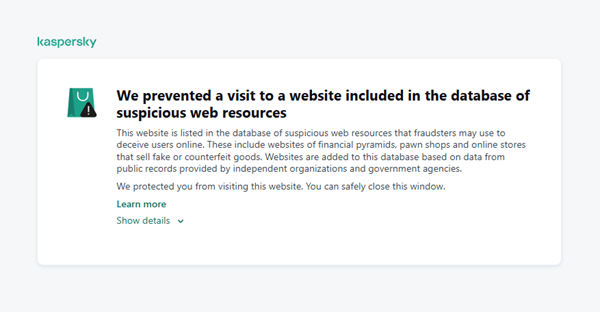
Kaspersky has introduced a new web filtering category, “Sites with an undefined trust level,” into its security products (Kaspersky Premium, Android and iOS apps, etc.). The system analyzes the domain name and age, IP address reputation, DNS configuration, HTTP security headers, and SSL certificate to automatically detect suspicious resources.
According to Kaspersky data for January 2026, the most widespread global threat is fake browser extensions that mimic security products — they were detected in 9 out of 10 regions analyzed worldwide. Such extensions intercept browser data, track user activity, hijack search queries, and inject ads.
Kaspersky’s regional statistics reveal the specific nature of these threats: in Africa, over 90% of the top 10 suspicious websites are online trading scam platforms; in Latin America, fake betting services predominate; in Russia, fake binary options brokers and “educational platforms” with fraudulent subscriptions lead the way; in CIS countries — crypto scams and bots for inflating engagement.
Key indicators of a suspicious website to check: a strange domain name with numbers or random characters, cheap top-level domains (.xyz, .top, .shop), a recently registered domain (less than 6 months old according to WHOIS data), unrealistic promises (“100% guaranteed income,” “up to 300% profit”), lack of company contact information, and payments only via cryptocurrency or irreversible bank transfers.
Introduction
The online landscape is filled with various traps lying in wait for users. One such threat involves websites that can’t be strictly classified as phishing, yet whose activities are inherently unsafe. These sites often operate on the fringes of the law, even if they aren’t directly violating it. Sometimes they use a cleverly crafted Terms of Service document as a loophole. These agreements might include clauses such as no-refund policies or forced automatic subscription renewals.
Fake online stores, dubious financial platforms, and various online services that mimic legitimate business operations are all categorized as suspicious. Unlike actual phishing sites, which aim to steal sensitive data like banking credentials or passwords, these suspicious sites represent a far more cunning trap. Their goal is manipulation: tricking the victim into willingly paying for non-existent goods and services or signing them up for a subscription that’s nearly impossible to cancel. Beyond financial gain, these sketchy websites may also hunt for personal data to sell later on the dark web.
Our solutions categorize them as having an “undefined trust level”. This article explains what these sites look like, how to identify them, and what you can do to stay safe.
The dangers of shady websites
One of the biggest risks associated with making a purchase from an untrusted website that seems to be an online store is the financial loss and falling victim to fraud. Fake shops will entice you with attractive deals to get you hooked. After you pay, you may never receive what you paid for, or you may receive some cheap piece of unusable junk instead of the item you ordered. Investment or “guaranteed income” programs are another type of classic scam — they promise rapid returns, and once they take your deposits, they disappear without a trace.
Visiting or buying from untrusted suspicious websites can expose you to various risks that go beyond a single bad purchase. Fraudulent websites often collect your personal information even if you do not end up making a purchase. By completing a form or signing up for a “free offer”, you may be providing the scammer with access to your information.
Personal data collection can happen in a fairly straightforward and obvious way — for instance, through a standard order delivery form. In this scenario, attackers end up with sensitive information like the user’s full name, shipping and billing addresses, phone number, email address, and, of course, payment details. As we’ve previously discussed, fraudsters sell this kind of information, and there’re countless ways it can be used down the line. For example, this data might be leveraged for spam campaigns or more serious threats like stalking or targeted attacks.
Common types of suspicious sites
Let’s take a closer look at the different types of shady sites out there and how interacting with them can lead to financial loss, data leaks, the unauthorized use of personal information, and other consequences.
It’s worth noting that rogue websites can masquerade as legitimate ones in almost any industry. The first type of fraudulent site we’ll look at is fake online stores. These can appear as clones of real brand websites or as standalone stores. Usually, the scam follows one of two paths: the buyer either receives a counterfeit or poor-quality product, or they receive nothing at all. These sites lure victims in with suspiciously low prices and “exclusive” deals. Often, users are subjected to psychological pressure: the time to make a purchase decision is purposefully limited, provoking the victim, as with any other scam, into making an impulse purchase.
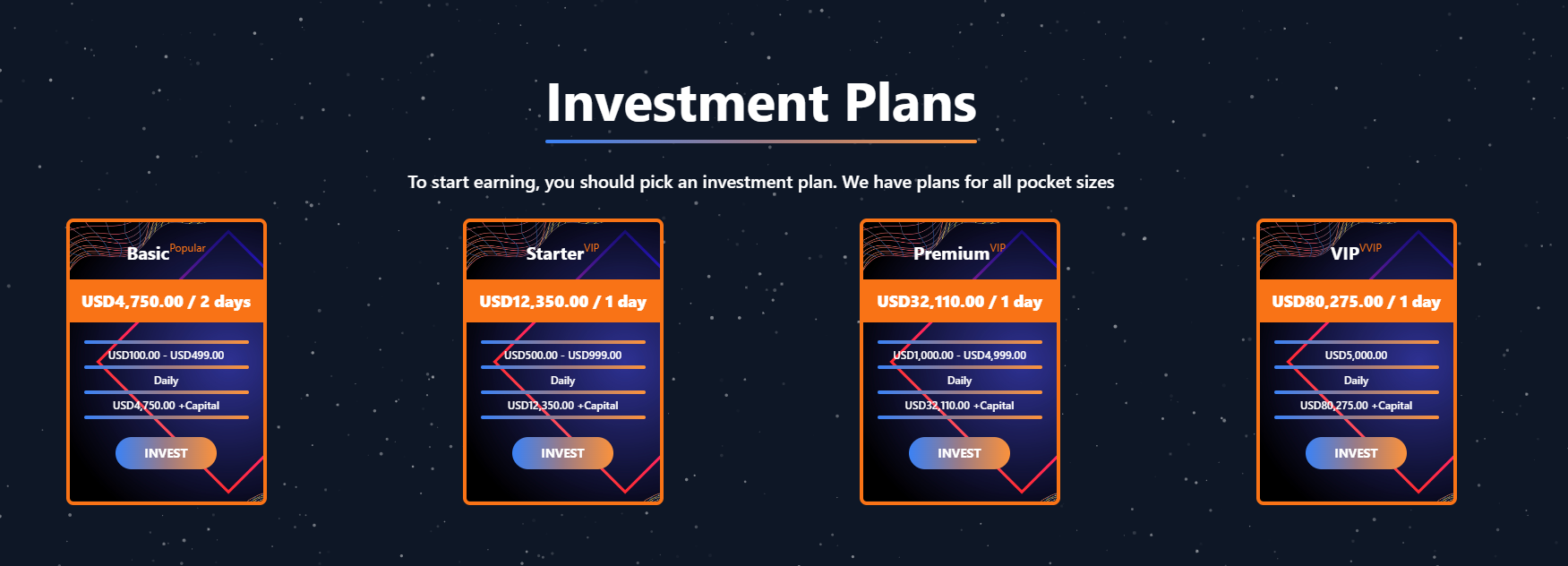
Another common type of shady site includes online exchanges and trading platforms. These primarily target cryptocurrency, as the lack of legislative regulation for digital currency in certain countries makes them a magnet for fraudsters. These suspicious sites often lure victims with supposedly favorable exchange rates or other enticing gimmicks. If the user attempts to exchange cryptocurrency, their tokens are gone for good. Beyond simple exchanges, rogue sites offer investment services and even display a fake balance growth to appear credible. However, withdrawing funds is impossible; when the victim tries to cash out, they’re prompted to pay some fee or fictional tax.
Subscription traps are also worth noting, offering everything from psychological tests to online video streaming platforms. The hallmark of these sites is that they deliberately withhold critical information, such as recurring charges, or hide the fact it even exists. Typically, the scheme works like this: a user is offered a subscription for a nominal fee, like $1. While that seems attractive, the next charge – perhaps only a week later – might be as much as $50. This information is intentionally obscured, buried in fine print or tucked away in the Terms of Service where it’s harder to find. Legitimate services always clearly disclose subscription terms and provide an easy way to cancel before a trial period ends. Scam services, on the other hand, do everything possible to distract the user from the actual terms of use and subscription.
Shady sites can also masquerade as providers of mediation services, such as legal or real estate assistance. In reality, the service is either never delivered or provided in a stripped-down, incomplete form. For example, a user might be prompted to pay for a service that’s normally provided for free. The danger here lies not only in losing money for non-existent services but also in the significant risk of exposing personal data, such as ID details, taxpayer identification numbers, social security numbers, or driver’s license information. Once in the hands of attackers, this data can become a tool for executing further scams or targeted attacks.
On the whole, suspicious sites are fairly difficult to distinguish from legitimate, trustworthy services. Masquerading as a legitimate business is the primary goal of these sites, and the fraudulent schemes they employ are not always obvious. Nevertheless, there are protective measures as well as certain indicators that can help you suspect a site is unsafe for purchases or financial transactions.
How to identify suspicious or fraudulent websites
Despite the increasingly convincing attempts to create fake shops, the majority of them still lack the quality of real online stores, and there are many signs that may give them away. Some of these signs can be caught by the eye while others require a bit of technical investigation. By combining visual inspection, technical checks, and trusted online tools, you can protect yourself from financial loss or data theft.
Visual and manual clues
You don’t need to be a cybersecurity expert to catch many red flags just by observing the site’s domain, visuals, language and behavior. For instance, scam sites often have strange or randomly generated names, filled with numbers, underscores, hyphens, or meaningless words, like best-shop43.com. In addition, such vague top-level domains as .xyz, .top, or .shop are also frequently used in scams because they’re cheap and easy to register.
Furthermore, most fake stores sites look unprofessional, with poor visuals, pixelated images, mismatched fonts, or copied templates. Many fraudulent websites borrow layouts or logos from other brands or free templates, which makes them appear generic and sketchy.
Another major giveaway lies in the content itself. Be aware of persuasive language, unrealistic promises, or emotional triggers such as No KYC, Risk-free returns, 100% guaranteed income, Up to 300% profit, or Passive income with zero effort. Unrealistic deals are another red flag. If the products are listed at extremely low prices, continuous countdown timers, and “limited time only” messages that are often used to pressure you into making a quick purchase, it’s a clear tell of a fraudulent website.
Legitimate businesses always provide verifiable contact details, such as a physical address, company name, and customer support. On the contrary, scam sites hide this information. You may also notice the non-functioning pages, broken or suspicious links leading to unrelated external sites which indicate poor maintenance or malicious intent.
Another important signal is the website’s social media presence. Legitimate online businesses usually maintain at least one active social media account to promote their products and communicate with customers. In most cases, these businesses have long-established social media accounts with harmonized posting history and engagement from real users, consistency between the brand website and social media profiles (same name, logo, and links). The links to social media profiles from the website are usually direct. In contrast, fraudulent or deceptive websites often lack any meaningful social media presence or display signs of superficial or artificial activity. This may include missing social media accounts altogether, social media icons that lead to non-existent, inactive, or unrelated pages, or recently created profiles with very few posts and minimal user engagement. In some cases, comment sections are disabled or dominated by spam and automated content, suggesting an attempt to avoid public interaction rather than engage with customers.
Lastly, the payment options offered by the site can also tell a lot about its legitimacy. Be extremely cautious if a website only accepts cryptocurrency, wire transfers, or third-party P2P payments. These payment methods are irreversible and are preferred by scammers. Legitimate e-commerce platforms typically offer secure and reversible payment options, such as credit cards or trusted payment gateways that include buyer protection policies.
However, the absence or existence of any of these factors alone does not necessarily indicate malicious intent. It should be evaluated in combination with technical, linguistic, and behavioral indicators, rather than treated as a standalone signal of legitimacy.
Technical indicators to check
Looking into technical signs can reveal whether a website is trustworthy or potentially fraudulent.
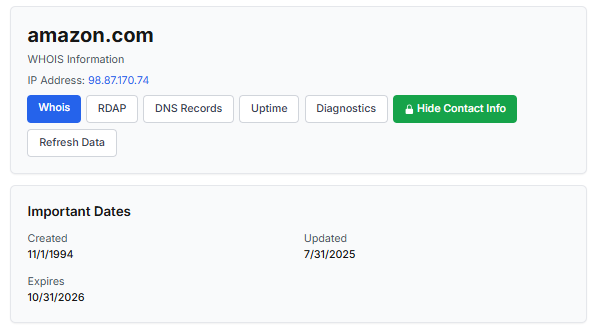
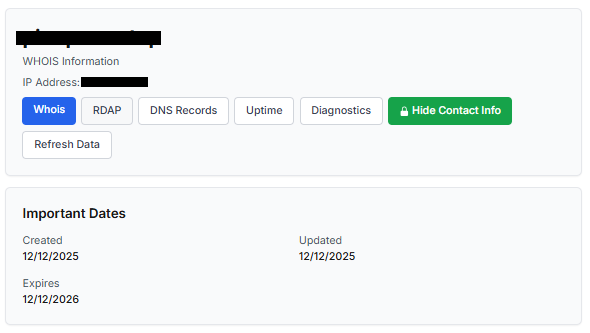
One of the first things to check is the domain age. Scam websites are often short-lived, appearing only for a few weeks or months before disappearing once users start reporting them. To check when the domain was created, use a WHOIS lookup. If it’s less than six months old, be cautious — especially for e-commerce or investment sites, where legitimacy and trust take time to build.
Let’s take a look at the registration details for the popular online marketplace Amazon. As we can see from the WHOIS information, it was registered in 1994.
Meanwhile, a reported suspicious online store was created a couple of months ago.
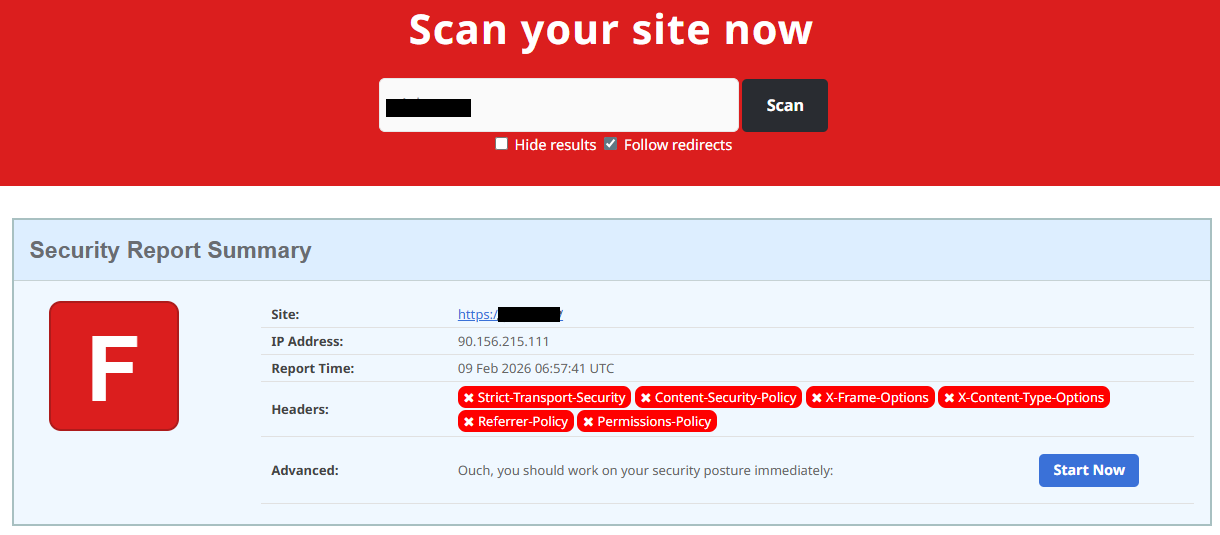
Legitimate websites usually operate on stable hosting platforms and remain on the same IP addresses or networks for long periods. In contrast, fraudulent websites often move between servers (in most cases using a cheap shared hosting service) or reuse infrastructure already associated with abuse. Checking the IP address reputation can reveal if the website or the hosting server has previously been linked to suspicious activities. Even if the website looks legitimate, a poor IP reputation can expose it.
In addition to that, looking at the infrastructure behavior over time can reveal patterns about its legitimacy. Websites associated with fraudulent activity often show short lifespans, sudden spikes in activity, or rapid appearance and disappearance, which indicates a coordinated campaign rather than a legitimate business.
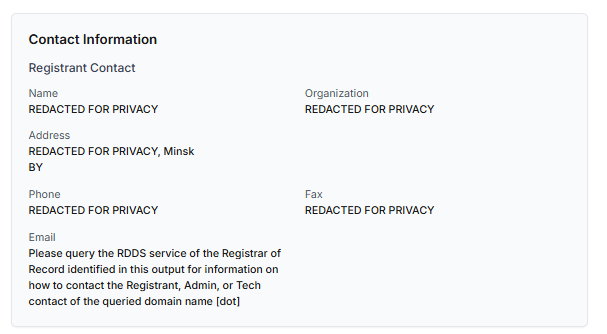
Another important clue is hidden ownership. When the WHOIS details show “Redacted for Privacy” or leaves the organization name blank, it may indicate that the website owner is deliberately hiding their identity.
We should point out that while this can raise suspicion during investigations, hidden WHOIS data is not inherently malicious. Many legitimate businesses use privacy protection services for valid reasons. These may include protection from spam and phishing after public email addresses are taken from WHOIS databases, personal safety for small business owners, and brand protection to prevent competitors or malicious actors from targeting the registrant. This means that some businesses can use services like WHOIS Privacy Protection, Domains By Proxy, or PrivacyGuardian.org to remove the WHOIS data while still operating transparently on their websites through clear contact details, customer support channels, and legal pages (e.g. terms of use).
Therefore, hidden ownership should be treated as a contextual risk indicator, not a standalone proof of fraud. It becomes more suspicious when combined with other signals such as newly registered domains, and lack of legal information.
Next, you can check the security headers of the website. Legitimate websites are usually well maintained and include several key HTTP headers for protection. Some examples include:
Content-Security-Policy (CSP) provides strong defense against cross-site scripting (XSS) attacks by defining which scripts are allowed to run on the site and blocking any malicious JavaScript that could steal login data or inject fake forms.
HTTP Strict-Transport-Security (HSTS) forces browsers to connect to the site only over HTTPS. It ensures all communication is encrypted and prevents redirecting users to an insecure (HTTP) version of the site.
X-Frame-Options prevents clickjacking, which is a type of attack where a legitimate-looking button or link on a malicious page secretly performs another action in the background.
X-Content-Type-Options blocks MIME-type attacks by preventing browsers from misinterpreting file types.
Referrer-Policy controls how much information about your previous browsing (referrer URLs) is shared with other sites.
These headers form the “digital hygiene” of a website. Their absence doesn’t always mean a site is malicious, but it does suggest a lack of security awareness or professional maintenance — both strong reasons to be cautious.
You should also check the SSL certificate. Scam sites may use self-signed or short-lived SSL certificates. You can inspect this by clicking the padlock icon in your browser’s address bar — if it says “not secure” or the certificate authority seems unfamiliar, that’s a red flag.
You can check the security headers and the SSL certificate by sending an HTTP request programmatically or by using some online service.
Another indicator that provides insight into how well a website is done and managed is DNS configurations. Legitimate businesses typically use reliable DNS providers and maintain consistent DNS records. Missing the name server NS or mail exchange MX records may indicate poor DNS configuration. In addition to NS and MX, reputable sites also configure SPF and DMARC records to protect their brand from email spoofing and phishing. Something scam website developers won’t bother with because they don’t intend to build a long-standing reputation.
You can check the configurations of DNS records either programmatically or by using an online service.
Another recommendation is to pay attention to website behavior. If there are frequent redirects, pop-up ads, or background requests to unknown domains, this may indicate unsafe scripting or tracking.
How to protect yourself
Tools and databases for detecting suspicious websites
We at Kaspersky have built an intelligent system for detecting suspicious web resources and added this new type of protection into many of our products, including Kaspersky Premium, Kaspersky for Android and iOS, and others. Our detection model is based on many factors, including but not limited to the following:
domain name and age,
IP reputation,
stability of the infrastructure used,
DNS configurations,
HTTP security headers,
digital identity and popularity of the web resource.
When a user tries to visit a site flagged as having an undefined trust level, our solutions show a warning to stop the visitor from becoming a victim of personal data leaks, financial losses or a bad purchase:
This component is on by default.
Moreover, there are several online tools and databases that can help assess a website’s legitimacy:
ScamAdviser analyzes trust based on WHOIS, server location, and web reputation.
APIVoid provides risk scoring using DNS, IP, and domain reputation databases.
National government databases often maintain official lists of fraudulent or blacklisted domains.
Preventive measures
To protect yourself from such threats, it might a good idea to take some additional preventive measures. Always double-check the URL and domain name, especially when you are about to click a link or make a payment. Make sure the site uses HTTPS and has a trusted certificate.
You can use standard browser tools to verify site security. For example, in Google Chrome, clicking the site information button (the lock or settings icon in the address bar) displays details about the connection security and the site’s certificate.
In the Security section, you can check whether the site supports HTTPS – it should say “Connection is secure” – and view the site’s digital certificate.
Additionally, keep reliable security software with real-time protection running on your device to stop you from accessing dangerous websites. Do not download any files or enter your personal information on websites that look unprofessional or suspicious. And finally, remember the golden rule: if a deal seems too good to be true, it often is.
If you realize that you’re on a scam website, it’s important to perform certain post-incident actions immediately. First, contact your bank or payment provider as soon as possible to block the transaction or card. Then, change your passwords for the services which might have been compromised, and run a full antivirus scan on your device to detect and remove any potential threats. Lastly, consider reporting the website to the cybercrime agency in your country or to the consumer protection agency. Sharing your experience online by leaving a review or warning will give notice to potential customers alike.
By staying careful and taking quick actions, you can significantly reduce the chances of being a target and help make the internet a safer place for everyone.
An overview of detection statistics for sites with an undefined trust level
To illustrate the types of suspicious sites prevalent in various regions around the world, we analyzed anonymized detection data from Kaspersky solutions for the “websites with an undefined trust level” category in January 2026. For each region, we identified the 10 most frequently encountered sites and calculated the share of each within that list. To maintain privacy, specific domains are not listed directly; instead, they’re described based on their functionality and characteristics.
Most visited suspicious sites
First, let’s examine the sites that appear across multiple regions, indicating a high prevalence.
In 9 out of the 10 regions analyzed, we encountered a suspicious image processing platform (*a*o*.com). This site positions itself as a photo editing tool, but in reality, it serves as an intermediary server for uploading images used in phishing and other campaigns. By interacting with such a site, users risk exposing personal data under the guise of uploading images or falling victim to a phishing attack.
Percentage of the *a*o*.com domain detections by region, January 2026 (download)
This site has the largest share of detections in the Russian Federation, where it ranks first in the TOP 10 with a 40.80% share. It is also prevalent in Latin American countries (21.70%) and the CIS (14.64%), while it’s least common in Canada at 0.24%.
The next site appeared in 7 regions. It consists of a landing page for a fake antivirus solution presented as a browser extension (*n*s*.com). This extension redirects the user to a fake search engine page allowing it to collect data and track user activity, specifically search queries.
Percentage of the *n*s*.com domain detections by region, January 2026 (download)
This site is most frequently detected in South Asia, with a share of 33.31%. Its presence in Canada and Oceania is roughly equal (15.47% and 15.09%, respectively). We recorded the lowest number of detections in Africa, at 2.99%.
Another suspicious browser extension appeared in the TOP 10 in 6 out of the 10 regions. It’s a fake privacy-enhancing tool hosted at *w*a*.com. Instead of providing the advertised privacy features, this extension carries a high risk of intercepting browser data. It can modify browser settings, harvest user data, and swap the default search engine for a fake one. Furthermore, it maintains full control over all browser traffic.
Percentage of the *w*a*.com domain detections by region, January 2026 (download)
This “service” has its largest share, 22.25%, in the Middle East and North Africa, and is also quite common in Canada (16.26%). It’s least frequently encountered in Latin America (5.38%) and East Asia (4.02%).
The site *o*r*.com appeared in five regional rankings. It’s a fake security service promising to provide online safety by warning users about malicious sites and dangerous search queries. This extension has the potential to steal cookies (including session cookies), inject advertisements, spoof login forms, and harvest browser history and search queries. We noted that this site made the TOP 10 in Africa (0.59%), the MENA (Middle East and North Africa) region (4.57%), Europe (5.61%), Canada (7.21%), and Oceania (1.93%).
In 4 out of the 10 regions, we identified several other recurring sites. One of them (*n*p*.xyz) mimics a repository for creative AI image generation prompts while capturing browser data. The domain hosting this site exhibits several red flags: it was recently registered, and the owner’s information is hidden. This site reached the TOP 10 in Africa (0.51%), the MENA region (7.04%), Latin America (22.54%, ranking first in that region), and South Asia (5.91%).
The second service (*i*s*.com) positions itself as a tool for safe searching, protecting the browser from threats, and verifying extensions. However, this is a typical browser hijacker, much like the others mentioned above. It made the TOP 10 in South Asia (8.03%), Oceania (17.97%), Europe (3.90%), and Canada (14.35%).
The third site (*h*t*.com) poses as a private browsing extension. In reality, it’s another potentially unwanted application designed for browser hijacking: it modifies settings, steals sensitive data (cookies, browser history, and queries), and can redirect the user to phishing pages. Users have specifically noted the difficulty involved in removing the extension. This site appears in the TOP 10 for the MENA region (10.17%), Canada (7.06%), Europe (3.81%), and Oceania (2.81%).
Another domain (*o*t*.com) that reached the TOP 10 in four regions is a service mimicking a browser extension for safe searching and web browsing. It’s dangerous because it injects ads and steals user data. It’s important to note that such extensions can be installed without explicit user consent – for example, via links embedded in other software. This service holds the number one spot in two regions: Canada (25.72%) and Oceania (30.92%), while also appearing in the TOP 10 for East Asia (8.01%) and Africa (0.88%).
Consequently, we can see that the majority of suspicious sites detected by our solutions worldwide are browser hijackers masquerading as security products. Nevertheless, other categories of sites also appear in the TOP 10.
Next, we’ll examine each region individually, focusing on descriptions of domains not previously covered. For clarity, the sites mentioned above will be marked as [MULTI-REGION], while those appearing in only two or three regions will include the names of those specific areas. We’ll observe several regional overlaps and similarities, allowing us to determine which types of suspicious sites are popular both within specific regions and globally.
Africa
Distribution of the TOP 10 suspicious websites in Africa, January 2026 (download)
The three most prevalent domains in African countries are found exclusively in this region. All of them – *i*r*.world (60.27%), *m*a*.com (22.84%), and *e*p*.com (9.36%) – are potentially fraudulent online trading platforms suspected of using forged licenses. These sites employ classic scam schemes where it’s impossible to withdraw any alleged earnings. In fifth place is a domain we’ll also see in the European TOP 10, *r*e*.com (1.46%): a platform marketed as a tool for retail and semi-professional traders. It charges for services available elsewhere for free. Eighth place is held by a site that also appears in the Russian TOP 10: *a*c*.com (0.56%). This is a dubious AI tool that claims to offer free subscriptions to a premium graphics editor. In ninth place is a domain that also surfaces in the Canadian TOP 10: *u*e*.com (0.53%), a browser extension of the “web protection” variety that we’ve encountered previously.
In summary, the African region is dominated by financial scams within the online trading and brokerage sectors. These include fake platforms that make it impossible to withdraw funds and use fake licenses and classic schemes to steal users’ money. Additionally, Africa sees paid tools that duplicate free services and questionable AI-based subscriptions. The primary threat in this region is financial loss through fraudulent investment-themed sites.
MENA
Distribution of the TOP 10 suspicious websites in the Middle East and North Africa, January 2026 (download)
In the MENA region, the site *a*v*.su holds the top spot with a 28.64% share; notably, this site also appears in the TOP 10 for Russia. It markets itself as a tool for building custom VoIP-PBX systems. However, it has an extremely low trust rating and is frequently associated with phishing, and hidden redirects. Using this service carries significant risks, including data leaks, and financial loss.
Ranked seventh is *a*r*.foundation (6.32%), an AI bot allegedly designed for trading, which we also identified in the TOP 10 for Oceania. This service has been flagged as an investment scam operating as a pyramid scheme with the hallmarks of a Ponzi scheme.
The ranking is rounded out by two domains not found in any other region. The first one, *l*e*.pro (4.42%), is a spoof of a popular betting service. The second, *p*r*.group (2.21%), is a clone of a well-known broker. Both sites are scams.
In the MENA region, the landscape is dominated by fake VoIP services as well as counterfeits of financial and betting platforms, which attackers use to conduct phishing attacks, and perform hidden redirects. A significant portion of suspicious sites consists of fake online privacy tools and browser hijackers masquerading as security extensions. Ponzi schemes and cryptocurrency scams are also prominent. The primary risks for the region are data theft, and financial loss.
Latin America
Distribution of the TOP 10 suspicious websites in Latin America, January 2026 (download)
In Latin America, we identified five popular suspicious sites specific to this region, which is unusual compared to other areas where more overlaps are typically observed. Ranking third with a share of 10.81% is the fake betting platform *b*e*.net. In fifth place is *r*e*.club, an illegitimate clone of a well-known bookmaker, with a share of 7.82%.
Further down the list of local threats are *a*a*.com.br (7.02%), a Brazilian Ponzi scam; *s*a*.com (5.07%), which offers dubious investment programs; and *t*r*.com (4.53%), a potentially dangerous trading platform.
In Latin America, the most-visited suspicious sites are betting-themed scams, including both clones of legitimate sites and those built from scratch. Also prevalent are Ponzi schemes, fake investment programs, and dubious online brokers. A significant portion of these sites consists of browser hijackers posing as crypto platforms and AI bots. The primary threats in Latin American countries include financial loss through gambling and Ponzi schemes, as well as the theft of NFTs and other tokens.
East Asia
Distribution of the TOP 10 suspicious websites in East Asia, January 2026 (download)
In the East Asian TOP 10, we see the highest concentration of domains that are absent from other regional rankings.
In first place, with an 18.77% share, is the fake broker *r*x*.com, which can be used to steal personal data or funds. Second place is held by a crypto-gaming site (16.44%) that we previously encountered in the Latin American TOP 10. Visitors to this site risk losing NFTs and other tokens. In third place is the domain *u*h*.net (11.61%), used for redirects, which can hijack sessions. Following this is *s*m*.com (9.98%), a domain typically used as a browser-hijacking server and for phishing attacks, serving as a link in an infection chain.
Rounding out the local threats in East Asia are the following domains: *e*v*.com (9.37%), utilized in drive-by attacks; *a*k*.com (9.16%), an API-like domain associated with suspicious scripts and extensions; and *b*l*.com (4.38%), a domain potentially used for redirects.
East Asia has a high concentration of region-specific fake brokers, crypto gaming platforms, and NFT marketplaces. The primary threats for this region include the loss of financial data, NFTs, and other tokens, as well as session hijacking.
South Asia
Distribution of the TOP 10 suspicious websites in South Asia, January 2026 (download)
In South Asian countries, we also observe a concentration of local suspicious sites specific to the region.
The second most popular site in the region is *a*s*.com (12.01%), a poor-reputation, high-risk microloan service typical of South Asia. By interacting with these sites, users risk not only losing significant funds but also compromising their overall security. Following this are *v*n*.com with a 9.47% share and *l*f*.com with 8.65%. These domains are employed in various fraudulent schemes, ranging from phishing to spam.
The TOP 10 also includes *s*o*.com (4.80%), a free video downloading service associated with a high risk of infection. The final site we analyzed in the South Asia region is *c*o*.site (1.89%), a pseudo-tool for local SEO optimization that carries the danger of data loss and a high risk of financial fraud through subscription sign-ups.
In summary, the region is dominated by fake antivirus extensions, microloan services, dubious video downloaders, and counterfeit SEO tools. The primary risks for South Asia include financial fraud, phishing and spam distribution, and data theft.
CIS
When analyzing statistics for suspicious sites in CIS countries, we treat Russia as a separate region due to the unique characteristics of its online space which are not found in any other CIS member states. However, we’ve placed these two regions in the same section, as we’ve observed overlaps between them that are not seen in other parts of the world.
Distribution of the TOP 10 suspicious websites in the CIS, January 2026 (download)
The top two sites in the CIS TOP 10 also appear in the Russian TOP 10. The domain *r*a*.bar, which ranks first in the CIS (39.50%), holds the second spot in Russia (15.93%) and is a fake trading site. It’s worth noting that sites in the .bar domain zone are frequently used for scams. In second place in the CIS (15.29%) and sixth in Russia (3.75%) is the domain *p*o*.ru, which is often associated with bots for inflating follower counts and automating community management.
Domains from fourth to eighth place are specific only to the CIS region and don’t appear in the Russian TOP 10. These sites include:
*a*e*.online (8.42%): an online image editor that carries risks of data harvesting
*n*a*.io (6.51%): a high-risk cryptocurrency trading platform
*e*r*.com (3.72%): a site promising free cryptocurrency and posing the risk of compromising visitors’ private keys and digital wallets
*s*o*.ltd (3.70%): a domain with an extremely low trust rating
*s*.gg (3.49%): a scam site masquerading as a play-to-earn blockchain game
The ranking concludes with sites that overlap with the Russian region. *a*.consulting (2.42%) is a fake clone of a binary options site, and *a*.lol (2.32%) is a domain suspected of dubious activity.
The CIS landscape is dominated by fake trading platforms (particularly crypto exchanges), promises of easy profits, play-to-earn scams, and dubious investment projects. We also observe many bots for inflating social metrics and automation. The primary threat in the CIS is the theft of private keys, digital wallets, and funds through investment schemes and lures involving online promotion.
Distribution of the TOP 10 suspicious websites in Russia, January 2026 (download)
The Russian TOP 10 includes three unique domains not found in the rankings of other regions. The first, *n*m*.top (7.84%), is an imitator of a well-known binary options broker. This suspicious site was recently registered and has a tellingly low rating on domain verification services. The second, *t*e*.ru (3.25%), claims to be an educational platform and has a dubious subscription system with a high probability of fraud involving difficulties in canceling subscriptions. The third site, *e*e*.org (3.14%), positions itself as a tool for a popular media platform, but it’s actually a scam that fails to provide its stated services.
Overall, the Russian landscape is characterized by fake binary options brokers and sketchy sites with fraudulent subscriptions posing as e-learning platforms. There are also frequent instances of sites spoofing well-known legitimate services. The primary risks in Russia are scams related to the knowledge business sector, as well as the theft of money and personal data.
Europe
Distribution of the TOP 10 suspicious websites in Europe, January 2026 (download)
In the European region, we’ve found two unique domains. The first of these, *c*r*.org, has been identified as part of a chain for massive phishing and spam attacks. It accounts for a 16.08% share of the TOP 10. The second site, *o*n*.de, is an unofficial reseller with a poor reputation and a high likelihood of fraud. This domain ranks second to last in our statistics with a 5.95% share.
Among the sites not previously covered, the European TOP 10 includes one site that also appears in the Oceania TOP 10: *o*i*.com (6.61%). This is a classic cryptocurrency scam promising passive income.
A significant portion of suspicious sites in Europe consists of intermediary sites for phishing and spam, fake security extensions, and crypto scams. Unofficial sales services and paid trading tools are also on the list. The primary threats in the European region include session hijacking, data theft, spam, and investment fraud.
Canada
Distribution of the TOP 10 suspicious websites in Canada, January 2026 (download)
Canada has been designated as a separate region to illustrate prevailing trends within North America. The first four positions in the Canadian TOP 10 are held by multiregional domains discussed previously. In fifth place is *t*c*.com (10.88%), which also appears in the TOP 10 rankings for Oceania and South Asia. This is yet another browser extension masquerading as a security solution. Occupying the final spot is the domain *e*w*.com (0.17%), which is unique to the Canadian market. This site operates a dropshipping scam, offering products at prices significantly below market value. Customers typically either never receive their orders or get low-quality counterfeits.
The landscape of dubious websites in Canada is largely defined by fraudulent extensions capable of hijacking browser data, tracking user activity, spoofing search queries, harvesting cookies, and injecting ads. This is further compounded by dropshipping schemes involving counterfeit goods. The primary risks for users in Canada include data theft and financial loss from purchasing substandard products.
Oceania
Distribution of the TOP 10 suspicious websites in Oceania, January 2026 (download)
The final region under consideration is Oceania. Notably, we didn’t identify a single domain unique to this region. Every site appearing in the TOP 10 represents a global threat that’s already been detailed in previous sections. To summarize the findings for this region: the primary threats consist of fake security extensions and privacy products designed for browser hijacking, tracking user activity, displaying advertisements, and stealing data. There’s a minimal presence of crypto Ponzi schemes in this area. The main risk for users in Oceania is the loss of privacy and confidentiality through unwanted apps.
Conclusion
Suspicious websites are particularly dangerous because they often masquerade as legitimate sites with high levels of persuasiveness. They mimic online stores, subscription-based streaming platforms, repair firms, and various other services. Unlike standard phishing sites, they employ more sophisticated manipulations to deceive users, tricking them into voluntarily handing over their personal data and transferring funds.
By examining the TOP 10 suspicious sites across the world’s major regions, we can draw several conclusions. On average, the most prevalent threats globally are fraudulent extensions masquerading as security solutions and privacy services. Their true purpose is to hijack browser data, track user activity, and display ads. We also frequently encounter phishing platforms for image processing and financial scams involving trading, cryptocurrency, betting, and microloans. Our statistics demonstrate that these sites not only employ classic fraudulent schemes centered on easy money but also adapt to contemporary trends targeting younger audiences and specific regional characteristics. The primary risks for users interacting with these sites are a combination of privacy threats and financial loss.
To help protect users from these shady sites, we’ve introduced the category of “websites with an undefined trust level” as part of the web filtering features in our solutions. However, it’s important to note that user awareness and individual responsibility play a significant role in ensuring safe web browsing. It’s essential for users to be able to recognize suspicious sites and remain vigilant toward any that appear untrustworthy.
A large-scale phishing campaign has been caught using fake “code of conduct” emails to trick employees into giving up their account credentials.
The attackers did not just steal passwords. They went a step further by hijacking active authentication sessions through an adversary-in-the-middle (AiTM) technique, making standard multi-factor authentication (MFA) protection largely ineffective.
The campaign ran between April 14 and 16, 2026, hitting more than 35,000 users across over 13,000 or
A large-scale phishing campaign has been caught using fake “code of conduct” emails to trick employees into giving up their account credentials.
The attackers did not just steal passwords. They went a step further by hijacking active authentication sessions through an adversary-in-the-middle (AiTM) technique, making standard multi-factor authentication (MFA) protection largely ineffective.
The campaign ran between April 14 and 16, 2026, hitting more than 35,000 users across over 13,000 organizations in 26 countries.
The United States was the primary target, accounting for 92% of all affected users. Industries such as healthcare and life sciences (19%), financial services (18%), professional services (11%), and technology and software (11%) were among the most impacted.
The emails were sent in multiple distinct waves, starting at 06:51 UTC on April 14 and concluding at 03:54 UTC on April 16.
The phishing emails were crafted to look like internal compliance or regulatory notices. Display names used in the messages included “Internal Regulatory COC,” “Workforce Communications,” and “Team Conduct Report.”
Subject lines such as “Internal case log issued under conduct policy” warned recipients that a code of conduct review had been opened against them.
Each message instructed users to open a personalized PDF attachment to review their case materials. A green banner at the bottom of the emails falsely stated that the contents had been encrypted using Paubox, a legitimate HIPAA-compliant service, to give the campaign a professional and trustworthy appearance.
The team noted that attacker-controlled sending domains were used, including addresses such as cocpostmaster@cocinternal.com and nationalintegrity@harteprn.com.
Researchers also noted that the email templates used polished, enterprise-style HTML layouts with preemptive authenticity statements, making them far more convincing than typical phishing messages.
Once a recipient opened the attached PDF, which carried filenames like “Awareness Case Log File – Tuesday 14th, April 2026.pdf” and “Disciplinary Action – Employee Device Handling Case.pdf”, they were directed to click a “Review Case Materials” link.
Sample phishing email (Source – Microsoft)
This link led to attacker-controlled landing pages hosted on domains such as compliance-protectionoutlook[.]de, where a Cloudflare CAPTCHA was presented to filter out automated security tools and sandboxes.
Inside the Multi-Stage Attack Chain
After passing the first CAPTCHA, users landed on an intermediate page that claimed the requested documentation was encrypted and required account verification.
This page prompted users to click a “Review and Sign” button and then enter their email address, followed by a second CAPTCHA involving image selection.
Once these steps were completed, users saw a confirmation message stating that their “case” was being prepared.
Second CAPTCHA image-selection prompt (Source – Microsoft)
The final stage varied depending on whether the user was on a mobile device or a desktop. In both cases, users were told their case materials had been “securely logged” and “time-stamped,” and they were asked to sign in to schedule a discussion.
Clicking “Sign in with Microsoft” launched a real Microsoft authentication page, but the entire session was being proxied in real time by the attacker.
This is the core of an AiTM attack as the attacker sits between the user and the legitimate service, capturing authentication tokens the moment they are issued.
These tokens give direct account access without needing the user’s password again, bypassing standard MFA entirely.
Organizations and users should take the following steps to reduce risk from this type of attack. Reviewing recommended settings for Exchange Online Protection and enabling Zero-hour auto purge (ZAP) in Defender for Office 365 helps quarantine malicious messages after delivery.
Turning on Safe Links and Safe Attachments adds another detection layer for PDF-embedded phishing links. Enabling network protection in Microsoft Defender for Endpoint and encouraging use of browsers that support SmartScreen help block access to attacker-controlled domains.
Organizations should also enable phishing-resistant MFA methods such as FIDO keys, Windows Hello, or the Microsoft Authenticator app, and apply Conditional Access policies to strengthen privileged accounts.
Running user awareness training and phishing simulation exercises helps staff recognize social engineering tactics like this campaign.
Finally, configuring automatic attack disruption in Microsoft Defender XDR can limit the impact of active intrusions while security teams work to contain the threat.
Follow us on Google News, LinkedIn, and X to Get More Instant Updates, Set CSN as a Preferred Source in Google.
Threat actors are increasingly turning to Amazon’s own cloud email infrastructure to deliver phishing messages that look completely genuine, passing every standard security check along the way.
Phishing has always been about deception. Attackers craft emails designed to look real, hoping recipients will trust what they see and hand over their credentials or money.
For years, security tools have gotten better at spotting suspicious senders, unknown domains, and failed email authentication
Threat actors are increasingly turning to Amazon’s own cloud email infrastructure to deliver phishing messages that look completely genuine, passing every standard security check along the way.
Phishing has always been about deception. Attackers craft emails designed to look real, hoping recipients will trust what they see and hand over their credentials or money.
For years, security tools have gotten better at spotting suspicious senders, unknown domains, and failed email authentication checks.
So attackers adapted. Instead of building fake infrastructure, they are now hijacking real, trusted services to do the dirty work.
The latest target of this strategy is Amazon Simple Email Service, widely known as Amazon SES, a cloud-based platform used by businesses around the world to send transactional and marketing emails reliably.
Amazon SES is deeply embedded in the AWS ecosystem, which makes it a trusted name for both users and security filters alike.
Emails sent through this service carry valid SPF, DKIM, and DMARC authentication headers, meaning they pass every technical check that most email security systems run.
The Message-ID headers in these messages almost always include “.amazonses.com,” further reinforcing the appearance of legitimacy.
From a purely technical standpoint, a phishing email sent through Amazon SES looks no different from a legitimate business communication. This is precisely what makes the abuse of this platform so dangerous.
Phishing email imitating a Docusign notification (Source – Securelist)
The team noted that attackers are exploiting this platform not because it is vulnerable in the traditional sense, but because it is legitimate.
By routing phishing emails through trusted infrastructure, threat actors effectively sidestep reputation-based blocklists.
Blocking the sender’s IP address is not a viable solution either, because doing so would cut off all legitimate emails sent through Amazon SES for any organization, generating an unmanageable volume of false positives.
Phishing email headers confirming Amazon SES origin (Source – Securelist)
The most common lure observed in early 2026 involved fake notifications from electronic signature services, such as emails impersonating Docusign.
Victims received messages asking them to click a link to review and sign a document. The link appeared to point to amazonaws.com, which most users would consider safe.
Clicking it redirected victims to a credential-harvesting form hosted on AWS infrastructure, making the deception even harder to detect.
Phishing sign-in form (Source – Securelist)
Beyond credential theft, attackers have also been using Amazon SES to conduct Business Email Compromise (BEC) campaigns, where they impersonate employees and send fabricated invoice threads to finance departments, requesting urgent wire transfers.
BEC email featuring a fake conversation between an employee and a vendor (Source – Securelist)
The PDF attachments in these BEC emails contained no malicious URLs or QR codes, only forged payment details and supporting documents designed to appear as a legitimate business exchange.
How Attackers Gain Access
The entry point for these campaigns is almost always leaked IAM (AWS Identity and Access Management) access keys.
Developers routinely expose these keys by leaving them in public GitHub repositories, ENV configuration files, Docker images, or unsecured S3 buckets.
Attackers use automated scanning tools, including bots built on the open-source utility TruffleHog, specifically designed to hunt for exposed secrets across public code repositories.
Forged financial documents attached to the BEC email (Source – Securelist)
Once a key is found, the attacker verifies its sending permissions and email limits, then begins blasting out phishing messages at scale.
The entire operation takes advantage of someone else’s legitimate account, meaning the sending IP carries a clean reputation and the emails arrive with full authentication stamps intact.
This makes detection at the gateway level extremely difficult, because the email is technically doing everything right.
Securelist researchers recommend that organizations treat IAM access key security as a top priority. Applying the principle of least privilege ensures that keys carry only the permissions required for specific tasks, reducing the damage potential if a key is exposed.
Transitioning from static IAM access keys to AWS IAM roles is a stronger approach, as roles provide scoped, temporary permissions.
Enabling multi-factor authentication, configuring IP-based access restrictions, setting up automated key rotation, and running regular security audits all help reduce exposure.
Using the AWS Key Management Service to manage encryption keys centrally also adds an important layer of control.
On the user side, emails should never be trusted based solely on the sender name or domain.
Unexpected documents should be verified through a separate communication channel before any action is taken, and every link in an email body should be inspected carefully before clicking.
Follow us on Google News, LinkedIn, and X to Get More Instant Updates, Set CSN as a Preferred Source in Google.
Tracking Advanced Persistent Threat (APT) groups has never been a simple task. For years, security organizations have relied on identifying consistent behaviors, tools, and infrastructure to pin activity to a known threat actor.
But that approach is showing serious cracks, as APT groups are not the rigid, predictable entities they were once assumed to be.
The old method of following Tactics, Techniques, and Procedures (TTPs) was practical when threat actors stayed consistent.
The prob
Tracking Advanced Persistent Threat (APT) groups has never been a simple task. For years, security organizations have relied on identifying consistent behaviors, tools, and infrastructure to pin activity to a known threat actor.
But that approach is showing serious cracks, as APT groups are not the rigid, predictable entities they were once assumed to be.
The old method of following Tactics, Techniques, and Procedures (TTPs) was practical when threat actors stayed consistent.
The problem today is that adversaries change operators, swap tools, rebuild infrastructure, and reshape objectives, sometimes within a single campaign cycle.
This leaves analysts working with fragmented signals and no reliable thread to connect the dots. The growing gap between how defenders track threats and how those threats actually behave has pushed researchers toward a fundamentally different way of thinking about attribution.
Rather than treating APT groups as fixed identities, the framework focuses on discrete, time-bound clusters of activity called campaigns, where each cluster is defined by its objectives, infrastructure patterns, and operational behavior.
The key insight is that continuity between campaigns does not require identical TTPs. Instead, it is inferred through partial overlaps across multiple independent evidence layers.
The framework draws on what researchers describe as the “Ship of Theseus” problem in attribution. If an adversary group replaces every component of its operation, from personnel to tools to infrastructure, is it still the same group? Traditional attribution models would struggle to answer that question confidently.
The new campaign-linkage approach sidesteps this paradox by measuring relationships between campaigns rather than assuming a stable group identity.
Campaign Linkage Graph (Source – DarkAtlas)
This framework does not eliminate uncertainty. Instead, it introduces a confidence-based attribution model where conclusions are expressed as high, medium, or low confidence depending on how many independent evidence layers converge.
High-confidence attribution requires strong, multi-layered overlap across strategic, operational, technical, infrastructure, and human dimensions.
Medium confidence reflects partial alignment, and low confidence applies when only a single dimension shows similarity or when data is limited.
How the Overlap Model Works in Practice
At the core of the framework is what DarkAtlas researchers call the Overlap Model, a multi-dimensional correlation approach that replaces single-indicator attribution with layered analysis.
No single artifact, whether a reused IP address, a shared tool, or a matching technique, is treated as sufficient evidence of continuity. Attribution confidence builds only when multiple dimensions align independently.
Multi-Layered Evidence Model (Source – DarkAtlas)
The model examines six analytical layers. The strategic layer looks at geopolitical alignment and targeting intent, which tends to remain stable even as tactics evolve.
The operational layer tracks targeting patterns, campaign timing, and victim sequencing. The tactical layer maps procedural execution against frameworks like MITRE ATT&CK, while the technical layer examines custom malware characteristics, encryption routines, and build artifacts.
The infrastructure layer studies domain naming conventions, TLS certificate reuse, and DNS behavior, and the human layer captures operator-specific traits like coding style, language artifacts, and OPSEC habits.
Together, these layers feed into a Campaign Linkage Graph, a structured network where each node represents a distinct campaign and each edge represents a weighted relationship between campaigns.
Strong links indicate substantial overlap across multiple layers, medium links reflect partial alignment, and weak links flag tentative connections that require further validation.
This graph-based approach handles adversary evolution naturally, absorbing tooling changes as new nodes, treating infrastructure rotation as weaker but traceable connections, and capturing group fragmentation as branching paths within the network.
Security teams and threat intelligence practitioners should consider the following based on the framework’s findings:-
Move away from single-indicator attribution and require multi-layer evidence before drawing conclusions about campaign origin or group identity.
Treat TTPs as behavioral signals rather than fingerprints, since adversaries routinely modify or share techniques across groups to create false attribution trails.
Adopt a campaign-centric tracking model where each operation is logged as a discrete unit, making it easier to build relationship graphs over time without depending on group labels.
Assign confidence tiers to all attribution assessments and revisit earlier conclusions as new campaign data emerges, particularly when infrastructure or tooling patterns resurface.
Focus additional monitoring resources on stable indicators such as victimology and geopolitical timing, which persist longer than tools or infrastructure.
Follow us on Google News, LinkedIn, and X to Get More Instant Updates, Set CSN as a Preferred Source in Google.
A fake website claiming to offer an official macOS version of the popular text editor Notepad++ has been making rounds online, raising serious cybersecurity concerns across the tech community.
The site, operating under the domain notepad-plus-plus-mac.org, falsely presents itself as the official release of Notepad++ for Apple devices, misleading thousands of users who simply want a trusted code editor on their Mac.
What makes this situation more dangerous is that the website has already
A fake website claiming to offer an official macOS version of the popular text editor Notepad++ has been making rounds online, raising serious cybersecurity concerns across the tech community.
The site, operating under the domain notepad-plus-plus-mac.org, falsely presents itself as the official release of Notepad++ for Apple devices, misleading thousands of users who simply want a trusted code editor on their Mac.
What makes this situation more dangerous is that the website has already managed to fool reputable tech media outlets, including MacRumors and AlternativeTo, into reporting it as a legitimate product launch.
Notepad++ has been a Windows-exclusive text editor for over two decades, and its creator Don Ho has never released any version for macOS.
The fake site, however, boldly claimed that “Notepad++ is now natively available for macOS” with “no Wine, no emulation” and marketed itself as “a full native port for Apple Silicon and Intel Macs.”
To make things worse, the site even used Don Ho’s name and biography on its author page without any permission, creating a false sense of official endorsement.
Ho personally reached out to the site owner to address the trademark violation, but as of May 5, 2026, he has received no reply.
Their warning reached nearly 40,000 views within hours of being posted, signaling just how widespread the confusion had become.
There is a fake "Notepad++ for Mac" website making the rounds, and it has already fooled tech media into reporting it as an official release.
Notepad++ has never released a macOS version Site uses the trademark + the founder's name and bio without permission Founder… pic.twitter.com/BEzdcG0onc
— International Cyber Digest (@IntCyberDigest) May 4, 2026
Readers on X’s community notes also added context, clarifying that the site represents an unofficial community port and is not affiliated with the original Notepad++ development team in any capacity.
The developer behind the site, Andrey Letov, a software engineer from New York, built his application based on the open-source Notepad++ code.
While forking open-source software is generally acceptable, branding an independent fork with the original product’s name, logo, and founder’s identity crosses a clear legal and ethical line.
Don Ho acknowledged in a public statement that he has nothing against open-source forking itself, but the issue is the deliberate use of his name and trademark, which creates direct confusion among end users and the press alike.
In the worst case, as Ho himself warned, a product carrying the Notepad++ name could be used to distribute malware or a backdoor to unsuspecting users.
This incident also arrives against a backdrop of Notepad++ already having faced a serious supply chain attack between June and December 2025, where state-sponsored Chinese hackers from the Lotus Blossom group compromised the official Notepad++ update infrastructure and delivered a malicious backdoor called Chrysalis to targeted users.
That prior incident makes the community especially sensitive to anything mimicking the Notepad++ brand.
How the Fake Site Could Harm You
The core risk with any unofficial software build marketed under a trusted name is that users have no way to verify what is actually packaged inside the installer.
Threat actors routinely use this technique, known as brand impersonation or typosquatting, to serve malware, infostealers, or remote access trojans under the cover of a well-known application.
In past campaigns, security researchers have documented fake Notepad++ sites delivering payloads through DLL sideloading methods, where a malicious library file is placed alongside a legitimate binary to silently execute malicious code on the victim’s machine.
When a user downloads an installer from an unverified source, the machine can become compromised without any visible signs, making detection difficult until significant damage is done.
Users should only download Notepad++ or any software from its official website at notepad-plus-plus.org.
Avoid installing applications from third-party domains, even if they appear professional or receive media coverage. Always verify the publisher and check for digital signatures before running any installer.
If you have already downloaded the Mac version from notepad-plus-plus-mac.org, scan your device with a trusted security tool immediately.
Follow us on Google News, LinkedIn, and X to Get More Instant Updates, Set CSN as a Preferred Source in Google.

 Entrar