Entrar


VECT: Ransomware by design, Wiper by accident
Key Takeaways
- Check Point Research discovers that the VECT 2.0 ransomware permanently destroys “large files” rather than encrypting them. A critical flaw in the encryption implementation, identical across all three platform variants (Windows, Linux, ESXi), discards three of four decryption nonces for every file above 131,072 bytes (128 KB). Full recovery is impossible for anyone, including the attacker. At a threshold of only 128 KB, this effectively makes VECT a wiper for virtually any file containing meaningful data, enterprise assets such as VM disks, databases, documents and backups included. CPR confirmed this flaw is present across all publicly available VECT versions.
- The cipher is misidentified in public reporting. VECT uses raw ChaCha20-IETF (RFC 8439) with no authentication, not ChaCha20-Poly1305 AEAD as claimed in several widely cited threat intelligence reports (and VECT’s initial advertisement). There is no Poly1305 MAC and no integrity protection.
- Advertised encryption speed modes are not implemented. The
--fast,--medium, and--secureflags present across Linux and ESXi variants are parsed and then silently ignored. Every execution applies identical hardcoded thresholds regardless of operator selection. - Three platforms, one flawed engine: Windows, Linux, and ESXi variants share an identical encryption design built on libsodium, with the same file-size thresholds, the same four-chunk logic, and the same nonce-handling flaw throughout, confirming a single codebase ported across platforms.
- Professional facade, amateur execution: beyond the nonce flaw, CPR identified multiple additional bugs and design failures across all variants, from self-cancelling string obfuscation and permanently unreachable anti-analysis code, to a thread scheduler that actively degrades the encryption performance it meant to improve.
Background
VECT Ransomware is a Ransomware-as-a-Service (RaaS) program that made its first appearance in December 2025 on a Russian-language cybercrime forum. After claiming their first two victims in January 2026, the group got back into the public eye due to an announcement of a partnership with TeamPCP, the actor behind several supply-chain attacks in March 2026. These attacks injected malware into popular software packages such as Trivy, Checkmarx’ KICS, LiteLLM and Telnyx, affecting a large base of downstream consumers. Shortly after these attacks made headlines, VECT made a post on BreachForums, announcing their partnership with TeamPCP, with the goal to exploit the companies affected by those supply chain attacks.

In addition, VECT announced a partnership with BreachForums itself, promising that every registered forum user will become an affiliate and thus be able to use the VECT ransomware, negotiation platform and leak site for operations. Traditionally, most ransomware groups allow affiliates to join either based on reputation or through paying a fee. As of April 2026, this partnership is in full effect:
While these actions show an ambitious project, the group’s current leak site only lists two victims, both originating from the TeamPCP supply chain attacks:
The VECT Ransomware is written in C++ and, with version 2.0 released in February 2026, VECT supports Windows and Linux hosts as well as ESXi hypervisors. The group claims to have built all three lockers from scratch. Additionally, a forum post mentions that dedicated “Cloud Lockers”, likely targeting various cloud storage services, will be made available for affiliates that will prove their skills through a quiz or puzzle challenge in the near future.
Introduction: Ransomware Analysis Overview
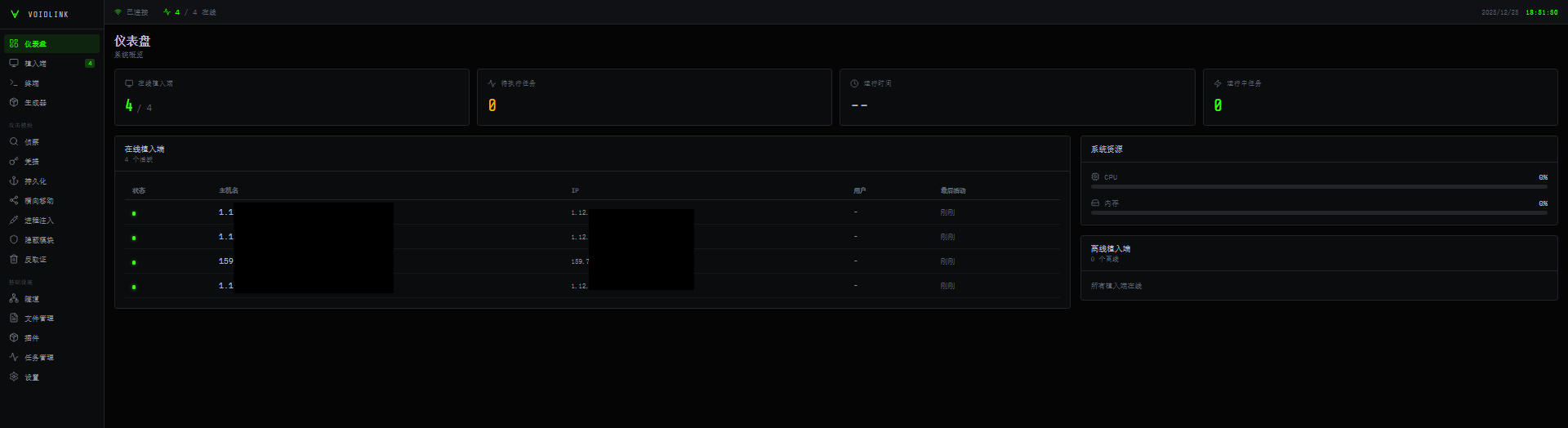
Through an account on BreachForums, Check Point Research got access to the panel and ransomware builder. Here, an affiliate has the option to build three different payloads: Windows, Linux and ESXi (as well as a dedicated tool for data exfiltration, which is not yet available at the time of writing):
Check Point Research analyzed all three payloads, uncovering various flaws and oversights – revealing that, behind the professional facade, VECT ransomware is not a technically sophisticated service.
Ransomware Cross-Platform Overview
As detailed in the following sections, VECT 2.0 targets Windows, Linux, and VMware ESXi through three distinct variants built on a shared codebase. While platform-specific disruption logic differs, the core encryption engine is identical across all three, a design decision that ensures the flaw described in the next section affects every supported platform equally.
All three variants are statically compiled C++ executables embedding the libsodium cryptographic library, accept operator-supplied command-line flags, support lateral movement, and produce an identical on-disk encrypted file format. The table below summarizes the key properties across all three variants.
| Property | Windows | Linux | ESXi |
|---|---|---|---|
| Architecture | PE64 (x86-64) | ELF64 (x86-64) | ELF64 (x86-64) |
| Toolchain | MinGW-w64 / C++ | GCC / C++ | GCC / C++ |
| Crypto library | libsodium (static) | libsodium (static) | libsodium (static) |
| Cipher | ChaCha20-IETF (RFC 8439) | ChaCha20-IETF (RFC 8439) | ChaCha20-IETF (RFC 8439) |
| Key size | 32 bytes | 32 bytes | 32 bytes |
| Nonce size | 12 bytes | 12 bytes | 12 bytes |
| Small file threshold | 131,072 bytes | 131,072 bytes | 131,072 bytes |
| Large file chunks | 4 | 4 | 4 |
| Chunk offset formula | file_size / 4 × index | file_size / 4 × index | file_size / 4 × index |
| Max chunk size | 32,768 bytes | 32,768 bytes | 32,768 bytes |
| Nonces written to disk | 1 (last chunk only) | 1 (last chunk only) | 1 (last chunk only) |
| Encrypted extension | .vect | .vect | .vect |
| Ransom note filename | !!!READ_ME!!!.txt | !!!READ_ME!!!.txt | !!!READ_ME!!!.txt |
| Default target path | All drives | / | /vmfs/volumes |
| Lateral movement | WMI / DCOM / SMB / SC / Schtasks / PSRemoting | SSH / SCP | SSH / SCP |
| Geofencing / CIS bypass | No | Yes (locale + timezone) | Yes (locale + timezone) |
| Anti-debug | Process scan + kernel object query | TracerPid check | TracerPid check |
| Encryption mode flags | N/A | Parsed, not implemented | Parsed, not implemented |
Nonce Flaw – “Large File” Destruction
Correct Cryptographic Identification
Before describing the flaw, a correction to existing public reporting is warranted. Several published analyses describe VECT’s encryption as ChaCha20-Poly1305 AEAD. This is incorrect as we confirmed that all three versions (Windows, Linux, ESXi) use the raw, unauthenticated ChaCha20 stream cipher in its IETF variant (RFC 8439) via libsodium’s crypto_stream_chacha20_ietf_xor. The _ietf designation refers specifically to the standardized 96-bit (12-byte) nonce and 32-bit counter parameterization distinct from Bernstein’s original 64-bit nonce form.
The ChaCha20-Poly1305 AEAD construction appends a 16-byte Poly1305 authentication tag to each ciphertext. No such tag exists in any VECT-encrypted file. The on-disk format contains only raw ciphertext followed by a 12-byte nonce – no MAC, no integrity protection, no authenticated encryption of any kind.
This misattribution likely stems from researchers trusting the threat actors’ own initial forum advertisement where VECT themselves incorrectly named the encryption scheme they use.
Overview
All three VECT 2.0 variants share a critical implementation flaw that causes any file larger than 131,072 bytes (128 KB, smaller even than a simple document) to be permanently and irrecoverably destroyed rather than encrypted for later decryption. The malware encrypts four independent chunks of each ”large file” using four freshly generated random 12-byte nonces, but appends only the final nonce to the specific encrypted file on disk. The first three nonces, each required to decrypt its respective chunk, are generated, used, and silently discarded. They are never stored on disk, in the registry, or transmitted to the operator.
Because ChaCha20-IETF requires both the 32-byte key and the exact matching 12-byte nonce to reverse each chunk, the first three quarters of every large file are unrecoverable by anyone including the ransomware operator who cannot provide a working decryption tool even after ransom payment. Since the vast majority of operationally critical files exceed this “large-size” threshold, VECT 2.0 functions in practice as a data wiper with a ransomware facade.
Small File Processing
For files not exceeding 131,072 bytes (128 KB), the entire content is encrypted in a single pass. One 12-byte nonce is generated, used to encrypt the full file in-place, and appended to the end of the file. The resulting on-disk layout is:
[ ChaCha20-IETF ciphertext - full file ][ nonce - 12 bytes ]
For this size class, the format is internally consistent and the appended nonce is sufficient to reverse the single encryption pass. These files are fully decryptable.
Large File Processing – The Flaw
For files exceeding 131,072 bytes (128 KB), VECT divides the file into four chunks at quarter-file offsets derived from the file size:
- Quarter size: file size divided by 4
- Chunk start offsets: 0, ¼, ½, ¾ of the file
- Chunk size per offset: up to 32,768 bytes (32 KB), or the remaining file length if shorter
The encryption loop processes each chunk in sequence. The per-chunk encryption helper is called once per iteration and on every call it generates a fresh cryptographically random 12-byte nonce via libsodium’s randombytes(), writing it into a single shared output buffer passed by the caller.
Because all four calls receive the same buffer address, each new nonce overwrites the previous one. After the loop completes, only the nonce from the fourth/final chunk remains in the buffer and this is the only nonce appended to the file.
The three discarded nonces are outputs of randombytes() (which on Windows internally resolves to SystemFunction036 / RtlGenRandom in advapi32.dll, forwarding to ProcessPrng in bcryptprimitives.dll; on Linux and ESXi it reads from the kernel CSPRNG via getrandom() or /dev/urandom through libsodium’s safe_read()), cryptographically unpredictable values that are never stored anywhere after the buffer is overwritten. There is no sidecar file, no registry entry, and no network exfiltration of nonce material in any of the three variants.
Cross-Platform Confirmation
The flaw is structurally identical across all three platform variants. In each case, the per-chunk encryption helper generates a fresh random nonce on every call and writes it into the same caller-supplied 12-byte buffer; all four iterations of the loop share this buffer; and a single 12-byte write to the end of the file follows the loop.
The ESXi variant also performs a zero-block check before each encryption call, where chunks consisting entirely of zero bytes are skipped (an optimization for sparse VMDK files). This does not affect the nonce flaw; the shared buffer is still overwritten on each non-skipped call and only the final surviving nonce reaches disk.
The flaw predates VECT 2.0. CPR’s analysis of an older ESXi variant identified in the wild prior to the 2.0 release confirms the identical four-chunk loop, quarter-offset calculation, shared nonce buffer, and single EOF nonce write – unchanged from the operator’s first publicly observed deployment through every known release.
Impact
| File region | Nonce on disk | Recoverable |
|---|---|---|
| Small file ≤ 128 KB – full content | Yes – appended at EOF | Fully |
| Large file – chunk at offset 0 (up to 32 KB) | No | Permanently lost |
| Large file – chunk at offset ¼ (up to 32 KB) | No | Permanently lost |
| Large file – chunk at offset ½ (up to 32 KB) | No | Permanently lost |
| Large file – chunk at offset ¾ (up to 32 KB) | Yes – appended at EOF | Last chunk only |
| Large file – all bytes outside the four chunks | N/A – not encrypted | Plaintext, unchanged |
Files commonly exceeding 128 KB span virtually everything from typical office documents, spreadsheets, and images to virtual machine disk images, database files, archives, and backups – precisely those most critical to business continuity and most targeted by ransomware operators. For this dominant file class, VECT 2.0 cannot function as recoverable ransomware; it is operationally a data wiper. Victims who pay the ransom cannot receive a functional decryptor for their most critical files – not because the operator is uncooperative, but because the nonces required for decryption no longer exist.
Windows Locker
The Windows variant targets local, removable, and network-accessible storage, renames encrypted files with the .vect extension, drops a ransom note and a branded desktop wallpaper, and executes defense-evasion, persistence, and lateral-movement routines. Of particular note is a comprehensive anti-analysis suite targeting 44 specific security and debugging tools, alongside a safe-mode persistence mechanism and multiple remote-execution methods for lateral spread.
Command-Line Interface and Default Behavior
The locker exposes the following operator options:
  -h, --help          Help
  -v, --verbose       Verbose output
  -p, --path <dir>    Target specific path
  -c, --creds <b64>   Override credentials
  --gpo               Enable GPO spread (default: on)
  --no-gpo            Disable GPO spread
  --mount             Enable network mount (default: on)
  --no-mount          Disable network mount
  --stealth           Enable self-delete (default: on)
  --no-stealth        Disable self-delete
  --force-safemode    Force safemode boot
GPO spread, network mounting, and self-deletion are all on by default. An operator deploying without flags, for example via Group Policy or a remote execution primitive, activates the full impact chain automatically, including spread, hidden volume access, and post-execution cleanup.
File Encryption and Renaming
Each target file is renamed to append .vect before encryption. The file is then opened in-place and encrypted using the ChaCha20-IETF scheme described in the preceding section. The nonce flaw applies identically: files larger than 131,072 bytes (128 KB) lose the first three chunk nonces permanently, thus resulting in large file destruction rather than encryption.
The encryption engine spawns worker threads in a fixed 1:7 scanner-to-encryptor ratio derived from a CPU-count-tiered multiplier: ×8 for machines with up to 4 CPUs, ×6 for 5-8 CPUs, and ×4 beyond that, hard-capped at 256 total. On a typical 8-CPU target, this produces 6 scanner and 42 encryptor threads simultaneously competing for the same disk I/O channels – overkill by any measure, and a thread count that would make any seasoned ransomware developer laugh. Families like LockBit cap their pools at 1-2× CPU count for good reason; spawning six times as many threads as there are CPUs does not encrypt files faster; it simply means the operating system spends more time switching between threads than doing useful work. This is a textbook mistake made by developers who read about parallelism but skipped the part about profiling. The fact that it is shipped in a supposedly operational ransomware tool speaks volumes about the maturity of whoever is behind this project.
Ransom Note and Wallpaper
After encrypting each drive target, the locker drops !!!READ_ME!!!.txt, assembled from multiple decoded string fragments (see the ransom note in the Appendix). Then, it generates a replacement desktop wallpaper (dvm3_wall.bmp) that carries the VECT 2.0 brand banner, as shown in the image below.
Target Selection and Exclusions
Drive enumeration covers logical drives and network-mapped resources. The file selection logic skips the following to leave the operating system functional enough for the victim to access the payment portal:
Excluded directories: Windows, Windows.old, Boot, $Recycle.Bin, System Volume Information, Program Files, Program Files (x86), ProgramData
Excluded boot files: bootmgr, bootmgr.efi, bootmgfw.efi, bootsect.bak, boot.ini, ntldr
Excluded extensions: .exe, .dll, .sys
These represent the builder defaults; affiliates may configure additional exclusions at sample generation time.
Process and Service Disruption
When running with elevated privileges, the locker stops services via the Windows Service Control Manager and terminates the following processes to release file handles before encryption begins: sql.exe, oracle.exe, mysqld.exe, excel.exe, winword.exe, outlook.exe, firefox.exe, thunderbird.exe.
Unlike typical RaaS offerings where affiliates can customize kill lists, this list is hardcoded by the builder and cannot be modified at sample generation time.
Persistence and Safe-Mode Preparation
When --force-safemode is active, the locker executes bcdedit /set {default} safeboot minimal to configure the next boot into minimal safe mode, then writes its own executable path into the Windows registry under the safe-boot service load path with value "Service". This ensures the locker runs on the subsequent safe-mode boot, where the majority of security products are disabled. After completing execution, the boot configuration entry is removed to avoid persistent boot loops. Task Manager is also disabled via the registry for the duration of execution.
Lateral Movement
The locker contains multiple encoded remote-execution script templates enabling propagation to additional Windows hosts using operator-supplied credentials (--creds). Methods include: admin share file copy, Windows Credential Manager storage via cmdkey, WMI execution, DCOM/MMC application instantiation, remote scheduled task creation, remote service installation via sc.exe, and PowerShell remoting. Host discovery combines Windows domain enumeration with a local subnet sweep using network adapter information.
Anti-Analysis
The Windows variant implements three layered analyst-environment detection mechanisms. All three detection mechanisms are present in compiled form but are never invoked. The cross-reference analysis confirms zero call sites reach any of the three functionalities in this build. This is consistent with a conditional compilation flag that was left disabled at build time, and represents a meaningful gap: an analyst running this sample under any of the targeted tools will not trigger any evasive response.
No code obfuscation is applied, although the most operator-facing strings are concealed using a rotating 64-bit XOR scheme: each byte is XORed against the corresponding byte of a fixed 64-bit key, cycling through all eight key bytes.
- Running-process scan
A full process snapshot is taken and each process name is compared against a hardcoded list of 44 analysis tools (originally 47, but we removed the duplicates), covering debuggers, import reconstructors, PE utilities, process monitors, network sniffers, and sandbox controllers (the full list of detected tools can be found in the Appendix section).
- Parent process check
The parent process image path is retrieved and matched against a list of debugging environments:devenv,windbg,x64dbg,x32dbg,ollydbg,ida. A process launched from any of these is treated as running under analysis. - Kernel debug-object query
The Windows native APINtQueryInformationProcessis resolved dynamically fromntdll.dllat runtime avoiding static import detection and queried for theProcessDebugObjectHandleinformation class. A non-null return indicates an attached debugger.
Defense Evasion and Cleanup
| Action | Method |
|---|---|
| Disable Windows Defender | Set-MpPreference via PowerShell disables realtime, behavior, IOAV, and script scanning |
| Delete shadow copies | vssadmin delete shadows /all /quiet |
| Clear event logs | wevtutil cl Application, Security, System, Windows PowerShell |
| Delete PowerShell history | PSReadLine\\ConsoleHost_history.txt |
| Delete recent file entries | %APPDATA%\\Microsoft\\Windows\\Recent\\* |
| Self-delete | Delayed cmd /c with ping stall followed by forced deletion |
ESXi Locker – The Hypervisor Ransomware
The ESXi variant of the VECT ransomware targets VMware ESXi hypervisors and employs geofencing and anti-debugging before disrupting various system services, wiping logs, and encrypting victim files, defaulting to the VMware File System mount point at /vmfs/volumes. The malware also supports SSH-based lateral movement, where the ransomware tries to use available credentials to connect to known SSH hosts.
Anti-Analysis and Geofencing
Before executing any malicious code, the ransomware employs two simple anti-analysis checks: First, it checks if it is running in a CIS state, and if so, exits without encryption. The malware runs timedatectl and compares the time zones against a blacklist and checks the LANG and LC_ALL environment variables, validating that the country code does not match one of the excluded countries.
Before 2022 CIS checks were very common in RaaS malware. During the start of the Russo-Ukrainian war, most RaaS programs removed Ukraine from the CIS countries list. During recent years these checks have been largely removed from ransomware. VECT including such checks and even adding Ukraine to the list of exclusions is rather uncommon. Check Point Research has two theories regarding this observation: either this code was AI generated, where LLMs were trained with Ukraine being part of CIS or VECT used an old code base for their ransomware.
Additionally to these checks, the malware probes for the presence of a debugger by checking the value of TracerPid in /proc/self/status, exiting if any tracing process is found.
To obfuscate from basic static analysis, the authors decided to implement strings as stack strings. Some strings, most notably the different command line options, are additionally XORed with a single byte key:
Command-Line Interface and SSH lateral movement
The following command line options are available:
  --path <dir>       Target directory (default: /vmfs/volumes)
  --spread           Enable SSH lateral movement
  --fast             Fast mode: encrypt only 1MB
  --medium           Medium mode: encrypt 4 parts (64MB each)
  --secure           Secure mode: encrypt 100% (default)
  --no-kill-vms      Don't kill running VMs (encrypt only)
  --verbose          Enable verbose output
  --help             Show this help message
Operators can seemingly decide between three different encryption methods, --fast, --medium, and --secure, to find a tradeoff between speed and thoroughness of the encryption – however, the ransomware does not actually implement these different modes – the code parses them into variables, but they are never read back. Every execution, regardless of operator-selected flag, applies the same hardcoded thresholds: 131,072-byte large-file boundary and 32,768-byte maximum chunk size. The same goes for the Linux variant we describe further below.
If the --spread option is supplied, the malware tries to spread laterally like an SSH based worm:
- All readable keys from the home and
/rootdirectories are extracted /etc/ssh/ssh_configand~/.ssh/configare read and parsed for any hostnames and corresponding usernames- All
known_hostsfiles are zeroed out to avoid any host-key warnings - For each host, the locker tries to connect with each of the collected usernames as well as a hardcoded list of common usernames
- If a connection succeeds, the malware copies itself over via
scpand executes itself viassh
Service Disruption, Log Wiping and Encryption
Before running any encryption, the malware makes sure to shut down any services that could hold any file locks or could otherwise interfere with the process. It starts by disabling the ESXi firewall via the esxcli utility, as well as specific firewall rulesets and shutting down various ESXi health monitoring processes:
Afterwards, it proceeds with shutting down other services and processes, like databases, backup tools, Hypervisor related services and security products. Shutdown is either attempted gracefully, via systemctl stop and service stop, or aggressively via pkill -9 and systemctl disable --now . A full list of targeted services can be found in the Appendix.
To remove any locks from virtual machine disk files, the VECT locker invokes various legitimate administration utilities to shut down any running virtual machines. However, contrary to its name, the locker not only targets ESXi but also other common Hypervisors:
| Tool | Hypervisor targeted |
|---|---|
vmware-cmd / vmrun | VMware products |
VBoxManage | Oracle VirtualBox |
virsh | libvirt / KVM / QEMU |
esxcli | VMware ESXi |
xm / xl | Xen Hypervisor |
Next, various shell history files and logs in /var/log are removed or zeroed-out. This includes logs from hypervisors, container services, databases, web servers, audit logs or other system logs and journals (see the Appendix for a complete list).
After this prelude, the actual encryption process is kicked off: If no path is supplied, the default path of /vmfs/volumes is used, which is the default VMware File System (VMFS) mount point for all datastores. In a multi-threaded process, each datastore is searched for files to encrypt. The ransomware maintains a sensible blacklist, which excludes several directories hosting mainly executables, system files or config files:
/proc, /sys, /dev, /bin, /sbin, /lib64, /usr, /etc, /boot, /var/run, /var/lib, /bootbank, /altbootbank, /store, /locker, /vmfs/volumes/.sdd.sf, /vmfs/volumes/.fbb.sf, /vmfs/volumes/.fdc.sf, /vmfs/volumes/.pb, /vmfs/volumes/.vh
Again, the thread count is chosen rather excessively, by multiplying the amount of CPU cores by 4, clamping the value between a minimum of 32 and a maximum of 256.
By sharing a codebase with the other versions, see encryption process is the same and contains the same flaw in its implementation: it only includes the latest nonce when chunk-processing a big file:
Finally, if the malware was configured to do so, the ransom note is dropped to /home, /root and /tmp, as well as in various system paths:
| Path | Purpose |
|---|---|
/etc/motd | Login banner (message of the day) |
/etc/issue | Pre-login system banner |
/etc/issue.net | Network login banner |
/etc/profile.d/vector_notice.sh | Shell script displaying the note, ran on shell login |
Linux Locker
The Linux version is built on the same codebase as the ESXi and implements a subset of its functionality. This becomes apparent when comparing the execution flow of the main functions side-by-side:
Just like the ESXi version, the malware first kills any services and processes that could interfere with the encryption, shuts down any VMs (interestingly also including ESXi VMs) and wipes system logs and shell history files. Then, encryption is started, with the system root / as the default path and ransom notes are written to disk. The Linux locker, just like its ESXi counterpart, supports the --spread SSH lateral movement functionality. Due to the shared codebase, the locker also fails to save the first three nonces when encrypting large files, making fill recovery of big files impossible.
The Linux version also has another oversight in the implementation of the encryption. Just like in the ESXi locker, the command line flags are supposed to be encrypted, but the authors accidentally designed a double XOR encryption scheme, which cancels out the encryption and leads to plain text strings being present in the binary:
On a side note, even the ASCII art is broken because the developers forgot to escape the backslash characters:
Conclusion
VECT 2.0 presents an ambitious threat profile with multi-platform coverage, an active affiliate program, supply-chain distribution via the TeamPCP partnership, and a polished operator panel. In practice, the technical implementation falls significantly short of its presentation.
Check Point Research’s analysis reveals that the ransomware’s encryption flaw is not a minor edge case but a fundamental design error affecting virtually every file of consequence. At a threshold of only 128 KB, smaller than a typical email attachment or office document, what the code classifies as a large file encompasses not just VM disks, databases, and backups, but routine documents, spreadsheets, and mailboxes. In practice, almost nothing a victim would care to recover falls below this boundary.
The nonce-handling bug is identical across all three platform variants and as confirmed through analysis of an earlier variant identified in the wild prior to the VECT 2.0 release, has been present since the operator’s first publicly observed deployment. It has never been corrected. Victims who pay the ransom cannot receive a working decryptor for their largest files, not through operator deception, but because the information required for decryption was irrecoverably destroyed at the moment of encryption. An overly aggressive thread scheduler that actively harms encryption throughput, and three fully compiled but permanently unreachable anti-analysis routines, further reinforce this assessment: the authors know what features a professional ransomware tool should have, but demonstrably struggled to implement them correctly or at all.
Beyond the nonce flaw, CPR identified a pattern of incomplete implementation: advertised encryption modes that are parsed but never applied, string obfuscation routines that accidentally cancel themselves out, and a cipher incorrectly described in public reporting. Together these findings paint a picture of a group with operational ambition, reflected in the BreachForums open-affiliate model and the TeamPCP supply-chain campaign, but with cryptographic and software engineering maturity that does not match the scale of the operation they are attempting to run.
The announcement of forthcoming “Cloud Lockers” and the low technical barrier introduced by the open-affiliate model both warrant continued monitoring. As CPR has demonstrated, the current implementation has severe limitations but those can be corrected in a future version, and the distribution infrastructure to deploy such a version at scale already exists.
Protections
Check Point Threat Emulation and Harmony Endpoint provide comprehensive coverage of attack tactics, file types, and operating systems and protect against the attacks and threats described in this report.
IOCs
| SHA-256 | VECT Version |
|---|---|
| a7eadcf81dd6fda0dd6affefaffcb33b1d8f64ddec6e5a1772d028ef2a7da0f2 | ESXi |
| 58e17dd61d4d55fa77c7f2dd28dd51875b0ce900c1e43b368b349e65f27d6fdd | ESXi |
| e1fc59c7ece6e9a7fb262fc8529e3c4905503a1ca44630f9724b2ccc518d0c06 | Linux |
| 8ee4ec425bc0d8db050d13bbff98f483fff020050d49f40c5055ca2b9f6b1c4d | Windows |
| 9c745f95a09b37bc0486bf0f92aad4a3d5548a939c086b93d6235d34648e683f | Windows |
| e512d22d2bd989f35ebaccb63615434870dc0642b0f60e6d4bda0bb89adee27a | Windows |
Appendix
Analysis tools detected by Windows locker:
| ollydbg.exe | x64dbg.exe | x32dbg.exe | windbg.exe |
| x96dbg.exe | ida.exe | ida64.exe | idag.exe |
| idag64.exe | idaw.exe | idaw64.exe | idaq.exe |
| idaq64.exe | immunitydebugger.exe | ImportREC.exe | MegaDumper.exe |
| scylla.exe | scylla_x64.exe | scylla_x86.exe | protection_id.exe |
| reshacker.exe | ResourceHacker.exe | processhacker.exe | procexp.exe |
| procexp64.exe | procmon.exe | procmon64.exe | autoruns.exe |
| autorunsc.exe | filemon.exe | regmon.exe | wireshark.exe |
| dumpcap.exe | hookexplorer.exe | PETools.exe | LordPE.exe |
| SysInspector.exe | proc_analyzer.exe | sysAnalyzer.exe | sniff_hit.exe |
| joeboxcontrol.exe | joeboxserver.exe | fiddler.exe | httpdebugger.exe |
Services targeted by Linux/ESXi locker:
| acronis | acronis_agent | aide | amanda |
| avast | avg | BackupExecAgent | bareos-fd |
| bitdefender | borg | carbonblack | cassandra |
| cb-sensor | chkrootkit | clamav | clamav-daemon |
| clamav-freshclam | clamd | cockroach | consul |
| couchdb | cylance | eset | etcd |
| falcon-sensor | freshclam | influxdb | kaspersky |
| kvm | libvirtd | lynis | mariadb |
| mariadbd | mcafee | memcached | mongod |
| mongodb | mysql | mysqld | neo4j |
| ossec | postgres | postgresql | qemu |
| rclone | rdiff-backup | redis | redis-server |
| restic | rkhunter | rsnapshot | sentinelone |
| sophos | symantec | syncthing | tripwire |
| vboxadd | VBoxClient | vboxdrv | VBoxHeadless |
| vboxservice | VBoxService | veeam | VeeamDeploymentSvc |
| virt-install | virt-manager | vmware | vmware-authd |
| vmware-hostd | vmware-rawdiskCreator | vmware-tray | vmware-usbarbitrator |
| vmware-user | vmware-vmx | vmware-vprobe | wazuh |
| wazuh-agent | xen | xenconsoled | xend |
| xenstored |
Logs targeted by Linux/ESXi locker:
Log files: /var/log/syslog, /var/log/messages, /var/log/debug, /var/log/secure, /var/log/auth.log, /var/log/kern.log, /var/log/daemon.log, /var/log/user.log, /var/log/mail.log, /var/log/mail.err, /var/log/cron.log, /var/log/boot.log, /var/log/dmesg, /var/log/faillog, /var/log/lastlog, /var/log/tallylog, /var/log/wtmp, /var/log/btmp, /var/log/utmp, /var/run/utmp
Rotate logs (Wildcards): /var/log/syslog.*, /var/log/messages.*, /var/log/auth.log.*, /var/log/auth.log*, /var/log/secure.*, /var/log/secure*, /var/log/kern.log.*, /var/log/*.gz, /var/log/*.1, /var/log/*.old, /var/log/cron*, /var/log/ufw.log*, /var/log/firewalld*, /var/log/audit/audit.log*, /var/log/dpkg.log*, /var/log/yum.log*, /var/log/dnf.log*, /var/log/apt/*, /var/log/cloud-init*.log
Application specific logs: /var/log/apache2/*, /var/log/httpd/*, /var/log/nginx/*, /var/log/mysql/*, /var/log/postgresql/*, /var/log/mongodb/*, /var/log/redis/*, /var/log/docker/*, /var/log/containers/*, /var/log/pods/*, /var/log/journal/*, /run/log/journal/*, /tmp/*.log, /var/tmp/*.log
Shell & command history files: .bash_history, .zsh_history, .mysql_history, .psql_history, .python_history, .lesshst, .viminfo , /root/.ash_history (ESXi locker only)
ESXi specific logs: /var/log/vmkernel.log, /var/log/vmkwarning.log, /var/log/vmksummary.log, /var/log/hostd.log, /var/log/vpxa.log, /var/log/fdm.log, /var/log/shell.log, /var/log/syslog, /var/log/vobd.log, /var/log/vmware/*
Ransom Note:
  !!! README !!!

  ===============
   :::     ::: :::::::::: :::::::: :::::::::::
   :+:     :+: :+:       :+:    :+:    :+:
   +:+     +:+ +:+       +:+           +:+
   +#+     +:+ +#++:++#  +#+           +#+
    +#+   +#+  +#+       +#+           +#+
     #+#+#+#   #+#       #+#    #+#    #+#
       ###     ########## ########     ###
  ===============

  Dear Management, all of your files have been encrypted with ChaCha20 which is an unbreakable encryption algorithm.
  Sadly, this is not the only bad news for you. We have also exfiltrated your sensitive data, consisting mostly of databases, backups and other personal information
  from your company and will be published on our website if you do not cooperate with us.

  The only way to recover your files is to get the decryption tool from us.

  To obtain the decryption tool, you need to:
  1. Open Tor Browser and visit: <http://vectordntlcrlmfkcm4alni734tbcrnd5lk44v6sp4lqal6noqrgnbyd.onion/chat/REDACTED>
  2. Follow the instructions on the chat page
  3. Receive a sample decryption of up to 4 small files
  4. We will provide payment instructions
  5. After payment, you will receive decryption tool

  WARNING:
  - Do not modify encrypted files
  - Do not use third party software to restore files
  - Do not reinstall system

  If you violate these rules, your files will be permanently damaged.

  Files encrypted: [N]
  Total size: [size] bytes
  Unique ID: REDACTED

  Backup contact (Qtox): 1A51DCBB33FBF603B385D223F599C6D64545E631F7C870FFEA320D84CE5DAF076C1F94100B5B
The post VECT: Ransomware by design, Wiper by accident appeared first on Check Point Research.