 Entrar
The Copilot Retreat: Why Microsoft is Scrubbing Its AI Brand from Windows 11 Apps
13 de Abril de 2026, 05:13
The post The Copilot Retreat: Why Microsoft is Scrubbing Its AI Brand from Windows 11 Apps appeared first on Daily CyberSecurity.


Gmail users in the US can now change their email address without losing data. Here’s how the long-awaited Google feature works and its key limits.
The post Gmail Finally Lets You Change Your Email Address Without Losing Anything appeared first on TechRepublic.



Android 17 beta is here. Here’s what is confirmed so far, what leaks suggest, and which rumored features may arrive later in 2026.
The post Android 17 Leaks Reveal Major Redesign, AI Features, and Privacy Upgrades appeared first on TechRepublic.
This episode discusses Meta Ray-Ban Smart Glasses, which blend a camera, microphone, AI features, and social media integration into sunglasses that look like normal fashion eyewear, raising major privacy concerns. It highlights reports that footage captured by the glasses may be reviewed by human contractors to help train Meta’s AI systems, and notes critics’ concerns […]
The post The Privacy Problem With Meta’s Ray-Ban Smart Glasses appeared first on Shared Security Podcast.
The post The Privacy Problem With Meta’s Ray-Ban Smart Glasses appeared first on Security Boulevard.


As International Women’s Day is marked on 8 March, conversations around representation, leadership, and opportunity across industries take renewed focus. In cybersecurity — a field that continues to evolve at remarkable speed — women in cybersecurity are playing a growing role in strengthening digital resilience, shaping security strategies, and mentoring the next generation of professionals.
Their journeys often involve navigating complex challenges while continuously adapting to new technologies, emerging threats, and changing security landscapes.
As part of its Women in Cybersecurity initiative, The Cyber Express asked cybersecurity leaders a simple but important question:
“Which skill or mindset has played the biggest role in building your confidence and growth in cybersecurity?”
From curiosity and continuous learning to calm decision-making and structured problem-solving, their responses highlight the perspectives that have helped them grow and succeed in the cybersecurity industry.
Here’s what they shared.

| Name | Designation | Company Name |
| Celia Mantshiyane | Group Chief Information Security Officer | FirstRand |
| Radhika Bajpai | CISO | Russell Investments |
| Holly Foxcroft | Cyber Security Business Partner - BISO | OneAdvanced |
| Dr Sheeba Armoogum | Associate Professor in Cybersecurity | University of Mauritius |
| Irene Corpuz | Founding Partner, Head of Governance & Communications | Women in Cyber Security Middle East |
| Patricia "Patty" Voight | Executive Managing Director; CISO and Tech Risk Management | Webster Bank |
| Alya Al Marzooqi | Group Digital Risk Management and Compliance Manager | ADNOC Group |
| Sakshi Porwal | Global Chief Information Security Officer & Cybersecurity Consulting Practice Head | Compunnel Inc. |
| Rona Michele Spiegel, CISSP | Senior Manager, Security and Trust, Mergers and Acquisitions | Autodesk |
| Dr Priyanka Sunder | Co-Founder & Chief Human Risk Intelligence Officer | Secure Mojo |
| Lauren Dana Rosenblatt | Vice President, Chief Information Security Officer (CISO) | PSEG |
| Sheeba Sultan Hasnain | Chairwoman & CIO | SENTIENTE |
| Dr. Meetali Sharma | Director - Risk, Compliance and Information Security | SDG Corporation |
| Kylie Watson | Head of Cyber Security, ANZ/ASEAN/Japan/India/GC/Middle East/Africa | DXC Technology |
| Catherine Rowe | Chief Information Security Officer | Reserve Bank of Australia |
| Maryam Bechtel | General Manager, Chief Information Security Officer (CISO) | TAL Australia |
| Sofia Scozzari | CEO (Chief Executive Officer) and Founder | Hackmanac |
| Archana Venugopal | Senior Vice President & Chief Information Secuirty Officer National aCommodity& Derivates Exchange | National Commodity & Derivative Exchange Of India Limited |
| Shivani Arni | Enterprise CISO | Mahindra Group |
| Cindy (Monceaux) Hoots | Chief Digital Officer & CIO | AstraZeneca |
| Jae Evans | EVP, Oracle Cloud Infrastructure and Global CIO | Oracle |
| Sheila Jordan | Chief Digital Technology Officer | Honeywell |
| Maria Demaree | Senior Vice President, Enterprise Business and Digital Transformation & CIO | Lockheed Martin |
| Heide Young | Manager Cyber Strategy & Engagement | NEOM |
| Eman Al Awadhi | Vice President – Network and Cyber Security | Expo City Dubai |
| Julia Dudenko | Group CISO | Haniel |
| Anne Neuberger | Deputy National Security Advisor, Cyber & Emerging Tech | National Security Council, The White House |
| Kris Lovejoy | Global Head of Strategy | Kyndryl |
| Ramya Ganesh | Cybersecurity XDR Leader | Cisco |
| Jane Teh | Founder and CEO | VortiQ[x] |
| Nasrin Rezai | SVP, Chief Information Security Officer | Verizon |
| Laura Deaner | Chief Information Security Officer | The Depository Trust & Clearing Corporation (DTCC) |
| Mignona Coté | SVP Chief Information Security Officer | Infor |
| Noopur Davis | Global CISO. Chief Product Privacy Officer. Corporate EVP. | Comcast |
| Teresa Zielinski | Vice President, CISO | GE Vernova |
| Andrea Abell | Chief Information Security Officer | Eli Lilly and Company |
| Deneen DeFiore | Vice President & Chief Information Security Officer | United Airlines |
| Elizabeth Joyce | EVP & Global CISO | State Street |
| Mary Rose Martinez | Chief Information Security Officer and Vice President of Infrastructure | Marathon Petroleum Corporation |
| Marnie (Huss) Wilking | VP Chief Security Officer | Booking.com |
| Hannah Suarez 🇵🇸 | CISO | Loyalty Status Co |
| Annie (Anne) Haggar | Deputy Chief of Staff | Australian Government |
| Sujata Misra | GM - Network Infra and Security Leader | Brigade Group |
| Bonnie Butlin | Co-Founder and Executive Director | Security Partners' Forum |
| Gurdeep Kaur | Chief Operating Officer | Suraksha Catalyst |
| Vandana Verma | President | InfoSec Girls |
| Mansi Thapar | Global Head – Cyber Security & Infra | Apollo Tyres |
| Rosalia Hajek | CISO | Topgolf Callaway Brands |
| Carmen Marsh | President & CEO | United Cybersecurity Alliance (Europe, US, Middle East & Japan) |
| Lisa Fitzgerald | Partner | Norton Rose Fulbright |
Compare Okta vs Microsoft Entra ID for enterprise SSO. Learn differences in authentication, security, and identity management for SaaS and enterprise platforms.
The post Okta vs Microsoft Entra ID: Which Enterprise SSO Platform Is Better? appeared first on Security Boulevard.

It's been nearly 20 years since Google revealed Android, which the company described as the first "truly open" mobile operating system, setting Google-powered phones apart from the iPhone's aggressively managed experience. Over time, though, Android has become more aligned with Apple's approach. For the moment, users still have the final say in what software runs on their increasingly locked-down smartphones. Later this year, though, Google plans to seriously curtail that freedom in the name of security.
In the coming weeks, Google will officially debut Android developer verification, which will require app makers outside the Play Store to register with their real names and pay a fee to Google. Failure to do so will block their apps from installation (sometimes called sideloading) on virtually all Android devices. Google says this is a necessary evolution of the platform's security model, but upending the status quo could push developers away from Android and risk the privacy of those that remain.
This might make your phone a little safer, sure, but it won't stop people from getting scammed. At the same time, it could rob the Android ecosystem of what made it special in the first place.
© Aurich Lawson | Getty Images

It’s hard to overstate the role that Wi-Fi plays in virtually every facet of life. The organization that shepherds the wireless protocol says that more than 48 billion Wi-Fi-enabled devices have shipped since it debuted in the late 1990s. One estimate pegs the number of individual users at 6 billion, roughly 70 percent of the world’s population.
Despite the dependence and the immeasurable amount of sensitive data flowing through Wi-Fi transmissions, the history of the protocol has been littered with security landmines stemming both from the inherited confidentiality weaknesses of its networking predecessor, Ethernet (it was once possible for anyone on a network to read and modify the traffic sent to anyone else), and the ability for anyone nearby to receive the radio signals Wi-Fi relies on.
In the early days, public Wi-Fi networks often resembled the Wild West, where ARP spoofing attacks that allowed renegade users to read other users' traffic were common. The solution was to build cryptographic protections that prevented nearby parties—whether an authorized user on the network or someone near the AP (access point)—from reading or tampering with the traffic of any other user.
© Getty Image | BlackJack3D
Some software providers have decided to lead by example and offer users a choice about the Artificial Intelligence (AI) features built into their products.
The latest example is Mozilla, which now offers users a one-click option to disable generative AI features in the Firefox browser.
Audiences are divided about the use of AI, or as Mozilla put it on their blog:
“AI is changing the web, and people want very different things from it. We’ve heard from many who want nothing to do with AI. We’ve also heard from others who want AI tools that are genuinely useful. Listening to our community, alongside our ongoing commitment to offer choice, led us to build AI controls.”
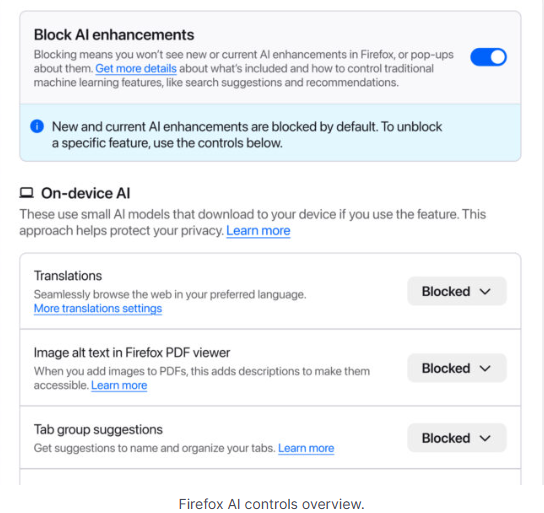
Mozilla is adding an AI Controls area to Firefox settings that centralizes the management of all generative AI features. This consists mainly of a master switch, “Block AI enhancements,” which lets users effectively run Firefox “without AI.” It blocks existing and future generative AI features and hides pop‑ups or prompts advertising them.
Once you set your AI preferences in Firefox, they stay in place across updates. You can also change them whenever you want.
Starting with Firefox 148, which rolls out on February 24, you’ll find a new AI controls section within the desktop browser settings.
You can turn everything off with one click or take a more granular approach. At launch, these features can be controlled individually:
We applaud this move to give more control to the users. Other companies have done the same, including Mozilla’s competitor DuckDuckGo, which made AI optional after putting the decision to a user vote. Earlier, browser developer Vivaldi took a stand against incorporating AI altogether.
Open-source email service Tuta also decided not to integrate AI features. After only 3% of Tuta users requested them, Tuta removed an AI copilot from its development roadmap.
Even Microsoft seems to have recoiled from pushing AI to everyone, although so far it has focused on walking back defaults and tightening per‑feature controls rather than offering a single, global off switch.
Many people are happy to use AI features, and as long as you’re aware of the risks and the pitfalls, that’s fine. But pushing these features on users who don’t want them is likely to backfire on software publishers.
Which is only right. After all, you’re paying the bill, so you should have a choice. Before installing a new browser, inform yourself not only about its privacy policy, but also about what control you’ll have over AI features.
Looking at recent voting results, I think it’s safe to say that in the AI gold rush, the real premium feature isn’t a chatbot button—it’s the off switch.
We don’t just report on privacy—we offer you the option to use it.
Privacy risks should never spread beyond a headline. Keep your online privacy yours by using Malwarebytes Privacy VPN.
Meta plans to test exclusive features that will be incorporated in paid versions of Facebook, Instagram, and WhatsApp. It confirmed these plans to TechCrunch.
But these plans are not to be confused with the ad-free subscription options that Meta introduced for Facebook and Instagram in the EU, the European Economic Area, and Switzerland in late 2023 and framed as a way to comply with General Data Protection Regulation (GDPR) and Digital Markets Act requirements.
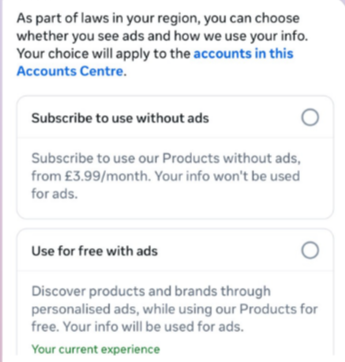
From November 2023, users in those regions could either keep using the services for free with personalized ads or pay a monthly fee for an ad‑free experience. European rules require Meta to get users’ consent in order to show them targeted ads, so this was an obvious attempt to recoup advertising revenue when users declined to give that consent.
This year, users in the UK were given the same choice: use Meta’s products for free or subscribe to use them without ads. But only grudgingly, judging by the tone in the offer… “As part of laws in your region, you have a choice.”
That ad-free option, however, is not what Meta is talking about now.
The newly announced plans are not about ads, and they are also separate from Meta Verified, which starts at around $15 a month and focuses on creators and businesses, offering a verification badge, better support, and anti‑impersonation protection.
Instead, these new subscriptions are likely to focus on additional features—more control over how users share and connect, and possibly tools such as expanded AI capabilities, unlimited audience lists, seeing who you follow that doesn’t follow you back, or viewing stories without the poster knowing it was you.
These examples are unconfirmed. All we know for sure is that Meta plans to test new paid features to see which ones users are willing to pay for and how much they can charge.
Meta has said these features will focus on productivity, creativity, and expanded AI.
Unfortunately, this feels like another refusal to listen.
Most of us aren’t asking for more AI in our feeds. We’re asking for a basic sense of control: control over who sees us, what’s tracked about us, and how our data is used to feed an algorithm designed to keep us scrolling.
Users shouldn’t have to choose between being mined for behavioral data or paying a monthly fee just to be left alone. The message baked into “pay or be profiled” is that privacy is now a luxury good, not a default right. But while regulators keep saying the model is unlawful, the experience on the ground still nudges people toward the path of least resistance: accept the tracking and move on.
Even then, this level of choice is only available to users in Europe.
Why not offer the same option to users in the US? Or will it take stronger US privacy regulation to make that happen?
We don’t just report on threats – we help protect your social media
Cybersecurity risks should never spread beyond a headline. Protect your social media accounts by using Malwarebytes Identity Theft Protection.
Update November 22. We’ve updated this article after realising we contributed to a perfect storm of misunderstanding around a recent change in the wording and placement of Gmail’s smart features. The settings themselves aren’t new, but the way Google recently rewrote and surfaced them led a lot of people (including us) to believe Gmail content might be used to train Google’s AI models, and that users were being opted in automatically. After taking a closer look at Google’s documentation and reviewing other reporting, that doesn’t appear to be the case.
Gmail does scan email content to power its own “smart features,” such as spam filtering, categorisation, and writing suggestions. But this is part of how Gmail normally works and isn’t the same as training Google’s generative AI models. Google also maintains that these feature settings are opt-in rather than opt-out, although users’ experiences seem to vary depending on when and how the new wording appeared.
It’s easy to see where the confusion came from. Google’s updated language around “smart features” is vague, and the term “smart” often implies AI—especially at a time when Gemini is being integrated into other parts of Google’s products. When the new wording started appearing for some users without much explanation, many assumed it signalled a broader shift. It’s also come around the same time as a proposed class-action lawsuit in the state of California, which, according to Bloomberg, alleges that Google gave Gemini AI access to Gmail, Chat, and Meet without proper user consent.
We’ve revised this article to reflect what we can confirm from Google’s documentation, as it’s always been our aim to give readers accurate, helpful guidance.
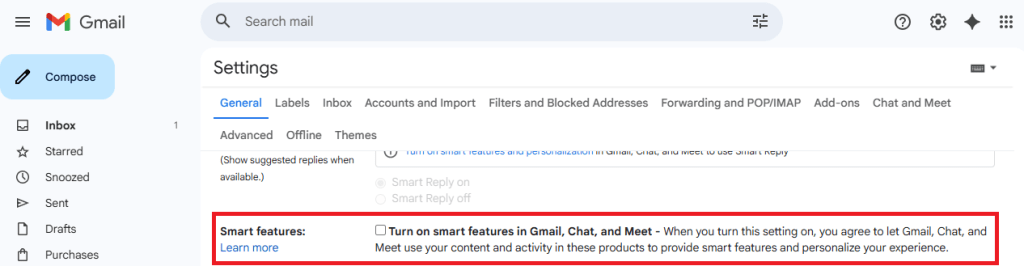
Google has updated some Gmail settings around how its “smart features” work, which control how Gmail analyses your messages to power built-in functions.
According to reports we’ve seen, Google has started automatically opting users in to allow Gmail to access all private messages and attachments for its smart features. This means your emails are analyzed to improve your experience with Chat, Meet, Drive, Email and Calendar products. However, some users are now reporting that these settings are switched on by default instead of asking for explicit opt-in—although Google’s help page states that users are opted-out for default.
Opting in or out requires you to change settings in two places, so I’ve tried to make it as easy to follow as possible. Feel free to let me know in the comments if I missed anything.
To fully opt out, you must turn off Gmail’s smart features in two separate locations in your settings. Don’t miss one, or AI training may continue.
We don’t just report on privacy—we offer you the option to use it.
Privacy risks should never spread beyond a headline. Keep your online privacy yours by using Malwarebytes Privacy VPN.

About a decade ago, Apple and Google started updating iOS and Android, respectively, to make them less susceptible to “juice jacking,” a form of attack that could surreptitiously steal data or execute malicious code when users plug their phones into special-purpose charging hardware. Now, researchers are revealing that, for years, the mitigations have suffered from a fundamental defect that has made them trivial to bypass.
“Juice jacking” was coined in a 2011 article on KrebsOnSecurity detailing an attack demonstrated at a Defcon security conference at the time. Juice jacking works by equipping a charger with hidden hardware that can access files and other internal resources of phones, in much the same way that a computer can when a user connects it to the phone.
An attacker would then make the chargers available in airports, shopping malls, or other public venues for use by people looking to recharge depleted batteries. While the charger was ostensibly only providing electricity to the phone, it was also secretly downloading files or running malicious code on the device behind the scenes. Starting in 2012, both Apple and Google tried to mitigate the threat by requiring users to click a confirmation button on their phones before a computer—or a computer masquerading as a charger—could access files or execute code on the phone.
© Aurich Lawson | Getty Images
