Visualização normal

Antes de ontemStream principal
  • ✇Cybersecurity News
  • OpenAI Launches “Workspace Agents” to Industrialize Corporate Labor Ddos
    The post OpenAI Launches “Workspace Agents” to Industrialize Corporate Labor appeared first on Daily CyberSecurity. Related posts: OpenAI Unveils AI-Powered Browser: ChatGPT Integration to Revolutionize Web Browse & Challenge Chrome The Final Countdown: OpenAI to Retire GPT-4o—But There’s a Catch for Enterprise Users The Rise of the Digital Concierge: OpenAI Hires OpenClaw Visionary to Turn ChatGPT into an Autonomous Agent

     
  • ✇Firewall Daily – The Cyber Express
  • OpenAI Expands Access to Advanced AI for Cybersecurity Testing Samiksha Jain
    OpenAI has announced a major expansion of its Trusted Access for Cyber (TAC) program, alongside the introduction of GPT 5.4 Cyber, a model designed to support defensive cybersecurity use cases. The move comes as the company prepares for more advanced AI systems in the coming months, with a focus on strengthening cyber defense while managing risks tied to increasingly capable models. The expansion of the Trusted Access for Cyber initiative aims to onboard thousands of verified individual defen
     

OpenAI Expands Access to Advanced AI for Cybersecurity Testing

Trusted Access for Cyber

OpenAI has announced a major expansion of its Trusted Access for Cyber (TAC) program, alongside the introduction of GPT 5.4 Cyber, a model designed to support defensive cybersecurity use cases. The move comes as the company prepares for more advanced AI systems in the coming months, with a focus on strengthening cyber defense while managing risks tied to increasingly capable models. The expansion of the Trusted Access for Cyber initiative aims to onboard thousands of verified individual defenders and hundreds of security teams responsible for protecting critical software and infrastructure. The program is positioned as part of a broader strategy to scale cybersecurity defenses in parallel with advances in artificial intelligence.

Trusted Access for Cyber Program Expands for Wider Defender Use

At the center of the announcement is the scaling of the Trusted Access for Cyber program, which was first introduced earlier this year. The initiative is designed to provide vetted cybersecurity professionals with controlled access to advanced AI tools that may otherwise be restricted due to their dual-use nature. With this expansion, OpenAI is introducing additional access tiers based on identity verification and trust signals. Individual users can now verify themselves through structured onboarding, while enterprises can request access for their teams. The goal is to extend advanced defensive capabilities to a broader group of legitimate users without opening the door to misuse. The company says this approach reflects a shift away from manually deciding who gets access. Instead, it relies on objective verification methods such as identity checks and usage signals to determine eligibility.

GPT 5.4 Cyber Built for Defensive Cybersecurity Workflows

A key component of the expanded Trusted Access for Cyber program is the launch of GPT 5.4 Cyber, a specialized version of its latest model fine-tuned for cybersecurity tasks. Unlike general-purpose models, GPT 5.4 Cyber is designed to be more permissive in handling cyber-related queries. This allows security professionals to perform advanced tasks such as binary reverse engineering, vulnerability analysis, and malware investigation without facing restrictive safeguards that might otherwise block legitimate work. However, access to GPT 5.4 Cyber is currently limited. OpenAI is deploying the model in a controlled manner to vetted security vendors, organizations, and researchers. This phased rollout reflects concerns around the dual-use nature of such capabilities, which could be exploited if widely accessible without safeguards.

Cybersecurity Strategy Focuses on Scaling Defenses with AI

The expansion of the Trusted Access for Cyber program is part of OpenAI’s broader cybersecurity strategy, which is built on three principles: democratized access, iterative deployment, and ecosystem resilience. The company argues that cyber risks are already widespread and growing, even before the rise of advanced AI. At the same time, AI tools are increasingly being used by both defenders and attackers. This dual-use reality has shaped OpenAI’s approach to gradually expanding access while strengthening safeguards. Since 2023, OpenAI has supported cybersecurity efforts through initiatives such as its Cybersecurity Grant Program and the development of safety frameworks for AI deployment. More recently, it introduced tools like Codex Security, which helps identify and fix vulnerabilities across codebases. According to the company, Codex Security has already contributed to fixing thousands of high and critical vulnerabilities, highlighting the potential for AI to accelerate defensive workflows.

Balancing Access and Risk in Trusted Access for Cyber

A central challenge addressed by the Trusted Access for Cyber program is how to balance accessibility with security. Cyber capabilities are inherently dual-use, meaning the same tools that help defenders can also be used by threat actors. To address this, OpenAI is combining broader access to general models with stricter controls for more advanced capabilities. Higher levels of access require stronger verification, clearer intent signals, and greater accountability. The company also notes that some limitations will remain in place, particularly in environments where visibility into usage is restricted. This includes scenarios involving zero-data retention or third-party platforms where monitoring is limited.

A Shift Toward Structured Cyber Defense Access

The expansion of the Trusted Access for Cyber program reflects a growing recognition that restricting access alone is not a sustainable cybersecurity strategy. As AI capabilities advance, defenders require equally powerful tools to keep pace with evolving threats. By focusing on verification and trust-based access rather than blanket restrictions, OpenAI is attempting to create a more structured model for deploying sensitive capabilities. This approach acknowledges the complexity of modern cybersecurity, where access to advanced tools can be both necessary and risky. At the same time, the controlled rollout of GPT 5.4 Cyber suggests that concerns around misuse remain significant. The success of this model will likely depend on how effectively access controls and monitoring mechanisms can scale alongside adoption. As AI continues to reshape cybersecurity, initiatives like the Trusted Access for Cyber program highlight the challenge of enabling defenders without inadvertently empowering attackers.
  • ✇Firewall Daily – The Cyber Express
  • Kali Linux 2026.1 Launches with 8 New Tools, UI Refresh, and Kernel Upgrade Ashish Khaitan
    Kali Linux continues to evolve as a leading platform for penetration testing, and its latest release, Kali Linux 2026.1, introduces a mix of visual updates, new tools, and system-level improvements. This release not only refines the user experience but also pays tribute to its roots in BackTrack, marking a significant milestone in the project’s history.  As with previous annual releases, Kali Linux 2026.1 arrives with a complete visual refresh. The updated theme spans across the entire user i
     

Kali Linux 2026.1 Launches with 8 New Tools, UI Refresh, and Kernel Upgrade

26 de Março de 2026, 03:15

Kali Linux 2026

Kali Linux continues to evolve as a leading platform for penetration testing, and its latest release, Kali Linux 2026.1, introduces a mix of visual updates, new tools, and system-level improvements. This release not only refines the user experience but also pays tribute to its roots in BackTrack, marking a significant milestone in the project’s history.  As with previous annual releases, Kali Linux 2026.1 arrives with a complete visual refresh. The updated theme spans across the entire user interface, including the boot menu, installer, login screen, and desktop environment.   New wallpapers have also been added, ensuring a modern and consistent aesthetic. The Kali Purple variant, designed for defensive security workflows, receives its own updated artwork as part of this overhaul. 

A Refreshed Look in Kali Linux 2026.1 

In addition to visual changes, the development team addressed a long-standing issue with the boot animation in live images. Earlier versions displayed only part of the animation, often appearing stuck at the beginning. With this release, the animation plays correctly and loops seamlessly if the boot process takes longer than expected.  One of the most notable additions in Kali Linux 2026.1 is the introduction of a BackTrack-inspired mode within the kali-undercover tool. This feature commemorates the 20th anniversary of BackTrack Linux, the predecessor to Kali.  The BackTrack mode recreates the look and feel of BackTrack 5, including its original wallpaper, color scheme, and window styling. Users can activate it through the system menu or by running the command: 
kali-undercover --backtrack 
The mode can be toggled off by executing the same command again, restoring the default Kali interface. This addition blends nostalgia with functionality, allowing long-time users to revisit the environment that laid the groundwork for modern penetration testing distributions. 

Eight New Tools Expand Capabilities 

The release introduces eight new tools to the Kali repositories, further enhancing its utility for security professionals. These additions include: 
  • AdaptixC2: An extensible framework for post-exploitation and adversarial emulation  
  • Atomic-Operator: tool designed to execute Atomic Red Team tests across multiple operating systems  
  • Fluxion: platform for security auditing and social engineering research  
  • GEF: An advanced debugging environment tailored for GDB  
  • MetasploitMCP: An MCP server integration for Metasploit  
  • SSTImap: An automated detection tool for server-side template injection vulnerabilities  
  • WPProbe: A fast enumeration tool for WordPress plugins  
  • XSStrike: cross-site scripting (XSS) scanner  
Among these, MetasploitMCP stands out for extending Metasploit’s functionality, aligning with ongoing efforts to improve modular and scalable penetration testing workflows. In addition to these tools, the release brings 25 new packages, removes 9 outdated ones, and includes 183 package updates. The Linux kernel has also been upgraded to version 6.18, ensuring better hardware support and performance improvements.

Known Issues with SDR Tools

Despite the advancements, Kali Linux 2026.1 is not without its limitations. Users relying on the kali-tools-sdr metapackage may encounter issues with the GNU Radio ecosystem. Tools such as gr-air-modes and gqrx-sdr are currently broken in this release. The development team has acknowledged these problems and expects to address them in a future update.  The Kali NetHunter platform, which enables penetration testing on mobile devices, also receives several updates. Bug fixes have been applied to resolve issues with WPS scanning, HID permission handling, and navigation via the back button.  Device-specific improvements are included as well. The Redmi Note 8 now supports a new kernel compatible with Android 16. Meanwhile, the Samsung S10 series benefits from a patch to libnexmonkali, restoring functionality for tools such as reaver, bully, and kismet when using internal wireless firmware in a Kali chroot environment. A development in this release is the introduction of a working wireless injection patch for QCACLD 3.0 hardware. This advancement may enable packet injection capabilities across a wide range of smartphones powered by Qualcomm chipsets, expanding the practical use of NetHunter in real-world testing scenarios.
  • ✇Security Boulevard
  • Prevention is the Only Cloud Security Strategy That Works  Peter Nebel
    In the evolving digital economy, adopting a prevention-first strategy for cloud workflows is essential. This article explores the importance of preemptive security measures to protect sensitive operations from breaches, detailing steps for organizations to enhance their security posture. The post Prevention is the Only Cloud Security Strategy That Works  appeared first on Security Boulevard.
     

Prevention is the Only Cloud Security Strategy That Works 

10 de Março de 2026, 08:15
EASM, breach, attacks data breach supply chain healthcare

In the evolving digital economy, adopting a prevention-first strategy for cloud workflows is essential. This article explores the importance of preemptive security measures to protect sensitive operations from breaches, detailing steps for organizations to enhance their security posture.

The post Prevention is the Only Cloud Security Strategy That Works  appeared first on Security Boulevard.

  • ✇Security Boulevard
  • The Attack Chain Your AI System is Already Missing  Mayank Kumar
    As AI adoption accelerates, organizations must evolve their security strategies from prompt filtering to comprehensive behavioral monitoring. This shift is critical to safeguarding against adaptive threats and ensuring safe AI deployment in production environments. The post The Attack Chain Your AI System is Already Missing  appeared first on Security Boulevard.
     
  • ✇The Cloudflare Blog
  • How we simplified NCMEC reporting with Cloudflare Workflows Mahmoud Salem · Rachael Truong
    Cloudflare plays a significant role in supporting the Internet’s infrastructure. As a reverse proxy by approximately 20% of all websites, we sit directly in the request path between users and the origin, helping to improve performance, security, and reliability at scale. Beyond that, our global network powers services like delivery, Workers, and R2 — making Cloudflare not just a passive intermediary, but an active platform for delivering and hosting content across the Internet.Since Cloudflare’s
     

How we simplified NCMEC reporting with Cloudflare Workflows

11 de Abril de 2025, 11:00

Cloudflare plays a significant role in supporting the Internet’s infrastructure. As a reverse proxy by approximately 20% of all websites, we sit directly in the request path between users and the origin, helping to improve performance, security, and reliability at scale. Beyond that, our global network powers services like delivery, Workers, and R2 — making Cloudflare not just a passive intermediary, but an active platform for delivering and hosting content across the Internet.

Since Cloudflare’s launch in 2010, we have collaborated with the National Center for Missing and Exploited Children (NCMEC), a US-based clearinghouse for reporting child sexual abuse material (CSAM), and are committed to doing what we can to support identification and removal of CSAM content.

Members of the public, customers, and trusted organizations can submit reports of abuse observed on Cloudflare’s network. A minority of these reports relate to CSAM, which are triaged with the highest priority by Cloudflare’s Trust & Safety team. We will also forward details of the report, along with relevant files (where applicable) and supplemental information to NCMEC.

The process to generate and submit reports to NCMEC involves multiple steps, dependencies, and error handling, which quickly became complex under our original queue-based architecture. In this blog post, we discuss how Cloudflare Workflows helped streamline this process and simplify the code behind it.

Life before Cloudflare Workflows

When we designed our latest NCMEC reporting system in early 2024, Cloudflare Workflows did not exist yet. We used the Workers platform Queues as a solution for managing asynchronous tasks, and structured our system around them.

Our goal was to ensure reliability, fault tolerance, and automatic retries. However, without an orchestrator, we had to manually handle state, retries, and inter-queue messaging. While Queues worked, we needed something more explicit to help debug and observe the more complex asynchronous workflows we were building on top of the messaging system that Queues gave us.

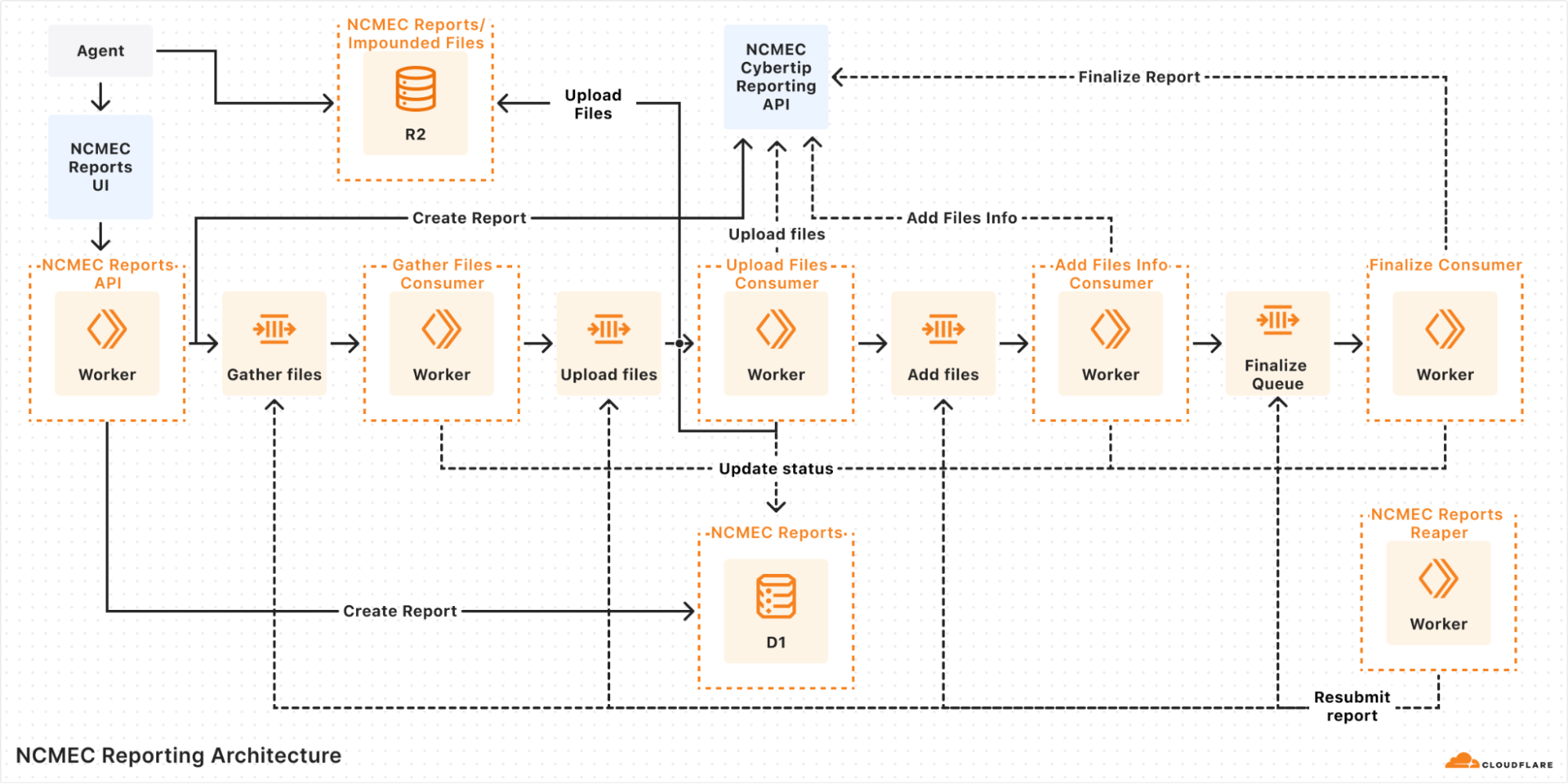
In our queue-based architecture each report would go through multiple steps:

  1. Validate input: Ensure the report has all necessary details.

  2. Initiate report: Call the NCMEC API to create a report.

  3. Fetch impounded files (if applicable): Retrieve files stored in R2.

  4. Upload files: Send files to NCMEC via API.

  5. Finalize report: Mark the report as completed.

A diagram of our queue-based architecture 

Each of these steps was handled by a separate queue, and if an error occurred, the system would retry the message several times before marking the report as failed. But errors weren’t always straightforward — for instance, if an external API call consistently failed due to bad input or returned an unexpected response shape, retries wouldn’t help. In those cases, the report could get stuck in an intermediate state, and we’d often have to manually dig through logs across different queues to figure out what went wrong.

Even more frustrating, when handling failed reports, we relied on a "Reaper" — a cron job that ran every hour to resubmit failed reports. Since a report could fail at any step, the Reaper had to deduce which queue failed and send a message to begin reprocessing. This meant:

  • Debugging was a nightmare: Tracing the journey of a single report meant jumping between logs for multiple queues.

  • Retries were unreliable: Some queues had retry logic, while others relied on the Reaper, leading to inconsistencies.

  • State management was painful: We had no clear way to track whether a report was halfway through the pipeline or completely lost, except by looking through the logs.

  • Operational overhead was high: Developers frequently had to manually inspect failed reports and resubmit them.

Queues gave us a solid foundation for moving messages around, but it wasn’t meant to handle orchestration. What we’d really done was build a bunch of loosely connected steps on top of a message bus and hoped it would all hold together. It worked, for the most part, but it was clunky, hard to reason about, and easy to break. Just understanding how a single report moved through the system meant tracing messages across multiple queues and digging through logs.

We knew we needed something better: a way to define workflows explicitly, with clear visibility into where things were and what had failed. But back then, we didn’t have a good way to do that without bringing in heavyweight tools or writing a bunch of glue code ourselves. When Cloudflare Workflows came along, it felt like the missing piece, finally giving us a simple, reliable way to orchestrate everything without duct tape.

The solution: Cloudflare Workflows

Once Cloudflare Workflows was announced, we saw an immediate opportunity to replace our queue-based architecture with a more structured, observable, and retryable system. Instead of relying on a web of multiple queues passing messages to each other, we now have a single workflow that orchestrates the entire process from start to finish. Critically, if any step failed, the Workflow could pick back up from where it left off, without having to repeat earlier processing steps, re-parsing files, or duplicating uploads.

With Cloudflare Workflows, each report follows a clear sequence of steps:

  1. Creating the report: The system validates the incoming report and initiates it with NCMEC.

  2. Checking for impounded files: If there are impounded files associated with the report, the workflow proceeds to file collection.

  3. Gathering files: The system retrieves impounded files stored in R2 and prepares them for upload.

  4. Uploading files to NCMEC: Each file is uploaded to NCMEC using their API, ensuring all relevant evidence is submitted.

  5. Adding file metadata: Metadata about the uploaded files (hashes, timestamps, etc.) is attached to the report.

  6. Finalizing the report: Once all files are processed, the report is finalized and marked as complete.

Here’s a simplified version of the orchestrator:

import { WorkflowEntrypoint, WorkflowEvent, WorkflowStep } from 'cloudflare:workers';


export class ReportWorkflow extends WorkflowEntrypoint<Env, ReportType> {
  async run(event: WorkflowEvent<ReportType>, step: WorkflowStep) {
    const reportToCreate: ReportType = event.payload;
    let reportId: number | undefined;


    try {
      await step.do('Create Report', async () => {
        const createdReport = await createReportStep(reportToCreate, this.env);
        reportId = createdReport?.id;
      });


      if (reportToCreate.hasImpoundedFiles) {
        await step.do('Gather Files', async () => {
          if (!reportId) throw new Error('Report ID is undefined.');
          await gatherFilesStep(reportId, this.env);
        });


        await step.do('Upload Files', async () => {
          if (!reportId) throw new Error('Report ID is undefined.');
          await uploadFilesStep(reportId, this.env);
        });


        await step.do('Add File Metadata', async () => {
          if (!reportId) throw new Error('Report ID is undefined.');
          await addFilesInfoStep(reportId, this.env);
        });
      }


      await step.do('Finalize Report', async () => {
        if (!reportId) throw new Error('Report ID is undefined.');
        await finalizeReportStep(reportId, this.env);
      });
    } catch (error) {
      console.error(error);
      throw error;
    }
  }
}

Not only can tasks be broken into discrete steps, but the Workflows dashboard gives us real-time visibility into each report processed and the status of each step in the workflow!

This allows us to easily see active and completed workflows, identify which steps failed and where, and retry failed steps or terminate workflows. These features revolutionize how we troubleshoot issues, providing us with a tool to deep dive into any issues that arise and retry steps with a click of a button.

Below are two dashboard screenshots, one of our running workflows and the second of an inspection of the success and failures of each step in the workflow. Some workflows look slower or “stuck” — that’s because failed steps are retried with exponential backoff. This helps smooth over transient issues like flaky APIs without manual intervention.

Cloudflare Workflows Dashboard for our NCMEC Workflow

Cloudflare Workflows Dashboard containing a breakout of the NCMEC Workflow Steps

Cloudflare Workflows transformed how we handle NCMEC incident reports. What was once a complex, queue-based architecture is now a structured, retryable, and observable process. Debugging is easier, error handling is more robust, and monitoring is seamless. 

Deploy your own Workflows

If you’re also building larger, multi-step applications, or have an existing Workers application that has started to approach what we ended up with for our incident reporting process, then you can typically wrap that code within a Workflow with minimal changes. Workflows can read from R2, write to KV, query D1 and call other APIs just like any other Worker, but are designed to help orchestrate asynchronous, long-running tasks.

To get started with Workflows, you can head to the Workflows developer documentation and/or pull down the starter project and dive into the code immediately:

$ npm create cloudflare@latest workflows-starter -- 
--template="cloudflare/workflows-starter"

Learn more about Cloudflare Workflows, and about using the Cloudflare CSAM Scanning Tool.

❌
❌