
Visualização normal

Antes de ontemStream principal
  • ✇GitHub Security Lab Archives - The GitHub Blog
  • Bypassing MTE with CVE-2025-0072 Man Yue Mo
    Memory Tagging Extension (MTE) is an advanced memory safety feature that is intended to make memory corruption vulnerabilities almost impossible to exploit. But no mitigation is ever completely airtight—especially in kernel code that manipulates memory at a low level. Last year, I wrote about CVE-2023-6241, a vulnerability in ARM’s Mali GPU driver, which enabled an untrusted Android app to bypass MTE and gain arbitrary kernel code execution. In this post, I’ll walk through CVE-2025-0072: a n
     

Bypassing MTE with CVE-2025-0072

Memory Tagging Extension (MTE) is an advanced memory safety feature that is intended to make memory corruption vulnerabilities almost impossible to exploit. But no mitigation is ever completely airtight—especially in kernel code that manipulates memory at a low level.

Last year, I wrote about CVE-2023-6241, a vulnerability in ARM’s Mali GPU driver, which enabled an untrusted Android app to bypass MTE and gain arbitrary kernel code execution. In this post, I’ll walk through CVE-2025-0072: a newly patched vulnerability that I also found in ARM’s Mali GPU driver. Like the previous one, it enables a malicious Android app to bypass MTE and gain arbitrary kernel code execution.

I reported the issue to Arm on December 12, 2024. It was fixed in Mali driver version r54p0, released publicly on May 2, 2025, and included in Android’s May 2025 security update. The vulnerability affects devices with newer Arm Mali GPUs that use the Command Stream Frontend (CSF) architecture, such as Google’s Pixel 7, 8, and 9 series. I developed and tested the exploit on a Pixel 8 with kernel MTE enabled, and I believe it should work on the 7 and 9 as well with minor modifications.

What follows is a deep dive into how CSF queues work, the steps I used to exploit this bug, and how it ultimately bypasses MTE protections to achieve kernel code execution.

How CSF queues work—and how they become dangerous

Arm Mali GPUs with the CSF feature communicate with userland applications through command queues, implemented in the driver as kbase_queue objects. The queues are created by using the KBASE_IOCTL_CS_QUEUE_REGISTER ioctl. To use the kbase_queue that is created, it first has to be bound to a kbase_queue_group, which is created with the KBASE_IOCTL_CS_QUEUE_GROUP_CREATE ioctl. A kbase_queue can be bound to a kbase_queue_group with the KBASE_IOCTL_CS_QUEUE_BIND ioctl. When binding a kbase_queue to a kbase_queue_group, a handle is created from get_user_pages_mmap_handle and returned to the user application.

int kbase_csf_queue_bind(struct kbase_context *kctx, union kbase_ioctl_cs_queue_bind *bind)
{
            ...
	group = find_queue_group(kctx, bind->in.group_handle);
	queue = find_queue(kctx, bind->in.buffer_gpu_addr);
            …
	ret = get_user_pages_mmap_handle(kctx, queue);
	if (ret)
		goto out;
	bind->out.mmap_handle = queue->handle;
	group->bound_queues[bind->in.csi_index] = queue;
	queue->group = group;
	queue->group_priority = group->priority;
	queue->csi_index = (s8)bind->in.csi_index;
	queue->bind_state = KBASE_CSF_QUEUE_BIND_IN_PROGRESS;

out:
	rt_mutex_unlock(&kctx->csf.lock);

	return ret;
}

In addition, mutual references are stored between the kbase_queue_group and the queue. Note that when the call finishes, queue->bind_state is set to KBASE_CSF_QUEUE_BIND_IN_PROGRESS, indicating that the binding is not completed. To complete the binding, the user application must call mmap with the handle returned from the ioctl as the file offset. This mmap call is handled by kbase_csf_cpu_mmap_user_io_pages, which allocates GPU memory via kbase_csf_alloc_command_stream_user_pages and maps it to user space.

int kbase_csf_alloc_command_stream_user_pages(struct kbase_context *kctx, struct kbase_queue *queue)
{
	struct kbase_device *kbdev = kctx->kbdev;
	int ret;

	lockdep_assert_held(&kctx->csf.lock);

	ret = kbase_mem_pool_alloc_pages(&kctx->mem_pools.small[KBASE_MEM_GROUP_CSF_IO],
					 KBASEP_NUM_CS_USER_IO_PAGES, queue->phys, false,                 //<------ 1.
					 kctx->task);
  ...
	ret = kernel_map_user_io_pages(kctx, queue);
  ...
	get_queue(queue);
	queue->bind_state = KBASE_CSF_QUEUE_BOUND;
	mutex_unlock(&kbdev->csf.reg_lock);

	return 0;
  ...
}

In 1. in the above snippet, kbase_mem_pool_alloc_pages is called to allocate memory pages from the GPU memory pool, whose addresses are then stored in the queue->phys field. These pages are then mapped to user space and the bind_state of the queue is set to KBASE_CSF_QUEUE_BOUND. These pages are only freed when the mmapped area is unmapped from the user space. In that case, kbase_csf_free_command_stream_user_pages is called to free the pages via kbase_mem_pool_free_pages.

void kbase_csf_free_command_stream_user_pages(struct kbase_context *kctx, struct kbase_queue *queue)
{
	kernel_unmap_user_io_pages(kctx, queue);

	kbase_mem_pool_free_pages(&kctx->mem_pools.small[KBASE_MEM_GROUP_CSF_IO],
				  KBASEP_NUM_CS_USER_IO_PAGES, queue->phys, true, false);
  ...
}

This frees the pages stored in queue->phys, and because this only happens when the pages are unmapped from user space, it prevents the pages from being accessed after they are freed.

An exploit idea

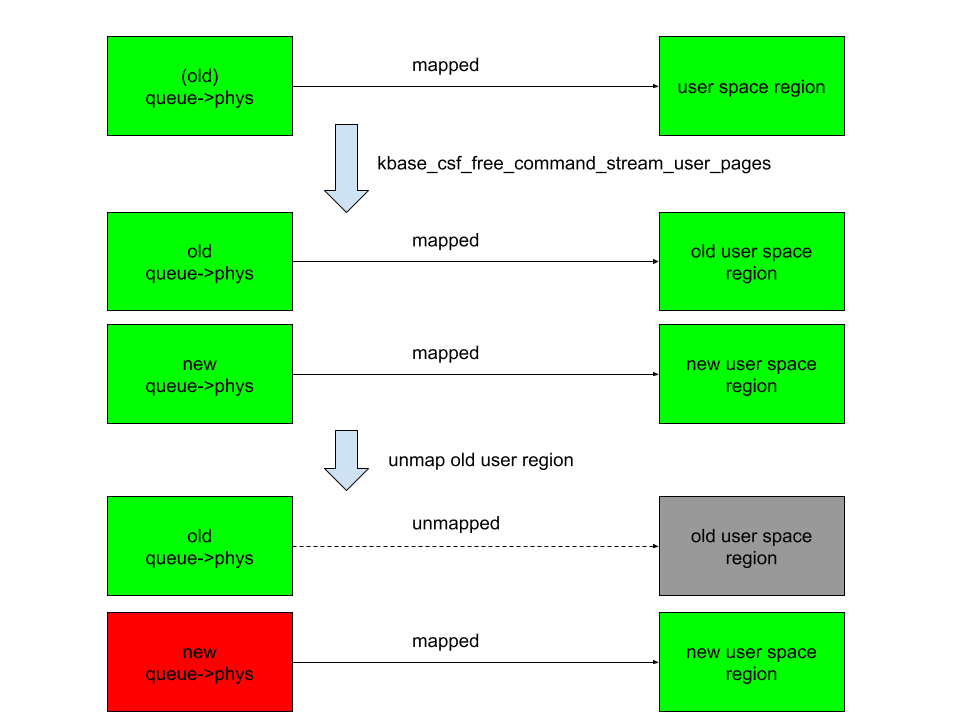
The interesting part begins when we ask: what happens if we can modify queue->phys after mapping them into user space. For example, if I can trigger kbase_csf_alloc_command_user_pages again to overwrite new pages to queue->phys, and map them to user space and then unmap the previously mapped region, kbase_csf_free_command_stream_user_pages will be called to free the pages in queue->phys. However, because queue->phys is now overwritten by the newly allocated pages, I ended up in a situation where I free the new pages while unmapping an old region:

A diagram demonstrating how to free the new pages while unmapping an old region.

In the above figure, the right columns are mappings in the user space, green rectangles are mapped, while gray ones are unmapped. The left column are backing pages stored in queue->phys. The new queue->phys are pages that are currently stored in queue->phys, while old queue->phys are pages that are stored previously but are replaced by the new ones. Green indicates that the pages are alive, while red indicates that they are freed. After overwriting queue->phys and unmapping the old region, the new queue->phys are freed instead, while still mapped to the new user region. This means that user space will have access to the freed new queue->phys pages. This then gives me a page use-after-free vulnerability.

The vulnerability

So let’s take a look at how to achieve this situation. The first obvious thing to try is to see if I can bind a kbase_queue multiple times using the KBASE_IOCTL_CS_QUEUE_BIND ioctl. This, however, is not possible because the queue->group field is checked before binding:

int kbase_csf_queue_bind(struct kbase_context *kctx, union kbase_ioctl_cs_queue_bind *bind)
{
  ...
	if (queue->group || group->bound_queues[bind->in.csi_index])
		goto out;
  ...
}

After a kbase_queue is bound, its queue->group is set to the kbase_queue_group that it binds to, which prevents the kbase_queue from binding again. Moreover, once a kbase_queue is bound, it cannot be unbound via any ioctl. It can be terminated with KBASE_IOCTL_CS_QUEUE_TERMINATE, but that will also delete the kbase_queue. So if rebinding from the queue is not possible, what about trying to unbind from a kbase_queue_group? For example, what happens if a kbase_queue_group gets terminated with the KBASE_IOCTL_CS_QUEUE_GROUP_TERMINATE ioctl? When a kbase_queue_group terminates, as part of the clean up process, it calls kbase_csf_term_descheduled_queue_group to unbind queues that it bound to:

void kbase_csf_term_descheduled_queue_group(struct kbase_queue_group *group)
{
  ...
	for (i = 0; i < max_streams; i++) {
		struct kbase_queue *queue = group->bound_queues[i];

		/* The group is already being evicted from the scheduler */
		if (queue)
			unbind_stopped_queue(kctx, queue);
	}
  ...
}

This then resets the queue->group field of the kbase_queue that gets unbound:

static void unbind_stopped_queue(struct kbase_context *kctx, struct kbase_queue *queue)
{
  ...
	if (queue->bind_state != KBASE_CSF_QUEUE_UNBOUND) {
    ...
		queue->group->bound_queues[queue->csi_index] = NULL;
		queue->group = NULL;
    ...
		queue->bind_state = KBASE_CSF_QUEUE_UNBOUND;
	}
}

In particular, this now allows the kbase_queue to bind to another kbase_queue_group. This means I can now create a page use-after-free with the following steps:

  1. Create a kbase_queue and a kbase_queue_group, and then bind the kbase_queue to the kbase_queue_group.
  2. Create GPU memory pages for the user io pages in the kbase_queue and map them to user space using a mmap call. These pages are then stored in the queue->phys field of the kbase_queue.
  3. Terminate the kbase_queue_group, which also unbinds the kbase_queue.
  4. Create another kbase_queue_group and bind the kbase_queue to this new group.
  5. Create new GPU memory pages for the user io pages in this kbase_queue and map them to user space. These pages now overwrite the existing pages in queue->phys.
  6. Unmap the user space memory that was mapped in step 2. This then frees the pages in queue->phys and removes the user space mapping created in step 2. However, the pages that are freed are now the memory pages created and mapped in step 5, which are still mapped to user space.

This, in particular, means that the pages that are freed in step 6 of the above can still be accessed from the user application. By using a technique that I used previously, I can reuse these freed pages as page table global directories (PGD) of the Mali GPU.

To recap, let’s take a look at how the backing pages of a kbase_va_region are allocated. When allocating pages for the backing store of a kbase_va_region, the kbase_mem_pool_alloc_pages function is used:

int kbase_mem_pool_alloc_pages(struct kbase_mem_pool *pool, size_t nr_4k_pages,
    struct tagged_addr *pages, bool partial_allowed)
{
    ...
  /* Get pages from this pool */
  while (nr_from_pool--) {
    p = kbase_mem_pool_remove_locked(pool);     //<------- 1.
        ...
  }
    ...
  if (i != nr_4k_pages && pool->next_pool) {
    /* Allocate via next pool */
    err = kbase_mem_pool_alloc_pages(pool->next_pool,      //<----- 2.
        nr_4k_pages - i, pages + i, partial_allowed);
        ...
  } else {
    /* Get any remaining pages from kernel */
    while (i != nr_4k_pages) {
      p = kbase_mem_alloc_page(pool);     //<------- 3.
            ...
        }
        ...
  }
    ...
}

The input argument kbase_mem_pool is a memory pool managed by the kbase_context object associated with the driver file that is used to allocate the GPU memory. As the comments suggest, the allocation is actually done in tiers. First the pages will be allocated from the current kbase_mem_pool using kbase_mem_pool_remove_locked (1 in the above). If there is not enough capacity in the current kbase_mem_pool to meet the request, then pool->next_pool, is used to allocate the pages (2 in the above). If even pool->next_pool does not have the capacity, then kbase_mem_alloc_page is used to allocate pages directly from the kernel via the buddy allocator (the page allocator in the kernel).

When freeing a page, the same happens in the opposite direction: kbase_mem_pool_free_pages first tries to return the pages to the kbase_mem_pool of the current kbase_context, if the memory pool is full, it’ll try to return the remaining pages to pool->next_pool. If the next pool is also full, then the remaining pages are returned to the kernel by freeing them via the buddy allocator.

As noted in my post “Corrupting memory without memory corruption”, pool->next_pool is a memory pool managed by the Mali driver and shared by all the kbase_context. It is also used for allocating page table global directories (PGD) used by GPU contexts. In particular, this means that by carefully arranging the memory pools, it is possible to cause a freed backing page in a kbase_va_region to be reused as a PGD of a GPU context. (Read the details of how to achieve this.)

Once the freed page is reused as a PGD of a GPU context, the user space mapping can be used to rewrite the PGD from the GPU. This then allows any kernel memory, including kernel code, to be mapped to the GPU, which allows me to rewrite kernel code and hence execute arbitrary kernel code. It also allows me to read and write arbitrary kernel data, so I can easily rewrite credentials of my process to gain root, as well as to disable SELinux.

See the exploit for Pixel 8 with some setup notes.

How does this bypass MTE?

Before wrapping up, let’s look at why this exploit manages to bypass Memory Tagging Extension (MTE)—despite protections that should have made this type of attack impossible.

The Memory Tagging Extension (MTE) is a security feature on newer Arm processors that uses hardware implementations to check for memory corruptions.

The Arm64 architecture uses 64 bit pointers to access memory, while most applications use a much smaller address space (for example, 39, 48, or 52 bits). The highest bits in a 64 bit pointer are actually unused. The main idea of memory tagging is to use these higher bits in an address to store a “tag” that can then be used to check against the other tag stored in the memory block associated with the address.

When a linear overflow happens and a pointer is used to dereference an adjacent memory block, the tag on the pointer is likely to be different from the tag in the adjacent memory block. By checking these tags at dereference time, such discrepancy, and hence the corrupted dereference can be detected. For use-after-free type memory corruptions, as long as the tag in a memory block is cleared every time it is freed and a new tag reassigned when it is allocated, dereferencing an already freed and reclaimed object will also lead to a discrepancy between pointer tag and the tag in memory, which allows use-after-free to be detected.

A diagram demonstrating how, by checking the tags on the pointer and the adjacent memory blocks at dereference time, the corrupted dereference can be detected.
Image from Memory Tagging Extension: Enhancing memory safety through architecture published by Arm

The memory tagging extension is an instruction set introduced in the v8.5a version of the ARM architecture, which accelerates the process of tagging and checking of memory with the hardware. This makes it feasible to use memory tagging in practical applications. On architectures where hardware accelerated instructions are available, software support in the memory allocator is still needed to invoke the memory tagging instructions. In the linux kernel, the SLUB allocator, used for allocating kernel objects, and the buddy allocator, used for allocating memory pages, have support for memory tagging.

Readers who are interested in more details can, for example, consult this article and the whitepaper released by Arm.

As I mentioned in the introduction, this exploit is capable of bypassing MTE. However, unlike a previous vulnerability that I reported, where a freed memory page is accessed via the GPU, this bug accesses the freed memory page via user space mapping. Since page allocation and dereferencing is protected by MTE, it is perhaps somewhat surprising that this bug manages to bypass MTE. Initially, I thought this was because the memory page that is involved in the vulnerability is managed by kbase_mem_pool, which is a custom memory pool used by the Mali GPU driver. In the exploit, the freed memory page that is reused as the PGD is simply returned to the memory pool managed by kbase_mem_pool, and then allocated again from the memory pool. So the page was never truly freed by the buddy allocator and therefore not protected by MTE. While this is true, I decided to also try freeing the page properly and return it to the buddy allocator. To my surprise, MTE did not trigger even when the page is accessed after it is freed by the buddy allocator. After some experiments and source code reading, it appears that page mappings created by mgm_vmf_insert_pfn_prot in kbase_csf_user_io_pages_vm_fault, which are used for accessing the memory page after it is freed, ultimately uses insert_pfn to create the mapping, which inserts the page frame into the user space page table. I am not totally sure, but it seems that because the page frames are inserted directly into the user space page table, accessing those pages from user space does not require kernel level dereferencing and therefore does not trigger MTE.

Conclusion

In this post I’ve shown how CVE-2025-0072 can be used to gain arbitrary kernel code execution on a Pixel 8 with kernel MTE enabled. Unlike a previous vulnerability that I reported, which bypasses MTE by accessing freed memory from the GPU, this vulnerability accesses freed memory via user space memory mapping inserted by the driver. This shows that MTE can also be bypassed when freed memory pages are accessed via memory mappings in user space, which is a much more common scenario than the previous vulnerability.

The post Bypassing MTE with CVE-2025-0072 appeared first on The GitHub Blog.

  • ✇GitHub Security Lab Archives - The GitHub Blog
  • Attacks on Maven proxy repositories Michael Stepankin
    As someone who’s been breaking the security of Java applications for many years, I was always curious about the supply chain attacks on Java libraries. In 2019, I accidentally discovered an arbitrary file read vulnerability on search.maven.org, a website that is closely tied to the Maven Central Repository. Maven Central is a place where most of the Java libraries are downloaded from and its security is paramount for all companies who develop in Java. If someone is able to infiltrate Maven Cen
     

Attacks on Maven proxy repositories


As someone who’s been breaking the security of Java applications for many years, I was always curious about the supply chain attacks on Java libraries. In 2019, I accidentally discovered an arbitrary file read vulnerability on search.maven.org, a website that is closely tied to the Maven Central Repository. Maven Central is a place where most of the Java libraries are downloaded from and its security is paramount for all companies who develop in Java. If someone is able to infiltrate Maven Central and replace a popular library, they can get the key to the whole kingdom, as almost every large tech company uses Java.

Last year, I committed myself to have a look at how Maven works under the hood. I decided to challenge myself: Perhaps I could find a way to get inside?

In this blog post, I’ll reveal some intriguing vulnerabilities and CVEs that I’ve recently found in popular Maven repository managers. I’ll illustrate how specially crafted artifacts can be used to attack the repository managers that distribute them. Finally, I’ll demonstrate some exploits that can lead to pre-auth remote code execution and poisoning of the local artifacts.

What is Maven and how does it work?

Apache Maven is a popular tool to build Java projects. One of its widely adopted features allows you to resolve dependencies for the project. In a very simplistic scenario, a developer needs to create an pom.xml file that will list all the dependencies for their project, like this:

<dependency>
<groupId>org.springframework.boot</groupId>
<artifactId>spring-boot-starter-web</artifactId>
<version>3.3.0</version>
</dependency>

During the build process, the developer executes the maven console tool to download these dependencies for local use. For example, the widely used mvn package command invokes Maven Artifact Resolver to make the following HTTP request to download this dependency:

GET /org/springframework/boot/spring-boot-starter-web/3.3.0/spring-boot-starter-web-3.3.0.jar
Host: repo.maven.apache.org

Since the artifact can have its own dependencies, maven also fetches the /org/springframework/boot/spring-boot-starter-web/3.3.0/pom.xml file to identify and download all transitive dependencies.

Downloaded dependencies are stored in the local file system (on MacOS it’s ~/.m2/repository) following the Maven Repository Layout.

Attack surface

It’s important to note that Maven, as a console tool, is built with some security assumptions in mind:

The purpose of Maven is to perform the actions defined in the supplied pom.xml, which commonly includes compiling and running the associated code and using plugins and dependencies downloaded from the configured repositories.

As such, the Maven security model assumes you trust the pom.xml and the code, dependencies, and repositories used in your build. If you want to use Maven to build untrusted code, it’s up to you to provide the required isolation.

Maven repositories (places from where artifacts are downloaded), on the other hand, are essentially web applications that allow uploading, storing, and downloading compiled artifacts. Their security is crucial, because if a hacker is able to publish or replace a commonly used artifact in them, all repository clients will execute the malicious code from this artifact.

Maven Central and other public repositories

By default, Maven downloads all dependencies from https://repo.maven.apache.org, the address of the Maven Central repository. It is hardcoded in the default installation of Maven, but can be changed in settings. This website is hosted by Sonatype on AWS S3 buckets and served with Fastly CDN.

Maven Infrastructure
Image source: Sonatype, The Secret Life of Maven Central

Maven Central repository is public. Anybody can publish an artifact to it, but users’ publishing rights are restricted by the groupId ownership. So, only the company or user who owns the org.springframework.boot groupId is allowed to publish artifacts with this groupId. To upload artifacts, publishers can use either a new Sonatype Central Portal or a legacy OSSRH (OSS Repository Hosting).

Maven Central has a complex infrastructure hosted by Sonatype. At GitHub Security Lab, we only audit open source code, which means that Sonatype’s website is out of scope for us. Still, I realized that a lot of companies publish through the legacy OSSRH portal (https://oss.sonatype.org/), which is backed by the product Sonatype Nexus 2.

Apart from Maven Central, there are also some other public Maven repositories:

Address Product
Maven Central (default) repo1.maven.org, repo.maven.apache.org Amazon S3 + Fastly Infrastructure is managed by Sonatype
Maven Central OSSRH (synced with default) oss.sonatype.org, s01.oss.sonatype.org Sonatype Nexus 2
Apache repository.apache.org Sonatype Nexus 2 (behind a proxy)
Spring repo.spring.io JFrog Artifactory
Atlassian packages.atlassian.com JFrog Artifactory
JBoss repository.jboss.org Sonatype Nexus 2

As you can see from the table, the biggest repositories are powered by two major products: Sonatype Nexus and JFrog Artifactory. These products are (partially) open source and have free versions that you can test locally.

So in my research, I decided to challenge myself with breaking the security of these repository managers. Additionally, I thought it would be good to also include a completely free open source alternative: Reposilite.

In-house Maven repository managers

While downloading artifacts from Maven Central and other public repositories is free, many companies choose to use their own in-house Maven repository managers for additional benefits, such as:

  • Ability to publish and use company’s private artifacts
  • Ability to restrict and get clarity on which libraries are used within the organization
  • Reduced bandwidth consumption by minimizing external network calls

These in-house repository managers are powered by the same open source products as the public repositories: Nexus, JFrog, and Reposilite.

All of these products support multiple access roles. Typically an anonymous role allows you to download any artifact, a developer’s role can publish new artifacts, and an admin role can manage repositories, users, and enforce policies.

Looking at Proxy mode from a security perspective

Apart from handling artifacts developed within a company, Maven repository managers are also often used as dedicated proxy servers for public Maven repositories. In this mode, when a repository manager handles a request to download an artifact, it first checks if the artifact is available locally. If not, it forwards this request to the upstream repository.

The proxy mode is particularly interesting from the security perspective. First, because it allows even anonymous users to fetch their own artifact from the public repository and plant it in the local repository manager. Second, because in-house repository managers not only store and serve these artifacts, but also try to have a “sneak peek” into their content by expanding archives, analyzing “pom.xml” files, building dependency graphs, checking them for malware, and displaying their content in the Admin UI.

This may introduce a second-order vulnerability when an attacker uploads a specially crafted artifact to the public repository first, and then uses it to attack the in-house manager. As someone who built DAST and SAST products in the past, I know firsthand that these types of issues are very hard to detect with automation, so I decided to have a look at the source code to manually identify some.

Attacks on proxy Mode: Stored XSS

Artifacts published to Maven repositories are normally the JAR archives that contain compiled java classes (with .class file extension), but technically they can contain arbitrary data and extensions. All the repository managers I tested have their web admin interfaces listening on the same port as the application that serves the artifact’s content. So, what if an artifact’s pom.xml file contains some JavaScript inside?

<?xml version="1.0" encoding="UTF-8"?>
<a:script xmlns:a="http://www.w3.org/1999/xhtml">
    alert(`Secret key: ${localStorage.getItem('token-secret')}`)
</a:script>

Reposilite XSS

It turned out that at least two of the tested Repository managers (Reposilite and Sonatype Nexus 2) fall into this basic Stored XSS vulnerability. The problem lies in the fact that the artifact’s content is served via the same origin (protocol/host/port) as the Admin UI. If the artifact contains HTML content with javascript inside, the javascript is executed within the same origin. Therefore, if an authenticated user views the artifact’s content, the javascript inside can make authenticated requests to the Admin area, which can lead to the modification of other artifacts, and subsequently to remote code execution on users who download them.

In case of the Reposilite vulnerability, an XSS payload can be used to access the browser’s local storage where the user’s password (aka “token-secret”) is located. That’s game over, as the same token can be used on another device to access the admin area.

How to protect from that? Obviously, we cannot “escape” the special characters, as it would break the legitimate functionality. Instead, a combination of the following approaches can be used:

  • “Content-Security-Policy: sandbox;” header when serving the artifact’s content. This means the resource will be treated as being from a special origin that always fails the same-origin policy (potentially preventing access to data storage/cookies and some JavaScript APIs). It’s an elegant solution to protect the Admin area, but it still allows HTML content rendering, leaving some opportunities for phishing.
  • “Content-Disposition: attachment” header. This will prevent the browser from displaying the content entirely, so it just saves it to the “Download” folder. This may affect the UX though.

Example: Look at the advisories for CVE-2024-36115 in Reposilite and CVE-2024-5083 in Sonatype Nexus 2 on the GitHub Security Lab website.

Archive expansion and path traversal

All the tested Repository managers support unpacking the artifact’s files on the server to serve individual files from the archive. Most of them use Java’s ZipInputStream interface, which allows you to do it in-memory only, without storing anything on disk, which makes it safe from path traversal vulnerabilities.

Still, I was able to find one instance of this vulnerability in Reposilite’s support for JavaDoc files.

CVE-2024-36116: Arbitrary file overwrite in Reposilite

JavadocContainerService.kt#L127-L136

jarFile.entries().asSequence().forEach { file ->
    if (file.isDirectory) {
        return@forEach
    }

    val path = Paths.get(javadocUnpackPath.toString() + "/" + file.name)

    path.parent?.also { parent -> Files.createDirectories(parent) }
    jarFile.getInputStream(file).copyToAndClose(path.outputStream())
}.asSuccess<Unit, ErrorResponse>()

The file.name taken from the archive can contain path traversal characters, such as ‘/../../../anything.txt’, so the resulting extraction path can be outside the target directory.

If the archive is taken from an untrusted source, such as Maven Central, an attacker can craft a special archive to overwrite any local file on the repository manager. In the case of Reposilite, this could lead to remote code execution, for example by placing a new plugin into the $workspace$/plugins directory. Alternatively, an attacker can overwrite the content of any other package.

CVE-2024-36117: Arbitrary file read in Reposilite

Another CVE I discovered in Reposilite was in the way the expanded javadoc files are served. Reposilite has the GET /javadoc/{repository}/<gav>/raw/<resource> route to find the file in the exploded archive and return its content to the user.

In that case, the path parameter can contain URL-encoded path traversal characters such as /../. Since the path is concatenated with the main directory, it opens the possibility to read files outside the target directory.

Reposilite file read

I reported both of these vulnerabilities using GitHub’s Private Vulnerability Reporting feature. If you want to read more details about them, look at the advisories for CVE-2024-36116: Arbitrary file overwrite in Reposilite and CVE-2024-36117: Leaking internal database in Reposilite.

Name confusion attacks

When a repository manager processes requests to download artifacts, it needs to map the incoming URL path value to the artifact’s coordinates: GroupId, ArtifactId, and Version (commonly known as GAV).

The Maven documentation suggests using the following convention for mapping from URL path to GAV:

/${groupId}/${artifactId}/${baseVersion}/${artifactId}-${version}-${classifier}.${extension}

GroupId can contain multiple forward slashes, which are translated to dots while parsing. For instance, the following URL path:

GET /org/apache/maven/apache-maven/3.8.4/apache-maven-3.8.4-bin.tar.gz HTTP/1.1

will be translated to these coordinates:

groupId: org.apache.maven
artifactId:apache-maven
version: 3.8.4:bin:tar.gz
classifier: bin
Extension: tar.gz

While this operation looks like a simple regexp matching, there is some room for misinterpretation, especially in how the URL decoding, path normalization, and control characters of the URL are handled.

For instance, if the path contains any special url encoded characters, such as “?” (%3b) or “#” (%23), they will be decoded and considered as part of the artifact name:

GET /com/company/artifact/1.0/artifact-1.0.jar%23/xyz/anything.any?isRemote=true

Interpreted by proxy and transferred to upstream as:

/com/company/artifact/1.0/artifact-1.0.jar\#/xyz/anything.any

On the upstream server however, everything after the hash sign will be parsed as hash properties. The path to artifact will be truncated to:

/com/company/artifact/1.0/artifact-1.0.jar#/xyz/anything.any

Essentially, this would allow attackers to create files on the target proxy repository with arbitrary names and extensions, as long as their path starts with a predefined value, for example:

Name confusion arbitrary extension

This behavior affects almost every product I tested, but it’s hardly exploitable on its own, as no client would use an artifact with such a weird name.

While testing this, I noticed that JFrog Artifactory also has a special handling for the semicolon character “;”. Artifactory considers everything in the path after semicolon as “path parameters”, but not a part of the artifact name.

GET /com/company1/artifact1/1.0/artifact1-1.0.jar;/../../../../company2/artifact2/2.0/artifact2-2.0.jar

When processing a request like that, JFrog considers artifact1-1.0.jar as the artifact name, but still forwards the full url to the upstream repository. Contrary to that, Nexus 3 and some public servers perform path normalization and reduce this path to /company2/artifact2/2.0/artifact2-2.0.jar, which is expected according to RFC 3986.

In cases where Artifactory is configured to proxy an external repository, this behavior can lead to a severe vulnerability: artifact poisoning (CVE-2024-6915). Technically, it allows saving any HTTP response from the remote endpoint to an arbitrary artifact on the Artifactory instance.

The straightforward way to exploit that would be to publish a malicious artifact into the upstream repository with any name, and then save it under a commonly used name on Artifactory, (for example, “spring-boot-starter-web”). Then, the next time a client fetches this commonly used artifact, Artifactory will serve malicious content of another package.

In cases when an attacker is unable to publish anything into the upstream repository, it can still be potentially exploitable with an open redirect or a reflected/stored XSS on the upstream server. Artifactory does not check what is passed after “;/../”, so it can be not only an “artifact2-2.0.jar” but any relative URL path.

The ultimate requirement for this exploitation is that the upstream server should perform a path normalization process to consume “/../” characters. Maven Central repository does not perform it, but several other public repositories such as Apache or JitPack do. Moreover, this vulnerability in JFrog Artifactory affects not only Maven repositories, but any other proxy types, such as npm or Docker repositories.

artifact/../ artifact/%2e%2e/
Maven Central repo1.maven.org
Apache repository.apache.org ✓*
JitPack jitpack.io
npm
Docker Registry
Rubygems.io
Python Package Index (PyPI)
GO package registry (gocenter.io)

  • “✓” means path traversal is accepted by repository, “✗” – not

Example CVE-2024-6915: Is it even or is it odd?

To demonstrate its impact in my bug bounty report, I chose to use an Artifactory instance that proxies to npm. Npm has a different layout than Maven, but the core idea is the same: we just need to overwrite a package.json file with the content of another package. In the following request, we simply replace the package.json file of the is-even package with the content of the is-odd package.

Is even attack

Is even poisoned

When I install this poisoned package from Artifactory, the npm client shows a warning that the name in the package.json file (is-odd) is different from the requested one (is-even), but as the downloaded file is properly formatted and contains the links to archive with the source code, the npm client still downloads and executes it.

The npm client is designed with the assumption that it trusts the source. If the integrity of the source registry is compromised (which was the case for JFrog Artifactory), npm clients cannot really do anything to protect from such malicious artifacts. Even hash checksums can be bypassed if they are tampered with in Artifactory.

npm confused

When I reported this issue to the JFrog bug bounty program, it was assigned a critical severity and later awarded with a $5000 bounty. Since I’m doing this research as a part of my work at GitHub, we donated the full bounty amount to charity, specifically Cancer Research UK.

Magic parameters for exploiting name confusion attacks

Both Nexus and JFrog support some URL query parameters for proxy repositories. In JFrog Artifactory, the following parameters are accepted:

magic parameters jfrog

When attacking proxy repositories, these parameters may be applied on the proxy side, or “smuggled” into the upstream repository by using URL encoding. In both cases, they may alter how one or another repository processes the request, leaving options for potential exploitation.

For example, by applying a :properties suffix to the path, we can trigger a local redirect to the same URL. By default, Artifactory does not perform path normalization for incoming requests, but with a redirect we can force the path normalization to be performed on the HTTP client side, instead of the server. It may help to perform a path traversal for name confusion attacks.

Nexus 2 also supports a few parameters, but perhaps only these two are interesting for attackers:

magic parameters nexus

Disrupting internal metadata: Nexus 2 RCE (CVE-2024-5082)

Along with the artifacts uploaded by the users, repository managers also store additional metadata, such as checksums, creation date, the user who uploaded it, number of downloads, etc. Most of this data is stored in the database, but some repository managers also store files in the same directory as artifacts. For instance, Nexus 2 stores the following files:

  • /.meta/repository-metadata.xml – contains repository properties in XML format
  • /.meta/prefixes.txt

  • /.index/nexus-maven-repository-index.properties

  • /.index/nexus-maven-repository-index.gz

  • /.nexus/tmp/<artifact>nx-tmp<random>.nx-upload – temporary file name during artifact’s upload

  • /.nexus/attributes/<artifact-name> – for every artifact, Nexus creates this json file with artifact’s metadata

The last file is the only one that Nexus prohibits access to. Indeed if you try to download or upload a file that starts with /.nexus/attributes/, Nexus rejects this request:

nexus attributes forbidden

At the same time, I figured out that we can circumvent this protection by using a different prefix (/nexus/service/local/repositories/test/content/ instead of /nexus/content/repositories/test/) and by using a double slash before the .nexus/attributes:

nexus attributes bypass

Reading local attributes is probably not that interesting for attackers, but the same bug can be abused to overwrite them using PUT HTTP requests instead of GET. By default, Nexus does not allow you to update artifact’s content in its release repositories, but we can update the attributes of any maven-metadata.xml file:

nexus velocity content generator

For exploitation purposes, I discovered a supported attribute that is particularly interesting: “contentGenerator”:”velocity”. If present, this attribute changes the way how the artifact’s content is rendered, enabling resolution of Velocity templates in the artifact’s content. So if we upload the ‘maven-metadata.xml’ file with the following content:

nexus put shell

And then reissue the previous PUT request to update the attributes, the content of the ‘maven-metadata.xml’ file will be rendered as a Velocity template.

nexus exec shell id

Sweet, as the velocity template I used in the example above triggers the execution of the java.lang.Runtime.getRuntime().exec("id") command.

It’s not a real RCE unless it’s pre-auth

To overwrite the metadata in the previous requests, I used a ‘PUT’ request method that requires the cookie of a user who has sufficient privileges to upload artifacts. This severely reduces the potential impact, as obtaining even a low-privileged account on the target repository might be a difficult task. Still, it wouldn’t be like myself if I didn’t try to find a way to exploit it without any authentication.

One of the ways to achieve that would be combining this vulnerability with the stored XSS (CVE-2024-5083) in proxy repositories that I discovered earlier. Planting an XSS payload would not require any permissions on Nexus. Still, that XSS requires an administrator user to view an artifact, with a valid session, so the exploitation is still not that clean.

Another way to trigger this vulnerability would be through a ‘proxy’ repository. If an attacker is able to publish an artifact into the upstream repository, it’s possible to exploit this vulnerability without any authentication on Nexus.

You may reasonably assume that publishing an artifact with a Maven Group ID that starts with ‘.nexus/attributes’ may be unrealistic in popular upstream repositories like Maven Central, Apache Snapshots or JitPack. While I could not test this myself in their production systems, I noticed that one may publish an artifact with the group ID of ‘org.example’ and then force Nexus to save it as /.nexus/attributes/… with the same path traversal trick as in the name confusion attacks:

GET /nexus/service/local/repositories/apache-snapshots/content//.nexus/attributes/%252e./%252e./com/sbt/ignite/ignite-bom/maven-metadata.xml

nexus apache snapshots trick

When processing this request, Nexus will decode the URL path to /.nexus/attributes/%2e./%2e./com/sbt/ignite/ignite-bom/maven-metadata.xml and forward it to the Apache Snapshots upstream repository. Then, Apache’s repository will (quite reasonably) perform URI normalization and return the content of the file. This would allow you to store an artifact with an arbitrary name from Apache Snapshots in the /.nexus/attributes/ directory.

Apache Snapshots is enabled by default in the Nexus installation. Also, as I mentioned earlier, pulling artifacts from it does not require any permissions on Nexus—it can be done with a simple GET request without any cookies.

A real attacker would probably try to publish their own artifact to the Apache Snapshots repository and therefore use it to attack all Nexus instances worldwide. Additionally, it’s possible to enumerate all the Apache user names and their emails. Perhaps some of their credentials can be found on websites that accumulate leaked passwords, but testing these kinds of attacks lies beyond the legal and moral scope of my research.

Summary

As we can see, using repository managers such as Nexus, JFrog, and Reposilite in proxy mode can introduce an attack surface that is otherwise only available to authenticated users.

All tested solutions not only store and serve artifacts, but also perform complex parsing and indexing operations on them. Therefore, a specially crafted artifact can be used to attack the repository manager that processes it. This opens a possibility for XSS, XXE, archive expansion, and path traversal attacks.

The innate URL decoding mechanism along with special characters sparks parsing discrepancies. All repository managers parse URLs differently and cache proxied artifacts locally, which can lead to cache poisoning vulnerabilities, such as CVE-2024-6915 in JFrog, for example.

The major public and private Maven repositories are powered by just a few partially open source solutions. Although these solutions are already backed by reputable companies with strong security teams and bug bounty programs, it’s still possible to find critical vulnerabilities in them.

Lastly, these kinds of attacks are not even specific to Maven, but for all other dependency ecosystems, whether its NPM, Docker, RubyGems or anything else. I encourage every hacker to test this ‘proxy repository’ functionality in other products as well, as this may bring about many fruitful findings.

Note: I presented this research at the Ekoparty Security Conference in November 2024.

The post Attacks on Maven proxy repositories appeared first on The GitHub Blog.

❌
❌