Visualização normal

Antes de ontemStream principal
  • ✇Securelist
  • Yet another DCOM object for lateral movement Haidar Kabibo
    Introduction If you’re a penetration tester, you know that lateral movement is becoming increasingly difficult, especially in well-defended environments. One common technique for remote command execution has been the use of DCOM objects. Over the years, many different DCOM objects have been discovered. Some rely on native Windows components, others depend on third-party software such as Microsoft Office, and some are undocumented objects found through reverse engineering. While certain objects s
     

Yet another DCOM object for lateral movement

19 de Dezembro de 2025, 05:00

Introduction

If you’re a penetration tester, you know that lateral movement is becoming increasingly difficult, especially in well-defended environments. One common technique for remote command execution has been the use of DCOM objects.

Over the years, many different DCOM objects have been discovered. Some rely on native Windows components, others depend on third-party software such as Microsoft Office, and some are undocumented objects found through reverse engineering. While certain objects still work, others no longer function in newer versions of Windows.

This research presents a previously undescribed DCOM object that can be used for both command execution and potential persistence. This new technique abuses older initial access and persistence methods through Control Panel items.

First, we will discuss COM technology. After that, we will review the current state of the Impacket dcomexec script, focusing on objects that still function, and discuss potential fixes and improvements, then move on to techniques for enumerating objects on the system. Next, we will examine Control Panel items, how adversaries have used them for initial access and persistence, and how these items can be leveraged through a DCOM object to achieve command execution.

Finally, we will cover detection strategies to identify and respond to this type of activity.

COM/DCOM technology

What is COM?

COM stands for Component Object Model, a Microsoft technology that defines a binary standard for interoperability. It enables the creation of reusable software components that can interact at runtime without the need to compile COM libraries directly into an application.

These software components operate in a client–server model. A COM object exposes its functionality through one or more interfaces. An interface is essentially a collection of related member functions (methods).

COM also enables communication between processes running on the same machine by using local RPC (Remote Procedure Call) to handle cross-process communication.

Terms

To ensure a better understanding of its structure and functionality, let’s revise COM-related terminology.

  1. COM interface
    A COM interface defines the functionality that a COM object exposes. Each COM interface is identified by a unique GUID known as the IID (Interface ID). All COM interfaces can be found in the Windows Registry under HKEY_CLASSES_ROOT\Interface, where they are organized by GUID.
  2. COM class (COM CoClass)
    A COM class is the actual implementation of one or more COM interfaces. Like COM interfaces, classes are identified by unique GUIDs, but in this case the GUID is called the CLSID (Class ID). This GUID is used to locate the COM server and activate the corresponding COM class.

    All COM classes must be registered in the registry under HKEY_CLASSES_ROOT\CLSID, where each class’s GUID is stored. Under each GUID, you may find multiple subkeys that serve different purposes, such as:

    • InprocServer32/LocalServer32: Specifies the system path of the COM server where the class is defined. InprocServer32 is used for in-process servers (DLLs), while LocalServer32 is used for out-of-process servers (EXEs). We’ll describe this in more detail later.
    • ProgID: A human-readable name assigned to the COM class.
    • TypeLib: A binary description of the COM class (essentially documentation for the class).
    • AppID: Used to describe security configuration for the class.
  3. COM server
    A COM is the module where a COM class is defined. The server can be implemented as an EXE, in which case it is called an out-of-process server, or as a DLL, in which case it is called an in-process server. Each COM server has a unique file path or location in the system. Information about COM servers is stored in the Windows Registry. The COM runtime uses the registry to locate the server and perform further actions. Registry entries for COM servers are located under the HKEY_CLASSES_ROOT root key for both 32- and 64-bit servers.
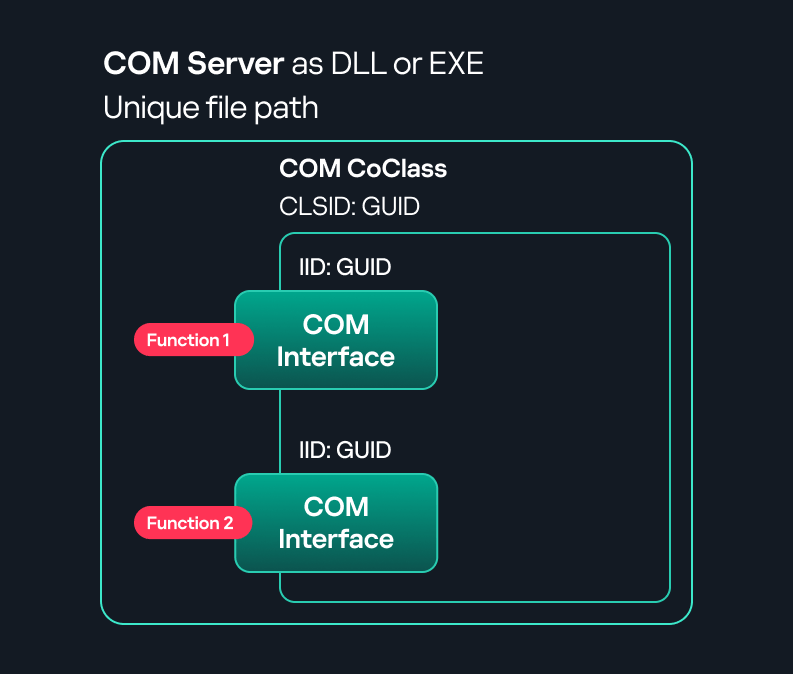
Component Object Model implementation

Component Object Model implementation

Client–server model

  1. In-process server
    In the case of an in-process server, the server is implemented as a DLL. The client loads this DLL into its own address space and directly executes functions exposed by the COM object. This approach is efficient since both client and server run within the same process.
    In-process COM server

    In-process COM server

  2. Out-of-process server
    Here, the server is implemented and compiled as an executable (EXE). Since the client cannot load an EXE into its address space, the server runs in its own process, separate from the client. Communication between the two processes is handled via ALPC (Advanced Local Procedure Call) ports, which serve as the RPC transport layer for COM.
Out-of-process COM server

Out-of-process COM server

What is DCOM?

DCOM is an extension of COM where the D stands for Distributed. It enables the client and server to reside on different machines. From the user’s perspective, there is no difference: DCOM provides an abstraction layer that makes both the client and the server appear as if they are on the same machine.

Under the hood, however, COM uses TCP as the RPC transport layer to enable communication across machines.

Distributed COM implementation

Distributed COM implementation

Certain requirements must be met to extend a COM object into a DCOM object. The most important one for our research is the presence of the AppID subkey in the registry, located under the COM CLSID entry.

The AppID value contains a GUID that maps to a corresponding key under HKEY_CLASSES_ROOT\AppID. Several subkeys may exist under this GUID. Two critical ones are:

  • AccessPermission: controls access permissions.
  • LaunchPermission: controls activation permissions.

These registry settings grant remote clients permissions to activate and interact with DCOM objects.

Lateral movement via DCOM

After attackers compromise a host, their next objective is often to compromise additional machines. This is what we call lateral movement. One common lateral movement technique is to achieve remote command execution on a target machine. There are many ways to do this, one of which involves abusing DCOM objects.

In recent years, many DCOM objects have been discovered. This research focuses on the objects exposed by the Impacket script dcomexec.py that can be used for command execution. More specifically, three exposed objects are used: ShellWindows, ShellBrowserWindow and MMC20.

  1. ShellWindows
    ShellWindows was one of the first DCOM objects to be identified. It represents a collection of open shell windows and is hosted by explorer.exe, meaning any COM client communicates with that process.

    In Impacket’s dcomexec.py, once an instance of this COM object is created on a remote machine, the script provides a semi-interactive shell.

    Each time a user enters a command, the function exposed by the COM object is called. The command output is redirected to a file, which the script retrieves via SMB and displays back to simulate a regular shell.

    Internally, the script runs this command when connecting:

    cmd.exe /Q /c cd \ 1> \\127.0.0.1\ADMIN$\__17602 2>&1

    This sets the working directory to C:\ and redirects the output to the ADMIN$ share under the filename __17602. After that, the script checks whether the file exists; if it does, execution is considered successful and the output appears as if in a shell.

    When running dcomexec.py against Windows 10 and 11 using the ShellWindows object, the script hangs after confirming SMB connection initialization and printing the SMB banner. As I mentioned in my personal blog post, it appears that this DCOM object no longer has permission to write to the ADMIN$ share. A simple fix is to redirect the output to a directory the DCOM object can write to, such as the Temp folder. The Temp folder can then be accessed under the same ADMIN$ share. A small change in the code resolves the issue. For example:

    OUTPUT_FILENAME = 'Temp\\__' + str(time.time())[:5]

  2. ShellBrowserWindow
    The ShellBrowserWindow object behaves almost identically to ShellWindows and exhibits the same behavior on Windows 10. The same workaround that we used for ShellWindows applies in this case. However, on Windows 11, this object no longer works for command execution.
  3. MMC20
    The MMC20.Application COM object is the automation interface for Microsoft Management Console (MMC). It exposes methods and properties that allow MMC snap-ins to be automated.

    This object has historically worked across all Windows versions. Starting with Windows Server 2025, however, attempting to use it triggers a Defender alert, and execution is blocked.

    As shown in earlier examples, the dcomexec.py script writes the command output to a file under ADMIN$, with a filename that begins with __:

    OUTPUT_FILENAME = '__' + str(time.time())[:5]

    Defender appears to check for files written under ADMIN$ that start with __, and when it detects one, it blocks the process and alerts the user. A quick fix is to simply remove the double underscores from the output filename.

    Another way to bypass this issue is to use the same workaround used for ShellWindows – redirecting the output to the Temp folder. The table below outlines the status of these objects across different Windows versions.

    Windows Server 2025 Windows Server 2022 Windows 11 Windows 10
    ShellWindows Doesn’t work Doesn’t work Works but needs a fix Works but needs a fix
    ShellBrowserWindow Doesn’t work Doesn’t work Doesn’t work Works but needs a fix
    MMC20 Detected by Defender Works Works Works

Enumerating COM/DCOM objects

The first step to identifying which DCOM objects could be used for lateral movement is to enumerate them. By enumerating, I don’t just mean listing the objects. Enumeration involves:

  • Finding objects and filtering specifically for DCOM objects.
  • Identifying their interfaces.
  • Inspecting the exposed functions.

Automating enumeration is difficult because most COM objects lack a type library (TypeLib). A TypeLib acts as documentation for an object: which interfaces it supports, which functions are exposed, and the definitions of those functions. Even when TypeLibs are available, manual inspection is often still required, as we will explain later.

There are several approaches to enumerating COM objects depending on their use cases. Next, we’ll describe the methods I used while conducting this research, taking into account both automated and manual methods.

  1. Automation using PowerShell
    In PowerShell, you can use .NET to create and interact with DCOM objects. Objects can be created using either their ProgID or CLSID, after which you can call their functions (as shown in the figure below).
    Shell.Application COM object function list in PowerShell

    Shell.Application COM object function list in PowerShell

    Under the hood, PowerShell checks whether the COM object has a TypeLib and implements the IDispatch interface. IDispatch enables late binding, which allows runtime dynamic object creation and function invocation. With these two conditions met, PowerShell can dynamically interact with COM objects at runtime.

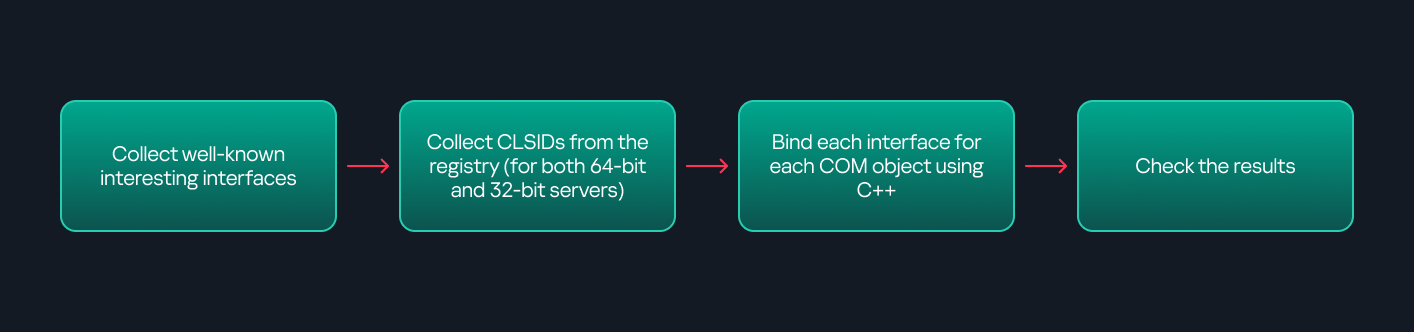
    Our strategy looks like this:

    As you can see in the last box, we perform manual inspection to look for functions with names that could be of interest, such as Execute, Exec, Shell, etc. These names often indicate potential command execution capabilities.

    However, this approach has several limitations:

    • TypeLib requirement: Not all COM objects have a TypeLib, so many objects cannot be enumerated this way.
    • IDispatch requirement: Not all COM objects implement the IDispatch interface, which is required for PowerShell interaction.
    • Interface control: When you instantiate an object in PowerShell, you cannot choose which interface the instance will be tied to. If a COM class implements multiple interfaces, PowerShell will automatically select the one marked as [default] in the TypeLib. This means that other non-default interfaces, which may contain additional relevant functionality, such as command execution, could be overlooked.
  2. Automation using C++
    As you might expect, C++ is one of the languages that natively supports COM clients. Using C++, you can create instances of COM objects and call their functions via header files that define the interfaces.However, with this approach, we are not necessarily interested in calling functions directly. Instead, the goal is to check whether a specific COM object supports certain interfaces. The reasoning is that many interfaces have been found to contain functions that can be abused for command execution or other purposes.

    This strategy primarily relies on an interface called IUnknown. All COM interfaces should inherit from this interface, and all COM classes should implement it.The IUnknown interface exposes three main functions. The most important is QueryInterface(), which is used to ask a COM object for a pointer to one of its interfaces.So, the strategy is to:

    • Enumerate COM classes in the system by reading CLSIDs under the HKEY_CLASSES_ROOT\CLSID key.
    • Check whether they support any known valuable interfaces. If they do, those classes may be leveraged for command execution or other useful functionality.

    This method has several advantages:

    • No TypeLib dependency: Unlike PowerShell, this approach does not require the COM object to have a TypeLib.
    • Use of IUnknown: In C++, you can use the QueryInterface function from the base IUnknown interface to check if a particular interface is supported by a COM class.
    • No need for interface definitions: Even without knowing the exact interface structure, you can obtain a pointer to its virtual function table (vtable), typically cast as a void*. This is enough to confirm the existence of the interface and potentially inspect it further.

    The figure below illustrates this strategy:

    This approach is good in terms of automation because it eliminates the need for manual inspection. However, we are still only checking well-known interfaces commonly used for lateral movement, while potentially missing others.

  3. Manual inspection using open-source tools

    As you can see, automation can be difficult since it requires several prerequisites and, in many cases, still ends with a manual inspection. An alternative approach is manual inspection using a tool called OleViewDotNet, developed by James Forshaw. This tool allows you to:
    • List all COM classes in the system.
    • Create instances of those classes.
    • Check their supported interfaces.
    • Call specific functions.
    • Apply various filters for easier analysis.
    • Perform other inspection tasks.
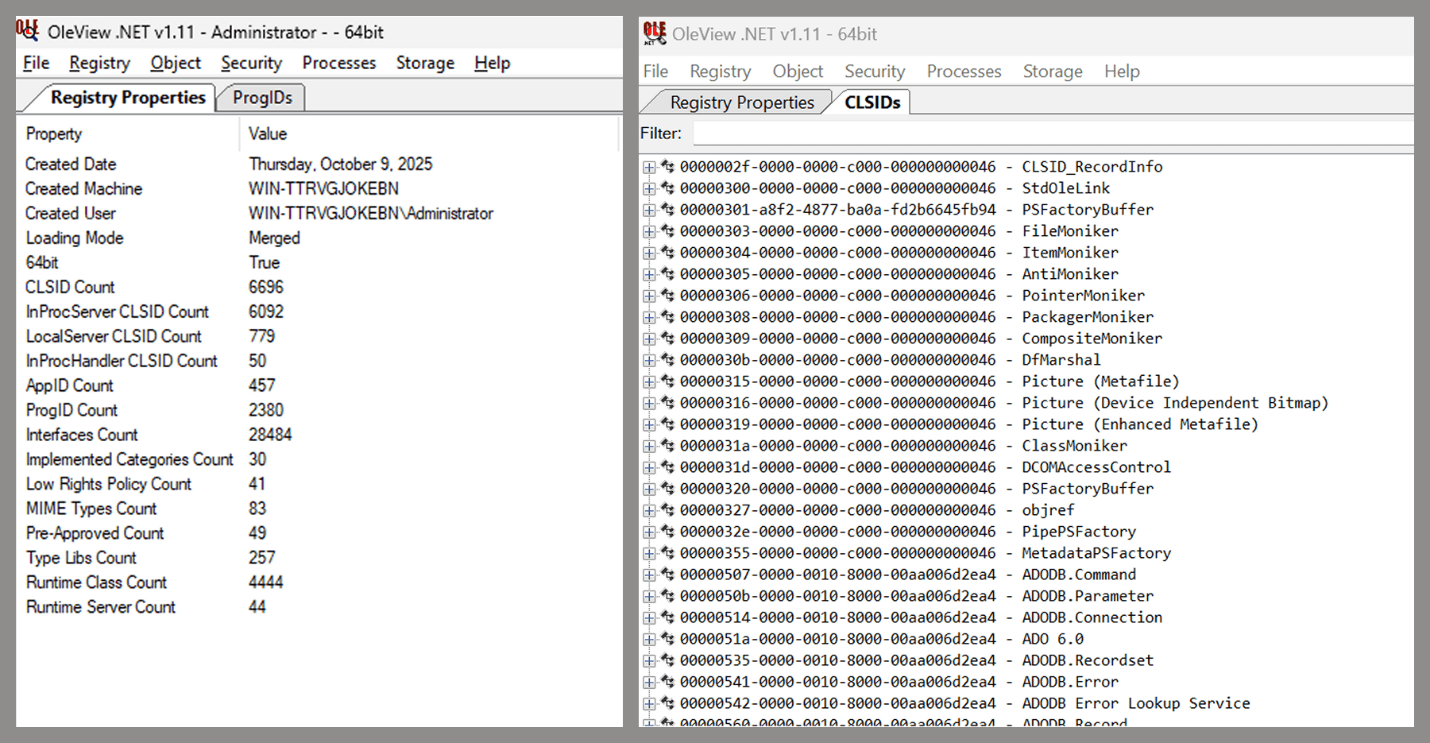
    Open-source tool for inspecting COM interfaces

    Open-source tool for inspecting COM interfaces

    One of the most valuable features of this tool is its naming visibility. OleViewDotNet extracts the names of interfaces and classes (when available) from the Windows Registry and displays them, along with any associated type libraries.

    This makes manual inspection easier, since you can analyze the names of classes, interfaces, or type libraries and correlate them with potentially interesting functionality, for example, functions that could lead to command execution or persistence techniques.

Control Panel items as attack surfaces

Control Panel items allow users to view and adjust their computer settings. These items are implemented as DLLs that export the CPlApplet function and typically have the .cpl extension. Control Panel items can also be executables, but our research will focus on DLLs only.

Control Panel items

Control Panel items

Attackers can abuse CPL files for initial access. When a user executes a malicious .cpl file (e.g., delivered via phishing), the system may be compromised – a technique mapped to MITRE ATT&CK T1218.002.

Adversaries may also modify the extensions of malicious DLLs to .cpl and register them in the corresponding locations in the registry.

  • Under HKEY_CURRENT_USER:
    HKCU\Software\Microsoft\Windows\CurrentVersion\Control Panel\Cpls
  • Under HKEY_LOCAL_MACHINE:
    • For 64-bit DLLs:
      HKLM\Software\Microsoft\Windows\CurrentVersion\Control Panel\Cpls
    • For 32-bit DLLs:
      HKLM\Software\WOW6432Node\Microsoft\Windows\CurrentVersion\Control Panel\Cpls

These locations are important when Control Panel DLLs need to be available to the current logged-in user or to all users on the machine. However, the “Control Panel” subkey and its “Cpls” subkey under HKCU should be created manually, unlike the “Control Panel” and “Cpls” subkeys under HKLM, which are created automatically by the operating system.

Once registered, the DLL (CPL file) will load every time the Control Panel is opened, enabling persistence on the victim’s system.

It’s worth noting that even DLLs that do not comply with the CPL specification, do not export CPlApplet, or do not have the .cpl extension can still be executed via their DllEntryPoint function if they are registered under the registry keys listed above.

There are multiple ways to execute Control Panel items:

  • From cmd: control.exe [filename].cpl
  • By double-clicking the .cpl file.

Both methods use rundll32.exe under the hood:

rundll32.exe shell32.dll,Control_RunDLL [filename].cpl

This calls the Control_RunDLL function from shell32.dll, passing the CPL file as an argument. Everything inside the CPlApplet function will then be executed.

However, if the CPL file has been registered in the registry as shown earlier, then every time the Control Panel is opened, the file is loaded into memory through the COM Surrogate process (dllhost.exe):

COM Surrogate process loading the CPL file

COM Surrogate process loading the CPL file

What happened was that a Control Panel with a COM client used a COM object to load these CPL files. We will talk about this COM object in more detail later.

The COM Surrogate process was designed to host COM server DLLs in a separate process rather than loading them directly into the client process’s address space. This isolation improves stability for the in-process server model. This hosting behavior can be configured for a COM object in the registry if you want a COM server DLL to run inside a separate process because, by default, it is loaded in the same process.

‘DCOMing’ through Control Panel items

While following the manual approach of enumerating COM/DCOM objects that could be useful for lateral movement, I came across a COM object called COpenControlPanel, which is exposed through shell32.dll and has the CLSID {06622D85-6856-4460-8DE1-A81921B41C4B}. This object exposes multiple interfaces, one of which is IOpenControlPanel with IID {D11AD862-66DE-4DF4-BF6C-1F5621996AF1}.
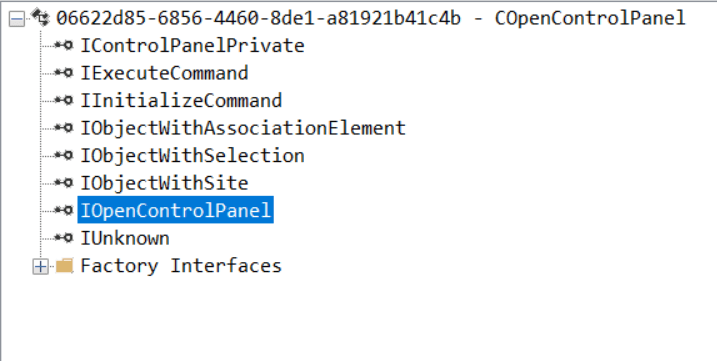
IOpenControlPanel interface in the OleViewDotNet output

IOpenControlPanel interface in the OleViewDotNet output

I immediately thought of its potential to compromise Control Panel items, so I wanted to check which functions were exposed by this interface. Unfortunately, neither the interface nor the COM class has a type library.
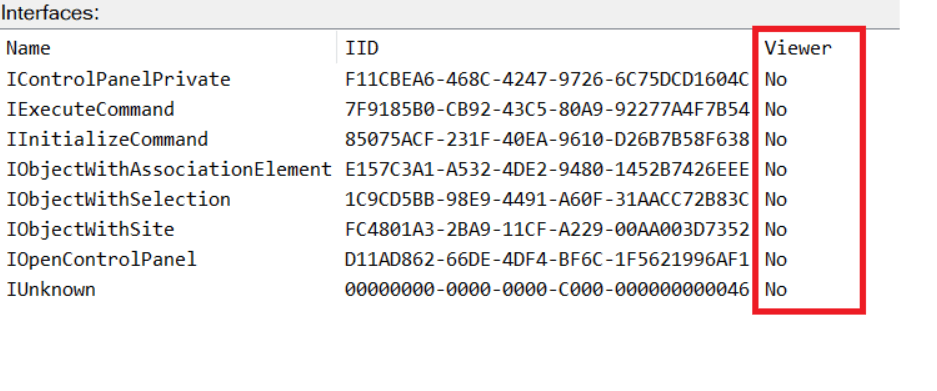
COpenControlPanel interfaces without TypeLib

COpenControlPanel interfaces without TypeLib

Normally, checking the interface definition would require reverse engineering, so at first, it looked like we needed to take a different research path. However, it turned out that the IOpenControlPanel interface is documented on MSDN, and according to the documentation, it exposes several functions. One of them, called Open, allows a specified Control Panel item to be opened using its name as the first argument.

Full type and function definitions are provided in the shobjidl_core.h Windows header file.
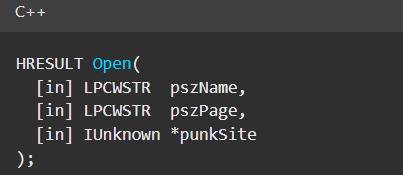
Open function exposed by IOpenControlPanel interface

Open function exposed by IOpenControlPanel interface

It’s worth noting that in newer versions of Windows (e.g., Windows Server 2025 and Windows 11), Microsoft has removed interface names from the registry, which means they can no longer be identified through OleViewDotNet.
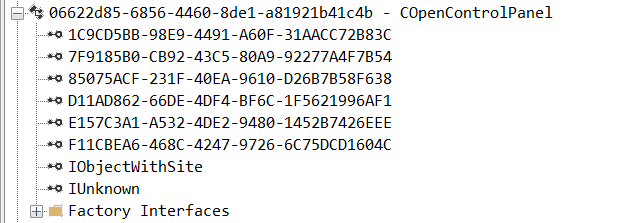
COpenControlPanel interfaces without names

COpenControlPanel interfaces without names

Returning to the COpenControlPanel COM object, I found that the Open function can trigger a DLL to be loaded into memory if it has been registered in the registry. For the purposes of this research, I created a DLL that basically just spawns a message box which is defined under the DllEntryPoint function. I registered it under HKCU\Software\Microsoft\Windows\CurrentVersion\Control Panel\Cpls and then created a simple C++ COM client to call the Open function on this interface.

As expected, the DLL was loaded into memory. It was hosted in the same way that it would be if the Control Panel itself was opened: through the COM Surrogate process (dllhost.exe). Using Process Explorer, it was clear that dllhost.exe loaded my DLL while simultaneously hosting the COpenControlPanel object along with other COM objects.
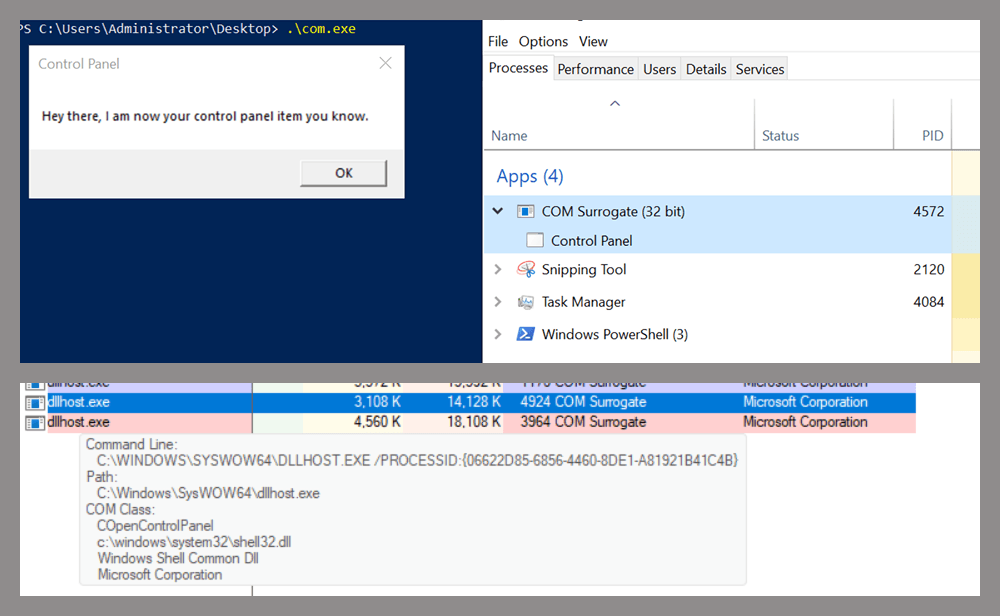
COM Surrogate loading a custom DLL and hosting the COpenControlPanel object

COM Surrogate loading a custom DLL and hosting the COpenControlPanel object

Based on my testing, I made the following observations:

  1. The DLL that needs to be registered does not necessarily have to be a .cpl file; any DLL with a valid entry point will be loaded.
  2. The Open() function accepts the name of a Control Panel item as its first argument. However, it appears that even if a random string is supplied, it still causes all DLLs registered in the relevant registry location to be loaded into memory.

Now, what if we could trigger this COM object remotely? In other words, what if it is not just a COM object but also a DCOM object? To verify this, we checked the AppID of the COpenControlPanel object using OleViewDotNet.
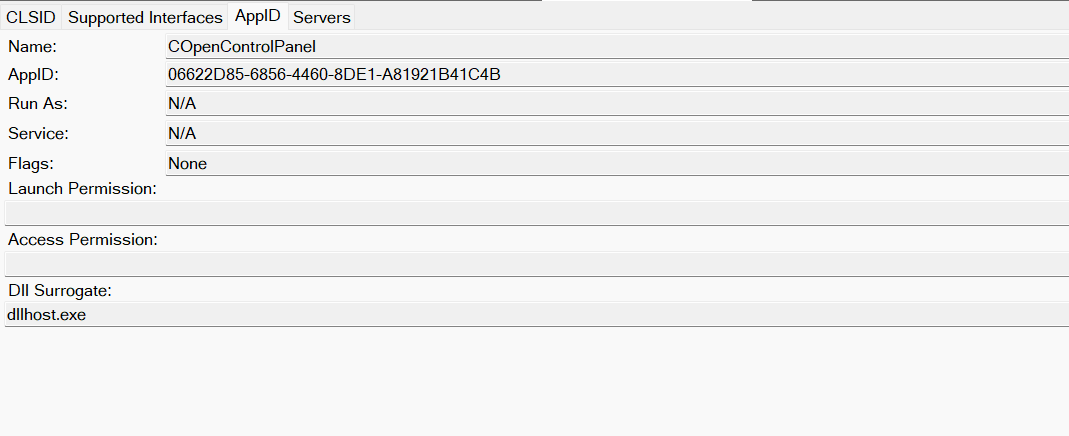
COpenControlPanel object in OleViewDotNet

COpenControlPanel object in OleViewDotNet

Both the launch and access permissions are empty, which means the object will follow the system’s default DCOM security policy. By default, members of the Administrators group are allowed to launch and access the DCOM object.

Based on this, we can build a remote strategy. First, upload the “malicious” DLL, then use the Remote Registry service to register it in the appropriate registry location. Finally, use a trigger acting as a DCOM client to remotely invoke the Open() function, causing our DLL to be loaded. The diagram below illustrates the flow of this approach.
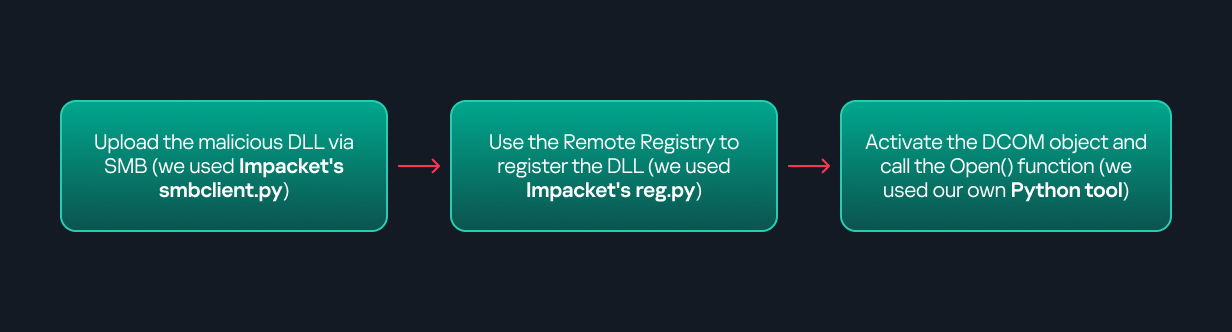
Malicious DLL loading using DCOM

Malicious DLL loading using DCOM

The trigger can be written in either C++ or Python, for example, using Impacket. I chose Python because of its flexibility. The trigger itself is straightforward: we define the DCOM class, the interface, and the function to call. The full code example can be found here.

Once the trigger runs, the behavior will be the same as when executing the COM client locally: our DLL will be loaded through the COM Surrogate process (dllhost.exe).

As you can see, this technique not only achieves command execution but also provides persistence. It can be triggered in two ways: when a user opens the Control Panel or remotely at any time via DCOM.

Detection

The first step in detecting such activity is to check whether any Control Panel items have been registered under the following registry paths:

  • HKCU\Software\Microsoft\Windows\CurrentVersion\Control Panel\Cpls
  • HKLM\Software\Microsoft\Windows\CurrentVersion\Control Panel\Cpls
  • HKLM\Software\WOW6432Node\Microsoft\Windows\CurrentVersion\Control Panel\Cpls

Although commonly known best practices and research papers regarding Windows security advise monitoring only the first subkey, for thorough coverage it is important to monitor all of the above.

In addition, monitoring dllhost.exe (COM Surrogate) for unusual COM objects such as COpenControlPanel can provide indicators of malicious activity.
Finally, it is always recommended to monitor Remote Registry usage because it is commonly abused in many types of attacks, not just in this scenario.

Conclusion

In conclusion, I hope this research has clarified yet another attack vector and emphasized the importance of implementing hardening practices. Below are a few closing points for security researchers to take into account:

  • As shown, DCOM represents a large attack surface. Windows exposes many DCOM classes, a significant number of which lack type libraries – meaning reverse engineering can reveal additional classes that may be abused for lateral movement.
  • Changing registry values to register malicious CPLs is not good practice from a red teaming ethics perspective. Defender products tend to monitor common persistence paths, but Control Panel applets can be registered in multiple registry locations, so there is always a gap that can be exploited.
  • Bitness also matters. On x64 systems, loading a 32-bit DLL will spawn a 32-bit COM Surrogate process (dllhost.exe *32). This is unusual on 64-bit hosts and therefore serves as a useful detection signal for defenders and an interesting red flag for red teamers to consider.

  • ✇Securelist
  • Hunting for Mythic in network traffic Valery Akulenko · Dmitry Sabadash
    Post-exploitation frameworks Threat actors frequently employ post-exploitation frameworks in cyberattacks to maintain control over compromised hosts and move laterally within the organization’s network. While they once favored closed-source frameworks, such as Cobalt Strike and Brute Ratel C4, open-source projects like Mythic, Sliver, and Havoc have surged in popularity in recent years. Malicious actors are also quick to adopt relatively new frameworks, such as Adaptix C2. Analysis of popular fr
     

Hunting for Mythic in network traffic

11 de Dezembro de 2025, 09:00

Post-exploitation frameworks

Threat actors frequently employ post-exploitation frameworks in cyberattacks to maintain control over compromised hosts and move laterally within the organization’s network. While they once favored closed-source frameworks, such as Cobalt Strike and Brute Ratel C4, open-source projects like Mythic, Sliver, and Havoc have surged in popularity in recent years. Malicious actors are also quick to adopt relatively new frameworks, such as Adaptix C2.

Analysis of popular frameworks revealed that their development focuses heavily on evading detection by antivirus and EDR solutions, often at the expense of stealth against systems that analyze network traffic. While obfuscating an agent’s network activity is inherently challenging, agents must inevitably communicate with their command-and-control servers. Consequently, an agent’s presence in the system and its malicious actions can be detected with the help of various network-based intrusion detection systems (IDS) and, of course, Network Detection and Response (NDR) solutions.

This article examines methods for detecting the Mythic framework within an infrastructure by analyzing network traffic. This framework has gained significant traction among various threat actors, including Mythic Likho (Arcane Wolf) и GOFFEE (Paper Werewolf), and continues to be used in APT and other attacks.

The Mythic framework

Mythic C2 is a multi-user command and control (C&C, or C2) platform designed for managing malicious agents during complex cyberattacks. Mythic is built on a Docker container architecture, with its core components – the server, agents, and transport modules – written in Python. This architecture allows operators to add new agents, communication channels, and custom modifications on the fly.

Since Mythic is a versatile tool for the attacker, from the defender’s perspective, its use can align with multiple stages of the Unified Kill Chain, as well as a large number of tactics, techniques, and procedures in the MITRE ATT&CK® framework.

  • Pivoting is a tactic where the attacker uses an already compromised system as a pivot point to gain access to other systems within the network. In this way, they gradually expand their presence within the organization’s infrastructure, bypassing firewalls, network segmentation, and other security controls.
  • Collection (TA0009) is a tactic focused on gathering and aggregating information of value to the attacker: files, credentials, screenshots, and system logs. In the context of network operations, collection is often performed locally on compromised hosts, with data then packaged for transfer. Tools like Mythic automate the discovery and selection of data sought by the adversary.
  • Exfiltration (TA0010) is the process of moving collected information out of the secured network via legitimate or covert channels, such as HTTP(s), DNS, or SMB, etc. Attackers may use resident agents or intermediate relays (pivot hosts) to conceal the exfiltration source and route.
  • Command and Control (TA0011) encompasses the mechanisms for establishing and maintaining a communication channel between the operator and compromised hosts to transmit commands and receive status updates. This includes direct connections, relaying through pivot hosts, and the use of covert protocols. Frameworks like Mythic provide advanced C2 capabilities, such as scheduled command execution, tunneling, and multi-channel communication, which complicate the detection and blocking of their activity.

This article focuses exclusively on the Command and Control (TA0011) tactic, whose techniques can be effectively detected within the network traffic of Mythic agents.

Detecting Mythic agent activity in network traffic

At the time of writing, Mythic supports data transfer over HTTP/S, WebSocket, TCP, SMB, DNS, and MQTT. The platform also boasts over a dozen different agents, written in Go, Python, and C#, designed for Windows, macOS, and Linux.

Mythic employs two primary architectures for its command network:

  • In this model, agents communicate with adjacent agents forming a chain of connections which eventually leads to a node communicating directly with the Mythic C2 server. For this purpose, agents utilize TCP and SMB.
  • In this model, agents communicate directly with the C2 server via HTTP/S, WebSocket, MQTT, or DNS.

P2P communication

Mythic provides pivoting capabilities via named SMB pipes and TCP sockets. To detect Mythic agent activity in P2P mode, we will examine their network traffic and create corresponding Suricata detection rules (signatures).

P2P communication via SMB

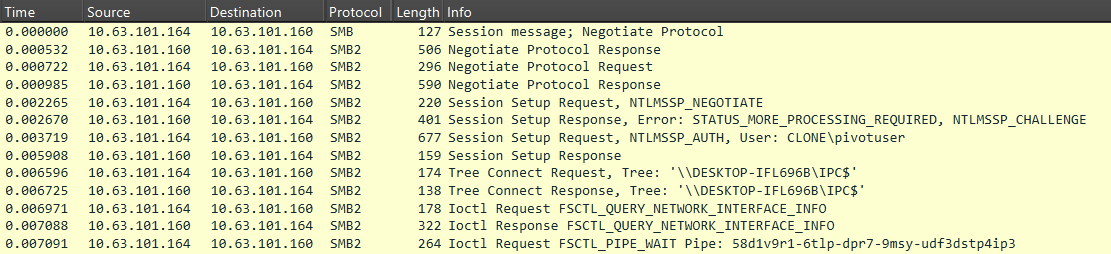
When managing agents via the SMB protocol, a named pipe is used by default for communication, with its name matching the agent’s UUID.

Although this parameter can be changed, it serves as a reliable indicator and can be easily described with a regular expression. Example:
[a-z0-9]{8}\-[a-z0-9]{4}\-[a-z0-9]{4}\-[a-z0-9]{4}\-[a-z0-9]{12}

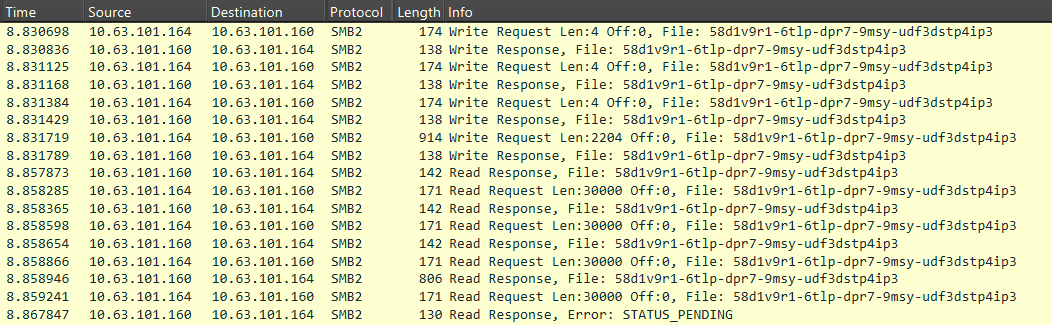
For SMB communication, agents encode and encrypt data according to the pattern: base64(UUID+AES256(JSON)). This data is then split into blocks and transmitted over the network. The screenshot below illustrates what a network session for establishing a connection between agents looks like in Wireshark.

Commands and their responses are packaged within the MythicMessage data structure. This structure contains three header fields, as well as the commands themselves or the corresponding responses:

  • Total size (4 bytes)
  • Number of data blocks (4 bytes)
  • Current block number (4 bytes)
  • Base64-encoded data

The screenshot below shows an example of SMB communication between agents.

The agent (10.63.101.164) sends a command to another agent in the MythicMessage format. The first three Write Requests transmit the total message size, total number of blocks, and current block number. The fourth request transmits the Base64-encoded data. This is followed by a sequence of Read Requests, which are also transmitted in the MythicMessage format.

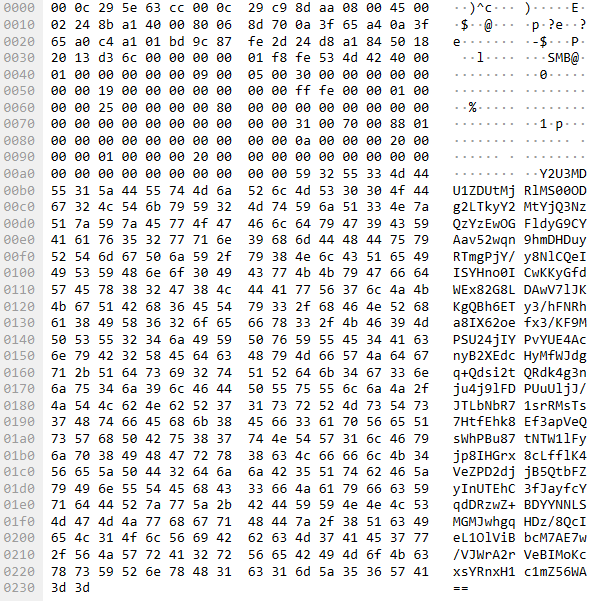
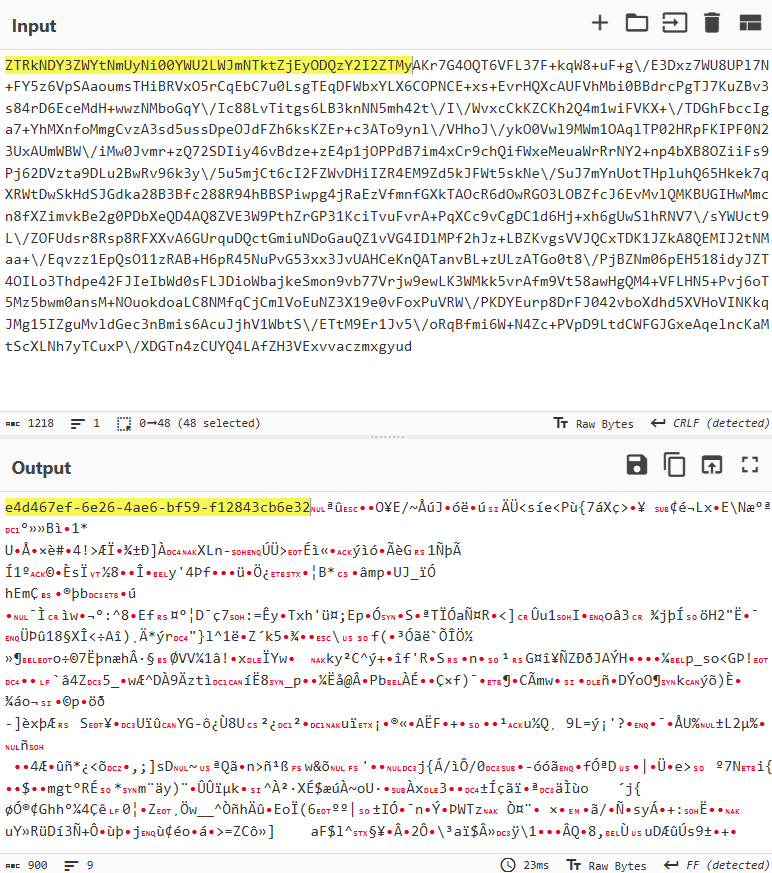
Below are the data transmitted in the fourth field of the MythicMessage structure.

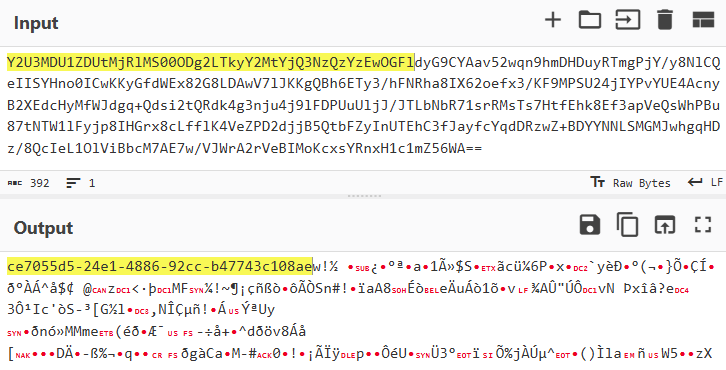
The content is encoded in Base64. Upon decoding, the structure of the transmitted information becomes visible: it begins with the UUID of the infected host, followed by a data block encrypted using AES-256.

The fact that the data starts with a UUID string can be leveraged to create a signature-based detection rule that searches network packets for the identifier pattern.

To search for packets containing a UUID, the following signature can be applied. It uses specific request types and protocol flags as filters (Command: Ioctl (11), Function: FSCTL_PIPE_WAIT (0x00110018)), followed by a check to see if the pipe name matches the UUID pattern.

alert tcp any any -> any [139, 445] (msg: "Trojan.Mythic.SMB.C&C"; flow: to_server, established; content: "|fe|SMB"; offset: 4; depth: 4; content: "|0b 00|"; distance: 8; within: 2; content: "|18 00 11 00|"; distance: 48; within: 12; pcre: "/\x48\x00\x00\x00[\x00-\xFF]{2}([a-z0-9]\x00){8}\-\x00([a-z0-9]\x00){4}\-\x00([a-z0-9]\x00){4}\-\x00([a-z0-9]\x00){4}\-\x00([a-z0-9]\x00){12}$/R"; threshold: type both, track by_src, count 1, seconds 60; reference: url, https://github.com/MythicC2Profiles/smb; classtype: ndr1; sid: 9000101; rev: 1;)

Agent activity can also be detected by analyzing data transmitted in SMB WriteRequest packets with the protocol flag Command: Write (9) and a distinct packet structure where the BlobOffset and BlobLen fields are set to zero. If the Data field is Base64-encoded and, after decoding, begins with a UUID-formatted string, this indicates a command-and-control channel.

alert tcp any any -> any [139, 445] (msg: "Trojan.Mythic.SMB.C&C"; flow: to_server, established; dsize: > 360; content: "|fe|SMB"; offset: 4; depth: 4; content: "|09 00|"; distance: 8; within: 2; content: "|00 00 00 00 00 00 00 00 00 00 00 00|"; distance: 86; within: 12; base64_decode: bytes 64, offset 0, relative; base64_data; pcre: "/^[a-z0-9]{8}\-[a-z0-9]{4}\-[a-z0-9]{4}\-[a-z0-9]{4}\-[a-z0-9]{12}/"; threshold: type both, track by_src, count 1, seconds 60; reference: url, https://github.com/MythicC2Profiles/smb; classtype: ndr1; sid: 9000102; rev: 1;)

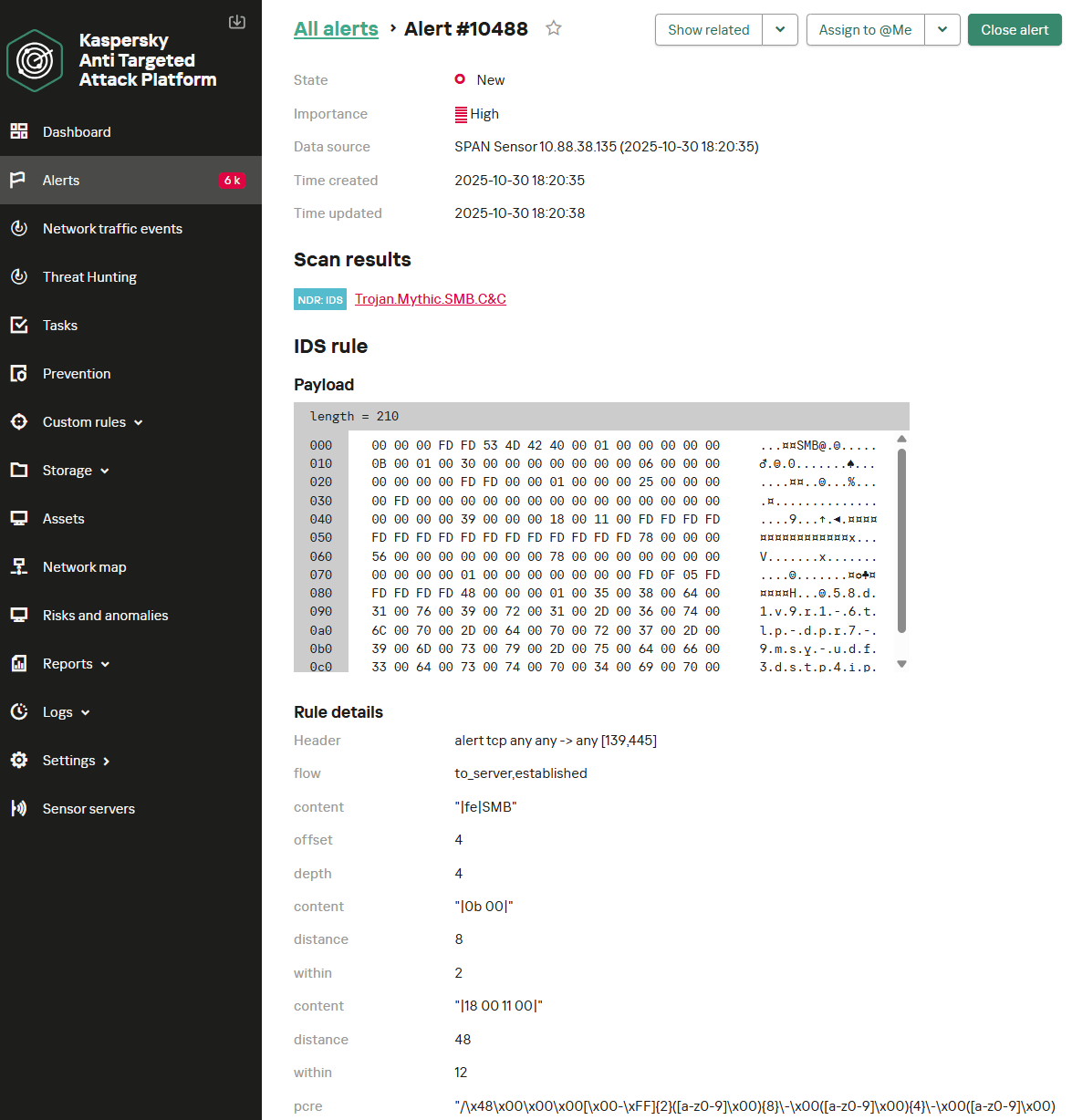
Below is the KATA NDR user interface displaying an alert about detecting a Mythic agent operating in P2P mode over SMB. In this instance, the first rule – which checks the request type, protocol flags, and the UUID pattern – was triggered.

It should be noted that these signatures have a limitation. If the SMBv3 protocol with encryption enabled is used, Mythic agent activity cannot be detected with signature-based methods. A possible alternative is behavioral analysis. However, in this context, it suffers from low accuracy and a high false-positive rate. The SMB protocol is widely used by organizations for various legitimate purposes, making it difficult to isolate behavioral patterns that definitively indicate malicious activity.

P2P communication via TCP

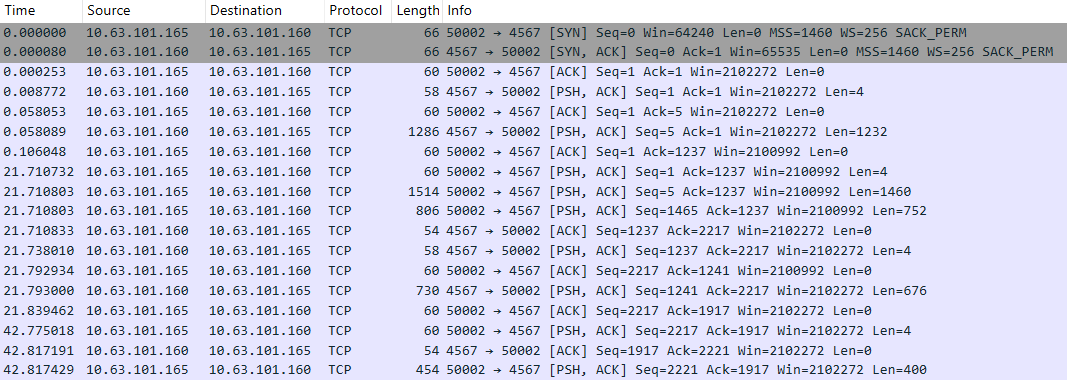
Mythic also supports P2P communications via TCP. The connection initialization process appears in network traffic as follows:

As with SMB, the MythicMessage structure is used for transmitting and receiving data. First, the data length (4 bytes) is sent as a big-endian DWORD in a separate packet. Subsequent packets transmit the number of data blocks, the current block number, and the data itself. However, unlike SMB packets, the value of the current block number field is always 0x00000000, due to TCP’s built-in packet fragmentation support.

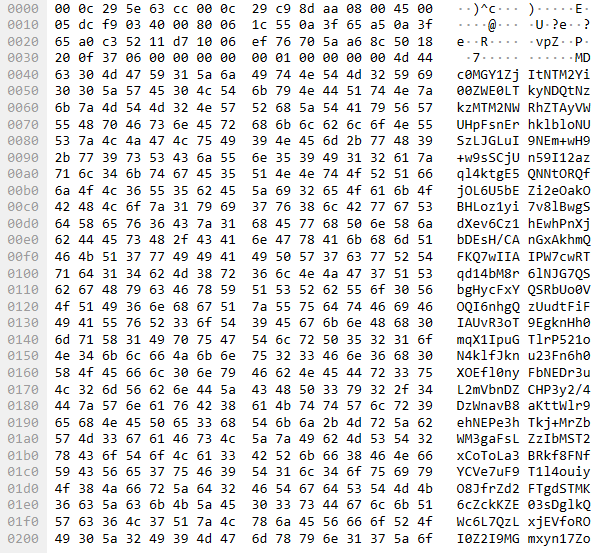
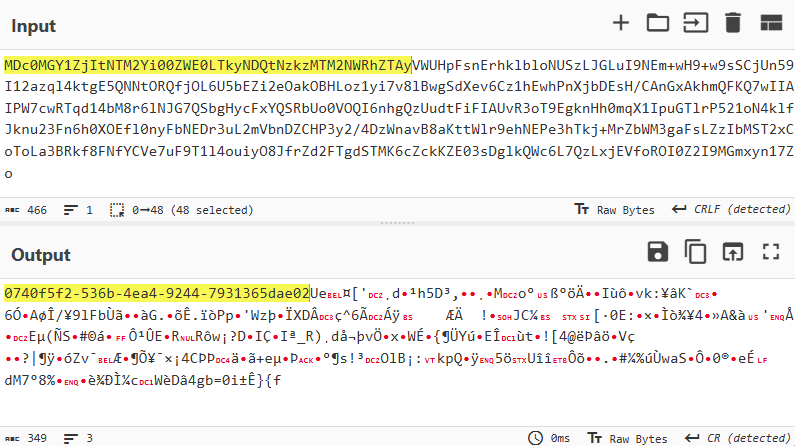
The data encoding scheme is also analogous to what we observed with SMB and appears as follows: base64(UUID+AES256(JSON)). Below is an example of a network packet containing Mythic data.

The decoded data appears as follows:

Similar to communication via SMB, signature-based detection rules can be created for TCP traffic to identify Mythic agent activity by searching for packets containing UUID-formatted strings. Below are two Suricata detection rules. The first rule is a utility rule. It does not generate security alerts but instead tags the TCP session with an internal flag, which is then checked by another rule. The second rule verifies the flag and applies filters to confirm that the current packet is being analyzed at the beginning of a network session. It then decodes the Base64 data and searches the resulting content for a UUID-formatted string.

alert tcp any any -> any any (msg: "Trojan.Mythic.TCP.C&C"; flow: from_server, established; dsize: 4; stream_size: server, <, 6; stream_size: client, <, 3; content: "|00 00|"; depth: 2; pcre: "/^\x00\x00[\x00-\x5C]{1}[\x00-\xFF]{1}$/"; flowbits: set, mythic_tcp_p2p_msg_len; flowbits: noalert; threshold: type both, track by_src, count 1, seconds 60; reference: url, https://github.com/MythicC2Profiles/tcp; classtype: ndr1; sid: 9000103; rev: 1;)

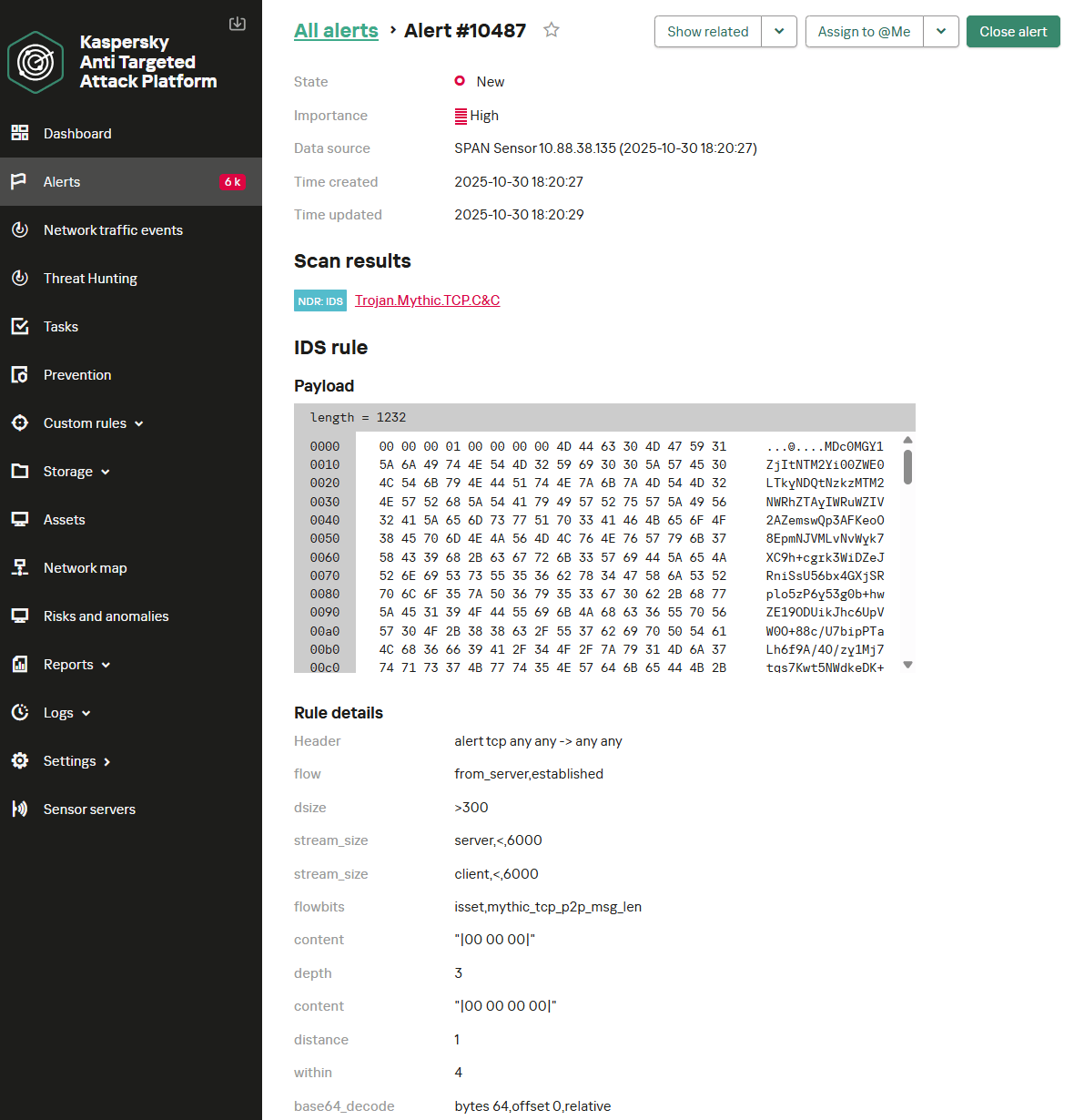
alert tcp any any -> any any (msg: "Trojan.Mythic.TCP.C&C"; flow: from_server, established; dsize: > 300; stream_size: server, <, 6000; stream_size: client, <, 6000; flowbits: isset, mythic_tcp_p2p_msg_len; content: "|00 00 00|"; depth: 3; content: "|00 00 00 00|"; distance: 1; within: 4; base64_decode: bytes 64, offset 0, relative; base64_data; pcre: "/^[a-z0-9]{8}\-[a-z0-9]{4}\-[a-z0-9]{4}\-[a-z0-9]{4}\-[a-z0-9]{12}/"; threshold: type both, track by_src, count 1, seconds 60; reference: url, https://github.com/MythicC2Profiles/tcp; classtype: ndr1; sid: 9000104; rev: 1;)

Below is the NDR interface displaying an example of the two rules detecting a Mythic agent operating in P2P mode over TCP.

Egress transport modules

Covert Egress communication

For stealthy operations, Mythic allows agents to be managed through popular services. This makes its activity less conspicuous within network traffic. Mythic includes transport modules based on the following services:

  • Discord
  • GitHub
  • Slack

Of these, only the first two remain relevant at the time of writing. Communication via Slack (the Slack C2 Profile transport module) is no longer supported by the developers and is considered deprecated, so we will not examine it further.

The Discord C2 Profile transport module

The use of the Discord service as a mediator for C2 communication within the Mythic framework has been gaining popularity recently. In this scenario, agent traffic is indistinguishable from normal Discord activity, with commands and their execution results masquerading as messages and file attachments. Communication with the server occurs over HTTPS and is encrypted with TLS. Therefore, detecting Mythic traffic requires decrypting this.

Analyzing decrypted TLS traffic

Let’s assume we are using an NDR platform in conjunction with a network traffic decryption (TLS inspection) system to detect suspicious network activity. In this case, we operate under the assumption that we can decrypt all TLS traffic. Let’s examine possible detection rules for that scenario.

Agent and server communication occurs via Discord API calls to send messages to a specific channel. Communication between the agent and Mythic uses the MythicMessageWrapper structure, which contains the following fields:

  • message: the transmitted data
  • sender_id: a GUID generated by the agent, included in every message
  • to_server: a direction flag – a message intended for the server or the agent
  • id: not used
  • final: not used

Of particular interest to us is the message field, which contains the transmitted data encoded in Base64. The MythicMessageWrapper message is transmitted in plaintext, making it accessible to anyone with read permissions for messages on the Discord server.

Below is an example of data transmission via messages in a Discord channel.

To establish a connection, the agent authenticates to the Discord server via the API call /api/v10/gateway/bot. We observe the following data in the network traffic:

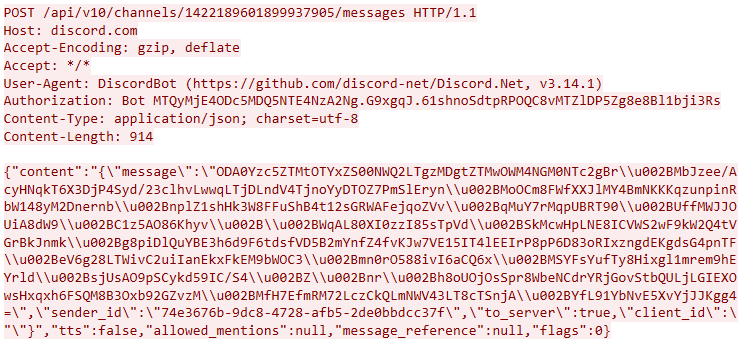
After successful initialization, the agent gains the ability to receive and respond to commands. To create a message in the channel, the agent makes a POST request to the API endpoint /channels/<channel.id>/messages. The network traffic for this call is shown in the screenshot below.

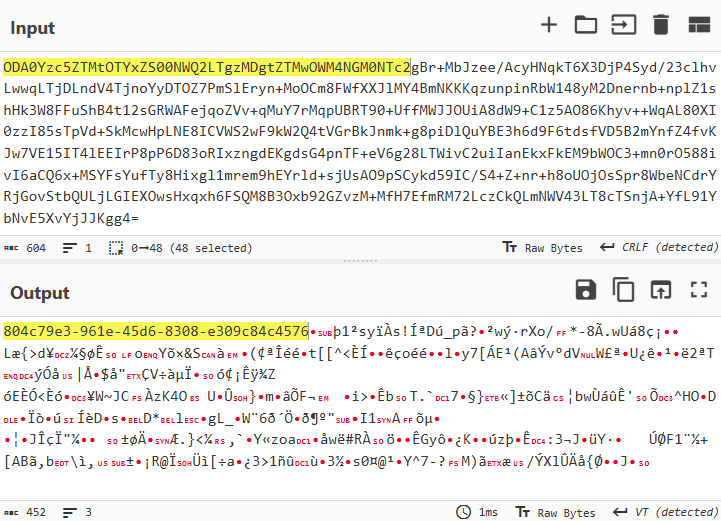
After decoding the Base64, the content of the message field appears as follows:

A structure characteristic of a UUID is visible at the beginning of the packet.

After processing the message, the agent deletes it from the channel via a DELETE request to the API endpoint /channels/{channel.id}/messages/{message.id}.

Below is a Suricata rule that detects the agent’s Discord-based communication activity. It checks the API activity for creating HTTP messages for the presence of Base64-encoded data containing the agent’s UUID.

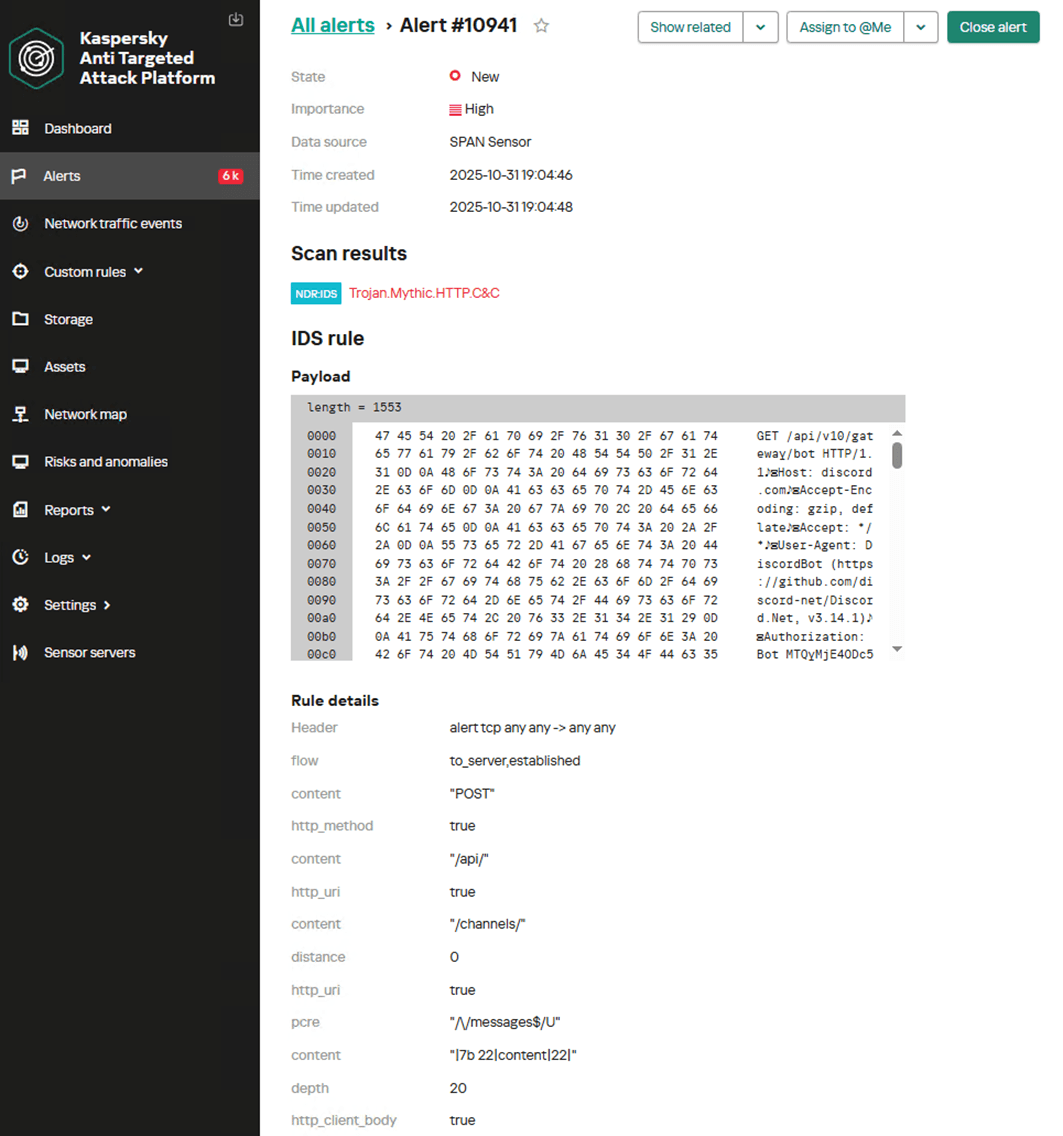
alert tcp any any -> any any (msg: "Trojan.Mythic.HTTP.C&C"; flow: to_server, established; content: "POST"; http_method; content: "/api/"; http_uri; content: "/channels/"; distance: 0; http_uri; pcre: "/\/messages$/U"; content: "|7b 22|content|22|"; depth: 20; http_client_body; content: "|22|sender_id"; depth: 1500; http_client_body; pcre: "/\x22sender_id\x5c\x22\x3a\x5c\x22[a-z0-9]{8}\-[a-z0-9]{4}\-[a-z0-9]{4}\-[a-z0-9]{4}\-[a-z0-9]{12}/"; threshold: type both, track by_src, count 1, seconds 60; reference: url, https://github.com/MythicC2Profiles/discord; classtype: ndr1; sid: 9000105; rev: 1;)

Below is the NDR user interface displaying an example of detecting the activity of the Discord C2 Profile transport module for a Mythic agent within decrypted HTTP traffic.

Analyzing encrypted TLS traffic

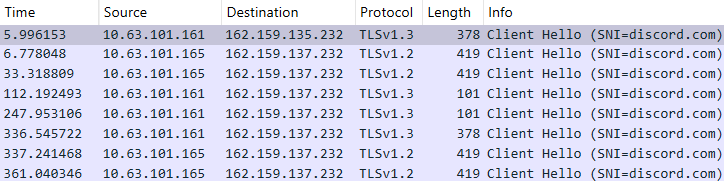
If Discord usage is permitted on the network and there is no capability to decrypt traffic, it becomes nearly impossible to detect agent activity. In this scenario, behavioral analysis of requests to the Discord server may prove useful. Below is network traffic showing frequent TLS connections to the Discord server, which could indicate commands being sent to an agent.

In this case, we can use a Suricata rule to detect the frequent TLS sessions with Discord servers:

alert tcp any any -> any any (msg: "NetTool.PossibleMythicDiscordEgress.TLS.C&C"; flow: to_server, established; tls_sni; content: "discord.com"; nocase; threshold: type both, track by_src, count 4, seconds 420; reference: url, https://github.com/MythicC2Profiles/discord; classtype: ndr3; sid: 9000106; rev: 1;)

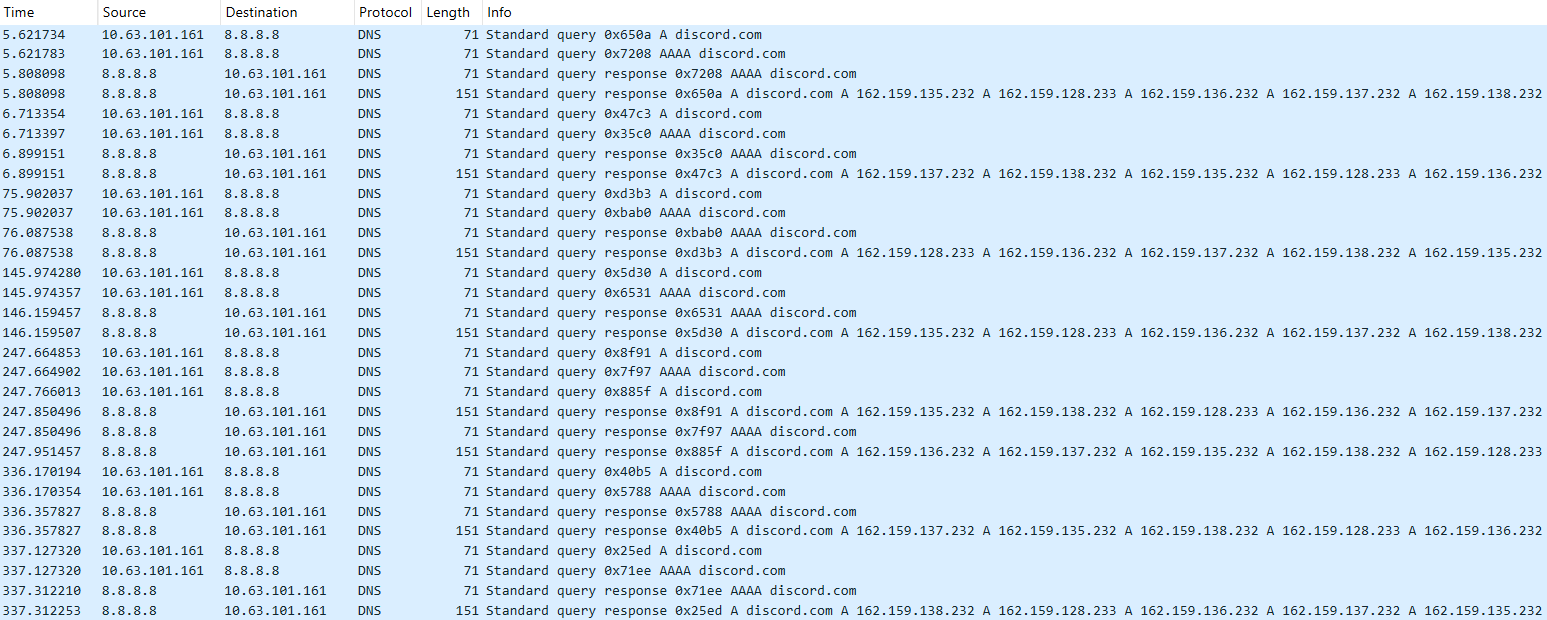
Another method for detecting these communications involves tracking multiple DNS queries to the discord.com domain.

The following rule can be applied to detect these:

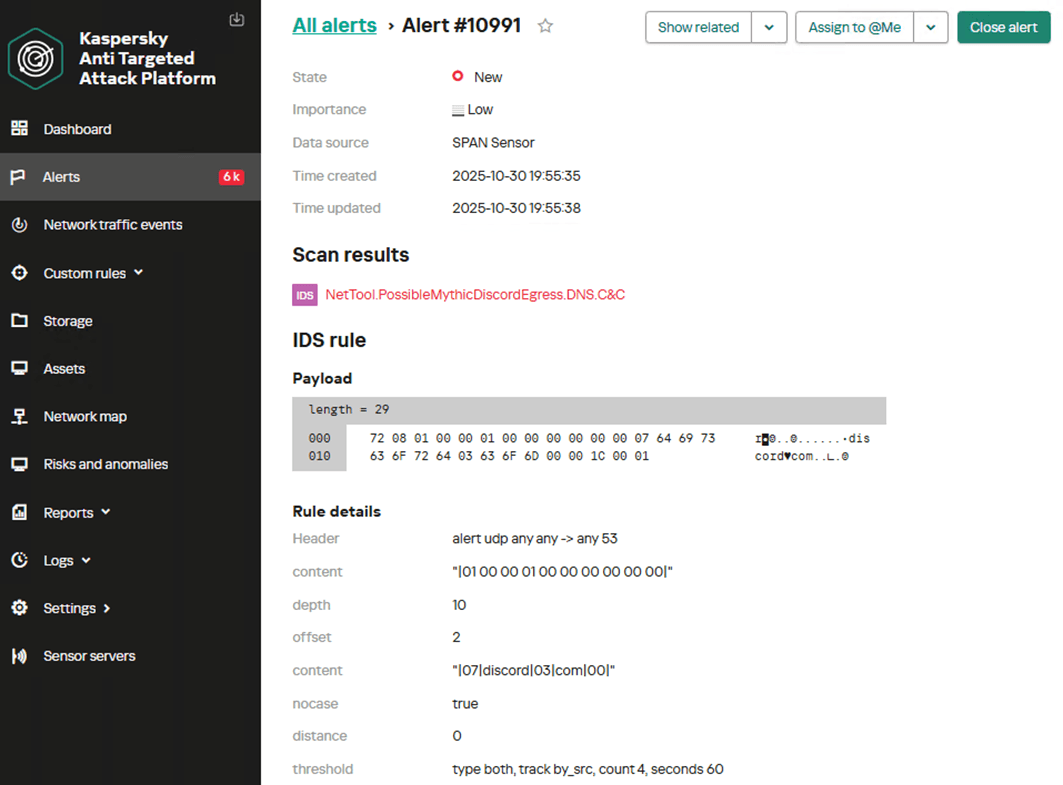
alert udp any any -> any 53 (msg: "NetTool.PossibleMythicDiscordEgress.DNS.C&C"; content: "|01 00 00 01 00 00 00 00 00 00|"; depth: 10; offset: 2; content: "|07|discord|03|com|00|"; nocase; distance: 0; threshold: type both, track by_src, count 4, seconds 60; reference: url, https://github.com/MythicC2Profiles/discord; classtype: ndr3; sid: 9000107; rev: 1;)

Below is the NDR user interface showing an example of a custom rule in operation, detecting the activity of the Discord C2 Profile transport module for a Mythic agent within encrypted traffic based on characteristic DNS queries.

The proposed rule options have low accuracy and can generate a high number of false positives. Therefore, they must be adapted to the specific characteristics of the infrastructure in which they will run. Threshold and count parameters, which control the triggering frequency and time window, require tuning.

GitHub C2 Profile transport module

GitHub’s popularity has made it an attractive choice as a mediator for managing Mythic agents. The core concept is the same as in other covert Egress communication transport modules. Communication with GitHub utilizes HTTPS. Successful operation requires an account on the target platform and the ability to communicate via API calls. The transport module utilizes the GitHub API to send comments to pre-created Issues and to commit files to a branch within a repository controlled by the attackers. In this model, the agent interacts only with GitHub: it creates and reads comments, uploads files, and manages branches. It does not communicate with any other servers. The communication algorithm via GitHub is as follows:

  1. The agent posts a comment (check-in) to a designated Issue on GitHub, intended for agents to report their results.
  2. The Mythic server validates the comment, deletes it, and posts a reply in an issue designated for server use.
  3. The agent creates a branch with a name matching its UUID and writes a get_tasking file to it (performs a push request).
  4. The Mythic server reads the file and writes a response file to the same branch.
  5. The agent reads the response file, deletes the branch, pauses, and repeats the cycle.
Analyzing decrypted TLS traffic

Let’s consider an approach to detecting agent activity when traffic decryption is possible.

Agent communication with the server utilizes API calls to GitHub. The payload is encoded in Base64 and published in plaintext; therefore, anyone who can view the repository or analyze the traffic contents can decode it.

Analysis of agent communication revealed that the most useful traffic for creating detection rules is associated with publishing check-in comments, creating a branch, and publishing a file.

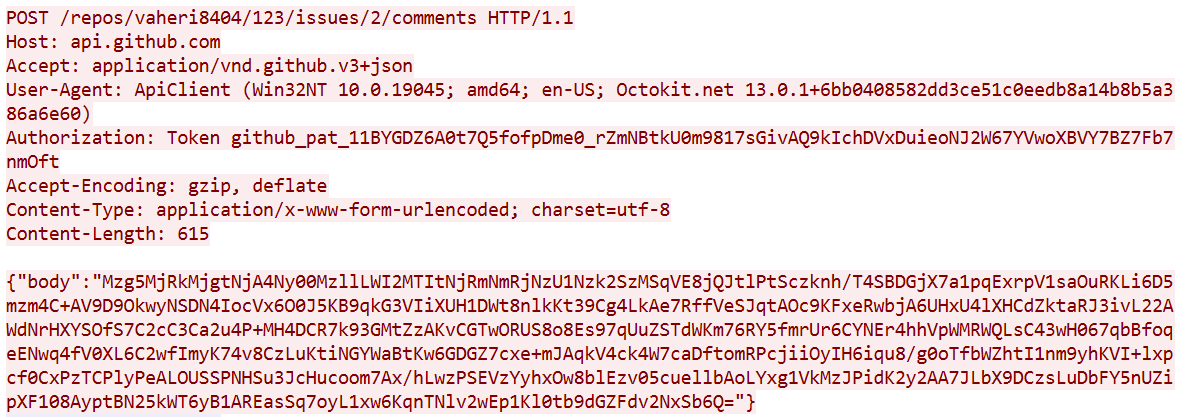
During the check-in phase, the agent posts a comment to register a new agent and establish communication.

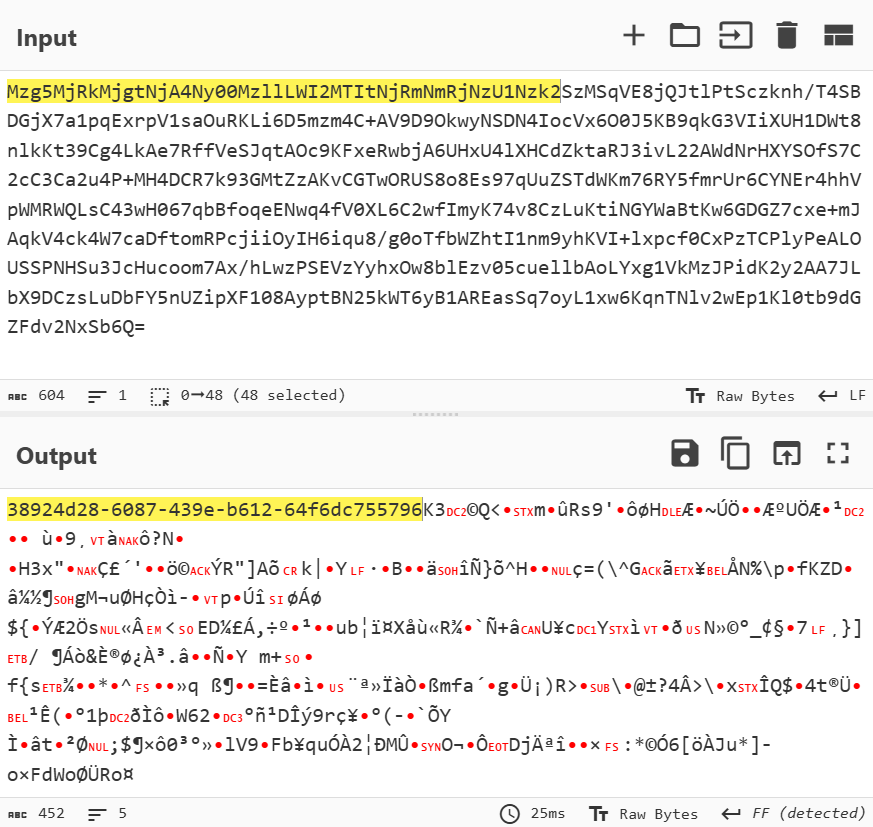
The transmitted data is encoded in Base64 and contains the agent’s UUID and the portion of the message encrypted using AES-256.

This allows for a signature that detects UUID-formatted substrings within GitHub comment creation requests.

alert tcp any any -> any any (msg: "Trojan.Mythic.HTTP.C&C"; flow: to_server, established; content: "POST"; http_method; content: "api.github.com"; http_host; content: "/repos/"; depth: 8; http_uri; pcre: "/\/comments$/U"; content: "|22|body|22|"; depth: 8; http_client_body; base64_decode: bytes 300, offset 2, relative; base64_data; pcre: "/^[a-z0-9]{8}\-[a-z0-9]{4}\-[a-z0-9]{4}\-[a-z0-9]{4}\-[a-z0-9]{12}/"; threshold: type both, track by_src, count 1, seconds 60; reference: url, https://github.com/MythicC2Profiles/github; classtype: ndr1; sid: 9000108; rev: 1;)

Another stage suitable for detection is when the agent creates a separate branch with its UUID as the name. All subsequent relevant communication with the server will occur within this branch. Here is an example of a branch creation request:

Therefore, we can create a detection rule to identify UUID-formatted strings within branch creation requests.

alert tcp any any -> any any (msg: "Trojan.Mythic.HTTP.C&C"; flow: to_server, established; content: "POST"; http_method; content: "api.github.com"; http_host; content: "/repos/"; depth: 100; http_uri; content: "/git/refs"; distance: 0; http_uri; content: "|22|ref|22 3a|"; depth: 10; http_client_body; content: "refs/heads/"; distance: 0; within: 50; http_client_body; pcre: "/refs\/heads\/[a-z0-9]{8}\-[a-z0-9]{4}\-[a-z0-9]{4}\-[a-z0-9]{4}\-[a-z0-9]{12}\x22/"; threshold: type both, track by_src, count 1, seconds 60; reference: url, https://github.com/MythicC2Profiles/github; classtype: ndr1; sid: 9000109; rev: 1;)

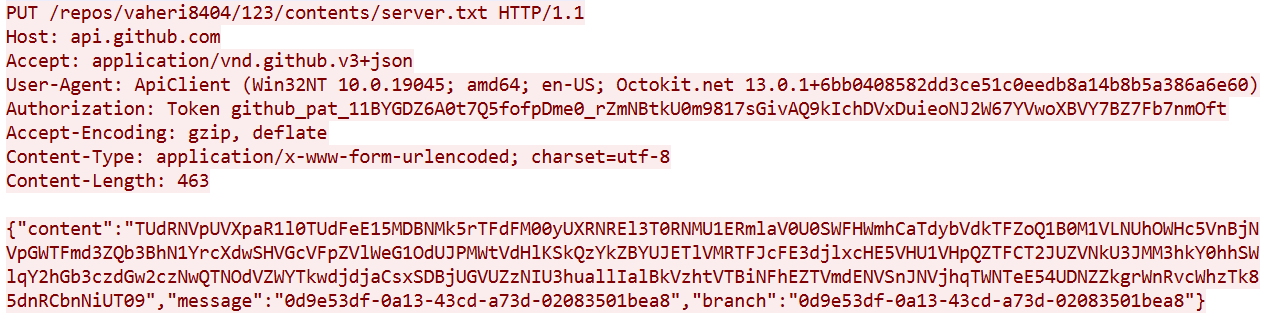
After creating the branch, the agent writes a file to it (sends a push request), which contains Base64-encoded data.

Therefore, we can create a rule to trigger on file publication requests to a branch whose name matches the UUID pattern.

alert tcp any any -> any any (msg: "Trojan.Mythic.HTTP.C&C"; flow: to_server, established; content: "PUT"; http_method; content: "api.github.com"; http_host; content: "/repos/"; depth:8; http_uri; content: "/contents/"; distance: 0; http_uri; content: "|22|content|22|"; depth: 100; http_client_body; pcre: "/\x22message\x22\x3a\x22[a-z0-9]{8}\-[a-z0-9]{4}\-[a-z0-9]{4}\-[a-z0-9]{4}\-[a-z0-9]{12}\x22/"; threshold: type both, track by_src, count 1, seconds 60; reference: url, https://github.com/MythicC2Profiles/github; classtype: ndr1; sid: 9000110; rev: 1;)

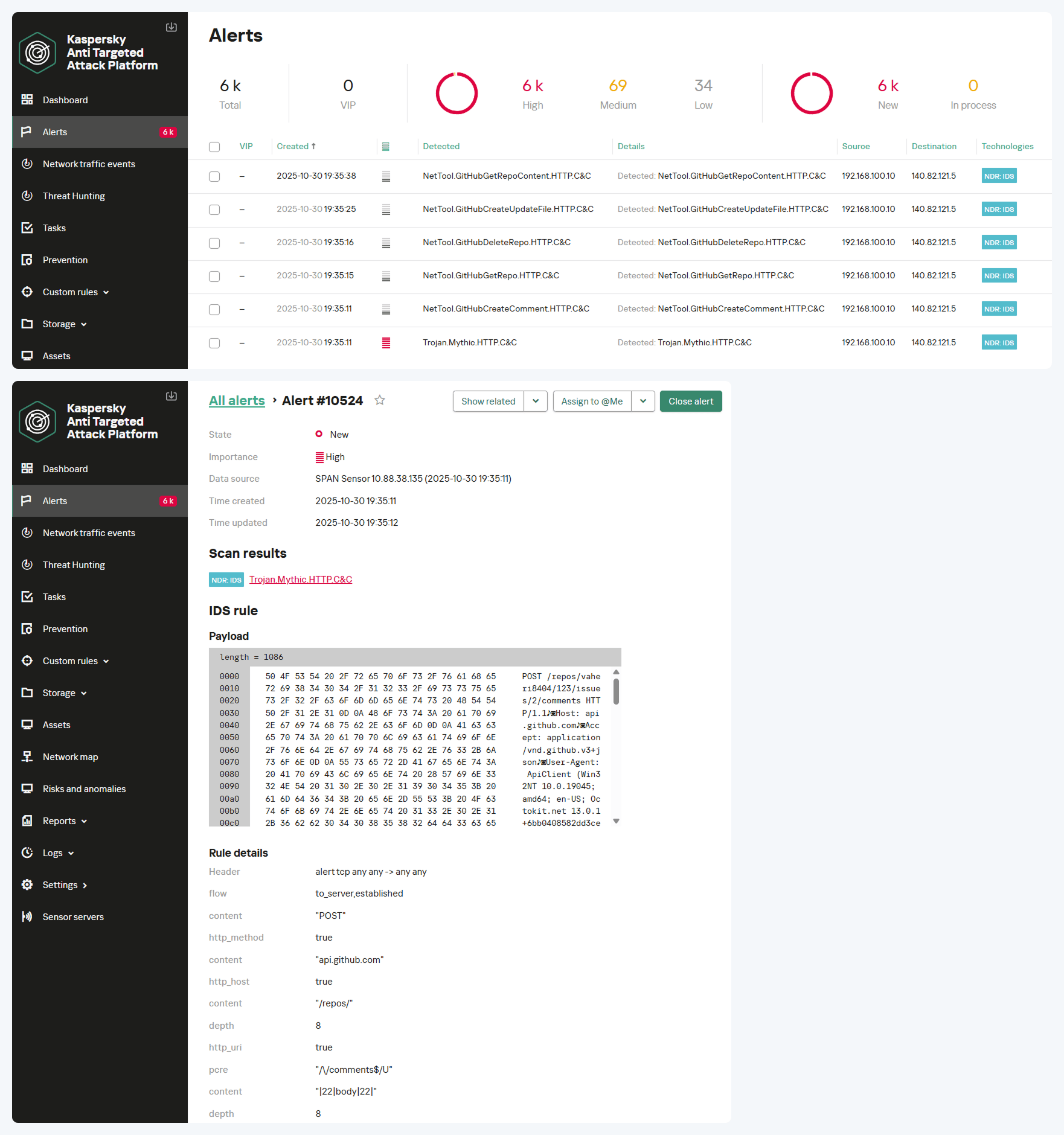
The screenshot below shows how the NDR solution logs all suspicious communications using the GitHub API and subsequently identifies the Mythic agent’s activity. The result is an alert with the verdict Trojan.Mythic.HTTP.C&C.

Analyzing encrypted TLS traffic

Communication with GitHub occurs over HTTPS; therefore, in the absence of traffic decryption capability, signature-based methods for detecting agent activity cannot be applied. Let’s consider a behavioral agent activity detection approach.

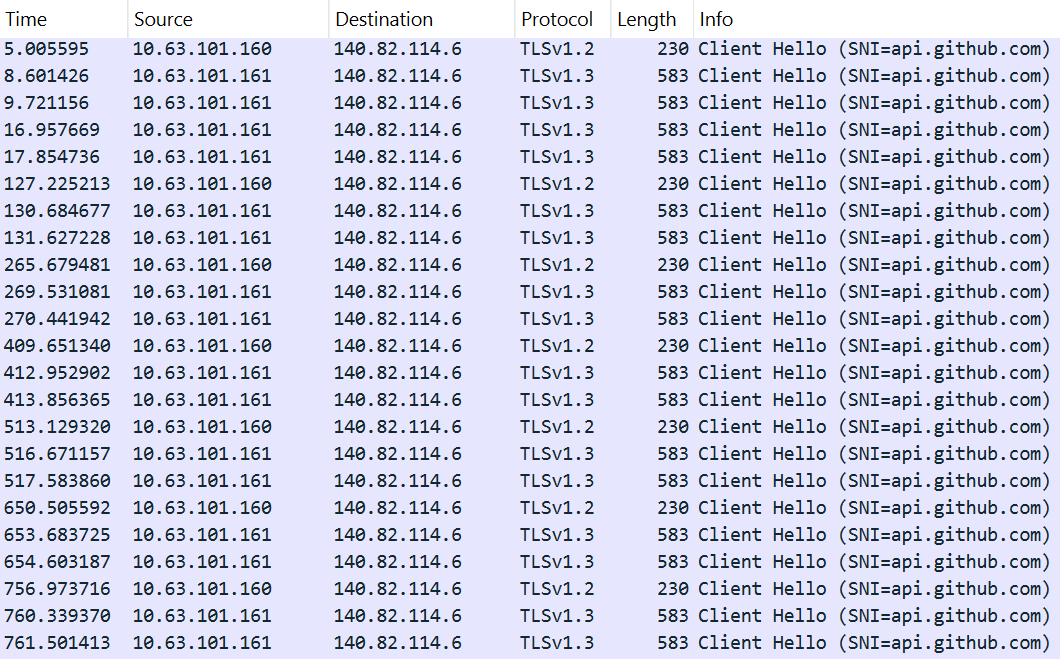
For instance, it is possible to detect connections to GitHub servers that are atypical in frequency and purpose, originating from network segments where this activity is not expected. The screenshot below shows an example of an agent’s multiple TLS sessions. The traffic reflects the execution of several commands, as well as idle time, manifested as constant polling of the server while awaiting new tasks.

Multiple TLS sessions with the GitHub service from uncharacteristic network segments can be detected using the rule presented below:

alert tcp any any -> any any (msg:"NetTool.PossibleMythicGitHubEgress.TLS.C&C"; flow: to_server, established; tls_sni; content: "api.github.com"; nocase; threshold: type both, track by_src, count 4, seconds 60; reference: url, https://github.com/MythicC2Profiles/github; classtype: ndr3; sid: 9000111; rev: 1;)

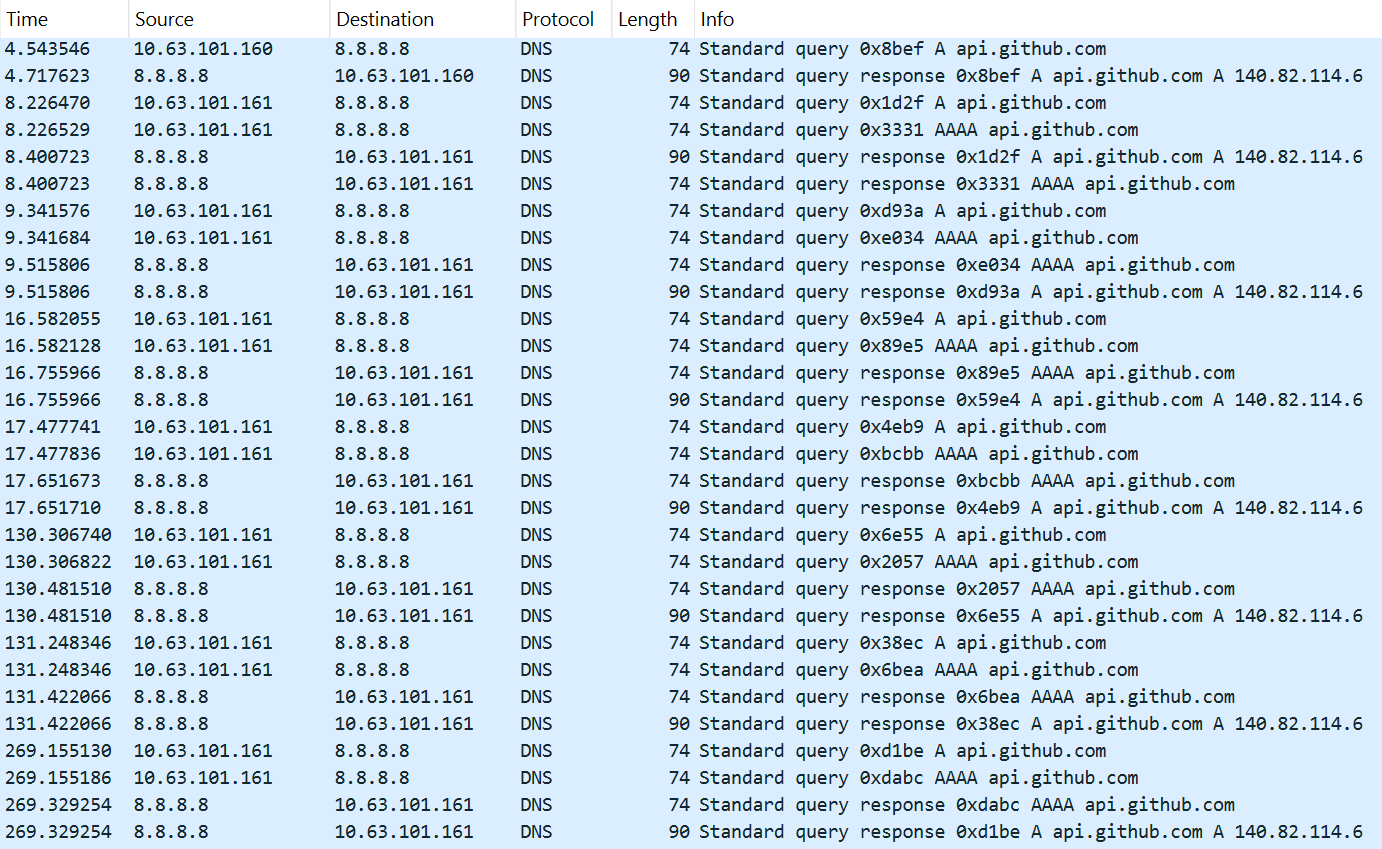
Additionally, multiple DNS queries to the service can be logged in the traffic.

This activity is detected with the help of the following rule:

alert udp any any -> any 53 (msg: "NetTool.PossibleMythicGitHubEgress.DNS.C&C"; content: "|01 00 00 01 00 00 00 00 00 00|"; depth: 10; offset: 2; content: "|03|api|06|github|03|com|00|"; nocase; distance: 0; threshold: type both, track by_src, count 12, seconds 180; reference: url, https://github.com/MythicC2Profiles/github; classtype: ndr3; sid: 9000112; rev: 1;)

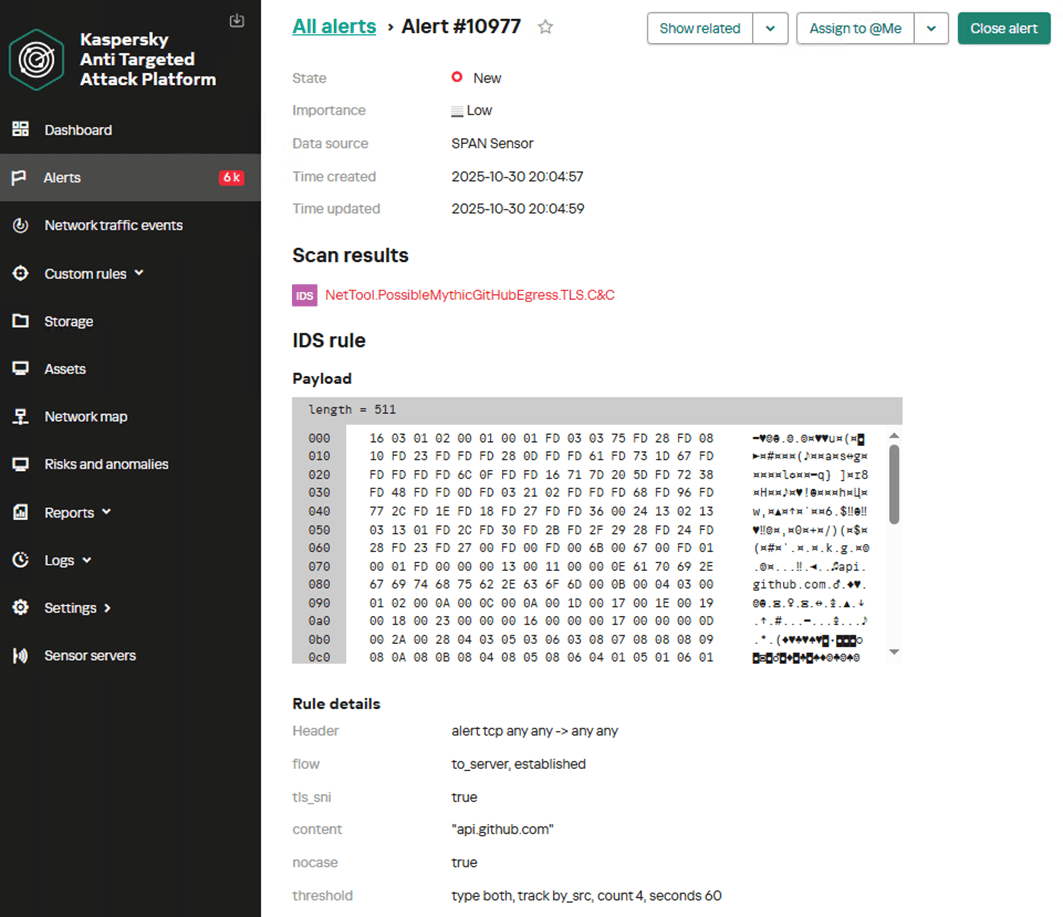
The screenshot below shows the NDR interface with an example of the first rule in action, detecting traces of the GitHub profile activity for a Mythic agent within encrypted TLS traffic.

The suggested rule options can produce false positives, so to improve their effectiveness, they must be adapted to the specific characteristics of the infrastructure in which they will run. The parameters of the threshold keyword – specifically the count and seconds values, which control the number of events required to generate an alert and the time window for their occurrence in NDR – must be configured.

Direct Egress communication

The Egress communication model allows agents to interact directly with the C2 server via the following protocols:

  • HTTP(S)
  • WebSocket
  • MQTT
  • DNS

The first two protocols are the most prevalent. The DNS-based transport module is still under development, and the module based on MQTT sees little use among operators. We will not examine them within the scope of this article.

Communication via HTTP

HTTP is the most common protocol for building a Mythic agent control network. The HTTP transport container acts as a proxy between the agents and the Mythic server. It allows data to be transmitted in both plaintext and encrypted form. Crucially, the metadata is not encrypted, which enables the creation of signature-based detection rules.

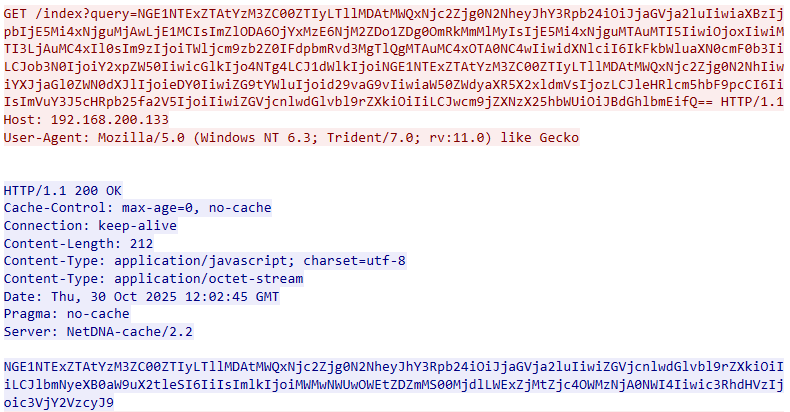
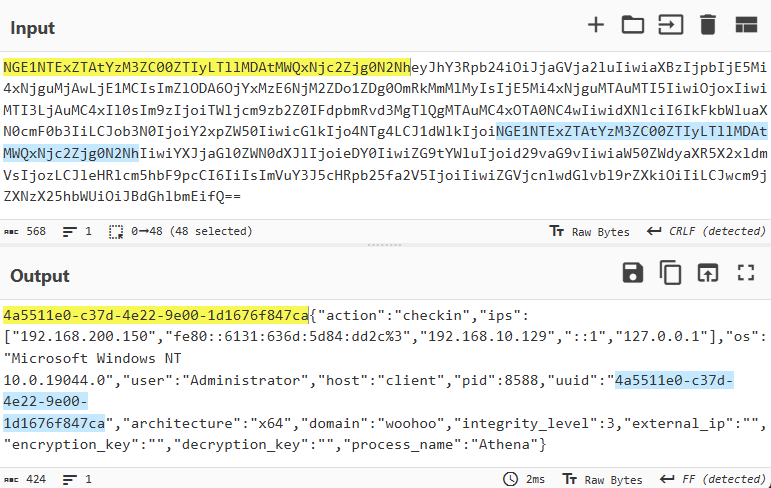
Below is an example of unencrypted Mythic network traffic over HTTP. During a GET request, data encoded in Base64 is passed in the value of the query parameter.

After decoding, the agent’s UUID – generated according to a specific pattern – becomes visible. This identifier is followed by a JSON object containing the key parameters of the host, collected by the agent.

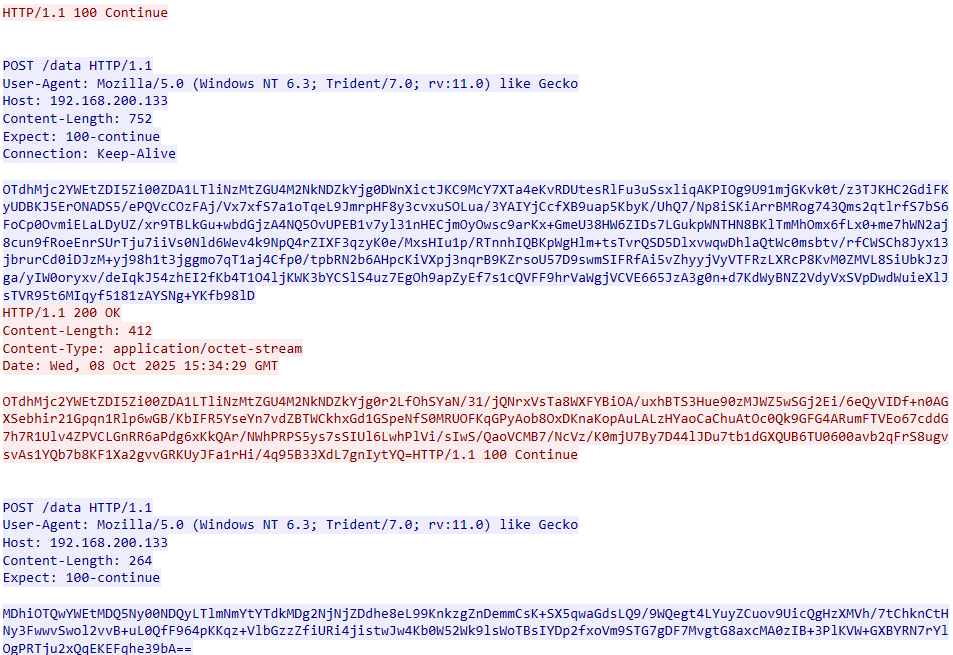
If data encryption is applied, the network traffic for agent communication appears as shown in the screenshot below.

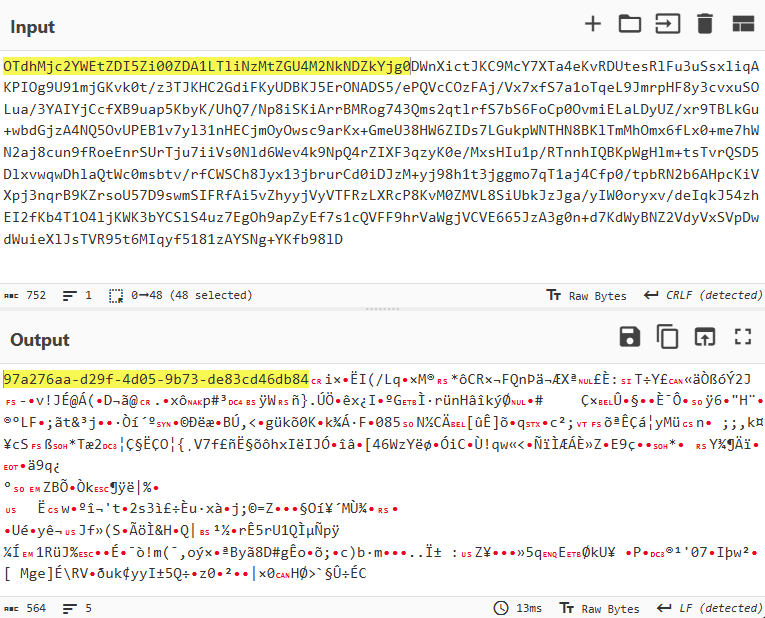
After decrypting the traffic and decoding from Base64, the communication data reveals the familiar structure: UUID+AES256(JSON).

Therefore, to create a detection signature for this case, we can also rely on the presence of a UUID within the Base64-encoded data in POST requests.

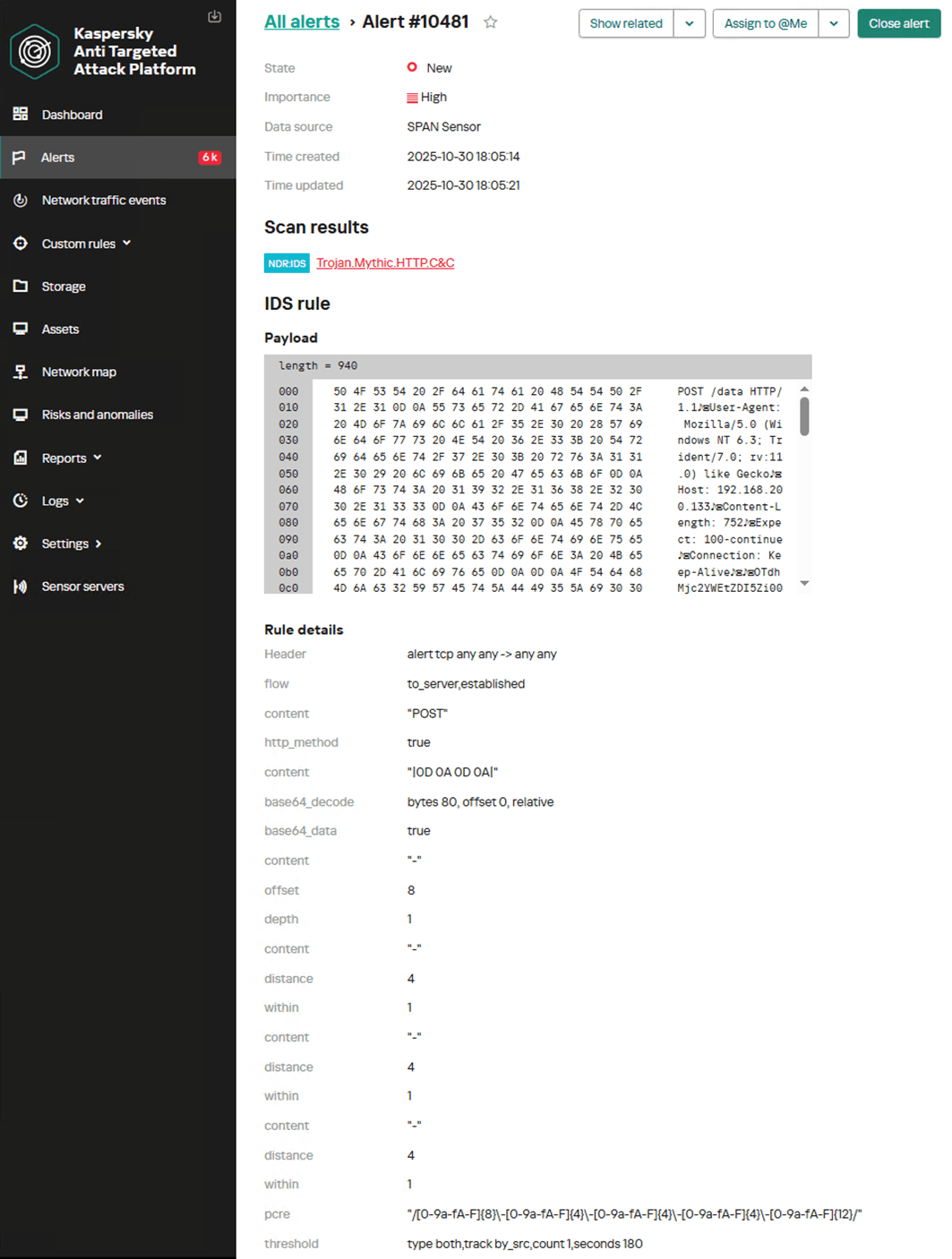
alert tcp any any -> any any (msg: "Trojan.Mythic.HTTP.C&C"; flow: to_server, established; content: "POST"; http_method; content: "|0D 0A 0D 0A|"; base64_decode: bytes 80, offset 0, relative; base64_data; content: "-"; offset: 8; depth: 1; content: "-"; distance: 4; within: 1; content: "-"; distance: 4; within: 1; content: "-"; distance: 4; within: 1; pcre: "/[0-9a-fA-F]{8}\-[0-9a-fA-F]{4}\-[0-9a-fA-F]{4}\-[0-9a-fA-F]{4}\-[0-9a-fA-F]{12}/"; threshold: type both, track by_src, count 1, seconds 180; reference: md5, 6ef89ccee639b4df42eaf273af8b5ffd; classtype: trojan1; sid: 9000113; rev: 2;)

The screenshot below shows how the NDR platform detects agent communication with the server over HTTP, generating an alert with the name Trojan.Mythic.HTTP.C&C.

Communication via HTTPS

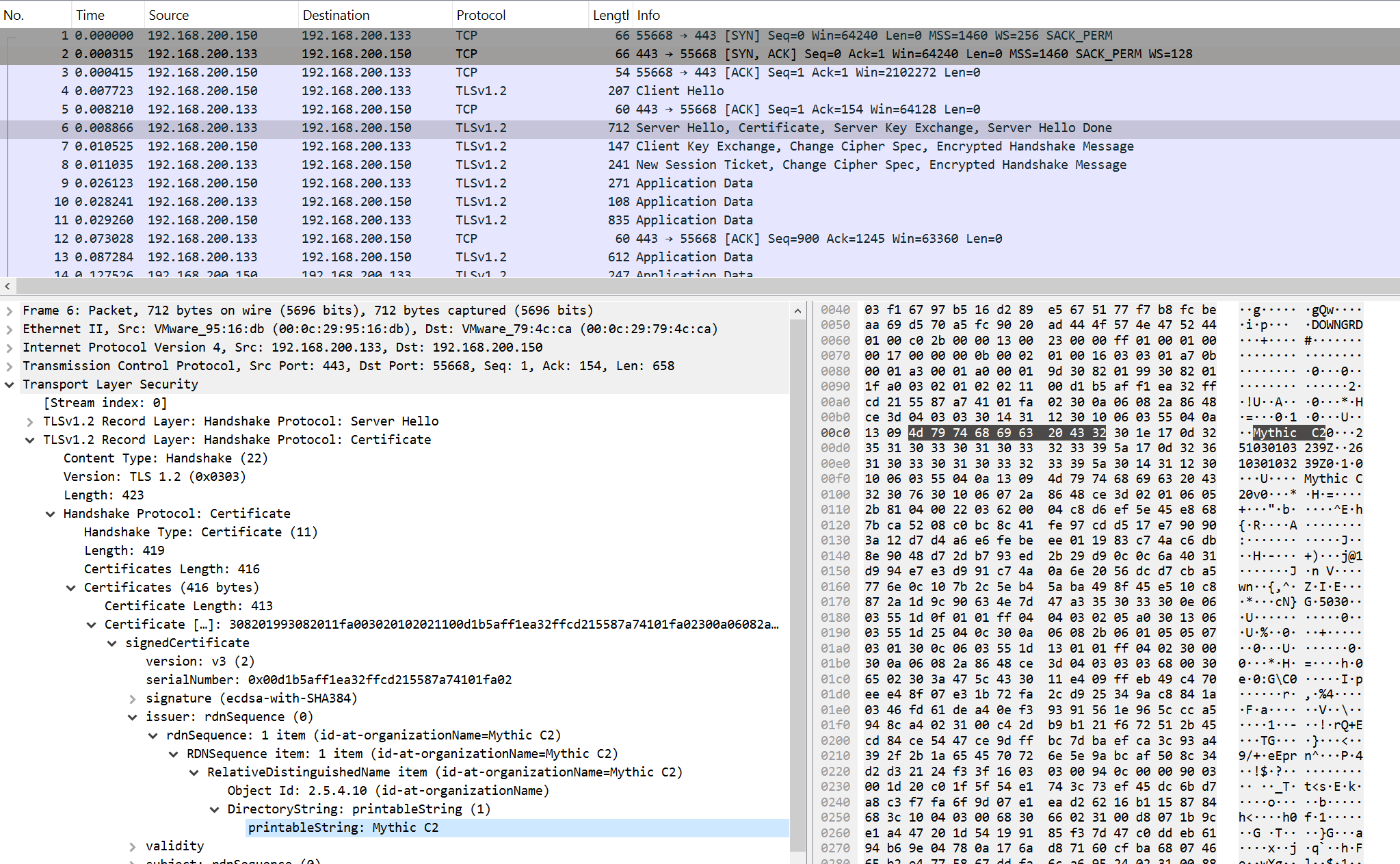
Mythic agents can communicate with the server via HTTPS using the corresponding transport module. In this case, data is encrypted with TLS and is not amenable to signature-based analysis. However, the activity of Mythic agents can be detected if they use the default SSL certificate. Below is an example of network traffic from a Mythic agent with such a certificate.

For this purpose, the following signature is applied:

alert tcp any any -> any any (msg:"Trojan.Mythic.TLS.C&C"; flow:established, from_server; content:"|16 03|"; depth:2; content:"|0B|"; distance:3; within:1; content:"|55 04|"; distance:0; content:"|09|Mythic C2"; nocase; distance:0; threshold:type both,track by_src,count 1,seconds 60; reference:url,github.com/its-a-feature/Mythic; classtype:ndr1; sid:9000114; rev:1;)

WebSocket

The WebSocket protocol enables full-duplex communication between a client and a remote host. Mythic can utilize it for agent management.

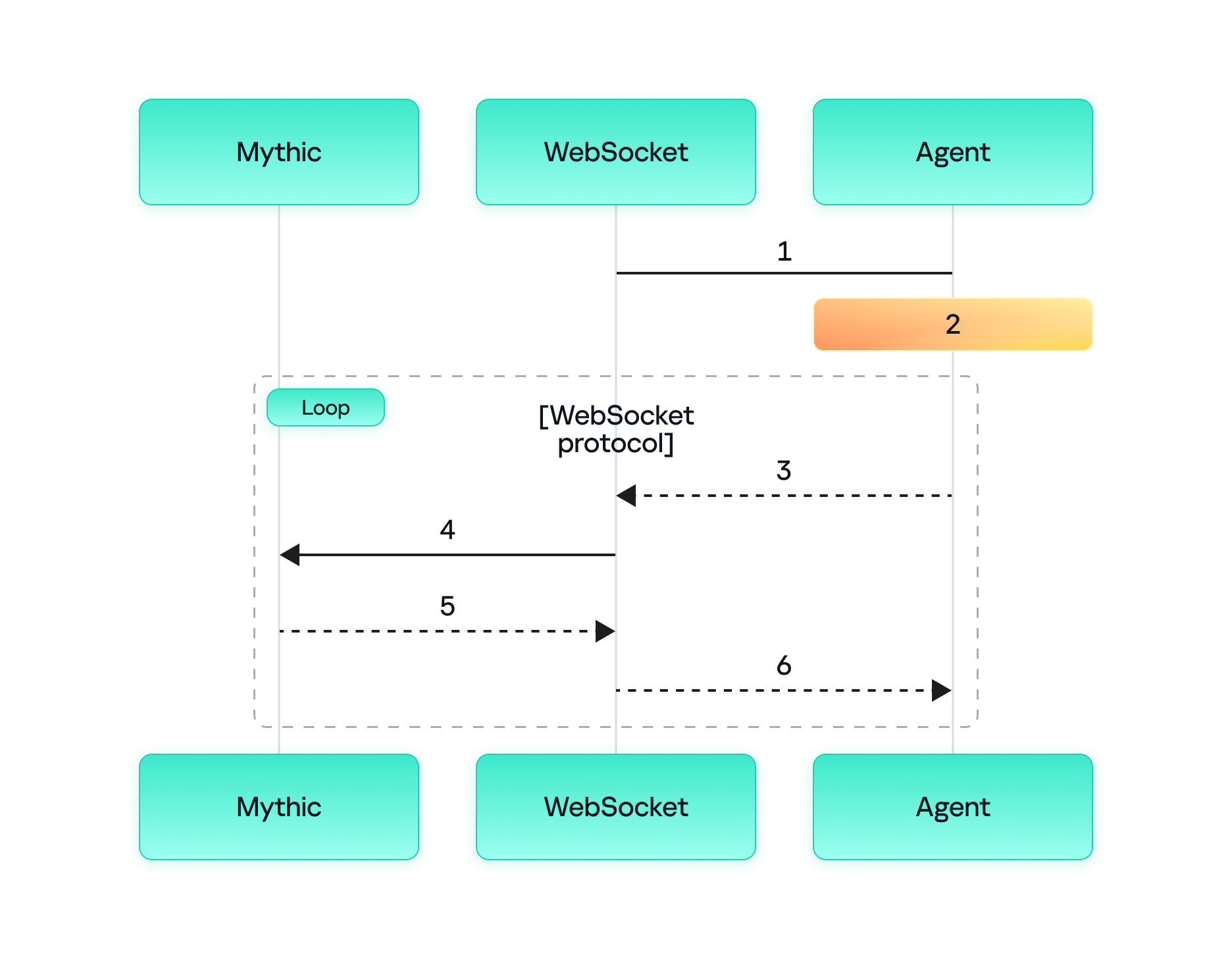
The process of agent communication with the server via WebSocket is as follows:

  1. The agent sends a request to the WebSocket container to change the protocol for the HTTP(S) connection.
  2. The agent and the WebSocket container switch to WebSocket to send and receive messages.
  3. The agent sends a message to the WebSocket container requesting tasks from the Mythic container.
  4. The WebSocket container forwards the request to the Mythic container.
  5. The Mythic container returns the tasks to the WebSocket container.
  6. The WebSocket container forwards these tasks to the agent.

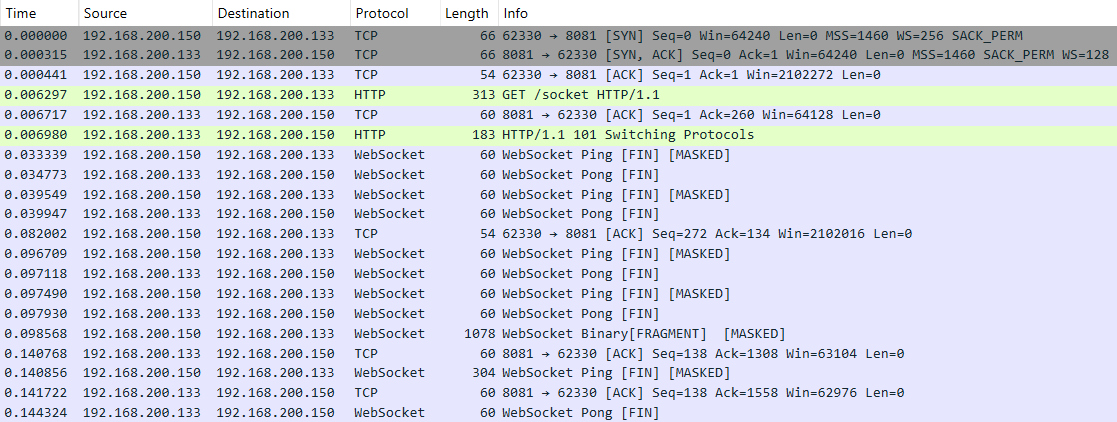
It is worth mentioning that in this communication model, both the WebSocket container and the Mythic container reside on the Mythic server. Below is a screenshot of the initial agent connection to the server.

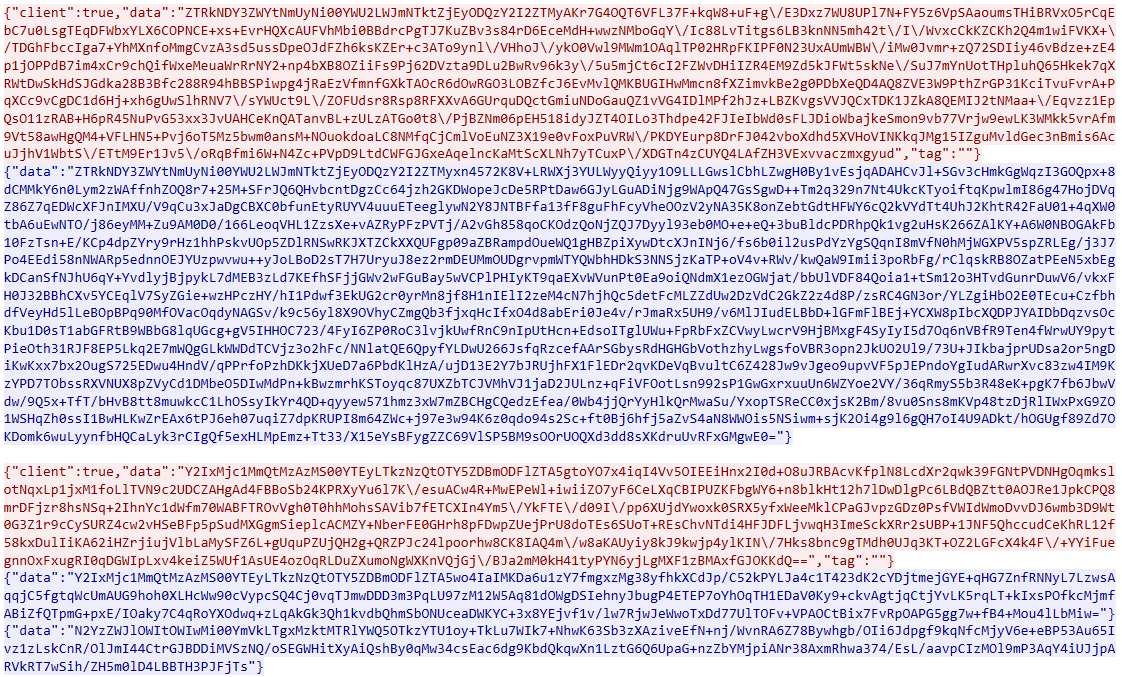
An analysis of the TCP session shows that the actual data is transmitted in the data field in Base64 encoding.

Decoding reveals the familiar data structure: UUID+AES256(JSON).

Therefore, we can use an approach similar to those discussed above to detect agent activity. The signature should rely on the UUID string at the beginning of the data field. The rule first verifies that the session data matches the data:base64 format, then decodes the data field and searches for a string matching the UUID pattern.

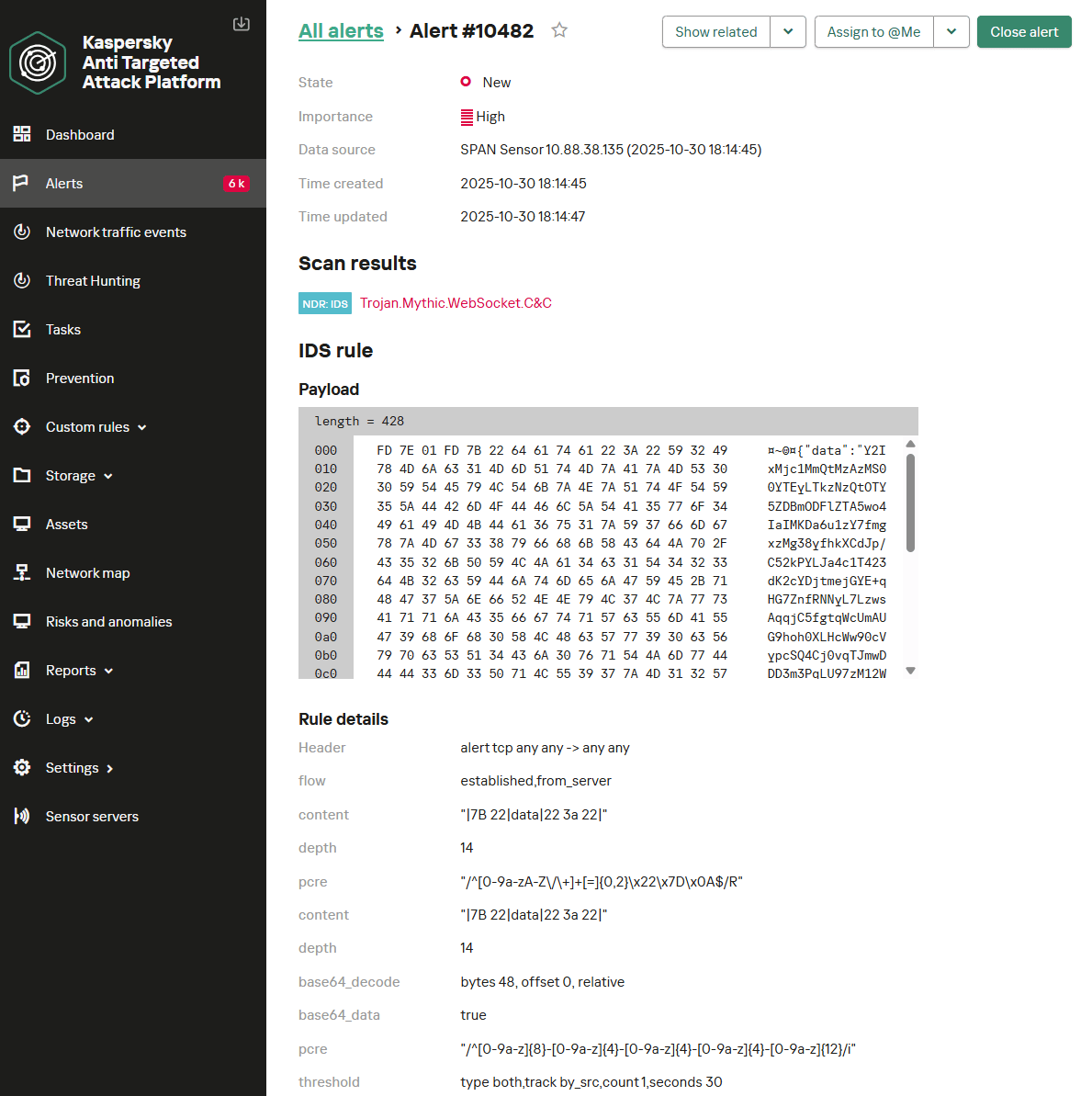
alert tcp any any -> any any (msg: "Trojan.Mythic.WebSocket.C&C"; flow: established, from_server; content: "|7B 22|data|22 3a 22|"; depth: 14; pcre: "/^[0-9a-zA-Z\/\+]+[=]{0,2}\x22\x7D\x0A$/R"; content: "|7B 22|data|22 3a 22|"; depth: 14; base64_decode: bytes 48, offset 0, relative; base64_data; pcre: "/^[a-z0-9]{8}\-[a-z0-9]{4}\-[a-z0-9]{4}\-[a-z0-9]{4}\-[a-z0-9]{12}/i"; threshold: type both, track by_src, count 1, seconds 30; reference: url, https://github.com/MythicAgents/; classtype: ndr1; sid: 9000115; rev: 2;)

Below is the Trojan.Mythic.WebSocket.C&C signature triggering on Mythic agent communication over WebSocket.

Takeaways

The Mythic post-exploitation framework continues to gain popularity and evolve rapidly. New agents are emerging, designed for covert persistence within target infrastructures. Despite this evolution, the various implementations of network communication in Mythic share many common characteristics that remain largely consistent over time. This consistency enables IDS/NDR solutions to effectively detect the framework’s agent activity through network traffic analysis.

Mythic supports a wide array of agent management options utilizing several network protocols. Our analysis of agent communications across these protocols revealed that agent activity can be detected by searching for specific data patterns within network traffic. The primary detection criterion involves tracking UUID strings in specific positions within Base64-encoded transmitted data. However, while the general approach to detecting agent activity is similar across protocols, each requires protocol-specific filters. Consequently, creating a single, universal signature for detecting Mythic agents in network traffic is challenging; individual detection rules must be crafted for each protocol. This article has provided signatures that are included in Kaspersky NDR.

Kaspersky NDR is designed to identify current threats within network infrastructures. It enables the detection of all popular post-exploitation frameworks based on their characteristic traffic patterns. Since the network components of these frameworks change infrequently, employing an NDR solution ensures high effectiveness in agent discovery.

Kaspersky verdicts in Kaspersky solutions (Kaspersky Anti-Targeted Attack with NDR module and Kaspersky NGFW)

Trojan.Mythic.SMB.C&C
Trojan.Mythic.TCP.C&C
Trojan.Mythic.HTTP.C&C
Trojan.Mythic.TLS.C&C
Trojan.Mythic.WebSocket.C&C

❌
❌