Cisco’s open-source Model Provenance Kit helps organizations verify AI model origins, trace lineage, and reduce AI supply chain security risks.
The post Cisco Introduces Model Provenance Kit to Strengthen AI Supply Chain Security appeared first on TechRepublic.
The post Void Dokkaebi Unmasked: The “Worm-Like” Supply Chain Threat Targeting Developers appeared first on Daily CyberSecurity.
Related posts:
The Cryptography Trojan: Malicious Go Module Impersonates Foundational Library to Steal Passwords and Deploy Root Backdoors
North Korean “StegaBin” Campaign Targets Developers with Steganographic Malware
The Mutable Tag Trap: Critical 9.4 CVSS Attack on Xygeni GitHub Action Exposes CI/CD Pipelines
The post Froxlor’s CVSS 10 Flaw Turns Config Files into Persistent Backdoors appeared first on Daily CyberSecurity.
Related posts:
The ‘Must-Patch’ Release: WordPress 6.9.2 Scrambles to Fix 10 Critical Flaws from XSS to SSRF
CISA Mandates Urgent Patch for Maximum 10.0 CVSS n8n RCE Flaw
The Instant Weaponization of Oracle’s 10.0 CVSS “Zero-Day-Like” Flaw
The post The Human Element: How a Single GitHub Token Leak Put Apache HTTP Server in the Spotlight appeared first on Daily CyberSecurity.
Related posts:
KnownSec Data Leak Exposes State-Aligned Cyber Espionage Pipeline
The EU’s AWS “Master Key”: How a Compromised Trivy Update Leaked 340GB of Data
Popular Chrome Extensions Caught Leaking Sensitive User Data via Unencrypted HTTP
The post The Human Variable: How a Masterful Phishing Ruse Hijacked Axios and 100 Million Users appeared first on Daily CyberSecurity.
Related posts:
Major npm Supply Chain Attack: Phishing Campaign Steals Maintainer Credentials, Injects Malware into Popular Packages
SERPENTINE#CLOUD: Stealthy Malware Campaign Leverages Cloudflare Tunnels for In-Memory RAT Delivery
183 Million Targets: Inside the North Korean Supply Chain Strike on Axios and the WAVESHAPER Backdoor
Open-source dependencies introduce hidden risks, from transitive vulnerabilities to supply chain attacks. Learn how to reduce exposure.
The post The Hidden Security Risks in Open-Source Dependencies Nobody Talks About appeared first on Security Boulevard.
When the Log4j zero day broke in December 2021, everyone learned the same lesson: One under-resourced library can send shockwaves through the entire software supply chain. Today the average cloud workload includes over 500 dependencies, many of them tended by unpaid volunteers. The need to support and secure this ecosystem has never been more urgent.
In response, GitHub launched the GitHub Secure Open Source Fund in November 2024, which provides maintainers with financial support to particip
When the Log4j zero day broke in December 2021, everyone learned the same lesson: One under-resourced library can send shockwaves through the entire software supply chain. Today the average cloud workload includes over 500 dependencies, many of them tended by unpaid volunteers. The need to support and secure this ecosystem has never been more urgent.
In response, GitHub launched the GitHub Secure Open Source Fund in November 2024, which provides maintainers with financial support to participate in a three-week program that delivers security education, mentorship, tooling, certification, community of security-minded maintainers, and more. By linking this funding to programmatic security outcomes, our goal is to increase security impact, reduce risk, and help secure the software supply chain at scale.
Already, we’re seeing measurable impact from proactive work. Our first two sessions brought together 125 maintainers from 71 important and fast growing open source projects Early outcomes include:
Remediated over 1,100 vulnerabilities detected by CodeQL, reducing their risk surfaces.
Participants issued more than 50 new Common Vulnerabilities and Exposures (CVEs), informing and protecting their downstream dependents.
Prevented 92 new secrets from being leaked and 176 leaked secrets were detected and resolved
Empowered maintainers for long-term success, with 100% saying they left with actionable next stepsfor the following year’s roadmap.
Accelerated adoption of security best practices, with 80% of projects enablingthree or more GitHub-based security features.
Prepared projects for the future of development, as 63% said they have a better understanding of AI and MCP security.
Maintainers found novel ways to partner with and use AI to accelerate learnings and implement solutions, with many consulting GitHub Copilot to conduct vulnerability scans and security audits, define and implement fuzzing strategies, and more.
These results show direct security impact immediately from the sessions, and the momentum is just beginning. Maintainers have embraced a culture of security, built out security backlogs, and are actively sharing insights with the maintainers in the community, and with their direct project contributors and consumers. As a result, the entire ecosystem benefits — and the security impact will continue to grow.
And we’re not done. Session 3 starts in September 2025, and we want to bring more maintainers that work deeper in the dependency tree and those that manage critical dependencies by themselves. To see the immediate impact following Sessions 1 and 2, let’s look at what changed inside the categories of code that power almost everything you build.
These projects are the bedrock of the current AI work with LLMs, agents, orchestration layers, and model toolchains. Together they rack up tens of millions of installs and git clone commands each month, and they’re baked into cloud notebooks like Jupyter, Google Collab, AWS SageMaker, and Microsoft Azure ML. A prompt-injection flaw or poisoned weight file here could spill into thousands of downstream apps overnight, and the teams who rely on them often won’t even know which component failed.
Project spotlight: Ollama
This project makes running large language models locally possible.
Ollama is the easiest way to chat and build with open models. They used this opportunity to threat-model every moving part of their system – from their use of GitHub Actions, DNS security, model distribution, how the models are executed in Ollama’s engine, auto-update checker, and more — then they pruned unused dependencies.
The GitHub Secure Open Source Program is a safe space to ask leading experts security questions, and learn how other high-impact projects address similar challenges.
Project spotlight: GravitasML by AutoGPT
GravitasML is an MIT licensed XML parser for LLMs, built by the team that launched AutoGPT to be simple and secure by design.
Fresh out of the sprint, the AutoGPT team wired CodeQL into every pull request across the AutoGPT Platform and GravitasML, and built a lightweight “security agent” that nudges contributors to tighten controls as they code. This helped turn passive checks into continuous coaching. The maintainers overhauled their security policy, stood up a formal incident-response workflow, and mapped out 28 follow-up tasks (from fuzzing their XML parser to completing the OSS Scorecard) to build a durable roadmap for safer LLM agents at large.
The AI-agent ecosystem is safer — and will keep getting safer — because of the Secure Open Source Fund.
Front-end and full-stack frameworks / UI libraries 📚
These frameworks ship the pixels users touch and often bundle their own server-side routing. Their install bases number in the millions, and improving their security posture closes off potential XSS, template-injection, and supply-chain hop points. The Bootstrap project alone powers nearly 17.5% of the world’s websites, and Next.js drives the frontends for Notion and Adobe, among many others.
Project spotlight: shadcn/ui
This React component library is trusted by leading organizations, like OpenAI’s cookbook, and was able to turn security learning into an interactive practice.
Over the three-week sprint, this project audited every GitHub Actions workflow and secret, refreshed SECURITY.md, licenses, and dependencies, and following a Secure by Design UX workshop — created a framework of how malicious threat actors might attack their project and developed strategies to reduce risks or block entirely. They turned on CodeQL (the first scan caught an unsafe dangerouslySetInnerHTML path), and drafted a formal vulnerability-reporting flow and threat model — laying a clear, public security roadmap that future contributors must follow. After learning about fuzzing, this project also used GitHub Copilot to set up and implement fuzz testing.
Security went from something we should do to something we actively do.
If a process is listening on port 443, chances are one of these web-server or gateway projects is in the stack. Hardening them protects every cookie, auth header, and JSON payload that crosses the wire. Node.js alone underpins most server-side JavaScript, and has a huge impact in the wider ecosystem.
Project spotlight: A quick win for Node.js
During the sprint, the Node.js security-WG revamped the project’s threat model and kicked off a pull request to wire CodeQL into core — backed by a new workflow that automatically reviews code scanning alerts and flags least-clear errors for refactoring. Those upgrades, plus planned signature checks on future releases, will ripple to every server-side JavaScript workload that ships Node binaries — from serverless functions to speeding server-side rendering from Netflix.
This program reinforced that we’re on the right path, but security is a continuous journey of improvement and collaboration.
These tools touch every commit and deploy. If an attacker lands here, they own the pipeline. Flux alone manages thousands of production GitOps clusters, and Turborepo’s build cache now accelerates builds at Vercel, among other organizations.
Project spotlight: Turborepo
During the three-week sprint, Turborepo switched on GitHub private vulnerability reporting, tightened overly permissive workflow tokens, and shipped a production-ready IRP while using CodeQL to scan every pull request. Those guardrails protect the Rust-powered build cache thousands of monorepos rely on, and the team is already drafting a public threat model and provider-notification playbook, so zero-days can be handled quietly before they spread.
Secure Open Source Fund pushed us to specialize our IRP and ship it.
These libraries are the locks, ledgers, and audit logs of the internet. Making these projects safer ripples through the ecosystem and makes everyone else safer. CycloneDX SBOMs, for instance, now appear in every major container registry while OAuthlib backs the auth flow for Pinterest and Reddit. And Zitadel issues millions of access tokens daily for European banks and healthcare platforms. Log4J and Scancode were both highlighted as critical elements in IT systems across governments and companies by Microsoft, too.
Project spotlight: Log4j
The Apache Log4j team hardened every GitHub Actions workflow against script-injection, drafted a brand-new threat model, and deepened collaborations across the open source community. Next up, they’re bundling a CodeQL pack to flag unsafe logging patterns in downstream code and rolling out in-house fuzzing tests. Working hand in hand with the ASF security team, they aim to set a standard that will echo across many other ASF projects.
We learned it the hard way: Ignorance is the biggest security hole. If this training had existed five years ago, maybe Log4Shell wouldn’t be here today.
These popular helpers run on laptops and CI nodes worldwide. Hardening them snips off phishing routes and lateral-movement paths. Oh My Zsh alone has 160,000-plus GitHub stars and boots every time millions of devs open a terminal.
While much of supply chain security work has concentrated on runtime libraries, attacks on maintainers and the tools they depend on, show us that developer tools are critical to include in our security hardening work.
Project spotlight: Charset-Normalizer
Downloaded around 20 million times a day on PyPI, this 4,000-line encoding helper tightened its defenses by ditching weak SMS 2FA in favor of stronger passkey-based MFA, switching on GitHub secret scanning, and patching risky GitHub Actions it hadn’t noticed before. The maintainer is now automating SBOM generation for every release — work that will soon make one of Python’s most ubiquitous transitive dependencies both audit-ready and CRA compliant (which is a big deal, and worthy of emphasis!).
A tiny library born out of a personal challenge will be CRA compliant amongst being one of the top OpenSSF scorecard projects.
Project spotlight: nvm
The go-to Node version manager used the sprint to publish its first incident-response plan and sketch a roadmap for a public vulnerability-disclosure policy — turning lessons from a recent audit into concrete guardrails.
For the first time in this program, nvm’s maintainer learned how to use Copilot for security guidance and input.
Next up, the maintainer is wiring custom CodeQL queries and fuzzing harnesses to stress-test nvm’s Bash internals, then sharing the playbook with sibling OpenJS projects like Express, so dev environments everywhere inherit the upgrade.
The Secure Open Source Program helped nvm validate our security practices, implement an IRP, and set clear fuzzing and custom CodeQL goals, while deepening collaboration across OpenJS maintainers.
Project spotlight: JUnit
Through the three-week sprint, JUnit rolled out end-to-end CodeQL scanning across all of its repositories — and fixing the first wave of findings — formalized a public incident-response plan, and locked down every workflow by switching GITHUB_TOKEN to explicit, least-privilege permissions.
We immediately improved our GitHub Action’s security, enabled MFA, and created an IRP.
Academic research, climate models, financial market, and lab notebooks all depend on this stack. Data integrity and traceability are non-negotiable. Jupyter Notebooks execute on more than 10 million cloud kernels per month, and Matplotlib charts appear in everything from NASA to high-school science fair papers.
Project spotlight: Matplotlib
The scientific Python staple tightened its GitHub Actions permission boundaries, reviewed and expanded SECURITY.md, and kicked off a formal threat-modeling process (that sparked immediate work). With OSS-Fuzz already catching crashes in its C extensions and an encrypted disclosure channel on the way, Matplotlib is turning “unknown unknowns” into a public checklist other data-science projects can copy-paste.
The program reduced our uncertainty and gave us new tools to manage risk.
Patterns that actually moved the needle
Money matters, but timeboxing matters more. $10,000 USD (about $500 per hour) might help maintainers focus, but the three-week cap kept momentum and focus high. Several maintainers said a longer program would have been too much.
Focused themes, interactive coding, quick activation: Weekly security themes helped maintainers go from theory to practice quickly, absorb key security concepts, practice with real-time coding experiences, implement changes, and enable security features with confidence.
A security-focused community is the unlock. Fast rapport in Slack meant maintainers quickly asked critical questions, which was vital for topics like supply-chain subpoenas and disclosure timelines. We even had projects bring urgent questions for quick feedback that wouldn’t be able to be asked anywhere else.
Help us make open source more secure
Securing open source isn’t a one-off sprint or a feel-good badge. It’s basic maintenance for the internet. By giving 71 heavily used projects real money, three focused weeks, and direct help, we watched maintainers ship fixes that now protect millions of builds a day. This training allows us to go beyond one-to-one education, and enable one-to-many impact. For example, many maintainers are working to make their playbooks public; the incident-response plans they rehearsed are forkable; the signed releases they now ship flow downstream to every package manager and CI pipeline that depends on them.
This wasn’t just us either. In 2025 alone, we received $1.38 million in commitments, credits, and contributions from our funding and ecosystem partners.
Join us in this mission to secure the software supply chain at scale. We are looking for maintainers managing critical and important projects, funding partners who know that prevention is cheaper than the next zero-day, and ecosystem partners that bring unique insights and networks to help us scale their impact.
If you write code, rely on open source, or just want the software supply chain to stay upright, there’s room at the table. So, let’s keep the flywheel turning and build from here.
> Projects & Maintainers: Apply now to the GitHub Secure Open Source Fund and help make open source safer for everyone.
> Funding and Ecosystem Partners: Become a Funding or Ecosystem Partner and support a more secure open source future. Join us on this mission to secure the software supply chain — at scale!
The GitHub Advisory Database (Advisory DB) is a vital resource for developers, providing a comprehensive list of known security vulnerabilities and malware affecting open source packages. This post analyzes trends in the Advisory DB, highlighting the growth in reviewed advisories, ecosystem coverage, and source contributions in 2024. We’ll delve into how GitHub provides actionable data to secure software projects.
Advisories
The GitHub Advisory Database contains a list of known security v
The GitHub Advisory Database (Advisory DB) is a vital resource for developers, providing a comprehensive list of known security vulnerabilities and malware affecting open source packages. This post analyzes trends in the Advisory DB, highlighting the growth in reviewed advisories, ecosystem coverage, and source contributions in 2024. We’ll delve into how GitHub provides actionable data to secure software projects.
Advisories
The GitHub Advisory Database contains a list of known security vulnerabilities and malware, grouped in three categories:
GitHub-reviewed advisories: Manually reviewed advisories in software packages that GitHub supports.
Unreviewed advisories: These are automatically pulled from the National Vulnerability Database (NVD) and are either in the process of being reviewed, do not affect a supported package, or do not discuss a valid vulnerability.
Malware advisories: These are specific to malware threats identified by the npm security team.
Reviewed advisories
GitHub-reviewed advisories are security vulnerabilities that have been mapped to packages in ecosystems we support. We carefully review each advisory for validity and ensure that they have a full description, and contain both ecosystem and package information.
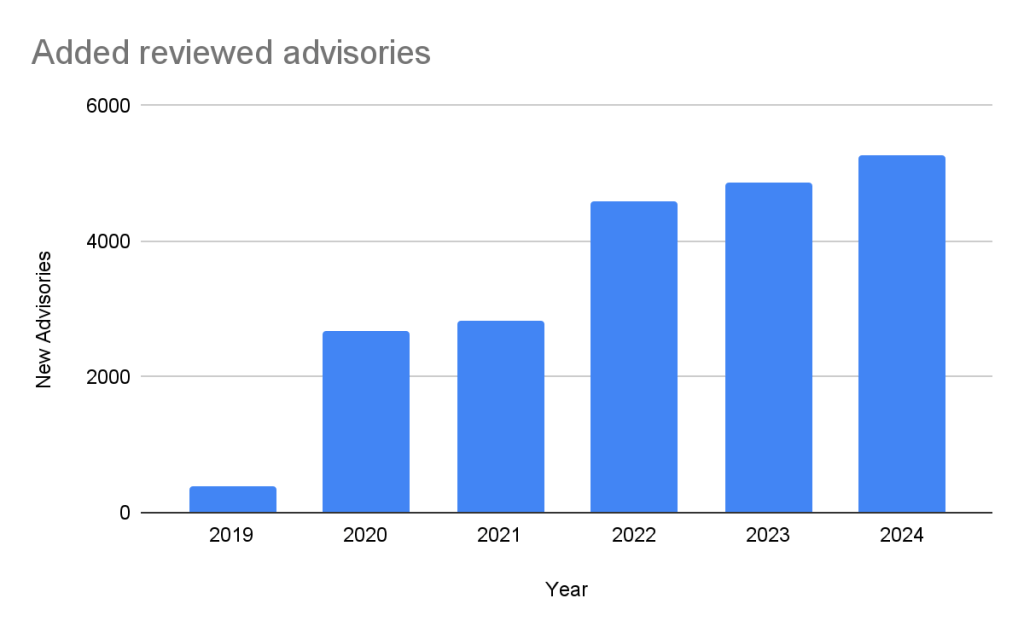
Every year, GitHub increases the number of advisories we publish. We have been able to do this due to the increase in advisories coming from our sources (see Sources section below), expanding our ecosystem coverage (also described below), and review campaigns of advisories published before we started the database.
In the past five years, the database has gone from fewer than 400 reviewed advisories to over 20,000 reviewed advisories in October of 2024.
Unreviewed advisories
Unreviewed advisories are security vulnerabilities that we publish automatically into the GitHub Advisory Database directly from the National Vulnerability Database feed. The name is a bit of a misnomer as many of these advisories have actually been reviewed by a GitHub analyst. The reason why they fall into this category is because they are not found in a package in one of the supported ecosystems or are not discussing a valid vulnerability, and all have been reviewed by analysts other than someone from the GitHub Security Lab. Even though most of these advisories will never turn into a reviewed advisory, we still publish them so that you do not have to look in multiple databases at once.
Malware
Malware advisories relate to vulnerabilities caused by malware, and are security advisories that GitHub publishes automatically into the GitHub Advisory Database directly from information provided by the npm security team. Malware advisories are currently exclusive to the npm ecosystem. GitHub doesn’t edit or accept community contributions on these advisories.
Ecosystem coverage
GitHub-reviewed advisories include security vulnerabilities that have been mapped to packages in ecosystems we support. Generally, we name our supported ecosystems after the software programming language’s associated package registry. We review advisories if they are for a vulnerability in a package that comes from a supported registry.
Vulnerabilities in Maven and Composer packages are nearly half of the advisories in the database. npm, pip, and Go make up much of the rest, while the other ecosystems have a much smaller footprint.
This has not always been the case. When the database was initially launched, NPM advisories dominated the database, but as we have expanded our coverage and added support for new ecosystems, the distribution mix has changed.
Sources: Where do the advisories come from?
We add advisories to the GitHub Advisory Database from the following sources:
NVD: This is a huge source of vulnerabilities covering all types of software. We publish all NVD advisories but only review those relevant to our supported ecosystems, which reduces noise for our users.
GitHub Repository Advisories: The second largest source is made up of advisories published through GitHub’s repository security advisory feature. Similar to NVD, these aren’t restricted to our supported ecosystems. However, we provide better coverage of the repository advisories because they focus exclusively on open source software.
Community Contributions: These are reports from the community that are almost exclusively requesting updates to existing advisories.
Other Specialized Sources: Sources like PyPA Advisories (for Python) and Go Vulncheck (for Go) that focus on specific ecosystems. Because they only cover packages within our supported ecosystems, most of their advisories are relevant to us and get reviewed.
If you add up the number of reviewed advisories from each source, you will find that total is more than the total reviewed advisories. This is because each source can publish an advisory for the same vulnerability. In fact, over half of our advisories have more than one source.
Of the advisories with a single source, nearly all of them come from NVD/CVE. This justifies NVD/CVE as a source, even though it is by far the noisiest.
2024 saw a significant increase (39%) in the number of advisories imported from our sources. This is for the most part caused by an increase in the number of CVE records published.
CVE Numbering Authority
In addition to publishing advisories in the GitHub Advisory Database, we are also a CVE Numbering Authority (CNA) for any repository on GitHub. This means that we issue CVE IDs for vulnerabilities reported to us by maintainers, and we publish the vulnerabilities to the CVE database once the corresponding repository advisory is published.
GitHub published over 2,000 CVE records in 2024, making us the fifth-largest CNA in the CVE Program.
The GitHub CNA is open to all repositories on GitHub, not just ones in a supported ecosystem.
Advisory prioritization
Given the constant deluge of reported vulnerabilities, you’ll want tools that can help you prioritize your remediation efforts. To that end, GitHub provides additional data in the advisory to allow readers to prioritize their vulnerabilities. In particular, there are:
Severity Rating/CVSS: A low to critical rating for how severe the vulnerability is likely to be, along with a corresponding CVSS score and vector.
CWE: CWE identifiers provide a programmatic method for determining the type of vulnerability.
EPSS: The Exploit Prediction Scoring System, or EPSS, is a system devised by the global Forum of Incident Response and Security Teams (FIRST) for quantifying the likelihood a vulnerability will be attacked in the next 30 days.
Using these ratings, half of all vulnerabilities (15% are Critical and 35% are High) warrant immediate or near-term attention. By focusing remediation efforts on these, you can significantly reduce risk exposure while managing workload more efficiently.
The CVSS specification says the base score we provide, “reflects the severity of a vulnerability according to its intrinsic characteristics which are constant over time and assumes the reasonable worst-case impact across different deployed environments.” However, the worst-case scenario for your deployment may not be the same as CVSS’s. After all, a crash in a word processor is not as severe as a crash in a server. In order to give more context to your prioritization, GitHub allows you to filter alerts based on the type of vulnerability or weakness using CWE identifiers. So you have the capability to never see another regular expression denial of service (CWE-1333) vulnerability again or always see SQL injection (CWE-89) vulnerabilities.
Still drowning in vulnerabilities? Try using EPSS to focus on vulnerabilities likely to be attacked in the next 30 days. EPSS uses data from a variety of sources to create a probability of whether exploitation attempts will be seen in the next 30 days for a given vulnerability. As you can see from the chart below, if you focus on vulnerabilities with EPSS scores of 10% or higher (approx. 7% of all vulnerabilities in the Advisory DB), you can cover nearly all of the vulnerabilities that are likely to see exploit activity.
EPSS probability
Vulnerabilities in range
Percentage of overall vulnerabilities
Expected vulnerabilities in range attacked within the next 30 days
Percentage of total attacked vulnerabilities
High ( >= 10%)
1440
7.17%
741
85.96%
Moderate ( >= 1%, < 10%)
2687
13.37%
84
9.74%
Low ( >= 0.1%, < 1%)
10264
51.09%
35
4.06%
Very Low ( < 0.1%)
5701
28.37%
2
0.23%
Important caveats to remember when using EPSS:
Low probability events occur.
EPSS does not tell you whether a vulnerability is exploited; it only claims how likely it is.
EPSS scores are updated daily and will change as new information comes in, so a low-probability vulnerability today may become high probability tomorrow.
For more details on how to use CVSS and EPSS for prioritization, see our blog on prioritizing Dependabot alerts.
Actionable data
The GitHub Advisory DB isn’t just a repository of vulnerabilities. It powers tools that help developers secure their projects. Services like Dependabot use the Advisory DB to:
Identify vulnerabilities: It checks if your projects use any software packages with known vulnerabilities.
Suggest fixes: It recommends updated versions of packages that fix those vulnerabilities when available.
Reduce noise: You’ll only get notified about vulnerabilities that affect the version of the package you are using.
Take this with you
The GitHub Advisory Database is a powerful resource for tracking open source software vulnerabilities, with over 22,000 reviewed advisories to date. By focusing on popular package registries, GitHub allows you to definitively connect vulnerabilities to the packages you are using. Additional data such as CVSS and EPSS scores help you properly prioritize your mitigation efforts.
GitHub’s role as a CVE Numbering Authority extends beyond the Advisory Database, ensuring that thousands of vulnerabilities each year reach the broader CVE community. Want to ensure your vulnerability fix reaches your users? Create a GitHub security advisory in your repository to take advantage of both the GitHub Advisory Database and GitHub’s CNA services.
Ever come across a Common Vulnerabilities and Exposures (CVE) ID affecting software you use or maintain and thought the information could be better?
CVE IDs are a widely-used system for tracking software vulnerabilities. When a vulnerable dependency affects your software, you can create a repository security advisory to alert others. But if you want your insight to reach the most upstream data source possible, you’ll need to contact the CVE Numbering Authority (CNA) that issued the vulnerabili
CVE IDs are a widely-used system for tracking software vulnerabilities. When a vulnerable dependency affects your software, you can create a repository security advisory to alert others. But if you want your insight to reach the most upstream data source possible, you’ll need to contact the CVE Numbering Authority (CNA) that issued the vulnerability’s CVE ID.
GitHub, as part of a community of over 400 CNAs, can help in cases when GitHub issued the CVE (such as with this community contribution). And with just a few key details, you can identify the right CNA and reach out with the necessary context. This guide shows you how.
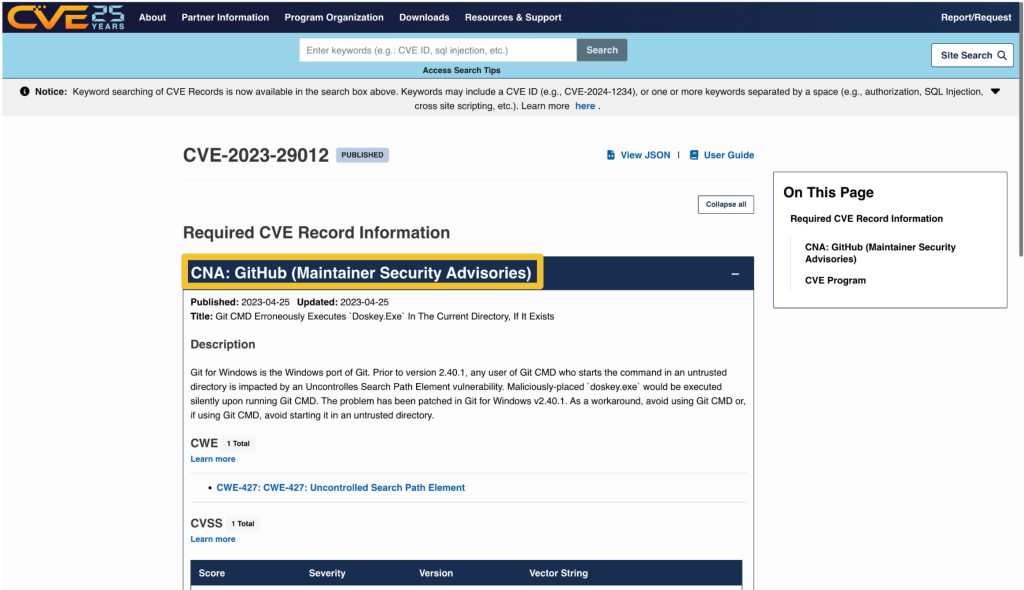
Every CVE record contains an entry that includes the name of the CNA that issued the CVE ID. The CNA is responsible for updating the CVE record after its initial publication, so any requests should be directed to them.
On cve.org, the CNA is listed as the first piece of information under the “Required CVE Record Information” header. The information is also available on the right side of the page.
On nvd.nist.gov, information about the issuing CNA is available in the “QUICK INFO” box. The issuing CNA is called “Source”.
After identifying the CNA from the CVE record, locate their official contact information to request updates or changes. That information is available on the CNA partners website at https://www.cve.org/PartnerInformation/ListofPartners.
Search for the CNA’s name in the search bar. Some organizations may have more than one CNA, so make sure that the CVE you want corresponds to the correct CNA.
The left column, under “Partner,” has the name of the CNA that links to a profile page with its scope and contact information.
Most CNAs have an email address for CVE-related communications. Click the link under “Step 2: Contact” that says Email to find the CNA’s email address.
The most notable exception to the general preference for email communication among CNAs is the MITRE Corporation, the world’s most prolific CVE Numbering Authority. MITRE uses a webform at https://cveform.mitre.org/ for submitting requests to create, update, dispute, or reject CVEs.
The information you want to add, remove, or change within the CVE record
Why you want to change the information
Supporting evidence, usually in the form of a reference link
Including publicly available reference links is important, as they justify the changes. Examples of reference links include:
A publicly available vulnerability report, advisory, or proof-of-concept
A fix commit or release notes that describe a patch
An issue in the affected repository in which the maintainer discusses the vulnerability in their software with the community
A community contribution pull request that suggests a change to the CVE’s corresponding GitHub Security Advisory
When submitting changes, keep in mind that the CNA isn’t your only audience. Clear context around disclosure decisions and vulnerability details helps the broader developer and security community understand the risks and make informed decisions about mitigation.
“3.2.4.1 Subject to their respective CNA Scope Definitions, CNAs MUST respond in a timely manner to CVE ID assignment requests submitted through the CNA’s public POC.
3.2.4.2 CNAs SHOULD document their expected response times, including those for the public POC.”
The CNA rules establish firm timelines for assignment of CVE IDs to vulnerabilities that are already public knowledge. For CVE ID assignment or record publication in particular, section 4.2 and section 4.5 of the CVE CNA rules establish 72 hours as the time limit in which CNAs should issue CVE IDs or publish CVE records for publicly-known vulnerabilities. However, no such guidance exists for changing a CVE record.
If the CNA doesn’t respond or you cannot reach an agreement about the content of the CVE record, the next step is to engage in the dispute process.
The CVE Program Policy and Procedure for Disputing a CVE Record provides details on how you may go about disputing a CVE record and escalating a dispute. The details of that process are beyond the scope of this post. However, if you end up disputing a CVE record, it’s good to know who the root or top-level root of the CNA is that reviews the dispute.
When viewing a CNA’s partner page linked from https://www.cve.org/PartnerInformation/ListofPartners, you can find the CNA’s root under the column “Top-Level Root.” For most CNAs, their root is the Top-Level Root, MITRE.
Imagine this: You’re sipping your morning coffee and scrolling through your emails, when you spot it—a vulnerability report for your open source project. It’s your first one. Panic sets in. What does this mean? Where do you even start?
Many maintainers face this moment without a clear roadmap, but the good news is that handling vulnerability reports doesn’t have to be stressful. Below, we’ll show you that with the right tools and a step-by-step approach, you can tackle security issues efficien
Imagine this: You’re sipping your morning coffee and scrolling through your emails, when you spot it—a vulnerability report for your open source project. It’s your first one. Panic sets in. What does this mean? Where do you even start?
Many maintainers face this moment without a clear roadmap, but the good news is that handling vulnerability reports doesn’t have to be stressful. Below, we’ll show you that with the right tools and a step-by-step approach, you can tackle security issues efficiently and confidently.
If you discovered that the lock on your front door was faulty, would you attach a note announcing it to everyone passing by? Of course not! Instead, you’d quietly tell the people who need to know—your family or housemates—so you can fix it before it becomes a real safety risk.
That’s exactly how vulnerability disclosure should be handled. Security issues aren’t just another bug. They can be a blueprint for attackers if exposed too soon. Instead of discussing them in the open, maintainers should work with security researchers behind the scenes to fix problems before they become public.
This approach, known as Coordinated Vulnerability Disclosure (CVD), keeps your users safe while giving you time to resolve the issue properly.
To support maintainers in this process, GitHub provides tools like Private Vulnerability Reporting (PVR), draft security advisories, and Dependabot alerts. These tools are free to use for open source projects, and are designed to make managing vulnerabilities straightforward and effective.
Let’s walk through how to handle vulnerability reports, so that the next time one lands in your inbox, you’ll know exactly what to do!
Here’s the thing: There are security researchers out there actively looking for vulnerabilities in open source projects and trying to help. But if they don’t know who to report the problem to, it’s hard to resolve it. They could post the issue publicly, but this could expose users to attacks before there’s a fix. They could send it to the wrong person and delay the response. Or they could give up and move on.
The best way to ensure these researchers can reach you easily and safely is to turn on GitHub’s Private Vulnerability Reporting (PVR).
Think of PVR as a private inbox for security issues. It provides a built-in, confidential way for security researchers to report vulnerabilities directly in your repository.
Heads up! By default, maintainers don’t receive notifications for new PVR reports, so be sure to update your notification settings so nothing slips through the cracks.
PVR solves the “where” and the “how” of reporting security issues. But what if you want to set clear expectations from the start? That’s where a SECURITY.md file comes in handy.
PVR is your front door, and SECURITY.md is your welcome guide telling visitors what to do when they arrive. Without it, researchers might not know what’s in scope, what details you need, or whether their report will be reviewed.
Maintainers are constantly bombarded with requests, making triage difficult—especially if reports are vague or missing key details. A well-crafted SECURITY.md helps cut through the noise by defining expectations early. It reassures researchers that their contributions are valued while giving them a clear framework to follow.
A good SECURITY.md file includes:
How to report vulnerabilities (ex: “Please submit reports through PVR.”)
What information should be included in a report (e.g., steps to reproduce, affected versions, etc.)
Pairing PVR with a clear SECURITY.md file helps you streamline incoming reports more effectively, making it easier for researchers to submit useful details and for you to act on them efficiently.
Once you confirm the issue is a valid vulnerability, the next step is fixing it without tipping off the wrong people.
But where do you discuss the details? You can’t just drop a fix in a public pull request and hope no one notices. If attackers spot the change before the fix is officially released, they can exploit it before users can update.
What you’ll need is a private space where you and your collaborators can investigate the issue, work on and test a fix, and then coordinate its release.
GitHub provides that space with draft security advisories. Think of them like a private fork, but specifically for security fixes.
By using draft security advisories, you take control of the disclosure timeline, ensuring security issues are fixed before they become public knowledge.
Some vulnerabilities are minor contained issues that can be patched quietly. Others have a broader impact and need to be tracked across the industry.
When a vulnerability needs broader visibility, a Common Vulnerabilities and Exposures (CVE) identifier provides a standardized way to document and reference it. GitHub allows maintainers to request a CVE directly from their draft security advisory, making the process seamless.
A CVE is like a serial number for a security vulnerability. It provides an industry-recognized reference so that developers, security teams, and automated tools can consistently track and respond to vulnerabilities.
For maintainers, it helps ensure a vulnerability is adequately documented and recognized in security databases.
For security researchers, it provides validation that their findings have been acknowledged and recorded.
CVEs are used in security reports, alerts, feeds, and automated security tools. This helps standardize communication between projects, security teams, and end users.
Requesting a CVE doesn’t make a vulnerability more or less critical, but it does help ensure that those affected can track and mitigate risks effectively.
Good job! You’ve fixed the vulnerability. Now, it’s time to let your users know about it. A security advisory does more than just announce an issue. It guides your users on what to do next.
What is a security advisory, and why does it matter?
A security advisory is like a press release for an important update. It’s not just about disclosing a problem, it’s about ensuring your users know exactly what’s happening, why it matters, and what they need to do.
A clear and well-written advisory helps to:
Inform users: Clearly explain the issue and provide instructions for fixing it.
Build trust: Demonstrate accountability and transparency by addressing vulnerabilities proactively.
Trigger automated notifications: Tools, like GitHub Dependabot, use advisories to alert developers with affected dependencies.
Use plain language: Write in a way that’s easy to understand for both developers and non-technical users
Include essential details:
A description of the vulnerability and its impact
Versions affected by the issue
Steps to update, patch, or mitigate the risk
Provide helpful resources:
Links to patched versions or updated dependencies
Workarounds for users who can’t immediately apply the fix
Additional documentation or best practices
📌 Check out this advisory for a well-structured reference.
A well-crafted security advisory is not just a formality. It’s a roadmap that helps your users stay secure. Just as a company would carefully craft a press release for a significant change, your advisory should be clear, reassuring, and actionable. By making security easier to understand, you empower your users to protect themselves and keep their projects safe.
Publishing your security advisory isn’t the finish line. It’s the start of helping your users stay protected. Even the best advisory is only effective if the right people see it and take action.
Beyond publishing the advisory, consider:
Announcing it through your usual channels: Blog posts, mailing lists, release notes, and community forums help reach users who may not rely on automated alerts.
Documenting it for future users: Someone might adopt your project later without realizing a past version had a security issue. Keep advisories accessible and well-documented.
You should also take advantage of GitHub tools, including:
Dependabot alerts
Automatically informs developers using affected dependencies
Encourages updates by suggesting patched versions
Proactive prevention
Use scanning tools to find similar problems in different parts of your project. If you find a problem in one area, it might also exist elsewhere
Regularly review and update your project’s dependencies to avoid known issues
CVE publication and advisory database
If you requested a CVE, GitHub will publish the CVE record to CVE.org for industry-wide tracking
If eligible, your advisory will also be added to the GitHub Advisory Database, improving visibility for security researchers and developers
Whether through automated alerts or direct communication, making your advisory visible is key to keeping your project and its users secure.
With the right tools and a clear approach, handling vulnerabilities isn’t just manageable—it’s part of running a strong, secure project. So next time a report comes in, take a deep breath. You’ve got this!
You’ve got questions? We got answers! Whether you’re handling your first vulnerability report or just want to sharpen your response process, here is what you need to know.
1. Why is Private Vulnerability Reporting (PVR) better than emails or public issues for vulnerability reports?
Great question! At first glance, email or public issue tracking might seem like simple ways to handle vulnerability reports. But PVR is a better choice because it:
Keeps things private and secure: PVR ensures that sensitive details stay confidential. No risk of accidental leaks, and no need to juggle security concerns over email.
Keeps everything in one place: No more scattered emails or external tools. Everything—discussions, reports, and updates—is neatly stored right in your repository.
Makes it easier for researchers: PVR gives researchers a dedicated, structured way to report issues without jumping through hoops.
Bottom line? PVR makes life easier for both maintainers and researchers while keeping security under control.
2. What steps should I take if I receive a vulnerability report that I believe is a false positive?
Not every report is a real security issue, but it’s always worth taking a careful look before dismissing it.
Double-check details: Sometimes, what seems like a false alarm might be misunderstood. Review the details thoroughly.
Ask for more information: Ask clarifying questions or request additional details through GitHub’s PVR. Many researchers are happy to provide further context.
Check with others: If you’re unsure, bring in a team member or a security-savvy friend to help validate the report.
Close the loop: If it is a false positive, document your reasoning in the PVR thread. Transparency keeps things professional and builds trust with the researcher.
3. How fast do I need to respond?
* Acknowledge ASAP: Even if you don’t have a fix yet, let the researcher know you got their report. A simple “Thanks, we’re looking into it” goes a long way.
* Follow the 90-day best practice: While there’s no hard rule, most security pros aim to address verified vulnerabilities within 90 days.
* Prioritize by severity: Use the Common Vulnerability Scoring System (CVSS) to gauge urgency and decide what to tackle first.
Think of it this way: No one likes being left in the dark. A quick update keeps researchers engaged and makes collaboration smoother.
4. How do I figure out the severity of a reported vulnerability?
Severity can be tricky, but don’t stress! There are tools and approaches that make it easier.
Use the CVSS calculator: It gives you a structured way to evaluate the impact and exploitability of a vulnerability.
Consider real-world impact: A vulnerability that requires special conditions to exploit might be lower risk, while one that can be triggered easily by any user could be more severe.
Collaborate with the reporter: They might have insights on how the issue could be exploited in real-world scenarios.
Take it step by step—it’s better to get it right than to rush.
5. Should I request a CVE before or after publishing an advisory?
There’s no one-size-fits-all answer, but here’s a simple way to decide:
If it’s urgent: Publish the advisory first, then request a CVE. CVE assignments can take 1–3 days, and you don’t want to delay the fix.
For less urgent cases: Request a CVE beforehand to ensure it’s included in Dependabot alerts from the start.
Either way, your advisory gets published, and your users stay informed.
6. Where can I learn more about managing vulnerabilities and security practices?
There’s no need to figure everything out on your own. These resources can help:

 Entrar