
Visualização normal

Antes de ontemStream principal

Microsoft Agent 365, now generally available, expands capabilities and integrations

Microsoft Agent 365

Now generally available for commercial customers.

Choose an ecosystem partner for agent security and governance

AI agents aren’t coming—they’re already in your environment. They show up in places you expect (like Microsoft CopilotMicrosoft Teams, and Microsoft 365) and even more places as technology evolves (a local autonomous personal AI assistant or a new software as a service (SaaS) agent connected to your sensitive data.)

The problem isn’t that agents exist. It’s that they proliferate fast, span apps, endpoints and cloud, and often operate outside the visibility and control of the teams accountable for risk. When an agent can invoke tools, access data, and interact with other agents, any “helpful” workflow can turn into data oversharing, tool misuse, or over-privileged actions in seconds. And as agents become even easier to create and deploy, your attack surface grows with them. 

That’s why end-to-end observability matters: you can’t govern what you can’t see, and you can’t secure what you don’t understand—especially when the number of agents is a moving target. 

Microsoft Agent 365 helps you take control of agent sprawl as your control plane to observe, govern, and secure agents and their interactions—including agents built with Microsoft AI and agents from our ecosystem partners—using the admin and security workflows your teams already run. 

General availability starts today for Agent 365.

Additionally, we’re announcing the previews of new Agent 365 capabilities and integrations to help you scale agent adoption with the right controls in place. 

  • Observability, governance, and security for agents operating independently—Agent 365 is expanding to cover agents that operate with their own credentials and permissions.
  • Discovery of agents and shadow AI, using capabilities of Microsoft Defender and Microsoft Intune for both local and cloud agents.
  • A secured, managed environment for agents to work in Windows 365 for Agents.
  • Coverage for a wide ecosystem of SaaS agents, including agents innovated by software development companies (SDCs).
  • Support for evaluation, adoption, and usage from Microsoft and ecosystem partners worldwide.

Manage agents with a single control plane, regardless of how or where they work

As organizations move from pilot to adoption, AI agents are being deployed across increasingly diverse use cases. Some act with delegated access, working on behalf of users; others operate with their own credentials and permissions, participating in team workflows or operating behind the scenes. 

With Agent 365, you can observe, govern, and secure AI agents whether they act on behalf of users with delegated access—for example, an agent that helps employees organize their inbox—or agents that operate with their own access and scope of work—such as an agent autonomously triaging support tickets. 

Supported by Agent 365
Agents working on behalf of
users (delegated access) 
Generally available 
Agents operating behind
the scenes (own access) 
Generally available 
Agents participating in team
workflows (own access) 
Public Preview   

Discover and manage local and cloud-hosted agents 

Users are installing agents like OpenClaw and Claude Code on their devices and adopting SaaS agents built by developers on new and emerging platforms. Many of these local and cloud-hosted agents run unmanaged and outside of traditional governance, as they autonomously execute tasks, modify code, or access confidential information, creating a new wave of shadow AI.  

To help organizations address accelerating agent sprawl and the rise of unmanaged agents, we’re introducing new capabilities as part of Agent 365, Microsoft Defender, and Intune so you can discover shadow agents, and apply appropriate controls, such as blocking unmanaged agents. 

Discover and manage local agents

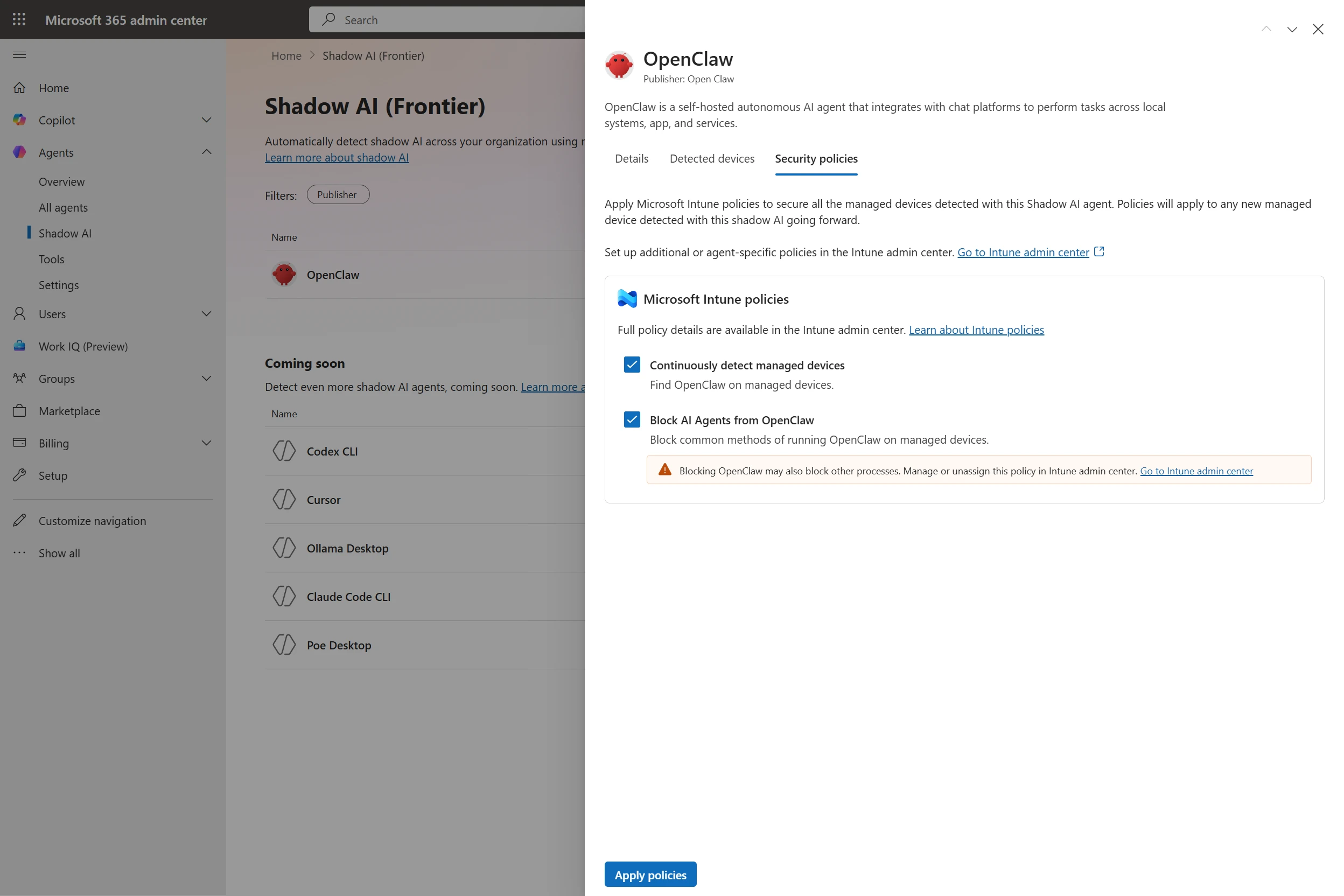
With Microsoft Defender and Intune, organizations will be able to discover and manage local AI agents running on Windows devices, starting with OpenClaw agents and expanding soon to other widely used agents like GitHub Copilot CLI and Claude Code. Customers enrolled in the Frontier program can see if OpenClaw agents are being used in the organization, which devices they are running on, and use Intune policies to block common ways that OpenClaw runs on the new Shadow AI page in Agent 365 in the Microsoft 365 admin center and in the Intune admin center. Through Agent 365 registry, the inventory of local agents will be available in Defender and Intune so IT, endpoint management, and security teams can get a consistent view of discovered local agents in their environment and take appropriate action.

Microsoft 365 admin center showing Shadow AI OpenClaw agent with Intune security policies enabled to detect and block unmanaged AI agents.
In the Microsoft 365 admin center, an IT professional can apply Intune policies to continuously detect managed devices and block the common methods of running OpenClaw on them. 

Starting in June 2026, Microsoft Defender will also provide asset context mapping for each agent including the devices they run on, MCP servers configured for those agents, the identities associated with them, and the cloud resources those identities can reach. This will give security teams the context needed to assess exposure and potential blast radius. They can then investigate agent activity, such as file access and network behavior, using familiar endpoint data, and use those insights to identify misconfigurations and even define custom detections.

Microsoft Defender interface displaying a security graph map of connected AI agents and AWS resources with ChatGPT Desktop node highlighted.
Security teams can investigate local AI agent exposure in Microsoft Defender through a relationship map that shows where an agent runs, which MCP servers are configured for use, which identities are associated with it, and which cloud resources those identities can reach. Defender context such as resource criticality and sensitive-data exposure helps teams prioritize the agents and paths that matter most. 

Beyond monitoring, organizations will be able to apply policy-based controls to set guardrails for what agents are allowed to do—helping protect both agents and organizations from compromise and misuse—with initial support delivered for OpenClaw through Intune. If a managed agent exhibits malicious behavior patterns, such as attempting to access or exfiltrate sensitive data, Defender will be able to block coding agents in runtime and generate alerts with rich incident context to support investigation and response.  

Context mapping capabilities, policy-based controls, plus runtime blocking and alerts will be available in Agent 365 through Intune and Defender public preview in June 2026. 

Visibility across clouds and AI-builder platforms

As developers are rapidly building agents with Microsoft Foundry, AWS Bedrock, and Google Gemini Enterprise Agent Platform (formerly Google Vertex AI) and deploying cloud agents across multicloud and multi-platform environments, the agent sprawl challenge intensifies. To manage potential security risks or vulnerabilities before they become breaches, security and IT teams need visibility to which cloud agents are running, what models these agents are built on, and what resources they’re accessing.

Today, we are excited to announce the public preview of Agent 365 registry sync with AWS Bedrock and Google Cloud connections, enabling IT teams to automatically discover, inventory, and, soon, perform basic lifecycle governance—for example, start, stop, delete agents—across these platforms.

Microsoft 365 admin center Registry sync page showing successful Amazon Bedrock connection with four synced AI agents listed.
Now in public preview, Microsoft 365 admins can connect and sync the Agent 365 registry with Amazon Bedrock and Google Cloud for cross-platform observability and governance. 

Manage a wide ecosystem of SaaS agents 

Agent 365 works with prebuilt agents in Microsoft 365 Copilot and Teams, agents built with Microsoft Copilot Studio or Microsoft Foundry for your organization, and agents built by software development companies partnered with Microsoft.

Delivering on our promise of control plane for the broad agent ecosystem, we’re excited to announce ecosystem partner agents fully configured to be managed by Agent 365, including Genspark, Zensai, Egnyte, and Zendesk, and agents built on agent factories, including Kasisto, Kore, and n8n. Organizations can observe, govern, and secure these agents in the Agent 365 control plane, with no integration work by IT or security teams.  

Agent 365 software development company launch partners

Collection of AI and software vendor logos including Adobe, NVIDIA, Zendesk, n8n, Kore.ai, and Celonis.
Agent 365 Software Development Company Launch Partners have built agents fully enabled to be managed by Agent 365. 

Enterprises can easily build AI agents today, but scaling them with trust and governance is where most initiatives stall. With Kore.ai deeply integrated into Microsoft Agent 365, identity, security, and governance are built in from the start—empowering enterprises to move from pilots to AI at scale with confidence.

—– Raj Koneru, Chief Executive Officer of Kore.ai

The Agent 365 developer and ecosystem partners play a critical role in extending agents into line-of-business systems, building vertical and scenario-specific integrations, modernizing legacy automation into agent workflows, extending Copilot experiences with custom agents, and helping customers operationalize agent ecosystems at scale. These Agent 365 enabled agents are then observable, governable, and securable in the Agent 365 control plane, accelerating adoption for your organization.

Secure agents as they work in Windows 365 

While Agent 365 provides the control plane to observe, govern, and secure agent activity across the enterprise, Windows 365 for Agents—now available in public preview (in the United States only)—provides a secured, managed environment where agents can carry out that work. It introduces a new class of Cloud PCs purpose-built for agentic workloads and managed in Intune, allowing agents to run in policy-controlled environments, interact with applications, and operate with the same identity, security, and management controls already used for employees.

Now, with Agent 365, you can also observe and secure agents running on Windows 365 for Agents in Microsoft 365 admin center, understanding which agents are connected to the cloud-powered compute. Together, they enable organizations to move from visibility and governance of agents to confidently running them in production environments. 

Secure agents against internet threats with network controls  

AI agents can operate much faster than human users. Without proper guardrails, they can connect to risky web destinations, interact with unsanctioned AI services, handle sensitive files unsafely, or be manipulated through malicious prompt-based attacks. These risks are harder to manage when security teams lack consistent visibility and controls for agent traffic to internet, SaaS, and AI services. 

To give security teams a consistent way to inspect agent traffic at the network layer, in general availability today, Agent 365 extends Microsoft Entra network controls to Microsoft Copilot Studio agents and agents running on user endpoint devices, including local agents such as OpenClaw. These controls can help identify unsanctioned AI usage, restrict connections to only approved web destinations, filter risky file movement, and help block malicious prompt-based attacks before they lead to harmful actions. 

Confidently scale and govern AI agents while maintaining security and control 

Agent 365 extends even further beyond Microsoft platforms to discover, observe, govern, and secure local, SaaS, and cloud agents across your agentic AI ecosystem. Each of today’s announcements build upon Agent 365 capabilities we shared in March 2026 as well as detailed feedback of customers using the Frontier program, developers integrating with the platform, and partners testing Agent 365 capabilities. 

With Agent 365, we can scale and govern AI agents with confidence, while maintaining enterprise grade security and control. Agent 365 enables organizations to move beyond experimentation, driving tangible business value and innovation through trusted AI adoption. By providing a robust and integrated platform, Agent 365 empowers teams to confidently embrace AI and accelerate transformation across the enterprise.

—Yuji Shono, Head of the Global AI Office, NTT DATA Group Corporation, a global infrastructure, networking, and IT services provider.

As organizations begin to adopt Agent 365 at scale, we’ve collaborated with strategic partners to create targeted services to help customers onboard, tackle governance challenges and realize the platform’s full value.

Grid of enterprise services partner logos including Accenture, KPMG, Cognizant, Capgemini, Avanade, Deloitte, EY, PwC, and TCS.
Featured Agent 365 launch partners, including Accenture, Bechtle, Capgemini, Insight, KPMG, Protiviti and Slalom, collaborated with Microsoft engineering teams to develop services for planning, adopting, and managing your agent control plane implementation.

Partner services offered today include expertise and guidance for: 

  • Inventory and ownership: What agents exist, who owns them, and where they run.
  • Least privilege: Right-sizing permissions and enforcing access guardrails without slowing delivery.
  • Compliance and data protection: Preventing oversharing and producing audit-ready evidence.
  • Threats and multi-platform estates: Understanding attack paths and governing across vendors and clouds.
  • Ongoing operations: Lifecycle management, monitoring, and continuous governance hygiene. 

These valuable services are typically scoped as workshops and assessments (diagnose and roadmap), governance and enablement (stand up the control plane and guardrails), managed services (run and improve continuously), advisory and readiness (operating model and adoption readiness), and security and integration (harden posture and integrate third-party agents.)

How to get started with Agent 365  

Agent 365 is now available in Microsoft 365 E7 or standalone at USD15 per user per month. Each Agent 365 license covers an individual who manages or sponsors agents, or uses agents to do work on their behalf, ensuring all agent activity is consistently governed across the organization in a way that’s predictable for scaled growth.  

In addition to the expertise of your Microsoft 365 team and partners, Agent 365 resources to support your experience include:

Plus, on Tuesday, May 12, 2026, a team of Agent 365 experts are hosting a live “Ask Microsoft Anything” to answer your questions about Agent 365—we hope you’ll join for the discussion.

Microsoft Agent 365

Now generally available for commercial customers.

Choose an ecosystem partner for agent security and governance

The post Microsoft Agent 365, now generally available, expands capabilities and integrations appeared first on Microsoft Security Blog.
  • ✇Cybersecurity News
  • AWS Launches “Amazon Quick” to Bridge the Gap Between Desktop and Cloud Ddos
    The post AWS Launches “Amazon Quick” to Bridge the Gap Between Desktop and Cloud appeared first on Daily CyberSecurity. Related posts: AWS Unveils Nova 2 AI Model Family with Multimodal Omni & Agentic Nova Act Desktop AI War: Google Launches Native Gemini for Mac with “Screen Awareness” and Video Gen Amazon Connect Reinvents the Enterprise as an AI-Powered “Operating Brain”
     

Sometimes changing the password on your email mailbox isn’t enough

16 de Abril de 2026, 12:37
Have you ever taken a look at your Microsoft 365 mailbox rules? If not, it might be worth a few minutes of your time. Because newly released research reveals that hackers may already have beaten you to it. Read more in my article on the Fortra blog.
  • ✇Microsoft Security Blog
  • Secure agentic AI end-to-end Vasu Jakkal
    Next week, RSAC™ Conference celebrates its 35-year anniversary as a forum that brings the security community together to address new challenges and embrace opportunities in our quest to make the world a safer place for all. As we look towards that milestone, agentic AI is reshaping industries rapidly as customers transform to become Frontier Firms—those anchored in intelligence and trust and using agents to elevate human ambition, holistically reimagining their business to achieve their highest
     

Secure agentic AI end-to-end

20 de Março de 2026, 13:00

Next week, RSAC™ Conference celebrates its 35-year anniversary as a forum that brings the security community together to address new challenges and embrace opportunities in our quest to make the world a safer place for all. As we look towards that milestone, agentic AI is reshaping industries rapidly as customers transform to become Frontier Firms—those anchored in intelligence and trust and using agents to elevate human ambition, holistically reimagining their business to achieve their highest aspirations. Our recent research shows that 80% of Fortune 500 companies are already using agents.1

At the same time, this innovation is happening against a sea change in AI-powered attacks where agents can become “double agents.” And chief information officers (CIOs), chief information security officers (CISOs), and security decision makers are grappling with the resulting security implications: How do they observe, govern, and secure agents? How do they secure their foundations in this new era? How can they use agentic AI to protect their organization and detect and respond to traditional and emerging threats?

The answer starts with trust, and security has always been the root of trust. In this agentic era, security must be woven into, and around, every layer of the AI estate. It must be ambient and autonomous, just like the AI it protects. This is our vision for security as the core primitive of the AI stack.

At RSAC 2026, we are delivering on that vision with new purpose-built capabilities designed to help organizations secure agents, secure their foundations, and defend using agents and experts. Fueled by more than 100 trillion daily signals, Microsoft Security helps protect 1.6 million customers, one billion identities, and 24 billion Copilot interactions.2 Read on to learn how we can help you secure agentic AI.

Secure agents

Earlier this month, we announced that Agent 365 will be generally available on May 1. Agent 365—the control plane for agents—gives IT, security, and business teams the visibility and tools they need to observe, secure, and govern agents at scale using the infrastructure you already have and trust. It includes new Microsoft Defender, Entra, and Purview capabilities to help you secure agent access, prevent data oversharing, and defend against emerging threats.

Agent 365 is included in Microsoft 365 E7: The Frontier Suite along with Microsoft 365 Copilot, Microsoft Entra Suite, and Microsoft 365 E5, which includes many of the advanced Microsoft Security capabilities below to deliver comprehensive protection for your organization.

Secure your foundations

Along with securing agents, we also need to think of securing AI comprehensively. To truly secure agentic AI, we must secure foundations—the systems that agentic AI is built and runs on and the people who are developing and using AI. At RSAC 2026, we are introducing new capabilities to help you gain visibility into risks across your enterprise, secure identities with continuous adaptive access, safeguard sensitive data across AI workflows, and defend against threats at the speed and scale of AI.

Gain visibility into risks across your enterprise

As AI adoption accelerates, so does the need for comprehensive and continuous visibility into AI risks across your environment—from agents to AI apps and services. We are addressing this challenge with new capabilities that give you insight into risks across your enterprise so you know where AI is showing up, how it is being used, and where your exposure to risk may be growing. New capabilities include:

  • Security Dashboard for AI provides CISOs and security teams with unified visibility into AI-related risk across the organization. Now generally available.
  • Entra Internet Access Shadow AI Detection uses the network layer to identify previously unknown AI applications and surface unmanaged AI usage that might otherwise go undetected. Generally available March 31.
  • Enhanced Intune app inventory provides rich visibility into your app estate installed on devices, including AI-enabled apps, to support targeted remediation of high-risk software. Generally available in May.

Secure identities with continuous, adaptive access

Identity is the foundation of modern security, the most targeted layer in any environment, and the first line of defense. With Microsoft Entra, you can secure access and deliver comprehensive identity security using new capabilities that help you harden your identity infrastructure, improve tenant governance, modernize authentication, and make intelligent access decisions.

  • Entra Backup and Recovery strengthens resilience with an automated backup of Entra directory objects to enable rapid recovery in case of accidental data deletion or unauthorized changes. Now available in preview.
  • Entra Tenant Governance helps organizations discover unmanaged (shadow) Entra tenants and establish consistent tenant policies and governance in multi-tenant environments. Now available in preview.
  • Entra passkey capabilities now include synced passkeys and passkey profiles to enable maximum flexibility for end-users, making it easy to move between devices, while organizations looking for maximum control still have the option of device-bound passkeys. Plus, Entra passkeys are now natively integrated into the Windows Hello experience, making phishing-resistant passkey authentication more seamless on Windows devices. Synced passkeys and passkey profiles are generally available, passkey integration into Windows Hello is in preview. 
  • Entra external Multi-Factor Authentication (MFA) allows organizations to connect external MFA providers directly with Microsoft Entra so they can leverage pre-existing MFA investments or use highly specialized MFA methods. Now generally available.
  • Entra adaptive risk remediation helps users securely regain access without help-desk friction through automatic self-remediation across authentication methods, adapting to where they are in their modern authentication journey. Generally available in April.
  • Unified identity security provides end-to-end coverage across identity infrastructure, the identity control plane, and identity threat detection and response (ITDR)—built for rapid response and real-time decisions. The new identity security dashboard in Microsoft Defender highlights the most impactful insights across human and non-human identities to help accelerate response, and the new identity risk score unifies account-level risk signals to deliver a comprehensive view of user risk to inform real-time access decisions and SecOps investigations. Now available in preview.

Safeguard sensitive data across AI workflows

With AI embedded in everyday work, sensitive data increasingly moves through prompts, responses, and grounding flows—often faster than policies can keep up. Security teams need visibility into how AI interacts with data as well as the ability to stop data oversharing and data leakage. Microsoft brings data security directly into the AI control plane, giving organizations clear insight into risk, real-time enforcement at the point of use, and the confidence to enable AI responsibly across the enterprise. New Microsoft Purview capabilities include:

  • Expanded Purview data loss prevention for Microsoft 365 Copilot helps block sensitive information such as PII, credit card numbers, and custom data types in prompts from being processed or used for web grounding. Generally available March 31.
  • Purview embedded in Copilot Control System provides a unified view of AI‑related data risk directly in the Microsoft 365 Admin Center. Generally available in April.
  • Purview customizable data security reports enable tailored reporting and drilldowns to prioritized data security risks. Available in preview March 31.

Defend against threats across endpoints, cloud, and AI services

Security teams need proactive 24/7 threat protection that disrupts threats early and contains them automatically. Microsoft is extending predictive shielding to proactively limit impact and reduce exposure, expanding our container security capabilities, and introducing network-layer protection against malicious AI prompts.

  • Entra Internet Access prompt injection protection helps block malicious AI prompts across apps and agents by enforcing universal network-level policies. Generally available March 31.
  • Enhanced Defender for Cloud container security includes binary drift and antimalware prevention to close gaps attackers exploit in containerized environments. Now available in preview.
  • Defender for Cloud posture management adds broader coverage and supports Amazon Web Services and Google Cloud Platform, delivering security recommendations and compliance insights for newly discovered resources. Available in preview in April.
  • Defender predictive shielding dynamically adjusts identity and access policies during active attacks, reducing exposure and limiting impact. Now available in preview.

Defend with agents and experts

To defend in the agentic age, we need agentic defense. This means having an agentic defense platform and security agents embedded directly into the flow of work, augmented by deep human expertise and comprehensive security services when you need them.

Agents built into the flow of security work

Security teams move fastest with targeted help where and when work is happening. As alerts surface and investigations unfold across identities, data, endpoints, and cloud workloads, AI-powered assistance needs to operate alongside defenders. With Security Copilot now included in Microsoft 365 E5 and E7, we are empowering defenders with agents embedded directly into daily security and IT operations that help accelerate response and reduce manual effort so they can focus on what matters most.

New agents available now include:

  • Security Analyst Agent in Microsoft Defender helps accelerate threat investigations by providing contextual analysis and guided workflows. Available in preview March 26.
  • Security Alert Triage Agent in Microsoft Defender has the capabilities of the phishing triage agent and then extends to cloud and identity to autonomously analyze, classify, prioritize, and resolve repetitive low-value alerts at scale. Available in preview in April.
  • Conditional Access Optimization Agent in Microsoft Entra enhancements add context-aware recommendations, deeper analysis, and phased rollout to strengthen identity security. Agent generally available, enhancements now available in preview.
  • Data Security Posture Agent in Microsoft Purview enhancements include a credential scanning capability that can be used to proactively detect credential exposure in your data. Now available in preview.
  • Data Security Triage Agent in Microsoft Purview enhancements include an advanced AI reasoning layer and improved interpretation of custom Sensitive Information Types (SITs), to improve agent outputs during alert triage. Agent generally available, enhancements available in preview March 31.
  • Over 15 new partner-built agents extend Security Copilot with additional capabilities, all available in the Security Store.

Scale with an agentic defense platform

To help defenders and agents work together in a more coordinated, intelligence-driven way, Microsoft is expanding Sentinel, the agentic defense platform, to unify context, automate end-to-end workflows, and standardize access, governance, and deployment across security solutions.

  • Sentinel data federation powered by Microsoft Fabric investigates external security data in place in Databricks, Microsoft Fabric, and Azure Data Lake Storage while preserving governance. Now available in preview.
  • Sentinel playbook generator with natural language orchestration helps accelerate investigations and automate complex workflows. Now available in preview.
  • Sentinel granular delegated administrator privileges and unified role-based access control enable secure and scaling management for partners and enterprise customers with cross-tenant collaboration. Now available in preview.
  • Security Store embedded in Purview and Entra makes it easier to discover and deploy agents directly within existing security experiences. Generally available March 31.
  • Sentinel custom graphs powered by Microsoft Fabric enable views unique to your organization of relationships across your environment. Now available in preview.
  • Sentinel model context protocol (MCP) entity analyzer helps automate faster with natural language and harnesses the flexibility of code to accelerate responses. Generally available in April.

Strengthen with experts

Even the most mature security organizations face moments that call for deeper partnership—a sophisticated attack, a complex investigation, a situation where seasoned expertise alongside your team makes all the difference. The Microsoft Defender Experts Suite brings together expert-led services—technical advisory, managed extended detection and response (MXDR), and end-to-end proactive and reactive incident response—to help you defend against advanced cyber threats, build long-term resilience, and modernize security operations with confidence.

Apply Zero Trust for AI

Zero Trust has always been built on three principles: verify explicitly, use least privilege, and assume breach. As AI becomes embedded across your entire environment—from the models you build on, to the data they consume, to the agents that act on your behalf—applying those principles has never been more critical. At RSAC 2026, we’re extending our Zero Trust architecture, the full AI lifecycle—from data ingestion and model training to deployment agent behavior. And we’re making it actionable with an updated Zero Trust for AI reference architecture, workshop, assessment tool, and new patterns and practices articles to help you improve your security posture.

See you at RSAC

If you’re joining the global security community in San Francisco for RSAC 2026 Conference, we invite you to connect with us. Join us at our Microsoft Pre-Day event and stop by our booth at the RSAC Conference North Expo (N-5744) to explore our latest innovations across Microsoft Agent 365, Microsoft Defender, Microsoft Entra, Microsoft Purview, Microsoft Sentinel, and Microsoft Security Copilot and see firsthand how we can help your organization secure agents, secure your foundation, and help you defend with agents and experts. The future of security is ambient, autonomous, and built for the era of AI. Let’s build it together.

To learn more about Microsoft Security solutions, visit our website. Bookmark the Security blog to keep up with our expert coverage on security matters. Also, follow us on LinkedIn (Microsoft Security) and X (@MSFTSecurity) for the latest news and updates on cybersecurity.


1Based on Microsoft first-party telemetry measuring agents built with Microsoft Copilot Studio or Microsoft Agent Builder that were in use during the last 28 days of November 2025.

2Microsoft Fiscal Year 2026 First Quarter Earnings Conference Call and Microsoft Fiscal Year 2026 Second Quarter Earnings Conference Call

The post Secure agentic AI end-to-end appeared first on Microsoft Security Blog.

Hackers Use Cloudflare Human Check to Hide Microsoft 365 Phishing Pages

Scammers are hijacking popular security tools like Cloudflare to hide fake Microsoft 365 login pages. Learn how this new invisible phishing campaign bypasses antivirus software and how you can stay safe.
  • ✇Microsoft Security Blog
  • Secure agentic AI for your Frontier Transformation Vasu Jakkal
    Today we shared the next step to make Frontier Transformation real for customers across every industry with Wave 3 of Microsoft 365 Copilot, Microsoft Agent 365, and Microsoft 365 E7: The Frontier Suite. Introducing the First Frontier Suite built on Intelligence and Trust As our customers rapidly embrace agentic AI, chief information officers (CIOs), chief information security officers (CISOs), and security decision makers are asking urgent questions: How do I track and monitor all these
     

Secure agentic AI for your Frontier Transformation

9 de Março de 2026, 10:00

Today we shared the next step to make Frontier Transformation real for customers across every industry with Wave 3 of Microsoft 365 Copilot, Microsoft Agent 365, and Microsoft 365 E7: The Frontier Suite.

As our customers rapidly embrace agentic AI, chief information officers (CIOs), chief information security officers (CISOs), and security decision makers are asking urgent questions: How do I track and monitor all these agents? How do I know what they are doing? Do they have the right access? Can they leak sensitive data? Are they protected from cyberthreats? How do I govern them?

Agent 365 and Microsoft 365 E7: The Frontier Suite, generally available on May 1, 2026, are designed to help answer these questions and give organizations the confidence to go further with AI.

Agent 365—the control plane for agents

As organizations adopt agentic AI, growing visibility and security gaps can increase the risk of agents becoming double agents. Without a unified control plane, IT, security, and business teams lack visibility into which agents exist, how they behave, who has access to them, and what potential security risks exist across the enterprise. With Microsoft Agent 365 you now have a unified control plane for agents that enables IT, security, and business teams to work together to observe, govern, and secure agents across your organization—including agents built with Microsoft AI platforms and agents from our ecosystem partners—using new Microsoft Security capabilities built into their existing flow of work.

Here is what that looks like in practice:

As we are now running Agent 365 in production, Avanade has real visibility into agent activity, the ability to govern agent sprawl, control resource usage, and manage agents as identity-aware digital entities in Microsoft Entra. This significantly reduces operational and security risk, represents a critical step forward in operationalizing the agent lifecycle at scale, and underscores Microsoft’s commitment to responsible, production-ready AI.

—Aaron Reich, Chief Technology and Information Officer, Avanade

Key Agent 365 capabilities include:

Observability for every role

With Agent 365, IT, security, and business teams gain visibility into all Agent 365 managed agents in their environment, understand how they are used, and can act quickly on performance, behavior, and risk signals relevant to their role—from within existing tools and workflows.

  • Agent Registry provides an inventory of agents in your organization, including agents built with Microsoft AI platforms, ecosystem partner agents, and agents registered through APIs. This agent inventory is available to IT teams in the Microsoft 365 admin center. Security teams see the same unified agent inventory in their existing Microsoft Defender and Purview workflows.
  • Agent behavior and performance observability provides detailed reports about agent performance, adoption and usage metrics, an agent map, and activity details.
  • Agent risk signals across Microsoft Defender*, Entra, and Purview* help security teams evaluate agent risk—just like they do for users—and block agent actions based on agent compromise, sign-in anomalies, and risky data interactions. Defender assesses risk of agent compromise, Entra evaluates identity risk, and Purview evaluates insider risk. IT also has visibility into these risks in the Microsoft 365 admin center.
  • Security policy templates, starting with Microsoft Entra, automate collaboration between IT and security. They enable security teams to define tenant-wide security policies that IT leaders can then enforce in the Microsoft 365 admin center as they onboard new agents.

*These capabilities are in public preview and will continue to be on May 1.

Secure and govern agent access

Unmanaged agents may create significant risk, from accessing resources unchecked to accumulating excessive privileges and being misused by malicious actors. With Microsoft Entra capabilities included in Agent 365, you can secure agent identities and their access to resources.

  • Agent ID gives each agent a unique identity in Microsoft Entra, designed specifically for the needs of agents. With Agent ID, organizations can apply trusted access policies at scale, reduce gaps from unmanaged identities, and keep agent access aligned to existing organizational controls.
  • Identity Protection and Conditional Access for agents extend existing user policies that make real-time access decisions based on risks, device compliance from Microsoft Intune, and custom security attributes to agents working on behalf of a user. These policies help prevent compromise and help ensure that agents cannot be misused by malicious actors.
  • Identity Governance for agents enables identity leaders to limit agent access to only resources they need, with access packages that can be scoped to a subset of the users permissions, and includes the ability to audit access granted to agents.

Prevent data oversharing and ensure agent compliance

Microsoft Purview capabilities in Agent 365 provide comprehensive data security and compliance coverage for agents. You can protect agents from accessing sensitive data, prevent data leaks from risky insiders, and help ensure agents process data responsibly to support compliance with global regulations.

  • Data Security Posture Management provides visibility and insights into data risks for agents so data security admins can proactively mitigate those risks.
  • Information Protection helps ensure that agents inherit and honor Microsoft 365 data sensitivity labels so that they follow the same rules as users for handling sensitive data to prevent agent-led sensitive data leaks.
  • Inline Data Loss Prevention (DLP) for prompts to Microsoft Copilot Studio agents blocks sensitive information such as personally identifiable information, credit card numbers, and custom sensitive information types (SITs) from being processed in the runtime.
  • Insider Risk Management extends insider risk protection to agents to help ensure that risky agent interactions with sensitive data are blocked and flagged to data security admins.
  • Data Lifecycle Management enables data retention and deletion policies for prompts and agent-generated data so you can manage risk and liability by keeping the data that you need and deleting what you don’t.  
  • Audit and eDiscovery extend core compliance and records management capabilities to agents, treating AI agents as auditable entities alongside users and applications. This will help ensure that organizations can audit, investigate, and defensibly manage AI agent activity across the enterprise.
  • Communication Compliance extends to agent interactions to detect and enable human oversight of risky AI communications. This enables business leaders to extend their code of conduct and data compliance policies to AI communications.

Defend agents against emerging cyberthreats

To help you stay ahead of emerging cyberthreats, Agent 365 includes Microsoft Defender protections purpose-built to detect and mitigate specific AI vulnerabilities and threats such as prompt manipulation, model tampering, and agent-based attack chains.

  • Security posture management for Microsoft Foundry and Copilot Studio agents* detects misconfigurations and vulnerabilities in agents so security leaders can stay ahead of malicious actors by proactively resolving them before they become an attack vector.
  • Detection, investigation, and response for Foundry and Copilot Studio agents* enables the investigation and remediation of attacks that target agents and helps ensure that agents are accounted for in security investigations.
  • Runtime threat protection, investigation, and hunting** for agents that use the Agent 365 tools gateway, helps organizations detect, block, and investigate malicious agent activities.

Agent 365 will be generally available on May 1, 2026, and priced at $15 per user per month. Learn more about Agent 365.

*These capabilities are in public preview and will continue to be on May 1.

**This new capability will enter public preview in April 2026 and continue to be on May 1.

Microsoft 365 E7: The Frontier Suite

Microsoft 365 E7 brings together intelligence and trust to enable organizations to accelerate Frontier Transformation, equipping employees with AI across email, documents, meetings, spreadsheets, and business application surfaces. It also gives IT and security leaders the observability and governance needed to operate AI at enterprise scale.

Microsoft 365 E7 includes Microsoft 365 Copilot, Agent 365, Microsoft Entra Suite, and Microsoft 365 E5 with advanced Defender, Entra, Intune, and Purview security capabilities to help secure users, delivering comprehensive protection across users and agents. It will be available for purchase on May 1, 2026, at a retail price of $99 per user per month. Learn more about Microsoft 365 E7.

End-to-end security for the agentic era

Frontier Transformation is anchored in intelligence and trust, and trust starts with security. Microsoft Security capabilities help protect 1.6 million customers at the speed and scale of AI.1 With Agent 365, we are extending these enterprise-grade capabilities so organizations can observe, secure, and govern agents and delivering comprehensive protection across agents and users with Microsoft 365 E7.

Secure your Frontier Transformation today with Agent 365 and Microsoft 365 E7: The Frontier Suite. And join us at RSAC Conference 2026 to learn more about these new solutions and hear from industry experts and customers who are shaping how agents can be observed, governed, secured, and trusted in the real world.

To learn more about Microsoft Security solutions, visit our website. Bookmark the Security blog to keep up with our expert coverage on security matters. Also, follow us on LinkedIn (Microsoft Security) and X (@MSFTSecurity) for the latest news and updates on cybersecurity.


1Microsoft Fiscal Year 2026 Second Quarter Earnings Conference Call.

The post Secure agentic AI for your Frontier Transformation appeared first on Microsoft Security Blog.

  • ✇Security Boulevard
  • EdTech Magazine | What Minimum Viable Cybersecurity Looks Like for K–12 Districts Charlie Sander
    This article was originally published in EdTech Magazine on 02/11/26 by Didi Gluck. As ransomware and phishing attacks grow more sophisticated, districts can’t rely on perimeter defenses alone. Cybersecurity has become a top priority for K–12 districts, not just to keep students safe online but to ensure continuity across devices, systems and end user accounts. ... The post EdTech Magazine | What Minimum Viable Cybersecurity Looks Like for K–12 Districts appeared first on ManagedMethods Cybersec
     

EdTech Magazine | What Minimum Viable Cybersecurity Looks Like for K–12 Districts

18 de Fevereiro de 2026, 08:57

This article was originally published in EdTech Magazine on 02/11/26 by Didi Gluck. As ransomware and phishing attacks grow more sophisticated, districts can’t rely on perimeter defenses alone. Cybersecurity has become a top priority for K–12 districts, not just to keep students safe online but to ensure continuity across devices, systems and end user accounts. ...

The post EdTech Magazine | What Minimum Viable Cybersecurity Looks Like for K–12 Districts appeared first on ManagedMethods Cybersecurity, Safety & Compliance for K-12.

The post EdTech Magazine | What Minimum Viable Cybersecurity Looks Like for K–12 Districts appeared first on Security Boulevard.

  • ✇Graham Cluley
  • Smashing Security podcast #447: Grok the stalker, the Louvre heist, and Microsoft 365 mayhem Graham Cluley
    On this week's show we learn that AI really can be a stalker’s best friend, as we explore a strange tale that starts with a manatee-shaped mailbox on a millionaire's lawn and ends with Grok happily doxxing real people, mapping out stalking "strategies," and handing out revenge-porn tips. Then we go inside the Louvre heist, where thieves in hi-vis and a hire van waltzed off with the French crown jewels in broad daylight, exploiting our assumptions about what "looks normal" - the same kind of b
     

Smashing Security podcast #447: Grok the stalker, the Louvre heist, and Microsoft 365 mayhem

10 de Dezembro de 2025, 21:30
On this week's show we learn that AI really can be a stalker’s best friend, as we explore a strange tale that starts with a manatee-shaped mailbox on a millionaire's lawn and ends with Grok happily doxxing real people, mapping out stalking "strategies," and handing out revenge-porn tips. Then we go inside the Louvre heist, where thieves in hi-vis and a hire van waltzed off with the French crown jewels in broad daylight, exploiting our assumptions about what "looks normal" - the same kind of bias we’re now baking into security AIs. Plus, Graham chats with Rob Edmondson from CoreView about why misconfigurations and over-privileged accounts can make Microsoft 365 dangerously vulnerable. All this, and more, in episode 447 of the "Smashing Security" podcast with Graham Cluley, and special guest Jenny Radcliffe.
  • ✇Volexity
  • Phishing for Codes: Russian Threat Actors Target Microsoft 365 OAuth Workflows Steven Adair
    KEY TAKEAWAYS Since early March 2025, Volexity has observed multiple Russian threat actors aggressively targeting individuals and organizations with ties to Ukraine and human rights. These recent attacks use a new technique aimed at abusing legitimate Microsoft OAuth 2.0 Authentication workflows. The attackers are impersonating officials from various European nations, and in one instance leveraged a compromised Ukrainian Government account. Both Signal and WhatsApp are used to contact targets
     

Phishing for Codes: Russian Threat Actors Target Microsoft 365 OAuth Workflows

22 de Abril de 2025, 13:31
Volexity Blog - Phishing for Codes - Russian Threat Actors Target Microsoft 365 OAuth Workflows
KEY TAKEAWAYS
  • Since early March 2025, Volexity has observed multiple Russian threat actors aggressively targeting individuals and organizations with ties to Ukraine and human rights.
  • These recent attacks use a new technique aimed at abusing legitimate Microsoft OAuth 2.0 Authentication workflows.
  • The attackers are impersonating officials from various European nations, and in one instance leveraged a compromised Ukrainian Government account.
  • Both Signal and WhatsApp are used to contact targets, inviting them to join or register for private meetings with various national European political officials or for upcoming events.
  • Some of the social engineering campaigns seek to fool victims into clicking links hosted on Microsoft 365 infrastructure
  • The primary tactics observed involve the attacker requesting victim's supply Microsoft Authorization codes, which grant the attacker with account access to then join attacker-controlled devices to Entra ID (previously Azure AD), and to download emails and other account-related data.

Since early March 2025, Volexity has observed multiple suspected Russian threat actors conducting highly targeted social engineering operations aimed at gaining access to the Microsoft 365 (M365) accounts of targeted individuals. This activity comes on the heels of attacks Volexity reported on back in February 2025, where Russian threat actors were discovered targeting users and organizations through Device Code Authentication phishing.

Since that reporting, while there has been an observable drop in Russian threat actors leveraging that specific method, Volexity has observed them pivoting to different methods of attack that abuse other legitimate M365 OAuth authentication workflows. These recently observed attacks rely heavily on one-on-one interaction with a target, as the threat actor must both convince them to click a link and send back a Microsoft-generated code.

Volexity is currently tracking what is believed to be at least two Russian threat actors, which it tracks as UTA0352 and UTA0355, that are behind these attacks. It is plausible that there are overlaps between these threat actors and those Volexity previously reported as conducting Device Code Authentication phishing campaigns in January and February 2025. This blog post details the different techniques used by these threat actors and the commonalities between their campaigns, which can be summarized as follows:

  • The attacker contacts the victim via a messaging application (Signal, WhatsApp) and invites them to join a video call to discuss the conflict in Ukraine.
  • Once the victim has responded, the attacker sends an OAuth phishing URL that they claim is required to join the video call.
  • The victim is asked to return the Microsoft-generated OAuth code back to the attacker.
  • If the victim shares the OAuth code, the attacker is then able to generate an access token that ultimately allows access the victim’s M365 account.

Diplomatic Channels to Nowhere

In March 2025, Volexity learned that some of its customers' staff were receiving suspicious messages via Signal and WhatsApp. The targeted staff members worked at NGOs that support human rights and specifically have expertise and experience working on issues related to Ukraine. The messages claimed to be from European political officials and were themed around discussing matters involving Ukraine. In each observed instance, the call to action was to arrange a meeting between the target and a political official, or Ambassador, of the European country of which the sender claimed to represent.

If the target responded to messages, the conversation would quickly progress towards actually scheduling an agreed upon time for the meeting. However, perhaps in an attempt to not arouse suspicion, in some cases the "Ambassador" would not be immediately available, and the meeting would be scheduled for days later.

As the agreed meeting time approached, the purported European political official would make contact again and share instructions on how to join the meeting. These instructions typically came in the form of a document uploaded into the messaging platform. This "official" would then send a link for the target to click on in order to join the meeting. These shared URLs all pointed to the official login portal for M365 via login.microsoftonline.com.

It should come as no surprise that these were, in fact, phishing campaigns, and the supplied instructions involved sending a code back to the attacker. However, unlike the previously observed attacks, these URLs were not associated with Device Code Authentication workflows. Instead, these URLs pointed to other Microsoft OAuth 2.0 authentication workflows associated with various legitimate first-party Microsoft applications. Volexity attributes the initial series of attacks observed to a suspect Russian threat actor it tracks as UTA0352.

In these campaigns, clicking the link alone would not be enough for the account to be compromised. The code would need to be supplied back to the attacker. The supplied links would redirect to official Microsoft URLs and, in the process, generate a Microsoft Authorization Token that would then appear as part of the URI, and in some cases, within the body of the redirect page. This code could then be used to generate an Access Token, which would grant the holder with access to the account for which it was generated. In multiple observed instances, the attacker would request the code be emailed or sent back via WhatsApp or Signal.

Volexity observed UTA0352 impersonating individuals representing the following countries and affiliations:

  • Mission of Ukraine to the European Union
  • Permanent Delegation of the Republic of Bulgaria to NATO
  • Permanent Representation of Romania to the European Union

Based on other observations, Volexity believes UTA0352 also likely impersonated officials from Poland as well, but Volexity did not observe this directly. The images below show examples of initial outreach messages sent by UTA0352 impersonating various identities on Signal (left) and WhatsApp (right).

Phishing via Visual Studio Code

In mid-March 2025, one of Volexity's customers was contacted by UTA0352 claiming to be a government official from Romania. They attempted to set up a meeting with their Ambassador. Once the user engaged, the attacker sent a message explaining the need to set up a meeting on their web-based “Extended Verification System (EVS)” hosted on their secure servers. This message was accompanied by a PDF file with instructions on what to expect and how to join, after which a maliciously crafted URL was sent to the target.

The image below shows the two-page PDF document purporting to be from the Romanian Ministry of Foreign Affairs.

The URL shared by UTA0352 had the following format:

https://login.microsoftonline[.]com/organizations/oauth2/v2.0/authorize?state=https://mae.gov[.]ro/[REMOVED]&client_id=aebc6443-996d-45c2-90f0-388ff96faa56&scope=https://graph.microsoft.com/.default&response_type=code&redirect_uri=https://insiders.vscode.dev/redirect&login_hint=<EMAIL HERE>

This URL format is used by M365 to log in to both Microsoft-native/first-party applications and third-party applications using M365’s OAuth workflows. The key parameters of the URL are described in the Microsoft OAuth documentation; for convenience, they are briefly described below:

Parameter Description
state A value to denote the user’s state in the application before the request occurred
client_id The application that made the request
scope The access level requested
response_type The method used to send the token back
redirect_uri The handling URI to receive the generated token afterwards

If the user is already logged in with the account specified in the login_hint parameter, they will be seamlessly redirected. If the user is not already authenticated, they will be prompted to log in to their M365 account. Once authenticated, the user is redirected to an in-browser version of Visual Studio Code, hosted at insiders.vscode.dev. The URL redirects the user to the /redirect page, which is designed to receive login parameters from M365, including OAuth. When the user is redirected to this page, they are presented with the following dialog:

The code displayed via the Visual Studio Code dialog is an OAuth 2.0 authorization code that can be used for up to 60 days. This code can be submitted to Microsoft’s OAuth workflow for an access token, which can then be used to access the M365 Graph API. Since the original request asked for the user’s default access rights, anyone with access to this authorization code also has access to all resources normally available to the user. It should be noted that this code also appeared as part of the URI in the address bar. The Visual Studio Code appears to have been set up to make it easier to extract and share this code, whereas most other instances would simply lead to blank pages.

The message shown under the main header uses the state value from the prior request, which is commonly used to indicate where the request to authenticate came from. However, as described in Microsoft's documentation, this value is arbitrary. It is up to the handling application (in this case, Visual Studio Code) to decide if and how to use this value. UTA0352 abused this to make it look like an authentication attempt to a Romanian government service. This is a theme repeated in other phishing attacks as an effort to make the links appear legitimate.

The diagram below shows the overall workflow followed by the attacker to target users leveraging the Visual Studio Code first-party application. The workflow varies slightly from other attacks observed later but is fairly similar overall.

Earlier Variations of Visual Studio Code Phishing

In addition to the phishing attack described above, Volexity also identified an older variation of a phishing campaign believed to have been employed by UTA0352. In this earlier campaign, the following URL format was used:

hxxps://login.microsoftonline[.]com/common/oauth2/authorize?redirect=https://zoom.us/j/<snip>&client_id=aebc6443-996d-45c2-90f0-388ff96faa56&resource=https://graph.microsoft.com&response_type=code&redirect_uri=https://vscode-redirect.azurewebsites.net&login_hint=<removed>&ui_locales=en-US&mkt=en-US&client-request-id=<removed>

The URL differs from the one previously described, in that it employs the format used by the AzureAD v1.0 specification, not v2.0 used in the initially observed campaign. The key differences between the URL parameters used are noted below:

Parameter Initially Observed Campaign Earlier Campaign Variation
redirect_uri Usesinsiders.vscode.dev Uses vscode-redirect.azurewebsites.net.
resource This is the scope parameter in the Oath 2.0 flow This is the AzureAD v1.0 field used to define the resource for which access is required
redirect Unused in the previously documented campaign This parameter is included in the request to make it look like the user may be logging into a Zoom call, but it is unused in AzureAD v1.0 authentication workflows

The workflow the older campaign variation initiates is similar to the initially observed campaign. If a user is logged in, they are redirected to vscode-redirect.azurewebsites.net, which in turn redirects to a local IP address (127.0.0.1). When this happens, instead of yielding a user interface with the Authorization Code, the code is only available in the URL. The final URL is in the following format:

hxxp://127.0.0.1:9217/callback?code=1.ARsAIGLD9ki0FE63WmhS-KbgFENkvK5tmX[snipped]D&session_state=[uuid]

This yields a blank page when rendered in the user’s browser. The attacker must request that the user share the URL from their browser in order for the attacker to obtain the code.

UTA0355: Phishing via Compromised Ukrainian Government Account

Then, in early April 2025, Volexity identified another new Microsoft 365 OAuth phishing campaign. This time, the campaign started with an email from a legitimate, compromised Ukrainian Government email account, which was then followed by messages sent via Signal and WhatsApp. The emails and follow-up messages invited targets to join a video conference related to Ukraine's efforts "to investigate and prosecute atrocity crimes, as well as the country’s cooperation with international partners in this field.

As with previous OAuth phishing techniques that Volexity has reported, the ultimate intention of this campaign is to use the legitimate Microsoft 365 authentication API to gain access to the victim’s email data. However, in this campaign, the attacker uses the stolen OAuth authorization code to register a new device to the victim’s Microsoft Entra ID (formerly Azure Active Directory) on a permanent basis. After registering the device in Entra ID, the attacker then needs to further socially engineer the target into approving a two-factor authentication request in order to gain access to the victim’s email.

While this campaign uses similar techniques to those employed by UTA0352, Volexity currently tracks these attacks separately and attributes this activity to a threat actor it has labeled UTA0355.

Multi-stage Social Engineering

Unlike the attacks that Volexity observed from UTA0352, this new phishing campaign started with an email that was sent to multiple targets. The email invited the targets to a video conference and included the event details. The email did not include any links or instructions, but it did solicit interest from the recipient on if they wished to attend. However, despite the initial outreach coming via email, Volexity found that UTA0355 quickly followed up with each recipient via Signal or WhatsApp, referencing the email that was sent, likely to add legitimacy to their messaging.

Volexity believes that UTA0355 only sent the email from the compromised Ukrainian Government account to individuals for whom it had out-of-band contact information. This was likely to facilitate real-time conversations to assist with social engineering efforts, and to keep information outside of email where it could more easily be discovered or later examined.

The initial email that was sent to various targets is shown in the image below.

Not long after this email was sent to various targets, the follow-up message from UTA0355 referencing the email was sent via Signal or WhatsApp; an example of which is shown below.

OAuth Phishing and the Device Registration Service

Like other OAuth phishing techniques, the one used in this campaign involved direct interaction with the victim to have them click a link and supply a code back to the attacker. This code is then sought by the attacker and used to obtain illicit access to M365 resources.

Victim Interaction

If the target responded to the message UTA0355 sent via Signal or WhatsApp, they would be sent an M365 login URL to click; the URL format is shown below:

https://login.microsoftonline.com/common/oauth2/authorize?url=https://teams.microsoft.com/[redacted]&client_id=29d9ed98-a469-4536-ade2-f981bc1d605e&resource=01cb2876-7ebd-4aa4-9cc9-d28bd4d359a9&response_type=code&redirect_uri=https%3A%2F%2Flogin.microsoftonline.com%2FWebApp%2FCloudDomainJoin%2F8&amr_values=ngcmfa&login_hint=<email@address.here>

After the victim logged in via the shared Microsoft URL, they would be redirected to a new URL that contained an OAuth authorization code within the URL. The attacker included additional instructions indicating the victim should share the URL they see in their address bar after the redirect occurs. The URL generated by the victim’s browser, and subsequently returned to UTA0355, follows the format below:

https://login.microsoftonline.com/WebApp/CloudDomainJoin/8?code=[redacted]&session_state=[redacted]

By sharing this URL with the attacker, the victim would unknowingly hand over all the information required to authenticate as themselves. This is similar to other observed and suspected attack campaigns. And again, this does require the target to both click a link and send back a code or URL. However, the victim is only ever asked to interact with legitimate Microsoft 365 services, which users may inherently see as trustworthy. Additionally, it may not immediately appear obvious to a user that sharing data from their address bar, or from text displayed on a legitimate Microsoft webpage, would facilitate granting an attacker access to their M365 account.

UTA0355 OAuth Abuse

The URL the victim would share with the attacker includes a code parameter containing an OAuth authorization code, which would then be used to grant access tokens. Unlike similar previous campaigns, the resource requested in the initial login is not access to the Microsoft Graph API; instead, it is for the Device Registration Service. This service is used by Windows to join new devices to Entra ID. The attacker would use this access to join a new device named DESKTOP-[redacted] to the victim’s Entra ID. Volexity was able to use the ROADTools project to replicate these steps, and followed this guide to create a new token with full permissions for Microsoft Graph API access. This technique uses a flaw in the Entra ID API design to grant an access token with a greater level of access than that initially granted.

After the initial interaction had taken place, and UTA0355 had registered their device with the victim’s Microsoft Entra ID (Azure AD), Volexity observed an additional interaction with the victim. In this interaction, UTA0355 requested that the victim approve a two-factor authentication (2FA) request to “gain access to a SharePoint instance associated with the conference”. This was required to bypass additional security requirements, which were put in place by the victim’s organization, in order to gain access to their email.

Post-compromise Activity

Volexity assesses with high confidence that the attacker required the victim to approve a 2FA request to access email items. In logs reviewed by Volexity, initial device registration was successful shortly after interacting with the attacker. Access to email data occurring the following day, which was when UTA0355 had engineered a situation where their 2FA request would be approved. Once access was granted, logs showed the attacker downloaded the target’s email using a session tied to the newly registered device.

The login activity, email access, and device registration all took place using a client IP address belonging to a proxy network that was geolocated to where the victim was located.

Detecting Related Activity

To generally prevent or detect these attacks, Volexity recommends the following:

  • Consider alerting on M365 login activity where the Visual Studio Code client_id value aebc6443-996d-45c2-90f0-388ff96faa5 is used in combination with a resourceDisplayName containing “Microsoft Graph”. Depending on your environment and the usage of Visual Studio Code, this may or may not be feasible, as legitimate users will also login using this client_id.
  • Consider alerting on the following URL format (either embedded in email or proxy logs). Note that the parameters in the URL can appear in any order, and that the redirect_uri values must be set to insiders.vscode.dev/redirect or vscode-redirect.azurewebsites.net:

    https://login.microsoftonline.com/organizations/oauth2/v2.0/authorize?state=[any_url]&client_id=aebc6443-996d-45c2-90f0-388ff96faa56&scope=https://graph.microsoft.com/.default&response_type=code&login_hint=[email]&redirect_uri=https://insiders.vscode.dev/redirect

    https://login.microsoftonline[.]com/common/oauth2/authorize?redirect=[any_url]&client_id=aebc6443-996d-45c2-90f0-388ff96faa56&resource=https://graph.microsoft.com&response_type=code&redirect_uri=https://vscode-redirect.azurewebsites.net&login_hint=[email]&ui_locales=en-US&mkt=en-US&client-request-id=[removed]

  • Evaluate the business impact associated with blocking access to the insiders.vscode[.]dev and vscode-redirect.azurewebsites.net hostnames and consider implementing such blocks.
  • Educate users about the risks associated with new and unknown contacts established through secure messaging platforms. It is crucial that users understand the importance of verifying the identities of contacts that reach out via Signal, WhatsApp, or other secure messaging platforms. Verification should be done out-of-band instead of trusting information provided via unsolicited or unexpected outreach.
  • Consider looking for newly registered devices, and correlate with registering IP addresses to look for low-reputation or proxy IP addresses appearing in the ClientIPAddress.
    • Be aware that ongoing access to the user’s email via the Microsoft Graph API will not contain an attacker IP address in the ClientIPAddress field; instead, it contains a Microsoft IP address. This behavior does not appear to be documented and is counterintuitive to security analysis.
    • While attacker activity cannot easily be tracked via the ClientIPAddress field, Volexity was able to track attacker activity based on the unique deviceId value associated with the device that was registered by the attacker.
    • The ClientAppID field for ongoing access may differ from the user’s typical email client, as it will use an AppID corresponding to one created by the attacker.
  • Consider implementing conditional access policies that restrict access to organizational resources to only approved or managed devices. This can be effective at preventing device registration and unauthorized access to other resources such as email.
    • At the time of publication, Volexity is not aware of a way to block specific first-party Microsoft apps via conditional access policies. Conditional access can be used to block access to all services for non-compliant devices; however, this may prove challenging for organizations to implement in a short timeframe.
    • It should also be noted that Microsoft Teams was one of the resources Volexity also observed UTA0352 targeting. It is not likely reasonable or feasible for most organizations to block this, if it were even possible.

Conclusion

Motivated threat actors will continuously look for new ways to circumvent security controls and gain access to resources using new methods that are not well known to users or cyber defense teams. This latest series of attacks marks the second time since January 2025 that Russian threat actors have blitzed little-known techniques to obtain access to M365 resources. Volexity surmises that these attacks targeting NGOs, Think Tanks, and human rights defenders may be ramping up in order to capitalize on the current situation these individuals and organizations are facing in the form of budget cuts and reduced staffing.

Similar to the Device Code Authentication phishing campaigns that Volexity reported in February 2025, these recent campaigns benefit from all user interactions taking place on Microsoft’s official infrastructure; there is no attacker-hosted infrastructure used in these attacks. Similarly, these attacks do not involve malicious or attacker-controlled OAuth applications for which the user must explicitly grant access (and thus could easily be blocked by organizations). The use of Microsoft first-party applications that already have consent granted has proven to make prevention and detection of this technique rather difficult.

Organizations should train users to be highly vigilant when it comes to unsolicited contact, especially if it arrives via secure messaging apps and request that users click links or open attachments. Further, for this specific type of attack to be successful, the attacker must request that the user send back a URL or code from the link they clicked on. This tactic is not something users are typically trained to be aware of and should be added to an organization's users' security awareness training.

At this time, Volexity notes that NGOs, organizations related to human rights and providing aid and humanitarian assistance, and those with ties to Ukraine are likely the most at risk and potential targets of these campaigns. And while this threat activity is ongoing in limited targeted attacks, Volexity expects that this method of attack will continue and may become more widespread. Therefore, organizations should broadly warn users about this type of attack.

Finally, all messages attributed to UTA0352 and UTA0355 were themed around Ukraine, and targeted numerous individuals and organizations that have historically been targeted by Russian threat actors. Based on this, and the use of similar tactics observed in February 2025, Volexity assesses with medium confidence that both UTA0352 and UTA0355 are Russian threat actors. It is unclear if they are working in coordination or have overlaps with Volexity's previous reporting.

INVESTIGATIVE ASSISTANCE


If any organization or individual believes they may have been targeted by UTA0352, UTA0355, or in a similar attack, please feel free to reach out to Volexity via our contact form. We would be glad to assess any potential targeting and assist in determining if such an attack may have succeeded.

Acknowledgements

Volexity would like to thank its customers for their vigilance, cooperation, hard work, and dedication to defending human rights. Volexity would also like to thank the MIL.CERT-UA of the Ministry of Defence of Ukraine for their ongoing assistance and cooperation.

The post Phishing for Codes: Russian Threat Actors Target Microsoft 365 OAuth Workflows appeared first on Volexity.

❌
❌