

Visualização normal

Antes de ontemStream principal
  • ✇Krebs on Security
  • Microsoft Patch Tuesday, November 2025 Edition BrianKrebs
    Microsoft this week pushed security updates to fix more than 60 vulnerabilities in its Windows operating systems and supported software, including at least one zero-day bug that is already being exploited. Microsoft also fixed a glitch that prevented some Windows 10 users from taking advantage of an extra year of security updates, which is nice because the zero-day flaw and other critical weaknesses affect all versions of Windows, including Windows 10. Affected products this month include the W
     

Microsoft Patch Tuesday, November 2025 Edition

16 de Novembro de 2025, 18:47

Microsoft this week pushed security updates to fix more than 60 vulnerabilities in its Windows operating systems and supported software, including at least one zero-day bug that is already being exploited. Microsoft also fixed a glitch that prevented some Windows 10 users from taking advantage of an extra year of security updates, which is nice because the zero-day flaw and other critical weaknesses affect all versions of Windows, including Windows 10.

Affected products this month include the Windows OS, Office, SharePoint, SQL Server, Visual Studio, GitHub Copilot, and Azure Monitor Agent. The zero-day threat concerns a memory corruption bug deep in the Windows innards called CVE-2025-62215. Despite the flaw’s zero-day status, Microsoft has assigned it an “important” rating rather than critical, because exploiting it requires an attacker to already have access to the target’s device.

“These types of vulnerabilities are often exploited as part of a more complex attack chain,” said Johannes Ullrich, dean of research for the SANS Technology Institute. “However, exploiting this specific vulnerability is likely to be relatively straightforward, given the existence of prior similar vulnerabilities.”

Ben McCarthy, lead cybersecurity engineer at Immersive, called attention to CVE-2025-60274, a critical weakness in a core Windows graphic component (GDI+) that is used by a massive number of applications, including Microsoft Office, web servers processing images, and countless third-party applications.

“The patch for this should be an organization’s highest priority,” McCarthy said. “While Microsoft assesses this as ‘Exploitation Less Likely,’ a 9.8-rated flaw in a ubiquitous library like GDI+ is a critical risk.”

Microsoft patched a critical bug in OfficeCVE-2025-62199 — that can lead to remote code execution on a Windows system. Alex Vovk, CEO and co-founder of Action1, said this Office flaw is a high priority because it is low complexity, needs no privileges, and can be exploited just by viewing a booby-trapped message in the Preview Pane.

Many of the more concerning bugs addressed by Microsoft this month affect Windows 10, an operating system that Microsoft officially ceased supporting with patches last month. As that deadline rolled around, however, Microsoft began offering Windows 10 users an extra year of free updates, so long as they register their PC to an active Microsoft account.

Judging from the comments on last month’s Patch Tuesday post, that registration worked for a lot of Windows 10 users, but some readers reported the option for an extra year of updates was never offered. Nick Carroll, cyber incident response manager at Nightwing, notes that Microsoft has recently released an out-of-band update to address issues when trying to enroll in the Windows 10 Consumer Extended Security Update program.

“If you plan to participate in the program, make sure you update and install KB5071959 to address the enrollment issues,” Carroll said. “After that is installed, users should be able to install other updates such as today’s KB5068781 which is the latest update to Windows 10.”

Chris Goettl at Ivanti notes that in addition to Microsoft updates today, third-party updates from Adobe and Mozilla have already been released. Also, an update for Google Chrome is expected soon, which means Edge will also be in need of its own update.

The SANS Internet Storm Center has a clickable breakdown of each individual fix from Microsoft, indexed by severity and CVSS score. Enterprise Windows admins involved in testing patches before rolling them out should keep an eye on askwoody.com, which often has the skinny on any updates gone awry.

As always, please don’t neglect to back up your data (if not your entire system) at regular intervals, and feel free to sound off in the comments if you experience problems installing any of these fixes.

[Author’s note: This post was intended to appear on the homepage on Tuesday, Nov. 11. I’m still not sure how it happened, but somehow this story failed to publish that day. My apologies for the oversight.]

  • ✇SOC Prime Blog
  • CVE-2025-62215: Microsoft Patches Windows Kernel Zero-Day Vulnerability Under Active Exploitation Daryna Olyniychuk
    Hot on the heels of the disclosure of the critical unauthenticated RCE vulnerability in Microsoft WSUS (CVE-2025-59287), Microsoft has addressed another severe flaw under active exploitation. During its November 2025 Patch Tuesday release, the software giant released fixes for more than 60 vulnerabilities, including a critical zero-day, tracked as CVE-2025-62215. This Windows Kernel privilege escalation flaw poses a significant risk as it enables attackers to gain elevated system privileges, po
     

CVE-2025-62215: Microsoft Patches Windows Kernel Zero-Day Vulnerability Under Active Exploitation

12 de Novembro de 2025, 12:59
CVE-2025-62215 Analysis

Hot on the heels of the disclosure of the critical unauthenticated RCE vulnerability in Microsoft WSUS (CVE-2025-59287), Microsoft has addressed another severe flaw under active exploitation. During its November 2025 Patch Tuesday release, the software giant released fixes for more than 60 vulnerabilities, including a critical zero-day, tracked as CVE-2025-62215. This Windows Kernel privilege escalation flaw poses a significant risk as it enables attackers to gain elevated system privileges, potentially compromising the integrity of affected devices.

Microsoft technologies support millions of organizations worldwide, making them a cornerstone of today’s digital ecosystem. According to the 2025 BeyondTrust Microsoft Vulnerabilities Report, 2024 saw a record 1,360 security vulnerabilities across Microsoft products, an 11% increase from the previous year. Among these, Remote Code Execution (RCE) and Elevation of Privilege (EoP) vulnerabilities remain the most critical. Alarmingly, EoP flaws alone represented 40% of all reported issues, highlighting the serious risk posed by vulnerabilities that allow attackers to escalate privileges and gain control over systems.

Sign up for the SOC Prime Platform to access the global active threats feed, which offers real-time cyber threat intelligence and curated detection algorithms to address emerging threats. All the rules are compatible with multiple SIEM, EDR, and Data Lake formats and mapped to the MITRE ATT&CK® framework. Additionally, each rule is enriched with CTI links, attack timelines, audit configurations, triage recommendations, and more relevant context. Press the Explore Detections button to see the entire detection stack for proactive defense against critical vulnerabilities filtered by the “CVE” tag.

Explore Detections

Security engineers can also leverage Uncoder AI, an IDE and co-pilot for detection engineering. With Uncoder, defenders can instantly convert IOCs into custom hunting queries, craft detection code from raw threat reports, generate Attack Flow diagrams, enable ATT&CK tags prediction, leverage AI-driven query optimization, and translate detection content across multiple platforms.

CVE-2025-62215 Analysis

On November 11, 2025, Microsoft’s latest Patch Tuesday update addressed 63 vulnerabilities, including a zero-day that is already being exploited in the wild. CVE-2025-62215, with a CVSS score of 7.0, is a privilege escalation vulnerability in the Windows Kernel caused by a race condition that allows attackers to manipulate system memory and potentially take control of the affected device.

Security engineers say the exploit is straightforward in concept: an attacker who already has low‑privileged local access can run a specially crafted program that repeatedly tries to provoke the timing error. Specifically, the attack forces multiple threads to touch the same kernel resource without proper synchronization, confusing the kernel’s memory handling so it frees the same block twice. That “double free” corrupts the kernel heap and gives the attacker a path to overwrite memory and seize control of execution flow.

Although the full scope of real-world exploitation isn’t yet clear, experts believe CVE-2025-62215 is primarily being used after an initial compromise (via phishing, RCE, or sandbox escape) to elevate privileges, harvest credentials, and move laterally. Chained with other bugs, this flaw can turn a minor foothold into a full system takeover, so prompt patching and layered defenses remain critical. Users are urged to patch their instances instantly following the dedicated Microsoft advisory.

Ivanti experts point out that the CVE-2025-62215 affects all currently supported Windows OS editions, as well as Windows 10 Extended Security Updates (ESU). This underscores that running Windows 10 past its end-of-life without ESU coverage carries a real risk. 

Microsoft has also released an out-of-band update for consumer devices not enrolled in the ESU program. This update resolves an issue that could prevent the ESU enrollment wizard from completing successfully, ensuring users can maintain security coverage even on older Windows 10 systems.

The rising frequency and impact of vulnerability exploitation emphasize the need for proactive security measures and adherence to best cybersecurity practices to enhance an organization’s defenses. SOC Prime’s complete product suite, backed by AI, automated capabilities, and real-time CTI, serves as the future-proof solution to help organizations outscale cyber threats they anticipate most.


The post CVE-2025-62215: Microsoft Patches Windows Kernel Zero-Day Vulnerability Under Active Exploitation appeared first on SOC Prime.

  • ✇Malwarebytes
  • Update now: November Patch Tuesday fixes Windows zero-day exploited in the wild
    These updates fix serious security issues — including one that attackers are already exploiting to take control of Windows systems. By chaining it with other attacks, they can gain full admin access, install malware, steal data, or make deeper changes you wouldn’t normally be able to undo. Run Windows Update today, restart your PC, and check you’re up to date. What’s been fixed Microsoft releases important security updates on the second Tuesday of every month—known as “Patch Tuesday.” Thi
     

Update now: November Patch Tuesday fixes Windows zero-day exploited in the wild

12 de Novembro de 2025, 08:53

These updates fix serious security issues — including one that attackers are already exploiting to take control of Windows systems. By chaining it with other attacks, they can gain full admin access, install malware, steal data, or make deeper changes you wouldn’t normally be able to undo. Run Windows Update today, restart your PC, and check you’re up to date.

What’s been fixed

Microsoft releases important security updates on the second Tuesday of every month—known as “Patch Tuesday.” This month’s patches fix critical flaws in Windows 10, Windows 11, Windows Server, Office, and related services.

Particularly noteworthy are some critical Remote Code Execution (RCE) bugs in Microsoft Graphics and Office that can allow attackers to run malicious code just by convincing someone to open a booby-trapped file or document.

A “zero-day” is a software flaw that attackers are already exploiting before a fix is available. The name comes from the fact that defenders have zero days to protect themselves—attackers can strike before patches are released. In this month’s update, Microsoft fixed one such vulnerability: CVE-2025-62215, a Windows Kernel Elevation of Privilege (EoP) flaw.

It lets an attacker who already has local access to a device gain higher, admin-level permissions by exploiting what’s known as a “race condition.” A race condition vulnerability happens when different programs or processes try to use the same resource at the same time without proper coordination. During that brief window of confusion, attackers can slip through and exploit the system.

Attackers need to combine this vulnerability with other attack methods. Once they’ve compromised a system, they use this vulnerability to escalate privileges and gain admin-level rights.

Another critical vulnerability worth noting is CVE-2025-60724, which comes with a CVSS score of 9.8 out of 10. It’s a heap-based buffer overflow in the GDI+ Microsoft Graphics Component, which allows an unauthorized attacker to run malicious code over a network.

A buffer overflow happens when software writes more data to memory than it can handle, potentially overwriting other areas and injecting malicious code. In the case of CVE-2025-60724, Microsoft warns that attackers could exploit the flaw by convincing a victim to download and open a document that contains a specially crafted metafile. In more advanced attacks, the same vulnerability could be triggered remotely by uploading a malicious file to a vulnerable web service.

How to apply fixes and check you’re protected

These updates fix security problems and keep your Windows PC protected. Here’s how to make sure you’re up to date:

1. Open Settings

  • Click the Start button (the Windows logo at the bottom left of your screen).
  • Click on Settings (it looks like a little gear).

2. Go to Windows Update

  • In the Settings window, select Windows Update (usually at the bottom of the menu on the left).

3. Check for Updates

  • Click the button that says Check for updates.
  • Windows will search for the latest Patch Tuesday updates for November 2025.

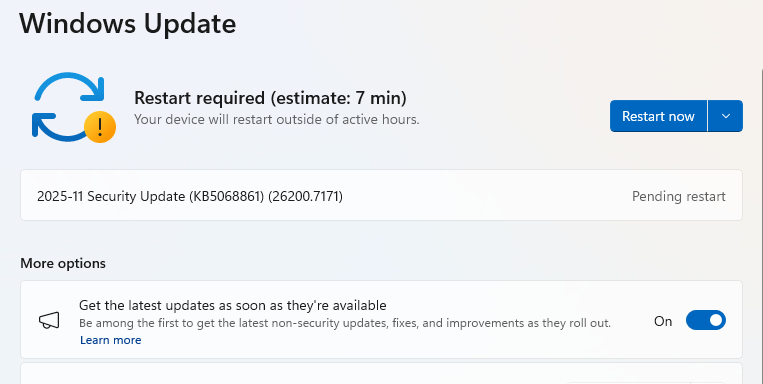
If you have selected automatic updates earlier, you may see this:

Windows Update: Restart now
  • Which means all you have to do is restart your system and you’re done updating.
  • If not, continue with the below.

4. Download and Install

  • If updates are found, they’ll start downloading right away. Once complete, you’ll see a button that says Install or Restart now.
  • Click Install if needed and follow any prompts. Your computer will usually need a restart to finish the update. If it does, click Restart now.

5. Double-check you’re up to date

  • After restarting, go back to Windows Update and check again. If it says You’re up to date, you’re all set!

We don’t just report on threats—we remove them

Cybersecurity risks should never spread beyond a headline. Keep threats off your devices by downloading Malwarebytes today.

❌
❌