A sophisticated Brazilian banking trojan named TCLBANKER, deployed through a trojanized Logitech installer and capable of hijacking victims’ WhatsApp and Outlook accounts to spread itself to new targets. The campaign, tracked as REF3076, delivers TCLBANKER through a malicious MSI installer bundled inside a ZIP file. The installer abuses a signed Logitech application, Logi AI Prompt Builder, via […]
The post TCLBANKER Malware Leverages WhatsApp and Outlook Worm Features in Active Attacks appeared
A sophisticated Brazilian banking trojan named TCLBANKER, deployed through a trojanized Logitech installer and capable of hijacking victims’ WhatsApp and Outlook accounts to spread itself to new targets. The campaign, tracked as REF3076, delivers TCLBANKER through a malicious MSI installer bundled inside a ZIP file. The installer abuses a signed Logitech application, Logi AI Prompt Builder, via […]
Microsoft has acknowledged a service degradation affecting Outlook.com, with users reporting difficulties accessing the platform as of Monday, April 27, 2026.
The company’s official Microsoft 365 Status account on X confirmed the incident, noting the last status update at 10:15 AM UTC.
We're investigating an issue where users may be experiencing intermittent issues accessing https://t.co/ZUfyjth6sU. For more information, please visit https://t.co/uSHwRmXFJZ.— Microsoft 365 Status (@MSFT36
Microsoft has acknowledged a service degradation affecting Outlook.com, with users reporting difficulties accessing the platform as of Monday, April 27, 2026.
The company’s official Microsoft 365 Status account on X confirmed the incident, noting the last status update at 10:15 AM UTC.
Users across multiple regions are experiencing disruptions when attempting to access Outlook.com, including intermittent failures to load the inbox, delayed email delivery, and complete inability to reach the webmail interface.
The outage is part of a broader pattern of Microsoft 365 service instability that has dogged the platform throughout early 2026, following a significant multi-service disruption in January that affected Outlook, Microsoft Teams, Defender, and SharePoint.
Microsoft’s official service health dashboard listed the event under “Service Degradation” — a classification used when core functionality is impaired but not entirely offline — distinguishing it from a full outage scenario.
A separate but related degradation affecting Outlook Classic with the Microsoft Teams Meeting Add-in has been confirmed as triggered by an incompatible legacy Outlook build version remaining active in certain user environments.
Microsoft confirmed on April 27 at 08:58 AM UTC that the fix deployment is continuing to progress as expected and is scheduled for completion by Tuesday, April 28, 2026.
As a temporary workaround, Microsoft has advised affected users to follow steps published in the admin center’s More Info section to bypass impact while the broader rollout completes.
The company also noted that temporary version restrictions placed on some users will be lifted once the fix is fully deployed.
This latest incident adds to growing concerns over Microsoft 365 reliability. In April 2026, an earlier outage took down Microsoft 365, Teams, Outlook, and Azure simultaneously, with Microsoft attributing the disruption to an external service dependency affecting multiple platform components.
The January 22, 2026, incident similarly forced Microsoft engineers to implement load-balancing efforts and targeted server restarts to restore normal operations.
Users and administrators can monitor live service health at status.cloud.microsoft or check the Microsoft 365 admin center under Health > Service Health for real-time incident updates.
Organizations relying on Outlook.com for critical communications are advised to implement contingency email procedures until full service restoration is confirmed.
Microsoft today pushed updates to fix at least 56 security flaws in its Windows operating systems and supported software. This final Patch Tuesday of 2025 tackles one zero-day bug that is already being exploited, as well as two publicly disclosed vulnerabilities.
Despite releasing a lower-than-normal number of security updates these past few months, Microsoft patched a whopping 1,129 vulnerabilities in 2025, an 11.9% increase from 2024. According to Satnam Narang at Tenable, this year marks the
Microsoft today pushed updates to fix at least 56 security flaws in its Windows operating systems and supported software. This final Patch Tuesday of 2025 tackles one zero-day bug that is already being exploited, as well as two publicly disclosed vulnerabilities.
Despite releasing a lower-than-normal number of security updates these past few months, Microsoft patched a whopping 1,129 vulnerabilities in 2025, an 11.9% increase from 2024. According to Satnam Narang at Tenable, this year marks the second consecutive year that Microsoft patched over one thousand vulnerabilities, and the third time it has done so since its inception.
The zero-day flaw patched today is CVE-2025-62221, a privilege escalation vulnerability affecting Windows 10 and later editions. The weakness resides in a component called the “Windows Cloud Files Mini Filter Driver” — a system driver that enables cloud applications to access file system functionalities.
“This is particularly concerning, as the mini filter is integral to services like OneDrive, Google Drive, and iCloud, and remains a core Windows component, even if none of those apps were installed,” said Adam Barnett, lead software engineer at Rapid7.
Only three of the flaws patched today earned Microsoft’s most-dire “critical” rating: Both CVE-2025-62554 and CVE-2025-62557 involve Microsoft Office, and both can exploited merely by viewing a booby-trapped email message in the Preview Pane. Another critical bug — CVE-2025-62562 — involves Microsoft Outlook, although Redmond says the Preview Pane is not an attack vector with this one.
But according to Microsoft, the vulnerabilities most likely to be exploited from this month’s patch batch are other (non-critical) privilege escalation bugs, including:
Kev Breen, senior director of threat research at Immersive, said privilege escalation flaws are observed in almost every incident involving host compromises.
“We don’t know why Microsoft has marked these specifically as more likely, but the majority of these components have historically been exploited in the wild or have enough technical detail on previous CVEs that it would be easier for threat actors to weaponize these,” Breen said. “Either way, while not actively being exploited, these should be patched sooner rather than later.”
One of the more interesting vulnerabilities patched this month is CVE-2025-64671, a remote code execution flaw in the Github Copilot Plugin for Jetbrains AI-based coding assistant that is used by Microsoft and GitHub. Breen said this flaw would allow attackers to execute arbitrary code by tricking the large language model (LLM) into running commands that bypass the user’s “auto-approve” settings.
CVE-2025-64671 is part of a broader, more systemic security crisis that security researcher Ari Marzuk has branded IDEsaster (IDE stands for “integrated development environment”), which encompasses more than 30 separate vulnerabilities reported in nearly a dozen market-leading AI coding platforms, including Cursor, Windsurf, Gemini CLI, and Claude Code.
The other publicly-disclosed vulnerability patched today is CVE-2025-54100, a remote code execution bug in Windows Powershell on Windows Server 2008 and later that allows an unauthenticated attacker to run code in the security context of the user.
For anyone seeking a more granular breakdown of the security updates Microsoft pushed today, check out the roundup at the SANS Internet Storm Center. As always, please leave a note in the comments if you experience problems applying any of this month’s Windows patches.
We’re seeing a surge in phishing calendar invites that users can’t delete, or that keep coming back because they sync across devices. The good news is you can remove them and block future spam by changing a few settings.
Most of these unwanted calendar entries are there for phishing purposes. Most of them warn you about a “impending payment” but the difference is in the subject and the action they want the target to take.
Sometimes they want you to call a number:
And sometimes they
We’re seeing a surge in phishing calendar invites that users can’t delete, or that keep coming back because they sync across devices. The good news is you can remove them and block future spam by changing a few settings.
Most of these unwanted calendar entries are there for phishing purposes. Most of them warn you about a “impending payment” but the difference is in the subject and the action they want the target to take.
Sometimes they want you to call a number:
And sometimes they invite you to an actual meeting:
We haven’t followed up on these scams, but when attackers want you to call them or join a meeting, the end goal is almost always financial. They might use a tech support scam approach and ask you to install a Remote Monitoring and Management tool, sell you an overpriced product, or simply ask for your banking details.
This blog focuses on how to remove these unwanted entries. One of the obstacles is that calendars often sync across devices.
Outlook Calendar
If you use Outlook:
Delete without interacting: Avoid clicking any links or opening attachments in the invite. If available, use the “Do not send a response” option when deleting to prevent confirming that your email is active.
Block the sender: Right-click the event and select the option to report the sender as junk or spam to help prevent future invites from that email address.
Adjust calendar settings: Access your Outlook settings and disable the option to automatically add events from email. This setting matters because even if the invite lands in your spam folder, auto-adding invites will still put the event on your calendar.
Report the invite: Report the spam invitation to Microsoft as phishing or junk.
Verify billing issues through official channels: If you have concerns about your account, go directly to the company’s official website or support, not the information in the invite.
Gmail Calendar
To disable automatic calendar additions:
Open Google Calendar.
Click the gear icon and select Settings in the upper right part of the screen.
Under Event settings, change Add invitations to my calendar to either Only if the sender is known or When I respond to the invitation email. (The default setting is From everyone, which will add any invite to your calendar.)
Uncheck Show events automatically created by Gmail if you want to stop Gmail from adding to your calendar on its own.
Android Calendar
To prevent unknown senders from adding invites:
Open the Calendar app.
Tap Menu > Settings.
Tap General > Adding invitations > Add invitations to my calendar.
Select Only if the sender is known.
For help reviewing which apps have access to your Android Calendar, refer to the support page.
Mac Calendars
To control how events get added to your Calendar on a Mac:
Go to Apple menu > System Settings > Privacy & Security.
Click Calendars.
Turn calendar access on or off for each app in the list.
If you allow access, click Options to choose whether the app has full access or can only add events.
iPhone and iPad Calendar
The controls are similar to macOS, but you may also want to remove additional calendars:
Open Settings.
Tap Calendar > Accounts > Subscribed Calendars.
Select any unwanted calendars and tap the Delete Account option.
Additional calendars
Which brings me to my next point. Check both the Outlook Calendar and the mobile Calendar app for Additional Calendars or subscribed URLs and Delete/Unsubscribe. This will stop the attacker from being able to add even more events to your Calendar. And looking in both places will be helpful in case of synchronization issues.
Several victims reported that after removing an event, they just came back. This is almost always due to synchronization. Make sure you remove the unwanted calendar or event everywhere it exists.
Tracking down the source can be tricky, but it may help prevent the next wave of calendar spam.
How to prevent calendar spam
We’ve covered some of this already, but the main precautions are:
Turn off auto‑add or auto‑processing so invites stay as emails until you accept them.
Restrict calendar permissions so only trusted people and apps can add events.
In shared or resource calendars, remove public or anonymous access and limit who can create or edit items.
Use an up-to-date real-time anti-malware solution with a web protection component to block known malicious domains.
Don’t engage with unsolicited events. Don’t click links, open attachments, or reply to suspicious calendar events such as “investment,” “invoice,” “bonus payout,” “urgent meeting”—just delete the event.
Enable multi-factor authentication (MFA) on your accounts so attackers who compromise credentials can’t abuse the account itself to send or auto‑accept invitations.
Pro tip: If you’re not sure whether an event is a scam, you can feed the message to Malwarebytes Scam Guard. It’ll help you decide what to do next.
We don’t just report on threats—we remove them
Cybersecurity risks should never spread beyond a headline. Keep threats off your devices by downloading Malwarebytes today.
Introduction
Email remains the main means of business correspondence at organizations. It can be set up either using on-premises infrastructure (for example, by deploying Microsoft Exchange Server) or through cloud mail services such as Microsoft 365 or Gmail. However, some organizations do not provide domain-level access to their cloud email. As a result, attackers who have compromised the domain do not automatically gain access to email correspondence and must resort to additional techniques t
Email remains the main means of business correspondence at organizations. It can be set up either using on-premises infrastructure (for example, by deploying Microsoft Exchange Server) or through cloud mail services such as Microsoft 365 or Gmail. However, some organizations do not provide domain-level access to their cloud email. As a result, attackers who have compromised the domain do not automatically gain access to email correspondence and must resort to additional techniques to read it.
This research describes how ToddyCat APT evolved its methods to gain covert access to the business correspondence of employees at target companies. In the first part, we review the incidents that occurred in the second half of 2024 and early 2025. In the second part of the report, we focus in detail on how the attackers implemented a new attack vector as a result of their efforts. This attack enables the adversary to leverage the user’s browser to obtain OAuth 2.0 authorization tokens. These tokens can then be utilized outside the perimeter of the compromised infrastructure to access corporate email.
In a previous post on the ToddyCat group, we described the TomBerBil family of tools, which are designed to extract cookies and saved passwords from browsers on user hosts. These tools were written in C# and C++.
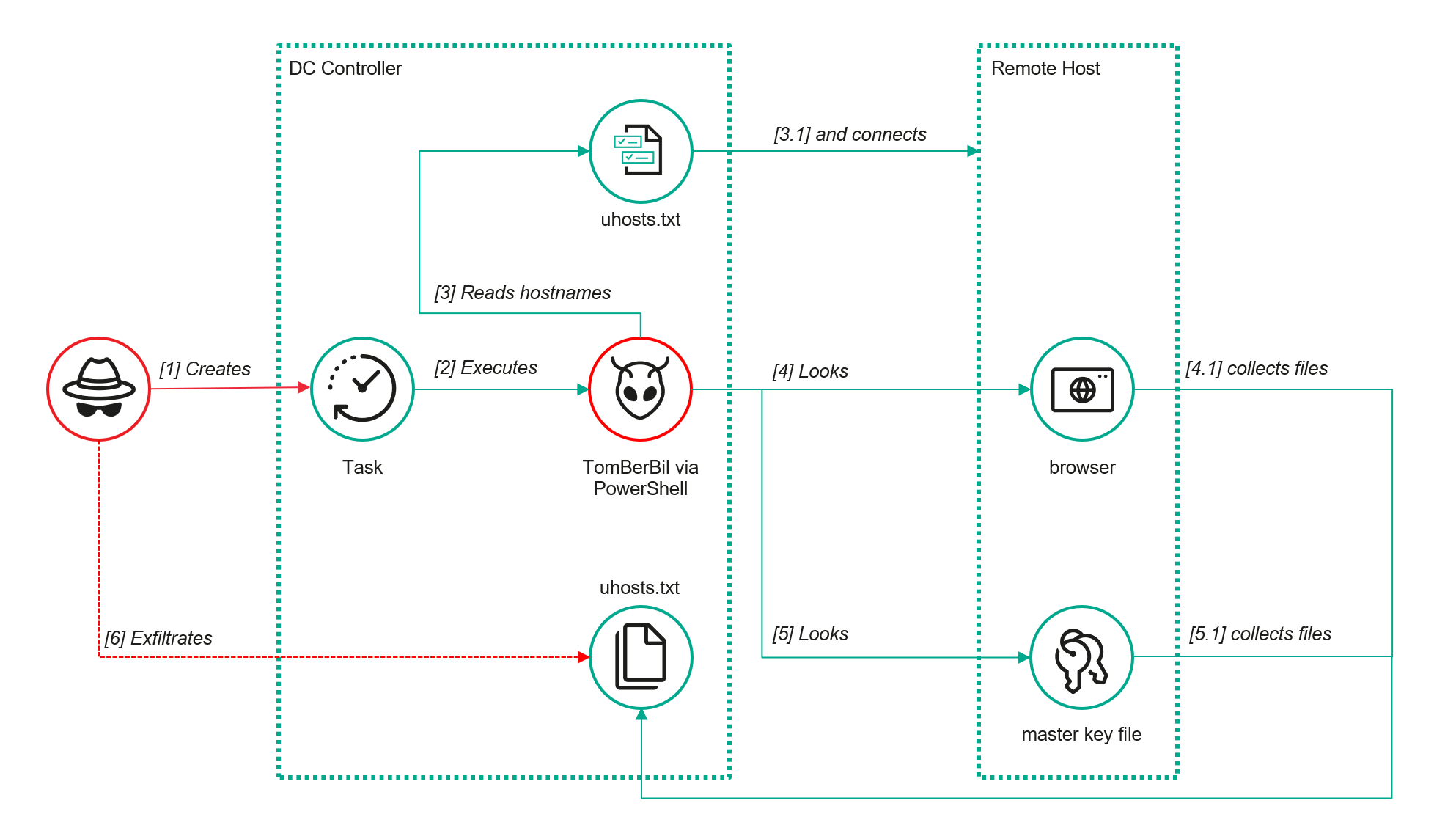
Yet, analysis of incidents from May to June 2024 revealed a new variant implemented in PowerShell. It retained the core malicious functionality of the previous samples but employed a different implementation approach and incorporated new commands.
A key feature of this version is that it was executed on domain controllers on behalf of a privileged user, accessing browser files via shared network resources using the SMB protocol.
Besides supporting the Chrome and Edge browsers, the new version also added processing for Firefox browser files.
The tool was launched using a scheduled task that executed the following command line:
The script begins by creating a new local directory, which is specified in the $baseDir variable. The tool saves all data it collects into this directory.
The script defines a function named parseFile, which accepts the full file path as a parameter. It opens the C:\programdata\uhosts.txt file and reads its content line by line using .NET Framework classes, returning the result as a string array. This is how the script forms an array of host names.
For each host in the array, the script attempts to establish an SMB connection to the shared resource c$, constructing the path in the \\\c$\users\ format. If the connection is successful, the tool retrieves a list of user directories present on the remote host. If at least one directory is found, a separate folder is created for that host within the $baseDir working directory:
In the next stage, the script iterates through the user folders discovered on the remote host, skipping any folders specified in the $filter_users variable, which is defined upon launching the tool. For the remaining folders, three directories are created in the script’s working folder for collecting data from Google Chrome, Mozilla Firefox, and Microsoft Edge.
Next, the tool uses the default account to search for the following Chrome and Edge browser files on the remote host:
Login Data: a database file that contains the user’s saved logins and passwords for websites in an encrypted format
Local State: a JSON file containing the encryption key used to encrypt stored data
Cookies: a database file that stores HTTP cookies for all websites visited by the user
History: a database that stores the browser’s history
These files are copied via SMB to the local folder within the corresponding user and browser folder hierarchy. Below is a code snippet that copies the Login Data file:
The same procedure is applied to Firefox files, with the tool additionally traversing through all the user profile folders of the browser. Instead of the files described above for Chrome and Edge, the script searches for files which have names from the $firefox_files array that contain similar information. The requested files are also copied to the tool’s local folder.
The copied files are encrypted using the Data Protection API (DPAPI). The previous version of TomBerBil ran on the host and copied the user’s token. As a result, in the user’s current session DPAPI was used to decrypt the master key, and subsequently, the files. The updated server-side version of TomBerBil copies files containing the user encryption keys that are used by DPAPI. These keys, combined with the user’s SID and password, grant the attackers the ability to decrypt all the copied files locally.
With TomBerBil, the attackers automatically collected user cookies, browsing history, and saved passwords, while simultaneously copying the encryption keys needed to decrypt the browser files. The connection to the victim’s remote hosts was established via the SMB protocol, which significantly complicated the detection of the tool’s activity.
TomBerBil in PowerShell
As a rule, such tools are deployed at later stages, after the adversary has established persistence within the organization’s internal infrastructure and obtained privileged access.
Detection
To detect the implementation of this attack, it’s necessary to set up auditing for access to browser folders and to monitor network protocol connection attempts to those folders.
title: Access To Sensitive Browser Files Via Smb
id: 9ac86f68-9c01-4c9d-897a-4709256c4c7b
status: experimental
description: Detects remote access attempts to browser files containing sensitive information
author: Kaspersky
date: 2025-08-11
tags:
    - attack.credential-access
    - attack.t1555.003
logsource:
    product: windows
    service: security
detection:
    event:
        EventID: '5145'
    chromium_files:
        ShareLocalPath|endswith:
            - '\User Data\Default\History'
            - '\User Data\Default\Network\Cookies'
            - '\User Data\Default\Login Data'
            - '\User Data\Local State'
    firefox_path:
        ShareLocalPath|contains: '\AppData\Roaming\Mozilla\Firefox\Profiles'
    firefox_files:
        ShareLocalPath|endswith:
            - 'key3.db'
            - 'signons.sqlite'
            - 'key4.db'
            - 'logins.json'
    condition: event and (chromium_files or firefox_path and firefox_files)
falsepositives: Legitimate activity
level: medium
In addition, auditing for access to the folders storing the DPAPI encryption key files is also required.
title: Access To System Master Keys Via Smb
id: ba712364-cb99-4eac-a012-7fc86d040a4a
status: experimental
description: Detects remote access attempts to the Protect file, which stores DPAPI master keys
references:
    - https://www.synacktiv.com/en/publications/windows-secrets-extraction-a-summary
author: Kaspersky
date: 2025-08-11
tags:
    - attack.credential-access
    - attack.t1555
logsource:
    product: windows
    service: security
detection:
    selection:
        EventID: '5145'
        ShareLocalPath|contains: 'windows\System32\Microsoft\Protect'
    condition: selection
falsepositives: Legitimate activity
level: medium
Stealing emails from Outlook
The modified TomBerBil tool family proved ineffective at evading monitoring tools, compelling the threat actor to seek alternative methods for accessing the organization’s critical data. We discovered an attempt to gain access to corporate correspondence files in the local Outlook storage.
The Outlook application stores OST (Offline Storage Table) files for offline use. The names of these files contain the address of the mailbox being cached. Outlook uses OST files to store a local copy of data synchronized with mail servers: Microsoft Exchange, Microsoft 365, or Outlook.com. This capability allows users to work with emails, calendars, contacts, and other data offline, then synchronize changes with the server once the connection is restored.
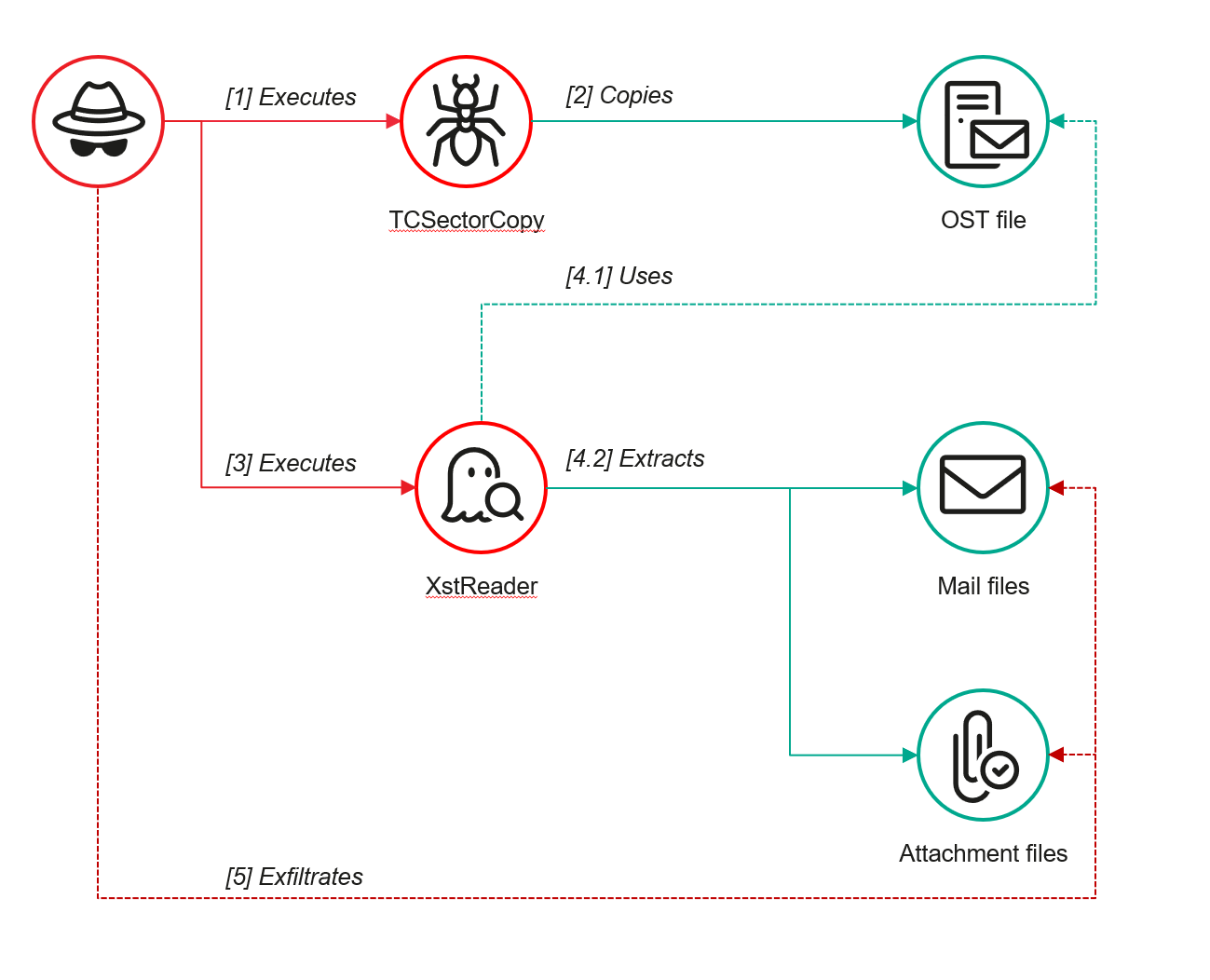
However, access to an OST file is blocked by the application while Outlook is running. To copy the file, the attackers created a specialized tool called TCSectorCopy.
TCSectorCopy
This tool is designed for block-by-block copying of files that may be inaccessible by applications or the operating system, such as files that are locked while in use.
The tool is a 32-bit PE file written in C++. After launch, it processes parameters passed via the command line: the path to the source file to be copied and the path where the result should be saved. The tool then validates that the source path is not identical to the destination path.
Validating the TCSectorCopy command line parameters
Next, the tool gathers information about the disk hosting the file to be copied: it determines the cluster size, file system type, and other parameters necessary for low-level reading.
Determining the disk’s file system type
TCSectorCopy then opens the disk as a device in read-only mode and sequentially copies the file content block by block, bypassing the standard Windows API. This allows the tool to copy even the files that are locked by the system or other applications.
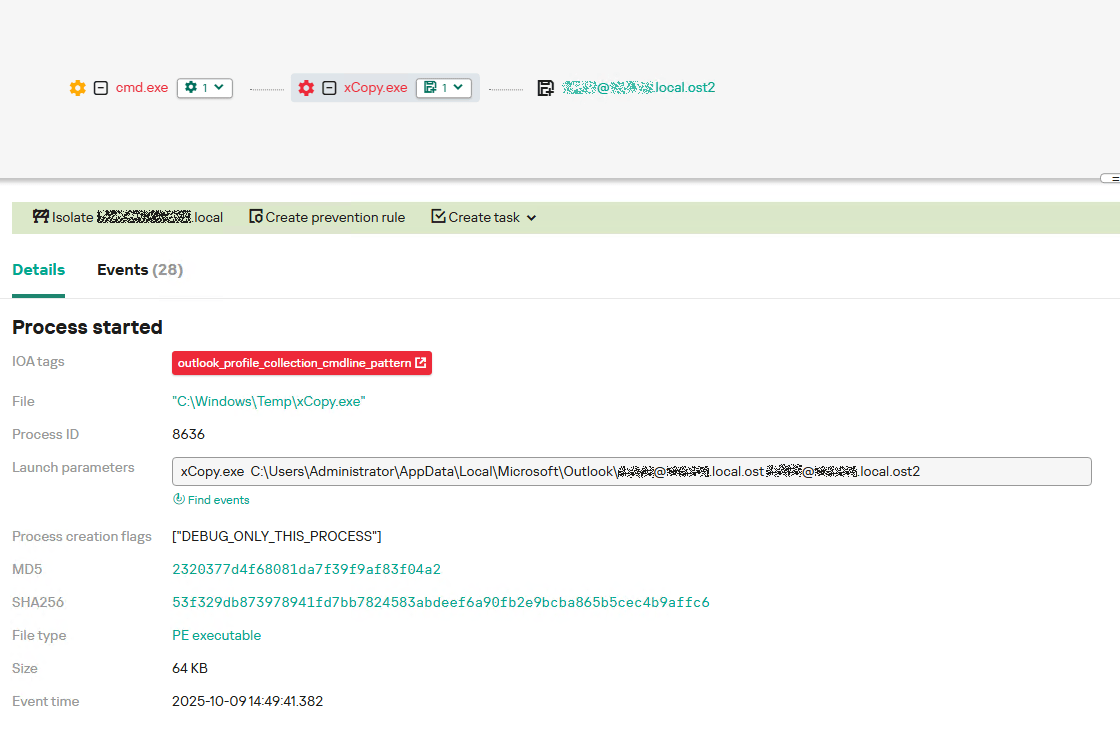
The adversary uploaded this tool to target host and used it to copy user OST files:
Having obtained the OST files, the attackers processed them using a separate tool to extract the email correspondence content.
XstReader
XstReader is an open-source C# tool for viewing and exporting the content of Microsoft Outlook OST and PST files. The attackers used XstReader to export the content of the previously copied OST files.
XstReader is executed with the -e parameter and the path to the copied file. The -e parameter specifies the export of all messages and their attachments to the current folder in the HTML, RTF, and TXT formats.
XstExport.exe -e <email>@<domain>.ost2
After exporting the data from the OST file, the attackers review the list of obtained files, collect those of interest into an archive, and exfiltrate it.
Stealing data with TCSectorCopy and XstReader
Detection
To detect unauthorized access to Outlook OST files, it’s necessary to set up auditing for the %LOCALAPPDATA%\Microsoft\Outlook\ folder and monitor access events for files with the .ost extension. The Outlook process and other processes legitimately using this file must be excluded from the audit.
title: Access To Outlook Ost Files
id: 2e6c1918-08ef-4494-be45-0c7bce755dfc
status: experimental
description: Detects access to the Outlook Offline Storage Table (OST) file
author: Kaspersky
date: 2025-08-11
tags:
    - attack.collection
    - attack.t1114.001
logsource:
    product: windows
    service: security
detection:
    event:
        EventID: 4663
    outlook_path:
        ObjectName|contains: '\AppData\Local\Microsoft\Outlook\'
    ost_file:
        ObjectName|endswith: '.ost'
    condition: event and outlook_path and ost_file
falsepositives: Legitimate activity
level: low
The TCSectorCopy tool accesses the OST file via the disk device, so to detect it, it’s important to monitor events such as Event ID 9 (RawAccessRead) in Sysmon. These events indicate reading directly from the disk, bypassing the file system.
As we mentioned earlier, TCSectorCopy receives the path to the OST file via a command line. Consequently, detecting this tool’s malicious activity requires monitoring for a specific OST file naming pattern: the @ symbol and the .ost extension in the file name.
Example of detecting TCSectorCopy activity in KATA
Stealing access tokens from Outlook
Since active file collection actions on a host are easily tracked using monitoring systems, the attackers’ next step was gaining access to email outside the hosts where monitoring was being performed. Some target organizations used the Microsoft 365 cloud office suite. The attackers attempted to obtain the access token that resides in the memory of processes utilizing this cloud service.
In the OAuth 2.0 protocol, which Microsoft 365 uses for authorization, the access token is used when requesting resources from the server. In Outlook, it is specified in API requests to the cloud service to retrieve emails along with attachments. Its disadvantage is its relatively short lifespan; however, this can be enough to retrieve all emails from a mailbox while bypassing monitoring tools.
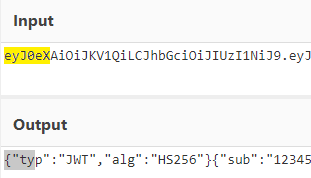
The access token is stored using the JWT (JSON Web Tokens) standard. The token content is encoded using Base64. JWT headers for Microsoft applications always specify the typ parameter with the JWT value first. This means that the first 18 characters of the encoded token will always be the same.
The attackers used SharpTokenFinder to obtain the access token from the user’s Outlook application. This tool is written in C# and designed to search for an access token in processes associated with the Microsoft 365 suite. After launch, the tool searches the system for the following processes:
“TEAMS”
“WINWORD”
“ONENOTE”
“POWERPNT”
“OUTLOOK”
“EXCEL”
“ONEDRIVE”
“SHAREPOINT”
If these processes are found, the tool attempts to open each process’s object using the OpenProcess function and dump their memory. To do this, the tool imports the MiniDumpWriteDump function from the dbghelp.dll file, which writes user mode minidump information to the specified file. The dump files are saved in the dump folder, located in the current SharpTokenFinder directory. After creating dump files for the processes, the tool searches for the following string pattern in each of them:
"eyJ0eX[a-zA-Z0-9\\._\\-]+"
This template uses the first six symbols of the encoded JWT token, which are always the same. Its structures are separated by dots. This is sufficient to find the necessary string in the process memory dump.
Example of a JWT Token
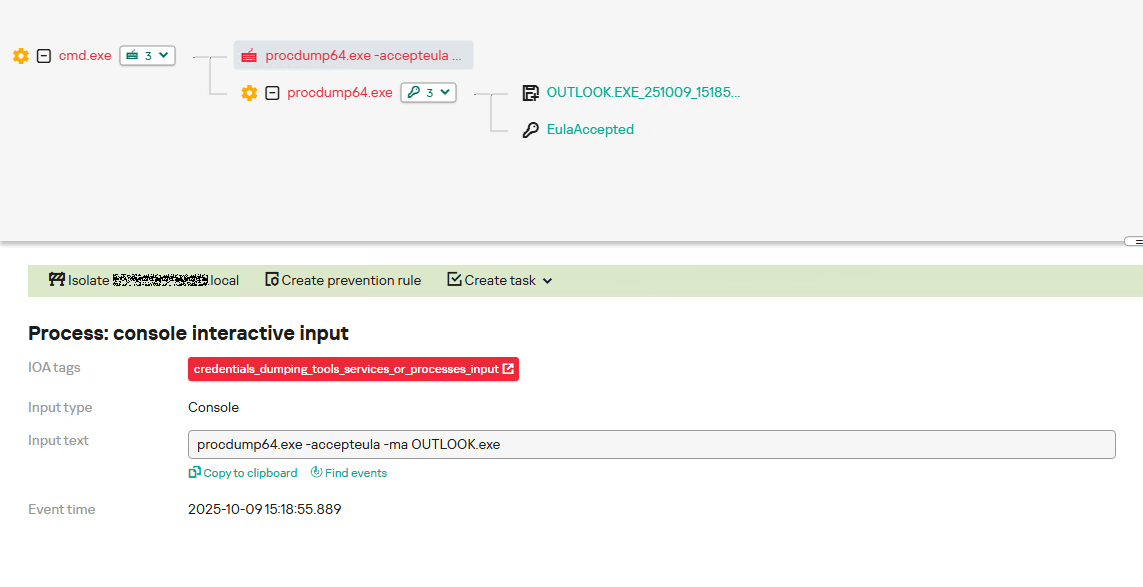
In the incident being described, the local security tools (EPP) blocked the attempt to create the OUTLOOK.exe process dump using SharpTokenFinder, so the operator used ProcDump from the Sysinternals suite for this purpose:
procdump64.exe -accepteula -ma OUTLOOK.exe
dir c:\windows\temp\OUTLOOK.EXE_<id>.dmp
c:\progra~1\winrar\rar.exe a -k -r -s -m5 -v100M %temp%\dmp.rar c:\windows\temp\OUTLOOK.EXE_<id>.dmp
Here, the operator executed ProcDump with the following parameters:
accepteula silently accepts the license agreement without displaying the agreement window.
ma indicates that a full process dump should be created.
exe is the name of the process to be dumped.
The dir command is then executed as a check to confirm that the file was created and is not zero size. Following this validation, the file is added to a dmp.rar archive using WinRAR. The attackers sent this file to their host via SMB.
Detection
To detect this technique, it’s necessary to monitor the ProcDump process command line for names belonging to Microsoft 365 application processes.
title: Dump Of Office 365 Processes Using Procdump
id: 5ce97d80-c943-4ac7-8caf-92bb99e90e90
status: experimental
description: Detects Office 365 process names in the command line of the procdump tool
author: kaspersky
date: 2025-08-11
tags:
    - attack.lateral-movement
    - attack.defense-evasion
    - attack.t1550.001
logsource:
  category: process_creation
  product: windows
detection:
    selection:
        Product: 'ProcDump'
        CommandLine|contains:
            - 'teams'
            - 'winword'
            - 'onenote'
            - 'powerpnt'
            - 'outlook'
            - 'excel'
            - 'onedrive'
            - 'sharepoint'
    condition: selection
falsepositives: Legitimate activity
level: high
Below is an example of the ProcDump tool from the Sysinternals package used to dump the Outlook process memory, detected by Kaspersky Anti Targeted Attack (KATA).
Example of Outlook process dump detection in KATA
Takeaways
The incidents reviewed in this article show that ToddyCat APT is constantly evolving its techniques and seeking new ways to conceal its activity aimed at gaining access to corporate correspondence within compromised infrastructure. Most of the techniques described here can be successfully detected. For timely identification of these techniques, we recommend using both host-based EPP solutions, such as Kaspersky Endpoint Security for Business, and complex threat monitoring systems, such as Kaspersky Anti Targeted Attack. For comprehensive, up-to-date information on threats and corresponding detection rules, we recommend Kaspersky Threat Intelligence.

 Entrar