Visualização normal

Antes de ontemStream principal

Microsoft Patch Still Leaves 1,300 SharePoint Servers Exposed

22 de Abril de 2026, 18:08

More than 1,300 internet-exposed SharePoint servers remain unpatched against CVE-2026-32201, a spoofing flaw Microsoft says was exploited as a zero-day.

The post Microsoft Patch Still Leaves 1,300 SharePoint Servers Exposed appeared first on TechRepublic.

April Patch Tuesday fixes two zero-days, including one under active attack

15 de Abril de 2026, 06:57

This month’s Patch Tuesday addresses 167 vulnerabilities, including two zero-days that could lead to system compromise, data exposure, and privilege escalation.

The post April Patch Tuesday fixes two zero-days, including one under active attack appeared first on Security Boulevard.

  • ✇Malwarebytes
  • April Patch Tuesday fixes two zero-days, including one under active attack
    This month’s patch Tuesday looks to remediate 167 security vulnerabilities including two zero-day vulnerabilities, one of which is known to be actively exploited in the wild. This makes April one of those months where “Patch Tuesday” looks more like “patch the entire stack,” from servers and endpoints to network gear, browsers, and mobile devices. But the alternative is leaving a long list of well‑documented doors open for attackers to walk through. Microsoft defines a zero-day as “a flaw
     

April Patch Tuesday fixes two zero-days, including one under active attack

15 de Abril de 2026, 06:57

This month’s patch Tuesday looks to remediate 167 security vulnerabilities including two zero-day vulnerabilities, one of which is known to be actively exploited in the wild.

This makes April one of those months where “Patch Tuesday” looks more like “patch the entire stack,” from servers and endpoints to network gear, browsers, and mobile devices. But the alternative is leaving a long list of well‑documented doors open for attackers to walk through.

Microsoft defines a zero-day as “a flaw in software for which no official patch or security update is available yet.” In this case, one being actively exploited and the other is publicly disclosed, which makes both high priorities on your to-do list.

So, let’s have a look at those two zero-days.

The vulnerability tracked as CVE-2026-32201 (CVSS score 6.5 out of 10)  is an improper input validation issue in Microsoft Office SharePoint that allows an unauthorized attacker to perform spoofing over a network.

An attacker who successfully exploited this vulnerability could view some sensitive information, and make changes to disclosed information, but cannot limit access to the resource. In simple terms, it could be used to spread false information in a trusted SharePoint environment. This vulnerability is being exploited in the wild.

The second zero-day this month, tracked as CVE-2026-33825 with a CVSS score of 7.8 out of 10, is an elevation of privilege (EoP) vulnerability in Microsoft Defender’s anti-malware platform. It allows a local attacker to escalate their privileges to SYSTEM, effectively giving them the keys to the kingdom on the affected system. Once at that level, an attacker can disable security tools, install persistent malware, harvest credentials, and move laterally to other systems in the same network. This vulnerability is publicly disclosed, which often lowers the barrier for cybercriminals to start exploiting it.

In addition, BleepingComputer warns:

“Microsoft has also fixed multiple remote code execution bugs in Microsoft Office (Word and Excel) that can be executed via the preview pane or by opening malicious documents. Therefore, users should prioritize updating Microsoft Office as soon as possible, especially if they commonly receive attachments.”

How to apply fixes and check if you’re protected

These updates fix security problems and keep your Windows PC protected. Here’s how to make sure you’re up to date:

1. Open Settings

  • Click the Start button (the Windows logo at the bottom left of your screen).
  • Click on Settings (it looks like a little gear).

2. Go to Windows Update

  • In the Settings window, select Windows Update (usually at the bottom of the menu on the left).

3. Check for updates

  • Click the button that says Check for updates.
  • Windows will search for the latest Patch Tuesday updates.
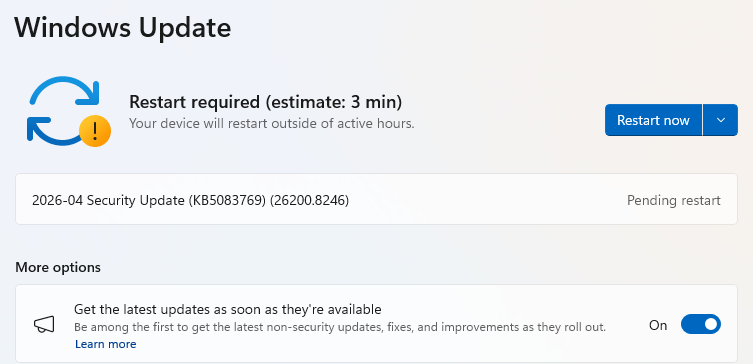
  • If you have selected to get the latest updates as soon as they’re available, you may see this under More options.
  • In which case you may see a Restart required message. Restart your system and the update will complete.
    Restart required
  • If not, continue with the steps below.

4. Download and Install If updates are found, they’ll start downloading automatically. Once complete, you’ll see a button that says Install or Restart now.

  • Click Install if needed and follow any prompts. Your computer will usually need a restart to finish the update. If it does, click Restart now.

5. Double-check you’re up to date

  • After restarting, go back to Windows Update and check again. If it says You’re up to date, you’re all set!
Windows up to date

We don’t just report on threats—we remove them

Cybersecurity risks should never spread beyond a headline. Keep threats off your devices by downloading Malwarebytes today.

  • ✇Krebs on Security
  • Patch Tuesday, April 2026 Edition BrianKrebs
    Microsoft today pushed software updates to fix a staggering 167 security vulnerabilities in its Windows operating systems and related software, including a SharePoint Server zero-day and a publicly disclosed weakness in Windows Defender dubbed “BlueHammer.” Separately, Google Chrome fixed its fourth zero-day of 2026, and an emergency update for Adobe Reader nixes an actively exploited flaw that can lead to remote code execution. Redmond warns that attackers are already targeting CVE-2026-32201,
     

Patch Tuesday, April 2026 Edition

14 de Abril de 2026, 18:47

Microsoft today pushed software updates to fix a staggering 167 security vulnerabilities in its Windows operating systems and related software, including a SharePoint Server zero-day and a publicly disclosed weakness in Windows Defender dubbed “BlueHammer.” Separately, Google Chrome fixed its fourth zero-day of 2026, and an emergency update for Adobe Reader nixes an actively exploited flaw that can lead to remote code execution.

A picture of a windows laptop in its updating stage, saying do not turn off the computer.

Redmond warns that attackers are already targeting CVE-2026-32201, a vulnerability in Microsoft SharePoint Server that allows attackers to spoof trusted content or interfaces over a network.

Mike Walters, president and co-founder of Action1, said CVE-2026-32201 can be used to deceive employees, partners, or customers by presenting falsified information within trusted SharePoint environments.

“This CVE can enable phishing attacks, unauthorized data manipulation, or social engineering campaigns that lead to further compromise,” Walters said. “The presence of active exploitation significantly increases organizational risk.”

Microsoft also addressed BlueHammer (CVE-2026-33825), a privilege escalation bug in Windows Defender. According to BleepingComputer, the researcher who discovered the flaw published exploit code for it after notifying Microsoft and growing exasperated with their response. Will Dormann, senior principal vulnerability analyst at Tharros, says he confirmed that the public BlueHammer exploit code no longer works after installing today’s patches.

Satnam Narang, senior staff research engineer at Tenable, said April marks the second-biggest Patch Tuesday ever for Microsoft. Narang also said there are indications that a zero-day flaw Adobe patched in an emergency update on April 11 — CVE-2026-34621 — has seen active exploitation since at least November 2025.

Adam Barnett, lead software engineer at Rapid7, called the patch total from Microsoft today “a new record in that category” because it includes nearly 60 browser vulnerabilities. Barnett said it might be tempting to imagine that this sudden spike was tied to the buzz around the announcement a week ago today of Project Glasswing — a much-hyped but still unreleased new AI capability from Anthropic that is reportedly quite good at finding bugs in a vast array of software.

But he notes that Microsoft Edge is based on the Chromium engine, and the Chromium maintainers acknowledge a wide range of researchers for the vulnerabilities which Microsoft republished last Friday.

“A safe conclusion is that this increase in volume is driven by ever-expanding AI capabilities,” Barnett said. “We should expect to see further increases in vulnerability reporting volume as the impact of AI models extend further, both in terms of capability and availability.”

Finally, no matter what browser you use to surf the web, it’s important to completely close out and restart the browser periodically. This is really easy to put off (especially if you have a bajillion tabs open at any time) but it’s the only way to ensure that any available updates get installed. For example, a Google Chrome update released earlier this month fixed 21 security holes, including the high-severity zero-day flaw CVE-2026-5281.

For a clickable, per-patch breakdown, check out the SANS Internet Storm Center Patch Tuesday roundup. Running into problems applying any of these updates? Leave a note about it in the comments below and there’s a decent chance someone here will pipe in with a solution.

❌
❌