Google’s new Android app store program brings one-tap installs and automatic updates, but US users are excluded, and marketplaces face a $10,000 annual fee.
The post Google’s New Android App Store Program Costs $10,000 a Year appeared first on TechRepublic.
Google’s new Android app store program brings one-tap installs and automatic updates, but US users are excluded, and marketplaces face a $10,000 annual fee.
Hackers reportedly hit Ukraine ‘s and Russia ‘s emergency alert apps, sending fake nuclear and attack warnings and raising concerns over public safety.
Ukraine and Russia both said on Sunday night that hackers had compromised their emergency alert apps and used them to send fake warnings about air raids and other attacks, including nuclear threats. The BBC reported the incident, but neither side’s claims have been independently confirmed.
Shortly before 11 p.m. local time (9 p.m. GMT), Uk
Hackers reportedly hit Ukraine ‘s and Russia ‘s emergency alert apps, sending fake nuclear and attack warnings and raising concerns over public safety.
Ukraine and Russia both said on Sunday night that hackers had compromised their emergency alert apps and used them to send fake warnings about air raids and other attacks, including nuclear threats. The BBC reported the incident, but neither side’s claims have been independently confirmed.
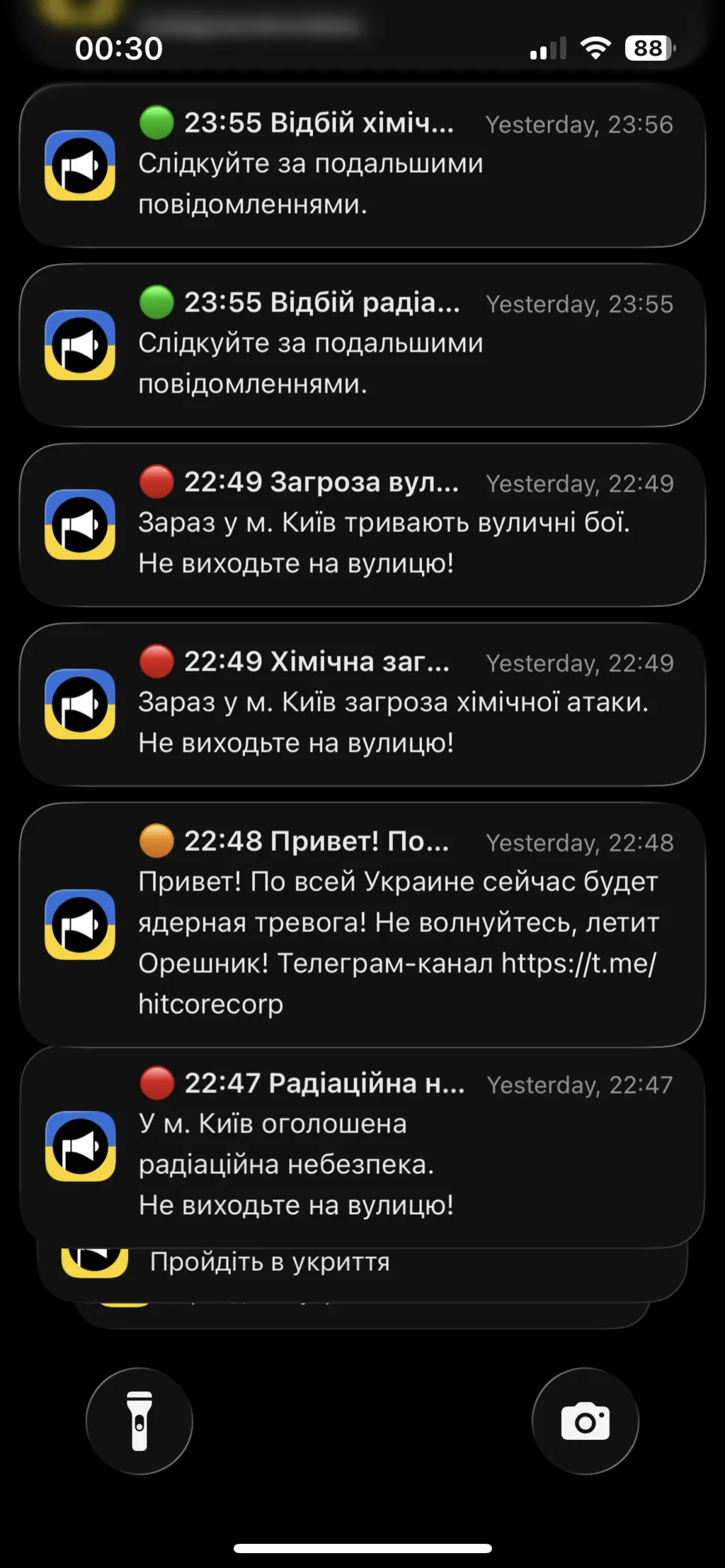
Shortly before 11 p.m. local time (9 p.m. GMT), Ukraine’s widely used Air Alarm app sent the highest-level air raid warnings across the country. Some people, including residents of Kyiv, also received alerts about possible radiation, chemical attacks and street fighting. A message posted on Telegram said the app had likely been targeted by a cyberattack, confirmed there was no radiation threat and urged people to remain calm.
“Shortly before 23:00 local time (21:00 GMT), Ukraine’s widely usedair raid app sent red-level air raid warnings nation-wide, with additional warnings of radiation, chemical attacks, and street fighting sent to some residents in areas including Kyiv.” reports BBC.
“The Air Alarm application has probably been subjected to hostile interference. There is no radiation threat! Stay calm and follow our updates on our channel.” an alert on Telegram read.
The false alerts started at about 22:47 with a message that a radiation threat had been declared in Kyiv. At 22:48 came a message in Russian saying a nuclear alert would cover all of Ukraine and not to worry because “it’s Oreshnik flying”. Oreshnik is a Russian intermediate-range ballistic missile that can carry nuclear or conventional warheads, and Russia has the world’s biggest nuclear arsenal, with President Vladimir Putin repeatedly hinting he’s open to using every weapon available.
Two more alerts arrived at 22:49. One, in Ukrainian, warned of a chemical attack on Kyiv and told people not to go outside, and the other said street fighting was taking place in the city. Red, orange and green messages reached phones, and at 23:53 users got all-clear messages, each declaring one of the Kyiv threats over.
A Ukrainian intelligence body, which the BBC calls the Central Intelligence Agency, said there had been a failure in the app and urged people to use other sources of information. It added that the alerts triggered a radiation hazard signal on loudspeakers in the Lviv region, with no real threat.
“The Air Alert app is supported by the Ministry of Digital Transformation of Ukraine, and informs users instantly about the beginning and end of defence alerts. The ministry said it temporarily disabled the app for maintenance after it had “apparently been compromised”. states BBC.
“While the false alerts were quickly contained, cybersecurity experts suggested it was a new line in apparent Russian cyberattacks.”
The temporary shutdown of the Air Alert app also carries significant risks, even if it lasts only a short time. During an outage, users may not receive timely warnings about incoming attacks, leaving them with less time to reach shelters or take protective measures. This is particularly dangerous in a country where missile and drone attacks can happen with little warning.
The incident also highlights a difficult security trade-off: disabling a compromised alert system may prevent attackers from spreading false warnings, but it can temporarily remove a critical channel for delivering real emergency information. Any shutdown therefore needs reliable backup channels, such as sirens, official messaging services and other emergency communication systems.
Regional leaders tried to calm people. Svitlana Onyshchuk, head of the Ivano-Frankivsk region, said everything was calm, even though the app had shown a red-level alert for her region from 22:50 to 23:57. Natalya Zabolotna, her counterpart in Vinnytsia, confirmed a cyberattack on the app and warned people not to click the link in the message, which could be phishing.
Ukraine’s Centre for Countering Disinformation has advice for when the app isn’t working: turn on smartphone notifications, pay attention to sirens, and read only official sources. Oleksander Merezhko, chair of the foreign affairs committee in the Ukrainian parliament and a member of President Zelensky’s Servant of the People party, said the attack caused no panic. Ukrainians, especially in Kyiv, are used to practically non-stop alerts, he told the BBC, and the message in Russian aroused suspicion at once. The attackers picked a language that gave them away.
A few hours later, Russia’s ministry of emergency situations said its own app had suffered “a massive cyberattack” that sent fake information to the public. Ukrainian outlet UNN reported that the hack sent fake nuclear threat alerts inside Russia, citing Atesh, a partisan Ukrainian group operating in Russian-held territory. A screenshot Atesh shared on Telegram, described as purported, claimed nuclear warheads mounted on Ukrainian P1-Sun attack drones had been launched at all regions of Russia, opened with a “risk of getting lively” warning and told residents to stock up on three weeks of food and hide. The alert also had profanities.
Russia said it was still restoring the app but claimed the hack had not affected its wider alert system. It said people could still receive warnings through sirens, loudspeakers, text messages, TV and radio. The false alerts appeared minutes before a local ceasefire in Ukraine’s Kherson region ended on Sunday night. The truce had allowed civilians to leave Russian-occupied Oleshky. Although the fake warnings were quickly stopped, experts see the attack as a worrying escalation.
“I think it’s the first time it’s happened to an official Ukrainian information app, but I suspect it won’t be the last,” Herbert Lin, a senior research scholar for cyber policy and security at Stanford University, told BBC World Service’s Newsday programme.
A text message about an unpaid traffic challan could cost Android users in India far more than a fine. GhostBat RAT, an Android malware strain first identified by cybersecurity firm Cyble in October 2025, has evolved to capture PINs from 60 banking, UPI apps, wallet and fintech applications, according to new research published by Cyble.
The firm's investigation into fake mParivahan and eChallan apps also exposed a wider operator-controlled ecosystem it tracks as GhostX, linking phishing pages
A text message about an unpaid traffic challan could cost Android users in India far more than a fine. GhostBat RAT, an Android malware strain first identified by cybersecurity firm Cyble in October 2025, has evolved to capture PINs from 60 banking, UPI apps, wallet and fintech applications, according to new research published by Cyble.
The firm's investigation into fake mParivahan and eChallan apps also exposed a wider operator-controlled ecosystem it tracks as GhostX, linking phishing pages, backend control systems and malware distribution.
How GhostBat RAT Reaches Victims
The malware spreads mainly through smishing, or SMS phishing. Victims receive messages with malicious links that lead to pages impersonating the official Parivahan service or a Google Play-style download page. These pages push users to install a fraudulent mParivahan APK. Researchers also found GitHub repositories being repeatedly used to host the malicious files.
Many of these apps are only first-stage loaders. The real payload stays hidden in encrypted files or is downloaded later, which makes the app look harmless during an initial scan.
[caption id="attachment_114830" align="aligncenter" width="600"] GhostBat-RAT-Infection-Chain-1536x595[/caption]
GhostBat RAT's Ghost Overlay Trick
The most significant change in the latest variant is its abuse of Android's Accessibility Service, a technique commonly linked to modern Android banking trojan families. Earlier variants analyzed by Cyble did not have this capability.
Its standout feature, called Ghost Overlay, targets Google Pay and MobiKwik. Instead of showing a fake login screen, the malware places an invisible 12-key grid over the real PIN keypad. When a user taps a digit, the overlay records it and then replays the same tap into the genuine app. The payment goes through normally, so the victim has no visible reason to suspect anything, while the PIN is quietly sent to the attackers' server.
GhostBat RAT Watches 60 Financial Apps
Beyond Google Pay and MobiKwik, a broader keylogging feature monitors 60 financial apps. Cyble's list includes PhonePe, Paytm, BHIM, SBI UPI, Axis Pay, BharatPe, CRED, Freecharge, PayZapp, Groww, Navi, Jupiter, OneCard, JioFinance and Samsung Pay. The malware checks which app is open and the screen context before treating numeric input as a possible PIN.
This builds on older capabilities that remain in play, including reading SMS messages and OTPs, manipulating call forwarding, collecting call logs and sending SMS messages through the victim's SIM card, which could be used to spread further smishing campaigns.
Inside the GhostX Network Behind GhostBat RAT
A key finding came from an exposed Firebase backend named "ghostx-panel." It contained administrator records, user roles, login logs with device fingerprints and bot-user mappings. Cyble says these separate roles point to a multi-operator setup and raise the possibility of a Malware-as-a-Service model.
While monitoring the backend, researchers saw SMS lure text, phishing links, vehicle registration numbers and recipient phone numbers changing repeatedly, indicating an active campaign. Matching eChallan messages were also reported by users on social media.
Why GhostBat RAT Is Hard to Detect
Cyble identified at least six different loader designs. The newest, built around a native library called libnetbridge.so, passes the payload through several layers of encryption, compression and custom packaging before the final app appears. Security tools that scan only the outer APK are unlikely to catch it consistently.
The malware also uses Firebase Remote Config, which lets operators switch command servers and turn features on or off remotely without pushing a new app to victims.
Staying Safe From GhostBat RAT
Cyble advises users to install apps only from official stores such as Google Play and to avoid APK links received by SMS, social media or email. Users should be cautious about granting app permissions, especially Accessibility access, verify website addresses before entering sensitive details, enable multi-factor authentication on financial apps and keep their phones updated. Anyone who suspects infection should contact their bank and local authorities immediately.
Google’s new Android verification flow adds a 24-hour wait for apps from unverified developers as broader identity checks approach.
The post Google Tightens Android Sideloading: Unverified Apps Now Face a 24-Hour Wait appeared first on TechRepublic.
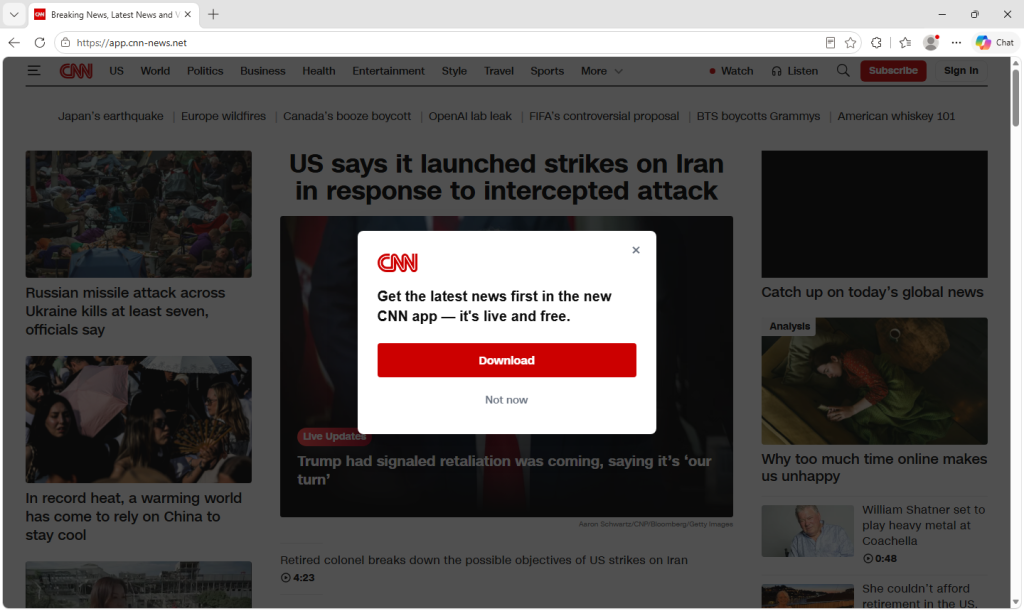
A website built to look almost exactly like CNN’s homepage is telling visitors to download “the new CNN app.” But it’s not CNN’s app, and has nothing to do with the news company.
The campaign doesn’t stop at CNN. It also uses fake Stremio and Avast installers hosted on similarly convincing lookalike sites, all targeting Windows users. The installers are part of the same campaign to trick people into installing legitimate remote-management software that’s already linked to the attacker’s acco
A website built to look almost exactly like CNN’s homepage is telling visitors to download “the new CNN app.” But it’s not CNN’s app, and has nothing to do with the news company.
The campaign doesn’t stop at CNN. It also uses fake Stremio and Avast installers hosted on similarly convincing lookalike sites, all targeting Windows users. The installers are part of the same campaign to trick people into installing legitimate remote-management software that’s already linked to the attacker’s account.
Instead of downloading the software they expected, victims install O&O Syspectr, a genuine, digitally signed remote administration tool used by IT teams to manage computers. In the wrong hands, that tool can give an attacker remote access to a victim’s PC, allowing them to run commands, install additional software, or explore files and data. The CNN, Avast, and Stremio lures all point back to the same Syspectr account.
Another lookalike site uses a fake crypto-mining browser game instead of a trusted brand, but delivers the same software from a different Syspectr account.
Here’s what we found, why your antivirus has no reason to stop it, and the one 10-second check that would have caught it every time.
What the fake CNN page looks like
The site copies CNN’s real homepage closely enough that most people wouldn’t look twice. It has current headlines, the same layout, and even a red “Live Updates” tag on a real story. A pop-up interrupts almost immediately: “Get the latest news first in the new CNN app—it’s live and free,” with a red Download button underneath.
The file behind that button is named CNN_App.setupad4693fd-d903-4791-8f58-975261c93ca2.exe—the same Syspectr installer that shows up under different branding elsewhere, down to the account ID embedded in the filename.
The same trick, impersonating other brands
A lookalike site at avast-premium[.]shop mimics Avast’s real download page closely, including the logo, review scores, and a blue “Free download” button for “Avast One.” The file behind it is named AVAST_App.setup4693fd-d903-4791-8f58-975261c93ca2.exe.
Another malicious site, stremiotv[.]online, copies Stremio, a legitimate media-center app. The file it pushes visitors to download is named Stremio_App.setup4693fd-d903-4791-8f58-975261c93ca2.exe.
Both carry the same account ID found in the CNN installer.
By impersonating trusted brands, the attackers trick visitors into installing the legitimate O&O Syspectr remote-access tool, which gives the attackers remote access to the victims’ computers.
A different kind of bait
Not every lure needs a trusted brand, however.
syncminer[.]xyz invents its own hook instead: an “idle miner” browser game showing a slowly-ticking cryptocurrency balance, with a “Download Miner Plugin” button promising faster payouts. The identical site also runs at idleminer[.]pro with the same layout, same game, and same download.
Both distribute the same file, named oo-syspectr-setup9158bf2a-ff25-4290-b96c-2dc5eb310391.exe outright, carrying its own account ID that is different from the CNN, Avast, and Stremio lures we saw.
It’s not malware, which is why antivirus can miss it
Every one of these files is a real, digitally signed piece of software from O&O Software GmbH, a legitimate German company. Syspectr is sold openly to IT departments and gives an operator remote desktop control and an admin-level command line on whatever machine it’s installed on.
That’s why antivirus software may not stop it. Antivirus is designed to detect malicious software, not flag a legitimately signed business tool just because of how it arrived on a computer. The attacker only has to convince victims to install a legitimate remote-management tool that’s already linked to the attacker’s account.
The 10-second check that gives it away
On Windows, right-click any installer like this, choose Properties, and open the Details tab. Two fields—File description and Product name—identify every installer we examined as O&O Syspectr, alongside a copyright notice for O&O Software GmbH.
The filename can be changed by anyone distributing the file, but those embedded details come from the signed software itself. Changing them would invalidate the digital signature, so they reveal what the installer really is.
How we know these are connected
Every Syspectr installer includes the account ID of whoever generated it, embedded directly in the filename. The CNN-, Avast-, and Stremio-branded files all carry the exact same account ID, showing they were created from a single Syspectr account and simply reskinned for different lures.
The Syspectr installer distributed through the fake crypto-mining game carries a different account ID, suggesting either a second operator using the same playbook or the same group operating under another account.
What this tool can actually do
Syspectr is designed to let IT administrators manage computers remotely. Depending on the subscription level, that can include viewing system information, monitoring running processes and services, managing Microsoft Defender, and restricting USB devices.
The paid plans add the features that matter most to attackers. They allow an operator to remotely control the victim’s computer, browse files, run commands, install additional software, and make changes to the system as though they were sitting in front of it. Higher tiers add tools for managing large numbers of devices and, on compatible hardware, even allow remote access when Windows won’t boot.
These remote-control features aren’t available on free Syspectr accounts. They require a Premium subscription or higher.
O&O Software response
O&O responded quickly. Within days, the company disabled Remote Desktop and Remote Console access for free Syspectr accounts, restricting both to paid plans only.
O&O has since identified and suspended the abusive accounts, also blocking them from adding new devices. O&O’s analysis found the attackers relied exclusively on Remote Console, not Remote Desktop. The company says it will keep scanning for this pattern and tighten restrictions further if needed.
It’s a solid response and O&O clearly has a handle on how the abuse is happening. Not every vendor moves this quickly or this effectively when their software gets abused.
How to protect yourself
Only download software from the vendor’s actual website. Search results and ads can lead to convincing fakes.
Before running any installer you’re unsure about, on Windows you can right-click it, open Properties > Details, and check the File description and Product name fields.
If you find O&O Syspectr installed and didn’t set it up yourself, uninstall it through Settings > Apps and run a full antivirus scan.
If you ran an installer like this recently, change passwords for anything you accessed on that machine afterward from a clean machine.
Protect yourself while browsing online. Malwarebytes Browser Guard blocks known scam and lookalike pages before you land on them.
Remember
Fake download sites don’t always deliver malware. Sometimes they deliver legitimate software that’s been weaponized by the person distributing it. That’s why it’s important to download software from the real vendor and, if something doesn’t feel right, check what the installer actually is before you run it.
Apple briefly removed Telegram from the App Store over reported CSAM, highlighting moderation failures and the distribution power held by app-store operators.
The post Apple Briefly Removes Telegram From App Store Over Reported CSAM Violation appeared first on TechRepublic.
Apple briefly removed Telegram from the App Store over reported CSAM, highlighting moderation failures and the distribution power held by app-store operators.
Samsung plans to ban Smart TV apps containing residential proxy software after researchers found apps could route traffic through users’ home connections.
The post Samsung Will Ban Smart TV Apps Containing Residential Proxy Software appeared first on TechRepublic.
Samsung plans to ban Smart TV apps containing residential proxy software after researchers found apps could route traffic through users’ home connections.
WhatsApp is rolling out usernames so people can chat without sharing phone numbers. Here’s how reservations, username keys, and rules work.
The post Meta Adds WhatsApp Usernames: Here’s What You Need to Know appeared first on TechRepublic.
Over-the-counter CGMs are making glucose data easier to access, but not every user benefits equally. Here’s where the evidence is strongest — and what to know about app privacy.
The post OTC Glucose Monitors Make Wellness Tracking More Personal — and More Complicated appeared first on TechRepublic.
Over-the-counter CGMs are making glucose data easier to access, but not every user benefits equally. Here’s where the evidence is strongest — and what to know about app privacy.
In a move that bucks the entire industry trend, TikTok has confirmed it will not implement end-to-end encryption (E2EE) for direct messages on its platform — arguing that E2EE would make users less safe. We break down what’s really going on: the child safety argument, the privacy counterargument, the geopolitical questions surrounding ByteDance, and what […]
The post TikTok Says No to End-to-End Encryption: Here’s Why That’s a Big Deal appeared first on Shared Security Podcast.
The post TikTok S
In a move that bucks the entire industry trend, TikTok has confirmed it will not implement end-to-end encryption (E2EE) for direct messages on its platform — arguing that E2EE would make users less safe. We break down what’s really going on: the child safety argument, the privacy counterargument, the geopolitical questions surrounding ByteDance, and what […]
This article was originally published in EdTech Magazine on 02/11/26 by Didi Gluck. As ransomware and phishing attacks grow more sophisticated, districts can’t rely on perimeter defenses alone. Cybersecurity has become a top priority for K–12 districts, not just to keep students safe online but to ensure continuity across devices, systems and end user accounts. ...
The post EdTech Magazine | What Minimum Viable Cybersecurity Looks Like for K–12 Districts appeared first on ManagedMethods Cybersec
This article was originally published in EdTech Magazine on 02/11/26 by Didi Gluck. As ransomware and phishing attacks grow more sophisticated, districts can’t rely on perimeter defenses alone. Cybersecurity has become a top priority for K–12 districts, not just to keep students safe online but to ensure continuity across devices, systems and end user accounts. ...
As we careen toward a future in which Google has final say over what apps you can run, the company has sought to assuage the community's fears with a blog post and a casual "backstage" video. Google has said again and again since announcing the change that sideloading isn't going anywhere, but it's definitely not going to be as easy. The new information confirms app installs will be more reliant on the cloud, and devs can expect new fees, but there will be an escape hatch for hobbyists.
Confirmi
As we careen toward a future in which Google has final say over what apps you can run, the company has sought to assuage the community's fears with a blog post and a casual "backstage" video. Google has said again and again since announcing the change that sideloading isn't going anywhere, but it's definitely not going to be as easy. The new information confirms app installs will be more reliant on the cloud, and devs can expect new fees, but there will be an escape hatch for hobbyists.
Confirming app verification status will be the job of a new system component called the Android Developer Verifier, which will be rolled out to devices in the next major release of Android 16. Google explains that phones must ensure each app has a package name and signing keys that have been registered with Google at the time of installation. This process may break the popular FOSS storefront F-Droid.
It would be impossible for your phone to carry a database of all verified apps, so this process may require Internet access. Google plans to have a local cache of the most common sideloaded apps on devices, but for anything else, an Internet connection is required. Google suggests alternative app stores will be able to use a pre-auth token to bypass network calls, but it's still deciding how that will work.

 Entrar