Socket tracked 77 malicious Firefox extensions that steal crypto wallet secrets and credentials. See how the Offside Wallet Theft Factory works.
Related Posts:
Grandoreiro Banking Trojan Returns With a DLL Sideloading Campaign
Clop Deploys Custom Web Shell in PTC Windchill Extortion Attacks
WordlistLoader Delivers Amatera Stealer Through ClearFake Campaigns
The post 77 Malicious Firefox Extensions Steal Crypto Wallet Secrets and Credentials appeared first on Daily CyberSecurity.
Every time you add an extension or plugin to your browser, there's a risk that you might be doing more than managing your cryptocurrency wallet, generating passwords, taking notes, or tracking sports results. There's a chance that you have just handed a complete stranger access to your savings.
Read more in my article on the Hot for Security blog.
Every time you add an extension or plugin to your browser, there's a risk that you might be doing more than managing your cryptocurrency wallet, generating passwords, taking notes, or tracking sports results. There's a chance that you have just handed a complete stranger access to your savings.
Read more in my article on the Hot for Security blog.
NVIDIA's GeForce NOW now fully supports Firefox on Windows, offering Ultimate subscribers 1440p at 120fps after months of WebRTC and low-latency optimization work.
Related Posts:
Telegram Applies for .gram Domain to Give Every User Their Own TLD
GitHub Outage Postmortem: Retry Storm and Copilot Auth Overload Explained
OpenAI Astra Security Model: Pausing Development for Safety
The post GeForce NOW Now Fully Supports Firefox, Delivering 1440p 120fps Streaming appeared first on Daily CyberSecur
NVIDIA's GeForce NOW now fully supports Firefox on Windows, offering Ultimate subscribers 1440p at 120fps after months of WebRTC and low-latency optimization work.
Firefox for iOS is testing a native, EasyList-powered ad blocker that requires no extensions, though it can't block Google search ads or Firefox's own sponsored content.
Related Posts:
SpaceXAI Launches Cursor Origin Beta for AI-Driven Git Hosting
North Carolina Confirms Apple Wallet Digital ID Support, More States Ahead
Amazon Bans Class Action Lawsuits in Terms Update
The post Firefox for iOS Tests Native Ad Blocker Using EasyList Filtering appeared first on Daily CyberSecurity.
Firefox for iOS is testing a native, EasyList-powered ad blocker that requires no extensions, though it can't block Google search ads or Firefox's own sponsored content.
Mozilla rotated the Linux GPG signing key for Firefox and Thunderbird after a subkey copy was inadvertently pushed to a private GitHub repository.
Related Posts:
Apple Proposes New App Store Link-Out Fees of 5% to 15% in Epic Legal Battle
Microsoft Copilot Super App: A Unified Platform Vision
Google Gemini Hits 1 Billion Users - Now the Fastest-Growing App in Google History
The post Mozilla Rotates Firefox and Thunderbird Linux GPG Signing Key After Private Repo Exposure appeared first on Dai
Discover how Firefox uBlock Origin support continues despite the MV3 transition. Learn why Edge and Chrome users face ad blocker restrictions soon.
Related Posts:
Apple Proposes New App Store Link-Out Fees of 5% to 15% in Epic Legal Battle
Microsoft Copilot Super App: A Unified Platform Vision
Mozilla Rotates Firefox and Thunderbird Linux GPG Signing Key After Private Repo Exposure
The post Firefox uBlock Origin Support: The MV3 Solution appeared first on Daily CyberSecurity.
Security updates are not just for enterprises with a dedicated security team and a change-management calendar. For consumers and small businesses, they are one of the simplest ways to shut down known attack paths before criminals get a chance to use them.
That matters because attackers love these flaws. because browser bugs, code execution issues, authentication bypasses, and privilege-escalation problems can be turned into a foothold, a data theft opportunity, or a full system compromise if
Security updates are not just for enterprises with a dedicated security team and a change-management calendar. For consumers and small businesses, they are one of the simplest ways to shut down known attack paths before criminals get a chance to use them.
That matters because attackers love these flaws. because browser bugs, code execution issues, authentication bypasses, and privilege-escalation problems can be turned into a foothold, a data theft opportunity, or a full system compromise if left unpatched.
If you only do one thing after reading a security advisory, make it this: update the affected software promptly, restart when required, and verify the version afterward.
The updates and instructions can be found on the pages we linked to.
Chrome
Google patched 15 security flaws in Chrome, including two critical use-after-free bugs in Ozone. The fixes are in Chrome 150.0.7871.124/.125, depending on platform.
Mozilla fixed two critical Firefox flaws in Firefox 152.0.6, and it says public exploit code exists for both issues. One affects JavaScript/WebAssembly and the other involves DOM navigation and site isolation, which makes this more than routine housekeeping.
Users should update Firefox to version 152.0.6 as soon as possible. For most users this can simply be done by restarting the browser. If you see the “What’s new” tab, the update is complete.
VMWare
Broadcom released a fix for a critical authentication bypass in VMware Avi Load Balancer, tracked as CVE-2026-47865. The issue could allow a network-accessible attacker to reach the Avi Control Plane, which makes it especially important in environments that expose management services or rely on load balancers at the edge.
Updates and the instructions to apply them can be found in the Security Advisory.
Zoom
Zoom Security Bulletin ZSB-26014 covers a critical issue in Zoom Workplace for Windows, described as improper input validation. The public record identifies the issue as CVE-2026-53412.
For users, the action item is to update Zoom Workplace for Windows to the vendor-fixed release as soon as it is available in your environment. For small businesses, that means updating not just the app on employee laptops, but also any centralized deployment package so the old build doesn’t come right back on the next install cycle.
“One of the best cybersecurity suites on the planet.”
That’s a lot. No, it’s an extraordinary number:
Since February, the Firefox team has been working around the clock using frontier AI models to find and fix latent security vulnerabilities in the browser. We wrote previously about our collaboration with Anthropic to scan Firefox with Opus 4.6, which led to fixes for 22 security-sensitive bugs in Firefox 148.
As part of our continued collaboration with Anthropic, we had the opportunity to apply an early version of Claude Mythos Preview to Firefox
Since February, the Firefox team has been working around the clock using frontier AI models to find and fix latent security vulnerabilities in the browser. We wrote previously about our collaboration with Anthropic to scan Firefox with Opus 4.6, which led to fixes for 22 security-sensitive bugs in Firefox 148.
As part of our continued collaboration with Anthropic, we had the opportunity to apply an early version of Claude Mythos Preview to Firefox. This week’s release of Firefox 150 includes fixes for 271 vulnerabilities identified during this initial evaluation...
That’s a lot. No, it’s an extraordinary number:
Since February, the Firefox team has been working around the clock using frontier AI models to find and fix latent security vulnerabilities in the browser. We wrote previously about our collaboration with Anthropic to scan Firefox with Opus 4.6, which led to fixes for 22 security-sensitive bugs in Firefox 148.
As part of our continued collaboration with Anthropic, we had the opportunity to apply an early version of Claude Mythos Preview to Firefox.
Since February, the Firefox team has been working around the clock using frontier AI models to find and fix latent security vulnerabilities in the browser. We wrote previously about our collaboration with Anthropic to scan Firefox with Opus 4.6, which led to fixes for 22 security-sensitive bugs in Firefox 148.
As part of our continued collaboration with Anthropic, we had the opportunity to apply an early version of Claude Mythos Preview to Firefox. This week’s release of Firefox 150 includes fixes for 271 vulnerabilities identified during this initial evaluation.
As these capabilities reach the hands of more defenders, many other teams are now experiencing the same vertigo we did when the findings first came into focus. For a hardened target, just one such bug would have been red-alert in 2025, and so many at once makes you stop to wonder whether it’s even possible to keep up.
Our experience is a hopeful one for teams who shake off the vertigo and get to work. You may need to reprioritize everything else to bring relentless and single-minded focus to the task, but there is light at the end of the tunnel. We are extremely proud of how our team rose to meet this challenge, and others will too. Our work isn’t finished, but we’ve turned the corner and can glimpse a future much better than just keeping up. Defenders finally have a chance to win, decisively.
They’re right. Assuming the defenders can patch, and push those patches out to users quickly, this technology favors the defenders.
Earlier this month, Anthropic said its Mythos Preview model was so good at finding cybersecurity vulnerabilities that the company was limiting its initial release to "a limited group of critical industry partners." Since then, debate has raged over whether the model presages an era of turbocharged AI-aided hacking or if Anthropic is just building hype for what is a relatively normal step up on the ladder of advancing AI capabilities.
Mozilla added some important data to that debate Tuesday, writ
Mozilla added some important data to that debate Tuesday, writing in a blog post that early access to Mythos Preview had helped it pre-identify 271 security vulnerabilities in this week's release of Firefox 150. The results were significant enough to get Firefox CTO Bobby Holley to enthuse that, in the never-ending battle between cyberattackers and cyberdefenders, "defenders finally have a chance to win, decisively."
"We've rounded the curve"
Holley didn't go into detail on the severity of the hundreds of vulnerabilities that Mythos reportedly detected simply by analyzing the unreleased source code of Firefox's latest version. But by way of comparison, he noted that Anthropic's Opus 4.6 model found only 22 security-sensitive bugs when analyzing Firefox 148 last month.
Por mais que você não saia procurando serviços de IA, eles acabam encontrando você de qualquer maneira. Todas as grandes empresas de tecnologia parecem sentir uma espécie de obrigação moral não apenas de desenvolver um assistente de IA, chatbot integrado ou agente autônomo, mas também de incorporá-lo aos seus produtos já consolidados e ativá-lo à força para dezenas de milhões de usuários. Aqui estão apenas alguns exemplos dos últimos seis meses:
A Microsoft está transformando à força PCs compat
Por mais que você não saia procurando serviços de IA, eles acabam encontrando você de qualquer maneira. Todas as grandes empresas de tecnologia parecem sentir uma espécie de obrigação moral não apenas de desenvolver um assistente de IA, chatbot integrado ou agente autônomo, mas também de incorporá-lo aos seus produtos já consolidados e ativá-lo à força para dezenas de milhões de usuários. Aqui estão apenas alguns exemplos dos últimos seis meses:
O Google ativou o Gemini para todos os usuários do Chrome nos Estados Unidos, elevou ao máximo as funcionalidades do navegador, ampliou agressivamente o alcance dos Resumos de IA nos resultados de busca e incorporou um conjunto completo de recursos de IA nos seus serviços online (Gmail, Google Docs e outros).
A Apple integrou sua própria Apple Intelligence (convenientemente compartilhando a sigla AI) às versões mais recentes de seus sistemas operacionais em todos os tipos de dispositivos e na maioria de seus aplicativos nativos.
Por outro lado, entusiastas de tecnologia correram para criar seus próprios “Jarvis pessoais”, alugando instâncias de VPS ou acumulando Mac minis para executar o agente de IA OpenClaw. Infelizmente, os problemas de segurança do OpenClaw com as configurações padrão se mostraram tão graves que já foram considerados a maior ameaça de cibersegurança de 2026.
Além do incômodo de ter algo imposto à força, essa epidemia de IA traz riscos e dores de cabeça bem reais do ponto de vista prático. Assistentes de IA varrem e coletam todos os dados a que conseguem ter acesso, interpretando o contexto dos sites que você visita, analisando documentos salvos, lendo suas conversas e assim por diante. Isso dá às empresas de IA uma visão inédita e extremamente íntima da vida de cada usuário.
Um vazamento desses dados durante um ataque cibernético, seja a partir dos servidores do provedor de IA ou do cache armazenado na sua própria máquina, poderia ser catastrófico. Esses assistentes podem ver e armazenar em cache tudo o que você vê, inclusive dados normalmente protegidos por múltiplas camadas de segurança: informações bancárias, diagnósticos médicos, mensagens privadas e outras informações sensíveis. Analisamos em profundidade como isso pode acontecer quando examinamos os problemas do sistema Copilot+ Recall baseado em IA que a Microsoft também planejava impor a todos os usuários. Além disso, a IA pode consumir muitos recursos do sistema, utilizando RAM, ciclos de GPU e espaço de armazenamento, o que frequentemente resulta em uma queda perceptível no desempenho.
Para quem prefere ficar de fora dessa onda de IA e evitar esses assistentes baseados em redes neurais lançados às pressas e ainda imaturos, reunimos um guia rápido mostrando como desativar a IA em aplicativos e serviços populares.
Como desativar a IA no Google Docs, Gmail e Google Workspace
Os recursos de assistente de IA do Google no Gmail e no Google Docs são agrupados sob o termo “recursos inteligentes”. Além do modelo de linguagem de grande escala, esse conjunto inclui várias conveniências de menor importância, como adicionar automaticamente reuniões ao seu calendário quando você recebe um convite no Gmail. Infelizmente, trata-se de um pacote tudo ou nada: para se livrar da IA, é preciso desativar todos os “recursos inteligentes”.
Para fazer isso, abra o Gmail, clique no ícone Configurações (engrenagem) e selecione Ver todas as configurações. Na aba Geral, role até Recursos inteligentes do Google Workspace. Clique em Gerenciar as configurações de recursos inteligentes do Workspace e desative duas opções: Recursos inteligentes no Google Workspace e Recursos inteligentes em outros produtos do Google. Também recomendamos desmarcar a caixa ao lado de Ativar os recursos inteligentes no Gmail, Chat e Meet na mesma aba de configurações gerais. Depois disso, será necessário reiniciar os aplicativos do Google (o que normalmente ocorre de forma automática).
Como desativar os Resumos de IA na Pesquisa Google
É possível eliminar os Resumos de IA nos resultados da Pesquisa Google tanto em computadores quanto em smartphones (incluindo iPhones). A solução é a mesma em todos os dispositivos. A maneira mais simples de ignorar o resumo de IA caso a caso é adicionar -ia ao final da sua busca. Exemplo: como fazer uma pizza -ia. Infelizmente, esse método às vezes apresenta falhas, fazendo o Google afirmar abruptamente que não encontrou nenhum resultado para a sua consulta.
Se isso acontecer, você pode obter o mesmo resultado mudando o modo da página de resultados para Web. Nos resultados da pesquisa, localize os filtros logo abaixo da barra de busca e selecione Web. Caso não apareça imediatamente, procure essa opção dentro do botão Mais.
Uma solução mais radical é migrar para outro mecanismo de busca. Por exemplo, o DuckDuckGo não apenas rastreia menos os usuários e exibe poucos anúncios, como também oferece uma busca dedicada sem IA. Basta adicionar a página de pesquisa aos favoritos em noai.duckduckgo.com.
Como desativar recursos de IA no Chrome
Atualmente, o Chrome incorpora dois tipos de recursos de IA. O primeiro se comunica com os servidores do Google e é responsável por funções como o assistente inteligente, um agente autônomo de navegação e a busca inteligente. O segundo executa tarefas localmente, mais voltadas para utilidades, como identificar páginas de phishing ou agrupar abas do navegador. O primeiro grupo de configurações aparece com o rótulo AI mode, enquanto o segundo inclui o termo Gemini Nano.
Para desativar esses recursos, digite chrome://flags na barra de endereços do navegador e pressione Enter. Será exibida uma lista de flags do sistema, junto com uma barra de busca. Digite “AI” na barra de busca. Isso filtrará a longa lista para cerca de uma dúzia de recursos relacionados à IA (além de algumas outras configurações nas quais essas letras aparecem por coincidência dentro de palavras maiores). O segundo termo que você deve pesquisar nessa janela é “Gemini“.
Depois de revisar as opções, você pode desativar os recursos de IA indesejados ou simplesmente desativar todos. O mínimo recomendado inclui:
AI Mode Omnibox entrypoint
AI Entrypoint Disabled on User Input
Omnibox Allow AI Mode Matches
Prompt API for Gemini Nano
Prompt API for Gemini Nano with Multimodal Input
Defina todas essas opções como Disabled.
Como desativar recursos de IA no Firefox
Embora o Firefox não tenha chatbots integrados nem tenha (até agora) tentado impor recursos baseados em agentes aos usuários, o navegador inclui agrupamento inteligente de abas, uma barra lateral para chatbots e algumas outras funcionalidades. Em geral, a IA no Firefox é bem menos intrusiva do que no Chrome ou no Edge. Ainda assim, se você quiser desativá-la completamente, há duas maneiras de fazer isso.
O primeiro método está disponível nas versões mais recentes do Firefox. A partir da versão 148, uma seção dedicada chamada Controles de IA passou a aparecer nas configurações do navegador, embora as opções de controle ainda sejam um pouco limitadas. Você pode usar um único botão de alternância para Bloquear melhorias de IA, desativando completamente os recursos de IA. Você também pode especificar se deseja usar IA no próprio dispositivo (On-device AI), baixando pequenos modelos locais (atualmente apenas para traduções), e configurar provedores de chatbot de IA na barra lateral, escolhendo entre Anthropic Claude, ChatGPT, Copilot, Google Gemini e Le Chat Mistral.
O segundo caminho (para versões mais antigas do Firefox) exige acessar configurações ocultas do sistema. Digite about:config na barra de endereço, pressione Enter e clique no botão para confirmar que você aceita o risco de mexer nas configurações internas do navegador.
Uma extensa lista de configurações será exibida, juntamente com uma barra de busca. Digite “ML” para filtrar as opções relacionadas a machine learning.
Para desativar a IA no Firefox, alterne a configuração browser.ml.enabled para false. Isso deve desativar todos os recursos de IA de forma geral, mas fóruns da comunidade indicam que isso nem sempre é suficiente para resolver o problema. Para uma abordagem mais radical, defina os seguintes parâmetros como false (ou mantenha apenas aqueles de que você realmente precisa):
ml.chat.enabled
ml.linkPreview.enabled
ml.pageAssist.enabled
ml.smartAssist.enabled
ml.enabled
ai.control.translations
tabs.groups.smart.enabled
urlbar.quicksuggest.mlEnabled
Isso desativará integrações com chatbots, descrições de links geradas por IA, assistentes e extensões baseados em IA, tradução local de sites, agrupamento de abas e outros recursos baseados em IA.
Como desativar recursos de IA em aplicativos da Microsoft
A Microsoft conseguiu incorporar IA em praticamente todos os seus produtos, e desativá-la nem sempre é uma tarefa simples, especialmente porque, em alguns casos, a IA tem o hábito de reaparecer sozinha, sem qualquer ação do usuário.
Como desativar recursos de IA no Edge
O navegador da Microsoft está repleto de recursos de IA, que vão do Copilot à pesquisa automatizada. Para desativá-los, siga a mesma lógica usada no Chrome: digite edge://flags na barra de endereços do Edge, pressione Enter e, em seguida, digite “AI” ou “Copilot” na caixa de pesquisa. A partir daí, você pode desativar os recursos de IA indesejados, como:
Enable Compose (AI-writing) on the web
Edge Copilot Mode
Edge History AI
Outra maneira de se livrar do Copilot é digitar edge://settings/appearance/copilotAndSidebar na barra de endereço. Ali, você pode personalizar a aparência da barra lateral do Copilot e ajustar as opções de personalização para resultados e notificações. Não se esqueça de verificar também a seção Copilot em App-specific settings. Você encontrará alguns controles adicionais escondidos ali.
Como desativar o Microsoft Copilot
O Microsoft Copilot existe em duas versões: como um componente do Windows (Microsoft Copilot) e como parte do pacote Office (Microsoft 365 Copilot). As funções são semelhantes, mas você terá que desativar um ou ambos, dependendo exatamente do que os engenheiros de Redmond decidiram instalar na sua máquina.
A coisa mais simples que você pode fazer é desinstalar o aplicativo por completo. Clique com o botão direito na entrada Copilot no menu Iniciar e selecione Desinstalar. Se essa opção não estiver disponível, vá até a lista de aplicativos instalados (Iniciar → Configurações → Aplicativos) e desinstale o Copilot por lá.
Em determinadas versões do Windows 11, o Copilot está integrado diretamente ao sistema operacional, portanto uma simples desinstalação pode não funcionar. Nesse caso, você pode desativá-lo pelas configurações: Iniciar → Configurações → Personalização → Barra de Tarefas→ Desativar o Copilot.
Se você mudar de ideia no futuro, sempre poderá reinstalar o Copilot pela Microsoft Store.
Vale observar que muitos usuários reclamaram que o Copilot se reinstala automaticamente. Portanto, pode ser uma boa ideia fazer uma verificação semanal durante alguns meses para garantir que ele não tenha voltado. Para quem se sente confortável em mexer no Registro do Sistema (e entende as consequências disso), é possível seguir este guia detalhado para evitar o retorno silencioso do Copilot, desativando o parâmetro SilentInstalledAppsEnabled e adicionando/ativando o parâmetro TurnOffWindowsCopilot.
Como desativar o Microsoft Recall
O recurso Microsoft Recall, apresentado pela primeira vez em 2024, funciona tirando constantemente capturas de tela do seu computador e fazendo com que uma rede neural as analise. Todas essas informações extraídas são armazenadas em um banco de dados, que você pode pesquisar posteriormente usando um assistente de IA. Já escrevemos anteriormente, em detalhes, sobre os enormes riscos de segurança que o Microsoft Recall representa.
Sob pressão de especialistas em cibersegurança, a Microsoft foi obrigada a adiar o lançamento desse recurso de 2024 para 2025, reforçando significativamente a proteção dos dados armazenados. No entanto, o funcionamento básico do Recall permanece o mesmo: seu computador continua registrando cada movimento seu ao tirar capturas de tela constantemente e aplicar OCR ao conteúdo. E, embora o recurso não esteja mais ativado por padrão, vale absolutamente a pena verificar se ele não foi ativado na sua máquina.
Para verificar, vá até as configurações: Iniciar → Configurações → Privacidade e segurança →Recall e capturas de tela. Assegure-se de que a opção Salvar capturas de tela esteja desativada e clique em Excluir capturas de tela para limpar todos os dados coletados anteriormente, por precaução.
Como desativar a IA no Notepad e nas ações de contexto do Windows
A IA se infiltrou em praticamente todos os cantos do Windows, até mesmo no Explorador de Arquivos e no Notepad. Basta selecionar texto por engano em um aplicativo para que recursos de IA sejam acionados, o que a Microsoft chama de “Ações de IA”. Para desativar essa ação, vá para Iniciar → Configurações → Privacidade e segurança → Clique para executar.
O Notepad recebeu seu próprio tratamento com Copilot, portanto será necessário desativar a IA nele separadamente. Abra as configurações do Notepad, localize a seção Recursos de IA e desative o Copilot.
Por fim, a Microsoft também conseguiu incorporar o Copilot ao Paint. Infelizmente, até o momento não existe uma maneira oficial de desativar os recursos de IA dentro do próprio aplicativo Paint.
Como desativar a IA no WhatsApp
Em várias regiões, usuários do WhatsApp começaram a ver adições típicas de IA, como respostas sugeridas, resumos de mensagens gerados por IA e um novo botão Pergunte à Meta AI ou pesquise. Embora a Meta afirme que os dois primeiros recursos processam os dados localmente no dispositivo e não enviam suas conversas para os servidores da empresa, verificar isso não é tarefa simples. Felizmente, desativá-los é fácil.
Para desativar Sugestões de respostas, vá para Configurações → Conversas → Sugestões e respostas inteligentes e desative Sugestões de respostas. Você também pode desativar as Sugestões de figurinhas por IA nesse mesmo menu. Quanto aos resumos de mensagens gerados por IA, eles são gerenciados em outro local: Configurações → Notificações → Resumos de mensagens por IA.
Como desativar a IA no Android
Dada a grande variedade de fabricantes e versões do Android, não existe um manual único que sirva para todos os celulares. Hoje, vamos nos concentrar em eliminar os serviços de IA do Google, mas se você estiver usando um dispositivo da Samsung, Xiaomi ou outros, não se esqueça de verificar as configurações de IA do fabricante específico. Vale um aviso: eliminar completamente qualquer vestígio de IA pode ser uma tarefa difícil, se é que isso é realmente possível.
No Google Mensagens, os recursos de IA ficam nas configurações: toque na foto da sua conta, selecione Configurações do Mensagens, depois Gemini no app Mensagens e desative o assistente.
De modo geral, o chatbot Gemini funciona como um aplicativo independente que pode ser desinstalado acessando as configurações do telefone e selecionando Aplicativos. No entanto, como o plano do Google é substituir o tradicional Google Assistant pelo Gemini, desinstalá-lo pode se tornar difícil (ou até impossível) no futuro.
Se você não conseguir desinstalar completamente o Gemini, abra o aplicativo para desativar manualmente seus recursos. Toque no ícone do seu perfil, selecione Atividade dos apps do Gemini e escolha Desativar ou Desativar e excluir atividade. Em seguida, toque novamente no ícone do perfil e vá até a configuração Apps conectados (pode estar dentro da opção Inteligência pessoal). A partir daí, desative todos os aplicativos nos quais você não quer que o Gemini interfira.
Os recursos de IA no nível da plataforma da Apple, conhecidos coletivamente como Apple Intelligence, são relativamente simples de desativar. Nas configurações, tanto em desktops quanto em smartphones e tablets, basta procurar a seção Apple Intelligence e Siri. Aliás, dependendo da região e do idioma selecionado para o sistema operacional e para a Siri, o Apple Intelligence pode nem estar disponível para você ainda.
Outros artigos para ajudar você a ajustar as ferramentas de IA em seus dispositivos:
Microsoft Corp. today pushed security updates to fix at least 77 vulnerabilities in its Windows operating systems and other software. There are no pressing “zero-day” flaws this month (compared to February’s five zero-day treat), but as usual some patches may deserve more rapid attention from organizations using Windows. Here are a few highlights from this month’s Patch Tuesday.
Image: Shutterstock, @nwz.
Two of the bugs Microsoft patched today were publicly disclosed previously. CVE-2026-21262
Microsoft Corp. today pushed security updates to fix at least 77 vulnerabilities in its Windows operating systems and other software. There are no pressing “zero-day” flaws this month (compared to February’s five zero-day treat), but as usual some patches may deserve more rapid attention from organizations using Windows. Here are a few highlights from this month’s Patch Tuesday.
Image: Shutterstock, @nwz.
Two of the bugs Microsoft patched today were publicly disclosed previously. CVE-2026-21262 is a weakness that allows an attacker to elevate their privileges on SQL Server 2016 and later editions.
“This isn’t just any elevation of privilege vulnerability, either; the advisory notes that an authorized attacker can elevate privileges to sysadmin over a network,” Rapid7’s Adam Barnett said. “The CVSS v3 base score of 8.8 is just below the threshold for critical severity, since low-level privileges are required. It would be a courageous defender who shrugged and deferred the patches for this one.”
The other publicly disclosed flaw is CVE-2026-26127, a vulnerability in applications running on .NET. Barnett said the immediate impact of exploitation is likely limited to denial of service by triggering a crash, with the potential for other types of attacks during a service reboot.
It would hardly be a proper Patch Tuesday without at least one critical Microsoft Office exploit, and this month doesn’t disappoint. CVE-2026-26113 and CVE-2026-26110 are both remote code execution flaws that can be triggered just by viewing a booby-trapped message in the Preview Pane.
Satnam Narang at Tenable notes that just over half (55%) of all Patch Tuesday CVEs this month are privilege escalation bugs, and of those, a half dozen were rated “exploitation more likely” — across Windows Graphics Component, Windows Accessibility Infrastructure, Windows Kernel, Windows SMB Server and Winlogon. These include:
–CVE-2026-24291: Incorrect permission assignments within the Windows Accessibility Infrastructure to reach SYSTEM (CVSS 7.8)
–CVE-2026-24294: Improper authentication in the core SMB component (CVSS 7.8)
–CVE-2026-24289: High-severity memory corruption and race condition flaw (CVSS 7.8)
–CVE-2026-25187: Winlogon process weakness discovered by Google Project Zero (CVSS 7.8).
Ben McCarthy, lead cyber security engineer at Immersive, called attention to CVE-2026-21536, a critical remote code execution bug in a component called the Microsoft Devices Pricing Program. Microsoft has already resolved the issue on their end, and fixing it requires no action on the part of Windows users. But McCarthy says it’s notable as one of the first vulnerabilities identified by an AI agent and officially recognized with a CVE attributed to the Windows operating system. It was discovered by XBOW, a fully autonomous AI penetration testing agent.
XBOW has consistently ranked at or near the top of the Hacker One bug bounty leaderboard for the past year. McCarthy said CVE-2026-21536 demonstrates how AI agents can identify critical 9.8-rated vulnerabilities without access to source code.
“Although Microsoft has already patched and mitigated the vulnerability, it highlights a shift toward AI-driven discovery of complex vulnerabilities at increasing speed,” McCarthy said. “This development suggests AI-assisted vulnerability research will play a growing role in the security landscape.”
Microsoft earlier provided patches to address nine browser vulnerabilities, which are not included in the Patch Tuesday count above. In addition, Microsoft issued a crucial out-of-band (emergency) update on March 2 for Windows Server 2022 to address a certificate renewal issue with passwordless authentication technology Windows Hello for Business.
Separately, Adobe shipped updates to fix 80 vulnerabilities — some of them critical in severity — in a variety of products, including Acrobat and Adobe Commerce. Mozilla Firefox v. 148.0.2 resolves three high severity CVEs.
For a complete breakdown of all the patches Microsoft released today, check out the SANS Internet Storm Center’s Patch Tuesday post. Windows enterprise admins who wish to stay abreast of any news about problematic updates, AskWoody.com is always worth a visit. Please feel free to drop a comment below if you experience any issues apply this month’s patches.
In March 2024, Mozilla said it was winding down its collaboration with Onerep — an identity protection service offered with the Firefox web browser that promises to remove users from hundreds of people-search sites — after KrebsOnSecurity revealed Onerep’s founder had created dozens of people-search services and was continuing to operate at least one of them. Sixteen months later, however, Mozilla is still promoting Onerep. This week, Mozilla announced its partnership with Onerep will officially
In March 2024, Mozilla said it was winding down its collaboration with Onerep — an identity protection service offered with the Firefox web browser that promises to remove users from hundreds of people-search sites — after KrebsOnSecurity revealed Onerep’s founder had created dozens of people-search services and was continuing to operate at least one of them. Sixteen months later, however, Mozilla is still promoting Onerep. This week, Mozilla announced its partnership with Onerep will officially end next month.
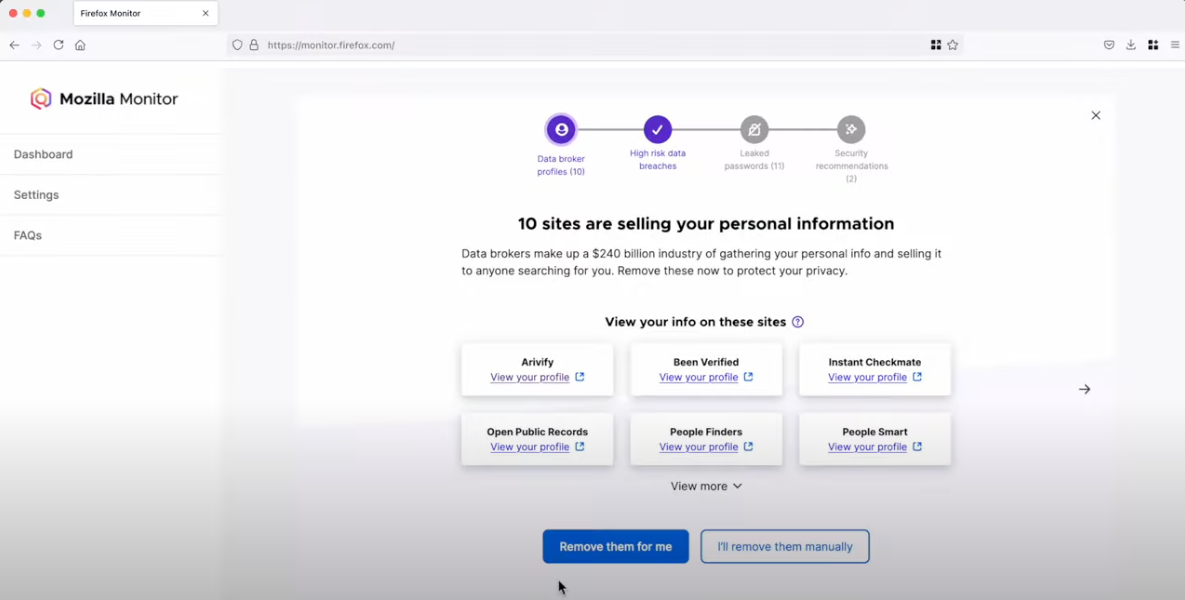
Mozilla Monitor. Image Mozilla Monitor Plus video on Youtube.
In a statement published Tuesday, Mozilla said it will soon discontinue Monitor Plus, which offered data broker site scans and automated personal data removal from Onerep.
“We will continue to offer our free Monitor data breach service, which is integrated into Firefox’s credential manager, and we are focused on integrating more of our privacy and security experiences in Firefox, including our VPN, for free,” the advisory reads.
Mozilla said current Monitor Plus subscribers will retain full access through the wind-down period, which ends on Dec. 17, 2025. After that, those subscribers will automatically receive a prorated refund for the unused portion of their subscription.
“We explored several options to keep Monitor Plus going, but our high standards for vendors, and the realities of the data broker ecosystem made it challenging to consistently deliver the level of value and reliability we expect for our users,” Mozilla statement reads.
On March 14, 2024, KrebsOnSecurity published an investigation showing that Onerep’s Belarusian CEO and founder Dimitiri Shelestlaunched dozens of people-search services since 2010, including a still-active data broker called Nuwber that sells background reports on people. Shelest released a lengthy statement wherein he acknowledged maintaining an ownership stake in Nuwber, a data broker he founded in 2015 — around the same time he launched Onerep.

 Entrar