
Visualização normal

Antes de ontemStream principal

6 security settings every GitHub maintainer should enable this week

At GitHub Security Lab, we spend a lot of our week talking to maintainers. Some find the settings page dense and the docs sprawl. Most maintainers we talk to weren’t hired to be security engineers. While this is true, ignoring a project’s security settings completely will lead into leaving a lot in the table in terms of automation and scalability, leading into a poor security posture, and before you realize it to vulnerabilities that pile up, exposing your users.

Here’s the short version. Six settings, free to use, updated in less than half an hour. We’ve bundled them into a guided flow called Protect Your Project so you can do them in one pass, and we walk through each tool you’ll use below.

1. Add a SECURITY.md file

This is the lightest-lift setting on the list and the one that makes everything else easier.

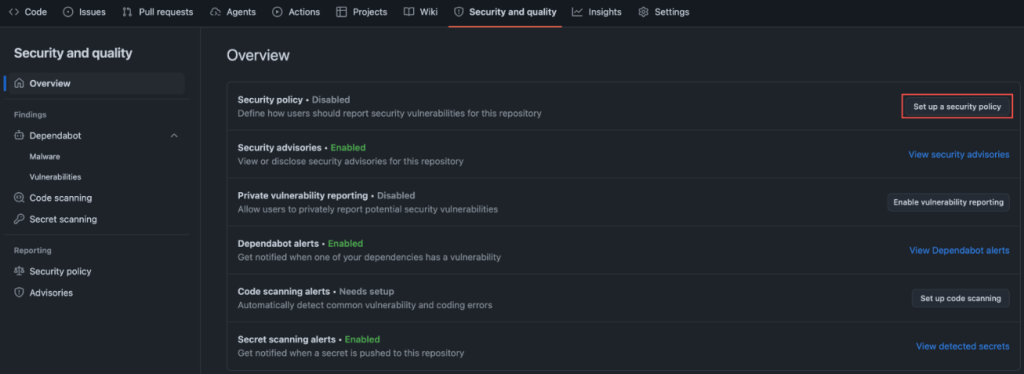
A SECURITY.md file tells the people who find bugs in your project where to send them. Without one, your options for a well-meaning reporter are a public issue (now a public exploit) or your personal email (if they can find it).

Screenshot of GitHub settings. Security and quality > Set up a security policy are highlighted.

You don’t need to write much. We suggest adding a communication means such as an email so that those reporting vulnerabilities can reach you directly without posting about them publicly. Then, you can state what bugs are in scope, alongside anything else a reporter should have in mind when contacting you. For reference, we point maintainers to the the systemd project’s security policy that we consider a complete example. It sets clear expectations about reproducers and doesn’t assume you have a 24/7 response team when you don’t. Borrow the structure, change the contact details, commit it.

Ten minutes, tops.

2. Turn on private vulnerability reporting

SECURITY.md tells reporters where to go. Private vulnerability reporting (PVR) gives them a private place to make their report.

Once enabled, a researcher can file a confidential advisory on your repo. You triage it out of the public eye and disclose on your timeline. The setup is one checkbox in Settings → Security.

Screenshot of GitHub settings. Security and quality > Enable vulnerability reporting is highlighted.

If you only do one thing tonight, do these first two together. They are free, and are the fastest signal to your community that you take this seriously.

3. Turn on secret scanning, with push protection

This is the one with the most embarrassing failure mode.

GitGuardian’s State of Secrets Sprawl 2026 found 28.65 million new secrets leaked on public GitHub in 2025, a 34% jump over the prior year and the largest single-year increase on record. AI-assisted commits are leaking secrets at roughly twice the baseline rate. The average cost of a data breach now sits at $4.44 million globally ($10.22 million in the US) per IBM’s 2025 Cost of a Data Breach Report.

Secret scanning catches keys and tokens that slip into your repo by blocking them locally before they’re pushed to your repository. It doesn’t matter if your repo is public or private, because once secrets leave your local development, then they are available to anyone with access to your repo.

Screenshot of GitHub settings. Security and quality > View detected secrets is highlighted.

4. Turn on Dependabot and dependency review

Your project isn’t just your code. It’s the dozens (often hundreds) of packages your code pulls in.

Looking at WordPress, for example: this search for reviewed, critical-severity advisories mentioning WordPress returns a long list of plugins with known vulnerabilities. If you’re running a WordPress site, Dependabot helps ensure none of these plugins are sitting in your dependencies.

Dependabot alerts you when a package you depend on has a known vulnerability. Dependency review shows you, inside a pull request, exactly what’s being added or upgraded and whether any of it has an open advisory. Together they turn an opaque package.json diff into a two-minute review.

Screenshot of GitHub settings. Security and quality > View Dependabot alerts is highlighted.

5. Turn on code scanning

Code scanning runs static analysis on your repo and flags the patterns that lead to real bugs. SQL injection. Command injection. Dangerous deserialization. The usual cast.

Code scanning with CodeQL can detect unsafe GitHub Actions workflows. CodeQL is the engine, and we built code scanning. We made it free for open source in 2019, and it now ships as a one-click default setup in your Security and Quality tab.

This is the setting most maintainers skip because it sounds like it needs configuration. It doesn’t. Default setup picks the right query pack for your language and runs on every pull request.

Screenshot of GitHub settings. Security and quality > Set up code scanning is highlighted.

6. Turn on branch protection on your default branch

This is the simplest, least-flashy setting, but it will yield the biggest impact starting as soon as you turn it on. This is about requiring a pull request before merging to main with minimum one approval.

This catches the worst-case scenario: a compromised credential, a confused contributor, or a tired version of you pushing straight to production. It’s also what makes the other five settings actually bite, because now Dependabot alerts and code scanning findings block a merge instead of sitting in a tab you never open.

In conclusion

These six settings will not make your project unhackable. Nothing will.

What they will do is close the easy doors, the ones being walked through right now by people scripting through public repos at scale.

Turn these on, and your project will be meaningfully harder to attack than it was this morning. So will every project that depends on it.

The post 6 security settings every GitHub maintainer should enable this week appeared first on The GitHub Blog.

Investing in the people shaping open source and securing the future together

Open source has always been about community.

It’s about maintainers who review pull requests late at night. Volunteers who respond to security reports from strangers. And communities that quietly power the world’s software.

The reality behind the commits is that maintainers get stretched thin. The effort of responding to pull requests and comments, while also being expected to merge and ship, adds up quickly. Late nights turn into burnout, one-person projects become critical infrastructure overnight without even realizing it, and “thank you” doesn’t pay the bills. Plus, AI is an accelerating force that’s changing how the open source community secures the ecosystem. The requirements of always-on security take more time and energy in addition to not always having the knowledge and expertise.

At GitHub, we believe supporting open source means more than hosting code. It means investing in the people who maintain it, giving them the tools they need to succeed, and standing with them as the ecosystem evolves rapidly in the AI era. Open source maintainers deserve better support and security, and we’re listening and investing.

Strengthening open source security, together

Today, we are joining Anthropic, Amazon Web Services (AWS), Google, and OpenAI with a combined commitment of $12.5 million to support the Linux Foundation’s Alpha-Omega initiative to advance open source security. This collaboration is aimed at helping maintainers make emerging AI security capabilities accessible and integrated into existing project workflows, and at further advancing our OSS security programs, to strengthen the security of critical open source software projects.

This effort builds on years of GitHub’s work as a steward of open source and software security. Real impact comes from pairing investment with practical tools, education, and long-term support designed to help maintainers.

Today, over 280,000 maintainers on GitHub across hundreds of millions of public repositories are eligible for free access to core GitHub platform services, GitHub Copilot Pro, GitHub Actions, and security capabilities, like code scanning and Autofix, secret scanning, push protection, and dependency alerts. Our GitHub Security Lab works with the open source community to educate and protect at scale against the most common threats, and it publishes security advisories that help the entire ecosystem respond faster.

On top of recent and ongoing support across our core platform and GitHub Copilot, we are also reaffirming our commitment to helping maintainers to secure their open source projects by announcing:

We have learned through programs like the GitHub Secure Open Source Fund that the most effective security outcomes happen when you link maintainer funding and resources to specific outcomes like improving security. After supporting 138 projects with over 200 maintainers across 38 countries, we have seen 191 new CVEs issued, 250+ new secrets prevented from leaking, and 600+ leaked secrets detected and resolved, impacting billions of monthly downloads from alumni projects. We also learned that providing hands-on coding with education and expertise, drives self-reported learning and action.

The outcome: when maintainers are empowered rather than overwhelmed, given time to learn with space to focus, and provided access to tools that fit naturally into their workflows, security improves for everyone downstream. This creates a community reinforcement flywheel. Those lessons shape everything we are doing next.

This work centers on helping maintainers defend and secure the projects that underpin the global software supply chain, at a time when AI is fundamentally changing both how vulnerabilities are discovered and how they are exploited.

Putting AI to work for maintainers

AI has dramatically increased the speed and scale of vulnerability discovery. That’s true for defenders and for attackers. Now, more than ever, maintainers sit on the front lines of software security. They often face a surge of automated pull requests and security reports with low signal-to-noise ratio. The result is increasing burnout.

As Christian Grobmeier, maintainer for Log4j, put it: our AI has to be better than the attacking AI.” We agree. That is why our focus is not just on finding more issues. It is on helping maintainers triage, understand, and fix them effectively, without losing the joy or sustainability of maintaining open source. For example, our recent AI-powered security research framework was open sourced because we believe it should be used to empower maintainers and not only security teams.

Looking ahead, GitHub will continue investing in tools like pull request controls, while also ensuring AI is a force multiplier for maintainers from issue triage, pull request reviews, security vulnerability identification, and remediation, and more. It should not be another source of pressure. Maintainers of impactful open source projects already have access to Copilot Pro, which includes AI-assisted code review, agentic security remediation workflows, and access to a broad set of leading models all designed to help maintainers find and remediate risks faster.

AI should reduce maintainer burden, not increase it. Our goals are simple:

  • Meeting maintainers where they already work on GitHub
  • Helping prioritize actual issues over noise
  • Accelerating fixes, not just findings
  • Supporting secure defaults and healthy workflows

We will continue refining this alongside the community, informed by real world feedback and outcomes.

Open source is a shared responsibility

No single company or group can secure open source alone. The software we all depend on is built by a global community, and protecting it requires collaboration across ecosystems and global economies.

By working with maintainers and partners like Alpha-Omega, we aim to scale impact without fragmenting effort. By pairing GitHub’s platform, tools, and programs with shared community governance and trust, and providing maintainers with the latest models and AI-assisted coding tools, we can achieve this.

Most importantly, we are still committed to investing in people, not just projects. Because open source thrives when maintainers are supported, respected, and empowered to do their best work. We are grateful to every maintainer building the future with us.


Activate the tools available, and consider applying for GitHub Secure OSS Fund. Session 4 runs late April with each project receiving $10,000, Copilot Pro, $100K of Azure Credits, and 3 weeks of security education and a dedicated community. As always, your feedback helps shape what we build next.

The post Investing in the people shaping open source and securing the future together appeared first on The GitHub Blog.

❌
❌