Details and PoC for CVE-2026-27912 (ResetNightmare) are public. This Kerberos flaw lets attackers reset AD passwords and gain SYSTEM.
Related Posts:
CVE-2026-61515: Unauthenticated Command Injection in Puwell IP Cameras, PoC Exploit Code Publicly Disclosed
CVE-2026-58115: CVSS 10 Node-RED RCE Hits SIMATIC IoT2050
CVE-2026-55040 PoC Released for SharePoint Authentication Bypass
The post CVE-2026-27912: PoC Released for SYSTEM Privilege Flaw appeared first on Daily CyberSecurity.
Introduction
Once the attacker has breached the corporate network, subsequent stages of the attack often involve leveraging standard domain infrastructure protocols: using Kerberos, running DNS queries, accessing internal services, opening network shares, and other common networking actions. Because this activity is virtually indistinguishable from legitimate network traffic, it is extremely difficult to detect it with traditional network attack detection tools.
Kerberoasting and DNS tunneling h
Once the attacker has breached the corporate network, subsequent stages of the attack often involve leveraging standard domain infrastructure protocols: using Kerberos, running DNS queries, accessing internal services, opening network shares, and other common networking actions. Because this activity is virtually indistinguishable from legitimate network traffic, it is extremely difficult to detect it with traditional network attack detection tools.
Kerberoasting and DNS tunneling have long ceased to be exotic techniques. They are becoming standard methods in modern attacks because they allow attackers to execute critical compromise stages while remaining undetected by traditional security tools. A clear example of this trend is seen in latest campaigns, employing both Kerberoasting and DNS tunneling.
Traditional network security tools perform well when the attack features a distinct and identifiable indicator: a characteristic query string, a known malicious traffic pattern, or the source code of an already discovered exploit. While this approach to threat detection remains effective, it cannot always be applied to discovering network attacks that blend seamlessly with legitimate traffic inside a corporate network.
Instead of searching for explicit indicators of attack, Network Anomaly Detection (NAD) analyzes all traffic for suspicious artifacts that deviate from the host’s typical network activity. Within Kaspersky’s solution portfolio, this technology is implemented specifically in the Kaspersky Anti Targeted Attack (KATA) platform.
The system analyzes network traffic data (DNS, DCE/RPC, Kerberos and other packets) and extracts key parameters used to identify anomalous behavior. This approach enables searching for attacks on domain controllers, signs of traffic tunneling and exfiltration, C2 communications, and other scenarios that may point to compromise of network infrastructure.
However, Network Anomaly Detection is not built on a single, universal set of indicators. Each attack scenario employs tailored detection models that account for the specifics of the corresponding network protocol, typical host behavior, and characteristic deviations from that baseline. This article examines two practical examples – detecting Kerberoasting and DNS tunneling – to demonstrate how these principles are implemented in KATA’s NAD rules and why this approach proves more effective than traditional signature-based analysis.
Kerberoasting attack detection by KATA
Why standard tools have a hard time detecting Kerberoasting
The Kerberoasting attack leverages the standard operational logic of the Kerberos protocol. The attacker identifies service accounts configured with a Service Principal Name (SPN), requests a Ticket-Granting Service (TGS) ticket for them, and attempts to crack the password offline using a dictionary attack against the retrieved ticket. If the password is weak or hasn’t been changed in a long time, the adversary can bruteforce it to get it in cleartext. Subsequently, these compromised credentials can be leveraged for both vertical and horizontal movement across the network.
The essence of a Kerberoasting attack is that an adversary possessing a compromised low-privileged account and a valid Ticket-Granting Ticket (TGT) for that account can request TGS tickets with weakened encryption for service accounts with SPNs. Crucially, it doesn’t matter whether the compromised account actually holds access permissions for those services. Having obtained these tickets, the attacker can then take them offline and bruteforce the service account’s password by trying to decrypt the corresponding ticket locally, without generating any network activity. As the encryption key is based on the password hash, the adversary can guess the password upon finding the correct key.
The attacker’s objective is to find a service account that has a simple password. Most likely, this will be an account created manually by the administrators of the infrastructure or a service. This is precisely why attackers are not interested in system service accounts with SPNs (such as CIFS/fileserver.company.local); these are generated automatically and feature highly complex passwords that are impossible to bruteforce.
We should note that the TGS ticket requests made by attackers are identical to standard, legitimate requests. Every domain naturally exhibits a high volume of Kerberos traffic. Therein lies the primary challenge of detecting Kerberoasting: legitimate service ticket requests (TGS-REQ) are indistinguishable from those issued by attackers. Consequently, the primary detection method relies on correlating indirect indicators rather than signature matching. Key indicators include an anomalous request source (atypical host or user account), a surge in requested SPNs within a short time window, attempts to obtain service tickets for sensitive or privileged service accounts, and off-hour timing or unusual request volume when benchmarked against the historical profile of both the user and the host.
Most of these indicators can be detected using NAD technology, which helps analysts cut through high volumes of Kerberos traffic to establish a concrete hypothesis: who initiated the Kerberoasting attack, which service accounts are at risk, and why this activity deviates from the baseline.
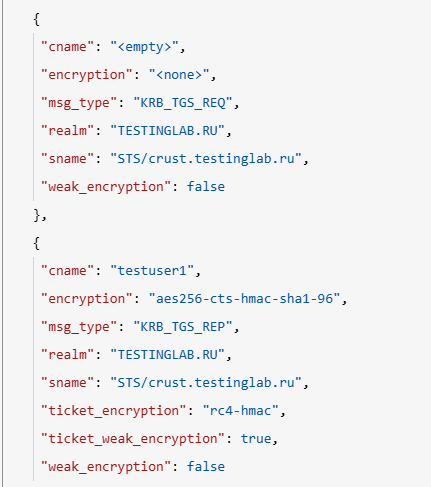
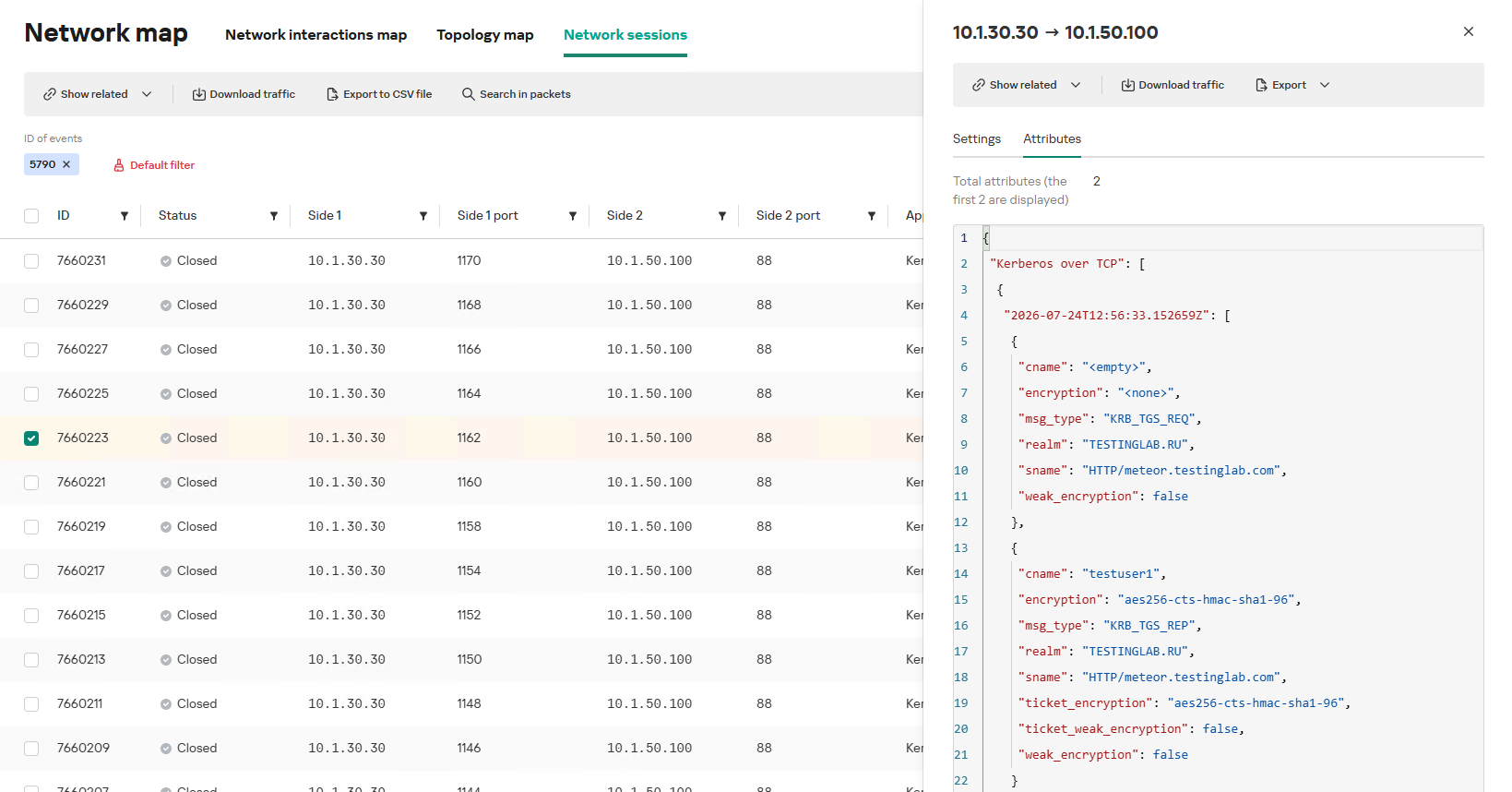
In the context of this attack, the network anomaly stems from a single host – likely using a single user account (cname) – receiving TGS tickets ("msg_type": "KRB_TGS_REP") for numerous unique services with SPNs (sname) within a short timeframe. These service accounts are non-system accounts.
Example of a TGS-REQ – TGS-REP event pair from network session attributes
To detect this anomaly, the NAD rule titled “Signs of a Kerberoasting attack” implements the following logic:
From Kerberos network sessions during the search depth period, select only those with a successful Kerberos TGS-REP response, subject to the following conditions:
The IP address that initiated the session must not be excluded in the excl_sip variable.
The requesting client name (cname) must not be included in the excluded users list (excl_users variable).
The SPN (sname) must not be excluded within the rule. System SPNs are omitted from detection logic because they exist across most corporate environments and hold no interest for adversaries in this attack vector; including them in the total count of unique SPNs could lead to predefined threshold being exceeded, triggering false positives.
Extract the cname (the name of the client requesting the TGS-REQ) and sname (SPN itself) from these qualifying sessions.
Group the sessions by the source IP address and client account name (cname), while aggregating sessions with unique SPNs.
Generate an alert if a single IP address using a single client account receives TGS-REP responses for N unique SPN names within the specified search depth window, where N equals or exceeds the threshold variable count_spns.
Within the event regeneration window, group under the initial alert all subsequent alerts associated with the same client IP address. This avoids creating duplicate event records by incrementing the aggregation counter (Total appearances).
We should note that this type of logic cannot be implemented using IDS signatures. Consider creating a Suricata rule designed to detect Kerberos TGS-REP packets. To minimize false positives, we’ll exclude system SPNs (which carry highly complex passwords) and apply a threshold for the number of responses a single client can receive. However, such a rule cannot evaluate the uniqueness of the requested SPNs; it can only track packet counts. As a result, this signature would produce a high volume of false positives because any domain naturally generates large amounts of identical legitimate TGS-REP messages.
Furthermore, adding exclusions and tuning thresholds to fit your specific infrastructure environments is significantly more practical when managed through user variables in the interface rather than directly modifying the underlying structure of the IDS rule itself.
Creating a Network Anomaly Detection rule
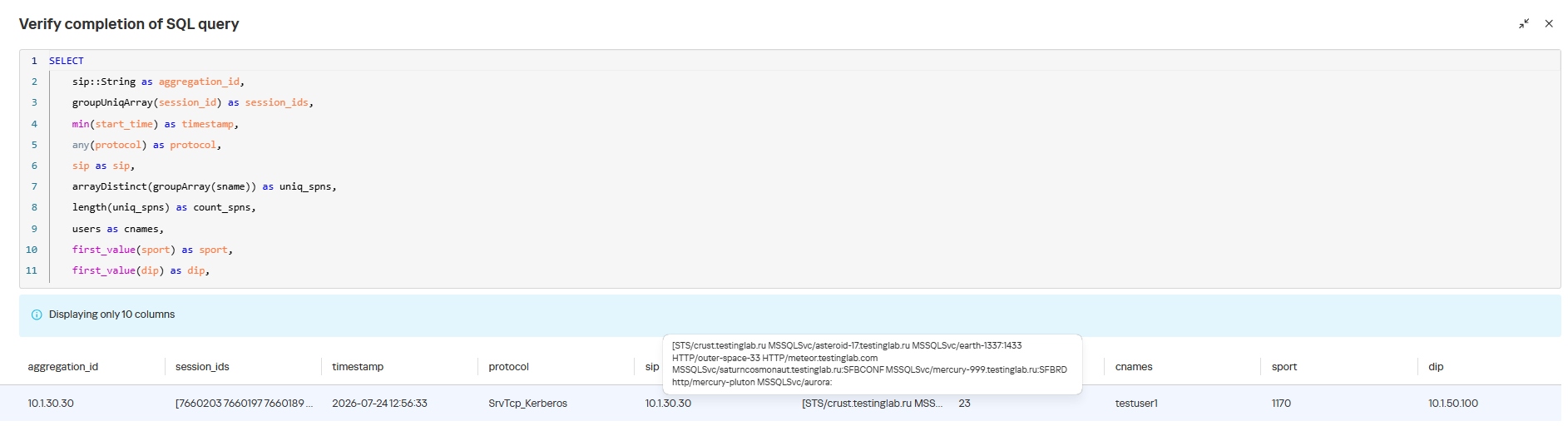
Network Anomaly Detection (NAD) rules are written as SQL queries executed against KATA’s ClickHouse database. Below, we demonstrate how to add and deploy a rule.
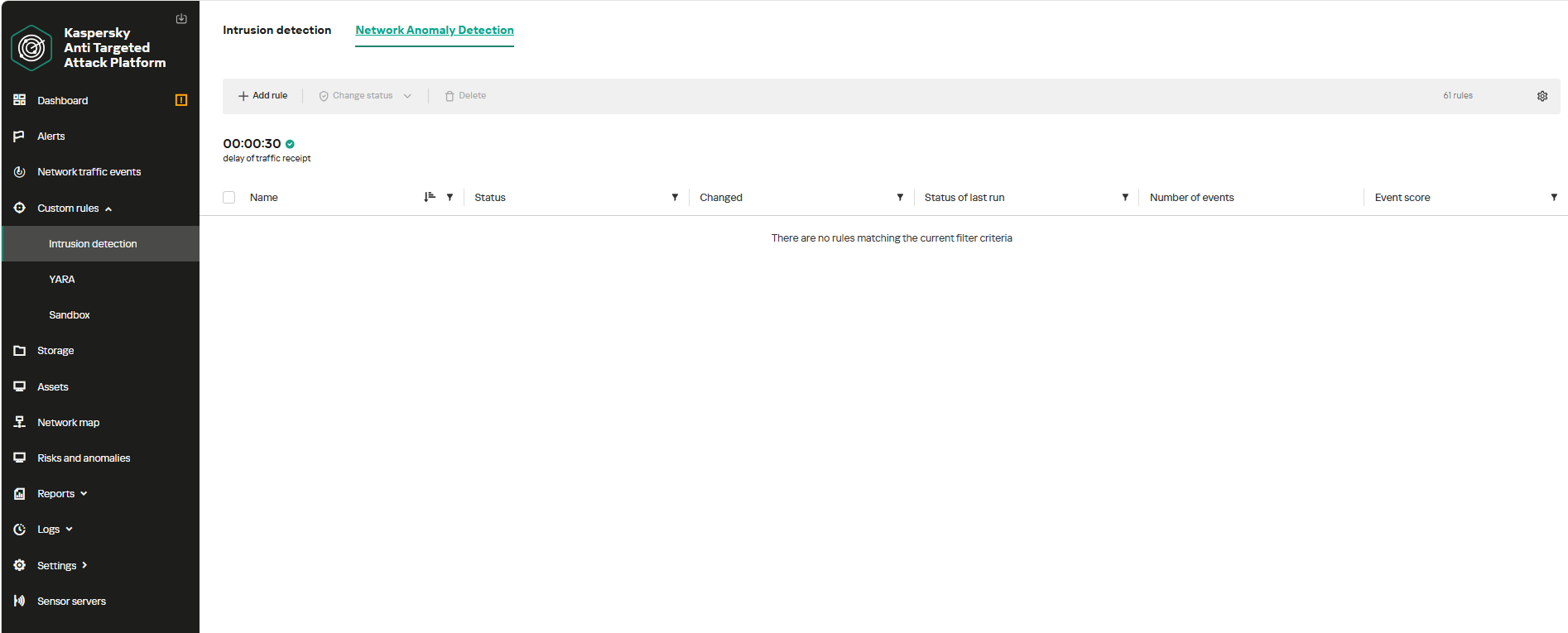
To begin working with NAD rules, navigate to the “Custom rules” section of the interface and select “Intrusion detection”. Under the “Network Anomaly Detection” tab, you can create a new rule.
The Network Anomaly Detection page UI
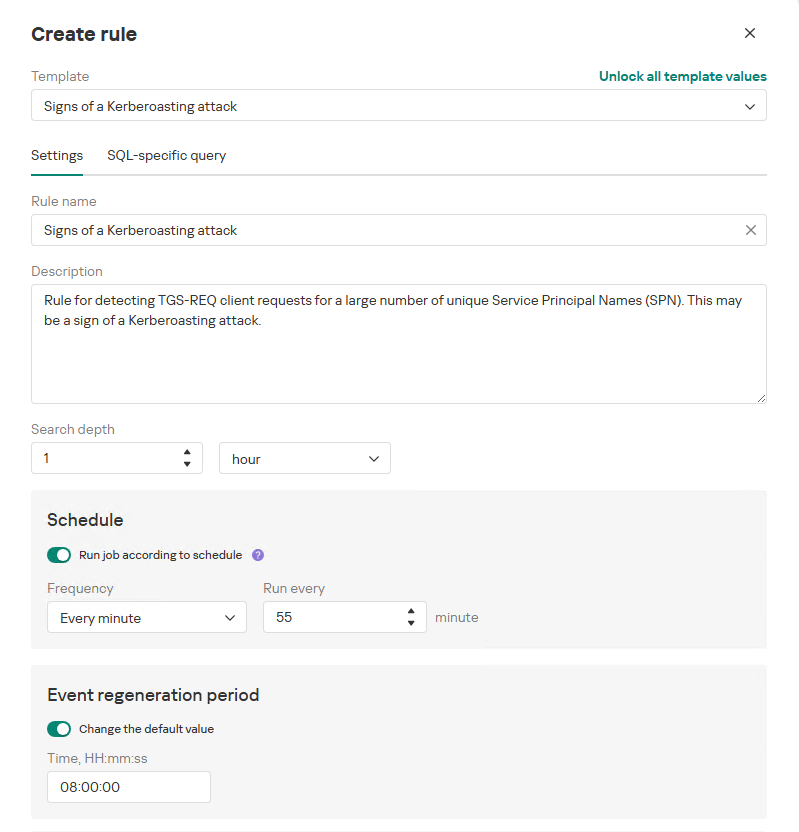
When adding a new rule, an analyst can select an appropriate rule template from the prebuilt set supplied with product updates. They can also manually modify the rule added from the template (converting it to a custom rule while keeping the original template intact) or author a rule from scratch using the provided guide.
Upon selecting a template, the analyst can review the rule description and either adjust or leave the default values for the following settings:
Search depth (the lookback window over which the SQL query will run)
Schedule (the execution frequency for running the query against the specified search depth)
Event regeneration period (the timeframe during which identical alerts will be aggregated into a single record rather than displayed as distinct events)
UI for creating a new NAD rule
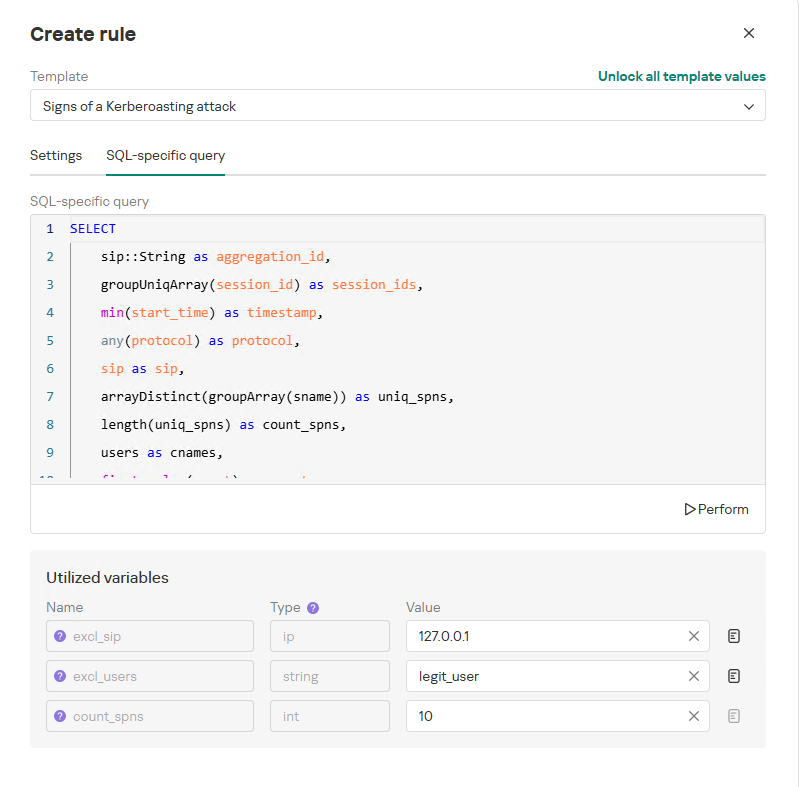
To ensure the rule functions correctly, we recommend navigating to the “SQL-specific query” tab before deployment to review the variables used within the rule – a description for each variable is available by hovering over the question mark icon.
The variables are lists of IP addresses, dates, strings or numeric values that define the network infrastructure – such as domain controllers, DNS servers, time ranges, critical segments, and other entities. This allows you to tailor each rule to different network environments and incorporate specific infrastructure characteristics without modifying the underlying logic.
In our example, using variables allows you to adjust the “Signs of a Kerberoasting attack” rule as follows without altering the underlying SQL query:
Exclude the source IP address of the TGS-REQ requests from the scope of detection logic (you can specify a single address, a subnet mask, or a dictionary containing addresses and subnets) as well as the requesting client account (accepts a single value or a dictionary with multiple values).
Adjust the threshold value required to trigger an alert based on the number of unique SPNs in the TGS-REQ messages.
Query contents and variables used in the new rule
On this same page, you can test if the rule is functional prior to saving it.
Rule execution test results
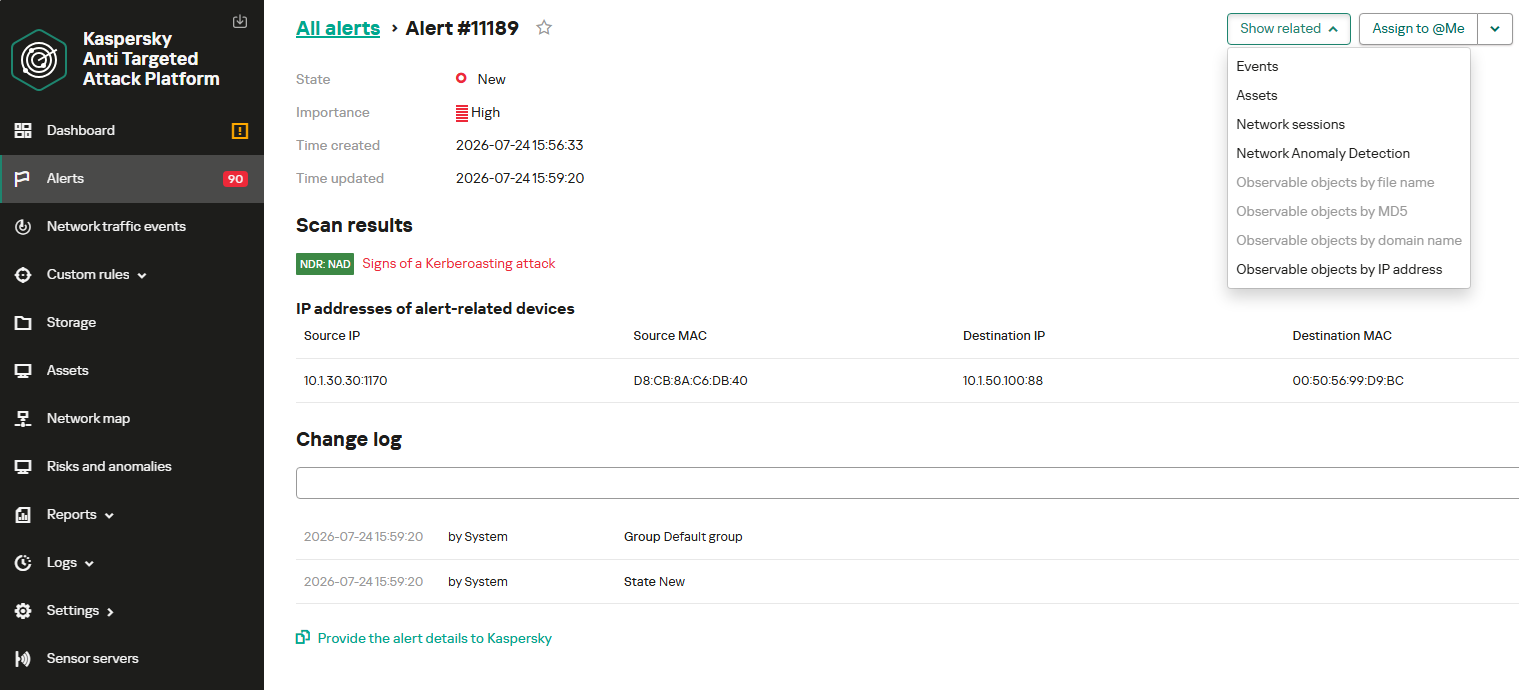
When this rule triggers, an NDR:NAD alert is generated. In the alert card, the analyst can review basic information: IP addresses, ports, and participating network endpoints.
Alert card for the NAD rule
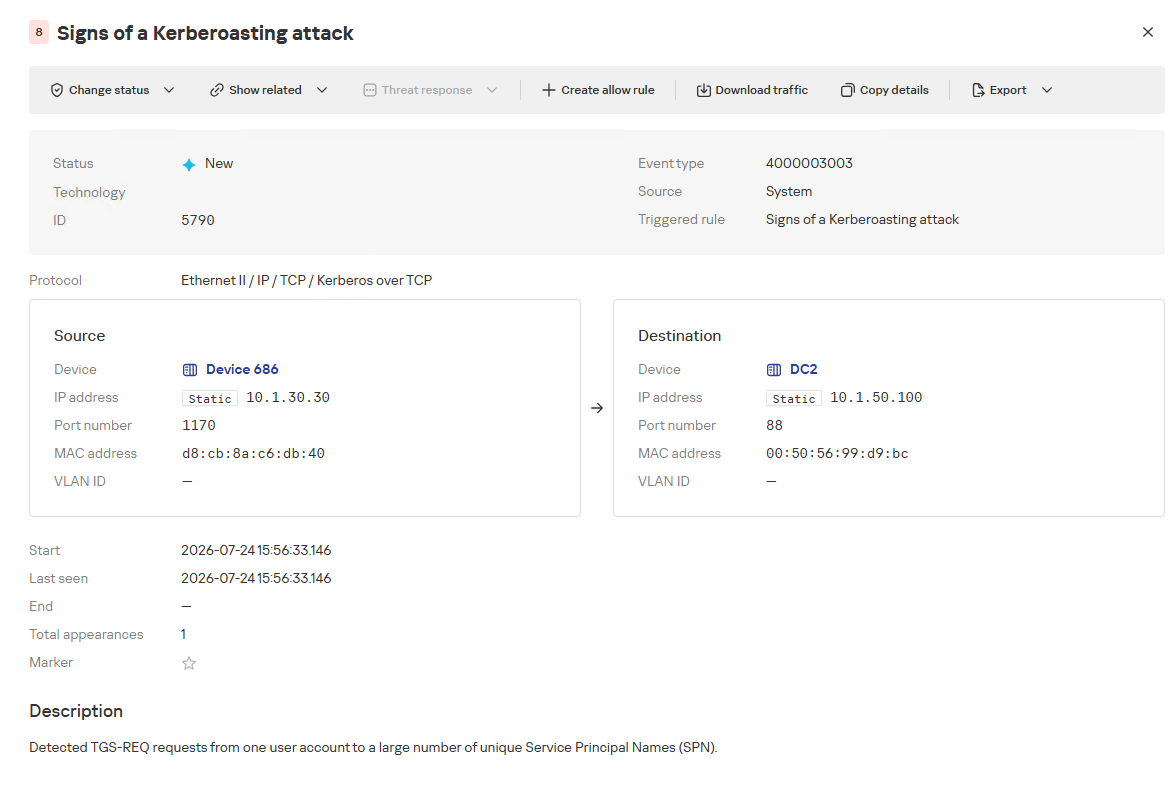
From there, the analyst can navigate to the associated event, which provides a detailed breakdown of the anomaly alongside links to the affected hosts.
NAD rule triggering event
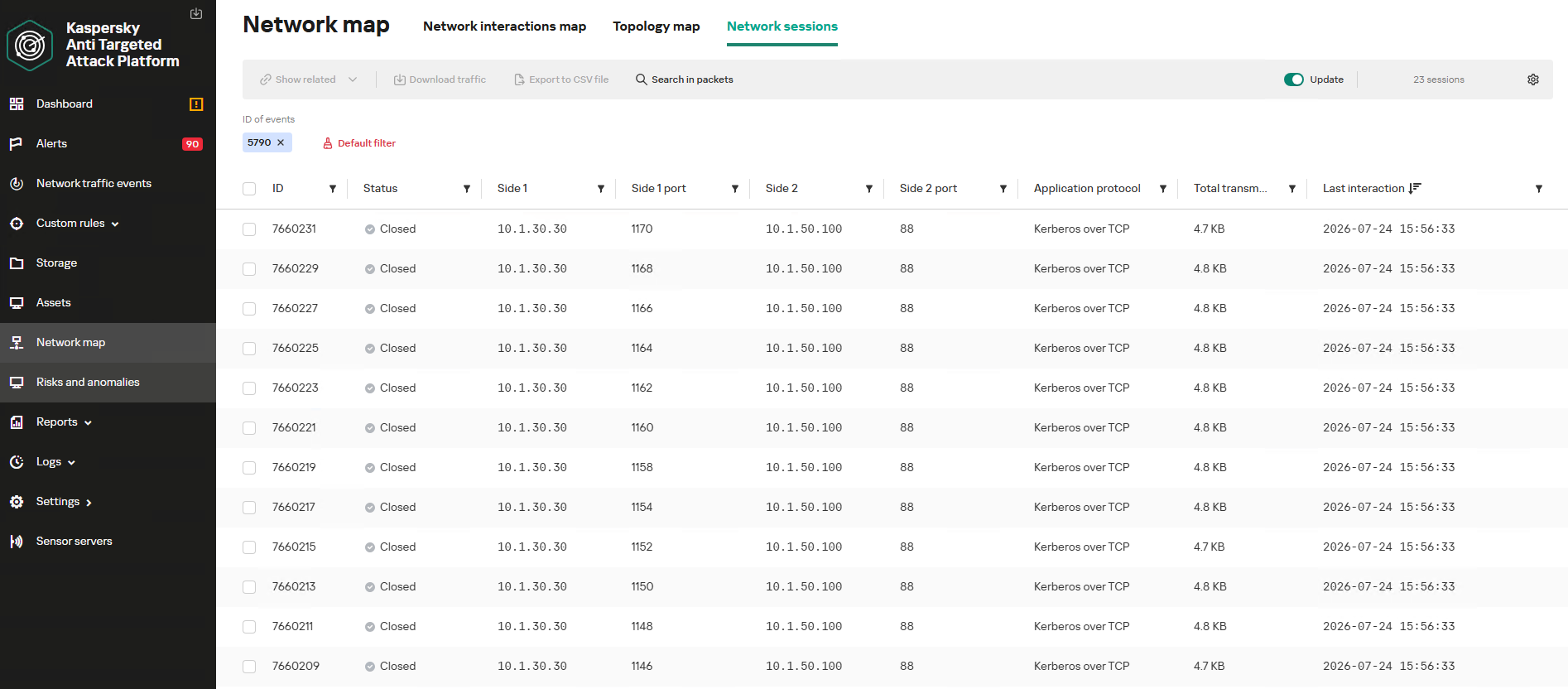
If needed, the analyst can view and export the network sessions associated with the alert. These sessions can be accessed directly from the alert or within the event card via the “Show related” drop-down list.
Network sessions that triggered the rule
Within an individual session, the analyst can inspect standard details including interacting parties, data volume sent and received, and other fields and metrics. On the “Attributes” tab, the analyst can review the specific events recorded within that session.
Network session attributes
Detecting DNS tunneling in KATA
How DNS tunnels work
DNS tunneling is a technique used to transmit data or control malware through firewalls by encoding information within DNS protocol requests and responses. Instead of performing standard name resolution, an infected host transmits data encoded within subdomain strings and receives response data via DNS records. This covert channel can be leveraged for C2 communication, bypassing network restrictions, or data exfiltration.
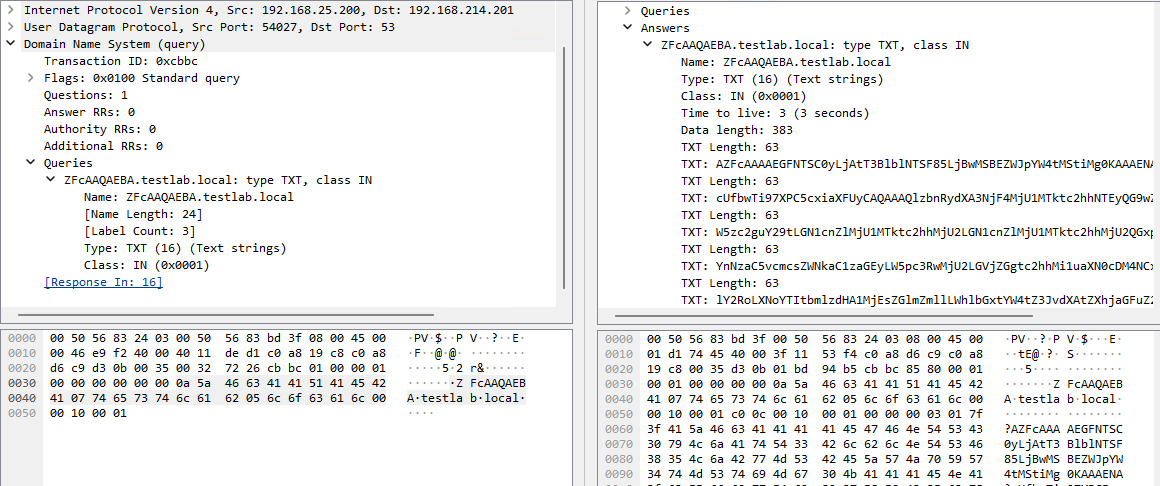
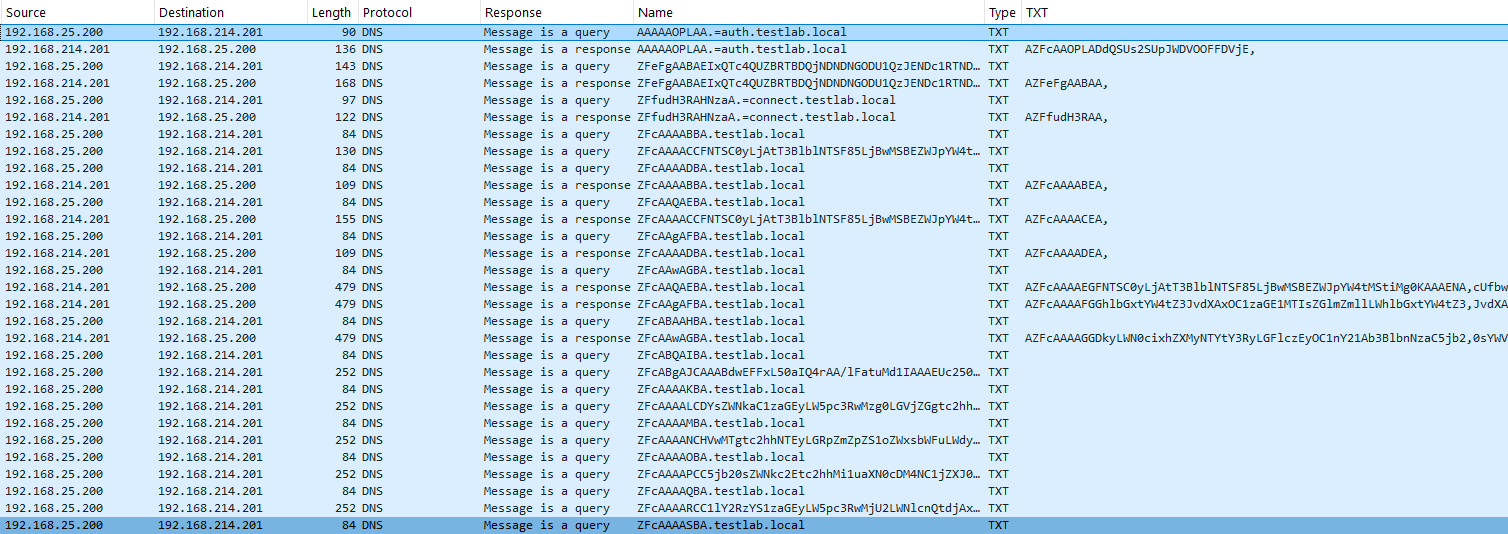
One method of implementing DNS tunneling involves utilizing TXT records. In this scenario, the client issues DNS TXT record queries for domain names where the right-hand portion of the domain name (the higher-level domains) remains static, while the left-hand portion (the lowest-level subdomain) carries encoded or encrypted data sent from the client to the server. Under this structure, a sample domain name might look like ZFcABQAIBA[.]testlab[.]local, where testlab[.]local serves as the static right-hand portion and ZFcABQAIBA represents the variable left-hand string containing the data transmitted by the client.
In response to these queries, the server delivers commands or messages inside the data field of the TXT response. Because the right-hand portion of the domain name remains static, all client queries are consistently routed to the same C2 server, even if the intermediate DNS resolvers targeted by the client change.
DNS query (left) and corresponding response (right) during DNS tunneling via TXT records
It is rather challenging to identify this malicious activity within DNS traffic without generating false positives. DNS traffic is permitted across almost all corporate networks, long domain names occur routinely in both internal and external environments, and TXT records are frequently leveraged for legitimate operational purposes.
Suspicion is established through a combination of indicators: a high volume of long, seemingly random subdomains associated with a single top-level domain, high request frequency, an unusually large number of unique names, non-standard record types, and significant data transfer volumes within a single DNS session.
By analyzing DNS traffic for threat detection, we identified three primary fields of interest:
Requested DNS name
DNS record type
TXT data field within the response
As shown in the image above, all of these fields are present in the DNS response. In a real-world scenario, a tunnel of this nature will transmit a volume of data that is abnormally large compared to standard DNS traffic.
Data exchange within a DNS tunnel
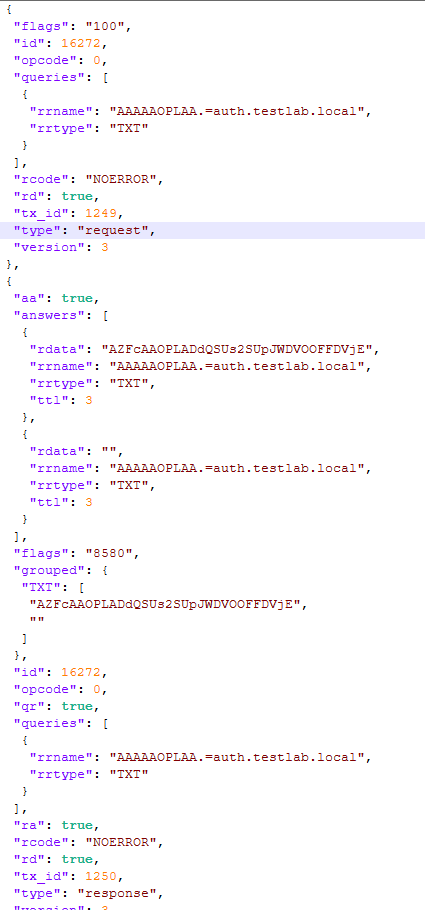
Thus, in the context of DNS tunneling, a network anomaly occurs when 1) a single query source host sends data embedded in the variable left-hand portion of domain names (rrname) while 2) maintaining a static right-hand portion (rrname) and 3) receives DNS server responses containing TXT records (rtype) with varying data (rdata), while 4) the total volume of data transmitted in the left-hand portion of the requested domain name together with the TXT data response (rdata + rrname) exceeds a predefined threshold.
Request and response events from DNS session attributes
When detecting DNS tunneling, the following nuances must be considered:
A single tunnel will not be constrained to a single DNS session; data may be transmitted across multiple sessions with the DNS server, or each individual request may occur within a separate session.
A client DNS query can contain more than one requested domain name.
A DNS response can contain multiple TXT records, as well as a large volume of various non-TXT record types.
Traffic between DNS servers must be excluded, as it duplicates client requests and can trigger false positives.
Although the factors outlined above (an abnormally large or frequently changing left-hand subdomain alongside a static right-hand domain, or an unusually long string in a TXT record) serve as key indicators of DNS tunneling, they can also occur within legitimate network traffic.
These challenges create a high likelihood of false positives when detecting DNS tunneling, particularly when using IDS-based tools. Writing an accurate IDS rule for this type of activity is practically impossible. With rare exceptions, DNS tunneling tools possess static markers that can be leveraged for signature-based detection. However, in the absence of such markers, signature methods fail to deliver high detection accuracy without generating an overwhelming number of false positives. In these cases, a comprehensive approach combining multiple correlated indicators is essential to improve overall detection quality.
DNS tunneling detection logic
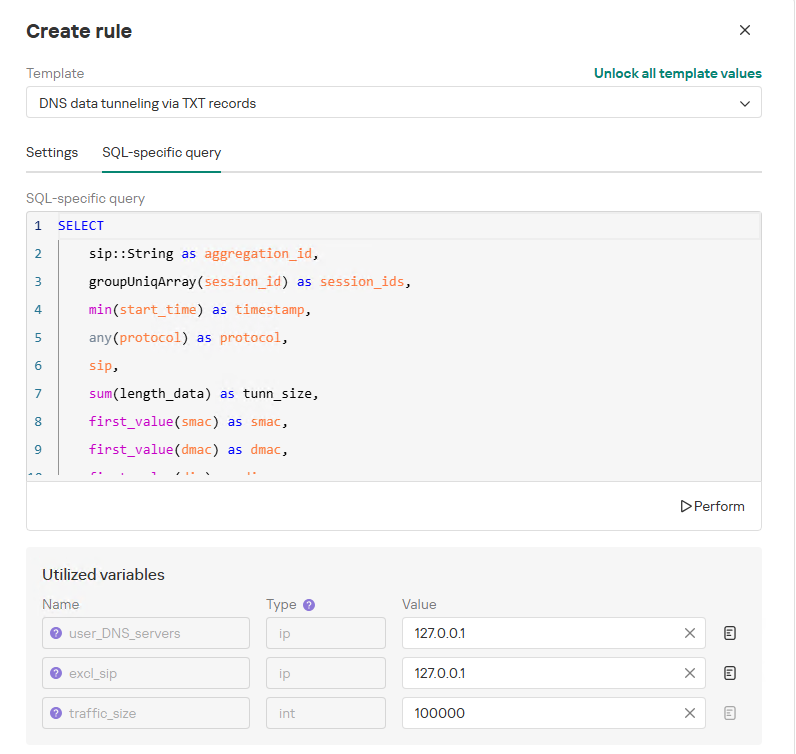
To add a rule for detecting this anomaly, you can use the prebuilt “DNS data tunneling via TXT records” template in the new rule creation interface. The “SQL-specific query” tab will display the list of variables used:
user_DNS_servers: a list of internal DNS server addresses within the infrastructure, required for the rule to function correctly and minimize potential false positives
excl_sip: IP addresses to be excluded from the scope of the rule (you can specify a single address, a subnet mask, or a list containing both addresses and subnets)
traffic_size: the threshold value for the total volume of data (in bytes) transmitted through the tunnel
Variables used in the “DNS data tunneling via TXT records” rule
The detection logic for this network anomaly is structured as follows:
From network sessions using the DNS protocol within the timeframe defined by the rule’s search depth, select only those sessions containing at least one TXT response.
Additionally:
The IP address that initiated the session must not be excluded in the excl_sip variable.
The source IP address that initiated the session must not belong to the internal DNS servers listed in the user_DNS_servers variable.
The DNS names requested by the client must not be excluded within the rule.
Split qualifying DNS sessions into individual log lines, each corresponding to an individual request or response. Retain only DNS responses containing TXT data.
Extract DNS names and their associated TXT data from these DNS responses. Retain only unique values.
Group all resulting records by the session’s source IP address, aggregating all unique DNS names and TXT data blocks.
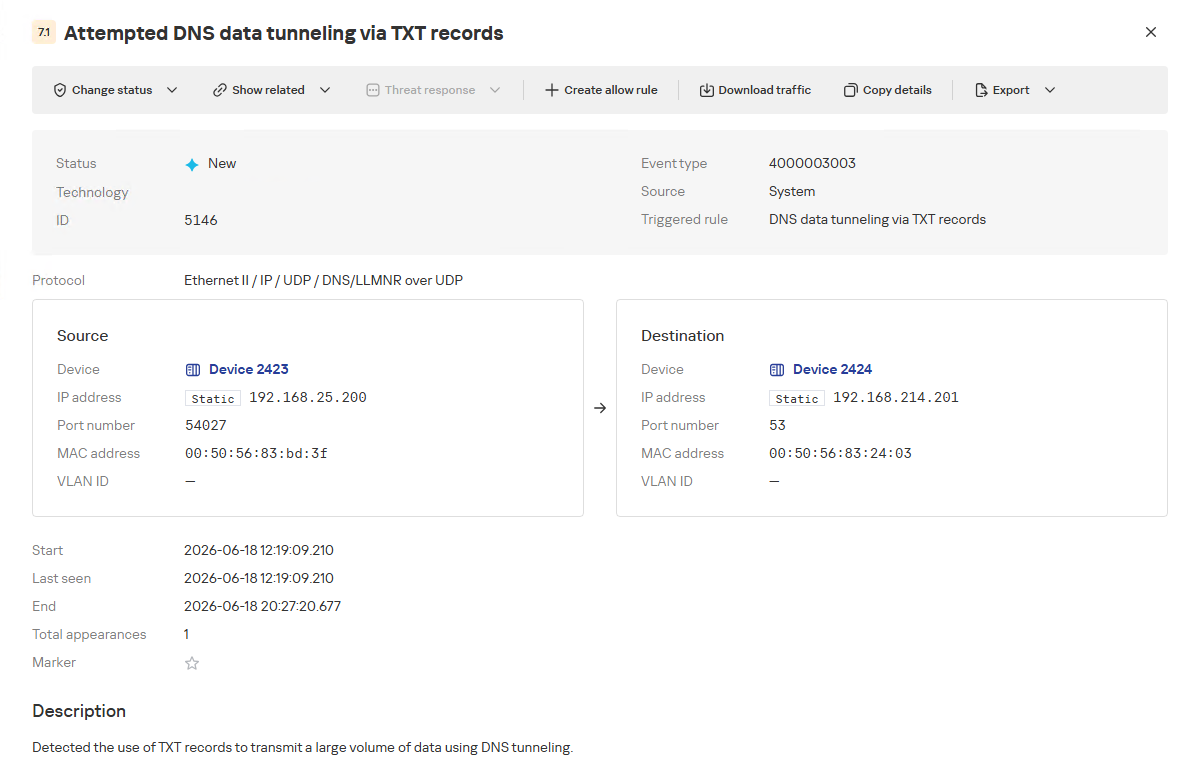
Generate an alert if the combined size (in bytes) of the unique DNS names and TXT response data for a single IP address within the search depth window exceeds the specified threshold (the traffic_size parameter).
Within the event regeneration window, group under the initial alert all subsequent alerts associated with the same client IP address. This avoids creating duplicate event records by incrementing the aggregation counter (Total appearances).
“DNS data tunneling via TXT records” rule triggering event
The primary value of NAD technology in this scenario lies in noise reduction – by minimizing false positives – and faster investigation times. A DNS tunnel rarely presents itself as a single, blatantly malicious request. Instead, it leaves behind a behavioral footprint: repetition, length, domain structure, unusual record types, numerous subdomains branching off an unchanging root domain, and anomalous host behavior. KATA consolidates these indicators into a single alert, presenting the analyst with an actionable attack hypothesis rather than a set of fragmented DNS events.
Prebuilt rules for detecting network anomalies in KATA
KATA users should note that Network Anomaly Detection (NAD) rules are not enabled by default. Rules must be added manually using the procedure described in the preceding sections. This design ensures that analysts can fine-tune rules to fit specific network infrastructures using variables.
Analysts have three ways of creating new rules:
Adding a rule from a prebuilt template and adjusting custom variables. In this case, the rule is classified as a system rule.
Adding a rule from a prebuilt template and modifying its underlying SQL query (which requires enabling the “Unlock all template values” option) to create a custom rule based on the template. When modified this way, the rule transitions from a system rule to a custom rule.
Authoring a custom rule from scratch, which requires a basic understanding of ClickHouse SQL queries and familiarity with the product documentation.
As of this publication, the product ships with 59 prebuilt NAD rule templates (with additional templates delivered via product updates). KATA supports running up to 200 active rules simultaneously.
Prebuilt rules are divided into six categories:
Large Data Transfers: tracking abnormally large network sessions across various protocols during regular hours, at night, or over weekends.
Suspicious Connections: detecting suspicious connections that may indicate hazardous activity, shadow IT, evasion of attack detection mechanisms, and other threats.
Connections to Suspicious Resources: detects actions that violate security policies, potential data exfiltration beyond the perimeter, and unauthorized internet access originating from secured network segments.
C2 Communication: identifies network sessions characteristic of a potential C2 communication channel or tunnel.
The table below lists the rule templates for detecting network anomalies in KATA:
Rule category
Rule name
Protocols used
Large Data Transfers
Data tunneling in DNS traffic
DNS
ICMP, TCP, UDP, RDP, SSH or LDAP sessions with a large volume of traffic (6 rules)
ICMP, TCP, UDP, RDP, SSH, or LDAP (depends on selected rule)
ICMP, TCP, UDP, RDP, SSH or LDAP sessions with a large volume of traffic at nighttime (6 rules)
ICMP, TCP, UDP, RDP, SSH, or LDAP (depends on selected rule)
ICMP, TCP, UDP, RDP, SSH or LDAP sessions with a large volume of traffic on non-working days (6 rules)
ICMP, TCP, UDP, RDP, SSH, or LDAP (depends on selected rule)
Suspicious Connections
Queries to unknown DNS servers
DNS
Use of unauthorized routes
TCP, UDP
Use of suspicious ports for connections to external addresses
TCP, UDP
Use of non-typical protocols for connections
TCP, UDP, HTTP, HTTPS, DNS, SMTP
Inconsistencies with firewall configuration
TCP, UDP
Use of unauthorized ports for RDP or SSH sessions (2 rules)
RDP or SSH (depends on selected rule)
Interactions with external IP addresses over the RDP or SSH protocol (2 rules)
RDP or SSH (depends on selected rule)
Suspicious RDP sessions with domain controllers
RDP
Connection to an unknown server via Kaspersky Security Center ports
TCP, UDP
Domain Attacks
Signs of a DCSync attack
DCE/RPC
Signs of a DCShadow attack
DCE/RPC
Signs of DHCP spoofing
DHCP
DNS queries to Canarytoken domains
DNS
Signs of a Kerberoasting attack
Kerberos
Signs of an AS-REP Roasting attack
Kerberos
Signs of a brute-force password attack on SSH
SSH
Signs of SOAPHound usage
LDAP
Large-volume Active Directory object data collection via LDAP queries
LDAP
Reconnaissance Activity
Getting information about a task in the Task Scheduler
DCE/RPC
Getting a list of Kerberos users
Kerberos
LDAP queries to rights delegation attribute
LDAP
LDAP queries to attribute for getting administrator passwords
LDAP
Signs of an internal horizontal port scan
TCP, UDP
Signs of an internal vertical port scan
TCP, UDP
DNS zone data replication requests sent from sources other than DNS servers
DNS
Successfully completed requests for DNS zone data replication sent from sources other than DNS servers
DNS
LDAP query targeting a critical attribute of insecure credentials
LDAP
Enumeration of domain accounts via LDAP queries
LDAP
Exceeding the threshold for requested critical attributes in LDAP queries
LDAP
LDAP search queries containing a high number of critical attributes
LDAP
Connections to Suspicious Resources
Queries to unauthorized domain names
DNS
Transmission of large data volumes to cloud storages
TCP, UDP, DNS
Connections to cloud storages or file transfer services
TCP, DNS
Connections to public repositories
TCP, DNS
Connections to resources of programs for traffic tunneling
TCP, DNS
С2 Communication
Possible queries to DGA domains
DNS
DNS data tunneling via TXT records
DNS
Numerous blocked connections to external addresses
TCP, UDP
Conclusion
The examples of Kerberoasting and DNS tunneling clearly demonstrate why modern security defenses cannot rely solely on looking for known signatures and indicators of compromise. Both attack techniques abuse protocols that operate inside corporate networks every day. At the individual event level, they may look like legitimate activity, yet in behavioral context, they stand out as clear indicators of compromise.
NAD directly addresses this gap. Instead of relying purely on signature matches across Kerberos or DNS traffic, it highlights deviations from established baselines: who initiated the activity, how frequently it recurred, which services or domains were targeted, and why that matters for a specific infrastructure.
As a result, analysts gain a clear, actionable starting point for investigation. This capability is especially valuable for spotting the signs of APT group activity, which runs stealthily and is designed to blend in with legitimate operations. The importance of this capability will only grow: as attack techniques evolve, detecting suspicious activity at its earliest stages – before it escalates into critical service compromise or a data breach – becomes increasingly vital.
IntroductionWhen a company that manages data for millions of UK citizens falls victim to ransomware, the whole industry should pay attention to it. On 15 October 2025, the UK Information Commissioner’s Office (ICO) published a detailed 136 page report about the Capita breach. The aim of this blog is to extract actionable cybersecurity lessons from the ICO’s findings as well as open source reports surrounding the breach from a cyber threat intelligence (CTI) analyst’s perspective to help SOC and
When a company that manages data for millions of UK citizens falls victim to ransomware, the whole industry should pay attention to it. On 15 October 2025, the UK Information Commissioner’s Office (ICO) published a detailed 136 page report about the Capita breach.
The aim of this blog is to extract actionable cybersecurity lessons from the ICO’s findings as well as open source reports surrounding the breach from a cyber threat intelligence (CTI) analyst’s perspective to help SOC and CERT teams, and CISOs understand what happened and how to avoid the mistakes made by others.
BLUF Incident Impact Summary:
Capita was attacked by BlackBasta ransomware in March 2023
Over six million individual’s records were exfiltrated from Capita’s systems
A £14 million fine was issued to Capita by the ICO
Capita said in May 2023, the incident cost up to £20 million to recover
Important context about Capita
The Capita Group is a business process outsourcing (BPO) and professional services group employing approximately 34,500 people worldwide and with a reported annual revenue of £2,421.6 million. For readers outside of Great Britain, Capita is best known as the UK’s go-to managed service provider for large-scale, data-sensitive public sector operations.
Companies within the Capita Group act as data processors for a range of business services to both public and private sector organisations. Capita plc is the ultimate parent company of a large corporate group consisting of multiple legal entities.
Capita has long been one of the UK government’s biggest suppliers of outsourced services.
They manage (or have managed):
The BBC TV Licensing system
The UK Congestion Charge for Transport for London (TfL)
The National Pupil Database – via contracts with the Department for Education.
Electronic tagging of offenders – under contracts with the Ministry of Justice.
Council administration and call-centre services – many local authorities (e.g., Birmingham, Southampton, Sheffield)
Numerous Local Government and private sector pension schemes (including universities, utilities, and insurance companies).
Ministry of Defence (MOD) – Training and support contracts for the British Army’s Recruitment Partnership Project (including vetting systems) and Royal Navy training programmes.
The ICO established that during the Incident, data was exfiltrated from two legal entities which were acting as data controllers, and from four legal entities which were acting as data processors:
Capita plc - Capita plc’s focus includes Central Government, Local Public Service, Defence, Education, and Pensions. Capita was selected to administer the UK’s Civil Service Pension Scheme (CSPS) from September 2025, via a contract worth £239m over 10 years.
Capita Resourcing Limited - is a subsidiary of Capita plc focused on resourcing/human-capital services, i.e., recruitment, contingent staffing, talent acquisition.
Capita Business Services Limited - is another subsidiary that provides business-process and digital services (as a part of the Capita outsourcing ecosystem). The supplier record shows over £331.9m recorded government spending linked to this entity.
Capita Pension Solutions Ltd (CPSL) - a regulated pensions business within the Capita Group. Its role: delivering pensions administration and consulting services for pension schemes, including defined benefit schemes.
Breach Timeline
In the ICO’s report, a timeline of events that led to data exfiltration and ransomware deployment was provided. The timeline diagram below helps illustrate what happened.
TheRecord also reported that Capita’s share price dropped more than 12% from a high of £38.64 ($47.97) on March 30, the day before the incident was first reported, to £33.72 ($42.58) on Wednesday morning.
On 3 April 2023, Capita released a public statement about the cyber incident. At the time, Capita said the “issue was limited to parts of the Capita network and there is no evidence of customer, supplier or colleague data having been compromised.”
On 8 April 2023, Brett Callow spotted that Capita had been listed on BlackBasta’s Tor data leak site before it was quickly removed that same day.
Security researcher Kevin Beaumont who analysed the leaked data samples at the time identified copies of stolen passport scans, PII records, bank account details, internal floor plans of multiple buildings from various schools as well as Capita Nuclear, part of Capita Business Services.
It took Capita until 20 April 2023 to confirm that some of its systems were in fact breached and that data had been stolen.
Types of Stolen Data
In the ICO’s report, we learn that 6,024,221 data subjects for whom Capita was the data processor had personal data exfiltrated, as determined by Capita’s forensic provider.
Types of data stolen included sensitive such as Home Address, Email, Phone Number, National Insurance Numbers, Driver’s License Scans, Passport Scans, Bank Account Numbers & Sort Codes, Credit Card Numbers, Biometrics, Criminal Record Checks, and Employee Login details.
BlackBasta Operator TTPs
The tactics, techniques, and procedures (TTPs) of the BlackBasta operators provided in the breach timeline by the ICO are useful for understanding what technical steps were involved that led to the breach and ransomware attack. A summary of the aspects of the attack have been mapped to a diamond model diagram below.
Outside of the breach timeline, some additional technical details were shared:
Following initial access, the Threat Actor accessed the ‘CAPITA\backupadmin’ service account approximately 4.5 hours later. Capita could not confirm how the Threat Actor was able to escalate their privileges; however, there were traces of Kerberos credential harvesting and reconnaissance activity found following the Incident.
The Threat Actor was able to use the ‘CAPITA\backupadmin’ domain administrator account to pivot to administrator accounts in different Capita domains. In total no fewer than 8 domains were compromised, a very large quantity of data was exfiltrated and the Threat Actor attempted to deploy ransomware on at least 1057 hosts.
Even though Capita quarantined the device through which the Threat Actor first gained access on 24 March 2023, by this time the Threat Actor had deployed software into the network which had enabled them to establish persistence and ultimately allowed them to continue moving laterally across the network into different Capita domains and to access/exfiltrate data, before deploying ransomware on 31 March 2023.
Interestingly, in February 2025 internal chat logs from the BlackBasta gang were leaked publicly online. Analysis of the leaked chat logs for references of Capita revealed the below command shared by one of the BlackBasta members months after the attack happened:
The domain "corpcitrix.ad.capita.co.uk" appears to be an internal Active Directory domain name used by Capita to host its corporate Citrix environment. The "ad" label shows it’s an AD DNS namespace, "corpcitrix" indicates the environment is for Citrix-published desktops/apps or related infrastructure, and "capita.co.uk" is the organisation’s FQDN.
The command shown above is a PowerShell invocation (potentially via Cobalt Strike) to enumerate every system in the domain, resolve each machine’s IP address, and save the results to “SFS_pc.txt” file. Powerpick runs the code in an unmanaged PowerShell environment and can execute without being dependent on powershell.exe.
In short, this command shows a BlackBasta operator running net reconnaissance mapping hosts and IPs (likely to plan lateral movement, targeting, exfiltration or ransomware deployment).
Notable moments during the Incident
Critical alerts were mishandled or deprioritised: The initial malicious file (‘jdmb.js’) triggered a P2 (High) alert at 08:00 on 22 March 2023, indicating compromise. The SOC did not act for nearly 58 hours, despite automatic escalation warnings for missed service-level agreements (SLAs). The ICO also noted that “at no point in the six months before or after the Incident did Capita meet their SLA for any alert level.”
Excessive delay between detection and containment, plus a lack of automation: Isolation of the device from the rest of the Capita network still required human intervention, which took 58 hours to arrive. Capita’s SOC lacked the ability to isolate the device automatically. By then, the attacker had already gained domain admin access and moved laterally.
Inadequate incident response procedures: Capita did not invoke its Major Incident Management process until 09:22 on 29 March 2023, which was seven days after compromise. By that point, data exfiltration was already underway and it was two days before ransomware was deployed on 31 March 2023.
Understaffed and overburdened SOC team: Capita is understood to have had 1 SOC analyst per shift in place at the time of the Incident in March 2023. This combined with historic underperformance indicates systemic issues within the SOC, including inadequate staffing, insufficient training, and/or inefficient processes.
Lessons Learned from the BlackBasta Ransomware Attack on Capita
Having tools isn’t enough, they must be configured, integrated, and monitored effectively
Capita had Trellix EDR, a SIEM, and a SOC, but alerts were missed and containment delayed.
Lessons: Security tools are only as effective as the people, processes, and automation supporting them. Critical security alerts must have clear, measurable response times with automatic escalation if breached. Security Leadership must define and enforce strong Service Level Agreements (SLAs) for incident response.
Implement proper Active Directory (AD) tiering
Lack of AD tiering allowed attackers to move laterally from low-privilege systems to domain controllers (specifically a backup service account with domain admin privileges).
Lessons: Segregate admin privileges between tiers (workstations, servers, domain controllers) to contain breaches. Limit, rotate, and monitor privileged accounts using a PAM solution to enforce least privilege. Regularly review service accounts, ensure unique credentials, and monitor their activity for anomalies.
Act on penetration test findings promptly
Multiple pentests also warned of AD and privilege issues months before the breach, but fixes were delayed.
Lesson: Treat pentest reports as actionable tasks with deadlines and executive oversight.
Automate incident response where possible (SOAR)
Lack of Security Orchestration, Automation and Response (SOAR) led to manual triage delays.
Lesson: Use SOAR playbooks to automate containment, escalation, and alert enrichment for faster response.

 Entrar