Serbian activists were targeted with zero-click Pegasus and NoviSpy spyware, exposing a major surveillance campaign ahead of elections.
A member of Serbia’s student protest movement had their iPhone infected with NSO Group‘s Pegasus spyware without ever clicking a link or opening a file. The Citizen Lab confirmed the infection in collaboration with the SHARE Foundation, tracing it to an iMessage zero-click exploit and identifying high-confidence indicators of compromise between December 2025
Serbian activists were targeted with zero-click Pegasus and NoviSpy spyware, exposing a major surveillance campaign ahead of elections.
A member of Serbia’s student protest movement had their iPhone infected with NSO Group‘s Pegasus spyware without ever clicking a link or opening a file. The Citizen Lab confirmed the infection in collaboration with the SHARE Foundation, tracing it to an iMessage zero-click exploit and identifying high-confidence indicators of compromise between December 2025 and January 2026, with the possibility of additional infections not ruled out.
“In collaboration with the SHARE Foundation, the Citizen Lab analyzed forensic artefacts from the iPhone of a member of Serbia’s student protest movement after they received an Apple Threat Notification warning of targeting with mercenary spyware.” reads the report published by Citizen Lab. “Our analysis confirmed that an iMessage zero-click exploit was used to infect the device with NSO Group’s Pegasus spyware. “
The attack required no action from the victim, which makes zero-click attacks especially dangerous. Citizen Lab said the Pegasus infection could stay hidden while giving the attacker full access to the phone, including messages, photos, notes, microphone, and camera. Apple later fixed this specific exploit through security updates in iOS 18.4.1.
“We believe that the zero-click exploit used in this attack targeted Apple iMessage, and has subsequently been patched by Apple as of iOS 18.4.1.” continues the report. “A zero-click infection with Pegasus spyware would not have been visible to the target, and would give the Pegasus attacker total access to the device. Pegasus allows an attacker to do anything that a user can do, ranging from accessing private data like notes, pictures and even encrypted messages. Pegasus also has the ability to covertly enable the phone’s microphone and camera.”
This one confirmed infection sits inside something considerably bigger. The SHARE Foundation has documented at least 14 individuals targeted with advanced spyware since early 2026, spanning student movement members, civil society activists, an opposition member of parliament, and a local councilor, which the organization is calling the largest documented surveillance wave in Serbia’s history. Twelve people approached SHARE’s digital forensics team in August after receiving Apple’s own threat notifications, warnings the company sends when it detects likely state-sponsored spyware targeting; eleven of those devices remain presumed infected pending further forensic confirmation.
The timing lines up uncomfortably well with Serbia’s political calendar. This surveillance wave coincides with local elections held on March 29, 2026, and stretches toward planned early parliamentary elections in October, following months of student-led anti-government and anti-corruption protests.
“These notifications and forensic confirmation highlight the aggressive mercenary spyware targeting of the peaceful pro-democracy movement with mercenary spyware ahead of key 2026 election cycles.” continues the report.
Targeting activists and opposition figures specifically in the run-up to elections isn’t subtle, and it fits a pattern Serbia has shown before.
Serbia has a history of using commercial spyware. Citizen Lab previously documented Pegasus targeting civil society and the use of Cellebrite tools to install the locally developed NoviSpy on activists’ phones. In this case, SHARE Foundation and Amnesty Tech found a new version of NoviSpy on a student activist’s Android phone after Serbian authorities seized it during police questioning.
Amnesty International’s Security Lab head, Donncha Ó Cearbhaill, connected the dots plainly between state custody and spyware installation.
“The forensic findings by SHARE prove that Serbian students continue to be targeted with invasive Android spyware tools, installed while detained by Serbian authorities” he said.
If you’ve received an Apple Threat Notification, whether in Serbia or anywhere else, the Citizen Lab’s guidance is unambiguous: treat it as a presumed infection and get expert help immediately rather than waiting to see if anything seems wrong. Individuals in Serbia should contact the SHARE Foundation directly, and anyone elsewhere can reach Access Now’s Digital Security Helpline, which supports journalists, human rights defenders, and other high-risk civil society targets worldwide. Anyone who suspects they might be a target based on their work or public role should also turn on Lockdown Mode, Apple’s built-in feature that significantly narrows what a zero-click exploit can actually reach, and keep every device updated, since the patch that closed this specific hole has already existed for well over a year for anyone who installed it.
“We believe that the zero-click used in this attack has been rendered ineffective by a patch from Apple in recent iOS versions. We urge everyone, especially those facing increased risks because of who they are or the work they do, to keep all devices updated.” concludes the report. “Click HERE for instructions on how to keep your iPhone up to date.”
WhatsApp announced on August 25 that more than one billion people now use passkeys to log back into the app.
The announcement included two other security upgrades: a stronger two-step verification method and more context for incoming calls from unknown numbers. It marks one of the largest passwordless authentication rollouts to date. Passkeys are now firmly mainstream, with the FIDO Alliance estimating that 5 billion are in use worldwide and 75% of consumers have enabled one on at least one a
WhatsApp announced on August 25 that more than one billion people now use passkeys to log back into the app.
The announcement included two other security upgrades: a stronger two-step verification method and more context for incoming calls from unknown numbers. It marks one of the largest passwordless authentication rollouts to date. Passkeys are now firmly mainstream, with the FIDO Alliance estimating that 5 billion are in use worldwide and 75% of consumers have enabled one on at least one account.
Three things changed:
Passkey support originally launched on Android and later extended to iOS. WhatsApp now supports multiple passkeys per account, so people who switch between an Android phone and an iPhone (or use both) can register a passkey on each device.
Two-step verification is moving from a simple six-digit PIN to a longer alphanumeric password that can include special characters, making it much harder to guess or brute-force.
On Android, WhatsApp now shows extra context about calls from numbers not saved in your contacts, including whether the number is from another country and whether you share any groups. It’s a small but useful nudge against the urgency tactics scammers rely on.
Passkeys are resistant to phishing because there is no password or SMS code to type into a fake website or hand over to a scammer. Instead, a passkey is stored on your device or in its credential manager and unlocked using your fingerprint, face, or screen-lock code. They’re also useful in regions where SMS one-time-passcode delivery is unreliable, which might explain why adoption reached a billion users so quickly.
The upgraded two-step verification password closes a real gap. PINs such as “123456” were common, weak, and reused, and a longer alphanumeric password with special characters raises the bar against account-takeover attempts, even if an attacker somehow obtains your one-time code.
The caller-context feature gives people more information to assess legitimacy before answering an unfamiliar number.
Users need to set up a passkey and upgrade their two-step verification password, while the caller-context feature will appear automatically on supported Android devices:
Set up a passkey via Settings > Account > Passkeys, and follow the instructions on your device. Don’t forget to add a second one if you use both an Android and an iOS device.
If you still use a six-digit PIN for two-step verification, upgrade to the new password format when it becomes available, especially if your PIN is predictable. You can find instructions to set up two-step verification for WhatsApp in this blog. If it’s already enabled, select Two-step verification to find the option to change your PIN.
Add a recovery email to two-step verification if you haven’t already. It’s the only way to reset the password if you forget it.
Android users should pay attention to the new caller-context details before answering calls from unknown numbers, treating urgency as a red flag rather than a reason to rush.
Passkeys and stronger two-step verification aren’t retroactive or forced, so accounts still relying on an old PIN or no passkey at all will remain unchanged until users upgrade them.
Scammers know more about you than you think.
Malwarebytes Mobile Security protects you from phishing, scam texts, malicious sites, and more. With real-time AI-powered Scam Guard built right in.
Google is introducing new network security protections in Android 17 to strengthen connection privacy, address cellular vulnerabilities, and protect the privacy of users' home networks. [...]
Google is introducing new network security protections in Android 17 to strengthen connection privacy, address cellular vulnerabilities, and protect the privacy of users' home networks. [...]
iPhone users are being targeted in a new tech support scam, using a fake Apple Pay notification to trick users.
Tech support scams that use fake warnings to push victims into calling a phone number have been around for years, but this page has been designed specifically for phones.
Instead of a desktop warning claiming your computer has a virus, the scam imitates familiar iPhone features in an attempt to scam you.
What happens
A page opens on your phone and appears to show Apple Pay
iPhone users are being targeted in a new tech support scam, using a fake Apple Pay notification to trick users.
Tech support scams that use fake warnings to push victims into calling a phone number have been around for years, but this page has been designed specifically for phones.
Instead of a desktop warning claiming your computer has a virus, the scam imitates familiar iPhone features in an attempt to scam you.
What happens
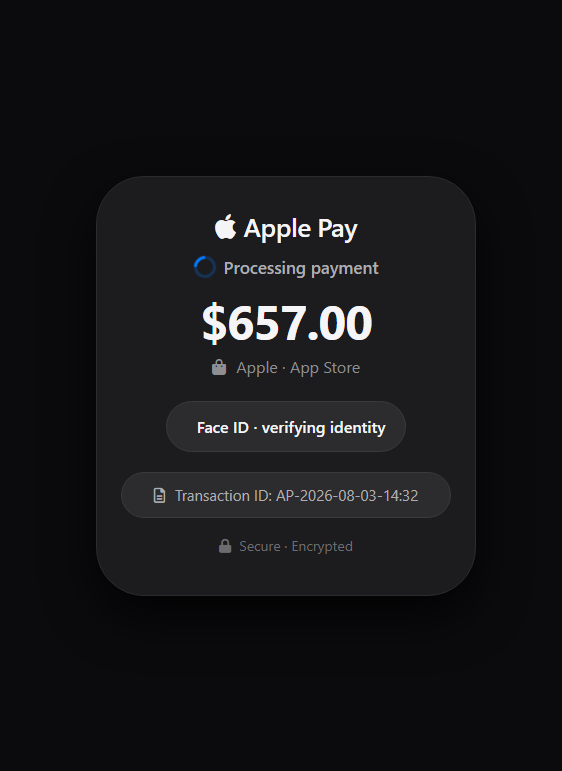
A page opens on your phone and appears to show Apple Pay processing a $657 App Store payment. A spinner turns. “Face ID · verifying identity” appears beneath the amount. There is a transaction ID, a padlock, and all the visual cues of a payment in progress.
A few seconds later, the story changes.
You get an alert saying your Apple ID is locked because of an unrecognized sign-in. A phone number appears under the instruction to call Apple Support immediately. When you open the transaction details, the payment is marked “Completed.” Then your phone begins speaking an alert about the unauthorized charge.
It’s all completely made up.
The page we analyzed contains no real Apple Pay transaction and no biometric verification. Instead, it uses hardcoded payment details, browser-generated speech, fake security warnings, and aggressive navigation tricks to get the victim to call the scammer.
The “Face ID” check isn’t real
The first screen is designed to make it look as though the phone itself is authorizing a payment.
In this sample, “Face ID · verifying identity” is simply an HTML element displayed beside an icon. There is no Apple Pay request and no biometric-authentication call behind it.
Apple Pay can legitimately be used on websites, but a genuine payment begins when the merchant requests it. The system then immediately displays a payment sheet for the user to review and authenticate, as Apple’s guidelines specify.
Nothing like that happens here. The scam page has simply drawn its own imitation.
The “Processing payment” spinner is equally cosmetic. The entire splash screen disappears on a timer after 2.8 seconds, regardless of anything the user does.
The receipt is fake, and the code is the same for everyone
The next screen is dressed up as a transaction receipt. It contains an amount, masked card digits, an authorization code, a transaction ID, and a green “Completed” status.
Most of those values never change.
That’s because the page hardcodes the amount as $657.00, the transaction ID as AP-2026-08-03-14:32, and the authorization code as AUTH-8F3A2B1C. Every visitor is shown the same values.
The date, however, is generated dynamically.
JavaScript calls new Date() and formats it with toLocaleString(), meaning the receipt uses the current date, time, and timezone from the victim’s device.
That creates an obvious contradiction. The fixed transaction ID contains 2026-08-03, while the date field shows the time and date when the victim happens to open the page.
A genuine transaction doesn’t rewrite its transaction date every time somebody looks at it.
The “voice alert” is generated by the browser
Once the victim opens the transaction details, the page attempts to speak:
“Unauthorized charge of six hundred fifty seven dollars from your Apple ID. Please call support immediately.”
There is no recorded Apple message behind it.
The JavaScript creates a SpeechSynthesisUtterance and sends it to window.speechSynthesis, the browser’s built-in Web Speech API to read the warning aloud.
Using a text-to-speech voice already available on the victim’s own device is a clever social-engineering touch. The warning may sound more like part of the phone itself than audio playing from a random website.
The page tries to make leaving difficult
One interesting part of this scam is the code surrounding the exit routes.
The page adds a new browser-history entry and listens for popstate, allowing it to react when a victim tries to navigate backward. It then displays a warning claiming that closing the page could expose the victim’s payments and banking information.
If the victim accepts the prompt to call support, the code navigates to a tel: URL containing the scam number. If they cancel that particular prompt, another warning appears and another history entry is added.
The page also registers handlers for beforeunload, pagehide, the context menu, an edge-swipe gesture, and common keyboard navigation shortcuts. On iOS, its pagehide handler even makes a delayed attempt to navigate directly to the telephone number.
These tricks can make the page persistent and annoying, but they don’t lock the browser or device. Modern browsers restrict what websites can do during navigation. For example, beforeunload isn’t reliably triggered on mobile, generally requires prior user interaction, and can only produce a generic browser-controlled confirmation.
In other words, the code tries several ways to stop you leaving or get you to call, but it can’t take control of the browser itself.
The phone call is the real objective
The $657 charge is bait to get you on the phone.
The support number appears prominently on the page, the red “Verify now” button points to it, and the fake security prompts repeatedly offer to dial it.
This is a well-established tech support scam tactic. The FTC warns that scammers use bogus charge notices to get victims to call, then may request remote access or pressure them into sending money through gift cards, bank transfers, cryptocurrency, or payment apps.
Apple also warns that scammers may claim someone has broken into your Apple account or made unauthorized Apple Pay charges, using urgency to stop you from contacting Apple independently.
What to do if you see a page like this
There is a simple clue worth remembering:
A security pop-up that manufactures an emergency and tells you to call the phone number displayed on the screen should be treated as a scam.
If an Apple Pay–like interface appears inside a website, remember that visual resemblance proves nothing. A site can freely mimic buttons, locks, logos, transaction IDs, and even animated spinners. What matters is whether a genuine Apple Pay payment sheet has actually been invoked.
In this case, it hasn’t. The important part of this scam is not the fake $657 payment. It is the urgency built around it to get the victim onto a call.
Don’t tap OK, Call, or Verify. Anything you tap on the screen will either call the number or bring up another warning.
Don’t dial the number, and don’t call it back later to complain or to check.
Close the tab using your browser’s tab switcher. On iPhone or Android, open the tab switcher and swipe the tab away. Once the tab is closed, the scam page can no longer keep you there or try to make the call.
If a dialog appears asking whether to leave the site, choose Leave. Web pages can ask you to stay, but they cannot stop you from leaving.
If in doubt, check your real purchase history. Open the App Store or Settings on your device and review your Apple purchase history. If there’s no $657 charge there, there was never a charge.
If you already called and gave someone remote access to your device, take action immediately:
Disconnect from the internet
Uninstall any remote access software they had you install
Change your Apple ID password and your bank passwords from a different device
Contact your bank about any payments you sent.
Check if something is a scam
If a number like this one is on your screen or already in your call history, check it before you do anything else. Malwarebytes Scam Number Check is a free way to see whether a number has been linked to scam activity. Just put the number in and we’ll tell you if it’s likely to be a scam.
Got a screenshot or URL of a suspected scam? Upload it to Scam Guard—built in to Malwarebytes Mobile Security—and you’ll get a verdict and safety tips in seconds.
Cybercriminals used to hacking home routers and security cameras have found another Internet-connected device to add to their botnets: your car, according to research published by Kaspersky Lab.
The post Malware Takes the Wheel: Kaspersky Finds First Car Head Unit-Specific Attack appeared first on The Security Ledger with Paul F. Roberts.
Cybercriminals used to hacking home routers and security cameras have found another Internet-connected device to add to their botnets: your car, according to research published by Kaspersky Lab.
Phishing pages don’t need to be sophisticated. They just need to look convincing enough to make you trust them.TikTok phishing often starts with an email or message designed to make you think you need to act on your account. It might claim your account has been suspended, reported, or hit with a copyright violation, or tell you that you’re eligible for verification.The link might take you directly to a page made to look like TikTok’s login screen. If you enter your information, it can be sent st
Phishing pages don’t need to be sophisticated. They just need to look convincing enough to make you trust them.
TikTok phishing often starts with an email or message designed to make you think you need to act on your account. It might claim your account has been suspended, reported, or hit with a copyright violation, or tell you that you’re eligible for verification.
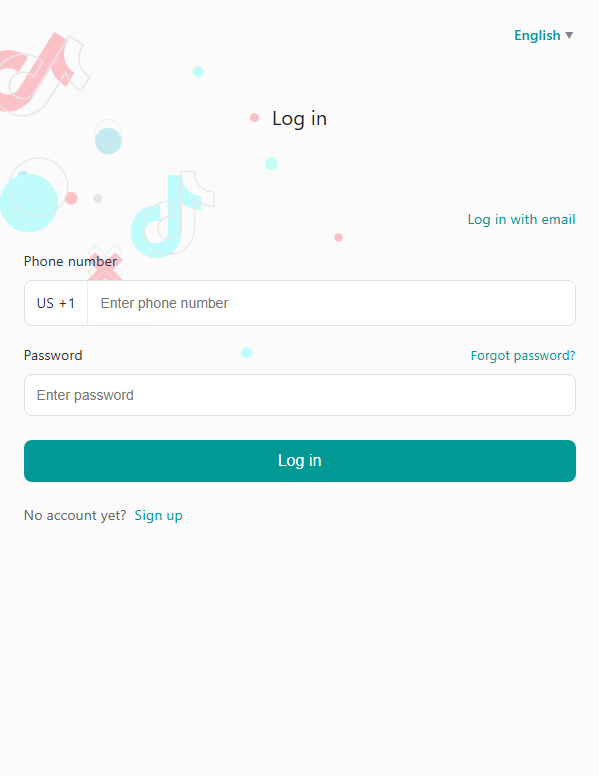
The link might take you directly to a page made to look like TikTok’s login screen. If you enter your information, it can be sent straight to the scammers, including your phone number or email, password, and potentially a one-time authentication code.
With access to your account, scammers could impersonate you, target your contacts, or try to use the same password to break into your other accounts.
What to do if you get a suspicious TikTok message
If you get an unexpected email or message telling you to log in to TikTok, don’t use the link it provides. Open the real TikTok app or go directly to tiktok.com instead and check your account there.
If you’ve already entered your login information on a suspicious page, change your TikTok password immediately and check for any devices or login activity you don’t recognize.
Fake warnings and verification offers
Not every TikTok phishing link leads directly to a fake login screen. Some try to scare you with claims that your account has been suspended or reported, or that you’ve received a copyright or community-guidelines strike that needs “resolving.” Others offer something you might want, such as a verified badge, creator payout, or brand deal.
For example, a fake TikTok Verification Center might congratulate you on your performance and tell you that you’re eligible for a verified badge:
Another fake verification page asks for account information as part of a supposed verification request:
Whether the message threatens you with a problem or promises you a reward, the aim is the same: to persuade you to interact with a fake TikTok page and hand over information.
Why these TikTok scams work
Fake TikTok pages can look convincing because copying the appearance of a real website is relatively easy. But the story that gets you there is just as important.
Suspension and copyright warnings create urgency. Verification and monetization offers create an incentive. Both give you a reason to act quickly instead of stopping to check where the link has actually taken you.
How to protect your TikTok account
Don’t use links in unexpected emails or messages asking you to log in to TikTok. Open the TikTok app or go directly to tiktok.com instead
Treat any message about a suspension, strike, or verification eligibility as unverified until you’ve confirmed it inside the TikTok app itself
Check the address bar before entering your login information. Make sure you’re actually on tiktok.com—a fake page can look almost identical to the real thing
Use a password manager where possible. It won’t auto-fill your TikTok password on a different domain, which is a useful warning sign
Turn on two-factor authentication (2FA) on your real TikTok account so a stolen password alone isn’t enough to get in
If you’ve already entered your login information on a page like this, change your TikTok password immediately and check for any login activity or devices you don’t recognize
Researchers have uncovered ToxicPanda 2.0, an Android banking Trojan and remote-access tool designed for account takeover and “on-device fraud.”
Not only does ToxicPanda 2.0 have a much larger target list of banks and e-wallets, it has also expanded its capabilities by combining banking overlays, remote access, PIN capture, Android accessibility abuse, and attempted Wireless Debugging automation. Together, those functions can help operators turn a compromised phone into a platform for account
Researchers have uncovered ToxicPanda 2.0, an Android banking Trojan and remote-access tool designed for account takeover and “on-device fraud.”
Not only does ToxicPanda 2.0 have a much larger target list of banks and e-wallets, it has also expanded its capabilities by combining banking overlays, remote access, PIN capture, Android accessibility abuse, and attempted Wireless Debugging automation. Together, those functions can help operators turn a compromised phone into a platform for account takeover, financial fraud, and longer-term device control.
The core objective is on-device fraud. That means that rather than logging in from an attacker-controlled machine, the operator can carry out actions from the victim’s infected phone, taking over the device, IP address, app session, and behavioral context that banks may use when deciding whether a transaction is fraudulent.
ToxicPanda 2.0 is built around abusing Android’s Accessibility Service, a legitimate feature intended to help people interact with their devices. When a victim grants this permission to a malicious app, the malware can inspect interface elements, observe app activity, automate interactions, and place deceptive content over legitimate apps, known as overlays.
ToxicPanda has historically relied on social engineering to persuade users to sideload a malicious Android application rather than install it through Google Play. The latest campaign uses Amazon AWS-hosted buckets to deliver ToxicPanda 2.0 samples.
After installation, the dropper presents a fake installation flow, requests VPN privileges, blocks certain Google Play and Google Play Services network communications, decrypts an embedded payload, and then seeks Accessibility Service permission for the installed payload.
The consequences can include stolen banking usernames and passwords, intercepted or captured PINs, fraudulent transactions, loss of access to the device, and exposure of the phone’s screen-lock secret. An attacker that can operate inside an active banking session from the victim’s device may have a better chance of evading controls designed to identify unfamiliar devices or unusual login locations.
How to stay safe
However sophisticated it is, ToxicPanda 2.0 still relies heavily on social engineering to get targets to install the malicious app and give it the permissions it needs. So our main recommendations are:
Avoid sideloading apps, especially from links in unsolicited messages, ads, or alleged support communications.
Treat requests for Accessibility access, Device Administrator privileges, developer settings, and VPN permissions with particular caution, especially if it’s not clear why the app needs those permissions or if you don’t fully trust it.
Use an up-to-date, real-time anti-malware solution for your device that can detect and block the malicious payload. Malwarebytes for Android detects apps in the ToxicPanda 2.0 campaign as Android/Trojan.Dropper.agent and Android/Trojan.FakeApp.ACR2401245FC11.
If your device is infected
Although it may require a factory reset to regain control of an infected device, there are some things you can try first:
First, put the phone in airplane mode and turn off Wi-Fi and Bluetooth. This can cut off command-and-control communications and ongoing credential theft while you investigate.
Use another device to freeze or closely monitor transactions, revoke active sessions, and reset your banking credentials.
Do not interact with fake “system update” screens or unexpected prompts for Accessibility, VPN, Device Administrator, Developer Options, or Wireless Debugging.
Start Android Safe Mode. Google recommends Safe Mode to help identify problems caused by downloaded apps. Remove recently installed or suspicious apps one at a time, reboot normally, and see whether the problem returns.
Remove Accessibility access first. In Settings > Accessibility > Installed apps/Downloaded apps, disable any service you do not recognize. Focus on recently installed apps or anything pretending to be an update, system component, security tool, document viewer, or bank helper.
Next, check Device Administrator rights. Go to Security & privacy > More security settings > Device admin apps and disable any unrecognized administrator before attempting removal. An app with Device Administrator privileges can make the Uninstall control unavailable.
Then check your VPNs. Go to Settings > Network & internet > VPN or search Settings for “VPN,” and delete any VPN profile you did not deliberately install. The ToxicPanda dropper uses VPN permission as part of its reported Google Play and Google Play Services blocking process.
Disable dangerous developer functionality. Search Settings for Developer options, turn it off entirely, and make sure Wireless debugging and USB debugging are off.
Remove all the suspicious apps you found. Go to Settings > Apps > See all apps, enable Show system apps if necessary, then locate recently installed or unfamiliar apps. Force stop the suspicious app, clear its storage, and select Uninstall. If an app has a generic name, blank icon, odd install date, or was installed outside Google Play, treat it as suspicious.
Reboot normally after removal, then re-check Accessibility, Device Administrator, VPN, and Developer Options. Also review the installed-app list for a second suspicious package, since the reported campaign uses a dropper to decrypt and install its payload.
Please note: The given paths in Settings may differ depending on your device manufacturer or Android version.
If you’re having trouble removing ToxicPanda manually and you can’t install or update Malwarebytes, please reach out to our Support team. They can walk you through the process.
Scammers know more about you than you think.
Malwarebytes Mobile Security protects you from phishing, scam texts, malicious sites, and more. With real-time AI-powered Scam Guard built right in.
The ToxicPanda Android malware has evolved with new malicious functionality, expanding its targeting to 349 applications and adding support for 167 remote commands. [...]
The ToxicPanda Android malware has evolved with new malicious functionality, expanding its targeting to 349 applications and adding support for 167 remote commands. [...]
Google’s new Android verification flow adds a 24-hour wait for apps from unverified developers as broader identity checks approach.
The post Google Tightens Android Sideloading: Unverified Apps Now Face a 24-Hour Wait appeared first on TechRepublic.
Manic Android malware combines banking fraud and spyware, using a Bluetooth relay to steal data even when devices are offline.
ThreatFabric’s Mobile Threat Intelligence team has identified a new Android malware, dubbed Manic, which has been active in the wild since at least February 2026. The researchers state that the malware is still under development as of July.
“Manic sits at the intersection of Android banking malware and mobile spyware, combining financial-fraud capabilities with b
Manic Android malware combines banking fraud and spyware, using a Bluetooth relay to steal data even when devices are offline.
ThreatFabric’s Mobile Threat Intelligence team has identified a new Android malware, dubbed Manic, which has been active in the wild since at least February 2026. The researchers state that the malware is still under development as of July.
“Manic sits at the intersection of Android banking malware and mobile spyware, combining financial-fraud capabilities with broader surveillance and device-control features.” reads the report published by the ThreatFabric’s Mobile Threat Intelligence team. “Its targeting is strongly focused on Ukraine, covering Ukrainian banks, government and identity services, and messaging applications, while also extending to Russian and European financial institutions, global fintech and cryptocurrency services, and military-focused communications.”
The malware monitors 169 different Android apps, including banking and payment apps across several European countries, government and eID services, crypto exchanges and wallets, 2FA tools, messaging apps, browsers and email clients.
This wide coverage appears deliberate. By targeting both financial and communication apps, the attackers can track a victim’s money, messages, location and files from the same device.
ThreatFabric traces the first infrastructure registrations back to February 2026, with development and production services appearing in late March and April. By July, an updated build had added stronger anti-analysis checks, in-memory DEX loading, and a technique the researchers call lock-secret phishing, which extracts the device PIN or pattern by presenting a fake prompt before the victim reaches the real lock screen.
Once installed, Manic requests Accessibility and notification access, then uses the Accessibility service as a UI keylogger. It classifies everything it captures before logging it: lock-screen input, recovery phrase candidates, four-to-six-digit SMS codes, passwords, long messages, email logins, and ordinary text.
“Manic uses its Accessibility service as a UI keylogger. It classifies captured text before recording it, distinguishing lock-screen input, recovery-phrase candidates, four- to six-digit SMS codes, passwords, long messages, email logins, and ordinary text.” continues the report. “Each key log record includes the app and package, captured text, timestamp, whether the input came from Autofill or manual entry, and whether the app is on Manic’s target list “
Each log record includes the app name and package, the captured text, a timestamp, whether input came from autofill or manual entry, and whether the app is on Manic’s target list.
The PIN theft technique works differently from a typical banking overlay. When Manic detects a numeric keypad in a targeted app, it places an invisible layer over the keys and records each tap. It then briefly passes the tap to the real keypad using Android’s Accessibility features, so the banking app works normally while Manic captures the PIN.
Another function, called autoEnterPin, can try to enter a stored PIN or pattern on the Android lock screen. This gives attackers two options: capture a PIN during a banking session and later use it to unlock the device without the victim being present.
According to the researchers, Manic stands out for its offline relay.
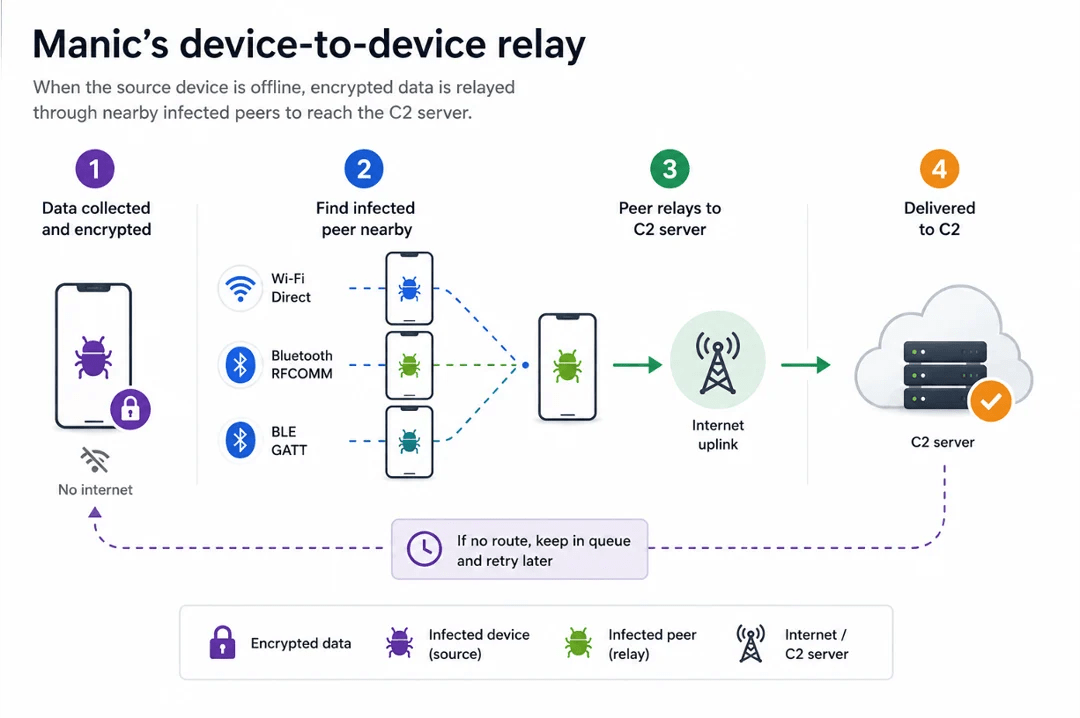
“Manic uses a store-and-forward relay mechanism to exfiltrate data even when the infected device cannot reach the C2 server directly.” continues the report. “Collected files and command results are encrypted with AES-GCM and placed in a local queue, allowing the source device to remain offline while the malware searches for another infected device that can provide a route to the C2 infrastructure.”
Manic searches for nearby infected devices over Wi-Fi Direct, Bluetooth RFCOMM, or BLE GATT, and supports chains of up to four relay hops. Cutting an infected phone off from the Internet doesn’t cut it off from exfiltration, as long as another infected device is within radio range. It’s a store-and-forward mesh built out of other people’s compromised phones.
Manic gives attackers remote control of the device through WebRTC, allowing them to view the screen and interact with it using Android’s Accessibility features. It can hide its activity with black screens, fake screens or fake update messages, while also covering permission requests.
The July version goes a step further by removing itself from the device’s app launcher. This keeps it out of the normal app list and lets attackers activate it through its wrapper or a deep link.
For defenders, the combination here is complete in an uncomfortable way: credential theft, live screen monitoring, authentication interception, device takeover, and an exfiltration path that doesn’t require the infected device to have Internet access at all. Monitoring for unusual Accessibility service grants and unexpected Bluetooth or Wi-Fi Direct connections from phones that aren’t actively transferring files are the most practical detection starting points.
“Manic is an evolving Android fraud platform designed for Device Takeover (DTO), combining credential and authentication theft with live screen monitoring and remote control. Its targeting spans banks, payment and cryptocurrency services, eID applications, and messengers, with a strong focus on Ukraine.” concludes the report. “A particularly distinctive capability is its offline mesh relay, which allows collected data to move through nearby infected devices over Wi-Fi Direct or Bluetooth when direct C2 access is unavailable. “
A Google spokesperson announced on Reddit that it has started rolling out the first version of its Advanced Flow, designed to make installing apps from unverified developers safer.
Let us explain what sideloading is, why Google Play is not 100% safe, what to look for when you’re sideloading so you can do it more safely, and how Google’s Advanced Flow helps with that.
What is sideloading?
Sideloading lets Android users install apps from outside Google Play. It can be useful, but it also
A Google spokesperson announced on Reddit that it has started rolling out the first version of its Advanced Flow, designed to make installing apps from unverified developers safer.
Let us explain what sideloading is, why Google Play is not 100% safe, what to look for when you’re sideloading so you can do it more safely, and how Google’s Advanced Flow helps with that.
What is sideloading?
Sideloading lets Android users install apps from outside Google Play. It can be useful, but it also creates opportunities for scams and malware.
Android’s openness is one of its enduring strengths. You are not limited to a single app store: You can install apps from a developer’s website, an alternative marketplace, an enterprise portal, or a file shared directly with you.
That is called sideloading. It is not automatically dangerous, but it removes some of the guardrails that come with conventional app-store distribution. Getting apps from the Google Play Store itself is no guarantee of safety, but there is at least some vetting. Google says it blocked more than 1.75 million policy-violating apps from being published in 2025 and banned more than 80,000 developer accounts associated with harmful apps.
There are several reasons for sideloading:
The developer distributes an app directly from its own website
An app is unavailable in your country or on Google Play
An alternative app repository offers what you’re after, for example open-source software
You need an enterprise, beta, or specialized app
You want to install a version that is not currently offered through Google Play
But malware authors and online scammers use the same flexibility. They may impersonate banks, delivery services, government agencies, crypto platforms, news readers, or job recruiters, then urge victims to install an app to “secure” an account, receive a payment, or resolve an invented problem.
Google Play is not a free pass
Google Play has review processes, policy enforcement, developer controls, and Google Play Protect. It also runs ongoing checks after an app is published. Those measures meaningfully reduce risk, but they do not make every listing harmless or every developer trustworthy.
Threats that can still surface through official channels include:
Trojans disguised as useful utilities, games, or financial apps
Adware and apps that misrepresent their behavior
Subscription traps and deceptive billing practices
Data-harvesting apps that request more access than they need
Sleeper apps that change behavior after passing an initial review
Google Play Protect checks Play Store apps before download and also scans apps from other sources. It can warn about, disable, or remove potentially harmful apps, but it should be viewed as one layer of security, not a substitute for scrutinizing an app before installing it.
In short, “available on Google Play” is a positive signal, not a security verdict.
Why sideloading requires attention
The main difference between installing from a recognized store and downloading an APK from elsewhere is not simply the file format. It is the trust chain.
When you sideload, you may have fewer assurances about:
Who created the app
Whether the file has been altered or repackaged
Whether the download site is impersonating a legitimate developer
Whether you will receive genuine updates
Whether a scammer is manipulating you into disabling security protections
Social engineering is often the decisive factor. A convincing caller, pop-up, text, or chat message may insist that installing an app is urgent. The attacker’s goal is often to make the victim bypass warnings before they have time to question the request.
Treat any unexpected request to install an app as suspicious, especially when it comes with urgency, secrecy, a promise of money, or a claim that your bank, government, employer, or device provider requires it.
A legitimate bank, government agency, law-enforcement organization, or technical-support provider should not call or message you and instruct you to install an APK or weaken Android security settings.
How to sideload more safely
Sideload only when you have a specific reason for it, and make sure the decision came from you rather than an unexpected message or phone call.
Start at the developer’s official site. Don’t use sponsored search results, random download portals, links sent by strangers, or lookalike domains.
Verify the developer independently. Check the publisher’s official website, documentation, public code repository, and trusted community channels. The information supplied on the download page alone is not enough.
Prefer established repositories. If an app is distributed outside Google Play, use a source with a strong reputation for provenance and signature verification where possible. For advanced users, it can be useful to compare an APK’s signing certificate or cryptographic hash against a value published by the developer. That is not practical for everyone, but it can help detect fakes.
Do not install apps under pressure. End the call, close the chat, and independently research the claimed organization using contact details you find yourself.
Keep Google Play Protect enabled. It scans apps during installation and periodically afterward, including apps installed from outside Google Play.
Review permissions before and after installation. Be especially cautious if a simple app wants access to accessibility services, SMS messages, notifications, device administration, contacts, or screen recording.
Keep Android and apps updated. Security fixes can protect against both operating-system flaws and known malicious app behavior.
Use reputable mobile security software. A separate security layer can help identify risky behavior and provide additional visibility into potentially unwanted or malicious apps.
Remove permissions and uninstall apps you no longer trust or use. An app that seemed harmless at installation can become a liability if its developer abandons it or changes direction.
How Google’s new Advanced Flow helps
Google is rolling out Advanced Flow for installing apps from developers that have not completed Android’s new identity-verification process. The feature is intended for users who understand the risks of installing unverified software but still need that flexibility.
The design is notable because it targets social-engineering attacks as well as malware. Instead of allowing an immediate, one-tap override, the flow requires users to:
Enable developer mode in system settings. This is easy enough and helps prevent accidental or one-tap bypasses often used in high-pressure scams.
Complete a quick safety check to make sure that no one is talking you into turning off your security. Scammers often pressure victims into disabling protections.
Restart your device, which cuts off any remote access or active phone calls a scammer might be using to guide you.
Wait one day, then confirm the change using biometrics, such as fingerprint or face unlock, or your device PIN. This one-time, one-day delay breaks the urgency scammers rely on, giving you time to think.
Once you have completed the process, you can choose to allow installs from unverified developers for seven days or indefinitely.
Advanced Flow does not mean Google Play is risk-free, nor does it make unverified apps inherently malicious. Developer verification establishes accountability: It connects an app to a verified developer identity, but it does not establish that every app is benign or suitable for every user.
At the end of the day, it’s up to you. Install apps because you chose them after checking the source, not because someone else manufactured an emergency.
Whether an app comes from Google Play or an external source, pause before installing. Check who made it, why it needs the permissions it asks for, whether the download route is trustworthy, and refuse when a stranger is trying to rush you. That little friction is a feature, not just a nuisance.
Scammers know more about you than you think.
Malwarebytes Mobile Security protects you from phishing, scam texts, malicious sites, and more. With real-time AI-powered Scam Guard built right in.
Android 17 QPR2 Beta 3 adds Pixel customization tools, call-forwarding scam protections, and experimental cellular security features.
The post Android 17 QPR2 Beta 3: Google Adds Customization and New Scam Defenses appeared first on TechRepublic.
A new Android malware named Manic targeting users in multiple European countries has a fallback data exfiltration mechanism that uses nearby infected devices. [...]
A new Android malware named Manic targeting users in multiple European countries has a fallback data exfiltration mechanism that uses nearby infected devices. [...]
Most wrong-number texts are harmless. Some are the first step in a carefully planned scam. By replying, you may be confirming that your number is active and that you’re willing to engage with strangers, making you a more valuable target for future fraud. Here’s why a polite response can be worth money to cybercriminals.
The politeness trap
Sunday night. You’re on the couch, half-watching Netflix, when your phone buzzes.
“Hey! Are we still on for dinner tomorrow? Don’t forget the win
Most wrong-number texts are harmless. Some are the first step in a carefully planned scam. By replying, you may be confirming that your number is active and that you’re willing to engage with strangers, making you a more valuable target for future fraud. Here’s why a polite response can be worth money to cybercriminals.
The politeness trap
Sunday night. You’re on the couch, half-watching Netflix, when your phone buzzes.
“Hey! Are we still on for dinner tomorrow? Don’t forget the wine ”
You don’t recognize the number. You glance at it for two seconds, then type what most polite people would:
“Sorry, I think you have the wrong number!”
You put your phone down. Go back to Netflix, and forget about it within five minutes.
On the other end, though, your reply has just told the sender something valuable. Not because of a technical exploit or an invisible cyber-attack, but because you just proved you’re the kind of person who responds to strangers politely.
According to cybercrime intelligence reports, responsive phone numbers are worth significantly more than inactive ones. With a single reply, you’ve entered a global criminal ecosystem run by transnational syndicates that, according to analysts, moves tens of billions of dollars.
What your reply told them
Let’s be clear: the “wrong number” text is not a phishing link. It’s not malware. In many cases, it’s not even the scam itself. It’s a personality test.
The scammers already have your number. They may have bought it in bulk from a data breach for a fraction of a cent per record. They already know the message was delivered because their SMS gateway received no delivery failure. Text messages remain one of the most effective ways to reach people, with exceptionally high open rates and most being read within minutes. That’s one reason scammers prefer SMS to email.
What they don’t know is whether you’re worth spending more time on. Your reply told them three useful things:
You’re responsive. You saw the message and felt compelled to reply. This immediately places you in their top 15–20% most active numbers category.
You’re polite. You didn’t ignore it and didn’t respond aggressively. You wanted to help a stranger. Scammers deliberately exploit that instinct to be polite and helpful.
You reply quickly. The time between their message and your reply can reveal how closely you monitor your phone, help estimate your timezone, and indicate how likely you are to respond to future messages.
The two paths your number takes
From this moment, your story splits. Both paths described below play out across millions of phones worldwide.
Scenario A: The slow burn
Within minutes of your reply, another message arrives in response to yours:
“Oh no, I’m so sorry! But honestly, you seem like a really kind person. It’s rare to find polite people these days. I’m Sarah, by the way.”
Some people stop the conversation there. Others reply out of curiosity or because they’re simply being friendly. A few messages later, you’re in a conversation.
In some large scam operations, those early exchanges may be handled by AI (Artificial Intelligence) using open-source language models such as Llama or Mistral. That allows scammers to hold thousands of conversations at once and focus their time on the people who seem most likely to keep talking.
While keeping you engaged, the AI assigns you a real-time vulnerability score based on your response time and message length. If your score crosses a certain threshold, a human operator takes over. They read the conversation, learn your name, your job, and your communication style, then continue as though nothing has changed.
Within two or three weeks, this person has become a friend. They text you good morning, ask about your day, and send photos stolen from real social media profiles.
Around week three, they casually mention an investment:
“I’ve been making really good money on an investment platform lately. Almost $4,000 last month. It’s crazy.”
If you show interest, they’ll send you a link to a fake trading platform with a convincing design. You might deposit $500 to test it. The next day, your dashboard shows a fake gain of $1,800, so you invest more. A week later, the platform disappears, along with your money, and the person who texted you every day.
According to the FBI’s Internet Crime Complaint Center (IC3), investment fraud generated more than $4.5 billion in reported losses in a single year. To be clear: while most wrong-number texts never reach this stage, victims who fall for so-called “pig butchering” scams (long-term romance/financial scams) suffer catastrophic average losses ranging between $70,000 and $75,000 per person.
Scenario B: The silent recycling
In this scenario, you replied “wrong number” and never heard from them again. You think you dodged the scam, but instead your number was simply moved to a different category: “Active, responsive, polite, but not susceptible to the wrong-number hook.”
That profile still has enormous commercial value. Your number is added to a cleaned database and sold or reused for a different campaign.
A week later you receive a text from another number:
“Hi! I saw your profile on LinkedIn. We have an opportunity that’s a perfect fit for your background.”
Or:
“Your package couldn’t be delivered, update your address by clicking here.”
Or a fake alert from your bank warning of “suspicious activity.”
You’ll probably never connect these messages to the wrong-number text you received the week before. They’re different topics and different senders. But they may all be part of the same criminal ecosystem. The first message was simply a way to sort potential targets. Everything that follows is the actual attack.
The most common hooks
If you’ve received one of these messages (or something very similar), you’re not alone. These are some of the most common opening lines used in wrong-number scams, tested on millions of people and optimized to maximize response rate:
The friend who doesn’t exist:
“Hey! See you tonight at 6? Don’t be late ”
“Are you still free tomorrow?”
“Did you send those files to the office?”
“Hey Marco, are we still on for dinner tonight?”
The concerned neighbor:
“Sorry to bother you, I’ve noticed your dog sometimes runs into my yard.”
“I found a phone number on the dog tag, is this yours?”
“Hi, your package was delivered to my address by mistake.”
The professional mix-up:
“Hi, I tried to reach you about the delivery but you didn’t answer.”
“The shipment arrived at your address, can you confirm?”
“This is Mike from the office, did you get my earlier message?”
The family emergency:
“Do you know Sarah? There’s been an emergency.”
“Is this [common name]’s number? Something happened.”
The recruiter:
“Hi! I came across your profile, we have an incredible opportunity.”
“Hey, I’m reaching out about a position that matches your background perfectly.”
If you’ve received one of these messages, it doesn’t automatically mean it’s a scam. People genuinely do text the wrong number sometimes. But if the conversation quickly moves to making small talk, asking personal questions, or encouraging you to keep chatting, stop replying.
These messages aren’t usually sent by a lone cybercriminal. They’re part of a highly organized criminal industry with its own market dynamics and global supply chains.
In January 2026, Cambodian and Chinese authorities arrested Chen Zhi, president of Prince Holding Group, accusing him of running a network of scam compounds across Southeast Asia where thousands of trafficked people were forced to manage these conversations. Those operations relied on underground marketplaces where criminals could buy everything they needed, from phone lists and stolen identities to AI tools and fake investment websites.
The scale is staggering. Blockchain analytics firm Elliptic estimates the Huione Guarantee underground marketplace processed more than $134 billion in transactions. Separately, researchers at the University of Texas at Austin estimate that pig-butchering scams stole more than $75 billion in cryptocurrency over four years.
The scam funnel: Costs and revenue
To understand why this ecosystem is so huge, look at the math. Sending hundreds of thousands of text messages costs very little. Even if only a tiny fraction of people reply, and an even smaller number eventually send money, the profits can far outweigh the costs.
Look at this illustrative model of a campaign sending 100,000 SMS messages:
The figures in this model aren’t arbitrary. They combine observed pricing from underground marketplaces such as Russian Market and BidenCash with average victim losses reported by law enforcement agencies, including the FBI’s Internet Crime Complaint Center (IC3).
Even allowing for variation between campaigns, the economics are compelling. A single campaign can cost less than $1,000 to run while generating more than $200,000 in revenue, representing a potential return on investment (ROI) of 90x to 200x.
Those same economics are reflected in underground marketplaces, where verified, enriched contact details command significantly higher prices than raw data. In our previous investigation into underground marketplaces, we found that a typical stolen personal record sold for around 95 cents. The more criminals learn about a potential victim, the more valuable that person’s data becomes.
That’s a 4,000% value increase generated by a single polite reply.
From there, scammers can enrich that record with publicly available information such as your name, employer, social media profiles, and estimated demographics using automated open-source intelligence (OSINT) techniques.
The more complete the profile becomes, the more valuable it is. Researchers monitoring underground marketplaces have found that enriched, pre-profiled contacts command premium prices because they’re more likely to become victims of high-value pig-butchering scams that generate billions of dollars in illicit revenue each year.
How do they know who you are?
Before that text reaches your phone, your number may already have passed through automated script pipelines capable of cross-referencing tens of thousands of records in minutes.
Acquisition: Your number is pulled from historical data breaches, such as the Facebook leak affecting 533 million users, Twitter/X data leaks, or massive aggregated databases like Naz.api, and the Mother of All Breaches (MOAB), a collection of more than 26 billion records compiled from thousands of previous breaches.
Automated scraping: Software queries public sources to check whether your number is linked to an active WhatsApp account, collect your profile information and picture and match the number to public LinkedIn, Instagram, and Facebook profiles.
Data broker integration: Scammers exploit the same commercial data services used by marketing companies to associate a phone number with estimated age, address, and income bracket.
The result is a psychographic and commercial profile that helps scammers choose the most convincing approach. If your social media shows you have a dog, you might receive the neighbor hook: “Your dog keeps getting into my yard.” If you recently changed jobs on LinkedIn, the fake headhunter hook activates.
The human factor: Modern slavery
There’s one aspect of these scams that’s often overlooked: many of the people sending the messages are victims themselves.
In its August 9, 2023 policy report, the United Nations Office on Drugs and Crime (UNODC) described a human rights crisis tied to forced criminality in Southeast Asia. It estimates at least 120,000 people in Myanmar and tens of thousands in Cambodia are being held in fortified mega-compounds run by criminal syndicates.
Many were lured by fake job adverts promising legitimate work in digital marketing or customer service. Once they cross the border, their passports are confiscated. They were stripped of freedom and forced, under the threat of violence, to spend up to 16 hours a day managing dozens of scam conversations. Those who failed to meet financial targets were often beaten, isolated, or sold to other compounds.
When you reply to one of these messages, you’re interacting with a system designed to simultaneously exploit your financial availability and the enslavement of another human being.
Breaking the chain
You can’t erase your number from dark web databases: that damage may have done years ago. But you can make your profile far less valuable to scammers.
Make yourself harder to profile: Review the privacy settings on any messaging apps and social media platforms that use your phone number. Limit who can see information such as your profile photo, status, last seen, and phone number. The less information scammers can gather automatically, the harder it is to build a detailed profile about you. On WhatsApp, for example, you can set Profile Photo, About, Status, and Last Seen to My Contacts. On Telegram, set Phone Number to Nobody.
Report before you block: Blocking protects only you. Reporting protects everyone. When you use WhatsApp’s Report and Block function, the last five messages in the chat are sent to Meta’s security teams. If enough people report the same number, it may be permanently banned, destroying the entire active campaign on that line.
The golden rule: If you receive an unexpected message from an unknown number, the safest response is no response at all. Don’t reply, don’t explain yourself, and don’t worry about seeming impolite. If it’s a genuine wrong number, the sender will usually realise their mistake and move on. If it’s a scam, you’ve denied the criminals exactly what they wanted: proof that your number is active and that you’re willing to engage.
Something feel off? Check it before you click.
Malwarebytes Scam Guard helps you analyze suspicious links, texts, and screenshots instantly.
Apple sent a new wave of mercenary spyware threat notifications to targeted users in 110 countries, while making the warnings more visible on iPhones. The alerts signal suspected targeting, not confirmed compromise, and Apple is urging affected users to verify the warning, consider Lockdown Mode, and seek expert help.
The post Apple Warns Users in 110 Countries of Mercenary Spyware as iPhone Alerts Get Harder to Miss appeared first on TechRepublic.
Apple sent a new wave of mercenary spyware threat notifications to targeted users in 110 countries, while making the warnings more visible on iPhones. The alerts signal suspected targeting, not confirmed compromise, and Apple is urging affected users to verify the warning, consider Lockdown Mode, and seek expert help.
Apple warns users of credible, targeted attacks and urges immediate verification, stronger protections, and expert assistance.
Apple has sent a new round of threat notifications to users it believes may have been singled out by mercenary spyware. The company told TechCrunch the latest alerts reached people in 110 countries, adding to notifications it has already issued in more than 150 countries since the programme began in 2021.
“Apple threat notifications are designed to inform and assi
Apple warns users of credible, targeted attacks and urges immediate verification, stronger protections, and expert assistance.
Apple has sent a new round of threat notifications to users it believes may have been singled out by mercenary spyware. The company told TechCrunch the latest alerts reached people in 110 countries, adding to notifications it has already issued in more than 150 countries since the programme began in 2021.
“Apple threat notifications are designed to inform and assist users who may have been individually targeted by mercenary spyware attacks, likely because of who they are or what they do. Such attacks are vastly more sophisticated than regular cybercriminal activity, as mercenary spyware attackers apply exceptional resources to target a very small number of specific individuals and their devices.” reads the alert. “Mercenary spyware attacks cost millions of dollars and often have a short shelf life, making them much harder to detect and prevent. The vast majority of users will never be targeted by such attacks.”
That alone should reset the usual mental model. This isn’t about a suspicious app, a recycled phishing email, or the kind of opportunistic malware that lands wherever it can. Apple’s alerts concern highly targeted attacks against particular people, often because of their role, their work, or the people they know.
The people most likely to receive these notifications include journalists, activists, politicians, diplomats, lawyers, and others whose devices may hold valuable conversations, contacts, documents, or location data. That does not mean every recipient has been fully compromised, but it does mean Apple has observed enough to treat the risk as credible.
Apple has also changed how it delivers those alerts. A recipient may see a push notification directly on the iPhone lock screen and in Settings, receive an email from threat-notifications@email.apple.com, and find a warning banner after signing in to their Apple Account. The company says genuine notices will never ask users to click a link, open a file, install a profile, or provide a password or verification code by email or phone.
“Apple relies solely on internal threat-intelligence information and investigations to detect such attacks. Although our investigations can never achieve absolute certainty, Apple threat notifications are high-confidence alerts that a user has been individually targeted by a mercenary spyware attack, and should be taken very seriously.” continues the report. “We are unable to provide information about what causes us to issue threat notifications, as that may help mercenary spyware attackers adapt their behavior to evade detection in the future.”
That lack of detail can frustrate recipients. They want to know who targeted them, how the device was approached, and whether the attacker got in. Apple can’t safely answer most of those questions in public, because publishing the detection logic would give spyware vendors a free quality-assurance report. Nobody needs to make Pegasus-style operators more efficient.
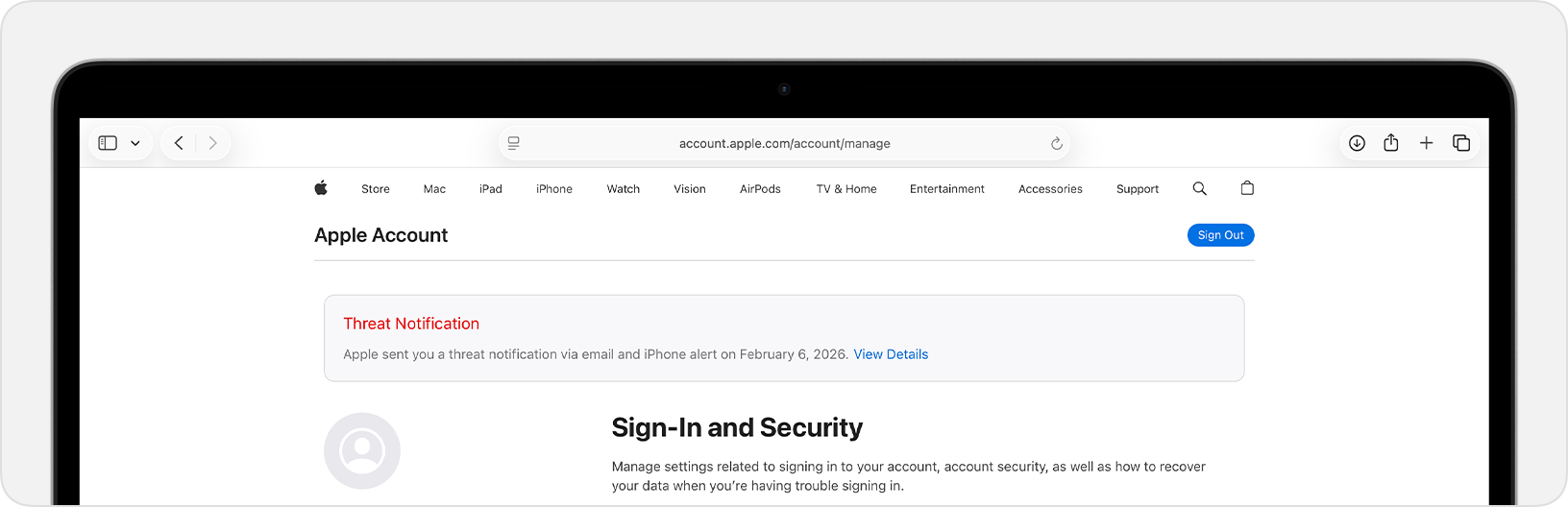
If you receive the warning, don’t panic and don’t start improvising. First, verify it by signing in directly at account.apple.com: a genuine Apple threat notification appears at the top of the page. Then preserve the device, avoid unnecessary resets or changes until you have spoken to someone qualified, and seek expert help, such as the Digital Security Helpline run by Access Now.
Apple recommends enabling Lockdown Mode, its high-security setting designed to reduce the attack surface available to sophisticated spyware. It also advises keeping devices updated, using a strong passcode with Touch ID or Face ID, turning on two-factor authentication, enabling Stolen Device Protection, using strong and unique passwords or passkeys, installing apps only through the App Store, and treating unexpected links or attachments as hostile until proven otherwise.
“Since 2021, we have sent Apple threat notifications multiple times a year as we have detected these attacks, and to date we have notified users in over 150 countries in total. The extreme cost, sophistication, and worldwide nature of mercenary spyware attacks make them some of the most advanced digital threats in existence today.” states the alert. “As a result, Apple does not attribute the attacks or resulting threat notifications to any specific attackers or geographical regions.”
The wider value of these alerts goes beyond the device in front of the recipient. Citizen Lab researcher John Scott-Railton told TechCrunch that notifications can reveal that an entire community is being targeted, because people who receive them often seek help and their cases lead investigators to others.
Most people will never receive one of these warnings. Apple says that plainly, and it is worth repeating because not every cybersecurity story needs to become a universal panic. But if your phone shows an Apple notice saying it detected a targeted mercenary spyware attack, assume it matters until an expert tells you otherwise.
Apple has expanded its threat-notification system for targets of mercenary spyware.
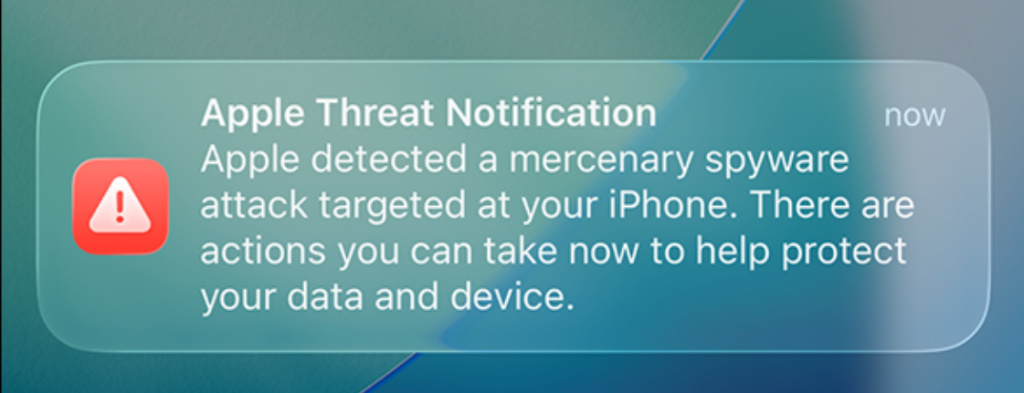
Apple now shows a warning directly on an iPhone’s Lock Screen and in Settings when it believes the device owner has been targeted by mercenary spyware. The new on-device alert is meant to make a high-risk warning harder to overlook and complements notifications by email and through the user’s Apple Account page.
In the explanation, Apple states:
“Apple threat notifications are high-confidence alerts tha
Apple now shows a warning directly on an iPhone’s Lock Screen and in Settings when it believes the device owner has been targeted by mercenary spyware. The new on-device alert is meant to make a high-risk warning harder to overlook and complements notifications by email and through the user’s Apple Account page.
In the explanation, Apple states:
“Apple threat notifications are high-confidence alerts that a user has been individually targeted by a mercenary spyware attack, and should be taken very seriously.”
“Apple Threat Notification Apple detected a mercenary spyware attack targeted at your iPhone. There are actions you can take now to help protect your data and device.”
Apple says its threat notifications are intended for people individually targeted by mercenary spyware attacks, which are highly sophisticated campaigns usually associated with commercial surveillance vendors and their government customers. Apple says it has notified targets in over 150 countries since the launch of the program in 2021, while the latest round of notifications reached people in 110 countries.
Mercenary spyware campaigns are usually not aimed at the average iPhone owner—at least at first. The initial targets are often people selected for who they are, what they know, or the work they do. But it would be a mistake to view this as someone else’s problem.
Attack techniques developed for narrowly targeted operations have a habit of spreading. Exploits can be reused, sold onward, reverse engineered, copied by other surveillance vendors, or adapted by criminal groups. A vulnerability initially valuable because it compromises a small number of carefully chosen devices may become much more dangerous once public disclosure, patch analysis, or exploit sharing makes them available for more widespread campaigns.
How to stay safe
Apple advises users to:
Update your devices to the latest software, which includes the latest security fixes.
Protect your devices with a passcode, Touch ID, or Face ID.
Use strong and unique passwords, and passkeys where available.
Don’t open links or attachments from unknown senders.
We’d like to add:
Potential targets of mercenary spyware should consider applying Apple’s Lockdown Mode.
Check if an Apple Threat Notification is real. Scammers will undoubtedly try and mimic them. You can verify a notification by signing in to your Apple account. A genuine Threat Notification will always be clearly listed there.
If you receive an Apple Threat Notification, Apple recommends seeking expert help, such as the Digital Security Helpline from Access Now.
Scammers know more about you than you think.
Malwarebytes Mobile Security protects you from phishing, scam texts, malicious sites, and more. With real-time AI-powered Scam Guard built right in.
Google’s tap-to-share Quick Share feature is coming to the Galaxy Z Fold 8 and Fold 8 Ultra, adding a faster proximity-based sharing option for personal and managed devices.
The post Galaxy Z Fold 8 Is Getting Android’s New Tap-to-Share Quick Share Feature appeared first on TechRepublic.
Google’s tap-to-share Quick Share feature is coming to the Galaxy Z Fold 8 and Fold 8 Ultra, adding a faster proximity-based sharing option for personal and managed devices.
Researchers at Group-IB have discovered a new NFC relay malware family, purpose-built to capture live card data via NFC and forward it in real time to attackers. They dubbed it “WindRelay.”
NFC (Near Field Communication) is wireless technology that allows devices such as smartphones, payment cards, and payment terminals to communicate when they’re very close together. So, instead of stealing your physical bank card, the attackers capture NFC activity on an infected mobile phone and relay it i
Researchers at Group-IB have discovered a new NFC relay malware family, purpose-built to capture live card data via NFC and forward it in real time to attackers. They dubbed it “WindRelay.”
NFC (Near Field Communication) is wireless technology that allows devices such as smartphones, payment cards, and payment terminals to communicate when they’re very close together. So, instead of stealing your physical bank card, the attackers capture NFC activity on an infected mobile phone and relay it in real time to a criminal-controlled device held against a contactless payment terminal, or an ATM that supports contactless cash withdrawals.
The researchers describe a 13-minute call impersonating a bank, in which a victim was persuaded to install an Android app labelled with the bank’s name. That app was a remote access Trojan (RAT) called SpyNote. SpyNote gave the attacker remote control of the phone and enabled the quiet installation of a second app, WindRelay.
The attackers then opened the victim’s legitimate banking app remotely and arranged a loan in the victim’s name, while also asking them to tap their physical payment card against the phone and enter its PIN. That tap let the second app forward the card’s contactless data in real time to the criminals, allowing them to make purchases or, in some cases, withdraw cash from an ATM.
This division of tasks is the important development here. The remote-access malware (SpyNote) gets the attackers into the phone, and the NFC relay malware (WindRelay) turns the victim’s physical card into something the criminals can use elsewhere at that moment.
It’s not quite as simple as it sounds, because NFC comes in a few different “flavors.” Some produce a static code. Take the card that opens my apartment building door, for example. That kind of signal can easily be copied to a device like my Flipper Zero so I can use it to open the door. But sophisticated contactless payment cards use dynamic codes. Each time you tap to pay, your card’s chip generates a unique, one-time code (often called a cryptogram or token) that cannot be reused.
That’s why the critical feature of NFC relay malware is real-time relaying. Since payment card transactions use dynamic, transaction-specific cryptographic data, timing is central to this kind of fraud.
The telephone call isn’t just the lure. It’s also the attackers’ control channel. It lets them overcome the victim’s hesitation, respond to confusion instantly, and coordinate the precise moments when the victim installs an app, taps their card, and enters a PIN.
This is part of an established and expanding NFC relay fraud category sometimes called ghost tapping. In the past, we’ve discussed NGate and SuperCard X, which are similar malware families. But the combination with SpyNote is what makes this campaign stand out.
How to protect yourself
As with many security threats, the best defense is you. The cybercriminals behind this attack can’t do anything unless you install the software on your phone, so they go through several steps to convince you to do so.
Be skeptical of calls and text messages from people you don’t know, especially those claiming to be urgent. Scammers typically try to panic you into acting quickly. Once they get you on the phone, they can build trust, making it harder to think critically and say no.
If you feel compelled to take action, check in with someone you trust first. If you’re still convinced the request is genuine, verify the message independently. Call your financial institution using an official number, not through the one in the text message or email.
Never give personal details to anyone who contacts you unexpectedly, and never change your banking details at their request. A bank will not ask you to install an app from a link, text message, browser download, or other unofficial source to “secure” your card.
Avoid sideloading apps (installing them from outside of the Google Play store), and treat unexpected Accessibility or device-control permissions as a serious warning sign.
A new Android NFC relay malware called WindRelay is being used alongside the SpyNote remote administration tool (RAT) to steal live card data and send it to attackers in real time. [...]
A new Android NFC relay malware called WindRelay is being used alongside the SpyNote remote administration tool (RAT) to steal live card data and send it to attackers in real time. [...]

 Entrar